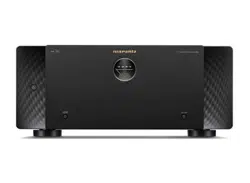
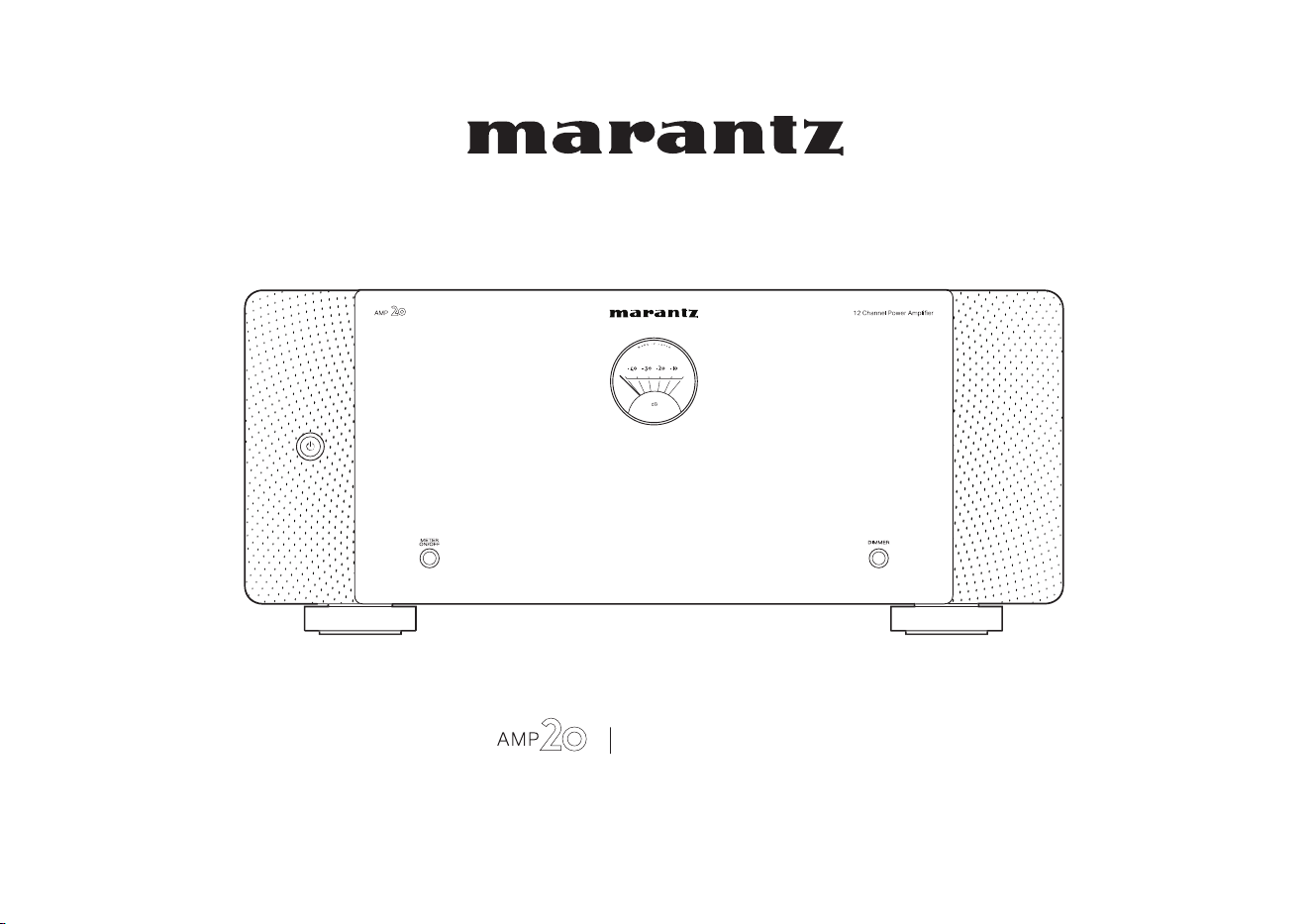
Power Amplifier
Owner’s Manual
1
Accessories
4
Features
5
High quality sound
5
High performance
5
Part names and functions
6
Front panel
6
Rear panel
8
Connections
Preparations
12
Speakers
12
Preamplifier
14
Example connection variation
15
Connecting a Preamplifier
16
Example of connections to Marantz AV 20 Preamplifier
16
Bi-amp connection
18
BTL connection
19
Connecting an external control device
20
AMP CONTROL jacks
20
REMOTE CONTROL jacks
21
FLASHER IN jack
22
DC CONTROL jacks
23
Setting the auto standby function
25
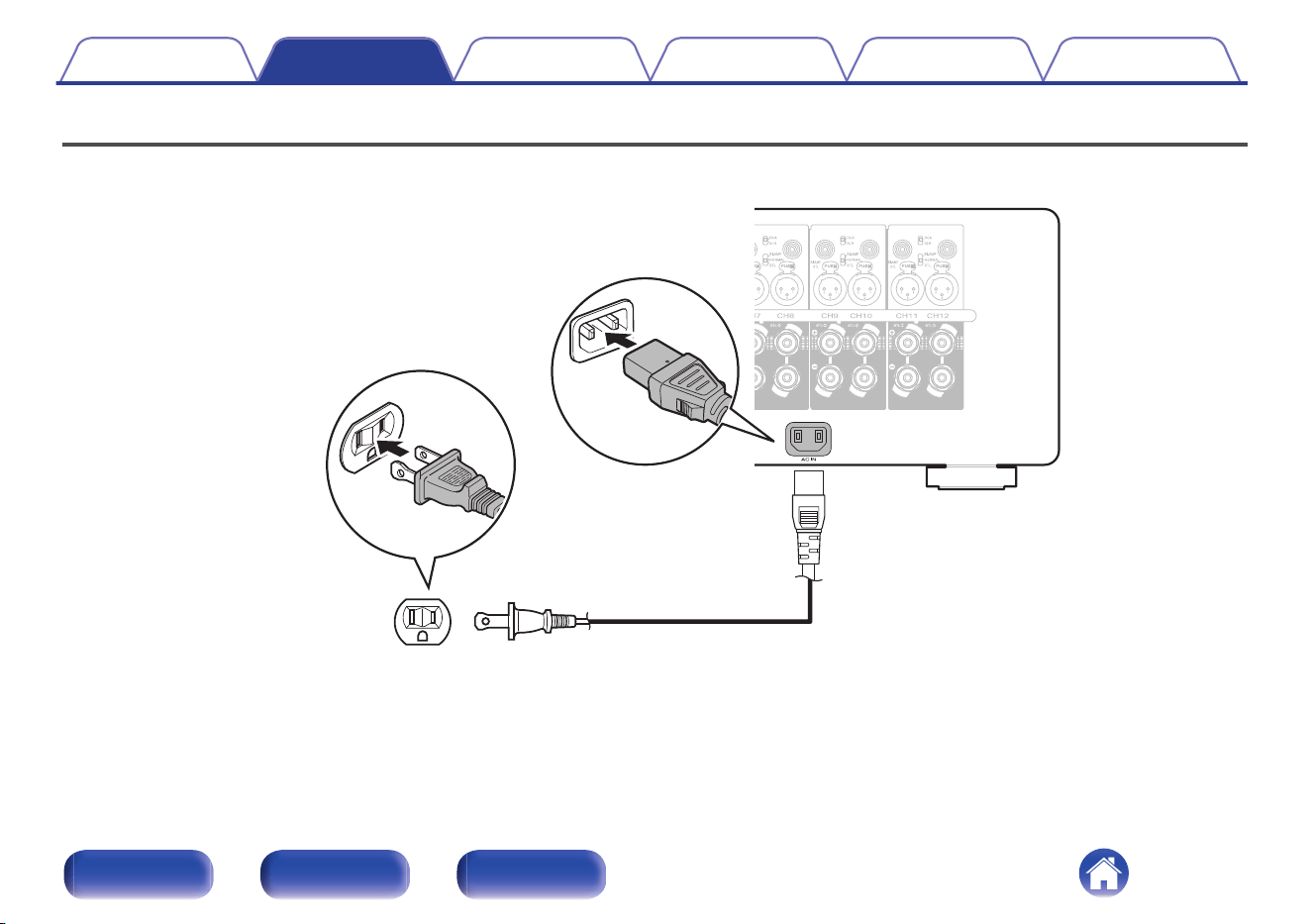
Connecting the power cord
26
Contents Connections Playback Tips Appendix Specifications
2
Front panel Rear panel Index
Playback
Basic operation
28
Turning the power on
28
Turning the power standby
28
Turning the level meter display on or off
29
Changing the brightness of the illumination
30
Tips
Troubleshooting
31
Power does not turn on / Power is turned off
32
No sound comes out
33
Appendix
Explanation of terms
34
Specifications
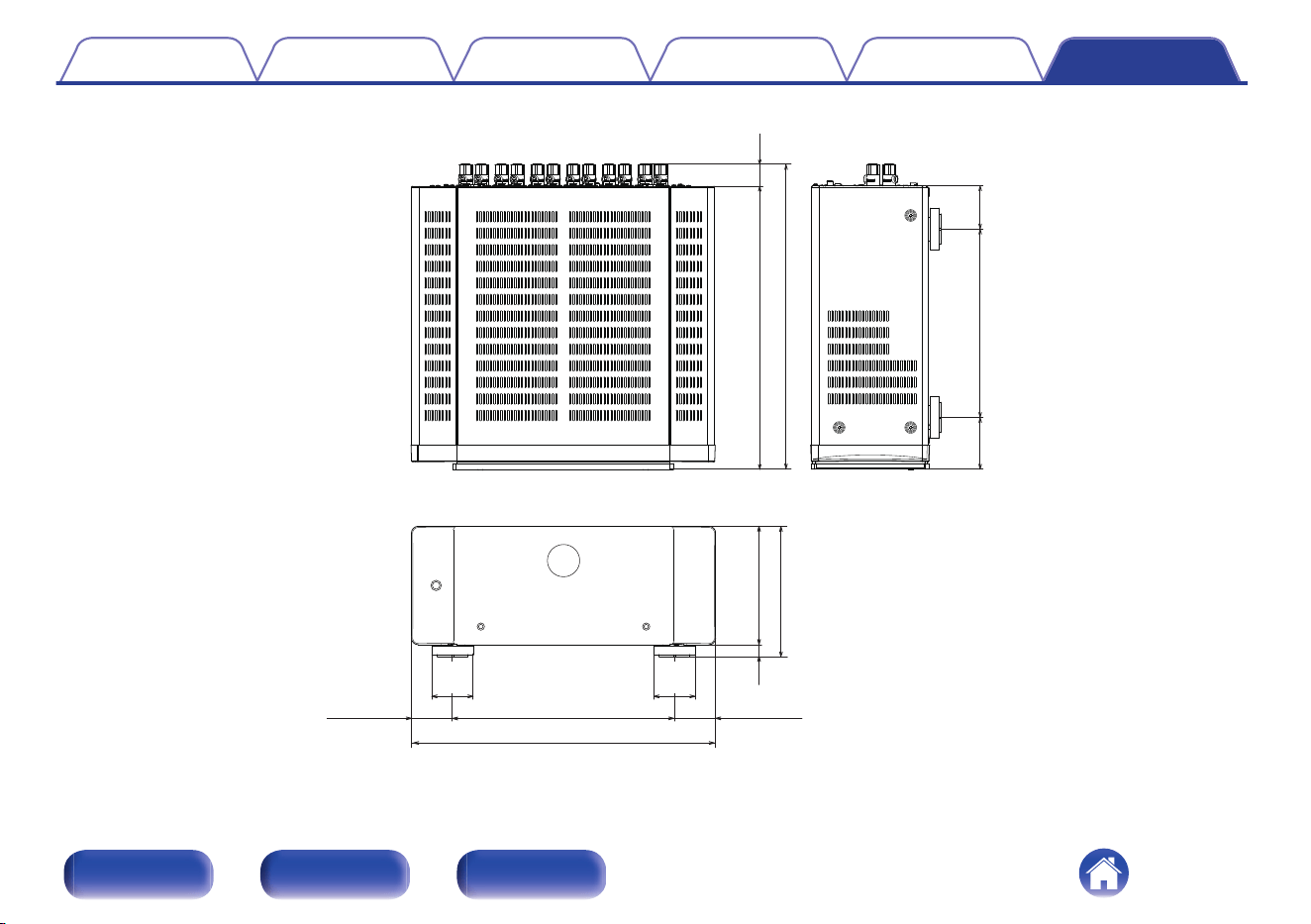
Specifications
35
Index
37
Contents Connections Playback Tips Appendix Specifications
3
Front panel Rear panel Index
Thank you for purchasing this Marantz product.
To ensure proper operation, please read this owner’s manual carefully before using the product.
After reading this manual, be sure to keep it for future reference.
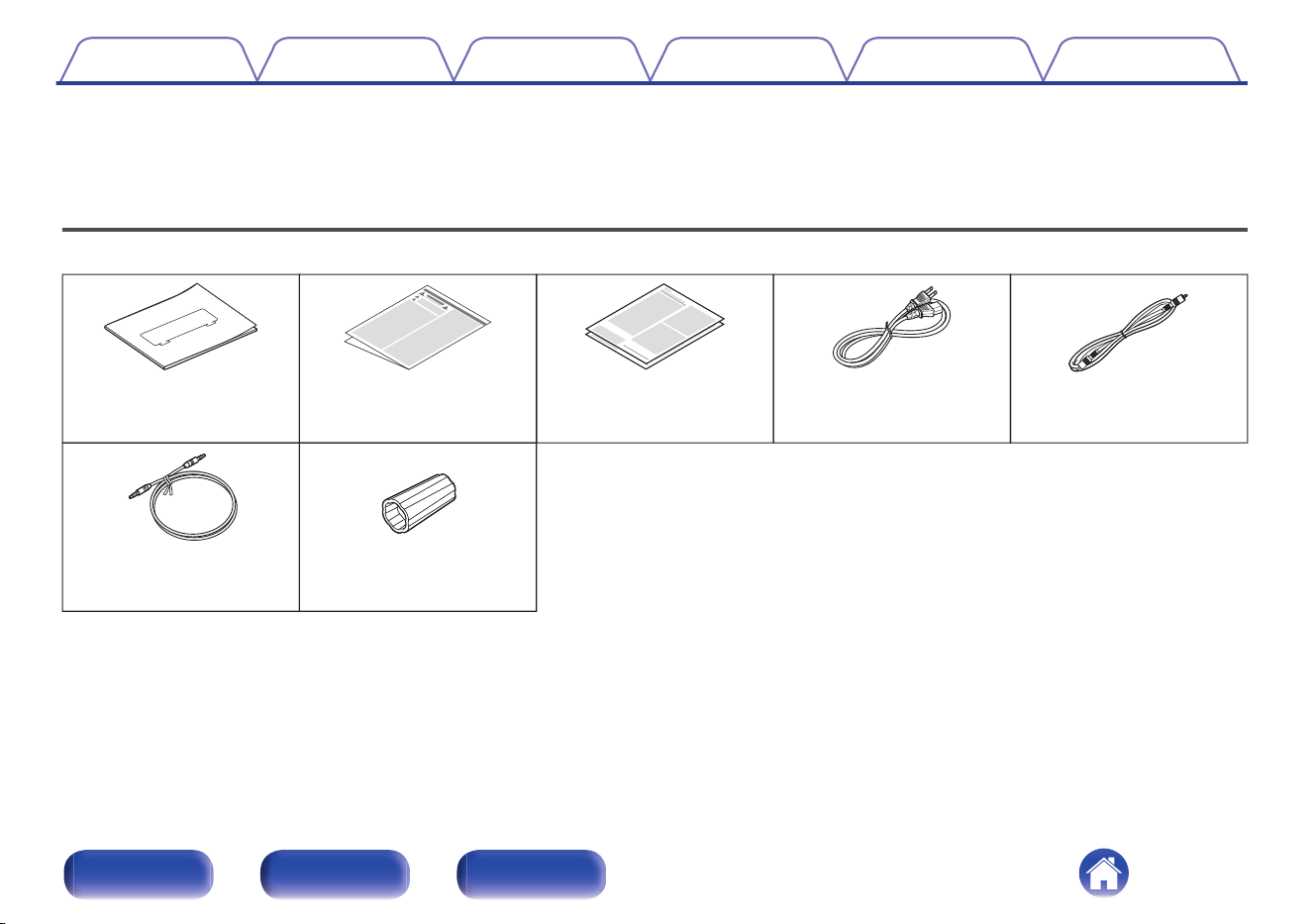
Accessories
Check that the following parts are supplied with the product.
Remote control
connector cable
Warranty
(for USA/for CANADA)
Safety InstructionsQuick Start Guide
AMP control
connector cable
Speaker terminal wrench
Power cord
Contents Connections Playback Tips Appendix Specifications
4
Front panel Rear panel Index
Features
High quality sound
0
12-channel switching power amplifier module
A switching power amplifier is used to achieve a high output of 200W
per channel (8Ω, 1kHz, T.H.D.: 0.05%, 2-channel operation). To ensure
excellent performance, minimal distortion occurs across all frequencies.
Additionally, there is little change in frequency characteristics due to
speaker impedance. This system is combined with a high-speed
preamplifier circuit with an HDAM for accurate reproduction of the fine
nuances of DSD and high-resolution audio sources.
0
Current feedback amplifier
This unit has a high-speed current feedback amplifier circuit for
accurate amplification of signals from HD audio devices such as Blu-ray
disc players. The high-speed current feedback amplifier also achieves
natural sound field reproduction.
0
High audio quality parts
Each part of the circuit is designed to ensure high audio quality,
including high audio quality MELF resistance and an electrolytic
capacitor.
0
Double-layered chassis
0
High-end machined brass speaker jacks
High performance
0
Switch between UNBALANCED RCA and BALANCED XLR
You can choose between two input channels: UNBALANCED RCA
input or BALANCED XLR input.
0
BI-AMP/BTL connection setting function
You can set a bi-amp connection and BTL connection for the power
amplifier of each of the two channels without needing to connect an
additional cable from the preamplifier.
The BI-AMP connection prevents interference from counter-
electromotive force as the woofer and tweeter are powered by separate
power amplifiers. The BTL (Bridge) connection achieves a high drive
performance as the positive and negative terminals of the speakers are
directly powered according to the output levels of the power amplifier.
Additionally, the drive current of the speakers does not directly enter the
ground circuit. This stabilizes the ground potential that the amplitude is
based on, reducing noise and interference between circuits to achieve
an accurate amplitude.
0
AMP CONTROL function
By connecting this unit to a Marantz AV Preamplifier with an AMP
CONTROL jack using the included cable, you can control operation of
both units simultaneously, such as controlling the power or the
illumination display settings. The connection to the AV Preamplifier is a
ground floating connection that does not create an earth loop,
minimizing adverse impacts on audio quality.
0
Other Functions
Equipped with IR flash input that supports custom installations, and DC
trigger input and output terminals.
Contents
Connections Playback Tips Appendix Specifications
5
Front panel Rear panel Index
w we t yq r
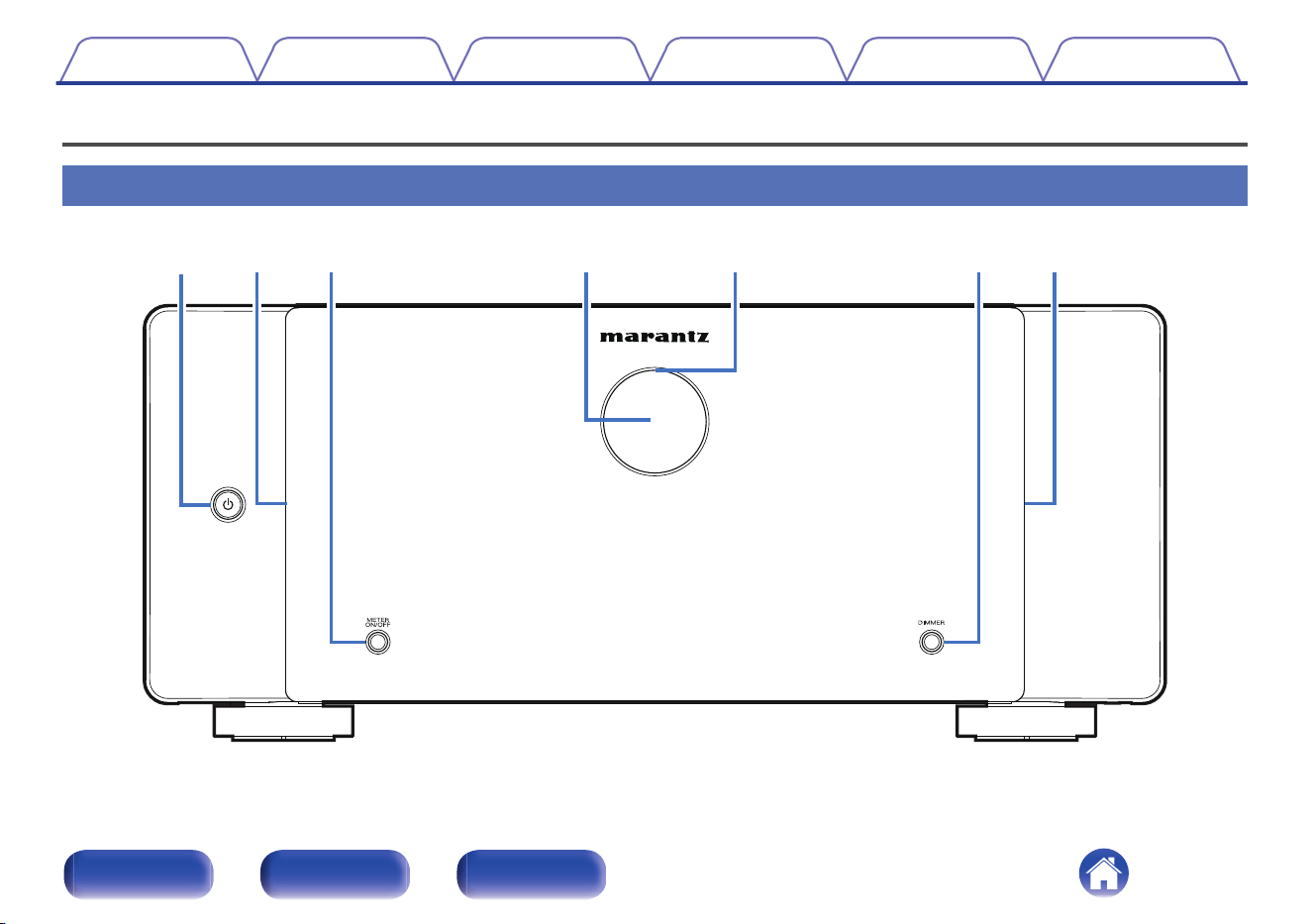
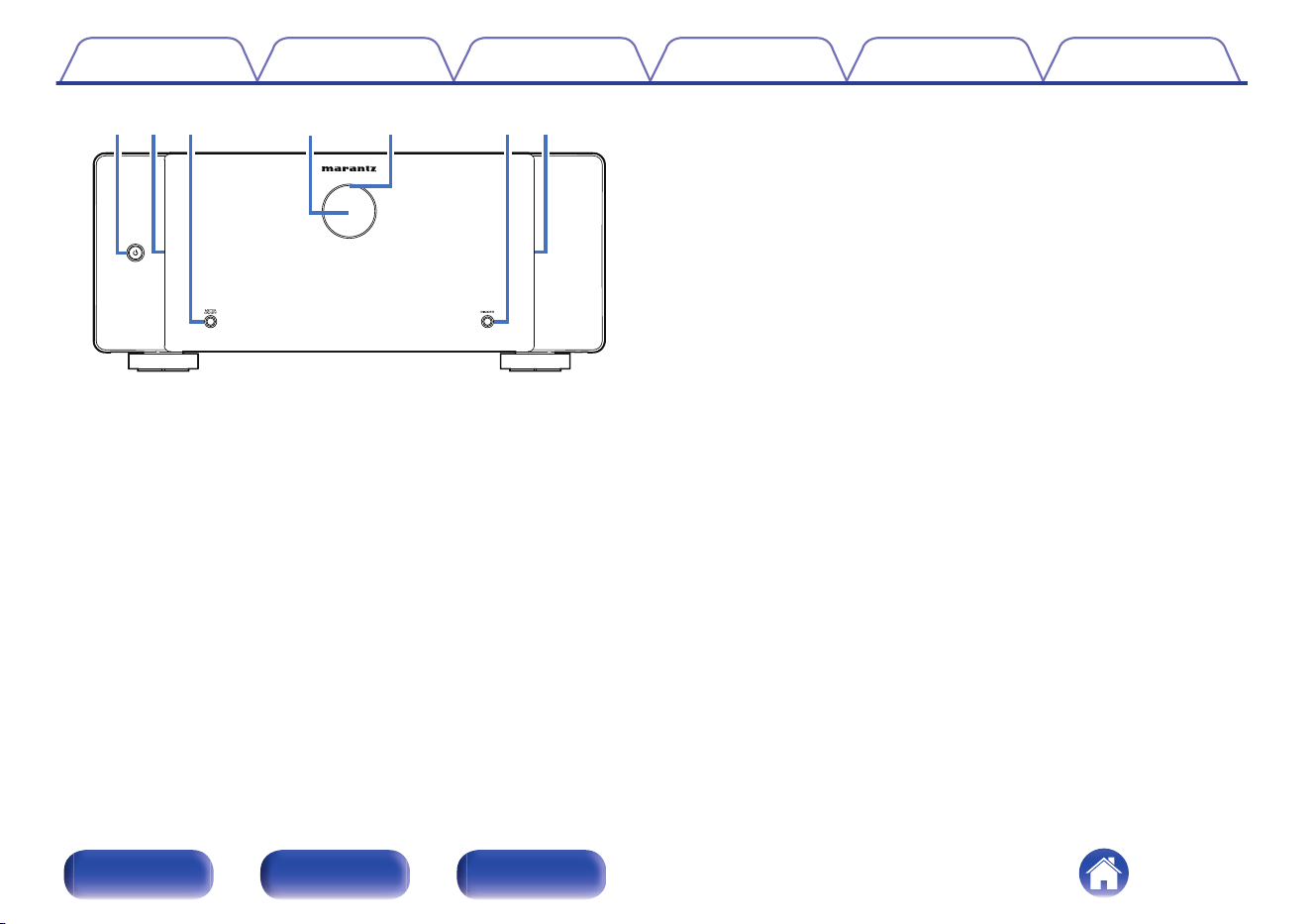
A
Power operation button (X)
Used to turn the power on/off (standby). (v p. 28)
B
Illumination
Lit when the power is turned on. The brightness of the illumination can
be changed by pressing DIMMER.
C
METER ON/OFF button
Turns the level meter display and meter lighting on or off. (v p. 29)
D
Level meter
Displays the level of the signal input through channel 1. This can be
turned off by pressing METER ON/OFF.
E
Protection circuit indicator
This blinks when the protection circuit has operated. (v p. 32)
F
DIMMER button
Press this button to change the brightness of the illumination.
(v p. 30)
Contents Connections Playback Tips Appendix Specifications
7
Front panel Rear panel Index
q
ryut
we
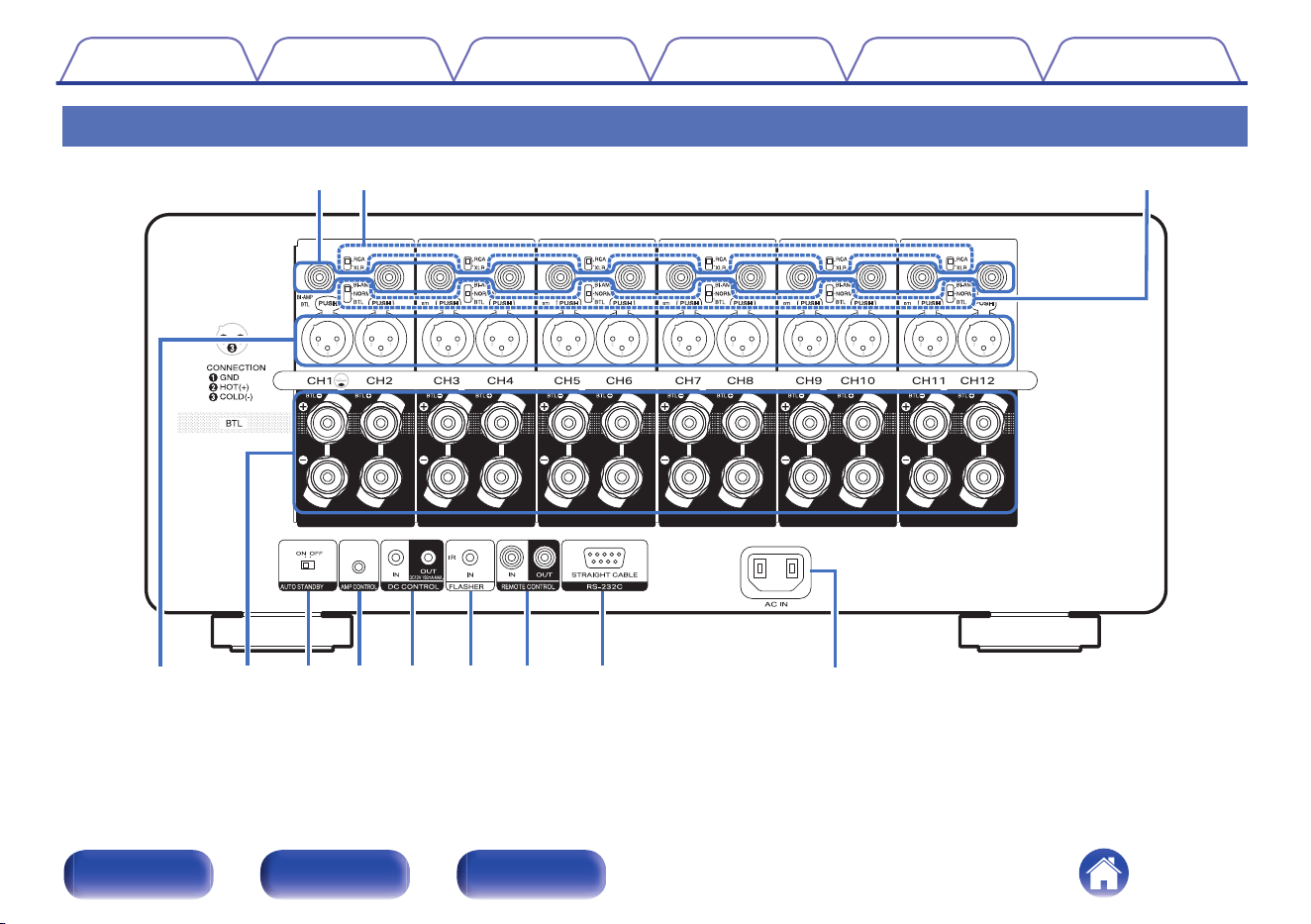
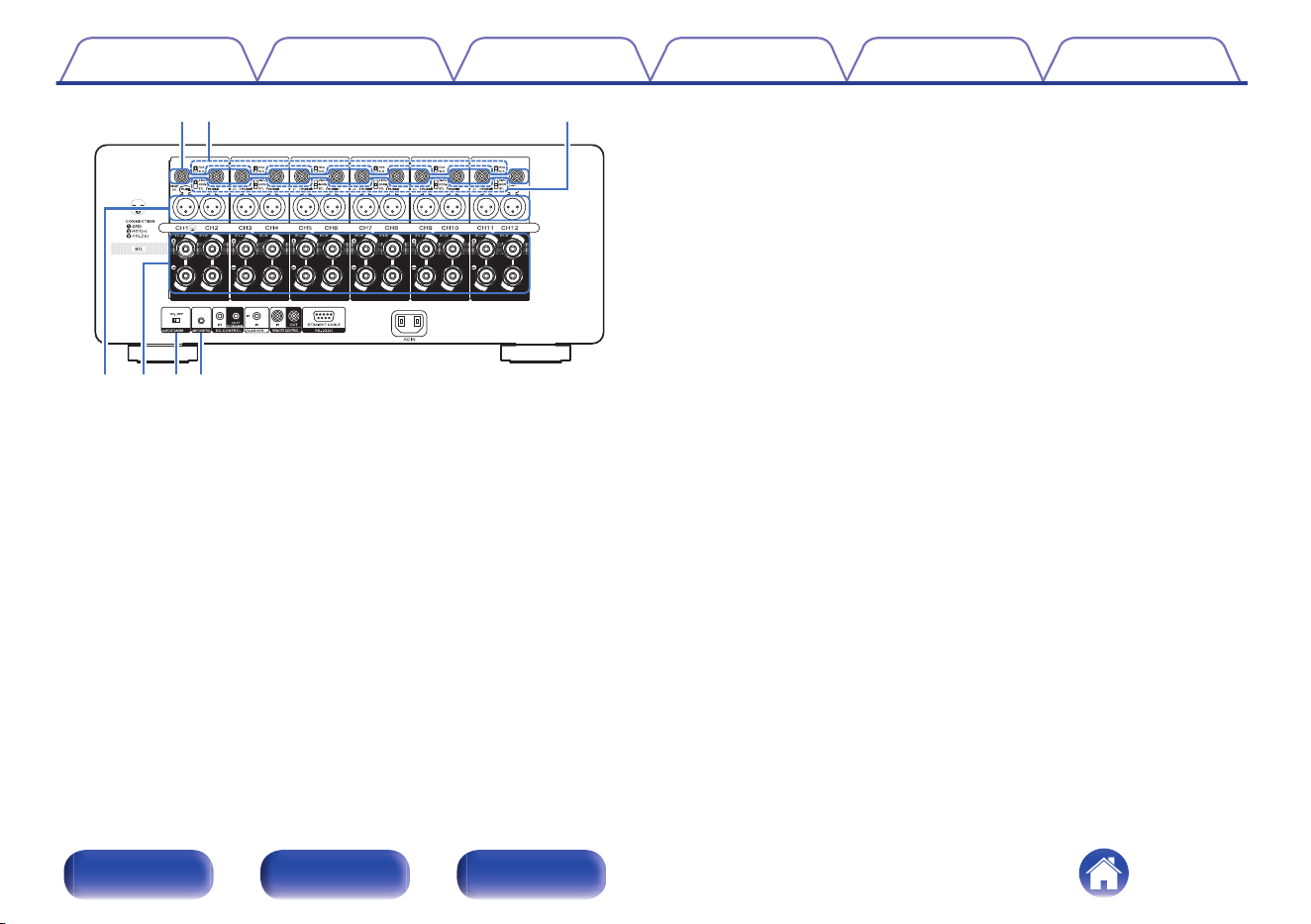
A
UNBALANCED RCA INPUT connectors
Used to connect a preamplifier with UNBALANCED RCA output
connectors.
B
RCA/XLR INPUT selector
Switches according to the jack used for connecting to the preamplifier
(UNBALANCED RCA or BALANCED XLR).
C
NORMAL/BI-AMP/BTL selector
You can set a bi-amp connection and BTL connection for the power
amplifier of each of the two channels.
D
BALANCED XLR INPUT connectors
Used to connect a preamplifier with BALANCED XLR output
connectors.
E
Speaker terminals (SPEAKERS)
Used to connect speakers. (v p. 16)
F
AUTO STANDBY selector
When the auto standby function is set to “ON”, the power of this unit
automatically enters standby after 15 minutes of no input signal and no
operations. (v p. 25)
G
AMP CONTROL jacks
Use these to connect to a Marantz preamplifier with AMP CONTROL
jacks. This enables operations to be performed simultaneously on this
unit and the preamplifier, such as turning the power on or placing it on
standby and adjusting the brightness of the illumination. (v p. 20)
Contents
Connections Playback Tips Appendix Specifications
9
Front panel Rear panel Index
ioQ0 Q1 Q2
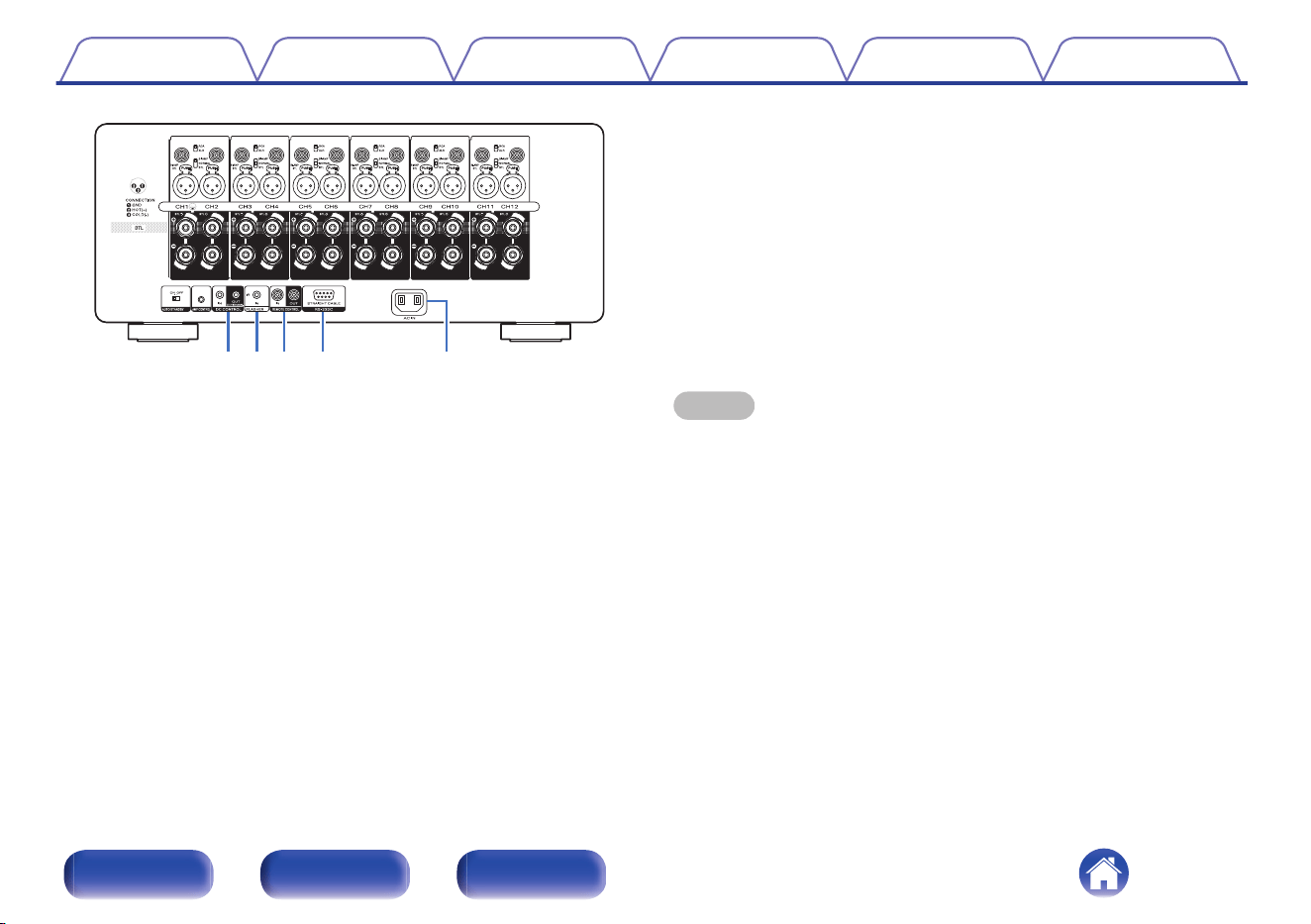
H
DC CONTROL jacks
Used to connect devices equipped with the trigger function.
(v p. 23)
I
FLASHER IN jack
Used to connect commercially available (sold separately) IR repeaters.
(v p. 22)
J
REMOTE CONTROL jacks
Used to connect a Marantz product that is equipped with REMOTE
CONTROL terminals. Use this when you want to control this unit with a
remote control. (v p. 21)
K
RS-232C connector
Used to connect home automation controller devices fitted with
RS-232C connectors. Consult the owner’s manual of the home
automation controller for more information about serial control of this
unit.
Perform the operation below beforehand.
A
Turn on the power of this unit.
B
Turn off the power of this unit from the external controller.
C
Check that the unit is in the standby mode.
L
AC inlet (AC IN)
Used to connect the power cord. (v p. 26)
NOTE
0
Do not touch the inner pins of the connectors on the rear panel. Electrostatic
discharge may cause permanent damage to the unit.
Contents Connections Playback Tips Appendix Specifications
10
Front panel Rear panel Index
o
Contents
Preparations 12
Example connection variation 15
Connecting a Preamplifier 16
Connecting an external control device 20
Setting the auto standby function 25
Connecting the power cord 26
NOTE
0
Do not plug in the power cord until all connections have been completed.
0
Do not bundle power cords together with connection cables. Doing so can result in
noise.
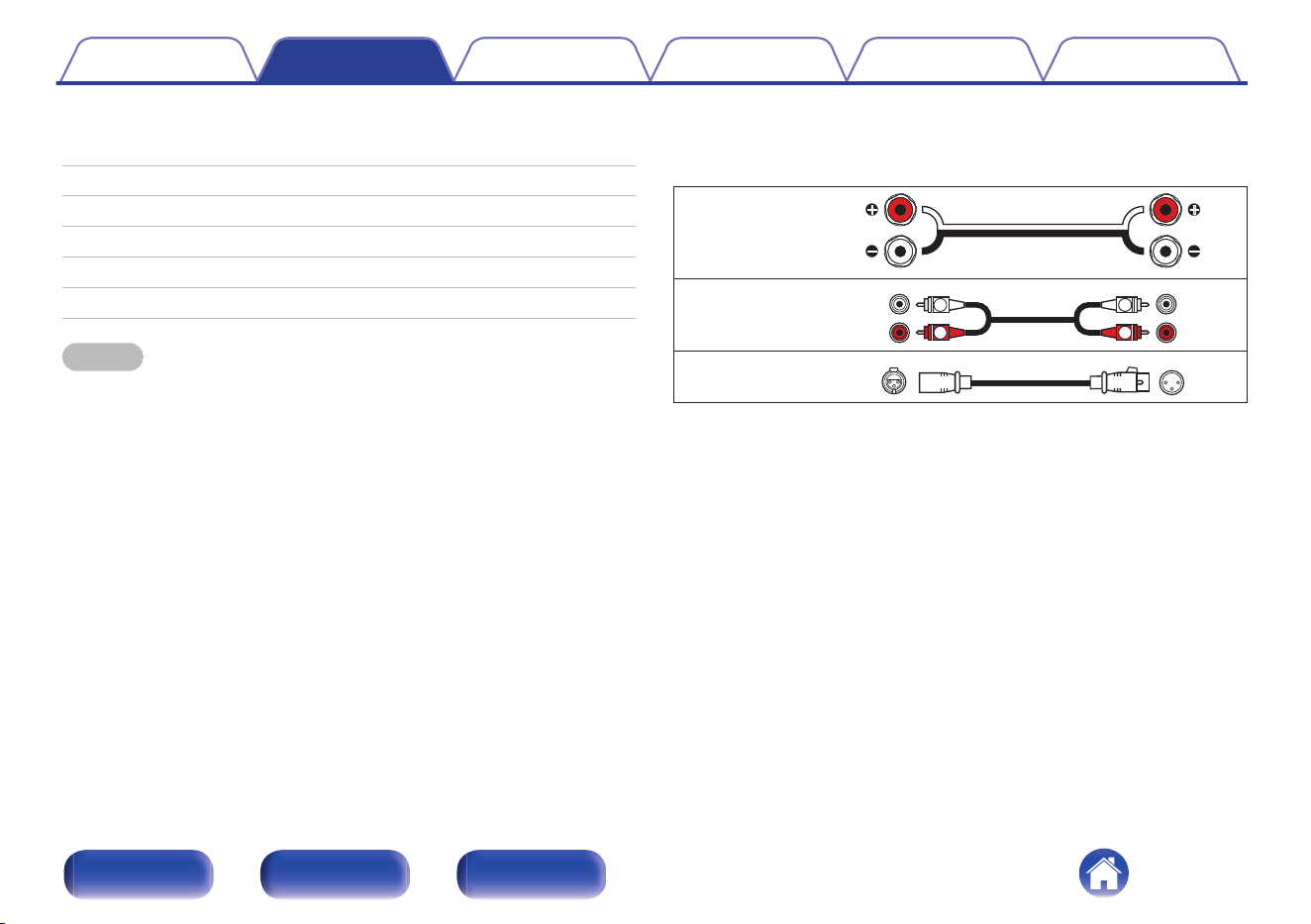
o
Cables used for connections
Provide necessary cables according to the devices you want to
connect.
Speaker cable
Audio cable
R
L
R
L
XLR cable
Contents Connections Playback Tips Appendix Specifications
11
Front panel Rear panel Index
Preparations
Speakers
This section explains how to connect them using typical examples.
NOTE
0
Disconnect this unit’s power plug from the power outlet before connecting the
speakers.
0
Connect so that the speaker cable core wires do not protrude from the speaker
terminal. The protection circuit may be activated if the core wires touch the rear
panel or if the + and - sides touch each other. (“Protection circuit” (v p. 34))
0
Never touch the speaker terminals while the power supply is connected. Doing so
could result in electric shock.
0
Use speakers with an impedance of 4 – 16 Ω/ohms.
o
Connecting the speaker cables
Carefully check the left (L) and right (R) channels and + (red) and –
(black) polarities on the speakers being connected to this unit, and be
sure to connect the channels and polarities correctly.
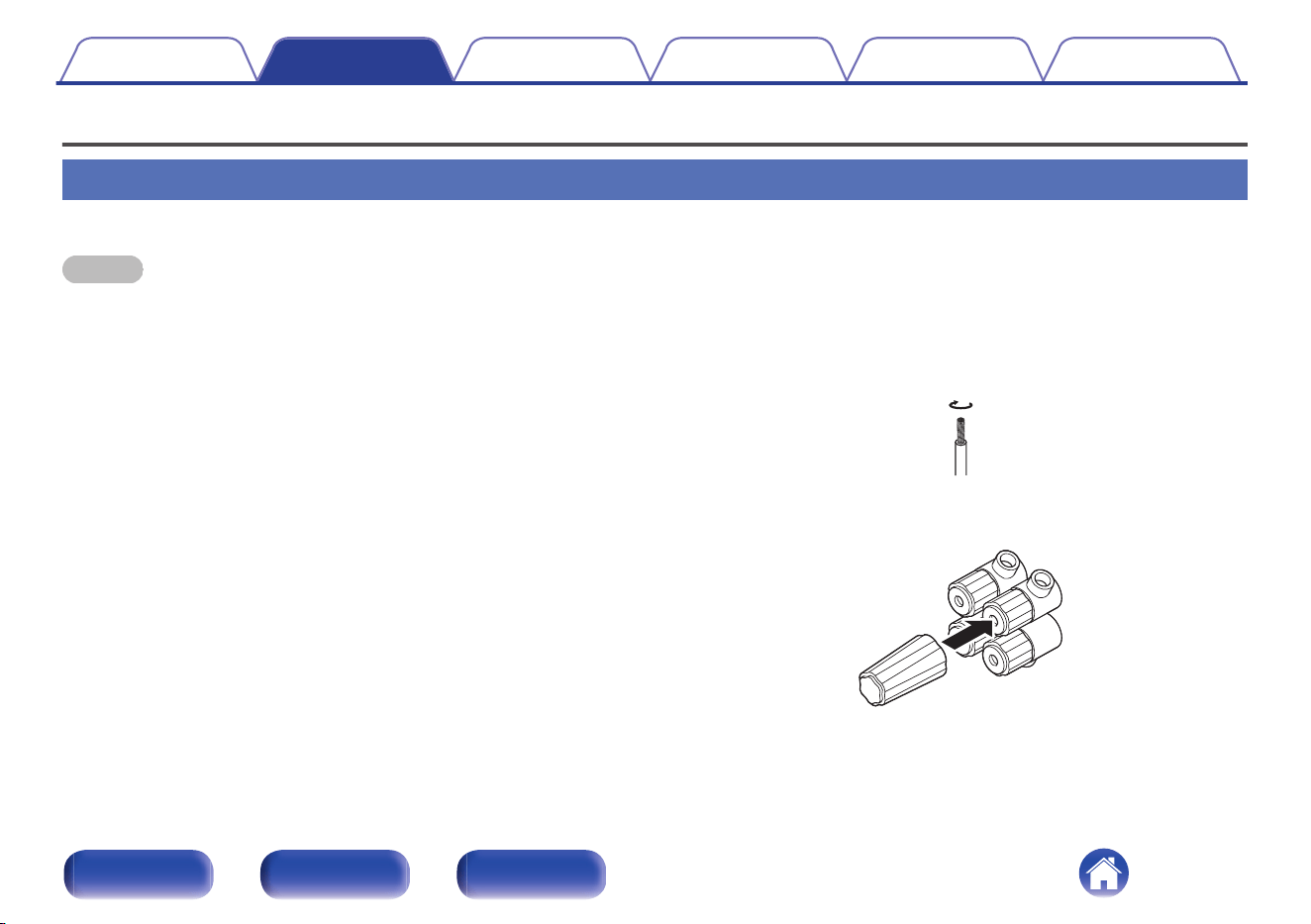
1
Peel off about 5/8 inch (15 mm) of sheathing from the
tip of the speaker cable, then either twist the core wire
tightly or terminate it.
2
Attach the included speaker terminal wrench to the
speaker terminal.
Contents Connections Playback Tips Appendix Specifications
12
Front panel Rear panel Index
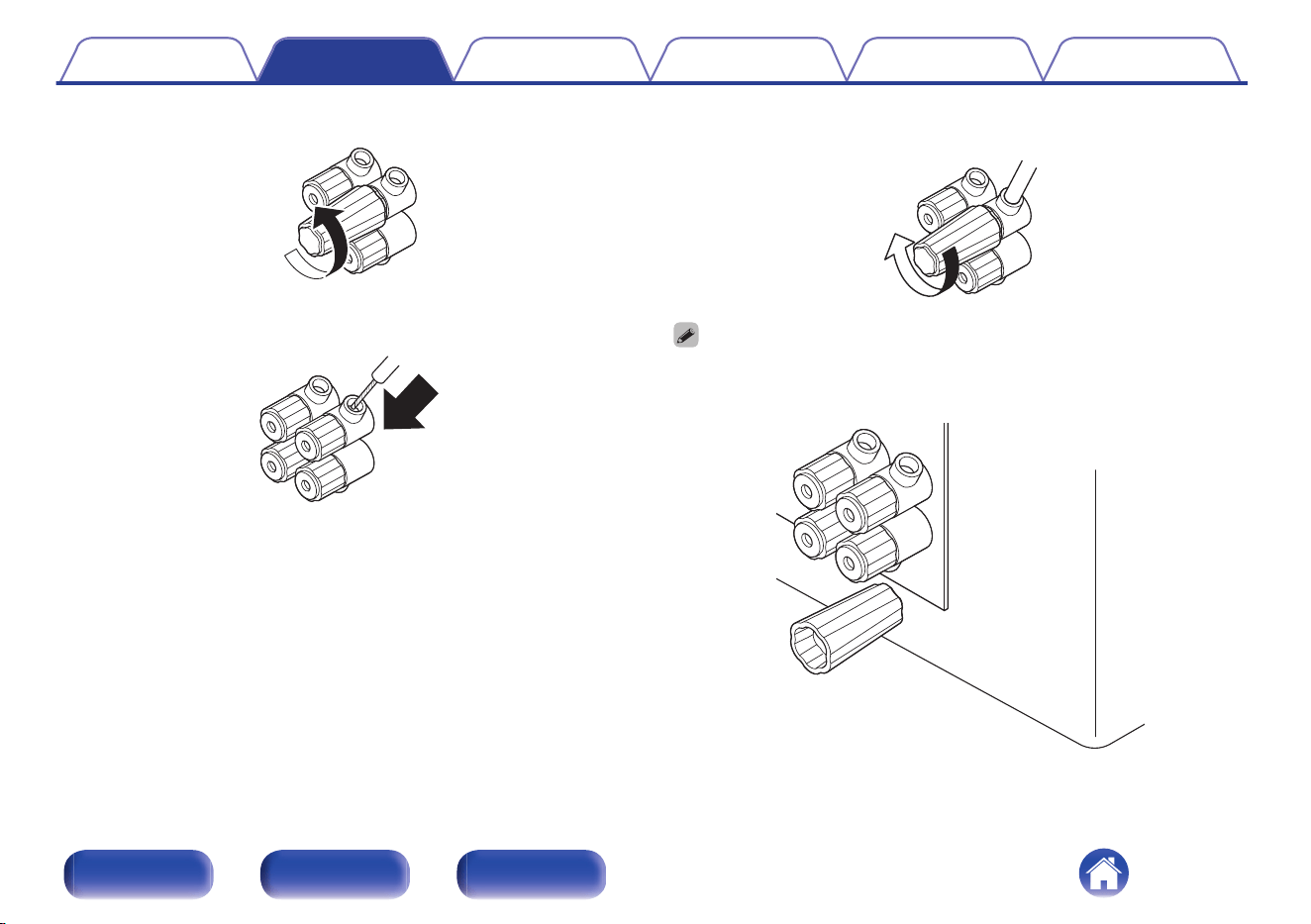
3
Turn the speaker terminal counterclockwise to loosen it.
4
Insert the speaker cable’s core wire to the hilt into the
speaker terminal.
5
Turn the speaker terminal clockwise to tighten it.
0
The speaker terminal wrench contains a built-in magnet that enables it to be
attached to the rear panel. After connecting speakers, store it in the included
accessory box or in another safe place.
Contents Connections Playback Tips Appendix Specifications
13
Front panel Rear panel Index
Preamplifier
0
Connect one end of the cable to the input terminals of this unit and the
other end to the output terminals of the preamplifier (sold separately).
0
This unit has UNBALANCED RCA connectors and BALANCED XLR
connectors. Select the appropriate connectors for the preamplifier you
will use and change the setting of the RCA or XLR selector on this unit.
If the preamplifier has both types of connectors, either type can be
used.
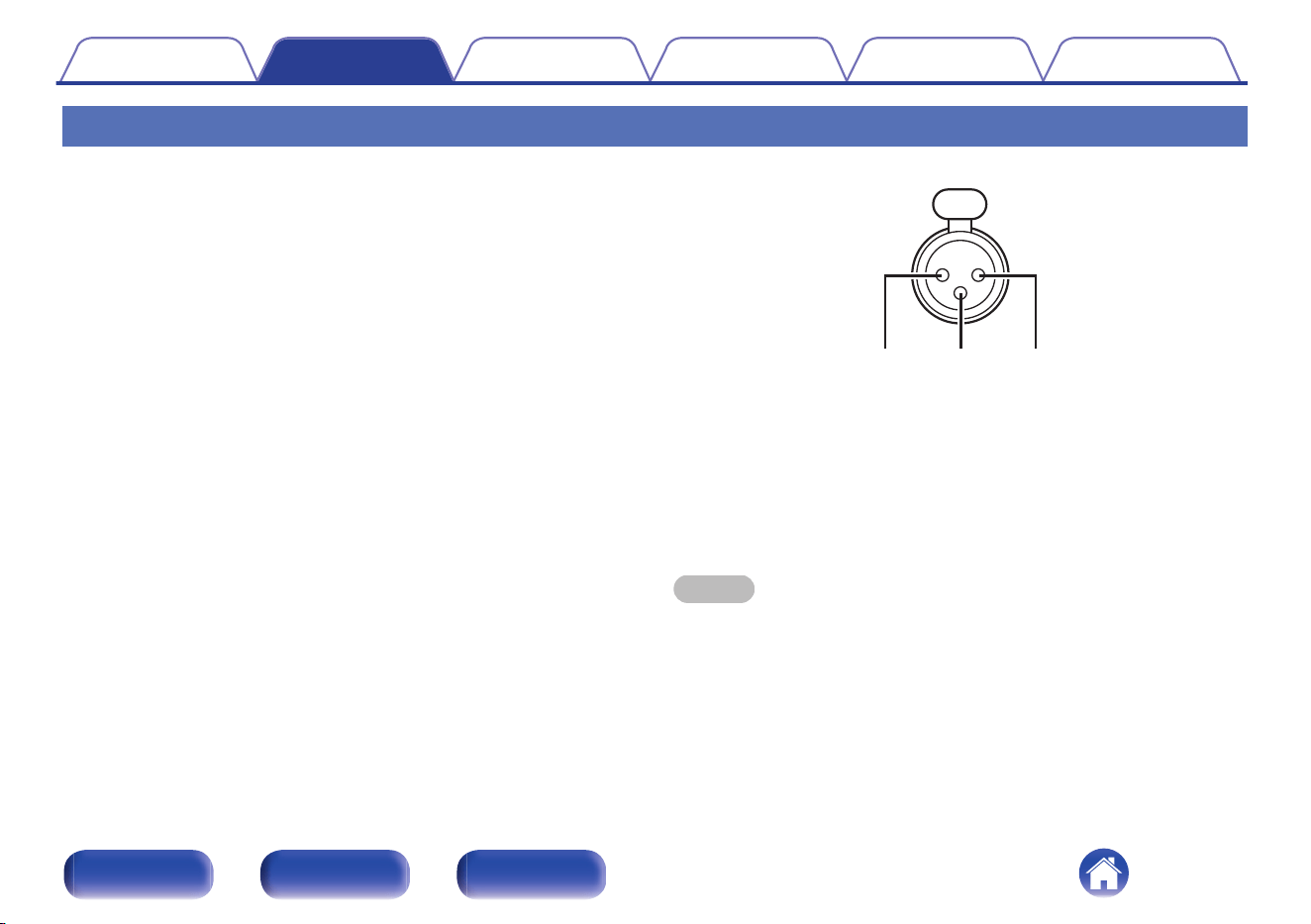
GXLR connector PIN arrangementH
ew q
A
GND (Ground)
B
HOT (Hot)
C
COLD (Cold)
The PIN arrangement in this unit uses the European method.
In the USA method, B is COLD, and C is HOT.
When connecting a device that utilizes the USA type of PIN arrangement,
replace the B and C plugs on one side of the balanced cable.
NOTE
0
Do not short the HOT and GND or COLD and GND for use.
0
Remove the power plug of this unit from the outlet before connecting the
preamplifier. Turn off the power of the device being connected as well.
Contents
Connections Playback Tips Appendix Specifications
14
Front panel Rear panel Index
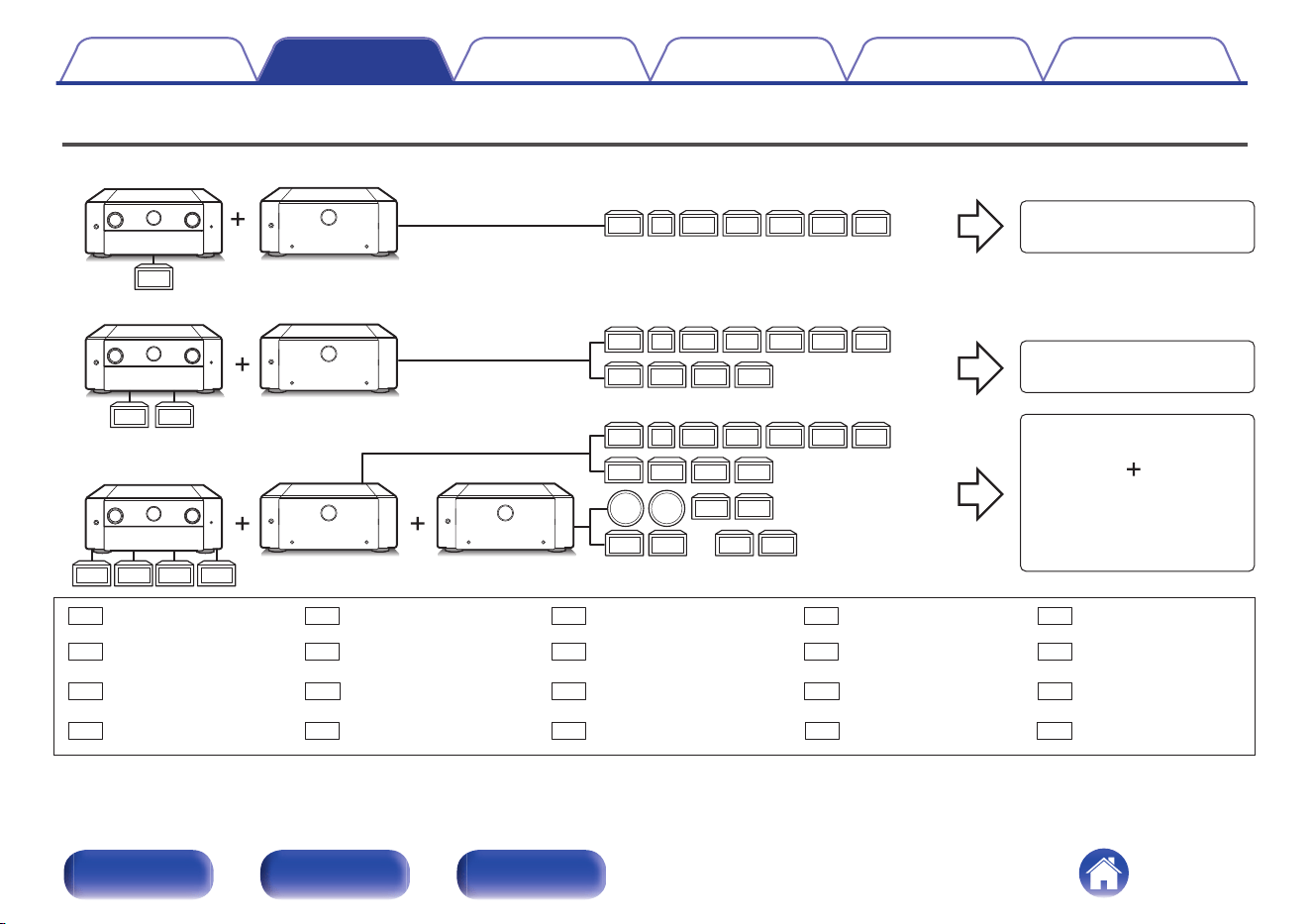
Example connection variation
FL
SW
SWSW
SW SWSWSW
FR SL SR SBL SBRC
FL FR SL SR SBL SBRC
FHL FHR
RHL RHR
TML TMR
FL FR SL SR SBL SBRC
CH TS
Z2L Z2R Z3L Z3R
FHL FHR
RHL RHR
FL
FR
C
SL
SW
SBL
SBR
FHL
FHR
RHL
TMR
CH
TS Z2L Z2R
Z3L
Z3R
RHR
SR
TML
This unit
This unit This unit
7.1ch connection
11.2ch Configuration
15.4ch Configuration
ZONE2 connection
or
ZONE3 connection
This unit[Example 1] AV 20
[Example 2] AV 20
[Example 3] AV 20
Front speaker (L) Front speaker (R) Center speaker Surround speaker (L)
Subwoofer Surround back speaker (L) Surround back speaker (R)
Front height speaker (L)
Front height speaker (R)
Rear height speaker (L)
Top middle speaker (R)
Center height speaker
Top surround speaker ZONE2 speaker (L) ZONE2 speaker (R)
ZONE3 speaker (L)
ZONE3 speaker (R)
Rear height speaker (R)
Surround speaker (R)
Top middle speaker (L)
Contents Connections Playback Tips Appendix Specifications
15
Front panel Rear panel Index
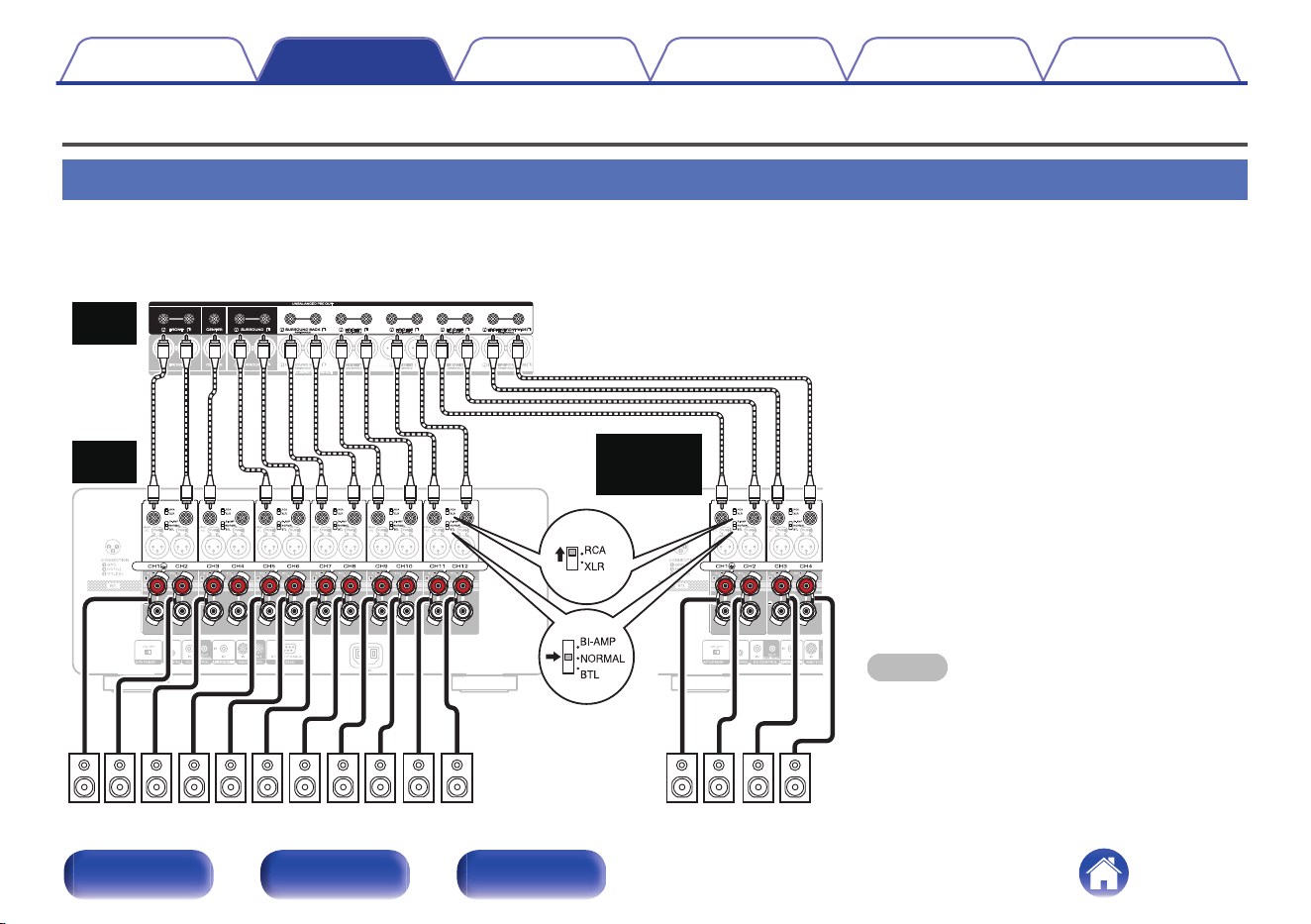
Connecting a Preamplifier
Example of connections to Marantz AV 20 Preamplifier
o
Connecting the UNBALANCED RCA PRE OUT connector
If using the UNBALANCED RCA connectors, switch the RCA/XLR INPUT selector setting to “RCA”. Set the NORMAL/BI-AMP/BTL selector to
“NORMAL”.
NOTE
0
Be sure to configure the RCA/XLR INPUT selector
and NORMAL/BI-AMP/BTL selector settings before
turning the power on. If you try to change these
settings after turning the power on, the settings will
not change.
SR SLFR FL C TMR TML CH TS
RHR RHL
FHR FHL
SBLSBR
Marantz
AV 20
Marantz
AMP 20
Marantz
AMP 20
Second unit
Contents
Connections Playback Tips Appendix Specifications
16
Front panel Rear panel Index
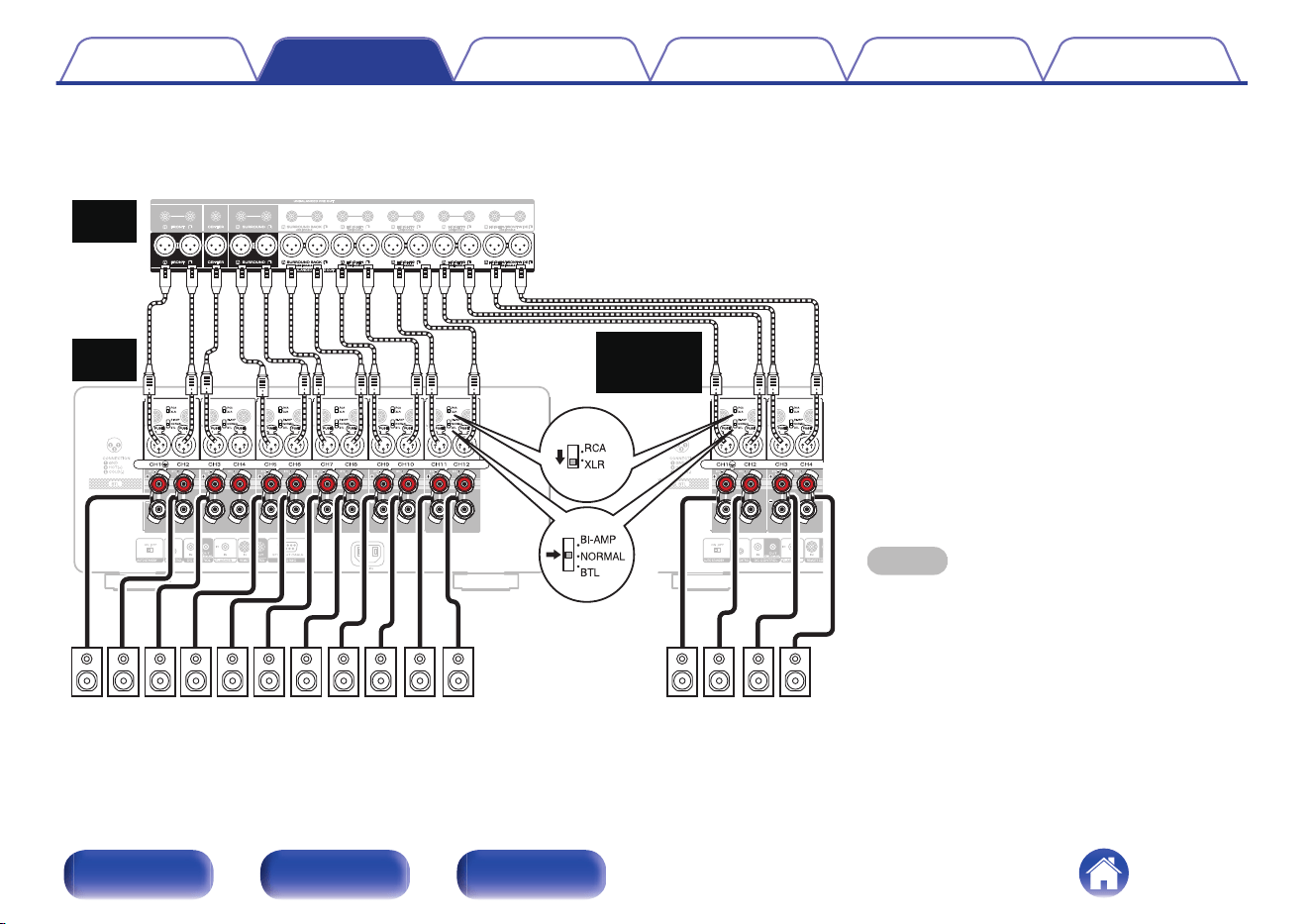
o
Connecting the BALANCED XLR PRE OUT connector
If using the BALANCED XLR connectors, switch the RCA/XLR INPUT selector setting of this unit to “XLR”. Set the NORMAL/BI-AMP/BTL selector to
“NORMAL”.
NOTE
0
Be sure to configure the RCA/XLR INPUT selector
and NORMAL/BI-AMP/BTL selector settings before
turning the power on. If you try to change these
settings after turning the power on, the settings will
not change.
SR SLFR FL C RHR RHLFHR FHL
SBLSBR
TMR TML CH TS
Marantz
AV 20
Marantz
AMP 20
Marantz
AMP 20
Second unit
Contents
Connections Playback Tips Appendix Specifications
17
Front panel Rear panel Index
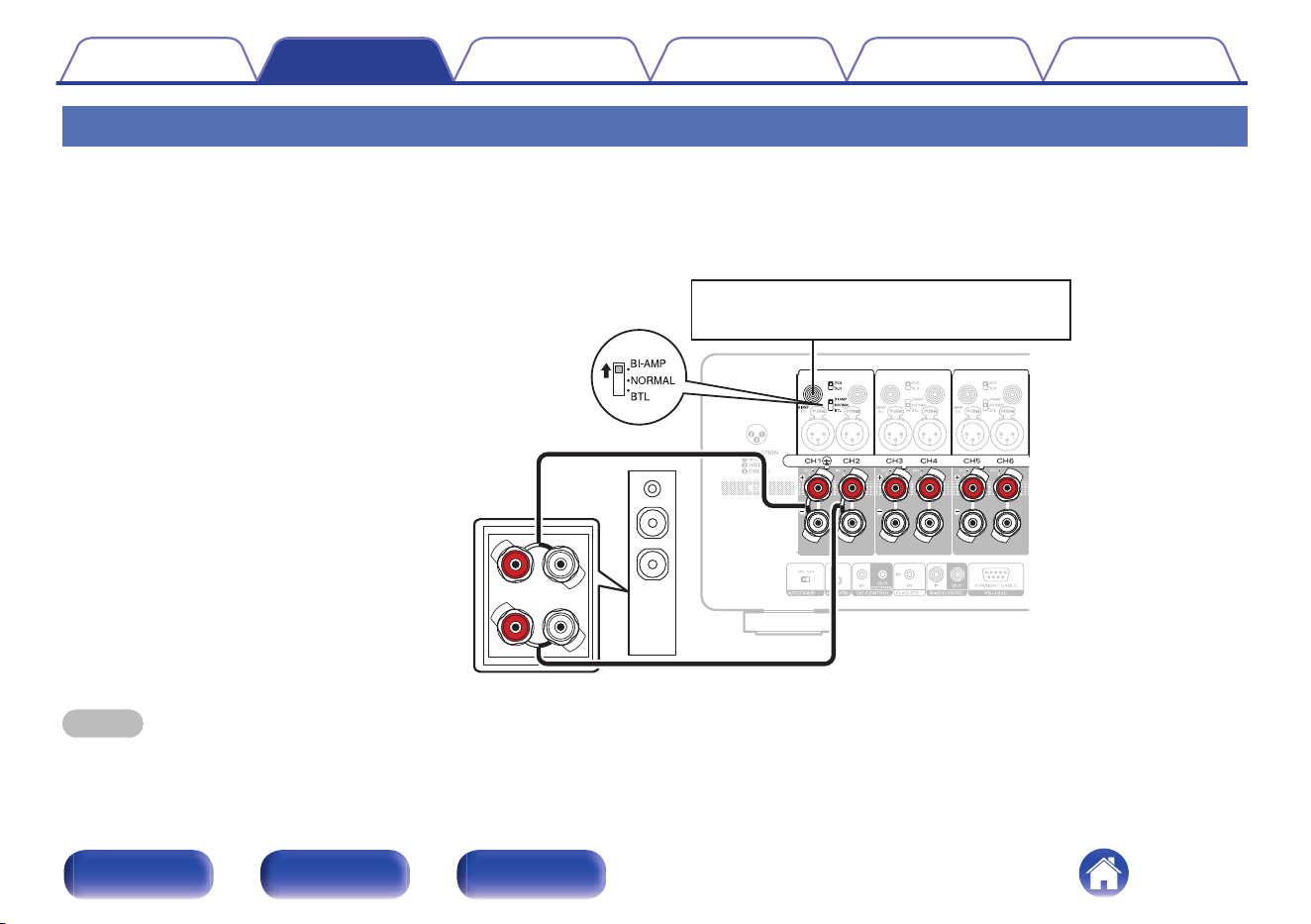
Bi-amp connection
Bi-amp connection is a method to connect separate amplifiers to the tweeter terminal and woofer terminal of a speaker that supports bi-amplification. This
connection enables back EMF (power returned without being output) from the woofer to flow into the tweeter without affecting the sound quality, producing
a higher sound quality.
Example: Using channels 1 and 2 as a bi-amp
wq
Switch the NORMAL/BI-AMP/BTL selector
setting to BI-AMP.
Connect one cable from
channel 1 to the tweeter of the
speaker and the other cable
from channel 2 to the woofer of
the speaker.
Input to the odd-numbered channel (channel 1).
NOTE
0
When making bi-amp connections, be sure to remove the short-circuiting plate or wire between the speaker’s woofer and tweeter terminals.
0
Be sure to configure the and NORMAL/BI-AMP/BTL selector setting before turning the power on. If you try to change these settings after turning the power on, the settings
will not be applied.
Contents
Connections Playback Tips Appendix Specifications
18
Front panel Rear panel Index
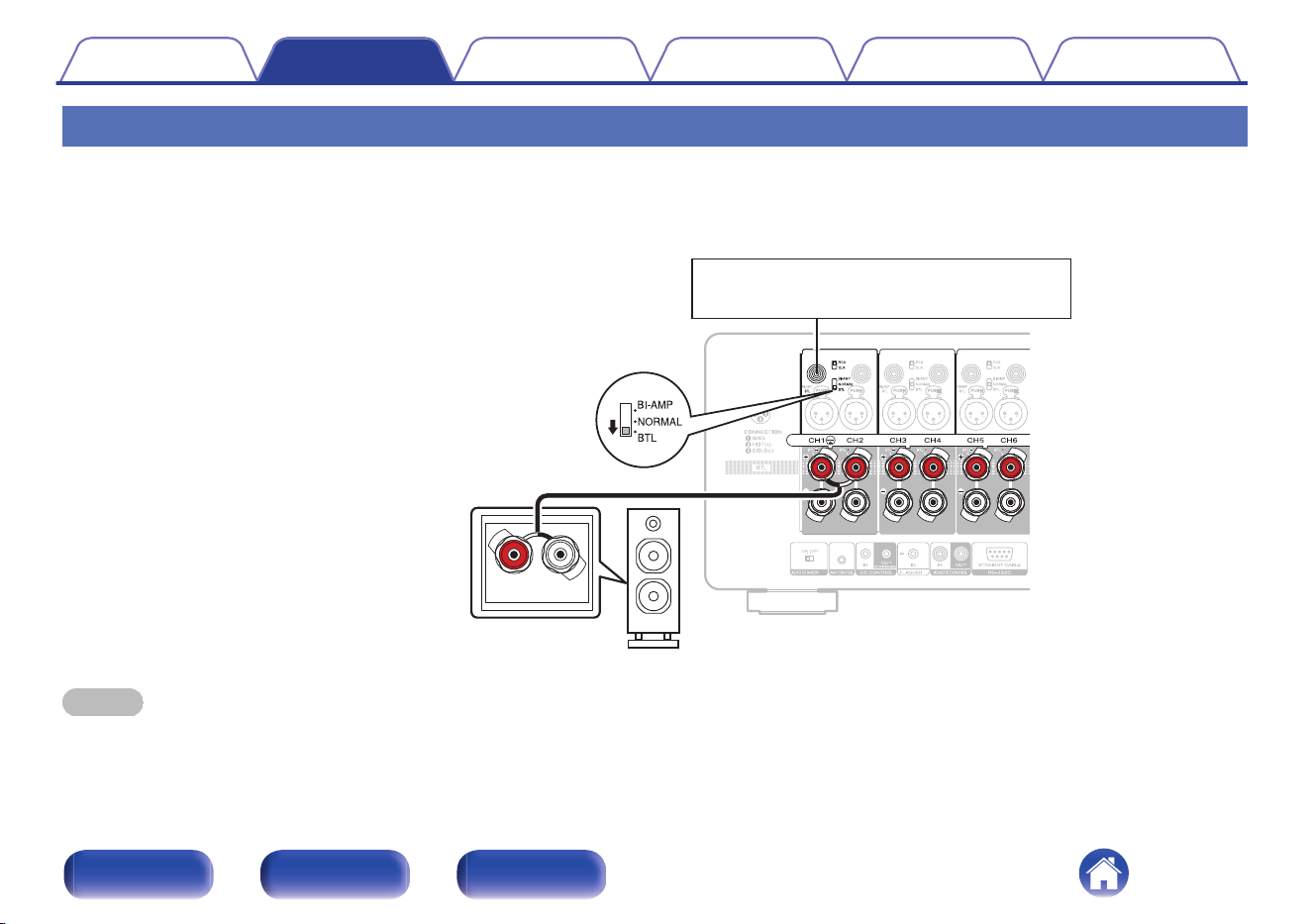
BTL connection
A BTL connection uses two channels to power one speaker. Two power amplifiers are used to output antiphase signals from one input signal, achieving
powerful audio reproduction.
Example: Using channels 1 and 2 for a BTL connection
wq
Input to the odd-numbered channel (channel 1).
Switch the NORMAL/BI-AMP/BTL
selector setting to BTL.
Connect one cable from the
positive (+) side of channel 1 to
the negative (-) side of the
speaker and the other cable from
the positive side of channel 2 to
the positive side of the speaker.
NOTE
0
Be sure to configure the and NORMAL/BI-AMP/BTL selector setting before turning the power on. If you try to change these settings after turning the power on, the settings
will not be applied.
Contents Connections Playback Tips Appendix Specifications
19
Front panel Rear panel Index
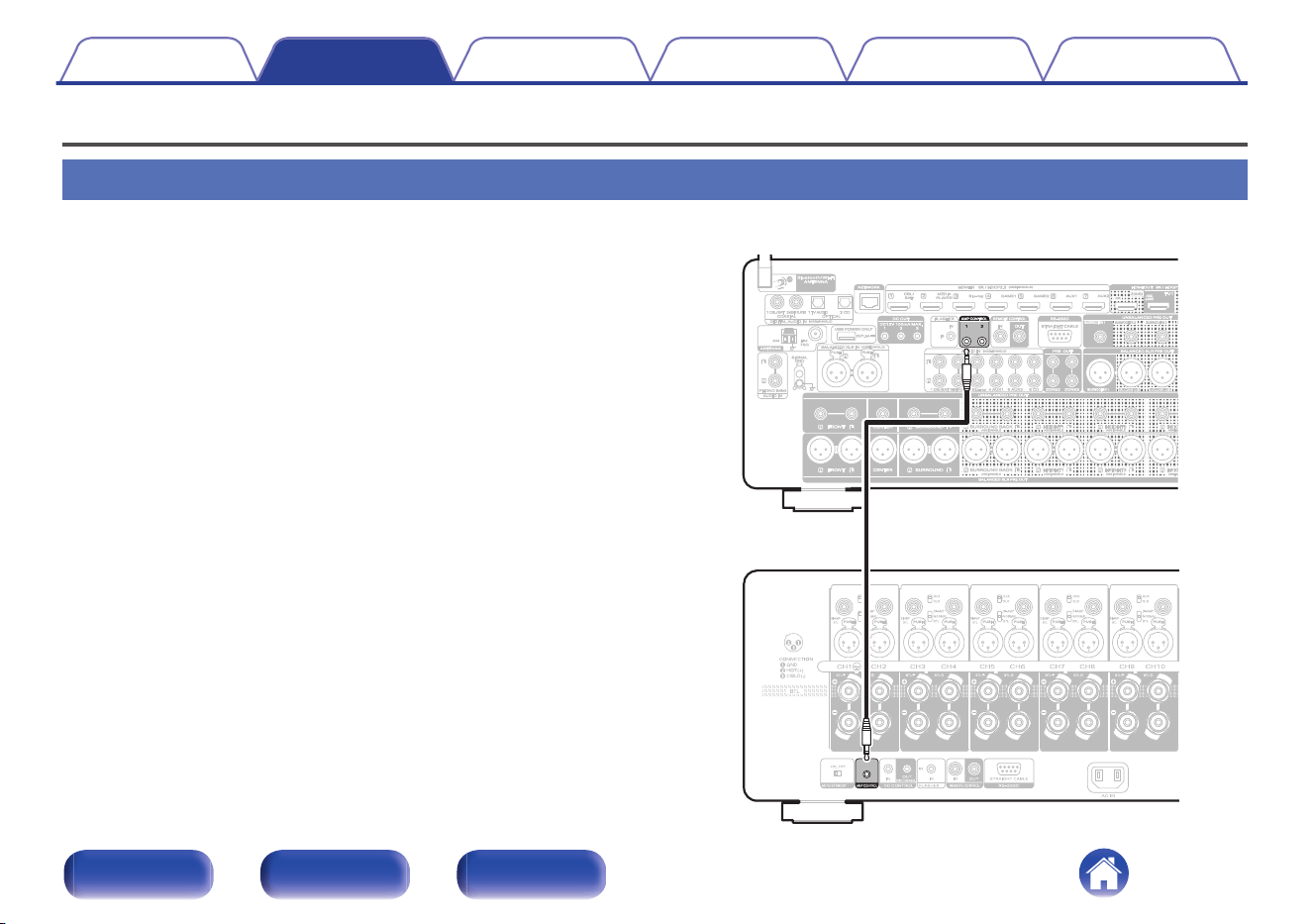
Connecting an external control device
AMP CONTROL jacks
You can connect this unit to a Marantz AV Preamplifier with an AMP
CONTROL jack using the included control cable and perform the following
operations for both units simultaneously.
0
When the power of the preamplifier is turned on or placed on standby,
the power of this unit is turned on or placed on standby too.
0
When the brightness of the preamplifier’s display is adjusted, the same
setting is applied to the illumination of this unit
This unit
[Example] AV 20
Contents Connections Playback Tips Appendix Specifications
20
Front panel Rear panel Index
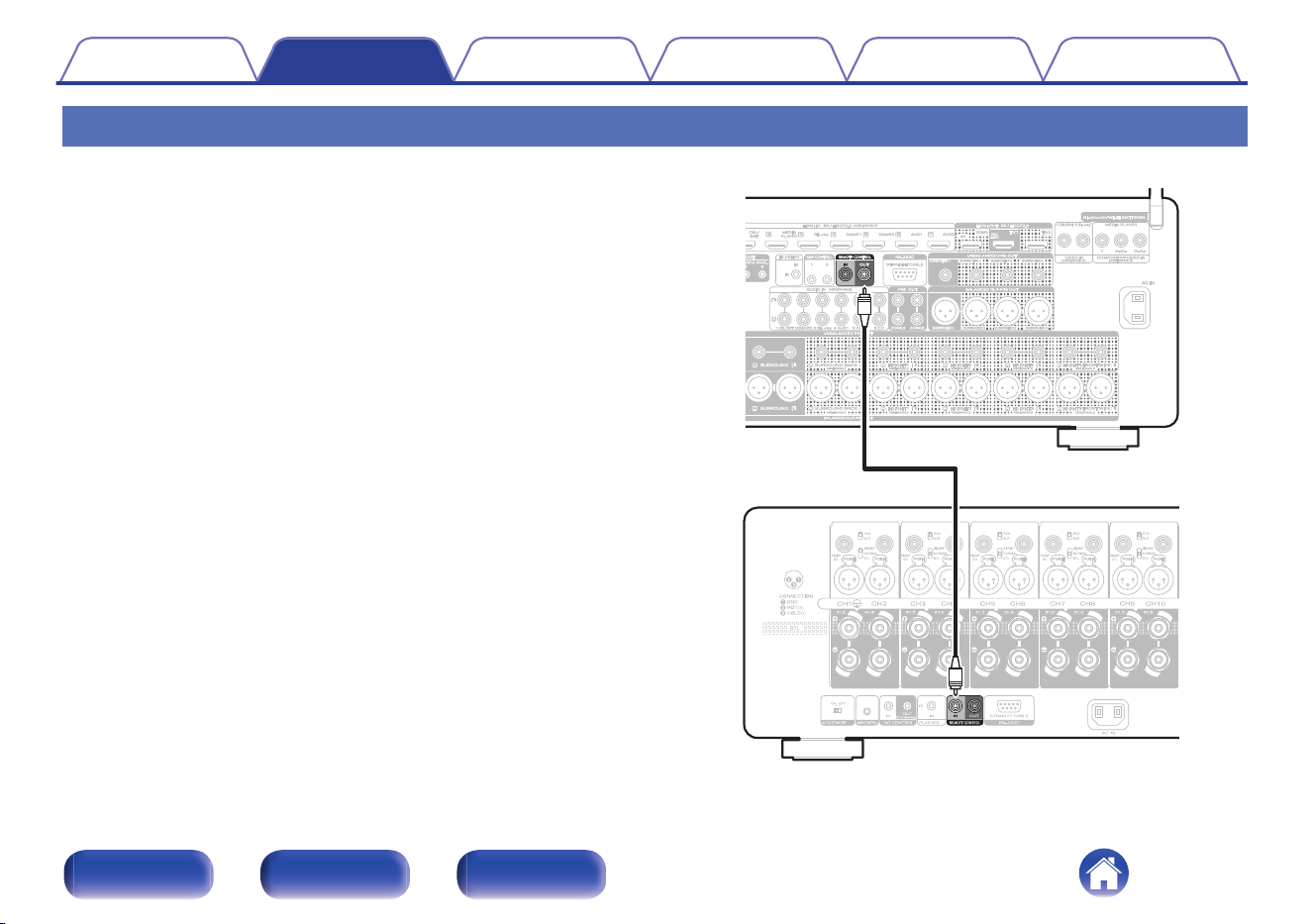
REMOTE CONTROL jacks
When connecting a Marantz AV Preamplifier, you can switch the power of
this unit to ON/STANDBY together with the AV Preamplifier power supply.
For details, see the AV Preamplifier owner’s manual.
This unit
[Example] AV 20
Contents Connections Playback Tips Appendix Specifications
21
Front panel Rear panel Index
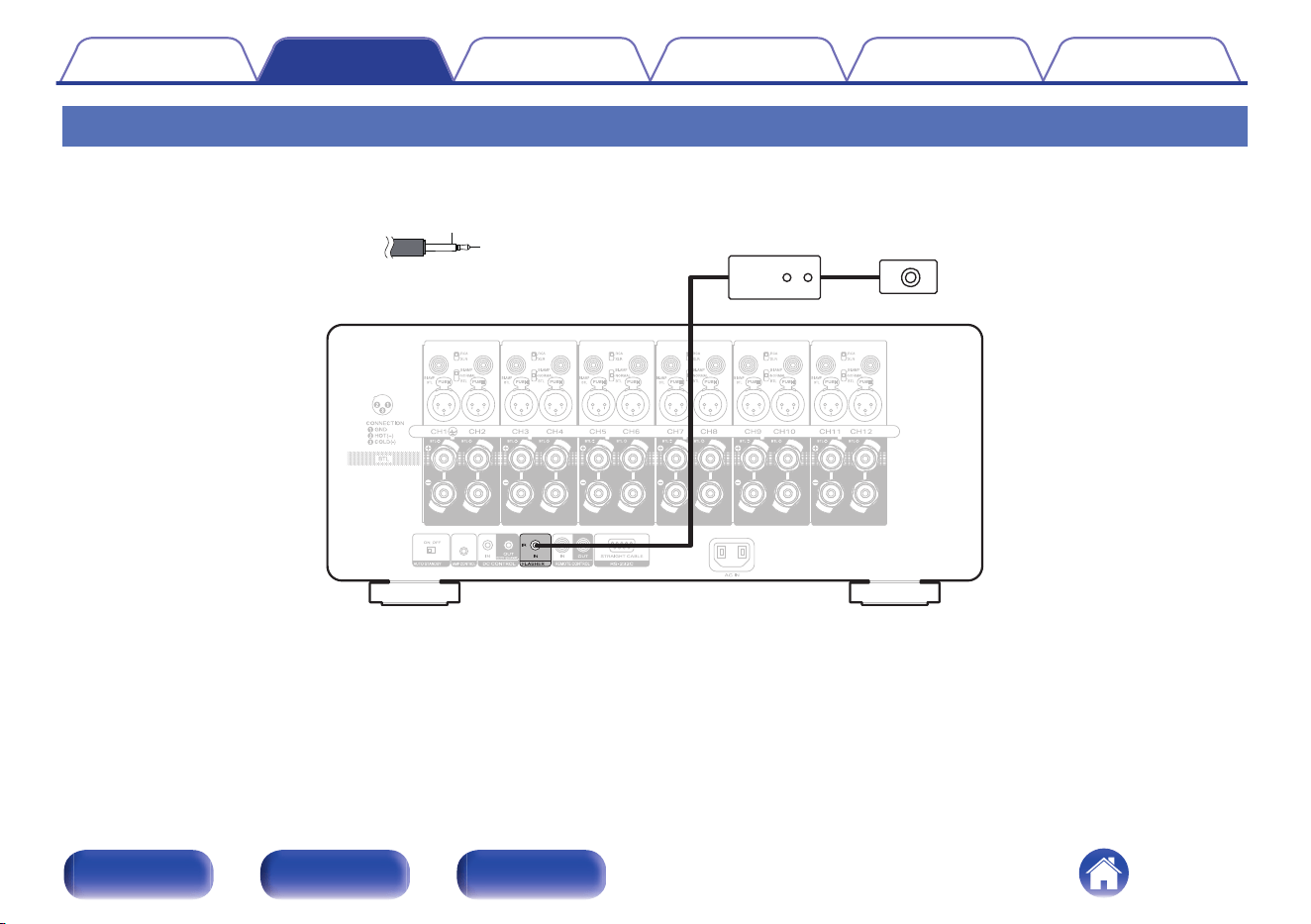
FLASHER IN jack
If a commercially available (sold separately) IR repeater is connected to the FLASHER IN jack of this unit, remote control operations can be performed
even if this unit is installed in a place where the remote control signal may not reach, such as in a cabinet.
GND
Signal
Monaural mini-plug cable
(Sold separately)
IR repeater IR receiver
Contents Connections Playback Tips Appendix Specifications
22
Front panel Rear panel Index
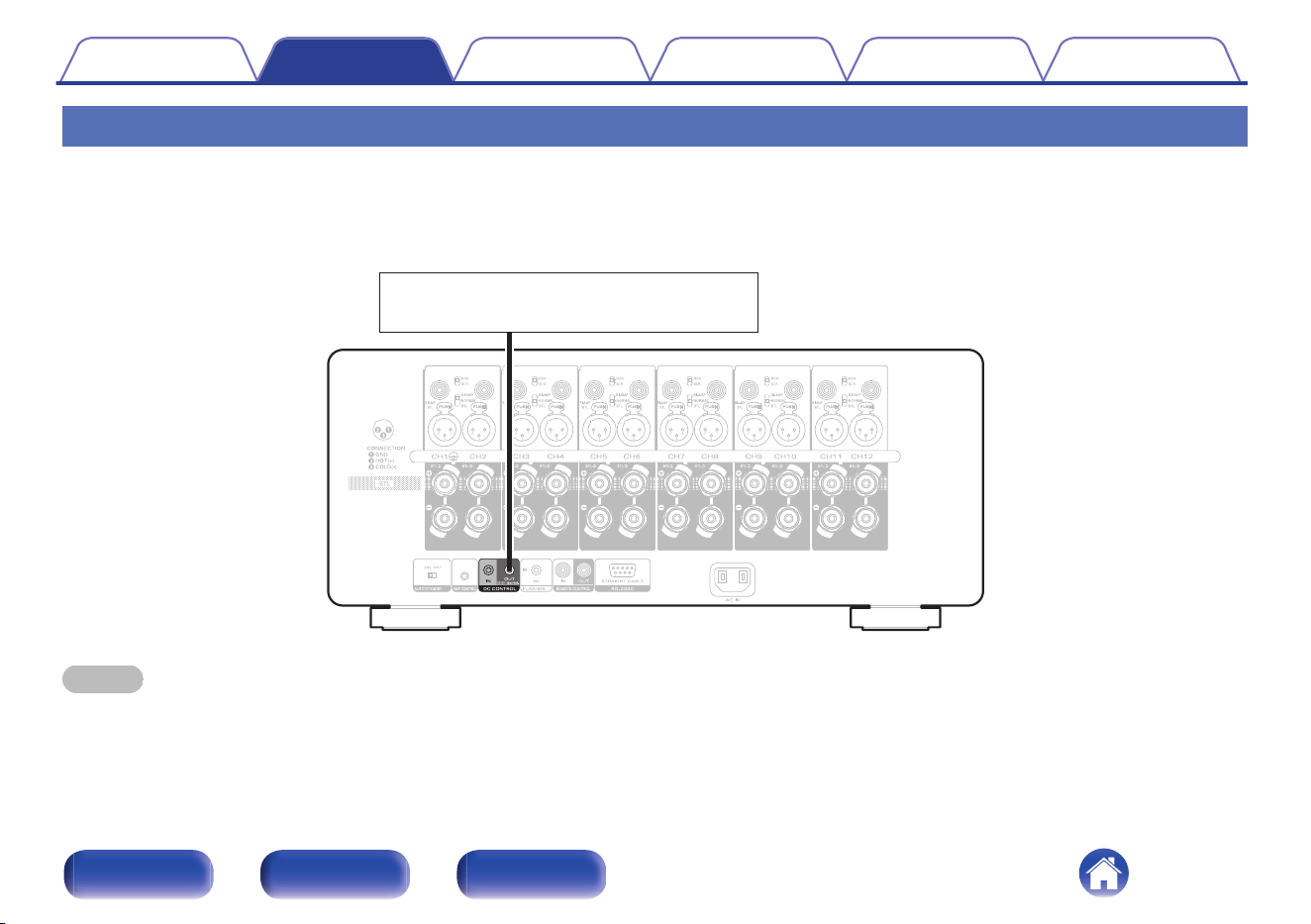
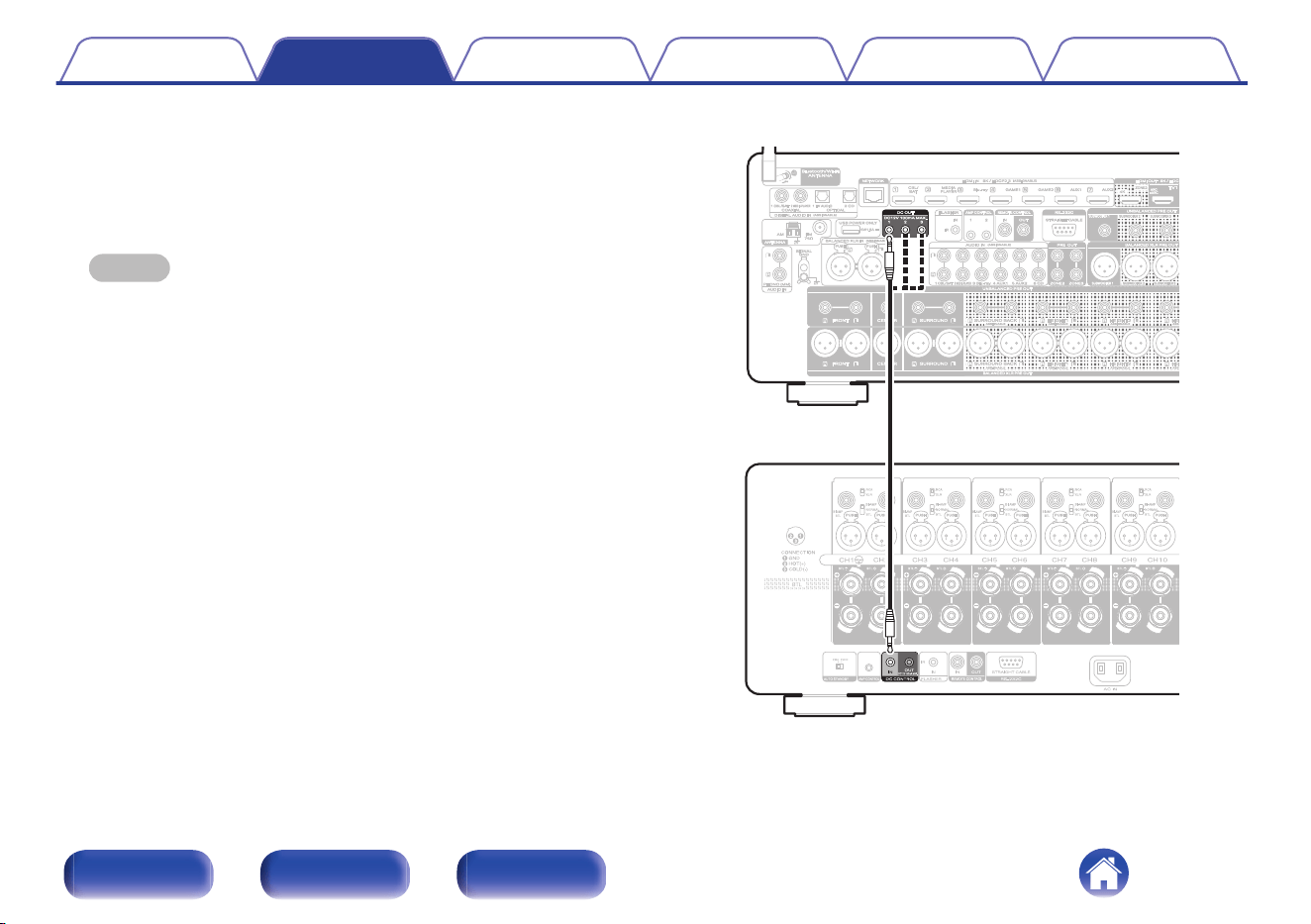
DC CONTROL jacks
o
DC CONTROL OUT jack
When a device with DC CONTROL IN jack is connected, the connected device’s power on/standby can be controlled through linked operation to this
unit.
The DC CONTROL OUT jack outputs a maximum 12 V DC/150 mA electrical signal.
12 V DC/150 mA trigger-compatible device
NOTE
0
Use a monaural mini-plug cable for connecting the DC OUT jacks. Do not use a stereo mini-plug cable.
0
If the permissible trigger input level for the connected device is larger than 12 V DC/150 mA, or has shorted, the DC OUT jack cannot be used. In this case, turn off the power
to the unit, and disconnect it.
Contents
Connections Playback Tips Appendix Specifications
23
Front panel Rear panel Index
o
DC CONTROL IN jack
Used when connecting a unit that has a DC CONTROL OUT jack to
this device, and linking the power ON/STANDBY of the connected
device with the power ON/STANDBY of this unit.
For details, see the instruction manual of the connected device.
NOTE
0
When a 5 V – 15 V voltage is input to the DC CONTROL IN jack, the power of
this unit switches ON.
However, inputting voltage outside of this range will cause damage to this unit.
This unit
[Example] AV 20
Contents Connections Playback Tips Appendix Specifications
24
Front panel Rear panel Index
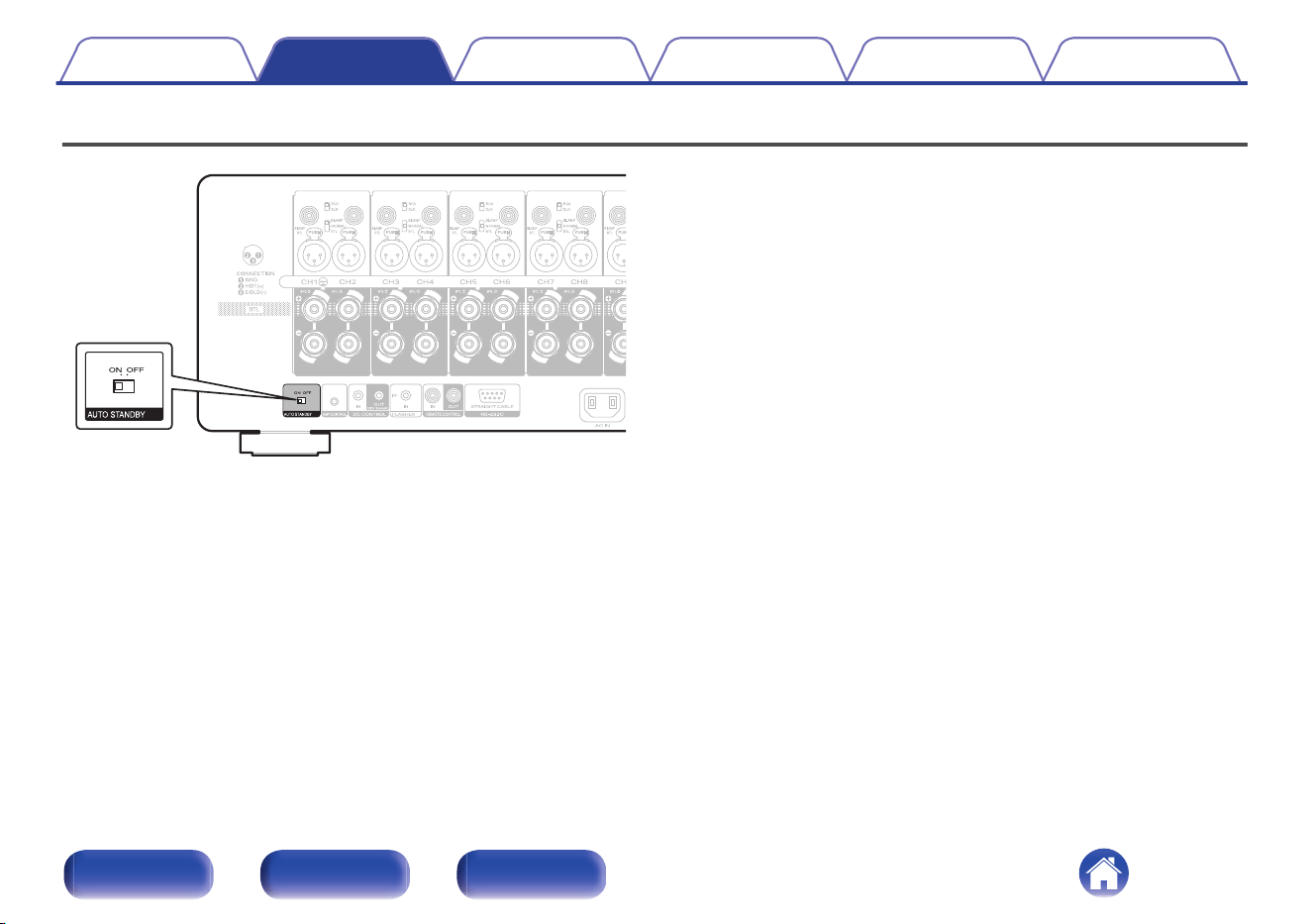
Setting the auto standby function
When the auto standby function is set to “ON”, the power of this unit
automatically enters standby after 15 minutes of no input signal and no
operations.
To use the auto standby function, set the AUTO STANDBY selector to
“ON”.
The factory setting is “OFF”.
Contents
Connections Playback Tips Appendix Specifications
25
Front panel Rear panel Index
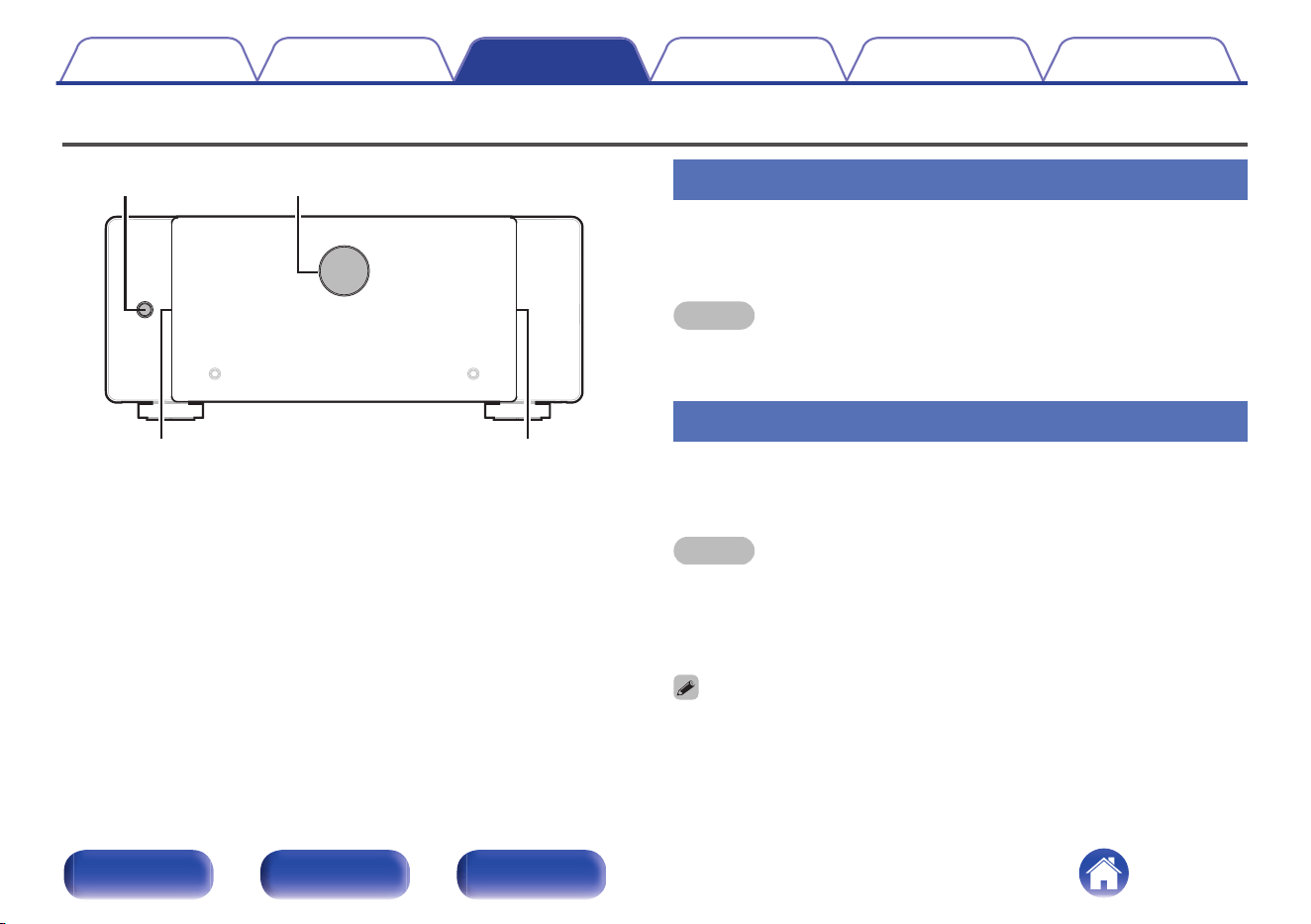
Basic operation
X
Illumination Illumination
Level meter
Turning the power on
1
Press X to turn on power to the unit.
The level meter and illumination are lit.
NOTE
0
When turning the power ON, turn the volume control of connected devices down to
the minimum.
Turning the power standby
1
Press X.
The unit switches to standby mode.
NOTE
0
Even if the unit is switched to standby, some of the circuits are still active. If you
will not be using this unit for a prolonged period (due to a holiday etc), remove the
power plug from the wall socket.
Furthermore, to prevent unexpected accidents, make sure the power plug is
located where it can be removed at any time.
0
You can connect this unit to a Marantz AV Preamplifier with an AMP CONTROL
jack using the included cable and perform operations for both units
simultaneously, such as turning the power on or off. (v p. 20)
Contents Connections Playback Tips Appendix Specifications
28
Front panel Rear panel Index
Turning the level meter display on or off
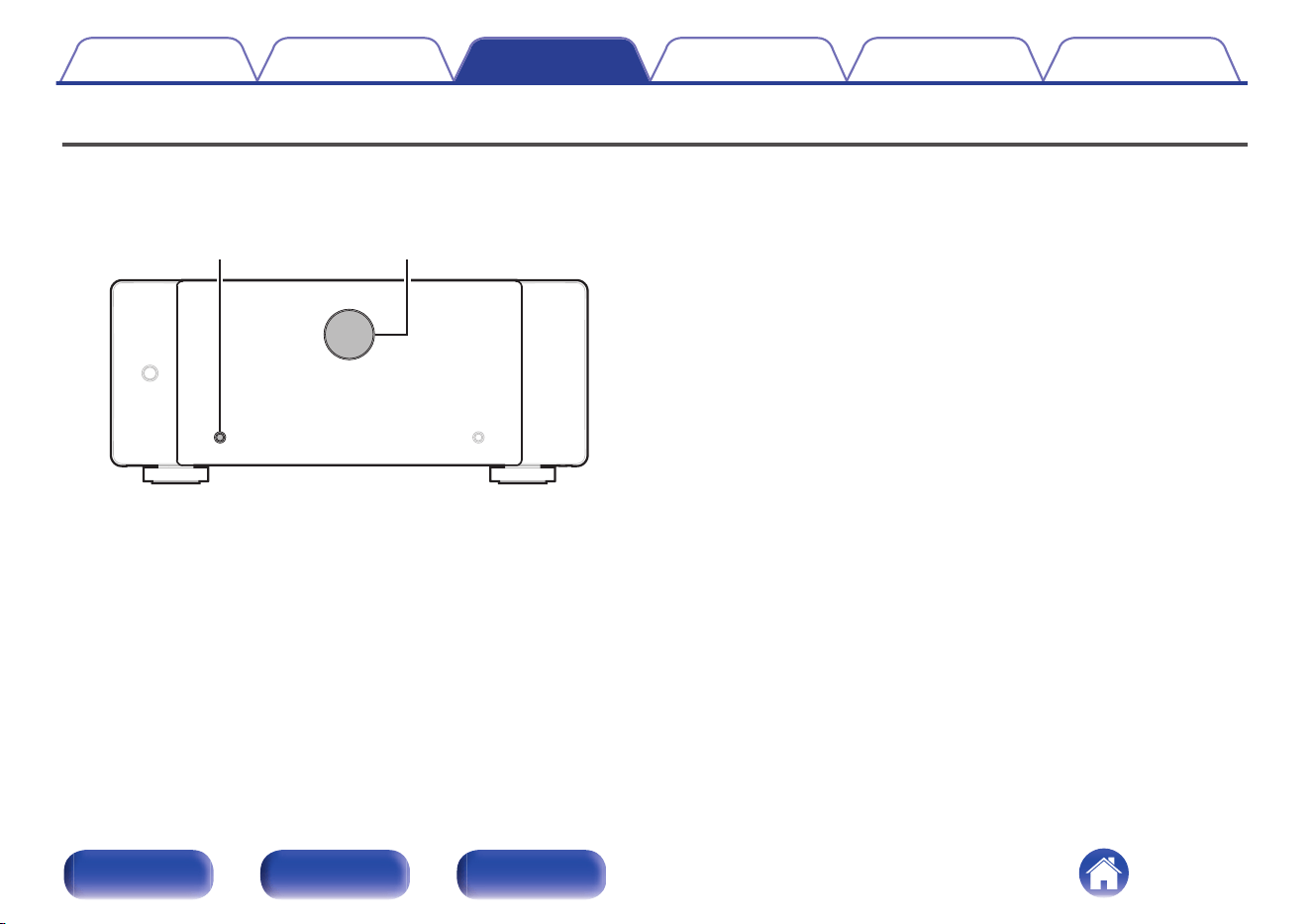
When the power of this unit is on, the backlight is lit and the level is displayed according to the channel 1 signal input. The meter display can be turned off
when you need darkness, such as when sleeping.
The factory setting is “On”.
METER ON/OFF Level meter
1
Press METER ON/OFF.
This button toggles the level meter display on and off.
Contents Connections Playback Tips Appendix Specifications
29
Front panel Rear panel Index
Changing the brightness of the illumination
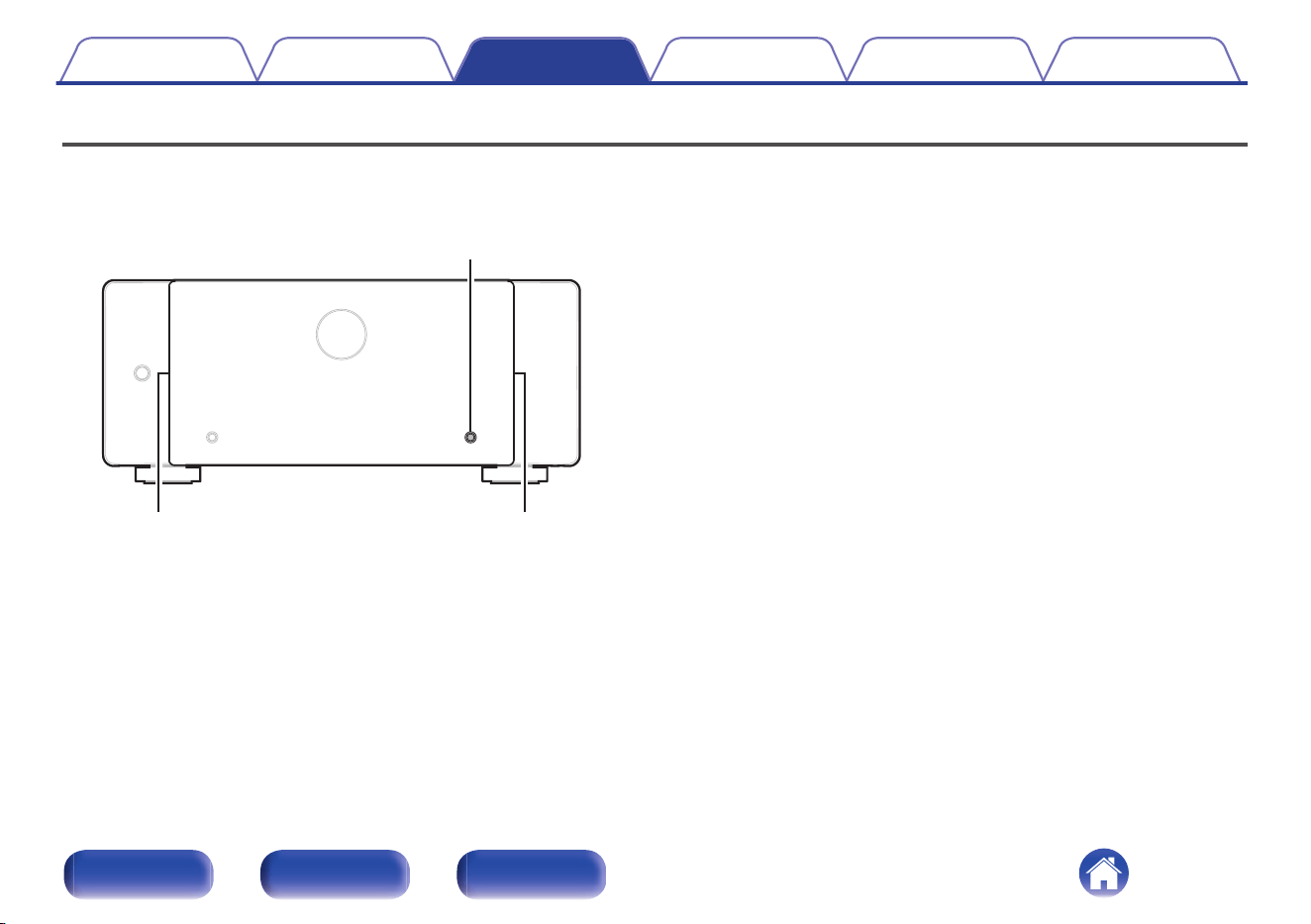
The brightness of the illumination can be adjusted between four levels. Setting the illumination to off reduces noise that could affect playback, achieving
high audio quality.
The factory setting is the brightest illumination level.
DIMMER
Illumination Illumination
1
Press DIMMER.
0
This button toggles through the illumination brightness levels.
Contents Connections Playback Tips Appendix Specifications
30
Front panel Rear panel Index
Troubleshooting
If a problem should arise, first check the following:
1. Are the connections correct?
2. Is the set being operated as described in the owner’s manual?
3. Are the other devices operating properly?
If this unit does not operate properly, check the corresponding symptoms in this section.
If the symptoms do not match any of those described here, consult your dealer as it could be due to a fault in this unit. In this case, disconnect the power
immediately and contact the store where you purchased this unit.
Contents Connections Playback Tips Appendix Specifications
31
Front panel Rear panel Index
Power does not turn on / Power is turned off
Power does not turn on.
0
Check whether the power plug is correctly inserted into the power outlet. (v p. 26)
Power automatically turns off.
0
The auto standby function is set to “ON”. The unit enters standby after 15 minutes of no operation or input signal. To turn off the auto standby function,
set the AUTO STANDBY selector to OFF. (v p. 25)
The unit immediately turns off when the power is turned on.
0
The protection circuit has been activated. Unplug the unit from the power outlet, leave it for at least 1 minute and then plug it back in. (v p. 34)
The power turns off and the protection circuit indicator shows one long blink and four short blinks in orange.
0
The protection circuit has been activated due to a rise in temperature within this unit. Turn the power off, wait about an hour until this unit cools down
sufficiently, and then turn the power on again. (v p. 34)
0
Please re-install this unit in a place having good ventilation.
0
Use speakers that have the specified impedance. (v p. 12)
0
Check the speaker connections. The protection circuit may have been activated because speaker cable core wires came in contact with each other or a
core wire was disconnected from the connector and came in contact with the rear panel of this unit. After unplugging the power cord, take corrective
action such as firmly re-twisting the core wire or taking care of the connector, and then reconnect the wire. (v p. 12)
0
Turn the volume down on the amp connected to this unit, and insert the power plug again.
The power turns off and the protection circuit indicator shows one long blink and five short blink in orange
0
The protective circuit has operated. In this case, remove the power plug from the wall socket, re-examine the installation conditions of this unit, and
check the speaker cable connections. If the same situation occurs when the power is switched on again, contact the Marantz Service Center.
Contents
Connections Playback Tips Appendix Specifications
32
Front panel Rear panel Index
No sound comes out
No sound comes out of speakers.
0
Check the speaker connections and connections to the other devices. (v p. 16)
0
Alter the input selector to match the input connector (BALANCED or UNBALANCED) of the connected device. (v p. 16)
0
Insert connection cables all the way in.
0
Check that input connectors and output connectors are not reversely connected.
0
Check cables for damage.
0
Check that speaker cables are properly connected. Check that cable core wires come in contact with the metal part on speaker terminals. (v p. 12)
0
Securely tighten the speaker terminals. Check speaker terminals for looseness. (v p. 12)
Contents Connections Playback Tips Appendix Specifications
33
Front panel Rear panel Index
Explanation of terms
Speaker impedance
This is certain-rated resistance of the speaker set to an alternating current
and expressed in ohms.
The smaller the impedance, the greater the output.
However, load on the amplifier is increased. Use speakers whose
impedance is supported by this unit.
Protection circuit
This is a function to prevent damage to devices within the power supply
when an abnormality such as an overload, excess voltage occurs or over
temperature for any reason.
Contents Connections Playback Tips Appendix Specifications
34
Front panel Rear panel Index
Specifications
Rated output: Normal, BI-AMP
200 W x 2 (8 Ω/ohms load, 1kHz, T.H.D. 0.05 %)
400 W x 2 (4 Ω/ohms load, 1kHz, T.H.D. 0.7 %)
BTL
400 W x 2 (8 Ω/ohms load, 1kHz, T.H.D. 0.05 %)
Output connectors: 4 – 16 Ω/ohms (Normal, BI-AMP)
8 – 16 Ω/ohms (BTL)
Frequency response (1 W, 8 Ω): 5 Hz – 70 kHz ±3 dB
Input sensitivity/impedance: 1.4 V / 47 kΩ/kohms (UNBALANCED)
2.8 V / 100 kΩ/kohms (BALANCED)
Signal-to-noise ratio (IHF-A): 110 dB
Voltage amplification level: 29 dB
Operating temperature: 41 °F - 95 °F (5 °C - 35 °C)
Power supply: AC 120 V, 60 Hz
Power consumption: 400 W
Power consumption in standby mode: 0.2 W
For purposes of improvement, specifications and design are subject to change without notice.
Contents
Connections Playback Tips Appendix Specifications
35
Front panel Rear panel Index
Index
v Numerics
15.2-channel .................................................. 15
17.4-channel .................................................. 15
7.1-channel .................................................... 15
v A
AMP CONTROL ............................................. 20
Auto Standby ................................................. 25
v B
Bi-amp ............................................................ 18
BTL ................................................................ 19
v F
Front panel ....................................................... 6
v I
Illumination ..................................................... 30
v L
Level meter .................................................... 29
v P
Protection circuit ............................................ 34
v R
Rear panel ........................................................ 8
v T
Troubleshooting ............................................. 31
v Z
ZONE2/ZONE3 .............................................. 15
Contents Connections Playback Tips Appendix Specifications
37
Front panel Rear panel Index

3520 11010 00AS
© 2025 Masimo. All Rights Reserved.
38
