Sound Controller Manual
Using Sound Controller on your iPhone or iPod touch*, you can control a connected MIDI
instrument with the wheels and XY pad provided. This app can also be used to play arpeggios on
the MIDI instrument. (*: Both referred to below as the “iPhone”.)
NOTE
・Refer to theiPhone/iPad Connection Manualfor details on how to connect your iPhone to a MIDI
instrument.
・Please see the Description section in the App Store for details on supported instruments.
■ Main window
1Sound Controller Manual
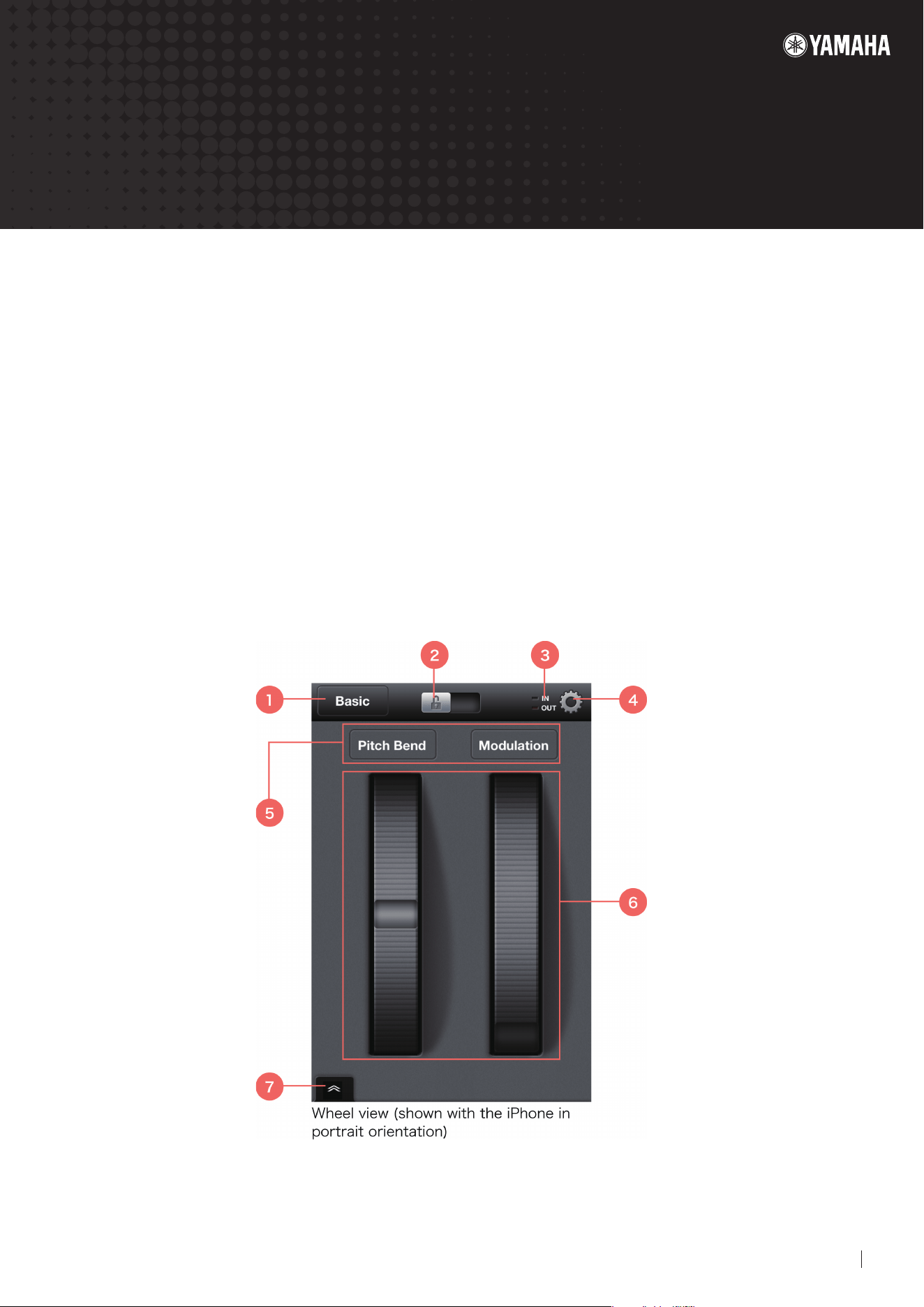
① Tap to display a list of parameter combinations that can be selected for control by the
wheels and XY pad. You can also set parameters individually from the Wheel and XY Pad
views. In order to do so, select User from this list. You can also tap [>] at the right of the list
to change the combination name.
② Slide to lock the screen and prevent any operations other than wheels and XY-pad control.
This helps to prevent mistakes while performing and allows you to concentrate on wheel and
XY-pad control. Slide ② to release the screen lock.
③ This MIDI indicator flashes when data is being exchanged with the connected MIDI
instrument.
④ Tap to open the Settings screen in order to carry out the following.
・Model Information: View information on the connected MIDI instrument.
・Wheel Operation: Select one of the following two wheel operation modes.
- jump: The wheels move immediately to the tapped location.
- catch: The wheels move only when tapped and slide.
・Reset Control: Output a Reset All Controllers message to the MIDI instrument. This also
causes the wheels and the XY pad’s dot to move to the default positions for the selected
parameters.
・Read this manual.
・View the app version.
You can also make the following settings when an instrument has been connected.
・Controller Output Ch: Used to select the part on the instrument that the wheels and the XY
pad will control.
・Arpeggiator Input Ch: Used to select the part on the instrument that will control the
Arpeggiator.
・Arpeggiator Output Ch: Used to select the part on the instrument that will play the arpeggios
output by Sound Controller.
2Sound Controller Manual
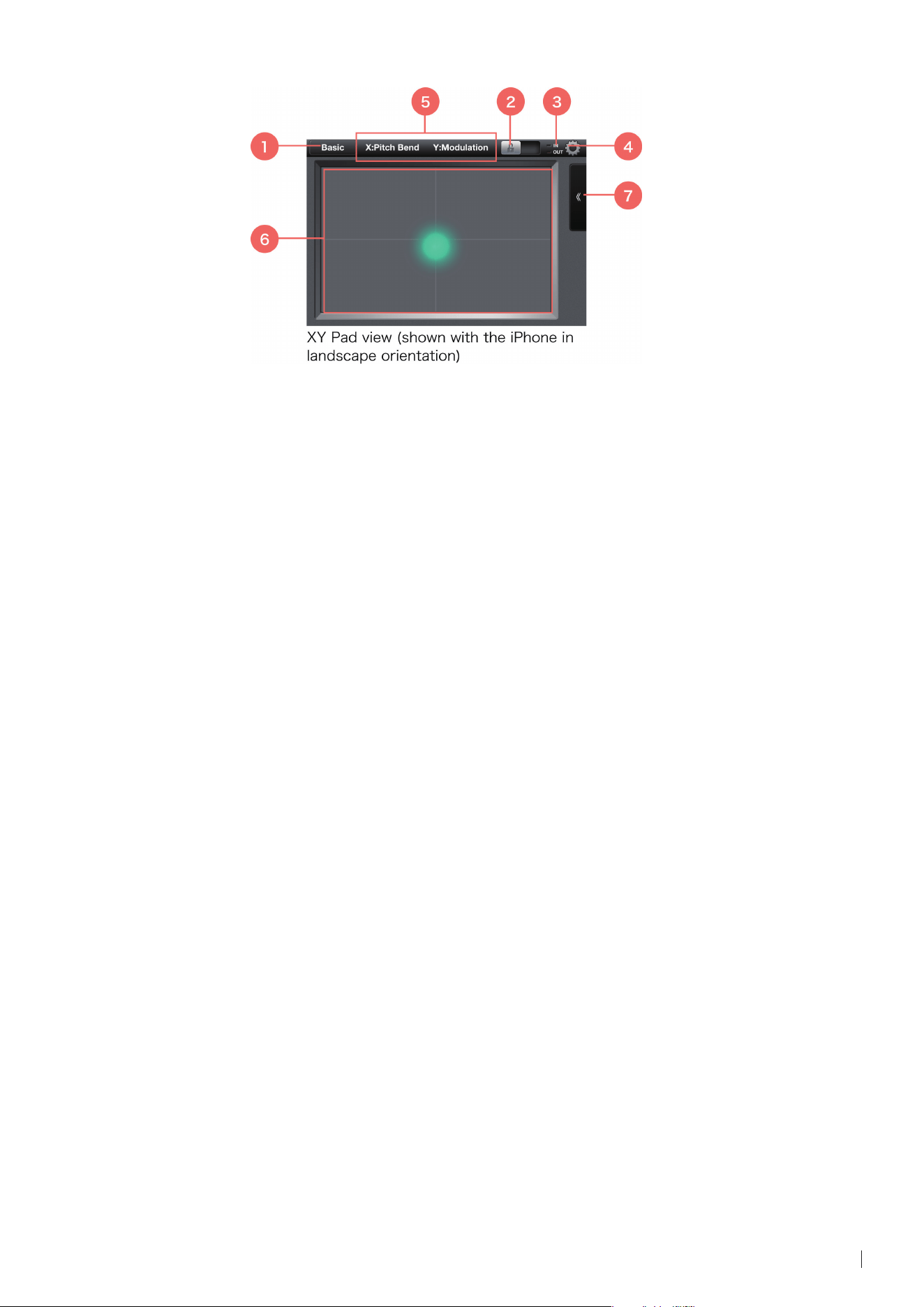
⑤ Names of the parameters set to each of the wheels or to the pad’s X and Y axes. If User
has been selected for ① , you can tap here to change the parameter settings.
⑥ Operate the wheels or the XY pad to change the sound being played on the connected
MIDI instrument by sending MIDI signals for the parameters selected in ⑤ . The XY pad’s dot
will follow your finger as you operate it.
⑦ Tap to open the Arpeggio window.
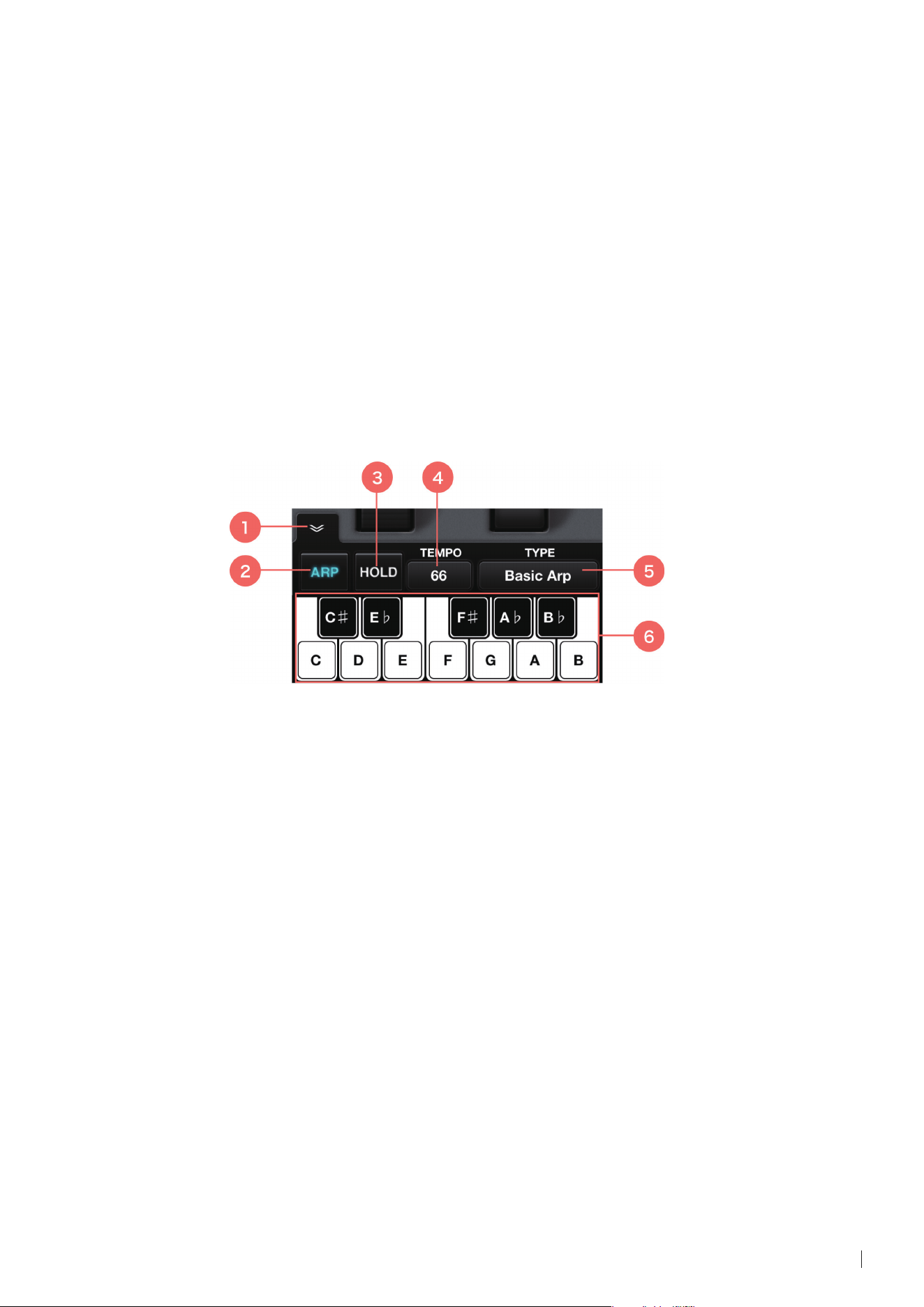
■ Arpeggio window
① Tap to close the window.
② Tap to turn the Arpeggiator on and off.
③ If turned on while the Arpeggiator ② is also on, the arpeggio will continue to play when you
remove your finger from the keyboard.
④ Tap to set the Arpeggiator tempo. The current tempo is displayed here.
⑤ Tap to display a list of arpeggio types that can be selected for the Arpeggiator.
⑥ With the Arpeggiator ② turned on, use this keyboard or play the connected MIDI
instrument to control the Arpeggiator. Sound Controller arpeggios are output as MIDI data.
3Sound Controller Manual

Copying of the commercially available music sequence data and/or digital audio/ graphic/
video files is strictly prohibited except for your personal use.
The software and this Owner’s manual are exclusive copyrights of Yamaha Corporation.
Copying of the software or reproduction of this manual in whole or in part by any means is
expressly forbidden without the written consent of the manufacturer.
Yamaha makes no representations or warranties with regard to the use of the software and
documentation and cannot be held responsible for the results of the use of this manual and
the software.
The screen displays as illustrated in this Owner’s Manual are for instructional purposes, and
may appear somewhat different from the screens which appear on your devices.
Apple and iPod touch/iPhone/iPad are trademarks of Apple Inc. registered in the U.S. and
other countries.
The company names and product names in this Owner’s Manual are the trademarks or
registered trademarks of their respective companies.
U.R.G., Digital Musical Instruments Division © 2013 Yamaha Corporation. All rights reserved.
4Sound Controller Manual