BPA-O300
INSTRUCTION MANUAL
IMPORTANT PRODUCT NOTICES
AND SAFETY INSTRUCTIONS
When using your blood pressure monitor, basic precautions should always be
followed. Please read and follow all instructions and warnings before using this
product. Save these instructions for future reference.
• Please note that this is a home healthcare product only and it is not intended
to serve as a substitute for the advice of a physician or medical professional.
• This device uses oscillemetric method to measure systolic and diastolic blood
pressure, as well as heart rate.
• Do not use this device for diagnosis or treatment of any health problem or
disease. Measurement results are for reference only. Consult a healthcare
professional for interpretation of pressure measurements. Contact your
physician if you have or suspect any medical problem. Do not change your
medications without the advice of your physician or healthcare professional.
• Proper cu size is critical for accurate measurements. Follow the instructions
in this manual and printed on the arm cu to ensure the arm cu is used
properly.
• This product is not suitable for people with arrhythmias. This device may have
diculty determining the proper blood pressure for pregnant women and for
users with irregular heartbeat, diabetes, poor circulation of blood, kidney
problems, or for users who have suered a stroke.
• Excessive use may result in blood flow interference, which is likely to cause
uncomfortable sensations, such as partial subcutaneous hemorrhage, or
temporary numbness to your arm. In general, these symptoms should not last
long. However, if you do not recover in time, please seek advice from a medical
professional.
• The pulse display is not suitable for checking the frequency of heart
pacemakers.
• Electromagnetic interference: The device contains sensitive electronic
components. Avoid strong electrical or electromagnetic fields in the direct
vicinity of the device (e.g., mobile telephones, microwave ovens). These may
lead to temporary impairment of measurement accuracy.
• Please use this device indoors only.
• Use blood pressure monitor only for its intended use.
• Do not wrap the cu around body parts other than your arm.
• Not for use by or on persons under the age of 18.
• Do not use this device on infants, children, or those who cannot express their
own intention.
• Please use only the 1.5V AAA alkaline batteries for power supply.
Blood pressure measurements determined with this device are equivalent to
those obtained by a trained observer using the cu/stethoscope auscultatory
method within the accuracy limits prescribed by the American National Standard
for manual, electronic, or automated sphygmomanometers.
ABOUT BLOOD PRESSURE
What is blood pressure?
Blood pressure is the pressure exerted on the artery walls while blood flows
through the arteries. The pressure measured when the heart contracts and
sends blood out of the heart is systolic (highest) blood pressure. The pressure
measured when the heart dilates with blood flowing back into the heart is called
diastolic (lowest) blood pressure.
Why measure your blood pressure?
Among today’s various health problems, those associated with high blood
pressure are very common. High blood pressure dangerously correlates with
cardiovascular diseases. Therefore, blood pressure monitoring is important for
identifying those at risk.
Why do my readings vary?
Blood pressure is a body parameter that is subject to normal variations
throughout the day. A single reading that is dierent from your and your doctor’s
readings are not necessarily inaccurate. The average of several readings, taken
under similar conditions, using the same arm, is preferred for accurate blood
pressure readings.
Why are my readings dierent than those taken at my doctor’s oce?
Many experience a phenomenon called “White Coat Hypertension” when
measured by a doctor. White Coat Hypertension refers to blood pressure that rises
above its usual level when measured in a clinical setting, such as a doctor’s oce.
owever, if you do not recover in time, please seek advice from a medical
d
BLOOD PRESSURE STANDARD
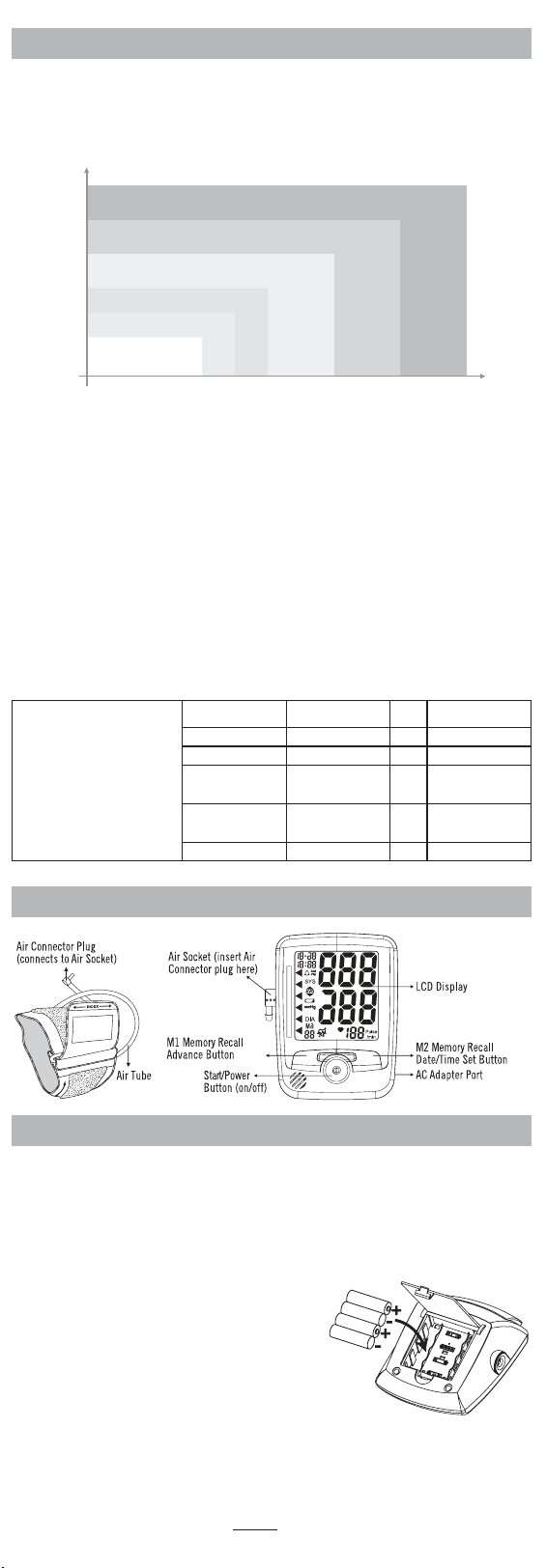
The table below contains defined levels of hypertension from the World Health
Organization (WHO). The WHO has established globally accepted standards from the
assessment for high blood pressure readings. Users can compare their own blood
pressure readings against these defined levels to determine if they may potentially be
at increased risk. This table is applicable to most adults age 18 and older.
mmHg
110
100
90
85
80
Diastolic Blood Pressure
Hypertension
Indicator
Systolic Blood Pressure
*Source: World Health Organization (WHO)
120 130 140 160 180 mmHg
Severe Hypertension (Grade 3) -Red
Moderate Hypertension (Grade 2) -Orange
Mild Hypertension (Grade 1) -Yellow
High-Normal -Green
Normal -Green
Optimal -Green
Blood pressure tends to go up and down, even in people who normally don’t have
high readings. If your numbers stay above the “normal” range most of the time,
you may be at increased risk and should consult your physician.
Although one can easily find where their own blood pressure readings fall
on this table, this monitor comes equipped with a Risk Category Index that
automatically compares each reading to the defined levels and provides a helpful
cue if your reading falls into one of the stages that could potentially indicate an
increased risk.
Please note that cues provided by this monitor are only intended to assist you
in using this table. The table and cues are only provided for convenience to help
you understand your non-invasive blood pressure reading as it relates to the
WHO information. They are not a substitute for a medical examination by your
physician. It is important for you to consult with your physician regularly. Your
physician will tell you your normal blood pressure range as well as the point at
which you may actually be considered to be at risk.
NOTE: This blood pressure
monitor uses defined levels for
hypertension from World Health
Organization (WHO). This table
provides the American Heart
Association blood pressure
guidelines (AHA 2017) for your
reference. You can compare
your readings to this chart to
know where your measurement
falls according to the AHA 2017
defined levels for hypertension.
Blood Pressure
Category
Sistolic mmHg
(upper number)
Diastolic mmHg
(lower number)
Normal Less than 120 and Less than 80
Elevated 120 – 129 and Less than 80
High Blood Pressure
(Hypertension)
Stage 1
130 – 139 or 80 – 89
High Blood Pressure
(Hypertension)
Stage 2
140 or higher or 90 or higher
Hypertension Crisis Higher than 180 and/or Higher than 120
*Source: AHA 2017
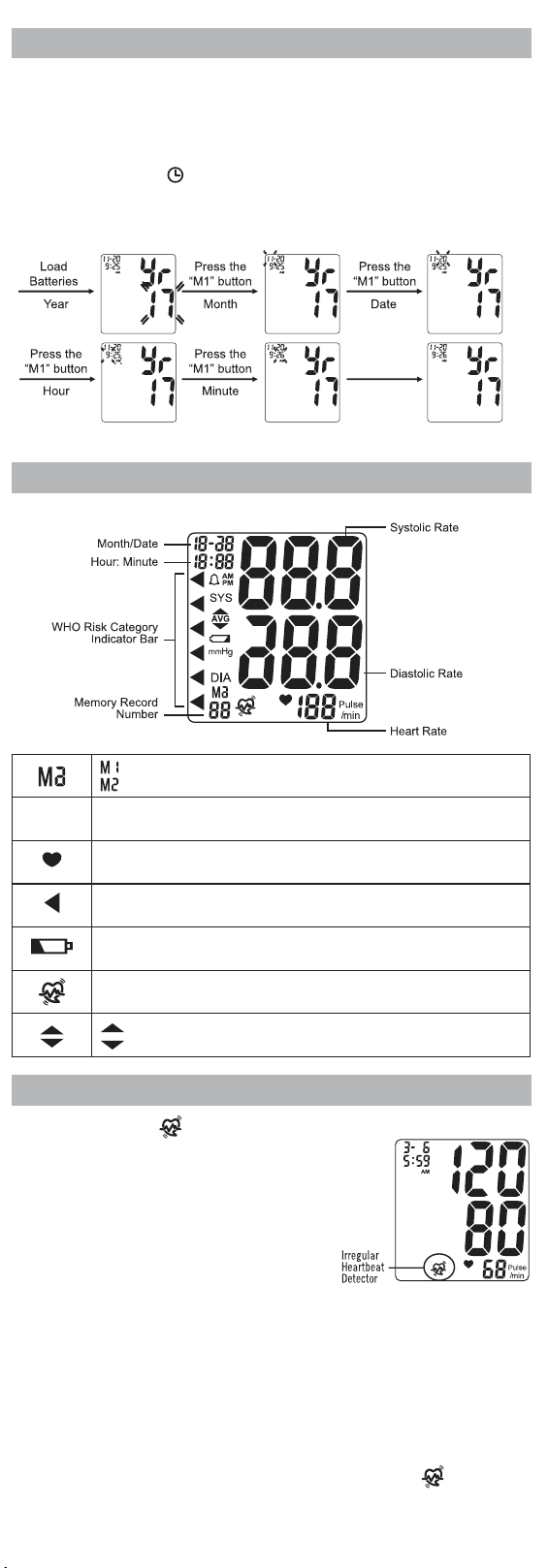
NAME/FUNCTION OF EACH PART
BATTERY INSTALLATION
1. Press down on the latch and lift the battery cover to open.
2. Install or replace 4 AAA alkaline batteries in the battery compartment. Make
sure the polarities “+” and “-” ends coincide with similar markings inside the
compartment.
3. Close the battery cover by pushing in the top end of the battery door.
Replace the batteries if:
• The low battery symbol appears on the display.
• Nothing appears on the display when the
power is switched on.
NOTE:
• Date and time must be reset if batteries are
removed or replaced.
• Replace all batteries at one time (as
simultaneous set). Use only 1.5V AAA alkaline
batteries.
• When the batteries are removed, the measurement values stored in memory
are retained.
• Clean contacts on battery and in battery compartment with a soft, dry cloth
each time you install batteries.
• Batteries are hazardous waste. Do not dispose of them together with
household garbage.
DATE AND TIME SET
It is necessary to set the date and time for the unit every time batteries are
initially installed or replaced.
1. Load 4 AAA alkaline batteries; the YEAR will flash on the display.
2. Press the USER M1/ + button to advance the display to the desired year.
Press the USER M2/
button to confirm the year.
3. Next, the MONTH will blink. Repeat step 2 to set the MONTH and DATE, then
HOURS, then MINUTES.
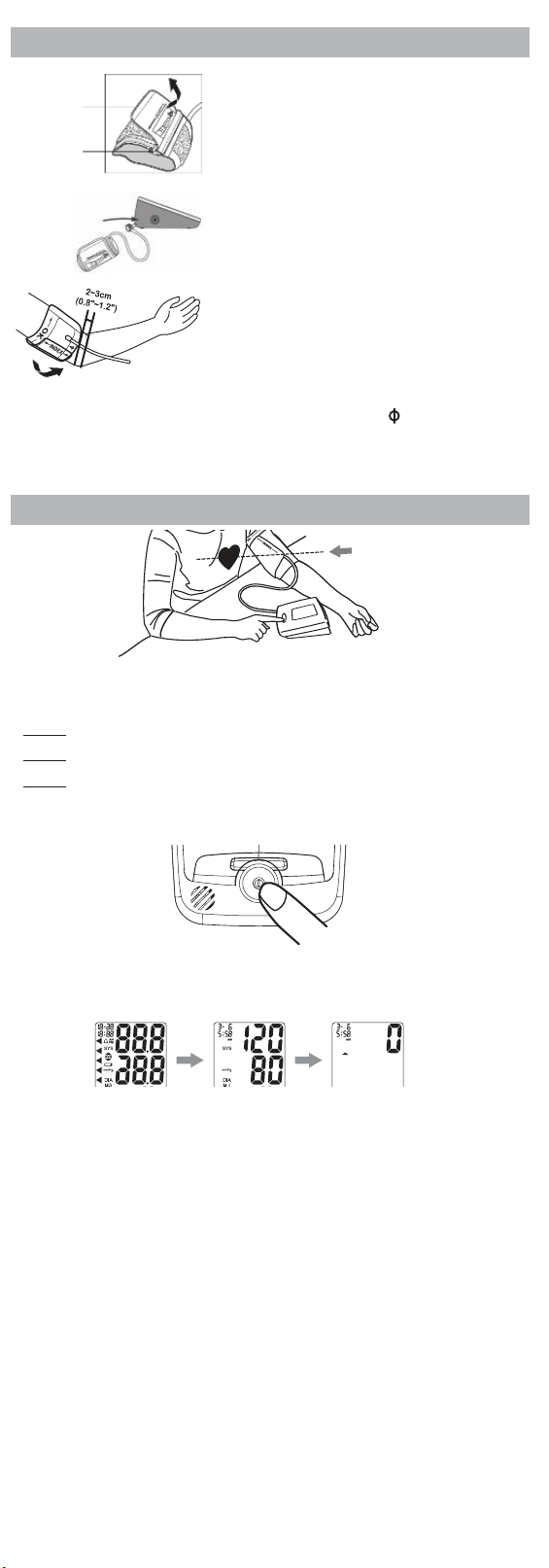
DISPLAY EXPLANATIONS
: Appears for User 1
: Appears for User 2
AVG
Memory Average: Displays average of last 3 readings.
Pulse Symbol: Shows the heart rate per minute.
WHO Risk Category Indicator: See Blood Pressure Standard section.
Low Battery Symbol: Appears when batteries should be replaced.
Irregular Heartbeat Detector: See below for more information.
: Appears when cu inflates
: Appears when cu deflates
IRREGULAR HEARTBEAT DETECTOR
The appearance of the
icon indicates that a pulse irregularity consistent
with an irregular heartbeat was detected during
measurement. Usually, this is not a cause
for concern. However, if the symbol appears
often, we recommend you seek medical advice.
Please note that the device does not replace a
cardiac examination, but serves to detect pulse
irregularities at an early stage.
Movement, shaking, or talking during the
measurement can result in pulse irregularities that may cause the appearance
of this icon. Therefore, it is of great importance to not move or talk during
measurement.
To determine the presence of an irregular heartbeat, the average of the
heartbeat intervals is calculated with the first 3 normal eective heartbeat
values. It is important to note that the average is not a strict mathematical
averaging of all recorded intervals. At least 3 beats with 25% or greater
dierence from the average heartbeat interval will generate the
icon on
the screen.
lood pressure tends to go up and down, even in people who normally don’t have
tically compares each reading to the defined levels and provides a helpful
End of Cu
D-Ring
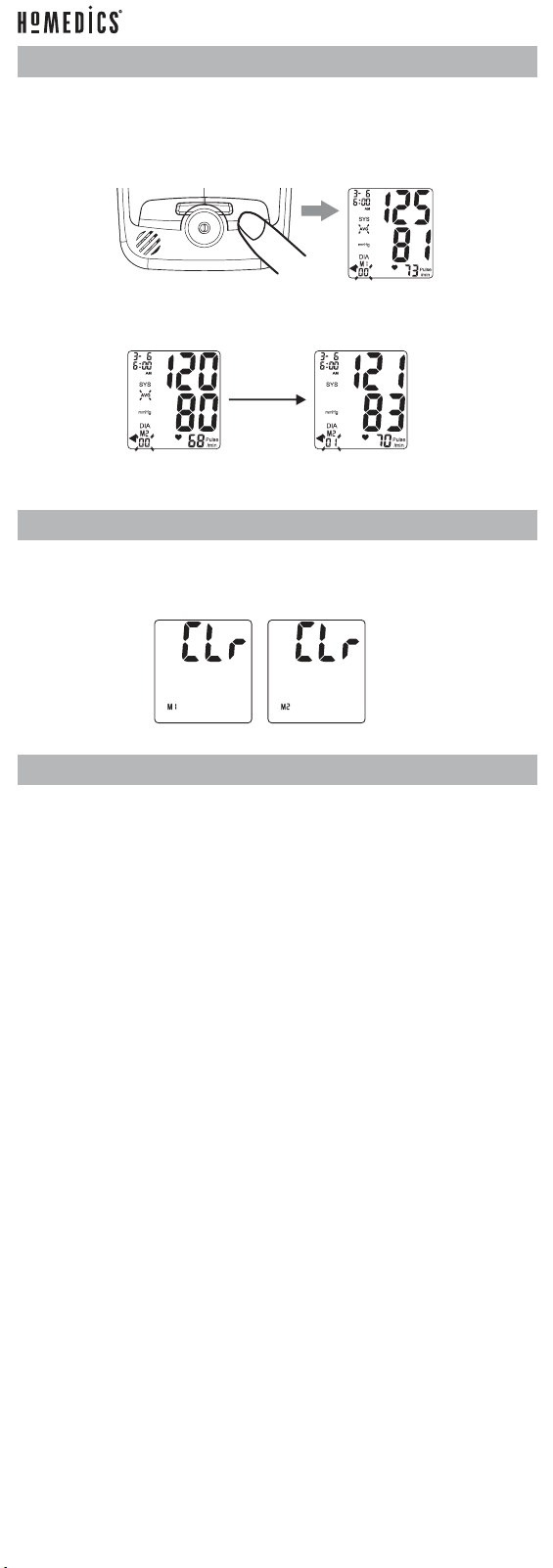
USING THE ARM CUFF
1. If the cu is not assembled, pass the end of
the cu farthest away from the tubing
through the metal D-ring in order to form a
loop. The smooth side without the felt
material should be on the inside of the loop.
2. Plug the cu tube into the left side of
the unit.
3. Place the upper arm cu approx. ¾” – 1 ¼”
above elbow. Pull the end of the cu so
that it tightens evenly around your arm.
Press the hook and loop material together
to secure. There should be room for 2
fingers to be placed between the cu and
arm. Center tube over the middle of the arm.
Please note:
To use the right arm, you must position the artery symbol “
” over the main
artery. Locate the main artery by pressing with 2 fingers approximately 1” (2cm)
above the bend of your elbow on the inside of your right arm. Identify where the
pulse can be felt the strongest. This is your main artery.
MEASUREMENT PROCEDURE
IMPORTANT:
DURING MEASUREMENT
• Do not talk or move your arm or hand muscles.
• Do not cross your legs. Sit with feet flat on the floor.
• Do not touch cu or monitor during measurement.
1. Press POWER button to turn the monitor ON. The display will perform a self-
test, then the values from the last reading will appear on the display.
2. The blood pressure monitor will start to measure. The cu will automatically
begin to inflate, with the display showing the increasing pressure in the cu.
As the pressure increases, an arrow pointing up will appear on the display.
3. When the inflation has reached optimum level, the display will begin to show
decreasing pressure and an arrow pointing down will appear.
4. To detect the heartbeat, the heart symbol will appear and continuously flash
on the LCD display.
5. Your blood pressure measurement and pulse will display simultaneously on
the screen.
6. Press the M1 button to record the measurement into the MEMORY Recall
Button M1.
7. Press the M2 button to record the measurement into the MEMORY Recall
Button M2.
NOTE:
• This monitor automatically turns o approximately 2 minutes after last
operation. You may also press the POWER button to turn the unit o and
record the measurement result in to the MEMORY Recall M1.
• To interrupt the measurement, you may press the POWER button. The cu will
deflate immediately after a button is pressed.
Insert Plug
Here
RECALLING VALUES FROM MEMORY
This monitor can be used by 2 individuals. Each user can store up to 90
measurements.
1. Press and release either the M1 or M2 button. The unit will first display the
average of the last 3 stored measurements.
2. Every new press of the M1 or M2 button will recall a previous reading. The
latest reading will be recalled first.
3. To stop recalling readings from memory, press the POWER button.
CLEARING VALUES FROM MEMORY
From the power display o, press and hold down either the M1 or M2 button
until the display shows CLr. This indicates that all measurements have been
erased.
CARE, MAINTENANCE, AND CLEANING
• Clean the blood pressure monitor body and cu carefully with a slightly damp,
soft cloth. Do not press. Do not wash cu or use chemical cleaner on it. Never
use thinner, alcohol, or petrol (gasoline) as cleaner.
• Leaky batteries can damage the unit. Remove the batteries when the unit will
not be used for a long time.
• Follow local ordinances and recycling instructions regarding disposal or
recycling of the device and device components, including batteries.
• If the unit is stored near freezing, allow it to acclimate to room temperature
before use.
• This blood pressure monitor is not field-serviceable. You should not use any
tool to open the device nor should you attempt to adjust anything inside the
device. If you have any problems with this device, please contact HoMedics
Consumer Relations (contact information can be found on the Warranty page).
• Do not immerse the unit in water as this will result in damage to the unit.
• Do not subject the monitor or cu to extreme temperatures, humidity,
moisture, or direct sunlight. Protect from dust.
• Do not fold the cu and tubing tightly.
• Do not disassemble the monitor or cu. If in need of repair, refer to the
Warranty section of this manual.
• Do not subject the monitor to extreme shocks (do not drop on floor).
• Do not inflate the cu unless wrapped around arm.
• Do not wrap the cu around body parts other than your arm.
• Do not drop or insert any object into any opening or hose.
• To avoid accidental strangulation, keep this product away from children.
Do not drape tube around neck.
• This monitor may not meet its performance specifications if stored outside
these temperature and humidity ranges:
Storage/Transportation Environment Operating Environment
Temperature: -13°F ~ 158°F (-25°C ~ 70°C)
Humidity: less than 93% RH
Temperature: 41°F ~ 104°F (5°C ~ 40°C)
Humidity: 15% ~ 93% RH
TROUBLESHOOTING
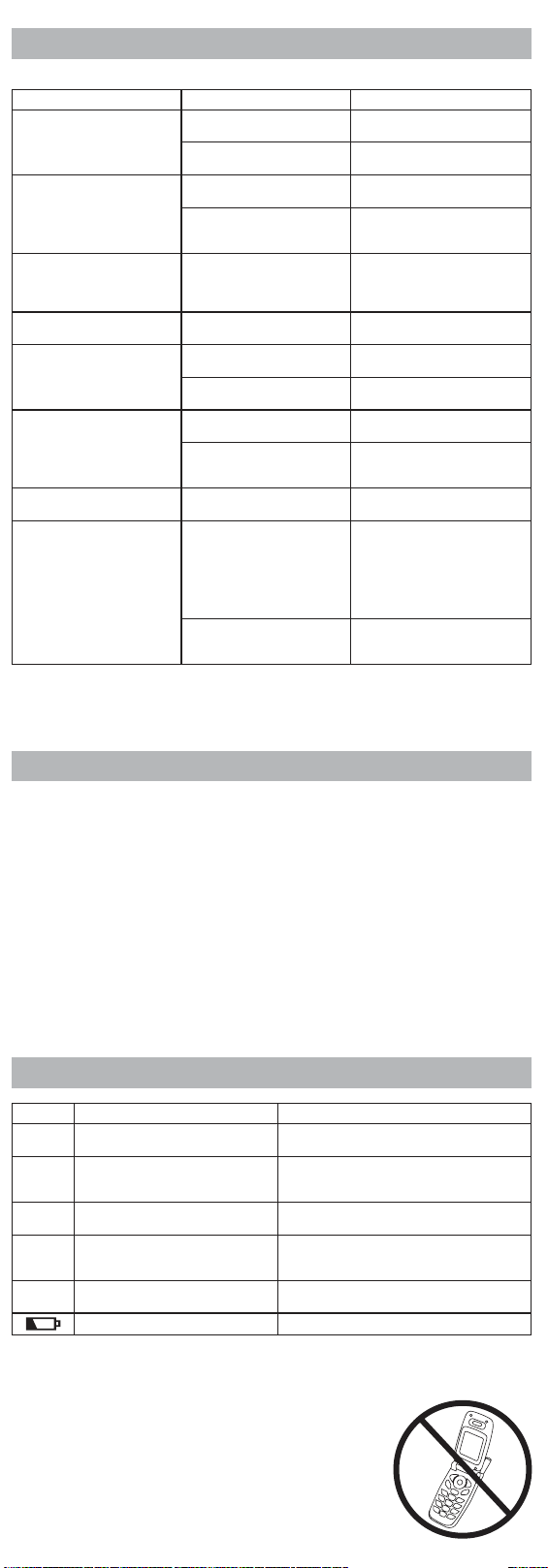
If any abnormality arises during use, please check the following points.
Problem Probable Cause Recommended Action
Nothing appears in the
display even when the
power is turned on.
Batteries are drained. Replace all batteries with
new ones.
Batteries are not correctly
aligned with terminals.
Reinsert batteries in the
correct position.
Low battery symbol
appears.
Batteries are drained. Replace all batteries with
new ones.
In colder temperatures,
batteries have weaker
electrical charges.
Warm up the batteries, or use
the device in a warmer setting.
Device operation time is
inconsistent.
Dierent battery brands
have dierent life spans.
Use alkaline batteries and
replace all batteries at the
same time with the same
brand of batteries.
No reading after
measurement.
Batteries are drained. Replace all batteries with
new ones.
Suspicious blood pressure
results.
Cu positioned improperly. Adjust patient and arm cu to
measure.
Blood pressure naturally
varies throughout the day.
Rest a while, relax, and
measure again.
Suspicious heart rate
results.
Body movement during
device use.
Refrain from moving during
measurement.
Measurement shortly after
exercise or exposure to the
outdoors.
Do not take measurements
after exercise or coming back
from the outdoors.
Power switches o
automatically.
System design. Push the POWER button again,
and then begin measure.
During measuring, air
reinflates.
It could be a normal action.
If the user’s blood pressure
is higher than the initial
pressure value, the device
automatically pumps to a
higher pressure by 40mmHg
each time.
Relax, and try to take a
measurement again.
The arm cu is not fastened
properly.
Check that the arm cu is
fastened properly and retake
the measurement.
Note: If the unit still does not work, contact HoMedics Consumer Relations.
Under no circumstance should you disassemble or attempt to repair the unit by
yourself. Contact information for HoMedics Consumer Relations can be found on
the Warranty page.
SPECIFICATIONS
• Measuring range: Blood Pressure: 30-280mmHg
Pulse Rate: 40-199 beats/min
• Calibration accuracy: Blood Pressure: 30-280mmHg
Pulse Rate: 40-199 beats/min
• Operating environment: 10°C~40°C (50°F~104°F) with relative humidity up to
85% (non-condensing)
• Storage/Transportation environment: -20°C~+50°C (-4°F~+122°F) with
relative humidity up to 85% (non-condensing)
• Power source: 4 x 1.5 V AAA batteries
• Weight: approx. 226g (without batteries)
• Dimensions: approx. 95 x 130 x 45 (W x H x D)
• Cu circumference (M Size): approx. 9” to 17” (23 cm to 43 cm)
Note: These specifications are subject to change without notice.
ERROR CODES
Err Code Meaning Corrective Action
Err 0 Could not detect pulse. Too much
body movement.
Reduce movement and retry measurement.
Err 1 Leakage in cu pressure/inflation
too low.
The arm cu is not fastened properly.
Reapply the cu, and take a measurement
again.
Err 2 Pressure fault, could not detect
pulse. Too much body movement.
Rest a while, relax, and retry measurement.
Err 3 Could not detect pulse during
deflation. Too much body
movement.
The arm cu is not fastened properly.
Reapply the cu, and take a measurement
again.
Err Memory error. Take o batteries to reboot the device, then
take another measurement.
Low batteries. Replace all batteries with new ones.
POTENTIAL FOR ELECTROMAGNETIC INTERFERENCE
To avoid inaccurate results caused by electromagnetic interference between
electrical and electronic equipment, do not use the device near a cell phone
or microwave oven. For most wireless communication
devices, it is recommended to maintain a distance of 10.8
feet (3.3m) in order to avoid electromagnetic interference.
This device complies with Part 15 of the FCC Rules.
Operation is subject to the following two conditions: (1)
this device may not cause harmful interference, and
(2) this device must accept any interference received,
including interference that may cause undesired operation.
FEDERAL COMMUNICATIONS COMMISSION COMPLIANCE
STATEMENT
Changes or modifications to this equipment not expressly approved by the
manufacturer could void the user’s authority to operate the equipment. This
equipment has been tested and found to comply with the limits for a Class B
digital device, pursuant to Part 15 of the FCC Rules. These limits are designed
to provide reasonable protection against harmful interference in a residential
installation. This equipment generates, uses, and can radiate radio frequency
energy and, if not installed and used in accordance with the instructions, may
cause harmful interference to radio communications.
However, there is no guarantee that interference will not occur in a particular
installation. If this equipment does cause harmful interference to radio or
television reception, which can be determined by turning the equipment o and
on, the user is encouraged to try to correct the interference by one or more of
the following measures:
• Reorient or relocate the receiving antenna.
• Increase the separation between the equipment and receiver.
• Connect the equipment into an outlet on a circuit dierent from that to which
the receiver is connected.
• Consult the dealer or an experienced radio/TV technician for help.
ELECTROMAGNETIC COMPATIBILITY (EMC)
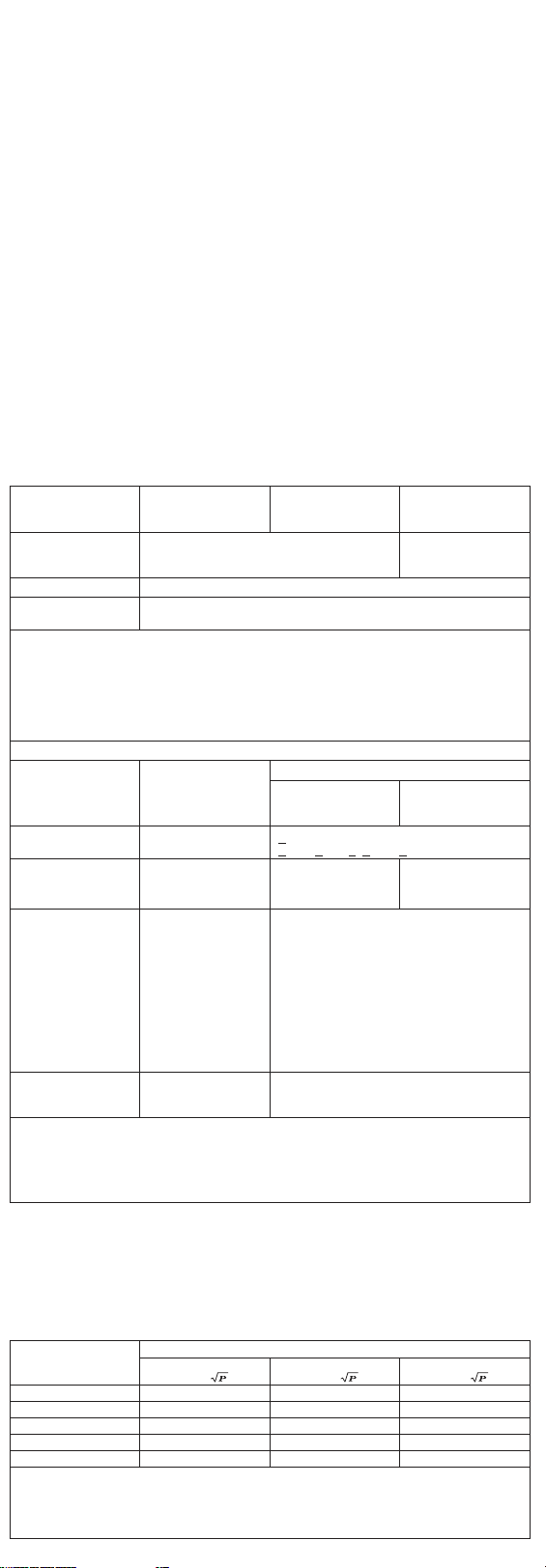
Guidance and manufacturer’s declaration – electromagnetic emissions
The device is intended for use in the electromagnetic environments listed below,
and should only be used in such environments:
Phenomenon Professional
healthcare facility
environment a)
Home healthcare
environment a)
Conducted and
radiated RF
emissions
a) CISPR 11
Group 1 Class B
Harmonic distortion Not applicable
Voltage fluctuations
and flickering
Not applicable
a) The equipment is suitable for use in Home Health Environments and Professional Health
Care Environments limited to patient rooms and respiratory treatment facilities in hospital
or clinics. The more restrictive acceptance limits of Group 1 Class B (CISPR 11) have been
considered and applied. The equipment is suitable for use in the mentioned environments
when directly connected to the Public Mains Network.
b) The test is not applicable in this environment unless the ME EQUIPMENT and ME SYSTEM
used will be connected to the PUBLIC MAINS NETWORK and the power input is otherwise
within the scope of the Basic EMC standard.
Guidance and manufacturer’s declaration – Electromagnetic immunity – Enclosure port
Phenomenon Basic EMC standard
or test method
Immunity test levels
Professional
healthcare facility
environment
Home healthcare
environment
Electrostatic
discharge
IEC 61000-4-2
+ 8kV contact
+ 2kV, + 4kV +, + 8kV, + 15kV air
Radiated RF EM
fields
IEC 61000-4-3 a) 10 V/m b) 80MHz
- 2.7 GHz 80% AM
at 1kHz
Proximity fields
from RF wireless
communicaions
equipment
IEC 61000-4-3 COMPLIANT
NOTE: Further information about distances to
be maintained between portable and mobile
RF communications equipment (transmitters)
and the AVITA BP68 can requested from
AVITA using the contact information provided
in this manual. However, it is advisable
to keep the electromechanical aerosol
equipment at an adequate distance of, at
least, 0.5 m from mobile phones or other RF
communications transmitters to minimise
possible interference.
Rated power
frequency magnetic
fields
IEC 61000-4-8 30 A/m c)
50 Hz or 60 Hz
a) The equipment is suitable for use in Home Health Environments and Professional Health
Care Environments limited to patient rooms and respiratory treatment facilities in hospital or
clinics. The more restrictive IMMUNITY acceptance limits have been considered and applied.
b) Before modulation is applied.
c) This test level assumes a minimum distance of at least 15 cm between the ME EQUIPMENT
or ME SYSTEM and sources of power frequency magnetic fields.
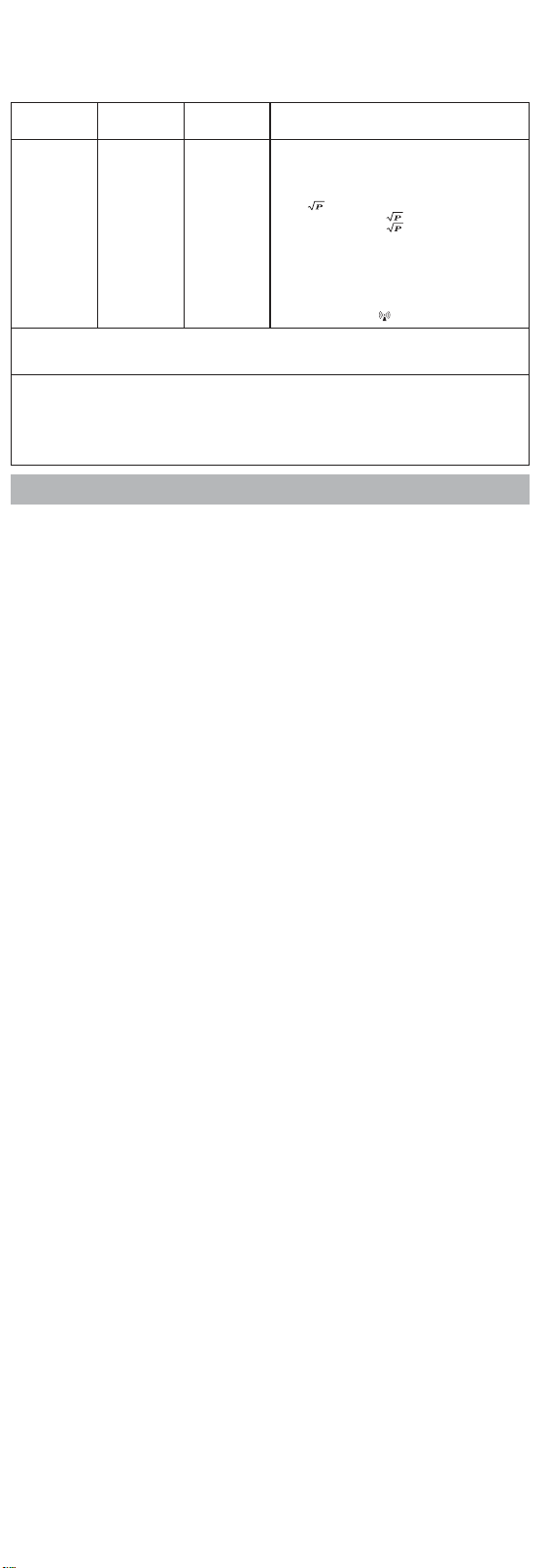
Recommended separation distances between portable and mobile RF
communication equipment and the device.
The device is intended for use in an electromagnetic environment where radiated
RF disturbances are under control. User can help prevent electromagnetic
interference by keeping the device at a minimum distance from portable and
mobile RF communications equipment (transmitters). Below table details the
maximum output power of transmitter :
Rated maximum
output power of
transmitter W
Separation distance according to frequency of transmitter m
150 kHz to 80 MHz
d = 1.2
80 MHz to 800 MHz
d = 1.2
800 MHz to 2.5 GHz
d = 2.3
0.01 0.12 0.12 0.23
0.1 0.38 0.38 0.73
1 1.2 1.2 2.3
10 3.8 3.8 7.3
100 12 12 23
For transmitters rated at a maximum output power not listed above, the recommended separation distance d in metres (m) can be
estimated using the equation applicable to the frequency of the transmitter, where P is the maximum output power rating of the
transmitter in watts (W) according to the transmitter manufacturer.
NOTE 1 At 80 MHz and 800 MHz, the separation distance for the higher frequency range applies.
NOTE 2 These guidelines may not apply in all situations. Electromagnetic propagation ls aected by absorption and reflection from
structures, objects, and people.
Guidance and manufacturer’s declaration – electromagnetic immunity
The device is intended for use in the electromagnetic environments listed below,
and should only be used in such environments:
Immunity test IEC 8080 1
test level
Compliance
level
Electromagnetic environment- guidance
Conducted
RF
IEC 61000-
4-6
Radiated
RF
IEC 61000-
4-3
3 Vrms
150 kHz to
80MHz
3 V/m
80 MHz to
2.5 GHz
3 Vrms
10 V/m
Portable and mobile RF communications equipment should be
used no closer to any part of the device, including cables,
than the recommended separation distance calculated from the
equation applicable to the frequency of the transmitter.
Recommended separation distance
d = 1.2
d = 1.2 8O MHz to 800 MHz
d = 2.3 800 MHz to 2.5 GHz
where P is the maximum output power rating of the transmitter
in watts (W) according to the transmitter manufacturer and d is
the recommended separation distance in metres (m).
Field strengths from fixed RF transmitters, as determined
by an electromagnetic site survey
a
, should be less than the
compliance level in each frequency range
b
.
Interference may occur in the vicinity of equipment marked
with the following symbol:
NOTE 1 At 80 MHz and 800 MHz, the higher frequency range applies.
NOTE 2 These guidelines may not apply in all situations. Electromagnetic propagation is aected by absorption and reflection from
structures, objects, and people.
a Field strengths from fixed transmitters, such as base stations for radio (cellular/cordless) telephones and land mobile radios,
amateur radio, AM and FM radio broadcast and TV broadcast cannot be predicted theoretically with accuracy. To assess the
electromagnetic environment due to fixed RF transmitters, an electromagnetic site survey should be considered. If the measured
field strength in the location in which the device is used exceeds the applicable RF compliance level above, the device should
be observed to verify normal operation. If abnormal performance is observed, additional measures may be necessary, such as
reorienting or relocating the device.
b Over the frequency range 150 kHz to 8O MHz, field strength should be less than 10 V/m.
WARRANTY
LIMITED 5-YEAR WARRANTY
HoMedics sells its products with the intent that they are free of defects in
manufacture and workmanship for a period of 5 years from the date of original
purchase, except as noted below. HoMedics warrants that its products will be free
of defects in material and workmanship under normal use and service. This blood
pressure monitor meets the simulated measurement cycles test requirement per
EN1060-3, part 8.10. This warranty extends only to consumers and does not extend
to Retailers.
To obtain warranty service on your HoMedics product, contact a Consumer Relations
representative by telephone at 1-800-466-3342 for assistance. Please make sure to
have the model number of the product available.
HoMedics does not authorize anyone, including but not limited to Retailers,
the subsequent consumer purchaser of the product from a Retailer, or remote
purchasers, to obligate HoMedics in any way beyond the terms set forth herein.
This warranty does not cover damage caused by misuse or abuse; accident; the
attachment of any unauthorized accessory; alteration to the product; improper
installation; unauthorized repairs or modifications; improper use of electrical/power
supply; loss of power; dropped product; malfunction or damage of an operating part
from failure to provide manufacturers recommended maintenance; transportation
damage; theft; neglect; vandalism; or environmental conditions; loss of use during the
period the product is at a repair facility or otherwise awaiting parts or repair; or any
other conditions whatsoever that are beyond the control of HoMedics.
This warranty is eective only if the product is purchased and operated in the
country in which the product is purchased. A product that requires modifications or
adoption to enable it to operate in any other country than the country for which it was
designed, manufactured, approved, and/or authorized, or repair of products damaged
by these modifications is not covered under this warranty.
THE WARRANTY PROVIDED HEREIN SHALL BE THE SOLE AND EXCLUSIVE
WARRANTY. THERE SHALL BE NO OTHER WARRANTIES EXPRESS OR IMPLIED
INCLUDING ANY IMPLIED WARRANTY OF MERCHANTABILITY OR FITNESS OR ANY
OTHER OBLIGATION ON THE PART OF THE COMPANY WITH RESPECT TO PRODUCTS
COVERED BY THIS WARRANTY. HOMEDICS SHALL HAVE NO LIABILITY FOR ANY
INCIDENTAL, CONSEQUENTIAL, OR SPECIAL DAMAGES. IN NO EVENT SHALL THIS
WARRANTY REQUIRE MORE THAN THE REPAIR OR REPLACEMENT OF ANY PART OR
PARTS THAT ARE FOUND TO BE DEFECTIVE WITHIN THE EFFECTIVE PERIOD OF THE
WARRANTY. NO REFUNDS WILL BE GIVEN. IF REPLACEMENT PARTS FOR DEFECTIVE
MATERIALS ARE NOT AVAILABLE, HOMEDICS RESERVES THE RIGHT TO MAKE
PRODUCT SUBSTITUTIONS IN LIEU OF REPAIR OR REPLACEMENT.
This warranty does not extend to the purchase of opened, used, repaired,
repackaged, and/or resealed products, including but not limited to sale of such
products on internet auction sites and/or sales of such products by surplus or bulk
resellers. Any and all warranties or guarantees shall immediately cease and terminate
as to any products or parts thereof that are repaired, replaced, altered, or modified,
without the prior express and written consent of HoMedics.
This warranty provides you with specific legal rights. You may have additional rights
that may vary from state to state. Because of individual state regulations, some of the
above limitations and exclusions may not apply to you.
©2018 HoMedics, LLC. All rights reserved. HoMedics is a registered trademark of HoMedics, LLC.
Distributed by Homedics, LLC, 3000 N Pontiac Trail, Commerce Township, MI 48390
IB-BPAO300
P/N: 72-B68MN-HM11 VER: 001
Printed in China
ted