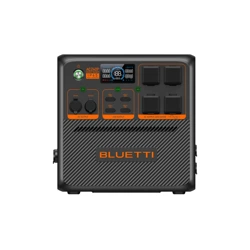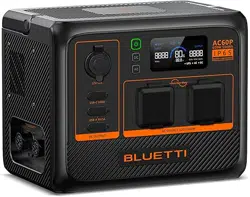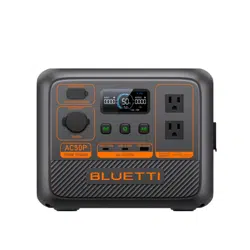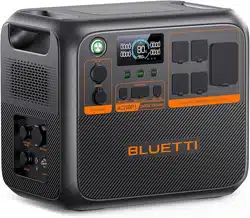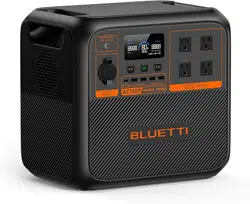

AC180P
Portable Power Station
User Manual
Please read this manual carefully before use and keep it for future reference.
Warning
1. Charge the unit before first use.
2. Do not use solar panels with open circuit voltage higher than 60V. Solar input voltage range
for the unit is DC 12V~60V.
3. Charge the unit when the SoC drops below 5%. If the SoC drops to 0, power off the unit and
charge it for at least 30mins before restarting.
4. The unit is for off-grid use only. Do not connect its AC output to the grid.
5. If not used for more than 3 months, charge the unit to 40%~60% SoC and store it with the
power off. For optimum battery life, discharge and charge the unit every 3 months.

Thank You!
Thank you for making BLUETTI a part of your family.
From the very beginning, BLUETTI has tried to stay true to a sustainable future
through green energy storage solutions for both indoor and outdoor use while
delivering an exceptional eco-friendly experience for our homes and our world.
That's why BLUETTI makes its presence in 70+ countries and is trusted by
millions of customers across the globe.
Franch
Germany
Netherlands

Safety Instructions
General Safety
Handling
Storage and Usage
What’s In The Box
Product Overview
Diagram
Specifications
Operating Instructions
Buttons
LCD Screen
Charging
Discharging
BLUETTI App
Appendix
FAQs
Troubleshooting
Abbreviations
FCC Warning
Important Instructions
Contents
1
1.1
1.2
1.3
2
3
3.1
3.2
4
4.1
4.2
4.3
4.4
4.5
5
5.1
5.2
5.3
5.4
5.5
05
05
07
07
08
10
10
11
12
12
14
15
17
18
19
19
20
21
21
23

1. Safety Instructions
Read this manual for instructions on the proper use and safety information for the unit.
Follow the warnings and instructions marked on the unit and its accessories.
Pay attentionto the "Instruction", "Caution", "Warning" and "Danger" symbols in this
manual, and follow theinstructions carefully to avoid injury or damage.
The Safety Requirements provided herein are for illustrative purposes that include but
are not limited to those listed in this manual. Actual operation shall comply with all
applicable safety standards.
If you have any questions, feel free to contact BLUETTI support or your local BLUETTI dealers.
1.1. General Safety
•
Always operate or store the unit in the conditions specified in this manual.
• The installation and ambient conditions must comply with the regulations in the
relevant international, national or regional standards.
• Unauthorized disassembly, alteration of the equipment or modification of the software
code is not allowed.
BLUETTI shall not be liable for the following circumstances:
•
Equipment damage caused by force majeure, such as earthquake, fire, storm, flood,
mudslide, etc.
• Damage or loss during transportation.
• Damage caused by storage conditions that do not meet the requirements specified in
this manual.
• Damage to the hardware or data of the equipment due to customer negligence,
improper operation or intentional damage.
• Damage to the system caused by a third party or the customer, including handling
and installation that does not meet the requirements specified in this manual.
• This product is not suitable for providing electrical service for equipment and machines
that are highly dependent on the reliability of electrical power supply and that involve
personal safety, such as atomic energy, aviation, medical, etc. Poweroak will not be held
responsible for any personal safety accidents, fire accidents, equipment failures, etc.
caused by using this product to supply power to the above equipment and machines.
• Damage caused by adjustment, alteration or removal of identification marks.
To avoid danger, please regulate the operation in the following manner:
•
Do not install, use and maintain the unit in adverse weather conditions such as
lightning, rain, snow and strong breezes (including but not limited to handling and
operating the unit, plugging and unplugging signal connections to outdoor facilities,
working at height, outdoor installations, etc.).
JUST POWER ON 05

• The transportation, wiring and maintenance shall comply with all applicable laws,
regulations and standards.
• User-provided materials and tools required shall meet the requirements specified in
applicable laws, regulations and relevant standards.
• Always turn off the power sourcebeforestartingany electrical work.
• Do not clean the unit with water.
• Do not disassemble,modify, tamper with or repairthe unit on your own.
• Regularly inspect the unit and its accessories for damage or deterioration.
• Use a tester to check for the presence of dangerous voltage before touching any
conductor or terminal.
• If the unit’s shell is cracked during transportation or use, do not use it and contact
BLUETTI support or your local BLUETTI dealers.
• Use a dry powder extinguisher if the unit catches fire.
• In case of fire, EVACUATE the building or affected area immediately, activate the closest
FIRE ALARM system and CALL 9-1-1 or your local emergency phone number.
• Use genuine cables and accessories provided by BLUETTI.
• Keep the unit away from heat sources or high temperatures, and do not expose it to
direct sunlight.
• Do not store the unit with flammable liquids, gases, or explosive materials.
• Make sure the area where you are using the unit is well ventilated and spacious.
• Do not block or cover the vents of the unit as this may cause irreversible damage to it.
• Use the unit for its intended purpose and avoid stacking objects on top of it during
storage or use.
• Do not move the unit during operation as the vibrations and shocks associated with
movement may cause damage to the internal hardware.
• In case of malfunction, turn off the unit immediately and contact BLUETTI support or
your local BLUETTI dealers if this manual cannot adequately explain the malfunction to
you.
• Do not place the unit on an unstable or inclined surface.
• Do not insert foreign objects into any port and vent of the unit.
• Keep away from children and pets.
• It's recommended to grounded this product (via the grounding terminal) before
operation.
Connect a grounding cable (recommended 14AWG(1.5mm
2
)/105℃/yellow-green
color) to the grounding terminal of AC180P. Fasten the grounding screw (M5*10) to fix
the cable.
Legal and Regulatory Requirements
JUST POWER ON06

1.2.Handling
Use mechanical assistance as needed (e.g. trolleys and adjustable height workbenches).
1.3. Storage and usage
•
When not using the unit for over 3 months, charge it to 40% to 60% SoC to keep it in
optimal condition.
• Before storing the unit, power it off and remove all electrical connections from it.
• Store the unit in a cool and dry place. The ideal temperature range is 1o
0
C to 30
0
C. The
unit can be safely charged and discharged at temperatures of -20
0
C to 40
0
C. However,
it’s NOT recommended to store the unit in harsh temperatures for extended periods of
time.
• Fully cycle the unit every 6 months to maintain the battery’s health.
If the SoC drops to 0 (during operation or upon startup), take the following
actions to safely restart the unit:
1)Shut down immediately.
2)Charging with in 48 hours.
3)Battery should be kept at an ambient temperature of 5
0
C to 35
0
C for 6 hours before
charging.
It is recommended to charge the unit via an AC source. If charging via solar energy,
ensure that your solar system provides an output of more than 100W.
BLUETTI shall not be liable for any equipment damage caused by the violation of above
instructions.
Recommended number of people based on the weight of product
Weight
<18kg
18kg~32kg
32kg~55kg
>55kg
Number of people
1
2
3
4 or a cart
JUST POWER ON 07
2. What’s In The Box
Item Picture Qty.
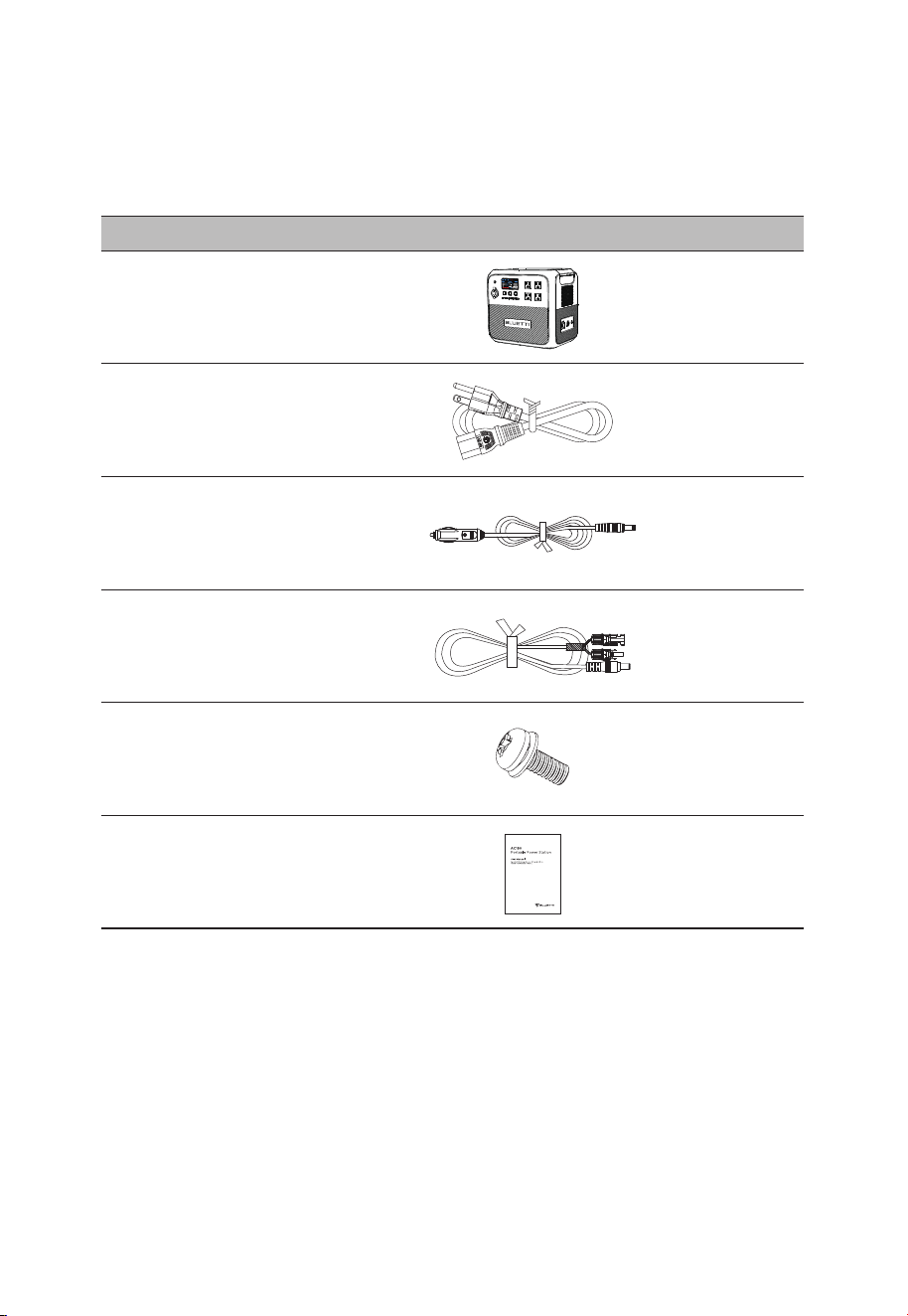
Portable Power
Station
1
AC Charging Cable
(16AWG, 1800mm)
1
Car Charging Cable
(16AWG, 720mm)
1
Solar Charging Cable
(16AWG, 1500mm)
1
Standard Packaging
User Manual
1
1
Grounding screw
(M5*10)
JUST POWER ON08
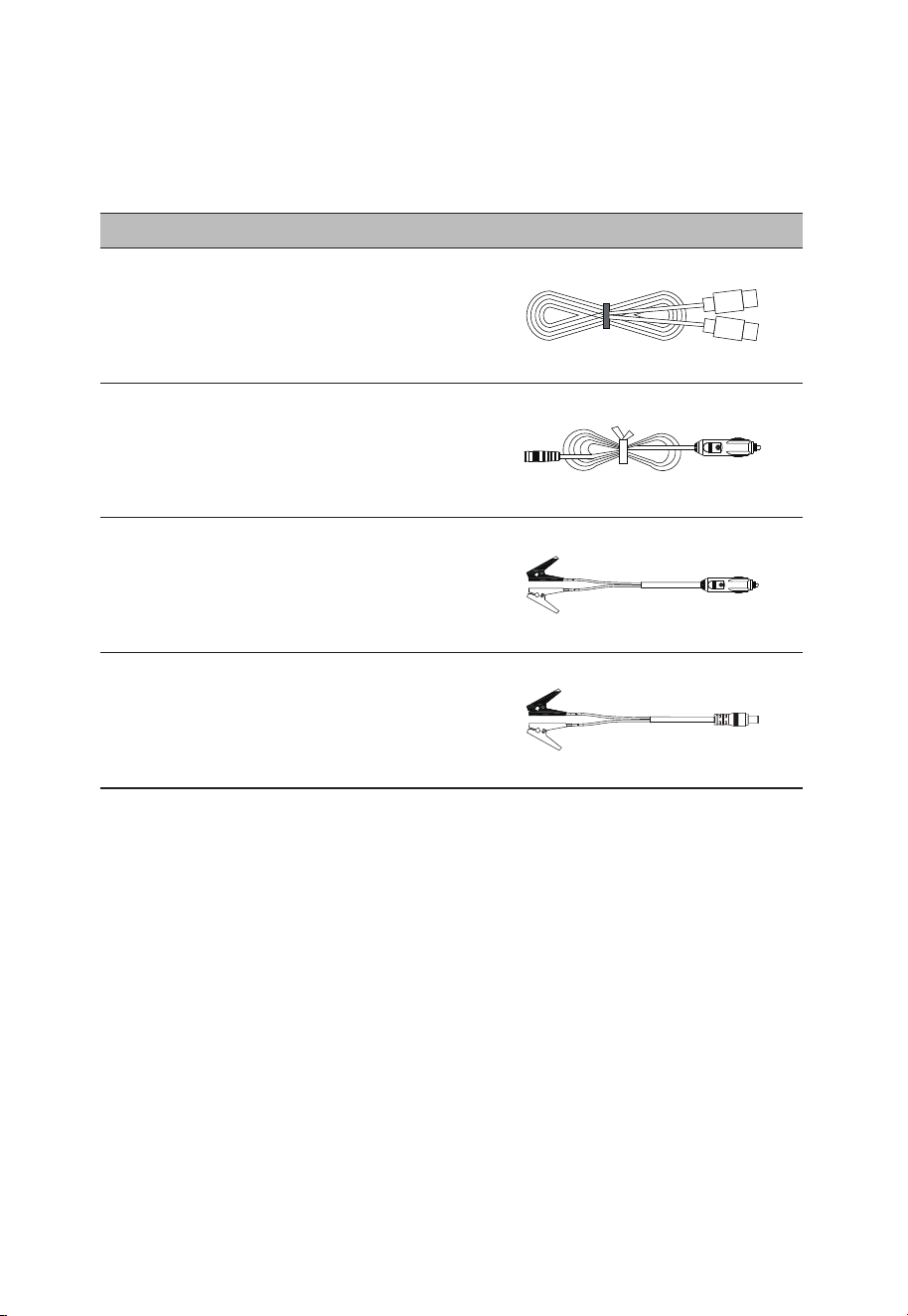
Cigarette Lighter to Clamp Cable
(Charging lead-acid battery via
the cigarette lighter port)
Cigarette Lighter to 5521 Cable
(For 12V devices with 5521 port,
such as routers, cameras, etc.)
Lead-acid battery charging cable
(DC7909)
Item Picture
TYPE-C Cable
(5A/100W, 2m)
Optional
(Available on official BLUETTI website)
JUST POWER ON 09
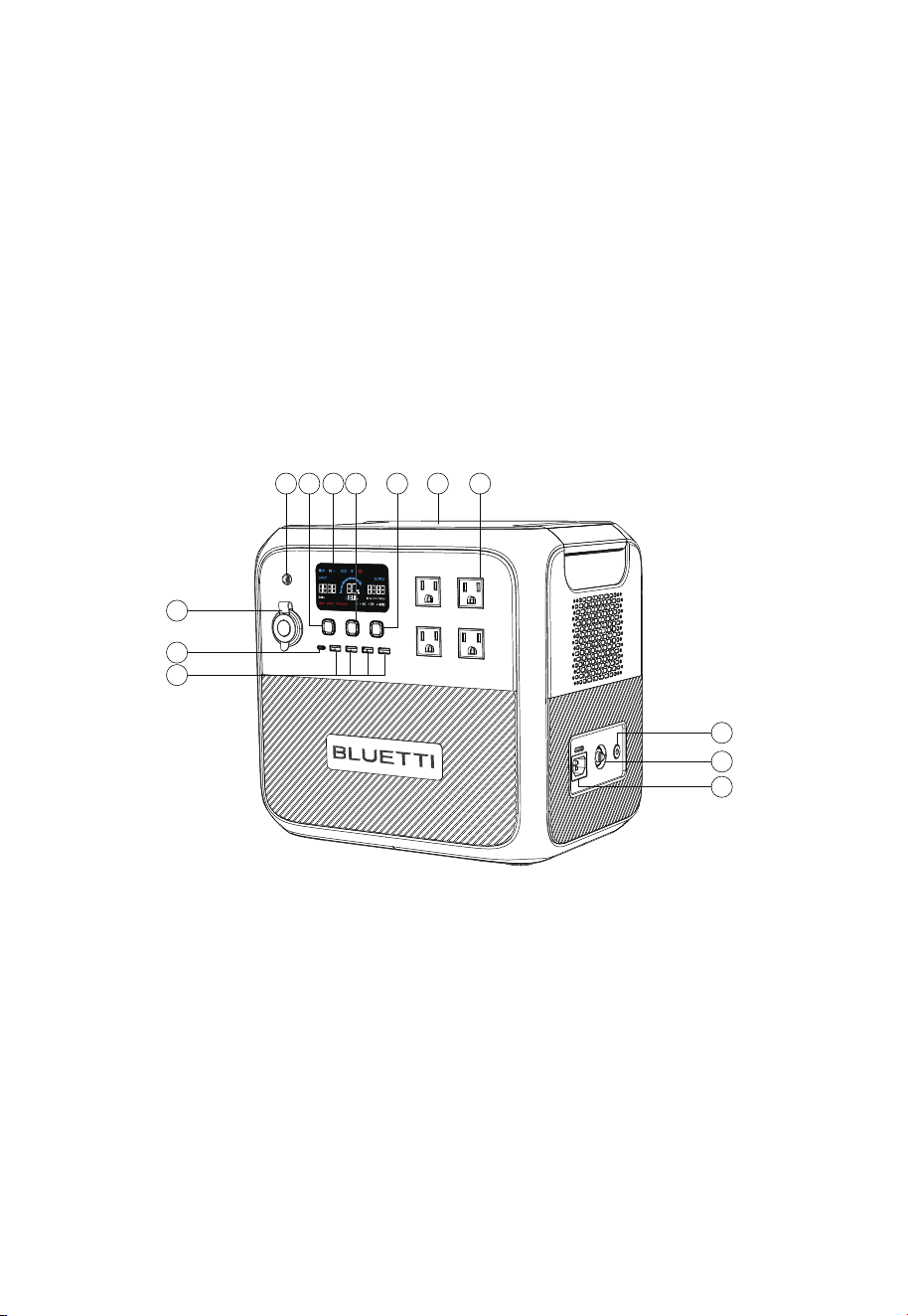
3. Product Overview
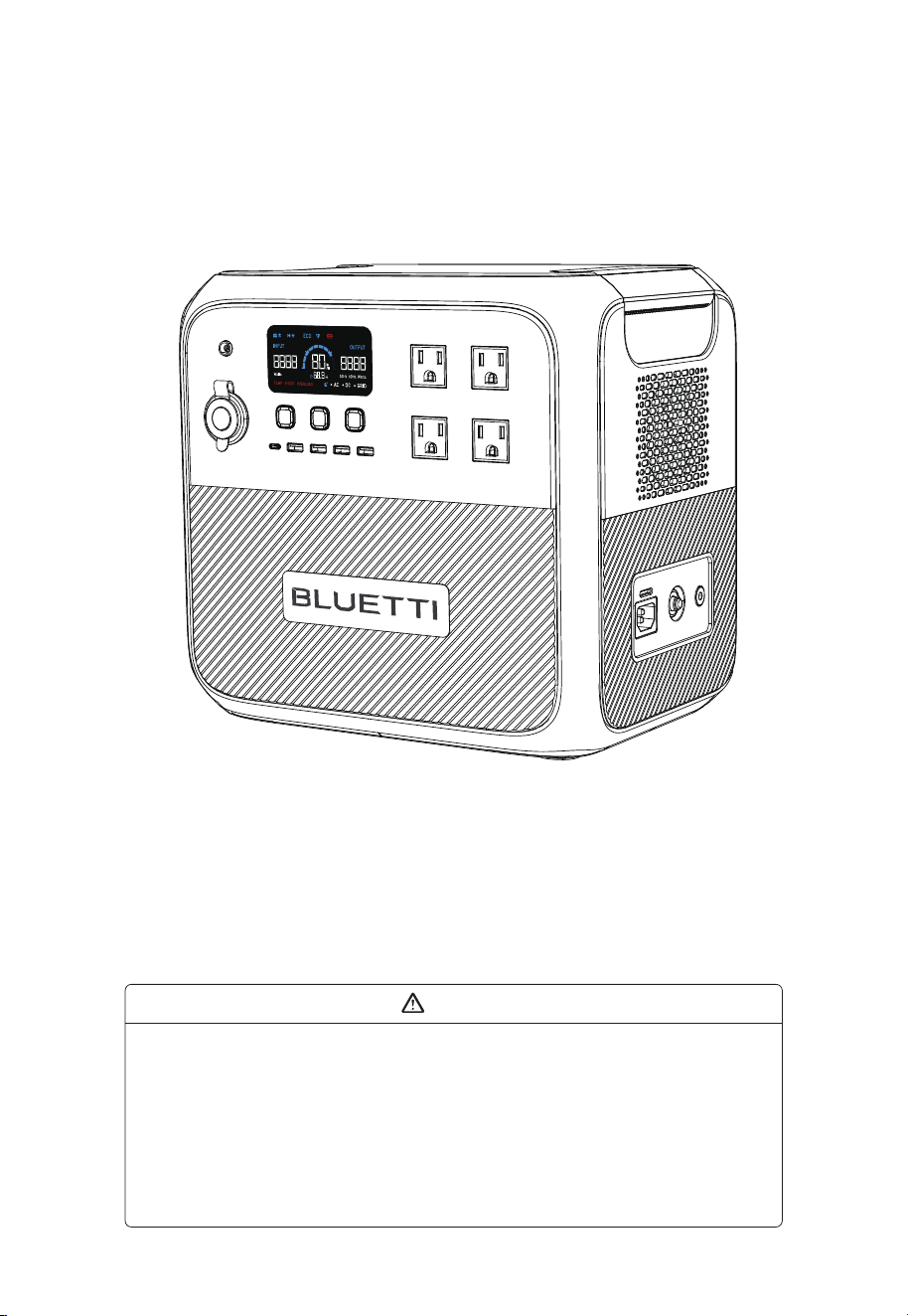
BLUETTI AC180P is a portable power station with 1800W pure sine wave inverter and
1440Wh LiFePO
4
battery, perfect for camping, van life and more. In addition to 4 AC
output ports and 5 USB ports (4 USB-A and 1 USB-C), it also has a 12V/10A cigarette
lighter port for your vehicle devices and a wireless charging pad to run compatible
electronics, your phone, headphone, Bluetooth speaker, just to name a few. As for
recharging, AC180P takes up to 1440W AC input and 500W DC input, so you’re able to
fully charge it in a few hours. It also supports BLUETTI app control - with the Bluetooth
connectivity, you can monitor everything that's happening inside and optimize your
power usage to your preference.
DC Input
DC Power Button
LCD Screen
Power Button
AC Power Button
Wireless Charging Pad
AC Output
Grounding Pole(Grounding screw: M5*10)
AC Input Fuse
AC Input
Cigarette Lighter Port
USB-C Port
USB-A Port
①
②
③
④
⑤
⑥
⑦
⑧
⑨
⑩
⑪
⑫
⑬
3.1 Diagram
1
11
3 764 52
8
9
10
12
13
JUST POWER ON10

3.2 Specifications
Area
Battery Capacity
Cell Type
Net Weight
Dimensions (L*W*H)
Charging Temperature
Storage Temperature
Working Humidity
1440Wh
LiFePO
4
About 16kg/35.27lbs
340mmx247mmx317mm/13.39in×9.72in×12.48in
0
o
C~40
o
C/32°F~104°F
-20
o
C~40
o
C/-4°F~104°F
10%~90%
Model AC180P
Discharging Temperature
-20°C~40°C (35°C~40°C: @1500W Max.)
-4°F~104°F (95°F~104°F: @1500W Max.)
(When SOC is 100%, the discharge power at 35°C~40°C can be
greater than 1500W, but it may trigger over temperature protection)
Power
Voltage
Current
Frequency
1800W in total
50/60Hz
Cigarette Lighter Port
USB-C (Type-C)
Wireless Charging
12VDC/10A
5/9/12/15/20VDC, 3A; 20VDC, 5A(With E-Marker chip built in)
5W/7.5W/10W/15W
100VAC
18A
120VAC
15A
220VAC
8.2A
230VAC
7.8A
AC Output
DC Output
50/60Hz
1440W Max. @10
o
C~30
o
C/50°F~86°F
Voltage
Max. Current
Frequency
Power
Interface
Power
Voltage
DC7909
500W/10A Max.
12V-60VDC
100VAC
15A
120VAC
15A
220VAC
10A
230VAC
10A
AC Input
DC Input
UPS
Switching time ≤20ms
Test the function before use to avoid risk of data loss.
Channel 1: 2 ports,15W in total(5V/3A)
Channel 2: 2 ports,15W in total(5V/3A)
USB-A
JP US CN EU/UK/AU
JUST POWER ON 11
4. Operating Instructions
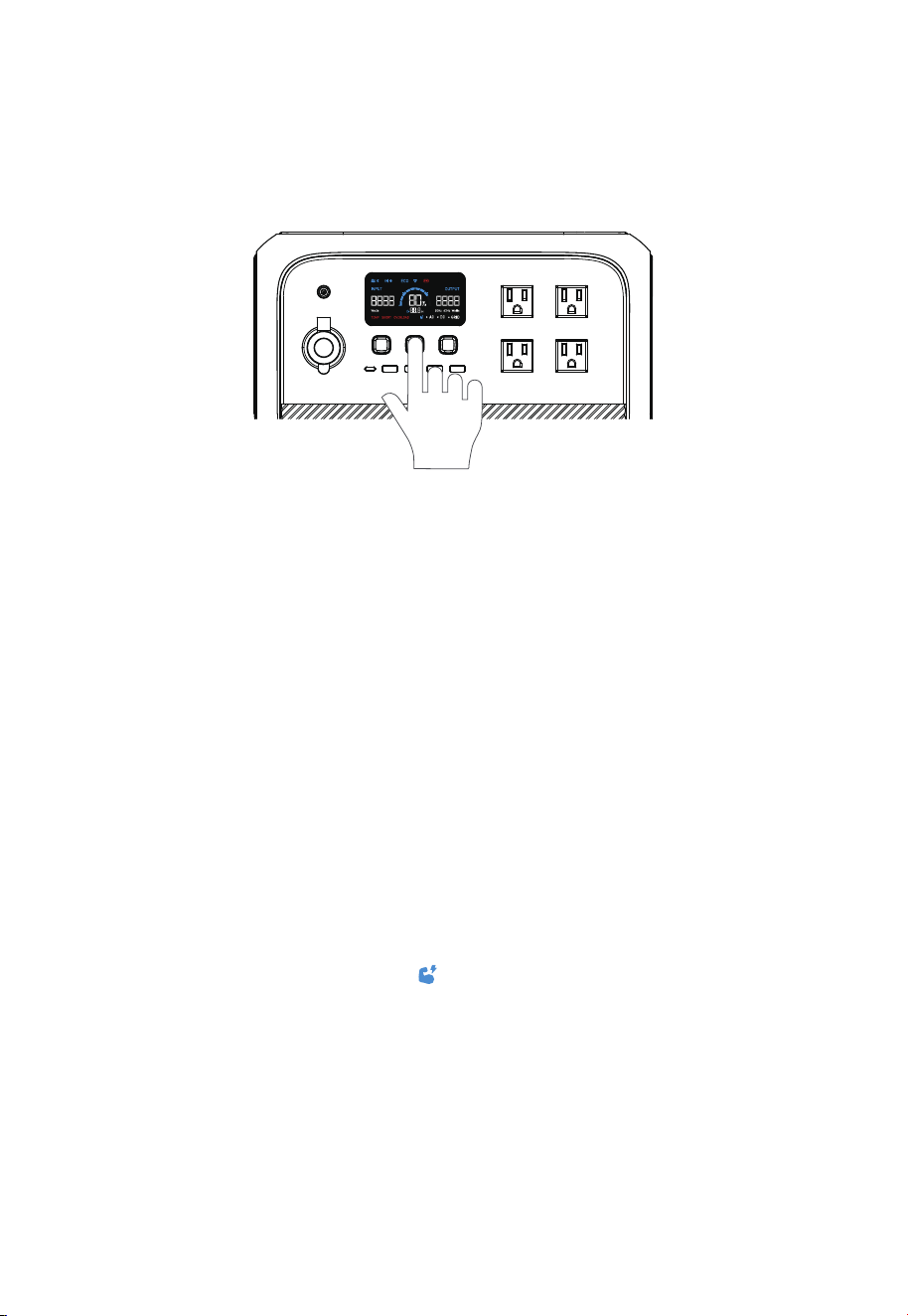
4.1.1. Power ON/OFF
• Press the PWR button to start the AC180P. When AC180P is on, press this button to
turn on/off the LCD screen. Press and hold the button for more than 2 seconds to turn
off the AC180P.
• Press the DC power button to turn on/off the DC output (cigarette lighter, USB,
wireless charging).
• Press the AC power button to turn on/off the AC output.
4 .1.2.Settings
•
Setting mode: When the screen is on and the AC output is off, press and hold the AC
and DC power buttons for about 2 seconds to enter Setting mode.
• Frequency switching: The current output frequency (50Hz/60Hz) is displayed in the
lower right corner of the screen. Under Setting mode, press the AC power button to
switch the frequency.
• Power Lifting mode: The Power Lifting mode is disabled by default. To enable it, press
and hold the AC power button for about 2s in Setting Mode, or turn it on directly in the
BLUETTI app. When enabled, the icon is displayed on the screen. In this mode, the
AC180P can run high drain pure resistive loads* (≤2700W) while its rated output power
remains 1800W.
Note: The Power Lifting mode is not available when charging AC180P via an AC source
like a wall outlet or generator. The AC source will bypass the inverter and supply power
directly to connected AC loads.
4.1 Buttons
BLUETTI AC180P has PWR button, AC power button and DC power button.
* Include heaters, irons or any other devices consisting of heating elements only.
DANGER: This device is intended to be used indoors only. Do not use outdoors.
JUST POWER ON12

• Grid Enhancement mode: By default, the Grid Enhancement mode is disabled. Please
turn it on directly in the BLUETTI app. This mode ensures that the AC180P has a stable
and continuous AC input, as it allows AC180P to adapt to voltage fluctuations and
waveform distortion of an AC source.
Note: Turn off the Grid Enhancement mode when using AC180P as a UPS. In this
mode, the UPS takes longer to switch over and may be unable to provide instant
emergency power to connected devices.
• ECO mode: When operating on ECO mode, the AC/DC output will automatically turn
off if the AC180P is bearing low or no load for a while.
When enabled, the ECO icon is displayed on the screen. Under Setting mode, press the
DC power button turn it
• Press the AC and DC power buttons at the same time to exit Setting mode.
Note: If you do not perform any operation in 1 minute, AC180P will exit Setting mode
automatically and no changes will be saved.
• Check the error code: Press the AC and DC power buttons at the same time for about 2
seconds, and then hold the AC power button to check the current error code (e.g. E001).
Output
AC output
DC output
Power
15W-30W
5W-10W
Duration
1, 2, 3, 4 hours
1, 2, 3, 4 hours
JUST POWER ON 13
①
②
③
④
⑤
⑥
⑦
⑧
⑨
⑩
⑪
⑫
⑬
⑭
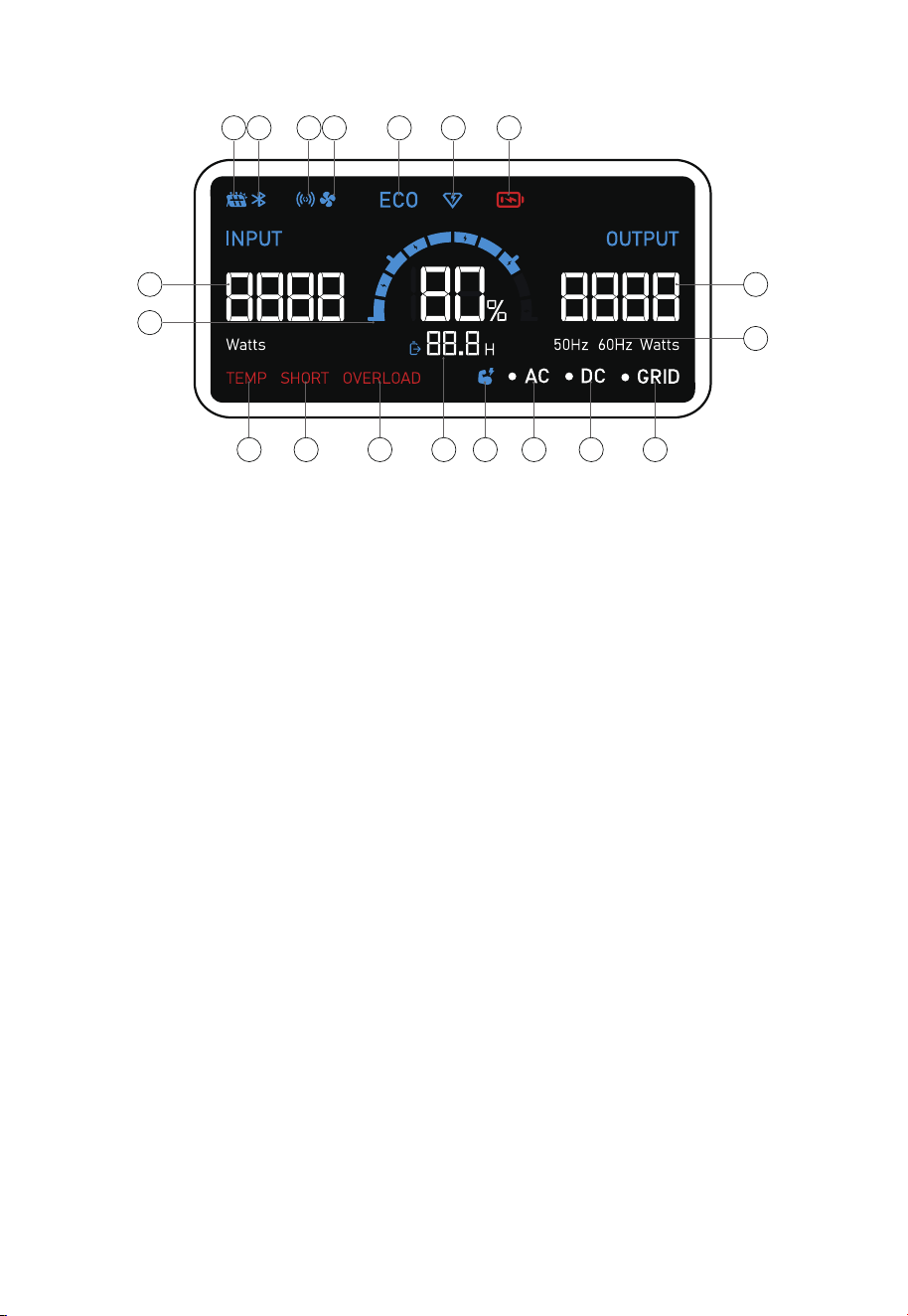
4.2. LCD Screen
1 2 3 4 5 6 7
8
9
12 13 14 15 16 17 18 19
10
11
DC Input
Bluetooth
Wireless charging
Fan
ECO Mode
Turbo charging
Low voltage alert
Input power
Battery capacity
Output power
AC frequency
Temperature anomaly alert
Short circuit alert
Overload alert
Remaining time indicator
Power Lifting mode
AC indicator
DC indicator
AC input connected
⑮
⑯
⑰
⑱
⑲
JUST POWER ON14
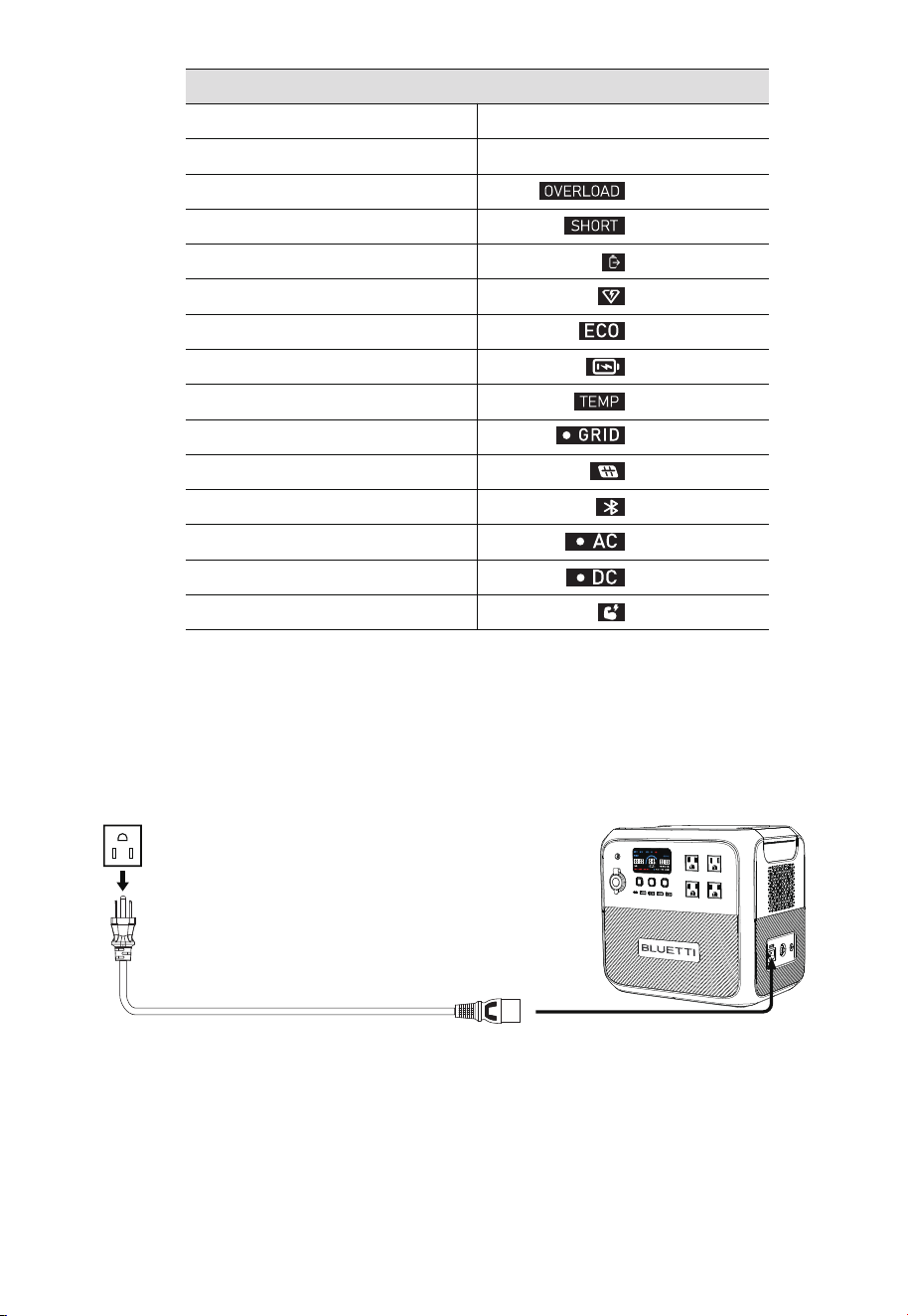
4.3 Charging
AC180P supports four charging methods: AC, solar, car(cigarette lighter) and generator.
4.3.1. AC Charging (Wall Outlet)
Simply plug the AC180P into the standard wall outlet and start charging.
Startup
Shutdown
Overload
Short circuit
Charging
Turbo Charging
ECO mode enabled
Battery low
Abnormal temperature
AC Input
DC Input
Bluetooth connected
AC output enabled
DC output enabled
Power Lifting mode enabled
flashes
flashes
displays
displays
displays
displays
flashes
displays
displays
displays
displays
displays
displays
LCD Instructions
LCD lights up
LCD lights off
AC180P supports Turbo/Standard/Silent charging modes. It’s set to standard charging by
default, while the Turbo and silent modes can be enabled in BLUETTI app. BLUETTI’s AC
charging mode guide is as follows:
1) Turbo charging comes in handy when you need AC180P to be replenished in short time.
2) Standard charging is more friendly to AC180P’s battery.
3) Silent charginggives you quiet, low-power operation for long battery life.
JUST POWER ON 15
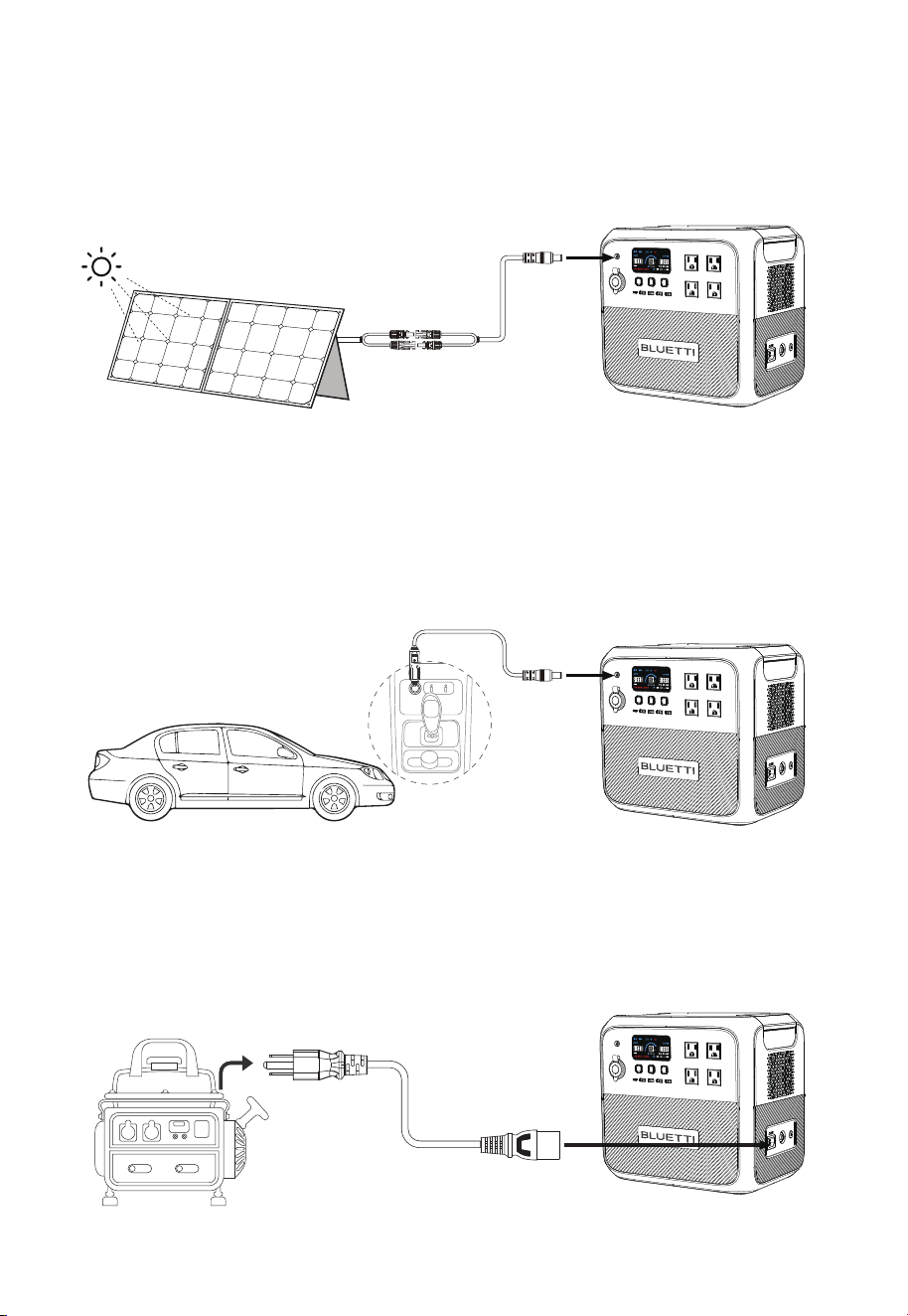
4.3.2.Solar Charging
Connect the solar panels (in series or parallel) to AC180P via the solar charging cable.
Note: Please make sure your solar panels comply with:
Voc: 12V-60V Input Current: 10A Max. Input Power: 500W Max.
4.3.3.Car Charging
Connect the AC180P to vehicle’s 12V cigarette lighter port via the car charging cable.
4.3.4.Generator Charging
Connect the AC180P to generator via the AC charging cable.
Warning: The open circuit voltage of solar panels cannot exceed 60V, otherwise it will
damage the device(Note:It’s not covered in the warranty)
Warning:
Cigarette lighter must be completely plugged in, otherwise it may cause safety risks.
JUST POWER ON16

4.4 Discharging
The operation time of AC180P is subject to many factors, such as ambient temperature,
discharge rate, battery capacity, altitude, load characteristics, etc.
4.4.1.AC Output
AC180P has 4 AC output ports (2 ports for EU version), providing a total of up to 1800W
AC power. It also can handle a surge of 2700W.
4.4.2.DC Output
•
12V/10A cigarette lighter port
• USB-C (PD 100W)
• USB-A (30W in total, 15W Max.)
• Wireless charging pad (15W Max.)
4.4.3.Estimated Operation Time
Depending on the connected power loads, there are two different scenarios to calculate
the operation time of AC180P.
• If the AC180P is applied to a high power load, such as a 600W product.
Operation time (estimated) = Battery capacity (Wh) × DoD × η ÷ (load power)
• If applied to a small power load like a 40W product.
Operation time (estimated) = Battery capacity (Wh) × DoD × η ÷ (load power+self-con-
sumption of AC180P)
Note:
1) The self-consumption of AC180P is about 15W.
2) Load power and operation time are measured in watts and hours.
3) DoD refers to depth of discharge. AC180P works at 90% DoD for longer battery life. η is
the conversion efficiency of the inverter, which is larger than 85% for AC180P.
E.g. If you have a 40W refrigerator, you can run it for about 20 hours.
Operation time = 1440Wh x 90% x 85% ÷ (40W+15W) ≈20 hours.
Note: Low temperature and excessive loads could greatly impact the battery capacity
and reduces its normal operation time.
JUST POWER ON 17
4.5 BLUETTI App
Scan the QR code below or search "BLUETTI" in the App Store or Google Play to download
the BLUETTI app.
AC180P supports Bluetooth connection. Once connected, the AC180P can be accessed and
controlled on a mobile phone or other smart devices. For more details, please refer to
BLUETTI APP INSTRUCTIONS.
JUST POWER ON18

5. Appendix
How do I know whether my devices will work well with this product?
Please evaluate the total constant load of your devices. If it doesn't exceed the Max.
output power of AC180P (1800W), you can use this power station to run your devices.
Note: Some devices with built-in motor/compressor may start at 2-4 times the rated
power, which can easily overload the AC180P.
Can I use third-party solar panels to charge this product?
Yes, you can. Make sure your solar panels have an open circuit voltage of 12V-60V
and have the MC4 connectors. Please do NOT mix different types of solar panels.
Note: Time required for one full charge depends on weather condition, the sunshine
intensity and the angle of solar panels.
Can it charge and discharge at the same time?
A: Yes. It supports pass-through charging. AC180P comes with the premium
LiFePO4 battery and proprietary Battery Management System to ensure that it can
charge and discharge at the same time.
What is ECO mode and can I turn it off?
ECO mode helps save power, and you can turn it on or off on the screen. When
operating on ECO mode, the AC/DC output will automatically turn off if the AC180P
is bearing low or no load for a while. You can set the power threshold of AC output
and DC output to 15-30W /5-10W, respectively, for 1, 2, 3, or 4 hours.
Why is the charging power often too low?
AC180P has a built-in intelligent BMS that automatically adjusts the charging power
in response to the battery temperature and SoC, thus protecting the battery and
extending its service life.
Can I make the AC180P less noisy when charging?
Yes. Select “Silent” for AC charging in the BLUETTI app. Please refer to 4.3.1 AC
Charging for more details.
When should I use the Grid Enhancement mode?
This mode is handy when charging the AC180P via an unstable AC source, such as
an unreliable grid or generator.
E.g. If you change the generator's output while charging the AC180P, the voltage dip
will also cause the charge to fail.
5.1 FAQs
Q1:
A:
Q2:
A:
Q7:
A:
Q3:
A:
Q4:
A:
Q5:
A:
Q6:
A:
JUST POWER ON 19

5.2 Troubleshooting
Error Code Error Description
Inverter overload
Inverter short circuit
Cigarette lighter overtemperature
Charging temperature too high
Charging temperature too low
Discharging temperature too high
Discharging temperature too low
PV Input overvoltage
E001
E003
E065
E068
E085
E086
E087
E088
E033
Others
Troubleshooting
Check if the power of connected
devices is too high.
Check if the connected devices are
damaged.
Check if the power of connected
devices is too high.
Wait for the battery to cool down
before charging.
Recommended charging
temperature: 0
o
C~40
o
C.
Wait for the battery to cool down
before discharging.
Recommended discharging
temperature: -20
o
C~40
o
C.
Ensure the PV input voltage is in
the range of 12V~60VDC.
Contact BLUETTI technical support.
Wait a few minutes and try again.
Cigarette lighter output short circuit
JUST POWER ON20

5.3 Abbreviations
•
MPPT: Maximum Power Point Tracking
• SoC: State of Charge
• UPS: Uninterruptible Power Supply
• AC: Alternating Current
• DC: Direct Current
• PV: Photovoltaic (Solar Panels)
• DoD: Depth of Discharge
This equipment has been tested and found to comply with the limits for a Class B digital
device, pursuant to part 15 of the FCC Rules. These limits are designed to provide
reasonable protection against harmful interference in a residential installation. This
equipment generates, uses and can radiate radio frequency energy and, if not installed
and used in accordance with the instructions, may cause harmful interference to radio
communications. However, there is no guarantee that interference will not occur in a
particular installation. If this equipment does cause harmful interference to radio or
television reception, which can be determined by turning the equipment off and on, the
user is encouraged to try to correct the interference by one or more of the following
measures:
—Reorient or relocate the receiving antenna.
—Increase the separation between the equipment and receiver.
—Connect the equipment into an outlet on a circuit different from that to which the
receiver is connected.
—Consult the dealer or an experienced radio/TV technician for help.
FCC RF Exposure Warning Statement:
This equipment.complies with FCC radiation exposure limits set forth for an uncon-
trolled environment. This equipment shall be installed and operated with minimum
distance 20cm between the radiator & body
Please note that changes or modifications of this product is not expressly approved by
the party responsible for compliance could void the user's authority to operate the
equipment
5.4 FCC Warning
JUST POWER ON 21

IC
This device contains licence-exempt transmitter(s)/receiver(s) that comply with Innova-
tion, Science and Economic Development Canada’s licence-exempt RSS(s). Operation is
subject to the following two conditions:
(1) This device may not cause interference.
(2) This device must accept any interference, including interference that may cause
undesired operation of the device.
L’émetteur/récepteur exempt de licence contenu dans le présent appareil est conforme
aux CNR d’Innovation, Sciences et Développement économique Canada applicables aux
appareils radio exempts de licence. L’exploitation est autorisée aux deux conditions
suivantes :
(1) L' appareil ne doit pas produire de brouillage;
(2) L' appareil doit accepter tout brouillage radioélectrique subi, même si le brouillage
est susceptible d' en compromettre le fonctionnement.
Radio Frequency Exposure Statement for IC
This equipment complies with IC exposure limits set forth for an uncontrolled environ-
ment. This equipment shall be installed and operated with minimum distance 10cm
between the radiator & body.
Cet équipement est conforme aux limites d'exposition IC définies pour un environne-
ment non contr?lé. Cet équipement doit être installé et utilisé avec une distance
minimale de 10cm entre le radiateur et la carrosserie.
CAN ICES-3 (B) / NMB-3 (B)
This Class B digital apparatus complies with Canadian ICES-003.
(Cet appareil numérique de la Classe B conforme à la norme NMB-003 du Canada).
JUST POWER ON22

INSTRUCTIONS PERTAINING TO RISK OF FIRE, ELECTRIC SHOCK, OR INJURY TO
PERSONS
IMPORTANT SAFETY INSTRUCTIONS, SAVE THESE INSTRUCTIONS
WARNING – When using this product, basic precautions should always be followed,
including the following:
a)Read all the instructions before using the product.
b)To reduce the risk of injury, close supervision is necessary when the product is used
near children.
c)Do not put fingers or hands into the product. DO NOT insert foreign objects into any
ports of the machine. Please operate it carefully and keep children away from it.
d)Use of an attachment not recommended or sold by power pack manufacturer may
result in a risk of fire, electric shock, or injury to persons.
e)To reduce risk of damage to the electric plug and cord, pull the plug rather than the
cord when disconnecting the power pack.
f)Do not use a battery pack or appliance that is damaged or modified. Damaged or
modified batteries may exhibit unpredictable behavior resulting in fire, explosion or risk
of injury.
g)Do not operate the power pack with a damaged cord or plug, or a damaged output
cable.
h)DO NOT attempt to replace the internal battery or any other component of the
equipment by anyone other than authorized personnel. There are no end-user service-
able components.Do not disassemble the power pack, take it to a qualified service
person when service or repair is required. Incorrect reassembly may result in a risk of fire
or electric shock.
i)To reduce the risk of electric shock, unplug the power pack form the outlet before
attempting any instructed servicing.
j)WARNING – RISK OF EXPLOSIVE GASES.To reduce risk of battery explosion, follow
these instructions and those published by battery manufacturer and manufacturer of
any equipment you intend to use in vicinity of the battery. Review cautionary marking
on these products and on engine.
k)PERSONAL PRECAUTIONS
1)Wear complete eye protection and clothing protection. Avoid touching eyeswhile
working near battery.
5.5 Important Instructions
JUST POWER ON 23

2)NEVER smoke or allow a spark or flame in vicinity of battery or engine.
3)Be extra cautious to reduce risk of dropping a metal tool onto battery.It might spark or
short-circuit battery or other electrical part that may cause explosion.
l)When charging the internal battery, work in a well ventilated area and do notrestrict
ventilation in any way.
m)Under abusive conditions, liquid may be ejected from the battery; avoidcontact. If
contact accidentally occurs, flush with water. If liquid contacts eyes,additionally seek
medical help. Liquid ejected from the battery may causeirritation or burns.
n) DO NOT place the power station near heat sources. It is prohibited toplace the equip-
ment in an environment with flammable, explosive gas, orsmoke. It is also prohibited to
operate the equipment in this environment. Donot expose a power pack to fire or
excessive temperature. Exposure to fire ortemperature above 130° C may cause explosion.
o)Have servicing performed by a qualified repair person using onlyidentical replace-
ment parts. This will ensure that the safety of the product ismaintained.
p)DO NOT operate in wet conditions. If the equipment becomes wet, pleaselet the unit
dry completely before using.
q)Please ensure proper ventilation while in use and do not obstruct fanopenings.
Inadequate ventilation may cause permanent damage to equipment.
r)DO NOT stack anything on top of the power station while in storage orwhile in use. DO
NOT move the unit while operating as vibrations and suddenimpacts may lead to poor
connections to the hardware inside.
s ) In case of fire, only a dry powder fire extinguisher is suitable for the product.
DANGER: This device is intended to be used indoors only. Do not use outdoors.
GROUNDING INSTRUCTIONS
This product must be grounded. If it should malfunction or breakdown, grounding
provides a path of least resistance for electric current to reduce the risk of electric shock.
This product is equipped with a cord having an equipment grounding conductor and a
grounding plug. The plug must be plugged into an outlet that is properly installed and
grounded in accordance with all local codes ordinances.
WARNING – Improper connection of the equipment grounding conductor is able to
result in a risk of electric shock. Check with a qualified electrician if you are in doubt as to
whether the product is properly grounded. Do not modify the plug provided with the
product – if it will not fit the outlet, have a proper outlet installed by a qualified electrician.
JUST POWER ON24

CONSIGNES DE SÉCURITÉ IMPORTANTES
AVERTISSEMENT: lors de l’utilisation de ce produit, les précautions de base doivent
toujours être respectées, y compris le Les éléments suivants:
A)lire toutes les instructions avant d’utiliser le produit.
B)pour réduire le risque de blessure, une surveillance étroite est nécessaire lorsque le
produit est utilisé à proximité Des enfants.
C)ne pas mettre les doigts ou les mains dans le produit.Ne pas insérer d’objets étrangers
dans les ports de la machine.S’il vous plaî, faites attention et éloignez les enfants.
D)l’utilisation d’un accessoire non recommandé ou vendu par le fabricant du groupe
d’alimentation peut entraîer un risque d’incendie, de choc électrique ou de blessure.
E)pour réduire les risques d’endommagement de la prise et du cordon électriques,
débrancher la prise plutô que le cordon lors de la déconnexion de la centrale.
F)n’utilisez pas de batterie ou d’appareil endommagé ou modifié.Les batteries endom-
magées ou modifiées peuvent présenter un comportement imprévisible entraîant un
incendie, une explosion ou un risque de blessure.
G)ne pas faire fonctionner le groupe d’alimentation avec un câle ou une prise endom-
magés ou un câle de sortie endommagé.
H)ne tentez pas de remplacer la batterie interne ou tout autre composant de l’équipe-
ment par quelqu’un d’autre que le personnel autorisé.Il n’y a pas de composants
utilisables par l’utilisateur final.Ne démonter pas la batterie, l’amener à une personne
qualifiée lorsque l’entretien ou la réparation est nécessaire.Un mauvais réassemblage
peut entraîer un risque d’incendie ou de choc électrique.
I)pour réduire le risque de choc électrique, débrancher le bloc d’alimentation de la prise
avant de procéder à tout entretien.
J)avertissement - risque de gaz explosifs. Pour réduire le risque d’explosion de la batterie,
suivez ces instructions ainsi que celles publiées par le fabricant de la batterie et le
fabricant de tout équipement que vous avez l’intention d’utiliser à proximité de la
batterie.Revoir le marquage de mise en garde sur ces produits et sur le moteur.
K)précautions individuelles
1)porter une protection complète des yeux et des vêtements.Évitez de toucher les yeux
en travaillant près de la batterie.
2)ne jamais fumer ou laisser une étincelle ou une flamme à proximité de labatterie ou
du moteur.
3)être très prudent pour réduire le risque de tomber un outil métallique surla batterie.Il
peut étinceler ou court-circuiter une batterie ou une autre partieélectrique qui peut
causer une explosion.
JUST POWER ON 25

L)lors du chargement de la batterie interne, travailler dans une zone bienventilée et ne
pas restreindre la ventilation.
M)dans des conditions abusives, le liquide peut être éjecté de la batterie;Évitezle
contact.En cas de contact accidentel, rincer à l’eau.Si le liquide entre encontact avec les
yeux, consulter un médecin.Le liquide éjecté de la batteriepeut provoquer des irritations
ou des brûures.
N)ne pas placer la centrale à proximité des sources de chaleur.Il est interdit deplacer
l’équipement dans un environnement contenant des gaz inflammables,explosifs ou de
la fumée.Il est également interdit d’utiliser le matériel danscet environnement.Ne pas
exposer une centrale électrique au feu ou à unetempérature excessive.Une exposition à
un incendie ou à une températuresupérieure à 130° C peut provoquer une explosion.La
température de 130° Cpeut être remplacée par la température de 265° F.
O)faire effectuer l’entretien par un réparateur qualifié utilisant uniquementdes pièces de
rechange identiques.Cela garantira le maintien de la sécurité duproduit.
P)ne pas opérer dans des conditions humides.Si le matériel se mouille, laissezsécher
complètement l’appareil avant utilisation.
Q)assurer une bonne ventilation pendant l’utilisation et ne pas obstruerles ouvertures
des ventilateurs.Une ventilation inadéquate peut causer desdommages permanents
aux équipements.
R)n’empilez rien sur la centrale pendant son stockage ou son utilisation.Ne déplacez pas
l’unité lorsque les vibrations et les chocs soudains peuventconduire à de mauvaises
connexions avec le matériel à l’intérieur.
S)en cas d’incendie, seul un extincteur à poudre sèche convient au produit.
DANGER: ce dispositif est destiné à être utilisé uniquement à l’intérieur.Ne pasutiliser à
l’extérieur.
INSTRUCTIONS de mise à la terre Ce produit doit être mis à la terre. En cas de défaillance
ou de panne, l’échouement Fournit un chemin de moindre résistance pour le courant
électrique pour réduire le risque de choc électrique.
Ce produit est équipé d’une corde ayant un conducteur de mise à la terre d’équipement
et un Prise de mise à la terre. La prise doit être branchée sur une prise qui est correcte-
ment installé et Mis en place conformément à toutes les ordonnances des codes locaux.
Avertissement - la connexion incorrecte du conducteur de mise à la terre de l’équipe-
ment est capable de Entraîner un risque de choc électrique. Vérifiez avec un électricien
qualifié si vous avez des doutes quant à Si le produit est correctement mis à la terre. Ne
modifiez pas la prise fournie avec le Produit - s’il ne s’adapte pas à la prise, ayez une prise
appropriée installée par un électricien qualifié.
JUST POWER ON26


@ BLUETTI Support
@ BLUETTI Official
@bluetti.inc@ bluetti_inc @bluetti_official [email protected]
For more information, please visit:
Web: https//www.bluettipower.com
SHENZHEN POWEROAK NEWENER CO., LTD.
Address: F19, BLD No.1, Kaidaer, Tongsha Rd
No.168, Xili Street, Nanshan, Shenzhen, China
USA Agent
Company name: BLUETTI POWEROAK INC
Address: 6185SVALLEYVIEWBLVDSTEDLASVEGAS
NEVADA89118UnitedStates
FRN: 0033559824
Contact Name:Qiyao Li
Telephone No:+1-512-966-18981
Email: liqy@bluetti.com
Customer Service
Tel: 800-200-2980 (Monday to Sunday 9:00-17:00)
Mail: sale@bluettipower.com (Pre-sales),
service@bluettipower.com (After-sales)
Thank you for choosing BLUETTI. Please read the terms and conditions and fill in
the warranty card. This card, together with your proof of purchase, entitles you to
the service of the product under the terms of this warranty. The warranty period
starts from the date of product receipt.
* Only applies to products purchased directly from the official BLUETTI website. If you
purchased the product from other channels, the warranty is valid for 24 months.
However, you can register for BLUETTI VIP on the official website to get a free warranty
extension.
The warranty does not cover:
• Issues arising after the warranty period has expired;
• Damage resulting from improper use, maintenance, or storage, contrary to the
user manual;
• Unauthorized disassembly, repair, or modifications;
• Damage caused by force majeure events.
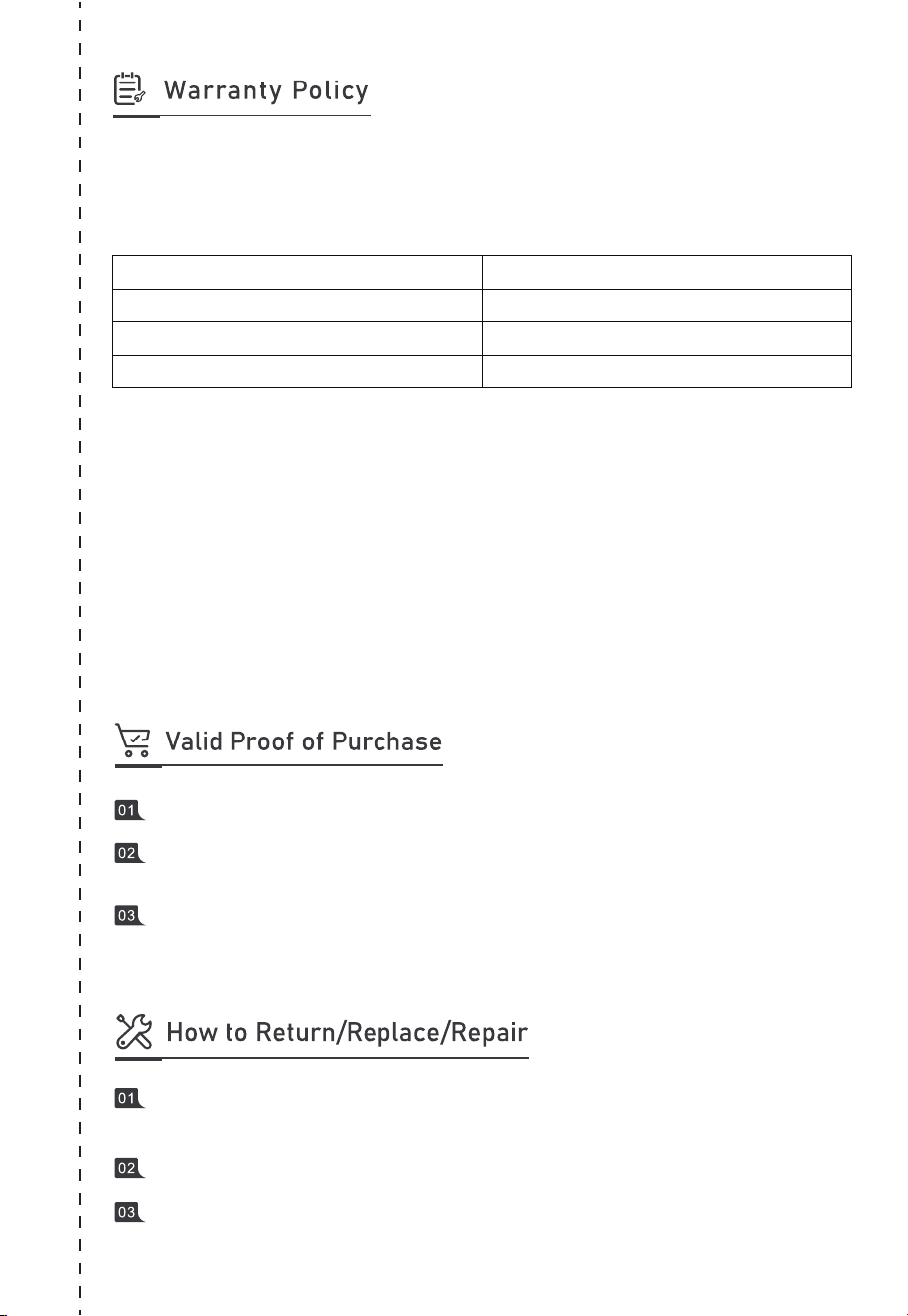
Item
Main unit (including batteries)
Solar panel
Accessories (adapter/cable/others)
Warranty Period
60 months*
12 months
12 months
Order No. of purchases made through authorized platforms.
Sales invoice or order confirmation email that clearly shows the description of the
product, its price and sales channel.
The defective item’s serial number (usually on the bottom of the product) and/or
visible proof (eg. Short video) depicting the defect will be required.
Contact us for a Return Merchandise Authorization (RMA) Number. We will not
accept returned items without prior authorization and RMA.
Write the RMA number in the form below and on the outer package of the parcel.
Send the defective product to our local warehouse.
Customer Name: Date:
Compay(optional):
Address:
Phone:
Email Address:
Purchase From:
Name of Tech Support Spoken To:
Model Name:
Serial #:
Purchase Date:
Problem Description:
RMA #:
Fax:
City: State: Zip:

P/N:17.0303.0611-01A1
Certificate
Inspector:
QC: