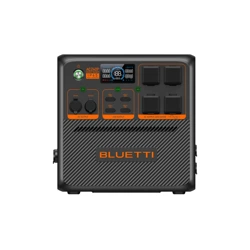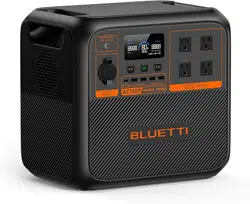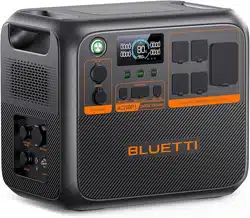

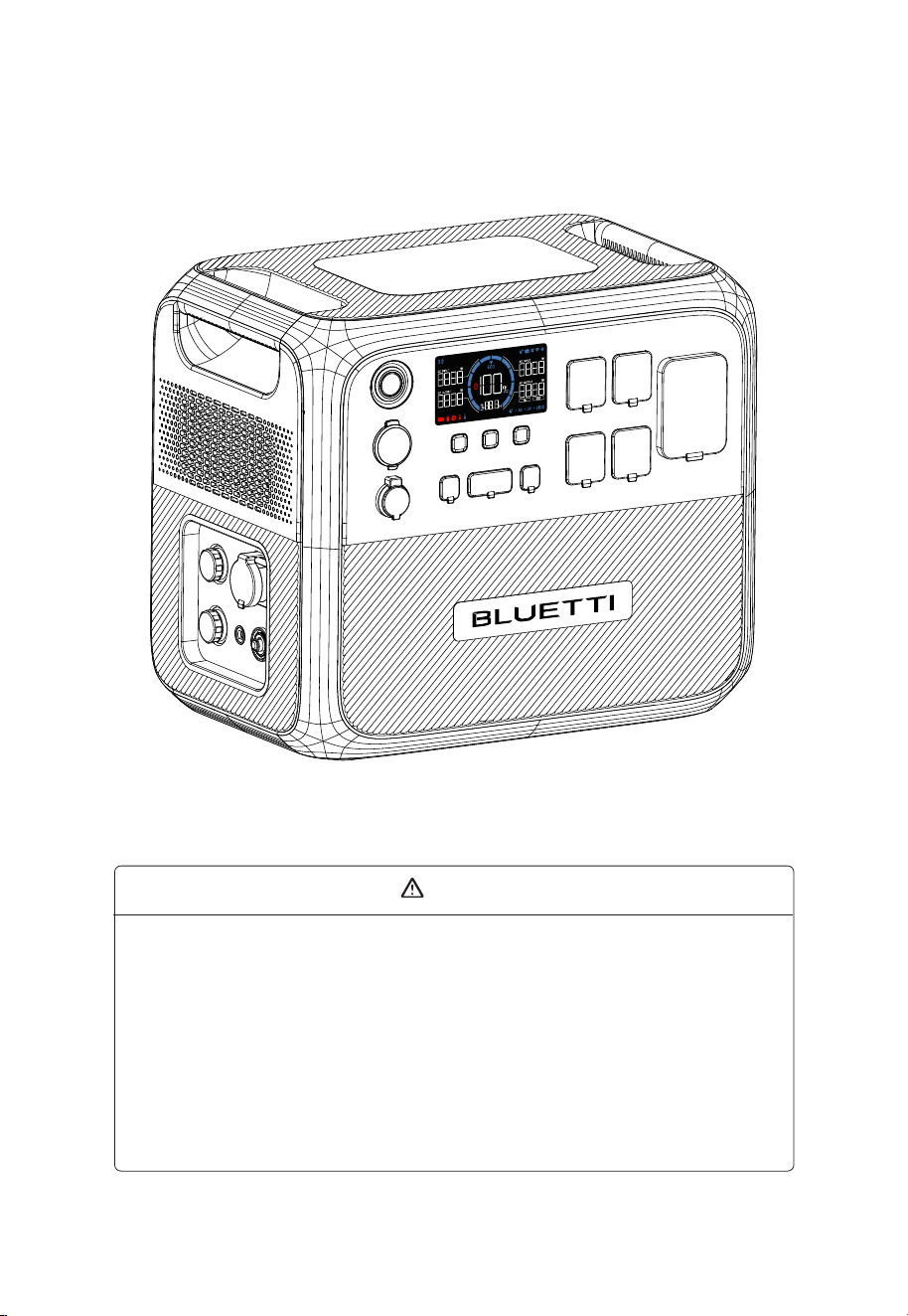
AC200P L
Portable Power Station
User Manual V2.0
Please read this manual carefully before use and keep it for future reference.
Warning
1. Charge the unit before first use.
2. Do not use solar panels with open circuit voltage higher than 145VDC. Solar input
voltage range for the unit is 12V-145VDC.
3. Charge the unit immediately when the SoC drops below 5%. If the SoC drops to 0,
power off the unit and charge it for at least 30 minutes before restarting.
4. The unit is for off-grid use only. Do not connect its AC output to the grid.
5. If not used for more than 3 months, charge the unit to 40%-60% SoC and store it
with the power off. For optimum battery life, discharge and charge the unit every 3
months.
Notice
BLUETTI's products, services, and features are subject to the agreed-upon terms and
conditions during purchase. Please note that some products, services, or features
described in this manual may not be available under your purchase contract. Unless
otherwise specified in the contract, BLUETTI makes no representations or warranties
of any kind, express or implied, with respect to the contents of this manual.
The contents of this manual are subject to change without notice. Please get the
latest version from official BLUETTI website.
If you have any questions or concerns about this manual, please contact BLUETTI
support for further assistance.
Thank You!
Thank you for making BLUETTI a part of your family.
From the very beginning, BLUETTI has tried to stay true to a sustainable future
through green energy storage solutions while delivering an exceptional
eco-friendly experience for our homes and our world.
That's why BLUETTI makes its presence in 100+ countries and is trusted by
millions of customers across the globe.
Copyright © ShenzhenPowerOakNewenerCo., Ltd. All rights reserved.
No part of this document may be reproduced or transmitted in any form or by
any means without the prior written consent of ShenzhenPowerOakNewener
Co., Ltd.
France
Germany
Netherlands

Safety Instructions
Packing List
Product Introduction
Product Overview
Power ON / OFF
LED Screen
Charging
Discharging
Settings
Connect to Expansion Battery
BLUETTI App
Specifications
Button Operation Instructions
Troubleshooting
Contents
1
2
3
4
5
6
7
8
9
10
11
12
13
14
Appx. 1 Estimating Operation Time
Appx. 2 FAQ
Appx. 3 FCC Statement
Appx. 4 IC Caution
05
09
11
12
13
14
16
19
20
24
25
25
27
28
30
30
31
32

1. Safety Instructions
Read this manual for instructions on the proper use and safety information for the
product. The safety instructions provided herein are for illustrative purposes that include
but are not limited to those listed in this manual. Actual operation shall comply with all
applicable safety standards. If you have any questions, feel free to contact BLUETTI
support or your local BLUETTI dealers.
1.1 Statement
To ensure a safe operation, it's crucial to observe and adhere to the following conditions:
• Always operate or store the product in the conditions specified in this manual.
• Avoid unauthorized disassembly, component replacement, or modification of software
codes.
BLUETTI shall not be liable for damages resulting from the following circumstances:
• Force majeure events such as earthquakes, fires, storms, floods, or mudslides.
• Damage caused by the customer's own transportation.
• Damage resulting from inadequate storage conditions as specified in the manual.
• Damage caused by customer negligence, improper operation, or intentional actions.
• System or hardware damage caused by third parties or customers, including but not
limited to improper handling and installation not in accordance with the instructions in
this manual.
• Usage of the product with devices that require a high-performance Uninterruptible
Power Supply (UPS), including but not limited to data servers, workstations, medical
equipment, and other similar devices.
1.2 General Requirements
INSTRUCTIONS PERTAINING TO RISK OF FIRE, ELECTRIC SHOCK, OR INJURY TO PERSONS
IMPORTANT SAFETY INSTRUCTIONS
WARNING:
When using this product, basic precautions should always be followed, including the
following:
• Read all the instructions before using the product.
• To reduce the risk of injury, close supervision is necessary when the product is used near
children.
• Do not put fingers or hands into the product. And do not insert foreign objects into any
JUST POWER ON 05
EN

ports of the product.
• Use of an attachment not recommended or sold by the manufacturer may result in a risk
of fire, electric shock, or injury to persons.
• To reduce the risk of damage to the electric plug and cord, pull the plug rather than the
cord when disconnecting the product.
• Do not use a battery pack or appliance that is damaged or modified, as they may exhibit
unpredictable behavior resulting in fire, explosion, or personal injury.
• Do not operate the product with a damaged cord or plug, or a damaged output cable.
• Do not attempt to replace the internal battery or any other component of the product by
anyone other than authorized personnel. There are no end-user serviceable components.
Do not disassemble the product, take it to a qualified service person when service or
repair is required. Incorrect reassembly may result in a risk of fire or electric shock.
• To reduce the risk of electric shock, unplug the product from the outlet before attempting
any instructed servicing.
• WARNING - RISK OF EXPLOSIVE GASES. To reduce the risk of battery explosion, follow
these instructions and those published by the battery manufacturer and manufacturer of
any equipment you intend to use in the vicinity of the battery. Review cautionary markings
on these products and engines.
• PERSONAL PRECAUTIONS
a. Wear complete eye protection and clothing protection. Avoid touching eyes while work-
ing near the battery.
b. Never smoke or allow a spark or flame in the vicinity of the battery or engine.
c. Be extra cautious to reduce the risk of dropping a metal tool onto the battery. It might
spark or short-circuit the battery or other electrical parts which may cause an explosion.
• When charging the internal battery, work in a well ventilated area and do not restrict
ventilation in any way.
• Under abusive conditions, liquid may be ejected from the battery; avoid contact. If
contact accidentally occurs, flush with water. If liquid contacts eyes, additionally seek
medical help. Liquid ejected from the battery may cause irritation or burns.
• Do not expose the product to fire or excessive temperature. Exposure to fire or temperature
above 80°C (176°F) may cause an explosion.
• Have servicing performed by a qualified repair person using only identical replacement
parts. This will ensure that safety is maintained.
EN
JUST POWER ON
06

• Do not stack anything on top of the product while in storage or while in use. Do not move
the product while operating as vibrations and sudden impacts may lead to poor connections
to the hardware inside.
• In case of fire, use only a dry powder fire extinguisher appropriate for the product.
• WARNING - RISK OF ELECTRIC SHOCK. Never use the product to supply power tools to
cut or access live parts or live wirings, or materials that may contain live parts or live
wirings inside, such as building walls, etc.
1.3 Grounding Instructions
The product is designed for portable use and typically does not require earth grounding.
However, if you connect it to the power grid, it's important to ensure proper grounding for
safety. If it should malfunction or break down, grounding provides a path of least
resistance for electric current to reduce the risk of electric shock. This product is equipped
with an AC power cord having an equipment-grounding conductor and a grounding
plug. The plug must be plugged into an outlet that is properly installed and grounded in
accordance with all local codes and ordinances.
WARNING - Improper connection of the equipment-grounding conductor can result in a
risk of electric shock. Check with a qualified electrician if you are in doubt as to whether
the product is properly grounded. Do not modify the plug provided with the product - if it
does not fit the outlet, have a proper outlet installed by a qualified electrician.
1.4 Handling Requirements
During transportation or storage, take care to avoid dropping, violently impacting, or
tilting the product as it may result in internal damage. If necessary, use mechanical
assistance such as carts or adjustable height workbenches to ensure safe handling.
Recommended number of people based on the weight of product
Weight
<18kg (39.7lbs)
18kg~32kg (39.7lbs~70.5lbs)
32kg~55kg (70.5lbs~121.3lbs)
>55kg (121.3lbs)
Number of people
1
2
3
4 or a cart
1.5 Storage Instructions
•
When the SoC drops to 5%, please charge the product immediately.
• Before storing the product, charge it to 40% to 60% SoC to keep it in optimal condition.
In addition, power off the unit and disconnect all electrical connections from it.
JUST POWER ON 07
EN
• Store the product in a cool and dry place, keeping it away from flammable or combustible
materials and gases.
• The product can be safely stored within a temperature range of -20°C to 45°C ( -4°F to
113°F). However, if the storage duration exceeds one month, it's recommended to maintain
an ideal storage temperature of around 30°C (86°F).
• Fully cycle the product every 3 months to maintain the battery's health. It's NOT recommended
to store the unit for extended periods of time, as it may affect its performance and overall
lifespan.
If the SoC drops to 0 (during storage or upon startup), take the following actions to
safely restart the product:
• Shut down immediately.
• Charge within 48 hours.
• Keep it at an ambient temperature of 5°C to 35°C (41°F to 95°F) for 6 hours before
charging. It's recommended to charge the product via an AC source. If charging via solar
energy, ensure that your solar system provides an output of more than 100W.
The symbol displayed is intended to remind you to read the instructions in the
literature accompanying the product before operation and maintenance.
• Connect the product to a socket-outlet that has an earthing connection using the power
cord provided.
• The socket-outlet should be installed near the product and easily accessible for safety
purposes.
• Never dispose of a battery by throwing it into fire or a hot oven, or by mechanically crushing
or cutting it, as these may cause it to explode.
• Avoid leaving batteries in extremely high-temperature environments, as this can result in
an explosion or the leakage of flammable liquid or gas.
• The battery subjected to extremely low air pressure may result in an explosion or the
leakage of flammable liquid or gas.
• Attention should be drawn to the environmental aspects of battery disposal.
• Please refer to the information on the exterior bottom enclosure for electrical and safety
information before installing or operating the apparatus.
SAVE THESE INSTRUCTIONS
BLUETTI shall not be liable for any equipment damage caused by the violation of the
above instructions.
EN
JUST POWER ON
08
1
1
1
Product Documentation
1
1
1
1
1
AC200P L
Portable Power Station
User Manual V2.0
Please read this manual carefully before use and keep it for future reference.
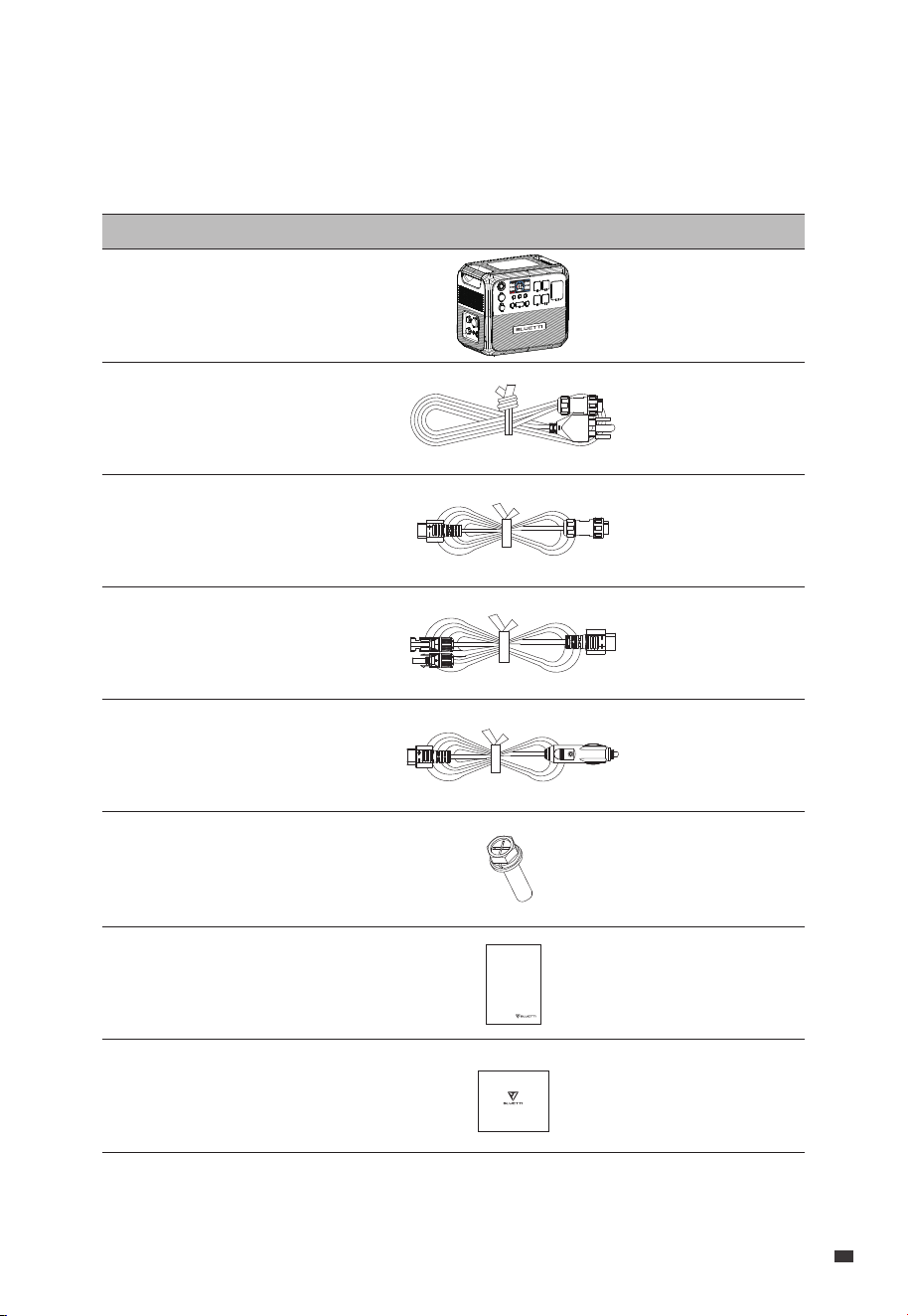
2. Packing List
Standard Accessories
Item Picture Qty.
AC200P L
Portable Power Station
AC Charging Cable (15A)
Solar Charging Cable
Car Charging Cable
DC Input Cable
(Work with solar / car / lead-acid
battery charging cable)
Grounding Screws
Warranty Card
JUST POWER ON 09
EN
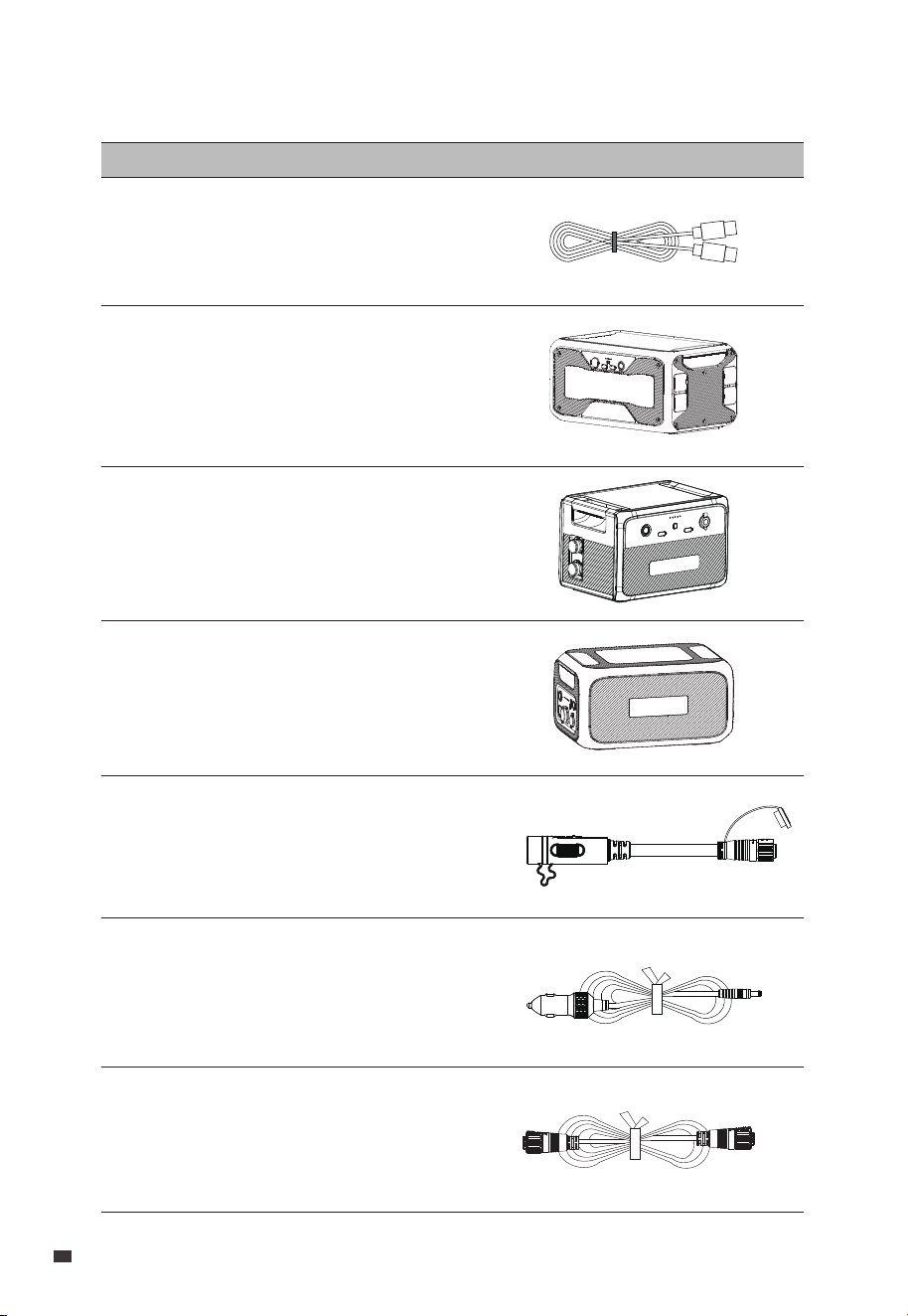
USB-C to USB-C Cable (output)
B300 Expansion Battery
B210P Expansion Battery
B230 Expansion Battery
B210P Expansion Cable
48V DC Power Cable
(for D40)
12V DC Power Cable
(For 12V devices with DC5521 port,
such as routers, cameras, etc.)
Optional Accessories
(Available on the official BLUETTI website: https://www.bluettipower.com)
Item Picture
EN
JUST POWER ON
10
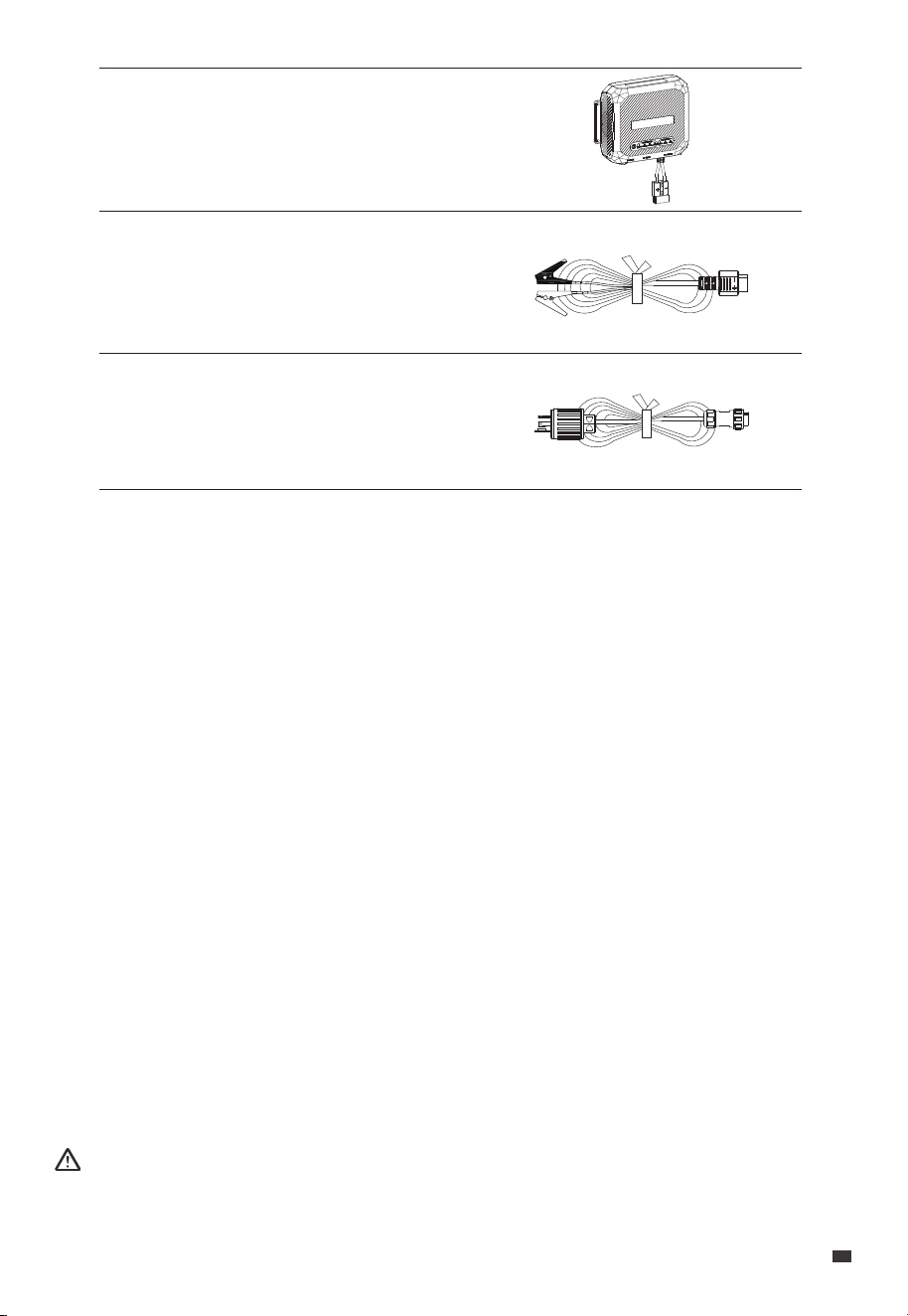
D40 Voltage Regulator
Lead-acid Battery Charging Cable
(Charge the AC200P L via a
lead-acid battery)
AC Charging Cable
3. Product Introduction
Introducing the BLUETTI AC200P L a high capacity power station that packs a powerful
punch. With its impressive 2,304Wh capacity and 2,400W pure sine wave output, this
powerhouse can effortlessly charge your laptop, run your fridge, and power your essential
tools.
What sets the AC200P L apart is its exceptional flexibility, allowing you to tailor it to your
requirements. You have the option to link up with BLUETTI's expansion batteries - the
B210P, B230, and B300 - enabling you to expand your energy capacity according to your
unique demands. By using two B300 units, you can elevate your total power capacity to a
staggering 8,448Wh, making the AC200P L the perfect companion for any power-inten-
sive adventure.
Whether you're off-grid camping, carrying out fieldwork, or simply need a reliable backup
for home power outages, the BLUETTI AC200P L is your robust and trustworthy power
solution. Power your life, wherever you are.
Danger:
Do not connect the AC output of AC200P L to the grid.
JUST POWER ON 11
EN
4 531 2
16
17
15
14
13
6 7
8
9
10
11
12
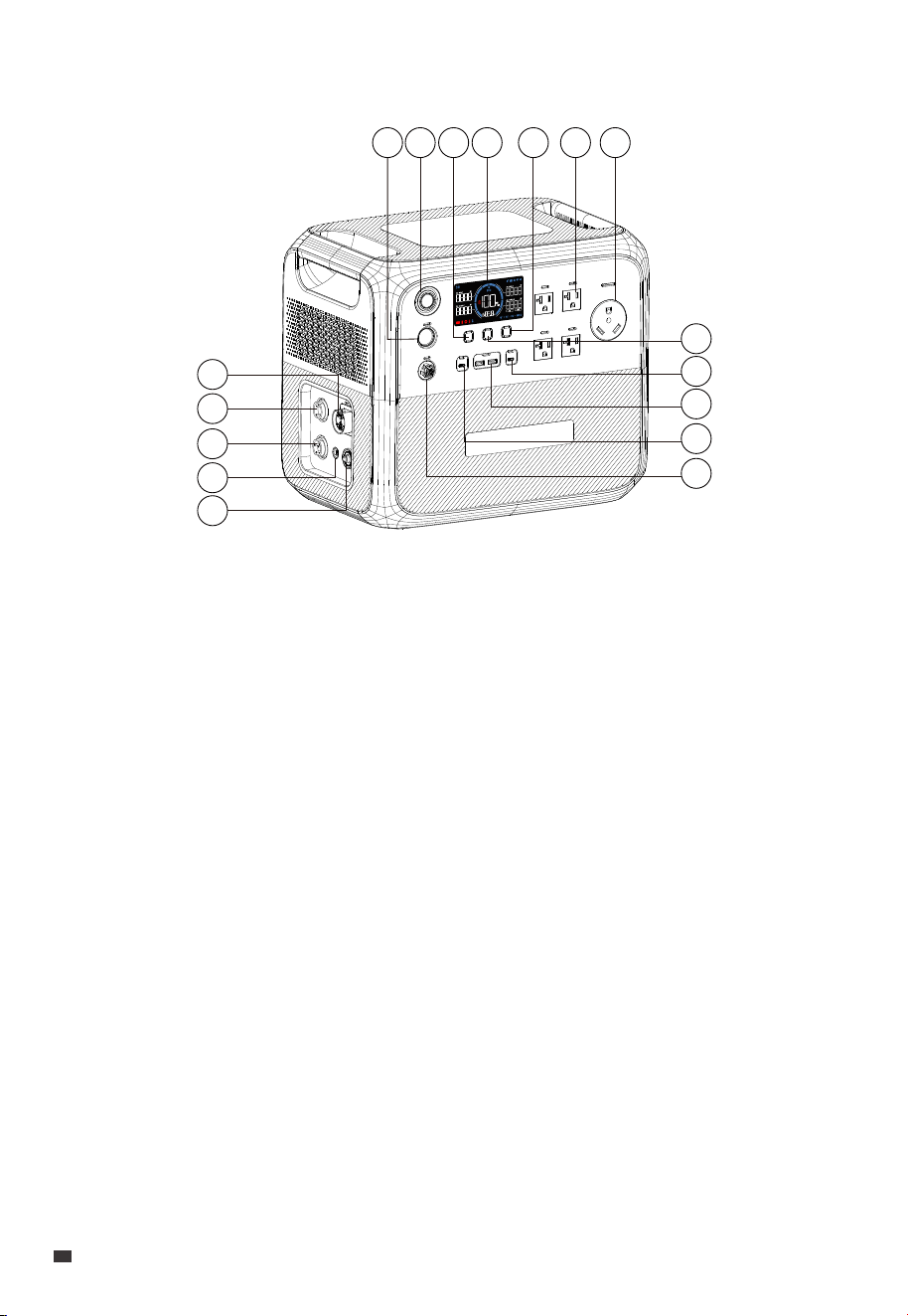
4. Product Overview
USB-A Port
USB-C Port
48V DC Port
Circuit Breaker
Grounding Pole
AC Input
DC Input
Battery Expansion Port
⑩
⑪
⑫
⑬
⑭
⑮
⑯
⑰
Cigarette Lighter Port
Power Button
DC Power Button
LED Screen
AC Power Button
20A AC Outlet
30A AC Outlet
USB Power Button
USB-C Port
①
②
③
④
⑤
⑥
⑦
⑧
⑨
EN
JUST POWER ON
12
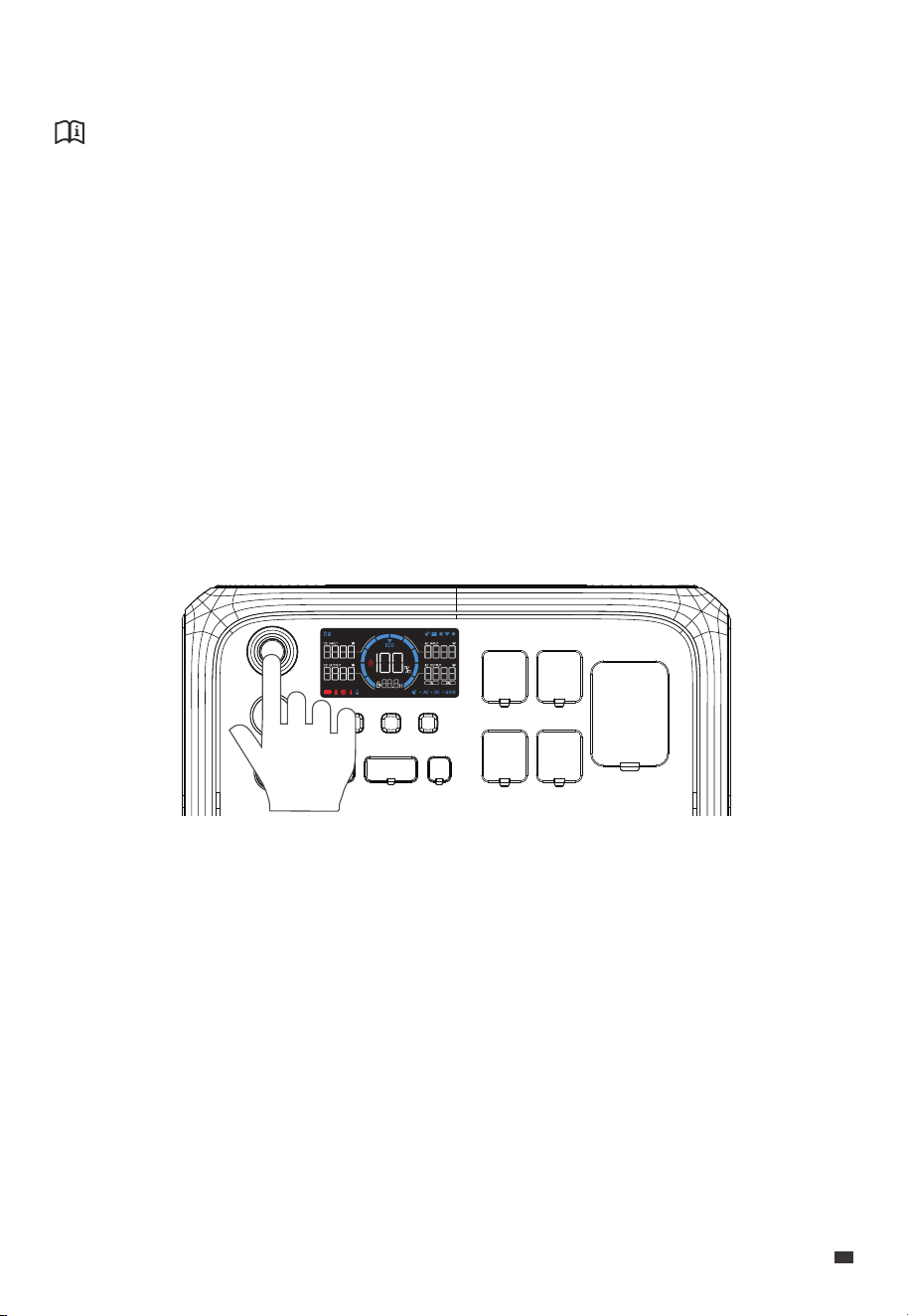
5. Power ON / OFF
Attention:
Please place the unit on the platform firmly and stably.
• Power ON: Press the Power Button, the button lights up indicating that the AC200P L is
now on standby.
• Power OFF: Press and hold the Power Button for about 2 seconds to turn off the unit.
• AC ON / OFF: When the AC200P L is on, press the AC Power Button to turn it on / off.
• DC ON / OFF: When the AC200P L is on, press the DC Power Button to turn it on / off.
• USB ON / OFF: When the AC200P L is on, press the USB Power Button to turn it on / off.
• Restart: Power off the AC200P L first, then press the Power Button to restart.
Note: When the AC200P L is on, you can activate the LED screen by interacting with any
of the buttons.
JUST POWER ON 13
EN
1
62 3 4 5 7 8 9 10
11
12
13
14
15
16
17
18
19
20
21
22
23
24
25
26
27
28
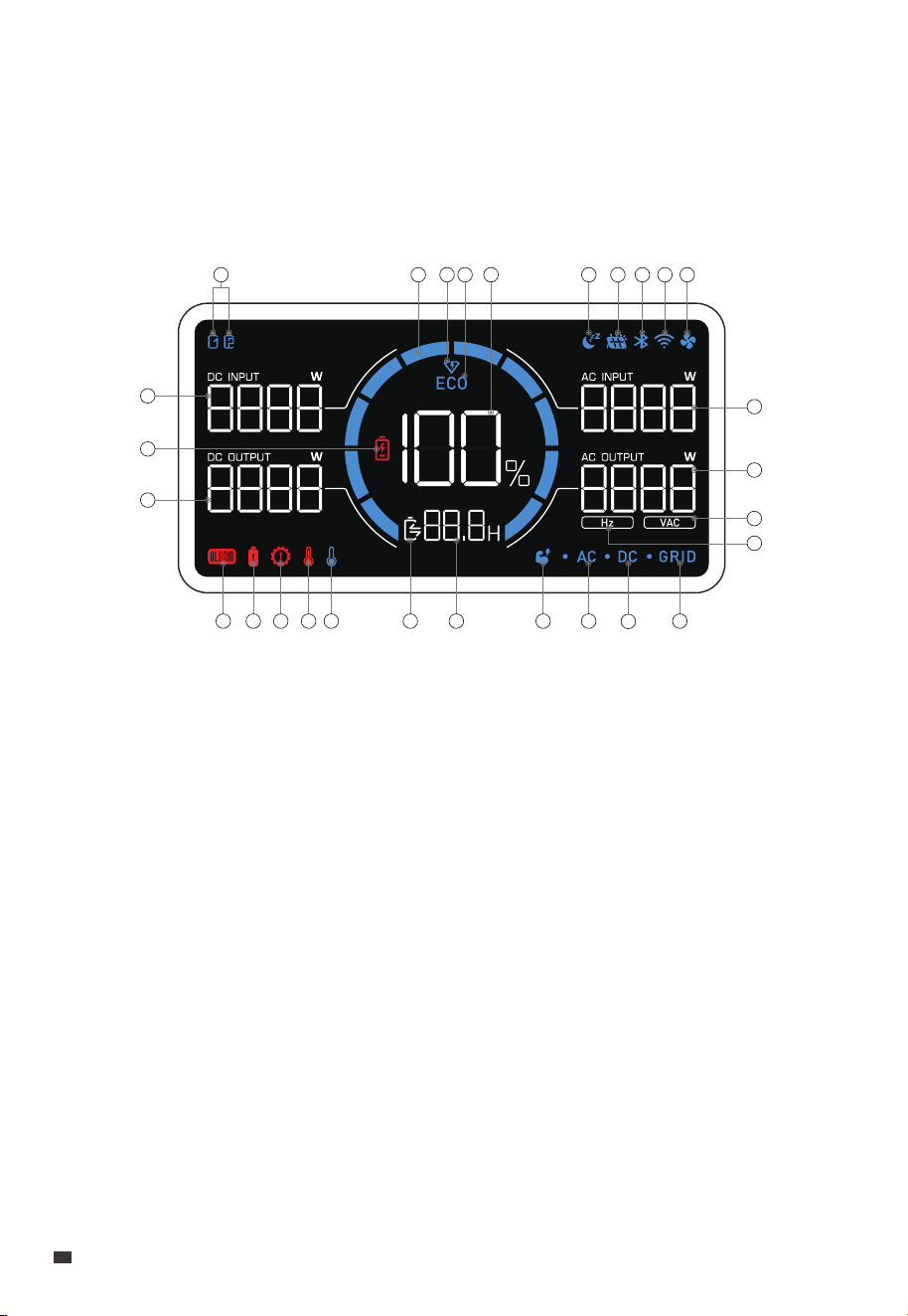
①
②
③
④
⑤
⑥
⑦
⑧
⑨
⑩
Expansion Battery
Charge / Discharge
Progress
Turbo Charging
ECO Mode
Battery Capacity (SoC)
Silent Charging
DC Input
Bluetooth Connection
WiFi Connection
Fan Status
⑪
⑫
⑬
⑭
⑮
⑯
⑰
⑱
⑲
⑳
AC Input Power
AC Output Power
AC Output Voltage
AC Output Frequency
Grid Connection
DC Output
AC Output
Power Lifting Mode
Charge / Discharge
Remaining Time
Charge / Discharge Status
Low Temperature Alert
High Temperature Alert
Overload Alert
Overcurrent Alert
Fault Alert
DC Output Power
Low Battery Alert
DC Input Power
㉑
㉒
㉓
㉔
㉕
㉖
㉗
㉘
6. LED Screen
The AC200P L features an informative LED screen that offers easy access to all the
essential information about the unit's status and performance. When you power on the
unit, the LED screen lights up, and when you power off the unit, the screen turns off as
well.
EN
JUST POWER ON
14
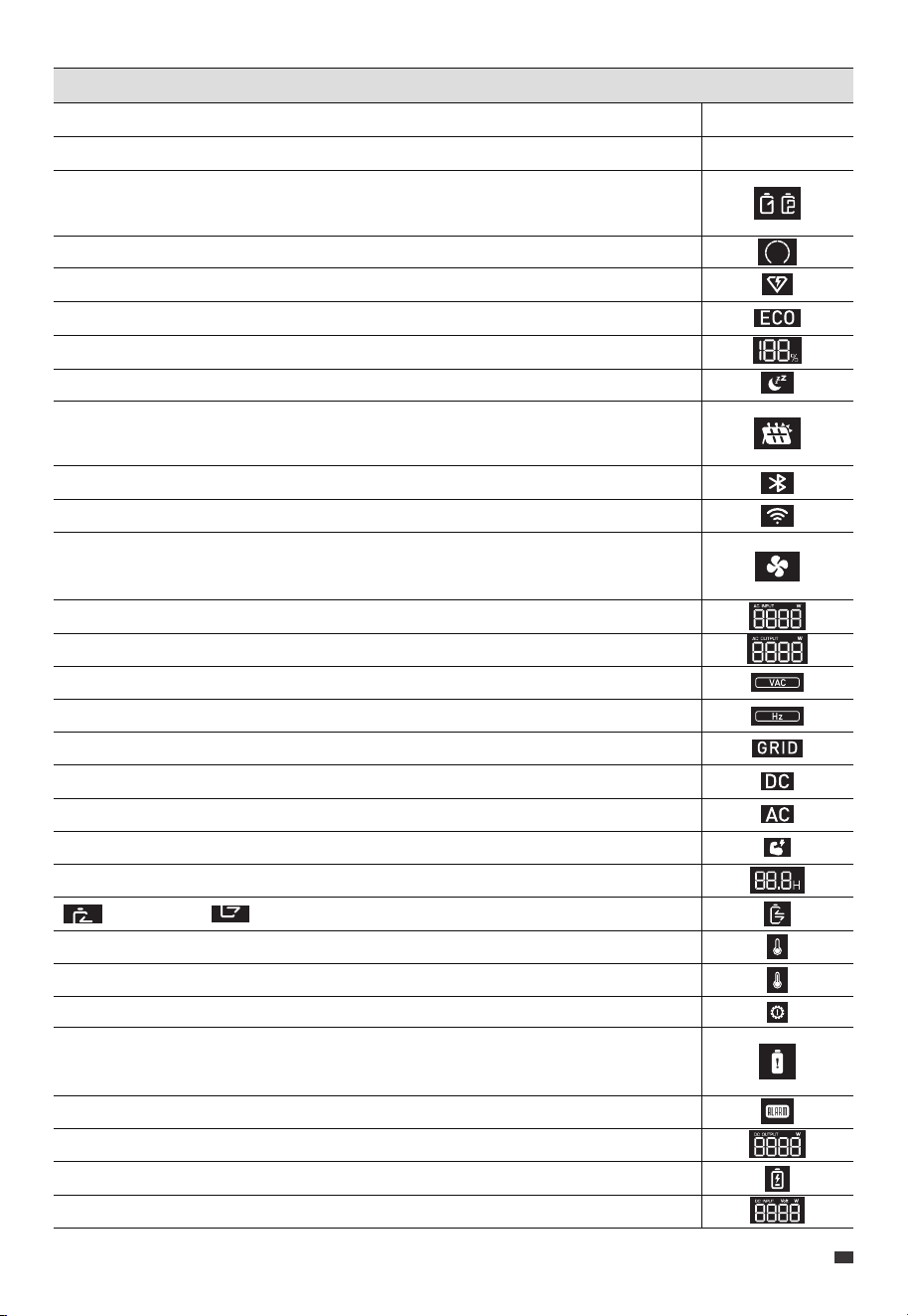
LCD Instructions
Startup
Shutdown
Each icon represents an attached expansion battery. The AC200P L can display
up to 2 battery icons.
The bar increases during charging and decreases during discharging.
The AC200P L is charging in Turbo Charging Mode.
The ECO Mode is enabled to save power.
The remaining battery capacity.
The AC200P L is charging in Silent Charging Mode.
The AC200P L is charging from a DC power source, such as solar panels,
lead-acid batteries, etc.
The AC200P L connects to BLUETTI App via Bluetooth.
The AC200P L connects to BLUETTI App via WiFi.
When it lights up, the fan is activated and working properly. If it flashes, there
may be a problem with the fan.
The real-time AC charging power.
The real-time total AC output power.
The real-time AC output voltage.
The real-time AC output frequency.
The AC200P L is charging from the home grid.
The DC output is turned on.
The AC output is turned on.
The AC200P L is operating in Power Lifting Mode.
The remaining time of charging or discharging.
: Charging : Discharging
The temperature inside the unit is lower than -20°C (-4°F).
The temperature inside the unit is higher than 70°C (158°F).
The AC200P L is overloaded.
The AC200P L is drawing too much current, which can cause damage to the unit
or any connected devices.
There's an issue with the AC200P L, which may require troubleshooting or repair.
The real-time DC output power.
The SoC drops below 5%.
The real-time DC input power.
LCD lights up
LCD lights off
JUST POWER ON 15
EN
7. Charging
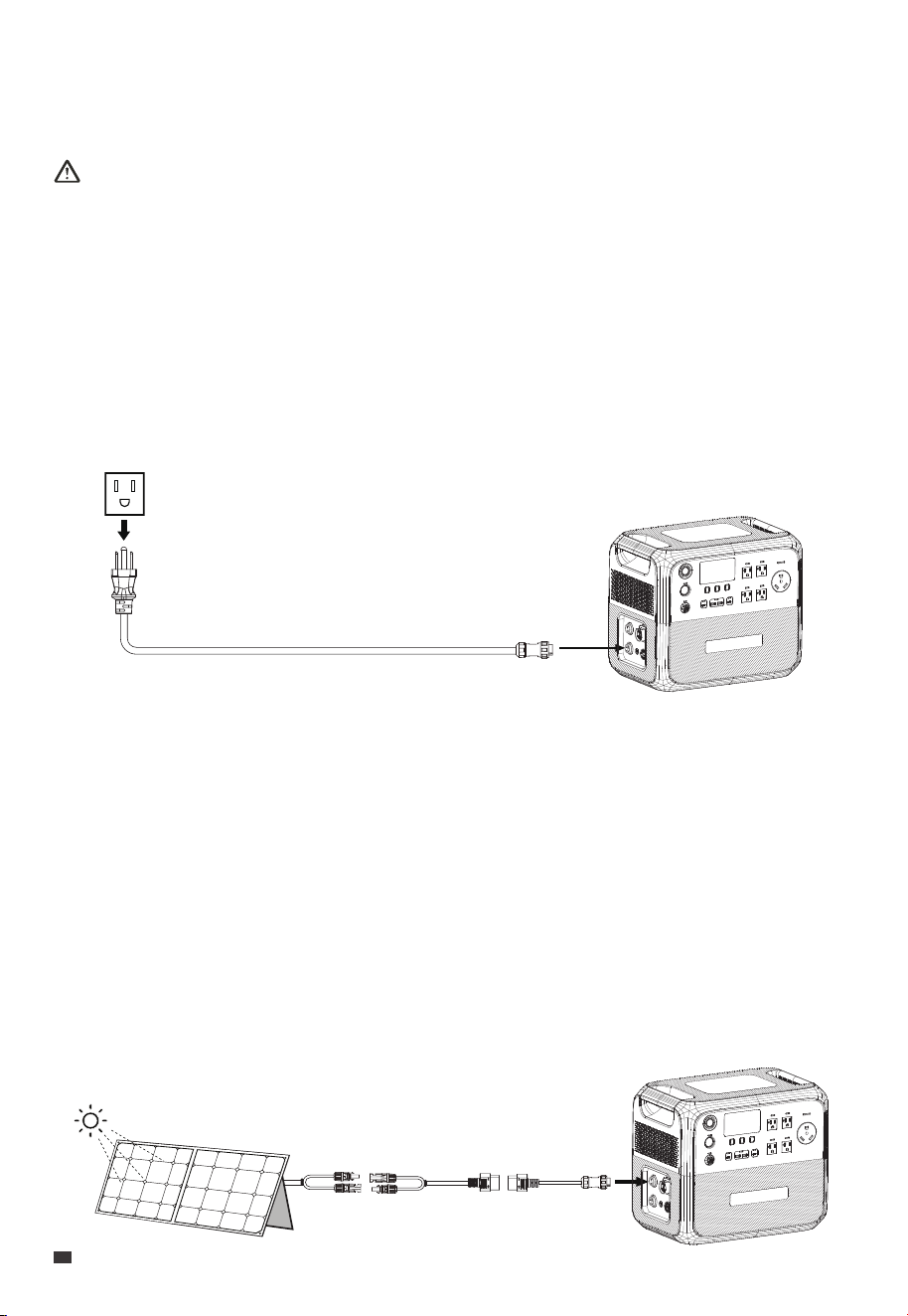
AC200P L supports five charging methods: AC, solar, car, generator,and Lead-acid battery.
Attention:
• Double-check that all cables are firmly plugged in.
• Avoid getting the plug and socket wet to prevent any potential damage.
7.1 AC Charging
Plug the AC200P L into a standard wall outlet and start charging. Once it's fully charged,
the AC200P L automatically stops charging to prevent overcharging. For a fast charge,
you can enable Turbo Charging in the BLUETTI App, which allows for an 80% capacity in
just 60 minutes at an ambient temperature of 25°C (77°F).
7.2 Solar Charging
Connect the solar panels (in series) to AC200P L via the DC input cable and solar charging
cable. When solar panels maintain a power output of 1,200W, the AC200P L can be charged
up to 100% in about 2.8 hours. However, please be aware that the charging time may vary
based on weather conditions, sunlight intensity, panel orientation, and other variables.
Note:
• Make sure your solar panels meet the following requirements:
Voc: 12V-145V Current: 15A Max. Power: 1,200W Max.
• Non-waterproof solar panels will lose efficiency if they get exposed in the rain for a
long time.
EN
JUST POWER ON
16
7.3 Car Charging
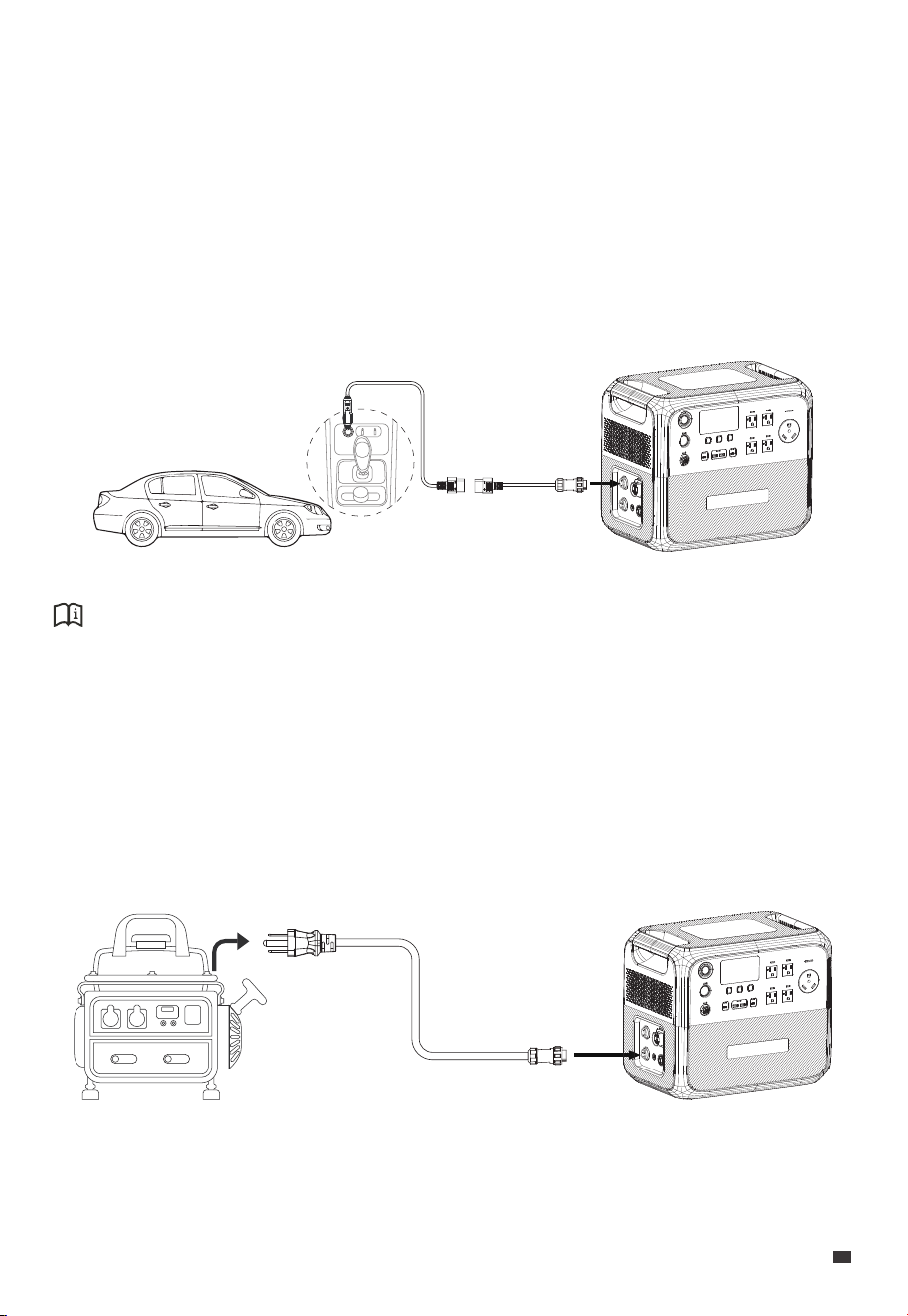
Connect the AC200P L to the vehicle's 12V cigarette lighter port via the DC input cable and
car charging cable. The AC200P L can charge at a maximum of 96W, and it'll automatically
stop charging once it's fully charged.
Note: Make sure your vehicle meets the following conditions for charging:
• The vehicle is capable of supplying power.
• The vehicle's engine is running during the charging process.
7.4 Generator Charging
Connect the AC200P L to a generator via the AC charging cable. The AC200P L also
automatically stops charging when it's fully charged.
Attention:
The AC200P L has a low-voltage disconnect function designed to protect your vehicle's
battery during charging. If the input voltage drops below 10.5V, the unit will automatically
stop charging to prevent over-discharging and potential damage to the battery.
JUST POWER ON 17
EN
Note: Make sure your generator delivers the AC output with charging voltage, frequency,
and Grid Self-adaption Mode voltage that meet AC200P L's specifications.
If the AC200P L is not charging properly through the generator, try turning on the Grid
Adaptive Mode on the App.
7.5 Lead-acid Battery Charging
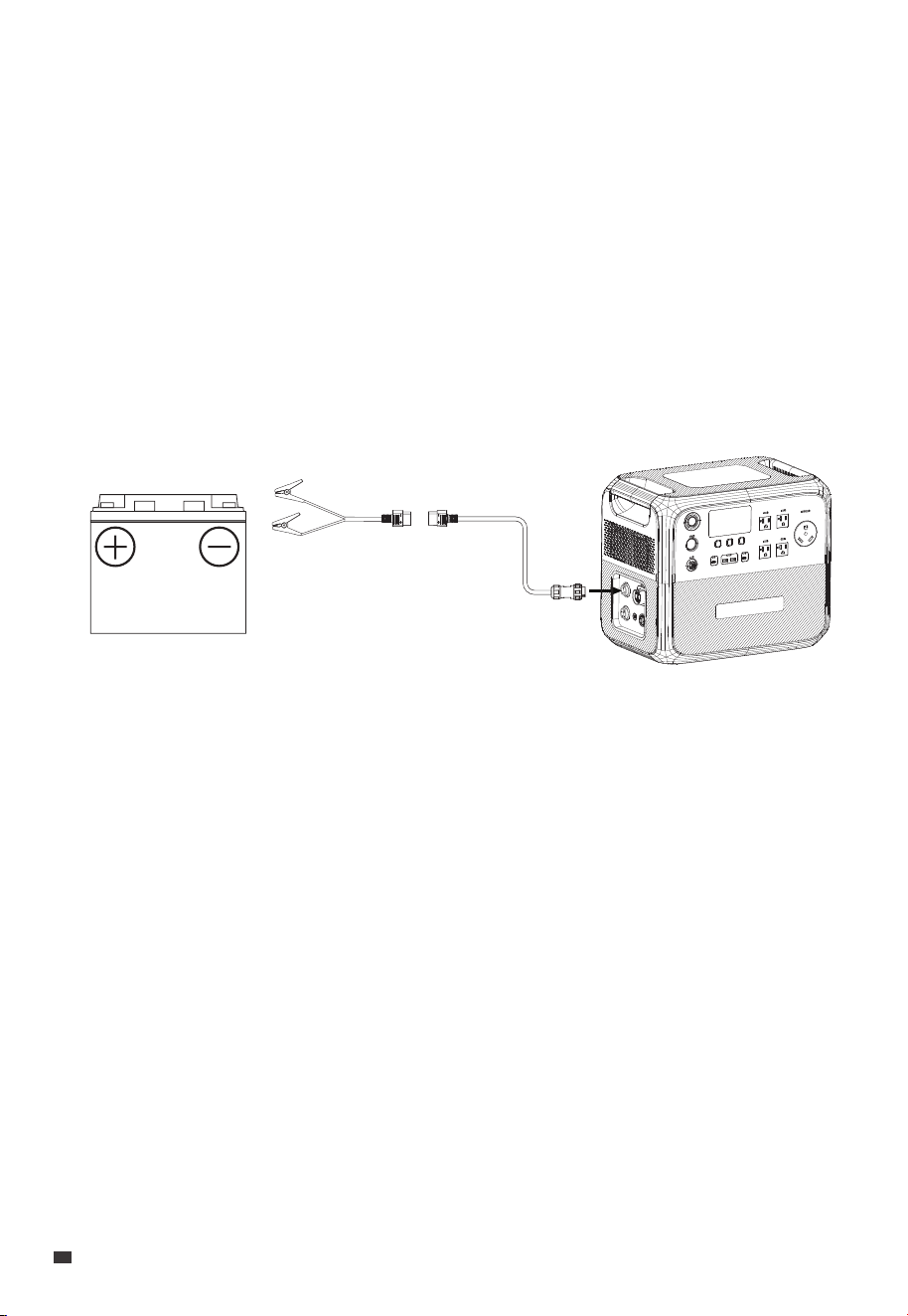
In this method, the AC200P L is charged by connecting the lead-acid battery and the
AC200P L DC/PV port via the optional lead-acid battery charging cable,as shown in
the figure below.
EN
JUST POWER ON
18
Port
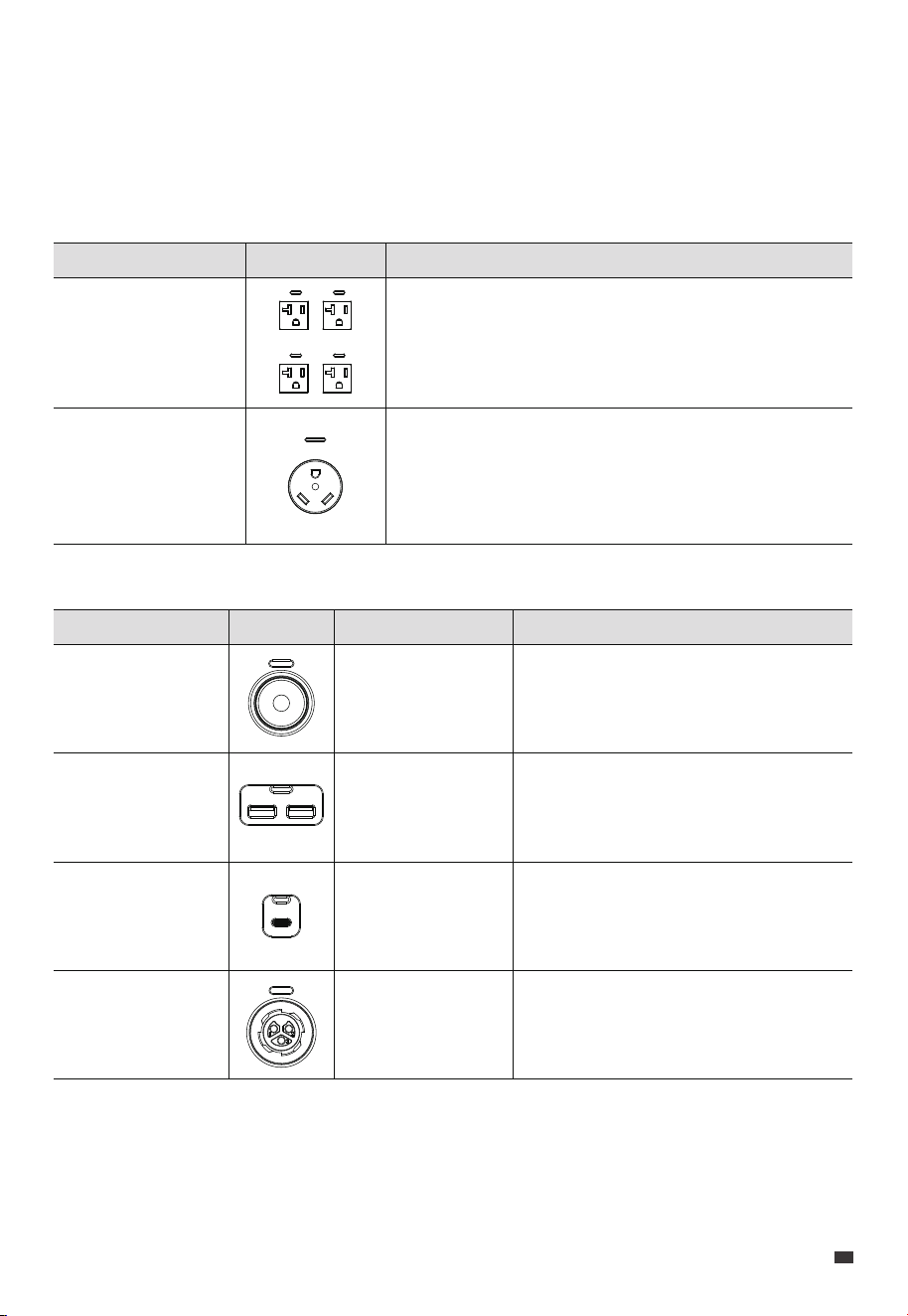
20A AC Outlet
x 4
30A AC Outlet
x 1
Picture Description
For AC electrical devices.
For AC electrical devices with NEMA TT-30 plug.
Port
Cigarette Lighter
Port x 1
USB-A x 2
USB-C x 2
48V DC Port x 1
Picture Description
12V DC appliances up to 120W power.
e.g. car refrigerator, lead-acid battery
Mobile phones and other small loads.
Mobile phones, laptops, etc.
48V DC appliances,
e.g. charging RV Life Batteries
with D40
Specifications
12V / 10A
QC 3.0, 18W Max.
PD 3.0, 100W Max.
44.8V-57.6V / 8A
8. Discharging
Besides the cigarette lighter port, USB-A, and USB-C, AC200P L also features two types of
AC outlets and a 48V DC port, expanding your charging options.
8.1 AC Discharging
Note: To ensure optimal performance, avoid short-circuiting the ports and keep them dry
during use or storage. Additionally, do not block or cover the ports while ensuring proper
ventilation.
8.2 DC Discharging
JUST POWER ON 19
EN
9. Settings
The AC200P L offers the convenience of adjusting its settings either via the LED screen or
the BLUETTI App. With the unit's LED screen, you have direct control over various settings
such as Power Lifting Mode, ECO Mode, output frequency, and charging modes.
Additionally, by using the BLUETTI App, you can access a user-friendly interface on your
phone to conveniently monitor and control the AC200P L.
9.1 Setting Mode
When the screen is on, press and hold the AC and DC Power Buttons for about 2 seconds
till the output frequency flashes to enter the Setting Mode.
9.2 Frequency Switching
The current output frequency (50Hz / 60Hz) is displayed in the lower right corner of the
screen. In the Setting Mode, press the DC Power Button to navigate until the output
frequency appears on the screen. Then, press the AC Power Button to switch the frequency
options based on your requirements.
Note: Turn off AC Power Button before setting Frequency.
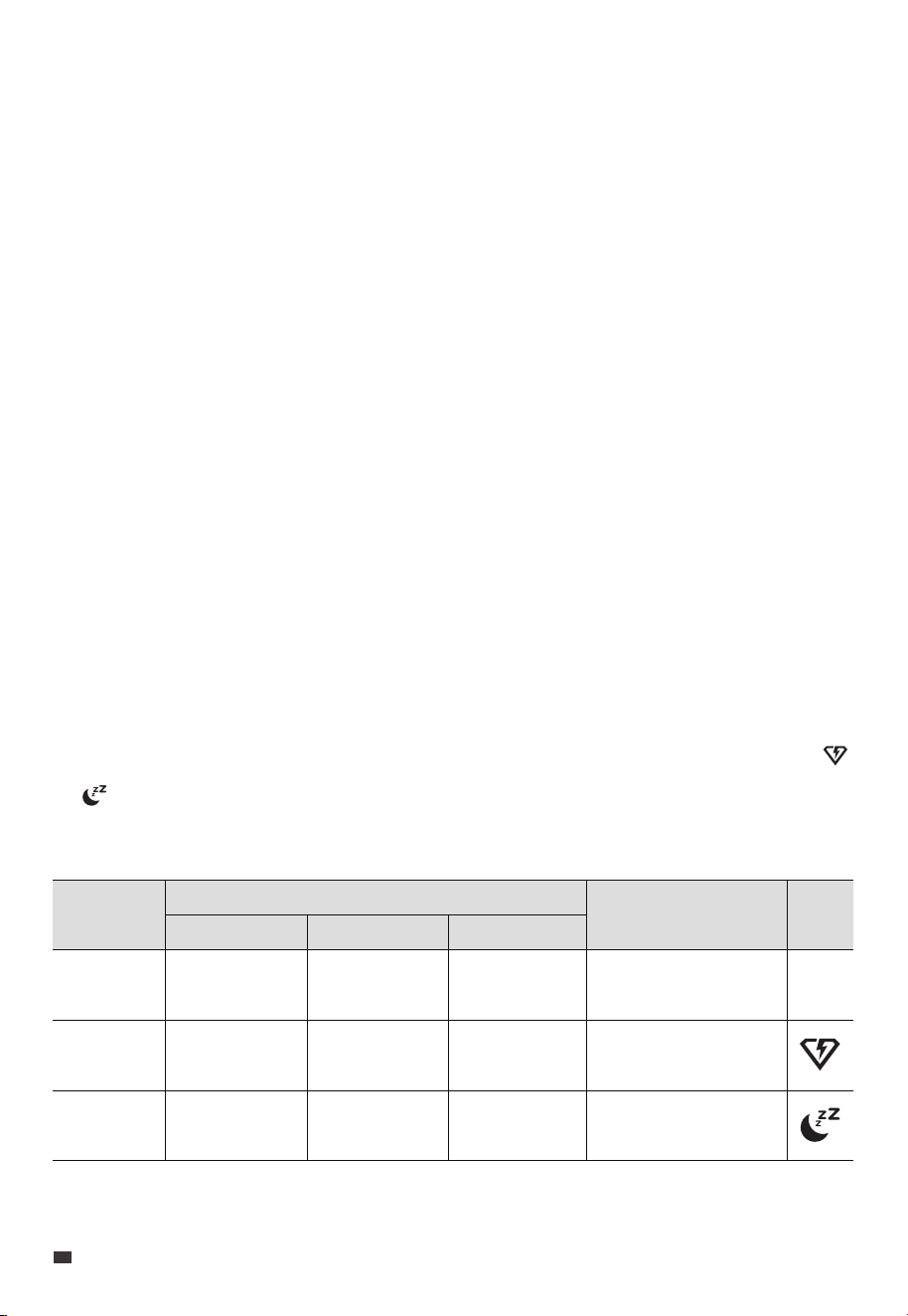
9.3 AC Charging Mode
The AC200P L supports 3 AC charging modes - Standard, Turbo, and Silent to fit your
specific needs. In the Setting Mode, use the DC power button to navigate until the
or icon starts flashing on the screen. Then, press the AC power button to choose the
charging modes. Please refer to the table below for useful instructions.
Mode
Standard
Turbo
Silent
Recharging Power
AC
1200W Max.
2400W Max.
800W Max.
PV
1200W Max.
1200W Max.
800W Max.
AC+PV
1200W Max.
2400W Max.
800W Max.
Note
More friendly to
AC200P L's battery.
Comes in handy
when recharging time
is a priority.
Offers a quiet,
low-power operation
for long battery life.
Icon
None
EN
JUST POWER ON
20

9.4 Power Lifting Mode
The Power Lifting Mode is specifically designed to handle resistive loads up to 3,600W,
including electric blankets, kettles, hairdryers, and other heating devices. To enable it,
access the Setting Mode, navigate with the DC Power Button until the appears, and
press the AC Power Button to enable the mode.
Note: The Power Lifting Mode is not enabled by default and is only suitable for resistive
loads with a power rating between 2,400W-3,600W.
Although the AC200P L can handle higher power demands, its actual operating power
remains at 2,400W.
9.5 ECO Mode
The AC200P L has three ECO modes that help you save power and extend battery life:
• AC-ECO Mode
In this mode, if the AC power output falls below a certain level for a set period of time, the
AC power will automatically turn off.
Note: This mode is not available when the AC200P L is charging from an AC source like a
wall outlet or generator.
• DC-ECO Mode
In this mode, if the DC power output falls below a certain level for a set period of time, the
DC power will automatically turn off.
Attention:
• The AC-ECO and DC-ECO modes are enabled by default to save energy, and it's
recommended to keep them enabled at all times.
• Use the BLUETTI App to enable or disable AC-ECO Mode and DC-ECO Mode separately.
If you use the LED screen, they'll be turned on or off at the same time.
• To avoid any interruption in charging, disable ECO Mode when charging a small device
that consumes less than 60W of power.
In the Setting Mode, press the DC Power Button to navigate through the setting items.
When the icon flashes on the screen, press the AC Power Button to enable or disable
the ECO Mode.
JUST POWER ON 21
EN

9.7 UPS Mode
With the UPS mode enabled, the AC200P L can provide uninterrupted power to your
essential appliances during a power outage. And there are four different modes available
through the BLUETTI App, allowing you to choose the best option for your needs.
• Standard UPS Mode
In this mode, the AC200P L and its expansion batteries (if any) are always charged using
available solar or grid power, ensuring that they are ready to provide backup power in case
of a grid failure. When the grid fails, the AC200P L unit seamlessly takes over to keep your
devices running without any interruption.
• Time Control UPS Mode
This mode allows you to program the AC200P L to charge during off-peak hours when
electricity is cheaper. Then, during peak hours when electricity is more expensive, the
AC200P L seamlessly switches over to power your devices, helping you to save money on
your electricity bills.
• PV Priority UPS Mode
The PV Priority UPS mode is better for regions with plenty of sunlight all the year. AC200P L
is mainly charged by solar energy to save power.
Note: When battery SOC is higher than the preset value, devices on AC outlets are
powered by PV and the battery together.
When battery SOC is lower than set value, the grid charges the battery and devices at the
same time.
• Customized UPS Mode
Tailor your UPS settings to match your unique needs in this mode. Create personalized
schedules for charging and discharging, set battery SoC limits, and even control the grid
9.6 WiFi & Bluetooth Connection
To connect the AC200P L to the BLUETTI App, turn on the WiFi or Bluetooth first. In the
Setting Mode, press the DC Power button to navigate through the setting items. When
the icon flashes on the screen, press the AC Power Button to turn Bluetooth on. Similarly,
when the icon flashes on the screen, press the AC Power Button to toggle WiFi on.
EN
JUST POWER ON
22

charging switch and scheduled charging switch according to your diverse requirements.
9.8 Grid Self-adaption Mode
If you can not charge the AC200P L using a generator or unstable grid voltage because of
unstable voltage, you can enable the Grid Self-adaption Mode through the BLUETTI App.
9.9 Max. Grid Input Current
The Max. Grid Input Current is set to 15A by default. If the grid current doesn't match this
setting, adjust the setting in the BLUETTI App.
Attention:
The AC200P L allows a maximum grid input current of up to 20A.
If you need to increase the setting beyond the default 15A, please contact BLUETTI
Customer Service and request a password to make the necessary adjustments.
9.10 Exit Setting Mode
To save your AC200P L settings and exit the Setting Mode, press and hold both the DC
and AC Power Buttons at the same time.
Note: If you do not perform any operation in 1 minute, the AC200P L will automatically exit
the Setting Mode, and no changes will be saved.
JUST POWER ON 23
EN
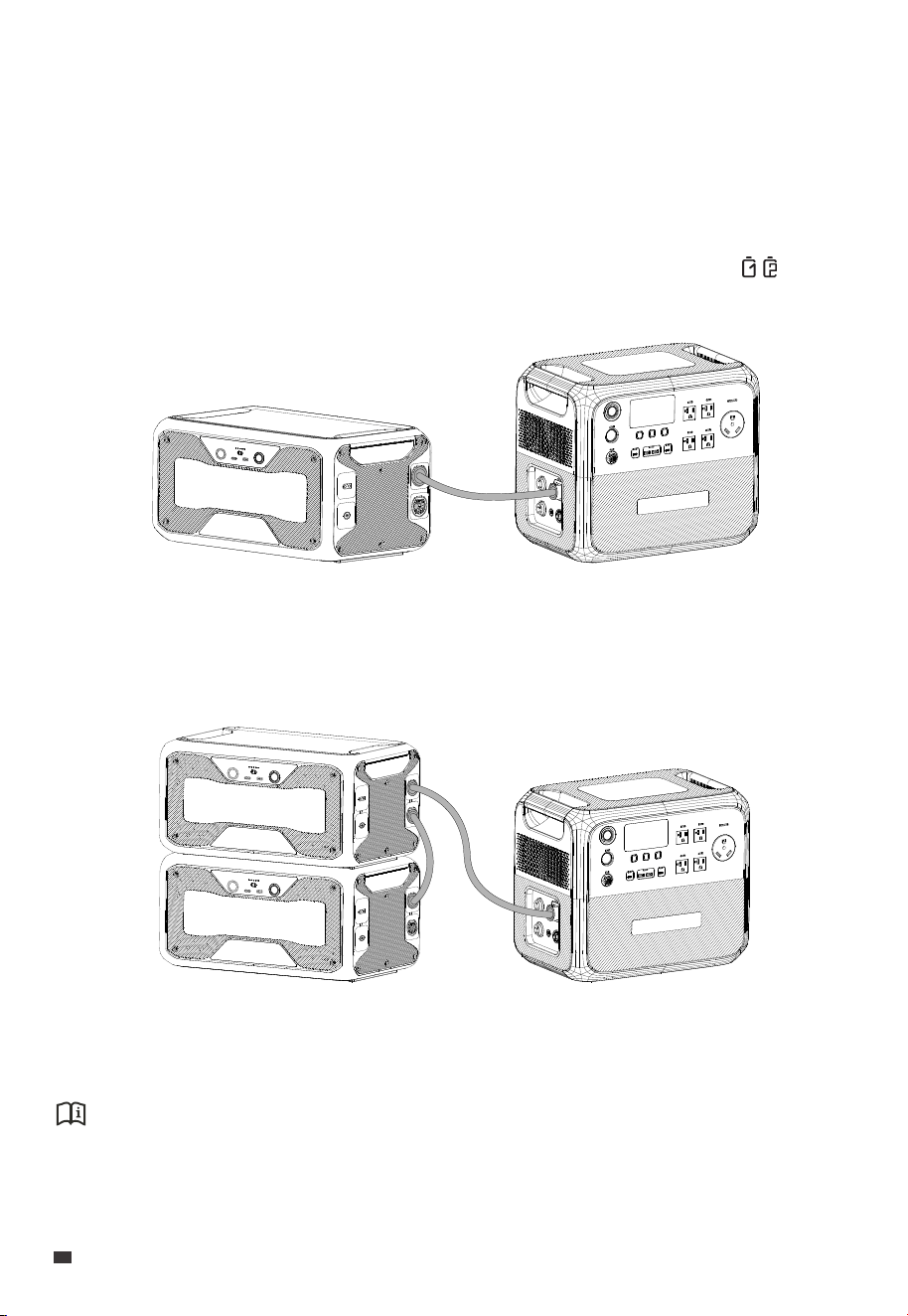
10. Connect to Expansion Battery
The AC200P L unit supports several types of expansion batteries to increase its power
capacity, such as the B210P, B230, and B300. Follow the steps below to connect them:
1. Make sure both the AC200P L and the expansion battery are turned off.
2. Connect them using the battery expansion cable.
3. Power on the AC200P L and the expansion battery turns on automatically. The displays
on the AC200P L's screen.
If you want to add one more expansion battery, please set up the system as shown.
(AC200P L + 1 B300)
(AC200P L + 2 B300)
Attention:
The AC200P L is compatible with up to two B210P or B300 units, but only one B230 unit.
EN
JUST POWER ON
24
Battery Capacity
Cell Type
AC+DC/PV Input Power
AC+DC Output Power(without grid)
Weight
Dimensions (L × W × H)
Charging Temperature
Discharging Temperature
Storage Temperature
Working Humidity
Noise
Working Altitude
2,304Wh (45Ah)
Lithium Iron Phosphate (LiFePO4, LFP)
2,400W Max.
2,500W Max.
28.3 kg/ 62.4 lb
420mm × 280mm × 366.5mm / 16.5in × 11in × 14.4in
0°C to 40°C / 32°F to 104°F
-20°C to 40°C / -4°F to 104°F
Up to 1 month: -20°C to 45°C / -4°F to 113°F
Up to 3 months: -20°C to 30°C / -4°F to 86°F
Up to 12 months: -20°C to 25°C / -4°F to 77°F
10% to 90%
50dB Max.
2,000m / 6,561ft
Model AC200P L
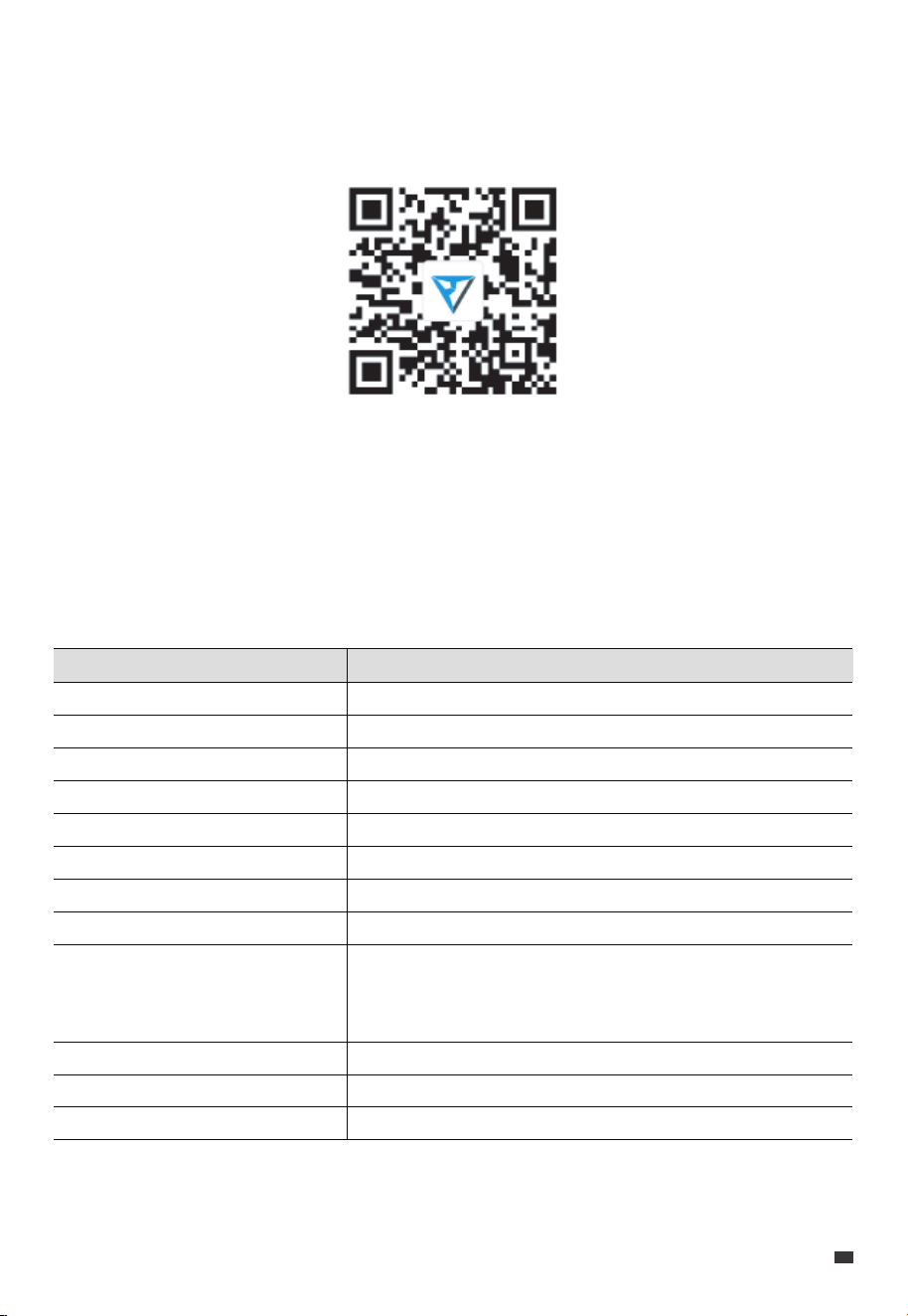
11. BLUETTI App
12. Specifications
Scan the QR code below or search "BLUETTI" in the App Store or Google Play to download
the BLUETTI App.
For more details, please refer to BLUETTI APP INSTRUCTIONS.
JUST POWER ON 25
EN
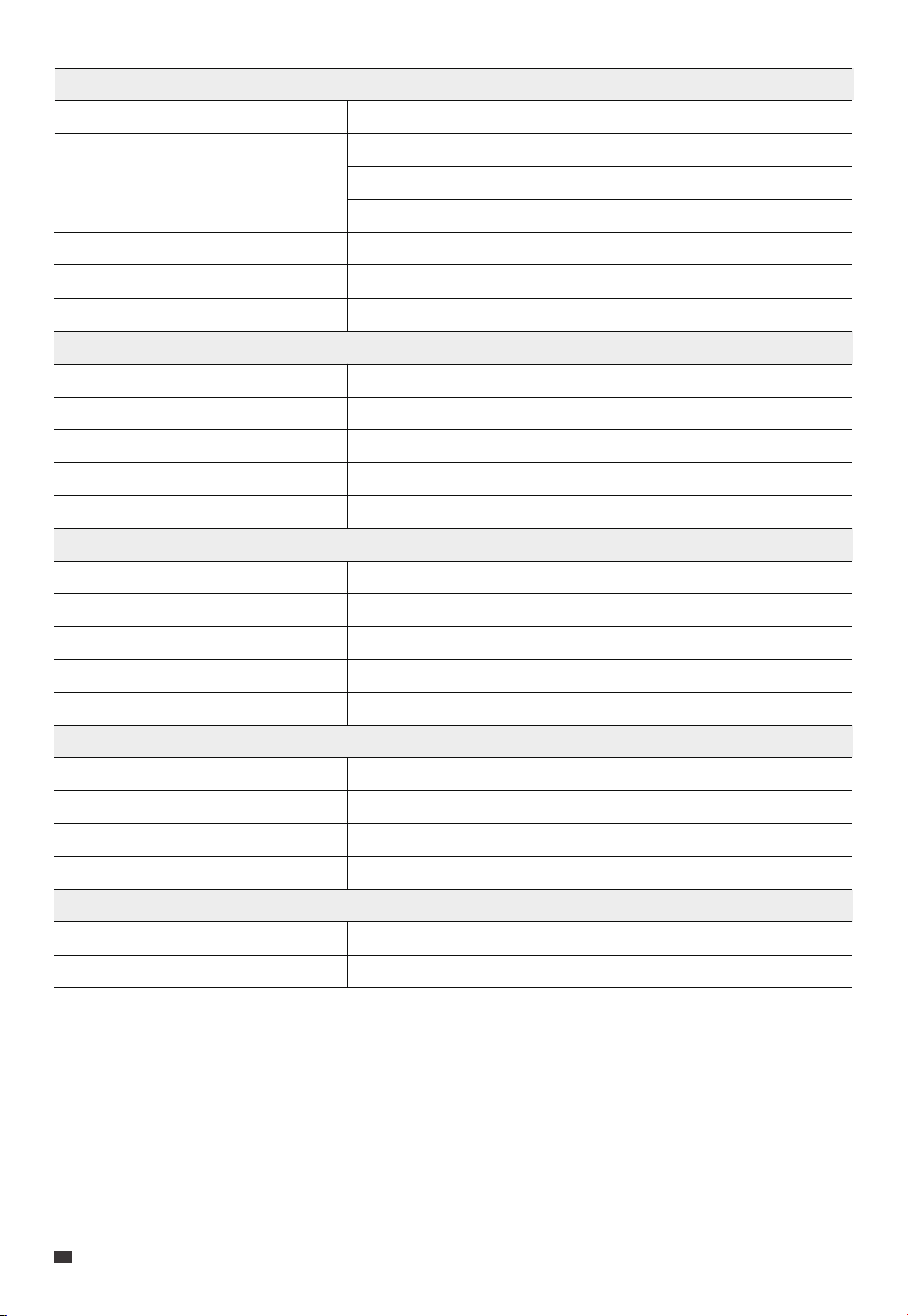
Cigarette Lighter Port × 1
USB-A × 2
USB-C × 2
48V DC Port × 1
Wireless Charging × 2
12VDC / 10A
5VDC / 3A, 9VDC / 2A, 12VDC / 1.5A, 18W Each
5/9/12/15/20VDC / 3A, 20VDC / 5A
48VDC / 8A
5W/7.5W/10W/15W
DC Output
Voltage
Current
Frequency
UPS
Power
AC Input
Interface
Power
Current
Voltage
2-pin Aviation Socket
1,200W Max.
15A Max.
12V to 145VDC
DC Input
Voltage
Input Current
44.8V to 57.6VDC
60A Max.
Battery Expansion Port
120VAC
20A Max.
50Hz / 60Hz
Switching time ≤20ms
2,400W Max. (0%-80% in 60 minutes @ 25°C / 77°F)
Voltage
Current
Frequency
120VAC
20A
50Hz / 60Hz
Power
Overload Power
2,400W in total
2520W~3000W@2min
3000W~3600W@5s
>3600W@0.5s
AC Output
EN
JUST POWER ON
26
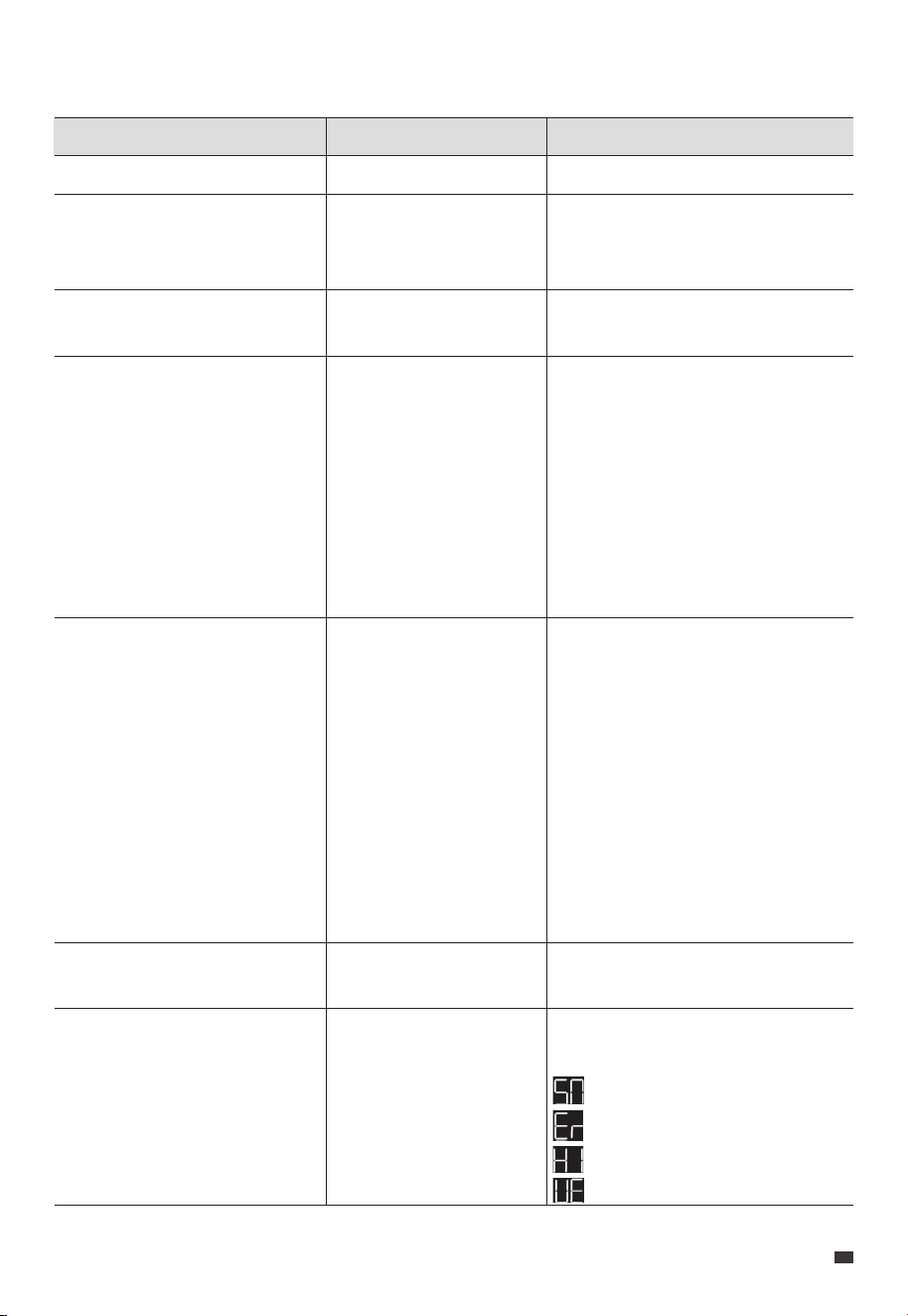
13. Button Operation Instructions
Operation Function
Press the AC Power Button
Press the DC power button
Press the USB Power Button
Press the AC and DC Power
Buttons simultaneously and hold
for more than 2 seconds till the
output frequency flashes
Press the DC Power Button in the
Setting Mode
Press the AC Power Button when
the setting item is flashing
Press and hold the DC Power
Button in the Setting Mode
Turn on / off the AC output
Turn on / off the cigarette
lighter port and RV port
output
Turn on / off the USB
output
Enter / exit the Setting
Mode
Navigate through the
setting items
Enable or disable the
selected function.
Switch the status page
/
/
/
In the Setting Mode, the icons for the
currently enabled functions remain lit,
except for the flashing output
frequency icon.
If you do not perform any operation
in 1 minute, the AC200P L will
automatically exit the Setting Mode,
and no changes will be saved.
The flashing setting item is selected
and editable. In the Setting Mode,
the corresponding codes will be
displayed on the left side:
P01: Output Frequency
P03: Charging Mode
P04: Power Lifting Mode
P05: ECO Mode
P06: Bluetooth
P07: WiFi
/
You can view relevant information
on the status page.
: Serial Number
: Error code
: Historical faults
: Version
Description
JUST POWER ON 27
EN
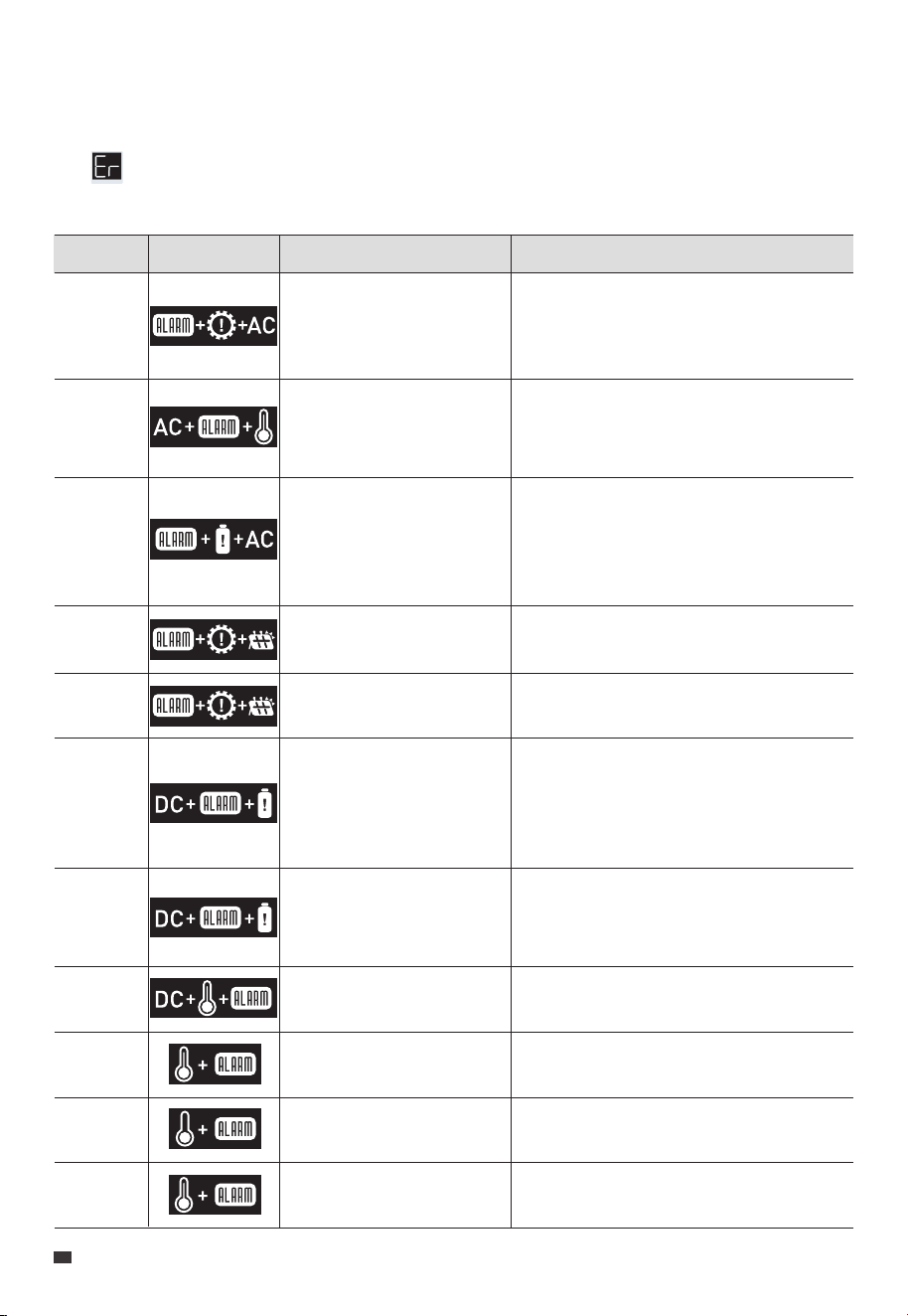
14. Troubleshooting
In the Setting Mode, press and hold the DC Power Button to switch the status page until
the icon and the error code appear simultaneously on the screen. Please refer to the
table below for helpful guidance.
Error Code Description
Inverter overload
Inverter overtemperature
protection, AC output off
Inverter short circuit
PV overvoltage
PV overtemperature
DC output short circuit
DC output overcurrent
DC output overtemperature
Charging temperature too
high
Charging temperature too
low
Discharging temperature
too high
Alarm Icon
E001
E002
E003
E033
E039
E065
E067
E068
E085
E086
E087
Check if the power consumption of your
devices is too high. Reduce the load if
necessary.
Wait for about 10 minutes until the unit
cools down, then turn on the AC output
again.
1.Check if the power consumption of your
devices is too high.
2.Check if any of your electrical devices are
causing a short circuit.
Make sure the PV input voltage is within
the range of 12V to 145VDC.
Wait for about 10 minutes until the unit
cools down, then re-enable the PV input.
1.Check if the power consumption of your
devices is too high.
2.Check if any of your electrical devices are
causing a short circuit.
Check if the power consumption of your
devices is too high. Reduce the load if
necessary.
Wait for about 10 minutes until the unit
cools down, then restart your devices.
Wait for the unit to cool down before
charging.
Make sure the unit is placed in an ambient
temperature of 0°C to 40°C (32°F to 104°F).
Wait for the unit to cool down before
discharging.
Troubleshooting
EN
JUST POWER ON
28
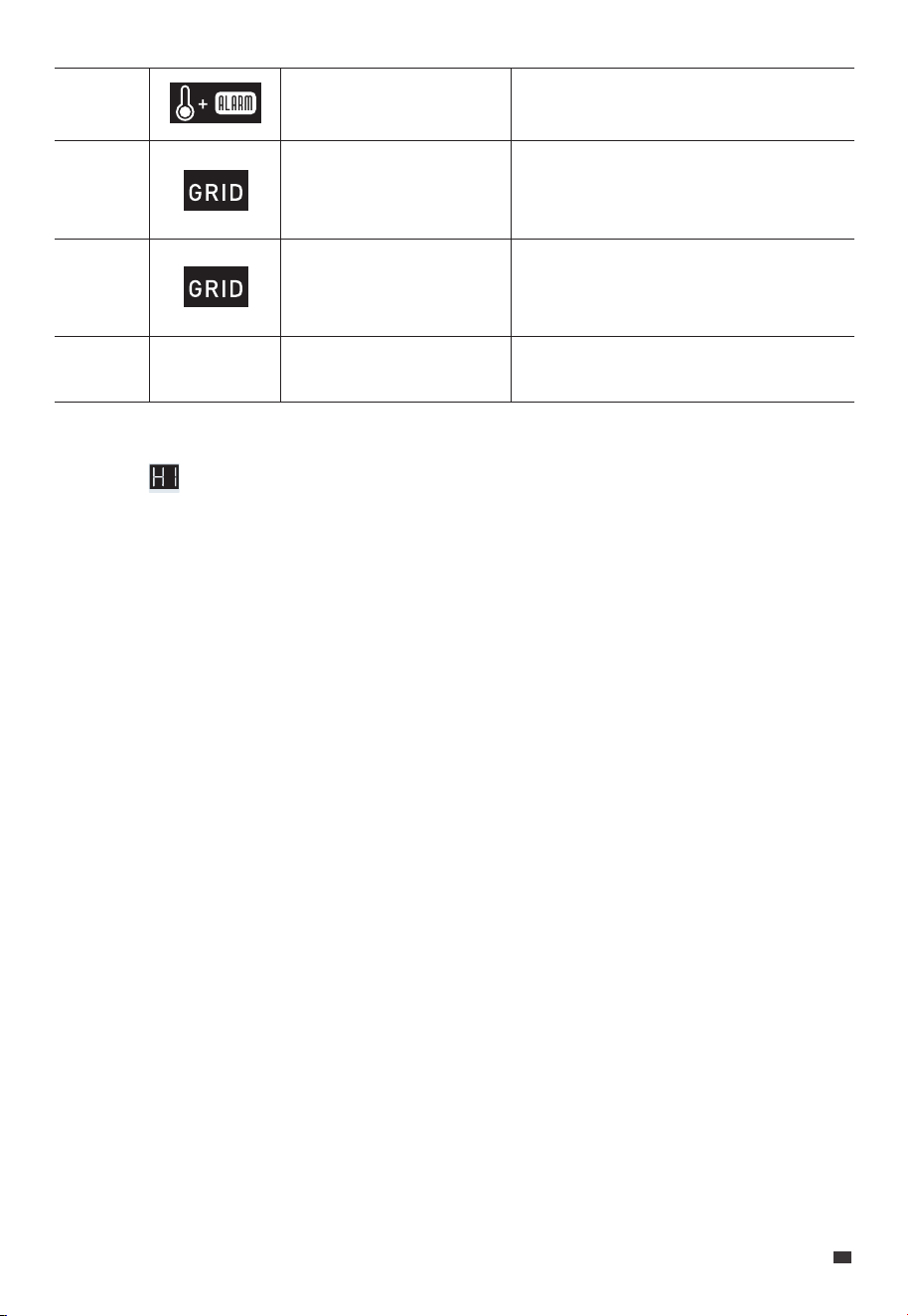
Discharging temperature
too low
Grid overfrequency
Grid underfrequency
/
E088
E115
E116
Others
/
Make sure the unit is placed in an ambient
temperature of -20°C to 40°C (-4°F to 104°F).
Check if the grid frequency is too high.
Contact your local power provider if
necessary.
Check if the grid frequency is too low.
Contact your local power provider if
necessary.
Please contact BLUETTI support for
assistance.
When in Error Code page, press and hold the DC Power Button to switch the status page,
when the appears, you can view the fault history. To clear the fault history, press and
hold the AC Power Button for 2 seconds, and then release it.
JUST POWER ON 29
EN

To estimate the operation time of the AC200P L, consider the load you're applying:
Operation time = Battery Capacity (Wh) x DoD x η ÷ (Load Power + AC200P L Self-con-
sumption)
Note: DoD refers to the depth of discharge. AC200P L works at 95% DoD for longer battery life.
η is the conversion efficiency of the inverter, typically over 93% for AC200P L.
The self-consumption of AC200P L is approximately 12W.
E.g. If you have a 40W refrigerator, you can run it for about 39.1 hours.
Operation time = 2,304Wh × 95% × 93% ÷ (40W + 12W) ≈ 39.1 hours.
Please keep in mind that the estimated operation time provided is for reference
purposes and may vary based on actual usage conditions. Factors such as low
temperature and excessive loads can significantly affect the battery capacity, leading to
a reduction in the average operation time.
Appx. 1 Estimating Operation Time
Appx. 2 FAQ
Q1:
A:
Q2:
A:
Q3:
A:
Q4:
A:
How do I know whether my devices will work well with this product?
Please evaluate the total constant load of your devices. If it doesn't exceed the Max.
output power of AC200P L (2,400W), you can use this power station to run your
devices.
Note: Some devices with built-in motors or compressors may start at 2-4 times the
rated power, which can easily overload the AC200P L.
Can I use third-party solar panels to charge this product?
Yes, you can. However, make sure your solar panels have an open circuit voltage of
12V-145V and are equipped with MC4 connectors. It's also important not to mix
different types of solar panels.
Can it charge and discharge at the same time?
Yes. It supports pass-through charging. The AC200P L comes with the premium
LiFePO₄ battery and proprietary Battery Management System to ensure that it can
charge and discharge at the same time.
Why is the charging power often too low?
AC200P L has a built-in intelligent BMS that automatically adjusts the charging
power in response to the battery temperature and SoC, thus protecting the battery
and extending its service life.
EN
JUST POWER ON
30

This device complies with part 15 of the FCC Rules. Operation is subject to the following
two conditions:
(1) This device may not cause harmful interference.
(2) This device must accept any interference received, including interference that may
cause undesired operation.
This equipment has been tested and found to comply with the limits for a Class B digital
device, pursuant to part 15 of the FCC Rules. These limits are designed to provide
reasonable protection against harmful interference in a residential installation. This
equipment generates, uses and can radiate radio frequency energy and, if not installed
and used in accordance with the instructions, may cause harmful interference to radio
communications. However, there is no guarantee that interference will not occur in a
particular installation. If this equipment does cause harmful interference to radio or
television reception, which can be determined by turning the equipment off and on, the
user is encouraged to try to correct the interference by one or more of the following
measures:
- Reorient or relocate the receiving antenna.
- Increase the separation between the equipment and receiver.
- Connect the equipment into an outlet on a circuit different from that to which the
receiver is connected.
- Consult the dealer or an experienced radio / TV technician for help.
FCC Caution: Any changes or modifications not expressly approved by the party
responsible for compliance could void the user's authority to operate this equipment.
IMPORTANT NOTE: FCC Radiation Exposure Statement
This equipment complies with FCC radiation exposure limits set forth for an uncontrolled
environment. This equipment should be installed and operated with a minimum
distance of 20cm between the radiator & your body.
Appx. 3 FCC Statement
JUST POWER ON 31
EN

This device contains licence-exempt transmitter(s) / receiver(s) that comply with
Innovation, Science and Economic Development Canada’s licence-exempt RSS(s).
Operation is subject to the following two conditions:
(1) This device may not cause interference.
(2) This device must accept any interference, including interference that may cause
undesired operation of the device.
RF exposure statement: The equipment complies with IC Radiation exposure limits set
forth for uncontrolled environments. This equipment should be installed and operated
with a minimum distance of 20cm between the radiator and your body.
CAN ICES-3 (B)/NMB-3(B) (Canada)
This Class B digital apparatus complies with Canadian ICES-003.
Appx. 4 IC Caution
EN
JUST POWER ON
32
@ BLUETTI Support
@ BLUETTI Official
@bluetti.inc@ bluetti_inc @bluetti_official service@
bluettipower.com
For more information, please visit:
Web: https://www.bluettipower.com
SHENZHEN POWEROAK NEWENER CO., LTD.
Add: F19, BLD No.1, Kaidaer, Tongsha Rd No.168, Xili Street,
Nanshan, Shenzhen, China
USA Agent
Company: BLUETTI POWEROAK INC
Add: 6185SVALLEYVIEWBLVDSTEDLASVEGAS
NEVADA89118UnitedStates
FRN: 0033559824
Customer Service
Tel: 800-200-2980 (Monday to Sunday 9:00-17:00)
Email: sale@bluettipower.com (Pre-sales),
service@bluettipower.com (After-sales)

P/N:17.0303.0698-01A1
Certificate
Inspector:
QC: