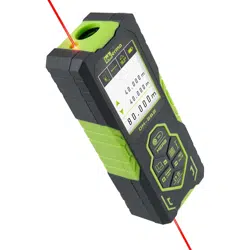

Design and Technology Make for a Great Experience.
DM-262
USER MANUAL
Inkerma User Manual
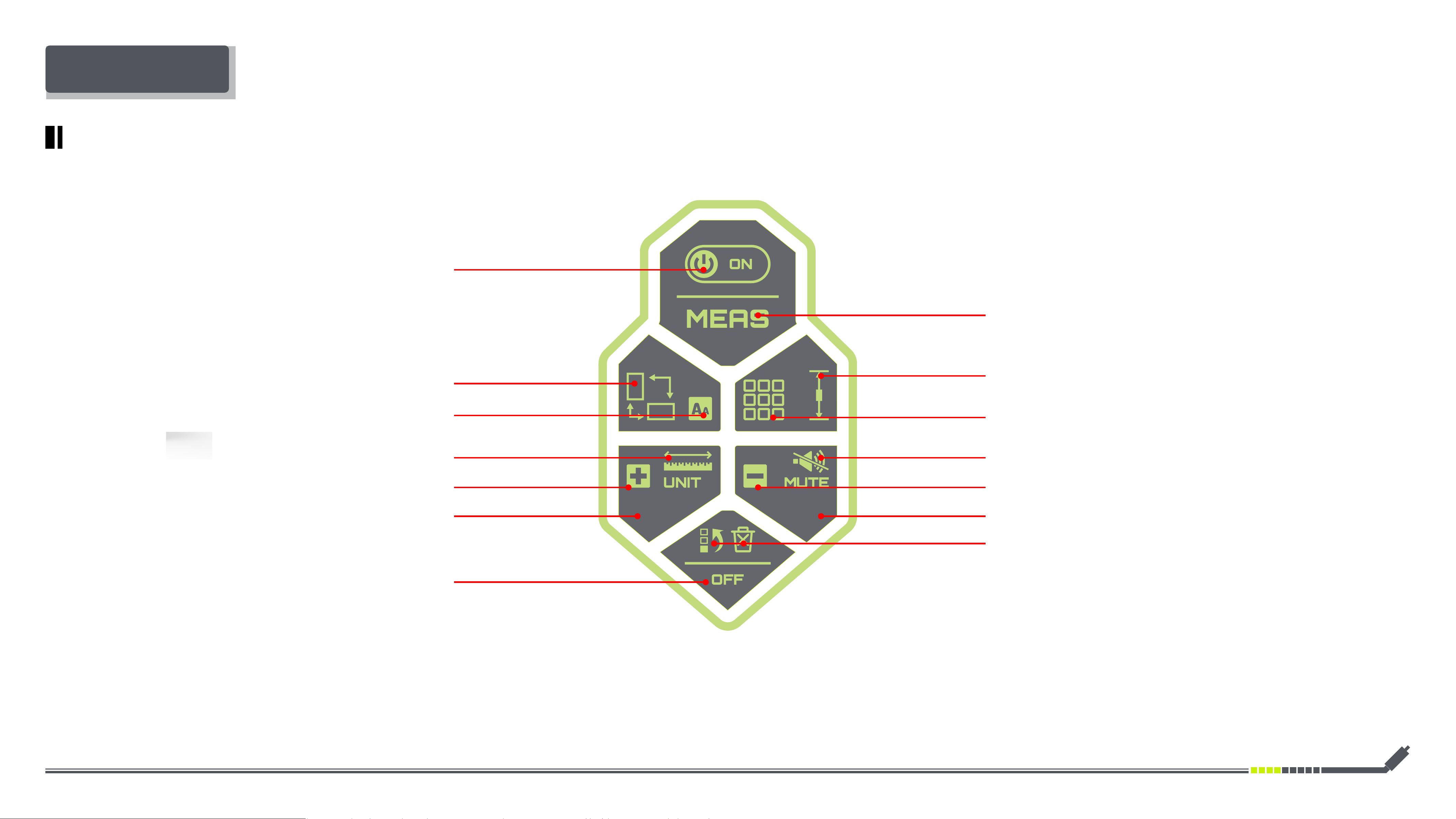
POWER ON
SCREEN ROTATION
ADDITION
LEFT
POWER OFF (LONG PRESS)
MEASUREMENT REFERENCES/ BILATERAL & UNILATERAL
LASER (LONG PRESS)
TAKE MEASURE
MODE MENU
MUTE SETTING
SUBTRACTION
RIGHT
DELETE
UNDO
OPERATION PANEL
DM-262 OPERATION PANEL
FONT ENLAREMENT (LONG PRESS)
CHANGE UNIT (LONG PRESS)
Inkerma User Manual
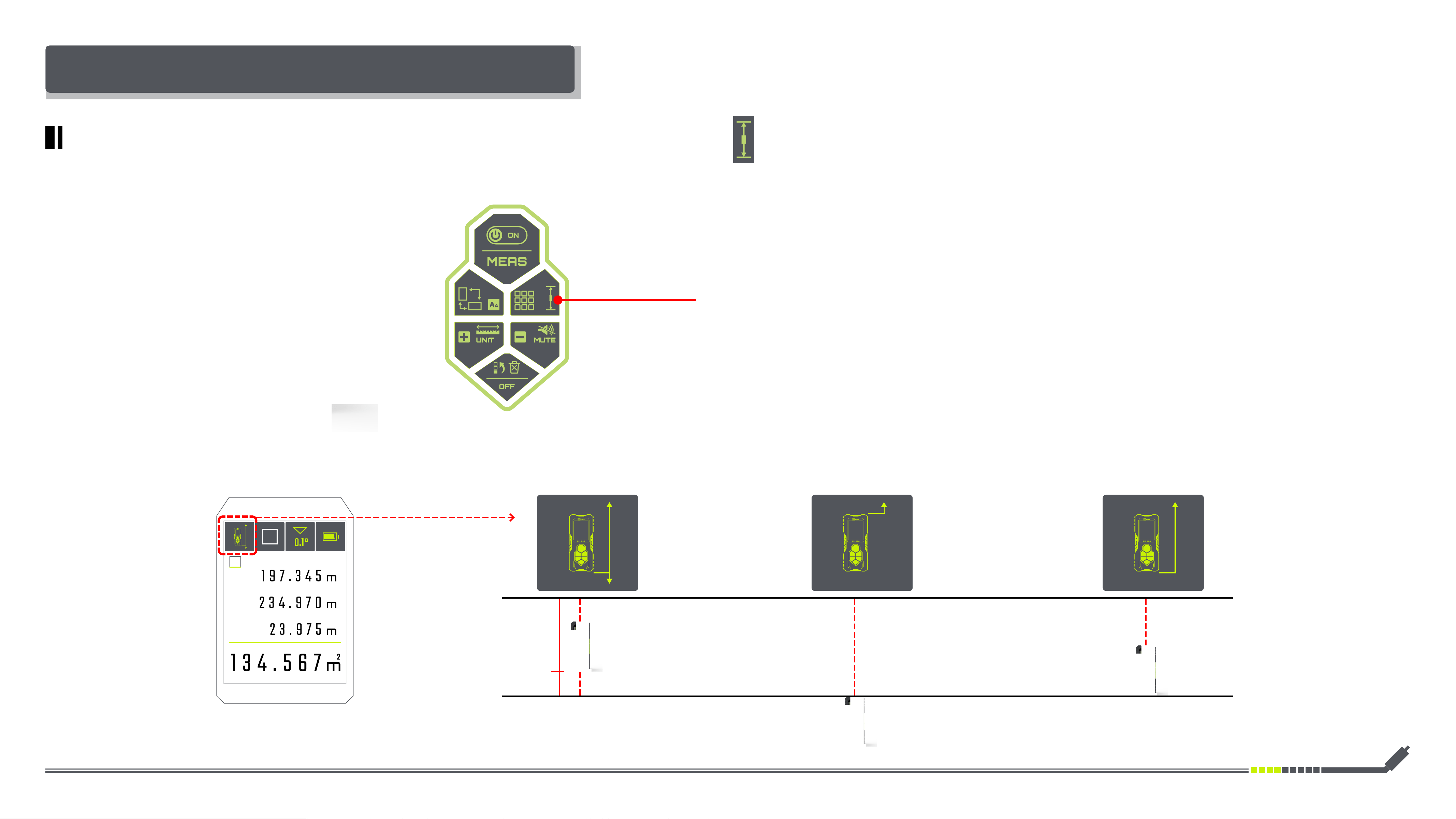
MEASUREMENT REFERENCES/ BILATERAL & UNILATERAL LASER
DM-262 SELECTING MEASUREMENT REFERENCES/ BILATERAL & UNILATERAL LASER
How to Use:
Screen Display:
L1
LL L
L2
Long Press
Switching Between Bilateral & Unilateral Laser
Selecting the Front & Back Reference Level
Rear Reference
Bilateral Laser Measurement
Rear Reference
Unilateral Laser Measurement
Front Reference
Unilateral Laser Measurement
Inkerma User Manual
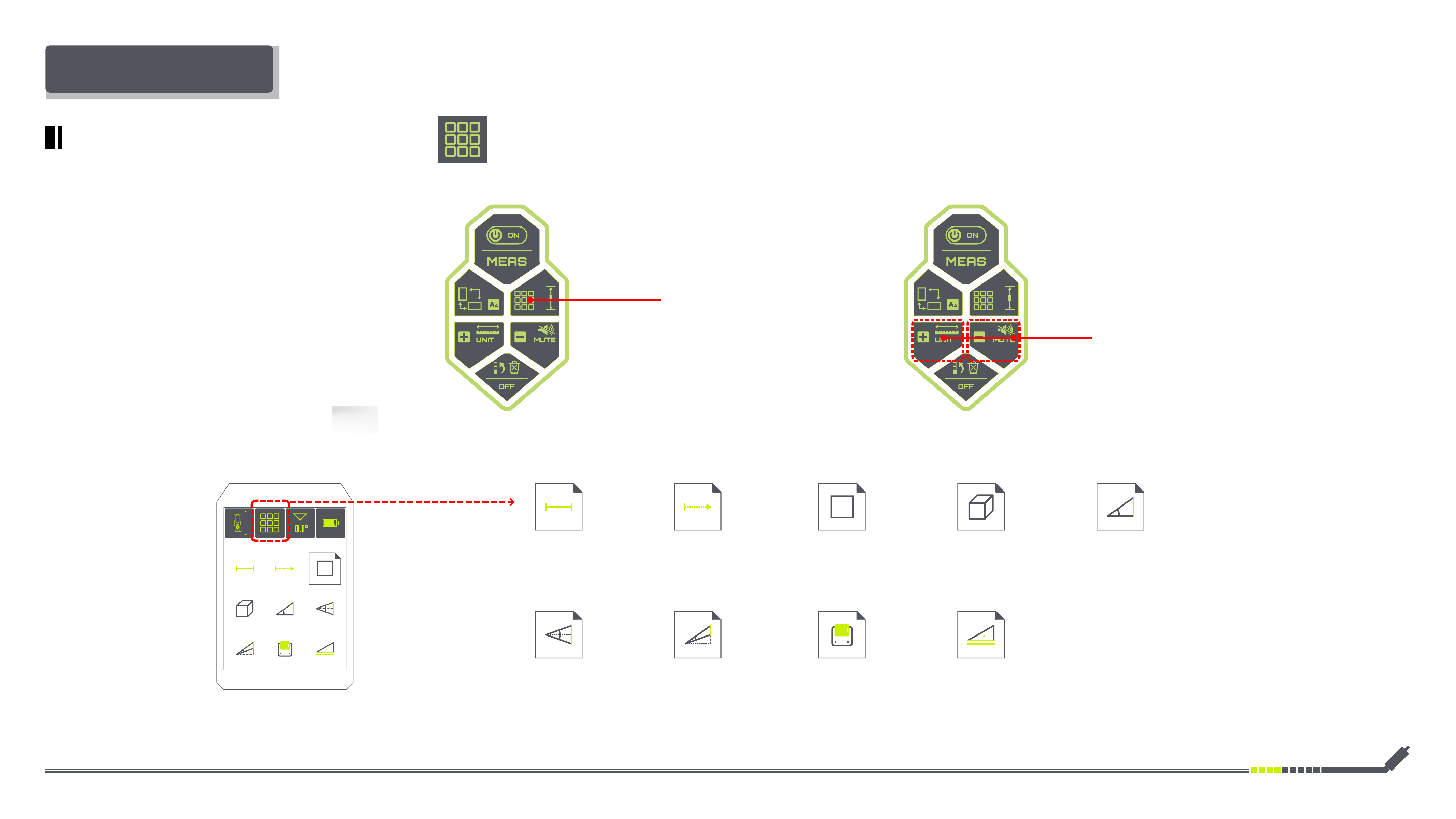
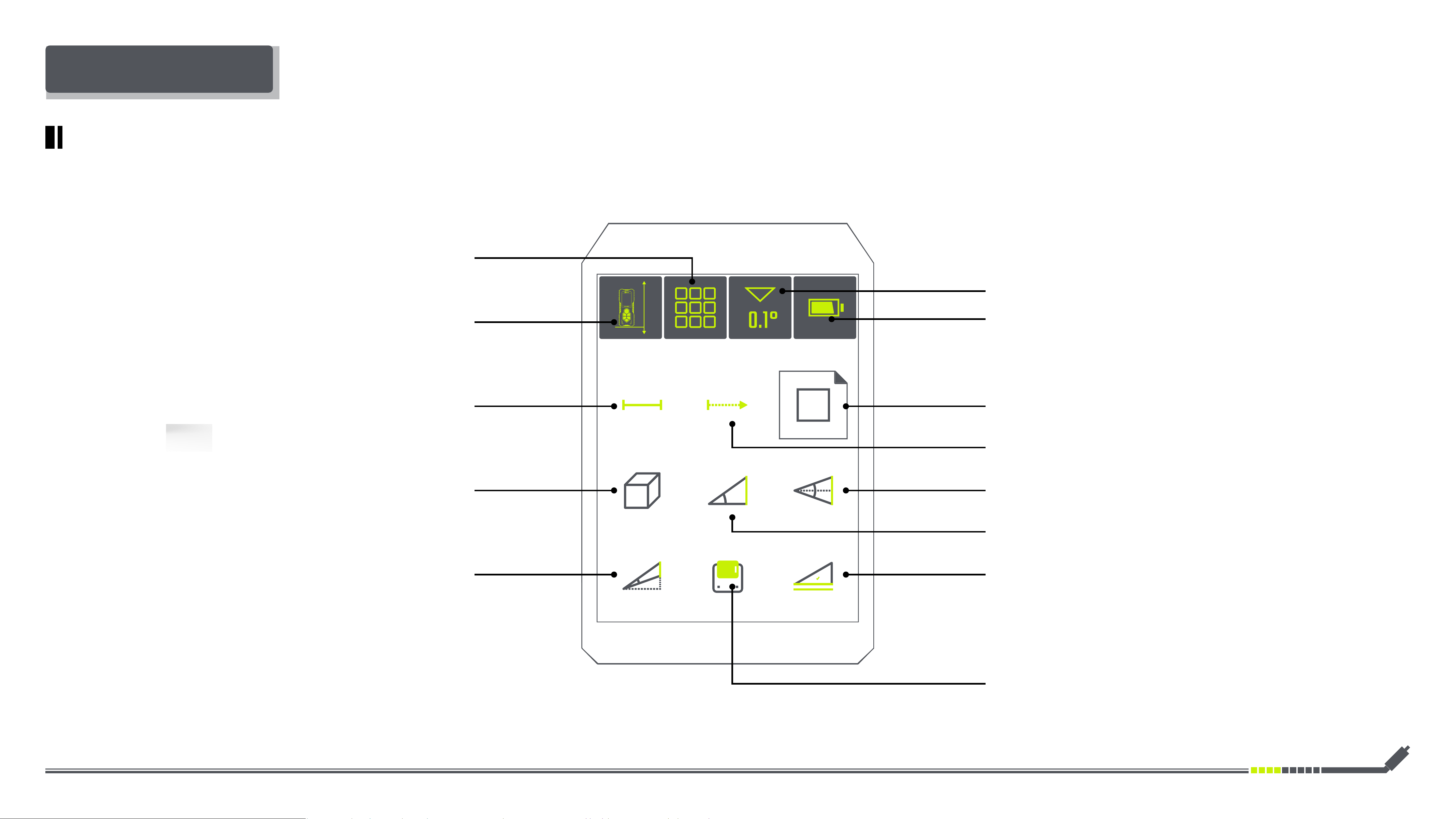
DM-262 SELECTING MEASURING FUNCTIONS
MEASURING FUNCTIONS
How to Use:
Screen Display:
Short Press
Selecting Measuring Functions
Short Press
Selecting LEFT & RIGHT Function
Measuring Length Real-time Measurement Area Measurement Volume Measurement Indirect Height Measurement
Double Indirect
Height Measurement
Non-vertical
Indirect Height Measurement
Data Recording Angle Calibration
Inkerma User Manual
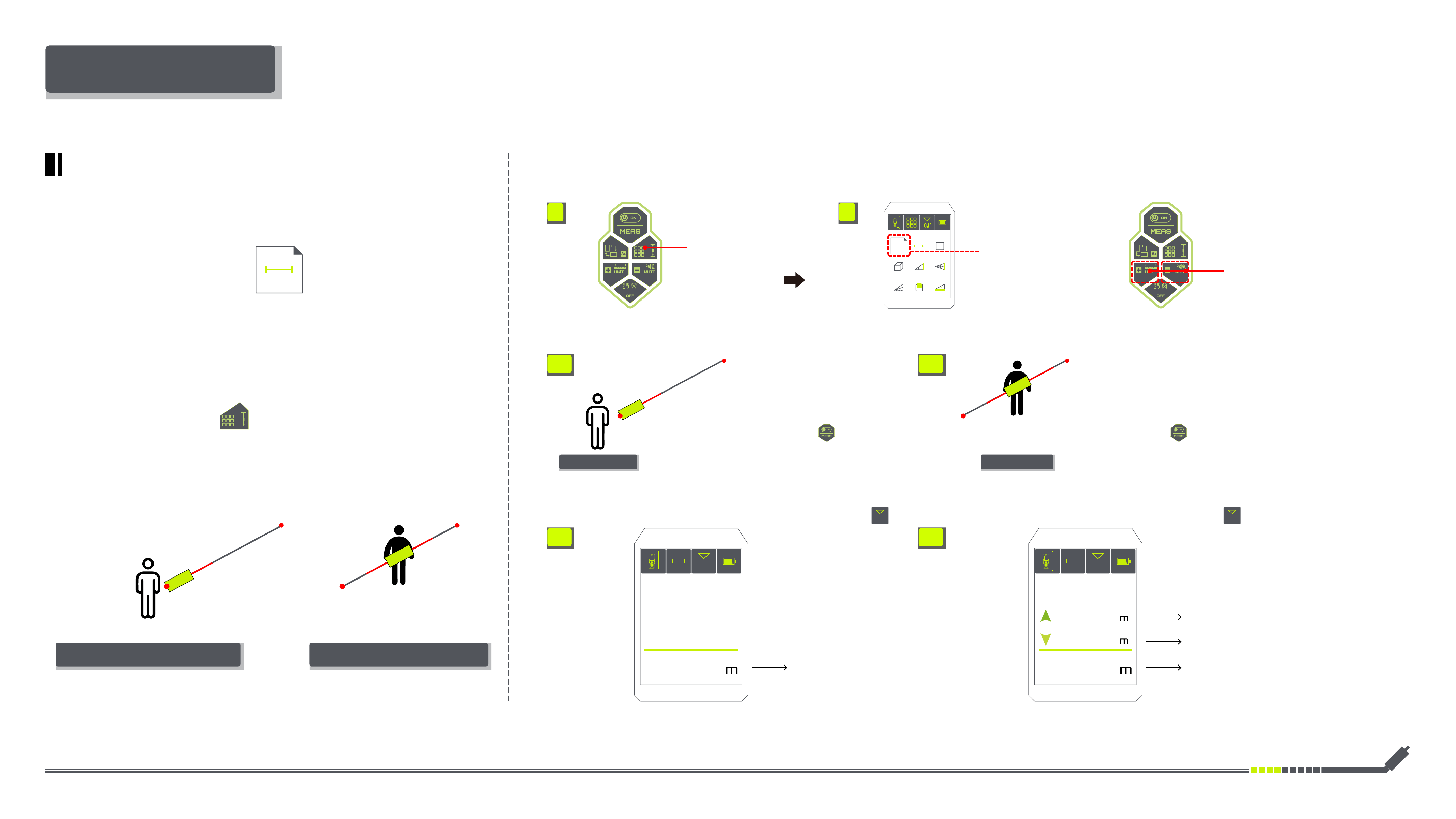
DM-262 SCREEN DISPLAY FOR MEASURING FUNCTIONS
MEASURING FUNCTIONS
Selecting Measuring Functions
Angle
Battery Level
Reference Level
Area Measurement
Real-time Measurement
Indirect Height Measurement
Angle Calibration
Measuring Length
Volume Measurement
Non-vertical
Indirect Height Measurement
Double
Indirect Height Measurement
Data Recording
Inkerma User Manual
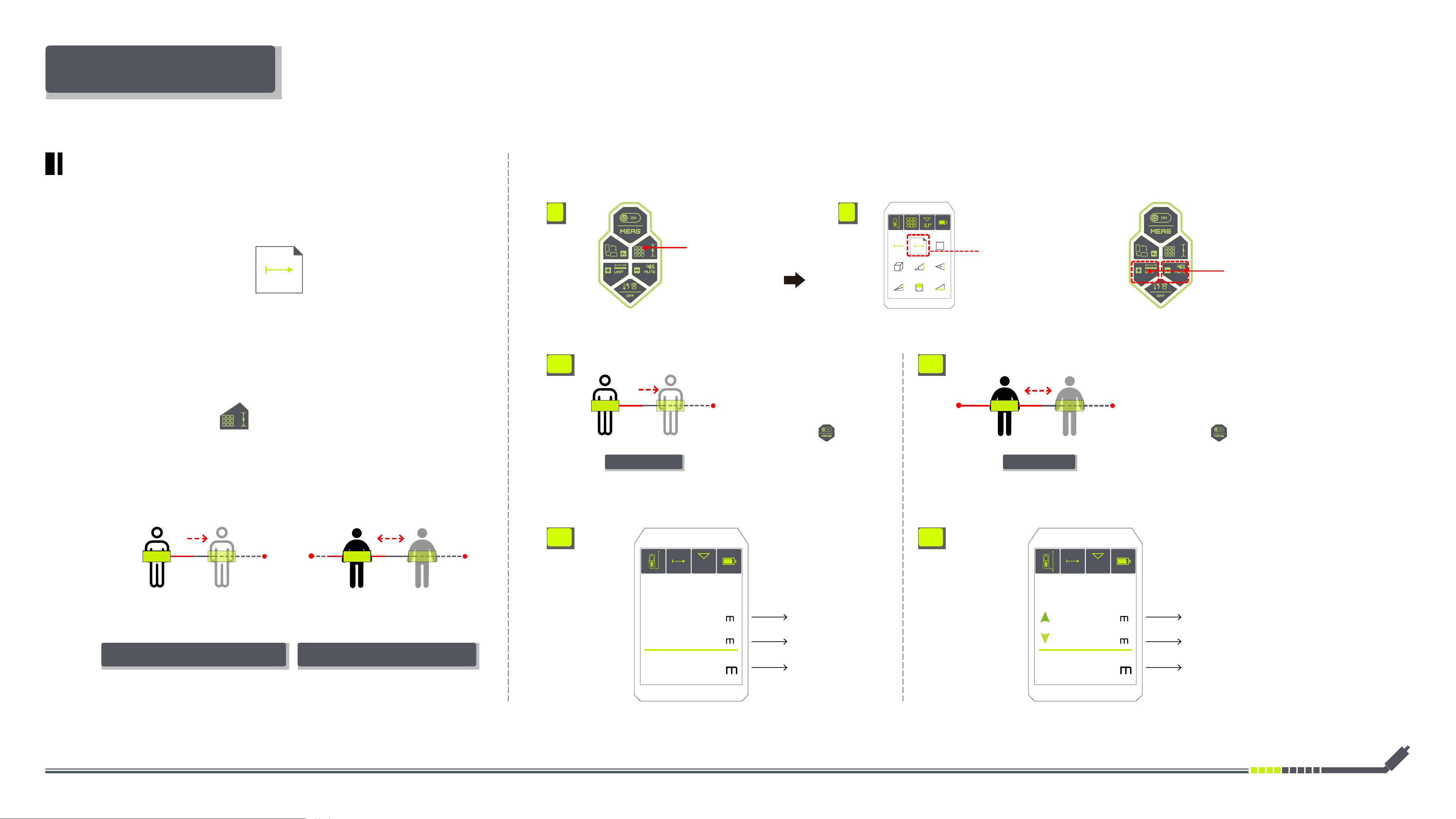
DM-262 MEASURING LENGTH
L
L
L
L
• Position DM-262 at the
originating point A
• Position DM-262 at any
point of L
• Align the red laser towards
point B Of L
• Align the bilateral red laser
towards point A & B Of L
• Briey press
the measurements will be
shown at the bottom of the
display
• Briey press
the measurements will be
shown at the bottom of the
display
• For horizontal distances, set
the angle of DM-262 to 0°
.
• For horizontal distances, set
the angle of DM-262 to 0°
.
Left Distance
Right Distance
INSTRUCTIONS FOR USE
Unilateral Laser Bilateral Laser
B B
A A
0.0° 0.0°
1. 2.
4.1 4.2
L L
48.2° 48.2°
2.997
3.011
6.008 6.008
3.1 3.2
Measuring Length
·
Illustrations:
Bilateral Laser MeasurementUnilateral Laser Measurement
·
Operation:
Short Press
Selecting LEFT & RIGHT Function
Short Press
Selecting Measuring Functions
Selecting Measuring Length
Switching the Bilateral & Unilateral
Laser Measurement(Long Press)
Inkerma User Manual
L
L
L
--L
--L
B AA B
BA
--L2--L1
L
--L2--L1
INSTRUCTIONS FOR USE
Unilateral Laser Bilateral Laser
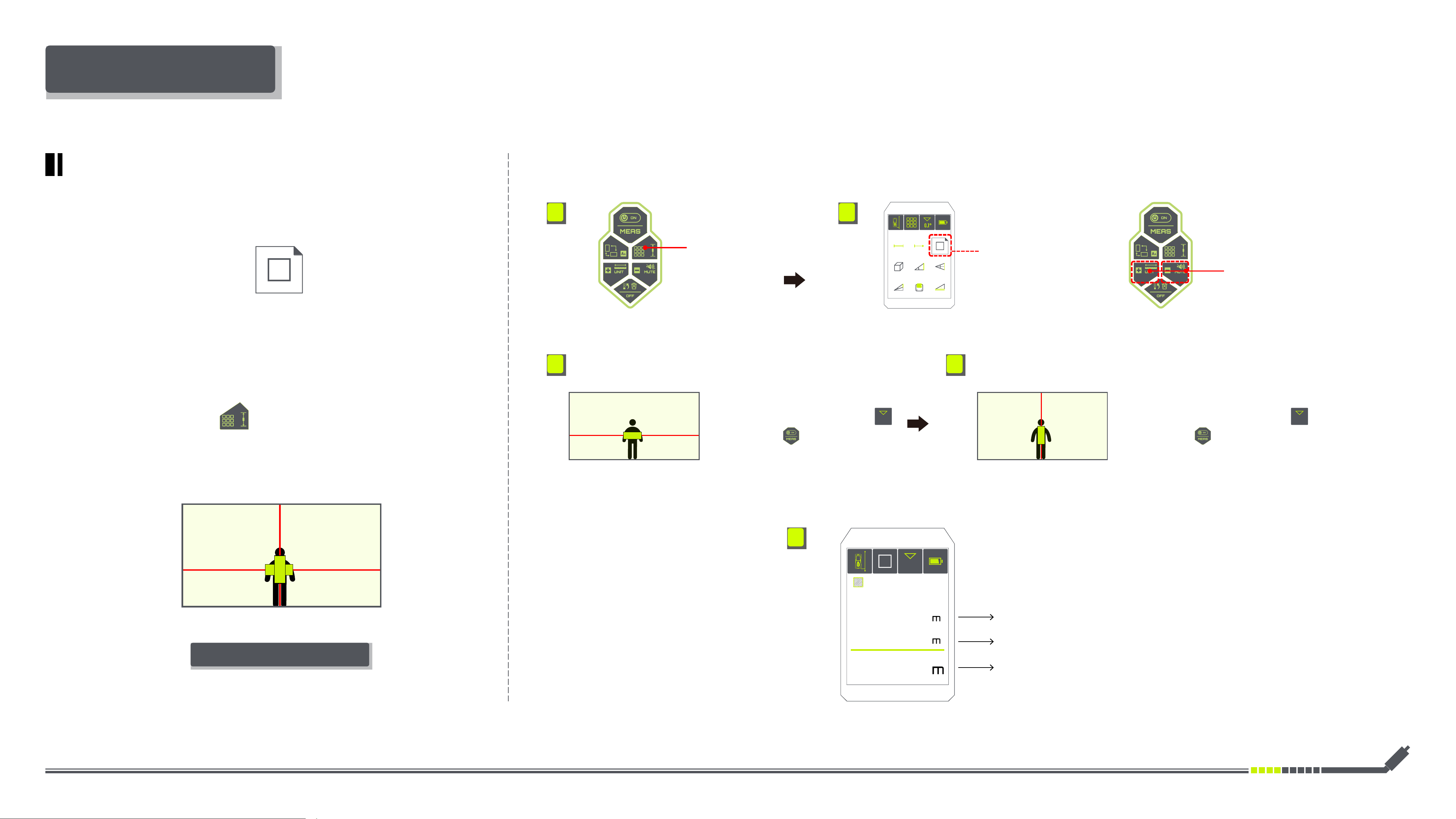
• Position DM-262 at the
originating point A
• Align the red laser towards
point B Of L
• Briey press
the measurements will be
shown at the bottom of the
display
• The DM-262 can be moved
relative to B and the current
distance --L will be updated
• The DM-262 can be moved relative
between A & B and the current distance
--L1 & --L2 will be updated
• Position DM-262 at any
point of L
• Align the bilateral red laser
towards point A & B Of L
• Briey press
the measurements will be
shown at the bottom of the
display
--L
MIN
MAX
48.2°
3.997
MAX
MIN
1.011
2.026
--L
--L1
--L2
48.2°
2.997
3.011
6.008
1. 2.
4.1 4.2
3.1 3.2
Bilateral Laser MeasurementUnilateral Laser Measurement
·
Illustrations:
Switching the Bilateral & Unilateral
Laser Measurement(Long Press)
DM-262 REAL-TIME MEASUREMENT
Real-time Measurement
Short Press
Selecting Measuring Functions
Short Press
Selecting LEFT & RIGHT Function
Selecting Real-time
Measurement
Left Distance
Right Distance
·
Operation:
Inkerma User Manual
L
H
1. 2.
INSTRUCTIONS FOR USE
Short Press
Selecting Measuring Functions
Short Press
Selecting LEFT & RIGHT Function
Selecting Area
Measurement
• Set DM-262 for horizontal
measurement with an angle of 0°
.
• After the two measurements are completed,
the area will be calculated automatically and be
shown at the bottom of the screen display.
• Set DM-262 for vertical
measurement with an angle of 90°
.
0.0° 90.0°
• Briey press
the length of L will be shown on
the display
• Briey press
the height of H will be shown on
the display
H
Area=L×H
L
Area
H
L
48.2°
2.100
3.100
6.510
2
3. 4.
5.
DM-262 AREA MEASUREMENT
Area Measurement
·
Illustrations:
Bilateral Laser Measurement
·
Operation:
Switching the Bilateral & Unilateral
Laser Measurement(Long Press)
Inkerma User Manual
INSTRUCTIONS FOR USE
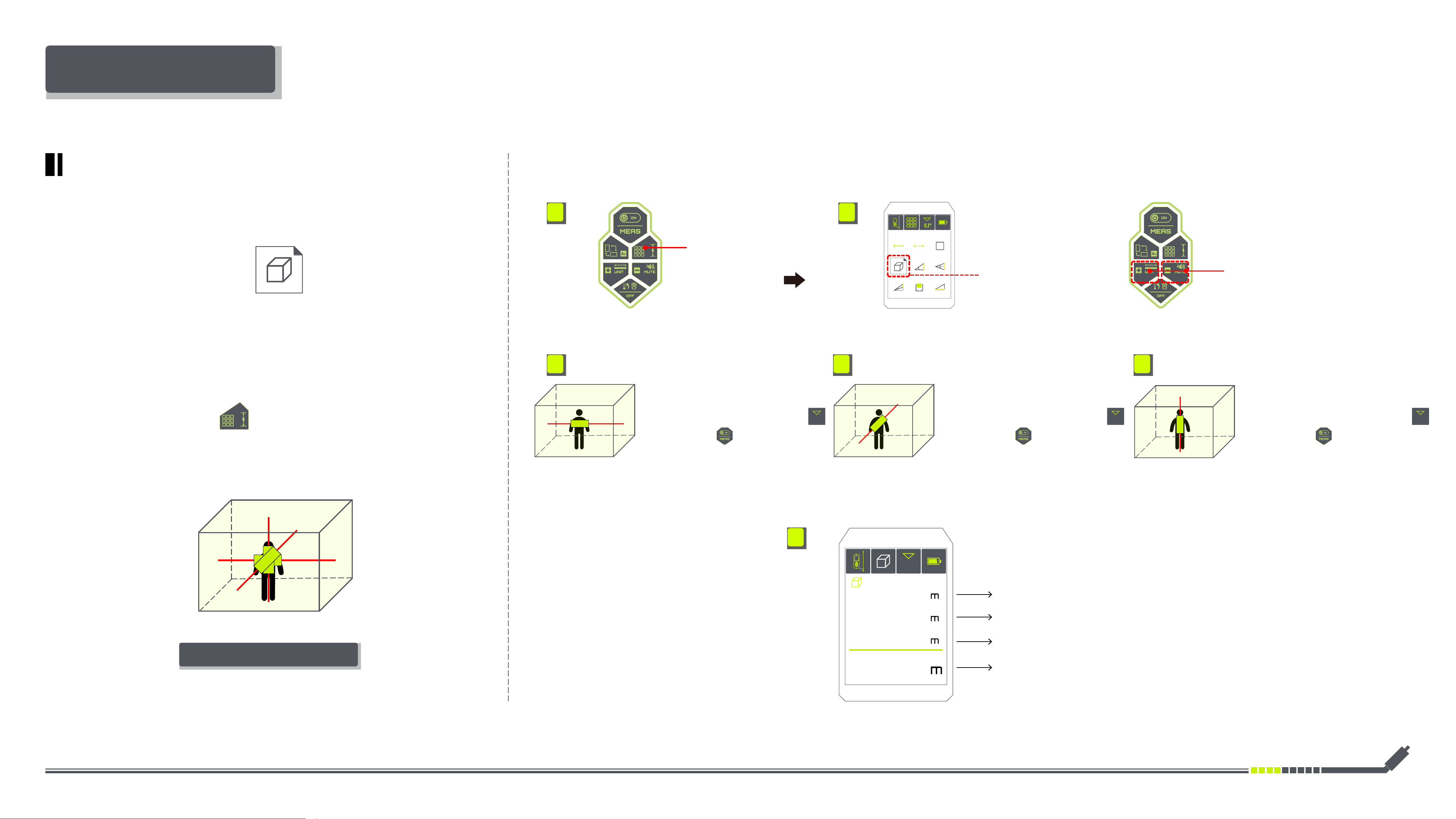
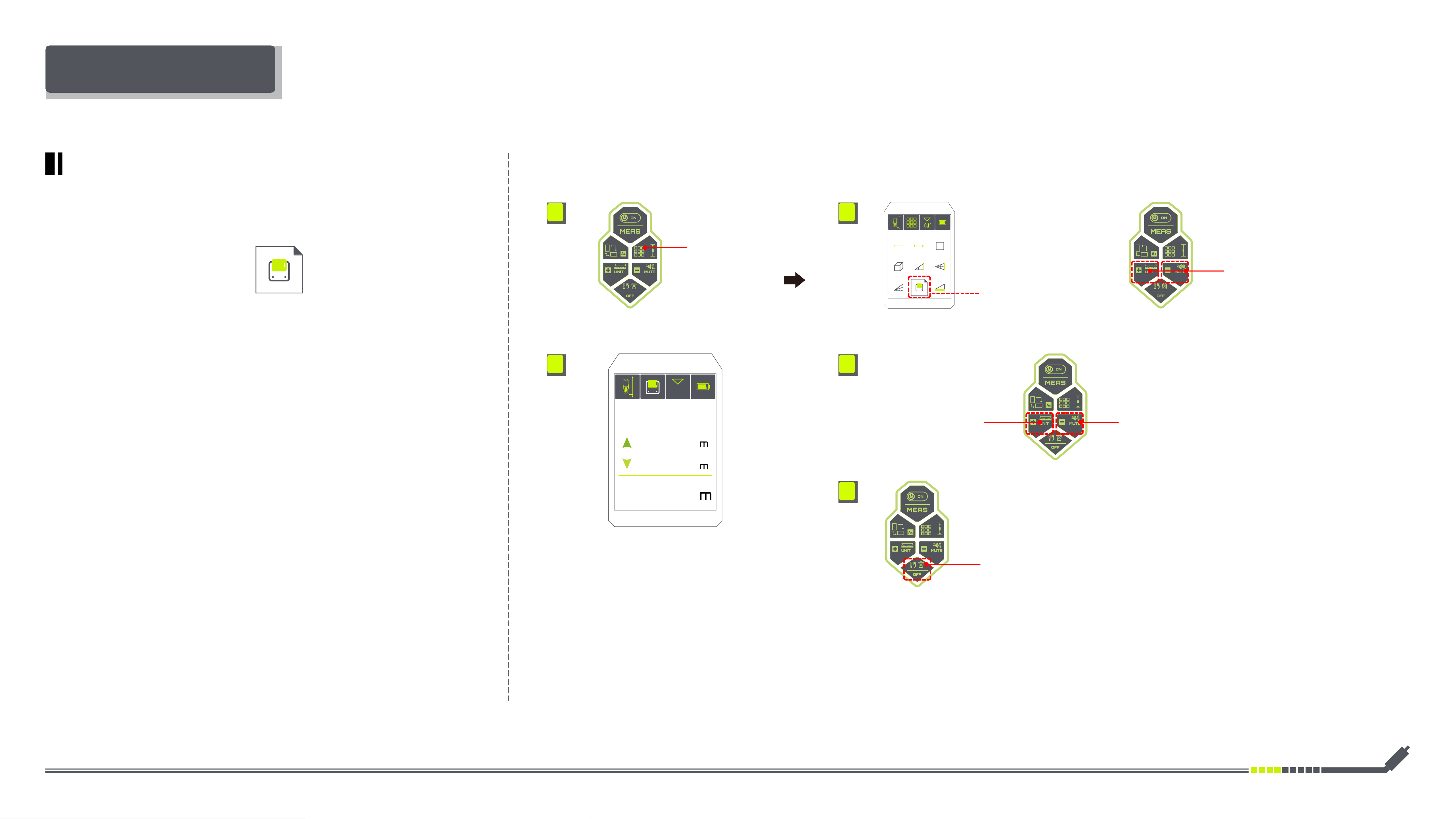
DM-262 VOLUME MEASUREMENT
Selecting Volume
Measurement
Short Press
Selecting LEFT & RIGHT Function
• Set DM-262 for vertical
measurement with an angle of 90°
.
90.0°
• Briey press
the height of H will be shown on
the display
Volume=L1×L2×H
L1
H
L2
L1
L2
H
Volume
H
L2
L1
48.2°
3.150
2.150
2.850
19.301
3
1. 2.
3. 4. 5.
6.
·
Illustrations:
Switching the Bilateral & Unilateral
Laser Measurement(Long Press)
Bilateral Laser Measurement
Volume Measurement
·
Operation:
Short Press
Selecting Measuring Functions
• After the three measurements are completed,
the volume will be calculated automatically and
be shown at the bottom of the screen display.
• Set DM-262 for horizontal
measurement with an angle of 0°
.
• Set DM-262 for horizontal
measurement with an angle of 0°
.
0.0° 0.0°
• Briey press
the length of L1 will be shown on
the display
• Briey press
the length of L2 will be shown on
the display
Inkerma User Manual
α α
α
α
HH
DD
H
D
L
L
L
37.0
37.0°
°
5.000
4.000
3.000
α
H
D
L
α
H
D
L
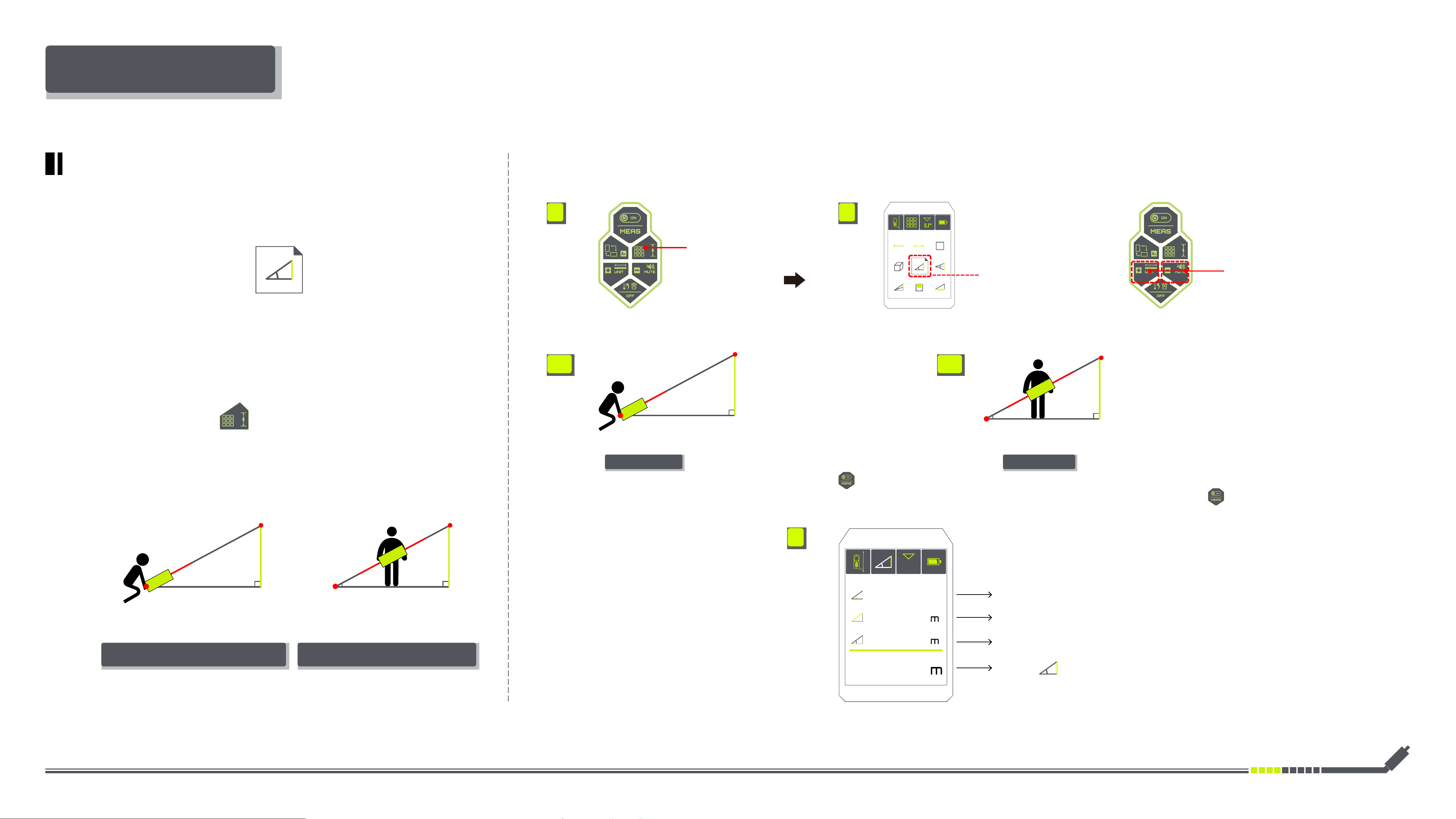
INSTRUCTIONS FOR USE
DM-262 PYTHAGOREAN METHOD
Unilateral Laser Bilateral Laser
• Position DM-262 at the
originating point A (Ensure the
DM-262 is at the same height
as the lower measuring point
- B Of H)
• Align the red laser towards
the top point- C Of H
• Briey press
the measurement H will be
shown on the display
• Position DM-262 at any
point of L (Ensure one side
of the red laser is pointing at
the same height as the lower
measuring point - B Of H)
• Align the other side of the
red laser towards top point-
C Of H
• Briey press
the measurement H will be
shown on the display
Selecting Indirect
Height Measurement
Short Press
Selecting LEFT & RIGHT Function
A
A B
C C
B
H=L×Sin
90° 90°
90°
90°
1. 2.
3.1 3.2
4.
Indirect Height Measurement
·
Illustrations:
Switching the Bilateral & Unilateral
Laser Measurement(Long Press)
Bilateral Laser MeasurementUnilateral Laser Measurement
• After the measurement is completed, the
height will be calculated automatically based on
the Pythagorean Method and be shown at the
bottom of the screen display.
Short Press
Selecting Measuring Functions
·
Operation:
Inkerma User Manual
1. 2.
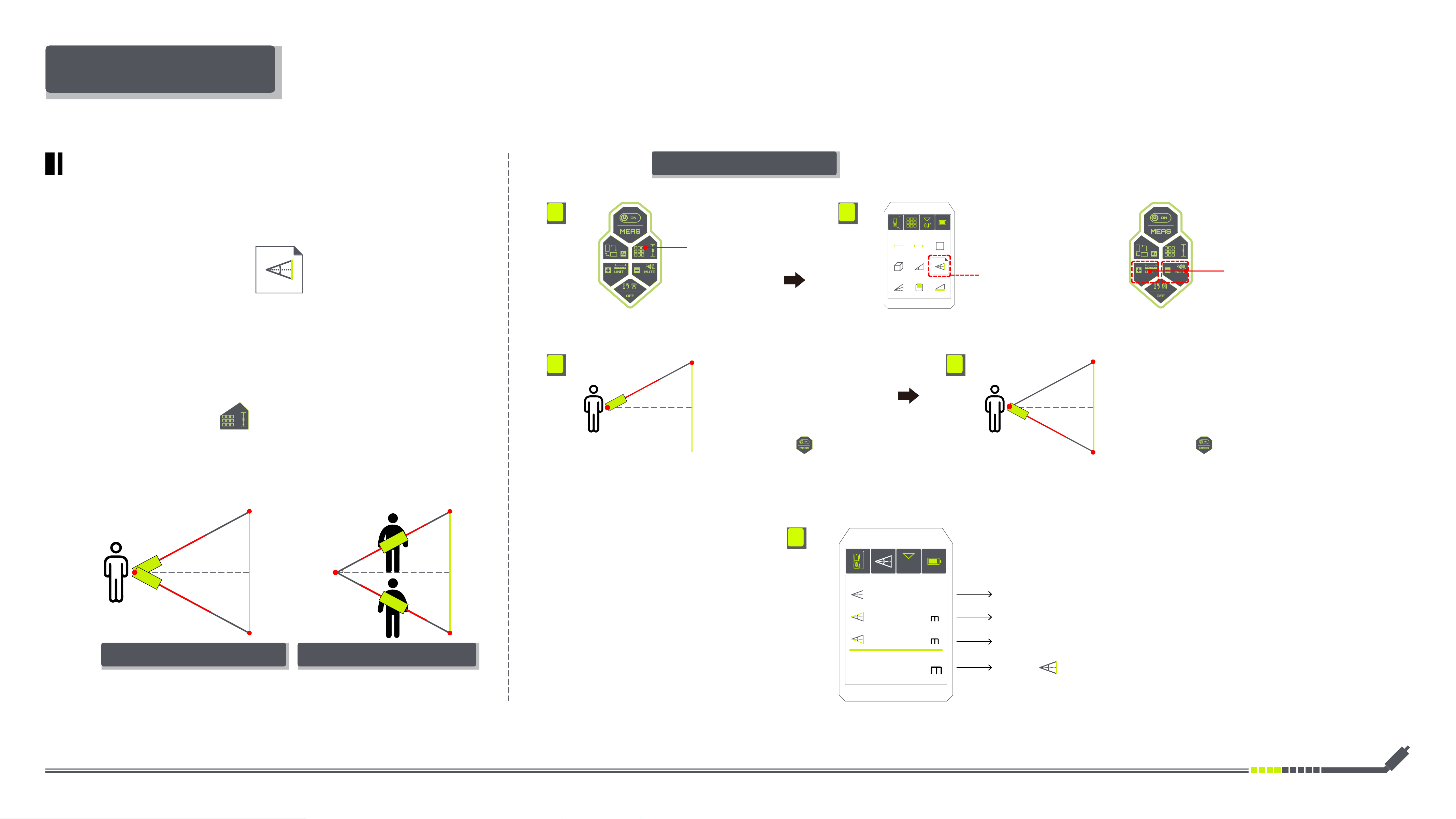
INSTRUCTIONS FOR USE
DM-262 PYTHAGOREAN METHOD
Selecting Double
Indirect Height Measurement
Short Press
Selecting LEFT & RIGHT Function
• Position DM-262 at the
originating point A
• Position of DM-262 remains
unchanged
• Align the red laser towards
the top point- C Of H
• Align the red laser towards
the lower point- B Of H
• Briey press
the measurement L1 will be
shown on the display
• Briey press
the measurement L2 will be
shown on the display
• Ensure that the reference level for DM-
262 remains in the same place during a
single measuring process.
α
α
α
α+β
β
β
β
L2
L2
L2
H
h1 h1
h1 h1
H
H
H
L2
L1
L1
L1
L1
51.0
24.1°
°
2.565
2.533
2.193
α
H
L1
A A
α β
H=h1+h2=L1×Sin +L2×Sin
3. 4.
5.
Double
Indirect Height Measurement
·
Illustrations:
Switching the Bilateral & Unilateral
Laser Measurement(Long Press)
Bilateral Laser MeasurementUnilateral Laser Measurement
Unilateral Laser Measurement
·
Operation:
Short Press
Selecting Measuring Functions
B B
C C
• After the two measurements are completed,
the height will be calculated automatically
based on the Pythagorean Method and be shown
at the bottom of the screen display.
Inkerma User Manual
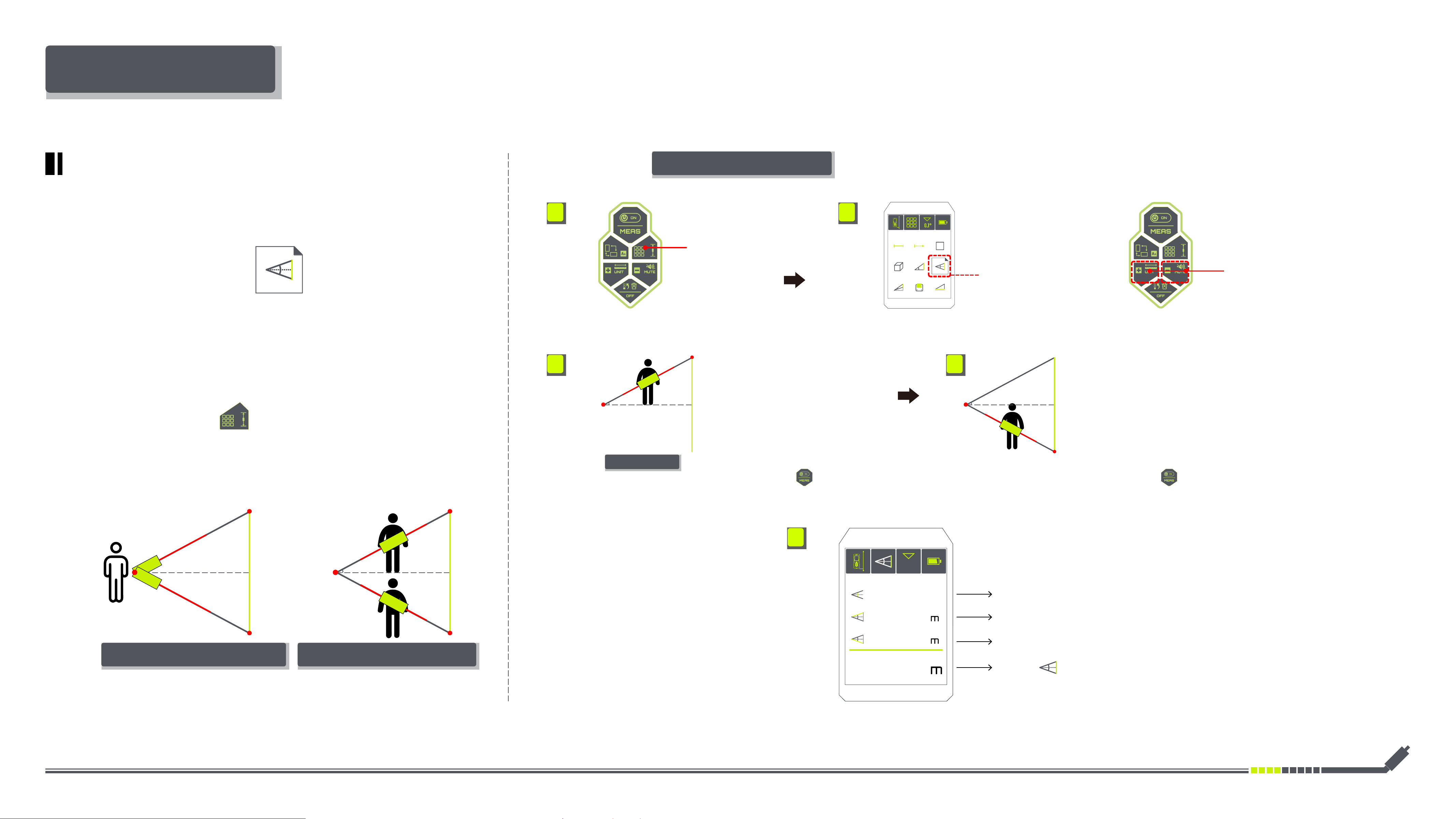
1. 2.
Selecting Double
Indirect Height Measurement
Short Press
Selecting LEFT & RIGHT Function
Bilateral Laser Measurement
·
Operation:
Short Press
Selecting Measuring Functions
• Position DM-262 at any
location within the height
range of H
• Position DM-262 at any
location within the height
range of H
• Align one side of the red laser
towards point A, and the other
side of the red laser towards
to the top point- C Of H
• Align one side of the red laser
towards point A, and the other
side of the red laser towards
to the top point- B Of H
• Briey press
the measurement L1 will be
shown on the display
• Briey press
the measurement L2 will be
shown on the display
• Ensure that the reference point A remains
in the same place during a single measuring
process.
Bilateral Laser
α
H
α
β
H
L1
A
C C
B B
A
L2
α+β
H
L2
L1
24.1°
°
3. 4.
5.
51.0
2.565
2.533
2.193
INSTRUCTIONS FOR USE
DM-262 PYTHAGOREAN METHOD
α α
β β
L2
L2
H
h1 h1
h1 h1
H
L1
L1
α β
H=h1+h2=L1×Sin +L2×Sin
Double
Indirect Height Measurement
·
Illustrations:
Switching the Bilateral & Unilateral
Laser Measurement(Long Press)
Bilateral Laser MeasurementUnilateral Laser Measurement
• After the two measurements are completed,
the height will be calculated automatically
based on the Pythagorean Method and be shown
at the bottom of the screen display.
Inkerma User Manual
1. 2.
INSTRUCTIONS FOR USE
Short Press
Selecting Measuring Functions
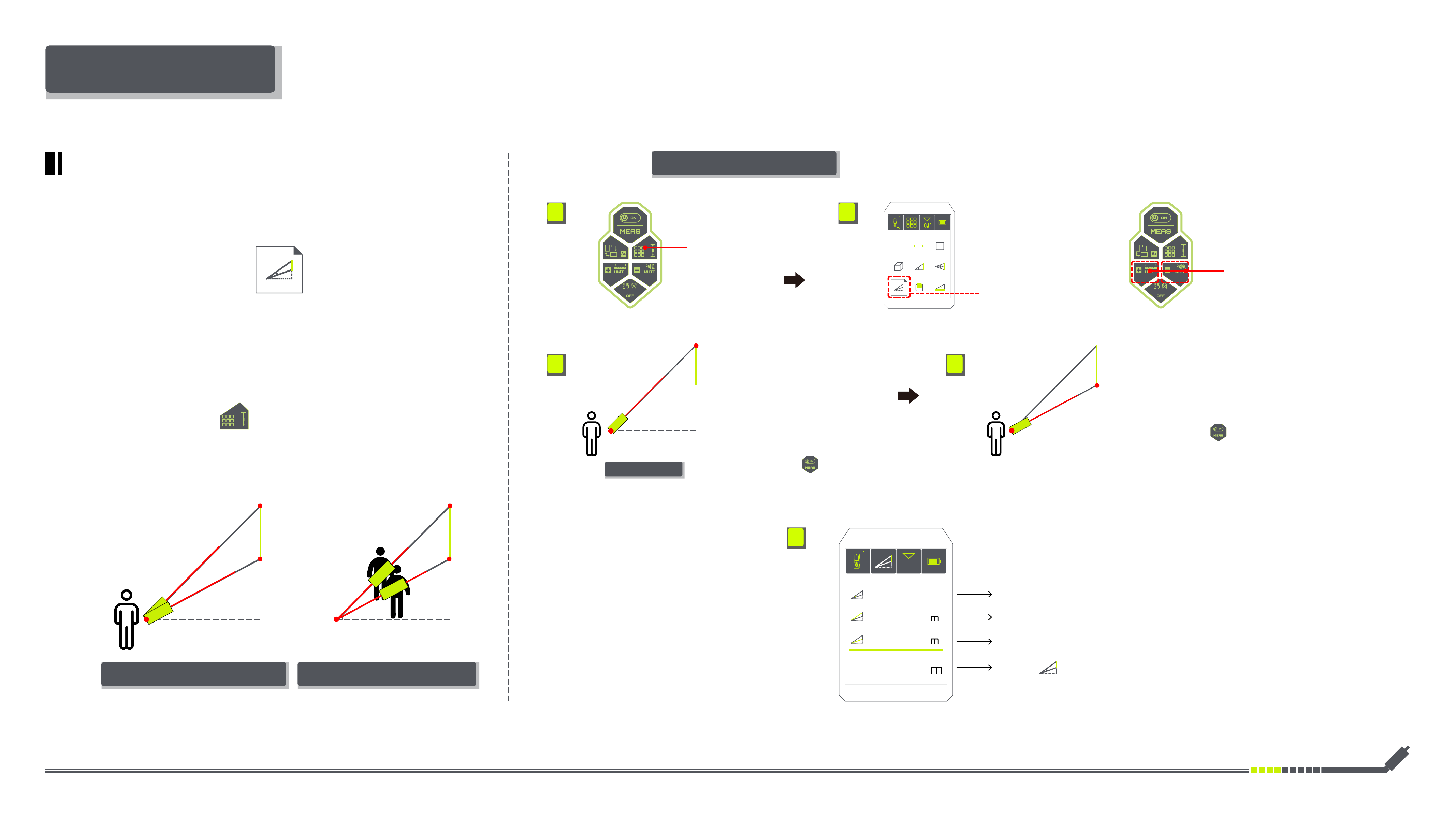
Selecting Non-vertical
Indirect Height Measurement
Short Press
Selecting LEFT & RIGHT Function
Unilateral Laser
• Position DM-262 at the
originating point A (Ensure
the height of A is lower than
the bottom point of H-B)
• Position of DM-262 remains
unchanged
• Align the red laser towards
the top point Of H-C
• Align the red laser towards
the lower point- B Of H
• Briey press
the measurement L1 will be
shown on the display
• Briey press
the measurement L2 will be
shown on the display
• Ensure that the reference level for DM-
262 remains in the same place during a
single measuring process.
α
α-β
H
L2
L1
7.0
24.1°
°
0.848
0.809
0.108
β
β
H H
L2
L2
L1
L1
α
H
L1
β
H
L2
L1
A
B B
C C
A
α
α β
H=L1×Sin -L2×Sin
5.
3. 4.
DM-262 PYTHAGOREAN METHOD
Non-vertical
Indirect Height Measurement
·
Illustrations:
Switching the Bilateral & Unilateral
Laser Measurement(Long Press)
Bilateral Laser MeasurementUnilateral Laser Measurement
Unilateral Laser Measurement
·
Operation:
• After the two measurements are completed,
the height will be calculated automatically
based on the Pythagorean Method and be shown
at the bottom of the screen display.
Inkerma User Manual
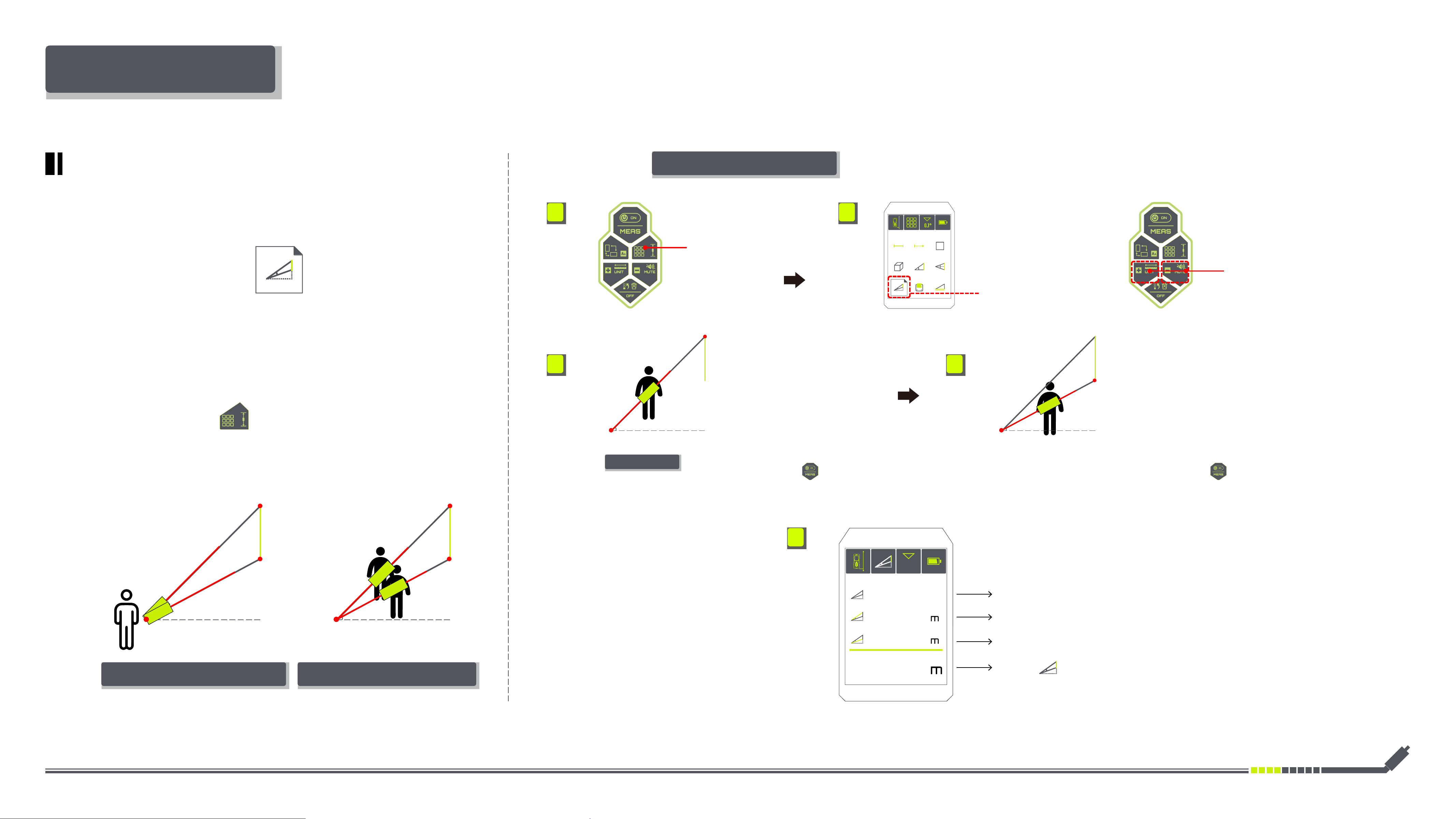
Bilateral Laser
1. 2.
Short Press
Selecting Measuring Functions
Selecting Non-vertical
Indirect Height Measurement
Short Press
Selecting LEFT & RIGHT Function
Bilateral Laser Measurement
·
Operation:
• Position DM-262 at any
location(Ensure the height of
DM-262 is lower than the top
point of H-C)
• Position DM-262 at any
location(Ensure the height of
DM-262 is lower than the rst
position)
• Align one side of the red laser
towards point A, and the other
side of the red laser towards
to the top point- C Of H
• Align one side of the red laser
towards point A, and the other
side of the red laser towards
to the lower point- B Of H
• Briey press
the measurement L1 will be
shown on the display
• Briey press
the measurement L2 will be
shown on the display
• Ensure that the reference point A remains
in the same place during a single measuring
process.
α
H
L1
β
H
L1
A A
α-β
H
L2
L1
7.0
24.1°
°
0.848
0.809
0.108
5.
3. 4.
L2
B B
C C
INSTRUCTIONS FOR USE
α
β
β
H H
L2
L2
L1
L1
α
α β
H=L1×Sin -L2×Sin
DM-262 PYTHAGOREAN METHOD
Non-vertical
Indirect Height Measurement
·
Illustrations:
Switching the Bilateral & Unilateral
Laser Measurement(Long Press)
Bilateral Laser MeasurementUnilateral Laser Measurement
• After the two measurements are completed,
the height will be calculated automatically
based on the Pythagorean Method and be shown
at the bottom of the screen display.
Inkerma User Manual
1. 2.
INSTRUCTIONS FOR USE
·
Operation:
Short Press
Selecting Measuring Functions
Selecting
Data Recording
Short Press
Selecting the backwards saved values
Short Press
Selecting the forwards saved values
Short Press
Deleting the Current Value
Short Press
Selecting LEFT & RIGHT Function
100
24.1°
0.800
0.900
1.700
3. 4.
5.
DM-262 DATA RECORDING
Data Recording
• The memory measurements
is shown on the dispaly
• Maximum 100 data can be
retrieved
Inkerma User Manual
1. 2.
INSTRUCTIONS FOR USE
·
Operation:
Short Press
Selecting Measuring Functions
Selecting
Angle Calibration
Short Press
Selecting LEFT & RIGHT Function
3. 4. 5. 6. 7. 8. 9.
0° 0° 0°
0° 0°
0°
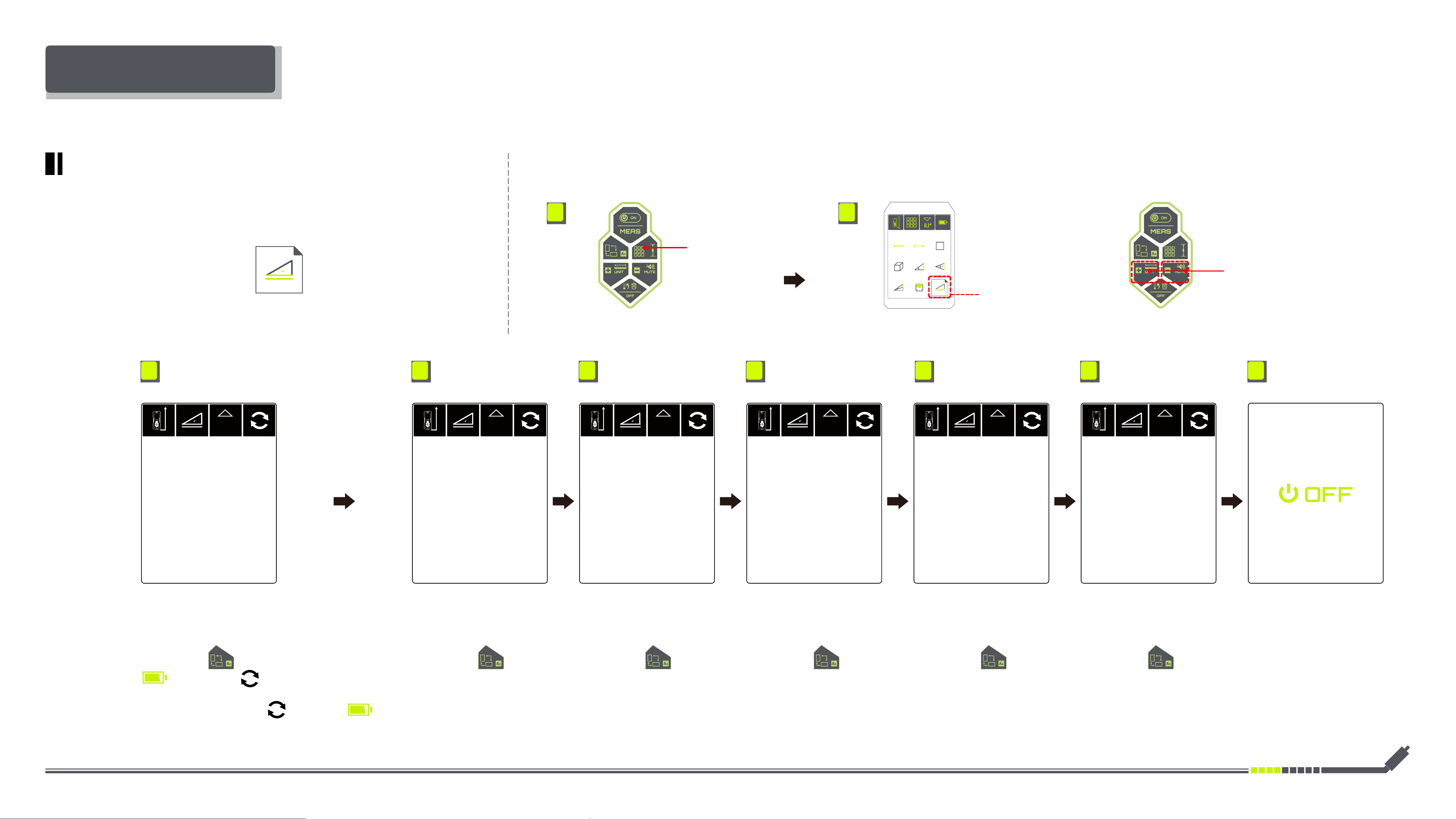
DM-262 ANGLE CALIBRATION
Angle Calibration
• 01 Angle calibration page • 02 Angle calibration page • 03 Angle calibration page • 04 Angle calibration page • 05 Angle calibration page • 06 Angle calibration page • 1ST After the completion of
the last calibration process,
the DM-262 will automatically
shutdown.
• Place the DM-262 according
to the screen instruction
• Place the DM-262 according
to the screen instruction
• Place the DM-262 according
to the screen instruction
• Place the DM-262 according
to the screen instruction
• Place the DM-262 according
to the screen instruction
• Place the DM-262 according
to the screen instruction
• Short press , the device beep briey and the
will change to ,which means the device
is in the calibrating process. Wait for 5 seconds, the
DM-262 beep long and the changes to .
This indicates that the calibration has been
completed.
• Short press , repeat
the previous steps until the
full process of calibration is
completed.
• Short press , repeat
the previous steps until the
full process of calibration is
completed.
• Short press , repeat
the previous steps until the
full process of calibration is
completed.
• Short press , repeat
the previous steps until the
full process of calibration is
completed.
• Short press , repeat
the previous steps until the
full process of calibration is
completed.
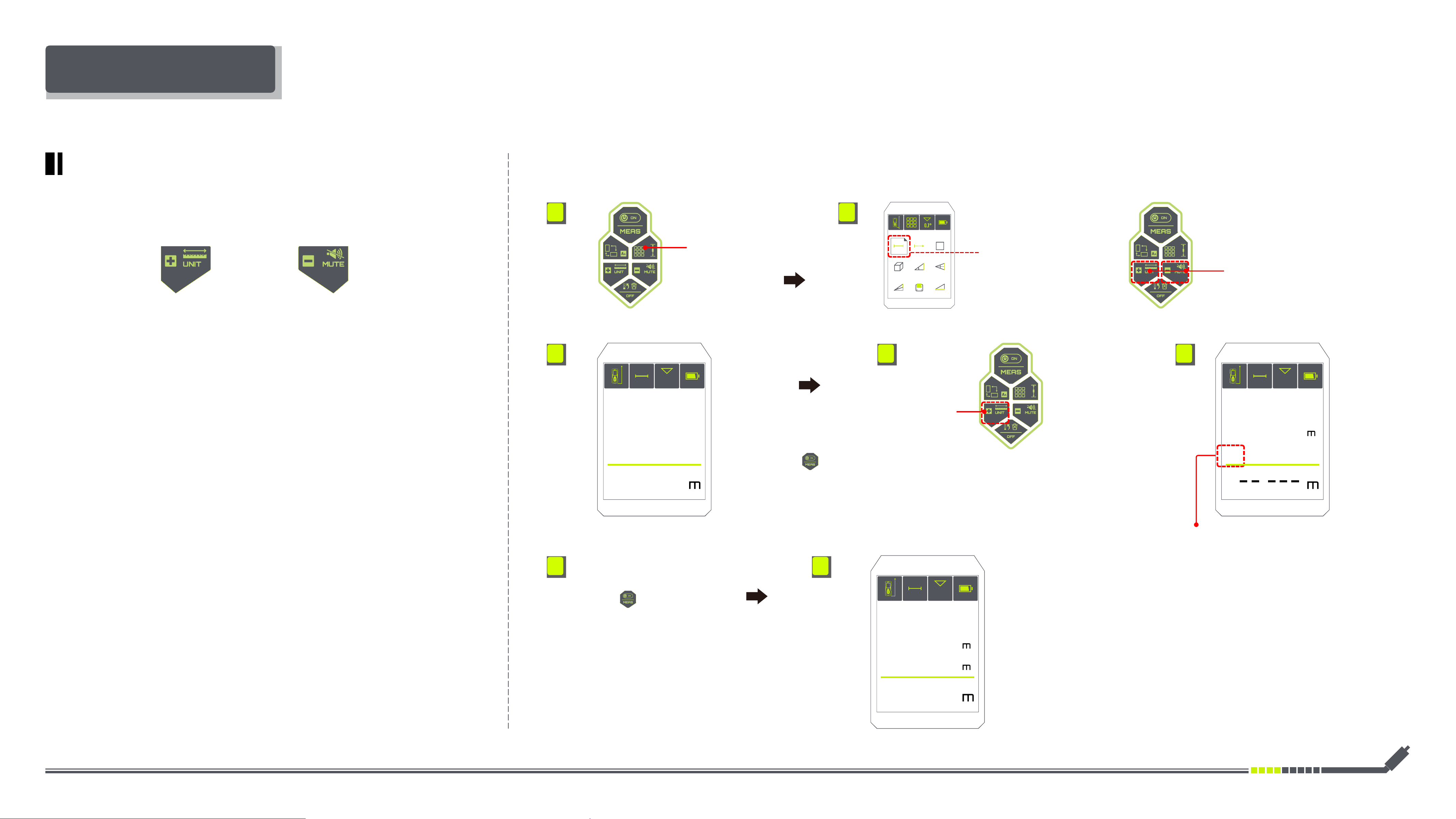
Inkerma User Manual
1. 2.
INSTRUCTIONS FOR USE
·
Operation:
Short Press
Selecting Measuring Functions
Selecting
Measuring Length
Short Press
Selecting LEFT & RIGHT Function
Short Press
Selecting Subtraction Function
Short Press
Selecting Addition Function
3. 4. 5.
7.6.
48.2° 48.2°
48.2°
1.800 .
4.100
+
+
1.800
1.800
2.300
DM-262 ADDING/ SUBTRACTING VALUES
Addition Subtraction
• Briey press
the measurement will be
shown at the bottom of the
display
• The Addition/ subtraction
mark has been displayed on
the screen
• Briey press
the measurements to be
added/ subtracted will be
shown on the screen display.
• After the last measurement is completed, the
values will be added/subtracted automatically
and be shown at the bottom of the screen
display.

Wishing you a pleasant experience
.
