UNDERDESK ELLIPTICAL TRAINER
USER MANUAL
WARNING & SAFETY CAUTIONS
OVERVIEW
INTRODUCTION OF THE WORKING MODE
3.1 AUTO MODE
3.2 MANUAL MODE
REMOTE CONTROLLER
PRODUCT CARE & MAINTENANCE
FCC CERTIFICATION
1
2
3
4
4
5
6
6
1.
2.
3.
4.
5.
6.
IMPORTANT
Read carefully before first use.
Only use while si�ng, do not stand on the machine.
Please turn on the power before using the product.
The pedals can only move backwards when unplugged. It is not recommended
to pedal forward and it will damage the machine.
Keep all safety informa�on and instruc�ons for future reference and pass
them to subsequent users of the product.
1.
2.
3.
4.
5.
1.
2.
3.
Thank you for the purchase of the ANCHEER under desk ellip�cal, This manual is a part of this product,
which is intended for the end-user of the product. Please familiarize yourself with all the informa�on
included before using the product.
Consult your physician before using, be aware how you are feeling. If you feel uncomfortable or
experience any adverse symptoms, stop the using the machine immediately.
This machine is not suitable for therapeu�c use. Do not use with other medical electronic equip-
ment, such as pacemakers or EKG machines.
Keep children and pets away from the machine,It is designed for adult and elder,especially
suitable for office and home use.
Use the machine on a solid, flat level surface with a protec�ve cover for your floor or carpet.
Do not use the product in wet or dusty environment,such as bathroom.
Do not use the machine with wet hands. Do not insert any object into the charger input. This may
cause damage to the product or electric shock.
Do not place fingers or objects into the moving parts of the machine
Do not cover while using,to avoid motor overhea�ng and causing malfunc�on or damage.
Do not place the power cord under the product or any heavy object.
Do not use the power cord to move or drag the machine
Do not wind the power cord around the product. That could damage the power cord, cause elec-
tric shock or electrical fire.
Do not use the machine if the power plug is loose.
Turn off the power a�er each use or before cleaning the machine.
Take the handle carefully to move the machine.
Please do not take the pedal to move the machine. It may damage the machine.
Meanwhile, the handle place can hold the remote, which can help you store the remote well.
DATA BUTTON:
POWER BUTTON:
MODE BUTTON:
DIRECTION BUTTON:
SPEED BUTTON:
SCAN:
TIME:
DISTANCE:
SPEED:
COUNTER:
CALORIES:
Press it to check scan, �me, distance, speed, counter, calorie
Press it to turn on or turn off the machine
Press it to switch modes: automa�c mode (P1/P2/P3) and manual mode (HA)
Press it to change the working direc�on ,forward or backward
Press it to increase or decrease the speed (1-5)
This func�on will automa�cally scan through all of the data displayed on the bo�om line
of the display screen
Automa�cally keep track of your �me for each session
Automa�cally keep track of your distance for each session
Automa�cally keep track of the current speed you used
Automa�cally keep track of your counts for each session.
Keep track of your calories burned for each session
①
②
③
④
⑤
⑥
⑦
⑧
⑨
⑩
⑪
⑫
⑬
①
②
③
④
1.WARNING & SAFETY CAUTIONS
CONTENTS
CONVENIENT TO CARRYING
FUNCTION BUTTON
OPERATING PROCEDURES
5.1 STORAGE
5.2 CARE AND MAINTENANCE
DATA DISPLAY
1
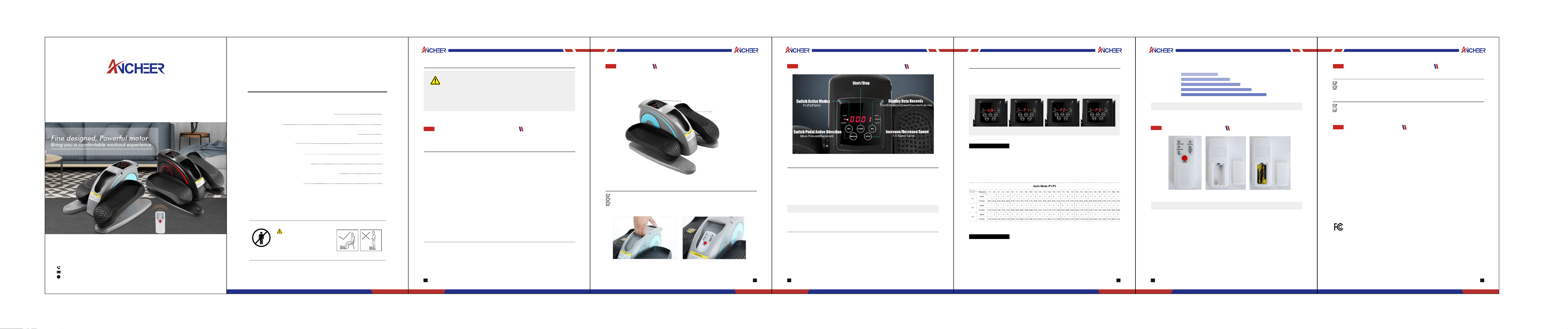
There is no need to assemble when you open the packing,The ANCHEER desk ellip�cal is ready to use
without any installa�on required.
2.OVERVIEW
2
Control Panel
Pedal
Plug the ANCHEER desk ellip�cal into power.
Press the “POWER”to turn on the device
Press the “MODE” to choose the mode (P1/P2/P3/HA)you prefer when using.
Press the “POWER”again to start your exercise
Press the “Mode” bu�on un�l P1/P2/P3 shows, the machine will work at AUTO Mode.
Direc�on and speed can not be changed in AUTO mode, the machine will work according to the
predetermined program.
The running �me in AUTO mode is 30 minutes, and the machine will produce the "beep" sound at
the last minute, then turn off automa�cally.
Fold the plug orderly and �e it up, which can be put in the remote hole.
Keep it in a dry place.
Opera�on keep same as control panel
When Press “Mode” bu�on un�l “HA” shows, the machine will work at Manual Mode.
Press the “Direc�on” bu�on to switch the pedal running direc�on (Forward/Backward)
Press the “Speed” bu�on to increase or decrease speed level (1-5 Speed Level)
Press the “Data” bu�on to switch display for Scan, Time, Distance, Speed, Counter, Calorie.
Details of the predetermined program are as follow:
3.INTRODUCTION OF THE WORKING MODE
4.REMOTE CONTROLLER
5.PRODUCT CARE & MAINTENANCE
6.FCC CERTIFICATION
3 4
Note: DIRECTION BUTTON & SPEED BUTTON only workable in HA mode.
Note: Both AUTO mode and MANUAL mode are used a�er the machine is plugged in.
*NOTE: AAA 1.5V X 2 ba�ery need to be self-provided
Manual Mode: HA Auto Mode: P1 Auto Mode: P2 Auto Mode: P3
3.1 AUTO MODE (P1-P3)
3.2 MANUAL MODE (HA)
5 6
There are 5 Speed levels and each speed are as follows:
1.5KM/H01
02
03
04
05
2.5KM/H
3.5KM/H
4.5KM/H
5.7KM/H
It is recommended that lubricate oil is put on the moving parts (wheels and slide rail) monthly.
Keep the machine clean with a cloth a�er use each �me.
(1) This device may not cause harmful interference.
(2) This device must accept any interference received, including interference that may cause undesired
opera�on.
NOTE: This equipment has been tested and found to comply with the limits for a Class B digital device,
pursuant to Part 15 of the FCC Rules. These limits are designed to provide reasonable protec�on
against harmful interference in a residen�al installa�on. This equipment generates uses and can radi-
ate radio frequency energy and, if not installed and used in accordance with the instruc�ons, may
cause harmful interference to radio communica�ons. However, there is no guarantee that interference
will not occur in a par�cular installa�on. If this equipment does cause harmful interference to radio or
television recep�on, which can be determined by turning the equipment off and on, the user is encour-
aged to try to correct the interference by one or more of the following measures:
Reorient or relocate the receiving antenna.
Increase the separa�on between the equipment and receiver.
Connect the equipment into an outlet on a circuit different from that to which the receiver is
connected.
Consult the dealer or an experienced radio/TV technician for help.
—
—
—
—
MADE IN CHINA
FCC ID:2A5GJ-TD001S-18
NO STANDING
DO NOT USE WHILE STANDING.
USE ONLY WHEN SITTING.
STANDING ON THE UNIT MAY CUASE
SERIOUS INJURY.
WARNING
Phone Number: 626 688 9296
Mailbox: [email protected]om
Working Time: Monday - Friday
9:00am-12:30pm 2:00pm-6:00pm (PST)
Customer A�er-Sales Service
