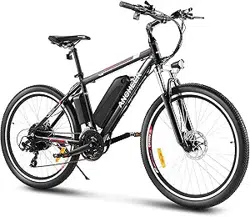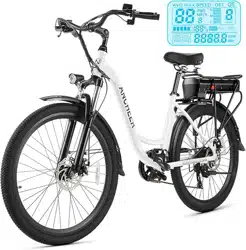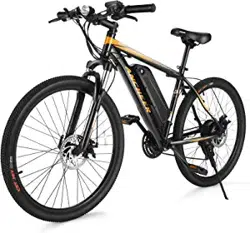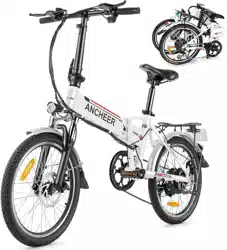
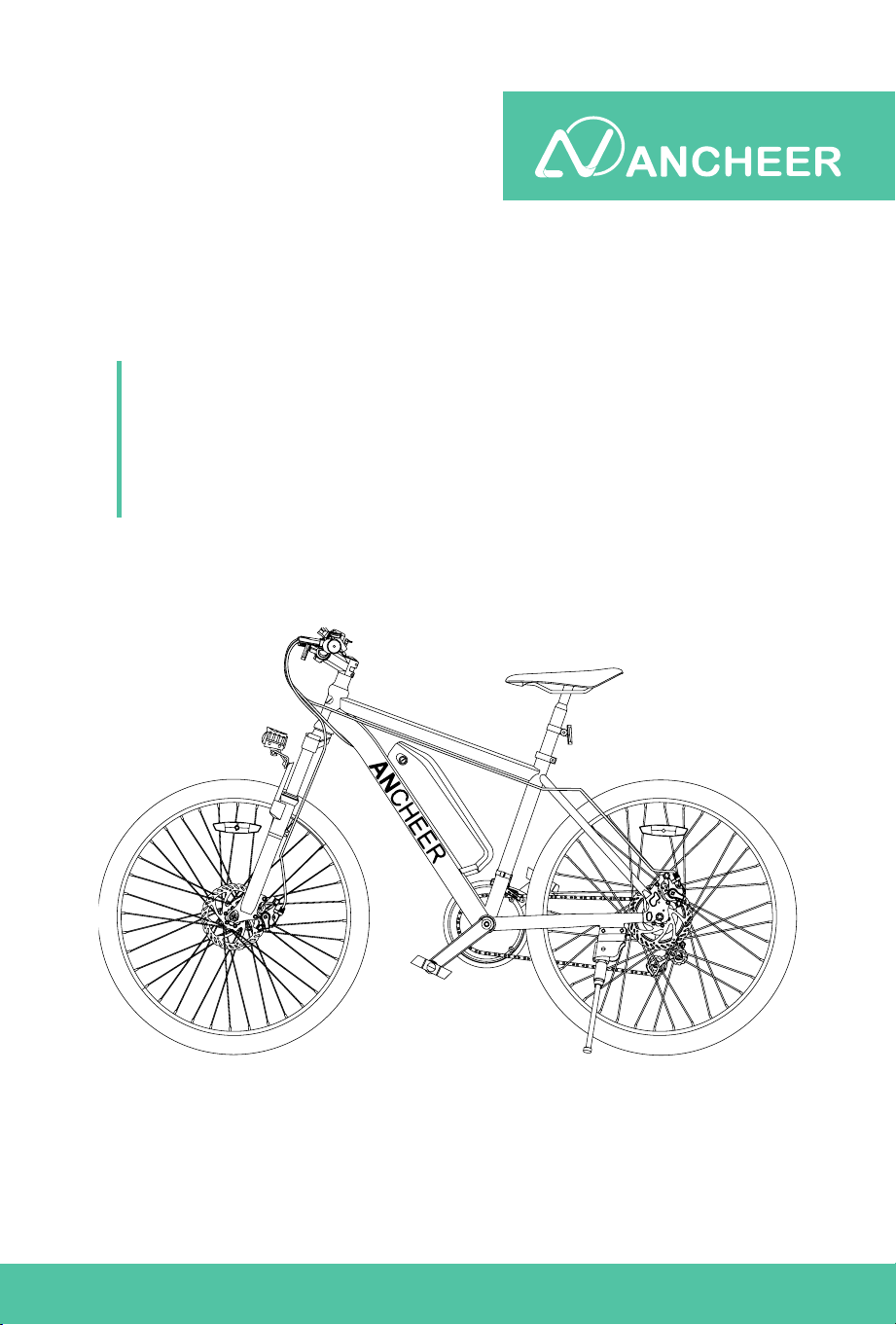
E-Bike
PRODUCT INSTRUCTION
MANUAL
Caution : Please read the manual before your first ride!


CONTENTS
01 IMPORTANT SAFETY INSTRUCTION
03 GENERAL INFORMATION
07 BIKE USAGE
08 INSTALLATION AND ADJUSTMENT
17 METER OPERATION
24 BATTERY AND CHARGING
27 MAINTENANCE
28 WARRANTY
29 ATTACHMENT
31 WARNING
01
WHEN USING THIS PRODUCT BASIC PRECAUTIONS SHOULD ALWAYS BE
FOLLOWED, INCLUDING THE FOLLOWING:
Things To Know Before Use
Read all the instructions before using the product.
To reduce the risk of injury, close supervision is necessary when the
product is used near children.
Do not use this product if the exible power cord or output cable is frayed,
has broken insulation, or any other signs of damage.
Do not put your ngers, hands or feet into the rotating wheel.
Don't lend this product to people who can't operate it, so as not to cause
harm; if you lend the bike, please let the user follow instructions, it could
help to decrease the risk of accident.
The E-bike cannot be used as o-road vehicles or used for extreme
bicycle sports; when riding the bicycle, please wear a safety helmet and
protective gear. It is forbidden to ride with one hand.
Please abide by the trac rules and prohibit riding on motorized lanes
and roads with multiple pedestrians.
Carry people or objects in accordance with the requirements of laws and
regulations, and do not park in the building's lobby, evacuation stairs,
walkways, and safe entrances and exits.
It is recommended to charge and park in an outdoor dedicated parking
hall, while avoiding rain; when charging, keep away from combustibles,
and the charging time should not be too long.
For safety reasons, please do not change the default speed setting of the
electric bicycle and do not exceed speed limit in accordance with the
trac rule. Riding on non-motorized lanes, downhills and paved roads
not exceeding 15km/h.
When adjusting the handlebar or saddle, please be careful not to exceed
the safety line markings on the handlebar and saddle.
IMPORTANT SAFETY INSTRUCTION
●
●
●
●
●
●
●
●
●
●
●
02
IMPORTANT SAFETY INSTRUCTION
When using the motor, please be careful not to hit vigorously and keep
the rotating shaft lubricated.
Try to avoid riding in severe weather such as heavy rain and snow.
It is not allowed to exceed the maximum load of the vehicle body when
riding (the maximum load is 120KG).
It is suitable for people of 16+ years old and physically t adults, and it is
strictly forbidden to drive electric bicycles on the road by people under
16 years old.
Slow down when riding in rain or snow since the the braking distance will
be increased in such slippery conditions.
●
●
●
●
●
03
GENERAL INFORMATION
1. About ANCHEER Electric Bike
ANCHEER electric bike is a leading icon of e-bikes. For years, ANCHEER has
been not only dedicating to innovation, cutting-edge technology and premium
materials, but also providing cost eective e-bikes, to satisfy riders' various
needs of transportation and even desire of exploring sports & outdoors life.
Just ride freely with ANCHEER !
2. What’s In the Box (Parts List)
Description Quantity
ANCHEER Electric Bike
Pedal
Reector
2
1
User Manual
Saddle 1
1
Key
Saddle Tube 1
2
Charging Adapter
Kickstand
1
1
1
Battery
Quick Release Skewer
Tools Bag
1
1
1
Bell 1
04
GENERAL INFORMATION
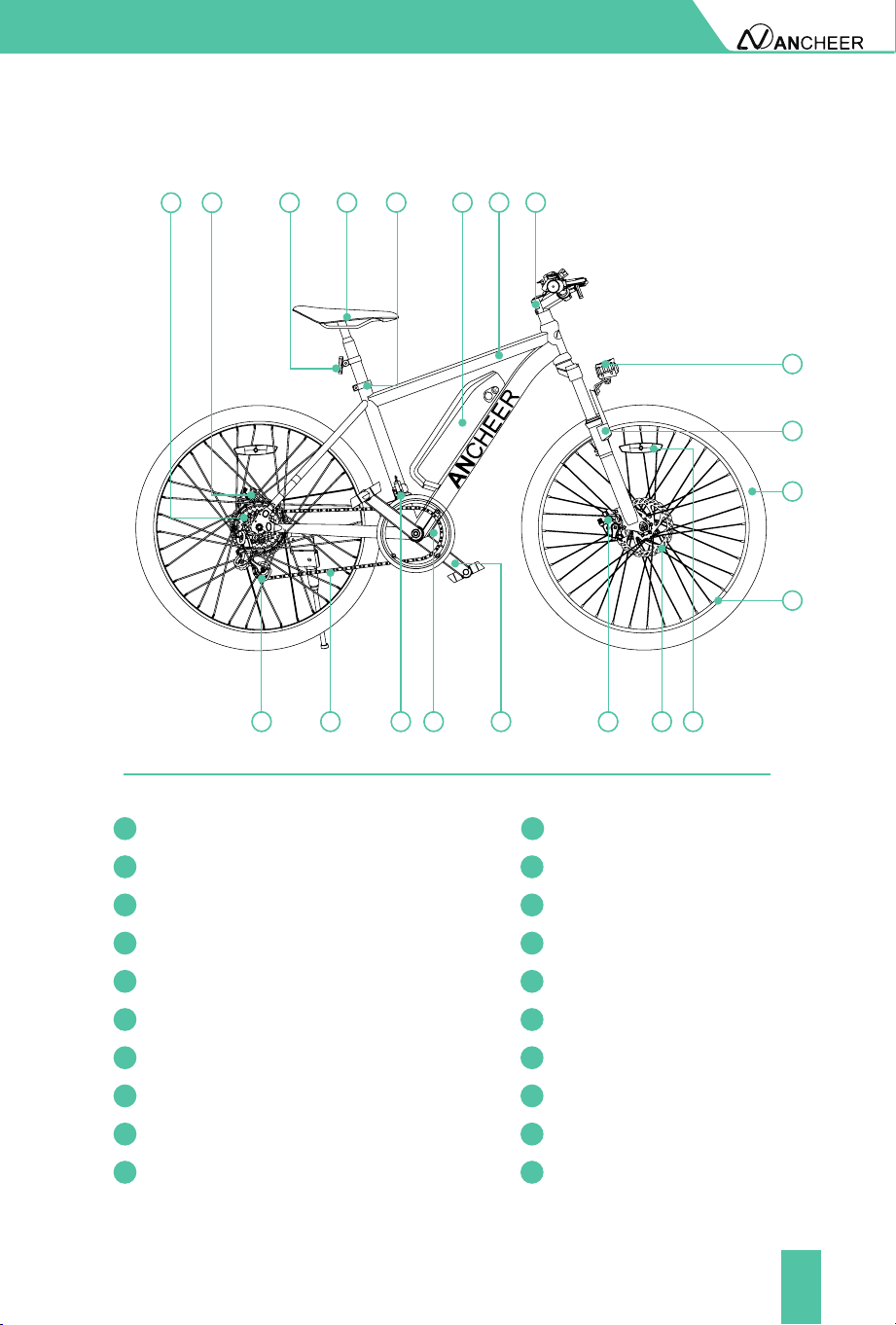
3. Bike Components
1
2
3
5
9
1112
13 14
10
678
2
1
3
4
5
6
7
8
9
10
11
13
12
14
15
16
17
18
19
20
Rim
Flywheel
Front Fork
Chain
Tyre
Rear Derailleur
Head Light/Front Light
Stem
Front Derailleur
Frame
Chain Wheel
Battery
Crank
Seat Post Clamp/ Seat Clamp
Front Disc Brake Caliper
Saddle
Disc
Rear Reector Wheel Reector
Rear Disc Brake Caliper
15 16 17 18 19 20
4
05
GENERAL INFORMATION
22
21
30
29
31
32
33
34
23
24
25
26
27
28
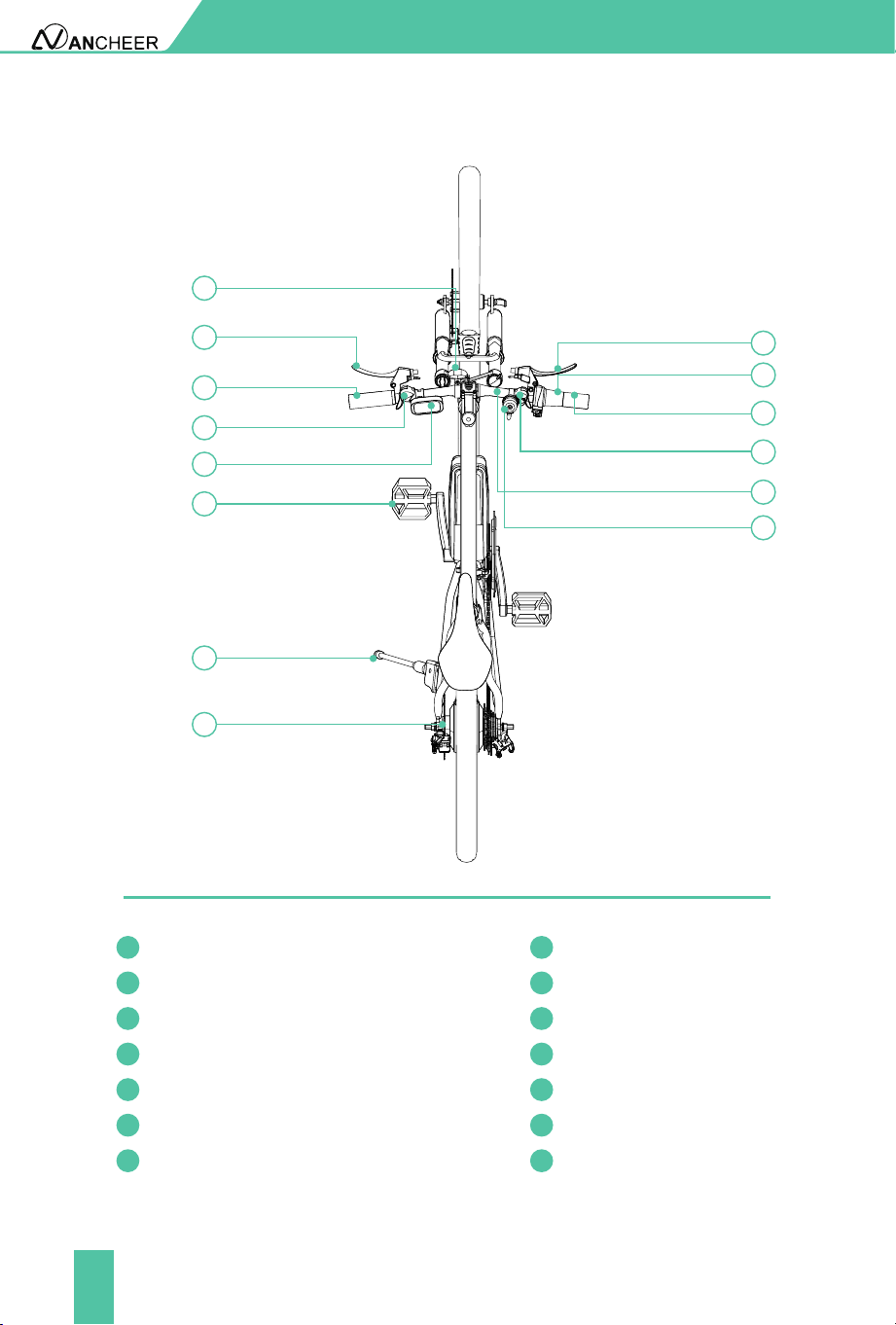
Front Reector
Left Brake Lever
Motor
Front Derailleur Handle
Throttle/ Twister
Left Grip
Right Brake Lever
Meter
Right Grip
Pedal
Rear Shifter
Kickstand
Handle Bar
Bell
21 28
22 29
23
30
24 31
25 32
26 33
27
34
06
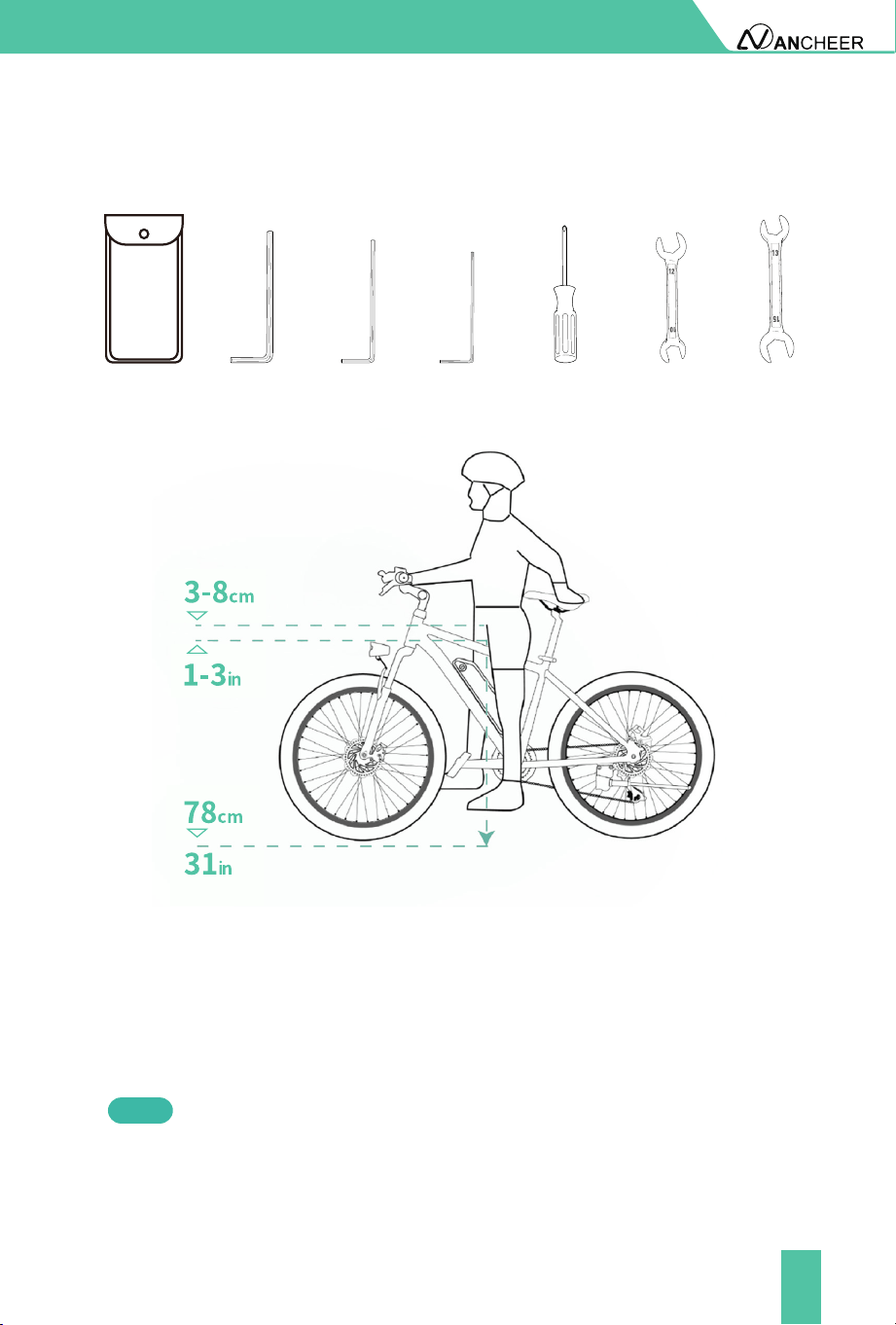
4. Tool List
5. Standover Height
For the sake of safety and comfortable riding, when the rider stands on the
ground there should be clearance of 78cm/31in from ground to the crotch of
the rider. Also, at least 3-8cm/1-3in between the crotch and the top tube of
the bike.
Standover height does not apply to bicycles with step-through frames.
Instead, the limiting dimension is determined by saddle height range. You
should adjust your saddle position without exceeding the limit line on the
saddle tube.
Note
GENERAL INFORMATION
Tool bag
0.12 inch (3mm)
Allen Key
0.16 inch (4mm)
Allen Key
0.20 inch (5mm)
Allen Key
Phillips-Slo
tt
ed
Head Screwdriver
10-12 Open
End Wrenchr
13-15 Open
End Wrench

07
BIKE USAGE
Before Riding
During Riding
Before riding the bike on the open road, try all the settings on the electric
bike, and get used to various results in a safe and controllable environment.
Please check the power circuit, lighting circuit, and test the brake system
before cycling.
Always check the tire pressure before starting to ride, and make sure that the
tire is inated to a pressure within the specied range.
In order to ensure the safety of riding, please check regularly for loose parts
or screws. The places that need to be checked include but not limited to the
seat tube, wheels, handlebars and pedals.
If necessary, please conrm whether the battery capacity can meet you
riding demand.
2
1
If the pressure exceeds the recommended maximum value, the tire
may blow out of the rim, which may damage the bicycle and cause
injury to the cyclist and nearby people.
If the pressure is too low, the wheel may be damaged, or the inner
tube may be squeezed, causing the tire to leak air.
Please wear helmets and riding gear that meet the requirements in
accordance with regulations.
Avoid traveling in severe weather such as heavy rain and snow,etc.
Carry people or objects in accordance with the requirements of laws and
regulations, and the load of the entire bike should not exceed 120kg.
Obey the trac rules.
●
●
●
●
●
●
●
●
●
After Riding
After heavy use, do not touch the hot surface, such as the disc brake rotor or
the side edge of the brake rim.
When folding the kickstand, always make sure that the stand is secure and
the base is rm to prevent the bicycle from falling.
If the bicycle is splashed with moisture, please wipe it dry and clean in time.
●
●
●
08
Open the package of the bike, take out the electric bike and all the parts
inside and use the tool to cut o the packing rope. Please follow our YouTube
channel- ANCHEER SPORT, we have provided installation tutorial.
INSTALLATION AND ADJUSTMENT
Installation Video
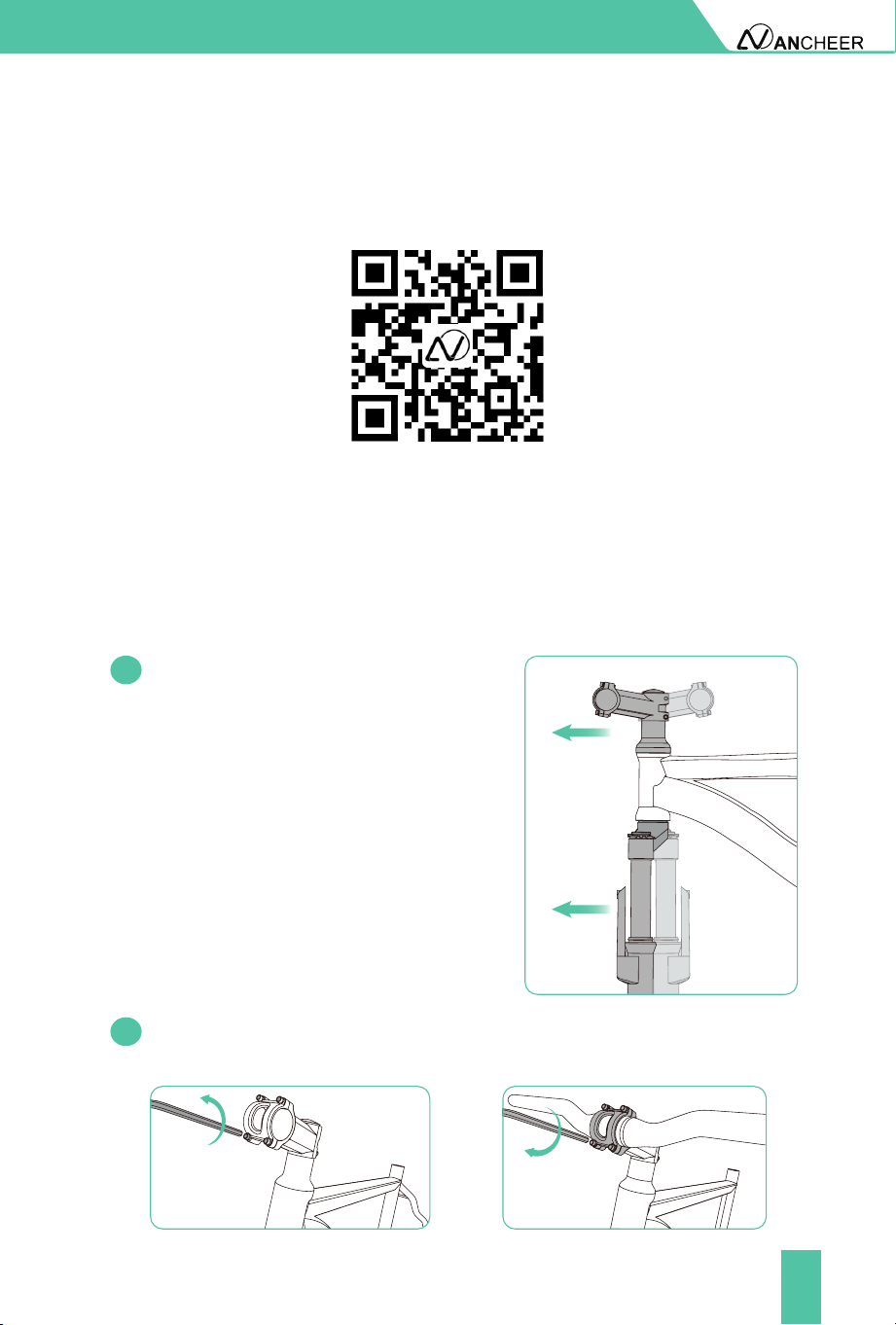
1. Install The Handlebar
Turn the stem 180° to the forward
direction, also make sure the front fork
also rotates 180° horizontally, then both
the stem and the fork bridge of the front
fork are facing forward.
1.1
1.2
Using the hex key from tool kit to loosen the four screws and put the
handlebar into the stem in balance and tighten the screw.
09
Don't exceed
the safety line.
INSTALLATION AND ADJUSTMENT
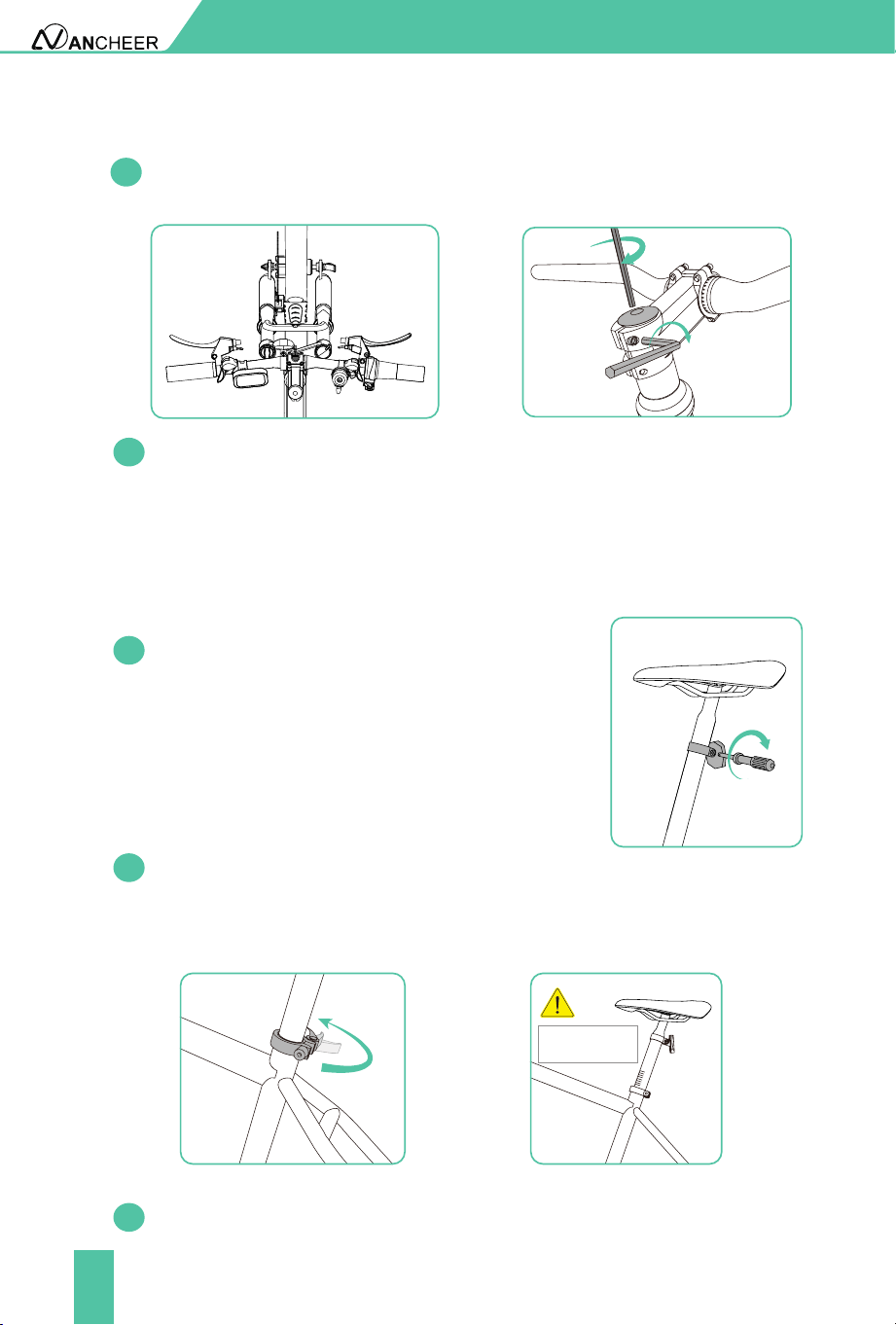
2. Install The Seat
2.1
2.2
1.4
2.3
First attach the reector to the seat tube and
tighten the screws of the reector.
Install the saddle tube into post receiver. Set right its position and adjust
height to t your ridding habit. (Note: please be careful not to exceed the
limit line) Tighten the fastening nut clockwise rst, and then fasten the
seat tube clamp.
If you nd the handlebar and the wheel are not in the right direction,
loosen the top screw and two screws on the side, adjust the angle of the
handlebar and wheel, then tighten the screws.
Adjust the seat angle to the most comfortable position.
1.3
Adjust the angle of the stem to ensure that the handlebar is level, and
nally fully tighten the four screws.
10
4.2
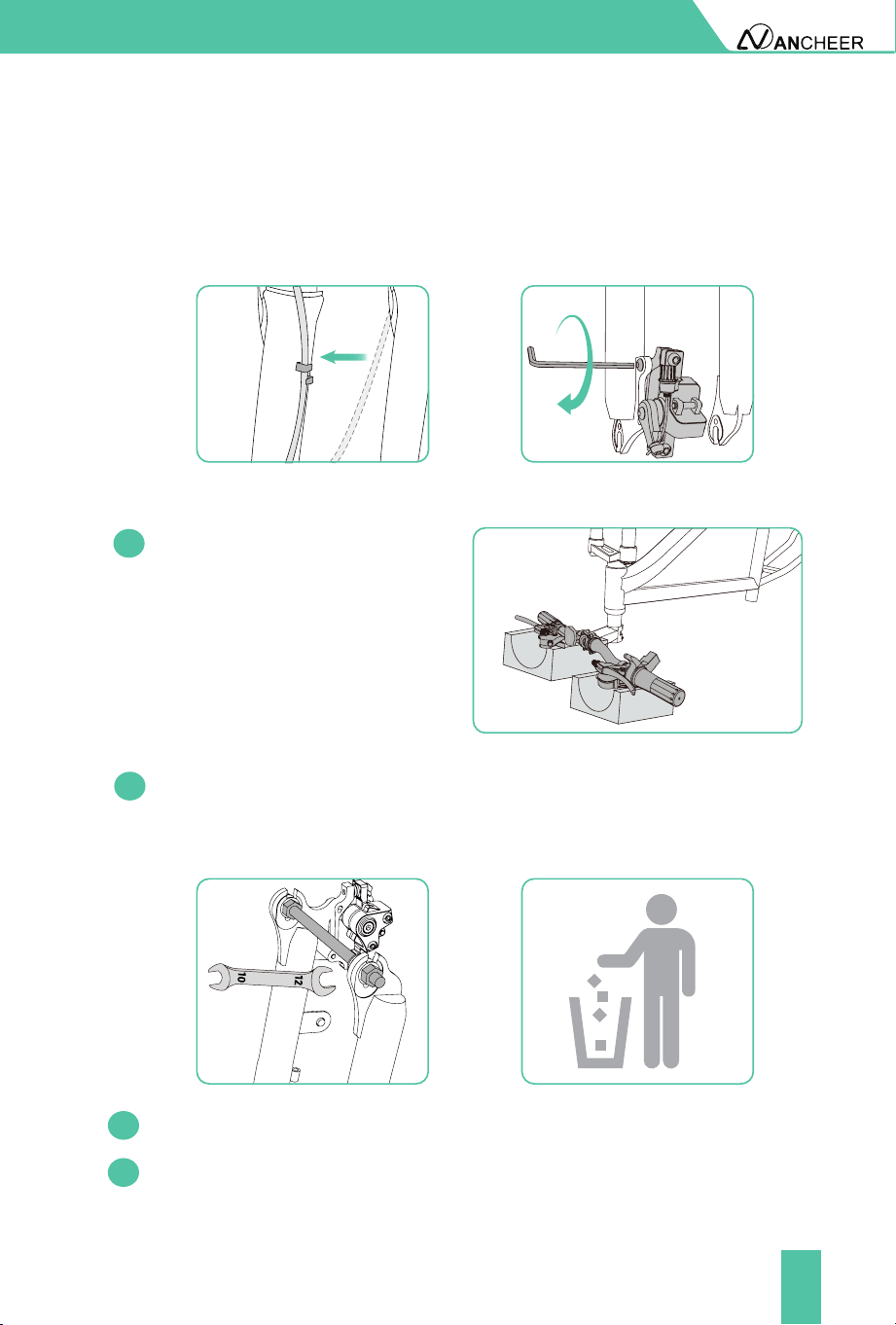
Using the wrench to loosen the xing rod of the front fork and remove it
(this accessory is to prevent the front fork from being deformed during
delivery but not a needed part for the installed bike).
INSTALLATION AND ADJUSTMENT
3. Install The Front Disc Brake
4. Install The Front Wheel
4.1
Flip the e bike upside down.
Pad the handlebar with foam to
protect the components on it
from being scratched or broken.
4.3
4.4
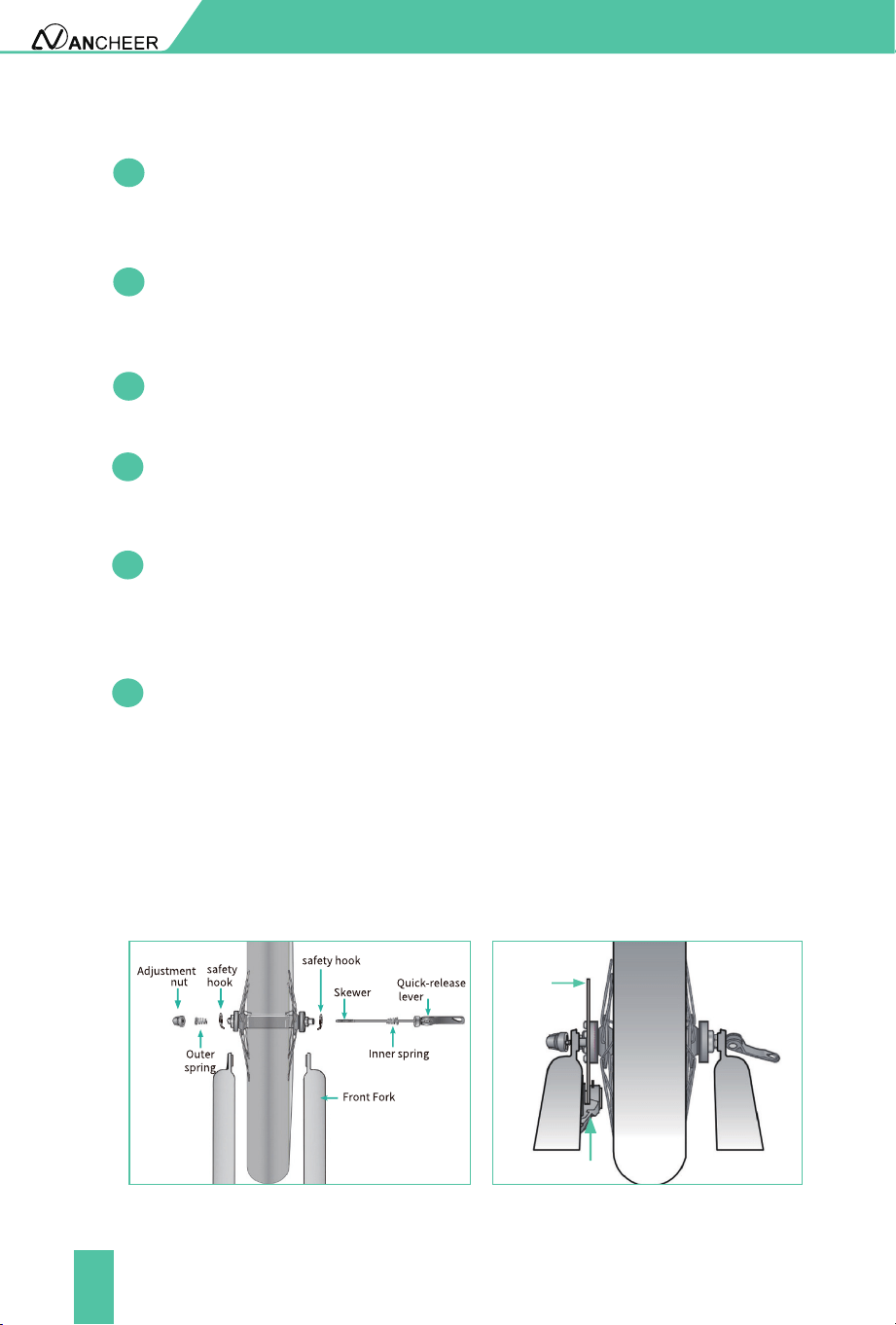
Take out the quick release from the small carton of your bicycle.
Slide the wheel into the fork dropout slots. Insert the disc rotor into the
center of the disc brake at the same time you are inserting the wheel axle
into the fork drop out. Figure 4.3
Fix the brake cable to the buckle of the front fork.Align the two screw holes
of the front disc brake with the screw holes of the front fork, and tighten
the screws clockwise.
11
Disc
rotor
Caliper
INSTALLATION AND ADJUSTMENT
4.7
4.6
4.5
Thread the adjustment nut back onto the skewer, but do not tighten too
far. Figure 4.3
Slide the outer spring and safety hook over the end of the skewer. Figure
4.3
Unscrew the adjustment nut from the skewer, remove outer spring and
safety hook then slide the skewer through the front wheel axle so the
quick-release lever is on the same side of the chain. Figure 4.3
Note: The smaller end of the spring should be in towards the wheel.
4.8
4.9
4.10
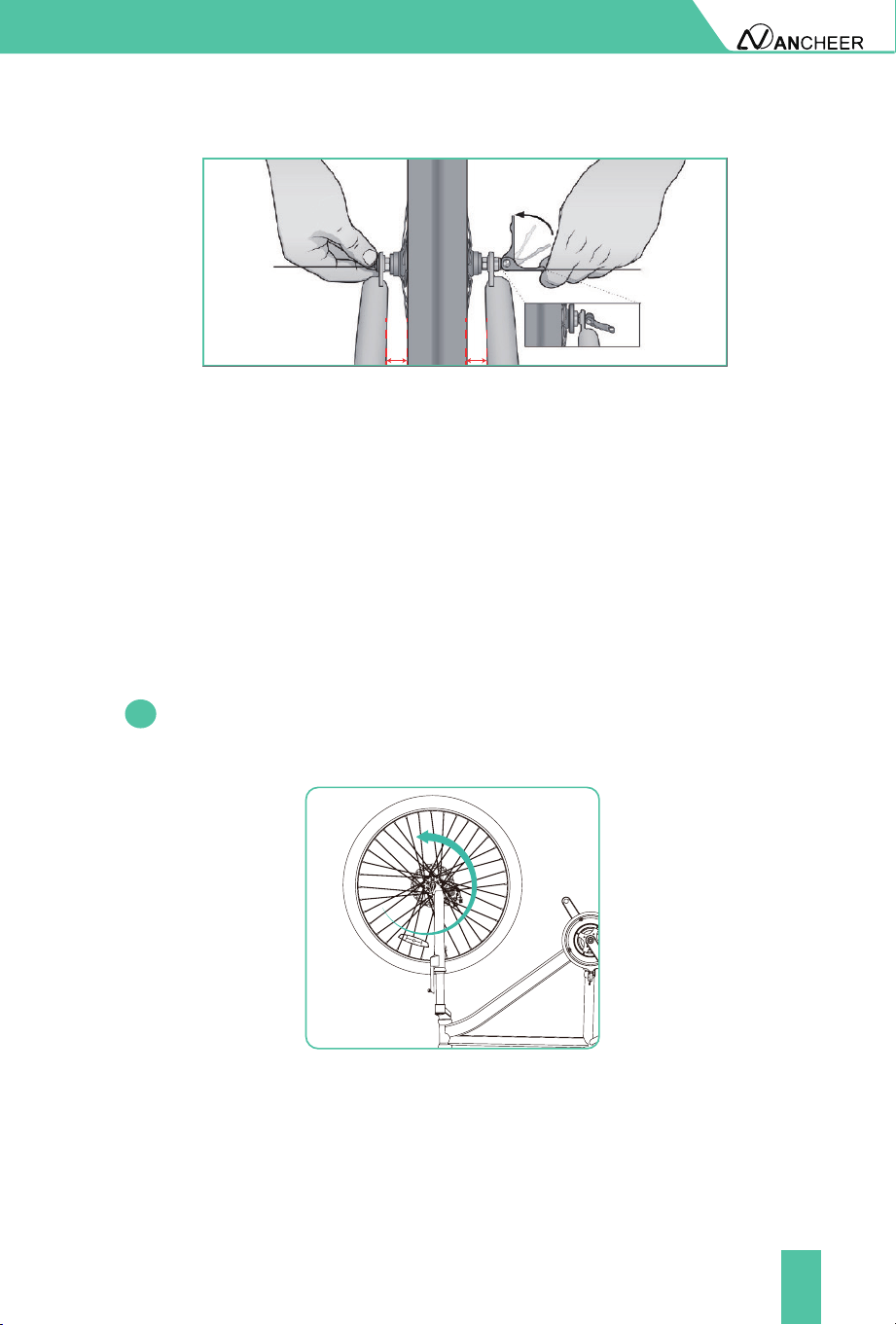
Re-check that the handlebars are perpendicular to the front wheel.
Adjust if needed.So you can adjust the distance A=distance B. Figure 4.4
Move the quick-release lever into the open position. With one hand on
the quick release lever and one hand on the adjustment nut, start to
hand tighten the adjustment nut until you start to feel some resistance
against the fork. Figure 4.4
Try to close the quick-release lever. If it closes easily, open it up and
tighten the adjustment nut further. If it is too dicult to close, open the
quick-release lever up and loosen the adjustment nut a little and try
again. Figure 4.4
NOTE: Do not attempt to tighten by turning the quick-release lever. The
quick-release lever is for closing, the adjustment nut is for adjusting the
tension.
Figure 4.3
12
INSTALLATION AND ADJUSTMENT
5. Check The Front Wheel Rotates Smoothly
5.1
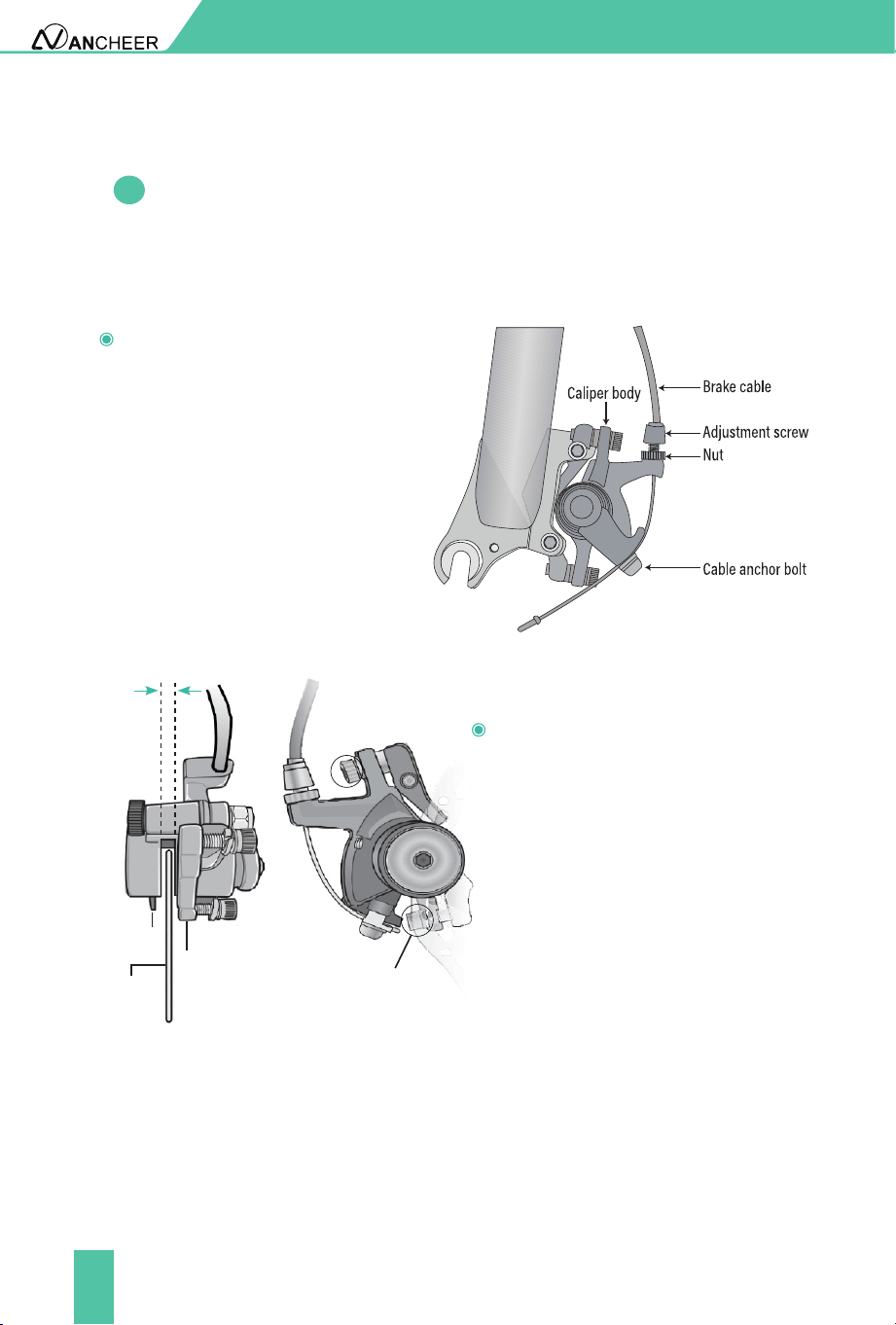
After installing the front wheel, rotate it to see whether it rotates
smoothly. If the disc brake rubs, please adjust the brake.
NOTE: Make sure the wheel is in the middle of the fork. Length A= lenght B
Quick release
Attention:
Tighten the quick release
with the adjustment nut
only!
lever in the
closed position
Quick release
lever in the open
position
A
A = B
B
Figure 4.4
Important! You should feel resistance when you close the quick-release
lever that should leave a temporary impression on your ngers. Open
and close the handle to ensure the wheel is securely locked in place.
13
INSTALLATION AND ADJUSTMENT
5.2
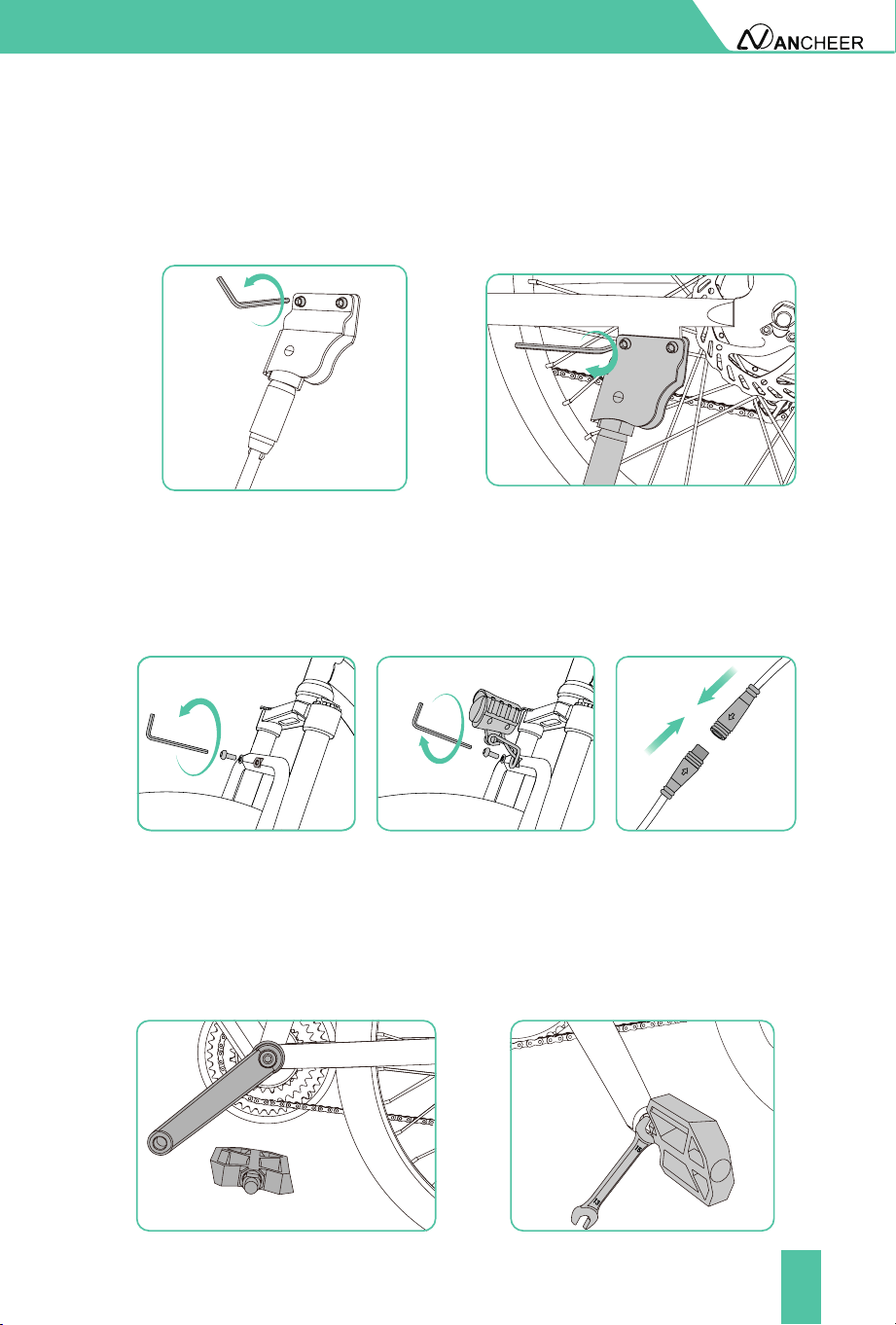
Brake Adjustment
If the brake is not sensitive, loosen
the anchor bolt of the brake cable
to shorten the brake distance of the
brake cable and then tighten the
bolt. Or, lengthen the distance of
the brake cable when the brake is
too sensitive.
If the rotor always rubs against
the brake pad or the gap is too
large, loose the two centering
adjustment screws, but do not
remove them. Slowly rotate
the wheel and check the space
between the rotor and the brake
pad; adjust the position of the
brake pad and the rotor. Centering
the rotor and the pads to avoid
friction. After the adjustment is
complete, tighten the screws.
Ensure that the brake cables are properly inserted into the brake levers before
aligning a mechanical disc brake. If the disc rotor is bent or damaged, replace
the rotor rst.
Leave the same clearance
on both sides of the disc
rotor
Brake pad
Disc rotor
Adjust caliper to
center the rotor
Centering
adjustment screws
14
INSTALLATION AND ADJUSTMENT
6. Install Kickstand
7. Install The Headlight
8. Install The Pedals
Unscrew the screw in the kickstand, and install the kickstand. Then tighten
with tool.
Loosen the screw on the fork with the hex key. Put the light in this position.
Tighten the screw that secures the light.Then connect the plug when the
arrow on the plug surface is aligned with the arrow.
Ensure that the thread of each pedal is fully inserted into the crank arm.
Tighten the pedals completely with a wrench. (Counterclockwise screw the
pedal marked "L" on the left side crank. Clockwise screw the pedal marked
"R" on the right side crank.)
15
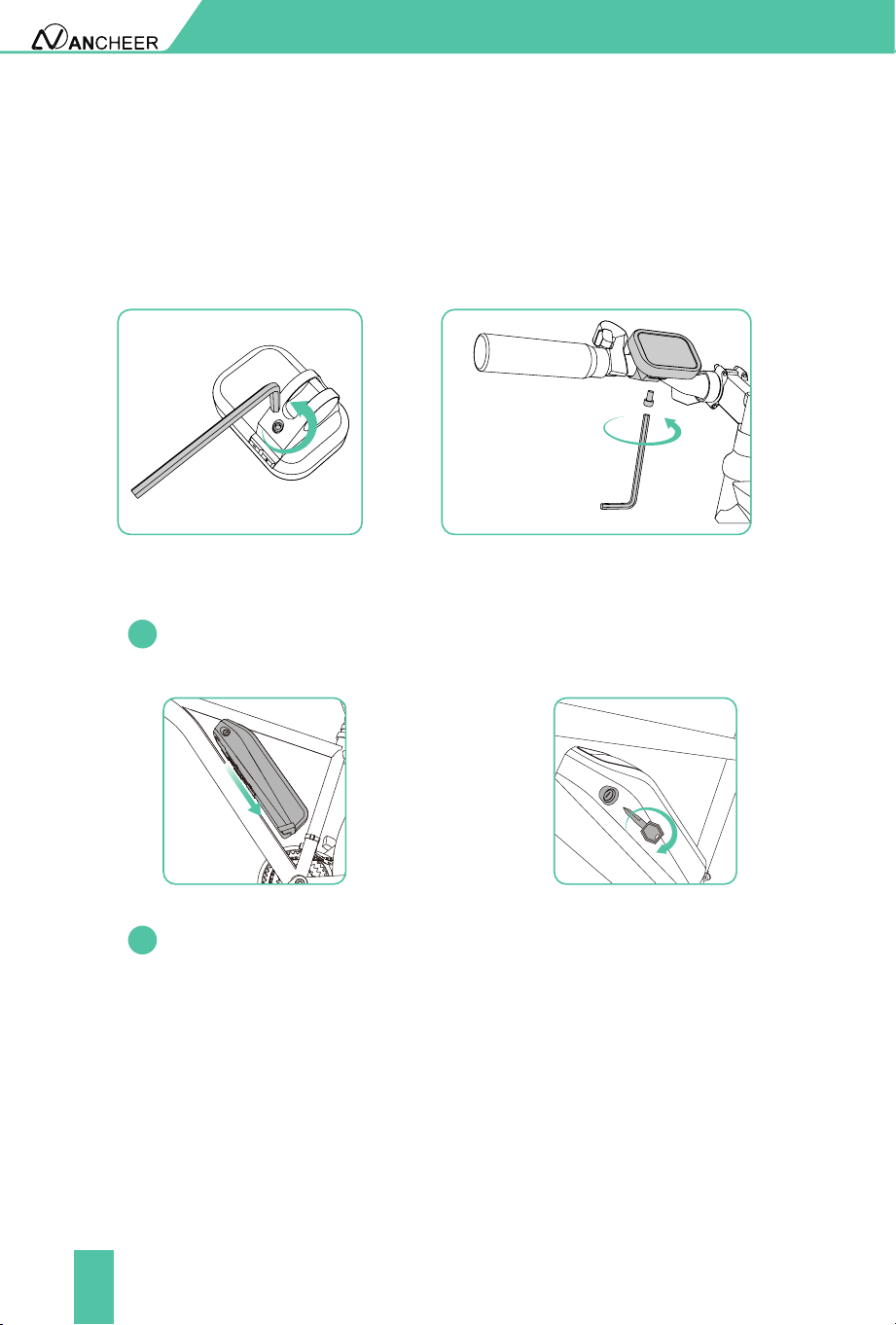
9. Install LCD Meter
Loosen the screw on the back of the meter with the hex key, then install the
meter on the right side of the handlebar.Tighten the screw, and connect the
connector of the meter.
INSTALLATION AND ADJUSTMENT
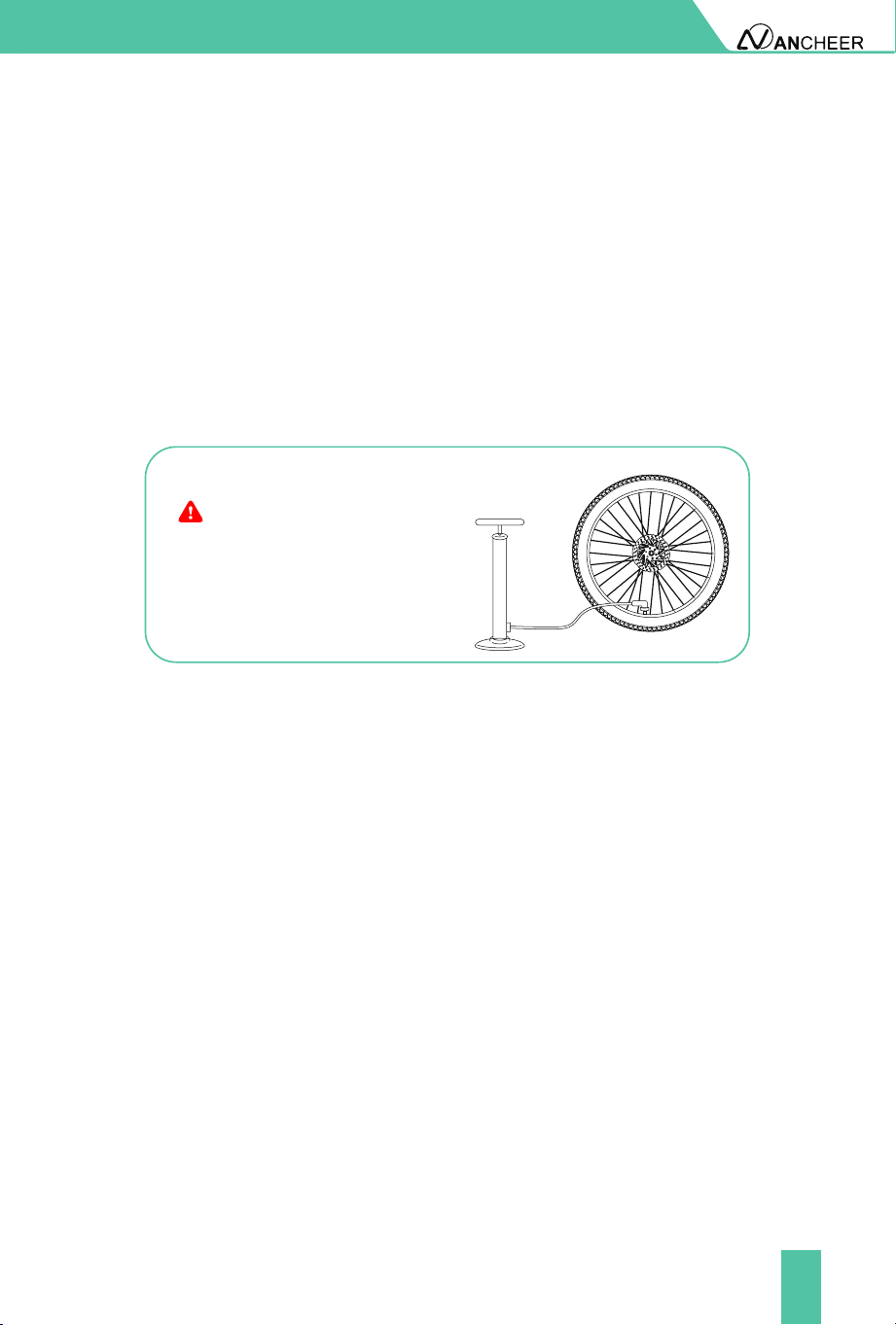
10. Install The Battery
Push the battery into the battery support until it is closely connected to
the socket on the pipe of the frame battery support.
Then insert the key and turn the key to lock it.
10.1
10.2
16
11. Adjust Angle Of Brake Lever, Meter, Gear Shifter, Throttle
And Louder Controller On Handlebar, Then Tightens
Them With Tools.
Shifting Recommendations
In order to increase the range, we recommend shifting according to the
speed.
For starting and low-speed riding, it is best to use a low-speed gear.
At higher speeds, a higher gear should be selected.
●
●
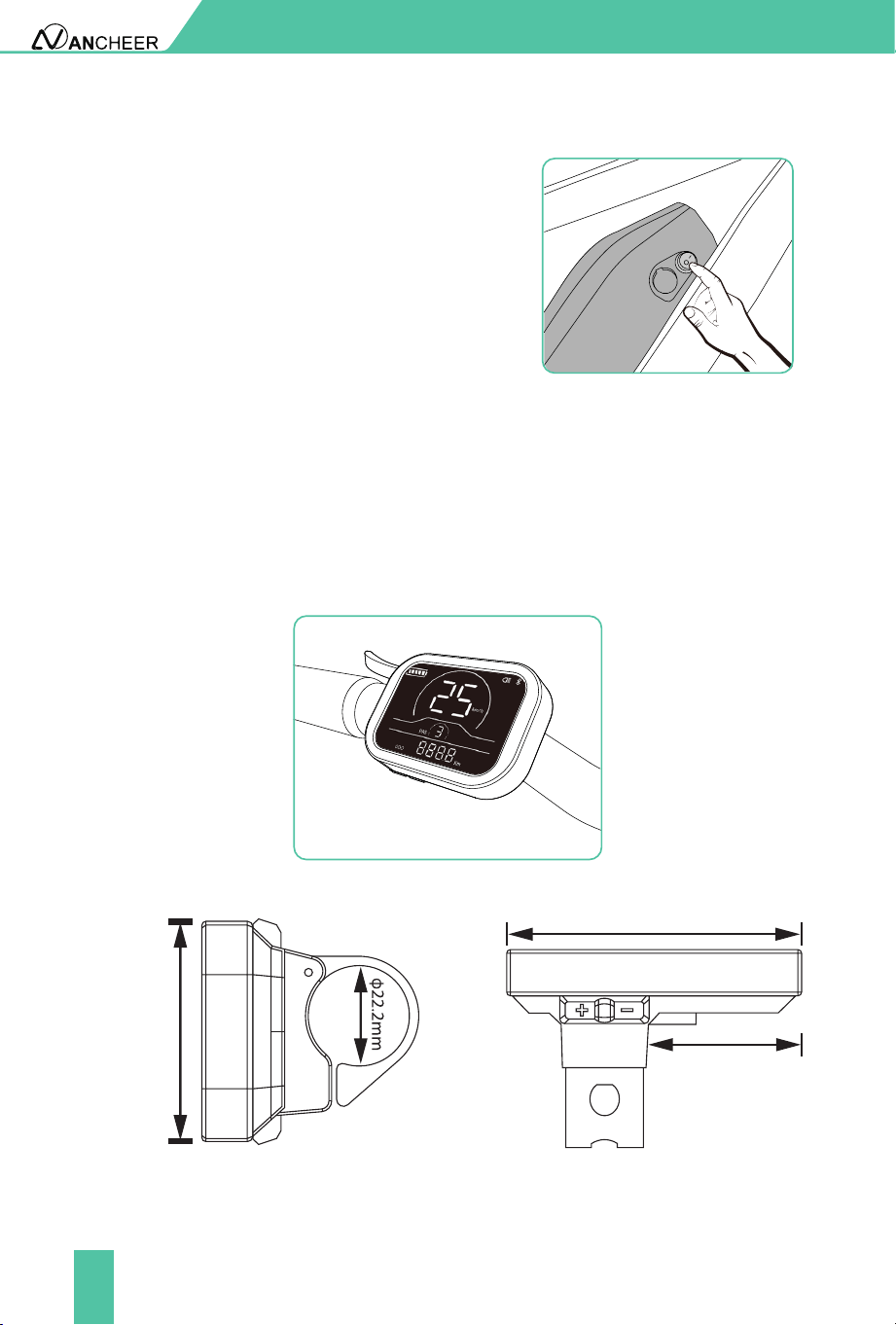
Please inate the tire, maintain
proper tire pressure before use.
NOTICE!
So far, congratulations! You have completed the assembly of the entire bike.
INSTALLATION AND ADJUSTMENT
17
METER OPERATION
Activate The Battery
Before turning on the meter and using
the lights and speakers, please press
the circular switch button on the side
of the battery to activate the battery. "-"
means open and "○" means shut down.
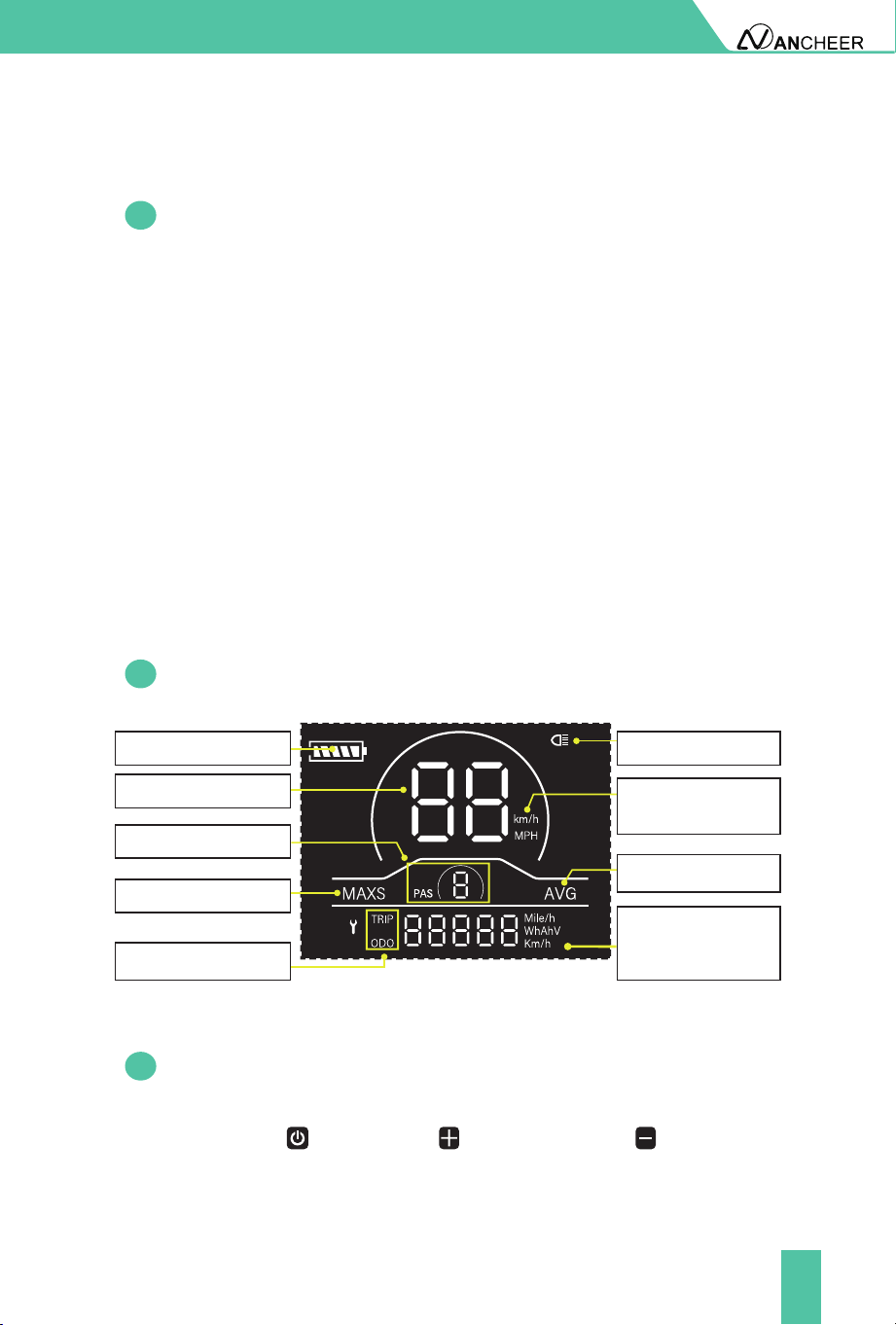
1. Product Name
2. Appearance And Dimensions
Intelligent LCD display for e-bike.
Fig. 2-1 Picture of Display
Fig. 2-2
Top View of Display
Dimensions
Fig. 2-3
Side View of Display
Dimensions
48.5mm
70.0 mm
37.0 mm
18
Display provides a variety of functions to meet the riding needs of users,
including:
3. Meter Function
3.1
3.2
Function Overview
Functional Area Layout
Battery level indicator
Assist level adjustment and indication
Headlight indicator
Speed indicator (including real-time speed, maximum speed (MAXS)
and average speed (AVG))
Mileage indicator (including total mileage(ODO) and trip distance (Trip))
Error code indicator
Parameter setting function
●
●
●
●
●
●
●
METER OPERATION
Battery level indicator
Average speed indicator
Speed indicator
Assist level indicator
Maximum speed
Trip distance indicator
ODO
Headlight indicator
Speed unit Metric
system: km/h
Imperial system: MPH
There are three buttons on the operating unit of display YL81C, i.e., the
on/o button , plus button and minus button .
3.3
Button Denitions
Distance/speed unit
Metric system: km, km/h
Imperial system: mile , mph
19
By pressing and holding the button , the display will start to work
and the working power supply of the controller will be turned on. In the
power-on state, by pressing and holding the button , your e-bike will
be powered o.
After the display is turned on, the display will show the real-time speed
(mph) and the mileage (mile) by default. By pressing the button , the
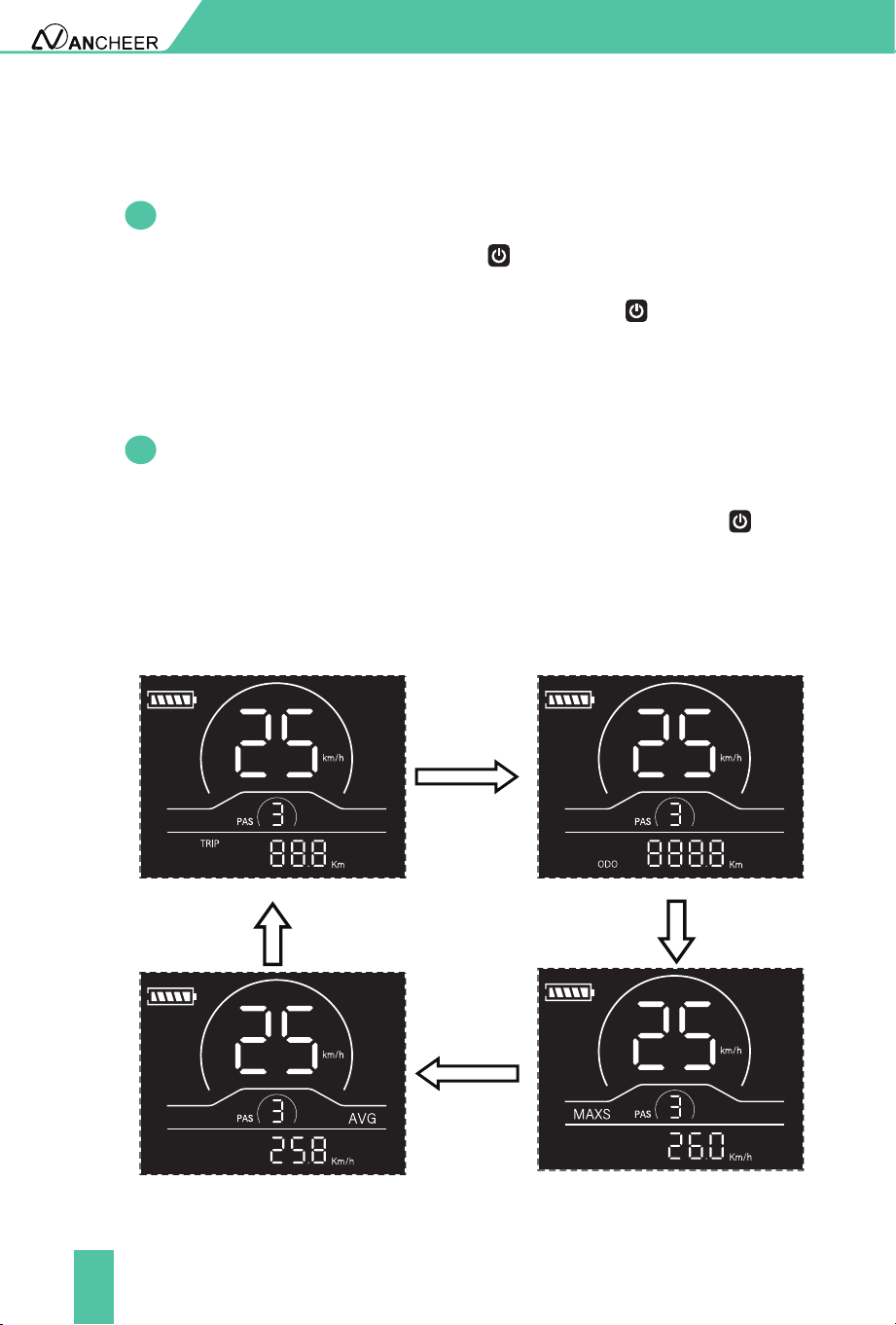
information displayed will be switched between the mileage (mile), ODO
(mile), maximum speed (mph) and average speed (mph).
When the mileage reaches 9999.9 km, it will be automatically reset to zero.
If your e-bike is not used for more than 10 minutes, the display will
be automatically powered o.
4. General Operation
4.1
4.2
Power on/o
Display interface
METER OPERATION
●
Fig. 4-1 Display Interface Switching
Mileage indicator
Average speed indicator
ODO
Maximum speed indicator
20
4.3
4.4
Backlight on/o
Assist level selection
METER OPERATION
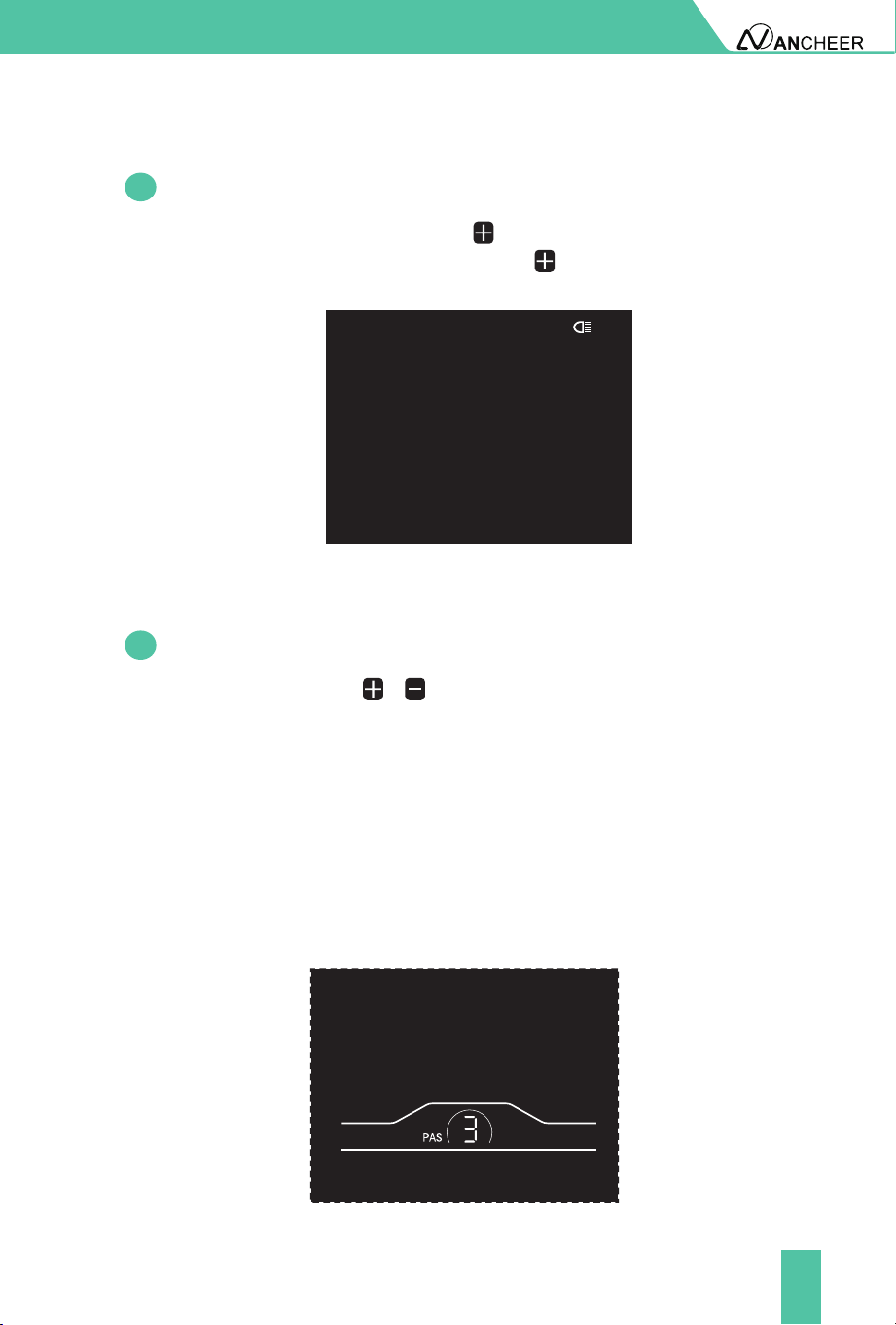
By pressing and holding the button , the display backlight will turn less
bright. By pressing and holding the button again, the display backlight
will resumes the luminance.
By pressing the button / , the e-bike assist level will be switched to
change the motor output power. The assist levels available are levels 0-5.
Level 0 is pure electric mode (throttle mode). PAS 1-5 are power-assisted
mode, and the default mode is level 1.
Cruise mode: When twisting and hold the throttle for 8 seconds, the gear
signal ashes, it will enter the auto cruise state, then release the speed
accelerator at this time, the electric bicycle will keep the current speed
and continue to drive. After braking or twist the throttle again, you can
cancel the cruise state. Please pay attention to the road conditions and
use cruiser mode carefully.
Fig. 4-2 Headlight-on Indicator Interfac
Fig. 4-4 Assist Level Switching Interface
21
4.5
Battery level indicator
METER OPERATION
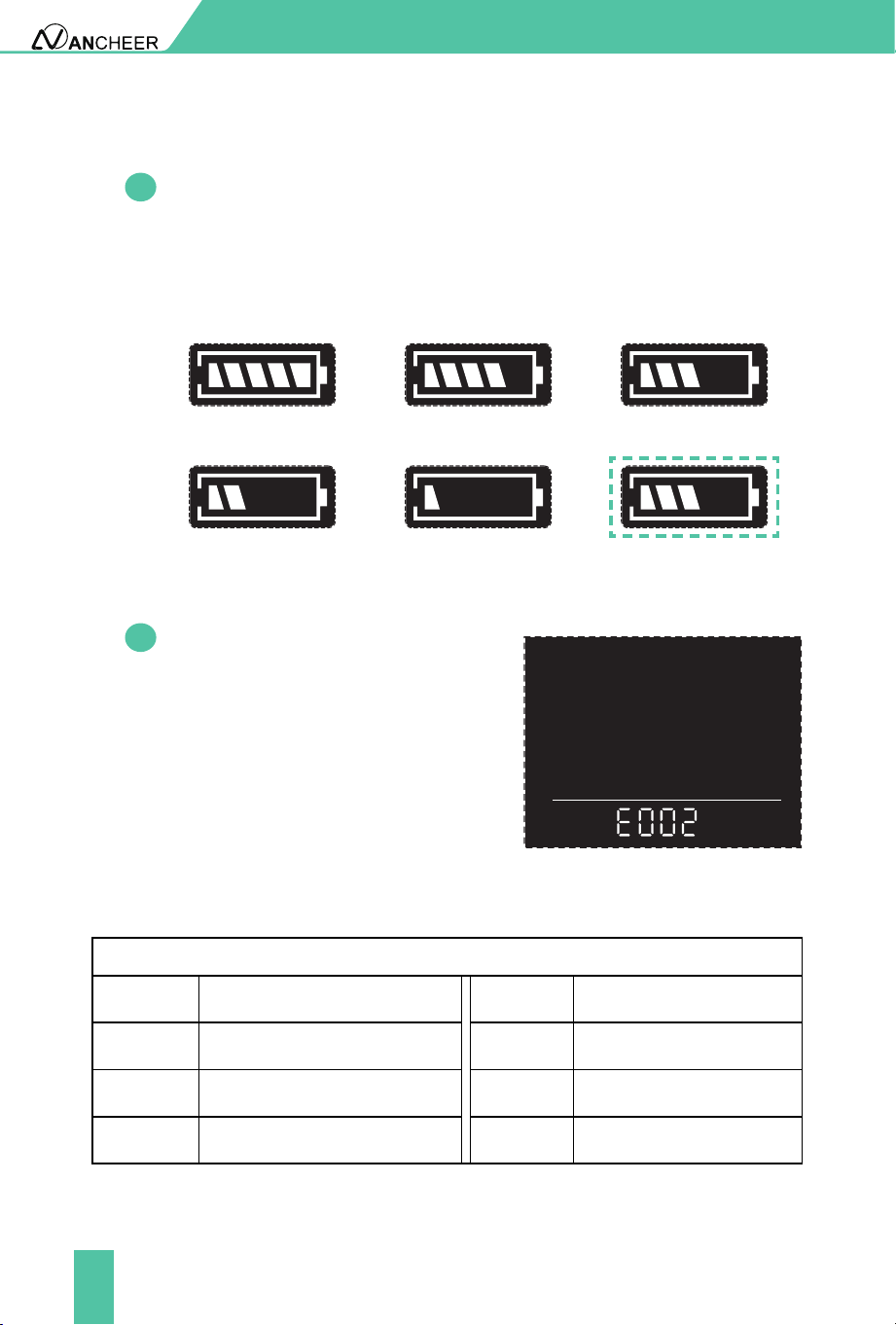
The battery level indicator consists of ve segments. When the battery
is fully charged, the ve segments will be all on. In case of undervoltage,
the outline of the battery indicator will ash, which means the battery
has to be charged immediately.
Fig. 4-4 Assist Level Switching Interface
Full battery level
indication
2-segment indication
4-segment indication
1-segment
3-segment indication
Undervoltage ashing
4.6
Error code indicator
When a fault occurs in the electronic
control system of your e-bike, the
display will automatically indicate the
error code in the mileage area in the
format of E0**. Detailed denitions of
error codes are shown in Schedule 1.
Fig. 4-6 Error Code Indicator Interface
When an error code appears on the display, please conduct
troubleshooting in time. Otherwise, your e-bike will not work normally.
Schedule1 Error Code Denitions
Error codes
Error codes Error codes Denition Denition
Controller Abnormality Throttle Abnormality
Communication Abnormality Brake Abnormality
Motor Hall Signal Abnormality Motor Phase Abnormality
E001 E004
E002 E005
E003 E006
■
22
5. General Setting
6. Custom Setting
5.1
5.2
Trip distance reset
Factory reset
METER OPERATION
All parameters can only be set when your e-bike stops. The steps for general
setting are as follows:
In the power-on state, when the display shows the speed of 0,
All parameters can only be set when your e-bike stops. The steps for
custom setting are as follows:
In the power-on state, when the display shows the speed of 0,
Press and hold the buttons and at the same time for more than
2 seconds to enter the selection interface of custom setting options;
Press and hold the buttons and at the same time for more than 2
seconds to reset the mileage.
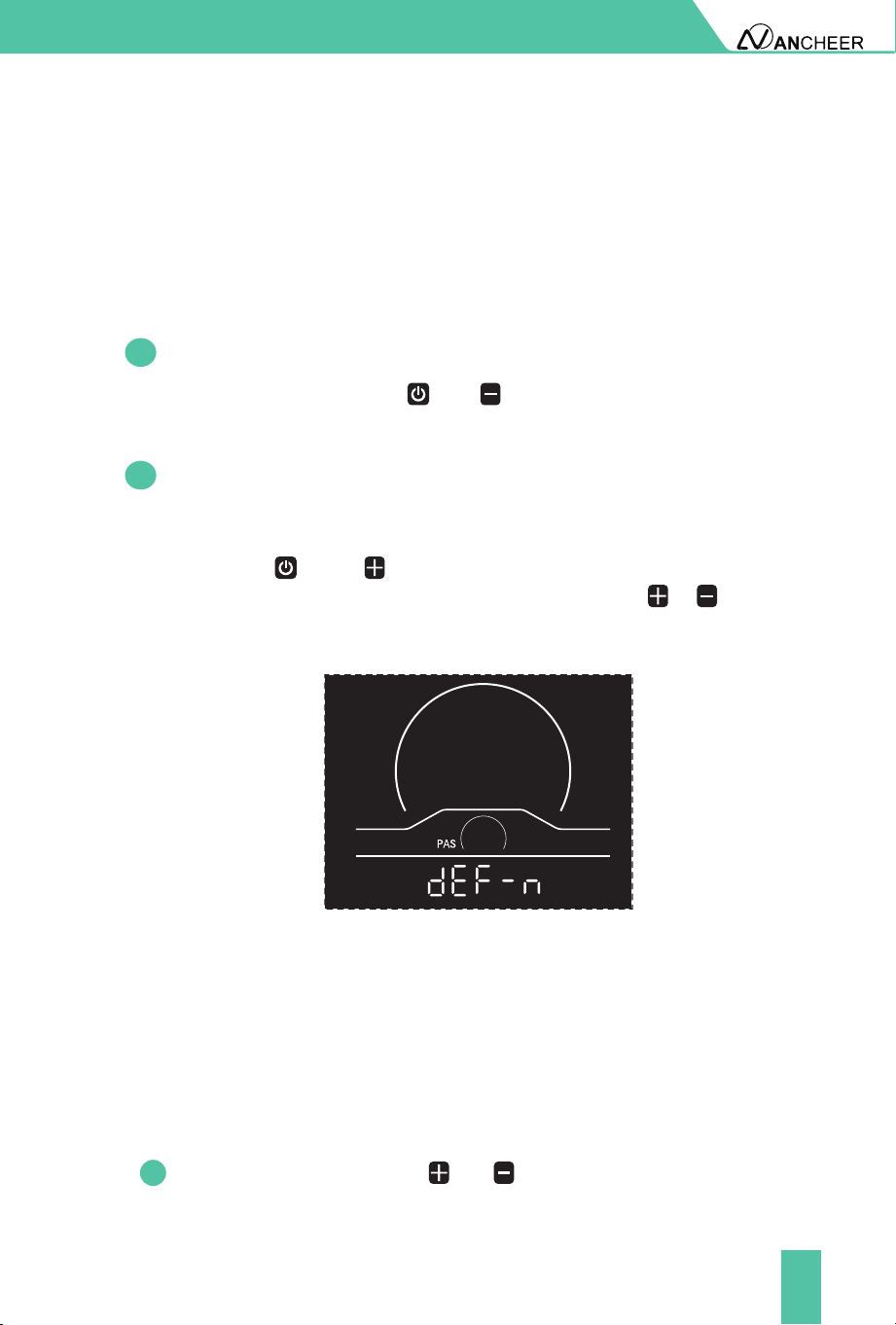
dEF refers to factory reset. dEF-n represents not to restore factory
settings, and dEF-y represents to restore factory settings. Press and hold
the buttons and at the same time for more than 2 seconds to
enter the factory reset interface, and press the button / to select
a parameter.
Fig. 6-1 Factory Reset Interface
■
■
1
23
METER OPERATION
Press the button / to switch the selection interface of general setting
options, and press the button to enter the parameter modication
interface;
Press the button / for parameter selection;
Press the button to save the parameter and return to the selection
interface of custom setting options;
Press and hold the button to save the parameter and exit the
selection interface of custom setting options.
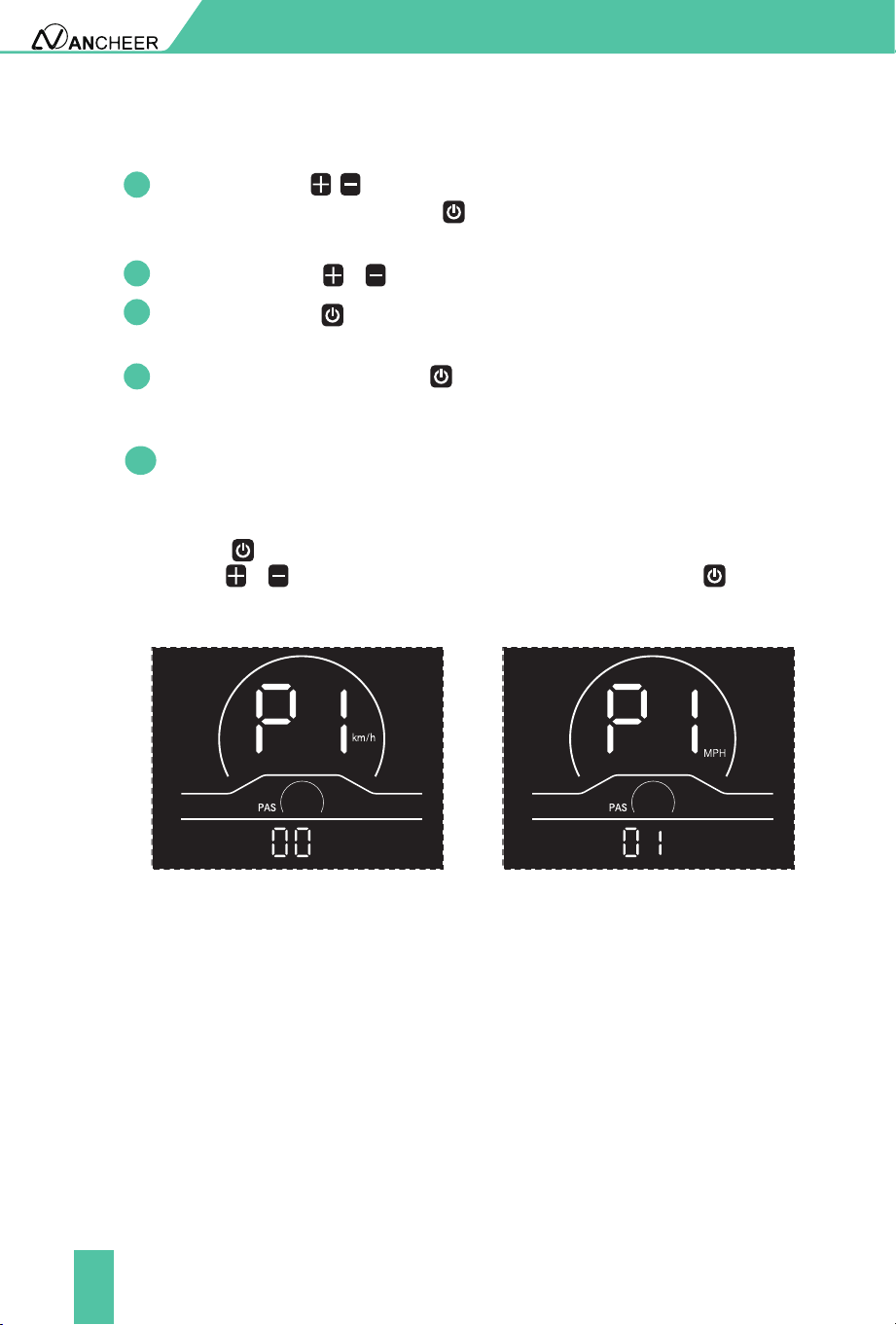
P1 refers to the metric/imperial system setting option. 00 represents
the metric system, and 01 represents the imperial system. Press the
button to enter the parameter modification interface. Press the
button / for parameter selection. Press the button to save
the parameter and return to the selection interface of general setting
options.
6.1
Metric/imperial system setting
Metric system indicator interface Imperial system indicator interface
Fig. 6-1 Metric/imperial System Setting Interface
Please use safely, and do not plug or unplug the display when it is powered on.
Please avoid bumping as far as possible.
Please do not alter the background parameter settings of the display at will,
otherwise normal riding cannot be guaranteed.
If the display fails to work normally, it should be repaired as soon as possible.
Due to product upgrades of the company, part of the displayed contents
or functions of the product you bought may be dierent from the manual,
depending on the actual model.
7. CAUTIONS
●
●
●
●
2
3
4
5
24
BATTERY AND CHARGING
Charging: Safe Operation Guide
When Charging The Battery
Safty Information
Please follow the instructions for use, otherwise the consequences are at
his own risk. Please use the original special charger. It is strictly prohibited
to use other chargers.
Pay attention to the battery type and applicable voltage that the charger
can charge, and it is strictly forbidden to mix them. The charging time shall
not exceed 12 hours, and the charging current shall not exceed 3A.
Keep the battery dry, do not put the battery in acidic, alkaline liquid or
combustibles, keep away from rain, fire and high temperature environment.
It is strictly forbidden to connect the positive and negative poles of the battery
reversely, and it is strictly forbidden to damage,disassemble or short-circuit the
battery. Contact between the battery contacts and metal objects such as paper
clips, coins, keys, nails, screws or other metal items could result in shorting out
the battery and cause electrical fires, explosion, or severe burns.
Used batteries are hazardous chemicals, and the used batteries should not be
disassembled without authorization, and recycled by relevant professional
departments.
It is forbidden to modify the battery, electronic control system and the frame
structure of the bike, etc. Otherwise, it may cause safety hazards and void the
warranty service. If you continue to do so, all will be at your own peril.
Use the original battery.
Do not replace it with other brand’s or product’s battery.
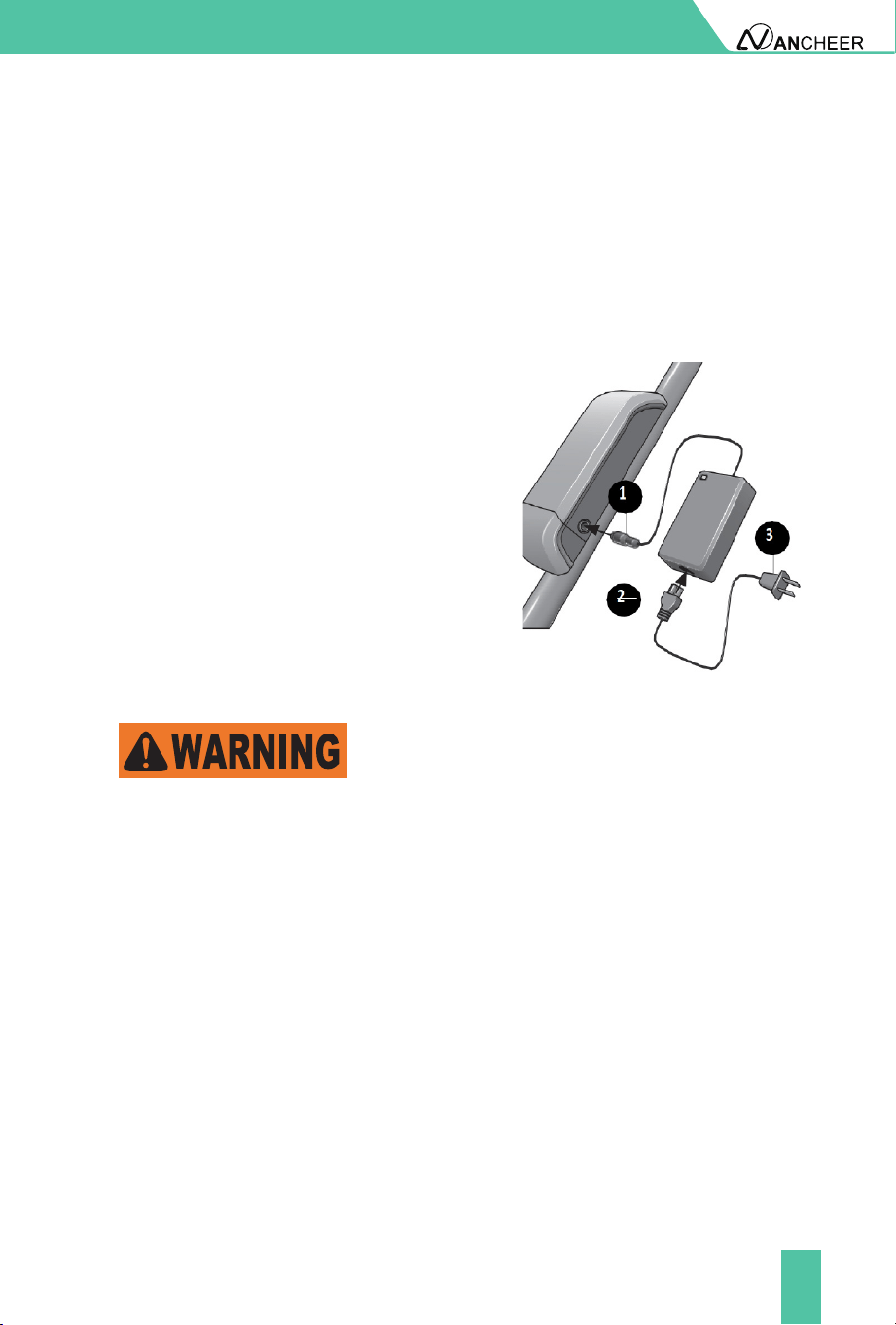
Insert the charger probe into the charger
port on the e-bike battery. As shown in
the gure.
Insert the pronged end of the battery
cord into the battery charger.
Insert the AC plug into an AC outlet.
The red indicator light turns on and
will remain red until it is fully charged.
The indicator light turns green once the
battery is fully charged.
Failure to observe the following warnings could result in electrical res, explosion,
severe burns or electrocution.
●
●
●
●
●
●
●
●
❶
❷
❸
❹
25
BATTERY AND CHARGING
The battery and battery charger contain hazardous materials. Always
keep the battery and battery charger away from children, animals, or
persons incapable of understanding the potential hazards.
A damaged battery or battery charger (e.g. cable, plug or housing)
may result in leakage of hazardous materials or be a potential source
of sparking and fire. Always examine the battery and battery charger
before each use. Never charge a damaged battery or use a damaged
battery charger.
Please use the original special charger. It is strictly prohibited to use
other chargers. Charging the battery with an incompatible battery
charger may result in electrical fires, explosion, severe burns or
electrocution. Ensure the battery charger and the A/C outlet are the
same voltage before charging the battery. Never use the battery charger
to charge any other batteries.
Pay attention to the battery type and applicable voltage that the charger
can charge, and it is strictly forbidden to mix them.
The charging time shall not exceed 12 hours, and the charging current
shall not exceed 3A.
Charging at 0°C~40°C/ 32°F~104°F, and discharging at -5°C~40°C/
23°F~104°F. Please do not store the battery in temperatures above 35°C/
95°F or below -5°C/ 23°F.
The battery and battery charger contain no serviceable parts. Do not
open, disassemble, or modify the battery or charger.
Improper handling of the battery and battery charger may result in
electrical fires, explosion, severe burns or electrocution.
Do not move the battery or battery charger during charging.
Do not hold the battery charger during a thunder or lighting storm.
Do not plug or unplug the battery charger with wet hands.
Do not place any items on the battery charger.
When charging, it should be placed in a ventilated environment, and it is
strictly forbidden to charge in a conned space, residential building or in a
hot environment.
The charger should not be carried with the ebike as much as possible. If
it is really necessary to carry it, it should be placed in the toolbox after
the shock absorption treatment is done. It is not allowed to disassemble
or replace the components in the charger by yourself.
●
●
●
●
●
●
●
●
●
●
●
●
●
●
26
BATTERY AND CHARGING
Reminder
It is recommended to charge the battery in the reproof battery
charging cover when charging. And the battery should be stored in
the reproof battery charging cover when not in use.
Charge a new battery 4 hours before you use it in your product for the rst
time.
If the battery is dropped or damaged due to a bicycle accident, there may be
a danger of electrolyte leakage. Please stop using it immediately.
It is better not to wait until the power is completely exhausted before charging,
which can more eectively extend the battery life. Besides, Overheating or
undercharging the battery may shorten battery life.
How far can a fully charged battery go?
It depends on the load weight, road conditions and battery capacity. But
under the same conditions, the average speed can last longer riding distances.
Using pedal assist mode allows you to go further.
Battery must be recycled or disposed of in an environmentally sound
manner.
Do not dispose of the battery in a fire. The battery may explode or
leak.
Do not dispose of a battery in your regular household trash.
●
●
●
Battery Disposal
It is recommended to charge the battery in the fireproof battery charging
cover when charging. And the battery should be stored in the fireproof
battery charging cover when not in use.
When not in use for a long time, keep the battery in a cool and dry place,
and charge the battery for two hours a month.
●
●

27
MAINTENANCE
The front and rear wheels of the vehicle should be located in the center of
the front fork or frame.
After riding, please store the bike in a place without sunlight and rain.
Water showering is forbidden, and the surface of the car body can be
wiped with a semi-dry cloth.
Do not touch the charging hole on the bicycle, or touch it with metal,
otherwise, it may cause an accident due to an instantaneous short circuit
of the current.
Check all cables and cable housings for fraying, breaks, rust, or corrosion
and replace if necessary.
Check the motor and brake frequently, and do not ll the brake area with
oil. Additionally, check the brake pads for any damage as they will be
worn over time and eventually need replacement.
Regularly check the various screws of the car and the places that need
to be fastened, and regularly reinforce to prevent injury and unnecessary
wear and tear on your e-bike.
Recommended torque (unit: kgf.cm): the horizontal screw 60-80, the stem
screw 175- 200, the seat cushion screw 175-250, the wheel screw 320-450.
Regularly check the tension of the chain, which can be adjusted by the
chain regulator.
Always check the tire for scratches, cracks, or excessive wear. The inner
tube and the valve should be perpendicular to the wheel hub and not
crooked. Accidentally punctured, damaged or excessively worn inner and
outer tires need to be replaced immediately, please seek professional
technicians to repair or replace your tires.
It is forbidden to modify key structural parts such as the frame, front fork,
standpipe, and electrical function parts. If damaged, use the original parts
to replace it. Otherwise, the guarantee service will not be provided. Any
loss or damage caused by the modication shall be solely responsible.
●
●
●
●
●
●
●
●
●
●
●

28
One-Year Limited Hardware Warranty
Your electric bike includes a One Year Limited Hardware Warranty. ANCHEER
provides warranty service for the electric bikes. If there is a hardware defect
and a valid claim is received during the warranty period, we will resend new
parts within the scope permitted by law.
The Warranty covers product defects in materials and workmanship under
normal use. This Warranty is limited to original purchasers and is not
assignable or transferable.
The Warranty starts on the date of your purchase and lasts for one year (the
"Warranty Period") and the Warranty Period is not extended if the product is
repaired or replaced.
The Warranty does not cover any damage due to: improper use; failure to
follow the product instructions or to perform any preventive maintenance;
unauthorized repair; external causes such as accidents, abuse, or other
actions or events beyond our reasonable control.
Support Services
We provide lifetime customer support services. For any questions about
the product, please contact customer service from where you brought the
equipment. We will be happy to answer your questions.
You can also email us your inquiries at support@iancheer.com.
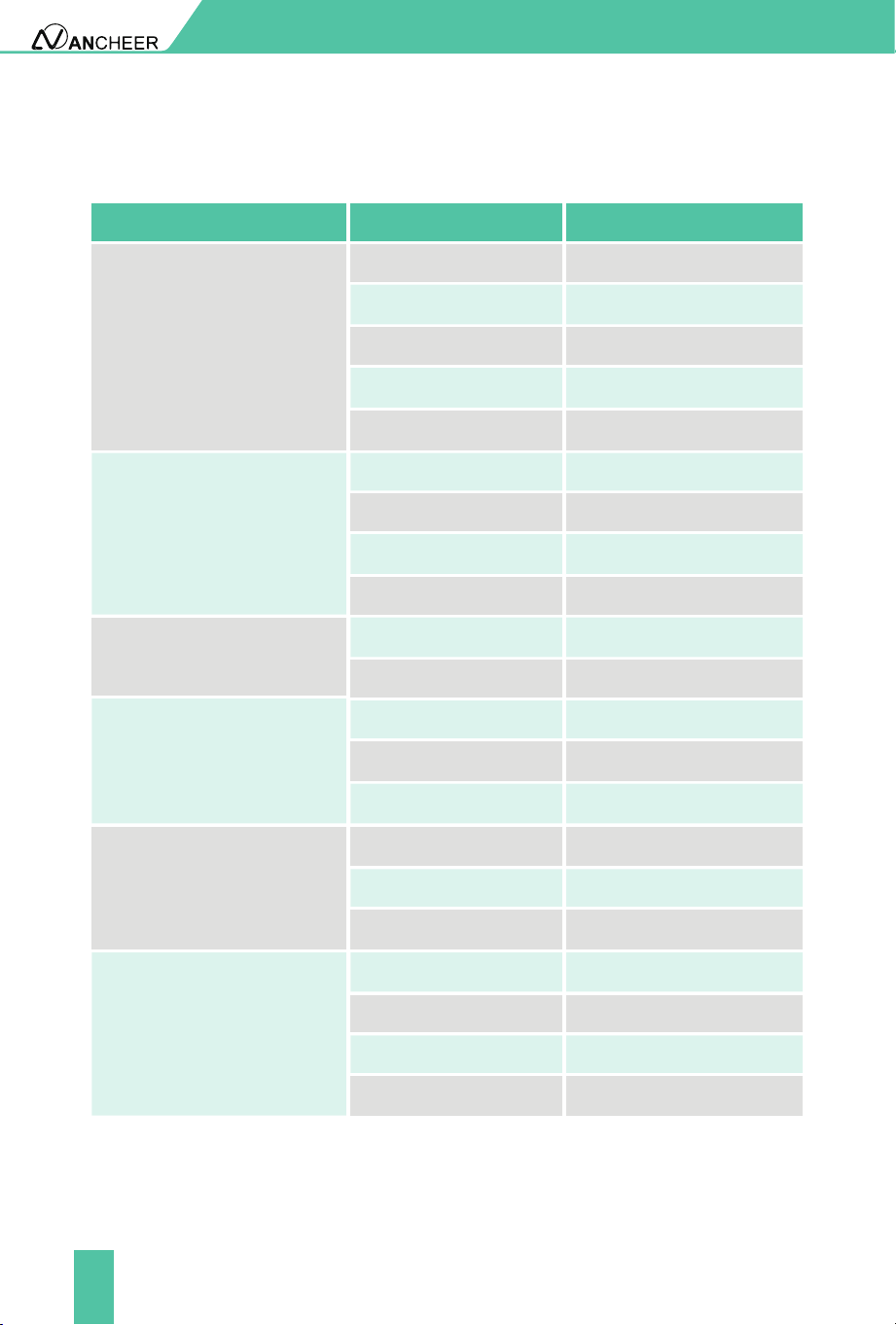
Accessories Warranty Period
Service Content
Quality Problem
A year
A year
A year
A year
A year
Motor
Controller
Charger
Lithium
Battery
Accelerator
Free delivery of parts
Free delivery of parts
Free delivery of parts
Free delivery of parts
Free delivery of parts
Motor will not be able
to use
Natural conditions (such
as impact force cannot
be used except damage)
Failure occurs under
normal use
Failure occurs under
normal use
Can't charge discharge
under normal use
WARRANTY
29
ATTACHMENT
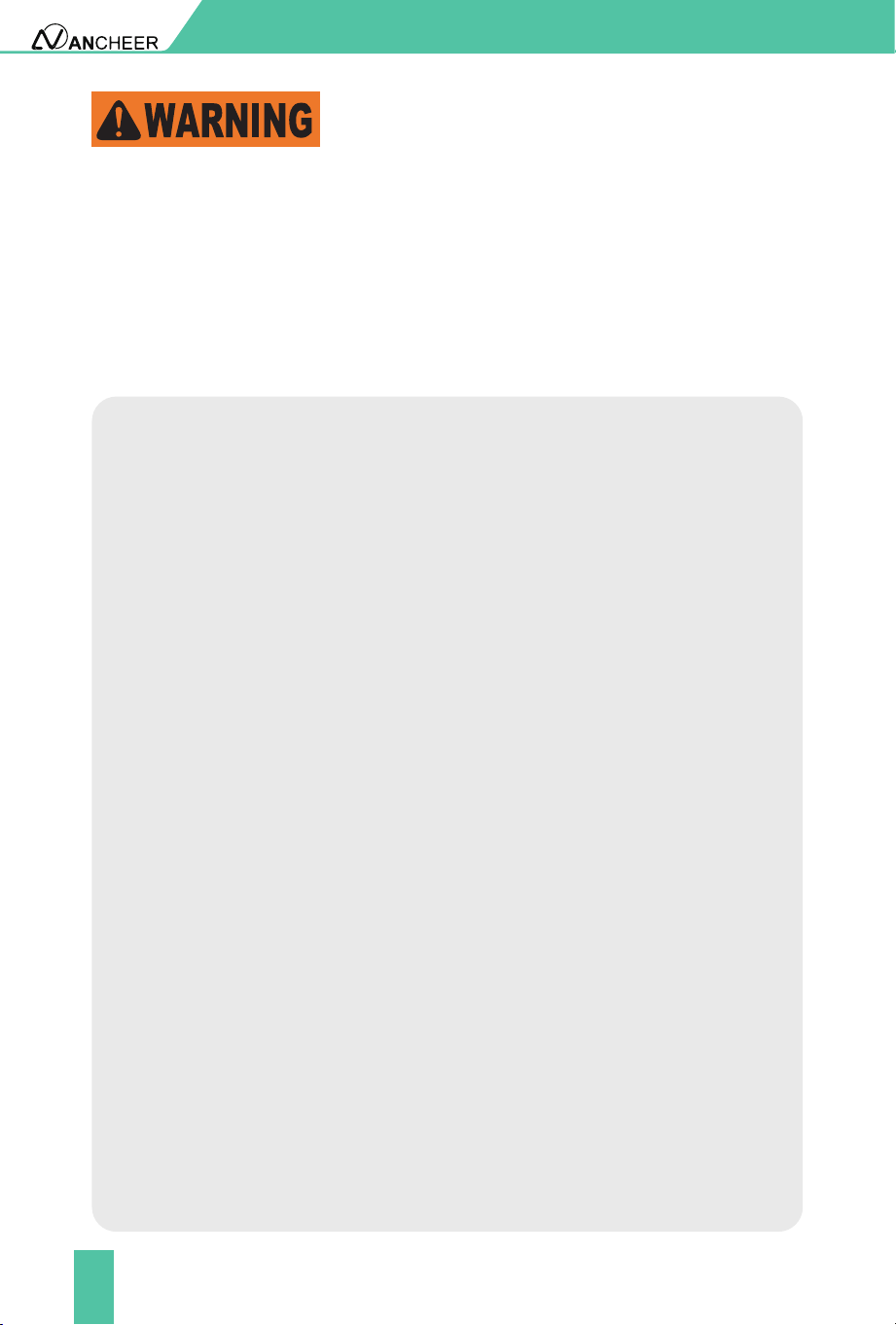
Technical Parameters
Performance index Project Parameter
Wheel Size
Vehicle Size
26*2.1 Inches
Frame Material Aluminium Alloy
Maximum Load 265 lbs (120KG)
Vehicle Weight 48 lbs (21.78KG)
Maximum Speed 20 mph (32km/h)
Rear Derailleur 7-Speed
Front Derailleur 3-Speed
Working Temperature
23°F-104°F (-5℃~40℃)
Rated Voltage 48V
Battery Capacity 10.4Ah
Output Current 3A
Motor Power
Display
500W
LCD Display
Motor Type
Brake
Light
Suspension
Brushless Gear Motor
Disc brake
Front light
Suspension front fork
Maximum Torque 55N.m
Input Voltage AC100-240V
Output Voltage DC54.6V
1680*640*1080mm
Basic
Parameters
Performance Parameters
Battery Parameters
Motor Parameters
Other Parameters
Charger Parameters

30
Remarks:
The amount of battery remaining, load of the bike(weight of rider and
cargo), tire pressure, road environment, chain and wheel axle lubrication,
etc. will aect the maximum speed;
Riding habits, temperature, load, tire pressure, road environment and
other factors will aect the riding range.
●
●
ATTACHMENT
31
WARNING
Operation General
Personal Restrictions
Only use the e-bike and the drive assist system for safe, recreational riding.
Use of the e-bike for a purpose it was not intended for is dangerous and
could result in property damage, serious injury or death. Always follow the
instructions for intended use and limitations.
Use of this e-bike by persons (including children) with reduced physical,
sensory or mental capabilities or persons lacking experience and
knowledge in the use of the e-bike could result in serious injury or death.
The owner of this e-bike must ensure this product is not used by people
with the conditions described above. Always follow the rules, regulations
and laws (including age limits) related to the use of an e-bike in its area of
use.
A child may not realize or understand the e-bike has moving parts and
components (e.g. battery). Never allow children to play or come into
contact with the e-bike or its parts. Always follow all rules, regulations and
laws regarding age limits and operation in the e-bike area of use.
Riding the e-bike through water could result in loss of control and damage
to the drive assist system. Do not ride into, or attempt to ride through,
water or sub-merge any part of the e-bike.
Riding with the kickstand in the down position may result in unexpected
contact with the ground or other objects causing loss of control. Always
ensure the kickstand is in the up position and securely locked in place
before riding the e-bike.
Sitting on the e-bike with the kickstand down may result in the e-bike
tipping over. Never sit on the e-bike when it is only supported and stabilized
by the kickstand. The kickstand is not designed to support the weight of a
person.
Overloading a rear basket could create dangerous riding conditions. Always
observe the maximum weight limit. Never overload the rear basket.
An improperly secured load on a rear rack could create dangerous riding
conditions. Always ensure the load on the rear rack is properly secured
before riding.
●
●
●
●
●
●
●
●

32
Never move the shifter while pedaling backward, nor pedal backwards
immediately after having moved the shifter. This could jam the chain and
cause serious damage to the bicycle.
Like any mechanical device, a bicycle and its components are subject to
wear and stress. Dierent materials and mechanisms wear or fatigue from
stress at dierent rates and have dierent life cycles. If a component’s life
cycle is exceeded, the component can suddenly and catastrophically fail,
causing serious injury or death to the rider.
Scratches, cracks, fraying and discoloration are signs of stress caused
fatigue and indicate that a part is at the end of its useful life and needs to be
replaced. Product life is often related to the kind of riding you do and to the
treatment to which you submit the bicycle. The bicycle’s warranty is not
meant to suggest that the bicycle cannot be broken or will last forever. It
only means that the bicycle is covered subject to the terms of the warranty.
Frequent inspection of your bike is important to your safety. Periodic,
more detailed inspection of your bicycle is important. How often this more
detailed inspection is needed depends upon you.You, the rider/owner, have
control and knowledge of how often you use your bike, how hard you use it
and where you use it. The materials used to make your bike determine how
and how frequently to inspect. Ignoring this WARNING can lead to frame,
fork or other component failure, which can result in serious injury or death.
●
●
●
●
Operation Details:
Correct tightening force on fasteners- nuts, bolts, screws- on your bicycle is
important. Too little force, and the fastener may not hold securely. Too much
force, and the fastener can strip threads, stretch, deform or break. Either
way, incorrect tightening force can result in component failure, which can
cause you to loose control and fall.
Loose or damaged handlebar grips or extensions can cause you to lose
control and fall. Unplugged handlebars or extensions can cut you and cause
serious injury in an otherwise minor accident.
●
●

33
Operation Details:
The area in which you ride may require specic safety devices. It is your
responsibility to familiarize yourself with the laws of the area where you
ride and to comply with all applicable laws, including properly equipping
yourself and your bike as the law requires. Observe all local bicycle laws
and regulations. Observe regulations about bicycle lighting, licensing of
bicycles, riding on sidewalks, laws regulating bike path and trail use, helmet
laws, child carrier laws, special bicycle trac laws. It’s your responsibility to
know and obey the laws. Failure to wear a helmet when riding may result in
serious injury or even death.
Do not remove the front or rear reectors or reector brackets from your
bicycle. They are an integral part of the bicycle’s safety system. Removing
the reectors reduces your visibility to others using the roadway.Being
struck by other vehicles may result in serious injury or death.The reector
brackets may protect you from a brake straddle cable catching on the tire in
the event of brake cable failure. If a brake straddle cable catches on the tire,
it can cause the wheel to stop suddenly, causing you to lose control and fall.
Although many catalogs, advertisements and articles about bicycling depict
riders engaged in extreme riding, this activity is extremely dangerous,
increases your risk of injury or death, and increases the severity of any injury.
Remember that the action depicted is being performed by professionals
with many years of training and experience. Know your limits and always
wear a helmet and other appropriate safety gear. Even with state- of the-art
protective safety gear, you could be seriously injured or killed when jumping,
stunt riding, riding downhill at speed or in competition.Bicycles and bicycle
parts have limitations with regard to strength and integrity, and this type of
riding can exceed those limitations or dramatically reduce the length of their
safe use.
Failure to conrm compatibility, properly install, operate and maintain
any component or accessory can result in serious injury or death.Exposed
springs on the saddle of any bicycle tted with a child seat can cause serious
injury to the child.Changing the components on your bike with other than
genuine replacement parts may compromise the safety of your bicycle
and may void the warranty. Contact customer service before changing the
components on your bike.
●
●
●
●

34
If your seat post is not inserted in the seat tube, the seat post, binder or even
frame may break, which could cause you to lose control and fall.
When making saddle angle adjustments with a single bolt saddle clamp,
always check to make sure that the serrations on the mating surfaces of the
clamp are not worn. Worn serrations on the clamp can allow the saddle to
move, causing you to lose control and fall. Always tighten fasteners to the
correct torque. Bolts that are too tight can stretch and deform. Bolts that are
too loose can move and fatigue. Either mistake can lead to a sudden failure
of the bolt, causing you to lose control and fall.
An insuciently tightened stem clamp bolt, handlebar clamp bolt or bar end
extension clamping bolt may compromise steering action, which could cause
you to lose control and fall. Place the front wheel of the bicycle between
your legs and attempt to twist the handlebar/stem assembly. If you can twist
the stem in relation to the front wheel, turn the handlebars in relation to the
stem, or turn the bar end extensions in relation to the handlebar, the bolts
are insuciently tightened.Be aware that adding aerodynamic extensions
to handlebars will change the steering and braking response of the bicycle.
Bolt or bar end extension clamping bolt may compromise steering action,
which could cause you to lose control and fall. Place the front wheel of
the bicycle between your legs and attempt to twist the handlebar/stem
assembly. If you can twist the stem in relation to the front wheel, turn the
handlebars in relation to the stem, or turn the bar end extensions in relation
to the handlebar, the bolts are insuciently tightened.Be aware that adding
aerodynamic extensions to handlebars will change the steering and braking
response of the bicycle.
WARNING! The shorter the brake lever reach, the more critical it is to have
correctly adjusted brakes, so that full braking power can be applied within
available brake lever travel. Brake lever travel insucient to apply full
braking power can result in loss of control, which may result in serious injury
or death.
All quick-release levers should be inspected before every ride to be sure they
are fully closed and secure. Failure to properly close a quick-release lever
can cause loss of control of the bicycle resulting in injury or death.Make sure
the wheel is properly seated and the quick-release lever is properly closed.
Disregarding or misunderstanding of the following safety warnings, the
safety warnings in the manuals associated with the e-bike parts, and safety
labels on the e-bike could result in serious injury or death.
●
●
●
●
●
●
●
35
WARNING! The shorter the brake lever reach, the more critical it is to have
correctly adjusted brakes, so that full braking power can be applied within
available brake lever travel. Brake lever travel insucient to apply full
braking power can result in loss of control, which may result in serious injury
or death.
All quick-release levers should be inspected before every ride to be sure they
are fully closed and secure. Failure to properly close a quick-release lever
can cause loss of control of the bicycle resulting in injury or death.Make sure
the wheel is properly seated and the quick-release lever is properly closed.
Disregarding or misunderstanding of the following safety warnings, the
safety warnings in the manuals associated with the e-bike parts, and safety
labels on the e-bike could result in serious injury or death.
Anyone assembling, using, maintaining, transporting or storing this e-bike must
read, understand, and follow these safety warnings before performing any of the
actions stated.
●
●
●
SAVE THESE INSTRUCTIONS.

Input: DC 54.6V, 3A max
Max Speed: 20 mph (32km/h)
Power: 500W
Tel: +1 626 688 9296
Monday-Friday
9:00-12:00 AM PST
14:00-18:00 PM PST
support@iancheer.com
ANCHEER Customer Service
Customer Service
Dongguan XiaoBai Intelligent Mobility Co., Ltd
Made in China
Model: AMA005870
E Bike