THANK YOU
continually create quality products designed to enhance your home. Visit us online to see our full line of products available for your home
improvement needs. Thank you for choosing Hampton Bay!
USE AND CARE GUIDE
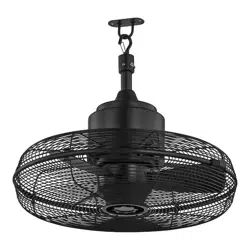
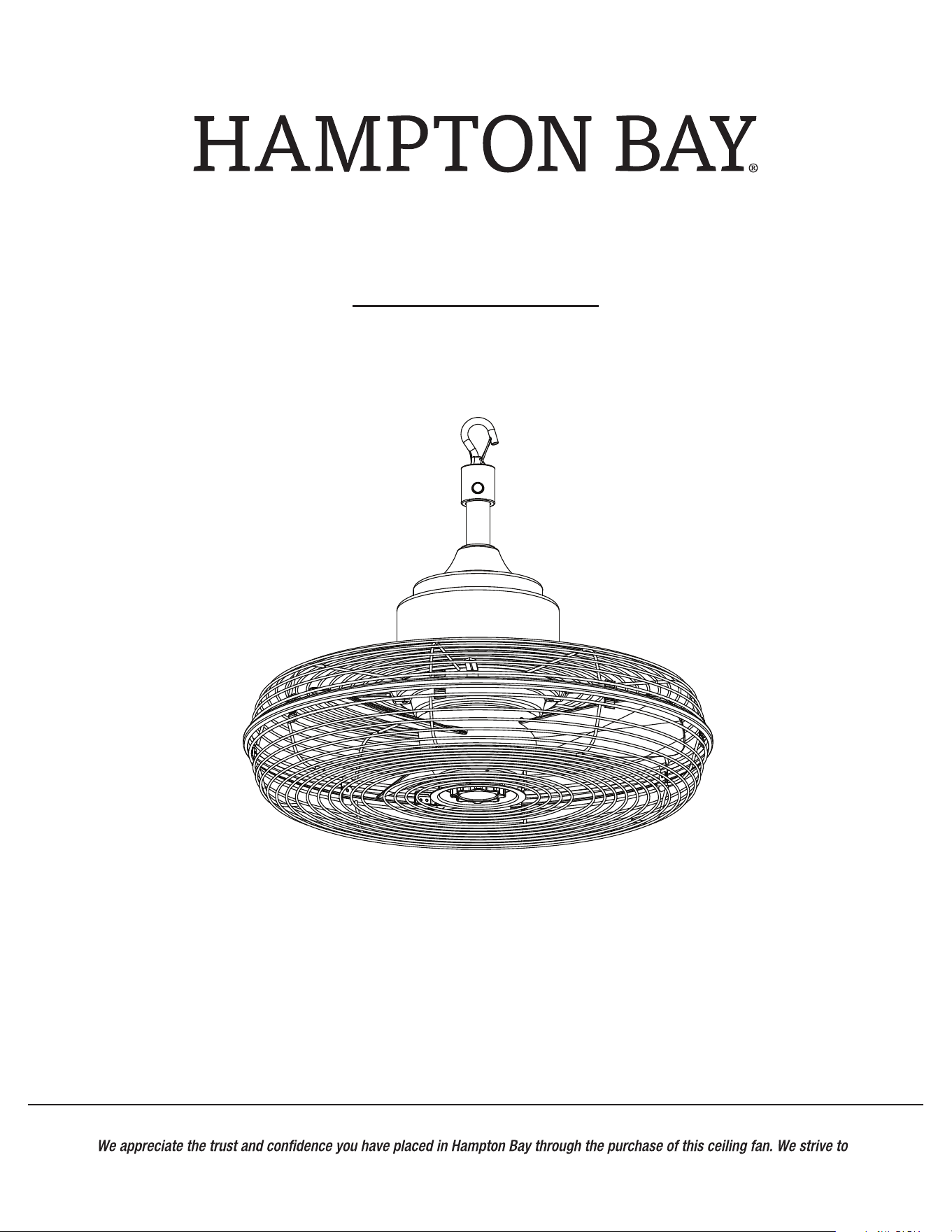
20 in. Indoor/Wet Outdoor Anywhere Fan
Questions, problems, missing parts? Before returning to the store,
call Hampton Bay Customer Service
8 a.m. - 7 p.m., EST, Monday – Friday, 9 a.m. – 6 p.m., EST, Saturday
1-855-HD-HAMPTON
HAMPTONBAY.COM
Item #1000 000 000
Model #SFZ-500-1, SFZ-500-2, SFZ-500-3
2
Table of Contents
Table of Contents . . . . . . . . . . . . . . . . . . . . . . . . . . . . . . . . . . . 2
Safety Information . . . . . . . . . . . . . . . . . . . . . . . . . . . . . . . . . . 2
What is covered . . . . . . . . . . . . . . . . . . . . . . . . . . . . . . . . . . . 3
What is not covered . . . . . . . . . . . . . . . . . . . . . . . . . . . . . . . . 3
Warranty . . . . . . . . . . . . . . . . . . . . . . . . . . . . . . . . . . . . . . . . . . 3
Pre-Installation . . . . . . . . . . . . . . . . . . . . . . . . . . . . . . . . . . . . . 4
Planning installation . . . . . . . . . . . . . . . . . . . . . . . . . . . . . . . 4
Maintenance . . . . . . . . . . . . . . . . . . . . . . . . . . . . . . . . . . . . . . . 12
Care & Cleaning . . . . . . . . . . . . . . . . . . . . . . . . . . . . . . . . . . . . 11
Safety Information
2 Year Limited Warranty . . . . . . . . . . . . . . . . . . . . . . . . . . . . .3
Hardware included . . . . . . . . . . . . . . . . . . . . . . . . . . . . . . . . . 5
Package contents . . . . . . . . . . . . . . . . . . . . . . . . . . . . . . . . . 6
Tools required . . . . . . . . . . . . . . . . . . . . . . . . . . . . . . . . . . . . 4
Installation . . . . . . . . . . . . . . . . . . . . . . . . . . . . . . . . . . . . . . . . .7
Operation . . . . . . . . . . . . . . . . . . . . . . . . . . . . . . . . . . . . . . . . . 10
WARNING: When using electrical appliances, basic safety
precautions, including the following, should always be
injury to persons.
READ AND SAVE THESE INSTRUCTIONS
□
Pleases read and understand this entire manual before attempting
to assemble, install or operate the product. Thoroughly review all
assembly information and drawings and be sure you understand
the assembly requirements. Do not use the fan unless you have
read these instructions.
□ Use this appliance only as described in the manual. Any other use
shock or injury to persons. The manufacturer assumes no
responsibility for damage or injury due to unauthorized use or
the product warranty.
□ This fan is designed for indoor and covered outdoor use. This
product is intended for commercial use.
INTENDED USE
RISK TO CHILDREN AND IMPAIRED PERSONS
WARNING: Risk to Children and Impaired Persons
□ Close supervision is necessary when any appliance is used by or
near children.
□ Keep the fan out of reach of young children.
□ This fan is not intended for use by people (including children) with
reduced physical, sensory or mental capabilities or lack of
experience and knowledge unless they have been given
supervision or instruction concerning use of the fan by a person
responsible for their safety.
SAFETY OF OPERATION ENVIRONMENT
□ Do not use this fan in uncovered outdoor areas or expose it to
weather or elements.
□ Ensure power is off before beginning installation.
□ Ensure the hanging structure can support a minimum weight of
65 lb and allow enough depth for safety mounting. If you are not
sure the hanging structure can support the weight, do not
attempt to install this fan as it may fall and cause damage to the
fan or personal injury.
□ Make sure the ceiling angle is not steeper than 30 degrees and
the open end of the mounting bracket (not included) is up and
facing the ceiling, if angle mounting is adopted for the fan.
□ When installation is complete, make sure all connections are
secure to prevent ceiling fan from falling.
□
appliances. Do not operate in the presence of explosive and/or
□ Do not use the fan to exhaust hazardous or explosive materials
and vapors.
□ Make sure that the fan does not get wet (water splashes etc.).
Do not immerse the fan in water or other liquids or use near
sinks, baths, or showers.
□ Place this fan away from curtains, draperies, tablecloths and
other fabrics, since they may be drawn into the fan, damage the
□ Do not run the power cord under carpeting. Do not cover the
power cord with throw rugs, runners, or similar coverings. Do
not route the power cord under furniture or appliances. Arrange
tripped over.
□ Keep work area clean and well lit.
□
□ To reduce risk of electrical shock and injury to persons, do not
use in a window.
3 HAMPTONBAY.COM
Please contact 1-855-HD-HAMPTON for further assistance.
Safety Information (continued)
OPERATION SAFETY
□ Do not operate the fan until fully assembled with all parts properly
any solid-state speed control device.
in place.
□ Do not leave the fan unattended when in use.
□
Always turn off the fan and unplug the fan when not in use, before
moving fan from one location to another, before putting on or
taking off parts, and before cleaning or performing maintenance.
To disconnect, grip plug and pull from outlet.
□
□
All servicing, apart from ordinary cleaning, should be performed by
should not disassemble, repair or rebuild the fan. There are no
user-serviceable parts inside.
□ Do not subject the fan to violent impacts.
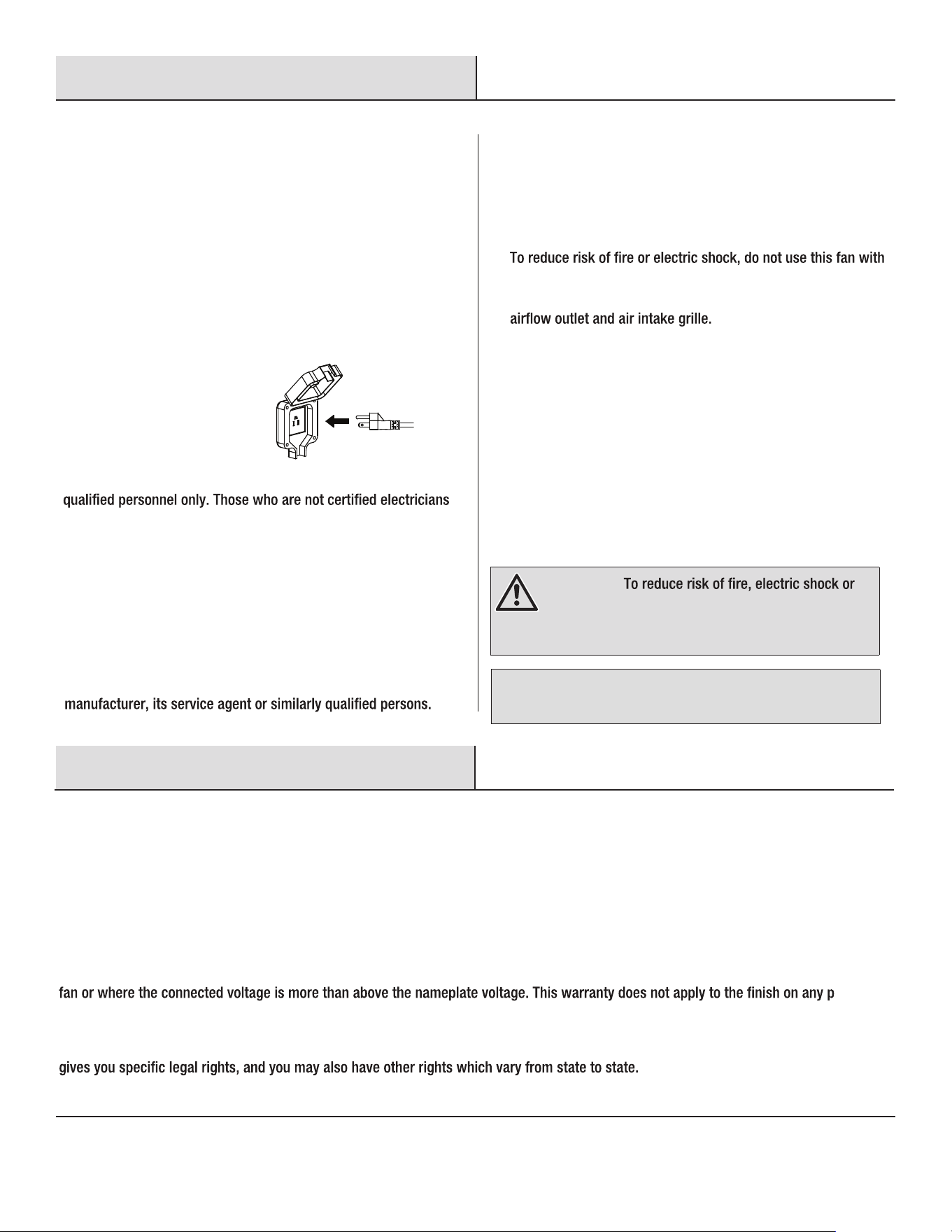
Always plug the fan directly into a GFCI-protected wall outlet/
receptacle only. Never use with an extension cord or outlet power
strip.
.
□
Do not operate any appliance with a damaged cord or plug, or after
the appliance malfunctions, or if it has been dropped or damaged
in any manner. Discard fan or return to an authorized service
facility for examination and/or repair.
□ Do not use the fan when there is damage to the power cord or plug.
If the power cord is damaged, it has to be replaced by the
□
Do not insert your hand or other objects into the guard or the
movable parts.
□
□
Do not use this fan as a dryer. Make sure nothing is blocking the
□
Do not abuse the power cord. Do not use the cord for carrying,
pulling or unplugging fan. Do not let the cord hang over the edge
of a table, counter, sharp edges, moving parts or come in contact
with oil or hot surfaces.
DISPOSAL
□ We encourage you to participate in a recycling program, so please
observe local regulations for proper disposal of discarded products.
□ Recycle raw materials instead of disposing of as waste. The
machine, accessories and packaging should be sorted for
environmentally friendly recycling.
NOTICE: Save these instructions. Refer to them frequently and use
them to instruct others who may use this fan. If you are to loan
someone this fan, loan them these instructions also.
Warranty
2-YEAR LIMITED WARRANTY
WHAT IS COVERED
The manufacturer warrants this product to be free from manufacturing defects in the material and workmanship under normal use for a
period of two years after the date of purchases by the original purchaser.
WHAT IS NOT COVERED
This warranty does not cover transit damages. This warranty does not apply to damages from accident, misuse, alteration of any kind to the
ortion of
the product. Servicing performed by unauthorized persons shall render the warranty invalid.
This warranty is not responsible for damages of any kind, including accident and consequential damages. Some states do not allow the
exclusion or limitation of the incidental or consequential damages, so the above exclusion or limitation may not apply to you. This warranty
Contact the Customer Service Team at 1-855-HD-HAMPTON or visit www.HAMPTONBAY.com.
WARNING:
injury to persons, do not use replacement parts that have
not been recommended by the manufacturer (e.g. parts
made at home using a 3D printer).
□ Do not touch the fan with wet hands.
□ Do not disassemble or modify the fan. Do not bend the fan blade or
the blade guard when cleaning.
4
Pre-Installation
PLANNING INSTALLATION
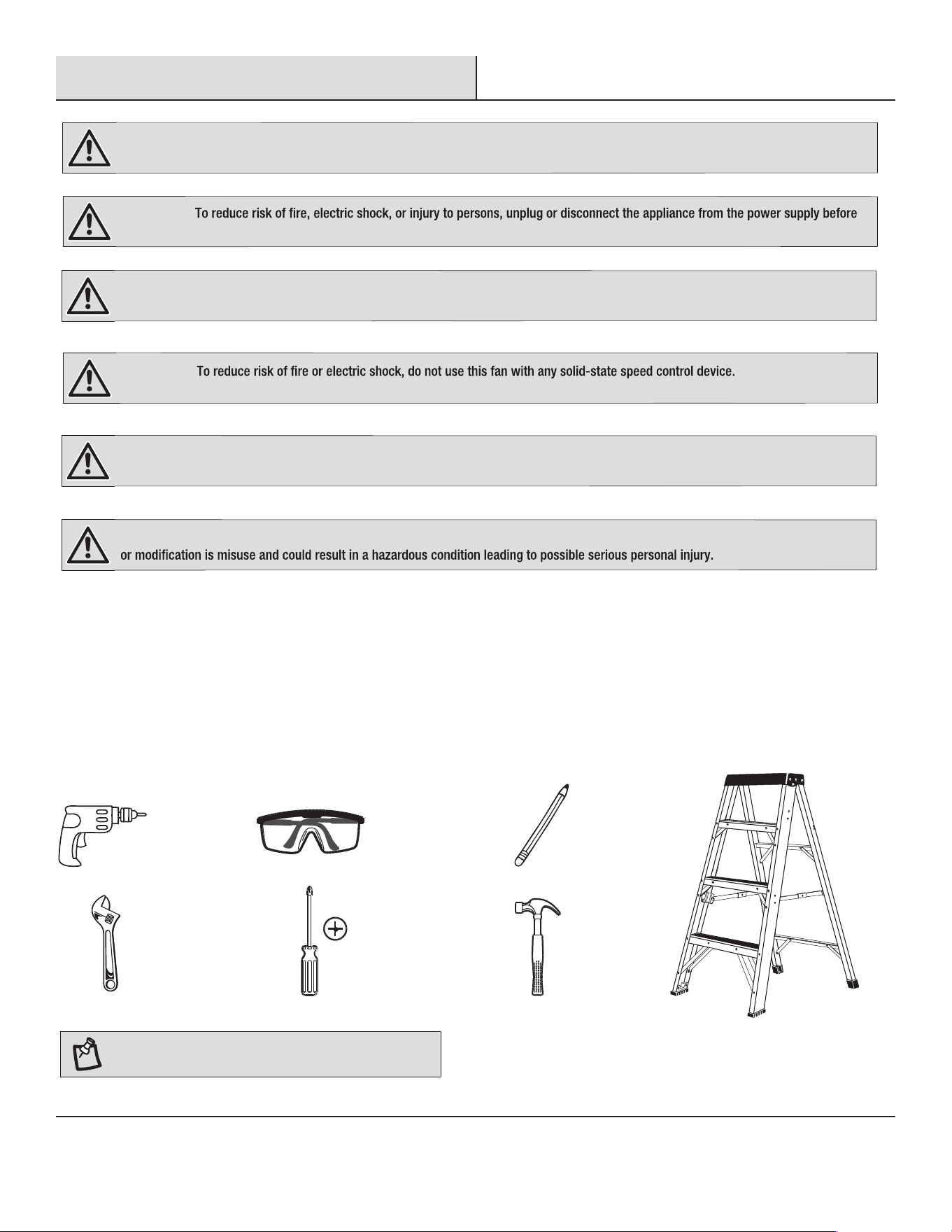
TOOLS REQUIRED
Electric
screwdriver
Safety goggles
Pencil
Claw
hammer
Step ladder
Adjustable
wrench
Phillips
screwdriver
WARNING: Items in this section are not assembled to the product by the manufacturer and require installation. Use of a product that may
have been improperly assembled could result in serious personal injury.
WARNING:
the fan installation, cleaning, or servicing.
WARNING: To reduce the risk of personal injury, do not bend the blade brackets when installing the brackets, balancing the blades, or
cleaning the fan. Do not insert foreign objects in between rotating fan blades.
WARNING:
WARNING: If any parts are damaged or missing, do not operate this product until the parts are replaced. Use of this product with
damaged or missing parts could result in serious personal injury.
WARNING: Do not attempt to modify this product or create accessories not recommended for use with this product. Any such alteration
□
□
Remove all parts from the package, and verify that everything listed in the Package Contents section are present.
□ Inspect the product carefully to make sure no breakage or damage occurred during shipping.
□ Do not discard the packing material until you have carefully inspected and satisfactorily operated the product.
NOTE: Tools not shown to actual size.
Product Specication: 120V 60Hz 0.75A Weight of the fan: approx. 15.4 lb
5 HAMPTONBAY.COM
Please contact 1-855-HD-HAMPTON for further assistance.
Pre-Installation
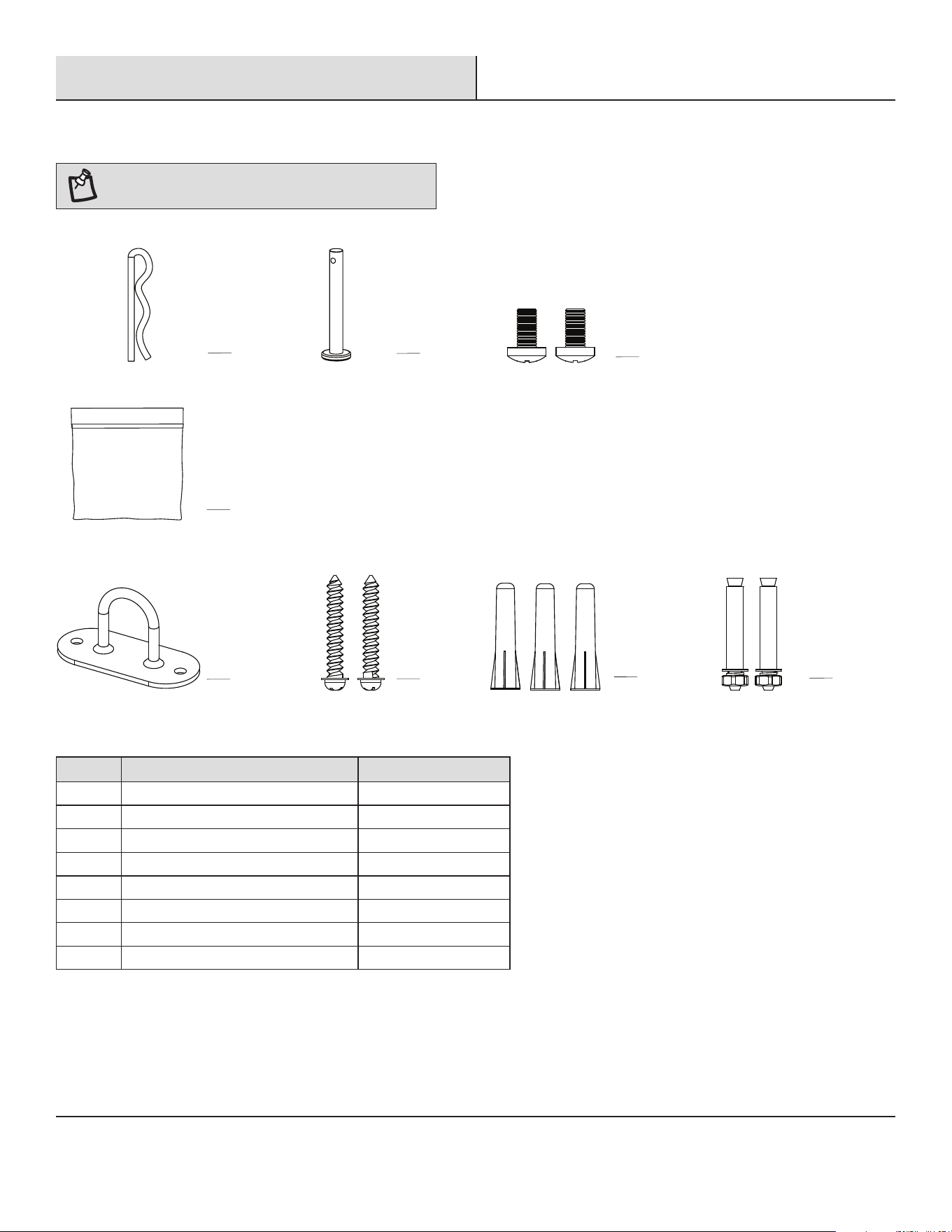
HARDWARE INCLUDED
NOTE: Hardware not shown to actual size.
Part Description Quantity
AA
Installation hardware bag
1
BB 1
CC
Clevis pin
Hitch Pin
1
DD
Lock screw
Sleeve anchor
Mounting bracket
Nail screw
Plastic anchor
2
EE 1
FF
2
3
GG
HH 2
DD
AA
EE
CC
GG
HH
BB
FF
6
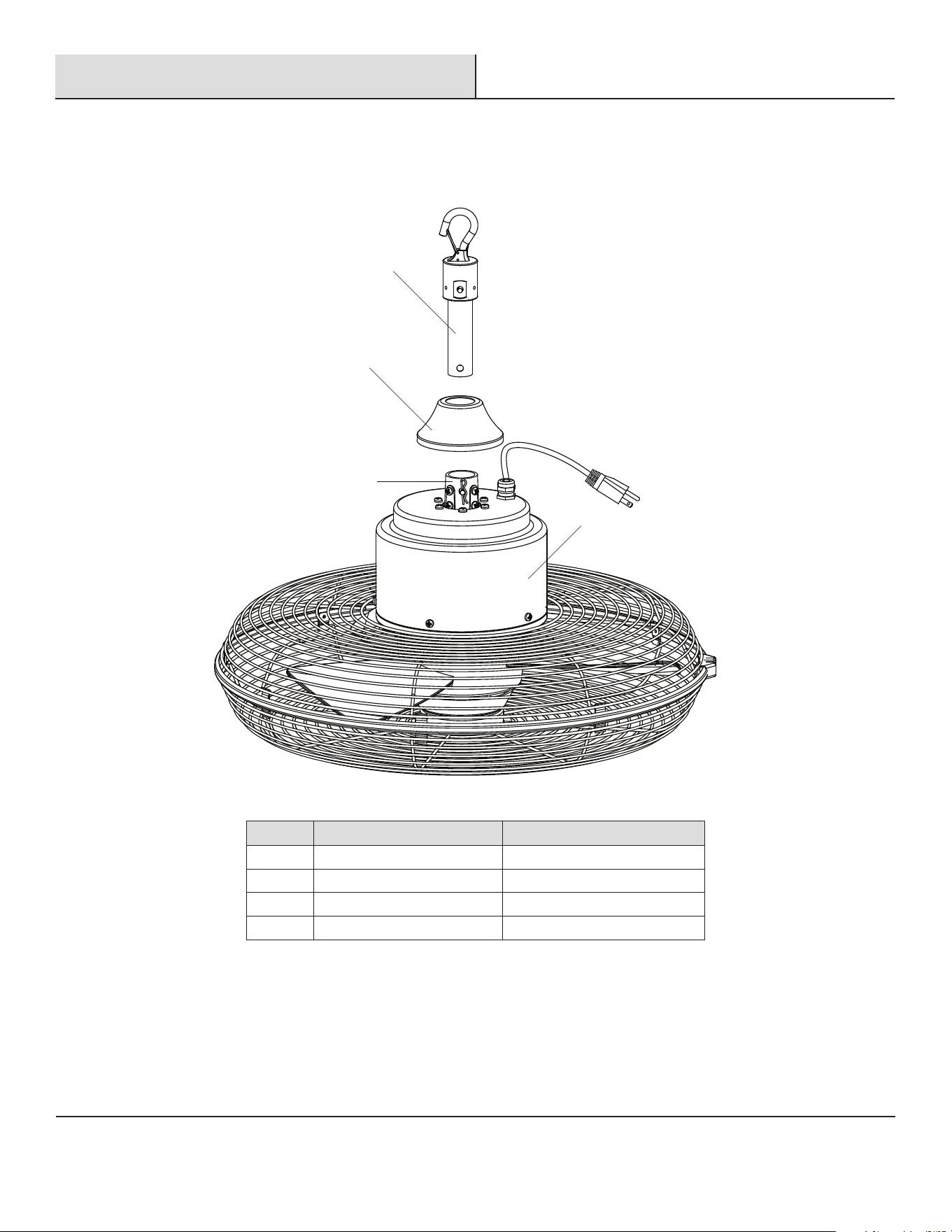
PACKAGE CONTENTS
Part Description Quantity
A
B
C
D
Pre-Installation (continued)
D
C
B
A
Hanger bracket assembly
Decorative cap
Fan Head
Mounting collar
1
1
1
1
7 HAMPTONBAY.COM
Please contact 1-855-HD-HAMPTON for further assistance.
Installation
1
Attaching Hanger Bracket Assembly
and Decorative Cap
2
Attaching Fan Head to Hanger
Bracket Assembly
WARNING:
WARNING: Ensure the hanging structure can support a
WARNING: Make sure the ceiling angle is not steeper than
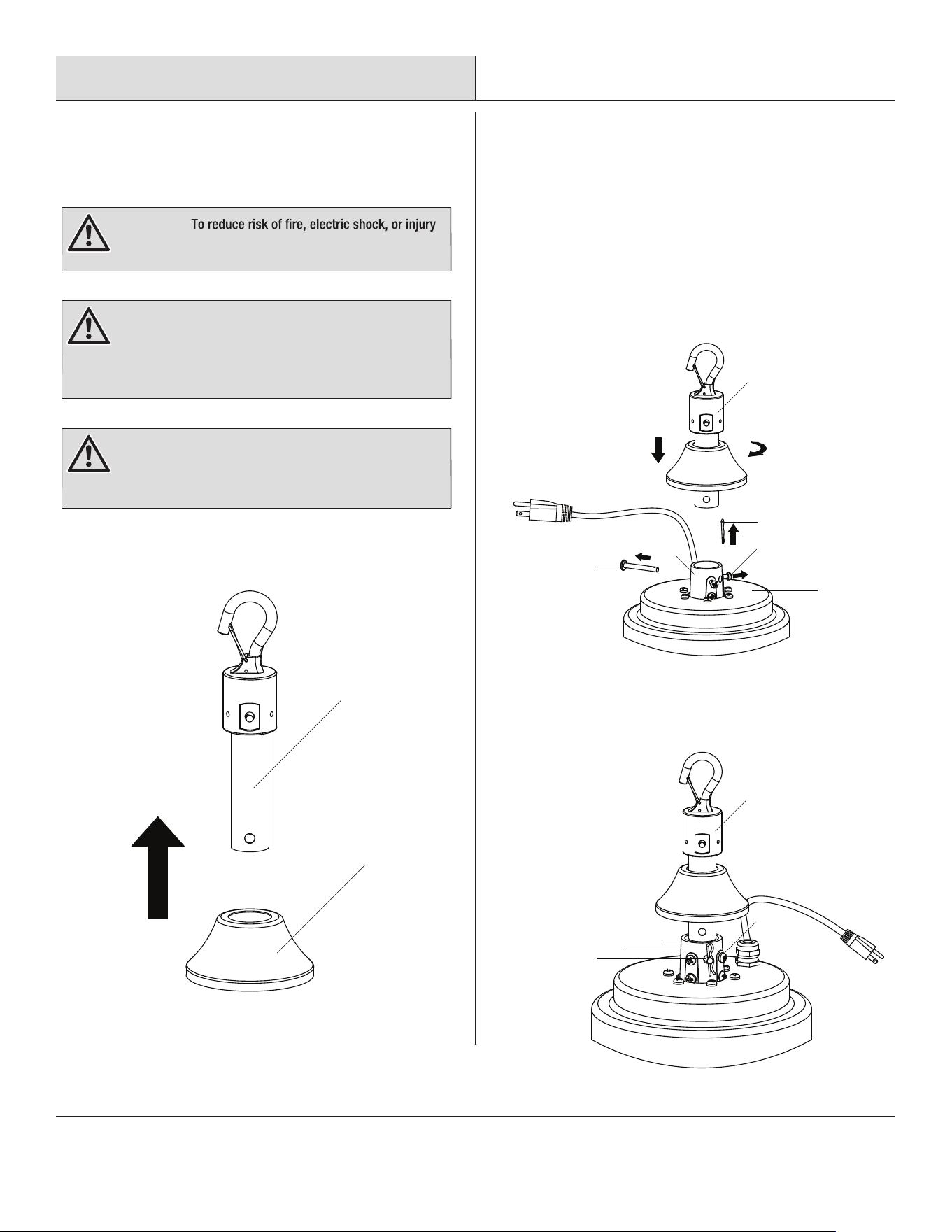
□ With the cupped side down, push up the decorative cap (B) to
top of the hanger bracket assembly (A) through the cap hole.
to persons, turn off power to wall switch or make sure the
pull chain switch in off position before beginning installation.
30 degrees and the open end of the mounting bracket (not
included) is up and facing the ceiling, if angle mounting is
adopted for the fan.
minimum weight of 65 lb and allow enough depth for safety
mounting. If you are not sure the hanging structure can
support the weight, do not attempt to install this fan as it
may fall and cause damage to the fan or personal injury.
A
B
CC
A
A
CC
AA
AA
C
C
D
BB
□ Install the clevis pin (BB) througn the holes in the mounting
collar (C) and the hanger bracket assembly (A) and then secure
it with the hitch pin (AA). Retighten the lock screws (CC).
□ Pull out the hitch pin (AA) and then remove the clevis pin (BB)
from the mounting collar (C) of fan head (D). Loosen the lock
screws (CC).
□ Insert the hanger bracket assembly (A) into the mounting
collar (C) and then rotate clockwise to make sure the hole at
the bottom of the hanger bracket assembly (A) aligns with
the hole in the mounting collar (C).
BB
8
3
Positioning the Decorative Cap
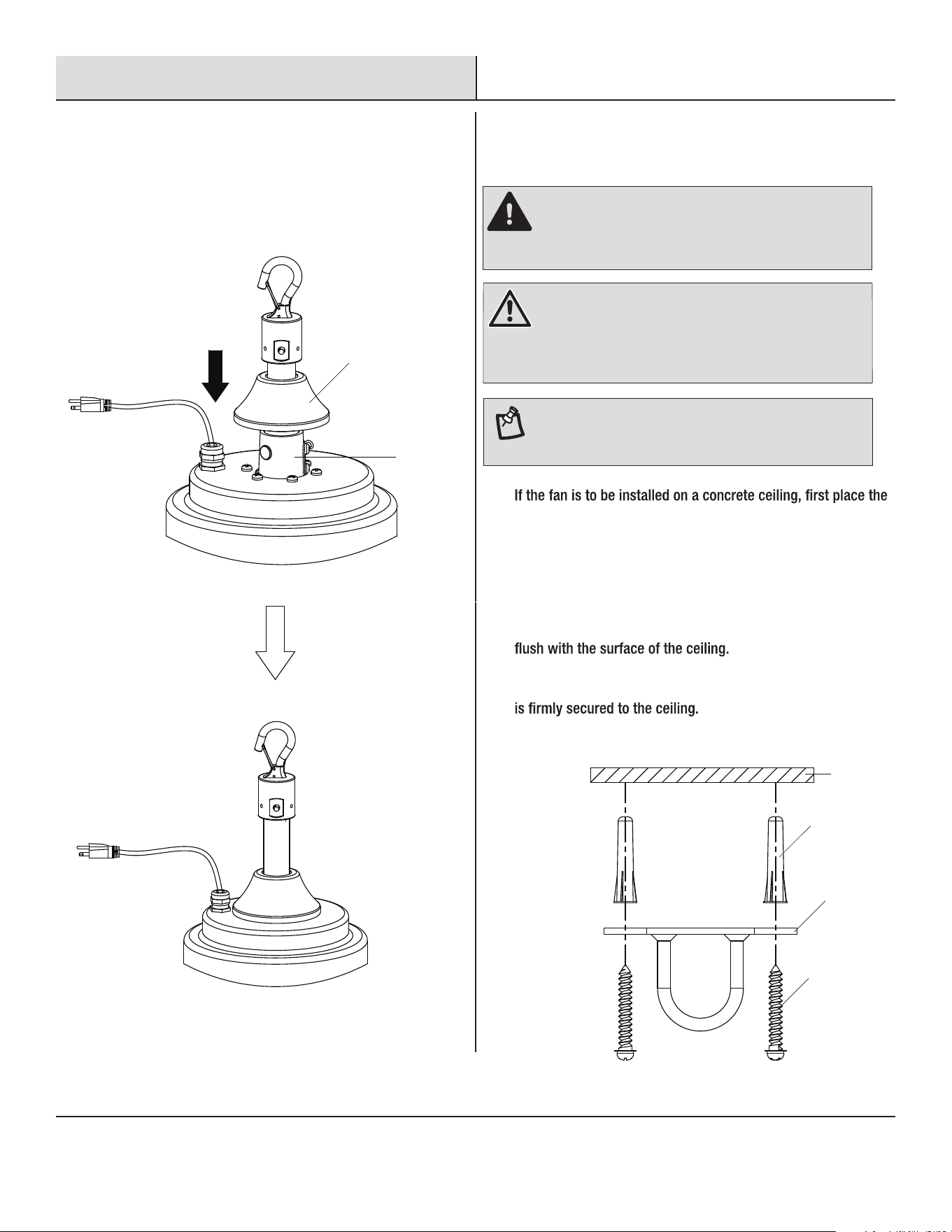
□ Push down the decorative cap (B) to cover up the mounting
collar (C).
4
Installing the Mounting Bracket to the
Ceiling
□
□
□
mounting bracket (EE) at the desired postion on the ceiling, mark
the position through the holes of the mounting bracket (EE), and
then remove the mounting bracket (EE).
Drill the correct sized holes at the mark points, using an electric
screwdriver and the nail screws (FF) and then pull the screws out.
Clear the debris and then insert the plastic anchors (GG) into the
drilled holes. Tap in with a hammer if necessary to ensure they are
Drive the nail screws (FF) through the mounting bracket (EE) and
into the plastic anchors (GG). Make sure the mounting bracket (EE)
NOTE: Remove all parts from the package, and verify that
everything listed in the Hardware Included section are
present.
Installation (continued)
B
C
Concrete
ceiling
EE
GG
DANGER:
bracket must be chosen for different ceilings. Failure to do
so could allow the fan to wobble and/or fall. A falling fan
could cause serious personal injury or death.
FF
WARNING:
Angle mounting is used for vaulted or angled
The proper method for installing the mounting
ceilings. If angle mounting is adopted for the fan, make sure
the ceiling angle is not steeper than 30 degrees and the
open end of the mounting bracket (not included) is up and
facing the ceiling.
9 HAMPTONBAY.COM
Please contact 1-855-HD-HAMPTON for further assistance.
Installation (continued)
5
Hanging the Fan to the Mounting Bracket
Flat washer
Concrete
ceiling
Nut
Spring washer
HH
EE
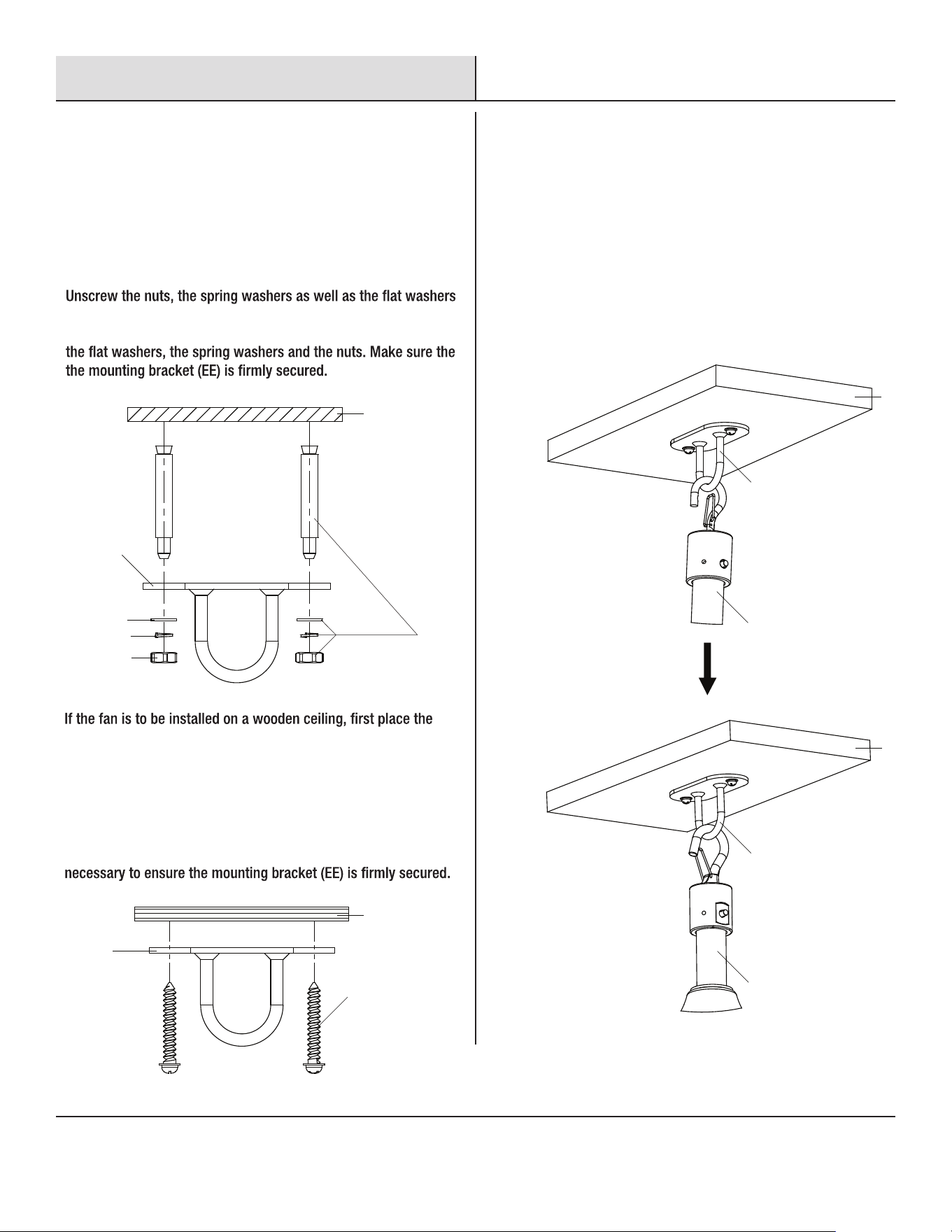
□ Hold and support the bottom of the fan and lift it up close to the
mounting bracket (EE) on the ceiling.
□
Press the snap hook knob on the top of the hanger bracket
assembly (A) to open the spring-loaded gate.
□
Slot the hook over the loop portion of the mounting bracket (EE)
and let the knob go. The action of the spring will cause the hook
to snap closed, and securely make the connection.
□
□
□
□
Optional installing method is to replace the nail screws (FF) with
sleeve anchors (HH).
Place the mounting bracket (EE) at the desired postion on the
ceiling, mark the position through the holes of the mounting
bracket (EE), and then remove the mounting bracket (EE).
Drill the correct sized holes at the mark points, using an electric
screwdriver and clear the debris. Insert the sleeve anchors into
the drilled holes. Tap in place with a hammer if necessary.
□
□
the mounting bracket (EE) at the desired postion on the ceiling,
mark the position through the holes of the mounting bracket (EE),
and then remove the mounting bracket (EE).
Drill two holes at the mark points with depth 1/2 of the length of
the nail screws (FF), using an electric screwdriver. Clear the debris
and then drive the nail screws (FF) through the mounting bracket
(EE) and into the drilled holes. Tap in place with a hammer if
from the sleeve anchors (HH). Place the mounting bracket through
the sleeve anchors (HH) and attach it to the ceiling by retightening
Ceiling
Ceiling
Wooden
ceiling
EE
EE
A
A
EE
FF
□
Gently release the fan so that the fan does not wobble.
10
Operation
1
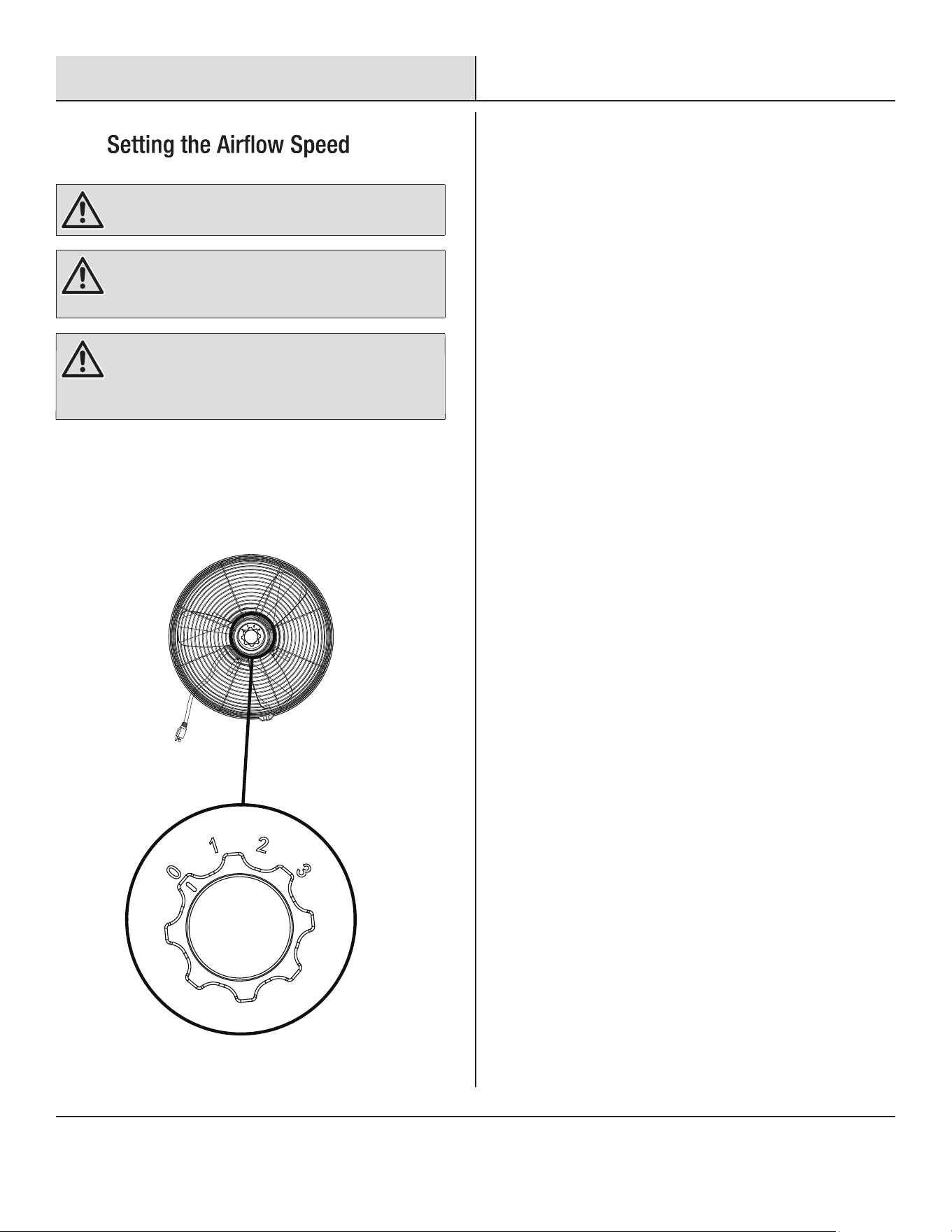
□ Use the switch knob to turn on and off and adjust the fan to
desired speed. The fan comes with three different speeds.
0--Stop 1--Low 2--Medium 3--High
WARNING: Always plug the fan directly into a
GFCI-protected wall outlet/receptacle only. Never use with
an extension cord or outlet power strip.
WARNING: Do not operate the fan until fully assembled
with all parts properly in place.
WARNING: Always switch off and unplug the fan when
not in use, before moving fan from one location to another,
before putting on or taking off parts and before cleaning or
performing maintenance.
11 HAMPTONBAY.COM
Please contact 1-855-HD-HAMPTON for further assistance.
WARNING: Always switch off and unplug the fan before
cleaning. Never connect the fan to a power supply when
it is not in use, when moving fan from one location to
another, assembling parts, making adjustments, cleaning
or performing maintenance.
□ Clean your fan periodically to help maintain its new appearance
over time.
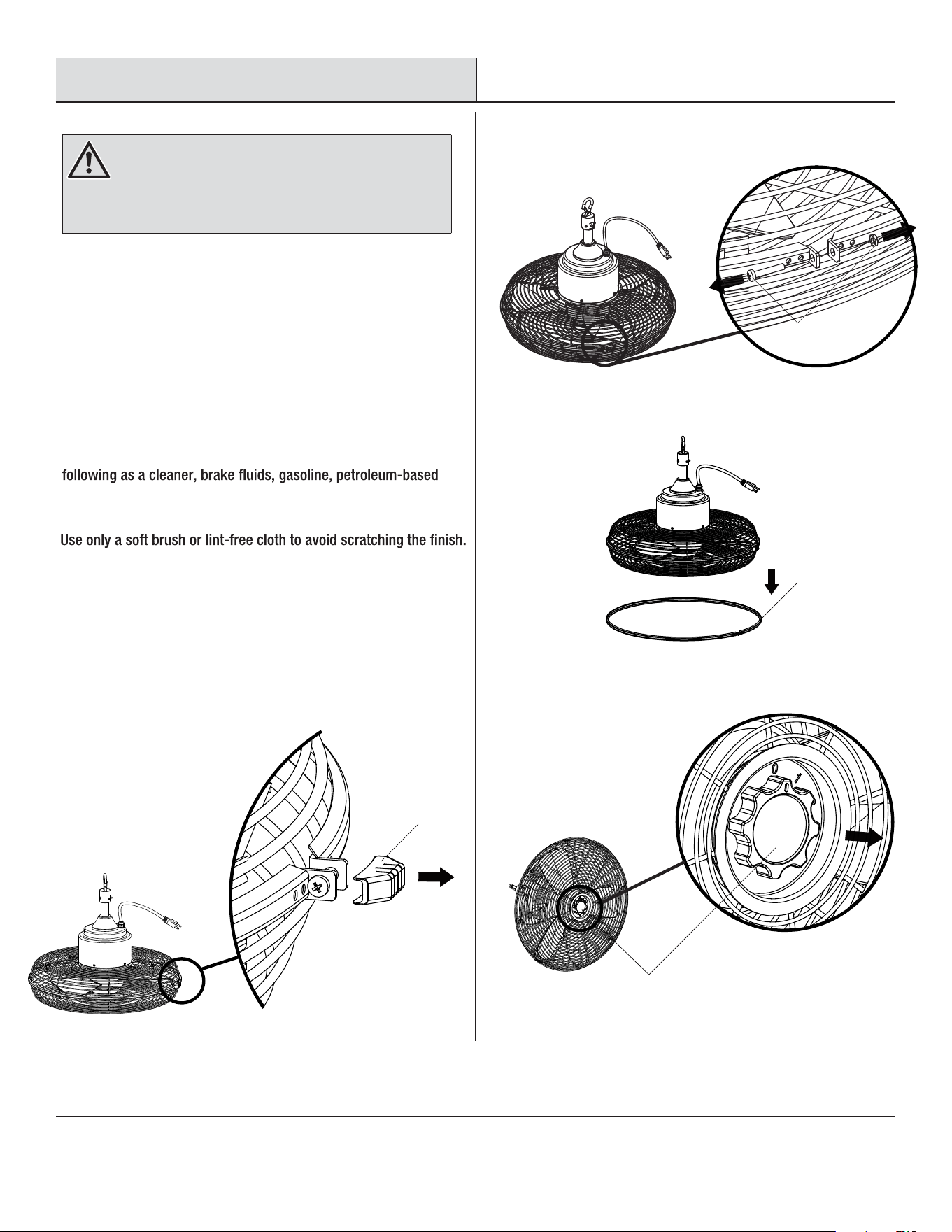
□ When shipped, the blade and guard on the fan are preassembled.
Follow below instructions to disassemble for cleaning purposes.
□ Pull out the decorative cap (E) on the fan guard.
□ Remove the lock screw and nut (II) on the rim.
□ Push down and remove the protecting rim (F).
□ Remove the switch knob (G).
Care and Cleaning
GENERAL CARE AND CLEANING
DISASSEMBLING THE FAN GUARD AND BLADE
□ Do not use any water for cleaning metal surfaces. Do not allow
water to drip on or enter into fan guard, as this could damage the
motor or cause an electrical shock.
□ Do not use a cleaning solution that is harmful to paints or plastics.
Avoid using solvents when cleaning plastic parts. Most plastics
are susceptible to damage from various types of commercial
solvents and can be damaged by their use. Do not use any of the
products, penetrating oils, thinner, benzene, etc. at any time.
□ Slightly moisten a cloth and then wipe off the surfaces of the fan.
□ In order to remove the dust from the grille, use a vacuum cleaner
or a small brush.
E
II
F
G
12
Care and Cleaning (continued)
Maintenance
□ The fan has permanently lubricated sealed bearings, therefore no further lubrication is required.
□ ians
should not disassemble, repair or rebuild the fan.
□ Only use the original manufacturer’s replacement parts, accessories and attachments.
□ After servicing, any safety device (including grilles and blades) must be reinstalled or remounted as previously installed.
I
□
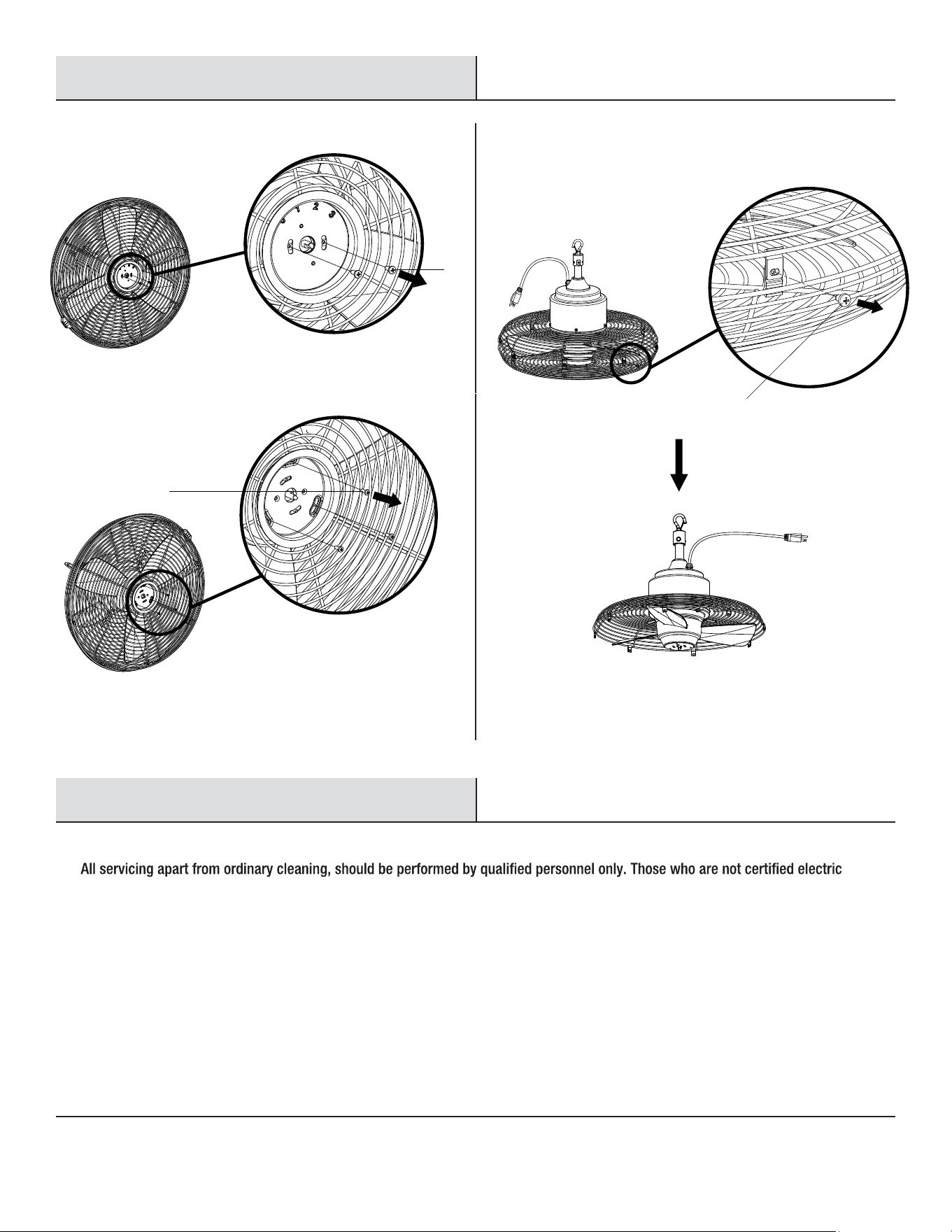
Remove the two lock screws (JJ) and then the speed setting label.
□
Remove the three lock screws (KK) to the front guard.
JJ
KK
I
LL
□
Remove the eight lock screws (LL) along the guard edge and then
remove the front guard.
□
After cleaning, reinstall the fan as previously installed and fasten
all the lock screws. Do not blend the blades.
I

Questions, problems, missing parts? Before returning to the store,
call Hampton Bay Customer Service
8 a.m. – 7 p.m., EST, Monday – Friday, 9 a.m. – 6 p.m., EST, Saturday
1-855-HD-HAMPTON
HAMPTONBAY.COM
Retain this manual for future use.