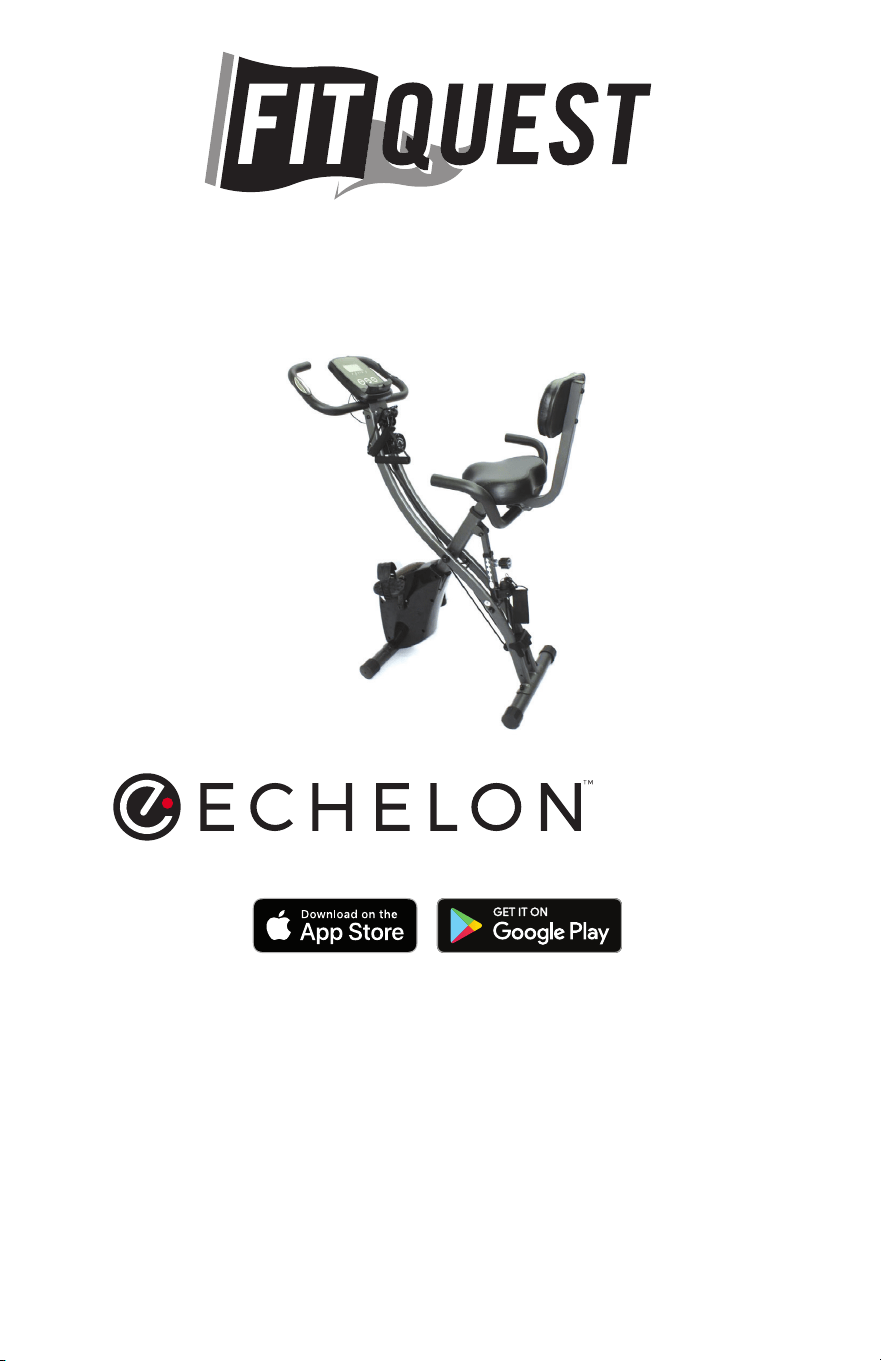
INSTRUCTION MANUAL
READ MANUAL BEFORE OPERATING
Requires 2 AA batteries (included). Do not mix old and new batteries.
Do not mix alkaline, standard (carbon-zinc), or rechargeable (NiCd, Ni-Mh, etc) batteries.
Google Play and the Google Play logo are trademarks of Google Inc.
Apple and the Apple logo are trademarks of Apple Inc., registered in the U.S. and other countries.
App Store is a service mark of Apple Inc., registered in the U.S. and other countries.
FIT
lead by certified instructors
FITNESS APP FOR SMARTPHONES AND TABLETS
FIRST 30 DAYS FREE
LIVE / ON-DEMAND CLASSES
SCENIC RIDES
“THE EXTRA MILE”
to warm-up and cool-down
STAY TOGETHER
recorded in beautiful locations by connecting with family & friends
TM
BIKE PRO

2
WARNINGS
BEFORE starting any fitness or strength program, consult
with your physician or health official. This will ensure that you
engage in the proper strength or fitness program for your age
and physical condition.
Before using the FitQuest™ Bike Pro answer these questions:
· Have you been sick recently?
· Have you had prolonged dizziness recently?
· Have you been out of breath for no reason recently?
· Have you have had chest pain recently?
· Do you currently have any injuries preventing you
from exercise?
· Are you pregnant?
· Do you have any conditions or reasons you
shouldn’t exercise?
· Are you over 35 years old and physically inactive?
· Have you been told by a doctor that you shouldn’t exercise?
• IF YOU ANSWER “YES” TO ANY OF THE ABOVE QUESTIONS,
YOU SHOULD SEEK FURTHER ADVICE FROM YOUR
DOCTOR PRIOR TO USING THE FITQUEST™ BIKE PRO.
• ALWAYS read the user’s manual fully and follow all
instructions, this ensures your safety.
• ALWAYS use the FitQuest™ Bike Pro on solid, level ground
and in a well lit and ventilated area. Check that the seat and
handlebars are securely fastened before use.
• NEVER allow children to play on or around the bike.
Injury could ensue from a child’s curiosity in the moving parts
of the stationary bike.
• ALWAYS set the bike up properly for your specific body
type. The FitQuest™ Bike Pro offers up/down and fore/aft
adjustments that are clearly marked to ensure a quick and
easy customization for each workout.
• ALWAYS check the stationary bike before use.

3
WARNINGS
• NEVER use the stationary bike if it is not properly/completely
assembled or is damaged in any way.
• NEVER use FitQuest™ Bike Pro when sick or fatigued.
• NEVER exceed the weight limit for this bike. The weight limit
for this bike is 300 pounds. Do not use the FitQuest™ Bike Pro
if your body weight is in excess of 300 pounds.
• ALWAYS wear proper attire and footwear that fully covers your
feet. Long hair should be tied back or tucked away. Ensure
that any shoelaces are tucked into your shoes.
• ALWAYS warm up/stretch before starting to exercise.
• ALWAYS be cautious when getting on and off the FitQuest™
Bike Pro.
• ALWAYS wait until the pedals have come to a complete stop
before taking your feet off of the pedals or dismounting. Do
not stand or climb on the handlebars.
• ALWAYS keep hands away from moving parts and ensure that
hands are never placed where there is no rubber handlebar
grip.
• NEVER overexert yourself or work to exhaustion. If you feel
faint, dizzy, short of breath, or if you have chest or other pains,
STOP IMMEDIATELY! Consult your physician before using the
FitQuest™ Bike Pro again.
• ALWAYS ensure that you have a water bottle filled with at least
12 oz. of water and a towel close by to absorb sweat from
your body and the handlebars.
• NEVER use the FitQuest™ Bike Pro in a standing position at
high revolutions per minute (RPM).
• ALWAYS keep your pelvis positioned over the center line of
the FitQuest™ Bike Pro stationary bike.
• NEVER adjust the resistance of the flywheel and the resistance
of the FitQuest™ Bike Pro Handlebar System whilst standing.
• NEVER use accessory attachments that have not been

4
WARNINGS
recommended by the manufacturer – using these attachments
may cause injury or damage to the bike and will affect the
warranty of the bike.
• Please ensure that the FitQuest™ Bike Pro is wiped down
after each use to keep it sanitary.
• If any problems arise affecting the performance of the
FitQuest™ Bike Pro, please contact the manufacturer
immediately. Always ensure that parts which undergo wear
are checked regularly.
• THIS SAFETY INFORMATION AND USER’S MANUAL DOES
NOT REPLACE THE NEED TO BE ALERT AND TO USE
COMMON SENSE WHEN USING THE STATIONARY BIKE!
Do not mix old and new batteries.
Do not mix alkaline, standard (carbon-zinc), or rechargeable (Ni-Cd,
Ni-MH, etc) batteries.
FCC Compliance Statement
Caution: Changes or modifications not expressly approved by the party
responible for compliance could void the user’s authority to operate
the equipment.
NOTE: This equipment has been tested and found to comply with the
limits for a Class B digital device, pursuant to Part 15 of the FCC Rules.
These limits are designed to provide reasonable protection against harmful
interference in a residential installation. This equipment generates, uses
and can radiate radio frequency energy and, if not installed and used in
accordance with the instructions, may cause harmful interference to radio
communications. However, there is no guarantee that interference will not
occur in a particular installation. If this equipment does cause harmful
interference to radio or television reception, which can be determined by
turning the equipment off and on, the user is encouraged to try to correct
the interference by one or more of the following measures:
• Reorient or relocate the receiving antenna.
• Increase the separation between the equipment and receiver.
• Connect the equipment into an outlet on a circuit different from that to
which the receiver is connected.
• Consult the dealer or an experienced radio/TV technician for help.

5
Introduction
FITQUEST™ BIKE PRO
Congratulations on purchasing the FitQuest™ Bike Pro, one of the
highest performance stationary bikes on the fitness market. The
FitQuest™ Bike Pro will offer you an excellent whole body workout
through the inclusion of upper and lower resistance band sets on the
bike. Accelerating, pushing up from the saddle, and recovering are
all natural and dynamic total body movements for outdoor cyclists.
Climbing steep hills and sprinting involves significant engagement
through the core and upper-body to control the lower-body and
propel the bike forward. The FitQuest™ Bike Pro uses a unique and
revolutionary handlebar system to mimic and access this level of
realistic intensity. Welcome to the FitQuest™ Bike Pro Revolution!
BEFORE YOU START
Prior to leaving the factory, your FitQuest™ Bike Pro was inspected
and thoroughly tested for proper operation. In order to minimize
damage through shipping, the bike was examined and carefully
packaged.
Your FitQuest™ Bike Pro stationary bike will have arrived in 1 carton.
When receiving the package check for any damage. Discuss and
point out any damage to the delivery person and have them record
any damage on the delivery paperwork. Contact Customer Service
to report any damage (see details on the back of this manual). If you
follow the detailed instructions, then the FitQuest™ Bike Pro will be
unpacked and assembled with ease.
6
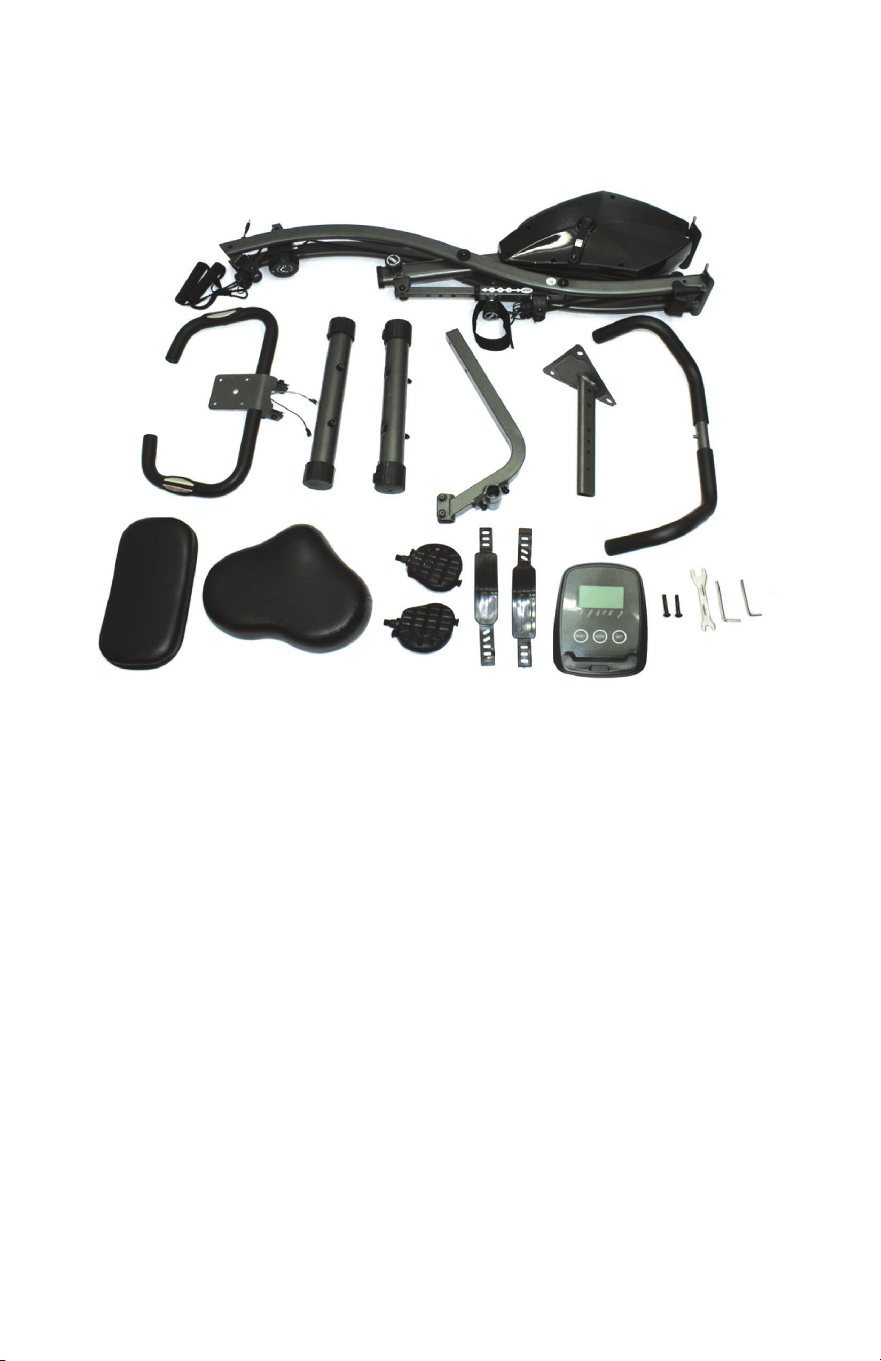
PARTS LIST
1. Main frame
2. Upper resistance handles (x2)
3. Leg resistance strap (x1)
4. Handlebars
5. Rear foot
6. Front foot with rollers
7. Backrest support
8. Seat post
9. Seat handles
10. Backrest
11. Seat
12. Pedals
13. Pedal straps
14. Control panel
15. Washers and screws
· 2 screws for backrest
(Other screws, washers, and
nuts come installed in parts.
See ASSEMBLY INSTRUCTIONS
for details.)
16. Wrench
17. Large hex key tool
18. Small hex key tool
19. AA batteries (x2) (Not shown)
1.
4.
5.
6.
7.
8.
9.
10.
3.
2.
11.
12.
13.
14.
15.
16.
17.
18.
7
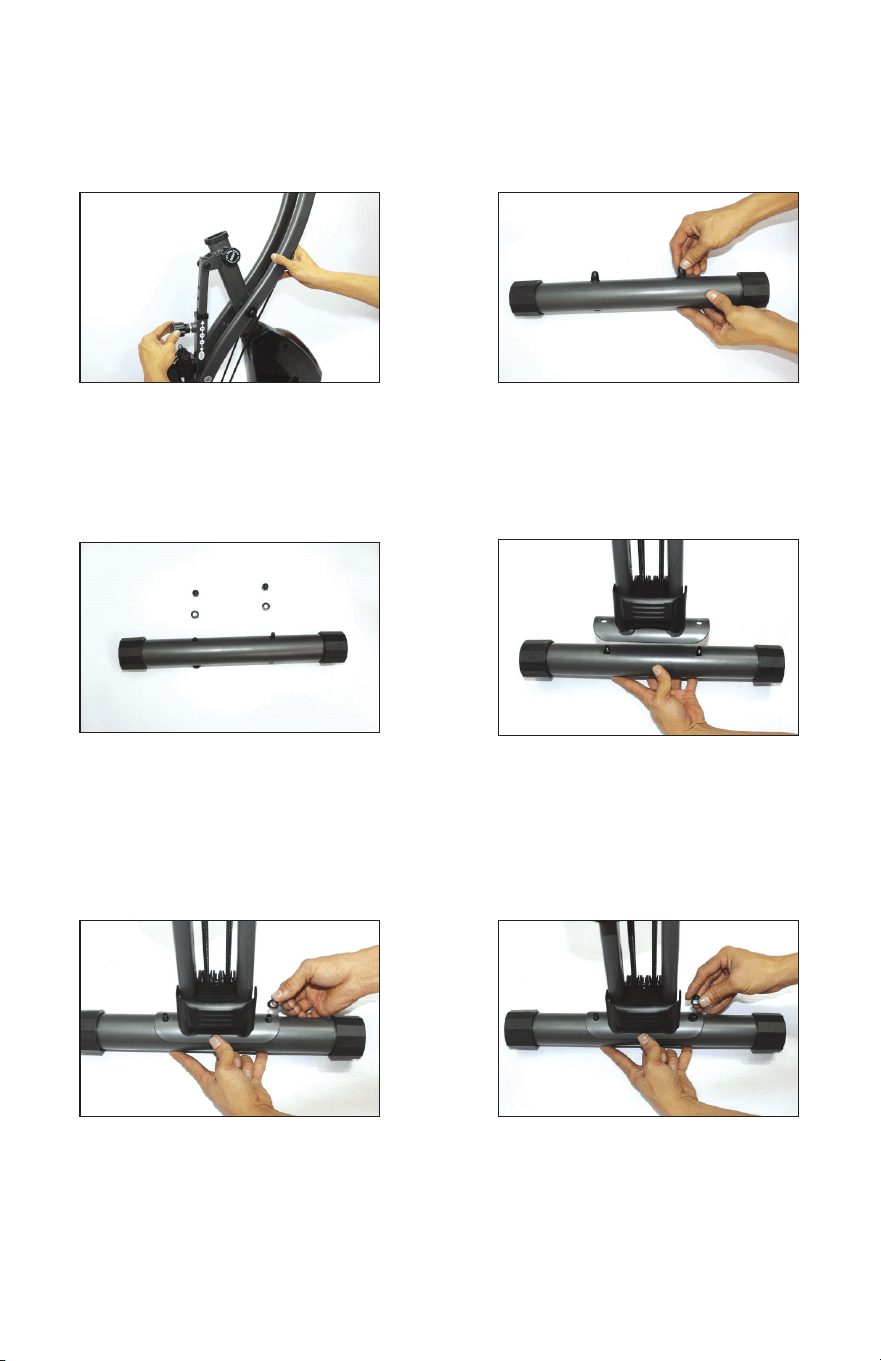
ASSEMBLY INSTRUCTIONS
1.
3.
5.
2.
4.
6.
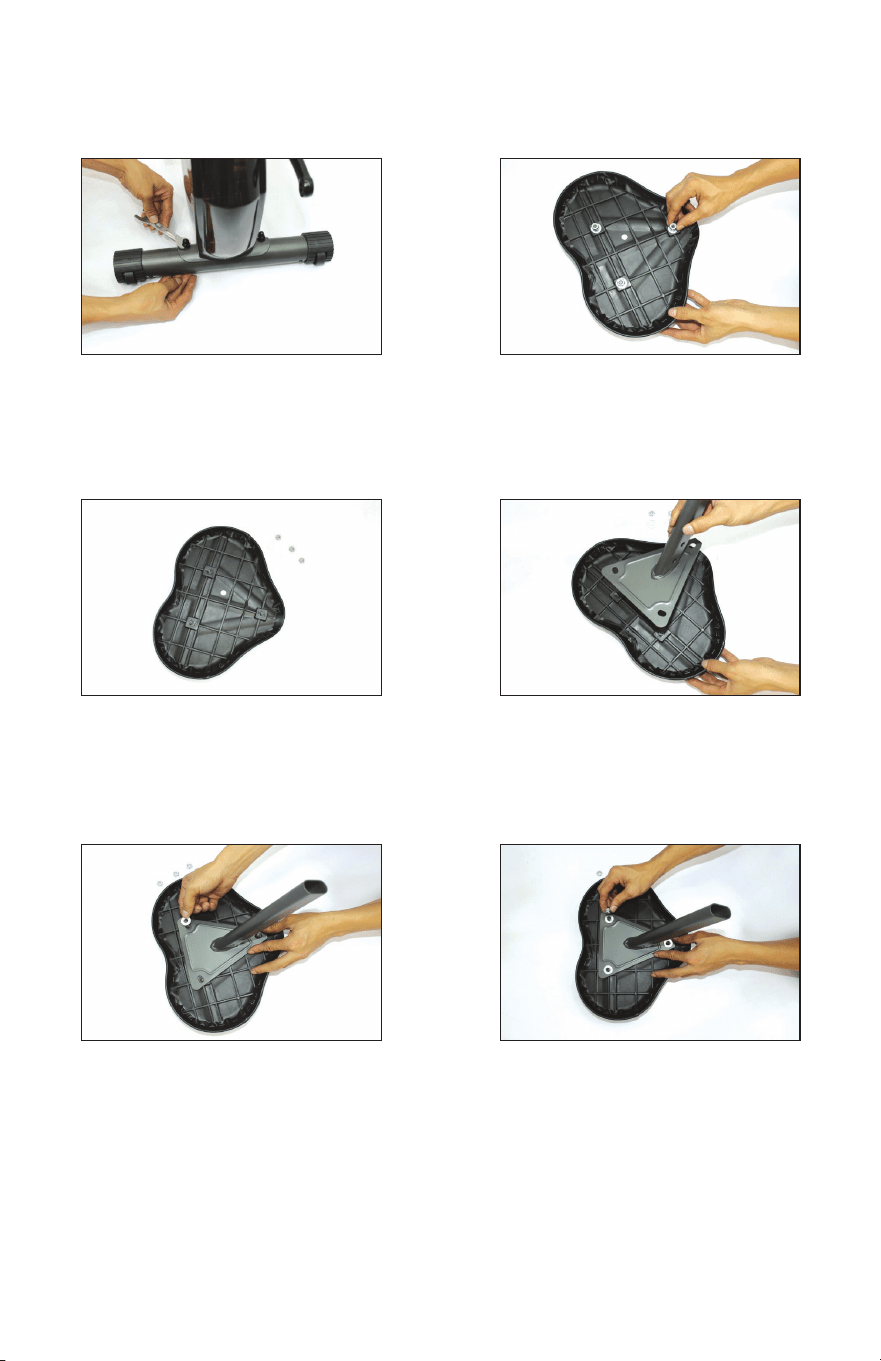
Loosen circular knob on main
frame and pull outward to adjust
recline angle to 1 (tallest setting).
Place the nuts and washers to
the side for now.
Place the washer onto screw.
Take both nuts and washers o
of rear foot.
Install rear foot onto rear main
frame leg. See image to ensure
rear foot is installed on correct
leg.
Screw on the nut.
8
ASSEMBLY INSTRUCTIONS
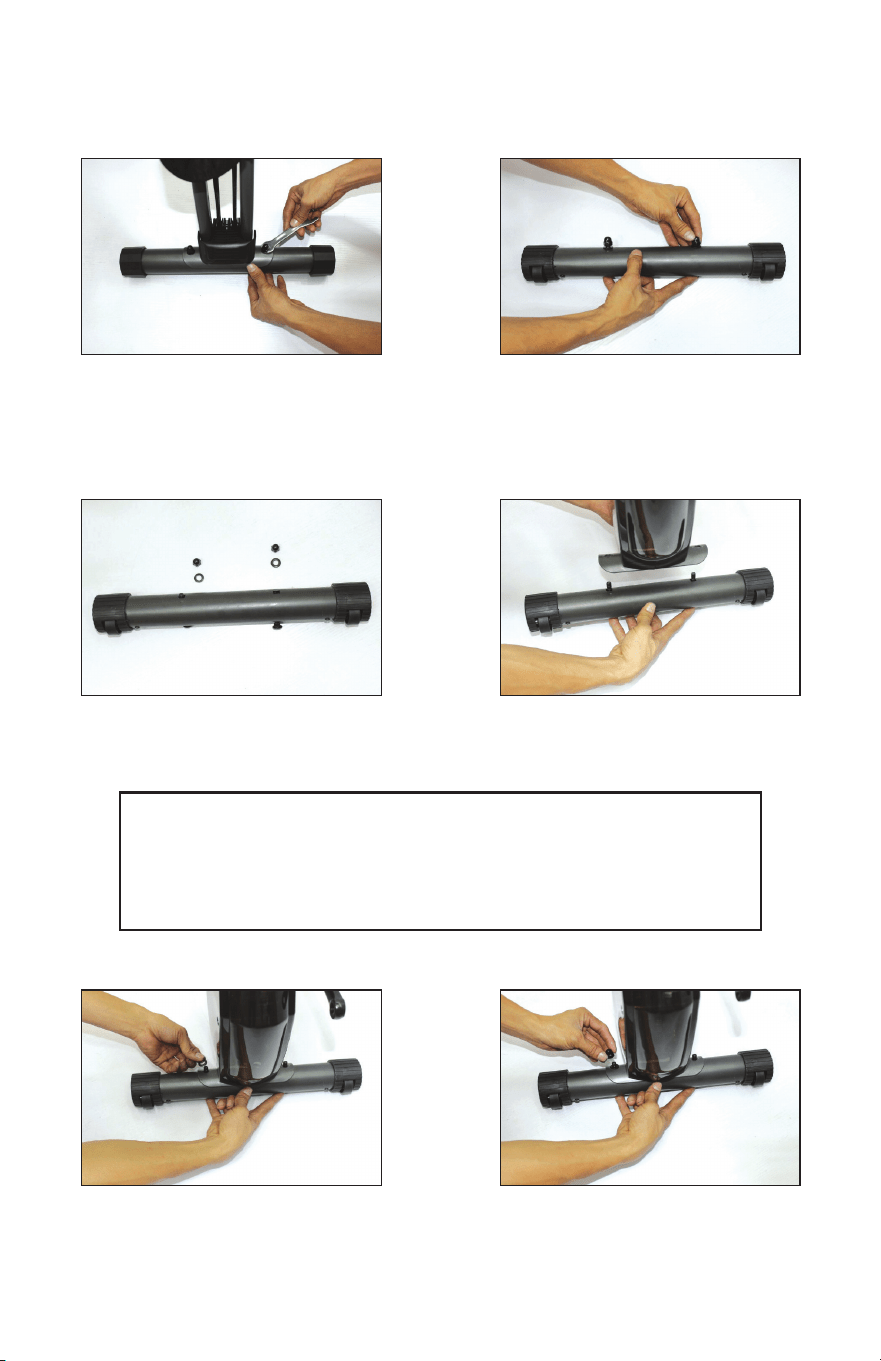
Tighten nut onto screw with
included wrench. Repeat on
other side.
Place the nuts and washers to
the side for now.
Take both nuts and washers o
of front foot with rollers.
Install front foot onto front main
frame leg.
Place the washer onto screw. Screw on the nut.
The rollers help to move the bike when it is tilted forward and should
not touch the oor when the bike is in a regular standing position.
When properly installed, the rollers will face outward from the front
of the bike (see images). If the rollers touch the oor, uninstall the
foot, turn around, and reinstall.
7.
9.
11.
8.
10.
12.
9
ASSEMBLY INSTRUCTIONS
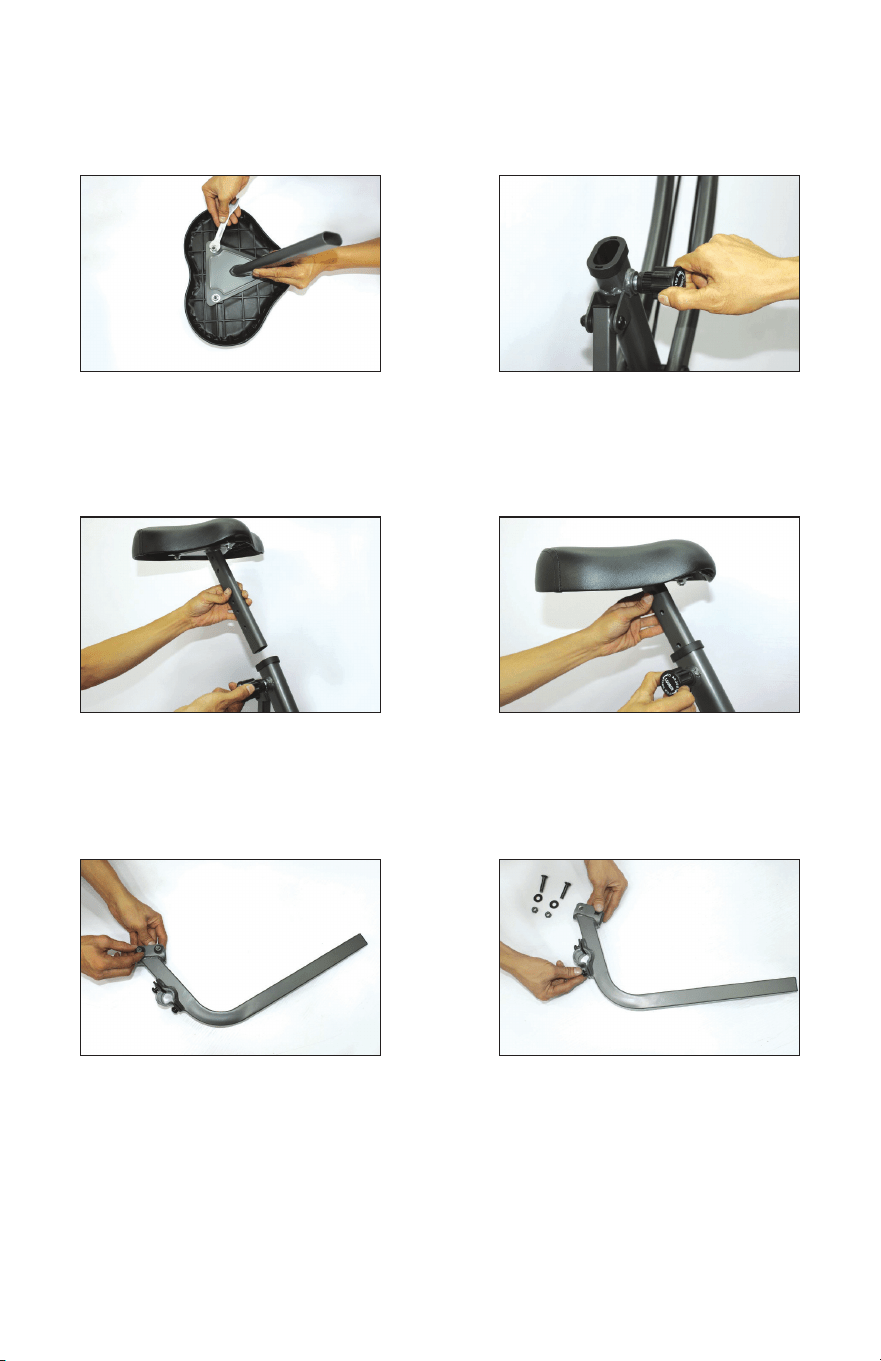
Tighten nut onto screw with
included wrench. Repeat on other
side.
Place the nuts and washers to the
side for now.
Place the washers over the
screws from seat cushion.
Take nuts and washers o of the
seat cushion.
Fit seat post onto seat cushion
screws.
Finger tighten each nut onto
the screws from seat cushion.
If dicult to tighten, nut may be
upside-down.
13.
15.
17.
14.
16.
18.
10
ASSEMBLY INSTRUCTIONS
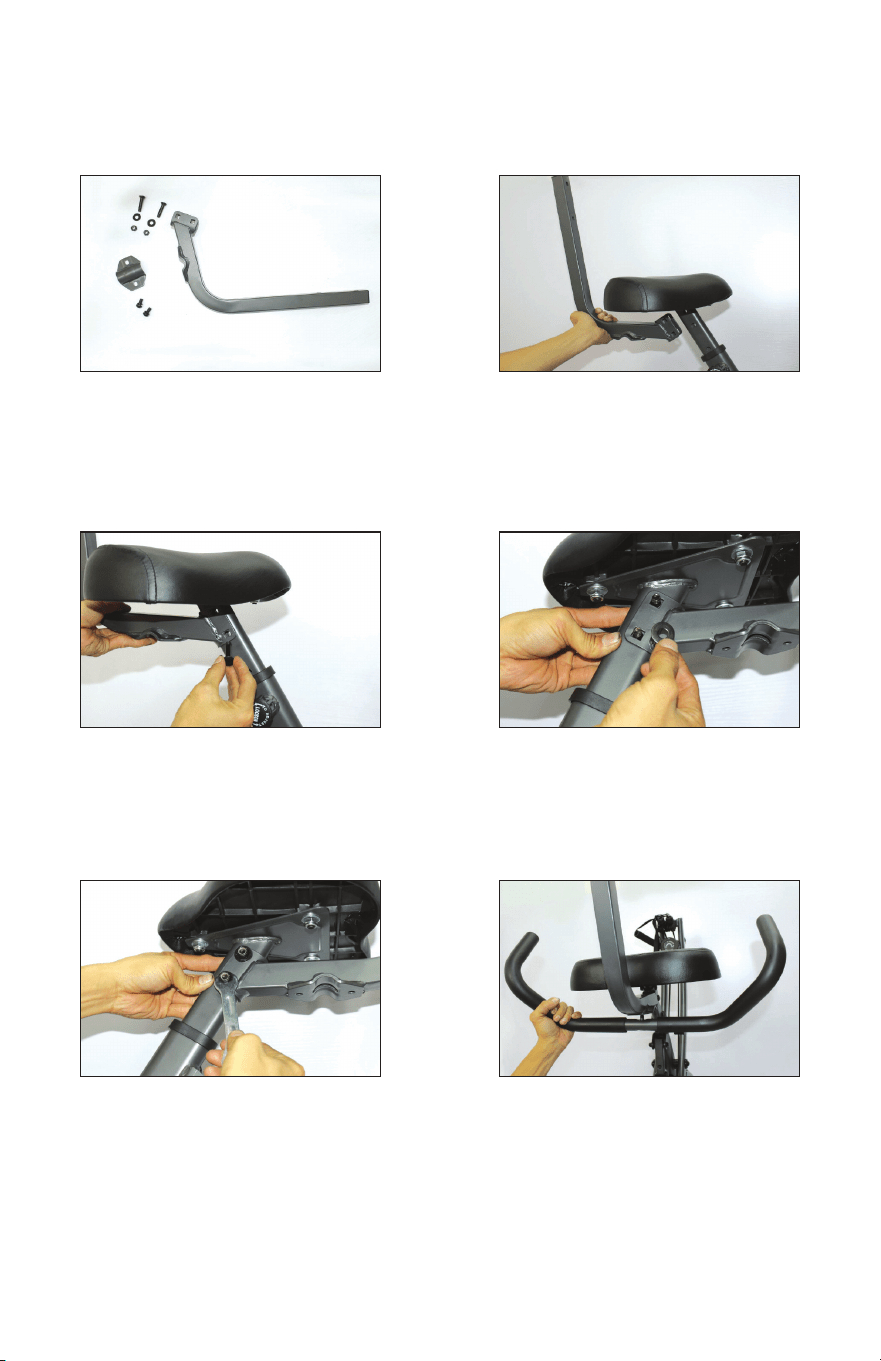
Tighten nut onto screw with
included wrench. Repeat on
other two nuts.
Pull knob outward and insert seat
post into main frame.
Remove screw, nut, and washer
from the backrest support.
Loosen circular knob.
Secure knob back into place at
desired height.
Remove screw, nut, and washer
from x plate on backrest
support.
19.
21.
23.
20.
22.
24.
11
ASSEMBLY INSTRUCTIONS
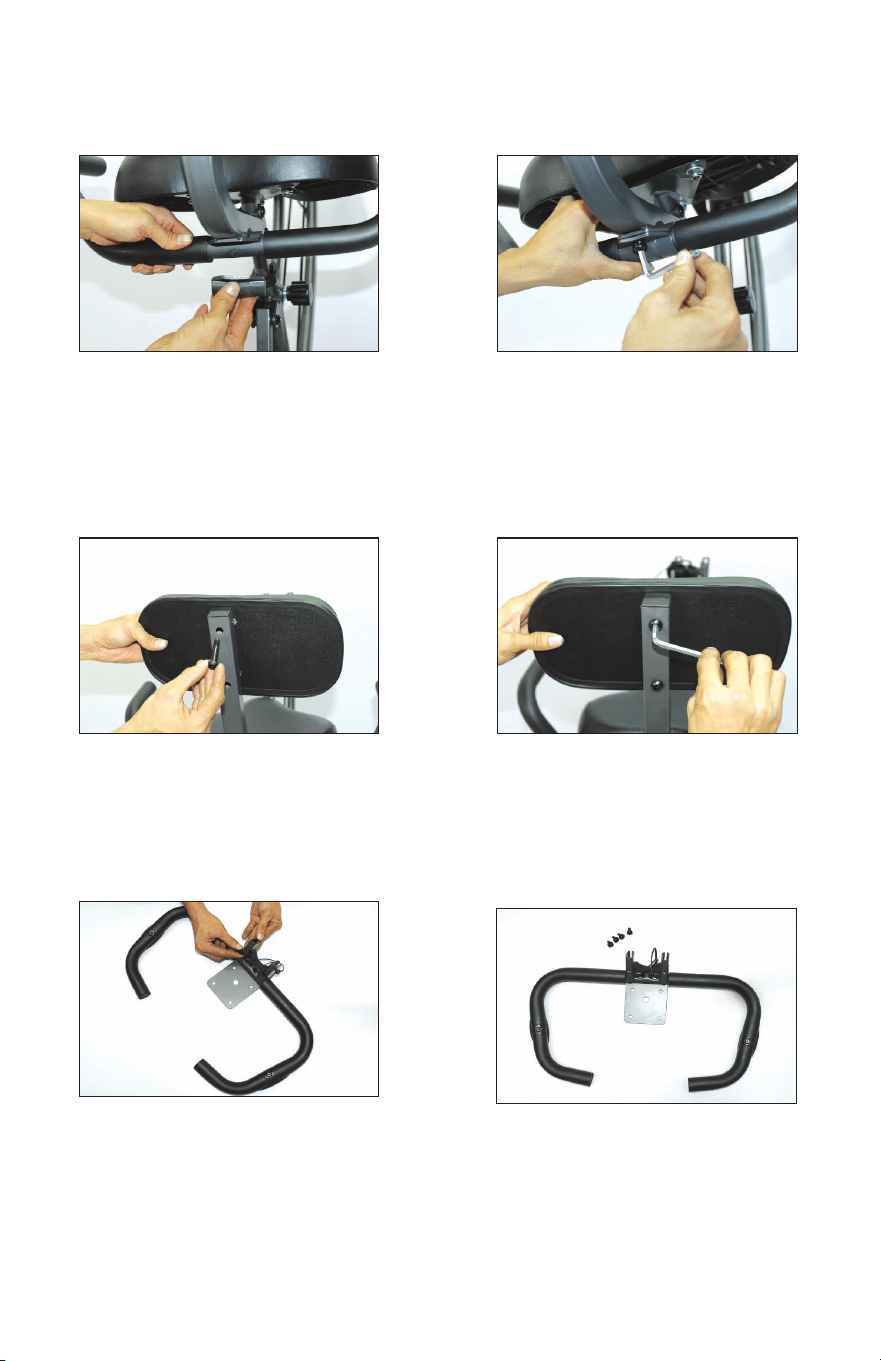
Place nuts and washer on the
side for now.
Insert screw through hole in
backrest support.
Place nut on screw and nger
tighten. If dicult to tighten, nut
may be upside down. Tighten
fully with included wrench.
Align backrest support with hole
in seat post.
Place washer onto screw.
Align seat handles with holes on
bottom of backrest support.
25.
27.
29.
26.
28.
30.
12
ASSEMBLY INSTRUCTIONS
Place xed plate onto seat handles.
Align backrest against backrest
support. Insert screws and nger
tighten (see parts diagram).
Place screw with washer into holes
and tighten with included large hex
key/screwdriver tool. The handle
bars will rotate back and forward
when properly installed.
Tighten down screws with included
large hex key/screwdriver tool.
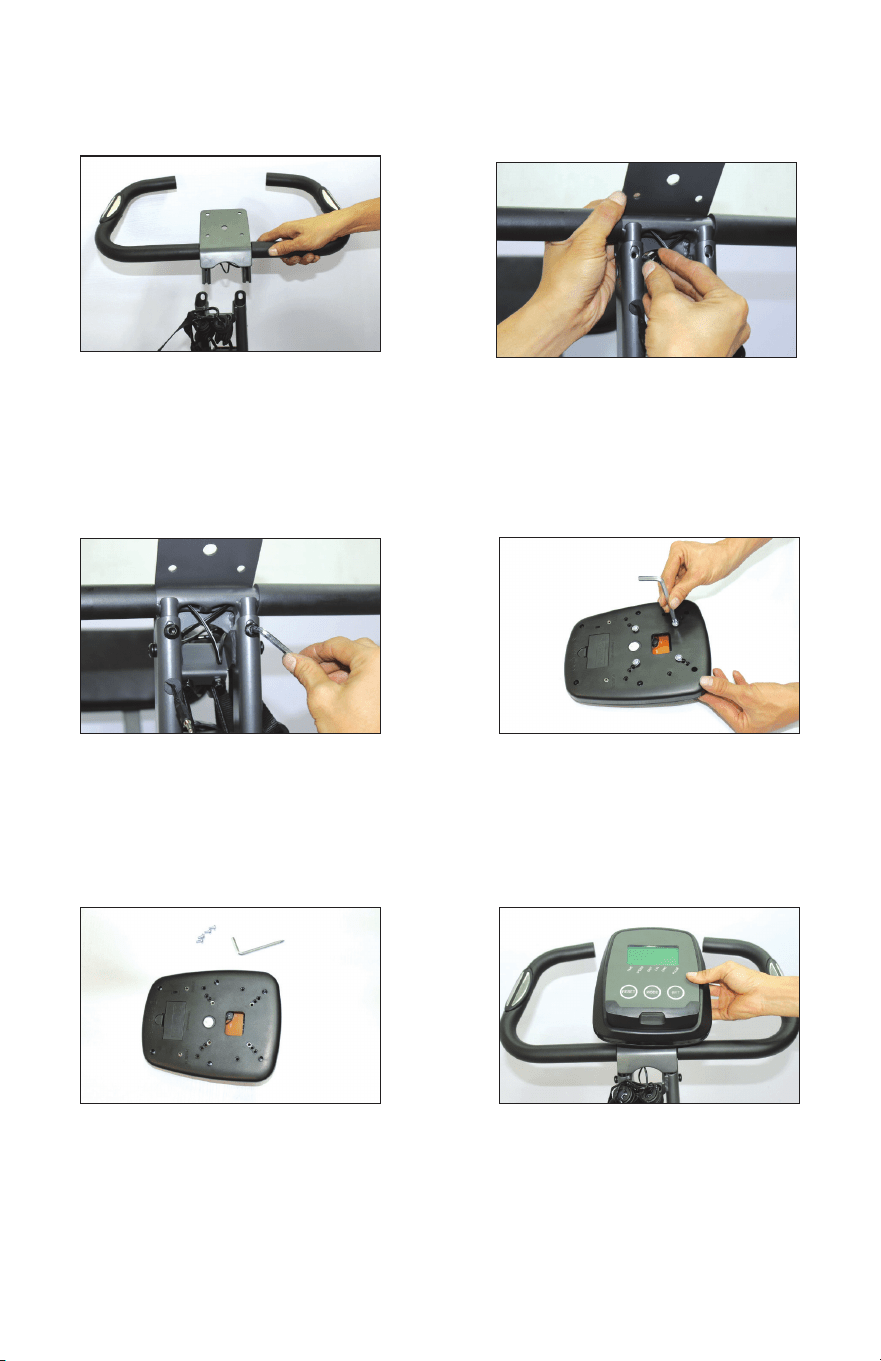
Remove screws from handle bar.
Place screws to the side for now.
36.
31.
33.
35.
32.
34.
13
ASSEMBLY INSTRUCTIONS
Feed handle bar posts into the slots
on the top of the main frame.
Tighten down screws with included
small hex key tool.
Place screws into holes and
nger tighten.
Remove screws from the back
of the control panel.
Place control panel onto handle
bar bracket.
Place screws to the side for now.
38.
40.
42.
37.
39.
41.
14
ASSEMBLY INSTRUCTIONS
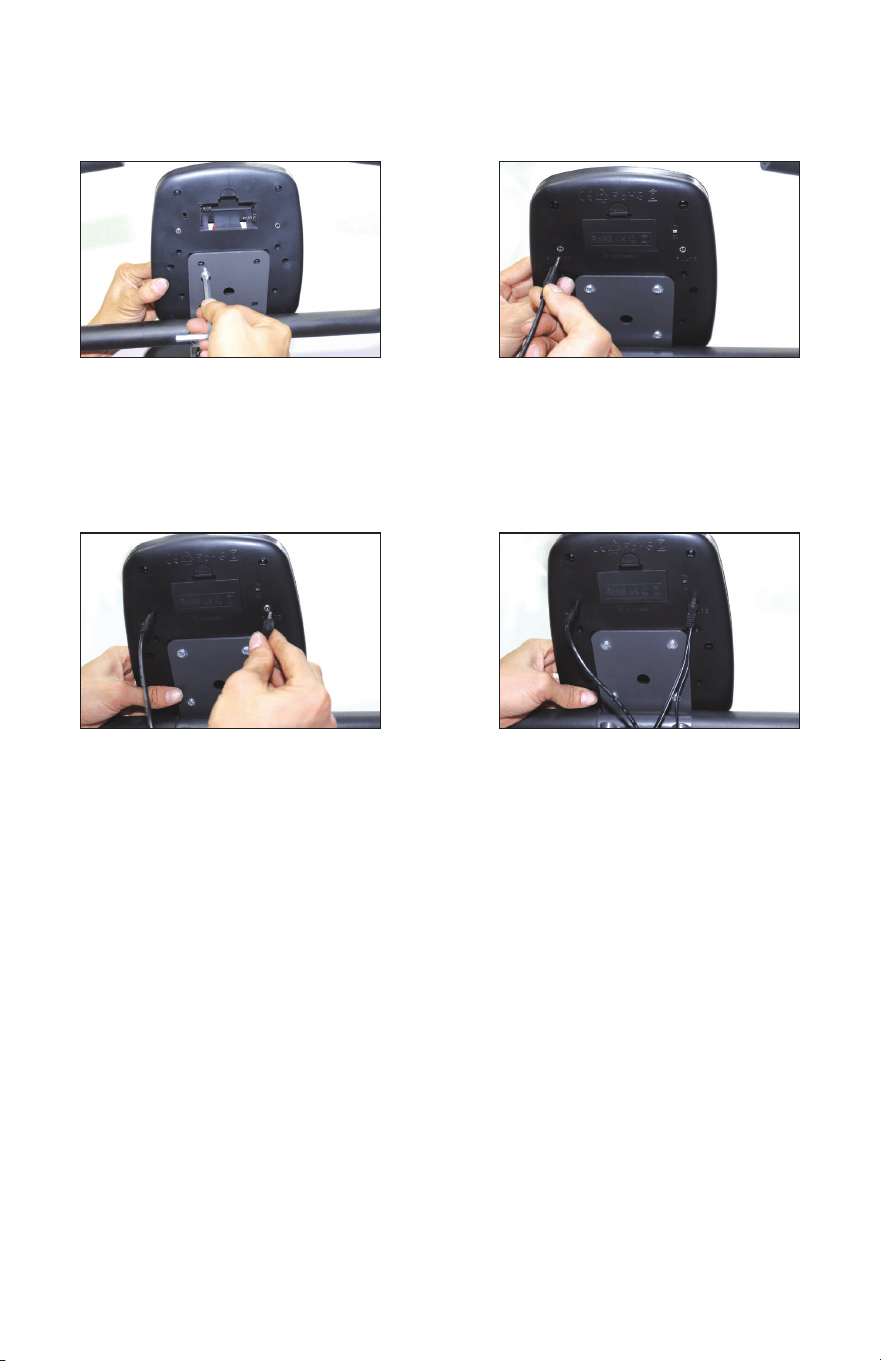
Tighten down screws with
included hex key tool.
Connect heart rate wire to the
control panel.
Connect the sensor wire with the
L-shaped plug to the control panel.
Wire connection completed.
42.
44.
43.
45.
15
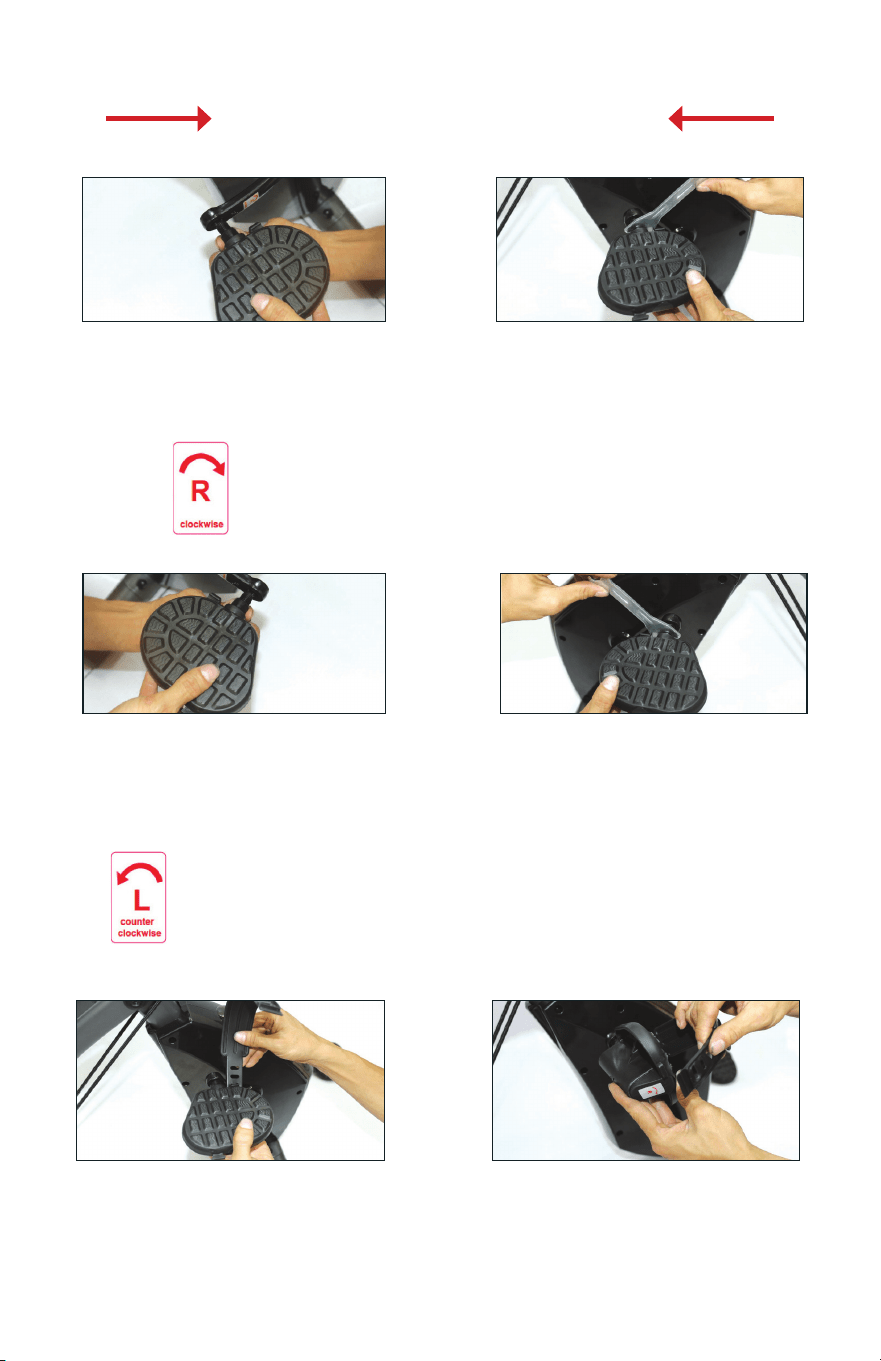
Hold the right pedal with one hand
and screw the pedal bolt onto the
crank arm with the other hand in a
standard clockwise motion. Finish
tightening with the included wrench.
ASSEMBLY INSTRUCTIONS
Attach the end of the strap with 4
holes to the outside of the pedal.
Adjust to your preference.
Connect the right pedal to the
right crank arm. Both parts are
marked R.
Connect the left pedal to the left
crank arm. Both parts are marked L.
Hold the left pedal with one hand
and screw the pedal bolt onto the
crank arm with the other hand in a
non-standard counterclockwise
motion. Finish tightening with the
included wrench.
The strap marked R goes on the
right pedal. The strap marked L
goes on the left pedal. With the
R or L marking facing upward,
attach the end of the strap with 3
holes to the inside of the pedal.
47. 48.
49.
READ THIS SECTION CAREFULLY
50.
51.
52.
RIGHT bolt screws in CLOCKWISE
(standard direction)
LEFT bolt screws in COUNTERCLOCKWISE
(NON-standard direction)
16
CONTROL PANEL
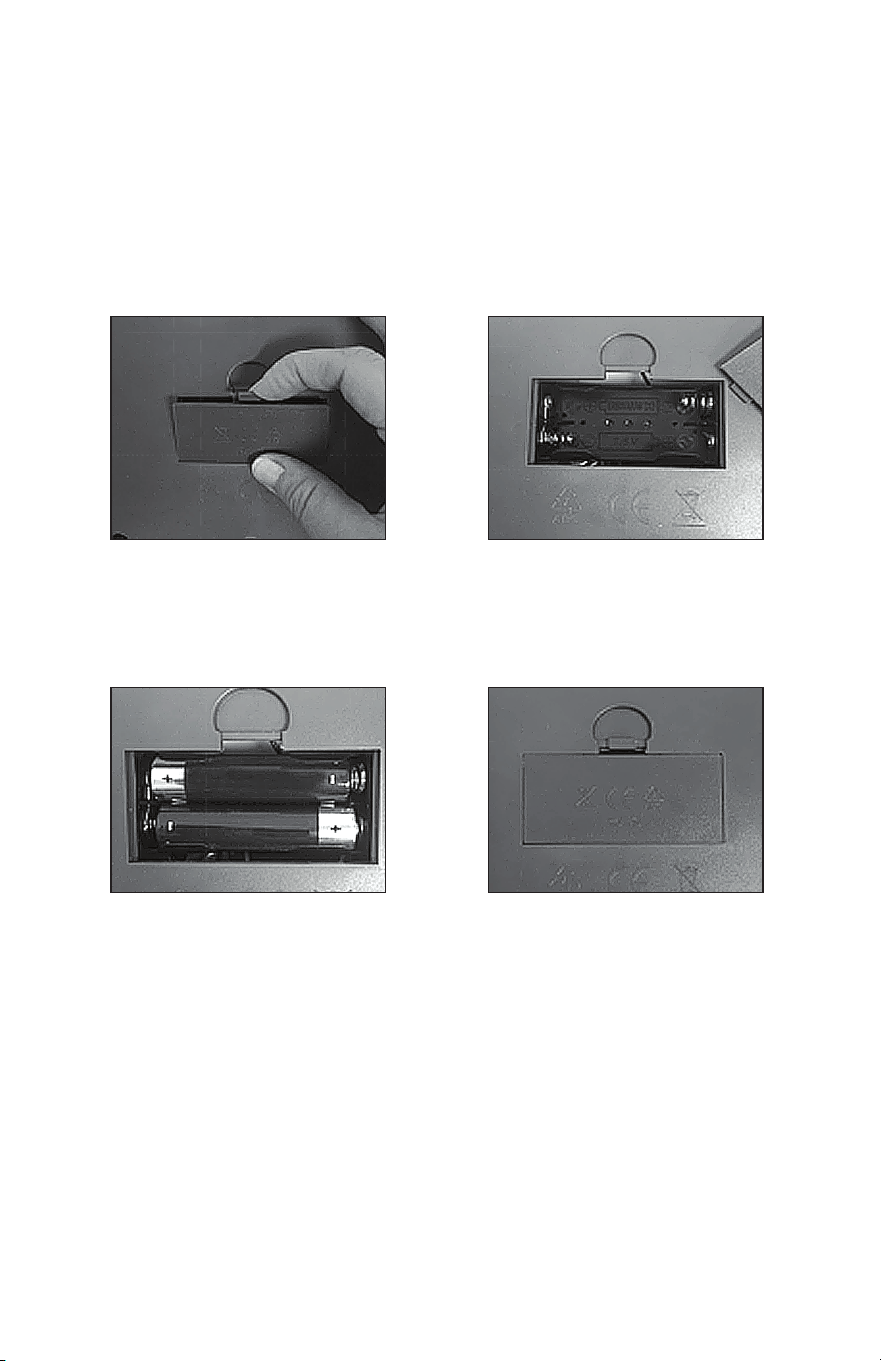
BATTERY INSTALLATION
1. Open battery compartment
door on the back of the bike
control panel.
2. Note the diagram inside
the compartment that
shows the correct battery
installation polarity.
4. Replace the battery
compartment door.
3. Install 2 AA batteries
(included) according to the
correct polarity.
Requires 2 AA batteries (included).
Do not mix old and new batteries.
Do not mix alkaline, standard (carbon-zinc),
or rechargeable (NiCd, Ni-Mh, etc) batteries.
17
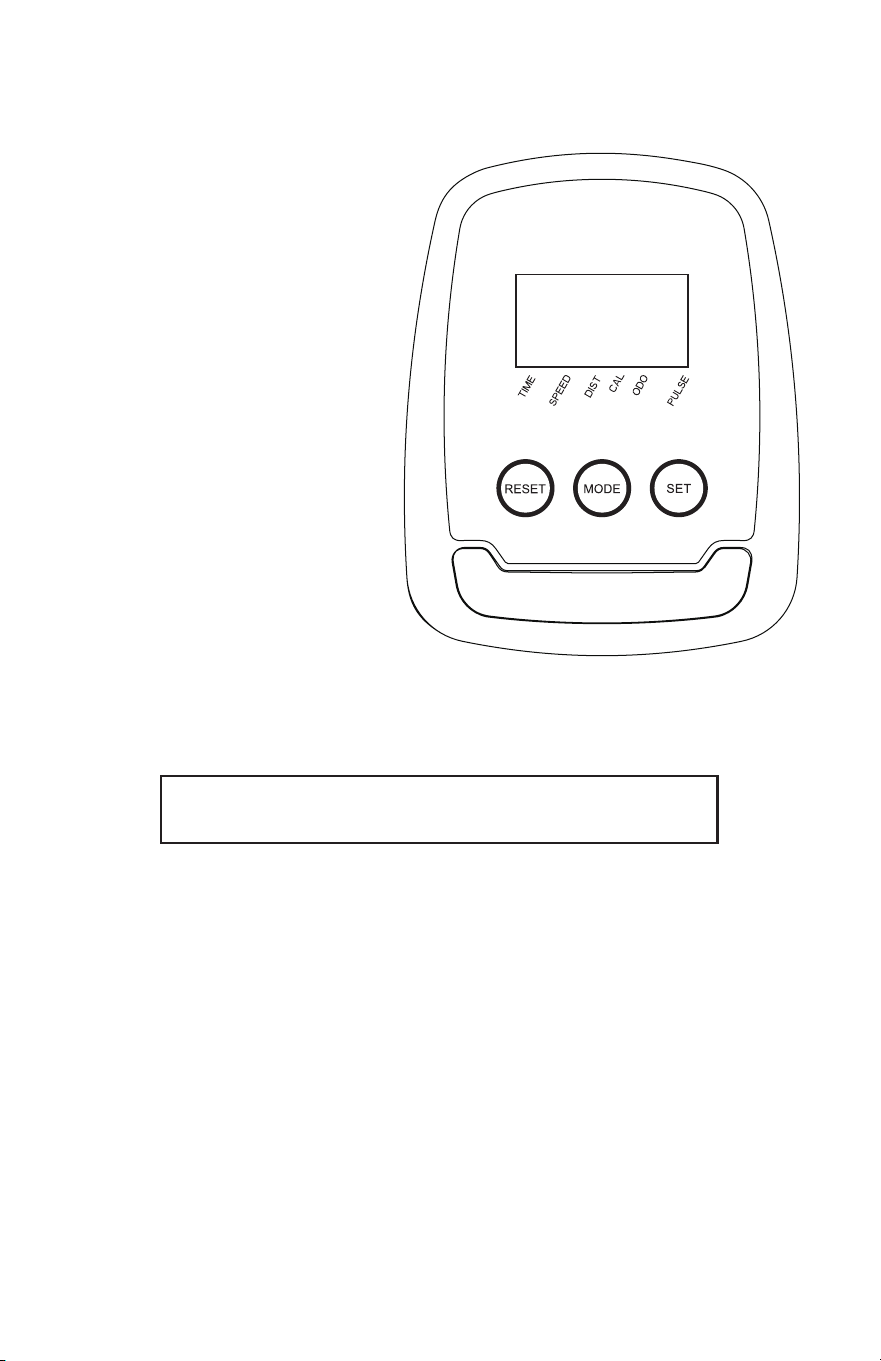
DISPLAY:
Display turns off after 4 minutes when not in use.
TIME, DIST, CAL, and PULSE: Default to previous setting
until reset ([RESET]) or programmed with new setting ([SET]).
TIME: Press [RESET] to time workout or [SET] to program a countdown timer.
When countdown reaches 0, alarm will sound. Press any button to silence.
SPEED: Displays estimated MPH.
DIST: Press [RESET] to display distance in miles for current workout or [SET]
to program a countdown from distance goal. When countdown reaches 0,
alarm will sound. Press any button to silence.
CAL: Press [RESET] to display estimated calories expended or [SET] to
program a countdown from calorie goal. When countdown reaches 0, alarm
will sound. Press any button to silence.
ODO: Displays total exercise miles of all workouts.
PULSE: Press [RESET] to display heart rate or [SET] to program a target heart
rate. User must hold the heart rate monitor grips on the handle bars for heart
rate to display. Whenever target heart rate is surpassed, alarm will sound. To
silence, remove hands from heart rate monitor grips or press [RESET].
CONTROL PANEL
BUTTONS:
[RESET] clears data from
selected mode.
• To reset all stored information
from previous workout, press
for 3 seconds.
• Does not clear total exercise
miles (ODO).
[MODE] selects mode.
• To reset all stored information
from previous workout, press
for 3 seconds.
• Does not clear total exercise
miles (ODO).
[SET] programs new setting for
selected mode.
• To increase setting more
quickly, press for 3 seconds.
Release and press again to
program.
18
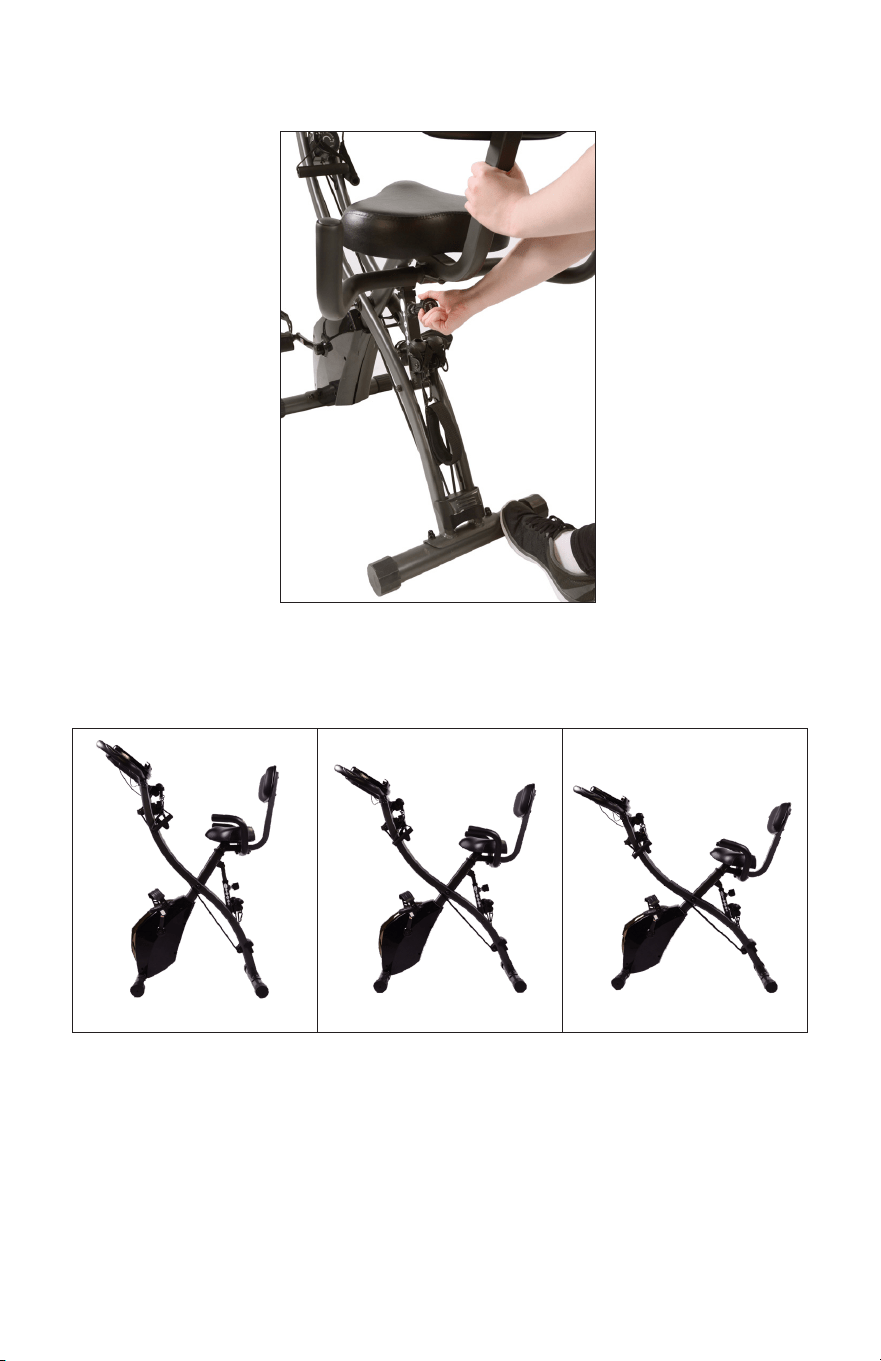
ADJUSTING RECLINE ANGLE
Twist circular knob on main frame to the left to loosen the bolt (do not
fully remove). While stepping on the rear foot, lift up on the bike while
pulling the knob to adjust angle.
Level 1 Level 2 Level 3
19
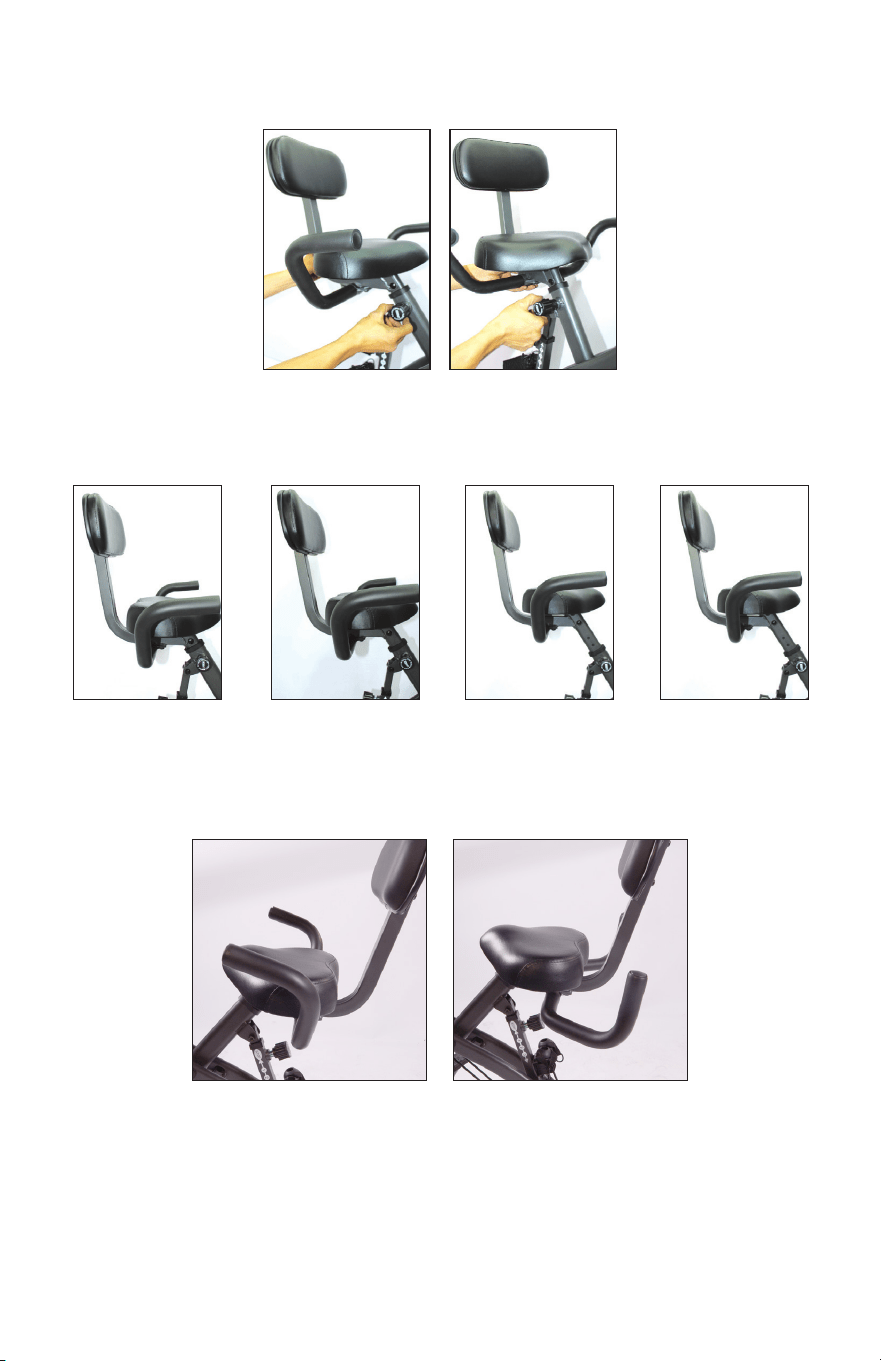
Seat handlebars rotate forward for use in recumbent position and
backward for easier mount and dismount of bike.
ADJUSTING SEAT HEIGHT
MOVING HANDLE BARS
Level 1
Level 1: Seat is lowered as far as the seat post will go. Twist knob to the
left to loosen the bolt (do not fully remove). Pull up on seat to move levels.
Screw knob back into place at desired level.
Level 2 Level 3 Level 4
20
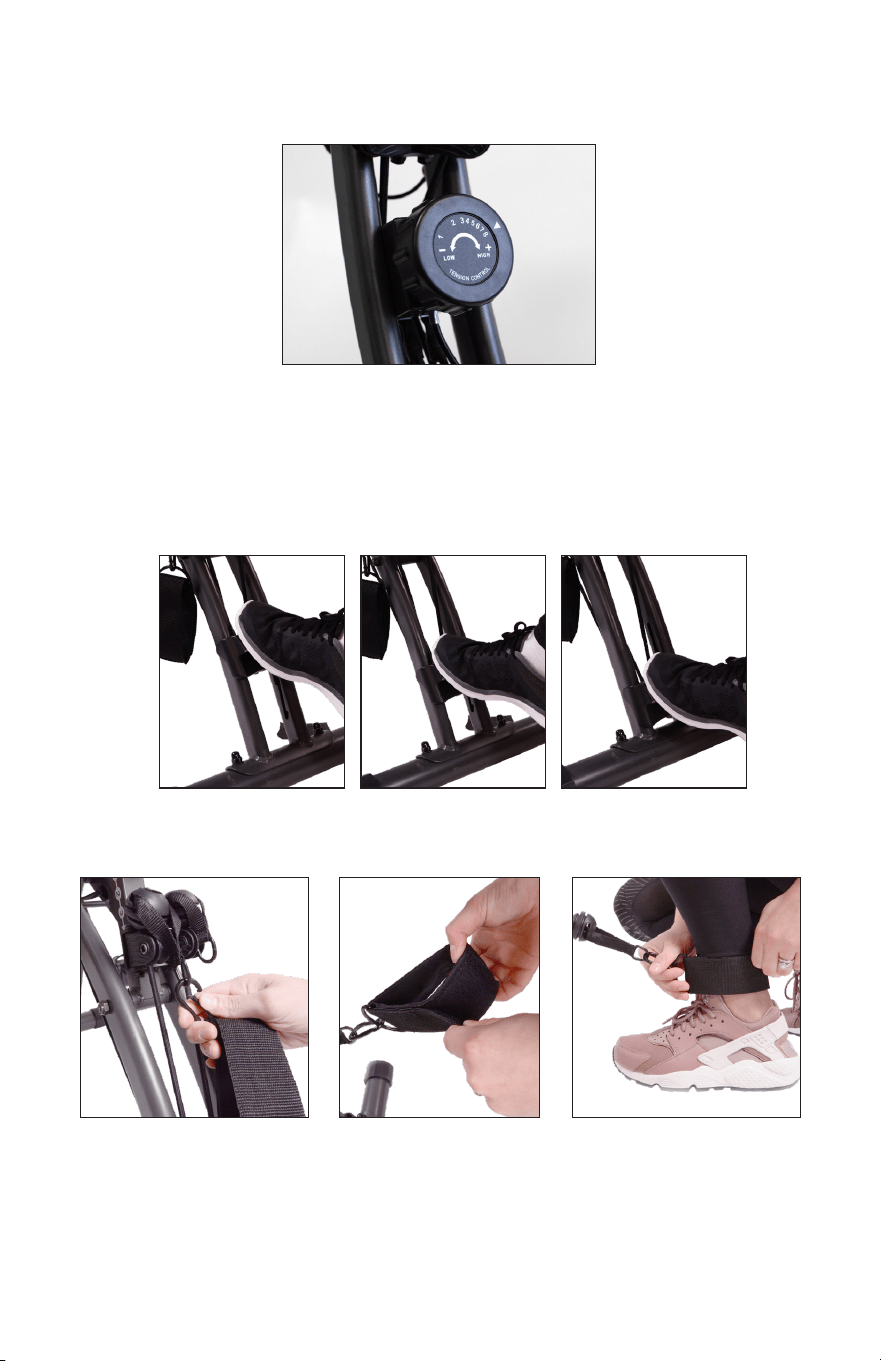
The resistance bands have three levels of resistance. To change the
resistance, step on the resistance band pedal and push down or allow it
to slide up until it clicks into place at the desired resistance level. Ensure
the resistance band pedal is locked in place before using bands.
2. Open leg resistance
strap by unlatching
the hook and loop
fastener.
1. Hook leg resistance
strap onto resistance
band loop.
3. Wrap the strap
around desired ankle
and fasten hook and
loop so that is secure
but still comfortable.
ADJUSTING RESISTANCE BANDS
ATTACHING LEG RESISTANCE BANDS
Level 1 Level 2 Level 3
ADJUSTING PEDAL TENSION
Turn the tension control knob to adjust pedal tension from 1 to 8.
21
USING FITQUEST
™
BIKE PRO
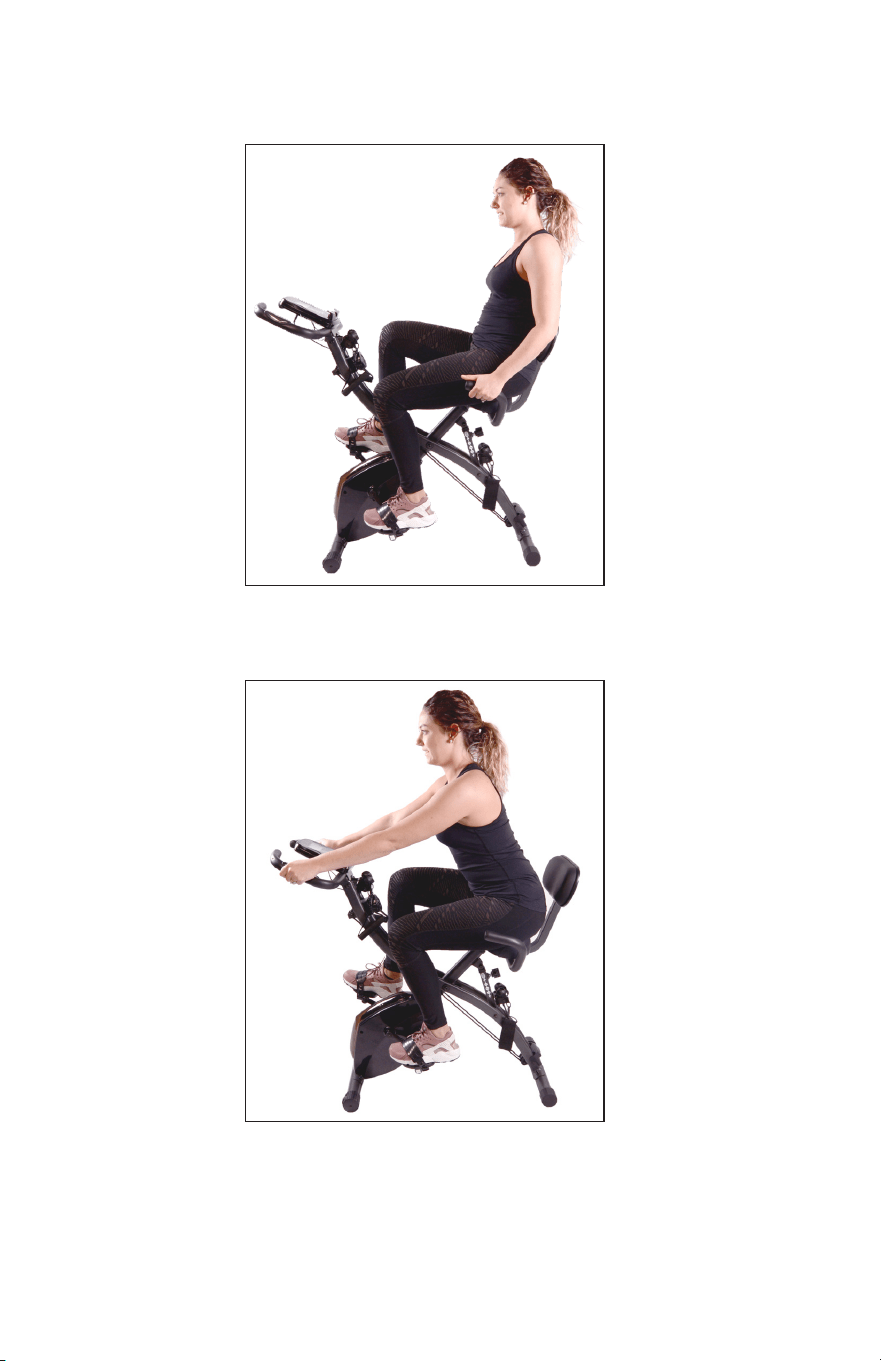
Lean back against backrest and hold handles attached under seat.
Keeping your back straight, pedal at desired pace.
Lean forward and hold onto handlebars where the heart rate monitor
grips are located. Keeping your back straight, pedal at desired pace.
22
USING FITQUEST
™
BIKE PRO
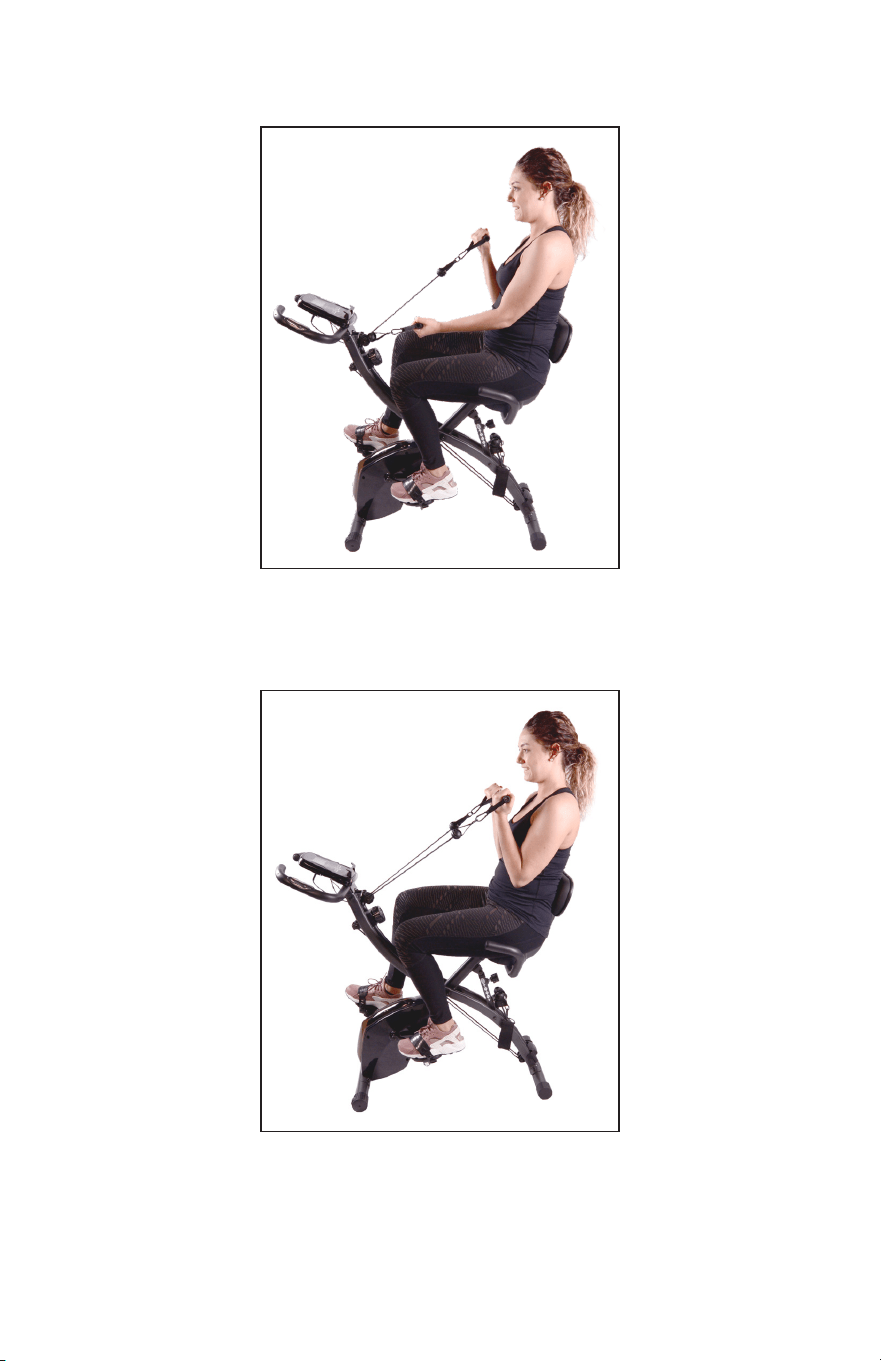
Lean back against backrest and hold both resistance band handles.
Keeping your back straight and elbows close to torso, pull the right
handle towards right shoulder. Repeat with left arm.
Lean back against backrest and hold both resistance band handles.
Keeping your back straight and elbows close to torso, pull both
resistance band handles toward body. Lower slowly and repeat.
23
USING FITQUEST
™
BIKE PRO
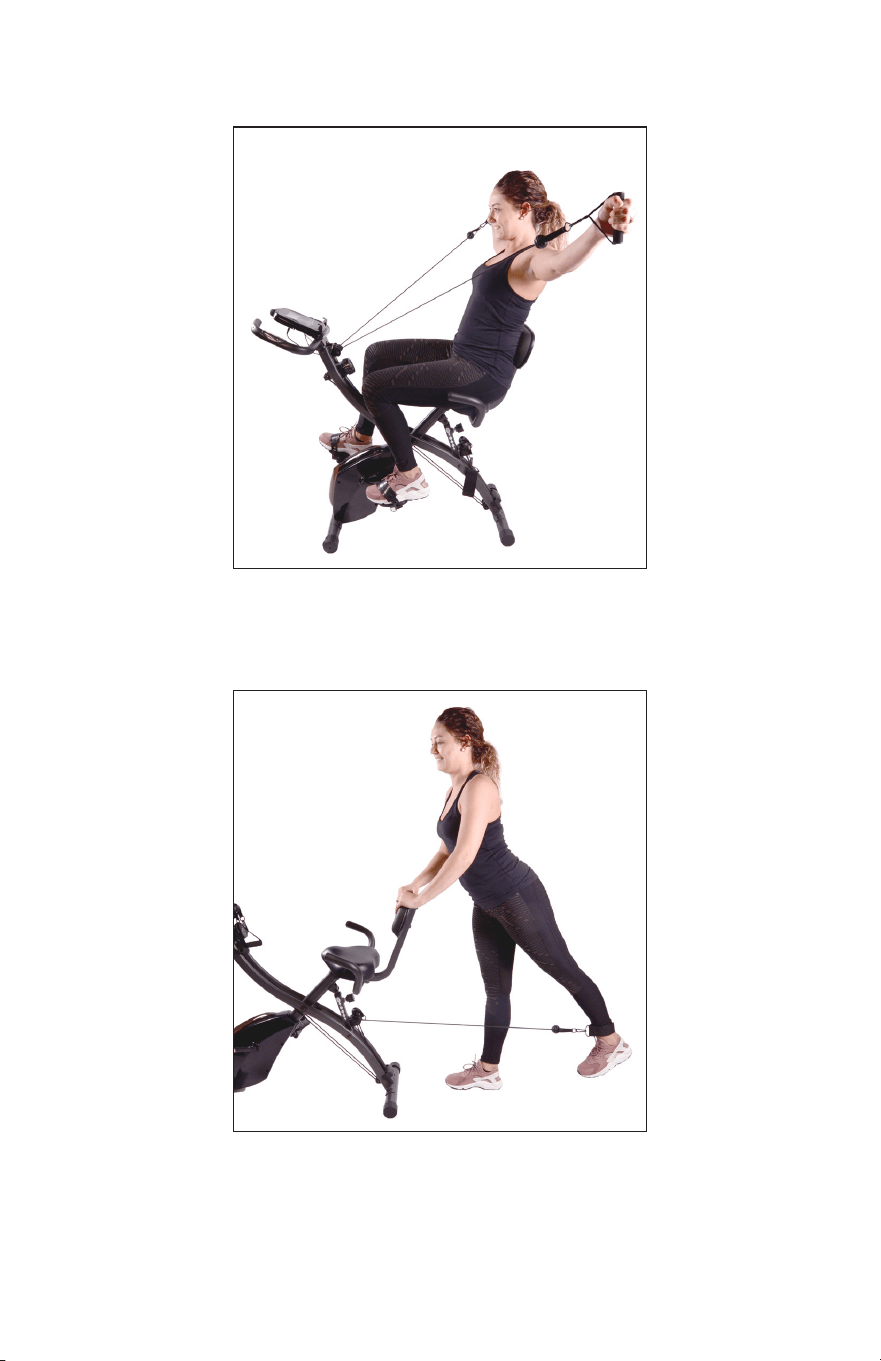
Keeping your back straight and arms locked out straight, hold the
resistance band handles and pull to shoulder height. Lower slowly
and repeat.
Attach leg resistance strap to ankle and stand facing away from bike.
Holding seat backrest for support, extend foot forward while keeping
leg straight. Lower foot slowly without resting on the ground and repeat
motion. Attach resistance strap to opposite foot and repeat.
USING FITQUEST
™
BIKE PRO
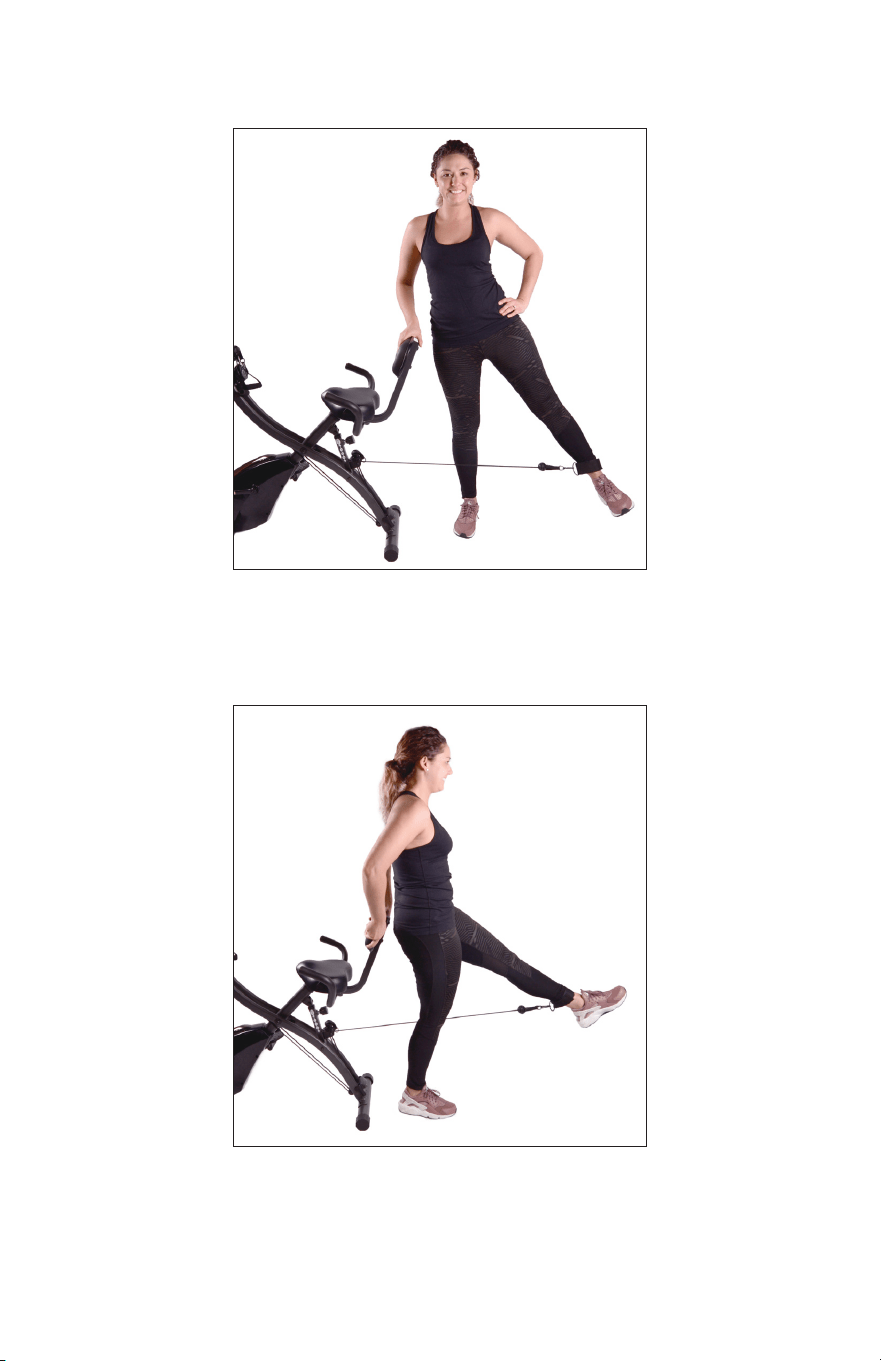
Attach leg resistance strap to ankle and stand with bike to the side.
Holding seat backrest for support, extend foot to the side while keeping
leg straight. Lower foot slowly without resting on the ground and repeat
motion. Attach resistance strap to opposite foot and repeat.
Attach leg resistance strap to ankle and stand facing bike. Holding seat
backrest for support, extend foot backwards while keeping leg straight.
Lower foot slowly without resting on the ground and repeat motion. Attach
resistance strap to opposite foot and repeat.
24

25
NOTES

26
NOTES

27
NOTES
QUESTIONS?
CONTACT CUSTOMER SERVICE
1-888-784-2835
BIKEPRO-FQ
112618