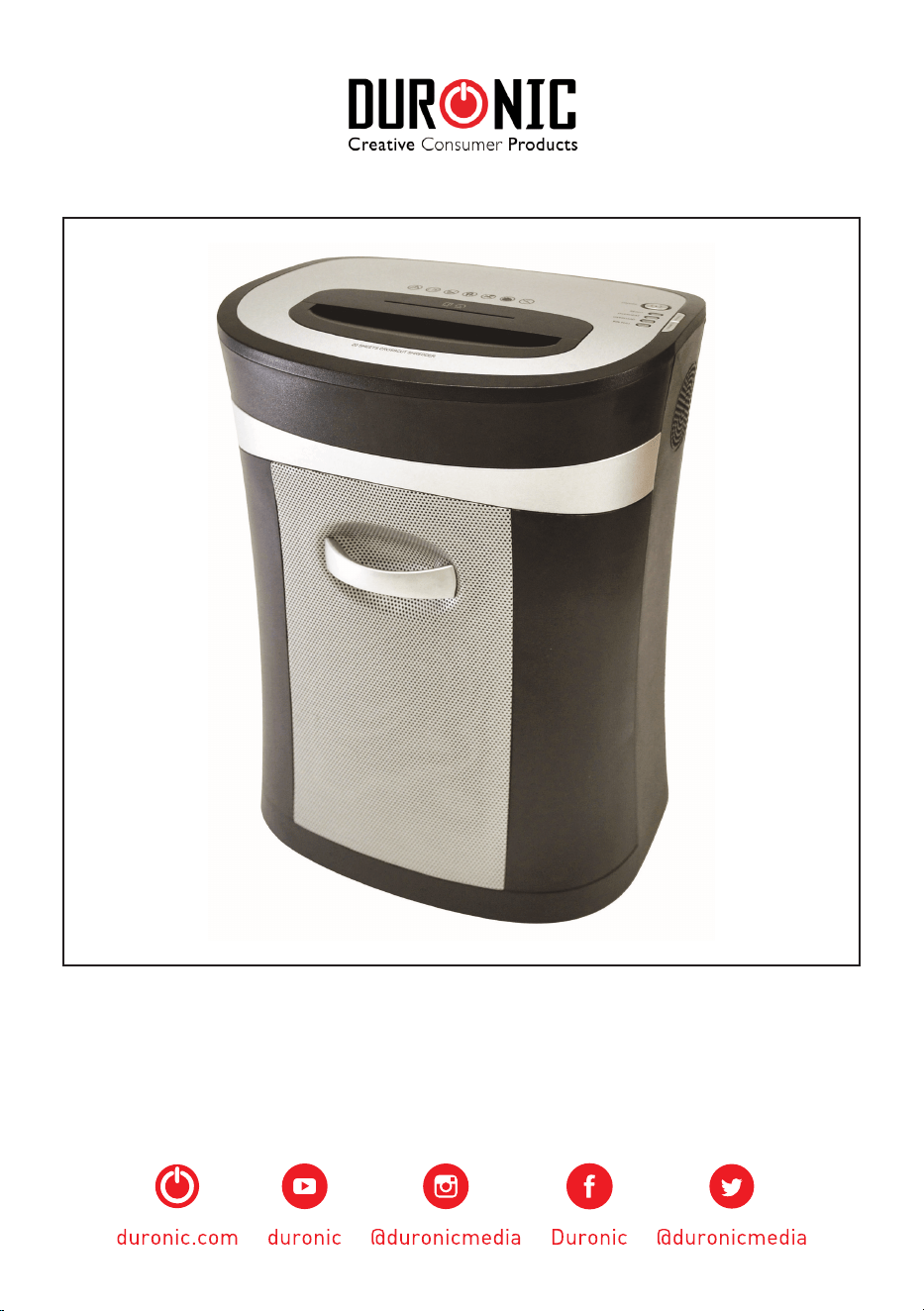
PS591

2

3
Creative Consumer Products
English Manual
Manuel d’utilisation en français
Gebrauchsanleitung auf Deutsch
Manual de Instrucciones en Español
Manuale D’istruzioni In Italiano
Instrukcja obsługi. Polski
5
13
21
29
37
45
Contents

4
5
Creative Consumer Products
English Manual
6
SPECIFICATIONS
Shred Type: Crosscut
Shred Size: 4mm x 44mm
Shredding Capacity: 20 Sheets
Duty Cycle: 30 min ON / 40 min OFF
Feed Opening: 220mm
Input: 220 - 240V, 50-60Hz, 2A

7
Creative Consumer Products
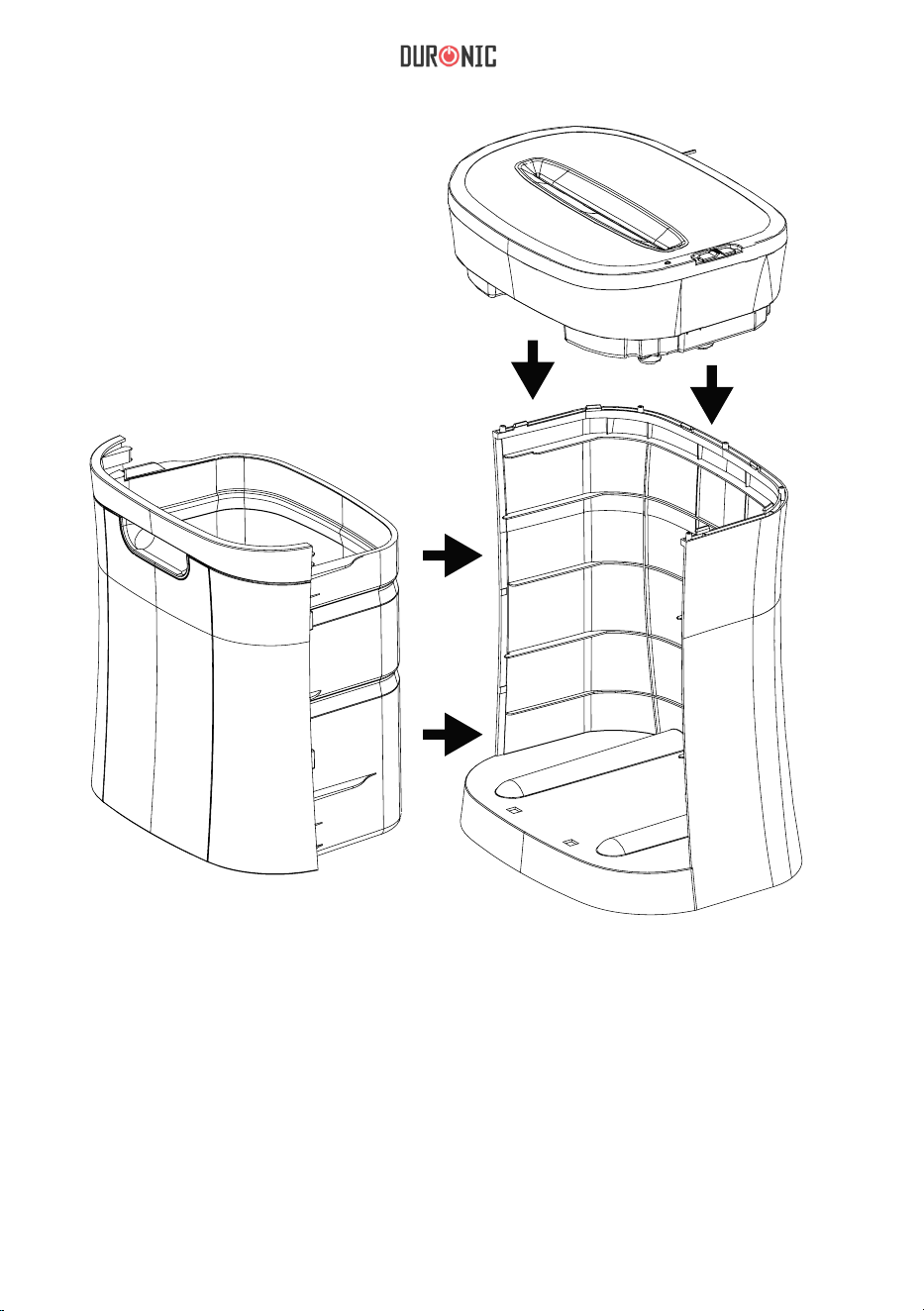
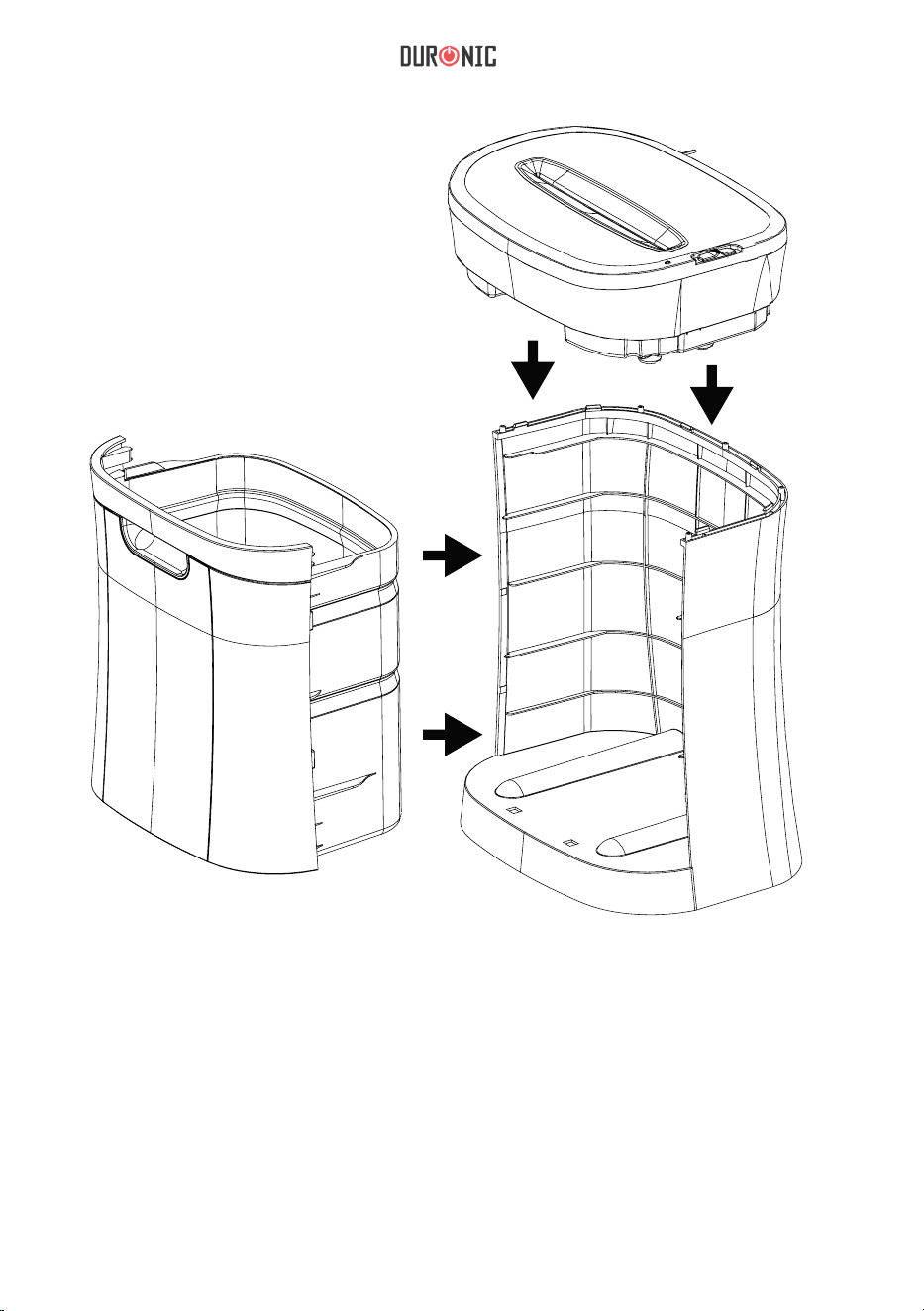
1. e PS591 shredder should be placed on a at, level surface.
2. Carefully place the shredder into the upright position on a at level surface.
3. Be careful not to place your ngers near the cutter blades.
4. With the wastebasket removed from the shredder, place the shredder head over the
cabinet, then rmly push down on the four corners of the shredder head to lock it
into place.
5. Slide the wastebasket into the shredder cabinet. Make sure that the wastebasket is
completely inserted into the shredder and that it ts ush with the cabinet.
6. Plug the power cord into any standard 230-Volt AC outlet which shall be installed
near the equipment and should be easily accessible.
7. Place the switch in the AUTO position. e READY LED should light up. You are
now ready to start shredding.
SETUP
OPERATION
With the electrical cord plugged in, the switch in the AUTO position and wastebasket
properly inplace the READY LED will light up. is signals that the shredder is now
ready for use. When the paper is inserted into the feed opening, the shredding process
will start automaticaly and stop when the paper has completed its travel through the
feed opening.
e PS591 mode selection switch is located on top of the shredder. Also located on top
of the shredder is the READY LED light.
• AUTO: e shredding process will start when the paper is inserted into the feed
ioening and will continue until it has completely passed through.
• REV: In the event of a paper jam, this reverses the shredding process in order to
assist in the removal of a paper jam. us clearing the cutters.
• OFF: It is recommended to turn the shredder o when it is not being used for a
prolonged period of time.
• READY: When the READY LED is lit up, it lets the user know that the wastebasket
is correctly inserted and the shredder is on and ready for use. If the READY LED

8
e PS591 will shred up to 20 sheets up paper and will accept paper widths up to
220mm. When shredding envelopes or receipts, insert them into the middle of the feed
opening. CD’s, DVD’s and credit cards should be placed in the designated slot.
PAPER JAMS AND OVERLOADS
e PS591 is equipped with an automatic motor overload protection circuit. e duty
cycle for the PS591 is rated for 30 Min ON / 40 Min OFF. e PS591 will automatically
terminate power in case of the following situations.
1. Operating the shredder at the maximum capacity of twenty (20) sheets
continuously for a prolonged period of time.
2. Exceeding the shredding capacity by inserting more than 20 sheets of paper in one
pass or if the paper is not fed squarely into the feed opening.
Both abnormal operations may result in the activation of the automatic thermal motor
overload protection circuit, which terminates the power to the shredder. A paper jam
could cause the thermal motor overload protection to terminate AC to power the
motor. Never allow the shredder to remain in a jammed condition with the AC power
turned on. If this occurs you should:
In case of a minor paper jam:
1. Grasp the excess paper from the top and pull it out as you depress the REV button.
does not light up, make sure the shredder is plugged in and the wastebasket is
inserted correctly.
• FULL: e PS591 has a basket full sensor to detect when it needs empying.
CAPACITY

9
Creative Consumer Products
Be careful not to place your ngers near the feed opening or else serious harm
could occur.
2. Make sure that all of the excess paper has been removed from the feed opening.
3. You are now ready to resume normal shredding.
In case of a major paper jam:
1. Turn o or unplug the power cord from the AC outlet and wait at least 40 minutes
for the thernal overload protection to reset.
2. Plug in the AC power cord and place the switch back into the AUTO position.
If paper was le inside the feed opening prior to the overload, place the switch
in REV and grasp the excess paper from the top and pull it out. Be careful not to
place your ngers near the feed opening or serious harm could occur.
3. Place the switch back into the AUTO position. You are now ready to resume
normal shredding.
SAFETY INFORMATION
BEFORE USE
• Dispose of all packaging carefully and responsibly.
• is appliance is designed for indoor use only. Do not use outdoors.
• Do not use this shredder for industrial and commercial use, or any other purpose.
• e shredder MUST be positioned on a rm level base before and during use.
• Ensure the power cable is not caught under the appliance.
• Ensure the correct power supply is used (230V AC).
• Keep power cord away from hot surfaces.
• Do not place the shredder near a heat source or in direct sunlight.
• Do not operate under or near curtains or other combustible materials.
• Do not immerse the machine in water or any other liquid to protect against
electric shock.
• Keep out of reach of children.
• Do not spray any ammable synthetic oil, petroleum-based or aerosol products
onto this shredder as it may cause a re.
• Do not allow the shredder to be exposed to rain or any other moisture.
Important - Please read these instructions fully before installation

10
DURING USE
• WARNING! Keep loose articles of clothing; ties, jewellery, hair or other objects
away from the feed opening in order to prevent injury.
• Never insert ngers into the feed opening. Serious injury may result!
• is appliance is not intended for use by persons (including children) with
reduced physical, sensory or mental capabilities, or lack of experience and
knowledge, unless they have been given supervision or instruction concerning use
of the appliance by a person responsible for their safety.
• Do not leave children unattended with the shredder.
• ALWAYS keep the shredder o and unplugged when not in use.
• DO NOT attempt to feed more sheets of paper into the feeder than specied.
• ALWAYS limit continuous shredding to the specied time as suggested in the
instruction manual.
• DO NOT attempt to shred materials other than paper and credit cards in the
provided feed slot.
• To avoid overheating the shredder, limit continuous shredding to the specied
time as suggested in this instruction manual.
• Do not operate the shredder if the cord or plug are damaged or if the shredder has
malfunctioned in any way.
• ALWAYS unplug the shredder when moving, cleaning or emptying the
wastebasket.
• DO NOT attempt to operate the shredder if the shredder is experiencing any kind
of problem.
• If your machine stops working, do not attempt to repair it yourself! Contact
Duronic (Shine-Mart) for assistance.
11
Creative Consumer Products
• Never use any sharp instruments or abrasive substances, soap, household cleaner,
detergent or wax polish for cleaning.
• Never clean the appliance with ammable uids. It could cause a damage and re
hazard.
• Use lukewarm water on a cloth to clean the cabinet and wastebasket of the
appliance and wipe it dry.
• Ensure the unit is dry before connect to the mains
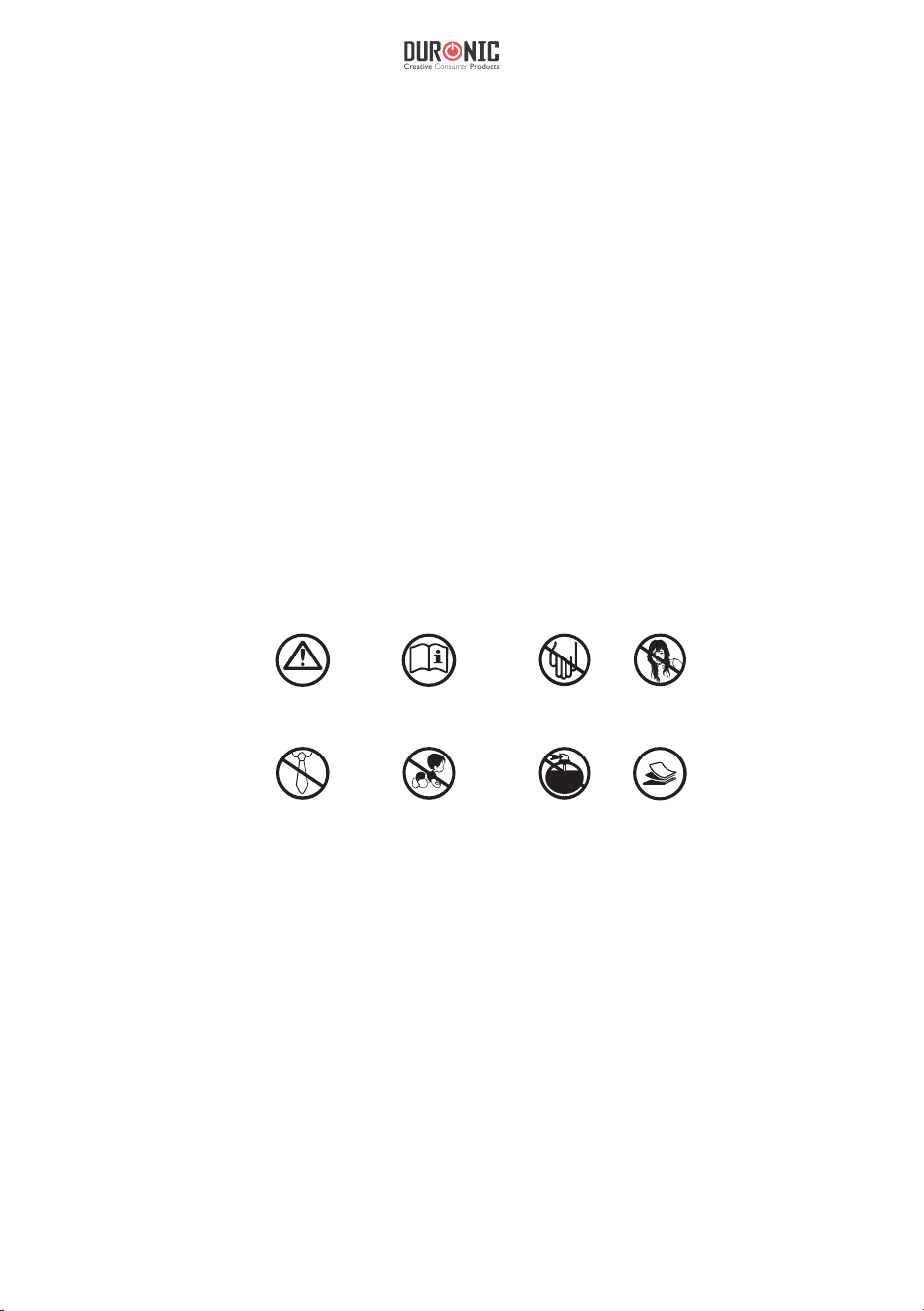
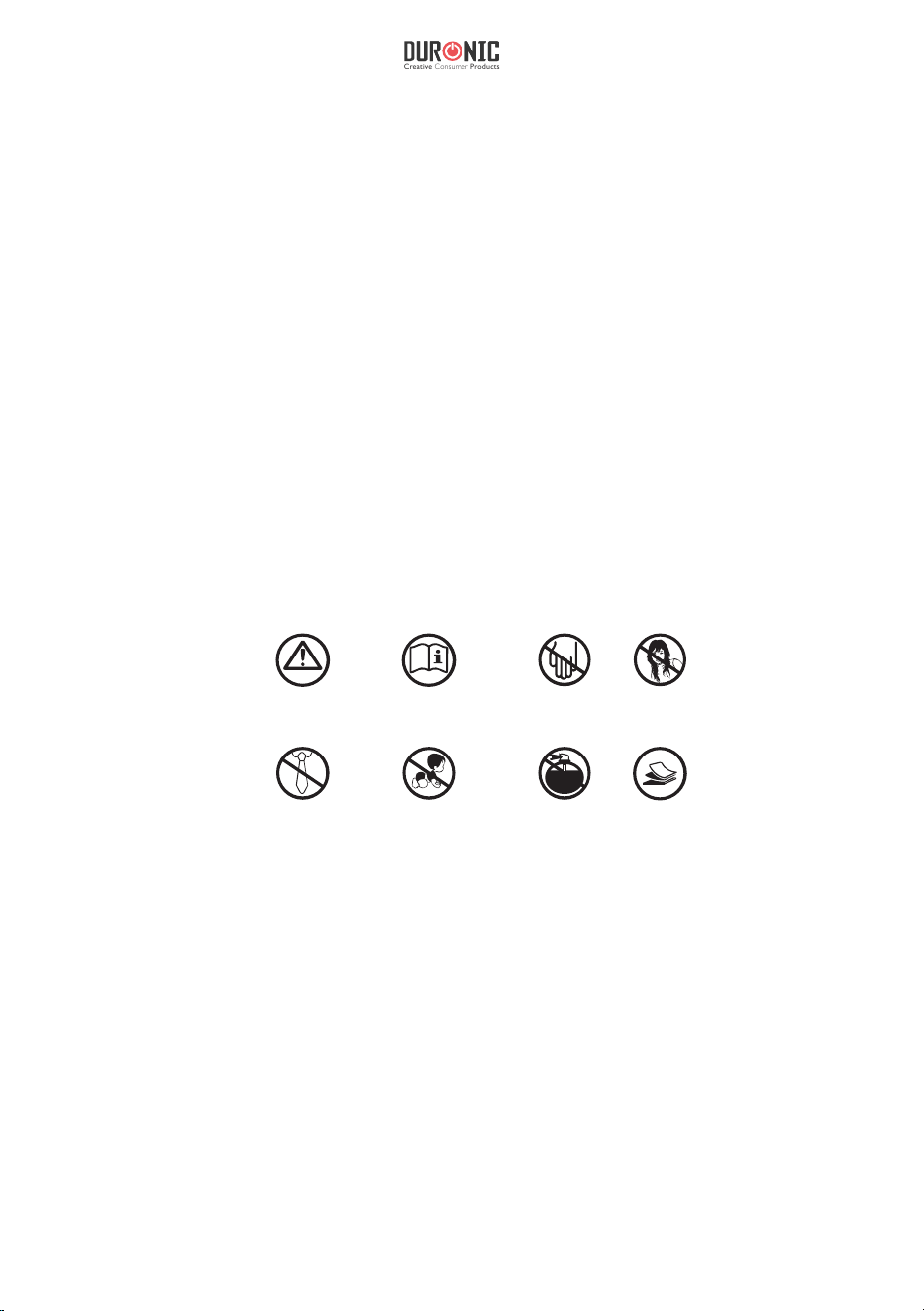
WARNING
READ INSTRUCTION
BEFORE USE
NO FINGERS
OR HANDS
NO HAIR
NO LOOSE
CLOTHING
NO CHILDREN
NO AEROSOL
PRODUCTS
18 - 20
MAX
CLEANING AND MAINTENANCE
Important: Always unplug the appliance from the power socket during
cleaning and maintenance.
12
Warranty
1 Year Guarantee from Shine-Mart Ltd, Trademark owners of Duronic Products.
NOTE: THESE STATEMENTS DO NOT AFFECT YOUR STATUTORY RIGHTS AS A
CONSUMER
This product has been manufactured under the strictest or quality control procedures, and
using the highest quality of materials, to ensure excellent performance and reliability. It will
give very good and long lasting service, provided it is properly used and maintained. The
product is guaranteed for 1 years from the date of original purchase. If any defect arises due
to a faulty materials or poor workmanship, the faulty product must be returned to the original
place of purchase. Refund or replacement is at the discretion of that company.
Duronic Products are offered with a 1 year guarantee under the following conditions:
1. The product must be returned to the retailer with original proof of purchase.
2. The product must be installed and used in accordance with the instructions
contained in this operating manual.
3. It must be used only for domestic purposes.
4. It does not cover wear and tear, malicious damage, misuse, neglect,
inexpert repairs or consumable parts.
5. Shine-Mart Ltd has no responsibilities for accidental or consequential loss or damage.
6. Shine-Mart Ltd are not liable to carry out any type of servicing work,
under the guarantee
7. Valid in the UK only
This product is tted with CE:1363 plug and fuse
Imported by Shine-Mart Ltd, RM3 8SB
Information on waste Disposal for Consumers of
Electrical & Electronic Equipment.
This mark on a product and/or accompanying documents indicates that when it
is to be disposed of, it must be treated as Waste
Electrical & Electronic Equipment, (WEEE).
Any WEEE marked products must not be mixed with general household waste,
but kept separate for the treatment, recovery and recycling of the materials used.
For proper treatment, recovery and recycling; please take all WEEE marked
waste to your Local Authority Civic waste site,
where it will be accepted free of charge.
If customers dispose of Waste Electrical & Electronic Equipment correctly, they
will be helping to save valuable resources and preventing any potential negative
effects upon human health and the environment, of any hazardous materials that
the waste may contain.
13
Creative Consumer Products
Manuel d’utilisation en français
14
SPECIFICATIONS
Shred Type: Crosscut
Shred Size: 4mm x 44mm
Shredding Capacity: 20 Sheets
Duty Cycle: 30 min ON / 40 min OFF
Feed Opening: 220mm
Input: 220 - 240V, 50-60Hz, 2A

15
Creative Consumer Products
1. e PS591 shredder should be placed on a at, level surface.
2. Carefully place the shredder into the upright position on a at level surface.
3. Be careful not to place your ngers near the cutter blades.
4. With the wastebasket removed from the shredder, place the shredder head over the
cabinet, then rmly push down on the four corners of the shredder head to lock it
into place.
5. Slide the wastebasket into the shredder cabinet. Make sure that the wastebasket is
completely inserted into the shredder and that it ts ush with the cabinet.
6. Plug the power cord into any standard 230-Volt AC outlet which shall be installed
near the equipment and should be easily accessible.
7. Place the switch in the AUTO position. e READY LED should light up. You are
now ready to start shredding.
SETUP
OPERATION
With the electrical cord plugged in, the switch in the AUTO position and wastebasket
properly inplace the READY LED will light up. is signals that the shredder is now
ready for use. When the paper is inserted into the feed opening, the shredding process
will start automaticaly and stop when the paper has completed its travel through the
feed opening.
e PS591 mode selection switch is located on top of the shredder. Also located on top
of the shredder is the READY LED light.
• AUTO: e shredding process will start when the paper is inserted into the feed
ioening and will continue until it has completely passed through.
• REV: In the event of a paper jam, this reverses the shredding process in order to
assist in the removal of a paper jam. us clearing the cutters.
• OFF: It is recommended to turn the shredder o when it is not being used for a
prolonged period of time.
• READY: When the READY LED is lit up, it lets the user know that the wastebasket
is correctly inserted and the shredder is on and ready for use. If the READY LED

16
e PS591 will shred up to 20 sheets up paper and will accept paper widths up to
220mm. When shredding envelopes or receipts, insert them into the middle of the feed
opening. CD’s, DVD’s and credit cards should be placed in the designated slot.
PAPER JAMS AND OVERLOADS
e PS591 is equipped with an automatic motor overload protection circuit. e duty
cycle for the PS591 is rated for 30 Min ON / 40 Min OFF. e PS591 will automatically
terminate power in case of the following situations.
1. Operating the shredder at the maximum capacity of twenty (20) sheets
continuously for a prolonged period of time.
2. Exceeding the shredding capacity by inserting more than 20 sheets of paper in one
pass or if the paper is not fed squarely into the feed opening.
Both abnormal operations may result in the activation of the automatic thermal motor
overload protection circuit, which terminates the power to the shredder. A paper jam
could cause the thermal motor overload protection to terminate AC to power the
motor. Never allow the shredder to remain in a jammed condition with the AC power
turned on. If this occurs you should:
In case of a minor paper jam:
1. Grasp the excess paper from the top and pull it out as you depress the REV button.
does not light up, make sure the shredder is plugged in and the wastebasket is
inserted correctly.
• FULL: e PS591 has a basket full sensor to detect when it needs empying.
CAPACITY

17
Creative Consumer Products
Be careful not to place your ngers near the feed opening or else serious harm
could occur.
2. Make sure that all of the excess paper has been removed from the feed opening.
3. You are now ready to resume normal shredding.
In case of a major paper jam:
1. Turn o or unplug the power cord from the AC outlet and wait at least 40 minutes
for the thernal overload protection to reset.
2. Plug in the AC power cord and place the switch back into the AUTO position.
If paper was le inside the feed opening prior to the overload, place the switch
in REV and grasp the excess paper from the top and pull it out. Be careful not to
place your ngers near the feed opening or serious harm could occur.
3. Place the switch back into the AUTO position. You are now ready to resume
normal shredding.
SAFETY INFORMATION
BEFORE USE
• Dispose of all packaging carefully and responsibly.
• is appliance is designed for indoor use only. Do not use outdoors.
• Do not use this shredder for industrial and commercial use, or any other purpose.
• e shredder MUST be positioned on a rm level base before and during use.
• Ensure the power cable is not caught under the appliance.
• Ensure the correct power supply is used (230V AC).
• Keep power cord away from hot surfaces.
• Do not place the shredder near a heat source or in direct sunlight.
• Do not operate under or near curtains or other combustible materials.
• Do not immerse the machine in water or any other liquid to protect against
electric shock.
• Keep out of reach of children.
• Do not spray any ammable synthetic oil, petroleum-based or aerosol products
onto this shredder as it may cause a re.
• Do not allow the shredder to be exposed to rain or any other moisture.
Important - Please read these instructions fully before installation

18
DURING USE
• WARNING! Keep loose articles of clothing; ties, jewellery, hair or other objects
away from the feed opening in order to prevent injury.
• Never insert ngers into the feed opening. Serious injury may result!
• is appliance is not intended for use by persons (including children) with
reduced physical, sensory or mental capabilities, or lack of experience and
knowledge, unless they have been given supervision or instruction concerning use
of the appliance by a person responsible for their safety.
• Do not leave children unattended with the shredder.
• ALWAYS keep the shredder o and unplugged when not in use.
• DO NOT attempt to feed more sheets of paper into the feeder than specied.
• ALWAYS limit continuous shredding to the specied time as suggested in the
instruction manual.
• DO NOT attempt to shred materials other than paper and credit cards in the
provided feed slot.
• To avoid overheating the shredder, limit continuous shredding to the specied
time as suggested in this instruction manual.
• Do not operate the shredder if the cord or plug are damaged or if the shredder has
malfunctioned in any way.
• ALWAYS unplug the shredder when moving, cleaning or emptying the
wastebasket.
• DO NOT attempt to operate the shredder if the shredder is experiencing any kind
of problem.
• If your machine stops working, do not attempt to repair it yourself! Contact
Duronic (Shine-Mart) for assistance.
19
Creative Consumer Products
• Never use any sharp instruments or abrasive substances, soap, household cleaner,
detergent or wax polish for cleaning.
• Never clean the appliance with ammable uids. It could cause a damage and re
hazard.
• Use lukewarm water on a cloth to clean the cabinet and wastebasket of the
appliance and wipe it dry.
• Ensure the unit is dry before connect to the mains
WARNING
READ INSTRUCTION
BEFORE USE
NO FINGERS
OR HANDS
NO HAIR
NO LOOSE
CLOTHING
NO CHILDREN
NO AEROSOL
PRODUCTS
18 - 20
MAX
CLEANING AND MAINTENANCE
Important: Always unplug the appliance from the power socket during
cleaning and maintenance.
20
Garantie et service après-vente
1 an de garantie de la part de Shine-Mart Ltd, propriétaire de la marque Duronic.
NOTE : CES DÉCLARATIONS N’AFFECTENT EN RIEN VOTRE DROIT STATUTAIRE EN
TANT QUE CONSOMMATEUR
Ce produit a été produit en suivant les procédures de contrôle de qualité les plus strictes en
utilisant des matériaux de qualité pour assurer une excellente durabilité et performance.
Cette centrifugeuse vous offrira de longues années de service tant que vous utilisez
correctement cette machine et suivez les instructions de maintenance contenues dans ce
manuel. Ce produit est garanti pour 1 an à partir de la date originelle d’achat. Si ce produit
était endommagée en raison d’un problème électrique ou d’une fabrication imparfaite,
le produit défectueux peut être remplacé au vendeur à la discrétion de la marque sous
conditions:
1
. L
e produit doit être retourné avec la preuve originale d’achat.
2
. L
e produit doit être installé et utilisé en accord avec les instructions contenue
s
d
ans ce manuel d’utilisation.
3
. L
e produit doit être réservé à un usage privé.
4
. L
a garantie ne protège pas contre les dommages dus à l’usure normale
,
l’utilisation malveillante, la mauvaise utilisation, la négligence, les réparations
conduites par des non-experts ainsi que les pièces consommables.
5
. S
hine-Mart Ltd ne porte pas de responsabilité pour tout dommage ou pert
e
a
ccidentel ou conséquent causé par ce produit.
6
. S
hine-Mart Ltd se dégage de toute responsabilité en matière de réparatio
n
d
urant la période de garantie.
7
. V
alide dans toute l’Union Européenne.
Ce produit est fourni avec une prise européenne
et un fusible de 3 ampères.
Importé par Shine-Mart Ltd, RM3 8SB.
Ce symbole apparaît sur le produit et/ou les documents accompagnant ce
produit pour indiquer que pour procéder à la destruction de ce produit, celui-ci
doit être traité comme un déchet électrique et électronique (WEEE).
Les produits marqués WEEE ne doivent être mélangés avec les déchets
ménagers et doivent être séparés pour traitement et recyclage des composants.
An de traiter et recycler ce produit, veuillez déposer tous les composants
marqués WEEE au site de recyclage le plus proche où ce produit sera repris
gratuitement. Si les clients jettent les déchets électriques et électroniques
WEEE correctement, ce geste aidera la préservation de ressources précieuses
et prévient les potentiels effets négatifs que ces composants ou tout autre
composant dangereux ont sur la santé humaine et l’environnement.
Garantie
suivez nous
www.duronic.com @Duronic_FranceDuronic France@duronic_france
21
Creative Consumer Products
Gebrauchsanleitung auf Deutsch
22
TECHNISCHE DATEN
Schnittart: Kreuzschnitt / Cross-cut
Schnittgröße: 4mm x 39mm
Schnittleistung: 20 Blatt Papier (80gsm A4)
Nennbetriebszeit: 30 Minuten AN / 40 Minuten AUS
Futteröffnung: 220mm / 22cm
Spannung: 220-240 V, 50-60Hz, 2A

23
Creative Consumer Products
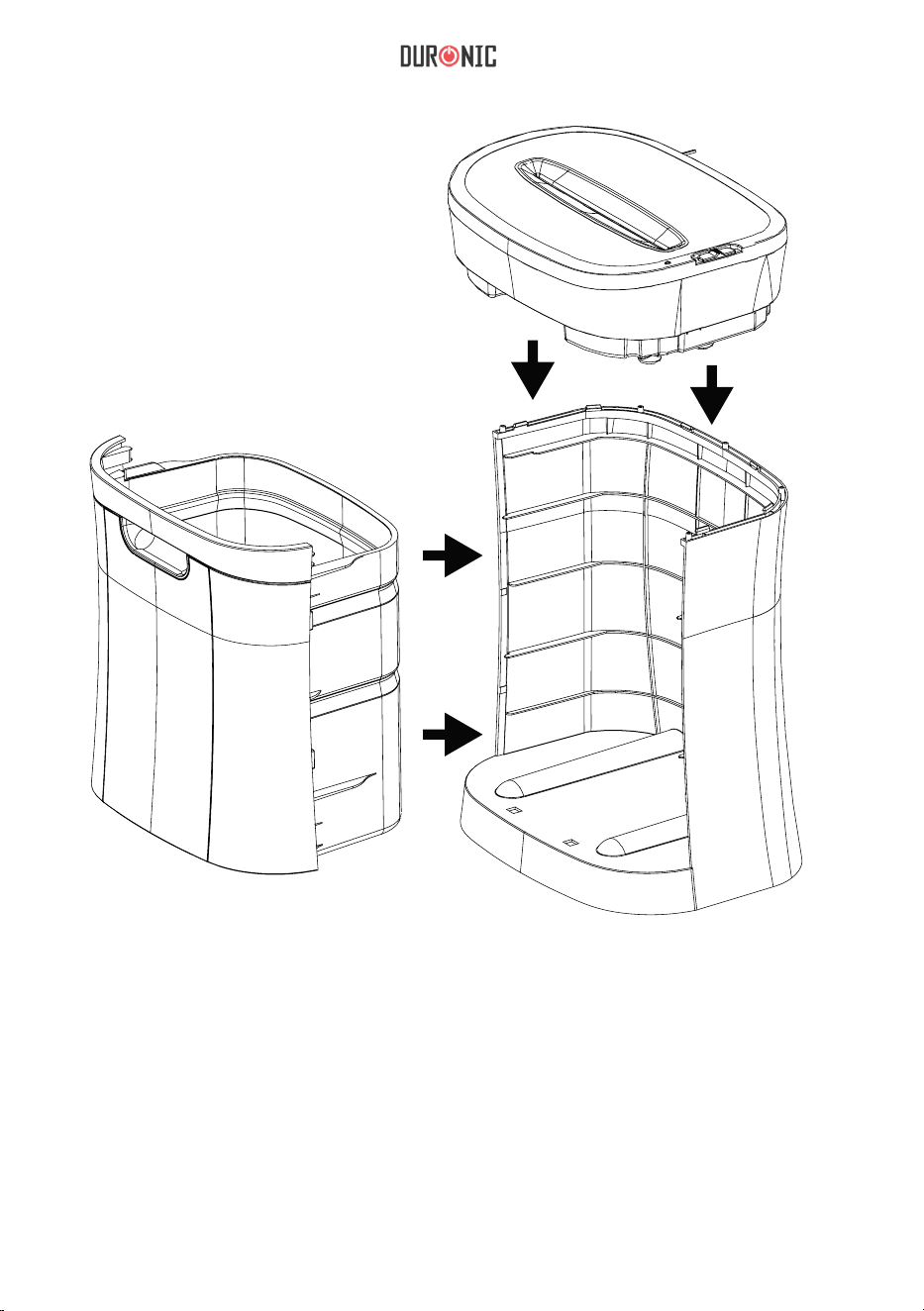
1. Entfernen Sie alle Verpackungseinheiten um das Gerät herum.
2. Der Aktenvernichter PS591 sollte auf einer flachen, ebenen Oberfläche in eine aufrechte
Position aufgestellt werden.
3. Achten Sie darauf, dass Ihre Finger nicht in der Nähe des Schneidewerks sind.
4. Lassen Sie den Auffangbehälter bei Seite und platzieren Sie das Schneidewerk auf das
Gehäuse und drücken Sie dann fest auf die vier Ecken des Schneidewerks, um ihn zu
arretieren.
5. Schieben Sie den Papierkorb in den Aktenvernichter. Stellen Sie sicher, dass der
Papierkorb vollständig in den Aktenvernichter eingesetzt ist und bündig mit dem
Schrank abschließt.
6. Schließen Sie das Netzkabel an eine 230-Volt-Steckdose an, die sich in der Nähe des
Geräts befindet und leicht zugänglich sein sollte.
7. Stellen Sie den Schalter auf AUTO. Die READY-LED Leuchte sollte aufleuchten. Sie
können jetzt mit dem Schreddern beginnen.
INSTALLATION UND AUFBAU
BEDIENUNG UND BETRIEB
Wenn das Netzkabel eingesteckt ist, der Schalter auf AUTO steht und der Papierkorb richtig
eingesetzt ist, leuchtet die READY-LED Leuchte. Dies bedeutet, dass der Aktenvernichter
einsatzbereit ist. Wenn das Papier in die Einzugsöffnung eingelegt wird, beginnt der
Zerkleinerungsprozess automatisch und stoppt, wenn das Papier seinen Durchlauf durch die
Einzugsöffnung abgeschlossen hat.
Der Bedienschalter für die 3 Modi (Auto, OFF, Rev) PS591 befindet sich oben auf dem
Aktenvernichter. Ebenso dort befindet sich auch die READY LED-Leuchte.
•
AUTO: Der Zerkleinerungsvorgang beginnt, wenn das Papier in die Zufuhröffnung
eingelegt wird, und wird fortgesetzt, bis es vollständig durchgelaufen ist.
•
•
AUS: Es wird empfohlen, den Aktenvernichter auszuschalten, wenn er längere Zeit
nicht verwendet wird.
•
READY: Wenn die READY-LED Leuchte aufscheint, wird der Benutzer darüber
informiert, dass der Papierkorb richtig eingesetzt ist und der Aktenvernichter
eingeschalten und betriebsbereit ist. Wird die READY-LED Leuchte nicht grün
angezeigt, sollten Sie sich vergewissern, dass der Aktenvernichter angeschlossen und
der Papierkorb richtig eingesetzt ist.
REV: Im Falle eines Papierstaus kann der Zerkleinerungsvorgang umgekehrt werden,
um beim Entfernen des Papierstaus zu helfen. Somit wird das Schneidewerk geleert.

24
Die PS591 zerkleinert bis zu 18-20 Blatt Papier und akzeptiert Papierbreiten bis 220
mm. Beachten Sie, je dicker ist das Papier, desto weniger kann der Shredder
zerkleinern. Wenn Sie Umschläge, Quittungen oder Kreditkarten zerkleinern, legen
Sie diese in die Mitte der Einzugsöffnung ein.
PAPIERSTAU UND ÜBERLASTUNG
Die PS591 ist mit einer automatischen Motorschutzschaltung ausgestattet. Die
Einschaltdauer der PS591 ist für 30 Min ON / 40 Min AUS ausgelegt. Der PS591 schaltet
die Stromversorgung in den folgenden Situationen automatisch ab:
1.
Inbetriebnahme des Aktenvernichters mit der maximalen Kapazität von 20 Blatt über
einen längeren Zeitraum.
2.
Überschreiten der Zerkleinerungskapazität durch Einlegen von mehr als 20 Blatt Papier
in einem Durchgang oder wenn das Papier nicht gerade in die Zufuhröffnung
eingezogen wird.
Beide oben genannten Betriebsvorgänge können dazu führen, dass die automatische
Überlastungsschutz für den überhitzten Motor aktiviert wird, wodurch die Stromversorgung
des Aktenvernichters unterbrochen wird. Ein Papierstau kann dazu führen, dass der
Überlastungsschutz des Motors den Wechselstrom zur Stromversorgung beendet. Erlauben
Sie niemals, dass der Aktenvernichter bei eingeschaltetem Netzstrom in einem blockierten
Zustand bleibt. In diesem Fall sollten Sie:
Bei einem geringfügigen Papierstau:
1.
Setzen Sie den Schalter in den REV und ziehen Sie die restlichen Blätter aus der
Einzugsöffnung. Achten Sie darauf, Ihre Finger nicht in die Nähe der Zufuhröffnung zu
halten, da dies zu schweren Verletzungen führen kann.
•
VOLL: Der PS591 verfügt über einen Sensor um den vollen Korb zu erkennen und
entleeren.
KAPAZITÄT

25
Creative Consumer Products
2.
Entfernen Sie die überschüssige Papiermenge von der Oberseite und die
überschüssigen Papierfetzen aus der Einzugsöffnung.
3.
Wenn das übriggebliebene Papier entfernt wurde, schalten Sie Gerät wieder auf
AUTO.
Bei einem größeren Papierstau:
1.
Schalten Sie das Netzkabel aus oder ziehen Sie den Netzstecker aus der Steckdose,
und warten Sie mindestens 30 Minuten, bis der Überhitzungsschutz zurückgesetzt
ist.
2.
Stecken Sie das Netzkabel ein und schalten sie auf AUTO. Wenn vor der
Überlastung Papier in der Zufuhröffnung gelassen wurde, schalten Sie auf REV
und fassen das überschüssige Papier von oben und ziehen dieses heraus. Achten
Sie darauf, Ihre Finger nicht in die Nähe der Zufuhröffnung zu halten, da dies
zu schweren Verletzungen führen kann.
3.
Schalten Sie wieder auf AUTO und fahren mit dem normalen Schreddern
wieder fort.
SICHERHEITSANWEISUNGEN
VOR GEBRAUCH
Entfernen Sie alle Verpackungen sorgfältig und entsorgen Sie diese verantwortungsvoll.
• Dieses Gerät ist nur für die Verwendung in Innenräumen bestimmt. Verwenden Sie es
nicht im Freien.
• Verwenden Sie diesen Aktenvernichter nicht für industrielle, kommerzielle oder andere
Zwecke.
• Der Aktenvernichter MUSS vor und während des Gebrauchs auf einer festen und ebenen
Unterlage positioniert werden.
• Stellen Sie sicher, dass das Netzkabel nicht unter dem Gerät eingeklemmt ist.
• Stellen Sie sicher, dass die richtige Stromversorgung verwendet wird (230 V AC).
• Halten Sie das Netzkabel von heißen Oberflächen fern.
• Verwenden Sie das Gerät weder in der Nähe von Wärme- oder Kältequellen noch in
überhitzten, feuchten oder staubigen Umgebungen.
• Betreiben Sie den Aktenvernichter NICHT unter oder in der Nähe von Vorhängen oder
anderen brennbaren Materialien.
• Tauchen Sie das Gerät nicht ins Wasser oder andere Flüssigkeiten, um einen elektrischen
Schlag zu vermeiden.
Wichtig - Bitte lesen Sie die Sicherheitsanweisungen vor der Installation vollständig durch

26
WÄHREND DES GEBRAUCHS
WARNUNG! Halten Sie lose Kleidungsstücke wie Krawatten, Schmuck, Haare oder
andere Gegenstände von der Einfüllöffnung entfernt, um Verletzungen zu vermeiden.
• Stecken Sie niemals Finger in die Zufuhröffnung. Dies kann zu schweren Verletzungen
führen!
• Dieses Gerät ist nicht für den Gebrauch durch Personen (einschließlich Kinder) mit
eingeschränkten körperlichen, sensorischen oder geistigen Fähigkeiten oder mangelnder
Erfahrung und Kenntnisse geeignet, es sei denn, sie wurden von einer für ihre Sicherheit
verantwortlichen Person beaufsichtigt oder angewiesen.
• Lassen Sie keine Kinder unbeaufsichtigt in der Nähe vom Aktenvernichter.
• Lassen Sie den Zerkleinerer IMMER ausgeschaltet und ziehen Sie den Netzstecker
raus, wenn Sie ihn nicht verwenden.
• Versuchen Sie NICHT, mehr Blätter als angegeben in den Einzug einzulegen.
• Beschränken Sie die kontinuierliche Zerkleinerung IMMER auf die in der
Bedienungsanleitung angegebene Zeit, um somit eine Überhitzung des Aktenvernichters
zu vermeiden.
• Versuchen Sie NICHT, etwas anderes außer Papier und Kreditkarten mit dem
vorgesehenen Schneidewerk zu zerkleinern.
• Betreiben Sie den Aktenvernichter nicht, wenn das Kabel oder der Stecker beschädigt
ist oder wenn der Aktenvernichter auf irgendeine Weise eine Funktionsstörung aufweist.
• Ziehen Sie das Gerät IMMER vom Strom ab, wenn Sie den Papierkorb bewegen,
reinigen oder leeren.
• Versuchen Sie NICHT, den Aktenvernichter zu bedienen, wenn der Aktenvernichter
Probleme hat.
• Wenn Ihr Gerät nicht mehr funktioniert, versuchen Sie nicht, es selbst zu reparieren!
Wenden Sie sich an Duronic (Shine-Mart), um Unterstützung zu erhalten.
• Dieses Gerät darf nicht in die Hände von Kindern gelangen.
• Sprühen Sie keine brennbaren synthetischen Öl-, Erdöl- oder Aerosolprodukte auf
diesen Schredder, da dies einen Brand verursachen kann.
• Lassen Sie den Aktenvernichter nicht im Regen oder anderen Feuchtigkeit
ausgesetzt.
27
Creative Consumer Products
•
Verwenden Sie zum Reinigen niemals scharfe Instrumente oder Scheuermittel,
Seife, Haushaltsreiniger, Reinigungsmittel oder Wachspoliermittel.
•
Reinigen Sie das Gerät niemals mit brennbaren Flüssigkeiten. Dies kann zu
Beschädigungen und Brandgefahr führen.
•
Reinigen Sie das Gehäuse und den Papierkorb des Geräts mit lauwarmem Wasser
und wischen Sie es trocken.
•
Stellen Sie sicher, dass das Gerät trocken ist, bevor Sie es an das Stromnetz
anschließen.
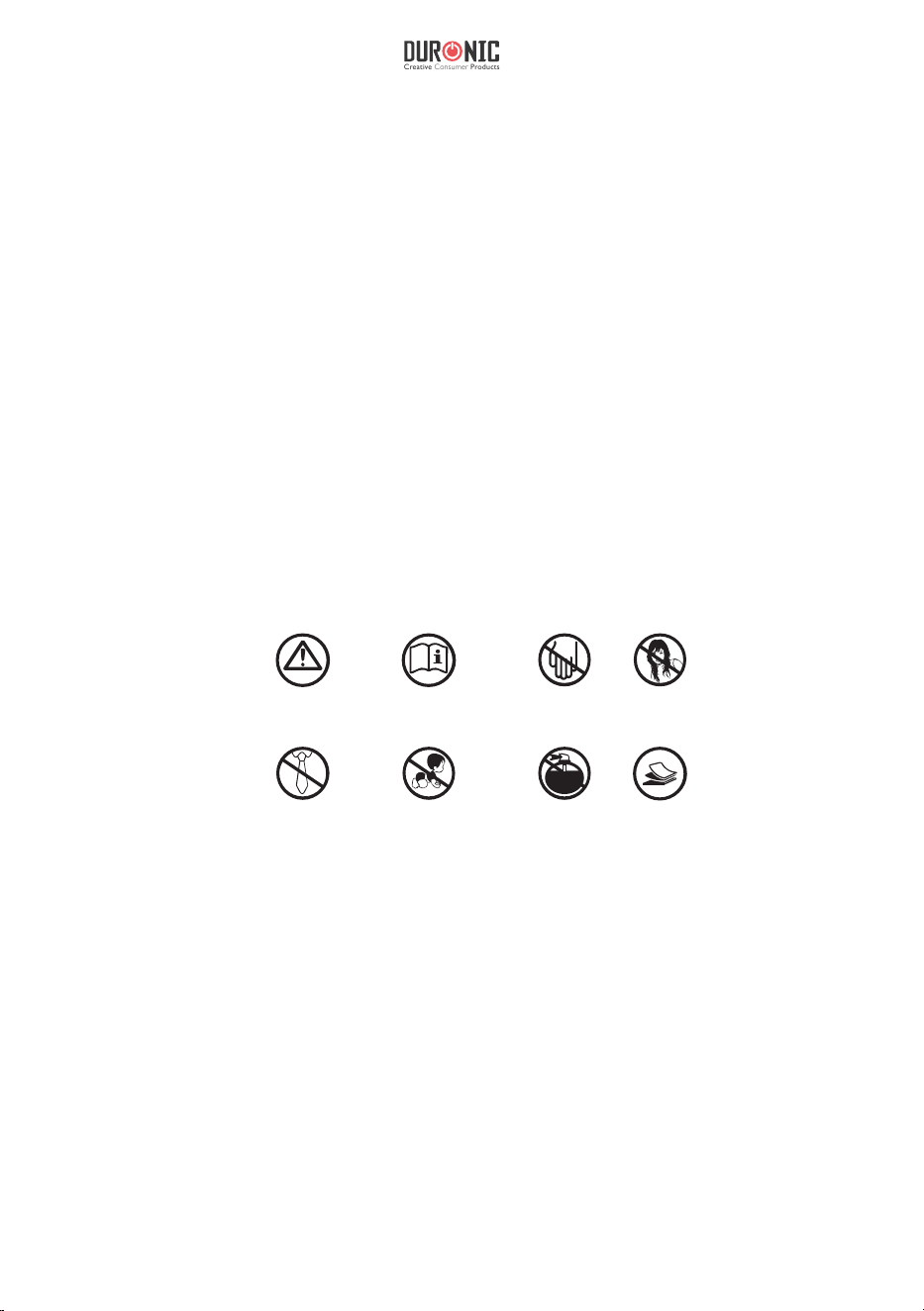
WARNUNG VOR DEM GEBRAUCH
ANWEISUNGEN
LESEN
KEINE FINGER
ODER HÄNDE
KEINE HAARE
KEINE LOSE
KLEIDUNG
NICHT FÜR KINDER KEINE AEROSOL
PRODUKTE
18 - 20
MAX
Reinigung und Instandhaltung
Wichtig: Trennen Sie das Gerät während der Reinigung und
Wartung immer von der Steckdose.
28
Shine-Mart Ltd, der Markeninhaber von Duronic Produkten, bietet 1 Jahr Gewährleistung.
HINWEIS: DIESE BEDINGUNGEN BEEINFLUSSEN IHRE GESETZLICHE RECHTE ALS
VERBRAUCHER NICHT
Dieses Produkt wurde unter strengen Qualitätskontrollen produziert und aus hochwertigen
Materialien hergestellt, um ausgezeichnete Leistung und Zuverlässigkeit zu gewährleisten.
Sofern das Produkt korrekt benutzt und gewartet wird, kann eine langlebige Lebensdauer
erwartet werden.
Das Produkt hat eine Gewährleistung von einem Jahr ab Kaufdatum. Beim Auftreten eines
Schadens, der von fehlerhalten Materialien oder Verarbeitung verursacht wurde, sollte das
defekte Produkt an den ursprünglichen Verkäufer zurückgegeben werden. Die Erstattung
oder Umtausch erfolgt nach Vorschriften des Unternehmens.
Duronic Produkte haben 1 Jahr Gewährleistung unter folgenden Bedingungen:
1. Das Produkt muss mit dem Kaufnachweis zurückgegeben werden.
2. Das Produkt muss unter den Anweisungen und Anleitungen installiert und benutzt
worden sein.
3. Es muss ausschließlich für den Hausgebrauch genutzt worden sein.
4. Natürliche Abnutzung oder Verschleiß, böswillige Beschädigung, Missbrauch,
Vernachlässigung und unsachgemäße Reparaturen sind von der Gewährleistung
ausgeschlossen.
5. Shine-Mart Ltd übernimmt keine Verantwortung für zufällige oder Folgeschäden.
6. Shine-Mart Ltd ist nicht für Wartungsarbeiten zuständig. Diese fallen nicht unter die
Gewährleistung.
7. Gültig in der EU
Dieses Produkt ist mit tted CE geprüfte Typ-F
Euro Stecker/BS Stecker ausgestattet
Von Shine-Mart Ltd, RM3 8SB importiert
Information über Abfalllagerung für Verbraucher von elektronischen Geräten.
Dieses Zeichen auf dem Produkt und/oder auf mitgelieferte Dokumenten
zeigt, dass, wenn eine Entsorgung erfolgt, das Gerät an einer Elektro- und
Elektronikgeräte-Abfall-Sammelstelle (WEEE) abgegeben werden muss.
Um eine weitere Behandlung und Weiterverarbeitung der Materialien zu
gewährleisten dürfen diese WEEE-markierten Produkte nicht mit dem Hausmüll
vermischt werden.
Für die korrekte Behandlung, Aufbereitung und Wiederverwendung geben Sie
alle WEEE-markierten Produkte zur kommunalen Abfallbeseitigungsanlage.
Dort können Sie diese kostenlos abgeben.
Wenn die Beseitigung von Elektro-und Elektronik-Altgeräten korrekt
durchgeführt wird, tragen Sie zur Gewinnung von wertvollen Ressourcen
bei, sowie einer möglichen Vermeidung von negativen Auswirkungen auf
Gesundheit und Umwelt.
Gewährleistung
Folgen Sie Uns
29
Creative Consumer Products
Manual de instrucciones en español
30
ESPECIFICACIONES
Tipo de corte: cruzado
Tamaño de corte: 4 mm x 39 mm
Capacidad de corte: 18-20 hojas
Ciclo de funcionamiento: 30 min ON / 40 min OFF
Tamaño de la entrada de corte: 220 mm
Tensión de entrada: 220 - 240V, 50-60Hz, 2A

31
Creative Consumer Products
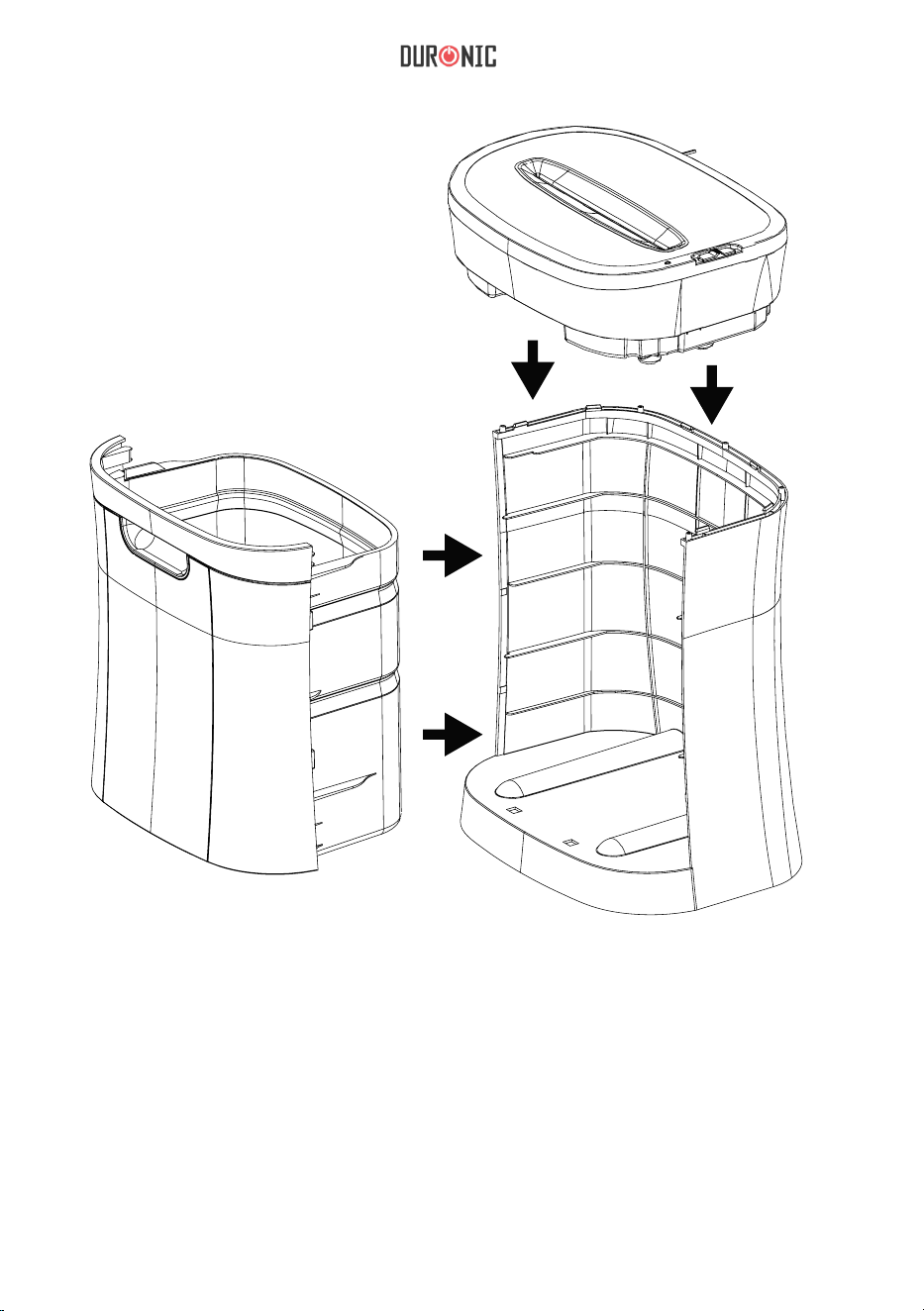
1. Coloque la destructora de documentos PS591 en una superficie plana y lisa.
2. Coloque la base de la destructora con cuidado en el suelo mirando hacia arriba.
3. Mantenga los dedos alejados de las cuchillas de corte.
4. Sin colocar la papelera en la base, inserte el cabezal de corte en la base y presione
firmemente las cuatro esquinas hacia abajo para ajustarlo.
5. Introduzca la papelera en la base y compruebe que está correctamente colocada.
6. Conecte el aparato a cualquier enchufe de 230 Volt AC que se encuentre cerca del
aparato y con fácil acceso.
7. Presione la función AUTO. El piloto luminoso READY se encenderá cuando la
destructora esté lista para su uso. Ya puede comenzar a utilizar la destructora.
CONFIGURACIÓN
FUNCIONAMIENTO
El piloto luminoso READY se encenderá cuando el aparato esté conectado a la
corriente, el interruptor en la posición AUTO
y la papelera correctamente colocada.
Esto significa que la destructora está lista para su uso. La destructora comenzará a
triturar automáticamente al insertar el papel en la entrada de corte y se apagará una
vez que la hoja termine su recorrido.
La PS591 cuenta con un interruptor en la parte superior que permite seleccionar el
modo de uso. En la parte superior encontrará también el piloto luminoso READY,
que indica que la trituradora está lista para ser utilizada.
•
AUTO: la máquina comenzará a triturar al insertar el papel en la entrada de
corte y se apagará una vez que la hoja haya terminado su recorrido.
•
REV: En el caso de un atasco de papel, esta opción invertirá el proceso
de triturado ayudando a extraer el papel de las cuchillas.
•
OFF: es recomendable apagar la máquina si no va a ser utilizada durante un
largo periodo de tiempo.

32
La PS591 puede triturar de18 a 20 hojas de hasta 220 mm. Si desea triturar sobres,
recibos y tarjetas, insértelos por el medio de la entrada de corte.
ATASCOS DE PAPEL Y SOBRECARGA
La PS591 está equipada con un circuito automático de protección de
sobrecalentamiento del motor. El ciclo de funcionamiento de la PS581 es de 30 min
ON / 40 min OFF. La destructora PS591 se apagará automáticamente en las
siguientes situaciones:
1.
al mantener la destructora en funcionamiento a máximo rendimiento (18-20
hojas) de forma continuada durante un largo periodo de tiempo.
2.
al exceder la capacidad máxima (18-20 hojas) o si el papel no es introducido en
la posición correcta.
Ambas operaciones pueden activar el circuito de protección contre el
sobrecalentamiento térmico, que interrumpe la corriente de la trituradora
automáticamente. Un atasco de papel puede hacer que la protección
contrasobrecalentamiento interrumpa la corriente alterna del motor. Nunca deje que
la trituradora permanezca encendida si sufre un atasco de papel.
Siga las siguientes instrucciones si esto ocurre:
READY: siempre que la papelera esté correctamente colocada, el piloto
luminoso permanecerá encendido indicando que la destructora está lista
para su uso. Si el indicador luminoso no se enciende, compruebe que el
aparato está enchufado a la corriente y la papelera correctamente insertada.
•
FULL: la PS591 tiene un sensor que detecta cuándo la papalera necesita ser
vaciada.
CAPACIDAD
•

33
Creative Consumer Products
En caso de atasco menos de papel:
1. Presione la función REV y tire de las hojas de papel para sacarlas de la entrada de
corte.
2. Retire los pedazos de papel de la superficie, así como cualquier exceso de
papel que haya quedado en la entrada de corte. Una vez retirado el papel,
presione de nuevo la función AUTO.
En caso de atasco mayor de papel:
1. Desconecte el cable de la corriente eléctrica y espere al menos 40 minutos para
permitir que la protección antisobrecalentamiento se resetee.
2. Enchufe la trituradora a la corriente y vuelva a seleccionar la función AUTO.
Si algo de papel se ha quedado bloqueado en entrada de corte, presione la función
REV y tire del papel hacia afuera para sacarlo.
Nunca introduzca los dedos dentro de la entrada de corte, ya que podría sufrir
heridas graves.
3. Presione la función AUTO y vuelva a utilizar su trituradora de documentos
con normalidad.
INSTRUCCIONES DE SEGUR
IDAD
Antes de su uso:
• Deshágase del embalaje de manera responsable.
• Este aparato ha sido diseñado para un uso exclusivamente interior.
• No utilice esta trituradora con fines industriales o comerciales.
• Coloque la trituradora sobre una superficie lisa y plana durante su uso.
• Compruebe que el cable no está bloqueado bajo la máquina.
• Conecte el aparato con el cable proporcionado (230 V AC).
• Mantenga el cable alejado de las superficies calientes.
Importante: lea estas instrucciones detenidamente antes de su instalación

34
• No coloque la trituradora cerca de una fuente de calor o en un lugar donde
reciba los rayos del sol de forma directa.
• No la coloque cerca de cortinas o materiales combustibles.
• No introduzca el aparato en agua u otros líquidos para protegerlo de un choque
eléctrico.
• Mantenga el aparato fuera del alcance de los niños.
• No engrase la máquina con acite sintético, productos a base de petróleo o
aerosoles, ya que puede provocar un incendio.
• No exponga la trituradora a la lluvia o la humedad.
Durante su uso:
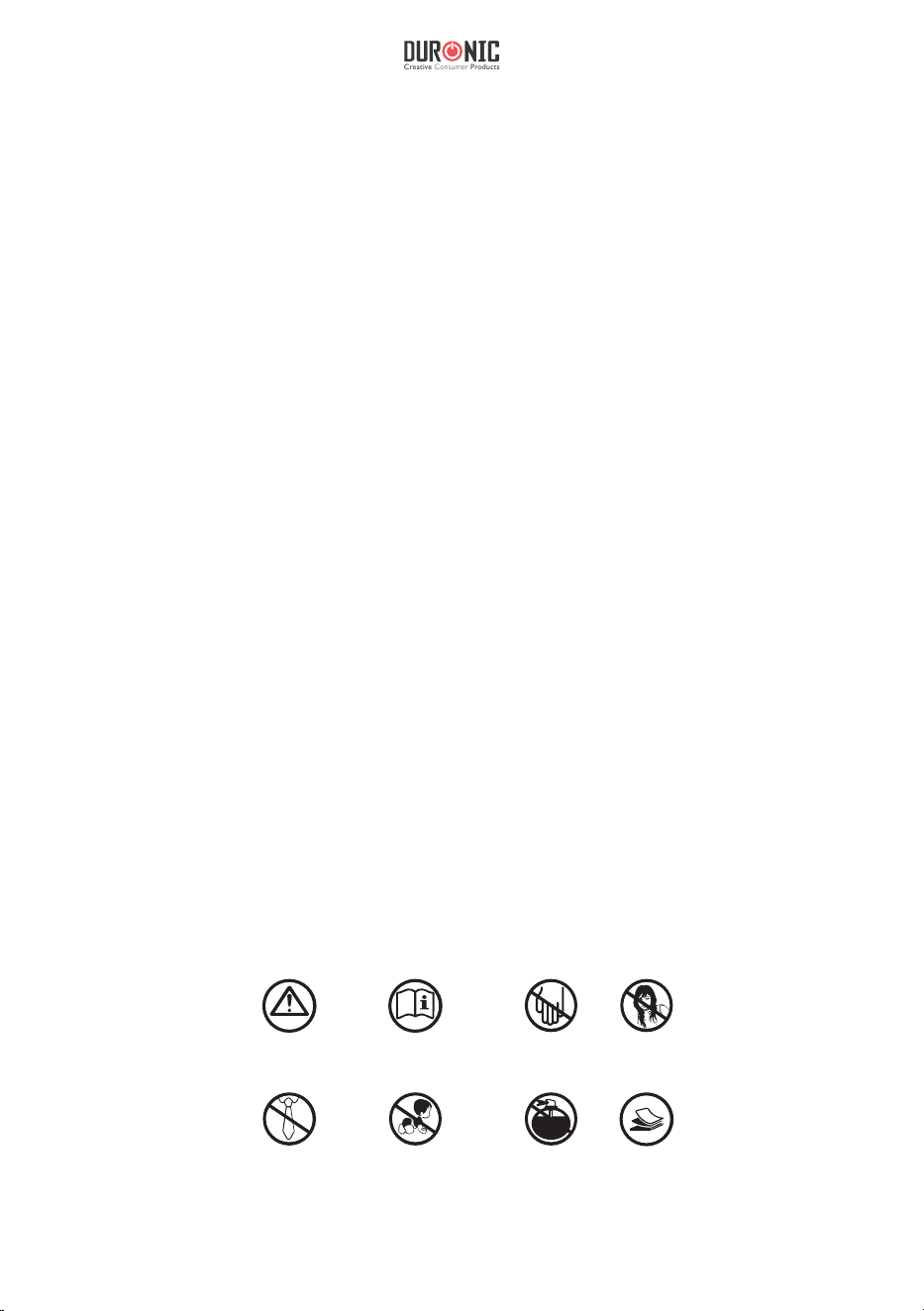
• ATENCIÓN: Mantenga las prendas de ropa sueltas, corbatas, joyas, cabello o
cualquier otro objeto alejados de la entrada de corte para evitar accidentes.
• No acerque los dedos a la entrada de corte, ya que puede sufrir heridas graves.
• El uso de este aparato no está recomendado para niños ni personas adultas con
capacidades físicas, mentales o sensoriales reducidas o personas sin experiencia a
menos que se encuentren bajo supervisión o hayan recibido instrucciones de una
persona responsable de su seguridad.
• No deje el aparato desatendido en presencia de niños.
• Apague y desenchufe el aparato cuando no esté en uso.
• No introduzca una cantidad mayor de hojas de papel de las indicadas en este
manual (15 hojas de 80 gms).
• No intente triturar otros objetos que no sean hojas de papel o tarjetas.
• Respete siempre el ciclo de funcionamiento especificado en este manual de
instrucciones (30min ON / 40 min OFF).
35
Creative Consumer Products
WARNING
READ INSTRUCTION
BEFORE USE
NO FINGERS
OR HANDS
NO HAIR
NO LOOSE
CLOTHING
NO CHILDREN
NO AEROSOL
PRODUCTS
18 - 20
MAX
• No utilice la trituradora si el cable o el enchufe están dañados.
• Desenchufe siempre la trituradora para moverla, limpiarla o vaciar el
depósito de papel.
• No utilice la trituradora si esta presenta un funcionamiento
defectuoso.
• Si su trituradora deja de funcionar, no intente repararla usted mismo.
Póngase en contacto con Duronic para recibir asistencia.
Importante: desenchufe siempre el aparato de la corriente eléctrica durante
su limpieza y mantenimiento.
• No utilice utensilios afilados abrasivos, jabón, líquido limpiahogares,
detergente o cera para limpiar la máquina.
• Nunca limpie la trituradora con líquidos inflamables, ya que esto podría causar
daños y riesgo de incendio.
• Limpie la base y la papelera con agua tibia y un paño. Seguidamente, séquelas con
un paño seco.
• Compruebe que la unidad está completamente seca antes de enchufarla.
LIMPIEZA Y MANTENIMIENTO
36
Síguenos
Garantía
Este producto ha sido fabricado bajo los más estrictos controles de seguridad y utilizando
materiales
de primera calidad para asegurar la confiabilidad y un excelente rendimiento. Este
aparato le proporcionará un buen servicio y una larga duración, siempre y cuando se lleve a
cabo un uso y mantenimiento adecuados.
Este producto dispone de una garantía de 1 año desde la fecha de compra original. Si surge
cualquier defecto debido a un error/defecto de fábrica o mano de obra, entonces el producto
deberá ser devuelto al lugar de compra original. Reembolso o reemplazo a discreción del
vendedor.
Los productos Duronic cuentan con una garantía de 1 año bajo las siguientes condiciones:
1.
El producto debe ser devuelto al vendedor junto con el comprobante de compra original.
2.
El producto debe instalarse y utilizarse según las instrucciones
contenidas en este manual.
3.
Este aparato está destinado únicamente para uso doméstico.
4.
La garantía no cubre el desgaste, daños maliciosos, uso indebido, negligencias,
reparaciones inexpertas o partes consumibles.
5.
Shine-Mart Ltd no se hace responsable de cualquier daño consecuente,
accidentes o pérdidas.
6.
Shine-Mart Ltd no se hace responsable de cualquier tipo de
reparación durante el periodo de garantía.
7.
Válido únicamente dentro de la UE.
Este producto está equipado con enchufe/fusible Europeo
Importado por Shine-Mart Ltd, RM3 8SB
Información sobre la eliminación de residuos para los consumidores
de equipos eléctricos y electrónicos:
Este símbolo representado sobre el producto y/o documentos adjuntos indica que
este aparato debe ser tratado como residuo eléctrico y/o electrónico (RAEE).
Cualquier producto con el símbolo RAEE no debe ser mezclado con los desechos
domésticos, sino separado para el tratamiento, recuperación y reciclaje
de los materiales utilizados.
Para un tratamiento, recuperación y reciclaje adecuados; por favor, deposite todos
los productos con símbolo RAEE en el punto limpio o centro de reciclaje de su
autoridad local, donde será aceptado de forma gratuita.
El desecar residuos eléctricos y electrónicos correctamente, ayuda a ahorrar
valiosos recursos y prevenir los efectos negativos sobre la salud humana y el medio
ambiente de materiales peligrosos que pueden
contener dichos residuos.
37
Creative Consumer Products
Manuale Di istruzioni In Italiano
38
SPECIFICHE
Tipo di taglio: Taglio incrociato
Dimensione del brandello di carta: 4 x 44 mm
Capacità di distruzione della carta: 20 fogli di carta
Ciclo di lavoro: 3 minuti ON / 40 minuti OFF
Larghezza dello slot della carta: 220mm / 22cm
Tensione di input: 220-240 V, 50-60Hz, 2A

39
Creative Consumer Products
FUNZIONAMENTO
Con il cavo di alimentazione collegato, l'interruttore nella posizione AUTO il cestino
correttamente inserito, il LED si illuminerà ad indicare che l’apparecchio è pronto
per l’uso. Quando si introduce la carta nell’apposito slot, il processo di triturazione
inizierà automaticamente per fermarsi quando tutta la carta sarà passata attraverso lo
slot.
Il pulsante di accensione del PS591 si trova sopra il distruggidocumenti. Inoltre, vi è
presente anche la spia led.
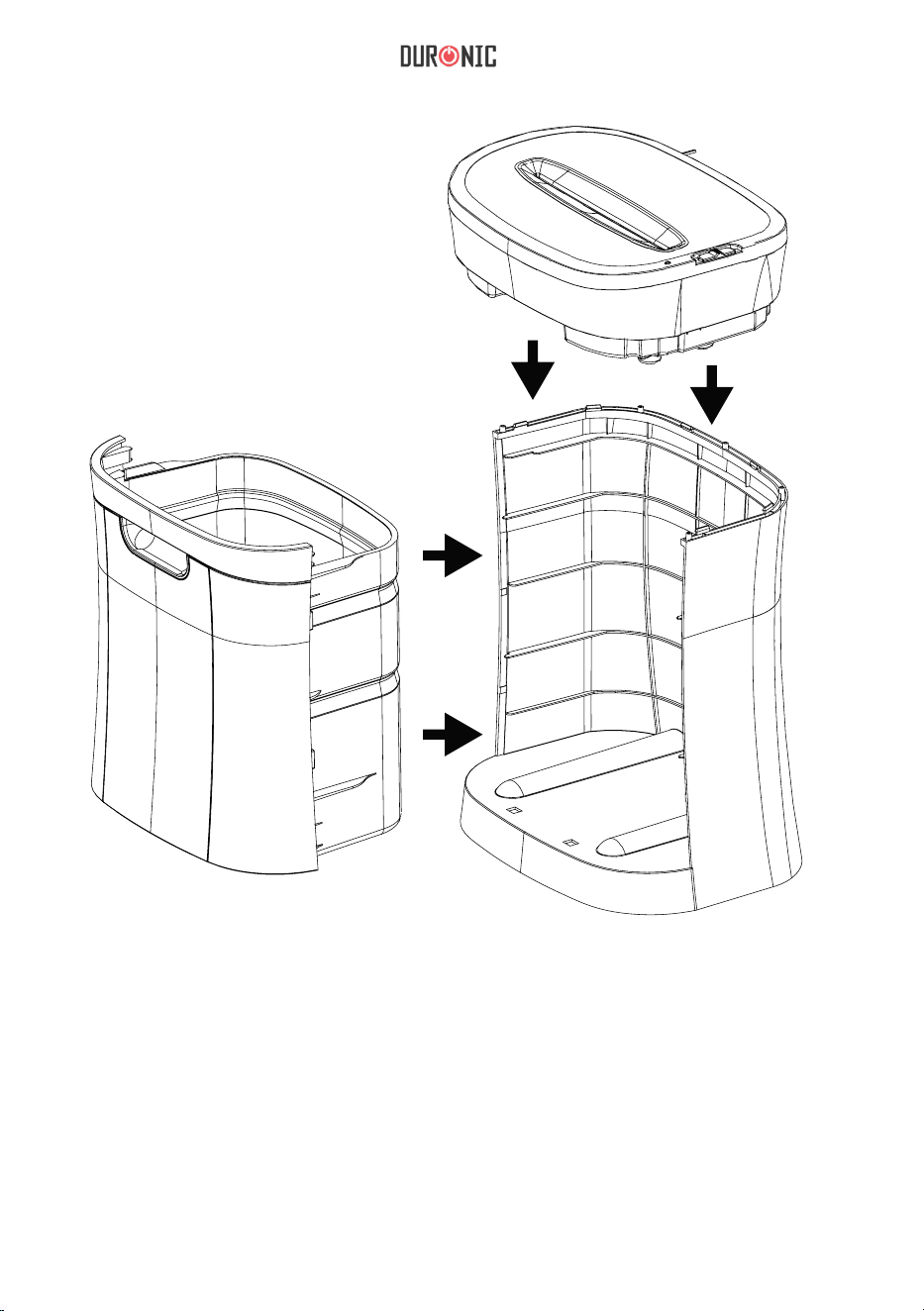
Installazione
1.
Il distruggidocumenti PS591 deve essere collocato sempre su una superficie piana.
2.
Collocare sempre il distruggidocumenti in posizione verticale su una
superficie piana.
3.
Si prega di non avvicinare le dita alle lame da taglio.
4.
Rimuovere il cestino della carta e posizionare l’unità principale del
distruggidocumenti sopra la base e fare pressione su tutti i lati per bloccarlo in
posizione.
5.
Inserire il cestino nella base ed assicurarsi che sia correttamente collocato in
posizione.
6.
Collocare l’apparecchio in prossimità di una presa di corrente che sia facilmente
accessibile.
7.
Selezionare l’impostazione AUTO con l’apposito interruttore; Il LED READY si
illuminerà. Ora il distruggidocumenti è pronto per tritare la carta.
•
AUTO: Quando l’interruttore è impostato su auto-accensione il processo di
tritatura inizierà automaticamente all’inserimento della carta e si ferma quando
tutta la carta inserita sarà passata attraverso le lame.
•
REV: L’impostazione di inversione (reverse) è utilizzata per liberare le lame da
possibili inceppamenti di carta invertendo il processo di tritatura. Prima di
passare all’impostazione di inversione, arrestare sempre l’apparecchio, al fine di
evitare possibili danni al motore.
•
OFF: L’impostazione OFF è utilizzata per terminare l’alimentazione del
distruggidocumenti oppure non si utilizza l’apparecchio per un periodo di
tempo prolungato.

40
Il PS591 trita fino a 20 fogli di carta alla volta di larghezza massima di 220 mm. Si
prega di notare che più spessa sarà la carta e meno sarà la quantità di fogli tritati in un
solo ciclo. Quando si tritano buste, cartoncini e carte, si consiglia di inserirli al centro
dell’apertura di inserimento.
Il PS591 è dotato di un meccanismo di protezione automatica per il sovraccarico del
motore. Si consiglia un utilizzo continuo massimo di 3 minuti e 40 minuti di
raffreddamento. Il PS591 cesserà automaticamente l’alimentazione in caso si
verifichino le seguenti situazioni:
•
FULL: Il distruggidocumenti PS591 é dotato di un sensore che rileva che il
cestino della carta é pieno.
CAPACITÀ
•
READY: quando il LED è acceso, indica che il cestino è inserito correttamente e
il distruggidocumenti è acceso e pronto per l'uso. Se il LED READY non si
accende, assicurarsi che il distruggidocumenti sia collegato alla corrente e che il
cestino sia inserito correttamente.
Inceppamenti della carta e meccanismo di protezione
per sovraccarico del motore
1.
Funzionamento continuo del distruggidocumenti alla capacità massima di 20
fogli per un periodo prolungato di tempo.
2.
Eccedere la capacità di triturazione, ad esempio, l’inserimento di più di 20
fogli di carta in un unico passaggio, o se la carta non viene inserita
correttamente nell'apertura di inserimento della carta.
Entrambe le situazioni anomale potrebbero causare l'attivazione automatica del
circuito di protezione contro il sovraccarico del motore, interrompendo
l'alimentazione del distruggidocumenti. Un inceppamento potrebbe provocare
l’attivazione del circuito contro il sovraccarico motore cessando l’alimentazione. Non
lasciare mai che il distruggidocumenti rimanga acceso quando si provoca un
inceppamento di carta ed interrompere immediatamente l’alimentazione.

41
Creative Consumer Products
In caso di inceppamenti di carta minori:
Invertire il senso di tritatura della carta rimuovendo quella in eccesso e liberare le lame da
qualsiasi brandello rimanente. Assicurarsi di tenere dita e oggetti alla larga dall’apertura di
inserimento della carta mentre le lame sono in funzione. Quando tutta la carta in eccesso
sarà rimossa, sarà possibile impostare l’interruttore sulla posizione AUTO.
In caso di un inceppamento di entità maggiore:
1.
Impostare l’interruttore su OFF e/o scollegare il cavo di alimentazione dalla presa
di corrente e attendere almeno 40 minuti affinché il distruggidocumenti si
raffreddi e sia nuovamente pronto all’utilizzo.
2.
Ricollegare la spina alla presa di corrente ed impostare l’interruttore su auto.
Se sono presenti brandelli di carta tra le lame da quando l’apparecchio si è
inceppato, invertire la direzione di tritatura delle lame e rimuovere la carta in
eccesso. Porre estrema cautela a non mettere le dita nell’apertura di inserimento
e/o toccare le lame, per evitare il rischio di lesioni.
3.
Impostare l’interruttore sulla posizione AUTO, ed il distruggidocumenti sarà
pronto per l’uso.
Prima del primo utilizzo
1. Eliminare attentamente ed in modo responsabile qualsiasi elemento
dell’imballo dal prodotto.
2. Questo prodotto è inteso solo per l’utilizzo all’interno. Non utilizzare
l’apparecchio all’esterno.
3. Non utilizzare il distruggidocumenti per uso commerciale o qualsiasi
altro scopo diverso da quello indicato nel presente manuale.
4. Collocare il distruggidocumenti su una superficie piana e stabile.
5. Assicurarsi che il cavo di alimentazione non si attorcigli intorno a mobili
o oggetti
6. Tenere il cavo di alimentazione lontano da qualsiasi superficie
riscaldata.
7. Non collocare il distruggidocumenti vicino a fonti di calore o sotto
diretta luce del sole.
8. Non utilizzare l’apparecchio vicino a tende o altri materiali infiammabili.
9. Non immergere l’apparecchio in acqua o altri liquidi per evitare il rischio
di scosse elettriche
10. Tenere l’apparecchio lontano dalla portata dei bambini per evitare il
rischio di gravi lesioni.
11. Non inserire nessun olio lubrificante o detergente nel
distruggidocumenti in quanto potrebbe essere causa di gravi lesioni.
12. Non esporre il distruggidocumenti a pioggia o qualsiasi condizione di
umidità.

42
Durante l’uso
1. ATTENZIONE! Tenere lontano indumenti, gioielli, capelli o altri piccoli
oggetti dall'apertura di inserimento per prevenire lesioni.
2. Non mettere le mani o le dita dentro al distruggidocumenti in quanto
potrebbe essere causa di gravi lesioni.
3. Questo apparecchio non è inteso per essere utilizzato da bambini o
persone con ridotte capacità fisiche, sensoriali, mentali o con mancanza di
esperienza o conoscenza a meno che essi non siano supervisionati da un
adulto responsabile della loro sicurezza o abbiano ricevuto adeguate istruzioni
sui rischi e pericoli coinvolti nell’utilizzo dell’apparecchio.
4. Non lasciare l’apparecchio senza supervisione in presenza di bambini.
5. Scollegare sempre l’apparecchio dalla presa di corrente quando non in
uso.
6. Non inserire più carta della quantità indicata nel presente manuale.
7. Si prega di limitare l’utilizzo continuo di questo distruggidocumenti
entro i limiti suggeriti nel presente manuale per evitare che il motore si
surriscaldi.
8. Non inserire alcun materiale diverso da carta o carte di credito
all’interno del distruggidocumenti.
9. Non utilizzare l’apparecchio su la spina o il cavo di alimentazione
risultano danneggiati.
10. Staccare sempre la spina del distruggidocumenti quando lo si sposta o
si eseguono la pulizia o la manutenzione dell’apparecchio.
11. Non utilizzare l’apparecchio in caso si riscontri qualsiasi problema con
esso.
12. Se l’apparecchio cessa di funzionare, non tentare di ripararlo da soli.
Contattare il produttore o un centro riparazioni autorizzato.
43
Creative Consumer Products
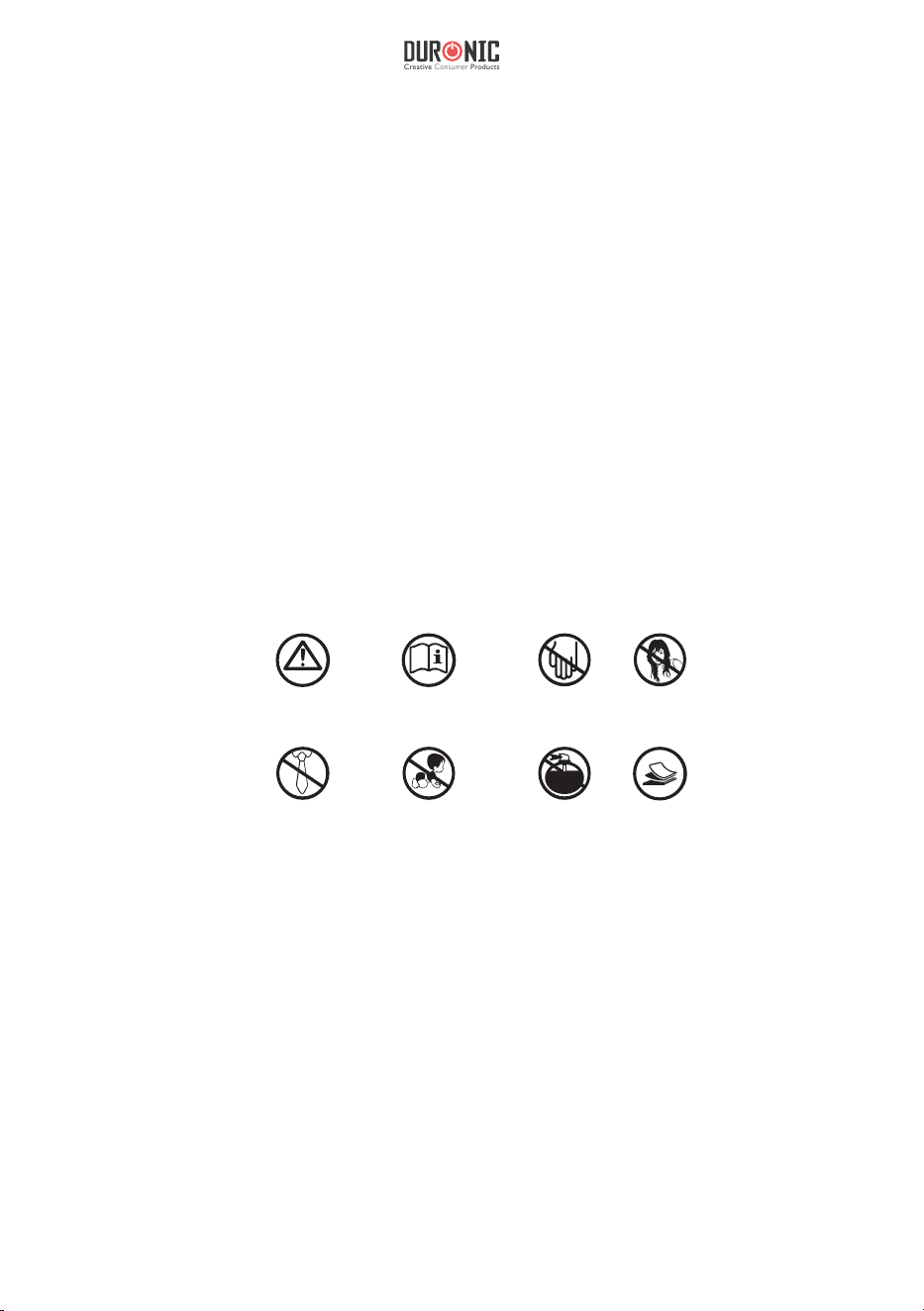
WARNING
READ INSTRUCTION
BEFORE USE
NO FINGERS
OR HANDS
NO HAIR
NO LOOSE
CLOTHING
NO CHILDREN
NO AEROSOL
PRODUCTS
18 - 20
MAX
Pulizia e manutenzione
1. Attenzione: Scollegare sempre l’apparecchio prima di procedere alla
pulizia o alla manutenzione
2. Mai utilizzare utensili affilati o detergenti abrasivi per la pulizia
dell’apparecchio.
3. Non pulire l’apparecchio con liquidi infiammabili. Potrebbero essere
causa di gravi lesioni.
4. Utilizzare un panno umido per pulire la superficie dell’apparecchio.
5. Assicurarsi che il distruggidocumenti sia completamente asciutto prima
di collegarlo alla presa di corrente.
44
Questo prodotto è garantito per una durata determinata con il distributore a partire dalla data
di acquisto contro ogni difetto derivante da difetti di fabbricazione o dei materiali. Questa
garanzia non copre difetti o danni derivanti da installazione impropria, uso improprio o usura
anomala del prodotto.
L’apparecchio deve essere restituito nella sua confezione originale e accompagnato dalla
ricevuta e deve essere stato utilizzato in modo corretto. È importante rispettare le istruzioni
per l’uso e le precauzioni di sicurezza indicate di seguito. Inoltre, non possiamo garantire
l’apparecchio se è stato modicato o riparato dall’acquirente o da terzi.
1 anno di garanzia da Shine-Mart Ltd, proprietari del marchio commerciale Duronic.
NOTA: QUESTE DICHIARAZIONI NON INFLUISCONO SUI DIRITTI LEGALI DEL
CONSUMATORE
Questo prodotto è stato realizzato con le rigorose procedure del controllo qualità, e
utilizzando materiali di altissima qualità, per garantire afdabilità e prestazioni eccellenti.
Vi regalerà un servizio ottimo e a lungo termine, purchè venga opportunamente usata e
mantenuta. Il prodotto è garantito per 1 anno dalla data di acquisto. Se sorge qualche
difetto a causa di materiali difettosi o scarsa manodopera, il prodotto difettoso dovrà essere
restituito al luogo originale di acquisto. Il rimborso o la sostituzione sono a discrezione
dell’azienda. I prodotti Duronic offrono 1 anno di garanzia alle seguenti condizioni:
1. Il prodotto deve essere restituito al rivenditore con la prova d’acquisto originale
2. Il prodotto deve essere installato e usato seguendo le istruzioni contenute nel manuale.
3. Il prodotto va utilizzato solo per scopi domestici. Non è da utilizzarsi per uso commerciale.
4. La garanzia non copre usura, danni volontari, abuso, negligenza, riparazioni
inesperte o consumo dei materiali.
5. Shine-Mart Ltd non è responsabile per Danni accidentali o consequenziali.
6. Shine-Mart Ltd non è tenuta a eseguire qualsiasi tipo di riparazione, ai sensi
della garanzia.
7. Termini validi in tutta l’unione europea *Ci riserviamo il diritto di modicare le sopracitate
condizioni Per parti di ricambio si prega di consultare il sito www.duronic.com
Corretto smaltimento del prodotto.
Qusto prodotto è inclusivo di spina certicata CE
importata da Shine-Mart Ltd, RM3 8SB
Questo segno su un prodotto o su documenti indica che quando deve essere
smaltito, deve essere trattato come i riuti elettrici ed elettronici (WEEE)
Tutti I prodotti marcati WEEE non devono essere buttati nei riuti domenistici
generici, ma separati per il trattamento, il recupero
e il riciclaggio dei materiali utilizzati.
Per un corretto trattamento, recupero e riciclaggio; si prega di portare tutti I
prodotti marcati WEEE al Vostro centro smaltimenti riuti autorizzato, dove
saranno accettati gratuitamente.
Se i consumatori sono propensi allo smaltimento corretto di riuti elettrici ed
elettronici, aiuteranno a salvare risorse importanti e a prevenire i potenziali
effetti negativi sulla salute umana e sull’ambiente di tutti i materiali pericolosi
che i riuti possono contenere.
Garanzia
Seguici
45
Instrukcja obsługi. Polski
46
SPECYFIKACJA
Rodzaj niszczarki: paskowo-odcinkowa
Wymiary ścinków: 4 mm x 33 mm
Wydajność: 18-20 kartek papieru (80 g/m
2
A4),
1 CD / DVD, 1 karta bankomatowa
Cykl pracy: 30 min wł. / 40 min wył.
Szerokość otworu: 220 mm
Napięcie: 220 - 240V, 50-60 Hz, 2A

47
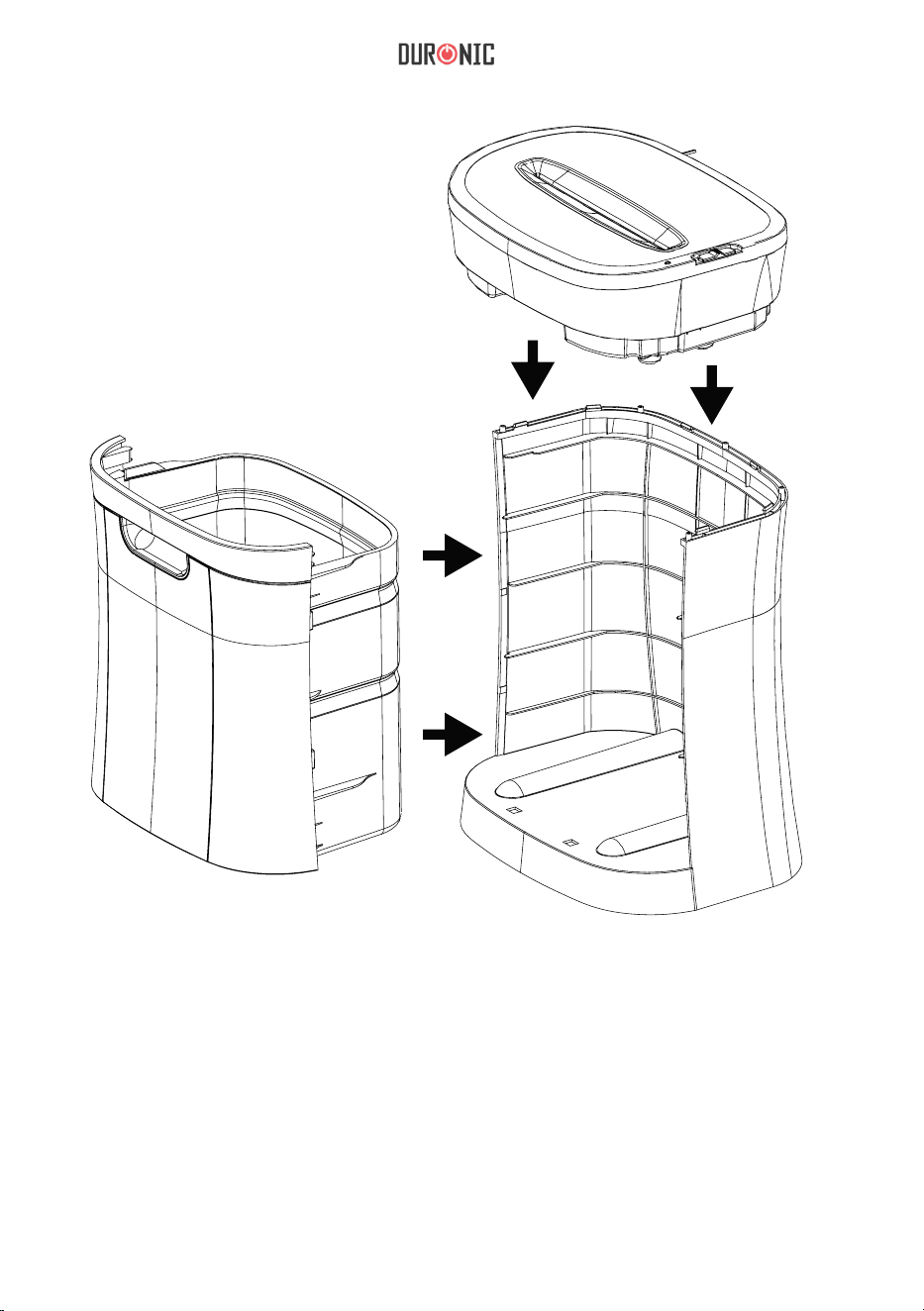
PRZYGOTOWANIE URZĄDZENIA DO
URUCHOMIENIA
UŻYTKOWANIE
1.
Urządzenie powinno być umieszczone na płaskie, stabilnej powierzchni.
2.
Ostrożnie umieść podstawę obudowy w pionie na płaskiej powierzchni.
3.
Zachowaj szczególna ostrożność, aby nie umieszczać palców blisko noży.
4.
Umieść pokrywę niszczarki na obudowie, bez zamontowanego pojemnika
na ścinki, a następnie ostrożnie dopchnij ją na w czterech rogach, aby
zablokować w miejscu.
5.
Wepchnij pojemnik na ścinki do obudowy. Upewnij się, czy pojemnik jest
prawidłowo zamontowany.
6.
Podłącz urządzenie do gniazdka zasilającego zgodnego z tabliczką
znamionową (220-240V). Gniazdko powinno znajdować się pobliżu
urządzeni i być łatwo dostępne.
7.
Umieść przełącznik w pozycji AUTO. Lampka kontrolna zacznie
świecić. Urządzenie jest gotowe do użycia.
Po prawidłowym umieszczeniu pojemnika na ścinki oraz podłączeniu
urządzenia do zasilania ustaw przełącznik w pozycji AUTO. Gdy urządzenie
jest prawidłowo zamontowane lampka kontrolna zacznie świecić. Jest to
jednocześnie oznaką gotowości urządzenia do użycia. Kiedy papier zostanie
umieszczony w otworze niszczarki, proces tworzenia ścinków zostanie
zainicjowany automatycznie i zakończy się, kiedy niszczony materiał zostanie
całkowicie przetworzony przez urządzenie.
Przełącznik trybów pracy (AUTO, REV oraz OFF) znajdują się na górnej
pokrywie niszczarki ponad lampką kontrolną (READY).
•
Tryb AUTO: Proces niszczenia zostanie zainicjowany automatycznie,
gdy papier lub karty kredytowe zostaną umieszczone w otworze wlotowy
i zakończy się, gdy niszczony materiał zostanie przetworzony.
•
Tryb REV: Jest używany w celu usunięcia zaklinowanego papieru w
ostrzach niszczarki i ich oczyszczenia.
•
Tryb OFF: Stosowany w celu wyłączenia urządzenia. Zalecamy
odłączenie urządzenia od zasilania za każdym razem, gdy nie będzie
użytkowane przez dłuższy czas.

48
WYDAJNOŚĆ
Maksymalna wydajność urządzenia to 15- 20 kartek papieru o szerokości
220 mm. Im mniejsza grubość papieru, tym więcej kartek można
zniszczyć za jednym razem. Kiedy chcesz zniszczyć małe elementy jak
np. koperty, rachunki lub karty kredytowe, umieść je w środkowej części
wlotu. Płyty CD / DVD i karty bankomatowe powinny być umieszczone w
stosownym slocie.
•
•
Lamka kontrolna FULL: Informuje użytkownika o przepełnieniu
pojemnika na ścinki.
ZACIĘCIA PAPIERU LUB PRZEŁADOWANIE
Niszczarka została wyposażona w automatyczny system
zapobiegający przegrzaniu silnika. Zalecany cykl pracy to 30 min.
pracy, 40 min bezczynności. Niszczarka automatycznie wyłączy się w
przypadku zaistnienia poniższych sytuacji:
1.
Długotrwały cykl pracy urządzenia przy maksymalnej wydajności (20
kartek).
2.
Przekroczenie maksymalnej wydajności niszczarki (ponad 20 kartek)
przy jednorazowym użyciu lub gdy niszczone materiały nie zostały
umieszczone prostopadle do wlotu.
W przypadku wystąpienia obu lub jednej z powyższych sytuacji może
nastąpić automatyczne włączenie urządzenia, aby zapobiec jego
przegrzaniu. W przypadku zacięcia się papieru lub innego niszczonego
materiału w urządzeniu niszczarka uruchomi tryb zapobiegania przegrzaniu
silnika i odłączy zasilanie. Nigdy nie pozwól pracować urządzeniu, gdy
materiał jest zakleszczony we wlocie. Należy wtedy:
Lamka kontrolna READY: Informuje użytkownika o prawidłowym
zamontowaniu pojemnika na ścinki i podłączeniu urządzenia. Kiedy
lampka nie świeci się, sprawdź montaż kosza oraz upewnij się, czy
urządzenie jest prawidłowo podłączone do gniazdka.

49
BEZPIECZEŃSTWO UŻYTKOWANIA
W przypadku małego zacięcia papieru:
Ustaw przełącznik w tryb pracy wstecznej (REV) i usuń niezniszczone
fragmenty papieru i elementy, które utkwiły w przestrzeni otworu. Gdy
nadmiar materiału powodujący zator został usunięty możesz przełączyć
urządzenie w tryb pracy (AUTO). Uważaj, aby nie wkładać palców blisko
noży.
W przypadku dużego zacięcia papieru:
1.
Wyłącz urządzenie lub odłącz kabel zasilający i poczekaj 40 min aby
silnik urządzenia mógł się schłodzić.
2.
Podłącz przewód zasilający i wciśnij przycisk zasilania. Jeżeli papier
został pozostawiony w otworze niszczarki uruchom tryb wsteczny (REV)
i usuń go. Uważaj, aby nie wkładać palców blisko noży.
3.
Gdy papier zostanie usunięty z otworu wlotowego włącz funkcję AUTO
i kontynuuj pracę.
Ważne – przed użyciem zapoznaj się z instrukcją
PRZED PIERWSZYM UŻYCIEM
Usuń wszystkie element opakowania.
Urządzenie zostało zaprojektowane wyłącznie do użytku wewnątrz
pomieszczeń. Nie używaj na świeżym powietrzu.
Nie używaj niszczarki do celów przemysłowych i komercyjnych lub niezgodnie
z przeznaczeniem.
Urządzenie MUSI znajdować się na stabilnej, płaskiej powierzchni przed i w
czasie użytkowania.
Upewnij się czy przewód zasilający nie został zablokowany pod urządzeniem.
Upewnij się czy domowa sieć elektryczna wykorzystuje właściwe napięcie
(230V AC).
Trzymaj przewód zasilający z dala od gorących powierzchni.
Nie umieszczaj niszczarki blisko gorących powierzchni lub bezpośredniego
działania światła słonecznego.
Nie należy stosować w pobliżu zasłon lub innych, łatwopalnych materiałów.
Nie zanurzaj urządzenia w wodzie lub innych płynach, aby zapobiec ryzyku
porażenia prądem.
Trzymaj poza zasięgiem dzieci.
Nie używaj łatwopalnego syntetycznego oleju, preparatów opartych na
benzynie lub aerozolu ze względu na ryzyko pożaru.
Nie pozwól, aby urządzenie zostało poddane działaniu deszczu lub innych
płynów.

50
W CZASIE UŻYTKOWANIA
OSTRZEŻENIE!: Luźne elementy odzieży jak krawaty, biżuteria, włosy i inne
małe obiekty, trzymaj z dala od otworu wlotowego, aby uniknąć ryzyka
wypadku.
Nigdy nie wkładaj palców do otworu wlotowego ze względu na wysokie ryzyko
skaleczenia.
Urządzenie nie zostało zaprojektowane do użytku przez osoby (w tym dzieci)
o ograniczonych zdolnościach fizycznych, sensorycznych lub umysłowych, lub
braku doświadczenia i wiedzy, o ile nie otrzymali oni nadzoru lub instrukcji
dotyczących użytkowania urządzenia przez osobę odpowiedzialną za ich
bezpieczeństwo.
Nie zostawiaj dzieci bez nadzoru z urządzeniem.
ZAWSZE odłączaj urządzenie z gniazdka zasilającego podczas czyszczenia,
opróżniania pojemnika na ścinki lub przenoszenia urządzenia.
NIE PRÓBUJ wkładać do otworu wlotowego więcej kartek papieru niż
zaznaczono w specyfikacji.
ZAWSZE ograniczaj ciągłą pracę urządzenia do czasu zaznaczonego w
instrukcji.
NIE PRÓBUJ wkładać do otworu wlotowego innych materiałów zaznaczone w
instrukcji obsługi.
Aby zapobiec przegrzaniu silnika, ogranicz czas ciągłej pracy urządzenia to
czasu zaznaczonego w instrukcji.
Nie używaj urządzenia, gdy przewód zasilający lub wtyczka są uszkodzone lub
samo urządzenie nie działa prawidłowo.
ZAWSZE odłączaj urządzenie z gniazdka zasilającego podczas czyszczenia,
opróżniania pojemnika na ścinki lub przenoszenia urządzenia.
NIE PRÓBUJ operować niszczarki, gdy nie działa prawidłowo.
Jeżeli urządzenie przestało działać nie próbuj samodzielnie go naprawiać.
Skontaktuj się z firmą Duronic (Shine-Mart) w celu uzyskania pomocy.
51
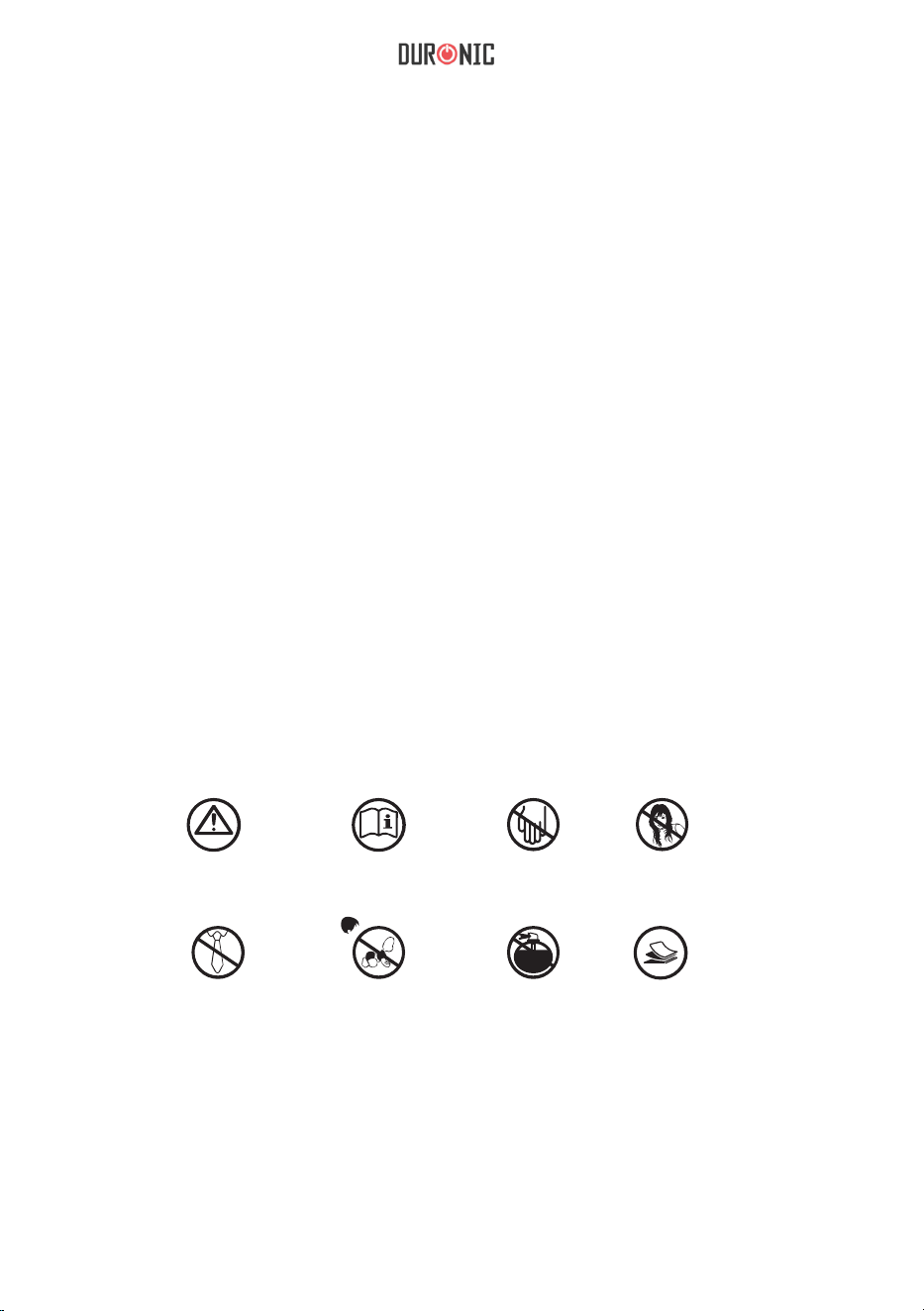
OSTRZEŻENIA PRZED UŻYCIEM
PRZECZYTAJ
INSTRUKCJĘ
NIE WKŁADAĆ
RĄK ANI
PALCÓW
NIE WKŁADAĆ
WŁOSÓW
UWAGA NA
LUŹNE
CZĘŚCI
ODZIEŻY
ZAKAZ
OBSŁUGI
PRZEZ DZIECI
NIE STOSUJ
AREOZOLI
18 - 20
MAKS
Nigdy nie używaj ostrych narzędzi ani powierzchni ściernych, mydła,
domowego środka czyszczącego, detergentu ani wosku do czyszczenia
urządzenia.
• Nigdy nie używaj urządzenia w pobliżu łatwopalnych płynów. Może to
powodować uszkodzenie urządzeni lub ryzyko pożaru.
• Użyj ściereczki zmoczonej letnią wodą, aby wyczyścić obudowę i pojemnik
na ścinki i wytrzyj go do sucha.
• Upewnij się, że urządzenie jest całkowicie suche przed podłączeniem do
głównego gniazdka elektrycznego.
Czyszczenie i pielęgnacja
WAŻNE: Zawsze odłączaj urządzenie z gniazdka zasilającego przed
przystąpieniem do czyszczenia lub pielęgnacji.
52
1 Rok Gwarancji rmy Shine-Mart LTD, marki handlowej Duronic Products.
UWAGA: ten dokument nie wpływa na twoje ustawowe prawo jako konsumenta.
Ten produkt został wykonany zgodnie z restrykcyjnymi normami kontroli i wyk
orzystuje
najwyższej jakości materiały dla uzyskania doskonałej wydajności i niezawodności.
Długotrwałość produkty zostaje osiągnięta przez właściwe użytkowanie i
konserwację.
Gwarancja obejmuje 1 rok od daty zamówienia. Jeżeli jakikolwiek defekt powstanie ze
względu na wadliwość materiału lub niewłaściwe wykonanie to uszkodzony produkt
musi
zostać dostarczony do miejsca, z którego został zamówiony. Zwrot pieniędzy lub
wymiana
produktu jest w gestii rmy.
Duronic Products oferuje jeden rok gwarancji na podstawie poniż szych warunków:
1. Produkt musi zostać zwrócony do sprzedawcy z oryginalnym dowodem zakupu.
2. Produkt był instalowany i użytkowany zgodnie z instrukcją obsługi.
3. Produkt użytkowany był wyłącznie w celach domowych.
4. Gwarancja nie obejmuje naturalnego zużycia się produktu, celowego uszkodzenia,
niewłaściwego użycia, zaniedbania, niewłaściwych napraw lub części
eksploatacyjnych.
5. Shine-Mart Ltd. nie ponosi odpowiedzialności za przypadkowe albo celowe
zgubienie
produktu lub jego uszkodzenie.
6. Firma Shine-Mart Ltd nie jest zobowiązana do przeprowadzania jakichkolwiek prac
serwisowych w ramach gwarancji.
7. Obowiązuje na obszarze Unii Europejskiej.
Informacja o odpadach i utylizacja dla użytkowników sprzętu elektrycznego i
elektronicznego.
Usuwanie wyeksploatowanych urządzeń elektrycznych i elektronicznych (dotyczy
krajów Unii Europejskiej i innych krajów europejskich z wydzielonymi systemami
zbierania odpadów). Ten symbol na produkcie lub jego opakowaniu oznacza, że
produkt nie powinien być zaliczany do odpadów domowych. Należy go przekazać
do odpowiedniego punktu, który zajmuje się zbieraniem i recyklingiem urządzeń
elektrycznych i elektronicznych. Prawidłowe usunięcie produktu zapobiegnie
potencjalnym negatywnym konsekwencjom dla środowiska naturalnego i zdrowia
ludzkiego, których przyczyną mogłoby być niewłaściwe usuwanie produktu.
Recykling materiałów pomaga w zachowaniu surowców naturalnych.
Ten produkt jest wyposażony we wbudowaną wtyczkę typu Euro-Plug / BS z
certykatem CE importowaną przez Shine-Mart Ltd, RM3 8SB
Warunki Gwarancji
Śledź Nas