
October 2024
QSG1_A_EN
Item No. : W750
Apply to: Reolink Duo 3 WiFi
Operational Instructions
58.03.001.0790
@ReolinkTech https://reolink.com
English English1 2
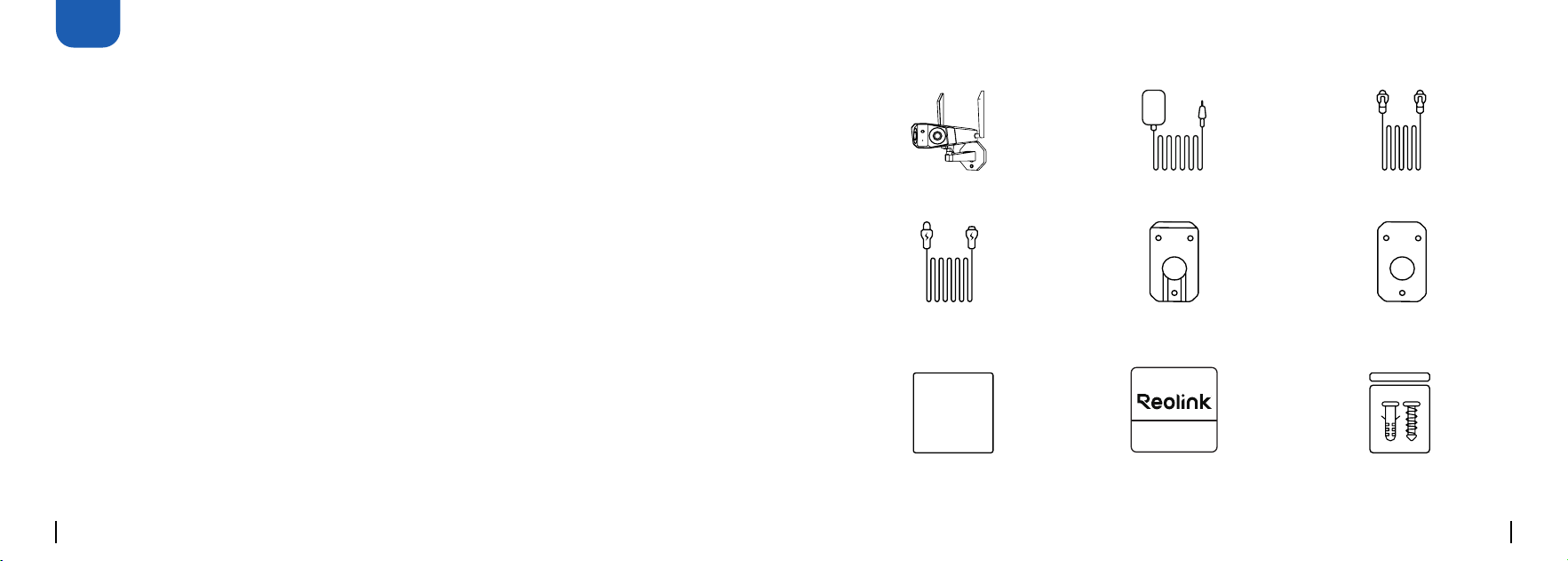
What's in the Box
Pack of Screws
Camera
Mounting Plate
Power Adapter
Power
Extension Cable
1M Ethernet Cable
Surveillance SignOperational Instructions
Mounting Hole
Template
EN
Content
24 /7 V IDE O
SURV EILLANCE
PROTECTED BY
reolink. com
Operational Instructions
What's in the Box ·········································································2
Camera Introduction ····································································3
Connection Diagram ····································································5
Set up the Camera·······································································6
Mount the Camera······································································· 7
Troubleshooting··········································································12
Specications ············································································13
Legal Disclaimer ·········································································13
Important Safety Instructions····························································14
Notication of Compliance ······························································15
English English3 4
RST
RST
RST
RST
2
1
2
1
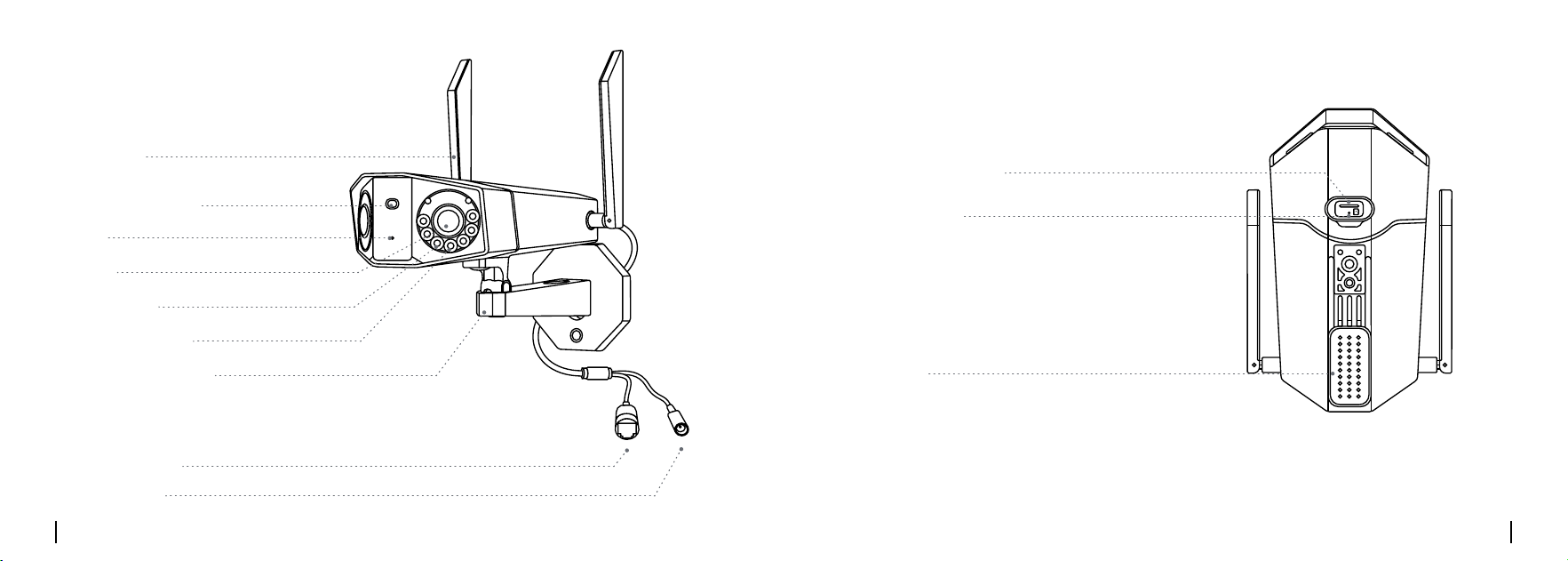
Camera Introduction
Mic
Daylight Sensor
Antenna
Speaker
microSD Card Slot
Reset Button
*Press the reset button with a
pin to restore factory settings.
Lens
Spotlights
Infrared Lights
Mounting Bracket
Ethernet Port
Power Port
English English5 6
RST RST
RST
RST
2
1
2
1
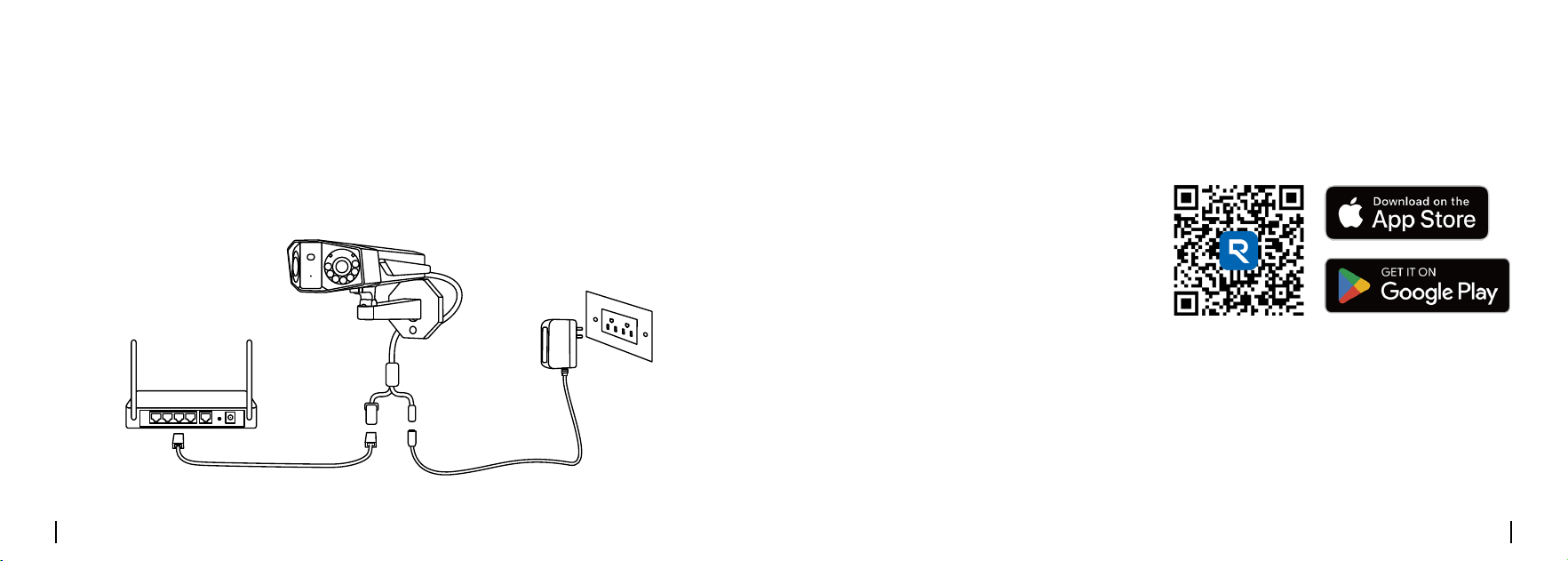
Connection Diagram
Before initial setup, follow the steps below to connect your camera.
1. Connect the camera to a LAN port on your router with an Ethernet cable.
2. Use the power adapter to power on the camera.
Camera
Power Cable
Router
Network Cable
Power Adapter
Set up the Camera
• On Smartphone
• On PC
Scan to download the Reolink App.
Download path of the Reolink Client: Go to https://reolink.com > Support > App & Client.
Download and Launch the Reolink App or Client software, and follow the onscreen
instructions to nish initial setup.
English English7 8
Mount the Camera
• Do not face the camera towards any light sources.
• Do not point the camera towards a glass window. Or, it may result in poor image
quality because of the window glare by infrared LEDs, ambient lights or status lights.
• Do not place the camera in a shaded area and point it towards a well-lit area. Or, it
may result in poor image quality. To ensure best image quality, the lighting condition
for both the camera and the capture object shall be the same.
• To ensure better image quality, it’s recommended to clean the lens with a soft cloth
from time to time.
• Make sure the power ports are not directly exposed to water or moisture and not
blocked by dirt or other elements.
• With IP waterproof ratings, the camera can work properly under conditions like rain
and snow. However, it doesn't mean the camera can work underwater.
• Do not install the camera at places where rain and snow can hit the lens directly.
• The camera may work in extreme cold conditions as low as -25°C. Because when it
is powered on, the camera will produce heat. You may power on the camera indoors
for a few minutes before installing it outdoors.
• Try to keep the left lens level with the right lens.
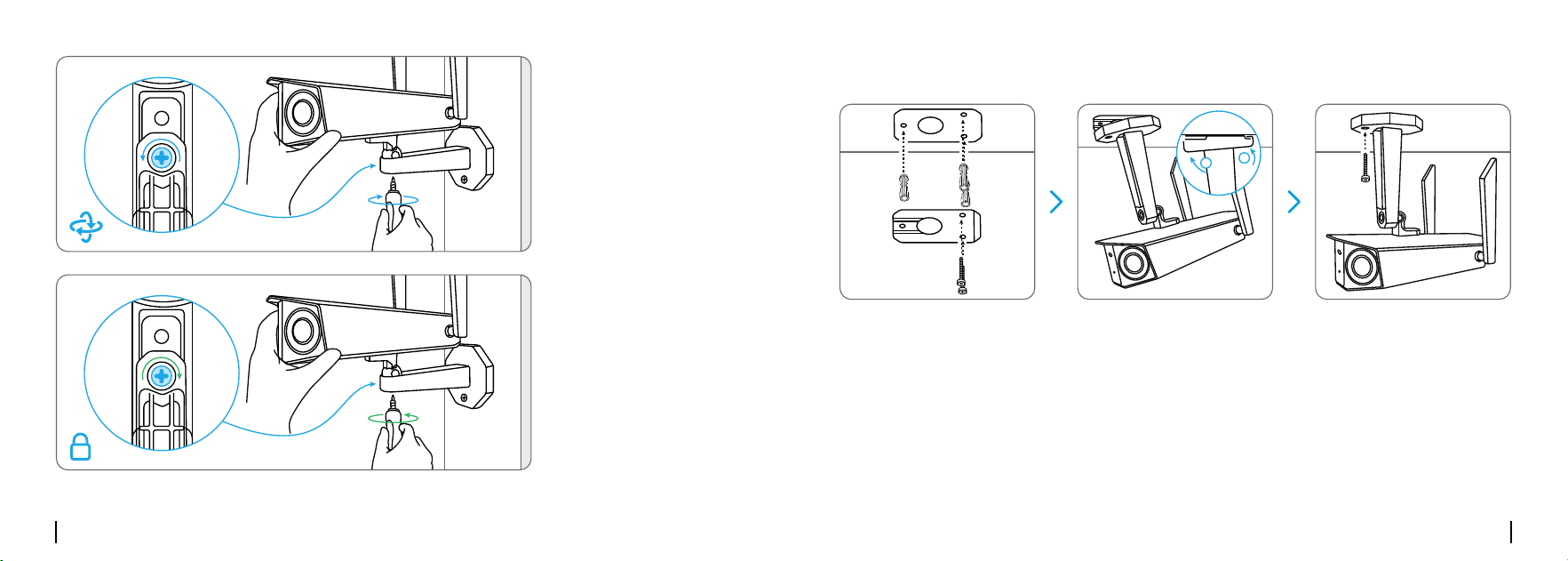
Drill holes in accordance with the mounting template, ure the mounting plate to the
wall with the upper two screws and hang the camera on it. Then lock the camera in
position with the lower screw.
Installation Tips
Mount the Camera to the Wall
NOTE:
Use the drywall anchors inclued in the package if needed.
RST RST
RST
RST
2
1
2
1
RST RST
RST
RST
2
1
2
1
RST RST
RST
RST
2
1
2
1
English English9 10
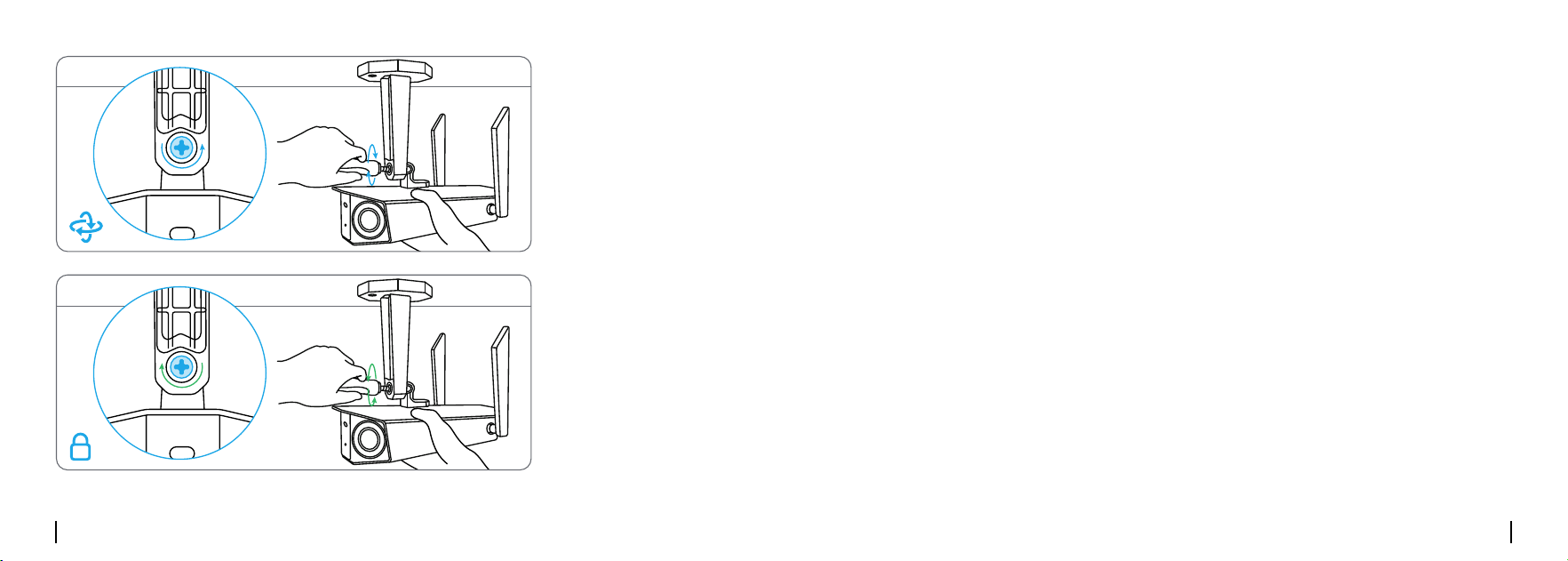
To get the best eld
of view, loosen the
adjustment screw on
security mount and
turn the camera.
Stiffen the
adjustment screw to
lock the camera.
RST RST
RST
RST
2
1
2
1
RST RST
RST
RST
2
1
2
1
Mount the Camera to Ceiling
Drill holes in accordance with the mounting template, Secure the mounting plate to
the wall with the upper two screws and hang the camera on it. Then lock the camera
in position with the lower screw.
RST RST
RST
RST
2
1
2
1
RST RST
RST
RST
2
1
2
1
RST RST
RST
RST
2
1
2
1
English English11 12
Troubleshooting
If your camera is not powering on, please try the following solutions:
Camera is not Powering on
To get the best eld
of view, loosen the
adjustment screw on
security mount and
turn the camera.
Stiffen the adjust-
ment screw to lock
the
camera.
RST RST
RST
RST
2
1
2
1
RST RST
RST
RST
2
1
2
1
If the picture from the camera is not clear, please try the following solutions:
• Check the camera lens for dirt, dust or spiderwebs, please clean the lens with a soft,
clean cloth.
• Point the camera to a well-lit area, the lighting condition will affect the picture quality
a lot.
• Upgrade the rmware of your camera to the latest version.
• Restore the camera to factory settings and check out again.
Picture is not Clear
• Plug the camera into a different outlet and see if it works.
• Power on the camera with another working 12V 2A DC adapter and see if it works.
If these won’t work, contact Reolink Support.

English English13 14
Dimension: 195 x 103 x 56 mm
Weight: 622 g
Operating Temperature:
-10°C~+55°C (14°F~131°F)
Operating Humidity: 10% ~ 90%
For more specications, visit
https://reolink.com/.
Specications
Legal Disclaimer
To the maximum extent permitted
by applicable law, this document
and the product described,with its
hardware, software, rmware, and
services, are delivered on an "as-
is" and "as-available" basis, with all
faults and without warranty of any
kind. Reolink disclaims all warranties,
express or implied, including but not
limited to, warranties of merchantability,
satisfactory quality, tness for a
particular purpose, accuracy, and non-
infringement of third-party rights. In no
event will Reolink, its directors, ofcers,
employees, or agents be liable to you for
any special, consequential, incidental
or indirect damages, including but
not limited to damages for loss of
business prots, business interruption,
or loss of data or documentation, in
connection with the use of this product,
even if Reolink has been advised of the
possibility of such damages.
To the extent permitted by applicable
law, your use of the Reolink products
and services is at your sole risk and you
assume all risks associated with internet
access. Reolink does not take any
responsibilities for abnormal operation,
privacy leakage or other damages
resulting from cyber attacks, hacker
attacks, virus inspections, or other
internet security risks. However, Reolink
will provide timely technical support if
required.
The laws and regulations related
to this product vary by jurisdiction.
Please check all relevant laws and
regulations in your jurisdiction before
using this product to ensure that your
use conforms to the applicable law
and regulation. During the use of the
product, you must comply with relevant
local laws and regulations. Reolink is not
responsible for any illegal or improper
use and its consequences. Reolink is
not liable in the event that this product
is used with illegitimate purposes, such
as third-party rights infringement,
medical treatment, safety equipment,
or other situations where the product
failure could lead to death or personal
injury, or for weapons of mass
destruction, chemical and biological
weapons, nuclear explosion, and any
unsafe nuclear energy uses or anti-
humanity purposes. In the event of any
conicts between this manual and the
applicable law, the latter prevails.
Important Safety
Instructions
Please read the instructions
carefully before using the
device.

English English15 16
FCC Statement
This device complies with Part 15 of the
FCC Rules. Operation is subject to the
following
two conditions:
(1) This device may not cause harmful
interference, and
(2) This device must accept any
interference received, including
interference that may cause undesired
Notication of
Compliance
operation. Changes or modications
not expressly approved by the party
responsible for compliance could void
the user’s authority to operate the
equipment.
This equipment has been tested and
found to comply with the limits for
a Class B digital device, pursuant to
Part 15 of the FCC Rules. These limits
are designed to provide reasonable
protection against harmful interference
in a residential installation. This
equipment generates uses and can
radiate radio frequency energy and, if
not installed and used in accordance
with the instructions, may cause harmful
interference to radio communications.
However, there is no guarantee that
interference will not occur in a particular
installation. If this equipment does
cause harmful interference to radio
or television reception, which can be
determined by turning the equipment
1. Replace only with the same or
equivalent type of accessories
recommended by Reolink.
2. Do not use the device in an
environment that exceeds the
recommended temperature range.
3. Do not use the device in an
environment that exceeds the
recommended humidity range.
4. Do not attempt to disassemble,
repair, or alter the device by yourself.
5. Always follow the local safety laws
and regulations when using the device.
6. The device contains (or comes
with) small components, small plastic
elements, and other small parts that
may cause choking hazards. Keep
the device and its accessories out of
reach of children. Consult a physician
immediately if small parts are
swallowed.
7. The device contains (or comes
with) cables or cords that may cause
strangulation hazards. Keep the device
and its accessories out of reach of
children.
off and on, the user is encouraged to
try to correct the interference by one or
more of the following
measures:
• Reorient or relocate the receiving
antenna.
• Increase the separation between the
equipment and receiver.
• Connect the equipment into an outlet
on a circuit different from that to which
the receiver is connected.
• Consult the dealer or an experienced
radio/TV technician for help.
FCC Radiation Exposure
statement
This equipment complies with FCC
radiation exposure limits set forth for
an uncontrolled environment. This
equipment should be installed and
operated with minimum distance 20cm
between the radiator & your body.

English English17 18
ISED Statement
This device complies with Industry
Canada licence-exempt RSS
standard(s). Operation is subject to the
following two conditions:
(1) this device may not cause
interference, and
(2) this device must accept any
interference, including interference that
may cause undesired operation of the
device.”
This equipment should be installed and
operated with a minumum distance of
20 cm between the radiator and your
body.
Le présent appareil est conforme aux
CNR d’Industrie Canada applicables
aux appareils radio exempts de licence.
L’exploitation est autorisée aux deux
conditions suivantes :
(1) l’appareil nedoit pas produire de
brouillage, et
(2) l’utilisateur de l’appareil doit
accepter tout brouillage radioélectrique
subi, même si le brouillage est
susceptible d’en compromettre le
fonctionnement.”
Cet équipement doit être installé et
utilisé avec une distance minimale de
20 cm entre le radiateur et votre corps.
MODIFICATION: Any changes or
modications not expressly approved
by the grantee of this device could
void the user’s authority to operate the
device.
Toute modication non approuvé
explicitement par le fournisseur de
licence de l’appareil peut entraîner
l’annulation du droit de l’utilisateur à
utiliser l’appareil.
This Class B digital apparatus complies
Hereby, REOLINK INNOVATION LIMITED
declares that the radio equipment type
[refer to the cover of the Operational
Instructions] is in compliance with
Directive 2014/53/EU.The full text of the
EU and UK declaration of conformity
is available at the following internet
SIMPLIFIED EU AND
UK DECLARATION OF
CONFORMITY
with Canadian ICES-003.
Cet appareil numérique de la classe B
est conforme à la norme NMB-003 du
Canada.
Operation of 5150-5350 MHz is restricted
to indoor use only.
Le fonctionnement de 5150-5350 MHz
est limité à une utilisation en intérieur
uniquement.
address:
https://support.reolink.com/hc/en-us/
articles/36788378727065/
RF exposure information: The Maximum
Permissible Exposure (MPE) level has
been calculated based on a distance
of 20cm between the device and the
human body. To maintain compliance
with RF exposure requirement, use
product that maintain a 20cm distance
between the device and human body.
OPERATING FREQUENCY :
2412~2472MHz RF Power:≤20dBm(EIRP)
5150~5250MHz RF Power:≤23dBm(EIRP)
5250~5350MHz RF Power:≤23dBm(EIRP)
5470~5725MHz RF Power:≤23dBm(EIRP)
5725~5875MHz RF Power:≤14dBm(EIRP)
WiFi Operating Frequency
English English19 20
This marking indicates that this product
should not be disposed with other
household wastes throughout the
EU. To prevent possible harm to the
environment or human health from
uncontrolled waste disposal, recycle it
responsibly to promote the sustainable
reuse of material resources. To return
your used device, please use the return
and collection systems or contact
Correct Disposal of This
Product
the retailer where the product was
purchased. They can take this product
for environmentally safe recycling.
Limited Warranty
This product comes with a 2-year
limited warranty that is valid only if
purchased from Reolink Ofcial Store
or a Reolink authorized reseller. Learn
more:
https://reolink.com/warranty-and-
return/.
NOTE: We hope that you enjoy the new
purchase. But if you are not satised
with the product and plan to return,
we strongly suggest that you reset the
camera to factory default settings and
take out the inserted SD card before
returning.
REOLINK TECHNOLOGY PTE. LTD.
31 KAKI BUKIT ROAD 3, #06-02,
TECHLINK, SINGAPORE 417818
For more information, go to
www.P65Warnings.ca.gov
WARNING
This product can expose you to the
chemical lead, which is known to the
state of California to cause cancer.
The functions of Wireless Access
Systems including Radio Local
Area Networks(WAS/RLANs) within
the band 5150-5350 MHz for this device
are restricted to indoor use only within
all European Union countries
(BE/BG/CZ/DK/DE/EE/IE/EL/ES/FR/HR/IT/
CY/LV/LT/LU/HU/MT/NL/AT/PL/PT/RO/SI/
SK/FI/SE/TR/NO/CH/IS/LI/UK(NI)
Terms and Privacy
Use of the product is subject to your
agreement to the Terms of Service and
Privacy Policy at reolink.com
Terms of Service
By using the Product Software that is
embedded on the Reolink product, you
agree to the terms&conditions between
you and Reolink. Learn more:
https://reolink.com/terms-conditions/
Technical Support
If you need any technical help, please
visit our ofcial support site and contact
our support team before returning the
products, https://support.reolink.com.
Trademarks
Acknowledgement
“Reolink” and other Reolink’s trademarks
and logos are the properties of Reolink.
Other trademarks and logos mentioned
are the properties of their respective
owners.