Repair services
Not available
Do not pull on the power cord when
unplugging the unit.
Do not tie or knot the power cord when unit
is in operation.
If the unit becomes submerged in water,
unplug it and contact customer service.
Do not unplug or move the unit while in
operation.
Do not plug additional appliances into the
same outlet or power supply.
Do not touch the plug with wet hands.
Unplug the unit when not in operation for
extended periods of time.
Do not place around heating elements.
Do not use around mist or fumes from
industrial oil or around large quantities of
metallic dust.
The cord can become damaged by
forcefully bending, pulling, twisting,
bundling, pinching or placing heavy objects
on it.
Do not install in any sort of motor or
transport vehicle (trucks, boats, ships,
etc.).
Do not place in an area with excessive
amounts of noxious gases.
Do not place near any flammable materials
(aerosols, fuel, gases etc.).
Do not have the unit facing into wind or
drafts.
Do not place below any electrical outlet.
Do not place in excessively humid areas
where the unit may become wet.
Do not place unit closer than 12 inches
from the wall during operation. It may
cause condensation on the wall and the
surrounding area.
SAFETY AND CAUTIONS
Before operating this equipment, carefully read and
follow these safety cautions.
Ensure filters are inserted before running unit.
Running the unit without filters can shorten the
lifespan of the unit and cause electric shock or
injury.
Be sure foreign objects are NOT inserted into the
vents on the unit.
Objects can include pins, rods, and coins.
Do not touch any part of the interior of the unit
with wet hands.
The high voltage may cause electric shock.
Ensure unit intake and outlet vents do not become
blocked.
Blockage may lead to increased internal
termperatures, causing product failure and
deformation.
Do not use the unit as a step stool or place heavy
objects on the unit.
Personal injury may occur or product failure and
deformation.
WARNING
Follow these instructions to reduce the risk of
serious injury or death and to reduce risk of
damaging the unit.
• If the power cord is damaged, it must be replaced
by a special cord. Reassembly is available from
the manufacturer or its service agent.
• This appliance is not intended for use by
a person (including children) with reduced
physical, sensory or mental capabilities, or lack
of experience and knowledge of the unit, unless
they have been given supervision or instruction
concerning use of the appliance by a person
responsible for their safety.
• Children should be supervised to ensure that
they do not play with the appliance.
• This unit is not intended to be used to preserve
documents or art conservation.
SAFETY INSTRUCTIONS
Read and save these instructions.
Thank you for purchasing a Winix air purifier. This product is for household use only.
This product complies with the maximum allowable concentration of ozone of 0.050 parts
per million by volume (ppmv) in a 24-h period.
• Do not repair or modify the unit yourself.
• All repairs should be completed by a qualified
Winix technician.
• The plug for this unit is polarized with one blade
wider than the other. Do not force the plug into
an electrical outlet. Do not alter the plug in
any way. If the plug does not fit into the outlet,
reverse the plug. If it still does not fit, contact a
qualified technician to install a proper outlet.
• Do not use if the power cord or plug is damaged
or the connection to the wall outlet is loose.
• Use AC 120V only.
• Do not damage, break, forcefully bend, pull, twist,
bundle, coat, pinch, or place heavy objects on
the power cord.
• Periodically remove dust from the power plug.
This will reduce the risk of shock due to humidity
build up.
• Remove the power plug from the outlet before
cleaning the unit. When removing the power
plug, grasp by holding the plug itself, never hold
by the cord.
• If the power plug is damaged, it must be replaced
by the manufacturer or a qualified technician.
• Remove the power plug from the outlet when not
in use.
• Do not handle the power plug with wet hands.
• Do not operate the unit when using indoor
smokegenerating insecticides.
• Do not clean unit with benzene or paint thinner.
Do not spray insecticides on the unit.
• Do not use the unit where it is humid or where
the unit may become wet, such as the bathroom.
• Do not insert fingers or foreign objects into air
intake or outlet.
• Do not use the unit near flammable gases. Do
not use near cigarettes, incense, or other spark-
creating items.
• Unit will not remove carbon monoxide emitted
from heating appliances or other sources.
IMPORTANT CAUTIONS FOR USING YOUR AIR PURIFIER:
WARNING:
Follow the instructions in this manual to reduce the risk of electric shock, short circuit, and/or fire.
IMPORTANT PRECAUTIONS FOR USING YOUR AIR PURIFIER:
• Do not block the intake or outlet vents.
• Do not use near hot objects, such as a stove.
• Do not use where the unit may come into contact with steam.
• Do not use the unit on its side.
• Keep away from products that generate oily residue, such as a deep fryer.
• Do not use detergent to clean the unit.
• Do not operate without a filter.
• Do not wash and reuse the True HEPA Filter and Carbon Filter.
• Hold the handle on the back of the unit to transport.
• Do not hold by the front panel.
• Do not stick any small objects into the air outlet vents or fan.
TWO YEARS WARRANTY
The terms of the warranty are as follows:
1. This product is manufactured under stringent
quality control and inspections.
2. The warranty will be voided if product failure
is a result of negligence or misuse by the
consumer.
3. A proof of purchase must be presented upon
claiming a Product Warranty.
4. Store the proof of purchase in a safe place or
register your product on winixamerica.com to
upload your proof of purchase.
5. This warranty is valid only in the USA and
Canada.
* for more information visit
https://winixamerica.com/terms-and-conditions/
Product Name
Air Purifier
Model Name
5510, 5520
Purchase Date
Warranty Period
Two (2) Years
Place of Purchase
Place of Purchase
tel.
Customer
Address
Name
Tel.
After purchase, be sure to complete all of the
above information.
Warning: Changes or modifications to this unit not expressly approved by the party responsible for
compliance could void the user's authority to operate the equipment.
Note: This equipment has been tested and found to comply with the limits for a Class B digital device,
pursuant to Part 15 of the FCC Rules. These limits are designed to provide reasonable protection
against harmful interference in a residential installation. This equipment generates, uses and can
radiate radio frequency energy and, if not installed and used in accordance with the instructions, may
cause harmful interference to radio communications. However, there is no guarantee that interference
will not occur in a particular installation. If this equipment does cause harmful interference to radio
or television reception, which can be determined by turning the equipment off and on, the user is
encouraged to try to correct the interference by one or more of the following measures:
• Reorient or relocate the receiving antenna.
• Increase the separation between the equipment and receiver.
• Connect the equipment into an outlet on a circuit different from that to which the receiver is
connected.
• Consult the dealer or an experienced radio/TV technician for help.
This device contains license-exempt transmitter(s)/receiver(s) that comply with Innovation, Science
and Economic Development Canada's license-exempt RSS(s). Operation is subject to the following
two conditions:
• This device may not cause interference.
• This device must accept any interference, including interference that may cause undesired operation
of the device.
In French: Cet appareil contient des émetteurs/récepteurs exemptés de licence et conformes aux
normes Innovation, Science et Economic. RSS(s) sans licence de Développement Canada.
Le fonctionnement est soumis aux deux conditions suivantes:
• cet appareil ne doit pas causer d’interférences nuisibles, et
• cet appareil doit accepter toute interférence reçue, y compris les interférences pouvant provoquer un
fonctionnement non souhaité.
USER MANUAL
AIR PURIFIER
• The product warranty is printed on the back of this guide. This product is manufactured for use only
in USA/CA. This product is suitable for 120 V only.
• This air purifier is supplied with a limited warranty of 2 years from the date of purchase. No additional
or extended warranty, repair, or replacement service is available beyond this period. No spare parts
will be made available after the warranty expires. Maintenance and repair information is accessible at
[www.winixamerica.com/support]. No software or firmware is required to operate this product.
2610-0361-00 Rev.02
5510 5520
※
Product exterior design may differ by model, but performance is the same.
Repair services
Not available
Do not pull on the power cord when
unplugging the unit.
Do not tie or knot the power cord when unit
is in operation.
If the unit becomes submerged in water,
unplug it and contact customer service.
Do not unplug or move the unit while in
operation.
Do not plug additional appliances into the
same outlet or power supply.
Do not touch the plug with wet hands.
Unplug the unit when not in operation for
extended periods of time.
Do not place around heating elements.
Do not use around mist or fumes from
industrial oil or around large quantities of
metallic dust.
The cord can become damaged by
forcefully bending, pulling, twisting,
bundling, pinching or placing heavy objects
on it.
Do not install in any sort of motor or
transport vehicle (trucks, boats, ships,
etc.).
Do not place in an area with excessive
amounts of noxious gases.
Do not place near any flammable materials
(aerosols, fuel, gases etc.).
Do not have the unit facing into wind or
drafts.
Do not place below any electrical outlet.
Do not place in excessively humid areas
where the unit may become wet.
Do not place unit closer than 12 inches
from the wall during operation. It may
cause condensation on the wall and the
surrounding area.
SAFETY AND CAUTIONS
Before operating this equipment, carefully read and
follow these safety cautions.
Ensure filters are inserted before running unit.
Running the unit without filters can shorten the
lifespan of the unit and cause electric shock or
injury.
Be sure foreign objects are NOT inserted into the
vents on the unit.
Objects can include pins, rods, and coins.
Do not touch any part of the interior of the unit
with wet hands.
The high voltage may cause electric shock.
Ensure unit intake and outlet vents do not become
blocked.
Blockage may lead to increased internal
termperatures, causing product failure and
deformation.
Do not use the unit as a step stool or place heavy
objects on the unit.
Personal injury may occur or product failure and
deformation.
WARNING
Follow these instructions to reduce the risk of
serious injury or death and to reduce risk of
damaging the unit.
• If the power cord is damaged, it must be replaced
by a special cord. Reassembly is available from
the manufacturer or its service agent.
• This appliance is not intended for use by
a person (including children) with reduced
physical, sensory or mental capabilities, or lack
of experience and knowledge of the unit, unless
they have been given supervision or instruction
concerning use of the appliance by a person
responsible for their safety.
• Children should be supervised to ensure that
they do not play with the appliance.
• This unit is not intended to be used to preserve
documents or art conservation.
SAFETY INSTRUCTIONS
Read and save these instructions.
Thank you for purchasing a Winix air purifier. This product is for household use only.
This product complies with the maximum allowable concentration of ozone of 0.050 parts
per million by volume (ppmv) in a 24-h period.
• Do not repair or modify the unit yourself.
• All repairs should be completed by a qualified
Winix technician.
• The plug for this unit is polarized with one blade
wider than the other. Do not force the plug into
an electrical outlet. Do not alter the plug in
any way. If the plug does not fit into the outlet,
reverse the plug. If it still does not fit, contact a
qualified technician to install a proper outlet.
• Do not use if the power cord or plug is damaged
or the connection to the wall outlet is loose.
• Use AC 120V only.
• Do not damage, break, forcefully bend, pull, twist,
bundle, coat, pinch, or place heavy objects on
the power cord.
• Periodically remove dust from the power plug.
This will reduce the risk of shock due to humidity
build up.
• Remove the power plug from the outlet before
cleaning the unit. When removing the power
plug, grasp by holding the plug itself, never hold
by the cord.
• If the power plug is damaged, it must be replaced
by the manufacturer or a qualified technician.
• Remove the power plug from the outlet when not
in use.
• Do not handle the power plug with wet hands.
• Do not operate the unit when using indoor
smokegenerating insecticides.
• Do not clean unit with benzene or paint thinner.
Do not spray insecticides on the unit.
• Do not use the unit where it is humid or where
the unit may become wet, such as the bathroom.
• Do not insert fingers or foreign objects into air
intake or outlet.
• Do not use the unit near flammable gases. Do
not use near cigarettes, incense, or other spark-
creating items.
• Unit will not remove carbon monoxide emitted
from heating appliances or other sources.
IMPORTANT CAUTIONS FOR USING YOUR AIR PURIFIER:
WARNING:
Follow the instructions in this manual to reduce the risk of electric shock, short circuit, and/or fire.
IMPORTANT PRECAUTIONS FOR USING YOUR AIR PURIFIER:
• Do not block the intake or outlet vents.
• Do not use near hot objects, such as a stove.
• Do not use where the unit may come into contact with steam.
• Do not use the unit on its side.
• Keep away from products that generate oily residue, such as a deep fryer.
• Do not use detergent to clean the unit.
• Do not operate without a filter.
• Do not wash and reuse the True HEPA Filter and Carbon Filter.
• Hold the handle on the back of the unit to transport.
• Do not hold by the front panel.
• Do not stick any small objects into the air outlet vents or fan.
TWO YEARS WARRANTY
The terms of the warranty are as follows:
1. This product is manufactured under stringent
quality control and inspections.
2. The warranty will be voided if product failure
is a result of negligence or misuse by the
consumer.
3. A proof of purchase must be presented upon
claiming a Product Warranty.
4. Store the proof of purchase in a safe place or
register your product on winixamerica.com to
upload your proof of purchase.
5. This warranty is valid only in the USA and
Canada.
* for more information visit
https://winixamerica.com/terms-and-conditions/
Product Name
Air Purifier
Model Name
5510, 5520
Purchase Date
Warranty Period
Two (2) Years
Place of Purchase
Place of Purchase
tel.
Customer
Address
Name
Tel.
After purchase, be sure to complete all of the
above information.
Warning: Changes or modifications to this unit not expressly approved by the party responsible for
compliance could void the user's authority to operate the equipment.
Note: This equipment has been tested and found to comply with the limits for a Class B digital device,
pursuant to Part 15 of the FCC Rules. These limits are designed to provide reasonable protection
against harmful interference in a residential installation. This equipment generates, uses and can
radiate radio frequency energy and, if not installed and used in accordance with the instructions, may
cause harmful interference to radio communications. However, there is no guarantee that interference
will not occur in a particular installation. If this equipment does cause harmful interference to radio
or television reception, which can be determined by turning the equipment off and on, the user is
encouraged to try to correct the interference by one or more of the following measures:
• Reorient or relocate the receiving antenna.
• Increase the separation between the equipment and receiver.
• Connect the equipment into an outlet on a circuit different from that to which the receiver is
connected.
• Consult the dealer or an experienced radio/TV technician for help.
This device contains license-exempt transmitter(s)/receiver(s) that comply with Innovation, Science
and Economic Development Canada's license-exempt RSS(s). Operation is subject to the following
two conditions:
• This device may not cause interference.
• This device must accept any interference, including interference that may cause undesired operation
of the device.
In French: Cet appareil contient des émetteurs/récepteurs exemptés de licence et conformes aux
normes Innovation, Science et Economic. RSS(s) sans licence de Développement Canada.
Le fonctionnement est soumis aux deux conditions suivantes:
• cet appareil ne doit pas causer d’interférences nuisibles, et
• cet appareil doit accepter toute interférence reçue, y compris les interférences pouvant provoquer un
fonctionnement non souhaité.
USER MANUAL
AIR PURIFIER
• The product warranty is printed on the back of this guide. This product is manufactured for use only
in USA/CA. This product is suitable for 120 V only.
• This air purifier is supplied with a limited warranty of 2 years from the date of purchase. No additional
or extended warranty, repair, or replacement service is available beyond this period. No spare parts
will be made available after the warranty expires. Maintenance and repair information is accessible at
[www.winixamerica.com/support]. No software or firmware is required to operate this product.
2610-0361-00 Rev.02
5510 5520
※
Product exterior design may differ by model, but performance is the same.

Repair services
Not available
Do not pull on the power cord when
unplugging the unit.
Do not tie or knot the power cord when unit
is in operation.
If the unit becomes submerged in water,
unplug it and contact customer service.
Do not unplug or move the unit while in
operation.
Do not plug additional appliances into the
same outlet or power supply.
Do not touch the plug with wet hands.
Unplug the unit when not in operation for
extended periods of time.
Do not place around heating elements.
Do not use around mist or fumes from
industrial oil or around large quantities of
metallic dust.
The cord can become damaged by
forcefully bending, pulling, twisting,
bundling, pinching or placing heavy objects
on it.
Do not install in any sort of motor or
transport vehicle (trucks, boats, ships,
etc.).
Do not place in an area with excessive
amounts of noxious gases.
Do not place near any flammable materials
(aerosols, fuel, gases etc.).
Do not have the unit facing into wind or
drafts.
Do not place below any electrical outlet.
Do not place in excessively humid areas
where the unit may become wet.
Do not place unit closer than 12 inches
from the wall during operation. It may
cause condensation on the wall and the
surrounding area.
SAFETY AND CAUTIONS
Before operating this equipment, carefully read and
follow these safety cautions.
Ensure filters are inserted before running unit.
Running the unit without filters can shorten the
lifespan of the unit and cause electric shock or
injury.
Be sure foreign objects are NOT inserted into the
vents on the unit.
Objects can include pins, rods, and coins.
Do not touch any part of the interior of the unit
with wet hands.
The high voltage may cause electric shock.
Ensure unit intake and outlet vents do not become
blocked.
Blockage may lead to increased internal
termperatures, causing product failure and
deformation.
Do not use the unit as a step stool or place heavy
objects on the unit.
Personal injury may occur or product failure and
deformation.
WARNING
Follow these instructions to reduce the risk of
serious injury or death and to reduce risk of
damaging the unit.
• If the power cord is damaged, it must be replaced
by a special cord. Reassembly is available from
the manufacturer or its service agent.
• This appliance is not intended for use by
a person (including children) with reduced
physical, sensory or mental capabilities, or lack
of experience and knowledge of the unit, unless
they have been given supervision or instruction
concerning use of the appliance by a person
responsible for their safety.
• Children should be supervised to ensure that
they do not play with the appliance.
• This unit is not intended to be used to preserve
documents or art conservation.
SAFETY INSTRUCTIONS
Read and save these instructions.
Thank you for purchasing a Winix air purifier. This product is for household use only.
This product complies with the maximum allowable concentration of ozone of 0.050 parts
per million by volume (ppmv) in a 24-h period.
• Do not repair or modify the unit yourself.
• All repairs should be completed by a qualified
Winix technician.
• The plug for this unit is polarized with one blade
wider than the other. Do not force the plug into
an electrical outlet. Do not alter the plug in
any way. If the plug does not fit into the outlet,
reverse the plug. If it still does not fit, contact a
qualified technician to install a proper outlet.
• Do not use if the power cord or plug is damaged
or the connection to the wall outlet is loose.
• Use AC 120V only.
• Do not damage, break, forcefully bend, pull, twist,
bundle, coat, pinch, or place heavy objects on
the power cord.
• Periodically remove dust from the power plug.
This will reduce the risk of shock due to humidity
build up.
• Remove the power plug from the outlet before
cleaning the unit. When removing the power
plug, grasp by holding the plug itself, never hold
by the cord.
• If the power plug is damaged, it must be replaced
by the manufacturer or a qualified technician.
• Remove the power plug from the outlet when not
in use.
• Do not handle the power plug with wet hands.
• Do not operate the unit when using indoor
smokegenerating insecticides.
• Do not clean unit with benzene or paint thinner.
Do not spray insecticides on the unit.
• Do not use the unit where it is humid or where
the unit may become wet, such as the bathroom.
• Do not insert fingers or foreign objects into air
intake or outlet.
• Do not use the unit near flammable gases. Do
not use near cigarettes, incense, or other spark-
creating items.
• Unit will not remove carbon monoxide emitted
from heating appliances or other sources.
IMPORTANT CAUTIONS FOR USING YOUR AIR PURIFIER:
WARNING:
Follow the instructions in this manual to reduce the risk of electric shock, short circuit, and/or fire.
IMPORTANT PRECAUTIONS FOR USING YOUR AIR PURIFIER:
• Do not block the intake or outlet vents.
• Do not use near hot objects, such as a stove.
• Do not use where the unit may come into contact with steam.
• Do not use the unit on its side.
• Keep away from products that generate oily residue, such as a deep fryer.
• Do not use detergent to clean the unit.
• Do not operate without a filter.
• Do not wash and reuse the True HEPA Filter and Carbon Filter.
• Hold the handle on the back of the unit to transport.
• Do not hold by the front panel.
• Do not stick any small objects into the air outlet vents or fan.
TWO YEARS WARRANTY
The terms of the warranty are as follows:
1. This product is manufactured under stringent
quality control and inspections.
2. The warranty will be voided if product failure
is a result of negligence or misuse by the
consumer.
3. A proof of purchase must be presented upon
claiming a Product Warranty.
4. Store the proof of purchase in a safe place or
register your product on winixamerica.com to
upload your proof of purchase.
5. This warranty is valid only in the USA and
Canada.
* for more information visit
https://winixamerica.com/terms-and-conditions/
Product Name
Air Purifier
Model Name
5510, 5520
Purchase Date
Warranty Period
Two (2) Years
Place of Purchase
Place of Purchase
tel.
Customer
Address
Name
Tel.
After purchase, be sure to complete all of the
above information.
Warning: Changes or modifications to this unit not expressly approved by the party responsible for
compliance could void the user's authority to operate the equipment.
Note: This equipment has been tested and found to comply with the limits for a Class B digital device,
pursuant to Part 15 of the FCC Rules. These limits are designed to provide reasonable protection
against harmful interference in a residential installation. This equipment generates, uses and can
radiate radio frequency energy and, if not installed and used in accordance with the instructions, may
cause harmful interference to radio communications. However, there is no guarantee that interference
will not occur in a particular installation. If this equipment does cause harmful interference to radio
or television reception, which can be determined by turning the equipment off and on, the user is
encouraged to try to correct the interference by one or more of the following measures:
• Reorient or relocate the receiving antenna.
• Increase the separation between the equipment and receiver.
• Connect the equipment into an outlet on a circuit different from that to which the receiver is
connected.
• Consult the dealer or an experienced radio/TV technician for help.
This device contains license-exempt transmitter(s)/receiver(s) that comply with Innovation, Science
and Economic Development Canada's license-exempt RSS(s). Operation is subject to the following
two conditions:
• This device may not cause interference.
• This device must accept any interference, including interference that may cause undesired operation
of the device.
In French: Cet appareil contient des émetteurs/récepteurs exemptés de licence et conformes aux
normes Innovation, Science et Economic. RSS(s) sans licence de Développement Canada.
Le fonctionnement est soumis aux deux conditions suivantes:
• cet appareil ne doit pas causer d’interférences nuisibles, et
• cet appareil doit accepter toute interférence reçue, y compris les interférences pouvant provoquer un
fonctionnement non souhaité.
USER MANUAL
AIR PURIFIER
• The product warranty is printed on the back of this guide. This product is manufactured for use only
in USA/CA. This product is suitable for 120 V only.
• This air purifier is supplied with a limited warranty of 2 years from the date of purchase. No additional
or extended warranty, repair, or replacement service is available beyond this period. No spare parts
will be made available after the warranty expires. Maintenance and repair information is accessible at
[www.winixamerica.com/support]. No software or firmware is required to operate this product.
2610-0361-00 Rev.02
5510 5520
※
Product exterior design may differ by model, but performance is the same.
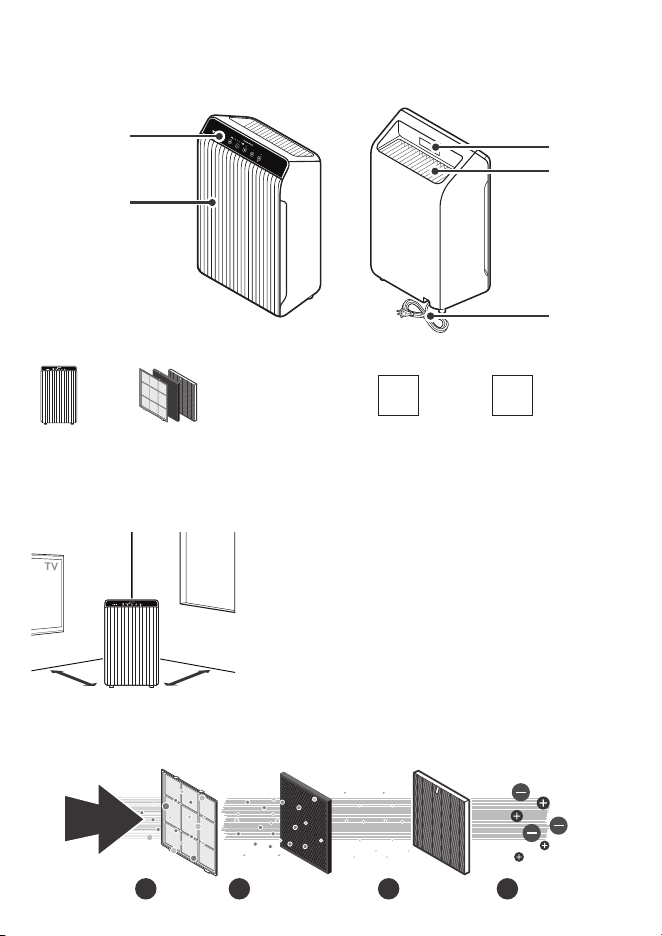
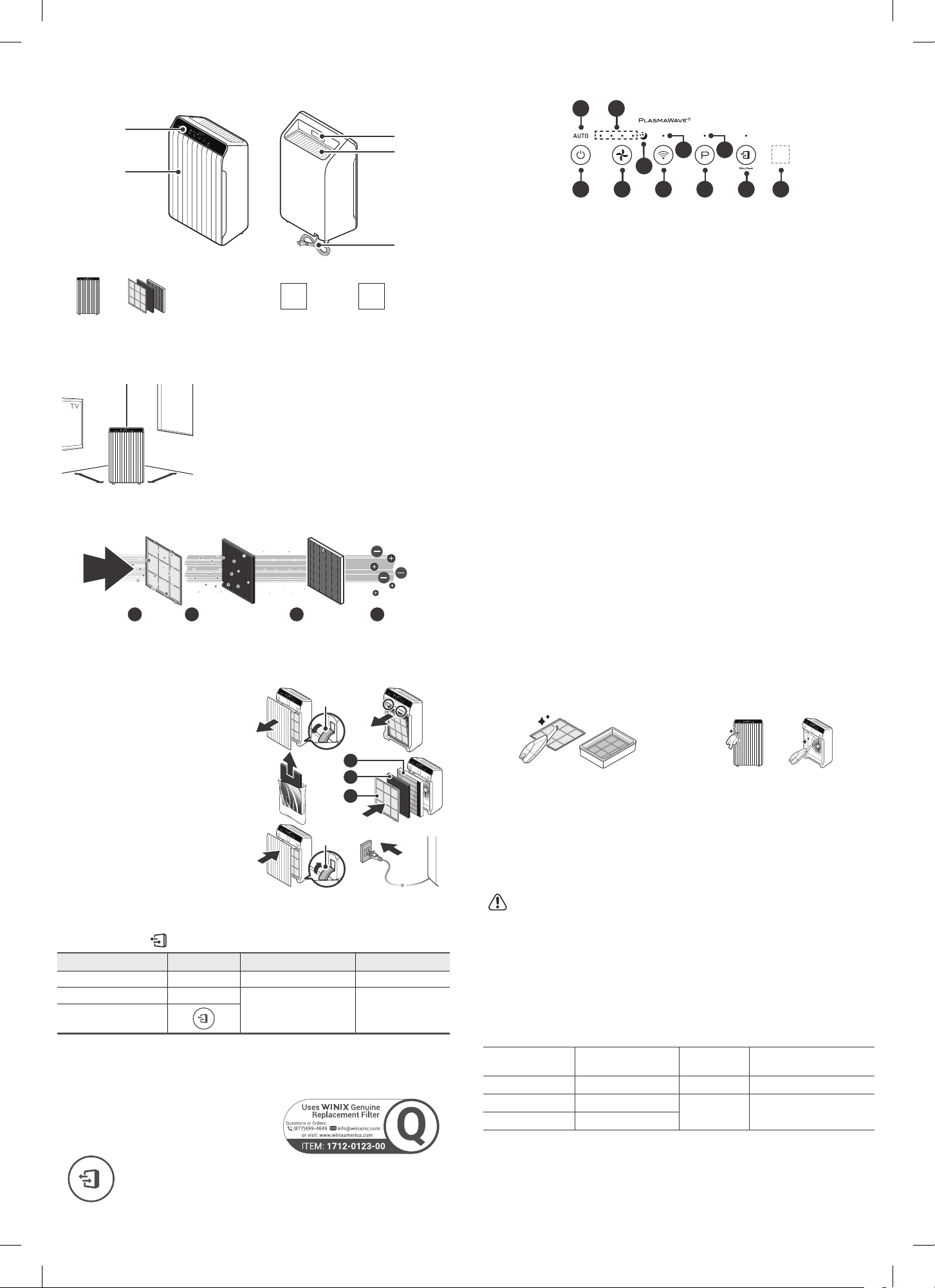
WHERE TO USE
12~18 in12 ~ 18 in12~18 in
12 ~ 18 in
Allow 12~18 in. of space between TVs, radios, and other
electronics
Electromagnetic interference from certain electronics may
cause product malfunction.
Place indoors away from direct sunlight
Direct exposure may cause product malfunction or failure.
Only place on hard, flat surfaces
Flimsy or slanted surfaces may result in abnormal noise and
vibrations.
Allow at least 12~18 in. from walls for maximum air flow
FRONT BACK
PACKAGE CONTENTS
Air Outlet
Vent
Handle
Power Plug
Control Panel
Front Panel
Unit
(1) Pre-Filter
(1) AOC™ Carbon Filter
(1) True HEPA Filter
User
Manual
Wi-Fi Setup
Guide
MODEL PART DIAGRAM
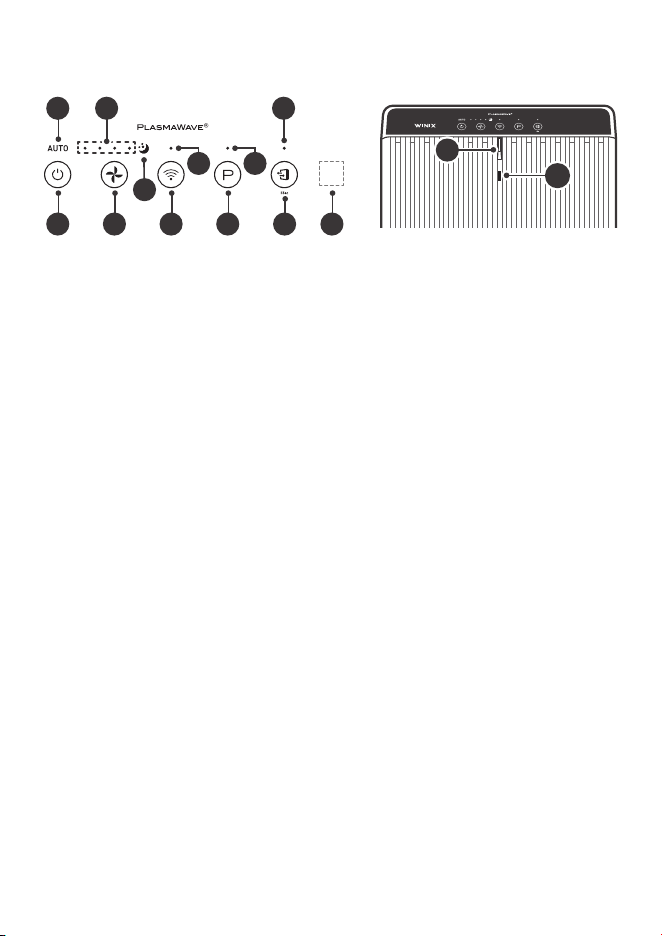
02
09 03
1201
07 10 06 08 0511
04
13
14
01. Auto Indicator
Indicates whether Auto Mode is enabled or
disabled.
02. Sleep Indicator
Indicates whether Sleep Mode is enabled or
disabled.
03. PlasmaWave
®
Indicator
Indicates whether PlasmaWave
®
is enabled or
disabled.
04. Fan Speed Indicator
Indicates the current fan speed.
05. Light Sensor
Detects the amount of ambient light in the
environment.
06. Wi-Fi / Pairing Button
• A quick press will turn Wi-Fi on/off.
• A long press of 3 seconds will activate pairing
mode.
• A Wi-Fi indicator will display on the front while
Wi-Fi is active.
07. Power Button
Turns the unit on or off.
During the first 30 seconds of powering up, the
Air Quality Indicator will cycle through Blue,
Amber and Red colors. Smart Sensor takes
approximately 4 minutes to detect the air quality in
the environment before normal operation begins.
08. PlasmaWave
®
Button
Enables or disables PlasmaWave
®
.
When the unit is running, you may hear a chirping
or buzzing sound. The sound is from large
particles passing through PlasmaWave
®
, it is
normal and does not signify product failure.
Press the PlasmaWave
®
button when the unit is on
to enable or disable this feature.
CONTROL PANEL
INITIAL OPERATION
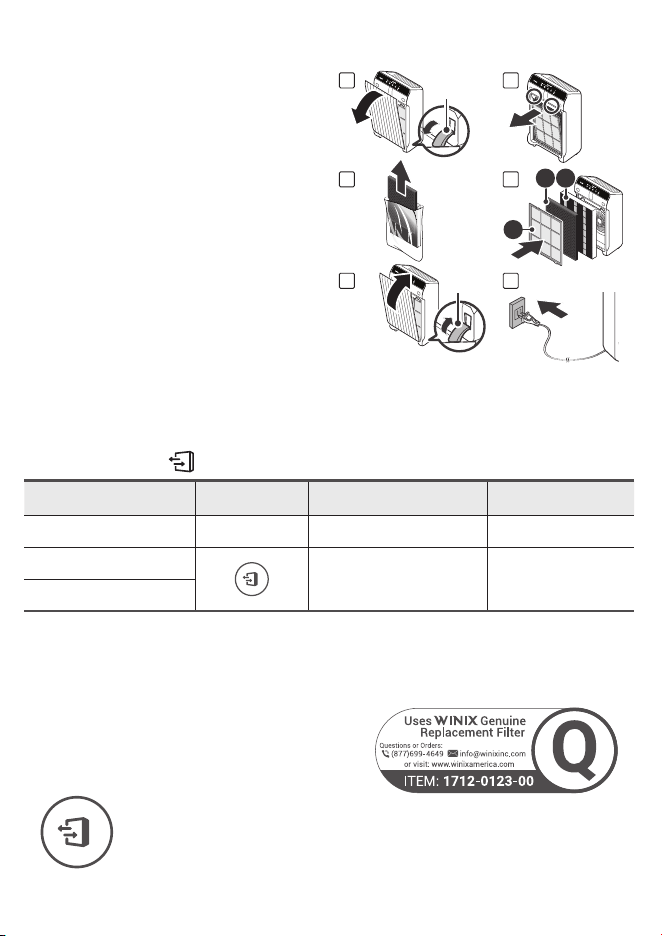
1. Remove the front panel by grasping its upper
edge and gently pulling forward.
2. Remove the Pre-Filter, then the plastic bag
of filters behind it.
3. Remove filters from protective plastic bag.
4. Install the filters until they fit securely in
place.
03. True HEPA Filter (back)
02. AOC™ Carbon Filter (middle)
01. Pre-Filter (front)
5.
After filters are installed, close the front
panel.
6. Insert the power cord into an electrical
outlet.
Latch
0302
01
Latch
1 2
3 4
5 6
When to Replace Filters
Filter Indicator Light When to Service When to Replace
Pre-Filter
none Clean once every 14 days Permanent
AOC™ Carbon Filter
Can NOT be WASHED
Last Approx. 12 months
True HEPA Filter
• When the Check Filter Indicator LED is on, it is time to replace the True HEPA Filter and
AOC™Carbon Filter.
• Intervals between filter replacement may vary depending on environment.
MAINTENANCE
REPLACING FILTERS
Resetting Filter Life:
After replacing your True HEPA Filter, place the Pre-Filter back in and close the Front
Panel. While the unit is on, hold the Filter Reset Button for at least 5 seconds until you
hear the beep. After the beep, the Filter Replacement Indicator will disappear. Your
Winix True HEPA is now reset.
CLEANING CARE
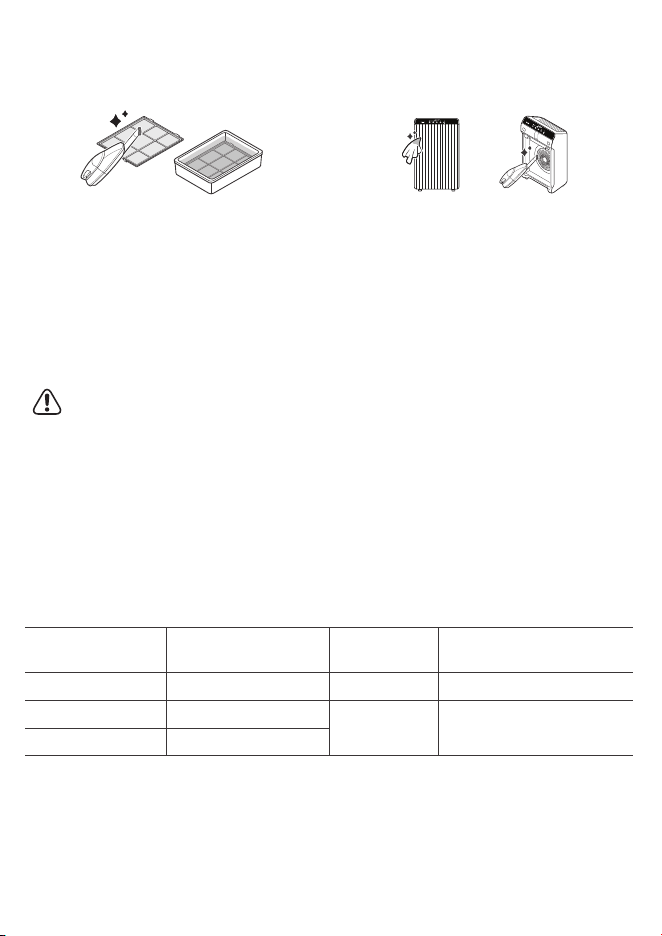
Cleaning the Filters:
Use a vacuum cleaner or soft brush to clean the
Pre-Filter
• If it is excessively soiled, rinse in room
temperature water. Do not use detergent or
soap. Allow the filter to dry for 24 hours or more
before using. Intervals between filter cleaning
may vary depending on the air quality in the
environment.
Cleaning the Exterior & Interior:
1. Open the front panel and clean the interior
with a vacuum cleaner.
• A handheld vacuum or hose attachment will
work best.
2. Dampen a cloth with room temperature water and
wipe down the interior and exterior of the unit.
3. Wipe the unit down with a clean, dry cloth.
• Ensure no moisture remains before plugging
the unit back in.
* For optimal performance, clean every 1-2 months.
NOTICE
• When cleaning the unit, always unplug the power cord first and then wait until the unit has cooled
down.
• Never disassemble, repair, or modify this unit yourself.
• Do not use flammable sprays or liquid detergents.
• Do not allow children to clean or maintain the unit.
• Before cleaning or maintaining, ensure unit is unplugged.
• Do not use benzene, alcohol, or other volatile fluids, which may cause damage or discoloration.
• Do not use hot water over 104°F.
09. Wi-Fi Indicator
Indicates whether Wi-Fi Mode is enabled or
disabled.
10. Fan Speed Button
Enables manual operation of the unit's fan speeds.
• Press to cycle through and set the desired fan
speed (Low, Medium, High, Turbo).
• Auto Mode:
- Auto Mode automatically adjusts fan speeds
according to your indoor air quality. The fan
speed will adjust to low when air quality is
good, medium when fair, and to high when
poor.
• Sleep Mode:
- When Sleep Mode is activated, the Air
Quality Indicator LED light is disabled.
- Fan speed will automatically set to minimum
speed (lower than 'Low') which will be nearly
silent.
- When Sleep Mode is active, PlasmaWave
®
will be disabled, but it can be turned back on.
11. Filter Reset Button
After replacing the True HEPA Filter, press the
Filter Reset button for at least 5 seconds until the
Filter Replacement Indicator turns off.
12. Filter Reset Indicator
LED light indicates when it is time to change the
filter.
13. Air Quality Indicator
Color coded LED light indicates one of three levels
of Air Quality: Red (poor), Amber (fair), and Blue
(good).
14. Smart Sensor
Detects the amount of odorous gas in the
environment. When in Auto mode, the fan speed
adjusts according to the detected amount of gas.
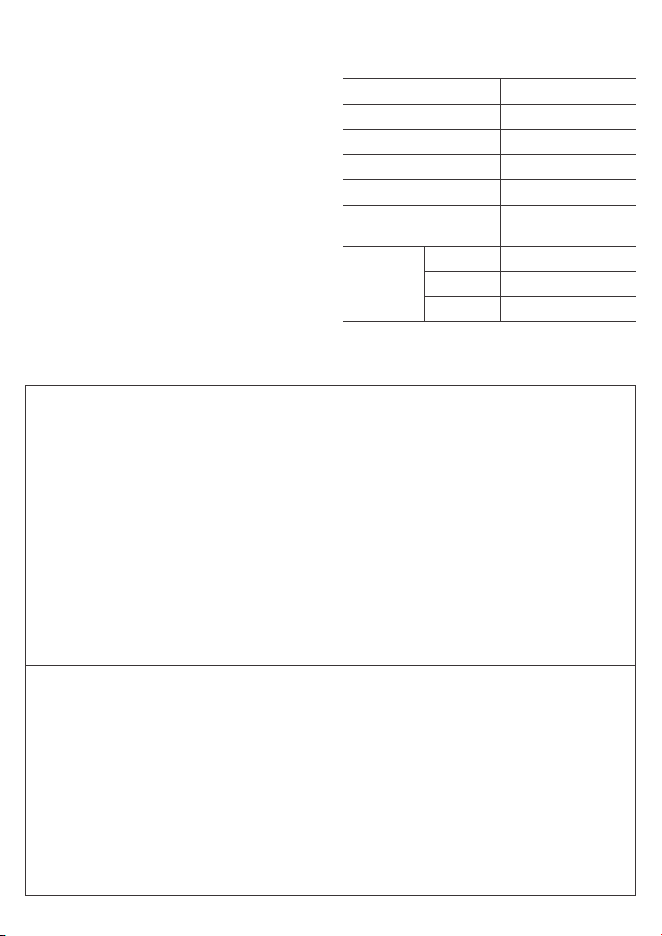
UNIT SPECIFICATIONS
Model Name 5510, 5520 Dimensions
13.59 in (W) × 8.27 in (D) ×
22.17 in (H)
Power Voltage
AC 120 V / 60 Hz
Weight 13.3 lb / 13 lb
Power Rate
65W
Replacement
Filter
Filter Q
SKU : 1712-0123-00
V
erified Room Size
392sq.ft.
The exterior, design, and product specifications may be changed without prior notice to improve product performance.
Contact Winix for product related inquiries and customer service
• Dedicated Call Center:
☎
(877) 699-4649
• Website: www.winixamerica.com
To expedite service, please specify the model name and number, the nature of the problem, your contact
information, and your address.
4-STAGE AIR PURIFICATION
Air Purification means it
removes inanimate particles
AOC
TM
Carbon Filter
02
Pre-Filter
01
True HEPA Filter
03
PlasmaWave
®
04
WHERE TO USE
12~18 in12 ~ 18 in12~18 in
12 ~ 18 in
Allow 12~18 in. of space between TVs, radios, and other
electronics
Electromagnetic interference from certain electronics may
cause product malfunction.
Place indoors away from direct sunlight
Direct exposure may cause product malfunction or failure.
Only place on hard, flat surfaces
Flimsy or slanted surfaces may result in abnormal noise and
vibrations.
Allow at least 12~18 in. from walls for maximum air flow
FRONT BACK
PACKAGE CONTENTS
Air Outlet
Vent
Handle
Power Plug
Control Panel
Front Panel
Unit
(1) Pre-Filter
(1) AOC™ Carbon Filter
(1) True HEPA Filter
User
Manual
Wi-Fi Setup
Guide
MODEL PART DIAGRAM
02
09 03
1201
07 10 06 08 0511
04
13
14
01. Auto Indicator
Indicates whether Auto Mode is enabled or
disabled.
02. Sleep Indicator
Indicates whether Sleep Mode is enabled or
disabled.
03. PlasmaWave
®
Indicator
Indicates whether PlasmaWave
®
is enabled or
disabled.
04. Fan Speed Indicator
Indicates the current fan speed.
05. Light Sensor
Detects the amount of ambient light in the
environment.
06. Wi-Fi / Pairing Button
• A quick press will turn Wi-Fi on/off.
• A long press of 3 seconds will activate pairing
mode.
• A Wi-Fi indicator will display on the front while
Wi-Fi is active.
07. Power Button
Turns the unit on or off.
During the first 30 seconds of powering up, the
Air Quality Indicator will cycle through Blue,
Amber and Red colors. Smart Sensor takes
approximately 4 minutes to detect the air quality in
the environment before normal operation begins.
08. PlasmaWave
®
Button
Enables or disables PlasmaWave
®
.
When the unit is running, you may hear a chirping
or buzzing sound. The sound is from large
particles passing through PlasmaWave
®
, it is
normal and does not signify product failure.
Press the PlasmaWave
®
button when the unit is on
to enable or disable this feature.
CONTROL PANEL
INITIAL OPERATION
1. Remove the front panel by grasping its upper
edge and gently pulling forward.
2. Remove the Pre-Filter, then the plastic bag
of filters behind it.
3. Remove filters from protective plastic bag.
4. Install the filters until they fit securely in
place.
03. True HEPA Filter (back)
02. AOC™ Carbon Filter (middle)
01. Pre-Filter (front)
5.
After filters are installed, close the front
panel.
6. Insert the power cord into an electrical
outlet.
Latch
0302
01
Latch
1 2
3 4
5 6
When to Replace Filters
Filter Indicator Light When to Service When to Replace
Pre-Filter
none Clean once every 14 days Permanent
AOC™ Carbon Filter
Can NOT be WASHED
Last Approx. 12 months
True HEPA Filter
• When the Check Filter Indicator LED is on, it is time to replace the True HEPA Filter and
AOC™Carbon Filter.
• Intervals between filter replacement may vary depending on environment.
MAINTENANCE
REPLACING FILTERS
Resetting Filter Life:
After replacing your True HEPA Filter, place the Pre-Filter back in and close the Front
Panel. While the unit is on, hold the Filter Reset Button for at least 5 seconds until you
hear the beep. After the beep, the Filter Replacement Indicator will disappear. Your
Winix True HEPA is now reset.
CLEANING CARE
Cleaning the Filters:
Use a vacuum cleaner or soft brush to clean the
Pre-Filter
• If it is excessively soiled, rinse in room
temperature water. Do not use detergent or
soap. Allow the filter to dry for 24 hours or more
before using. Intervals between filter cleaning
may vary depending on the air quality in the
environment.
Cleaning the Exterior & Interior:
1. Open the front panel and clean the interior
with a vacuum cleaner.
• A handheld vacuum or hose attachment will
work best.
2. Dampen a cloth with room temperature water and
wipe down the interior and exterior of the unit.
3. Wipe the unit down with a clean, dry cloth.
• Ensure no moisture remains before plugging
the unit back in.
* For optimal performance, clean every 1-2 months.
NOTICE
• When cleaning the unit, always unplug the power cord first and then wait until the unit has cooled
down.
• Never disassemble, repair, or modify this unit yourself.
• Do not use flammable sprays or liquid detergents.
• Do not allow children to clean or maintain the unit.
• Before cleaning or maintaining, ensure unit is unplugged.
• Do not use benzene, alcohol, or other volatile fluids, which may cause damage or discoloration.
• Do not use hot water over 104°F.
09. Wi-Fi Indicator
Indicates whether Wi-Fi Mode is enabled or
disabled.
10. Fan Speed Button
Enables manual operation of the unit's fan speeds.
• Press to cycle through and set the desired fan
speed (Low, Medium, High, Turbo).
• Auto Mode:
- Auto Mode automatically adjusts fan speeds
according to your indoor air quality. The fan
speed will adjust to low when air quality is
good, medium when fair, and to high when
poor.
• Sleep Mode:
- When Sleep Mode is activated, the Air
Quality Indicator LED light is disabled.
- Fan speed will automatically set to minimum
speed (lower than 'Low') which will be nearly
silent.
- When Sleep Mode is active, PlasmaWave
®
will be disabled, but it can be turned back on.
11. Filter Reset Button
After replacing the True HEPA Filter, press the
Filter Reset button for at least 5 seconds until the
Filter Replacement Indicator turns off.
12. Filter Reset Indicator
LED light indicates when it is time to change the
filter.
13. Air Quality Indicator
Color coded LED light indicates one of three levels
of Air Quality: Red (poor), Amber (fair), and Blue
(good).
14. Smart Sensor
Detects the amount of odorous gas in the
environment. When in Auto mode, the fan speed
adjusts according to the detected amount of gas.
UNIT SPECIFICATIONS
Model Name 5510, 5520 Dimensions
13.59 in (W) × 8.27 in (D) ×
22.17 in (H)
Power Voltage
AC 120 V / 60 Hz
Weight 13.3 lb / 13 lb
Power Rate
65W
Replacement
Filter
Filter Q
SKU : 1712-0123-00
V
erified Room Size
392sq.ft.
The exterior, design, and product specifications may be changed without prior notice to improve product performance.
Contact Winix for product related inquiries and customer service
• Dedicated Call Center:
☎
(877) 699-4649
• Website: www.winixamerica.com
To expedite service, please specify the model name and number, the nature of the problem, your contact
information, and your address.
4-STAGE AIR PURIFICATION
Air Purification means it
removes inanimate particles
AOC
TM
Carbon Filter
02
Pre-Filter
01
True HEPA Filter
03
PlasmaWave
®
04
WHERE TO USE
12~18 in12 ~ 18 in12~18 in
12 ~ 18 in
Allow 12~18 in. of space between TVs, radios, and other
electronics
Electromagnetic interference from certain electronics may
cause product malfunction.
Place indoors away from direct sunlight
Direct exposure may cause product malfunction or failure.
Only place on hard, flat surfaces
Flimsy or slanted surfaces may result in abnormal noise and
vibrations.
Allow at least 12~18 in. from walls for maximum air flow
FRONT BACK
PACKAGE CONTENTS
Air Outlet
Vent
Handle
Power Plug
Control Panel
Front Panel
Unit
(1) Pre-Filter
(1) AOC™ Carbon Filter
(1) True HEPA Filter
User
Manual
Wi-Fi Setup
Guide
MODEL PART DIAGRAM
02
09 03
1201
07 10 06 08 0511
04
13
14
01. Auto Indicator
Indicates whether Auto Mode is enabled or
disabled.
02. Sleep Indicator
Indicates whether Sleep Mode is enabled or
disabled.
03. PlasmaWave
®
Indicator
Indicates whether PlasmaWave
®
is enabled or
disabled.
04. Fan Speed Indicator
Indicates the current fan speed.
05. Light Sensor
Detects the amount of ambient light in the
environment.
06. Wi-Fi / Pairing Button
• A quick press will turn Wi-Fi on/off.
• A long press of 3 seconds will activate pairing
mode.
• A Wi-Fi indicator will display on the front while
Wi-Fi is active.
07. Power Button
Turns the unit on or off.
During the first 30 seconds of powering up, the
Air Quality Indicator will cycle through Blue,
Amber and Red colors. Smart Sensor takes
approximately 4 minutes to detect the air quality in
the environment before normal operation begins.
08. PlasmaWave
®
Button
Enables or disables PlasmaWave
®
.
When the unit is running, you may hear a chirping
or buzzing sound. The sound is from large
particles passing through PlasmaWave
®
, it is
normal and does not signify product failure.
Press the PlasmaWave
®
button when the unit is on
to enable or disable this feature.
CONTROL PANEL
INITIAL OPERATION
1. Remove the front panel by grasping its upper
edge and gently pulling forward.
2. Remove the Pre-Filter, then the plastic bag
of filters behind it.
3. Remove filters from protective plastic bag.
4. Install the filters until they fit securely in
place.
03. True HEPA Filter (back)
02. AOC™ Carbon Filter (middle)
01. Pre-Filter (front)
5.
After filters are installed, close the front
panel.
6. Insert the power cord into an electrical
outlet.
Latch
0302
01
Latch
1 2
3 4
5 6
When to Replace Filters
Filter Indicator Light When to Service When to Replace
Pre-Filter
none Clean once every 14 days Permanent
AOC™ Carbon Filter
Can NOT be WASHED
Last Approx. 12 months
True HEPA Filter
• When the Check Filter Indicator LED is on, it is time to replace the True HEPA Filter and
AOC™Carbon Filter.
• Intervals between filter replacement may vary depending on environment.
MAINTENANCE
REPLACING FILTERS
Resetting Filter Life:
After replacing your True HEPA Filter, place the Pre-Filter back in and close the Front
Panel. While the unit is on, hold the Filter Reset Button for at least 5 seconds until you
hear the beep. After the beep, the Filter Replacement Indicator will disappear. Your
Winix True HEPA is now reset.
CLEANING CARE
Cleaning the Filters:
Use a vacuum cleaner or soft brush to clean the
Pre-Filter
• If it is excessively soiled, rinse in room
temperature water. Do not use detergent or
soap. Allow the filter to dry for 24 hours or more
before using. Intervals between filter cleaning
may vary depending on the air quality in the
environment.
Cleaning the Exterior & Interior:
1. Open the front panel and clean the interior
with a vacuum cleaner.
• A handheld vacuum or hose attachment will
work best.
2. Dampen a cloth with room temperature water and
wipe down the interior and exterior of the unit.
3. Wipe the unit down with a clean, dry cloth.
• Ensure no moisture remains before plugging
the unit back in.
* For optimal performance, clean every 1-2 months.
NOTICE
• When cleaning the unit, always unplug the power cord first and then wait until the unit has cooled
down.
• Never disassemble, repair, or modify this unit yourself.
• Do not use flammable sprays or liquid detergents.
• Do not allow children to clean or maintain the unit.
• Before cleaning or maintaining, ensure unit is unplugged.
• Do not use benzene, alcohol, or other volatile fluids, which may cause damage or discoloration.
• Do not use hot water over 104°F.
09. Wi-Fi Indicator
Indicates whether Wi-Fi Mode is enabled or
disabled.
10. Fan Speed Button
Enables manual operation of the unit's fan speeds.
• Press to cycle through and set the desired fan
speed (Low, Medium, High, Turbo).
• Auto Mode:
- Auto Mode automatically adjusts fan speeds
according to your indoor air quality. The fan
speed will adjust to low when air quality is
good, medium when fair, and to high when
poor.
• Sleep Mode:
- When Sleep Mode is activated, the Air
Quality Indicator LED light is disabled.
- Fan speed will automatically set to minimum
speed (lower than 'Low') which will be nearly
silent.
- When Sleep Mode is active, PlasmaWave
®
will be disabled, but it can be turned back on.
11. Filter Reset Button
After replacing the True HEPA Filter, press the
Filter Reset button for at least 5 seconds until the
Filter Replacement Indicator turns off.
12. Filter Reset Indicator
LED light indicates when it is time to change the
filter.
13. Air Quality Indicator
Color coded LED light indicates one of three levels
of Air Quality: Red (poor), Amber (fair), and Blue
(good).
14. Smart Sensor
Detects the amount of odorous gas in the
environment. When in Auto mode, the fan speed
adjusts according to the detected amount of gas.
UNIT SPECIFICATIONS
Model Name 5510, 5520 Dimensions
13.59 in (W) × 8.27 in (D) ×
22.17 in (H)
Power Voltage
AC 120 V / 60 Hz
Weight 13.3 lb / 13 lb
Power Rate
65W
Replacement
Filter
Filter Q
SKU : 1712-0123-00
V
erified Room Size
392sq.ft.
The exterior, design, and product specifications may be changed without prior notice to improve product performance.
Contact Winix for product related inquiries and customer service
• Dedicated Call Center:
☎
(877) 699-4649
• Website: www.winixamerica.com
To expedite service, please specify the model name and number, the nature of the problem, your contact
information, and your address.
4-STAGE AIR PURIFICATION
Air Purification means it
removes inanimate particles
AOC
TM
Carbon Filter
02
Pre-Filter
01
True HEPA Filter
03
PlasmaWave
®
04
WHERE TO USE
12~18 in12 ~ 18 in12~18 in
12 ~ 18 in
Allow 12~18 in. of space between TVs, radios, and other
electronics
Electromagnetic interference from certain electronics may
cause product malfunction.
Place indoors away from direct sunlight
Direct exposure may cause product malfunction or failure.
Only place on hard, flat surfaces
Flimsy or slanted surfaces may result in abnormal noise and
vibrations.
Allow at least 12~18 in. from walls for maximum air flow
FRONT BACK
PACKAGE CONTENTS
Air Outlet
Vent
Handle
Power Plug
Control Panel
Front Panel
Unit
(1) Pre-Filter
(1) AOC™ Carbon Filter
(1) True HEPA Filter
User
Manual
Wi-Fi Setup
Guide
MODEL PART DIAGRAM
02
09 03
1201
07 10 06 08 0511
04
13
14
01. Auto Indicator
Indicates whether Auto Mode is enabled or
disabled.
02. Sleep Indicator
Indicates whether Sleep Mode is enabled or
disabled.
03. PlasmaWave
®
Indicator
Indicates whether PlasmaWave
®
is enabled or
disabled.
04. Fan Speed Indicator
Indicates the current fan speed.
05. Light Sensor
Detects the amount of ambient light in the
environment.
06. Wi-Fi / Pairing Button
• A quick press will turn Wi-Fi on/off.
• A long press of 3 seconds will activate pairing
mode.
• A Wi-Fi indicator will display on the front while
Wi-Fi is active.
07. Power Button
Turns the unit on or off.
During the first 30 seconds of powering up, the
Air Quality Indicator will cycle through Blue,
Amber and Red colors. Smart Sensor takes
approximately 4 minutes to detect the air quality in
the environment before normal operation begins.
08. PlasmaWave
®
Button
Enables or disables PlasmaWave
®
.
When the unit is running, you may hear a chirping
or buzzing sound. The sound is from large
particles passing through PlasmaWave
®
, it is
normal and does not signify product failure.
Press the PlasmaWave
®
button when the unit is on
to enable or disable this feature.
CONTROL PANEL
INITIAL OPERATION
1. Remove the front panel by grasping its upper
edge and gently pulling forward.
2. Remove the Pre-Filter, then the plastic bag
of filters behind it.
3. Remove filters from protective plastic bag.
4. Install the filters until they fit securely in
place.
03. True HEPA Filter (back)
02. AOC™ Carbon Filter (middle)
01. Pre-Filter (front)
5.
After filters are installed, close the front
panel.
6. Insert the power cord into an electrical
outlet.
Latch
0302
01
Latch
1 2
3 4
5 6
When to Replace Filters
Filter Indicator Light When to Service When to Replace
Pre-Filter
none Clean once every 14 days Permanent
AOC™ Carbon Filter
Can NOT be WASHED
Last Approx. 12 months
True HEPA Filter
• When the Check Filter Indicator LED is on, it is time to replace the True HEPA Filter and
AOC™Carbon Filter.
• Intervals between filter replacement may vary depending on environment.
MAINTENANCE
REPLACING FILTERS
Resetting Filter Life:
After replacing your True HEPA Filter, place the Pre-Filter back in and close the Front
Panel. While the unit is on, hold the Filter Reset Button for at least 5 seconds until you
hear the beep. After the beep, the Filter Replacement Indicator will disappear. Your
Winix True HEPA is now reset.
CLEANING CARE
Cleaning the Filters:
Use a vacuum cleaner or soft brush to clean the
Pre-Filter
• If it is excessively soiled, rinse in room
temperature water. Do not use detergent or
soap. Allow the filter to dry for 24 hours or more
before using. Intervals between filter cleaning
may vary depending on the air quality in the
environment.
Cleaning the Exterior & Interior:
1. Open the front panel and clean the interior
with a vacuum cleaner.
• A handheld vacuum or hose attachment will
work best.
2. Dampen a cloth with room temperature water and
wipe down the interior and exterior of the unit.
3. Wipe the unit down with a clean, dry cloth.
• Ensure no moisture remains before plugging
the unit back in.
* For optimal performance, clean every 1-2 months.
NOTICE
• When cleaning the unit, always unplug the power cord first and then wait until the unit has cooled
down.
• Never disassemble, repair, or modify this unit yourself.
• Do not use flammable sprays or liquid detergents.
• Do not allow children to clean or maintain the unit.
• Before cleaning or maintaining, ensure unit is unplugged.
• Do not use benzene, alcohol, or other volatile fluids, which may cause damage or discoloration.
• Do not use hot water over 104°F.
09. Wi-Fi Indicator
Indicates whether Wi-Fi Mode is enabled or
disabled.
10. Fan Speed Button
Enables manual operation of the unit's fan speeds.
• Press to cycle through and set the desired fan
speed (Low, Medium, High, Turbo).
• Auto Mode:
- Auto Mode automatically adjusts fan speeds
according to your indoor air quality. The fan
speed will adjust to low when air quality is
good, medium when fair, and to high when
poor.
• Sleep Mode:
- When Sleep Mode is activated, the Air
Quality Indicator LED light is disabled.
- Fan speed will automatically set to minimum
speed (lower than 'Low') which will be nearly
silent.
- When Sleep Mode is active, PlasmaWave
®
will be disabled, but it can be turned back on.
11. Filter Reset Button
After replacing the True HEPA Filter, press the
Filter Reset button for at least 5 seconds until the
Filter Replacement Indicator turns off.
12. Filter Reset Indicator
LED light indicates when it is time to change the
filter.
13. Air Quality Indicator
Color coded LED light indicates one of three levels
of Air Quality: Red (poor), Amber (fair), and Blue
(good).
14. Smart Sensor
Detects the amount of odorous gas in the
environment. When in Auto mode, the fan speed
adjusts according to the detected amount of gas.
UNIT SPECIFICATIONS
Model Name 5510, 5520 Dimensions
13.59 in (W) × 8.27 in (D) ×
22.17 in (H)
Power Voltage
AC 120 V / 60 Hz
Weight 13.3 lb / 13 lb
Power Rate
65W
Replacement
Filter
Filter Q
SKU : 1712-0123-00
V
erified Room Size
392sq.ft.
The exterior, design, and product specifications may be changed without prior notice to improve product performance.
Contact Winix for product related inquiries and customer service
• Dedicated Call Center:
☎
(877) 699-4649
• Website: www.winixamerica.com
To expedite service, please specify the model name and number, the nature of the problem, your contact
information, and your address.
4-STAGE AIR PURIFICATION
Air Purification means it
removes inanimate particles
AOC
TM
Carbon Filter
02
Pre-Filter
01
True HEPA Filter
03
PlasmaWave
®
04
Repair services
Not available
Do not pull on the power cord when
unplugging the unit.
Do not tie or knot the power cord when unit
is in operation.
If the unit becomes submerged in water,
unplug it and contact customer service.
Do not unplug or move the unit while in
operation.
Do not plug additional appliances into the
same outlet or power supply.
Do not touch the plug with wet hands.
Unplug the unit when not in operation for
extended periods of time.
Do not place around heating elements.
Do not use around mist or fumes from
industrial oil or around large quantities of
metallic dust.
The cord can become damaged by
forcefully bending, pulling, twisting,
bundling, pinching or placing heavy objects
on it.
Do not install in any sort of motor or
transport vehicle (trucks, boats, ships,
etc.).
Do not place in an area with excessive
amounts of noxious gases.
Do not place near any flammable materials
(aerosols, fuel, gases etc.).
Do not have the unit facing into wind or
drafts.
Do not place below any electrical outlet.
Do not place in excessively humid areas
where the unit may become wet.
Do not place unit closer than 12 inches
from the wall during operation. It may
cause condensation on the wall and the
surrounding area.
SAFETY AND CAUTIONS
Before operating this equipment, carefully read and
follow these safety cautions.
Ensure filters are inserted before running unit.
Running the unit without filters can shorten the
lifespan of the unit and cause electric shock or
injury.
Be sure foreign objects are NOT inserted into the
vents on the unit.
Objects can include pins, rods, and coins.
Do not touch any part of the interior of the unit
with wet hands.
The high voltage may cause electric shock.
Ensure unit intake and outlet vents do not become
blocked.
Blockage may lead to increased internal
termperatures, causing product failure and
deformation.
Do not use the unit as a step stool or place heavy
objects on the unit.
Personal injury may occur or product failure and
deformation.
WARNING
Follow these instructions to reduce the risk of
serious injury or death and to reduce risk of
damaging the unit.
• If the power cord is damaged, it must be replaced
by a special cord. Reassembly is available from
the manufacturer or its service agent.
• This appliance is not intended for use by
a person (including children) with reduced
physical, sensory or mental capabilities, or lack
of experience and knowledge of the unit, unless
they have been given supervision or instruction
concerning use of the appliance by a person
responsible for their safety.
• Children should be supervised to ensure that
they do not play with the appliance.
• This unit is not intended to be used to preserve
documents or art conservation.
SAFETY INSTRUCTIONS
Read and save these instructions.
Thank you for purchasing a Winix air purifier. This product is for household use only.
This product complies with the maximum allowable concentration of ozone of 0.050 parts
per million by volume (ppmv) in a 24-h period.
• Do not repair or modify the unit yourself.
• All repairs should be completed by a qualified
Winix technician.
• The plug for this unit is polarized with one blade
wider than the other. Do not force the plug into
an electrical outlet. Do not alter the plug in
any way. If the plug does not fit into the outlet,
reverse the plug. If it still does not fit, contact a
qualified technician to install a proper outlet.
• Do not use if the power cord or plug is damaged
or the connection to the wall outlet is loose.
• Use AC 120V only.
• Do not damage, break, forcefully bend, pull, twist,
bundle, coat, pinch, or place heavy objects on
the power cord.
• Periodically remove dust from the power plug.
This will reduce the risk of shock due to humidity
build up.
• Remove the power plug from the outlet before
cleaning the unit. When removing the power
plug, grasp by holding the plug itself, never hold
by the cord.
• If the power plug is damaged, it must be replaced
by the manufacturer or a qualified technician.
• Remove the power plug from the outlet when not
in use.
• Do not handle the power plug with wet hands.
• Do not operate the unit when using indoor
smokegenerating insecticides.
• Do not clean unit with benzene or paint thinner.
Do not spray insecticides on the unit.
• Do not use the unit where it is humid or where
the unit may become wet, such as the bathroom.
• Do not insert fingers or foreign objects into air
intake or outlet.
• Do not use the unit near flammable gases. Do
not use near cigarettes, incense, or other spark-
creating items.
• Unit will not remove carbon monoxide emitted
from heating appliances or other sources.
IMPORTANT CAUTIONS FOR USING YOUR AIR PURIFIER:
WARNING:
Follow the instructions in this manual to reduce the risk of electric shock, short circuit, and/or fire.
IMPORTANT PRECAUTIONS FOR USING YOUR AIR PURIFIER:
• Do not block the intake or outlet vents.
• Do not use near hot objects, such as a stove.
• Do not use where the unit may come into contact with steam.
• Do not use the unit on its side.
• Keep away from products that generate oily residue, such as a deep fryer.
• Do not use detergent to clean the unit.
• Do not operate without a filter.
• Do not wash and reuse the True HEPA Filter and Carbon Filter.
• Hold the handle on the back of the unit to transport.
• Do not hold by the front panel.
• Do not stick any small objects into the air outlet vents or fan.
TWO YEARS WARRANTY
The terms of the warranty are as follows:
1. This product is manufactured under stringent
quality control and inspections.
2. The warranty will be voided if product failure
is a result of negligence or misuse by the
consumer.
3. A proof of purchase must be presented upon
claiming a Product Warranty.
4. Store the proof of purchase in a safe place or
register your product on winixamerica.com to
upload your proof of purchase.
5. This warranty is valid only in the USA and
Canada.
* for more information visit
https://winixamerica.com/terms-and-conditions/
Product Name
Air Purifier
Model Name
5510, 5520
Purchase Date
Warranty Period
Two (2) Years
Place of Purchase
Place of Purchase
tel.
Customer
Address
Name
Tel.
After purchase, be sure to complete all of the
above information.
Warning: Changes or modifications to this unit not expressly approved by the party responsible for
compliance could void the user's authority to operate the equipment.
Note: This equipment has been tested and found to comply with the limits for a Class B digital device,
pursuant to Part 15 of the FCC Rules. These limits are designed to provide reasonable protection
against harmful interference in a residential installation. This equipment generates, uses and can
radiate radio frequency energy and, if not installed and used in accordance with the instructions, may
cause harmful interference to radio communications. However, there is no guarantee that interference
will not occur in a particular installation. If this equipment does cause harmful interference to radio
or television reception, which can be determined by turning the equipment off and on, the user is
encouraged to try to correct the interference by one or more of the following measures:
• Reorient or relocate the receiving antenna.
• Increase the separation between the equipment and receiver.
• Connect the equipment into an outlet on a circuit different from that to which the receiver is
connected.
• Consult the dealer or an experienced radio/TV technician for help.
This device contains license-exempt transmitter(s)/receiver(s) that comply with Innovation, Science
and Economic Development Canada's license-exempt RSS(s). Operation is subject to the following
two conditions:
• This device may not cause interference.
• This device must accept any interference, including interference that may cause undesired operation
of the device.
In French: Cet appareil contient des émetteurs/récepteurs exemptés de licence et conformes aux
normes Innovation, Science et Economic. RSS(s) sans licence de Développement Canada.
Le fonctionnement est soumis aux deux conditions suivantes:
• cet appareil ne doit pas causer d’interférences nuisibles, et
• cet appareil doit accepter toute interférence reçue, y compris les interférences pouvant provoquer un
fonctionnement non souhaité.
USER MANUAL
AIR PURIFIER
• The product warranty is printed on the back of this guide. This product is manufactured for use only
in USA/CA. This product is suitable for 120 V only.
• This air purifier is supplied with a limited warranty of 2 years from the date of purchase. No additional
or extended warranty, repair, or replacement service is available beyond this period. No spare parts
will be made available after the warranty expires. Maintenance and repair information is accessible at
[www.winixamerica.com/support]. No software or firmware is required to operate this product.
2610-0361-00 Rev.02
5510 5520
※
Product exterior design may differ by model, but performance is the same.
Services de réparation
non disponibles
Ne tirez pas sur le cordon d’alimentation lorsque
vous débranchez l’unité.
N’attachez ou ne nouez pas le cordon
d’alimentation lorsque l’appareil est en marche.
Si l’appareil est immergé dans l’eau,
débranchez-le et contactez le service clientèle.
Ne débranchez pas ou ne déplacez pas l’appareil
pendant pendant son fonctionnement.
Ne branchez pas d’appareils supplémentaires
dans la même prise de courant ou le même bloc
d’alimentation.
Ne pas manipuler la fiche d’alimentation avec
les mains mouillées.
Débrancher l’appareil lorsqu’il ne sera pas utilisé
pendant de longues périodes.
Ne pas placer à proximité d’une source de
chaleur.
Ne pas utiliser à proximité de brouillards ou
de vapeurs d’huile industrielle ou de grandes
quantités de poussière métallique.
Plier, tirer, tordre, nouer, pincer, coincer
pour places des objets lourds sur le cordon
d’alimentation peut l’endommager.
Ne pas installer dans un véhicule à moteur
(camions, bateaux, navires, etc.)
Ne pas placer dans un endroit contenant des
quantités excessives de gaz nocifs.
Ne pas placer à proximité de matières
inflammables (aérosols, carburant, gaz, etc.)
Ne pas placer l’appareil face au vent ou à une
prise d’air.
Ne pas placer au-dessous d’une prise électrique.
Ne pas mettre dans des zones excessivement
humides où l’appareil pourrait être en contact
avec l’eau.
Ne pas placer l’appareil à moins de 12pouces
d’un mur pendant le fonctionnement. Cela
pourrait provoquer de la condensation sur le
mur et la zone environnante.
SÉCURITÉ ET PRÉCAUTIONS
Avant d’utiliser cet appareil, lisez et suivez attentivement
les consignes de sécurité suivantes.
Assurez-vous que les filtres sont insérés avant la mise
en marche.
Faire fonctionner l’appareil sans filtre peut réduire la
durée de vie de l’appareil et provoquer des décharges
électriques ou des blessures.
N’insérez jamais de corps étrangers dans les fentes
d’aération de l’unité.
Les objets peuvent inclure des broches, des barres ou
des pièces de monnaie.
Ne touchez pas l’intérieur de l’appareil avec les mains
mouillées.
La tension peut provoquer une décharge électrique.
Veillez à ce que les prises d’entrée et de sortie d’air ne
soient pas obstruées.
L’obstruction des prises d’entrée et de sortie d’air peut
entraîner une augmentation de la température interne à
l’origine de pannes et de déformations.
N’utilisez pas l’appareil comme un marchepied ou pour y
déposer des objets lourds.
AVERTISSEMENT
Suivez ces instructions pour réduire le risque
de blessures graves ou de décès et ne pas
endommager l’appareil.
Cela pourrait entraîner des blessures, une défaillance ou
une déformation du produit.
• Si le cordon d’alimentation est endommagé, il doit être
remplacé par un cordon spécial. Le réassemblage peut
être effectué par le fabricant ou un de ses techniciens
agréés.
• Cet appareil n’est pas destiné à être utilisé par des
personnes (y compris des enfants) dont les capacités
physiques, sensorielles ou mentales sont réduites,
ou qui manquent d’expérience et de connaissance
de l’appareil, à moins qu’elles n’aient été supervisées
ou instruites sur l’utilisation de l’appareil par une
personne responsable de leur sécurité.
• Les enfants doivent être surveillés afin de s’assurer
qu’ils ne jouent pas avec l’appareil.
• Cet appareil n’est pas destiné à préserver des
documents ou des œuvres d’art.
INSTRUCTIONS DE SÉCURITÉ
Lisez et conservez ces instructions.
Nous vous remercions d’avoir choisi un purificateur d’air Winix. Ce produit est destiné à un
usage domestique uniquement.
Ce produit respecte la concentration maximale autorisée d’ozone de 0,050parties par million
en volume (ppmv) sur une période de 24heures.
• Ne pas réparer ou modifier l’appareil.
• Toutes les réparations doivent être effectuées par un
technicien Winnix qualifié.
• La fiche de cette unité est polarisée et possède une
lame plus large que l’autre. Ne pas forcer la fiche dans
une prise électrique. Ne pas modifier la fiche d’aucune
façon. Inverser la fiche si elle n’entre pas dans la prise.
Si elle ne rentre toujours pas, contacter un technicien
qualifié pour installer une prise appropriée.
• Ne pas utiliser si le cordon d’alimentation ou la fiche
est endommagé ou si la connexion à la prise murale
est lâche.
• Utiliser uniquement une sortie AC120V.
• Ne pas endommager, déchirer, plier avec force,
tirer, tordre, nouer, recouvrir ou pincer le cordon
d’alimentation ou le placer sous des objets lourds.
• Enlever régulièrement la poussière de la fiche
d’alimentation. Cela permettra de réduire
l’accumulation d’humidité et le risque d’électrocution.
• Débrancher la fiche d’alimentation de la prise avant de
nettoyer l’appareil. Pour sortir la fiche d’alimentation
de la prise, tirez sur la fiche elle-même, et non sur le
cordon d’alimentation.
• Si le cordon d’alimentation est endommagé, il doit être
remplacé par le fabricant ou un technicien qualifié.
• Débrancher l’appareil lorsqu’il n’est pas utilisé.
• Ne pas manipuler la fiche d’alimentation avec les
mains mouillées.
• Ne pas faire fonctionner l’unité lorsque vous utilisez
des insecticides générant une brume en suspension
dans l’air.
• Ne pas nettoyer l’appareil avec du benzène ou du
diluant à peinture.
Ne pas pulvériser un insecticide sur l’appareil.
• Ne pas utiliser l’appareil lorsqu’il est humide ou dans
un environnement humide comme une salle de bains.
• Ne pas insérer les doigts ou des objets dans la fente
d’admission ou de sortie d’air.
• Ne pas utiliser l’appareil à proximité de gaz
inflammables. Ne pas utiliser près de cigarettes,
d’encens, ou autres matériaux pouvant créer des
étincelles.
• L’unité ne supprimera pas le monoxyde de carbone
émis par des sources de chauffage ou autres.
PRÉCAUTIONS IMPORTANTES CONCERNANT L’UTILISATION DE VOTRE PURIFICATEUR D’AIR:
AVERTISSEMENT:
Pour réduire le risque d’électrocution, de court-circuit ou d’incendie, suivez les instructions de ce manuel.
PRÉ
CAUTIONS IMPORTANTES CONCERNANT L’UTILISATION DE VOTRE PURIFICATEUR D’AIR:
• Ne pas obstruer les prises d’entrée de l’air.
• Ne pas utiliser à proximité d’objets émettant de la chaleur, telle qu’une cuisinière.
• Ne pas utiliser là où l’unité peut entrer en contact avec de la vapeur.
• Ne pas utiliser l’unité à l’horizontale.
• Garder à l’écart de produits générant des résidus huileux comme une friteuse.
• Ne pas utiliser de détergent pour nettoyer l’appareil.
• Ne pas mettre l’unité en marche sans filtre.
• Ne pas laver et réutiliser le filtre HEPA ou le filtre à charbon actif.
• Transporter l’unité au moyen de la poignée à l’arrière de l’unité.
• Ne pas transporter en tenant par le panneau avant.
• Ne pas introduire de petits objets dans les grilles de sortie d’air ou dans le ventilateur.
GARANTIE DE DEUX ANS.
Les modalités de la garantie sont les suivantes:
1. Ce produit est fabriqué dans le cadre de
contrôles de qualité et d’inspections rigoureux.
2. La garantie sera annulée si la défaillance
du produit résulte d’une négligence ou
d’une mauvaise utilisation de la part du
consommateur.
3. Une preuve d’achat doit être présentée pour
faire valoir la garantie.
4. Conservez la preuve d’achat dans un endroit sûr
ou enregistrez votre produit sur winixamerica.
com pour y téléverser votre preuve d’achat.
5. Cette garantie n’est valable qu’aux États-Unis et
au Canada.
* Pour en savoir plus n’hésitez pas à visiter
https://winixamerica.com/terms-and-conditions/
Nom du produit
Purificateur d’air
Modèle
5510– 5520
Date d’achat
Durée de la garantie
Deux (2) ans
Lieu de l’achat
Téléphone du lieu d’achat
Client
Adresse
Nom
Tél.
Après l’achat, assurez-vous de compléter tous les
renseignements ci-dessus.
Avertissement: Les changements ou modifications apportés à cet appareil sans l’approbation
expresse de la partie responsable de la conformité peuvent annuler le droit de l’utilisateur à faire
fonctionner l’équipement.
Remarque: Cet appareil a été testé et reconnu conforme aux normes applicables aux appareils
numériques de Classe B, en vertu de l’article15 des réglementations de la FCC. Ces normes visent
à fournir aux installations résidentielles une protection raisonnable contre les interférences. Cet
appareil produit, utilise et peut irradier une énergie de radiofréquence et, s’il n’est pas installé et utilisé
conformément aux directives, peut causer une interférence nuisible pour les radiocommunications.
Toutefois, rien ne garantit l’absence d’interférences dans une installation particulière. Si cet appareil
occasionne des interférences nuisibles aux réceptions radio ou télévisuelles, ce qui peut être
déterminé en allumant et en éteignant l’appareil, l’utilisateur est invité à corriger ce problème en
prenant une ou plusieurs des mesures suivantes:
• Réorienter ou repositionner l’antenne de réception.
• Augmenter la distance séparant l’équipement du récepteur.
• Connecter l’équipement à une prise appartenant à un circuit différent de celui sur lequel le récepteur
est connecté.
• Consulter le revendeur ou un technicien radio/TV expérimenté pour obtenir de l’aide.
L’émetteur/récepteur exempt de licence contenu dans le présent appareil est conforme aux CNR
d’Innovation, Sciences et Développement économique Canada applicables aux appareils radio
exempts de licence. Son fonctionnement est soumis aux deux conditions suivantes:
• L’appareil ne doit pas produire de brouillage.
• L’appareil doit accepter tout brouillage radioélectrique subi, même si le brouillage est susceptible d’en
compromettre le fonctionnement.
French Cet appareil contient des émetteurs/récepteurs exemptés de licence et conformes aux normes
Innovation, Science et Economic. RSS(s) sans licence de Développement Canada. Le fonctionnement
est soumis aux deux conditions suivantes:
• cet appareil ne doit pas causer d’interférences nuisibles; et
• cet appareil doit accepter toute interférence reçue, y compris les interférences pouvant provoquer un
fonctionnement non souhaité.
MANUEL DE L’UTILISATEUR
PURIFICATEURS D’AIR
• La garantie du produit est imprimée au dos de ce guide. Ce produit est fabriqué exclusivement pour le
marché américain et canadien. Ce produit convient uniquement à un raccordement électrique de 120V.
• Ce purificateur d’air est offert avec une garantie limitée de 2 ans à compter de la date d’achat. Aucun
service de garantie supplémentaire, de réparation ou de remplacement n’est offert au-delà de cette
période. Aucune pièce de rechange ne sera disponible après l’expiration de la garantie. Les informations
relatives à l’entretien et à la réparation sont accessibles à l’adresse [www.winixamerica.com/support].
Aucun logiciel ou micrologiciel n’est requis pour utiliser ce produit.
2610-0361-01 Rev.01
5510 5520
※
L’apparence extérieure du produit peut varier selon le modèle,
mais la performance reste la même.
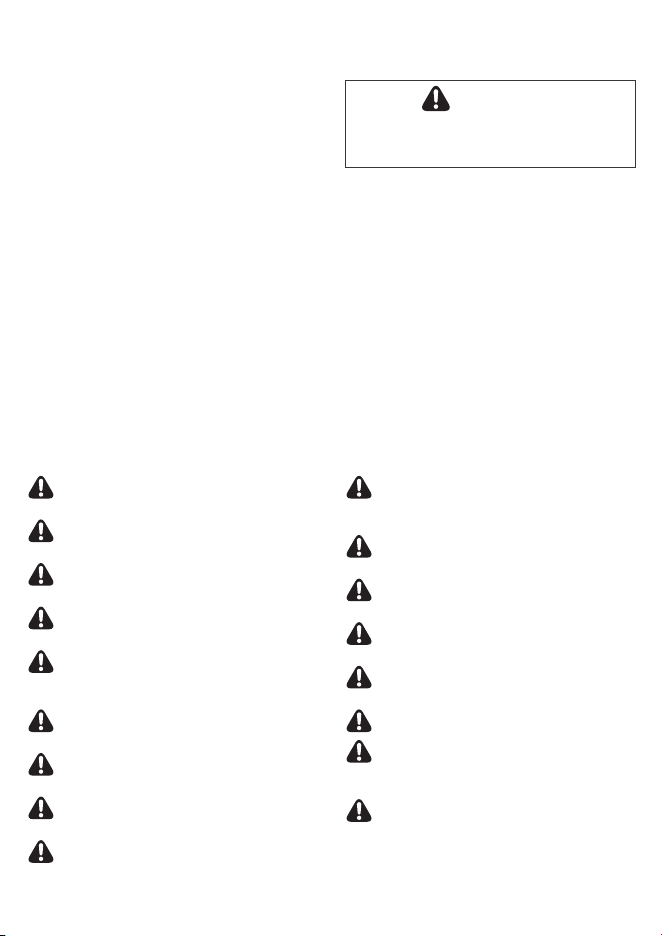
Services de réparation
non disponibles
Ne tirez pas sur le cordon d’alimentation lorsque
vous débranchez l’unité.
N’attachez ou ne nouez pas le cordon
d’alimentation lorsque l’appareil est en marche.
Si l’appareil est immergé dans l’eau,
débranchez-le et contactez le service clientèle.
Ne débranchez pas ou ne déplacez pas l’appareil
pendant pendant son fonctionnement.
Ne branchez pas d’appareils supplémentaires
dans la même prise de courant ou le même bloc
d’alimentation.
Ne pas manipuler la fiche d’alimentation avec
les mains mouillées.
Débrancher l’appareil lorsqu’il ne sera pas utilisé
pendant de longues périodes.
Ne pas placer à proximité d’une source de
chaleur.
Ne pas utiliser à proximité de brouillards ou
de vapeurs d’huile industrielle ou de grandes
quantités de poussière métallique.
Plier, tirer, tordre, nouer, pincer, coincer
pour places des objets lourds sur le cordon
d’alimentation peut l’endommager.
Ne pas installer dans un véhicule à moteur
(camions, bateaux, navires, etc.)
Ne pas placer dans un endroit contenant des
quantités excessives de gaz nocifs.
Ne pas placer à proximité de matières
inflammables (aérosols, carburant, gaz, etc.)
Ne pas placer l’appareil face au vent ou à une
prise d’air.
Ne pas placer au-dessous d’une prise électrique.
Ne pas mettre dans des zones excessivement
humides où l’appareil pourrait être en contact
avec l’eau.
Ne pas placer l’appareil à moins de 12pouces
d’un mur pendant le fonctionnement. Cela
pourrait provoquer de la condensation sur le
mur et la zone environnante.
SÉCURITÉ ET PRÉCAUTIONS
Avant d’utiliser cet appareil, lisez et suivez attentivement
les consignes de sécurité suivantes.
Assurez-vous que les filtres sont insérés avant la mise
en marche.
Faire fonctionner l’appareil sans filtre peut réduire la
durée de vie de l’appareil et provoquer des décharges
électriques ou des blessures.
N’insérez jamais de corps étrangers dans les fentes
d’aération de l’unité.
Les objets peuvent inclure des broches, des barres ou
des pièces de monnaie.
Ne touchez pas l’intérieur de l’appareil avec les mains
mouillées.
La tension peut provoquer une décharge électrique.
Veillez à ce que les prises d’entrée et de sortie d’air ne
soient pas obstruées.
L’obstruction des prises d’entrée et de sortie d’air peut
entraîner une augmentation de la température interne à
l’origine de pannes et de déformations.
N’utilisez pas l’appareil comme un marchepied ou pour y
déposer des objets lourds.
AVERTISSEMENT
Suivez ces instructions pour réduire le risque
de blessures graves ou de décès et ne pas
endommager l’appareil.
Cela pourrait entraîner des blessures, une défaillance ou
une déformation du produit.
• Si le cordon d’alimentation est endommagé, il doit être
remplacé par un cordon spécial. Le réassemblage peut
être effectué par le fabricant ou un de ses techniciens
agréés.
• Cet appareil n’est pas destiné à être utilisé par des
personnes (y compris des enfants) dont les capacités
physiques, sensorielles ou mentales sont réduites,
ou qui manquent d’expérience et de connaissance
de l’appareil, à moins qu’elles n’aient été supervisées
ou instruites sur l’utilisation de l’appareil par une
personne responsable de leur sécurité.
• Les enfants doivent être surveillés afin de s’assurer
qu’ils ne jouent pas avec l’appareil.
• Cet appareil n’est pas destiné à préserver des
documents ou des œuvres d’art.
INSTRUCTIONS DE SÉCURITÉ
Lisez et conservez ces instructions.
Nous vous remercions d’avoir choisi un purificateur d’air Winix. Ce produit est destiné à un
usage domestique uniquement.
Ce produit respecte la concentration maximale autorisée d’ozone de 0,050parties par million
en volume (ppmv) sur une période de 24heures.
• Ne pas réparer ou modifier l’appareil.
• Toutes les réparations doivent être effectuées par un
technicien Winnix qualifié.
• La fiche de cette unité est polarisée et possède une
lame plus large que l’autre. Ne pas forcer la fiche dans
une prise électrique. Ne pas modifier la fiche d’aucune
façon. Inverser la fiche si elle n’entre pas dans la prise.
Si elle ne rentre toujours pas, contacter un technicien
qualifié pour installer une prise appropriée.
• Ne pas utiliser si le cordon d’alimentation ou la fiche
est endommagé ou si la connexion à la prise murale
est lâche.
• Utiliser uniquement une sortie AC120V.
• Ne pas endommager, déchirer, plier avec force,
tirer, tordre, nouer, recouvrir ou pincer le cordon
d’alimentation ou le placer sous des objets lourds.
• Enlever régulièrement la poussière de la fiche
d’alimentation. Cela permettra de réduire
l’accumulation d’humidité et le risque d’électrocution.
• Débrancher la fiche d’alimentation de la prise avant de
nettoyer l’appareil. Pour sortir la fiche d’alimentation
de la prise, tirez sur la fiche elle-même, et non sur le
cordon d’alimentation.
• Si le cordon d’alimentation est endommagé, il doit être
remplacé par le fabricant ou un technicien qualifié.
• Débrancher l’appareil lorsqu’il n’est pas utilisé.
• Ne pas manipuler la fiche d’alimentation avec les
mains mouillées.
• Ne pas faire fonctionner l’unité lorsque vous utilisez
des insecticides générant une brume en suspension
dans l’air.
• Ne pas nettoyer l’appareil avec du benzène ou du
diluant à peinture.
Ne pas pulvériser un insecticide sur l’appareil.
• Ne pas utiliser l’appareil lorsqu’il est humide ou dans
un environnement humide comme une salle de bains.
• Ne pas insérer les doigts ou des objets dans la fente
d’admission ou de sortie d’air.
• Ne pas utiliser l’appareil à proximité de gaz
inflammables. Ne pas utiliser près de cigarettes,
d’encens, ou autres matériaux pouvant créer des
étincelles.
• L’unité ne supprimera pas le monoxyde de carbone
émis par des sources de chauffage ou autres.
PRÉCAUTIONS IMPORTANTES CONCERNANT L’UTILISATION DE VOTRE PURIFICATEUR D’AIR:
AVERTISSEMENT:
Pour réduire le risque d’électrocution, de court-circuit ou d’incendie, suivez les instructions de ce manuel.
PRÉ
CAUTIONS IMPORTANTES CONCERNANT L’UTILISATION DE VOTRE PURIFICATEUR D’AIR:
• Ne pas obstruer les prises d’entrée de l’air.
• Ne pas utiliser à proximité d’objets émettant de la chaleur, telle qu’une cuisinière.
• Ne pas utiliser là où l’unité peut entrer en contact avec de la vapeur.
• Ne pas utiliser l’unité à l’horizontale.
• Garder à l’écart de produits générant des résidus huileux comme une friteuse.
• Ne pas utiliser de détergent pour nettoyer l’appareil.
• Ne pas mettre l’unité en marche sans filtre.
• Ne pas laver et réutiliser le filtre HEPA ou le filtre à charbon actif.
• Transporter l’unité au moyen de la poignée à l’arrière de l’unité.
• Ne pas transporter en tenant par le panneau avant.
• Ne pas introduire de petits objets dans les grilles de sortie d’air ou dans le ventilateur.
GARANTIE DE DEUX ANS.
Les modalités de la garantie sont les suivantes:
1. Ce produit est fabriqué dans le cadre de
contrôles de qualité et d’inspections rigoureux.
2. La garantie sera annulée si la défaillance
du produit résulte d’une négligence ou
d’une mauvaise utilisation de la part du
consommateur.
3. Une preuve d’achat doit être présentée pour
faire valoir la garantie.
4. Conservez la preuve d’achat dans un endroit sûr
ou enregistrez votre produit sur winixamerica.
com pour y téléverser votre preuve d’achat.
5. Cette garantie n’est valable qu’aux États-Unis et
au Canada.
* Pour en savoir plus n’hésitez pas à visiter
https://winixamerica.com/terms-and-conditions/
Nom du produit
Purificateur d’air
Modèle
5510– 5520
Date d’achat
Durée de la garantie
Deux (2) ans
Lieu de l’achat
Téléphone du lieu d’achat
Client
Adresse
Nom
Tél.
Après l’achat, assurez-vous de compléter tous les
renseignements ci-dessus.
Avertissement: Les changements ou modifications apportés à cet appareil sans l’approbation
expresse de la partie responsable de la conformité peuvent annuler le droit de l’utilisateur à faire
fonctionner l’équipement.
Remarque: Cet appareil a été testé et reconnu conforme aux normes applicables aux appareils
numériques de Classe B, en vertu de l’article15 des réglementations de la FCC. Ces normes visent
à fournir aux installations résidentielles une protection raisonnable contre les interférences. Cet
appareil produit, utilise et peut irradier une énergie de radiofréquence et, s’il n’est pas installé et utilisé
conformément aux directives, peut causer une interférence nuisible pour les radiocommunications.
Toutefois, rien ne garantit l’absence d’interférences dans une installation particulière. Si cet appareil
occasionne des interférences nuisibles aux réceptions radio ou télévisuelles, ce qui peut être
déterminé en allumant et en éteignant l’appareil, l’utilisateur est invité à corriger ce problème en
prenant une ou plusieurs des mesures suivantes:
• Réorienter ou repositionner l’antenne de réception.
• Augmenter la distance séparant l’équipement du récepteur.
• Connecter l’équipement à une prise appartenant à un circuit différent de celui sur lequel le récepteur
est connecté.
• Consulter le revendeur ou un technicien radio/TV expérimenté pour obtenir de l’aide.
L’émetteur/récepteur exempt de licence contenu dans le présent appareil est conforme aux CNR
d’Innovation, Sciences et Développement économique Canada applicables aux appareils radio
exempts de licence. Son fonctionnement est soumis aux deux conditions suivantes:
• L’appareil ne doit pas produire de brouillage.
• L’appareil doit accepter tout brouillage radioélectrique subi, même si le brouillage est susceptible d’en
compromettre le fonctionnement.
French Cet appareil contient des émetteurs/récepteurs exemptés de licence et conformes aux normes
Innovation, Science et Economic. RSS(s) sans licence de Développement Canada. Le fonctionnement
est soumis aux deux conditions suivantes:
• cet appareil ne doit pas causer d’interférences nuisibles; et
• cet appareil doit accepter toute interférence reçue, y compris les interférences pouvant provoquer un
fonctionnement non souhaité.
MANUEL DE L’UTILISATEUR
PURIFICATEURS D’AIR
• La garantie du produit est imprimée au dos de ce guide. Ce produit est fabriqué exclusivement pour le
marché américain et canadien. Ce produit convient uniquement à un raccordement électrique de 120V.
• Ce purificateur d’air est offert avec une garantie limitée de 2 ans à compter de la date d’achat. Aucun
service de garantie supplémentaire, de réparation ou de remplacement n’est offert au-delà de cette
période. Aucune pièce de rechange ne sera disponible après l’expiration de la garantie. Les informations
relatives à l’entretien et à la réparation sont accessibles à l’adresse [www.winixamerica.com/support].
Aucun logiciel ou micrologiciel n’est requis pour utiliser ce produit.
2610-0361-01 Rev.01
5510 5520
※
L’apparence extérieure du produit peut varier selon le modèle,
mais la performance reste la même.

Services de réparation
non disponibles
Ne tirez pas sur le cordon d’alimentation lorsque
vous débranchez l’unité.
N’attachez ou ne nouez pas le cordon
d’alimentation lorsque l’appareil est en marche.
Si l’appareil est immergé dans l’eau,
débranchez-le et contactez le service clientèle.
Ne débranchez pas ou ne déplacez pas l’appareil
pendant pendant son fonctionnement.
Ne branchez pas d’appareils supplémentaires
dans la même prise de courant ou le même bloc
d’alimentation.
Ne pas manipuler la fiche d’alimentation avec
les mains mouillées.
Débrancher l’appareil lorsqu’il ne sera pas utilisé
pendant de longues périodes.
Ne pas placer à proximité d’une source de
chaleur.
Ne pas utiliser à proximité de brouillards ou
de vapeurs d’huile industrielle ou de grandes
quantités de poussière métallique.
Plier, tirer, tordre, nouer, pincer, coincer
pour places des objets lourds sur le cordon
d’alimentation peut l’endommager.
Ne pas installer dans un véhicule à moteur
(camions, bateaux, navires, etc.)
Ne pas placer dans un endroit contenant des
quantités excessives de gaz nocifs.
Ne pas placer à proximité de matières
inflammables (aérosols, carburant, gaz, etc.)
Ne pas placer l’appareil face au vent ou à une
prise d’air.
Ne pas placer au-dessous d’une prise électrique.
Ne pas mettre dans des zones excessivement
humides où l’appareil pourrait être en contact
avec l’eau.
Ne pas placer l’appareil à moins de 12pouces
d’un mur pendant le fonctionnement. Cela
pourrait provoquer de la condensation sur le
mur et la zone environnante.
SÉCURITÉ ET PRÉCAUTIONS
Avant d’utiliser cet appareil, lisez et suivez attentivement
les consignes de sécurité suivantes.
Assurez-vous que les filtres sont insérés avant la mise
en marche.
Faire fonctionner l’appareil sans filtre peut réduire la
durée de vie de l’appareil et provoquer des décharges
électriques ou des blessures.
N’insérez jamais de corps étrangers dans les fentes
d’aération de l’unité.
Les objets peuvent inclure des broches, des barres ou
des pièces de monnaie.
Ne touchez pas l’intérieur de l’appareil avec les mains
mouillées.
La tension peut provoquer une décharge électrique.
Veillez à ce que les prises d’entrée et de sortie d’air ne
soient pas obstruées.
L’obstruction des prises d’entrée et de sortie d’air peut
entraîner une augmentation de la température interne à
l’origine de pannes et de déformations.
N’utilisez pas l’appareil comme un marchepied ou pour y
déposer des objets lourds.
AVERTISSEMENT
Suivez ces instructions pour réduire le risque
de blessures graves ou de décès et ne pas
endommager l’appareil.
Cela pourrait entraîner des blessures, une défaillance ou
une déformation du produit.
• Si le cordon d’alimentation est endommagé, il doit être
remplacé par un cordon spécial. Le réassemblage peut
être effectué par le fabricant ou un de ses techniciens
agréés.
• Cet appareil n’est pas destiné à être utilisé par des
personnes (y compris des enfants) dont les capacités
physiques, sensorielles ou mentales sont réduites,
ou qui manquent d’expérience et de connaissance
de l’appareil, à moins qu’elles n’aient été supervisées
ou instruites sur l’utilisation de l’appareil par une
personne responsable de leur sécurité.
• Les enfants doivent être surveillés afin de s’assurer
qu’ils ne jouent pas avec l’appareil.
• Cet appareil n’est pas destiné à préserver des
documents ou des œuvres d’art.
INSTRUCTIONS DE SÉCURITÉ
Lisez et conservez ces instructions.
Nous vous remercions d’avoir choisi un purificateur d’air Winix. Ce produit est destiné à un
usage domestique uniquement.
Ce produit respecte la concentration maximale autorisée d’ozone de 0,050parties par million
en volume (ppmv) sur une période de 24heures.
• Ne pas réparer ou modifier l’appareil.
• Toutes les réparations doivent être effectuées par un
technicien Winnix qualifié.
• La fiche de cette unité est polarisée et possède une
lame plus large que l’autre. Ne pas forcer la fiche dans
une prise électrique. Ne pas modifier la fiche d’aucune
façon. Inverser la fiche si elle n’entre pas dans la prise.
Si elle ne rentre toujours pas, contacter un technicien
qualifié pour installer une prise appropriée.
• Ne pas utiliser si le cordon d’alimentation ou la fiche
est endommagé ou si la connexion à la prise murale
est lâche.
• Utiliser uniquement une sortie AC120V.
• Ne pas endommager, déchirer, plier avec force,
tirer, tordre, nouer, recouvrir ou pincer le cordon
d’alimentation ou le placer sous des objets lourds.
• Enlever régulièrement la poussière de la fiche
d’alimentation. Cela permettra de réduire
l’accumulation d’humidité et le risque d’électrocution.
• Débrancher la fiche d’alimentation de la prise avant de
nettoyer l’appareil. Pour sortir la fiche d’alimentation
de la prise, tirez sur la fiche elle-même, et non sur le
cordon d’alimentation.
• Si le cordon d’alimentation est endommagé, il doit être
remplacé par le fabricant ou un technicien qualifié.
• Débrancher l’appareil lorsqu’il n’est pas utilisé.
• Ne pas manipuler la fiche d’alimentation avec les
mains mouillées.
• Ne pas faire fonctionner l’unité lorsque vous utilisez
des insecticides générant une brume en suspension
dans l’air.
• Ne pas nettoyer l’appareil avec du benzène ou du
diluant à peinture.
Ne pas pulvériser un insecticide sur l’appareil.
• Ne pas utiliser l’appareil lorsqu’il est humide ou dans
un environnement humide comme une salle de bains.
• Ne pas insérer les doigts ou des objets dans la fente
d’admission ou de sortie d’air.
• Ne pas utiliser l’appareil à proximité de gaz
inflammables. Ne pas utiliser près de cigarettes,
d’encens, ou autres matériaux pouvant créer des
étincelles.
• L’unité ne supprimera pas le monoxyde de carbone
émis par des sources de chauffage ou autres.
PRÉCAUTIONS IMPORTANTES CONCERNANT L’UTILISATION DE VOTRE PURIFICATEUR D’AIR:
AVERTISSEMENT:
Pour réduire le risque d’électrocution, de court-circuit ou d’incendie, suivez les instructions de ce manuel.
PRÉ
CAUTIONS IMPORTANTES CONCERNANT L’UTILISATION DE VOTRE PURIFICATEUR D’AIR:
• Ne pas obstruer les prises d’entrée de l’air.
• Ne pas utiliser à proximité d’objets émettant de la chaleur, telle qu’une cuisinière.
• Ne pas utiliser là où l’unité peut entrer en contact avec de la vapeur.
• Ne pas utiliser l’unité à l’horizontale.
• Garder à l’écart de produits générant des résidus huileux comme une friteuse.
• Ne pas utiliser de détergent pour nettoyer l’appareil.
• Ne pas mettre l’unité en marche sans filtre.
• Ne pas laver et réutiliser le filtre HEPA ou le filtre à charbon actif.
• Transporter l’unité au moyen de la poignée à l’arrière de l’unité.
• Ne pas transporter en tenant par le panneau avant.
• Ne pas introduire de petits objets dans les grilles de sortie d’air ou dans le ventilateur.
GARANTIE DE DEUX ANS.
Les modalités de la garantie sont les suivantes:
1. Ce produit est fabriqué dans le cadre de
contrôles de qualité et d’inspections rigoureux.
2. La garantie sera annulée si la défaillance
du produit résulte d’une négligence ou
d’une mauvaise utilisation de la part du
consommateur.
3. Une preuve d’achat doit être présentée pour
faire valoir la garantie.
4. Conservez la preuve d’achat dans un endroit sûr
ou enregistrez votre produit sur winixamerica.
com pour y téléverser votre preuve d’achat.
5. Cette garantie n’est valable qu’aux États-Unis et
au Canada.
* Pour en savoir plus n’hésitez pas à visiter
https://winixamerica.com/terms-and-conditions/
Nom du produit
Purificateur d’air
Modèle
5510– 5520
Date d’achat
Durée de la garantie
Deux (2) ans
Lieu de l’achat
Téléphone du lieu d’achat
Client
Adresse
Nom
Tél.
Après l’achat, assurez-vous de compléter tous les
renseignements ci-dessus.
Avertissement: Les changements ou modifications apportés à cet appareil sans l’approbation
expresse de la partie responsable de la conformité peuvent annuler le droit de l’utilisateur à faire
fonctionner l’équipement.
Remarque: Cet appareil a été testé et reconnu conforme aux normes applicables aux appareils
numériques de Classe B, en vertu de l’article15 des réglementations de la FCC. Ces normes visent
à fournir aux installations résidentielles une protection raisonnable contre les interférences. Cet
appareil produit, utilise et peut irradier une énergie de radiofréquence et, s’il n’est pas installé et utilisé
conformément aux directives, peut causer une interférence nuisible pour les radiocommunications.
Toutefois, rien ne garantit l’absence d’interférences dans une installation particulière. Si cet appareil
occasionne des interférences nuisibles aux réceptions radio ou télévisuelles, ce qui peut être
déterminé en allumant et en éteignant l’appareil, l’utilisateur est invité à corriger ce problème en
prenant une ou plusieurs des mesures suivantes:
• Réorienter ou repositionner l’antenne de réception.
• Augmenter la distance séparant l’équipement du récepteur.
• Connecter l’équipement à une prise appartenant à un circuit différent de celui sur lequel le récepteur
est connecté.
• Consulter le revendeur ou un technicien radio/TV expérimenté pour obtenir de l’aide.
L’émetteur/récepteur exempt de licence contenu dans le présent appareil est conforme aux CNR
d’Innovation, Sciences et Développement économique Canada applicables aux appareils radio
exempts de licence. Son fonctionnement est soumis aux deux conditions suivantes:
• L’appareil ne doit pas produire de brouillage.
• L’appareil doit accepter tout brouillage radioélectrique subi, même si le brouillage est susceptible d’en
compromettre le fonctionnement.
French Cet appareil contient des émetteurs/récepteurs exemptés de licence et conformes aux normes
Innovation, Science et Economic. RSS(s) sans licence de Développement Canada. Le fonctionnement
est soumis aux deux conditions suivantes:
• cet appareil ne doit pas causer d’interférences nuisibles; et
• cet appareil doit accepter toute interférence reçue, y compris les interférences pouvant provoquer un
fonctionnement non souhaité.
MANUEL DE L’UTILISATEUR
PURIFICATEURS D’AIR
• La garantie du produit est imprimée au dos de ce guide. Ce produit est fabriqué exclusivement pour le
marché américain et canadien. Ce produit convient uniquement à un raccordement électrique de 120V.
• Ce purificateur d’air est offert avec une garantie limitée de 2 ans à compter de la date d’achat. Aucun
service de garantie supplémentaire, de réparation ou de remplacement n’est offert au-delà de cette
période. Aucune pièce de rechange ne sera disponible après l’expiration de la garantie. Les informations
relatives à l’entretien et à la réparation sont accessibles à l’adresse [www.winixamerica.com/support].
Aucun logiciel ou micrologiciel n’est requis pour utiliser ce produit.
2610-0361-01 Rev.01
5510 5520
※
L’apparence extérieure du produit peut varier selon le modèle,
mais la performance reste la même.
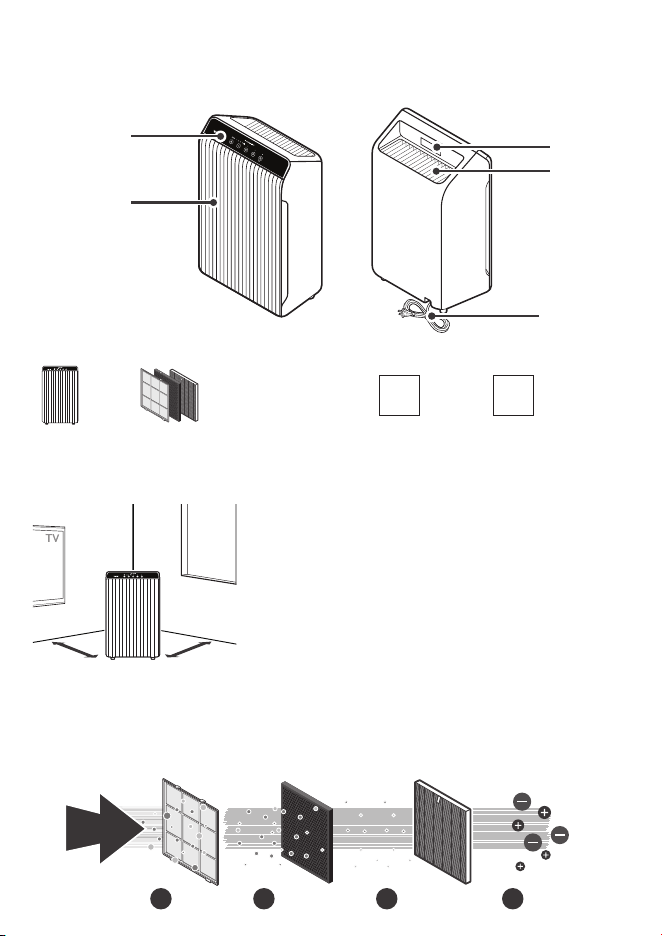
02
09 03
1201
07 10 06 08 0511
04
13
14
01. Indicateur du mode Auto
Indique si le mode Auto est activé ou désactivé.
02. Indicateur du mode veille
Indique si le mode Nuit est activé ou désactivé.
03. Indicateur PlasmaWave
MD
Indique si la fonction PlasmaWave
MD
est activée ou
désactivée.
04. Indicateur de vitesse du ventilateur
Indique la vitesse actuelle du ventilateur.
05. Capteur de lumière
Détecte l’intensité de la lumière ambiante.
06. Touche Wi-Fi/jumelage
• Une pression rapide permet d’activer/désactiver
le Wi-Fi.
• Une pression longue de 3secondes active le
mode de jumelage.
• Un indicateur Wi-Fi s’affiche en façade lorsque le
Wi-Fi est actif.
07. Touche d’alimentation
Permet d’allumer ou d’éteindre l’appareil.
Pendant les 30premières secondes de mise sous
tension, l’indicateur de la qualité de l’air passe par la
couleur bleue, ambre et rouge. Le capteur intelligent
a besoin d’environ 4minutes pour analyser la
qualité de l’air ambiant avant que l’appareil ne
commence à fonctionner normalement.
08. Touche PlasmaWave
MD
Active ou désactive PlasmaWave
MD
.
Lorsque l’appareil est en marche, il se peut que vous
entendiez des grincements ou un bourdonnement.
Le son provient des grandes particules traversant le
PlasmaWave
MD
. Ce son est normal et n’indique pas
un mauvais fonctionnement de l’appareil.
Appuyez sur le bouton PlasmaWave
MD
lorsque
l’appareil est sous tension pour activer ou
désactiver cette fonction.
09. Indicateur Wi-fi
Indique si le mode Wi-Fi est activé ou désactivé.
PANNEAU DE CONTRÔLE
Remplacement des filtres
Filtre Témoin lumineux Nettoyage Remplacement
Préfiltre
Aucun
Nettoyer une fois tous les
14jours
Permanent
Filtre AOC
TM
NE PEUT PAS ÊTRE
NETTOYÉ
Durée de vie approx.:
12mois
Filtre True HEPA
• Lorsque le voyant lumineux Check Filter est allumé, il est temps de remplacer le filtre HEPA et le
filtre
AOC
TM
actif.
• La fréquence de remplacement du filtre peut varier en fonction de l’environnement.
ENTRETIEN
Questions ou commandes:
REMPLACEMENT
DES FILTRES
Réinitialisation de l’indicateur de remplacement du filtre:
Après avoir remplacé votre filtre HEPA, replacez le pré-filtre et fermez le panneau
avant. Lorsque l’appareil est allumé, maintenez le bouton de réinitialisation du filtre
enfoncé pendant au moins 5secondes jusqu’à ce que vous entendiez un bip. Après
le bip, l’indicateur de remplacement du filtre s’éteint. Votre filtre HEPA Winix est
maintenant réinitialisé.
ENTRETIEN
Nettoyage des filtres:
Utilisez un aspirateur ou une brosse douce pour
nettoyer le pré-filtre.
• Si le filtre est trop sale, il peut être rincé à l’eau
tiède. N’utilisez pas de détergent ou de savon.
Laissez sécher le filtre pendant 24heures ou
plus avant de l’utiliser. L’intervalle entre les
nettoyages des filtres peut varier en fonction de
la qualité de l’air.
Nettoyage extérieur et intérieur:
1. Ouvrez le panneau avant et nettoyez l’intérieur à
l’aide d’un aspirateur.
• Un aspirateur portatif ou un accessoire de tuyau
fonctionnera mieux.
2. Humidifiez un chiffon avec de l’eau à température
ambiante et essuyez l’intérieur et l’extérieur de l’appareil.
3. Essuyez l’appareil avec un chiffon propre et sec.
• Assurez-vous qu’il ne reste aucune humidité avant
de rebrancher l’appareil.
* Pour des performances optimales, nettoyez tous les 1 à
2mois.
REMARQUE
• Lors du nettoyage de l’appareil, débranchez toujours le cordon d’alimentation et attendez que
l’appareil ait refroidi.
• Ne jamais démonter, réparer, ou modifier vous-même l’appareil.
• N’utilisez pas de détergents inflammables liquides ou en aérosols.
• Ne laissez pas les enfants nettoyer ou entretenir l’appareil.
• Avant de procéder au nettoyage ou à l’entretien, assurez-vous que l’appareil est débranché.
• N’utilisez pas de benzène, d’alcool ou d’autres liquides volatils, qui peuvent endommager l’appareil
ou causer une décoloration.
• N’utilisez pas une eau à plus de 40°C (104°F)
10. Touche Vitesse du ventilateur
Permet de contrôler manuellement la vitesse du
ventilateur du purificateur.
• Appuyez pour régler la vitesse du ventilateur
souhaitée (Faible, Moyenne, Haute, Turbo).
• Mode automatique
- Le mode automatique ajuste
automatiquement la vitesse du ventilateur
en fonction de la qualité de l’air intérieur. La
vitesse du ventilateur se réglera sur basse
lorsque la qualité de l’air est bonne, sur
moyenne lorsqu’elle est acceptable, et sur
élevée lorsqu’elle est mauvaise.
• Mise en veille automatique
- Lorsque le mode Veille (Sleep) est activé,
le voyant Qualité de l’air (Air Quality) est
désactivé.
- La vitesse du ventilateur sera
automatiquement réglée sur la vitesse
minimale (inférieure à «Basse»), ce qui sera
presque silencieux.
- Lorsque le mode veille est activé,
PlasmaWave
MD
sera désactivé, mais il peut
être réactivé.
11. Bouton de réinitialisation du filtre
Après avoir remplacé le filtre HEPA, appuyez sur
le bouton de réinitialisation du filtre pendant au
moins 5secondes jusqu’à ce que l’indicateur de
remplacement du filtre s’éteigne.
12. indicateur de réinitialisation du filtre
La DEL indique quand il est temps de changer le filtre.
13. Indicateur de la qualité de l’air
Un code couleur indique l’un des trois niveaux
de qualité de l’air : Rouge (mauvaise), Ambre
(moyenne) et Bleu (bonne).
14. Capteur intelligent
Détecte la quantité de gaz dégageant une odeur
dans l’environnement. En mode automatique, la
vitesse du ventilateur s’ajuste en fonction de la
quantité de gaz détectée.
CARACTÉRISTIQUES
Modèle 5510– 5520 Dimensions
13,59po (L) x 8,27po (P) x
22,17po (H)
Tension
120 V. / 60Hz. CA
Poids 13,3 lb / 13 lb
Wattage
65 W
Filtres de
rechange
UGS du filtre Q : 1712– 0123-00
Superficie
392pi
2
L’extérieur, la conception et les caractéristiques du produit peuvent être modifiés pour améliorer le rendement du
produit sans préavis.
Communiquez avec WINIX pour les questions relatives aux produits
et au service à la clientèle
• Centre d’appel dédié:
☎
(877)699-4649
• Site Web: www.winixamerica.com
Pour accélérer le service, veuillez indiquer le nom et le numéro du modèle, la nature du problème, vos
coordonnées et votre adresse.
FRONT BACK
PACKAGE CONTENTS
Air Outlet
Vent
Handle
Power Plug
Control Panel
Front Panel
Unit
(1) Pre-Filter
(1) AOC™ Carbon Filter
(1) True HEPA Filter
User
Manual
Wi-Fi Setup
Guide
SCHÉMA DES ÉLÉMENTS DU MODÈLE
DEVANT
CONTENU DE L’EMBALLAGE
Panneau de
commande
Poignée
Bouche de
sortie d’air
Prise
d’alimentation
(1) Préfiltre
(1) Filtre AOC
TM
(1) Filtre True HEPA
Appareil
Manuel
d’utilisation
Guide de
configuration
Wi-Fi
Panneau avant
CONSEIL D’EMPLACEMENT
12~18 in12 ~ 18 in12~18 in12 ~ 18 in
Conservez un dégagement de 12 à 18po entre le purificateur et les
télévisions, les radios et autres appareils électroniques.
Les interférences électromagnétiques provenant de certains composants
électroniques peuvent causer un dysfonctionnement de l’appareil.
Placez à l’intérieur et à l’abri des rayons du soleil.
L’exposition directe du produit peut causer une défaillance ou une panne.
Placez l’appareil sur une surface plane et dure.
Les surfaces inclinées ou molles peuvent entraîner des bruits anormaux et
des vibrations.
Pour une circulation maximale de l’air, laissez une distance d’au moins
12 à 18pouces entre le mur et l’appareil.
12 à 18 po 12 à 18 po
MISE EN MARCHE INITIALE
1. Retirez le panneau avant en le saisissant
par son extrémité supérieure et en le tirant
doucement vers l’avant.
2. Retirez le pré-filtre, puis le sac en plastique
contenant les filtres derrière celui-ci.
3. Sortez les filtres de l’enveloppe de protection
en plastique.
4. Placez les nouveaux filtres dans leur
emplacement respectif jusqu’à ce qu’ils
tiennent bien en place.
03. Filtre True HEPA (arrière)
02.
Filtre
AOC
TM
(milieu)
01. Pré-filtre (devant)
5.
Une fois les filtres installés, fermez le panneau
avant.
6. Insérez la fiche dans une prise électrique.
Latch
0302
01
Latch
1 2
3 4
5 6
Loquet
Loquet
DERRIÈRE
PURIFICATEUR
D’AIR À 4PHASES
La purification de l’air consiste à éliminer
les particules inanimées.
Filtre
AOC
TM
02
Préfiltre
01
Filtre True HEPA
03
Technologie
PlasmaWave
MD
04
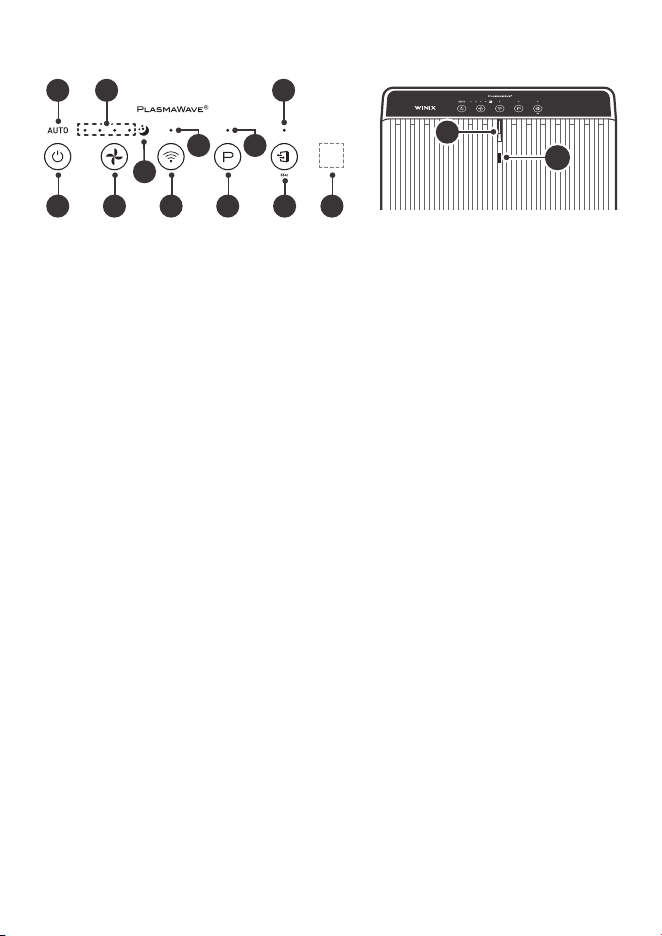
02
09 03
1201
07 10 06 08 0511
04
13
14
01. Indicateur du mode Auto
Indique si le mode Auto est activé ou désactivé.
02. Indicateur du mode veille
Indique si le mode Nuit est activé ou désactivé.
03. Indicateur PlasmaWave
MD
Indique si la fonction PlasmaWave
MD
est activée ou
désactivée.
04. Indicateur de vitesse du ventilateur
Indique la vitesse actuelle du ventilateur.
05. Capteur de lumière
Détecte l’intensité de la lumière ambiante.
06. Touche Wi-Fi/jumelage
• Une pression rapide permet d’activer/désactiver
le Wi-Fi.
• Une pression longue de 3secondes active le
mode de jumelage.
• Un indicateur Wi-Fi s’affiche en façade lorsque le
Wi-Fi est actif.
07. Touche d’alimentation
Permet d’allumer ou d’éteindre l’appareil.
Pendant les 30premières secondes de mise sous
tension, l’indicateur de la qualité de l’air passe par la
couleur bleue, ambre et rouge. Le capteur intelligent
a besoin d’environ 4minutes pour analyser la
qualité de l’air ambiant avant que l’appareil ne
commence à fonctionner normalement.
08. Touche PlasmaWave
MD
Active ou désactive PlasmaWave
MD
.
Lorsque l’appareil est en marche, il se peut que vous
entendiez des grincements ou un bourdonnement.
Le son provient des grandes particules traversant le
PlasmaWave
MD
. Ce son est normal et n’indique pas
un mauvais fonctionnement de l’appareil.
Appuyez sur le bouton PlasmaWave
MD
lorsque
l’appareil est sous tension pour activer ou
désactiver cette fonction.
09. Indicateur Wi-fi
Indique si le mode Wi-Fi est activé ou désactivé.
PANNEAU DE CONTRÔLE
Remplacement des filtres
Filtre Témoin lumineux Nettoyage Remplacement
Préfiltre
Aucun
Nettoyer une fois tous les
14jours
Permanent
Filtre AOC
TM
NE PEUT PAS ÊTRE
NETTOYÉ
Durée de vie approx.:
12mois
Filtre True HEPA
• Lorsque le voyant lumineux Check Filter est allumé, il est temps de remplacer le filtre HEPA et le
filtre
AOC
TM
actif.
• La fréquence de remplacement du filtre peut varier en fonction de l’environnement.
ENTRETIEN
Questions ou commandes:
REMPLACEMENT
DES FILTRES
Réinitialisation de l’indicateur de remplacement du filtre:
Après avoir remplacé votre filtre HEPA, replacez le pré-filtre et fermez le panneau
avant. Lorsque l’appareil est allumé, maintenez le bouton de réinitialisation du filtre
enfoncé pendant au moins 5secondes jusqu’à ce que vous entendiez un bip. Après
le bip, l’indicateur de remplacement du filtre s’éteint. Votre filtre HEPA Winix est
maintenant réinitialisé.
ENTRETIEN
Nettoyage des filtres:
Utilisez un aspirateur ou une brosse douce pour
nettoyer le pré-filtre.
• Si le filtre est trop sale, il peut être rincé à l’eau
tiède. N’utilisez pas de détergent ou de savon.
Laissez sécher le filtre pendant 24heures ou
plus avant de l’utiliser. L’intervalle entre les
nettoyages des filtres peut varier en fonction de
la qualité de l’air.
Nettoyage extérieur et intérieur:
1. Ouvrez le panneau avant et nettoyez l’intérieur à
l’aide d’un aspirateur.
• Un aspirateur portatif ou un accessoire de tuyau
fonctionnera mieux.
2. Humidifiez un chiffon avec de l’eau à température
ambiante et essuyez l’intérieur et l’extérieur de l’appareil.
3. Essuyez l’appareil avec un chiffon propre et sec.
• Assurez-vous qu’il ne reste aucune humidité avant
de rebrancher l’appareil.
* Pour des performances optimales, nettoyez tous les 1 à
2mois.
REMARQUE
• Lors du nettoyage de l’appareil, débranchez toujours le cordon d’alimentation et attendez que
l’appareil ait refroidi.
• Ne jamais démonter, réparer, ou modifier vous-même l’appareil.
• N’utilisez pas de détergents inflammables liquides ou en aérosols.
• Ne laissez pas les enfants nettoyer ou entretenir l’appareil.
• Avant de procéder au nettoyage ou à l’entretien, assurez-vous que l’appareil est débranché.
• N’utilisez pas de benzène, d’alcool ou d’autres liquides volatils, qui peuvent endommager l’appareil
ou causer une décoloration.
• N’utilisez pas une eau à plus de 40°C (104°F)
10. Touche Vitesse du ventilateur
Permet de contrôler manuellement la vitesse du
ventilateur du purificateur.
• Appuyez pour régler la vitesse du ventilateur
souhaitée (Faible, Moyenne, Haute, Turbo).
• Mode automatique
- Le mode automatique ajuste
automatiquement la vitesse du ventilateur
en fonction de la qualité de l’air intérieur. La
vitesse du ventilateur se réglera sur basse
lorsque la qualité de l’air est bonne, sur
moyenne lorsqu’elle est acceptable, et sur
élevée lorsqu’elle est mauvaise.
• Mise en veille automatique
- Lorsque le mode Veille (Sleep) est activé,
le voyant Qualité de l’air (Air Quality) est
désactivé.
- La vitesse du ventilateur sera
automatiquement réglée sur la vitesse
minimale (inférieure à «Basse»), ce qui sera
presque silencieux.
- Lorsque le mode veille est activé,
PlasmaWave
MD
sera désactivé, mais il peut
être réactivé.
11. Bouton de réinitialisation du filtre
Après avoir remplacé le filtre HEPA, appuyez sur
le bouton de réinitialisation du filtre pendant au
moins 5secondes jusqu’à ce que l’indicateur de
remplacement du filtre s’éteigne.
12. indicateur de réinitialisation du filtre
La DEL indique quand il est temps de changer le filtre.
13. Indicateur de la qualité de l’air
Un code couleur indique l’un des trois niveaux
de qualité de l’air : Rouge (mauvaise), Ambre
(moyenne) et Bleu (bonne).
14. Capteur intelligent
Détecte la quantité de gaz dégageant une odeur
dans l’environnement. En mode automatique, la
vitesse du ventilateur s’ajuste en fonction de la
quantité de gaz détectée.
CARACTÉRISTIQUES
Modèle 5510– 5520 Dimensions
13,59po (L) x 8,27po (P) x
22,17po (H)
Tension
120 V. / 60Hz. CA
Poids 13,3 lb / 13 lb
Wattage
65 W
Filtres de
rechange
UGS du filtre Q : 1712– 0123-00
Superficie
392pi
2
L’extérieur, la conception et les caractéristiques du produit peuvent être modifiés pour améliorer le rendement du
produit sans préavis.
Communiquez avec WINIX pour les questions relatives aux produits
et au service à la clientèle
• Centre d’appel dédié:
☎
(877)699-4649
• Site Web: www.winixamerica.com
Pour accélérer le service, veuillez indiquer le nom et le numéro du modèle, la nature du problème, vos
coordonnées et votre adresse.
FRONT BACK
PACKAGE CONTENTS
Air Outlet
Vent
Handle
Power Plug
Control Panel
Front Panel
Unit
(1) Pre-Filter
(1) AOC™ Carbon Filter
(1) True HEPA Filter
User
Manual
Wi-Fi Setup
Guide
SCHÉMA DES ÉLÉMENTS DU MODÈLE
DEVANT
CONTENU DE L’EMBALLAGE
Panneau de
commande
Poignée
Bouche de
sortie d’air
Prise
d’alimentation
(1) Préfiltre
(1) Filtre AOC
TM
(1) Filtre True HEPA
Appareil
Manuel
d’utilisation
Guide de
configuration
Wi-Fi
Panneau avant
CONSEIL D’EMPLACEMENT
12~18 in12 ~ 18 in12~18 in12 ~ 18 in
Conservez un dégagement de 12 à 18po entre le purificateur et les
télévisions, les radios et autres appareils électroniques.
Les interférences électromagnétiques provenant de certains composants
électroniques peuvent causer un dysfonctionnement de l’appareil.
Placez à l’intérieur et à l’abri des rayons du soleil.
L’exposition directe du produit peut causer une défaillance ou une panne.
Placez l’appareil sur une surface plane et dure.
Les surfaces inclinées ou molles peuvent entraîner des bruits anormaux et
des vibrations.
Pour une circulation maximale de l’air, laissez une distance d’au moins
12 à 18pouces entre le mur et l’appareil.
12 à 18 po 12 à 18 po
MISE EN MARCHE INITIALE
1. Retirez le panneau avant en le saisissant
par son extrémité supérieure et en le tirant
doucement vers l’avant.
2. Retirez le pré-filtre, puis le sac en plastique
contenant les filtres derrière celui-ci.
3. Sortez les filtres de l’enveloppe de protection
en plastique.
4. Placez les nouveaux filtres dans leur
emplacement respectif jusqu’à ce qu’ils
tiennent bien en place.
03. Filtre True HEPA (arrière)
02.
Filtre
AOC
TM
(milieu)
01. Pré-filtre (devant)
5.
Une fois les filtres installés, fermez le panneau
avant.
6. Insérez la fiche dans une prise électrique.
Latch
0302
01
Latch
1 2
3 4
5 6
Loquet
Loquet
DERRIÈRE
PURIFICATEUR
D’AIR À 4PHASES
La purification de l’air consiste à éliminer
les particules inanimées.
Filtre
AOC
TM
02
Préfiltre
01
Filtre True HEPA
03
Technologie
PlasmaWave
MD
04
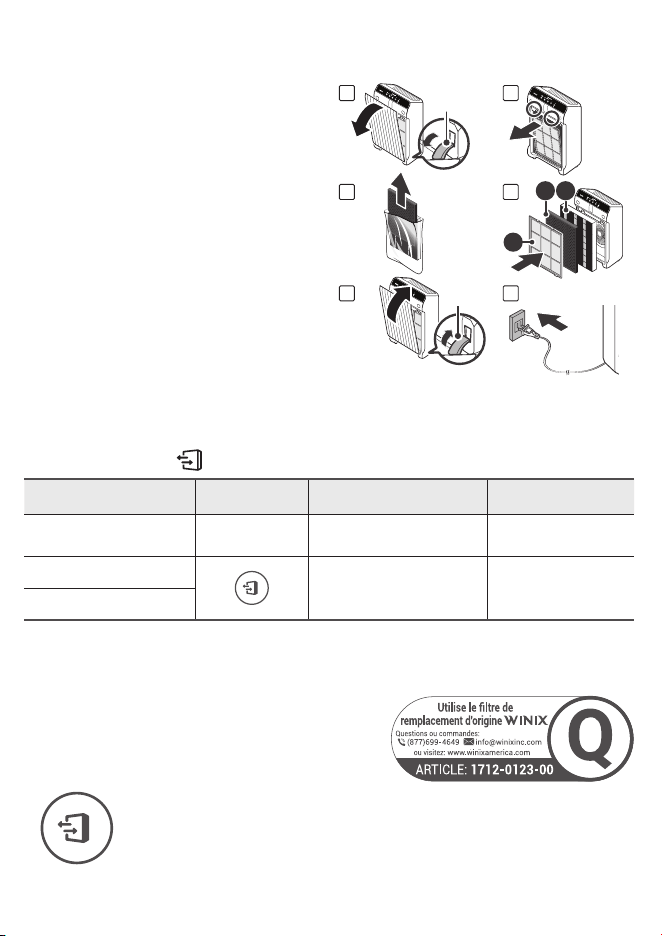
02
09 03
1201
07 10 06 08 0511
04
13
14
01. Indicateur du mode Auto
Indique si le mode Auto est activé ou désactivé.
02. Indicateur du mode veille
Indique si le mode Nuit est activé ou désactivé.
03. Indicateur PlasmaWave
MD
Indique si la fonction PlasmaWave
MD
est activée ou
désactivée.
04. Indicateur de vitesse du ventilateur
Indique la vitesse actuelle du ventilateur.
05. Capteur de lumière
Détecte l’intensité de la lumière ambiante.
06. Touche Wi-Fi/jumelage
• Une pression rapide permet d’activer/désactiver
le Wi-Fi.
• Une pression longue de 3secondes active le
mode de jumelage.
• Un indicateur Wi-Fi s’affiche en façade lorsque le
Wi-Fi est actif.
07. Touche d’alimentation
Permet d’allumer ou d’éteindre l’appareil.
Pendant les 30premières secondes de mise sous
tension, l’indicateur de la qualité de l’air passe par la
couleur bleue, ambre et rouge. Le capteur intelligent
a besoin d’environ 4minutes pour analyser la
qualité de l’air ambiant avant que l’appareil ne
commence à fonctionner normalement.
08. Touche PlasmaWave
MD
Active ou désactive PlasmaWave
MD
.
Lorsque l’appareil est en marche, il se peut que vous
entendiez des grincements ou un bourdonnement.
Le son provient des grandes particules traversant le
PlasmaWave
MD
. Ce son est normal et n’indique pas
un mauvais fonctionnement de l’appareil.
Appuyez sur le bouton PlasmaWave
MD
lorsque
l’appareil est sous tension pour activer ou
désactiver cette fonction.
09. Indicateur Wi-fi
Indique si le mode Wi-Fi est activé ou désactivé.
PANNEAU DE CONTRÔLE
Remplacement des filtres
Filtre Témoin lumineux Nettoyage Remplacement
Préfiltre
Aucun
Nettoyer une fois tous les
14jours
Permanent
Filtre AOC
TM
NE PEUT PAS ÊTRE
NETTOYÉ
Durée de vie approx.:
12mois
Filtre True HEPA
• Lorsque le voyant lumineux Check Filter est allumé, il est temps de remplacer le filtre HEPA et le
filtre
AOC
TM
actif.
• La fréquence de remplacement du filtre peut varier en fonction de l’environnement.
ENTRETIEN
Questions ou commandes:
REMPLACEMENT
DES FILTRES
Réinitialisation de l’indicateur de remplacement du filtre:
Après avoir remplacé votre filtre HEPA, replacez le pré-filtre et fermez le panneau
avant. Lorsque l’appareil est allumé, maintenez le bouton de réinitialisation du filtre
enfoncé pendant au moins 5secondes jusqu’à ce que vous entendiez un bip. Après
le bip, l’indicateur de remplacement du filtre s’éteint. Votre filtre HEPA Winix est
maintenant réinitialisé.
ENTRETIEN
Nettoyage des filtres:
Utilisez un aspirateur ou une brosse douce pour
nettoyer le pré-filtre.
• Si le filtre est trop sale, il peut être rincé à l’eau
tiède. N’utilisez pas de détergent ou de savon.
Laissez sécher le filtre pendant 24heures ou
plus avant de l’utiliser. L’intervalle entre les
nettoyages des filtres peut varier en fonction de
la qualité de l’air.
Nettoyage extérieur et intérieur:
1. Ouvrez le panneau avant et nettoyez l’intérieur à
l’aide d’un aspirateur.
• Un aspirateur portatif ou un accessoire de tuyau
fonctionnera mieux.
2. Humidifiez un chiffon avec de l’eau à température
ambiante et essuyez l’intérieur et l’extérieur de l’appareil.
3. Essuyez l’appareil avec un chiffon propre et sec.
• Assurez-vous qu’il ne reste aucune humidité avant
de rebrancher l’appareil.
* Pour des performances optimales, nettoyez tous les 1 à
2mois.
REMARQUE
• Lors du nettoyage de l’appareil, débranchez toujours le cordon d’alimentation et attendez que
l’appareil ait refroidi.
• Ne jamais démonter, réparer, ou modifier vous-même l’appareil.
• N’utilisez pas de détergents inflammables liquides ou en aérosols.
• Ne laissez pas les enfants nettoyer ou entretenir l’appareil.
• Avant de procéder au nettoyage ou à l’entretien, assurez-vous que l’appareil est débranché.
• N’utilisez pas de benzène, d’alcool ou d’autres liquides volatils, qui peuvent endommager l’appareil
ou causer une décoloration.
• N’utilisez pas une eau à plus de 40°C (104°F)
10. Touche Vitesse du ventilateur
Permet de contrôler manuellement la vitesse du
ventilateur du purificateur.
• Appuyez pour régler la vitesse du ventilateur
souhaitée (Faible, Moyenne, Haute, Turbo).
• Mode automatique
- Le mode automatique ajuste
automatiquement la vitesse du ventilateur
en fonction de la qualité de l’air intérieur. La
vitesse du ventilateur se réglera sur basse
lorsque la qualité de l’air est bonne, sur
moyenne lorsqu’elle est acceptable, et sur
élevée lorsqu’elle est mauvaise.
• Mise en veille automatique
- Lorsque le mode Veille (Sleep) est activé,
le voyant Qualité de l’air (Air Quality) est
désactivé.
- La vitesse du ventilateur sera
automatiquement réglée sur la vitesse
minimale (inférieure à «Basse»), ce qui sera
presque silencieux.
- Lorsque le mode veille est activé,
PlasmaWave
MD
sera désactivé, mais il peut
être réactivé.
11. Bouton de réinitialisation du filtre
Après avoir remplacé le filtre HEPA, appuyez sur
le bouton de réinitialisation du filtre pendant au
moins 5secondes jusqu’à ce que l’indicateur de
remplacement du filtre s’éteigne.
12. indicateur de réinitialisation du filtre
La DEL indique quand il est temps de changer le filtre.
13. Indicateur de la qualité de l’air
Un code couleur indique l’un des trois niveaux
de qualité de l’air : Rouge (mauvaise), Ambre
(moyenne) et Bleu (bonne).
14. Capteur intelligent
Détecte la quantité de gaz dégageant une odeur
dans l’environnement. En mode automatique, la
vitesse du ventilateur s’ajuste en fonction de la
quantité de gaz détectée.
CARACTÉRISTIQUES
Modèle 5510– 5520 Dimensions
13,59po (L) x 8,27po (P) x
22,17po (H)
Tension
120 V. / 60Hz. CA
Poids 13,3 lb / 13 lb
Wattage
65 W
Filtres de
rechange
UGS du filtre Q : 1712– 0123-00
Superficie
392pi
2
L’extérieur, la conception et les caractéristiques du produit peuvent être modifiés pour améliorer le rendement du
produit sans préavis.
Communiquez avec WINIX pour les questions relatives aux produits
et au service à la clientèle
• Centre d’appel dédié:
☎
(877)699-4649
• Site Web: www.winixamerica.com
Pour accélérer le service, veuillez indiquer le nom et le numéro du modèle, la nature du problème, vos
coordonnées et votre adresse.
FRONT BACK
PACKAGE CONTENTS
Air Outlet
Vent
Handle
Power Plug
Control Panel
Front Panel
Unit
(1) Pre-Filter
(1) AOC™ Carbon Filter
(1) True HEPA Filter
User
Manual
Wi-Fi Setup
Guide
SCHÉMA DES ÉLÉMENTS DU MODÈLE
DEVANT
CONTENU DE L’EMBALLAGE
Panneau de
commande
Poignée
Bouche de
sortie d’air
Prise
d’alimentation
(1) Préfiltre
(1) Filtre AOC
TM
(1) Filtre True HEPA
Appareil
Manuel
d’utilisation
Guide de
configuration
Wi-Fi
Panneau avant
CONSEIL D’EMPLACEMENT
12~18 in12 ~ 18 in12~18 in12 ~ 18 in
Conservez un dégagement de 12 à 18po entre le purificateur et les
télévisions, les radios et autres appareils électroniques.
Les interférences électromagnétiques provenant de certains composants
électroniques peuvent causer un dysfonctionnement de l’appareil.
Placez à l’intérieur et à l’abri des rayons du soleil.
L’exposition directe du produit peut causer une défaillance ou une panne.
Placez l’appareil sur une surface plane et dure.
Les surfaces inclinées ou molles peuvent entraîner des bruits anormaux et
des vibrations.
Pour une circulation maximale de l’air, laissez une distance d’au moins
12 à 18pouces entre le mur et l’appareil.
12 à 18 po 12 à 18 po
MISE EN MARCHE INITIALE
1. Retirez le panneau avant en le saisissant
par son extrémité supérieure et en le tirant
doucement vers l’avant.
2. Retirez le pré-filtre, puis le sac en plastique
contenant les filtres derrière celui-ci.
3. Sortez les filtres de l’enveloppe de protection
en plastique.
4. Placez les nouveaux filtres dans leur
emplacement respectif jusqu’à ce qu’ils
tiennent bien en place.
03. Filtre True HEPA (arrière)
02.
Filtre
AOC
TM
(milieu)
01. Pré-filtre (devant)
5.
Une fois les filtres installés, fermez le panneau
avant.
6. Insérez la fiche dans une prise électrique.
Latch
0302
01
Latch
1 2
3 4
5 6
Loquet
Loquet
DERRIÈRE
PURIFICATEUR
D’AIR À 4PHASES
La purification de l’air consiste à éliminer
les particules inanimées.
Filtre
AOC
TM
02
Préfiltre
01
Filtre True HEPA
03
Technologie
PlasmaWave
MD
04
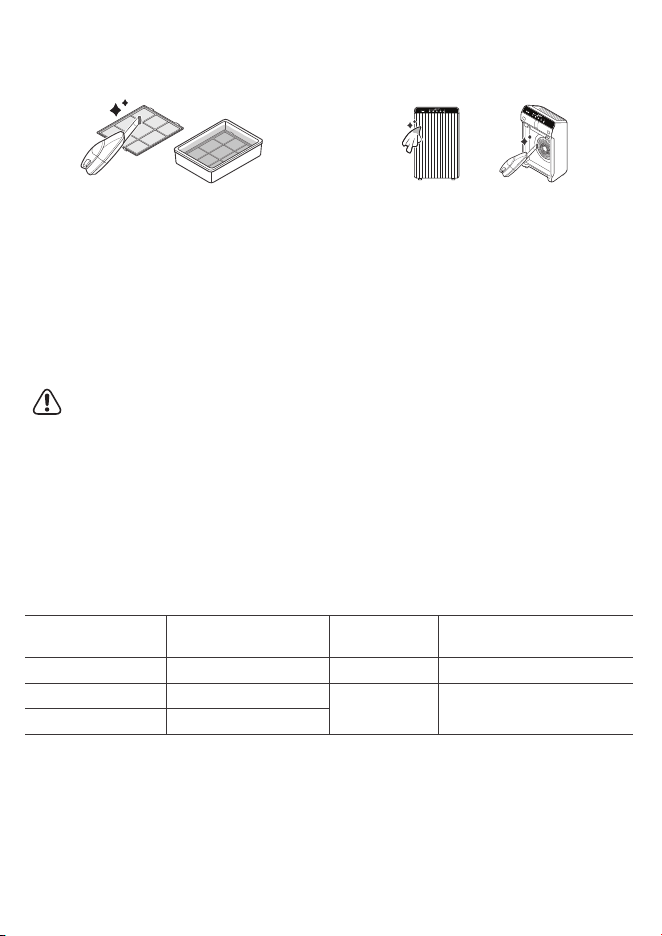
02
09 03
1201
07 10 06 08 0511
04
13
14
01. Indicateur du mode Auto
Indique si le mode Auto est activé ou désactivé.
02. Indicateur du mode veille
Indique si le mode Nuit est activé ou désactivé.
03. Indicateur PlasmaWave
MD
Indique si la fonction PlasmaWave
MD
est activée ou
désactivée.
04. Indicateur de vitesse du ventilateur
Indique la vitesse actuelle du ventilateur.
05. Capteur de lumière
Détecte l’intensité de la lumière ambiante.
06. Touche Wi-Fi/jumelage
• Une pression rapide permet d’activer/désactiver
le Wi-Fi.
• Une pression longue de 3secondes active le
mode de jumelage.
• Un indicateur Wi-Fi s’affiche en façade lorsque le
Wi-Fi est actif.
07. Touche d’alimentation
Permet d’allumer ou d’éteindre l’appareil.
Pendant les 30premières secondes de mise sous
tension, l’indicateur de la qualité de l’air passe par la
couleur bleue, ambre et rouge. Le capteur intelligent
a besoin d’environ 4minutes pour analyser la
qualité de l’air ambiant avant que l’appareil ne
commence à fonctionner normalement.
08. Touche PlasmaWave
MD
Active ou désactive PlasmaWave
MD
.
Lorsque l’appareil est en marche, il se peut que vous
entendiez des grincements ou un bourdonnement.
Le son provient des grandes particules traversant le
PlasmaWave
MD
. Ce son est normal et n’indique pas
un mauvais fonctionnement de l’appareil.
Appuyez sur le bouton PlasmaWave
MD
lorsque
l’appareil est sous tension pour activer ou
désactiver cette fonction.
09. Indicateur Wi-fi
Indique si le mode Wi-Fi est activé ou désactivé.
PANNEAU DE CONTRÔLE
Remplacement des filtres
Filtre Témoin lumineux Nettoyage Remplacement
Préfiltre
Aucun
Nettoyer une fois tous les
14jours
Permanent
Filtre AOC
TM
NE PEUT PAS ÊTRE
NETTOYÉ
Durée de vie approx.:
12mois
Filtre True HEPA
• Lorsque le voyant lumineux Check Filter est allumé, il est temps de remplacer le filtre HEPA et le
filtre
AOC
TM
actif.
• La fréquence de remplacement du filtre peut varier en fonction de l’environnement.
ENTRETIEN
Questions ou commandes:
REMPLACEMENT
DES FILTRES
Réinitialisation de l’indicateur de remplacement du filtre:
Après avoir remplacé votre filtre HEPA, replacez le pré-filtre et fermez le panneau
avant. Lorsque l’appareil est allumé, maintenez le bouton de réinitialisation du filtre
enfoncé pendant au moins 5secondes jusqu’à ce que vous entendiez un bip. Après
le bip, l’indicateur de remplacement du filtre s’éteint. Votre filtre HEPA Winix est
maintenant réinitialisé.
ENTRETIEN
Nettoyage des filtres:
Utilisez un aspirateur ou une brosse douce pour
nettoyer le pré-filtre.
• Si le filtre est trop sale, il peut être rincé à l’eau
tiède. N’utilisez pas de détergent ou de savon.
Laissez sécher le filtre pendant 24heures ou
plus avant de l’utiliser. L’intervalle entre les
nettoyages des filtres peut varier en fonction de
la qualité de l’air.
Nettoyage extérieur et intérieur:
1. Ouvrez le panneau avant et nettoyez l’intérieur à
l’aide d’un aspirateur.
• Un aspirateur portatif ou un accessoire de tuyau
fonctionnera mieux.
2. Humidifiez un chiffon avec de l’eau à température
ambiante et essuyez l’intérieur et l’extérieur de l’appareil.
3. Essuyez l’appareil avec un chiffon propre et sec.
• Assurez-vous qu’il ne reste aucune humidité avant
de rebrancher l’appareil.
* Pour des performances optimales, nettoyez tous les 1 à
2mois.
REMARQUE
• Lors du nettoyage de l’appareil, débranchez toujours le cordon d’alimentation et attendez que
l’appareil ait refroidi.
• Ne jamais démonter, réparer, ou modifier vous-même l’appareil.
• N’utilisez pas de détergents inflammables liquides ou en aérosols.
• Ne laissez pas les enfants nettoyer ou entretenir l’appareil.
• Avant de procéder au nettoyage ou à l’entretien, assurez-vous que l’appareil est débranché.
• N’utilisez pas de benzène, d’alcool ou d’autres liquides volatils, qui peuvent endommager l’appareil
ou causer une décoloration.
• N’utilisez pas une eau à plus de 40°C (104°F)
10. Touche Vitesse du ventilateur
Permet de contrôler manuellement la vitesse du
ventilateur du purificateur.
• Appuyez pour régler la vitesse du ventilateur
souhaitée (Faible, Moyenne, Haute, Turbo).
• Mode automatique
- Le mode automatique ajuste
automatiquement la vitesse du ventilateur
en fonction de la qualité de l’air intérieur. La
vitesse du ventilateur se réglera sur basse
lorsque la qualité de l’air est bonne, sur
moyenne lorsqu’elle est acceptable, et sur
élevée lorsqu’elle est mauvaise.
• Mise en veille automatique
- Lorsque le mode Veille (Sleep) est activé,
le voyant Qualité de l’air (Air Quality) est
désactivé.
- La vitesse du ventilateur sera
automatiquement réglée sur la vitesse
minimale (inférieure à «Basse»), ce qui sera
presque silencieux.
- Lorsque le mode veille est activé,
PlasmaWave
MD
sera désactivé, mais il peut
être réactivé.
11. Bouton de réinitialisation du filtre
Après avoir remplacé le filtre HEPA, appuyez sur
le bouton de réinitialisation du filtre pendant au
moins 5secondes jusqu’à ce que l’indicateur de
remplacement du filtre s’éteigne.
12. indicateur de réinitialisation du filtre
La DEL indique quand il est temps de changer le filtre.
13. Indicateur de la qualité de l’air
Un code couleur indique l’un des trois niveaux
de qualité de l’air : Rouge (mauvaise), Ambre
(moyenne) et Bleu (bonne).
14. Capteur intelligent
Détecte la quantité de gaz dégageant une odeur
dans l’environnement. En mode automatique, la
vitesse du ventilateur s’ajuste en fonction de la
quantité de gaz détectée.
CARACTÉRISTIQUES
Modèle 5510– 5520 Dimensions
13,59po (L) x 8,27po (P) x
22,17po (H)
Tension
120 V. / 60Hz. CA
Poids 13,3 lb / 13 lb
Wattage
65 W
Filtres de
rechange
UGS du filtre Q : 1712– 0123-00
Superficie
392pi
2
L’extérieur, la conception et les caractéristiques du produit peuvent être modifiés pour améliorer le rendement du
produit sans préavis.
Communiquez avec WINIX pour les questions relatives aux produits
et au service à la clientèle
• Centre d’appel dédié:
☎
(877)699-4649
• Site Web: www.winixamerica.com
Pour accélérer le service, veuillez indiquer le nom et le numéro du modèle, la nature du problème, vos
coordonnées et votre adresse.
FRONT BACK
PACKAGE CONTENTS
Air Outlet
Vent
Handle
Power Plug
Control Panel
Front Panel
Unit
(1) Pre-Filter
(1) AOC™ Carbon Filter
(1) True HEPA Filter
User
Manual
Wi-Fi Setup
Guide
SCHÉMA DES ÉLÉMENTS DU MODÈLE
DEVANT
CONTENU DE L’EMBALLAGE
Panneau de
commande
Poignée
Bouche de
sortie d’air
Prise
d’alimentation
(1) Préfiltre
(1) Filtre AOC
TM
(1) Filtre True HEPA
Appareil
Manuel
d’utilisation
Guide de
configuration
Wi-Fi
Panneau avant
CONSEIL D’EMPLACEMENT
12~18 in12 ~ 18 in12~18 in12 ~ 18 in
Conservez un dégagement de 12 à 18po entre le purificateur et les
télévisions, les radios et autres appareils électroniques.
Les interférences électromagnétiques provenant de certains composants
électroniques peuvent causer un dysfonctionnement de l’appareil.
Placez à l’intérieur et à l’abri des rayons du soleil.
L’exposition directe du produit peut causer une défaillance ou une panne.
Placez l’appareil sur une surface plane et dure.
Les surfaces inclinées ou molles peuvent entraîner des bruits anormaux et
des vibrations.
Pour une circulation maximale de l’air, laissez une distance d’au moins
12 à 18pouces entre le mur et l’appareil.
12 à 18 po 12 à 18 po
MISE EN MARCHE INITIALE
1. Retirez le panneau avant en le saisissant
par son extrémité supérieure et en le tirant
doucement vers l’avant.
2. Retirez le pré-filtre, puis le sac en plastique
contenant les filtres derrière celui-ci.
3. Sortez les filtres de l’enveloppe de protection
en plastique.
4. Placez les nouveaux filtres dans leur
emplacement respectif jusqu’à ce qu’ils
tiennent bien en place.
03. Filtre True HEPA (arrière)
02.
Filtre
AOC
TM
(milieu)
01. Pré-filtre (devant)
5.
Une fois les filtres installés, fermez le panneau
avant.
6. Insérez la fiche dans une prise électrique.
Latch
0302
01
Latch
1 2
3 4
5 6
Loquet
Loquet
DERRIÈRE
PURIFICATEUR
D’AIR À 4PHASES
La purification de l’air consiste à éliminer
les particules inanimées.
Filtre
AOC
TM
02
Préfiltre
01
Filtre True HEPA
03
Technologie
PlasmaWave
MD
04
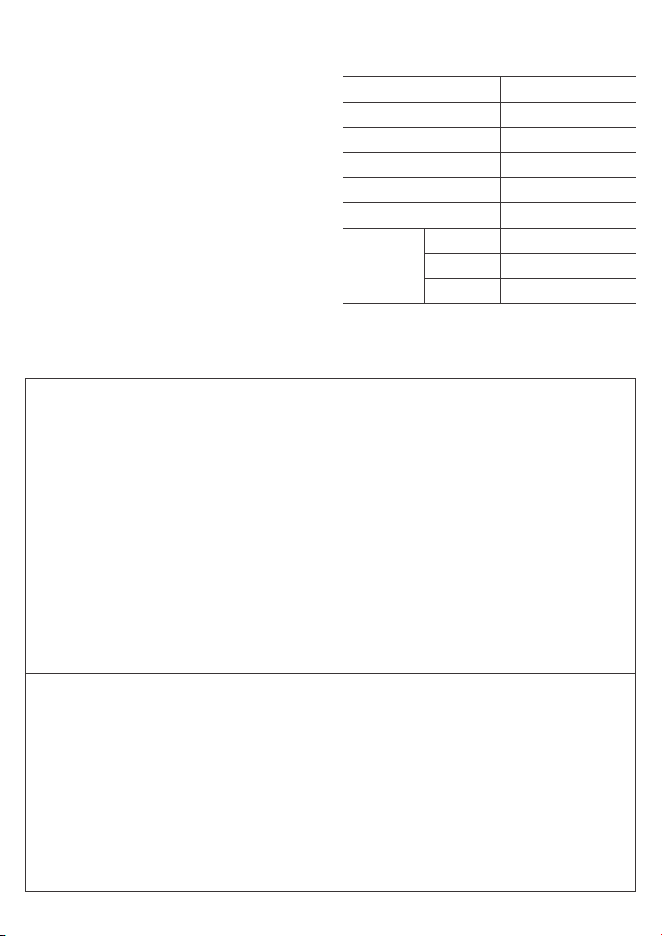
Services de réparation
non disponibles
Ne tirez pas sur le cordon d’alimentation lorsque
vous débranchez l’unité.
N’attachez ou ne nouez pas le cordon
d’alimentation lorsque l’appareil est en marche.
Si l’appareil est immergé dans l’eau,
débranchez-le et contactez le service clientèle.
Ne débranchez pas ou ne déplacez pas l’appareil
pendant pendant son fonctionnement.
Ne branchez pas d’appareils supplémentaires
dans la même prise de courant ou le même bloc
d’alimentation.
Ne pas manipuler la fiche d’alimentation avec
les mains mouillées.
Débrancher l’appareil lorsqu’il ne sera pas utilisé
pendant de longues périodes.
Ne pas placer à proximité d’une source de
chaleur.
Ne pas utiliser à proximité de brouillards ou
de vapeurs d’huile industrielle ou de grandes
quantités de poussière métallique.
Plier, tirer, tordre, nouer, pincer, coincer
pour places des objets lourds sur le cordon
d’alimentation peut l’endommager.
Ne pas installer dans un véhicule à moteur
(camions, bateaux, navires, etc.)
Ne pas placer dans un endroit contenant des
quantités excessives de gaz nocifs.
Ne pas placer à proximité de matières
inflammables (aérosols, carburant, gaz, etc.)
Ne pas placer l’appareil face au vent ou à une
prise d’air.
Ne pas placer au-dessous d’une prise électrique.
Ne pas mettre dans des zones excessivement
humides où l’appareil pourrait être en contact
avec l’eau.
Ne pas placer l’appareil à moins de 12pouces
d’un mur pendant le fonctionnement. Cela
pourrait provoquer de la condensation sur le
mur et la zone environnante.
SÉCURITÉ ET PRÉCAUTIONS
Avant d’utiliser cet appareil, lisez et suivez attentivement
les consignes de sécurité suivantes.
Assurez-vous que les filtres sont insérés avant la mise
en marche.
Faire fonctionner l’appareil sans filtre peut réduire la
durée de vie de l’appareil et provoquer des décharges
électriques ou des blessures.
N’insérez jamais de corps étrangers dans les fentes
d’aération de l’unité.
Les objets peuvent inclure des broches, des barres ou
des pièces de monnaie.
Ne touchez pas l’intérieur de l’appareil avec les mains
mouillées.
La tension peut provoquer une décharge électrique.
Veillez à ce que les prises d’entrée et de sortie d’air ne
soient pas obstruées.
L’obstruction des prises d’entrée et de sortie d’air peut
entraîner une augmentation de la température interne à
l’origine de pannes et de déformations.
N’utilisez pas l’appareil comme un marchepied ou pour y
déposer des objets lourds.
AVERTISSEMENT
Suivez ces instructions pour réduire le risque
de blessures graves ou de décès et ne pas
endommager l’appareil.
Cela pourrait entraîner des blessures, une défaillance ou
une déformation du produit.
• Si le cordon d’alimentation est endommagé, il doit être
remplacé par un cordon spécial. Le réassemblage peut
être effectué par le fabricant ou un de ses techniciens
agréés.
• Cet appareil n’est pas destiné à être utilisé par des
personnes (y compris des enfants) dont les capacités
physiques, sensorielles ou mentales sont réduites,
ou qui manquent d’expérience et de connaissance
de l’appareil, à moins qu’elles n’aient été supervisées
ou instruites sur l’utilisation de l’appareil par une
personne responsable de leur sécurité.
• Les enfants doivent être surveillés afin de s’assurer
qu’ils ne jouent pas avec l’appareil.
• Cet appareil n’est pas destiné à préserver des
documents ou des œuvres d’art.
INSTRUCTIONS DE SÉCURITÉ
Lisez et conservez ces instructions.
Nous vous remercions d’avoir choisi un purificateur d’air Winix. Ce produit est destiné à un
usage domestique uniquement.
Ce produit respecte la concentration maximale autorisée d’ozone de 0,050parties par million
en volume (ppmv) sur une période de 24heures.
• Ne pas réparer ou modifier l’appareil.
• Toutes les réparations doivent être effectuées par un
technicien Winnix qualifié.
• La fiche de cette unité est polarisée et possède une
lame plus large que l’autre. Ne pas forcer la fiche dans
une prise électrique. Ne pas modifier la fiche d’aucune
façon. Inverser la fiche si elle n’entre pas dans la prise.
Si elle ne rentre toujours pas, contacter un technicien
qualifié pour installer une prise appropriée.
• Ne pas utiliser si le cordon d’alimentation ou la fiche
est endommagé ou si la connexion à la prise murale
est lâche.
• Utiliser uniquement une sortie AC120V.
• Ne pas endommager, déchirer, plier avec force,
tirer, tordre, nouer, recouvrir ou pincer le cordon
d’alimentation ou le placer sous des objets lourds.
• Enlever régulièrement la poussière de la fiche
d’alimentation. Cela permettra de réduire
l’accumulation d’humidité et le risque d’électrocution.
• Débrancher la fiche d’alimentation de la prise avant de
nettoyer l’appareil. Pour sortir la fiche d’alimentation
de la prise, tirez sur la fiche elle-même, et non sur le
cordon d’alimentation.
• Si le cordon d’alimentation est endommagé, il doit être
remplacé par le fabricant ou un technicien qualifié.
• Débrancher l’appareil lorsqu’il n’est pas utilisé.
• Ne pas manipuler la fiche d’alimentation avec les
mains mouillées.
• Ne pas faire fonctionner l’unité lorsque vous utilisez
des insecticides générant une brume en suspension
dans l’air.
• Ne pas nettoyer l’appareil avec du benzène ou du
diluant à peinture.
Ne pas pulvériser un insecticide sur l’appareil.
• Ne pas utiliser l’appareil lorsqu’il est humide ou dans
un environnement humide comme une salle de bains.
• Ne pas insérer les doigts ou des objets dans la fente
d’admission ou de sortie d’air.
• Ne pas utiliser l’appareil à proximité de gaz
inflammables. Ne pas utiliser près de cigarettes,
d’encens, ou autres matériaux pouvant créer des
étincelles.
• L’unité ne supprimera pas le monoxyde de carbone
émis par des sources de chauffage ou autres.
PRÉCAUTIONS IMPORTANTES CONCERNANT L’UTILISATION DE VOTRE PURIFICATEUR D’AIR:
AVERTISSEMENT:
Pour réduire le risque d’électrocution, de court-circuit ou d’incendie, suivez les instructions de ce manuel.
PRÉ
CAUTIONS IMPORTANTES CONCERNANT L’UTILISATION DE VOTRE PURIFICATEUR D’AIR:
• Ne pas obstruer les prises d’entrée de l’air.
• Ne pas utiliser à proximité d’objets émettant de la chaleur, telle qu’une cuisinière.
• Ne pas utiliser là où l’unité peut entrer en contact avec de la vapeur.
• Ne pas utiliser l’unité à l’horizontale.
• Garder à l’écart de produits générant des résidus huileux comme une friteuse.
• Ne pas utiliser de détergent pour nettoyer l’appareil.
• Ne pas mettre l’unité en marche sans filtre.
• Ne pas laver et réutiliser le filtre HEPA ou le filtre à charbon actif.
• Transporter l’unité au moyen de la poignée à l’arrière de l’unité.
• Ne pas transporter en tenant par le panneau avant.
• Ne pas introduire de petits objets dans les grilles de sortie d’air ou dans le ventilateur.
GARANTIE DE DEUX ANS.
Les modalités de la garantie sont les suivantes:
1. Ce produit est fabriqué dans le cadre de
contrôles de qualité et d’inspections rigoureux.
2. La garantie sera annulée si la défaillance
du produit résulte d’une négligence ou
d’une mauvaise utilisation de la part du
consommateur.
3. Une preuve d’achat doit être présentée pour
faire valoir la garantie.
4. Conservez la preuve d’achat dans un endroit sûr
ou enregistrez votre produit sur winixamerica.
com pour y téléverser votre preuve d’achat.
5. Cette garantie n’est valable qu’aux États-Unis et
au Canada.
* Pour en savoir plus n’hésitez pas à visiter
https://winixamerica.com/terms-and-conditions/
Nom du produit
Purificateur d’air
Modèle
5510– 5520
Date d’achat
Durée de la garantie
Deux (2) ans
Lieu de l’achat
Téléphone du lieu d’achat
Client
Adresse
Nom
Tél.
Après l’achat, assurez-vous de compléter tous les
renseignements ci-dessus.
Avertissement: Les changements ou modifications apportés à cet appareil sans l’approbation
expresse de la partie responsable de la conformité peuvent annuler le droit de l’utilisateur à faire
fonctionner l’équipement.
Remarque: Cet appareil a été testé et reconnu conforme aux normes applicables aux appareils
numériques de Classe B, en vertu de l’article15 des réglementations de la FCC. Ces normes visent
à fournir aux installations résidentielles une protection raisonnable contre les interférences. Cet
appareil produit, utilise et peut irradier une énergie de radiofréquence et, s’il n’est pas installé et utilisé
conformément aux directives, peut causer une interférence nuisible pour les radiocommunications.
Toutefois, rien ne garantit l’absence d’interférences dans une installation particulière. Si cet appareil
occasionne des interférences nuisibles aux réceptions radio ou télévisuelles, ce qui peut être
déterminé en allumant et en éteignant l’appareil, l’utilisateur est invité à corriger ce problème en
prenant une ou plusieurs des mesures suivantes:
• Réorienter ou repositionner l’antenne de réception.
• Augmenter la distance séparant l’équipement du récepteur.
• Connecter l’équipement à une prise appartenant à un circuit différent de celui sur lequel le récepteur
est connecté.
• Consulter le revendeur ou un technicien radio/TV expérimenté pour obtenir de l’aide.
L’émetteur/récepteur exempt de licence contenu dans le présent appareil est conforme aux CNR
d’Innovation, Sciences et Développement économique Canada applicables aux appareils radio
exempts de licence. Son fonctionnement est soumis aux deux conditions suivantes:
• L’appareil ne doit pas produire de brouillage.
• L’appareil doit accepter tout brouillage radioélectrique subi, même si le brouillage est susceptible d’en
compromettre le fonctionnement.
French Cet appareil contient des émetteurs/récepteurs exemptés de licence et conformes aux normes
Innovation, Science et Economic. RSS(s) sans licence de Développement Canada. Le fonctionnement
est soumis aux deux conditions suivantes:
• cet appareil ne doit pas causer d’interférences nuisibles; et
• cet appareil doit accepter toute interférence reçue, y compris les interférences pouvant provoquer un
fonctionnement non souhaité.
MANUEL DE L’UTILISATEUR
PURIFICATEURS D’AIR
• La garantie du produit est imprimée au dos de ce guide. Ce produit est fabriqué exclusivement pour le
marché américain et canadien. Ce produit convient uniquement à un raccordement électrique de 120V.
• Ce purificateur d’air est offert avec une garantie limitée de 2 ans à compter de la date d’achat. Aucun
service de garantie supplémentaire, de réparation ou de remplacement n’est offert au-delà de cette
période. Aucune pièce de rechange ne sera disponible après l’expiration de la garantie. Les informations
relatives à l’entretien et à la réparation sont accessibles à l’adresse [www.winixamerica.com/support].
Aucun logiciel ou micrologiciel n’est requis pour utiliser ce produit.
2610-0361-01 Rev.01
5510 5520
※
L’apparence extérieure du produit peut varier selon le modèle,
mais la performance reste la même.
