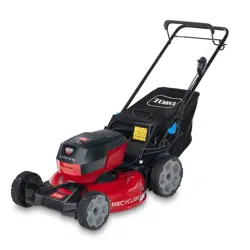
Form No. 3465-409 Rev A
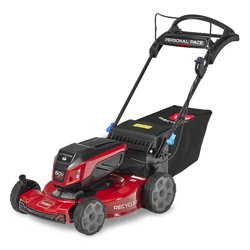
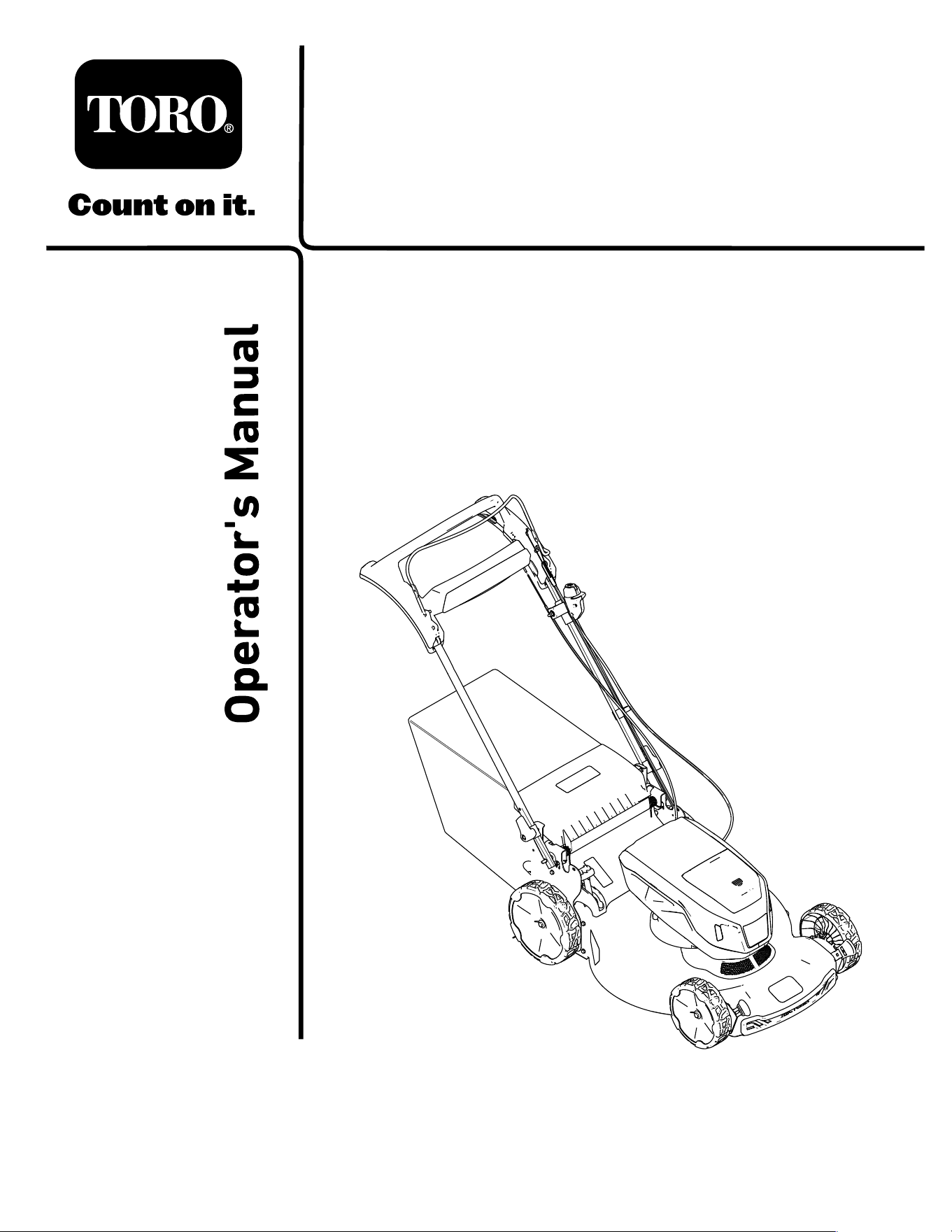
Flex-Force Power System
™
60V
MAX 22in Recycler
®
Lawn Mower
Model No. 21469 —Serial No. 400000000 and Up
Register at www .T oro.com.
Original Instructions (EN)
*3465-409*
For assistance, please see
www .T oro.com/support
for instructional videos
or contact 1-888-384-9939
before returning this
product.
W ARNING
CALIFORNIA
Proposition 65 W arning
The power cord on this product contains
lead, a chemical known to the State
of California to cause birth defects
or other reproductive harm. W ash
hands after handling.
Use of this product may cause exposure
to chemicals known to the State of
California to cause cancer , birth defects,
or other reproductive harm.
Introduction
This rotary-blade, walk-behind lawn mower is intended
to be used by residential homeowners. It is designed
primarily for cutting grass on well-maintained lawns
on residential properties. It is not designed for cutting
brush or for agricultural uses. It is designed to use
Flex-Force 60V lithium-ion battery packs. These
battery packs are designed to be charged only by
Flex-Force 60V lithium-ion battery chargers. Using
these products for purposes other than their intended
use could prove dangerous to you and bystanders.
Read this information carefully to learn how to operate
and maintain your product properly and to avoid
injury and product damage. Y ou are responsible for
operating the product properly and safely .
V isit www .T oro.com for more information, including
safety tips, training materials, accessory information,
help nding a dealer , or to register your product.
Whenever you need service, genuine T oro parts, or
additional information, contact an Authorized Service
Dealer or T oro Customer Service and have the model
and serial numbers of your product ready . Figure 1
identies the location of the model and serial numbers
on the product. W rite the numbers in the space
provided.
Important: W ith your mobile device, you can
scan the QR code on the serial number decal (if
equipped) to access warranty , parts, and other
product information.
g275230
Figure 1
1. Model and serial number location
Model No.
Serial No.
Safety-Alert Symbol
The safety-alert symbol ( Figure 2 ) shown in this
manual and on the machine identies important safety
messages that you must follow to prevent accidents.
g000502
Figure 2
Safety-alert symbol
The safety-alert symbol appears above information
that alerts you to unsafe actions or situations and
is followed by the word DANGER , W ARNING , or
CAUTION .
DANGER indicates an imminently hazardous situation
which, if not avoided, will result in death or serious
injury .
W ARNING indicates a potentially hazardous situation
which, if not avoided, could result in death or serious
injury .
CAUTION indicates a potentially hazardous situation
which, if not avoided, may result in minor or moderate
injury .
This manual uses two other words to highlight
information. Important calls attention to special
mechanical information and Note emphasizes general
information worthy of special attention.
© 2023—The T oro® Company
81 1 1 L yndale A venue South
Bloomington, MN 55420
2
Contact us at www .T oro.com.
Printed in Mexico
All Rights Reserved

Safety
IMPORT ANT SAFETY
INSTRUCTIONS
W ARNING
When using electric lawn mowers, basic
safety precautions should always be followed
to reduce the risk of re, electric shock, and
personal injury , including the following:
Read All Instructions
I. T raining
1. The operator of the machine is responsible for
any accidents or hazards occurring to others or
their property .
2. Do not allow children to use or play with the
machine, battery pack, or the battery charger;
local regulations may restrict the age of the
operator .
3. Do not allow children or untrained people to
operate or service this machine. Allow only
people who are responsible, trained, familiar
with the instructions, and physically capable to
operate or service the machine.
4. Before using the machine, battery pack, and
battery charger , read all the instructions and
cautionary markings on these products.
5. Become familiar with the controls and proper
use of the machine, battery pack, and battery
charger .
II. Preparation
1. Keep bystanders, especially children and pets,
out of the operating area.
2. Do not operate the machine without all guards
and safety devices, such as deectors and grass
catchers, in place and functioning properly on
the machine.
3. Inspect the area where you will use the machine
and remove all objects that could interfere with
the operation of the machine or that the machine
could throw .
4. Before using the machine, ensure that the blade,
blade bolt, and blade assembly are not worn or
damaged. Replace any damaged or unreadable
labels.
5. Use only the battery pack specied by T oro.
Using other accessories and attachments may
increase the risk of injury and re.
6. Plugging the battery charger into an outlet that is
not 120V can cause a re or electric shock. Do
not plug the battery charger into an outlet other
than 120V . For a dif ferent style of connection,
use an attachment plug adapter of the proper
conguration for the power outlet if needed.
7. Do not use a damaged or modied battery
pack or battery charger , which may exhibit
unpredictable behavior that results in re,
explosion, or risk of injury .
8. If the supply cord to the battery charger is
damaged, contact an Authorized Service Dealer
to replace it.
9. Charge the battery pack with only the battery
charger specied by T oro. A charger suitable for
1 type of battery pack may create a risk of re
when used with another battery pack.
10. Charge the battery pack in a well-ventilated area
only .
1 1. Follow all charging instructions and do
not charge the battery pack outside of the
temperature range specied in the instructions.
Otherwise, you may damage the battery pack
and increase the risk of re.
12. Dress properly—W ear appropriate clothing,
including eye protection; long pants; substantial,
slip-resistant footwear (not barefoot or wearing
sandals); and hearing protection. T ie back long
hair and do not wear loose clothing or loose
jewelry that can get caught in moving parts.
W ear a dust mask in dusty operating conditions.
Use of rubber gloves is recommended.
III. Operation
1. Contact with the moving blade will cause serious
injury . Keep your hands and feet away from the
cutting area and all moving parts of the machine.
Keep clear of any discharge opening.
2. Using this machine for purposes other than its
intended use could prove dangerous to you and
bystanders.
3. Disengage the self-propel drive (if equipped)
before starting the machine.
4. Do not tilt the machine when starting the motor .
5. Prevent unintentional starting—Ensure that
the electric-start button is removed from the
electric-start switch before connecting the
battery pack and handling the machine.
6. Use your full attention while operating the
machine. Do not engage in any activity that
causes distractions; otherwise, injury or property
damage may occur .
7. Stop the machine, remove the electric-start
button, remove the battery pack from the
machine, and wait for all movement to stop
before adjusting, servicing, cleaning, or storing
the machine.
3

8. Remove the battery pack and electric-start
button from the machine whenever you leave it
unattended or before changing accessories.
9. Do not force the machine—Allow the machine to
do the job better and safer at the rate for which it
was designed.
10. Stay alert—W atch what you are doing and use
common sense when operating the machine.
Do not use the machine while ill, tired, or under
the inuence of alcohol or drugs.
1 1. Do not use a battery-operated lawn mower in
rain.
12. Operate the machine only in good visibility and
appropriate weather conditions. Do not operate
the machine when there is the risk of lightning.
13. Use extreme caution when reversing or pulling
the machine toward you.
14. Keep proper footing and balance at all times,
especially on slopes. Mow across the face
of slopes, never up and down. Use extreme
caution when changing directions on slopes. Do
not mow exceedingly steep slopes. W alk, never
run with the machine.
15. Do not direct the discharge material toward
anyone. A void discharging material against a
wall or obstruction; material may ricochet toward
you. Stop the blade(s) when crossing surfaces
other than grass.
16. W atch for holes, ruts, bumps, rocks, or other
hidden objects. Uneven terrain could cause you
to lose your balance or footing.
17. W et grass or leaves can cause serious injury if
you slip and contact the blade. Do not mow in
wet conditions. Do not mow when it is raining.
18. If the machine strikes an object or starts to
vibrate, immediately shut of f the machine,
remove the electric-start button, remove the
battery pack, and wait for all movement to stop
before examining the machine for damage.
Make all necessary repairs before resuming
operation.
19. Stop the machine and remove the electric-start
button before loading the machine for hauling.
20. Under abusive conditions, the battery pack may
eject liquid; avoid contact. If you accidently
come into contact with the liquid, ush with
water . If the liquid contacts your eyes, seek
medical help. Liquid ejected from the battery
pack may cause irritation or burns.
IV . Maintenance and Storage
1. Stop the machine, remove the electric-start
button, remove the battery pack from the
machine, and wait for all movement to stop
before adjusting, servicing, cleaning, or storing
the machine.
2. Do not attempt to repair the machine except as
indicated in the instructions. Have an Authorized
Service Dealer perform service on the machine
using identical replacement parts.
3. W ear gloves and eye protection when servicing
the machine.
4. Sharpen a dull blade on both edges to maintain
balance. Clean the blade and ensure that it is
balanced.
5. Replace the blade if it is bent, worn, or cracked.
An unbalanced blade causes vibration, which
could damage the motor or cause personal
injury .
6. When servicing the blade, be aware that the
blade can still move even though the power
source is of f.
7. Check the grass collection bag frequently for
deterioration or wear , and replace a worn bag
with a T oro [replacement] bag.
8. For best performance, use only genuine T oro
replacement parts and accessories. Other
replacement parts and accessories could be
dangerous, and such use could void the product
warranty .
9. Maintain the machine—Keep cutting edges
sharp and clean for the best and safest
performance. Keep handles dry , clean, and free
from oil and grease. Keep guards in place and in
working order . Keep blades sharp. Use identical
replacement blades only .
10. Check the machine for damaged parts—If there
are damaged guards or other parts, determine
whether the machine will operate properly .
Check for misaligned and binding moving parts,
broken parts, mounting, and any other condition
that may af fect its operation. Unless indicated
in the instructions, have an Authorized Service
Dealer repair or replace a damaged guard or
part.
1 1. When the battery pack is not in use, keep it
away from metal objects such as paper clips,
coins, keys, nails, and screws that can make a
connection from 1 terminal to another . Shorting
the battery terminals may cause burns or a re.
12. Check the blade and motor mounting bolts
frequently for tightness.
4
13. When you are not using the machine, store it
indoors in a dry , secure place out of the reach
of children.
14. Do not expose a battery pack or machine to re
or excessive temperature. Exposure to re or
temperature above 130°C (265°F) may cause
explosion.
15. CAUTION—A mistreated battery pack may
present a risk of re, explosion, or chemical
burn.
• Do not disassemble the battery pack.
• Replace the battery pack with a genuine
Flex-Force 60V lithium-ion battery pack
only; using another type of battery pack may
cause a re or risk of injury .
• Keep battery packs out of the reach of
children and in the original packaging until
you are ready to use them.
SA VE THESE
INSTRUCTIONS
Safety and Instructional Decals
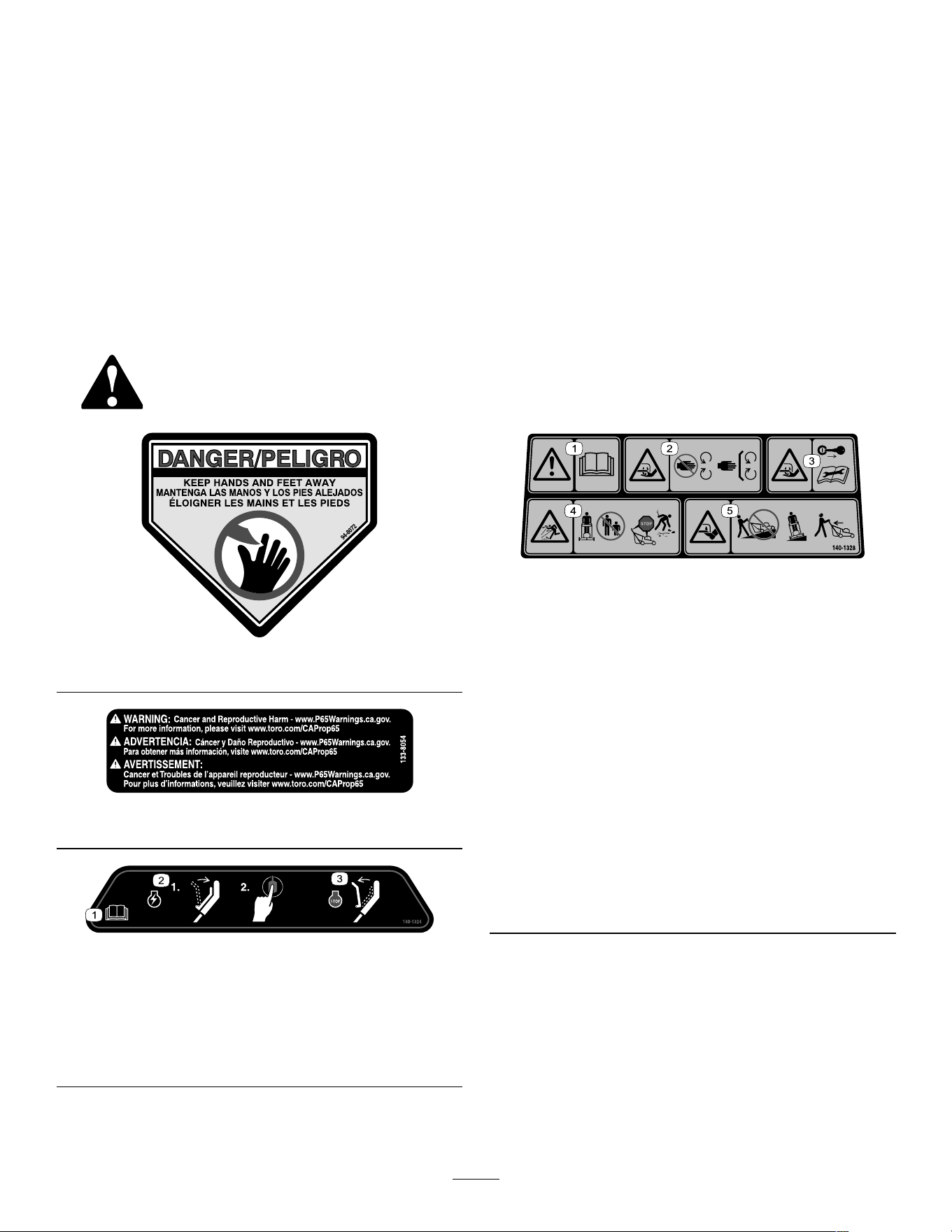
Safety decals and instructions are easily visible to the operator and are located near any area
of potential danger . Replace any decal that is damaged or missing.
decal94-8072
94-8072
decal133-8054
133-8054
decal140-1324
140-1324
1. Read the Operator ’ s
Manual .
3. T o shut of f the machine,
release the bar .
2. T o start the machine,
squeeze the bar to the
handle and press the
button.
decal140-1328
140-1328
1. W arning—read the
Operator ’ s Manual .
4. Thrown object
hazard—keep bystanders
away; shut of f the engine
and wait for all moving
parts to stop before
leaving the machine; pick
up debris before mowing.
2. Cutting/dismemberment
hazard of the hand, mower
blade—stay away from
moving parts; keep all
guards and shields in
place.
5. Cutting/dismemberment
hazard of the foot, mower
blade—do not mow up
or down slopes; only
mow across slopes; look
behind you when mowing
in reverse.
3. Cutting/dismemberment
hazard of the hand, mower
blade—remove the key
and read the Operator ’ s
Manual before performing
maintenance.
5
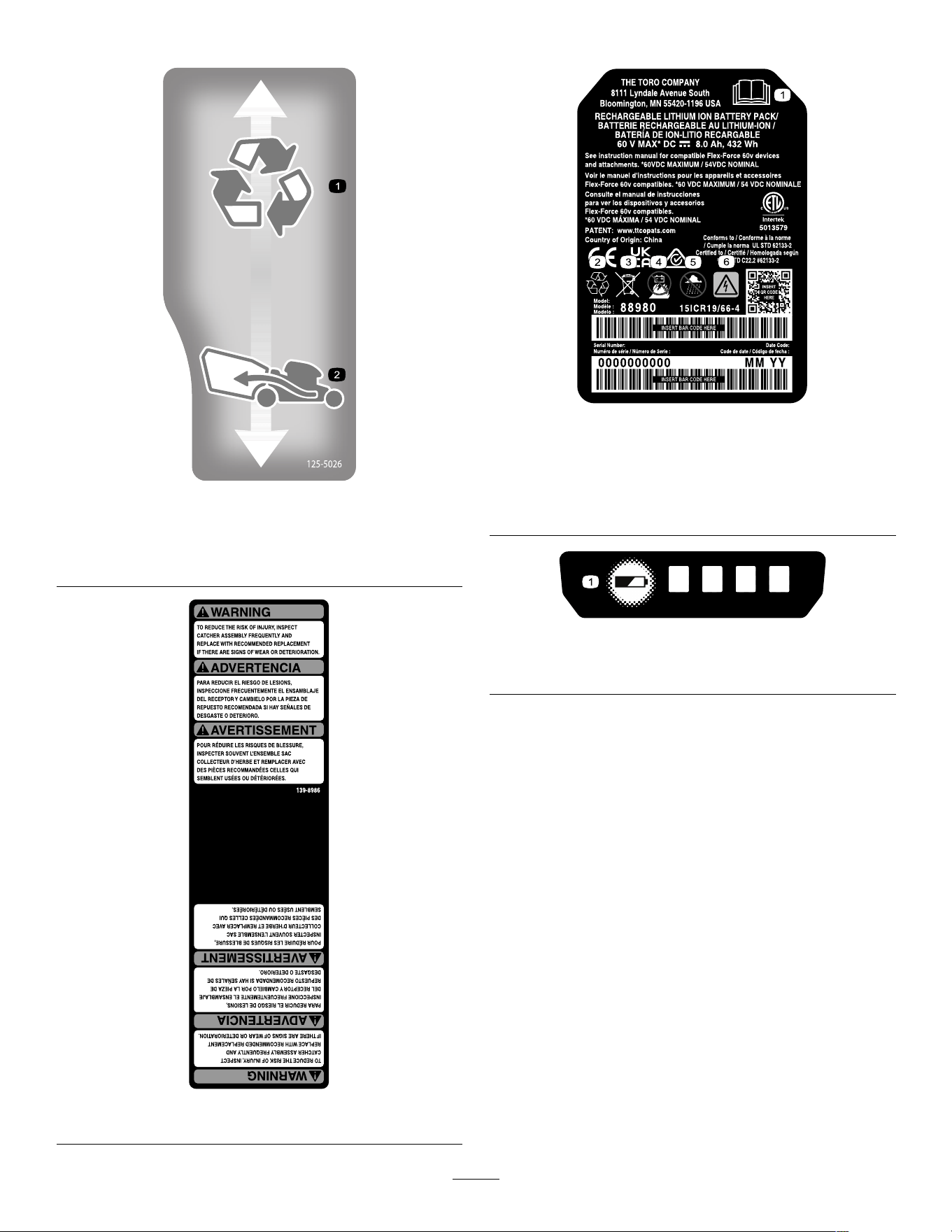
decal125-5026
125-5026
1. Recycling mode 2. Bagging mode
decal139-8986
139-8986
Model 88980
decal161-3752
161-3752
1. Read the Operator ’ s
Manual .
4. Keep away from open re
or ames
2. Recycle the battery 5. Do not expose to rain
3. Do not dispose improperly 6. Electrical shock hazard
decal161-3763
161-3763
1. Battery charge status
6
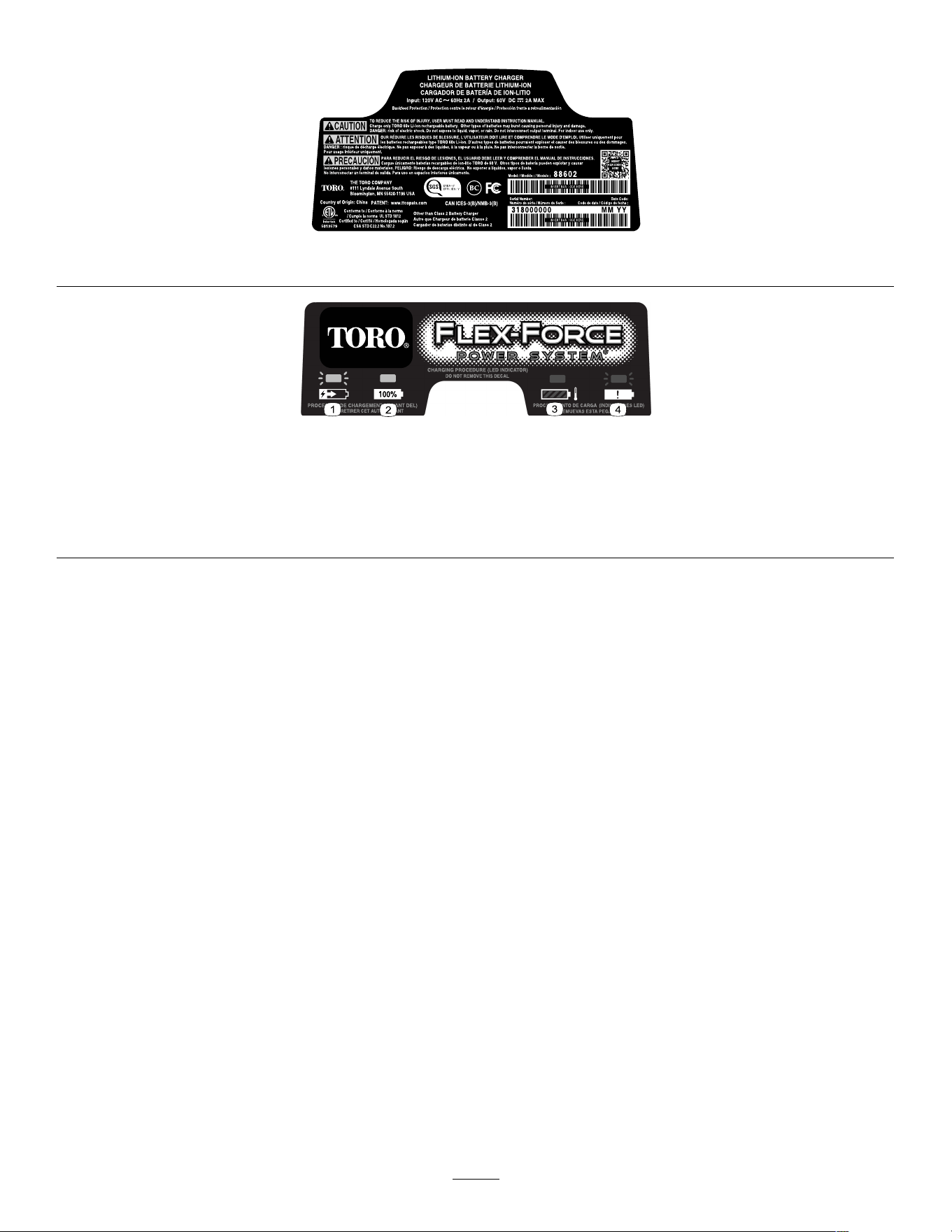
Model 88602
decal137-9462
137-9462
decal137-9463
137-9463
1. The battery pack is charging.
2. The battery pack is fully charged.
3. The battery pack is over or under the appropriate temperature range.
4. Battery pack charging fault
7
Setup
Important: The battery pack is not fully charged
when it is purchased. Before using the machine
for the rst time, refer to Charging the Battery
Pack ( page 17 ) .
1
Mounting the Battery
Charger (Optional)
No Parts Required
Procedure
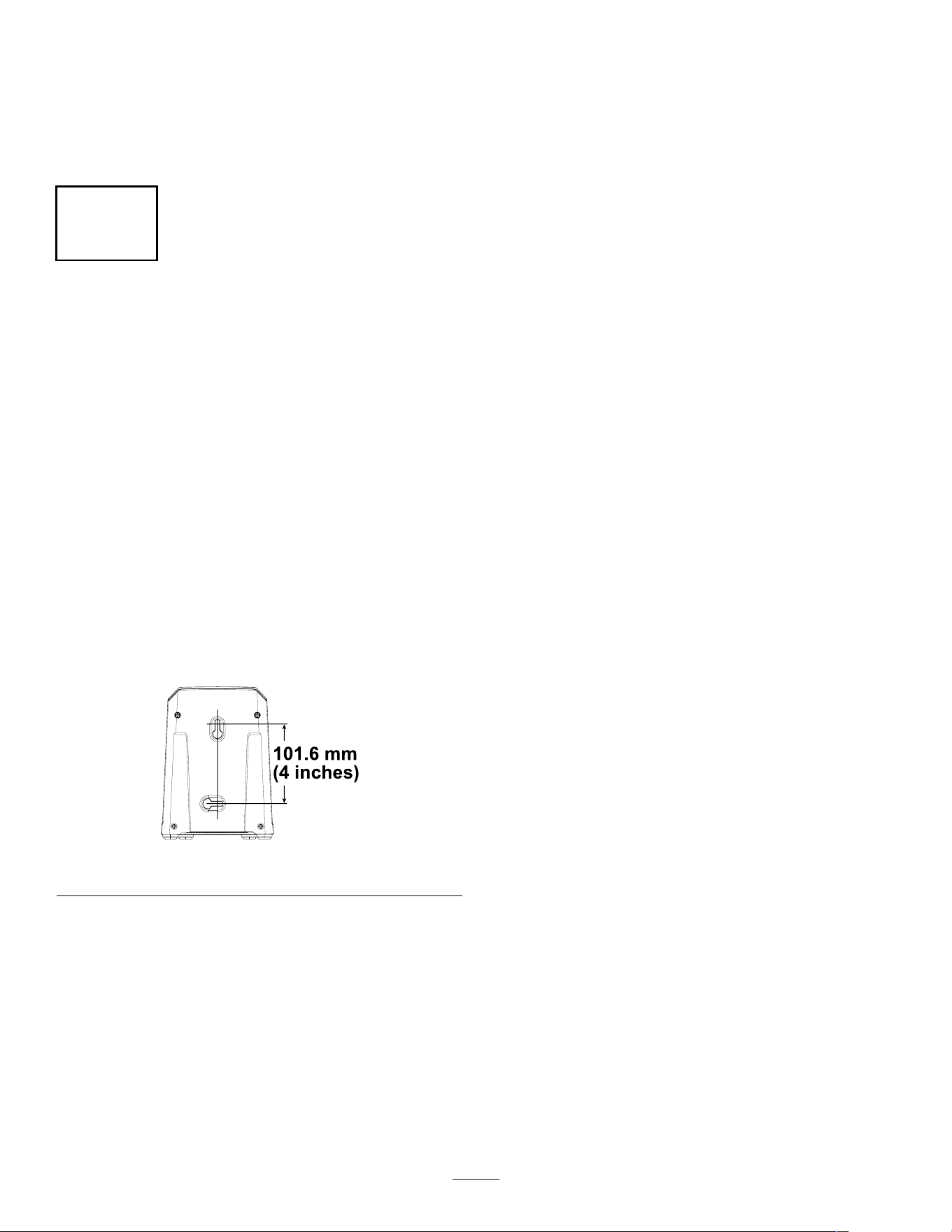
If desired, mount the battery charger securely on a
wall using the wall-mount key holes on the back of
the charger .
Mount it indoors (such as a garage or other dry place),
near a power outlet, and out of the reach of children.
Refer to Figure 3 for assistance in mounting the
charger .
Slide the charger over the appropriately positioned
hardware to secure the charger in place (hardware
not included).
g290534
Figure 3
8
2
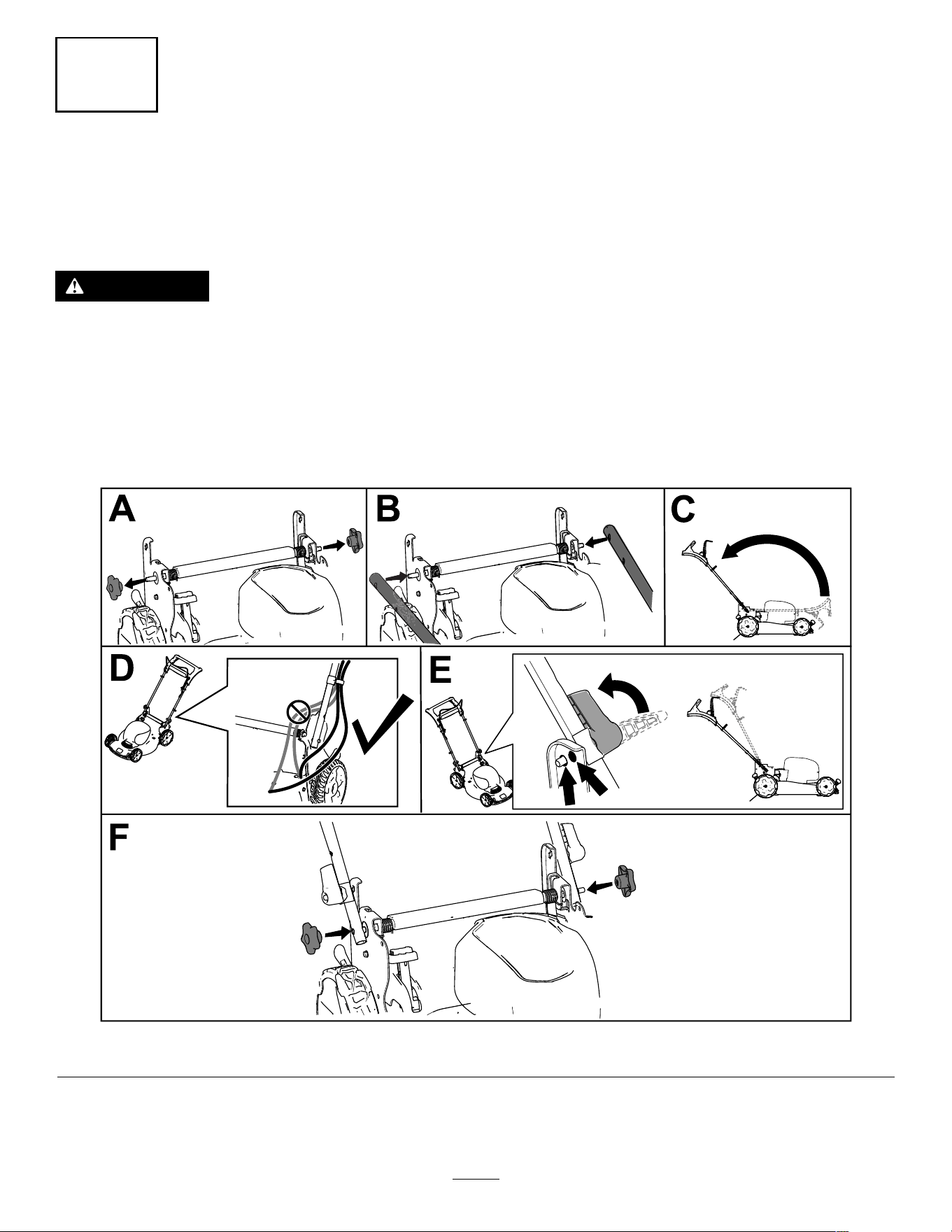
Unfolding the Handle
No Parts Required
Procedure
W ARNING
Folding or unfolding the handle improperly can damage the cables, causing an unsafe
operating condition.
• Do not damage the cable(s) when folding or unfolding the handle.
• Ensure that the cable(s) are routed to the outside of the handle.
• If a cable is damaged, contact an Authorized Service Dealer .
Note: Ensure that the cables are routed on the outside of the handle and are not pinched (D of Figure 4 ).
g335466
Figure 4
9
3
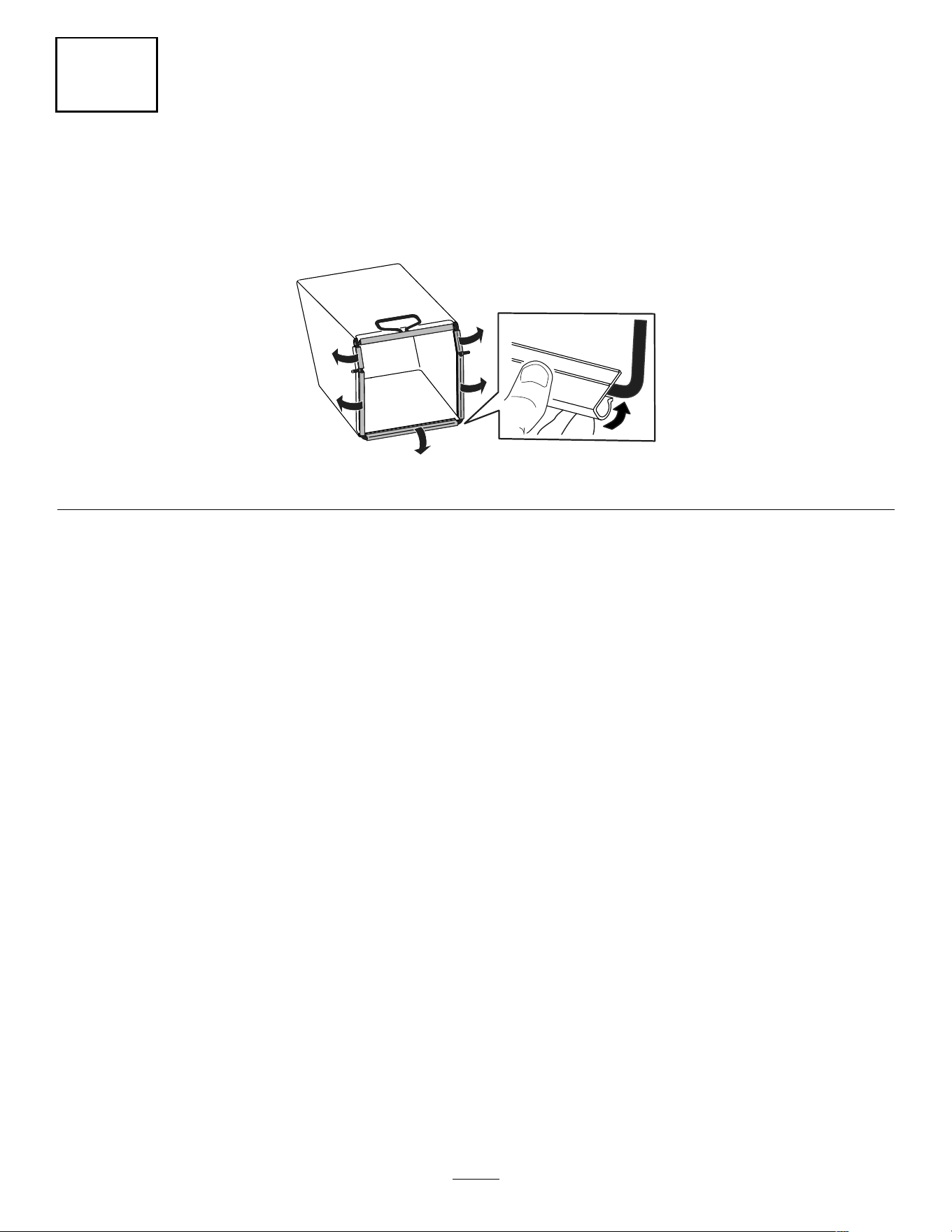
Assembling the Grass Bag
No Parts Required
Procedure
g334351
Figure 5
10
Product Overview
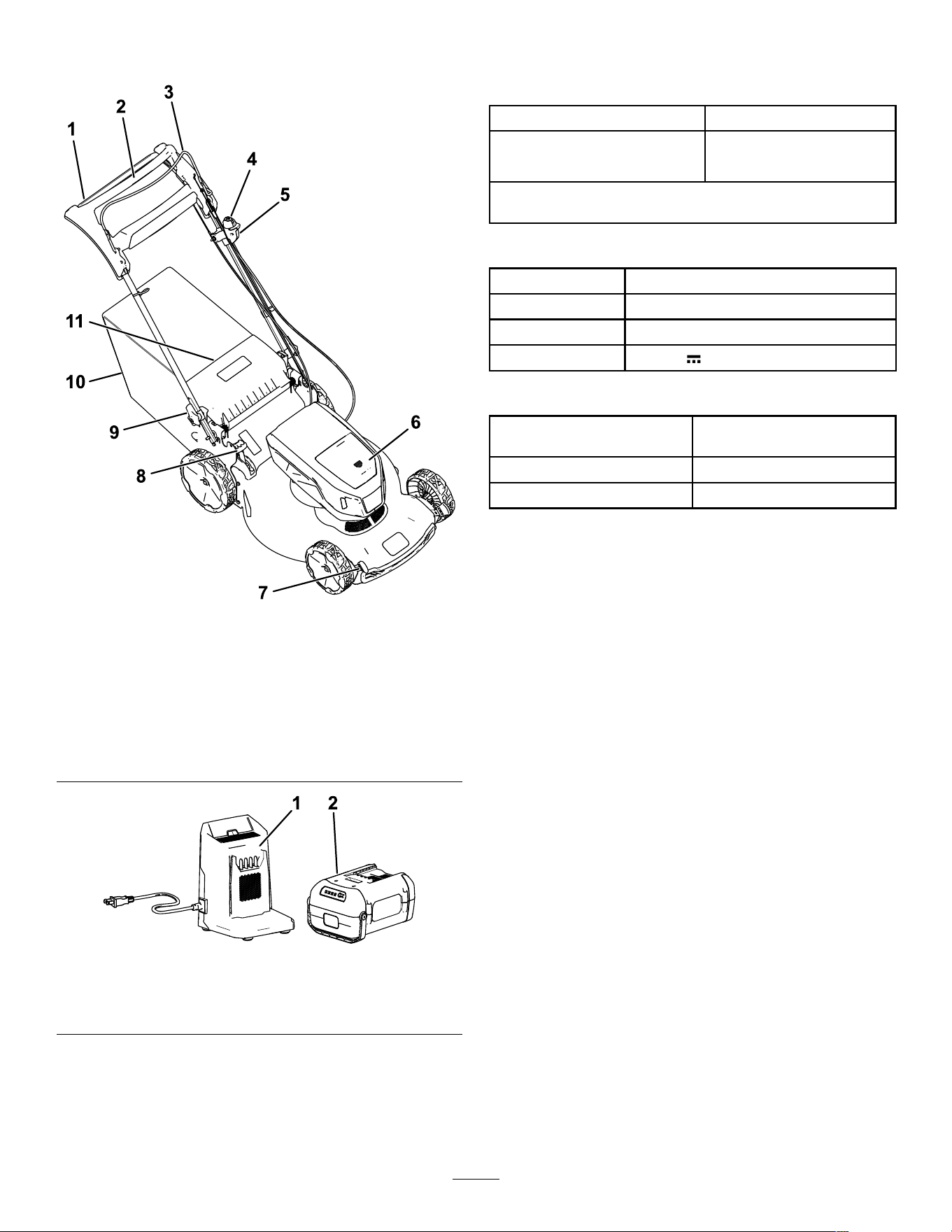
g436946
Figure 6
1. Handle
7. Cutting-height lever (4)
2. Self-propel drive bar
8. Bag-on-demand lever
3. Blade-control bar
9. Handle lever (2)
4. Electric-start button
10. Grass bag
5. Electric-start switch
1 1. Rear deector
6. Battery compartment
g456273
Figure 7
1. Battery charger model
88602
2. Battery pack model 88980
Specications
Battery Pack
Model 88980
8.0 Ah
Battery pack capacity
432 Wh
Battery manufacturer rating = 60V maximum and 54V nominal.
Actual voltage varies with load.
Battery Charger
Model 88602
T ype
60V MAX Lithium-Ion Battery Charger
Input
120V AC ~2.0A, 60Hz
Output 60V DC 2.0A MAX
Appropriate T emperature Ranges
Charge/store the battery pack
at
5°C (41°F) to 40°C (104°F)*
Use the battery pack at
-30°C (-22°F) to 49°C (120°F)*
Use the machine at
0°C (32°F) to 49°C (120°F)*
*Charging time will increase if you do not charge the
battery pack within this range.
Store the machine, battery pack, and battery charger
in an enclosed clean, dry area.
Attachments/Accessories
A selection of T oro approved attachments and
accessories is available for use with the machine
to enhance and expand its capabilities. Contact
your Authorized Service Dealer or authorized T oro
distributor or go to www .T oro.com for a list of all
approved attachments and accessories.
T o ensure optimum performance and continued safety
certication of the machine, use only genuine T oro
replacement parts and accessories. Replacement
parts and accessories made by other manufacturers
could be dangerous.
1 1
Operation
Before Operation
Installing the Battery Pack
Important: Use the battery pack only in temperatures that are within the appropriate range; refer
to Specications ( page 1 1 ) .
1. Ensure that the vents on the battery are clear of any dust and debris.
2. Press down on the battery-compartment lid to open it (A of Figure 8 ).
3. Line up the cavity in the battery pack with the tongue on the machine and slide the battery pack into the
compartment until it locks into place (B of Figure 8 ).
4. Press down on the battery-compartment lid until it clicks into place (C of Figure 8 ).
Note: If the battery-compartment lid does not close completely , the battery is not fully installed.
g459227
Figure 8
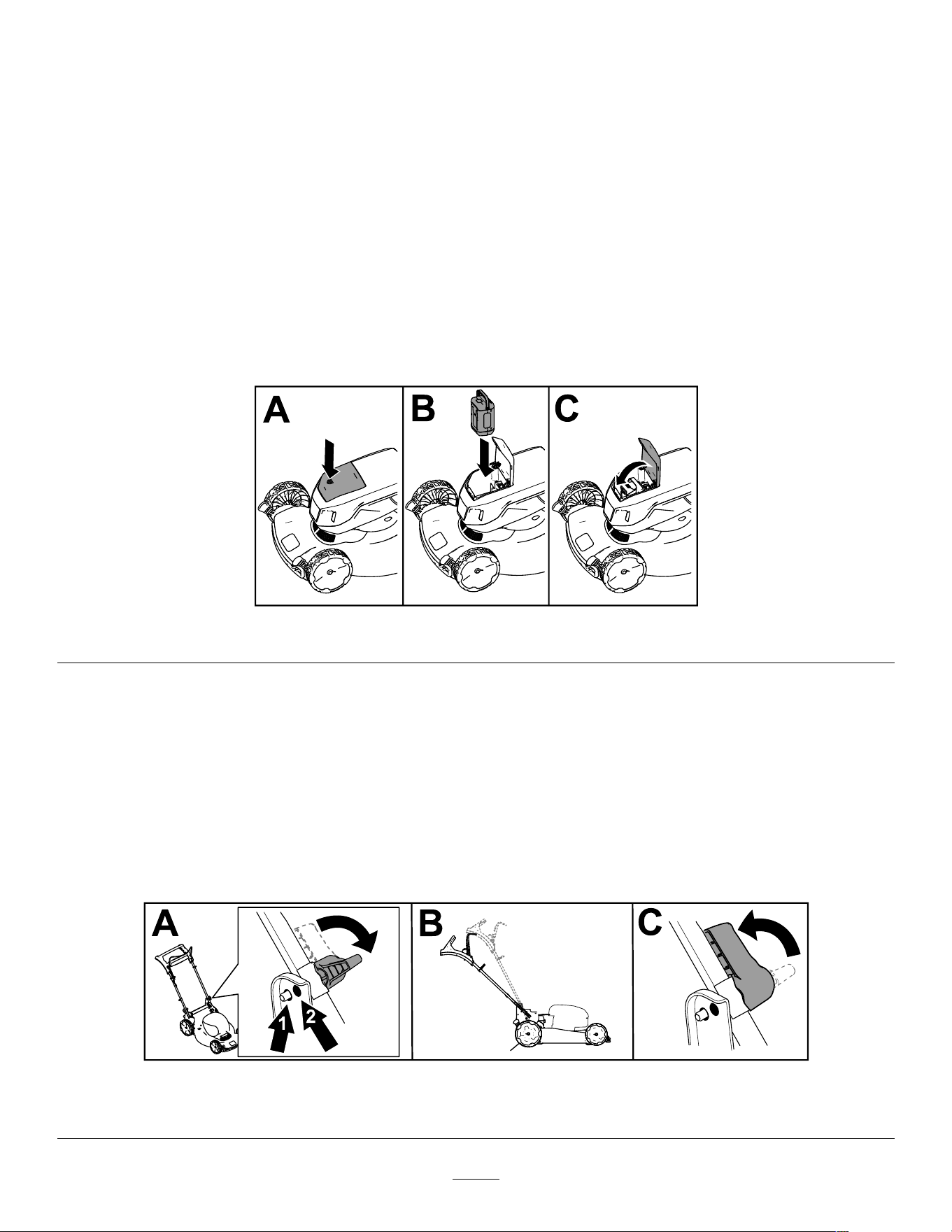
Adjusting the Handle Height
Y ou may raise or lower the handle to a position comfortable for you.
T o adjust the handle height, do the following:
1. On both sides of the machine, rotate the handle locks (A of Figure 9 ).
2. Adjust the position of the handle to the upper (high handle height) or lower (lower handle height) position
(B of Figure 9 ).
3. When the handle is in the desired position, rotate the handle locks back until the pin clicks to secure the
handle (C of Figure 9 ).
g456084
Figure 9
1. Low handle height 2. High handle height
12
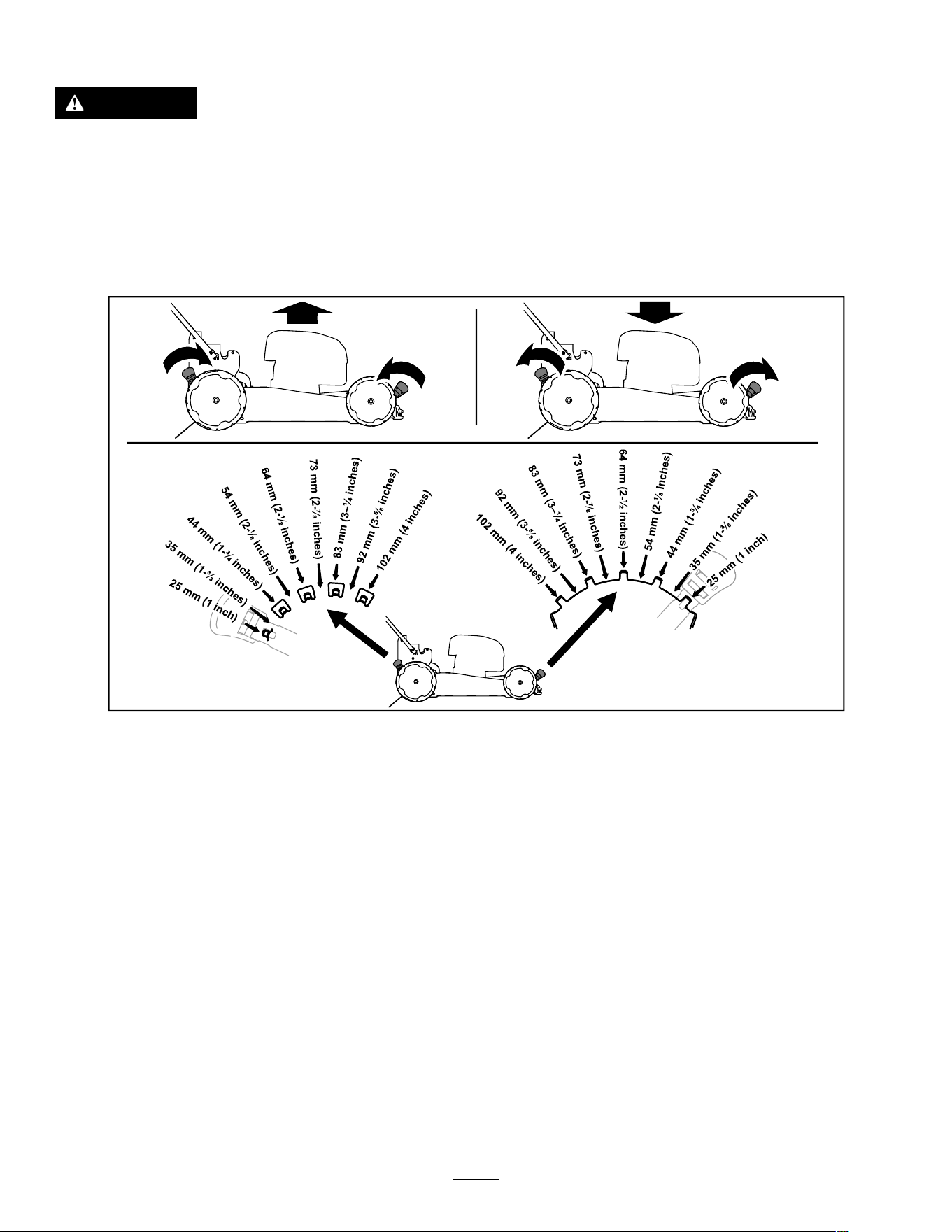
Adjusting the Cutting Height
DANGER
Adjusting the height-of-cut could bring your hands into contact with a moving blade and
result in serious injury .
• Shut off the motor , remove the battery , and wait for all moving parts to stop before adjusting
the cutting height.
• Do not put your ngers under the housing when adjusting the cutting height.
Adjust the cutting height as desired. Set all wheels to the same cutting height ( Figure 10 ).
g455806
Figure 10
13
During Operation
Starting the Machine
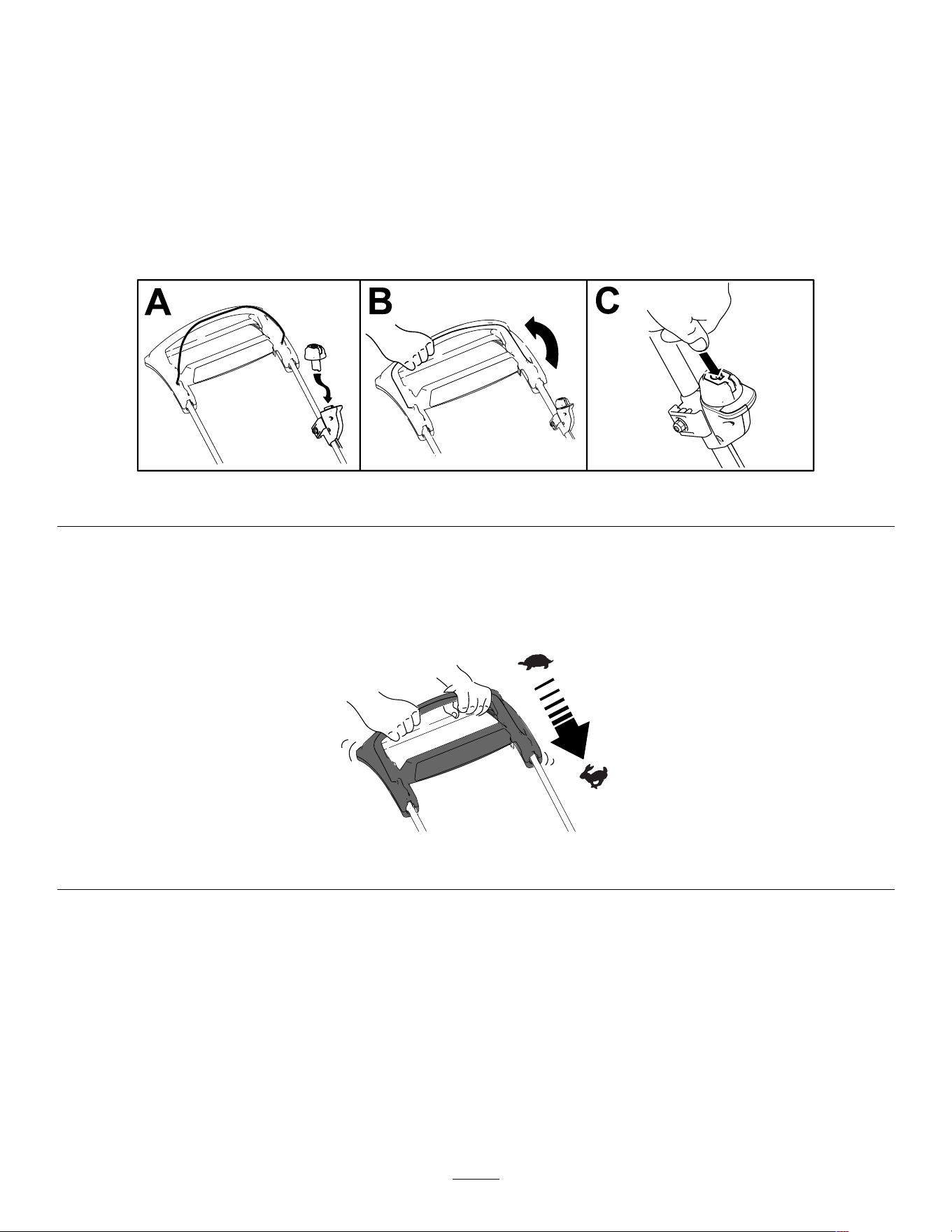
1. Ensure that the battery pack is installed in the machine; refer to Installing the Battery Pack ( page 12 ) .
Note: If the battery-compartment lid does not close completely , the battery is not fully installed.
2. Insert the electric-start button into the electric-start switch (A of Figure 1 1 ).
3. Squeeze the blade-control bar and hold it to the handle (B of Figure 1 1 ).
4. Press the electric-start button and keep it pressed until the motor starts (C of Figure 1 1 ).
g370586
Figure 1 1
Using the Self-Propel Drive
Simply walk with your hands on the upper handle and your elbows at your sides, and the machine will
automatically keep pace with you ( Figure 12 ).
g334136
Figure 12
Note: If the machine does not freely roll backward after self-propelling, stop walking, hold your hands in place,
and allow the machine to roll a couple of centimeters (inches) forward to disengage the wheel drive. Y ou can
also try reaching just under the upper handle to the metal handle and pushing the machine forward a couple of
centimeters (inches). If the machine still does not roll backward easily , contact an Authorized Service Dealer .
Recycling the Clippings
Y our machine comes from the factory ready to recycle the grass and leaf clippings back into the lawn.
If the grass bag is on the machine and the bag-on-demand lever is in the bagging position, move the lever to the
recycling position; refer to Operating the Bag-on-Demand Lever ( page 15 ) .
14
Bagging the Clippings
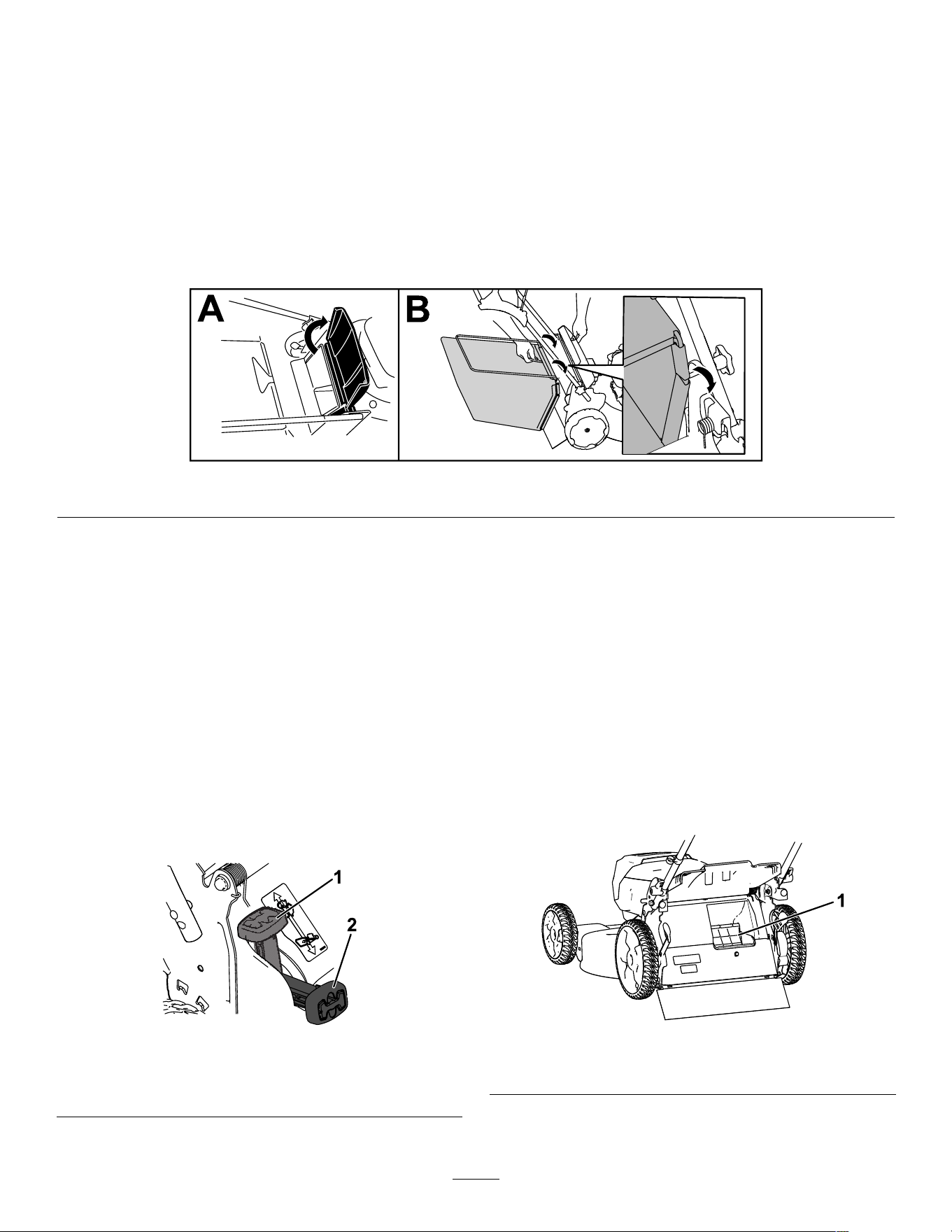
Use the grass bag when you want to collect grass and leaf clippings from the lawn.
If the bag-on-demand lever is in the recycling position, move it to the bagging position; refer to Operating the
Bag-on-Demand Lever ( page 15 ) .
Installing the Grass Bag
1. Raise and hold up the rear deector (A of Figure 13 ).
2. Install the grass bag, ensuring that the pins on the bag rest in the notches on the handle (B of Figure 13 ).
3. Lower the rear deector .
g334207
Figure 13
Removing the Grass Bag
T o remove the bag, reverse the steps in Installing the Grass Bag ( page 15 ) .
Operating the
Bag-on-Demand Lever
The bag-on-demand feature allows you to either
collect or recycle grass and leaf clippings while the
grass bag is attached to the machine.
• T o bag the grass and leaf clippings , press the
button on the bag-on-demand lever and move the
lever forward until the button on the lever pops up
( Figure 14 ).
g251583
Figure 14
1. Bag-on-demand lever (in
the recycling position)
2. Bag-on-demand lever (in
the bagging position)
• T o recycle the grass and leaf clippings , press
the button on the lever and move the lever
rearward until the button on the lever pops up.
Important: For proper operation, remove
any grass clippings and debris from the
bag-on-demand door and the surrounding
opening ( Figure 15 ) before you move the
bag-on-demand lever from 1 position to
another .
g251584
Figure 15
1. Clean here
15
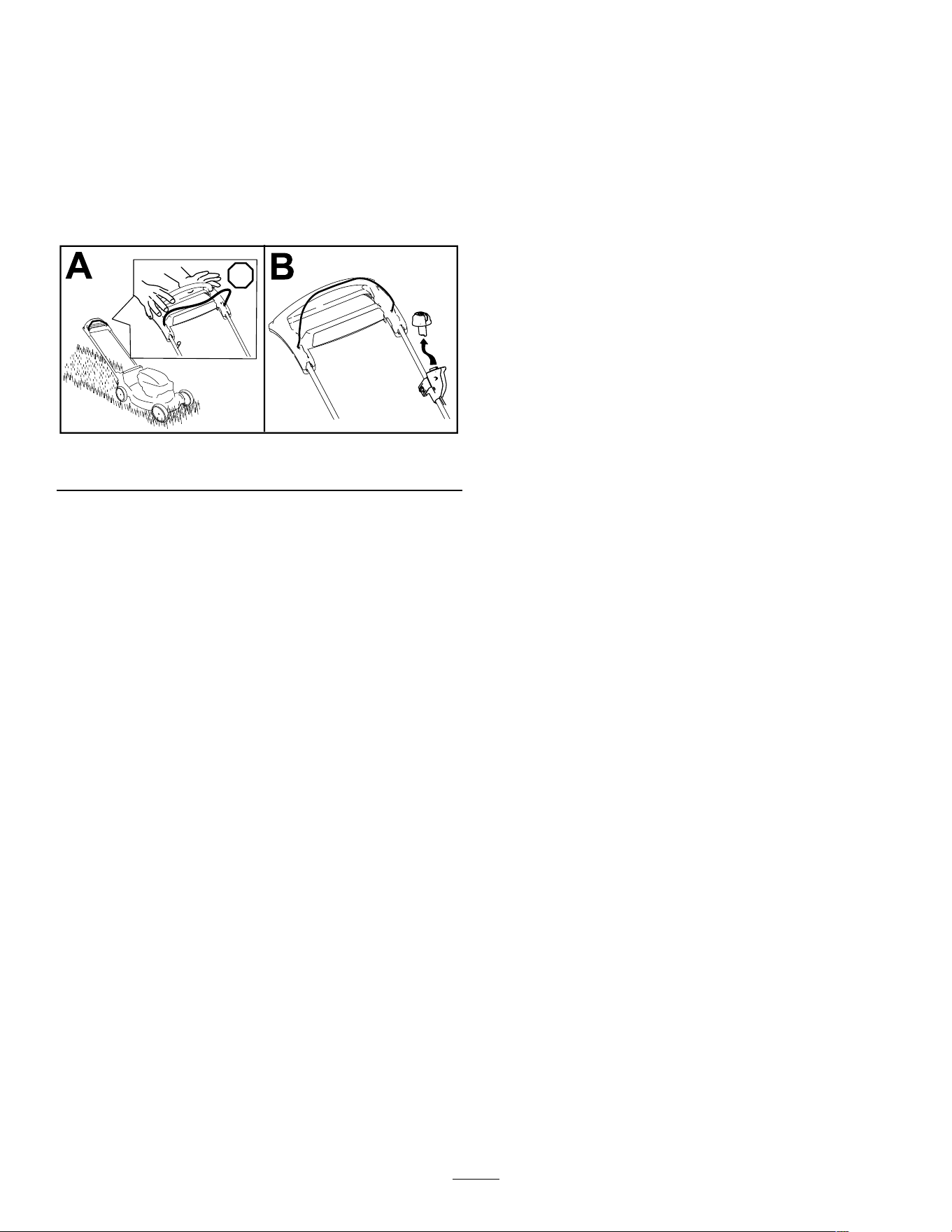
Shutting Off the Machine
1. Release the blade-control bar (A of Figure 16 ).
2. Remove the electric-start button from the
electric-start switch (B of Figure 16 ).
3. Remove the battery pack; refer to Removing the
Battery Pack from the Machine ( page 16 ) .
Note: Whenever you are not using the machine,
remove the battery pack.
g370557
Figure 16
Removing the Battery Pack
from the Machine
1. Lift up the battery-compartment lid.
2. Press the battery-pack latch to release the
battery pack and remove the battery pack.
3. Close the battery-compartment lid.
Operating T ips
General Mowing T ips
• Inspect the area where you will use the machine
and remove all objects that the machine could
throw .
• A void striking solid objects with the blade. Never
deliberately mow over any object.
• If the machine strikes an object or starts to vibrate,
immediately shut of f the machine, wait for all
moving parts to stop, remove the battery pack
from the machine, and examine the machine for
damage.
• For best performance, install a new T oro blade
before the cutting season begins or when
necessary .
Cutting Grass
• Cut only about a third of the grass blade at a time.
For improved quality of cut, runtime, and bagging,
cut grass at a higher height of cut.
• Do not cut below 51 mm (2 inches) unless the
grass is sparse or it is late fall when grass growth
begins to slow down.
• When cutting grass over 15 cm (6 inches) tall,
mow at the highest cutting height setting and walk
slower; then mow again at a lower setting for the
best lawn appearance. If the grass is too long, the
machine may plug and cause the motor to stall.
• W et grass and leaves tend to clump on the yard
and can cause the machine to plug or the motor to
stall. A void mowing in wet conditions.
• Be aware of a potential re hazard in very dry
conditions, follow all local re warnings, and keep
the machine free of dry grass and leaf debris.
• Alternate the mowing direction. This helps
disperse the clippings over the lawn for even
fertilization.
• If the nished lawn appearance is unsatisfactory ,
try 1 or more of the following:
– Replace the blade or have it sharpened.
– W alk at a slower pace while mowing.
– Raise the cutting height on your machine.
– Cut the grass more frequently .
– Overlap cutting swaths instead of cutting a full
swath with each pass.
Cutting Leaves
• After cutting the lawn, ensure that half of the lawn
shows through the cut leaf cover . Y ou may need
to make more than a single pass over the leaves.
16
• If there are more than 13 cm (5 inches) of leaves
on the lawn, mow at a higher cutting height and
then again at the desired cutting height.
• Slow down your mowing speed if the machine
does not cut the leaves nely enough.
After Operation
Charging the Battery Pack
Important: The battery pack is not fully charged
when you purchase it. Before using the tool for
the rst time, place the battery pack in the charger
and charge it until the LED display indicates the
battery pack is fully charged. Read all safety
precautions.
Important: Charge the battery pack only in
temperatures that are within the appropriate
range; refer to Specications ( page 1 1 ) .
Note: At any time, press the battery-charge-indicator
button on the battery pack to display the current
charge (LED indicators).
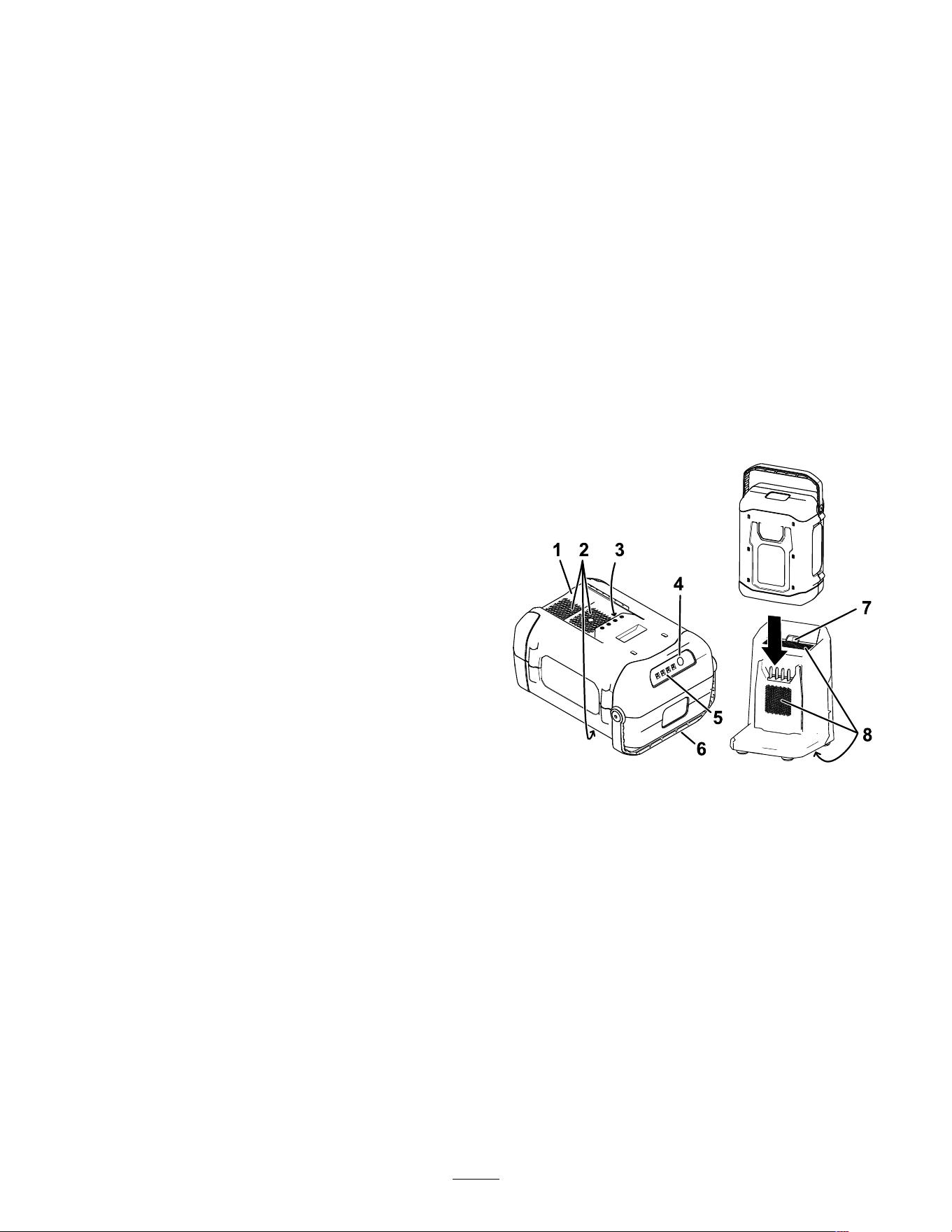
1. Ensure that the vents and charging terminals on
the battery pack and charger are clear of any
dust and debris.
g459228
Figure 17
1. Battery pack cavity
5. LED indicators (current
charge)
2. Battery pack venting areas 6. Handle
3. Battery pack terminals
7. Charger LED indicator
light
4. Battery-charge-indicator
button
8. Charger venting areas
2. Line up the cavity in the battery pack ( Figure 17 )
with the tongue on the charger .
3. Slide the battery pack into the charger until it is
fully seated ( Figure 17 ).
4. T o remove the battery pack, slide the battery
backward out of the charger .
17
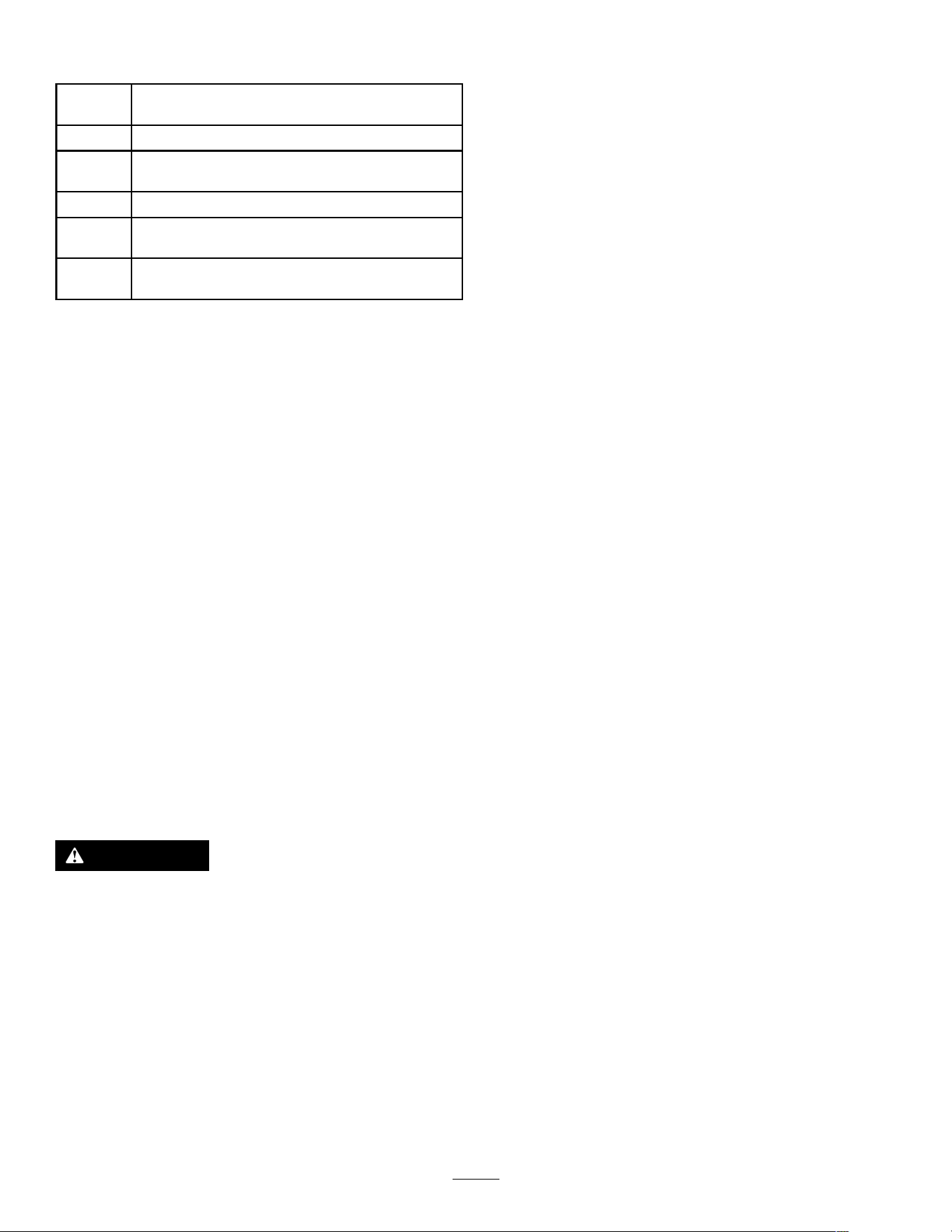
5. Refer to the following table to interpret the LED
indicator light on the battery charger .
Indicator
light
Indicates
Of f
No battery pack inserted
Green
blinking
Battery pack is charging
Green
Battery pack is charged
Red
Battery pack and/or battery charger is over or under
the appropriate temperature range
Red
blinking
Battery pack charging fault*
*Refer to T roubleshooting ( page 23 ) for more
information.
Important: The battery pack can be left on the
charger for short periods between uses.
If the battery pack will not be used for longer
periods, remove the battery pack from the
charger; refer to Storage ( page 22 ) .
Cleaning Under the
Machine
Service Interval : After each use
For best results, clean the machine soon after you
have completed mowing.
1. Move the machine onto a at paved surface.
2. Remove the electric-start button and wait for
all moving parts to stop before leaving the
operating position.
3. Remove the battery pack; refer to Removing the
Battery Pack from the Machine ( page 16 ) .
4. W ash out the area under the rear door where the
clippings go from the underside of the machine
to the grass bag.
Note: W ash out the area with the
bag-on-demand (if equipped) in both the fully
forward and fully rearward positions.
5. Start the motor and run it for a few minutes to
dry the underside of the machine to prevent it
from rusting.
6. Shut of f the motor , remove the electric-start
button, and store the machine; refer to Storage
( page 22 ) .
Cleaning Under the Machine in the
V ertical-Stow Position
1. Set the machine in the vertical-stow position;
refer to Storing the Machine in the V ertical-Stow
Position ( page 19 ) .
2. W ash out the clippings from under the machine.
Folding the Handle
W ARNING
Folding or unfolding the handle improperly can damage the cables, causing an unsafe
operating condition.
• Do not damage the cable(s) when folding or unfolding the handle.
• Ensure that the cable(s) are routed to the outside of the handle.
• If a cable is damaged, contact an Authorized Service Dealer .
1. Hold the handle while disengaging the handle locks to avoid pinching your hands.
2. Disengage the handle locks until you can move the upper handle freely (A of Figure 18 )
3. Fold the handle forward to the fully forward position (B of Figure 18 ).
Important: Route the cables to the outside of the handle locks as you fold the handle.
18
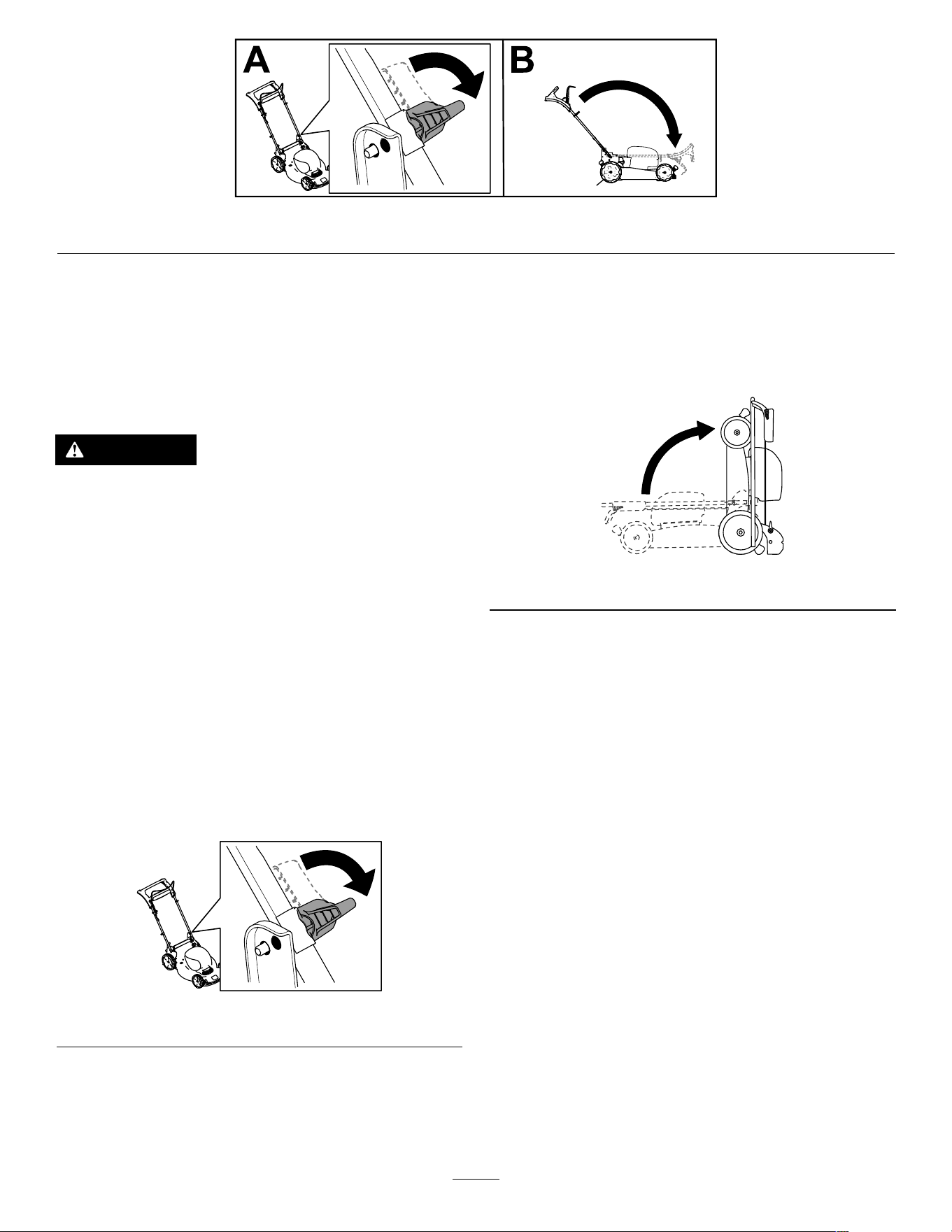
g459225
Figure 18
4. T o unfold the handle, refer to 2 Unfolding the Handle ( page 9 ) .
Storing the Machine in the
V ertical-Stow Position
Y ou can store your machine in the vertical position to
minimize storage space.
DANGER
The vertical-stow position exposes the bottom
of the machine.
• Remove the battery pack and the
electric-start button before moving the
machine into the vertical-stow position.
• Do not transport the machine in the
vertical-stow position.
• Do not attempt to start the machine in the
vertical-stow position.
1. Remove the electric-start button and battery
from the machine.
2. Ensure that the cutting-height setting on the
machine is 92 mm (3-5/8 inches) or lower; if it is
not, lower it; refer to Adjusting the Cutting Height
( page 13 ) .
3. Disengage the handle locks ( Figure 19 ).
g459226
Figure 19
4. Fold the handle fully forward; refer to Folding
the Handle ( page 18 ) .
Important: Route the cables to the outside
of the handle knobs as you fold the handle.
5. Engage the handle locks.
6. Lift the front of the machine by the handle and
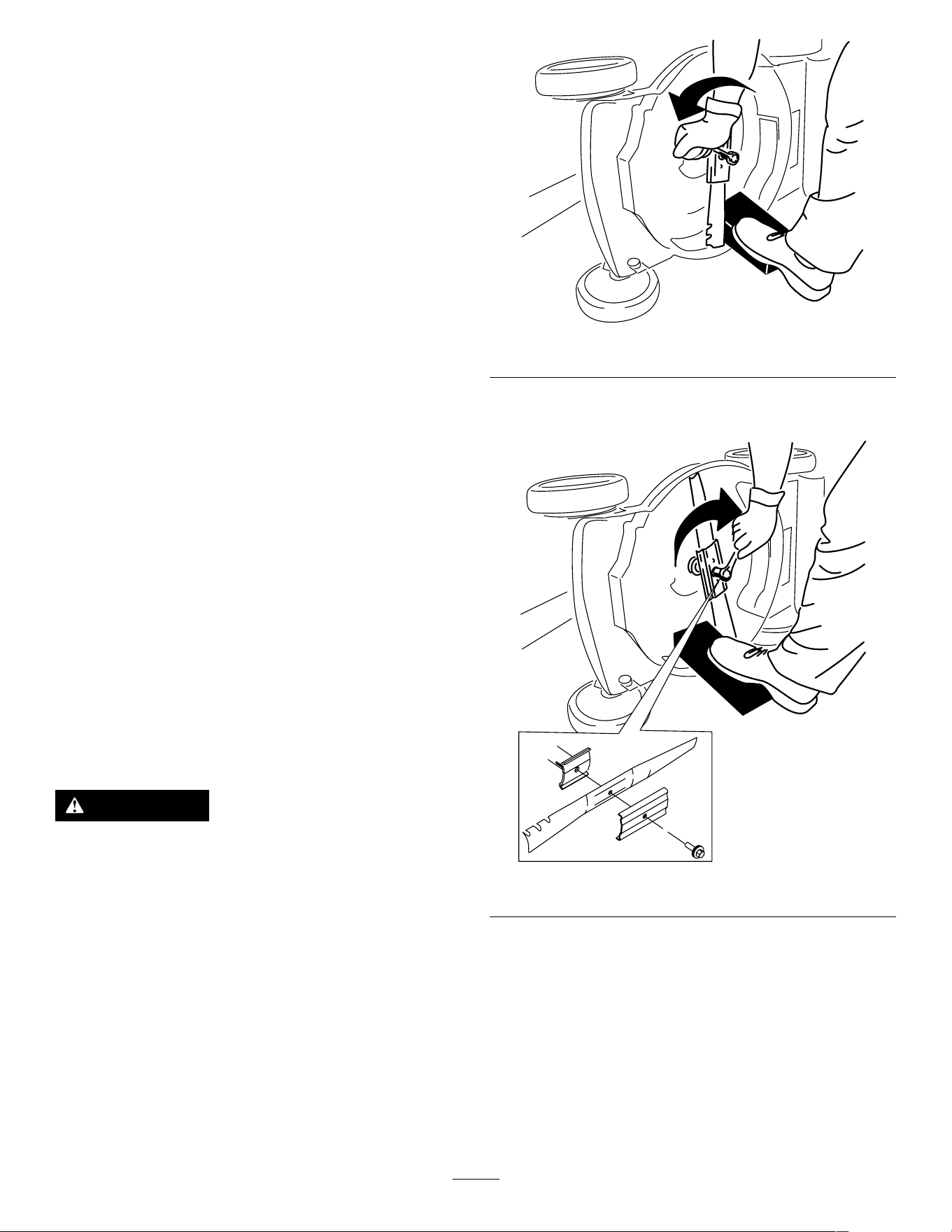
move it into a storage space ( Figure 20 ).
g251586
Figure 20
19
Maintenance
Remove the electric-start button and battery pack
from the machine before maintaining or cleaning the
machine.
Always shut of f the machine, wait for all moving
parts to stop, and allow the machine to cool before
adjusting, servicing, cleaning, or storing it.
Use only the manufacturer ’ s recommended
replacement parts and accessories.
Inspect and maintain the machine regularly . Have
the machine repaired only by an Authorized Service
Dealer .
Note: Determine the left and right sides of the
machine from the normal operating position.
Lubricating the Machine
Y ou do not need to lubricate the machine; all the
bearings have been lubricated at the factory for the
life of the machine.
Replacing the Blade
Service Interval : Y early
Important: Y ou will need a torque wrench to
install the blade properly . If you do not have a
torque wrench or are uncomfortable performing
this procedure, contact an Authorized Service
Dealer .
If the blade is damaged or cracked, replace it
immediately . If the blade edge is dull or nicked, have
it sharpened and balanced, or replace it.
W ARNING
When servicing the blade, the blade can still
move even though the power source is off.
The blade is sharp; contacting the blade can
result in serious personal injury .
• Keep your hands and feet away from a
moving blade.
• W ear gloves when servicing the blade.
1. Remove the electric-start button and battery
pack from the machine.
2. Use a block of wood to hold the blade steady
( Figure 21 ).
3. Remove the blade, saving all mounting hardware
( Figure 21 ).
g231389
Figure 21
4. Install the new blade and all mounting hardware
( Figure 22 ).
g231390
Figure 22
Important: Position the curved ends of the
blade facing up toward the machine housing.
5. Use a torque wrench to tighten the blade bolt
to 68 N∙m (50 ft-lb).
20
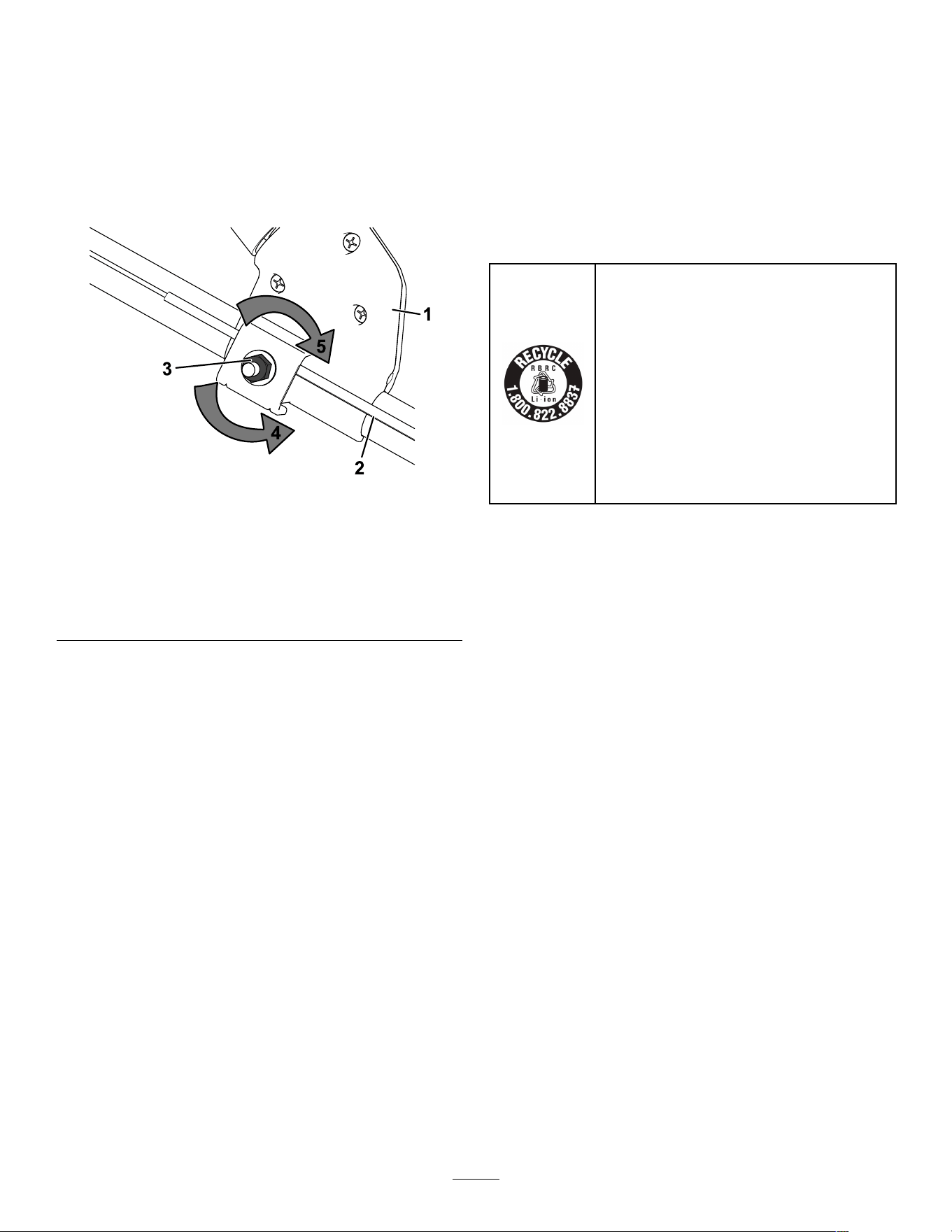
Adjusting the Self-Propel
Drive
Whenever you install a new self-propel cable or if
the self-propel drive is out of adjustment, adjust the
self-propel drive.
1. T urn the adjustment nut counterclockwise to
loosen the cable adjustment ( Figure 23 ).
g427094
Figure 23
1. Electric-start switch 4. T urn the nut
counterclockwise to
loosen the adjustment.
2. Self-propel-drive cable
5. T urn the nut clockwise to
tighten the adjustment.
3. Adjustment nut
2. Adjust the tension on the cable ( Figure 23 ) by
pulling it back or pushing it forward and holding
that position.
Note: Push the cable toward the motor to
increase the traction; pull the cable away from
the motor to decrease the traction.
3. T urn the adjustment nut clockwise to tighten the
cable adjustment.
Note: T ighten the nut rmly with a socket or
wrench.
Preparing the Battery Pack
for Recycling
Important: Upon removal, cover the terminals of
the battery pack with heavy-duty adhesive tape.
Do not attempt to destroy or disassemble the
battery pack or remove any of its components.
Contact your local municipality or your authorized
Authorized Service Dealer or distributor for more
information on how to responsibly recycle the battery .
Lithium-ion battery packs labeled with the
Call2Recycle seal can be recycled at any
participating retailer or battery recycling
facility in the Call2Recycle program (US
and Canada only). T o locate a participating
retailer or facility closest to you, please call
1-800-822-8837 or visit www .call2recycle.org.
If you cannot locate a participating retailer or
facility nearby , or if your rechargeable battery
is not labeled with the Call2Recycle seal,
please contact your local municipality for more
information on how to responsibly recycle the
battery . If you are located outside of the US
and Canada, please contact your Authorized
Service Dealer or distributor .
21

Storage
Important: Store the machine, battery pack, and
charger only in temperatures that are within the
appropriate range; refer to Specications ( page
1 1 ) .
Important: If you are storing the battery pack
for the off-season, charge it until 2 or 3 LED
indicators turn green on the battery . Do not store
a fully charged or fully depleted battery . When
you are ready to use the machine again, charge
the battery pack until the left indicator light turns
green on the charger or all 4 LED indicators turn
green on the battery .
• Disconnect the product from the power supply
(i.e., remove the battery pack and electric-start
button) and check for damage after use.
• Do not store the machine or charger with the
battery pack installed.
• Clean all foreign material from the product.
• When not in use, store the machine, electric-start
button, battery pack, and battery charger out of the
reach of children.
• Keep the machine, battery pack, and battery
charger away from corrosive agents, such as
garden chemicals and de-icing salts.
• T o reduce the risk of serious personal injury , do
not store the battery pack outside or in vehicles.
• Store the machine, battery pack, and battery
charger in an enclosed clean, dry area.
22
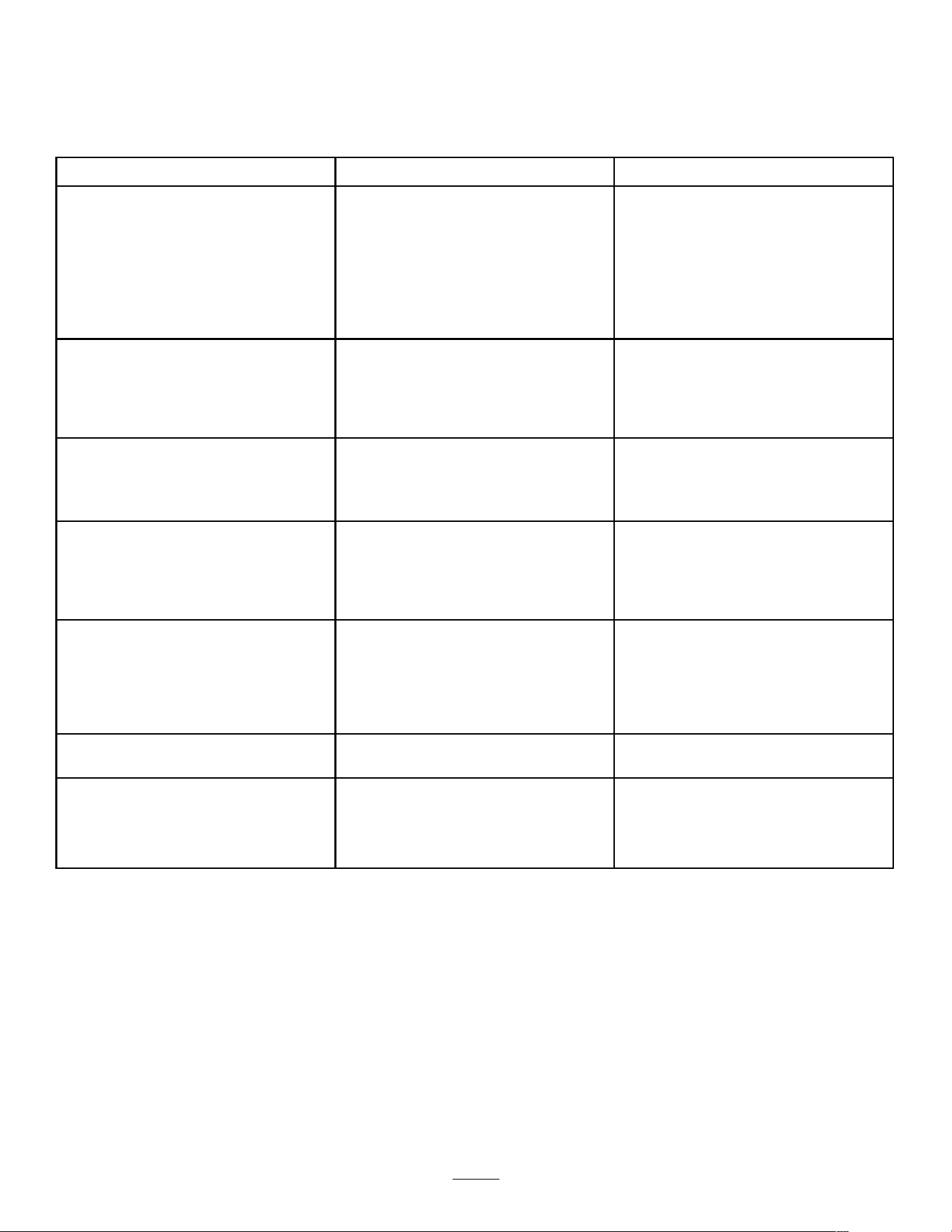
T roubleshooting
Perform only the steps described in these instructions. All further inspection, maintenance, and repair work
must be performed by an authorized service center or a similarly qualied specialist if you cannot solve the
problem yourself.
Problem
Possible Cause Corrective Action
1. The battery is not fully installed in the
machine.
1. Remove and then replace the battery
into the machine, making sure that it is
fully installed and latched.
2. The battery pack is not charged.
2. Remove the battery pack from the
machine and charge it.
3. The battery pack is damaged. 3. Replace the battery pack.
The machine does not start.
4. There is another electrical problem
with the machine.
4. Contact an Authorized Service Dealer .
1. There is moisture on the leads of the
battery pack.
1. Allow the battery pack to dry or wipe it
dry .
The machine does not run or does not run
continuously .
2. The battery is not fully installed into the
tool.
2. Remove and then replace the battery
into the tool making sure that it is fully
installed and latched.
1. The battery pack charge capacity is
too low .
1. Remove the battery pack from the
machine and fully charge the battery
pack.
The machine does not reach full power .
2. The battery air vents are blocked.
2. Clean the air vents.
1. The battery pack is over or under the
appropriate temperature range.
1. Move the battery pack to a place
where it is dry and the temperature is
between 5°C (41°F) and 40°C (104°F).
The battery pack loses charge quickly .
2. The machine is overloaded
2. Cut the grass at a higher height of cut
or walk at a slower pace while mowing.
1. The battery charger is over or under
the appropriate temperature range.
1. Unplug the battery charger and move
it to a place where it is dry and the
temperature is between 5°C (41°F)
and 40°C (104°F).
The battery charger is not working.
2. The outlet that the battery charger is
plugged into does not have power .
2. Contact your licensed electrician to
repair the outlet.
The machine does not self-propel. 1. The self-propel drive cable is out of
adjustment or is damaged.
1. Adjust the self-propel drive cable.
Replace the cable if necessary .
The LED indicator light on the battery
charger is red.
1. The battery charger and/or battery
pack is over or under the appropriate
temperature range.
1. Unplug the battery charger and move
the battery charger and battery pack
to a place where it is dry and the
temperature is between 5°C (41°F)
and 40°C (104°F).
23
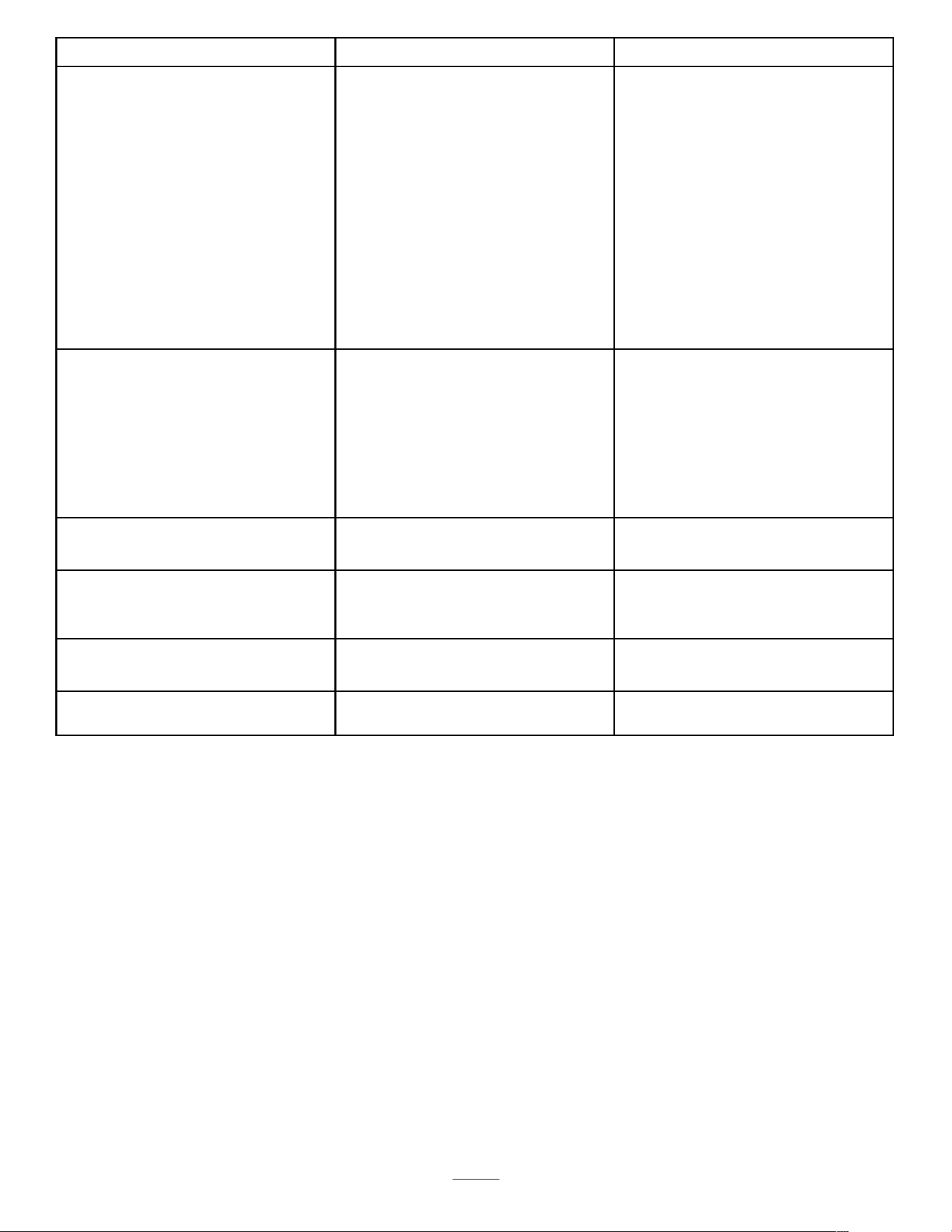
Problem
Possible Cause Corrective Action
1. There is an error in the communication
between the battery pack and the
charger .
1. Remove the battery pack from the
battery charger , unplug the battery
charger from the outlet, and wait 10
seconds. Plug the battery charger into
the outlet again and place the battery
pack on the battery charger . If the LED
indicator light on the battery charger is
still blinking red, repeat this procedure
again. If the LED indicator light on
the battery charger is still blinking red
after 2 attempts, properly dispose of
the battery pack at a battery recycling
facility .
The LED indicator light on the battery
charger is blinking red.
2. The battery pack is weak.
2. Contact your Authorized Service
Dealer if the battery is in warranty , or
properly dispose of the battery pack at
a battery recycling facility .
1. The battery pack is not charged.
1. Remove the battery pack from the
machine and charge it.
2. The machine is in an unsafe position
for operation.
2. Ensure that the machine is not at an
extreme angle while operating.
3. The machine is overloaded.
3. Cut the grass at a higher height of cut
or walk at a slower pace while mowing.
The machine is producing a beeping
sound.
4. There is another electrical problem
with the machine.
4. Attempt the other troubleshooting
actions, if the alarm still sounds,
contact an Authorized Service Dealer .
1. The blade is dull. 1. Have the blade sharpened or replaced.
The quality of cut is decreased or
unsatisfactory .
2. The cutting deck has debris buildup.
2. Clean under the machine.
1. The machine is overloaded.
1. Cut the grass at a higher height of cut.
The bagging is decreased or
unsatisfactory .
2. The bag has debris buildup.
2. Clean the inside of the bag of any dust
or debris.
1. The blade is dull. 1. Have the blade sharpened or replaced.The machine is cutting unevenly .
2. The cutting deck is damaged.
2. Contact an Authorized Service Dealer .
The machine is vibrating. 1. The blade is bent or damaged.
1. Inspect the blade and replace if
necessary .
24

Notes:

Notes:

California Proposition 65 W arning Information
What is this warning?
Y ou may see a product for sale that has a warning label like the following:
W ARNING: Cancer and Reproductive Harm—www .p65W arnings.ca.gov .
What is Prop 65?
Prop 65 applies to any company operating in California, selling products in California, or manufacturing products that may be sold in or brought into
California. It mandates that the Governor of California maintain and publish a list of chemicals known to cause cancer , birth defects, and/or other
reproductive harm. The list, which is updated annually , includes hundreds of chemicals found in many everyday items. The purpose of Prop 65 is to
inform the public about exposure to these chemicals.
Prop 65 does not ban the sale of products containing these chemicals but instead requires warnings on any product, product packaging, or literature with
the product. Moreover , a Prop 65 warning does not mean that a product is in violation of any product safety standards or requirements. In fact, the
California government has claried that a Prop 65 warning “is not the same as a regulatory decision that a product is ‘safe’ or ‘unsafe.’” Many of these
chemicals have been used in everyday products for years without documented harm. For more information, go to https://oag.ca.gov/prop65/faqs-view-all .
A Prop 65 warning means that a company has either (1) evaluated the exposure and has concluded that it exceeds the “no signicant risk level”; or (2)
has chosen to provide a warning based on its understanding about the presence of a listed chemical without attempting to evaluate the exposure.
Does this law apply everywhere?
Prop 65 warnings are required under California law only . These warnings are seen throughout California in a wide range of settings, including but not
limited to restaurants, grocery stores, hotels, schools, and hospitals, and on a wide variety of products. Additionally , some online and mail order
retailers provide Prop 65 warnings on their websites or in catalogs.
How do the California warnings compare to federal limits?
Prop 65 standards are often more stringent than federal and international standards. There are various substances that require a Prop 65 warning
at levels that are far lower than federal action limits. For example, the Prop 65 standard for warnings for lead is 0.5 μg/day , which is well below
the federal and international standards.
Why don’t all similar products carry the warning?
• Products sold in California require Prop 65 labelling while similar products sold elsewhere do not.
• A company involved in a Prop 65 lawsuit reaching a settlement may be required to use Prop 65 warnings for its products, but other companies
making similar products may have no such requirement.
• The enforcement of Prop 65 is inconsistent.
• Companies may elect not to provide warnings because they conclude that they are not required to do so under Prop 65; a lack of warnings for a
product does not mean that the product is free of listed chemicals at similar levels.
Why does T oro include this warning?
T oro has chosen to provide consumers with as much information as possible so that they can make informed decisions about the products they buy and
use. T oro provides warnings in certain cases based on its knowledge of the presence of one or more listed chemicals without evaluating the level of
exposure, as not all the listed chemicals provide exposure limit requirements. While the exposure from T oro products may be negligible or well within the
“no signicant risk” range, out of an abundance of caution, T oro has elected to provide the Prop 65 warnings. Moreover , if T oro does not provide these
warnings, it could be sued by the State of California or by private parties seeking to enforce Prop 65 and subject to substantial penalties.
Rev A