
USER GUIDE
US CA
OVER THE RANGE MICROWAVE
CONTEMPORARY
MOH30SB1

2
SAFETY AND WARNINGS
●
WARNING indicates a potentially hazardous situation which, if not avoided, could
result in death or serious injury.
●
CAUTION indicates a potentially hazardous situation which, if not avoided, may result
in minor or moderate injury.
READ ALL INFORMATION BEFORE USING
●
WARNING: To reduce the risk of fire, burns, electric shock, injury to persons, or
exposure to excessive microwave energy when using your appliance, follow the basic
precautions included in the following sections.
●
Read all instructions before using the appliance.
●
Read and follow the specific “PRECAUTIONS TO AVOID POSSIBLE EXPOSURE TO
EXCESSIVE MICROWAVE ENERGY”.
●
This appliance must be grounded. Connect only to a properly grounded outlet. See
“GROUNDING INSTRUCTIONS”.
●
Install or locate this appliance only in accordance with the provided installation
instructions.
●
Some products such as whole eggs and sealed containers —for example, closed glass
jars—are able to explode and should not be heated in this microwave oven.
●
Use this appliance only for its intended use as described in this manual. Do not
use corrosive chemicals or vapors in this appliance. This type of microwave oven is
specifically designed to heat, cook, or dry food. It is not designed for industrial or
laboratory use.
●
HOT CONTENTS CAN CAUSE SEVERE BURNS. DO NOT ALLOW CHILDREN TO USE
THE MICROWAVE. Use caution when removing hot items.
●
Do not operate this appliance if it has a damaged cord or plug, if it is not working
properly, or if it has been damaged or dropped.
●
This appliance should be serviced only by qualified service personnel. Contact nearest
Authorized Servicer for examination, repair, or adjustment.
●
Do not cover or block any openings on the appliance.
●
Do not store or use this appliance outdoors. Do not use this product near water—for
example, near a kitchen sink, in a wet basement, or near a swimming pool, or similar
locations.
●
Do not immerse the cord or plug in water.
●
Keep the cord away from heated surfaces.
●
Do not let the cord hang over the edge of the table or counter.
●
See door surface cleaning instructions on page 18.
●
To reduce the risk of fire in the microwave oven cavity:
●
Do not overcook food. Carefully attend the appliance when paper, plastic, or other
combustible materials are placed inside the microwave oven to facilitate cooking.
●
Remove wire twist-ties from paper or plastic bags before placing the bag in the
microwave oven.
●
If materials inside the microwave oven ignite, keep the microwave oven door closed,
turn the microwave oven off, and disconnect the power cord or shut off power at the
fuse or circuit breaker panel.
●
Do not use the cavity for storage purposes. Do not leave paper products, cooking
FOR YOUR SAFETY, THE INFORMATION IN THIS MANUAL MUST BE FOLLOWED TO
MINIMIZE THE RISK OF FIRE OR EXPLOSION OR TO PREVENT PROPERTY DAMAGE,
PERSONAL INJURY, OR LOSS OF LIFE.
IMPORTANT SAFETY INSTRUCTIONS!

3
SAFETY AND WARNINGS
utensils, or food in the microwave when not in use.
●
Liquids, such as water, coffee, or tea are able to be overheated beyond the boiling
point without appearing to be boiling. Visible bubbling or boiling when the container
is removed from the microwave oven is not always present. THIS COULD RESULT IN
VERY HOT LIQUIDS SUDDENLY BOILING OVER WHEN A SPOON OR OTHER UTENSIL
IS INSERTED INTO THE LIQUID.
●
To reduce the risk of injury to persons:
●
Do not overheat the liquid.
●
Stir the liquid both before and halfway through heating it.
●
Do not use straight-sided containers with narrow necks. Use a wide-mouthed
container.
●
After heating, allow the container to stand in the microwave oven for at least for 20
seconds before removing the container.
●
Use extreme care when inserting a spoon or other utensil into the container.
●
Clean the ventilation openings and grease filters frequently. Grease should not be
allowed to accumulate on ventilation openings, louver, or grease filters.
●
Use care when cleaning the louver and the grease filters. Corrosive cleaning agents,
such as lye-based oven cleaners, may damage the louver and the grease filters.
●
Suitable for use above both gas and electric cooking equipment.
●
When cooking food under the hood, turn the fan on.
●
This device complies with part 18 of the FCC Rules
●
A short power-supply cord is provided to reduce the risks resulting from becoming
entangled in or tripping over a longer cord.
●
Longer cord sets or extension cords are available and may be used if care is exercised
in their use.
●
If a long cord or extension cord is used:
●
The marked electrical rating of the cord set or extension cord should be at least as
great as the electrical rating of the appliance;
●
The extension cord must be a grounding-type 3-wire cord; and
●
The longer cord should be arranged so that it will not drape over the counter top or
tabletop where it can be pulled on by children or tripped over unintentionally..
GROUNDING INSTRUCTIONS
●
This appliance must be grounded. In the event of an electrical short circuit, grounding
reduces the risk of electric shock by providing an escape wire for the electric current.
●
This appliance is equipped with a cord having a grounding wire with a grounding
plug. The plug must be plugged
●
into an outlet that is properly installed and grounded.
●
WARNING – Improper use of the grounding can result in a risk of electric shock.
●
Consult a qualified electrician or serviceman if the grounding instructions are not
completely understood, or if doubt exists as to whether the appliance is properly
grounded, and either:
●
If it is necessary to use an extension cord, use only a 3-wire extension cord that has
a 3-blade grounding plug, and a 3-slot receptacle that will accept the plug on the
appliance. The marked rating of the extension cord shall be equal to or greater than
the electrical rating of the appliance, or
●
Do not use an extension cord. If the power supply cord is too short, have a qualified
electrician or serviceman install an outlet near the appliance.

4
PRECAUTIONS TO AVOID POSSIBLE EXPOSURE TO EXCESSIVE MICROWAVE ENERGY
●
Do not attempt to operate this microwave with the door open because this can result
in harmful exposure to microwave energy. It is important not to defeat or tamper with
the safety interlocks.
●
Do not place any object between the microwave front face and the door or allow soil
or cleaner residue to accumulate on sealing surfaces.
●
Do not operate the microwave if it is damaged. It is particularly important that the
microwave door closes properly and that there is no damage to the:
z
door (bent)
z
hinges and latches (broken or loosened)
z
door seals and sealing surfaces
●
The microwave should not be adjusted or repaired by anyone except properly
qualified service personnel.
SAVE THESE INSTRUCTIONS
The models shown in this installation guide may not be available in all markets and are subject to
change at any time. For current details about model and specification availability in your country,
please go to our website www.fisherpaykel.com or contact your local Fisher & Paykel dealer.
SAFETY AND WARNINGS

5
INTRODUCTION
z
Read this User Guide and always save it for reference.
z
A good microwave cookbook is a valuable asset. Check it for microwave cooking
principles, techniques, hints, and recipes.
z
NEVER use the microwave oven without the turntable and support nor turn the turntable
over so that a large dish could be placed in the microwave oven. The turntable will turn
both clockwise and counterclockwise.
z
ALWAYS have food in the microwave oven when it is on to absorb the microwave energy.
z
When using the microwave oven at power levels below 100%, you may hear the
magnetron cycling on and off.
z
It is normal for the exterior of the microwave oven to be warm to the touch when
cooking or reheating.
z
Condensation is a normal part of microwave cooking. Room humidity and the moisture
in food will influence the amount of moisture that condenses in the microwave oven.
Generally, covered foods will not cause as much condensation as uncovered ones.
Ventilation openings must not be blocked.
z
The microwave oven is for food preparation only. It should not be used to dry
clothes or newspapers.
z
Your microwave oven is rated at1000 watts by using the IEC Test Procedure. In using
recipes or package directions, check food a minute or two before the minimum time and
add time accordingly
z
Arrange food carefully. Place thickest areas towards outside of the dish.
z
Watch the cooking time. Cook for the shortest amount of time indicated and add more
as needed. Food severely overcooked can smoke or ignite.
z
Cover foods while cooking. Check the recipe or cookbook for suggestions, such as paper
towels, wax paper, microwave plastic wrap, or a lid. Covers prevent spattering and help
foods to cook evenly.
z
Shield with small flat pieces of aluminum foil any thin areas of meat or poultry to prevent
overcooking before dense, thick areas are cooked thoroughly.
z
Stir foods from outside to center of dish once or twice during cooking, if possible.
z
Turn foods over once during microwaving to speed cooking of such foods as chicken and
hamburgers. Large items like roasts must be turned over at least once.
z
Rearrange foods such as meatballs halfway through cooking both from top to bottom
and from the center of the dish to the outside.
z
Add standing time. Remove the food from the microwave oven and stir, if possible. Cover
for the standing time which allows the food to finish cooking without overcooking.
z
Check for doneness. Look for signs indicating that cooking temperatures have been
reached. Doneness signs include:
z
Food steams throughout, not just at edge.
z
Center bottom of dish is very hot to the touch.
z
Poultry thigh joints move easily.
z
Meat and poultry show no pinkness.
z
Fish is opaque and flakes easily with a fork
6
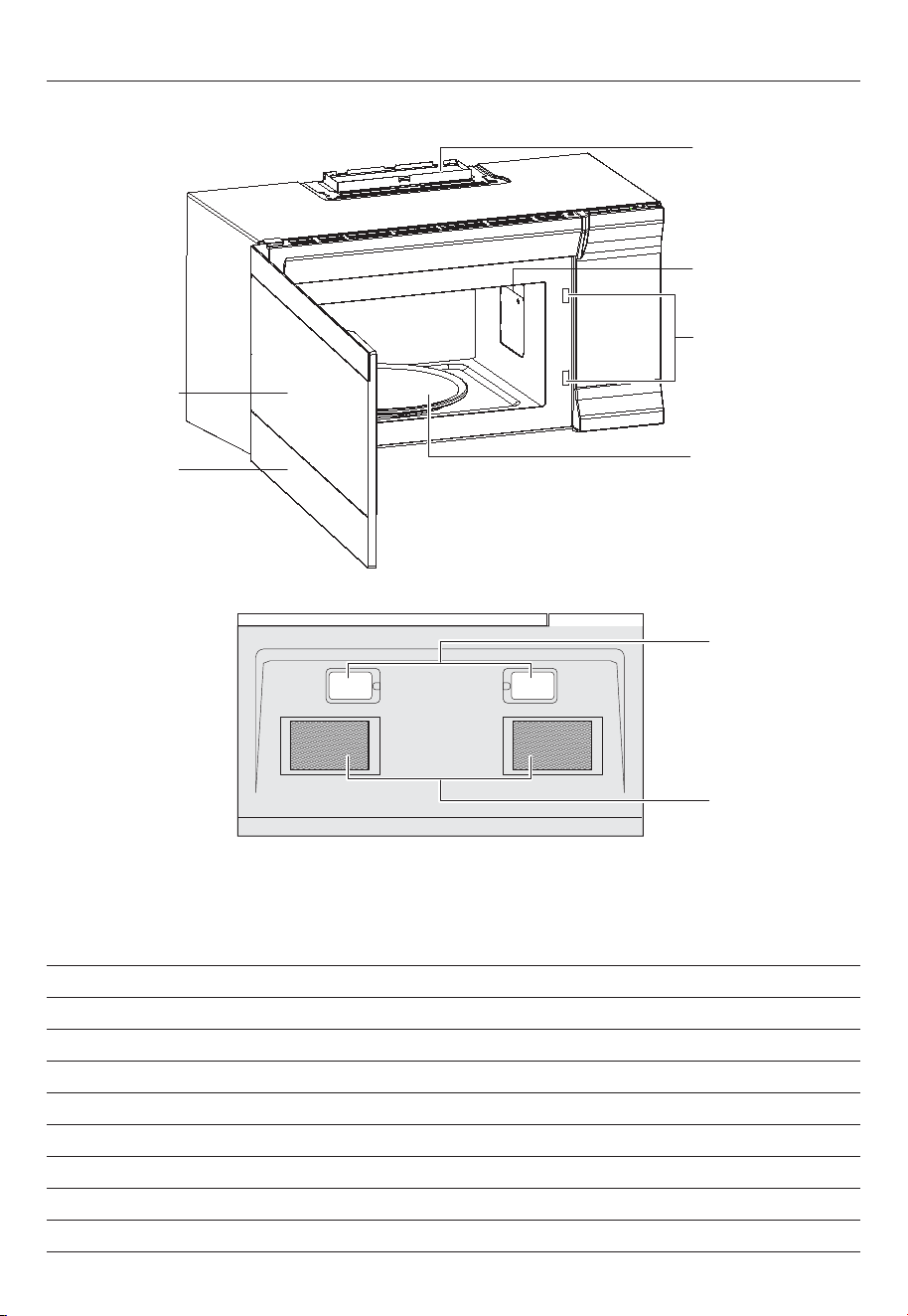
OVERVIEW
Window
Control panel
Turntable
Waveguide cover
Safety interlock
system
Vent openings
Surface lights
Bottom View
Grease filters
DO NOT REMOVE
PRODUCT FEATURES
Sensor cooking
10 variable power levels
Add 30 seconds and express cooking
Exhaust fan with two speeds
Task lighting
Child lock
Turntable
Hidden vent
7
CONTROL PANEL
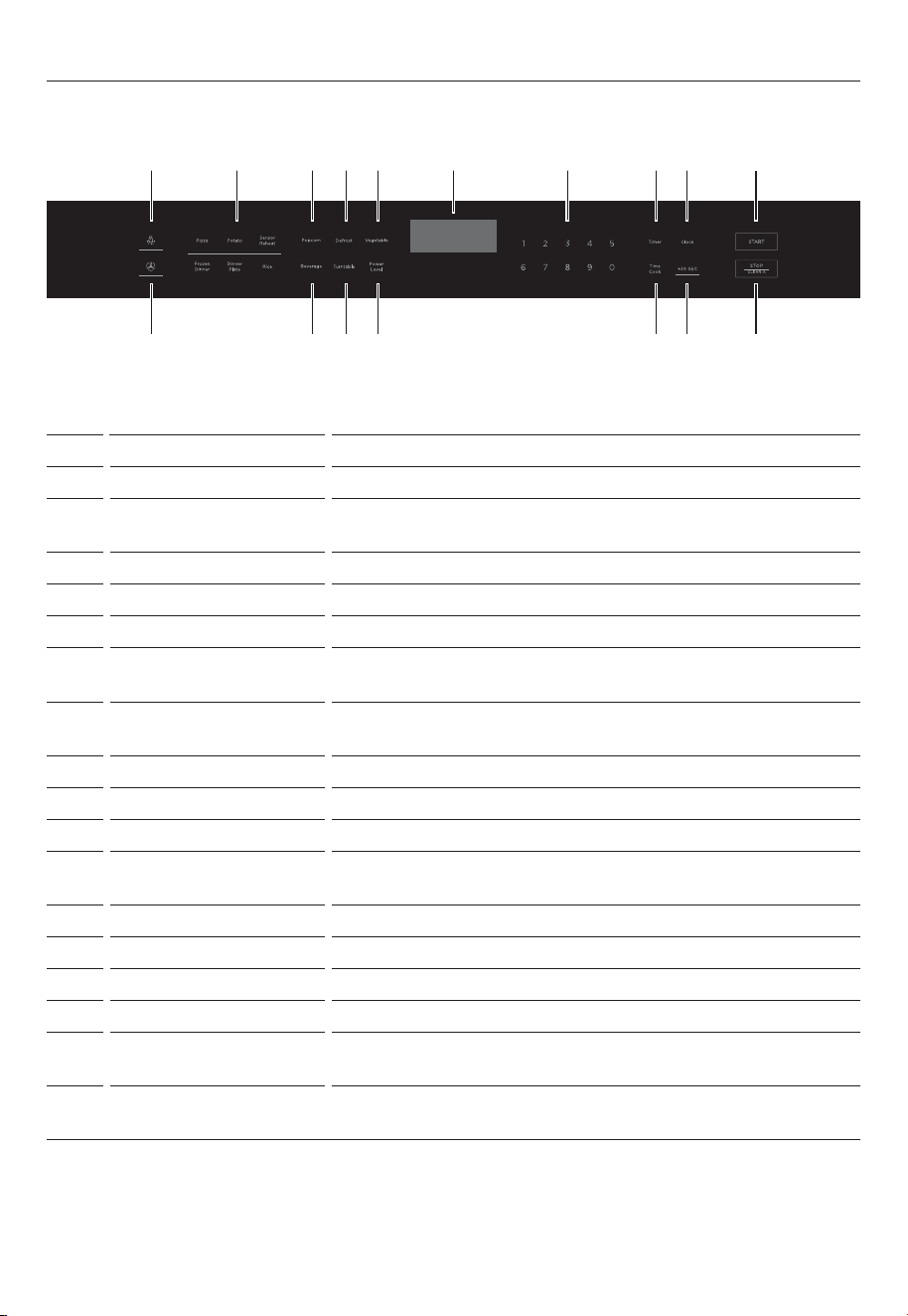
# ITEM DESCRIPTION
1 Light Press to turn on/off the light underneath your microwave.
2 SENSOR COOKING Detects the humidity released and adjusts the cooking
time based on the type and amount of food cooking.
3 Popcorn Press to cook popcorn.
4 Defrost Press to defrost frozen food.
5 Vegetable Press to cook vegetables.
6 Display In standby mode, displays the time. In cooking mode,
displays cooking time, weight, and other information.
7 Number pad Press to enter cook time, defrost time, clock time, and
other information.
8 Timer Press this button, then enter the count down time.
9 Clock Press to set or check the clock.
10 START In standby mode, press this button to begin cooking.
11 Vent Fan Press to turn on/off your vent fan and remove odors from
cooking.
12 Beverage Press to heat a beverage.
13 Turntable on/off Press to turn your turntable on or off.
14 Power Level Press to change your microwave’s power level (1-10).
15 Time Cook Press to enter a cooking time.
16 Add 30 sec. While cooking, press this button to add 30 seconds to
your cooking time.
17 STOP/CLEAR Press to stop the cooking process. Press again to cancel
the cooking operation.
1 2 7 8 9 !03 4 5 6
!1 !2 !3 !4 !5 !6 !7
8
COOKWARE AND COOKING MATERIALS
Warning: Personal Injury Hazard. Tightly-closed containers could explode. Closed containers
should be opened and plastic pouches should be pierced before cooking.
Cookware and other materials must fit on the turntable. Always use oven mitts or pot
holders because cookware may become hot.
Cookware and Materials Test:
1. Fill a microwave-safe container with 1 cup (250 ml) of cold water, along with the
cookware or materials in question.
2. Cook on maximum power for one minute. Do not exceed one minute cooking time.
3. Carefully feel the cookware or material. If the empty cookware or material is warm, do
not use it for microwave cooking.
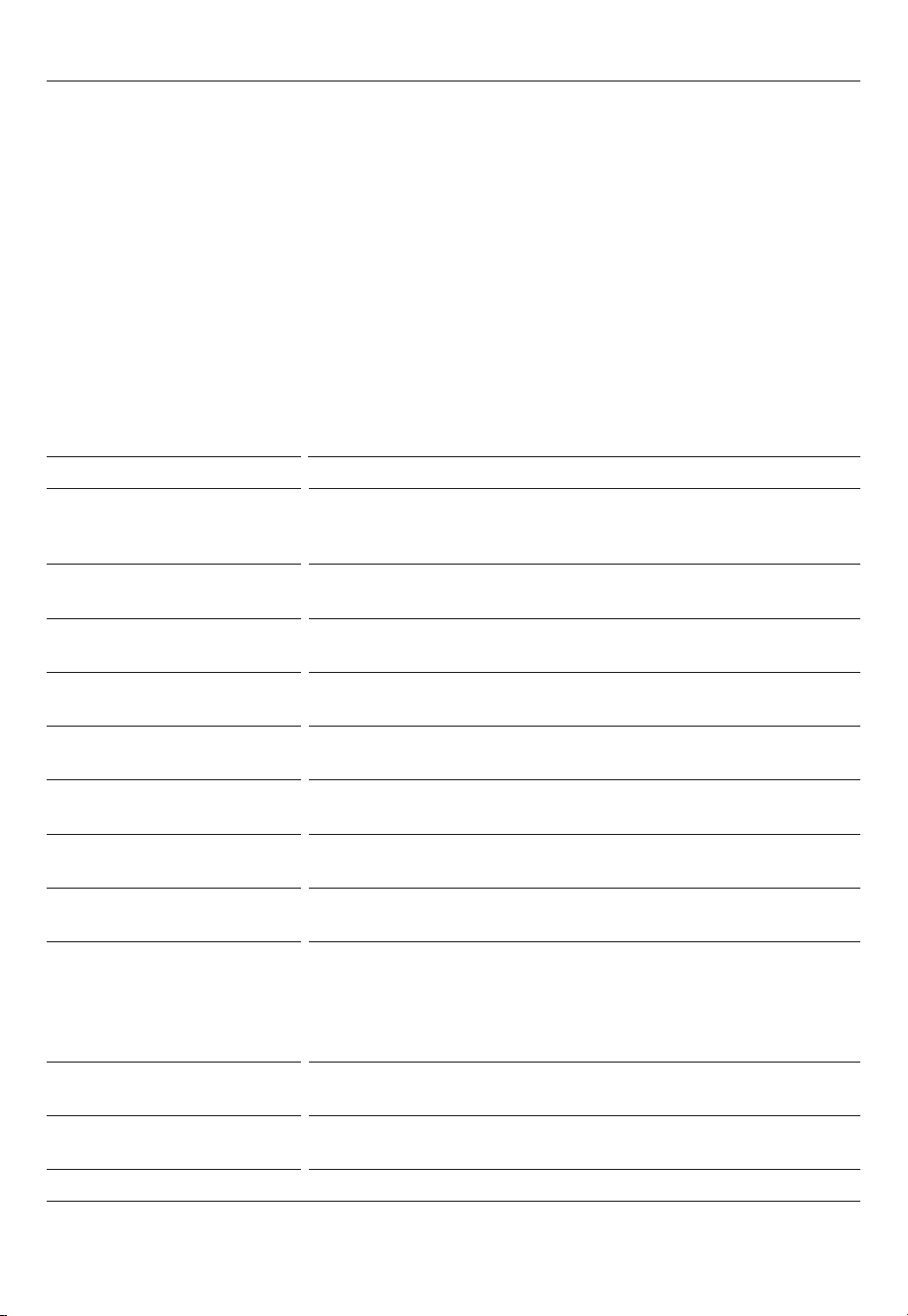
MATERIAL REMARKS
Browning dish Follow the manufacturer’s instructions. The bottom of the
browning dish must be at least 3/16-in. (5mm) above the
turntable. Incorrect usage may cause the turntable to break.
Dinnerware Use microwave-safe only. Follow the manufacturer's
instructions. Do not use cracked or chipped dishes.
Glass jars Always remove the lid. Use only to heat food until just
warm. Most glass jars are not heat resistant and may break.
Glassware Use heat-resistant oven glassware only. Make sure there is
no metallic trim. Do not use cracked or chipped dishes.
Oven cooking bags Follow the manufacturer’s instructions. Do not close with a
metal tie. Make slits to allow steam to escape.
Paper plates and cups Use for short–term cooking/warming only. Do not leave the
oven unattended while cooking.
Paper towels Use to cover food for reheating and absorbing fat. Use with
supervision for short-term cooking only.
Parchment paper Use as a cover to prevent splattering or a wrap for
steaming.
Plastic Use only if labeled “Microwave Safe.” Follow the
manufacturer’s instructions. Some plastic containers soften
as the food inside gets hot. “Boiling bags” and tightly
closed plastic bags should be slit, pierced, or vented, as
indicated on the package.
Plastic wrap Use microwave-safe only. Use to cover food during cooking
to retain moisture. Do not allow plastic wrap to touch food.
Thermometers Use microwave-safe only (such as meat and candy
thermometers).
Wax paper Use as a cover to prevent splattering and retain moisture.
Materials you can use
9
COOKWARE AND COOKING MATERIALS
MATERIAL REMARKS
Aluminum tray May cause arcing. Use a microwave-safe dish instead.
Food carton with metal
handle
May cause arcing. Use a microwave-safe dish instead.
Metal or metal trimmed
utensils
Metal shields the food from microwave energy. The metal
trim may cause arcing.
Metal twist ties May cause arcing and could cause a re in the oven.
Paper bags May cause a fire in the oven.
Plastic foam Plastic foam may melt or contaminate the liquid inside when
exposed to high temperature.
Wood Wood will dry out when used in the microwave oven and
may split or crack.
Materials to be avoided
10
INSTALLING THE TURNTABLE
1. Place the turntable ring in the
round depression in the bottom
of the microwave oven so that
it turns freely.
2. Place the glass turntable (flat
side up) on the turntable ring
so that the hub engages the
turntable shaft in the bottom
of the oven. The glass turntable
should not turn freely when it is
correctly installed.
Hub
(underside)
Glass
turntable
Turntable
ring
Turntable
shaft
z
Never place the glass tray upside down. The glass tray should never be restricted.
z
Both the glass tray and turntable ring must always be used during cooking.
z
Always place all food and containers of food on the glass tray for cooking.
z
If the glass tray or turntable ring cracks or breaks, contact your nearest authorized
service center.

11
COOKING GUIDE
Storage temperature
Foods taken from the freezer or refrigerator take longer to cook than the same foods would
at room temperature.
Size
Small pieces of food cook faster than large ones. Pieces similar in size and shape will cook
more evenly when cooked together. For more even results, reduce the power levels when
cooking large pieces of food.
Natural moisture
Very moist foods cook more evenly because microwave energy heats water molecules very
efficiently.
Stirring
Stir foods such as casseroles and vegetables from the outside to the center to distribute the
heat more evenly. This will allow the food to cook faster. Constant stirring is not necessary
Turn over items
Turn over foods such as pork chops, roasts, or whole cauliflower halfway through the cook
time. This will help to expose all sides equally to microwave energy.
Food placement
Place delicate areas of food items, such as asparagus tips, toward the center of the
turntable tray.
Food arrangement
Arrange unevenly shaped foods, such as chicken pieces or salmon, with the thicker or
meatier parts toward the outside of the turntable tray.
Let the food stand
After removing the food from the microwave, cover the food with foil or a casserole lid
and let it stand to finish cooking. This will help the food finish in the center and avoids
overcooking the outer edges. The length of stand time depends on the density and surface
area of the food items.
Wrapping in paper towels or waxed paper
Sandwiches and many other food types containing pre baked bread should be wrapped
prior to placing in the microwave to help prevent the food items from drying out while
heating.
12
USING YOUR MICROWAVE
1. Press TIME COOK, then use the number pad to enter the cooking time that you want.
2. If required, press
POWER LEVEL, then enter the desired power level (1-10). By default, your
microwave cooks at 100% power. Press POWER LEVEL while cooking to check the power.
3. Press
START to begin heating.
POWER LEVEL OUTPUT RECOMMENDATION
10 100%
z
Boiling water.
z
Cooking ground beef.
z
Making candy.
z
Cooking fresh fruits and vegetables.
z
Cooking fish and poultry.
z
Preheating browning dish.
z
Reheating beverages.
z
Cooking bacon slices.
9 90%
z
Reheating meat slices quickly.
z
Sautéing onions, celery, and green peppers
8 80%
z
All reheating.
z
Cooking scrambled eggs.
7 70%
z
Cooking breads and cereal products.
z
Cooking cheese dishes and veal.
z
Cooking cakes, muffins, brownies and cupcakes.
6 60%
z
Cooking pasta.
5 50%
z
Cooking meats and whole poultry.
z
Cooking custard.
z
Cooking spare ribs, rib roast, and sirloin roast.
4 40%
z
Cooking less tender cuts of meat.
z
Reheating frozen packaged foods.
3 30%
z
Thawing meat, poultry, and seafood.
z
Cooking small quantities of food.
z
Finish cooking casseroles, stew,
and some sauces
2 20%
z
Softening butter and cream cheese.
z
Heating small amounts of food.
1 10%
z
Softening ice cream.
z
Raising yeast dough.
1. Press a number on the number pad to instantly start cooking.
2. From standby, press
ADD 30 SEC to instantly cook for 30 seconds.
3. To increase the time in 30 second increments (except auto cook and defrost), press
ADD
30 SEC
as needed.
Note: You can not quick start when using the defrost feature.
QUICK START

13
COOKING WITH MULTIPLE COOKING STAGES
1. Press TIME COOK, then use the number pad to enter the cooking time that you want.
2. Press
POWER LEVEL, then enter the power level that you want (1-10) for the first stage.
The power level is shown on the display.
3. Press
TIME COOK, then use the number pad to enter the cooking time.
4. Press
POWER LEVEL, then enter the power level that you want (1-10) for the second stage.
The power level is shown on the display.
5. Press
START to begin heating. When the microwave is done, it beeps and shows “END” on
the display.

14
COOKING WITH THE SENSOR
Sensor cooking detects the humidity released by your cooking food and adjusts the
cooking time based on the type and amount of food cooking.
1. Press
SENSOR REHEAT
, then press
START
. Your microwave automatically sets the cook time.
2. When using sensor cooking:
z
Casseroles: Add 2-3 tablespoons of liquid, cover with a lid or vented plastic wrap. Stir
when instructed from the display.
z
Canned foods: Place the contents into a microwave-safe dish and cover with a loose-
fitting lid or vented plastic wrap. Let it stand a few minutes before serving.
z
Plates of food: Arrange food on the plate. Cover with a loose-fitting lid or vented plastic
wrap. Let it stand a few minutes before serving.
3. If additional time is needed, continue to cook manually
Pizza
The pizza setting cooks from one to two slices (6- 8 oz.) of pizza automatically.
1. Press
PIZZA
, then press
START
.
Potato
The potato setting cooks from two to four potatoes automatically.
1. Poke holes in your potatoes skin 5-6 times with a fork. Do not cover your potatoes.
2. Press
POTATO
, then press
START
.
3. Let the potatoes stand for about five minutes after the microwave has finished to
complete cooking.
Frozen dinner
The frozen dinner setting is designed for one frozen entree or frozen convenience foods
(such as frozen dinners) from 10 - 20 oz.
1. Press
FROZEN DINNER
, then press
START
.
When cooking frozen dinners:
z
Read the instructions on your frozen food for best results, if available.
z
Make sure that moisture can escape from the packaging. All frozen dinner instructions
should specify that you
z
poke holes in the plastic covering before cooking.
z
Be careful when removing the plastic covering. Remove the side facing away from you to
avoid steam burns.
Dinner plate
The dinner plate setting is designed for one to two plates.
1. Press
DINNER PLATE
, then press
START
.
Rice
The rice setting cooks one to two cups of rice automatically (starting from room
temperature).
1. Press
RICE, then press START.
15
USING ADDITIONAL FUNCTIONS
BEVERAGE
1. Press
BEVERAGE
repeatedly to select the number of servings.
2. Press
START
to confirm setting.
WEIGHT PRESS BEVERAGE BUTTON
1 cup Once
2 cups 2 times
3 cups 3 times
POPCORN
1. Press
POPCORN
repeatedly to select your popcorn bags weight.
2. Press
START
to confirm setting.
WEIGHT PRESS POPCORN BUTTON
Once
2 times
3 times
The vegetable sensor feature cooks from one to four cups of fresh vegetables (when
starting at room temperature).
1. Press VEGETABLE repeatedly to select the number of cups:
2. Press
START
to confirm setting.
VEGETABLE
SERVINGS PRESS VEGETABLE BUTTON
1 cup Once
2 cups 2 times
3 cups 3 times
4 cups 4 times
3.3 oz
3.0 oz
1.75 oz
16
USING ADDITIONAL FUNCTIONS
MEAT NORMAL WEIGHT COOK TIME
Roast beef or pork 2.5 to 6 lbs.
(40 to 96 oz.)
z
Placed fat-side down.
z
After each stage, turn the food over and
shield any warm portions with narrow
strips of aluminum foil.
z
Let stand, covered for 15-30 minutes
Steaks, chops, or
fish
0.5 to 3 lbs.
(8 to 48 oz.)
z
After each stage, rearrange the food. If
there are any warm or thawed portions of
food, shield them with narrow flat pieces
of aluminum foil.
z
Remove any pieces of food that are
nearly defrosted.
z
Let stand, covered for about
5 to 10 minutes.
Ground meat 0.5 to 3 lbs.
(8 to 48 oz.)
z
After each stage, remove any pieces of
food that are nearly defrosted.
z
Let stand, covered with foil for
5 to 10 minutes.
Whole chicken 2.5 to 6 lbs.
(40 to 96 oz.)
z
Remove giblets before freezing poultry.
z
Start defrosting with the breast side down.
z
After the first stage, turn the chicken over
and shield any warm portions with narrow
strips of aluminum foil. After the second
stage, again shield any warm portions with
narrow strips of aluminum foil.
z
Let stand, covered, for 30 to 60 minutes in
the refrigerator.
Chicken pieces 0.5 to 3 lbs.
(8 to 48 oz.)
z
After each stage, rearrange or remove any
pieces of food that are nearly defrosted.
z
Let stand for 10-20 minutes.
z
Use defrost only for raw food items.
z
Ensure food is taken directly from the freezer. If the food has been stored in a
refrigerator-freezer that does not maintain a temperature of 5°F (-15°C) or below, always
program a lower food weight or lower cook time to prevent cooking the food.
z
Enter a reduced weight if food has been outside the freezer for more than 20 minutes.
z
The shape of the food package alters the defrosting time. For example, a shallow,
rectangular food package will defrost more quickly than a deep block of food.
z
Separate pieces as they begin to defrost.
1. Press
DEFROST repeatedly to select MEAT, POULTRY or FISH.
2. Press
START .
3. Use the number pad to enter the weight of the item to be defrosted (in pounds). You
may enter any weight from 0.1 to 6.0 lbs.
4. Press
START to start defrosting. The remaining cooking time is displayed. Your microwave
may beep periodically remind you to turn the food. Press START to continue
DEFROST

17
USING ADDITIONAL FUNCTIONS
1. Press
CLOCK.
2. Use the number pad to enter the current time (1:00–12:59).
3. Press
START
to confirm setting.
Note: You can use the timer while the microwave is cooking.
1. In standby mode, press
TIMER.
2.
Use the number pad to enter the time.
3. Press START to confirm setting.
Note: When the time reaches 0, your microwave will beep.
1. To lock the microwave, press and hold
STOCK/CLEAR
for three seconds. The microwave
beeps and a lock indicator appears on the display.
2. To unlock the microwave, press and hold
STOP/CLEAR until the lock indicator disappears
(about three seconds).
1. Press
LIGHT
repeatedly to cycle between high brightness, low brightness or off.
Your microwave’s vent fan works as a range hood to filter out smoke and other odors from
cooking.
1. Press
VENT FAN
repeatedly to cycle between high speed, low speed or off.
Note: you can use the vent fan while cooking in the microwave. The fan automatically starts
when heat rises from range surface units or burners and stays on until the
temperature decreases. It cannot be turned off manually during this time. This protects the
microwave from excessive temperatures.
For the best results, leave the turntable on. However, you can turn it off for large dishes.
1. Press
TURNTABLE ON/OFF
to turn your turntable on or off.
CLOCK
TIMER
CHILD LOCK
LIGHT
VENT FAN
TURNTABLE

18
CLEANING AND MAINTENANCE
Exterior
The outside surface is pre-coated steel and plastic. Clean the outside with mild soap and
water, then rinse and dry with a soft cloth. Do not use any type of household or abrasive
cleaner.
Door
Wipe the window on both sides with a damp cloth to remove any spills or spatters. Metal
parts will be easier to maintain if wiped frequently with a damp cloth. Avoid the use of
spray and other harsh cleaners as they may stain, streak, or dull the door surface.
Control panel
If the control panel is dirty, open the microwave door before cleaning. Wipe the panel with
a cloth dampened slightly with water only. Dry with a soft cloth. Do not scrub or use any
sort of chemical cleaners. Close the door and press STOP/CLEAR to clear any buttons you
may have pressed.
Interior
Wipe with a soft cloth and warm water. Do not use abrasive or harsh cleaners or scouring
pads. For baked-on food, use baking soda or a mild soap, then rinse thoroughly.
To help loosen baked-on food particles or liquids, heat two cups of water (add lemon juice
if you want to keep your microwave fresh smelling) in a four-cup measuring cup at high
power for five minutes or until boiling. Let it cool in the microwave, then wipe the interior
with a soft cloth.
Waveguide cover
The waveguide cover is located on the right wall inside your microwave. Keep the
waveguide cover clean to ensure performance. Wipe with a damp cloth any food spatters
from the surface of the cover immediately after they occur. Built-up splashes may overheat
and cause smoke or possibly catch fire. DO NOT REMOVE THE WAVEGUIDE COVER.
Removing odors
Occasionally, a cooking odor may remain in the microwave. To remove, combine one cup
water, lemon juice, and several whole cloves in a two-cup glass measuring cup. Boil for
several minutes at high power, then let it cool in the microwave. Wipe the interior with a
soft cloth.
Turntable and turntable support
Remove the turntable and turntable support and wash them in mild, sudsy water. For
stubborn stains, use a mild cleanser and non-abrasive scouring sponge. You can also wash
them in the top rack of a dishwasher.
The turntable motor shaft is not sealed, so water or spills should be wiped immediately.
19
CLEANING AND MAINTENANCE
Exhaust filters
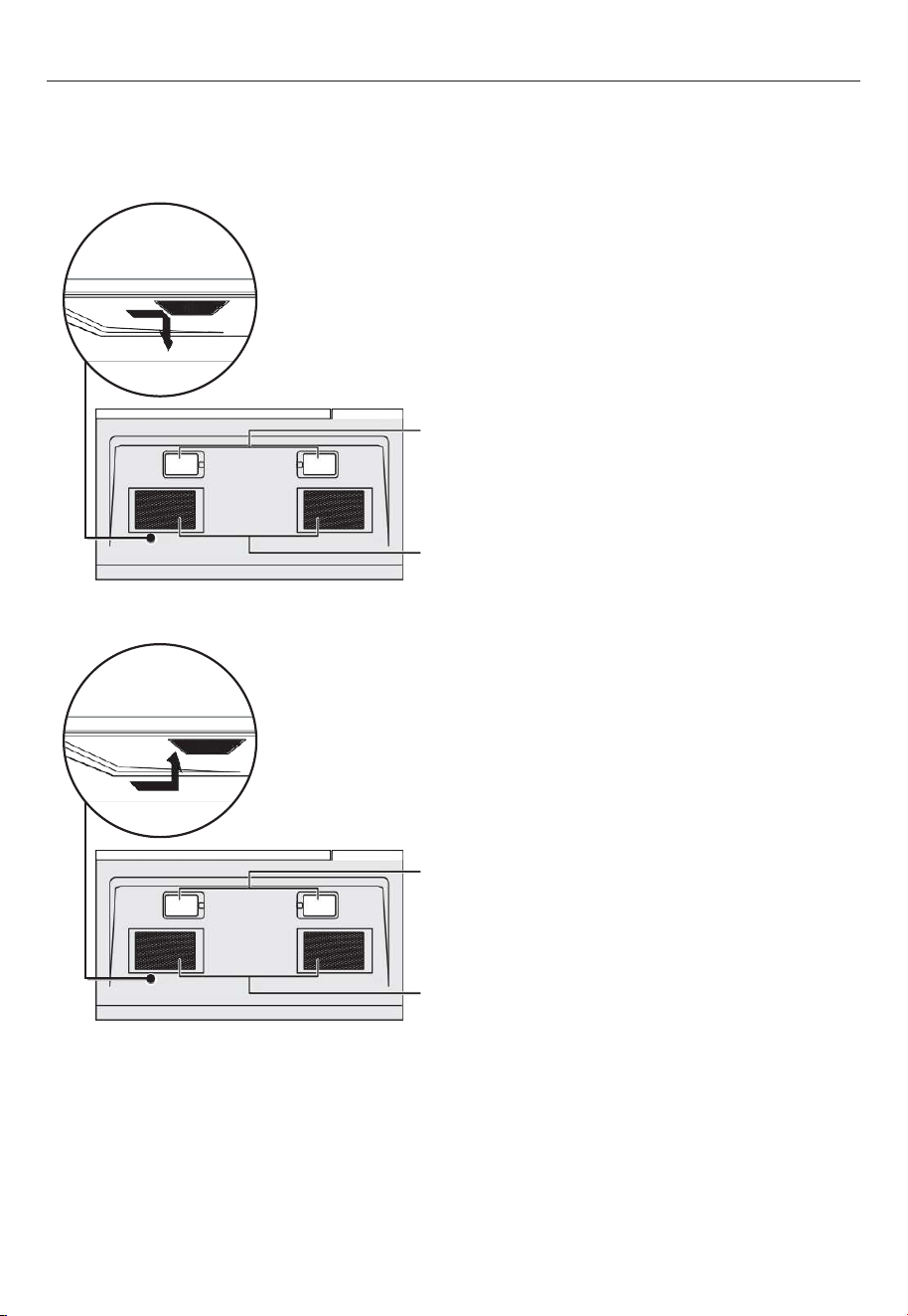
The exhaust filters should be removed and cleaned about once a month. CAUTION : Do not
operate the oven hood without the filters properly in place.
1. To remove the exhaust filters,
slide the filter toward the back
of the microwave, then pull it
downward while sliding it out
of the side slot. Repeat for the
second filter.
2. Soak the ventilation
filters in hot water using a
mild detergent or wash in a
dishwasher. Rinse well and
shake to dry. Do not use
ammonia. The aluminum on the
filter will corrode and darken.
3. To reinstall the exhaust filter,
slide it into the side slot, then
push up and toward the front
of the microwave to secure it.
Repeat for the second filter.
Surface
lights
Surface
lights
Ventillation
filters
Ventillation
filters
20
CLEANING AND MAINTENANCE
Replacing the charcoal filter
The charcoal filter is used in non-vented, recirculated installations. The filter should be
changed every 6 to 12 months depending on use.
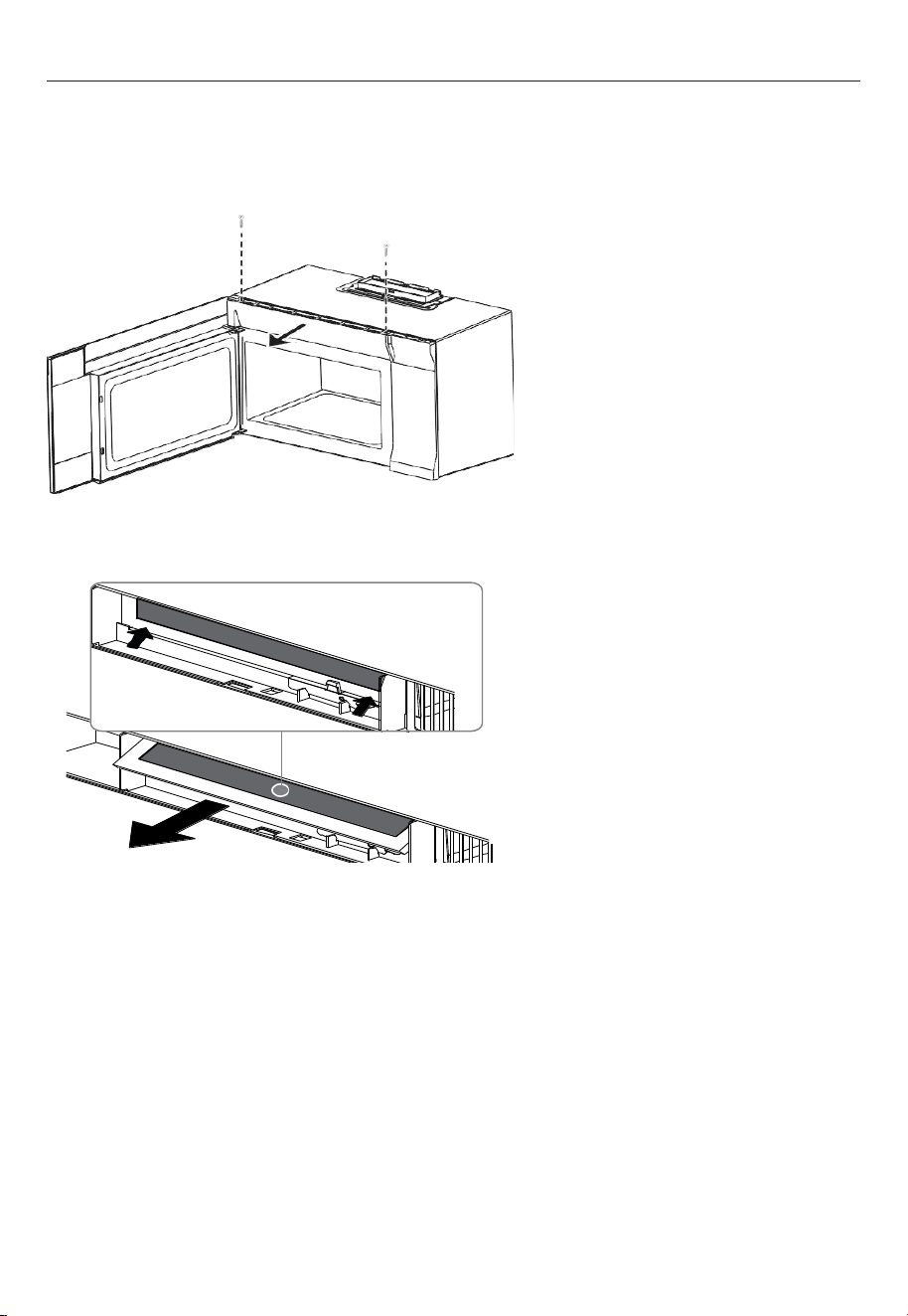
1. Unplug the microwave oven
or turn off power at the main
circuit breaker.
2. Remove the vent grill screws.
3. Pull the vent grill away from
the unit.
4. Remove the charcoal filter
by pushing it inwards, then
lift up and pull it out of the
microwave.
5. Insert the new charcoal filter,
close the vent grill, and secure
with the vent grill screws.
6. Plug the microwave back in
or turn the power back on at
the main circuit breaker.
21
CLEANING AND MAINTENANCE
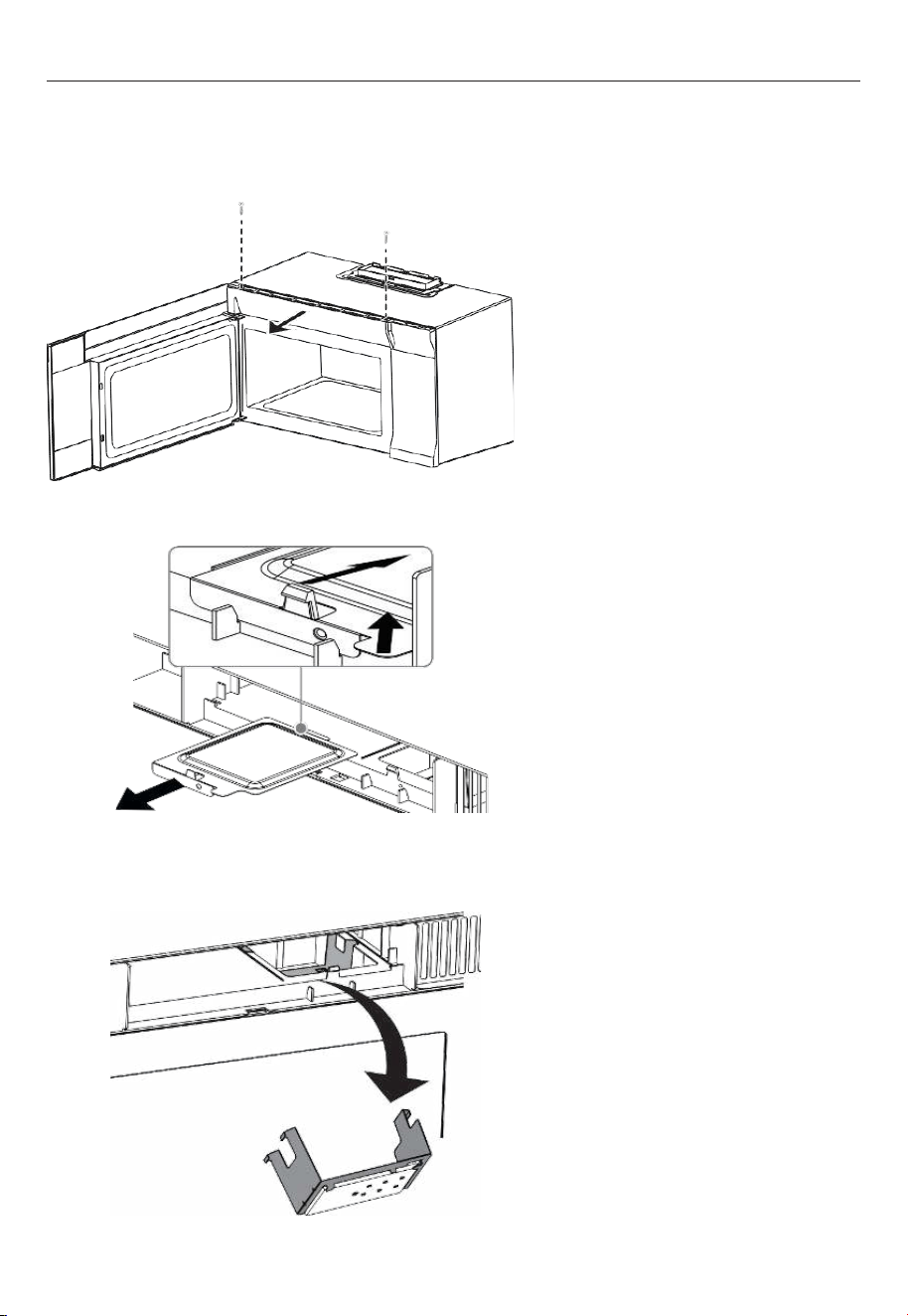
Surface light (external)
The exhaust filters should be removed and cleaned about once a month. CAUTION : Do not
operate the oven hood without the filters properly in place.
1. Unplug the microwave oven
or turn off power at the main
circuit breaker.
2. Remove the light cover
screws under the microwave.
3. Remove the old light bulbs
and replace with new 1.2W LED
lights.
4. Reinstall the light cover
screws to secure the covers.
5. Plug the microwave back in
or turn the power back on at
the main circuit breaker.
22
CLEANING AND MAINTENANCE
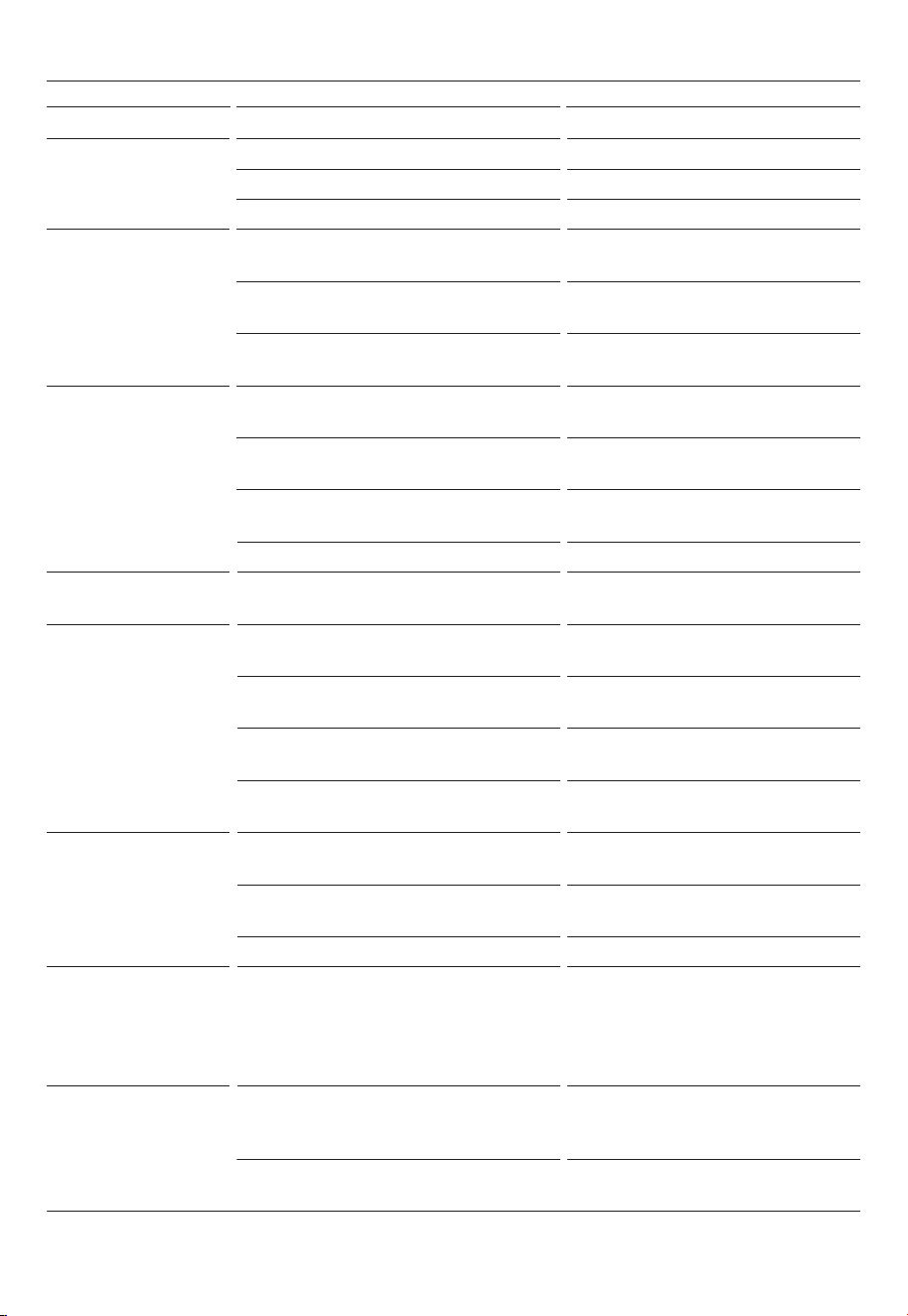
Surface light (internal)
The exhaust filters should be removed and cleaned about once a month. CAUTION : Do not
operate the oven hood without the filters properly in place.
1. Unplug the microwave oven
or turn off power at the main
circuit breaker.
2. Remove the vent grill screws.
3. Pull the vent grill away from
the unit.
4. Remove the charcoal filter
by pushing it inwards, then
lift up and pull it out of the
microwave.
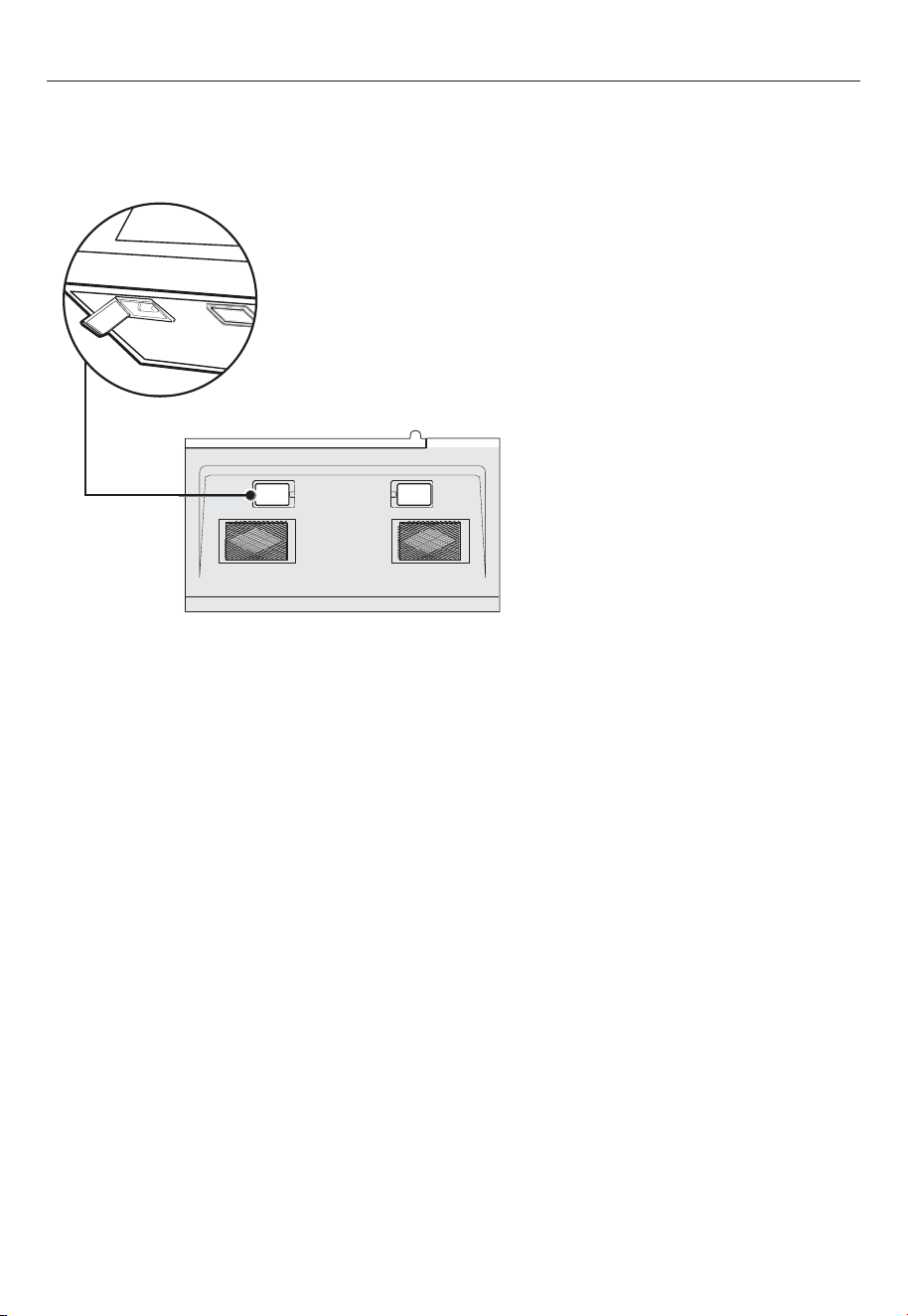
5. Push the tab to release the
light cover and carefully pull it
up from the front edge.
6. Remove the LED module and
replace only with an approved
1.2 watt LED bulb.
7. Carefully push the light cover
back into place.
8. Replace the charcoal filter.
Push the vent grill back into
place (engaging both the
bottom and top tabs) and
replace the vent grill mounting
screws.
23
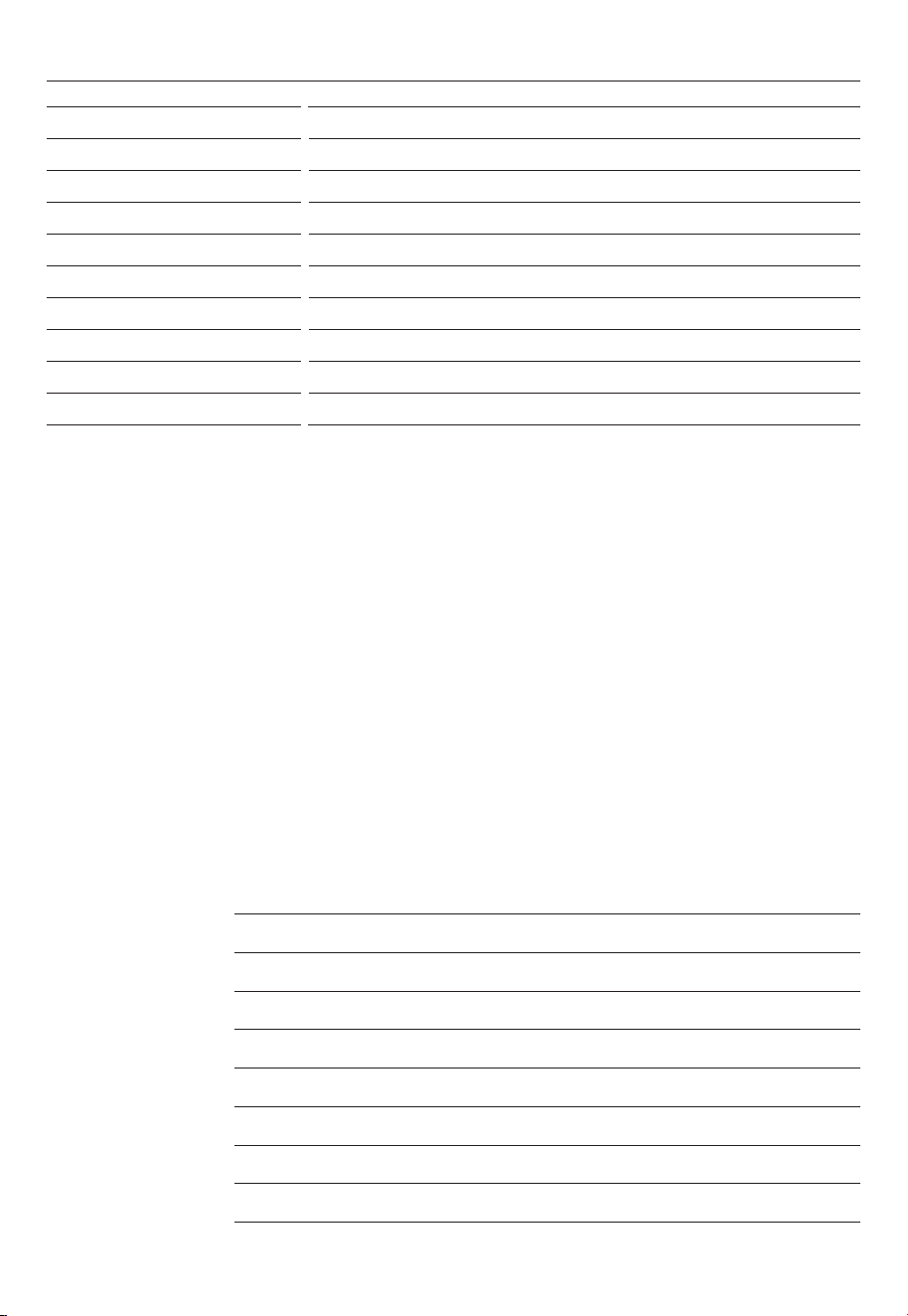
PROBLEM POSSIBLE CAUSE POSSIBLE SOLUTION
Microwave will not
start
The electrical cord is not plugged in. Plug in the electrical cord.
The door is open. Close the door and try again.
The wrong operation is set. Check the instructions and try again.
Arcing or sparking in
the microwave
You are attempting to use incorrect
materials in the microwave.
Use only microwave-safe materials.
You are attempting to use the
microwave when it’s empty.
Do not operate the microwave when
it’s empty.
Spilled food remains in the microwave. Clean the microwave with a wet
towel.
Unevenly cooked
foods
You are attempting to use incorrect
materials in the microwave.
Use only microwave-safe materials.
The food is not defrosted completely. Defrost the food completely before
attempting to cook it.
The cooking time or power level is not
adequate to cook the food.
Use the correct cooking time and
power level.
The food is not turned or stirred. Turn or stir the food.
Overcooked foods The cooking time or power level is not
adequate to cook the food.
Use the correct cooking time and
power level.
Undercooked foods You are attempting to use incorrect
materials in the microwave.
Use only microwave-safe materials.
The food is not defrosted completely. Defrost the food completely before
attempting to cook it.
The cooking time or power level is not
adequate to cook the food.
Use the correct cooking time and
power level.
The microwave ventilation ports are
blocked or restricted.
Make sure that the ventilation ports
are not blocked or restricted.
Improper defrosting You are attempting to use incorrect
materials in the microwave.
Use only microwave-safe materials.
The cooking time or power level is not
adequate to cook the food.
Use the correct cooking time and
power level.
The food is not turned or stirred. Turn or stir the food.
The vent fan turns on
by itself
The fan automatically starts when heat
rises from range surface units or burners
and stays on until the temperature
decreases. This protects the microwave
from excessive temperatures.
Your microwave is operating
normally. The fan cannot be turned
off manually during this time.
The turntable will not
move
The turntable is misaligned. Make sure that the turntable is
properly aligned on the ring and
shaft.
The turntable is turned off. Press TURNTABLE ON/OFF to turn
your turntable back on.
TROUBLESHOOTING
24
Complete and keep for safe reference:
Model
Serial no.
Purchase date
Purchaser
Dealer address
Installer’s name
Installer’s signature
Installation company
Installation date
SPECIFICATIONS
Rated voltage
120 VAC, 60Hz
Rated input power 1500 W
Rated output power 1000 W
Microwave capacity 1.6 cu ft
Turntable diameter 13.5” (345mm)
External dim (WxHxD) 29 7/8” x 16 1/2" x 15 9/16" (759mm x 419mm x 395mm)
Internal dim (WxHxD) 20 1/4” x 9 1/4” x 14 13/32” (514mm x 235mm x 366mm)
Certifications UL approved
Power cord length 3.3 ft (1m)
Net weight 56lbs (25.4kg)

432572B 10.24
FISHERPAYKEL.COM
© Fisher & Paykel Appliances 2024. All rights reserved.
The models shown in this guide may not be available in all markets
and are subject to change at any time.
The product specifications in this guide apply to the specific products and
models described at the date of issue. Under our policy of continuous product
improvement, these specifications may change at any time.
For current details about model and specification availability in your country,
please go to our website or contact your local Fisher&Paykel dealer.
