
Technical Support and E-Warranty Certicate www.vevor.com/support
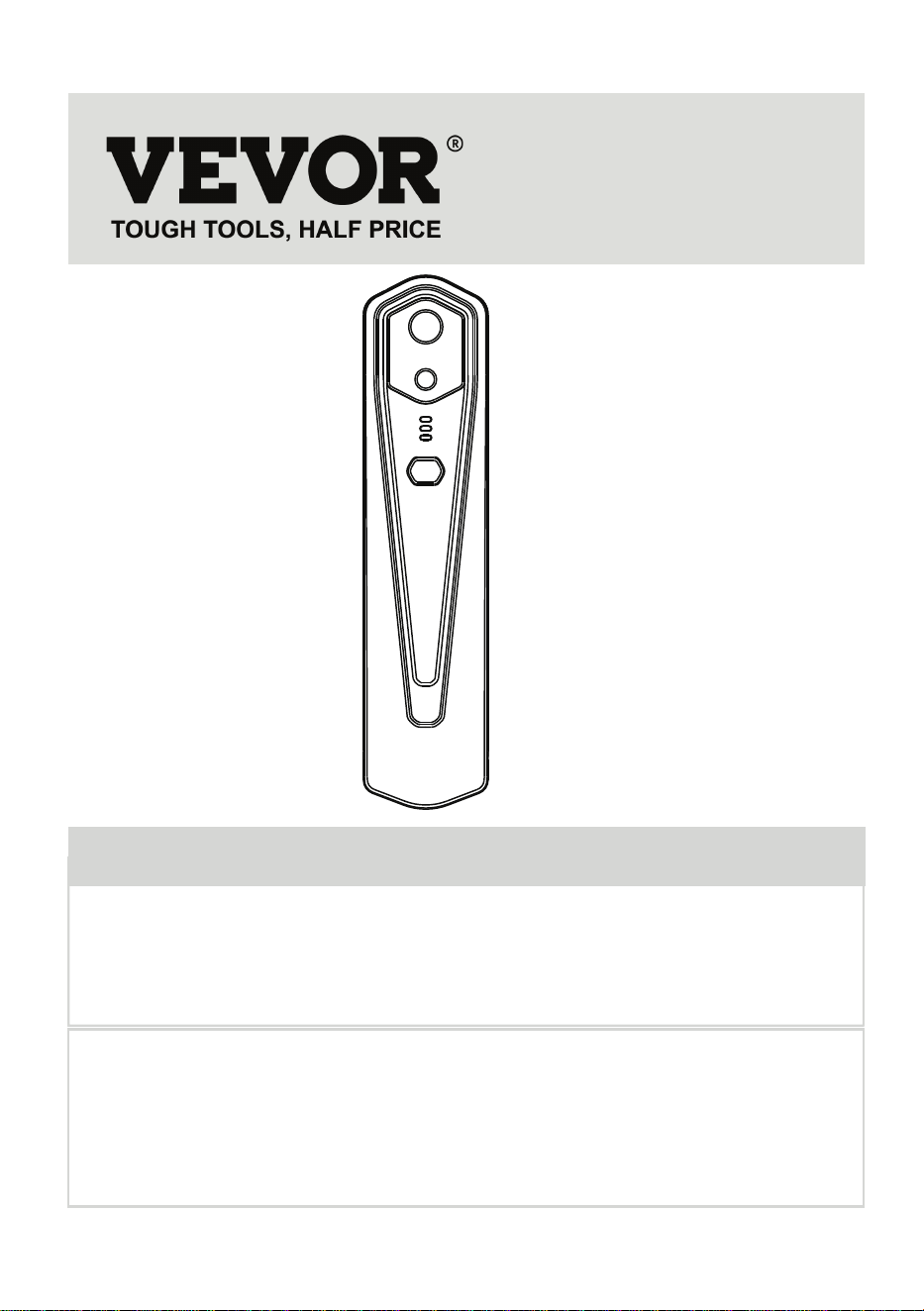
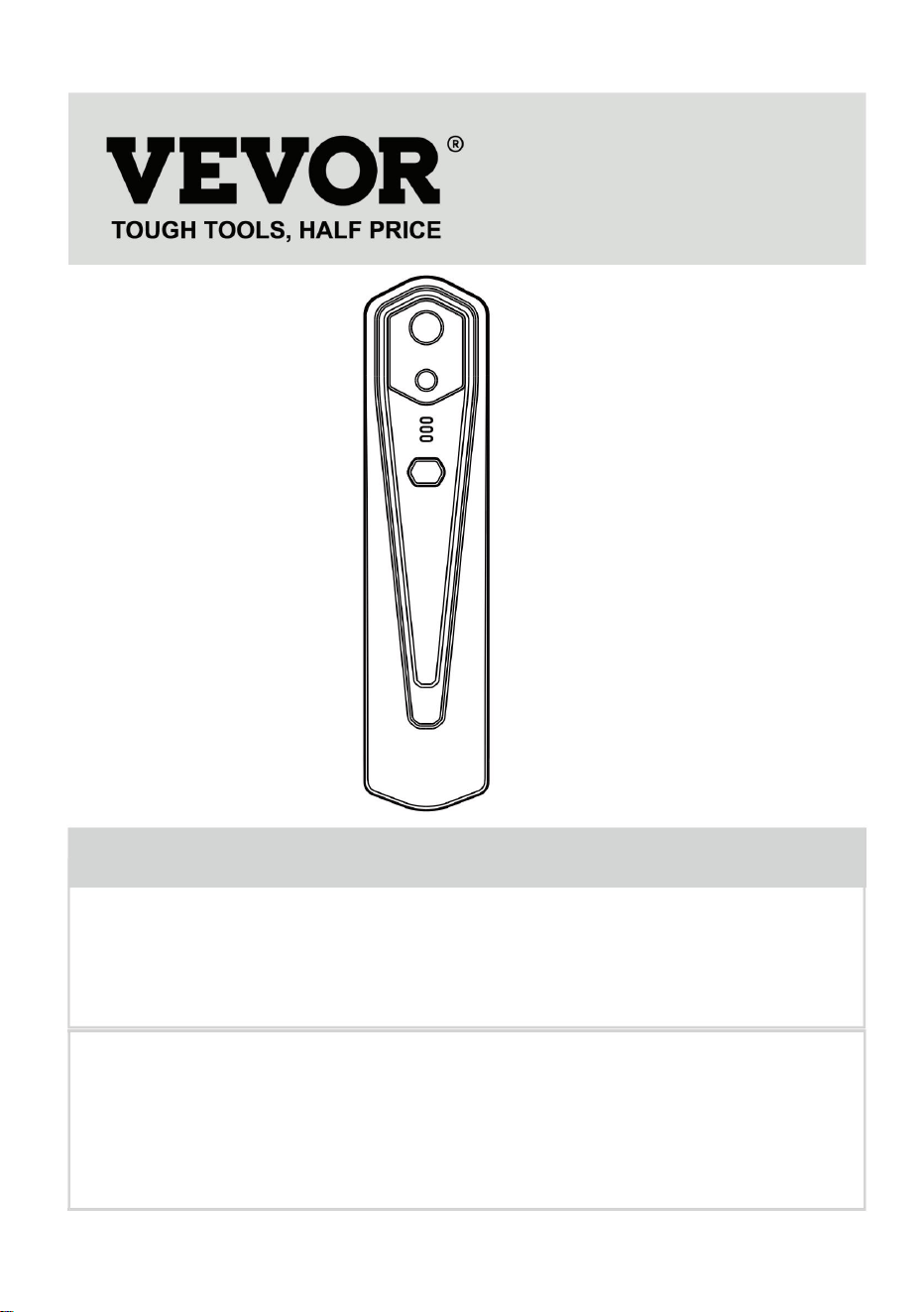
Thermal Image Camera
MODEL: HT-W01
We continue to be committed to provide you tools with competitive price.
"Save Half", "Half Price" or any other similar expressions used by us only represents an
estimate of savings you might benefit from buying certain tools with us compared to the major
top brands and does not necessarily mean to cover all categories of tools offered by us.
You are kindly reminded to verify carefully when you are placing an order with us if you
are actually saving half in comparison with the top major brands.
Have product questions? Need technical support? Please feel free to
contact us:
Technical Support and E-Warranty Certificate
www.vevor.com/support
NEED HELP? CONTACT US!
This is the ori ginal instruction, please read all manual in structions carefully
before operatin g. VEVOR reserv es a clear interpretation of our user manual.
The appearance of the product shall be subject to the product you received.
Please forgive us that we won't inform you again if there are any technology
or software up dates on our product.
MODEL:
Thermal Image Camera
HT-W01
1

1
1
1
2
3
3
3
4
4
4
4
4
6
6
7
7
8
10
12
12
13
Content
1. Cautions
2. Product Summary
2.1 Application Scenes
2.2 Major Functions
3. Product Structures
3.1 Structure Introduction
3.2 Description of Indicators
4. Product Application
4.1 Equipment Power On
4.2 Equipment Power Off
4.3 Equipment Charging
4.4 Equipment Connection
5. Software Operation
5.1 Software Interface
5.2 Library, Photography and Video Recording
5.3 Shutter Refreshing
5.4 Temperature Measurement Analysis
5.5 Color Palette
5.6 Temperature Measurement Setting
5.7 Setting
6. Technical Parameters
2

1. Precautions
Please read all the following information before using your device
to protect you and others from injury or damage to your device.
(1) Do not expose the product in the sun and other high-intensity
radiation sources
(2) Do not touch or collide the detector window and lens with
hands or other objects;
(3) Do not touch the device and USB interface with wet hands;
(4) Do not scrub your equipment with thinner;
(5) Please pay attention to preventing static electricity;
(6) Do not disassemble the equipment. If there is any fault,
please contact our company for repair by professional personnel.
2. Product Summary
2.1 Application scenes
To use this mobile phone infrared thermal imager, you need to
download and install the mobile phone infrared thermal imager
“HT-W01 Wireless WIFI Mobile Thermal Imager” APP. Through
this APP, you can achieve infrared observation and tempera-
ture measurement functions.
3

2.2 Major functions
The following functions are to be achieved:
(1) Open the applied software for mobile phone infrared
thermal imager to achieve infrared observation and measure-
ment;
(2) to perform infrared temperature measurement, and
temperature analysis;
(3) shooting and video recording;
(4) motion control and parameter setting for your mobile
phone infrared thermal imager.
Scan QR code to download the App
4
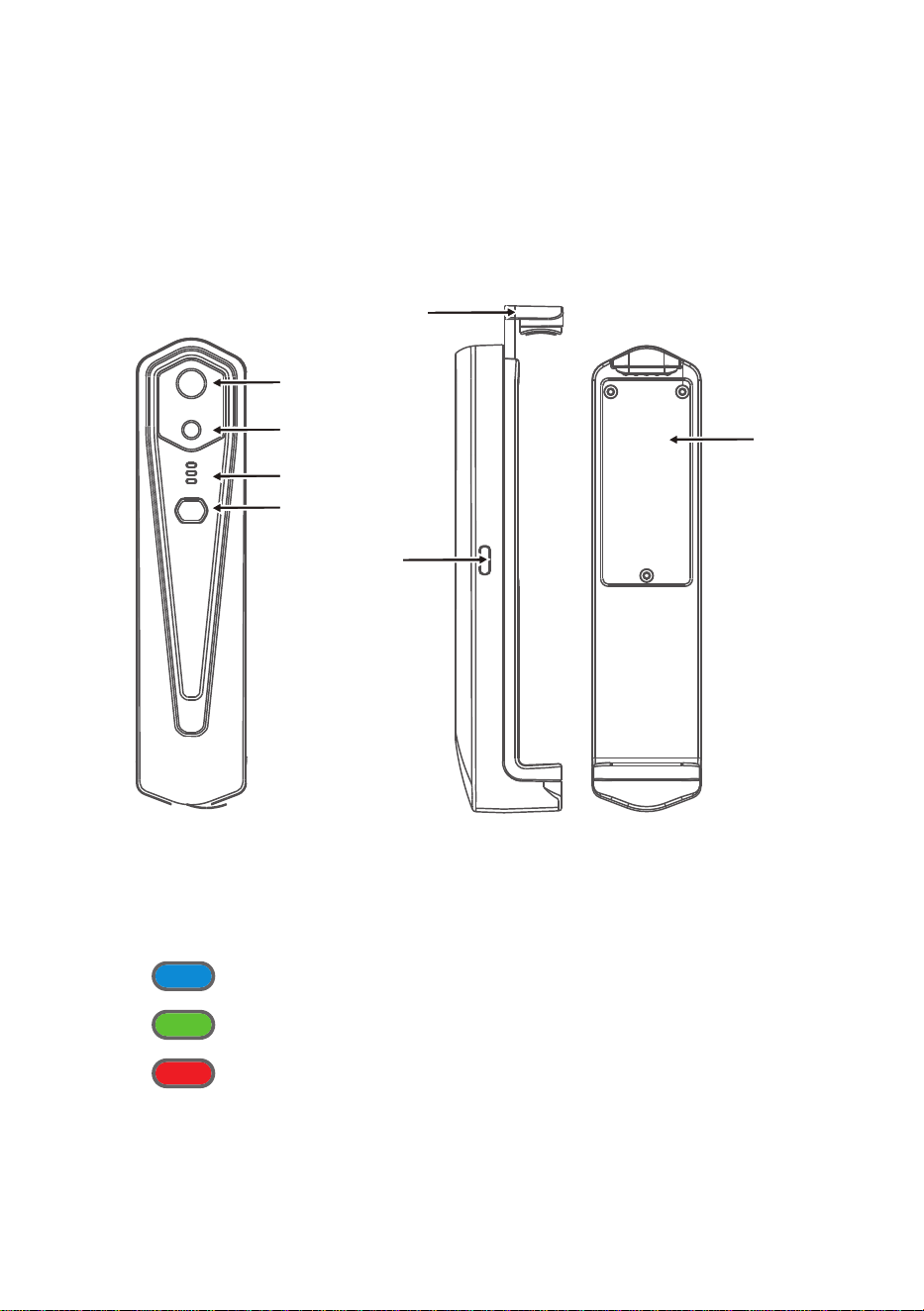
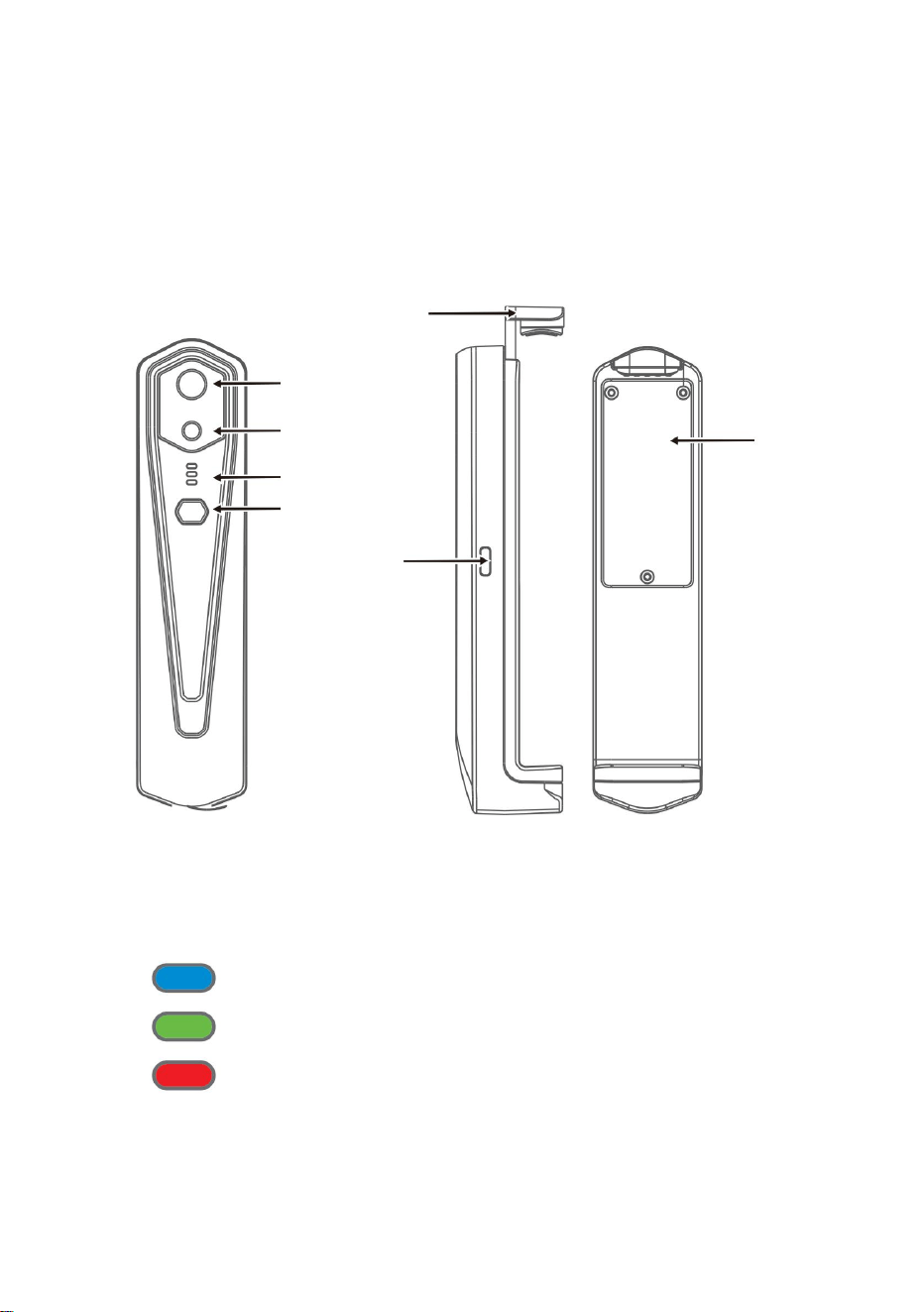
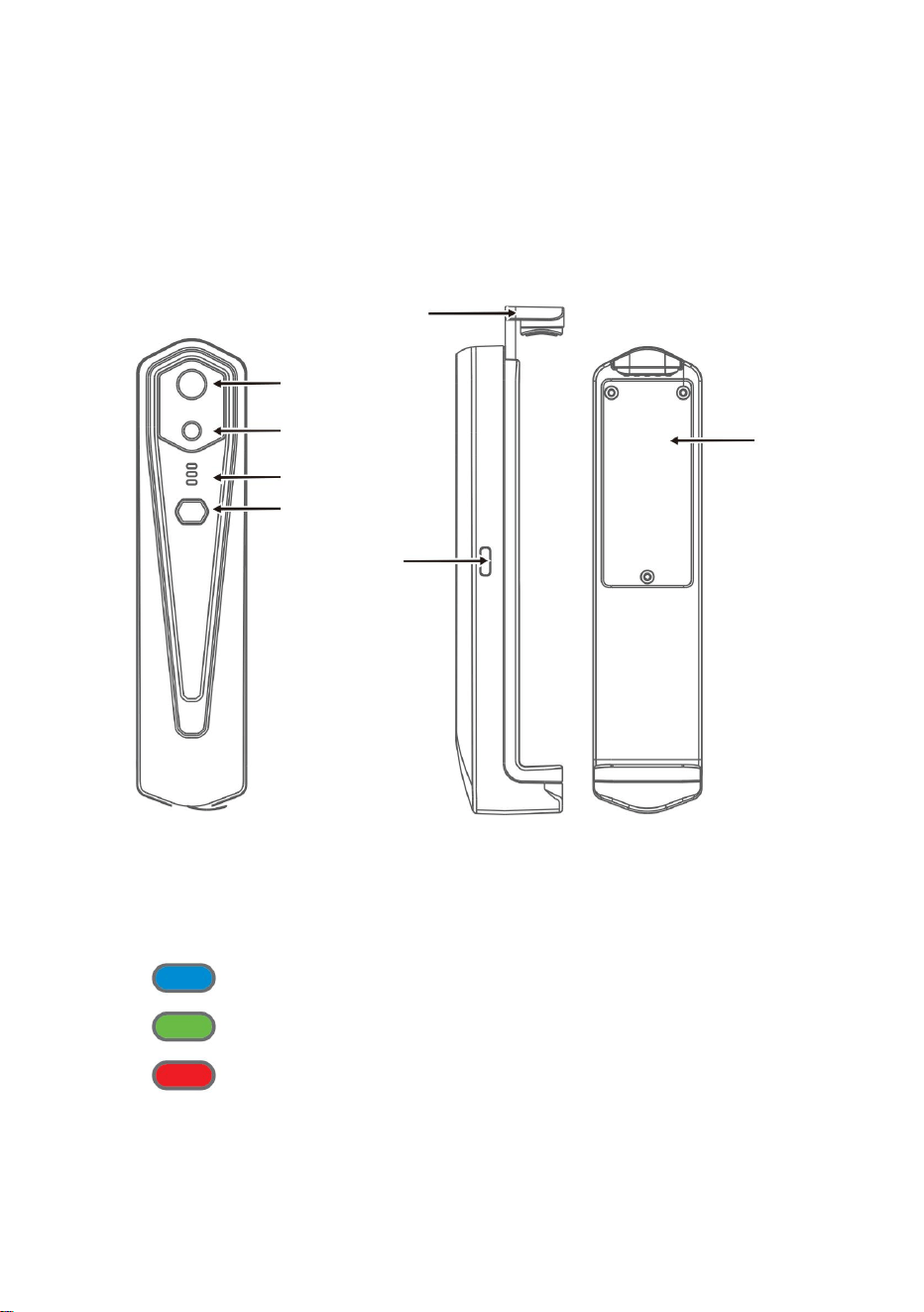
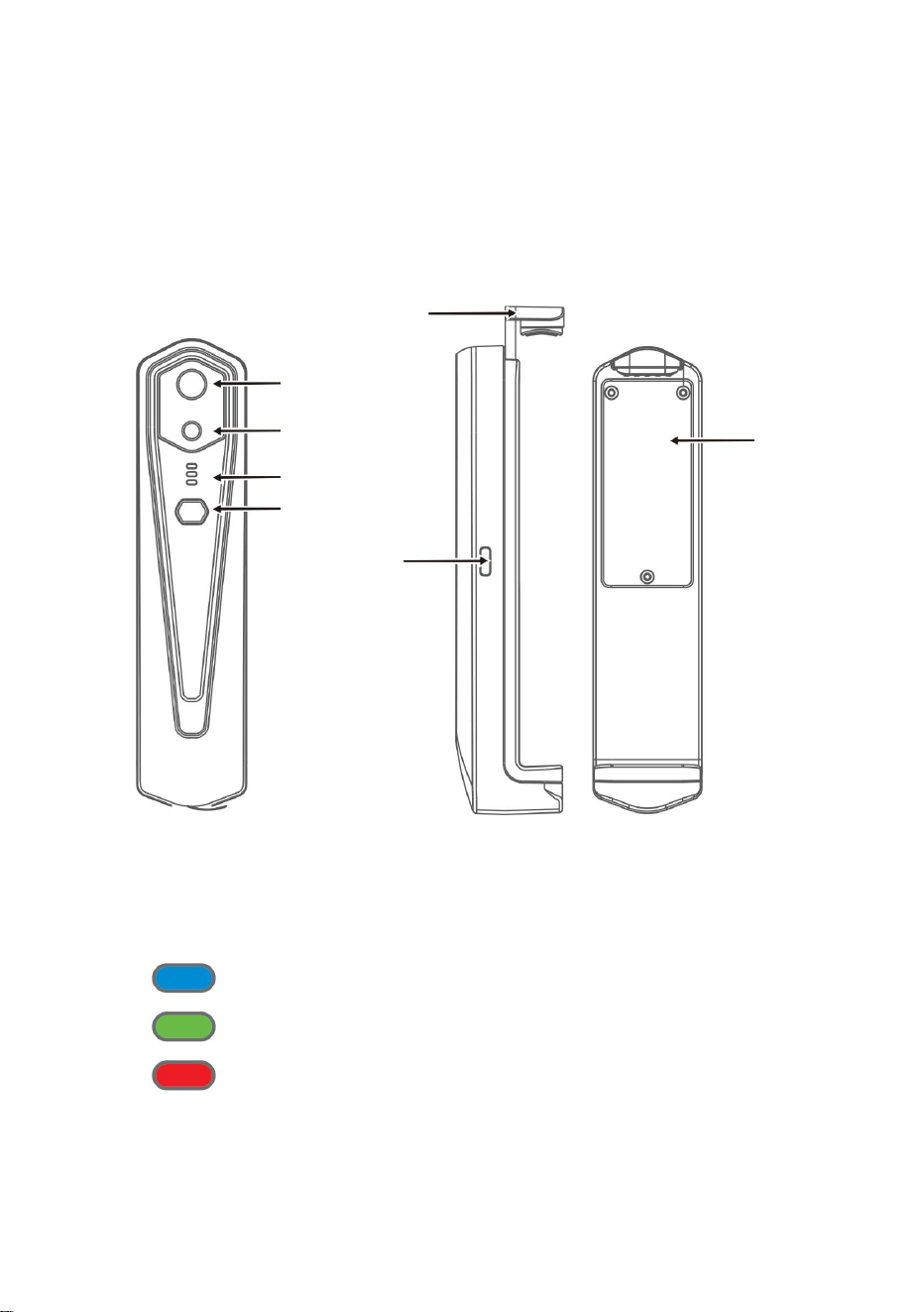
3.1 Structure introduction
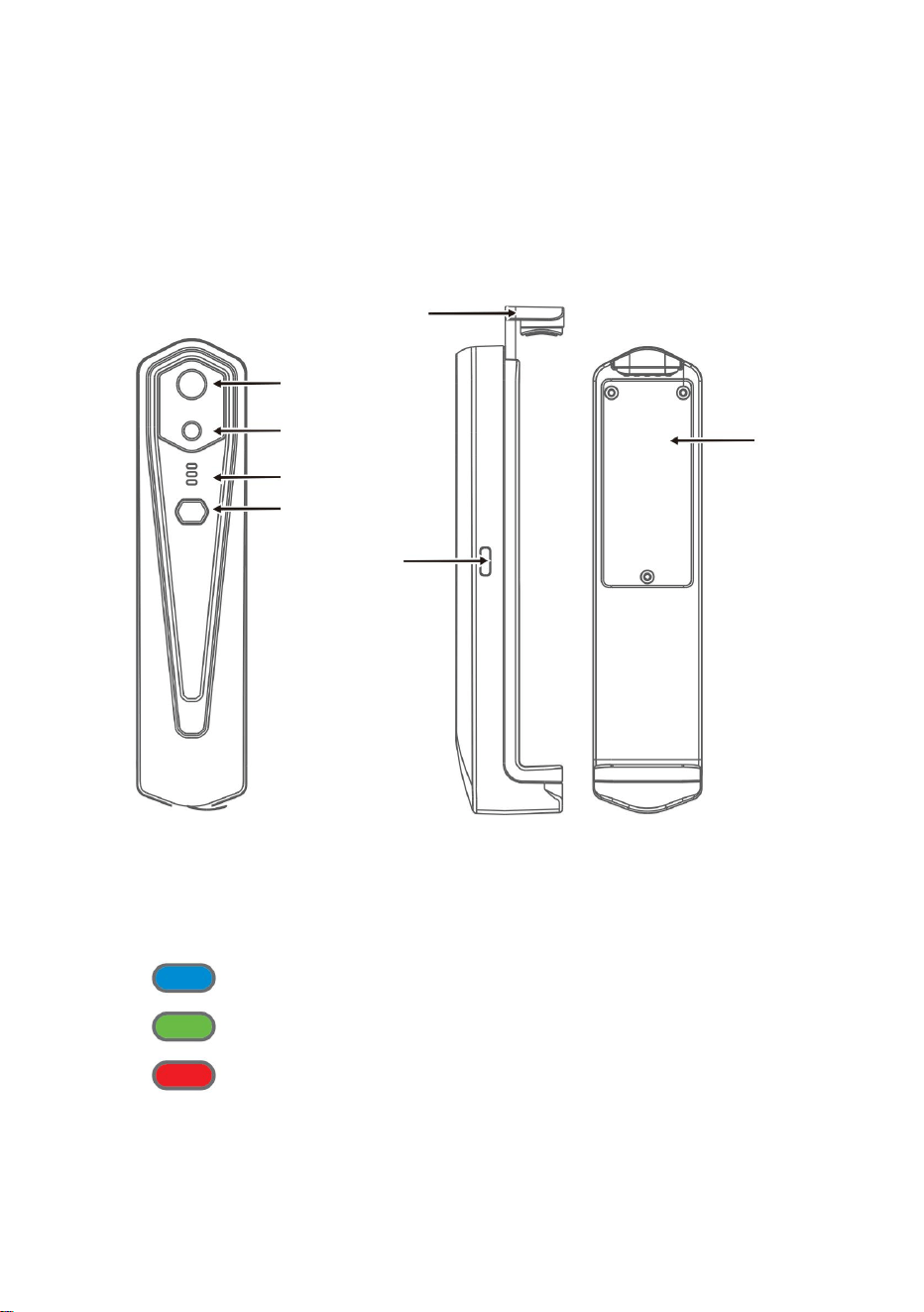
Type-c interface
Bar
Bottom cover
3. Product structures
Visible light
camera
Indicator
Power on/
off button
Infrared thermal
image sensor
3.2 Description of indicators
Status indicator: blue light
Power on indicator: green light
Charging indicator: red
5

4.1 Device power on
Long press the Power on/off button for 1 second, and the device is
powered on. The power on indicator is normally on.
After the device is powered on for 15 seconds, you can search WIFI
4.2 Device power off
Long press the power on/off button for more than 2 seconds, and all
indicators will be out.
Long press the power button for more than 6 seconds in the power
on state to for forcible power off, and all indicators will be out.
4.3 Device charging
Use TYPE-C interface data cords for charging. The charging indicator
is normally on. After it is fully charged, the charging indicator is not on.
4.4 Device connection
Connecting WIFI
(1) Open your mobile phone WIFI connection screen, and fine the
WIFI name prefixed with HT-W01-;
(2) Enter WIFI password 12345678 and connect it;
4. Product application
6

1. After WIFI connection is successful, and when the device is
disconnected, click to connect the device;
2. After successful connection, “ ” and “ ” will disappear;
● The device fails to connect your mobile phone, and the status
indicator flashes in a low frequency (on for 1s, and out for 1s)
● After the device connects your mobile phone, the status
indicator flashes in a high frequency (on for 0.5s, and out for 0.5s).
(3) After WIFI connection becomes successful, go to the APP, and
click on the “ ” button to start connecting the device.
Play button: After it is clicked, it starts to play images, and you
can perform related operations.
7
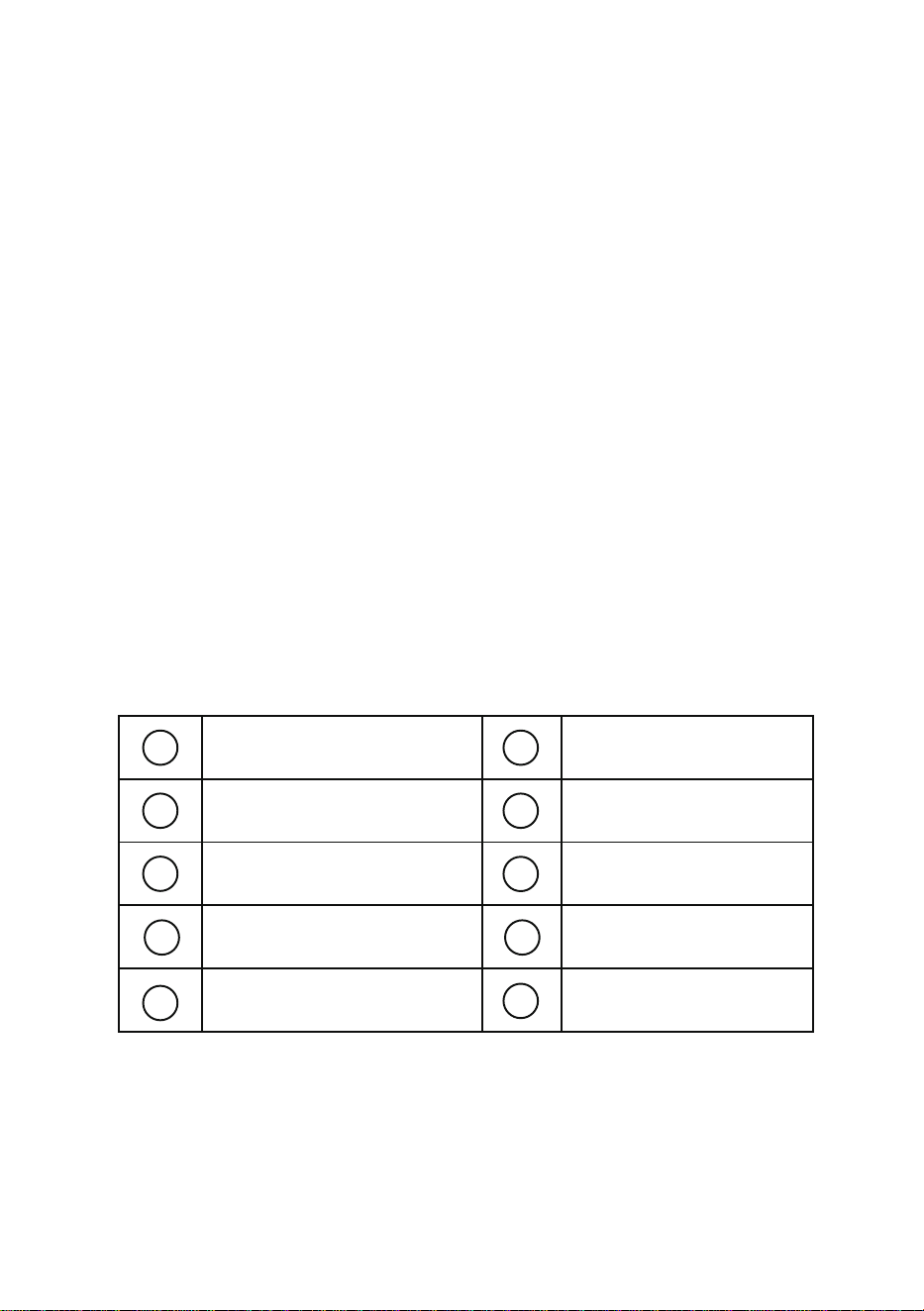
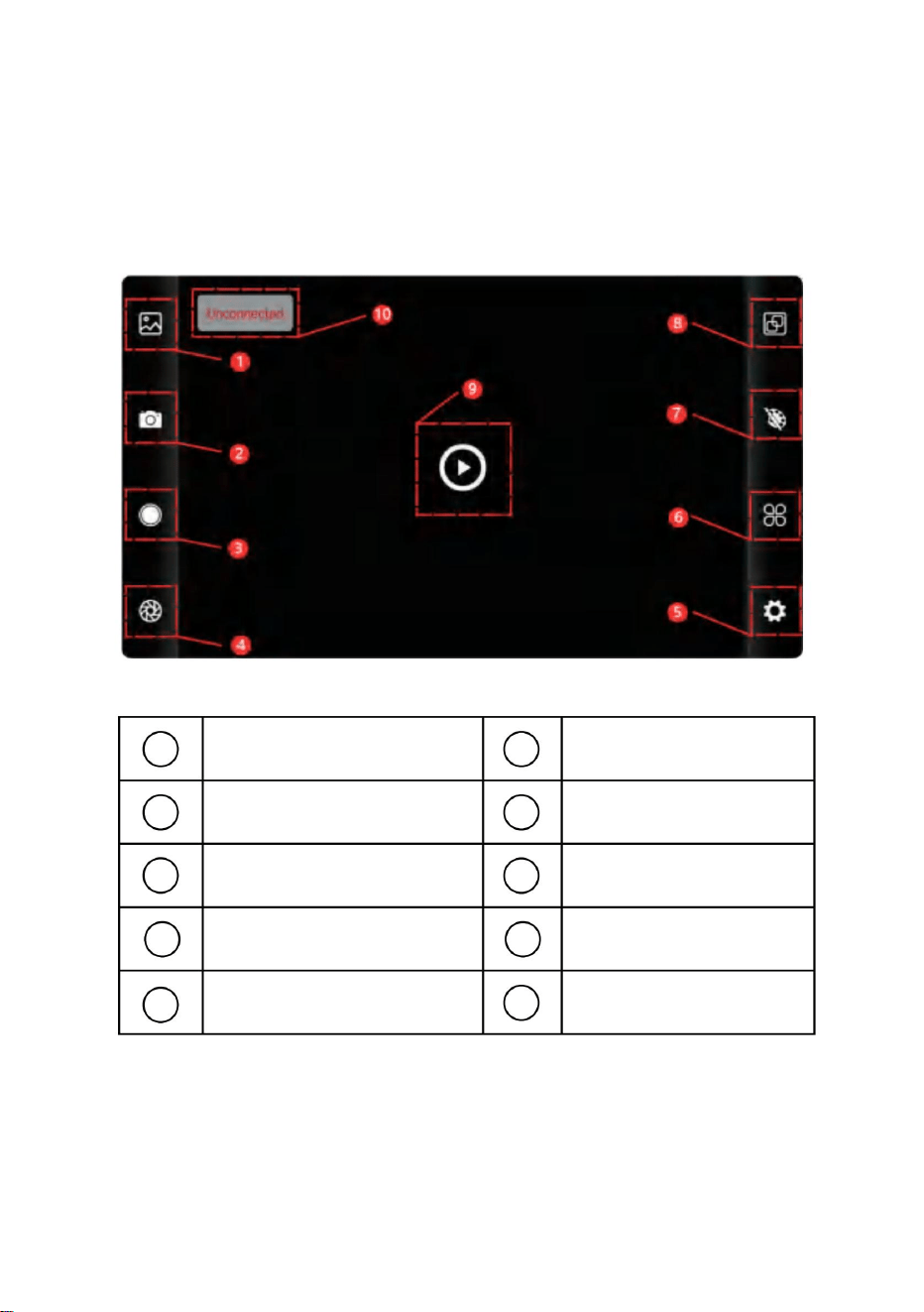
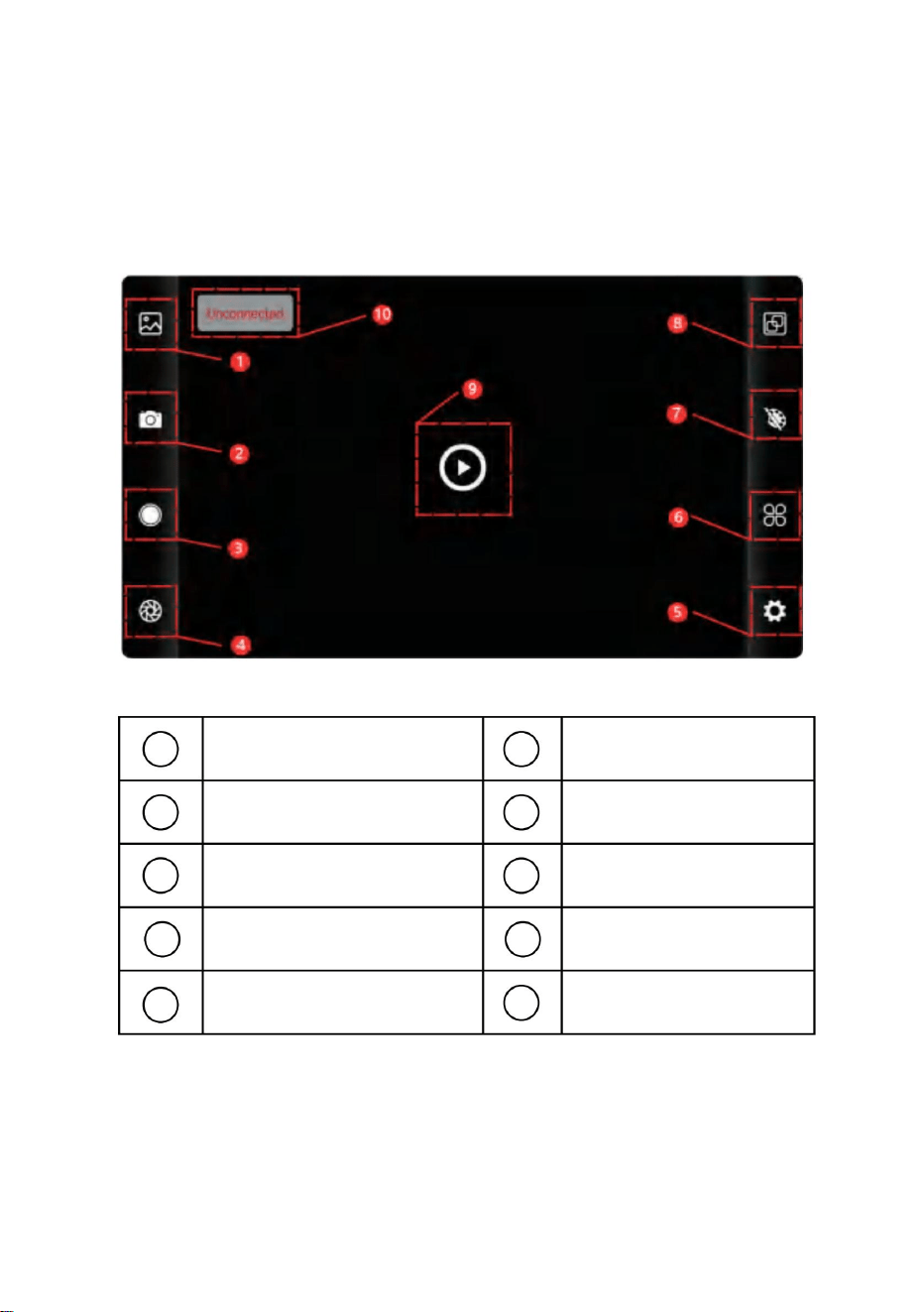
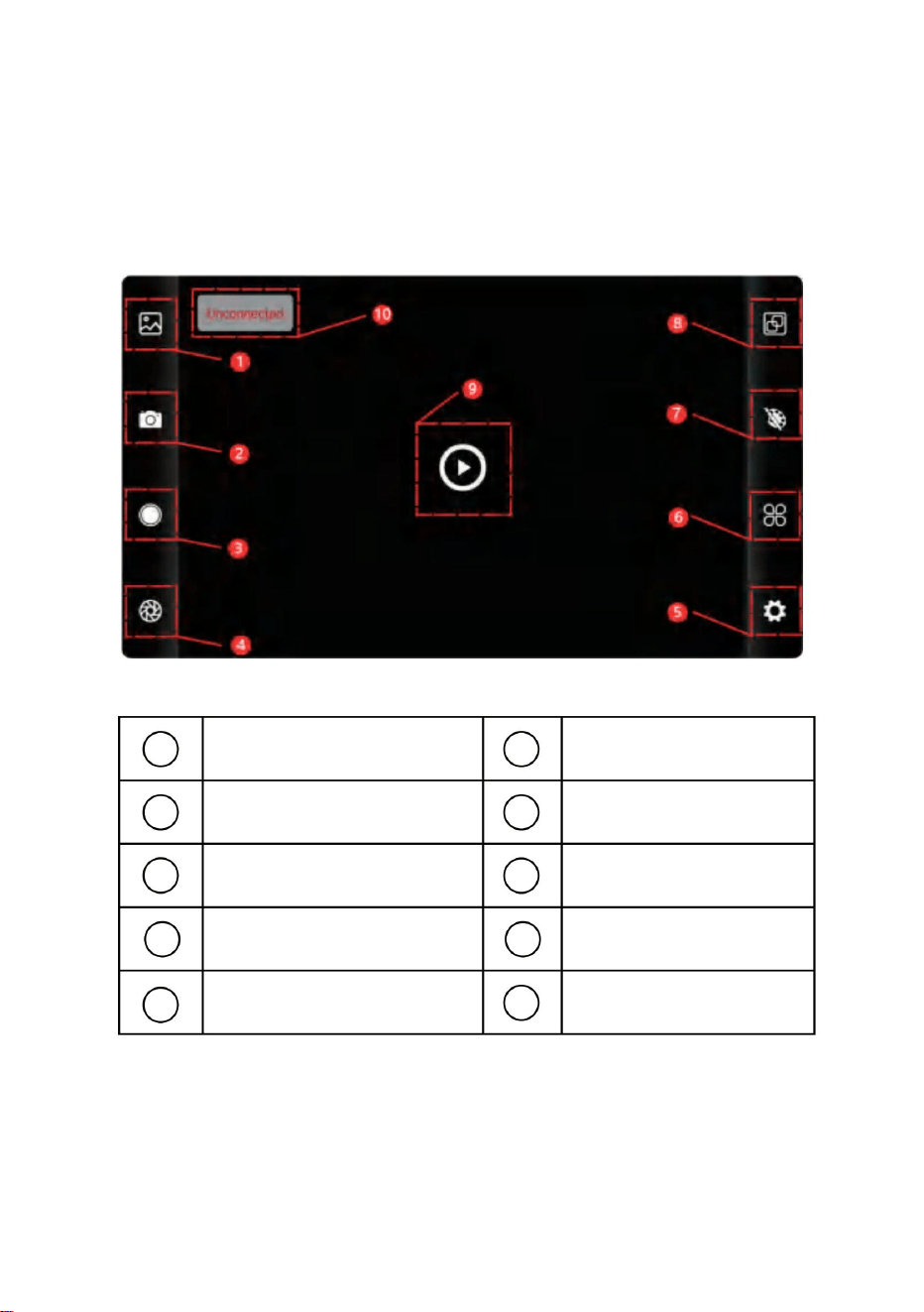
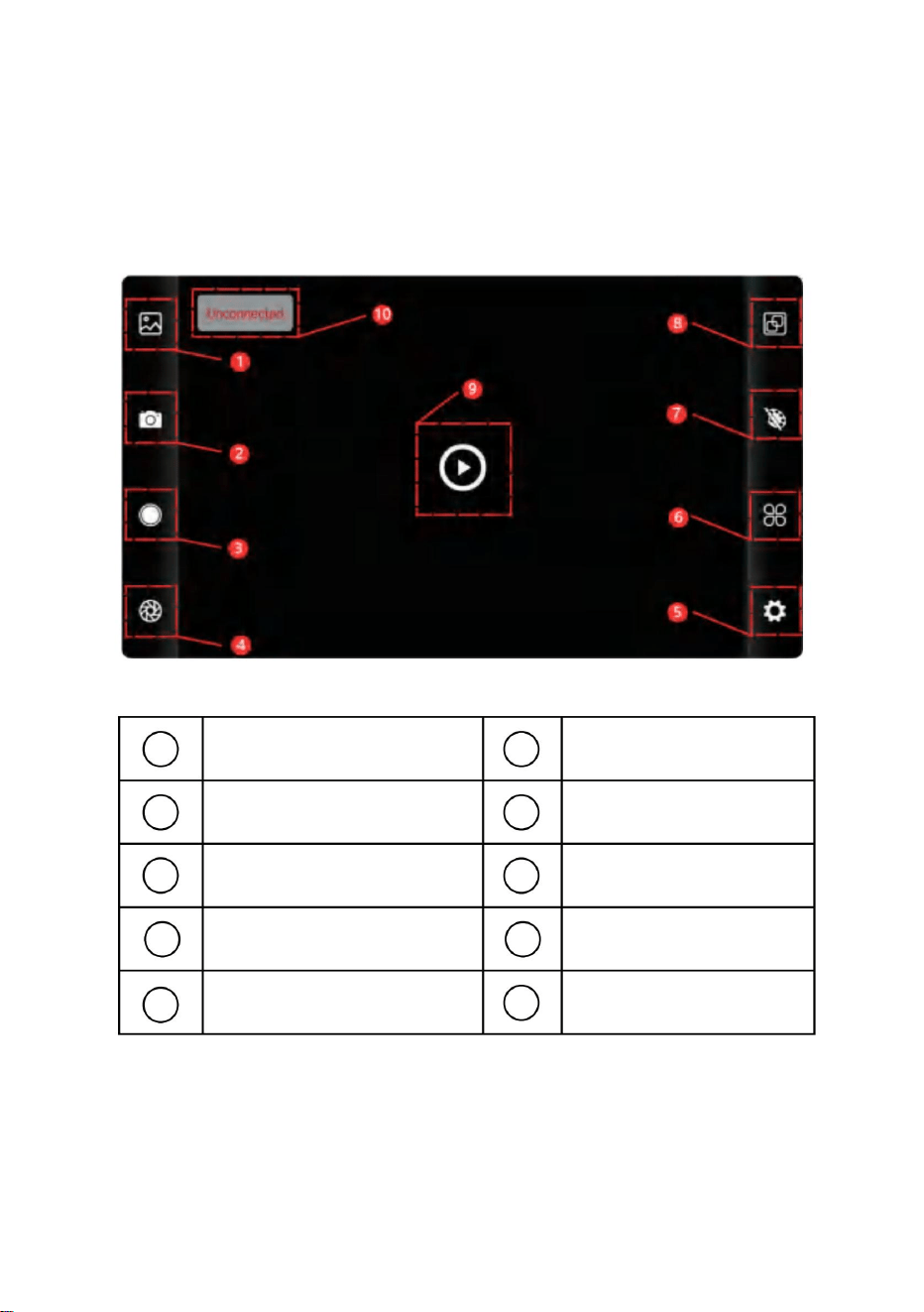
5.1 Software interface
1
2
3
4
5
6
7
8
9
10
Library button
Image capture button
Video recording button
Shutter refreshing button
Setting button
Temperature
setting button
Color palette
allocation button
Temperature
measurement button
Playback button
Status of device
failure to connect
5. Software operation
8
Enter the image list page
● Long press the image or click on the icon in the right upper corner
to be able to delete image files;
● Click on the image to preview single images, and you can preview
the previous/last image by sliding left/right;
● When you preview single images, open/close your two fingers to
zoom in/out image contents, and long press it to be able to view
detailed information on the images;
Enter the video list page
●Long press the image or click on the icon in the right upper corner
to be able to delete video files;
●Click on videos to play such video file;
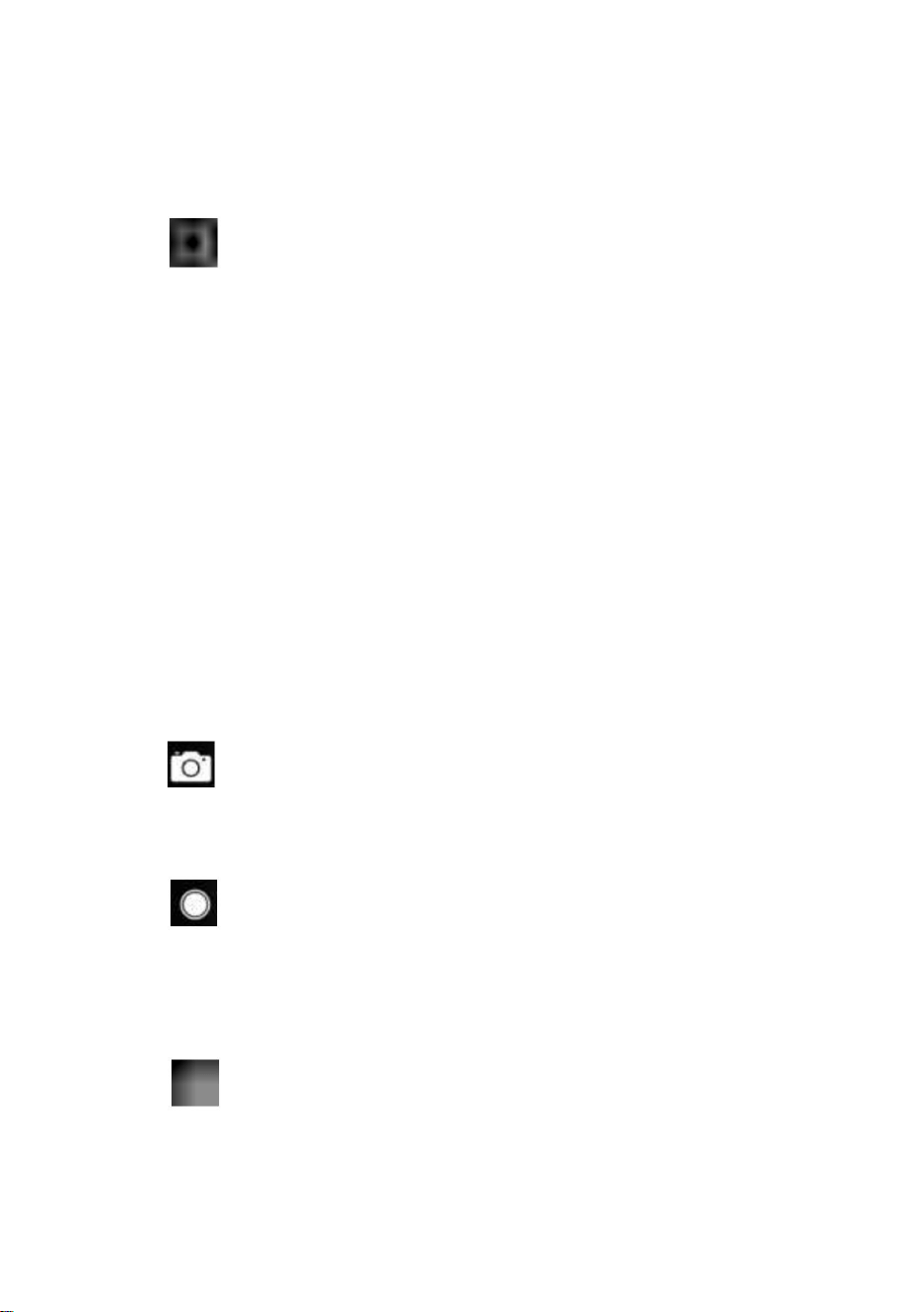
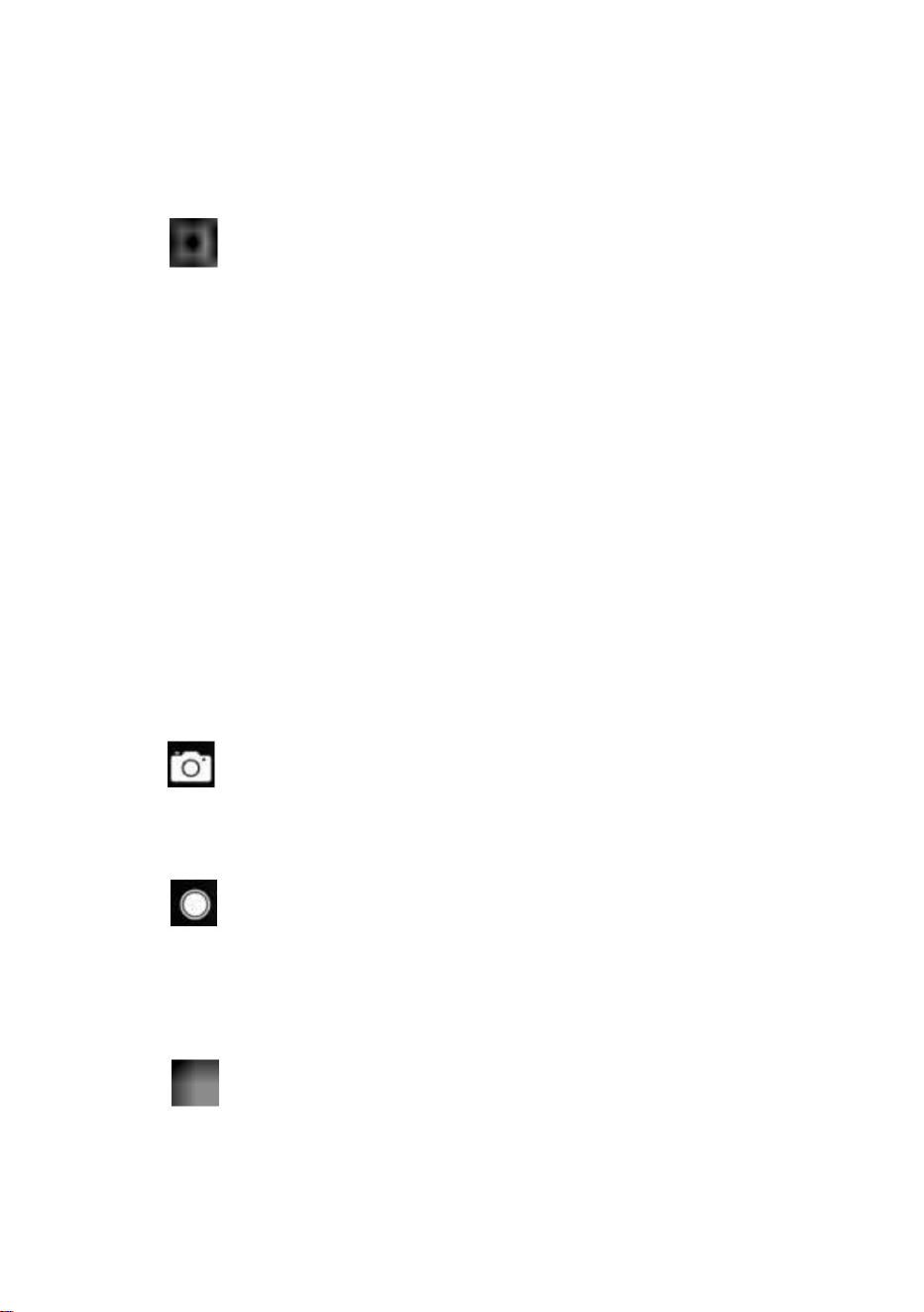
(2) “ ” shooting: to save the current screen;
Photo saving position: to open the images you require in the library,
and you can view the location of the image.
(4) “ ” video recording: Click on it to start video recording, and
click on it once again to end video recording; The position for saving
video recording is the same as that of an image.
5.3 Shutter refreshingimage.
“ ” shutter refreshing: Click on to refresh the baffle.
5.2 Library, shooting and video recording
(1) “ ” library: Click to view images and videos;
9

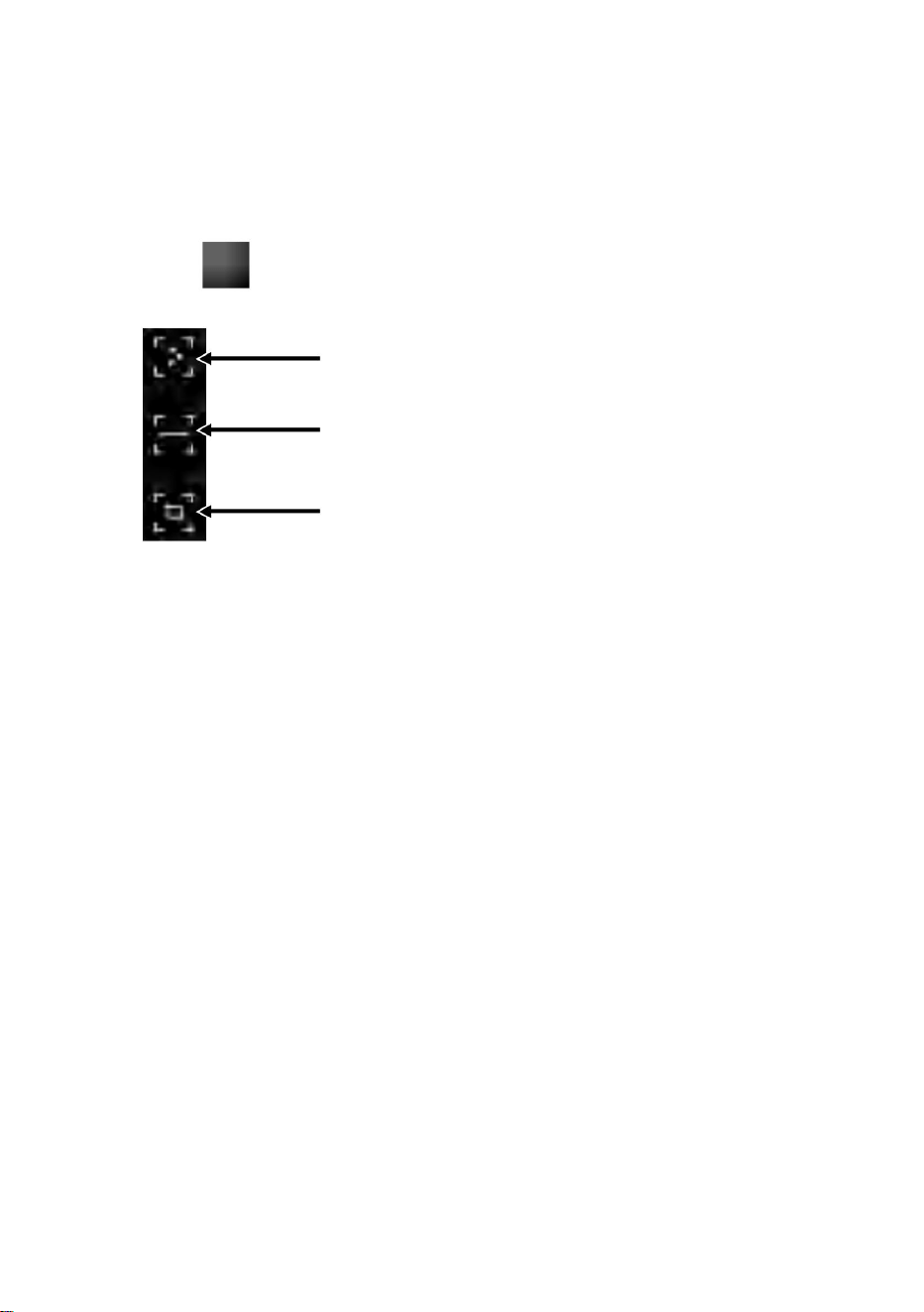
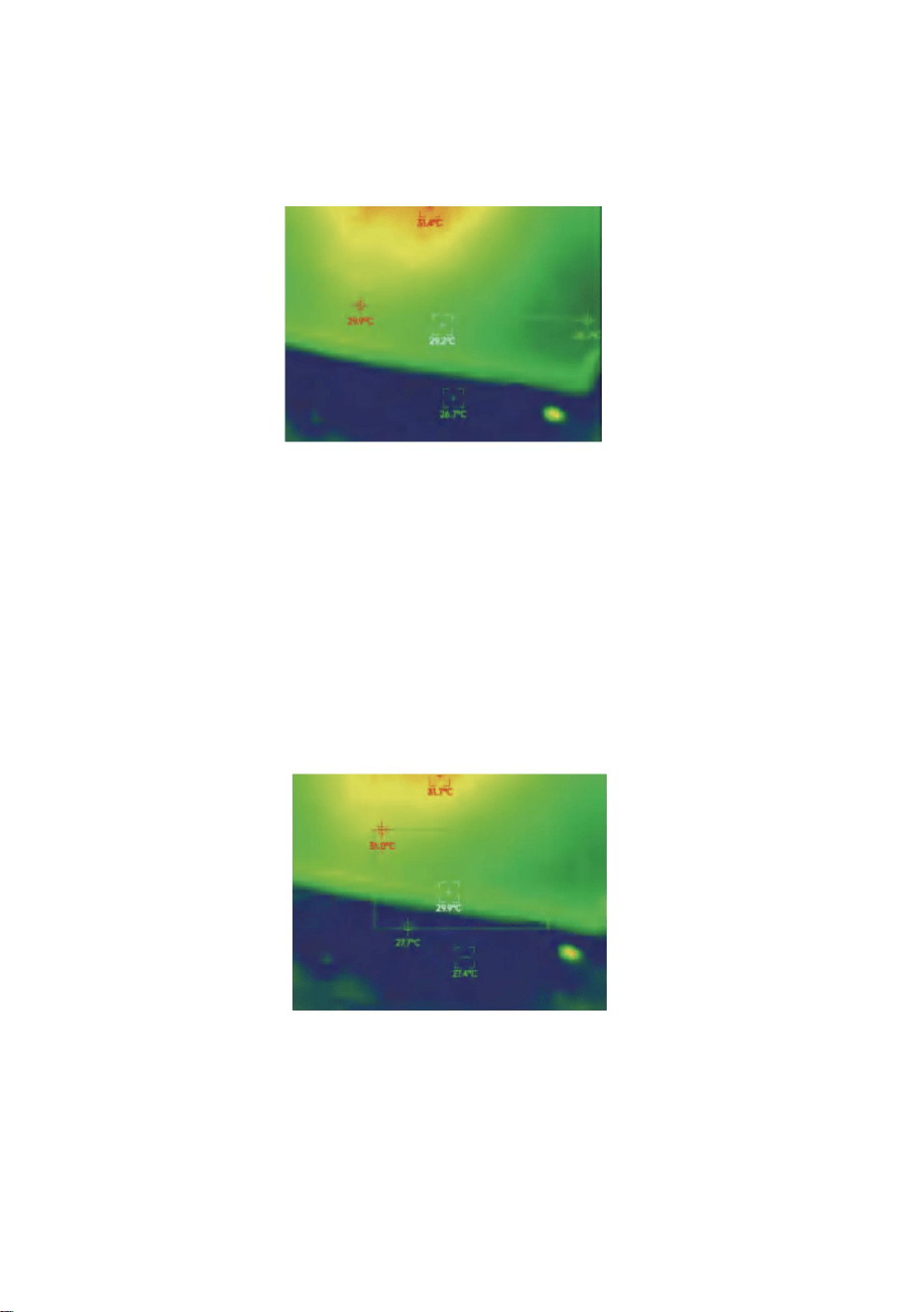
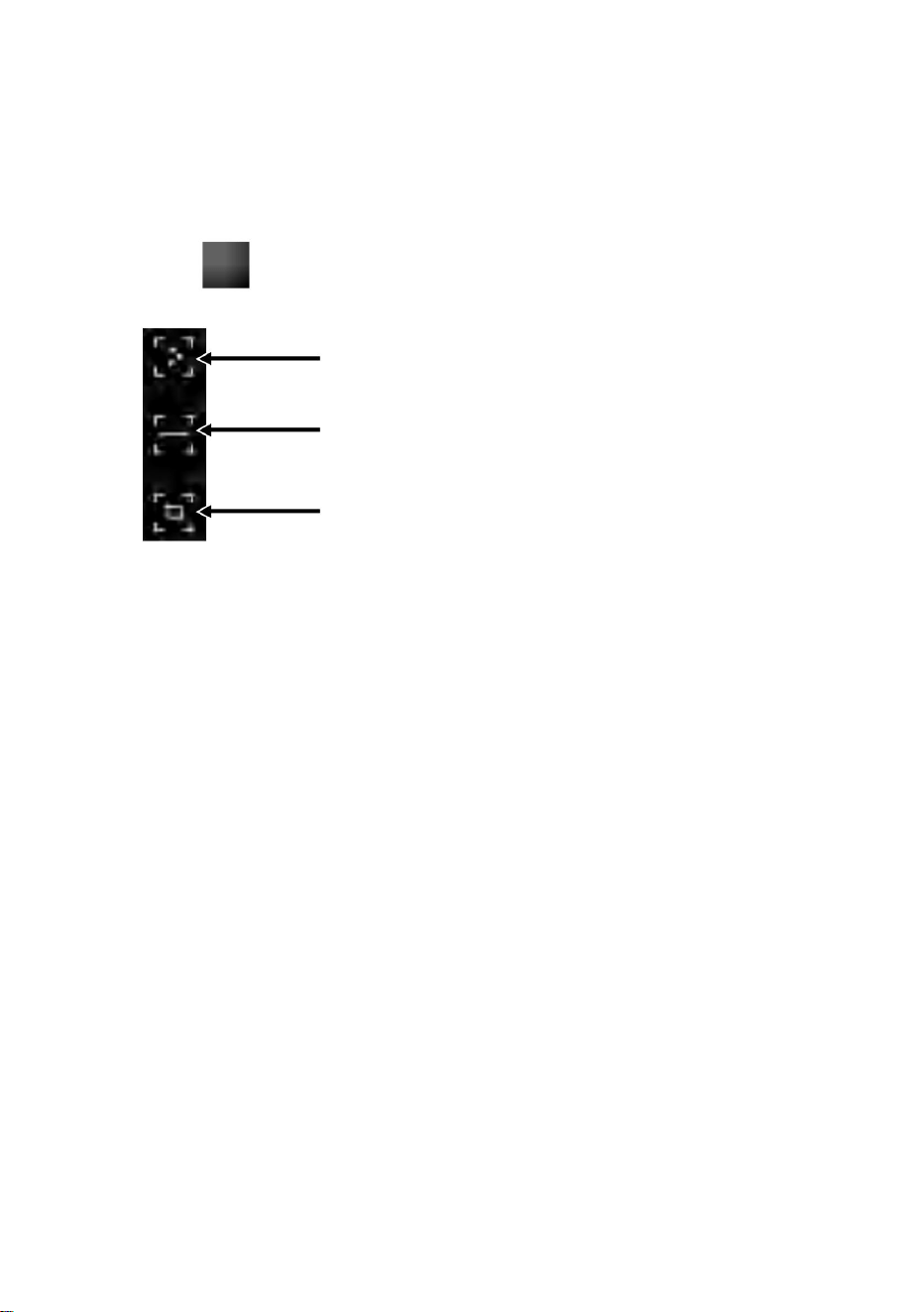
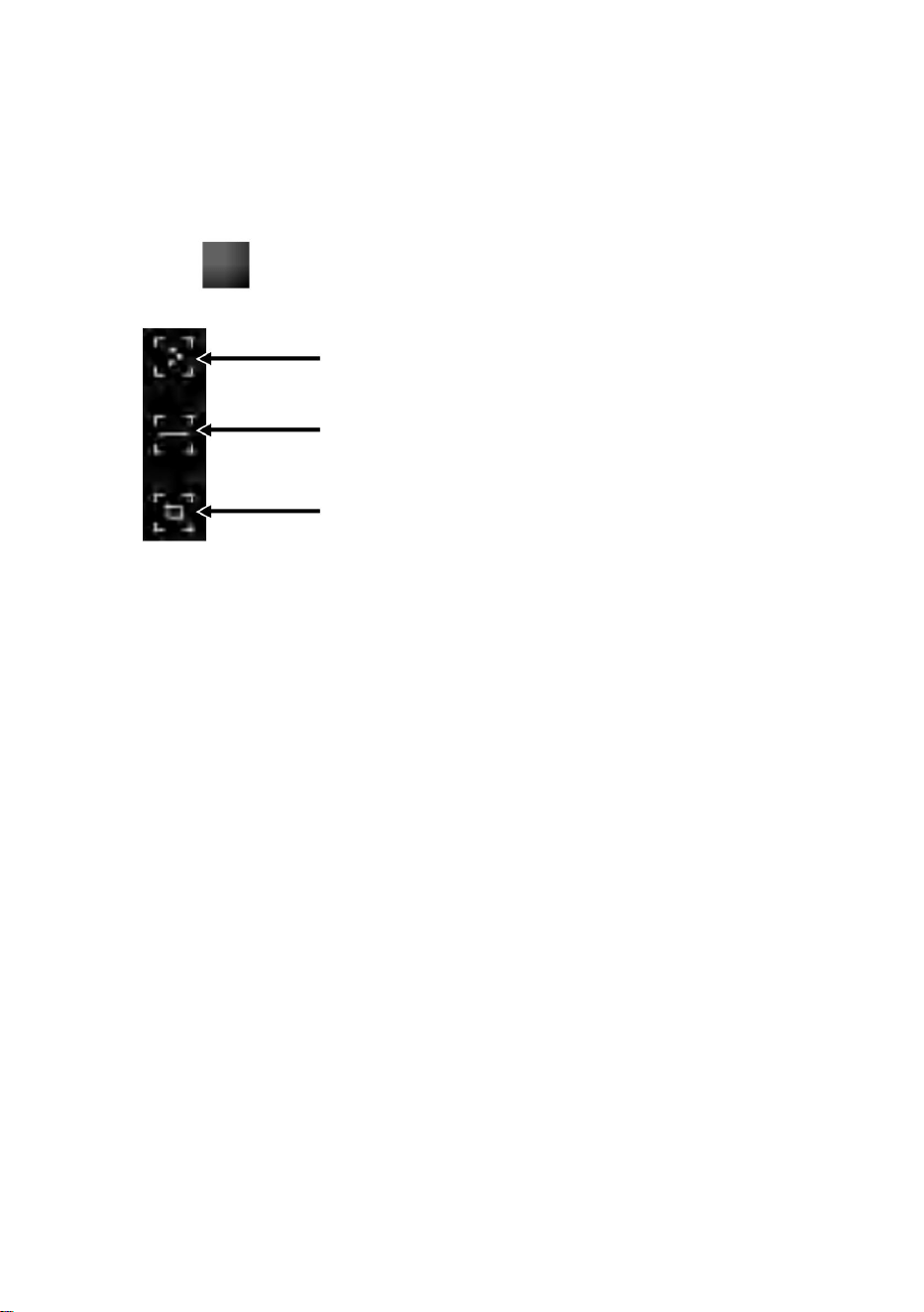
(2) Line temperature measurement analysis: drag with your
fingers and draw a horizontal line on the screen. It will
automatically analyze the maximum temperature and minimum
temperature of the horizontal line, and identify relevant
information.
(1) Point temperature measurement: click the point temperature
measurement button, and the screen will display the tempera-
ture information of three points, namely the central temperature
point, the highest temperature point and the lowest temperature
point. Click the screen at this time, and the temperature
information of the user-defined point will be added.
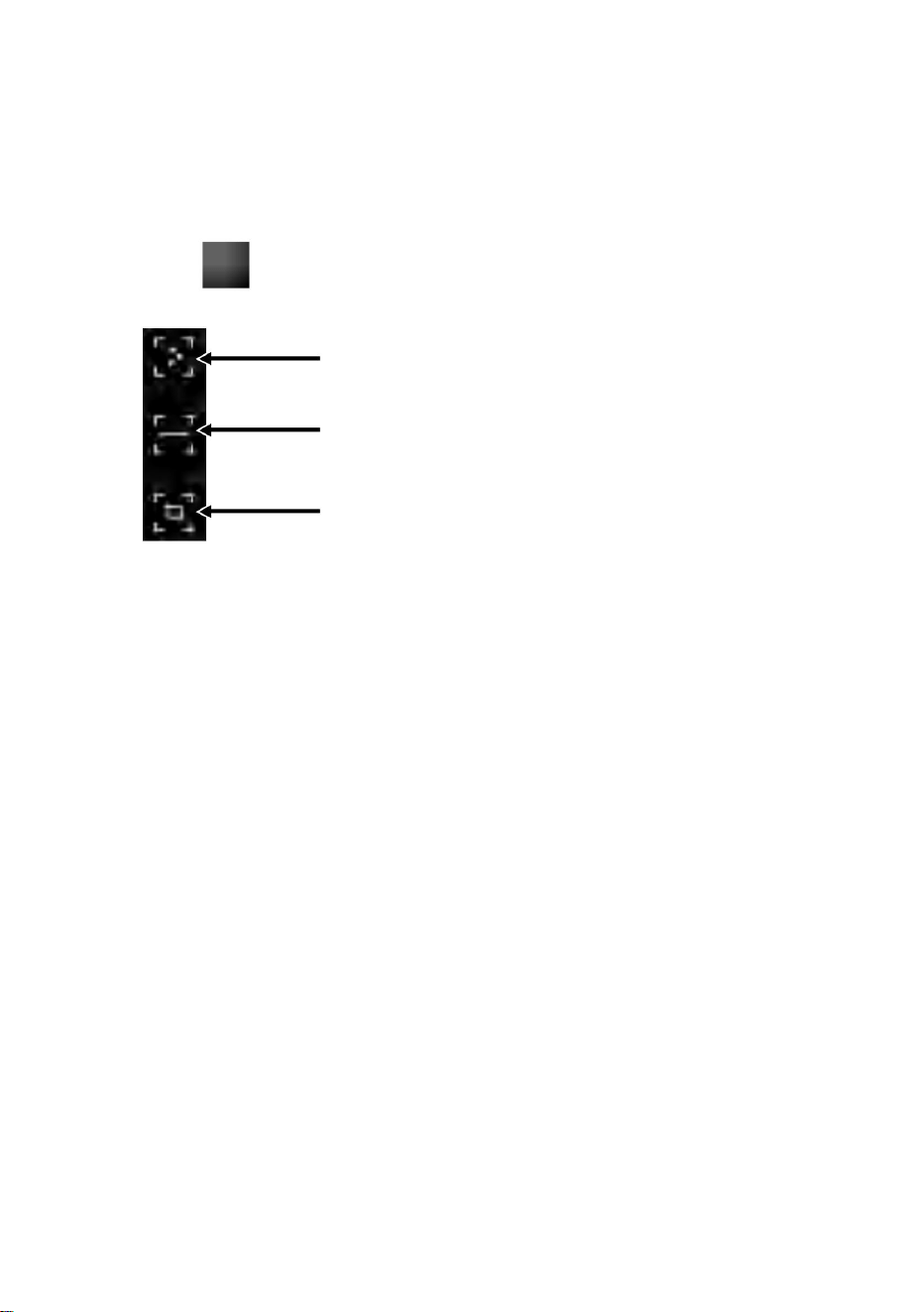
Point temperature measurement
Line temperature measurement analysis
Regional temperature measurement analysis
Click “ ” to pop out option of temperature measurement.
5.4 Temperature Measurement Analysis
10

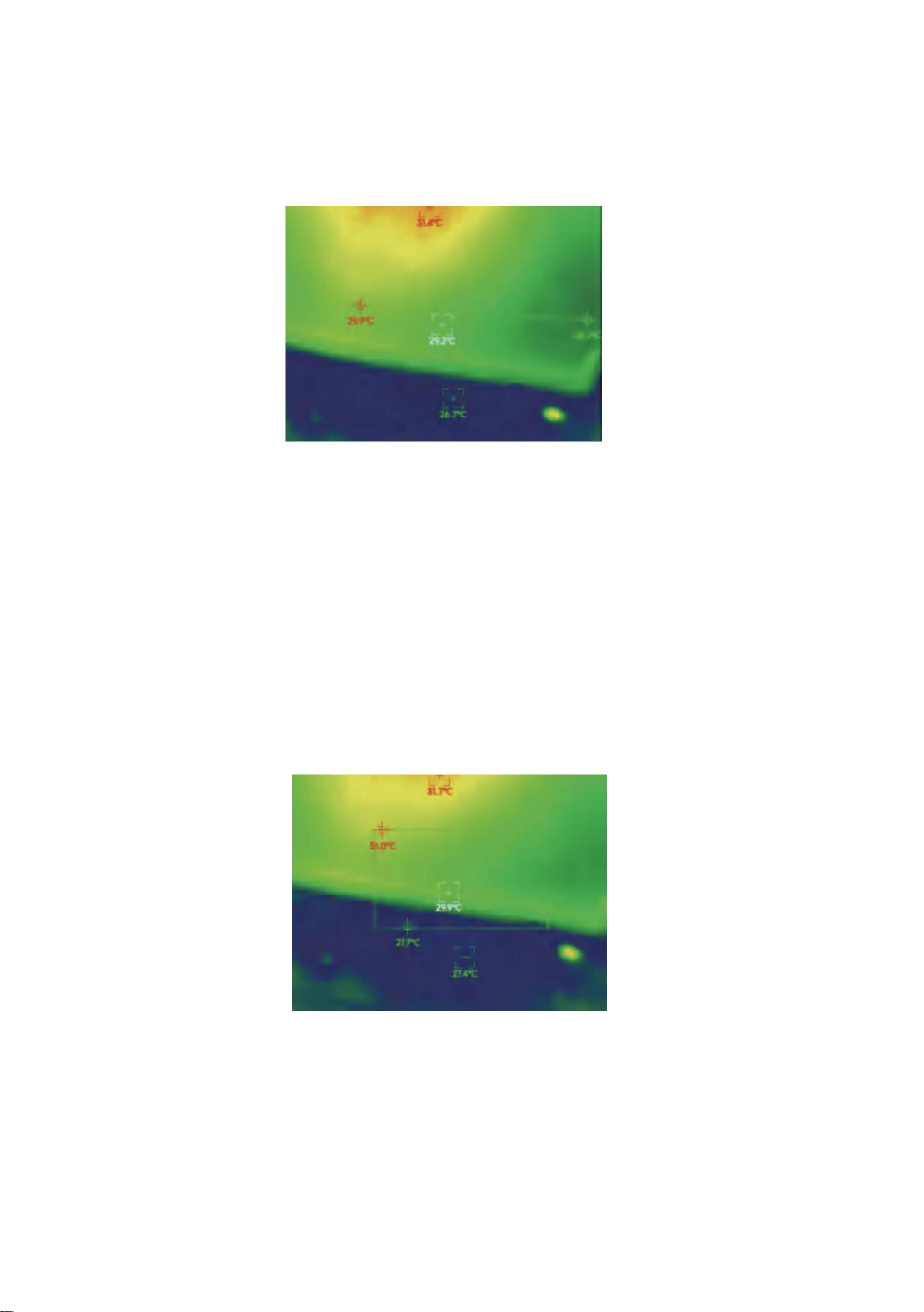
Regional temperature measurement analysis
Line temperature measurement analysis
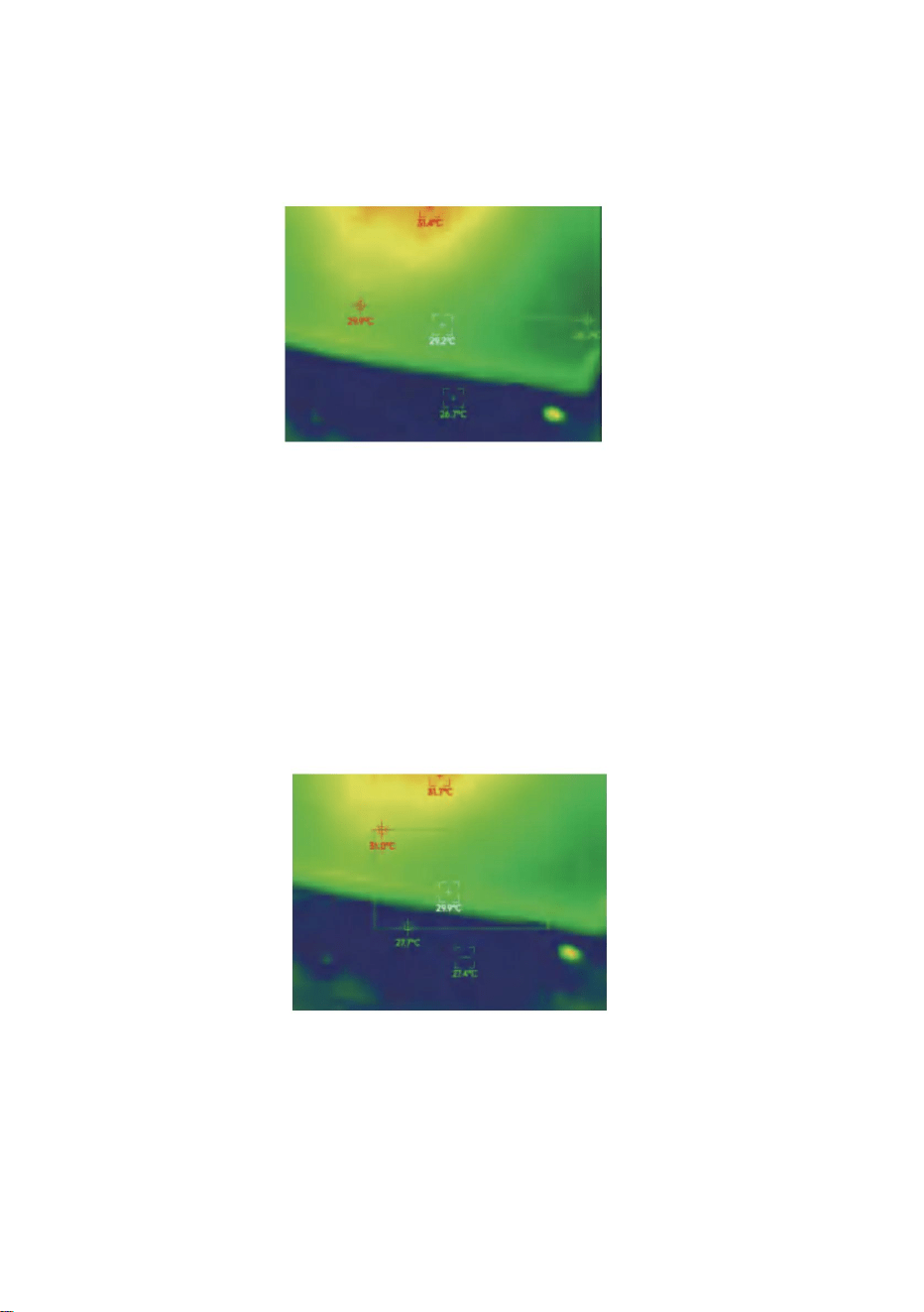
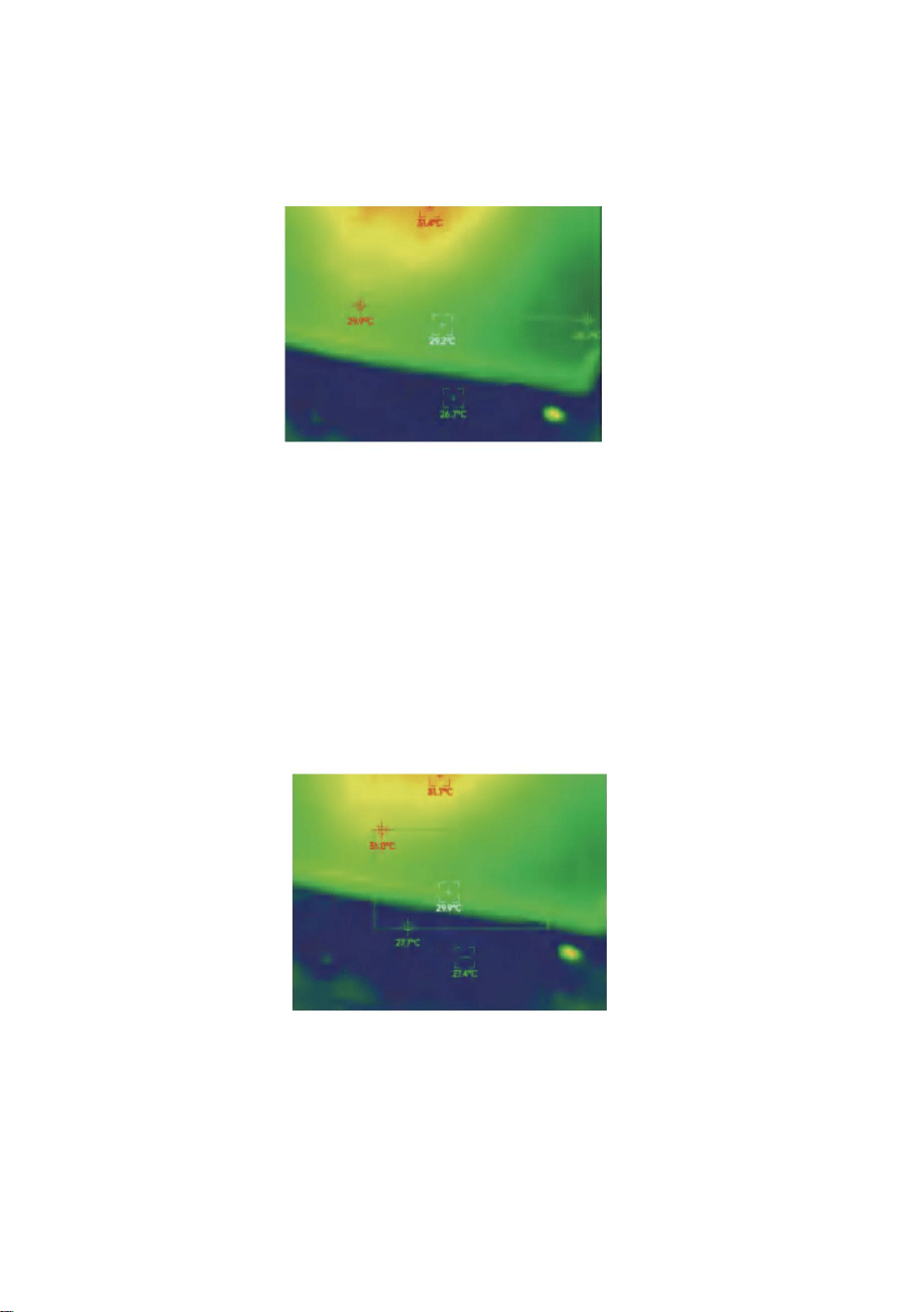
(3) Regional temperature measurement analysis: drag with your
fingers and draw a rectangle on the screen. it will automatically
analyze the maximum temperature and minimum temperature
in the rectangular area, and identify relevant information, as
shown in the following figure:
11

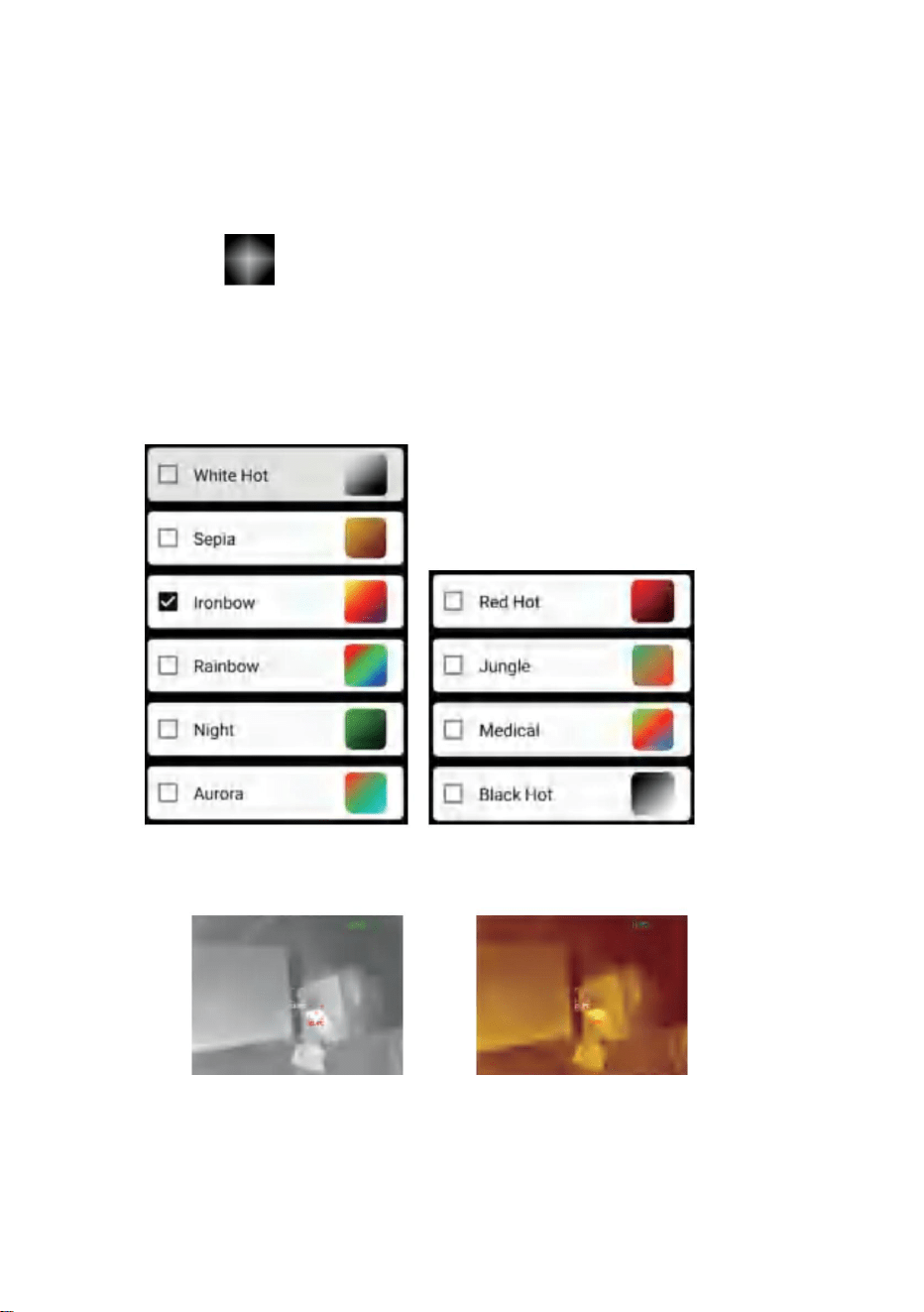
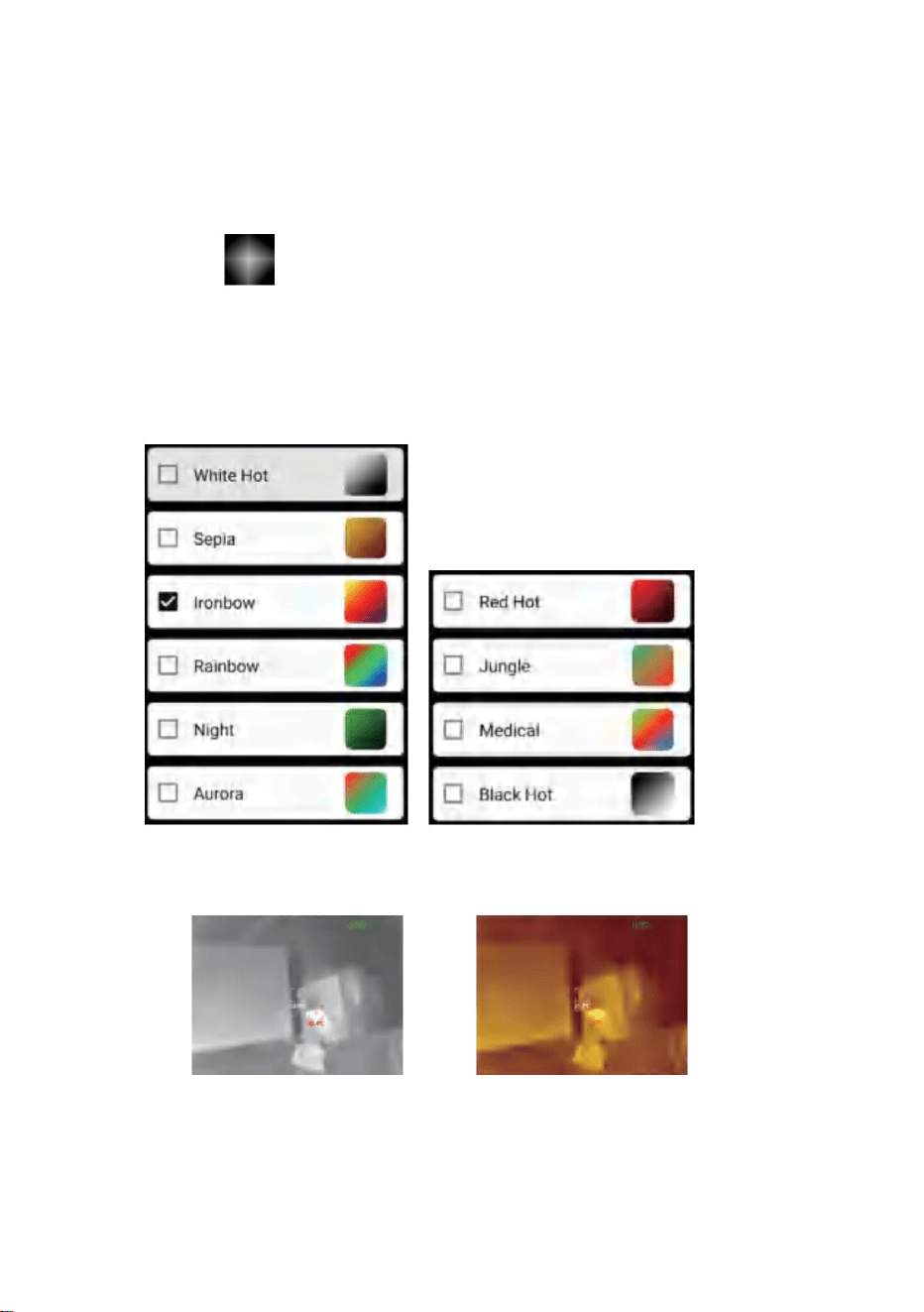
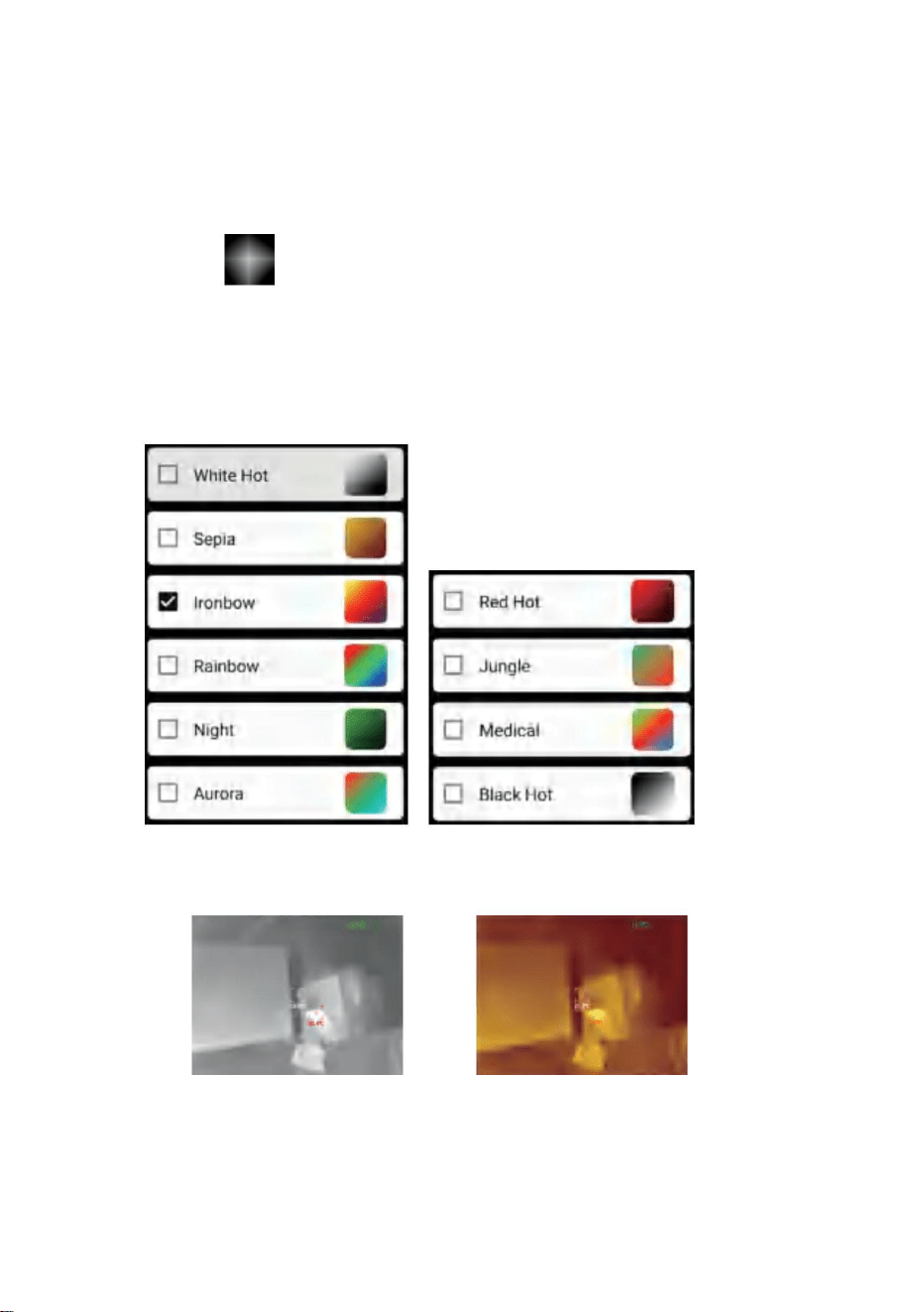
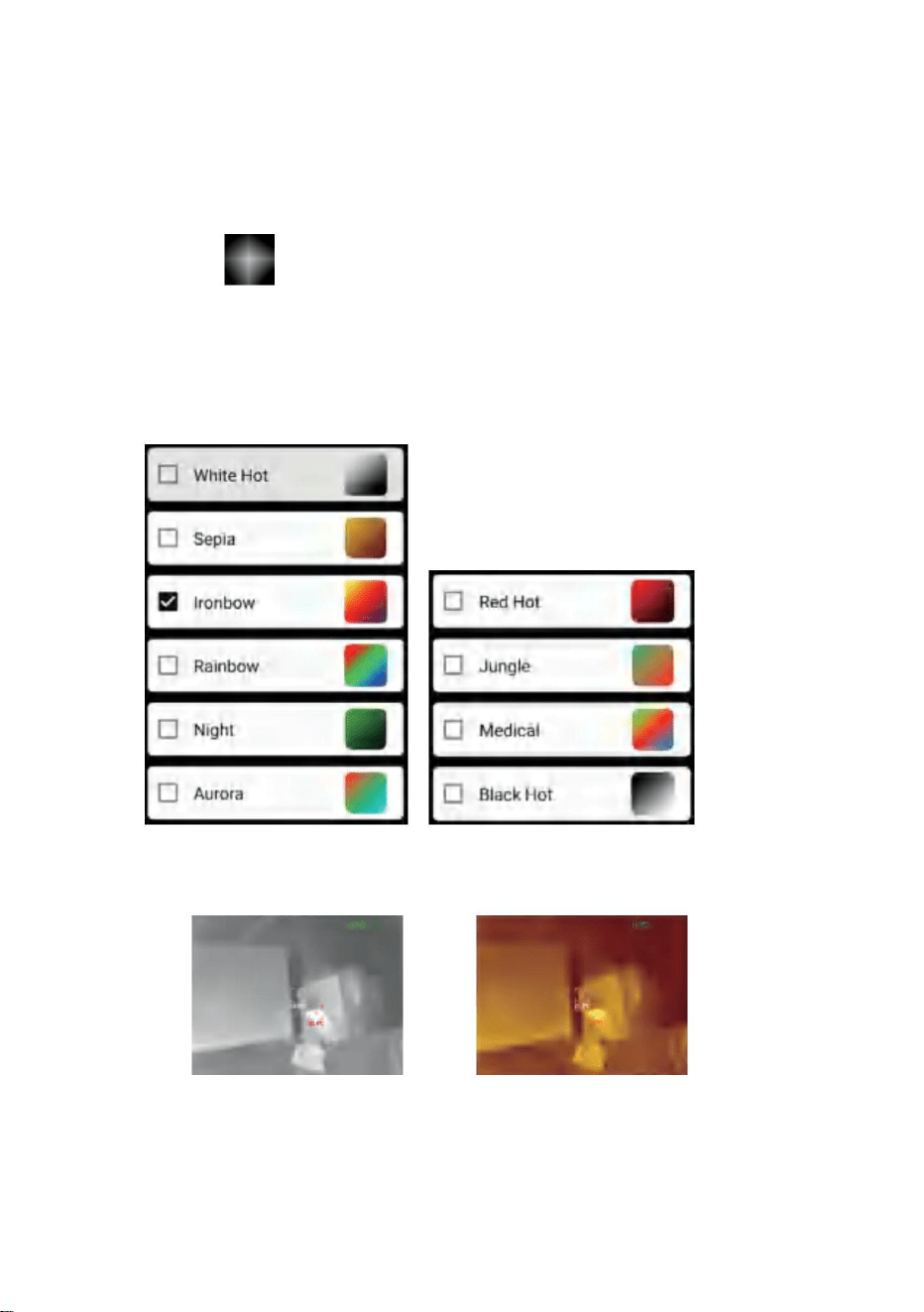
Click on “ ” to pop up the color palette interface. You can
switch among 10 color palettes such as white heat, glowing gold,
iron red, rainbow, shimmer, aurora, red heat, jungle, medical, and
black heat, as shown in the figure below.
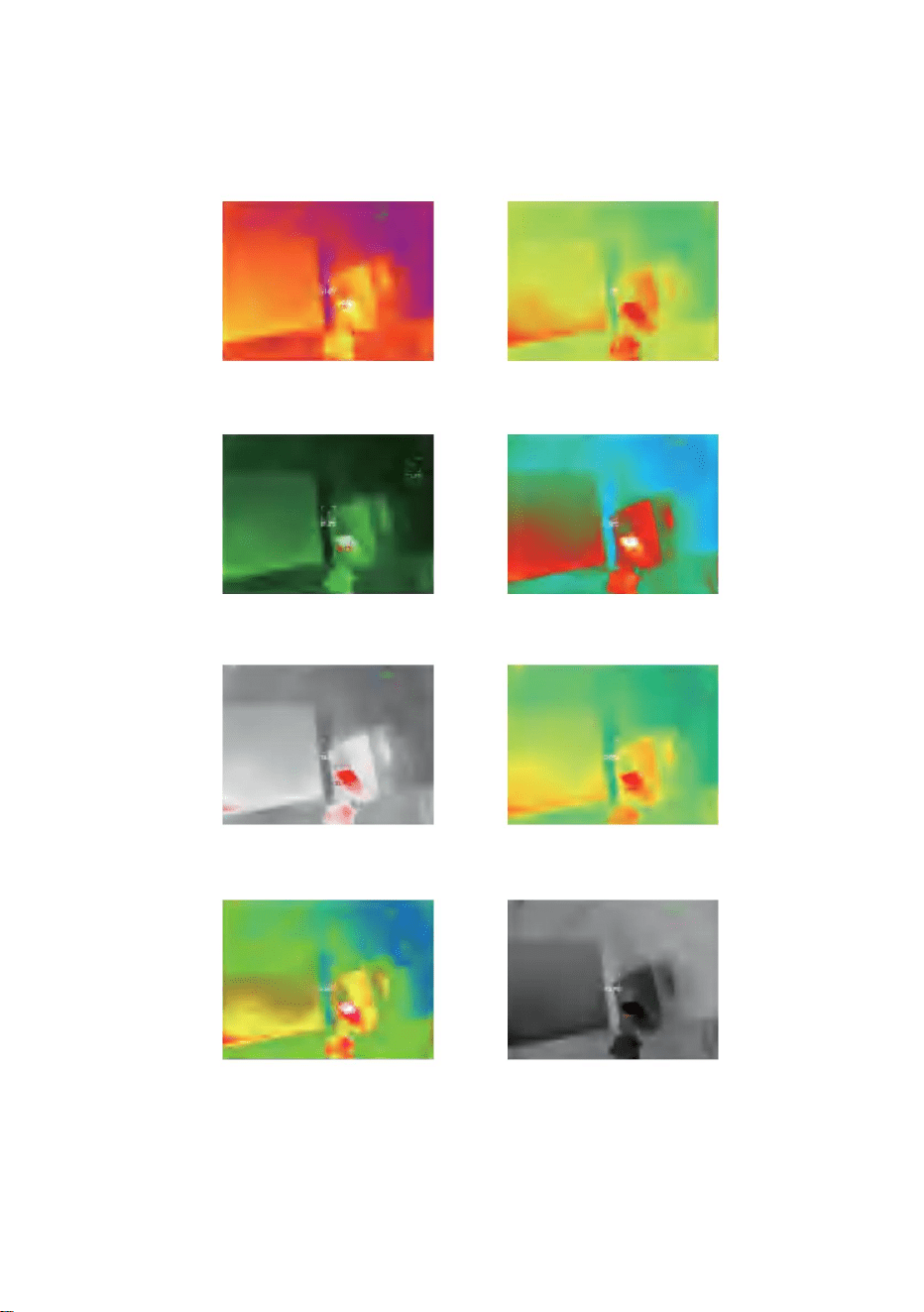
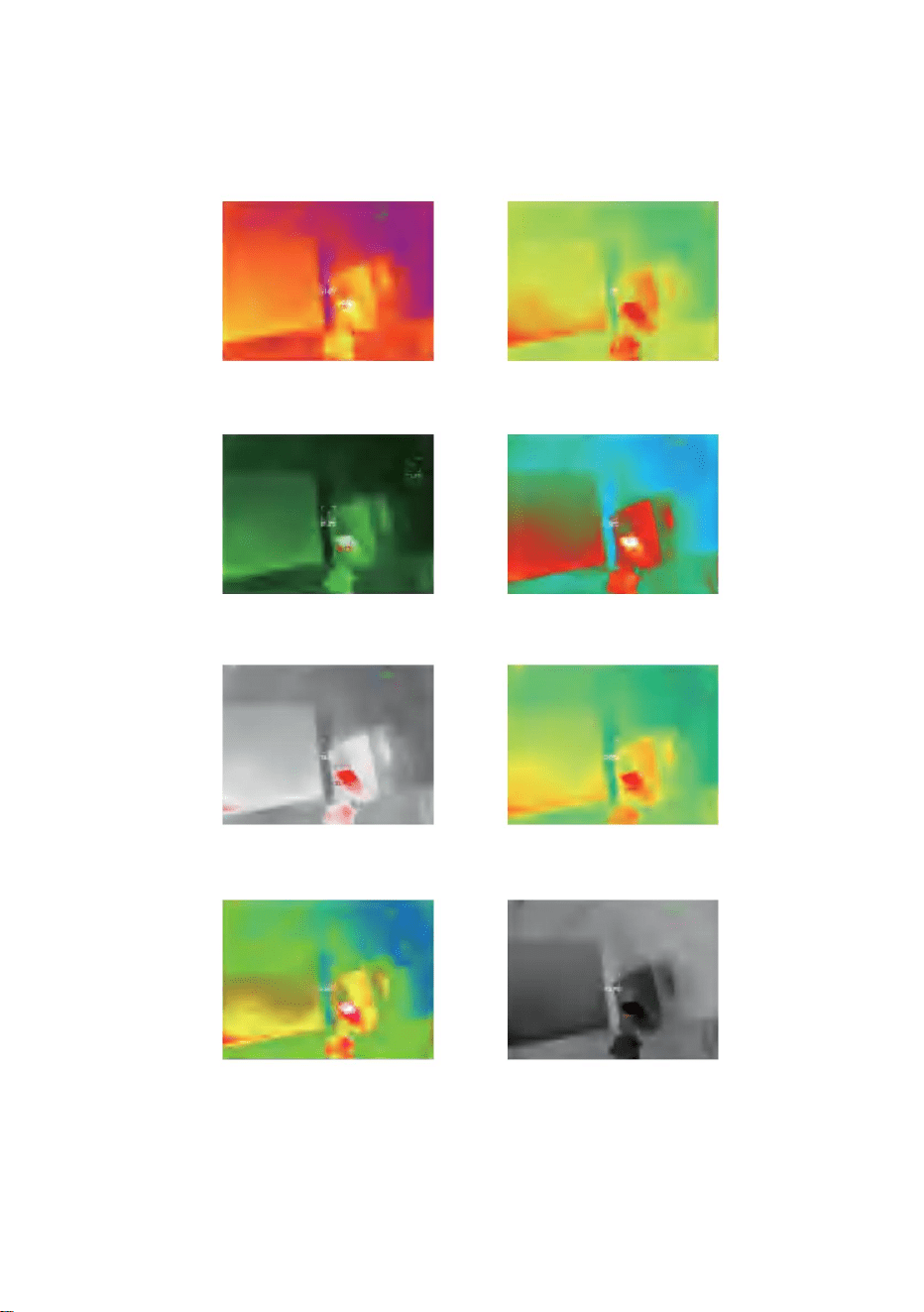
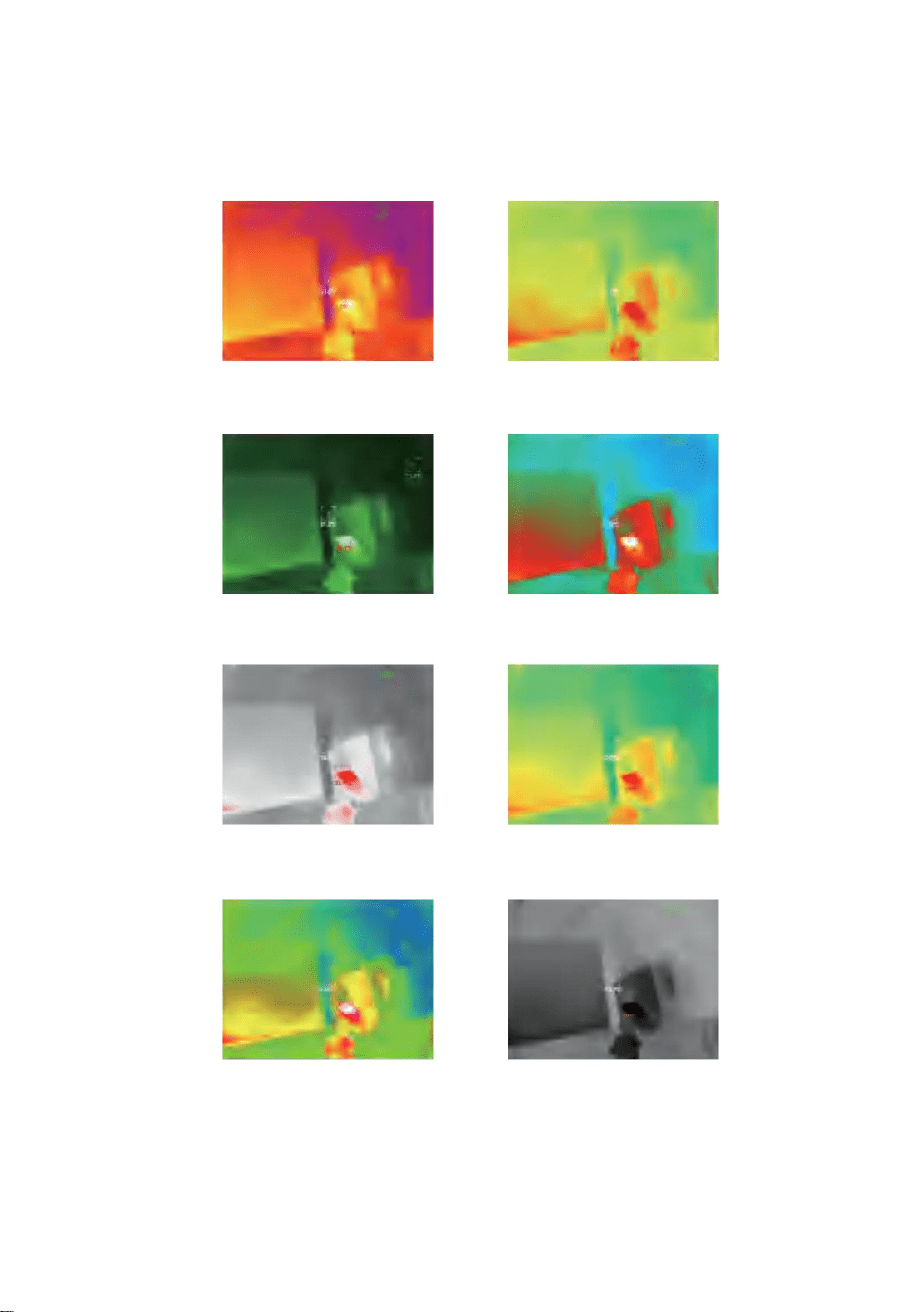
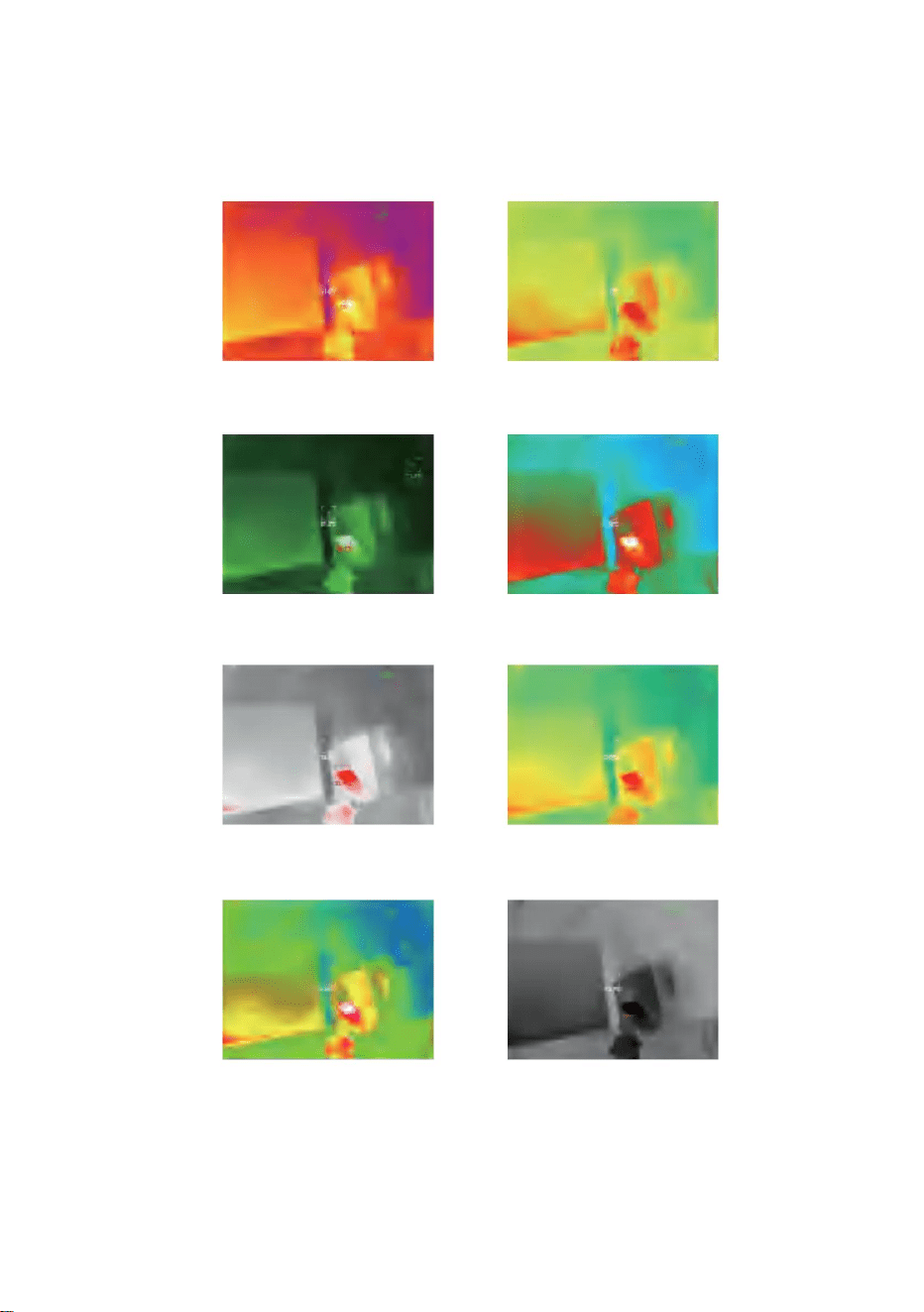
The display effects of 10 color palettes is shown as follows:
5.5 Color palettes
White hot Sepia
12

Ironbow Rainbow
Night Aurora
Red hot
Jungle
Black hot
Medical
13

5.6 Temperature measurement setting
5.7 Setting
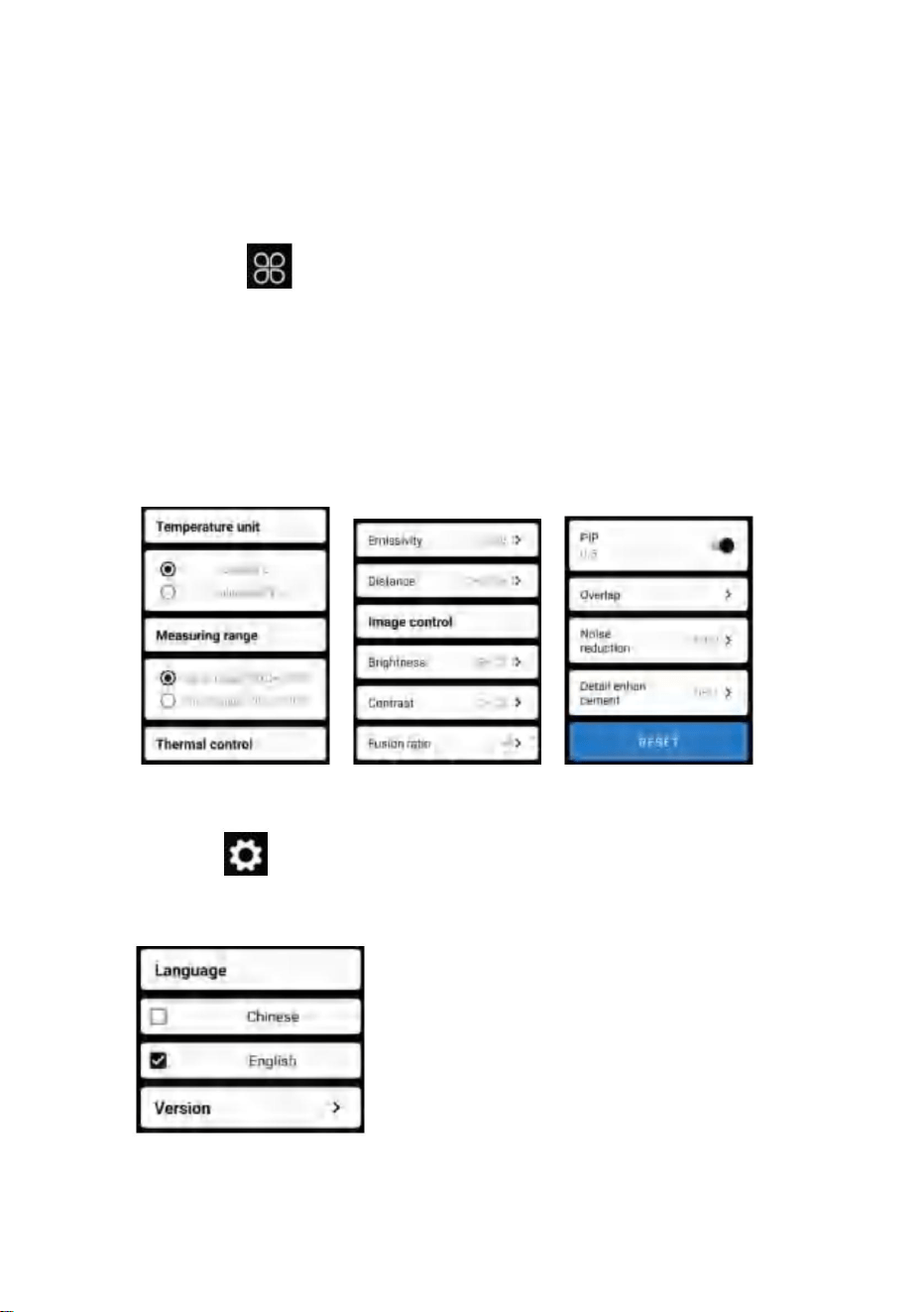
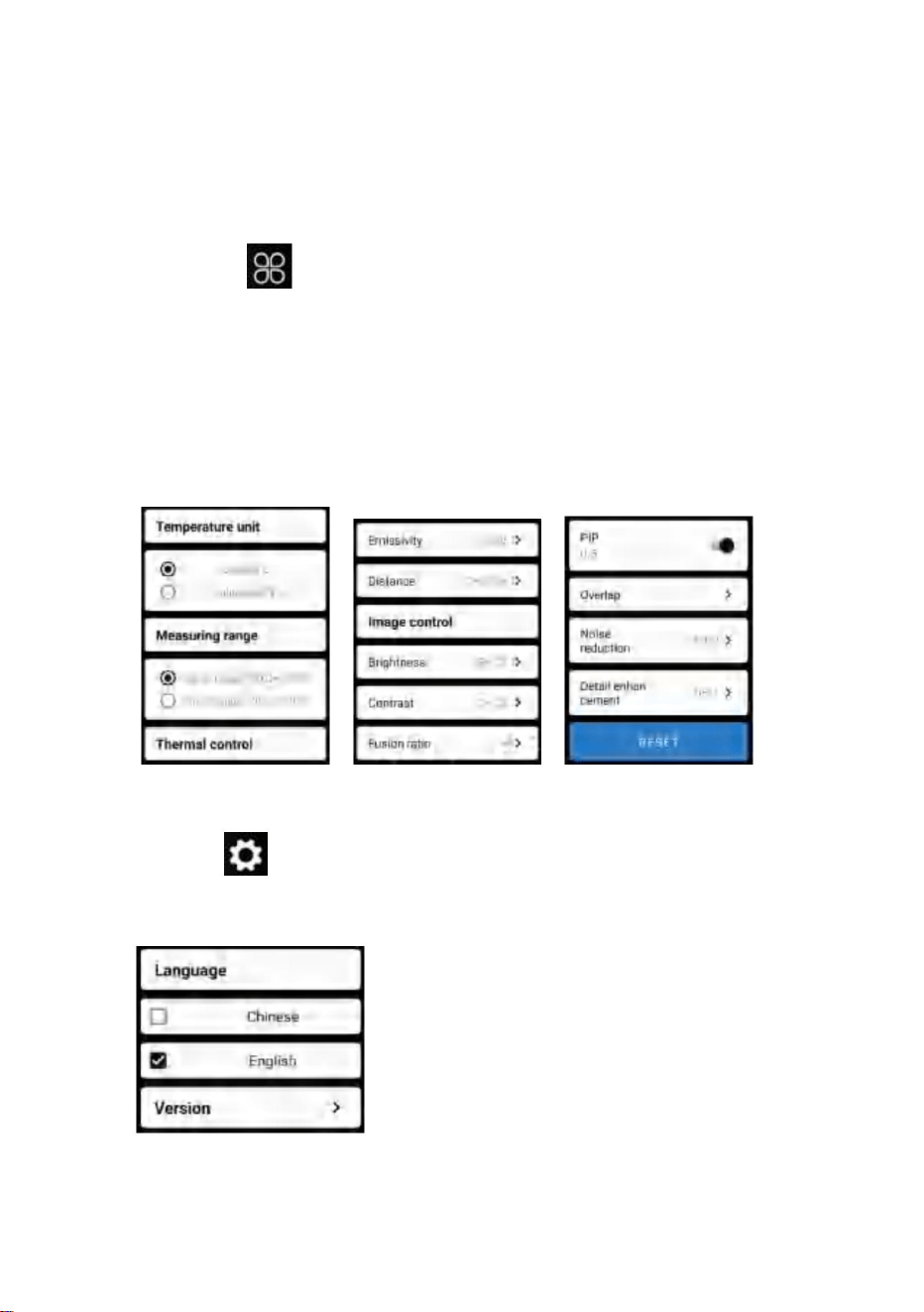
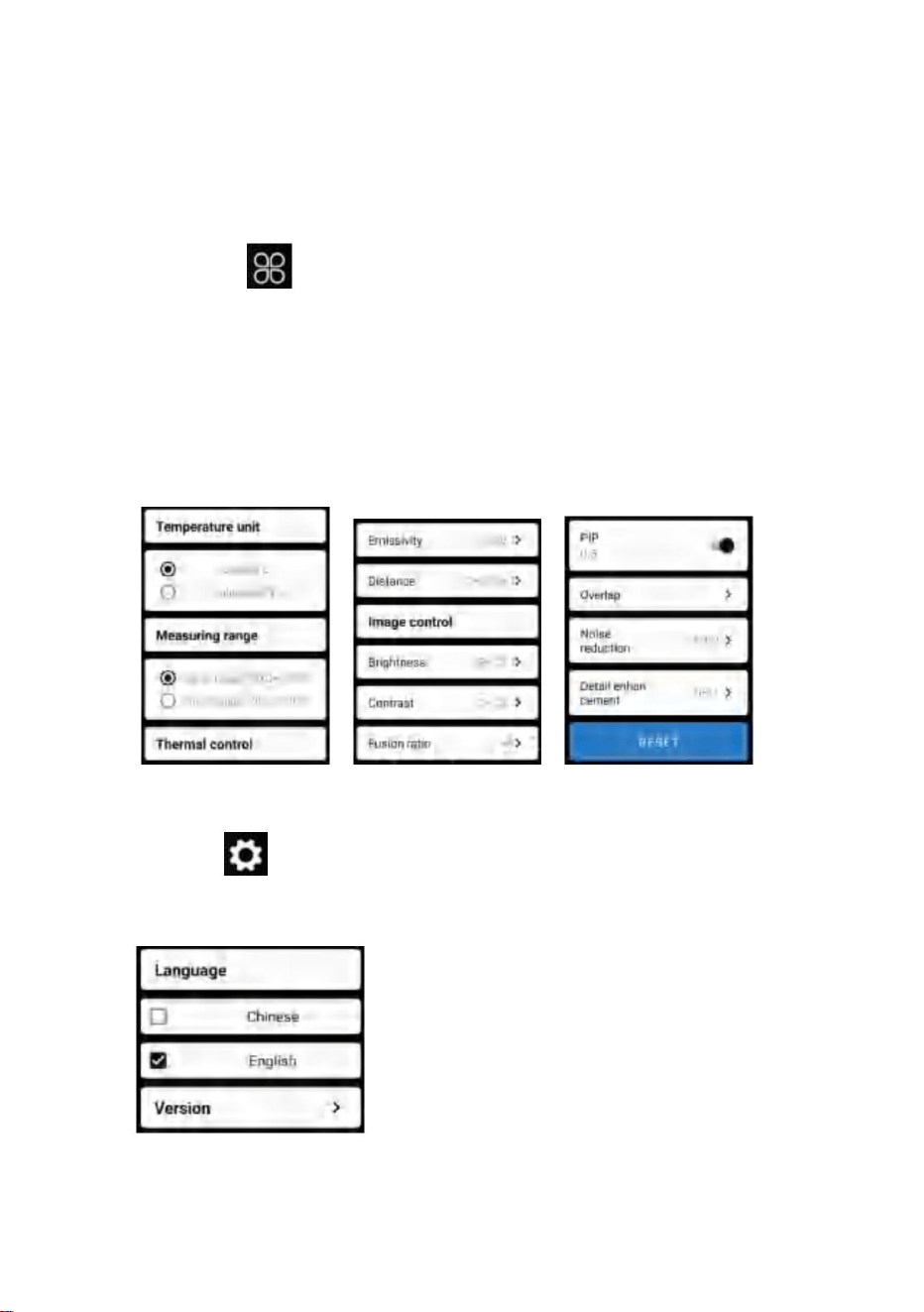
Click on “ ” to pop up the setting interface for language selection.
For languages, Chinese or English can be selected, as shown in the
figure below.
Click on “ ” to pop up the setting interface. You can set
temperature unit, temperature measurement range, emissivity,
temperature measurement distance, brightness, contrast,
fusion, picture in picture, overlap, time-domain noise reduction,
spatial noise reduction, and detail enhancement, or reset all
parameters, as shown in the figure below:
14

6.Technical parameters
Infrared
Detector type
Model
Pixel spacing
256×192
HT-W01
12μm
3.2mm
NETD
56°(H)×42°(V)
3.75mrad
8~14μm
≤ 50mk@25℃,@F/1.0
≤25Hz
Pseudo color mode
White hot, sepia, Ironbow, rainbow, night,
aurora, red hot, jungle, medical, and black hot
Hot spot tracking
Picture in pictures
Vanadium Oxide Uncooled Infrared
Focal Plane
Infrared image
resolution
Focal length
Angle of view
IFOV
Working band
Image frame rate
Display
Focusing mode
Free Focus
Supported
Supported
Supported
Supported
Supported
Brightness
adjustment
Contrast adjustment
Image fusion degree
15

-20℃~120℃,120℃~ 500℃
0.25m~30m
Working/storage environments
Supported
JPG/MP4
Chinese and English
≤1.5W
1000mAh chargeable lithium batteryPower supply
-10℃ ~ +50℃
-20℃ ~ +70℃
152x35x35mm
210g
External interface
Temperature measurement function
WIFI Supported
IP54
Protection level
Overall power
consumption
Endurance time
≥2H
USB Type-C, DC5V power supply
point, line and regional temperature measurement
Temperature
measuring distance
Temperature
measurement range
Temperature
measurement mode
Temperature
measurement accuracy
System function
Camera/video
Picture /Video format
Language
Working temperature
Storage temperature
Size/Weight
Product size
Product weight
300℃-500℃:±4% -15℃-300℃:±2℃or ±2%
-20℃-15℃:±4℃
16
This product is subject to the provision of
european Directive 2012/19/EU.
The symbol showing a wheelie bin crossed through
indicates that the product requires separate refuse
collection in the European Union.
This applies to the product and all accessories marked with this symbol.
Products marked as such may not be discarded with normal domestic
waste, but must be taken to acollection point for recycling electrical and
electronic devices.
CORRECT DISPOSAL
FCC Information:
CAUTION: Changes or modifications not expressly approved by the party
responsible for compliance could void the user's authority to operate the
equipment!
This device complies with Part 15 of the FCC Rules. Operation is subject
to the following two conditions:
1) This product may cause harmful interference.
2)This product must accept any interference received, including
interference that may cause undesired operation.
WARNING: Changes or modifications to this product not expressly
approved by the party.
responsible for compliance could void the user's authority to operate the
product.
Note: This product has been tested and found to comply with the limits for
a Class B digital device pursuant to Part 15 of the FCC Rules, These
limits are designed to provide reasonable protection against harmful
interference in a residential installation.
17

Made In China
UK
EC
REP
Pooledas Group Ltd
Unit 5 Albert Edward House, The
Pavilions Preston, United Kingdom
pooledas123@gmail.com
REP
01772418127
SHUNSHUN GmbH
Römeräcker 9 Z2021,76351
Linkenheim-Hochstetten,
Germany euvertreter@gmail.com
+49 1727041930
Imported to USA: Sanven Technology Ltd., Suite 250, 9166 Anaheim Place,
Rancho Cucamonga, CA 91730
Manufacturer: Shanghaimuxinmuyeyouxiangongsi
Address: Baoshanqu Shuangchenglu 803long 11hao 1602A-1609 shi
Shanghai
This product generates, uses and can radiate radio frequency energy,
and if not installed and used in accordance with the instructions, may
cause harmful interference to radio communications. However, there is
no guarantee that interference will not occur in a particular installation. If
this product does cause harmful interference to radio or television
reception,which can be determined by turning the product off and on, the
user is encouraged to try to correct the interference by one or more of
the following measures.
· Reorient or relocate the receiving antenna.
· Increase the distance between the product and receiver.
· Connect the product to an outlet on a circuit different from that to which
the receiver is connected.
· Consult the dealer or an experienced radio/TV technician for
assistance.
18

T
w
e
w
chni
w.v
c
e
al Support and E
vor.com/support
-Warranty Certificate

Assistancetechniqueetcertificatdegarantieélectroniquewww.vevor.com/support
Nouscontinuonsànousengageràvousfournirdesoutilsàdesprixcompétitifs.
Nousvousrappelonsdevérifierattentivementlorsquevouspassezunecommandecheznoussivous
grandesmarquesetnesignifiepasnécessairementcouvrirtouteslescatégoriesd’outilsquenousproposons.
"Économisezlamoitié","Moitiéprix"outouteautreexpressionsimilaireutiliséeparnousnereprésentequ'un
nouséconomisonsenfaitlamoitiéparrapportauxgrandesmarques.
estimationdeséconomiesdontvouspourriezbénéficierenachetantcertainsoutilscheznousparrapportauxprincipaux
Camérathermique
MODÈLE:HTW01
Machine Translated by Google
Camérathermique
Assistancetechniqueetcertificatdegarantieélectronique
www.vevor.com/support
Vousavezdesquestionssurlesproduits?Besoind'uneassistancetechnique?N'hésitezpasà
nouscontacter:
MODÈLE: HTW01
1
BESOIND'AIDE?CONTACTEZNOUS!
Ils'agitdesinstructionsoriginales,veuillezlireattentivementtouteslesinstructionsdu
manuelavantdel'utiliser.VEVORseréserveuneinterprétationclairedenotremanueld’utilisation.
L'apparenceduproduitdépendduproduitquevousavezreçu.
Veuilleznouspardonnerquenousnevousinformeronspluss'ilyadesmisesàjour
technologiquesoulogiciellessurnotreproduit.
Machine Translated by Google

Contenu
2
4
1
4
12
2
6
13
6
3
3
3
7
7
4
8
4
dix
12
1
4
1
5.Fonctionnementdulogiciel
1.Précautions
5.1Interfacedulogiciel
2.Résuméduproduit
5.2Bibliothèque,photographieetenregistrementvidéo5.3
Actualisationdel'obturateur
2.1Scènesd'application2.2
Fonctionsprincipales
5.4Analysedesmesuresdetempérature
5.5Palettedecouleurs
3.Structuresdeproduits
5.6Paramètresdemesuredetempérature5.7
Paramètres
3.2Descriptiondesindicateurs4.
Applicationduproduit
3.1Introductionàlastructure
6.Paramètrestechniques
4.1Misesoustensiondel'équipement
4.2Misehorstensiondel'équipement
4.3Chargementdel'équipement
4.4Connexiondel'équipement
Machine Translated by Google

1.Précautions
2.Résuméduproduit
(1)N'exposezpasleproduitausoleiletàd'autressourcesdehauteintensité
veuillezcontacternotresociétépouruneréparationpardupersonnelprofessionnel.
sourcesderayonnement
2.1Scènesd'application
Pourutilisercetimageurthermiqueinfrarougepourtéléphoneportable,vousdevez
(2)Netouchezpasoun'entrezpasencollisionlafenêtreetlalentilledudétecteuravec
Téléchargezetinstallezl'imageurthermiqueinfrarougepourtéléphoneportable
(3)Netouchezpasl'appareiletl'interfaceUSBaveclesmainsmouillées;
mainsouautresobjets;
Application«ImageurthermiquemobileWIFIsansfilHTW01».Àtravers
(4)Nefrottezpasvotreéquipementavecdudiluant;
cetteapplication,vouspouvezréaliseruneobservationinfrarougeetunetempérature
(5)Veuillezfaireattentionàéviterl'électricitéstatique;
fonctionsdemesuredelatempérature.
Veuillezliretouteslesinformationssuivantesavantd'utiliservotreappareil
pourvousprotéger,ainsiquelesautres,contrelesblessuresoulesdommagescausésàvotreappareil.
(6)Nedémontezpasl'équipement.S'ilyaundéfaut,
3
Machine Translated by Google

(1)Ouvrezlelogicielappliquépourl'infrarougedutéléphoneportable
(3)prisedevueetenregistrementvidéo;
Imageurthermiquepourréaliseruneobservationetunemesureinfrarouges
(4)contrôledemouvementetparamétragepourvotremobile
ScannezlecodeQRpourtéléchargerl'application
ment;
imageurthermiqueinfrarougedetéléphone.
Lesfonctionssuivantesdoiventêtreréalisées:
(2)poureffectuerunemesuredetempératureinfrarouge,et
analysedetempérature;
2.2Fonctionsprincipales
4
Machine Translated by Google
3.Structuresdeproduits
Capteurd'image
thermiqueinfrarouge
Couvercleinférieur
Indicateur
Lumièrevisible
InterfacedetypeC
Boutonmarche/
arrêt
caméra
3.1Présentationdelastructure
Indicateurd'état:lumièrebleue
Indicateurdemisesoustension:voyantvert
Bar
3.2Descriptiondesindicateurs
Indicateurdecharge:rouge
5
Machine Translated by Google

4.Applicationduproduit
6
4.4Connexiondel'appareil
4.3Chargementdel'appareil
4.2Misehorstensiondel'appareil
4.1Misesoustensiondel'appareil
Appuyezlonguementsurleboutond'alimentationpendantplusde6secondes
Unefoisl'appareilallumépendant15secondes,vouspouvezrechercherleWIFI
ConnexionWiFi
allumépourunemisehorstensionforcée,ettouslesindicateursserontéteints.
(1)Ouvrezl'écrandeconnexionWIFIdevotretéléphoneportableetaffinezle
Appuyezlonguementsurleboutonmarche/arrêtpendantplusde2secondes,ettout
NomWIFIpréfixéparHTW01;
Utilisezdescordonsdedonnéesd'interfaceTYPECpourlechargement.Levoyantdecharge
estnormalementallumé.Unefoiscomplètementchargé,l'indicateurdechargenes'allumepas.
lesindicateursserontsortis.
Appuyezlonguementsurleboutonmarche/arrêtpendant1secondeetl'appareilest
allumé.Levoyantdemisesoustensionestnormalementallumé.
(2)EntrezlemotdepasseWIFI12345678etconnectezle;
Machine Translated by Google

7
"
»
"
»
disparaîtra;
•L'appareilneparvientpasàconnectervotretéléphonemobileetl'état
1.UnefoislaconnexionWIFIréussieetlorsquel'appareilest
déconnecté,cliquezpourconnecterl'appareil;
2.Aprèsuneconnexionréussie,
l'indicateurclignoteàbassefréquence(allumépendant1setéteintpendant1s)
•Unefoisl'appareilconnectéàvotretéléphonemobile,l'état
et
L'indicateurclignoteàhautefréquence(allumépendant0,5setéteintpendant0,5s).
"
(3)UnefoislaconnexionWIFIréussie,accédezàl'applicationetauboutonpour
commenceràconnecterl'appareil.
BoutonLecture:aprèsavoircliquédessus,ilcommenceàlirelesimagesetvous
pouvezeffectuerlesopérationsassociées.
»
cliquesurle
Machine Translated by Google
5.Fonctionnementdulogiciel
5
8
2
1
4
7
dix
6
9
3
5.1Interfacedulogiciel
Boutondecaptured'image
Étatdel'échecde
connexiondel'appareil
Boutonderéglage
delatempérature
BoutonBibliothèque
Boutonderafraîchissementdel'obturateur
Boutond'allocation
depalettedecouleurs
Boutonderéglage
Boutondelecture
Boutondemesure
delatempérature
Boutond'enregistrementvidéo
8
Machine Translated by Google
bibliothèque:cliquezpourafficherdesimagesetdesvidéos;
»
prisedevue:pourenregistrerl'écranactuel;
Accédezàlapagedelisted'images
Actualisationduvolet:Cliquezsurpouractualiserledéflecteur.
•Appuyezlonguementsurl'imageoucliquezsurl'icônedanslecoinsupérieurdroitpourpouvoir
supprimerlesfichiersimage;•Cliquezsur
l'imagepourprévisualiserdesimagesindividuelles,etvouspouvezprévisualiserl'imageprécédente/
dernièreenfaisantglisserverslagauche/droite;•Lorsquevous
prévisualisezdesimagesuniques,ouvrez/fermezvosdeuxdoigtspoureffectuerunzoomavant/arrière
surlecontenudel'image,etappuyezlonguementdessuspourpouvoirafficherdesinformations
détailléessurlesimages;
"
•Appuyezlonguementsurl'imageoucliquezsurl'icônedanslecoinsupérieurdroitpourpouvoir
supprimerlesfichiersvidéo;•Cliquezsurles
vidéospourlirecefichiervidéo;
Accédezàlapagedelalistedesvidéos
»
(2)
«Positiond'enregistrementdesphotos:pourouvrirlesimagesdontvousavezbesoindansla
bibliothèqueetafficherl'emplacementdel'image.
(4)«enregistrementvidéo:cliquezdessuspourdémarrerl'enregistrementvidéo,puiscliquezànouveau
dessuspourterminerl'enregistrementvidéo;Lapositiondesauvegardedel'enregistrementvidéoestla
mêmequecelled'uneimage.
(1)"
»
»
9
5.3Imagerafraîchissantedel'obturateur.
5.2Bibliothèque,prisedevueetenregistrementvidéo
Machine Translated by Google
»
lesinformationsdupointdéfiniparl'utilisateurserontajoutées.
indiquer.Cliquezsurl'écranàcemoment,etlatempérature
Mesuredetempératureponctuelle
(2)Analysedemesuredetempératuredeligne:faitesglisseravecvotre
doigtsettracezunelignehorizontalesurl’écran.Cesera
Analysedemesuredetempératuredeligne
Analysedesmesuresdetempératurerégionales
(1)Mesuredelatempératuredupoint:cliquezsurlatempératuredupoint
analyserautomatiquementlatempératuremaximaleetminimale
températuredelalignehorizontaleetidentifierles
boutondemesure,etl'écranafficheralatempérature.
information.
tureinformationdetroispoints,àsavoirlatempératurecentrale
pourfaireapparaîtrel'optiondemesuredelatempérature.
Cliquezsur"
point,lepointdetempératureleplusélevéetlatempératurelaplusbasse
dix
5.4Analysedesmesuresdetempérature
Machine Translated by Google
11
Analysedemesuredetempératuredeligne
analyserlatempératuremaximaleetlatempératureminimale
Analysedesmesuresdetempératurerégionales
doigtsetdessinezunrectanglesurl’écran.ceseraautomatiquement
(3)Analysedemesuredetempératurerégionale:faitesglisseravecvotre
danslazonerectangulaireetidentifierlesinformationspertinentes,comme
illustrédanslafiguresuivante:
Machine Translated by Google
basculezentre10palettesdecouleurstellesquechaleurblanche,orbrillant,rougefer,arcen
ciel,chatoyant,aurore,chaleurrouge,jungle,médicalet
Sépia
pourfaireapparaîtrel'interfacedelapalettedecouleurs.Tupeux
chaleurnoire,commelemontrelafigurecidessous.
Cliquersur
Leseffetsd'affichagede10palettesdecouleurssontprésentéscommesuit:
"
blancchaud
»
12
5.5Palettesdecouleurs
Machine Translated by Google
13
Noirchaud
Aurore
Rougechaud
Arcdefer
Jungle
Arcenciel
Médical
Nuit
Machine Translated by Google
5.6Réglagedelamesuredetempérature
5.7Réglage
14
»
paramètres,commeindiquédanslafigurecidessous:
fusion,imagedansl'image,chevauchement,réductiondubruitdansledomainetemporel,réduction
dubruitspatialetaméliorationdesdétails,outoutréinitialiser
"
Cliquersur
pourfaireapparaîtrel'interfacedeconfiguration.Vouspouvezdéfinir
unitédetempérature,plagedemesuredetempérature,émissivité,distancedemesurede
température,luminosité,contraste,
»
Cliquersur
pourfaireapparaîtrel'interfacedeconfigurationpourlasélectiondelalangue.
Pourleslangues,lechinoisoul'anglaispeuventêtresélectionnés,commeindiquédansle
"
Figurecidessous.
Machine Translated by Google

6.Paramètrestechniques
15
≤25Hz
Planfocal
Bandedetravail
Fréquenced'imagedel'image
Imageenimages
HTW01
Angledevue
8~14μm
Réglageducontraste
Priseencharge
Espacementdespixels
56°(H)×42°(V)
Suividespointschauds
12μm
Modedemiseaupoint
Priseencharge
NETD
Miseaupointlibre
Blancchaud,sépia,Ironbow,arcenciel,nuit,aurore,
rougechaud,jungle,médicaletnoirchaud
Résolutionde
l'imageinfrarouge
IFOV
Oxydedevanadiuminfrarougenonrefroidi
≤50mk@25,@F/1.0
Diplômedefusiond'images
Typededétecteur
Distancefocale
3,75mrads
Priseencharge
Priseencharge
Modèle
3,2mm
Réglagedela
luminosité
Modepseudocouleur
Priseencharge
256×192
Infrarouge
Afficher
Machine Translated by Google

Priseencharge
IP54
Batterieaulithiumrechargeablede1000mAh
Chinoisetanglais
≤1,5W
Fonctiondusystème
Environnementsdetravail/stockage
10~+50
20~+70
≥2H
152x35x35mm
AlimentationUSBTypeC,DC5V
0,25m~30m
Priseencharge
Taillepoids
210g
Fonctiondemesuredelatempérature
16
Distancede
mesuredelatempérature
JPG/MP4
Consommation
électriqueglobale
Tempsd'endurance
Précisiondela
mesuredelatempérature
Sourcedecourant
Poidsduproduit
Interfaceexterne
Températuredefonctionnement
mesuredetempératureponctuelle,linéaireetrégionale
20~120,120~500
Températuredestockage
Formatimage/vidéo
WIFI
Tailleduproduit
Niveaudeprotection
Modedemesure
delatempérature
Plagedemesure
delatempérature
Caméra/vidéo
Langue
300500:±4%15300:±2ou±2%
2015:±4
Machine Translated by Google
ÉLIMINATIONCORRECTE
17
Lesymbolereprésentantunepoubellesurroulettesbarrée
ATTENTION:Changementsoumodificationsnonexpressémentapprouvésparlapartie
responsabledelaconformitépourraitannulerledroitdel'utilisateuràutiliserle
Remarque:Ceproduitaététestéetdéclaréconformeauxlimitesde
indiquequeleproduitnécessiteuntridesdéchets
équipement!
unappareilnumériquedeclasseBconformémentàlapartie15desrèglesFCC.Ces
limitessontconçuespourfourniruneprotectionraisonnablecontrelesinterférences
nuisiblesdansuneinstallationrésidentielle.
Cetappareilestconformeàlapartie15desrèglesFCC.L’exploitationestsoumiseauxdeux
conditionssuivantes:
collectiondansl’Unioneuropéenne.
1)Ceproduitpeutprovoquerdesinterférencesnuisibles.
Lesproduitsmarquéscommetelsnepeuventpasêtrejetésaveclesdéchetsdomestiquesnormaux.
Cecis'appliqueauproduitetàtouslesaccessoiresmarquésdecesymbole.
2)Ceproduitdoitacceptertouteinterférencereçue,ycompris
déchets,maisdoiventêtredéposésdansunpointdecollectepourlerecyclagedesappareilsélectriquesetélectriques.
interférencespouvantprovoquerunfonctionnementindésirable.
appareilsélectroniques.
AVERTISSEMENT:changementsoumodificationsapportésàceproduitnon
expressémentapprouvésparlapartie.
responsabledelaconformitépourraitannulerledroitdel'utilisateuràutiliserleproduit.
Ceproduitestsoumisàlafourniturede
Directiveeuropéenne2012/19/UE.
InformationsFCC:
Machine Translated by Google

Ceproduitgénère,utiliseetpeutémettredel'énergieradiofréquenceet,s'iln'est
pasinstalléetutiliséconformémentauxinstructions,ilpeutprovoquerdes
interférencesnuisiblesauxcommunicationsradio.Cependant,riennegarantitque
desinterférencesneseproduirontpasdansuneinstallationparticulière.Siceproduit
provoquedesinterférencesnuisiblesàlaréceptionradiooutélé,cequipeut
êtredéterminéenéteignantetrallumantleproduit,l'utilisateurestencouragéà
essayerdecorrigerlesinterférencesenprenantuneouplusieursdesmesures
suivantes.
∙Connectezleproduitàuneprisesuruncircuitdifférentdeceluiauquellerécepteur
estconnecté.
∙Augmentezladistanceentreleproduitetlerécepteur.
∙Réorientezoudéplacezl'antennederéception.
∙Consultezlerevendeurouuntechnicienradio/TVexpérimentépour
obtenirdel'aide.
ROYAUMEUNI
CE
REPRÉSENTANT
18
ImportéauxÉtatsUnis:SanvenTechnologyLtd.,Suite250,9166AnaheimPlace,Rancho
Cucamonga,CA91730Fabricant:
ShanghaimuxinmuyeyouxiangongsiAdresse:Baoshanqu
Shuangchenglu803long11hao1602A1609shiShanghai
PooledasGroup
LtdUnité5AlbertEdwardHouse,
TheREPPavilionsPreston,RoyaumeUni
01772418127
SHUNSHUN
GmbHRömeräcker9
Z2021,76351Linkenheim
Hochstetten,Allemagne
[email protected]+491727041930
FabriquéenChine
Machine Translated by Google

chnic
ewwwv
alSupportetcertificat
degarantieélectronique
vor.com/support
T
e
Machine Translated by Google

Technischer Support und E-Garantiezertifikat www.vevor.com/support
MODELL: HT-W01
Wärmebildkamera
Top-Marken und bedeutet nicht unbedingt, alle von uns angebotenen Werkzeugkategorien abzudecken.
„Sparen Sie die Hälfte“, „Halber Preis“ oder andere ähnliche von uns verwendete Ausdrücke stellen nur einen dar
tatsächlich die Hälfte im Vergleich zu den Top-Marken einsparen.
Wir möchten Sie bitten, sorgfältig zu prüfen, ob Sie eine Bestellung bei uns aufgeben
Schätzung der Einsparungen, die Sie durch den Kauf bestimmter Werkzeuge bei uns im Vergleich zu den großen Werkzeugen erzielen könnten
Wir sind weiterhin bestrebt, Ihnen Werkzeuge zu wettbewerbsfähigen Preisen anzubieten.
Machine Translated by Google
Wärmebildkamera
1
BRAUCHEN SIE HILFE? KONTAKTIERE UNS!
Dies ist die Originalanleitung. Bitte lesen Sie alle Bedienungsanleitungen sorgfältig durch, bevor Sie
das Gerät in Betrieb nehmen. VEVOR behält sich eine klare Auslegung unserer Bedienungsanleitung vor.
Das Aussehen des Produkts hängt von dem Produkt ab, das Sie erhalten haben.
Bitte entschuldigen Sie, dass wir Sie nicht erneut informieren, wenn es zu unserem Produkt technische
oder Software-Updates gibt.
MODELL: HT-W01
Technischer Support und E-Garantiezertifikat
www.vevor.com/support
Haben Sie Fragen zum Produkt? Benötigen Sie technische Unterstützung? Sie können uns
gerne kontaktieren:
Machine Translated by Google

Inhalt
4.1 Einschalten des Geräts.
4.2 Ausschalten des Geräts
1. Vorsichtsmaßnahmen
5.1 Softwareschnittstelle
5. Softwarebetrieb
2.1 Anwendungsszenarien
2.2 Hauptfunktionen
5.4 Analyse der Temperaturmessung
2. Produktzusammenfassung
5.2 Bibliothek, Fotografie und Videoaufzeichnung 5.3
Shutter-Aktualisierung
5.6 Einstellung der Temperaturmessung 5.7
Einstellung
3.1 Struktureinführung
3.2 Beschreibung der Indikatoren
4. Produktanwendung
3. Produktstrukturen
5.5 Farbpalette
4.3 Aufladen der Ausrüstung
4.4 Anschließen der Ausrüstung
6. Technische Parameter
3
7
3
7
6
3
2
6
13
1
4
4
1
12
12
1
4
4
10
4
8
2
Machine Translated by Google

3
2. Produktzusammenfassung
1. Vorsichtsmaßnahmen
(3) Berühren Sie das Gerät und die USB-Schnittstelle nicht mit nassen Händen;
APP „HT-W01 Wireless WIFI Mobile Thermal Imager“. Durch
Hände oder andere Gegenstände;
Laden Sie die Infrarot-Wärmebildkamera für Mobiltelefone herunter und installieren Sie sie
Um diese Infrarot-Wärmebildkamera für Mobiltelefone verwenden zu können, müssen Sie Folgendes tun
(2) Berühren Sie das Detektorfenster und die Linse nicht und stoßen Sie nicht damit zusammen
Strahlungsquellen
2.1 Anwendungsszenen
(1) Setzen Sie das Produkt nicht der Sonne oder anderen intensiven Sonneneinstrahlungen aus
Für eine Reparatur durch Fachpersonal wenden Sie sich bitte an unser Unternehmen.
um Sie und andere vor Verletzungen oder Schäden an Ihrem Gerät zu schützen.
Bitte lesen Sie alle folgenden Informationen, bevor Sie Ihr Gerät verwenden
(6) Zerlegen Sie das Gerät nicht. Wenn es einen Fehler gibt,
(5) Bitte achten Sie darauf, statische Elektrizität zu vermeiden;
Funktionen zur Temperaturmessung.
(4) Schrubben Sie Ihre Ausrüstung nicht mit Verdünner;
Mit dieser APP können Sie Infrarotbeobachtungen und Temperaturmessungen durchführen.
Machine Translated by Google

4
Mentalität;
(4) Bewegungssteuerung und Parametereinstellung für Ihr Mobiltelefon
Telefon-Infrarot-Wärmebildkamera.
(2) zur Durchführung einer Infrarot-Temperaturmessung und
Folgende Funktionen sollen erreicht werden:
Temperaturanalyse;
(1) Öffnen Sie die angewandte Software für Mobiltelefon-Infrarot
(3) Aufnahme und Videoaufzeichnung;
Wärmebildkamera zur Infrarotbeobachtung und -messung
Scannen Sie den QR-Code, um die App herunterzuladen
2.2 Hauptfunktionen
Machine Translated by Google
3. Produktstrukturen
Bar
Statusanzeige: blaues Licht
Ladeanzeige: rot
Betriebsanzeige: grünes Licht
3.2 Beschreibung der Indikatoren
5
3.1 Einführung in die Struktur
Indikator
Sichtbares Licht
Ein-/Aus-
Taste
Untere Abdeckung
Kamera
Infrarot-
Wärmebildsensor
Typ-C-Schnittstelle
Machine Translated by Google

4. Produktanwendung
Verwenden Sie zum Laden Datenkabel mit TYPE-C-Schnittstelle. Die Ladeanzeige leuchtet normalerweise.
Nachdem es vollständig aufgeladen ist, leuchtet die Ladeanzeige nicht.
WIFI-Name mit dem Präfix HT-W01-;
Drücken Sie die Ein-/Aus-Taste länger als 2 Sekunden lang und fertig
Drücken Sie im eingeschalteten Zustand den Netzschalter länger als 6 Sekunden lang
Drücken Sie die Ein-/Aus-Taste 1 Sekunde lang und das Gerät wird eingeschaltet. Die Betriebsanzeige
leuchtet normalerweise.
Indikatoren werden ausfallen.
Der Ein-Zustand wird für eine erzwungene Abschaltung aktiviert und alle Anzeigen erlöschen.
(2) Geben Sie das WLAN-Passwort 12345678 ein und verbinden Sie es;
Nachdem das Gerät 15 Sekunden lang eingeschaltet ist, können Sie nach WLAN suchen
WLAN verbinden
(1) Öffnen Sie den WLAN-Verbindungsbildschirm Ihres Mobiltelefons und verfeinern Sie die Einstellungen
4.2 Gerät ausschalten
4.4 Geräteanschluss
4.3 Laden des Geräts
4.1 Einschalten des Geräts
6
Machine Translated by Google

2. Nach erfolgreicher Verbindung,
• Nachdem das Gerät Ihr Mobiltelefon verbunden hat, wird der Status angezeigt
getrennt, klicken Sie, um das Gerät zu verbinden;
Die Anzeige blinkt mit niedriger Frequenz (1 Sekunde lang an und 1 Sekunde lang aus).
• Das Gerät kann keine Verbindung zu Ihrem Mobiltelefon herstellen und der Status wird nicht angezeigt
1. Nachdem die WLAN-Verbindung erfolgreich war und das Gerät erfolgreich ist
wird verschwinden;
”
„
”
„
Klick auf das
Schaltfläche „Wiedergabe“: Nachdem Sie darauf geklickt haben, beginnt die Wiedergabe von
Bildern und Sie können entsprechende Vorgänge ausführen.
”
„
(3) Nachdem die WLAN-Verbindung erfolgreich hergestellt wurde, gehen Sie zur APP und klicken Sie auf die
Schaltfläche, um mit der Verbindung des Geräts zu beginnen.
Und
Die Anzeige blinkt mit hoher Frequenz (0,5 Sekunden lang an und 0,5 Sekunden lang aus).
7
Machine Translated by Google
5. Softwarebetrieb
Schaltfläche für Videoaufnahme
Schaltfläche „Bibliothek“.
Taste zur
Temperatureinstellung
Wiedergabetaste
Einstellungstaste
Schaltfläche zur
Zuordnung der Farbpalette
Schaltfläche zum Aktualisieren des Verschlusses
Schaltfläche „Bildaufnahme“.
Status des Gerätefehlers
beim Herstellen einer Verbindung
Temperaturmesstaste
8
5.1 Softwareschnittstelle
10
7
4
1
3
5
6
2
9
8
Machine Translated by Google
•Drücken Sie lange auf das Bild oder klicken Sie auf das Symbol in der rechten oberen Ecke, um
Videodateien löschen zu können. •Klicken Sie
auf Videos, um diese Videodatei abzuspielen.
”
Rufen Sie die Seite mit der Videoliste auf
„
Shutter-Aktualisierung: Klicken Sie auf , um die Blende zu aktualisieren.
• Drücken Sie lange auf das Bild oder klicken Sie auf das Symbol in der rechten oberen Ecke, um
Bilddateien löschen zu können. • Klicken Sie
auf das Bild, um eine Vorschau einzelner Bilder anzuzeigen. Sie können eine Vorschau des vorherigen/
letzten Bildes anzeigen, indem Sie nach links/rechts wischen. •
Öffnen/schließen Sie bei der Vorschau einzelner Bilder Ihre beiden Finger, um den Bildinhalt zu
vergrößern bzw. zu verkleinern, und drücken Sie lange darauf, um detaillierte Informationen zu
den Bildern anzuzeigen.
Rufen Sie die Bildlistenseite auf
Bibliothek: Klicken Sie hier, um Bilder und Videos anzuzeigen.
”
Aufnahme: um den aktuellen Bildschirm zu speichern;
”
(1) „
”
(4) „Videoaufnahme: Klicken Sie darauf, um die Videoaufnahme zu starten, und klicken Sie noch
einmal darauf, um die Videoaufnahme zu beenden; Die Position zum Speichern einer Videoaufzeichnung
ist dieselbe wie die eines Bildes.
(2)
„Speicherposition für Fotos“: Zum Öffnen der benötigten Bilder in der Bibliothek und zum Anzeigen
des Speicherorts des Bildes.
9
5.2 Bibliothek, Aufnahme und Videoaufzeichnung
5.3 Shutter-Aktualisierungsbild.
Machine Translated by Google
Punkt, der höchste Temperaturpunkt und der niedrigste Temperaturpunkt
Punkttemperaturmessung
(2) Analyse der Leitungstemperaturmessung: Ziehen Sie mit Ihrem
”
Informationen des benutzerdefinierten Punktes werden hinzugefügt.
Regionale Temperaturmessanalyse
Analysieren Sie automatisch die maximale und minimale Temperatur
(1) Punkttemperaturmessung: Klicken Sie auf die Punkttemperatur
Analyse der Leitungstemperaturmessung
Fingern und zeichnen Sie eine horizontale Linie auf dem Bildschirm. Es wird
Temperaturinformationen von drei Punkten, nämlich der Zentraltemperatur
Temperatur der horizontalen Linie und identifizieren relevant
Drücken Sie die Messtaste und auf dem Bildschirm wird die Temperatur angezeigt.
Information.
Klicken "
Punkt. Klicken Sie zu diesem Zeitpunkt auf den Bildschirm und die Temperatur
Möglichkeit zur Temperaturmessung herauszuklappen.
10
5.4 Analyse der Temperaturmessung
Machine Translated by Google
11
Regionale Temperaturmessanalyse
Fingern und zeichnen Sie ein Rechteck auf dem Bildschirm. es wird automatisch
Analyse der Leitungstemperaturmessung
im rechteckigen Bereich und identifizieren relevante Informationen, wie z
in der folgenden Abbildung dargestellt:
Analysieren Sie die maximale und minimale Temperatur
(3) Regionale Temperaturmessanalyse: Ziehen Sie mit Ihrem
Machine Translated by Google
”
, um die Farbpalettenoberfläche aufzurufen. Du kannst
Wechseln Sie zwischen 10 Farbpaletten wie Weißhitze, leuchtendes Gold,
Eisenrot, Regenbogen, Schimmer, Aurora, Rotglut, Dschungel, Medizin und
Die Anzeigeeffekte von 10 Farbpaletten werden wie folgt dargestellt:
Schwarzhitze, wie in der Abbildung unten gezeigt.
Klicke auf
weiß heiß
„
Sepia
12
5.5 Farbpaletten
Machine Translated by Google
13
Dschungel
Regenbogen
Medizinisch
Nacht
Schwarz heiß
Aurora
Rotglühend
Eisenbogen
Machine Translated by Google
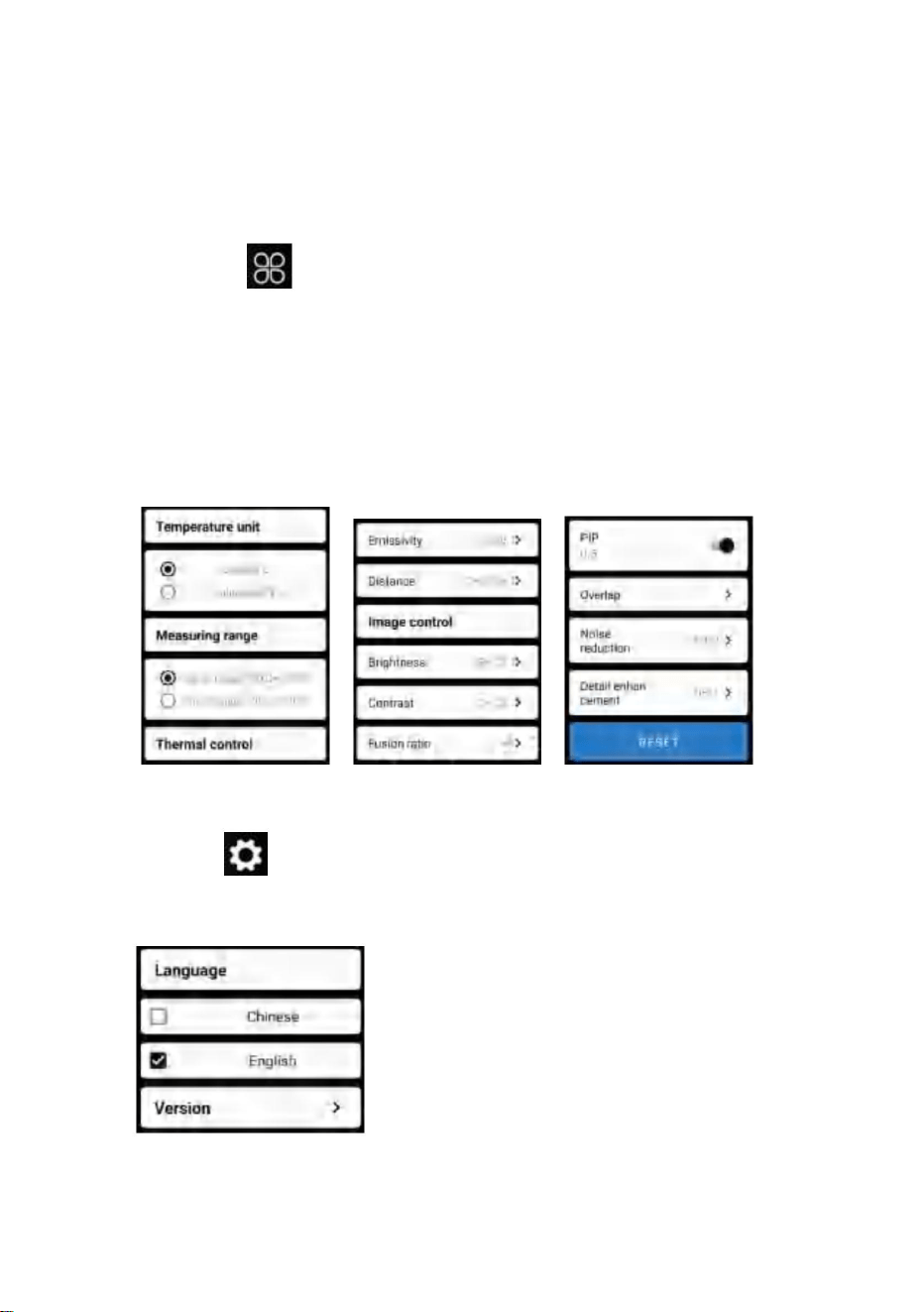
Abbildung unten.
Als Sprachen kann Chinesisch oder Englisch ausgewählt werden, wie in der Abbildung gezeigt
”
Klicke auf
, um die Einstellungsoberfläche für die Sprachauswahl aufzurufen.
„
5.6 Einstellung der Temperaturmessung
5.7 Einstellung
14
Fusion, Bild-in-Bild, Überlappung, Rauschunterdrückung im Zeitbereich, räumliche
Rauschunterdrückung und Detailverbesserung oder alles zurücksetzen
„
um die Einstellungsoberfläche aufzurufen. Sie können einstellen
Parameter, wie in der folgenden Abbildung dargestellt:
Temperatureinheit, Temperaturmessbereich, Emissionsgrad,
Temperaturmessabstand, Helligkeit, Kontrast,
”
Klicke auf
Machine Translated by Google

Anzeige
Infrarot
6. Technische Parameter
15
56°(H)×42°(V)
Detektortyp
Brennweite
3,75 mrad
Unterstützt
Unterstützt
Vanadiumoxid ungekühltes Infrarot
IFOV
ÿ 50 mk@25ÿ,@F/1,0
Bildfusionsabschluss
Infrarot-
Bildauflösung
256×192
Helligkeitsanpassung
Bildfrequenz
Pseudofarbmodus
3,2 mm
Unterstützt
Modell
Unterstützt
HT-W01
Betrachtungswinkel
8~14ÿm
Kontrasteinstellung
Brennebene
Arbeitsband
ÿ25Hz
Bild in Bildern
NETD
Freier Fokus
White Hot, Sepia, Ironbow, Regenbogen, Nacht,
Aurora, Red Hot, Jungle, Medical und Black Hot
12ÿm
Fokussierungsmodus
Unterstützt
Hotspot-Tracking
Pixelabstand
Machine Translated by Google

USB Typ-C, DC5V-Stromversorgung
210g
-20ÿ ~ +70ÿ
ÿ2H
ÿ1,5 W
Systemfunktion
Arbeits-/Lagerumgebungen
-10ÿ ~ +50ÿ
Chinesisch und Englisch
Aufladbarer 1000-mAh-Lithium-Akku
Unterstützt
IP54
Temperaturmessfunktion
Größe Gewicht
0,25 m ~ 30 m
Unterstützt
152x35x35mm
300ÿ-500ÿ:±4% -15ÿ-300ÿ:±2ÿoder ±2% -20ÿ-15ÿ:±4ÿ
Temperaturmessmodus
Genauigkeit
der Temperaturmessung
Schutzlevel
Stromversorgung
Sprache
Temperaturmessstrecke
JPG/MP4
Ausdauerzeit
Punkt-, Linien- und regionale Temperaturmessung
Arbeitstemperatur
Externe Schnittstelle
-20ÿ~120ÿ,120ÿ~500ÿ
Produktgewicht
W-LAN
Lagertemperatur
Bild-/Videoformat
Temperaturmessbereich
Gesamtstromverbrauch
Produktgröße
Kamera/Video
16
Machine Translated by Google
FCC-Informationen:
RICHTIGE ENTSORGUNG
17
Als solche gekennzeichnete Produkte dürfen nicht im normalen Hausmüll entsorgt werden
2) Dieses Produkt muss alle empfangenen Störungen akzeptieren, einschließlich
Dies gilt für das Produkt und alle Zubehörteile, die mit diesem Symbol gekennzeichnet sind.
1) Dieses Produkt kann schädliche Störungen verursachen.
Dieses Gerät entspricht Teil 15 der FCC-Bestimmungen. Der Betrieb unterliegt den folgenden zwei
Bedingungen:
Sammlung in der Europäischen Union.
weist darauf hin, dass das Produkt getrennt entsorgt werden muss
Ausrüstung!
ein digitales Gerät der Klasse B gemäß Teil 15 der FCC-Bestimmungen. Diese Grenzwerte sollen
einen angemessenen Schutz vor schädlichen Störungen in einer Wohnanlage bieten.
Das Symbol einer Mülltonne ist durchgestrichen
Verantwortlich für die Einhaltung kann die Berechtigung des Benutzers zum Betrieb des Geräts erlöschen
ACHTUNG: Änderungen oder Modifikationen, die nicht ausdrücklich von der Partei genehmigt wurden
Europäische Richtlinie 2012/19/EU.
Hinweis: Dieses Produkt wurde getestet und entspricht den Grenzwerten für
Wenn Sie für die Einhaltung verantwortlich sind, kann dies zum Erlöschen der Berechtigung des Benutzers zum Betrieb des
Produkts führen.
Dieses Produkt unterliegt der Bereitstellung von
elektronische Geräte.
WARNUNG: Änderungen oder Modifikationen an diesem Produkt wurden nicht ausdrücklich von
der Partei genehmigt.
Abfall, sondern muss an einer Sammelstelle für das Recycling von Elektro- und Elektronikgeräten abgegeben werden
Störungen auftreten, die zu unerwünschtem Betrieb führen können.
Machine Translated by Google

Pooledas Group
Ltd Unit 5 Albert Edward House,
The REP Pavilions Preston, Vereinigtes
Königreich
[email protected] 01772418127
SHUNSHUN
GmbH Römeräcker 9
Z2021,76351 Linkenheim-
Hochstetten, Germany
[email protected] +49 1727041930
· Erhöhen Sie den Abstand zwischen Produkt und Empfänger.
Dieses Produkt erzeugt und verwendet Hochfrequenzenergie und kann diese ausstrahlen. Wenn es nicht
gemäß den Anweisungen installiert und verwendet wird, kann es schädliche Störungen der
Funkkommunikation verursachen. Es gibt jedoch keine Garantie dafür, dass bei einer bestimmten Installation
keine Störungen auftreten. Wenn dieses Produkt schädliche Störungen beim Radio- oder Fernsehempfang
verursacht, was durch Aus- und Einschalten des Produkts festgestellt werden kann, wird dem
Benutzer empfohlen, zu versuchen, die Störung durch eine oder mehrere der folgenden Maßnahmen zu
beheben.
· Wenden Sie sich für Hilfe an den Händler oder einen erfahrenen Radio-/TV-Techniker.
· Schließen Sie das Produkt an eine Steckdose an, die zu einem anderen Stromkreis gehört als dem, an den
der Empfänger angeschlossen ist.
· Richten Sie die Empfangsantenne neu aus oder versetzen Sie sie.
In China hergestellt
18
REP
Vereinigtes Königreich
EC
Importiert in die USA: Sanven Technology Ltd., Suite 250, 9166 Anaheim
Place, Rancho Cucamonga, CA
91730 Hersteller: Shanghaimuxinmuyeyouxiangongsi
Adresse: Baoshanqu Shuangchenglu 803long 11hao 1602A-1609 shi
Shanghai
Machine Translated by Google

al Support und E-
Garantiezertifikat
vor.com/support
chni c
eww wv
T
e
Machine Translated by Google

MODELLO: HT-W01
Termocamera
stima del risparmio che potresti trarre vantaggio dall'acquisto di determinati strumenti con noi rispetto ai principali
Ti ricordiamo gentilmente di verificare attentamente quando effettui un ordine con noi, se tu
"Risparmia la metà", "Metà prezzo" o qualsiasi altra espressione simile da noi utilizzata rappresenta solo un
marchi più importanti e non significa necessariamente coprire tutte le categorie di strumenti da noi offerti.
stanno effettivamente risparmiando la metà rispetto ai principali marchi più importanti.
Continuiamo a impegnarci per fornirvi strumenti a prezzi competitivi.
Supporto tecnico e certificato di garanzia elettronico www.vevor.com/support
Machine Translated by Google
MODELLO: HT-W01
1
HO BISOGNO DI AIUTO? CONTATTACI!
Queste sono le istruzioni originali, leggere attentamente tutte le istruzioni del manuale
prima dell'uso. VEVOR si riserva una chiara interpretazione del nostro manuale d'uso.
L'aspetto del prodotto sarà soggetto al prodotto ricevuto.
Ti preghiamo di perdonarci se non ti informeremo più se sono presenti aggiornamenti
tecnologici o software sul nostro prodotto.
Supporto tecnico e certificato di garanzia
elettronica www.vevor.com/support
Hai domande sul prodotto? Hai bisogno di supporto tecnico? Non esitate a
contattarci:
Termocamera
Machine Translated by Google

1
13
1
4
2
6
3
6
3
3
7
4
7
8
4
10
1
4
12
4
12
5. Funzionamento del software
5.1 Interfaccia software
1. Avvertenze
2. Riepilogo del prodotto
5.2 Libreria, fotografia e registrazione video 5.3 Aggiornamento
dell'otturatore
2.1 Scene applicative 2.2 Funzioni
principali
5.4 Analisi della misurazione della temperatura
3. Strutture del prodotto
5.5 Tavolozza dei colori
3.2 Descrizione degli indicatori 4.
Applicazione del prodotto
5.6 Impostazione della misurazione della temperatura
5.7 Impostazione
3.1 Introduzione alla struttura
4.1 Accensione dell'apparecchiatura
4.2 Spegnimento dell'apparecchiatura
6. Parametri tecnici
4.3 Ricarica dell'apparecchiatura
4.4 Collegamento dell'apparecchiatura
2
Contenuto
Machine Translated by Google

2. Riepilogo del prodotto
1. Precauzioni
per proteggere te e gli altri da lesioni o danni al tuo dispositivo.
(1) Non esporre il prodotto al sole e ad altre radiazioni ad alta intensità
sorgenti di radiazioni
2.1 Scene applicative
(2) Non toccare né scontrare la finestra del rilevatore e la lente
Per utilizzare questa termocamera a infrarossi per telefono cellulare, è necessario
(3) Non toccare il dispositivo e l'interfaccia USB con le mani bagnate;
mani o altri oggetti;
scaricare e installare la termocamera a infrarossi per telefono cellulare
(4) Non strofinare l'attrezzatura con diluente;
APP “Termocamera mobile WIFI wireless HT-W01”. Attraverso
questa APP, puoi ottenere l'osservazione a infrarossi e la temperatura
(5) Prestare attenzione a prevenire l'elettricità statica;
funzioni di misurazione della tura.
Si prega di leggere tutte le seguenti informazioni prima di utilizzare il dispositivo
(6) Non smontare l'apparecchiatura. Se c'è qualche colpa,
si prega di contattare la nostra azienda per la riparazione da parte di personale professionale.
3
Machine Translated by Google

termocamera a infrarossi per telefono.
mento;
analisi della temperatura;
Si dovranno realizzare le seguenti funzioni:
(2) per eseguire la misurazione della temperatura a infrarossi e
(3) riprese e registrazioni video;
(1) Aprire il software applicato per gli infrarossi del telefono cellulare
(4) controllo del movimento e impostazione dei parametri per il tuo cellulare
Scansiona il codice QR per scaricare l'app
termocamera per ottenere l'osservazione e la misurazione a infrarossi
2.2 Funzioni principali
4
Machine Translated by Google
3.1 Introduzione alla struttura
Indicatore di stato: luce blu
Sbarra
Indicatore di carica: rosso
3.2 Descrizione degli indicatori
Indicatore di accensione: luce verde
5
telecamera
Copertura inferiore
Luce visibile
Indicatore
Pulsante di
accensione/spegnimento
Interfaccia di tipo C
Sensore di immagine
termica a infrarossi
3. Strutture di prodotto
Machine Translated by Google

4.3 Ricarica del dispositivo
4.4 Collegamento del dispositivo
4.2 Spegnimento del dispositivo
4.1 Accensione del dispositivo
Premi a lungo il pulsante di accensione/spegnimento per più di 2 secondi e tutto
Nome WIFI con prefisso HT-W01-;
Utilizzare cavi dati con interfaccia TYPE-C per la ricarica. L'indicatore di carica è
normalmente acceso. Dopo che è completamente carico, l'indicatore di carica non è acceso.
gli indicatori saranno spenti.
Premere a lungo il pulsante di accensione/spegnimento per 1 secondo e il
dispositivo si accende. L'indicatore di accensione è normalmente acceso.
(2) Immettere la password WIFI 12345678 e collegarla;
Premere a lungo il pulsante di accensione per più di 6 secondi quando è acceso
Dopo che il dispositivo è stato acceso per 15 secondi, è possibile cercare Wi-Fi
Connessione Wi-Fi
sullo stato per lo spegnimento forzato e tutti gli indicatori saranno spenti.
(1) Aprire la schermata di connessione WIFI del telefono cellulare e verificare
6
4. Applicazione del prodotto
Machine Translated by Google

7
clicca sul
“
"
scomparirà;
"
1. Dopo che la connessione Wi-Fi è riuscita e quando il dispositivo è attivo
• Il dispositivo non riesce a connettersi al telefono cellulare e lo stato
2. Una volta stabilita la connessione,
disconnesso, fare clic per connettere il dispositivo;
l'indicatore lampeggia a bassa frequenza (acceso per 1 secondo e spento per 1 secondo)
E
• Dopo che il dispositivo si è connesso al telefono cellulare, verrà visualizzato lo stato
l'indicatore lampeggia ad alta frequenza (acceso per 0,5 s e spento per 0,5 s).
(3) Una volta stabilita la connessione Wi-Fi, accedere all'APP e premere il
pulsante per avviare la connessione del dispositivo.
“
Pulsante Riproduci: dopo averlo cliccato, inizia la riproduzione delle immagini
ed è possibile eseguire le operazioni correlate.
"
“
Machine Translated by Google
5.1 Interfaccia del software
Stato di mancata
connessione del dispositivo
Pulsante di impostazione
della temperatura
Pulsante Libreria
Pulsante di
assegnazione della tavolozza dei colori
Pulsante di aggiornamento dell'otturatore Pulsante di riproduzione
Pulsante di impostazione
Pulsante di misurazione
della temperatura
Pulsante di registrazione video
Pulsante di acquisizione dell'immagine
8
1
4
7
10
6
9
3
5
8
2
5. Funzionamento del software
Machine Translated by Google
9
5.2 Libreria, riprese e registrazione video
5.3 Immagine di aggiornamento dell'otturatore.
"
libreria: fare clic per visualizzare immagini e video;
"
Accedi alla pagina dell'elenco delle immagini
• Premere a lungo l'immagine o fare clic sull'icona nell'angolo in alto a destra per poter
eliminare i file di immagine; • Fare clic
sull'immagine per visualizzare in anteprima le singole immagini ed è possibile visualizzare
in anteprima l'immagine precedente/ultima scorrendo
verso sinistra/destra; • Quando si visualizza l'anteprima di singole immagini, aprire/
chiudere due dita per ingrandire/ridurre il contenuto dell'immagine e premerle a lungo
per poter visualizzare informazioni dettagliate sulle immagini;
aggiornamento dell'otturatore: fare clic su per aggiornare il deflettore.
•Premere a lungo l'immagine o fare clic sull'icona nell'angolo in alto a destra per poter
eliminare i file video; •Fare clic sui video
per riprodurre tale file video;
Accedi alla pagina dell'elenco dei video
“
(2)
“Posizione salvataggio foto: per aprire le immagini desiderate nella libreria ed è possibile
visualizzare la posizione dell'immagine.
"
(4) “registrazione video: fare clic su di esso per avviare la registrazione video e fare
nuovamente clic su di esso per terminare la registrazione video; La posizione in cui salvare
la registrazione video è la stessa di un'immagine.
(1) “
"
scatto: per salvare la schermata corrente;
Machine Translated by Google
10
5.4 Analisi della misurazione della temperatura
Fare clic su "
"
verranno aggiunte le informazioni sul punto definito dall'utente.
Misurazione della temperatura puntuale
(2) Analisi della misurazione della temperatura della linea: trascina con te
Analisi della misurazione della temperatura di linea
dita e tracciare una linea orizzontale sullo schermo. Lo farà
(1) Misurazione della temperatura del punto: fare clic sulla temperatura del punto
Analisi della misurazione della temperatura regionale
analizzare automaticamente la temperatura massima e minima
pulsante di misurazione e lo schermo visualizzerà la temperatura
temperatura della linea orizzontale e identificare i dati rilevanti
informazione.
ture informazioni di tre punti, vale a dire la temperatura centrale
per far apparire l'opzione di misurazione della temperatura.
punto, il punto di temperatura più alta e la temperatura più bassa
punto. Fare clic sullo schermo in questo momento e sulla temperatura
Machine Translated by Google
mostrato nella figura seguente:
Analisi della misurazione della temperatura di linea
dita e disegnare un rettangolo sullo schermo. lo farà automaticamente
nell'area rettangolare e identificare le informazioni rilevanti, come
Analisi della misurazione della temperatura regionale
(3) Analisi della misurazione della temperatura regionale: trascina con te
analizzare la temperatura massima e la temperatura minima
11
Machine Translated by Google
12
5.5 Tavolozze dei colori
per far apparire l'interfaccia della tavolozza dei colori. Puoi
cambia tra 10 tavolozze di colori come bianco caldo, oro brillante, rosso ferro,
arcobaleno, brillante, aurora, rosso caldo, giungla, medico e
Gli effetti di visualizzazione di 10 tavolozze di colori sono mostrati come segue:
Clicca su
calore nero, come mostrato nella figura seguente.
bianco caldo
“
Seppia
"
Machine Translated by Google
Arcobaleno
Giungla
Nero caldo
Notte
Medico
Aurora
Arco di ferro
Rosso caldo
13
Machine Translated by Google
unità di temperatura, intervallo di misurazione della temperatura, emissività, distanza di
misurazione della temperatura, luminosità, contrasto,
parametri, come mostrato nella figura seguente:
“
per visualizzare l'interfaccia di impostazione. Puoi impostare
fusione, immagine nell'immagine, sovrapposizione, riduzione del rumore nel dominio del
tempo, riduzione del rumore spaziale e miglioramento dei dettagli oppure reimposta tutto
Clicca su
"
"
Clicca su
per visualizzare l'interfaccia di impostazione per la selezione della lingua.
Per le lingue è possibile selezionare cinese o inglese, come mostrato nel file
“
figura sotto.
14
5.7 Impostazione
5.6 Impostazione della misurazione della temperatura
Machine Translated by Google

Infrarossi
Schermo
Supportato
Modello
3,2 mm
Regolazione
della luminosità
Modalità pseudo colore
Supportato
256×192
Frequenza fotogrammi dell'immagine
Risoluzione
dell'immagine a infrarossi
IFOV
Infrarossi non raffreddati all'ossido di vanadio
ÿ 50mk@25ÿ,@F/1.0
Grado di fusione delle immagini
Tipo di rilevatore
Lunghezza focale
3,75 mrad
Supportato
Supportato
Spaziatura dei pixel
56°(O)×42°(V)
Monitoraggio dei punti caldi
12ÿm
Modalità di messa a fuoco
Supportato
NET
Messa a fuoco libera
Bianco caldo, seppia, Ironbow, arcobaleno, notte, aurora,
rosso caldo, giungla, medico e nero caldo
ÿ25Hz
Piano focale
Banda di lavoro
Immagine nelle immagini
Punto di vista
HT-W01
8~14ÿm
Regolazione del contrasto
15
6.Parametri tecnici
Machine Translated by Google

Batteria al litio ricaricabile da 1000 mAh
Cinese e inglese
Funzione del sistema
ÿ1,5 W
Ambienti di lavoro/deposito
-10ÿ~+50ÿ
ÿ2H
-20ÿ~+70ÿ
0,25 ~ 30 m
USB tipo C, alimentazione DC5V
Supportato
Funzione di misurazione della temperatura
152x35x35 mm
Dimensioni/Peso
210 g
Supportato
IP54
16
Intervallo di
misurazione della temperatura
Tempo di resistenza
Distanza di
misurazione della temperatura
JPG/MP4
Interfaccia esterna
Precisione della
misurazione della temperatura
Alimentazione elettrica
-20ÿ~120ÿ,120ÿ~500ÿ
misurazione della temperatura puntuale, lineare e regionale
Temperatura di lavoro
Temperatura di conservazione
WIFI
Formato immagine/video
Fotocamera/videocamera
Modalità di
misurazione della temperatura
Livello di protezione
Lingua
Taglia del prodotto
Consumo
energetico complessivo
Peso del prodotto
300ÿ-500ÿ:±4% -15ÿ-300ÿ:±2ÿo ±2% -20ÿ-15ÿ:±4ÿ
Machine Translated by Google
ATTENZIONE: Variazioni o modifiche non espressamente approvate dalla parte
Il simbolo che mostra un bidone della spazzatura barrato
responsabile della conformità potrebbe annullare l'autorità dell'utente a utilizzare il
Nota: questo prodotto è stato testato ed è risultato conforme ai limiti previsti per
indica che il prodotto necessita di raccolta differenziata
attrezzatura!
un dispositivo digitale di Classe B ai sensi della Parte 15 delle norme FCC. Questi limiti sono
progettati per fornire una protezione ragionevole contro interferenze dannose in un'installazione
residenziale.
Questo dispositivo è conforme alla Parte 15 delle norme FCC. Il funzionamento è soggetto alle
seguenti due condizioni:
raccolta nell’Unione Europea.
Ciò vale per il prodotto e tutti gli accessori contrassegnati da questo simbolo.
I prodotti contrassegnati come tali non possono essere smaltiti con le normali procedure domestiche
1) Questo prodotto può causare interferenze dannose.
2) Questo prodotto deve accettare qualsiasi interferenza ricevuta, inclusa
rifiuti, ma devono essere portati in un punto di raccolta per il riciclaggio di materiale elettrico e
interferenze che potrebbero causare un funzionamento indesiderato.
dispositivi elettronici.
ATTENZIONE: cambiamenti o modifiche a questo prodotto non espressamente approvati
dalla parte.
responsabile della conformità potrebbe invalidare l'autorità dell'utente a utilizzare il prodotto.
Questo prodotto è soggetto alla fornitura di
Direttiva Europea 2012/19/UE.
Informazioni FCC:
17
CORRETTO SMALTIMENTO
Machine Translated by Google

Importato negli Stati Uniti: Sanven Technology Ltd., Suite 250, 9166 Anaheim
Place, Rancho Cucamonga, CA
91730 Produttore: Shanghaimuxinmuyeyouxiangongsi
Indirizzo: Baoshanqu Shuangchenglu 803long 11hao 1602A-1609 shi
Shanghai
Pooledas Group
Ltd Unità 5 Albert Edward
House, The REP Pavilions Preston,
Regno Unito
[email protected] 01772418127
SHUNSHUN
GmbH Römeräcker 9
Z2021,76351 Linkenheim-
Hochstetten, Germania
[email protected] +49 1727041930
Made in China
UK
CE
RAPPRESENTANTE
Questo prodotto genera, utilizza e può irradiare energia in radiofrequenza
e, se non installato e utilizzato in conformità con le istruzioni, può causare
interferenze dannose alle comunicazioni radio. Tuttavia, non vi è alcuna
garanzia che non si verifichino interferenze in una particolare installazione. Se
questo prodotto causa interferenze dannose alla ricezione radiofonica
o televisiva, cosa che può essere determinata spegnendo e accendendo il
prodotto, si consiglia all'utente di provare a correggere l'interferenza
adottando una o più delle seguenti misure.
· Aumentare la distanza tra il prodotto e il ricevitore.
· Consultare il rivenditore o un tecnico radio/TV esperto per
assistenza.
· Riorientare o riposizionare l'antenna ricevente.
· Collegare il prodotto ad una presa su un circuito diverso da quello a cui è
collegato il ricevitore.
18
Machine Translated by Google

chni c
al Support e certificato
di garanzia elettronica
vor.com/support
T
e
eww wv
Machine Translated by Google

Soportetécnicoycertificadodegarantíaelectrónicawww.vevor.com/support
Seguimoscomprometidosaproporcionarleherramientasaprecioscompetitivos.
Lerecordamosquedebeverificarcuidadosamentecuandorealizaunpedidoconnosotrossi
marcasprincipalesynosignificanecesariamentecubrirtodaslascategoríasdeherramientasqueofrecemos.
"AhorraMitad","MitaddePrecio"ocualquierotraexpresiónsimilarutilizadapornosotrossólorepresentaun
Enrealidad,encomparaciónconlasprincipalesmarcas,seahorralamitad.
estimacióndeahorrosquepodríabeneficiarsealcomprarciertasherramientasconnosotrosencomparaciónconlasprincipales
Cámaradeimagentérmica
MODELO:HTW01
Machine Translated by Google
Cámaradeimagentérmica
¿Tienepreguntassobreelproducto?¿Necesitasoportetécnico?Siéntetelibrede
contactarnos:
Soportetécnicoycertificadodegarantía
electrónicawww.vevor.com/support
MODELO: HTW01
1
¿NECESITASAYUDA?¡CONTÁCTENOS!
Perdonequenoleinformaremosnuevamentesihayactualizacionesdetecnologíao
softwareennuestroproducto.
Laaparienciadelproductoestarásujetaalproductoquerecibió.
Estassonlasinstruccionesoriginales;leaatentamentetodaslasinstruccionesdelmanual
antesdeoperar.VEVORsereservaunainterpretaciónclaradenuestromanualdeusuario.
Machine Translated by Google

5.Operacióndelsoftware
1.Precauciones
5.1Interfazdelsoftware
2.Resumendelproducto
5.2Biblioteca,fotografíaygrabacióndevídeo5.3
Actualizacióndelobturador
2.1Escenasdeaplicación2.2
Funcionesprincipales
5.4Análisisdemedicióndetemperatura
5.5Paletadecolores
3.Estructurasdeproductos
3.1Introducciónalaestructura
5.6Configuracióndemedicióndetemperatura5.7
Configuración
3.2DescripcióndeIndicadores4.
AplicacióndelProducto
6.Parámetrostécnicos
4.1Encendidodelequipo4.2
Apagadodelequipo
4.3Cargadelequipo4.4
Conexióndelequipo
4
1
4
12
6
2
13
6
3
3
3
7
7
4
8
4
10
12
1
4
1
2
Contenido
Machine Translated by Google

(2)Notoquenichoquelaventanadeldetectorylalentecon
Parautilizarestacámaratermográficainfrarrojaparateléfonomóvil,debe
(3)NotoqueeldispositivonilainterfazUSBconlasmanosmojadas;
Descargueeinstalelacámaratermográficainfrarrojadelteléfonomóvil.
manosuotrosobjetos;
(1)Noexpongaelproductoalsolniaotroslugaresdealtaintensidad.
fuentesderadiación
2.1Escenasdeaplicación
Leatodalasiguienteinformaciónantesdeusarsudispositivo
(6)Nodesmonteelequipo.Sihayalgúnfallo,
Póngaseencontactoconnuestraempresaparaqueloreparepersonalprofesional.
paraprotegerloaustedyaotrosdelesionesodañosasudispositivo.
(4)Nofrotesuequipocondiluyente;
APLICACIÓN“HTW01CámaratermográficamóvilinalámbricaWIFI”.Atravésde
Estaaplicación,puedelograrobservacióninfrarrojaytemperatura.
(5)Presteatenciónaprevenirlaelectricidadestática;
Funcionesdemedicióndelanaturaleza.
3
1.Precauciones
2.Resumendelproducto
Machine Translated by Google

2.2Funcionesprincipales
4
análisisdetemperatura;
(1)Abraelsoftwareaplicadoparainfrarrojosdelteléfonomóvil.
(3)filmaciónygrabacióndevideo;
Cámaratermográficaparalograrobservaciónymedicióninfrarroja.
EscaneeelcódigoQRparadescargarlaaplicación
(4)controldemovimientoyconfiguracióndeparámetrosparatumóvil
mento;
cámaratermográficainfrarrojadelteléfono.
(2)pararealizarmedicionesdetemperaturaporinfrarrojos,y
Sedebenlograrlassiguientesfunciones:
Machine Translated by Google
3.1Introducciónalaestructura
Indicadordeestado:luzazul
Indicadordeencendido:luzverde
Bar
3.2Descripcióndeindicadores
Indicadordecarga:rojo
5
Sensordeimagen
térmicaporinfrarrojos
Cubiertainferior
Indicador
Luzvisible
Interfaztipoc
Botónde
encendido/apagado
cámara
3.Estructurasdeproductos
Machine Translated by Google

4.4Conexióndeldispositivo
4.3Cargadeldispositivo
4.2Apagadodeldispositivo
4.1Encendidodeldispositivo
Despuésdequeeldispositivoestéencendidodurante15segundos,puedesbuscarWIFI
ConexiónWIFI
encendidoparaapagadoforzadoytodoslosindicadoresseapagarán.
(2)IngreselacontraseñaWIFI12345678yconéctela;
(1)AbralapantalladeconexiónWIFIdesuteléfonomóvilyseleccione
NombreWIFIconelprefijoHTW01;
Mantengapresionadoelbotóndeencendido/apagadodurantemásde2segundosytodo
UtilicecablesdedatosdeinterfazTYPECparacargar.Elindicadordecarganormalmenteestá
encendido.Unavezqueestécompletamentecargado,elindicadordecarganoseenciende.
Mantengapresionadoelbotóndeencendido/apagadodurante1segundoyeldispositivose
encenderá.Elindicadordeencendidonormalmenteestáencendido.
Losindicadoresestaránapagados.
Mantengapresionadoelbotóndeencendidodurantemásde6segundosenelmododeencendido.
6
4.Aplicacióndelproducto
Machine Translated by Google

1.DespuésdequelaconexiónWIFIseaexitosaycuandoeldispositivoesté
•Eldispositivonolograconectarsuteléfonomóvilyelestado
2.Despuésdeunaconexiónexitosa,
desconectado,hagaclicparaconectareldispositivo;
Elindicadorparpadeaenbajafrecuencia(encendidodurante1segundoyapagadodurante1segundo)
“
"
"
"
desaparecerá;
BotónReproducir:despuésdehacerclicenél,comienzaareproducirimágenesy
puederealizaroperacionesrelacionadas.
“
clickeaenel
y
•Despuésdequeeldispositivoconectesuteléfonomóvil,elestado
Elindicadorparpadeaconaltafrecuencia(encendidodurante0,5syapagadodurante0,5s).
(3)DespuésdequelaconexiónWIFIseaexitosa,vayaalaAPLICACIÓNypresione
elbotónparacomenzaraconectareldispositivo.
“
7
Machine Translated by Google
5.1Interfazdelprograma
Botónbiblioteca
Botónde
asignacióndepaletadecolores
Botóndeactualizacióndelobturador Botóndereproducción
Botóndeconfiguración
Botóndemedición
detemperatura
Botóndegrabacióndevídeo
Botóndecapturadeimagen
Estadodeldispositivo
quenosepudoconectar
Botóndeajustede
temperatura
8
3
8
2
5
4
1
10
7
6
9
5.Operacióndelsoftware
Machine Translated by Google
biblioteca:hagaclicparaverimágenesyvideos;
"
disparo:paraguardarlapantallaactual;
Ingresealapáginadelistadeimágenes
Actualizacióndelobturador:hagaclicenparaactualizareldeflector.
•Mantengapresionadalaimagenohagacliceneliconoenlaesquinasuperiorderechapara
podereliminararchivosdeimagen;•Haga
clicenlaimagenparaobtenerunavistapreviadeimágenesindividualesypuedeobteneruna
vistapreviadelaimagenanterior/últimadeslizándosehacia
laizquierda/derecha;•Cuandoobtengaunavistapreviadeimágenesindividuales,abra/cierre
losdosdedosparaacercar/alejarelcontenidodelaimagenymanténgalopresionadopara
poderverinformacióndetalladasobrelasimágenes;
“
•Mantengapresionadalaimagenohagaclicenelíconoenlaesquinasuperiorderechapara
podereliminararchivosdevideo;•Haga
clicenlosvideosparareproducirdichoarchivodevideo;
Ingresealapáginadelistadevideos
"
(2)
“Posiciónparaguardarfotos:paraabrirlasimágenesquenecesitaenlabibliotecaypuedever
laubicacióndelaimagen.
(4)“grabacióndevideo:hagaclicenélparainiciarlagrabacióndevideoyhagaclicenél
nuevamenteparafinalizarlagrabacióndevideo;Laposiciónparaguardarlagrabacióndevídeo
eslamismaqueladeunaimagen.
(1)“
"
"
9
5.2Biblioteca,rodajeygrabacióndevídeo.
5.3Imagenrefrescantedelobturador.
Machine Translated by Google
"
Seagregarálainformacióndelpuntodefinidoporelusuario.
punto.Hagaclicenlapantallaenestemomentoylatemperatura
Medicióndetemperaturapuntual
(2)Análisisdemedicióndetemperaturadelínea:arrastreconsu
dedosydibujaunalíneahorizontalenlapantalla.Vaa
Análisisdemedicióndetemperaturadelínea.
Análisisdemedicióndetemperaturaregional.
(1)Medicióndetemperaturadelpunto:hagaclicenlatemperaturadelpunto
Analizaautomáticamentelatemperaturamáximaymínima.
temperaturadelalíneahorizontaleidentificarlosvaloresrelevantes
botóndemediciónylapantallamostrarálatemperatura.
información.
informacióndetemperaturadetrespuntos,asaber,latemperaturacentral
paraqueaparezcalaopcióndemedicióndetemperatura.
Hagaclicen"
punto,elpuntodetemperaturamásaltaylatemperaturamásbaja
10
5.4Análisisdemedicióndetemperatura
Machine Translated by Google
11
Análisisdemedicióndetemperaturadelínea.
analizarlatemperaturamáximaylatemperaturamínima
Análisisdemedicióndetemperaturaregional.
dedosydibujaunrectánguloenlapantalla.loharáautomáticamente
(3)Análisisdemedicióndetemperaturaregional:arrastreconsu
enelárearectangular,eidentificarinformaciónrelevante,como
semuestraenlasiguientefigura:
Machine Translated by Google
Losefectosdevisualizaciónde10paletasdecoloressemuestranacontinuación:
“
blancocaliente
"
Sepia
cambiaentre10paletasdecolorescomocalorblanco,orobrillante,rojohierro,arcoíris,
brillo,aurora,calorrojo,jungla,médicoy
paraqueaparezcalainterfazdelapaletadecolores.Puede
calornegro,comosemuestraenlasiguientefigura.
Hagaclicen
12
5.5paletasdecolores
Machine Translated by Google
13
negrocaliente
Aurora
Alrojovivo
arcodehierro
Selva
Arcoíris
Médico
Noche
Machine Translated by Google
5.7Configuración
5.6Configuracióndemedicióndetemperatura
14
"
parámetros,comosemuestraenlasiguientefigura:
fusión,imagenenimagen,superposición,reducciónderuidoeneldominiodel
tiempo,reducciónderuidoespacialymejoradedetalles,orestablecertodo
“
Hagaclicen
paraqueaparezcalainterfazdeconfiguración.Puedesconfigurar
unidaddetemperatura,rangodemedicióndetemperatura,emisividad,
distanciademedicióndetemperatura,brillo,contraste,
"
Hagaclicen
paraqueaparezcalainterfazdeconfiguraciónparalaseleccióndeidioma.
Paralosidiomas,sepuedeseleccionarchinooinglés,comosemuestraenla
“
lasiguientefigura.
Machine Translated by Google

6.Parámetrostécnicos
15
≤25Hz
bandadetrabajo
Planofocal
Velocidaddecuadrosdeimagen
Imagenenimágenes
HTW01
Puntodevista
8~14μm
Ajustedecontraste
Soportado
Espaciadodepíxeles
56°(H)×42°(V)
Seguimientodepuntoscalientes
12μm
Mododeenfoque
Soportado
NETO
Enfoquelibre
Blancocaliente,sepia,Ironbow,arcoiris,noche,
aurora,rojovivo,jungla,médicoynegrocaliente
Resoluciónde
imageninfrarroja
IFOV
Infrarrojonorefrigeradodeóxidodevanadio
≤50mk@25,@F/1.0
Gradodefusióndeimágenes
Tipodedetector
Longitudfocal
3,75mrad
Soportado
Soportado
Modelo
3,2mm
Ajustedebrillo
Modopseudocolor
Soportado
256×192
Mostrar
Infrarrojo
Machine Translated by Google

Soportado
IP54
Bateríadelitiorecargablede1000mAh.
chinoeingles
≤1,5W
Funcióndelsistema
Entornosdetrabajo/almacenamiento
10~+50
20~+70
≥2H
152x35x35mm
USBtipoC,fuentedealimentaciónDC5V
0,25m~30m
Soportado
Tamaño/Peso
210g
Funcióndemedicióndetemperatura
dieciséis
Distanciade
medicióndetemperatura
JPEG/MP4
Consumototal
deenergía
tiempoderesistencia
Precisióndela
medicióndetemperatura
Fuentedealimentación
PesodelProducto
Interfazexterna
Temperaturadetrabajo
Medicióndetemperaturapuntual,linealyregional.
20~120,120~500
Temperaturadealmacenamiento
WIFI
Formatodeimagen/vídeo
Tamañodelproducto
Niveldeprotección
Cámara/vídeo
Modode
medicióndetemperatura
Rangode
medicióndetemperatura
Idioma
300500:±4%15300:±2o±2%
2015:±4
Machine Translated by Google
ELIMINACIÓNCORRECTA
17
PRECAUCIÓN:Cambiosomodificacionesnoaprobadosexpresamenteporlaparte
Elsímboloquemuestrauncontenedorconruedastachado
responsabledelcumplimientopodríaanularlaautoridaddelusuarioparaoperarel
Nota:Esteproductohasidoprobadoycumpleconloslímitesde
¡equipo!
indicaqueelproductorequiererechazoporseparado
undispositivodigitaldeClaseBdeconformidadconlaParte15delasnormasdelaFCC.
Estoslímitesestándiseñadosparaproporcionarunaprotecciónrazonablecontra
interferenciasdañinasenunainstalaciónresidencial.
EstedispositivocumpleconlaParte15delasnormasdelaFCC.Laoperaciónestásujetaalas
doscondicionessiguientes:
recogidaenlaUniónEuropea.
Estoseaplicaalproductoyatodoslosaccesoriosmarcadosconestesímbolo.
Losproductosmarcadoscomotalesnosepuedendesecharconlosresiduosdomésticosnormales.
1)Esteproductopuedecausarinterferenciasperjudiciales.
2)Esteproductodebeaceptarcualquierinterferenciarecibida,incluida
residuos,perodebenllevarseaunpuntoderecogidaparaelreciclajedeaparatoseléctricosy
interferenciasquepuedancausarunfuncionamientonodeseado.
dispositivoselectrónicos.
ADVERTENCIA:Cambiosomodificacionesaesteproductonoaprobadosexpresamente
porelpartido.
responsabledelcumplimientopodríaanularlaautoridaddelusuarioparaoperarelproducto.
Esteproductoestásujetoalaprovisiónde
DirectivaEuropea2012/19/UE.
InformacióndelaFCC:
Machine Translated by Google

Esteproductogenera,usaypuedeirradiarenergíaderadiofrecuenciay,sinose
instalayusadeacuerdoconlasinstrucciones,puedecausarinterferenciasdañinas
enlascomunicacionesporradio.Sinembargo,nohaygarantíadequenose
produzcaninterferenciasenunainstalaciónenparticular.Siesteproductocausa
interferenciasdañinasenlarecepciónderadiootelevisión,locualsepuede
determinarapagandoyencendiendoelproducto,serecomiendaalusuarioqueintente
corregirlainterferenciamedianteunaomásdelassiguientesmedidas.
∙Conecteelproductoaunatomadecorrientedeuncircuitodiferentealqueestá
conectadoelreceptor.
∙Aumentarladistanciaentreelproductoyelreceptor.
∙Reorientaroreubicarlaantenareceptora.
∙Consultealdistribuidoroauntécnicoexperimentadoenradio/TVpara
obtenerayuda.
ReinoUnido
CE
REPS
18
ImportadoaEE.UU.:SanvenTechnologyLtd.,Suite250,9166Anaheim
Place,RanchoCucamonga,CA
91730Fabricante:Shanghaimuxinmuyeyouxiangongsi
Dirección:BaoshanquShuangchenglu803long11hao1602A1609shi
Shanghai
PooledasGroup
LtdUnidad5AlbertEdward
House,TheREPPavilionsPreston,Reino
Unido
[email protected]01772418127
SHUNSHUN
GmbHRömeräcker9
Z2021,76351Linkenheim
Hochstetten,Alemania
[email protected]+491727041930
Hechoenchina
Machine Translated by Google

chnic
ewwwv
Soportetécnicoy
certificadodegarantía
electrónicavor.com/support
te
Machine Translated by Google

oszacowanie oszczędności, jakie możesz zyskać kupując u nas określone narzędzia w porównaniu z głównymi
Nadal dokładamy wszelkich starań, aby zapewnić Państwu narzędzia w konkurencyjnej cenie.
Przypominamy, aby dokładnie sprawdzić, kiedy składasz u nas zamówienie, jeśli tak
faktycznie oszczędzają połowę w porównaniu z czołowymi markami.
topowych marek i niekoniecznie oznacza uwzględnienie wszystkich kategorii oferowanych przez nas narzędzi.
„Zaoszczędź pół ceny”, „Zaoszczędź połowę ceny” lub inne podobne wyrażenia używane przez nas oznaczają jedynie
Kamera termowizyjna
MODEL: HT-W01
Wsparcie techniczne i certyfikat e-gwarancji www.vevor.com/support
Machine Translated by Google
Proszę wybaczyć nam, że nie będziemy ponownie informować Państwa, jeśli pojawią się jakieś aktualizacje
technologii lub oprogramowania naszego produktu.
To jest oryginalna instrukcja. Przed przystąpieniem do obsługi prosimy o dokładne zapoznanie
się ze wszystkimi instrukcjami. VEVOR zastrzega sobie jasną interpretację naszej instrukcji obsługi.
Wygląd produktu zależy od produktu, który otrzymałeś.
Wsparcie techniczne i certyfikat e-gwarancji www.vevor.com/
support
Masz pytania dotyczące produktu? Potrzebujesz wsparcia technicznego? Śmiało możesz się z nami
skontaktować:
MODEL: HT-W01
1
POTRZEBUJĘ POMOCY? SKONTAKTUJ SIĘ Z NAMI!
Kamera termowizyjna
Machine Translated by Google

2
3
6
4
10
3
7
3
1
4
13
2
6
1
4
12
1
4
12
7
4
8
3.2 Opis wskaźników 4. Zastosowanie
produktu
2. Podsumowanie produktu
5.2 Biblioteka, fotografia i nagrywanie wideo 5.3 Odświeżanie
migawki
2.1 Sceny aplikacyjne 2.2
Główne funkcje
5.4 Analiza pomiaru temperatury
5. Obsługa oprogramowania
1. Przestrogi
5.1 Interfejs oprogramowania
6. Parametry techniczne
4.1 Włączanie zasilania sprzętu
4.2 Wyłączanie zasilania sprzętu
4.3 Ładowanie sprzętu 4.4
Podłączanie sprzętu
3. Struktury produktów
5.5 Paleta kolorów
3.1 Wprowadzenie do struktury
5.6 Ustawianie pomiaru temperatury 5.7 Ustawianie
Treść
Machine Translated by Google

3
1. Środki ostrożności
2. Podsumowanie produktu
(2) Nie dotykaj ani nie koliduj z okienkiem detektora i soczewką
(5) Proszę zwrócić uwagę na zapobieganie elektryczności statycznej;
Aby korzystać z kamery termowizyjnej na podczerwień w telefonie komórkowym, musisz to zrobić
funkcje pomiarowe.
ręce lub inne przedmioty;
pobierz i zainstaluj kamerę termowizyjną na podczerwień do telefonu komórkowego
(3) Nie dotykaj urządzenia i interfejsu USB mokrymi rękami;
(1) Nie wystawiaj produktu na działanie słońca i innych źródeł o dużej intensywności
źródła promieniowania
2.1 Sceny aplikacyjne
Przed użyciem urządzenia przeczytaj wszystkie poniższe informacje
(6) Nie demontuj urządzenia. Jeśli jest jakakolwiek wina,
aby chronić Ciebie i inne osoby przed obrażeniami lub uszkodzeniem urządzenia.
prosimy o kontakt z naszą firmą w celu naprawy przez profesjonalny personel.
Aplikacja „Bezprzewodowa mobilna kamera termowizyjna HT-W01 WIFI”. Poprzez
(4) Nie szoruj sprzętu rozcieńczalnikiem;
dzięki tej aplikacji możesz uzyskać obserwację w podczerwieni i temperaturę
Machine Translated by Google

4
(1) Otwórz zastosowane oprogramowanie dla podczerwieni telefonu komórkowego
(3) fotografowanie i nagrywanie wideo;
kamera termowizyjna do obserwacji i pomiarów w podczerwieni
(4) sterowanie ruchem i ustawianie parametrów telefonu komórkowego
Zeskanuj kod QR, aby pobrać aplikację
uwaga;
kamera termowizyjna na podczerwień w telefonie.
Do osiągnięcia są następujące funkcje:
(2) wykonanie pomiaru temperatury w podczerwieni oraz
analiza temperatury;
2.2 Główne funkcje
Machine Translated by Google
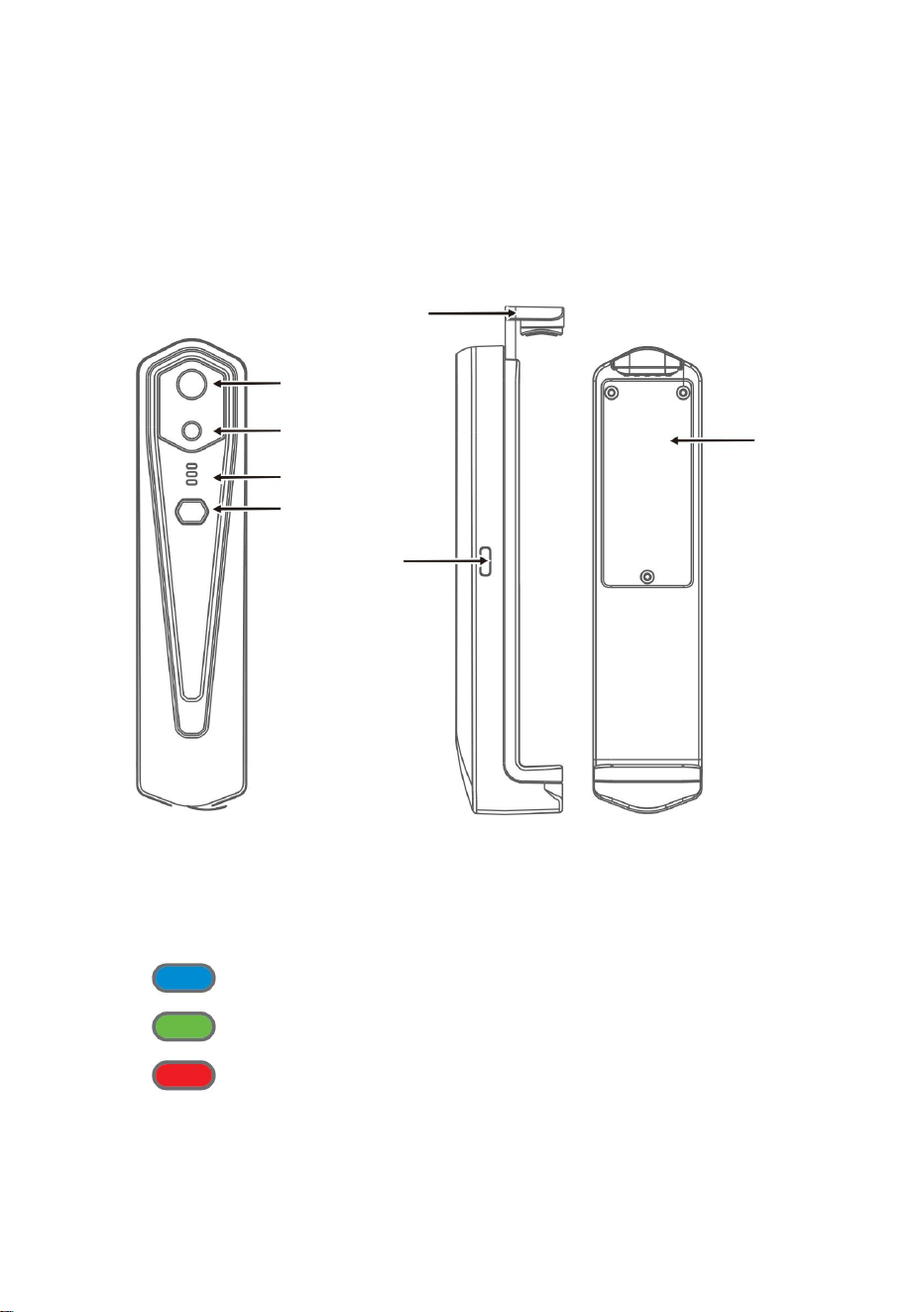
5
kamera
Czujnik obrazu
termowizyjnego na podczerwień
Dolna pokrywa
Przycisk
włączania/wyłączania
Wskaźnik
Widzialne światło
Interfejs typu c
3.1 Wprowadzenie do struktury
Wskaźnik ładowania: czerwony
Wskaźnik włączenia zasilania: zielone światło
3.2 Opis wskaźników
Bar
Wskaźnik stanu: niebieskie światło
3. Struktury produktów
Machine Translated by Google

6
4.3 Ładowanie urządzenia
4.1 Włączenie urządzenia
4.2 Wyłączenie urządzenia
4.4 Podłączenie urządzenia
Po włączeniu urządzenia na 15 sekund możesz przeszukiwać sieć WIFI
Podłączanie Wi-Fi
w stanie włączenia, aby wymusić wyłączenie, a wszystkie wskaźniki zgasną.
(2) Wprowadź hasło WIFI 12345678 i połącz je;
(1) Otwórz ekran połączenia WIFI w telefonie komórkowym i kliknij
Nazwa WIFI poprzedzona HT-W01-;
Długo naciśnij przycisk włączania/wyłączania przez ponad 2 sekundy i wszystko
Do ładowania należy używać przewodów danych interfejsu TYPE-C. Wskaźnik ładowania
jest normalnie włączony. Po całkowitym naładowaniu wskaźnik ładowania nie świeci się.
Naciśnij i przytrzymaj przycisk włączania/wyłączania przez 1 sekundę, a urządzenie
zostanie włączone. Wskaźnik zasilania jest normalnie włączony.
wskaźniki znikną.
Długo naciśnij przycisk zasilania przez ponad 6 sekund w trybie zasilania
4. Zastosowanie produktu
Machine Translated by Google

„
1. Po pomyślnym nawiązaniu połączenia WIFI i urządzeniu
• Urządzenie nie łączy się z telefonem komórkowym i wyświetla status
odłączony, kliknij, aby podłączyć urządzenie;
wskaźnik miga z niską częstotliwością (włączony na 1 s i wyłączony na 1 s)
2. Po udanym połączeniu
”
„
”
zniknie;
Przycisk Odtwórz: Po kliknięciu rozpoczyna odtwarzanie obrazów i
można wykonywać powiązane operacje.
”
Kliknij na
„
• Po podłączeniu urządzenia do telefonu komórkowego zostanie wyświetlony status
I
wskaźnik miga z dużą częstotliwością (włączony przez 0,5 s i wyłączony przez 0,5 s).
(3) Po pomyślnym nawiązaniu połączenia WIFI przejdź do aplikacji i
przycisku, aby rozpocząć podłączanie urządzenia.
7
Machine Translated by Google
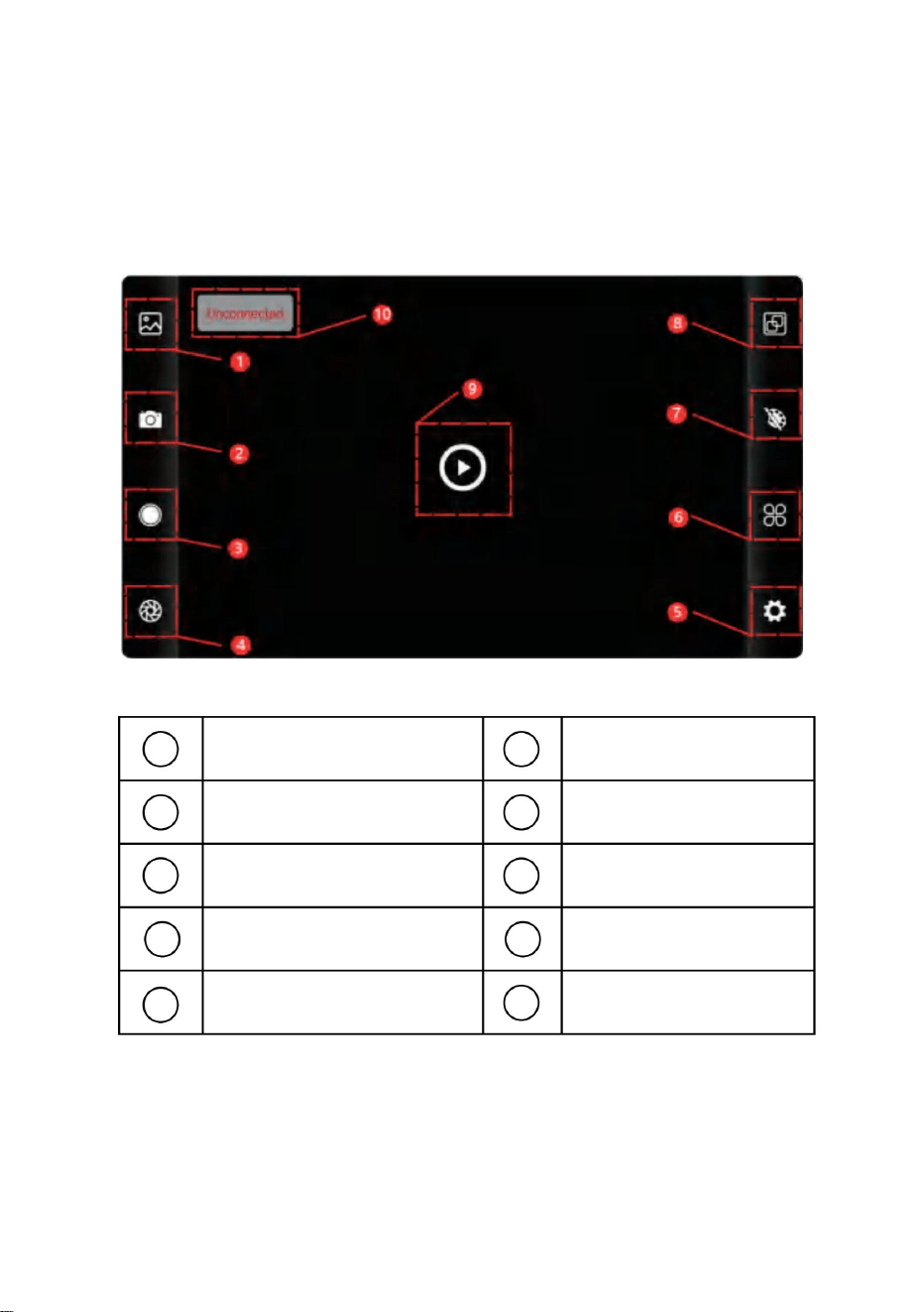
8
6
9
3
4
1
10
7
5
8
2
5.1 Interfejs oprogramowania
Przycisk odtwarzania
Przycisk
ustawiania temperatury
Przycisk ustawień
Przycisk biblioteki
Przycisk nagrywania wideo
Przycisk pomiaru
temperatury
Przycisk przechwytywania obrazu
Przycisk odświeżania migawki
Przycisk alokacji
palety kolorów
Stan urządzenia, które
nie może się połączyć
5. Obsługa oprogramowania
Machine Translated by Google
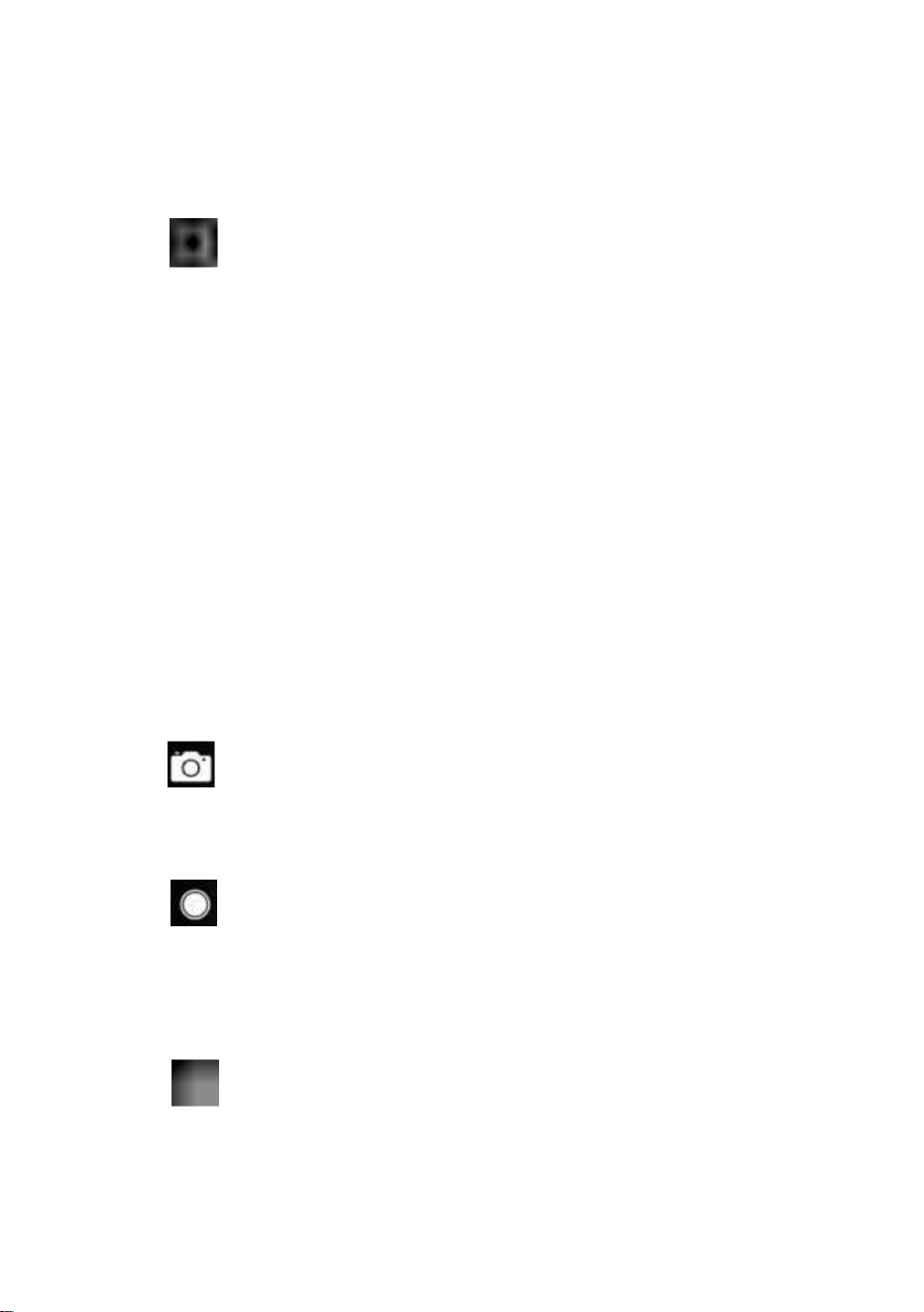
(4) „nagrywanie wideo: kliknij, aby rozpocząć nagrywanie wideo, kliknij je ponownie,
aby zakończyć nagrywanie wideo; Pozycja zapisu nagrania wideo jest taka sama, jak
pozycja obrazu.
• Długo naciśnij obraz lub kliknij ikonę w prawym górnym rogu, aby móc usunąć
pliki obrazów; • Kliknij obraz, aby
wyświetlić podgląd pojedynczych obrazów. Możesz także wyświetlić podgląd
poprzedniego/ostatniego obrazu, przesuwając w
lewo/w prawo; • Podczas podglądu pojedynczych obrazów rozsuń/zamknij dwa
palce, aby powiększyć/pomniejszyć zawartość obrazu, a następnie naciśnij go
długo, aby wyświetlić szczegółowe informacje o obrazach;
odświeżanie migawki: Kliknij, aby odświeżyć przegrodę.
„
Wejdź na stronę z listą filmów
•Naciśnij długo obraz lub kliknij ikonę w prawym górnym rogu, aby móc usunąć
pliki wideo; •Kliknij filmy, aby
odtworzyć taki plik wideo;
biblioteka: kliknij, aby wyświetlić obrazy i filmy;
”
Wejdź na stronę z listą obrazów
(1) „
”
”
strzelanie: aby zapisać bieżący ekran;
”
(2)
„ Pozycja zapisywania zdjęć: otwieranie żądanych obrazów w bibliotece i
sprawdzanie lokalizacji obrazu.
9
5.2 Biblioteka, fotografowanie i nagrywanie wideo
5.3 Odświeżanie obrazu migawki.
Machine Translated by Google
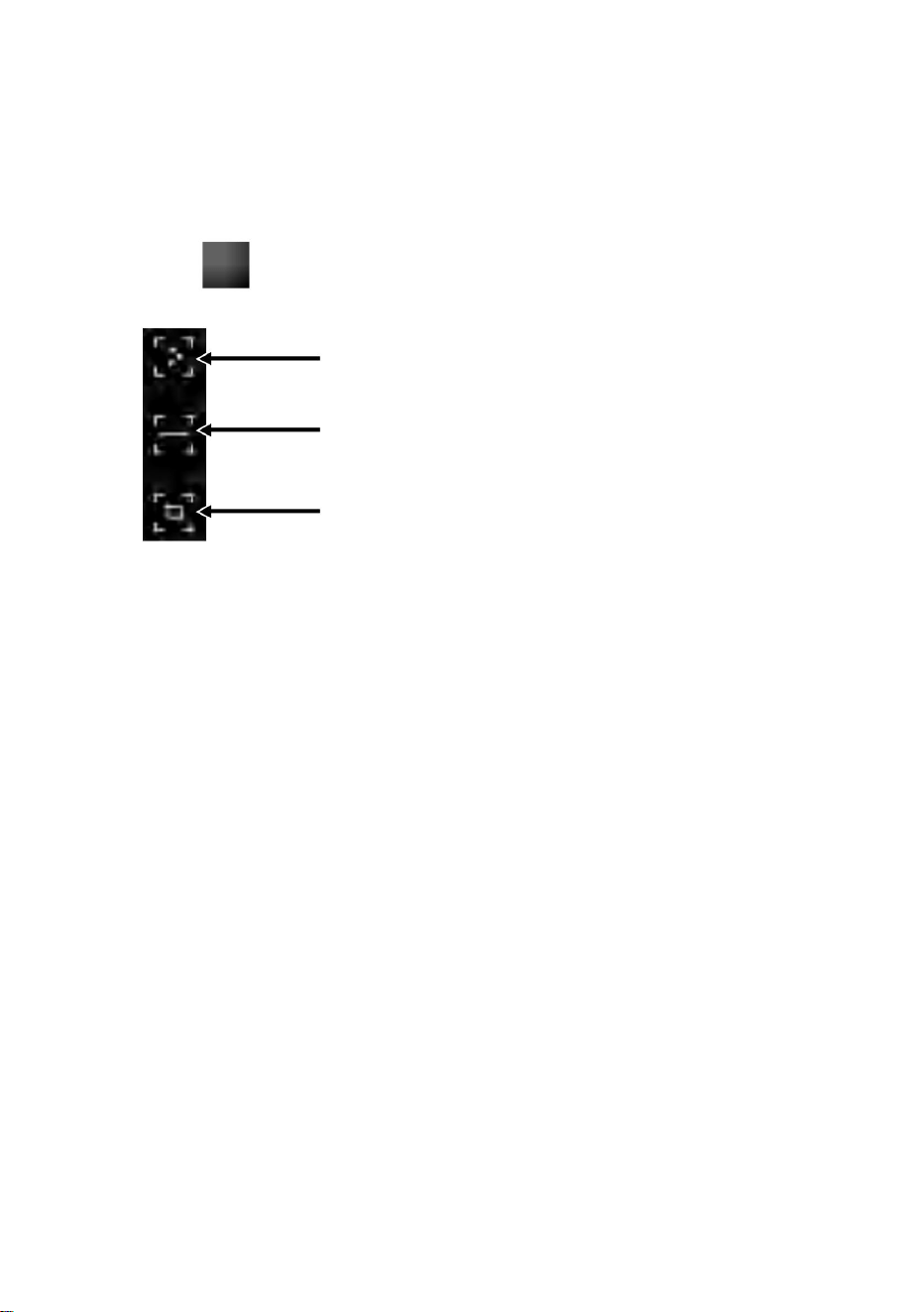
Analiza pomiaru temperatury linii
palcami i narysuj poziomą linię na ekranie. To będzie
informacje o trzech punktach, a mianowicie temperaturze centralnej
Regionalna analiza pomiarów temperatury
automatycznie analizuje temperaturę maksymalną i minimalną
(1) Pomiar temperatury punktu: kliknij temperaturę punktu
”
dodana zostanie informacja o punkcie zdefiniowanym przez użytkownika.
Punktowy pomiar temperatury
(2) Analiza pomiaru temperatury linii: przeciągnij za pomocą
aby wyskoczyć opcja pomiaru temperatury.
punkt, najwyższy punkt temperatury i najniższa temperatura
Kliknij "
punkt. Kliknij ekran w tym momencie i temperaturę
temperaturę linii poziomej i zidentyfikować odpowiednie
przycisk pomiaru, a na ekranie wyświetli się temperatura
Informacja.
10
5.4 Analiza pomiaru temperatury
Machine Translated by Google
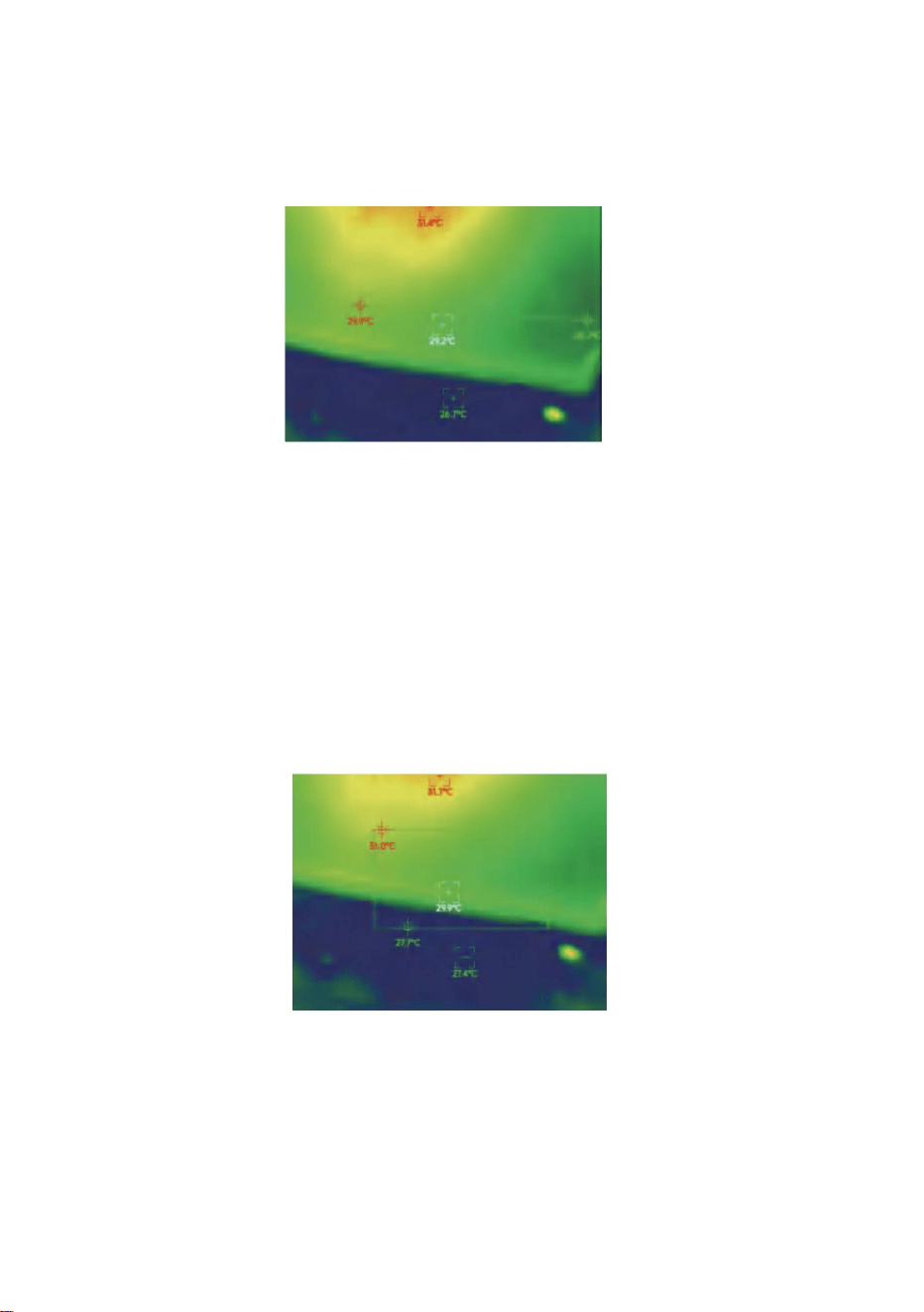
11
w obszarze prostokątnym i zidentyfikuj odpowiednie informacje, jak
przeanalizuj temperaturę maksymalną i minimalną
(3) Analiza pomiarów temperatury w regionie: przeciągnij za pomocą
pokazano na poniższym rysunku:
Regionalna analiza pomiarów temperatury
palcami i narysuj prostokąt na ekranie. zrobi to automatycznie
Analiza pomiaru temperatury linii
Machine Translated by Google
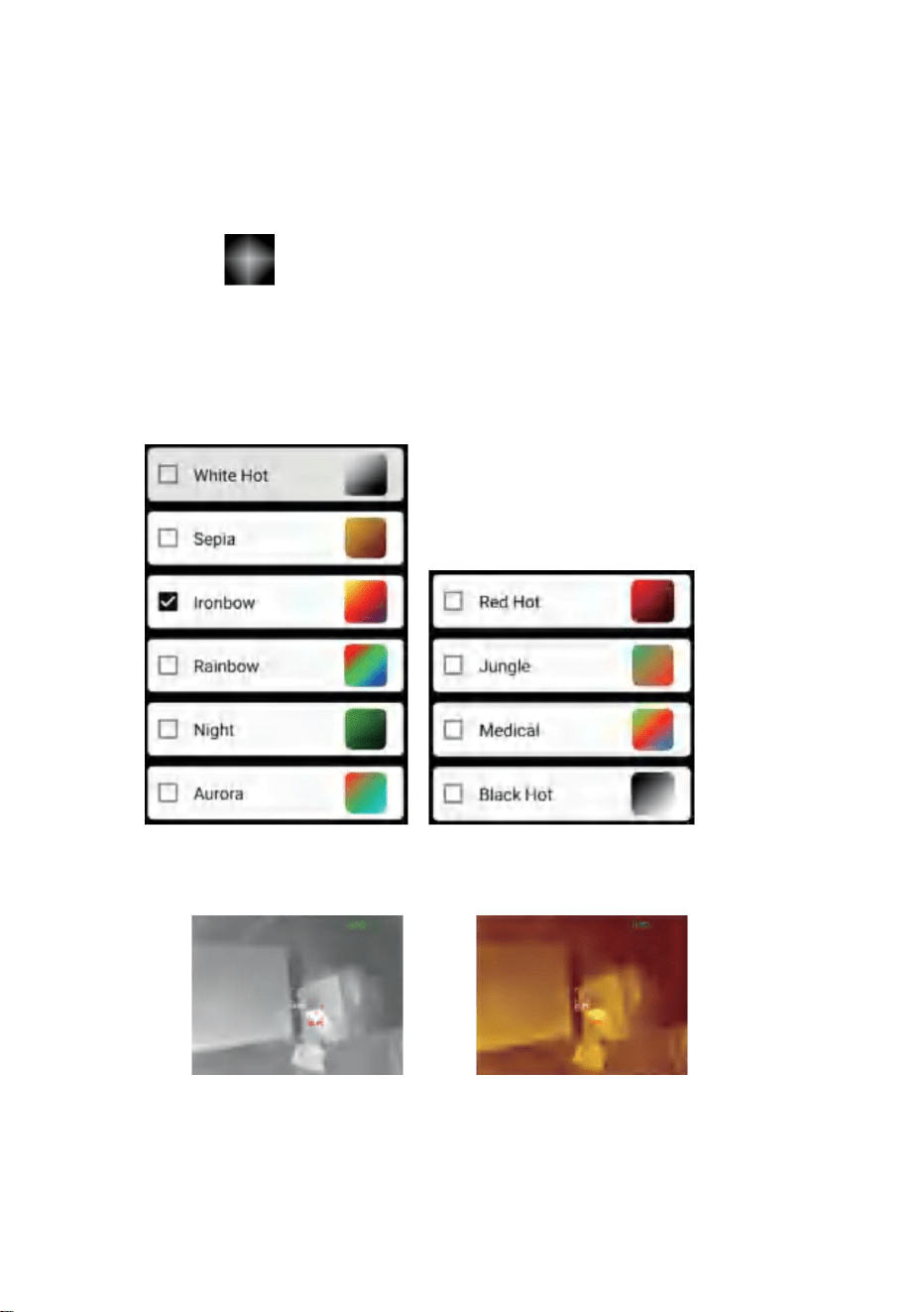
Sepia
”
Biało gorąco
„
Efekty wyświetlania 10 palet kolorów przedstawiono w następujący sposób:
czarne ciepło, jak pokazano na poniższym rysunku.
Kliknij
aby wyświetlić interfejs palety kolorów. Możesz
przełączaj się pomiędzy 10 paletami kolorów, takimi jak biały upał, świecące złoto,
żelazna czerwień, tęcza, połysk, aurora, czerwony upał, dżungla, medycyna i
12
5.5 Palety kolorów
Machine Translated by Google
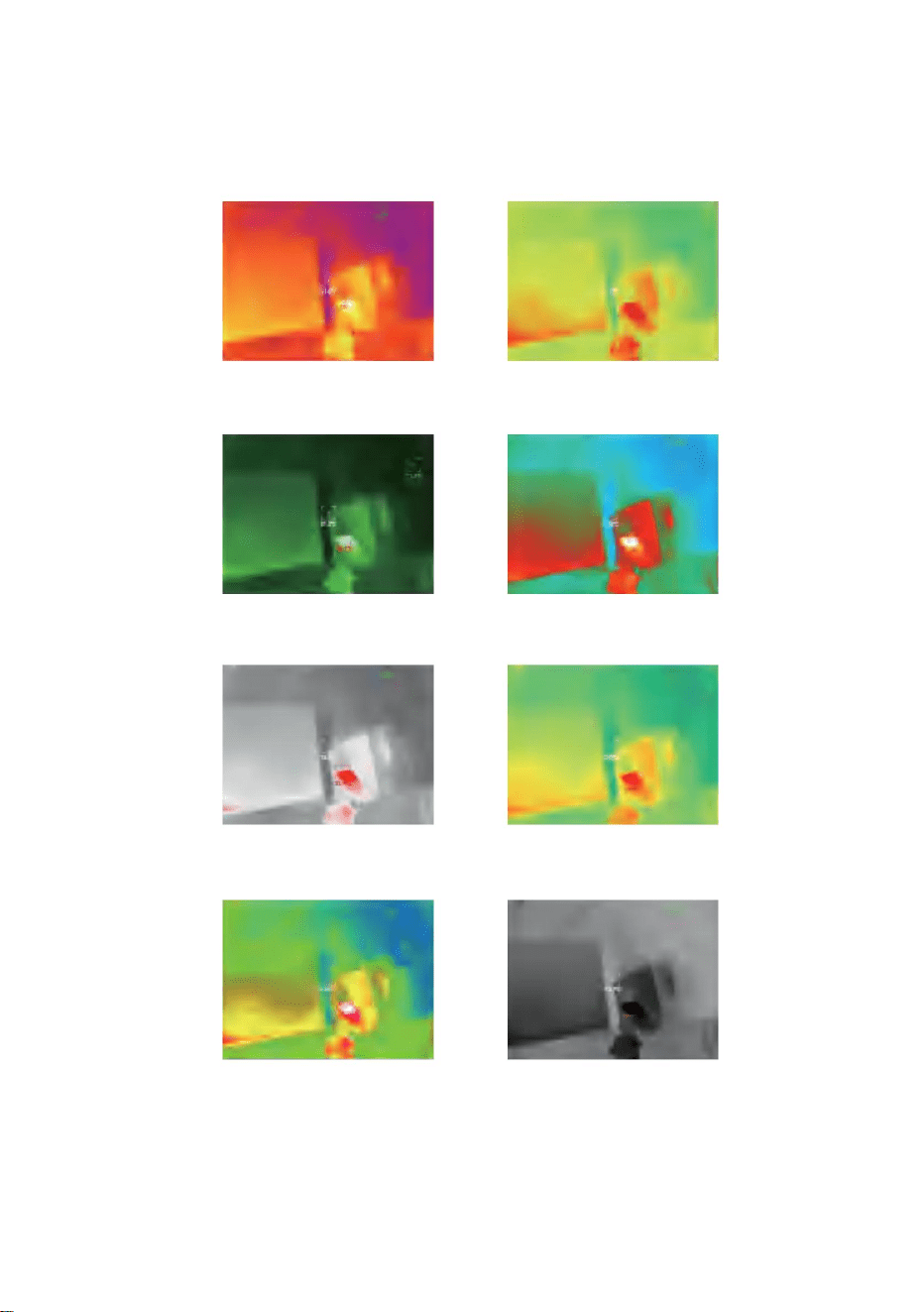
Dżungla
Żelazny łuk
Czerwony gorący
Zorza polarna
Czarny, gorący
Noc
Medyczne
Tęcza
13
Machine Translated by Google
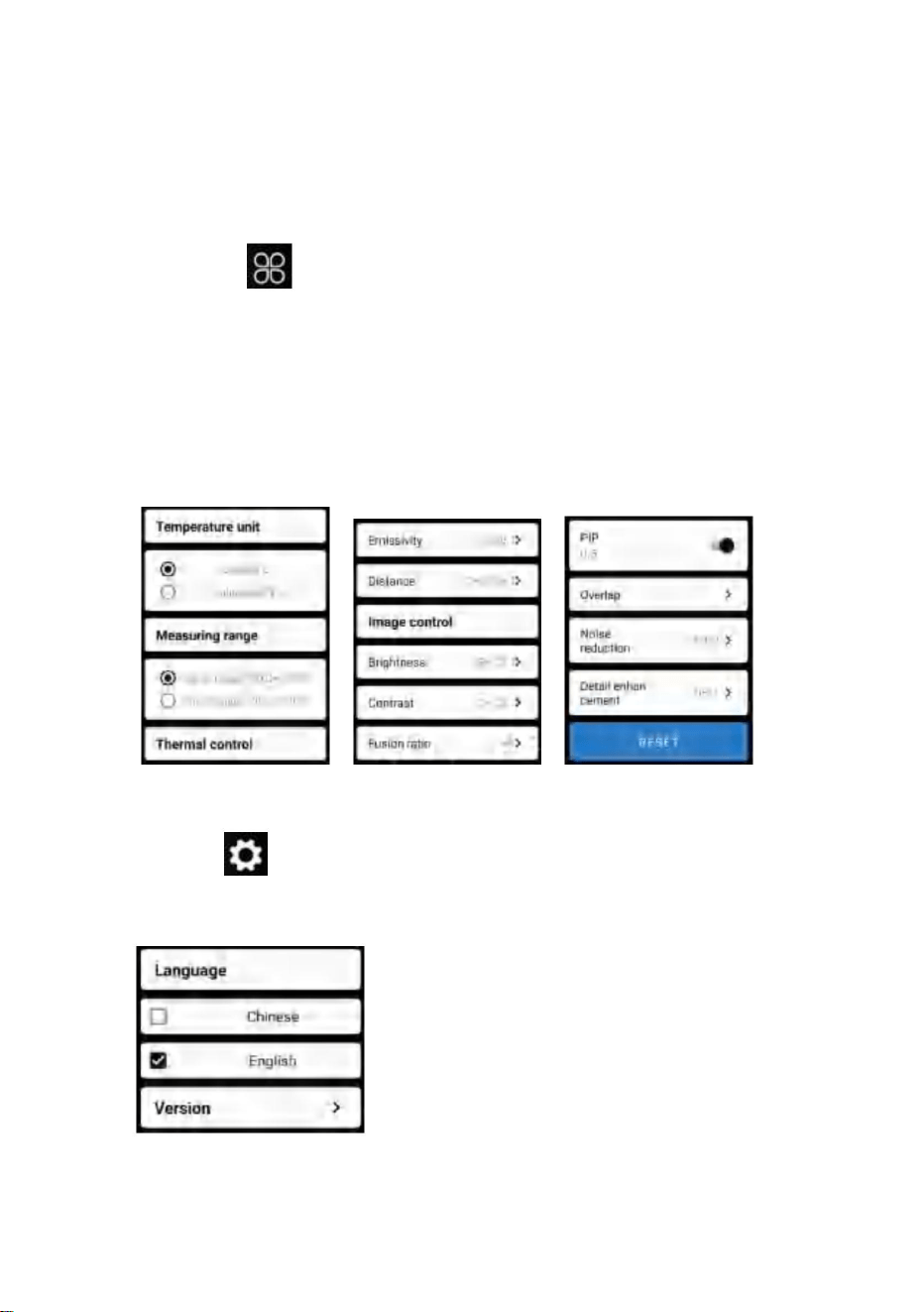
14
jednostka temperatury, zakres pomiaru temperatury, emisyjność, odległość
pomiaru temperatury, jasność, kontrast,
”
Kliknij
parametry jak na poniższym rysunku:
fuzja, obraz w obrazie, nakładanie się, redukcja szumów w dziedzinie czasu,
redukcja szumów przestrzennych i wzmocnienie szczegółów lub zresetuj wszystko
„
aby wyświetlić interfejs ustawień. Możesz ustawić
Kliknij
aby wyświetlić interfejs ustawień umożliwiający wybór języka.
„
Niżej wymienione.
W przypadku języków można wybrać chiński lub angielski, jak pokazano w
”
5.6 Ustawianie pomiaru temperatury
5.7 Ustawienie
Machine Translated by Google

15
25 Hz
Płaszczyzna ogniskowa
Zespół roboczy
Obraz na zdjęciach
HT-W01
Kąt widzenia
8 ~ 14μm
Regulacja kontrastu
Śledzenie gorących punktów
Utrzymany
Odstępy pikseli
56°(wys.)×42°(pion.)
NETD
Swobodne skupienie
Biały gorący, sepia, Ironbow, tęcza, noc, zorza polarna,
gorący do czerwoności, dżungla, medyczny i czarny gorący
12μm
Tryb ustawiania ostrości
IFOV
Tlenek wanadu, niechłodzony, podczerwień
50mk@25℃,@F/1,0
Utrzymany
Stopień fuzji obrazu
Rozdzielczość obrazu
w podczerwieni
Typ detektora
Długość ogniskowa
3,75 mrada
Utrzymany
Utrzymany
Model
3,2 mm
Utrzymany
256×192
Liczba klatek obrazu
Regulacja
jasności
Tryb pseudokolorowy
Wyświetlacz
Podczerwień
6. Parametry techniczne
Machine Translated by Google

16
Wi-Fi
Format obrazu/wideo
punktowy, liniowy i regionalny pomiar temperatury
Temperatura pracy
-20 ℃ ~ 120 ℃, 120 ℃ ~ 500 ℃
Odległość
pomiaru temperatury
JPG/MP4
Czas wytrzymałości
Dokładność
pomiaru temperatury
Zasilacz
Interfejs zewnętrzny
Rozmiar produktu
Tryb pomiaru
temperatury
Poziom ochrony
Kamera/wideo
Zakres pomiaru
temperatury
Język
Całkowity pobór
mocy
Temperatura przechowywania
Waga produktu
300℃-500℃:±4% -15℃-300℃:±2℃lub ±2%
-20℃-15℃:±4℃
Funkcja systemu
1,5 W
Środowiska pracy/przechowywania
-10 ℃ ~ + 50 ℃
2 godz
-20 ℃ ~ +70 ℃
210g
Ładowalna bateria litowa 1000 mAh
Chiński i angielski
Utrzymany
IP54
Zasilacz USB typu C, DC5V
152x35x35mm
Utrzymany
Rozmiar waga
0,25 m ~ 30 m
Funkcja pomiaru temperatury
Machine Translated by Google
17
zbiórka w Unii Europejskiej.
urządzenia elektryczne.
To urządzenie jest zgodne z częścią 15 przepisów FCC. Działanie podlega następującym
dwóm warunkom:
OSTRZEŻENIE: Zmiany lub modyfikacje tego produktu, które nie zostały wyraźnie
zatwierdzone przez stronę.
Dotyczy to produktu i wszystkich akcesoriów oznaczonych tym symbolem.
1) Ten produkt może powodować szkodliwe zakłócenia.
Produktów oznaczonych jako takie nie można wyrzucać wraz ze zwykłymi odpadami domowymi
Przekreślony symbol przedstawiający kosz na śmieci na kółkach
odpowiedzialny za zgodność, może unieważnić uprawnienia użytkownika do obsługi
urządzenie cyfrowe klasy B zgodnie z częścią 15 przepisów FCC. Ograniczenia te mają na
celu zapewnienie rozsądnej ochrony przed szkodliwymi zakłóceniami w instalacjach
domowych.
oznacza, że produkt wymaga osobnego odpadu
sprzęt!
Produkt ten objęty jest świadczeniem
odpowiedzialny za zgodność, może unieważnić uprawnienia użytkownika do obsługi produktu.
Dyrektywa Europejska 2012/19/UE.
UWAGA: Zmiany lub modyfikacje, które nie zostały wyraźnie zatwierdzone przez stronę
Uwaga: ten produkt został przetestowany i stwierdzono, że jest zgodny z ograniczeniami dot
2) Ten produkt musi akceptować wszelkie odbierane zakłócenia, w tym
odpady, ale należy je przekazać do punktu zbiórki w celu recyklingu urządzeń elektrycznych i
zakłóceń, które mogą powodować niepożądane działanie.
Informacje FCC:
PRAWIDŁOWA UTYLIZACJA
Machine Translated by Google

Wyprodukowano w Chinach
WE
REPREZENTANT
Wielka Brytania
Import do USA: Sanven Technology Ltd., Suite 250, 9166 Anaheim Place,
Rancho Cucamonga, CA 91730
Producent: Shanghaimuxinmuyeyouxiangongsi
Adres: Baoshanqu Shuangchenglu 803long 11hao 1602A-1609 shi
Shanghai
18
SHUNSHUN GmbH
Römeräcker 9 Z2021,76351
Linkenheim-Hochstetten,
Niemcy [email protected] +49
1727041930
Pooledas Group
Ltd Unit 5 Albert Edward House,
The REP Pavilions Preston, Wielka Brytania
01772418127
· Skonsultuj się ze sprzedawcą lub doświadczonym technikiem radiowo-telewizyjnym w celu
uzyskania pomocy.
· Podłącz produkt do gniazdka w innym obwodzie niż ten, do którego podłączony jest
odbiornik.
· Zmień orientację lub położenie anteny odbiorczej.
· Zwiększ odległość pomiędzy produktem a odbiornikiem.
Ten produkt generuje, wykorzystuje i może emitować energię o częstotliwości
radiowej, a jeśli nie zostanie zainstalowany i nie będzie używany zgodnie z
instrukcją, może powodować szkodliwe zakłócenia w komunikacji radiowej. Nie ma
jednak gwarancji, że w konkretnej instalacji nie wystąpią zakłócenia. Jeśli produkt
powoduje szkodliwe zakłócenia w odbiorze radia lub telewizji, co można
stwierdzić poprzez wyłączenie i włączenie produktu, zachęca się użytkownika do
podjęcia próby skorygowania zakłóceń za pomocą jednego lub kilku z poniższych
środków.
Machine Translated by Google

eww ww
Te
al Wsparcie i
certyfikat e-gwarancji
vor.com/support
chni c
Machine Translated by Google

Thermische beeldcamera
schatting van de besparingen die u zou kunnen profiteren als u bepaalde gereedschappen bij ons koopt in vergelijking met de grote
We blijven ons inzetten om u gereedschap tegen een concurrerende prijs te bieden.
U wordt er vriendelijk aan herinnerd om dit zorgvuldig te verifiëren wanneer u een bestelling bij ons plaatst
besparen feitelijk de helft in vergelijking met de grote topmerken.
topmerken en betekent niet noodzakelijkerwijs dat het alle categorieën van door ons aangeboden tools omvat.
"Bespaar de helft", "Halve prijs" of andere soortgelijke uitdrukkingen die door ons worden gebruikt vertegenwoordigt slechts een
Technische ondersteuning en e-garantiecertificaat www.vevor.com/support
MODEL: HT-W01
Machine Translated by Google
Dit is de originele instructie. Lees alle instructies in de handleiding zorgvuldig door voordat u ermee
aan de slag gaat. VEVOR behoudt zich een duidelijke interpretatie van onze gebruikershandleiding voor.
Het uiterlijk van het product is afhankelijk van het product dat u heeft ontvangen.
Vergeef ons alstublieft dat we u niet opnieuw zullen informeren als er technologie- of software-updates
zijn voor ons product.
MODEL: HT-W01
Technische ondersteuning en e-
garantiecertificaat www.vevor.com/support
Heeft u productvragen? Technische ondersteuning nodig? Neem dan gerust contact
met ons op:
Thermische beeldcamera
1
HULP NODIG? NEEM CONTACT MET ONS OP!
Machine Translated by Google

6
3
3
3
7
13
1
4
2
6
12
1
4
4
1
12
4
8
7
4
10
2
Inhoud
5.6 Instelling temperatuurmeting 5.7 Instelling
3.1 Structuur Introductie
2. Productsamenvatting
5.2 Bibliotheek, fotografie en video-opname 5.3 Sluiter
vernieuwen
2.1 Applicatiescènes 2.2
Belangrijkste functies
5.4 Analyse van temperatuurmetingen
5. Softwarebediening
5.1 Software-interface
1. Waarschuwingen
4.1 Apparatuur inschakelen 4.2
Apparatuur uitschakelen
6. Technische parameters
4.3 Apparatuur opladen 4.4
Apparatuur aansluiten
5.5 Kleurenpalet
3. Productstructuren
3.2 Beschrijving van indicatoren 4.
Producttoepassing
Machine Translated by Google

1. Voorzorgsmaatregelen
2. Productsamenvatting
Om deze infraroodwarmtebeeldcamera voor mobiele telefoons te gebruiken, hebt u dit nodig
(2) Raak het detectorvenster en de lens niet aan en raak het niet aan
(3) Raak het apparaat en de USB-interface niet aan met natte handen;
handen of andere voorwerpen;
download en installeer de infraroodwarmtebeeldcamera voor mobiele telefoons
(1) Stel het product niet bloot aan de zon of andere intensieve omstandigheden
stralingsbronnen
2.1 Toepassingsscènes
Lees alle volgende informatie voordat u uw apparaat gebruikt
(6) Demonteer de apparatuur niet. Als er sprake is van een fout,
Neem contact op met ons bedrijf voor reparatie door professioneel personeel.
om u en anderen te beschermen tegen letsel of schade aan uw apparaat.
(4) Schrob uw apparatuur niet met verdunner;
Met deze APP kunt u infraroodobservatie en temperatuur bereiken
APP "HT-W01 Draadloze WIFI mobiele warmtebeeldcamera". Door
(5) Let op het voorkomen van statische elektriciteit;
meetfuncties.
3
Machine Translated by Google

temperatuuranalyse;
(1) Open de toegepaste software voor infrarood voor mobiele telefoons
(3) fotograferen en video-opname;
warmtebeeldcamera voor infraroodobservatie en -meting
Scan de QR-code om de app te downloaden
(4) bewegingsbediening en parameterinstelling voor uw mobiel
ment;
telefoon infrarood warmtebeeldcamera.
(2) het uitvoeren van infraroodtemperatuurmetingen, en
De volgende functies moeten worden bereikt:
2.2 Belangrijkste functies
4
Machine Translated by Google
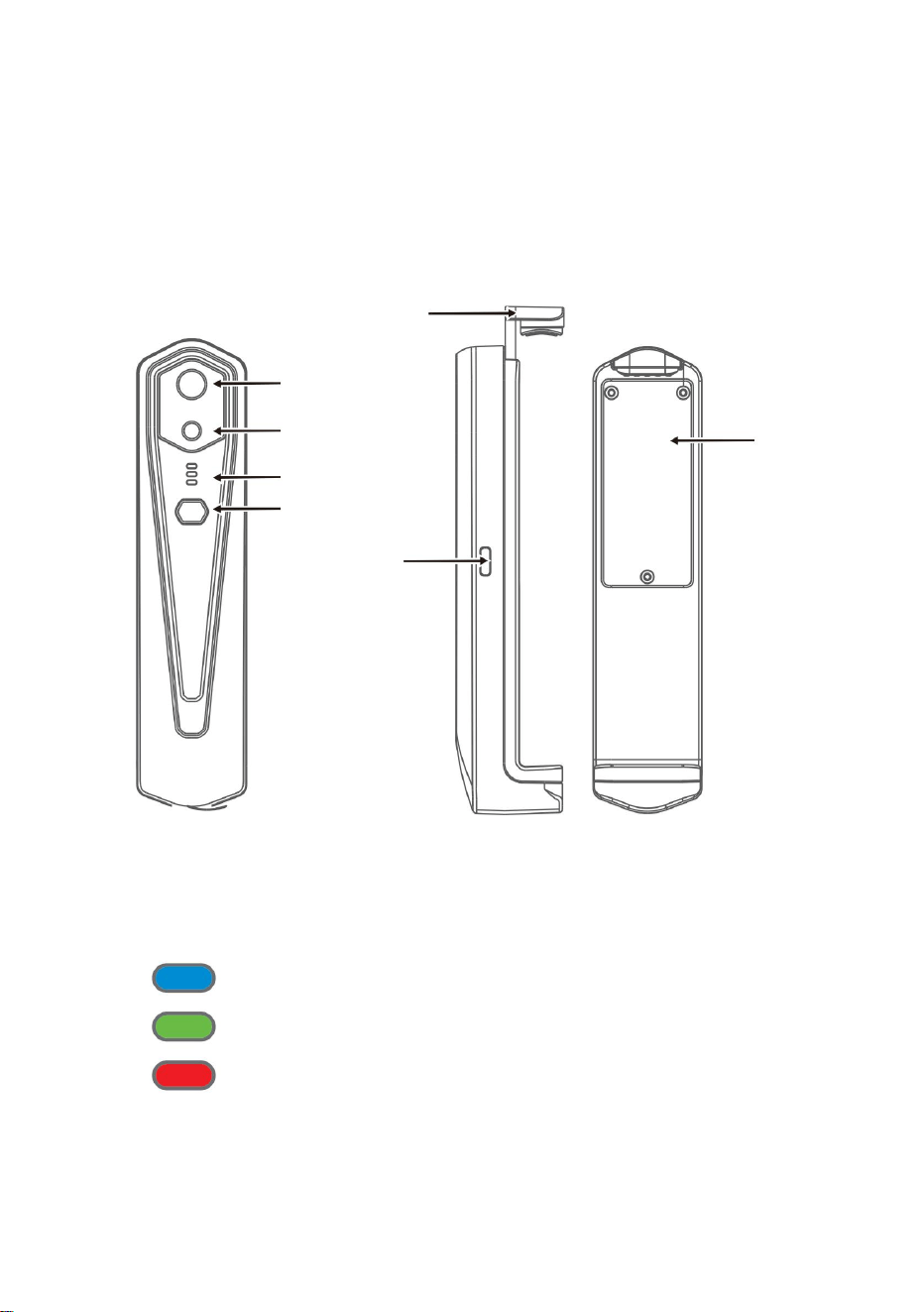
5
3.1 Structuurintroductie
camera
Infrarood
thermische beeldsensor
Onder kaft
Aan/uit-knop
Indicator
Zichtbaar licht
Type-c-interface
3. Productstructuren
Oplaadindicator: rood
Inschakelindicator: groen licht
3.2 Beschrijving van indicatoren
Bar
Statusindicator: blauw licht
Machine Translated by Google

4.3 Apparaat opladen
4.1 Apparaat inschakelen
4.2 Apparaat uitschakelen
4.4 Apparaataansluiting
6
4. Producttoepassing
Houd de aan/uit-knop langer dan 6 seconden ingedrukt tijdens het inschakelen
WIFI verbinden
Druk lang op de aan/uit-knop gedurende 1 seconde en het apparaat wordt ingeschakeld.
De stroom-aan-indicator is normaal gesproken aan.
indicatoren zullen uit zijn.
(2) Voer WIFI-wachtwoord 12345678 in en verbind het;
Gebruik TYPE-C-interfacedatakabels voor het opladen. De oplaadindicator is normaal
gesproken aan. Nadat de batterij volledig is opgeladen, brandt de oplaadindicator niet.
WIFI-naam voorafgegaan door HT-W01-;
Houd de aan/uit-knop langer dan 2 seconden ingedrukt, en zo
(1) Open het WIFI-verbindingsscherm van uw mobiele telefoon en bepaal de instellingen
op staat voor geforceerde uitschakeling en alle indicatoren zijn uit.
Nadat het apparaat gedurende 15 seconden is ingeschakeld, kunt u naar WIFI zoeken
Machine Translated by Google

• Het apparaat kan geen verbinding maken met uw mobiele telefoon en de status
1. Nadat de WIFI-verbinding succesvol is, en wanneer het apparaat succesvol is
2. Na een succesvolle verbinding,
losgekoppeld, klik om het apparaat te verbinden;
indicator knippert met een lage frequentie (1 seconde aan en 1 seconde uit)
”
“
”
zal verdwijnen;
Afspeelknop: Nadat erop is geklikt, worden afbeeldingen afgespeeld en kunt u
gerelateerde bewerkingen uitvoeren.
”
“
Klik op de
En
indicator knippert met een hoge frequentie (0,5s aan en 0,5s uit).
• Nadat het apparaat verbinding heeft gemaakt met uw mobiele telefoon, wordt de status weergegeven
“
(3) Nadat de WIFI-verbinding succesvol is geworden, gaat u naar de APP en knop
om het apparaat te verbinden.
7
Machine Translated by Google
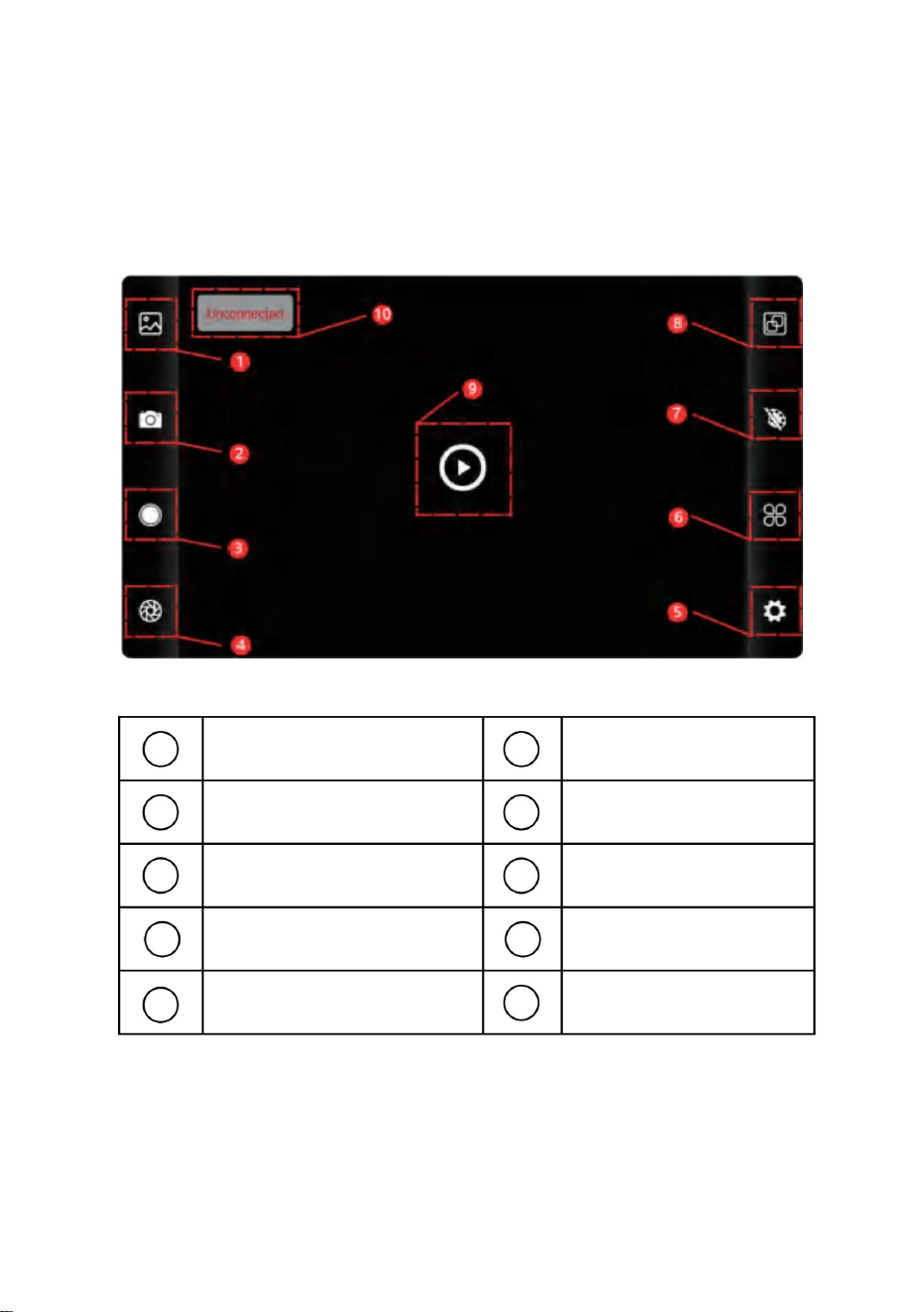
8
5.1 Software-interface
3
5
6
9
7
4
1
10
2
8
5. Softwarebediening
Knop voor
toewijzing van kleurenpalet
Bibliotheek-knop
Instelknop
Knop voor het
instellen van de temperatuur
Knop voor het vastleggen van afbeeldingen
Status van het niet
verbinden van het apparaat
Knop voor video-opname
Knop voor
temperatuurmeting
AfspeelknopSluitervernieuwingsknop
Machine Translated by Google
sluiter vernieuwen: Klik op om het scherm te vernieuwen.
• Druk lang op de afbeelding of klik op het pictogram in de rechterbovenhoek om
afbeeldingsbestanden te kunnen
verwijderen; • Klik op de afbeelding om afzonderlijke afbeeldingen te bekijken, en u kunt een
voorbeeld van de vorige/laatste afbeelding bekijken door
naar links/rechts te schuiven; • Wanneer u afzonderlijke afbeeldingen bekijkt, opent/sluit u
uw twee vingers om in/uit te zoomen op de inhoud van de afbeelding en houdt u deze
lang ingedrukt om gedetailleerde informatie over de afbeeldingen te bekijken;
•Druk lang op de afbeelding of klik op het pictogram in de rechterbovenhoek om
videobestanden te kunnen verwijderen;
•Klik op video's om een dergelijk videobestand af te spelen;
Ga naar de videolijstpagina
“
bibliotheek: klik om afbeeldingen en video's te bekijken;
”
Ga naar de pagina met de afbeeldingenlijst
(1) “
”
schieten: om het huidige scherm op te slaan;
”
(2)
“ Foto-opslagpositie: om de gewenste afbeeldingen in de bibliotheek te openen en u kunt de
locatie van de afbeelding bekijken.
”
(4) “video-opname: klik erop om de video-opname te starten en klik er nogmaals op om de
video-opname te beëindigen; De positie voor het opslaan van video-opnames is dezelfde als
die van een afbeelding.
9
5.2 Bibliotheek, fotograferen en video-opname
5.3 Sluiter verversbeeld.
Machine Translated by Google
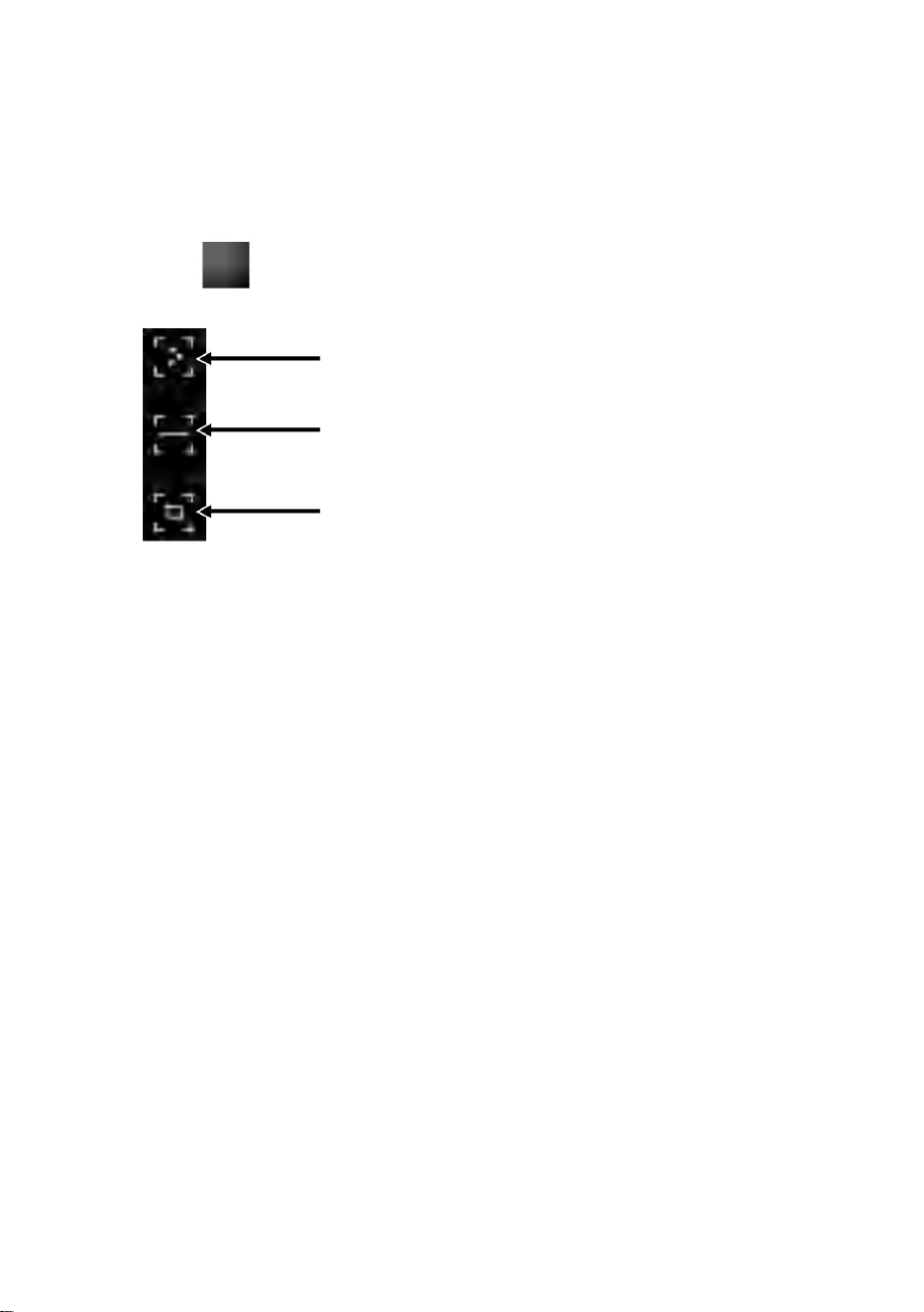
vingers en teken een horizontale lijn op het scherm. Het zal
Analyse van lijntemperatuurmetingen
(1) Punttemperatuurmeting: klik op de punttemperatuur
Analyse van regionale temperatuurmetingen
analyseer automatisch de maximale temperatuur en het minimum
informatie over het door de gebruiker gedefinieerde punt wordt toegevoegd.
”
Punttemperatuurmeting
(2) Analyse van lijntemperatuurmetingen: sleep met uw
om de optie voor temperatuurmeting uit te klappen.
punt, het hoogste temperatuurpunt en de laagste temperatuur
punt. Klik op dit moment op het scherm en de temperatuur
Klik "
meetknop, en het scherm geeft de temperatuur weer
informatie.
temperatuur van de horizontale lijn, en identificeren relevant
tuurinformatie van drie punten, namelijk de centrale temperatuur
10
5.4 Analyse van temperatuurmetingen
Machine Translated by Google
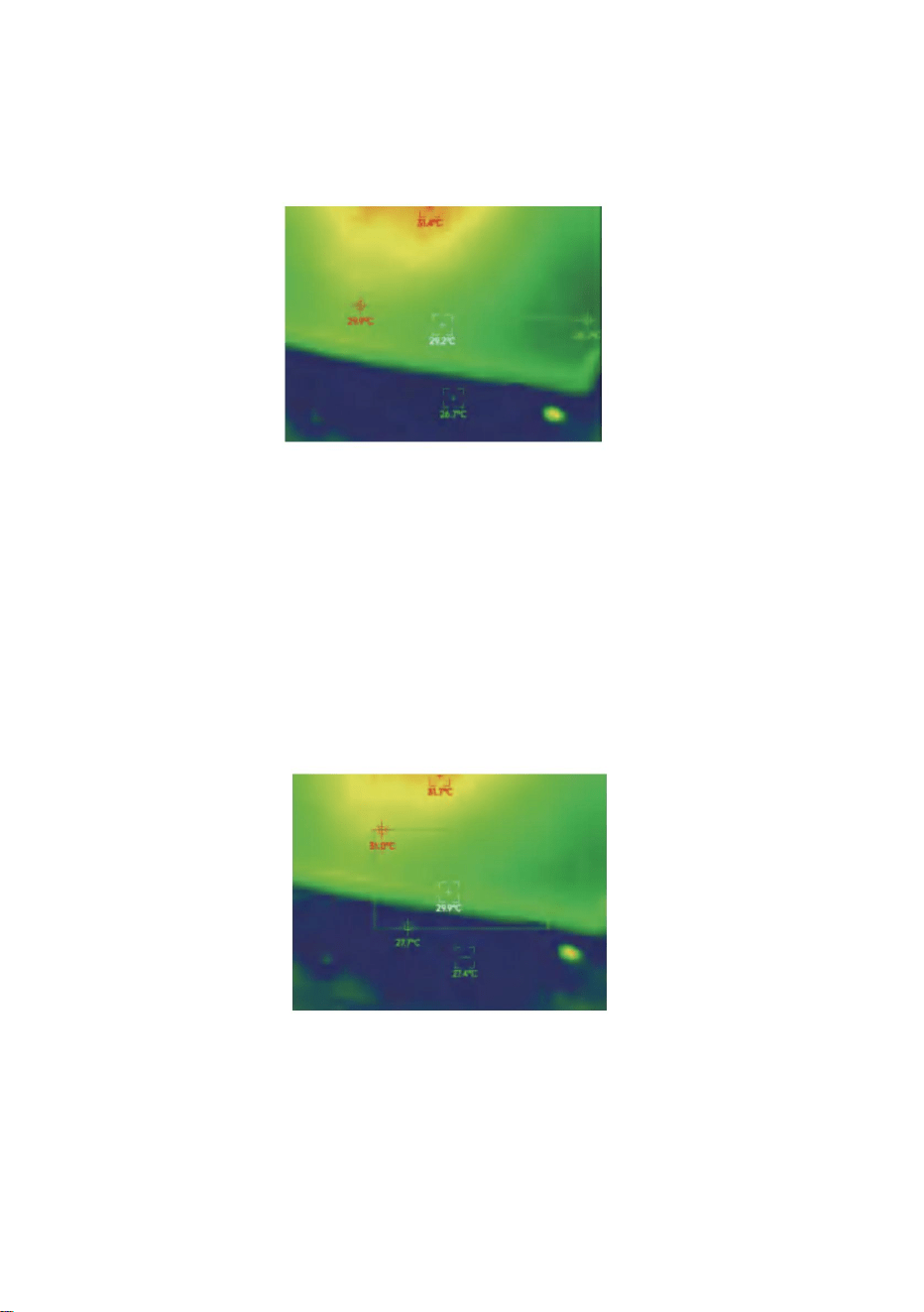
11
in het rechthoekige gebied en identificeer relevante informatie, zoals
analyseer de maximale temperatuur en minimale temperatuur
(3) Analyse van regionale temperatuurmetingen: sleep met uw
weergegeven in de volgende afbeelding:
Analyse van regionale temperatuurmetingen
vingers en teken een rechthoek op het scherm. het zal automatisch gebeuren
Analyse van lijntemperatuurmetingen
Machine Translated by Google
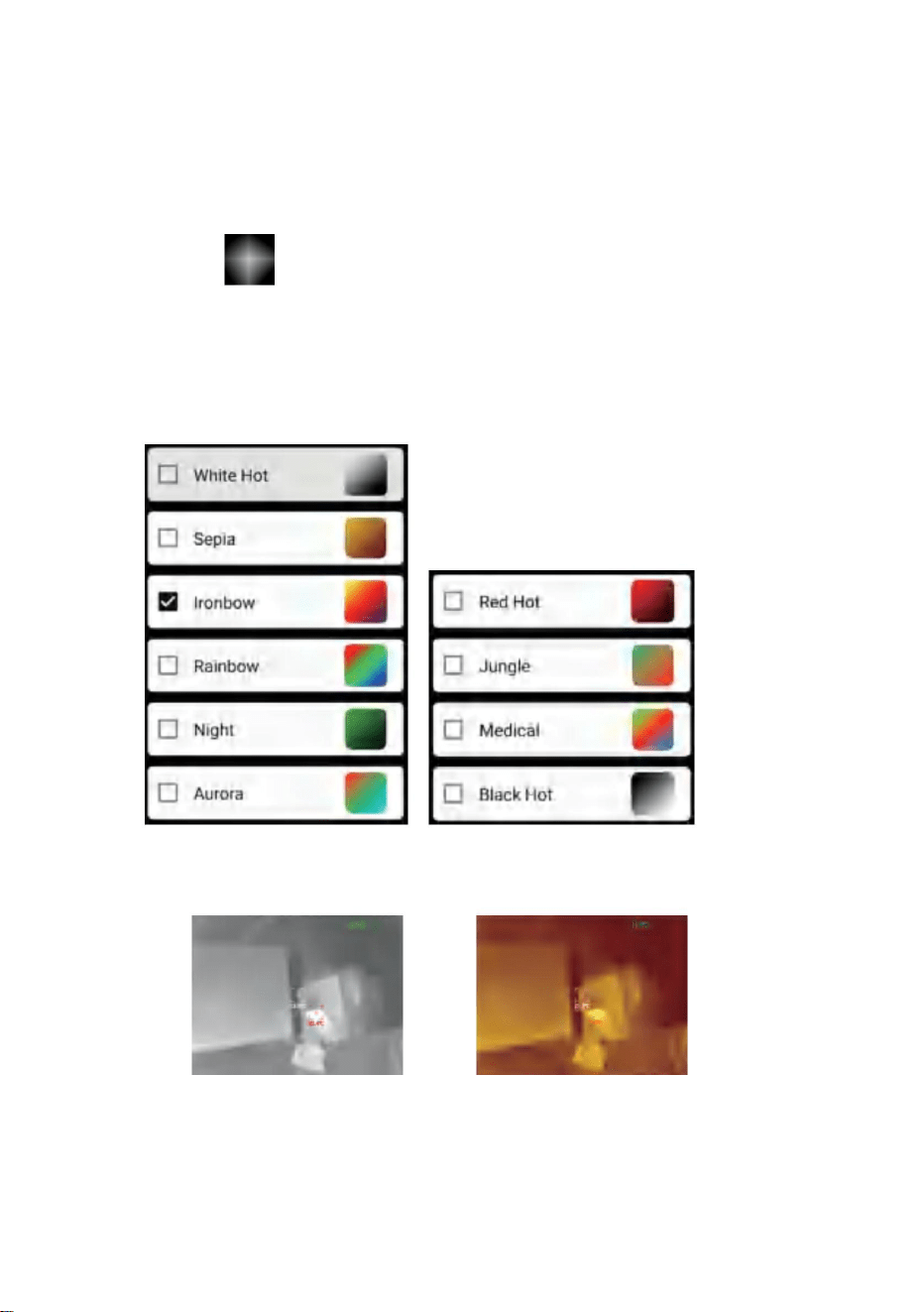
De weergave-effecten van 10 kleurenpaletten worden als volgt weergegeven:
“
wit heet
”
Sepia
schakel tussen 10 kleurenpaletten, zoals witte hitte, gloeiend goud, ijzerrood,
regenboog, glans, aurora, rode hitte, jungle, medisch en
om de kleurenpaletinterface te openen. Jij kan
zwarte hitte, zoals weergegeven in de onderstaande afbeelding.
Klik op
12
5.5 Kleurenpaletten
Machine Translated by Google
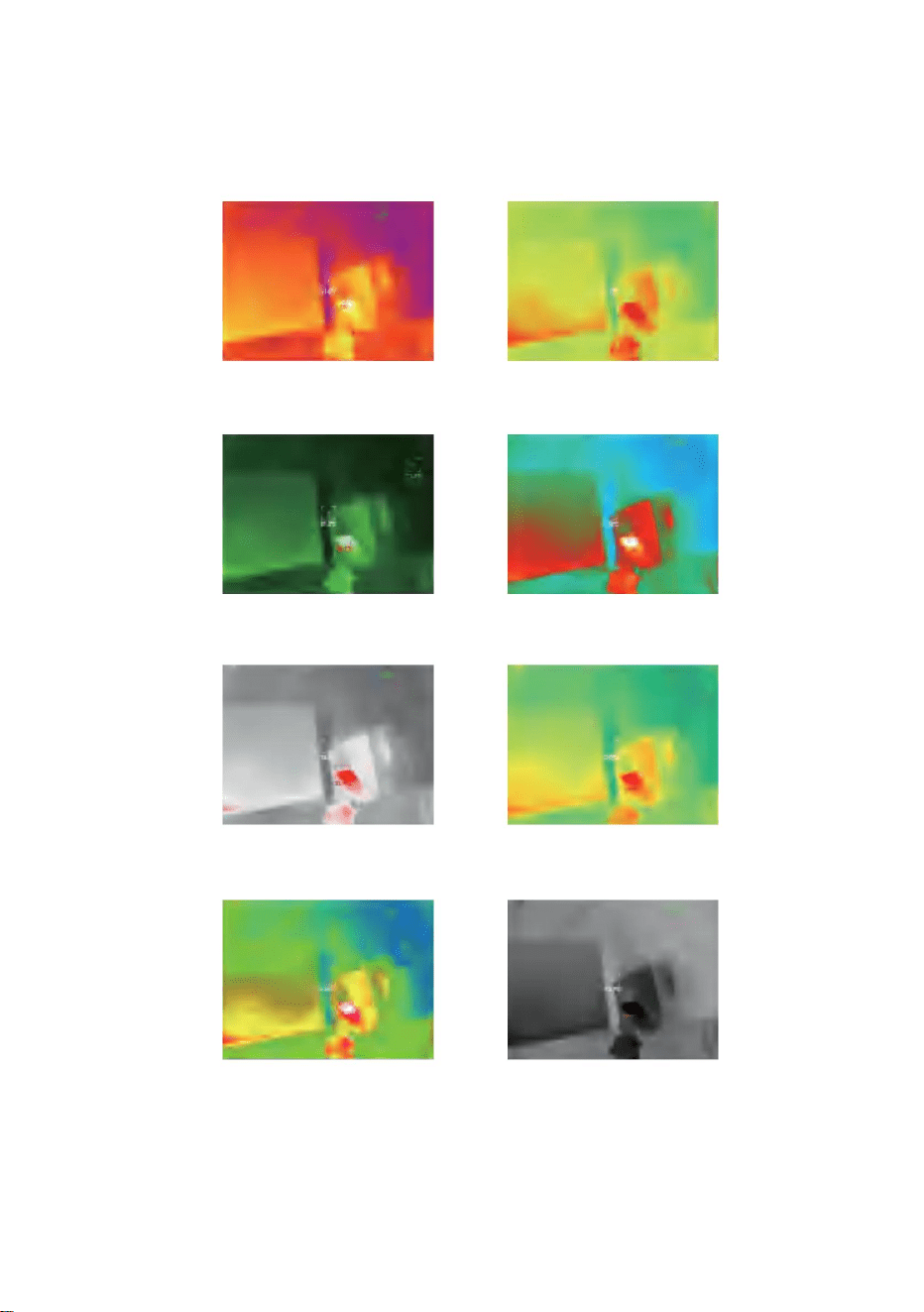
13
Medisch
Nacht
Zwart heet
Oerwoud
Regenboog
Roodgloeiend
Ijzerboog
Aurora
Machine Translated by Google
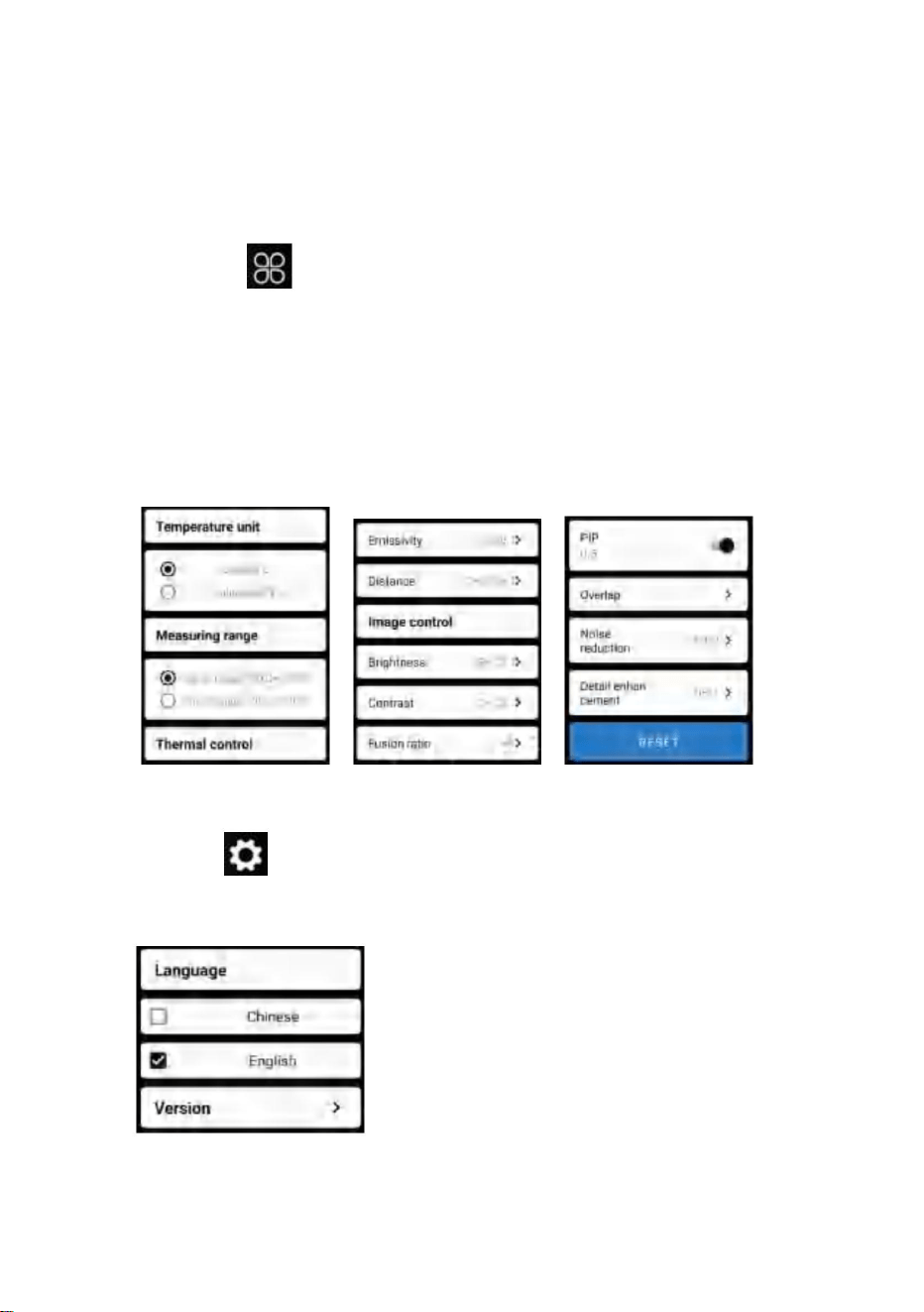
temperatuureenheid, temperatuurmeetbereik, emissiviteit, temperatuurmeetafstand,
helderheid, contrast,
”
Klik op
parameters, zoals weergegeven in de onderstaande afbeelding:
fusie, beeld-in-beeld, overlap, ruisonderdrukking in het tijddomein, ruimtelijke
ruisonderdrukking en detailverbetering, of alles opnieuw instellen
“
om de instellingeninterface te openen. Je kunt instellen
14
5.7 Instelling
5.6 Instelling temperatuurmeting
Klik op
om de instellingeninterface voor taalselectie te openen.
“
Figuur hieronder.
Als talen kan Chinees of Engels worden geselecteerd, zoals weergegeven in de
”
Machine Translated by Google

ÿ25 Hz
Focaal vlak
Werkende band
Beeld in beelden
HT-W01
Kijkhoek
8~14ÿm
Contrastaanpassing
Hotspot-tracking
Ondersteund
Pixelafstand
56°(H)×42°(V)
NETD
Vrije focus
Witgloeiend, sepia, ijzerboog, regenboog, nacht,
aurora, roodgloeiend, jungle, medisch en zwartgloeiend
Ondersteund
12ÿm
IFOV
Vanadiumoxide, ongekoeld infrarood
ÿ 50mk@25ÿ,@F/1.0
Scherpstelmodus
Mate van beeldfusie
Infrarood
beeldresolutie
Detectortype
Brandpuntsafstand
3,75 mrad
Ondersteund
Ondersteund
Model
3,2 mm
Ondersteund
256×192
Beeldframesnelheid
Helderheid
aanpassing
Pseudo-kleurmodus
15
6. Technische parameters
Infrarood
Weergave
Machine Translated by Google

-20ÿ~120ÿÿ120ÿÿ 500ÿ
Werktemperatuur
punt-, lijn- en regionale temperatuurmeting
Uithoudingsvermogen tijd
Temperatuur
meetafstand
JPG/MP4
Externe interface
Nauwkeurigheid
van temperatuurmeting
Stroomvoorziening
Beschermingsniveau
Temperatuurmeetmodus
Camera/video
Taal
Totaal
stroomverbruik
Product grootte
Meetbereik
temperatuur
Productgewicht
Bewaar temperatuur
WIFI
Foto-/videoformaat
16
Chinees en Engels
Ondersteund
IP54
0,25m~30m
USB Type-C, DC5V-voeding
Ondersteund
Functie voor temperatuurmeting
152x35x35mm
Grootte/gewicht
210g
Systeemfunctie
ÿ1,5W
Werk-/opslagomgevingen
-10ÿ ~ +50ÿ
ÿ2H
-20ÿ ~ +70ÿ
Oplaadbare lithiumbatterij van 1000 mAh
300ÿ-500ÿ:±4% -15ÿ-300ÿ:±2ÿof ±2% -20ÿ-15ÿ:±4ÿ
Machine Translated by Google
Dit apparaat voldoet aan Deel 15 van de FCC-regels. De werking is onderworpen aan de
volgende twee voorwaarden:
collectie in de Europese Unie.
Producten die als zodanig zijn gemarkeerd mogen niet bij het normale huishoudelijk afval worden weggegooid
1) Dit product kan schadelijke interferentie veroorzaken.
Dit geldt voor het product en alle accessoires die met dit symbool zijn gemarkeerd.
een digitaal apparaat van Klasse B overeenkomstig Deel 15 van de FCC-regels. Deze
limieten zijn bedoeld om redelijke bescherming te bieden tegen schadelijke interferentie in
een residentiële installatie.
Het symbool met een doorgestreepte vuilnisbak
die verantwoordelijk is voor naleving kan de bevoegdheid van de gebruiker om het apparaat te bedienen ongeldig maken
geeft aan dat het product afzonderlijk afval vereist
apparatuur!
die verantwoordelijk is voor naleving kan de bevoegdheid van de gebruiker om het product te bedienen
ongeldig maken.
Dit product is onderworpen aan de bepaling van
LET OP: Wijzigingen of aanpassingen die niet uitdrukkelijk door de partij zijn goedgekeurd
Europese Richtlijn 2012/19/EU.
Let op: Dit product is getest en voldoet aan de limieten voor
afval, maar moet naar een inzamelpunt worden gebracht voor recycling van elektrische en
interferentie die een ongewenste werking kan veroorzaken.
2)Dit product moet alle ontvangen interferentie accepteren, inclusief
elektronische apparaten.
WAARSCHUWING: Wijzigingen of aanpassingen aan dit product die niet uitdrukkelijk
zijn goedgekeurd door de partij.
FCC-informatie:
17
CORRECTE VERWIJDERING
Machine Translated by Google

Geïmporteerd in de VS: Sanven Technology Ltd., Suite 250, 9166 Anaheim
Place, Rancho Cucamonga, CA
91730 Fabrikant: Shanghaimuxinmuyeyouxiangongsi
Adres: Baoshanqu Shuangchenglu 803long 11hao 1602A-1609 shi
Shanghai
SHUNSHUN
GmbH Römeräcker 9
Z2021,76351 Linkenheim-
Hochstetten, Duitsland
[email protected] +49 1727041930
Pooledas Group
Ltd Unit 5 Albert Edward House,
The REP Pavilions Preston, Verenigd
Koninkrijk
[email protected] 01772418127
Gemaakt in China
EG
REP
Groot-Brittannië
· Raadpleeg de dealer of een ervaren radio-/tv-technicus voor hulp.
· Sluit het product aan op een stopcontact op een ander circuit dan dat waarop de
ontvanger is aangesloten.
· Heroriënteer of verplaats de ontvangstantenne.
· Vergroot de afstand tussen het product en de ontvanger.
Dit product genereert, gebruikt en kan radiofrequentie-energie uitstralen, en als
het niet wordt geïnstalleerd en gebruikt in overeenstemming met de instructies,
kan het schadelijke interferentie aan radiocommunicatie veroorzaken. Er is echter
geen garantie dat er geen interferentie zal optreden in een bepaalde installatie. Als
dit product schadelijke interferentie veroorzaakt aan radio- of
televisieontvangst, wat kan worden vastgesteld door het product uit en weer in te
schakelen, wordt de gebruiker aangeraden te proberen de interferentie te
corrigeren door een of meer van de volgende maatregelen.
18
Machine Translated by Google

eww wv
T
e
al ondersteuning
en e-garantiecertificaat
vor.com/support
chni c
Machine Translated by Google

Teknisk support och e-garantibevis www.vevor.com/support
MODELL: HT-W01
Värmebildskamera
uppskattning av besparingar du kan dra nytta av att köpa vissa verktyg hos oss jämfört med de större
Du påminns vänligen om att verifiera noggrant när du gör en beställning hos oss om du
"Spara hälften", "Halva priset" eller andra liknande uttryck som används av oss representerar endast en
toppmärken och betyder inte nödvändigtvis att täcka alla kategorier av verktyg som erbjuds av oss.
sparar faktiskt hälften i jämförelse med de främsta stora varumärkena.
Vi fortsätter att vara engagerade i att ge dig verktyg till konkurrenskraftiga priser.
Machine Translated by Google
Värmebildskamera
BEHÖVS HJÄLP? KONTAKTA OSS!
1
Ursäkta oss att vi inte kommer att informera dig igen om det finns någon teknik eller
mjukvaruuppdateringar på vår produkt.
Detta är den ursprungliga instruktionen, läs alla instruktioner noggrant innan du
använder den. VEVOR reserverar sig för en tydlig tolkning av vår användarmanual.
Utseendet på produkten är beroende av den produkt du fått.
MODELL: HT-W01
Har du produktfrågor? Behöver du teknisk support? Kontakta oss gärna:
Teknisk support och e-garanticertifikat
www.vevor.com/support
Machine Translated by Google

Innehåll
3. Produktstrukturer
2.1 Applikationsscener 2.2
Huvudfunktioner
5.4 Temperaturmätningsanalys
2. Produktsammanfattning
5.2 Bibliotek, fotografi och videoinspelning 5.3
Slutaruppfriskning
5.1 Mjukvarugränssnitt
1. Varningar
5. Programvarudrift
4.3 Utrustningsladdning 4.4
Utrustningsanslutning
4.1 Ström på utrustning 4.2
Stäng av utrustning
6. Tekniska parametrar
3.2 Beskrivning av indikatorer 4.
Produkttillämpning
3.1 Struktur Introduktion
5.6 Temperaturmätning Inställning 5.7 Inställning
5.5 Färgpalett
3
7
3
7
6
3
6
2
13
1
4
4
1
12
12
1
4
4
10
4
8
2
Machine Translated by Google

3
1. Försiktighetsåtgärder
2. Produktsammanfattning
(3) Rör inte enheten och USB-gränssnittet med våta händer;
"HT-W01 Wireless WIFI Mobile Thermal Imager" APP. Genom
händer eller andra föremål;
ladda ner och installera mobiltelefonens infraröda värmekamera
För att använda den här mobiltelefonens infraröda värmekamera måste du
(2) Rör inte eller kollidera inte med detektorfönstret och linsen
strålningskällor
2.1 Applikationsscener
(1) Utsätt inte produkten för solen eller andra högintensiva ämnen
vänligen kontakta vårt företag för reparation av professionell personal.
för att skydda dig och andra från skador eller skador på din enhet.
Läs all följande information innan du använder din enhet
(6) Ta inte isär utrustningen. Om det finns något fel,
(5) Var uppmärksam på att förhindra statisk elektricitet;
turmätningsfunktioner.
(4) Skrubba inte din utrustning med thinner;
denna APP kan du uppnå infraröd observation och tempera-
Machine Translated by Google

4
Skanna QR-koden för att ladda ner appen
(4) rörelsekontroll och parameterinställning för din mobil
värmekamera för att uppnå infraröd observation och mätning-
(3) fotografering och videoinspelning;
(1) Öppna den applicerade programvaran för mobiltelefon infraröd
temperaturanalys;
(2) för att utföra infraröd temperaturmätning, och
Följande funktioner ska uppnås:
telefon infraröd värmekamera.
menade;
2.2 Huvudfunktioner
Machine Translated by Google
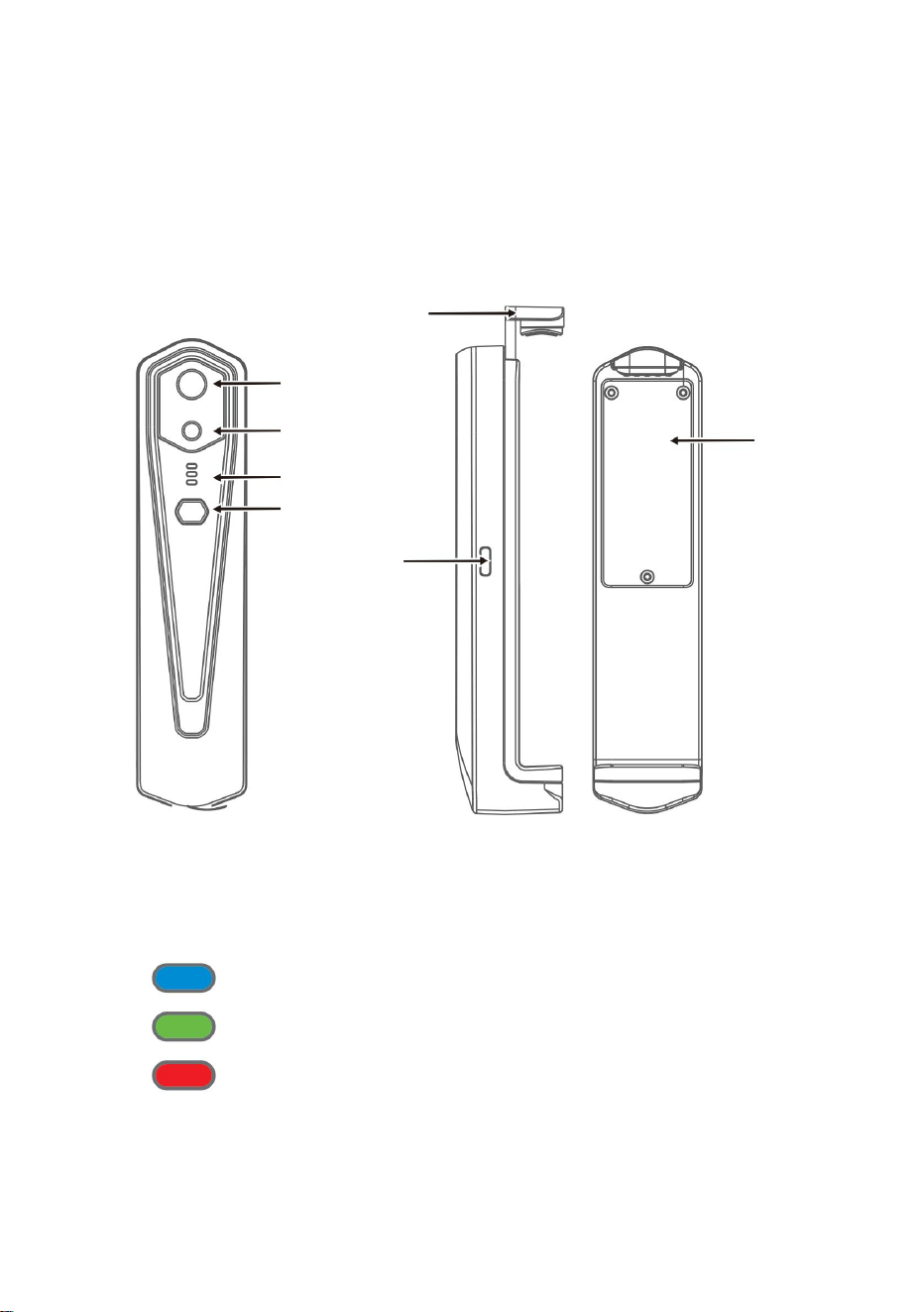
3. Produktstrukturer
Statusindikator: blått ljus
Bar
Laddningsindikator: röd
3.2 Beskrivning av indikatorer
Ström på-indikator: grönt ljus
5
3.1 Strukturintroduktion
kamera
Nedre omslag
Synligt ljus
Indikator
Ström på/av-
knapp
Typ-c-gränssnitt
Infraröd termisk
bildsensor
Machine Translated by Google

4. Produktapplikation
Använd TYPE-C-gränssnittsdatakablar för laddning. Laddningsindikatorn lyser
normalt. När den är fulladdad lyser inte laddningsindikatorn.
(1) Öppna din mobiltelefons WIFI-anslutningsskärm och finjustera
Tryck länge på strömbrytaren på/av i mer än 2 sekunder, och allt
WIFI-namn med prefixet HT-W01-;
Tryck länge på strömbrytaren i mer än 6 sekunder i strömmen
indikatorer kommer att finnas ute.
Tryck länge på strömbrytaren på/av i 1 sekund så slås enheten på. Ström på-
indikatorn är normalt på.
(2) Ange WIFI-lösenord 12345678 och anslut det;
på läge för tvångsavstängning, och alla indikatorer kommer att släckas.
När enheten har slagits på i 15 sekunder kan du söka efter WIFI
Ansluter WIFI
4.3 Enhetsladdning
4.4 Anslutning av enheten
4.2 Stäng av enheten
4.1 Slå på enheten
6
Machine Translated by Google

2. Efter lyckad anslutning,
• När enheten har anslutit din mobiltelefon visas status
frånkopplad, klicka för att ansluta enheten;
indikatorn blinkar i låg frekvens (på i 1 s och släckt i 1 s)
• Enheten kan inte ansluta din mobiltelefon och status
1. Efter att WIFI-anslutningen har lyckats, och när enheten är
”
kommer försvinna;
"
”
"
Klicka på
Uppspelningsknapp: När den har klickats börjar den spela upp bilder
och du kan utföra relaterade åtgärder.
”
"
(3) När WIFI-anslutningen har lyckats, gå till APP och knappen för att
börja ansluta enheten.
och
indikatorn blinkar med hög frekvens (på i 0,5 s och släckt i 0,5 s).
7
Machine Translated by Google
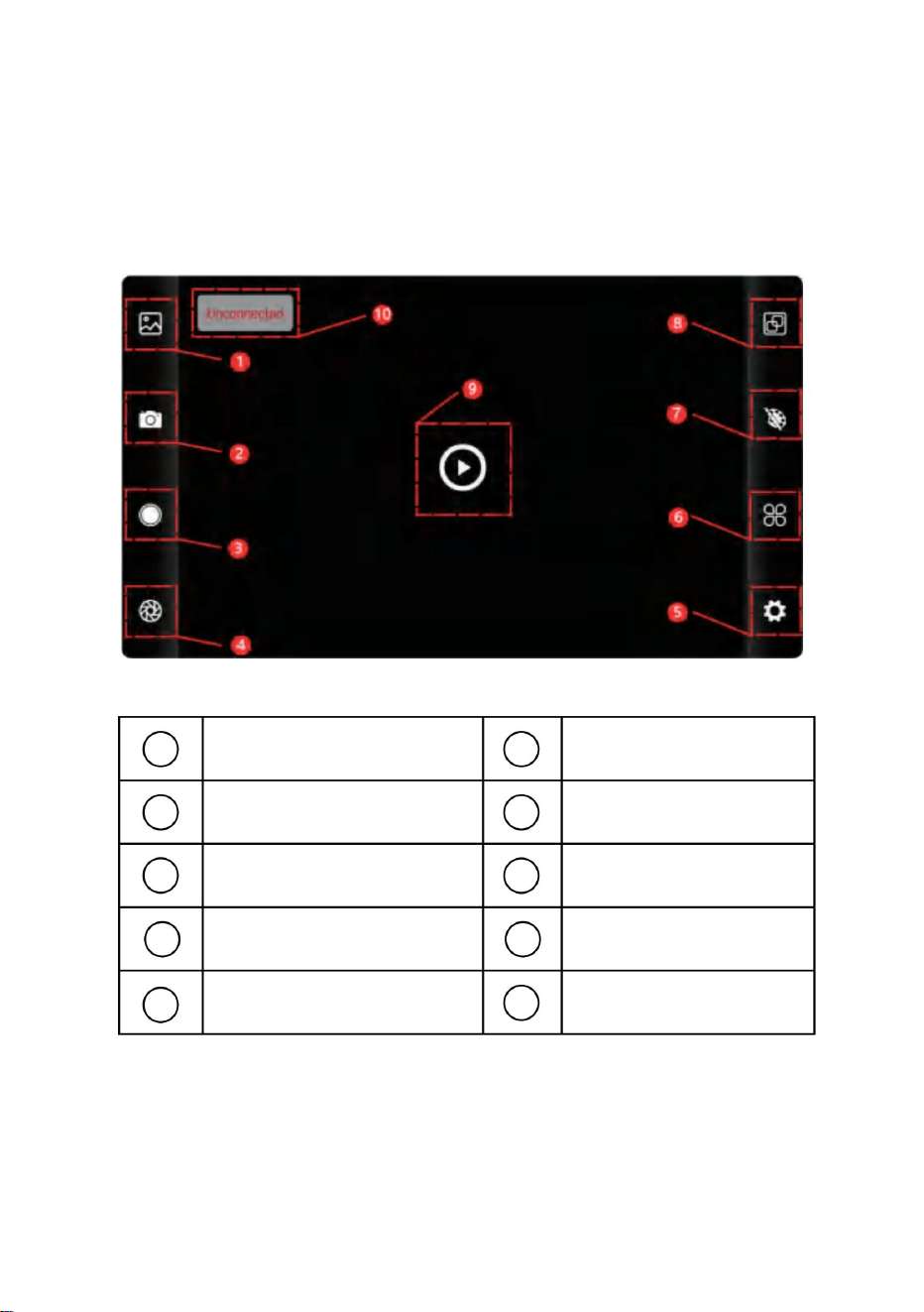
5. Programvarudrift
Bild fånga knapp
Status för enhetsfel
att ansluta
Knapp för
temperaturmätning
Videoinspelningsknapp
Uppspelningsknapp
Inställningsknapp
Knapp för
tilldelning av färgpalett
Uppfriskande slutarknapp
Bibliotek-knappen
Temperaturinställningsknapp
8
5.1 Mjukvarugränssnitt
7
10
1
4
3
5
6
9
2
8
Machine Translated by Google
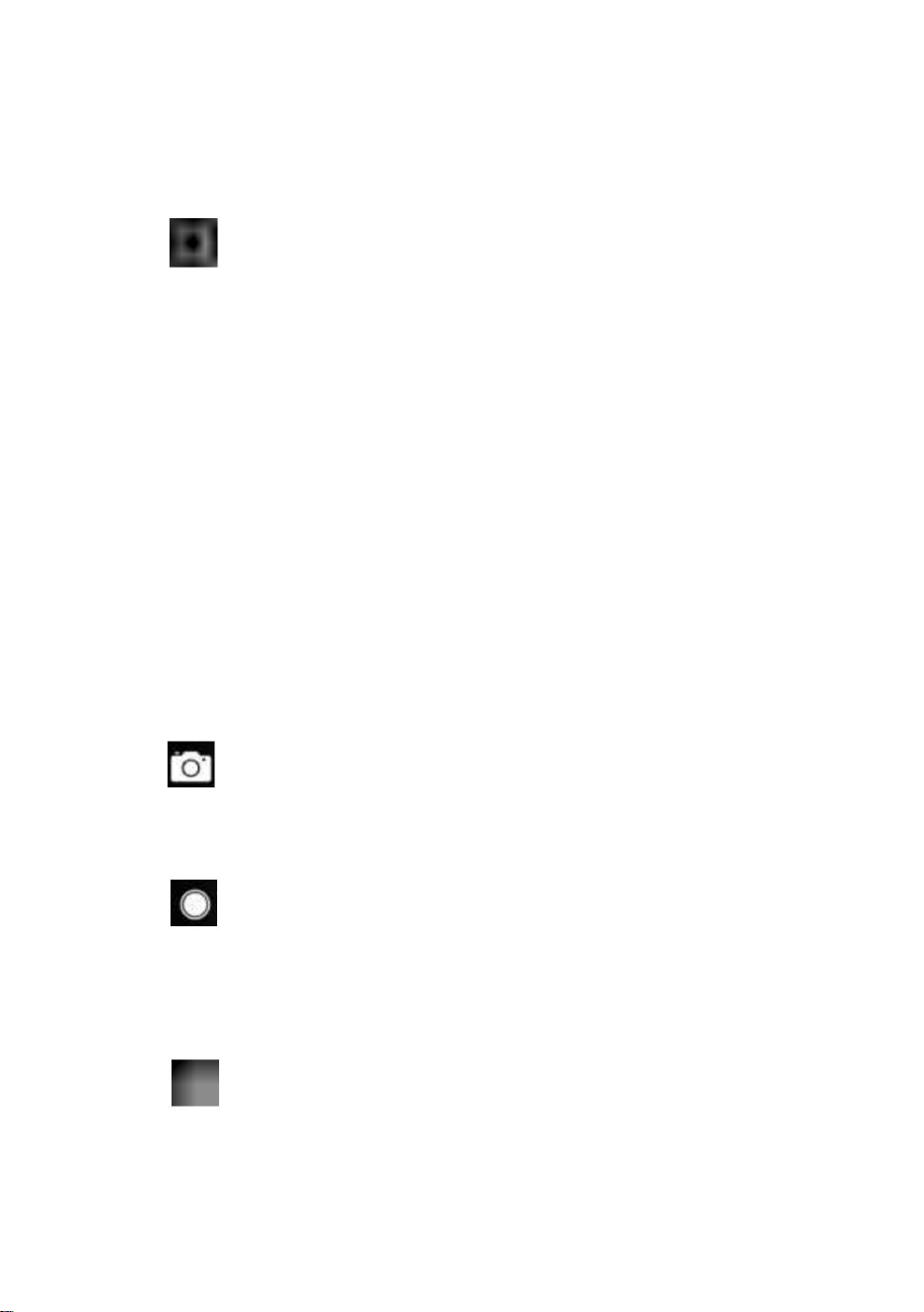
5.2 Bibliotek, fotografering och videoinspelning
5.3 Slutaruppfriskande bild.
•Långtryck på bilden eller klicka på ikonen i det övre högra hörnet för att
kunna radera videofiler; •Klicka
på videor för att spela upp en sådan videofil;
”
Gå in på videolistans sida
"
slutaruppfriskning: Klicka på för att uppdatera baffeln.
• Tryck länge på bilden eller klicka på ikonen i det övre högra hörnet för att
kunna radera bildfiler; • Klicka på
bilden för att förhandsgranska enstaka bilder, så kan du förhandsgranska
föregående/sista bild genom att dra åt vänster/
höger; • När du förhandsgranskar enstaka bilder, öppna/stänger du dina
två fingrar för att zooma in/ut bildinnehållet och tryck länge på den för
att kunna se detaljerad information om bilderna;
Gå in på bildlistans sida
”
bibliotek: Klicka för att visa bilder och videor;
fotografering: för att spara den aktuella skärmen;
”
(1) "
”
(4) " videoinspelning: Klicka på den för att starta videoinspelningen och
klicka på den igen för att avsluta videoinspelningen; Positionen för att spara
videoinspelning är densamma som för en bild.
(2)
“ Fotosparposition: för att öppna de bilder du behöver i biblioteket och du
kan se var bilden finns.
9
Machine Translated by Google
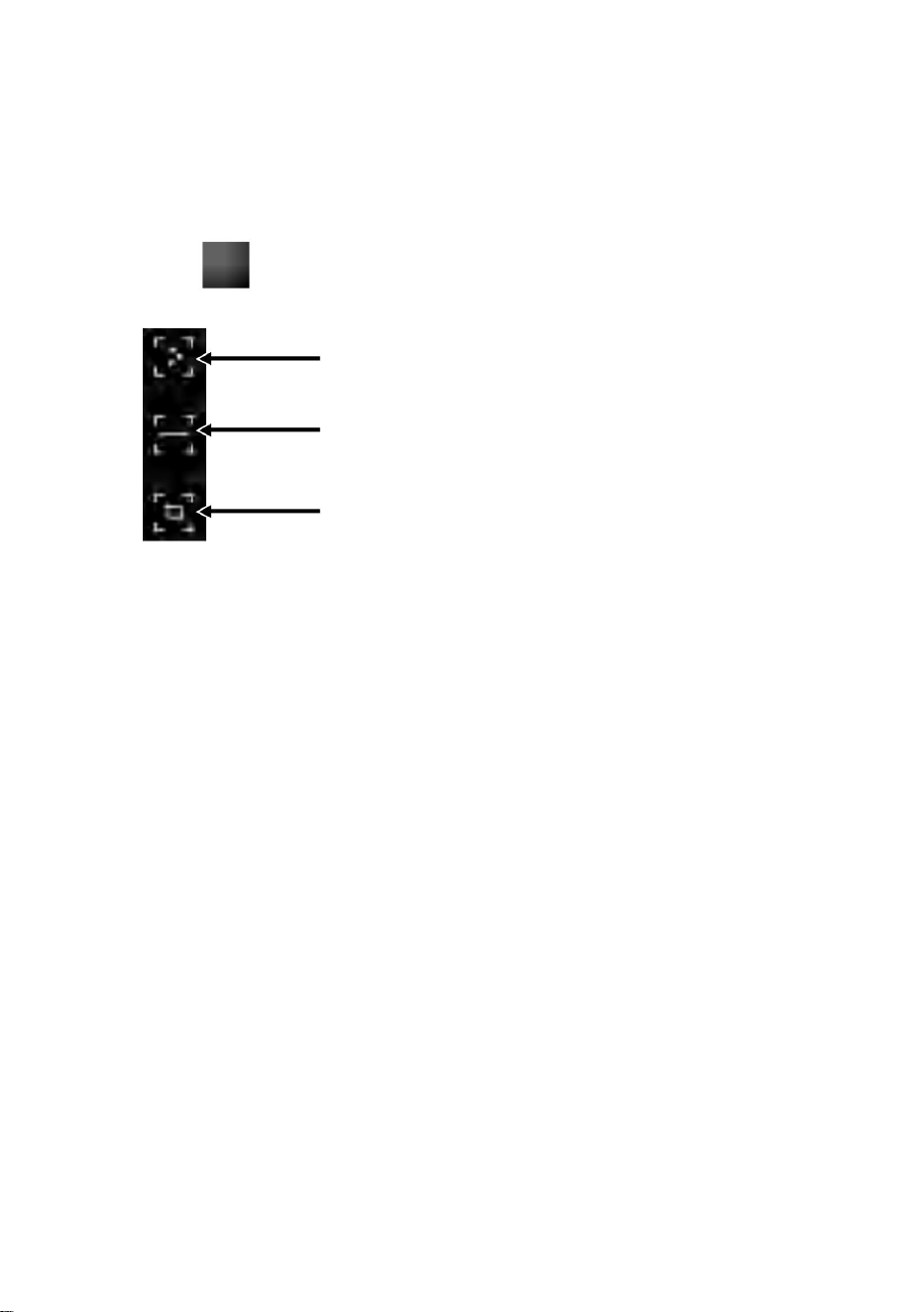
5.4 Temperaturmätningsanalys
(1) Punkttemperaturmätning: klicka på punkttemperaturen
temperatur på den horisontella linjen och identifiera relevanta
Regional temperaturmätningsanalys
analysera automatiskt maxtemperatur och minimum
fingrar och rita en horisontell linje på skärmen. Det kommer
Linjetemperaturmätningsanalys
Punkttemperaturmätning
(2) Analys av linjetemperaturmätning: dra med din
information om den användardefinierade punkten kommer att läggas till.
”
punkt. Klicka på skärmen vid denna tidpunkt och temperaturen
Klick "
att poppa ut alternativ för temperaturmätning.
punkt, högsta temperaturpunkt och lägsta temperatur
information om tre punkter, nämligen centraltemperaturen
mätningsknapp, och skärmen visar tempera-
information.
10
Machine Translated by Google
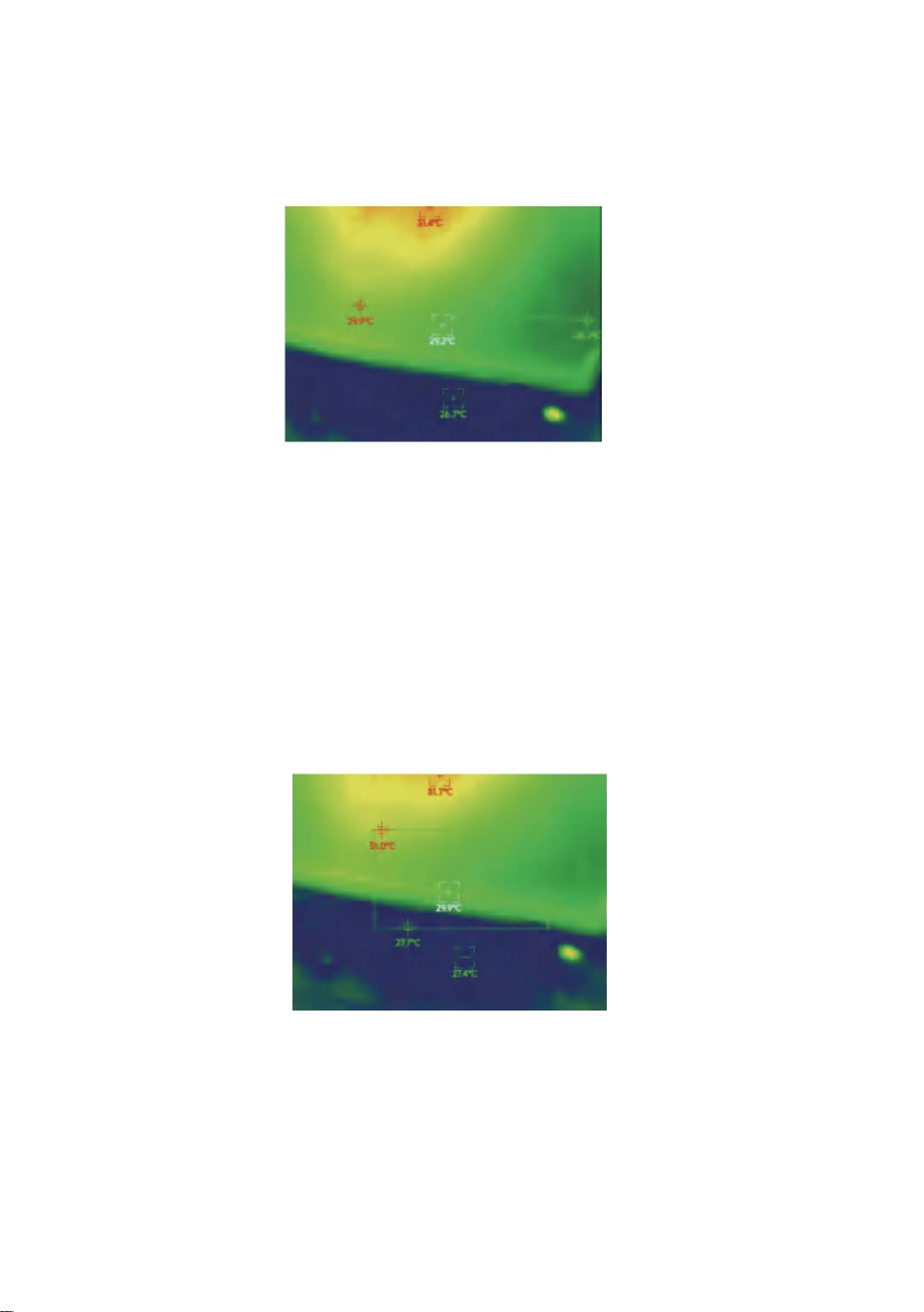
visas i följande figur:
Linjetemperaturmätning analys
fingrar och rita en rektangel på skärmen. det kommer automatiskt
i det rektangulära området, och identifiera relevant information, som
Regional temperaturmätningsanalys
(3) Regional temperaturmätningsanalys: dra med din
analysera maxtemperatur och lägsta temperatur
11
Machine Translated by Google
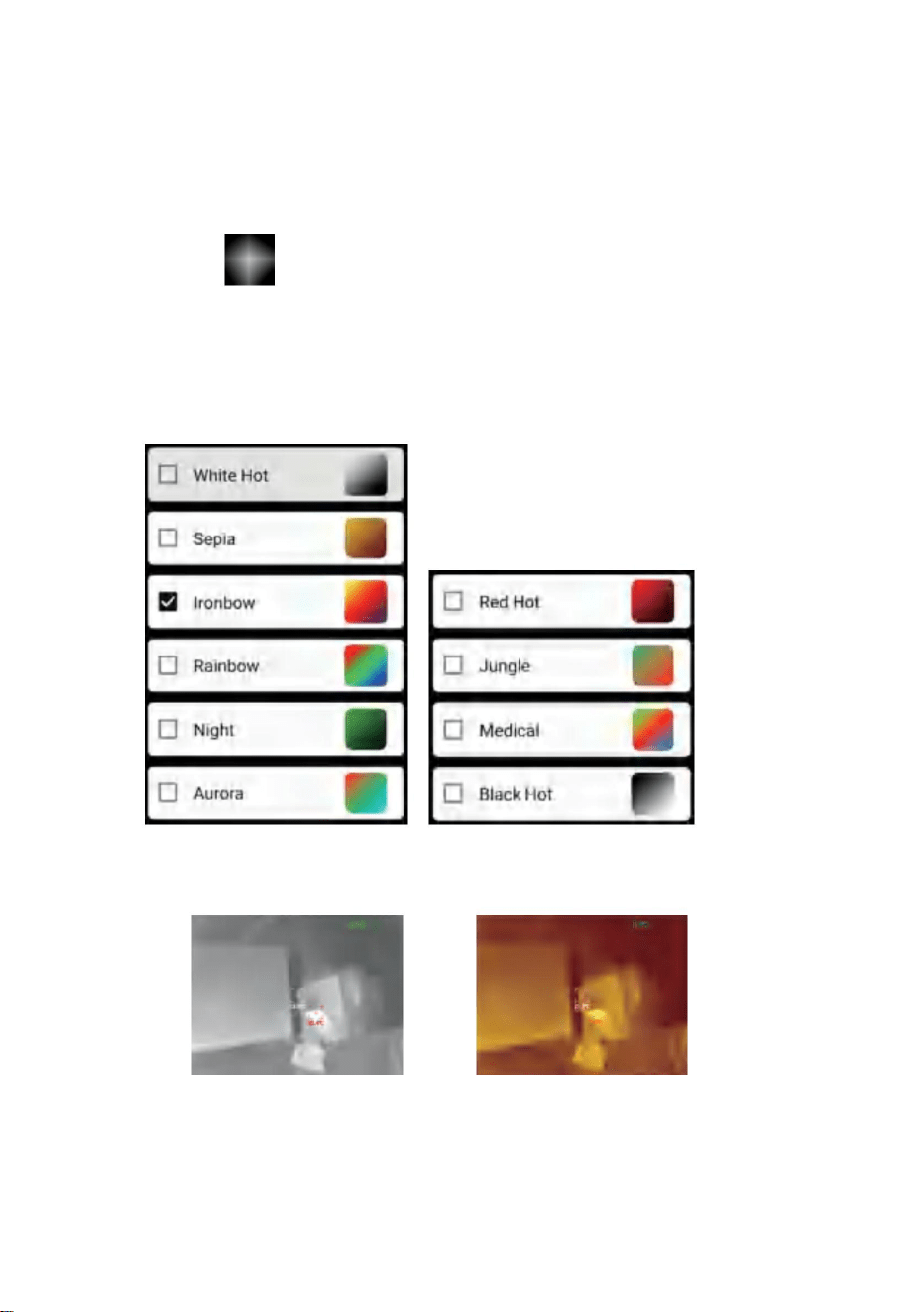
12
5.5 Färgpaletter
växla mellan 10 färgpaletter som vit värme, glödande guld, järnrött, regnbåge,
skimmer, norrsken, röd värme, djungel, medicinsk och
Sepia
”
Vit varmt
"
Visningseffekterna för 10 färgpaletter visas enligt följande:
Klicka på
svart värme, som visas i figuren nedan.
för att visa färgpalettens gränssnitt. Du kan
Machine Translated by Google
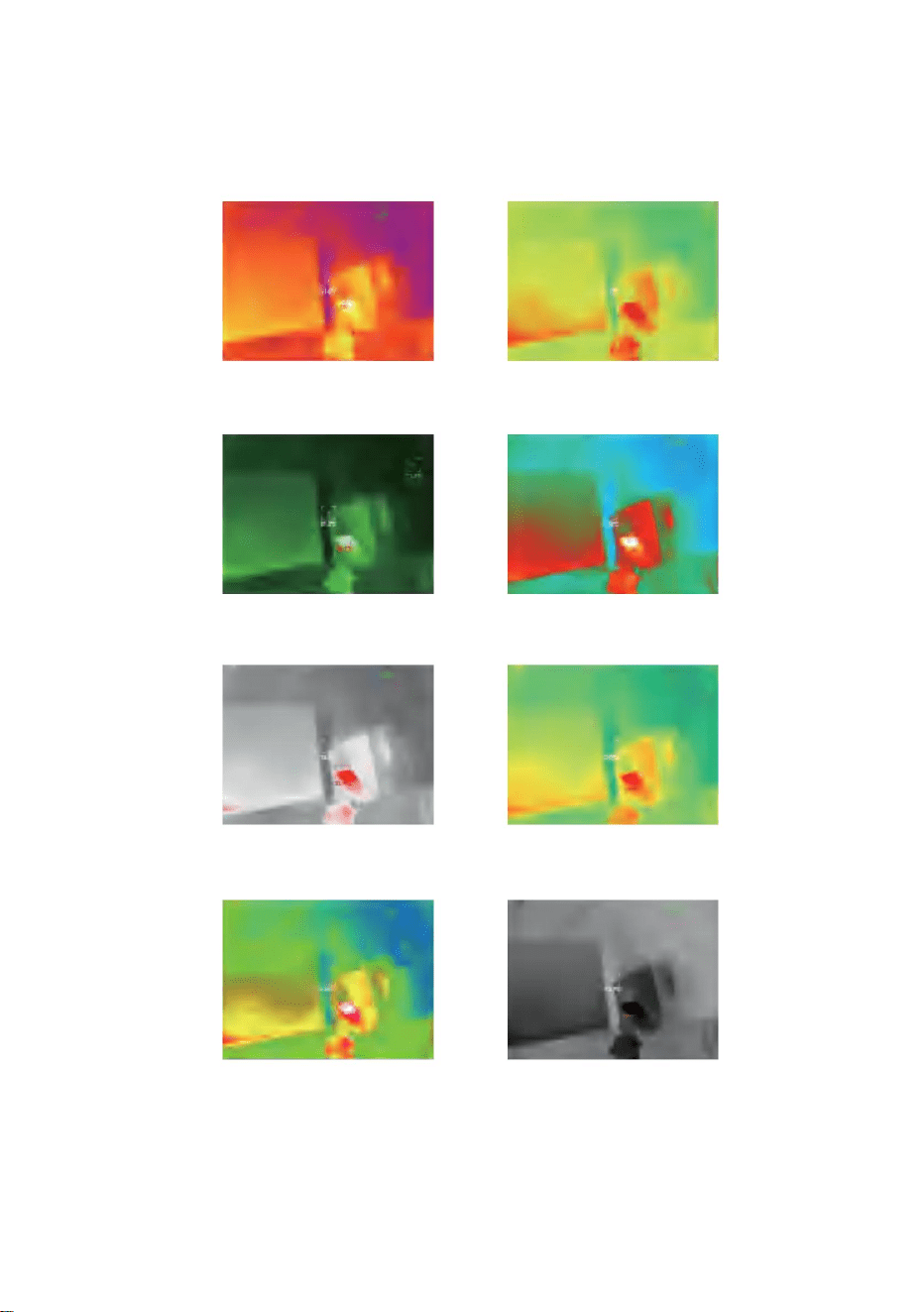
Djungel
Ironbow
Glödhett
Aurora
Svart het
Natt
Medicinsk
Regnbåge
13
Machine Translated by Google
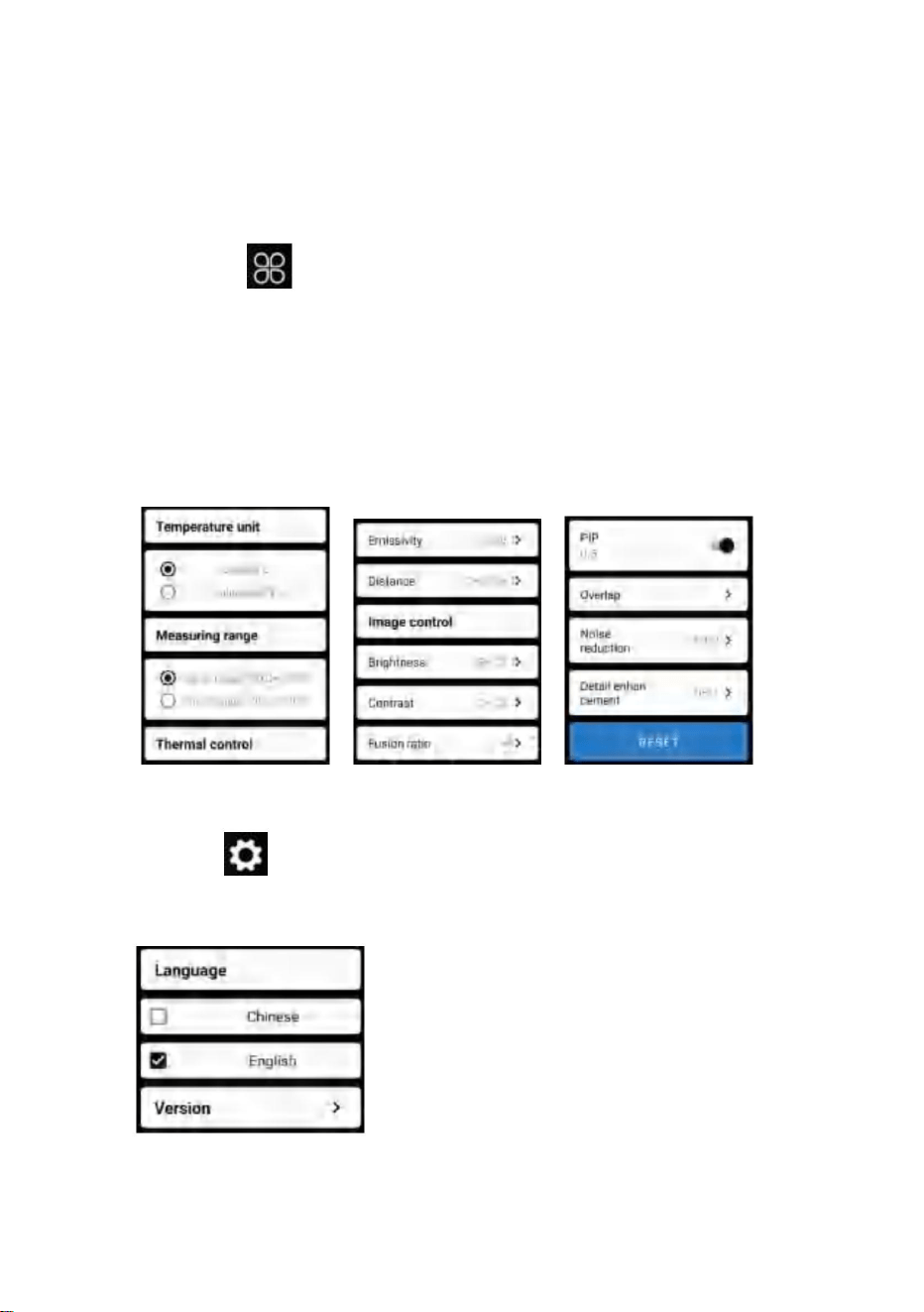
5.7 Inställning
5.6 Temperaturmätningsinställning
14
Klicka på
”
För språk kan kinesiska eller engelska väljas, som visas i
figuren nedan.
"
för att öppna inställningsgränssnittet för språkval.
”
parametrar, som visas i figuren nedan:
fusion, bild i bild, överlappning, brusreducering i tidsdomän, rumslig brusreducering
och detaljförbättring, eller återställ alla
"
Klicka på
för att öppna inställningsgränssnittet. Du kan ställa in
temperaturenhet, temperaturmätområde, emissivitet, temperaturmätavstånd,
ljusstyrka, kontrast,
Machine Translated by Google

6. Tekniska parametrar
15
Visa
Infraröd
HT-W01
Synvinkel
8~14ÿm
Modell
3,2 mm
Kontrastjustering
Stöds
ÿ25Hz
Arbetande band
Fokalplan
Bild i bild
12 ÿm
Fokuseringsläge
Stöds
Gratis fokus
NETD
White hot, sepia, Ironbow, rainbow, natt,
norrsken, glödhet, djungel, medicinsk och black hot
Stöds
Pixelavstånd
56°(H)×42°(V)
Hot spot spårning
Detektortyp
Brännvidd
3,75 mrad
Stöds
Infraröd
bildupplösning
IFOV
Vanadium Oxide Okyld Infraröd
ÿ 50mk@25ÿ,@F/1,0
Bildfusionsgrad
Justering
av ljusstyrka
Pseudofärgläge
Bildrutehastighet
256×192
Stöds
Machine Translated by Google

USB Type-C, DC5V strömförsörjning
210 g
-20ÿ ~ +70ÿ
ÿ2H
Arbets-/förvaringsmiljöer
Systemfunktion
-10ÿ ~ +50ÿ
ÿ1,5W
kinesiska och engelska
1000mAh laddningsbart litiumbatteri
Stöds
IP54
Funktion för temperaturmätning
Storlek/vikt
0,25m~30m
Stöds
152x35x35mm
300ÿ-500ÿ:±4% -15ÿ-300ÿ:±2ÿ eller ±2% -20ÿ-15ÿ:±4ÿ
-20ÿ~120ÿÿ120ÿÿ 500ÿ
punkt-, linje- och regional temperaturmätning
Arbetstemperatur
Externt gränssnitt
Temperaturmätningsnoggrannhet
Strömförsörjning
Uthållighetstid
Temperaturmätningsavstånd
JPG/MP4
Total
strömförbrukning
Temperaturmätningsområde
Kamera/video
Skyddsnivå
Temperaturmätningsläge
Språk
Produktstorlek
WIFI
Bild/videoformat
Produkt vikt
Förvaringstemperatur
16
Machine Translated by Google
KORREKT AVFALLSHANTERING
17
FCC-information:
Produkter märkta som sådana får inte kasseras med normala inhemska
2) Denna produkt måste acceptera alla mottagna störningar, inklusive
Detta gäller för produkten och alla tillbehör märkta med denna symbol.
1) Denna produkt kan orsaka skadliga störningar.
Denna enhet uppfyller del 15 av FCC-reglerna. Driften är föremål för följande två villkor:
insamling i Europeiska unionen.
indikerar att produkten kräver separat avfall
Utrustning!
en klass B digital enhet i enlighet med del 15 av FCC-reglerna. Dessa gränser är
utformade för att ge rimligt skydd mot skadliga störningar i en bostadsinstallation.
Symbolen som visar en soptunna på hjul korsad
ansvarig för efterlevnad kan ogiltigförklara användarens behörighet att använda
VARNING: Ändringar eller modifieringar som inte uttryckligen godkänts av parten
Europeiska direktivet 2012/19/EU.
Obs: Denna produkt har testats och befunnits följa gränserna för
ansvarig för efterlevnad kan ogiltigförklara användarens behörighet att använda produkten.
Denna produkt är föremål för tillhandahållande av
elektroniska apparater.
VARNING: Ändringar eller modifieringar av denna produkt som inte uttryckligen
godkänts av parten.
avfall, men måste lämnas till en insamlingsplats för återvinning av el och
störningar som kan orsaka oönskad funktion.
Machine Translated by Google

Denna produkt genererar, använder och kan utstråla radiofrekvensenergi, och om
den inte installeras och används i enlighet med instruktionerna kan den orsaka
skadliga störningar på radiokommunikation. Det finns dock ingen garanti för att
störningar inte kommer att inträffa i en viss installation. Om denna produkt orsakar
skadliga störningar på radio- eller tv-mottagning, vilket kan fastställas genom att
stänga av och på produkten, uppmanas användaren att försöka korrigera störningen
med en eller flera av följande åtgärder.
· Öka avståndet mellan produkten och mottagaren.
· Kontakta återförsäljaren eller en erfaren radio/TV-tekniker för hjälp.
· Rikta om eller flytta mottagningsantennen.
· Anslut produkten till ett uttag på en annan krets än den som mottagaren är ansluten till.
Storbritannien
EC
REP
Pooledas Group
Ltd Enhet 5 Albert Edward
House, The REP Pavilions Preston,
Storbritannien
[email protected] 01772418127
SHUNSHUN
GmbH Römeräcker 9
Z2021,76351 Linkenheim-
Hochstetten, Tyskland
[email protected] +49 1727041930
Importerad till USA: Sanven Technology Ltd., Suite 250, 9166 Anaheim
Place, Rancho Cucamonga, CA
91730 Tillverkare: Shanghaimuxinmuyeyouxiangongsi
Adress: Baoshanqu Shuangchenglu 803long 11hao 1602A-1609 shi
Shanghai
Tillverkad i Kina
18
Machine Translated by Google

chni c
al Support och E-
garanticertifikat
vor.com/support
T
e
eww wv
Machine Translated by Google
