For more detailed operation instructions,
please see the Use and Care Manual.
WholeBody
®
5.1
Remote Control User Guide
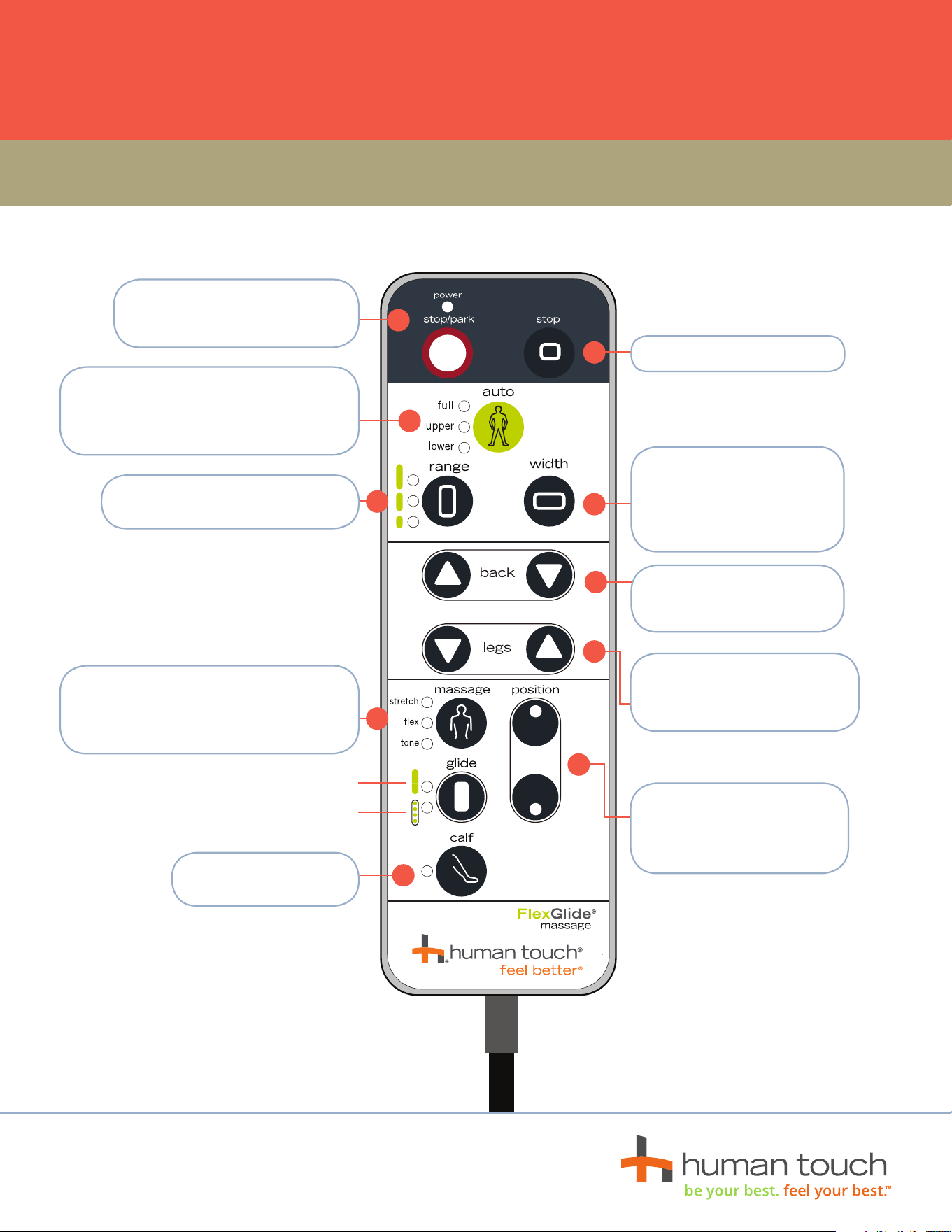
STOP/AUTO PARK — Stops the
massage and parks the massage
rollers at the top of the backrest.
RANGE — Customizes your vertical
massage range.
CALF — Press for a
stretching calf massage.
STOP — Stops the massage.
WIDTH — Press and hold to
adjust the massage width as
desired. This feature works
with Flex and Glide massage
targeted benefits.
POWER RECLINE — Press
and hold to recline/incline
backrest.
POWER FOOTREST ANGLE —
Controls the footrest angle for
recline comfort and massage.
POSITION — Use this button,
along with any stationary
massage mode, to position
the massage on your back.
FULL / UPPER / LOWER — Three unique
auto immersion programs automatically
massage you for 15 minutes each, using a
variety of massage modes.
TARGETED BENEFITS — Press to toggle
among three stationary massage modes,
each designed to provide unique muscle
benefits.
FULL
PARTIAL