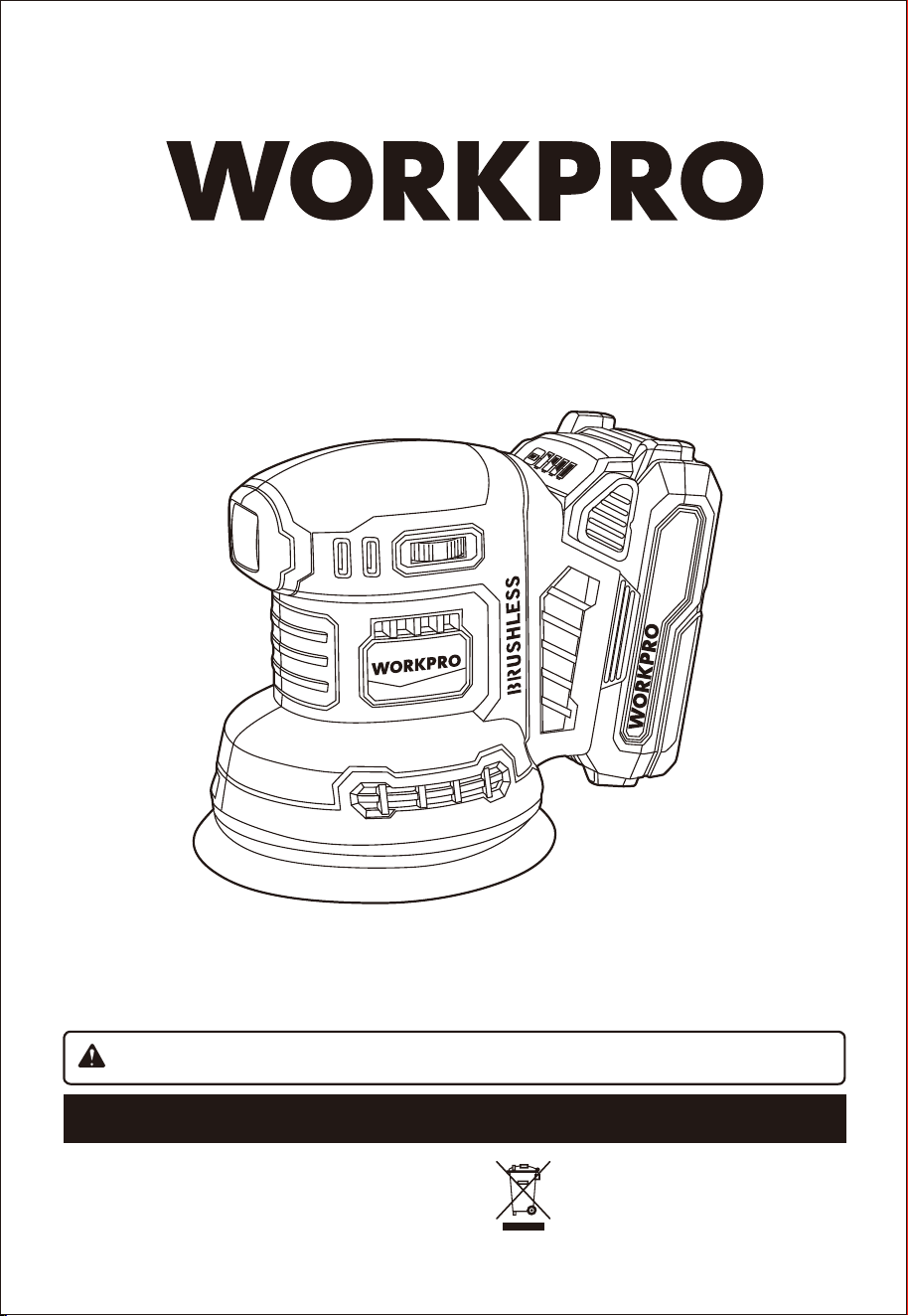
20V BRUSHLESS CORDLESS RANDOM ORBITAL SANDER
ORIGINAL OPERATING INSTRUCTION
W125228A
SAVE THIS MANUAL FOR FUTURE REFERENCE
WARNING: To reduce the risk of injury, the user must read and understand the operator’s manual.
Thank you for buying a WORKPRO Burshless cordless random orbit sander. Your new sander has been engineered
and manufactured to WORKPRO's high standard for dependability, ease of operation, and operator safety. Properly
cared for, it will give you years of rugged, trouble-free performance.
Distributed by :
Hangzhou GreatStar Industrial Co., Ltd.
No.35 Jiuhuan Road, Jiubao Town,
Hangzhou 310019, China
www.greatstartools.com
Made in China
20V
2.0Ah
LI-ION
INTRODUCTION
The equipment is designed for the grinding/sanding of wood, iron, plastic and similar materials using the
appropriate grinding/sanding paper. The machine is not suitable for wet grinding/sanding.
The equipment is to be used only for its prescribed purpose. Any other use is deemed to be a case of misuse. The
user / operator and not the manufacturer will be liable for any damage or injuries of any kind caused as a result of
this.
Please note that our equipment has not been designed for use in commercial, trade or industrial applications. Our
warranty will be voided if the machine is used in commercial, trade or industrial businesses or for equivalent
purposes.
WARNING:
Drilling, sawing, sanding or machining wood products can expose you to wood dust, a substance known to
the State of California to cause cancer. Avoid inhaling wood dust or use a dust mask or other safeguards for
personal protection. For more information go to www.P65Warnings.ca.gov/wood.
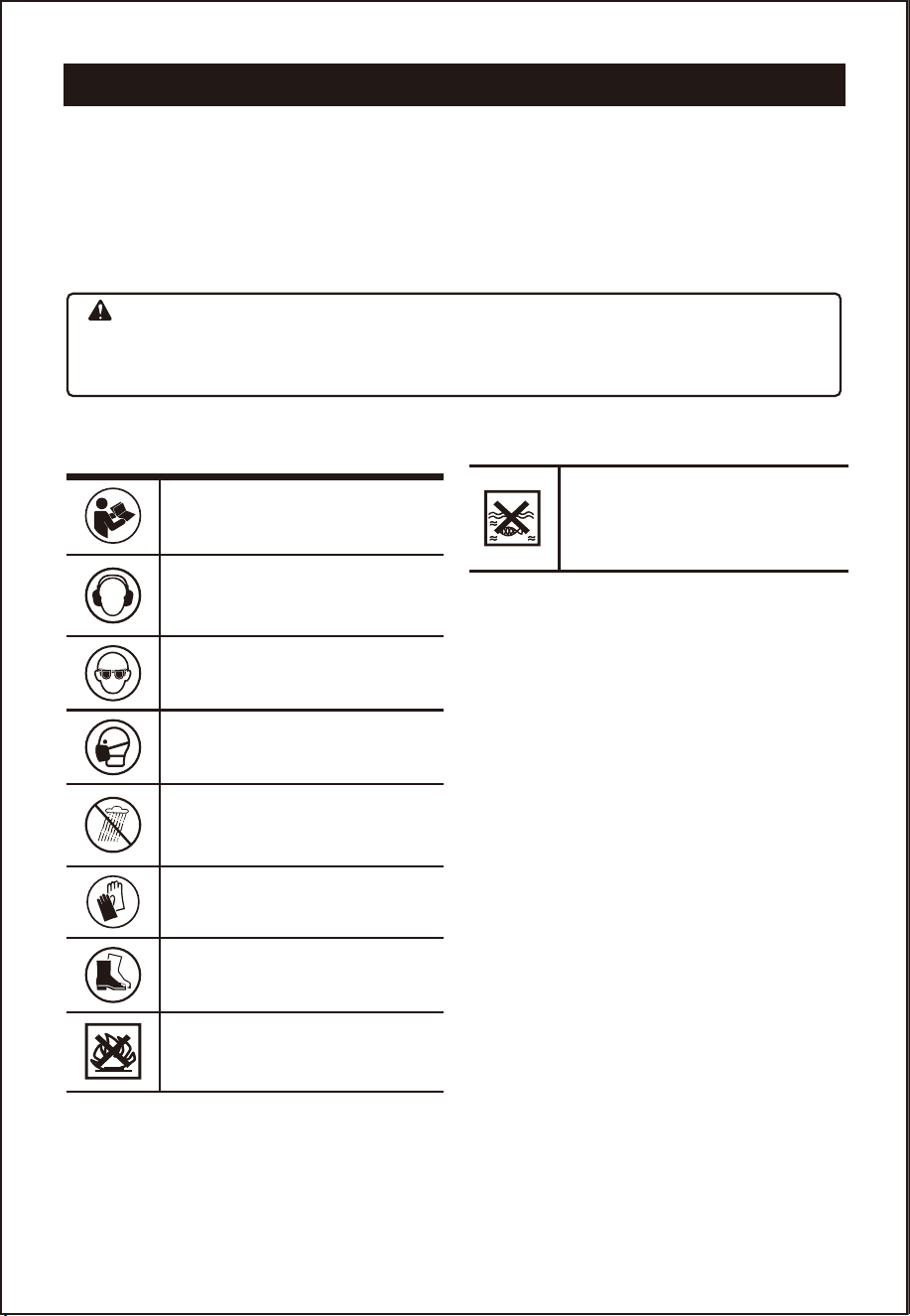
SYMBOLS
To reduce the risk of injury, user must
read instruction manual
Wear ear protection
Wear eye protection
Wear dust mask
Do not expose to rain
Wear protective gloves
Wear protective footwear
Do not burn
Batteries may enter water cycle if
disposed improperly, which can be
hazardous for ecosystem. Do not
dispose of waste batteries as unsorted
municipal waste.
2

GENERAL POWER TOOL SAFETY WARNINGS
Danger!
When using the equipment, a few safety precautions
must be observed to avoid injuries and damage.
Please read the complete operating instructions and
safety regulations with due care. Keep this manual in
a safe place, so that the information is available at all
times. If you give the equipment to any other person,
hand over these operating instructions and safety
regulations as well. We cannot accept any liability for
damage or accidents which arise due to a failure to
follow these instructions and the safety instructions.
1. GENERAL POWER TOOL
SAFETY WARNING
WARNING!
Read and understand all instructions. Failure to follow
the warnings and instructions may result in electric
shock, fire and/or serious injury.
Save all warnings and instructions for future
reference.
The term "power tool" in the warnings refers to your
mains-operated (corded) power tool or battery-oper-
ated (cordless) power tool.
1) Work area safety
Keep work area clean and well lit. Cluttered or dark
areas invite accidents.
Do not operate power tools in explosive
atmospheres, such as in the presence of flammable
liquids, gases or dust. Power tools create sparks
which may ignite the dust or fumes.
Keep children and bystanders away while operating
a power tool. Distractions can cause you to lose
control.
2) Electrical safety
Power tool plugs must match the outlet. Never
modify the plug in any way. Do not use any
adapter plugs with earthed (grounded) power tools.
Unmodified plugs and matching outlets will reduce
risk of electric shock.
Avoid body contact with earthed or grounded
surfaces, such as pipes, radiators, ranges and
refrigerators.There is an increased risk of electric
shock if your body is earthed or grounded.
Do not expose power tools to rain or wet
conditions. Water entering a power tool will
increase the risk of electric shock.
Do not abuse the cord. Never use the cord for
carrying, pulling or unplugging the power tool.
Keep cord away from heat, oil, sharp edges or
moving parts. Damaged or entangled cords
increase the risk of electric shock.
When operating a power tool outdoors, use an
extension cord suitable for outdoor use. Use of a
cord suitable for outdoor use reduces the risk of
electric shock.
If operating a power tool in a damp location is
unavoidable, use a residual current device (RCD)
protected supply. Use of an RCD reduces the risk
of electric shock.
3) Personal safety
Stay alert, watch what you are doing and use
common sense when operating a power tool. Do
not use a power tool while you are tired or under
the influence of drugs, alcohol or medication. A
moment of inattention while operating power tools
may result in serious personal injury.
Use personal protective equipment. Always wear
eye protection. Protective equipment such as a
dust mask, non-skid safety shoes, hard hat or
hearing protection used for appropriate conditions
will reduce personal injuries.
Prevent unintentional starting. Ensure the switch
is in the off-position before connecting to power
source and/or battery pack, picking up or carrying
the tool. Carrying power tools with your finger on
the switch or energising power tools that have the
switch on invites accidents.
Remove any adjusting key or wrench before
turning the power tool on. A wrench or a key left
attached to a rotating part of the power tool may
result in personal injury.
Do not overreach. Keep proper footing and
balance at all times. This enables better control of
the power tool in unexpected situations.
Dress properly. Do not wear loose clothing or
jewellery. Keep your hair and clothing away from
moving parts. Loose clothes, jewellery or long hair
can be caught in moving parts.
If devices are provided for the connection of
dust extraction and collection facilities, ensure
these are connected and properly used. Use of
dust collection can reduce dust-related hazards.
Do not let familiarity gained from frequent use of
tools allow you to become complacent and
ignore tool safety principles. A careless action
can cause severe injury within a fraction of a
second.
4) Power tool use and care
Do not force the power tool. Use the correct
power tool for your application. The correct power
tool will do the job better and safer at the rate for
which it was designed.
Do not use the power tool if the switch does not
turn it on and off. Any power tool that cannot be
controlled with the switch is dangerous and must
be repaired.
Disconnect the plug from the power source and/or
remove the battery pack, if detachable, from the
power tool before making any adjustments,
changing accessories, or storing power tools. Such
preventive safety measures reduce the risk of starting
the power tool accidentall
y.
Store idle power tools out of the reach of
children and do not allow persons unfamiliar
with the power tool or these instructions to
operate the power tool. Power tools are
dangerous in the hands of untrained users.
Maintain power tools and accessories. Check for
misalignment or binding of moving parts, breakage
of parts and any other condition that may affect the
power tool’s operation. If damaged, have the power
tool repaired before use. Many accidents are
caused by poorly maintained power tools.
Keep cutting tools sharp and clean. Properly
maintained cutting tools with sharp cutting edges
are less likely to bind and are easier to control.
Use the power tool, accessories and tool bits
etc. in accordance with these instructions, taking
into account the working conditions and the work
to be performed. Use of the power tool for
operations different from those intended could
result in a hazardous situation.
Keep handles and grasping surfaces dry, clean
and free from oil and grease. Slippery handles
and grasping surfaces do not allow for safe
handling and control of the tool in unexpected
situations.
5) Service
Have your power tool serviced by a qualified
repair person using only identical replacement
parts. This will ensure that the safety of the power
tool is maintained.
6) Battery tool use and care
a. Ensure the switch is in the off position before
inserting battery pack. Inserting the battery pack
into power tools that have the switch on invites
accidents.
b. Recharge only with the charger specified by the
manufacturer. A charger that is suitable for one
type of battery pack may create a risk of fire when
used with another battery pack.
c. Use power tools only with specifically
designated battery packs. Use of any other
battery packs may create a risk of injury and fire.
d. When battery pack is not in use, keep it away
from other metal objects like paper clips, coins,
keys, nails, screws, or other small metal objects
that can make a connection from one terminal
to another.
Shorting the battery terminals together may cause
burns or a fire.
e. Under abusive conditions, liquid may be ejected
from the battery; avoid contact. If contact
accidentally occurs, flush with water. If liquid
contacts eyes, additionally seek medical help.
Liquid ejected from the battery may cause irritation
or burns.
ADDITIONAL SAFETY INSTRUCTIONS FOR THE
CHARGER
Your WORKPRO tool with Lithium Ion batteries may
only be charged with the specific designed
WORKPRO Lithium Ion battery charger purchased
with the tool.
IT IS DANGEROUS TO USE ANY OTHER BATTERY
CHARGER TO CHARGE YOUR TOOL. Do not
attempt to charge the battery pack with any other
charger than the one supplied.
Before using the charger, read all the instructions,
labels and cautionary markings on the charger and
battery pack as well as the instructions on using the
battery pack.
Do not use the charger if it has been subjected to a
heavy knock, dropped or otherwise damaged in
anyway. Take the charger to an authorised service
centre for a check or repair.
Do not disassemble the charger. Opening or
removing covers may expose you to dangerous
voltages or other risks. Incorrect reassembly can
cause electric shock when you use the tool or
charger again. Take the charger to a power tool repair
centre when service or repair is required.
DANGER. If the battery pack is cracked or
damaged in any other way, do not insert it in the
charger.
Do not plug anything other than your WORKPRO tool
into the charger, as other objects may touch
dangerous voltage points or short out parts, which
could result in fire or electric shock.
Do not place the tool or charger on an uneven
surface, as a fall may cause serious damage.
Never place the tool or charger near or over a heat
source such as a radiator or heater.
Do not operate the charger in a cabinet or other
enclosure unless proper ventilation is provided.
Use the battery charger indoors only.
WARNING. Do not allow any liquid to come into
contact with the charger. There is a danger of electric
shock. Do not position the tool or battery charger
near water; for example, near a sink, wash bowl or
toilet. Do not spill liquid of any kind on the tool or
charger. Doing so may short out parts, Causing
damage to the product and creating the risk of fire or
electric shock.
To reduce the risk of an electric shock, unplug the
charger from the power supply before attempting to
clean it. To clean tool or charger, wipe with a damp
cloth. Use of any other cleaners is not recommended.
Do not place any object on to, or allow anything to
rest on the charger.
Make sure that the charger cable is positioned where
it will not be stepped on, tripped over or otherwise
subjected to damage or stress. Keep the lead away
from operating machinery.
Do not pull on the lead of the charger to disconnect it
from the mains power socket.
Do not use an extension cord unless it is absolutely
necessary. The use of an improper extension cord
could cause the risk of fire, electric shock or
electrocution.
Never attempt to connect two chargers together.
Do not charge batteries or use the tool and battery
pack in locations where the temperature may be
below 40°F(4°C) or exceed 104°F(40°C) such as
alongside sheds or metal structures.
If you wish to charge a second battery pack, unplug
the charger from the mains supply and leave it for at
least 15 minutes. After this time you can charge a
second battery pack.
ADDITIONAL SAFETY INSTRUCTIONS RELATED
TO THE BATTERY PACK AND BATTERY SAFETY
Use only the WORKPRO batteries supplied with the
WORKPRO Tool or WORKPRO-approved replace-
ments.
Do not use the battery to power any device other
than the WORKPRO tool it was sold with.
Charge the battery only with the WORKPRO charger
supplied with the tool or WORKPRO-approved
replacements and according to the instructions in the
WORKPRO Instruction Manual.
Do not charge the battery in a place where static
electricity is generated nor let the battery touch
something that is statically charged.
The battery can be stored at temperatures between
40°F(4°C) and 104°F(40°C).
Never store or leave your lithium ion battery in
temperatures over that recommended otherwise fire
may occur.
DO NOT store the Lithium Ion battery anywhere that
the temperature can easily reach higher temperatures
than recommended -this includes garden type sheds,
and vehicles where the inside temperature can climb
to dangerous levels in the direct sunlight and on high
temperature days. THINK BEFORE LEAVING YOUR
LITHIUM ION BATTERY PACK IN STORAGE.
The battery can be charged or operated at tempera-
tures between 40°F(4°C) and 104°F(40°C). NEVER
CHARGE YOU LITHIUM ION BATTERY BELOW OR
ABOVE TEMPERATURES RECOMMENDED
OTHERWISE FIRE OR SERIOUS DAMAGE TO THE
BATTERY PACK MAY OCCUR.
The most suitable temperatures to charge the battery
pack are between 68°F(20°C) -77°F(25°C).
Always allow the battery pack to cool down after
charging, do not place it in a hot environment such as
a metal shed or open trailer left in the sun.
Take care where the tool is stored. Do not store in
areas of corrosive fumes, or salt air or similar
conditions. Try and store the tool in the packaging
supplied with the tool.
Do not dispose of the battery in a fire or put the
battery into a microwave oven, conventional oven,
dryer, or high-pressure container. Under these
conditions, the battery may explode.
Never attempt to open the battery pack, puncture the
battery or subject the battery to strong physical
shock.
If the plastic housing of the battery pack breaks open
or cracks, immediately discontinue its use and do not
recharge it. Ensure the battery pack clip is in good
condition and will not allow the pack to fall free from
the tool. If the clip is damaged or for any reason is
not locking the pack in place, Do Not continue to use.
Stop using the battery if it exhibits abnormal heat,
odour, colour, deformation, or is in an abnormal
condition.
If you detect leakage or a foul odour, it is especially
important to keep the battery away from fire. If
battery liquid leaks onto your skin or clothes, wash
well with clean water immediately. If liquid leaking
from the battery gets into your eyes, do not rub your
eyes. Rinse your eyes well (for at least 10 minutes)
with clean water, and consult a doctor immediately.
Do not use a leaking battery.
Handle batteries with care to avoid shorting the
battery with conducting materials, such as nails,
screws, metal watch bands, rings, bracelets, and
keys. The battery may overheat and could burn you.
After the battery has reached the end of its useful life,
we recommend recycling the materials at your local
municipal council recycling centre. DO NOT attempt
to replace the battery cells in the battery pack, repair
or modify any part of the battery pack assembly.
When recycling, make it nonconductive by applying
insulating tape to the terminals located on the
battery.
WHEN TO CHARGE THE BATTERY
New batteries are shipped in a low charged condition
and should be fully charged before Use. The battery
pack can be recharged at any time during use,
provided the pack is not overheated.
If the battery pack starts to cut out due to low
voltage, or previous tasks undertaken can no longer
be performed, it is suggested to stop using the tool
and recharge the battery.
For storage, it is suggested to recharge the battery
between 50% and 75% charge.Charge the device at
least once in 3-6 months to preserve battery life span.
3

GENERAL POWER TOOL SAFETY WARNINGS
Danger!
When using the equipment, a few safety precautions
must be observed to avoid injuries and damage.
Please read the complete operating instructions and
safety regulations with due care. Keep this manual in
a safe place, so that the information is available at all
times. If you give the equipment to any other person,
hand over these operating instructions and safety
regulations as well. We cannot accept any liability for
damage or accidents which arise due to a failure to
follow these instructions and the safety instructions.
1. GENERAL POWER TOOL
SAFETY WARNING
WARNING!
Read and understand all instructions. Failure to follow
the warnings and instructions may result in electric
shock, fire and/or serious injury.
Save all warnings and instructions for future
reference.
The term "power tool" in the warnings refers to your
mains-operated (corded) power tool or battery-oper-
ated (cordless) power tool.
1) Work area safety
Keep work area clean and well lit. Cluttered or dark
areas invite accidents.
Do not operate power tools in explosive
atmospheres, such as in the presence of flammable
liquids, gases or dust. Power tools create sparks
which may ignite the dust or fumes.
Keep children and bystanders away while operating
a power tool. Distractions can cause you to lose
control.
2) Electrical safety
Power tool plugs must match the outlet. Never
modify the plug in any way. Do not use any
adapter plugs with earthed (grounded) power tools.
Unmodified plugs and matching outlets will reduce
risk of electric shock.
Avoid body contact with earthed or grounded
surfaces, such as pipes, radiators, ranges and
refrigerators.There is an increased risk of electric
shock if your body is earthed or grounded.
Do not expose power tools to rain or wet
conditions. Water entering a power tool will
increase the risk of electric shock.
Do not abuse the cord. Never use the cord for
carrying, pulling or unplugging the power tool.
Keep cord away from heat, oil, sharp edges or
moving parts. Damaged or entangled cords
increase the risk of electric shock.
When operating a power tool outdoors, use an
extension cord suitable for outdoor use. Use of a
cord suitable for outdoor use reduces the risk of
electric shock.
If operating a power tool in a damp location is
unavoidable, use a residual current device (RCD)
protected supply. Use of an RCD reduces the risk
of electric shock.
3) Personal safety
Stay alert, watch what you are doing and use
common sense when operating a power tool. Do
not use a power tool while you are tired or under
the influence of drugs, alcohol or medication. A
moment of inattention while operating power tools
may result in serious personal injury.
Use personal protective equipment. Always wear
eye protection. Protective equipment such as a
dust mask, non-skid safety shoes, hard hat or
hearing protection used for appropriate conditions
will reduce personal injuries.
Prevent unintentional starting. Ensure the switch
is in the off-position before connecting to power
source and/or battery pack, picking up or carrying
the tool. Carrying power tools with your finger on
the switch or energising power tools that have the
switch on invites accidents.
Remove any adjusting key or wrench before
turning the power tool on. A wrench or a key left
attached to a rotating part of the power tool may
result in personal injury.
Do not overreach. Keep proper footing and
balance at all times. This enables better control of
the power tool in unexpected situations.
Dress properly. Do not wear loose clothing or
jewellery. Keep your hair and clothing away from
moving parts. Loose clothes, jewellery or long hair
can be caught in moving parts.
If devices are provided for the connection of
dust extraction and collection facilities, ensure
these are connected and properly used. Use of
dust collection can reduce dust-related hazards.
Do not let familiarity gained from frequent use of
tools allow you to become complacent and
ignore tool safety principles. A careless action
can cause severe injury within a fraction of a
second.
4) Power tool use and care
Do not force the power tool. Use the correct
power tool for your application. The correct power
tool will do the job better and safer at the rate for
which it was designed.
Do not use the power tool if the switch does not
turn it on and off. Any power tool that cannot be
controlled with the switch is dangerous and must
be repaired.
Disconnect the plug from the power source and/or
remove the battery pack, if detachable, from the
power tool before making any adjustments,
changing accessories, or storing power tools. Such
preventive safety measures reduce the risk of starting
the power tool accidentall
y.
Store idle power tools out of the reach of
children and do not allow persons unfamiliar
with the power tool or these instructions to
operate the power tool. Power tools are
dangerous in the hands of untrained users.
Maintain power tools and accessories. Check for
misalignment or binding of moving parts, breakage
of parts and any other condition that may affect the
power tool’s operation. If damaged, have the power
tool repaired before use. Many accidents are
caused by poorly maintained power tools.
Keep cutting tools sharp and clean. Properly
maintained cutting tools with sharp cutting edges
are less likely to bind and are easier to control.
Use the power tool, accessories and tool bits
etc. in accordance with these instructions, taking
into account the working conditions and the work
to be performed. Use of the power tool for
operations different from those intended could
result in a hazardous situation.
Keep handles and grasping surfaces dry, clean
and free from oil and grease. Slippery handles
and grasping surfaces do not allow for safe
handling and control of the tool in unexpected
situations.
5) Service
Have your power tool serviced by a qualified
repair person using only identical replacement
parts. This will ensure that the safety of the power
tool is maintained.
6) Battery tool use and care
a. Ensure the switch is in the off position before
inserting battery pack. Inserting the battery pack
into power tools that have the switch on invites
accidents.
b. Recharge only with the charger specified by the
manufacturer. A charger that is suitable for one
type of battery pack may create a risk of fire when
used with another battery pack.
c. Use power tools only with specifically
designated battery packs. Use of any other
battery packs may create a risk of injury and fire.
d. When battery pack is not in use, keep it away
from other metal objects like paper clips, coins,
keys, nails, screws, or other small metal objects
that can make a connection from one terminal
to another.
Shorting the battery terminals together may cause
burns or a fire.
e. Under abusive conditions, liquid may be ejected
from the battery; avoid contact. If contact
accidentally occurs, flush with water. If liquid
contacts eyes, additionally seek medical help.
Liquid ejected from the battery may cause irritation
or burns.
ADDITIONAL SAFETY INSTRUCTIONS FOR THE
CHARGER
Your WORKPRO tool with Lithium Ion batteries may
only be charged with the specific designed
WORKPRO Lithium Ion battery charger purchased
with the tool.
IT IS DANGEROUS TO USE ANY OTHER BATTERY
CHARGER TO CHARGE YOUR TOOL. Do not
attempt to charge the battery pack with any other
charger than the one supplied.
Before using the charger, read all the instructions,
labels and cautionary markings on the charger and
battery pack as well as the instructions on using the
battery pack.
Do not use the charger if it has been subjected to a
heavy knock, dropped or otherwise damaged in
anyway. Take the charger to an authorised service
centre for a check or repair.
Do not disassemble the charger. Opening or
removing covers may expose you to dangerous
voltages or other risks. Incorrect reassembly can
cause electric shock when you use the tool or
charger again. Take the charger to a power tool repair
centre when service or repair is required.
DANGER. If the battery pack is cracked or
damaged in any other way, do not insert it in the
charger.
Do not plug anything other than your WORKPRO tool
into the charger, as other objects may touch
dangerous voltage points or short out parts, which
could result in fire or electric shock.
Do not place the tool or charger on an uneven
surface, as a fall may cause serious damage.
Never place the tool or charger near or over a heat
source such as a radiator or heater.
Do not operate the charger in a cabinet or other
enclosure unless proper ventilation is provided.
Use the battery charger indoors only.
WARNING. Do not allow any liquid to come into
contact with the charger. There is a danger of electric
shock. Do not position the tool or battery charger
near water; for example, near a sink, wash bowl or
toilet. Do not spill liquid of any kind on the tool or
charger. Doing so may short out parts, Causing
damage to the product and creating the risk of fire or
electric shock.
To reduce the risk of an electric shock, unplug the
charger from the power supply before attempting to
clean it. To clean tool or charger, wipe with a damp
cloth. Use of any other cleaners is not recommended.
Do not place any object on to, or allow anything to
rest on the charger.
Make sure that the charger cable is positioned where
it will not be stepped on, tripped over or otherwise
subjected to damage or stress. Keep the lead away
from operating machinery.
Do not pull on the lead of the charger to disconnect it
from the mains power socket.
Do not use an extension cord unless it is absolutely
necessary. The use of an improper extension cord
could cause the risk of fire, electric shock or
electrocution.
Never attempt to connect two chargers together.
Do not charge batteries or use the tool and battery
pack in locations where the temperature may be
below 40°F(4°C) or exceed 104°F(40°C) such as
alongside sheds or metal structures.
If you wish to charge a second battery pack, unplug
the charger from the mains supply and leave it for at
least 15 minutes. After this time you can charge a
second battery pack.
ADDITIONAL SAFETY INSTRUCTIONS RELATED
TO THE BATTERY PACK AND BATTERY SAFETY
Use only the WORKPRO batteries supplied with the
WORKPRO Tool or WORKPRO-approved replace-
ments.
Do not use the battery to power any device other
than the WORKPRO tool it was sold with.
Charge the battery only with the WORKPRO charger
supplied with the tool or WORKPRO-approved
replacements and according to the instructions in the
WORKPRO Instruction Manual.
Do not charge the battery in a place where static
electricity is generated nor let the battery touch
something that is statically charged.
The battery can be stored at temperatures between
40°F(4°C) and 104°F(40°C).
Never store or leave your lithium ion battery in
temperatures over that recommended otherwise fire
may occur.
DO NOT store the Lithium Ion battery anywhere that
the temperature can easily reach higher temperatures
than recommended -this includes garden type sheds,
and vehicles where the inside temperature can climb
to dangerous levels in the direct sunlight and on high
temperature days. THINK BEFORE LEAVING YOUR
LITHIUM ION BATTERY PACK IN STORAGE.
The battery can be charged or operated at tempera-
tures between 40°F(4°C) and 104°F(40°C). NEVER
CHARGE YOU LITHIUM ION BATTERY BELOW OR
ABOVE TEMPERATURES RECOMMENDED
OTHERWISE FIRE OR SERIOUS DAMAGE TO THE
BATTERY PACK MAY OCCUR.
The most suitable temperatures to charge the battery
pack are between 68°F(20°C) -77°F(25°C).
Always allow the battery pack to cool down after
charging, do not place it in a hot environment such as
a metal shed or open trailer left in the sun.
Take care where the tool is stored. Do not store in
areas of corrosive fumes, or salt air or similar
conditions. Try and store the tool in the packaging
supplied with the tool.
Do not dispose of the battery in a fire or put the
battery into a microwave oven, conventional oven,
dryer, or high-pressure container. Under these
conditions, the battery may explode.
Never attempt to open the battery pack, puncture the
battery or subject the battery to strong physical
shock.
If the plastic housing of the battery pack breaks open
or cracks, immediately discontinue its use and do not
recharge it. Ensure the battery pack clip is in good
condition and will not allow the pack to fall free from
the tool. If the clip is damaged or for any reason is
not locking the pack in place, Do Not continue to use.
Stop using the battery if it exhibits abnormal heat,
odour, colour, deformation, or is in an abnormal
condition.
If you detect leakage or a foul odour, it is especially
important to keep the battery away from fire. If
battery liquid leaks onto your skin or clothes, wash
well with clean water immediately. If liquid leaking
from the battery gets into your eyes, do not rub your
eyes. Rinse your eyes well (for at least 10 minutes)
with clean water, and consult a doctor immediately.
Do not use a leaking battery.
Handle batteries with care to avoid shorting the
battery with conducting materials, such as nails,
screws, metal watch bands, rings, bracelets, and
keys. The battery may overheat and could burn you.
After the battery has reached the end of its useful life,
we recommend recycling the materials at your local
municipal council recycling centre. DO NOT attempt
to replace the battery cells in the battery pack, repair
or modify any part of the battery pack assembly.
When recycling, make it nonconductive by applying
insulating tape to the terminals located on the
battery.
WHEN TO CHARGE THE BATTERY
New batteries are shipped in a low charged condition
and should be fully charged before Use. The battery
pack can be recharged at any time during use,
provided the pack is not overheated.
If the battery pack starts to cut out due to low
voltage, or previous tasks undertaken can no longer
be performed, it is suggested to stop using the tool
and recharge the battery.
For storage, it is suggested to recharge the battery
between 50% and 75% charge.Charge the device at
least once in 3-6 months to preserve battery life span.
4

Danger!
When using the equipment, a few safety precautions
must be observed to avoid injuries and damage.
Please read the complete operating instructions and
safety regulations with due care. Keep this manual in
a safe place, so that the information is available at all
times. If you give the equipment to any other person,
hand over these operating instructions and safety
regulations as well. We cannot accept any liability for
damage or accidents which arise due to a failure to
follow these instructions and the safety instructions.
1. GENERAL POWER TOOL
SAFETY WARNING
WARNING!
Read and understand all instructions. Failure to follow
the warnings and instructions may result in electric
shock, fire and/or serious injury.
Save all warnings and instructions for future
reference.
The term "power tool" in the warnings refers to your
mains-operated (corded) power tool or battery-oper-
ated (cordless) power tool.
1) Work area safety
Keep work area clean and well lit. Cluttered or dark
areas invite accidents.
Do not operate power tools in explosive
atmospheres, such as in the presence of flammable
liquids, gases or dust. Power tools create sparks
which may ignite the dust or fumes.
Keep children and bystanders away while operating
a power tool. Distractions can cause you to lose
control.
2) Electrical safety
Power tool plugs must match the outlet. Never
modify the plug in any way. Do not use any
adapter plugs with earthed (grounded) power tools.
Unmodified plugs and matching outlets will reduce
risk of electric shock.
Avoid body contact with earthed or grounded
surfaces, such as pipes, radiators, ranges and
refrigerators.There is an increased risk of electric
shock if your body is earthed or grounded.
Do not expose power tools to rain or wet
conditions. Water entering a power tool will
increase the risk of electric shock.
Do not abuse the cord. Never use the cord for
carrying, pulling or unplugging the power tool.
Keep cord away from heat, oil, sharp edges or
moving parts. Damaged or entangled cords
increase the risk of electric shock.
When operating a power tool outdoors, use an
extension cord suitable for outdoor use. Use of a
cord suitable for outdoor use reduces the risk of
electric shock.
If operating a power tool in a damp location is
unavoidable, use a residual current device (RCD)
protected supply. Use of an RCD reduces the risk
of electric shock.
3) Personal safety
Stay alert, watch what you are doing and use
common sense when operating a power tool. Do
not use a power tool while you are tired or under
the influence of drugs, alcohol or medication. A
moment of inattention while operating power tools
may result in serious personal injury.
Use personal protective equipment. Always wear
eye protection. Protective equipment such as a
dust mask, non-skid safety shoes, hard hat or
hearing protection used for appropriate conditions
will reduce personal injuries.
Prevent unintentional starting. Ensure the switch
is in the off-position before connecting to power
source and/or battery pack, picking up or carrying
the tool. Carrying power tools with your finger on
the switch or energising power tools that have the
switch on invites accidents.
Remove any adjusting key or wrench before
turning the power tool on. A wrench or a key left
attached to a rotating part of the power tool may
result in personal injury.
Do not overreach. Keep proper footing and
balance at all times. This enables better control of
the power tool in unexpected situations.
Dress properly. Do not wear loose clothing or
jewellery. Keep your hair and clothing away from
moving parts. Loose clothes, jewellery or long hair
can be caught in moving parts.
If devices are provided for the connection of
dust extraction and collection facilities, ensure
these are connected and properly used. Use of
dust collection can reduce dust-related hazards.
Do not let familiarity gained from frequent use of
tools allow you to become complacent and
ignore tool safety principles. A careless action
can cause severe injury within a fraction of a
second.
4) Power tool use and care
Do not force the power tool. Use the correct
power tool for your application. The correct power
tool will do the job better and safer at the rate for
which it was designed.
Do not use the power tool if the switch does not
turn it on and off. Any power tool that cannot be
controlled with the switch is dangerous and must
be repaired.
Disconnect the plug from the power source and/or
remove the battery pack, if detachable, from the
power tool before making any adjustments,
changing accessories, or storing power tools. Such
preventive safety measures reduce the risk of starting
the power tool accidentall
y.
Store idle power tools out of the reach of
children and do not allow persons unfamiliar
with the power tool or these instructions to
operate the power tool. Power tools are
dangerous in the hands of untrained users.
Maintain power tools and accessories. Check for
misalignment or binding of moving parts, breakage
of parts and any other condition that may affect the
power tool’s operation. If damaged, have the power
tool repaired before use. Many accidents are
caused by poorly maintained power tools.
Keep cutting tools sharp and clean. Properly
maintained cutting tools with sharp cutting edges
are less likely to bind and are easier to control.
Use the power tool, accessories and tool bits
etc. in accordance with these instructions, taking
into account the working conditions and the work
to be performed. Use of the power tool for
operations different from those intended could
result in a hazardous situation.
Keep handles and grasping surfaces dry, clean
and free from oil and grease. Slippery handles
and grasping surfaces do not allow for safe
handling and control of the tool in unexpected
situations.
5) Service
Have your power tool serviced by a qualified
repair person using only identical replacement
parts. This will ensure that the safety of the power
tool is maintained.
6) Battery tool use and care
a. Ensure the switch is in the off position before
inserting battery pack. Inserting the battery pack
into power tools that have the switch on invites
accidents.
b. Recharge only with the charger specified by the
manufacturer. A charger that is suitable for one
type of battery pack may create a risk of fire when
used with another battery pack.
c. Use power tools only with specifically
designated battery packs. Use of any other
battery packs may create a risk of injury and fire.
d. When battery pack is not in use, keep it away
from other metal objects like paper clips, coins,
keys, nails, screws, or other small metal objects
that can make a connection from one terminal
to another.
Shorting the battery terminals together may cause
burns or a fire.
e. Under abusive conditions, liquid may be ejected
from the battery; avoid contact. If contact
accidentally occurs, flush with water. If liquid
contacts eyes, additionally seek medical help.
Liquid ejected from the battery may cause irritation
or burns.
ADDITIONAL SAFETY INSTRUCTIONS FOR THE
CHARGER
Your WORKPRO tool with Lithium Ion batteries may
only be charged with the specific designed
WORKPRO Lithium Ion battery charger purchased
with the tool.
IT IS DANGEROUS TO USE ANY OTHER BATTERY
CHARGER TO CHARGE YOUR TOOL. Do not
attempt to charge the battery pack with any other
charger than the one supplied.
Before using the charger, read all the instructions,
labels and cautionary markings on the charger and
battery pack as well as the instructions on using the
battery pack.
Do not use the charger if it has been subjected to a
heavy knock, dropped or otherwise damaged in
anyway. Take the charger to an authorised service
centre for a check or repair.
Do not disassemble the charger. Opening or
removing covers may expose you to dangerous
voltages or other risks. Incorrect reassembly can
cause electric shock when you use the tool or
charger again. Take the charger to a power tool repair
centre when service or repair is required.
DANGER. If the battery pack is cracked or
damaged in any other way, do not insert it in the
charger.
Do not plug anything other than your WORKPRO tool
into the charger, as other objects may touch
dangerous voltage points or short out parts, which
could result in fire or electric shock.
Do not place the tool or charger on an uneven
surface, as a fall may cause serious damage.
Never place the tool or charger near or over a heat
source such as a radiator or heater.
Do not operate the charger in a cabinet or other
enclosure unless proper ventilation is provided.
Use the battery charger indoors only.
WARNING. Do not allow any liquid to come into
contact with the charger. There is a danger of electric
shock. Do not position the tool or battery charger
near water; for example, near a sink, wash bowl or
toilet. Do not spill liquid of any kind on the tool or
charger. Doing so may short out parts, Causing
damage to the product and creating the risk of fire or
electric shock.
To reduce the risk of an electric shock, unplug the
charger from the power supply before attempting to
clean it. To clean tool or charger, wipe with a damp
cloth. Use of any other cleaners is not recommended.
Do not place any object on to, or allow anything to
rest on the charger.
Make sure that the charger cable is positioned where
it will not be stepped on, tripped over or otherwise
subjected to damage or stress. Keep the lead away
from operating machinery.
Do not pull on the lead of the charger to disconnect it
from the mains power socket.
Do not use an extension cord unless it is absolutely
necessary. The use of an improper extension cord
could cause the risk of fire, electric shock or
electrocution.
Never attempt to connect two chargers together.
Do not charge batteries or use the tool and battery
pack in locations where the temperature may be
below 40°F(4°C) or exceed 104°F(40°C) such as
alongside sheds or metal structures.
If you wish to charge a second battery pack, unplug
the charger from the mains supply and leave it for at
least 15 minutes. After this time you can charge a
second battery pack.
ADDITIONAL SAFETY INSTRUCTIONS RELATED
TO THE BATTERY PACK AND BATTERY SAFETY
Use only the WORKPRO batteries supplied with the
WORKPRO Tool or WORKPRO-approved replace-
ments.
Do not use the battery to power any device other
than the WORKPRO tool it was sold with.
Charge the battery only with the WORKPRO charger
supplied with the tool or WORKPRO-approved
replacements and according to the instructions in the
WORKPRO Instruction Manual.
Do not charge the battery in a place where static
electricity is generated nor let the battery touch
something that is statically charged.
The battery can be stored at temperatures between
40°F(4°C) and 104°F(40°C).
Never store or leave your lithium ion battery in
temperatures over that recommended otherwise fire
may occur.
DO NOT store the Lithium Ion battery anywhere that
the temperature can easily reach higher temperatures
than recommended -this includes garden type sheds,
and vehicles where the inside temperature can climb
to dangerous levels in the direct sunlight and on high
temperature days. THINK BEFORE LEAVING YOUR
LITHIUM ION BATTERY PACK IN STORAGE.
The battery can be charged or operated at tempera-
tures between 40°F(4°C) and 104°F(40°C). NEVER
CHARGE YOU LITHIUM ION BATTERY BELOW OR
ABOVE TEMPERATURES RECOMMENDED
OTHERWISE FIRE OR SERIOUS DAMAGE TO THE
BATTERY PACK MAY OCCUR.
The most suitable temperatures to charge the battery
pack are between 68°F(20°C) -77°F(25°C).
Always allow the battery pack to cool down after
charging, do not place it in a hot environment such as
a metal shed or open trailer left in the sun.
Take care where the tool is stored. Do not store in
areas of corrosive fumes, or salt air or similar
conditions. Try and store the tool in the packaging
supplied with the tool.
Do not dispose of the battery in a fire or put the
battery into a microwave oven, conventional oven,
dryer, or high-pressure container. Under these
conditions, the battery may explode.
Never attempt to open the battery pack, puncture the
battery or subject the battery to strong physical
shock.
If the plastic housing of the battery pack breaks open
or cracks, immediately discontinue its use and do not
recharge it. Ensure the battery pack clip is in good
condition and will not allow the pack to fall free from
the tool. If the clip is damaged or for any reason is
not locking the pack in place, Do Not continue to use.
Stop using the battery if it exhibits abnormal heat,
odour, colour, deformation, or is in an abnormal
condition.
If you detect leakage or a foul odour, it is especially
important to keep the battery away from fire. If
battery liquid leaks onto your skin or clothes, wash
well with clean water immediately. If liquid leaking
from the battery gets into your eyes, do not rub your
eyes. Rinse your eyes well (for at least 10 minutes)
with clean water, and consult a doctor immediately.
Do not use a leaking battery.
Handle batteries with care to avoid shorting the
battery with conducting materials, such as nails,
screws, metal watch bands, rings, bracelets, and
keys. The battery may overheat and could burn you.
After the battery has reached the end of its useful life,
we recommend recycling the materials at your local
municipal council recycling centre. DO NOT attempt
to replace the battery cells in the battery pack, repair
or modify any part of the battery pack assembly.
When recycling, make it nonconductive by applying
insulating tape to the terminals located on the
battery.
WHEN TO CHARGE THE BATTERY
New batteries are shipped in a low charged condition
and should be fully charged before Use. The battery
pack can be recharged at any time during use,
provided the pack is not overheated.
If the battery pack starts to cut out due to low
voltage, or previous tasks undertaken can no longer
be performed, it is suggested to stop using the tool
and recharge the battery.
For storage, it is suggested to recharge the battery
between 50% and 75% charge.Charge the device at
least once in 3-6 months to preserve battery life span.
GENERAL POWER TOOL SAFETY WARNINGS
5

SPECIFICATIONS
SANDER SAFETY WARNINGS
Hold power tool by insulated gripping surfaces,
when performing an operation where the cutting
accessory may contact hidden wiring. Cutting
accessory contacting a “live” wire may make
exposed metal parts of the power tool “live” and
could give the operator an electric shock.
Know your power tool. Read operator’s manual
carefully. Learn its applications and limitations, as
well as the specific potential hazards related to this
tool. Following this rule will reduce the risk of
electric shock, fire, or serious injury.
Always wear eye protection with side shields
marked to comply with ANSI Z87.1. Following this
rule will reduce the risk of serious personal injury.
Protect your lungs. Wear a face or dust mask if
the operation is dusty. Following this rule will
reduce the risk of serious personal injury.
Protect your hearing. Wear hearing protection
during extended periods of operation. Following
this rule will reduce the risk of serious personal
injury.
Inspect tool cords periodically and, if damaged,
have repaired at your nearest authorized service
center. Constantly stay aware of cord location.
Following this rule will reduce the risk of electric
shock or fire.
Check damaged parts. Before further use of the
tool, a guard or other part that is damaged
should be carefully checked to determine that it
will operate properly and perform its intended
function. Check for alignment of moving parts,
binding of moving parts, breakage of parts,
mounting, and any other conditions that may affect
its operation. A guard or other part that is damaged
should be properly repaired or replaced by an
authorized service center. Following this rule will
reduce the risk of shock, fire, or serious injury.
Do not use excessively oversized sanding disc
paper. Follow manufacturers recommendations,
when selecting sanding paper. Larger sanding
paper extending beyond the sanding pad presents
a laceration hazard and may cause snagging,
tearing of the disc or kickback.
Do not allow any loose portion of the polishing
bonnet or its attachment strings to spin freely.
Tuck away or trim any loose attachment strings.
Loose and spinning attachment strings can
entangle your fingers or snag on the workpiece.
Inspect for and remove all nails from lumber
before using this tool. Following this rule will
reduce the risk of serious personal injury.
If the power supply cord is damaged, it must be
replaced only by the manufacturer or by an
authorized service center to avoid risk.
Save these instructions. Refer to them frequently
and use them to instruct others who may use this
product. If you loan someone this product, loan
them these instructions also.
125mm (4.92")
3mm
6000-12000 opm
1.07kg (2.36Ibs)
Sanding Disc Diameter
Orbit Diameter
No Load Speed
weight
20V BRUSHLESS CORDLESS RANDOM ORBITAL SANDER
100-120V~, 50-60 Hz
70W
20V
2.4A
回 / II
Rated voltage
Rated power
Charge voltage
Charge current
Protection class
BATTERY CHARGER
Li-ion
Maximum 20V Nominal 18V
2000mAh
60min
Battery pack type
Rated voltage
Capacity
Charging time
BATTERY PACK
6

UNPACKING
FEATURES
SWITCH
Your sander has a conveniently located rocker switch.
VARIABLE SPEED
The variable speed feature allows you to operate the
sander at different speeds.
BACKING PAD
The backing pad on the sander provides the capability
to use sanding discs with pressure sensitive
adhesivebacking material.
WARNING:
If any parts are missing do not operate your tool until
the missing parts are replaced. Failure to do so
could result in possible serious personal injury.
INSTRUCTIONS
Your sander has been shipped completely
assembled.
Carefully remove the tool and accessories from the
box. Make sure that all items listed in the packing
list are included.
Inspect the tool carefully to make sure no breakage
or damage occurred during shipping.
Do not discard the packing material until you have
carefully inspected and satisfactorily operated the
tool.
PACKING LIST
Random Orbit Sander
Dust Canister
2.0Ah battery pack
Battery pack charger
Sandpaper (60 grits, 80 grits, 120 grits, 180 grits,
240 grits each 3 pieces)
Operator’s Manual
RANDOM ORBIT
The random orbit motion provides overlapping
sanding movements by combining orbital and turning
motion. These overlapping sanding movements
provide fast cutting action with excellent sanding
results.
ERGONOMIC DESIGN
The design of the sander provides for easy handling. It
is designed for comfort and ease of grasp when
operating in different positions and at different angles.
7
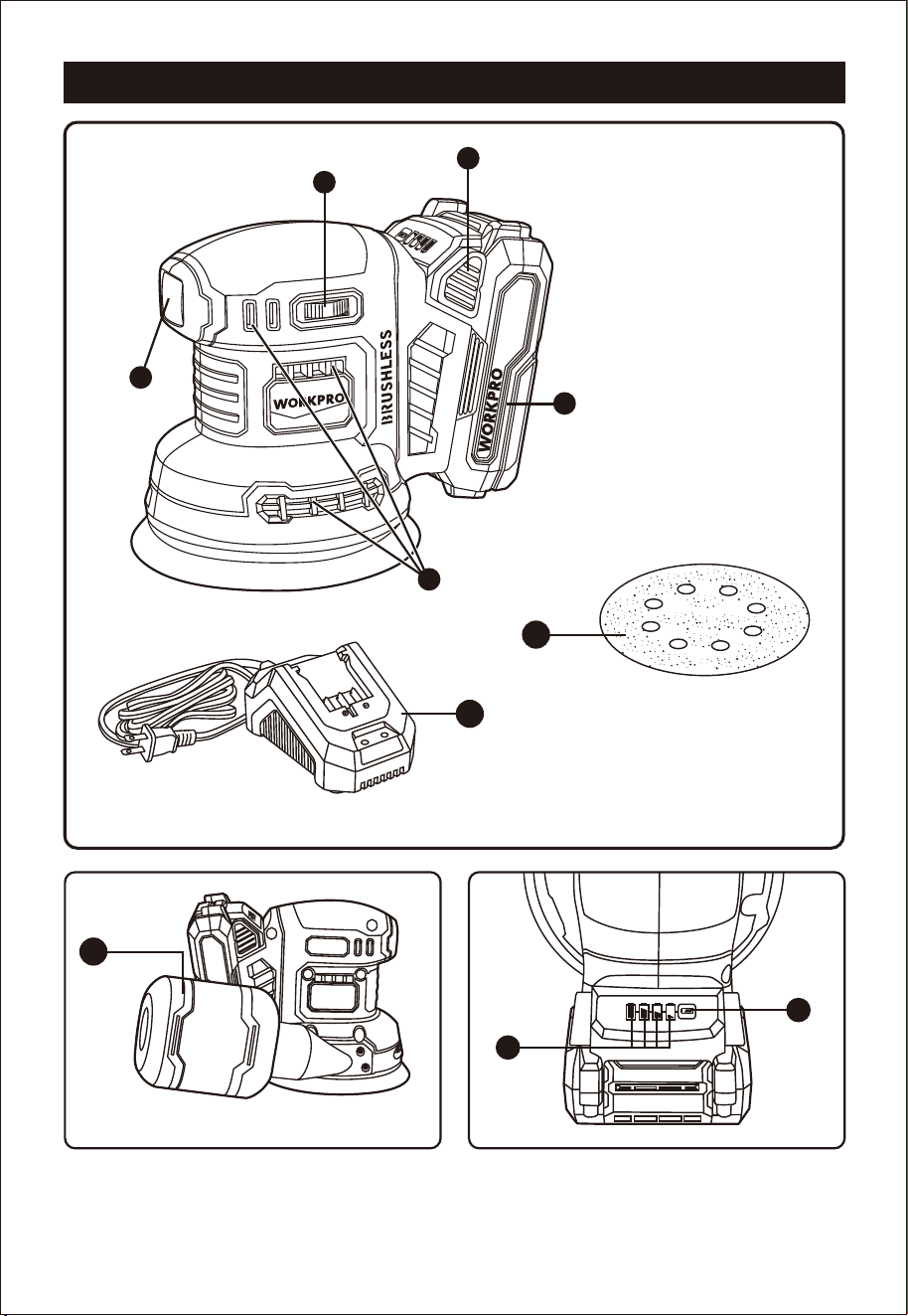
KNOW YOUR PRODUCT
Fig. 1
On/Off Switch
Speed Control Switch
Ventilation Slots
Battery Pack
Battery Pack Release Button
Sanding Disc For Sanding x
15(60 grits, 80 grits, 120 grits,
180 grits, 240 grits each 3
pieces)
Battery Pack Charger
Dust Canister
Battery Capacity Indicator
Battery Indicator Switch
A
B
C
D
E
F
G
H
I
J
F
G
D
B
E
A
J
I
Fig. 3Fig. 2
20V
2.0Ah
LI-ION
20V
2.0Ah
LI-ION
H
C
8
20V
2.0Ah
LI-ION
E
1
2
D
OPERATION
WARNING:
TURNING THE SANDER ON/OFF
See Figure 6.
Do not allow familiarity with products to make you
careless. Remember that a careless fraction of a
second is sufficient to inflict serious injury.
WARNING:
Always wear eye protection with side shields
marked to comply with ANSI Z87.1. Failure to do
so could result in objects being thrown into your
eyes resulting in possible serious injury.
WARNING:
Do not use any attachments or accessories not
recommended by the manufacturer of this product.
The use of attachments or accessories not
recommended can result in serious personal injury.
WARNING:
Always keeping the device off, when remove or
insert the battery pack.
Follow these directions to switch the sander on and off.
Press the rocker switch to "I" to switch the sander on.
Press the rocker switch to "O" to switch the sander off.
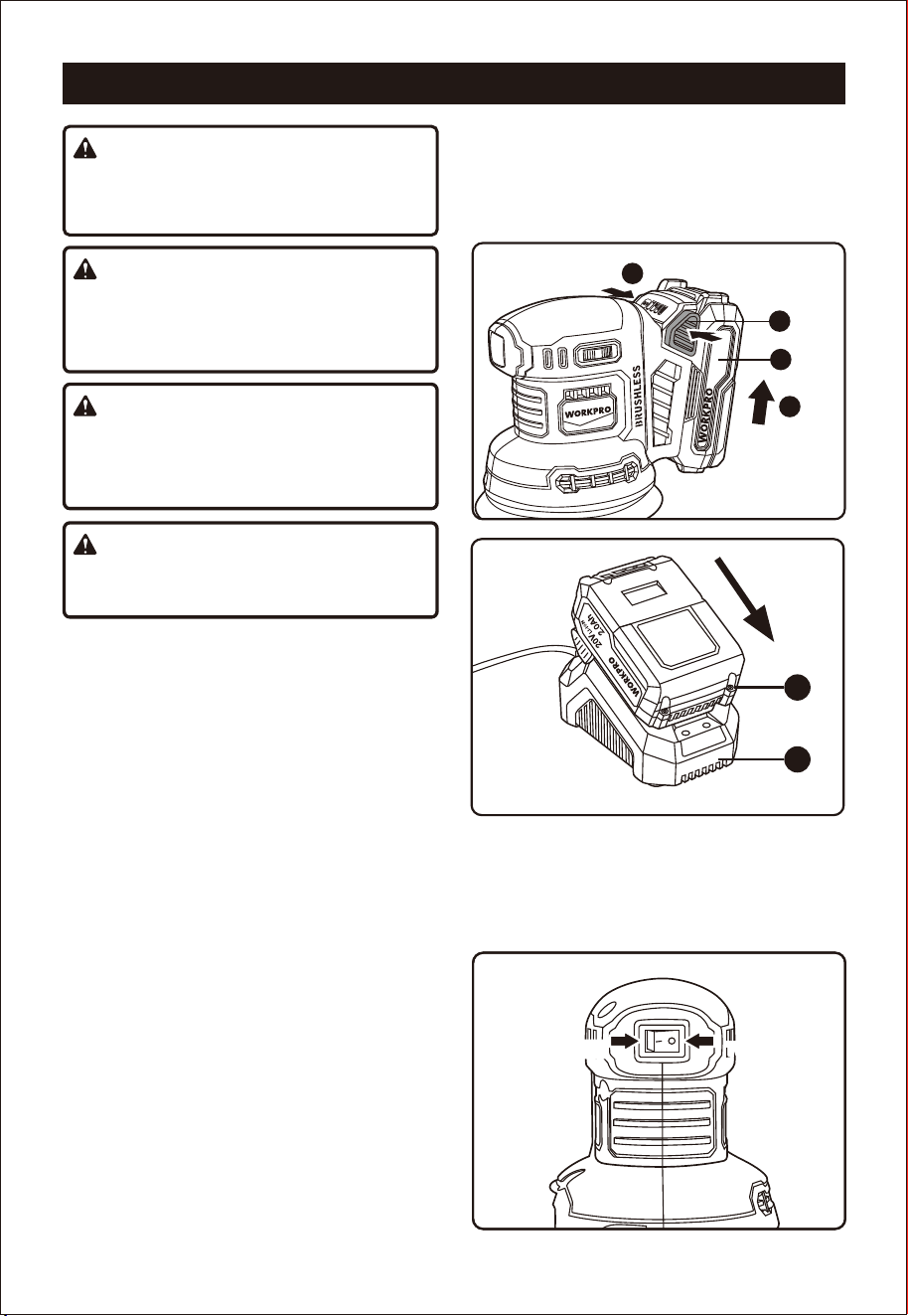
Charging the battery pack (Fig. 4-5)
Remove the battery pack (D) from the sander,
pressing the battery pack release button (E)
downwards to do so.
Check that your mains voltage is the same as that
marked on the rating plate of the battery charger.
Insert the power plug of the charger(G) into the
mains socket outlet. The green LED will then begin
to flash.
Push the battery pack onto the battery charger.
In section CHARGER INDICATOR, you will find a
table with an explanation of the LED indicator on the
charger.
If the battery pack fails to charge, check for the
following:
G
D
Battery capacity indicator (Fig. 3)
Press the battery capacity indicator switch (J).The
battery capacity indicator (I) shows the charge status
of the battery using 4 LEDs.
All 4 LEDs are lit:
The battery is fully charged.
3 or 2 or 1 LED(s) are lit:
The battery has an adequate remaining charge.
1 LED blinks:
The battery is empty, recharge the battery.
All LEDs blink:
The battery pack is too hot (e.g. due to direct
sunshine or prolonged use) or too cold (below
32°F/0°C), do not use or charge the battery pack.
Make sure the battery temperature to between
40°F(4°C) and 104°F(40°C).
Voltage at the power socket.
Whether there is good contact at the charging
contacts of the charging unit.
If the battery pack still fails to charge, contact with
our online customer service center.
Fig. 4
Fig. 5
Fig. 6
TO
TURN OFF
TO
SWITCH OFF
TO
SWITCH ON
9
20V
2.0Ah
LI-ION
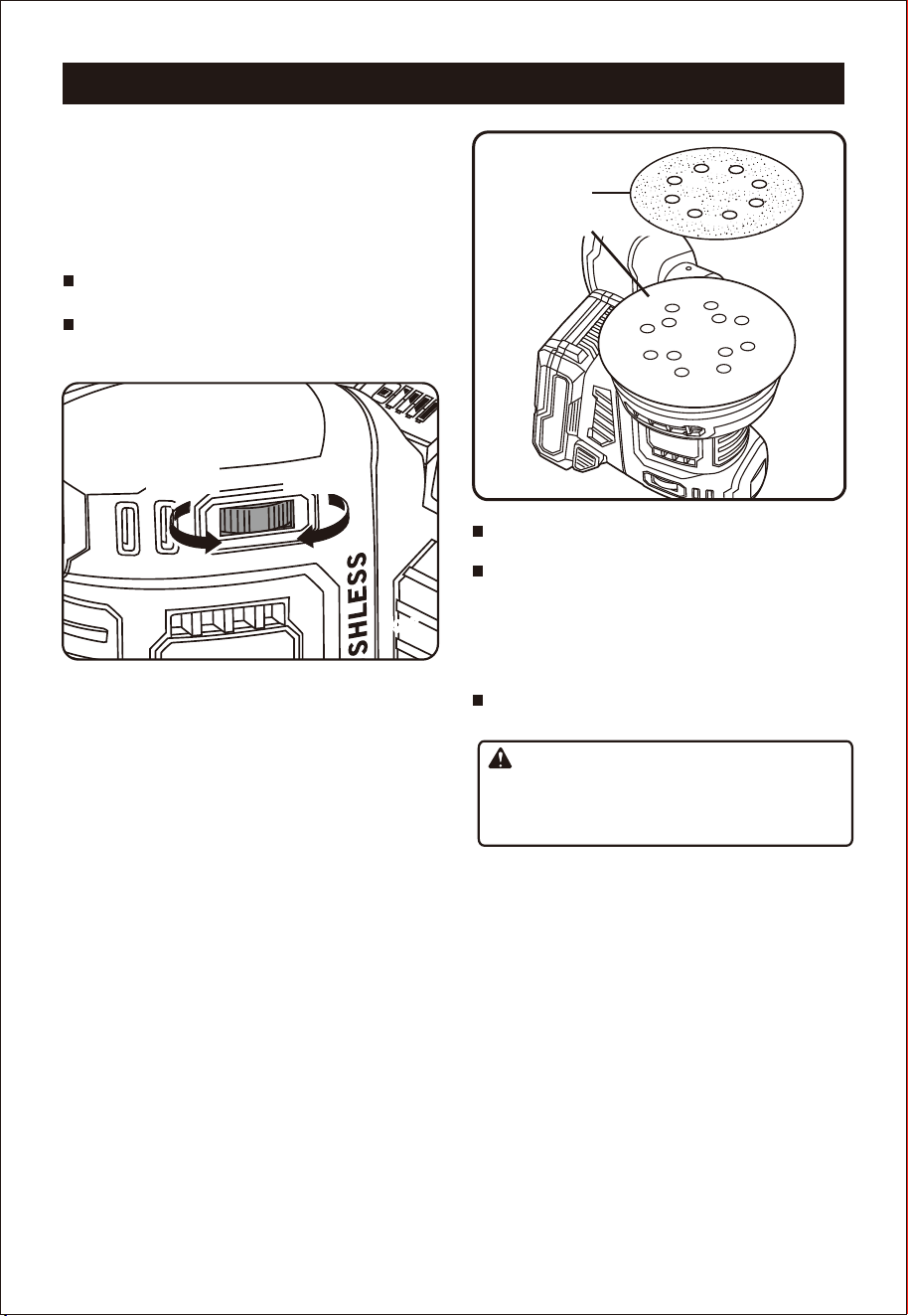
NOTE: Use only 125mm hook-and-loop sanding
discs which can be found at local home centers and
hardware stores.
Switch off the sander and remove the battery pack.
Align the holes in the hook-and-loop sanding disc
with the holes in the backing pad.
NOTE: Line up the holes in the sanding disc with the
holes in the backing pad in order for the dustless
feature to function properly.
Press the fuzzy side of the sanding disc against the
back-ing pad as firmly as possible.
NOTE: You can reuse hook-and-loop type sanding
discs for the life of the sanding abrasive. We
recommend that you clean the backing pad
occasionally by brushing it lightly with a small brush
for best adhesion.
ADJUSTING THE SPEED
See Figure 7.
The variable speed feature allows the sander to operate
at speeds that can be adjusted by rotating the dial from
1 to 6. The dial is conveniently located on the motor
housing, allowing operator control of disc speed.
Follow these directions to adjust the speed.
To increase the speed
: Turn the dial to a higher
setting (towards 6).
To decrease the speed
: Turn the dial to a lower
setting (towards 1).
SELECTING SANDING DISCS
Selecting the correct size grit and type of sanding disc is
an extremely important step in achieving a high quality
sanded finish. Aluminum oxide, silicon carbide, and
other synthetic abrasives are best for power sanding.
Natural abrasives, such as flint and garnet are too soft
for power sanding.
In general, when sanding, coarse grit removes the most
material and fine grit produces the best finish. The
condition of the surface to be sanded determines which
grit will do the best job. If the surface is rough, start with
a coarse grit and sand until
the surface is uniform. Then
use medium grit to remove scratches left by the coarser
grit. Finally, use finer grit for finishing the surface. Always
continue sanding with each grit until the surface is
uniform.
OPERATION
Fig. 8
ATTACHING SANDING DISCS
See Figure 8.
Failure to switch off the tool and remove battery
pack could result in accidental starting causing
possible serious injury.
SANDING DISC
BACKING PAD
USING THE DUST CANISTER
The dust canister provides a dust collection system for
the sander. Sanding dust is drawn up through the holes
of the sanding disc and collected in the dust canister
during sanding.
CHANGING THE SANDING DISCS
The sander is packed with sanding sheets and pads
designed for a variety of uses. To change, simply pull
the used sheet or pad off the base and attach the
desired sheet or pad by pressing it onto the base of the
sander.
WARNING:
TO
DECREASE
TO
INCREASE
F
ig. 7Fig. 7
10
20V
2.0Ah
LI-ION
20V
2.0Ah
LI-ION
Failure to switch off the tool and remove battery
pack could result in accidental starting causing
possible serious injury.
OPERATION
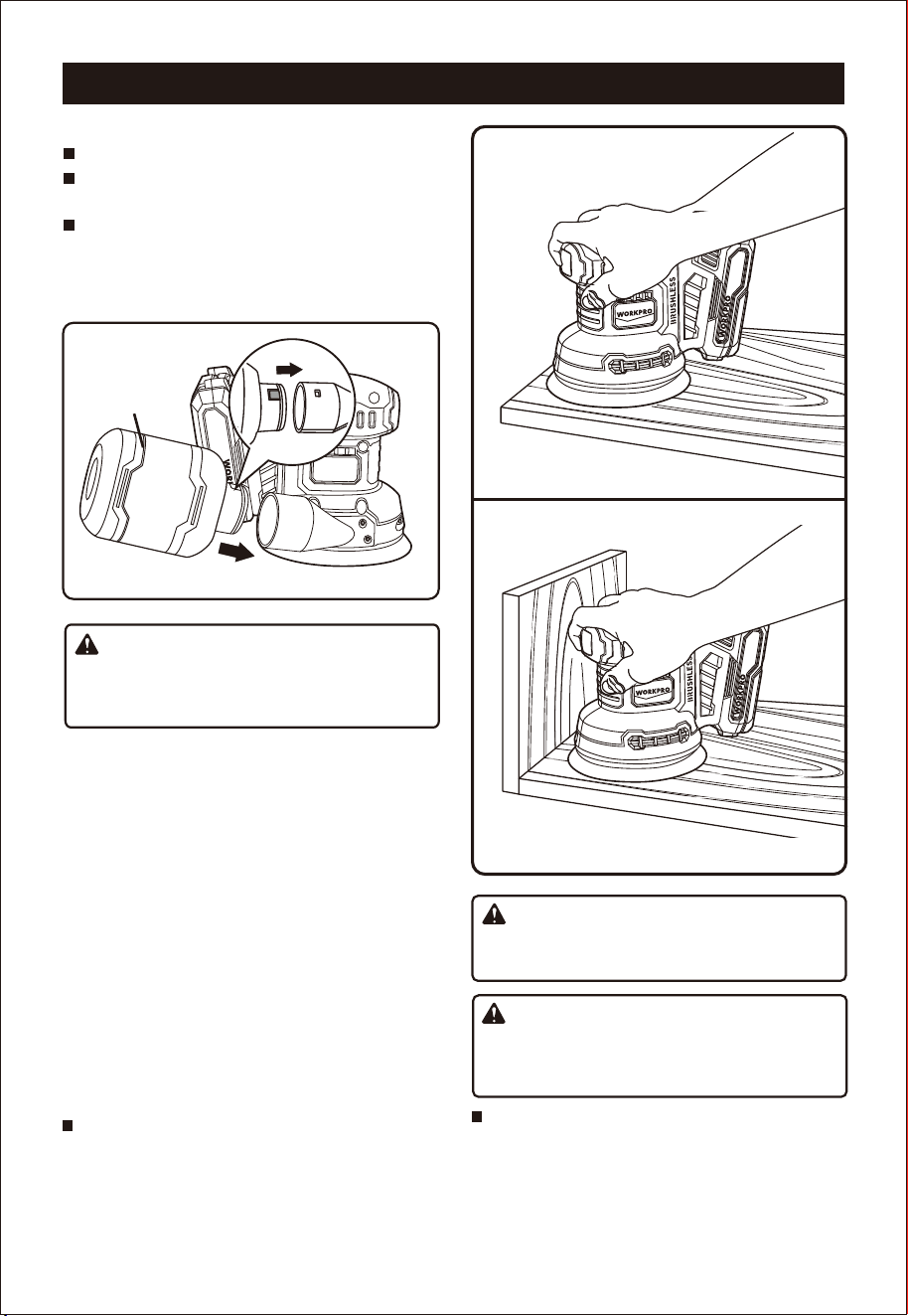
OPERATING THE SANDER
See Figures 10 and 11.
Follow these steps to operate the sander.
Secure the work to prevent it from moving under the
sander.
Unsecured workpieces could be thrown towards the
operator causing injury.
Keep your head away from the sander and the sand-
ing area. Your hair could be drawn into the sander
causing serious injury.
Place the sander on the workpiece so that all of the
sanding disc surface is in contact with the workpiece.
Fig. 10
Fig. 11
REMOVING AND INSTALLING DUST CANISTER
CLEANING AND EMPTYING THE DUST CANISTER
Switch off the sander and remove the battery pack.
To remove dust canister, Pull the dust canister
away from the dust port .
To install dust canister, align dust port with hole in
dust canister ( Note that the protrusion on the dust
canister should be aligned with the groove of the
dust port), push the canister into the dust port until
it it locks into place.(Fig. 9)
For more efficient operation, empty the dust canister
when it is no more than half full. This will permit the air
to flow through the canister better. Always empty and
clean the dust canister thoroughly upon completion of a
sanding operation and before placing the sander in
storage.
To empty canister,remove dust canister and pour out
the dust inside.
NOTE: Do not wash the micro filter with soap and
water. Dust may become more firmly lodged in the
pores, which will reduce dust collection, and damage
the micro filter.
Fig. 9
WARNING:
WARNING:
WARNING:
DUST PORT
20V
2.0Ah
LI-ION
DUST
CANISTER
11
OPERATION
STORAGE
CAUTION:
Be careful not to let your hand cover the air vents.
Make successive passes in parallel lines, circles, or
crosswise movements.
Switch the sander off and wait until the sanding
disc comes to a complete stop before removing
it from the workpiece.
HELPFUL TIPS
Do not force the sander. The weight of the unit
supplies adequate pressure; therefore, let the sand-
ing disc and sander do the work. Applying additional
pressure only slows the motor, rapidly wears the
sanding disc, and greatly reduces the sander speed.
Excessive pressure will overload the motor causing
possible damage from motor overheating and can
result in inferior work. Any finish or resin on the
wood may soften from the frictional heat.
Do not sand on one spot too long. The sander’s
rapid action may remove too much material, making
the surface uneven. Extended periods of sanding
may tend to overheat the motor. If this occurs, turn
off the sander and wait until the sanding disc comes
to a complete stop. Then remove the sander from
the workpiece. Remove your hand from the vent
area, remove the sanding disc, then (with your hand
removed from the vent area) turn on the sander and
run it free, without a load, to cool the motor.
Start the sander and let the motor build to its
maximum speed, move it slowly over the workpiece.
NOTE: Do not sand on one spot too long as the
sander’s rapid action may remove too much material,
making the surface uneven.
NOTE: Extended periods of sanding may overheat the
motor. If this occurs, switch the sander off and wait
until the sanding sheet comes to a complete stop.
Remove sander from workpiece.
Store the equipment and accessories in a dark and
dry place at above freezing temperature. The ideal
storage temperature is between 5°C(41°F) and
30°C(86°F). Store the electric tool in its original
packaging.
For storage, it is suggested to recharge the battery
between 50% and 75% charge, and charge the
device at least once in 3-6 months to preserve
battery lifespan.
CHARGER INDICATOR
Indicator Status
Red LED Green LED
Explanations and Actions
Ready for use
The charger is connected to the mains and is ready for use; there is no battery pack in the charger.
Low-current charging
As the battery pack voltage is under 15V, the charger is in gentle charging mode, the charging
current is below 0.5A.This can maximum the life of the battery.
High-current charging
As the battery pack voltage is above 15V,the charger is in quick charge mode, the charging current
is at 2.3-2.4A.
Important! The actual charging times may vary slightly from the stated charging times depending
on the existing battery charge.
ON OFF
OFF
Quick
Blink
(2Hz)
OFF
Slow
Blink
(1Hz)
The battery is charged and ready for use.
The battery is fully charged and ready to use.
Action: Take the battery pack out of the charger. Disconnect the charger from the mains supply.
OFF ON
Fault
Charging is no longer possible. The battery pack maybe defective.
Action: Never charge a defective battery pack. Take the battery pack out of the charger.
Quick
Blink
(2Hz)
OFF
Temperature fault
The battery pack is too hot (e.g. due to direct sunshine/prolonged use) or too cold (below 32°F / 0°C).
Action: Remove the battery pack and keep it at room temperature (approx. 68°F / 20°C) for 3 Hours.
Slow
Blink
(1Hz)
OFF
12
GENERAL
Avoid using solvents when cleaning plastic parts. Most
plastics are susceptible to damage from various types of
commercial solvents and may be damaged by their use.
Use clean cloths to remove dirt, carbon dust, etc.
Do not at any time let brake fluids, gasoline, petro-
leum-based products, penetrating oils, etc. come in
contact with plastic parts. They contain chemicals
that can damage, weaken, or destroy plastic.
MAINTENANCE
When electric tools are used on fiberglass boats, sports
cars, wallboard, spackling compounds, or plaster, it has
been found that they are subject to accelerated wear and
possible premature failure, as the fiberglass chips and
grindings are highly abrasive to bearings, brushes,
commutators, etc. Consequently, it is not recommended
that this tool be used for extended work on any fiberglass
material, wallboard, spackling compounds, or plaster. If,
however, you do work with any of these materials, it is
extremely important that the tool is cleaned frequently by
blo
wing with an air jet.
Always wear safety goggles or safety glasses with
side shields during power tool operation or when
blowing dust. If operation is dusty, also wear a dust
mask.
Always remove the scrubbing pad or sanding sheet
from sander before cleaning. Failure to do so could
cause serious personal injury.
WARNING:
WARNING:
WARNING:
LUBRICATION
All of the bearings in this product are lubricated with
a sufficient amount of high grade lubricant for the life
of the unit under normal operating conditions.
Therefore, no further lubrication is required.
BATTERY PACK REPLACEMENT
If replacement of the battery pack is necessary,
please contact us in order to get well-matched
battery pack.
CLEANING SCRUBBING PADS
To ensure longer life and optimum performance,
periodically clean all residue and foreign materials
from scrubbing pads. This can be done simply by
rinsing the pad with warm water until all foreign
material has been washed away. After cleaning,
gently squeeze the pad to remove excess water and
allow pad to dry. Always store pads and sanding
sheets flat in a cool, dry location.
CLEANING SANDING SHEETS
The sanding sheets that came with the sander are
made to be re-used. Therefore, it is important that
they be cleaned periodically to remove sanding
residue and foreign material that can accumulate
over time.
To clean sanding sheets, rub the sheets with a hard
rubber block.
13

Disposal of the appliance
A crossed-out wheelie bin icon means: Batteries and rechargeable batteries, electrical or electronic
devices must not be disposed of with household waste. They may contain substances that are harmful to
the environment and human health.
Consumers must dispose of waste electrical devices, spent portable batteries and rechargeable batteries
separately from household waste at an official collection point to ensure that these items are processed
correctly. Information on returning these items is available from the seller. Sellers are required to accept
these items free of charge. Batteries and rechargeable batteries, which are not permanently installed in
waste electrical devices, must be removed prior to disposal and must be disposed of separately. Lithium
batteries and battery packs in all systems must only be retuned to a collection point when discharged.
Batteries must always be protected against short circuits by covering the poles with adhesive tape.
All end users are responsible for deleting any personal data stored on waste devices prior to their
disposal.
Disposal of the packaging
The packaging consists of cardboard and correspondingly marked plastics that can be recycled. Make
these materials available for recycling.
DISPOSAL AND RECYCLING
The equipment is supplied in packaging to prevent it from being damaged in transit. The raw materials in this
packaging can be reused or recycled. The equipment and its accessories are made of various types of material,
such as metal and plastic. Never place defective equipment in your household refuse. The equipment should be
taken to a suitable collection center for proper disposal. If you do not know the wherea bout of such a collection
point, you should ask in your local council offices.
Disposal of an exhausted battery pack
To preserve natural resources, please recycle or dispose of the battery pack properly. This battery pack
contains Li-ion batteries. Consult your local waste authority for information regarding available recycling
and/or disposal options. Discharge your battery pack by operating your tool, then remove the battery
pack from the tool housing and cover the battery pack connections with heavy-duty adhesive tape to
prevent short circuit and energy discharge. Do not attempt to open or remove any of the components.