Infrared Laser Thermometer
Instruction manual
Introduction
Compact,rugged and easy to use. Just aim and push the
button, read current surface temperatures in less than a
second. It measures surface temperatures of hot,
hazardous or hard-to-reach objects without contact.
How it works
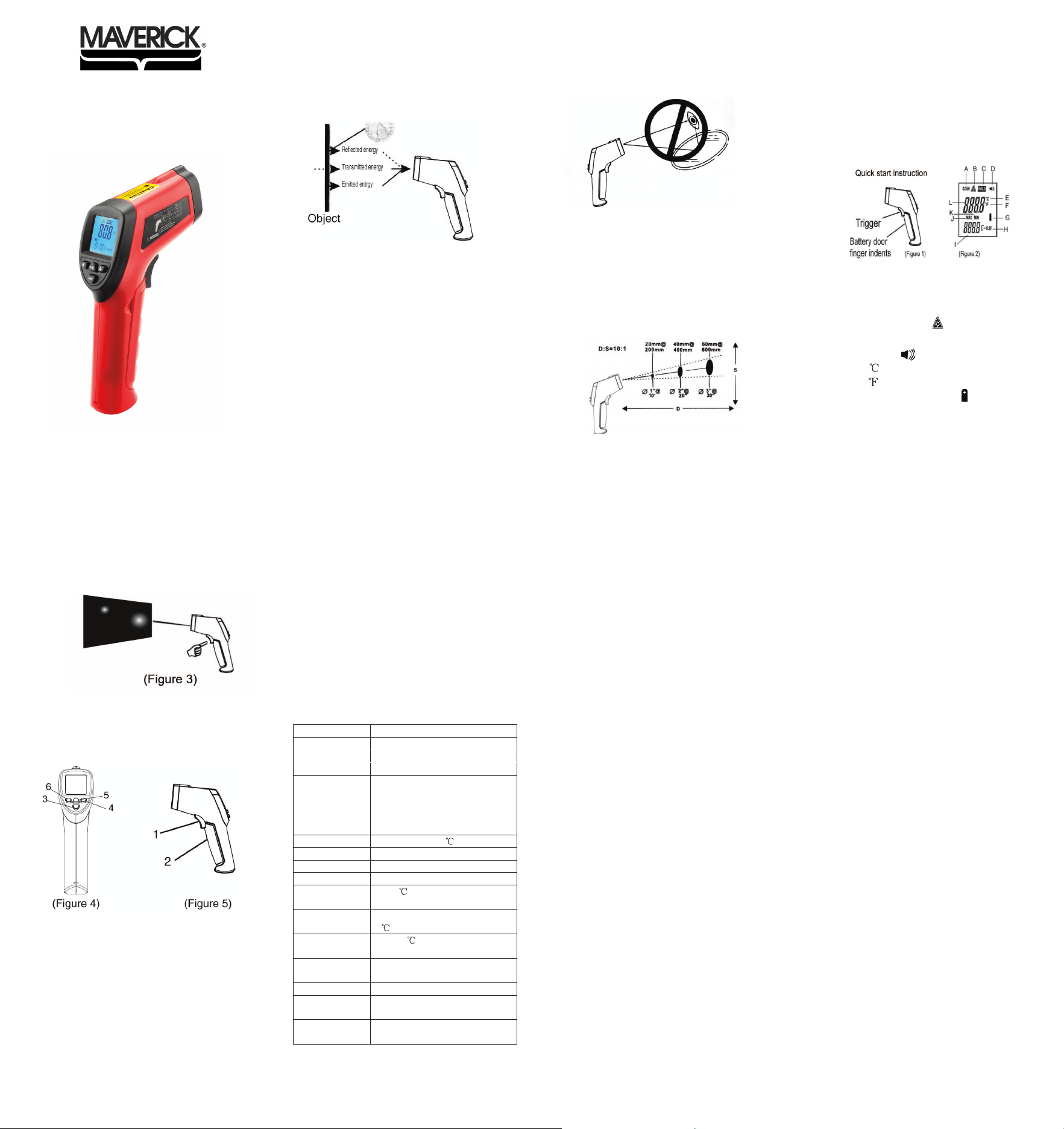
Infrared thermometer measures the surface temperature
of an object. The unit’s optics sense emitted,
reflected,and transmitted energy which is collect and
focused onto a detector. The unit’s electronics translate
the information into a temperature reading which is
displayed on the unit. For increased ease and accuracy
the laser pointer makes aiming even more precise.
Cautions
Infrared thermometer shoul
d be protected for the
following:
--EMF (electro-magnetic fields) from arc
welders,induction heaters.
--Thermal shock(cause by large or abrupt ambient
temperature changes allow 30 minutes for unit to
stabilize before use).
--Do not leave the unit on or near objects of high
temperature.
Warning
Do not point laser directly at eye or indirectly off
reflective surfaces.
1. When taking measurement, point thermometer
towards the object to be measured and hold on
to the trigger. The object under test should be
larger than the spot size calculated by the field of
view diagram.
2. Distance & spot size:As the distance from the
object increase, the spot size of measuring area
becomes larger.
3. Field of view: M
ake sure the target is larger than
the unit’s spot size. The smaller the target the
closer measure distance.When accuracy is
critical, make sure the target is at least twice as
large as the spot size.
4. Emissivity:Most organic materials and painted or
Model: LT-04
oxidized surfaces have an emissivity of 0.95
(pre-set in the unit ). Inaccurate readings will
result from measuring shiny or polished metal
surfaces. To compensate,cover the surface to be
measured with masking tape or flat black
paint.Measure the tape or painted surface when
the tape or painted reach the same temperature as
the material underneath
1. Press battery door clip,install battery
correctly.Pull the trigger LCD display reading &
battery
icon, Release the trigger.
LCD display
A Scanning icon
B Laser on icon
C Hold
D Alarm
E
unit
F
unit
G Battery power icon
H Emissivity
I Max/min display
J Max
K Min
L Actual measurement
reading
2. Locating a hot spot:To find a hot spot aim the
thermometer outside the area of interest, then
scan across with up and down motions until you
locate the hot spot.(please turn on the laser for
accurate measuring)
3. Diagram description
(1)
Trigger: When pulling the trigger
LCD display reading with SCAN icon
Release the trigger,display reading with HOLD
icon
(2)Battery door:when replace battery door please using
the finger indents to pull open the battery door
(3)max/min switch
(4)Laser on/off button
(5)Celsius/Fahrenheit switch button
(6)Backlight Switch
Maintenance
1) Lens cleaning:Blow off lose particles using clean
compressed air Gently brush the remaining
debri
s
away with a moist cotton cloth.
2) Case cleaning:Clean the case with a damp
sponge/cloth and mild soap
Note:
1) Do not use solvent to clean lens.
2) Do not submerge the unit in water.
Specifications
Temperature range
Accuracy
Repeatability 1% of reading or 1
Response time 500 mSec,95% response
Spectral response 5-14 um
Emissivity Pre-set 0.95
Ambient operating
range
0 to 50 (32 to 120
o
F)
Relat ve humidity 10-95% RH noncondensing,@ upto
30
(86
o
F)
Storage
temperature
-20 to 60 (-4 to 140
o
F) without
battery
Weight/Dimension
s
138g; 152*130*38mm
power 9v Alkaline or NiCd battery
Battery life
(Alkaline)
Laser Models:16 hrs
Distance to Spot
Size
10:1
-44º to 1022ºF (-42º to 550ºC)
-44º to 32ºF (-42º to 0ºC), +/-5ºF(+/-3℃);
32º to 212ºF (0º to 100ºC), +/-3.5ºF(+/-2℃);
Higher than 212ºF(100℃), +/-2%.
WARRANTY
Maverick Industries Inc. warrants this product to be free
of defects in parts, materials and workmanship for a period
of 90 days, from date of purchase. Should any repairs or
servicing under this warranty be required, contact
Maverick Customer Service by mail or phone
for instructions on how to pack and ship the product
to Maverick's National Service Center located as follows:
Maverick Customer Service
94 Mayfield Ave.
Edison NJ 08837
Telephone: (732) 417-9666
Hours: Weekdays 8:30 AM- 4:30 PM
Do not send any parts or product to Maverick
without calling and obtaining
a Return Authorization Number and instructions.
This warranty is VOID if instructions for use are not followed;
for accidental damage; for commercial use; for damage incurred
while in transit; or if the product has been tampered with.
This warranty gives you specific legal rights and you
may also have other rights which vary from state to state.
www.maverickhousewares.com