MICROWAVE OVEN
TR923X7ZE-SS0D00
USER MANUAL
Warning notices: Before using this product, please read this manual carefully and keep it for future reference.
The design and specifications are subject to change without prior notice for product improvement. Consult
with your dealer or manufacturer for details.
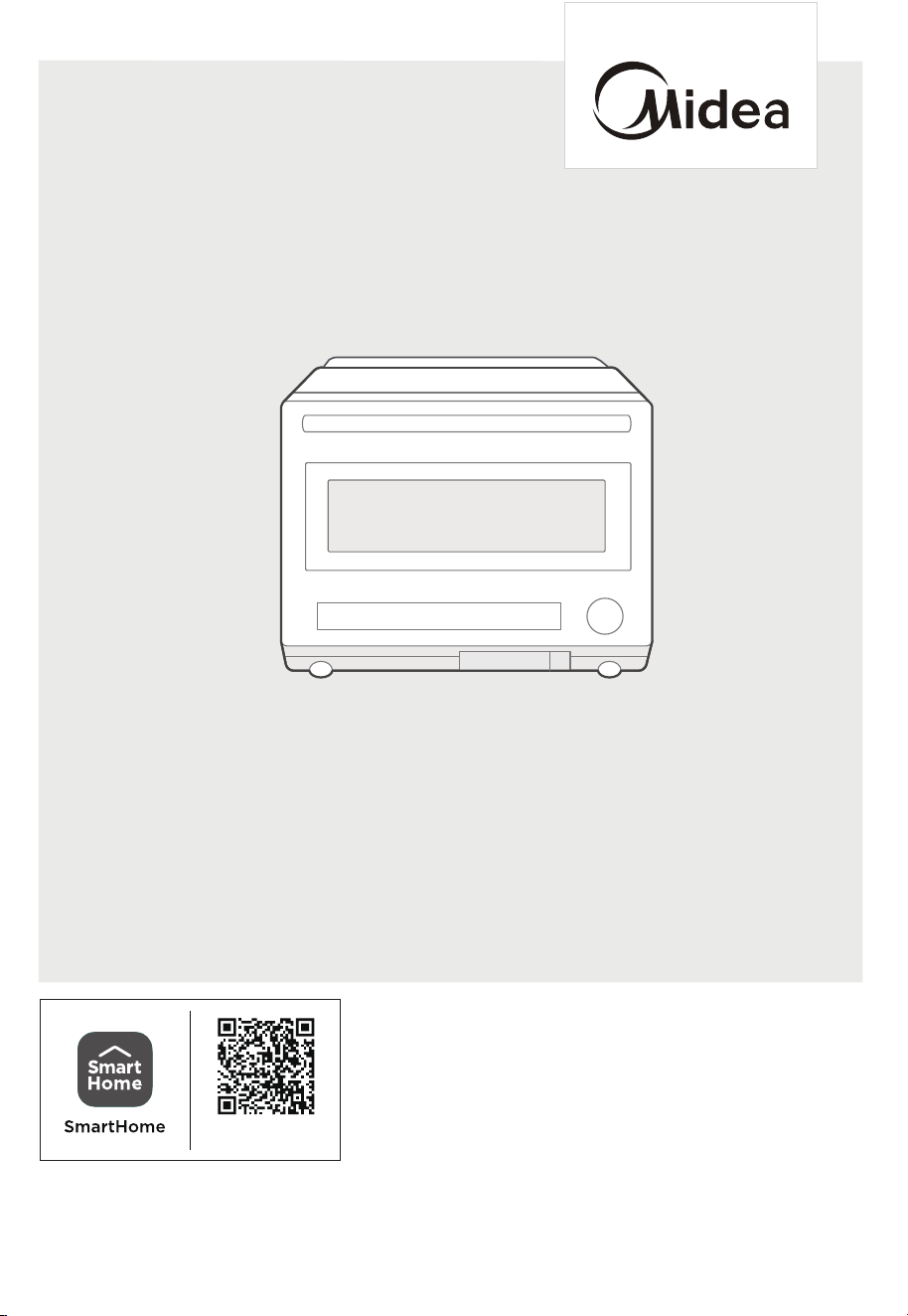
The diagram above is just for reference. Please take the appearance of the actual product as the standard.
Download the app
& activate product

THANK YOU LETTER
Thank you for choosing Midea! Before using your new Midea product, please read
this manual thoroughly to ensure that you know how to operate the features and
CONTENTS
functions that your new appliance oers in a safe way.
THANK YOU LETTER
-------------------------------------------------- 02
SAFETY INSTRUCTIONS
---------------------------------------------- 03
SPECIFICATION
--------------------------------------------------------- 13
PRODUCT OVERVIEW
------------------------------------------------- 14
PRODUCT INSTALLATION
------------------------------------------- 16
OPERATION
TROUBLE SHOOTING
------------------------------------------------
30
---------------------------------------------------------------
17
18
------------------------------------------------------------
-------------------------------------------------------- 18
Control Panel
1. Standby Mode
2. Setting the Clock
CLEANING AND CARE
------------------------------------------------- 15
18
------------------------------------------------------
----------------------------------------------------- 19
-------------------------------------------------19
3. Microwave Cooking
4. Air Fry with Preheat
5. Air Fry without Preheat
20
---------------------------------------------
----------------------------------------- 20
----------------------------------------------------------20
6. Combination with Preheat
7. Combination without Preheat
8. Steam Function
21
-----------------------------------------------------
-------------------------------------------------- 21
9. Bake with Preheat
10. Bake without Preheat
-------------------------------------------------------------- 22
---------------------------------------------------------- 24
11. Auto Menu
12. More Functions
28
-------------------------------------------------------------
13. Safety Lock
29
---------------------------------------------------
14. Wireless Connection
02
03
Danger
This symbol indicates that there are dangers to the life and health of
persons due to extremely flammable gas.
Warning of electrical voltage
This symbol indicates that there is a danger to life and health of
persons due to voltage.
Warning
The signal word indicates a hazard with a medium level of risk which, if
not avoided, may result in death or serious injury.
Caution
The signal word indicates a hazard with a low degree of risk which, if
not avoided, may result in minor or moderate injury.
Attention
The signal word indicates important information (e.g. damage to
property), but not danger.
Observe instructions
This symbol indicates that a service technician should only operate and
maintain this appliance in accordance with the operating instructions.
Intended Use
SAFETY INSTRUCTIONS
Read these operating instructions carefully and attentively before using/commissioning the
unit and keep them in the immediate vicinity of the installation site or unit for later use!
The following safety guidelines are intended to prevent unforeseen risks or damage from
unsafe or incorrect operation of the appliance. Please check the packaging and appliance
on arrival to make sure everything is intact to ensure safe operation. If you find any
damage, please contact the retailer or dealer. Please note modifications or alterations to
the appliance are not allowed for your safety concern. Unintended use may cause
hazards and loss of warranty claims.
Explanation of Symbols

ADDENDUM
04
a. Do not attempt to operate this oven with the door
open since open door operation can result in harmful
exposure to microwave energy.
It is important not to defeat or tamper with the safety
interlocks.
b. Do not place any object between the oven front face
and the door or allow soil or cleaner residue to
accumulate on sealing surfaces.
c. Do not operate the oven if it is damaged. It is
particularly important that the oven door close
properly and that there is no damage to the:
(1) DOOR (bent)
(2) HINGES AND LATCHES (broken or loosened)
(3) DOOR SEALS AND SEALING SURFACES
d. The oven should not be adjusted or repaired by
anyone except properly qualified service personnel.
If the apparatus is not maintained in a good state of
cleanliness, its surface could be degraded and aect
the lifespan of the apparatus and lead to a dangerous
situation.
PRECAUTIONS TO AVOID
POSSIBLE EXPOSURE TO
EXCESSIVE
MICROWAVE
ENERGY

05
IMPORTANT SAFETY
INSTRUCTIONS
To reduce the risk of fire, electric shock, injury to
persons or exposure to excessive microwave oven
energy when using your appliance, follow basic
precautions, including the following:
WARNING
•
•
•
•
•
•
•
•
Read all instructions before using the appliance.
Read and follow the specific: "PRECAUTIONS TO
AVOID POSSIBLE EXPOSURE TO EXCESSIVE
MICROWAVE ENERGY" found on page 04.
This appliance must be grounded. Connect only to
properly grounded outlet. See "GROUNDING
INSTRUCTIONS" found on page 08.
Install or locate this appliance only in accordance
with the provided installation instructions.
Some products such as whole eggs and sealed con-
tainers - for example, closed glass jars - are able to
explode and should not be heated in this oven.
Use this appliance only for its intended use as
described in the manual. Do not use corrosive chemi-
cals or vapors in this appliance. This type of oven is
specifically designed to heat, cook or dry food. It is
not designed for industrial or laboratory use.
HOT CONTENTS CAN CAUSE SEVERE BURNS. DO
NOT ALLOW CHILDREN TO USE THE MICROWAVE.
Use caution when removing hot items.
Do not operate this appliance if it has a damaged
cord or plug, if it is not working properly, or if it has
been damaged or dropped.

06
• This appliance should be serviced only by qualified
service personnel. Contact nearest authorized service
facility for examination, repair, or adjustment.
Do not cover or block any openings on the appliance.
Do not store this appliance outdoors. Do not use this
product near water - for example, near a kitchen sink,
in a wet basement, near a swimming pool, or similar
location.
Do not immerse cord or plug in water.
Keep cord away from heated surface.
Do not let cord hang over edge of table or counter.
When cleaning surfaces of door and oven that comes
together on closing the door, use only mild, nonabra-
sive soaps, or detergent applied with a sponge or soft
cloth.
To reduce the risk of fire in the oven cavity:
1). Do not overcook food. Carefully attend appliance
when paper, plastic, or other combustible materials
are placed inside the oven to facilitate cooking.
2). Remove wire twist-ties from paper or plastic bag
before placing bag in oven.
3). If material inside of the oven ignites, keep oven
door closed, turn oven o, and disconnect the power
cord, or shut o power at the fuse or circuit breaker
panel.
4). Do not use the cavity for storage purposes. Do not
leave paper products, cooking utensils, or food in the
cavity when not in use.
Liquids, such as water, coee, or tea are able to be
overheated beyond the boiling point without appear-
ing to be boiling. Visible bubbling or boiling when the
container is removed from the microwave oven is not
always present.
•
•
•
•
•
•
•
•

HOUSEHOLD USE ONLY
(NOT FOR COMMERCIAL USE)
•
•
•
THIS COULD RESULT IN VERY HOT LIQUID SUDDEN-
LY BOILING OVER WHEN THE CONTAINER IS DIS-
TURBED OR A UTENSIL IS INSERTED INTO THE
LIQUID.
To reduce the risk of injury to persons:
1) Do not overheat the liquid.
2) Stir the liquid both before and halfway through
heating it.
3) Do not use straight-sided containers with narrow
necks.
4) After heating, allow the container to stand in the
microwave oven for a short time before removing the
container.
5) Use extreme care when inserting a spoon or other
utensil into the container.
Oversized food or oversized metal utensils should not
be inserted in a microwave/toaster oven as they may
create a fire or risk of electric shock.
Do not clean with metal scouring pads. Pieces can burn
o the pad and touch electrical parts involving a risk of
electric shock.
Do not use paper products when appliance is operated
in the toaster mode.
Do not store any materials, other than manufacturer's
recommended accessories, in this oven when not in
use.
Do not cover racks or any other part of the oven with
metal foil. This will cause over-heating of the oven.
•
•
07
SAVE THESE INSTRUCTIONS

08
GROUNDING INSTALLATION
DANGER
Electric Shock Hazard:
Touching some of the internal components can cause
serious personal injury or death. Do not disassemble this
appliance.
This appliance must be grounded. In the event of an
electrical short circuit, grounding reduces the risk of
electric shock by providing an escape wire for the electric
current. This appliance is equipped with a cord having a
grounding wire with a grounding plug. The plug must be
plugged into an outlet that is properly installed and
grounded.
WARNING
Improper use of the grounding can result in a risk of
electric shock.
Consult a qualified electrician or serviceman if the
grounding instructions are not completely understood,
or if doubt exists as to whether the appliance is properly
grounded. If it is necessary to use an extension cord, use
only a 3-wire extension cord that has a 3-blade ground-
ed plug, and 3-slot receptacle that will accept the
plug on the appliance. The marked rating of the exten-
sion cord shall be equal to or greater than the electrical
rating of the appliance.

WARNING
Electric Shock Hazard:
Improper use of the grounding can result in electric shock.
Do not plug into an outlet until appliance is properly
installed and grounded.
A short power-supply cord is provided to reduce the
risks resulting from becoming entangled in or tripping
over a longer cord.
Longer cord sets or extension cords are available and
may be used if care is exercised in their use.
If a long cord or extension cord is used:
1) The marked electrical rating of the cord set or
extension cord should be at least as great as the
electrical rating of the appliance.
2) The extension cord must be a grounding-type 3-
wire cord.
3) The longer cord should be arranged so that it will
not drape over the counter top or tabletop where it
can be pulled on by children or tripped over
unintentionally.
RADIO INTERFERENCE
09
Operation of the microwave oven may cause interference
to your radio, TV or similar equipment.
When there is interference, it may be reduced or
eliminated by taking the following measures:
1) Clean door and sealing surface of the oven.
2) Reorient the receiving antenna of radio or television.
3) Relocate the microwave oven with respect to the
receiver.
4) Move the microwave oven away from the receiver.
•
•
•
•
•

5) Plug the microwave oven into a dierent outlet so
that microwave oven and receiver are on dierent
branch circuits.
Any changes or modifications not expressly approved
by the party responsible for compliance could void the
user's authority to operate the equipment.
This device complies with part 15 of the FCC Rules.
Operation is subject to the following two conditions:
(1) This device may not cause harmful interference,
and (2) this device must accept any interference
received, including interference that may cause unde-
sired operation.
Note: This equipment has been tested and found to
comply with the limits for a Class B digital device, pur-
suant to part 15 of the FCC Rules. These limits are
designed to provide reasonable protection against
harmful interference in a residential installation.
This equipment generates, uses and can radiate radio
frequency energy and, if not installed and used in
accordance with the instructions, may cause harmful
interference to radio communications. However, there
is no guarantee that interference will not occur in a
particular installation. If this equipment does cause
harmful interference to radio or television reception,
which can be determined by turning the equipment o
and on, the user is encouraged to try to correct the
interference by one or more of the following measures:
—Reorient or relocate the receiving antenna.
—Increase the separation between the equipment and
receiver.
—Connect the equipment into an outlet on a circuit
dierent from that to which the receiver is connected.
—Consult the dealer or an experienced radio/TV tech-
nician for help.
•
•
•
10

This device complies with part 18 of the FCC Rules.
This equipment complies with FCC radiation exposure
limits set forth for an uncontrolled environment. This equip-
ment should be installed and operated with
minimum distance 20cm between the radiator & your body.
This transmitter must not be co-located or operating in
conjunction with any other antenna or transmitter.
•
•
•
•
•
•
•
11
UTENSILS
CAUTION
Personal Injury Hazard:
Tightly-closed utensils could explode. Closed containers
should be opened and plastic pouches should be
pierced before cooking.
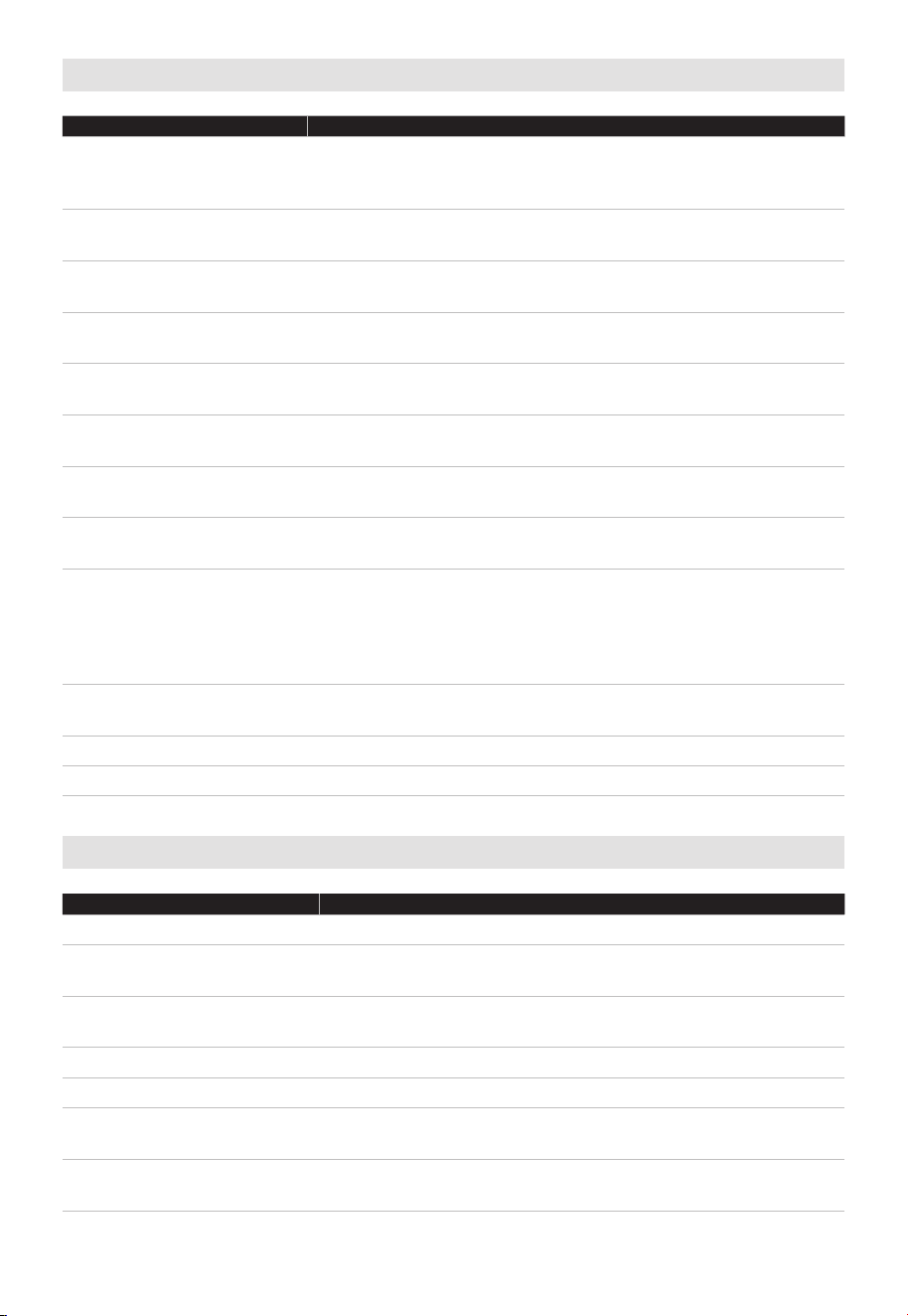
See the instructions on "Materials you can use in
microwave oven or to be avoided in microwave oven."
There may be certain non-metallic utensils that are not
safe to use for microwaving. If in doubt, you can test
the utensil in question following the procedure below.
When using microwave function after using high
temperature baking function (airFry, combi, bake),
should pay attention to the high temperature inside the
cavity and do not place plastic containers immediately to
avoid melting of plastic containers at high temperature.
Please put ceramic, glass or other temperature-resistant
containers, or open the door to dissipate the heat, and
wait for the cavity to dissipate the heat for 30 minutes
to cool down before placing plastic containers.
Utensil Test:
•
Fill a microwave-safe container with 1 cup of cold water (250ml)
along with the utensil in question.
•
Cook on maximum power for 1 minute.
• Carefully feel the utensil. If the empty utensil is warm,
do not use it for microwave cooking.
•
Do not exceed 1 minute cooking time.
12
Materials you can use in microwave oven
Utensils Remarks
Browning dish
Follow manufacturer’s instructions. The bottom of browning
dish must be at least 3/16 inch (5mm) above the turntable.
Incorrect usage may cause the turntable to break.
Dinnerware
Microwave-safe only. Follow manufacturer's instructions. Do
not use cracked or chipped dishes.
Glass jars
Always remove lid. Use only to heat food until just warm.
Most glass jars are not heat resistant and may break.
Glassware
Heat-resistant oven glassware only. Make sure there is no
metallic trim. Do not use cracked or chipped dishes.
Oven cooking bags
Follow manufacturer’s instructions. Do not close with metal
tie. Make slits to allow steam to escape.
Paper plates and cups
Use for short–term cooking/warming only. Do not leave
oven unattended while cooking.
Paper towels
Use to cover food for reheating and absorbing fat. Use with
supervision for a short-term cooking only.
Parchment paper
Use as a cover to prevent splattering or a wrap for
steaming.
Plastic
Microwave-safe only. Follow the manufacturer’s instructions.
Should be labeled "Microwave Safe". Some plastic
containers soften, as the food inside gets hot. "Boiling
bags" and tightly closed plastic bags should be slit, pierced
or vented as directed by package.
Plastic wrap
Microwave-safe only. Use to cover food during c
ooking to
retain moisture. Do not allow plastic wrap to touch food.
Thermometers Microwave-safe only (meat and candy thermometers).
Wax paper Use as a cover to prevent splattering and retain moisture.
Materials to be avoided in microwave oven
Utensils Remarks
Aluminum tray May cause arcing. Transfer food into microwave-safe dish.
Food carton with metal
handle
May cause arcing. Transfer food into microwave-safe dish.
Metal or metal-trimmed
utensils
Metal shields the food from microwave energy. Metal trim
may cause arcing.
Metal twist ties May cause arcing and could cause a fire in the oven.
Paper bags May cause a fire in the oven.
Plastic foam
Plastic foam may melt or contaminate the liquid inside
when exposed to high temperature.
Wood
Wood will dry out when used in the microwave oven and
may split or crack.

13
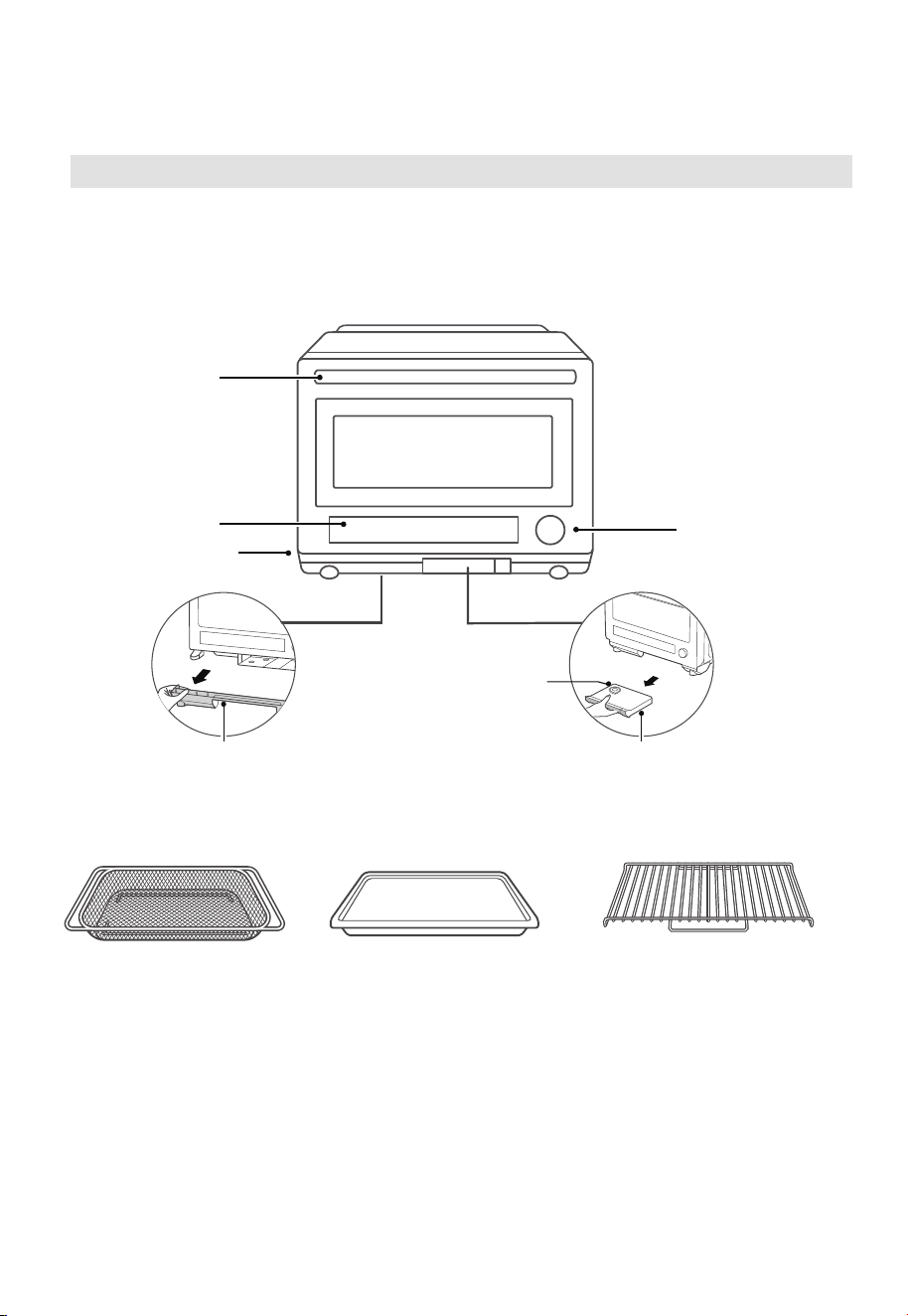
SPECIFICATION
Model
TR923X7ZE-SS0D00
Rated Voltage/Frequency 120VAC 60Hz
Microwave Input 1200 W
Microwave Output
900 W
Bake
Combi.
Steam
Air fry
Contain FCC ID
Contain IC
1500 W
1500 W
1500 W
1500 W
2ADQOMWB-SWB01
12575A-WB01
14
PRODUCT OVERVIEW
In case of any dierences between the appliance and the pictures in this manual,
the product shall prevail.
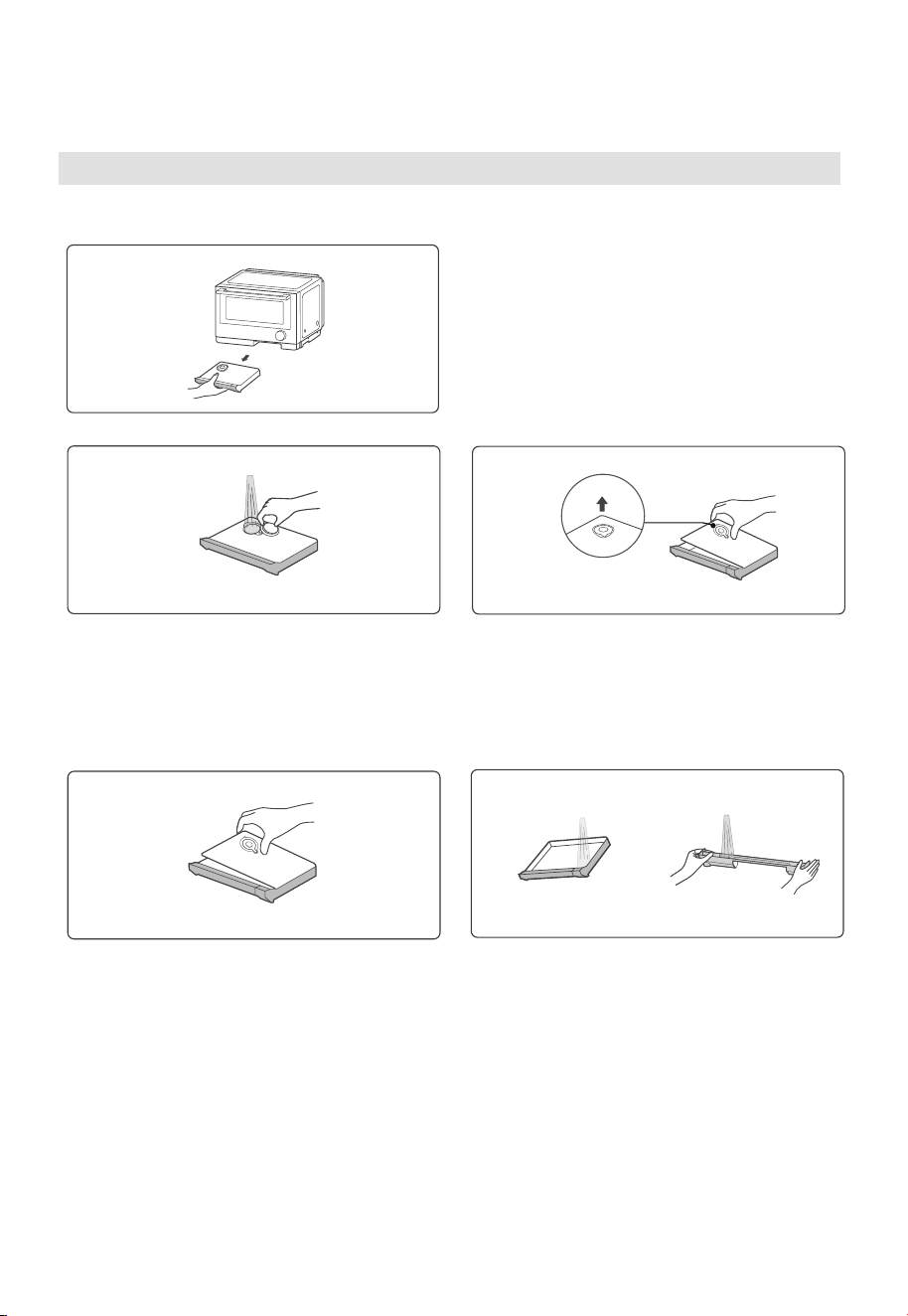
Remove the oven and all materials from the carton and oven cavity.
Your oven comes with the following accessories:
NAMES OF OVEN PARTS AND ACCESSORIES
Air fry Basket
(Can’t be used for
microwave cooking)
Place in the cavity slot,
use for Air fry cooking.
Handle
Heat emission hole
Control panel
Knob(turn/press)
Add water here
Pure/Purified water boxDrip collector
Baking tray
(Can’t be used for
microwave cooking)
Place in the cavity slot,
use for cooking foods that
will drip during cooking.
Grill rack
(Can’t be used for microwave
cooking) Place directly on
the bottom surface of the
oven cavity or on the baking
tray, use for grilling, baking,
and steam cooking.
(Use for catching the water
dripping from the cavity).
Note: Please discard the dirty
water after cooking.
(Fill with purified, distilled or
demineralized water (<104°F) before
steaming or cleaning).
take out/ put back
take out/ put back
Tips:
Air fry basket: Use to air fry nuggets, fries, and other crispy foods.
(scrape large food particles before putting in a dishwasher).
Baking tray: Use to steam vegetables, bake chocolate chip cookies, air fry salmon,
combi air fry chicken.
Grill rack: Use to steam corn on the cob, steam lobster.
15
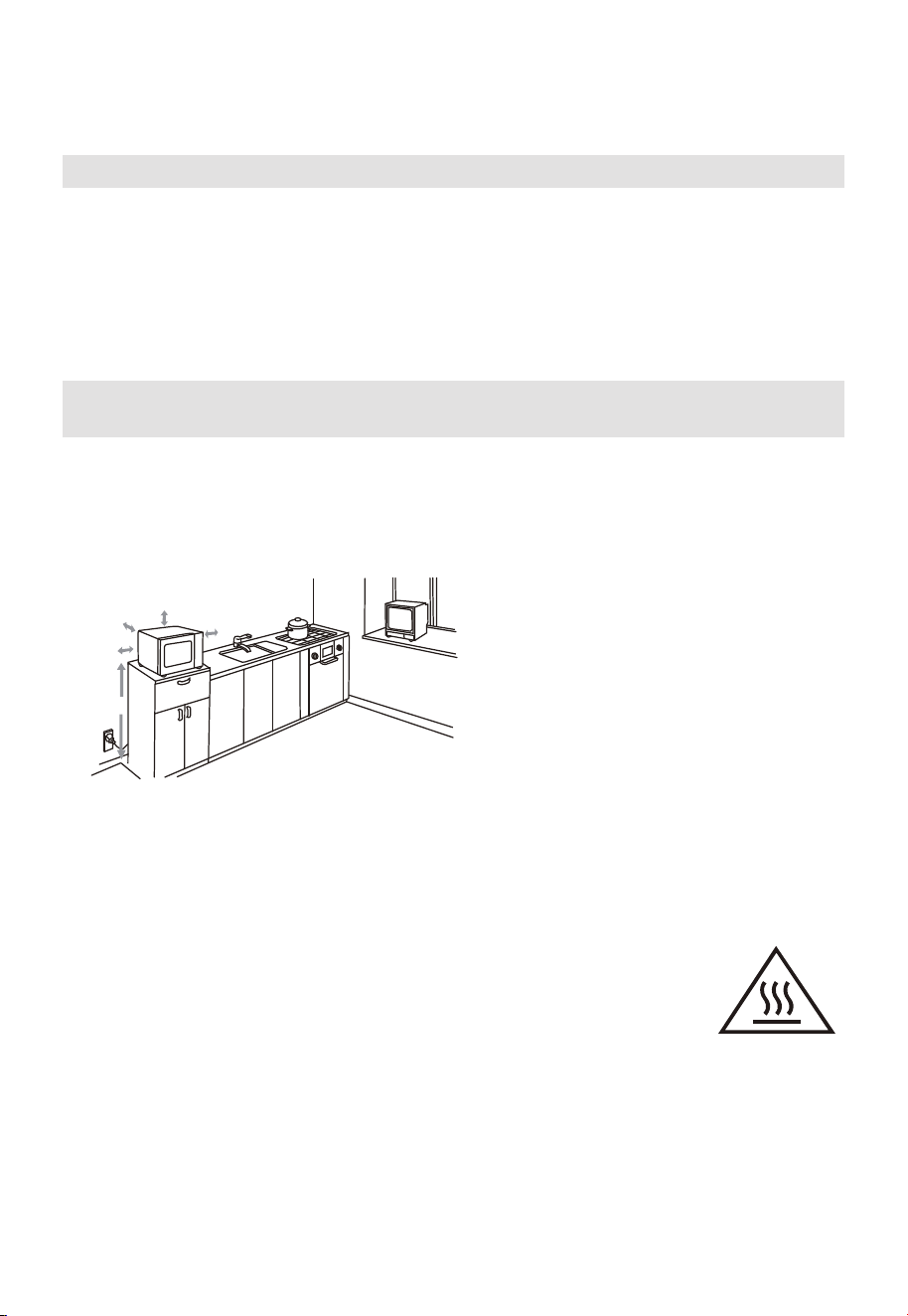
CLEANING AND CARE
Adding water
2. Cleaning
Open
Take Out: Hold the water box and pull
straight toward you.
1.
Method 1
Uncover the rubber lid, fill with purified
water, cover the rubber lid and ensure
good fitting.
Method 2
01
Uncover the water lid to clean or remove
the remaining water.
Rinse the inside of the water box and drip
collector with water.
02
Water Box
and
Uncover the water lid to clean or remove
the remaining water.
INSTALLATION
16
PRODUCT INSTALLATION
Countertop Installation
Remove all packing material and accessories. Examine the oven for any damage such as
dents or broken door. Do not install if oven is damaged.
Cabinet: Remove any protective film found on the microwave oven cabinet surface. Do
not remove the Waveguide cover that is attached to the oven cavity to protect the
magnetron.
A minimum clearance of 3.0 inches
(7.5cm) is required between the oven and
any adjacent walls. One side must be open.
(1) Leave a minimum clearance of 12
inches (30cm) above the oven.
(2) Do not remove the legs from the
bottom of the oven.
(3) Blocking the intake and/or outlet
openings can damage the oven.
(4) Place the oven as far away from
radios and TV as possible.
Operation of microwave oven may
cause interference to your radio or TV
reception.
2. Plug your oven into a standard household
outlet. Be sure the voltage and the
frequency is the same as the voltage
and the frequency on the rating label.
WARNING: Do not install oven over a
range cooktop or other heat-producing
appliance. If installed near or over a heat
source, the oven could be damaged and
the warranty would be void.
3.0 inch(7.5cm)
>36 in(91.4cm)
3.0 inch(7.5cm)
12 inch(30cm)
OPEN
1. Select a level surface that provide
enough open space for the intake
and/or outlet vents.
The minimum installation height
is 36 in(91.4cm).
The accessible surface
may be hot during
operation.
Rinse the inside of the water box and drip
collector with water.
Uncover the water lid to clean or remove
the remaining water.
17
OPERATION
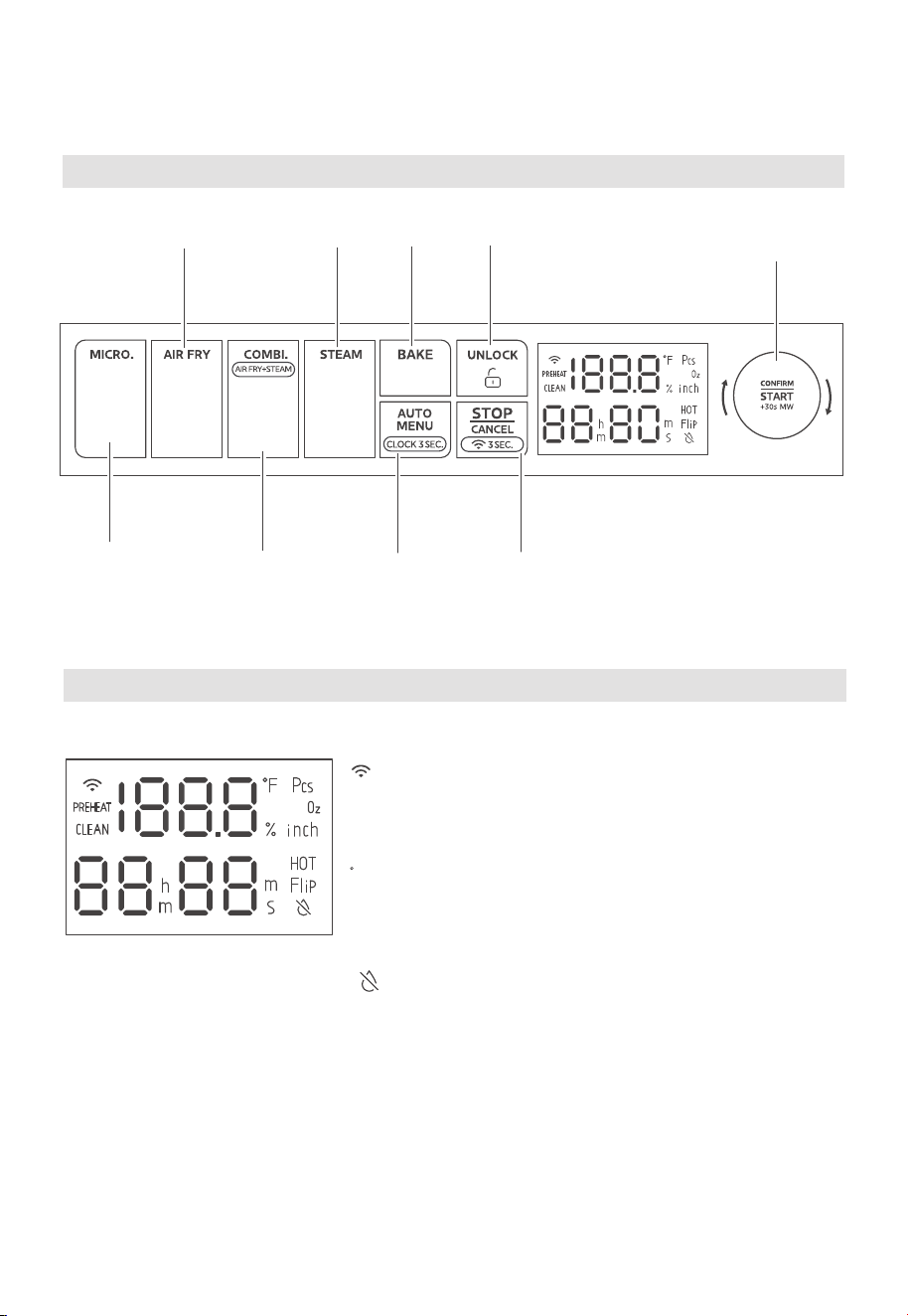
Control Panel
Microwave
Combi.
Air fry+Steam
Auto Menu
Clock 3 Sec.
Stop/Cancel/
Press 3 seconds
to connect wireless network
Air Fry
Steam
Bake
Unlock
Confirm/Start/
+30Sec
Screen Display Guide
: Indicates wireless connectivity status.
PREHEAT: Illuminates when the oven is preheating.
CLEAN: When lit up, indicates a reminder to run the
Auto Menu 30 “Evaporating Flume Cleaning”.
F/Pcs/Oz/%/inch: Indicates currently used metric.
HOT: Indicates oven temperature exceeding 150°F.
Flip: Use auto menu 25, it will light to remind you turn the
food over.
: Indicates low water level in the water box.
18
OPERATION
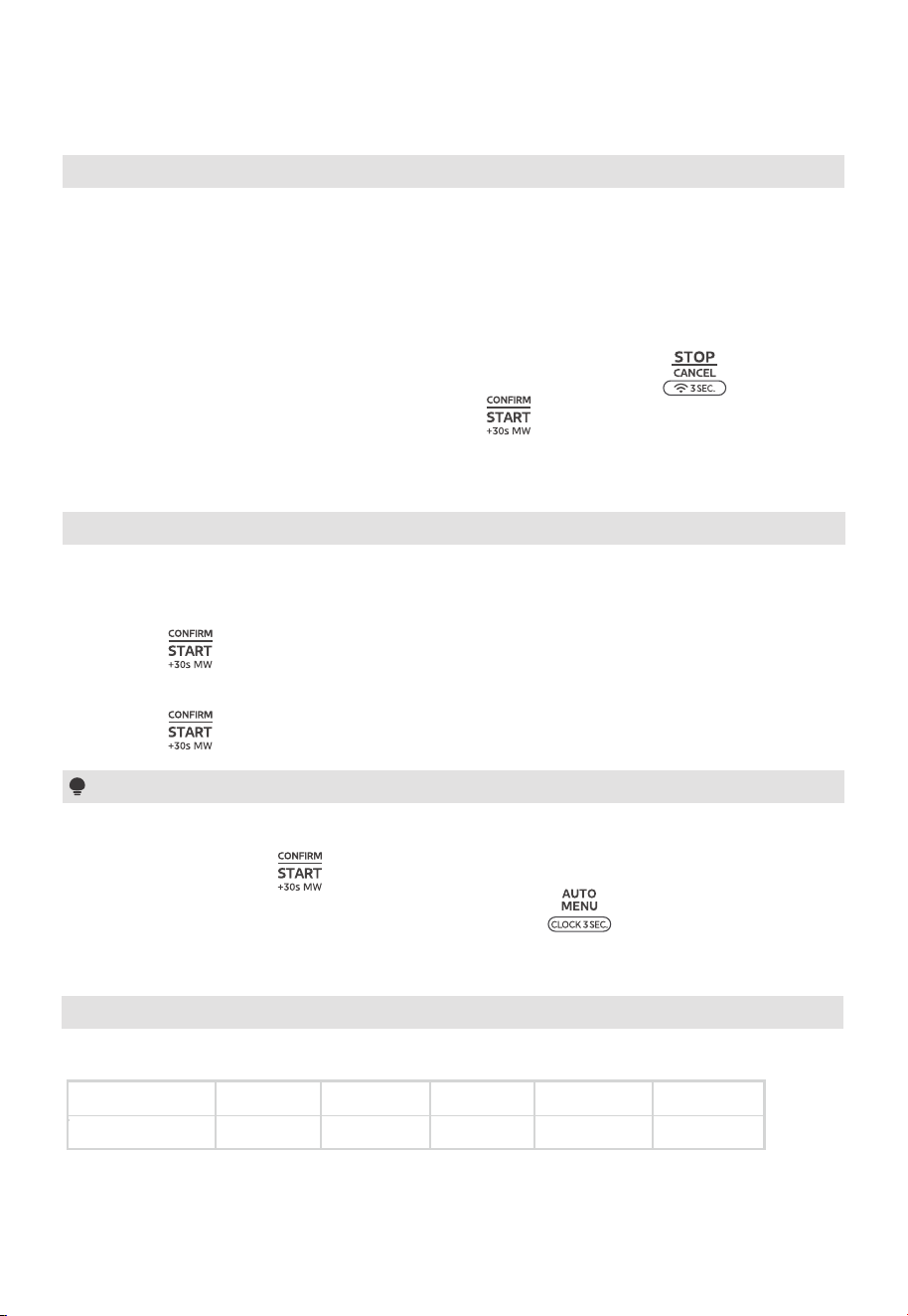
Standby Mode
: Indicates wireless connectivity status.
PREHEAT: Illuminates when the oven is preheating.
CLEAN: When lit up, indicates a reminder to run the
Auto Menu 30 “Evaporating Flume Cleaning”.
F/Pcs/Oz/%/inch: Indicates currently used metric.
HOT: Indicates oven temperature exceeding 150°F.
Flip: Use auto menu 25, it will light to remind you turn the
food over.
: Indicates low water level in the water box.
(1) Upon plugging the microwave oven into an outlet, the screen will display “00:00”,
accompanied by a sound signal.
(2) "0" on the display indicates the appliances is in standby mode. If there is no activity
within 1 minute, the screen will turn o.
(3) To enter power-saving mode while in standby mode, press the “ ” once.
(4) If cooking settings are configured and the “ ”is not pressed within 5 minutes, the
oven will return to standby mode, and the setting will be invalidated.
(1) The clock goes into setting mode upon plugging the appliance.
(2) Turn the knob to adjust the hour figures.
(3) Press “ ” to confirm.
(4) Turn the knob to adjust the minute figures.
(5) Press “ ” to confirm. The clock is set.
1.
Setting the Clock 2.
(1) The clock displays in a 12-hour format.
(2) After the step 4, if “ ” is not pressed, the setting is invalid.
(3) To reset the clock in standby mode, press and hold “ ” for three seconds. Then,
repeat steps 1 through 5.
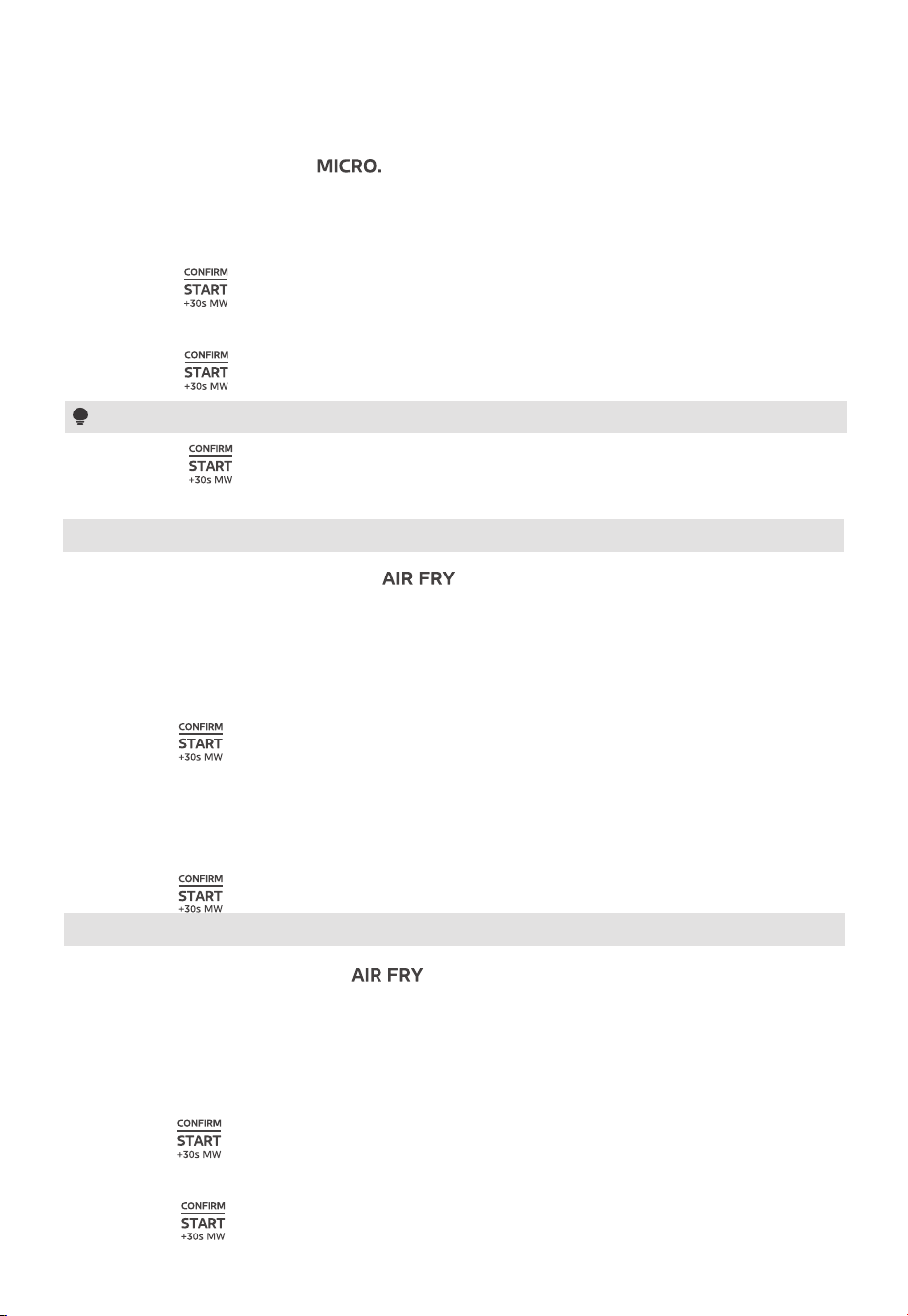
3. Microwave Cooking
5 power levels are available.
Power
Display
100% 80% 50% 30% 10%
Notes
100% 80% 50% 30% 10%
19
OPERATION
(1) In standby mode, press the “ ” to switch to air fry without preheat function.
The screen will display the default temperature of 350°F.
(2) Turn the knob to set the temperature, 10 options are available, including 225°F, 250°F,
275°F, 300°F, 325°F, 350°F, 375°F, 400°F, 425°F, 450°F.
(3) Press “ ” to confirm.
(1) In standby mode, press “ ” once to switch to microwave function. The screen will
display default settings: 100% power and 30 seconds settings.
(2) Turn the knob to set the power level, “10%, 30%, 50%, 80%, and 100%” are available.
(3) Press “ ” to confirm.
(4) Turn the knob to set the cooking time, the maximum value is 90 minutes.
(5) Press “ ” to start cooking.
5. Air-Fry without Preheat
(1) In standby mode, double-press “ ” to switch to air fry with preheat function,
The screen will display the default temperature of 350°F.
(2) Turn the knob to set the temperature, 10 options are available, including 225°F, 250°F,
275°F, 300°F, 325°F, 350°F, 375°F, 400°F, 425°F, 450°F.
(3) Press “ ” to start preheating.
(4) When preheating is completed, the oven will sound. Open the door and place the food
in the oven, and then close the oven door.
(5) Turn the knob to set the cooking time. The maximum time value is 90 minutes.
(6) Press “ ” to start cooking.
4. Air-Fry with Preheat
(4) Turn the knob to set the cooking time, the maximum value is 90 minutes.
(5) Press “ ” to start cooking.
Note
Pressing “ ” during microwave operation adds 30 seconds to the cooking time.
20
OPERATION
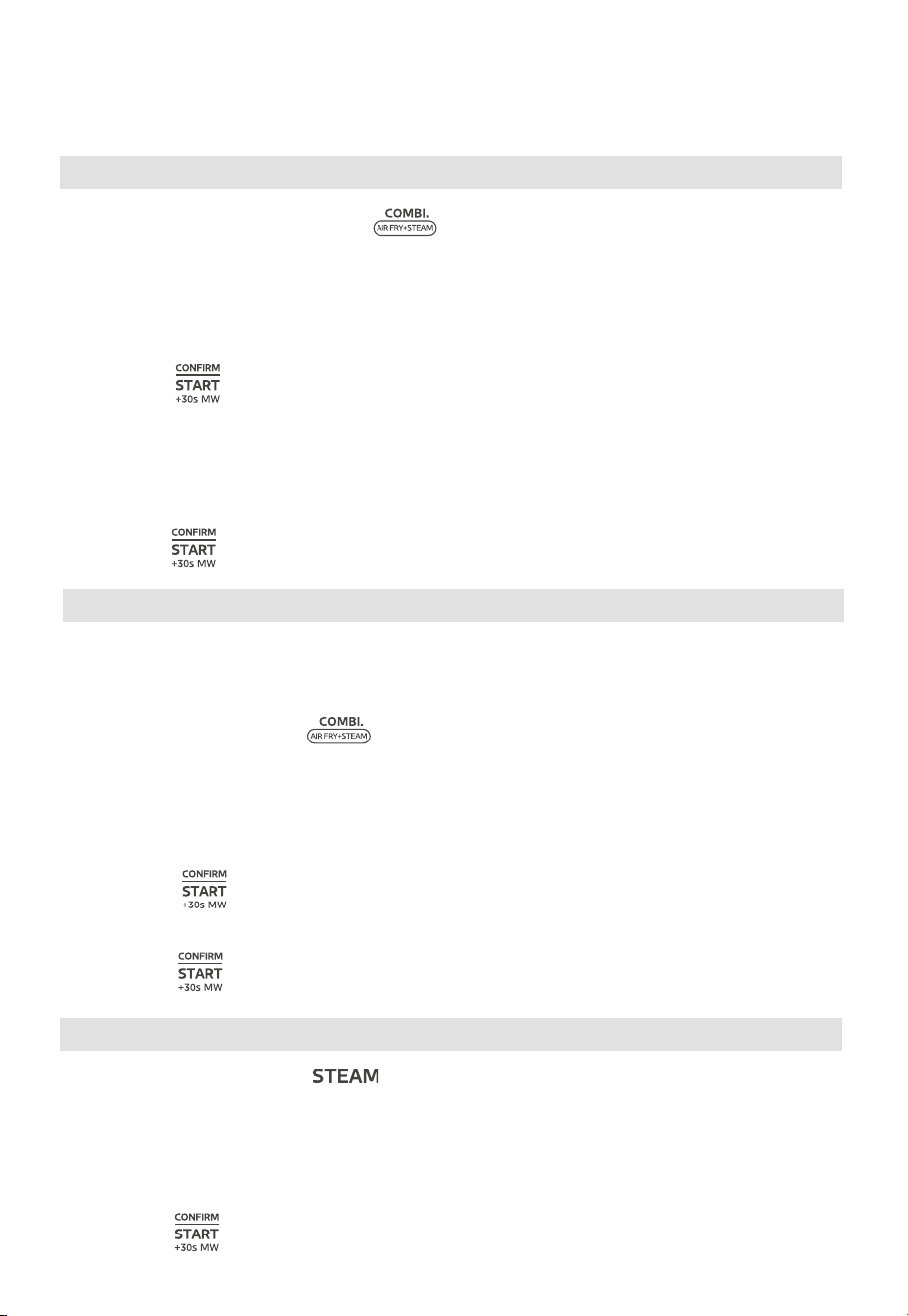
6. Combination with Preheat
(1) In standby mode, double-press “ ” to switch to combination cook with preheat
function. The screen will display the default temperature of 425°F will display.
(2) Turn the knob to set the temperature, 10 options are available, including 225°F, 250°F,
275°F, 300°F, 325°F, 350°F, 375°F, 400°F, 425°F, 450°F.
(3) Press “ ” to start preheating.
(4) When preheating is completed, the oven will sound. Open the door and place the food
in the oven, and then close the oven door.
(5) Turn the knob to set the cooking time, the maximum value is 90 minutes.
(6) Press “ ” to start cooking.
7. Combination without Preheat
Combination without Preheat uses steam for cooking. Fill the water box with distilled/
purified/demineralized water before initiating cooking.
(1) In standby mode, press “ ”to switch to combination cook without preheat function.
The screen will display the default temperature of 425°F.
(2) Turn the knob to set the temperature, 10 options are available, including 225°F, 250°F,
275°F, 300°F, 325°F, 350°F, 375°F, 400°F, 425°F, 450°F.
(3) Press “ ” to confirm.
(4) Turn the knob to set the cooking time, the maximum value is 90 minutes.
(5) Press “ ” to start cooking.
(1) In standby mode, press “ ”to switch to steam function. The screen will display
default temperature of 200°F.
(2) Turn the knob to set the temperature, 6 options are available, including 125°F, 150°F,
175°F, 200°F, 225°F, 250°F.
8. Steam Function
(3) Press “ ” to confirm.
21
OPERATION
9. Bake with Preheat
10. Bake without Preheat
Notes
(1) After steam cooking has finished, remove any remaining water from the cavity and clean
the door pane.
(2) Empty the water box after each use of the steam cooking function.
(1) In standby mode, double-press “ ” to switch to bake with preheat function.
The screen will display the default temperature of 300°F.
(2) Turn the knob to set the temperature, 10 options are available, including 225°F, 250°F,
275°F, 300°F, 325°F, 350°F, 375°F, 400°F, 425°F, 450°F.
(3) Press “ ” to start preheating.
(4) When preheating is completed, the oven will sound. Open the door and place the food
in the oven, and then close the oven door.
(5) Turn the knob to set the cooking time, the maximum value is 90 minutes.
(6) Press “ ” to start cooking.
(1) In standby mode, press “ ”to switch to bake without preheat function.
The screen will display the default temperature of 300°F.
(2) Turn the knob to set the temperature, 10 options are available, including 225°F, 250°F,
275°F, 300°F, 325°F, 350°F, 375°F, 400°F, 425°F, 450°F.
(3) Press “ ” to confirm.
(4) Turn the knob to set the cooking time, the maximum value is 90 minutes.
(5) Press “ ” to start cooking.
(4) Turn the knob to set the cooking time, the maximum value is 90 minutes.
(5) Press “ ” to start cooking.
OPERATION
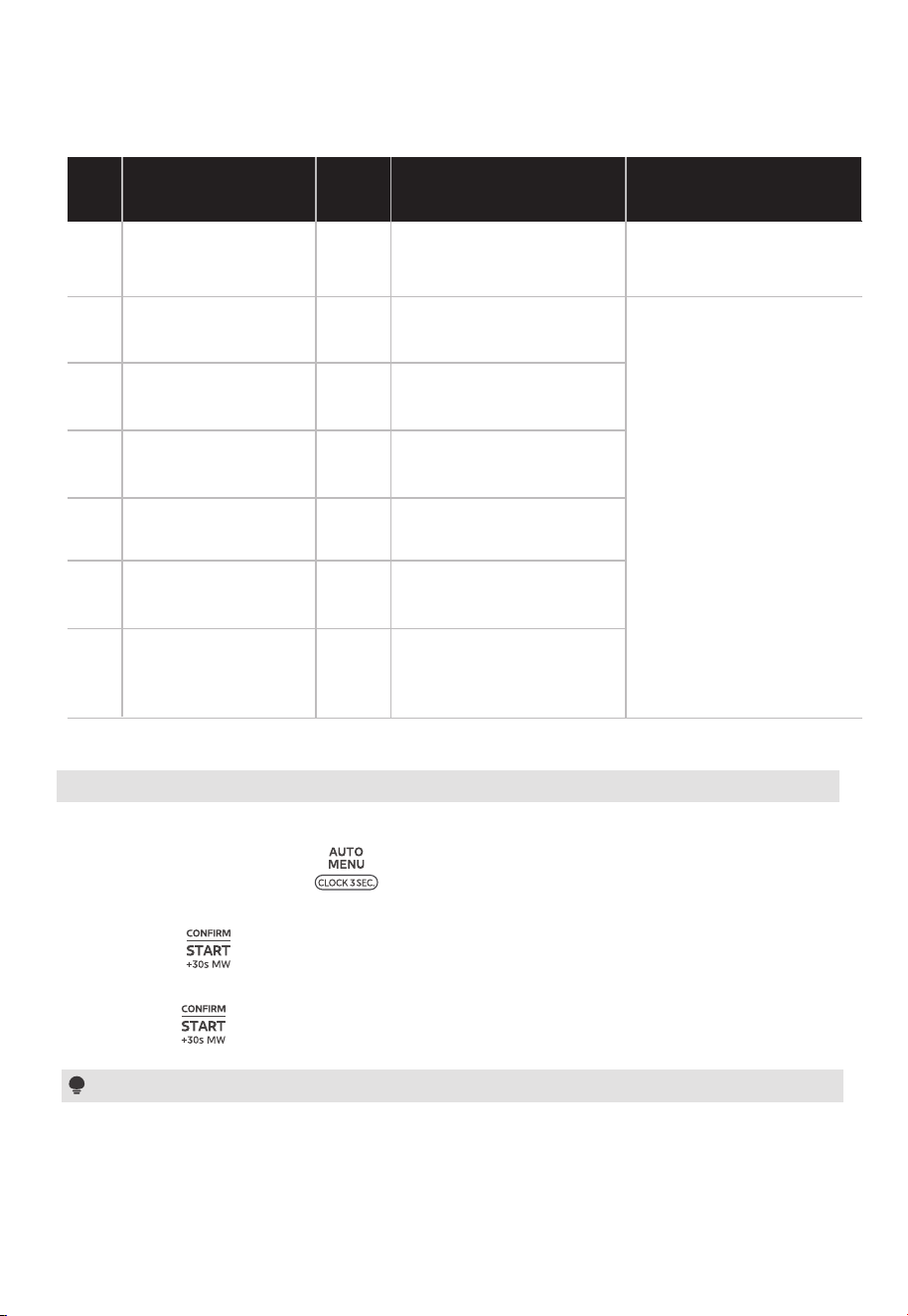
(1) In standby mode, press “ ” once and then the screen will display “01”.
(2) Turn the knob to choose the menu you need. 32 auto menus are available.
(3) Press “ ” to confirm.
(4) Turn the knob to set the cooking time/the weight of the food.
(5) Press “ ” to start cooking.
11. Auto Menu
Auto Menu chart
French Fries
Frozen Pizza
16 oz
16 oz
12 oz
16 oz
01
02
03
04
22
Display
Menu
SettingsNo.
20-30 mins
Air fry 450°F
Utensil: Air fry Basket
Position: Upper
Utensil: Air fry Basket
& Grill Rack
Position: Lower
Utensil: Air fry Basket
Position: Upper
Utensil: Baking tray/
foil/parchment
paper
Position: Lower
Preheat Air fry 450°F+
10-16 mins Air fry 450°F
Preheat Air fry 450°F+
4-8 mins Air fry 450°F
Preheat Air fry 375°F+
15-23 mins Air fry 375°F
Baked Tilapia Fillet
Baked Chicken Breast
05
Chicken Nuggets
16 oz
9 oz
12-20 mins Air fry 450°F
12-18 mins Air fry 450°F
28-42 mins Air fry 450°F
06
Chicken Cutlets
9 oz07 Chicken Parmesan
10 mins Air fry 450°F+
2-10 mins Bake 450°F
Utensil: Air fry Basket
Position: Lower
Utensil: Baking Tray, foil
Position: Lower
16 oz08 Potato Wedges
25 oz09 Baked Sweet Potato
Preheat Air fry 450°F+
40-60 mins Air fry 450°F
Preheat Combi.450°F+
6-9 mins Combi.450°F+
5-8 mins Air fry 450°F
10 oz10 Onion Rings
8-12 mins Air fry 450°F
Utensil: Air fry Basket
Position: Lower
13 oz11 Baked Salmon Fillet
Utensil: Baking Tray,foil
Position: Upper
Recommended
Scenarios

OPERATION
Roast Chicken
72 oz
10 oz
6 oz
12
13
Display
Recommended
Scenarios
Menu
No.
Utensil: Baking tray, Grill rack
Position: Lower
Utensil: Baking tray
Position: Lower
Utensil: Baking tray
Position: Lower
Utensil: Grill rack, Baking tray
Position: Lower
12-18 mins Steam 250°F
Steamed Lobster Tail
Steamed Asparagus
16
Steamed Vegetables
24 oz
20 oz
10-16 mins Steam 250°F
12-18 mins Steam 250°F
40-60 mins Steam 250°F
17
Steamed Corn
on the Cob
16 oz18
Steamed Jasmine
Rice
Utensil: Baking tray, Glass pan/
oven proof pan
Position: Lower
Utensil: Baking tray,
Parchment paper/
foil (optional)
Position: Lower
7 oz19 Steamed Tilapia Fillet
5 oz
12 oz
20
Chocolate Chip
Cookies
Preheat Bake 350°F+
10-16 mins Bake 350°F
21
Blueberry Muns
Utensil: Baking tray,
Mun mold
Position: Lower
8 oz22 Biscuits
Utensil: Baking tray, Foil
Position: Lower
Preheat Combi.400°F+
24-36 mins Combi.400°F+
24-36 mins Air fry 450°F
8-12 mins Steam 250°F
14
4 oz
15
8-14 mins Steam 250°F
Utensil: Grill rack, Baking tray
Position: Lower
8-12 mins Steam 250°F
Utensil: Baking tray, Grill rack
Position: Lower
Preheat Bake 400°F+
12-18 mins Bake 400°F
Preheat Bake 350°F+
11-17 mins Bake 350°F
23
24
25
24 ozBanana Bread
Utensil: Baking tray, Grill rack
Loaf pan
Position: Lower
Preheat Bake 350°F+
48-72 mins Bake 350°F
17 oz
Cheese Cake
Utensil: Baking tray, 6 inch
cake mold
Position: Lower
Utensil: Ceramic flat bottom
plate
Position: Cavity floor
Preheat Bake 350°F+
24-36 mins Bake 350°F
4-52 ozDefrost Microwave
Steamed Garlic
Shrimp
23
Settings
12-1 Defrost by Weight
(1) In standby mode, press “ ” once and then the screen will display “01”.
(2) Turn the knob left to choose the menu 25, “25” will display.
(3) Press “ ” to confirm the menu.
(4) Turn the knob to set the weight. The range of weight is 4 to 52 oz.
(5) Press “ ” to start defrosting.
Note
The 'Flip' icon will remain illuminated, and a sound signal to remind you to turn the food over
during defrosting. If no action is taken, the oven will continue operating.
OPERATION
Ferment
Keep Warm
26
27
Display
Recommended
Scenarios
Menu
No.
Utensil: Loaf pan
Position: Cavity floor
Cavity Deodorization
Cavity Cleaning
30
Evaporating Flume
Cleaning
20 mins
15-30 mins Steam 212°F
5s-90 mins Air fry 266°F
31
32
Deep Cleaning
3-10mins Fan
28
29
10-30 mins Steam 212°F
--
5s-12h Bake 75-115°F
5s-2h Bake 140°F
--
--
--
--
--
--
Cavity Drying
--
12. More Functions
24
Settings
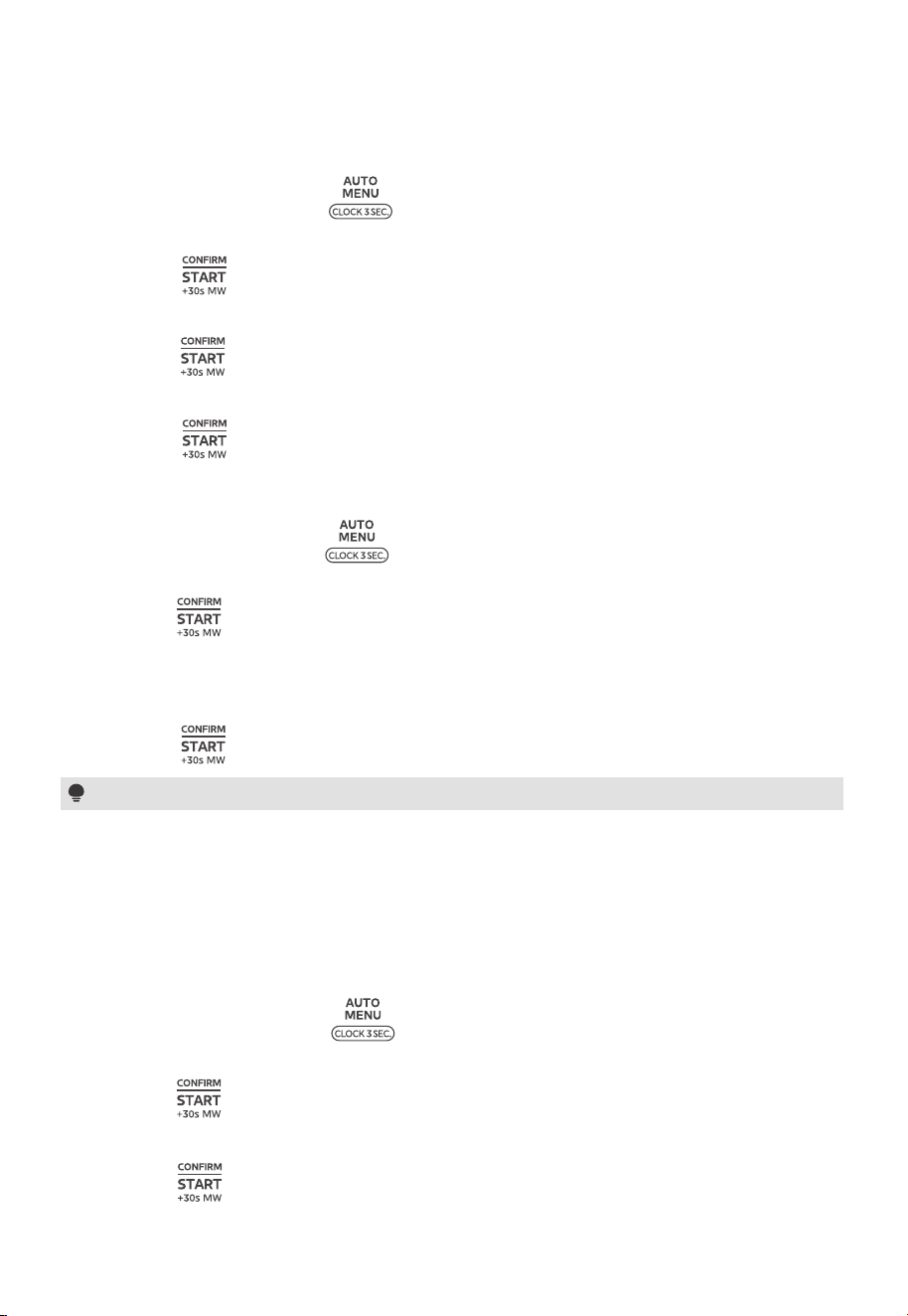
(1) In standby mode, press “ ” once and then the screen will display “01”.
(2) Turn the knob to choose the menu 26, “26” will display.
(3) Press “ ” to confirm the menu.
(4) Turn the knob to set the temperature. The range of temperature is 75°F-115°F.
(5) Press “ ” to confirm the temperature.
(6) Turn the knob to set the time, the maximum value is 12 hours.
(7) Press “ ” to start cooking.
25
OPERATION
12-2 Ferment
12-3 Keep Warm/Cavity Deodorization
12-4 Cavity Cleaning
(1) In standby mode, press “ ” once and then the screen will display “01”.
(2) Turn the knob to choose the menu 27/28.
(3) Press “ ” to confirm.
(4) Turn the knob to set the time. In the keep warm function, the maximum value is 2 hours.
In the cavity deodorization function, the maximum value is 10 minutes.
(5) Press “ ” to start.
Notes
(1) Keep warm:Keeps the food warm.
(2) Cavity Deodorization:Removes any odors from the oven by running fans.
Cleaning the cavity regularly to lengthen its service life.
(1) In standby mode, press “ ” once and then the screen will display “01”.
(2) Turn the knob to choose the menu 29.
(3) Press “ ” to confirm.
(4) Turn the knob to set the time, the maximum value is 30 minutes.
(5) Press “ ” to start cleaning.
then press “ ” to start cleaning.
26
OPERATION
Notes
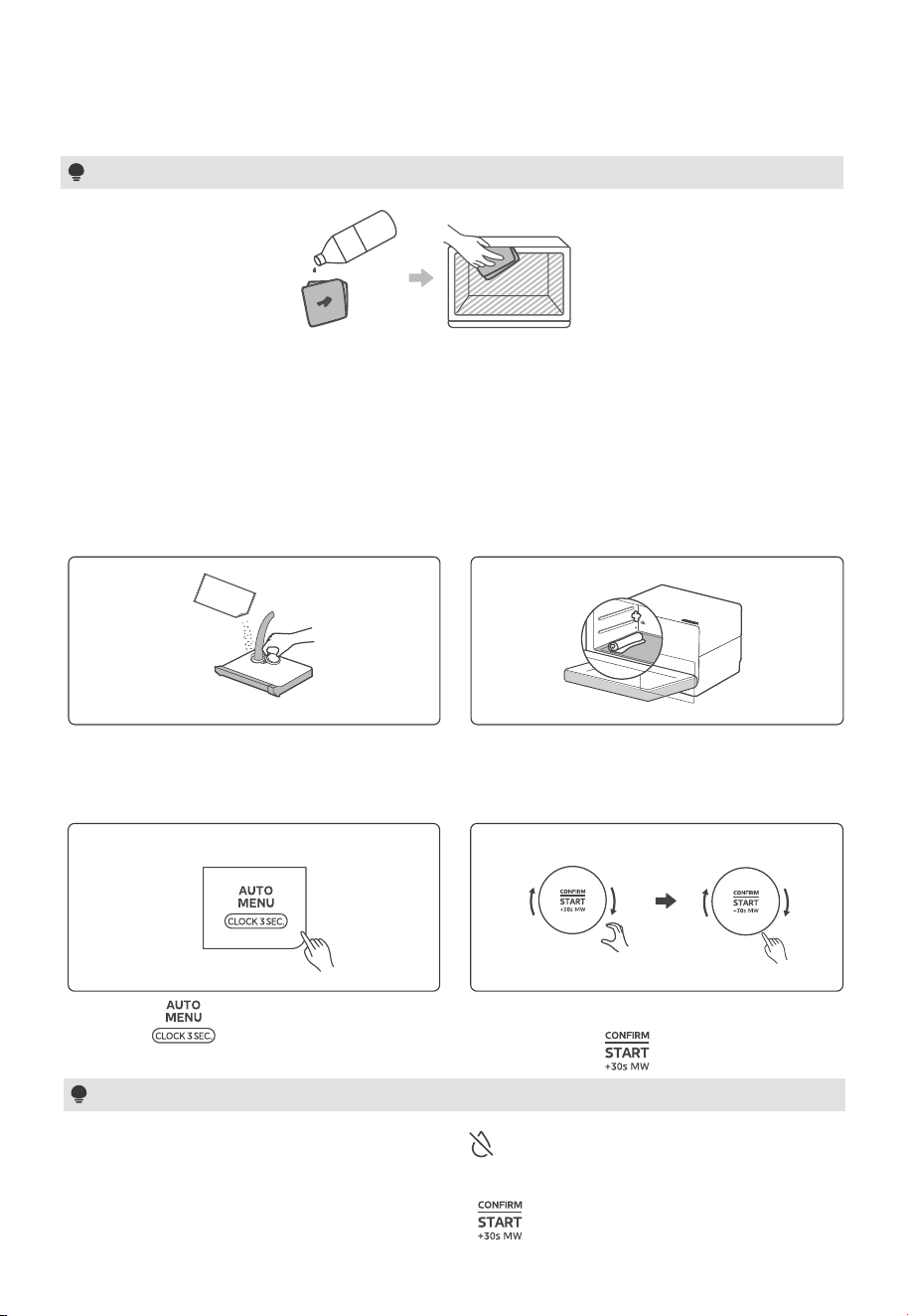
(1) Before operating, wipe the residue from the cavity and keep the water box
full of water.
(2) Remove any remaining stains with a damp cloth or rag.
It is recommended to clean the evaporating flume once a month for optimal performance
and cleanliness.
Take out the water box, add about 10g of
food-grade citric acid, fill up with pure
water to dissolve it, and put the water box
back.
12-5 Evaporating Flume Cleaning
01
02
03
04
Press “ ” once and then the
screen will display “01”
Turn the knob to choose the menu 30 and
If the water level in the water box is low, the “ ” indicator will light up. Empty the water
box, dry the oven cavity, and clean the towel. Refill the water tank with water and place the
towel under the steam outlet again. Press the “ ” button to resume the cleaning cycle.
Notes
Put a dry towel on the left side of the oven
cavity, on the steam outlet. Close the
oven door.
citric acid
If the water level in the water box is low, the “ ” indicator will light up. Empty the water
box, dry the oven cavity, and clean the towel. Refill the water tank with water and place the
towel under the steam outlet again. Press the “ ” button to resume the cleaning cycle.
27
OPERATION
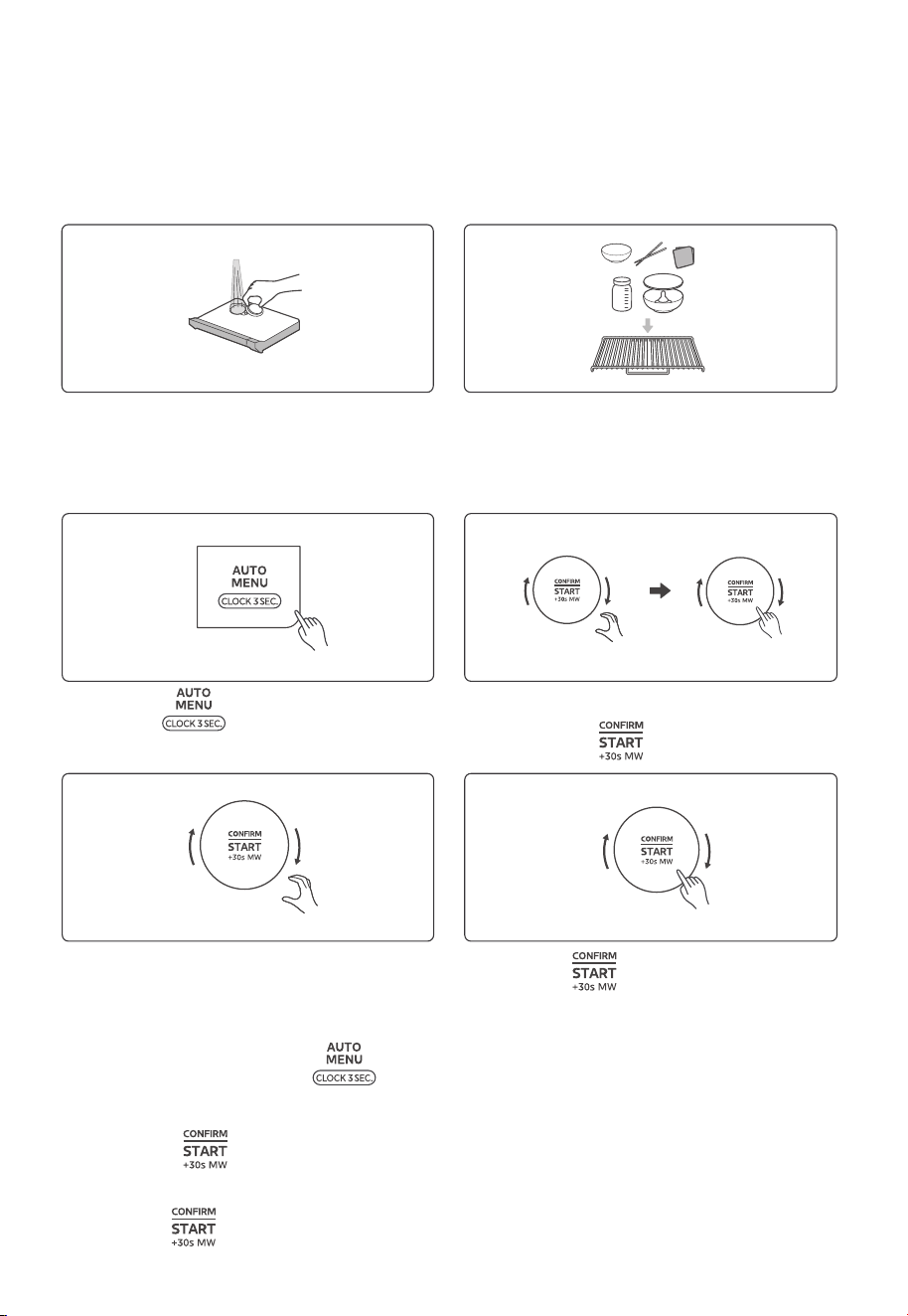
Put a dry towel on the left side of the oven
cavity, on the steam outlet. Close the
oven door.
12-6 Deep Cleaning
Deep Cleaning Operation
Preparation before Deep Cleaning
Uncover the rubber lid, add a proper
amount of purified water, cover the
rubber lid and ensure good fitting.
Put all utensils on the grill rack.
(Nipples should be removed from baby
feeding bottles)
01
02
01
02
Press “ ” once and then the
screen will display “01”
03
04
Turn the knob to set the time, the
maximum value is 30 minutes.
then press “ ” to confirm the menu.
Turn the knob to choose the menu 31 and
Press “ ” to start cleaning.
12-7 Cavity Drying
(1) In standby mode, press “ ” once and then the screen will display “01”.
(2) Turn the knob left to choose the menu 32, “32” will display.
(3) Press “ ” to confirm the menu.
(4) Turn the knob to set the time, the maximum value is 90 minutes.
(5) Press “ ” to start drying.
Notes
(1) When the door is locked, the " " key is fully illuminated. If the door is not locked,
the " " key is dimmed, indicating the door can be opened.
(2) The door will unlock automatically 30 minutes after cooking is complete.
(3) The oven remembers your safety lock setting even if you turn o the power or
unplug the oven.
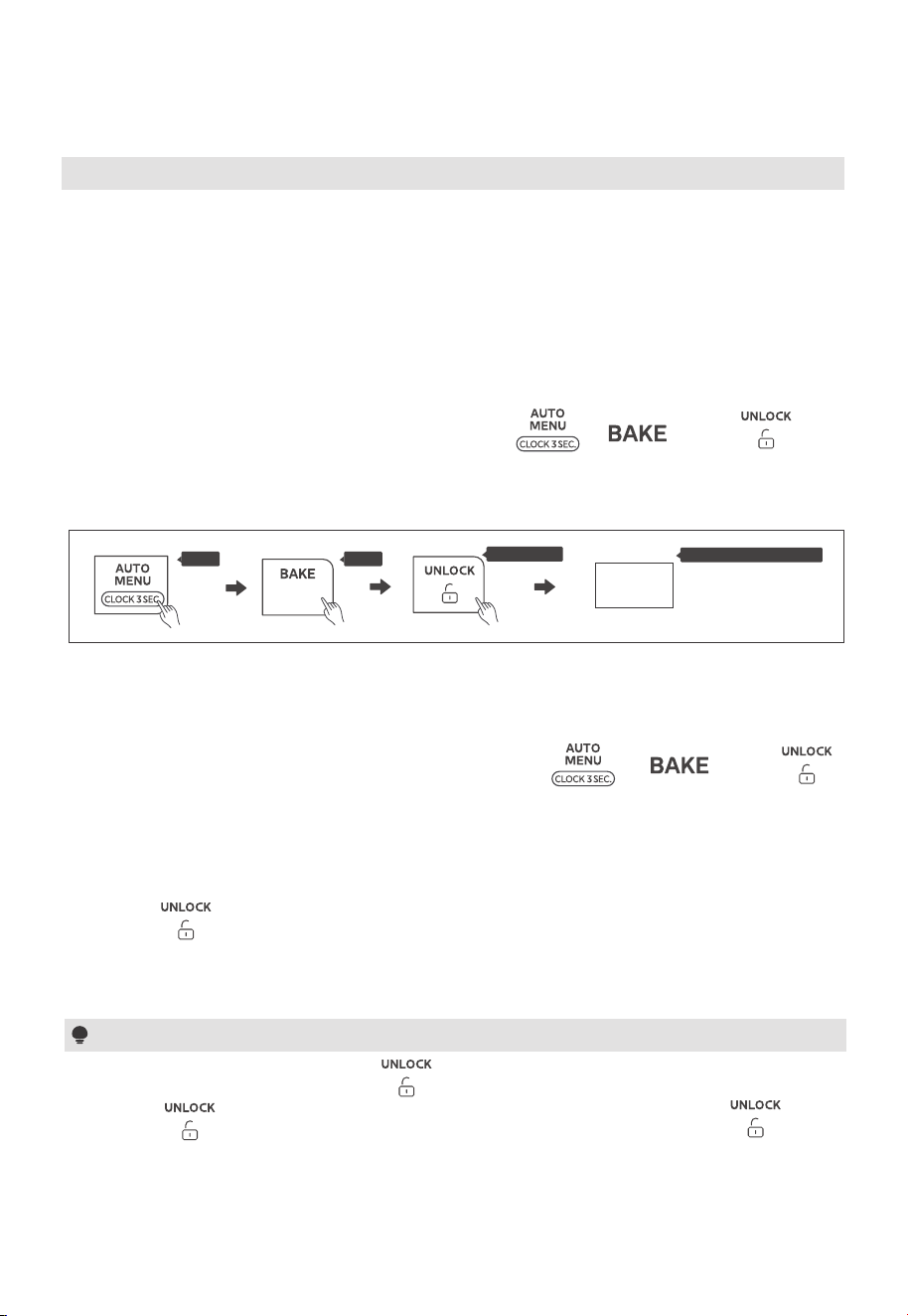
13. Safety Lock
Hold
To deactivate the lock:
You can choose to permanently deactivate the safety lock function.
To deactivate the safety lock function, press and hold “ ”, “ ”, and “ ” in
sequence within 3 seconds. The screen will display “ULoc”, indicating that the safety lock
function is now deactivated.
To unlock the door:
Press a " ".
Safety lock will automatically engage the door lock during cooking and/or within 30 minutes
after cooking is complete.
28
OPERATION
Hold
Hold in 3s
Loc
The screen display
The safety lock function is enabled by default when the power is turned on. Starting a
cooking process activates the door lock, and if the door is not unlocked within 30 minutes
after cooking.
To activate the safety lock function, press and hold “ ”, “ ”, and “ ” in
sequence within 3 seconds. The screen will display “Loc”, indicating that the safety lock
function is now activated.
The Safety Lock function disables the oven controls to prevent children from accidentally
turning the oven on.
To activate the lock:
14. Wireless Connection
29
OPERATION
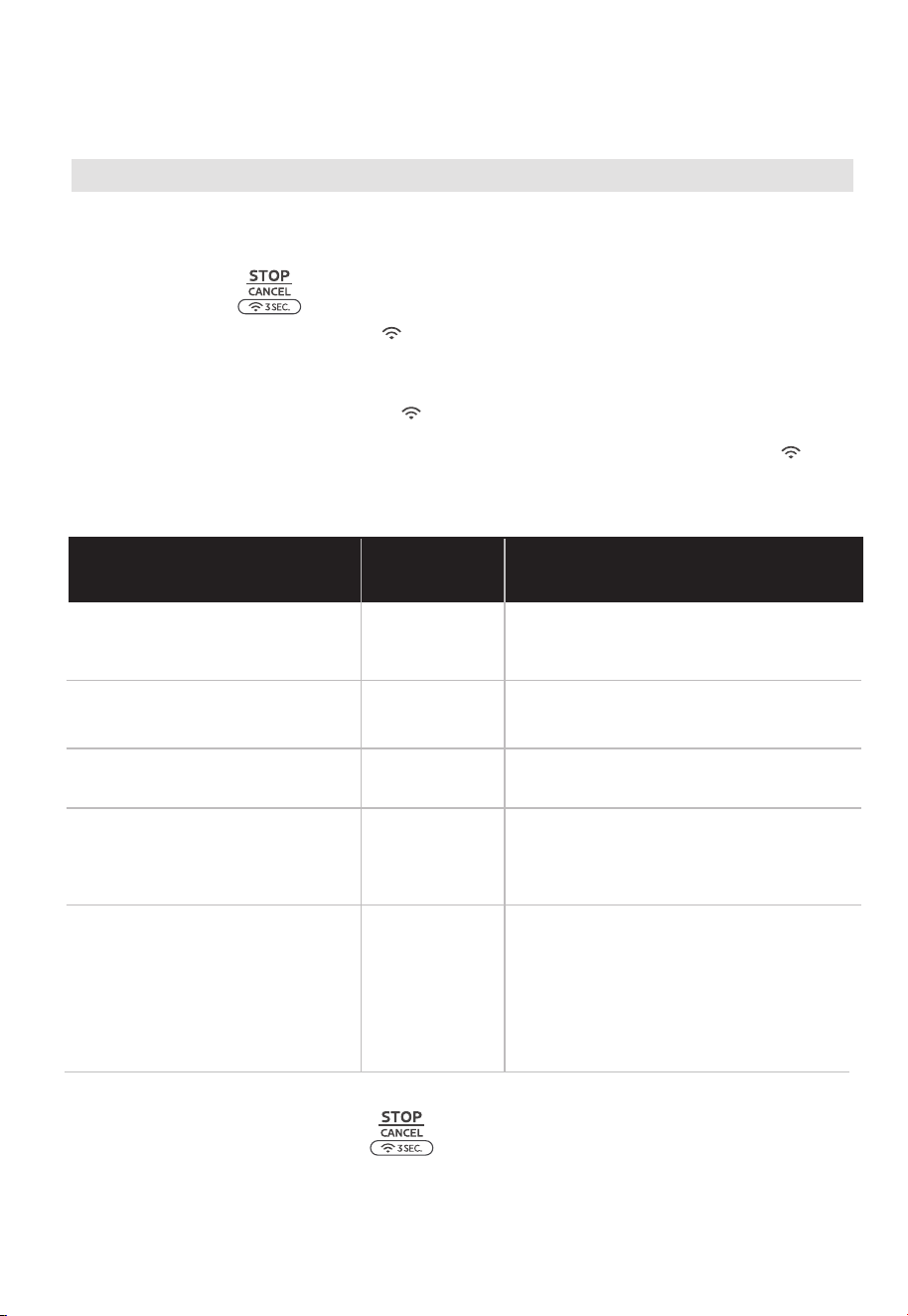
Make sure your oven is in standby mode. (The oven is on but not currently cooking.)
Press and hold “ ” for 3 seconds.
The screen will display "AP" and “ ” will begin flashing slowly. This indicates the oven
is searching for a wireless network.
If the connection is successful, the “ ” will light up steadily.
If the connection fails, an error code (N1-N5) will appear on the screen, and the“ ” will
continue to flash slowly. The oven will automatically return to standby mode after 30 seconds.
In standby mode, press and hold “ ” for 8 seconds, “--” will flash during
disconnection, if the link has been removed successfully, “8888” will display and return to
standby mode after 3 seconds. If it fails, “FFFF” will display, the oven will return to standby
mode after 3 seconds.
Connecting to Wireless
Disconnecting from the Wireless Network
Display
Internet Connectivity
Problems
Operational Advice
Wireless signal is weak, unable to
connect to the router.
N1
Try to move your device closer to
the router.
Unable to detect the router.
N2
Confirm if the wireless network name
is correct.
The wireless password is incorrect.
N3
N4
Enter the correct wireless password.
Failed to connect to the router,
even though the signal is strong
and the password is correct
Contact customer support.
At the network setup stage, I can
successfully connect to the
router, but there is a timeout
issue when trying to connect to
the server.
N5
Please check if the home broadband
connection is functioning properly
Error Code Chart

Trouble Possible Cause Remedy
Check your problem by using the chart below and try the solutions for each problem. If the
microwave oven still does not work properly, contact the nearest authorized service center
.
Oven will not start
a. Electrical cord for oven is
not plugged in.
b. Door is open.
c. Wrong operation is set.
a. Plug into the outlet.
b. Close the door and try
again.
c. Check instructions.
Arcing or sparking
a. Materials to be avoided in
microwave oven were
used.
b. The oven is operated when
empty.
c. Spilled food remains in the
cavity.
a. Use microwave-safe
cookware only.
b. Do not operate with oven
empty.
c. Clean cavity with wet towel.
Unevenly cooked
foods
a. Materials to be avoided in
microwave oven were
used.
b. Food is not defrosted
completely.
c. Cooking time, power level
is not suit ble.
d. Food is not turned or stirred.
a. Use microwave-safe
cookware only.
b. Completely defrost food.
c. Use correct cooking time,
power level.
d. Turn or stir food.
Overcooked foods
Cooking time, power level is
not suitable.
Use correct cooking time,
power level.
Undercooked foods
a. Materials to be avoided in
microwave oven were used.
b. Food is not defrosted
completely.
c. Oven ventilation ports are
restricted.
d. Cooking time, power level is
not suitable.
a. Use microwave-safe
cookware only.
b. Completely defrost food.
c. Check to see that oven venti-
lation ports are not restricted.
d. Use correct cooking time,
power level.
Improper defrosting
a. Materials to be avoided in
microwave oven were used.
b. Cooking time, power level is
not suitable.
c. Food is not turned or stirred.
a. Use microwave-safe
cookware only.
b. Use correct cooking time,
power level.
c. Turn or stir food.
a
TROUBLE SHOOTING
30

TROUBLE SHOOTING
Trouble Possible Cause Remedy
After cooking, there
is still the sound of
the fan (whir sound).
Spark inside the
oven cavity
Wipe o the dirt.
Noise during heating
No action is needed, this is
normal circumstances.
The cooling fan has a delayed
blowing function, which is used
for cooling and is not a
malfunction.
The microwave and grill
functions have been used with
metal containers (including
aluminum foil, tin foil, containers
with gold edges/decorations,
and glazed containers).
This is under normal circum-
stances, there is no need for
any special treatment and food
can be retrieved normally.
Please do not unplug while the
fan is operating.
For microwave function, do
not use metal containers,
including aluminum foil and tin
foil, containers with gold
decoration/glazed. Please
refer to the instruction manual
for the selection of containers.
There is dirt inside the oven,
and the microwave will concen-
trate on the unclean area,
causing sparks.
There is static
electricity when
touching
The socket has no grounding
wire.
Check if the socket has a
grounding wire.
The “popping” sound emitted
by the oven due to thermal
expansion and contraction.
The oven has not been cleaned
for a long time and has
accumulated a lot of grease.
Use a clean towel to wipe the
heating element and oven
clean.
Smells
The smell of the new machine.
There may be a slight odor
when first using it. It is recom-
mended to use the "cavity
deodorization" trick to eliminate
the odor (see page 24).
For the first-time use, there
may be a smoky odor from the
anti-rust oil on the metal grill.
Please use the barbecue
function to burn it o for 30
minutes before cooking for the
first time.
The oven has oil stains, food
residue, and other debris that
has not been cleaned in a
timely manner.
Use a clean towel to wipe the
heating tube and oven clean.
Smoking
31
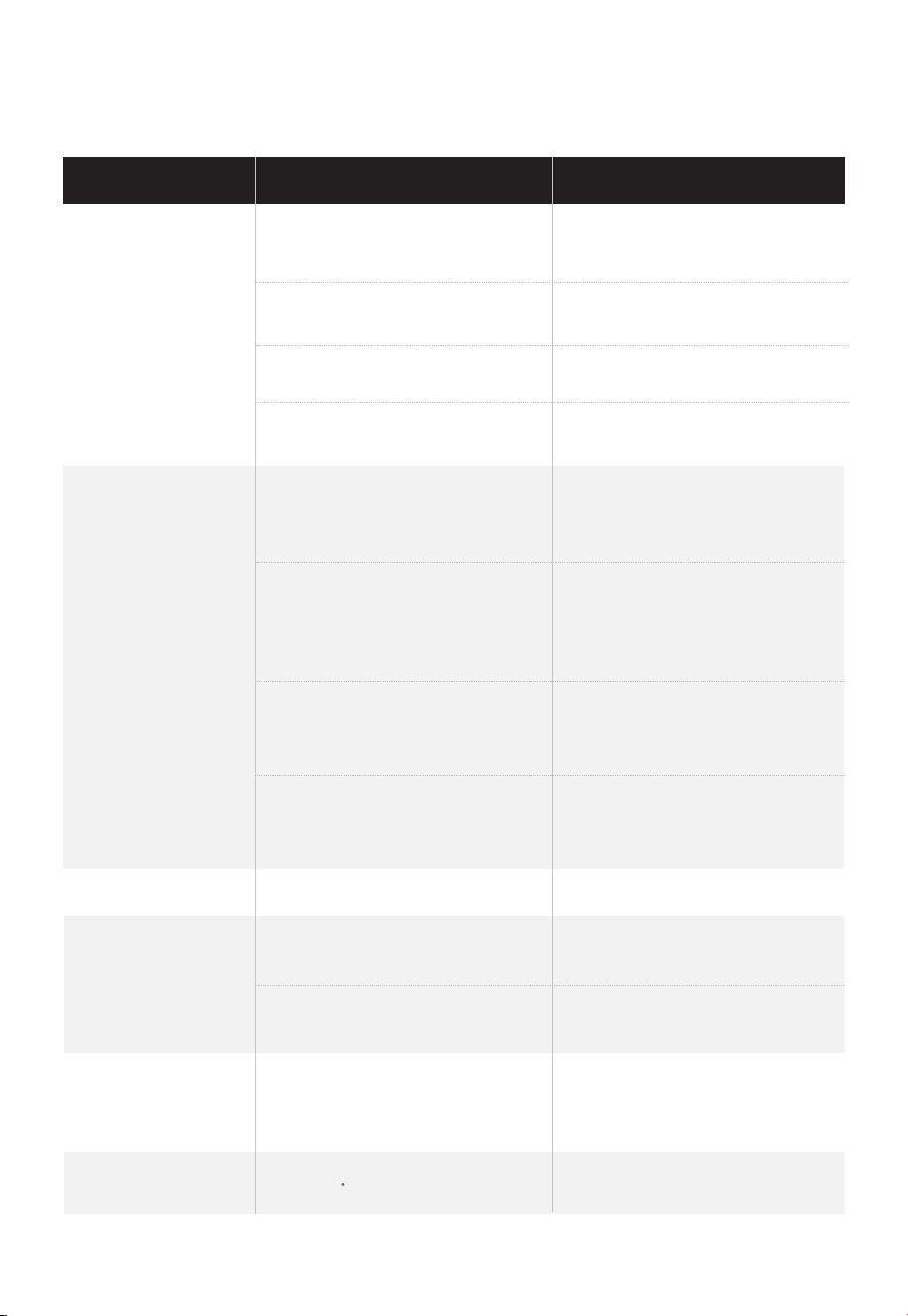
The main circuit breaker
has tripped
Check if the circuit breaker
has tripped.
F01
TROUBLE SHOOTING
Trouble Possible Cause Remedy
There is no respond
after power wire is
plugged in
Press the "Pause/Cancel"
button to clear the current state.
The machine is in power-saving
mode
Open the oven door to
activate it.
Replace with another socket.
When selecting a new function,
the currently selected mode is
not cleared.
There is no respond
after pressed the
button
In order to save energy, the
machine enters power-saving
mode after being powered on
or in standby for a period of
time.
Opening the oven door
will restore it.
The eective button area is in
the center of the text.
Slow heating Not selecting high heat heating. Select maximum heat heating.
The water tank is not installed
properly.
Please install the water tank
properly.
The oven temperature is
higher than the selected
function operating tempera-
ture range.
Please wait for the oven to
cool down and the F01 to
disappear before using it
again.
There is a problem with the
socket
The plug is not inserted properly
Insert the plug firmly.
It may be mistakenly assumed
that a key has been touched
when the touch force is too
small.
Press the button with a little
force.
Press outside the eective
key area.
Unable to generate
steam or display
“low water” warning
The water tank is empty.
Please add purified water to
the water tank.
High temperature
Oven temperature higher
than 150 F.
Under normal circumstances,
be careful of burns.
32

After prolonged heating,
the temperature of the casing
will increase.
Under normal circumstances,
be careful of burns.
TROUBLE SHOOTING
Trouble Possible Cause Remedy
There are water
droplets inside the
door.
Please extend the heating time
appropriately.
Wipe it with a dry cloth.
The heating time is too short.
The food is not hot
enough.
When heating continuously or
heating a small amount of food,
the temperature inside the oven
will rise. In order to protect the
product, the output power will
be reduced, which is not a
malfunction.
Please lower the temperature
appropriately before using it
again.
Please initiate menu 50 for
descaling.
Display "Descaling".
No action is needed, this is
normal circumstances.
This is because there is a large
amount of steam, and during
the process of exhaust, there
is high pressure which creates
the sound.
No action is needed, this is
normal circumstances.
Under normal circumstances,
please use pure water.
The steam function has been
used for more than 30 hours.
When using steam,
the sound of exhaust
is loud.
Some of the water vapor in
the oven will condense on the
inner surface of the door.
There is white
powder around the
steam outlet.
The white powder belongs to
the scale of tap water and is
harmless.
The casing is very
hot.
When using steam,
there is a sound of
water pumping.
The intermittent pumping
sound during the working
process is caused by the water
pump.
33

说明书变更点记录
1. 童锁详细步骤+图示;
2. 待机模式解释,预热描述;
3. 增加水盒加水、加柠檬酸详细指引;
4. 增加消毒杀菌、清除水垢、腔体清洁贴心功能的详细操作示意;
5. 增加自动菜单推荐附件及层级;
6. 增加常见故障指引;
7. 增加了面板介绍、屏幕内symbol介绍。
2023.11.13
1. P13型号页电频电压更改前:120 V ~60Hz
变更后:120 VAC ~60Hz
2. P16安装图地面到放置的高度变更前:91.6cm
变更后:>36 in(91.4cm)
3.P05 警告语第7条变更为:HOT CONTENTS CAN CAUSE SEVERE BURNS.
DO NOT ALLOW CHILDREN TO USE THE MICROWAVE. Use caution when
removing hot items.
2023.11.27
1. P24自动菜单表格对应的31菜单变更前:Utensil Sterilization
变更后:Deep Cleaning ;
2. P27的自动菜单31变更前:Utensil Sterilization
变更后:Deep Cleaning ;
所有对应的菜单描述P27同步更改.
2023.12.1
P26-27功能点13-5和13-6操作步骤按自动菜单单词变更前:press;
变更后: Press
2023.12.5
P16 变更前:The minimum installation height is 3.0ft(91.6cm)
变更后:The minimum installation height is 36 in (91.4cm).
2024.3.4
P11增加器皿说明:When using microwave function after using high temperature baking
function (AirFry, combi. bake), should pay attention to the high temperature inside the cavity
and do not place plastic containers immediately to avoid melting of plastic containers at high
temperature. Please put ceramic, glass or other temperature-resistant containers, or open the door
to dissipate the heat, and wait for the cavity to dissipate the heat for 30 minutes to cool down
before placing plastic containers.

1. 童锁详细步骤+图示;
2. 待机模式解释,预热描述;
3. 增加水盒加水、加柠檬酸详细指引;
4. 增加消毒杀菌、清除水垢、腔体清洁贴心功能的详细操作示意;
5. 增加自动菜单推荐附件及层级;
6. 增加常见故障指引;
7. 增加了面板介绍、屏幕内symbol介绍。
2023.11.13
1. P13型号页电频电压更改前:120 V ~60Hz
变更后:120 VAC ~60Hz
2. P16安装图地面到放置的高度变更前:91.6cm
变更后:>36 in(91.4cm)
3.P05 警告语第7条变更为:HOT CONTENTS CAN CAUSE SEVERE BURNS.
DO NOT ALLOW CHILDREN TO USE THE MICROWAVE. Use caution when
removing hot items.
2023.11.27
1. P24自动菜单表格对应的31菜单变更前:Utensil Sterilization
变更后:Deep Cleaning ;
2. P27的自动菜单31变更前:Utensil Sterilization
变更后:Deep Cleaning ;
所有对应的菜单描述P27同步更改.
2023.12.1
P26-27功能点13-5和13-6操作步骤按自动菜单单词变更前:press;
变更后: Press
2023.12.5
P16 变更前:The minimum installation height is 3.0ft(91.6cm)
变更后:The minimum installation height is 36 in (91.4cm).
2024.3.4
P11增加器皿说明:When using microwave function after using high temperature baking
function (AirFry, combi. bake), should pay attention to the high temperature inside the cavity
and do not place plastic containers immediately to avoid melting of plastic containers at high
temperature. Please put ceramic, glass or other temperature-resistant containers, or open the door
to dissipate the heat, and wait for the cavity to dissipate the heat for 30 minutes to cool down
before placing plastic containers.
2024.6.3
1.P17控制面板丝印变更,对应的操作部分丝印也变更;
2.P17显示屏取消单位kg,g;
3.P18微波功能单位显示改成%,对应的操作显示也变更
4. P18取消按确认键快速启动功能。
5. 全文语句优化;
6. P14 加水,纯净水温度变更为104
°F