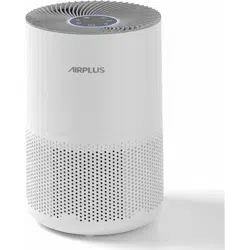
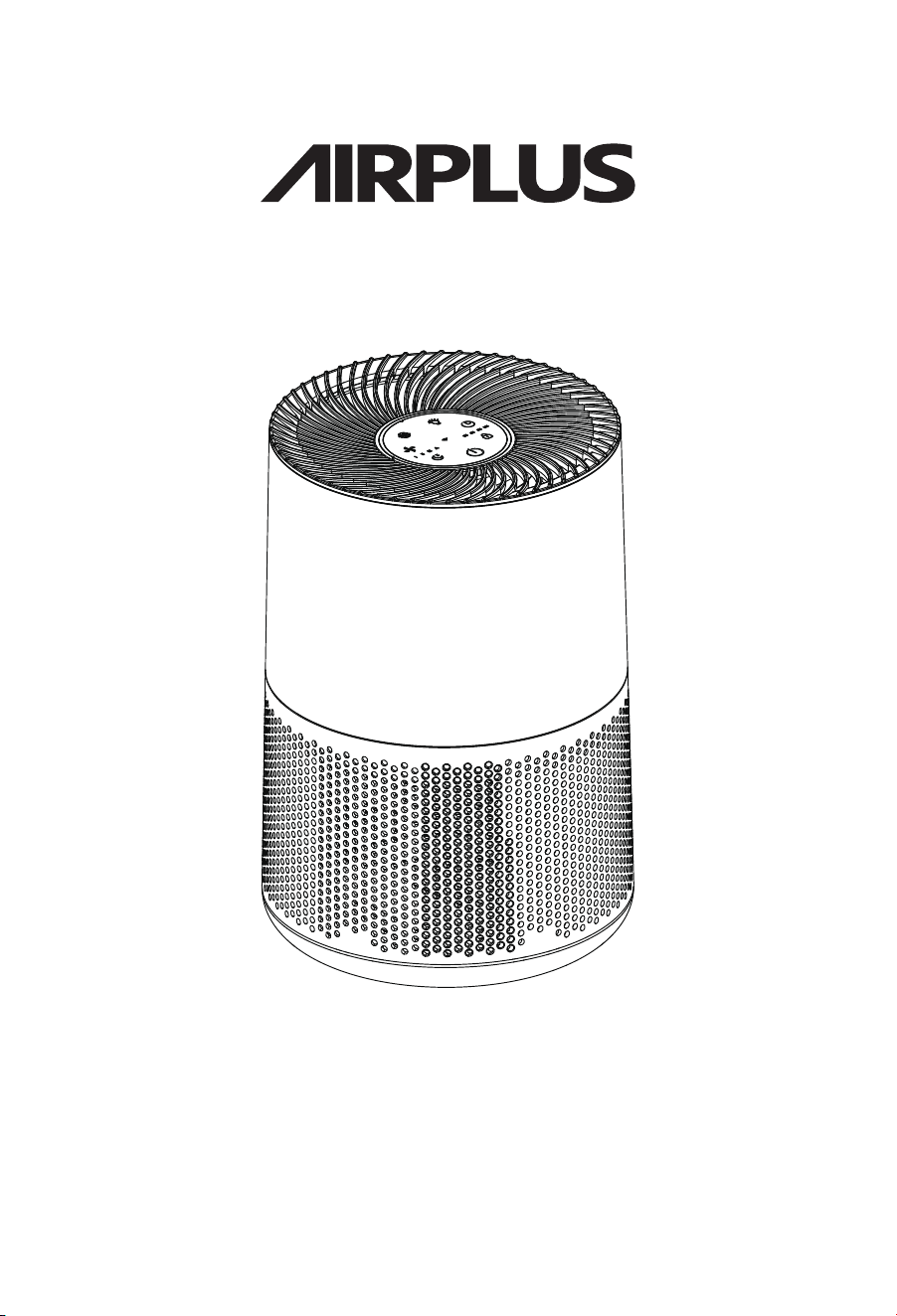
AIR PURIFIER
Model:KJ260
The illustration of the appearance is just one example.
The company reserves the right to make design changes to the product.
The purchased product may have been improved and may not exactly
match the illustration shown in the manual.
However, this will not affect the performance or usage method.
USER MANUAL
Before use, please read the instructions carefully and follow
the requirements stated in the instructions.
After reading, please store them properly for future reference.

CONTENTS
01
02
04
06
07
08
Safety Precautions
Product Function
Cleaning and Maintenance
Product List
Product Parameter
Troubleshooting
RoHS Explanation
Safety Precautions
01
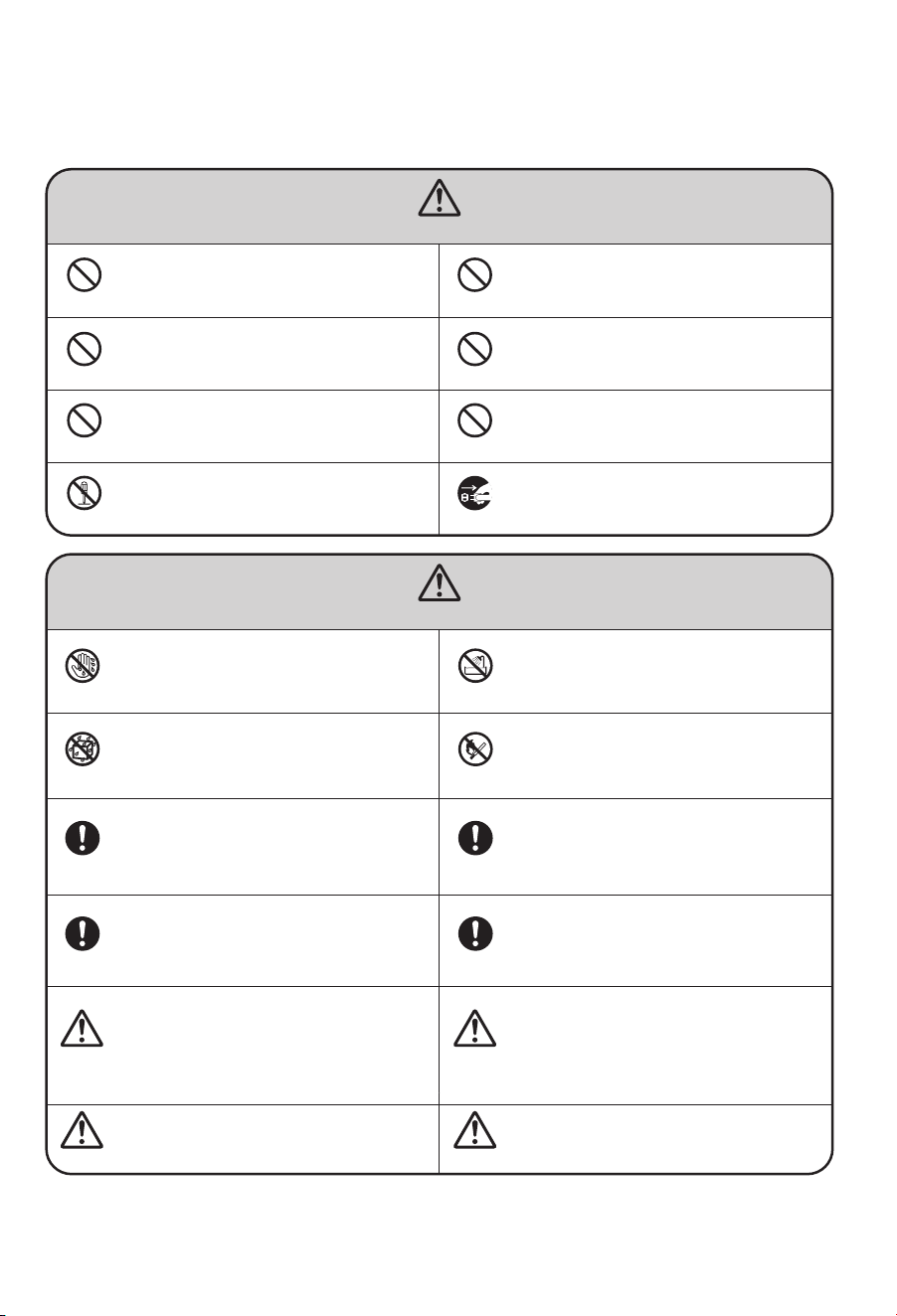
When using this product, you must comply with the following safety precautions and
read the relevant instructions carefully!
Note: The warranty will be void if the product is damaged due to improper use.
WARNINGS
NOTICE
Note
Note
Note
Prohibited
Prohibited
Prohibited
Prohibited
Strictly
Implement
Strictly
Implement
Strictly
Implement
Strictly
Implement
Strictly
Implement
Strictly
Implement
Strictly
Implement
Strictly
Implement
Prohibited
Prohibited
Prohibited
Prohibited
Note
Do not place rods or other metal objects in the air outlet
or openings.
Doing so may cause contact with internal parts,resulting in
electric shock or injury.
Do not use power supplies or connect devices that exceed
the specified values. Only use 220V AC power.
Using universal sockets or devices that exceed the specified
values may cause overheating and fire accidents.
Do not disassemble or modify this air purifier and
disinfectant.
Disassembling or modifying electrical appliances may result in
electric shock, malfunction, or fire.
Do not touch the power plug with wet hands.
Doing so may result in electric shock.
Do not get the body wet. Do not get it wet!
Please clean the power plug regularly.
Before starting the air purifier and disinfector, please
ensure that the plug is fully inserted into the power socket.
If this air purifier and disinfector causes interference with
radio or television reception, try one or more of the
following measures to correct the interference:
To ensure that the product achieves good circulation during
operation, make sure that the distance between the air
inlet and outlet of the product and any obstacles is no less
than 35 centimetres.
Otherwise, it may cause electric shock and fire accidents due to
short circuits.
If dust accumulates on the power plug, moisture may damage
the insulated part of the plug, which could lead to a fire
accident.
Unplug the power plug and wipe it clean with a dry cloth.
Do not use a wet cloth! If the appliance is not used for a long
period of time, unplug the power plug.
If the plug is not fully inserted into the socket, it may cause
electric shock and overheating, and even lead to a fire accident.
Never use a damaged plug or a loose power socket.
1、Readjust or reorient the receiving antenna.
2、Increase the distance between the air purifier and disinfector
and the radio/television receiver.
3、Connect the power supply of this unit and the receiver to
different sockets.
4、For assistance, contact your dealer or a professional radio/
television technician.
Before cleaning the appliance, make sure that the power
supply has been disconnected.
Otherwise, the air purifier and disinfector may suddenly start
operating, causing electric shock and overheating, and even a
fire.
Do not use this air purifier and disinfectant in high-
temperature, humid, or wet environments, such as
bathrooms.
The air purifier and disinfectant may leak electricity, causing
electric shock or fire accidents.
When unplugging the power cord, hold the plug and do
not pull on the cord.
Pulling directly on the cord may cause a short circuit or
damage to the cord, resulting in a fire or electric shock.
When using this air purifier and disinfector together with
an electric heater, the room must be ventilated.
Otherwise, carbon monoxide poisoning may occur.
This air purifier and disinfector cannot remove carbon
monoxide.
Before moving the air purifier and disinfector, please
disconnect the power supply.
Prohibited for use by unsupervised infants and disabled
persons, and prohibited for children to play with.
Do not move the product by pulling on the power cord.
Do not move the machine while it is running.
Do not allow volatile substances or combustible items,
such as tobacco or sparks, to enter the machine.
Doing so may result in a fire accident.
Do not damage the power cord or socket.
When using this device, do not bundle the cord together.
Damaged cords may cause electric shock, short circuits, or fires.
Do not cut, modify, excessively twist, kink, or pull the cord, or
place heavy objects on the cord socket.
Do not use solvents such as benzene or thinners to clean
the air disinfectant purifier, and avoid contact with
insecticide sprays.
Otherwise, the air disinfectant purifier may crack and cause
damage, or even short-circuit, resulting in electric shock or fire
accidents.
Do not use this air purifier and disinfectant in areas where
there are oily particles.
For example, using it in a kitchen may cause the device to
break and result in injury.
Do not use this air purifier and disinfectant in rooms where
fumigants have been used.
Chemical residues may accumulate inside the machine and be
released from the air outlet, posing a health hazard.
After using fumigants, thoroughly ventilate the room before
using this air purifier and disinfectant.
This air purifier and disinfectant should not be used as a
ventilation or exhaust device.
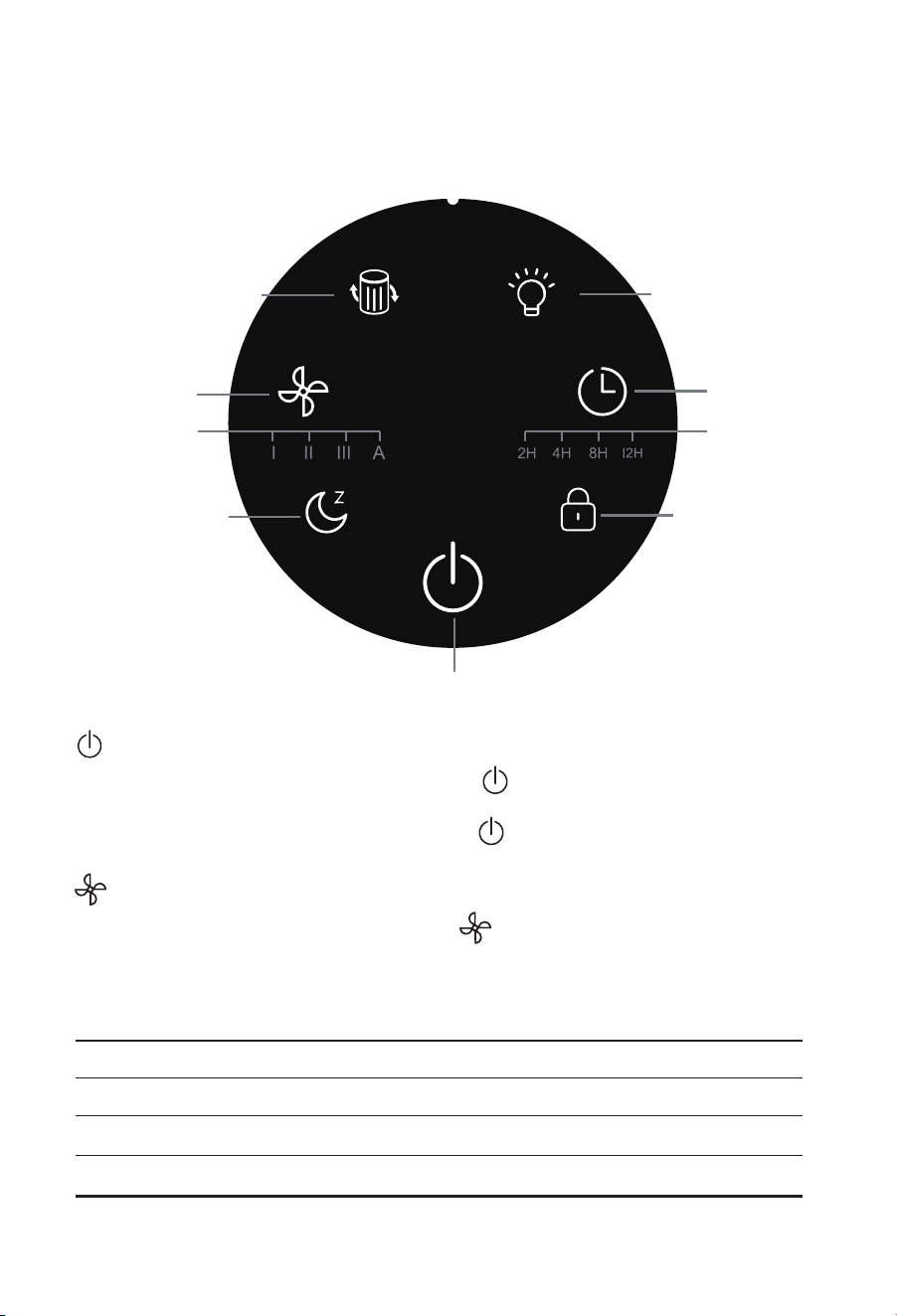
ON/OFF
Power-on function: Lightly touch the power button .The indicator light turns on, the
machine starts running, and the wind speed runs at the default level 2.
Power-off function:Lightly touch the power button to shut down the device, which will
then enter standby mode.
Speed Mode
Gently press the wind speed adjustment button to cycle through the automatic mode,
first gear, second gear, and third gear settings.
Automatic mode: The air purifier automatically adjusts the setting based on the PM2.5
monitoring data from the sensor. (The setting is not displayed.)
PM2.5 is 0-35ug/m²
PM2.5 is 36-75ug/m²
PM2.5 is 76-115ug/m²
PM2.5 is >116ug/m²
Automatically adjusts to sleep mode
Automatically adjusts to 1 mode
Automatically adjusts to 2 mode
Automatically adjusts to 3 mode
Product Function
02
ON/OFF
Speed Indicator
Timer Indicator
Sleep Button
Kid Lock
Timer Button
Wind Speed
Filter Replacement
Screen Light
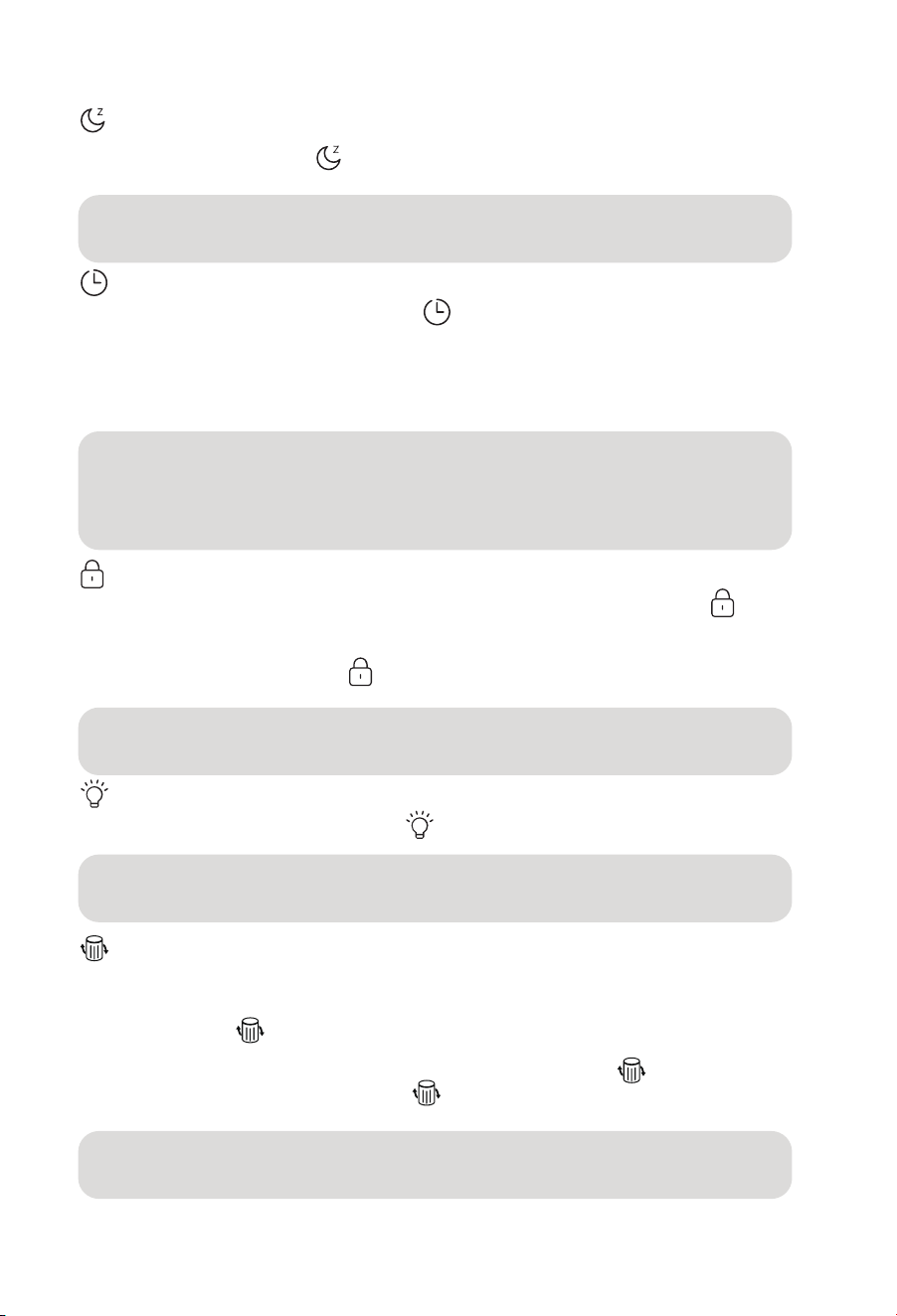
Sleep Mode
Lightly touch the sleep button The sleep mode button indicator light turns on, the fan
speed is set to the lowest setting, and all lights turn off after 1 second.
Timer Function
1、Repeatedly tap the timer function button to select the desired machine running time
between 2h-4h-8h-12h.
2、When the timer function is running, the timer button indicator light illuminates. At the
same time, the corresponding time display light also illuminates.
3、When the set time has elapsed, the machine will immediately shut down and enter
standby mode.
Kid Lock
Kid lock function activation and deactivation: Press and hold the kid lock button for 3
seconds. The kid lock indicator light will illuminate, and the machine will activate the kid
lock function, locking the display and buttons so that no operations can be performed.
Press and hold the kid lock button again for 3 seconds, and the machine will exit the kid
lock function,allowing the display and buttons to operate normally.
Screen Light Display Function
Light touch screen lighting control button ,the screen display lights are off.
Filter Replacement Reminder Function
1. The indicator light turns on, prompting the user to replace the filter cartridge.
2. After the light turns on, replace the filter cartridge and press and hold the filter cartridge
replacement button for 3 seconds. The indicator light will then turn off. Before the light
turns on, the user should replace the filter cartridge on their own. After replacing the filter
cartridge, first press and hold the filter cartridge replacement button for three seconds.
The indicator light will turn on. Then press and hold for another 3 seconds, and the
indicator light will turn off, indicating that the reset was successful
Note: In sleep mode, lightly touch any key to restore the display, then press another
key to activate the corresponding key function.
Note: When the kid lock function is enabled, the kid lock can be operated,
but other buttons cannot be operated (including the power button).
Note: When the timer function is running, it does not affect the normal operation of
other buttons. If the timer duration is changed while the timer function is running, it
will restart counting based on the newly set duration. (When the timer is set to 4
hours, after 2 hours, the 2h indicator light will turn on, and the 4h indicator light will
turn off.)
Note: When the screen display light is off, press any other button (except the
power button) to turn the display light back on.
Note:When the KJ260 machine has been running for 1,500 hours, the filter element
indicator light will illuminate.
03

Clean the Body
Ambient Light Indicator
Based on the sensor's monitoring of PM2.5 in the air, the ambient lighting uses different
colours to alert users to the air quality.
Use a soft cloth to wipe away stains.
For stubborn stains that are difficult to remove, use a soft cloth dipped in a moderate
amount of neutral detergent to wipe them off
Cleaning and Replacing the Filter
① The built-in programme reminds you when to replace the filter, but due to differences in
the degree of pollution in the actual application environment, the service life of the filter
will also vary. You can judge when to replace it in a timely manner based on the volume of
the sound produced by the machine and the odour.
②When the HEPA filter reaches the end of its service life, it should be replaced in a timely
manner to avoid affecting purification efficiency and effectiveness. (It is recommended to
replace it every three months.)
Notice:Avoid using hard objects that may scratch the machine casing during
maintenance. When removing the filter cover, please follow the instructions
in the manual to avoid damaging the machine components.
*Depending on the place of use and method of use (e.g., households with many
smokers), the filter replacement cycle may be shortened. In any case, please replace
the filter promptly when the effect is not satisfactory.
*Please dispose of used filter screens as non-combustible waste.
Recommendation: Clean the primary filter once every month. If the operating
environment is poor, increase the cleaning frequency.
PM2.5 is 0-35ug/m²
PM2.5 is 36-75ug/m²
PM2.5 is 76-115ug/m²
PM2.5 is >116ug/m²
Ambient light display blue
Ambient light display green
Ambient light display orange
Ambient light display red
Cleaning and Maintenance
04
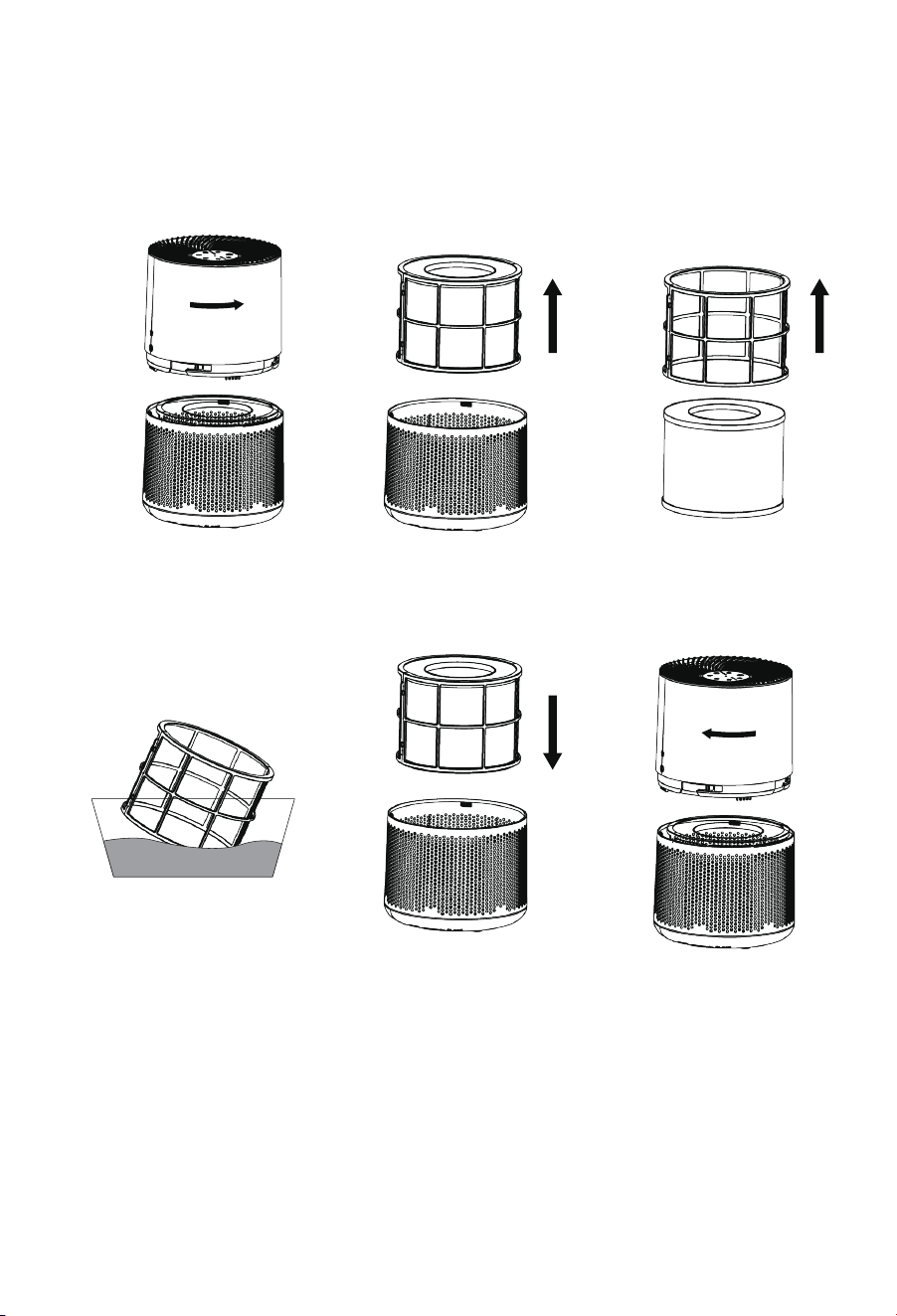
05
1. Press firmly and turn
counterclockwise to open
the machine.
2. Remove the primary
filter and HEPA filter.
3. Remove the primary
filter from the top.
4. Clean the pre-filter 5. Reinstall the primary
filter and HEPA filter into
the machine after
combining them.
6. Press firmly and then
tighten clockwise.
Cleaning the Pre-filter :
Turn
counterclockwise
Turn clockwise
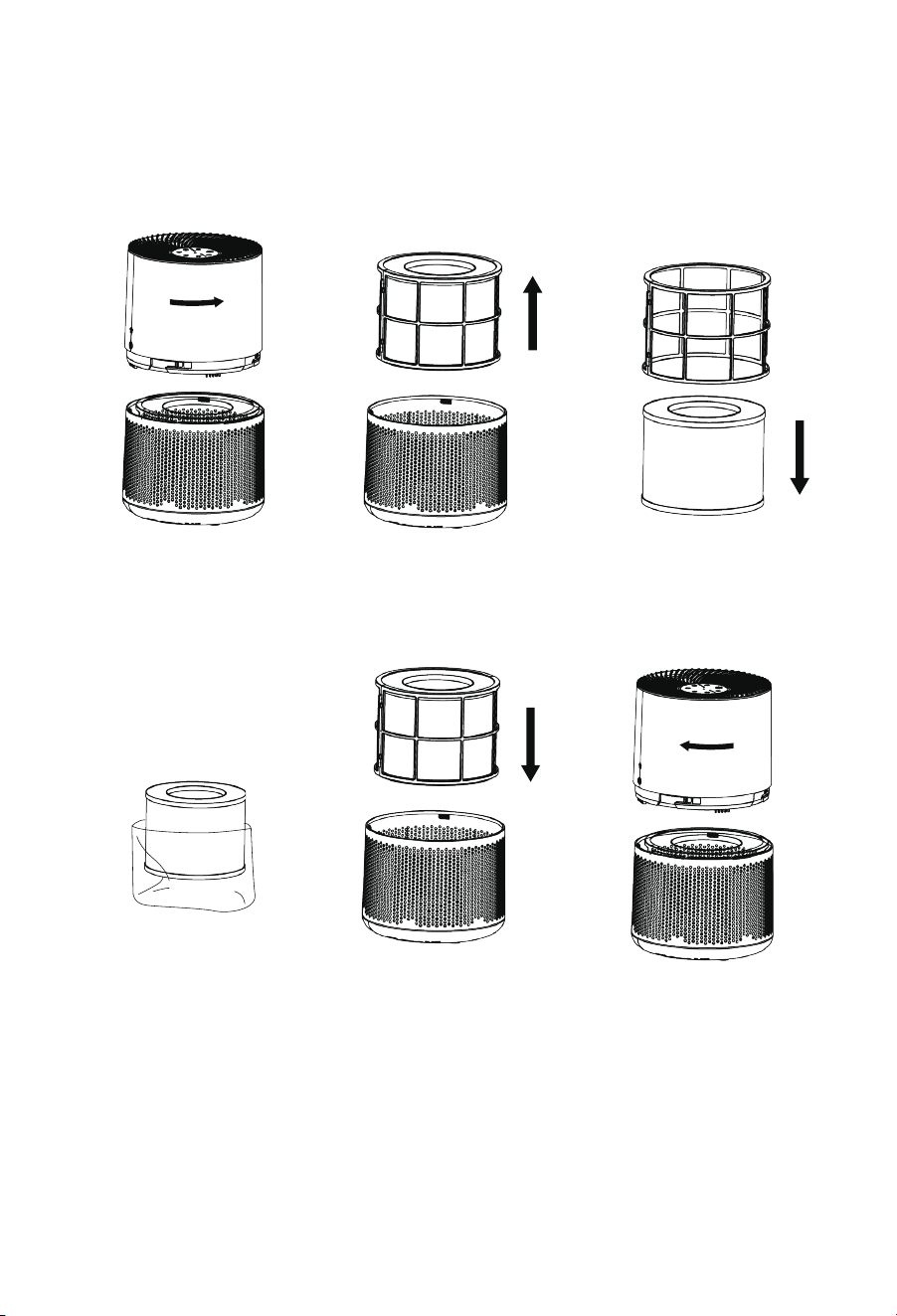
06
Product List
Air Purifier*1
Instruction Manual*1
Pre-filter*1(already installed in the machine)
HEPA Filter*1(already installed in the machine)
1、Press firmly and turn
counterclockwise to
open the machine.
2、Remove the primary
filter and HEPA filter.
3、Remove the HEPA filter
from the top.
4、Remove the packaging
bag from the HEPA filter
or replace it with a new
HEPA filter.
5、Reinstall the primary
filter and HEPA filter into
the machine after
combining them.
6、Press firmly and then
tighten clockwise.
Installation and Replacement of HEPA Filter:
Turn
counterclockwise
Turn clockwise
07
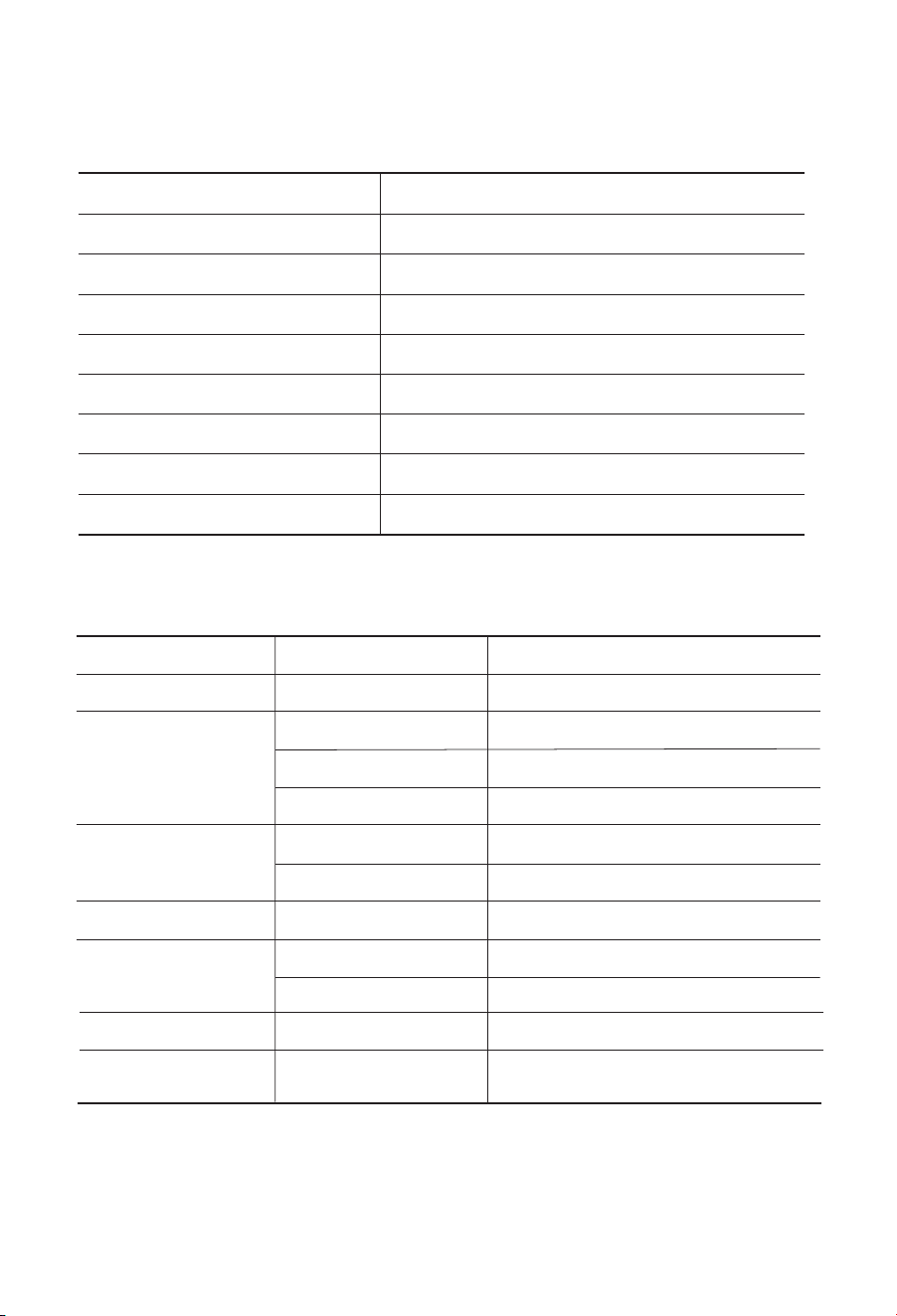
Product Parameter
Model
Adaptor
Rated Voltage
Rated Power
Working Area
CADR
Noise
Product Size
Product Weight
KJ260
100-240V 50/60Hz 24V-1.2A
DC24V
25W
18-31m²
260m³/h
≤63dB(A)
229*229*342mm
2.7kg
Troubleshooting
Bad touch of operation panel Control panel damage
Sensor failure
The filter screen exceeds its service life
The window is not closed
The filter exceeds its service life
Damage of fan
No power
Improper installation of filter
Drage of impeler
Many impurities in the filter
The wind wheel is damaged in the
process of transportation
Please contact the customer service center or dealer for repairs.
Please contact the customer service center or dealer for repairs
Replace the filter
Close indoor windows
Replace the filter
Please contact the customer service center or dealer for repairs.
Put through power supply
Check and install the filter in place
Please contact the customer service center or dealer for repairs
Clean filter
Please contact the customer service center or dealer for repairs.
The air index indicator
panel is abnormal
Air volume small
The air purifier machine
will not start
The noise of the air purifier
is too loud
Abnormal wind
Vibrates greatly
Fault Phenomenon Possible Reasons Solution
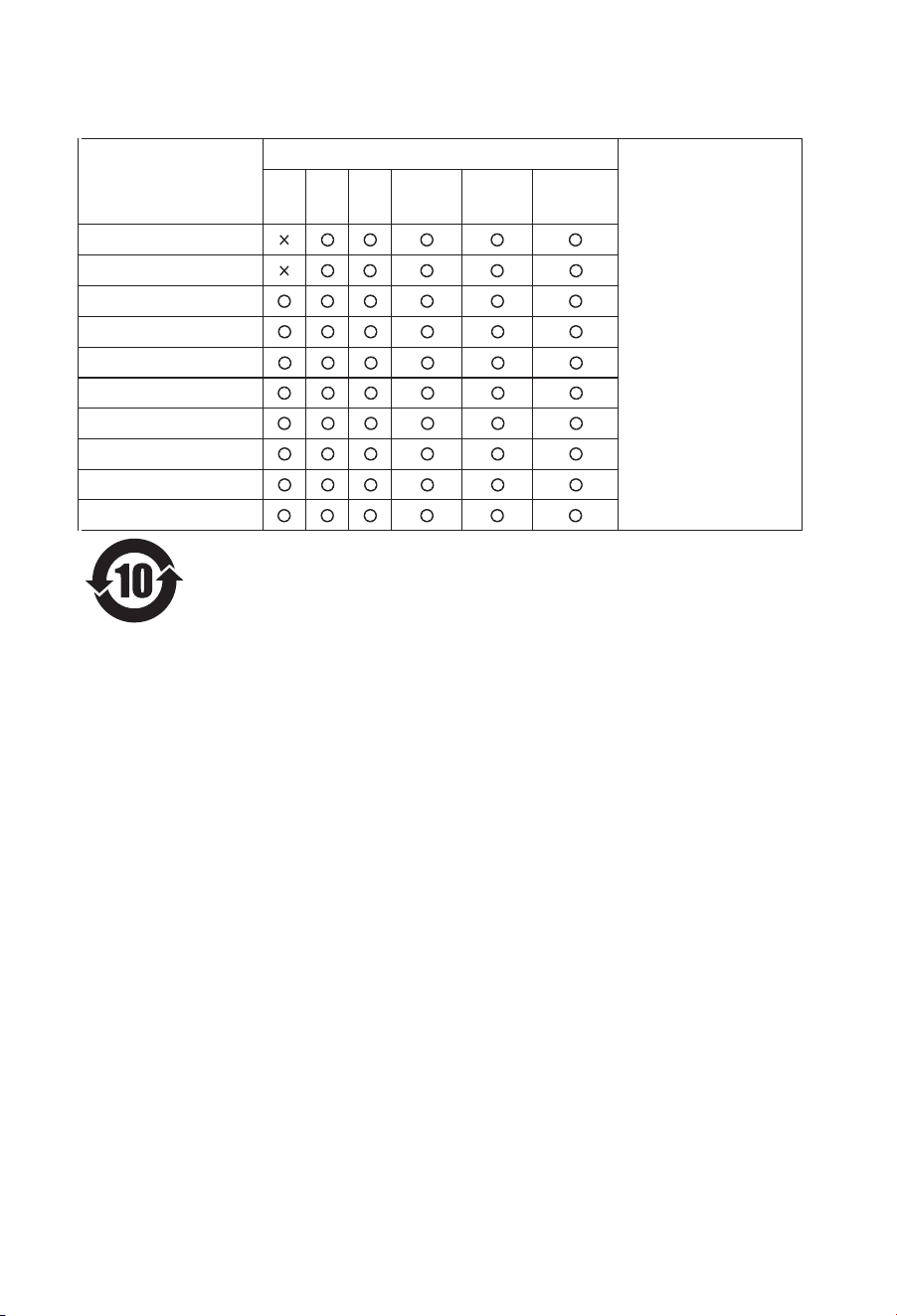
The environmental usage period of this product is 10 years. The environmen-
tal usage period of replaceable parts may differ from that of the product. The
‘environmental usage period’ is only valid when the product is used in
accordance with the policies described in this manual.
RoHS Explanation
○ Indicates that the
content of the
hazardous substance in
all homogeneous
materials of the
component is below the
limit requirements
specified in
GB/T26572-2011.
× Indicates that the
content of the
hazardous substance in
at least one homoge-
neous material of the
component exceeds the
limit requirements
specified in
GB/T26572-2011.
08
electronic motor
electronic components
metal parts
plastic parts
fan
filter assembly
rubber body
Power cord and connecting cable
sponge parts
fasteners
Spare name
Harmful substances or elements
Pb Hg Cd Cr(VI) PBB PBDE
AIRPLUS Air Purifier
Manufacturer: Ningbo Aquart Environmental Appliances Co., Ltd.
Manufacturing Address: No. 189, Songpu 2nd Road, Binhai Economic
Development Zone, Longshan Town, Cixi City, Ningbo City, Zhejiang Province
Official Website: http://www.airplus-world.com
s.frankie@aoutkehome.com
E-Mail :
DO NOT RETURN!
Please contact our customer service team for help first.
