
We continue to be committed to provide you tools with competitive price.
"Save Half", "Half Price" or any other similar expressions used by us only represents an
estimate of savings you might benefit from buying certain tools with us compared to the major
top brands and does not necessarily mean to cover all categories of tools offered by us. You
are kindly reminded to verify carefully when you are placing an order with us if you are
actually saving half in comparison with the top major brands.
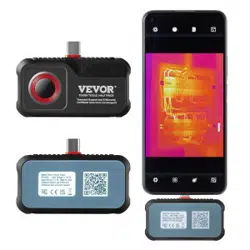
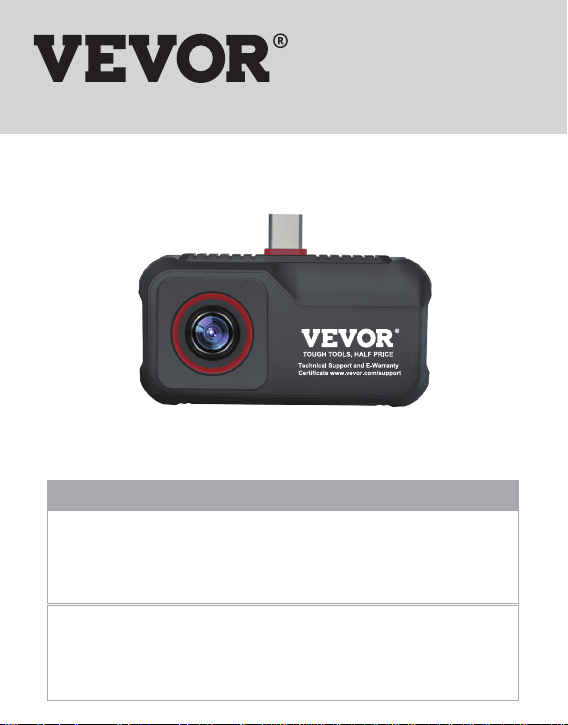
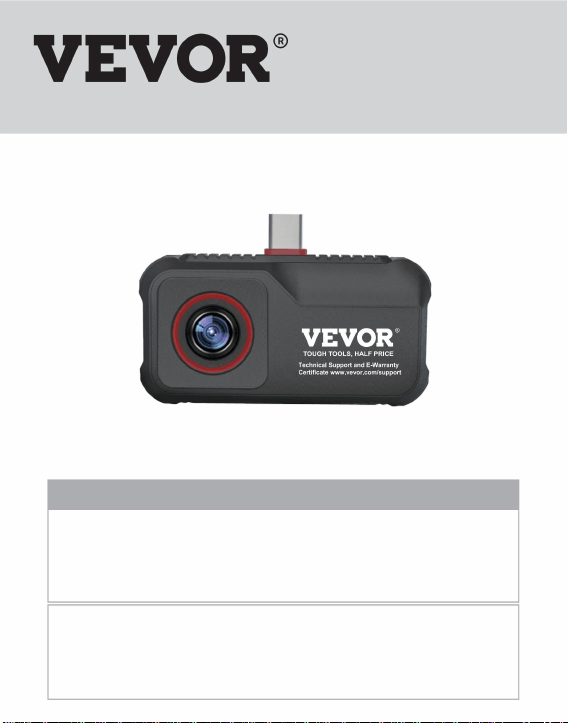
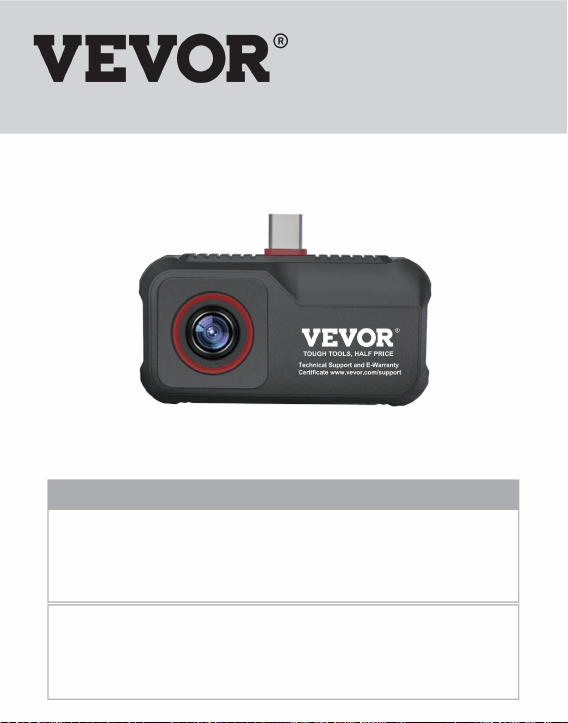
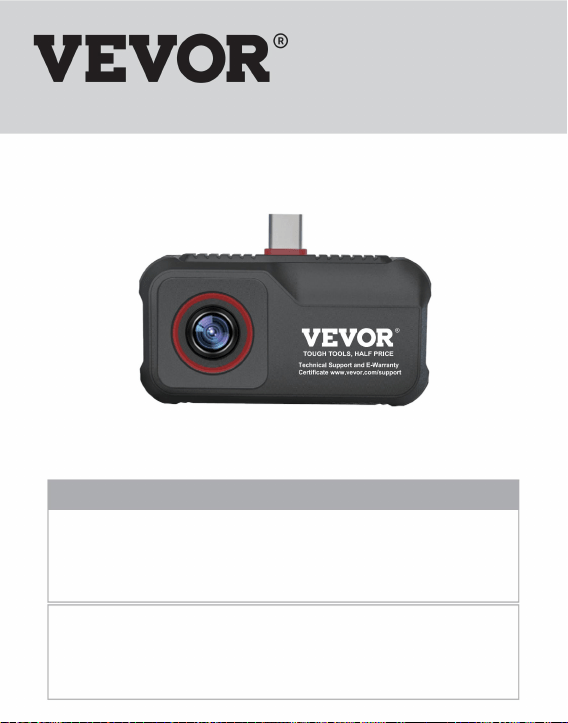
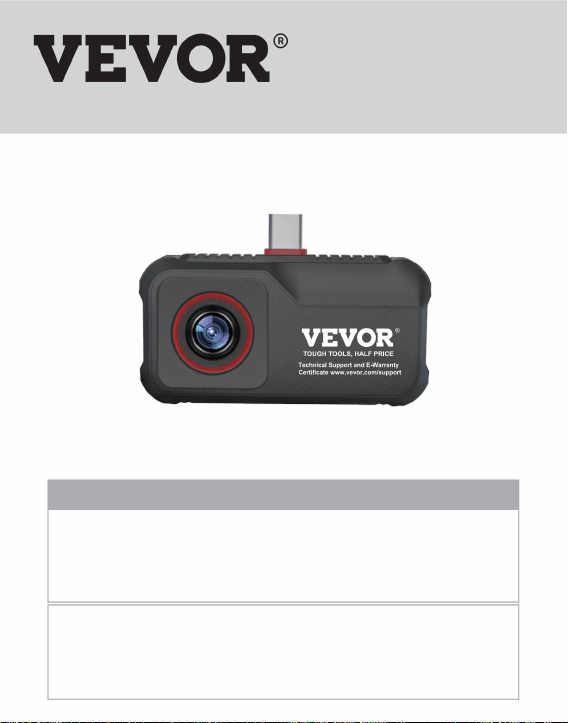
Smart Mobile Phone Thermal Imager
MODEL:HT-203U
Technical Support and E-Warranty Certificate www.vevor.com/support
TOUGH TOOLS, HALF PRICE
This is the original instruction , please read all manual instructions carefully before
operating . VEVOR reserves a clear interpretation of our user manual . The appearance
of the product shall be subject to the product you received . Please forgive us that we
won't inform you again if there are any technology or software updates on our product .
Have product questions? Need technical support? Please feel free to
contact us:
Technical Support and E-Warranty Certificate
www.vevor.com/support
NEED HELP? CONTACT US!
Operation Manual
Mobile Phone Thermal Imager


1. Precautions
2. Product Overview
2.1 Application Scenario
2.2 Main Functions
3. Product Use
3.1 Equipment Connection
3.2 Software Operation
3.2.1 Gallery, Photo and Video
3.2.2 Shutter Refresh
3.2.3 Temperature Measurement Analysis
3.2.4 Color Palette
3.2.5 Temperature Measurement Setting
3.2.6 Settings
4. Technical Parameters
Content
1
2
2
2
3
3
4
4
5
5
8
10
11
12

1
1. Precautions
Please read all the following information before using your
device to protect you and others from injury or damage to your
device.
(1) Do not expose the product in the sun and other high-inten-
sity radiation sources
(2) Do not touch or collide the detector window and lens with
hands or other objects;
(3) Do not touch the device and USB interface with wet hands;
(4) Do not scrub your equipment with thinner;
(5) Please pay attention to preventing static electricity;
(6) Do not disassemble the equipment. If there is any fault,
please contact our company for repair by professional
personnel.
2
2. Product Overview
2.1 Application Scenario
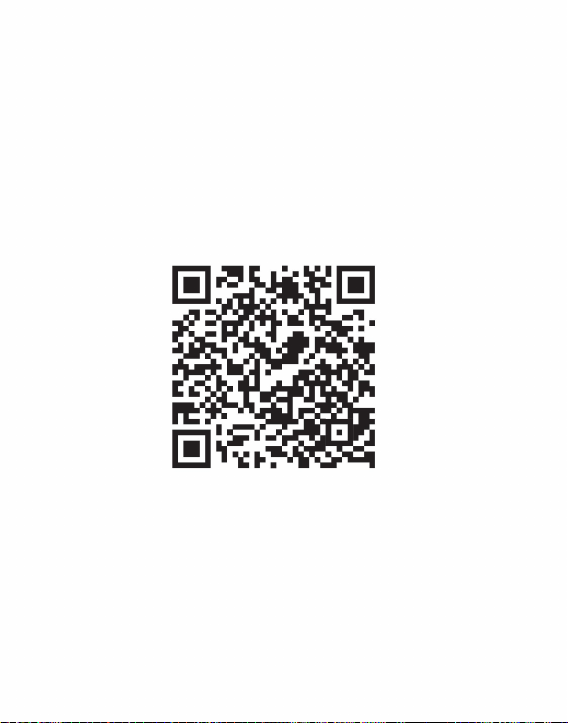
Using this smartphone thermal imager, you need to download
and install the smartphone thermal image "HTI-105/203U" APP
to achieve infrared observation and infrared temperature
measurement function through this APP.
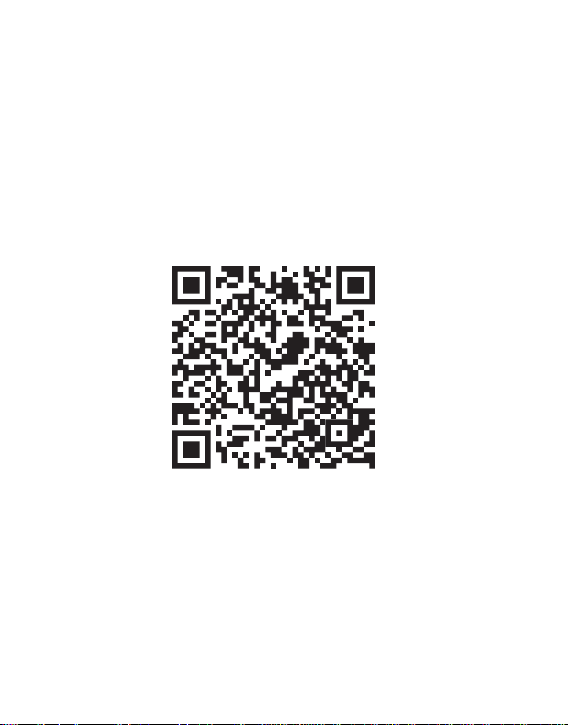
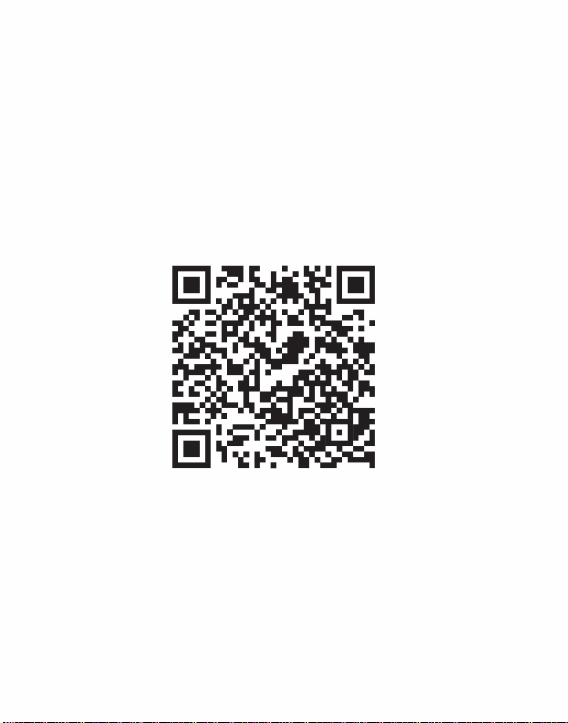
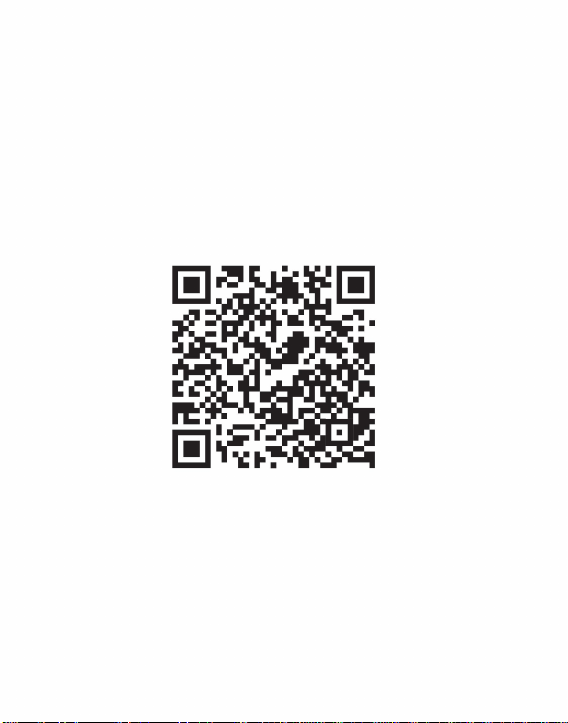
Scan QR code to download the App
2.2 Main Functions
The main functions are as follows:
(1) Open the application software of the infrared thermal imager
to perform infrared observation;
3
(2) Carry out infrared temperature measurement and tempera-
ture analysis;
(3) Take photos and videos;
(4) Action control and parameter setting of the mobile phone
thermal imager.
3. Product Use
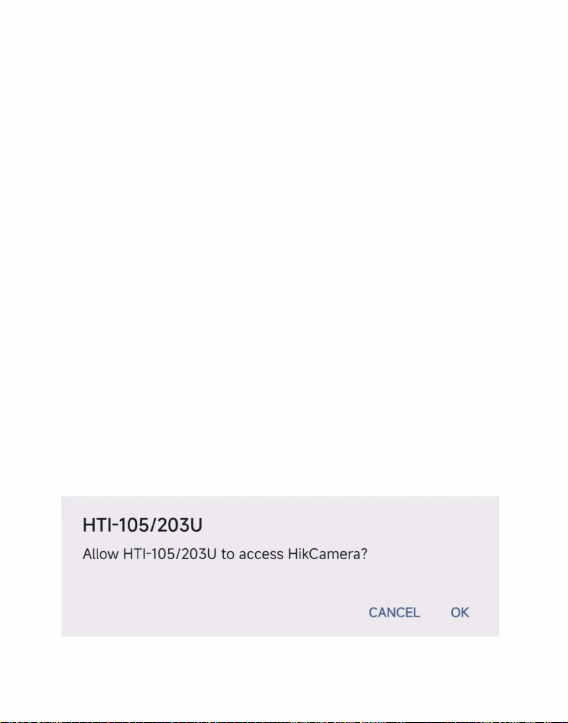
3.1 Equipment Connection
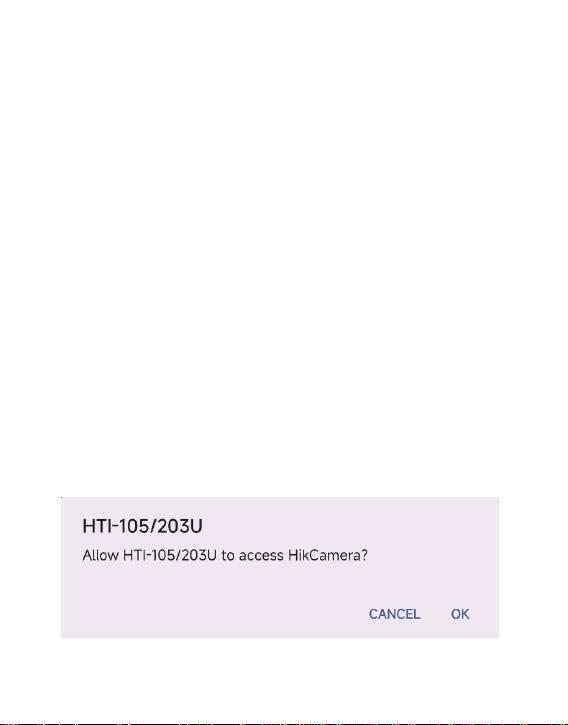
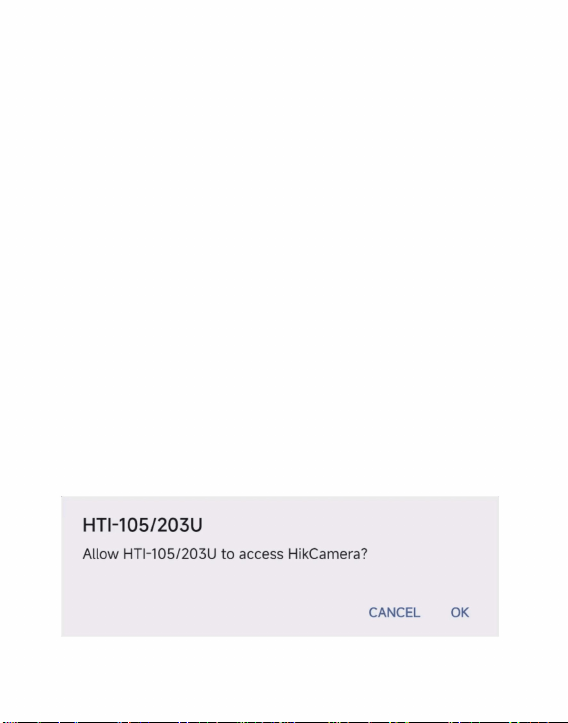
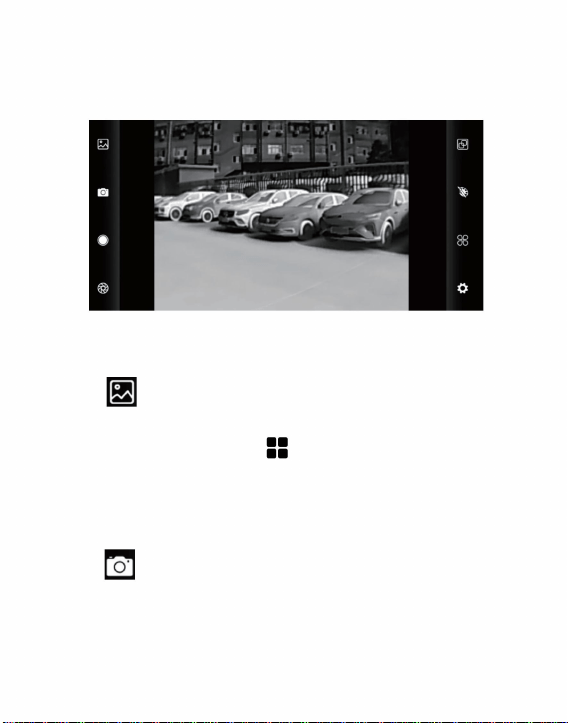
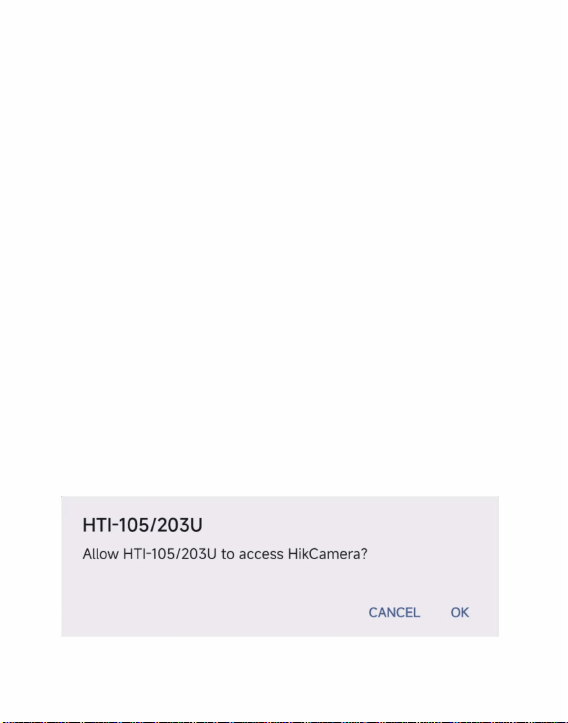
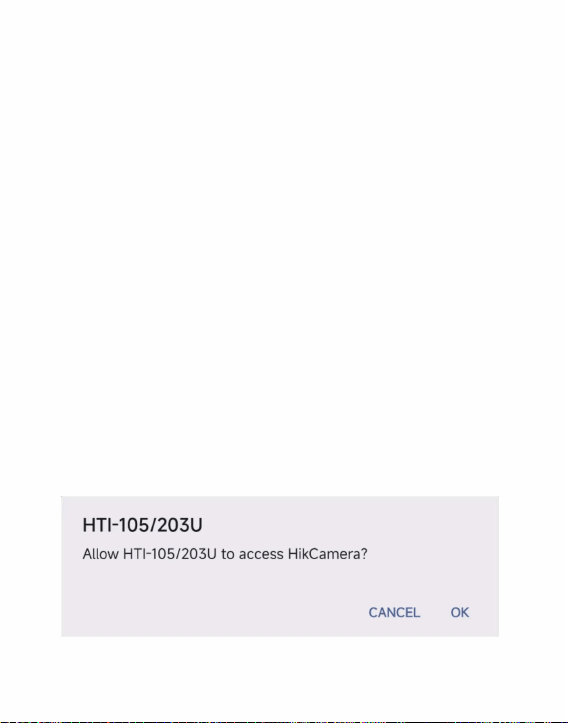
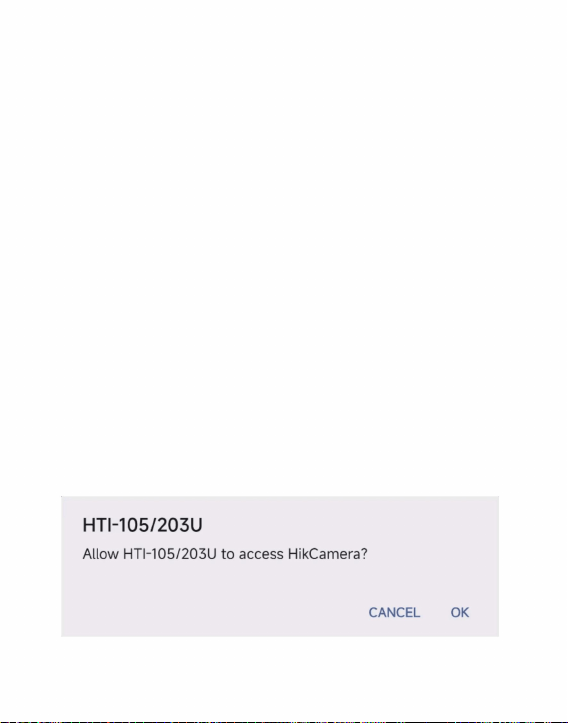
Insert the infrared thermal imager into the USB interface of the
mobile phone. The mobile phone will automatically recognize
the USB device and pop up a prompt. Check the box and click
"OK". The software will start the infrared thermal imager of the
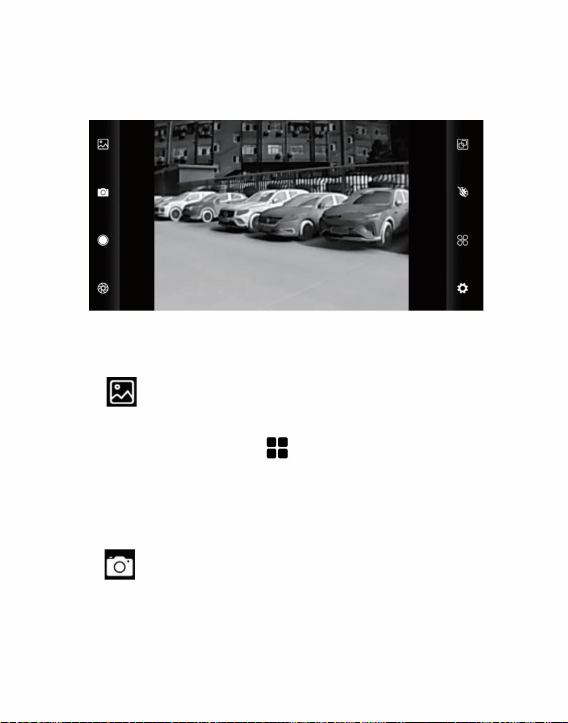
mobile phone, and the mobile phone screen will enter the
infrared observation screen.
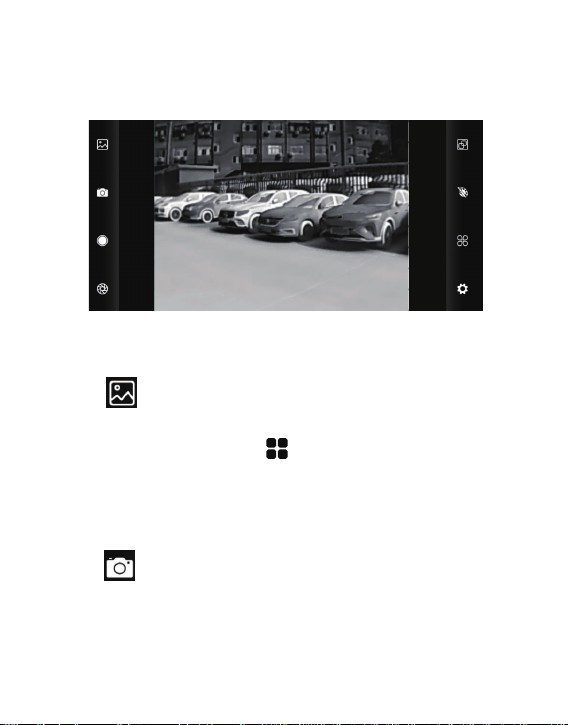
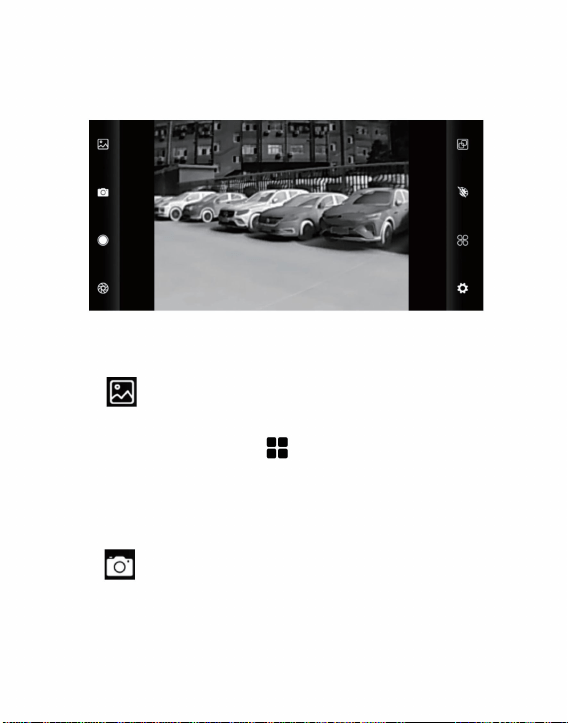
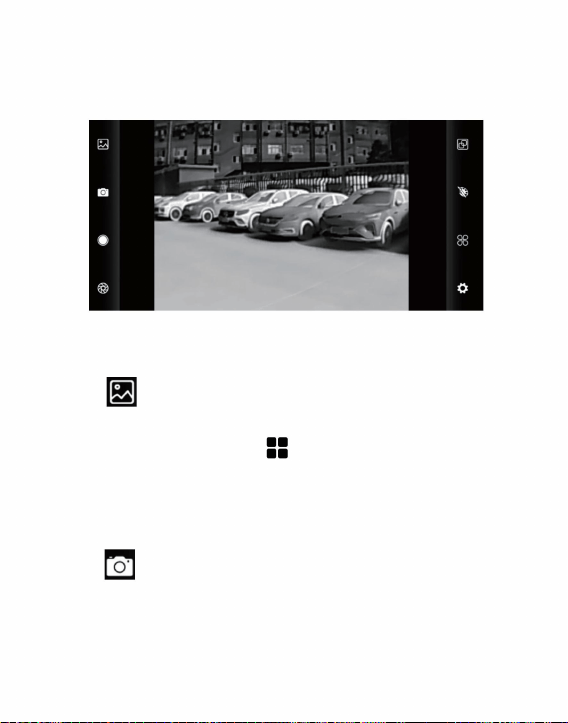
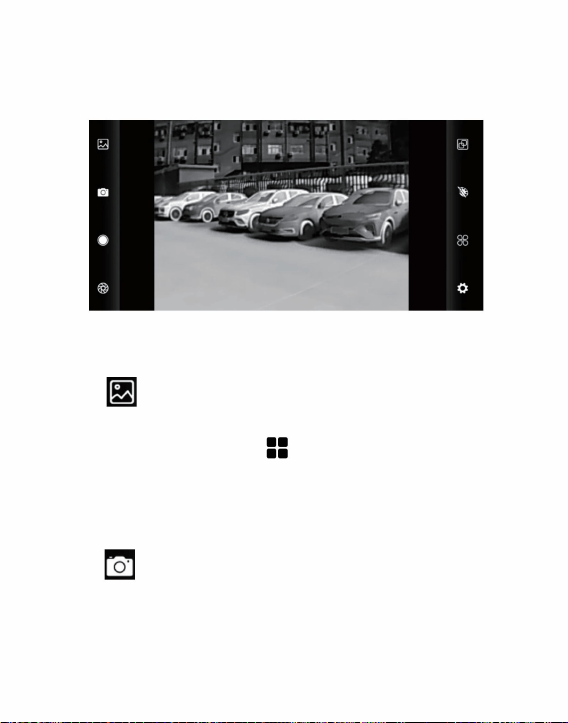
(1) “ ”Gallery: Click to view the image and video.
When entering the picture list/video list, check the
picture/video and click “ ” at the top right to delete
or share the picture/video.
Choosing to share can be used to read images or
videos.
(2) “ ”Photo: Save the current picture;
Photo preservation location: Open the required image in the
gallery to view the image location.
4
3.2 Software Operation
Temperature measurement analysis
3.2.1 Gallery, Photo and Video
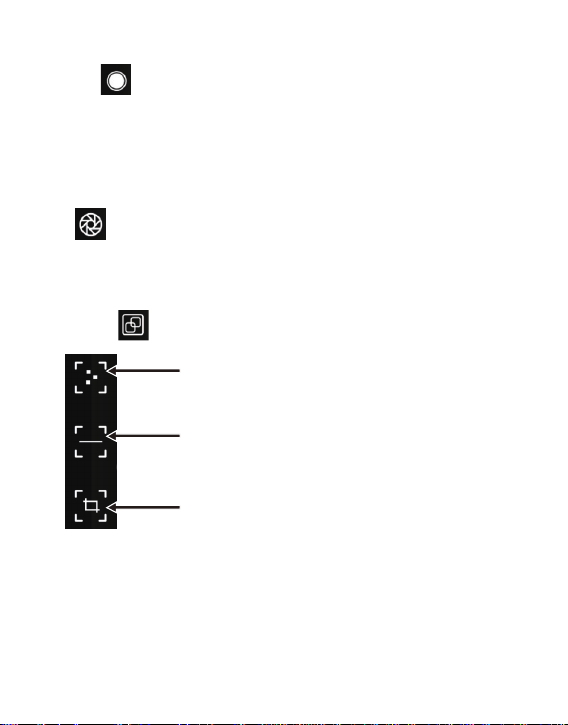
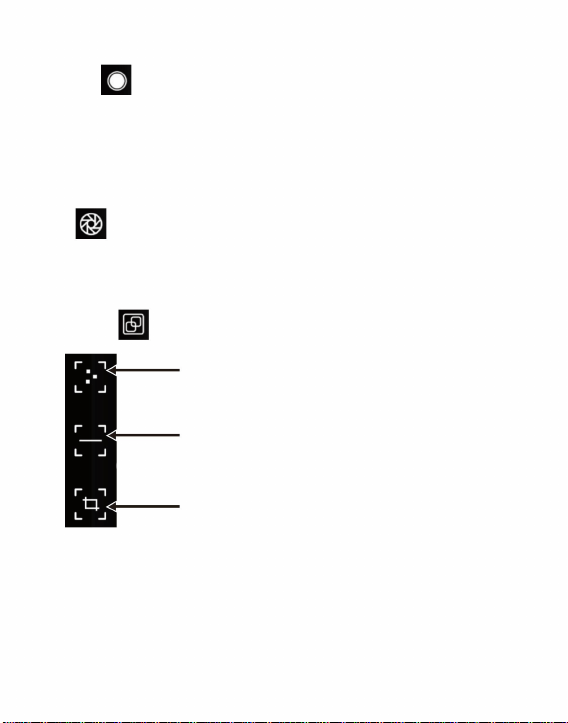
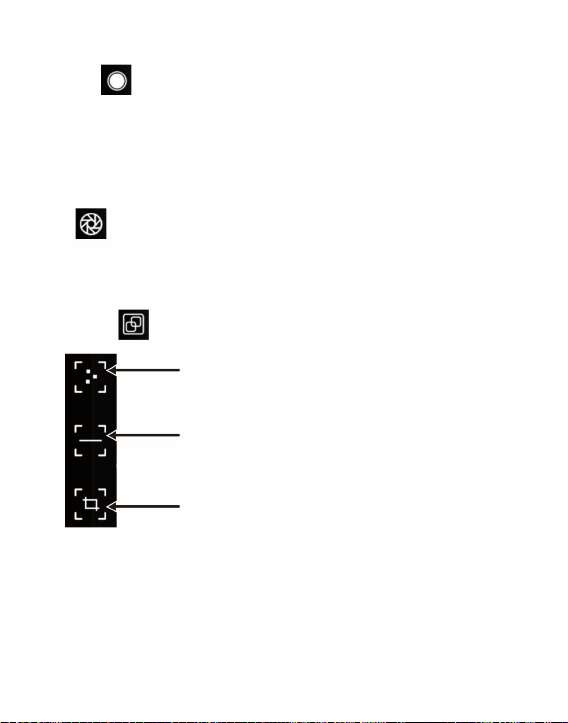
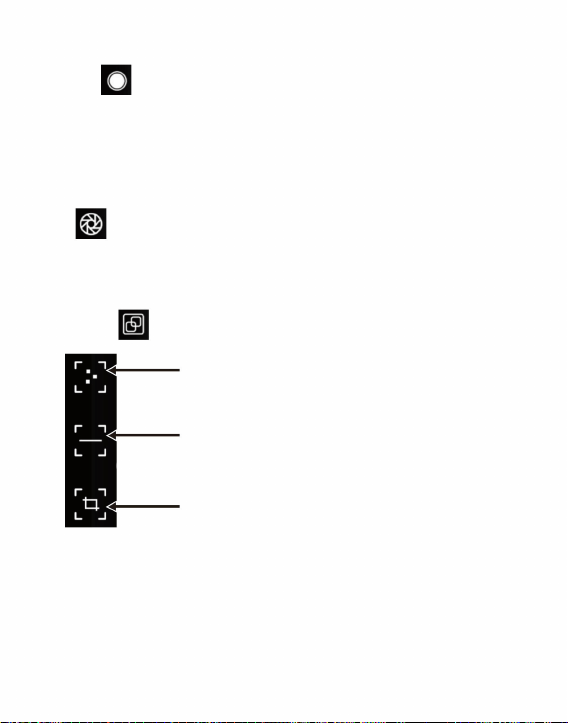
Click “ ” to pop out option of temperature measurement.
5
3.2.2 Shutter Refresh
“ ”Shutter refresh: Click to refresh the shield.
(3) “ ”Video: click to start video recording, and click again
to end video recording.
The save location of video is the same as the image.
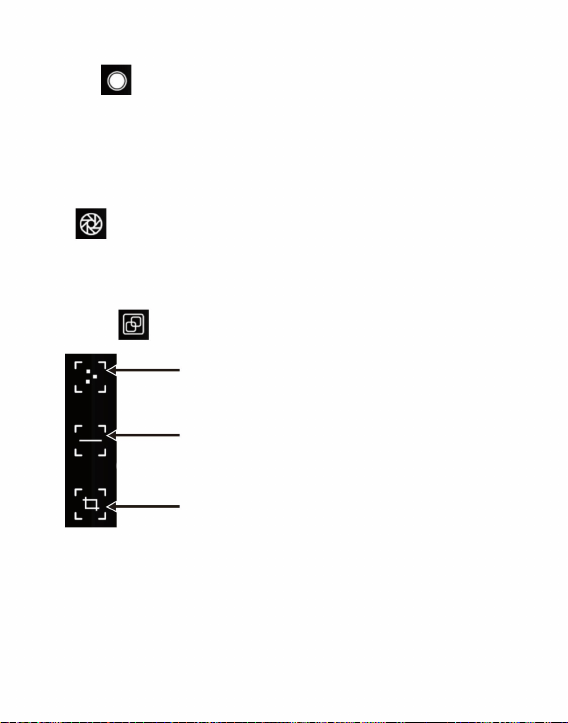
3.2.3 Temperature Measurement Analysis
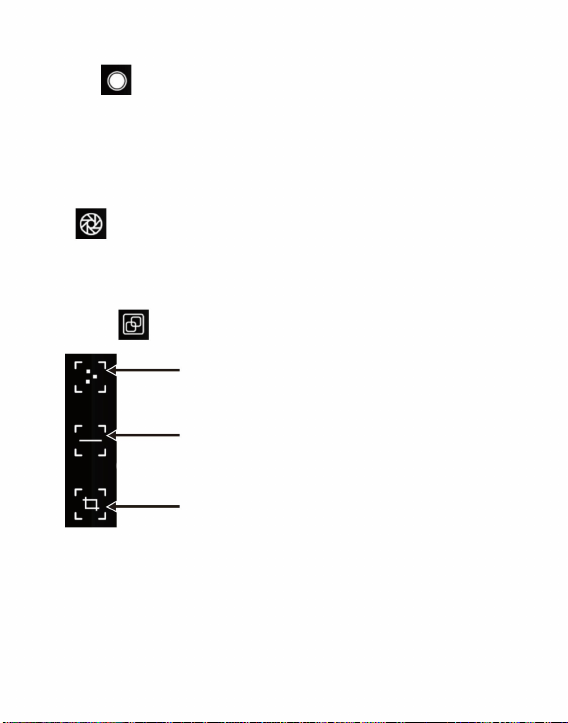
Point temperature measurement
Line temperature measurement analysis
Regional temperature measurement analysis
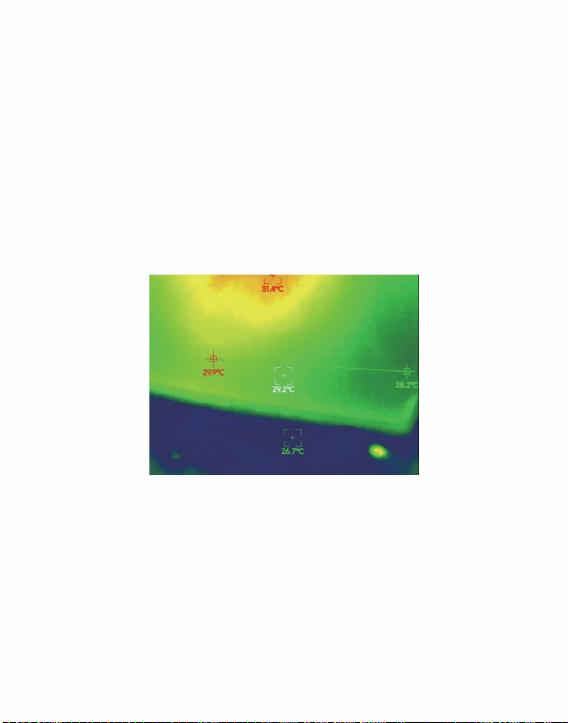
(1) Point temperature measurement: click the point temperature
measurement button, and the screen will display the tempera-
ture information of three points, namely the central temperature
point, the highest temperature point and the lowest temperature
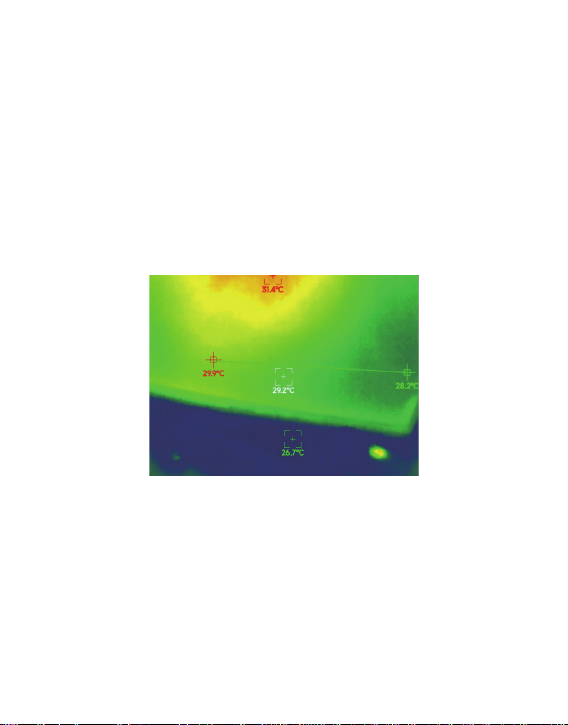
6
point. Click the screen at this time, and the temperature
information of the user-defined point will be added.
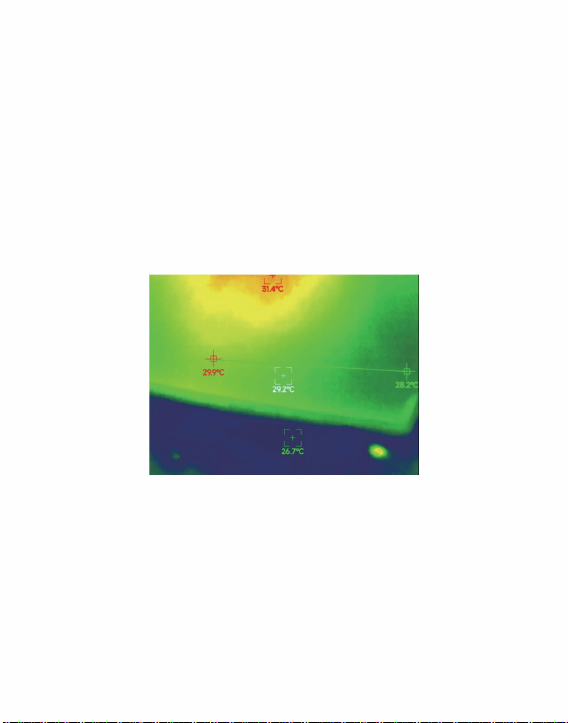
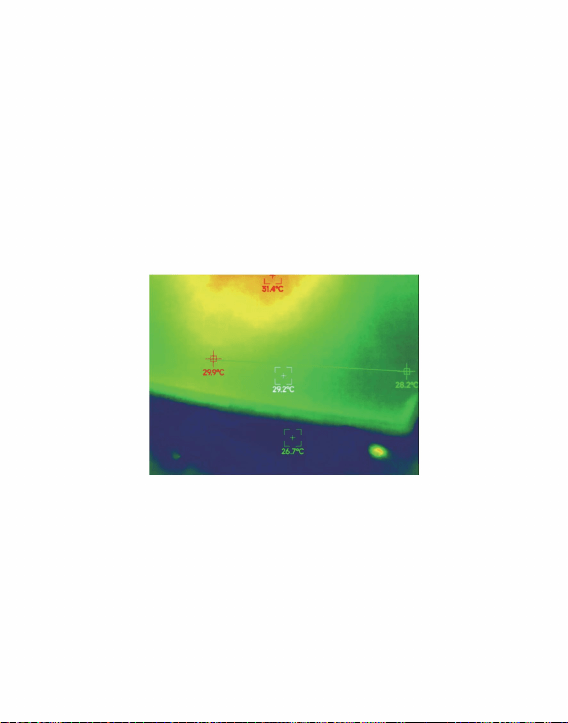
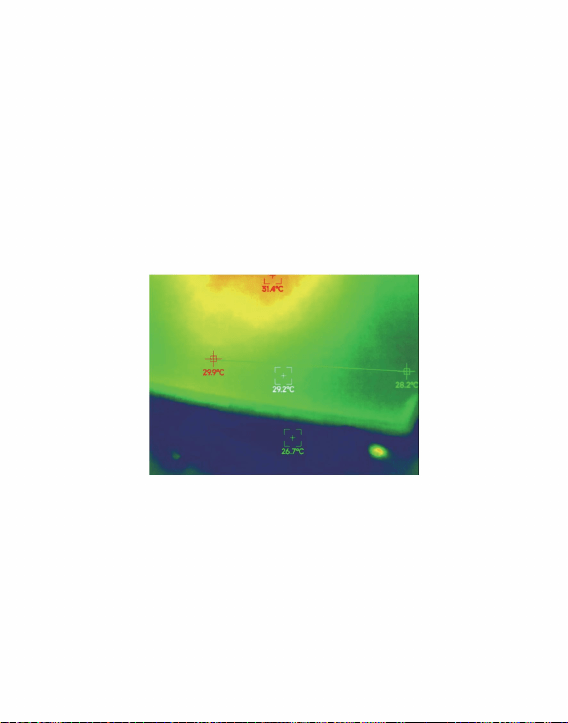
(2) Line temperature measurement analysis: drag with your
fingers and draw a horizontal line on the screen. It will
automatically analyze the maximum temperature and minimum
temperature of the horizontal line, and identify relevant
information.
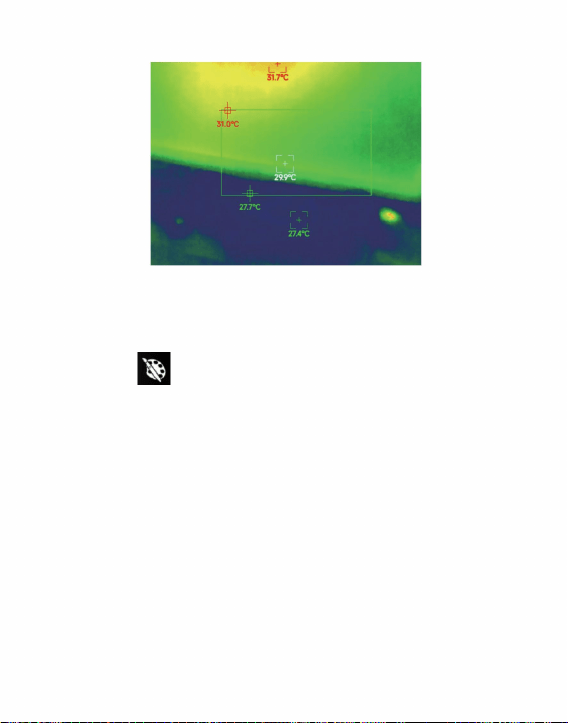
Line temperature measurement analysis
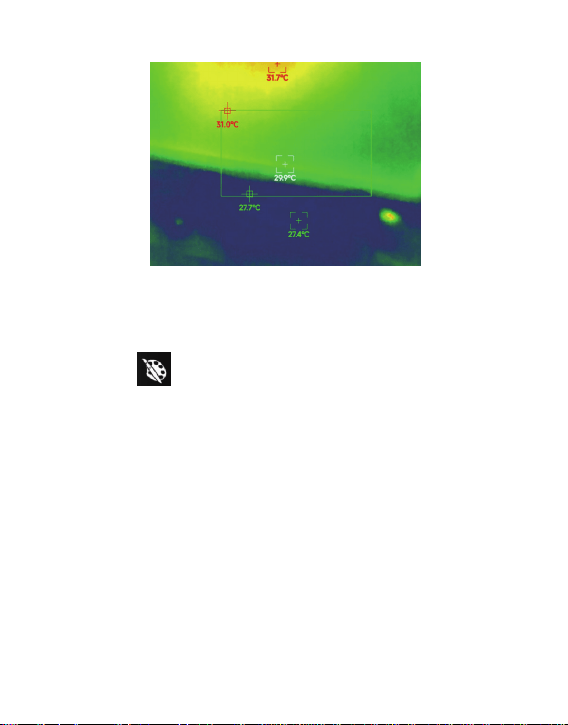
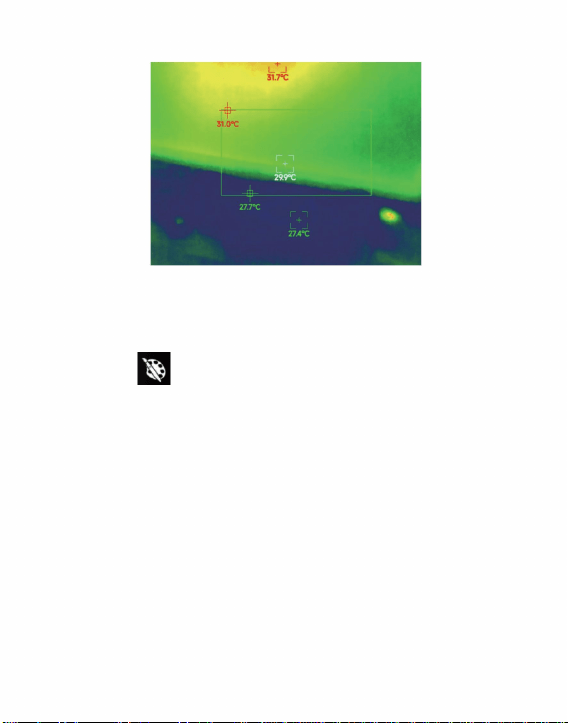
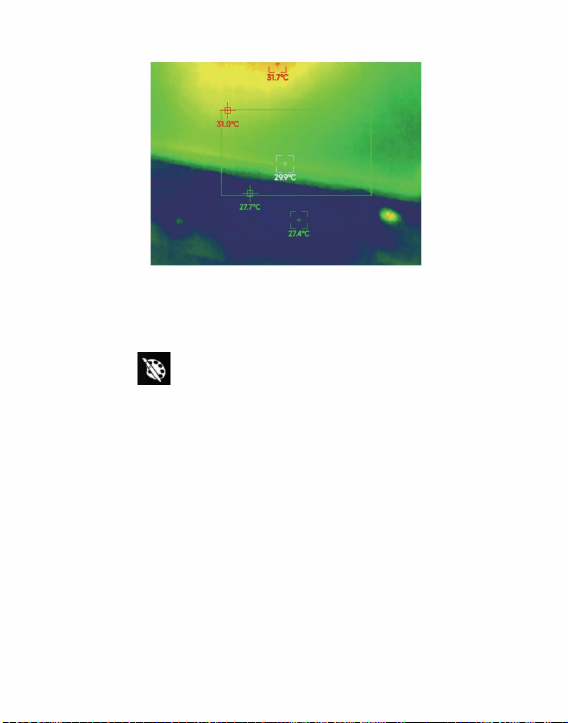
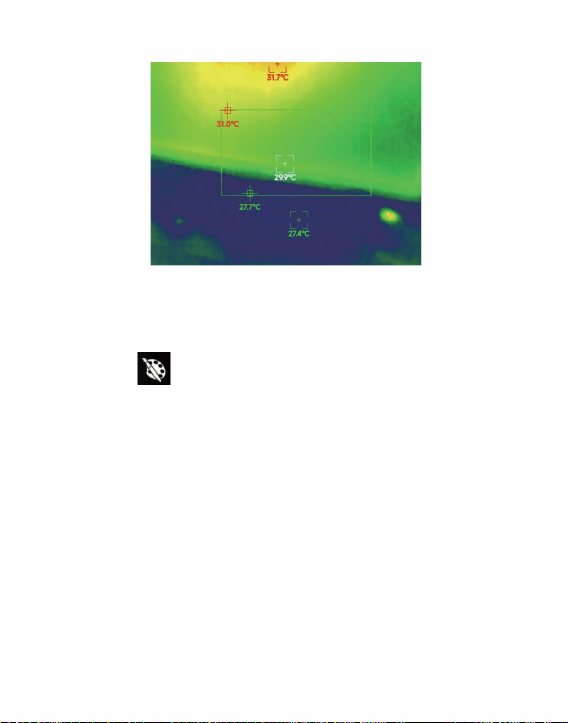
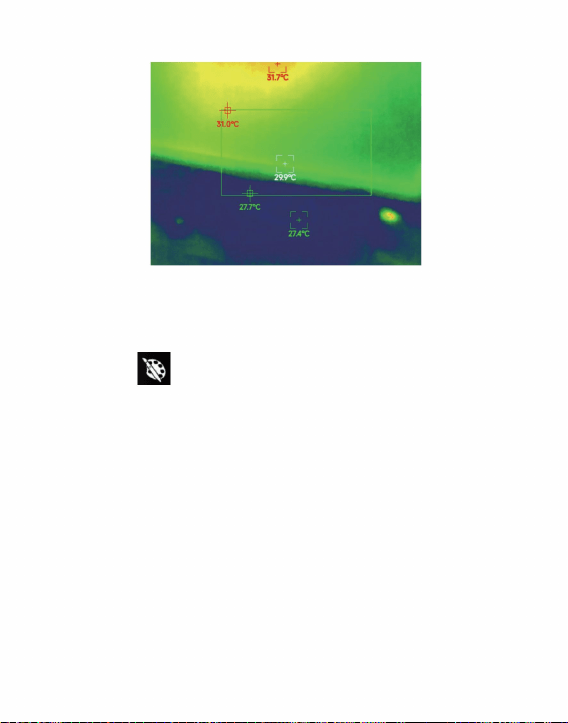
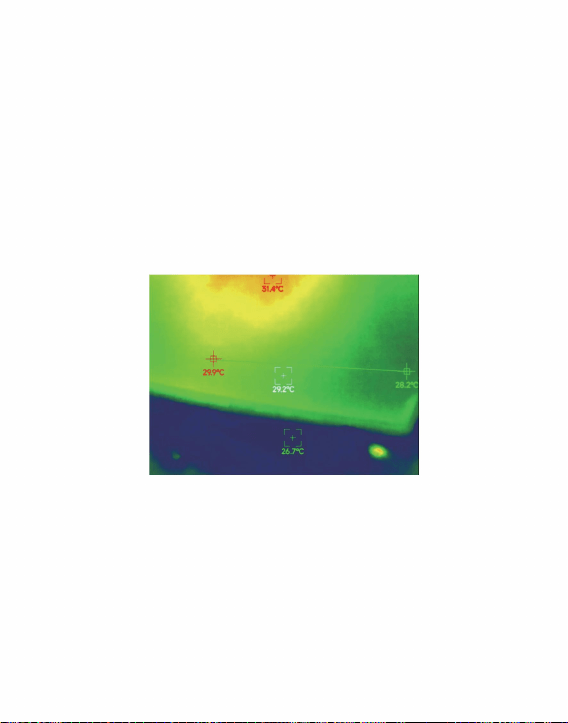
(3) Regional temperature measurement analysis: drag with your
fingers and draw a rectangle on the screen. it will automatically
analyze the maximum temperature and minimum temperature
in the rectangular area, and identify relevant information, as
shown in the following figure:
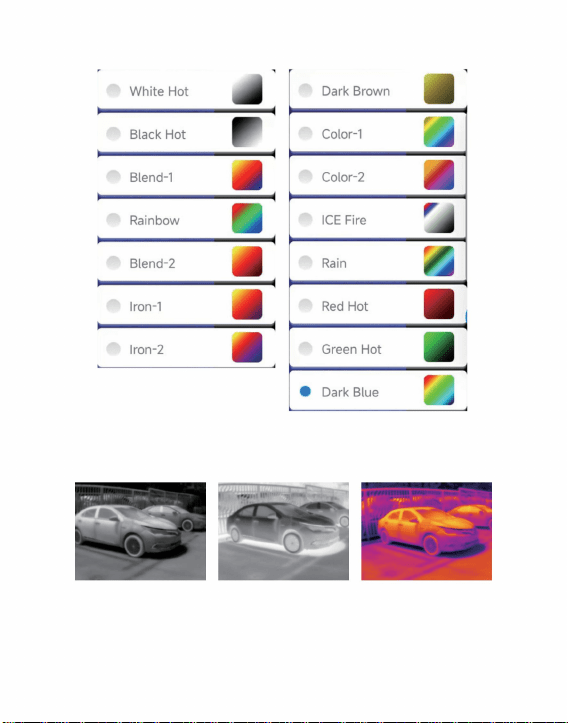
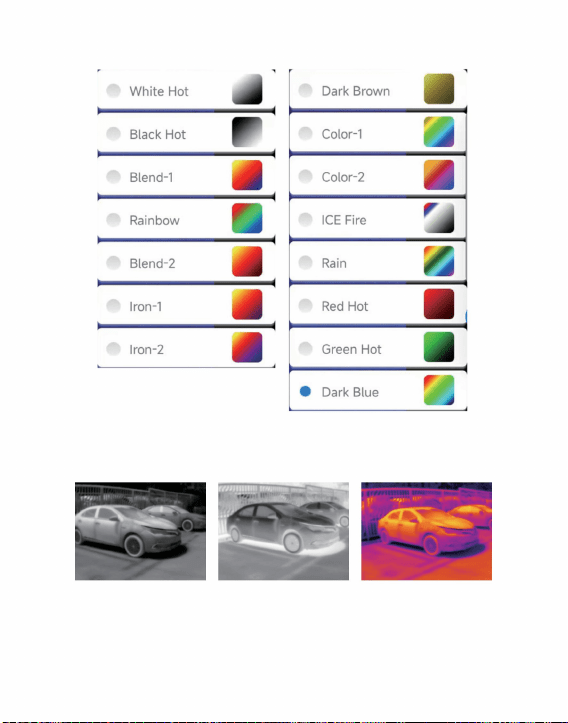
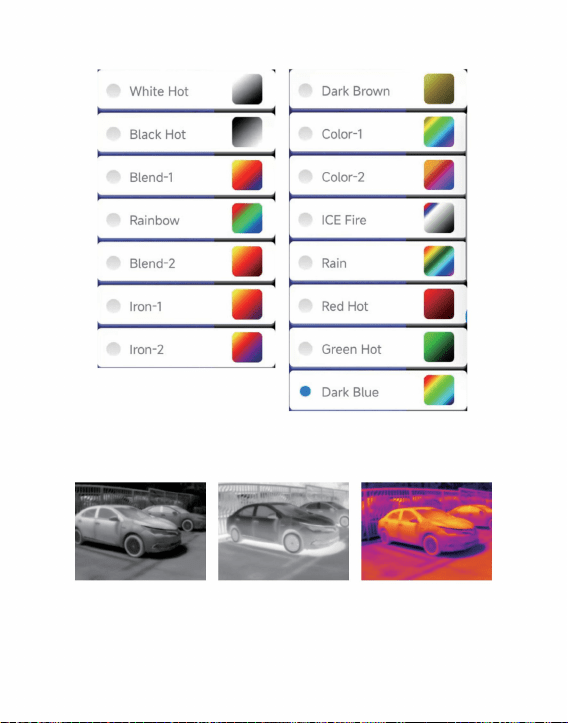
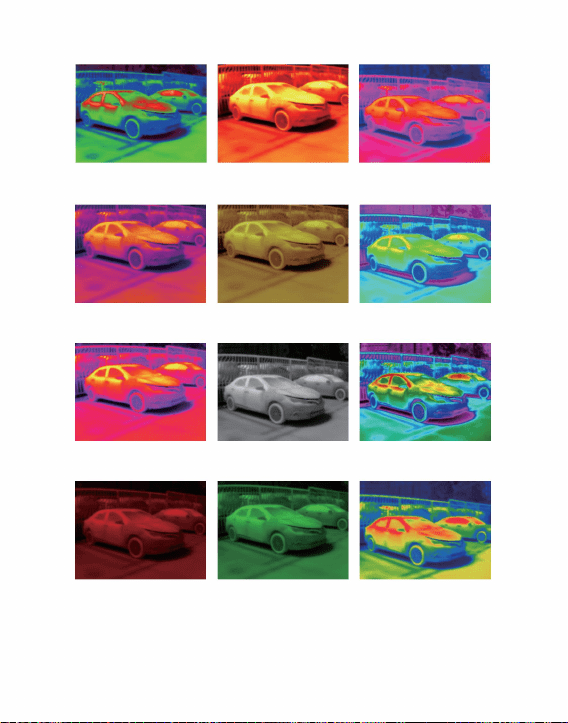
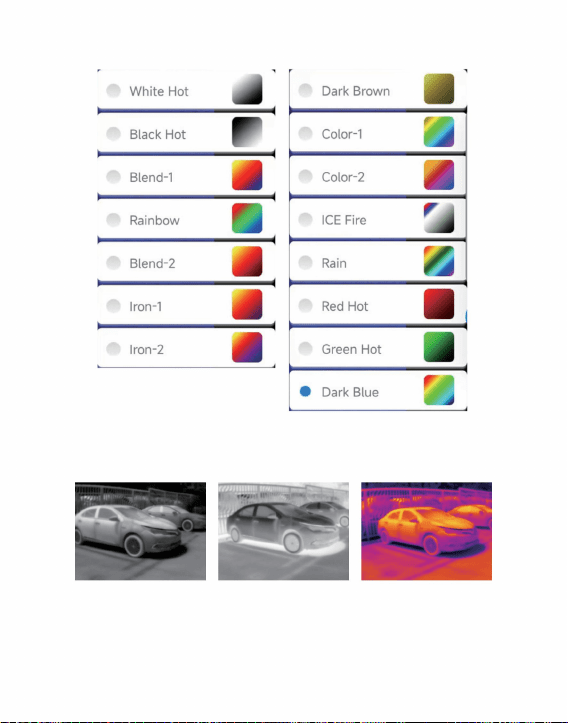
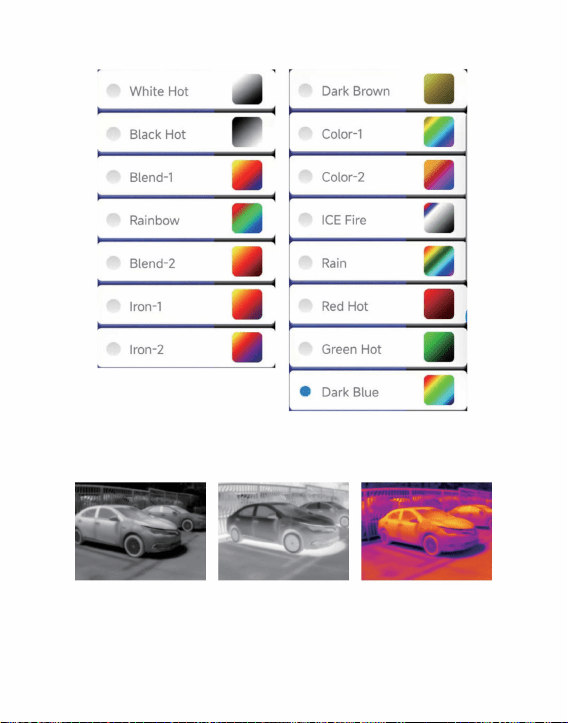
Click the “ ” to pop up the color palette interface, and you
can switch between 15 types of color palettes including the
white hot, black hot, blend-1, rainbow, blend-2, iron-1, iron-2,
dark brown, color-1, color-2,ICE fire, rain, red hot, green hot,
dark blue,as shown in the following figure.
7
Regional temperature measurement analysis
3.2.4 Color Palette
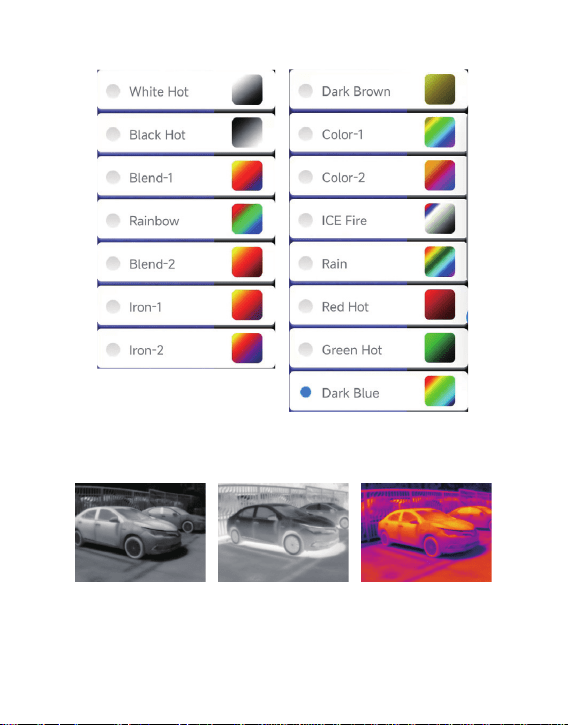
White Hot Black Hot Blend-1
8
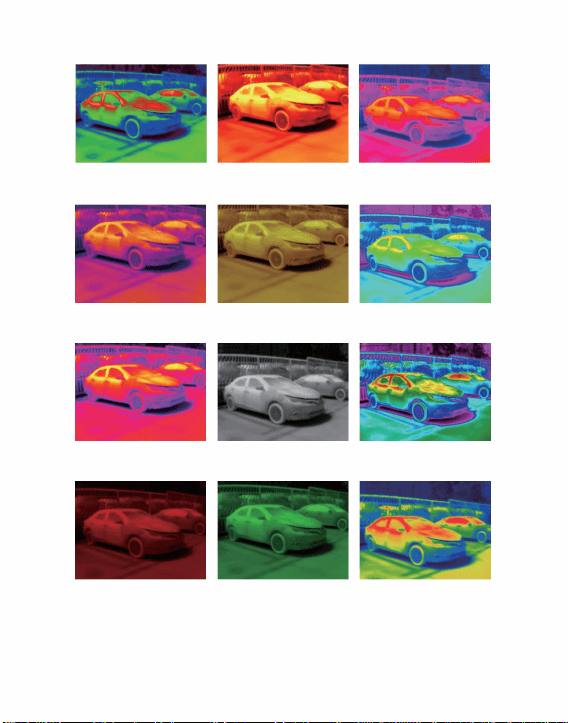
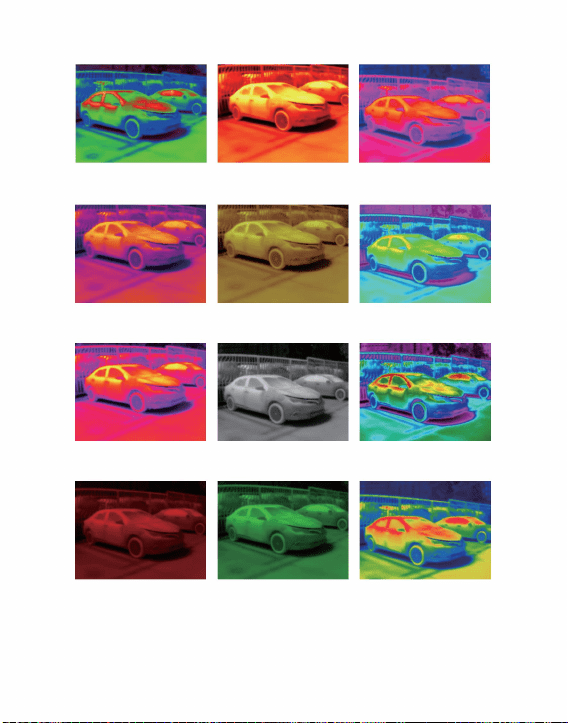
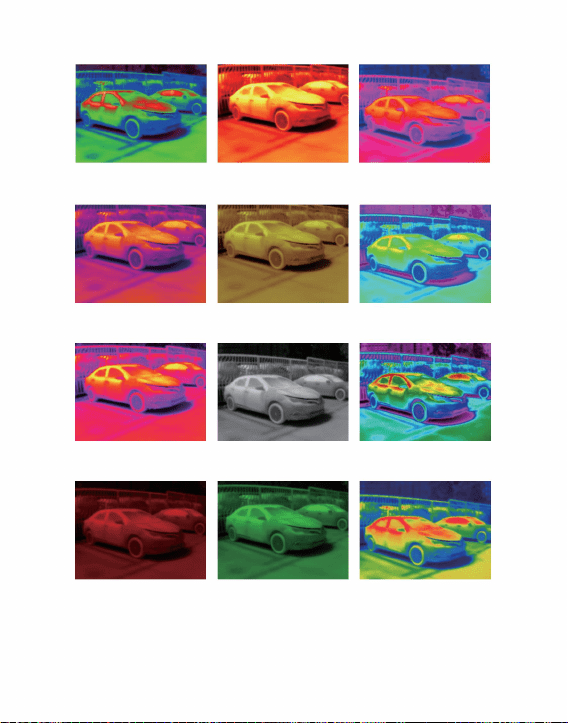
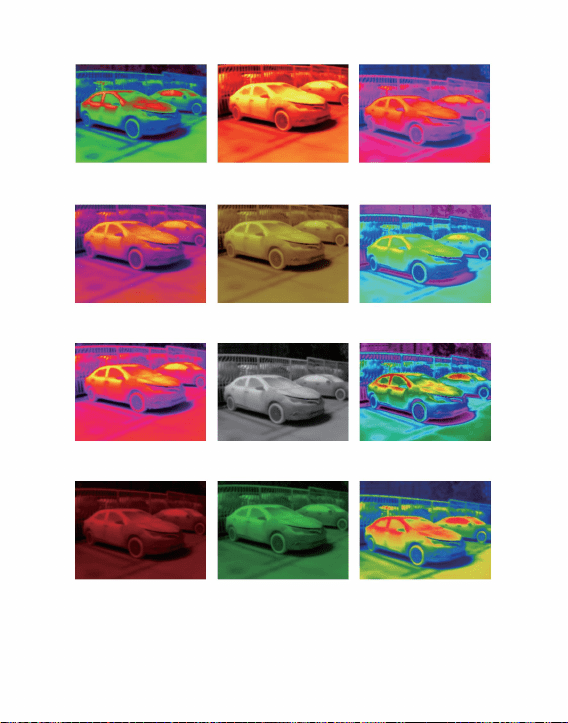
The display effects of the 15 types of color palettes are as
follows:
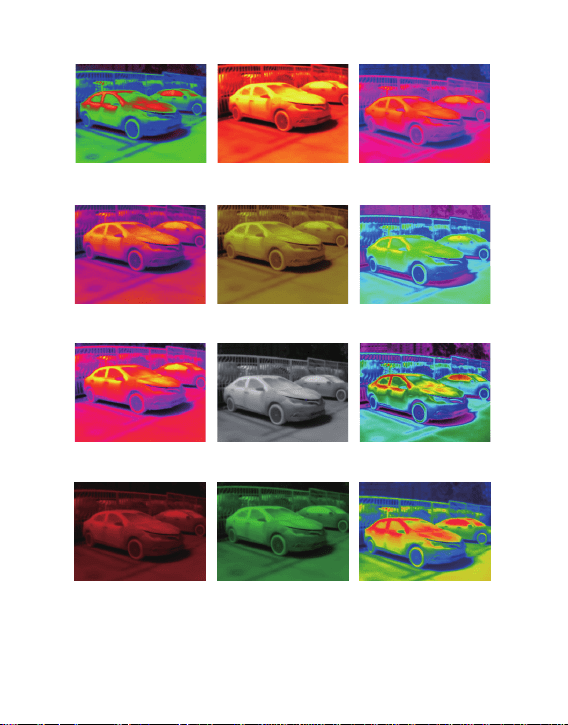
Iron-2 Dark Brown Color-1
Color-2 ICE Fire Rain
Red Hot Green Hot Dark Blue
Rainbow Blend-2 Iron-1
9
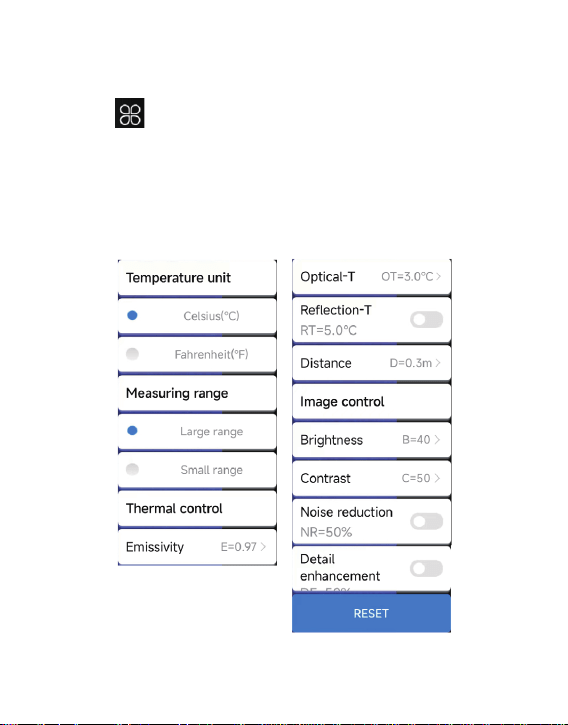
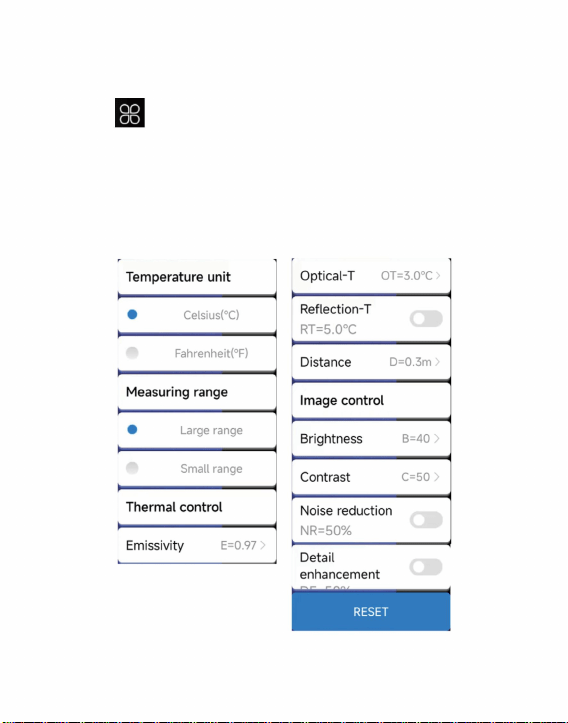
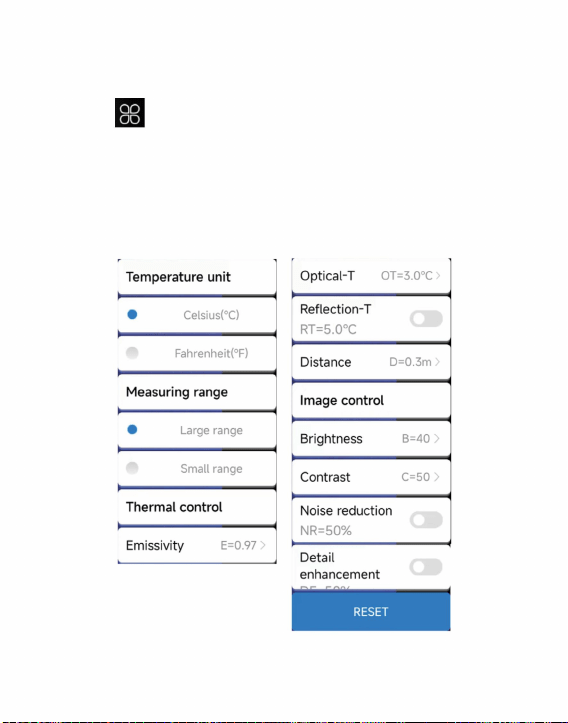
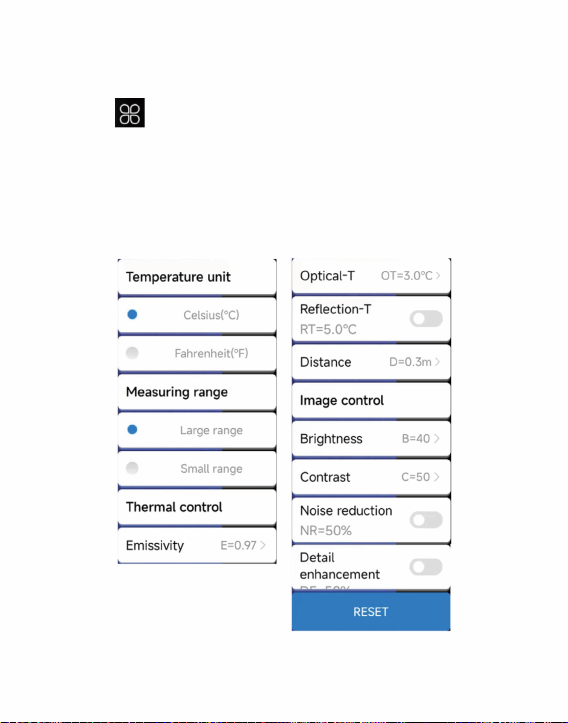
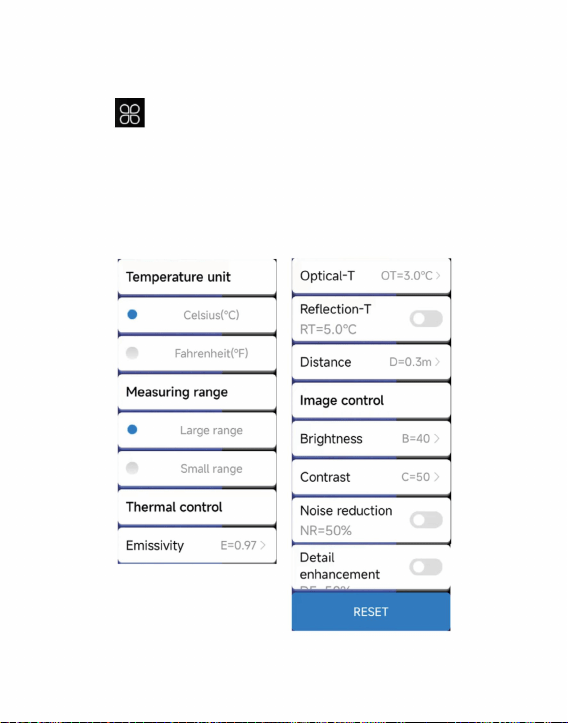
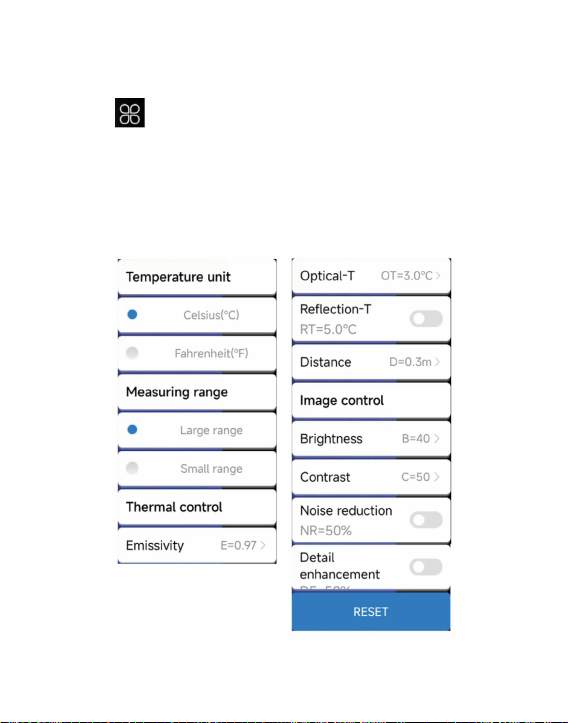
Click “ ” to pop up the settings interface, which can be set
for temperature units, range, transmission rate, optical
temperature, reflection temperature, temperature distance,
brightness, contrast, noise reduction, details of details, or reset
parameters, as shown in the figure below.
10
3.2.5 Temperature Measurement Setting
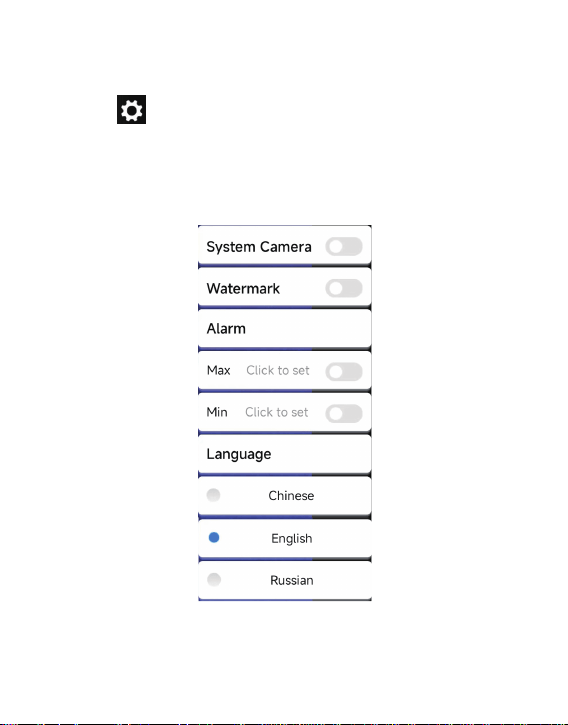
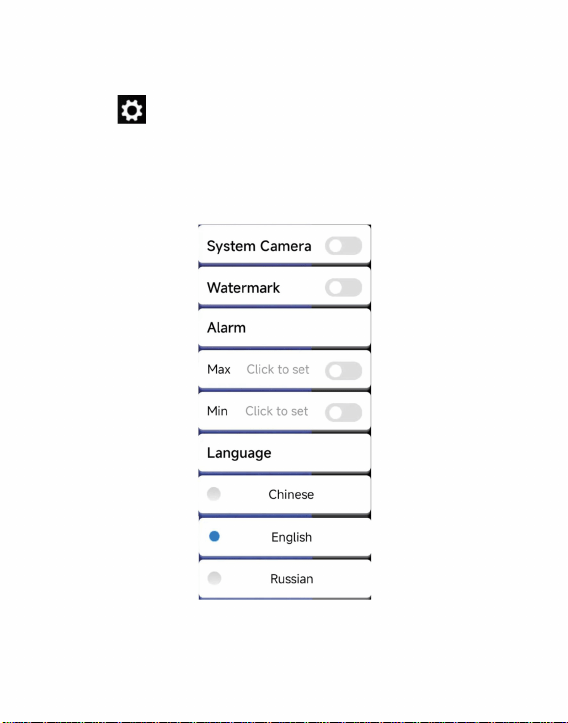
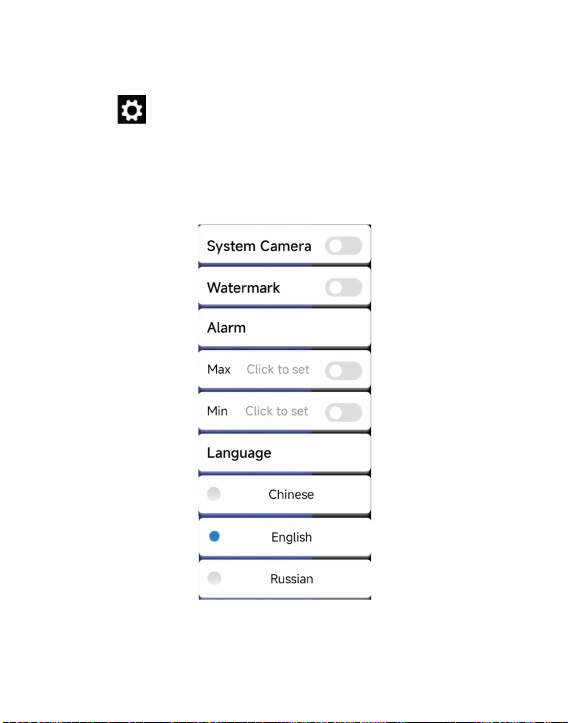
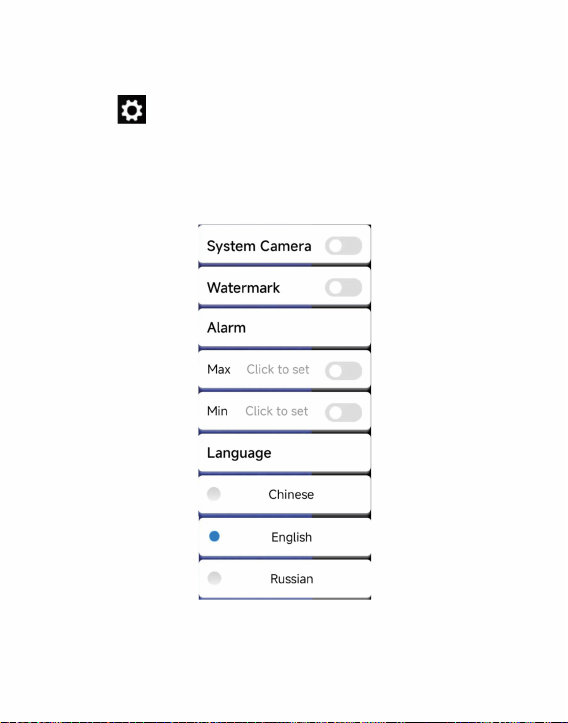
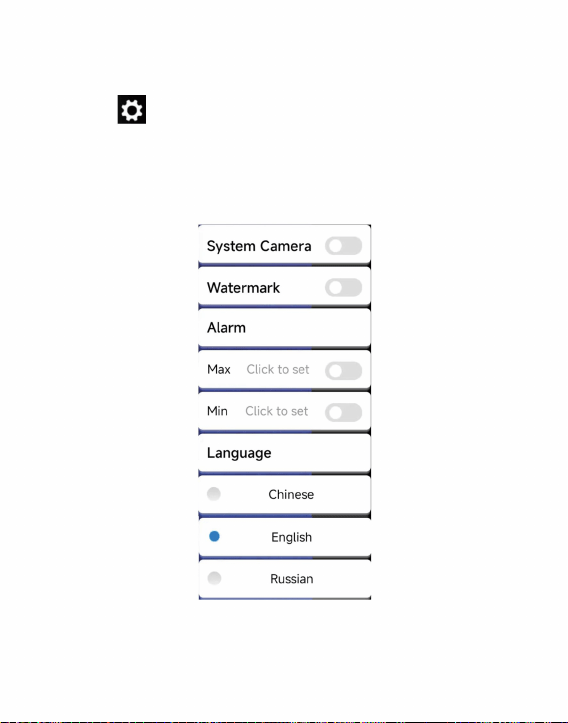
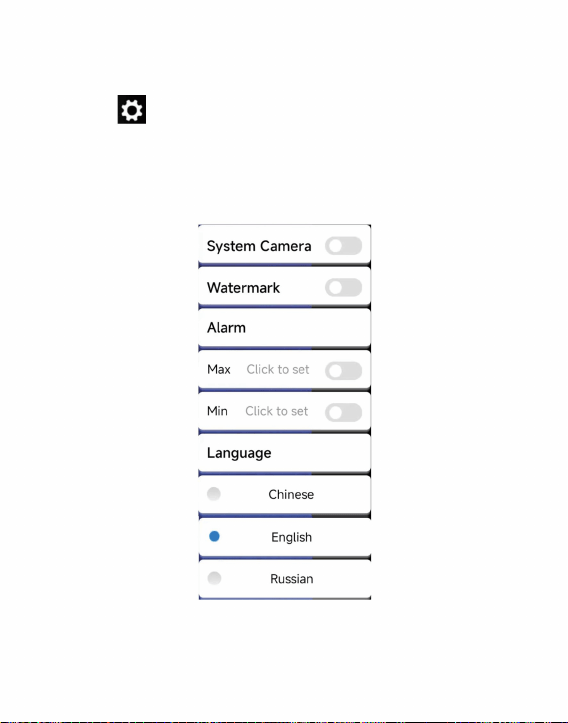
Click “ ” to pop up the setting interface. In the interface,
you can set whether to open the system camera, watermark,
high/low temperature settings, and language selection.
Chinese, English, Russian, as shown in the figure below.
11
3.2.6 Settings
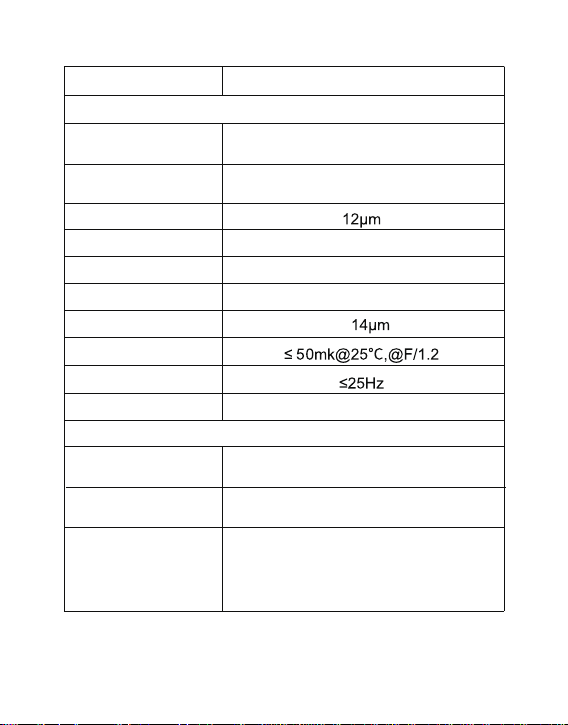
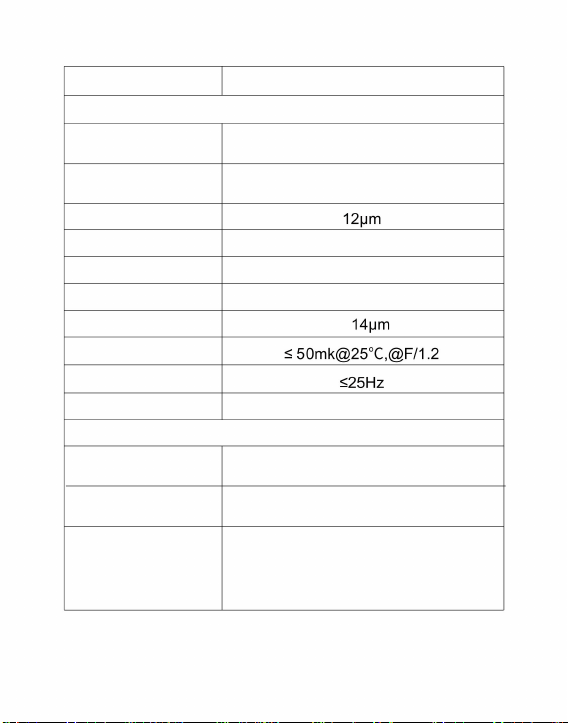
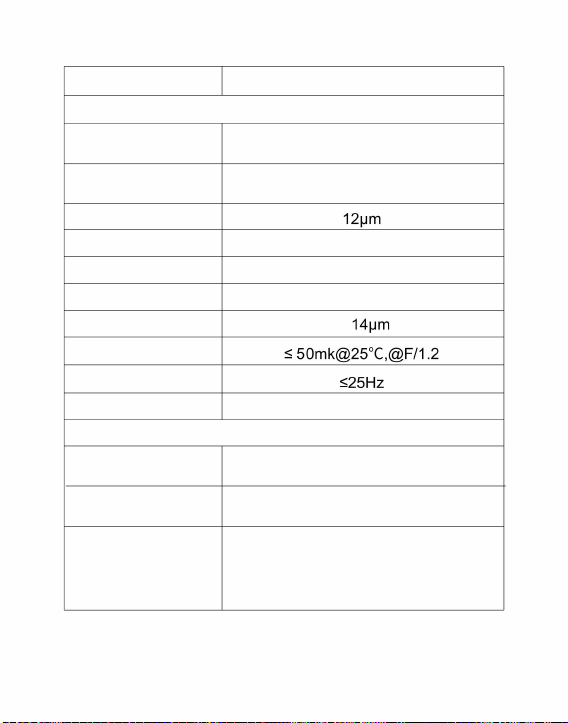
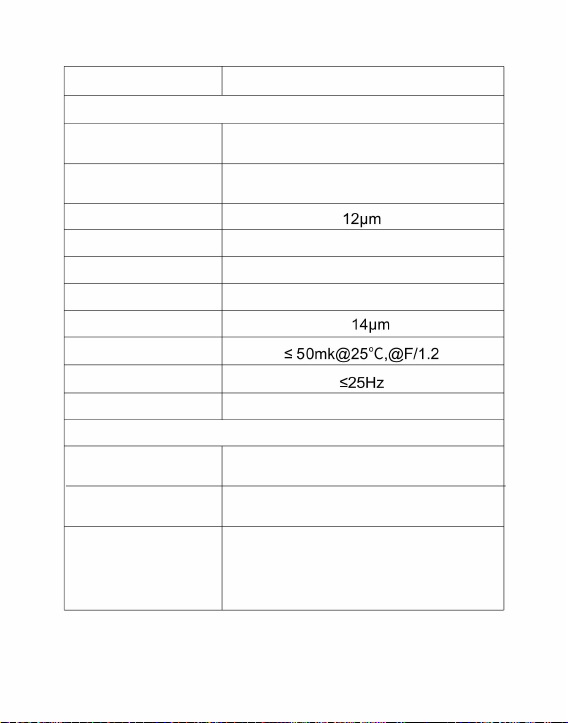
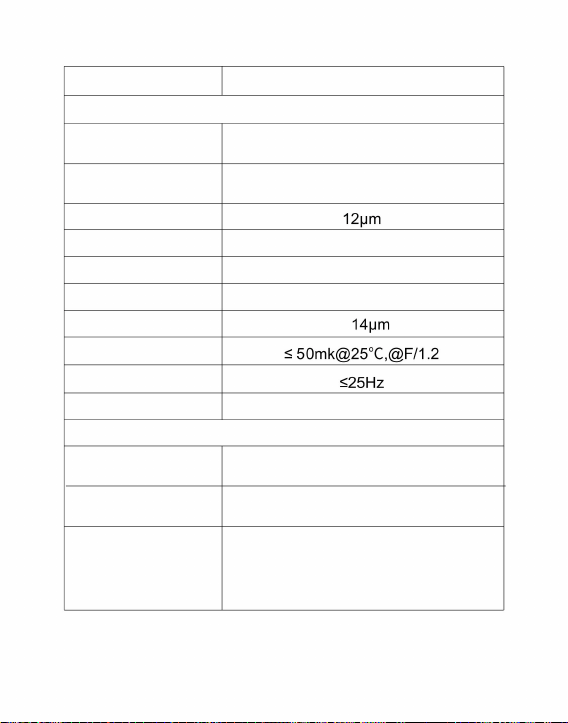
Infrared
Display
Detector type
Infrared image
resolution
Pixel spacing
Focal length
Amorphous silicon uncooled
infrared focal plane
256x192
3.2mm
Angle of view
IFOV
Working band
NETD
56.0°(H)×42°(V)
3.43mrad
8~
Image frame rate
Focusing mode Free Focus
palettes
white hot, black hot, blend-1, rainbow,
blend-2, iron-1, iron-2, dark brown,
color-1, color-2,ICE fire, rain, red hot,
green hot, dark blue
Supported
Supported
Brightness
adjustment
Contrast
adjustment
12
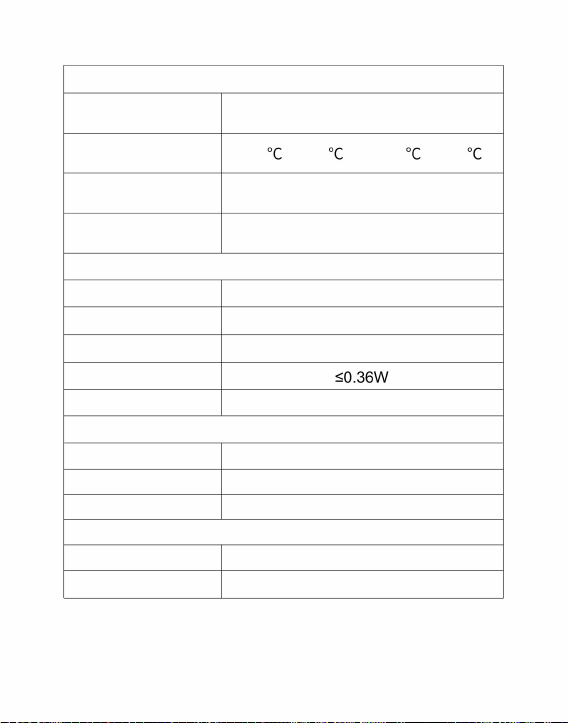
Product model HT-203U
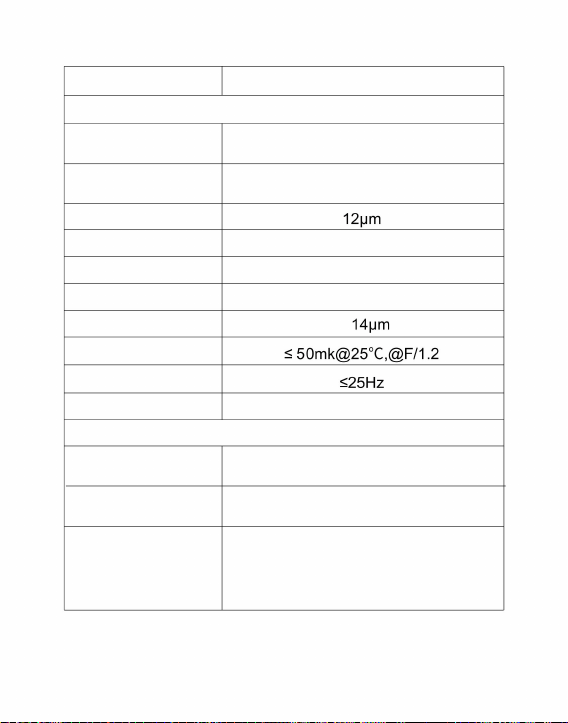
4. Technical Parameters
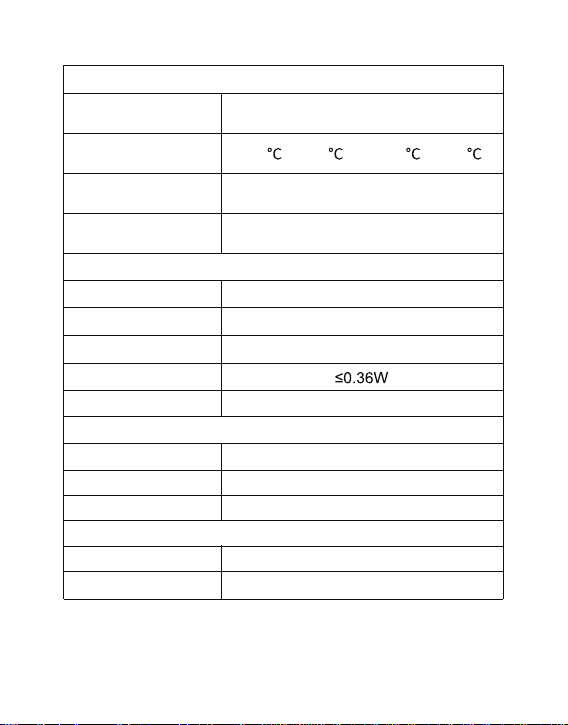
13
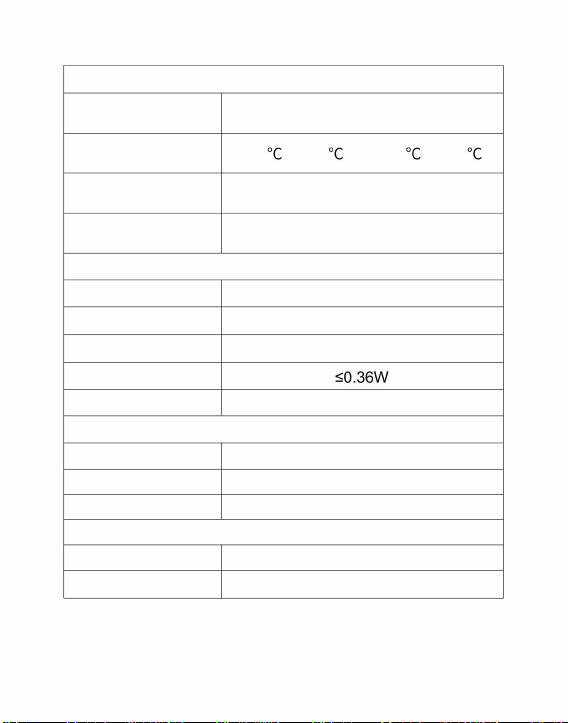
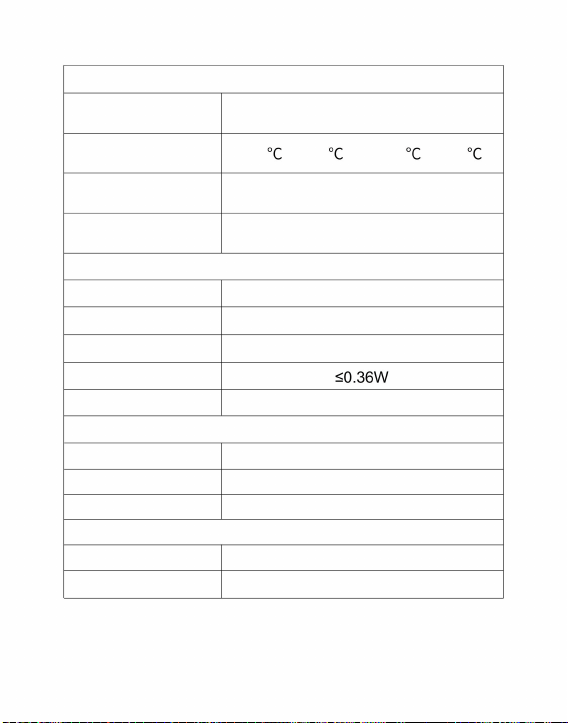
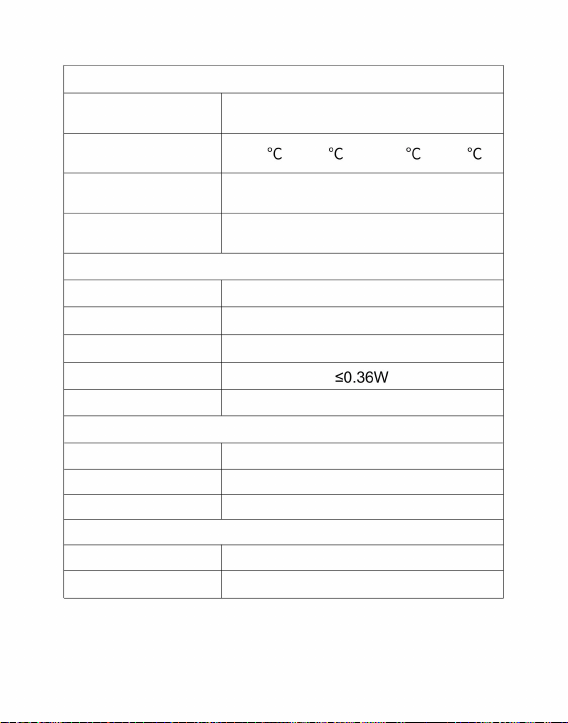
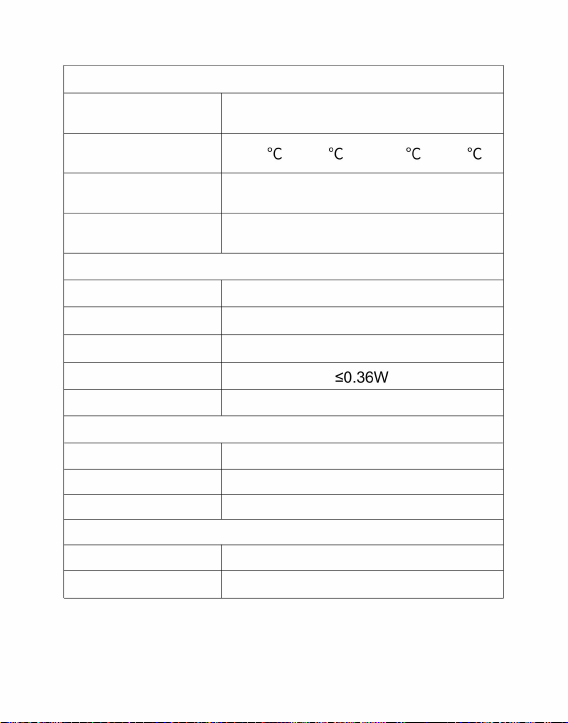
Temperature measurement function
Temperature
measurement resolution
Temperature
measuring distance
Temperature
measurement range
Temperature
measurement method
± 3 ° C or reading ± 3%
-20 ~ 120 and 120 ~ 550
0.3m~3m
System function
Work/storage environment
Camera/video Supported
Picture /Video format JPG/MP4
Language Chinese, English, Russian
Power consumption
External interface
Working temperature
Storage temperature
Protection level
Size/Weight
Product size
Product weight
-10℃ ~ +50℃
-20℃ ~ +60℃
IP54
46x70x14mm
28g
USB Type-C, DC5V power supply
point, line and regional
temperature measurement

CORRECT DISPOSAL
This product is subject to the provision of european Directive 2012/
19/EU. The symbol showing a wheelie bin crossed through
indicates that the product requires separate refuse collection in the
European Union. This applies to the product and all accessories
marked with this symbol. Products marked as such may not be
discarded with normal domestic waste, but must be taken to
acollection point for recycling electrical and electronic devices.
FCC Information
CAUTION: Changes or modifications not expressly approved by
the party responsible for compliance could void the user's authority
to operate the equipment!
This device complies with Part 15 of the FCC Rules. Operation is
subject to the following two conditions:
1) This product may cause harmful interference.
2)This product must accept any interference received, including
interference that may cause undesired operation.
WARNING: Changes or modifications to this product not expressly
approved by the party.responsible for compliance could void the
user's authority to operate the product.
Note: This product has been tested and found to comply with the
limits for a Class B digital device pursuant to Part15 of the FCC
Rules, These limits are designed to provide reasonable protectiona
gainst harmful interference in a residential installation.
This product generates, uses and can radiate radio frequency
14

Address:Baoshanqu Shuangchenglu 803long 11hao 1602A-1609shi Shanghai
Imported to AUS: SIHAO PTY LTD, 1 ROKEVA STREETEASTWOOD NSW 2122 Australia
Imported to USA:
energy,and if not installed and used in accordance with the
instructions, may cause harmful interference to radio
communications. However, there is no guarantee that
interference will not occur in a particular installation. If this
product does cause harmful interference to radio or television
reception,which can be determined
by turning the product off and on,the user is encouraged to try
to correct the interference by one or more of the following
measures.
· Reorient or relocate the receiving antenna.
· Increase the distance between the product and receiver.
· Connect the product to an outlet on a circuit different from
that to which the receiver is connected.
· Consult the dealer or an experienced radio/TV technician for
assistance.
Sanven Technology Ltd., Suite 250, 9166 Anaheim Place, Rancho Cucamonga, CA 91730
Made In China
15

Technical Support and E-Warranty Certificate
www.vevor.com/support
Made In China

Imageurthermiquedetéléphoneportableintelligent
MODÈLE:HT203U
Assistancetechniqueetcertificatdegarantieélectroniquewww.vevor.com/support
estimationdeséconomiesdontvouspourriezbénéficierenachetantcertainsoutilscheznousparrapportauxgrandesmarques
etnesignifiepasnécessairementcouvrirtouteslescatégoriesd'outilsquenousproposons.Toi
Nouscontinuonsànousengageràvousfournirdesoutilsàdesprixcompétitifs.
nousvousrappelonsdebienvouloirvérifierattentivementlorsquevouspassezunecommandecheznoussivousêtes
"Économisezlamoitié","Moitiéprix"outouteautreexpressionsimilaireutiliséeparnousnereprésentequ'un
enfait,nouséconomisonslamoitiéparrapportauxgrandesmarques.
Machine Translated by Google
Imageurthermiquedetéléphoneportable
Vousavezdesquestionssurlesproduits?Besoind'uneassistancetechnique?N'hésitezpasà
nouscontacter:
Assistancetechniqueetcertificatdegarantieélectronique
www.vevor.com/support
OUTILSROBUSTES,ÀMOITIÉPRIX
Moded'emploi
BESOIND'AIDE?CONTACTEZNOUS!
Ils'agitdesinstructionsoriginales,veuillezlireattentivementtouteslesinstructionsdumanuelavantde
l'utiliser.VEVORseréserveuneinterprétationclairedenotremanueld'utilisation.L'apparenceduproduitdépenddu
produitquevousavezreçu.Veuilleznouspardonnerquenousnevousinformeronspluss'ilyadesmisesàjour
technologiquesoulogiciellessurnotreproduit.
Machine Translated by Google

Machine Translated by Google

Contenu
4
8
dix
2
12
4
2
11
5
1
3
3
5
2
1.Précautions
2.Présentationduproduit
3.2Fonctionnementdulogiciel
3.1Connexiondel'équipement
2.1Scénariod'application
3.2.3Analysedesmesuresdetempérature
3.2.1Galerie,photoetvidéo
3.2.4Palettedecouleurs
3.2.5Paramètresdemesuredetempérature
2.2Fonctionsprincipales
3.2.6Paramètres
3.2.2Actualisationdel'obturateur
3.Utilisationduproduit
4.Paramètrestechniques
Machine Translated by Google

1.Précautions
mainsouautresobjets;
(6)Nedémontezpasl’équipement.S'ilyaundéfaut,
veuillezcontacternotreentreprisepouruneréparationparunprofessionnel
appareil.
(3)Netouchezpasl'appareiletl'interfaceUSBaveclesmainsmouillées;
(1)N'exposezpasleproduitausoleilouàd'autresendroitsàhauteintensité.
personnel.
(4)Nefrottezpasvotreéquipementavecdudiluant;
Veuillezliretouteslesinformationssuivantesavantd'utiliservotre
sourcesderayonnementdeville
(2)Netouchezpasoun'entrezpasencollisionlafenêtreetlalentilledudétecteuravec
(5)Veuillezfaireattentionàéviterl'électricitéstatique;
dispositifpourvousprotéger,vousetlesautres,contrelesblessuresoulesdommagesàvotre
1
Machine Translated by Google
2.1Scénariod'application
2.2Fonctionsprincipales
etinstallezl'applicationd'imagethermiquedusmartphone"HTI105/203U"
Lesprincipalesfonctionssontlessuivantes:
pourobteniruneobservationinfrarougeetunetempératureinfrarouge
(1)Ouvrezlelogicield'applicationdel'imageurthermiqueinfrarouge
fonctiondemesureviacetteapplication.
ScannezlecodeQRpourtéléchargerl'application
effectueruneobservationinfrarouge;
Enutilisantcettecamérathermiquepoursmartphone,vousdeveztélécharger
2.Présentationduproduit
2
Machine Translated by Google
3.Utilisationduproduit
3.1Connexiondel'équipement
Insérezlacamérathermiqueinfrarougedansl'interfaceUSBdu
téléphoneportable,etl'écrandutéléphonemobileentreradansle
écrand'observationinfrarouge.
(4)Contrôled'actionetparamétragedutéléphonemobile
téléphonemobile.Letéléphonemobilereconnaîtraautomatiquement
imageurthermique.
(2)Effectuerunemesuredetempératureinfrarougeetlatempérature
analysedelasituation;
lepériphériqueUSBetaffichezuneinvite.Cochezlacaseetcliquez
"D'ACCORD".Lelogicieldémarreral'imageurthermiqueinfrarougedu
(3)Prendredesphotosetdesvidéos;
3
Machine Translated by Google
(1)Galerie«»:Cliquezpourvoirl’imageetlavidéo.
«Photo:enregistrezl'imageactuelle;
(2)«
Emplacementdeconservationdesphotos:ouvrezl'imagesouhaitéedansle
galeriepourvoirl’emplacementdel’image.
Analysedesmesuresdetempérature
oupartagezlaphoto/vidéo.
photo/vidéoetcliquezenhaut
àdroitepoursupprimer
"
Lorsquevousentrezdanslalisted’images/listedevidéos,vérifiezles
Choisirdepartagerpeutêtreutilisépourliredesimagesou
»
vidéos.
3.2Fonctionnementdulogiciel
3.2.1Galerie,photoetvidéo
4
Machine Translated by Google
"
boutondemesure,etl'écranafficheralatempérature.
(1)Mesuredelatempératuredupoint:cliquezsurlatempératuredupoint
«Actualisationdel'obturateur:cliquezpouractualiserlebouclier.
Analysedesmesuresdetempératurerégionales
L'emplacementdesauvegardedelavidéoestlemêmequeceluidel'image.
Analysedemesuredetempératuredeligne
»
Mesuredetempératureponctuelle
Cliquezsur"
pourterminerl'enregistrementvidéo.
(3)« "Vidéo:cliquezpourdémarrerl'enregistrementvidéo,puiscliquezànouveau
pourfaireapparaîtrel'optiondemesuredelatempérature.
point,lepointdetempératureleplusélevéetlatempératurelaplusbasse
tureinformationdetroispoints,àsavoirlatempératurecentrale
3.2.2Actualisationdel'obturateur
3.2.3Analysedesmesuresdetempérature
5
Machine Translated by Google
Analysedemesuredetempératuredeligne
analyserlatempératuremaximaleetlatempératureminimale
danslazonerectangulaireetidentifierlesinformationspertinentes,comme
doigtsettracezunelignehorizontalesurl’écran.Cesera
illustrédanslafiguresuivante:
(3)Analysedemesuredetempératurerégionale:faitesglisseravecvotre
analyserautomatiquementlatempératuremaximaleetminimale
indiquer.Cliquezsurl'écranàcemoment,etlatempérature
lesinformationsdupointdéfiniparl'utilisateurserontajoutées.
températuredelalignehorizontaleetidentifierles
information.
doigtsetdessinezunrectanglesurl’écran.ceseraautomatiquement
(2)Analysedemesuredetempératuredeligne:faitesglisseravecvotre
6
Machine Translated by Google
blancchaud,noirchaud,mélange1,arcenciel,mélange2,fer1,fer2,
»
marronfoncé,couleur1,couleur2,feuICE,pluie,rougechaud,vertchaud,
Cliquele
Analysedesmesuresdetempératurerégionales
bleufoncé,commelemontrelafiguresuivante.
pourfaireapparaîtrel'interfacedelapalettedecouleurs,etvous
peutbasculerentre15typesdepalettesdecouleurs,ycomprisla
"
3.2.4Palettedecouleurs
7
Machine Translated by Google
NoirChaudBlancchaud Mélange1
Leseffetsd'affichagedes15typesdepalettesdecouleurssontlessuivants
suit:
8
Machine Translated by Google
Arcenciel
Marronfoncé
rougechaud
Pluie
Fer2
Feudeglace
Fer1
Bleufoncé
Couleur2
Vertchaud
Mélange2
Couleur1
9
Machine Translated by Google
3.2.5Paramètresdemesuredetempérature
»
température,températurederéflexion,distancedetempérature,
pourunitésdetempérature,plage,vitessedetransmission,optique
Cliquezsur"
luminosité,contraste,réductiondubruit,détailsdesdétailsouréinitialisation
paramètres,commelemontrelafigurecidessous.
pourfaireapparaîtrel'interfacedesparamètres,quipeutêtredéfinie
dix
Machine Translated by Google
3.2.6Paramètres
vouspouvezdéfinirs'ilfautouvrirlacamérasystème,lefiligrane,
Chinois,anglais,russe,commelemontrelafigurecidessous.
pourfaireapparaîtrel'interfacedeconfiguration.Dansl'interface,
réglagesdetempératurehaute/basseetsélectiondelalangue.
»
Cliquezsur"
11
Machine Translated by Google
4.Paramètrestechniques
Planfocalinfrarougenonrefroidien
siliciumamorphe
Angledevue
Contraste
3,43mrads
Typededétecteur
Luminosité
Infrarouge
56,0°(H)×42°(V)
Priseencharge
256x192
Fréquenced'imagedel'image
Espacementdespixels
Bandedetravail
Miseaupointlibre
Résolutionde
l'imageinfrarouge
IFOV
ajustement
ajustement
HT203U
8~
Afficher
palettes
3,2mm
Modedemiseaupoint
blancchaud,noirchaud,mélange1,arcenciel,
mélange2,fer1,fer2,marronfoncé,couleur1,
couleur2,feuICE,pluie,rougechaud,vertchaud,
bleufoncé
Modèleduproduit
NETD
Distancefocale
Priseencharge
12
Machine Translated by Google
20~120et120~550
AlimentationUSBTypeC,DC5V
IP54
Consommationd'énergie
Distancede
mesuredelatempérature
10~+50
Langue
Plagedemesure
delatempérature
Poidsduproduit
Fonctiondemesuredelatempérature
Caméra/vidéo
Chinois,anglais,russe
±
3°Coulecture±3%
Priseencharge
Taillepoids
0,3m~3m
Environnementdetravail/stockage
Niveaudeprotection
20~+60
Résolutionde
mesuredetempérature
Interfaceexterne
Températuredestockage
28g
Formatimage/vidéo
Températuredefonctionnement
46x70x14mm
Pointde
température,ligneetméthodedemesurerégionale
mesuredelatempérature
JPG/MP4
Fonctiondusystème
Tailleduproduit
13
Machine Translated by Google

InformationsFCC
ÉLIMINATIONCORRECTE
pourfairefonctionnerl'équipement!
2)Ceproduitdoitacceptertouteinterférencereçue,ycomprislesinterférences
susceptiblesdeprovoquerunfonctionnementindésirable.
Ceproduitgénère,utiliseetpeutémettredesfréquencesradio
ATTENTION:Leschangementsoumodificationsnonexpressémentapprouvésparla
partieresponsabledelaconformitépourraientannulerl'autoritédel'utilisateur.
1)Ceproduitpeutprovoquerdesinterférencesnuisibles.
contrelesinterférencesnuisiblesdansuneinstallationrésidentielle.
Règles,ceslimitessontconçuespourfourniruneprotectionraisonnable.
Cetappareilestconformeàlapartie15desrèglesFCC.L’exploitationestsoumiseaux
deuxconditionssuivantes:
Remarque:Ceproduitaététestéetdéclaréconformeaux
19/UE.Lesymbolereprésentantunepoubellebarréeindiquequeleproduit
nécessiteunecollectesélectivedesdéchetsdansl'Unioneuropéenne.Cecis'appliqueau
produitetàtouslesaccessoiresmarquésdecesymbole.Lesproduitsmarquéscomme
telsnedoiventpasêtrejetésaveclesorduresménagèresnormales,maisdoiventêtre
déposésdansunpointdecollectepourlerecyclagedesappareilsélectriqueset
électroniques.
limitespourunappareilnumériquedeclasseBconformémentàlapartie15delaFCC
AVERTISSEMENT:leschangementsoumodificationsapportésàceproduitnon
expressémentapprouvésparlapartieresponsabledelaconformitépourraientannuler
l'autoritédel'utilisateuràutiliserleproduit.
Ceproduitestsoumisauxdispositionsdeladirectiveeuropéenne2012/
14
Machine Translated by Google

15
ImportéauxÉtatsUnis:
Adresse:BaoshanquShuangchenglu803long11hao1602A1609shiShanghai
SanvenTechnologyLtd.,Suite250,9166AnaheimPlace,RanchoCucamonga,CA91730
ImportéenAustralie:SIHAOPTYLTD,1ROKEVASTREETASTWOODNSW2122Australie
∙Augmentezladistanceentreleproduitetlerécepteur.
∙Consultezlerevendeurouuntechnicienradio/TVexpérimentépour
obtenirdel'aide.
∙Réorientezoudéplacezl'antennederéception.
∙Connectezleproduitàuneprisesuruncircuitdifférentdecelui
auquellerécepteurestconnecté.
énergieet,s'iln'estpasinstalléetutiliséconformémentauxinstructions,
peutprovoquerdesinterférencesnuisiblesauxcommunications
radio.Cependant,riennegarantitquedesinterférencesnese
produirontpasdansuneinstallationparticulière.Siceproduit
provoquedesinterférencesnuisiblesàlaréceptionradiooutélévision,
cequipeutêtredéterminéenéteignant
etenrallumantleproduit,l'utilisateurestencouragéàessayerdecorriger
lesinterférencesenutilisantunouplusieursdesélémentssuivants.
mesures.
FabriquéenChine
Machine Translated by Google

Assistancetechniqueetcertificatdegarantieélectronique
www.vevor.com/support
FabriquéenChine
Machine Translated by Google

Intelligente Wärmebildkamera für Mobiltelefone
MODELL:HT-203U
Technischer Support und E-Garantiezertifikat www.vevor.com/support
Die Schätzung der Einsparungen, die Sie durch den Kauf bestimmter Werkzeuge bei uns im Vergleich zu den großen Top-Marken
erzielen könnten, bedeutet nicht unbedingt, dass sie alle von uns angebotenen Werkzeugkategorien abdeckt. Du
Wir möchten Sie bitten, dies sorgfältig zu überprüfen, wenn Sie eine Bestellung bei uns aufgeben
„Sparen Sie die Hälfte“, „Halber Preis“ oder andere ähnliche von uns verwendete Ausdrücke stellen lediglich eine Aussage dar
tatsächlich die Hälfte im Vergleich zu den Top-Marken einsparen.
Wir sind weiterhin bestrebt, Ihnen Werkzeuge zu wettbewerbsfähigen Preisen anzubieten.
Machine Translated by Google
Wärmebildkamera für Mobiltelefone
Haben Sie Fragen zum Produkt? Benötigen Sie technische Unterstützung? Sie können uns
gerne kontaktieren:
Technischer Support und E-Garantiezertifikat www.vevor.com/
support
ROBUSTE WERKZEUGE, ZUM HALBEN PREIS
Bedienungsanleitung
BRAUCHEN SIE HILFE? KONTAKTIERE UNS!
Dies ist die Originalanleitung. Bitte lesen Sie alle Bedienungsanleitungen sorgfältig durch, bevor Sie das Gerät in Betrieb nehmen.
VEVOR behält sich eine klare Auslegung unserer Bedienungsanleitung vor. Das Aussehen des Produkts hängt von dem Produkt ab, das
Sie erhalten haben. Bitte entschuldigen Sie, dass wir Sie nicht erneut informieren, wenn es zu unserem Produkt technische oder
Software-Updates gibt.
Machine Translated by Google

Machine Translated by Google

Inhalt
4
8
10
2
12
4
2
11
5
1
3
3
5
2
1. Vorsichtsmaßnahmen
2. Produktübersicht
3.2 Softwarebetrieb
3.1 Geräteanschluss
2.1 Anwendungsszenario
3.2.3 Analyse der Temperaturmessung
3.2.1 Galerie, Foto und Video
3.2.4 Farbpalette
3.2.5 Einstellung der Temperaturmessung
2.2 Hauptfunktionen
3.2.6 Einstellungen
3.2.2 Verschlussaktualisierung
3. Produktnutzung
4. Technische Parameter
Machine Translated by Google

1. Vorsichtsmaßnahmen
Hände oder andere Gegenstände;
(6) Zerlegen Sie das Gerät nicht. Wenn es einen Fehler gibt,
Für eine Reparatur durch einen Fachmann wenden Sie sich bitte an unser Unternehmen
Gerät.
(3) Berühren Sie das Gerät und die USB-Schnittstelle nicht mit nassen Händen;
(1) Setzen Sie das Produkt nicht der Sonne oder anderen starken Sonneneinstrahlungen aus.
Personal.
(4) Schrubben Sie Ihre Ausrüstung nicht mit Verdünner;
Bitte lesen Sie alle folgenden Informationen, bevor Sie Ihr Gerät verwenden
örtliche Strahlungsquellen
(2) Berühren Sie das Detektorfenster und die Linse nicht und stoßen Sie nicht damit zusammen
(5) Bitte achten Sie darauf, statische Elektrizität zu vermeiden;
Gerät, um Sie und andere vor Verletzungen oder Schäden an Ihrem Gerät zu schützen
1
Machine Translated by Google
2.2 Hauptfunktionen
2.1 Anwendungsszenario
und installieren Sie die Smartphone-Wärmebild-App „HTI-105/203U“.
Die Hauptfunktionen sind wie folgt:
um Infrarotbeobachtung und Infrarottemperatur zu erreichen
(1) Öffnen Sie die Anwendungssoftware der Infrarot-Wärmebildkamera
Messfunktion über diese APP.
Scannen Sie den QR-Code, um die App herunterzuladen
um Infrarotbeobachtungen durchzuführen;
Mit dieser Smartphone-Wärmebildkamera müssen Sie sie herunterladen
2. Produktübersicht
2
Machine Translated by Google
3. Produktnutzung
3.1 Geräteanschluss
Stecken Sie die Infrarot-Wärmebildkamera in die USB-Schnittstelle des
Mobiltelefon, und der Mobiltelefonbildschirm wird angezeigt
Infrarot-Beobachtungsbildschirm.
(4) Aktionssteuerung und Parametereinstellung des Mobiltelefons
Mobiltelefon. Das Mobiltelefon erkennt es automatisch
Wärmebildkamera.
(2) Infrarot-Temperaturmessung und Temperaturmessung durchführen.
Strukturanalyse;
Klicken Sie auf das USB-Gerät und es erscheint eine Eingabeaufforderung. Aktivieren Sie das Kontrollkästchen und klicken Sie
"OK". Die Software startet die Infrarot-Wärmebildkamera des
(3) Fotos und Videos aufnehmen;
3
Machine Translated by Google
(1) „ „Galerie: Klicken Sie hier, um das Bild und das Video anzuzeigen.
„Foto: Aktuelles Bild speichern;
(2) „
Speicherort für Fotos: Öffnen Sie das gewünschte Bild im
Galerie, um den Speicherort des Bildes anzuzeigen.
Analyse der Temperaturmessung
oder teile das Bild/Video.
Bild/Video aus und klicken
Sie oben rechts zum Löschen
„
Überprüfen Sie beim Aufrufen der Bilderliste/Videoliste das
Die Auswahl zum Teilen kann zum Lesen von Bildern oder verwendet werden
”
Videos.
3.2 Softwarebetrieb
3.2.1 Galerie, Foto und Video
4
Machine Translated by Google
„
Drücken Sie die Messtaste und auf dem Bildschirm wird die Temperatur angezeigt.
„Shutter-Aktualisierung: Klicken Sie, um den Schild zu aktualisieren.
(1) Punkttemperaturmessung: Klicken Sie auf die Punkttemperatur
Regionale Temperaturmessanalyse
Der Speicherort des Videos ist derselbe wie der des Bildes.
Analyse der Leitungstemperaturmessung
”
um die Videoaufnahme zu beenden.
(3) "
Klicken "
Punkttemperaturmessung
„Video: Klicken Sie, um die Videoaufnahme zu starten, und klicken Sie erneut
Möglichkeit zur Temperaturmessung herauszuklappen.
Punkt, der höchste Temperaturpunkt und der niedrigste Temperaturpunkt
Temperaturinformationen von drei Punkten, nämlich der Zentraltemperatur
3.2.3 Analyse der Temperaturmessung
3.2.2 Verschlussaktualisierung
5
Machine Translated by Google
Analysieren Sie die maximale und minimale Temperatur
Information.
in der folgenden Abbildung dargestellt:
(2) Analyse der Leitungstemperaturmessung: Ziehen Sie mit Ihrem
Punkt. Klicken Sie zu diesem Zeitpunkt auf den Bildschirm und die Temperatur
Fingern und zeichnen Sie ein Rechteck auf dem Bildschirm. es wird automatisch
Temperatur der horizontalen Linie und identifizieren relevant
Informationen des benutzerdefinierten Punktes werden hinzugefügt.
(3) Regionale Temperaturmessanalyse: Ziehen Sie mit Ihrem
im rechteckigen Bereich und identifizieren relevante Informationen, wie z
Analysieren Sie automatisch die maximale und minimale Temperatur
Analyse der Leitungstemperaturmessung
Fingern und zeichnen Sie eine horizontale Linie auf dem Bildschirm. Es wird
6
Machine Translated by Google
kann zwischen 15 Arten von Farbpaletten wechseln, einschließlich der
„
Regionale Temperaturmessanalyse
dunkelblau, wie in der folgenden Abbildung gezeigt.
, um die Farbpalettenoberfläche aufzurufen, und Sie
Dunkelbraun, Farbe 1, Farbe 2, ICE-Feuer, Regen, glühend rot, glühend grün,
Drücke den
weiß heiß, schwarz heiß, Mischung-1, Regenbogen, Mischung-2, Eisen-1, Eisen-2,
”
3.2.4 Farbpalette
7
Machine Translated by Google
Schwarz heißWeiß heiß Mischung-1
Die Anzeigeeffekte der 15 Arten von Farbpaletten sind wie folgt
folgt:
8
Machine Translated by Google
Grün heiß
Farbe-2
Eisen-1Regenbogen
Rotglühend
Farbe-1
Mischung-2
Regen
Dunkelblau
Dunkelbraun
Eisfeuer
Eisen-2
9
Machine Translated by Google
3.2.5 Einstellung der Temperaturmessung
um die Einstellungsoberfläche aufzurufen, die eingestellt werden kann
Temperatur, Reflexionstemperatur, Temperaturabstand,
Klicken "
für Temperatureinheiten, Reichweite, Übertragungsrate, optisch
Helligkeit, Kontrast, Rauschunterdrückung, Details von Details oder Zurücksetzen
Parameter, wie in der Abbildung unten gezeigt.
”
10
Machine Translated by Google
3.2.6 Einstellungen
Sie können festlegen, ob die Systemkamera, das Wasserzeichen usw. geöffnet werden sollen.
Chinesisch, Englisch, Russisch, wie in der Abbildung unten gezeigt.
um die Einstellungsoberfläche aufzurufen. In der Schnittstelle,
Hoch-/Niedrigtemperatureinstellungen und Sprachauswahl.
”
Klicken "
11
Machine Translated by Google
4. Technische Parameter
Einstellung
HT-203U
8~
Anzeige
Paletten
Infrarot-
Bildauflösung
IFOV
Einstellung
NETD
Brennweite
Unterstützt
3,2 mm
Fokussierungsmodus
Weiß heiß, Schwarz heiß, Mischung 1,
Regenbogen, Mischung 2, Eisen 1, Eisen 2,
Dunkelbraun, Farbe 1, Farbe 2, ICE-Feuer,
Regen, Rot heiß, Grün heiß, Dunkelblau
Produktmodell
3,43 mrad
Detektortyp
Helligkeit
Betrachtungswinkel
Ungekühlte Infrarot-Brennebene
aus amorphem Silizium
Kontrast
Pixelabstand
Arbeitsband
Freier Fokus
56,0°(H)×42°(V)
Infrarot
Unterstützt
256x192
Bildfrequenz
12
Machine Translated by Google
Chinesisch, Englisch, Russisch
-20ÿ ~ +60ÿ
Auflösung der
Temperaturmessung
Externe Schnittstelle
Lagertemperatur
28g
0,3 m ~ 3 m
Arbeits-/Lagerumgebung
Schutzlevel
JPG/MP4
Systemfunktion
Produktgröße
Bild-/Videoformat
Arbeitstemperatur
46x70x14mm
Temperaturpunkt-, Linien- und Regionalmessmethode
Temperaturmessung
Energieverbrauch
Temperaturmessstrecke
-10ÿ ~ +50ÿ
-20 ~ 120 und 120 ~ 550
USB Typ-C, DC5V-Stromversorgung
IP54
± 3
° C oder Messwert ± 3 %
Unterstützt
Größe Gewicht
Temperaturmessbereich
Sprache
Produktgewicht
Temperaturmessfunktion
Kamera/Video
13
Machine Translated by Google

FCC-Informationen
RICHTIGE ENTSORGUNG
ACHTUNG: Änderungen oder Modifikationen, die nicht ausdrücklich von der für die Einhaltung
verantwortlichen Partei genehmigt wurden, können zum Erlöschen der Berechtigung des Benutzers führen
WARNUNG: Änderungen oder Modifikationen an diesem Produkt, die nicht ausdrücklich von der
für die Einhaltung verantwortlichen Partei genehmigt wurden, können zum Erlöschen der
Berechtigung des Benutzers zum Betrieb des Produkts führen.
Dieses Produkt unterliegt den Bestimmungen der europäischen Richtlinie 2012/
um das Gerät zu bedienen!
Dieses Gerät entspricht Teil 15 der FCC-Bestimmungen. Der Betrieb unterliegt den folgenden
zwei Bedingungen:
Hinweis: Dieses Produkt wurde getestet und entspricht den Anforderungen
19/EU. Das Symbol einer durchgestrichenen Mülltonne weist darauf hin, dass das
Produkt in der Europäischen Union einer getrennten Müllsammlung bedarf. Dies gilt für das
Produkt und alle Zubehörteile, die mit diesem Symbol gekennzeichnet sind. Als solche
gekennzeichnete Produkte dürfen nicht über den normalen Hausmüll entsorgt werden,
sondern müssen an einer Sammelstelle für das Recycling von Elektro- und
Elektronikgeräten abgegeben werden.
Grenzwerte für ein digitales Gerät der Klasse B gemäß Teil 15 der FCC
1) Dieses Produkt kann schädliche Störungen verursachen.
um schädliche Störungen in einer Wohnanlage zu vermeiden.
Regeln: Diese Grenzwerte sollen einen angemessenen Schutz bieten
Dieses Produkt erzeugt und nutzt Radiofrequenzen und kann diese ausstrahlen
2) Dieses Produkt muss alle empfangenen Störungen akzeptieren, einschließlich Störungen,
die zu unerwünschtem Betrieb führen können.
14
Machine Translated by Google

15
Adresse: Baoshanqu Shuangchenglu 803long 11hao 1602A-1609shi Shanghai
In die USA importiert:
Importiert nach AUS: SIHAO PTY LTD, 1 ROKEVA STREETEASTWOOD NSW 2122 Australien
Sanven Technology Ltd., Suite 250, 9166 Anaheim Place, Rancho Cucamonga, CA 91730
· Erhöhen Sie den Abstand zwischen Produkt und Empfänger.
· Wenden Sie sich für Hilfe an den Händler oder einen erfahrenen Radio-/TV-Techniker.
· Richten Sie die Empfangsantenne neu aus oder versetzen Sie sie.
· Schließen Sie das Produkt an eine Steckdose an, die zu einem anderen Stromkreis
gehört als dem, an den der Empfänger angeschlossen ist.
Energie und kann, wenn sie nicht gemäß den Anweisungen installiert und verwendet wird,
schädliche Störungen der Funkkommunikation verursachen. Es gibt jedoch keine
Garantie dafür, dass bei einer bestimmten Installation keine Störungen auftreten.
Wenn dieses Produkt schädliche Störungen beim Radio- oder Fernsehempfang
verursacht, was durch Aus- und Einschalten des Produkts festgestellt werden kann, wird dem
Benutzer empfohlen, die Störung durch eine oder
mehrere der folgenden Maßnahmen zu beheben
Maßnahmen.
In China hergestellt
Machine Translated by Google

Technischer Support und E-Garantiezertifikat
www.vevor.com/support
In China hergestellt
Machine Translated by Google

Termocamera per smartphone intelligente
Continuiamo a impegnarci per fornirvi strumenti a prezzi competitivi.
stima del risparmio che potresti trarre dall'acquisto di determinati strumenti con noi rispetto ai principali marchi di
punta e non significa necessariamente coprire tutte le categorie di strumenti da noi offerti. Voi
risparmiando effettivamente la metà rispetto ai principali marchi principali.
"Risparmia metà", "Metà prezzo" o qualsiasi altra espressione simile da noi utilizzata rappresenta solo un
ti ricordiamo gentilmente di verificare attentamente quando effettui un ordine con noi, se lo sei
Supporto tecnico e certificato di garanzia elettronica www.vevor.com/support
MODELLO:HT-203U
Machine Translated by Google
Termocamera per telefoni cellulari
Queste sono le istruzioni originali, leggere attentamente tutte le istruzioni del manuale prima dell'uso. VEVOR si
riserva una chiara interpretazione del nostro manuale d'uso. L'aspetto del prodotto sarà soggetto al prodotto ricevuto. Ti
preghiamo di perdonarci se non ti informeremo più se sono presenti aggiornamenti tecnologici o software sul nostro
prodotto.
HO BISOGNO DI AIUTO? CONTATTACI!
Manuale operativo
STRUMENTI RESISTENTI, METÀ PREZZO
Supporto tecnico e certificato di garanzia
elettronica www.vevor.com/support
Hai domande sul prodotto? Hai bisogno di supporto tecnico? Non esitate
a contattarci:
Machine Translated by Google

Machine Translated by Google

Contenuto
4
2
5
3
3
1
5
8
2
11
4
12
2
10
2. Panoramica del prodotto
1. Precauzioni
3. Utilizzo del prodotto
3.2.3 Analisi della misurazione della temperatura
3.2.2 Aggiornamento dell'otturatore
3.2.5 Impostazione della misurazione della temperatura
2.2 Funzioni principali
3.2.6 Impostazioni
4. Parametri tecnici
3.2.1 Galleria, foto e video
2.1 Scenario applicativo
3.2.4 Tavolozza dei colori
3.2 Funzionamento del software
3.1 Collegamento dell'apparecchiatura
Machine Translated by Google

1. Precauzioni
mani o altri oggetti;
dispositivo per proteggere te e gli altri da lesioni o danni
(5) Prestare attenzione a prevenire l'elettricità statica;
(2) Non toccare né scontrare la finestra del rilevatore e la lente
sorgenti di radiazioni della città
Si prega di leggere tutte le seguenti informazioni prima di utilizzare il
(4) Non strofinare l'attrezzatura con diluente;
(6) Non smontare l'apparecchiatura. Se c'è qualche colpa,
(1) Non esporre il prodotto al sole e ad altre fonti di
personale.
(3) Non toccare il dispositivo e l'interfaccia USB con le mani bagnate;
dispositivo.
si prega di contattare la nostra azienda per la riparazione da parte di un professionista
1
Machine Translated by Google
2.1 Scenario applicativo
2.2 Funzioni principali
2
2. Panoramica del prodotto
Utilizzando questa termocamera per smartphone, è necessario scaricare
eseguire l'osservazione all'infrarosso;
Scansiona il codice QR per scaricare l'app
funzione di misurazione tramite questa APP.
(1) Aprire il software applicativo della termocamera a infrarossi
per ottenere l'osservazione a infrarossi e la temperatura a infrarossi
Le funzioni principali sono le seguenti:
e installare l'APP immagine termica per smartphone "HTI-105/203U".
Machine Translated by Google
3. Utilizzo del prodotto
3
Inserire la termocamera a infrarossi nell'interfaccia USB del
(3) Scatta foto e video;
"OK". Il software avvierà la termocamera a infrarossi del
telefono cellulare e sullo schermo del telefono cellulare verrà visualizzato il file
analisi della tura;
(2) Effettuare la misurazione della temperatura a infrarossi e
il dispositivo USB e verrà visualizzato un messaggio. Seleziona la casella e fai clic
termocamera.
cellulare. Il telefono cellulare lo riconoscerà automaticamente
(4) Controllo dell'azione e impostazione dei parametri del telefono cellulare
schermo di osservazione a infrarossi.
3.1 Collegamento dell'apparecchiatura
Machine Translated by Google
Analisi della misurazione della temperatura
(1) Galleria “ ”: fare clic per visualizzare l'immagine e il video.
”Foto: salva l'immagine corrente;
galleria per visualizzare la posizione dell'immagine.
(2) “
Posizione di conservazione delle foto: aprire l'immagine richiesta nel file
4
3.2 Funzionamento del software
3.2.1 Galleria, foto e video
o condividere la foto/il video.
foto/video e fare clic su
in alto a destra per eliminare
"
Scegliendo di condividere può essere utilizzato per leggere immagini o
Quando si accede all'elenco delle immagini/dell'elenco dei video, controllare
video.
“
Machine Translated by Google
”Video: fare clic per avviare la registrazione video, quindi fare nuovamente clic(3) “
per terminare la registrazione video.
Fare clic su "
Misurazione della temperatura puntuale
"
ture informazioni di tre punti, vale a dire la temperatura centrale
punto, il punto di temperatura più alta e la temperatura più bassa
per far apparire l'opzione di misurazione della temperatura.
”Aggiornamento otturatore: fare clic per aggiornare lo scudo.
(1) Misurazione della temperatura del punto: fare clic sulla temperatura del punto
pulsante di misurazione e lo schermo visualizzerà la temperatura
“
Analisi della misurazione della temperatura di linea
La posizione di salvataggio del video è la stessa dell'immagine.
Analisi della misurazione della temperatura regionale
3.2.2 Aggiornamento dell'otturatore
3.2.3 Analisi della misurazione della temperatura
5
Machine Translated by Google
(2) Analisi della misurazione della temperatura della linea: trascina con te
nell'area rettangolare e identificare le informazioni rilevanti, come
informazione.
analizzare la temperatura massima e la temperatura minima
verranno aggiunte le informazioni sul punto definito dall'utente.
temperatura della linea orizzontale e identificare i dati rilevanti
punto. Fare clic sullo schermo in questo momento e sulla temperatura
dita e disegnare un rettangolo sullo schermo. lo farà automaticamente
analizzare automaticamente la temperatura massima e minima
(3) Analisi della misurazione della temperatura regionale: trascina con te
mostrato nella figura seguente:
dita e tracciare una linea orizzontale sullo schermo. Lo farà
Analisi della misurazione della temperatura di linea
6
Machine Translated by Google
“
può passare tra 15 tipi di tavolozze di colori tra cui
per far apparire l'interfaccia della tavolozza dei colori e tu
Analisi della misurazione della temperatura regionale
blu scuro, come mostrato nella figura seguente.
Clicca il
marrone scuro, colore-1, colore-2, fuoco ICE, pioggia, rosso caldo, verde caldo,
"
bianco caldo, nero caldo, miscela-1, arcobaleno, miscela-2, ferro-1, ferro-2,
3.2.4 Tavolozza dei colori
7
Machine Translated by Google
segue:
Nero caldo
Gli effetti di visualizzazione dei 15 tipi di tavolozze di colori sono i seguenti
Bianco caldo Miscela-1
8
Machine Translated by Google
Ferro-2
Colore-2
Ferro-1
Verde caldo Blu scuro
Arcobaleno Miscela-2
Colore-1
rosso caldo
Piovere
Marrone scuro
Fuoco di GHIACCIO
9
Machine Translated by Google
3.2.5 Impostazione della misurazione della temperatura
per far apparire l'interfaccia delle impostazioni, che può essere impostata
"
temperatura, temperatura di riflessione, temperatura distanza,
luminosità, contrasto, riduzione del rumore, dettagli dei dettagli o ripristino
per unità di temperatura, portata, velocità di trasmissione, ottica
Fare clic su "
parametri, come mostrato nella figura seguente.
10
Machine Translated by Google
3.2.6 Impostazioni
è possibile impostare se aprire la fotocamera del sistema, la filigrana,
Fare clic su "
Cinese, inglese, russo, come mostrato nella figura seguente.
"
impostazioni di temperatura alta/bassa e selezione della lingua.
per visualizzare l'interfaccia di impostazione. Nell'interfaccia,
11
Machine Translated by Google
4. Parametri tecnici
Modello di prodotto
3,2 mm
Modalità di messa a fuoco
bianco caldo, nero caldo, miscela-1, arcobaleno,
miscela-2, ferro-1, ferro-2, marrone scuro,
colore-1, colore-2, ICE fuoco, pioggia, rosso
caldo, verde caldo, blu scuro
Lunghezza focale
NET
Supportato
IFOV
regolazione
Risoluzione
dell'immagine a infrarossi
Schermo
tavolozze
HT-203U
regolazione
8~
256x192
Supportato
Frequenza fotogrammi dell'immagine
Infrarossi
56,0°(O)×42°(V)
Messa a fuoco libera
Spaziatura dei pixel
Banda di lavoro
Piano focale dell'infrarosso non
raffreddato in silicio amorfo
Punto di vista
Contrasto
Tipo di rilevatore
3,43 mrad
Luminosità
12
Machine Translated by Google
Misurazione
della temperatura con metodo di misurazione punto,
linea e regionale della
temperatura
Formato immagine/video
Temperatura di lavoro
46x70x14 mm
Funzione del sistema
JPG/MP4
Taglia del prodotto
Ambiente di lavoro/deposito
Livello di protezione
0,3 m~3 m
Temperatura di conservazione
28 g
Risoluzione
della misurazione della temperatura
-20ÿ~+60ÿ
Interfaccia esterna
Funzione di misurazione della temperatura
Peso del prodotto
Fotocamera/videocamera
Lingua
Intervallo di
misurazione della temperatura
Cinese, inglese, russo
Dimensioni/Peso
±
3°C o lettura ± 3%
Supportato
-20 ~ 120 e 120 ~ 550
USB tipo C, alimentazione DC5V
IP54
Distanza di
misurazione della temperatura
Consumo di energia
-10ÿ~+50ÿ
13
Machine Translated by Google

CORRETTO SMALTIMENTO
Informazioni FCC
19/UE. Il simbolo del bidone della spazzatura barrato indica che nell'Unione
Europea il prodotto richiede la raccolta differenziata dei rifiuti. Ciò vale per il prodotto e
tutti gli accessori contrassegnati da questo simbolo. I prodotti contrassegnati come
tali non possono essere smaltiti con i normali rifiuti domestici, ma devono essere
portati in un punto di raccolta per il riciclaggio di dispositivi elettrici ed elettronici.
limiti per un dispositivo digitale di Classe B ai sensi della Parte 15 della FCC
Questo dispositivo è conforme alla Parte 15 delle norme FCC. Il funzionamento è
soggetto alle seguenti due condizioni:
Nota: questo prodotto è stato testato ed è risultato conforme alla
Questo prodotto è soggetto alle disposizioni della Direttiva europea 2012/2012
per utilizzare l'apparecchiatura!
Questo prodotto genera, utilizza e può irradiare radiofrequenza
AVVERTENZA: cambiamenti o modifiche a questo prodotto non espressamente
approvati dalla parte responsabile della conformità potrebbero annullare l'autorità
dell'utente a utilizzare il prodotto.
ATTENZIONE: cambiamenti o modifiche non espressamente approvati dalla parte
responsabile della conformità potrebbero invalidare l'autorità dell'utente
contro interferenze dannose in un'installazione residenziale.
2)Questo prodotto deve accettare qualsiasi interferenza ricevuta, comprese le
interferenze che potrebbero causare un funzionamento indesiderato.
Regole. Questi limiti sono progettati per fornire una protezione ragionevolea
1) Questo prodotto può causare interferenze dannose.
14
Machine Translated by Google

Made in China
· Aumentare la distanza tra il prodotto e il ricevitore.
le misure.
energia e, se non installato e utilizzato secondo le istruzioni, può
causare interferenze dannose alle comunicazioni radio.
Tuttavia, non vi è alcuna garanzia che non si verifichino
interferenze in una particolare installazione. Se questo prodotto
causa interferenze dannose alla ricezione radiofonica o televisiva,
cosa che può essere determinata
spegnendo e accendendo il prodotto, si consiglia all'utente di
provare a correggere l'interferenza adottando uno o più dei seguenti metodi
· Consultare il rivenditore o un tecnico radio/TV esperto per
assistenza.
· Collegare il prodotto ad una presa su un circuito diverso da
quello a cui è collegato il ricevitore.
· Riorientare o riposizionare l'antenna ricevente.
Indirizzo: Baoshanqu Shuangchenglu 803long 11hao 1602A-1609shi Shanghai
Sanven Technology Ltd., Suite 250, 9166 Anaheim Place, Rancho Cucamonga, CA 91730
Importato in AUS: SIHAO PTY LTD, 1 ROKEVA STREETEASTWOOD NSW 2122 Australia
Importato negli Stati Uniti:
15
Machine Translated by Google

Supporto tecnico e certificato di garanzia
elettronica www.vevor.com/support
Made in China
Machine Translated by Google

Cámaratermográficaparateléfonosmóvilesinteligentes
Seguimoscomprometidosaproporcionarleherramientasaprecioscompetitivos.
Estimacióndelosahorrosquepodríabeneficiarsealcomprarciertasherramientasconnosotrosencomparaciónconlasprincipales
marcasynosignificanecesariamentecubrirtodaslascategoríasdeherramientasqueofrecemos.Tú
Lerecordamosqueverifiquecuidadosamentecuandorealizaunpedidoconnosotrossiestá
Dehecho,ahorramoslamitadencomparaciónconlasprincipalesmarcas.
"Ahorreamitaddeprecio","Amitaddeprecio"ocualquierotraexpresiónsimilarutilizadapornosotrossólorepresentauna
Soportetécnicoycertificadodegarantíaelectrónicawww.vevor.com/support
MODELO:HT203U
Machine Translated by Google
Cámaratermográficaparateléfonosmóviles
Estassonlasinstruccionesoriginales.Leaatentamentetodaslasinstruccionesdelmanualantesdeoperar.VEVORse
reservaunainterpretaciónclaradenuestromanualdeusuario.Laaparienciadelproductoestarásujetaalproductoquerecibió.
Perdónanospornovolverainformarlesihayactualizacionesdetecnologíaosoftwareennuestroproducto.
¿NECESITASAYUDA?¡CONTÁCTENOS!
Operaciónmanual
HERRAMIENTASRESISTENTESAMITADDEPRECIO
¿Tienepreguntassobreelproducto?¿Necesitasoportetécnico?Siéntetelibrede
contactarnos:
Soportetécnicoycertificadodegarantíaelectrónica
www.vevor.com/support
Machine Translated by Google

Machine Translated by Google

Contenido
3
1
5
12
2
5
3
2
8
10
4
2
11
4
3.2.6Configuración
3.2.1Galería,FotoyVídeo
2.1Escenariodeaplicación
3.2.4Paletadecolores
3.2Operacióndelsoftware
3.1Conexióndelequipo
2.Descripcióngeneraldelproducto
1.Precauciones
3.2.3Análisisdemedicióndetemperatura
3.Usodelproducto
3.2.5Configuracióndemedicióndetemperatura
3.2.2Actualizacióndelobturador
4.Parámetrostécnicos
2.2Funcionesprincipales
Machine Translated by Google

1.Precauciones
(1)Noexpongaelproductoalsolniaotrosobjetosdealtaintensidad.
(6)Nodesmonteelequipo.Sihayalgúnfallo,
(3)NotoqueeldispositivonilainterfazUSBconlasmanosmojadas;
personal.
dispositivo.
Póngaseencontactoconnuestraempresaparasureparaciónporpartedeunprofesional.
manosuotrosobjetos;
dispositivoparaprotegerloaustedyaotrosdelesionesodañosasu
(5)Presteatenciónaprevenirlaelectricidadestática;
(2)Notoquenichoquelaventanadeldetectorylalentecon
fuentesderadiacióndelaciudad
Leatodalasiguienteinformaciónantesdeutilizarsu
(4)Nofrotesuequipocondiluyente;
1
Machine Translated by Google
2.2Funcionesprincipales
2.1Escenariodeaplicación
2
2.Descripcióngeneraldelproducto
Paralograrobservacióninfrarrojaytemperaturainfrarroja.
Lasfuncionesprincipalessonlassiguientes:
einstalelaaplicacióndeimagentérmicadelteléfonointeligente"HTI105/203U"
Parautilizarestacámaratermográficadeteléfonointeligente,debedescargar
realizarobservacióninfrarroja;
EscaneeelcódigoQRparadescargarlaaplicación
FuncióndemediciónatravésdeestaAPP.
(1)Abraelsoftwaredeaplicacióndelacámaratermográficainfrarroja.
Machine Translated by Google
3.Usodelproducto
3
(2)Lleveacabomedicionesdetemperaturaporinfrarrojosytemperatura.
cámaratérmica.
eldispositivoUSByapareceráunmensajeemergente.Marquelacasillayhagaclic
teléfonomóvil.Elteléfonomóvilreconoceráautomáticamente
Pantalladeobservacióninfrarroja.
(4)Controldeaccionesyconfiguracióndeparámetrosdelteléfonomóvil.
InsertelacámaratermográficainfrarrojaenlainterfazUSBdel
(3)Tomarfotografíasyvídeos;
teléfonomóvil,ylapantalladelteléfonomóvilentraráenel
"DEACUERDO".Elsoftwareiniciarálacámaratermográficainfrarrojadel
análisisdelanaturaleza;
3.1Conexióndelequipo
Machine Translated by Google
(1)“”Galería:Hagaclicparaverlaimagenyelvideo.
Análisisdemedicióndetemperatura.
”Foto:guardalaimagenactual;
galeríaparaverlaubicacióndelaimagen.
Ubicacióndeconservacióndefotografías:abralaimagenrequeridaenel
(2)“
4
3.2Operacióndelsoftware
3.2.1Galería,FotoyVídeo
ocompartelafoto/video.
imagen/videoyhagaclicenenla
partesuperiorderechaparaeliminar
"
Laopcióndecompartirsepuedeutilizarparaleerimágeneso
Alingresaralalistadeimágenes/vídeos,verifiquela
vídeos.
“
Machine Translated by Google
”Video:hagaclicparainiciarlagrabacióndevideoyhagaclicnuevamente(3)“
parafinalizarlagrabacióndevídeo.
Hagaclicen"
Medicióndetemperaturapuntual
"
informacióndetemperaturadetrespuntos,asaber,latemperaturacentral
punto,elpuntodetemperaturamásaltaylatemperaturamásbaja
paraqueaparezcalaopcióndemedicióndetemperatura.
”Actualizacióndelobturador:hagaclicparaactualizarelescudo.
(1)Medicióndetemperaturadelpunto:hagaclicenlatemperaturadelpunto
botóndemediciónylapantallamostrarálatemperatura.
“
Análisisdemedicióndetemperaturadelínea.
Laubicaciónparaguardarelvideoeslamismaqueladelaimagen.
Análisisdemedicióndetemperaturaregional.
3.2.2Actualizacióndelobturador
3.2.3Análisisdemedicióndetemperatura
5
Machine Translated by Google
Seagregarálainformacióndelpuntodefinidoporelusuario.
temperaturadelalíneahorizontaleidentificarlosvaloresrelevantes
(3)Análisisdemedicióndetemperaturaregional:arrastreconsu
punto.Hagaclicenlapantallaenestemomentoylatemperatura
(2)Análisisdemedicióndetemperaturadelínea:arrastreconsu
dedosydibujaunrectánguloenlapantalla.loharáautomáticamente
información.
analizarlatemperaturamáximaylatemperaturamínima
enelárearectangular,eidentificarinformaciónrelevante,como
dedosydibujaunalíneahorizontalenlapantalla.Vaa
Análisisdemedicióndetemperaturadelínea.
semuestraenlasiguientefigura:
Analizaautomáticamentelatemperaturamáximaymínima.
6
Machine Translated by Google
marrónoscuro,color1,color2,fuegoICE,lluvia,rojovivo,verdeintenso,
paraqueaparezcalainterfazdelapaletadecoloresyusted
Análisisdemedicióndetemperaturaregional.
“
Azuloscuro,comosemuestraenlasiguientefigura.
Puedecambiarentre15tiposdepaletasdecolores,incluidoel
"
blancocaliente,negrocaliente,mezcla1,arcoiris,mezcla2,hierro1,hierro2,
Hagaclicenel
3.2.4Paletadecolores
7
Machine Translated by Google
negrocaliente
sigue:
Losefectosdevisualizacióndelos15tiposdepaletasdecoloressonlossiguientes:
Mezcla1Blancocaliente
8
Machine Translated by Google
Color1
Mezcla2Arcoíris
alrojovivo
Hierro1
verdecaliente
Color2
Hierro2
Azuloscuro
Hielofuego
Marronoscuro
Lluvia
9
Machine Translated by Google
3.2.5Configuracióndemedicióndetemperatura
paraqueaparezcalainterfazdeconfiguración,quesepuedeconfigurar
"
temperatura,temperaturadereflexión,distanciadetemperatura,
brillo,contraste,reducciónderuido,detallesdedetallesorestablecer
paraunidadesdetemperatura,rango,velocidaddetransmisión,óptico
Hagaclicen"
parámetros,comosemuestraenlasiguientefigura.
10
Machine Translated by Google
3.2.6Configuración
puedeconfigurarsideseaabrirlacámaradelsistema,lamarcadeagua,
Hagaclicen"
Chino,inglés,ruso,comosemuestraenlasiguientefigura.
"
ajustesdetemperaturaalta/bajayseleccióndeidioma.
paraqueaparezcalainterfazdeconfiguración.Enlainterfaz,
11
Machine Translated by Google
4.Parámetrostécnicos
ModelodelProducto
3,2mm
Mododeenfoque
blancocaliente,negrocaliente,mezcla1,arcoiris,
mezcla2,hierro1,hierro2,marrónoscuro,
color1,color2,fuegoICE,lluvia,alrojovivo,
verdevivo,azuloscuro
Longitudfocal
NETO
Soportado
IFOV
ajustamiento
Resoluciónde
imageninfrarroja
Mostrar
paletas
HT203U
ajustamiento
8~
256x192
Soportado
Velocidaddecuadrosdeimagen
Infrarrojo
56,0°(H)×42°(V)
Enfoquelibre
Espaciadodepíxeles
bandadetrabajo
Planofocalinfrarrojonorefrigerado
desilicioamorfo
Puntodevista
Contraste
Tipodedetector
3,43mrad
Brillo
12
Machine Translated by Google
Mediciónde
temperaturaporpunto,líneaymétodode
mediciónregional
Formatodeimagen/vídeo
Temperaturadetrabajo
46x70x14mm
Funcióndelsistema
JPEG/MP4
Tamañodelproducto
Entornodetrabajo/almacenamiento
Niveldeprotección
0,3m~3m
Temperaturadealmacenamiento
28g
Resoluciónde
medicióndetemperatura
20~+60
Interfazexterna
Cámara/vídeo
PesodelProducto
Funcióndemedicióndetemperatura
Rangode
medicióndetemperatura
Idioma Chino,Inglés,Ruso
Tamaño/Peso
±
3°Colectura±3%
Soportado
20~120y120~550
USBtipoC,fuentedealimentaciónDC5V
IP54
Distanciade
medicióndetemperatura
Elconsumodeenergía
10~+50
13
Machine Translated by Google

ELIMINACIÓNCORRECTA
InformacióndelaFCC
paraoperarelequipo!
EsteproductoestásujetoalasdisposicionesdelaDirectivaeuropea2012/
ADVERTENCIA:Loscambiosomodificacionesaesteproductoquenoesténaprobados
expresamenteporlaparteresponsabledelcumplimientopodríananularlaautoridaddel
usuarioparaoperarelproducto.
Esteproductogenera,utilizaypuedeirradiarradiofrecuencia.
19/UE.Elsímboloquemuestrauncontenedorconruedastachadoindicaqueel
productorequiererecogidaselectivadebasuraenlaUniónEuropea.Estoseaplicaal
productoyatodoslosaccesoriosmarcadosconestesímbolo.Losproductosmarcados
comotalesnopodrándesecharsejuntoconlabasuradomésticanormal,sinoque
deberánllevarseaunpuntoderecogidaparaelreciclajedeaparatoseléctricosy
electrónicos.
Nota:Esteproductohasidoprobadoycumpleconlos
EstedispositivocumpleconlaParte15delasnormasdelaFCC.Laoperaciónestá
sujetaalasdoscondicionessiguientes:
límitesparaundispositivodigitaldeClaseBdeconformidadconlaParte15delaFCC
Reglas.Estoslímitesestándiseñadosparaproporcionarunaprotecciónrazonable.
1)Esteproductopuedecausarinterferenciasperjudiciales.
PRECAUCIÓN:Loscambiosomodificacionesnoaprobadosexpresamenteporel
responsabledelcumplimientopodríananularlaautoridaddelusuario.
Contrainterferenciasdañinasenunainstalaciónresidencial.
2)Esteproductodebeaceptarcualquierinterferenciarecibida,incluidaslas
interferenciasquepuedancausarunfuncionamientonodeseado.
14
Machine Translated by Google

Hechoenchina
medidas.
∙Aumentarladistanciaentreelproductoyelreceptor.
∙Consultealdistribuidoroauntécnicoexperimentadoenradio/TVpara
obtenerayuda.
energía,ysinoseinstalayutilizadeacuerdoconlasinstrucciones,
puedecausarinterferenciasdañinasenlascomunicaciones
porradio.Sinembargo,nohaygarantíadequenoseproduzcan
interferenciasenunainstalaciónenparticular.Siesteproductocausa
interferenciasdañinasenlarecepciónderadiootelevisión,locualse
puededeterminarapagandoyencendiendo
elproducto,serecomiendaalusuarioqueintentecorregirlainterferencia
medianteunaomásdelassiguientes
∙Reorientaroreubicarlaantenareceptora.
∙Conecteelproductoaunatomadecorrientedeuncircuitodiferente
alqueestáconectadoelreceptor.
Dirección:BaoshanquShuangchenglu803long11hao1602A1609shiShanghai
SanvenTechnologyLtd.,Suite250,9166AnaheimPlace,RanchoCucamonga,CA91730
ImportadoaAUS:SIHAOPTYLTD,1ROKEVASTREETEASTWOODNSW2122Australia
ImportadoaEE.UU.:
15
Machine Translated by Google

Soportetécnicoycertificadodegarantía
electrónicawww.vevor.com/support
Hechoenchina
Machine Translated by Google

oszacowanie oszczędności, jakie możesz zyskać kupując u nas określone narzędzia w porównaniu z głównymi, najlepszymi markami
i niekoniecznie oznacza uwzględnienie wszystkich kategorii oferowanych przez nas narzędzi. Ty
Przypominamy, aby dokładnie sprawdzić, kiedy składasz u nas zamówienie, jeśli tak jest
„Zaoszczędź pół ceny”, „Zaoszczędź połowę ceny” lub inne podobne wyrażenia używane przez nas reprezentują wyłącznie
faktycznie oszczędzając połowę w porównaniu z czołowymi, głównymi markami.
Nadal dokładamy wszelkich starań, aby zapewnić Państwu narzędzia w konkurencyjnej cenie.
Inteligentna kamera termowizyjna do telefonu komórkowego
Wsparcie techniczne i certyfikat e-gwarancji www.vevor.com/support
MODEL:HT-203U
Machine Translated by Google
POTRZEBUJĘ POMOCY? SKONTAKTUJ SIĘ Z NAMI!
Jest to oryginalna instrukcja. Przed przystąpieniem do obsługi prosimy o dokładne zapoznanie się ze wszystkimi instrukcjami. VEVOR
zastrzega sobie jasną interpretację naszej instrukcji obsługi. Wygląd produktu jest zależny od otrzymanego produktu. Proszę wybaczyć nam,
że nie będziemy ponownie informować Państwa, jeśli pojawią się jakieś aktualizacje technologii lub oprogramowania naszego produktu.
Kamera termowizyjna do telefonu komórkowego
Instrukcja obsługi
Masz pytania dotyczące produktu? Potrzebujesz wsparcia technicznego? Śmiało możesz się z nami
skontaktować:
Wsparcie techniczne i certyfikat e-gwarancji
www.vevor.com/support
WYTRZYMAŁE NARZĘDZIA, ZA PÓŁ CENY
Machine Translated by Google

Machine Translated by Google

Treść
4
8
10
2
12
4
2
11
5
1
3
3
5
2
1. Środki ostrożności
2. Przegląd produktu
3.2 Obsługa oprogramowania
3.1 Podłączenie sprzętu
2.1 Scenariusz zastosowania
3.2.3 Analiza pomiaru temperatury
3.2.1 Galeria, zdjęcia i wideo
3.2.4 Paleta kolorów
3.2.5 Ustawienie pomiaru temperatury
2.2 Główne funkcje
3.2.6 Ustawienia
3.2.2 Odświeżanie migawki
3. Zastosowanie produktu
4. Parametry techniczne
Machine Translated by Google

1. Środki ostrożności
ręce lub inne przedmioty;
(6) Nie demontuj urządzenia. Jeśli jest jakakolwiek wina,
prosimy o kontakt z naszą firmą w celu naprawy przez profesjonalistę
urządzenie.
(3) Nie dotykaj urządzenia i interfejsu USB mokrymi rękami;
(1) Nie wystawiaj produktu na działanie słońca i innych źródeł intensywnego
personel.
(4) Nie szoruj sprzętu rozcieńczalnikiem;
Przed użyciem urządzenia prosimy o zapoznanie się z poniższymi informacjami
lokalne źródła promieniowania
(2) Nie dotykaj ani nie koliduj z okienkiem detektora i soczewką
(5) Proszę zwrócić uwagę na zapobieganie elektryczności statycznej;
urządzenie chroniące Ciebie i inne osoby przed obrażeniami lub uszkodzeniem Twojego urządzenia
1
Machine Translated by Google
2.2 Główne funkcje
2.1 Scenariusz zastosowania
i zainstaluj aplikację obrazu termowizyjnego „HTI-105/203U” na smartfonie
Główne funkcje są następujące:
Aby uzyskać obserwację w podczerwieni i temperaturę w podczerwieni
(1) Otwórz oprogramowanie aplikacji kamery termowizyjnej na podczerwień
funkcja pomiaru za pośrednictwem tej aplikacji.
Zeskanuj kod QR, aby pobrać aplikację
do prowadzenia obserwacji w podczerwieni;
Korzystając z tej kamery termowizyjnej w smartfonie, musisz pobrać
2. Przegląd produktu
2
Machine Translated by Google
3. Zastosowanie produktu
3.1 Podłączenie sprzętu
Włóż kamerę termowizyjną na podczerwień do interfejsu USB urządzenia
telefon komórkowy, a ekran telefonu komórkowego wyświetli się
ekran obserwacji w podczerwieni.
(4) Kontrola działania i ustawianie parametrów telefonu komórkowego
telefon komórkowy. Telefon komórkowy automatycznie rozpozna
kamera termowizyjna.
(2) Przeprowadzić pomiar temperatury w podczerwieni i tempera-
analiza przyszłości;
urządzenia USB i wyświetli się monit. Zaznacz pole i kliknij
"OK". Oprogramowanie uruchomi kamerę termowizyjną na podczerwień
(3) Rób zdjęcia i nagrywaj filmy;
3
Machine Translated by Google
(1) „ ”Galeria: Kliknij, aby wyświetlić zdjęcie i wideo.
”Zdjęcie: zapisanie bieżącego zdjęcia;
(2) „
Lokalizacja przechowywania zdjęć: Otwórz żądany obraz w formacie
galeria, aby wyświetlić lokalizację obrazu.
Analiza pomiaru temperatury
zdjęcie/wideo i kliknij w
prawym górnym rogu, aby je usunąć
lub udostępnij zdjęcie/film.
„
Wchodząc na listę zdjęć/listę filmów, sprawdź
Wybranie opcji udostępniania może służyć do odczytywania obrazów lub
”
filmy.
3.2 Obsługa oprogramowania
3.2.1 Galeria, zdjęcia i wideo
4
Machine Translated by Google
„
przycisk pomiaru, a na ekranie wyświetli się temperatura
”Odświeżanie migawki: Kliknij, aby odświeżyć osłonę.
(1) Pomiar temperatury punktu: kliknij temperaturę punktu
Regionalna analiza pomiarów temperatury
Lokalizacja zapisu wideo jest taka sama jak obrazu.
Analiza pomiaru temperatury linii
”
aby zakończyć nagrywanie wideo.
Punktowy pomiar temperatury
(3) „
Kliknij "
”Wideo: kliknij, aby rozpocząć nagrywanie wideo, a następnie kliknij ponownie
aby wyskoczyć opcja pomiaru temperatury.
punkt, najwyższy punkt temperatury i najniższa temperatura
informacje o trzech punktach, a mianowicie temperaturze centralnej
3.2.2 Odświeżanie migawki
3.2.3 Analiza pomiaru temperatury
5
Machine Translated by Google
(2) Analiza pomiaru temperatury linii: przeciągnij za pomocą
w obszarze prostokątnym i zidentyfikuj odpowiednie informacje, jak
Informacja.
przeanalizuj temperaturę maksymalną i minimalną
dodana zostanie informacja o punkcie zdefiniowanym przez użytkownika.
temperaturę linii poziomej i zidentyfikować odpowiednie
punkt. Kliknij ekran w tym momencie i temperaturę
palcami i narysuj prostokąt na ekranie. zrobi to automatycznie
automatycznie analizuje temperaturę maksymalną i minimalną
(3) Analiza pomiarów temperatury w regionie: przeciągnij za pomocą
pokazano na poniższym rysunku:
palcami i narysuj poziomą linię na ekranie. To będzie
Analiza pomiaru temperatury linii
6
Machine Translated by Google
„
może przełączać się pomiędzy 15 rodzajami palet kolorów, w tym
aby wyświetlić interfejs palety kolorów i Ciebie
Regionalna analiza pomiarów temperatury
ciemnoniebieski, jak pokazano na poniższym rysunku.
Kliknij
ciemnobrązowy, kolor-1, kolor-2, ICE ogień, deszcz, gorąco do czerwoności, gorąco do zieleni,
”
biały gorący, czarny gorący, mieszanka-1, tęcza, mieszanka-2, żelazo-1, żelazo-2,
3.2.4 Paleta kolorów
7
Machine Translated by Google
następująco:
Mieszanka-1Biały Gorący
Efekty wyświetlania 15 typów palet kolorów są następujące:
Czarny Gorący
8
Machine Translated by Google
Lód Ogień
Zielony Gorący Ciemny niebieski
Żelazo-2
Deszcz
Ciemny brąz
Tęcza Mieszanka-2
Kolor-1
Kolor-2
czerwony gorący
Żelazo-1
9
Machine Translated by Google
3.2.5 Ustawienie pomiaru temperatury
”
temperatura, temperatura odbicia, odległość temperaturowa,
dla jednostek temperatury, zasięgu, szybkości transmisji, optycznej
Kliknij "
jasność, kontrast, redukcja szumów, szczegóły lub reset
parametry, jak pokazano na poniższym rysunku.
aby wyświetlić interfejs ustawień, który można skonfigurować
10
Machine Translated by Google
3.2.6 Ustawienia
możesz ustawić, czy otwierać kamerę systemową, znak wodny,
Chiński, angielski, rosyjski, jak pokazano na poniższym rysunku.
aby wyświetlić interfejs ustawień. W interfejsie
ustawienia wysokiej/niskiej temperatury oraz wybór języka.
”
Kliknij "
11
Machine Translated by Google
4. Parametry techniczne
Płaszczyzna ogniskowa podczerwieni z
amorficznego krzemu, niechłodzona
Kąt widzenia
Kontrast
3,43 mrada
Typ detektora
Jasność
Podczerwień
56,0°(wys.)×42°(pion.)
Utrzymany
256x192
Liczba klatek obrazu
Odstępy pikseli
Zespół roboczy
Swobodne skupienie
Rozdzielczość obrazu
w podczerwieni
IFOV
modyfikacja
modyfikacja
HT-203U
8~
Wyświetlacz
palety
3,2 mm
Tryb ustawiania ostrości
biały gorący, czarny gorący, mieszanka-1, tęcza,
mieszanka-2, żelazo-1, żelazo-2, ciemnobrązowy,
kolor-1, kolor-2, ICE ogień, deszcz, gorący do
czerwoności, gorący zielony, ciemnoniebieski
Model produktu
NETD
Długość ogniskowa
Utrzymany
12
Machine Translated by Google
-20 ~ 120 i 120 ~ 550
Zasilacz USB typu C, DC5V
IP54
Pobór energii
Odległość
pomiaru temperatury
-10 ℃ ~ + 50 ℃
Zakres pomiaru
temperatury
Język
Waga produktu
Funkcja pomiaru temperatury
Kamera/wideo
Chiński, angielski, rosyjski
±
3°C lub odczyt ± 3%
Utrzymany
Rozmiar waga
0,3 m ~ 3 m
Środowisko pracy/przechowywania
Poziom ochrony
-20 ℃ ~ + 60 ℃
Rozdzielczość
pomiaru temperatury
Interfejs zewnętrzny
Temperatura przechowywania
28g
Format obrazu/wideo
Temperatura pracy
46x70x14mm
Punkt
temperatury, linia i regionalna metoda pomiaru
Pomiar temperatury
JPG/MP4
Funkcja systemu
Rozmiar produktu
13
Machine Translated by Google

Informacje FCC
PRAWIDŁOWA UTYLIZACJA
19/UE. Symbol przekreślonego kosza na śmieci oznacza, że produkt
wymaga selektywnej zbiórki śmieci na terenie Unii Europejskiej. Dotyczy to produktu
i wszystkich akcesoriów oznaczonych tym symbolem. Produktów oznaczonych
jako takie nie można wyrzucać razem ze zwykłymi odpadami domowymi, lecz
należy je przekazać do punktu zbiórki w celu recyklingu urządzeń
elektrycznych i elektronicznych.
1) Ten produkt może powodować szkodliwe zakłócenia.
ograniczenia dla urządzenia cyfrowego klasy B zgodnie z częścią 15 ustawy FCC
Zasady. Ograniczenia te mają na celu zapewnienie rozsądnej ochronya
2) Ten produkt musi akceptować wszelkie odbierane zakłócenia, w tym
zakłócenia, które mogą powodować niepożądane działanie.
UWAGA: Zmiany lub modyfikacje, które nie zostały wyraźnie zatwierdzone przez
stronę odpowiedzialną za zgodność, mogą unieważnić uprawnienia użytkownika
narażać się na szkodliwe zakłócenia w instalacji domowej.
OSTRZEŻENIE: Zmiany lub modyfikacje tego produktu, które nie zostały wyraźnie
zatwierdzone przez stronę odpowiedzialną za zgodność, mogą unieważnić
uprawnienia użytkownika do obsługi produktu.
do obsługi sprzętu!
Ten produkt podlega przepisom Dyrektywy Europejskiej 2012/
Uwaga: ten produkt został przetestowany i uznany za zgodny z
To urządzenie jest zgodne z częścią 15 przepisów FCC. Działanie podlega
następującym dwóm warunkom:
Ten produkt generuje, wykorzystuje i może emitować częstotliwości radiowe
14
Machine Translated by Google

15
Adres: Baoshanqu Shuangchenglu 803long 11hao 1602A-1609shi Szanghaj
Importowane do USA:
Import do AUS: SIHAO PTY LTD, 1 ROKEVA STREETEASTWOOD NSW 2122 Australia
Sanven Technology Ltd., Suite 250, 9166 Anaheim Place, Rancho Cucamonga, Kalifornia 91730
· Zwiększ odległość pomiędzy produktem a odbiornikiem.
· Skonsultuj się ze sprzedawcą lub doświadczonym technikiem radiowo-telewizyjnym w celu
uzyskania pomocy.
· Zmień orientację lub położenie anteny odbiorczej.
· Podłącz produkt do gniazdka w innym obwodzie niż ten, do którego
podłączony jest odbiornik.
energii i jeśli nie zostanie zainstalowany i używany zgodnie z instrukcją,
może powodować szkodliwe zakłócenia w komunikacji
radiowej. Nie ma jednak gwarancji, że w konkretnej instalacji
nie wystąpią zakłócenia. Jeśli produkt powoduje szkodliwe zakłócenia
w odbiorze radia lub telewizji, co można stwierdzić poprzez wyłączenie i
włączenie produktu, zachęca się
użytkownika do podjęcia próby skorygowania zakłóceń w jeden lub
więcej z poniższych sposobów:
środki.
Wyprodukowano w Chinach
Machine Translated by Google

Wsparcie techniczne i certyfikat e-gwarancji www.vevor.com/
support
Wyprodukowano w Chinach
Machine Translated by Google

We blijven ons inzetten om u gereedschap tegen een concurrerende prijs te bieden.
Een schatting van de besparingen die u zou kunnen opleveren als u bepaalde gereedschappen bij ons koopt, vergeleken met de grote
topmerken. Dit betekent niet noodzakelijkerwijs dat alle door ons aangeboden categorieën gereedschappen worden gedekt. Jij
worden er vriendelijk aan herinnerd om dit zorgvuldig te verifiëren wanneer u een bestelling bij ons plaatst
bespaart feitelijk de helft in vergelijking met de grote topmerken.
"Bespaar de helft", "Halve prijs" of andere soortgelijke uitdrukkingen die door ons worden gebruikt, vertegenwoordigen alleen een
Slimme warmtebeeldcamera voor mobiele telefoons
Technische ondersteuning en e-garantiecertificaat www.vevor.com/support
MODEL:HT-203U
Machine Translated by Google
HULP NODIG? NEEM CONTACT MET ONS OP!
Dit is de originele instructie. Lees alle handleidingen aandachtig door voordat u ermee aan de slag gaat. VEVOR behoudt zich een
duidelijke interpretatie van onze gebruikershandleiding voor. Het uiterlijk van het product is afhankelijk van het product dat u heeft ontvangen.
Vergeef ons alstublieft dat we u niet opnieuw zullen informeren als er technologie- of software-updates zijn voor ons product.
Warmtebeeldcamera voor mobiele telefoons
Handleiding
Heeft u productvragen? Technische ondersteuning nodig? Neem dan gerust contact
met ons op:
Technische ondersteuning en e-garantiecertificaat
www.vevor.com/support
STERK GEREEDSCHAP, HALVE PRIJS
Machine Translated by Google

Machine Translated by Google

3.1 Apparatuuraansluiting
1. Voorzorgsmaatregelen
3.2.3 Analyse van temperatuurmetingen
3. Productgebruik
4. Technische parameters
3.2.2 Sluiter vernieuwen
3.2.6 Instellingen
2.2 Hoofdfuncties
3.2.1 Galerij, foto en video
2.1 Toepassingsscenario
3.2.5 Instelling temperatuurmeting
3.2 Softwarebediening
3.2.4 Kleurenpalet
2. Productoverzicht
2
8
4
11
2
10
12
4
2
5
3
3
1
5
Inhoud
Machine Translated by Google

1
(1) Stel het product niet bloot aan de zon en andere intensieve
(6) Demonteer de apparatuur niet. Als er sprake is van een fout,
(3) Raak het apparaat en de USB-interface niet aan met natte handen;
personeel.
apparaat.
Neem contact op met ons bedrijf voor reparatie door een professional
handen of andere voorwerpen;
apparaat om u en anderen te beschermen tegen letsel of schade aan uw apparaat
(5) Let op het voorkomen van statische elektriciteit;
(2) Raak het detectorvenster en de lens niet aan en raak het niet aan
plaatselijke stralingsbronnen
Lees alle volgende informatie voordat u uw
(4) Schrob uw apparatuur niet met verdunner;
1. Voorzorgsmaatregelen
Machine Translated by Google
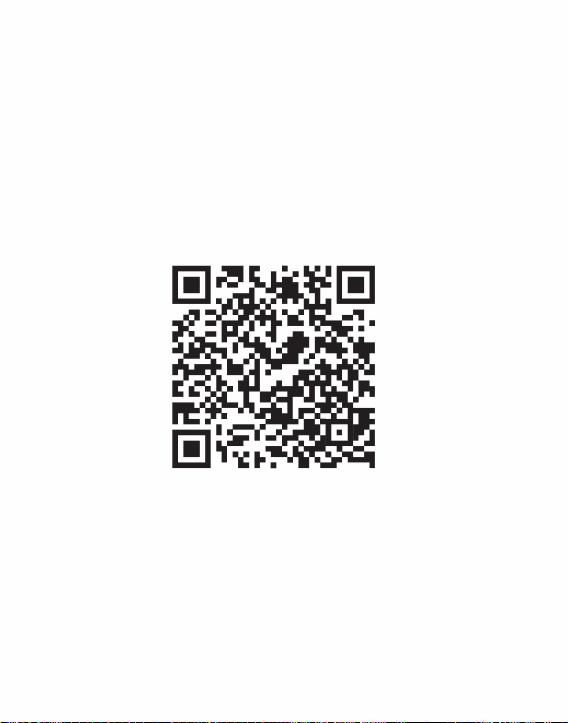
2
2.1 Toepassingsscenario
2.2 Hoofdfuncties
2. Productoverzicht
om infraroodobservatie en infraroodtemperatuur te bereiken
De belangrijkste functies zijn als volgt:
en installeer de smartphone-warmtebeeldapp "HTI-105/203U".
Met behulp van deze smartphone-warmtebeeldcamera moet u downloaden
infraroodobservatie uitvoeren;
Scan de QR-code om de app te downloaden
meetfunctie via deze APP.
(1) Open de toepassingssoftware van de infraroodwarmtebeeldcamera
Machine Translated by Google
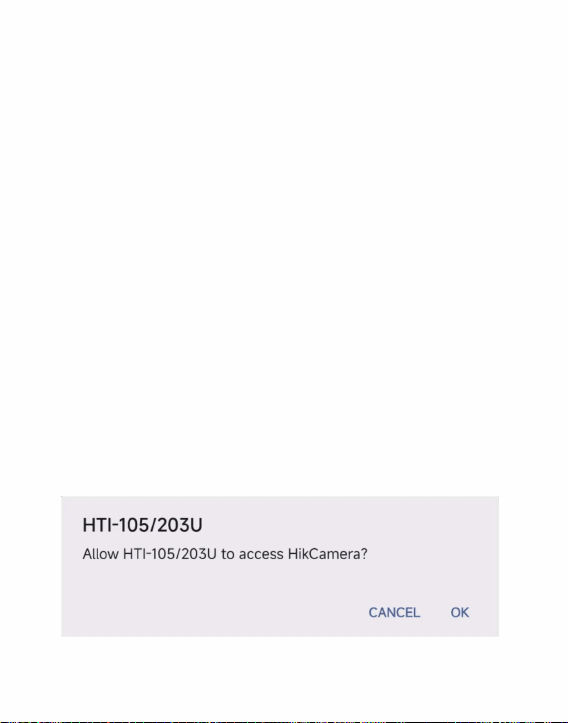
3
3. Productgebruik
warmtebeeldcamera.
het USB-apparaat en er verschijnt een prompt. Vink het vakje aan en klik
mobiele telefoon. De mobiele telefoon zal het automatisch herkennen
(4) Actiecontrole en parameterinstelling van de mobiele telefoon
infrarood observatiescherm.
Plaats de infraroodwarmtebeeldcamera in de USB-interface van de
(3) Maak foto's en video's;
"OK". De software start de infraroodwarmtebeeldcamera van de
mobiele telefoon, en op het scherm van de mobiele telefoon verschijnt het volgende
tuuranalyse;
(2) Voer infraroodtemperatuurmetingen en tempera-
3.1 Apparatuuraansluiting
Machine Translated by Google
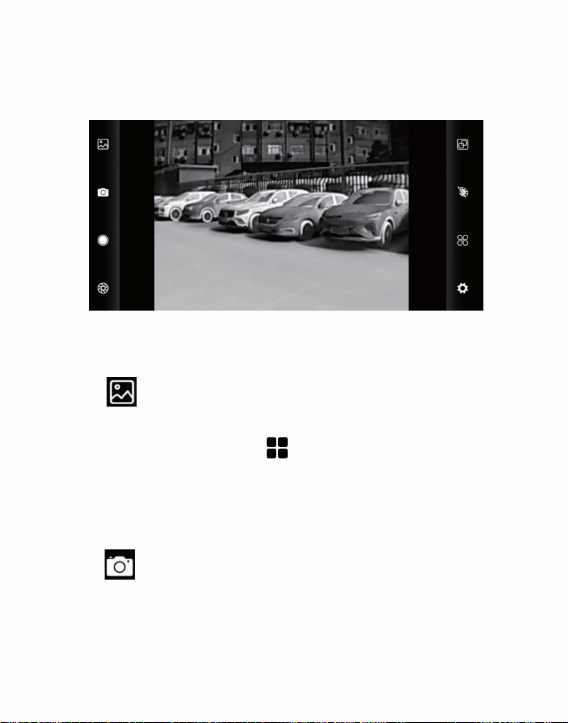
4
Analyse van temperatuurmetingen
(1) “ ”Galerij: Klik om de afbeelding en video te bekijken.
”Foto: sla de huidige foto op;
galerij om de afbeeldingslocatie te bekijken.
(2) “
Bewaarlocatie foto: Open de gewenste afbeelding in het
3.2.1 Galerij, foto en video
3.2 Softwarebediening
“
foto/video en klik
rechtsboven om te verwijderen
Als u ervoor kiest om te delen, kunt u afbeeldingen lezen of
”
videos.
Wanneer u de fotolijst/videolijst opent, controleer dan de
of deel de foto/video.
Machine Translated by Google
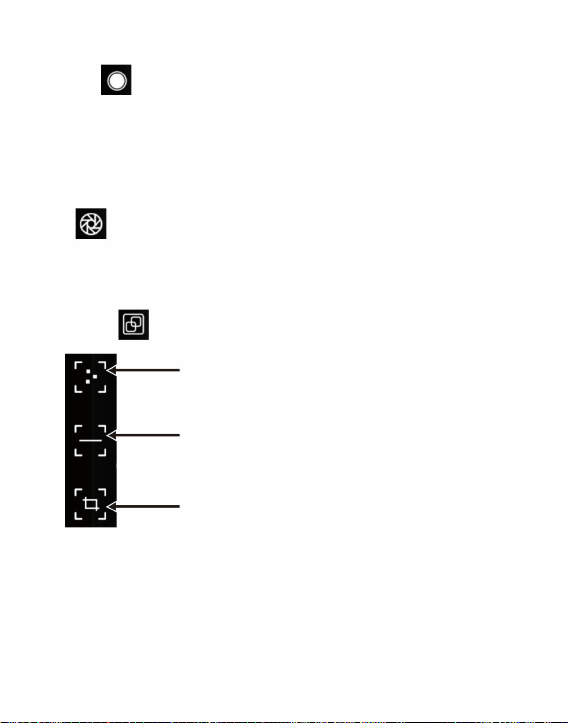
5
3.2.2 Sluiter vernieuwen
3.2.3 Analyse van temperatuurmetingen
“
tuurinformatie van drie punten, namelijk de centrale temperatuur
om de optie voor temperatuurmeting uit te klappen.
punt, het hoogste temperatuurpunt en de laagste temperatuur
”Video: klik om de video-opname te starten en klik opnieuw(3) “
Klik "
om de video-opname te beëindigen.
Punttemperatuurmeting
”
De opslaglocatie van video is hetzelfde als de afbeelding.
Analyse van lijntemperatuurmetingen
Analyse van regionale temperatuurmetingen
”Sluiter vernieuwen: Klik om het schild te vernieuwen.
(1) Punttemperatuurmeting: klik op de punttemperatuur
meetknop, en het scherm geeft de temperatuur weer
Machine Translated by Google
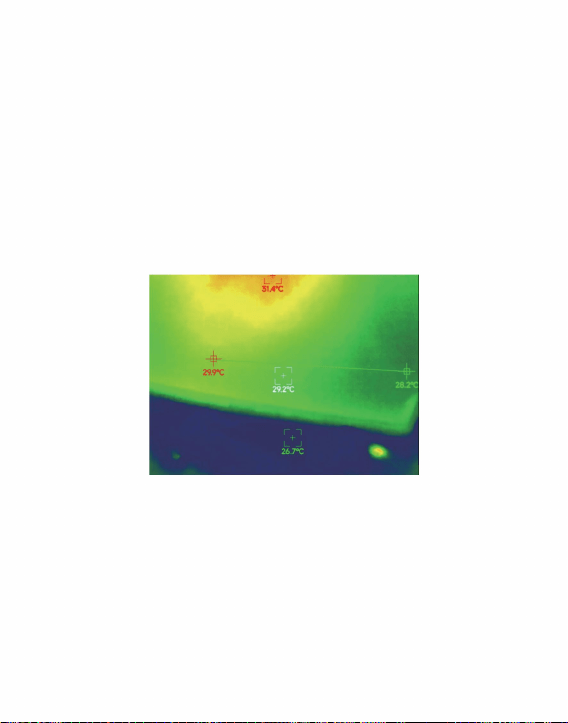
6
informatie over het door de gebruiker gedefinieerde punt wordt toegevoegd.
(3) Analyse van regionale temperatuurmetingen: sleep met uw
analyseer automatisch de maximale temperatuur en het minimum
in het rechthoekige gebied en identificeer relevante informatie, zoals
Analyse van lijntemperatuurmetingen
vingers en teken een horizontale lijn op het scherm. Het zal
weergegeven in de volgende afbeelding:
analyseer de maximale temperatuur en minimale temperatuur
informatie.
(2) Analyse van lijntemperatuurmetingen: sleep met uw
punt. Klik op dit moment op het scherm en de temperatuur
vingers en teken een rechthoek op het scherm. het zal automatisch gebeuren
temperatuur van de horizontale lijn, en identificeren relevant
Machine Translated by Google
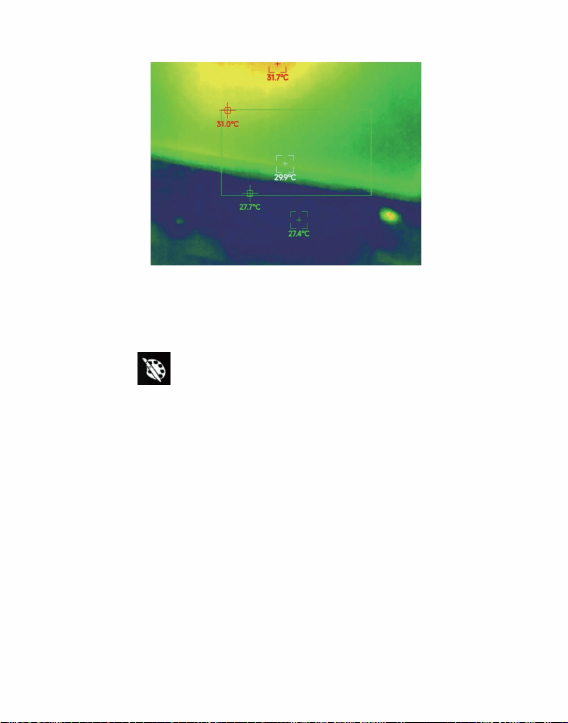
7
3.2.4 Kleurenpalet
donkerbruin, kleur-1, kleur-2, ICE-vuur, regen, roodgloeiend, groengloeiend,
Klik op de
witgloeiend, zwartheet, blend-1, regenboog, blend-2, ijzer-1, ijzer-2,
”
kan schakelen tussen 15 soorten kleurenpaletten, waaronder de
“
Analyse van regionale temperatuurmetingen
donkerblauw, zoals weergegeven in de volgende afbeelding.
om de kleurenpaletinterface te openen, en jij
Machine Translated by Google
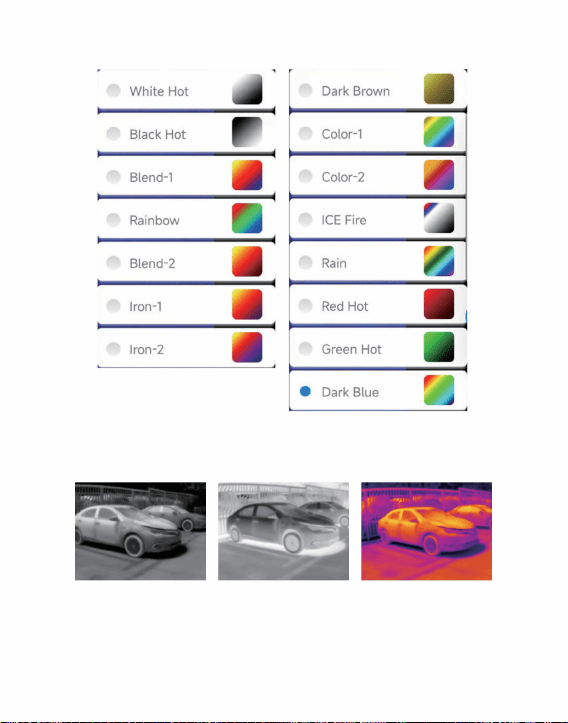
8
volgt:
Zwart Heet
De weergave-effecten van de 15 soorten kleurenpaletten zijn als
Wit heet Mengsel-1
Machine Translated by Google
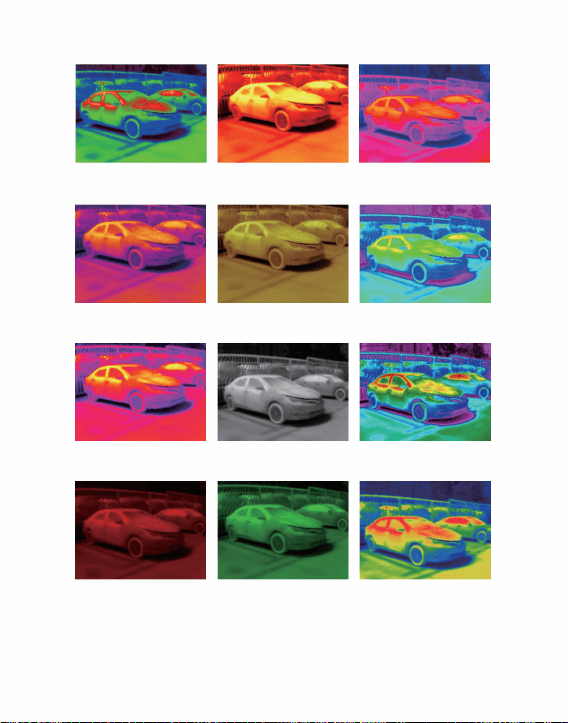
9
Mengsel-2
Regen
Donker bruin
Donkerblauw
Ijs vuur
Ijzer-2
Groen Heet
Kleur-2
Ijzer-1Regenboog
roodgloeiend
Kleur-1
Machine Translated by Google
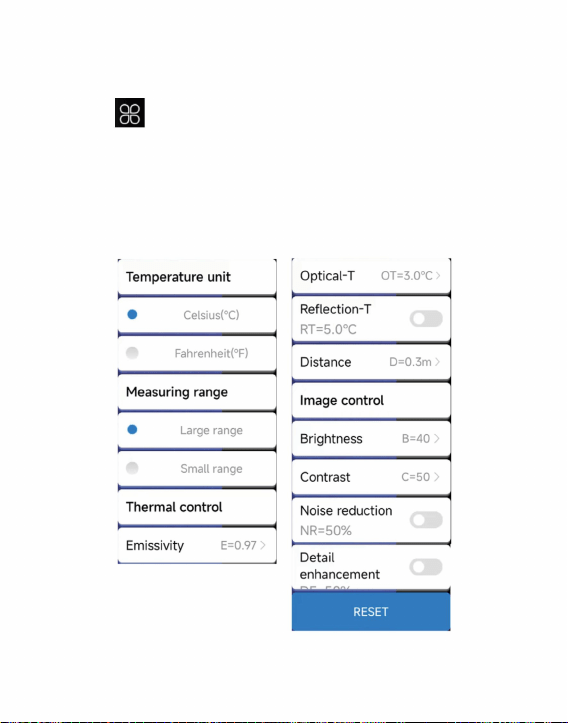
10
”
om de instellingeninterface te openen, die kan worden ingesteld
temperatuur, reflectietemperatuur, temperatuurafstand,
parameters, zoals weergegeven in de onderstaande afbeelding.
Klik "
voor temperatuureenheden, bereik, transmissiesnelheid, optisch
helderheid, contrast, ruisonderdrukking, details of details of reset
3.2.5 Instelling temperatuurmeting
Machine Translated by Google
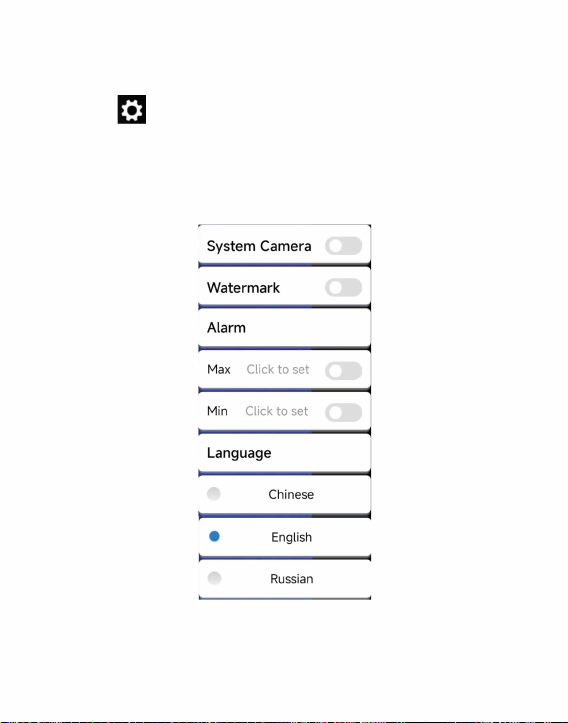
11
Klik "
u kunt instellen of u de systeemcamera, het watermerk,
Chinees, Engels, Russisch, zoals weergegeven in de onderstaande afbeelding.
om de instellingeninterface te openen. In de interface,
hoge/lage temperatuurinstellingen en taalkeuze.
”
3.2.6 Instellingen
Machine Translated by Google
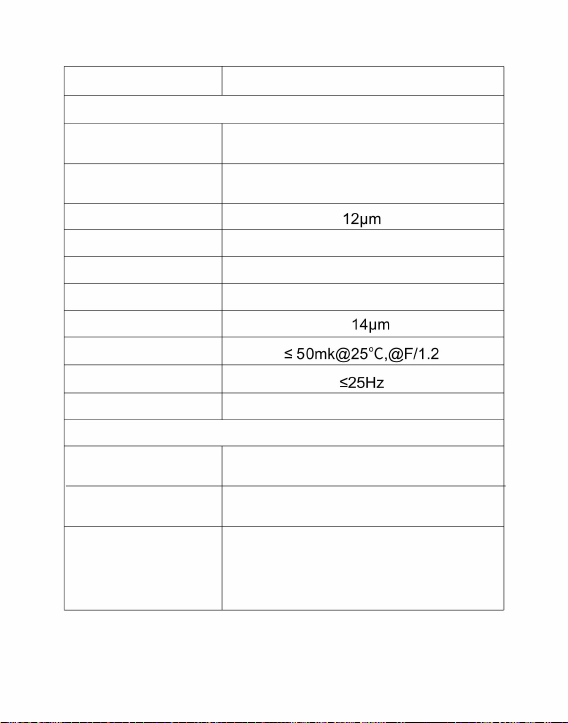
12
paletten
Ondersteund
256x192
Beeldframesnelheid
Infrarood
56,0°(H)×42°(V)
Vrije focus
Pixelafstand
Werkende band
Ongekoeld infraroodbrandvlak van
amorf silicium
Kijkhoek
Contrast
3,43 mrad
Detectortype
Helderheid
Product Model
3,2 mm
Scherpstelmodus
witgloeiend, zwartheet, blend-1, regenboog,
blend-2, ijzer-1, ijzer-2, donkerbruin, kleur-1,
kleur-2, ICE-vuur, regen, roodgloeiend,
groengloeiend, donkerblauw
NETD
Brandpuntsafstand
Ondersteund
IFOV
Infrarood
beeldresolutie
aanpassing
Weergave
aanpassing
HT-203U
8~
4. Technische parameters
Machine Translated by Google
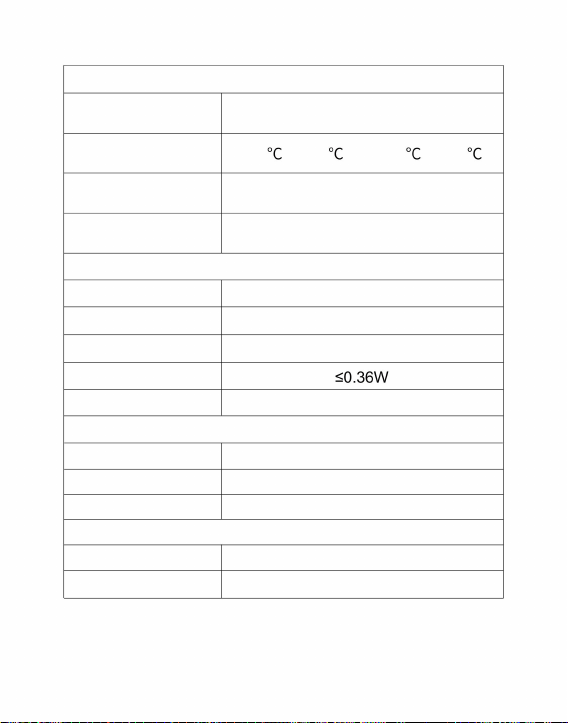
13
28gProductgewicht
Functie voor temperatuurmeting
Camera/video
Chinees, Engels, Russisch
Meetbereik
temperatuur
Taal
Grootte/gewicht
±
3°C of aflezing ± 3%
Ondersteund
-20 ~ 120 en 120 ~ 550
USB Type-C, DC5V-voeding
IP54
Energieverbruik
Temperatuur
meetafstand
-10ÿ ~ +50ÿ
Temperatuurpunt-, lijn- en regionale meetmethode
temperatuurmeting
Foto-/videoformaat
Werktemperatuur
46x70x14mm
JPG/MP4
Systeemfunctie
Product grootte
Werk-/opslagomgeving
0,3m~3m
Beschermingsniveau
Bewaar temperatuur
-20ÿ ~ +60ÿ
Resolutie
temperatuurmeting
Externe interface
Machine Translated by Google

14
WAARSCHUWING: Wijzigingen of aanpassingen aan dit product die niet uitdrukkelijk zijn
goedgekeurd door de partij die verantwoordelijk is voor naleving kunnen de bevoegdheid
van de gebruiker om het product te bedienen ongeldig maken.
LET OP: Wijzigingen of aanpassingen die niet uitdrukkelijk zijn goedgekeurd door de partij
die verantwoordelijk is voor naleving, kunnen de bevoegdheid van de gebruiker ongeldig maken
schadelijke interferentie in een residentiële installatie te verkrijgen.
2)Dit product moet alle ontvangen interferentie accepteren, inclusief interferentie die
een ongewenste werking kan veroorzaken.
Regels. Deze limieten zijn bedoeld om redelijke bescherming te biedena
1) Dit product kan schadelijke interferentie veroorzaken.
19/EU. Het symbool met een doorgestreepte afvalcontainer geeft aan dat het
product in de Europese Unie een aparte afvalinzameling vereist. Dit geldt voor het product
en alle accessoires die met dit symbool zijn gemarkeerd. Producten die als zodanig
zijn gemarkeerd, mogen niet bij het normale huisvuil worden weggegooid, maar
moeten worden ingeleverd bij een inzamelpunt voor recycling van elektrische en
elektronische apparaten.
limieten voor een digitaal apparaat van klasse B overeenkomstig Deel 15 van de FCC
Dit apparaat voldoet aan Deel 15 van de FCC-regels. De werking is onderworpen aan
de volgende twee voorwaarden:
Let op: Dit product is getest en voldoet aan de
Dit product valt onder de bepalingen van de Europese Richtlijn 2012/
om de apparatuur te bedienen!
Dit product genereert, gebruikt en kan radiofrequentie uitstralen
CORRECTE VERWIJDERING
FCC-informatie
Machine Translated by Google

Gemaakt in China
maatregelen.
· Vergroot de afstand tussen het product en de ontvanger.
· Raadpleeg de dealer of een ervaren radio-/tv-technicus voor hulp.
energie, en indien niet geïnstalleerd en gebruikt in overeenstemming
met de instructies, kan dit schadelijke interferentie aan
radiocommunicatie veroorzaken. Er is echter geen garantie dat
er geen interferentie zal optreden in een bepaalde installatie. Als dit
product schadelijke interferentie veroorzaakt aan radio- of televisieontvangst,
wat kan worden vastgesteld door het
product uit en weer in te schakelen, wordt de gebruiker aangeraden de
interferentie te corrigeren door een of meer van de volgende handelingen uit te voeren:
· Heroriënteer of verplaats de ontvangstantenne.
· Sluit het product aan op een stopcontact op een ander circuit dan dat
waarop de ontvanger is aangesloten.
15
Geïmporteerd naar de VS:
Geïmporteerd naar AUS: SIHAO PTY LTD, 1 ROKEVA STREETEASTWOOD NSW 2122 Australië
Sanven Technology Ltd., Suite 250, 9166 Anaheim Place, Rancho Cucamonga, CA 91730
Adres: Baoshanqu Shuangchenglu 803long 11hao 1602A-1609shi Shanghai
Machine Translated by Google

Gemaakt in China
Technische ondersteuning en e-garantiecertificaat
www.vevor.com/support
Machine Translated by Google

Smart värmekamera för mobiltelefon
uppskattning av besparingar du kan dra nytta av att köpa vissa verktyg hos oss jämfört med de stora
toppmärkena och betyder inte nödvändigtvis att täcka alla kategorier av verktyg som erbjuds av oss. Du
Vi fortsätter att vara engagerade i att ge dig verktyg till konkurrenskraftiga priser.
faktiskt spara hälften i jämförelse med de främsta stora varumärkena.
"Spara hälften", "Halva priset" eller andra liknande uttryck som används av oss representerar endast en
påminns vänligen om att kontrollera noggrant när du gör en beställning hos oss om du gör det
Teknisk support och e-garanticertifikat www.vevor.com/support
MODELL:HT-203U
Machine Translated by Google
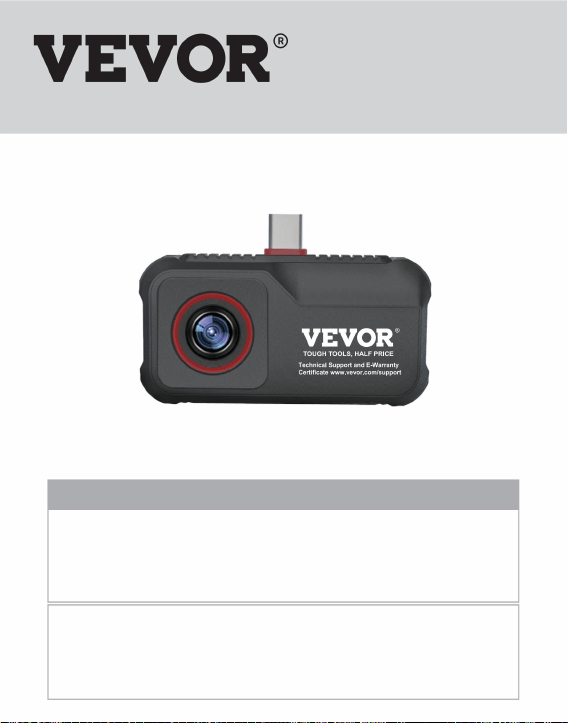
Värmekamera för mobiltelefon
BEHÖVS HJÄLP? KONTAKTA OSS!
Detta är den ursprungliga instruktionen, läs alla instruktioner noggrant innan du använder den. VEVOR
reserverar sig för en tydlig tolkning av vår användarmanual. Utseendet på produkten är beroende av den
produkt du fått. Ursäkta oss att vi inte kommer att informera dig igen om det finns någon teknik eller
mjukvaruuppdateringar på vår produkt.
Bruksanvisning
TÅRA VERKTYG, HALVA PRISET
Har du produktfrågor? Behöver du teknisk support? Kontakta oss gärna:
Teknisk support och e-garanticertifikat
www.vevor.com/support
Machine Translated by Google

Machine Translated by Google

Innehåll
5
2
11
4
10
2
4
2
8
3
5
1
3
12
2.2 Huvudfunktioner
3.2.1 Galleri, foto och video
2.1 Applikationsscenario
3.2.5 Temperaturmätningsinställning
3.2 Programvarudrift
3.2.4 Färgpalett
2. Produktöversikt
3.1 Anslutning av utrustning
1. Försiktighetsåtgärder
3.2.3 Temperaturmätningsanalys
3. Produktanvändning
4. Tekniska parametrar
3.2.2 Slutaruppdatering
3.2.6 Inställningar
Machine Translated by Google

1. Försiktighetsåtgärder
(4) Skrubba inte din utrustning med thinner;
(1) Utsätt inte produkten i solen och andra högintensiva
personal.
(3) Rör inte enheten och USB-gränssnittet med våta händer;
vänligen kontakta vårt företag för reparation av en fackman
enhet.
händer eller andra föremål;
enhet för att skydda dig och andra från skador eller skador på din
(6) Ta inte isär utrustningen. Om det finns något fel,
(2) Rör inte eller kollidera inte med detektorfönstret och linsen
(5) Var uppmärksam på att förhindra statisk elektricitet;
Läs all följande information innan du använder din
strålkällor
1
Machine Translated by Google
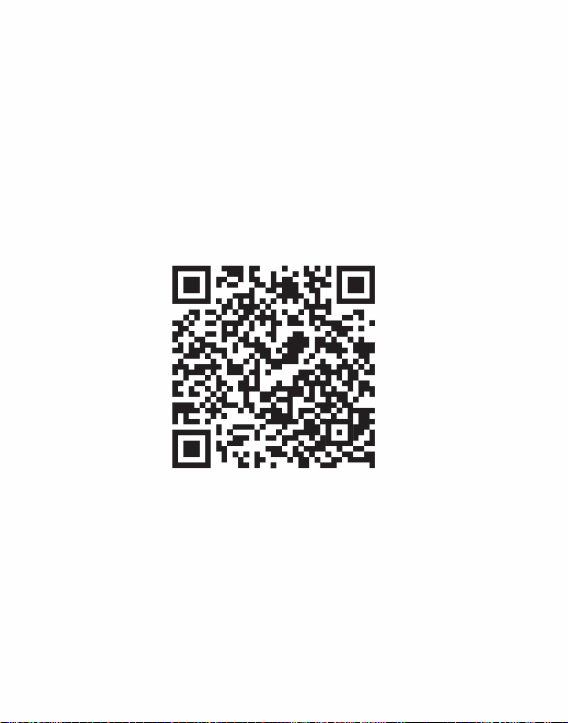
2.1 Applikationsscenario
2.2 Huvudfunktioner
2
2. Produktöversikt
(1) Öppna programmet för den infraröda värmekameran
för att uppnå infraröd observation och infraröd temperatur
Huvudfunktionerna är följande:
och installera smarttelefonens termiska bild "HTI-105/203U" APP
Om du använder den här smarttelefonens värmekamera måste du ladda ner
Skanna QR-koden för att ladda ner appen
att utföra infraröd observation;
mätfunktion genom denna APP.
Machine Translated by Google
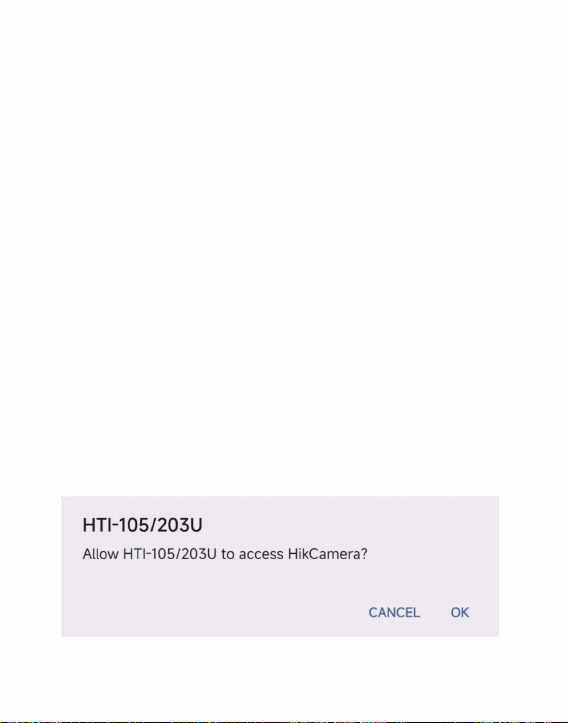
3. Produktanvändning
3
Sätt in den infraröda värmekameran i USB-gränssnittet på
mobiltelefon, och mobiltelefonens skärm kommer in i
infraröd observationsskärm.
(4) Åtgärdskontroll och parameterinställning av mobiltelefonen
mobiltelefon. Mobiltelefonen kommer automatiskt att känna igen
värmekamera.
(2) Utför infraröd temperaturmätning och tempera-
turanalys;
USB-enheten och en prompt visas. Markera rutan och klicka
"OK". Programvaran startar den infraröda värmekameran på
(3) Ta foton och filmer;
3.1 Anslutning av utrustning
Machine Translated by Google
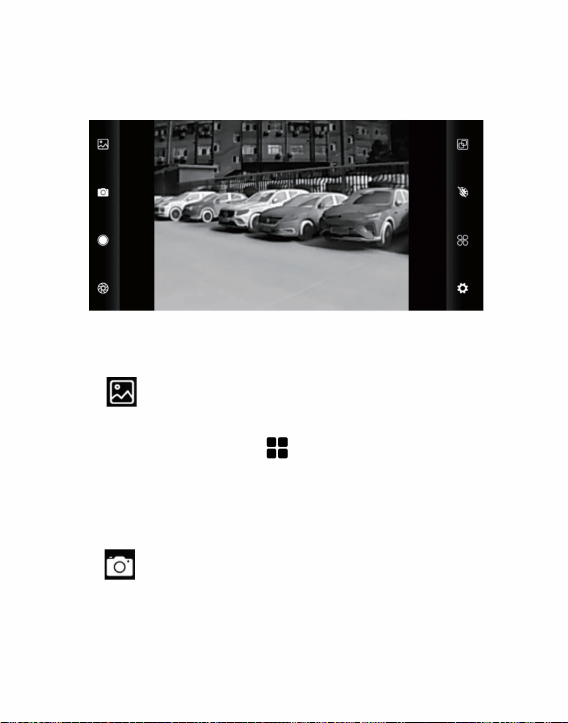
Temperaturmätningsanalys
(1) " "Galleri: Klicka för att se bilden och videon.
”Foto: Spara den aktuella bilden;
galleri för att se bildens plats.
(2) "
Fotobevarande plats: Öppna önskad bild i
4
3.2 Programvarudrift
3.2.1 Galleri, foto och video
bild/video och klicka
uppe till höger för att radera
eller dela bilden/videon.
”
Att välja att dela kan användas för att läsa bilder eller
När du går in i bildlistan/videolistan, kontrollera
videoklipp.
"
Machine Translated by Google
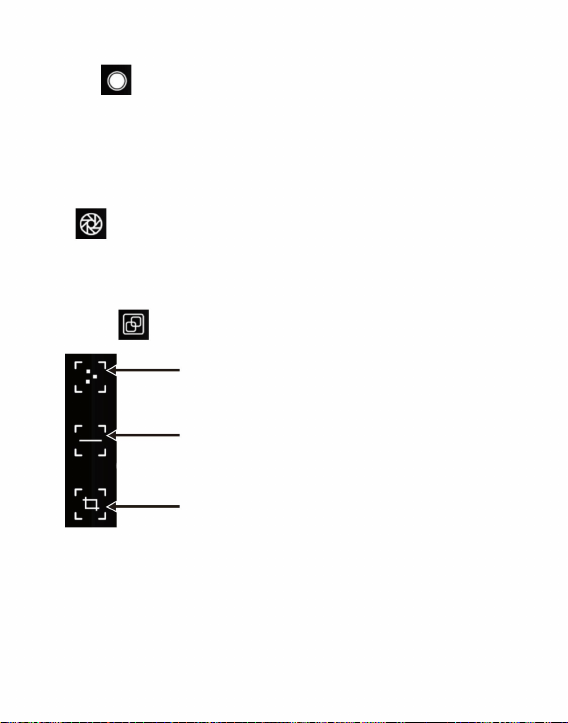
”Video: klicka för att starta videoinspelning och klicka igen(3) "
för att avsluta videoinspelningen.
Punkttemperaturmätning
Klick "
”
information om tre punkter, nämligen centraltemperaturen
punkt, högsta temperaturpunkt och lägsta temperatur
att poppa ut alternativ för temperaturmätning.
”Shutter refresh: Klicka för att uppdatera skölden.
(1) Punkttemperaturmätning: klicka på punkttemperaturen
mätningsknapp, och skärmen visar tempera-
"
Linjetemperaturmätning analys
Lagringsplatsen för videon är densamma som bilden.
Regional temperaturmätningsanalys
3.2.2 Slutaruppdatering
3.2.3 Temperaturmätningsanalys
5
Machine Translated by Google
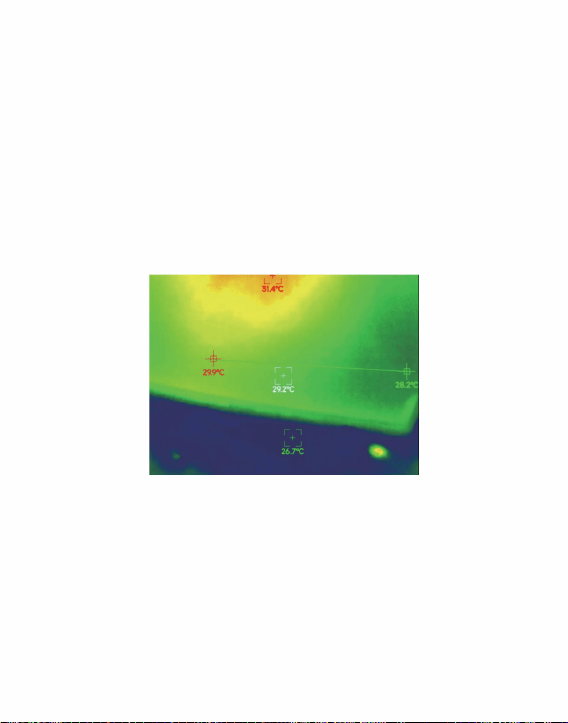
punkt. Klicka på skärmen vid denna tidpunkt och temperaturen
analysera automatiskt maxtemperatur och minimum
fingrar och rita en rektangel på skärmen. det kommer automatiskt
(3) Regional temperaturmätningsanalys: dra med din
visas i följande figur:
fingrar och rita en horisontell linje på skärmen. Det kommer
Linjetemperaturmätning analys
(2) Analys av linjetemperaturmätning: dra med din
i det rektangulära området, och identifiera relevant information, som
information.
analysera maxtemperatur och lägsta temperatur
information om den användardefinierade punkten kommer att läggas till.
temperatur på den horisontella linjen och identifiera relevanta
6
Machine Translated by Google
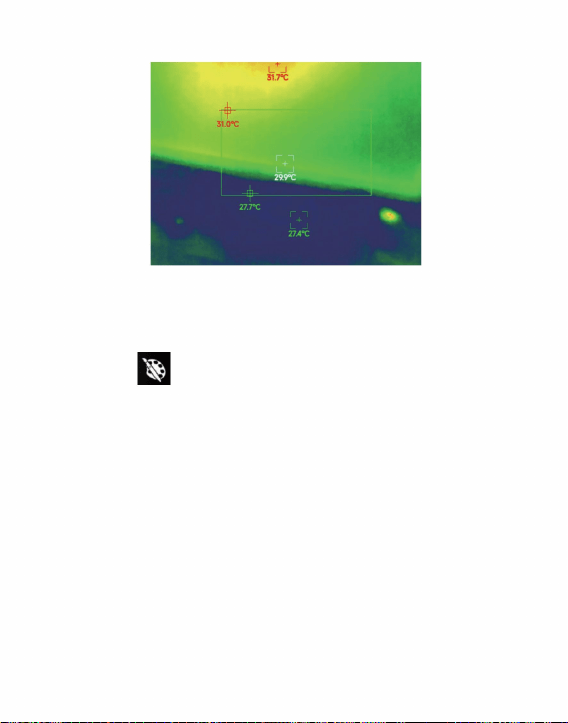
Regional temperaturmätningsanalys
Klicka på
mörkblå, som visas i följande figur.
mörkbrun, färg-1, färg-2, ICE brand, regn, glödhet, grön varm,
”
white hot, black hot, blend-1, rainbow, blend-2, iron-1, iron-2,
"
kan växla mellan 15 typer av färgpaletter inklusive
för att dyka upp färgpalettens gränssnitt, och du
3.2.4 Färgpalett
7
Machine Translated by Google
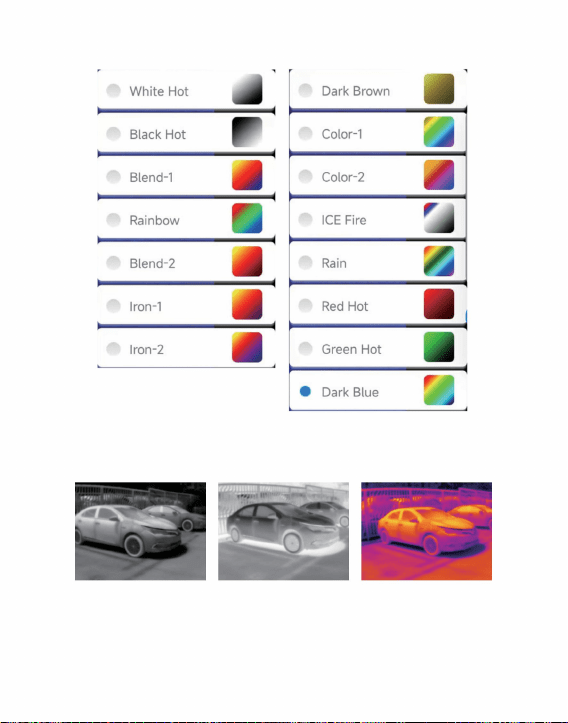
följer:
Black Hot
Visningseffekterna för de 15 typerna av färgpaletter är som
White Hot Blandning-1
8
Machine Translated by Google
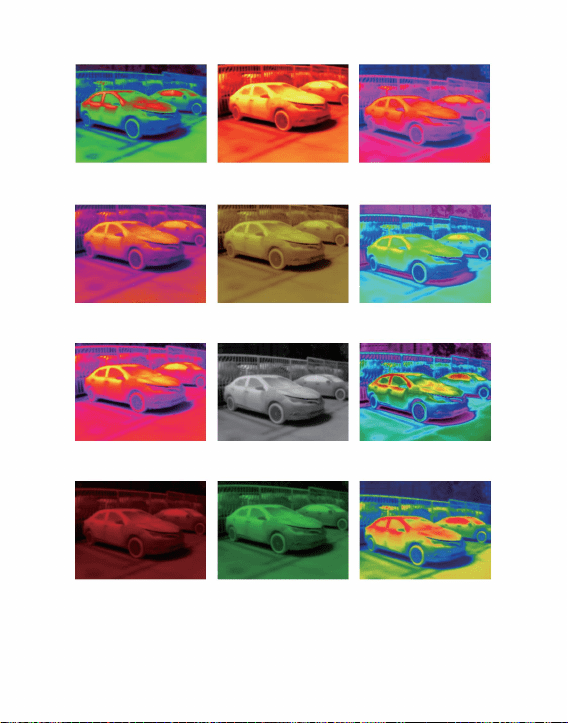
Järn-1
Is eld
Järn-2
Mörkblå
Regn
Mörkbrun
Regnbåge
Red Hot
Färg-1
Blandning-2
Green Hot
Färg-2
9
Machine Translated by Google
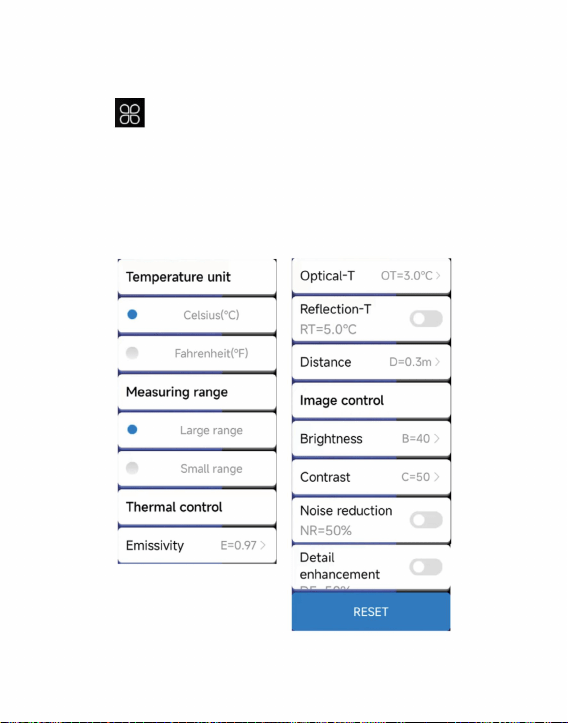
3.2.5 Temperaturmätningsinställning
för att öppna inställningsgränssnittet, som kan ställas in
”
temperatur, reflektionstemperatur, temperaturavstånd,
ljusstyrka, kontrast, brusreducering, detaljer om detaljer eller återställning
för temperaturenheter, räckvidd, överföringshastighet, optisk
Klick "
parametrar, som visas i figuren nedan.
10
Machine Translated by Google
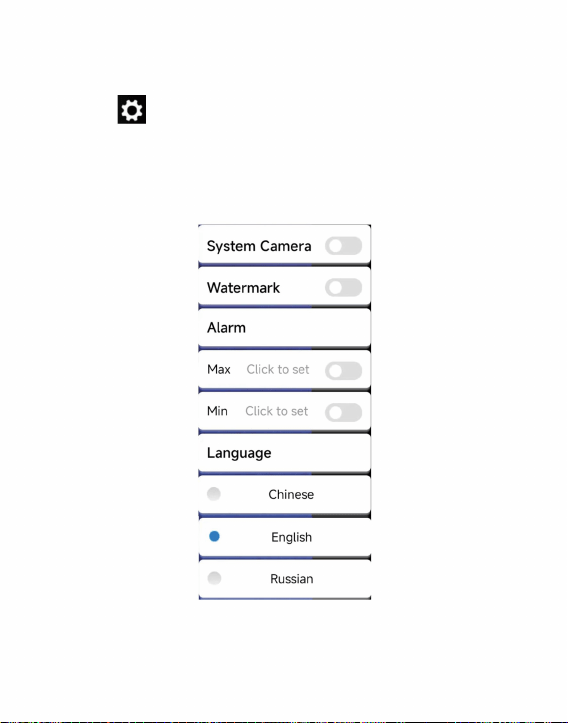
3.2.6 Inställningar
du kan ställa in om systemkameran, vattenstämpeln,
Klick "
Kinesiska, engelska, ryska, som visas i figuren nedan.
”
hög/låg temperaturinställningar och språkval.
för att öppna inställningsgränssnittet. I gränssnittet,
11
Machine Translated by Google
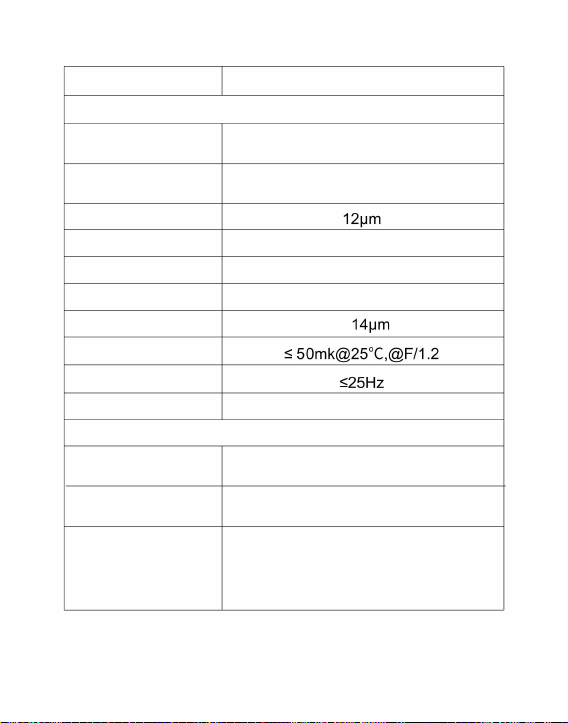
4. Tekniska parametrar
Gratis fokus
Infraröd
bildupplösning
Pixelavstånd
Arbetande band
256 x 192
Stöds
Bildrutehastighet
56,0°(H)×42°(V)
Infraröd
Detektortyp
3,43 mrad
Ljusstyrka
Synvinkel
Amorft kisel okylt infrarött fokalplan
Kontrast
Brännvidd
NETD
Stöds
Produktmodell
3,2 mm
Fokuseringsläge
vithet, svarthet, blandning-1, regnbåge,
blandning-2, järn-1, järn-2, mörkbrun,
färg-1, färg-2, ICE-eld, regn, glödhet,
grönhet, mörkblå
Visa
paletter
HT-203U
justering
8~
IFOV
justering
12
Machine Translated by Google
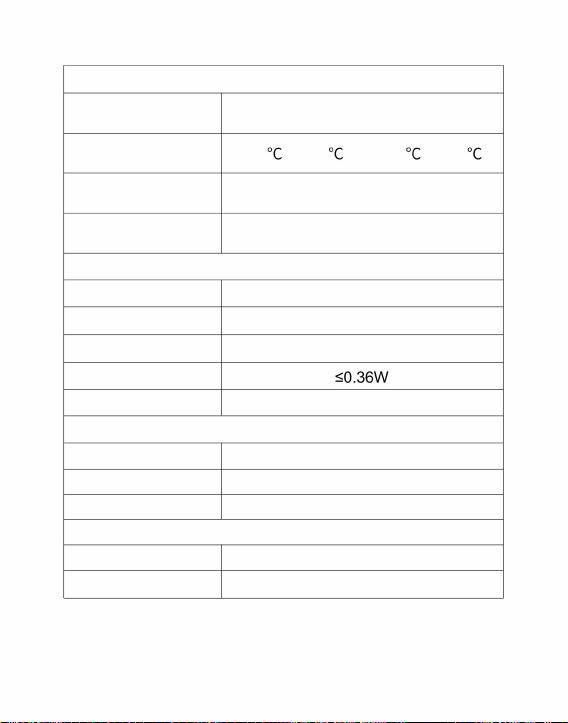
Storlek/vikt
0,3m~3m
± 3
° C eller avläsning ± 3 %
Stöds
Funktion för temperaturmätning
Produkt vikt
Kamera/video
Temperaturmätningsområde
Språk kinesiska, engelska, ryska
Temperaturmätningsavstånd
Energiförbrukning
-10ÿ ~ +50ÿ
-20 ~ 120 och 120 ~ 550
USB Type-C, DC5V strömförsörjning
IP54
Systemfunktion
JPG/MP4
Produktstorlek
Temperaturpunkt,
linje och regional mätmetod temperaturmätning
Bild/videoformat
Arbetstemperatur
46x70x14mm
Förvaringstemperatur
28g
Temperaturmätningsupplösning
-20ÿ ~ +60ÿ
Externt gränssnitt
Arbets/förvaringsmiljö
Skyddsnivå
13
Machine Translated by Google

FCC-information
KORREKT AVFALLSHANTERING
1) Denna produkt kan orsaka skadliga störningar.
gränser för en klass B digital enhet i enlighet med Part15 av FCC
Regler, Dessa gränser är utformade för att ge rimligt skydd
Denna produkt genererar, använder och kan utstråla radiofrekvenser
2) Denna produkt måste acceptera alla mottagna störningar, inklusive
störningar som kan orsaka oönskad funktion.
VARNING: Ändringar eller modifieringar som inte uttryckligen godkänts av
den part som ansvarar för efterlevnaden kan ogiltigförklara användarens auktoritet
skadliga störningar i en bostadsinstallation.
VARNING: Ändringar eller modifieringar av denna produkt som inte uttryckligen
godkänts av den part som är ansvarig för efterlevnaden kan upphäva
användarens behörighet att använda produkten.
Denna produkt omfattas av bestämmelserna i det europeiska direktivet 2012/
att använda utrustningen!
Denna enhet uppfyller del 15 av FCC-reglerna. Driften är föremål för följande
två villkor:
Obs: Denna produkt har testats och befunnits uppfylla kraven
19/EU. Symbolen som visar en soptunna korsad anger att produkten
kräver separat sophämtning i EU. Detta gäller för produkten och alla tillbehör
märkta med denna symbol. Produkter märkta som sådana får inte slängas
tillsammans med vanligt hushållsavfall, utan måste lämnas till en
insamlingsplats för återvinning av elektriska och elektroniska apparater.
14
Machine Translated by Google

Tillverkad i Kina
· Öka avståndet mellan produkten och mottagaren.
åtgärder.
energi, och om den inte installeras och används i enlighet med
instruktionerna, kan det orsaka skadliga störningar på
radiokommunikation. Det finns dock ingen garanti för att störningar
inte kommer att inträffa i en viss installation. Om denna produkt orsakar
skadliga störningar på radio- eller tv-mottagning, vilket kan fastställas
genom att stänga av och slå på produkten,
uppmanas användaren att försöka korrigera störningen med ett eller flera
av följande
· Kontakta återförsäljaren eller en erfaren radio/TV-tekniker för hjälp.
· Anslut produkten till ett uttag på en annan krets än den som mottagaren
är ansluten till.
· Rikta om eller flytta mottagningsantennen.
Adress: Baoshanqu Shuangchenglu 803long 11hao 1602A-1609shi Shanghai
Sanven Technology Ltd., Suite 250, 9166 Anaheim Place, Rancho Cucamonga, CA 91730
Importerad till AUS: SIHAO PTY LTD, 1 ROKEVA STREETEASTWOOD NSW 2122 Australien
Importerad till USA:
15
Machine Translated by Google

Teknisk support och e-garanticertifikat
www.vevor.com/support
Tillverkad i Kina
Machine Translated by Google