Owner’s Manual & Safety Instructions
Save This Manual Keep this manual for the safety warnings and precautions, assembly,
operating, inspection, maintenance and cleaning procedures. Write the product’s serial number in the
back of the manual (or month and year of purchase if product has no number). Keep this manual and the
receipt in a safe and dry place for future reference. 23c
When unpacking, make sure that the product is intact
and undamaged. If any parts are missing or broken,
please call 1‑888‑866‑5797 as soon as possible.
Copyright
©
2021 by Harbor Freight Tools
®
. All rights reserved.
No portion of this manual or any artwork contained herein may be reproduced in
any shape or form without the express written consent of Harbor Freight Tools.
Diagrams within this manual may not be drawn proportionally. Due to continuing
improvements, actual product may differ slightly from the product described herein.
Tools required for assembly and service may not be included.
read this material before using this product.
Failure to do so can result in serious injury.
SaVe tHiS ManuaL.
Visit our website at: http://www.harborfreight.com
email our technical support at: [email protected]
59490
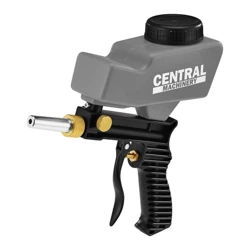
PORTABLE SAND
BLASTER GUN KIT
Page 2 For technical questions, please call 1-888-866-5797. Item 59490
SaFety OperatiOn MaintenanceSetup
table of contents
Safety .......................................................................2
Specifications ...........................................................6
Setup ........................................................................6
Operation .................................................................10
Maintenance ............................................................11
Parts List and Diagram ............................................14
Warranty ..................................................................16
WarninG SyMBOLS anD DeFinitiOnS
This is the safety alert symbol. It is used to alert you to potential
personal injury hazards. Obey all safety messages that
follow this symbol to avoid possible injury or death.
Indicates a hazardous situation which, if not avoided,
will result in death or serious injury.
Indicates a hazardous situation which, if not avoided,
could result in death or serious injury.
Indicates a hazardous situation which, if not avoided,
could result in minor or moderate injury.
Addresses practices not related to personal injury.
iMpOrtant SaFety inStructiOnS
inStructiOnS pertaininG tO a riSK OF Fire, eLectric SHOcK, Or inJury tO perSOnS
The warnings and precautions discussed in this manual cannot cover all possible conditions and
situations that may occur. It must be understood by the operator that common sense and caution
are factors which cannot be built into this product, but must be supplied by the operator.
WarninG – When using tools, basic precautions should always be followed, including the following:
Work area
a. Keep the work area clean and well lighted.
Cluttered benches and dark areas increase the
risks of electric shock, fire, and injury to persons.
b. Do not operate the tool in explosive
atmospheres, such as in the presence
of flammable liquids, gases, or dust.
The tool is able to create sparks resulting
in the ignition of the dust or fumes.
c. Keep bystanders, children, and visitors away
while operating the tool. Distractions are
able to result in the loss of control of the tool.

Page 3For technical questions, please call 1-888-866-5797.Item 59490
SaFetyOperatiOnMaintenance Setup
personal Safety
a. Stay alert. Watch what you are doing and
use common sense when operating the tool.
Do not use the tool while tired or under the
influence of drugs, alcohol, or medication.
A moment of inattention while operating the
tool increases the risk of injury to persons.
b. Dress properly. Do not wear loose clothing
or jewelry. contain long hair. Keep hair,
clothing, and gloves away from moving parts.
Loose clothes, jewelry, or long hair increases
the risk of injury to persons as a result
of being caught in moving parts.
c. Do not overreach. Keep proper
footing and balance at all times.
Proper footing and balance enables better
control of the tool in unexpected situations.
d. use safety equipment.
Wear protective paint spraying
gloves and a NIOSH‑approved
respirator during use. Non‑skid safety
shoes and a hard hat must be used for
the applicable conditions.
e. always wear eye protection.
Wear ANSI‑approved safety goggles.
f. always wear hearing protection
when using the tool.
Prolonged exposure to high intensity
noise is able to cause hearing loss.
tool use and care
a. Do not force the tool. Use the correct tool for the
application. The correct tool will do the job better
and safer at the rate for which the tool is designed.
b. Disconnect the tool from the air source before
making any adjustments, changing accessories,
or storing the tool. Such preventive safety
measures reduce the risk of starting the tool
unintentionally. Turn off and detach the air supply,
safely discharge any residual air pressure, and
release the throttle and/or turn the switch to its
off position before leaving the work area.
c. Store the tool when it is idle out of reach
of children and other untrained persons.
A tool is dangerous in the hands of untrained users.
d. check for misalignment or binding of moving
parts, breakage of parts, and any other condition
that affects the tool’s operation. If damaged,
have the tool serviced before using. Many accidents
are caused by poorly maintained tools.
There is a risk of bursting if the tool is damaged.
e. use only accessories that are identified by the
manufacturer for the specific tool model. Use of
an accessory not intended for use with the specific
tool model, increases the risk of injury to persons.
Service
a. tool service must be performed only
by qualified repair personnel.
b. When servicing a tool, use only identical
replacement parts. use only authorized parts.
Page 4 For technical questions, please call 1-888-866-5797. Item 59490
SaFety OperatiOn MaintenanceSetup
air Source
a. never connect to an air source that
is capable of exceeding 200 psi.
Over pressurizing the tool may cause
bursting, abnormal operation, breakage
of the tool or serious injury to persons.
Use only clean, dry, regulated compressed air at the
rated pressure or within the rated pressure range as
marked on the tool. Always verify prior to using the
tool that the air source has been adjusted to
the rated air pressure or within
the rated air‑pressure range.
b. never use oxygen, carbon dioxide, combustible
gases or any bottled gas as an air source
for the tool. Such gases are capable of
explosion and serious injury to persons.
SaVe tHeSe inStructiOnS.
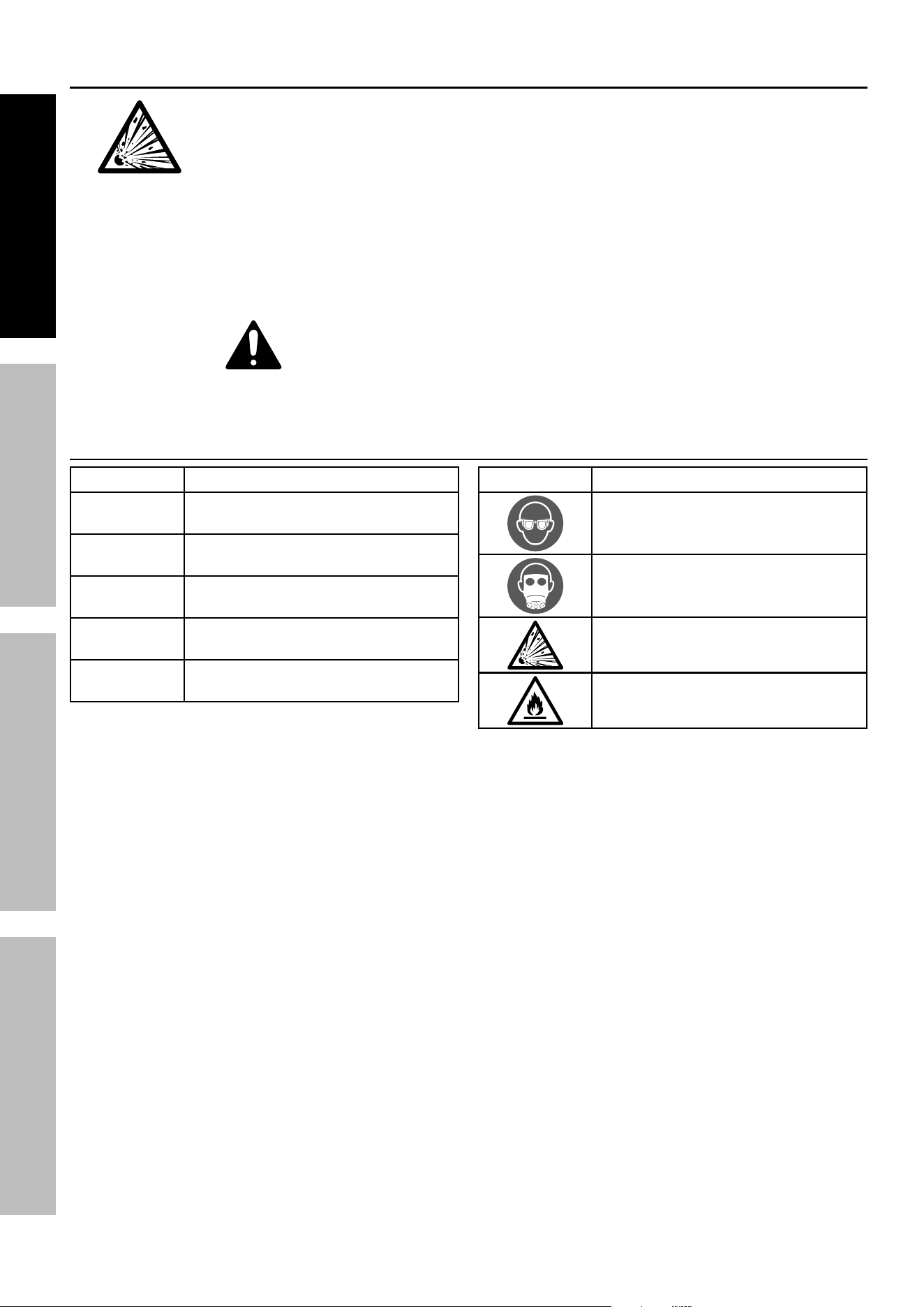
Symbol Definitions
Symbol property or Statement
pSi
Pounds per square inch of pressure
cFM
Cubic Feet per Minute flow
ScFM
Cubic Feet per Minute flow
at standard conditions
npt
National pipe thread, tapered
npS
National pipe thread, straight
Symbol property or Statement
WARNING marking concerning
Risk of Eye Injury.
Wear ANSI‑approved eye protection.
WARNING marking concerning
Risk of Respiratory Injury.
Wear NIOSH‑approved respirator.
WARNING marking concerning
Risk of Explosion.
WARNING marking concerning Risk
of Fire.
Do not use solvents improperly.

Page 5For technical questions, please call 1-888-866-5797.Item 59490
SaFetyOperatiOnMaintenance Setup
Specific Safety instructions
1. Do not direct spray at people or animals.
2. Do not exceed maximum air pressure.
3. RISK OF INJECTION ‑ Do not point blast gun at
any person or any part of the body. In case of skin
injection, seek medical attention immediately.
4. Industrial applications must follow
OSHA requirements.
5. Attach all accessories properly to the tool before
connecting the air supply. A loose accessory
may detach or break during operation.
6. Install an in‑line shutoff valve to allow immediate
control over the air supply in an emergency,
even if a hose is ruptured.
7. Air hose fittings may get hot during use.
Allow fittings to cool before disconnecting.
8. Avoid unintentional starting. Prepare to
begin work before turning on the tool.
9. Do not leave the tool unattended when it is plugged
into an compressor. Release the Trigger, and
unplug the tool from its air source before leaving.
10. Use clamps (not included) or other
practical ways to secure and support
the workpiece to a stable platform.
WarninG: This product, when used for abrasive
blasting and similar applications, produces chemicals
known to the State of California to cause cancer
and birth defects (or other reproductive harm).
11. If any abnormal vibration occurs,
stop use immediately.
Silicosis and aluminum Oxide Warnings
Warning: Abrasive blasting with sand containing
crystalline silica can cause serious or fatal respiratory
disease. Exposure to crystalline silica may cause
silicosis (a serious lung disease), cancer and death.
Exposure to aluminum oxide (a dust generated from
material removing processes) can result in eye, skin
and breathing irritation. Always use a NIOSH (National
Institute for Occupational Safety and Health) approved
respirator and safety goggles. Avoid skin exposure.
Proper ventilation in the work area is required. Read
and understand the 10 recommended measures below
to reduce crystalline silica exposures in the workplace
and prevent silicosis and silicosis related deaths.
niOSH recommends the following measures to
reduce crystalline silica exposures in the workplace
and prevent silicosis and silicosis-related deaths:
1. Prohibit silica sand (or other substances
containing more than 1% crystalline silica)
as an abrasive blasting material and
substitute less hazardous materials.
2. Conduct air monitoring to measure
worker exposures.
3. Use containment methods such as blast‑cleaning
machines and cabinets to control the hazard
and protect adjacent workers from exposure.
4. Practice good personal hygiene to avoid
unnecessary exposure to silica dust.
5. Wear washable or disposable protective clothes
at the work site. Shower and change into clean
clothes before leaving the work site to prevent
contamination of cars, homes and other work areas.
6. Use respiratory protection when source controls
cannot keep silica exposures below the NIOSH REL.
7. Provide periodic medical examinations for all
workers who may be exposed to crystalline silica.
8. Post signs to warn workers about the hazard and to
inform them about required protective equipment.
9. Provide workers with training that includes
information about health effects, work practices
and protective equipment for crystalline silica.
10. Report all cases of silicosis to State health
departments and to OSHA or the Mine Safety
and Health Administration (MSHA).
SaVe tHeSe
inStructiOnS.
Page 6 For technical questions, please call 1-888-866-5797. Item 59490
SaFety OperatiOn MaintenanceSetup
Specifications
Max. Air Pressure 150 PSI
Air Inlet 1/4 IN. ‑ 18 NPT Female
Hopper Capacity 18 OZ.
Air Flow 7 CFM @ 90 PSI
initial Set up
read the entire iMpOrtant SaFety inFOrMatiOn section
at the beginning of this manual including all text under subheadings therein
before set up or use of this product.
note: For additional information regarding the parts listed in the following pages,
refer to the Assembly Diagram near the end of this manual.
Before air Supply Setup
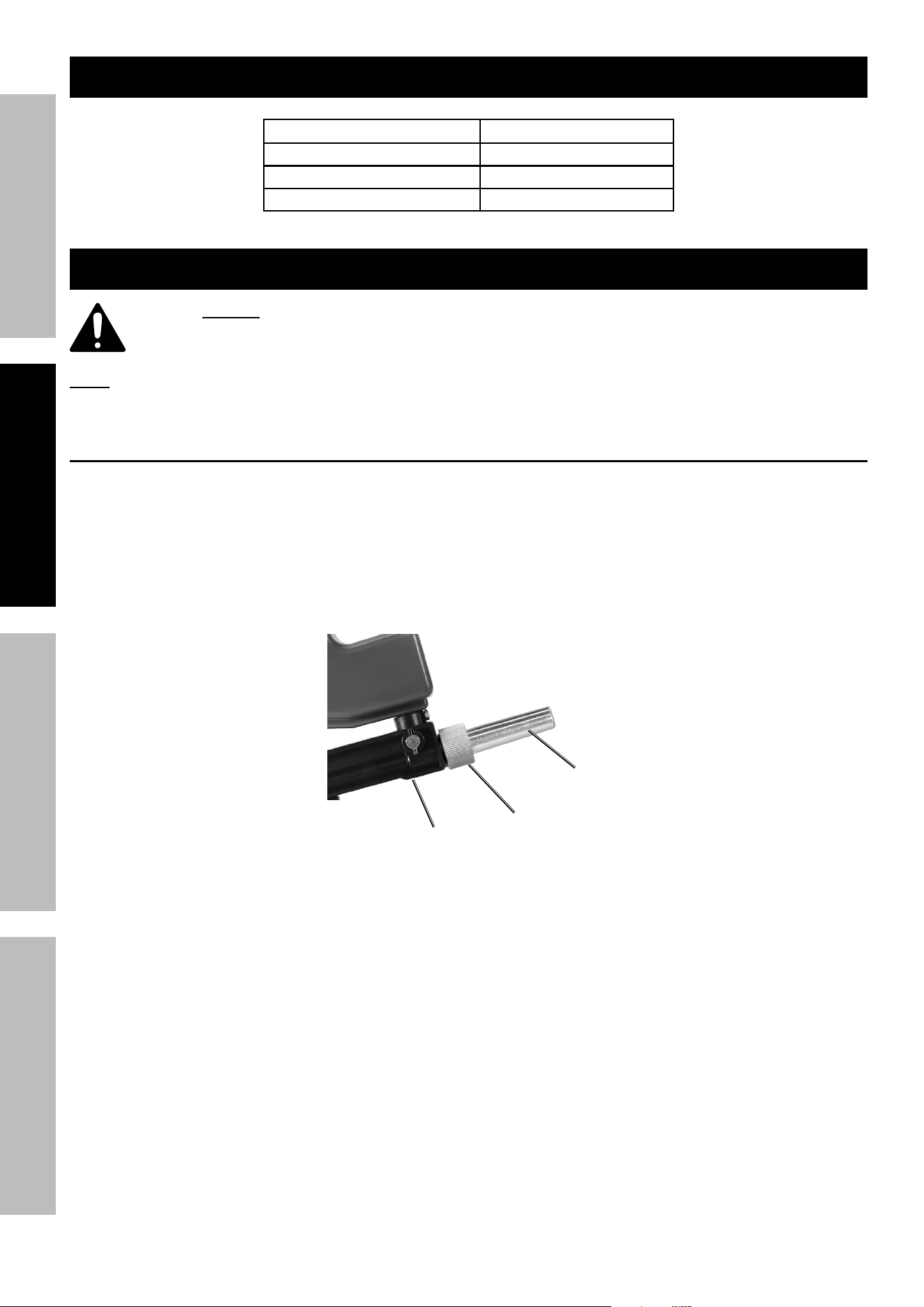
1. This air tool may be shipped with a protective plug covering the air inlet. Remove this plug before set up.
2. Nozzle must be attached to Gun Body before use.
3. Insert short end of Nozzle into Gun Body.
4. Slide the Ring Nut over the Nozzle and thread onto the Gun Body.
5. Hand tighten the Ring Nut. Do not use a tool or pliers to tighten.
nozzle
ring nut
Gun Body
Page 7For technical questions, please call 1-888-866-5797.Item 59490
SaFetyOperatiOnMaintenance Setup
air Supply Setup
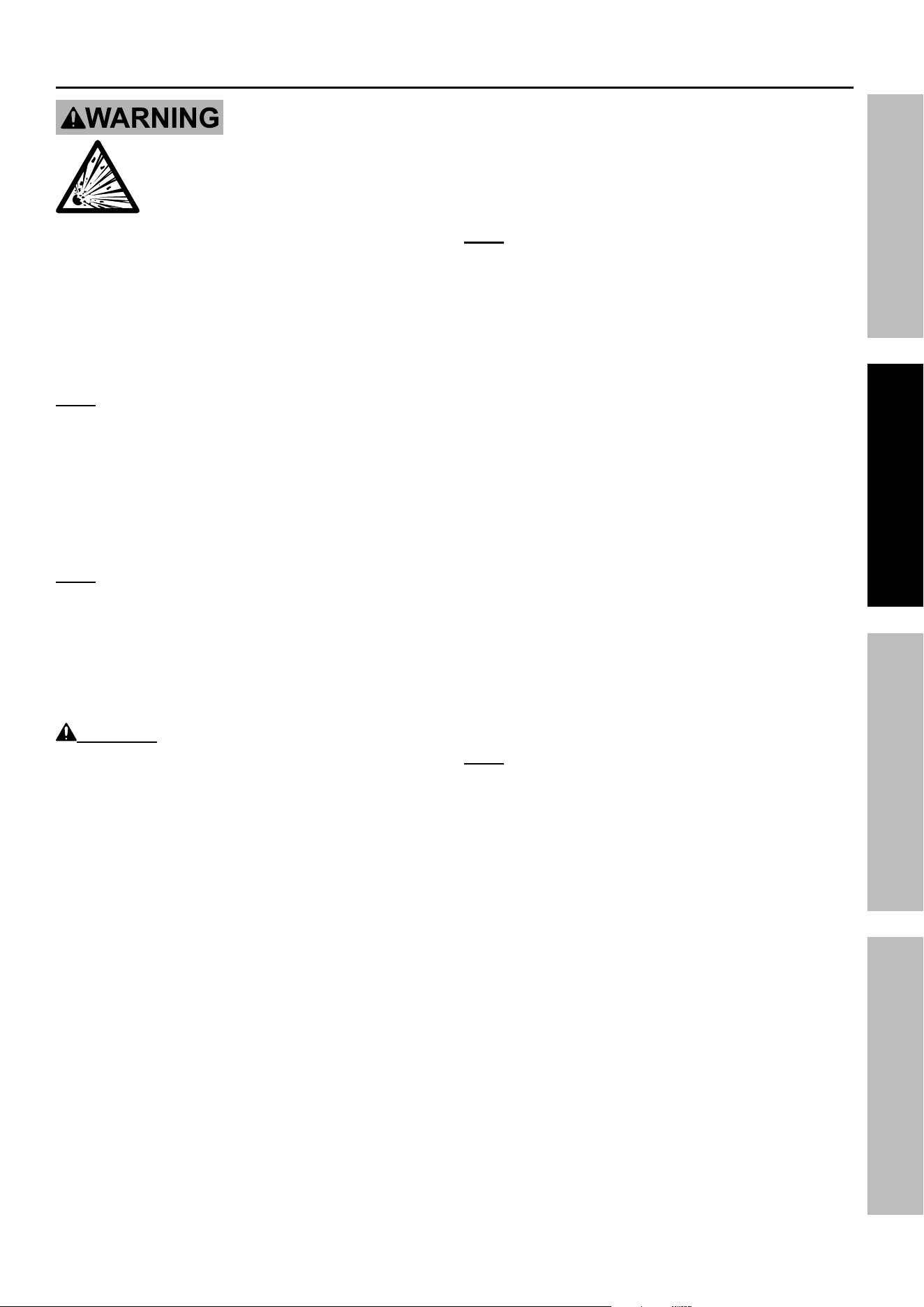
tO preVent SeriOuS inJury FrOM eXpLOSiOn:
use only clean, dry, regulated, compressed air to power this tool.
Do not use oxygen, carbon dioxide, combustible gases, or any other bottled gas
as a power source for this tool.
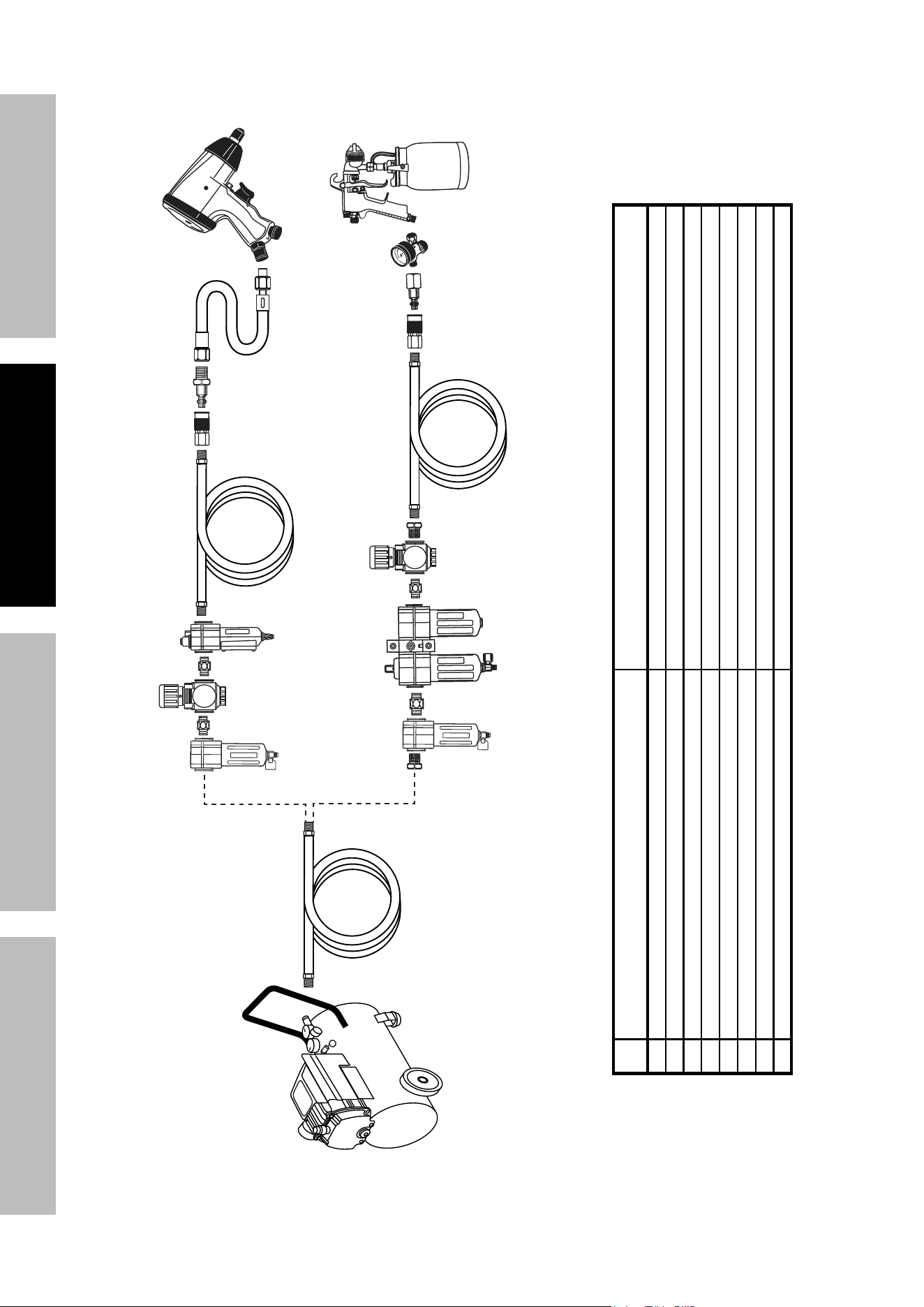
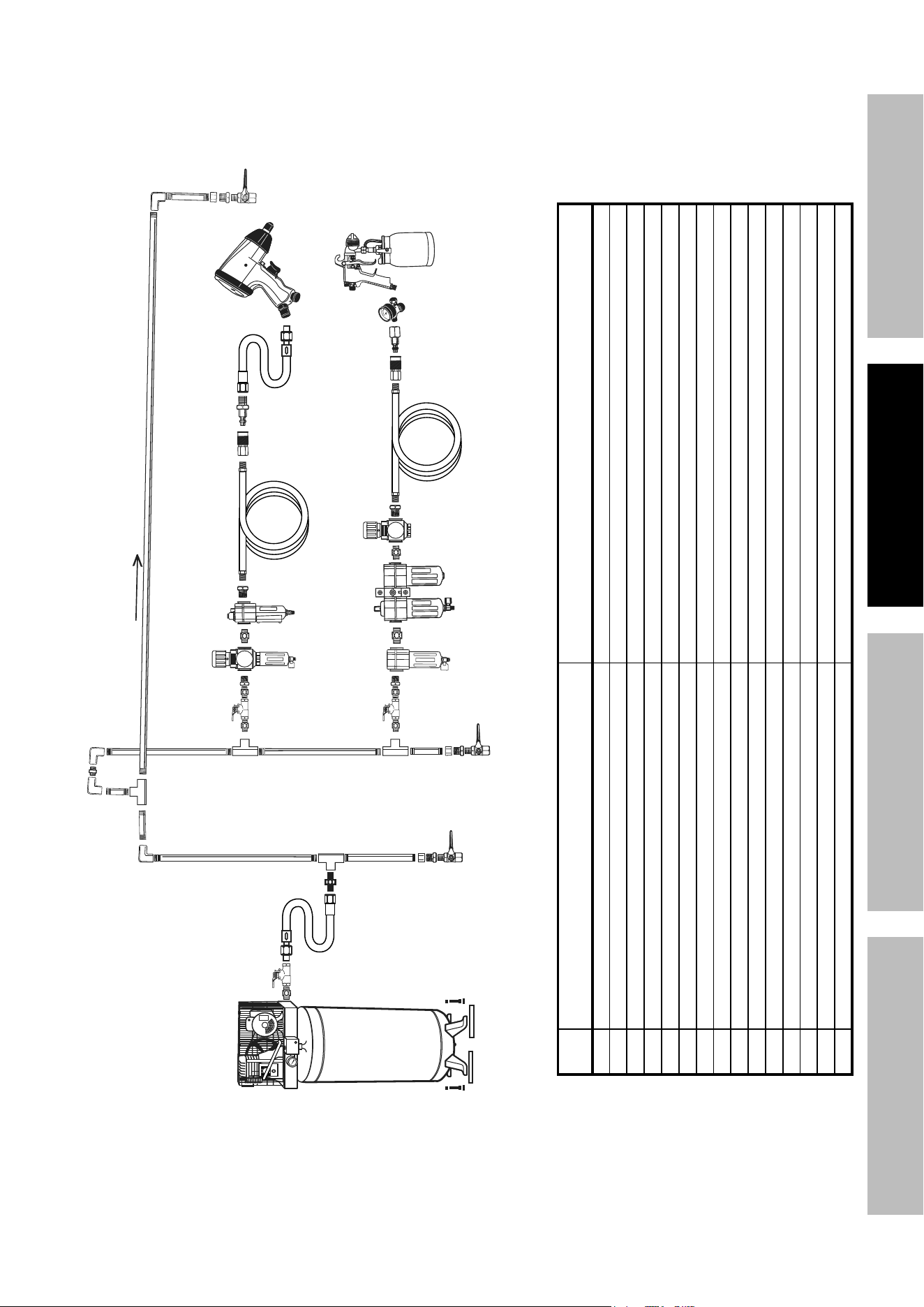
1. Incorporate a filter, regulator with pressure gauge,
in‑line shutoff valve, and quick coupler for best
service, as shown on Figure A on page 7 and
Figure B on page 9. an in-line shutoff ball
valve is an important safety device because
it controls the air supply even if the air hose
is ruptured. the shutoff valve should be a
ball valve because it can be closed quickly.
note: Do not use an automatic oiler system or
add oil to airline. The oil will contaminate the
material being propelled, ruining the final result.
2. Attach an air hose to the compressor’s air outlet.
Connect the air hose to the air inlet of the tool.
Other components, such as a coupler plug
and quick coupler, will make operation
more efficient, but are not required.
note: A 3/8″ air hose is recommended.
3. To attach an air hose ‑ 1/4″ ‑ 18 NPT (not
included) to the Blast Gun, wrap approximately
3″ of pipe thread sealer tape (not included)
around the male threads at the end of the
air hose. Then, firmly tighten the air hose
onto the Air Inlet of the Blaster Gun.
WarninG! tO preVent SeriOuS inJury
FrOM acciDentaL OperatiOn:
Do not install a female quick coupler on the tool.
Such a coupler contains an air valve that will
allow the air tool to retain pressure and operate
accidentally after the air supply is disconnected.
note: Air flow, and therefore tool performance,
can be hindered by undersized air supply components.
4. The air hose must be long enough to reach
the work area with enough extra length to
allow free movement while working.
5. Close the in‑line shutoff valve between
the compressor and the tool.
6. Turn on the air compressor according to
the manufacturer’s directions and allow it
to build up pressure until it cycles off.
7. Open the in‑line shutoff valve.
8. Adjust the air compressor’s output regulator
so that the air output is enough to properly
power the tool, but the output will not exceed
the tool’s maximum air pressure at any time.
Adjust the pressure gradually, while checking the
air output gauge to set the right pressure range.
9. Inspect the air connections for leaks.
Repair any leaks found.
10. If the tool will not be used at this time, turn off and
detach the air supply and safely discharge any
residual air pressure to prevent accidental operation.
note: Residual air pressure should not be present
after the tool is disconnected from the air supply.
However, it is a good safety measure to attempt to
discharge the tool in a safe fashion after disconnecting
to ensure that the tool is disconnected and not powered.
Page 8 For technical questions, please call 1-888-866-5797. Item 59490
SaFety OperatiOn MaintenanceSetup
Figure a: portable air Supply Setup
G
A
E
E H
F
B
Non-lubricated
Tools
Lubricated
Tools
A
B
C
C
D
A
Description Function
A Air Hose Connects air to tool
B Filter Prevents dirt and condensation from damaging tool or work piece
C Regulator Adjusts air pressure to tool
D Lubricator (optional) For air tool lubrication
E Coupler and Plug Provides each connection
F Leader Hose (optional) Increases coupler life
G Air Cleaner / Dryer (optional) Prevents water vapor from damaging work piece
H Air Adjusting Valve (optional) For fine tuning airflow at tool
Page 9For technical questions, please call 1-888-866-5797.Item 59490
SaFetyOperatiOnMaintenance Setup
Figure B: Stationary air Supply Setup
I
M
M N
O
C
C
Non-lubricated
Tools
Lubricated
Tools
L
H
H
J
J
K
L
F
G
E
Slope
F
F
B B
A A
C
D
Description Function
A Vibration Pads For noise and vibration reduction
B Anchor Bolts Secures air compressor in place
C Ball Valve Isolates sections of system for maintenance
D Isolation Hose For vibration reduction
E Main Air Line ‑ 3/4″ minimum recommended Distributes air to branch lines
F Ball Valve To drain moisture from system
G Branch Air Line ‑1/2″ minimum recommended Brings air to point of use
H Filter Prevents dirt and condensation from damaging tool or work piece
I Air Cleaner / Dryer (optional) Prevents water vapor from damaging work piece
J Regulator Adjusts air pressure to tool
K Lubricator For air tool lubrication
L Air Hose Connects air to tool
M Coupler and Plug Provides each connection
N Air Adjusting Valve For fine tuning airflow at tool
O Lead Hose
Increases coupler life

Page 10 For technical questions, please call 1-888-866-5797. Item 59490
SaFety OperatiOn MaintenanceSetup
Operating instructions
read the entire iMpOrtant SaFety inFOrMatiOn section
at the beginning of this manual including all text under subheadings therein
before set up or use of this product.
inspect tool before use, looking for damaged, loose, and missing parts.
if any problems are found, do not use tool until repaired.
Workpiece and Work area Set up
1. Designate a work area that is clean and well lit.
The work area must not allow access by children
or pets to prevent distraction and injury.
2. Route the air hose along a safe path to reach
the work area without creating a tripping hazard
or exposing the air hose to possible damage.
The air hose must be long enough to reach
the work area with enough extra length to
allow free movement while working.
3. There must not be hazardous objects
(such as utility lines or foreign objects)
nearby that will present a hazard while working.
cautiOn! Prior to sandblasting, protect other people
(and property) in the work area from flying debris by
providing barriers or shields. Wear appropriate clothing
and safety gear when operating the Abrasive Blast Gun.
If possible, place the workpiece inside a sandblast
cabinet (not included). Otherwise, isolate the
workpiece to make sure no damage can occur to
nearby walls, tools, equipment, or other property.
4. Remove the cap from the Hopper (19) and fill the
Hopper with abrasive media. WarninG! tO
preVent SeriOuS inJury: Do not use sand
(crystalline silica) for blasting.
5. Once filled, replace the cap.
nOte: To keep the beads from accidentally spilling
out of the Nozzle, do not point the Nozzle downward
.
6. Connect the compressor’s air hose to the
pre‑installed quick connector on the Blast Gun.
Turn the compressor’s regulator to 90 PSI.
WarninG! tO preVent SeriOuS
inJury: Do not exceed 150 pSi.
nOte: Test the spray pattern and intensity of
the Blast Gun on a piece of scrap material.
7. Turn on the compressor, aim the Nozzle toward
the object that is to be sandblasted. Grip
the Blaster Gun firmly with both hands.
8. Squeeze the Trigger (4) to turn on the Blast
Gun. Turn the Media Flow Control Knob
(15) counterclockwise slowly to increase the
flow until desired media flow is achieved.
9. To refill the Hopper, release pressure on the Trigger.
Turn off the air compressor and squeeze
the Trigger once again to release any
compressed air. Then refill the Hopper.
10. When finished using the Blast Gun, turn the
media flow off before release pressure on the
Trigger. Turn off the air compressor. Squeeze
the Trigger once to release any compressed air.
Disconnect the Blaster Gun from its air supply.
11. Dispose of used abrasive media only
according to local solid waste guidelines.
12. Clean, then store the tool indoors
out of children’s reach.
Media Flow control Knob
1. Turn the Media Flow Control Knob counterclockwise
to increase media flow and clockwise to decrease.
2. Begin blasting with Media Flow Control Knob
in the off position. Slowly increase the flow
until desired media flow is achieved.
3. To stop all media flow turn the Media Flow
Control Knob clockwise until it stops.
4. When finished blasting, turn the media flow off
before releasing the pressure on the trigger.
5. Steps 3 & 4 will help prevent the
nozzle from clogging.
Page 11For technical questions, please call 1-888-866-5797.Item 59490
SaFetyOperatiOnMaintenance Setup
user-Maintenance instructions
procedures not specifically explained in this manual
must be performed only by a qualified technician.
tO preVent SeriOuS inJury:
Detach the air supply and safely discharge any residual air pressure in the tool
before performing any inspection, maintenance, or cleaning procedures.
tO preVent SeriOuS inJury FrOM tOOL FaiLure: Do not use damaged equipment.
if abnormal noise, vibration, or leaking air occurs, have the problem corrected before further use.
inspection
note: These procedures are in addition to the regular checks and maintenance
explained as part of the regular operation of the air‑operated tool.
BeFOre eacH uSe, inspect the general condition of the tool. Check for:
• Loose screws.
• Misalignment or binding of moving parts.
• Clogged nozzle.
• Damaged air supply hose.
• Cracked or broken parts.
• Any other condition that may affect its safe operation.
cleaning and Maintenance
note: These procedures are in addition to the regular checks and maintenance
explained as part of the regular operation of the air‑operated tool.
1. BeFOre eacH uSe, inspect the general condition of the tool. Check for loose screws, misalignment
or binding of moving parts, clogged Nozzle, damaged supply hose, cracked or broken parts, and
any other condition that may affect its safe operation. Do not use damaged equipment.
2. aFter uSe, clean external surfaces of tool with a clean, most cloth. If necessary, use a mild detergent.
cautiOn! Do not use solvents or immerse in liquids, as damage to Blast Gun may occur.
3. Store in a dry, secure area out of reach of children.
air Supply Maintenance
Every day, perform maintenance on the air supply according to the component manufacturers’ instructions.
Storage
Store in a dry, secure area out of reach of children.
Page 12 For technical questions, please call 1-888-866-5797. Item 59490
SaFety OperatiOn MaintenanceSetup
troubleshooting
problem possible causes Likely Solutions
Tool will not start. 1. Compressor not on.
2. Air line not connected properly.
1. Turn compressor on.
2. Check that air line is connected.
Blast flow surges /
Excessive abrasive consumption.
Air pressure too low. Increase air pressure.
Clogging and plugging of blast flow. Excessive debris in abrasive. Purge and filter abrasive.
Lack of abrasive flow. 1. Hopper empty.
2. Moisture in abrasive
3. Not enough air pressure.
4. Air hose kinked.
5. Excessive debris in abrasive.
1. Fill hopper.
2. Use dry abrasive.
3. Increase air pressure.
4. Un‑kink air hose.
5. Clean or filter abrasive.
Follow all safety precautions whenever diagnosing or servicing the tool.
Disconnect air supply before service.

Page 13For technical questions, please call 1-888-866-5797.Item 59490
SaFetyOperatiOnMaintenance Setup
pLeaSe reaD tHe FOLLOWinG careFuLLy
THE MANUFACTURER AND/OR DISTRIBUTOR HAS PROVIDED THE PARTS LIST AND ASSEMBLY DIAGRAM
IN THIS MANUAL AS A REFERENCE TOOL ONLY. NEITHER THE MANUFACTURER OR DISTRIBUTOR
MAKES ANY REPRESENTATION OR WARRANTY OF ANY KIND TO THE BUYER THAT HE OR SHE IS
QUALIFIED TO MAKE ANY REPAIRS TO THE PRODUCT, OR THAT HE OR SHE IS QUALIFIED TO REPLACE
ANY PARTS OF THE PRODUCT. IN FACT, THE MANUFACTURER AND/OR DISTRIBUTOR EXPRESSLY
STATES THAT ALL REPAIRS AND PARTS REPLACEMENTS SHOULD BE UNDERTAKEN BY CERTIFIED AND
LICENSED TECHNICIANS, AND NOT BY THE BUYER. THE BUYER ASSUMES ALL RISK AND LIABILITY
ARISING OUT OF HIS OR HER REPAIRS TO THE ORIGINAL PRODUCT OR REPLACEMENT PARTS
THERETO, OR ARISING OUT OF HIS OR HER INSTALLATION OF REPLACEMENT PARTS THERETO.
record product’s Serial number Here:
note: If product has no serial number, record month and year of purchase instead.
note: Some parts are listed and shown for illustration purposes only, and are not available
individually as replacement parts. Specify UPC 193175472571 when ordering parts.

Page 14 For technical questions, please call 1-888-866-5797. Item 59490
SaFety OperatiOn MaintenanceSetup
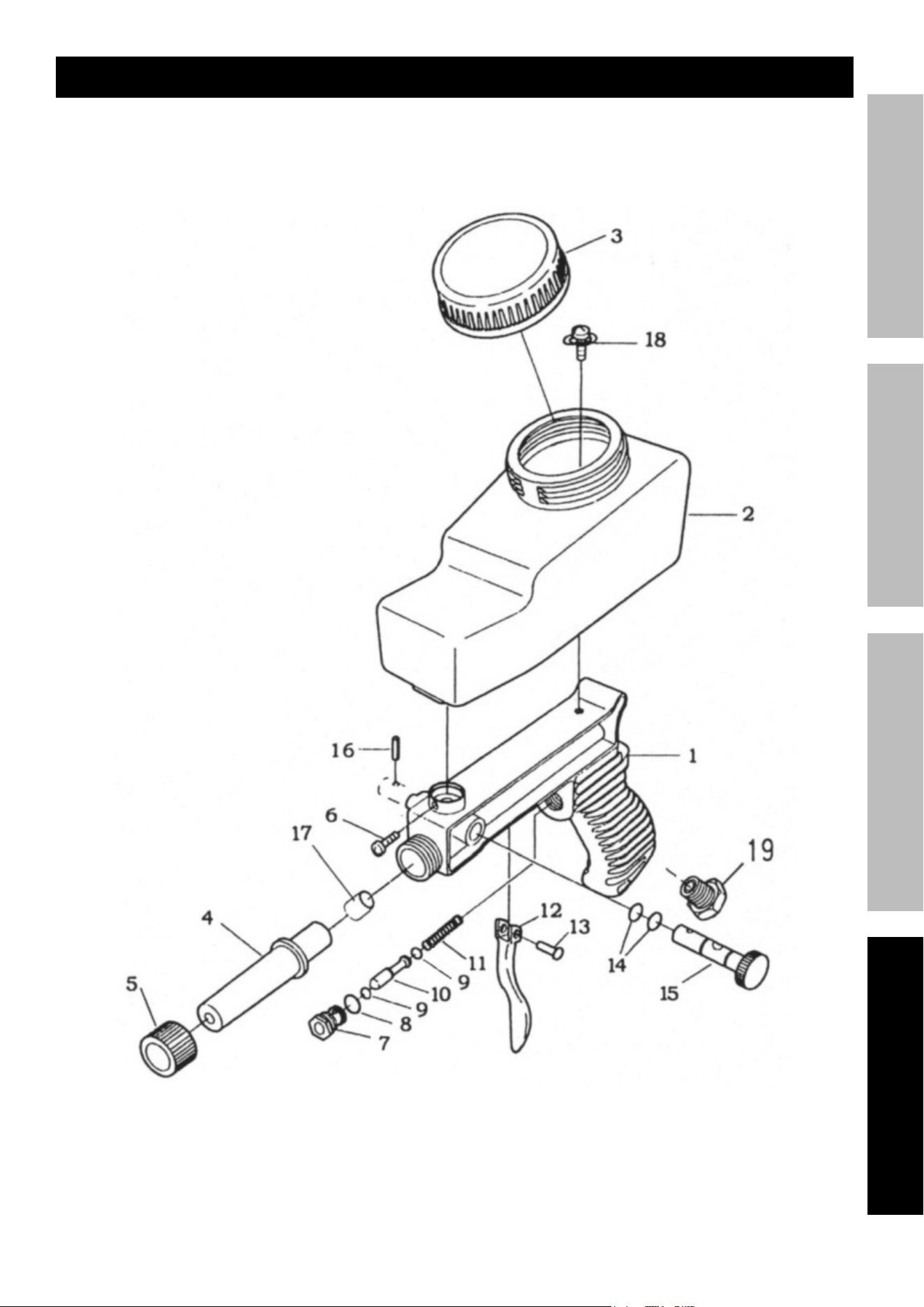
parts List and Diagram
parts List
part Description Q’ty
1 Gun Body 1
2 Storage Case 1
3 Lid 1
4 Nozzle 1
5 Ring Nut 1
6 Screw 1
7 Air Valve 1
8 O‑Ring 1
9 O‑Ring 2
10 Valve Stem 1
part Description Q’ty
11 Spring 1
12 Trigger 1
13 Rivet 1
14 O‑Ring 2
15 Media Flow
Control Knob
1
16 Lock Pin 1
17 Adaptor 1
18 Screw / Washer 1
19 Air Inlet with Screen 1
Page 15For technical questions, please call 1-888-866-5797.Item 59490
SaFetyOperatiOnMaintenance Setup
assembly Diagram

26677 agoura road • calabasas, ca 91302 • 1-888-866-5797
Limited 90 Day Warranty
Harbor Freight Tools Co. makes every effort to assure that its products meet high quality and durability standards,
and warrants to the original purchaser that this product is free from defects in materials and workmanship for the
period of 90 days from the date of purchase. This warranty does not apply to damage due directly or indirectly,
to misuse, abuse, negligence or accidents, repairs or alterations outside our facilities, criminal activity, improper
installation, normal wear and tear, or to lack of maintenance. We shall in no event be liable for death, injuries
to persons or property, or for incidental, contingent, special or consequential damages arising from the use of
our product. Some states do not allow the exclusion or limitation of incidental or consequential damages, so the
above limitation of exclusion may not apply to you. THIS WARRANTY IS EXPRESSLY IN LIEU OF ALL OTHER
WARRANTIES, EXPRESS OR IMPLIED, INCLUDING THE WARRANTIES OF MERCHANTABILITY AND FITNESS.
To take advantage of this warranty, the product or part must be returned to us with transportation charges
prepaid. Proof of purchase date and an explanation of the complaint must accompany the merchandise.
If our inspection verifies the defect, we will either repair or replace the product at our election or we may
elect to refund the purchase price if we cannot readily and quickly provide you with a replacement. We will
return repaired products at our expense, but if we determine there is no defect, or that the defect resulted
from causes not within the scope of our warranty, then you must bear the cost of returning the product.
This warranty gives you specific legal rights and you may also have other rights which vary from state to state.
