
User Manual
Ty p h u r I ns t aW h i s k
v1.0

Important Safeguards
01
Please read all instructions in this manual carefully before operating
your Typhur InstaWhisk. Failure to follow these instructions may
result in personal injury or property damage.
1. Do not immerse the main body in water or other liquids to prevent
personal injury or product damage.
2. Do not invert the product when there is water or other liquid on the
whisk to prevent liquid from entering the main body.
3. Do not allow body parts (e.g., fingers, hair) to come into contact with
the whisk during operation.
4. Do not clean the product with acidic, alkaline, or other corrosive
cleaners.
5. Keep this product away from children.
6. When not in use, please store the product in a clean and dry place.
What's in the Box
Main body x 1
Whisk x 3
Metal stand x 1
Type-C Charging Cable x 1
User Manual x 1
Typhur InstaWhisk
02
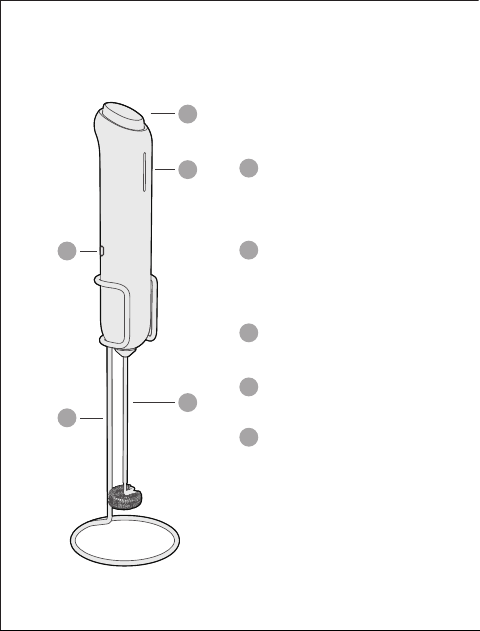
Variable Speed Trigger
The more you press down, the higher
the speed will be
Indicator Lights
Speed range and battery level
indicator
Type-C Charging Port
Detachable Whisk Heads x 3
Metal Stand
1
1
3
3
2
2
4
4
5
5
03
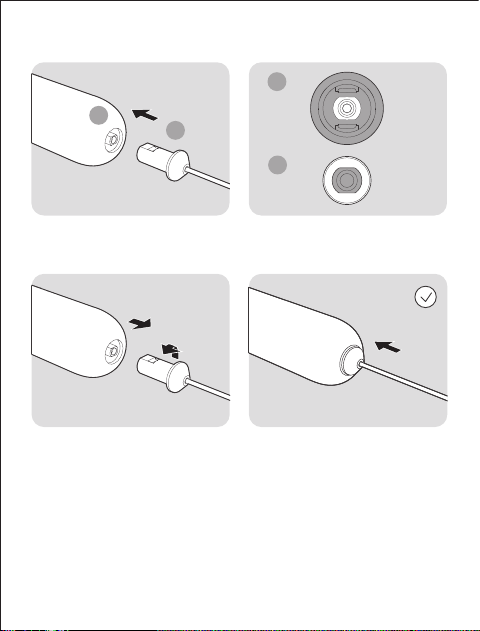
Whisk Installation
If you notice significant vibration during use, try removing the whisk,
rotating it 180°, and reinstalling it.
1. The spring whisk is designed to create milk froth for lattes and
cappuccinos.
2. The balloon whisk is ideal for beating eggs and whipping cream.
3. The hook whisk is perfect for mixing milk powder, protein powder,
nutritional powder, oatmeal, or other powdered ingredients.
Notes
Rotate 180°
1
1
2
2
04
Product Usage
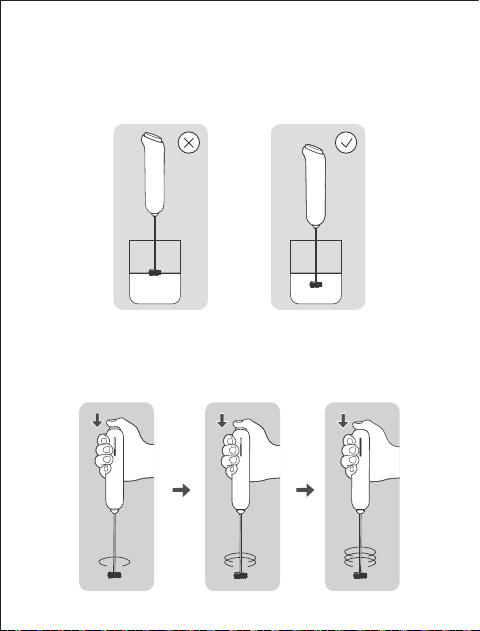
1. Replace the whisk head with the appropriate attachment (for example,
the spring whisk) .
2. Submerge the whisk head appropriately into the liquid.
3. Press the Variable Speed Trigger to start. You can control the speed by
adjusting the trigger's travel. The number of illuminated indicator lights
serves as a reference for the speed range; the more lights that are lit,
the higher the speed.
05
4. Once operation is complete, release the trigger. Remove the whisk after
the head has completely stopped.
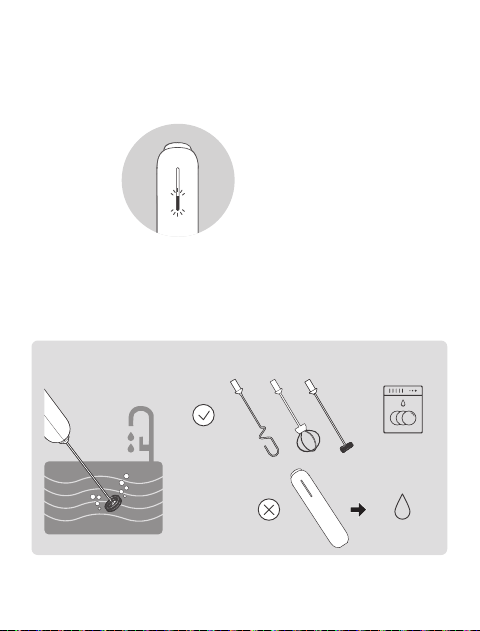
5. If the indicator lights flash continuously for several times after the trigger
is fully released, this indicates low battery power, and it is necessary to
recharge the device promptly.
Cleaning
Submerge the whisk in water and start the frother.
States: All three whisk heads can be cleaned separately in the dishwasher.
Dishwasher
Water
Flash 3 seconds
Low battery
CAUTION
Do not press the trigger before submerging the whisk head in the liquid,
as this may cause splattering.
CAUTIONS
06
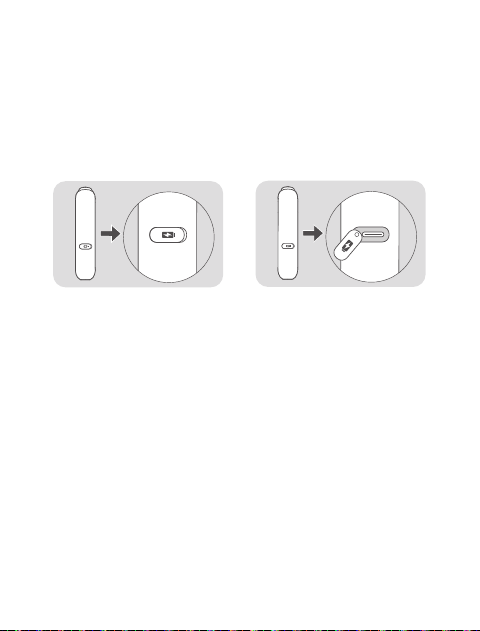
Charging
1. Open the soft rubber cap of the charging port and insert the charging
cable (ensure the charging port is dry).
2. Connect the charging cable to a 5V/1A output adapter, and plug the
adapter into a power outlet. The product's indicator lights will flash
continuously indicating that it is charging.
3. When all indicator lights remain lit, the charging process is complete.
1. Before connecting to power, ensure the charging port, cable, and
adapter are dry.
2. Avoid charging in high-temperature or humid environments, as this can
affect battery performance and safety.
3. If you notice unusual heat, deformation, or odor during charging, stop
immediately and contact customer service.
4. Use only the original or certified Type-C charging cable and adapter.
5. To prolong battery life, charge the device every three months when not
in use.
Type-C Power

If the device does not respond when the trigger is pressed or operates
intermittently:
1. Check if the battery is sufficiently charged. If necessary, recharge the
device and try again.
2. Verify if the liquid to be stirred is too thick. Dilute the liquid appropriately
and try again, or use an alternative stirring method to complete the
operation.
If you notice significant vibration during use, try removing the whisk,
rotating it 180°, and reinstalling it.
If the issue persists after trying the above steps, please contact customer
service promptly.
Troubleshooting
07
Warranty
Support
Full details are stated in Typhur's warranty policy at
https://www.typhur.com/warranty
Please contact our Customer Support Team if you have any questions.
1(888) 838-6563(USA)
support@typhur.com
support.typhur.com

08
Certifications
Model: MF04
Manufacturer: Typhur Inc.
This device complies with part 15 of the FCC Rules. Operation is subject
to the following two conditions:
(1) This device may not cause harmful interference
(2) this device must accept any interference received, including
interference that may cause undesired operation.
This symbol, affixed to the product or its packaging, indicates
that the product must not be processed with household waste. It
must be brought to an electric or electronic waste collection point
for recycling and disposal. By ensuring the appropriate disposal of this
product you also help in preventing potentially negative consequences
for the environment and human health. The recycling of materials helps
preserve our natural resources. For further information regarding the
recycling of this product, please contact your municipality, local waste
disposal centre or the store where the product was purchased.
[Typhur Inc. ] hereby declares that the equipment type [MF04] is in
compliance with Directives 2014/30/EU and 2011/65/EU as amended by
2015/863/EU. The full text of the EU declaration of conformity is available
at the following Internet address:
https://explore.typhur.com/ce-declaration!

09