1
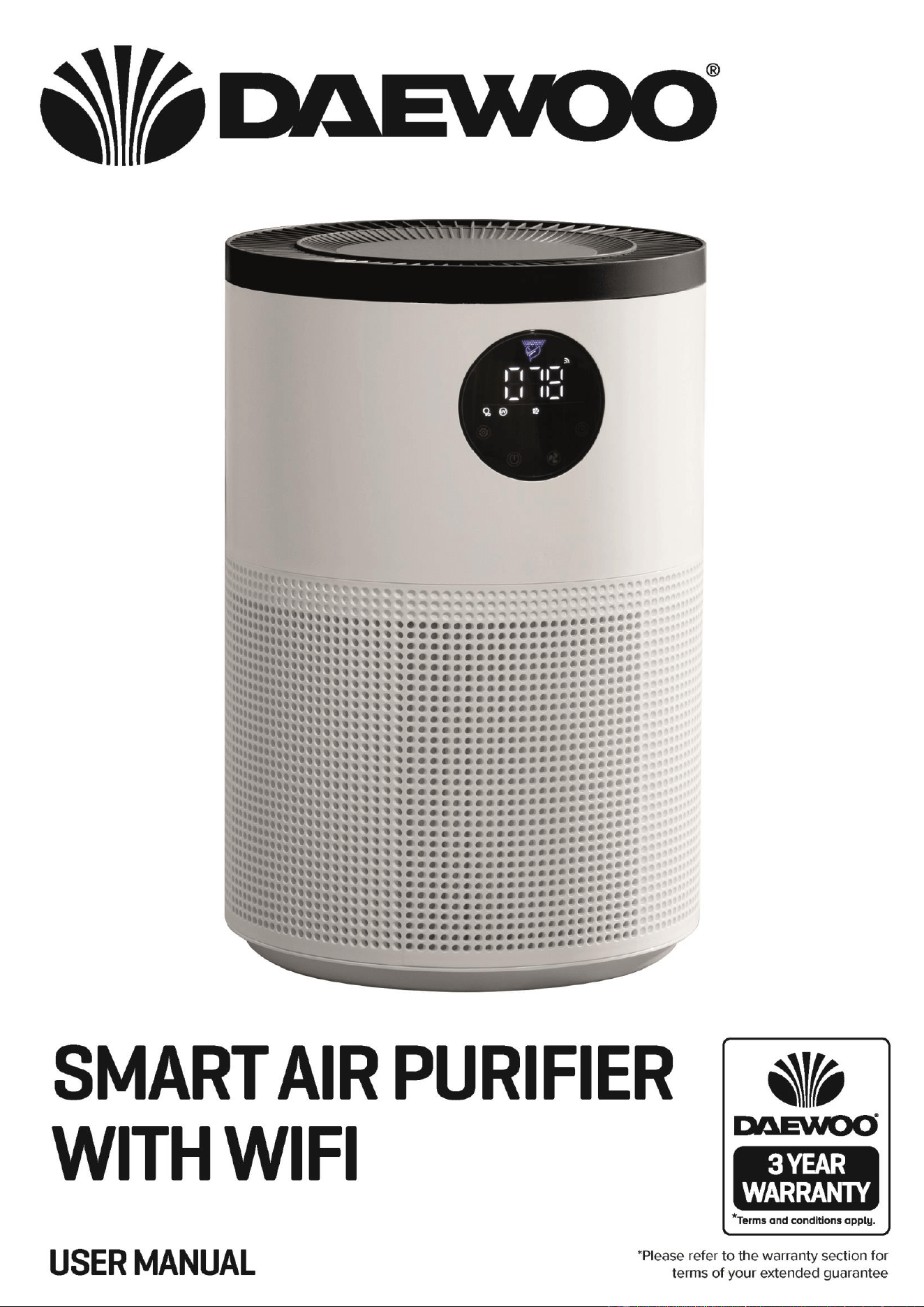
Air Purifier
Model No. COL1563
User Manual
IMPORTANT – RETAIN THESE INSTRUCTIONS FOR FUTURE REFERENCE

2
IMPORTANT – RETAIN THESE INSTRUCTIONS FOR FUTURE REFERENCE
Air Purifier
Model No. COL1563
User Manual
READING AND STORING THE USER MANUAL
Before using this product, please read through this manual
carefully paying particular attention to the safety
instructions. Failure to do so may result in personal injury or
damage to the product.
Carefully save this instruction manual for future reference. Ensure the
user manual is included when passing the product on to any third
parties.
IMPORTANT SAFETY INSTRUCTIONS FOR PROPER USE
When using electrical appliances, basic safety precautions should
always be followed.
Only use the product as described in this user manual. Any other use is
considered improper and may result in damage to property or persons.
The manufacturer or vendor cannot be held liable for damages or injury
incurred through improper or incorrect use.
• Read and familiarise yourself with all operating
instructions before using this Air purifier.
• Before using your unit into the mains, visually check that
the unit is intact and has not suffered any transit damage.
• Check that the voltage indicated on the data plate
corresponds with that of the local network before
connecting the appliance to the mains power supply.
• Always use this appliance on a solid, level, non-
flammable surface.
• The Air purifier shall not be exposed to dripping or
splashing and that no objects filled with liquids, such as
vases, shall be placed on the apparatus.
• DO NOT immerse the Air purifier or its power cord in
water or any other liquids.
• DO NOT leave the Air purifier unattended during use.
• DO NOT leave the Air purifier unattended whilst
connected to a mains power supply.
• Avoid touching any moving parts within the appliance.
• Never insert fingers, pencils or any other objects through
the guard.
• DO NOT push objects into any openings as damage to the

3
Air Purifier
Model No. COL1563
User Manual
IMPORTANT – RETAIN THESE INSTRUCTIONS FOR FUTURE REFERENCE
product and/or electric shock may occur.
• This appliance can be used by children aged from 8 years
and above and persons with reduced physical, sensory or
mental capabilities or lack of experience and knowledge
if they have been given supervision or instruction
concerning use of the appliance in a safe way and
understand the hazards involved. Children shall not play
with the appliance. Cleaning and user maintenance shall
not be made by children without supervision.
• Children of less than 3 years should be kept away unless
continuously supervised.
• Close supervision is required when using this Air purifier
near children.
• Never leave this Air purifier within reach of children.
• It is imperative to unplug from mains supply after the Air
purifier has been used, before it is cleaned and whilst
being repaired.
• Unplug after each use.
• DO NOT operate this appliance if the power cord or plug
are damaged. Ensure that the power cord is not stretched
or exposed to sharp objects or edges.
• DO NOT operate this appliance after a malfunction or
after being dropped or damaged in any way.
• DO NOT allow the mains cable to hang over sharp edges
or come in contact with hot surfaces.
• DO NOT run the mains cable under carpets, rugs, etc.
• This product is intended for household use only and
should not be used for industrial purposes.
• Never connect the appliance to an electrical outlet using
an extension lead. If an outlet is not available, one should
be installed by a qualified electrician.
• Never use the mains plug or external timer as a means of
switching the Air purifier on or off. Use the ON/OFF
button located on the control panel.
• Always place the unit on a dry and stable surface.

4
IMPORTANT – RETAIN THESE INSTRUCTIONS FOR FUTURE REFERENCE
Air Purifier
Model No. COL1563
User Manual
• The appliance should not be placed in a laundry or wet
room.
• DO NOT position the Air purifier close to sources of heat
and/or ignition such as radiators, heaters, other
electronic equipment, etc.
• No naked flame sources, such as lighted candles, should
be placed on the Air purifier.
• The appliance must be stored in such a way as to prevent
mechanical failure.
• DO NOT use any accessories or attachments with this
product other than those supplied or recommended by
supplier.
• DO NOT use this product for anything other than its
intended use.
5
Air Purifier
Model No. COL1563
User Manual
IMPORTANT – RETAIN THESE INSTRUCTIONS FOR FUTURE REFERENCE
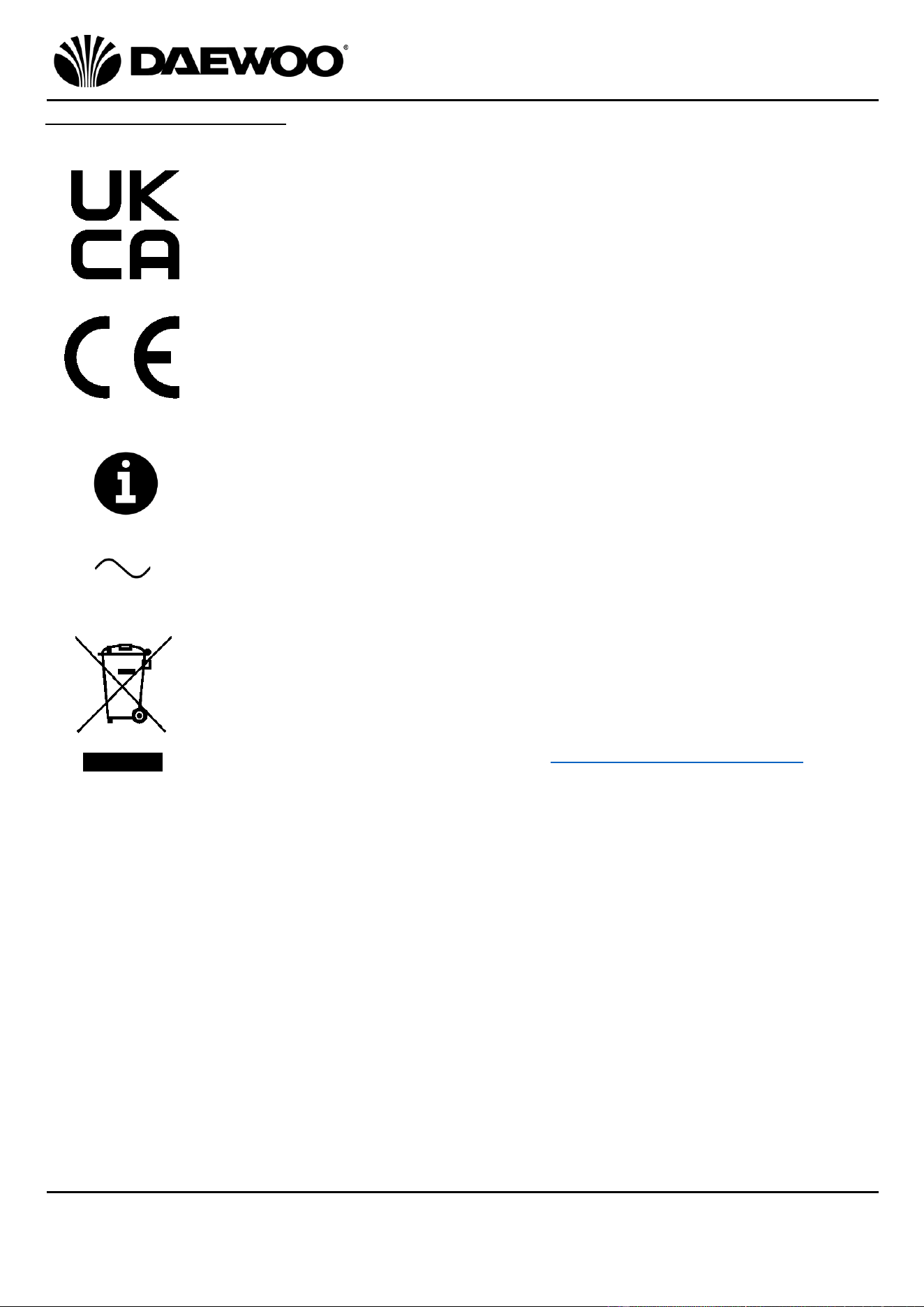
Explanation of Symbols
The following warning symbols or words are used in this instruction manual:
Products labelled with UK Conformity Assessment identifies
products conforming to UK statutory requirements.
Products labelled with this symbol conform to applicable
provisions of the European Economic Area.
This symbol provides useful additional information on the use of
this product.
This symbol identifies that the supply uses an alternating current
mains supply.
You should now recycle your waste electrical goods and in doing
so help the environment. This symbol means waste electrical
products at the end of their useful life should not be disposed of
with normal household waste. Please ensure it is taken to a
suitable facility for disposal. Check with your Local Authority or
retailer for recycling advice or visit www.recycle-more.co.uk enter
your postcode to find out your nearest recycling site.
6
IMPORTANT – RETAIN THESE INSTRUCTIONS FOR FUTURE REFERENCE
Air Purifier
Model No. COL1563
User Manual
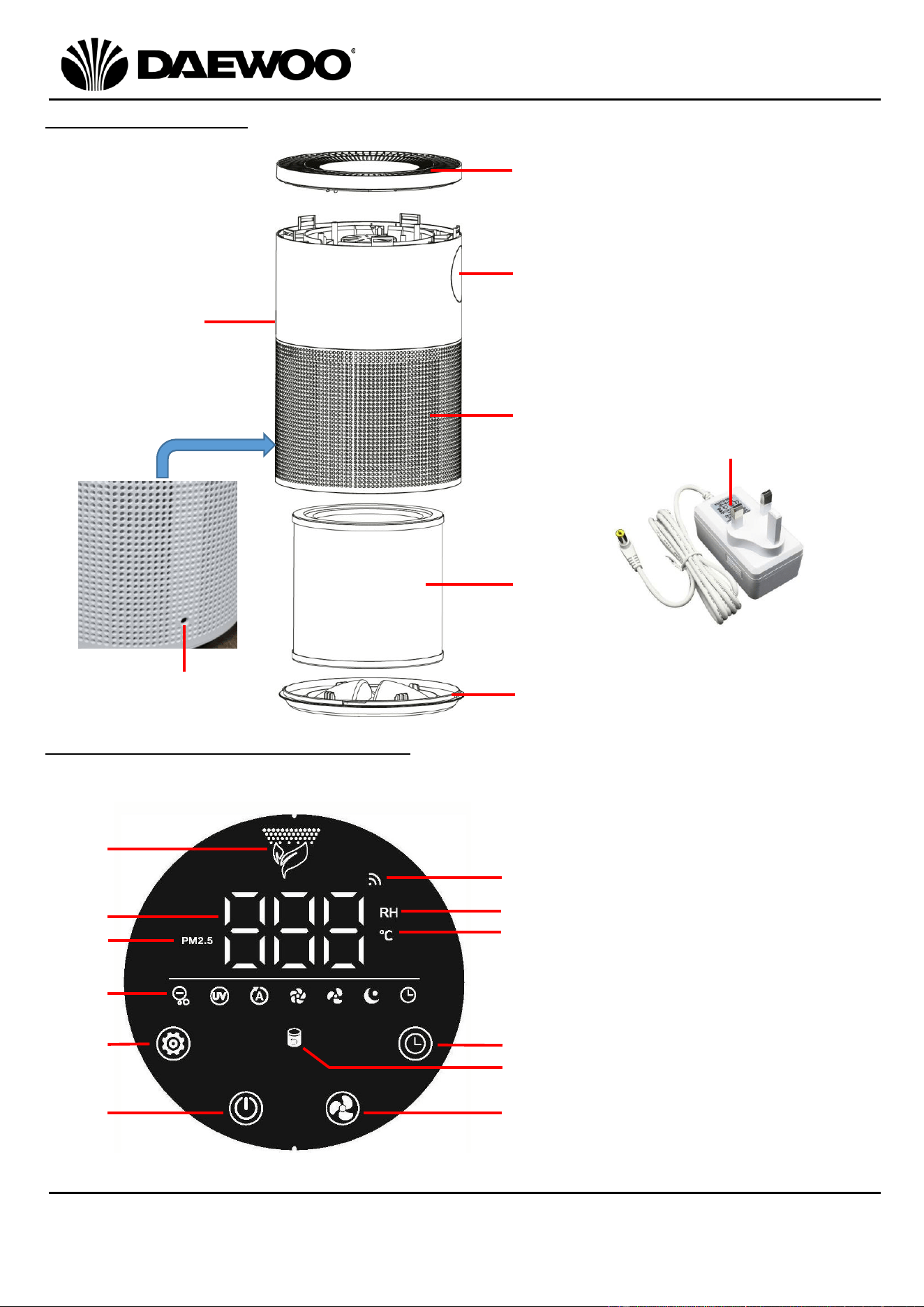
Description of Parts
Description of Parts – Control Panel
7
9. Air Quality Indicator
10. LED Display
11. Air Quality Indicator
12. Function Indicators
13. Function Button
14. Power Button
15. Wi-Fi Indicator
16. Relative Humidity Indicator
17. Temperature Indicator
18. Timer Button
19. Filter Indicator
20. Fan/Wi-Fi Button
1
2
3
4
6
1. Air Outlet
2. Control Panel
3. Air Quality Sensor
4. Air Inlet
5. DC Input Socket
6. Filter
7. Base
8. Mains Adaptor
9
10
11
12
14
15
16
13
17
5
8
18
19
20
7
Air Purifier
Model No. COL1563
User Manual
IMPORTANT – RETAIN THESE INSTRUCTIONS FOR FUTURE REFERENCE
Before the First Use of Your Air Purifier
• Remove all packing materials and discard responsibly.
• Ensure all parts are present (if applicable) see Description of Parts above.
• Make sure the appliance is unplugged before removing or installing the filter.
• Wipe any dust off the filter regularly, do not wash the filter.
• Only use the filter specifically designed for this product.
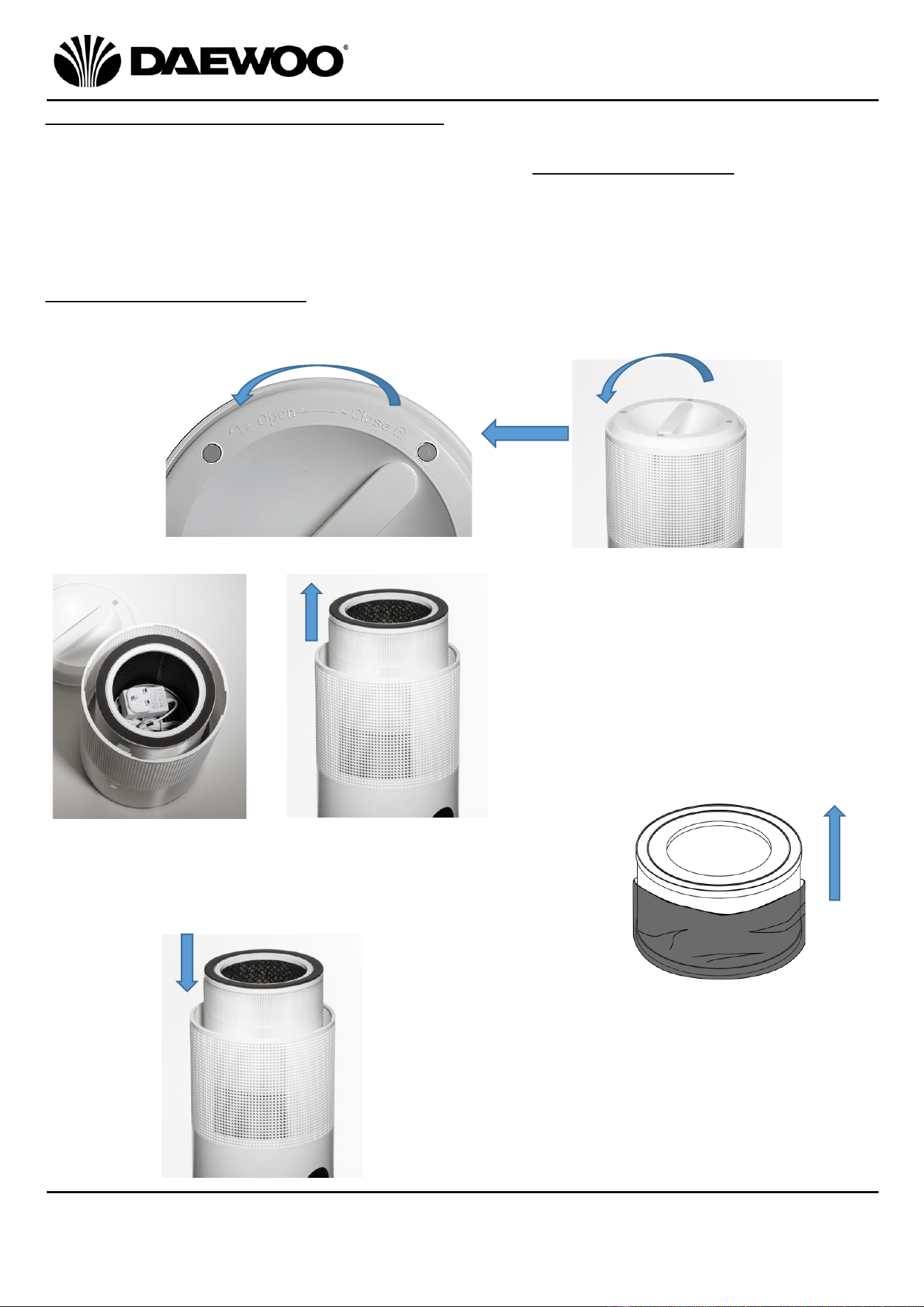
Note Regarding the Filter
1. Turn the unit upside down and rotate the Base (7) anticlockwise in the direction
marked “OPEN” and remove.
2a. Remove the Mains Adaptor (8)
stored inside the Filter (6).
2b. Lift the Filter (6) out of the Air
Purifier.
3. Right: Remove the packaging from around the Filter (6)
before use and discard responsibly.
4. Replace the Filter (6) into the unit, making
sure it’s all the way in.
2a
.
2b
.
8
IMPORTANT – RETAIN THESE INSTRUCTIONS FOR FUTURE REFERENCE
Air Purifier
Model No. COL1563
User Manual
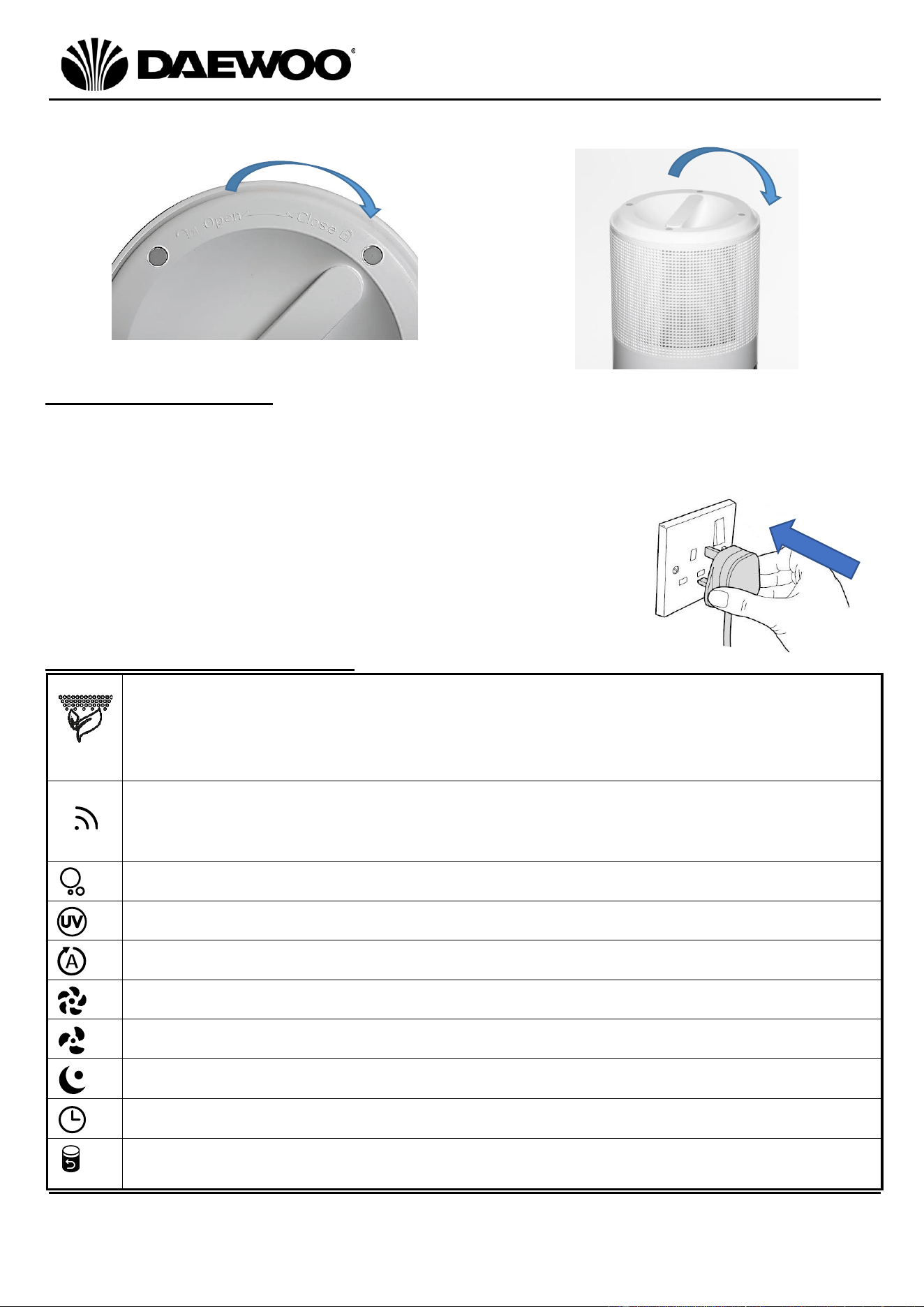
5. Replace the Base (7) by rotating clockwise in the direction marked “CLOSE” to
lock the Base (7) back on to the main unit.
Using your Air purifier
Before use, please ensure that the unit is placed on a firm, level surface in an area
with at least 30cm of free space on all sides to allow for good air circulation.
Insert the small plug of the Mains Adaptor (8) into the DC Input Socket (5) on the
rear of the unit.
1. Insert the Mains Adaptor (8) into the nearest socket.
2. The device will beep once and all indicator will light for
1sec to confirm power up in standby mode.
Note: The device will beep once for every action.
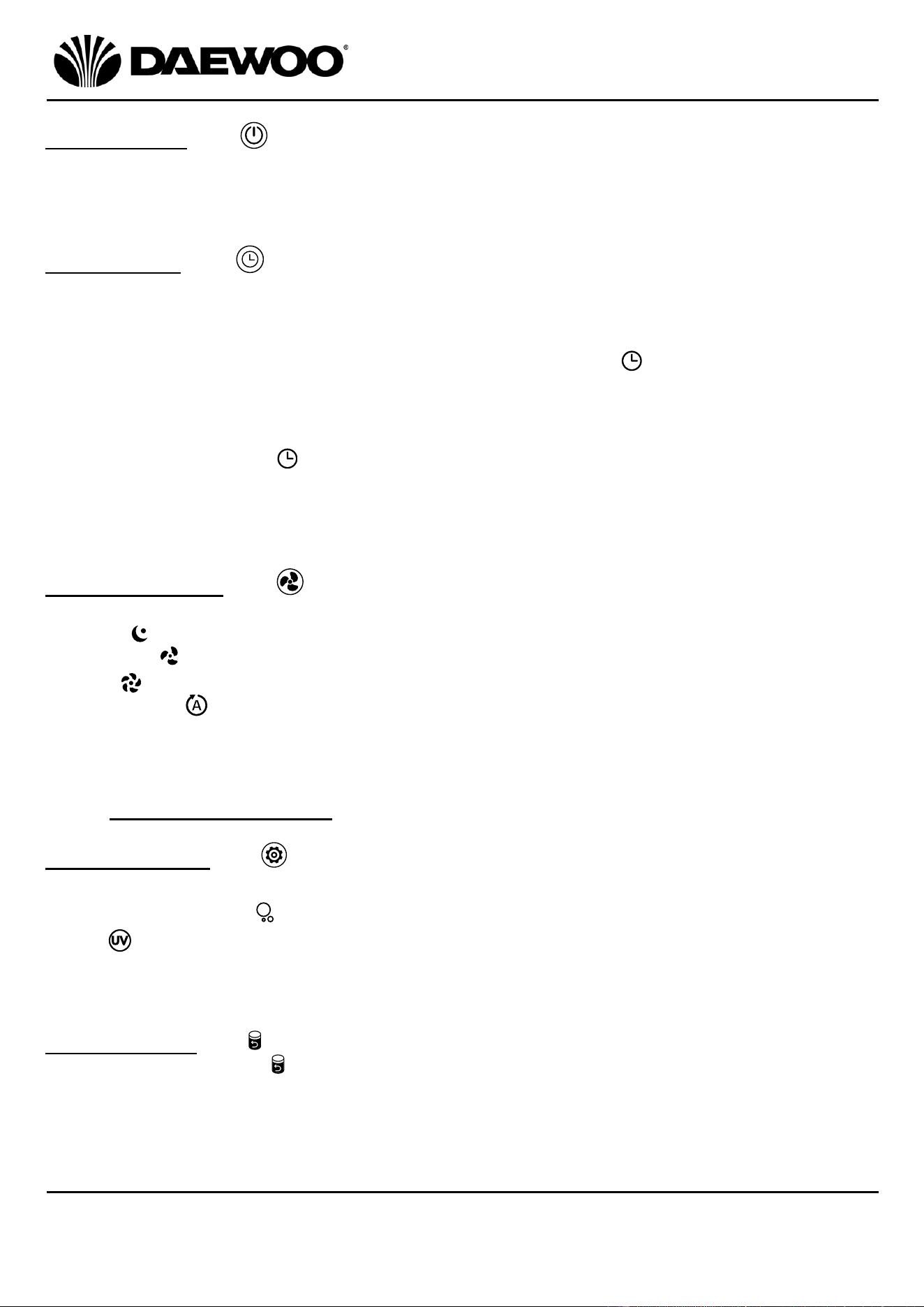
Function Indicator Description
Air Quality Indicator (9)
• Blue colour represents good air quality with low fan speed.
• Yellow colour represents Average air quality with medium fan speed.
• Red colour represents Poor air quality with high fan speed.
Wi-Fi Indicator (15)
• Flashes when not connected to Wi-Fi.
• Lights continuously when connected to Wi-Fi.
Anion (Ionisation) function.
UV (Ultra Violet) function.
Auto Fan Mode.
High Fan Speed.
Medium Fan Speed.
Sleep mode (Low Fan Speed).
Timer – shows the timer is set.
Filter Replacement Reminder (19) – Flashes red when the filter (6) needs
replacing.
_
9
Air Purifier
Model No. COL1563
User Manual
IMPORTANT – RETAIN THESE INSTRUCTIONS FOR FUTURE REFERENCE
Power Button (14)
• Touch the Power Button (14) to power the unit up.
• At power up the unit will default to Auto Fan Mode.
• Touch the Power Button (14) again to turn the unit off.
Timer Button (18)
• With the unit powered up, touch the Timer Button (18) to select how long the
fan will be on for until it switches off.
• Select the time by touching the Timer Button (18) once for one hour, twice for
2 hours and so on up to 24 hours. The Timer Indicator (12) will light. The
unit will begin to count down, the unit will switch off when the time is up and
all indicators on the Control Panel (2) will go out.
• To cancel the Timer function, touch the Timer Button (18) for 5 seconds and
the Timer Indicator (12) will go out.
Note: The Timer only operates when the unit is on and cannot operate in standby
(off) mode.
Fan/Wi-Fi Button (20)
• Touch the Fan/Wi-Fi Button (20) to set the fan speed, select from:
Sleep
Medium
High
Auto mode - the corresponding Function Indicator (12) will light.
• Touch the Fan/Wi-Fi Button (20) for 5 seconds to enter Wi-Fi configuration
mode, the Wi-Fi Indicator (15) will flash.
• See Using the Wi-Fi Mode section below for more information.
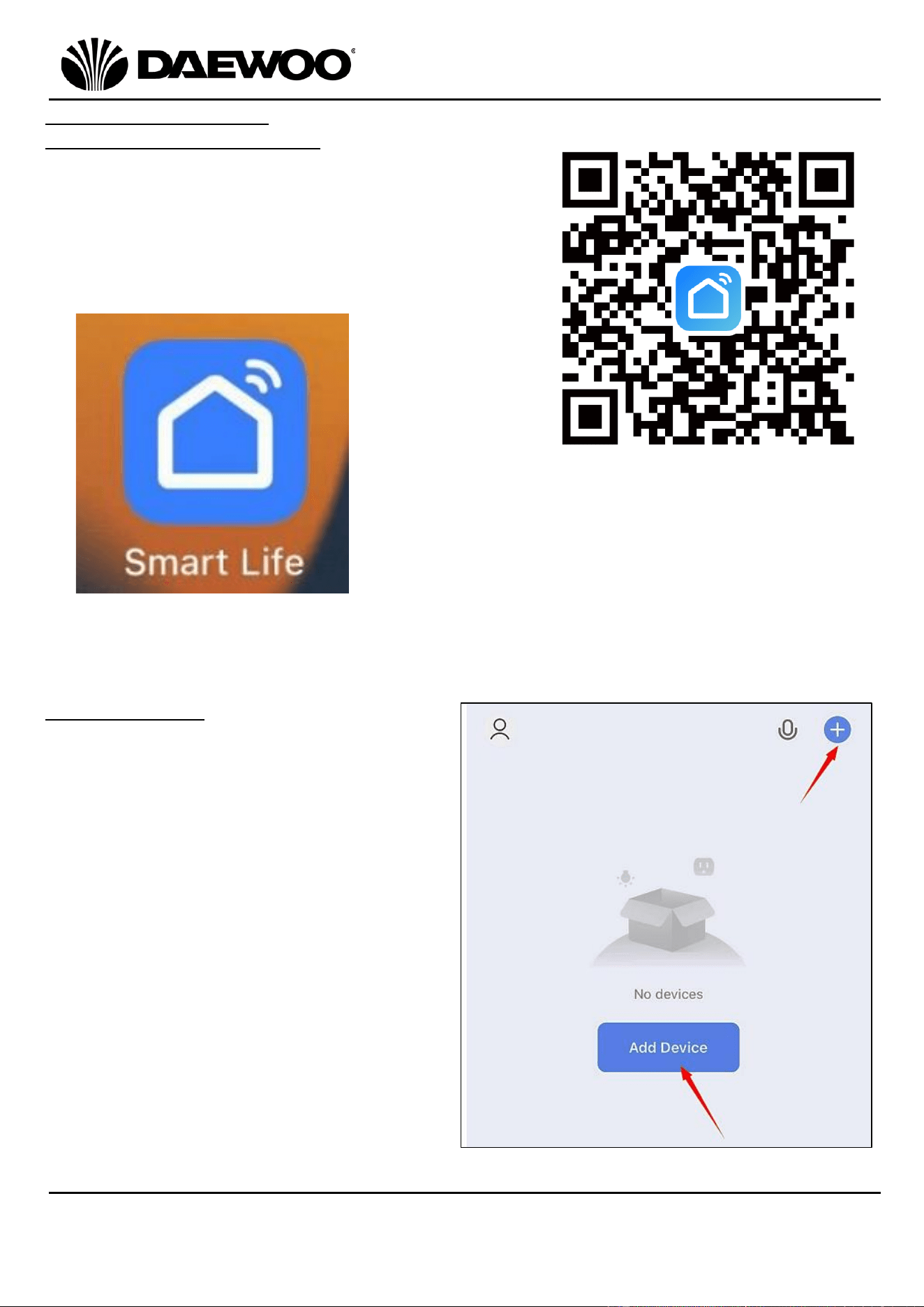
Function Button (13)
• Touch the Function Button (13) to select from:
Anion (Ionisation)
UV
Touch the button again for both functions - the corresponding Function
Indicator (12) will light. Touch the button again to cancel.
Filter Indicator (18)
• The Filter Indicator (18) will flash red after the unit has been running for
2200 hours, indicating that the Filter (6) requires replacing.
Alternatively, touch and hold the Function Button (13) for 7 seconds to cancel
the Filter reminder.
_
10
IMPORTANT – RETAIN THESE INSTRUCTIONS FOR FUTURE REFERENCE
Air Purifier
Model No. COL1563
User Manual
Using the Wi-Fi Mode
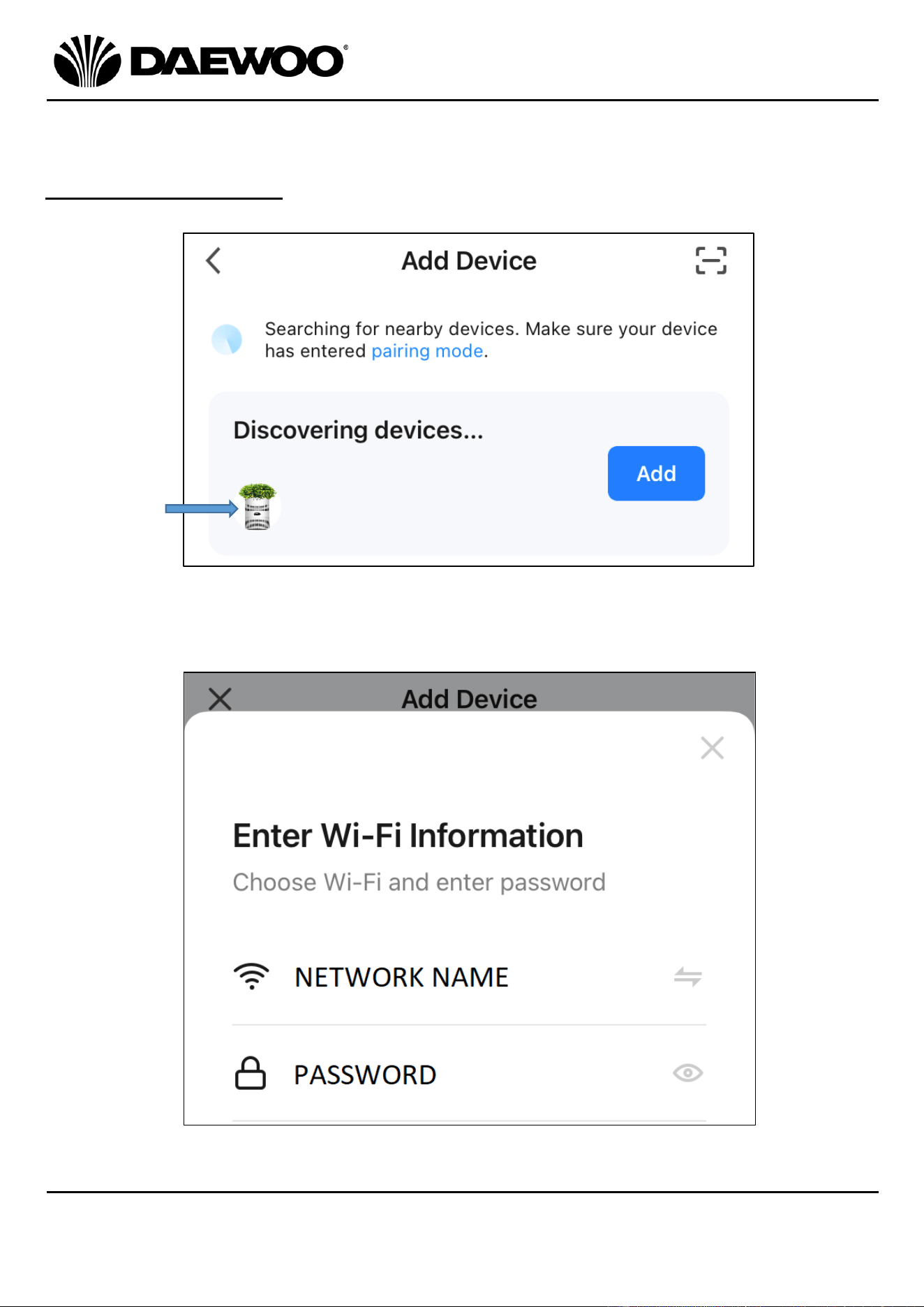
Download and Registration
1. Use your mobile phone or other Smart device
being used, to scan the QR code right to
download the “Smart Life” app.
2. Alternatively, search for the “Smart Life” in
the APP store or Google Play store to install
the app.
3. Open the “Smart Life” app, select “Register” by using your mobile phone
number or email to register an account, then log in to the app.
Adding a device
1. Connect your mobile phone to the
home wireless network, then turn
on Bluetooth and select 2.4GHz
Wi-Fi network.
2. Open the “Smart Life” app.
3. Touch “+” or Add Device in the
homepage as shown right.
11
Air Purifier
Model No. COL1563
User Manual
IMPORTANT – RETAIN THESE INSTRUCTIONS FOR FUTURE REFERENCE
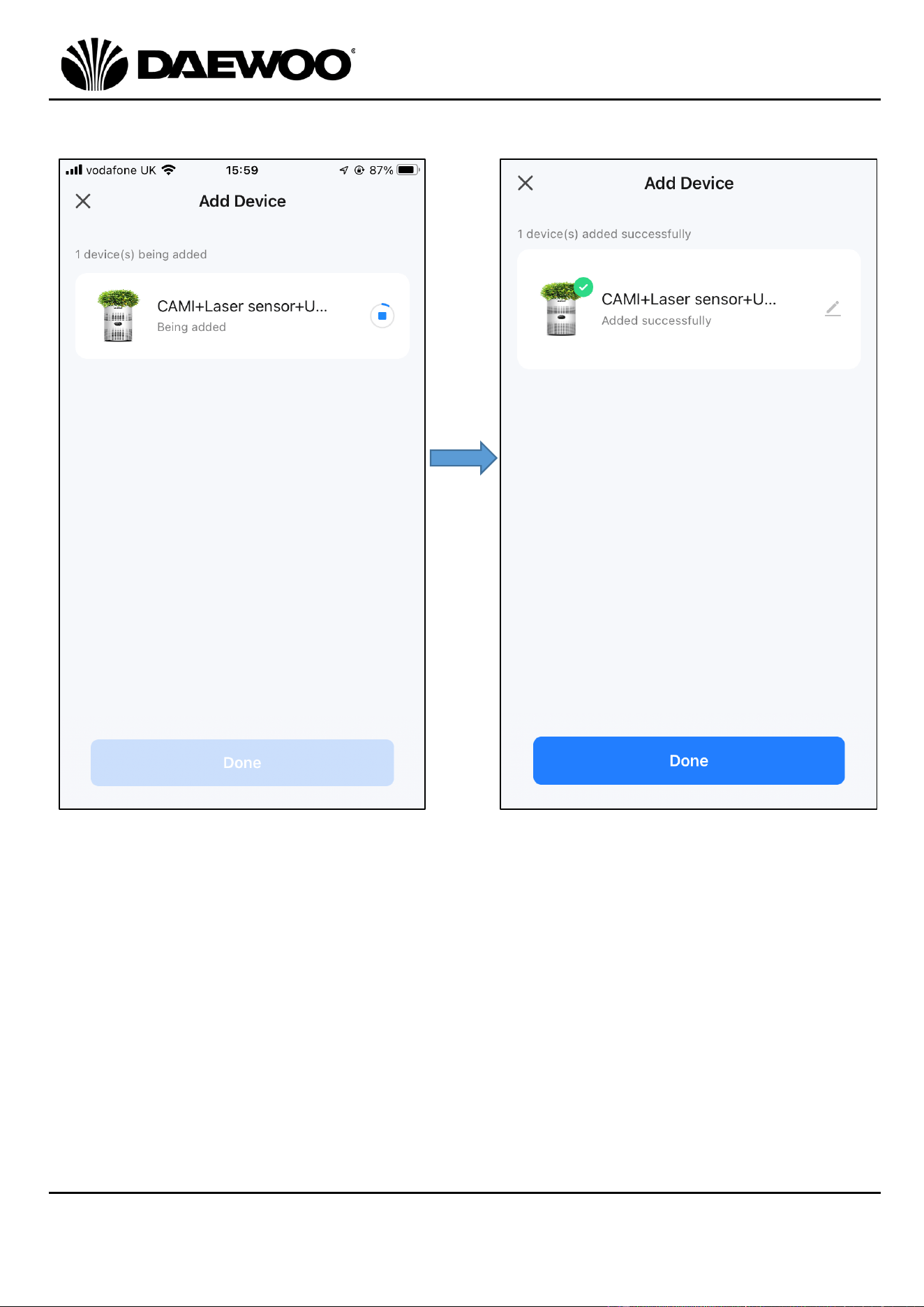
4. There are two connecting modes, A. “Automatic discovery” and B. “Add
Manually.”
A. Automatic discovery
1) With the Air Purifier on, it will be discovered automatically as shown below.
2) Touch the “Add” button, then input the Network name and password, it must
be the same as the network the mobile phone is connected to:
Air Purifier
Icon
12
IMPORTANT – RETAIN THESE INSTRUCTIONS FOR FUTURE REFERENCE
Air Purifier
Model No. COL1563
User Manual
3) Touch “Done” to finish after loading. Then the device is added into the APP.
13
Air Purifier
Model No. COL1563
User Manual
IMPORTANT – RETAIN THESE INSTRUCTIONS FOR FUTURE REFERENCE
B. Add Manually
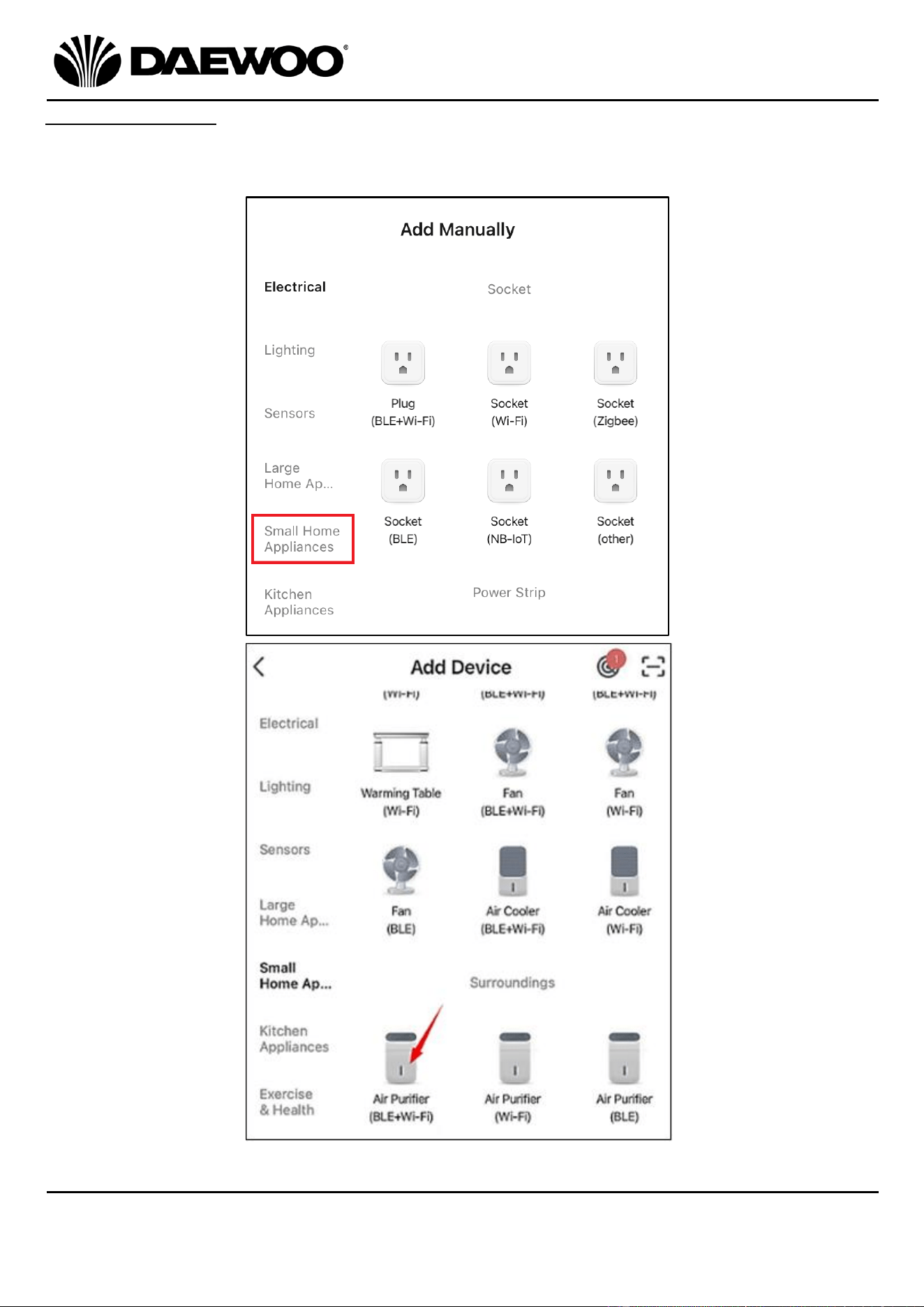
1) Scroll down to select “Small Home Appliances” then choose Air Purifier
(BLE+Wi-Fi) highlighted below:
14
IMPORTANT – RETAIN THESE INSTRUCTIONS FOR FUTURE REFERENCE
Air Purifier
Model No. COL1563
User Manual
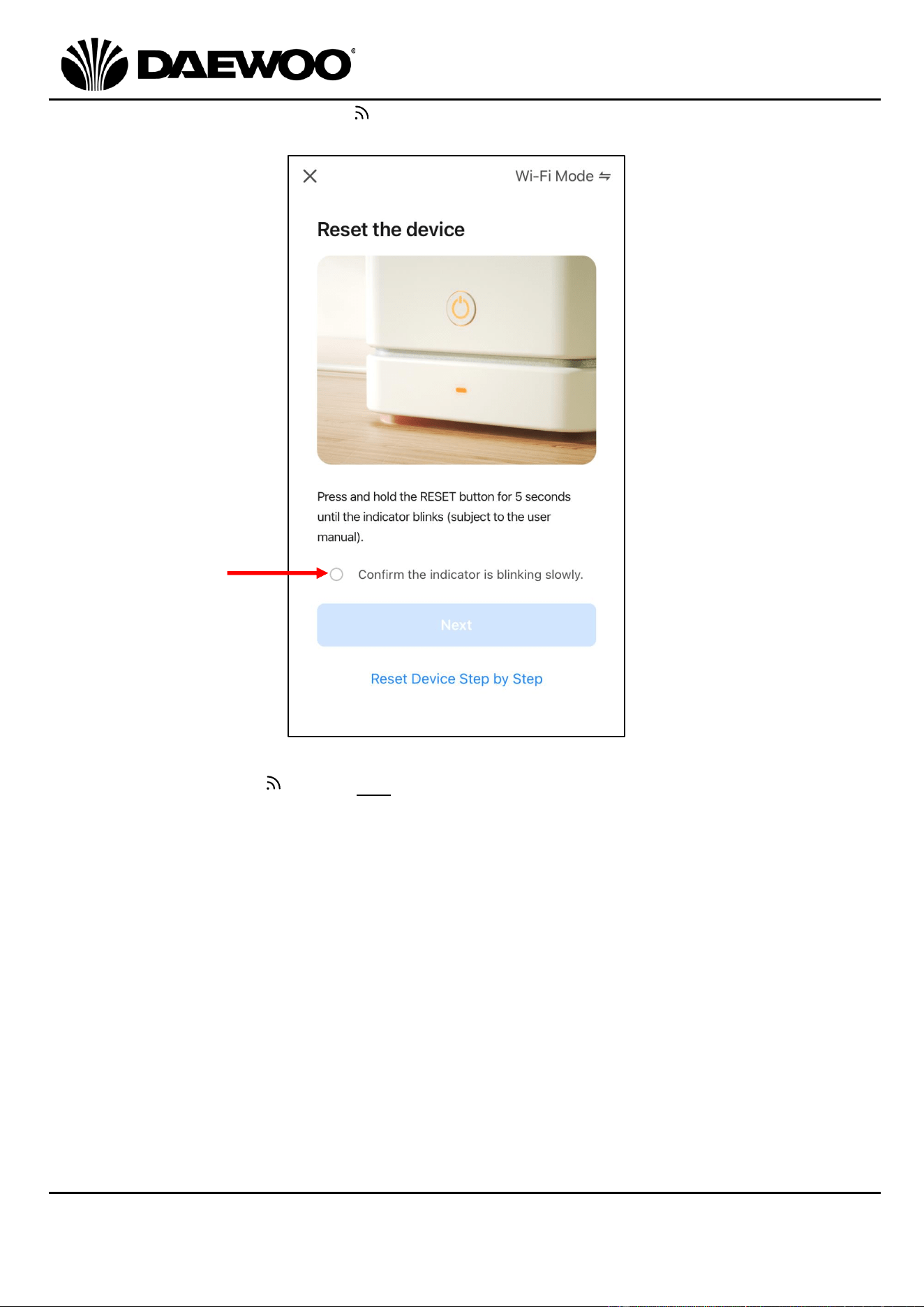
2) Check if the Wi-Fi indicator (15) is flashing slowly.
If it is flashing slowly, touch the confirm circle (arrowed below) and touch “Next”:
If the Wi-Fi indicator (15) is not flashing slowly, the unit will need resetting,
select “Reset Device Step by Step” as above and follow the three steps in the
APP below:
15
Air Purifier
Model No. COL1563
User Manual
IMPORTANT – RETAIN THESE INSTRUCTIONS FOR FUTURE REFERENCE
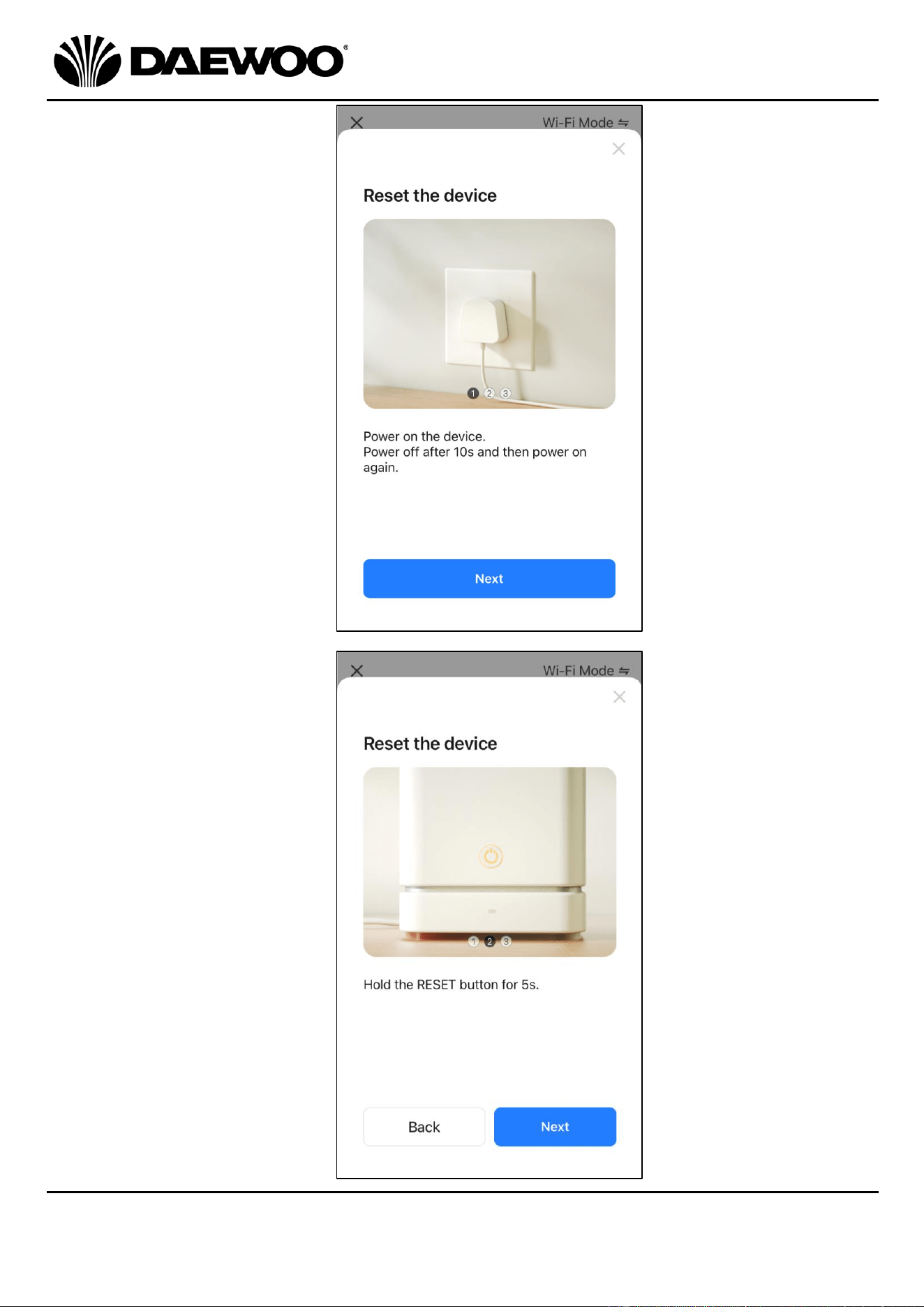
Step 1: Power up the Air
Purifier, then
Power off after 10s
then power on
again, then press
Next.:
Step 2: Hold the Fan/Wi-Fi
Button (20) for 5
seconds then press
Next.
16
IMPORTANT – RETAIN THESE INSTRUCTIONS FOR FUTURE REFERENCE
Air Purifier
Model No. COL1563
User Manual
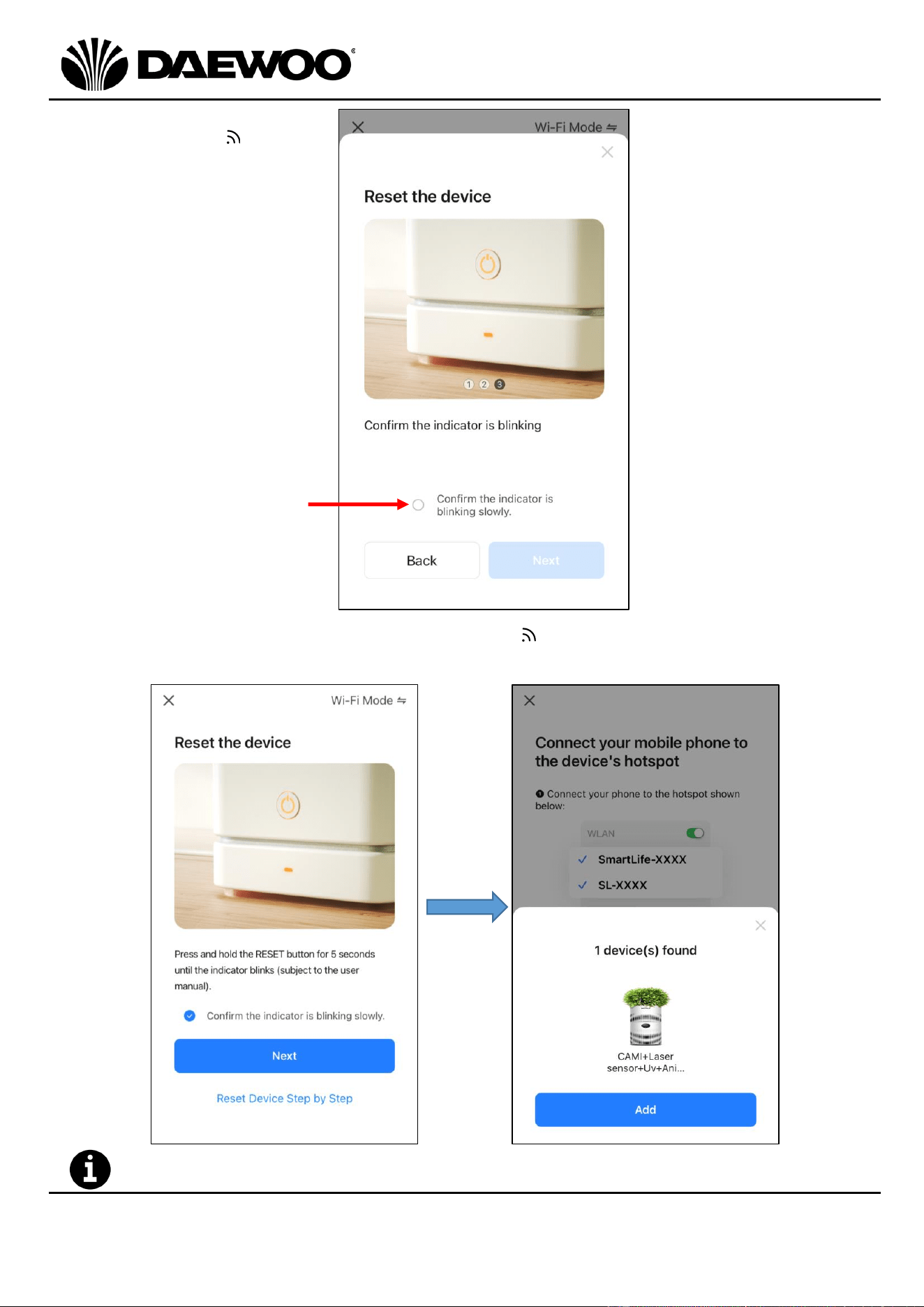
Step 3: Confirm the Wi-Fi
indicator (15)
is flashing slowly,
if so, touch the
confirm circle
(arrowed below),
then press Next.
3) Once it is confirmed that the Wi-Fi indicator (15) is flashing slowly, touch
“Next” and “Add” to finish. The device is now added into the APP.
The Wi-Fi Indicator will now light continuously.
17
Air Purifier
Model No. COL1563
User Manual
IMPORTANT – RETAIN THESE INSTRUCTIONS FOR FUTURE REFERENCE
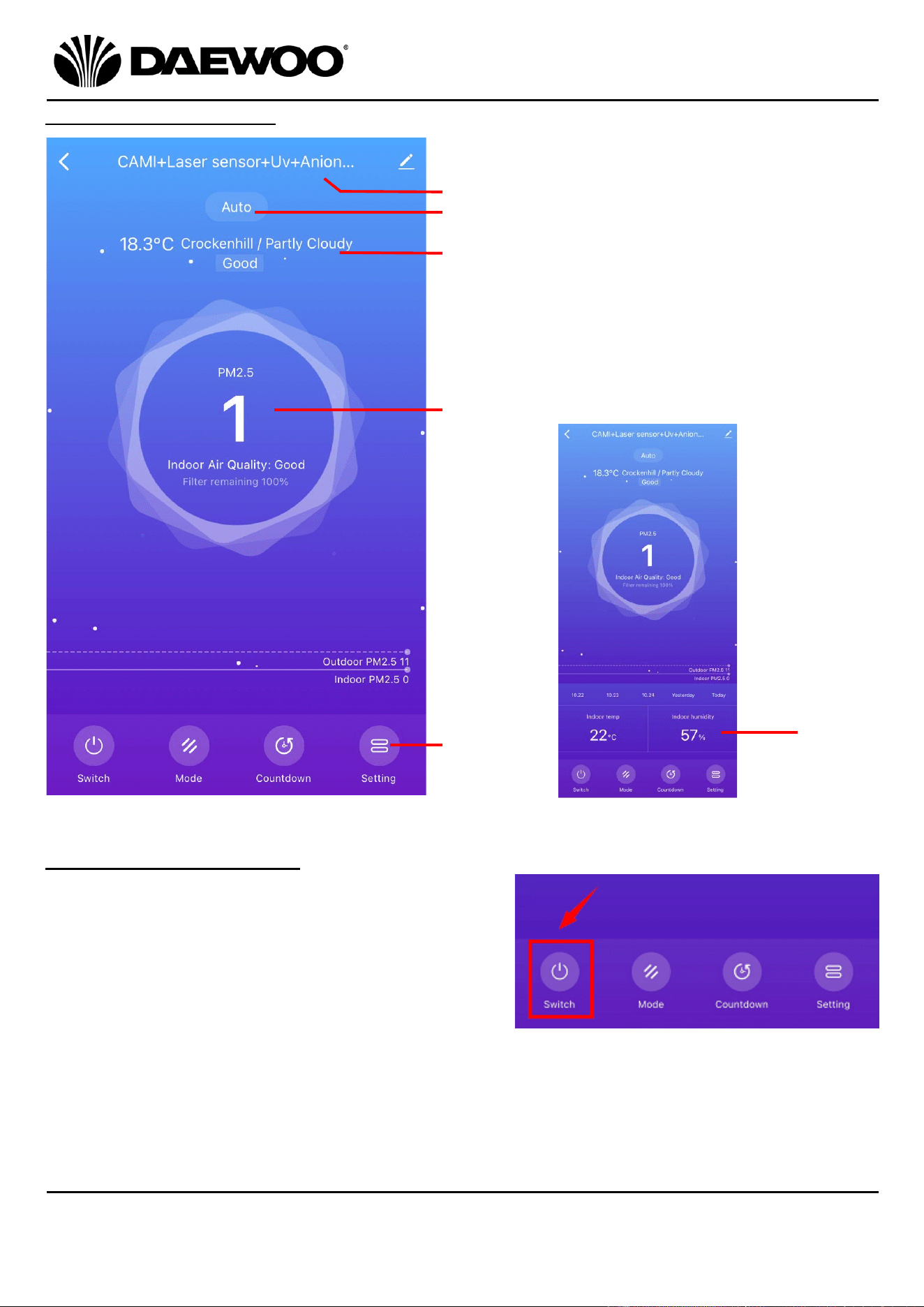
Description of the APP
Using the Smart Life APP
• To use the APP, make sure the Air Purifier
is connected to the mains, and the Air
Purifier is added into the APP as described
above.
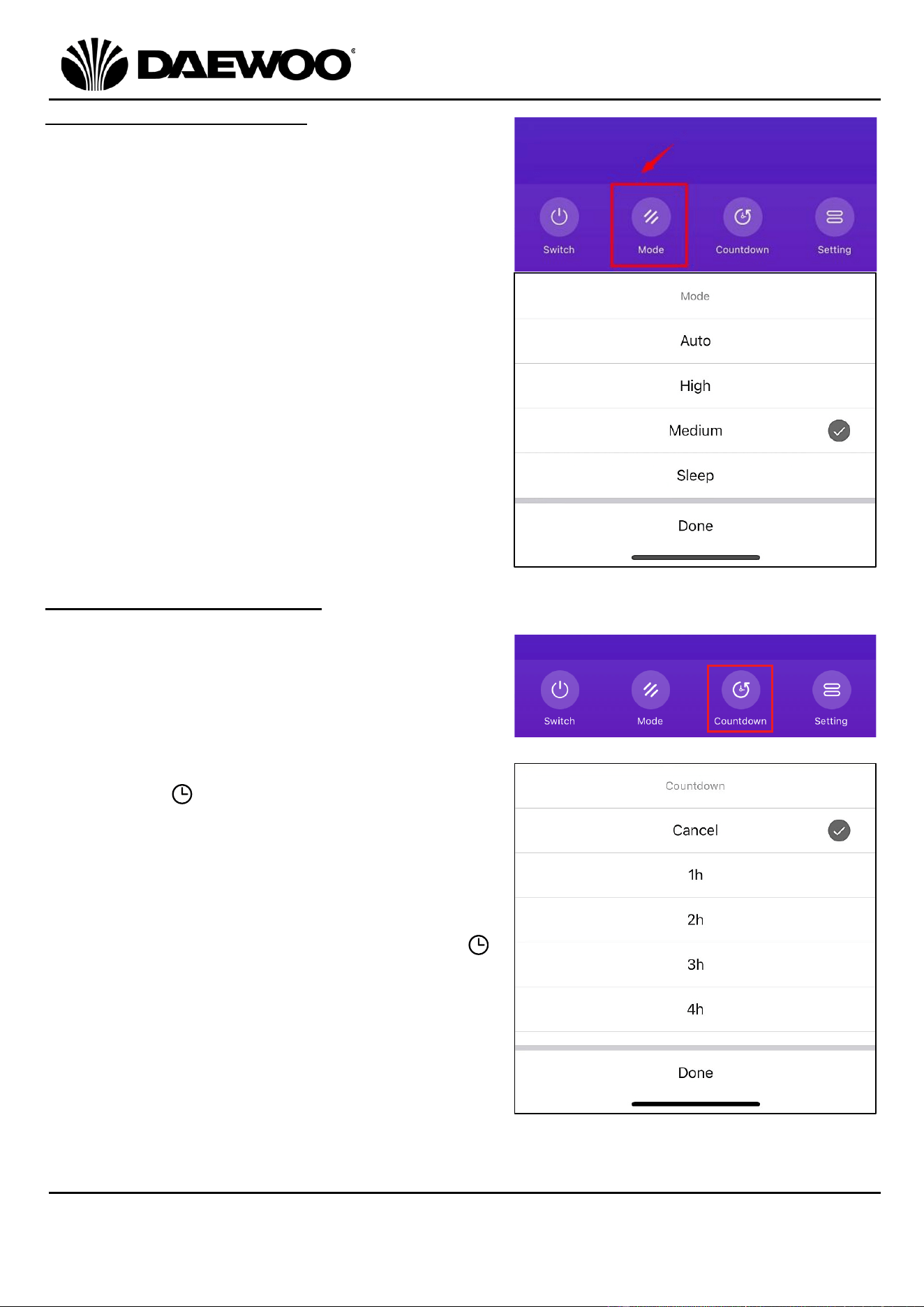
• Touch the Switch button to turn on the Air
Purifier, it is default mode is Auto.
• Touch Switch again to turn the Air Purifier off.
21
22
23
24
25
26
21. Device name (editable)
22. Current Fan speed mode
23. Temperature, location, and
weather information
24. Air Quality information
25. Current indoor temperature
and humidity*
26. Control buttons
*Scroll down to show:
18
IMPORTANT – RETAIN THESE INSTRUCTIONS FOR FUTURE REFERENCE
Air Purifier
Model No. COL1563
User Manual
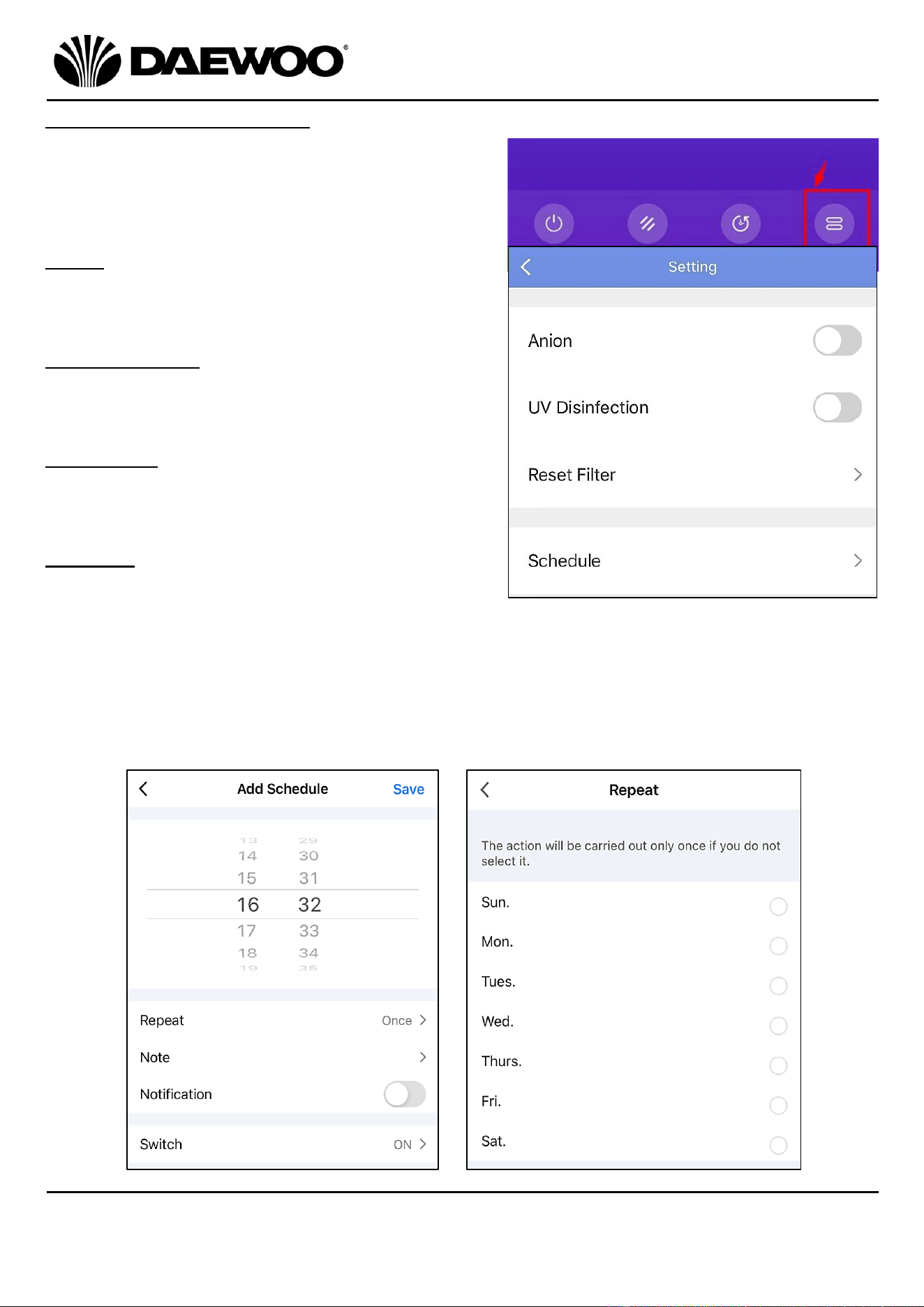
Mode (Fan speed setting)
• Touch Mode to select from Auto, High,
Medium or Sleep mode, then Touch
Done to confirm.
Countdown (Timer setting)
• Touch the Countdown button to turn on
the timer function, next select how long
the Air Purifier will be on until it switches
off.
• Select from 1-24 hours, then the Timer
Indicator on the Air Purifier will light.
The device will begin to count down,
when the time is up, the Air Purifier will
switch off.
• To cancel the Timer function, touch the
Cancel button and the Timer Indicator
will go out.
19
Air Purifier
Model No. COL1563
User Manual
IMPORTANT – RETAIN THESE INSTRUCTIONS FOR FUTURE REFERENCE
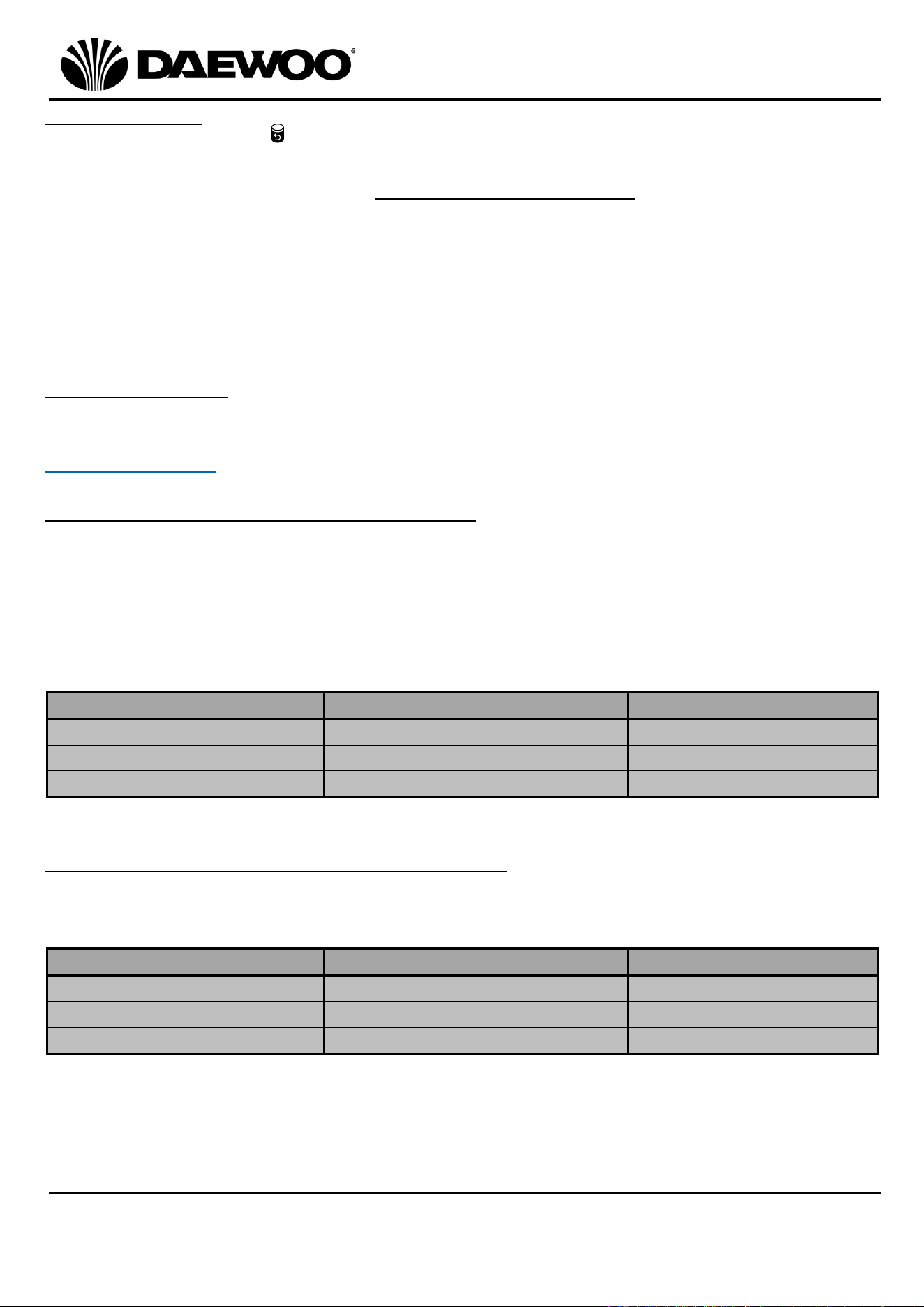
Setting (Function Control)
Touch the Setting button to open the page
to access the following features:
Anion
Activate the Ionisation mode for fresher air
output.
UV Disinfection
Activate UV Disinfection to disinfect the
internal filter and the air output.
Reset Filter
Touch Reset Filter to reset the unit after
replacing with a new filter.
Schedule
• With the unit OFF i.e., not powered up
but plugged into the mains, touch the
Schedule button to select the desired
time for the unit to turn on.
• Touch the Repeat button to set the desired schedule.
• You can add notes in the Note section.
20
IMPORTANT – RETAIN THESE INSTRUCTIONS FOR FUTURE REFERENCE
Air Purifier
Model No. COL1563
User Manual
Replacing filter
• The Filter Indicator (18) will flash red after the unit has been running for
2200 hours, indicating that the Filter (6) requires replacing.
• Replace the filter by following Note Regarding the Filter section above.
• To reset the filter time, touch the Function Button (12) for 7sec after installing a
new filter. Alternatively use the APP to reset the filter as described above.
• Only use the original type of filter, do not use any other style of filter. The use of
any other of filter not recommended by Daewoo may impair the performance of
the product and may invalidate your warranty.
• The filter is not washable.
Filter Information
Replacement filters are available by contacting 0161 831 7879, (9.00am-5.00pm
Monday to Thursday, 8.00am-4.00pm Friday) or by contacting us via the website:
www.esgltd.com quoting COL1563FILTER.
Air Quality Information – Unit of Measure
Your Daewoo Air Purifier measures the air quality in PM 2.5 units.
PM 2.5 refers to particulate matter no larger than 2.5 microns in the atmosphere.
This Daewoo Air Purifier is equipped with an internal Laser air quality sensor so
that it can detect the PM 2.5 in the air and display the PM 2.5 value on the LED
Display (10).
The lower the reading on the LED Display (10), the higher the air quality:
Measurement
Reading on the LED Display (10)
Comment
PM2.5 <75ug/m³
75 or lower
Good Air Quality
75ug/m³ <PM2.5 <150ug/m³
Between 75 and 150
Average Air Quality
PM2.5> 150ug/m³
Greater than 150
Poor Air Quality
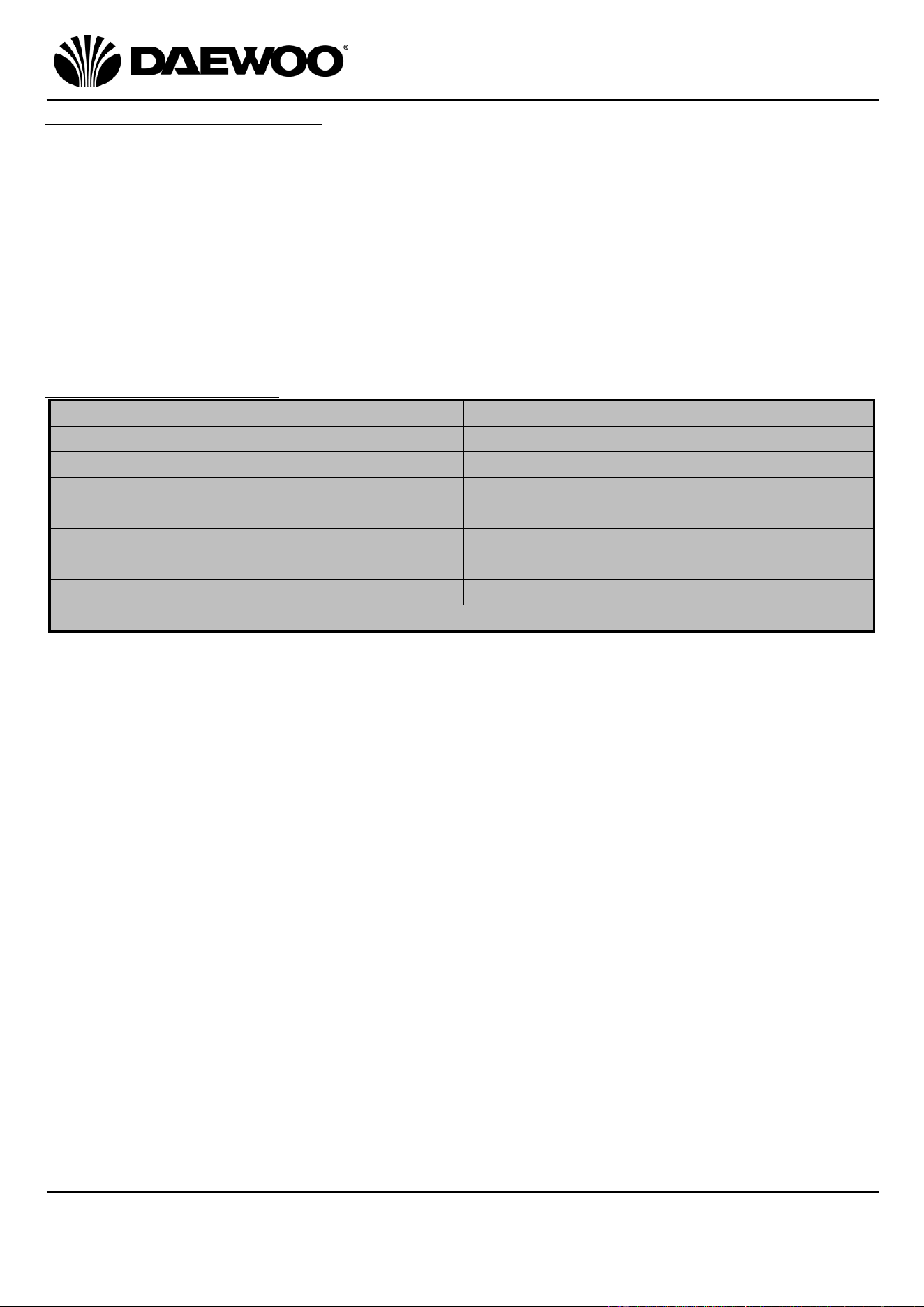
The LED Display (10) – Information Displayed
The LED Display (10) will change every 5 seconds to display the current ambient
air quality, humidity and temperature as below:
Showing on Display
Display Duration
Unit
Air Quality
5 seconds
PM2.5
Humidity
5 seconds
RH
Temperature
5 seconds
⁰C
21
Air Purifier
Model No. COL1563
User Manual
IMPORTANT – RETAIN THESE INSTRUCTIONS FOR FUTURE REFERENCE
Cleaning and Maintenance
• Always disconnect the Air Purifier from the mains supply before cleaning.
• Do not immerse the appliance into water or other any liquid.
• Do not use abrasive, corrosive, or flammable cleansers such as bleach or alcohol,
to clean any part of the appliance.
• Do not use vacuum cleaner to clean the filter.
• Do not wash the filter.
• You may sterilize the filter under sunlight.
• If you do not use the unit for a long time, place the appliance in a cool and dry
environment.
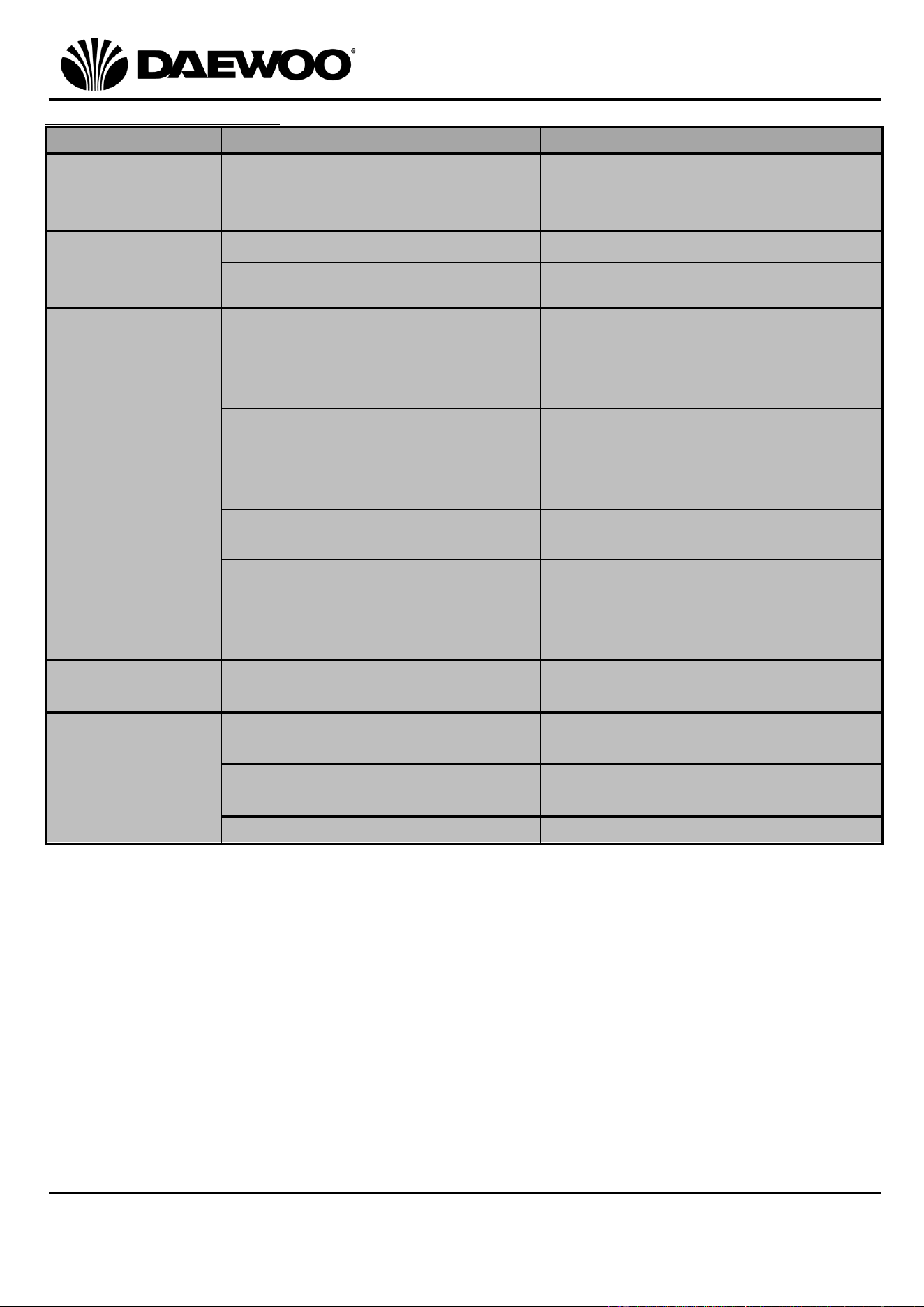
Technical Specification
Model Number
COL1563
Mains Adaptor Rated Input
100-240V~ 50/60Hz (1.5A max.)
Mains Adaptor Rated Output
24V DC 2A
Air Purifier Rated Power
30W
Noise Level
55dB
Coverage Area
≤36m
2
Wi-Fi Frequency
2.4GHz
Protection Class (Mains Adaptor)
II
This product conforms to Radio Equipment Directive 2014/53/EU
22
IMPORTANT – RETAIN THESE INSTRUCTIONS FOR FUTURE REFERENCE
Air Purifier
Model No. COL1563
User Manual
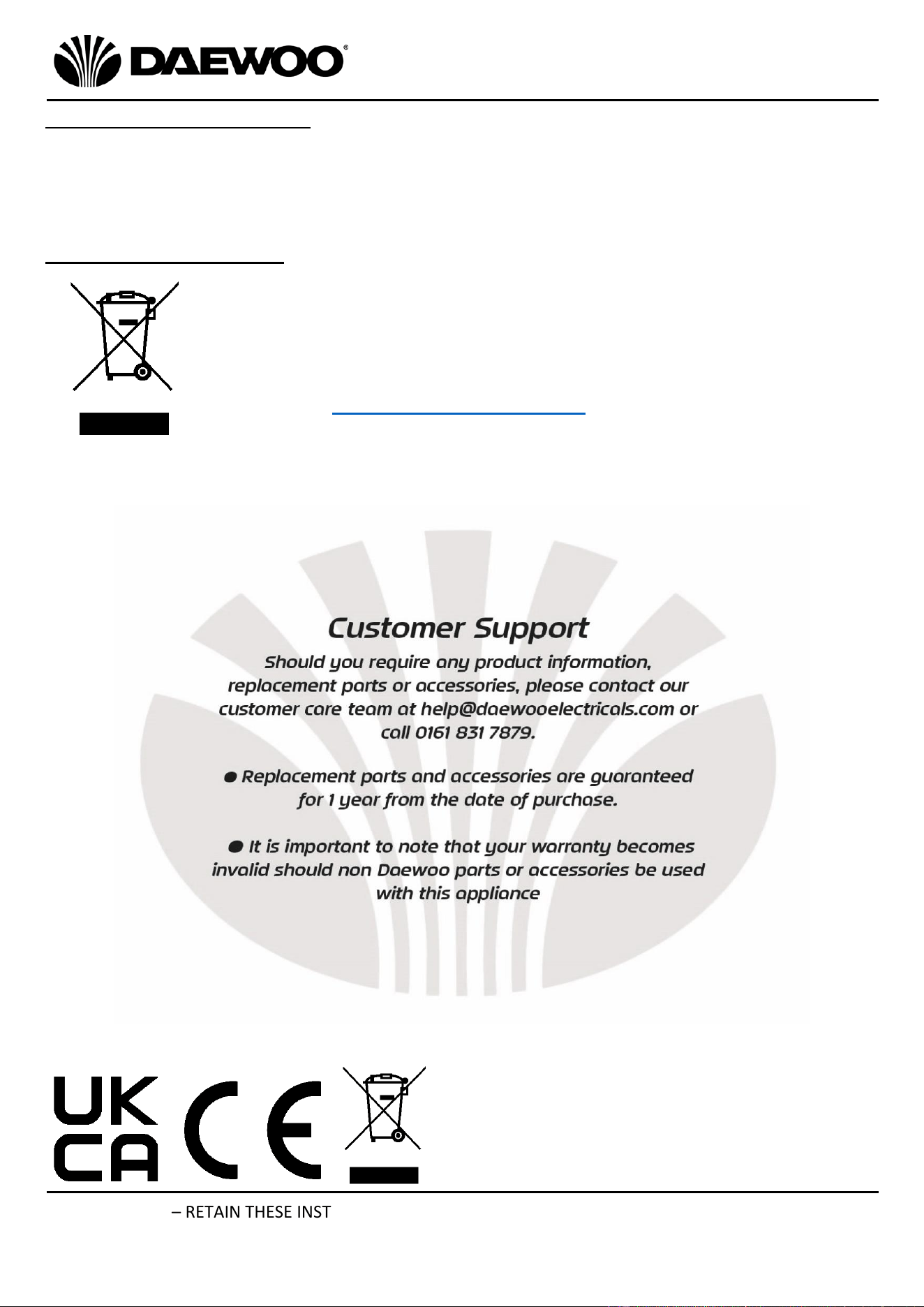
Troubleshooting Guide
Problem
Possible Cause
Possible Solution
The unit does
not
power up
No power.
Ensure the mains plug is in the
socket and it is switched on.
Timer function is active
Cancel timer function
Unit not
performing
well
Fan Speed too low
Increase fan speed
Filter is dirty
Replace the Filter
APP not
working
Your Phone, Tablet, etc. is
not connected to the Wi-Fi
Network.
Ensure your phone, Tablet, etc.
is connected to the Wi-Fi
Network using your username
and password.
The APP has not been
correctly installed.
Install and register the APP –
see page 10 ‘Using the Wi-Fi
Mode’ and install the APP on
your phone/smart device.
Unit not added to APP
See page 11 ‘Automatic
Discovery’
APP successfully installed but
the Fan/Wi-Fi icon (17)
flashing on the Display.
The unit is not connected to Wi-
Fi. Follow procedure using
three steps starting on page 15
to reset the unit.
Unit is noisy
The unit is located on an
uneven surface
Position the unit on a flat level
surface
Unit not
producing
fresh Air
Ionisation Mode not switched
on
Touch the Function Button (12)
to enable Ionisation Mode.
UV Mode not switched on
Touch the Function Button (12)
to enable UV Mode.
Filter is dirty
Replace the Filter
23
Air Purifier
Model No. COL1563
User Manual
IMPORTANT – RETAIN THESE INSTRUCTIONS FOR FUTURE REFERENCE
Disposal of the Packaging
Dispose of paper and cardboard in appropriate paper re-cycling facilities.
Dispose of plastics in the appropriate plastics collection service.
Dispose of non-recyclable plastics in the appropriate plastics collection service.
Disposal of the Product
You should now recycle your waste electrical goods and in doing so
help the environment. This symbol means waste electrical products
at the end of their useful life should not be disposed of with normal
household waste. Please ensure it is taken to a suitable facility for
disposal. Check with your Local Authority or retailer for recycling
advice or visit www.recycle-more.co.uk enter your postcode to find
out your nearest recycling site

24
IMPORTANT – RETAIN THESE INSTRUCTIONS FOR FUTURE REFERENCE
Air Purifier
Model No. COL1563
User Manual
WARRANTY
Thank you for purchasing your Daewoo product.
As part of our commitment to quality, we are offering you an extra 2 years warranty in
addition to your 1 year guarantee
Your Daewoo product is guaranteed for 1 year from the date of original purchase, with proof
of purchase or receipt. If any defect should occur due to faulty workmanship or material, your
faulty product should be returned to the place of purchase, replacement or refund is at the
discretion of the retailer.
The guarantee is subject to the following provisions:
•
The product must be correctly installed and operated in accordance with the
requirements contained in the instruction manual.
•
The product must be used solely for domestic purposes.
•
It does not cover general wear and tear, damage, misuse or any consumable parts.
•
The guarantee will be rendered invalid if the product is re-sold or has been damaged through
inexpert repair.
•
The guarantee is only valid within the UK and Eire.
Your standard 1 year guarantee will only be extended to the maximum available for your
individual product upon registration. (Note: products must be registered individually and
covers the main body and housing). If you do not register your product within 28 days of the
original purchase date, your product will only be guaranteed for 1 year.
To validate your extended 2 year warranty*please register your purchase online within 28
days of the original purchase date by registering at:
https://help.daewooelectricals.com
or
Contact Us (daewooelectricals.com)
*Your extended warranty is only valid with proof of purchase receipt and subject to the
conditions outlined above.
Daewoo is a registered trademark.
Produced and imported under licence by
Eurosonic Group Limited
Brightgate House
1 Brightgate Way
Manchester M32 0TB UK
EU Rep: EuroSonic Magppie (ESM) Ltd. Ireland D05 X006
www.esgltd.com