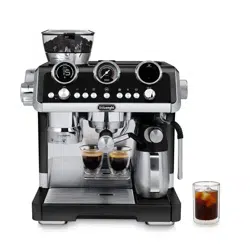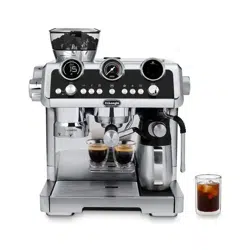
EC9885
COFFEE MAKER
Instructions for use.
2
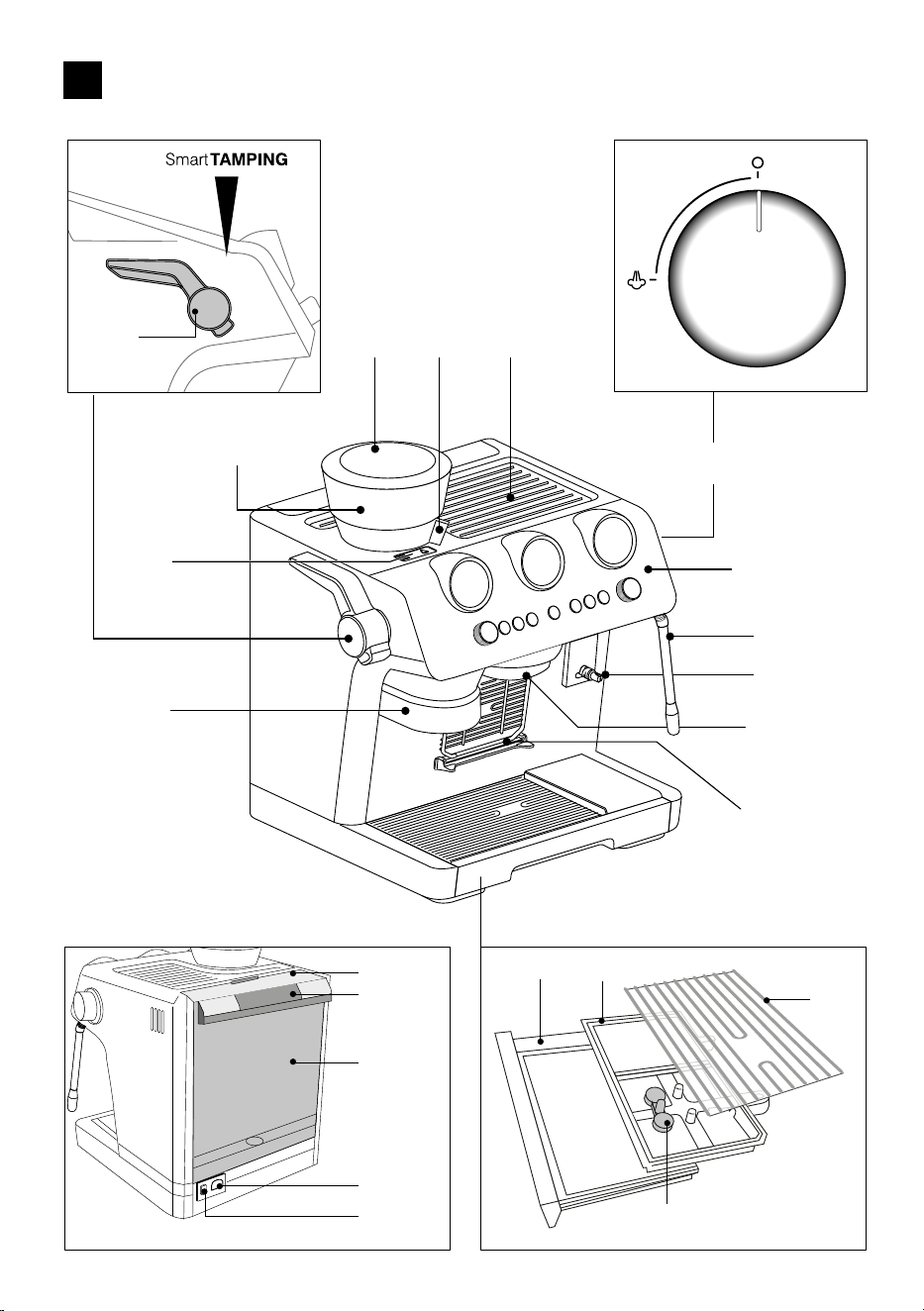
A
A21
A1
A19
A2 A4
A6
A8
A9
A3
A7
A5
B
A10
A11
A13
A12
A14
A15
A16
A17
A18
A20
3
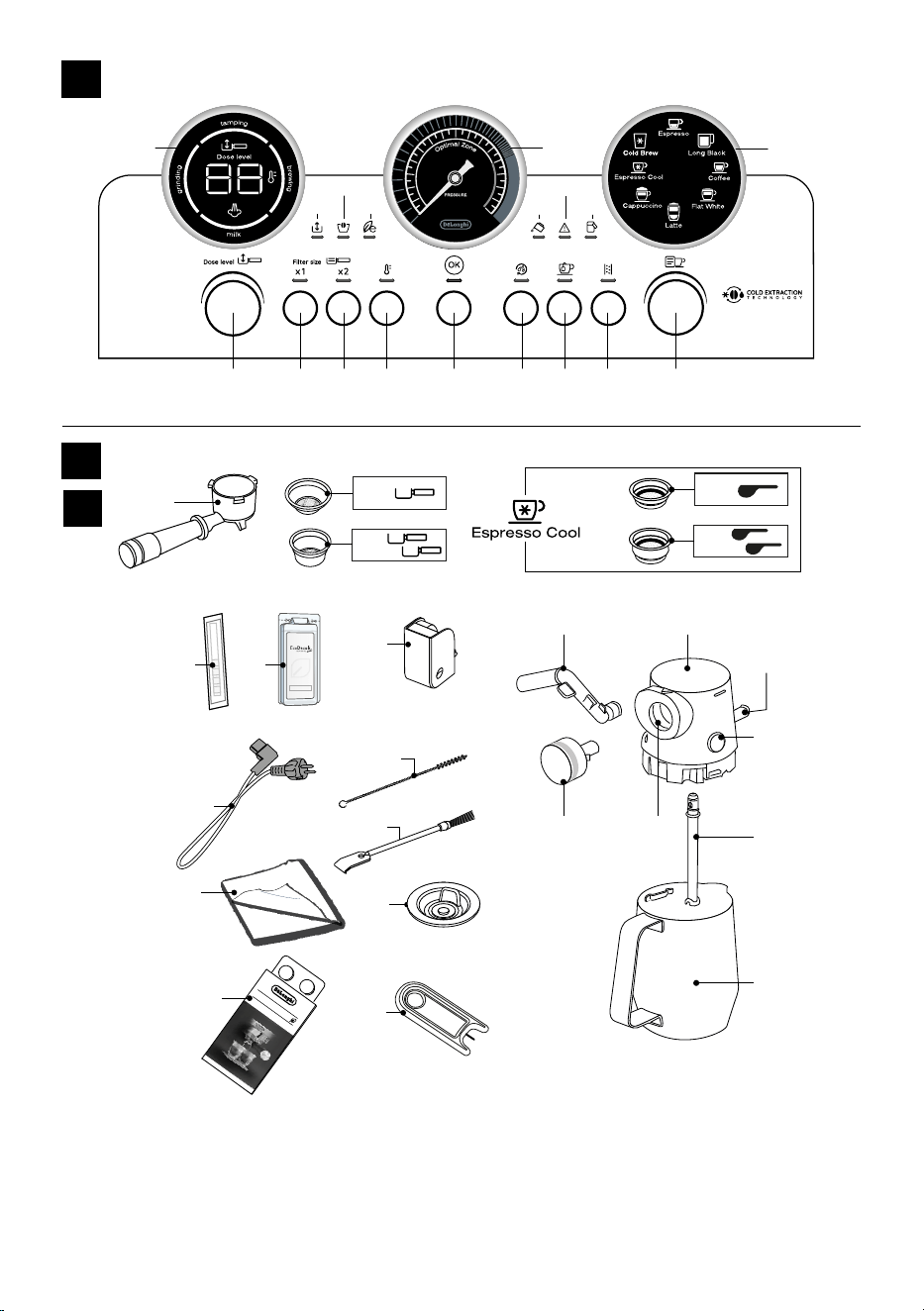
C3
C2
C1
C12
De’Longhi Appliances s.r.l.
Via L. Seitz, 47 31100 Treviso - ITALY
Tel. +39 0422 4131
5413218631/04.15
Decalcicante per macchine da caè
Descaler for coee machines
Détartrant pour machines à café
Entkalker für Kaeemaschinen
C6 C7
C8
D1D4
D5 D6
D2
D3
D7
D8
C9
C15
C5
C4
C10
C11
CLEANING TABS
C13
C14
B1 B2 B3 B4 B5 B6 B7 B8 B9
B18 B14
B13
B12
B11B17
B16
B15
B10
B
C*
D
4
Before using the machine, always read the safety warnings.
B12. “General alarm” light
B13. “No water” light
B14. Pressure gauge
B15. “ Energy saving” light
B16. “No beans container” light
B17. “Anti-clogging” light
B18. Led module process:
• Indicates the operation the appliance is running
• The setting of the dose level
• The infusion temperature setting
• The selected setting (see “9. Menu settings”)
1.3 Description of accessories - C*
(* The accessories may vary in type and number depending on
the model.)
C1. Portalter
C2. 1-cup coee lter
C3. 2-cups coee lter
C4. 1-cup Espresso cool lter
C5. 2-cups Espresso cool lter
C6. “Water hardness test “ indicator paper
C7. Descaler
C8. Descaling accessory
C9. Removable power cord
C10. Tube brush
C11. Cleaning brush
C12. Cloth
C13. Coee outlet cleaning disk accessory
C14. Coee outlet cleaning tabs
C15. Accessory for cleaning the steam wand
1.4 Recommended optional cleaning accessories
Visit Delonghi.com for more information.
Cleaner
EAN: 8004399333307
1.5 Description of LatteCrema - D
D1. Milk container lid
D2. Milk container connector
D3. Lid release button
D4. Milk spout (adjustable height)
D5. Froth selection knob
D6. Knob housing
D7. Milk intake tube
D8. Milk container
ECO MULTICLEAN
1. DESCRIPTION
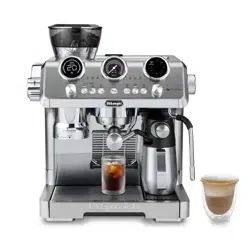
1.1 Description of appliance - A
A1. Beans container
A2. Beans container lid
A3. Grind selector (ne to coarse)
A4. Cup tray
A5. Steam dial
A6. Steam wand and nozzle
A7. Lattecrema connection
A8. Coee outlet
A9. Cup grille for espresso
A10. Cup grille for glasses or mugs
A11. Drip tray grille
A12. Drip tray
A13. Drip tray water level indicator
A14. Water tank lid
A15. Water tank extraction handle
A16. Water tank
A17. Power cord connector socket
A18. Main switch (ON/OFF)
A19. Coee grinder outlet (tamping station)
A20. Cover to access the
coee grinder coee guide
A21. Presser lever
1.2 Description of control panel - B
B1. Coee dose dial
B2. “x1” button: to use the 1 coee lter
B3. “x2” button: to use the 2 coees lter
B4. Coee Temperature button
B5. “OK” button: to deliver the drink/conrm
B6. “Active Rinse” button
B7. Hot water button
B8. “Descaling” button
B9. Drink selector dial
B10. Drink selected light:
Hot Espresso based drinks
• Espresso
• Long Black
• Coee
Cold coee based drinks
• Espresso Cool
• Cold Brew
Milk based drinks
• Cappuccino
• Flat White
• Latte
B11. “Milk clean” light
5
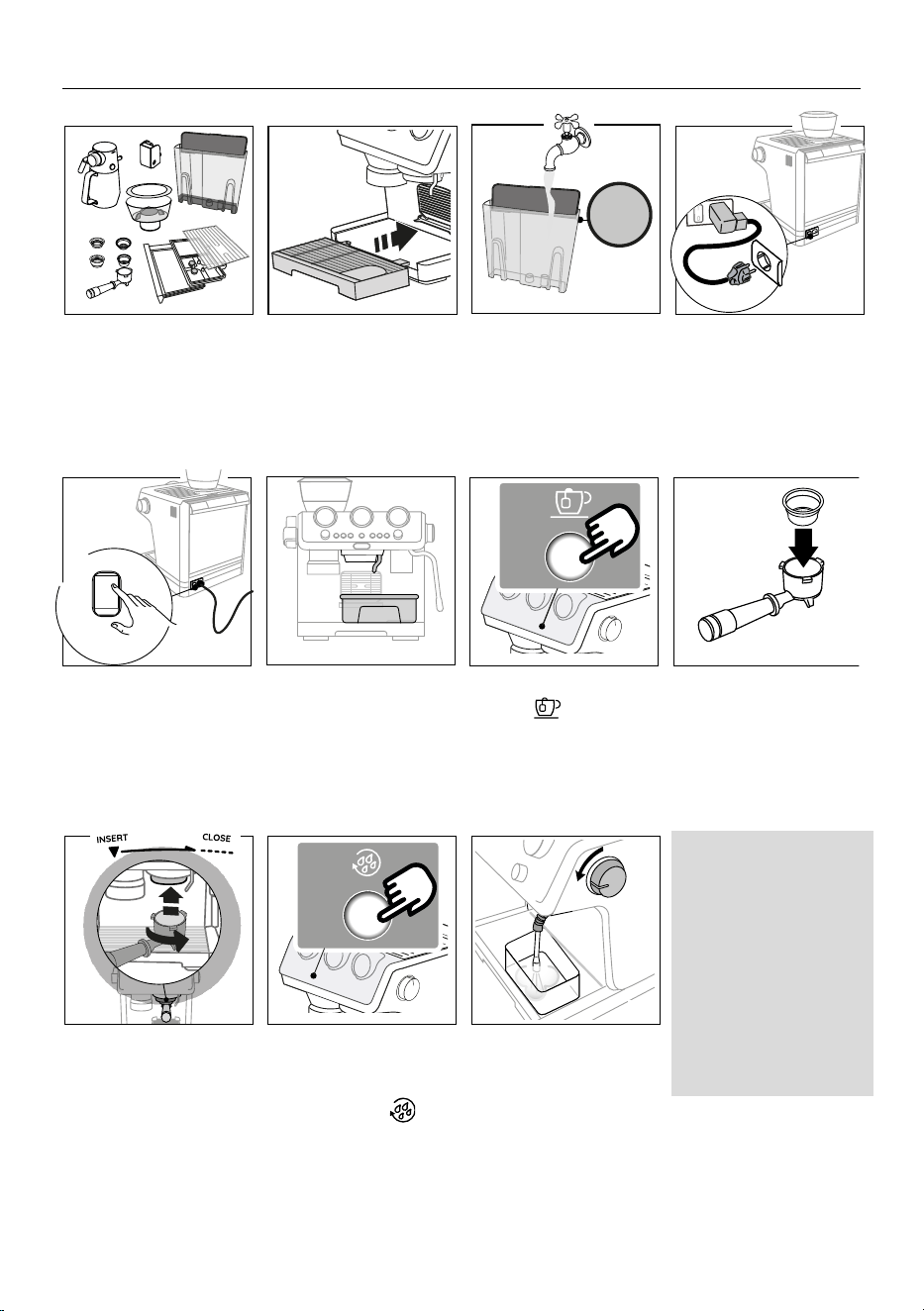
2. PREPARING YOUR MACHINE FOR FIRST USE
MAX
I/0
I
0
3. Remove the water tank
(A16) and ll with fresh
clean water*, taking care
not to exceed the MAX
level.
1. Wash and dry all accesso-
ries (including water tank)
with warm water and
washing-up liquid
.
2. Insert the drip tray (A12)
complete with cup grill
(A10) and (A11).
4. Plug the power cord con-
nector (C9) into the socket
(A17) at the back of the
machine, then plug into the
mains socket.
5. Make sure the main switch
(A18) at the back of the mah-
chine is pressed and in the
I position.
6. Place a container with a
minimum capacity of 100
ml under the hot water
spout (close to the coee
outlet (A8)).
7. Press (B7)
to rinse.
8. Insert the coee lter in
the portalter (C1).
MAX
I/0
I
0
MAX
I/0
I
0
9. Attach the portalter lter
to the machine. To attach
correctly, align the porta-
lter handle with the lower
arrow, then turn the handle
to the right until it is aligned
in the “CLOSE” position.
10. Place a container under
the portalter and frothing
wand and press
(B6).
11. Open the steam dial (A5)
to deliver steam at least
5 seconds. For optimal
steam performance we
recommend you repeat this
action 3 or 4 times. This is
to purge the steam wand
before frothing or steam-
ing your milk.
1
5
9
2
6
10
3
7
11
4
8
* What water to use
• Potable fresh water is
mandatory.
• Do not use sparkling (carbo-
nated) or distilled water
• Cold extraction techno-
logy: before making cold
brewed drinks, empty out
the water tank (A16), rinse
thoroughly and rell with
fresh potable water.
6
3. COFFEE DELIVERY
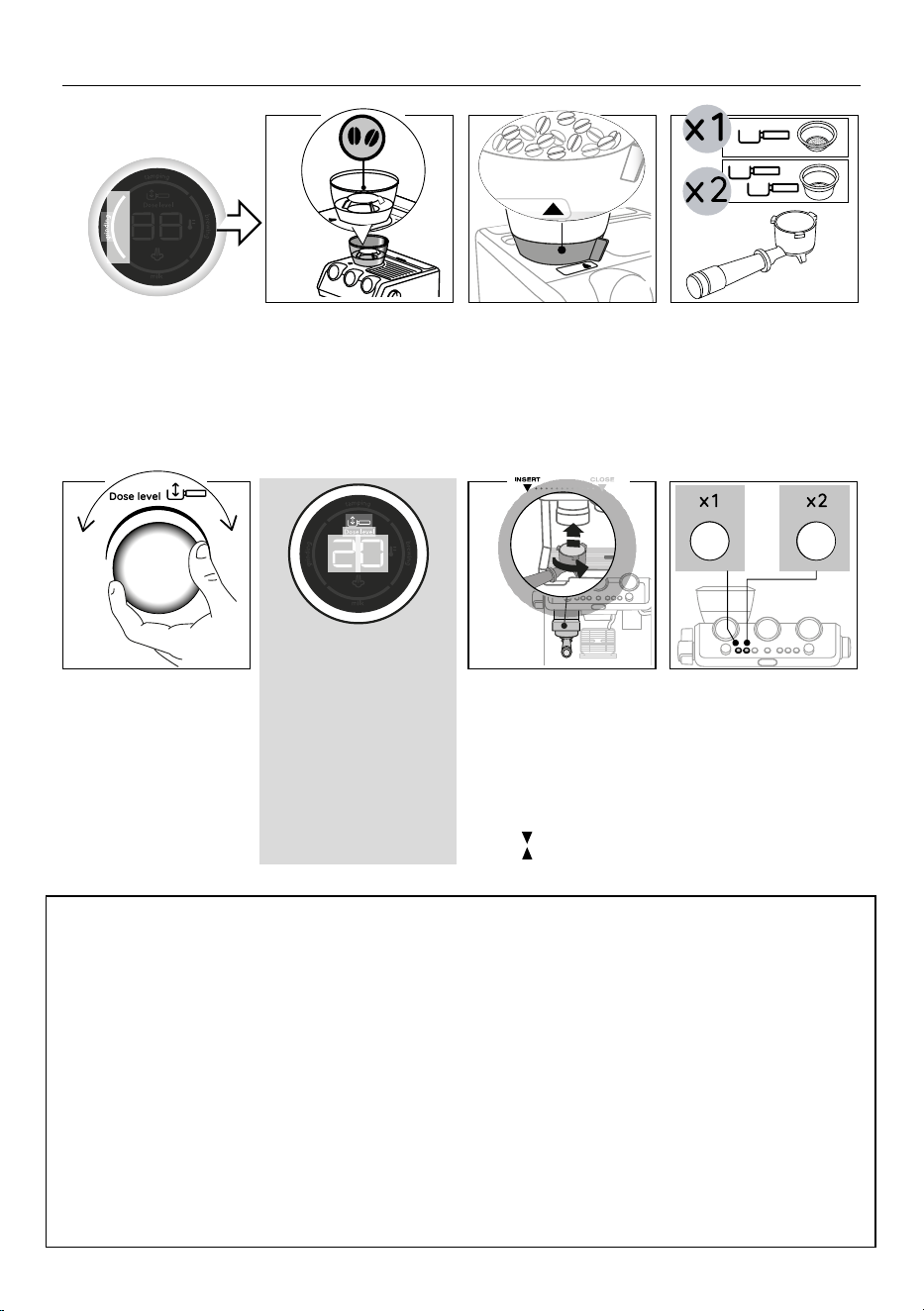
Step 1-grinding
Step 2-tamping
Step 3-brewing
1. Add beans to beans con-
tainer (A1) Fresh is best; ll
in just with the quantity
you need.
2. Check that the ground se-
lector (A3) is set to 9 (fac-
tory setting).
3. Select 1-cup (C2) or 2-cups
(C3) coee lter and place
in the portalter (C1).
Step 1-grinding
Step 2-tamping
Step 3-brewing
4. Set the dose level by adjust-
ing the coee dose dial (B1)
starting from number “1”
on the led module indicator
(B18) (“1” corresponds to
the min. position).
5. Attach the portalter to the
outlet of the coee grinder
(A19), aligning it
with the
lower arrow, then turn the
handle to the right until it is
aligned in the “CLOSE” posi-
tion ( ).
3.1 Adjust dose
Each variety of coee beans can behave diferently during grinding and this is the reason why setting the dose at the beginning might
require extra care.
With this illustration we give you some indications on how to regulate the dose. Please note these suggested setting ranges, based on
the roasting level, are certainly a good starting point, but they might slightly vary depending on specic composition of your coee
beans.
1. Set the dose turning the “coee dose dial” (B1) starting from the minimum position (number “1” on the “led module process”
(B18)).
2. Look at which roasting level your coee is and based on that, turn the dial slowly, referencing the ranges.
4
1 2 3
5
The numbers displayed on the
indicator (B18) are a setting
reference once the right level
of coee in the portalter is
reached. They do not corre-
spond to grinder settings or to
measurement units (gr/oz) or
to grinding time.
Refer to”3.1 Adjust dose” for
suggestions.
6. When using the 1-cup lter (C2)
or (C4), press the “X1” button
(B2). When using the 2-cups
lter (C3) or (C5), press the 2x
button (B3): this will also dou-
ble the quantity of espresso cof-
fee delivered. The grinding step
begins and stops automatically.
or
7
COFFEE DELIVERY
Step 1-grinding
Step 2-tamping
Step 3-brewing
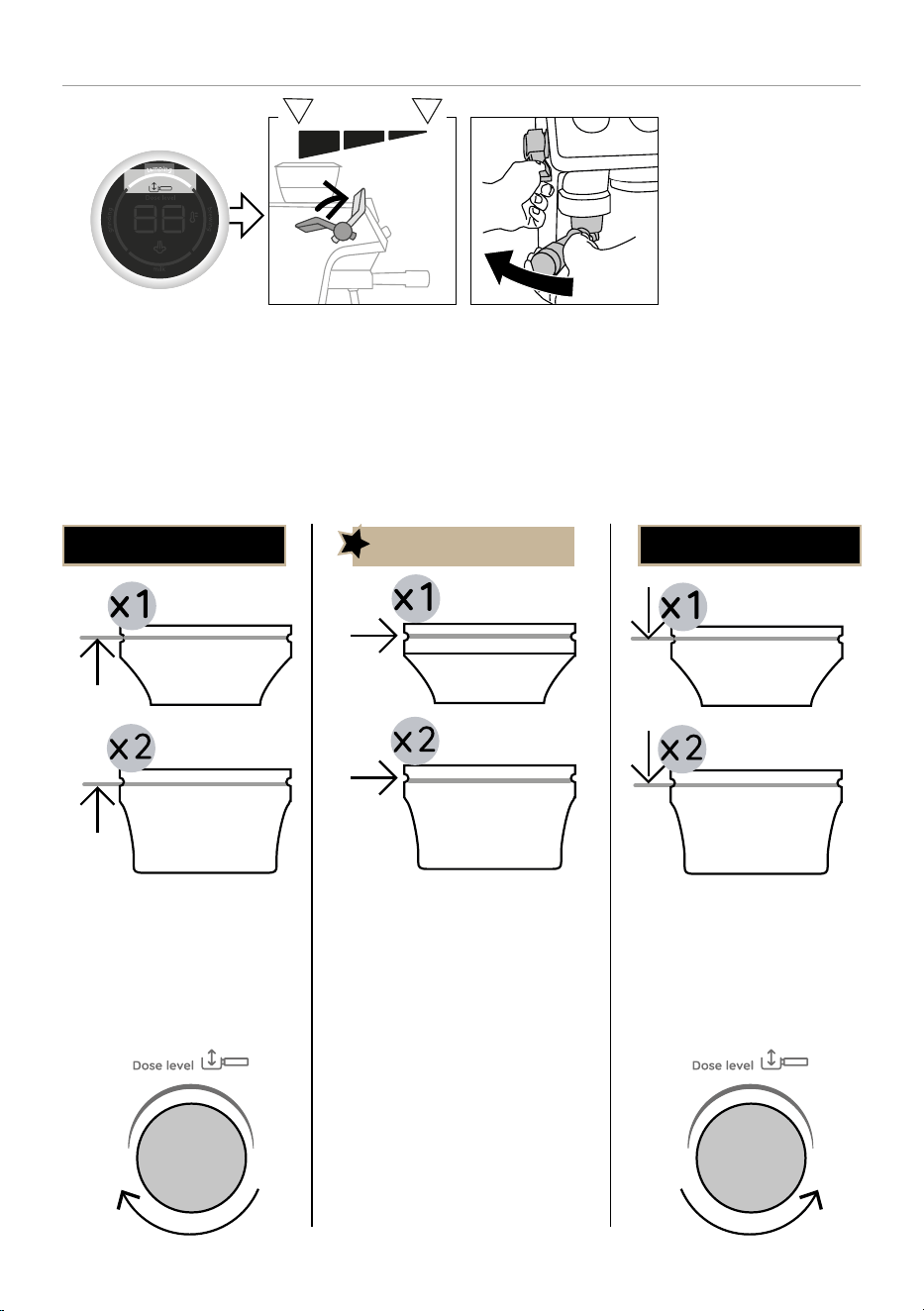
1. After grinding, pull the lever
(A21) down fully (do not
remove portalter). For best
results, repeat the tamping
stroke twice turning the
lever to the at-rest position
each time.
2. Pull the portalter out
while the tamper is still
down for polished nish
of coee. Once it is done,
place back the lever in its
original position.
3. Check the dose (see “3.2
Achieve perfect dose”).
3.2 Achieve perfect dose
1 2
PERFECT DOSE
• The lter is lled up to the level of
the mark
• The coee dose dial (B1) is cor-
rectly set
• The coee ground quantity in the
lter is not enough.
• To encrease coee quantity, turn
clockwise the coee dose dial
(B1) to increase the number on
the display (B18) one by one.
Under dose Over dose
• Too much ground coee in the
lter.
• Next grinding, reduce the coee
quantity by turning anti-clockwise
the coee dose dial (B1) to decrea-
se the number on the display (B18)
one by one.
8
Step 1-grinding
Step 2-tamping
Step 3-brewing
COFFEE DELIVERY
Step 1-grinding
Step 2-tamping
Step 3-brewing
1. Attach the portalter (C1)
to the coee outlet (A8).
2. Press OK (B5) to start
1 2
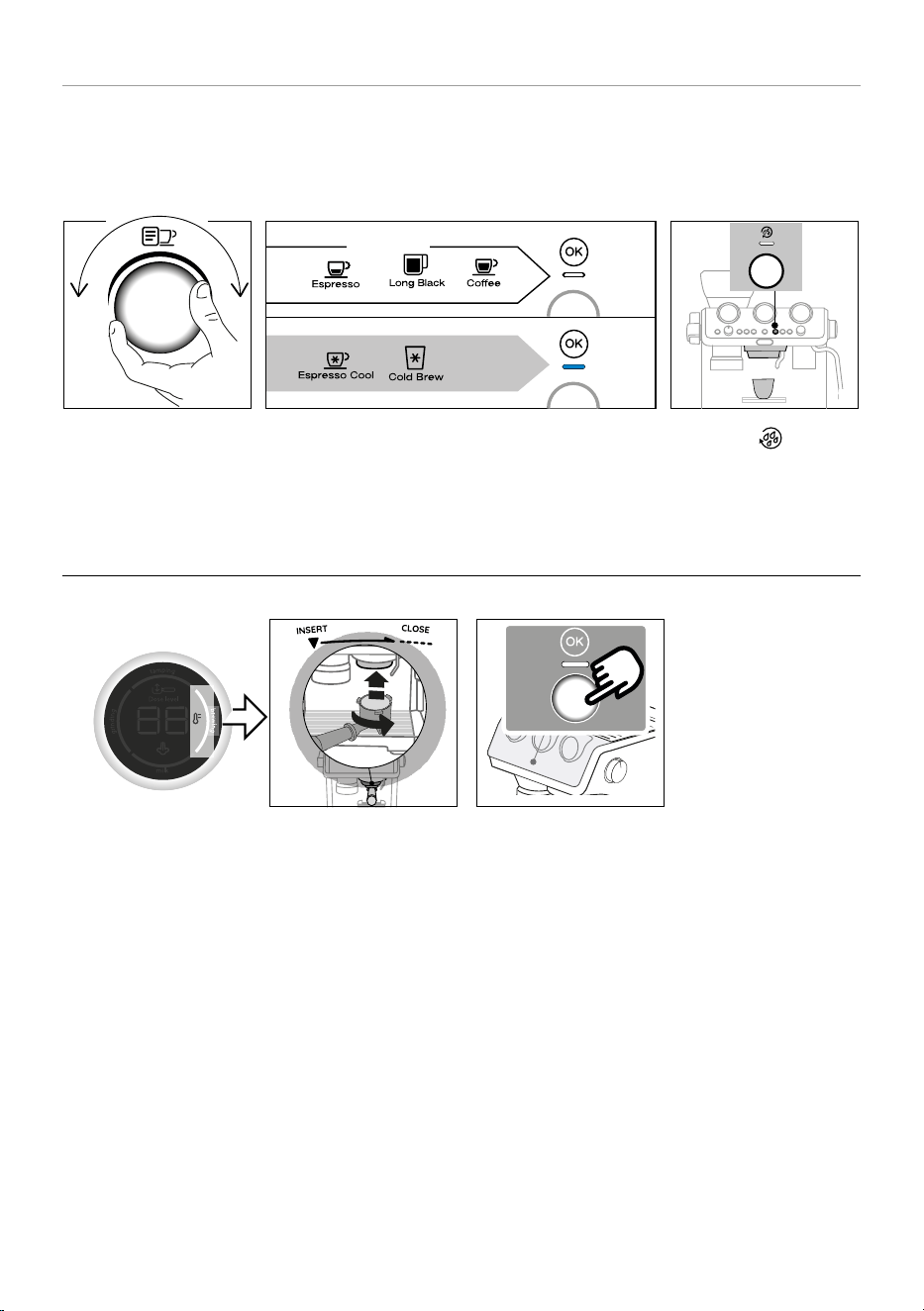
3.3 Rinsing before preparing drinks
At every use of the machine is strongly recommended to run a hot rinse to purge the shower with the dedicated button (B6).
In addition, when preparing a cold drink after a hot drink and viceversa the results in cup could not be at the ideal temperature: it is
therefore recommended, before brewing, to run an additional rinse.
1 2 3
1. Select the beverage you
want to prepare.
2. The OK light turns white if you selected a hot drink or blue if
you selected a cold drink.
Hot drinks
Cold drinks
White
Light
Blue
Light
3. Press the button: hot
or cold water runs from the
coee outlet (A8) (in this
way the coee circuit will
heat up or cool down).
9
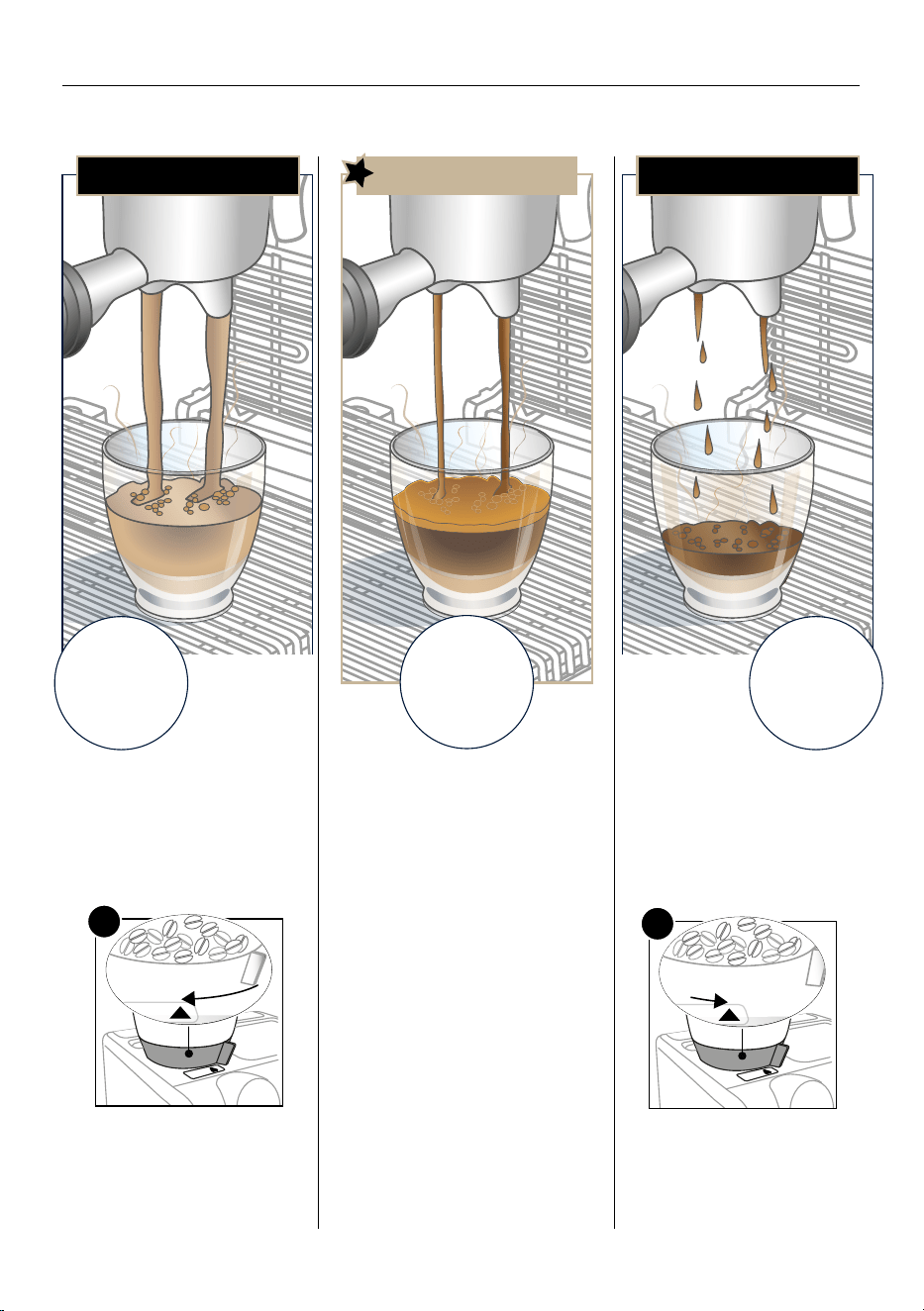
PERFECT ESPRESSO
Over extracted
(pouring too
slowly) needs
coarser grind
Under extracted
(pouring too fast)
needs ner grind
• Flowing fast like water
• Light and pale Crema
To make it perfect:
• Adjust grinding setting to a ner set-
ting 1 step at time.
-1
• Make sure ground coee quantity
reaches the “perfect dose”: if not,
adjust the coee dose dial (B1) (see
“3.2 Achieve perfect dose”).
• Flowing in drips or not at all
• Crema very dark and not uniformed
To make it perfect:
• Adjust grinding setting to a coar-
ser setting 1 step at time.
+1
• Make sure ground coee quantity
reaches the “perfect dose”: if not,
adjust the coee dose dial (B1)
(see “3.2 Achieve perfect dose”).
4. ACHIEVE ESPRESSO PERFECTION
Extracting the perfect espresso is an art and might take a couple of tries. Be ready to adjust the coarseness of the grind and always
make sure to have the tamped ground coee at the indicator line in the lter (perfect dose) to be able to reach perfect extraction.
10
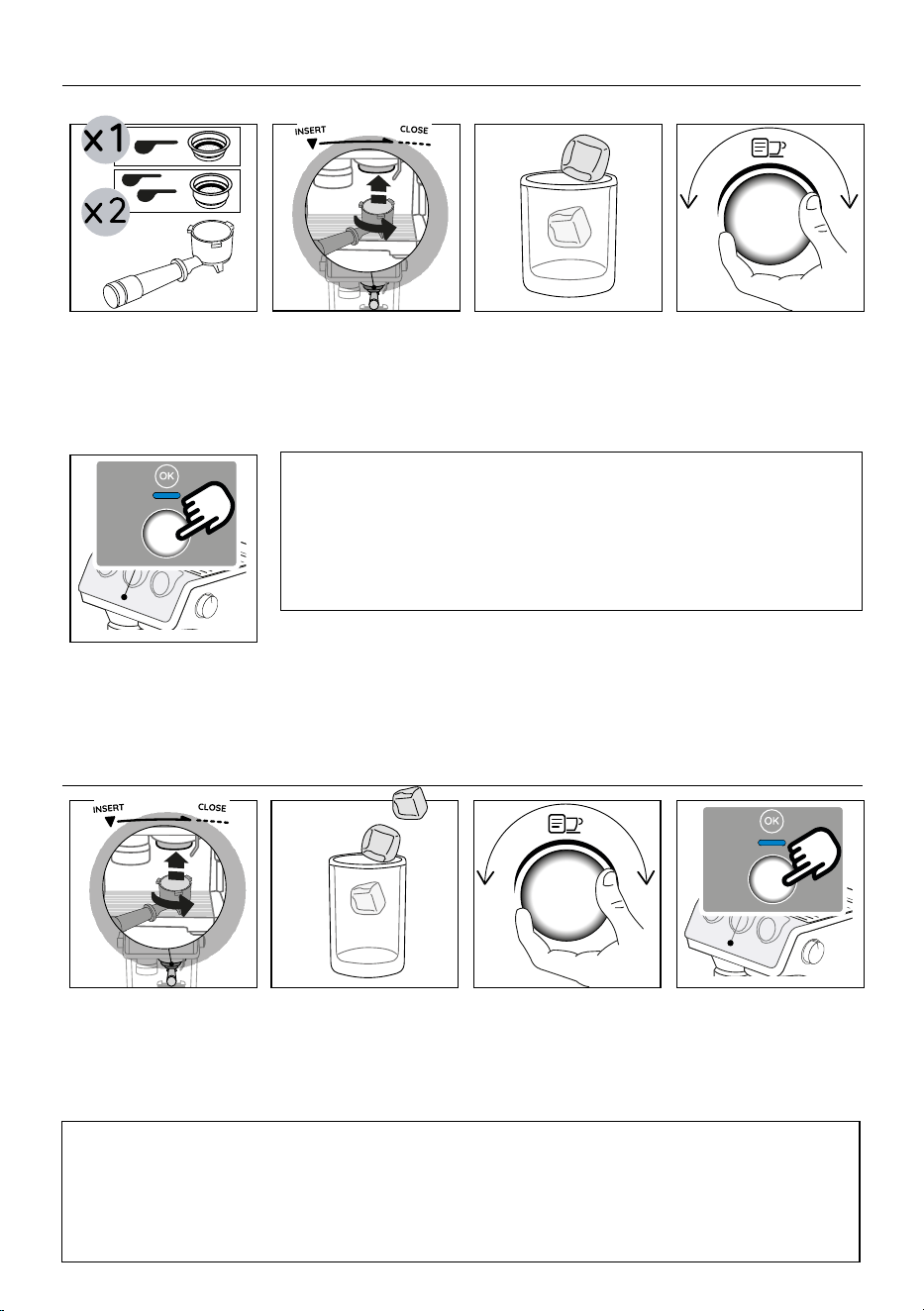
5. ESPRESSO COOL DELIVERY
1. Insert the dedicated lter
for Espresso cool (C4) or
(C5).
2. Proceed preparing the
perfect dose (see “3. Coee
delivery” Steps 1- grinding
& 2- tamping), then atta-
ch the portalter (C1) to
the coee outlet (A8).
3. Add 1 or 2 ice cubes in the
glass.
4. Select “Espresso cool”.
5. Press OK (B5) to start brewing
(OK turned blue to indicate that
a cold drink is selected). Coee
delivery stops automatically.
Please note:
• Cold Extraction Technology: Fresh water is best: be sure the water in the tank
(A16) is fresh. If the water is a couple of days old, empty and rinse the water tank
thoroughly.
6. COLD BREW DELIVERY
6. Proceed preparing the per-
fect dose (see “3. Coee
delivery” Steps 1- grinding
& 2- tamping), then attach
the portalter (C1) to the
coee outlet (A8).
7. Add 2 or 3 ice cubes in the
glass
8. Select “Cold brew” by tur-
ning the drink selector dial
(B9).
9. Press OK (B5) to start
brewing (OK turned blue to
indicate that a cold drink is
selected). Coee delivery
stops automatically.
Please note:
• As no pressure is produced to brew this drink, the pressure gauge (B14) will not turn to a higher position.
• Cold Extraction Technology: Fresh water is best: be sure the water in the tank is fresh. If the water is a couple of days
old, empty and rinse the water tank thoroughly. Potable fresh water is mandatory.
1
1
5
2
2
3
3
4
4
11
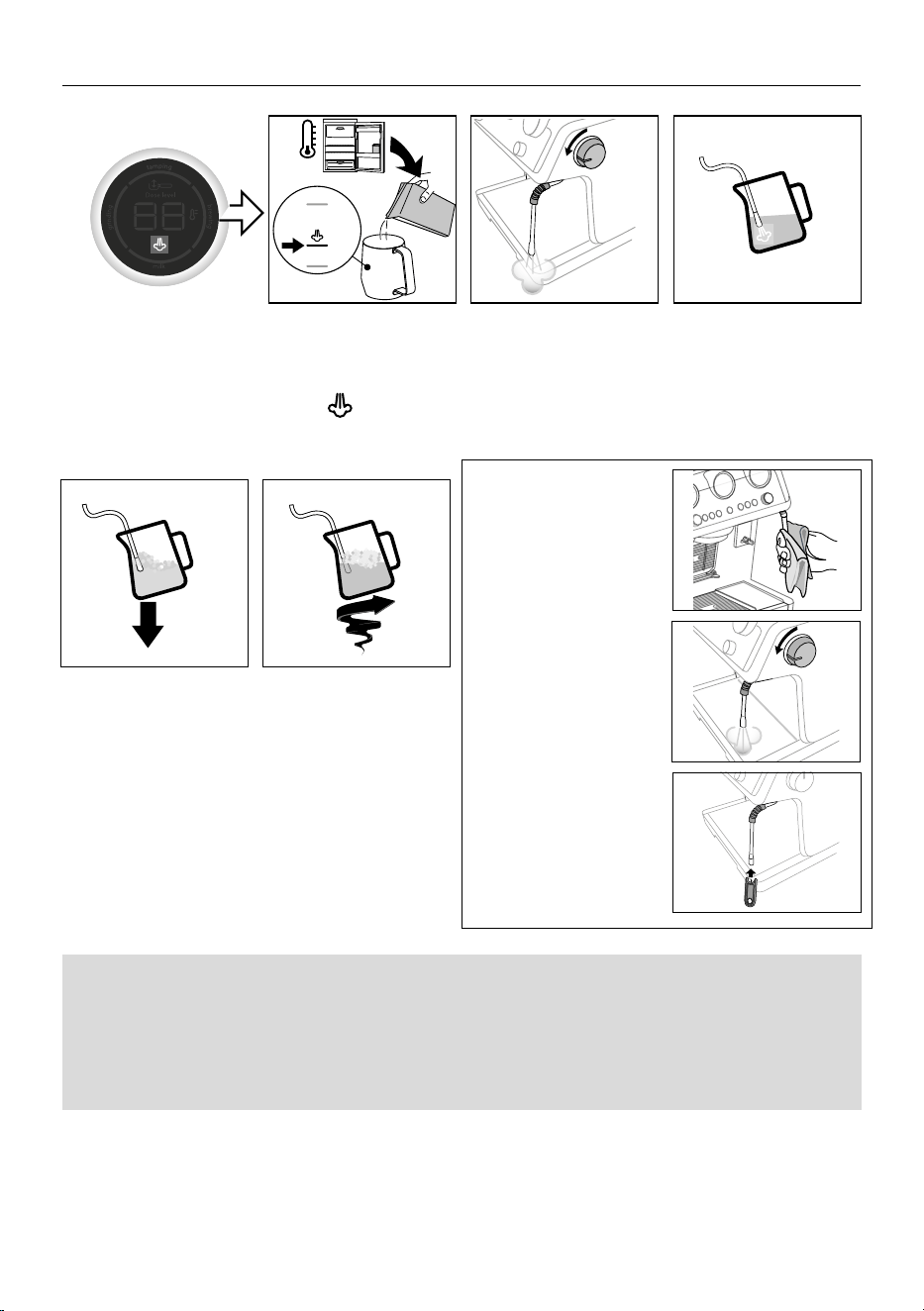
Manual frothing
5°C
MIN
MAX
7. MAKING MILK DRINKS
1. Fill the milk container
(D8) with fresh cold milk
from the refrigerator (5°C)
up to . Milk will up to
triple in volume.
2. Turn the steam dial (A5) on
briey to purge condensa-
tion. Make sure the steam
wand (A6) is pointing away
from you.
3. To make the froth, put the
nozzle on the surface of
the milk and air will catch
by the mixing of milk and
steam.
Manual frothing
5°C
MIN
MAX
4. Keep the steam nozzle just
on the surface, careful not to
make big bubbles by letting
too much air in.
5. Insert the steam nozzle
just under the milk: this
create a vortex. Once the
desired temperature is
reached turn the steam
dial (A5) o and wait till
steam stops completely
before removing the milk
container.
Cleaning the steam wand (A6)
1. After every use, remove
with a soft damp cloth
any milk residues from the
steam wand. For perfect
cleaning, we recommend
Eco MultiClean: it ensures
hygiene by removing milk
proteins and fats and can
be used to clean the whole
machine.
2. Use the steam for a deeper
cleaning.
3. To maintain the better us-
ability of the steam wand,
we suggest to use the
cleaning accessory (C15)
for opening the hole of the
nozzle.
1 2 3
4 5
Barista tips:
• Fresh cold whole milk is recommended for best results. Dairy and Non Dairy alternatives will vary in ease of texturing
depending on type.
• After foaming milk, eliminate unwanted bubbles by swirling the milk container (D8).
12
CLEAN
CLEAN
CLEAN
CLEAN
Automatic
milk beverages
5°C
Click
NO FROTH
MIN FROTH
MAX FROTH
MIN
MAX
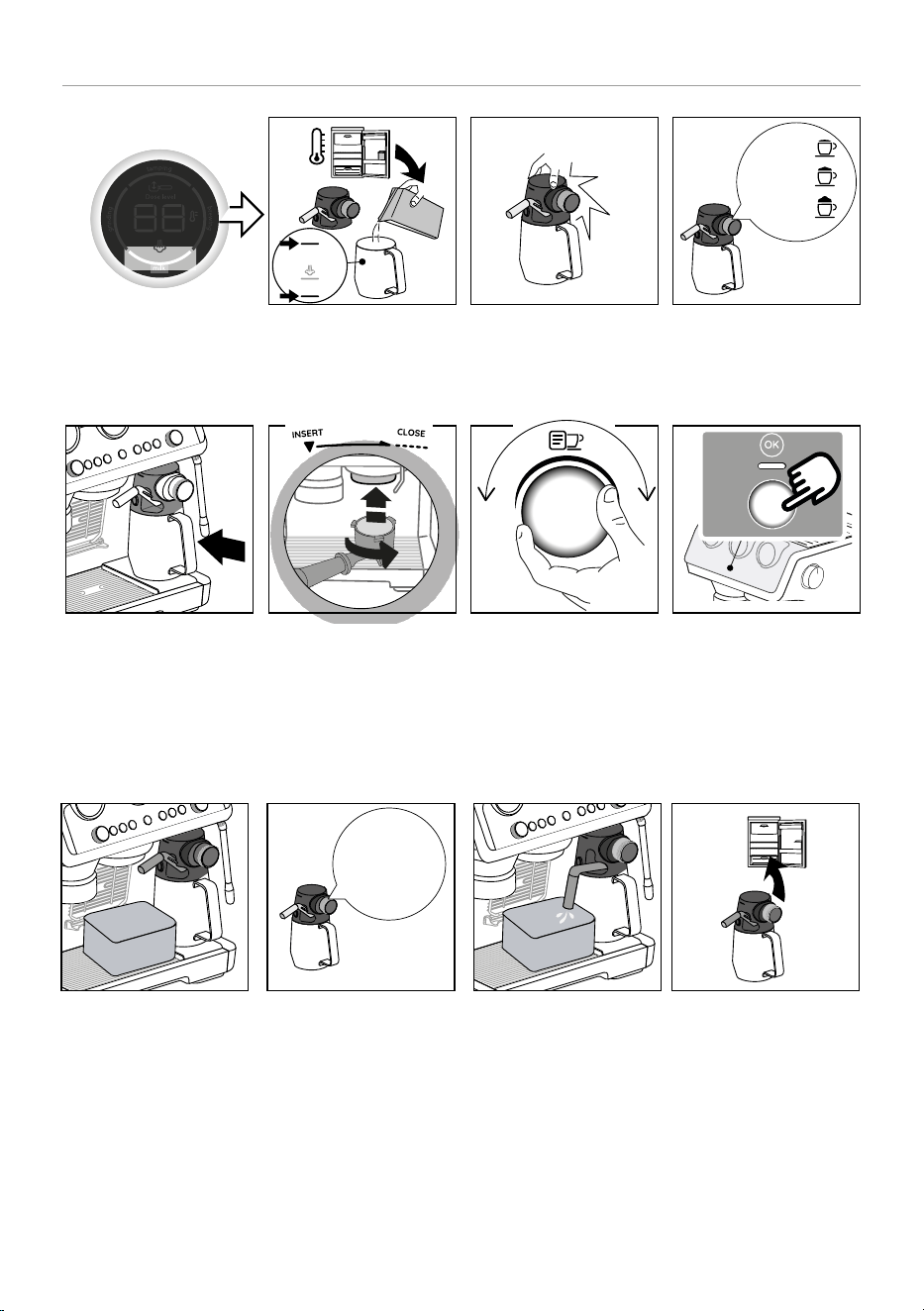
MAKING MILK DRINKS
1. Fill the milk container (D8)
with fresh cold milk from
the refrigerator (5°C).
2. Close with the lid (D1). 3. Turn the knob (D5) to select
the desired froth.
Automatic
milk beverages
5°C
Click
NO FROTH
MIN FROTH
MAX FROTH
MIN
MAX
4. Attach the Lattecrema to the
it’s connection (A7).
5. Prepare the perfect dose
(see “3. Coee delivery”-
Steps 1- grinding & 2-
tamping) and attach the
portalter.
6. Select your drink. 7. Press OK (B5) to start brew-
ing. The appliance auto-
matically brews coee and
milk in sequence.
Cleaning Lattecrema after every use
1 2 3
4 5 6 7
1 2 3
1. Leave the Lattecrema in
the machine (you do not
need to empty it). Place
a cup or other recipient
under the frothed milk
spout (D4).
2. Turn the froth selection
knob (D5) to “Clean”.
3. Cleaning automatically
starts and stops.
Watch out: Remember, after
cleaning, to turn the knob
back on foam setting.
4. Remove the Lattecrema
and put it in the refrigerator
keeping in mind the follow-
ing suggestions:
13
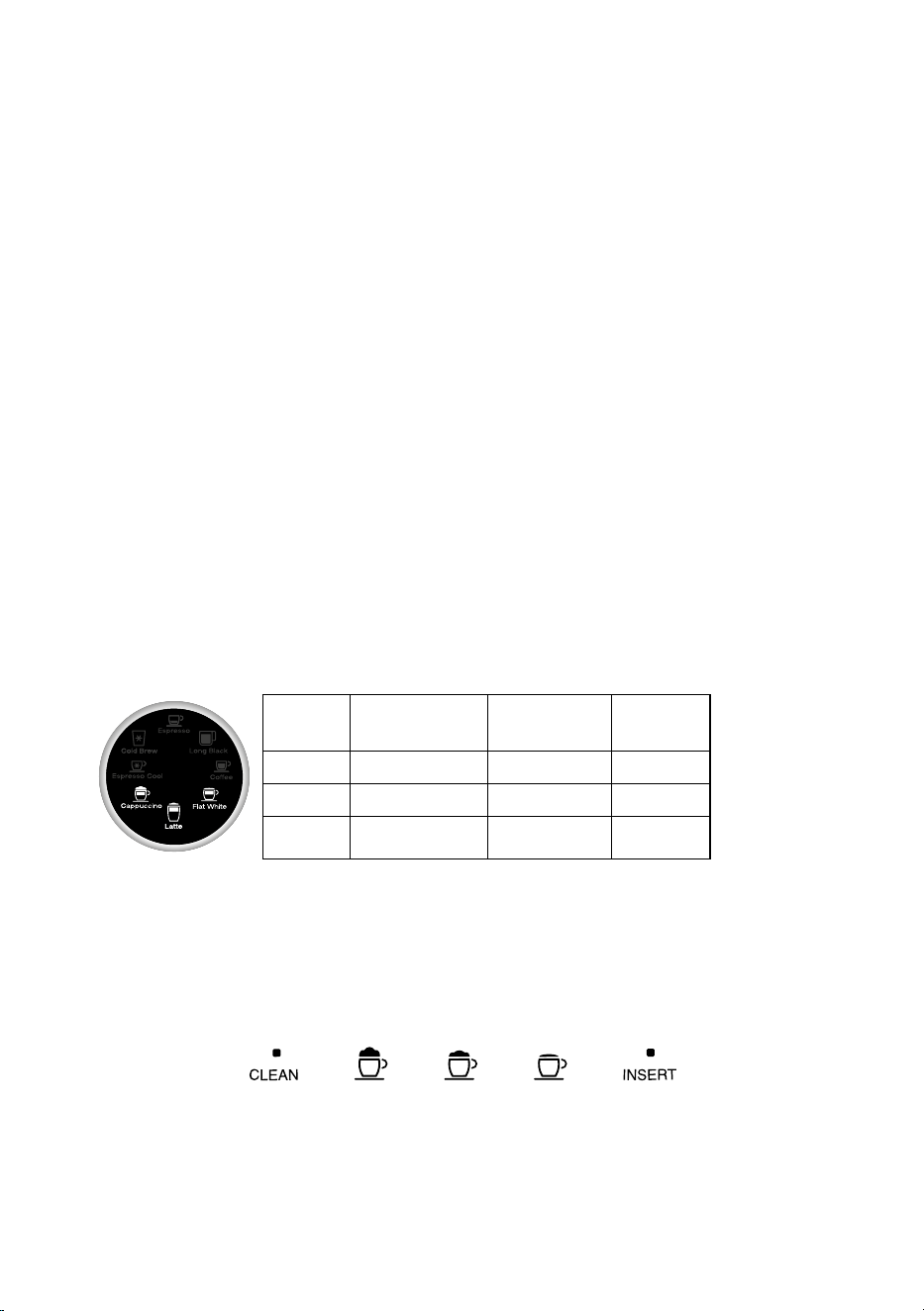
8.1 Milk recipes
Drink Recommended
knob position
Approx. Quantity
(ml)
X2
(ml)
Cappuccino MED 150 230
Flat White MIN 150 230
Latte MED-MIN 250 330
Preparing several drinks in succession:
• Every time a milk-based drink has been prepared, the “Milk clean light” (B11) turns on to indicate that the carafe has to be
cleaned (Clean function). Proceed with cleaning of the carafe after the nal preparation.
After multiple preparations, the milk container is empty or the milk that remains is not enough to make further drinks
• Having carried out the cleaning step (“Clean” function), disassemble the milk carafe and clean all components, proceeding as
described in section “8.3 Thorough cleaning of Lattecrema”
After multiple preparations, there is enough milk left in the container to make further drinks
• Having carried out the cleaning step (“Clean” function), remove the milk carafe and put it straight in the refrigerator. The carafe
containing milk can be kept in the refrigerator no more than 2 days, after which time all components should be cleaned as
described in the section “8.3 Thorough cleaning of Lattecrema”.
Important:
If the milk carafe is left out of the refrigerator for more than 30 minutes, disassemble and clean all components, proceeding as de-
scribed in the section “8.3 Thorough cleaning of Lattecrema”.
Following preparation of milk-based drinks — general notes:
• If the milk carafe is not cleaned, the “Milk clean light” (B11) stays on as a reminder that cleaning is required. To start the func-
tion, see “Cleaning Lattecrema after every use”
• In certain cases, the machine will need to heat up before cleaning can take place.
• Wait until the Clean function has nished, to ensure it is completed correctly. The function is automatic. It must not be stopped
while in progress.
Please note: For perfect cleaning, we recommend Eco MultiClean: it ensures hygiene by removing milk proteins and fats and can be
used to clean the whole machine.
• Double dose milk drinks: Fill the milk container with a sucient quantity of milk, not exceeding the MAX level marked on the
container (D8). Each mark on the side of the container corresponds to about 100 ml/ 3.38 oz of milk.
• Using fresh cold full cream milk will achieve the best results.
8.2 Milk froth knob positions:
MAX MED MIN
Froth Froth Froth
To clean
LatteCrema
System after
each use
To extract
or insert
the froth
selectrion
knob (D5)
14
8.3 Thorough cleaning of Lattecrema
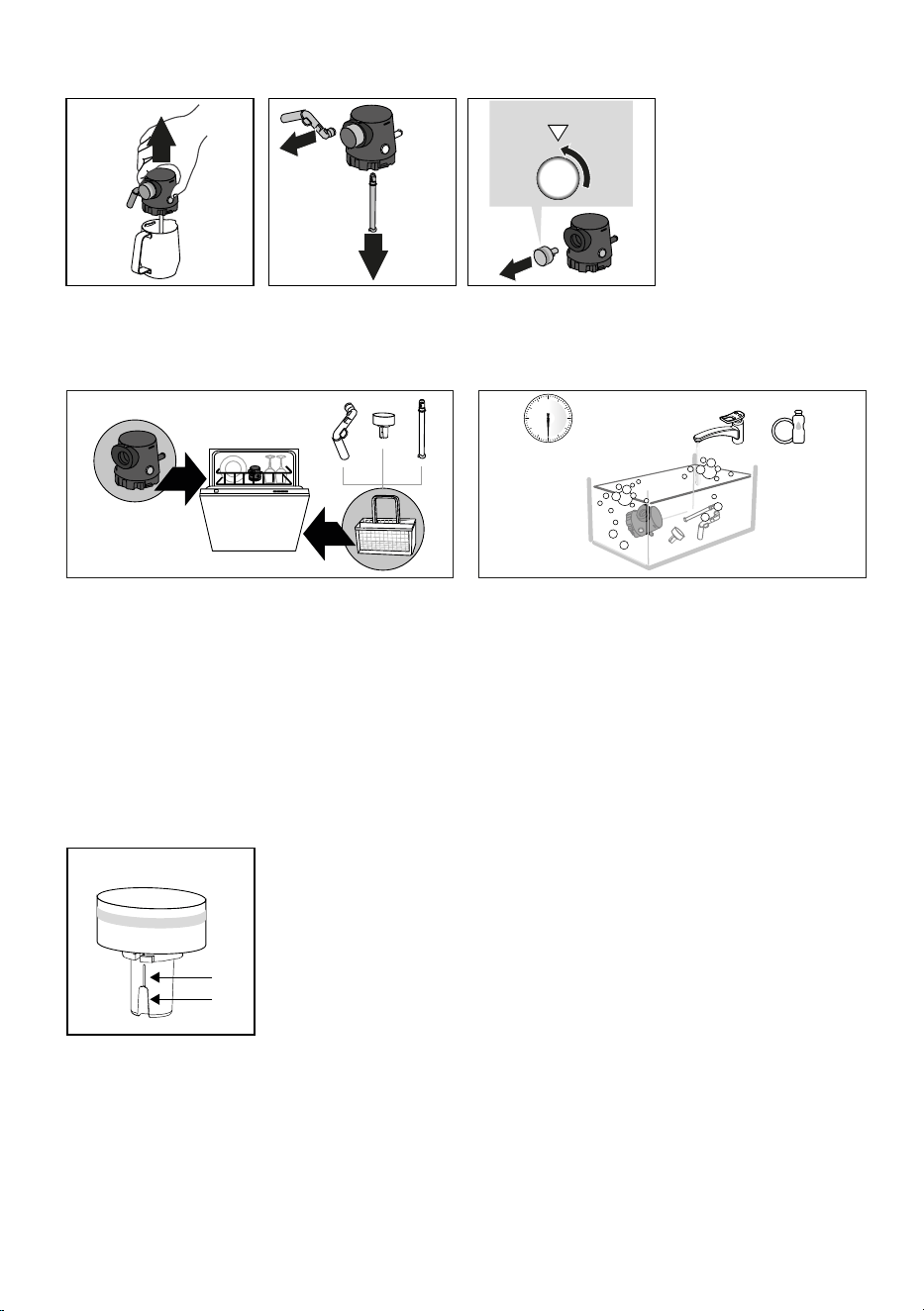
INSERT
1. Push the release button (D3)
and lift the milk container lid
(D1);
2. Remove the milk spout
(D4) and milk intake tube
(D7);
3. Turn the froth selection
dial (D5) to “Insert” posi-
tion and extract it.
4. Wash in a dishwasher (rec-
ommended) or by hand, as
indicated below:
• In a dishwasher: Rinse all components with warm drink-
ing water (at least 40 °C): place the lid of the carafe in the
top basket of the dishwasher, standing upright on its edge,
and the smaller detachable parts (outlet tube, intake tube,
dial) in the cutlery basket . Run a wash program at 50 °C
e.g. Eco Standard
• By hand: Rinse all components carefully with warm drink-
ing water (at least 40°CF) to ensure that all visible residues
are removed: make sure the water passes through the
holes. Immerse all components (including the milk con-
tainer) in a solution of warm drinking water (at least 40°
C) and washing-up liquid for at least 30 minutes. Rinse all
components thoroughly with warm drinking water, rub-
bing them individually between ngers and thumbs.
> 30 min
+
INSERT
5. Make sure there are no
milk residues left in the
cavity and the channel on
the underside of the dial.
If necessary, scrape with a
toothpick.
6. Check that the intake
tube and the outlet tube
are not clogged with milk
residues;
7. Dry the components with
a clean dry cloth;
8. Reassemble all compo-
nents of the milk carafe.
Please note:
The machine will give a re-
minder periodically of the
need for thorough cleaning
of the milk carafe, and in-
dicate the full sequence of
steps.
1 2
4
3
5
6
15
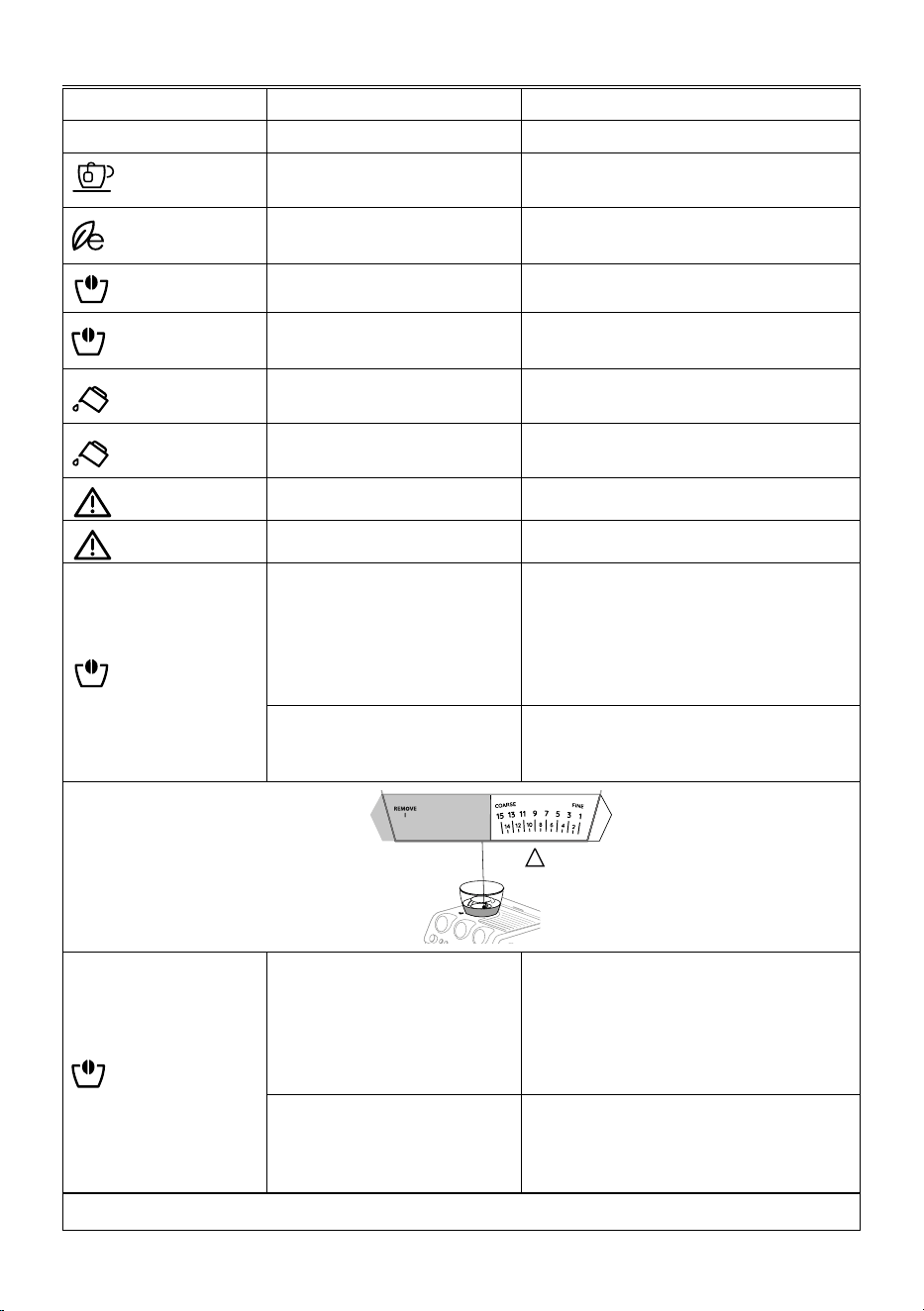
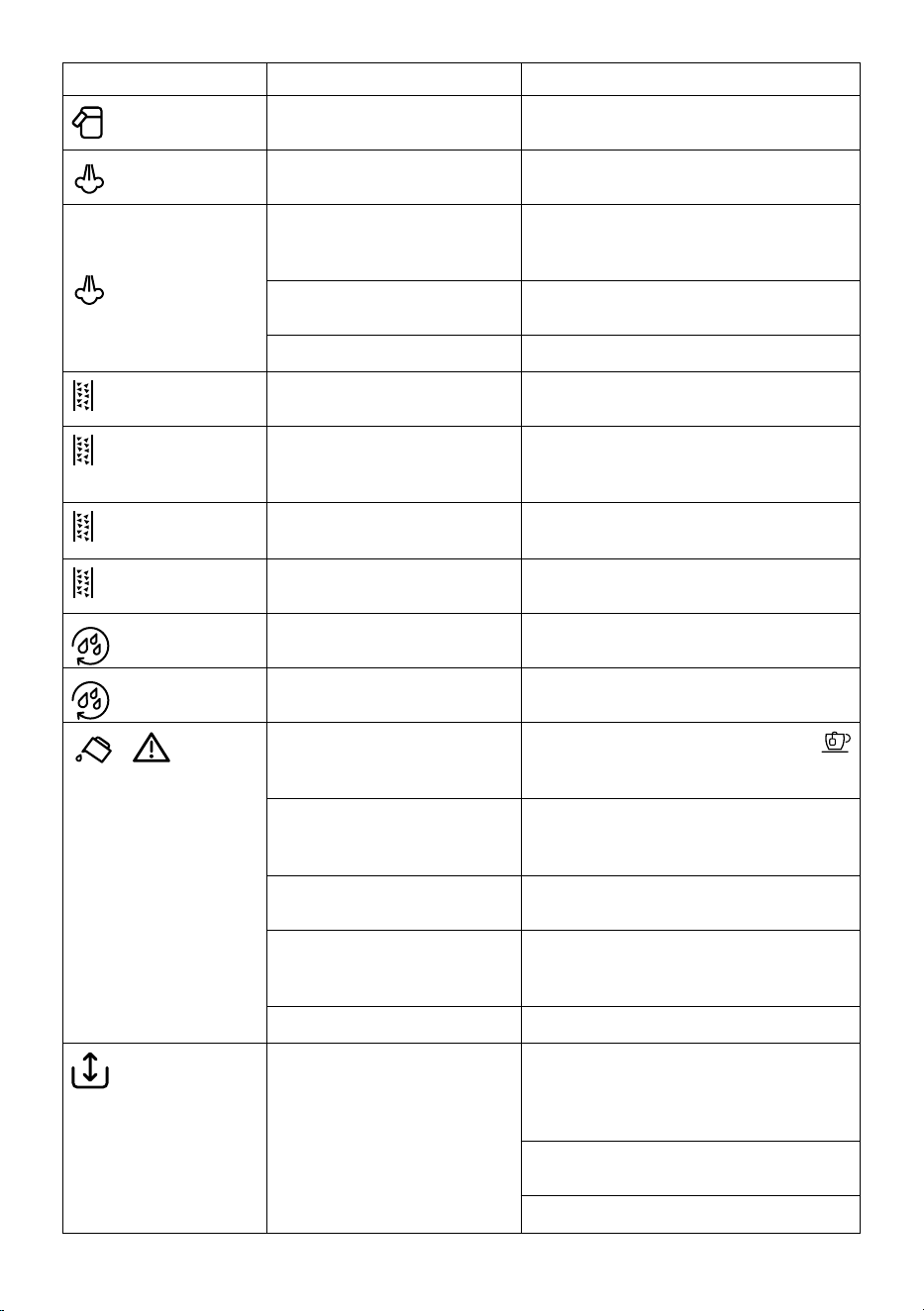
8. EXPLANATION OF LIGHTS
LIGHTS EXPLANATION OF LIGHTS OPERATION
All the lights ash briey Turning the machine on Self-diagnosis
permanently on
The appliance is being turned on for the rst
time and the water circuit must be lled
Proceed as described in section “2. Preparing your
machine for rst use”
on
Energy saving is enabled If you want to disable the function, see section “9.
Menu settings”
on (orange)
The beans container (A1) is empty Fill the beans container
ashing (orange)
You are trying to grind coee but the
beans container (A1) is empty
Fill the beans container
on
Insucient water in tank (A16) or
water tank not inserted correctly
Fill the tank or extract the tank and put it back
correctly
ashing
You are trying to deliver a drink but
water tank (A16) is empty
Fill the tank
on (red)
General alarm Contact Customer Services
on (orange)
The coee outlet (A8) requires cleaning
on (red)
The ness of the grind selector (A3) is
incorrect (or out of correct range) (see
picture above)
Move the selector within the 15 levels from coarse to
ne, kepping in mind to:
• Always adjust the coee grinder during the
grinding
• Adjust one grinding level at a time and make at
least 5 coees before adjusting again
The coee beans container (A1) is not
completely insert: the machine does
not work for safety reasons
Check that the bean container is completely locked
(see g. 5 - section “11.6 Cleaning the beans containi-
er housing”)
OUT of correct
range
Correct
range
ashing (red)
You started grinding but the ness
of the grind selector (A3) is incorrect
(or out of correct range) (see picture
above)
Move the selector within the 15 levels from coarse to
ne, kepping in mind to:
• Always adjust the coee grinder during the
grinding
• Adjust one grinding level at a time and make at
least 5 coees before adjusting again
You started grinding but the coee
beans container (A1) is not completely
insert: the machine does not work for
safety reasons
Check that the bean container is completely locked
(see g. 5 - section “11.6 Cleaning the beans containi-
er housing”)
…
→
16
LIGHTS EXPLANATION OF LIGHTS OPERATION
on (red)
After every use, the Lattecrema must
be cleaned
When all the milk drinks are ready, proceed with au-
tomatic cleaning turning the knob (D5) to Clean
on
The appliance is on and ready for use The appliance is at the right temperature to deliver
steam. To deliver steam, turn the steam dial (A5)
ashing
The appliance is on and energy saving
is enabled. The steam dial (A5) is in the
steam delivery position
The light ashes to indicate that the appliance is pre-
paring to deliver steam. Delivery begins as soon as
the appliance is at temperature
The appliance is heating up to be ready
for use
The appliance is at temperature when the light re-
mains on steadily
The appliance is delivering steam
on (orange)
Descaling must be performed Descale the appliance as described in section “13.
Descaling”
ashing (orange)
Descaling is underway Complete the operation as described in section “13.
Descaling”: the light comes white when the rinsing
cycle of descaling is underway
on (white)
The rinsing cycle of descaling must be
performed
ashing (white)
The rinsing cycle of descaling is
underway
ashing (white)
The hot active rinse is underway
ashing (blue)
The cold active rinse is underway
+ ashing
If the water softener lter is present,
an air bubble may have been released
inside the circuit, obstructing delivery
Press the button (B7) corresponding to the
light. Delivery begins and stops automatically.
The grinding is too ne and the coee is
delivered too slowly or not at all
Extract the portalter (C1)and repeat the operations
to make the perfect dose ( see “3.1 Adjust dose” and
“3.2 Achieve perfect dose”).
The coee lter is blocked. Rinse the lters under abundant running water or by
Active Rinse function (B6).
The water tank (A16) has been inserted
incorrectly and the valves on the bot-
tom are not open
Press the water tank down lightly to open the valves
on the bottom
Scale in the water circuit Descale as described in section “13. Descaling”
blinking
The funnel of the coee grinder is
clogged
Clean as described in section “11.9 Cleaning the “Smart
tamping station””. If the problem persists, access the
funnel by opening the ap (A20) and clear the blockage
using the tube brush (C10)
Check that the coee lter being used matches the
number of cups selected
Reduce the coee dosage by turning the dial (B1)
17
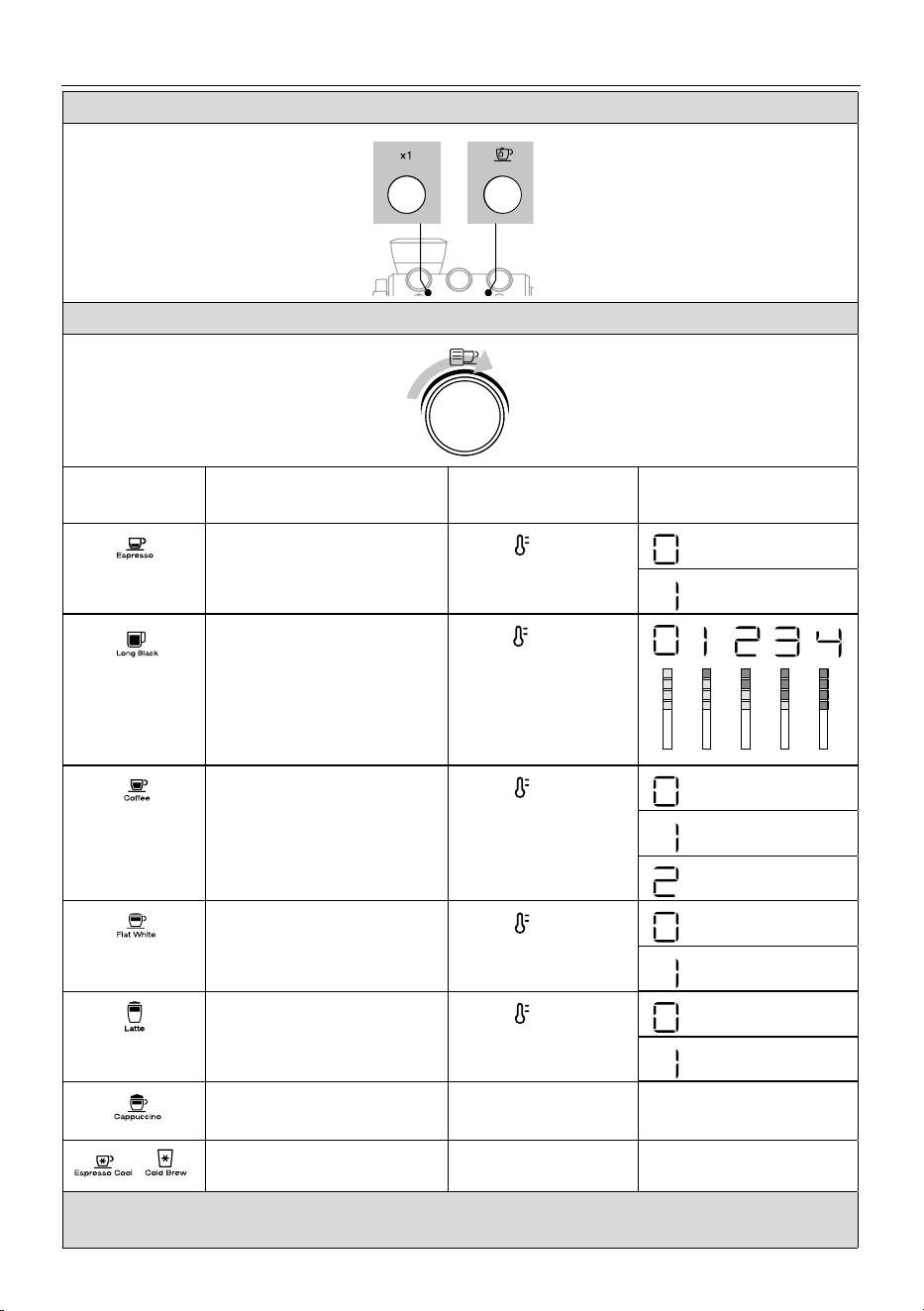
9. MENU SETTINGS
1. Enter the setting menu: press both buttons for 3 seconds, until light changes
2. Select the setting: select the drink corresponding to the setting you want to check and/or change
Drink Corresponding setting How to enter & change Reference on the Led module
process (B18)
Extra grinding adjustment
Enable extra time in the grinder only to
compensate wear (see “Ecient grinding”)
Press to enter and
press again to change
= OFF
= ON
Water hardness
Press to enter and
press again to display the
number shown correspon-
ding to the squares in the
water hardness text
Auto o
Press to enter and
press again to change
= 5 minutes
= 90 minutes
= 180 minutes
Energy saving
Press to enter and
press again to change
= OFF
= ON
Beep
Press to enter and
press again to change
= OFF
= ON
Reset to default values
Keep pressed the OK button for
5 seconds to reset
--
Statistics Press OK
See chapter “How to read the
statistics”
3. Save new settings by pressing the OK button (B5) (After 30 seconds of inactivity, the machine will automatically exit
the settings menu).
+
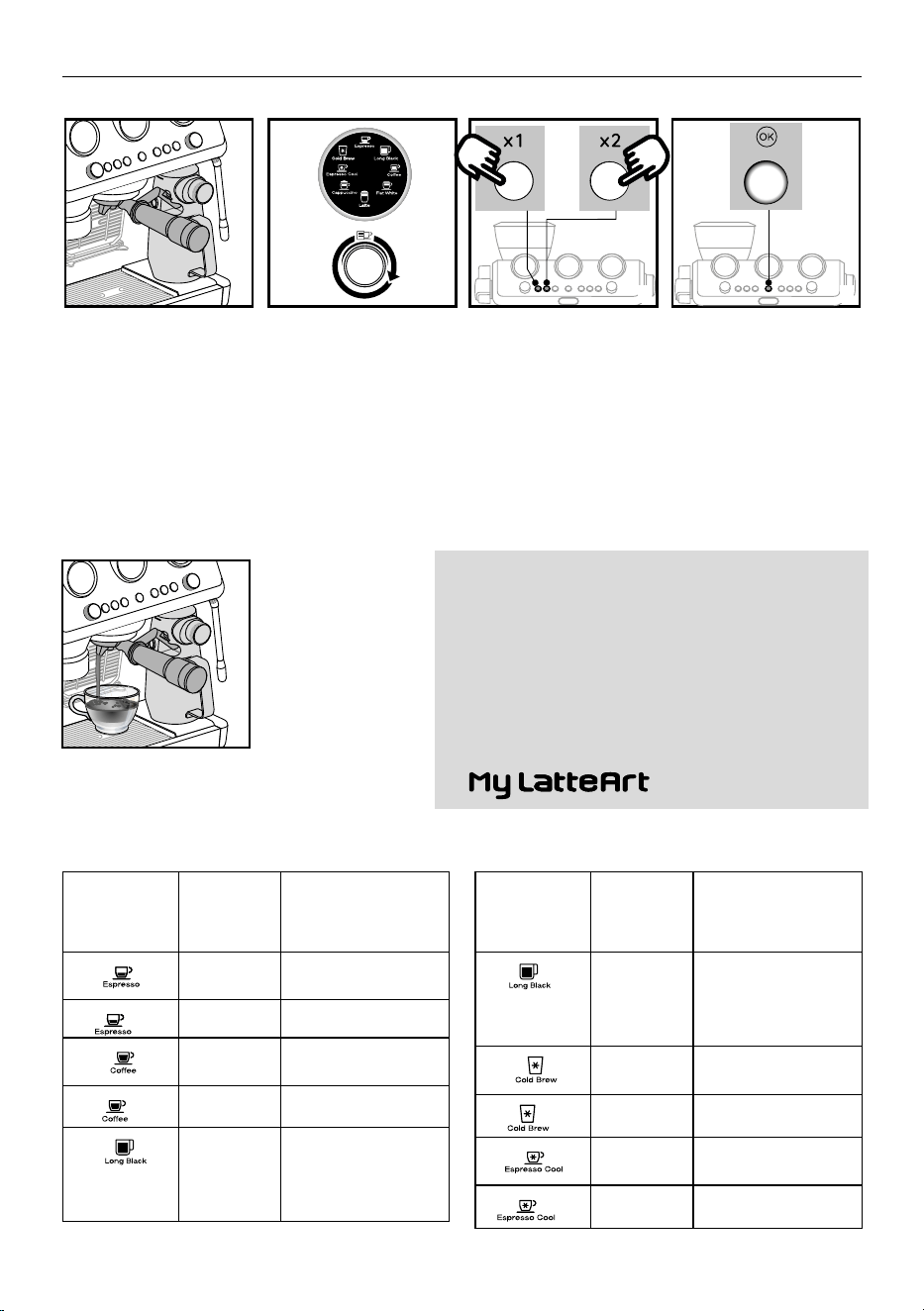
18
10. CUSTOMISING THE QUANTITY OF COFFEE DRINKS
1. Prepare the appliance to
deliver the drink you want
to make. Prepare the perfect
dose (“3.1 Adjust dose” and
“3.2 Achieve perfect dose”)
and attach the portalter
(C1) to the coee outlet (A8):
if you have to customize a
milk based drink, prepare and
attach the Lattecrema .
3s
3s
2. Turn the dial (B9) to
select the drink to be
programmed.
3. Press the 1-cup or 2-cup but-
ton “1x” (B2) or “2x” (B3) and
hold for at least 3 seconds,
until the indicator for the se-
lected drink starts blinking to
conrm that the machine is in
programming mode.
4. Press the OK button (B5) to
start delivering the drink.
The lights corresponding to
the OK button ashes.
3s
3s
5. When you have reached the desired quantity of the
drink, press the OK button again. If the recipe includes
another ingredient, it starts delivery: when you have
reached the desired quantity, press the OK button again.
Please note:
• Drinks can be programmed, but the delivery of steam and hot water
can not.
• Programming changes the quantity of drinks delivered, but not of
ground coee.
• When a programmed drink is selected, the corresponding indicator
blinks briey.
• After 30 seconds of inactivity, the machine will automatically exit
the programming mode.
• is not programmable.
1
5
2 3 4
Coee Recipe Default
quantity
(ml)
Programmable
quantity (ml)
≃ 35 from ≃ 15 to ≃ 90
X2
≃ 70 from ≃ 30 to ≃ 180
≃ 80 from ≃ 50 to ≃ 120
X2
≃ 160 from ≃ 120 to ≃ 240
≃ 100
• water: from
≃
25 to
≃
120ml
• espresso: from
≃
25 to
≃
60 ml
Coee Recipe Default
quantity
(ml)
Programmable
quantity (ml)
X2
≃ 200
• water: from
≃
50 to
≃
240 ml
• espresso: from
≃
50 to
≃
120 m
≃ 110 / 3.72 ≃ 90 to ≃130
2x
≃ 180 / 6.08 ≃ 160 to ≃ 220
≃ 40/ 1.35 ≃ 30o ≃ 50
2x
≃ 80 / 2.70 ≃ 60 to ≃ 110
or
19
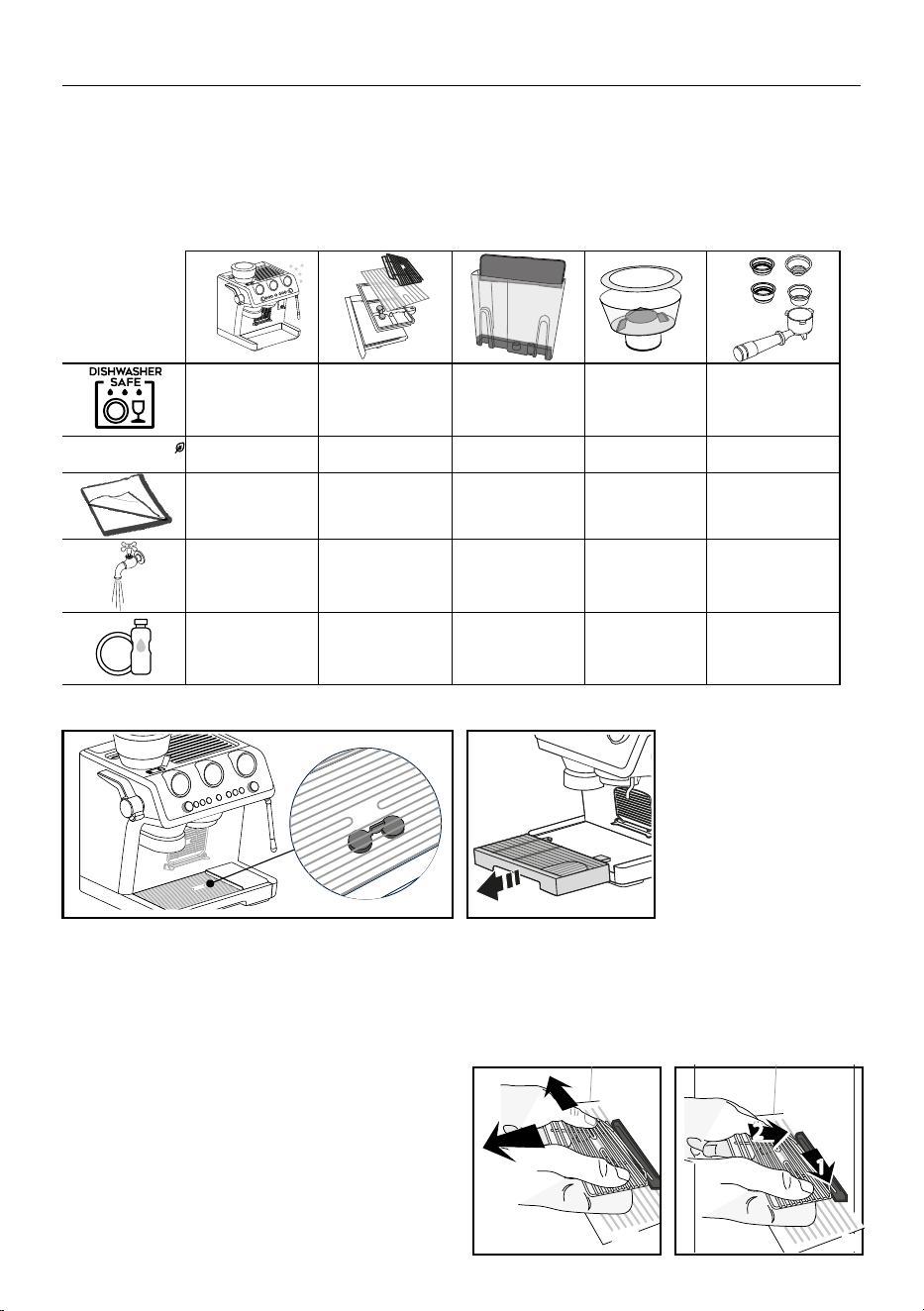
11. CLEANING AND MAINTENANCE
Important!
• Do not use solvents, abrasive detergents or alcohol to clean the coee machine.
• Do not use metal objects to remove encrustations or coee deposits as they could scratch metal or plastic surfaces.
• If the appliance is not used for more than a week, before using it again, we recommend you perform a rinse cycle.
Danger!
• While cleaning, never immerse the coee maker in water. It is an electrical appliance.
• Before cleaning the outside of the appliance, turn it o, unplug from the mains socket and allow to cool.
✕
✓
✕ ✕ ✕
ECO MULTICLEAN
✓
✕ ✕ ✕ ✕
✓
✕ ✕
✓
✕
✕
✓ ✓ ✓ ✓
✕
✓ ✓
✕
✓
11.1 Cleaning the drip tray
1 2
1. The drip tray is tted with a level indicator (A13) showing the
amount of water it contains. Before the indicator protrudes
from the cup grille (A10), the drip tray (A12) must be emptied
and cleaned, otherwise the water may overow the edge and
damage the appliance, the surface it rests on or the surround-
ing area.
2. Remove the drip tray.
3. Remove the cup grilles (A9)
and (A9) and level indicator
(A13), empty the water and
clean all the components
with a cloth, then reassem-
ble the drip tray. All the
component s are dishwash-
er safe.
4. Put the drip tray back in
place.
11.2 Cleaning the espresso cup grille
1. Extract the grille (A9) by pulling it from the left, then removo-
ing it from the support. Clean the support with a cloth and
wash the grille (dishwasher safe).
2. Put the grille back on the support from the right side, then
push until it is correctly attached.
1
22
2
1
1
2
1 2
20
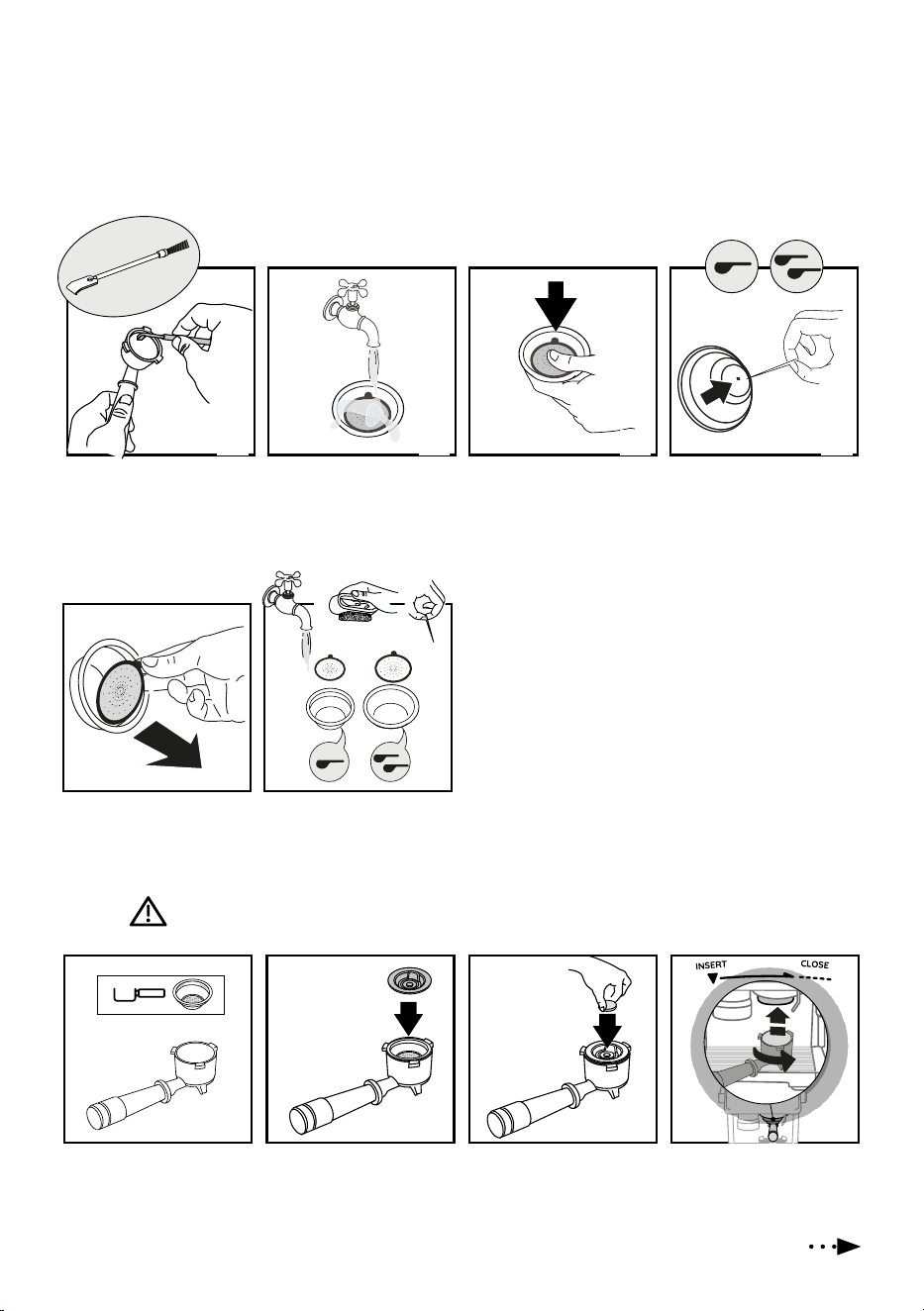
5. Extract the perforated lter
by pulling the tab.
MAX
1. Insert the 1-cup coee
lter (C2) in the portalter
(C1).
2. Put on the coee lter
the special disk accessory
(C13) and press it to the
bottom.
3. Put on the accessory the
cleaning tab.
4. Attach the portalter to the
coee outlet (A8).
1 2 3 4
11.3 Coee lters (C2) and (C3) cleaning and maintenance
The lters must always be clean with warm water and washing up liquid and free from all coee residues.
Always rinse the lters under abundant running water or by Active Rinse function (B6).
11.4 Cleaning the” Espresso Cool” lters (C4) and (C5)
These lters have been developed to deliver optimal extraction results with this recipe. The lters must always be clean with warm
water and washing up liquid and free from all coee residues.
1. After using the appliance,
use the scraper tool (C11)
to remove the exhausted
coee dose.
2. Always clean and rinse
the lters under abundant
running water.
3. Push the perforated lter
to make sure it is always
correctly inserted in its
housing.
4. Make sure the hole underne-
ath is free from all residues.
If still dirty, and in any case
always at least once a month,
clean the coee lters
thoroughly:
6. Rinse the lters under run-
ning water.
7. Make sure the holes are not blocked. If necessary, clean with
a pin.).
8. Dry all the components with a cloth.
9. Put the perforated lter back in the housing and press as far
as it will go.
11.5 Cleaning of the coee outlet
When the light comes on (orange) (B12), you have to proceed cleaning the coee circuit. To run the cleaning, you have to
purchase dedicated cleaning tabs for coee makers. For more info, please visit Delonghi.com.
1
5
2
6
3 4
21
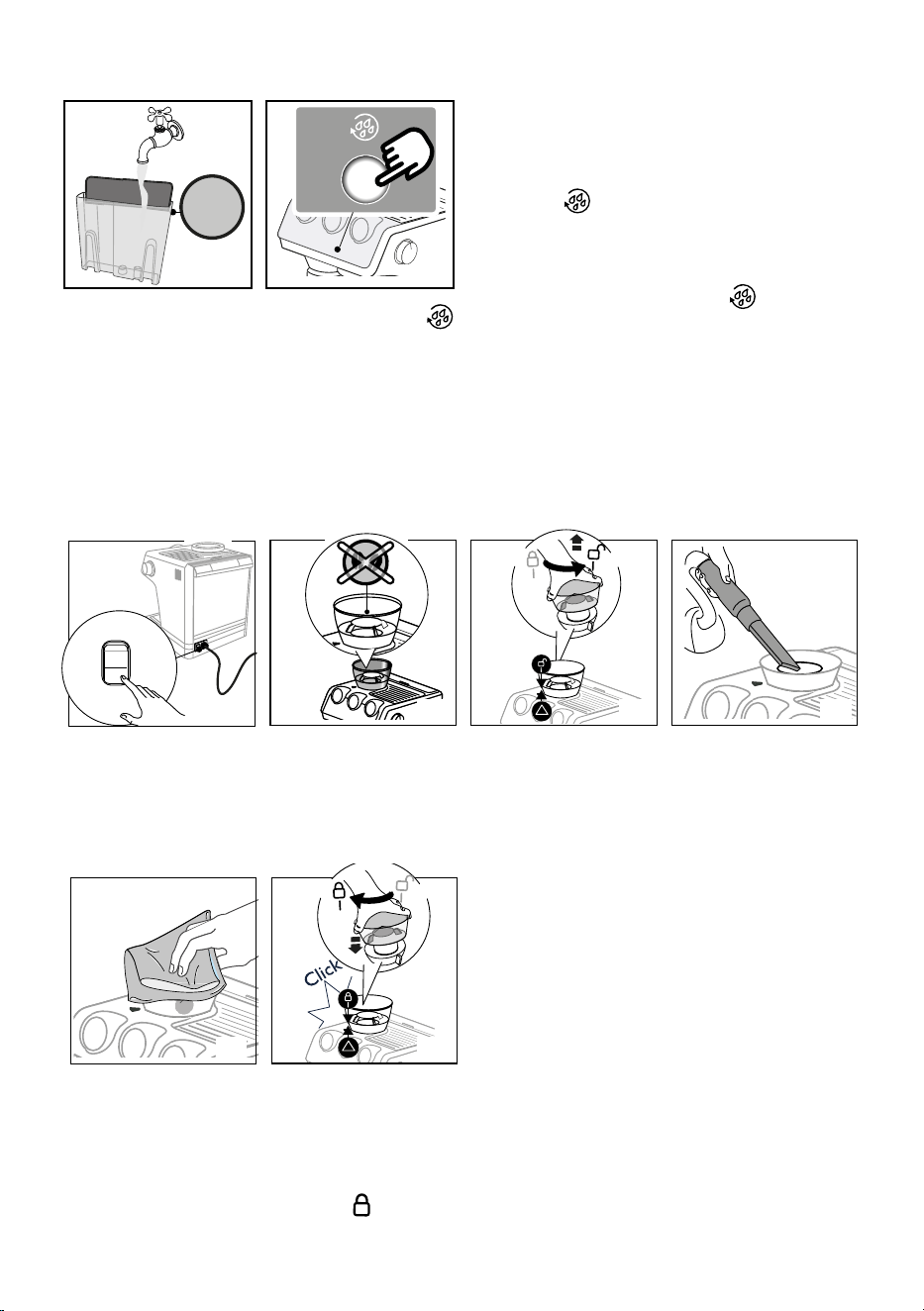
Cleaning of the coee outlet
MAX
5. Fill the water tank (A16).
Make sure the drip tray
(A12) is empty.
6. Keep pressed the
button (B6), until the re-
lated light start blinking
(white). After few min-
utes the cleaning stops
automatically.
• Remove the portalter (C1) and the cleaning disk accessory
(C13).
• Wash the portalter (C1)and the lter under tap water;
• Insert the portalter (C1) again and make a rinse by pres-
sing the button (blue) (B6): we suggest to put a con-
tainer under the portalter.
• Remove and empty the drip tray (A12).
Please note:
This procedure can start by pressing the button (B6)) for
some seconds. To delete this option, press the same button for
10 seconds.
11.6 Cleaning the beans container housing
I/0
I
0
1. Turn the machine o.
2. Make sure the beans
container (A1) is empty.
If necessary, operate the
coee grinder without
beans to empty it.
3. Release the beans contain-
er by turning it anticlock-
wise and extract from the
appliance.
4. Remove coee residues
using a vacuum cleaner.
I/0
I
0
5. Clean the beans container
housing with a damp cloth
and dry.
1
5 6
1
2
2
3 4
6. Put the container back
inserting it in the coee
grinder. The container is
correctly inserted when
the arrow ▲ is lined up
with the symbol and
you hear a “click”.
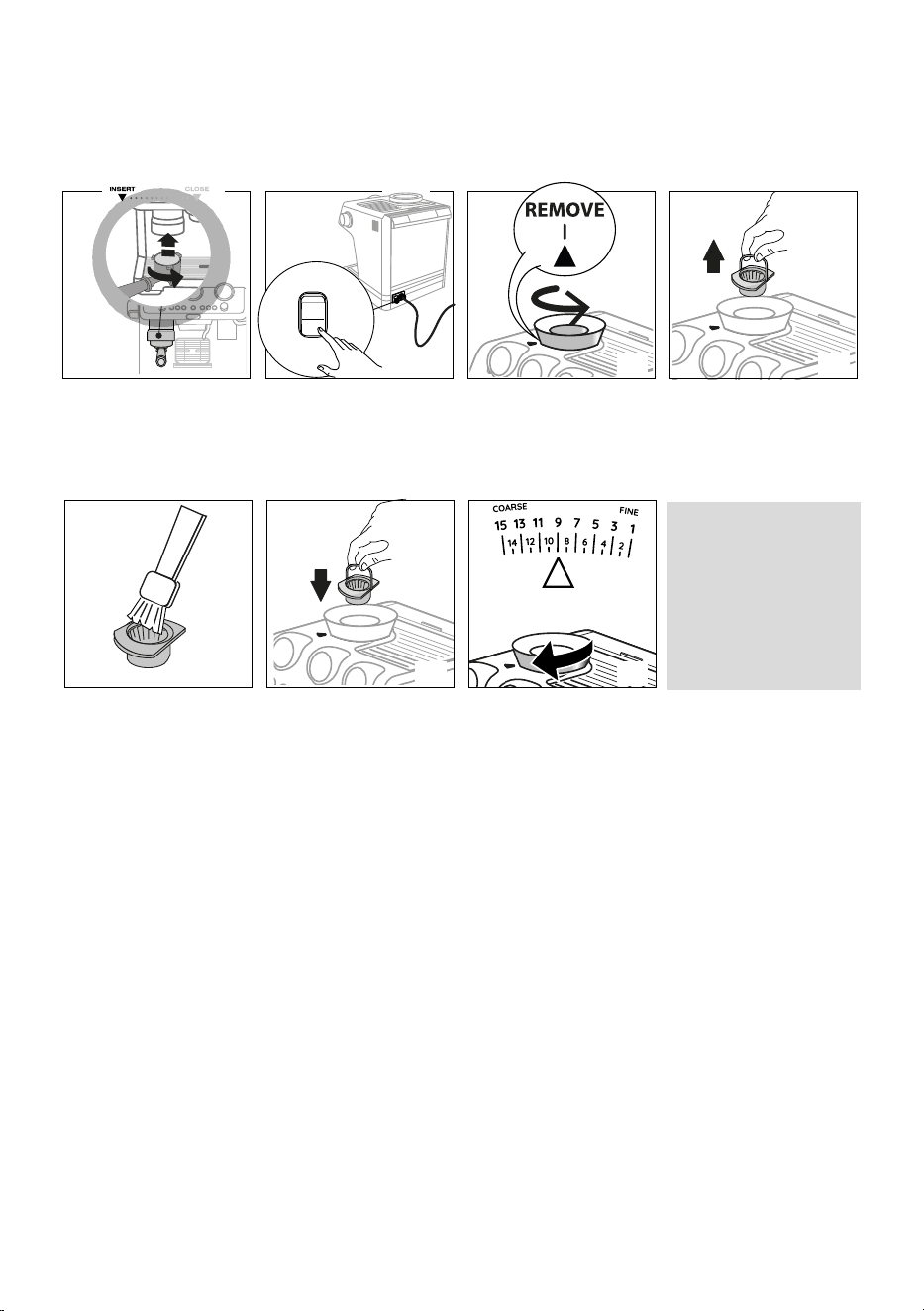
22
11.7 Cleaning the burr
When cleaning the beans container (A1), clean the container housing and upper burr with a damp cloth. The burr can be removed and
replaced by an authorised customer services centre.
You may also need to remove the burr if it becomes blocked with foreign matter. If this occurs, remove the beans container and clean
as follows:
I/0
I
0
1. Attach the portalter (C1)
and operate the grinder
without beans to free the
coee funnel.
2. Turn the machine o.
3. Turn the grind selector (A3)
anticlockwise as far as it
will go to the “REMOVE”
position.
4. Extract the upper burr, grip-
ping it by the handle.
I/0
I
0
5. Clean the burr with a brush
(not included) and remove
the coee residues using a
vacuum cleaner.
6. Put the upper burr back in
place.
7. Turn the grind selector to
select the desired grinding
level.
Make sure the burr is inser-
ted correctly by pulling it by
the handle. If it is correctly
inserted, it will not move.
Ecient grinding
The burrs are subject to wear over time. This means that with continuous and regular use, the dial (B1) will need to be turned toward
the higher numbers in order to obtain the perfect dose. Once a setting of between 30 and 40 has been reached, the extra grinding
range becomes necessary (see section “9. Menu settings” - “Extra grinding adjustment”).
When the quantity of ground coee becomes less than expected, contact a service centre to have the burrs replaced. With the new
burrs tted, adjust the coee grinder by accessing the settings menu and selecting the rst range of the extra grinding adjustment.
Now turn the quantity adjustment dial (B1) to the Min position and set the quantity as for rst-time use (see “3.2 Achieve perfect
dose”).
11.8 Replacing the burrs
When the quantity of coee becomes even less, contact a customer services centre to have the burrs replaced, then adjust the grinder
again as follows entering the setting menu (“9. Menu settings”) and selecting the rst range of the “Extra grinding adjustment”.
Then turn the ground coee quantity dial (B1) to minimum position and set the dose like a rst use (see “3.2 Achieve perfect dose”).
1
5
2
6
3
7
4
23
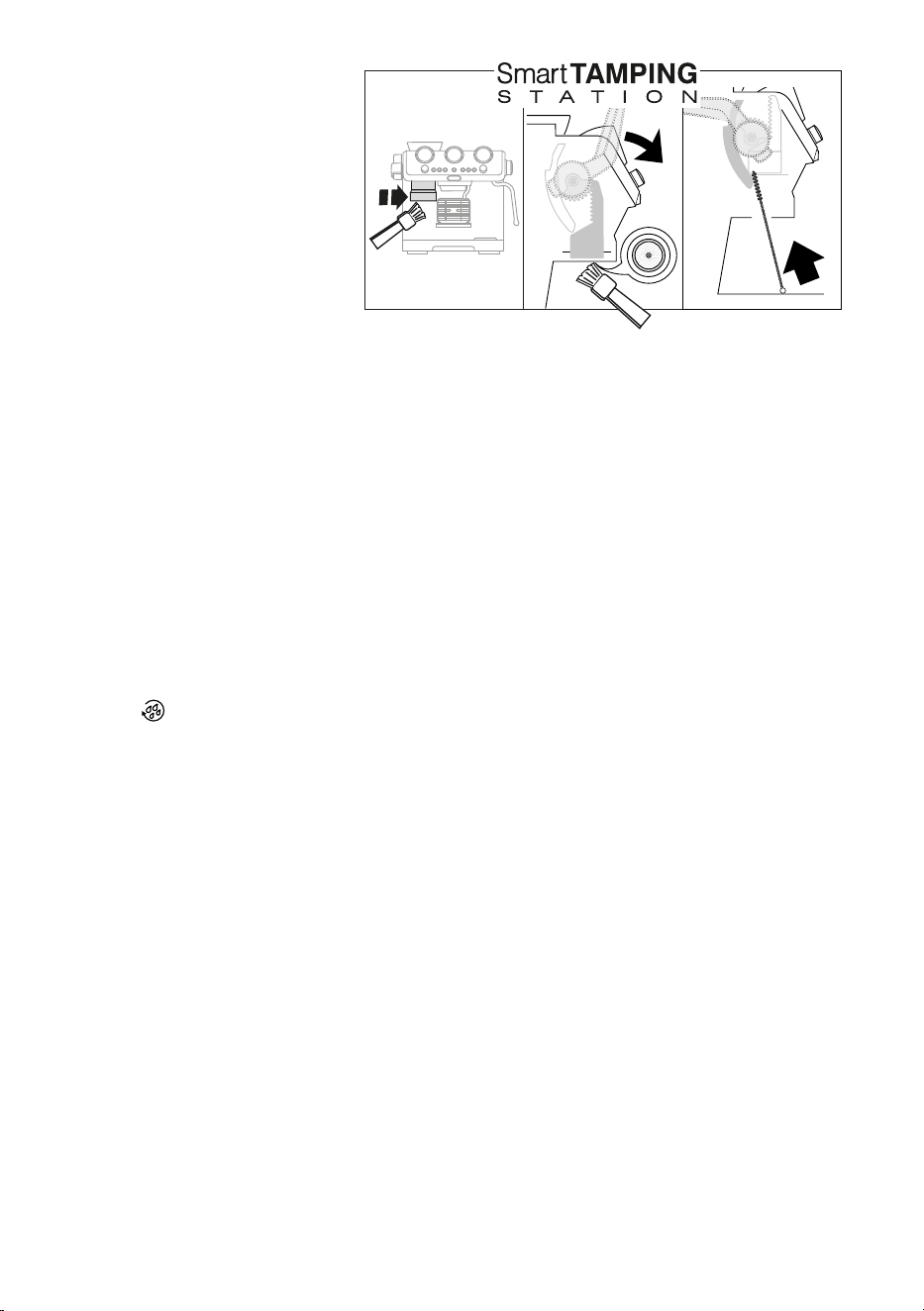
11.9 Cleaning the “Smart tamping
station”
1. Clean the attachment area with a brush;
2. Pull the
lever
(A21) as far as it will go and
clean the presser cylinder with a brush. Then
release the lever.
3. Use the tube brush (C10) to clean the coee
funnel.
1 2 3
11.10 Water tank
Periodically (about once a month) clean the water tank (A16).
1. Take out the water tank and rinse with drinking water;
2. Empty the water tank and clean with warm water (40°C/104°F approx), wiping if necessary with a clean, non-abrasive cloth. Rinse
thoroughly under running water;
3. Fill the water tank with fresh drinking water up to the MAX level and return it to the machine.
Please note:
If the machine has not been used for more than 3 days, clean the water tank as described above.
11.11 Cleaning circuit of the machine
If the machine has not been used for more than 3-4 days, it is strongly recommended to run 3 hot rinses as follows:
1. Place a container under the coee outlet (A8);
2. Check the “OK” light (B5) is white (ready for hot preparation): if not, select a hot coee preparation by turning the drink selector
dial (B9)
3. Press the button: the rinse stops automatically.
4. Repeat 2 more times.
24
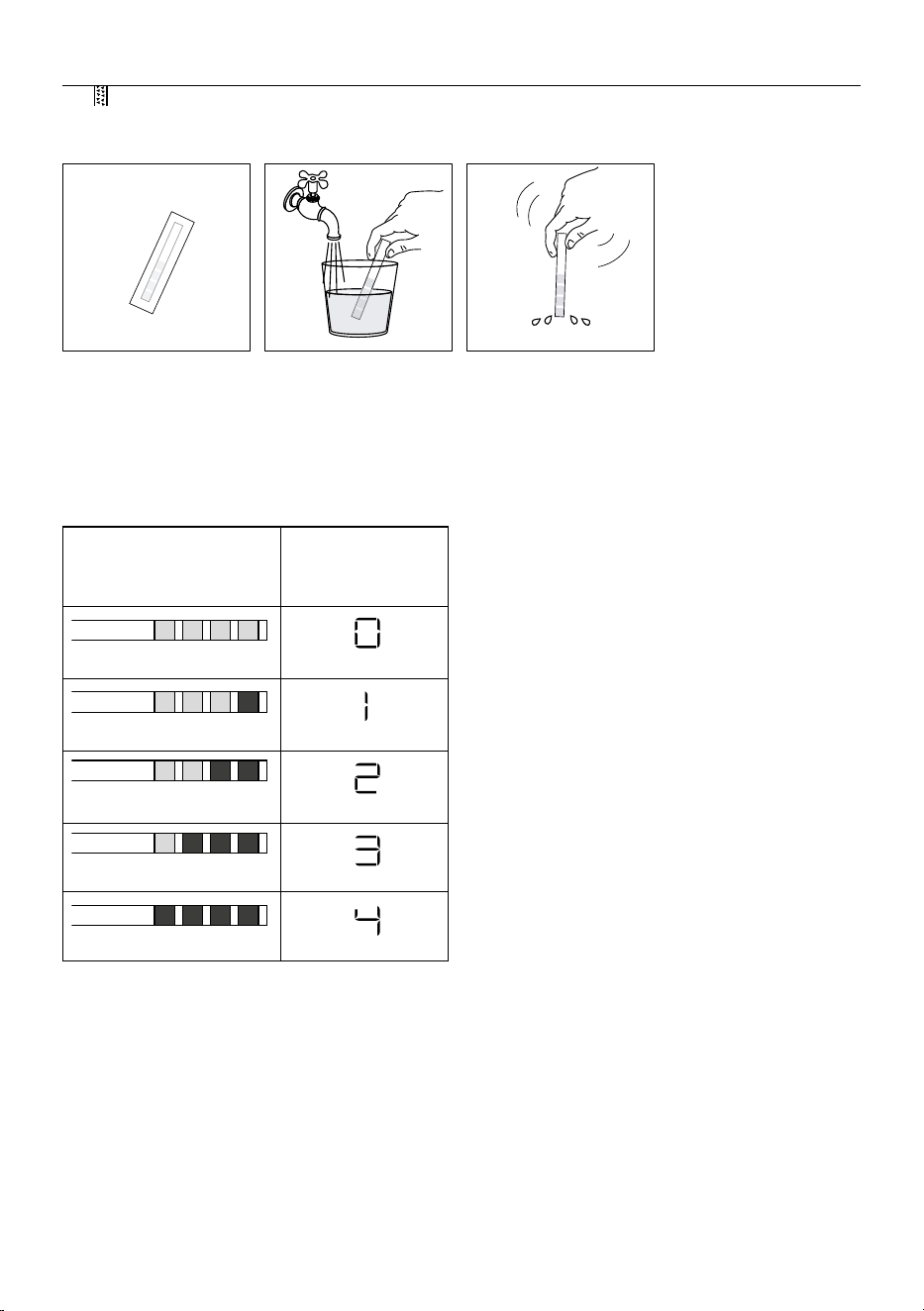
12. WATER HARDNESS
The descale light (B8) comes on after a period of time established according to water hardness. The machine can also be proi-
grammed according to the actual hardness of the water supply in the various regions, in which case descaling may be required less
frequently.
1. Remove the “TOTAL HARD-
NESS TEST” indicator paper
(C6) from its pack.
2. Immerse the paper com-
pletely in a glass of water
for one second.
3. Remove the paper from the
water and shake lightly.
4. After about a minute, 1, 2, 3, or 4 red squares form, depending
on the hardness of the water. Each square corresponds to one
level.
Total Hardness Test result Level
(displayed on the led
module process (B18))
pure water
soft water
medium water
hard water
very hard water
5. Set the appliance as indicated
in section “9. Menu settings”.
1 2 3
25
A
B
A
B
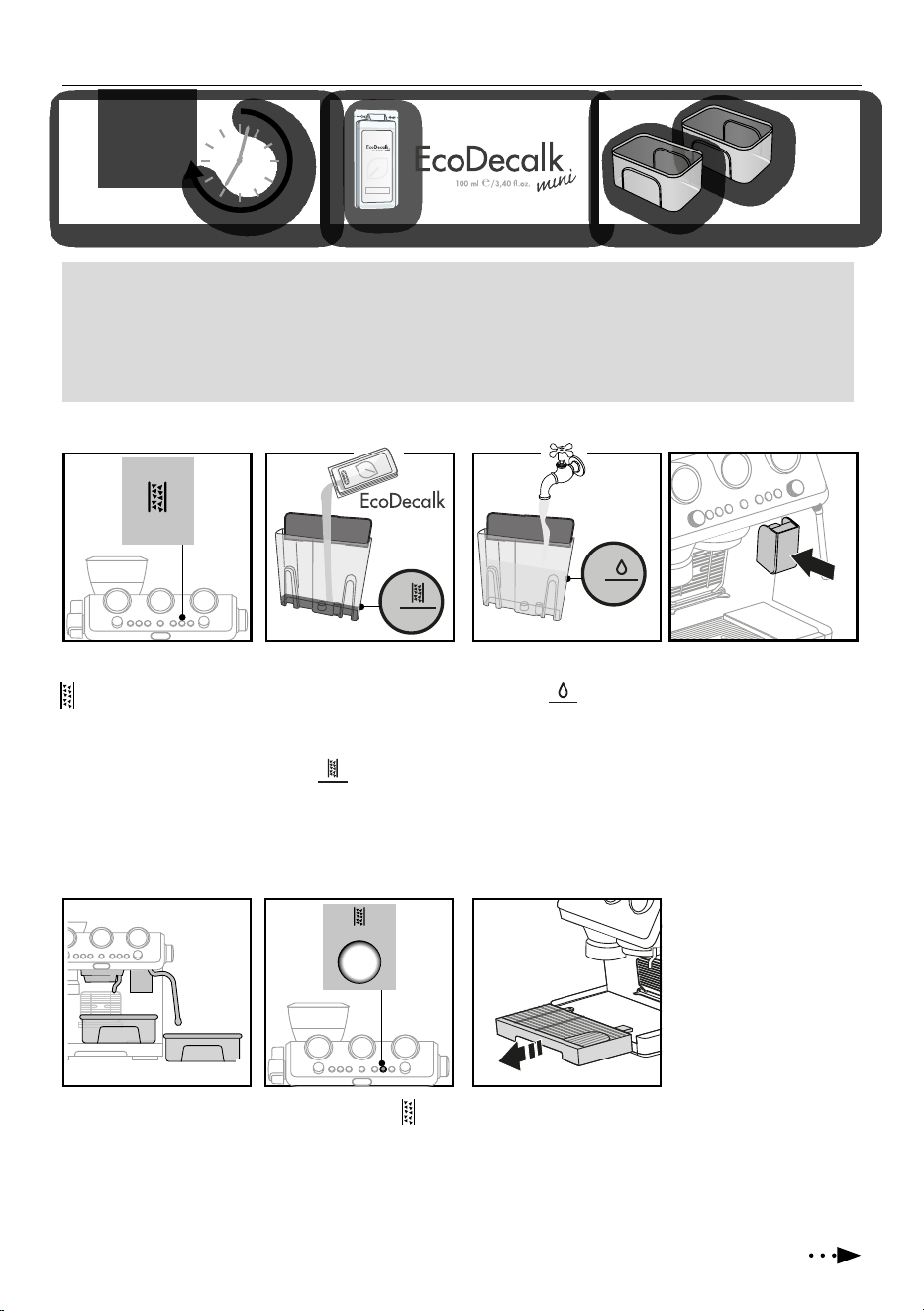
13. DESCALING
Descale the appliance when the
light (B8) comes on (orange).
Please note
• If you want anticipate the cleaning
cycle, press the descaling button
(g. 5) for 3 seconds.
• In case you start the descaling
cycle by mistake, you can press
the descaling button (g. 5) for 10
seconds; the rinsing cycle can not
be stopped (from step 9).
1. (IF PRESENT, REMOVE
THE WATER SOFTENER
DEVICE).
Pour the descal-
er into the tank up to the
level A marked inside
the tank (equal to one
100ml packet).
2. A
dd water (1 liter) up to
t
he level B .
Then put the water tank back in
the appliance.
3. Insert the dedicated acces-
sory (C8) to the Latte Crema
connection (A7).
4. Make sure the portalter is
not attached and position
a recipient under the coee
outlet, hot water spout and
the other recipiente under
the steam wand.
5. Keep pressed the
but-
ton until the correspond-
ing light begins to blink:
descaling starts.
Please note
• Before use, read the instructions and the labelling on the descaler pack.
• It is important to use De’Longhi descaler only. Using unsuitable descaler and/or performing descaling incorrectly may result
in faults not covered by the manufacturer’s guarantee.
• Descaler could damage delicate surfaces. If the product is accidentally spilt, dry immediately.
4
1
5 6
2 3
Or
ange
20
De’Longhi Appliances s.r.l.
Via L. Seitz, 47 31100 Treviso - ITALY
Tel. +39 0422 4131
5413218631/04.15
Decalcicante per macchine da caè
Descaler for coee machines
Détartrant pour machines à café
Entkalker für Kaeemaschinen
2 L
7. The descale programme
starts and the descaler
liquid comes out of the
steam wand and coee
outlet. The descale pro-
gramme removes limes-
cale deposits from inside
the appliance by automat-
ically performing a series
of rinses and pauses until
the tank is empty.
See next page
6. Extract and empty the drip
tray, then put back in the
applianc
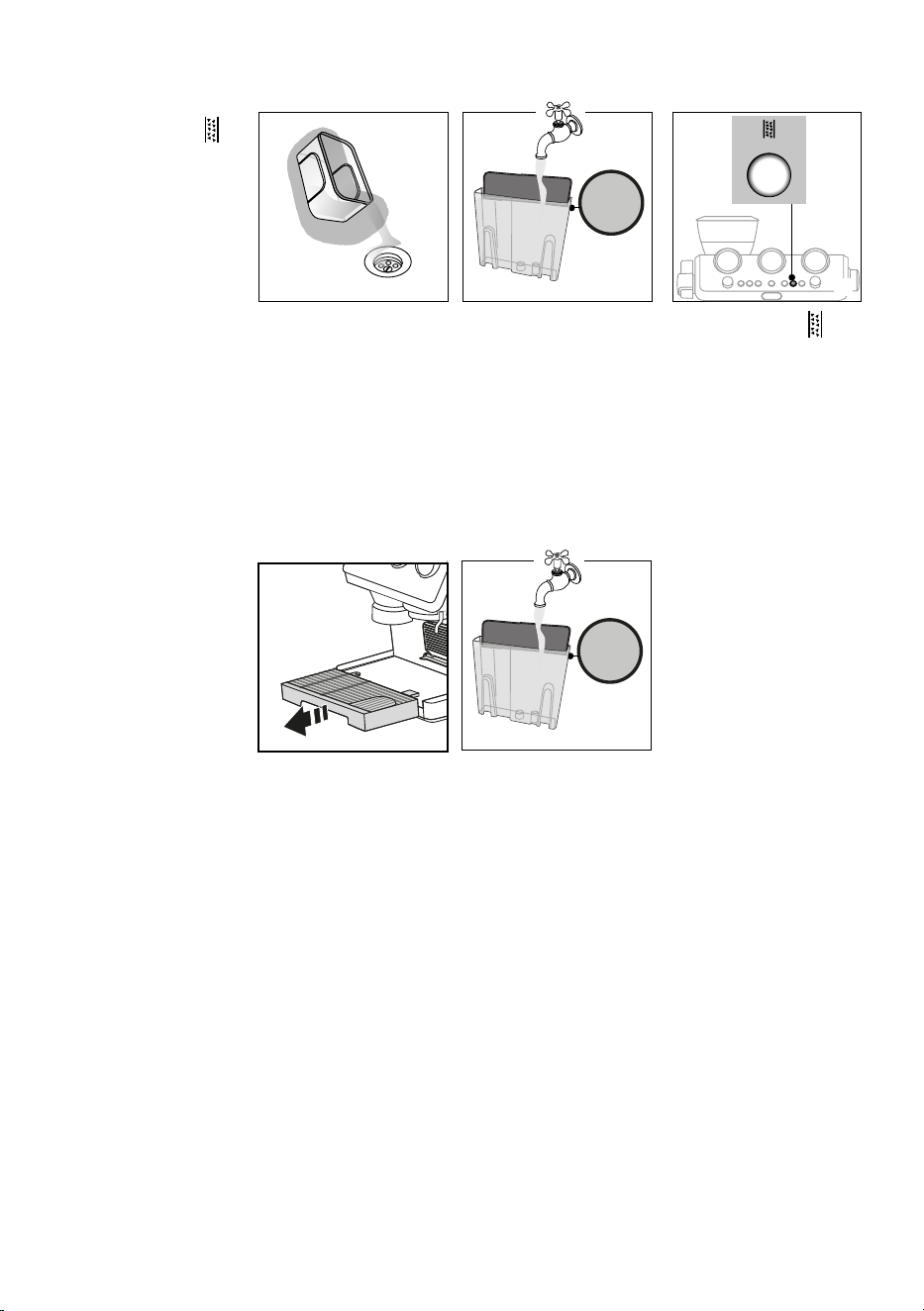
26
MAX
DESCALING
8
8. Empty the recipients used
to collect the descaler
solution and replace them
empty.
9. Remove the water tank,
empty any residues of des-
caler solution, rinse with
running water and ll with
fresh water up to the MAX
level. Put the tank back in
its housing.
10. Keep pressed the
but-
ton until the correspond-
ing light begins to blink:
rinsing starts.
11. When rinsing is complete,
delivery stops and the ap-
pliance prepares to be used
again.
12. Empty the recipients used
to collect the rinse water.
13. Extract and empty the drip
tray, then put back in the
appliance.
MAX
9 10
13
Now the appliance is ready to
use.
MAX
14
14. Empty, rinse, then ll the
water tank with fresh water
and replace it.
Delive
ry stops and th
e
light
turns to white. This indicates
that it is necessary to proceed
with rinsing: see next page.
27
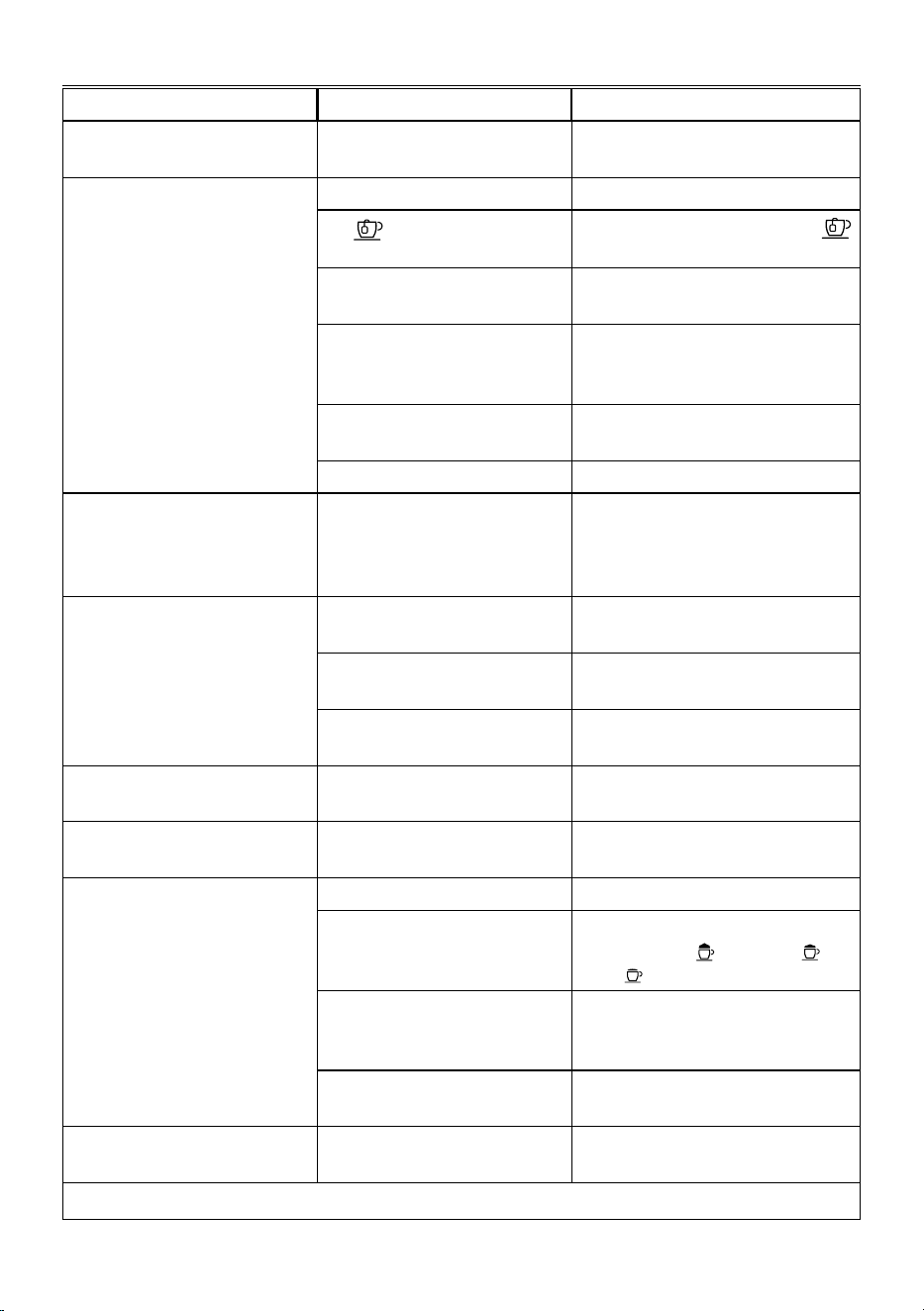
14. TROUBLESHOOTING
PROBLEM CAUSE SOLUTION
There is water in the drip tray (A12) It is normal: due to the internal water
circuits operations
Regularly empty and clean the drip tray
No espresso coee is delivered No water in the tank (A16) Fill the tank
The light is on to indicate that the
coee or steam circuit is empty
Press the button corresponding to the
light to ll the circuit
The coee lter is blocked Rinse the lters under abundant running
water or by Active Rinse function (B6).
The tank has been inserted incorrectly
and the valves on the bottom are not
open
Press the tank down lightly to open the
valves on the bottom
Scale in the water circuit Descale as described in section “13.
Descaling”
Coee grind too ne Adjust coee dose and grinding
The portalter cannot be attached to
the machine
The ground coee has not been pressed
or is too much
Repeat grinding with new settings. Reduce
the powder quantity: check if the lter (sin-
gle or double lter) is the same size as the se-
lector of grinding quantity (1x or 2x button)
The espresso coee drips from the
edges of the portalter rather than the
holes
The portalter is inserted incorrectly Attach the portalter correctly and rotate
rmly as far as it will go
The espresso boiler gasket has lost elas-
ticity or is dirty
Have the espresso boiler gasket replaced by
Customer Services
The coee lter is clogged Rinse the lters under abundant running
water or by Active Rinse function (B6).
The coee crema is too light (delivered
from the spout too fast)
The appliance settings need reviewing Refer to coee guide for suggestions
The coee crema is too dark (delivered
from the spout too slowly)
The appliance settings need reviewing Refer to coee guide for suggestions
No milk froth is formed when making
cappuccino with Lattecrema
Milk not cold enough Always use milk at refrigerator temperature
The froth selection knob (D5) is not in
the correct position
Check and turn to the right position the froth
selection knob ( max froth; med
froth; min froth )
The Lattecrema is dirty Clean the cappuccino maker as described
in section “8.3 Thorough cleaning of
Lattecrema”
Scale in the water circuit Descale as described in section “13.
Descaling”
At the end of descaling, the appliance
requests a further rinse
During the rinse cycle, the water tank
has not been lled to the MAX level
Complete the rinse cycle from point (8) of sec-
tion “13. Descaling”
…
→
28
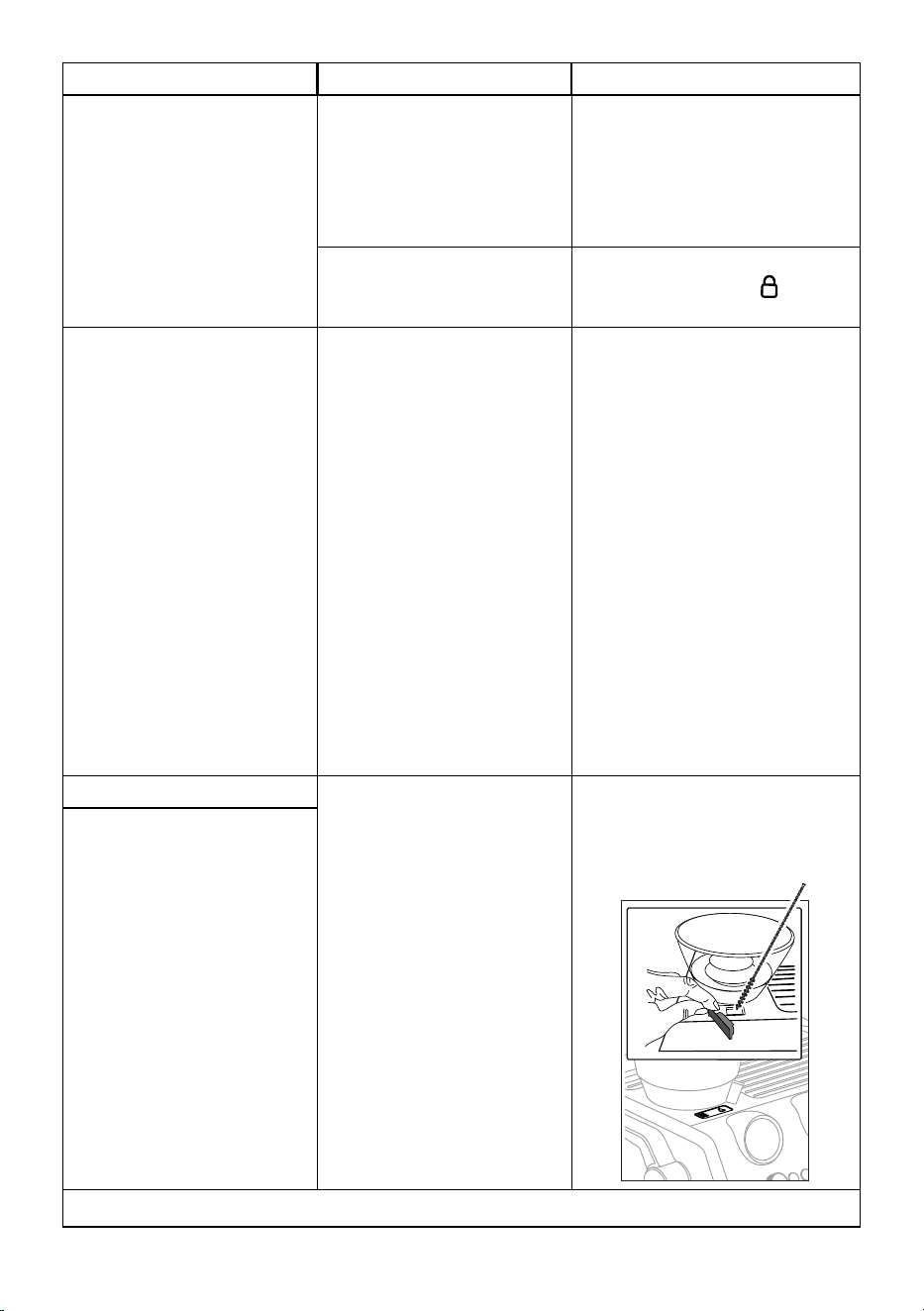
PROBLEM CAUSE SOLUTION
The appliance does not grind the coee There is foreign matter that cannot be
ground in the coee grinder
Clean the burrs as described in section “11.7
Cleaning the burr”, making sure you remove
all the beans from the beans container (A1)
before extracting it.
Before putting the burr back, vacuum all resi-
dues from the housing (g.14)
The coee beans container is not in the
right position
The container is correctly inserted when the
arrow ▲ is lined up with the symbol and
you hear a “click”.
If you want to change the type of coee You must remove all the beans present
in the machine
• Empty the beans container (if neces-
sary, operate the coee grinder with-
out beans or use a vacuum cleaner to
remove any remaining beans)
• Attach the portalter and operate the
coee grinder a number of times with-
out beans to free the grinder. Attach the
portalter to the outlet of the grinder
(A19), lining it up with "INSERT", then
turning it to the right. Grinding begins
when the portalter reaches the CLOSE
position and stops automatically. Re-
peat until the lter is empty
• Place the new coee in the beans
container
• If the amount of coee ground is not
enough to reach the perfect dose, pro-
ceed setting the appliance as for the
rst use
After grinding, the coee lter is empty The coee grinder coee funnel is
clogged
Clean as described in section “11.9 Cleaning
the “Smart tamping station””. If the problem
persists, access the guide by opening the hatch
and free it using the brush)
After tamping, there is too much coee
in the lter
…
→
29
PROBLEM CAUSE SOLUTION
After grinding, the ground coee in the
lter does not reach the “perfect dose”
The "Smart Tamping Station" needs
cleaning
Clean as described in section “11.9 Cleaning
the “Smart tamping station””, then grind again
The quantity of ground coee needs
adjusting
Adjust the quantity of coee with the dial
(B1). If the dial is already in the max. position,
select the second range of grinding adjust-
ment (see “9. Menu settings”- “Extra grinding
adjustment”). If the problem persists, replace
the burrs as described in section “11.8 Replac -
ing the burrs”
Over time the burrs wear down
Replace the burrs as described in section “11.8
Replacing the burrs”
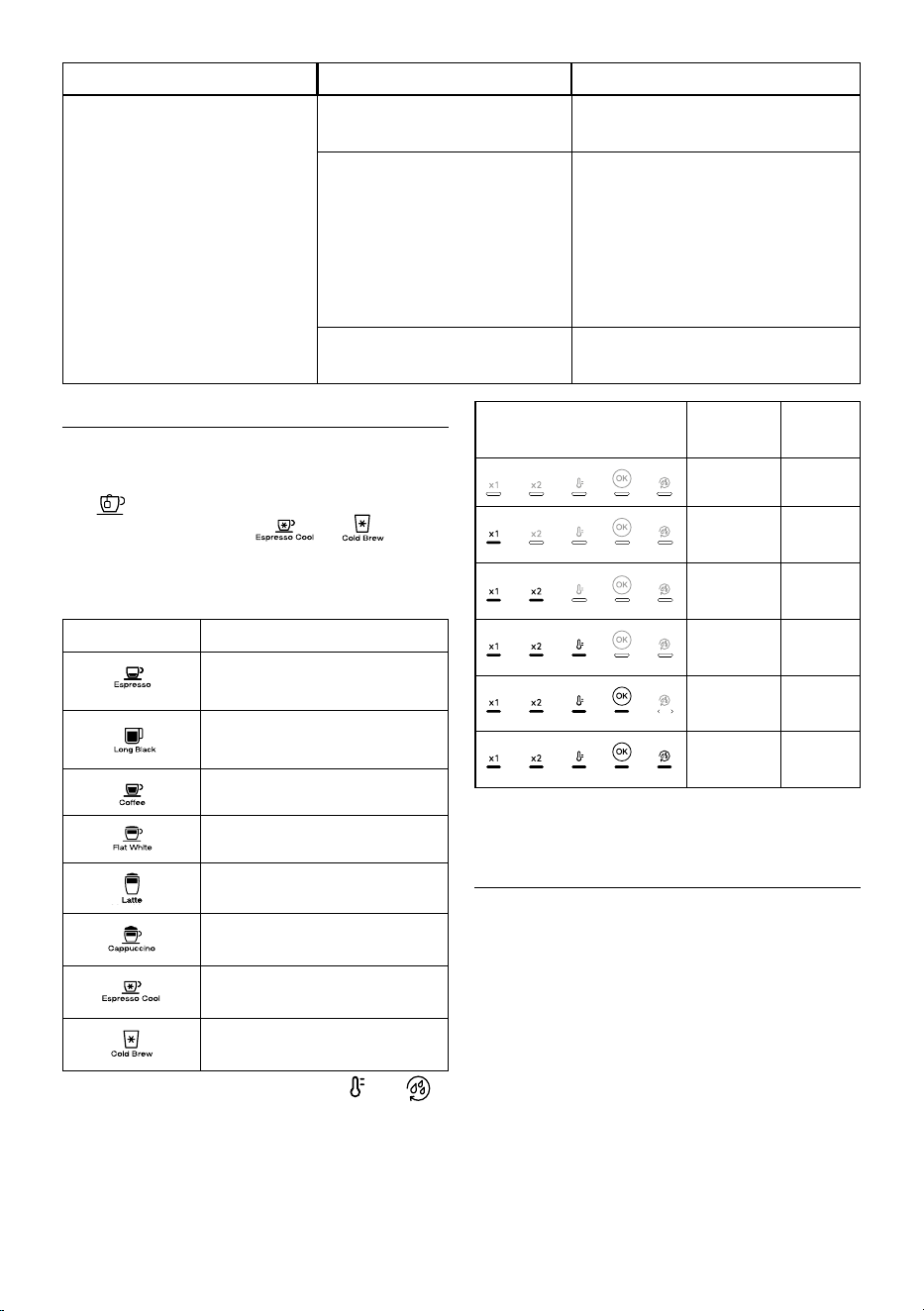
15. HOW TO READ THE STATISTICS
When you contact the Customer Service Centre, the statistics info
could be useful. Please follow this procedure:
• Enter the menù by pressing both buttons “x1” (B2) and
(B7) for 3 seconds;
• Turn the dial (B9) to select or ;
• Press the “OK” (B5);
• Once entered in the menu select the desired data rotating
the drink selector dial (B9) according to the next chart:
Drink selection Counter
Total count of Hot drinks
--
--
Total count of Steam preparations
--
--
Total count of Cold drinks
Total count of Descalings
• Check the lights corresponding to x1, x2, , OK, to
read the statistics:
Lights on control panel Drink
count
Descale
count
Up to 100 Up to 1
Between
100 - 1000
Between
2 - 10
Between
1000 - 3000
Between
10 - 30
Between
3000 - 6000
Between
30 - 60
Between
6000 - 11000
Between
60 - 110
More than
11000
More
than 110
• After 30 seconds of inoperation, the machine automatically
exits from the menu setting and it is ready to use.
16. TECHNICAL DATA
Voltage: 220-240 V~ 50-60 Hz
Power: 1600 W
Pressure: 1.9 MPa (19 bar)
Water tank capacity: 2,5l
Dimensions LxDxH: 360x365x470 mm
Weight: 16 kg
Beans container capacity: 250 g
De’Longhi reserves the right to modify the technical specication
and styling of its products at any moment, without compromising
their functionality and quality.
De’Longhi Appliances via Seitz, 47 31100 Treviso Italia www.delonghi.com
57132C9253_00_1024