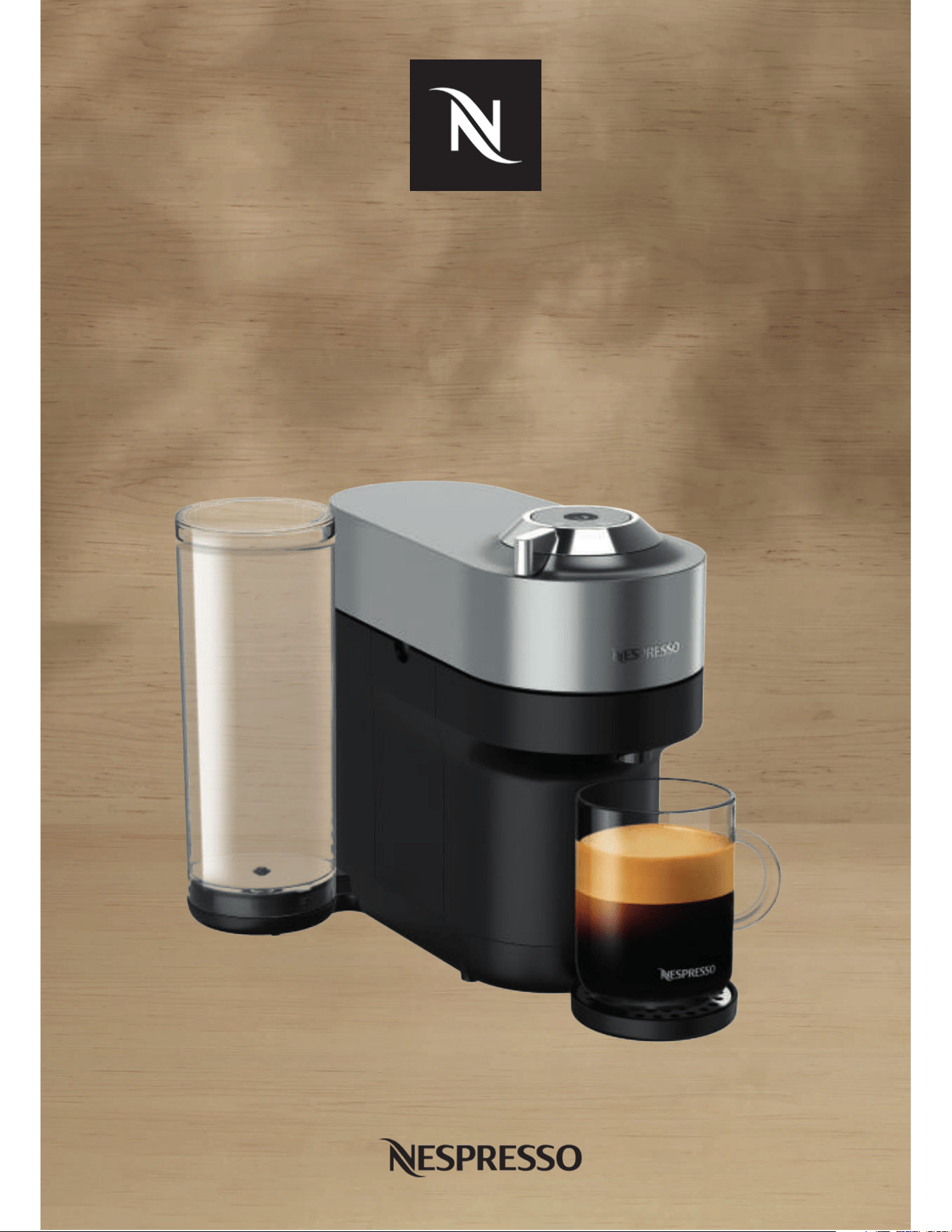
VERTUO POP+
EN
.
2
SAFETY
OVERVIEW
CONNECTIVITY
FIRST STEPS
COFFEE PREPARATION
ADAPT YOUR COFFEE VOLUMES
CLEANING
DESCALING
EMPTYING THE SYSTEM
RESET TO FACTORY SETTINGS
BLINKING SUMMARY
TROUBLESHOOTING
SPECIFICATIONS
CLICK AND CHOOSE YOUR LANGUAGE
EN
EN
.
3
SAFETY
CAUTION: Before operating your coee machine, please refer
to the safety instructions leaflet to avoid possible harm and
damage.
DISPOSAL AND ENVIRONMENTAL PROTECTION
This appliance complies with the EU Directive 2012/19/EC.
Packaging materials and appliance contain recyclable materials.
Your appliance contains valuable materials that can be recovered
or can be recycled. Separation of the remaining waste materials
into dierent types facilitates the recycling of valuable raw
materials. Leave the appliance at a collection point. You can
obtain information on disposal from your local authorities.
EN
.
4
OVERVIEW
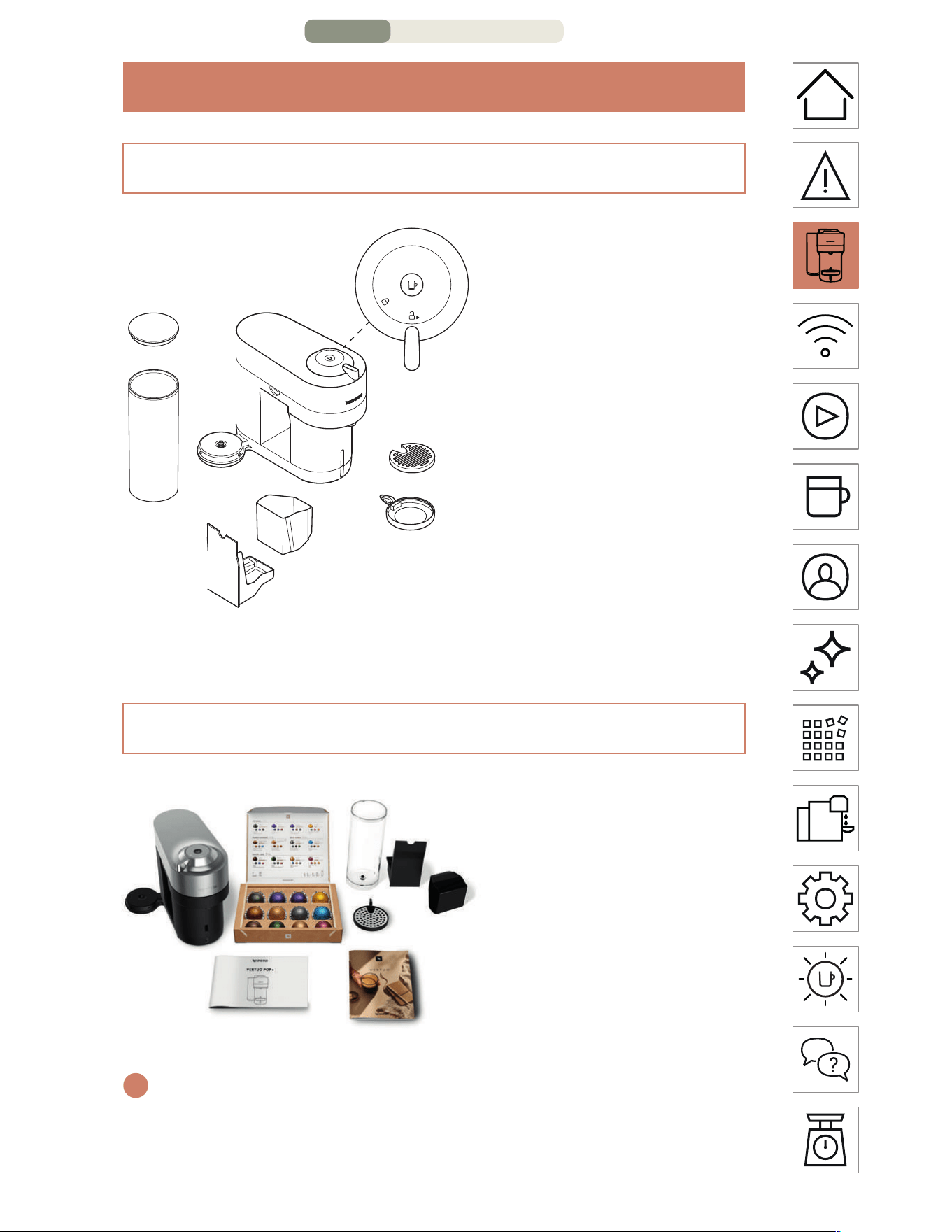
PACKAGING CONTENT
MACHINE OVERVIEW
1 ON/OFF and Coee
Buon
2 Locking/Unlocking
Lever
3 Drip Grid
4 Adjustable Cup
Support
5 Drip Tray
6 Container for used
Capsules
7 Water Tank and Lid
8 Coee Outlet
1 Coee Machine
2 Nespresso Capsules Box
3 Nespresso Welcome
Material
4 Safety Instructions
5 Quick Start Guide
6 Warranty
7
6
5
1
2
8
3
4
3
1
2
4 + 5 + 6
i
Unboxing: When unpacking the machine, remove the plastic film.
Some dust may be present due to recycled materials being used
within the packaging. This is not dangerous, simply clean with a so
tissue.
O
VERVIEW – PAGE 1/3
EN
.
5
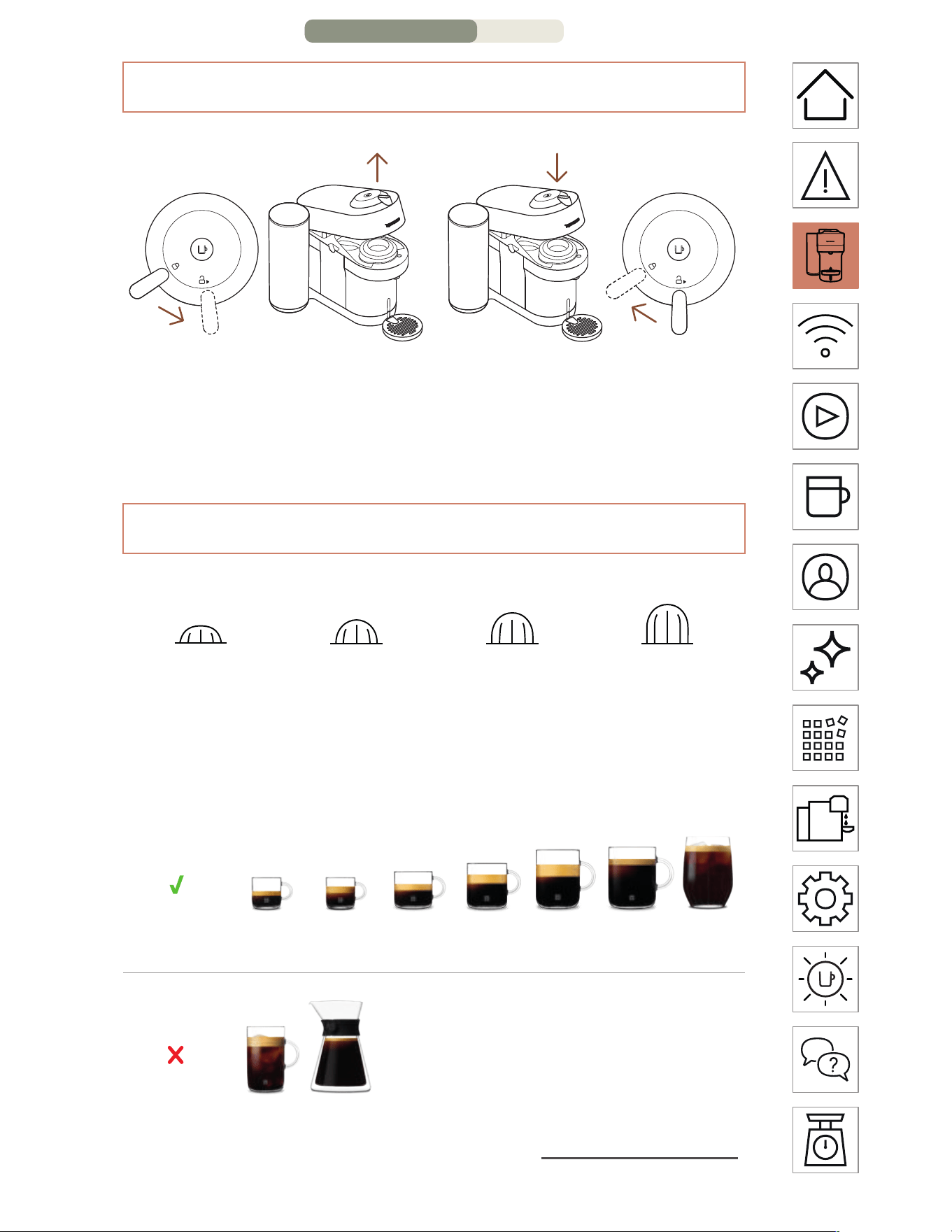
OPEN / CLOSE
OPEN CLOSE
THE VERTUO SYSTEM
CAPSULE COMPATIBILITY
S
Ristreo
(25 ml / 0.84 fl oz)
Espresso
(40 ml / 1.35 fl oz)
M
Double Espresso
(80 ml / 2.7 fl oz)
Gran Lungo
(150 ml / 5.07 fl oz)
L
Mug
(230 ml / 7.77 fl oz)
XL
Alto, Cold Brew Style
(355 ml / 12 fl oz)
Carafe
(535 ml / 18.8 fl oz)
ACCESSORY COMPATIBILITY
Accessory
compatibility
Ristreo Espresso Double
Espresso
Gran
Lungo
Mug (S) Mug (M) Reveal
Glass
Incompatible
accessories
Mug (L) Carafe
Discover our full collection of accessories on www.nespresso.com
CAUTION: for correct machine use, please do not open the machine
head while the coee is brewing, wait until the machine has stopped and
the coee buon is steady and white. If you want to stop the brewing
earlier, please press the Coee Buon once and wait until the coee
buon goes back to steady white.
OVERVIEW – PAGE
2/3
EN
.
6
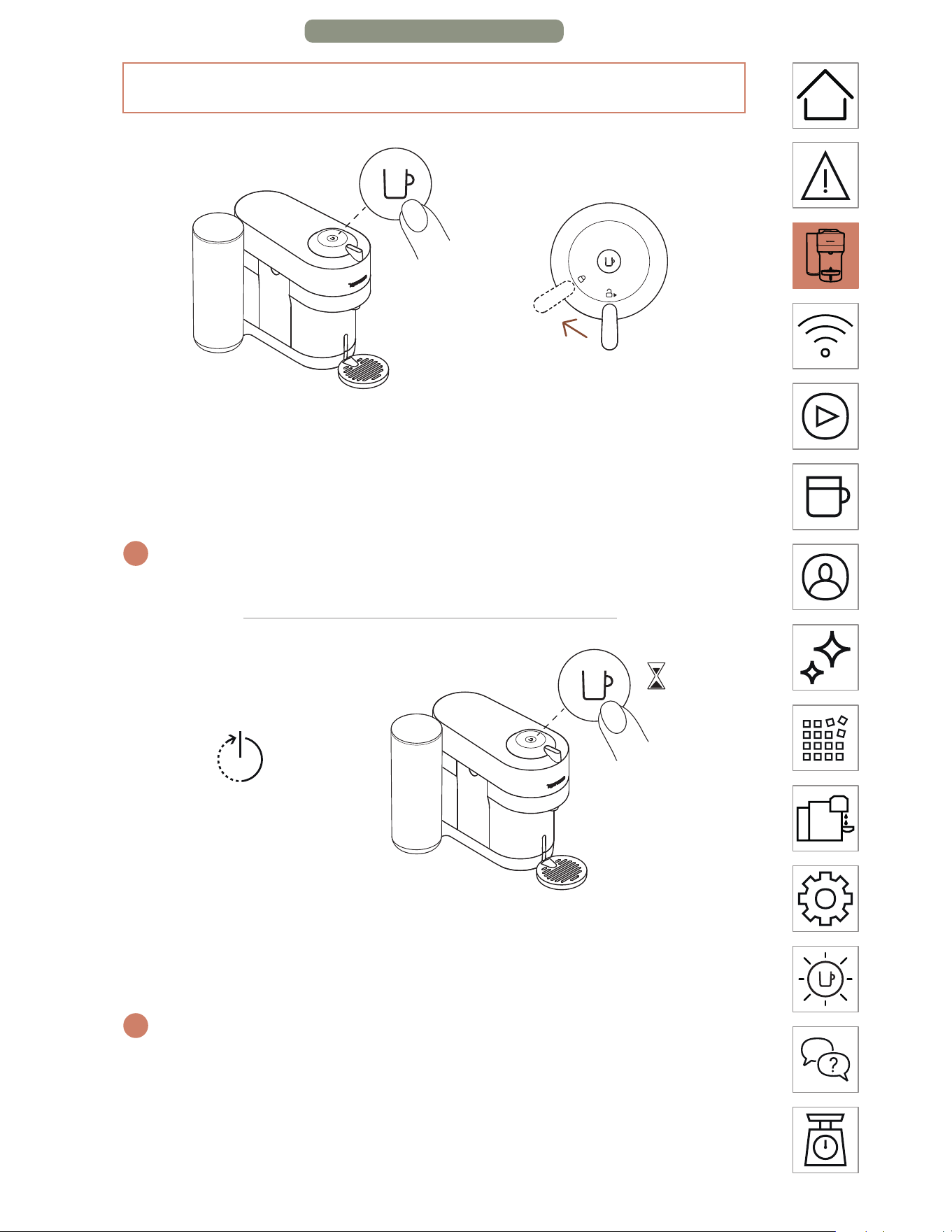
1x
OR
ON
Once the machine is plugged in, turn it on by pressing the
Coee Buon once or by closing the lever into the lock position
(whilst the head is closed).
i
The light will blink for approximatively 30 seconds while the machine is
heating up. Once the light is steady, the machine is ready to be used.
AUTO-OFF
2 min
3
s
OR
OFF
To save energy, the machine will turn o automatically aer 2
minutes of non-use.
i
The machine can be turned “OFF” manually at any time (when not in
use) by pressing and holding the Coee Buon for 3 seconds.
ON/OFF
OVERVIEW – PAGE 3/3
EN
.
7
CONNECTIVITY
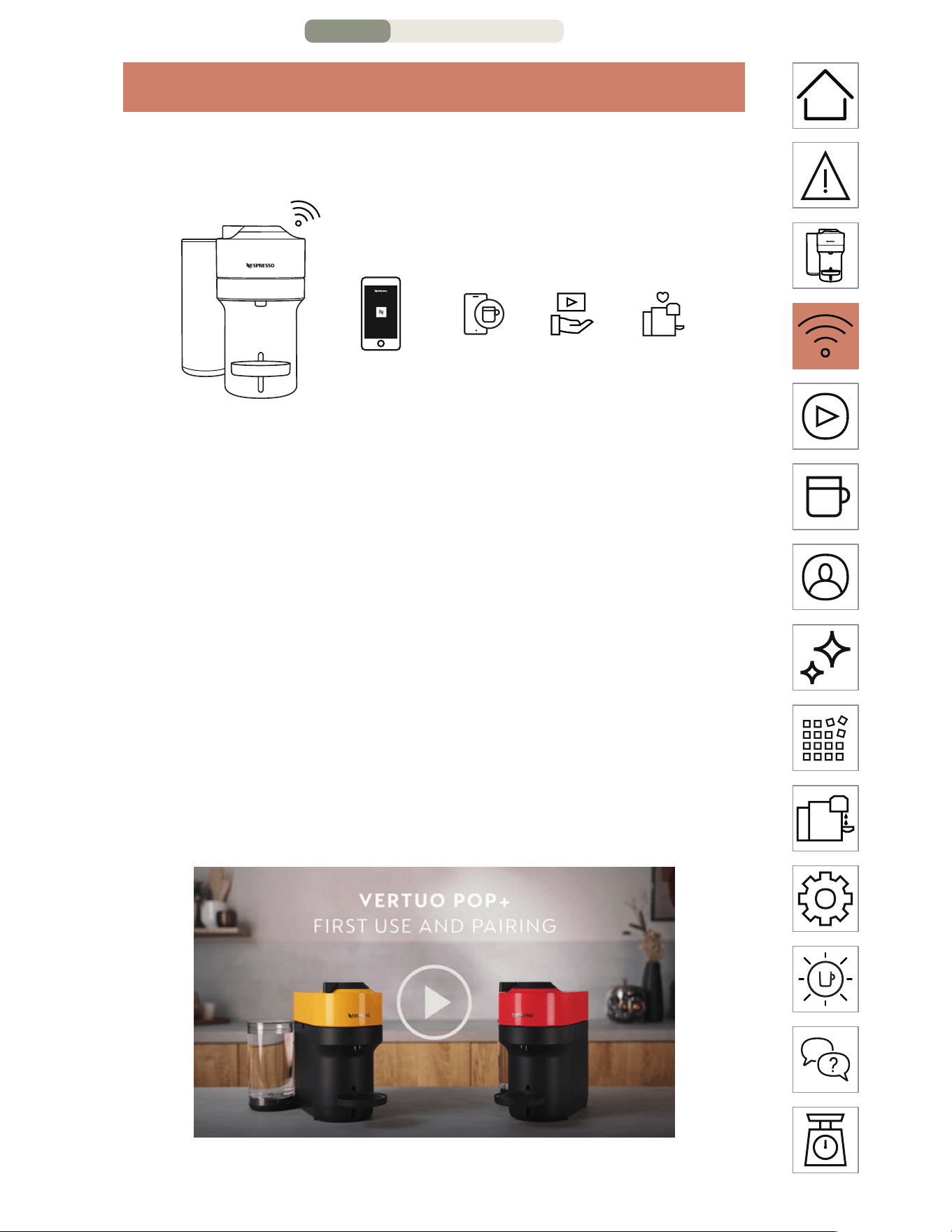
WHY SHOULD YOU PAIR YOUR VERTUO POP+ MACHINE?
=+
Smart
coee
Expert
advice
Machine
care
BENEFITS OF CONNECTING YOUR VERTUO POP+ MACHINE
• Smart coee: Always stay one step ahead and get the latest
coee innovations from Nespresso by keeping your machine
up to date
• Expert advice: Get support and simple tutorial videos to
accompany your coee journey via your smartphone
• Machine care: Receive instant notification on how and when
to service your machine with an easy-step guide on descaling,
rinsing, cleaning, etc.
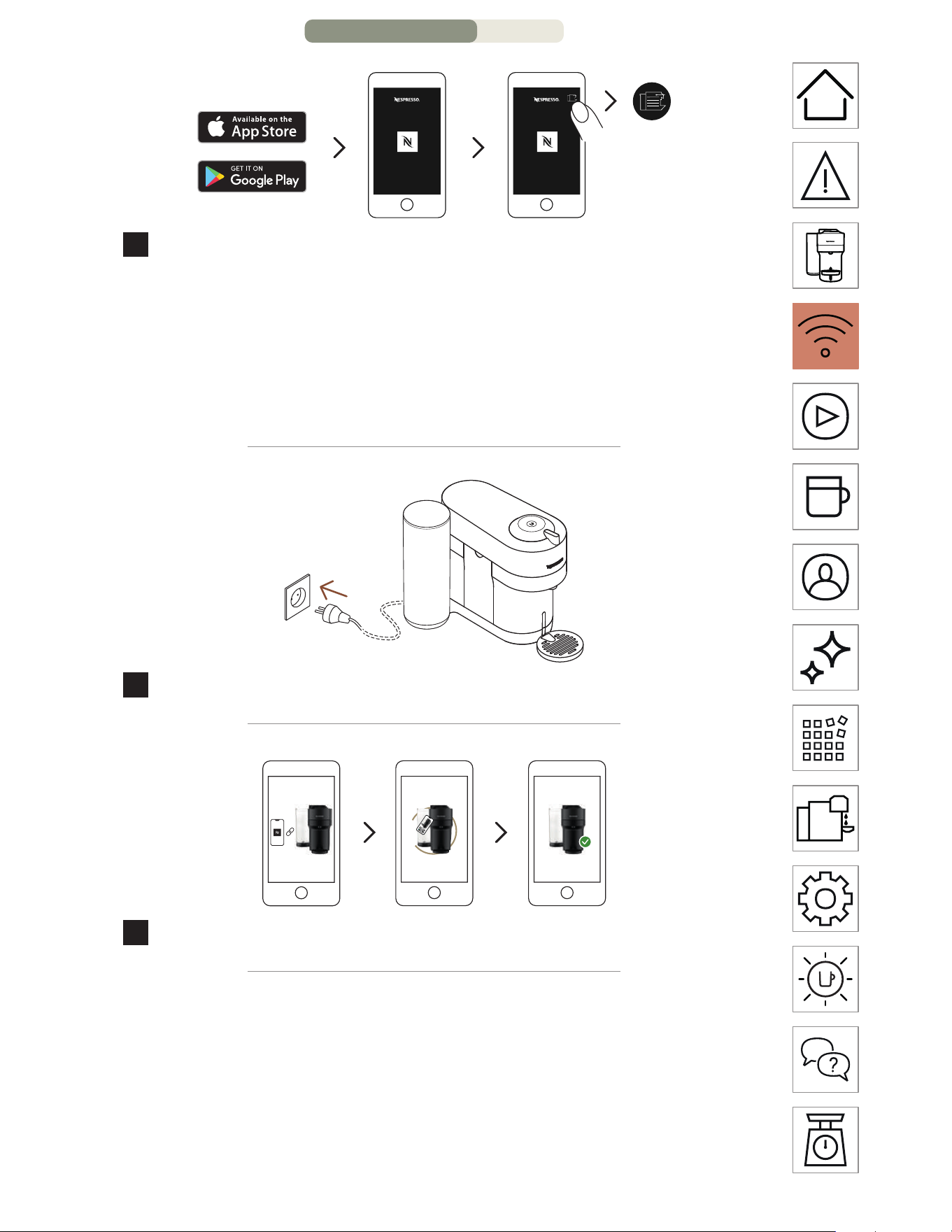
HOW TO CONNECT YOUR VERTUO POP+ MACHINE?
C
ONNECTIVITY – PAGE 1/3
EN
.
8
*
**
1
Download or update the Nespresso App. Launch the
Nespresso App on your smartphone or your tablet. Press the
machine icon at the top right of your screen.
NOTE: for optimal performance and a seamless experience, we
recommend connecting your machine to a Wi-Fi router rather than using a
smartphone hotspot.
2
Plug in the power cord and switch on.
3
Follow the instructions via the Nespresso App.
CAUTION: First read the safety precautions to avoid risks of fatal
electrical shock and fire. Please ensure ground continuity when plugging
the machine into the power outlet.
* AppStore
®
is a trademark of Apple Inc.,registered in the U.S.and other
countries.
** Google Play and the Google Play logo are trademarks of Google LLC.
CONNECTIVITY – PA
GE 2/3
EN
.
9
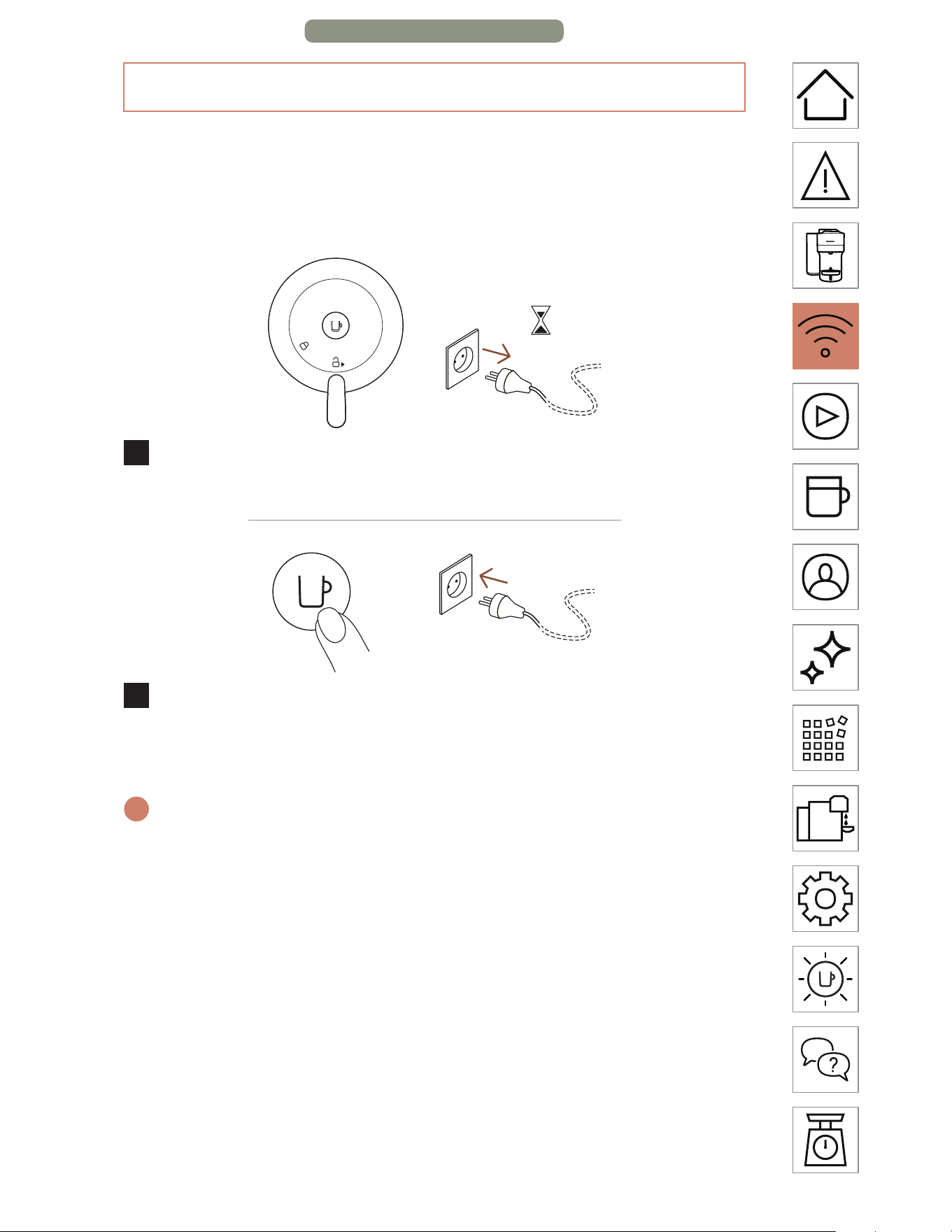
DISABLING MACHINE BLUETOOTH AND WI-FI
The machine comes with a connectivity module, enabled by
default. It gives access to additional features, enhancing your
coee experience. To disable the connectivity module, follow
these steps:
10s
1
With the machine closed and the lever in unlocked position,
unplug the machine for at least 10 seconds.
+
2
Press and hold the buon whilst plugging in the machine.
The buon will blink orange to confirm that the connectivity
module has now been disabled.
i
Follow the same steps to set the connectivity module back on again.
The buon will blink white to confirm that the module has been
reactivated.
CONNECTIVITY – PAGE 3/3
EN
.
10
FIRST STEPS
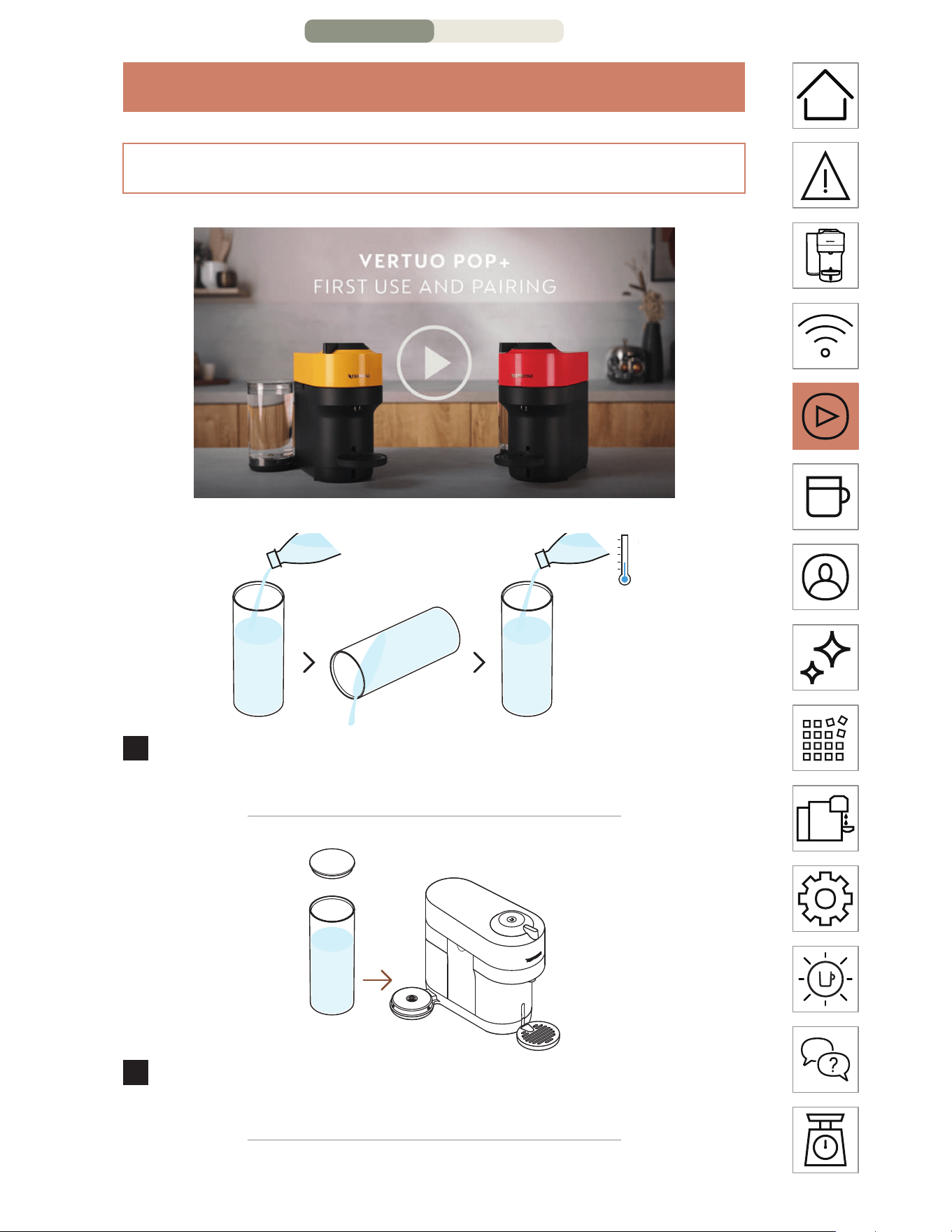
1
Rinse and clean the water tank and lid before filling it with
fresh drinking water.
2
Put the lid on the water tank and put the water tank in place.
Make sure it is properly aached.
FIRST RINSING
FIRST S
TEPS – PAGE 1/2
EN
.
11
3
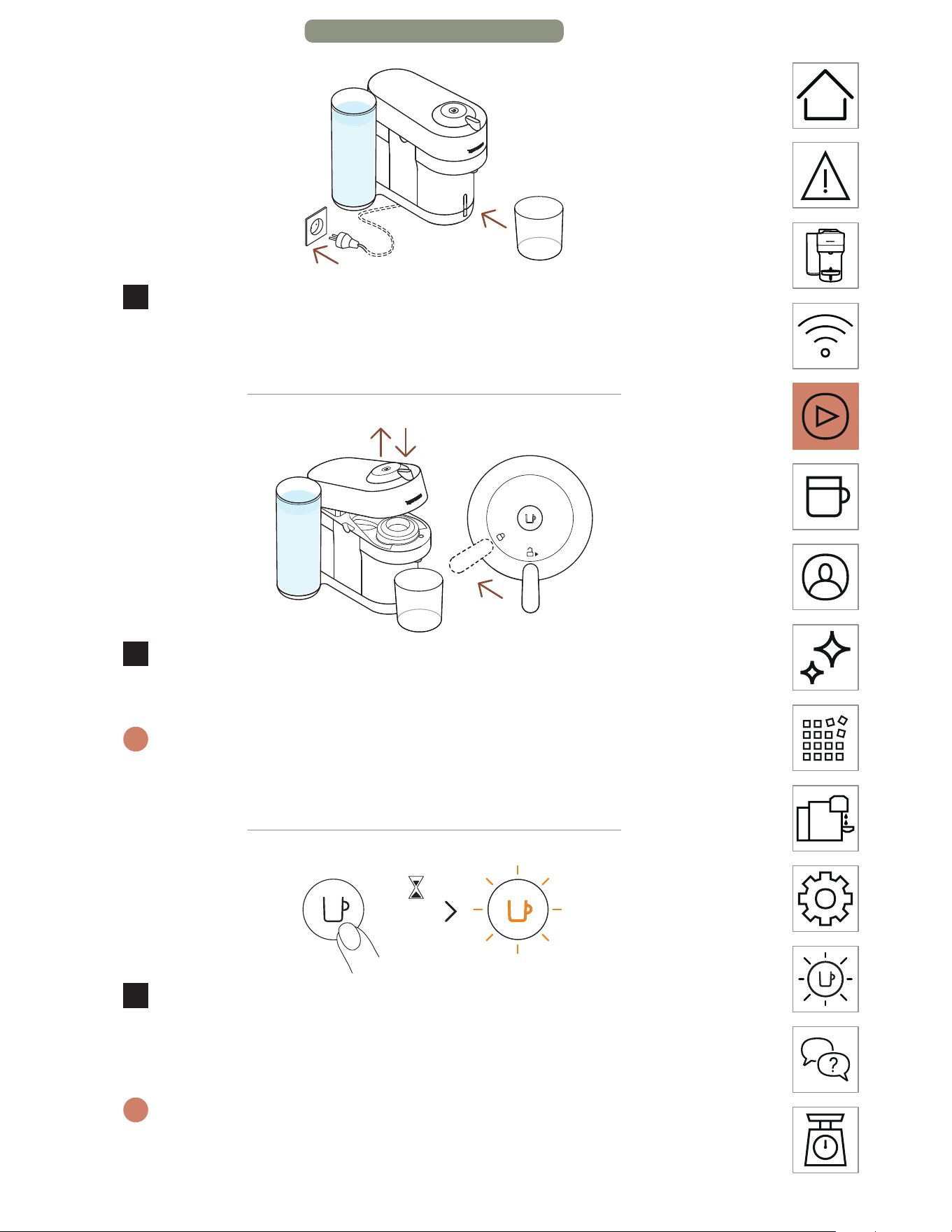
Plug the power cord in, remove the cup support and place
an empty container (of at least 1 L / 34 fl oz) under the coee
outlet.
4
Open and close the machine. Ensure the lever is in lock
position.
i
The light will blink while the machine is heating up. It will take
approximately 30 seconds. When the light becomes steady the
machine is ready. Make sure that no capsule is inserted.
3x <2s
5
Press the buon 3 times within 2 seconds to start rinsing.
Let the rinsing procedure complete automatically. When the
light becomes steady white, the cycle is complete.
i
It should take less than 2 minutes before the rinsing process begins
and water starts to flow. This procedure may take up to 7 minutes.
FIRST STEPS – PAGE 2/2
EN
.
12
COFFEE PREPARATION
1
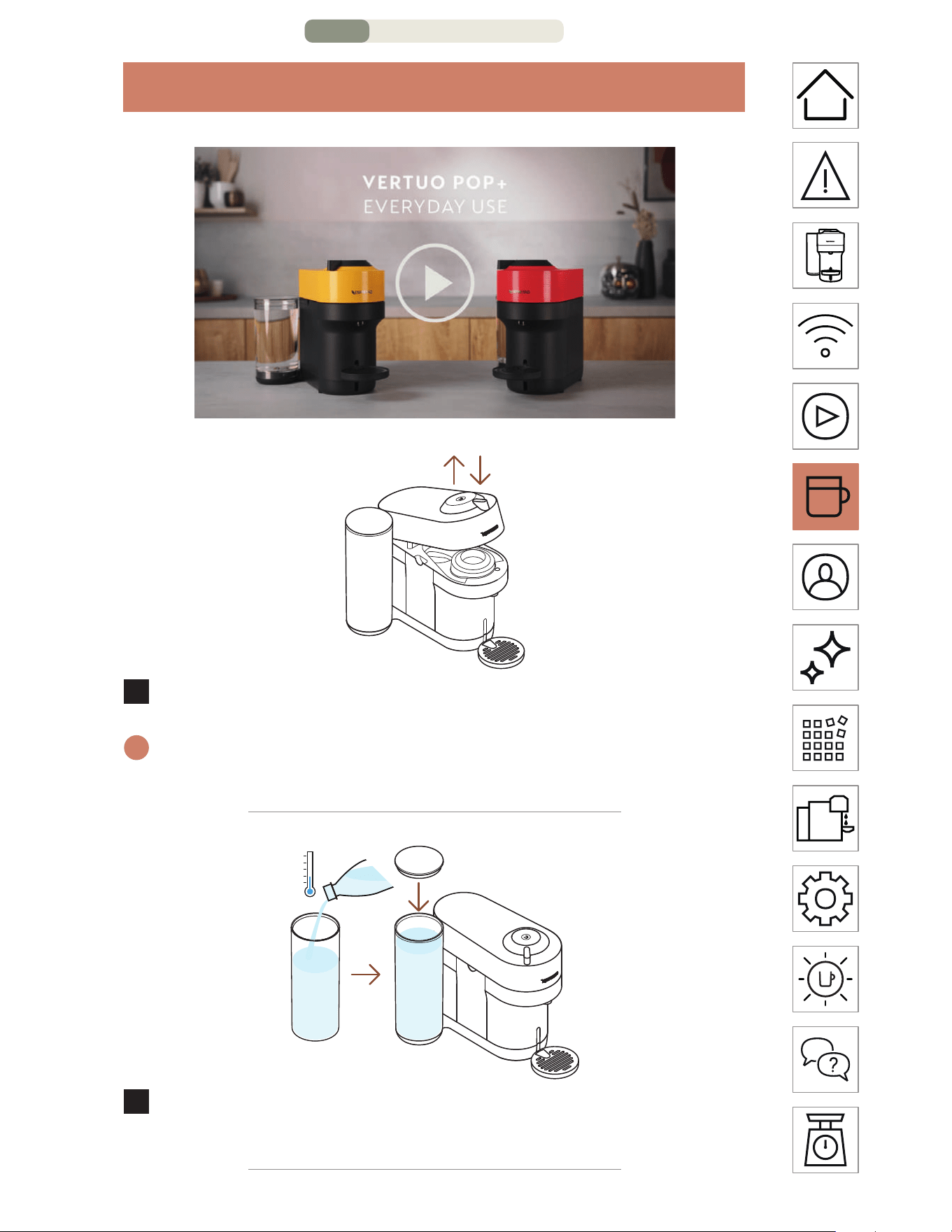
Open and close the machine.
i
The coee buon light will blink while the machine is heating up.
When the light becomes steady, the machine is ready to use.
2
Fill the water tank with fresh drinking water and put it back
in position.
C
OFFEE PREPARATION – PAGE 1/3
EN
.
13
3
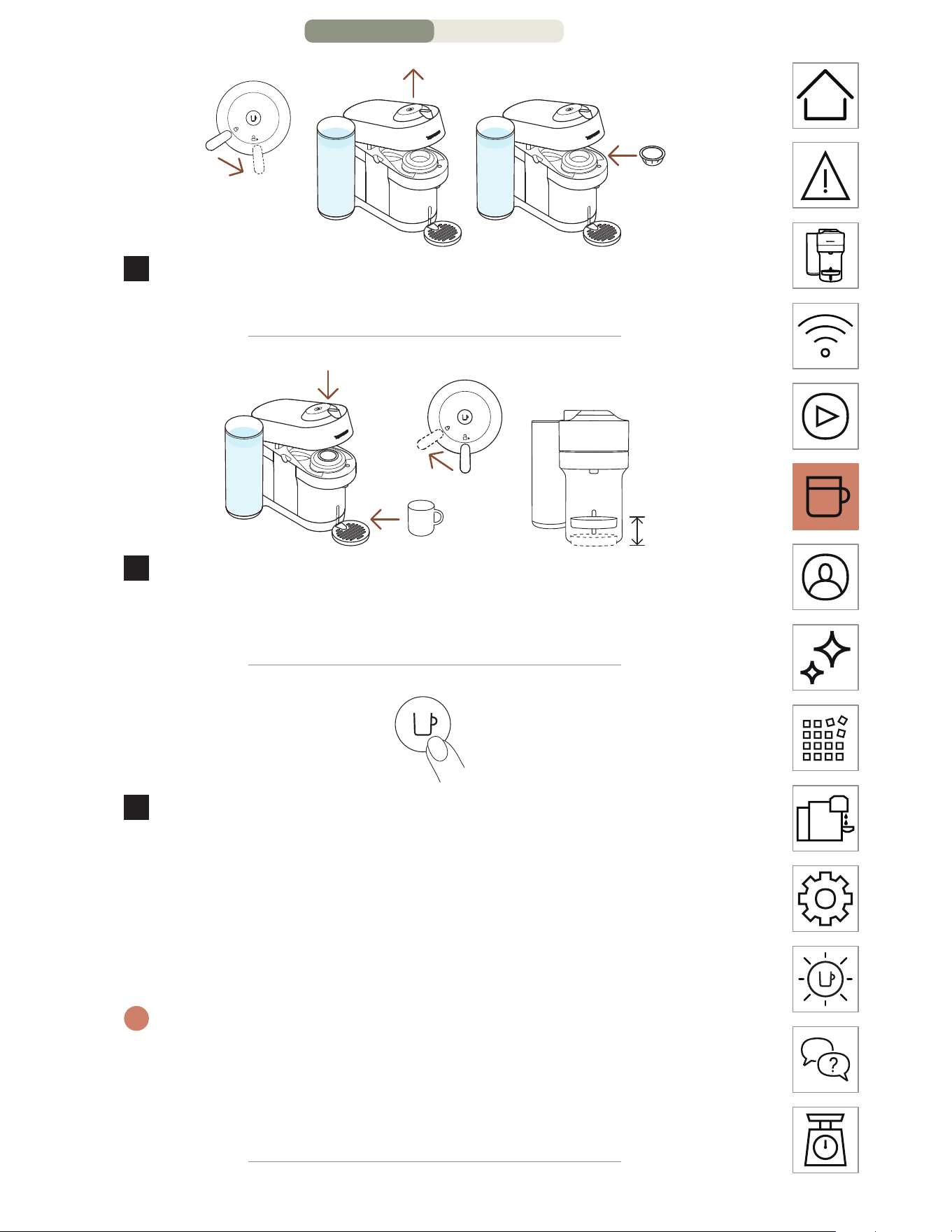
Unlock and open the machine head completely and insert a
Vertuo capsule with the dome shape facing down.
4
Close the machine head and lock by turning the lever le into
the lock position and place a cup on the cup support. The cup
support can be adjusted to accomodate your cup size.
1x
5
Start brewing by pressing the buon once.
CAUTION: for correct machine use, please do not open the machine
head while the coee is brewing, wait until the machine has stopped and
the coee buon is steady and white. If you want to stop the brewing
earlier, please press the Coee Buon once and wait until the coee
buon goes back to steady white.
i
Due to the barcode reading, coee pre-weing and infusion time, it
will take a moment before the coee begins to flow. The machine will
automatically recognize the inserted capsule and select the coee
preparation parameters and cup length defined by Nespresso coee
experts to extract the coee blends at it’s best.
COFFEE PREP
ARATION – PAGE 2/3
EN
.
14
6
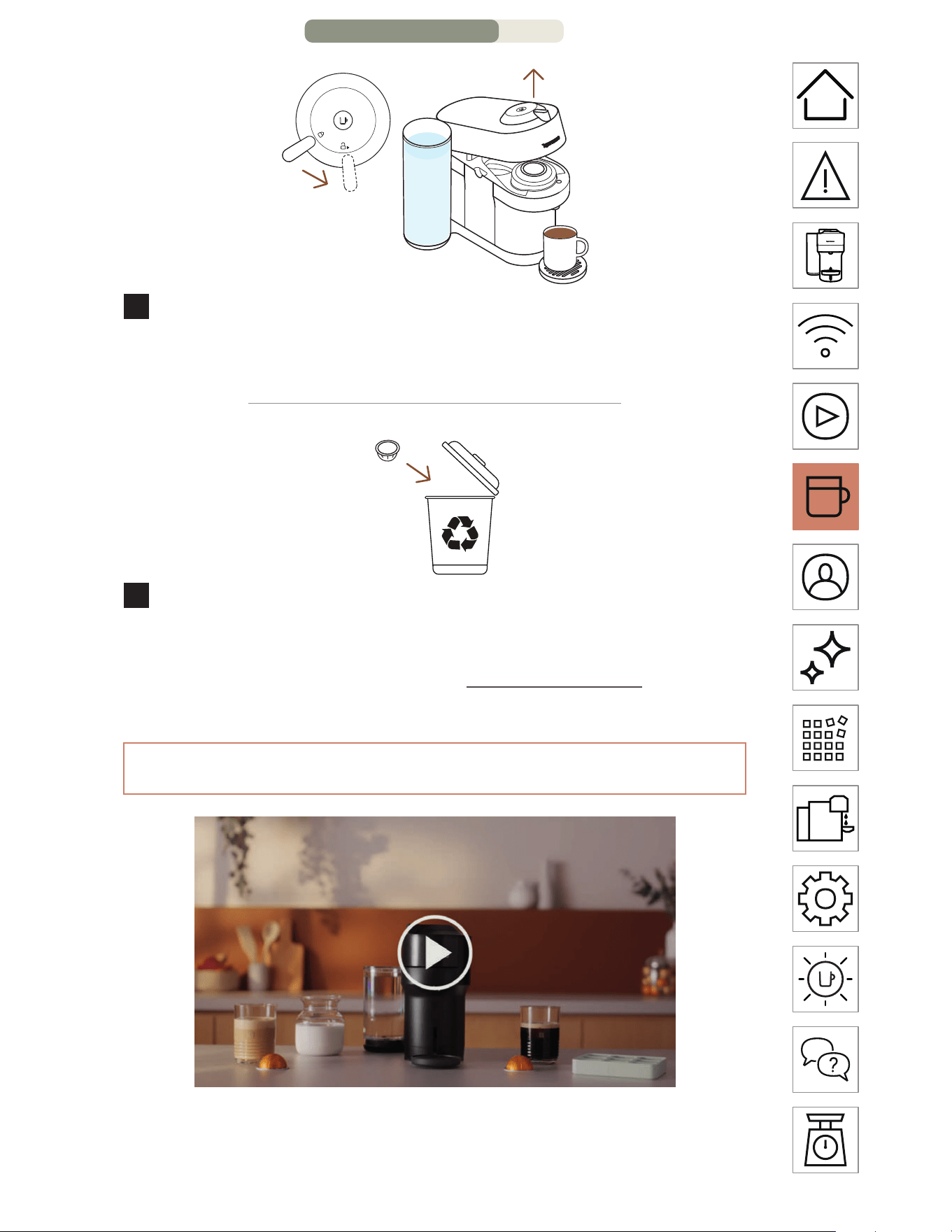
When the coee stops brewing, open the machine head
by turning the lever right towards the unlock position to
automatically eject the capsule and enjoy your coee.
7
Don’t forget to recycle your Nespresso capsules.*
* THIS IS NESPRESSO. THIS IS RECYCLABLE. For more information about
recycling your Nespresso capsules, visit www.nespresso.com
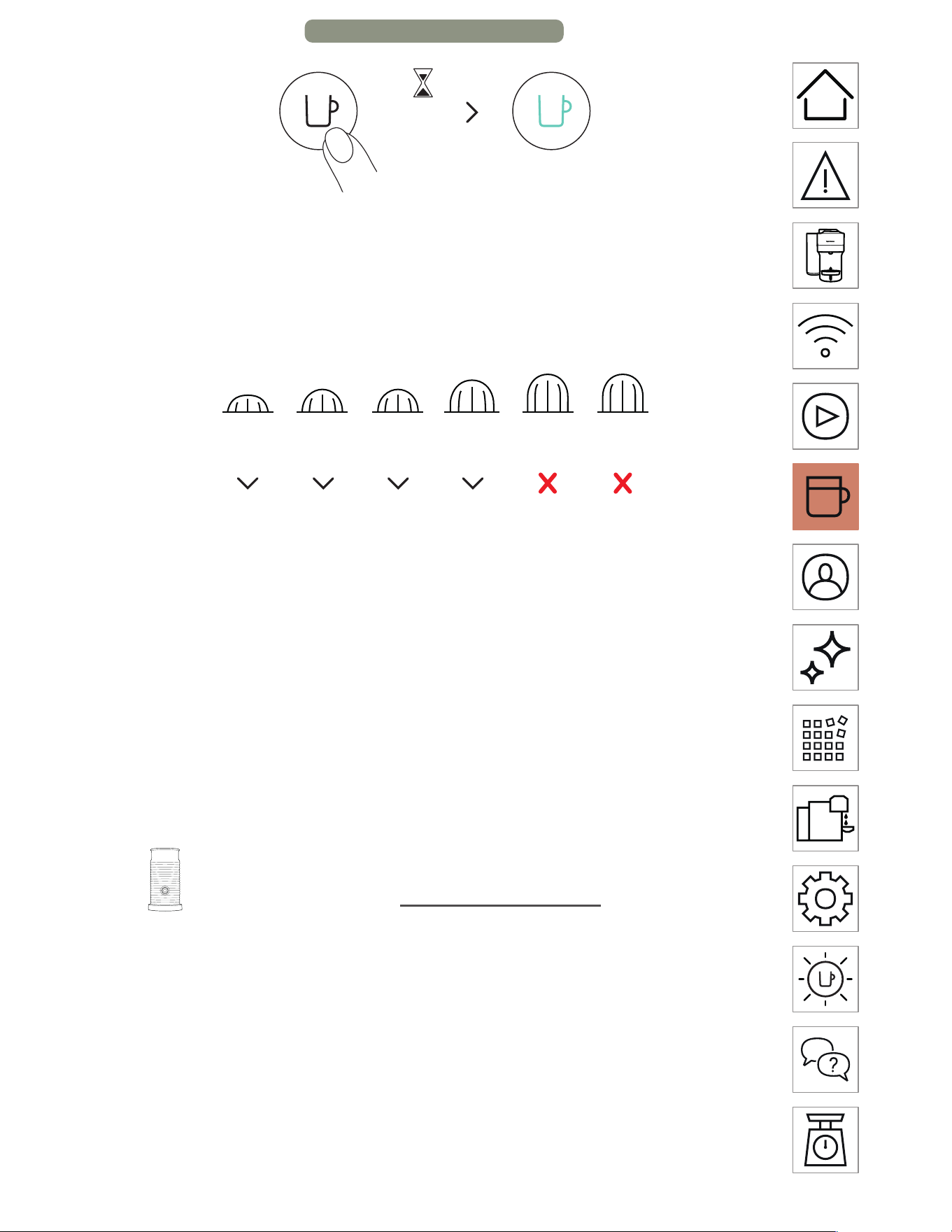
DISCOVER OUR COFFEE CREATIONS MODE
With this machine, Nespresso oers you a specific function to
concentrate your coee extractions to create your own recipes.
COFFEE PREPARATION – PA
GE 3/4
EN
.
15
2x <1s
With your machine turned on and a capsule inserted and the
head closed and locked, double click the coee buon. It will
blink turquoise and your coee brew will be concentrated,
optimizing the coee taste in recipes with add-ons (milk, cream,
over ice...). For Incomparable Coee Experience.
40 ml /
1.35 fl oz
80 ml /
2.7 fl oz
150 ml /
5.07 fl oz
230 ml /
7.77 fl oz
355 ml /
12 fl oz
535 ml /
18.8 fl oz
25 ml /
0.85 fl oz
40 ml /
1.35 fl oz
40 ml /
1.35 fl oz
80 ml /
2.7 fl oz
To fully enjoy the benefits, we recommend brewing our Coee+
range using only the ocial cup sizes. For the best in-cup results,
we do not recommend brewing our XL (Alto Ambrato, Alto
Onice), Cold Brew Style & Carafe Pour Over Style with this mode.
NOTE: An update of your machine via the Nespresso App may be
necessary to enable this mode.
Discover how to upgrade your machine with our
Aeroccino range on www.nespresso.com
COFFEE PREPARATION – PAGE 4/4
EN
.
16
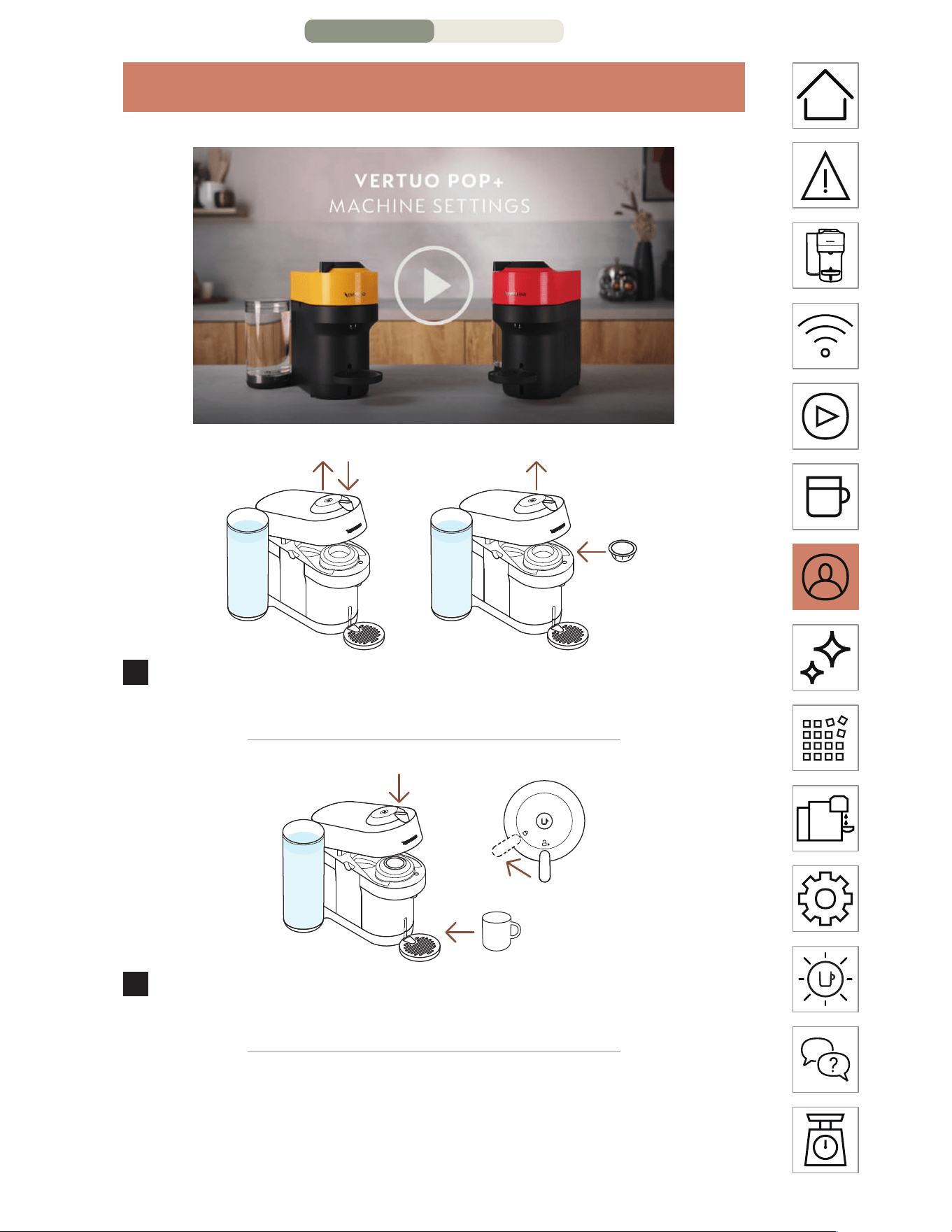
ADAPT YOUR COFFEE VOLUMES
1
Open the machine and insert the capsule you want to
program.
2
Close the machine head, turn the lever le towards the lock
position and place a cup on the cup support.
ADAPT YOUR COFFEE
VOLUMES – PAGE 1/2
EN
.
17
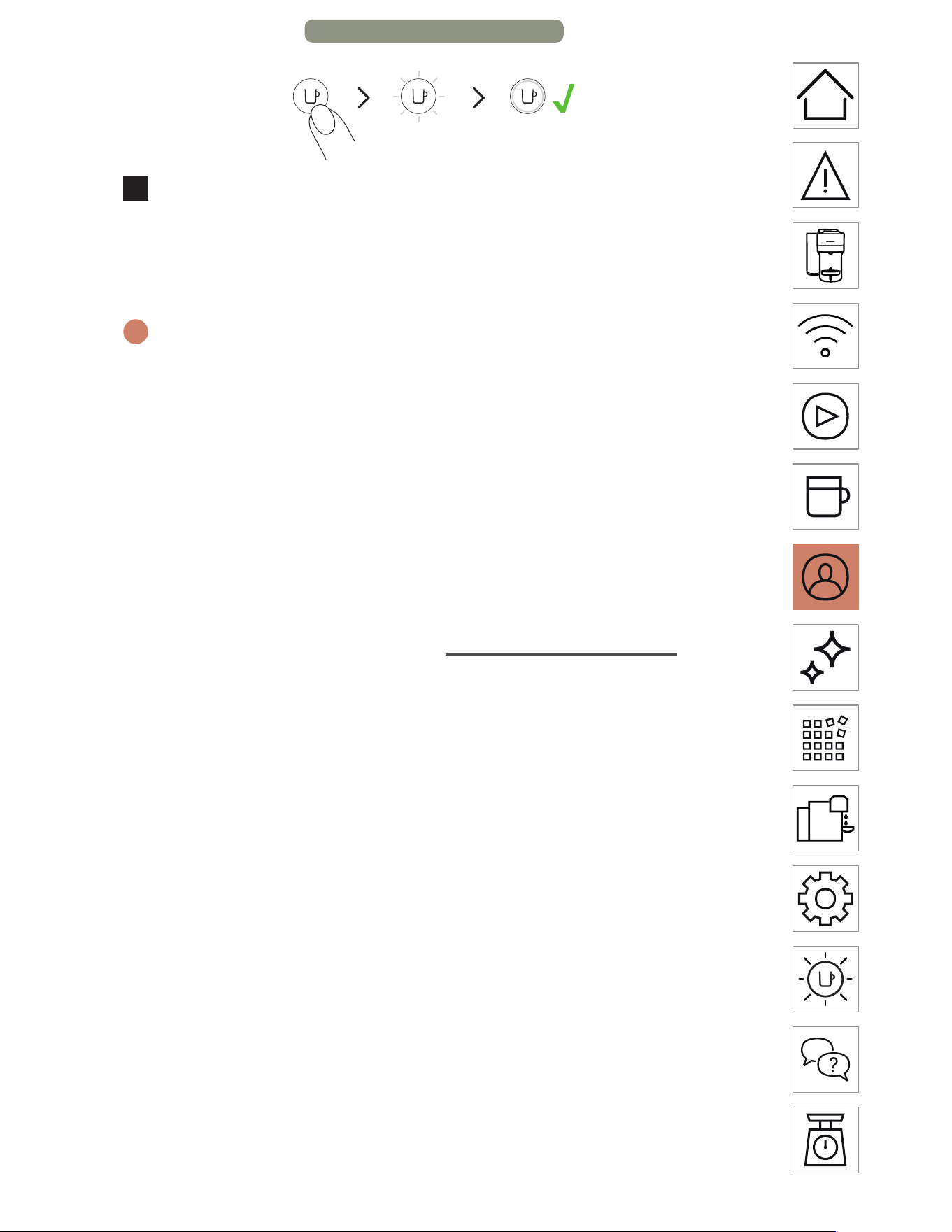
3
Press and hold the buon, leing go a few seconds before
the desired volume is reached. The new water volume is
now programmed for the capsule type used during the
seing.
i
The programming is specific to each capsule type. Cup sizes may be
programmed from 20 ml / 0.7 fl oz to 535 ml / 18 fl oz.
CAUTION: for correct machine use, please do not open the machine
head while the coee is brewing, wait until the machine has stopped and
the coee buon is steady and white. If you want to stop the brewing
earlier, please press the Coee Buon once and wait until the coee
buon goes back to steady white.
NOTE: Once a customer-specific volume is programmed by the user,
every time that capsule type is inserted in the machine, the preparation
will stop at the user-programmed cup size. If you wish to come back to the
default parameters see the paragraph “Reset to factory seings“.
ADAPT YOUR COFFEE VOLUMES – PAGE 2/2
EN
.
18
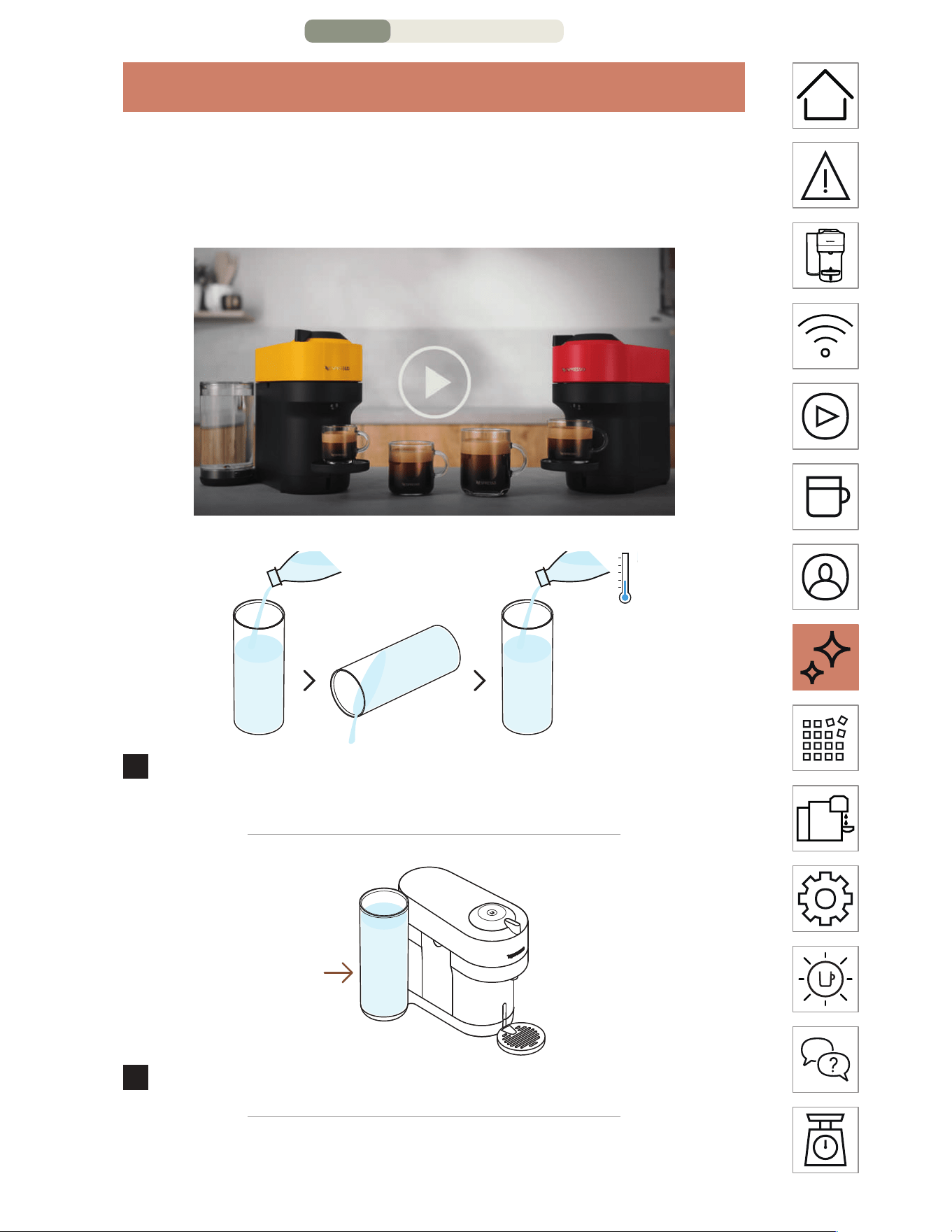
CLEANING
Clean your machine on a monthly basis, when you start having
coee residue inside the machine head or aer a long period of
non-use.
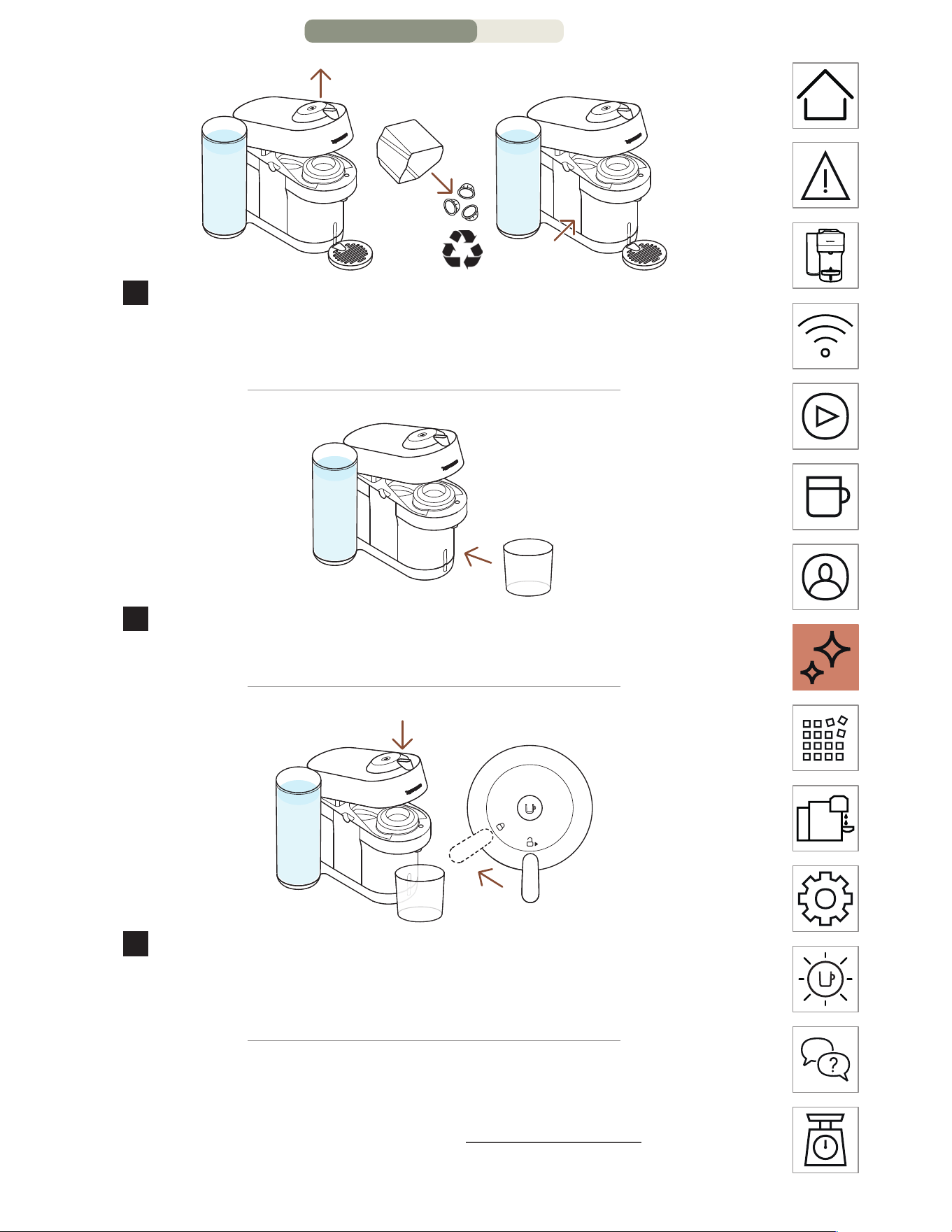
1
Rinse and clean the water tank and the lid before filling it
with fresh drinking water.
2
Put the water tank back in position on the machine.
CLEANING – PAGE 1/3
EN
.
19
3
Unlock and open the machine and eject your used capsule*.
Empty and rinse the capsule container and the drip tray and
put them back in place.
4
Remove the cup support and place an empty container (of
at least 1 L / 34 fl oz) under the coee outlet.
5
Close the machine head and turn the lever le towards lock
position. Make sure no capsules are present in the machine
before starting the cleaning procedure.
* THIS IS NESPRESSO. THIS IS RECYCLABLE. For more information about
recycling your Nespresso capsules, visit www.nespresso.com
CLEANING – PAGE
2/3
EN
.
20
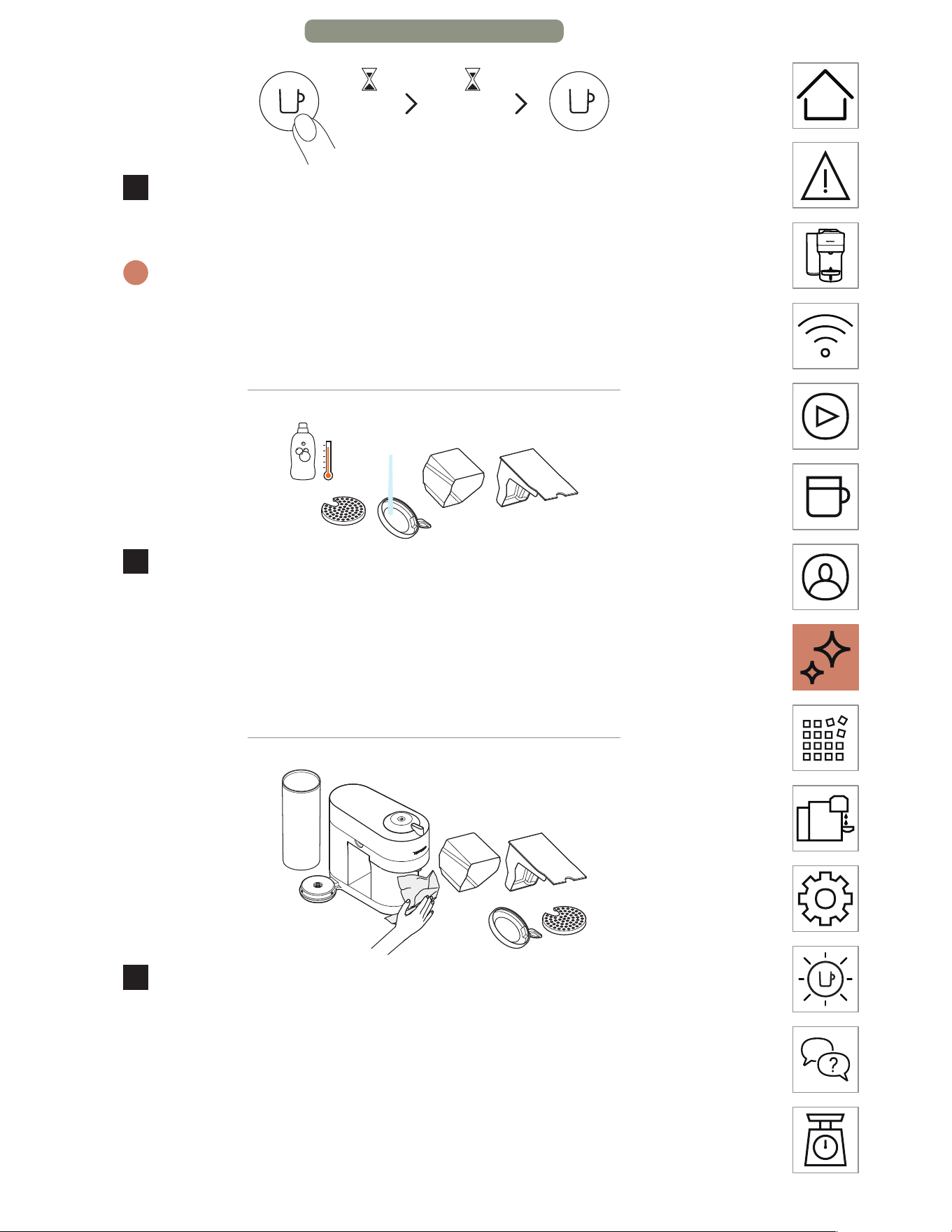
3x <2s ~7min
6
Press the buon 3 times within 2 seconds to start rinsing. Let
the cleaning procedure complete automatically.
i
It should take less than 2 minutes before the cleaning process begins
and water starts to flow. This operation may take up to 7 minutes and
will stop automatically when the cycle is complete. The procedure can
be stopped at any time by pressing the buon.
7
Wash the capsule container, the cup support and the drip
tray with hot water and mild odourless detergent.
CAUTION: Do not use any strong or abrasive cleaning agent or solvent
cleaner. Do not put the machine in a dishwasher. Never immerse the
appliance or part of it in water.
8
Dry the machine with a clean and fresh towel.
CAUTION: Clean the coee outlet regularly with a clean damp cloth.
Always use so cloths to clean the machine.
NOTE: Water may accumulate inside the machine’s head during cleaning.
If this happens, please dry visible parts with a clean dry cloth.
CLEANING – PAGE 3/3
EN
.
21
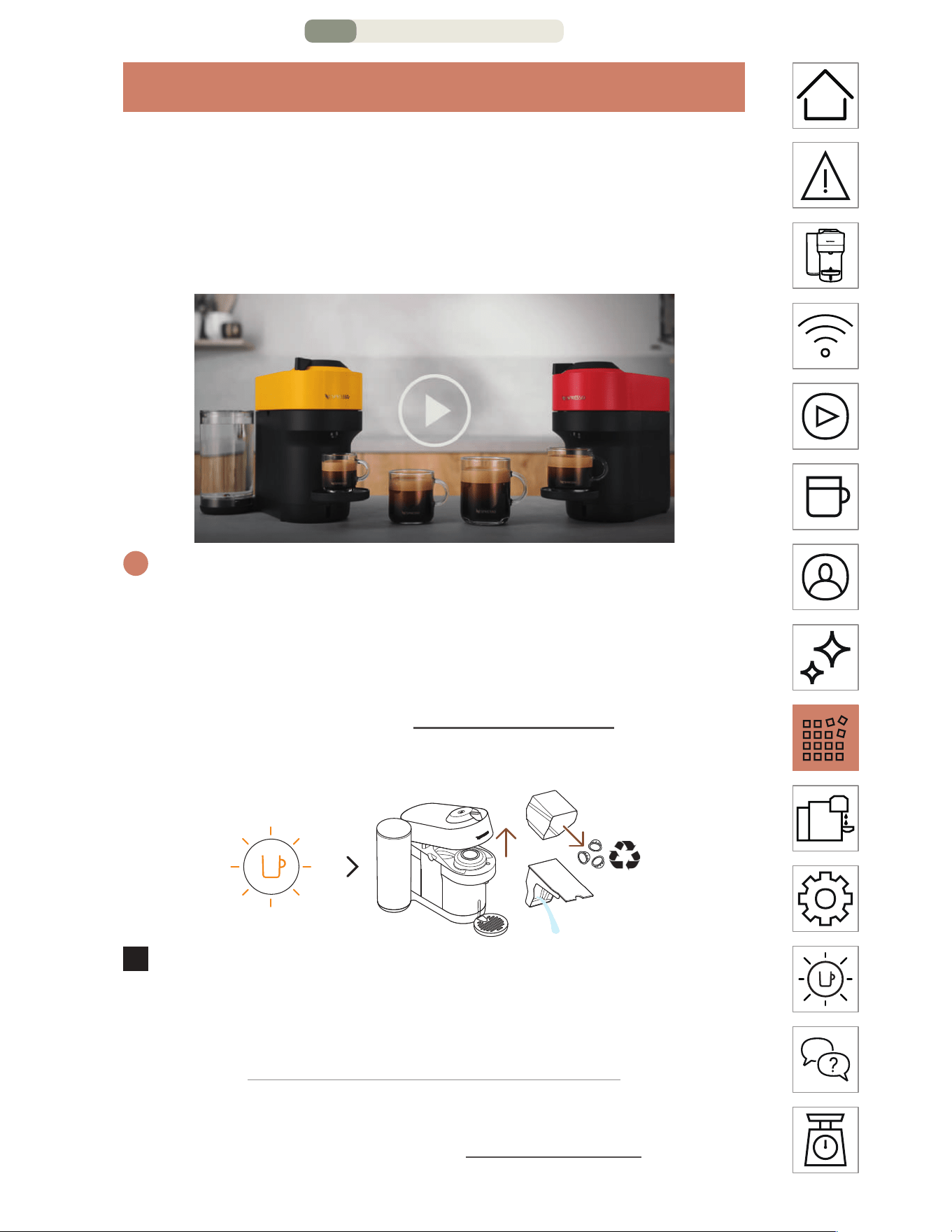
DESCALING
Descaling your machine will ensure that it functions properly
throughout its lifetime and will make your coee experience as
incomparable as it was the first day. Your machine will indicate
when descaling is needed by blinking orange 3 times before
steady white.
i
The descaling procedure takes ~20 minutes and cannot be
interrupted.
NOTE: Please carefully read the descaling instructions before starting.
You will need:
• A descaling kit available on www.nespresso.com
• An empty container (of 1 L / 34 fl oz)
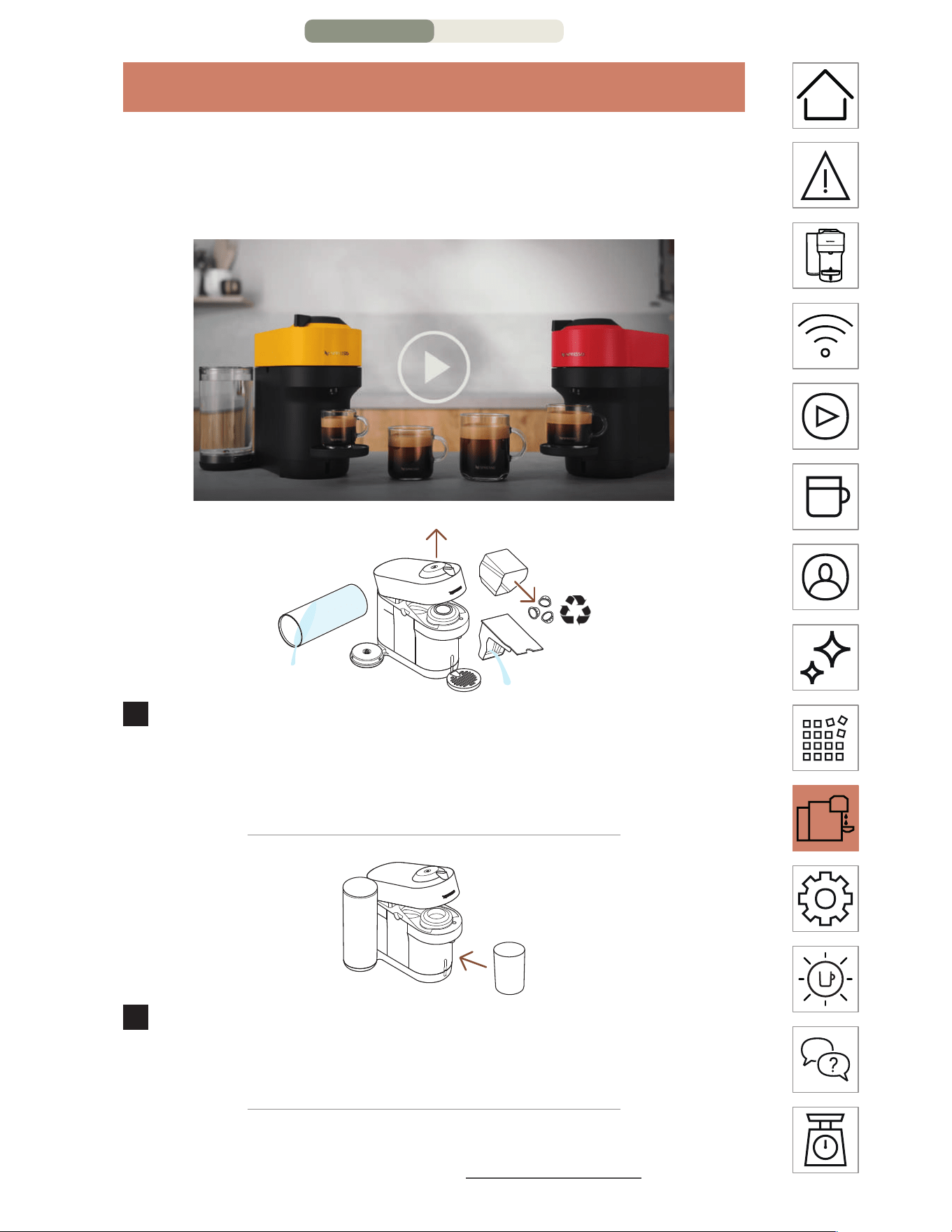
3x
1
With the buon blinking orange 3 times: Unlock and open
the machine head to eject any used capsule*. Empty the
capsule container and drip tray and put them back into
position on the machine.
* THIS IS NESPRESSO. THIS IS RECYCLABLE. For more information about
recycling your Nespresso capsules, visit www.nespresso.com
DESCALING – PAGE 1/5
EN
.
22
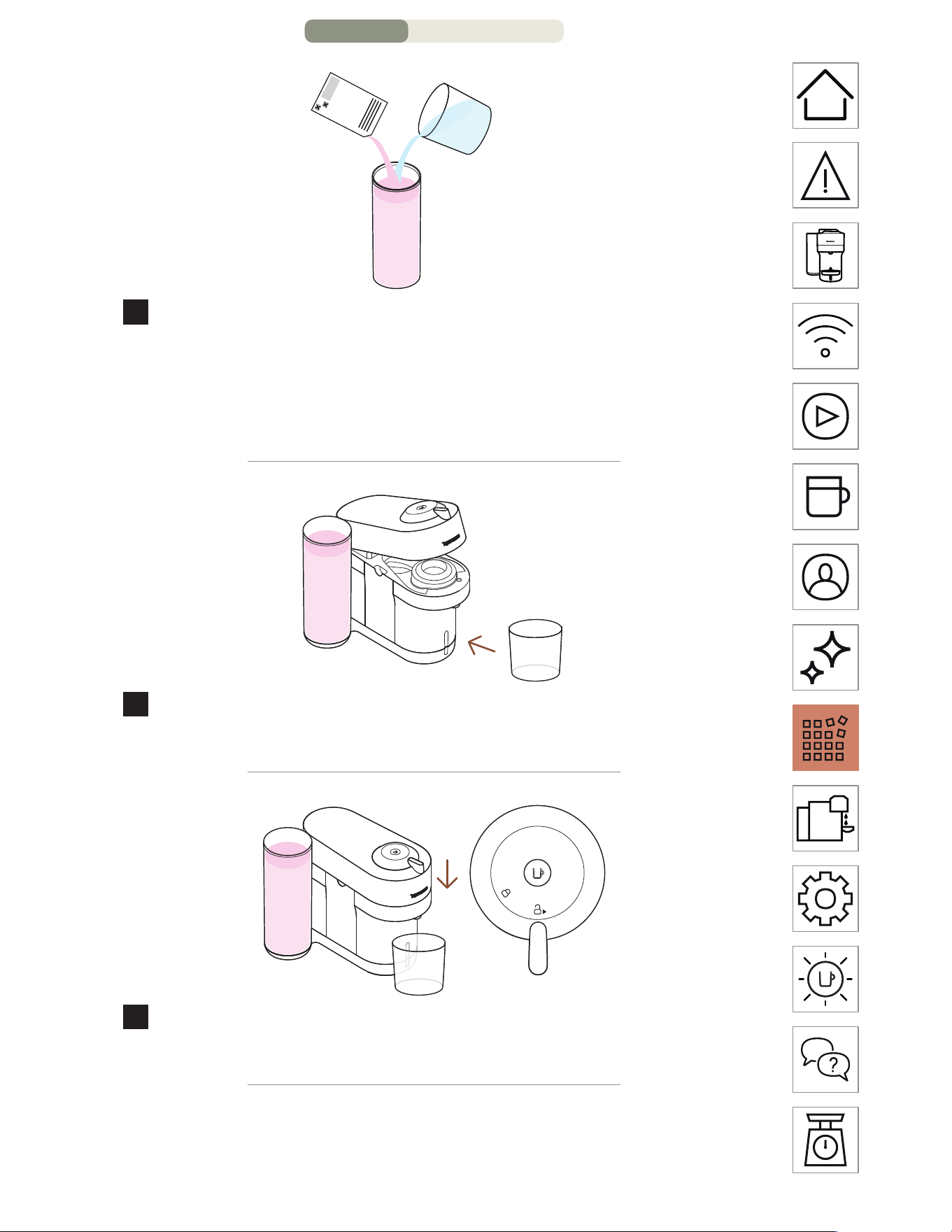
0.5 L / 17 fl oz
1 x
2
Fill the water tank with 0.5 L / 17 fl oz of water and add 1 unit
of Nespresso descaling liquid.
CAUTION: Please note that the descaling solution can be harmful.
Avoid contact with eyes, skin and surfaces.
3
Remove the cup support and place an empty container (of
at least 1 L / fl 34 oz) under the coee outlet.
4
With the machine on, close the machine head and leave the
lever in the unlock position.
DESC
ALING – PAGE 2/5
EN
.
23
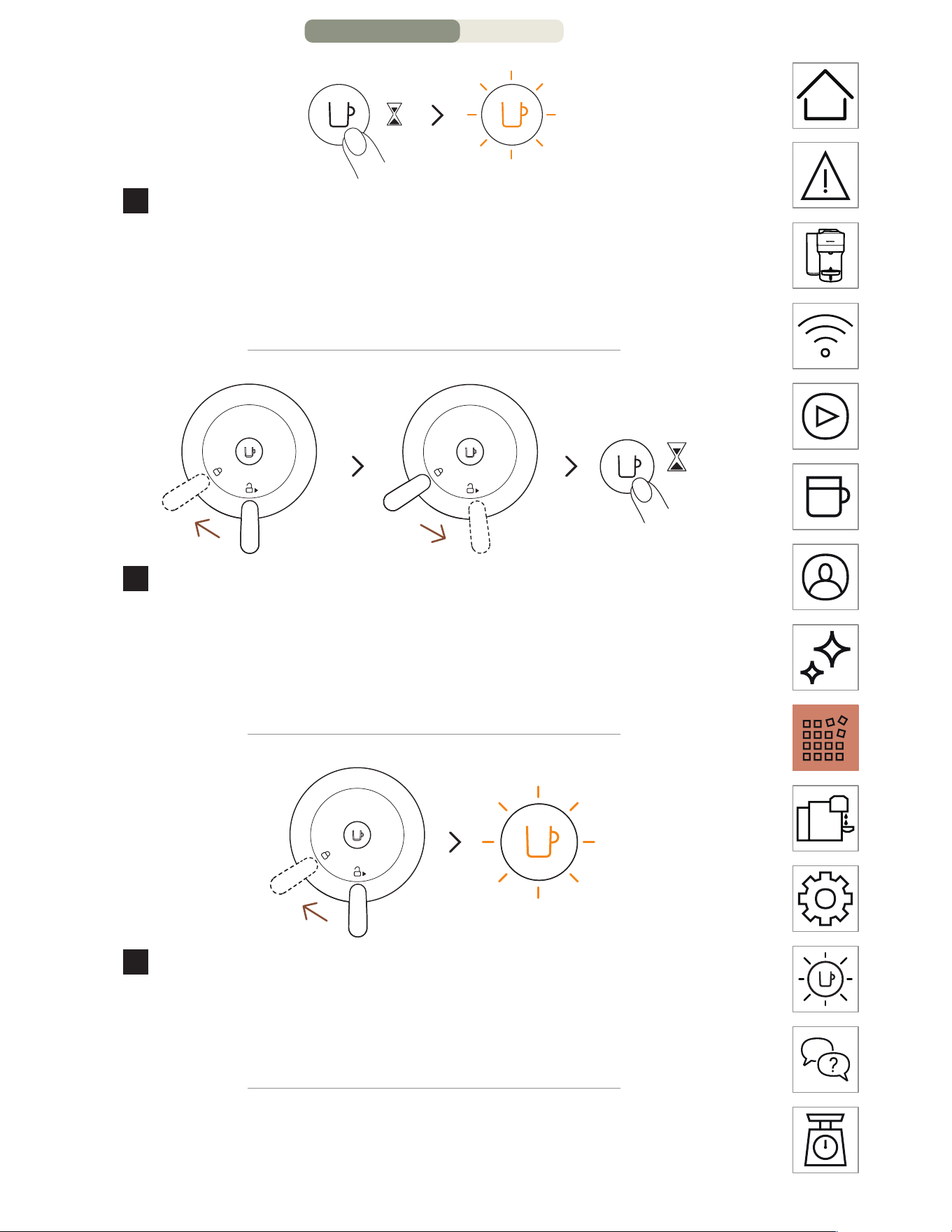
7s
5
Hold the buon for at least 7 seconds or until you see the
light turn o. The buon will start blinking orange rapidly.
CAUTION: You now have 45 seconds to enter the descaling mode,
otherwise the machine will return to the brewing mode.
7s
6
Lock the machine head by turning the lever le until the
lock symbol and then unlock the lever by turning right to
the unlock position. Press and hold the buon again for
approximately 7 seconds or until the light turns o. The
buon will start blinking orange rapidly.
7
To enter the descaling mode, lock the machine by turning
the lever le towards the lock position. The light should still
be blinking orange quickly. This is an indication that you have
entered descaling mode.
DESCALING – P
AGE 3/5
EN
.
24
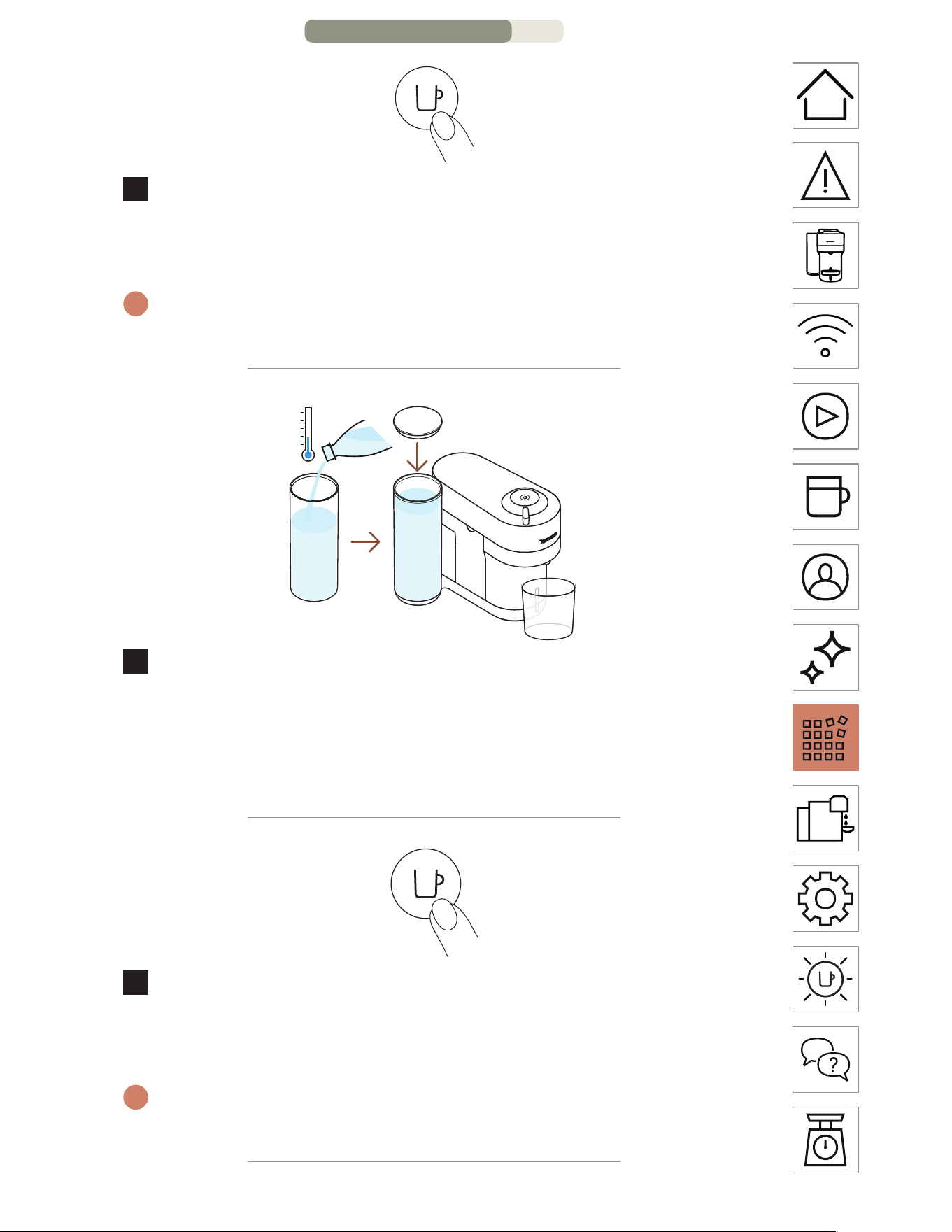
1x
8
Press the coee buon once to begin the descaling process.
The light will continously blink orange throughout the
process.
i
The machine will stop automatically when the first phase of descaling
is completed.
9
At the end of the descaling process, it is time to rinse the
machine. Rinse the water tank and drip tray thoroughly.
Fill the water tank with fresh drinking water and put it back
in place. Empty the container and place it back under the
coee outlet.
1x
10
Press the buon to rinse the machine. When the buon
stops blinking rapidly and becomes steady, the descaling
procedure is completed.
i
The machine will stop automatically when the procedure is
completed.
DESCALING – PAGE 4/5
EN
.
25
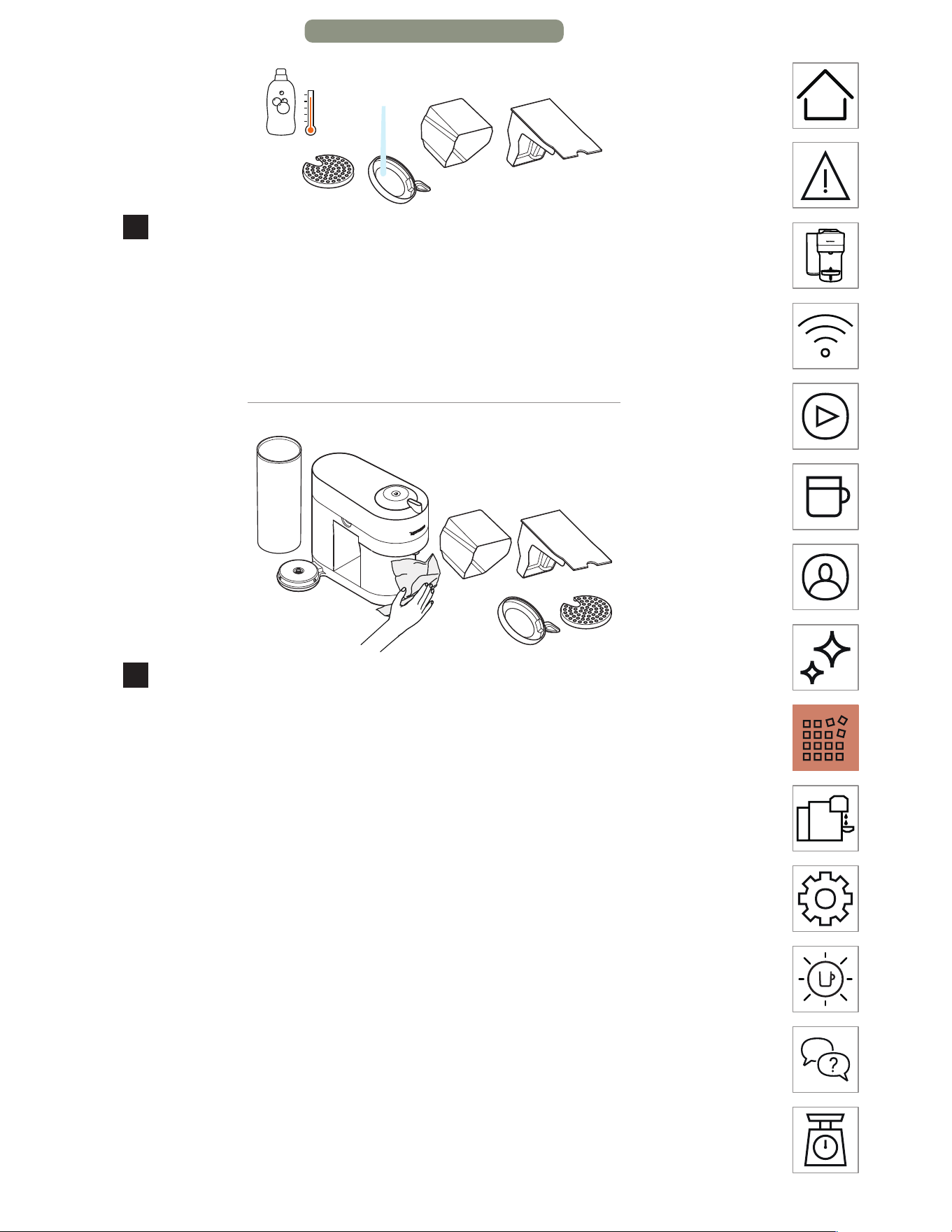
11
Wash the capsule container, the cup support and the drip
tray with hot water and mild odourless detergent.
CAUTION: Do not use any strong or abrasive cleaning agent or solvent
cleaner. Do not put the machine in a dishwasher. Never immerse the
appliance or part of it in water.
12
Dry the machine with a clean and fresh towel. Let the
machine dry for 10 minutes before using it.
NOTE: Water may accumulate inside the machine’s head during cleaning.
If this happens, please dry visible parts with a clean dry cloth.
NOTE: the machine can only enter descaling mode aer 30 or more
coees have been brewed.
DESCALING – PAGE 5/5
EN
.
26
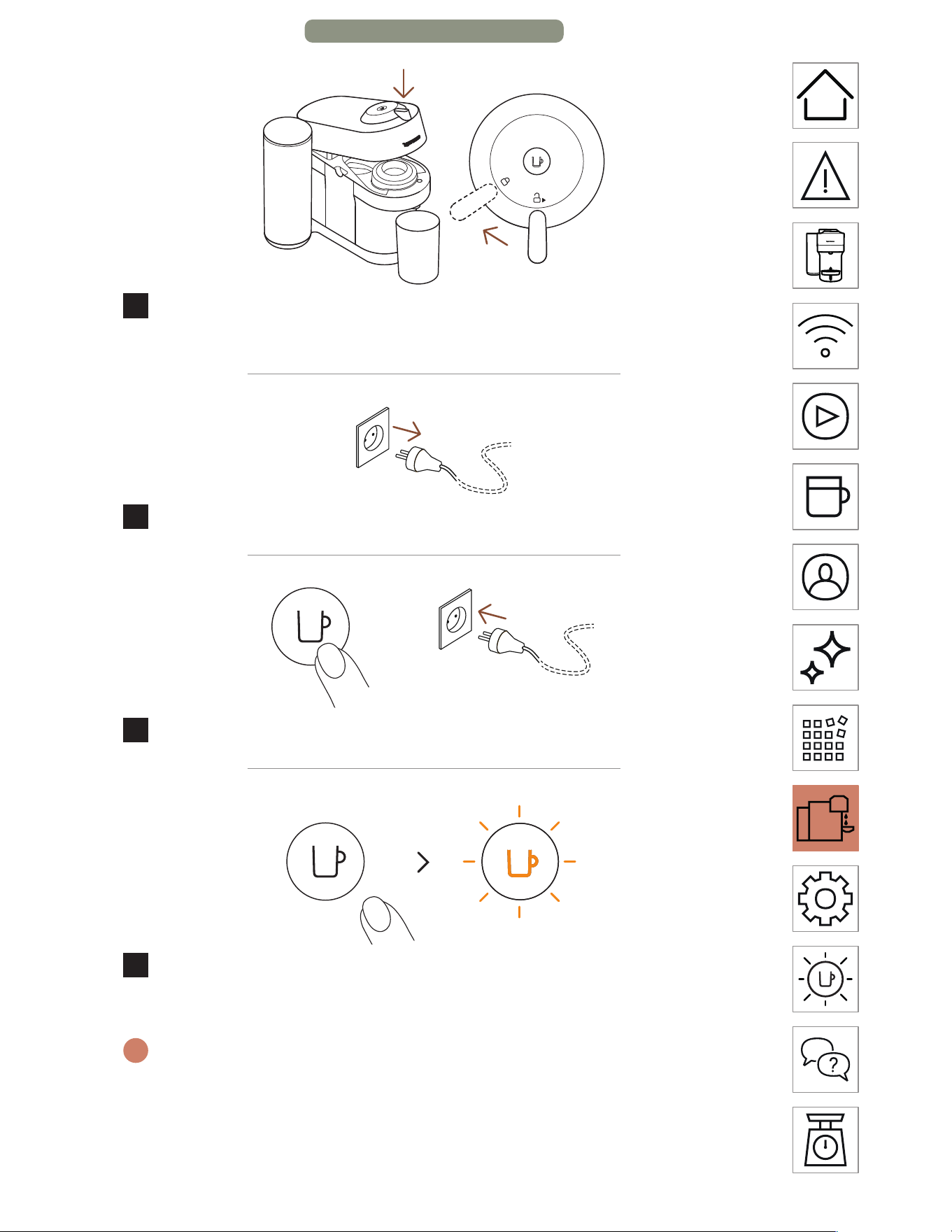
EMPTYING THE SYSTEM
Emptying the system is a process that could be done before a
period of non-use, for frost protection or prior to sending the
machine for a repair.
1
Empty the water tank, open the machine head, and let
the used capsule be ejected. Empty the capsule container
and the drip tray. Don’t forget to recycle your Nespresso
capsules.*
2
Place them back in position on the machine, remove the cup
support and place an empty container (0.5 L / 17 fl oz) under
the coee outlet.
* THIS IS NESPRESSO. THIS IS RECYCLABLE. For more information about
recycling your Nespresso capsules, visit www.nespresso.com
EMPTYING THE S
YSTEM – PAGE 1/2
EN
.
27
3
With the machine plugged in, open and close the machine
head and turn the lever towards the lock position.
4
Unplug the machine.
+
5
Press and hold the buon while plugging in the machine.
6
Release the buon. It will blink orange and the emptying
process will start.
i
It will take approximatively 30 seconds for the machine to complete
the emptying process. The machine turns o automatically when it is
empty.
EMPTYING THE SYSTEM – PAGE 2/2
EN
.
28
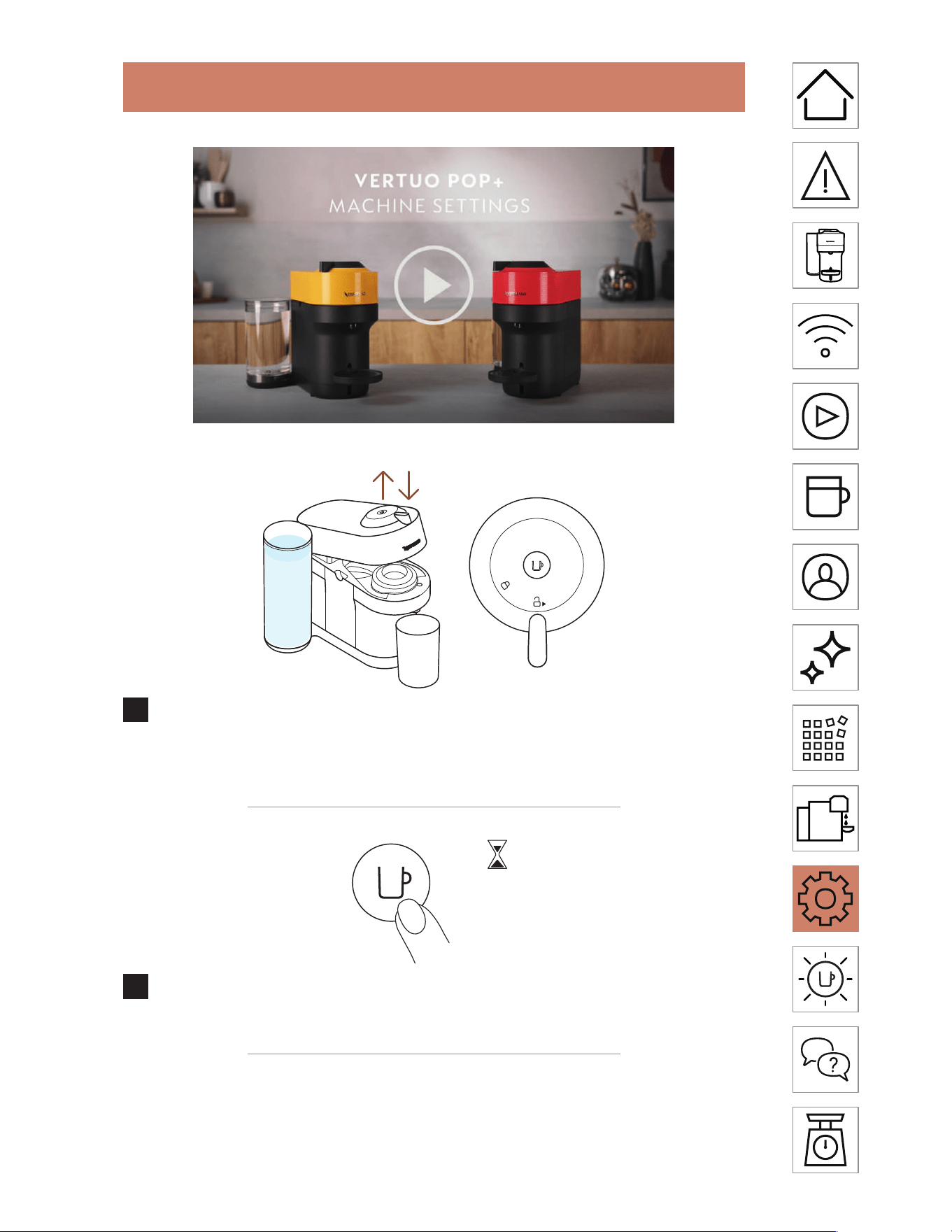
RESET TO FACTORY SETTINGS
1
With the machine plugged in, open and then close the
machine head before leaving the lever in the unlock
position.
5x <3s
2
Press the buon 5 times within 3 seconds. The machine is
now programmed with the factory seings.
EN
.
29
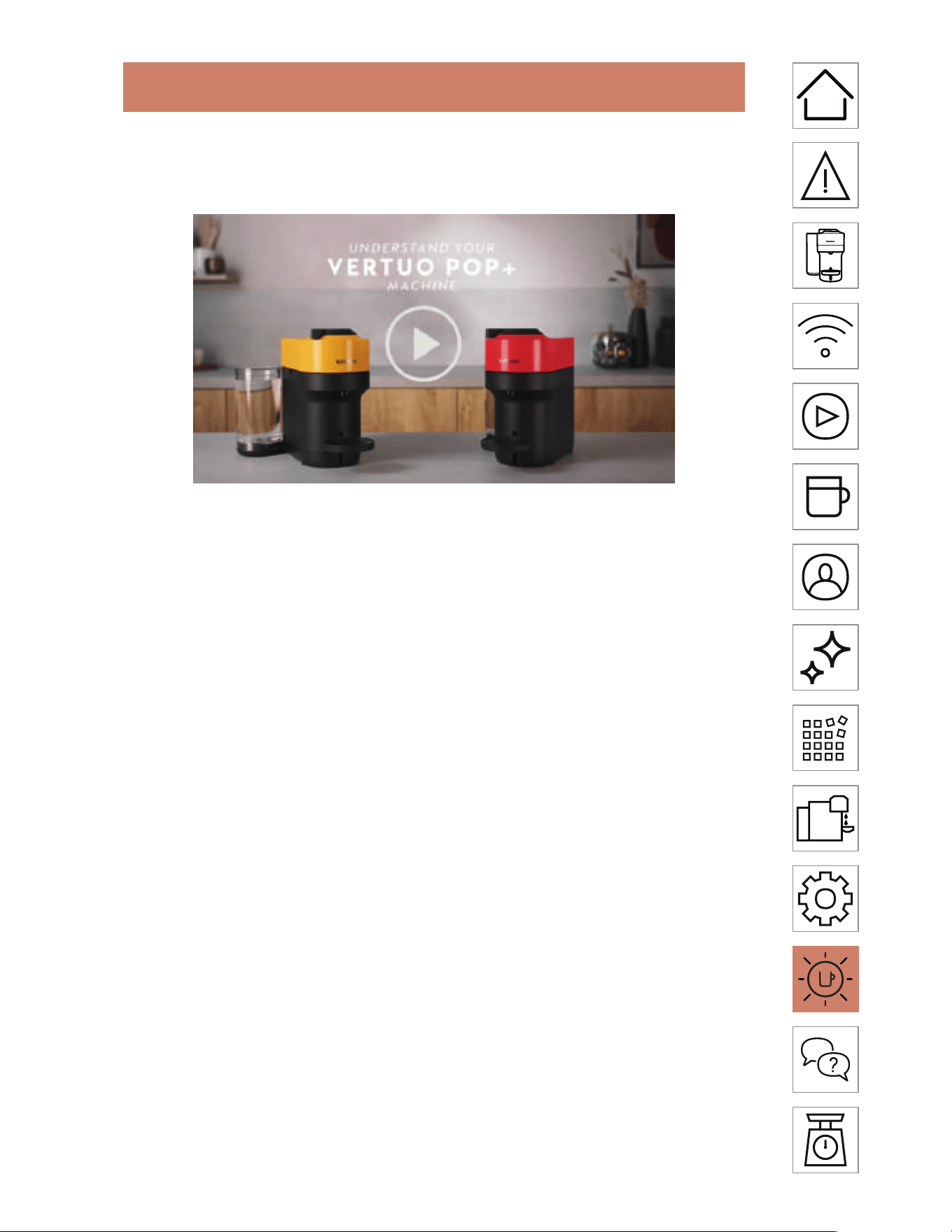
BLINKING SUMMARY
You want to learn more about the Vertuo Pop+ blinkings?
Please watch the following video:
EN
.
30
TROUBLESHOOTING
No light on the buon. • The machine has turned OFF automatically;
press the buon or “UNLOCK” the machine.
• Check the mains, plug, voltage, and fuse.
No coee, no water. • Check that the water tank is filled.
• Check that a fresh capsule is inserted in the
correct position, that the lever is properly
locked and press the buon to start.
• Descale if necessary.
• Open the machine head and eject any
used capsule that is in the machine. Then
perform a clean as per the cleaning section.
Coee is not hot
enough.
• Preheat the cup with hot drinking water
from the tap.
• Descale if necessary.
Leakage or unusual
coee flow.
• Check that the water tank is well positioned.
• Descale if necessary.
Machine turns to “OFF
mode”.
• To save energy the machine will turn o
aer 2 minutes of non-use.
• The machine can be turned “OFF” manually
at any time (when not in use) by pressing
and holding the buon for 3 seconds.
Coee grounds in the
cup.
• Perform the cleaning procedure twice.
• See paragraph on “Cleaning”.
The machine doesn’t
start and has light
steady on. If blinking,
see next points.
• Check that the lever is properly locked.
• If you want to brew a Coee or Espresso,
check that a fresh capsule is inserted in the
correct position, that the lever is properly
locked and press the buon to start.
• If you are cleaning, descaling or emptying
the system, check that no capsule is
inserted then close, lock the machine and
press the buon to start one of these
operations.
The machine doesn’t
start and light blinks
alternately; 1 blink and
1 pause.
• Fill the water tank and press the buon to
start.
• Check that the lever is properly locked.
TR
OUBLESHOOTING – PAGE 1/3
EN
.
31
Light blinks while
machine is running.
• If the coee is flowing normally, this
indicates the machine is working properly.
• If only water is flowing, the machine is
executing a user request for either cleaning,
descaling or emptying the system. Refer
to the corresponding section in this user
manual.
• Turn the machine to “OFF mode” by
pressing the buon for 3 seconds and then
press it again to turn the machine ON. Now
wait approximately 20 minutes to allow the
machine to cool down aer extensive use.
Light blinks and
machine is not running.
• It will take some time before the coee flow
comes out (due to code reading and pre-
weing the coee).
• Check that a fresh capsule is inserted in the
correct position, that the lever is properly
locked and press the buon to start.
• Fill the water tank and press the buon to
start.
• Turn the machine to “OFF mode” by
pressing the buon for 3 seconds and then
press it again to turn the machine ON. Now,
wait approximately 20 minutes to allow the
machine to cool down aer extensive use.
Light blinks alternately
2 blinks and 1 pause
continuously. Machine is
not running.
• During regular Coee/Espresso
preparation:
1) Unlock the lever and open the machine
head to check that a fresh undamaged
capsule is inserted in the correct position.
2) Check that the lever is in “LOCKED”
position.
3) Check that the water tank is filled.
• During Descaling, Emptying and Cleaning:
1) Check that the capsule is ejected.
2) Check that the lever is in “LOCKED”
position.
• During Programming Volume:
1) Check if a capsule has been well inserted.
2) Please refer to the corresponding
chapter “Adapt your coee volume”.
TROUBLESHOOTING – P
AGE 2/3
EN
.
32
• If the problem persists:
1) Unlock the lever and open the machine
head.
2) Replace the capsule (if needed).
3) Disconnect the power cord from the
outlet and plug the machine back into the
outlet aer 10 seconds.
4) Close the head and press the buon to
turn ON and press again to start brewing.
If the problem persists, call Nespresso.
Light alternately
blinking 3 times and
then steady on.
• Descaling needed: the machine can be
used only a few times aer the descaling
alert appears before it becomes necessary.
TROUBLESHOOTING – PAGE 3/3