
Hi
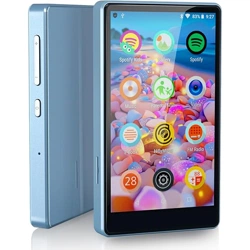
- This is Luoran M4B MP3 Player -
Support@luoranmusic.com
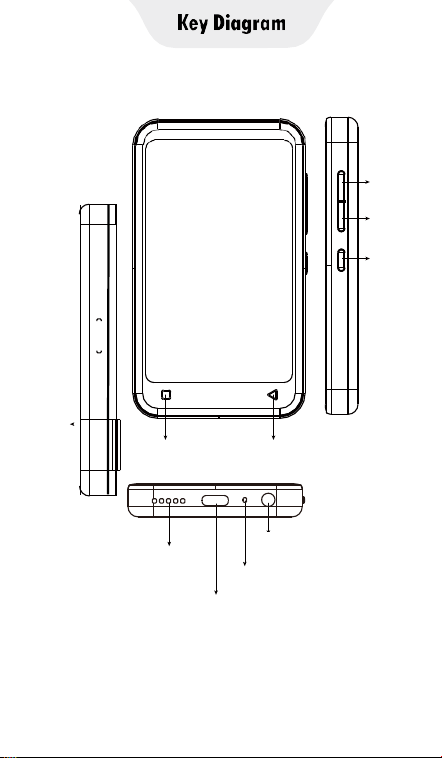
SD Slot
HOME
BACK
Volume+
Volume-
Power
Built-in Speaker
USB-C Port
3.5mm Port
Reset

Basic Settings
Power: In shutdown state, press and hold for 3
seconds to turn on.
In the boot state, long press for 3 seconds to
activate the shutdown options: Power off,
Restart, Airplane mode.
Short press to turn off/on the screen.
Volume +/-: up/down the volume.
USB-C Port: Used for Charging and File transfer.
Reset: Setting-Reset options-Factory data
reset.Note: After deleting the app, please
restore it by restoring it to the factory.
Back: Click to come back to the previous page.
Home: Click to come back to the homepage.
Long press to open the background process
management (Recently used apps) swipe
left/right to remove the selected process.
SD Slot: Expand the storage of the device,
maximum support 256GB TF/ Micro-SD card.
3.5mm Output: Connect your headphones or
external speakers.

SAFETY WARNING: Be sure to write down the
password,PIN code... that you have
set,otherwise you will not be able to access
the device!!!
Pre installed APPS
1. Spotify Kids
2. Spotify
3. Amazon Music
4. Audible
5. HiByMusic
6. AIMP
7. Browser(Removable)
8. Ebook
9. Sound Recorder
10. FM radio
11. Video
12. Clock
13. Calculator
14. Calendar
Note: If APPS (Spotify Kids, Spotify, Amazon
Music, Audible, HiByMusic) cannot be used,

please contact After sales service email:
Support@luoranmusic.com . We will provide
you with the new APK and installation steps.

Upload from your computer
█ Use the included USB cable to connect the
player to your computer. The computer will
automatically recognize the device and install
the driver. After the installation is successful,
click "My Computer", you will find an MTP
device named "M4B" in the list of devices and
drives, click on it to access the player's
internal/external SD card and its folders.
█ Copy the downloaded music or videos,
e-books, and other files from your computer
and paste them into the folder here, just like
using a normal USB flash drive.
Tips: If you are a Mac device, please download
the MTP device file transfer software before
proceeding with the above operations. The
recommended software is as follows:
OpenMTP: https://openmtp.ganeshrvel.com/
MacDroid: https://www.macdroid.app/
Upload from your cellphone
Upload music or video to the player via your
smartphone, and require your phone to install
the specified App.
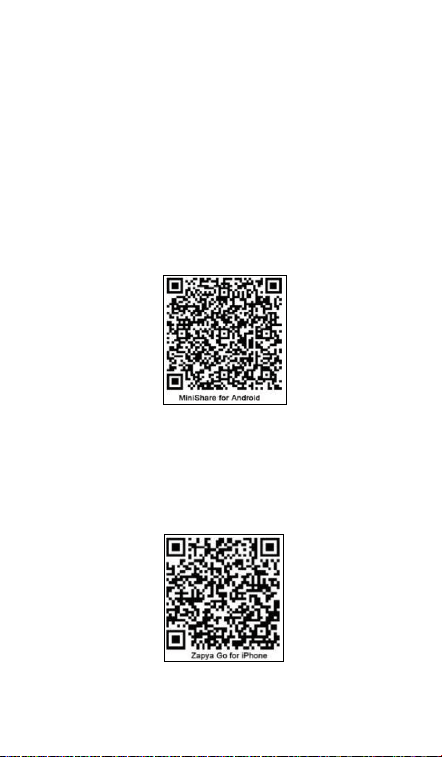
MiniShare (for Android phone)
Scan the following QR code to download and
install MiniShare.
ZapyaGo (for iPhone)
Search for “Zapya Go” in the AppStore or scan
the following QR code to download and install
ZapyaGo.

Common Faults and Solutions
█ The music player can’t be charged.
In the off state, when the USB cable is
connected for charging, the player usually will
light up and display the brand logo and
remaining battery.
Tips: due to the limitation of the charging
protocol, you can only: Using a USB A to C
cable, you can connect to a computer or a USB
adapter to charge the player.
Troubleshooting:
▸Check whether it is caused by poor contact.
In most cases, charging failure is caused by
poor contact. You can repeatedly plug and
unplug the USB cable to test whether the
charging can be resumed. If it can be charged
at a certain moment, it indicates that there is
poor contact.
▸Check whether USB port is damaged.
Connect the player to a computer with an
available USB port by using a proven USB
cable. If the fault persists, it indicates USB port
of the player has been damaged.
▸Check if the USB cable is damaged.
You can replace a proven USB cable to connect
the player to check whether it can be charged.

If it can, it means that the previous cable has
been damaged.
You can also use the USB cable to try to charge
other devices, such as cellphones, to check
whether it can charge other devices. If not, it
means also that the cable has been damaged.
If it is confirmed that both the USB cable and
the charging port are normal, it can be
determined that it is the fault of the player
itself. Please contact after-sales support for
replacement or refund.
Support@luoranmusic.com
1.Forgot password: Please contact our
after-sales email, and we will provide you with
the software package and installation steps.
After the operation is completed, the device
can reset the password. Note: Due to system
reasons, please remember the password
before using the device, as resetting the device
can be more complex.
2.The app cannot be used: Please contact the
after-sales email and we will provide you with
a new APK and installation steps.
3.Missing accessories: Please contact the
after-sales email and we will provide you with

new accessories.
4.When listening to music offline: please
download music in an online environment and
then listen to music offline.
5.SD card reading: Our device supports mini
memory cards in the format of 256GB FAT32 or
less. If the card still cannot be read, please
format the mini memory card in the device.
6.Install a new app: If you need to install a new
app, please contact us through our after-sales
email. We will test the app for you and send
you the app and installation steps. For
example: Libby, Pandora, Tidal, deezer, etc.
7.Restore the APP: Please reset through
Settings Reset options Factory data, and the
APP will be restored. If it still cannot be
restored, please contact the after-sales email.
8.Luoran Brand has its own factory and
supports customization, such as customizing
the app and appearance. If you are a B2B
customer with a large procurement demand,
please contact our email.
Email: Support@luoranmusic.com
1.Passwort vergessen: Bitte kontaktieren Sie
unsere After-Sales-E-Mail, und wir werden
Ihnen das Softwarepaket und die

Installationsschritte zur Verfügung stellen.
Nachdem der Vorgang abgeschlossen ist, kann
das Gerät das Passwort zurücksetzen. Hinweis:
Bitte beachten Sie aus Systemgründen das
Passwort, bevor Sie das Gerät verwenden, da
das Zurücksetzen des Geräts komplexer sein
kann.
2.Die App kann nicht verwendet werden: Bitte
kontaktieren Sie die After-Sales-E-Mail und wir
werden Ihnen eine neue APK und
Installationsschritte zur Verfügung stellen.
3.Fehlendes Zubehör: Bitte kontaktieren Sie
die After-Sales-E-Mail und wir stellen Ihnen
neues Zubehör zur Verfügung.
4.Wenn Sie Musik offline hören: Bitte laden Sie
Musik in einer Online-Umgebung herunter und
hören Sie Musik dann offline.
5.SD-Kartenlesen: Unser Gerät unterstützt
Mini-Speicherkarten im Format von 256GB
FAT32 oder weniger. Wenn die Karte immer
noch nicht gelesen werden kann, formatieren
Sie bitte die Mini-Speicherkarte im Gerät.
6.Installieren Sie eine neue App: Wenn Sie eine
neue App installieren müssen, kontaktieren Sie
uns bitte über unsere After-Sales-E-Mail. Wir
testen die App für Sie und senden Ihnen
If you have any questions about the product,
please feel free to contact us. We promise to

reply you as soon as possible within 24 hours.
Email: Support@luoranmusic.com
1.Mot de passe oublié: veuillez contacter notre
boîte mail après - vente et nous vous
fournirons le package et les étapes
d'installation. Une fois l'opération terminée,
l'appareil peut réinitialiser le mot de passe.
Remarque: pour des raisons de système,
gardez votre mot de passe à l'esprit avant
d'utiliser votre appareil, car il peut être plus
compliqué de le réinitialiser.
2. L'application ne peut pas être utilisée:
veuillez contacter la boîte aux lettres après -
vente, nous vous fournirons le nouvel APK et
les étapes d'installation.
3.Accessoires manquants: veuillez contacter la
boîte aux lettres après - vente et nous vous
fournirons de nouveaux accessoires.
4. Lorsque vous écoutez de la musique hors
ligne: veuillez télécharger de la musique dans
un environnement en ligne, puis écouter de la
musique hors ligne.
5.Lecture de la carte SD: notre appareil prend
en charge les mini - cartes mémoire au format
FAT32 de 256 go ou moins. Si la carte ne peut

toujours pas être lue, formatez la mini carte m
émoire de votre appareil.
6. Installer une nouvelle application: Si vous
avez besoin d'installer une nouvelle
application, veuillez nous contacter via notre e
- mail après - vente. Nous testerons
l'application pour vous et vous l'enverrons.
1.Password dimenticata: Si prega di contattare
la nostra e-mail post-vendita e vi forniremo il
pacchetto software e i passaggi di installazione.
Al termine dell'operazione, il dispositivo può
reimpostare la password. Nota: Per motivi di
sistema, ricorda la password prima di utilizzare
il dispositivo, poiché il ripristino del dispositivo
può essere più complesso.
2. L'app non può essere utilizzata: Si prega di
contattare l'e-mail post-vendita e vi forniremo
un nuovo APK e passaggi di installazione.
3.Accessori mancanti: Si prega di contattare
l'e-mail post-vendita e vi forniremo nuovi
accessori.
4.Quando si ascolta musica offline: si prega di
scaricare musica in un ambiente online e
quindi ascoltare musica offline.
5.Lettura della scheda SD: Il nostro dispositivo
supporta mini schede di memoria nel formato
di 256 GB FAT32 o meno. Se la scheda non è
ancora leggibile, formattare la scheda di
memoria mini nel dispositivo.
6.Installa una nuova app: Se hai bisogno di
installare una nuova app, ti preghiamo di
contattarci tramite la nostra e-mail
post-vendita. Proveremo l'app per te e ti
invieremo.
▸ Nothing happens when the player is
connected to the computer with a USB cable.
Usually, use a USB cable to connect the player
to the computer, the top of the player will
appear with 2 icons: and . And an MTP
device named M4B will appear in the drive list
of your computer.
Troubleshooting:
▸Check whether it is caused by poor contact.
In most cases, such failure is caused by poor
contact. You can repeatedly plug and unplug
the USB cable to test whether the connection
can be resumed.
▸Check whether the USB port is damaged.
Connect the player to a computer with an

available USB port by using a proven USB
cable. If the fault persists, it means the USB
port of the player has been damaged.
▸Check if the USB cable is damaged.
You can replace a proven USB cable to connect
the player to check if the connection can be
restored. If it can, it means that the previous
cable has been damaged.
▸You can also try to use the USB cable to
connect to other devices. If there is also no
response, it means also that the USB cable has
been damaged.
█ FM radio cannot be turned on.
Usually, you need to connect a wired headset
to use it as an antenna. In addition, the
playback effect of FM Radio will be affected by
the location and the strength of the signal.
Troubleshooting:
▸The FM radio needs to be plugged into a
wired headset/headphones as an antenna to
turn on. If the headset is plugged in and the
fault persists, it is likely that the 3.5mm port is
in poor contact. Please replace one headset
and try again.

.
Specification
Bluetooth version:
5.0
Product Size:
107 x 62 x 10.5 mm
Weight:
110g
Screen Size:
4.0 inch (540 x 960 Pix)
Battery Capacity:
1500mAh
Input:
5V=1A
Charging Time:
120 Minutes
Internal Memory:
1G RAM+8GB ROM
Expansion slot:
Micro SD/TF Card (up to
256GB)
Music format:
MP3, OGG, APE, FLAC,
WAV, AAC-LC, ACELP,
M4A
Video format:
AVI, MKV, MPG, MPEG,
RM, RMVB, VOB, MOV,
FLV, ASF, DAT, MP4, 3GP
Photos format:
JPEG, BMP, GIF
Ebook format:
EPUB, TXT, PDF, DOCX,
FB2, MOBI
Recording format:
3Gpp
FM Receiving
Frequency:
87.5 MHz ~ 108 MHz

More Specific Details
About Audio:
Sampling rates supported: 8kHz to 48kHZ
Sample formats supported: 8-bit/16-bit,
Mono/Stereo
Interfaces supported: DAI. 12S. PCM
Proprietary audio post-processing
technologies: BesLoudness.
Audio encode: AMR-NB, AMR-WB, AAC, OGG,
ADPCM
Audio decode: WAV, MP3, MP2.AAC. AMR-NB,
AMR-WB, MIDI Vorbis, APE.AAC-plus v1,
AAC-plus v2, FLAC, ADPCM
About Video:
H.264 decoder: Baseline 1080p
@30fps/40Mbps
Sorenson H.263/H.263 decoder: 1080p@
30fps/40Mbps
MPEG-4 SP/ASP decoder: 1080p
@30fps/40Mbps
DIVX4/DIVX5/DIVX6/DIVX HD/XVID decoder:
1080p @ 30fps/40Mbps
VP8 decoder: 1080p @30fps/6Mbps(SW)
VC-1 decoder: 1080p @30fps/20Mbps (SW)
MPEG-4 encoder: Simple profile D1 @ 30fps

(SW)
H.263 encoder: D1@30fps (SW)
Warning
Do NOT leave the device in an environment
where the temperature is too low or too high
(below -10°C or above 50°C) for a long time.
Extreme temperature environments will cause
the device to deform and shorten its service
life of the device;
▸Do not use the equipment under
thunderstorm weather;
▸Do not place the device in the water;
▸Do not expose the equipment to the sun for
a long time.
Term & Condition of Warranty
Thank you for purchasing our products. You
will enjoy the following services when using
this product.
▸Warranty period: Within one year from the
date of sale.
▸Warranty scope: Limited to the product host.
▸Warranty terms:

█ Within 1 year after purchase, failure or
damage caused by product quality problems
can be replaced for free or full refund.
█ Accessories are not included in the
warranty, such as USB cable, earphones, etc.,
but if quality problems occur within 7 days
after purchase, they can be replaced for free.
The following conditions are not covered by
the warranty.
▸Out of the warranty period.
▸It has been disassembled or repaired
privately by the customer.
▸Man-made damage, accidental damage or
deformation.
▸Failure caused by installation and use in
abnormal environments such as high
temperature, high pressure, and humidity.
▸Damage caused by natural disasters such as
lightning strikes, floods, and earthquakes.
After-sales service
Email: Support@luoranmusic.com
If you have any questions about the product,
please feel free to contact us. We promise to

reply you as soon as possible within 24 hours.
Thank you
