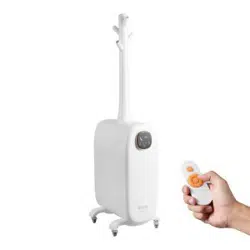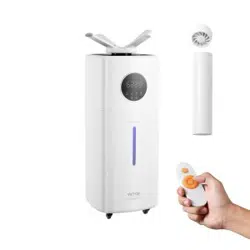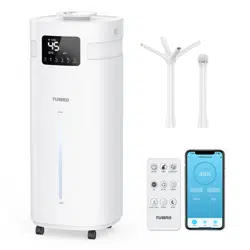
Humidifier
Greenland GLH20WIFI
Thank you for purchasing our product.
Please read this instruction manual carefully
before use.

[email protected] www.turbro.com
SAFETY GUIDE
GETTING TO KNOW YOUR HUMIDIFIER
SPECIFICATIONS
GETTING STARTED
USING YOUR HUMIDIFIER
MAINTENANCE AND CLEANING
TROUBLESHOOTING
FCC STATEMENT
FCC RADIATION EXPOSURE STATEMENT
ATTRIBUTIONS
Warranty
····················································02
··················04
·················································06
··············································06
·····································09
····························16
············································18
·················································19
··············20
····················································20
·····························································21
CONTENTS
01

[email protected] www.turbro.com
SAFETY GUIDE
02
Turn o the machine before moving it.
When the machine is working, do not separate the water tank from the base.
Do not block the outlet or add water to the mist outlet which may cause
water leakage, deformation, or failure and void the warranty.
This machine requires using pure water below 113
O
F and use at room
temperature between 41 to 104
O
F.
The power cord should not be scratched, damaged, knotted, pressed against
heavy objects, clamped, or processed. Otherwise, it may cause electric
shock, short circuit, or fire.
Do not connect to a socket that exceeds the rated voltage and don't use
an extension cable to avoid fire or electric shock.
Do not unplug the power plug with wet hands, otherwise, it may cause
electric shock or injury.
Under thunderstorm weather or no use for a long time, please unplug the
power supply.
Do not use acidic detergent to clean the main body. If the detergent remains,
it may produce toxic gas.
Do not deliberately inhale the spray mist, especially for people with sensitive
respiratory tracts.
Do not put essential oil into the main body/water tank, which may cause
water leakage, corrosion, deformation, or damage.
Do not insert your fingers or other things into the water inlet or air outlet
or the gap which may cause damage to the machine or electric shock.
When not in use for a long time (more than 24 hours), pour out the water
in the water tank to prevent mold or impurities from harming your health.
Do not cover the nozzles while the humidifier is on. Doing so may damage
the humidifier.
[email protected] www.turbro.com
03
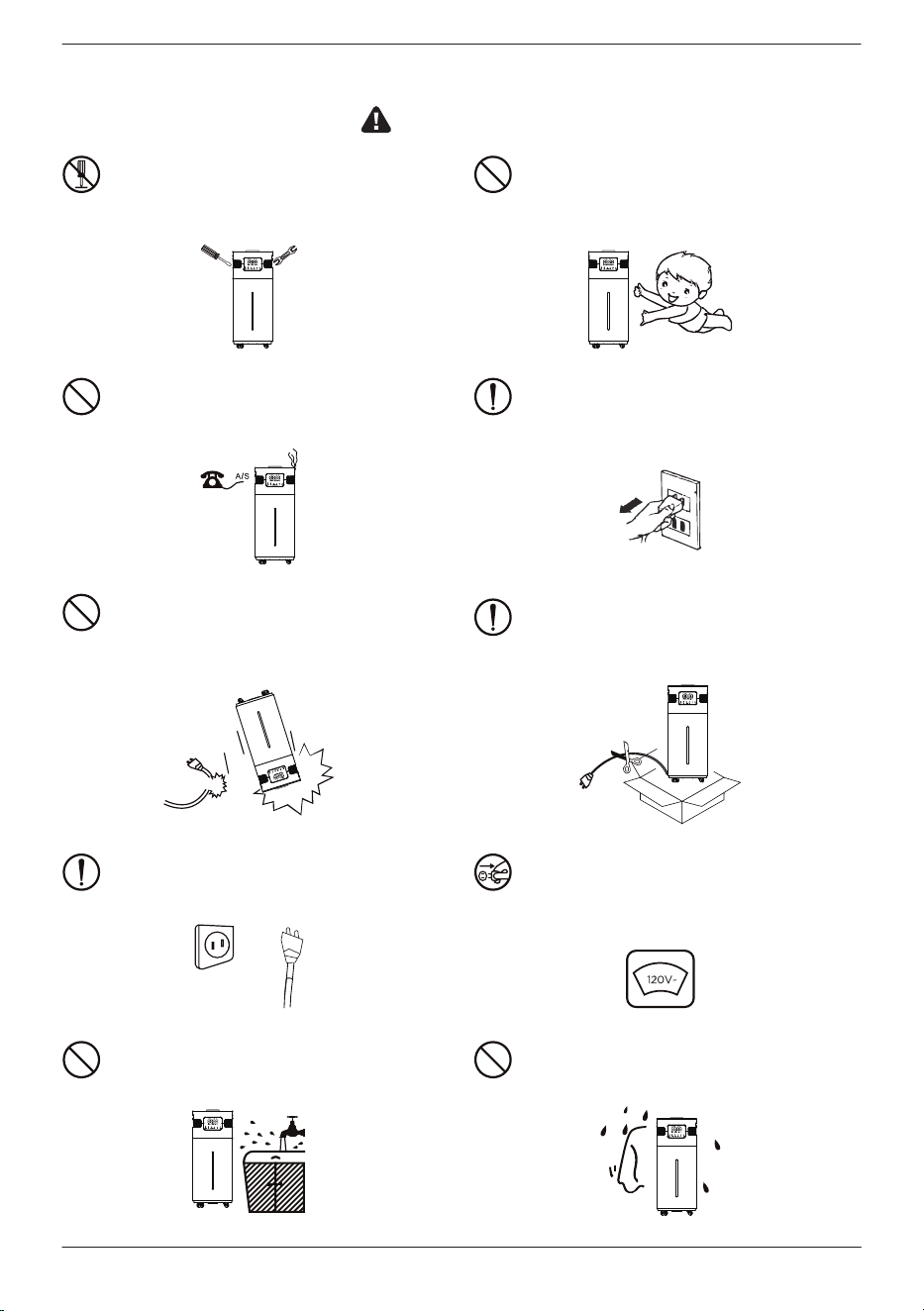
1. Do not disassemble or modify the
machine as this will void the warranty.
3. If there is any fault happen, please
unplug it immediately and contact us
via support@turbro.com.
5. Power cord with damage or product
fall or drop, please call the professional
guy to repair and detect before using.
7. Be sure the plug is intact before using,
in case any accident.
9. Do not drop the machine into the
water, do not operate it with wet hand.
10. Keep away from any heat source.
8. Be sure the power supply voltage must
be the same as the rated voltage of this
product.
4. Unplug the power plug when filling
and cleaning.
6. Please cut the power cord when
disposing this product; also any
component that may.
2. Keep this machine out of reach of
children. Children should only use this
machine under the close supervision of
adults.
CAUTION
[email protected] www.turbro.com
GETTING TO KNOW YOUR HUMIDIFIER
04
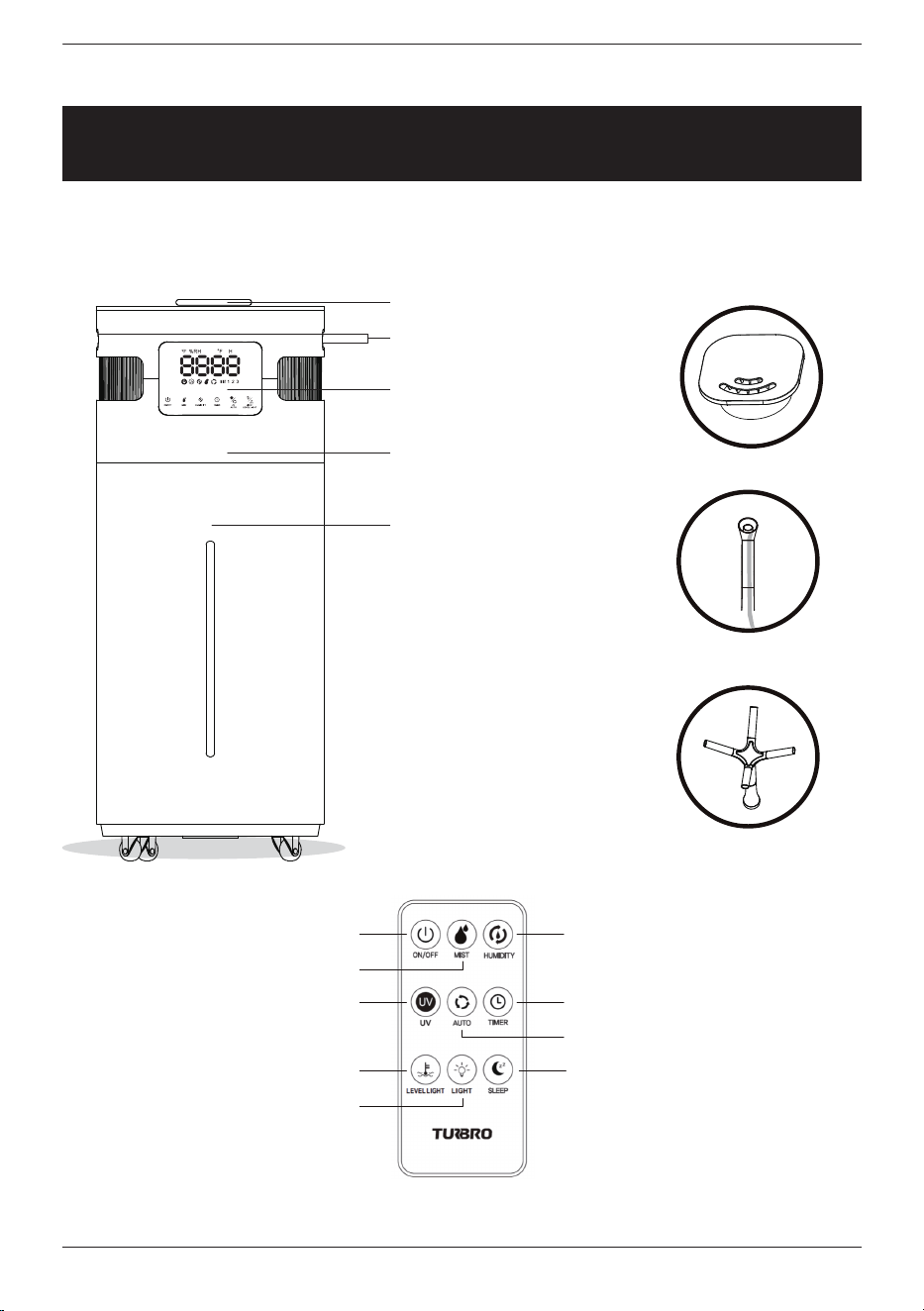
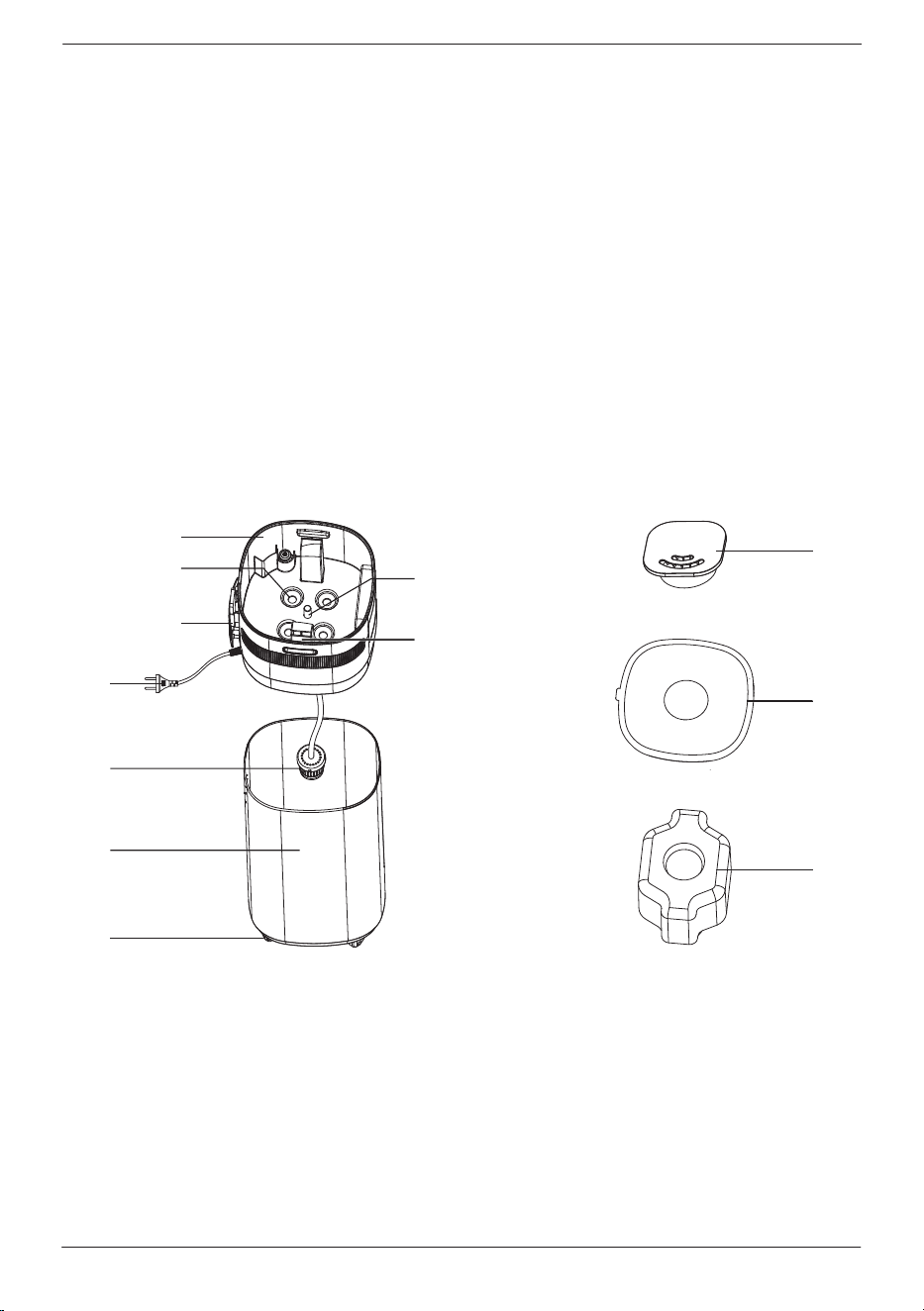
Nozzle
Handle
3 Different Nozzles
Remote Control
Body
2 Ways
Extension Tube
4 Ways
Water Tank
PRODUCT DETAIL
Humidity
Timer
Sleep
Display
On/O
UV
Water Level Light
Mist
Auto
Light
[email protected] www.turbro.com
05
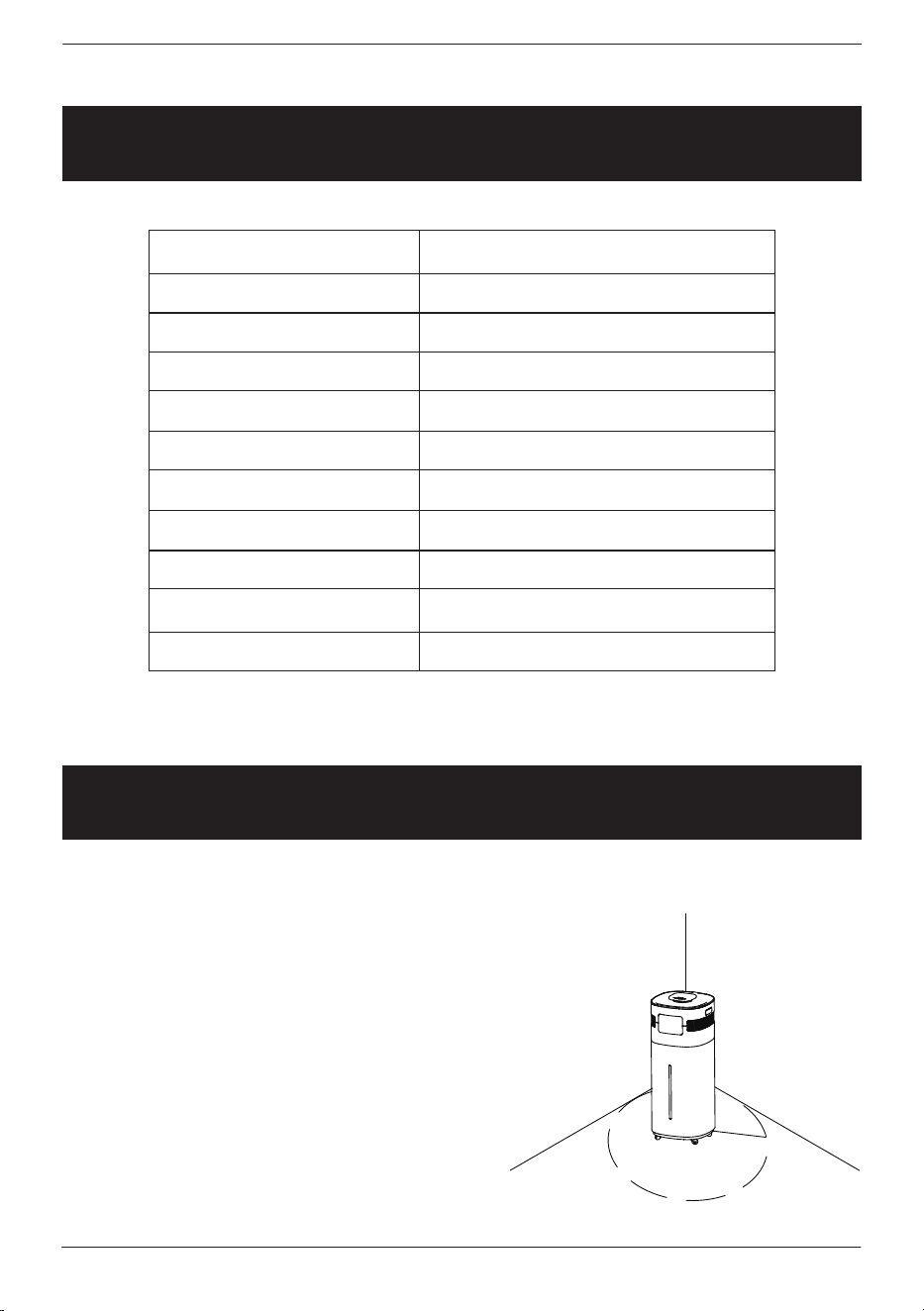
A. Sink
B. Atomizer
C. Remote Control Holder
D. UV Lamp
E. Power Cord
F. Air Outlet
G. Water Filter
H. Water Tank
I. Wheels
J. Nozzle
K. Cover
L. Mist Cover
PRODUCT STRUCTURE
C
D
F
G
H
J
K
L
I
A
E
B
[email protected] www.turbro.com
SPECIFICATIONS
GETTING STARTED
06
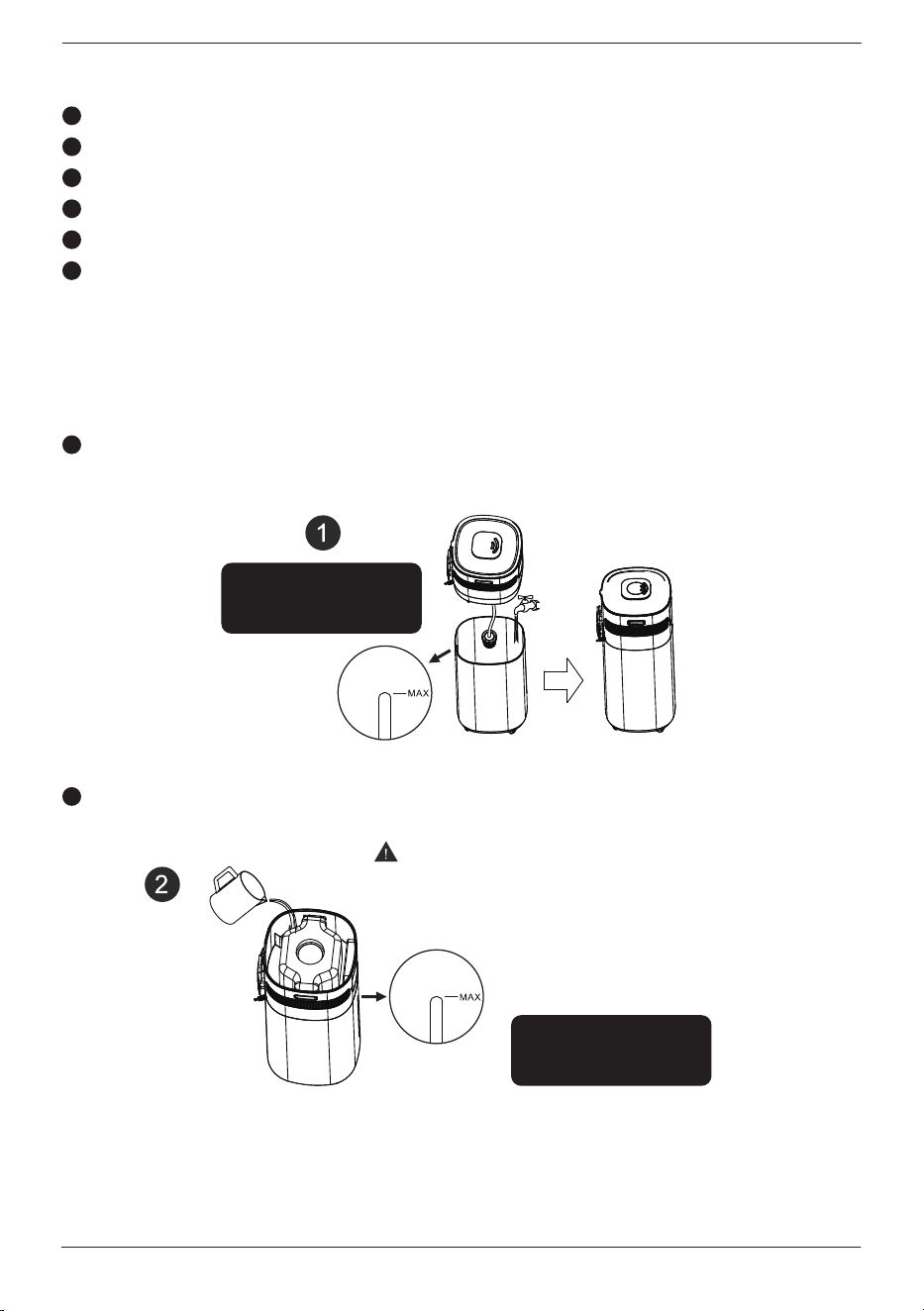
This humidifier should be placed on a firm
floor and at least 19 inches of space away
from walls, furniture, furnace, household
appliances, etc.
Please do not use it on the following
occasions to avoid water leakage, signal
interference or injury, etc.
PLACEMENT
Product Name
Model Number
Voltage
Power
Capacity
Mist Output
Noise
Timer
Safety Function
Dimensions
Weight
Humidifier
GLH20WIFI
120V/60Hz
105W
20L
700-1000ML/H
≤35dB
1-12 H
Waterless Auto Shut-o
10.4 x 11.3 x 25.9 Inches
9.5 Lbs
19 inches
[email protected] www.turbro.com
07
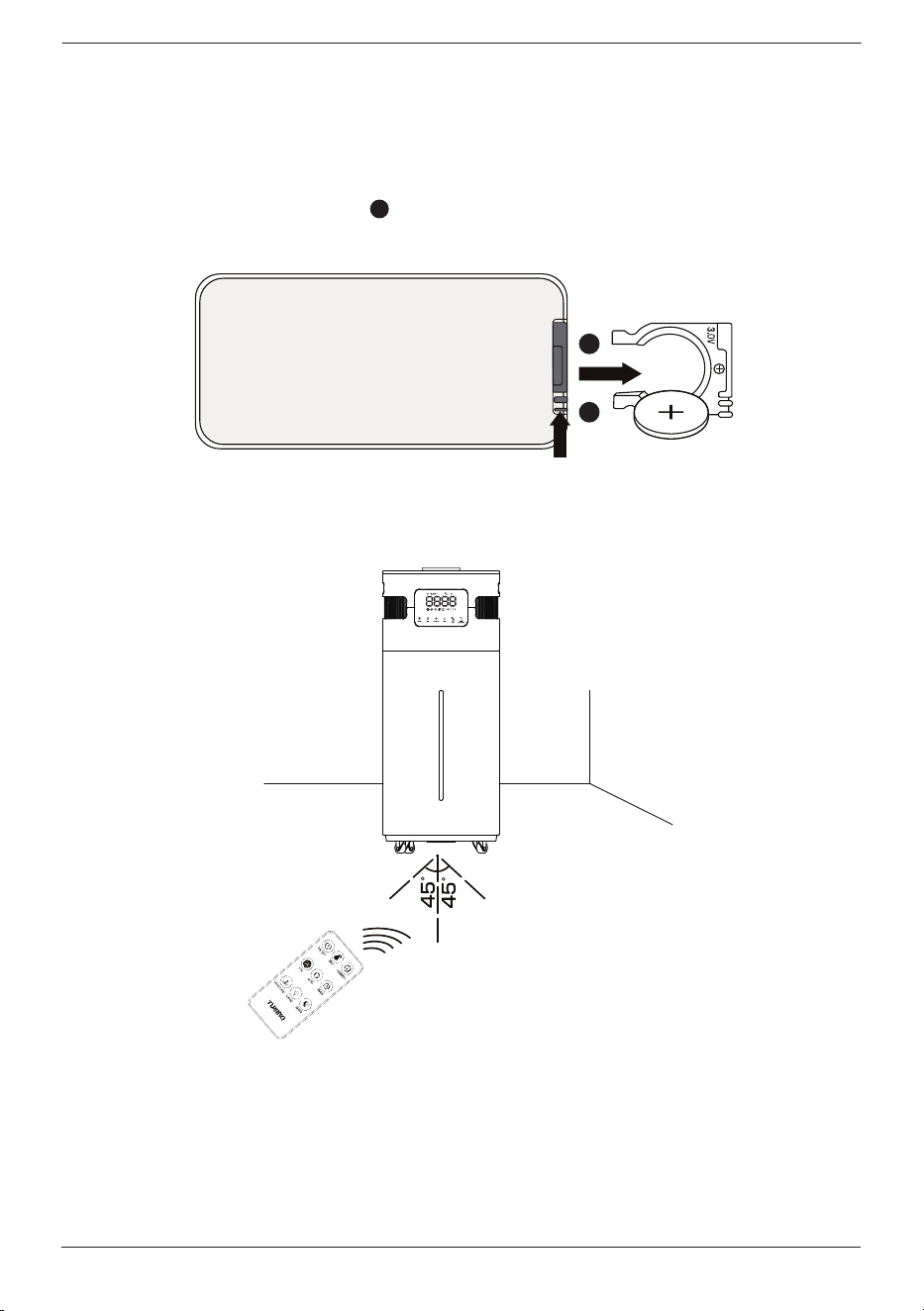
TWO WAYS TO ADD WATER
Note: We recommend using purified or distilled water to fill the tank to
prevent white mineral buildup.
Take out the body and add water into the tank.
This is the recommended way.
Direct sunlight.
On an unstable platform.
With high temperatures, humidity, and/or dust.
Near an air conditioner, furnace, heater, or stove.
Near mobile phones, computers, and other precision instruments.
Near the radio and other objects that emit radio waves.
1
1
2
2
3
4
5
6
Open the cover and add the water directly into the tank.
Attention
Add water slowly and keep an eye on
the max fill line to avoid overfilling.
Do not fill over
the max line!
Do not fill over
the max line!
[email protected] www.turbro.com
08
REMOTE CONTROL
The battery is included in the remote control.
1. Replace the battery: Press and pull out the battery ring. Put a lithium
battery CR2025+ on the top.
1
1
2
2. Operation: Use the remote control within 13 feet of the humidifier.
Within 13 feet
USING YOUR HUMIDIFIER
[email protected] www.turbro.com
09
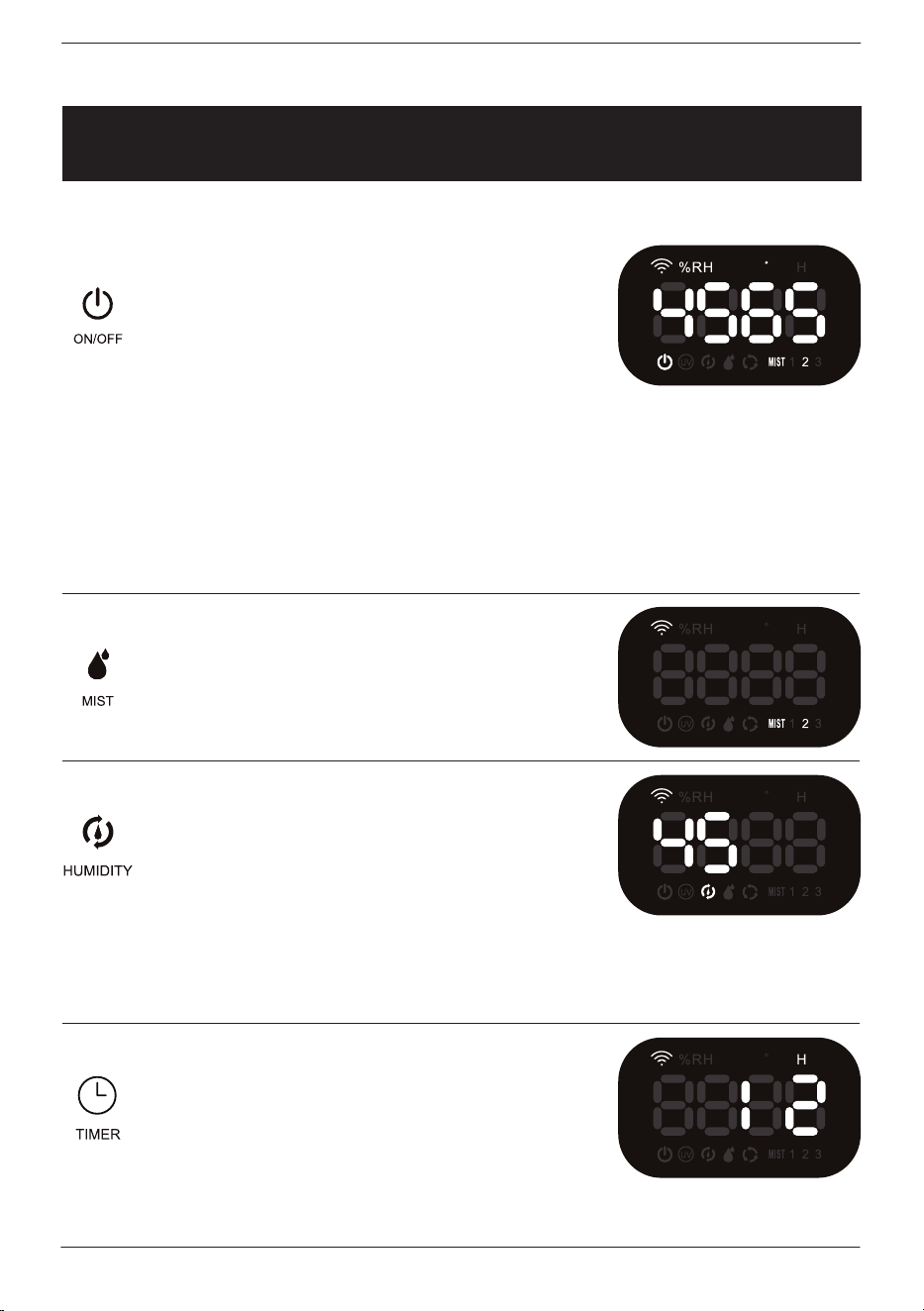
PANEL
F
Touch this button to turn on the
machine. The LED display shows
the current humidity and
temperature (the display switches
every minute).
Touch this button to select the mist
spray level from 1 to 3.
The humidity setting range is
between 45-95% in increments of
5%. Press the humidity button until
the desired humidity is reached.
It will blink for 3 seconds and then
set at that humidity level.
The timer can be set for 1-12 hours
in increments of 1 hour. The
humidifier will turn o automatically
when the time reaches the set value.
Caution: When the atmosphere lamp lights up, the pump starts to draw
water from the tank up to the atomizer. It takes 2.5 minutes to draw up
water. During this time, no functions can be operated. After that, the machine
will start to work under the default setting. (The machine uses level 2 by
default. )
Caution: This humidifier will automatically stop spraying mist when the
surrounding humidity reaches the set value. If the surrounding humidity is
lower than the set value, the machine will resume working.
Caution: The timer function can not be set up when the machine is lacking
water.
Note: This humidifier has power-o memory function. The present settings
will be saved and the preset operation will resume when the power is on again.
F
F
F
[email protected] www.turbro.com
10
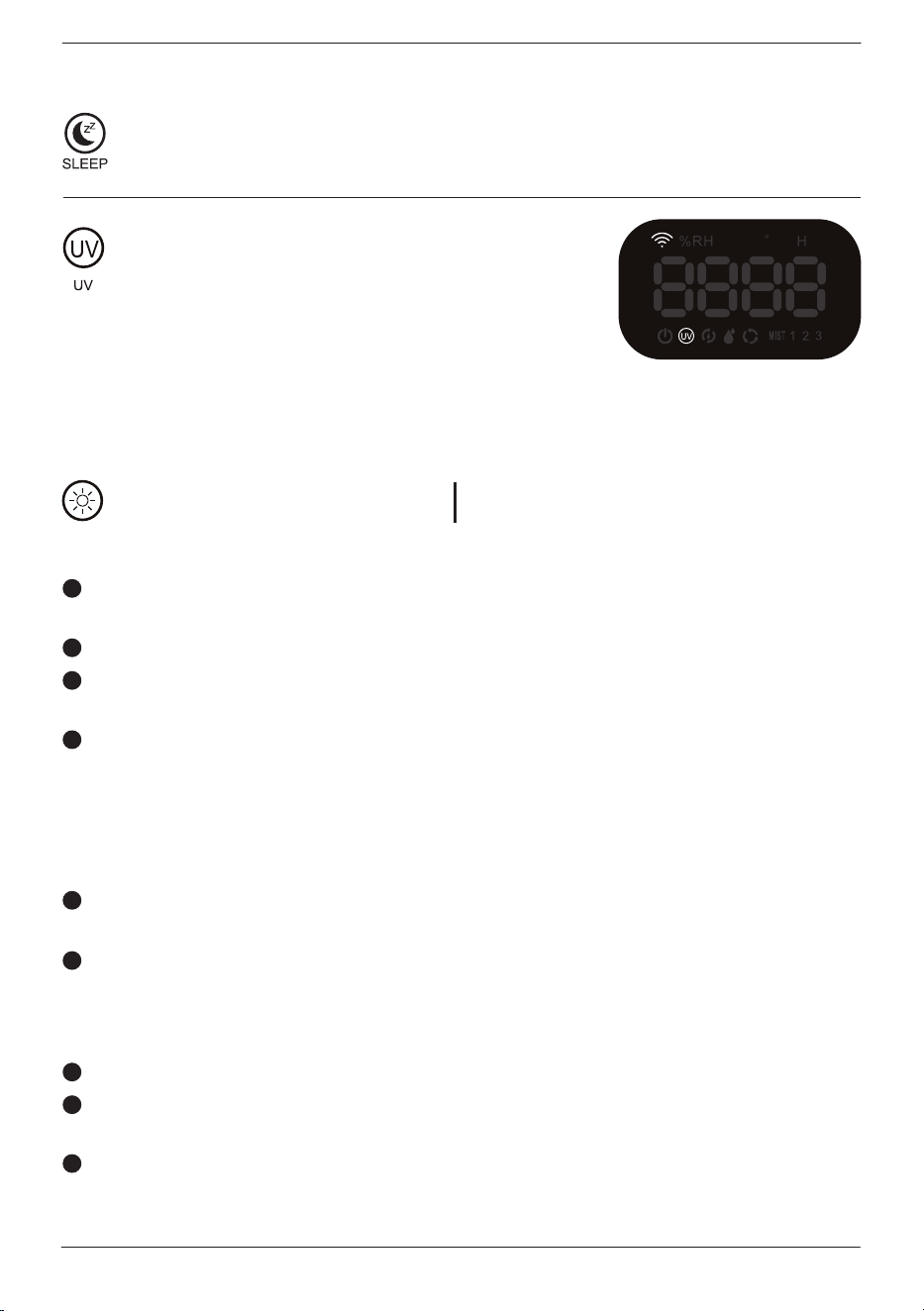
Touch the UV button to turn on/o
the sterilization feature.
Long press this button on the panel for 3 seconds or press the
sleep button on the remote to enter sleep mode. The display and
atmosphere light will be o. Press any button to wake the panel.
UV-C LED Light (12V DC) Wavelength: 240nm
Rated Power: 1.5W
UV Lamp Sterilization
The LED UV-C light is rated at 8000 hours.
This function will not produce toxic or harmful by-products, and will not
aect the water quality.
The UV lamp has high eciency in removing harmful bacteria.
The disinfection eect is influenced by water temperature (Ideal water
temperature is 59-77
o
F).
Low power consumption.
Precautions for use
This machine contains a UV device. Failure to use the device or damage to
the UV lamp cover may cause hazardous UV-C radiation escape. The UV-C
radiation can cause damage to the eyes and skin even at very small amounts.
It is forbidden to open the tank when using UV exposure, so as not to
harm the eyes and skin of people or animals.
The turbidity and suspended solids in water have a large eect on the
UV sterilization, which will aect UV light eectiveness and the sterilization
eect. To prevent reducing the disinfection eect, please clean the sink
and replace clean water regularly.
Be sure the UV light cover is intact before using the device.
If the UV lamp is damaged, stop using the device. Contact our customer
service or a professional to repair it before continuing use.
Be careful to prevent damage to the UV lamp when cleaning or using the
machine.
Caution: Do not open the cover if the UV lamp
is on.
1
2
3
4
1
2
3
4
5
F
[email protected] www.turbro.com
11
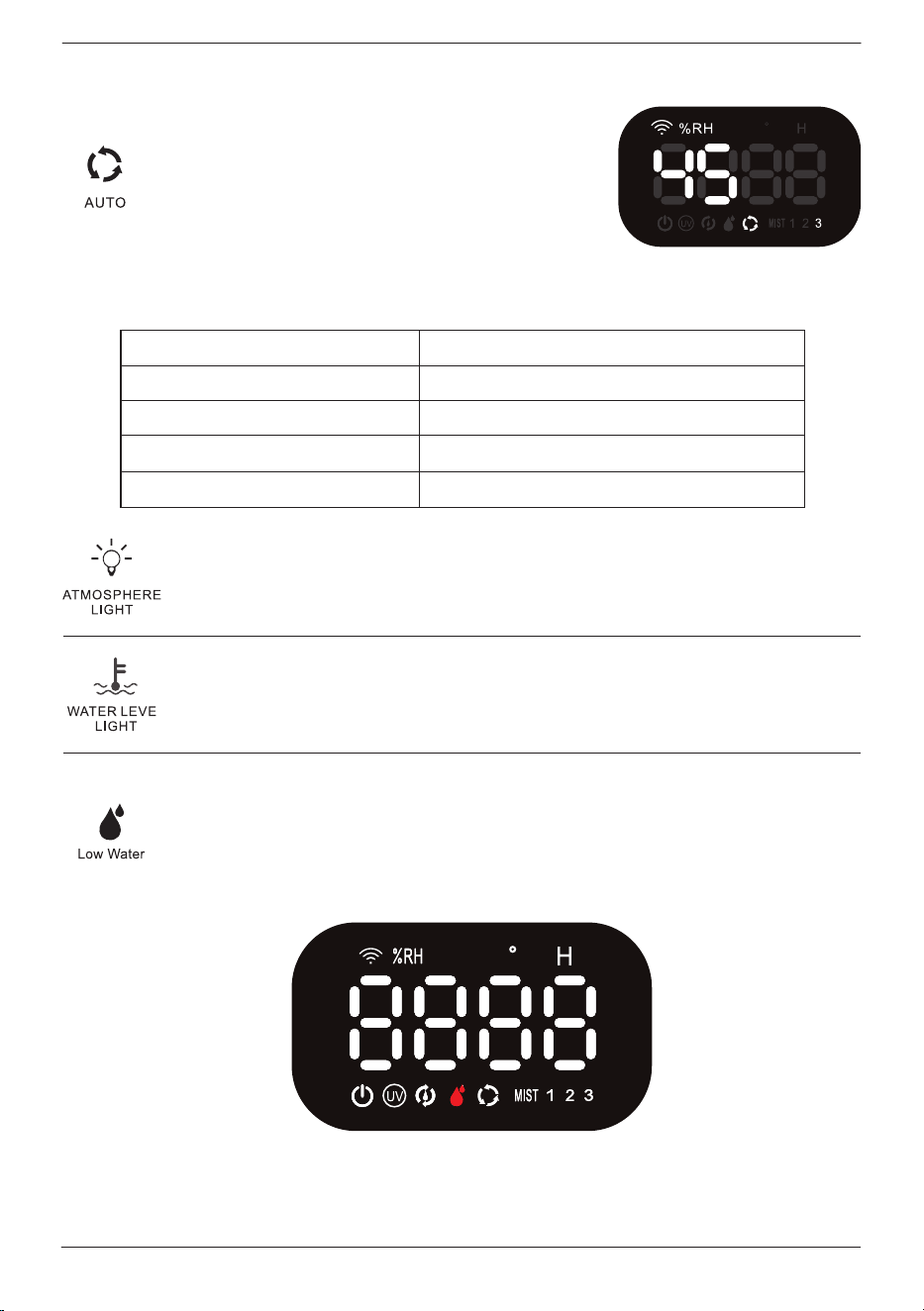
Ambient humidity
Less than 40%RH
41-60%RH
61-70%RH
Over 70% RH
Mist spray level
Level 3
Level 2
Level 1
Stop working automatically
Touch this button to turn on/o the atmosphere lamp.
Atmosphere lamp settings: cycle, red, yellow, blue, pink, green,
white, and o.
Press this button on the panel for 3 seconds or press the water
level light button on the remote to turn on/o the water level
indicator light.
When the water level is too low, it will make a 5 seconds indication
sound. The water shortage icon in the display will light up red
and the machine will turn o automatically. All selected functions
will turn o together. Please unplug the power plug and refill
the water tank.
Press this button on the panel for 3 seconds
or press the auto button on the remote to
enter the auto mode. This mode will adjust
the mist spray level automatically according
to the ambient humidity, and the brightness
of the display will reduce by 50%.
Caution: Press any key beside on/o to exit this mode.
Caution: When the water in the tank is not enough to be drawn up, the pump
will spin, and make noise for around 3-5 seconds. At this time it is best to
turn o the unit and refill the water again.
F
In this mode:
F
[email protected] www.turbro.com
12
CONNECTION
F
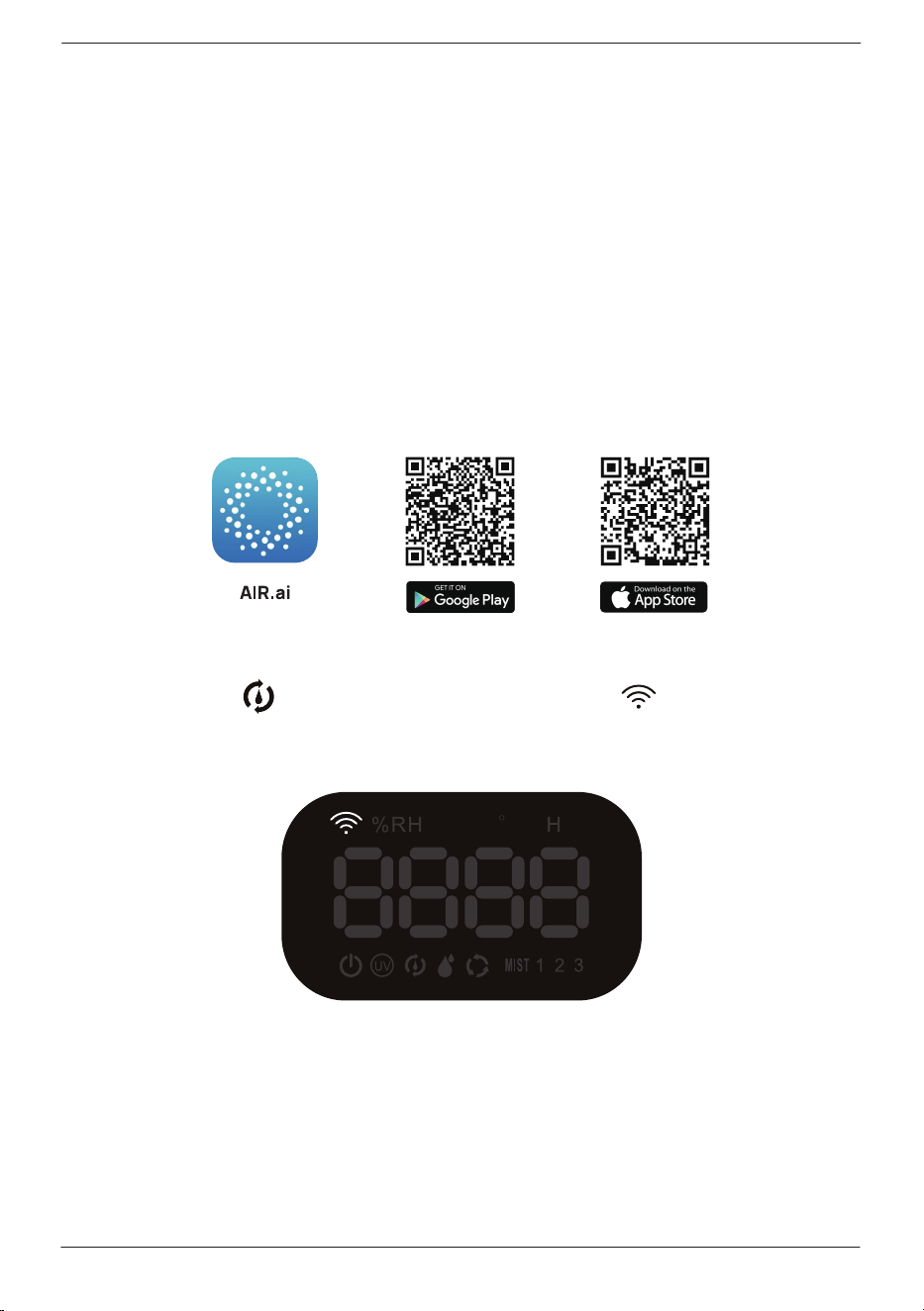
Entering the Wi-Fi connection mode
Preparation before connecting preparation:
Make sure your Wi-Fi router supports 2.4GHz (NOT 5GHz) and 802.11b/g/n
bands.
Step1
Long press the on the control panel, and the on the screen will
blink quickly.
Make sure the Wi-Fi name and password are correct.
A smartphone or tablet supporting a 2.4GHz network.
Download the App named AIR.ai from the App Store(iOS devices)
or Google Play (Android devices).
Note: Most 5GHz routers can also be set to 2.4GHz band or dual band.
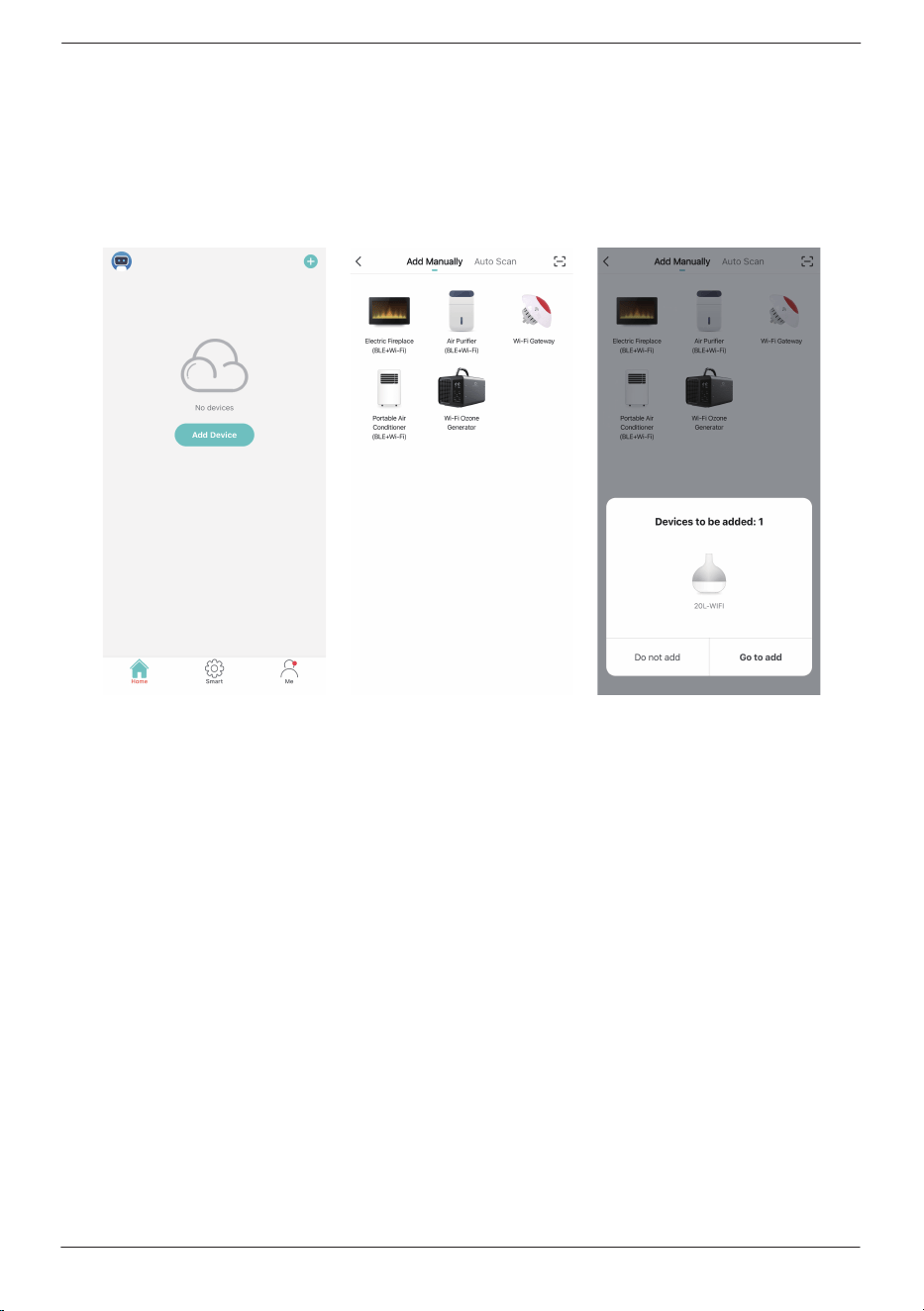
Step2
Connect your phone to the 2.4 GHz network your humidifier will use.
Open AIR.ai and tap the “+” icon in the top right corner.
It will appear an added page, click “Go to add”.
[email protected] www.turbro.com
13
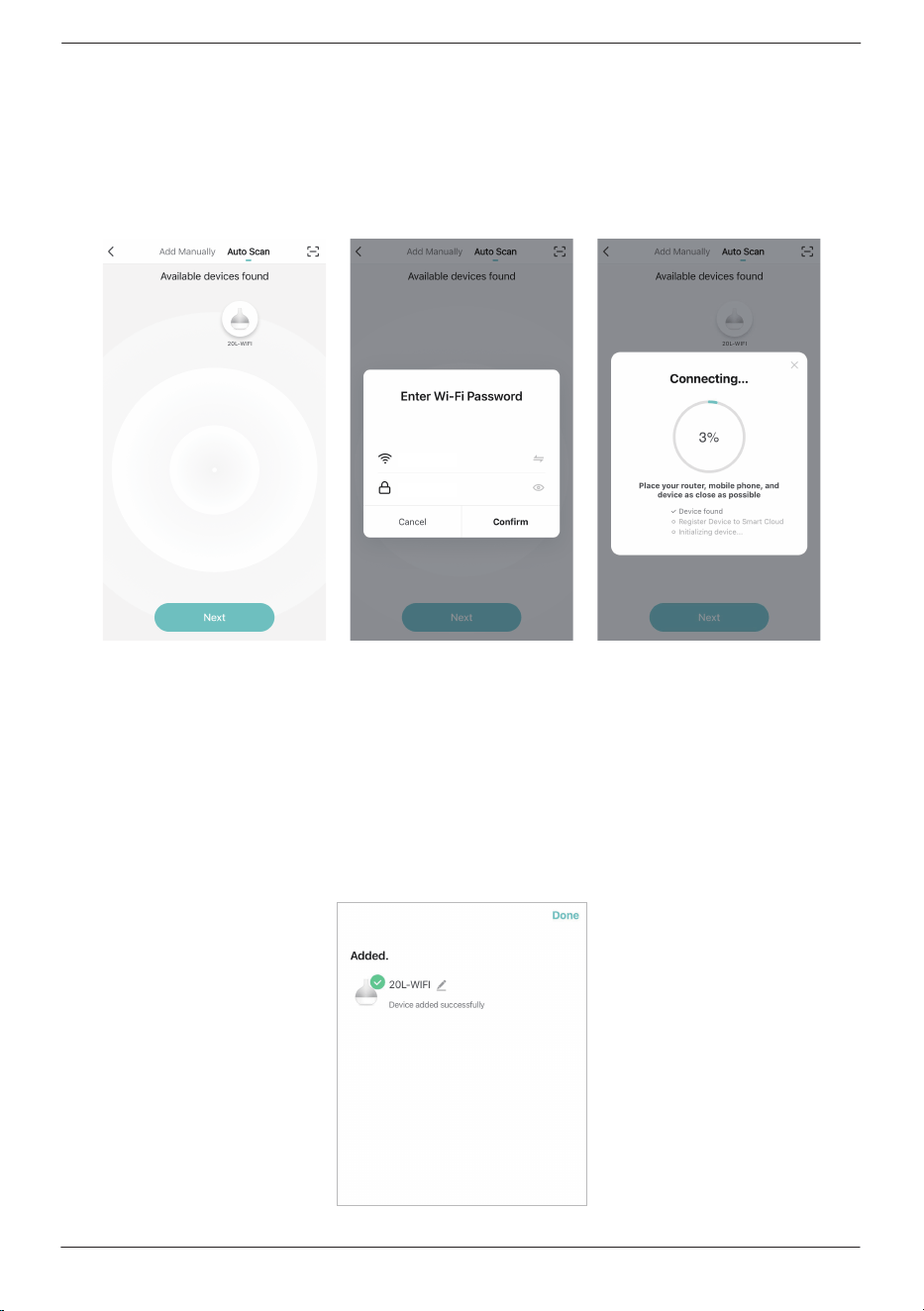
Important note: The humidifier must be connected to a 2.4 GHz Wi-Fi
network. If your router (internet box) broadcasts 2 Wi-Fi bands (2.4GHz
and 5GHz), consult your router user manual to learn how to select the
2.4 GHz Wi-Fi band.
Step3
Go to the next step.
Enter the password of your Wi-Fi network when prompted (same Wi-Fi
network on which your smartphone is connected) and then click confirm.
[email protected] www.turbro.com
14
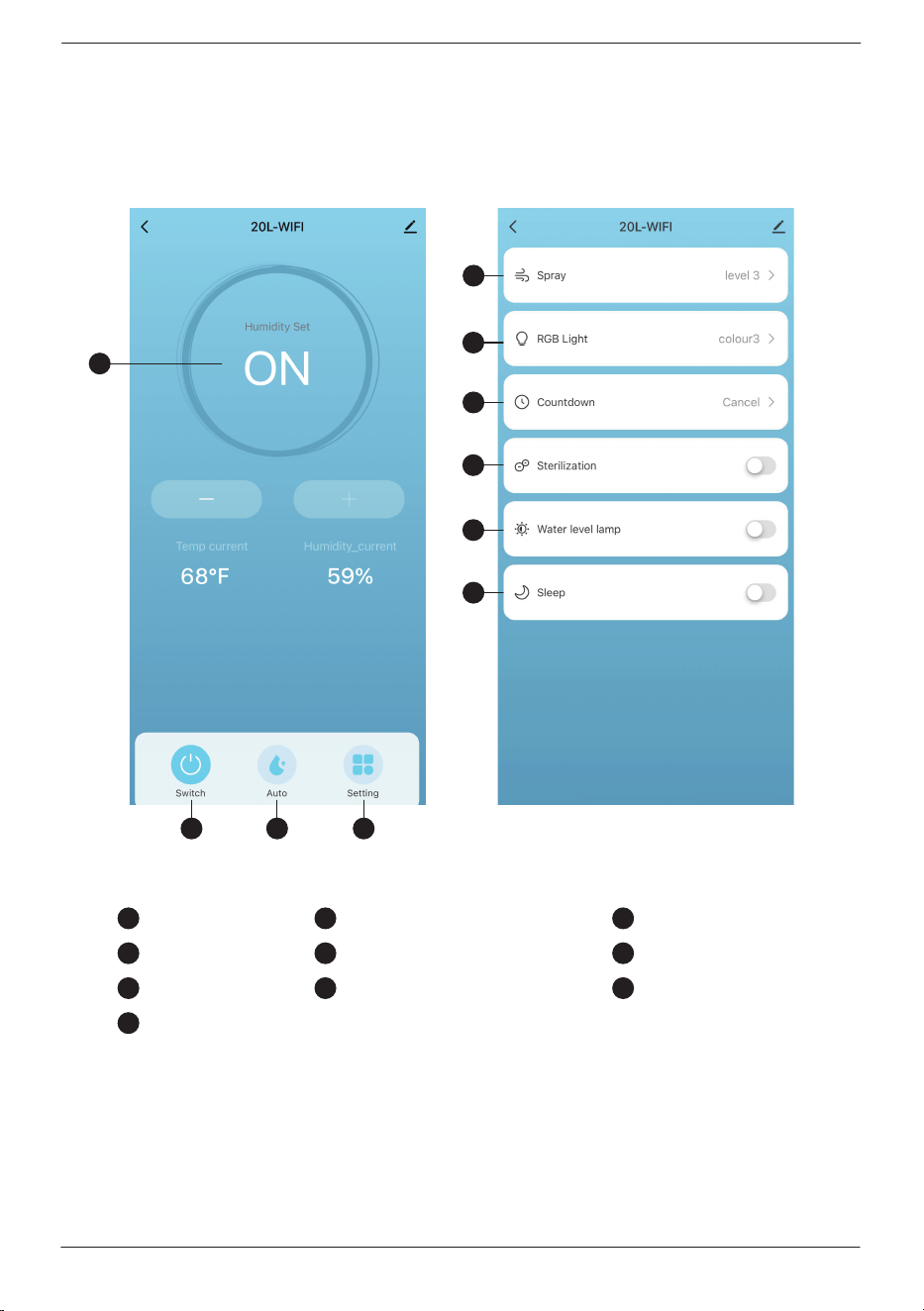
Step4
Your device is now connected successfully. You can find the humidifier
in the device list.
[email protected] www.turbro.com
15
CONTROL
APP
1 2 3
6
7
4
5
8
9
10
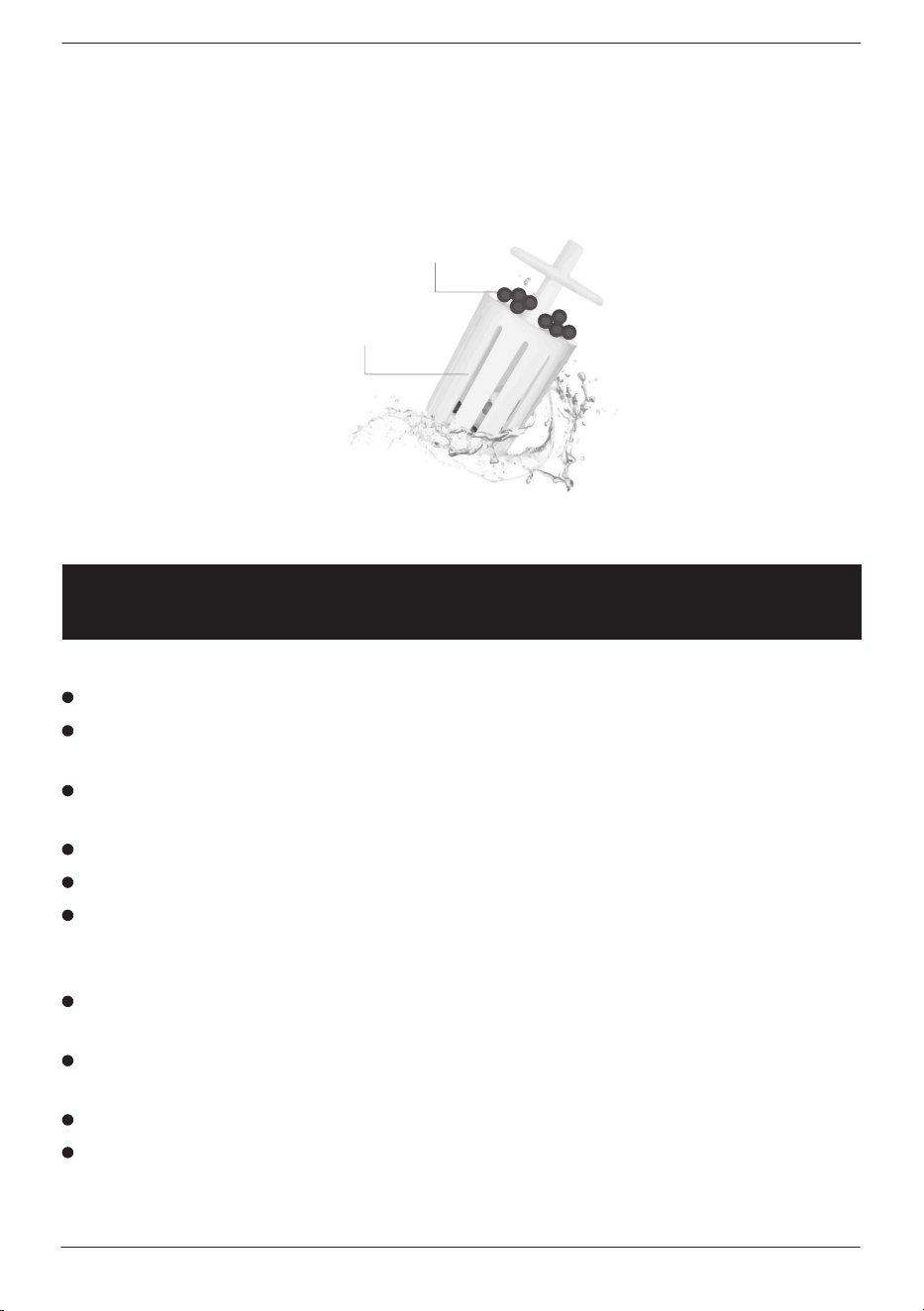
On/O Auto mode Other setting
Mist spray level Atmosphere light Time setting
UV light
In the "ON" mode, the humidifier will constant to humidify, the app
will display as "ON".
Water level indicator light Sleep mode
6
7
4
10
5
31 2
8 9
MAINTENANCE AND CLEANING
[email protected] www.turbro.com
16
Before cleaning, please be sure the machine is powered o and unplugged.
Clean all the parts with a soft cloth. Never use any hard objects or abrasives
to avoid any damage.
Change the water in the tank and the sink every day to prevent bacterial
growth.
Do not use chemical detergent for cleaning.
Keep the machine dry and tidy when not in use for a long time.
The water filter is suggested to be changed after 6 months of use.
Filter Impurities in Water
The filter ball is a mineral stone, which improves the water quality, increases
water activity, and adjusts the pH of water. This water filter is recommended
to be replaced every 6 months.
Filter element ball
Filter element body
ATTENTION:
This machine requires pure water below 113°F only, and uses it at room
temperature between 41 to 104°F.
When the room temperature is lower than 32°F, please pour out the water
in the water tank and the sink to avoid freezing and damaging the machine.
Make sure the water level is not over the Max line in the tank.
If this unit is not in use for a long time (more than 24 hours), please pour
out the water in the water tank and the sink to prevent mold or impurities
from harming your health.
[email protected] www.turbro.com
17
Do not put essential oil into the main body/water tank, which may cause
water leakage deformation or damage.
If accidents happen, such as the machine falling down, or water going
inside the unit, please unplug the machine and let it dry, then contact our
after-sale service via support@turbro.com or call at (323) 438-3334.
This machine is for indoor use only. This machine is not suggested to use
on the wooden floor in case of any damage by moisture.
The floor in front or surrounding can become slippery. Take extra caution
if you have wooden floors or carpets susceptible to mold.
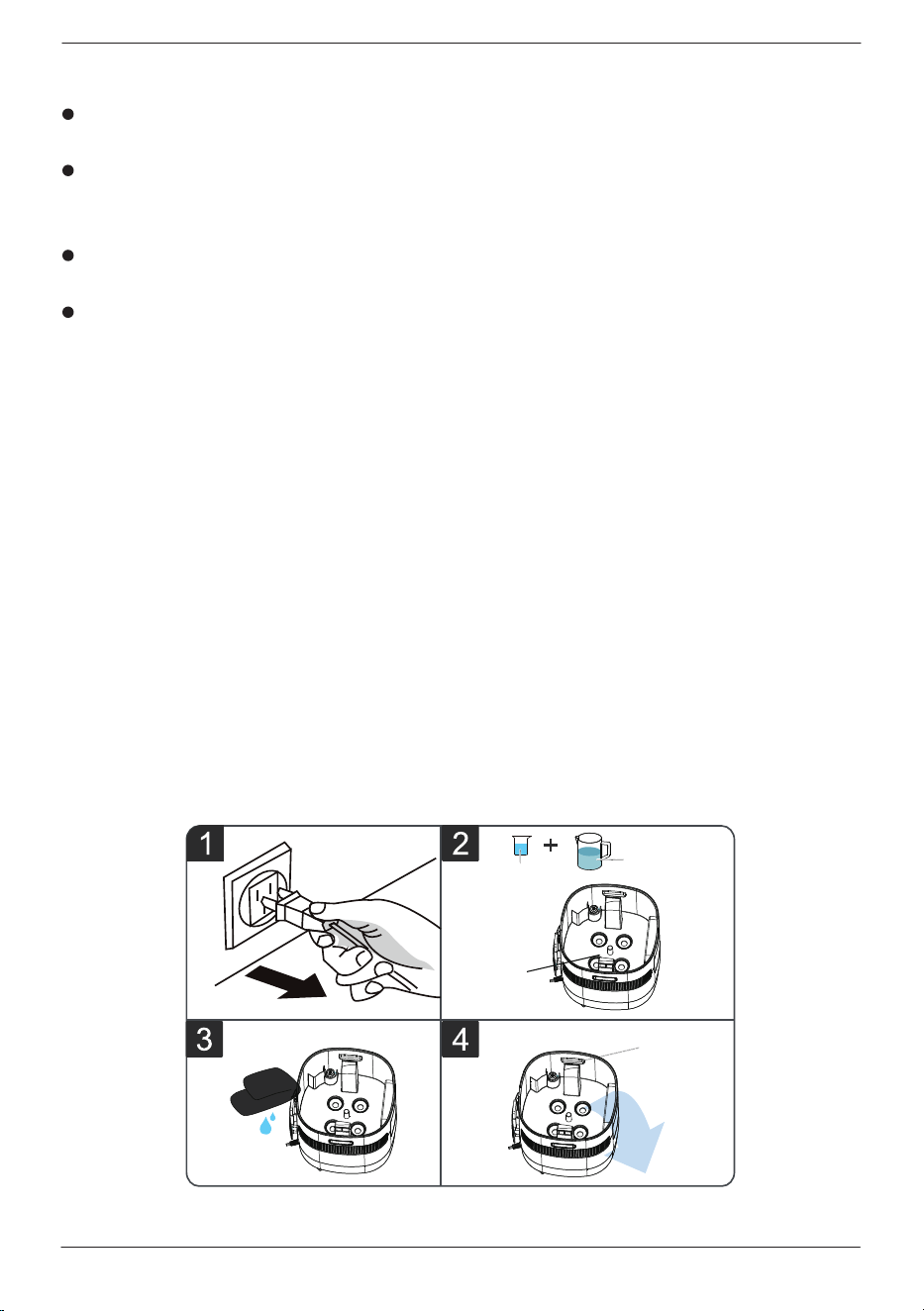
Descaling
After long-term use, there will be a scale deposit on the mechanical sink
and vibrating piece. The scale will reduce the atomization eect. Therefore,
it is recommended to clean the scale in the sink and the vibration piece
every week.
1. Before cleaning, please make sure the machine is powered o and
unplugged.
2. Pour a scale-removing liquid (e.g. white vinegar) into the water tank, then
add warm water of about 140°F. Let the liquid completely dissolve and
soaked for 5-10 minutes.
3. Clean the dirt on the wall of the sink and the vibrating plate with a soft
bristle brush or a clean soft cloth.
4. Pour out the water. Be careful to prevent water from entering the base
from the air outlet, which may cause the circuit board to short-circuit
and damage.
air outlet
disincrustant
vibrating
plate
warm water
140
o
F
TROUBLESHOOTING
[email protected] www.turbro.com
18
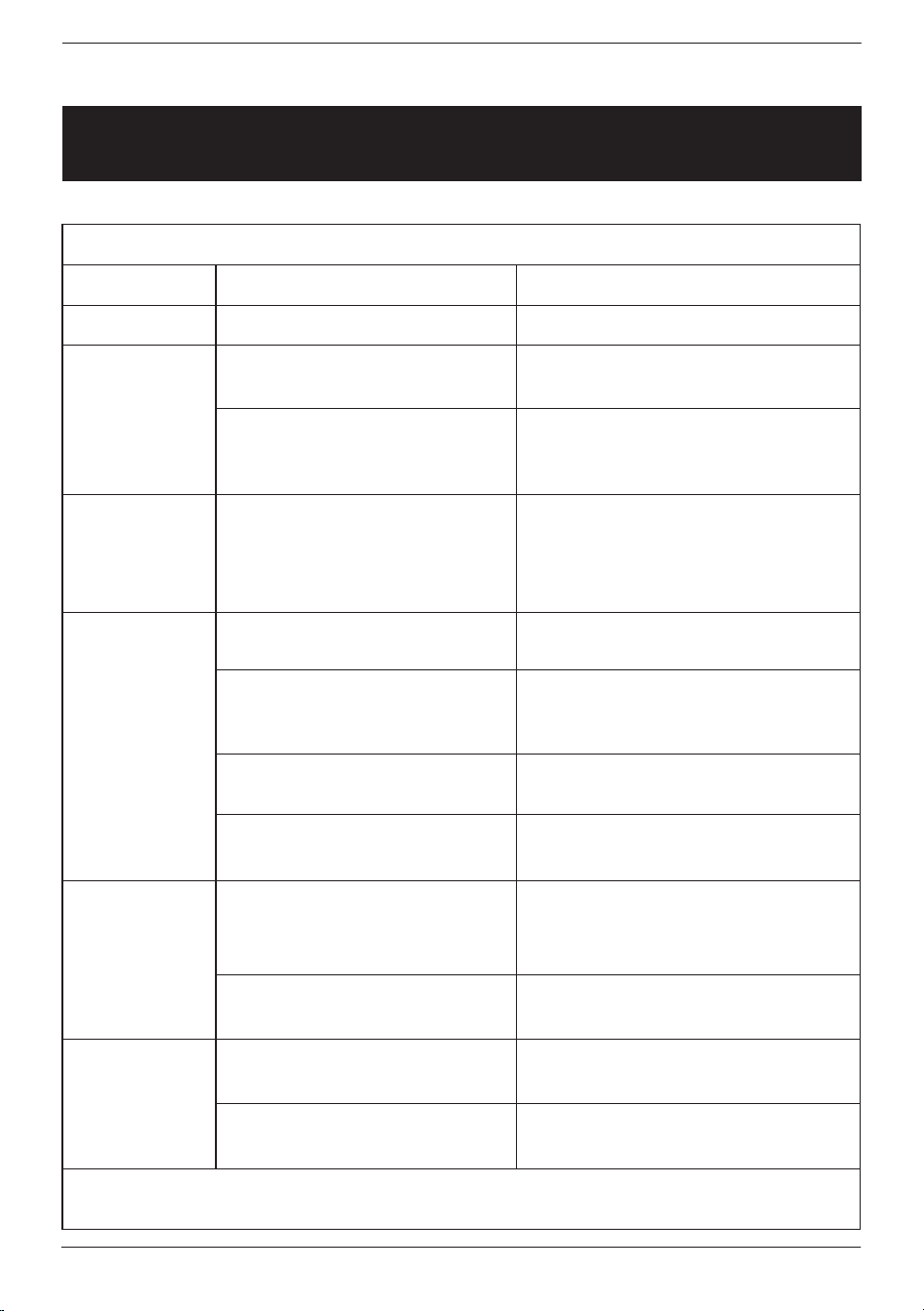
Fault Reasons and Solutions
Issues Analysis
Power is not connected Check the power connection
The new machine is closed
tightly
The water in the water tank
has been inside for too long
time
The water contains high
mineral content
The atomizing sheet has
a scale
If the water is dirty or has
been stored for too long
time
Water temperature is too
low
The fog amount is set at
the minimum gear
Water shortage in the tank,
noise from the pump is
spinning
Placed on uneven ground
Too much water
Placed on uneven ground
Open the water tank and leave
it for 12 hours before use
Replace with clean water
Use purified or distilled water
to fill the humidifier
Clean the atomizing sheet
Replace with clean water
Add a small amount of warm
water
Reset the fog amount
Add water to the tank
Place it on a solid and stable
surface
Make sure the water level is
below the Max line.
Place it on a flat and level
surface
Troubleshooting method
No power
The spray of
water has an
odor
White dust
appears
around the
humidifier
A small
amount of
fog
Abnormal
noise
Water
leakage
Remark: If the fault cannot be eliminated after the above, please contact
our support team for assistance.

[email protected] www.turbro.com
19
FCC STATEMENT
This device complies with Part 15 of the FCC Rules. Operation is subject
tothe following two conditions:
1. This device may not cause harmful interference, and
2. This device must accept any interference received, including interference
that may cause undesired operation.
Any changes or modifications not expressly approved by the party
responsible for compliance could void the user’s authority to operate this
equipment.
This equipment has been tested and found to comply with the limits for
a Class B digital device, pursuant to Part 15 of the FCC Rules. These limits
are designed to provide reasonable protection against harmful interference
in a residential installation. This equipment generates, uses and can radiate
radio frequency energy and, if not installed and used in accordance with
the instructions, may cause harmful interference to radio communications.
However, there is no guarantee that interference will not occur in a
particular installation. If this equipment does cause harmful interference to
radio or television reception, which can be determined by turning the
equipment o and on, the user is encouraged to try to correct the
interference by one of the following measures:
• Reorient or relocate the receiving antenna.
• Connect the equipment into an outlet on a circuit dierent from that to
which the receiver is connected.
• Increase the separation between the equipment and receiver.
• Consult the dealer or an experienced radio/TV technician for help.

[email protected] www.turbro.com
20
FCC RADIATION EXPOSURE STATEMENT
This equipment complies with FCC radiation exposure limits set forth for
an uncontrolled environment. End users must follow the specific operating
instructions for satisfying RF exposure compliance. To maintain compliance
with FCC RF exposure compliance requirements, please follow operation
instructions as documented in this manual. This transmitter must not be co
located or operating in conjunction with any other antenna or transmitter.
This equipment should be installed and operated with a minimum distance
of 20 cm between the radiator and your body. The availability of some
specific channels and/or operational frequency bands are country
dependent and are firmware programmed at the factory to match the
intended destination. The firmware setting is not accessible by the end
user.
ATTRIBUTIONS
Apple App Store is a trademark of Apple Inc.
Google, Android, and Google Play are trademarks of Google LLC.
Wi-Fi® is a registered trademark of Wi-Fi Alliance®.
Amazon, Alexa and all related logos are trademarks of Amazon.com,
Inc. or its aliates.
iOS is a registered trademark of Cisco Systems, Inc. and/or its aliates
in the United States and certain other countries.
The Bluetooth® word mark and logos are registered trademarks owned
by Bluetooth SIG, Inc.
and any use of such marks by Arovast Corporation is under license.

[email protected] www.turbro.com
21
WARRANTY & CUSTOMER SUPPORT
WARRANTY
TURBRO provides a 1-year limited warranty for TURBRO products from the
date of purchase, subject to the following conditions and limitations outlined
below.
What is covered?
This warranty is limited to the repair or replacement of part(s) proved to
be defective in material or workmanship, after said defect is confirmed
by the manufacturer's inspection.
The manufacturer may, at its discretion, fully discharge all obligations with
respect to this warranty by refunding the wholesale price of the defective
part(s).
What is not covered?
Damage caused by the owner when attempting to fix or alter the product
themselves.
Damage caused by misuse, abuse, neglect, alterations, or unauthorized
repair.
Natural depreciation.
Any alteration misuse of the product will nullify this warranty.
This warranty is non-transferable, which is eective for the original buyer
from the authorized seller only.
How to request warranty services?
To obtain the benefit of this warranty please leave a message online
(www.turbro.com/contact ), or send an email to support@turbro.com.
What will TURBRO do?
Repair the item.
Replace the item if not repairable.
Refund the item under certain circumstances.
[email protected] www.turbro.com
22
CUSTOMER SUPPORT
We are here to help anytime!
Any problems, write to us via support@turbro.com. We will get back to
you within 1 business day.