1
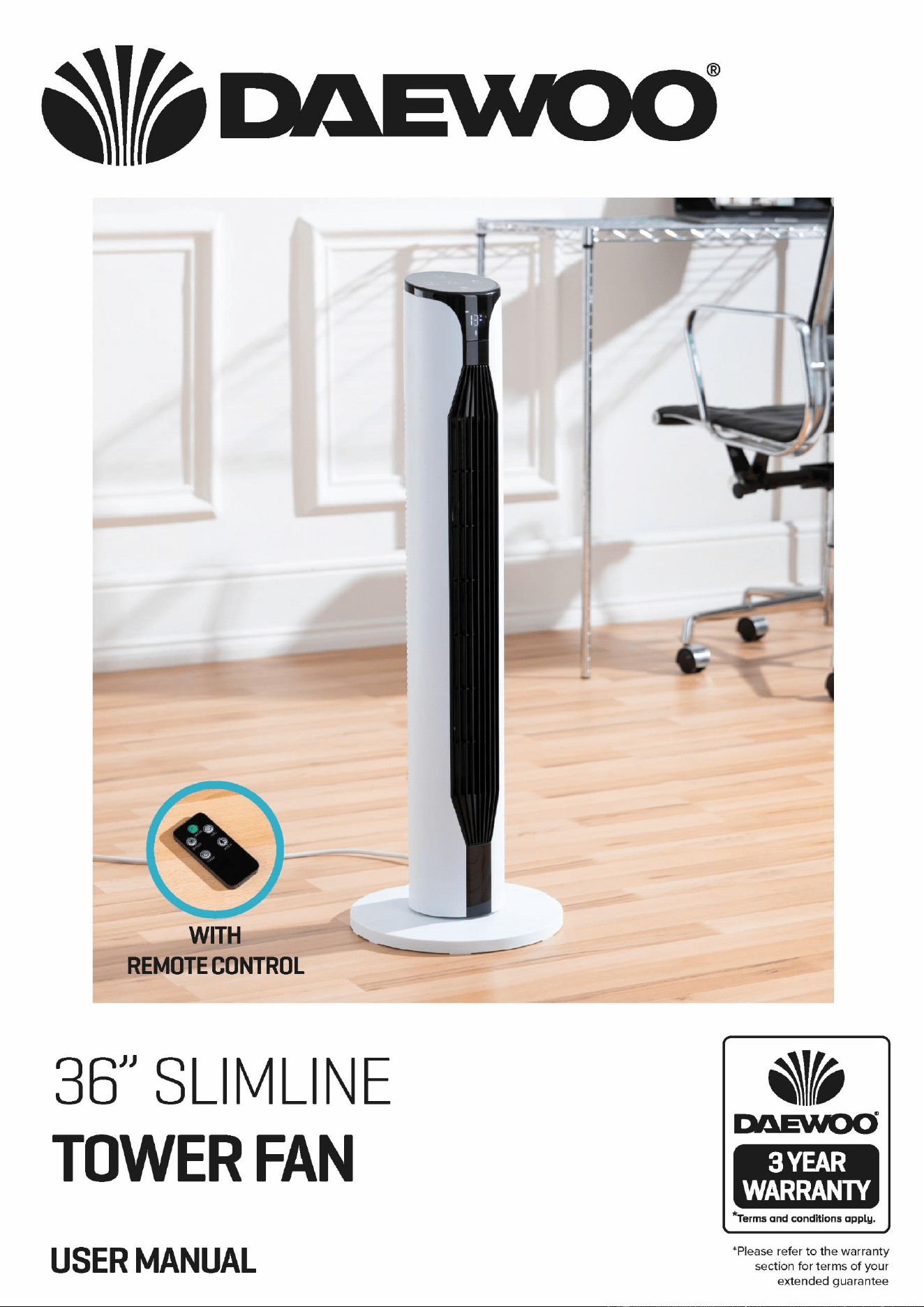
36 Inch Tower Fan with Remote
Model No. COL1571
User Manual
IMPORTANT – RETAIN THESE INSTRUCTIONS FOR FUTURE REFERENCE
2
36 Inch Tower Fan with Remote
Model No. COL1571
User Manual
IMPORTANT – RETAIN THESE INSTRUCTIONS FOR FUTURE REFERENCE
READING AND STORING THE USER MANUAL
Before using this product, please read through this manual
carefully paying particular attention to the safety instructions.
Failure to do so may result in personal injury or damage to the
product.
Carefully save this instruction manual for future reference. Ensure the
user manual is included when passing the product on to any third
parties.
Only use the product as described in this user manual. Any
other use is considered improper and may result in damage to
property or persons.
The manufacturer or vendor cannot be held liable for
damages or injury incurred through improper or incorrect use.
• Read and familiarise yourself with all operating
instructions before using this 36 Inch Tower Fan.
• This appliance can be used by children aged from 8 years
and above and persons with reduced physical sensory or
mental capabilities or lack of experience and knowledge if
they have been given supervision or instruction
concerning use of the appliance in a safe way and
understand the hazards involved. Children shall not play
with the appliance. Cleaning and user maintenance shall
not be made by children without supervision.
• Close supervision is required when using this appliance
near children.
• Never leave this appliance within reach of children
• Children of less than 3 years should be kept away unless
continuously supervised.
• DO NOT immerse the appliance or its cord in water or any
other liquids.
• Always use this appliance on solid, level, surface.
• DO NOT use this appliance outdoors.
• Repairs to electrical appliances should be performed
by a qualified electrician. Improper repairs may place
user at serious risk

3
36 Inch Tower Fan with Remote
Model No. COL1571
User Manual
IMPORTANT – RETAIN THESE INSTRUCTIONS FOR FUTURE REFERENCE
• DO NOT operate this appliance with a damaged plug or
cord, after a malfunction or after being dropped or
damaged in any way.
• Regular, periodic checks should be carried out on the
mains cable to ensure no damage is evident. Should there
be any signs of damage the appliance should not be used.
• If the power cable is damaged, it should only be replaced
by the manufacturer or a suitable qualified after-sales-
service in order to avoid a hazard.
• DO NOT allow the mains cable to hang over sharp edges
or come in contact with hot surfaces.
• DO NOT run the mains cable under carpets, rugs, etc.
• This appliance is intended for household use only and
should not be used for industrial purposes.
• DO NOT use any accessories or attachments with this
appliance other than those supplied or recommended by
the supplier.
• DO NOT use this appliance for anything other than its
intended use.
• DO NOT push objects (including fingers) into the fan grill
or any openings as this could risk injury, damage to the
appliance and/or electric shock.
• Unplug after each use. Grasp the plug, not the cord.
4
36 Inch Tower Fan with Remote
Model No. COL1571
User Manual
IMPORTANT – RETAIN THESE INSTRUCTIONS FOR FUTURE REFERENCE
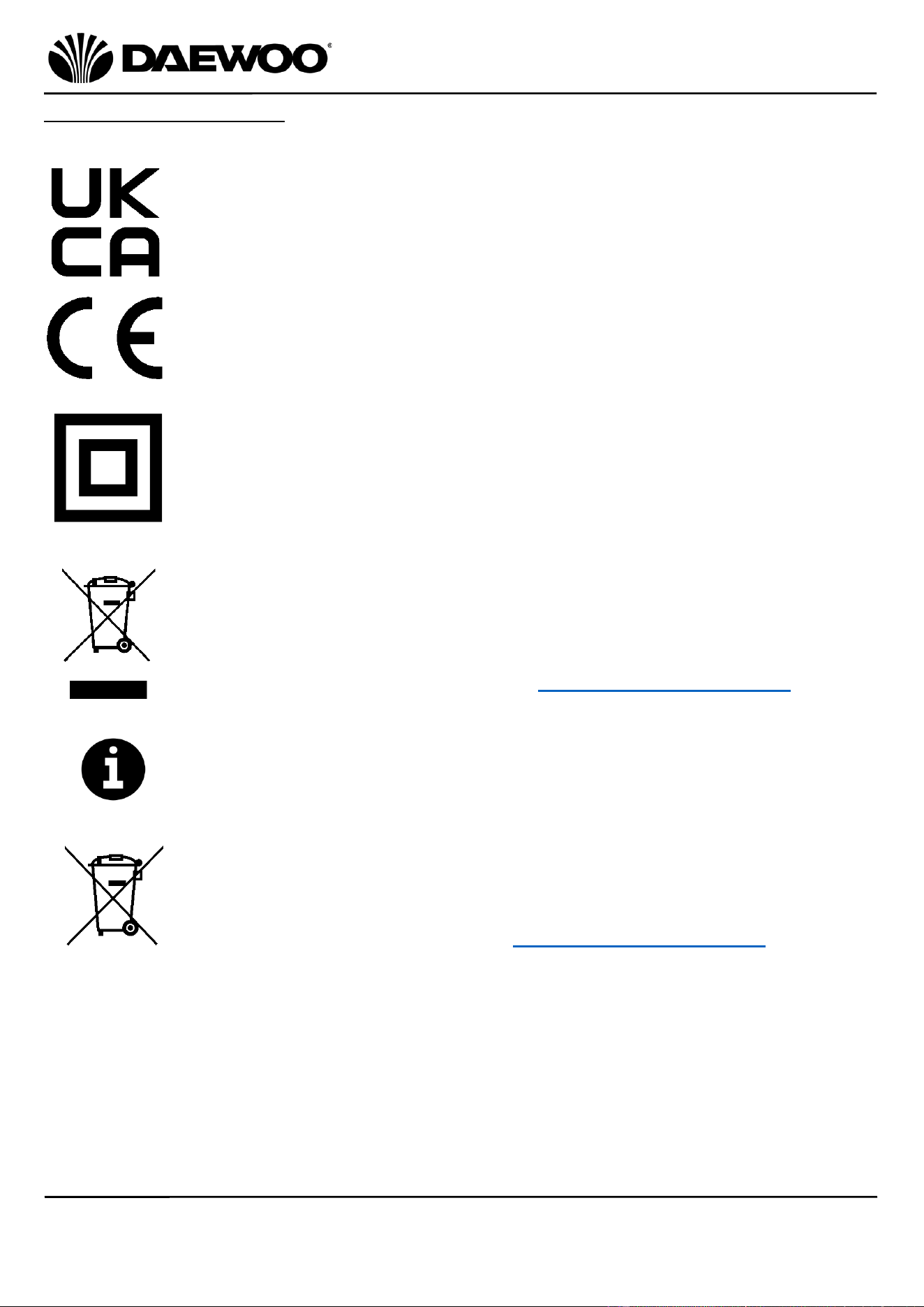
Explanation of Symbols
The following warning symbols or words are used in this instruction manual:
Products labelled with UK Conformity Assessment identifies
products conforming to UK statutory requirements.
Products labelled with this symbol conform to applicable provisions
of the European Economic Area.
This Class 2 symbol indicates that the product is electrically double
insulated and does not require an earth connection.
You should now recycle your waste electrical goods and in doing so
help the environment. This symbol means waste electrical products
at the end of their useful life should not be disposed of with normal
household waste and not sent to landfill. Please ensure it is taken to
a suitable facility for disposal. Check with your Local Authority or
retailer for recycling advice or visit www.recycle-more.co.uk enter
your postcode to find out your nearest recycling site.
This symbol provides useful additional information on the use of this
product.
This symbol means batteries and rechargeable batteries may not be
disposed of with household waste!
As the end user you are required by law to bring all batteries and
rechargeable batteries to a collection point run by the Local
Authority or to a retailer or visit www.recycle-more.co.uk, so that
they can be disposed of in an environmentally friendly manner.
5
36 Inch Tower Fan with Remote
Model No. COL1571
User Manual
IMPORTANT – RETAIN THESE INSTRUCTIONS FOR FUTURE REFERENCE
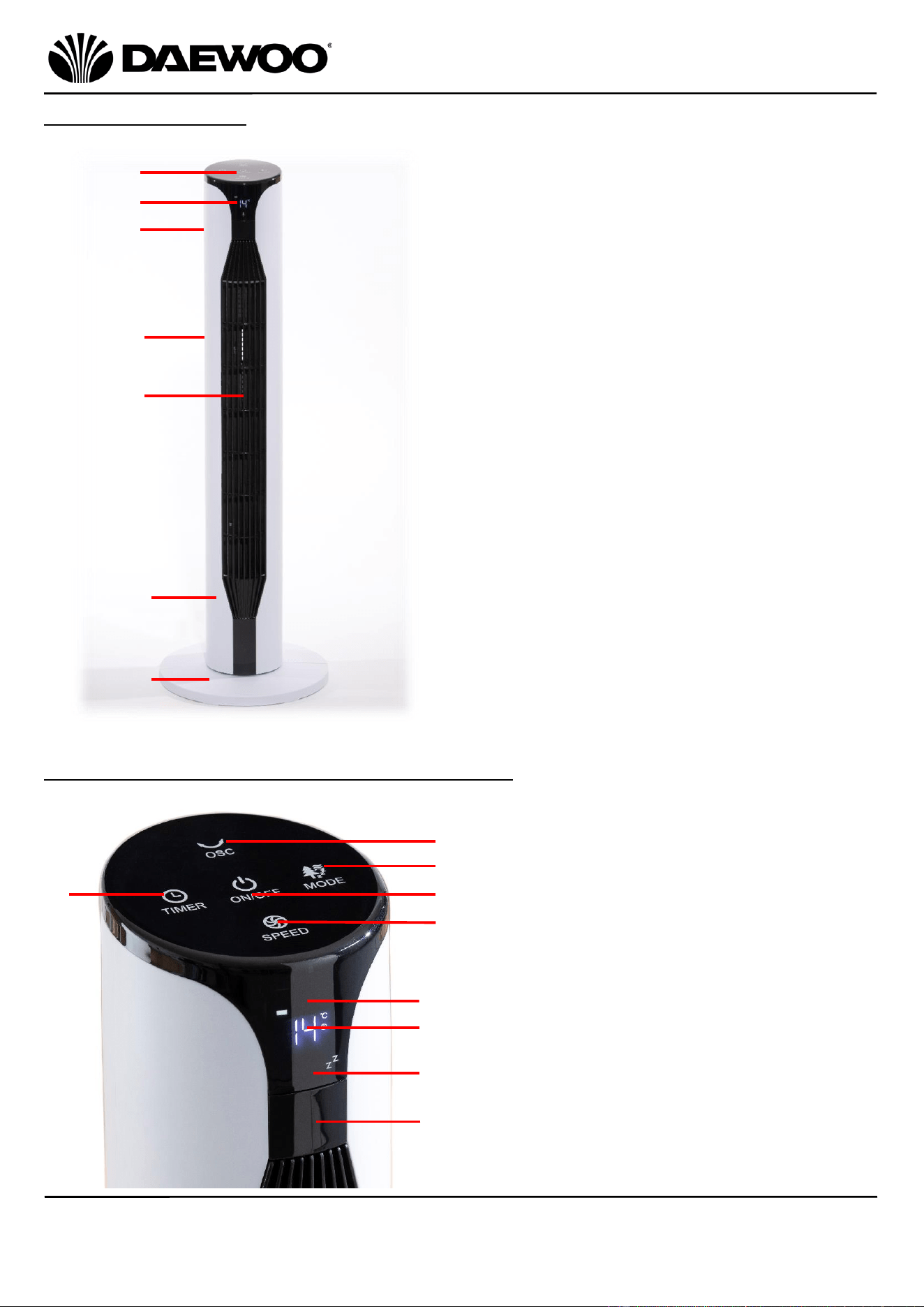
1. Control Panel
2. Display
3. Handle/Remote Storage (Rear)
4. Air Intake (Rear)
5. Air Outlet
6. Body
7. Stand
8. Oscillation Button
9. Mode button
10. On/Off Button
11. Fan Speed Button
12. Fan Speed Display
13. Temperature/Timer Display
14. Mode Display
15. Remote Control Receiver
16. Timer Button
Description of Parts
Description of Parts – Display & Control Panel
1
2
3
4
5
7
6
8
9
10
12
11
13
16
14
15
6
36 Inch Tower Fan with Remote
Model No. COL1571
User Manual
IMPORTANT – RETAIN THESE INSTRUCTIONS FOR FUTURE REFERENCE
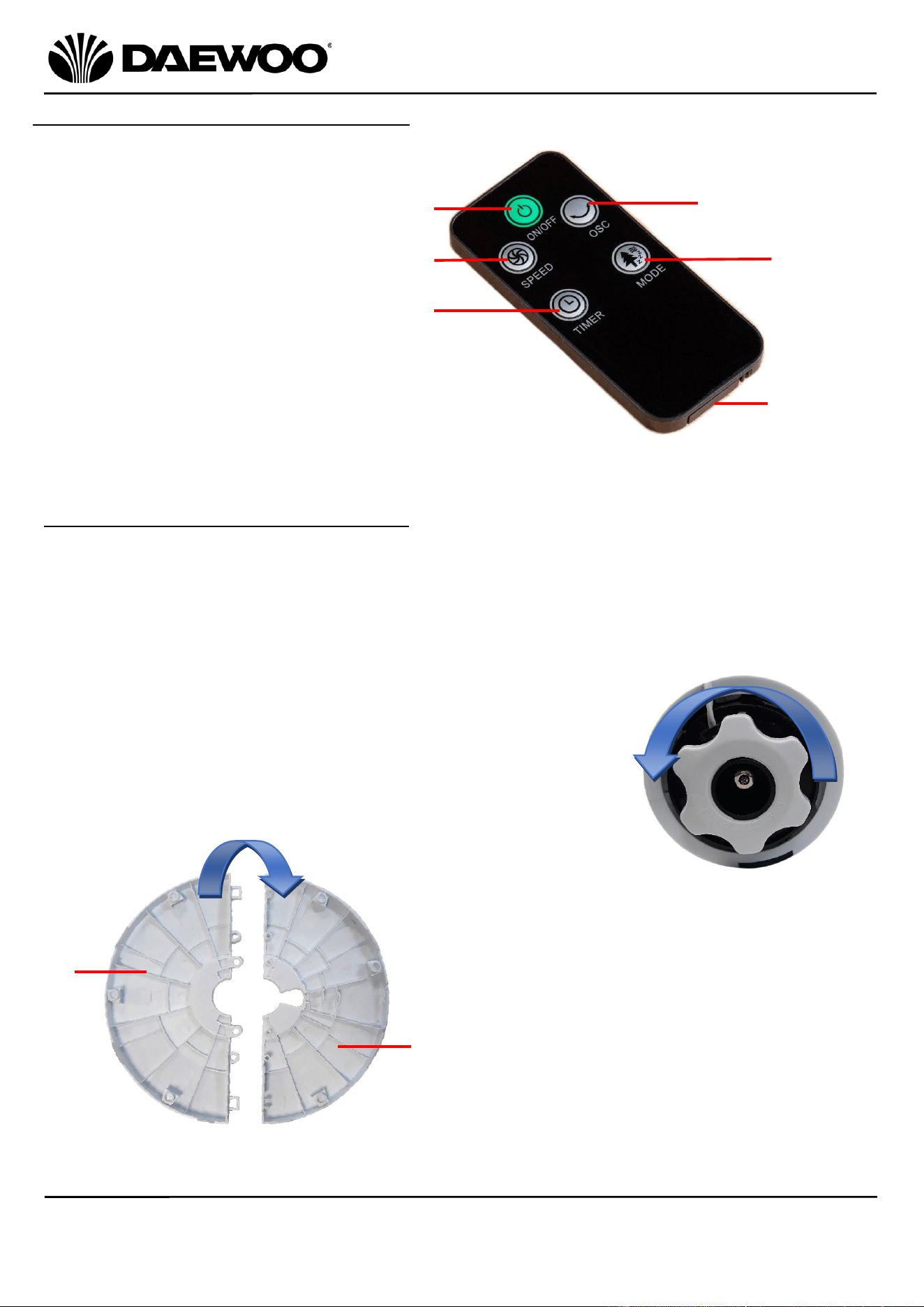
Description of Parts- Remote Control
Assembling Your 36 Inch Tower Fan
The stand of the tower fan comes in two parts, which fit around the base of the
fan with the power cord exiting through the hole in the centre of the stand.
Before assembly, place a cloth or similar underneath it to prevent damage to the
outer casing.
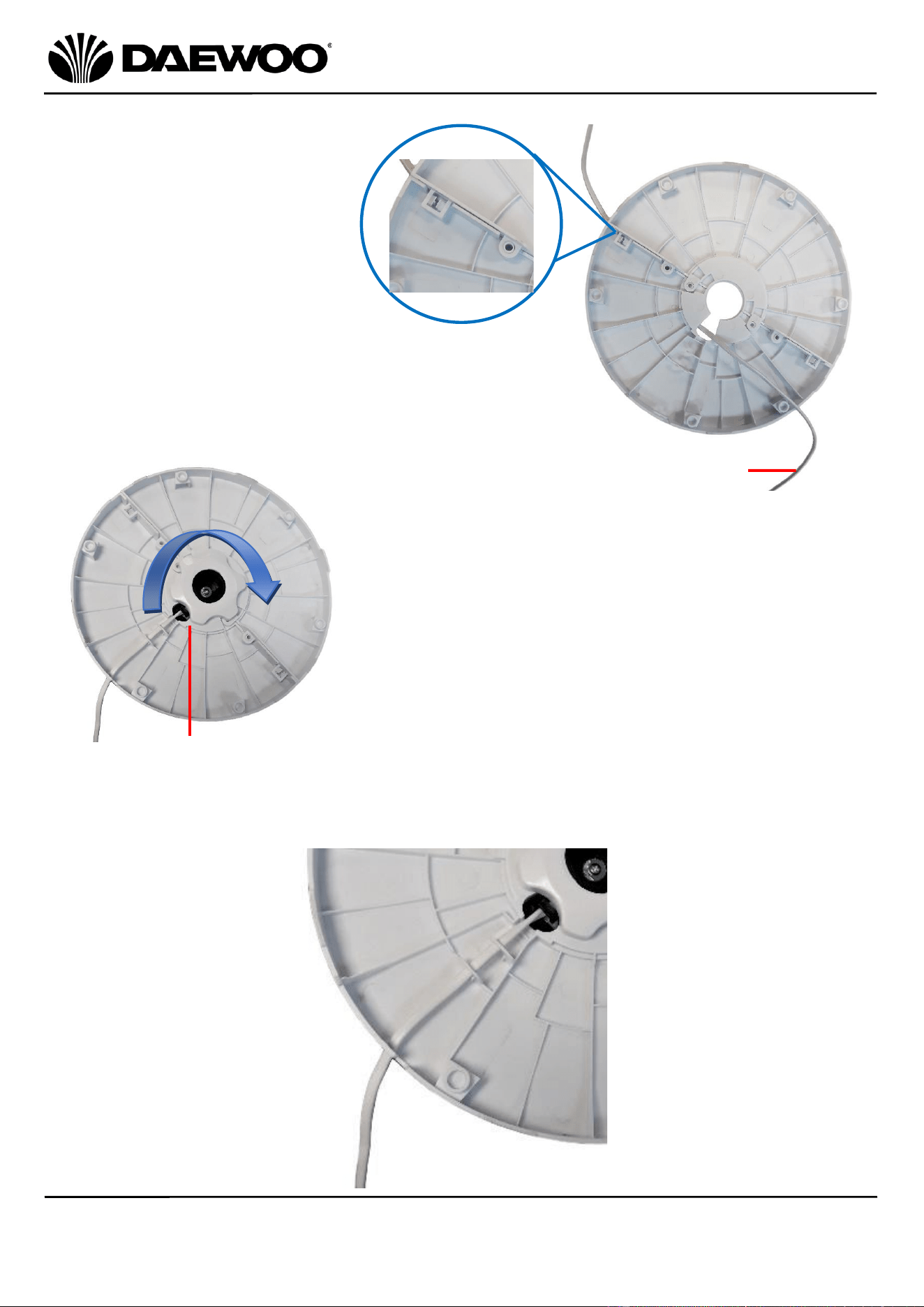
1. Remove the large stand retaining nut from the base of
the fan by unscrewing anti-clockwise as shown right:
2. Left: Ensure that the mains cable is
threaded through the centre of the stand
then lay the left hand section (a) of the
stand on top of the right hand section (b)
and clip the two halves together until the
stand is complete as below:
17. Power On/Off Button
18. Fan Speed Button
19. Timer Button
20. Oscillate Button
21. Mode Button
22. Battery Compartment
17
18
19
20
21
22
a
b
7
36 Inch Tower Fan with Remote
Model No. COL1571
User Manual
IMPORTANT – RETAIN THESE INSTRUCTIONS FOR FUTURE REFERENCE
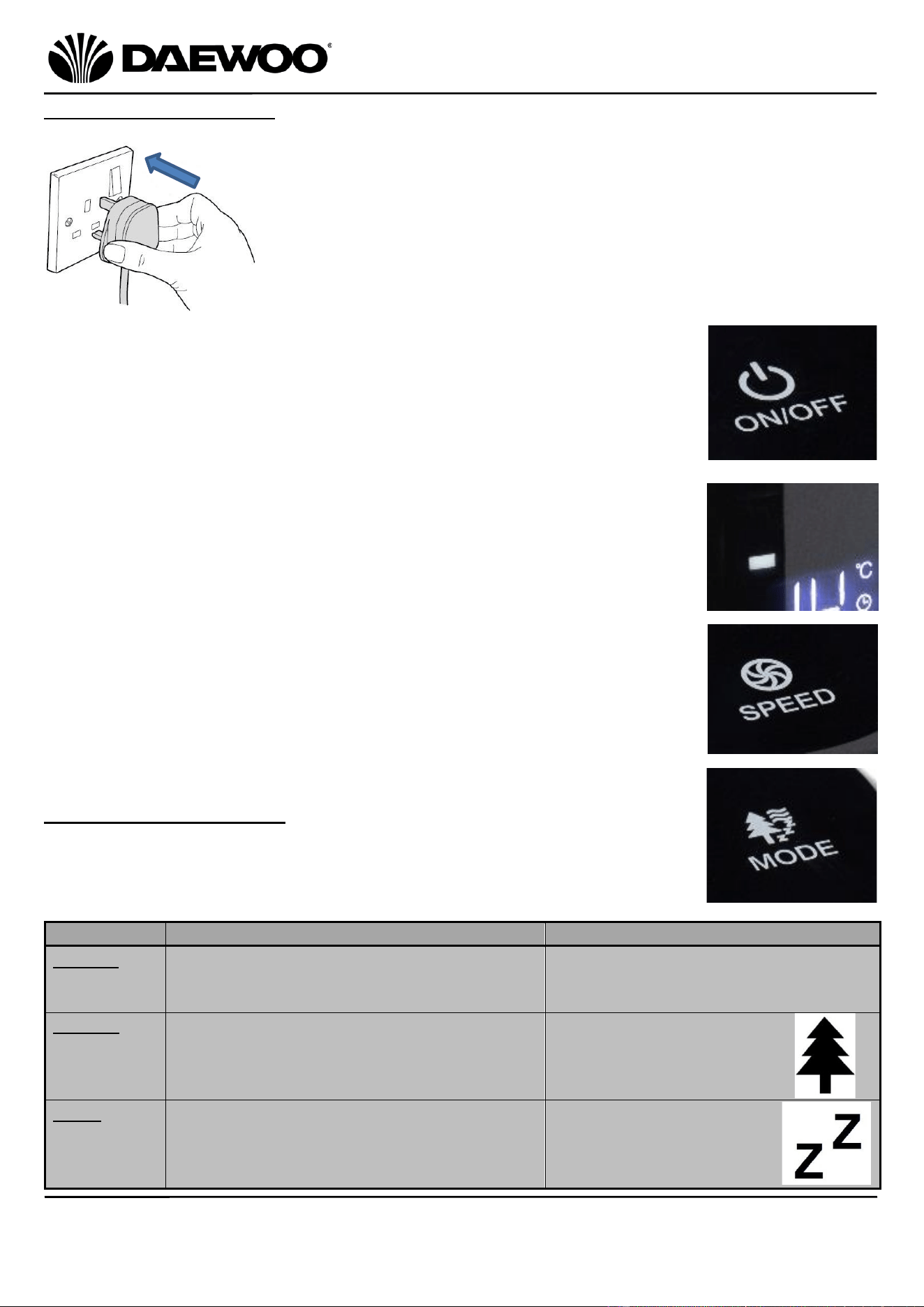
Ensure the two locking clips
have fully latched as in the
close up right:
3. Place the Stand (7) onto the base of the Tower
Fan and rotate the stand until it drops into
position and the cord grip on the fan base
aligns with the notch in the stand as shown left.
4. Secure the Stand (7) by rotating the large
retaining nut clockwise as shown arrowed left:
5. Finally, thread the mains cable through the cord guide on the underside of the
Stand (7) as below:
Mains cable threaded through the stand
Notch in the stand
8
36 Inch Tower Fan with Remote
Model No. COL1571
User Manual
IMPORTANT – RETAIN THESE INSTRUCTIONS FOR FUTURE REFERENCE
Operating Instructions
1. Once you have assembled your Tower Fan as described
above, Place the fan into the desired position ensuring
that it is level and stable. Insert the mains plug into the
nearest socket.
2. The fan will emit a beep sound and the
Temperature/Timer Display (13) will show the current
room temperature to confirm it is in standby.
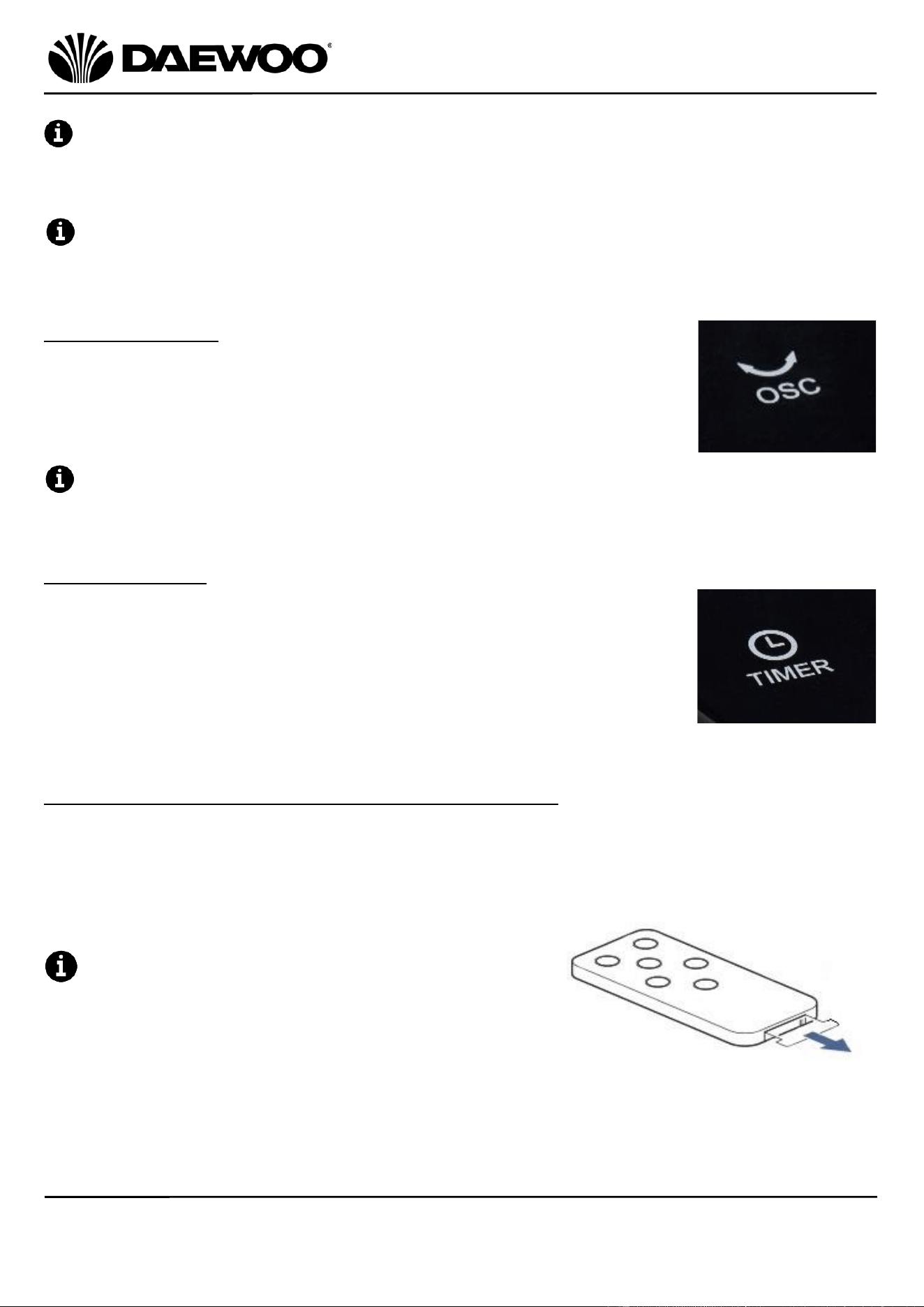
3. Press the Power Button (10) on the Control Panel (1) to power
up the unit. The unit will emit two beeps to confirm.
(The fan will go into sleep mode i.e. the display(s) will go dim
if the unit is left in standby for 1 minute or longer – the unit
can be ‘woken up’ by pressing the Power Button (10)).
2. The Fan Speed Display (12) will show one light showing that
the fan it is running at Speed 1.
3. Press the Fan Speed Button (11) on the Control Panel (1) to
select the desired fan speeds (1, 2 or 3). The Fan Speed Display
(12) will show the appropriate number of lights for the fan
speed chosen.
Selecting the Fan Mode
1. Press the Mode Button (9) on the Control Panel (1) to select
one of the three following fan modes:
Fan Mode
Mode Description
Mode Display (14) will show:
Normal
Normal fan with constant running
according to the fan speed selected.
Blank – this shows the fan is
running normally with no mode
selected.
Natural
Forest wind imitation mode, the airflow
randomly changes from a gentle breeze
to gusts of wind.
A Tree symbol (right)
will be shown to show
the fan is in Natural
Mode.
Sleep
The airflow changes in cycles also the
Display (2) will extinguish after 30
seconds
Two ‘Z’s will be shown
(right) to show the fan is
in Sleep Mode.
9
36 Inch Tower Fan with Remote
Model No. COL1571
User Manual
IMPORTANT – RETAIN THESE INSTRUCTIONS FOR FUTURE REFERENCE
The Temperature/Timer Display (13), the Fan Speed Display (12) and the
Mode Display (14) will automatically dim after 30 seconds on both Normal and
Natural modes, this is normal operation and the unit is not faulty.
The Temperature/Timer Display (13), the Fan Speed Display (12) and the
Mode Display (14) will automatically go out after 30 seconds on Sleep mode, this
is normal operation and the unit is not faulty.
Oscillation Mode
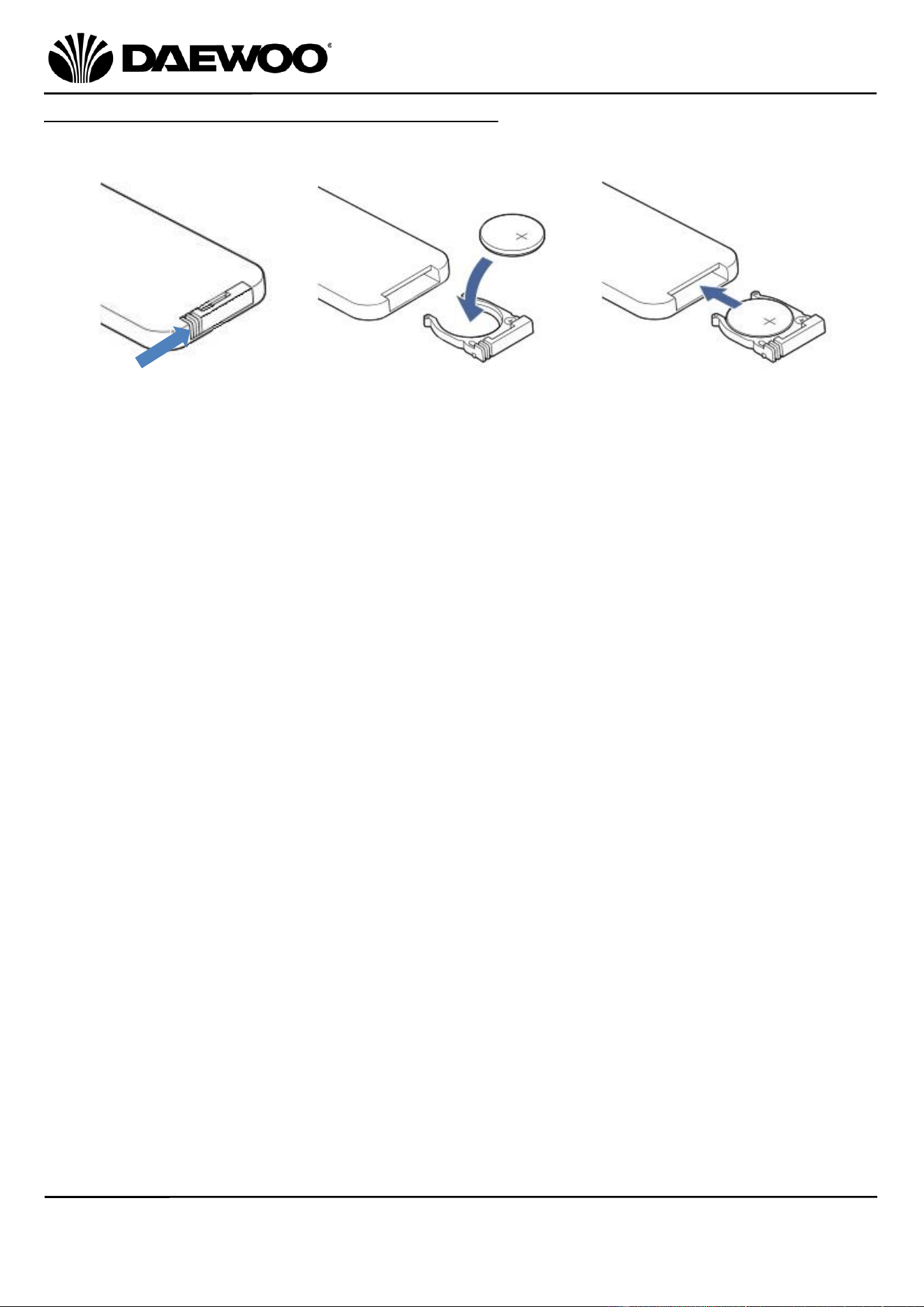
1. Press the Oscillate Button (8) on the Control Panel (1) to
enable the fan to oscillate from side to side to blow air
over a larger area. Press the oscillate button again to stop
the oscillation.
Oscillate Symbol will illuminate on the Mode Display (14) when the oscillate
mode is selected.
Using the Timer
1. Press the Timer Button (16) once on the Control Panel (1).
2. The Temperature/Timer Display (13) will show ‘01H’. Each
further press of the Timer Button (16) will advance the
‘on’ time in 1 hour steps to a maximum time of 12 hours.
The fan will now run for the length of time shown on the
Temperature/Timer Display (13) and then switch off.
Operating Instructions - Using the Remote Control
The Remote Control duplicates the controls on the Control Panel (1) allowing
you to control your Tower Fan remotely.
If using the Remote Control for the first time,
pull the tab from the battery compartment as
shown right:
10
36 Inch Tower Fan with Remote
Model No. COL1571
User Manual
IMPORTANT – RETAIN THESE INSTRUCTIONS FOR FUTURE REFERENCE
Replacing the Battery in the Remote Control
If the Remote-Control range has become reduced or it has stopped working
altogether the battery will need replacing as shown below:
• CAUTION: There is a danger of explosion if the battery is incorrectly fitted.
• Ensure that the battery is installed with the correct polarity.
• It is recommended that battery is removed if the remote if it is not to be used
for a long period of time or if the remote is to be disposed of.
• Replace only with the same or equivalent battery type.
• Store batteries in a cool dry place.
• Do not expose the battery to sunshine, fire, heat or similar, never dispose of
batteries in a fire.
• Do not charge non-rechargeable batteries.
• Do not short-circuit batteries.
• Exhausted batteries are to be removed from the product and safely disposed of.
WARNING!
• Do not ingest the battery, Chemical Burn Hazard.
• The remote control supplied with this product contains a coin/button cell
battery.
• If the coin/button cell battery is swallowed, it can cause severe internal burns in
just 2 hours and can lead to death.
• Keep new and used batteries away from children and animals.
• If the battery compartment does not close securely, stop using the product and
keep it away from children.
• If you think batteries might have been swallowed or placed inside any part of
the body, seek immediate medical attention.
• If the batteries leak, remove them immediately to avoid damaging the product.
Do not remove the batteries with your bare hands or allow the battery fluid to
come into contact with your skin, eyes or mucous membranes. Wear normal
household gloves to do so. If, however, your skin has come into contact with the
battery fluid, wash your skin immediately, if necessary, seek medical attention.
A Push the tab on the
battery compartment in
the direction of the arrow
as shown above.
B Slide out the battery
compartment and insert a new
CR2025 battery ensuring the
positive polarity marking is
uppermost.
C Slide the battery
compartment back into
the Remote Control.
11
36 Inch Tower Fan with Remote
Model No. COL1571
User Manual
IMPORTANT – RETAIN THESE INSTRUCTIONS FOR FUTURE REFERENCE
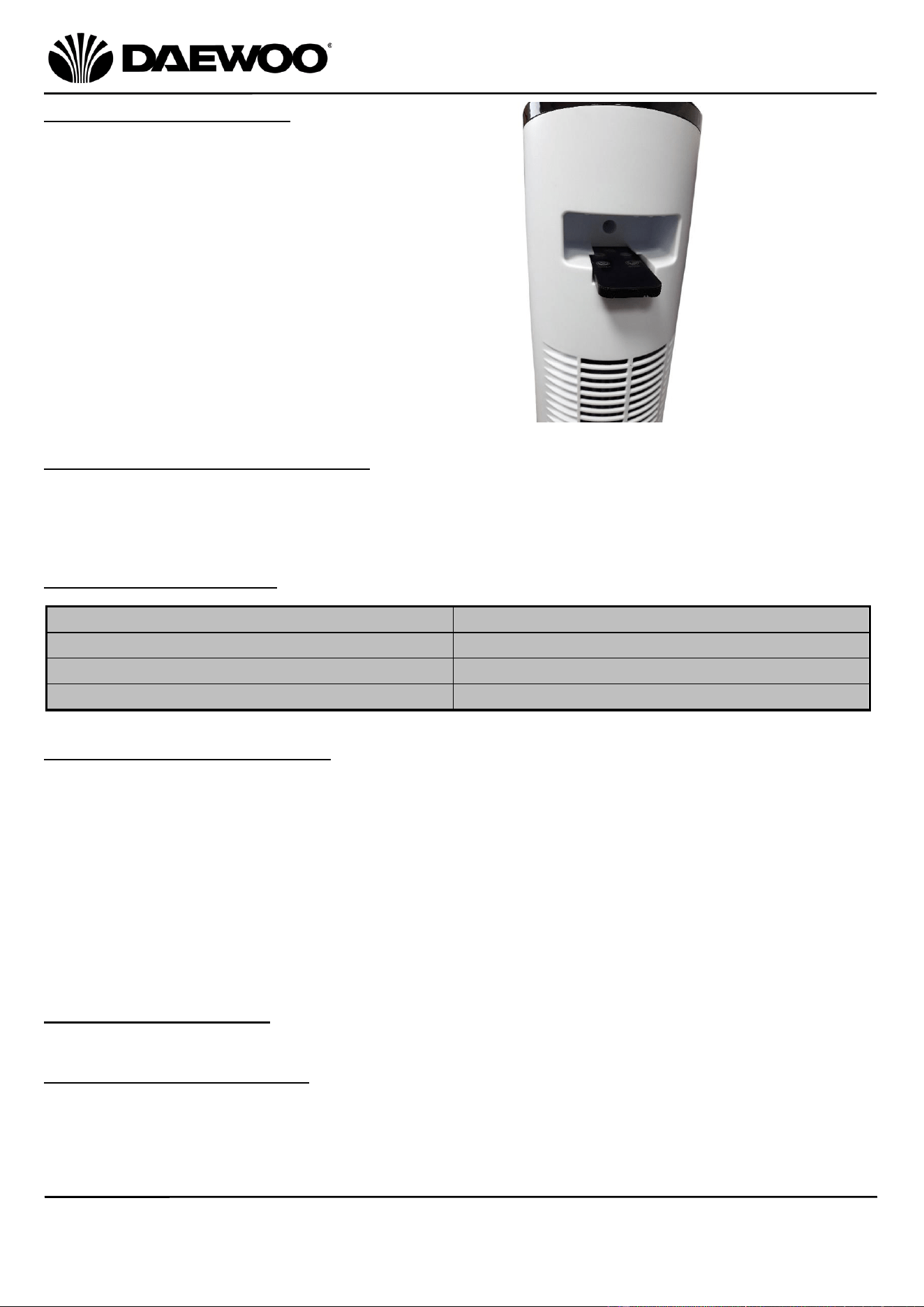
Remote Control Storage
The Remote Control can be stored in the
Handle/Remote Storage (3) slot at the rear
of the fan as shown right:
Care and Use of your Tower Fan
• Ensure that the fan is not connected to the mains supply before cleaning.
• Wipe the fan body clean with a clean, soft damp cloth.
• Do not immerse the fan or its cord in water or any other liquid.
Technical Specification
Non-Rewireable Mains Plug
If your appliance is supplied with a non-rewireable plug fitted to the mains lead
and should the fuse need replacing, you must use an ASTA approved one
(conforming to BS 1362 of the same rating). Never use a mains plug with the fuse
cover missing. If in doubt, consult a qualified electrician.
If you need to remove the plug – DISCONNECT FROM THE MAINS – and then cut it
off the mains lead and immediately dispose of it safely. Never attempt to reuse
the plug or insert it into a socket outlet as there is a danger of electric shock.
Recycling Information
Disposal of the Packaging
Dispose of paper and cardboard in appropriate paper re-cycling facilities.
Dispose of recyclable plastics in appropriate plastic re-cycling facilities.
Dispose of non-recyclable plastics in the appropriate plastics collection service.
Model No.
COL1571
Voltage
220-240V AC 50/60Hz
Rated Power
55W
Protection Class
II
12
36 Inch Tower Fan with Remote
Model No. COL1571
User Manual
IMPORTANT – RETAIN THESE INSTRUCTIONS FOR FUTURE REFERENCE
Disposal of the Product
You should now recycle your waste electrical goods and in doing so
help the environment. This symbol means waste electrical products
at the end of their useful life should not be disposed of with normal
household waste and not sent to landfill. Please ensure it is taken to
a suitable facility for disposal. Check with your Local Authority or
retailer for recycling advice or visit www.recycle-more.co.uk enter
your postcode to find out your nearest recycling site.
This symbol means batteries and rechargeable batteries may not be
disposed of with household waste!
As the end user you are required by law to bring all batteries and
rechargeable batteries to a collection point run by the Local Authority
or to a retailer or visit www.recycle-more.co.uk, so that they can be
disposed of in an environmentally friendly manner.

13
36 Inch Tower Fan with Remote
Model No. COL1571
User Manual
IMPORTANT – RETAIN THESE INSTRUCTIONS FOR FUTURE REFERENCE
WARRANTY
Thank you for purchasing your Daewoo product.
As part of our commitment to quality, we are offering you an extra 2 years warranty in
addition to your 1 year guarantee
Your Daewoo product is guaranteed for 1 year from the date of original purchase, with proof
of purchase or receipt. If any defect should occur due to faulty workmanship or material, your
faulty product should be returned to the place of purchase, replacement or refund is at the
discretion of the retailer.
The guarantee is subject to the following provisions:
•
The product must be correctly installed and operated in accordance with the
requirements contained in the instruction manual.
•
The product must be used solely for domestic purposes.
•
It does not cover general wear and tear, damage, misuse or any consumable parts.
•
The guarantee will be rendered invalid if the product is re-sold or has been damaged through
inexpert repair.
•
The guarantee is only valid within the UK and Eire.
Your standard 1 year guarantee will only be extended to the maximum available for your
individual product upon registration. (Note: products must be registered individually and
covers the main body and housing). If you do not register your product within 28 days of the
original purchase date, your product will only be guaranteed for 1 year.
To validate your extended 2 year warranty*please register your purchase online within 28
days of the original purchase date by registering at:
https://help.daewooelectricals.com
or
Contact Us (daewooelectricals.com)
*Your extended warranty is only valid with proof of purchase receipt and subject to the
conditions outlined above.
Daewoo is a registered trademark.
Produced and imported under licence by
Eurosonic Group Limited
Brightgate House
1 Brightgate Way
Manchester M32 0TB UK
EU Rep: EuroSonic Magppie (ESM) Ltd. Ireland D05 X006
www.esgltd.com