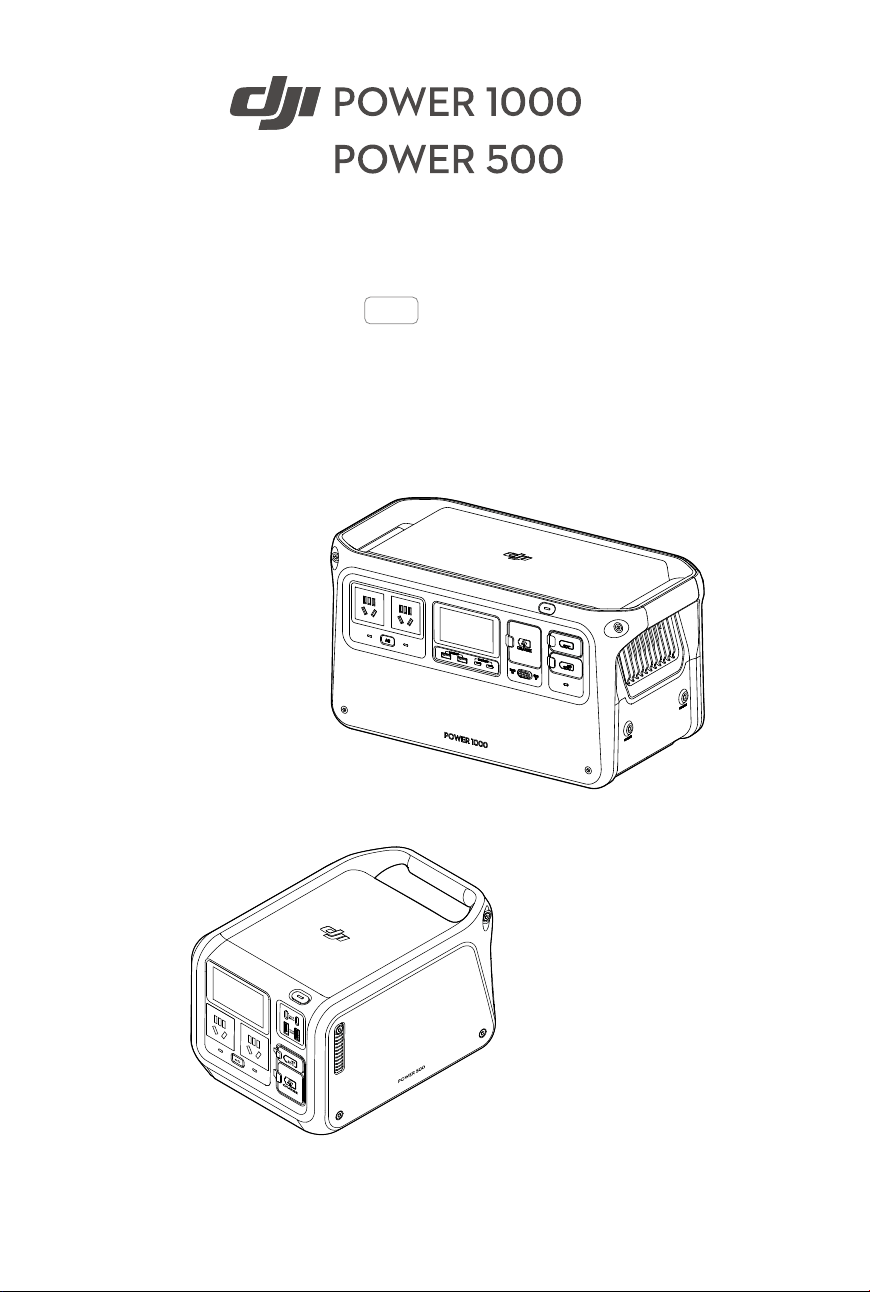
User Manual
2024.04
v1.0

2
©
2024 DJI All Rights Reserved.
Searching for Keywords
Search for keywords such as “battery” and “install” to nd a topic. If you are using Adobe
Acrobat Reader to read this document, press Ctrl+F on Windows or Command+F on Mac
to begin a search.
Navigating to a Topic
View a complete list of topics in the table of contents. Click on a topic to navigate to that
section.
Printing this Document
This document supports high resolution printing.
This document is copyrighted by DJI with all rights reserved. Unless otherwise authorized by DJI,
you are not eligible to use or allow others to use the document or any part of the document by
reproducing, transferring or selling the document. Users should only refer to this document and
the content thereof as instructions to operate DJI products. The document should not be used
for other purposes.
DJI Power 1000/500 User Manual
©
2024 DJI All Rights Reserved.
3
Using this Manual
• DJI Power 1000 and DJI Power 500 have similar functions and operations. Unless
otherwise specied, the descriptions in this document use the DJI Power 1000 as an
example and apply to both products.
Legend
Important Hints and Tips
Read Before Use
DJI
TM
provides users with tutorial videos and the following documents.
1. Safety Guidelines
2. Quick Start Guide
3. User Manual
It is recommended to watch all tutorial videos and read the safety guidelines before using for
the rst time. Prepare for your rst use by reviewing the quick start guide and refer to this user
manual for more information.
Tutorial Videos
Go to the address below or scan the QR code to watch the tutorial videos, which demonstrate
how to use the product safely.
https://s.dji.com/guide67
DJI Power 1000
https://s.dji.com/guide69
DJI Power 500
Download DJI Assistant 2
Download DJI ASSISTANT
TM
2 (Power Series) at:
https://www.dji.com/power-1000/downloads or https://www.dji.com/power-500/downloads

4
©
2024 DJI All Rights Reserved.
Using this Manual 3
Legend 3
Read Before Use 3
Tutorial Videos 3
Download DJI Assistant 2 3
Introduction 5
Product Profile 5
Display Screen 6
Powering on/off 7
Charging External Devices 8
AC Output 8
USB Output 9
Fast Charging DJI Aircraft Batteries 9
Other SDC Output 10
Recharging the Power Station 11
AC Recharging 11
Solar Recharging 12
Car Recharging 13
USB-C Recharging 13
Uninterruptible Power Supply (UPS) 14
DJI Power 1000 Extensions 15
1/4″ Thread Hole 15
Protective Storage Bag 15
Appendix 16
Firmware Update 16
Troubleshooting 17
Maintenance 17
Accessory Options (Sold Separately) 18
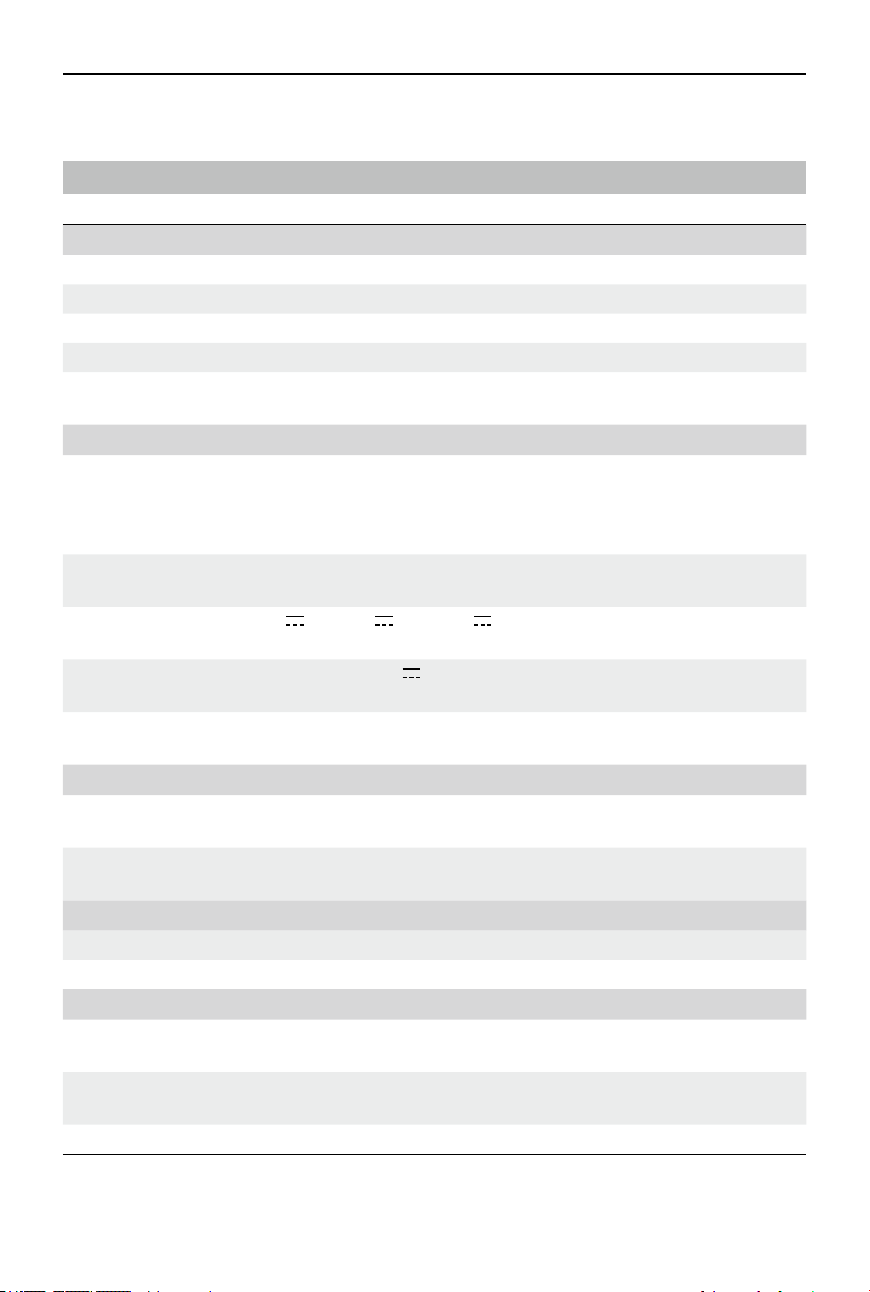
Specifications 20
DJI Power 1000 20
DJI Power 500 21
Contents
DJI Power 1000/500 User Manual
©
2024 DJI All Rights Reserved.
5
Introduction
DJI Power 1000 is a portable power station with a capacity of 1024 Wh, a weight of
approximately 13 kg, and support for a maximum output power of 2200 W. DJI Power 500
is a portable power station with a capacity of 512 Wh, a weight of approximately 7.3 kg,
and support for a maximum output power of 1000 W.
The power stations provide Fast Recharge mode and Standard Recharge mode for AC
recharging. In Fast Recharge mode, the power station can be quickly recharged to 80%
in approximately 50 minutes, and to 100% in approximately 70 minutes.
[1]
In Standard
Recharge mode, the operation noise can be reduced and the battery cell life can be
extended. And the power station can recharged to 100% in approximately 2 hours.
[1]
The
power stations feature SDC/SDC Lite ports. With different DJI Power accessories, the power
stations can charge DJI Intelligent Flight Batteries and other types of devices, supporting
power supply in various scenarios.
[1] Tested at a room temperature of 25° C (77° F) in a well-ventilated environment and is for reference only.
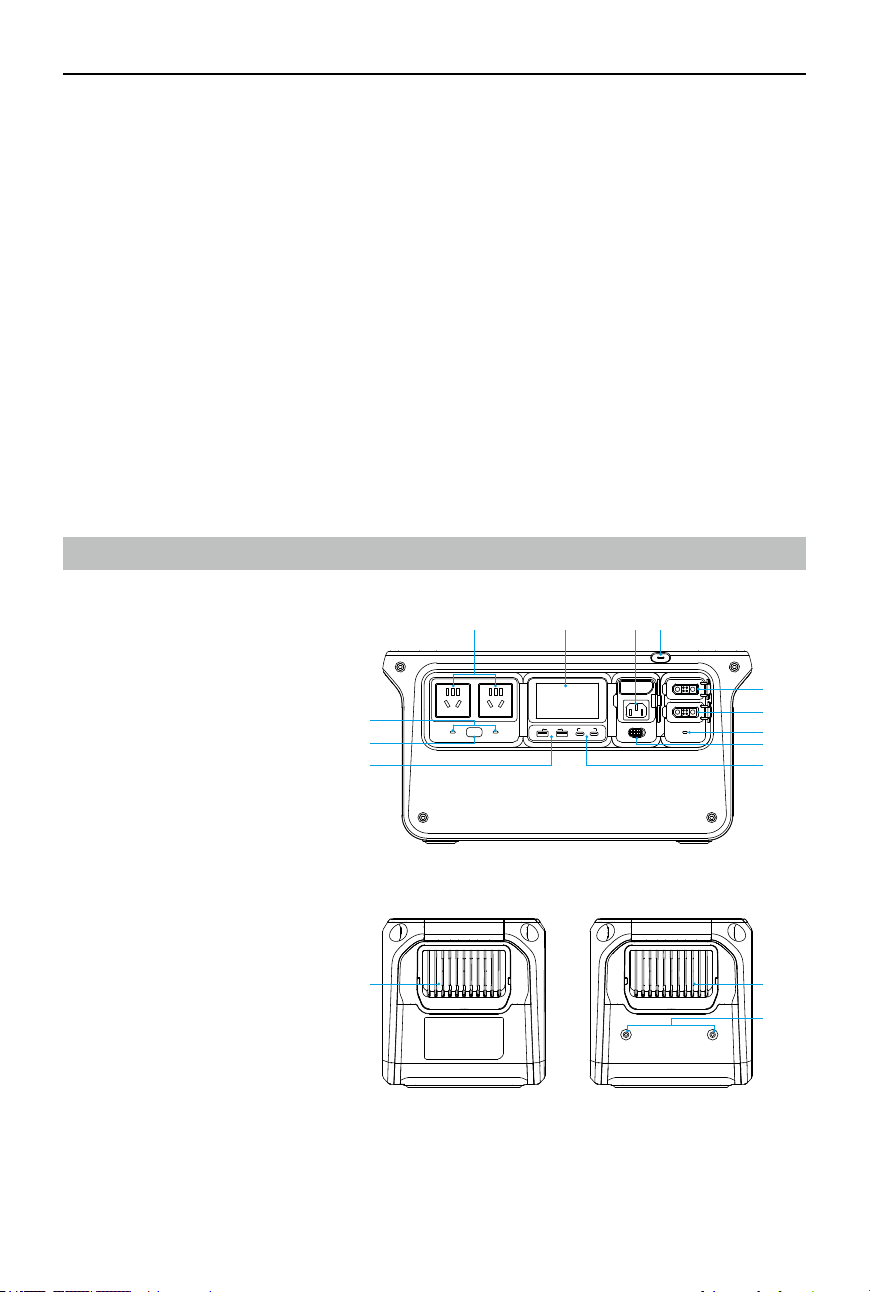
Product Prole
DJI Power 1000
1. Power Button
2. AC Input Port
3. Display Screen
4. AC Output Ports
[1]
5. AC Output Indicators
6. AC Button
7. USB-A Ports
8. USB-C Ports
9. Recharge Mode Switch
10. SDC Port Indicator
11. SDC Lite Port
12. SDC Port
13. Vents
14. 1/4″ Thread Hole
MAX 24W MAX 140W
POWER 1000
1200
W
600
W
AC
UNC-1/4-20 UNC-1/4-20
124 3
5
6
7
13 13
14
8
9
10
11
12
[1] The illustrations in the user manual may dier from the actual product, depending on the country or
region. Please refer to the actual product.
DJI Power 1000/500 User Manual
6
©
2024 DJI All Rights Reserved.
DJI Power 500
1. Power Button
2. Display Screen
3. AC Output Ports
[1]
4. AC Output Indicators
5. AC Button
6. AC Input Port
7. Recharge Mode Switch
8. SDC Lite Port
9. USB-A Ports
10. USB-C Ports
11. Vents
[1] The illustrations in the user manual may dier from the actual product, depending on the country or
region. Please refer to the actual product.
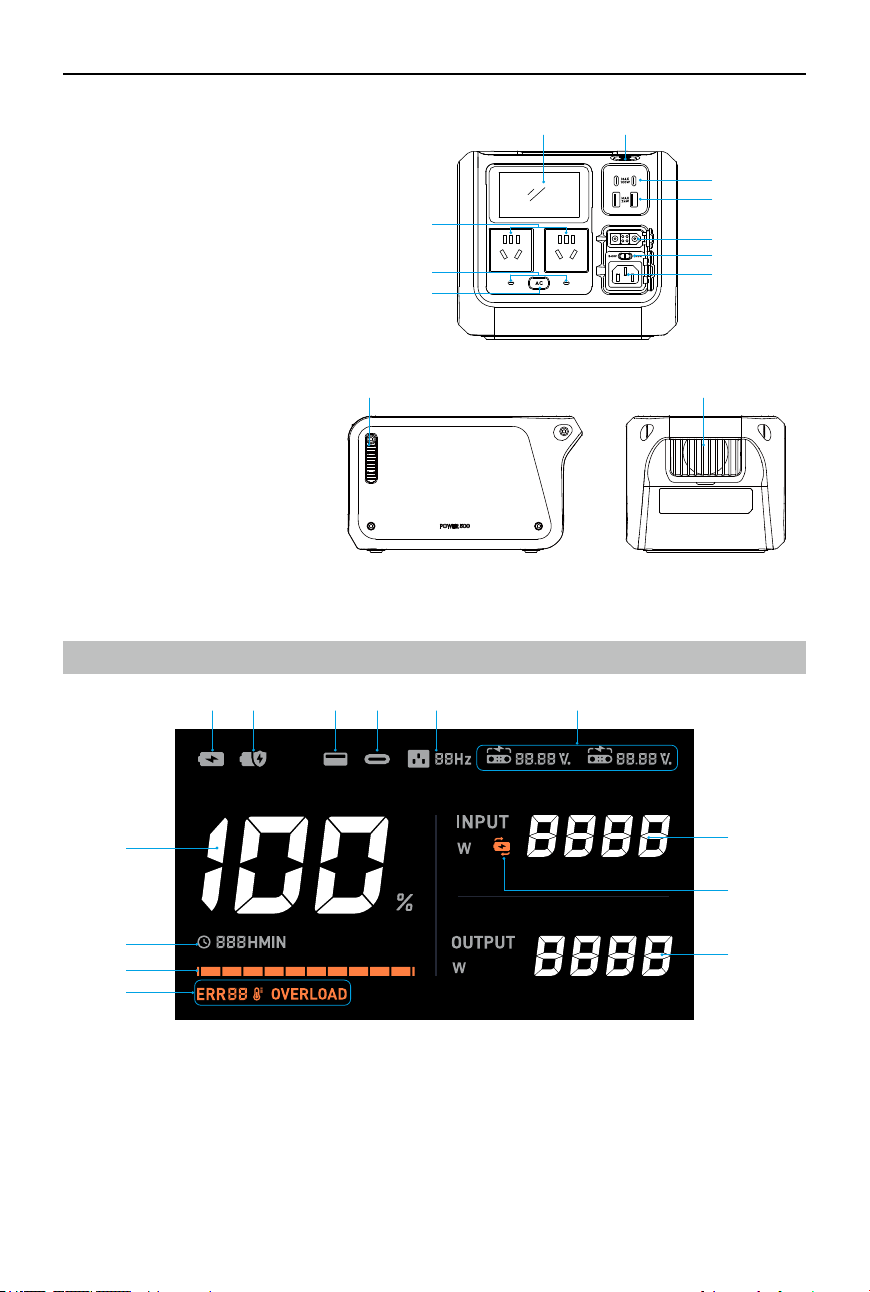
Display Screen
1.
Displays current battery level of the power station.
2. Displays the remaining usage time when the power station is charging external devices.
Displays the remaining time required to fully recharge the power station from the current
battery level when recharging the power station.
3.
Battery Level Bar:
The battery level bar blinks in sequence when recharging the power
station. The last grid of the battery level bar blinks when the power station is charging
external devices.
12
11 11
3
4
5
6
7
8
9
10
1
2
3
4
5 6 7 8 9 10
13
12
11

DJI Power 1000/500 User Manual
©
2024 DJI All Rights Reserved.
7
4.
System Warnings
:
error code
:
Temperature error. When the temperature is abnormal in Fast Recharge mode, the
temperature error icon on the display screen blinks slowly. The actual recharge power may
be lowered to ensure the battery cell life and safety. The icon will be solid if the temperature
is too high or too low. Wait for the temperature to return to normal.
: overload warning
• Visit https://s.dji.com/DJI-Power to learn about the warning details and the
corresponding troubleshooting.
5. : AC recharging in Fast Recharge mode.
6. : AC recharging in Standard Recharge mode.
7. : USB-A port.
8. : USB-C port.
9. : AC output frequency.
10.
SDC/SDC Lite Port
: recharging the power station or charging external devices via the SDC/SDC Lite Port.
: the voltage value when using the SDC/SDC Lite Port.
: the battery level of the intelligent ight battery when charging the battery via
the SDC/SDC Lite Port.
11.
Input Power
12. Uninterruptible Power Supply (UPS): if the power station is connected to an AC power
outlet and using AC output simultaneously, UPS will be enabled by default. This function is
unavailable in some regions. Refer to local laws and regulations for more information.
13.
Output Power
Powering on/o
1.
Power on/off:
press and hold the power button for at least two seconds. The display
screen will be automatically turned on after powering on.
2.
Turn on/o the display screen:
when the power station is powered on, press the power
button once.
AC
MAX 24W MAX 140W
POWER 1000
CHARGE
1200
W
600
W
2s
ON/OFF
ON/OFF
×1

DJI Power 1000/500 User Manual
8
©
2024 DJI All Rights Reserved.
Charging External Devices
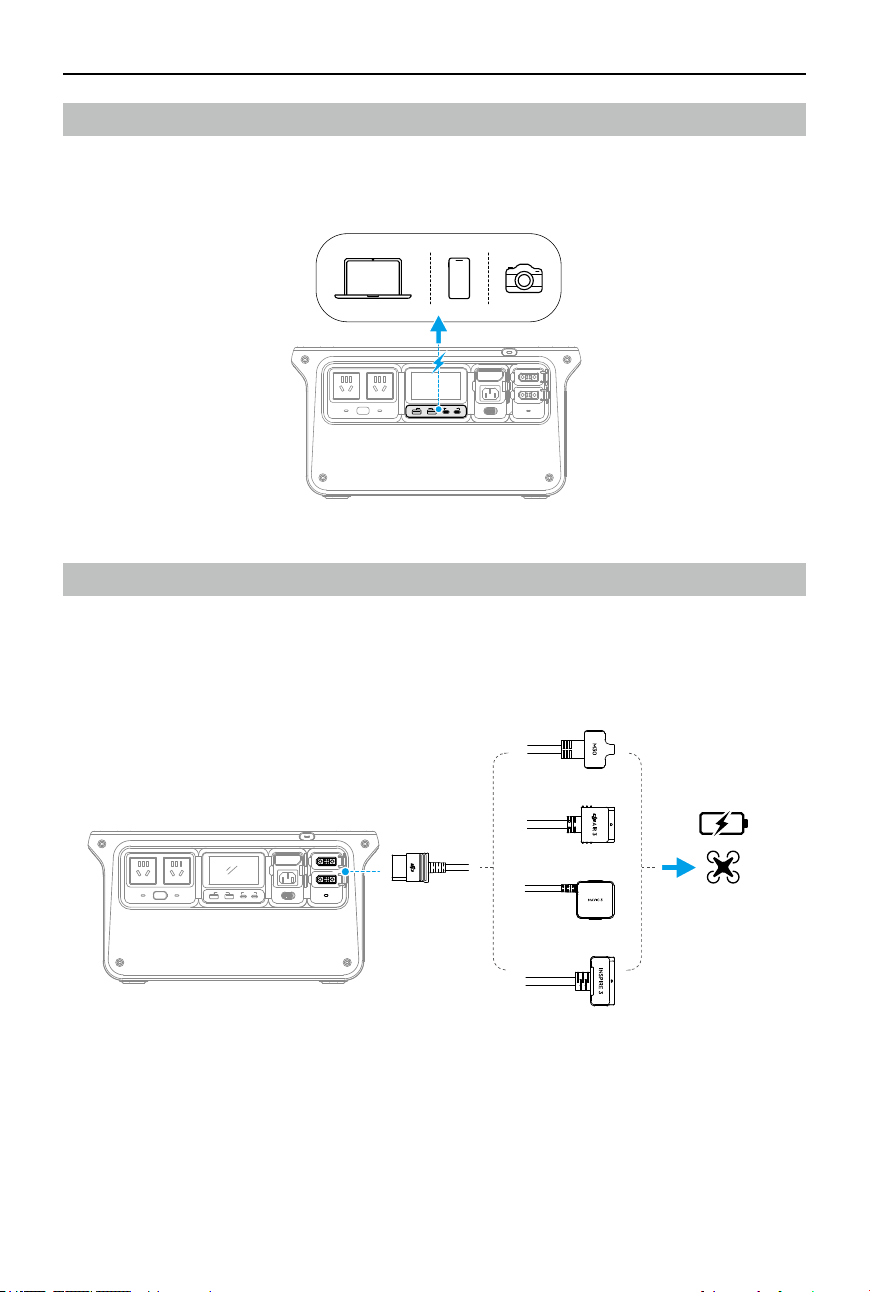
AC Output
The power station features two AC output ports. Connect the external device to an AC output
port and press the AC Button for AC power supply.
The power station features Automatic AC Shutdown and Auto Shutdown to save power.
•
Automatic AC Shutdown:
press the AC Button once to enable AC output, and the AC output
indicator will blink slowly. AC output will automatically shut down to save electricity if the
power station is not charging any device via the AC output ports within half an hour.
•
Continuous AC Output:
press and hold the AC Button to enable AC output, the AC output
indicator will show solid light, and AC output will not automatically shut down. This can
provide a continuous AC power supply to an external device that operates intermittently such
as a refrigerator.
•
Auto Shutdown at Low Power Output:
when AC output is disabled, the power station will
automatically shut down if it is not charging any device within an hour.
When being recharged with AC input power at different frequencies, the power station will
automatically switch to the same frequency as the input power. To manually switch the AC
output frequency, disconnect the power station from the AC power outlet when AC output is
enabled, then press and hold the AC Button for 10 seconds.
• The internal electronic components have a waterproof coating. There may be a faint
smell when using a large amount of power. The smell will dissipate naturally with
daily use.
AC
AC
1
2
×1
DJI Power 1000 DJI Power 500
DJI Power 1000/500 User Manual
©
2024 DJI All Rights Reserved.
9
USB Output
The power station features two USB-A ports and two USB-C ports. Connect the external device
to the USB-A or the USB-C ports for power supply.
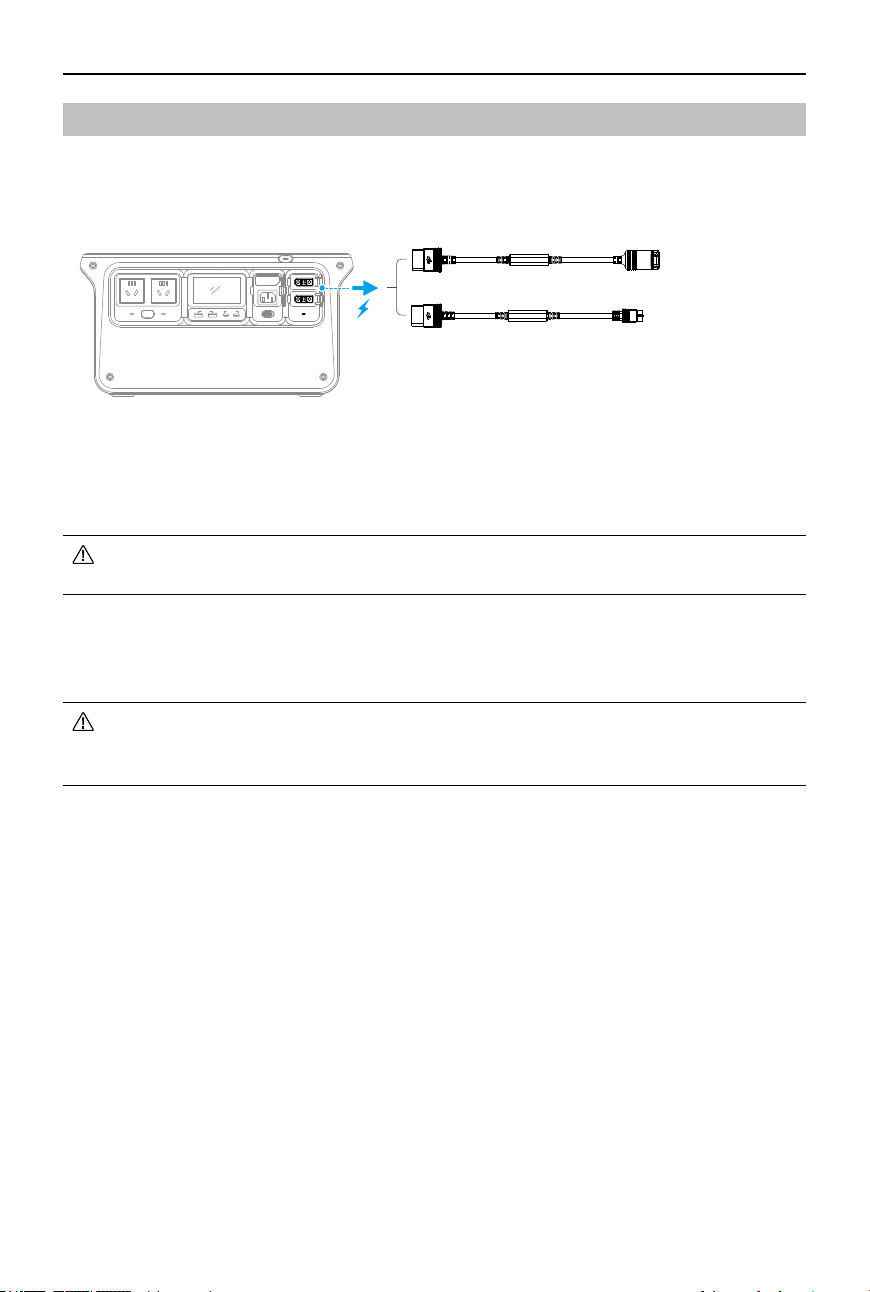
Fast Charging DJI Aircraft Batteries
DJI Power 1000 features an SDC port and an SDC Lite port, and DJI Power 500 features an SDC
Lite port.
The power station can fast charge a supported DJI Intelligent Flight Battery using an SDC fast
charge cable (sold separately).
AC
MAX 24W MAX 140W
POWER 1000
1200
W
600
W
SDC
AC
MAX 24W MAX 140W
POWER 1000
1200
W
600
W
MAX 24W MAX 140W
POWER 1000
1200
W
600
W
AC
DJI Inspire 3
Matrice 30 Series
DJI Air 3
DJI Mavic 3 Series
DJI Power 1000/500 User Manual
10
©
2024 DJI All Rights Reserved.
Other SDC Output
The power station can also be used with other SDC cables (sold separately) to charge dierent
devices via the SDC/SDC Lite port.
DJI Power SDC to Car Charger Plug Power Cable (12 V)
The power station can charge car-powered devices such as a car refrigerator using this cable.
• Make sure the external device is within the output specications of the cable (voltage
13.6 V, current 10 A, power 136 W).
DJI Power SDC to XT60 Power Cable (12 V)
The power station can provide 12V DC input for devices with an XT60 port using this cable.
• DO NOT directly connect to a lithium battery with an XT60 port using the DJI Power
SDC to XT60 power cable. Make sure to connect the power station to a balanced
charger rst.
AC
MAX 24W MAX 140W
POWER 1000
1200
W
600
W
XT60
Car Charger Plug

DJI Power 1000/500 User Manual
©
2024 DJI All Rights Reserved.
11
Recharging the Power Station
AC Recharging
The power station provides Fast Recharge mode and Standard Recharge mode for AC
recharging.
Fast Recharge Mode:
in Fast Recharge mode, the recharge power is larger. It takes
approximately 50 minutes to recharge the power station to 80%, and approximately 70 minutes
to 100%.
Standard Recharge Mode:
in Standard Recharge mode, the recharge power is lower and
the operation noise is lower, which is suitable for recharging at night. Recharging in Standard
Recharge mode can extend battery cell life. It takes approximately two hours to recharge the
power station to 100%.
Take DJI Power 1000 as an example, follow the steps bellow for AC recharging:
1. Open the port cover, and connect DJI Power 1000 to an AC power outlet using the AC power
cable in the package.
2. Toggle the recharge mode switch to set the recharge mode as 1200W Fast Recharge mode
or 600W Standard Recharge mode. For DJI Power 500, the recharge mode can be set as
540W Fast Recharge mode or 270W Standard Recharge mode.
• Disconnect the AC power outlet when charging is complete.
• It is recommended to use Standard Recharge mode for an extended battery cell life.
• The power station provides a battery cell life protection strategy. If the power station
is recharged in Fast Recharge mode for ve consecutive cycles, the power station will
automatically switch to Standard Recharge mode after the sixth fast recharging for
battery maintenance. The maintenance process lasts approximately 20 minutes.
• When the temperature is abnormal in Fast Recharge mode, the temperature error
icon on the display screen blinks slowly and the actual recharge power may be
lowered to ensure the battery cell life and safety.
AC
MAX 24W MAX 140W
POWER 1000
1200
W
600
W
AC
MAX 24W MAX 140W
POWER 1000
1200
W
600
W
100-120 V AC
220-240 V AC
1
2
1200
W
600
W

DJI Power 1000/500 User Manual
12
©
2024 DJI All Rights Reserved.
Solar Recharging
The power station can be connected to solar panels using the DJI Power Solar Panel Adapter
Module (MPPT) or DJI Power Car Power Outlet to SDC Power Cable for solar recharging. Both
accessories are sold separately.
Take DJI Power 1000 as an example, follow the steps bellow for solar recharging:
1. Unfold the solar panel, support it with the prop, and align the panel to face towards the
sunlight. Adjust the angle of the support prop. It is recommended that the surface of the
solar panel is perpendicular to the sunlight. Make sure that the solar panel is not covered by
any obstructions.
2. Connect the solar panel using a XT60 cable to the solar panel adapter module to begin
recharging.
• Follow the instructions to use the solar panel. DO NOT mix solar panel types.
Otherwise, the device may become damaged.
• Up to three solar panels can be connected to the adapter module and used in parallel
(cannot be used in series). DJI Power 1000 can connect two solar panel adapter
modules and up to six solar panels for solar recharging. DJI Power 500 can connect
one solar panel adapter module and up to three solar panels for solar recharging.
• DJI Power Car Power Outlet to SDC Power Cable allows one solar panel to be
connected for solar recharging. The maximum current of the solar panels should be
lower than 10 A and the power output should be lower than 100 W.
• It is recommended to use DJI authorized Zignes solar panels. If non-recommended
solar panels are used, make sure the solar panels meet all the following requirements
in order to avoid damaging the solar panel adapter and the power station:
90°
AC
MAX 24W MAX 140W
POWER 1000
1200
W
600
W
1
2

DJI Power 1000/500 User Manual
©
2024 DJI All Rights Reserved.
13
a. The open circuit voltage is lower than 30 V.
b. The maximum current of one of the solar panels used is lower than 10 A.
c. If more than one solar panel is used, the total power is lower than 400 W.
• For DJI Power 500, the maximum input power is limited to 300 W when using the SDC
Lite port for solar charging.
• Keep the power station away from direct sunlight when recharging. Overheating can
cause damage to the device.
• Prevent leaves and other objects from covering the surface of the solar panel. Placing
the solar panel in a partially shaded area will aect the power generation eciency
and cause overcurrent, which can damage components.
• Moisten a soft cloth with clean water and wipe the surface to clean the solar panel.
• Make sure the input voltage of the car power port is within 12-30 V and the maximum
input current is lower than 8 A. Otherwise, it may cause abnormal performance or
even damage to the power station.
• Make sure that the power adapter is securely connected to the car power port and
that the car engine is started before recharging.
Car Recharging
DJI Power Car Power Outlet to SDC Power Adapter can be used to connect a car power port to
the SDC port (or SDC Lite port) of the power station for car recharging.
AC
MAX 24W MAX 140W
POWER 1000
1200
W
600
W
USB-C Recharging
DJI Power 500 can be recharged using a USB Power Delivery charger via the USB-C port for a
maximum recharge power of 100 W. It also supports simultaneous power input, where two
USB-C ports can be utilized to charge at a max of 200 W.

DJI Power 1000/500 User Manual
14
©
2024 DJI All Rights Reserved.
Uninterruptible Power Supply (UPS)
The power station supports Uninterruptible Power Supply (UPS). Connect the power station to
an AC power outlet, and connect an external device such as a computer to the power station.
Press the AC button once, and will appear on the display screen. In this case, the AC power
outlet is powering both the power station and the connected device. Note that UPS is enabled
by default.
In case of a sudden power outage, the power station can automatically switch to the battery-
powered supply within 20 ms, ensuring that the connected device remains in normal operation.
If there is a power outage and the power station runs out of battery, AC output can be
automatically enabled after the power supply is resumed. Connect the power station to an AC
power outlet and an external device, press and hold the AC button to enable this function.
• The power station only supports the basic UPS feature and does not support 0ms
switching. DO NOT connect the power station to devices that require 0ms UPS, such as
medical equipment, data servers, or work stations storing important data. Otherwise,
it may cause the device to malfunction or data loss.
• This function is unavailable in some regions. Refer to local laws and regulations for
more information.
MAX 24W MAX 140W
POWER 1000
1200
W
600
W
1
2
AC
AC
3
×1

DJI Power 1000/500 User Manual
©
2024 DJI All Rights Reserved.
15
DJI Power 1000 Extensions
1/4″ Thread Hole
DJI Power 1000 features two 1/4″ thread holes, allowing users to mount the DJI Power Solar
Panel Adapter Module (MPPT) to the power station as follows:
Mount one adapter module to the power station following Figure A.
Align the mounting holes at the bottom of the brackets and mount two adapter modules to the
power station following Figure B.
• Users can also mount devices with 1/4″ screws to the power station.
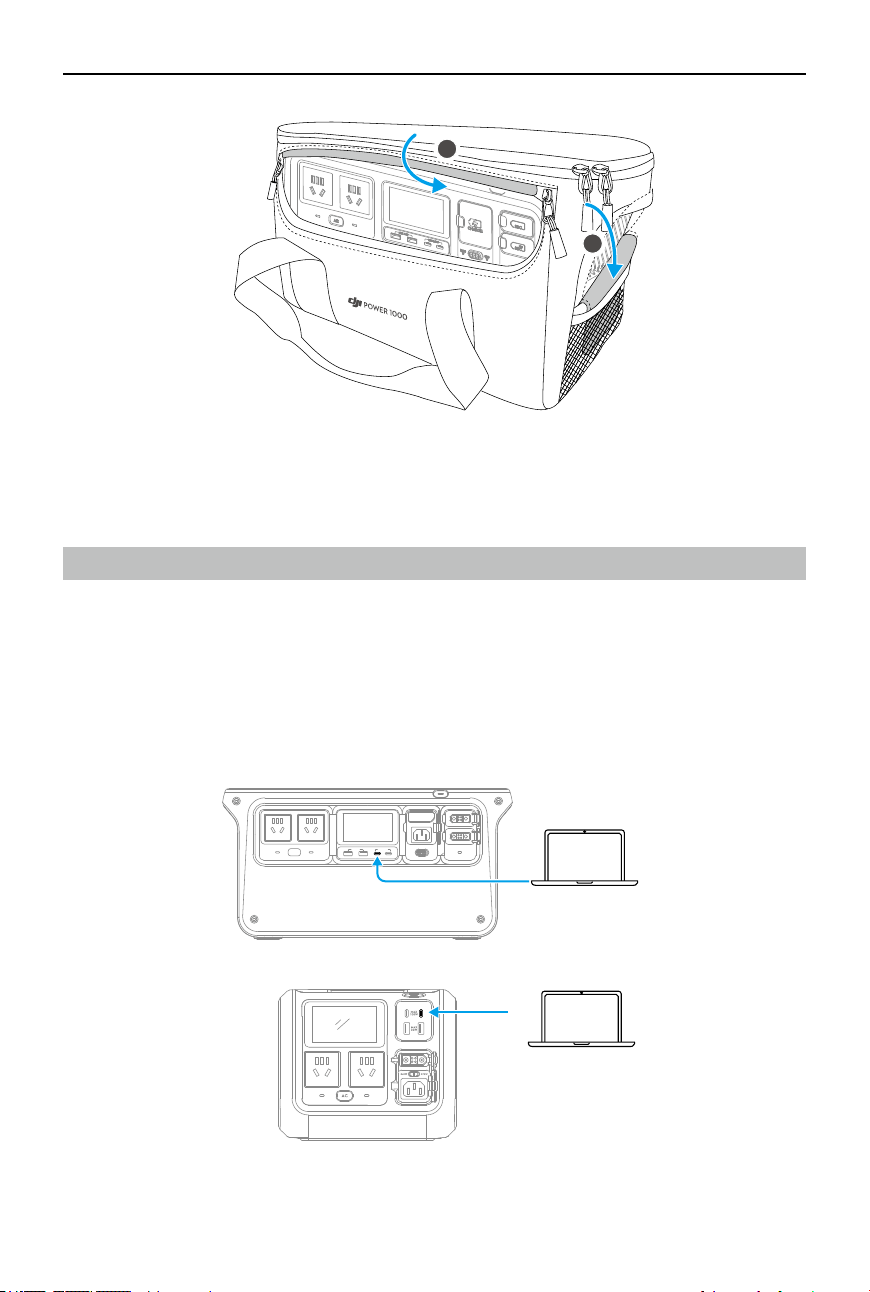
Protective Storage Bag
DJI Power 1000 can be used with the protective storage bag. The bag can protect the power
station from scratches and dust, and make it more convenient to carry the power station.
Open the front of the bag for connecting external devices to the power station, and the rear of
the bag is for storing cables and accessories.
When using DJI Power 1000 with the protective storage bag, make sure to unzip both sides of
the bag in order to avoid blocking the vents, which may cause overheating.
Adapter Module
Adapter Module 1
Adapter Module 2
Heat Dissipation
Brackets
Heat Dissipation
Brackets
B
A
DJI Power 1000/500 User Manual
16
©
2024 DJI All Rights Reserved.
Appendix
Firmware Update
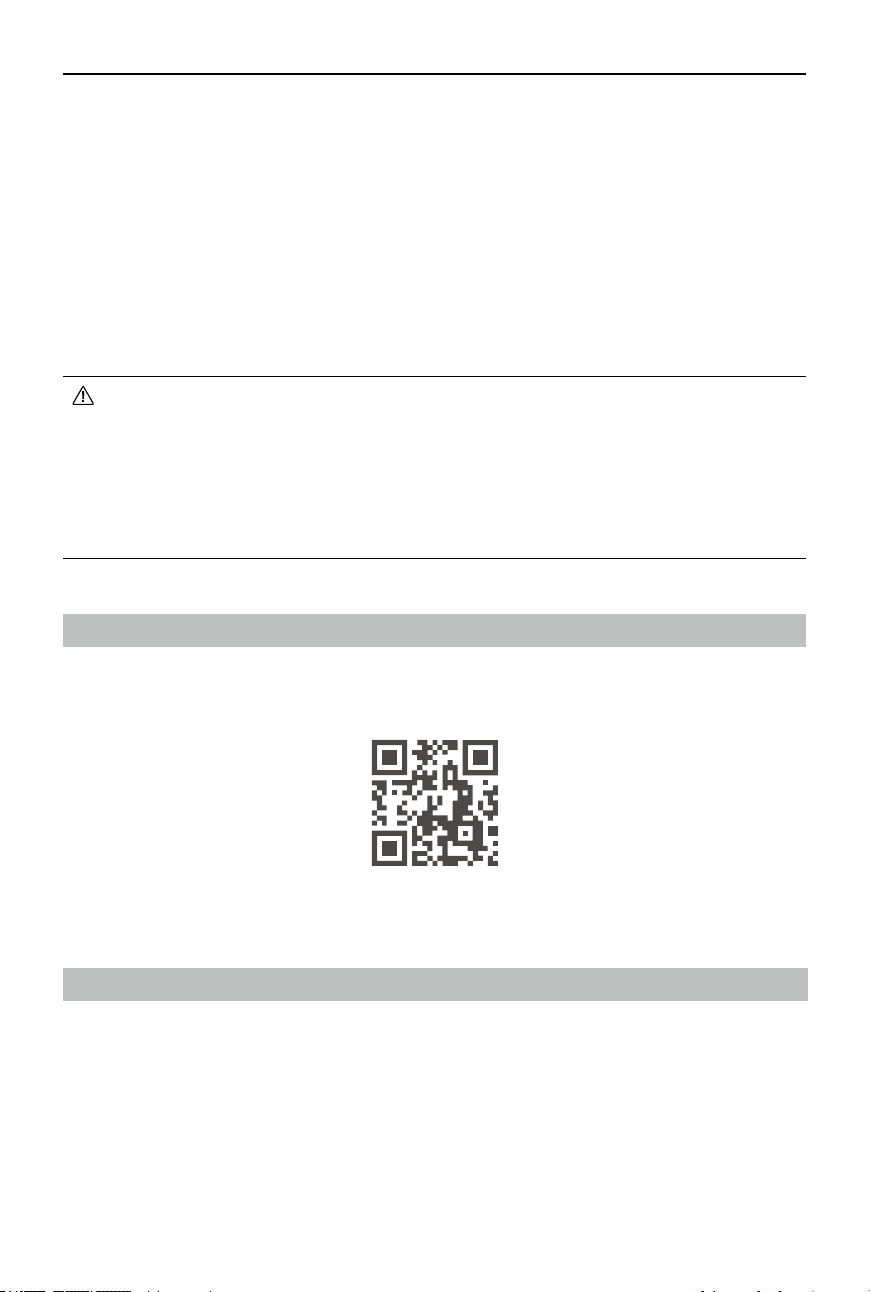
The rmware versions of DJI Power 1000 and DJI Power 500 can be updated using DJI Assistant 2.
Make sure that the computer is connected to the internet before the rmware update. Follow
the instructions below to ensure a successful rmware update:
1. Power o the device, press and hold the AC button and the power button simultaneously,
until LOAD appears on the display screen.
2. Connect the computer to the designated USB-C port as shown in the gure.
MAX 24W MAX 140W
POWER 1000
1200
W
600
W
AC
1
2
DJI Power 1000/500 User Manual
©
2024 DJI All Rights Reserved.
17
3. Connect the device to an AC power outlet if updating the rmware of DJI Power 1000 with a
rated voltage of 100 V or 120 V. Skip this step if updating the rmware of other power station
models.
4. Launch DJI Assistant 2, select the product, and click the rmware update button on the left
side.
5. Select the rmware version, carefully read the prompts in DJI Assistant 2, and click Upgrade.
The rmware will be downloaded and uploaded to the device automatically.
6. The firmware will be updated automatically, and the display screen will show the update
progress. Wait for processing to complete. The device will restart automatically after the
rmware update is done.
• DO NOT power o the device or disconnect the device from the computer during a
rmware update.
• DO NOT disconnect the device from the AC power outlet when updating the rmware
of DJI Power 1000 with a rated voltage of 100 V or 120 V.
• If the rmware update fails, the display screen will show UPGD FAIL. Disconnect the
device from the computer and the AC power outlet, press and hold the power button
for ve seconds to power o the device, and try again.
Troubleshooting
If there is any system warning on the display screen, click the link below or scan the QR code to
learn about the warning details and the corresponding troubleshooting. Contact DJI support if a
problem persists.
https://s.dji.com/DJI-Power
Maintenance
• If the power station needs to be stored for an extended period, it is recommended to
discharge the power station to 60%. Storing with a high power level will shorten the battery
cell life. Storing with a low power level may lead to over-discharge.
• The power station should be stored at a storage temperature of -10° to 45° C (14° to 113° F),
and in a cool and dry environment without direct sunlight. DO NOT place the power station in
water or where water may leak.
DJI Power 1000/500 User Manual
18
©
2024 DJI All Rights Reserved.
• DO NOT store the power station for an extended period after fully discharging. Otherwise, the
battery may over-discharge and cause irreparable damage to the battery cell.
• Charge and discharge the power station once every four months to ensure the battery
performance: discharge the power station to 15%, power o for more than two hours, and
then charge it to 100% in Standard Recharge mode.
• Clean the ports with a clean, dry cloth if there is any noticeable build up. DO NOT clean the
power station with alcohol or other ammable solvents.
Accessory Options (Sold Separately)
Unless otherwise specied, the accessories are compatible with both DJI Power 1000 and DJI
Power 500.
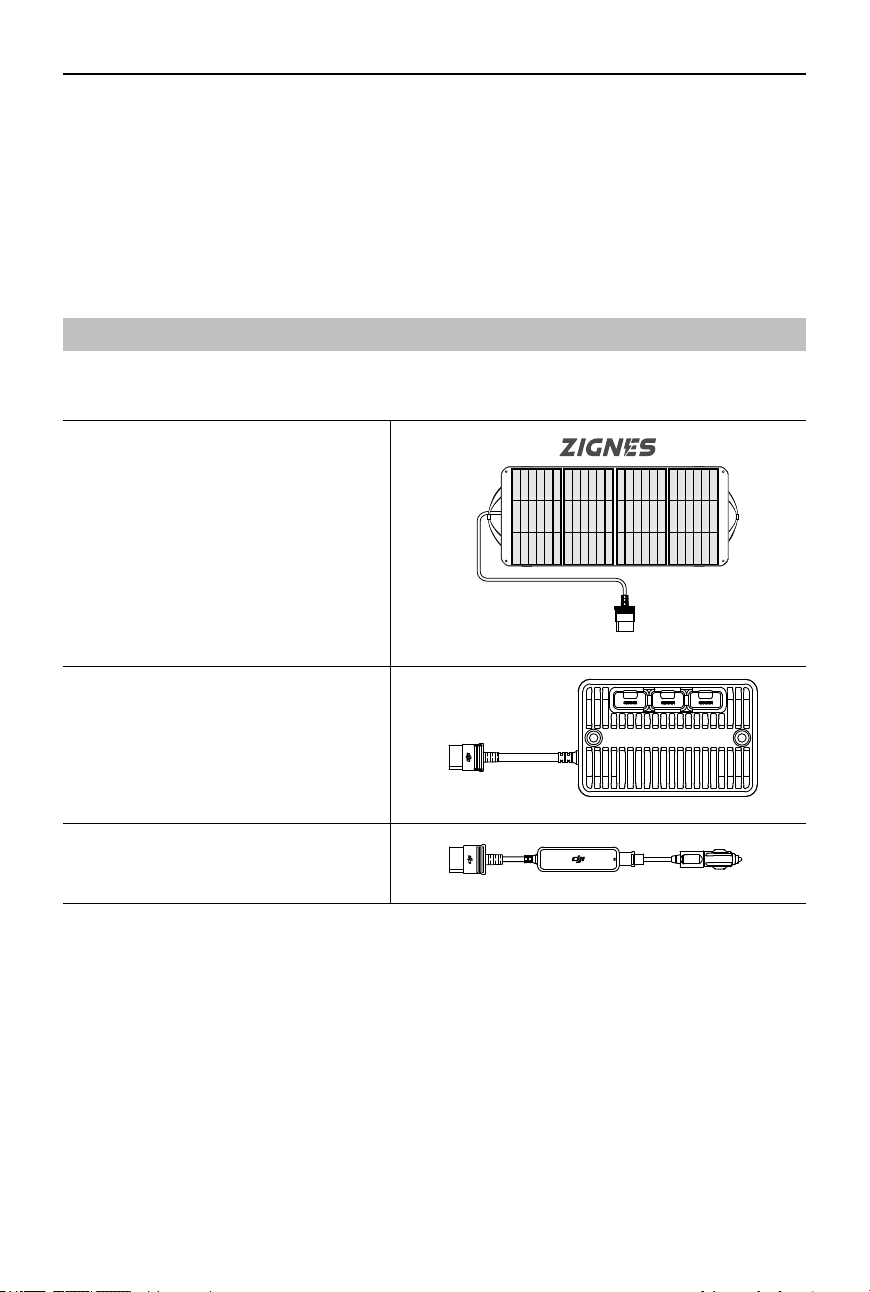
Zignes Solar Panel
DJI Power Solar Panel Adapter Module
(MPPT)
DJI Power Car Power Outlet to SDC
Power Cable (12V/24V)

DJI Power 1000/500 User Manual
©
2024 DJI All Rights Reserved.
19
DJI Power SDC to Matrice 30 Series Fast
Charge Cable
DJI Inspire 3
Matrice 30 Series
DJI Air 3
DJI Mavic 3 Series
SDC
DJI Power SDC to DJI Mavic 3 Series Fast
Charge Cable
DJI Power SDC to DJI Air 3 Fast Charge
Cable
DJI Power SDC to DJI Inspire 3 Fast
Charge Cable
DJI Power SDC to XT60 Power Cable
(12V)
DJI Power SDC to Car Charger Plug
Power Cable (12V)
DJI Power 1000 Protective Storage Bag
(for DJI Power 1000 only)
DJI Power 1000/500 User Manual
20
©
2024 DJI All Rights Reserved.
Specications
DJI Power 1000
General
Model DYM1000L/DYM1000H
Capacity 1024 Wh
Net Weight Approx. 13 kg
Dimensions 448×225×230 mm (L×W×H)
Max Operating
Altitude
3000 m
Output Ports
AC Output
[1]
(×2)
DYM1000L: 100-120 V AC, 50/60 Hz, 1800 W (Rated), 2200 W (Max.
continuous output)
DYM1000H: 220-240 V AC, 50/60 Hz, 1800 W (Rated), 2200 W (Max.
continuous output)
AC Output DYM1000L: 100-120 V AC, 12 A, 1440 W
DYM1000H: 220-240 V AC, 10 A, 2200 W
USB-A Output
(×2)
5 V 3 A / 9 V 2 A / 12 V 2 A
Max output power per channel: 24 W
USB-C Output
(×2)
5/9/12/15/20/28 V 5 A
Max. 140 W per port
[2]
SDC Output
(×2)
SDC
[3]
: 9-27 V, Max. 10 A, Max. 240 W
SDC Lite: 9-27 V, Max. 10 A, Max. 240 W
Input Ports
AC Input DYM1000L: 100-120 V AC, 12 A, 1200 W (recharging), 1440 W (bypass)
DYM1000H: 220-240 V AC, 10 A, 1200 W (recharging), 2200 W (bypass)
SDC Input
(×2)
SDC
[3]
: 32-58.4 V DC, Max. 400 W, Max. 8 A
SDC Lite: 32-58.4 V DC, Max. 400 W, Max. 8 A
Battery
Cell Chemistry LFP (lithium ferrophosphate)
Cycle Life
[4]
Maintains over 80% capacity after 3000 cycles
Operating Temperature
Power Supply
Temperature
-10° to 45° C (14° to 113° F)
Recharging
Temperature
0° to 45° C (32° to 113° F)
Storage Temperature -10° to 45° C (14° to 113° F)
[1] The maximum continuous power output is available when the battery level is higher than 20%. AC output
data varies by country and region. Given that the voltage in Japan is 100 V, the max continuous output
power of the Japanese version is 2000 W.

DJI Power 1000/500 User Manual
©
2024 DJI All Rights Reserved.
21
[2] The USB-C port supports a max output power of 140 W. The device being charged must support the PD 3.1
protocol and use a USB cable that meets EPR specications.
[3] The SDC port supports extensive accessories.
[4] Cycle Life is tested under the 600W Standard Recharge mode with an output power of 1000 W and a room
temperature of 25° C (77° F).
DJI Power 500
General
Model DYM500L/DYM500H
Capacity 512 Wh
Net Weight Approx. 7.3 kg
Dimensions 305×207×177 mm (L×W×H)
Max Operating
Altitude
3000 m
Output Ports
AC Output
[1]
(×2) DYM500L: 100-120 V AC, 50/60 Hz, 800 W (Rated), 1000 W (Max.
continuous output)
DYM500H: 220-240 V AC, 50/60 Hz, 800 W (Rated), 1000 W (Max.
continuous output)
AC Output (Bypass
mode)
DYM500L: 100-120 V AC, Max. 1000 W
DYM500H: 220-240 V AC, Max. 1000 W
USB-A Output (×2) 5 V 3 A / 9 V 2 A / 12 V 2 A
Max output power per port: 24 W
USB-C Output (×2) 5/9/12/15/20 V 5 A
Max. 100 W per port (Needs support of PD3.0 protocol)
SDC Output SDC Lite: 9-27 V, Max. 240 W
Input Ports
AC Input DYM500L: 100-120 V AC, 540 W (recharging), 1000 W (bypass)
DYM500H: 220-240 V AC, 540 W (recharging), 1000 W (bypass)
SDC Input SDC Lite: 22.4-29.2 V DC, Max. 300 W, Max. 10 A
USB-C Input 5-20 V DC, Max. 100 W (Need support of PD protocols)
Supports simultaneous power input with two USB-C ports at a max
200 W.
Battery
Cell Chemistry LFP (lithium ferrophosphate)
Cycle Life
[2]
Maintains over 80% capacity after 3,000 cycles
Operating Temperature
Power Supply
Temperature
-10° to 45° C (14° to 113° F)

DJI Power 1000/500 User Manual
22
©
2024 DJI All Rights Reserved.
Recharging
Temperature
0° to 45° C (32° to 113° F)
Storage Temperature -10° to 45° C (14° to 113° F)
[1] The maximum continuous output power is available when the battery level is higher than 20%.
[2] Cycle Life is tested in the 270W Standard Recharge mode with an output power of 500 W and a room
temperature of 25° C (77° F).

https://www.dji.com/power-1000/downloads
https://www.dji.com/power-500/downloads
WE ARE HERE FOR YOU
Contact
DJI SUPPORT
This content is subject to change without prior notice.
If you have any questions about this document, please
contact DJI by sending a message to [email protected].
DJI is a trademark of DJI.
Copyright © 2024 DJI All Rights Reserved.