User Manual
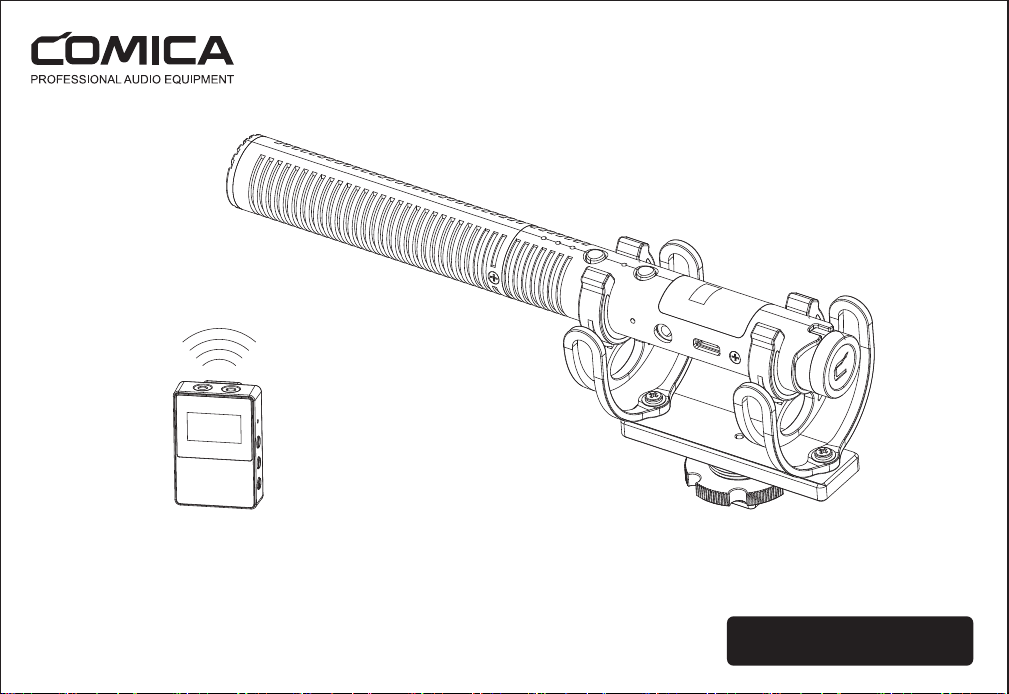
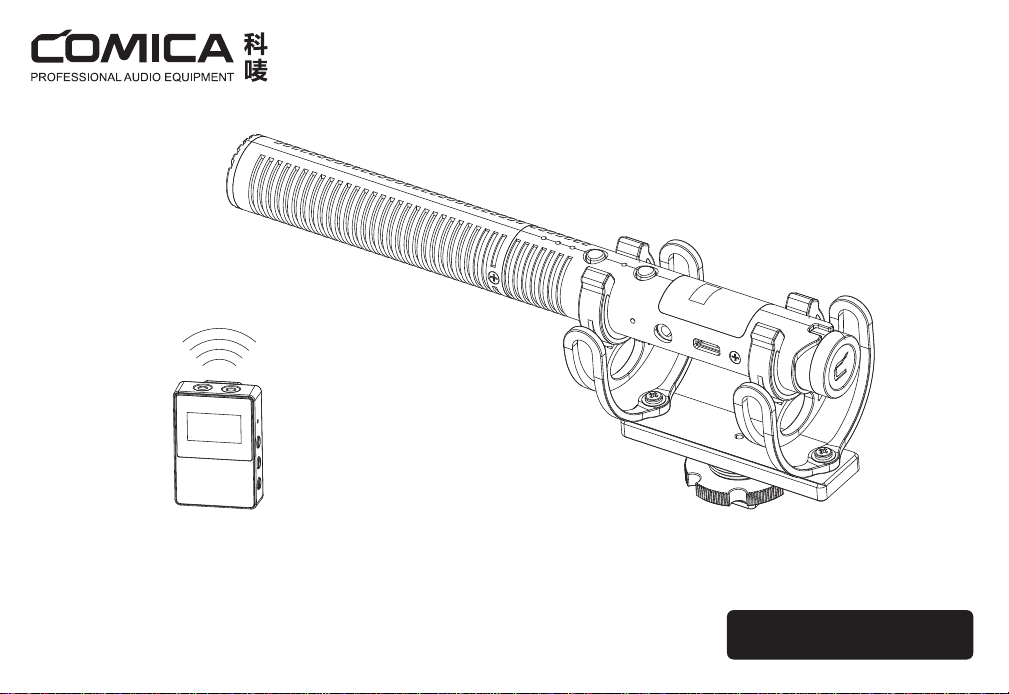
CVM-VM30
2.4G Super Cardioid Condenser Wireless Shotgun Microphone

Foreword
Main Features
Notice
Thanks for purchasing COMICA CVM-VM30 2.4G Super Cardioid Condenser Wireless Shotgun Microphone.
·Groundbreaking Shotgun Microphone Integrated Wireless Module
·Support Wired/Wireless Dual Modes for One-button Switch
·48khz/24bit Super Cardioid Recording, Broadcasting-level Sound Quality
·Digital/Analog Output, Universal for Camera, Smartphone, Computer
·Intelligent Auto-sensing 3.5mm Output and Power Switch
·75/150Hz Two Low-cut Filter Modes, High-frequency Boost
·Support Gain Control, Safety Mode, Real-time Monitor and Muting
·OLED Screen for Monitoring and Visual Operation
·Built-in Rechargeable Lithium Battery, Support Charging While Using
·Battery Life Up to 50H in Wired Mode, Up to 7H in Wireless Mode
·Low Latency<20ms, Wireless Working Range Up to 100m (Open Area)
·Full Metal Material, Super-shielding, Stable and Durable
When it needs to be used for a long time, it can be connected to the external power to realize charging while using. AC/DC power is not supported to avoid noise problem
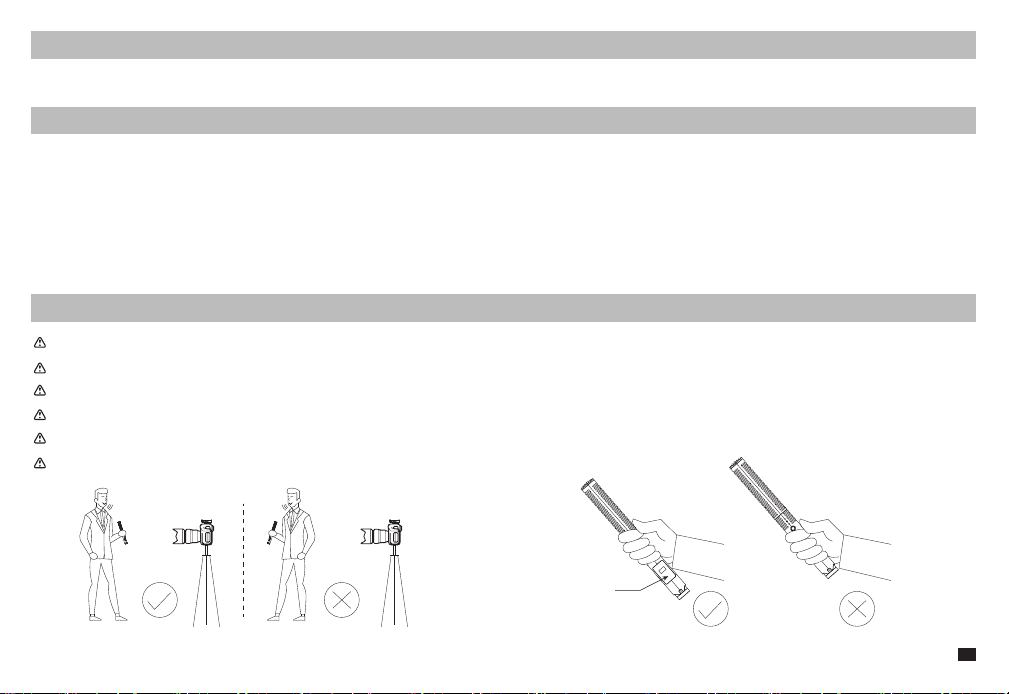
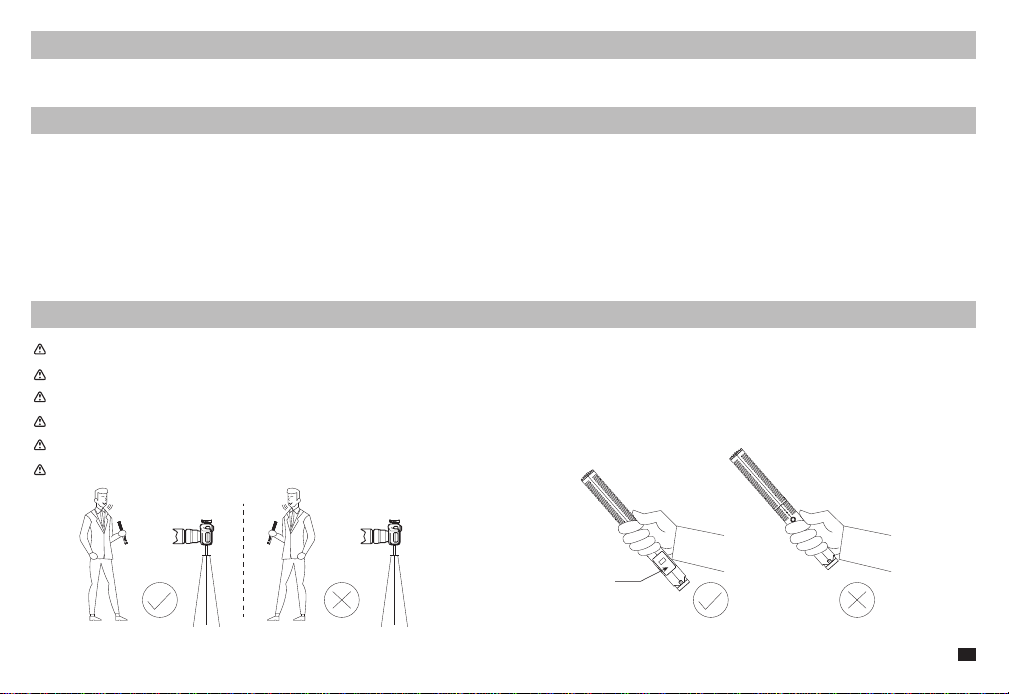
Don't block the antenna position to avoid any poor signal generated
This product belongs to high-precision instruments, please avoid falling, collision or pounding
Do not use this equipment in the vicinity of heat sources or interference sources, such as radiator, oven, refrigerator or air conditioner
If the pick-up distance is close or when used outdoors, please put on the windmuff to prevent sound burst or reduce wind noise
Do not use the equipment in rain or in a damp environment to avoid short-circuit danger
Please keep face to face when using it, and don’t turn your back
to the receiver, otherwise, it is easy to generate breakpoints
Don't block the antenna position to avoid any poor signal generated
Antenna Position
1
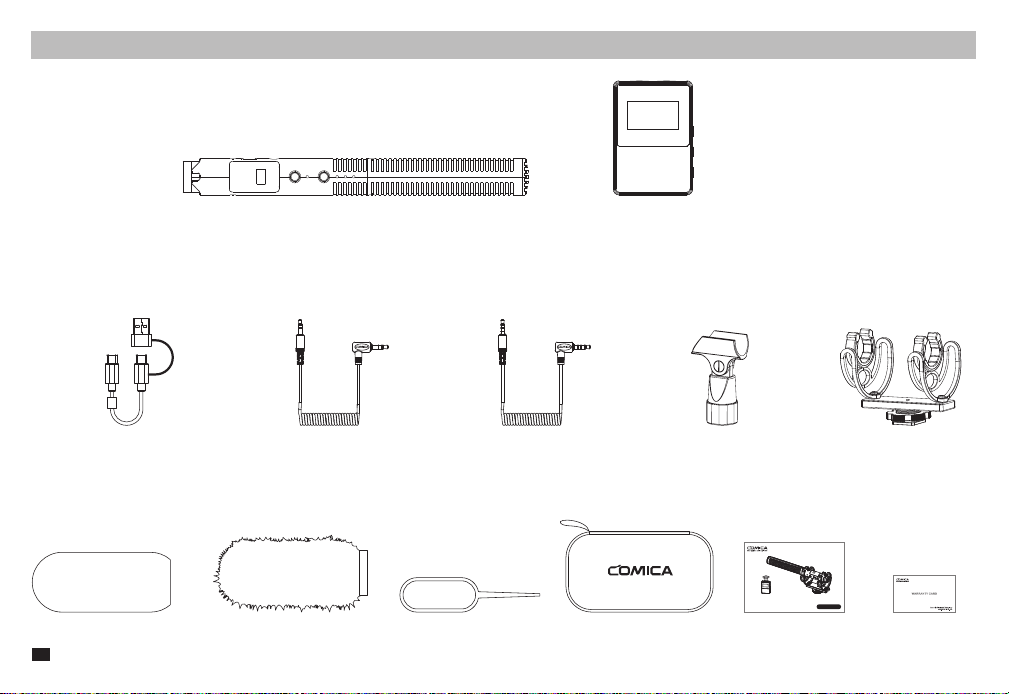
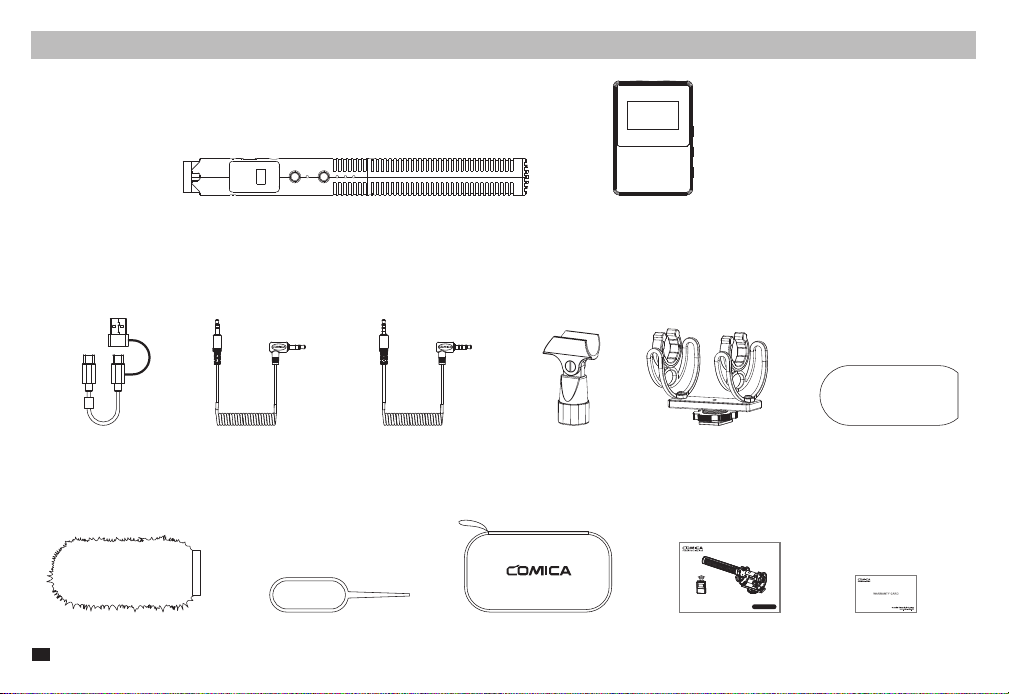
Packing List
Main Parts
:
Accessories
:
Shotgun Microphone(Transmitter) Receiver
Carry CasePinWindmuff
2 in 1
Charging&Output Cable
3.5mm TRS-TRS
Audio Output Cable
3.5mm TRRS-TRRS
Audio Output Cable
Shock MountMicrophone Clip
Windscreen User Manual Warranty Card
User Manual
CVM-VM30
2.4G Super Cardioid Condenser Wireless Shotgun Microphone
2
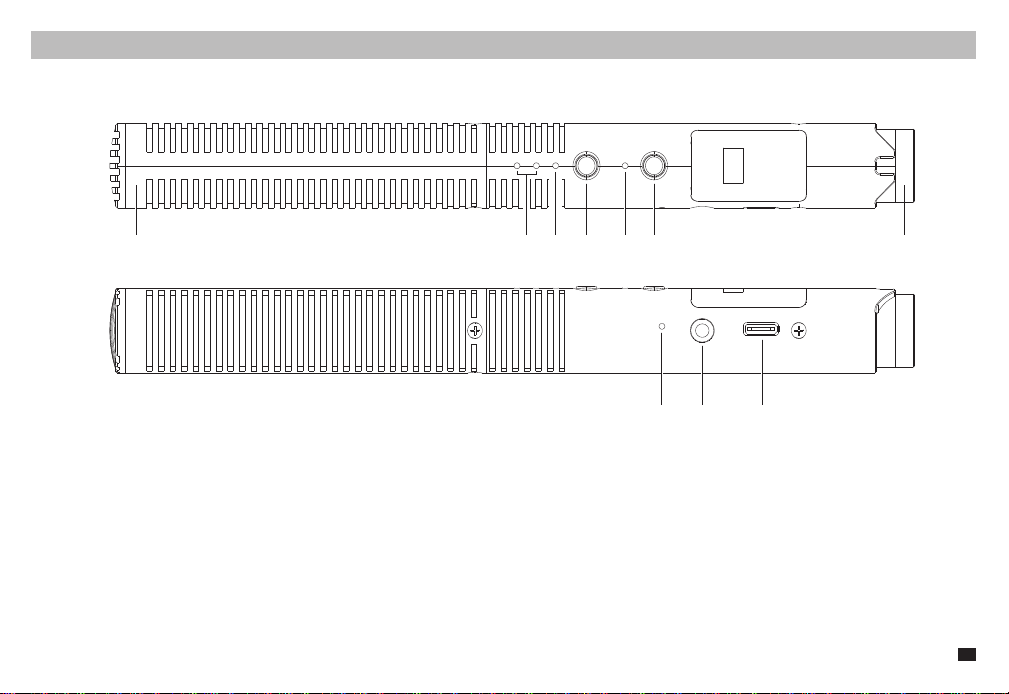
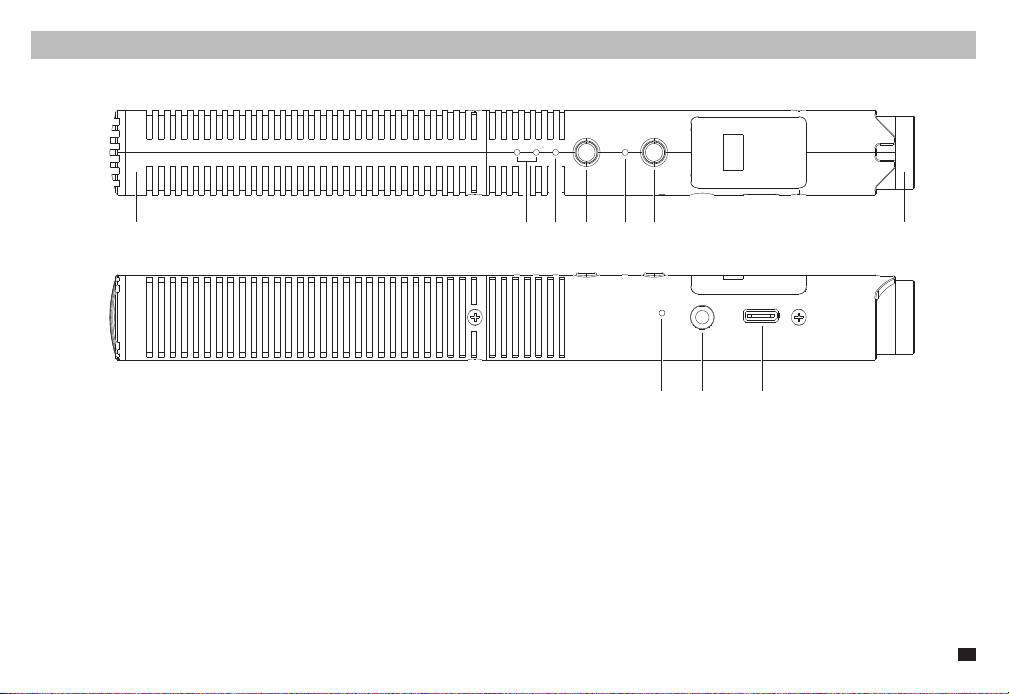
Microphone (Transmitter)
Components and Instruction
1. Mic Capsule
2. Low Cut Indicator: Corresponding indicator lights up blue when turned on
3. High-frequency Boost Indicator: Blue light on when turned on
4. Modes Switch Button: Short press to switch between 75/150Hz low-cut and high-frequency boost functions; Long press to turn on Safety Mode (Safety
Mode is only available in wired mode)
5. Working Indicator: Green light on in wired mode; In wireless mode, blue light flashes when paring, and blue light on when paired
6. RF Button: In wireless mode, long press to turn on/off microphone; in wired mode, long press to turn on/off wireless mode
7. Gain Control Knob: Rotate to adjust microphone gain
8. Pairing Hole: When the wireless connection is abnormal, use the pin to short-press the pairing hole to re-pair
9. 3.5mm Output Port: Support TRS and TRRS output
10. USB-C Charging/Output Port: Plug in the 2 in 1 charging&output cable to charge or output digital audio
①②③④⑤⑥⑦
⑧⑨⑩
3
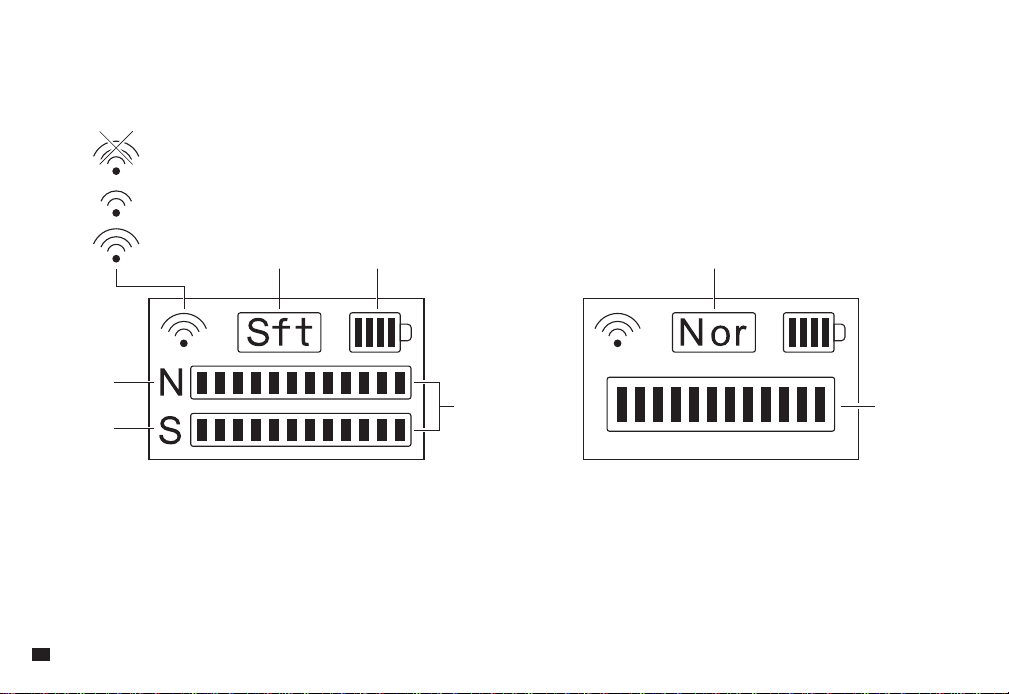
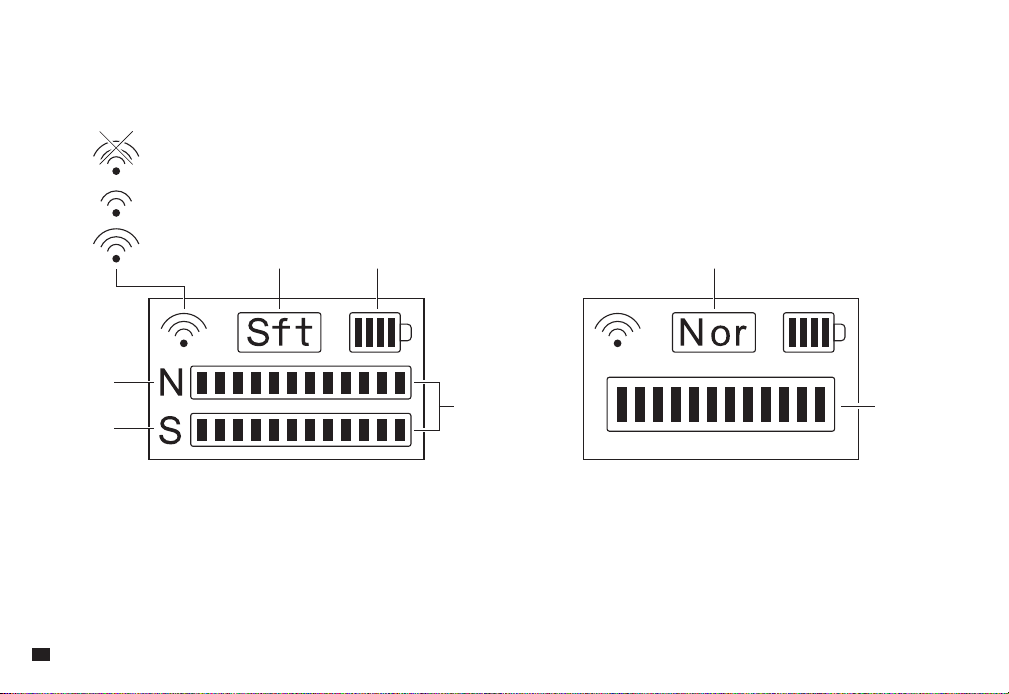
Screen Display Instruction
:
(
Safety Mode
)
Pairing...
Wireless Mode Off
Paired
Safety Mode Normal ModeBattery Power
Normal Track
Audio
Dynamic Bar
Audio
Dynamic Bar
Safety Track
(
Normal Mode
)
4

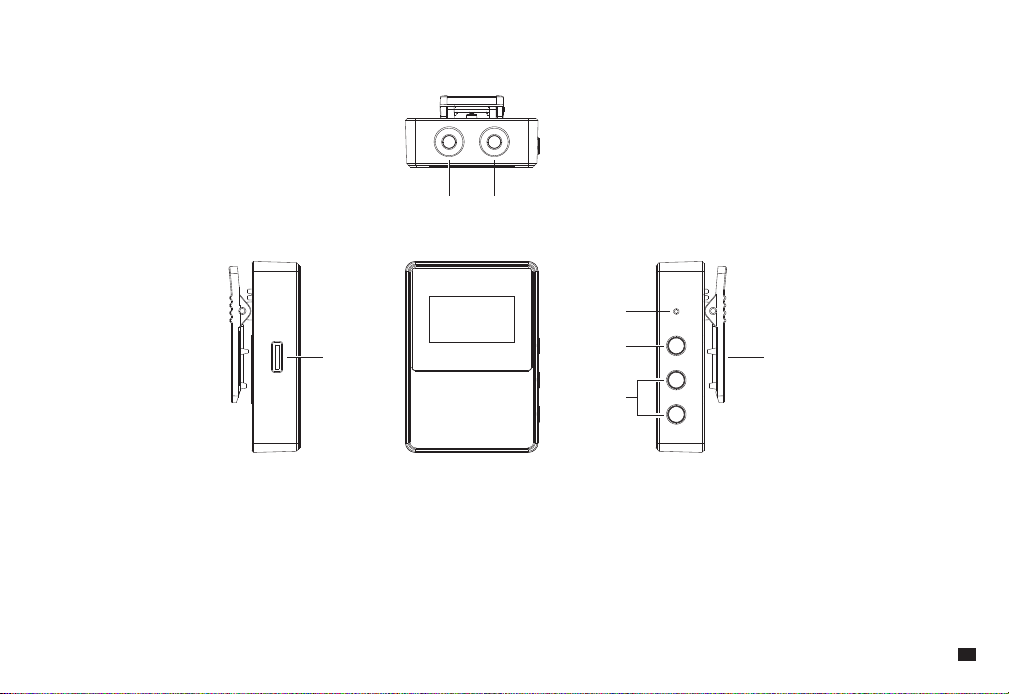
Receiver
1. 3.5mm Monitoring Port: Plug in 3.5mm TRS/TRRS headphones for monitoring
2. 3.5mm TRS Audio Output Port: Connect to camera/smartphone/computer via 3.5mm audio cable
3. USB-C Charging Port: Charging with the 2 in 1 charging&output cable
4. Reset Hole: If there is an abnormal phenomenon such as the device is crash or unable to turn on it, then insert the reset pin into the reset hole to reset it
5. Power/Mute Button: Long press to power on/off; Short press to turn on/off the mute function
6. Gain Control/Screen Flip Button: Short press to adjust the gain; Long press to flip the screen
7. Belt Clip
①②
③⑦
④
⑤
⑥
5
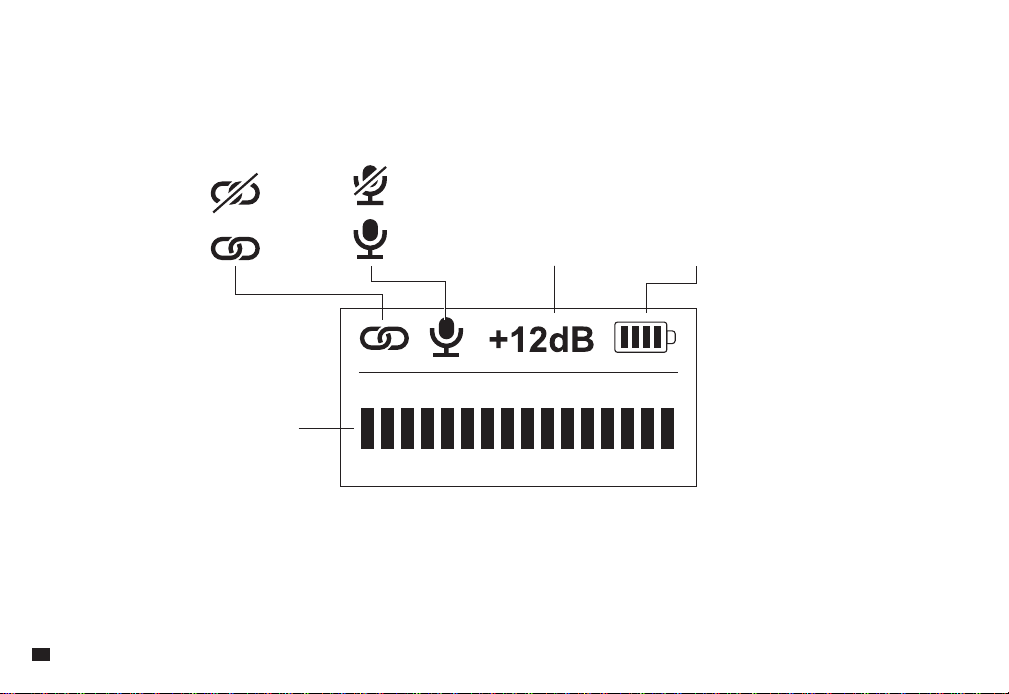
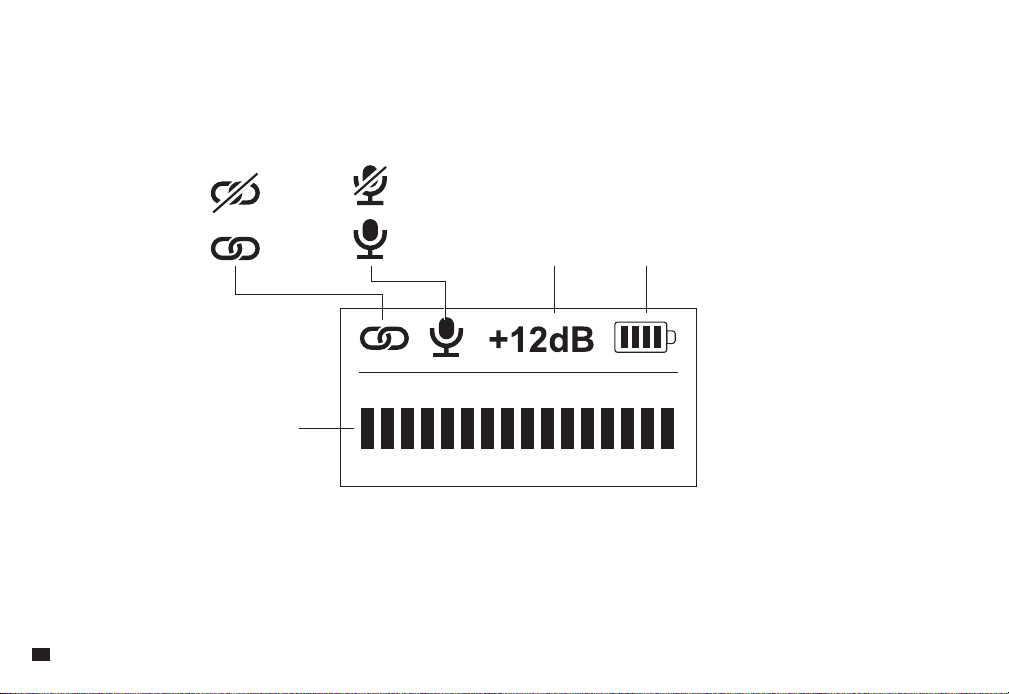
Screen Display Instruction
:
Paired
Unpaired
Normal Working Output Gain Level Battery Power
Muting
Audio Dynamic Bar
6
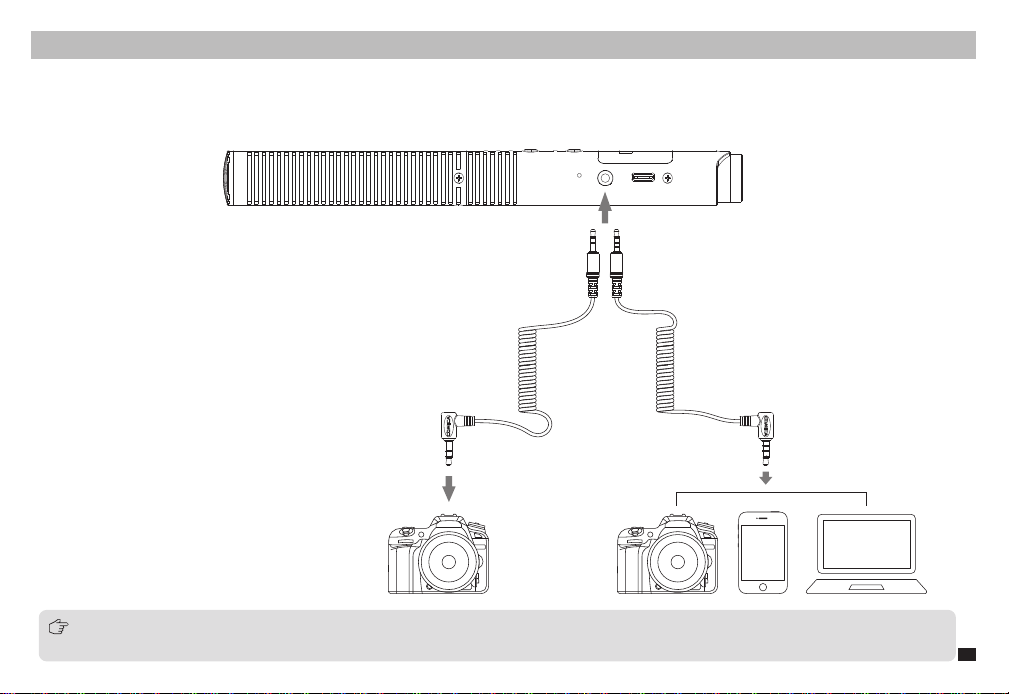
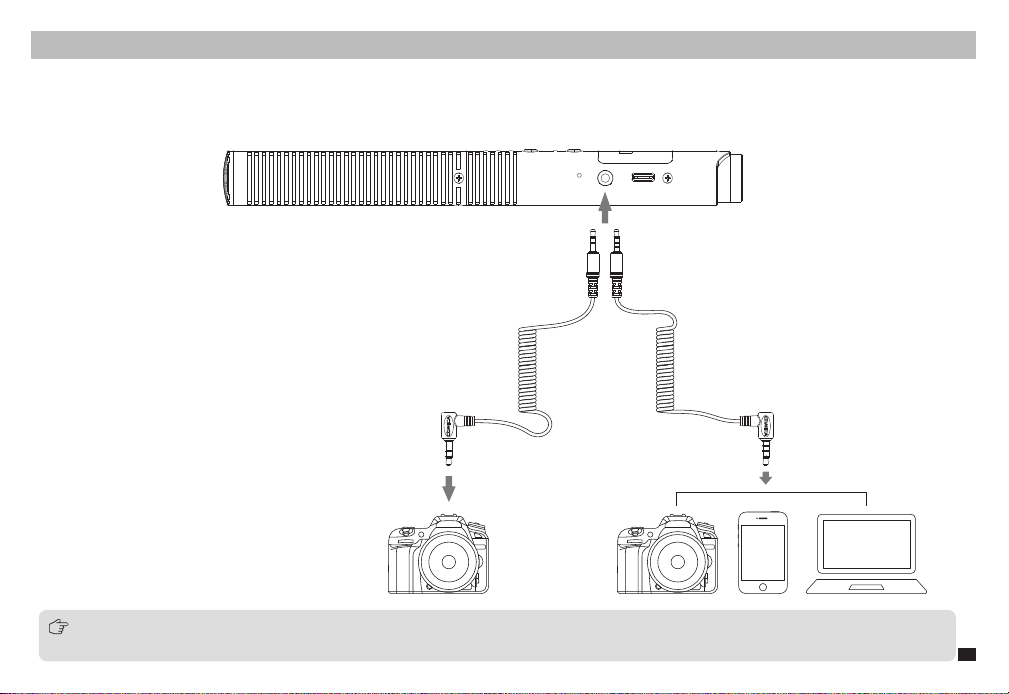
3.5mm Analog Output
Wired Mode
Installation and Usage
Connect the shotgun microphone to the camera/smartphone/computer through the 3.5mm audio cables
TRRS-TRRS audio cable for cameras/smartphones/computers; TRS-TRS audio cable for some cameras not compatible with TRRS-TRRS audio
cable; For XLR interface devices, please purchase the 3.5mm TRS-XLR audio cable yourself
7
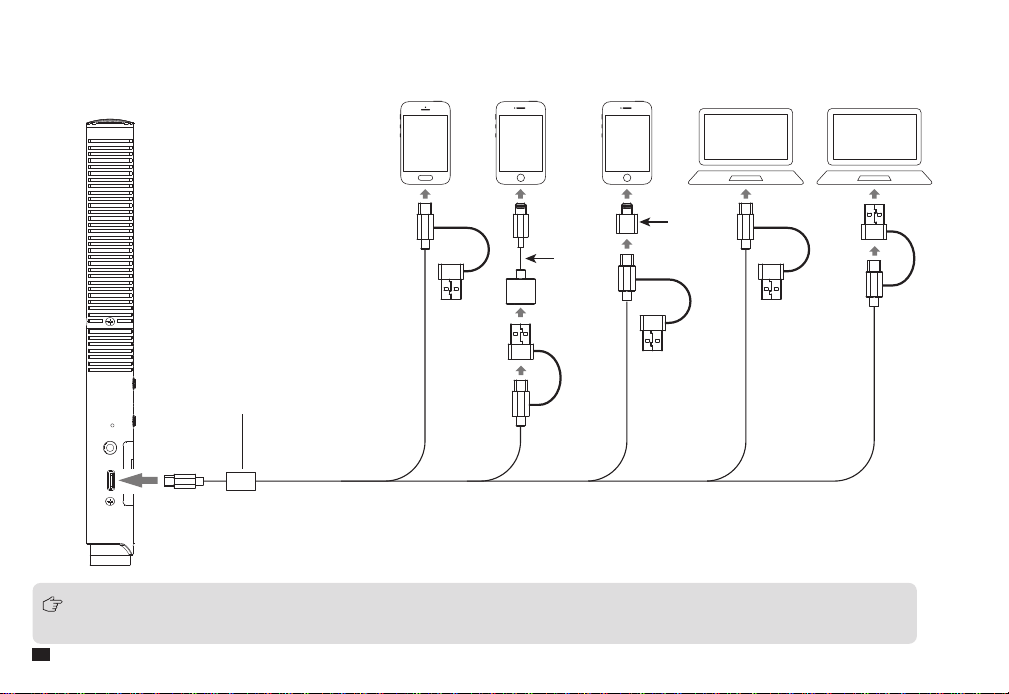
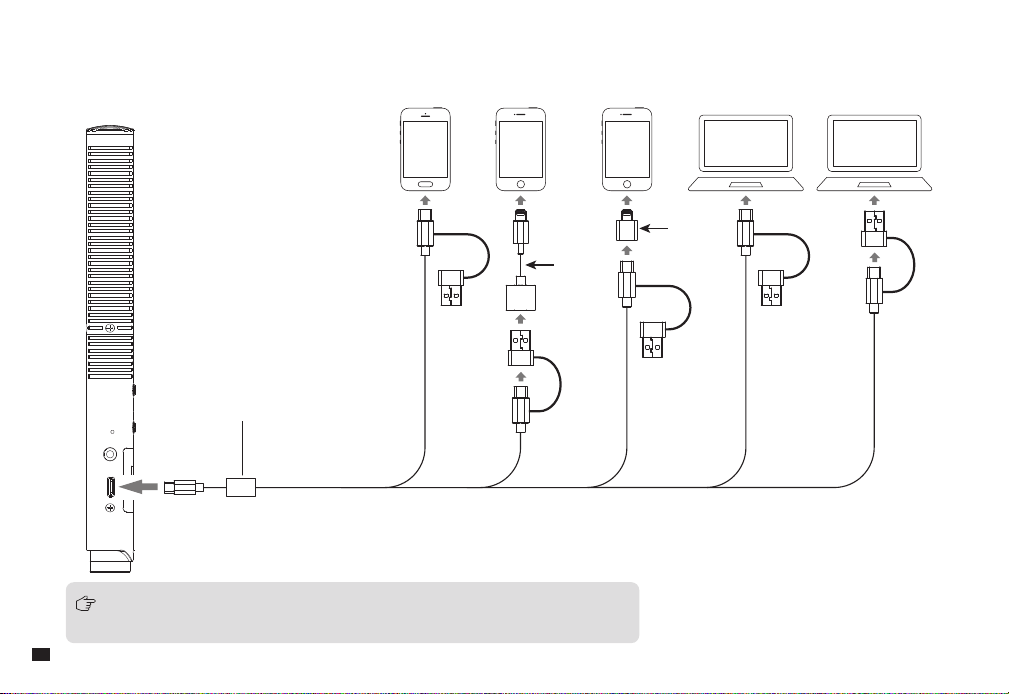
USB Digital Output
Connect the shotgun microphone to the smartphone or computer through the 2 in 1 charging&output cable and related OTG audio adapter cable
It’s recommended to insert the USB end with the magnetic ring into the microphone and connect the other end to the smartphone/computer
;
When using with Lightning interface devices, please purchase a USB-Lightning adapter/cable that supports the OTG function
Magnetic Ring
Adapter
Adapter
8
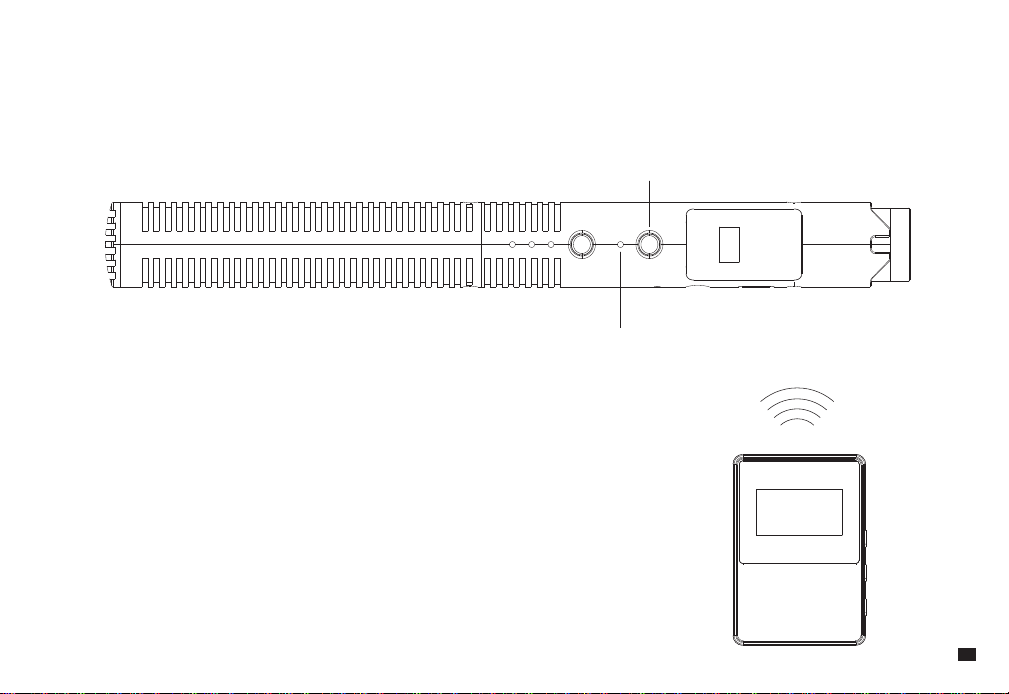
Wireless Mode
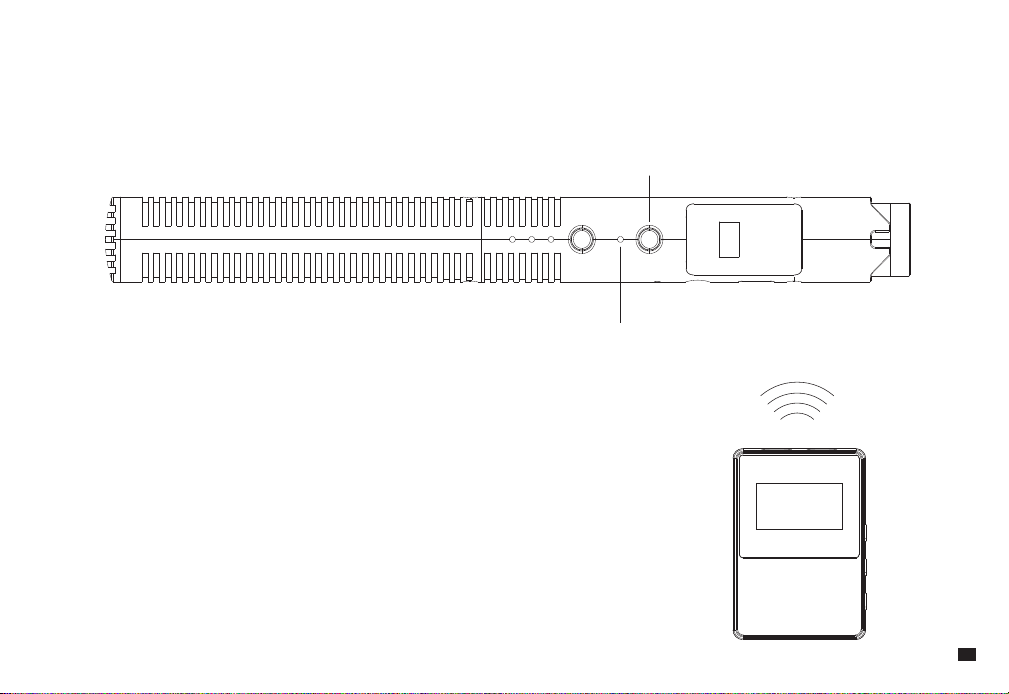
Connection
Paired (The transmitter and receiver are paired by default at the factory)
Turn on the receiver and switch the transmitter into wireless mode by long pressing its RF button, then they will automatically connect.
RF Button
Working Indicator Light
9
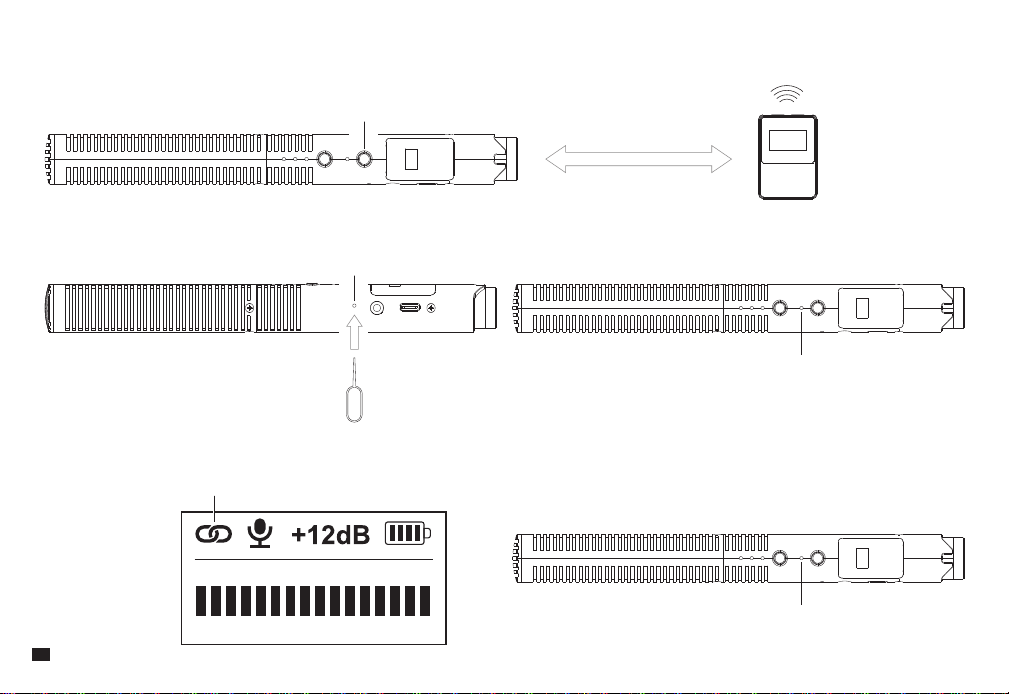
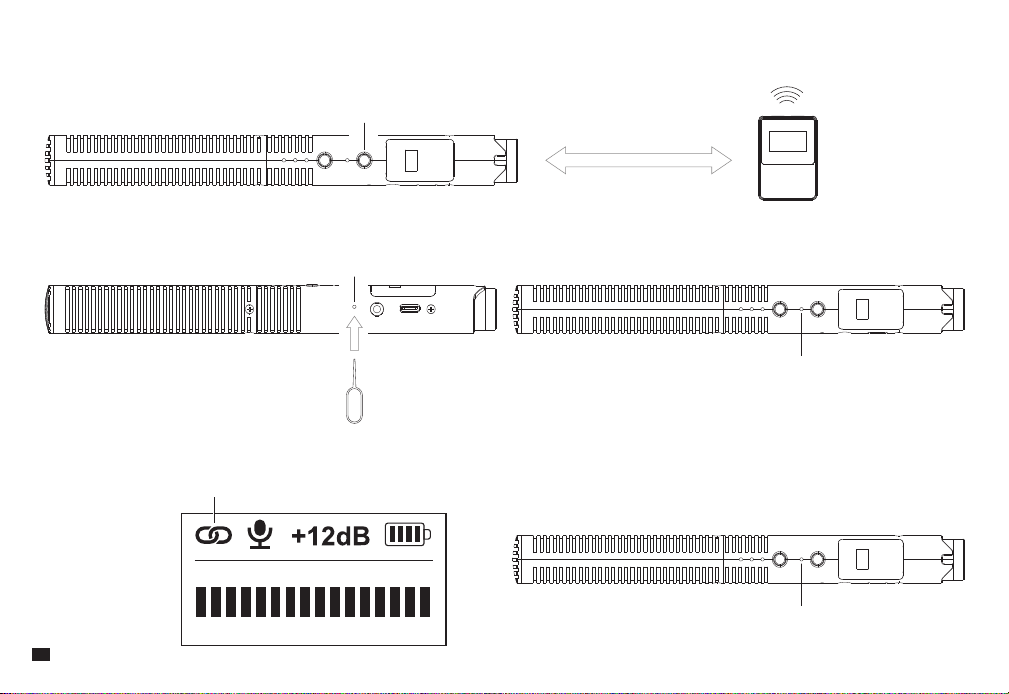
Unpaired (Re-pairing is required when the connection fails. Please follow the method below)
1. Keep the transmitter and receiver within 1m range, turn on the receiver and switch the transmitter into wireless mode by long-press its RF button;
2. Short-press the transmitter's pairing hole with the equipped pin, making it enter the wireless pairing state. Before pairing, the indicator light flashes blue;
3. When pairing, the wireless icon on the screen turns into a paired icon; when paired, the indicator light keeps blue on.
RF Button
Pairing Hole
Paired
Indicator Light Flashes Blue
Indicator Light Keeps Blue On
1M
10
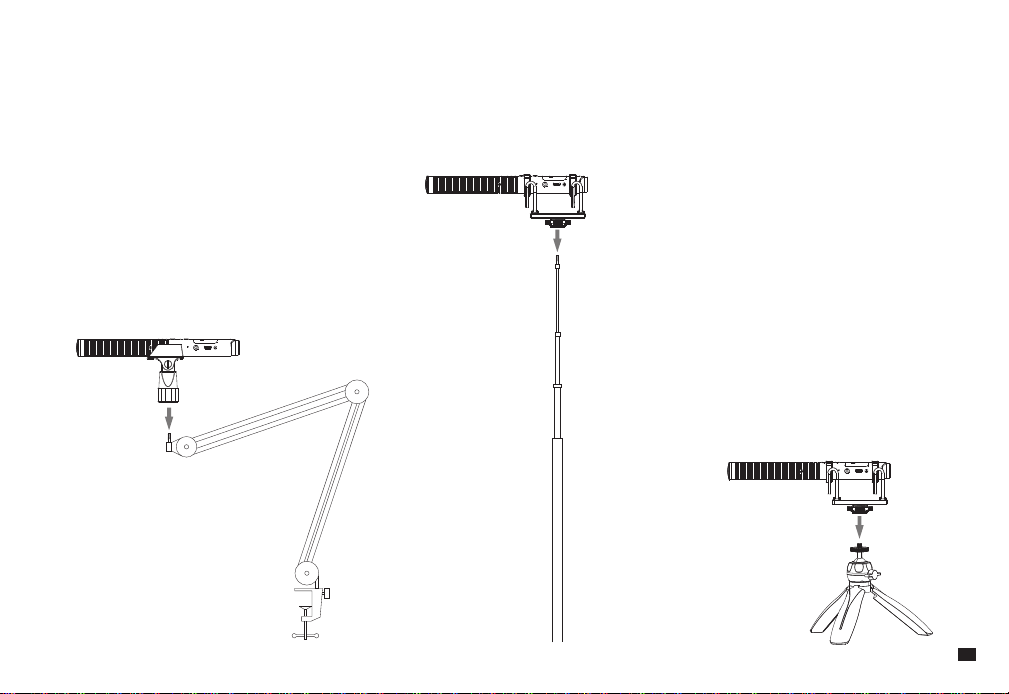
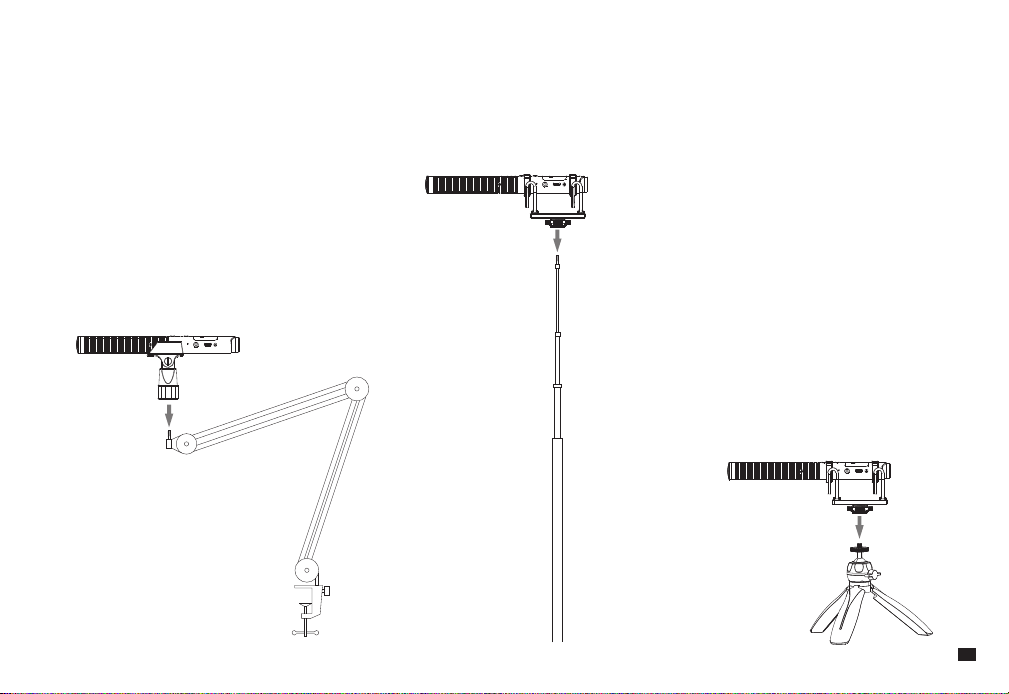
Transmitter
Usage
Use with arm stands, boom poles, and tripods
11
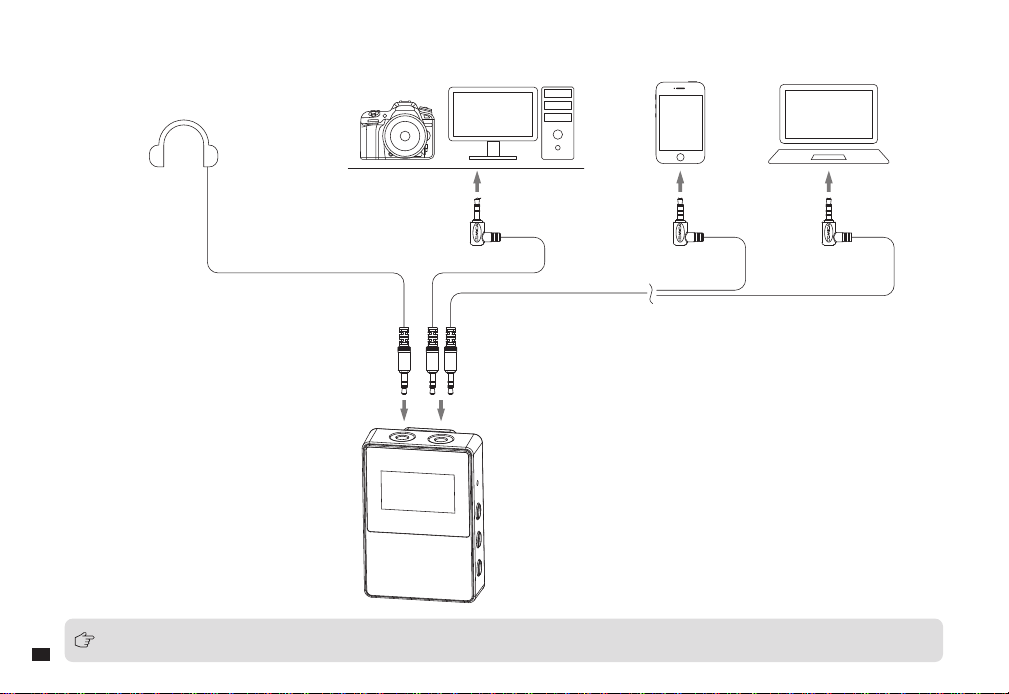
Receiver
Connect the receiver to the camera/smartphone/computer through the 3.5mm audio cable; Monitoring according to individual needs
When using the microphone in wireless mode for mobile phones and laptops, please prepare a 3.5mm TRS-TRRS audio cable yourself
12
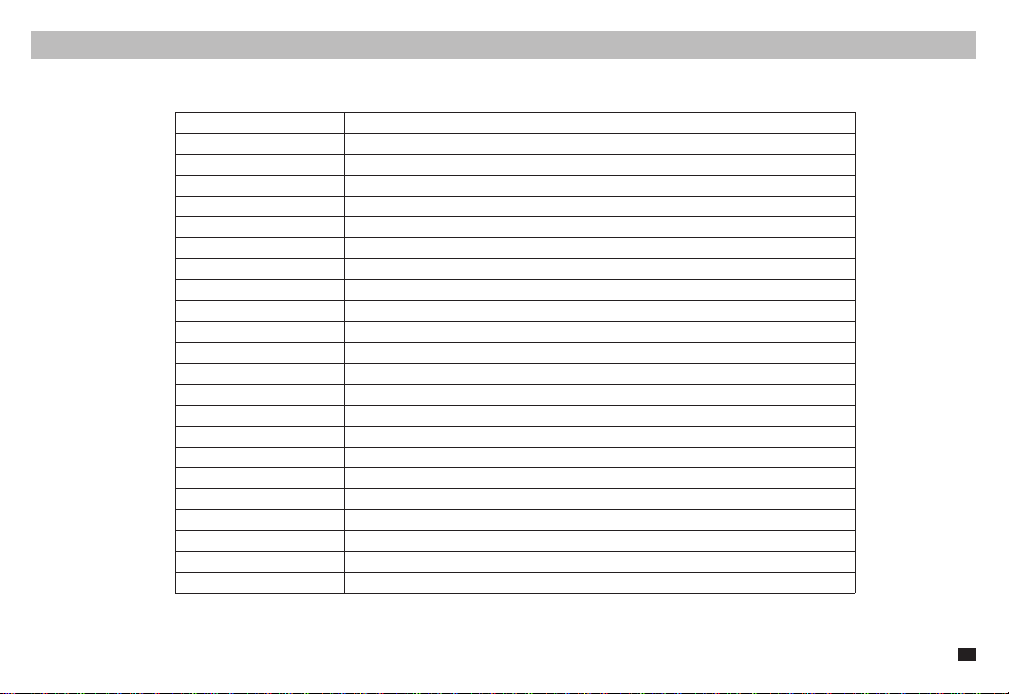
Specifications
Wireless Band
Transmitting Power
Receiving Sensitivity
Antenna
Sound Delay
Polar Pattern
Frequency Response
Low-cut
High-frequency Boost
Output Impedance
Sensitivity
S/N
Equivalent Noise
Maximum SPL
Dynamic Range
Analog Output
Digital Output
Battery
Battery Life
Dimensions
Net Weight
Operating Temperature
Storage Temperature
2400~ 2483.5MHz
+10dBm
-86dBm
Transmitter:Ceramic Antenna; Receiver:PCB Antenna
<20ms
Super Cardioid
20Hz~20kHz
75Hz,150Hz
10kHz
50Ω
-38dB ~ -18dB re 1V/Pa(12mv ~ 125mv @ 94dB SPL) ±2dB @ 1kHz
75dB SPL(A-weighted,as per IEC651)
19dB SPL(A-weighted,as per IEC651)
130dB SPL(@ 1% THD)
111dB SPL(A-weighted,as per IEC651)
3.5mm TRRS, TRS
USB-C 48kHz 24bit
Transmitter:Li-polymer 3.7V 350mAh; Receiver:Li-polymer 3.7V 330mAh
Transmitter:Wireless Mode 7 Hours / Wired Mode 50 Hours / Receiver:7 Hours
Transmitter:
Φ
22mm x L210mm; Receiver:39 x 22 x 55mm
Transmitter:93g; Receiver:29g
0
℃
~ 50
℃
-20
℃
~ 60
℃
13
用户使用手册
2.4G超心型多功能无线枪式麦克风
CVM-VM30

前 言
产品主要功能
注意事项
感谢您购买科唛
COMICA CVM-VM30 2.4G
超心型多功能无线枪式麦克风
·
首创枪麦集成无线射频模块,有线无线双模式
·48kHz/24bit
录音,超心型指向,广播级音质
·
数字
/
模拟双输出模式,广泛兼容相机、手机、电脑
·3.5mm
智能感测输出,支持自动识别开关机
·75/150Hz
两档低切,一档高频提升
·
支持增益可调、安全音轨、实时监听等多功能
·
枪麦机身
OLED
显示屏,可视化操作
·
内置可充电锂电池,支持边充边用
·
长续航,有线
/
无线模式分别高达
50
小时
/7
小时
·
低音频延迟
< 20ms
,无线传输距离高达
100m
(空旷环境)
·
独特减震支架及高密度防风毛,有效滤除噪音
·
全金属结构,超强屏蔽,稳固耐用
当需要长时间使用时,可连接外部移动电源实现边充边用;不支持
AC/DC
电源供电,否则会产生噪音
使用时避免任何物体遮挡天线位置,以免信号不良
本产品属于高精密仪器类产品,请避免使用时掉落、碰撞或重击
请勿将本设备放置在热源或干扰源附近使用,如散热器、烤箱
如拾音距离较近或于户外使用时,请套上麦克风防风毛,防止声音爆裂或降低风噪
不要在雨中或潮湿的环境中使用该设备,否则会有短路的危险
尽量保持面对面,避免背对的情况,否则容易产生断点 使用时避免任何物体遮挡天线位置,以免信号不良
天线位置
1
包装清单
主体:
配件:
麦克风(发射器) 接收器
便携包卡针防风毛
二合一充电&输出线
3.5mm TRS-TRS
音频线
3.5mm TRRS-TRRS
音频线
减震支架话筒夹 防风棉
说明书 保修卡
User Manual
CVM-VM30
2.4G Super Cardioid Condenser Wireless Shotgun Microphone
2
麦克风(发射器)
部件介绍及说明
1.
拾音头
2.
低切指示灯:开启时相应低切指示灯亮蓝色
3.
高频提升指示灯:开启时亮蓝灯
4.
模式切换按键:短按切换
75/150Hz
两档低切和高频提升功能;长按开启安全音轨(安全音轨模式仅适用于有线模式下)
5.
工作指示灯:有线模式下,绿灯常亮;无线模式下,未配对时蓝灯闪烁,配对成功时蓝灯常亮
6. RF
按键:无线模式下,长按开启/关闭麦克风;有线模式下,长按开启
/
关闭无线模式
7.
增益调节旋钮:旋转调节麦克风增益
8.
配对孔:无线连接出现异常时,使用卡针插入配对孔即可重新配对
9. 3.5mm
输出口:支持
TRRS
和
TRS
输出
10. USB-C
充电
/
输出接口:插入二合一充电
/
输出线进行充电或数字输出音频
①②③④⑤⑥⑦
⑧⑨⑩
3
屏显说明:
(安全模式)
配对中...
无线未开启
已配对
安全模式正常模式电池电量
正常音轨
音频动态条音频动态条
安全音轨
(正常模式)
4
接收器
1. 3.5mm
耳机监听插孔:插入
3.5mm TRS/TRRS
耳机进行监听
2. 3.5mm TRS
音频输出插孔:通过
3.5mm
音频连接线连接相机
/
手机
/
电脑
3. USB-C
充电插口:通过二合一充电
/
输出线进行充电
4.
复位孔:如出现死机或开不了机等异常现象,使用卡针插入复位孔即可复位
5.
电源
/
静音按键:长按开机
/
关机,短按开启
/
关闭静音功能
6.
增益调节
/
屏幕翻转按键:短按调节增益,长按屏幕翻转
7.
背夹
①②
③⑦
④
⑤
⑥
5
屏显说明:
已配对
未配对
麦克风正常工作输出增益等级电池电量
静音
音频动态条
6
3.5mm
模拟输出
有线模式
安装与使用方法
通过
3.5mm
音频连接线连接枪麦和相机/手机/电脑
TRRS-TRRS
音频线通用于相机/手机/电脑,
TRS-TRS
音频线适用于部分无法兼容
TRRS-TRRS
音频线的相机;用于
XLR
接口的设备时,请单独购买
3.5mm TRS-XLR
音频线
7
USB
数字输出
通过二合一充电
&
输出线和相关
OTG
音频转接线
/
转接头连接枪麦和手机/电脑
为了更好的使用体验,建议带磁环的一端插入麦克风,另一端口连接手机
/
电脑;
搭配
Lightning
接口设备使用时,请自行购买支持
OTG
功能的
USB-Lightning
转接线
/
转接头
磁环
转接头
转接头
8
无线模式
连接
已配对(出厂时发射器与接收器默认配对)
将接收器开机并长按发射器
RF
按键开机并进入无线模式,即可自动连接。
RF
按键
工作指示灯
9
未配对(连接不上时需重新配对,方法如下)
1.
保持发射器和接收器在一米范围内,将接收器开机并长按发射器
RF
按键使其开机并进入无线模式;
2.
使用卡针短按发射器配对孔使其进入无线配对状态,此时工作指示灯闪烁蓝灯;
3.
配对时屏幕无线图标变成已配对图标;配对成功后发射器工作指示灯蓝灯常亮。
RF
按键
配对孔
已配对
工作指示灯闪烁蓝灯
工作指示灯蓝灯常亮
1M
10
麦克风(发射器)
使用
可搭配悬臂支架,挑杆,三脚架使用
11
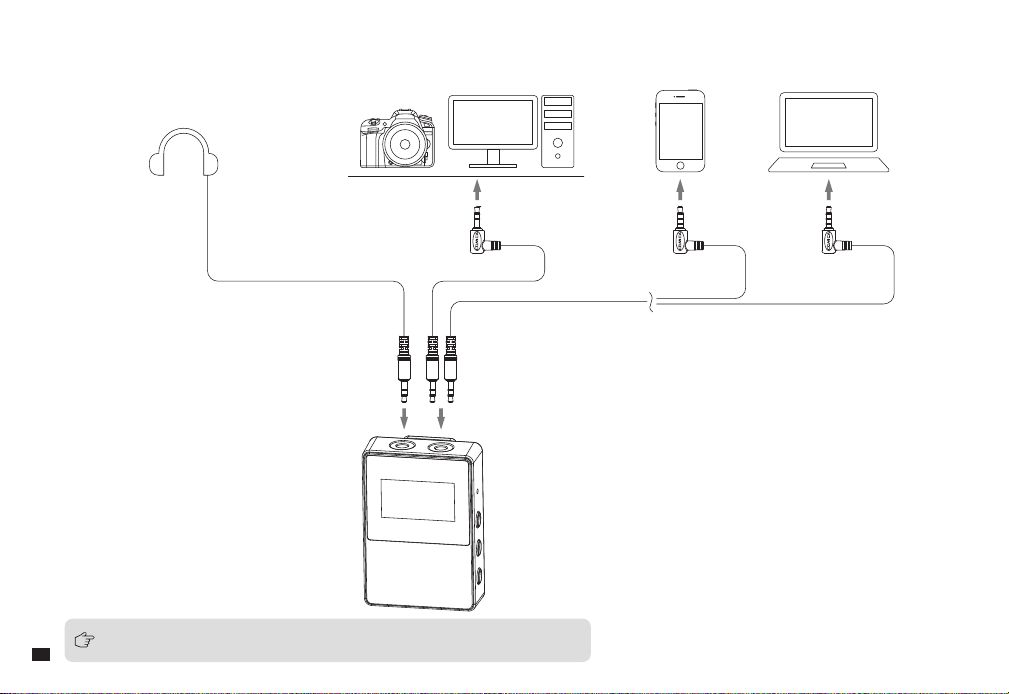
接收器
通过
3.5mm
音频连接线连接接收器和相机/手机/电脑;根据个人需求选择是否进行监听
无线模式下接收器用于手机和笔记本电脑时,请单独购买
3.5mm TRS-TRRS
音频线
12
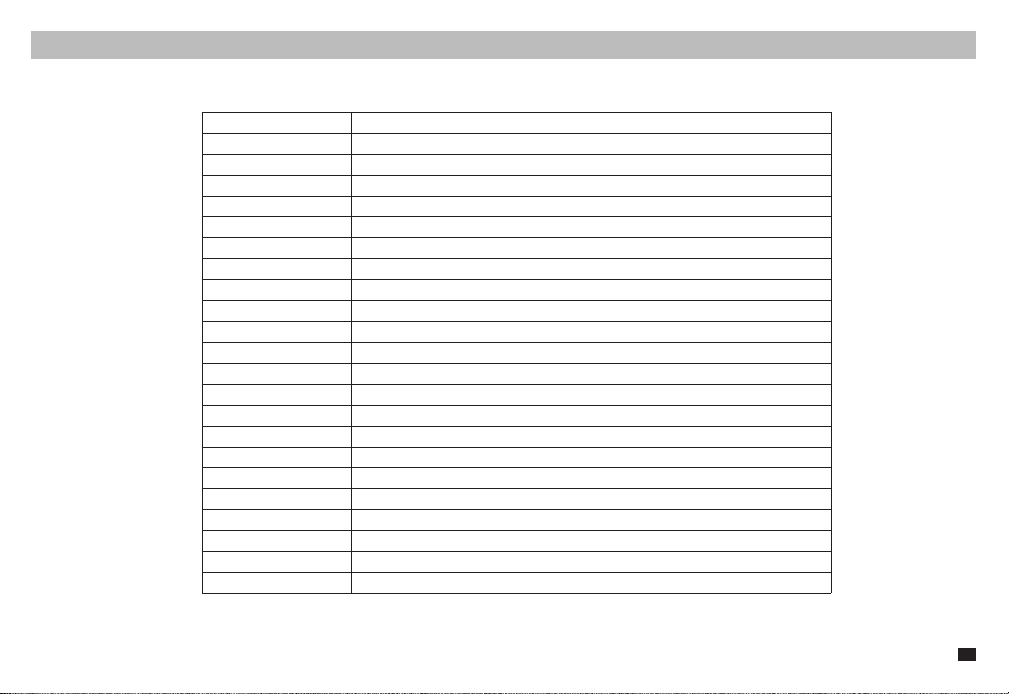
技术规格
无线频段
发射功率
接收灵敏度
天线类型
无线延迟
麦克风指向性
频率范围
低切
高频提升
输出阻抗
灵敏度范围
信噪比
等效噪声
最大声压级
动态范围
模拟输出
数字输出
电源供电
续航时间
尺寸
净重
工作温度
存储温度
2400 ~ 2483.5MHz
+10dBm
-86dBm
枪麦
:
陶瓷天线
;
接收器
:PCB
天线
<20ms
超心型
20Hz ~ 20kHz
75Hz, 150Hz
10kHz
50Ω
-38dB ~ -18dB re 1V/Pa(12mv ~ 125mv @ 94dB SPL) ±2dB @ 1kHz
75dB SPL(A-weighted,as per IEC651)
19dB SPL(A-weighted,as per IEC651)
130dB SPL(@ 1% THD)
111dB SPL(A-weighted,as per IEC651)
3.5mm TRRS, TRS
USB-C 48kHz/24bit
枪麦
:
锂聚合物
3.7V 350mAh;
接收器
:
锂聚合物
3.7V 330mAh
枪麦
:
无线模式
7
小时
/
有线模式
50
小时
;
接收器
:7
小时
枪麦
:
Φ
22mm x L210mm;
接收器
:39 x 22 x 55mm
枪麦
:93g;
接收器
:29g
0
℃
~ 50
℃
-20
℃
~ 60
℃
13