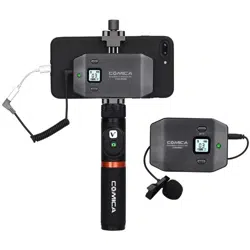
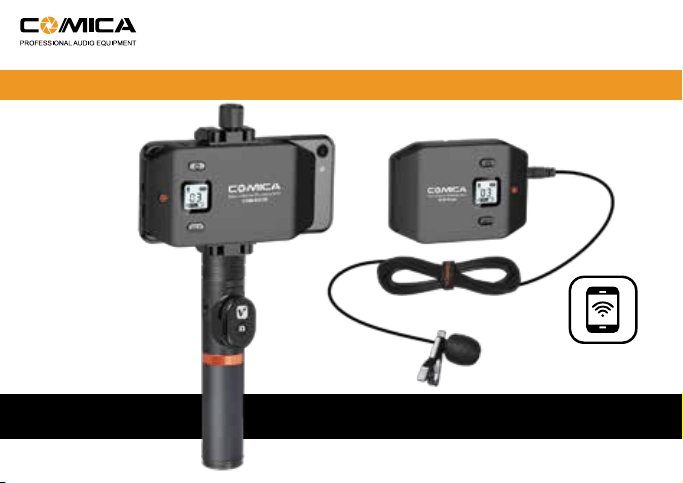
FOR SMARTPHONE
CVM-WS50
USER MANUAL
6-channels Smartphone Wireless Microphone


Foreword
Thank you for purchasing Comica WS50 6-channels smartphone wireless microphone.
WS50 is a creative wireless microphone for smartphone with built-in mobile phones
holders. With built-in lithium polymer batteries, it uses UHF wireless technology and
high-resolution LCD code screen, comes with six channels in total, stepless adjustable
volume at receiving end, and integrated into power monitoring, audio dynamic display
bar, real-time monitoring and other functions; the working distance is up to 60 meters
(30 meters in barrier area), it can assist your phone for video recording and achieve
professional sound effects.
To ensure the smooth use and safety of the products, please read this user manual
carefully before using and properly assemble and operate.
1

Main Features
. 6 Channels, Working Distance Up to 60m (In Open Area, 30m in Barrier Area) ;
. Built-in Metal Material Smartphone Holder;
. LCD Screen for Displaying Channels and Audio Status;
. Stepless Volume Adjustment;
. Real-time Audio Monitor;
. Extendable for Connection with LED Light, Grip, Tripod, Cold-shoe, etc;
. Built-in Rechargeable Lithium Batteries;
. Portable and Light;
WS50A Additional Features: Detachable Electronic Grip, Intelligent Video Operation;
WS50B Additional Features: Detachable Ordinary Grip
WS50C Additional Features: Can be used for live video on table for wireless audio
transmission
6 Channels Working Distance
Up to 60m
Built-in
Smartphone Holder
Stepless Volume
Adjustment
Real-time
Audio Monitor
Lithium Batteries LCD Screen
60M
2

. This product is compatible with both IOS and Android system, and when used with the
iphone 7 or above, you need to use the original adapter cable;
. For smart phones with IOS system (Iphones), this Mic works well either in Audio or
Video mode;
. For the smart phones with Android system, this Mic works well in audio mode, it may not
be compatible with partial smart phones in video mode (Then we suggest you to try the
3rd party APP);
. To avoid signal interference during usage, please set the phone to flight mode;
. The working distance will be affected by the surrounding environment. In the process,
please try to make sure the environment is barrier free and turn off the WIFI of your
smart phone;
. During usage, the receiver should not be close to other UHF transmitters, radio stations
and other devices which may cause interference;
. Please keep this product in dry environment;
. Do not expose the device in rain or humid environment, or there will be a danger of
short circuit;
Notice
3

Packing List
Main Body:
Accessories:
Transmitter Receiver Ordinary Grip
(Only for WS50B)
Electronic Grip
(Only for WS50A)
Tripod on Table
(Only for WS50C)
1. 3.5mm Audio Mic
2.TRRS Audio Output Cable
3. USB Charging Cable
4. Belt Clip
5. Wind Muff
6. Portable Case
7. User Manual
8. Warranty Card
1 2 3 4
5 6 7 8
4

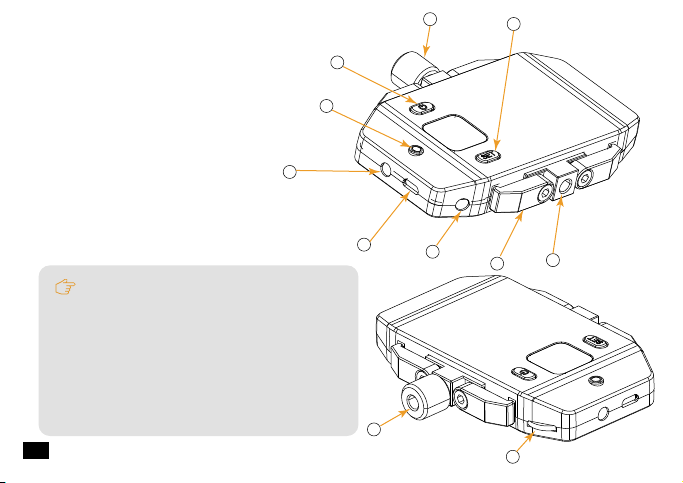
Components
Transmitter
1.Set Button for Channel Selection
2.On-off/Muting Button
3.Working Status Indicator Light
4.Mic Audio Input Socket/ Reset Hole
5.Micro USB Charging Socket
6.Belt Clip Hole
7.1/4 Thread at the Back
Components and Instruction
2
1
3
4
5
7
6
The function of reset hole:When function
program of the product is disorganized and
unable to make normal adjustment or even
shutdown, you can use an appropriate
taper tool to insert the reset hole to realize
the function reset.
5
3
4
5
6
7
1
2
9
8
10
11
Receiver
1.Set Button for Channel Selection
2.Adjusting Screw
3.On/Off Button
4.Working Status Indicator Light
5.3.5mm Audio Output Socket/ Reset Hole
6.Micro USB Charging Socket
7.3.5mm Monitoring Socket
8.Smartphone Clamp
9.1/4 Thread at the bottom
10.1/4 Thread at the top
11.Volume Adjusting Button
External light and other equipment can be
used on 1/4 thread at the top; Grip can be
used for 1/4 thread at the bottom.
The function of reset hole:When function
program of the product is disorganized and
unable to make normal adjustment or even
shutdown, you can use an appropriate
taper tool to insert the reset hole to realize
the function reset.
6

1
2
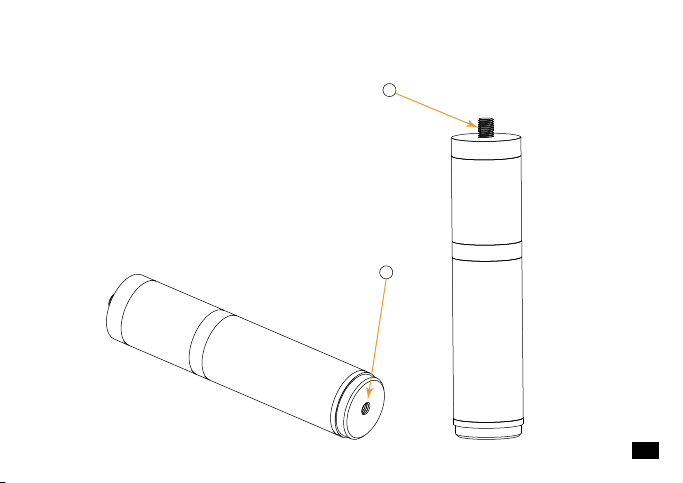
Ordinary Grip
1. 1/4 Screw Thread
2. 1/4 Thread at the Bottom
7

Electronic Grip
1. 1/4 Screw Thread
2. Adjustable Screw
3. 1/4 Thread at the Bottom
4. Bluetooth Remote Controller
5. On-off/Function Button of the Remote Controller
1
2
3
4
5
The bluetooth remote controller can be taken down for remote control;
Bluetooth remote controller supports both IOS and Android system;
8
1
2
4
3
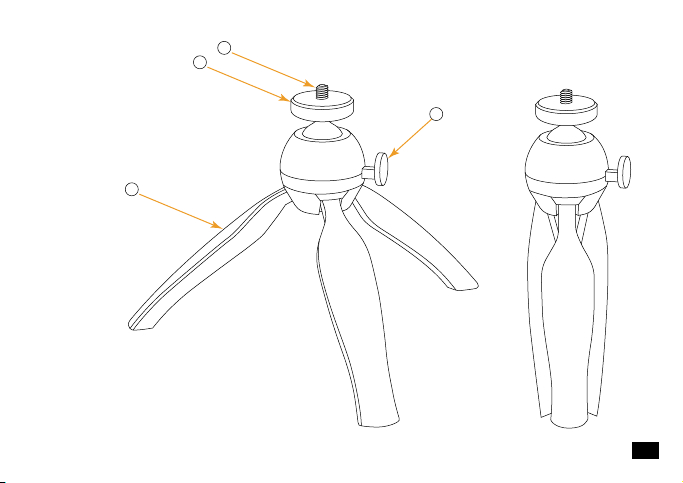
Tripod on Table
1. 1/4 Screw Thread
2. Adjustable Screw
3. Stretchable Tripods
4. Direction Control Switch
9
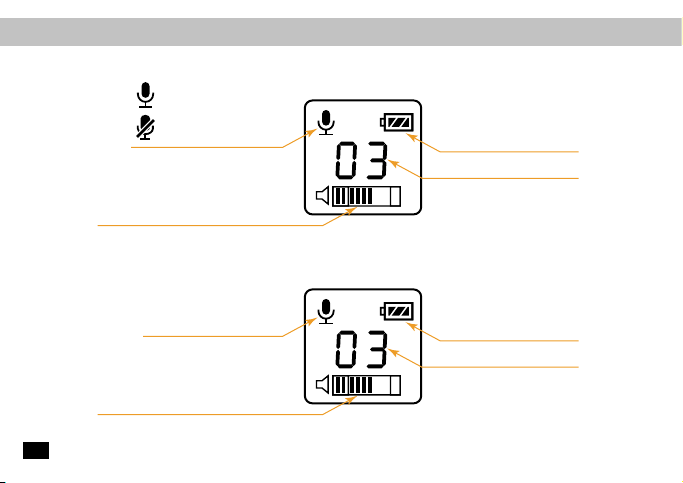
Screen Display Instruction
Receiver:
Transmitter:
Normal Recording
Muting
Power Indication
Channel
Audio Dynamic Display Bar
Normal recording
Power Indication
Channel
Audio Dynamic Display Bar
10

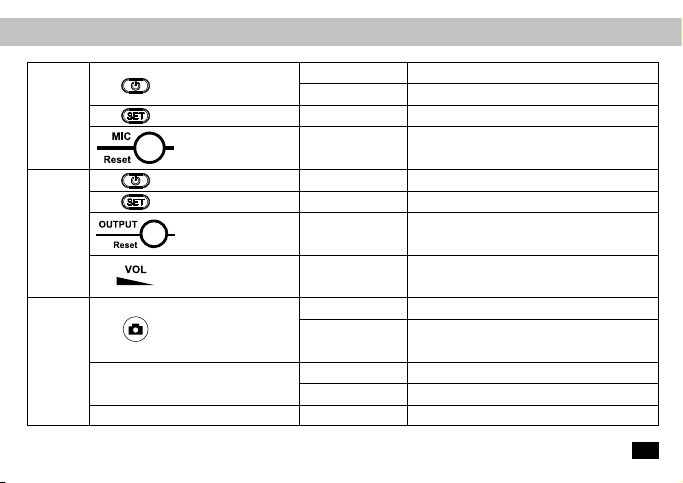
Function Button Instruction
Long Press for 2
Seconds
Long Press for 6
Seconds
10 minutes later
In photo mode, press for photo shooting; In
video recording mode, first press to start,
press again to finish
Continuous Capture for 3 Seconds
Reset to default, can be matched with
different smartphone
Auto Power-Off
Dial the wheel to
the left/ right
Long Press for 2
Seconds
Short Press
Volume Adjustment
Power On
Insert the Mic line /
Insert a small
object like a pin
Insert the Mic line /
Insert a small
object like a pin
Short Press
Channel Selection(0~5 Channel)
(Take effect when the screen is lighted up)
Power On/Off
Channel Selection(0~5 Channel)
(Take effect when the screen is lighted up)
Audio Output / Reset
Long Press
Audio Recording / Reset
Transmitter
On-off//Muting Button
Long Press
Short Press
Short Press
Power On/Off
Muting Mode (Take effect when the screen is
lighted up)
On-off Button
Set Button
Set Button
Mic Input /
Reset Hole
Audio Output /
Reset Hole
Volume Adjustment Wheel
On-off Button
Matched with the Smartphone
No Operation
Receiver
Electronic
Grip
11

Indicator Light Instruction
Transmitter
Green Light Keeps On
Receiver
Electronic Grip
Red Light Keeps On
Red Light Flickers
Green Light Flickers
Green Light Keeps On
Red Light Flickers
Blue Light Flickers
(After the grip turned on)
Green Light Flickers
Normal Working Status
Muting Mode
Low-power reminder
Channel doesn’t match with the transmitter
Channels matches
Low-power reminder
Grip doesn’t match with the smartphone
Taking pictures/Video Recording
12

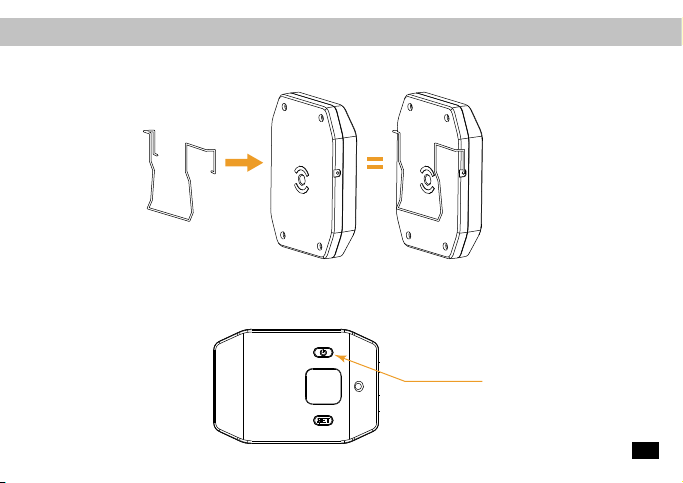
1.Connect the belt clip to the connection hole
2.Long press the power button to turn on the transmitter
Installation and Usage
Transmitter:
Power button
13
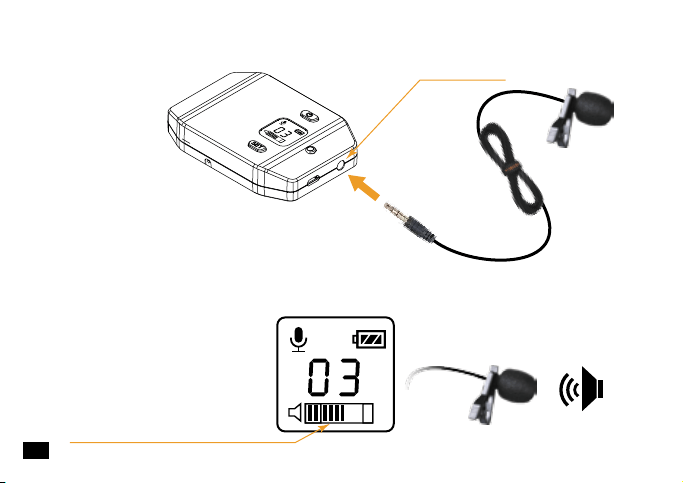
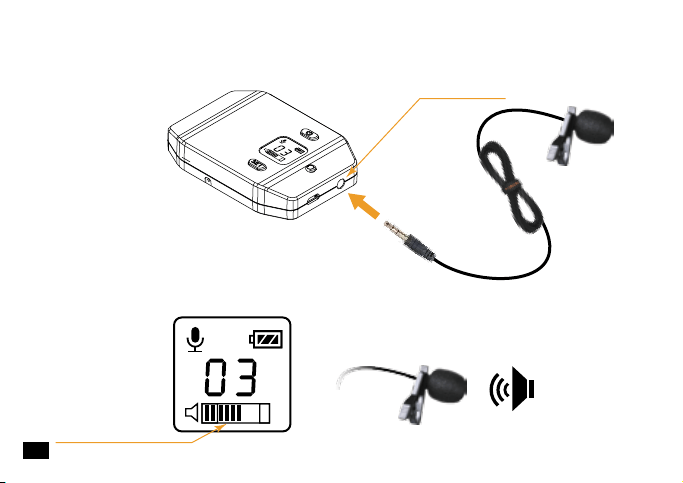
Audio Dynamic Display Bar
3.Insert the 3.5mm audio input line into the “Mic”socket
4.Target the Mic to the audio source and check whether the transmitter is working
properly according to the audio display bar on the screen
“Mic”socket
14
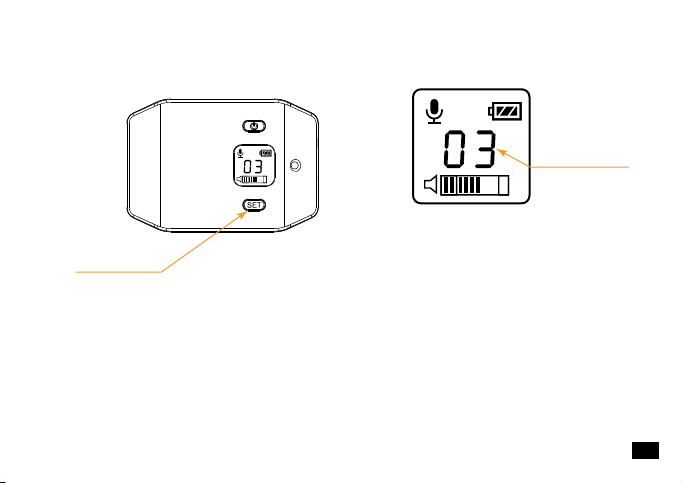
Channel
5. Short press set button to select the channel
“set”button
15
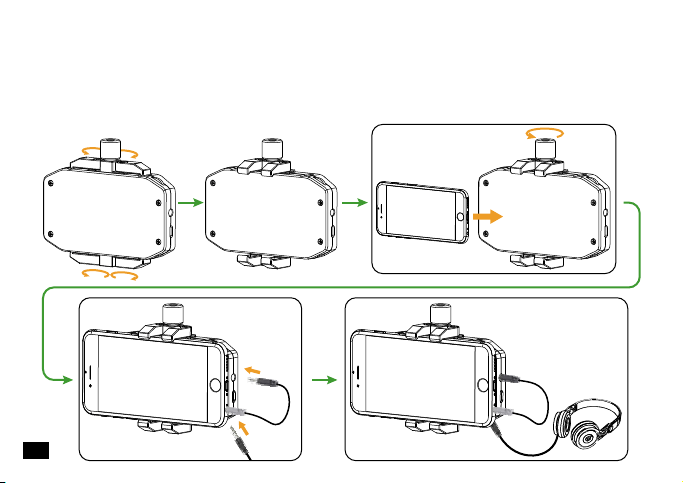
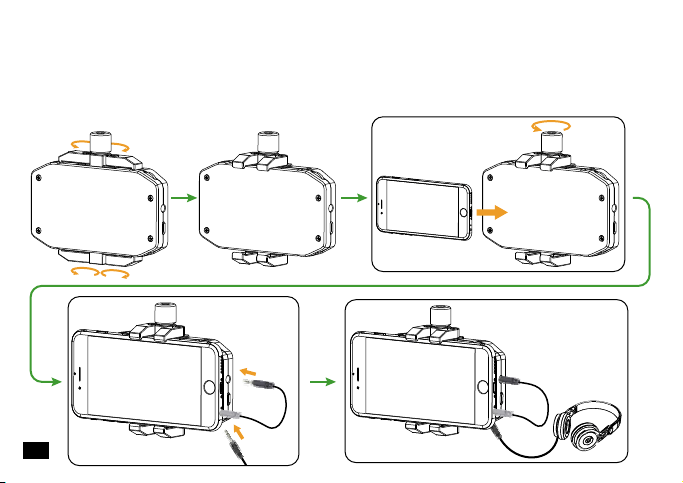
1.Rotate the four clamps, then adjust the screw to appropriate height, install the phone
in the neutral position; connect one end (black) of the audio output line to OUTPUT
socket, the other end (gray TRRS) to mobile phone audio input socket; A 3.5mm
headset can be inserted in real-time monitoring socket according to the need.
Receiver:
16

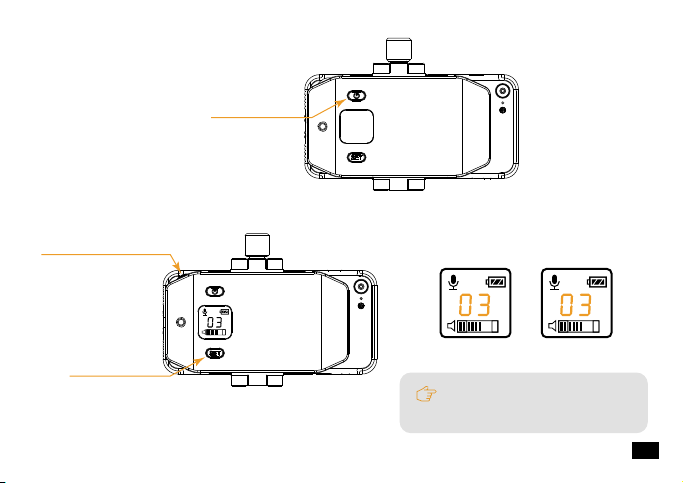
When the receiver channel
matches the transmitter, the
green light keeps on.
Power Button
2.Long press the power button to turn on the receiver;
3.Short press set button to make channel consistent with the transmitter, and adjust the
volume to the optimal status through the volume adjusting wheel;
“set” Button
volume adjusting wheel
Receiver ChannelTransmitter Channel
17
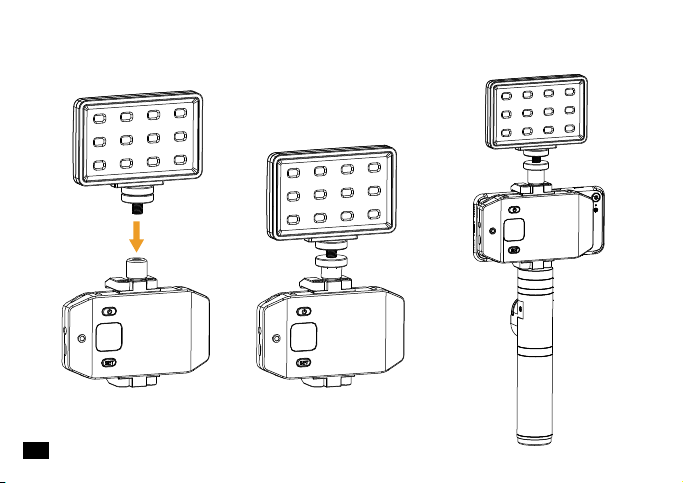
5.Go for the normal audio recording;
4.Can be extendable for connection with LED light or other auxiliary equipment;
18

fix the receiver through
the adjusting screw
1.Connect the 1/4 screw thread of the electronic grip to the 1/4 thread of the receiver,
then fix the receiver through the adjusting screw;
Electronic Grip:
19
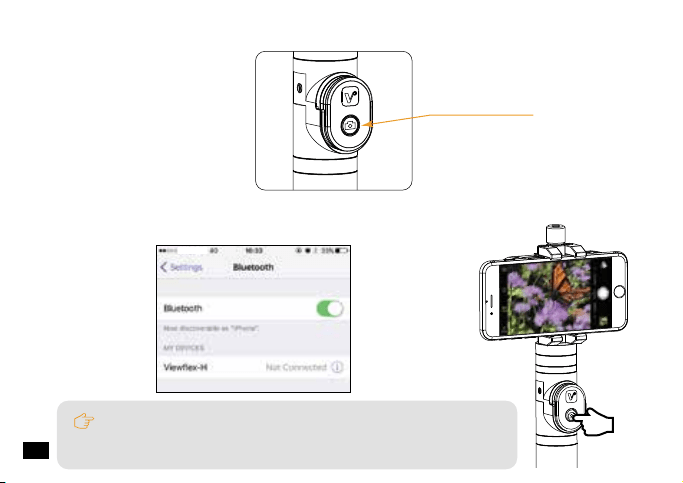
In photo shooting mode, press the remote controller for photo
taking;In video mode, press the remote controller to start video, and
press again to finish.
Power Button
2.Long press the power button to turn on the grip;
3.Turn on the bluetooth of the phone, match with the bluetooth named 'Viewflex - H',
then you can use your smartphone for recording.
China Mobile
20
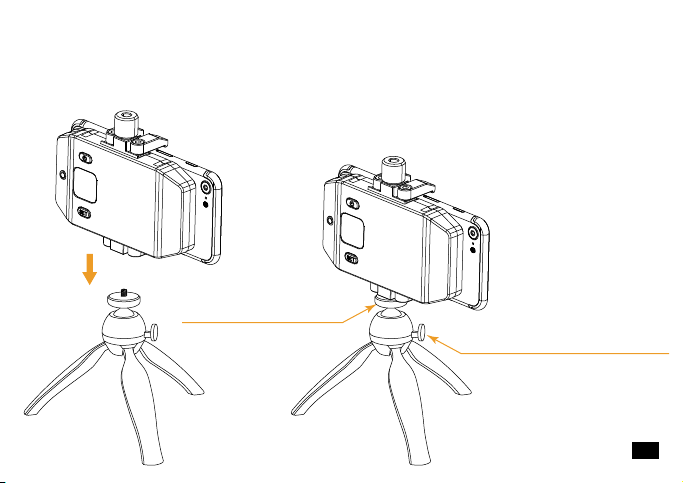
fix the receiver through
the adjusting screw
press the direction control
switch to adjust the direction
1. Connect the receiver with the tripod through the 1/4 screw thread, fix the receiver by
adjusting the adjustable screw, press the direction control switch to adjust the
direction;
Tripod on Table:
21

Specification
6(0~5)
520.00MHz ~ 526.00MHz
>65dB
1/4 Wavelength Wire Antenna
10dBm
<-60dBc
<20ms
<0.5%
3.5mm socket
Polymer Lithium Battery 3.7V 1150mAH
8 Hours
Micro USB
85 x 59 x 16.3 mm
0℃ ~ +50℃
-20℃ ~ +60℃
Channels
Wireless Frequency
Signal / Noise
Antenna
Transmitting Power
Stray Radiation
Sound Delay
Audio Distortion
Audio Input Socket
Batteries
Endurance
Charging Socket
Dimension
Operating Temperature
Storage Temperature
Transmitter:
~
22

6(0~5)
520.00MHz ~ 526.00MHz
>65dB
1/4Wavelength Wire Antenna
-95dBm
<20ms
<0.5%
20Hz ~ 18KHz
3.5mmSocket
Polymer Lithium Battery 3.7V 1150mAH
8 Hours
Micro USB
104 x 57.6 x 16.3mm
0℃ ~ +50℃
-20℃ ~ +60℃
Channels
Wireless Frequency
Signal / Noise
Antenna
Receiving Sensitivity
Sound Delay
Audio Distortion
Frequency Response
Audio Input Socket
Batteries
Endurance
Charging Socket
Dimension
Charging Socket
Storage Temperature
Receiver:
23
3.0
10m
CR2032 x 1
10 minutes
35 x 25 x 8.4mm
Bluetooth Version
Effective Distance
Battery
Auto power-off time with no operation
Dimension
Bluetooth Electronic Grip:
24

FOR SMARTPHONE
CVM-WS50
用户使用说明书
CVM-WS50 6频手机专用无线麦克风


前言
感谢您购买Comica/科唛WS50手机专用无线麦克风。
WS50是一款创意型内置手机夹手机专用无线麦克风,此款麦克风内置聚合物锂电池,采用
UHF无线调频技术及LCD高清段码屏,共计6频道、接收端无级可调音量,并融入了电量检测、
拾音动态显示、实时监听等多种功能,工作距离高达60米(有障碍的地方30米), 辅助您手机
进行视频录制并达到专业级视听效果。
为保证产品的顺畅使用及安全,请在使用前严格阅读本说明书,并正确组装及操作。
11

产品主要功能
.6频,工作距离可达60m(空旷距离,有障碍距离可达30m);
.一体式金属材质手机夹;
.LCD 显示屏可显示频道及声音动态;
.无级音量可调;
.可实时监听;
.可延展外接LED灯、手柄、脚架、冷靴等;
.内置可充电锂电池;
.轻便方便携带;
WS50A附加功能:可拆卸电子手柄,智能化视频控制;
WS50B附加功能:可拆卸普通手柄
WS50C附加功能:可以配套用于桌面直播的无线音频传输
6频道
无级音量可调
实时监听
锂电池 LCD段码屏
一体式金属
材质手机夹
工作距离
高达60m
60M
22

.本产品兼容IOS和Android系统,搭配iPhone7以上手机使用时,需使用原厂转接线;
.该麦克风配合IOS系统(Iphone)的手机使用时,在录音及视频模式下均可正常工作;
.该麦克风配合Android(安卓)系统的手机使用时,录音模式下均可正常工作,视频模
式下部分手机会出现不兼容情况;(此时建议使用第三方视频软件,如:乐秀,美拍,
小影等)
.为了避免使用过程中出现信号干扰,请将手机设置为飞行模式;
.工作距离会受到周围环境的影响,使用过程中请尽量保持环境空旷无干扰,并关闭机
身自身的WIFI;
.使用时接收器不要靠近其它的UHF频段发射器、无线电台等干扰设备;
.请在干燥环境中对该产品进行储存;
.不要在雨中或潮湿环境中使用该设备,否则会有短路的危险;
注意事项
33

包装清单
主体:
配件:
发射器 接收器 普通手柄
(仅用于WS50B)
桌面三角架
(仅用于WS50C)
电子手柄
(仅用于WS50A)
1. 3.5Mic音频输入线
2. TRRS音频输出线
3. USB 充电线
4. 腰带夹
5. 防风毛
6. 便携包
7. 说明书
8. 保修卡
1 2 3 4
5 6 7 8
44

部件介绍
发射器
1.Set调频按键
2.开关/静音按键
3.工作状态指示灯
4.Mic音频输入接口/复位孔
5.Micro USB充电接口
6.腰带夹插孔
7.1/4螺口
部件介绍及说明
2
1
3
4
5
7
6
复位孔作用:当产品功能程序出现紊乱无
法进行正常调节甚至无法关机时,可使用
适当的锥形工具插入复位孔下按进行功能
复位。
55

3
4
5
6
7
1
2
9
8
10
11
接收器
1.Set调频按键
2.调节螺母
3.开/关按键
4.工作状态指示灯
5.3.5mm音频输出接口/复位孔
6.Micro USB充电接口
7.3.5mm监听接口
8.手机固定夹
9.底部1/4螺口
10.顶部1/4螺口
11.音量调节旋钮
顶部1/4螺口可外接补光灯等其他设备;
底部1/4螺口可用来接手柄方便拍摄;
复位孔作用:当产品功能程序出现紊乱无
法进行正常调节甚至无法关机时,可使用
适当的锥形工具插入复位孔下按进行功能
复位。
~
66
1
2
普通手柄
1.1/4螺牙
2.底部1/4螺孔
77

电子手柄
1.1/4螺牙
2.调节螺盘
3.蓝牙遥控器
4.遥控器开关/功能按键
5.底部1/4螺口
1
2
3
4
5
蓝牙遥控器可以取下来进行远程操控;
蓝牙遥控器支持IOS 和 Android 系统;
88

1
2
4
3
桌面三角架
1.1/4螺牙
2.调节螺盘
3.可张缩脚架
4.方向调节开关
99

屏显说明
接收器:
发射器:
正常收音模式
静音模式
电量
频道
音量动态显示条
收音模式
电量
频道
音量动态显示条
1010
按键说明
发射器
开关/静音按键
长按
短按
短按
插入复位细针/
插入Mic输入线
长按
短按
插入复位细针/
插入音频输出线
左右轮播
长按2秒
短按
长按2秒
长按6秒
10分钟后
开机/关机
静音(开背景灯后生效)
调频(0 5频道)(开背景灯后生效)
~
~
功能复位/录音
开机/关机
调频(0 5频道)(开背景灯后生效)
功能复位/音频输出
调节音量大小
开机
拍照模式下按一下拍照;视频录制模式
下按一下开始录制,再按停止
连拍3秒
恢复出厂设置,可重新连接不同的手机
自动关机
开关按键
Set按键
Set按键
复位孔/Mic输入
复位孔/音频输出孔
音量调节按键
开关按键
与手机配对成功后
无操作
接收器
电子手柄
1111

指示灯定义
发射器
接收器
电子手柄
正常工作
静音
电池低电
未与发射器连接
与发射器链接成功
电池低电
没有与手机配对成功
拍照/录像
绿灯常亮
红灯常亮
红灯闪烁
绿灯闪烁
绿灯常亮
红灯闪烁
蓝灯闪烁(开机后)
绿灯闪烁
1212
1. 将腰带夹安装到发射器背部
2. 长按电源开关打开发射器
安装及使用
发射器:
电源开关
1313
音量动态显示条
3. 将3.5mm音频输入线插入“Mic”接口
4. 将Mic对准音源,根据屏幕上的音量指示条检测发射器是否正常工作
“Mic”接口
1414

频道
5. 短按set按键选择频道
“set”按键
15
1.旋转手机夹的四个卡爪,逆时针旋转调整螺母至合适高度,将手机安装在卡槽内,将
音频输出线一端(黑色)接入OUTPUT接口,另一端(灰色TRRS)端接入手机音频输入
接口;根据需要可将3.5mm耳机接入监听口进行实时监听;
接收器:
1616
接收器频道与发射器匹配成功
时,绿灯常亮。
电源开关
2.长按电源开关打开接收器;
3.短按set设置频道与发射器一致,并通过音量调节按键VOL将音量调至最佳状态;
“set”按键
音量调节旋钮“VOL”
发射器频道接收器频道
1717

5. 进行视频拍摄中的音频录制;
4. 可外接LED补光灯等辅助设备;
1818

调整螺盘对
接收器进行固定
1.将电子手柄的1/4螺牙与接收器的螺口相连,通过调整螺盘对接收器进行固定;
电子手柄:
1919

拍照模式下,按遥控器开关按钮进行拍照;
视频模式下,按一下开启视频录制,再按关闭视频录制;
开关按键
2.长按2秒开关按键开机;
3.打开手机蓝牙,找到对应名称为“Viewflex-H”的蓝牙进行配对,蓝牙匹配成功后,
打开手机上的视频进行录制;
20

按下方向调节
开关可调整合适的角度
调整螺盘对
接收器进行固定
1.将接收器的1/4螺口与桌面三脚架的螺牙相连,通过调整螺盘对接收器进行固定,按
下方向调节开关可调整合适的角度;
桌面三脚架:
21

产品规格
6(0 5)
520.00MHz 526.00MHz
>65dB
1/4波长导线天线
10dBm
<-60dBc
<20ms
<0.5%
3.5mm接口
内置聚合物锂电3.7V 1150mAH
8小时
Micro USB
85 x 59 x 16.3 mm
0℃ +50℃
-20℃ +60℃
频道数
载波频率
信噪比
天线
发射功率
杂散辐射
声音延迟
音频失真
音频输入接口
电池
续航时间
充电接口
尺寸
工作温度
存储温度
发射器:
~
~
~
~
22

6(0 5)
520.00MHz 526.00MHz
>65dB
1/4波长导线天线
-95dBm
<20ms
<0.5%
20Hz 18KHz
3.5mm接口
内置聚合物锂电3.7V 1150mAH
8小时
Micro USB
104 x 57.6 x 16.3mm
0℃ +50℃
-20℃ +60℃
频道数
载波频率
信噪比
天线
接收灵敏度
声音延迟
音频失真
频率响应
音频输入接口
电池
续航时间
充电接口
尺寸
工作温度
存储温度
接收器:
~
~
~
~
~
23

3.0
10米
CR2032 x 1
10分钟
35 x 25 x 8.4mm
蓝牙版本
有效距离
电池
无操作自动关机时间
尺寸
蓝牙电子手柄:
24




Email: [email protected]