USER MANUAL
CVM-WM300
UHF Wireless Microphone
Foreword
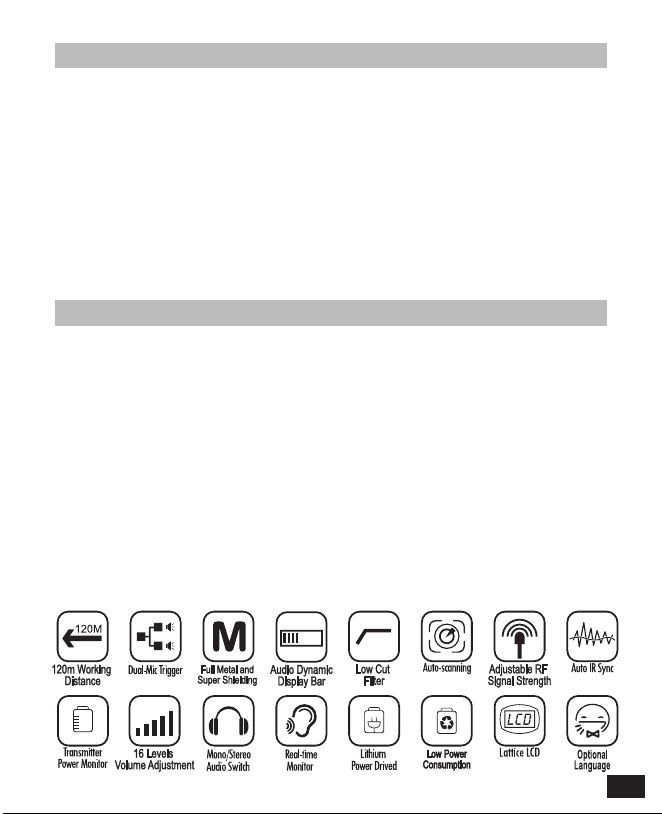
Main Features
Thanks for purchasing COMICA WM300 UHF wireless microphone.
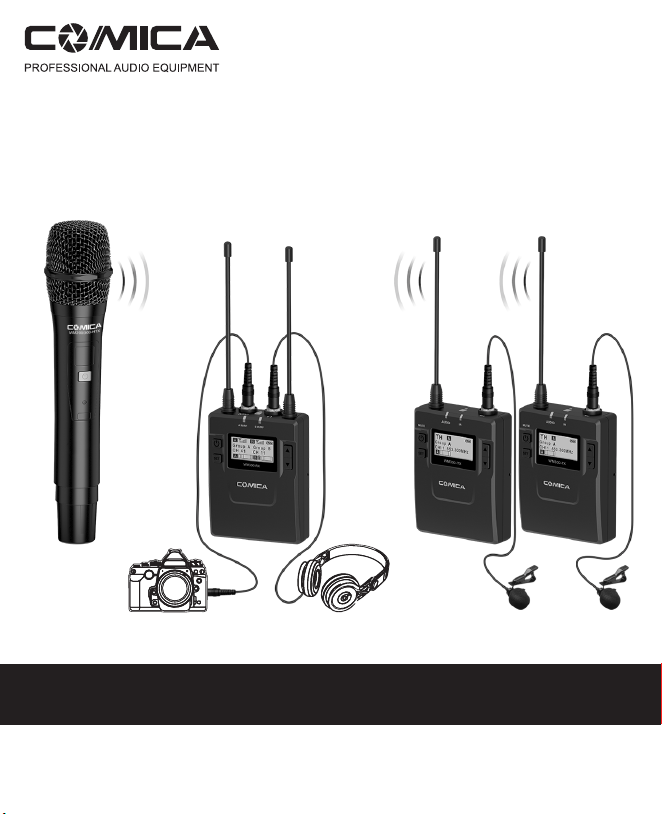
WM300 is an all-metal wireless microphone with dual-transmitter triggered by one
receiver, with built-in polymer lithium battery, it utilizes UHF wireless FM
technology and LCD high-resolution lattice screen,16-level adjustable volume,
and integrated into LCF
(
Low cut filter) , Auto-scanning, Auto IR Channel-match,
stereo / mono switchable audio mode, RF signal strength adjustment, MIC/LINE
IN input dual selection, power monitoring at receiver end, sound pickup dynamic
display, backlight adjustment and other functions, at the same time with strong
shielding anti-noise performance, it’s a high-quality microphone to broadcasting
level;
To ensure the smooth use and safety of the product, please carefully read this
instruction before using and properly assemble and operate.
. Dual Transmitters Triggered by One Receiver, A/B Double Group Options;
. Used for Multiple Devices Working Together;
. Working Distance is Up to 120m (120m in Open Area, 80m in Barrier Area);
. LCF Low Cut Filtering Mode;
. Auto-scanning for Quick Channel Selection;
. Manual or Auto IR Sync;
. Optional Language;
. Adjustable RF Signal Strength;
. Audio Dynamic Display Bar;
. 16 Levels Volume Adjustment;
. Transmitter Power Monitor;
. Mono/Stereo Switchable Output Modes;
. Built-in Rechargeable Lithium Battery, Slim Body;
. Low-consumption, Super-long Standby Time;
. Lattice LCD Display, High Resolution;
. Full Metal Manufacturing, Excellent Shielding;
1
Notice
Package Contents
Transmitter should be more than 20cm from Receiver, when the distance is less
than 20cm, Receiver’s wireless signal receiving part will take protect action to shut
down the receiving of wireless signal, then audio may be intermittent, which is
normal;
When using auto IR sync, please stay within one meter, otherwise the signal may
be too weak and the sync will not be successful;
In the case of stereo/mono mode switch, please preset the mode before using to
avoid the transient interference caused by switching during usage;
The antenna will affect the working distance. Please protect the antenna and avoid
any man-made damage;
The working distance will be affected by the surrounding environment. Please try
to keep the environment open without interference during usage, and close the
WIFI of the device itself;
When using this product in a short distance, it is recommended to set RF strength
at ‘LOW’ to reduce the power consumption;
For smart phone shooting, customers must separately purchase a TRS-TRRS
audio converting cable,and pay attention to set the mobile phone mode to 'Flight
Mode' to avoid incoming call interference;
(It does not support the original recording system of some android systems, the
third-party APP is recommended to be used in this case);
Please keep this product in dry environment;
Do not expose the device in rain or humid environment, otherwise there will be a
danger of short circuit;
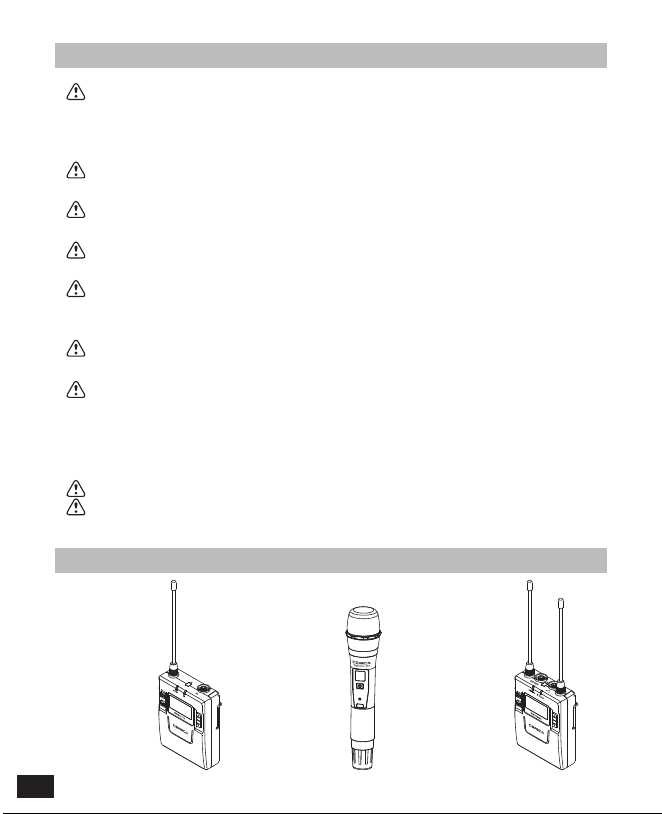
Main Parts
:
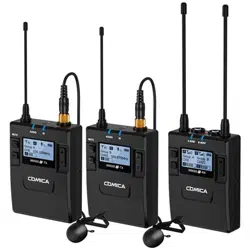
Lavalier Transmitter (TX) Hand-held Transmitter (HTX) Receiver (RX)
2

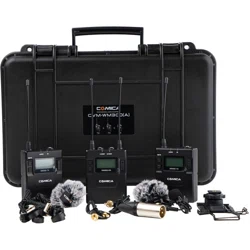
WM300(A) = 2TX + RX
WM300(B) = TX + HTX + RX
WM300(C) = TX + RX
WM300(D) = HTX + RX
TX TX RX
++
TX HTX
HTX
RX
++
TX RX
+
RX
+
Multiple Selections:
3

WM300(A)
= x2 + + + x2 + x3 + + x2 + + +
WM300(B)
= + + + + x2 + + + + +
WM300(D)
= + + + + + + +
WM300(C)
= + + + + x2 + + + + +
3.5mm Mic Audio Input Cable
3.5mm-3.5mm Audio Output Cable
3.5mm-XLR Audio Output Cable
Micro USB Charging Cable
Belt Clip
Hot-shoe Mount
Wind Muff
Portable Box
User Manual
Warranty Card
Accessories:
1
1
1
2
2
2
3
3
3
4
4
4
5
5
5
6
6
6
7
7
7
8
8
8
9
9
9
10
10
10
1
2 3 4
5
6
7 8 9 10
1
2 3 4
5
6
7 8 9 10
2 3
4
5
6
8 9 10
The accessories of each combination include
:
4

1
2
4
5
6
7
8
9
10
3
11
12
13
14
15
Components and Instruction
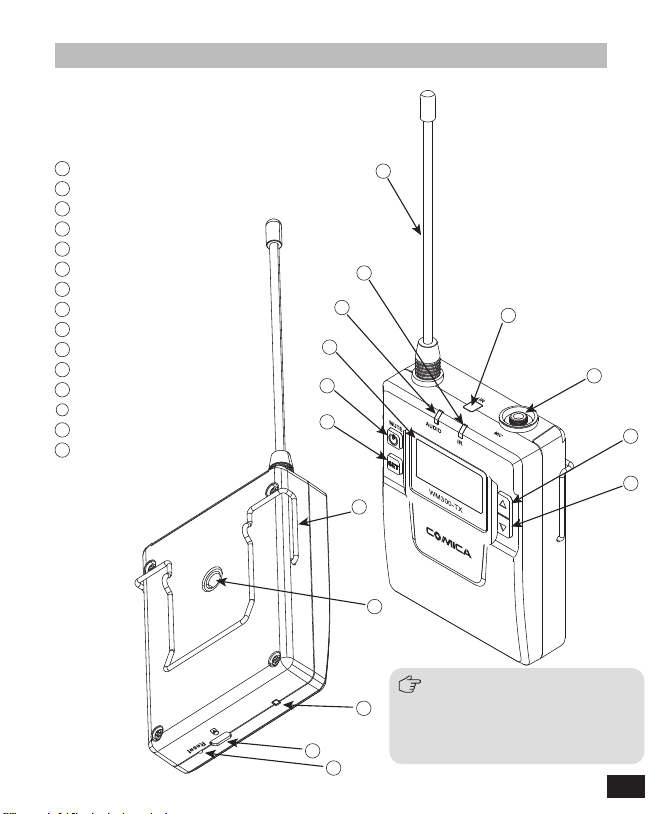
Components
Lavalier Transmitter (TX)
Antenna
Matching Status Indicator Light
Sound Status Indicator Light
LCD Screen
Power / Muting Button
SET Function Button
IR Sensor
MIC / LINE IN External Input
Function Selection Button +
Function Selection Button -
Belt Clip
1/4 Mounting Hole
Charging Indicator
Micro USB Charging Socket
Reset Hole
1
2
3
4
5
6
7
8
9
10
11
12
13
14
15
The function of reset hole: when
function program of the product is
disorganized and unable to make
normal adjustment or even
shutdown, you can use an
appropriate taper tool to insert the
reset hole to realize the function
reset.
5
2
1
3
4
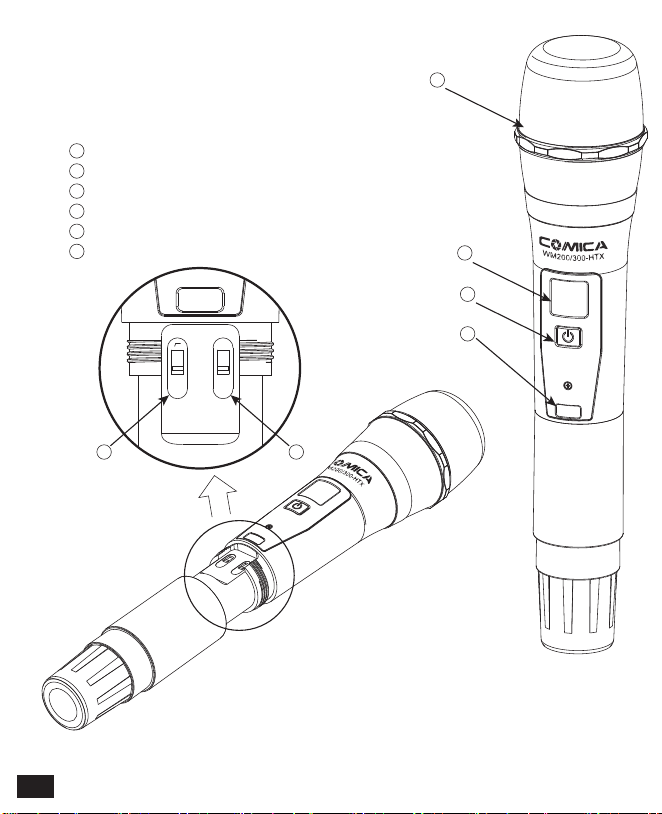
65
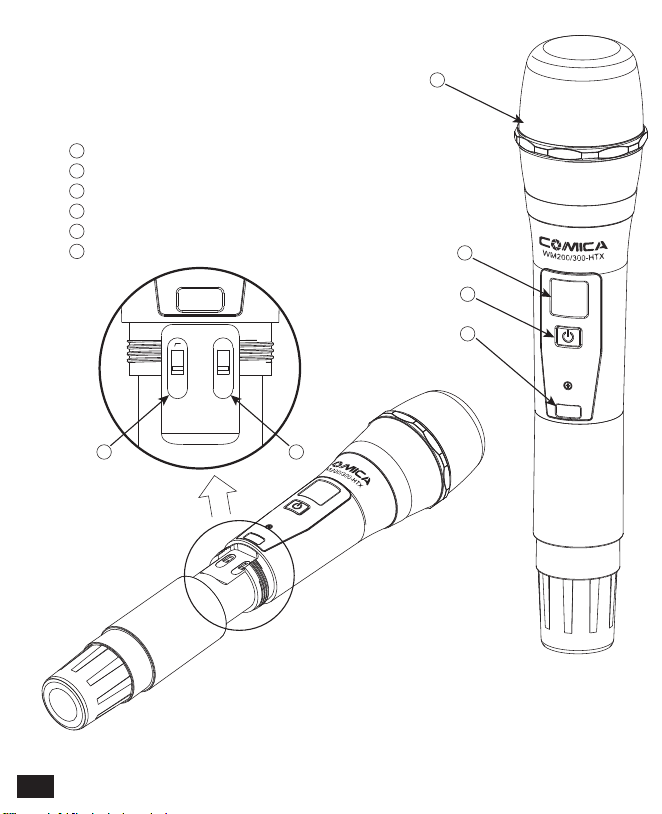
Microphone
LCD Display
Power / Muting Button
IR Screen
Low cut/Normal Audio Switch
Signal Strength “High/Low” Switch
Hand-held Transmitter (HTX)
1
2
3
4
5
6
LCF
RF
LCF
-
RF
High
Low
6

1
3
7
4
5
6
8
9
10
11
12
13
14
15
16
2
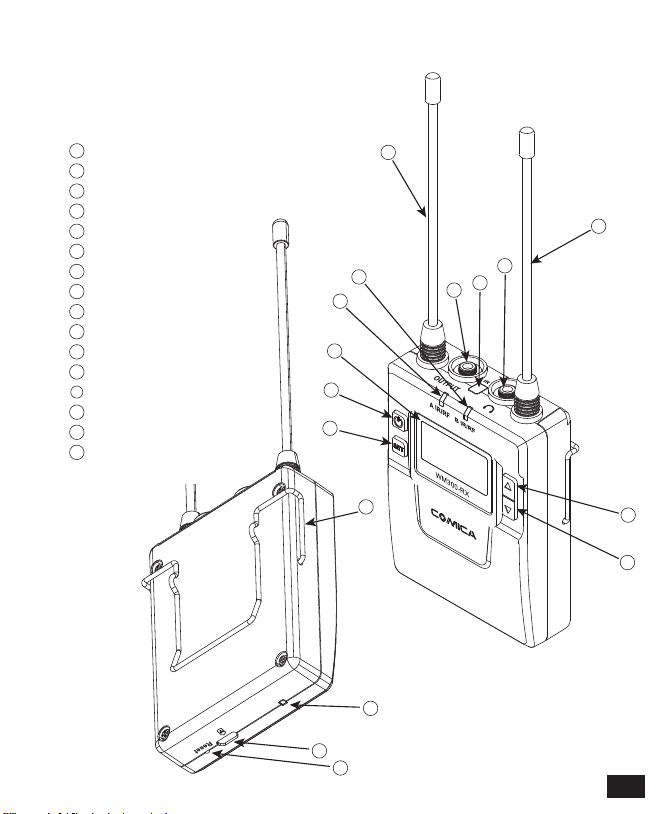
Receiver (RX)
1
2
3
4
5
6
7
8
9
10
11
12
13
14
15
16
Group A Antenna
Group B Working Status Indicator Light
Group A Working Status Indicator Light
LCD Screen
Power Switch
SET Function Button
3.5mm Audio Output Socket
IR Sensor
3.5mm Monitoring Socket
Group B Antenna
Function Selection Button +
Function Selection Button -
Belt Clip
Charging Indicator
Micro USB Charging Socket
Reset Hole
7
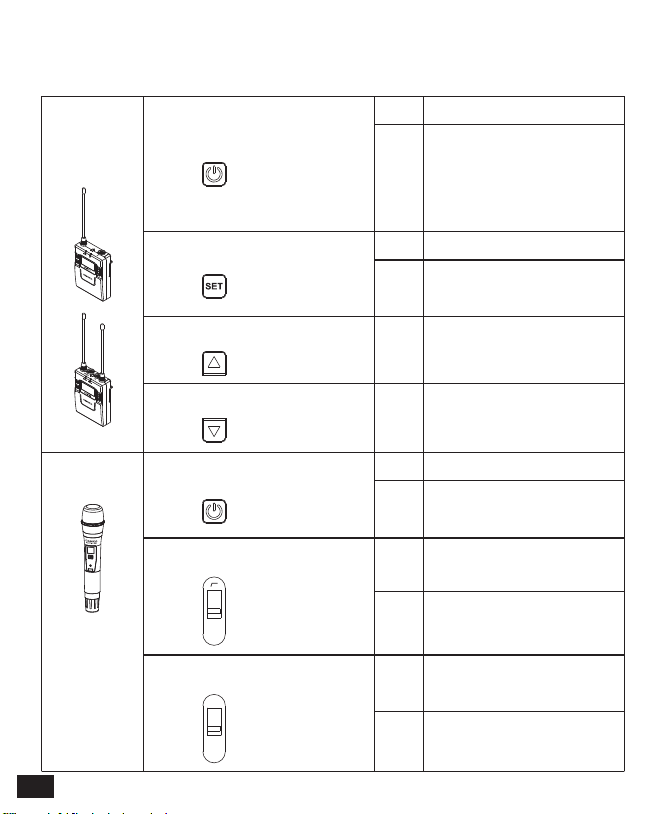
Lavalier
Transmitter
/ Receiver
Hand-held
Transmitter
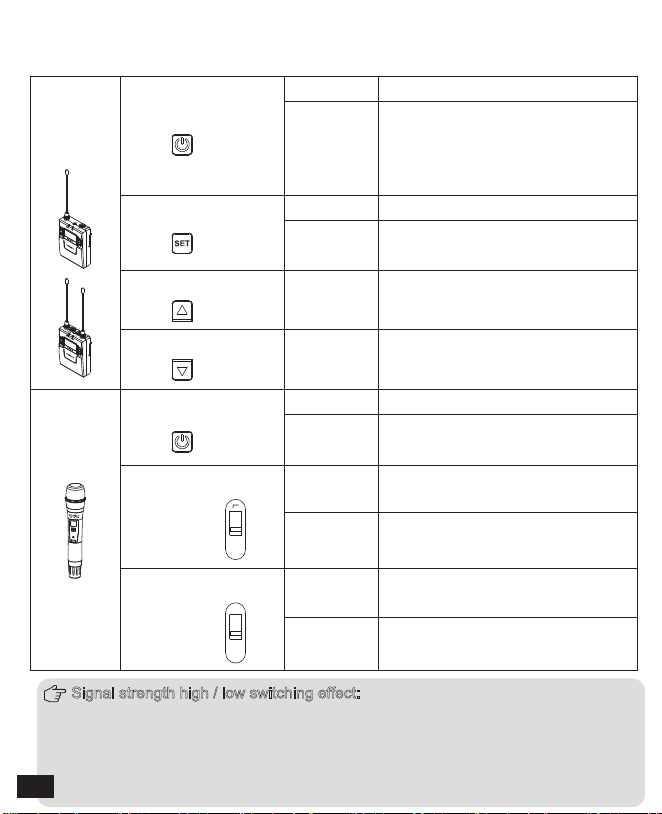
Power / Muting Button
Long Press
Short Press
Power On / Off
Power / Muting Button
“Low cut/ Normal”
Sound Switch
Signal Strength
“High/Low”
Switch
Long Press
Power On / Off
Muting Mode
(
This function is only
for transmitter, when the mute
function is turned on and the
screen is lighted up
)
Short Press
Muting Mode
(
Only goes into
effect when the screen lights up
)
SET Function Menu
+ Button
- Button
Long Press Enter the function adjustment menu
Short Press
Short Press
Short Press
1.Confirm the selected function
2.Exit the function adjustment menu
Function Adjustment (+)
Function Adjustment (-)
Push-up
Signal strength--high
Push-down
Signal strength--low
Push-up
Low cut
Push-down
Normal
Function Button Instruction
LCF
-
RF
High
Low
Signal strength high / low switching effect:
With high signal strength, the wireless working distance is up to 80-120M, high
power consumption, battery life is short; With low signal strength, the wireless
working distance is up to 30-60M, low power consumption, the battery can be
used for a long time.
8
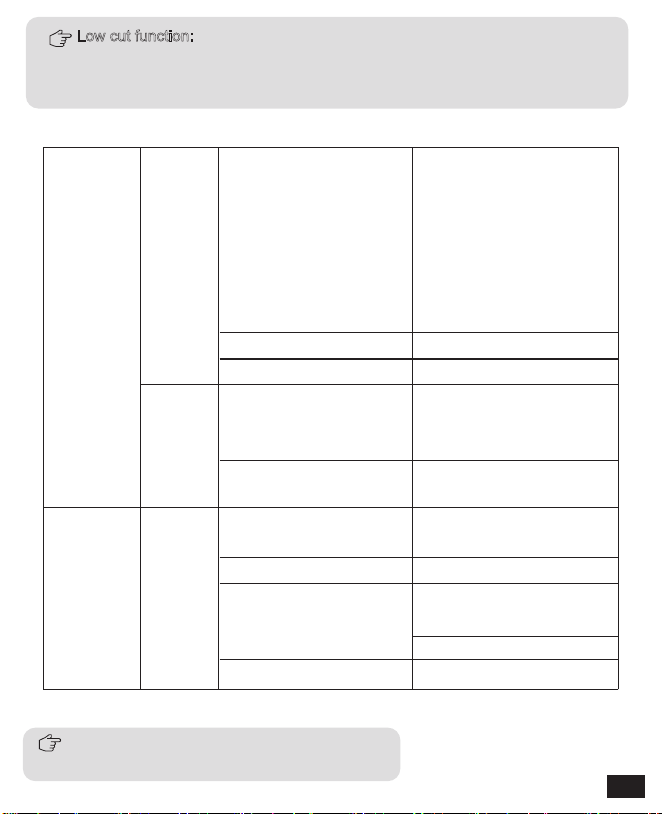
Indicator Light Instruction
Transmitter
Receiver
AUDIO
A IR/RF
B IR/RF
A IR/RF
:
Group A Working Status Indicator
B IR/RF
:
Group B Working Status Indicator
IR
Green Light Keeps On
Green Light Keeps On
Green Light Keeps On
Red Light Keeps On
Red Light Flicker
Red Light Flicker
Red Light Flicker
Red light keeps on
Green Light Flicker
Normal Recording Status
(
This state is only for the
transmitter, when the
channel matches
successfully, the receiver
can pick up the sound
)
Muting Mode
Low-power reminder
Channel matches
(
No matter the channel
matches or not
)
Channel in the match...
(
only for IR Sync
)
Normal working status after
the channel matches
Channel doesn’t match
Channel in the match...
(
only for IR Sync
)
Low-power reminder
Channel closed
Low cut function:
Appropriately remove the low frequency part of the sound, reduce the ambient
noise of the low frequency part, to make sound more clean and clear.
9

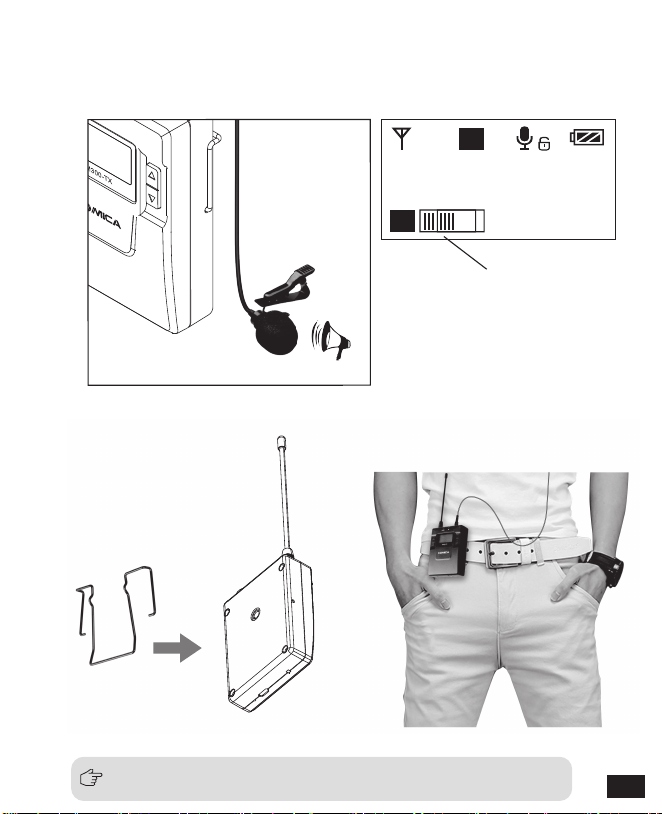
Installation and Usage
1. Insert the 3.5mm audio input line into MIC socket
2. Long press the power button to turn on the transmitter
3. After the channel matching with the receiver, it can be used
Please refer to screen operation instruction for channel matching.
Lavalier Transmitter
10
H
A
A
Group A
C H11
523.300MHz
3. Connect the MIC to the audio source and check the working status
according to the volume indicator on the screen
4. Connect the belt clip to the connection hole
5. After the channel matching with the receiver, it can be used
Please refer to screen operation instruction for channel matching.
Audio Dynamic Display Bar
11
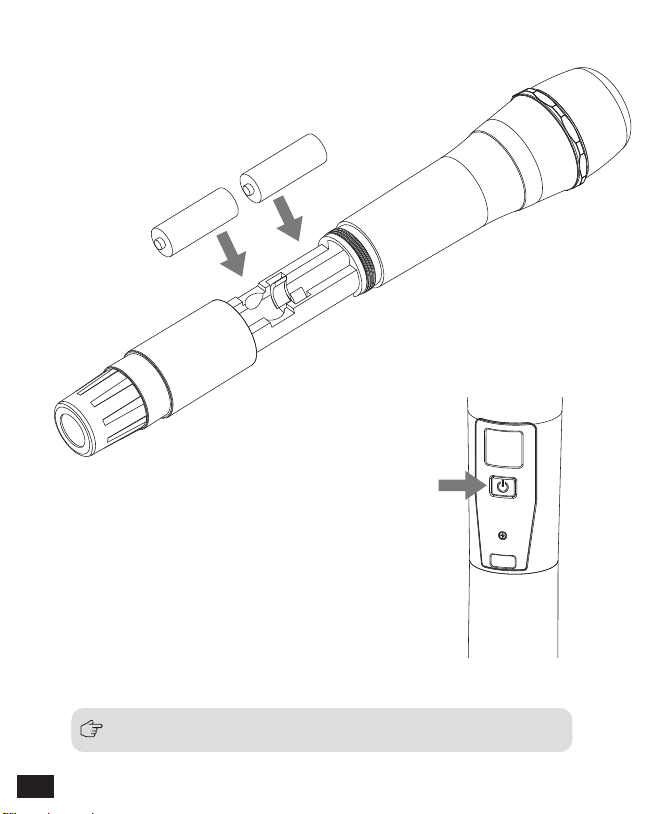
Please refer to screen operation instruction for channel matching.
2.Long press the button switch to turn on
the hand-held transmitter
3. After the channel matching with the receiver, it can be used
Hand-held Transmitter
1. Install two AA batteries into the battery tray
according to the positive and negative electrode
AA
AA
12

Receiver
1. Connect the receiver to the video device through the hot-shoe
13
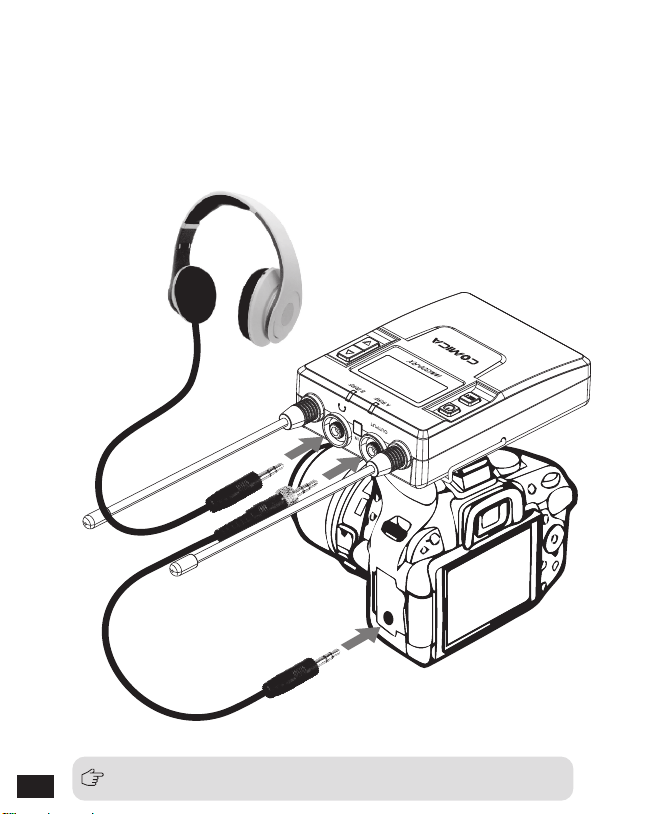
Please refer to screen operation instruction for channel matching.
3. After the channel matching with the receiver, it can be used
2. Insert the 3.5mm-3.5mm audio OUTPUT line into the OUTPUT
port, and insert the headphone into the 3.5mm monitoring
socket for real-time monitoring, then long press the power
button to turn on the receiver
14
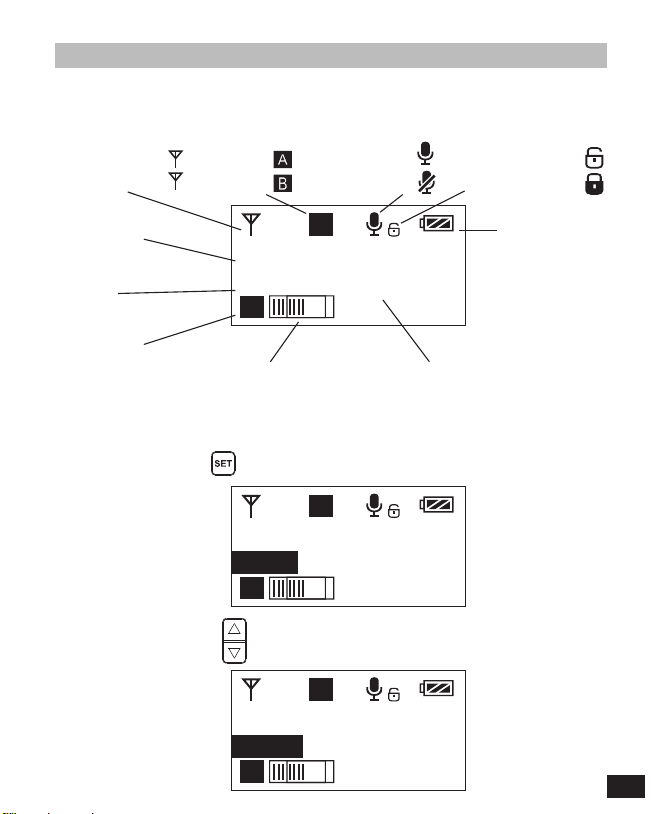
H
A
A
Group A
C H11
523.300MHz
H
A
A
Group A
C H11
523.300MHz
H
A
A
Group A
C H 30
529.000MHz
1.1 Long press button to CH setting display page
1.2 Short press button to select the channel
1.Manually Adjust the Channel of Transmitter
Screen Display and Operation Instruction
Screen Display Instruction
Operation Instruction
Lavalier Transmitter
Signal Strength High
Signal Strength Low
Group A
Group B
Normal recording
Muting
Muting
(
Unlocking
)
Muting
(
Locking
)
Power Indication
Group A/B
Channel
Group A/B
Audio dynamic display bar Channel Frequency
H
L
15
H
A
A
Group A
C H 30
529.000MHz
H
A
A
Group Setting
Group A
H
A
A
Group Setting
Group A
H
A
A
Group Setting
Group B
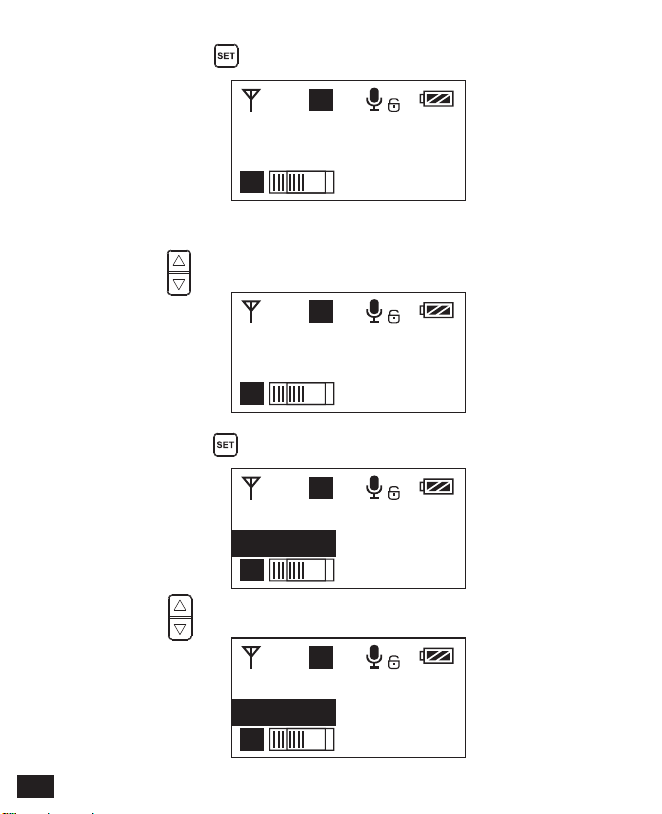
2. Group A/B Selection
2.1 Press button to ‘ Group Setting ’ display page
2.2 Long press button to ‘ Group Setting ’ display page
2.3 Press button to select the group
1.3 Short press button to confirm
16
H
B
B
Group Setting
Group B
H
A
A
Input Setting
MIC
H
A
A
Input Setting
MIC
H
A
A
Input Setting
LINE IN
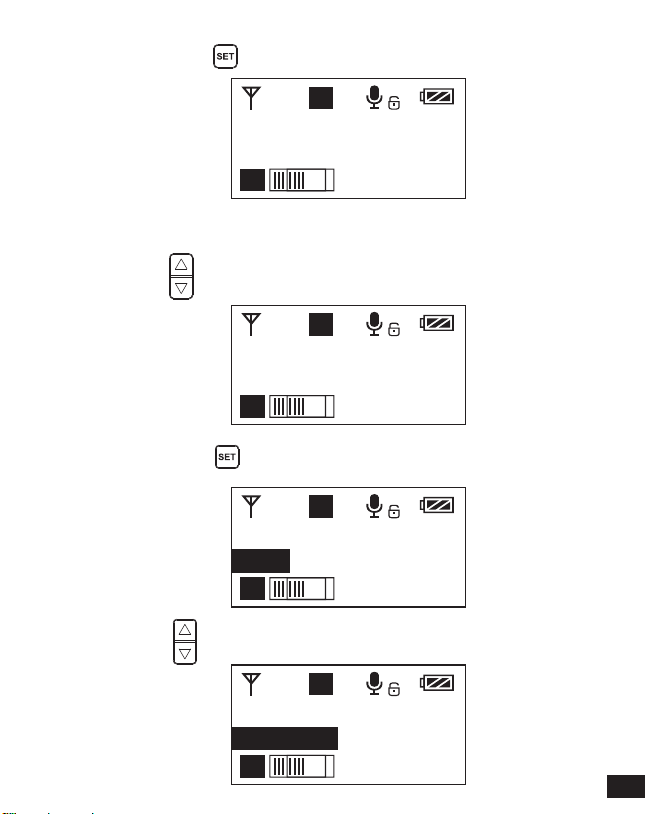
3.2 Long press button to ‘ Input Setting ’ display page
3.3 Press button to select ‘ Mic/ Line in ’ input mode
2.4 Short press button to confirm
3.1 Press button to ‘ Input Setting ’ display page
3.MIC/LINE IN Input Mode Adjustment
17
H
A
A
Input Setting
LINE IN
H
A
A
Low Cut Filter
High
H
A
A
Low Cut Filter
High
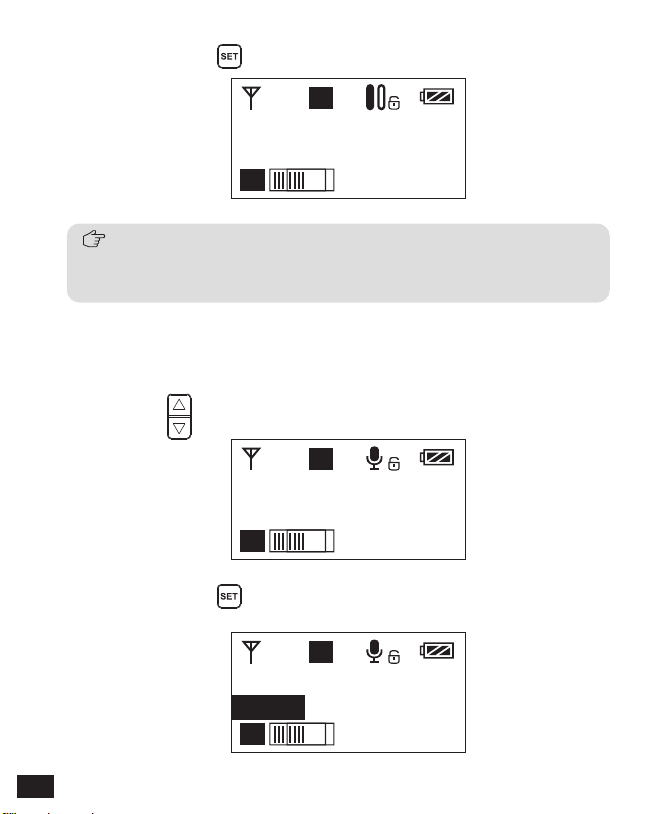
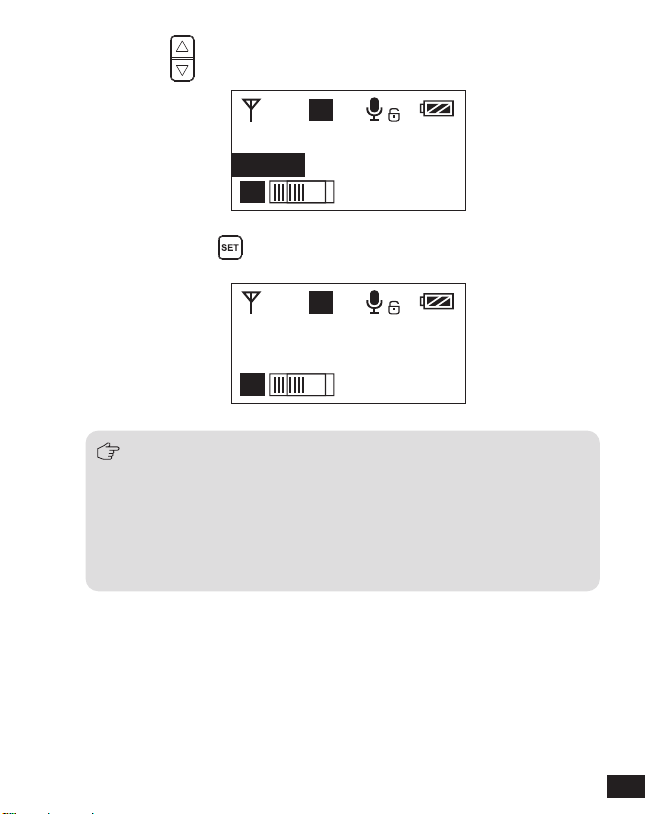
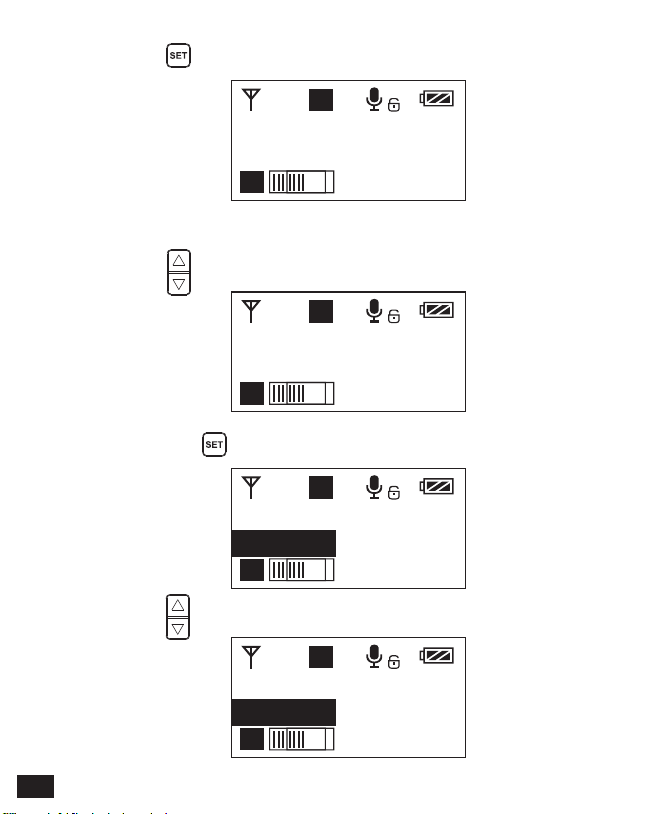
4.2 Long press button to ‘ Low Cut Filter ’ display page
4.1 Press button to ‘ Low Cut Filter ’ display page
4. Low cut ‘ High/Low/OFF ’ Adjustment
3.4 Short press button to confirm
Mic mode is for Microphone input;
Line in mode is for external audio input, such as smart phone music player.
Selecting the corresponding input mode will bring you a better audio effect.
18
H
A
A
Low Cut Filter
LOW
H
A
A
Low Cut Filter
LOW
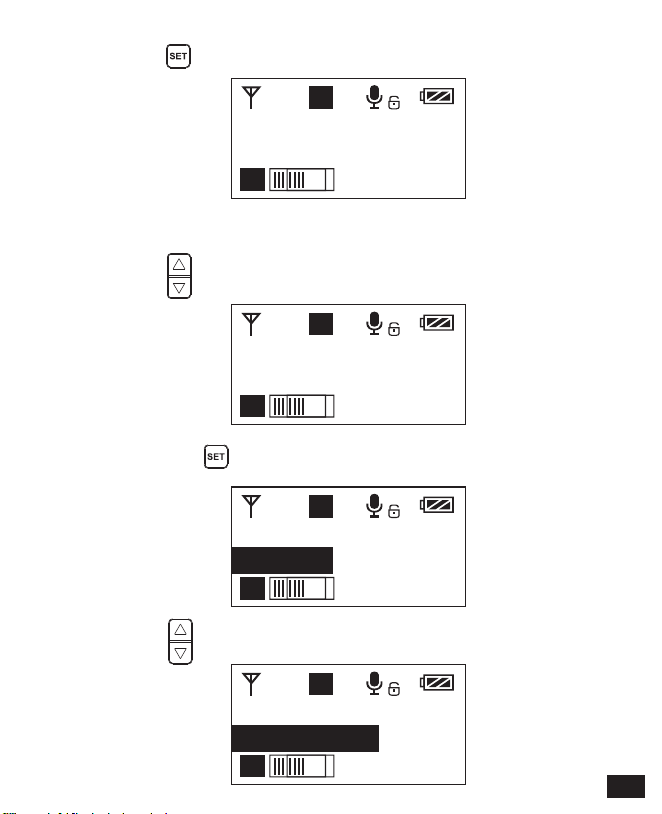
4.4 Short press button to confirm
4.3 Press button to select LCF ‘ Hight / Low / OFF ’
low-cut function will filter out the low-frequency part of the audio source,
such as the chirping and crowd noise, and the main audio source will
be more crisp. Low cut divided into low cut in low range and low cut in
high range, low range is to filter out part of the noise, while high range
of low cut filter out all noise. Turn off the low cut to restore the true, the
main source will be more vigorous, but it can be adjusted according
to actual needs.
19
H
A
A
RF Power
High
H
A
A
RF Power
High
H
A
A
RF Power
Low
L
A
A
RF Power
Low
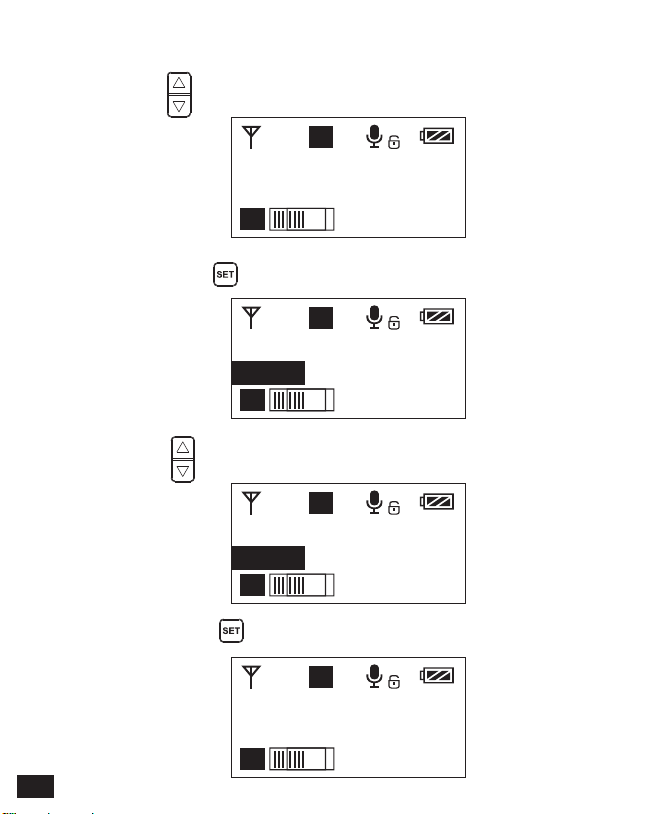
5.4 Short press button to confirm
5.2 Long press button to ‘ RF Power ’ display page
5.3 Press button to adjust the transmitting signal strength
5.1 Press button to ‘ RF Power ’ display page
5.Transmitting Signal Strength ‘ High/Low ’ Adjustment
20
H
A
A
Muting
Enable
H
A
A
Muting
Enable
H
A
A
Muting
Disable
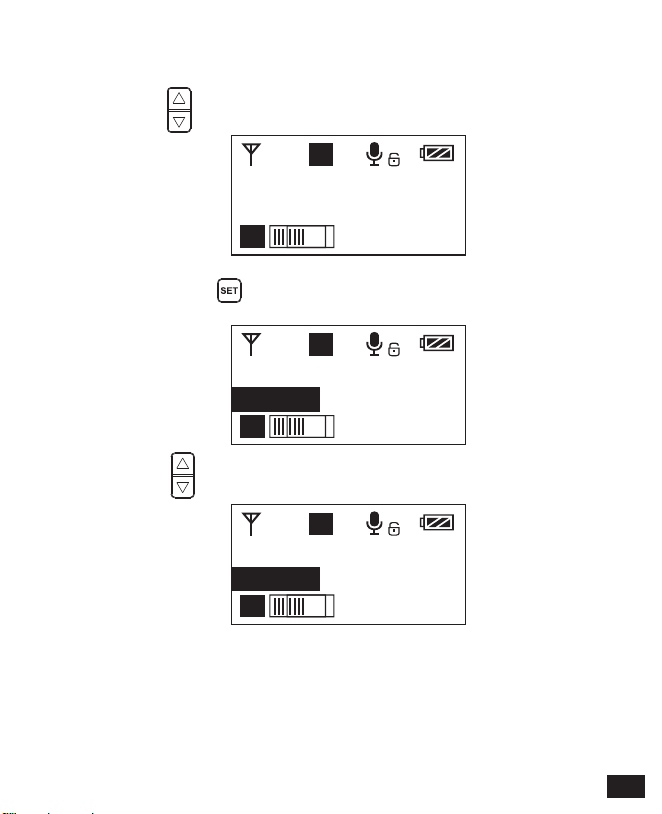
6.2 Long press button to ‘ Muting ’ display page
6.3 Press button to select Muting mode on/ off
6.1 Press button to ‘ Muting ’ display page
6.Muting Mode Enable/ Disable
21
H
A
A
Muting
Disable
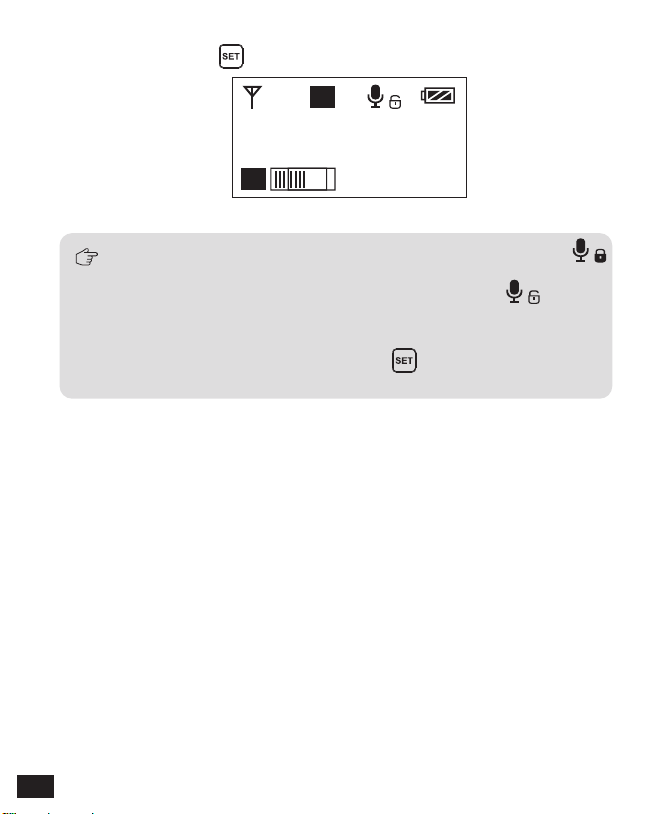
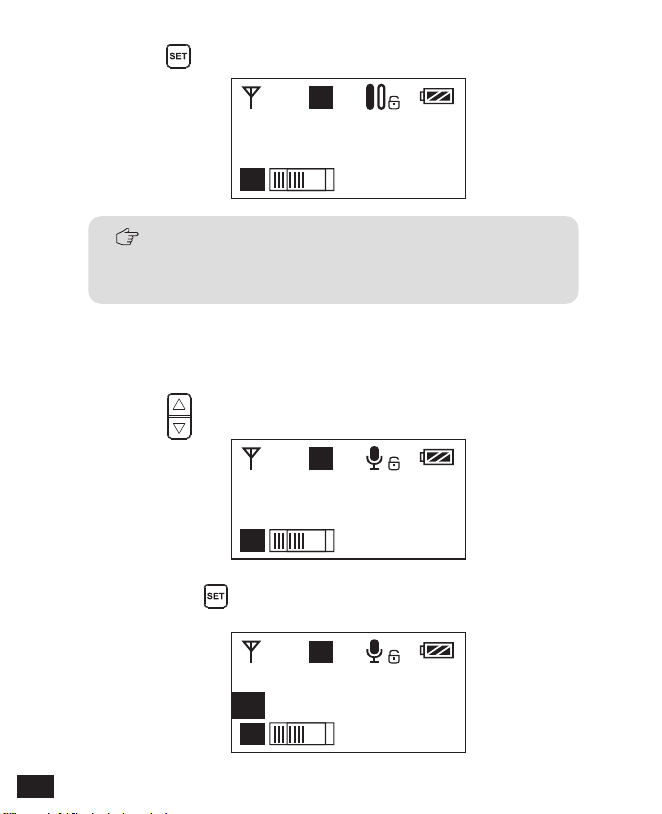
When set to ‘ Disable ’, the muting function cannot be used, the icon is:
When set to ‘ Enable ’, the muting function works, the icon is:
The muting mode can be controlled only when the screen is on, press any
button to light the screen and then press the button to switch the
muting mode.
6.4 Short press button to confirm
22
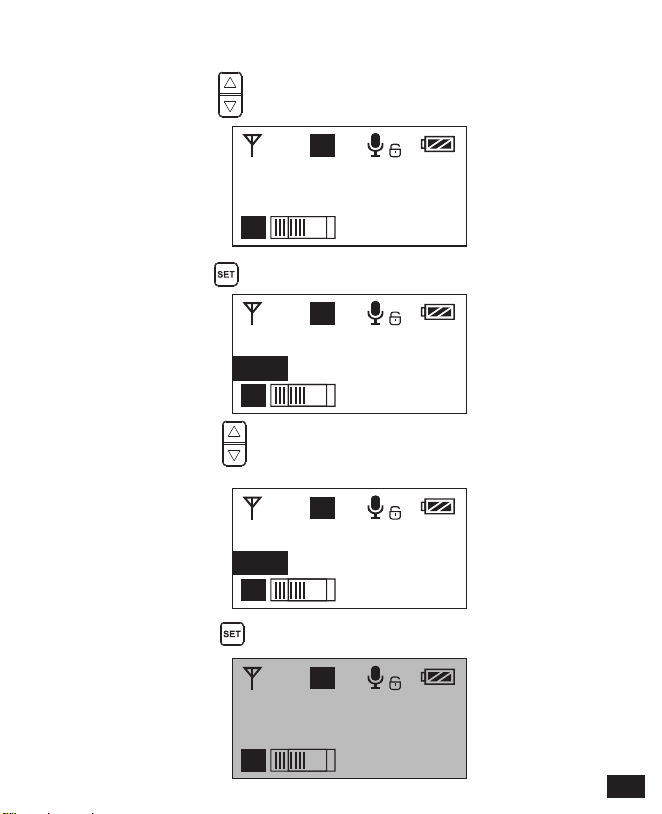
H
A
A
Backlight
15s
H
A
A
Backlight
15s
H
A
A
Backlight
60s
H
A
A
Backlight
00s
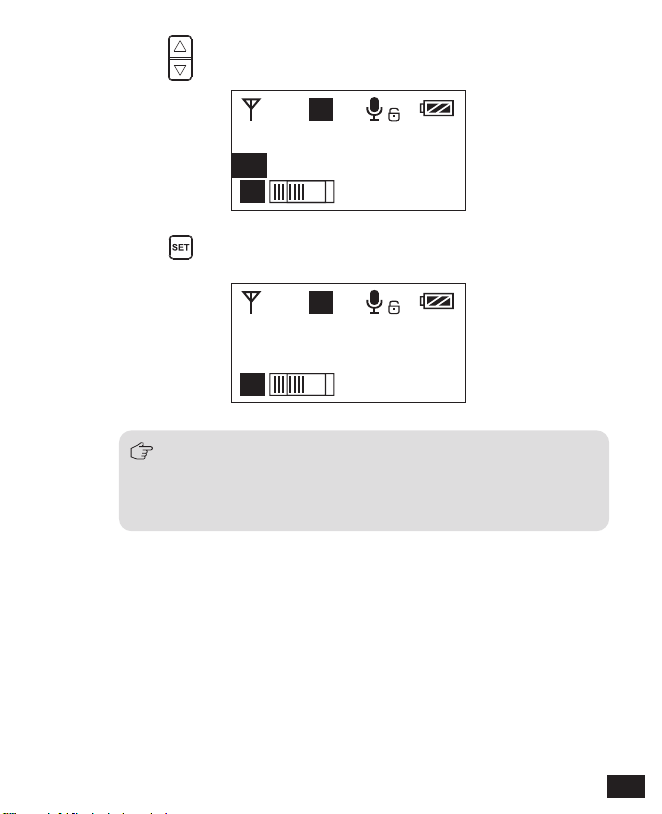
7.4 Short press button to confirm
7.2 Long press button to ‘ Backlight ’ display page
7.3 Short press button to adjust the backlight lighting time
or you can turn it off for power saving
7.1 Short Press button to ‘ Backlight ’ display page
7.Backlight ‘ Lighting Time/Turn Off ’ Adjustment
23
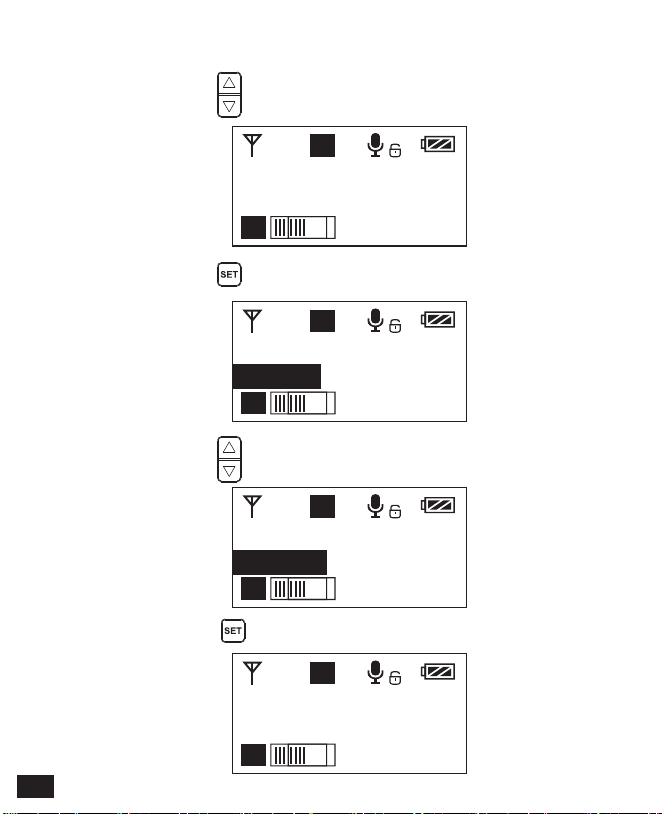
H
A
A
Language(语言)
English
H
A
A
Language(语言)
English
H
A
A
Language(语言)
简体中文
H
A
A
语言(Language)
简体中文
8.4 Short press button to confirm
8.2 Long press button to enter ‘ Language ’ display page
8.3 Short press button to select language
8.1 Short press button to ‘ Language ’ display page
8.System Language
24
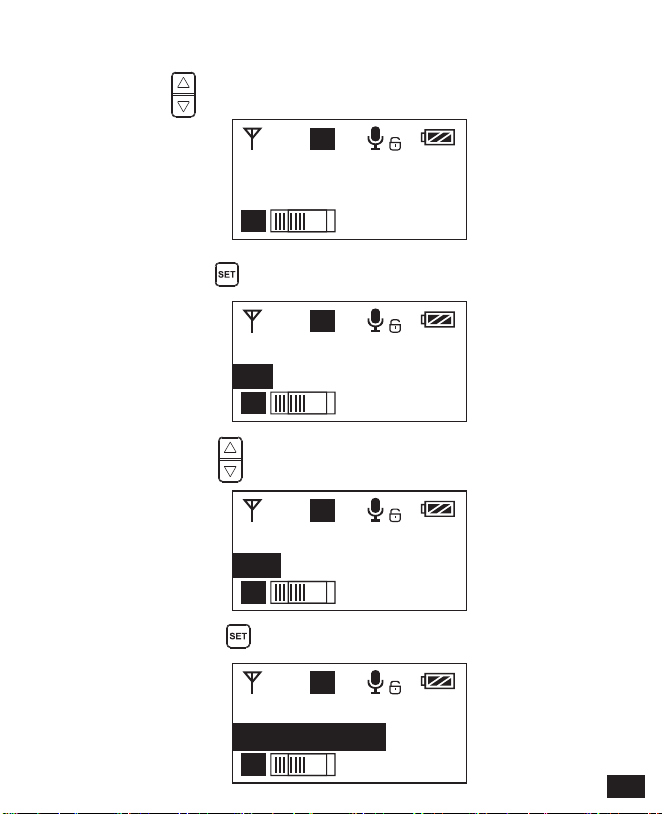
H
A
A
Reset
No
H
A
A
Reset
No
H
A
A
Reset
Yes
H
A
A
Reset
Resetting......
9.2 Long press button to enter ‘ Reset ’ display page
9.1 Press button to ‘ Reset ’ display page
9. Reset to Defaults
9.4 Short press button to confirm and restore factory setting
9.3 Short press button to select whether to restore factory
Settings
25
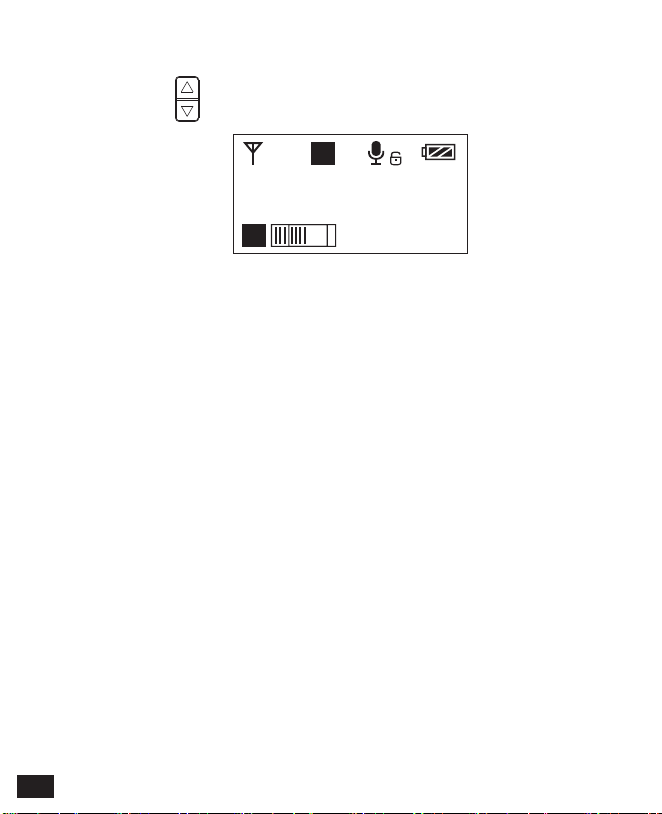
H
A
A
Version
3.0.2
10.1 Press button to ‘ Version ’ display page to check the version
10. Version
26
A
B
8 8
A
B
8 8
A
B
8 8
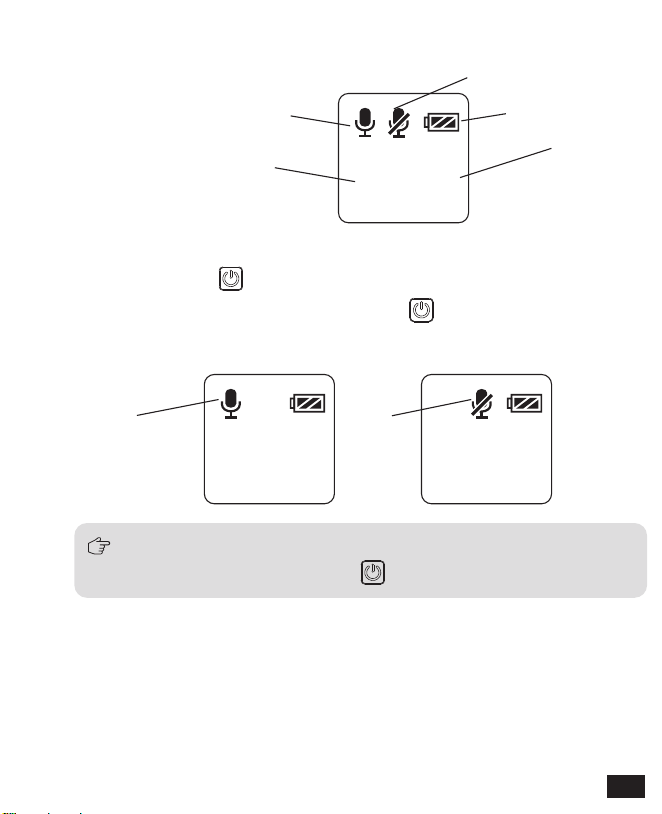
Screen Display Instruction
Operation Instruction
1.Turn on and Muting Mode Switch
Hand-held Transmitter
Normal recording mode
Muting mode
Power Indication
Group A/B
Channel
Normal recording Muting
The muting mode can be controlled only when the screen is on, press any button
to light the screen and then press the button to switch the muting mode.
1.1 Long press switch button for 2 seconds to turn on or off
1.2 When it’s turned on, short press the button to select
muting mode
27

2. Set the Channel Through Infrared Sync
During matching, don't shield the infrared receiving screen of the transmitter
against the receiver.
B
Channel
A
Channel
The hand-held transmitter defaults to channel B, and you
can set the group and channel through the receiver (For
example, If Group A of the receiver is used for the matching,
after matching, it will be: Group A CHXX; If Group B of the
receiver is used for the matching, after matching, it will be:
Group B CHXX)
When the hand-held transmitter and the lavalier transmitter
are used together, you should set them to different channels
2.1
2.2
IR Screen
28

2.3 Set the channel through infrared sync
2.4 Function switch
Low cut adjustment switch RF-Low/ High
LCF
-
RF
High
Low
29
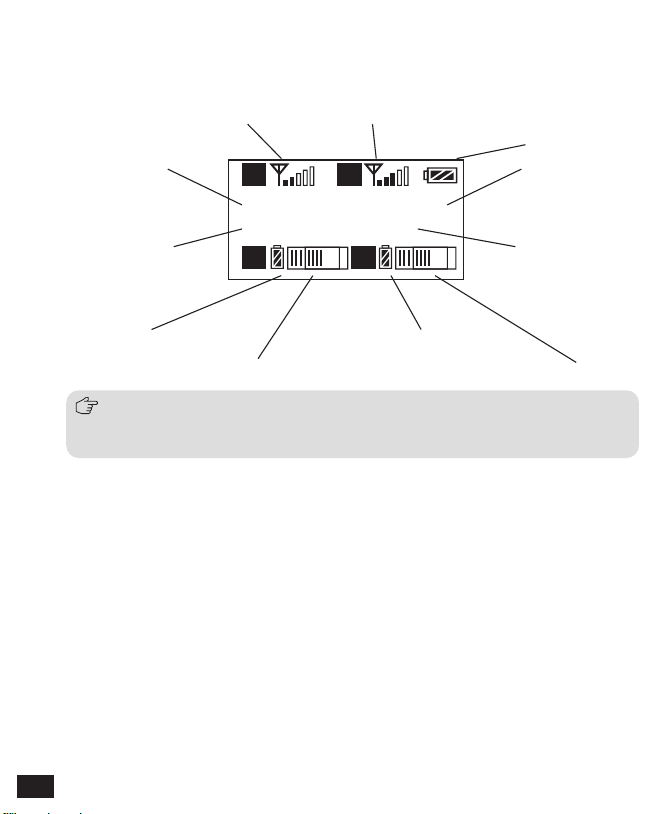
Group A
CH 41 CH 11
Group B
A
A B
B
Screen Display Instruction
Receiver
When Group A/B is on, the background color of the channel display icon is black;
When Group A/B is off, the channel display icon is transparent and no
background color.
Group A Signal Strength Display Bar Group B Signal Strength Display Bar
Group A Group B
Channel of Group A Channel of Group B
Group A transmitting power Group B Transmitting power
Group A Receiving Audio Status Indication Group B Receiving Audio Status Indication
Power Indication
30
Group A
CH 45 CH 11
Group B
A
A B
B
Group A
CH 41 CH 11
Group B
A
A B
B
Group A
CH 45 CH 11
Group B
A
A B
B
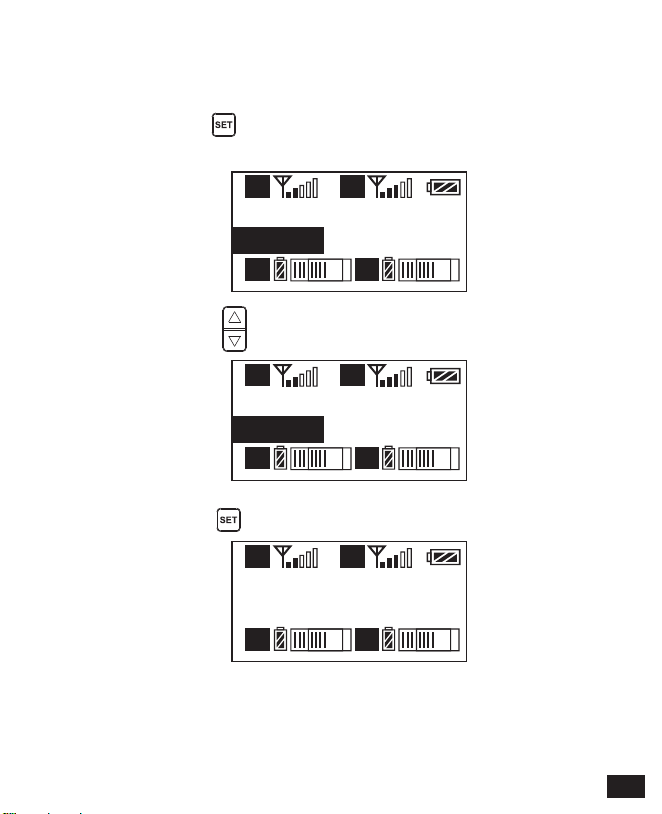
Operation Instruction
1.1 Long press button to ‘ CH ’ display page, long press
again for Group A/Group B switch
1.2 Short press button to select the channel
1.Manually Adjust the Channel of Group A/ Group B
1.3 Short press button to confirm
31
Output Mode
Stereo
A
A B
B
Output Mode
Stereo
A
A B
B
Output Mode
Mono
A
A B
B
Output Mode
Mono
A
A B
B
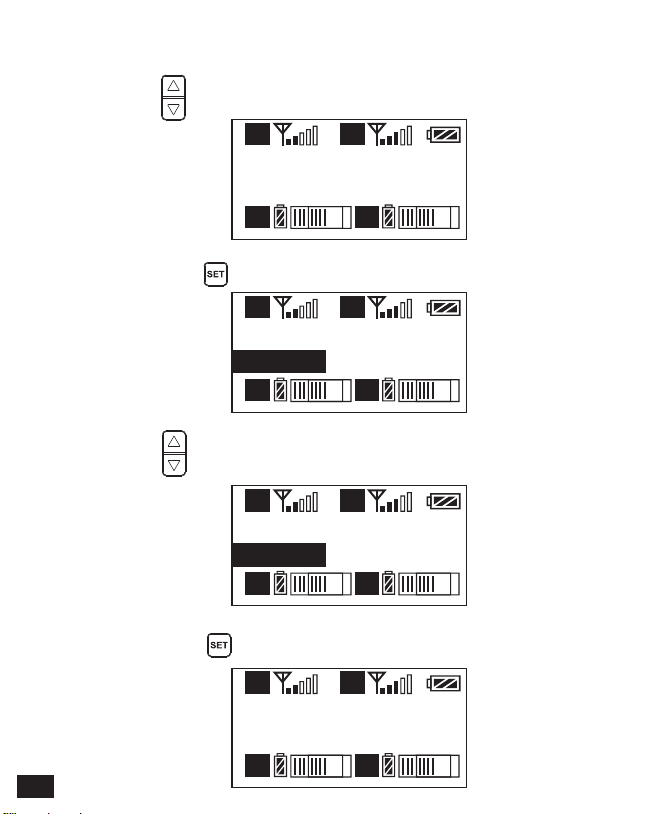
2.4 Short press button to confirm
2.2 Long press button to ‘ Output Mode ’ display page
2.3 Press button to select Mono/ Stereo Output Mode
2.Audio Output Mode ‘Stereo/Mono’ Adjustment
2.1 Press button to ‘ Output Mode ’ display page
32

Setting
Group A
A
A B
B
Setting
Group A
A
A B
B
Setting
Group B
A
A B
B
Setting
Group B
A
A B
B
3.4 Short press button to confirm
3.Group A/B Function Setting
3.1 Press button to ‘ Setting ’ display page
3.2 Long press button to ‘ Setting ’ display page
3.3 Press button to select Group A/B to edit
33
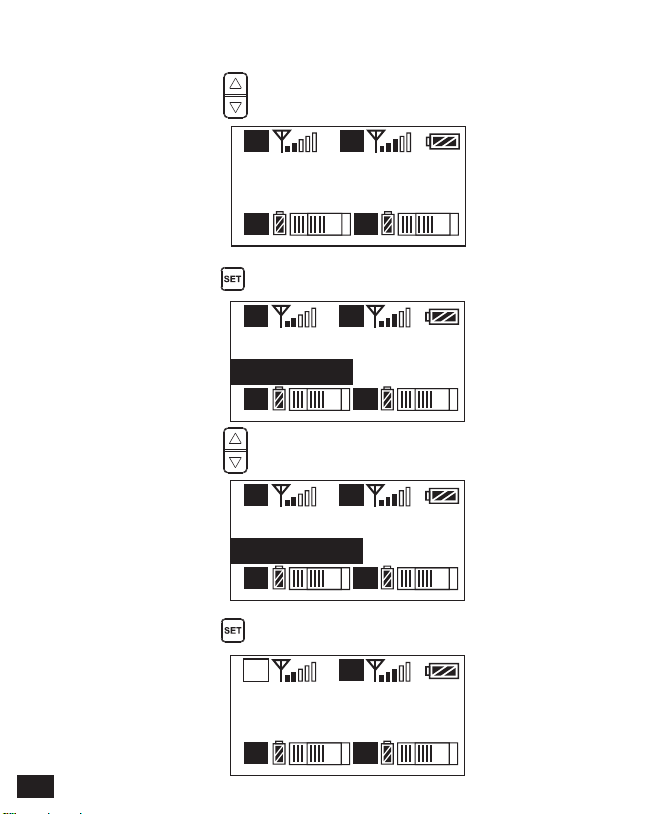
Group A Setting
Power ON
A
A B
B
Group A Setting
Power ON
A
A B
B
Group A Setting
Power OFF
A
A B
B
Group A Setting
Power OFF
A
A B
B
4.4 Short press button to confirm
4.Group A/B ‘ On/ Off ’ Adjustment
4.1 Short Press button to ‘ ’ display page
Group A Setting
Power ON
4.2 Long press button to ‘ Setting ’ display page
4.3 Short Press button to select ‘ Power Off ’ or not
34
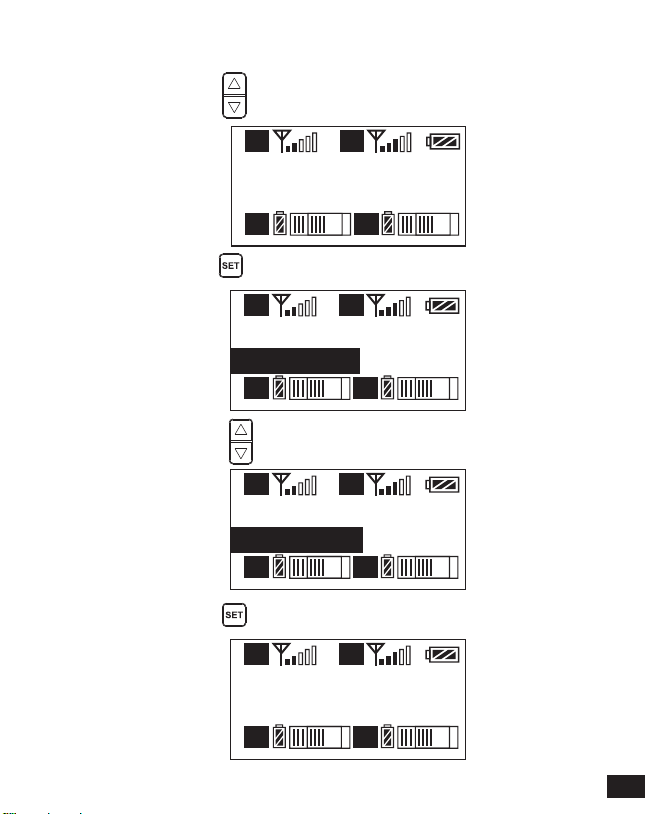
Group A Setting
Volume 12
A
A B
B
Group A Setting
Volume 12
A
A B
B
Group A Setting
Volume 8
A
A B
B
Group A Setting
Volume 8
A
A B
B
Group A Setting
Volume
5.4 Short press button to confirm
5.Group A/B Volume Adjustment
5.1 Short Press button to ‘ ’ display page
5.2 Long press button to ‘ Setting ’ display page
5.3 Short Press button to adjust the volume
35
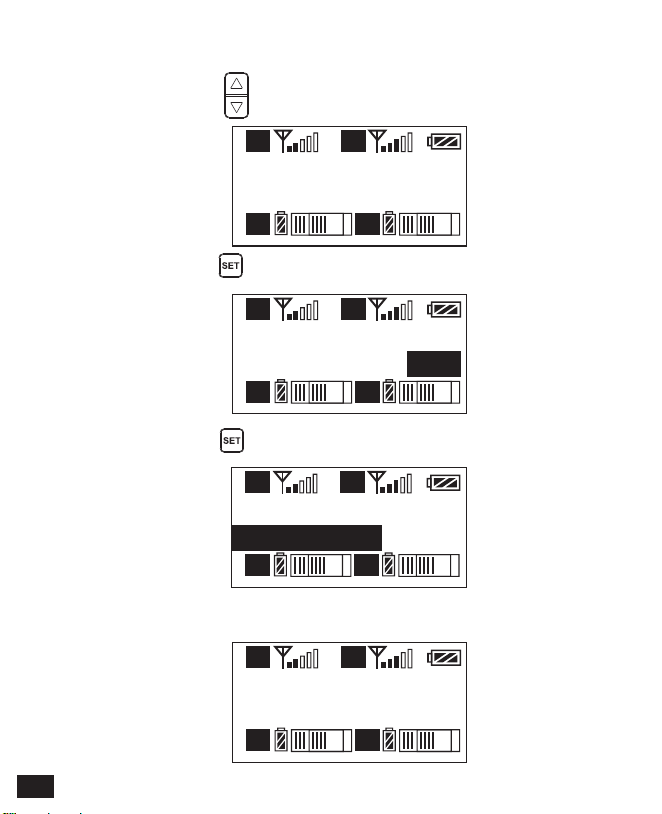
Group A Setting
Auto scan CH 12
A
A B
B
Group A Setting
Auto scan ?
YES
A
A B
B
Group A Setting
Scanning.....
A
A B
B
Group A Setting
Auto scan CH
Group A Setting
Auto scan CH 35
A
A B
B
6.3 Short press button to ‘Scanning.....’
6.4 Scanning complete and choose the best suitable channel
6.Group A/B Automatic Channel Scan
6.1 Short Press button to ‘ ’ display page
6.2 Long press button for Auto scanning
36

Group A Setting
Sync
A
A B
B
Group A Setting
Sync?
YES
A
A B
B
Group A Setting
Matching......
A
A B
B
Group A Setting
Matched!
A
A B
B
Group A Setting
Sync
7.Group A/B IR Sync
7.3 Use the button to select whether to match,
and short press to confirm
7.1 Short Press button to ‘ ’ display page
7.2 Long press button for IR Matching
7.4 Matching OK
37
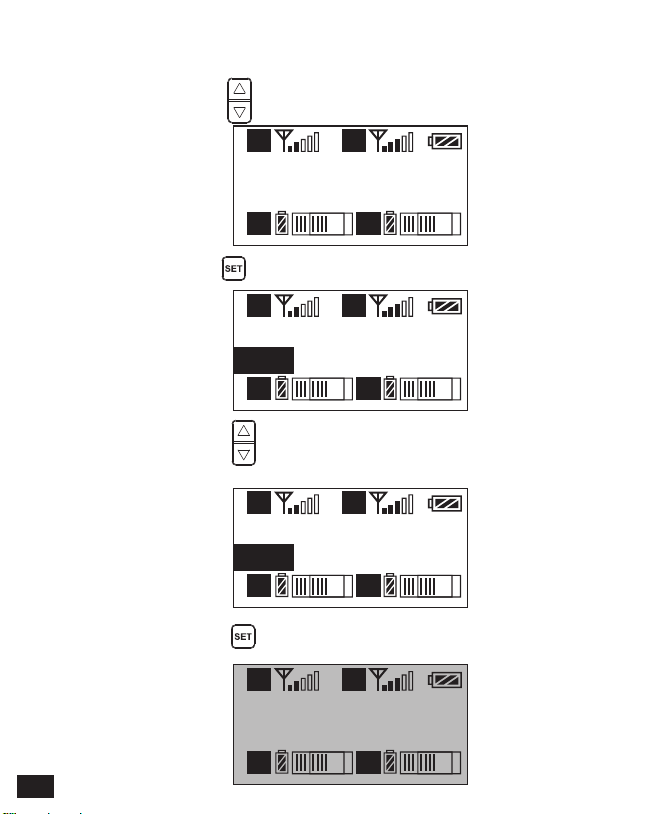
Backlight
60s
A
A B
B
Backlight
60s
A
A B
B
Backlight
30s
A
A B
B
Backlight
00s
A
A B
B
8.4 Short press button to confirm
8.2 Long press button to ‘ Backlight ’ display page
8.3 Short press button to adjust the backlight lighting time
or you can turn it off for power saving
8.1 Short Press button to ‘ Backlight ’ display page
8. Backlight ‘ Lighting Time/Turn Off ’ Adjustment
38

Language (语言)
English
A
A B
B
Language (语言)
English
A
A B
B
Language (语言)
简体中文
A
A B
B
语言(Language)
简体中文
A
A B
B
9.4 Short press button to confirm
9.2 Long press button to enter ‘ Language ’ display page
9.3 Short press button to select language
9.1 Short press button to ‘ Language ’ display page
9.System Language
39
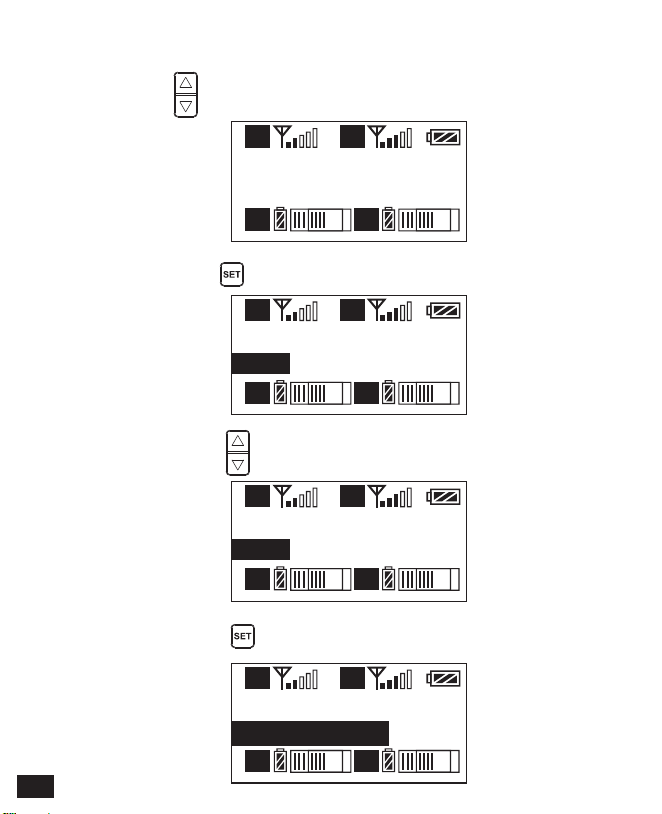
Reset
No
A
A B
B
Reset
No
A
A B
B
Reset
Yes
A
A B
B
Reset
Resetting......
A
A B
B
10.2 Long press button to enter ‘ Reset ’ display page
10.1 Press button to ‘ Reset ’ display page
10. Reset to Defaults
10.4 Short press button to confirm and restore factory setting
10.3 Short press button to select whether to restore factory
Settings
40
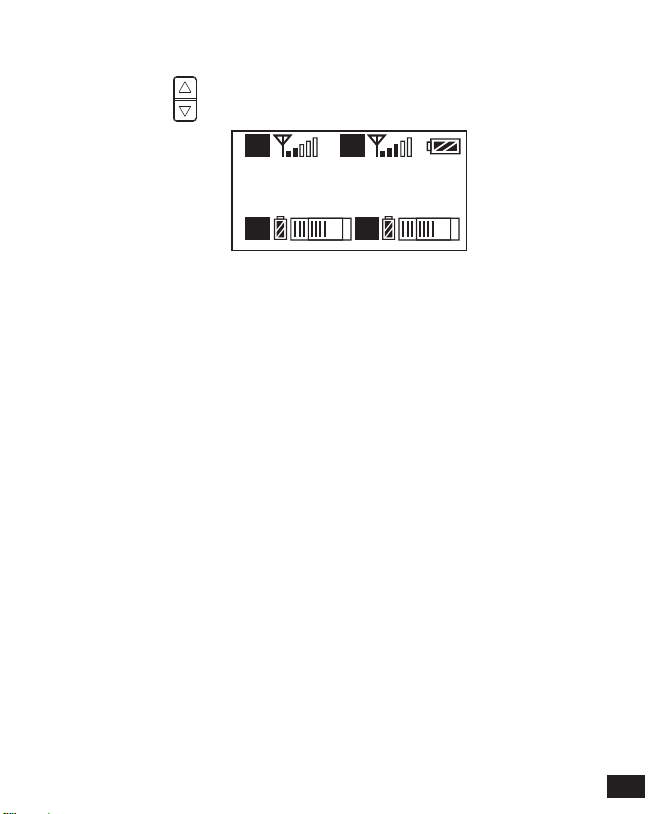
Version
3.0.2
A
A B
B
11.1 Press button to ‘ Version ’ display page to check the version
11. Version
41

Specification
Lavalier Transmitter TX
Signal / Noise
Antenna
Stray Radiation
Sound Delay
Audio Distortion
Battery
Dimension
Operating Temperature
Storage Temperature
>65dB
1/4 Wavelength Wire Antenna
<-60dBc
<20ms
<0.5%
Polymer Lithium Battery 3.7V 1800mAh
84 x 63.5 x 23mm
0
℃
~ 50
℃
-20
℃
~ 60
℃
42
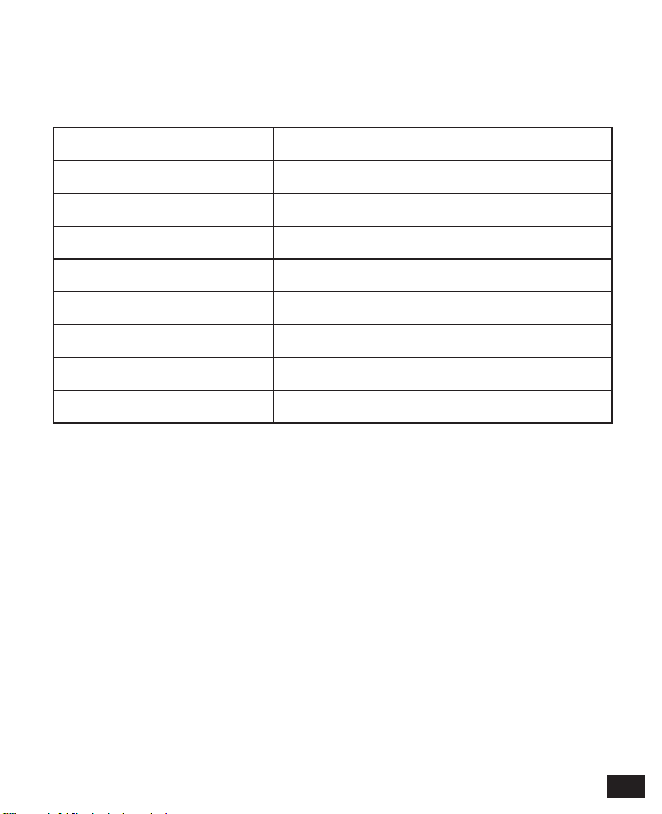
Hand-held Transmitter HTX
Signal / Noise
Antenna
Stray Radiation
Sound Delay
Audio Distortion
Battery
Dimension
Operating Temperature
Storage Temperature
>65dB
PCB Antenna
<-60dBc
<20ms
<0.5%
AA Batteries x 2pcs
Φ53.5(MAX) x 253mm
0
℃
~ 50
℃
-20
℃
~ 60
℃
43

Receiver RX
Signal / Noise
Antenna
Receiving Sensitivity
Stray Radiation
Sound Delay
Audio Distortion
Battery
Dimension
Operating Temperature
Storage Temperature
>65dB
1/4 Wavelength Wire Antenna
-95dBm
<-60dBc
<20ms
<0.5%
Polymer Lithium Battery 3.7V 1800mAh
84 x 63.5 x 23mm
0
℃
~ 50
℃
-20
℃
~ 60
℃
44

用户使用手册
CVM-WM300
UHF Wireless Microphone


前 言
产品主要功能
感谢您购买COMICA/科唛 WM300 UHF 无线麦克风;
WM300是一款一拖二全金属材质无线麦克风,此款麦克风内置聚合物锂电池,采用
UHF 无线调频技术及LCD高清点阵屏,多频道、16级可调音量,并融入了低切功
能、自动通道扫描、红外对码、立体声/单声道音频模式切换、RF信号强度可调、
MIC/LINEIN输入双选、接收端无线电量检测、拾音动态显示、背景灯光可调等多
种功能,同时具备强大的屏蔽抗噪性能,是一款广电级高品质麦克风;
为保证产品的顺畅使用及安全,请在使用前严格阅读本说明书,并正确组装及操
作。
. 一拖二,A/B 双路音频通道可选;
. 可进行多场合多机位混用;
. 拾音距离高达120m (空旷无干扰环境,有障碍环境高达80m);
. 低切功能;
. 自动通道扫描,快速通道定位;
. 可手动/红外自动对码;
. 语言可选;
. 发射功率可调;
. 动态音量检测条;
. 16级音量可调;
. 发射端电量监控;
. 单声道/立体声 多输出选择;
. 内置可充电锂电池,超薄机身;
. 低功耗,超强待机时间;
. LCD点阵液晶屏,高清显示;
. 全金属制造,优越屏蔽性能;
工作距离
高达120m
一拖二全金属制造低切功能自动通道扫描发射功率可调自动红外对码
语言可选
音频检测条
发射端
电量监控
16级音量可调单声道
立体声可选
实时监听锂电池低功耗LCD点阵屏
1

注意事项
包装清单
正常使用时发射器应距离接收器20cm以上,当小于20cm时,接收器的无线信号接收
部分将会进行保护动作,从而关闭无线信号接收,音频可能出现间断,此为正常现
象;
进行红外对码时,请保持在1M 距离之内,否则可能会导致通讯过弱、对码不成
功;
进行立体声/单声道切换时,请在使用前提前设置好,避免在使用过程中切换带
来的短暂电流干扰;
天线会影响工作距离,请保护好天线并勿进行人为损坏;
工作距离会受到周围环境的影响,使用过程中请尽量保持环境空旷无干扰,并
关闭机身自身的WIFI;
近距离使用该产品时,建议将此产品RF强度设置为“LOW”, 可降低功耗增强续
航;
用于手机拍摄时,客户须单独购买TRS-TRRS 音频转换线, 并注意将手机模式设置
为‘飞行模式’以避免来电干扰;
(不支持部分安卓系统的原生态录音系统,建议此时于第三方APP模式下使用);
请在干燥环境中对该产品进行储存;
不要在雨中或潮湿环境中使用该设备,否则会有短路的危险;
主体:
领夹发射器(TX) 手持发射器 (HTX) 接收器 (RX)
2

搭配选择:
WM300(A) = 2TX + RX
WM300(B) = TX + HTX + RX
WM300(C) = TX + RX
WM300(D) = HTX + RX
TX TX RX
++
TX HTX
HTX
RX
++
TX RX
+
RX
+
3
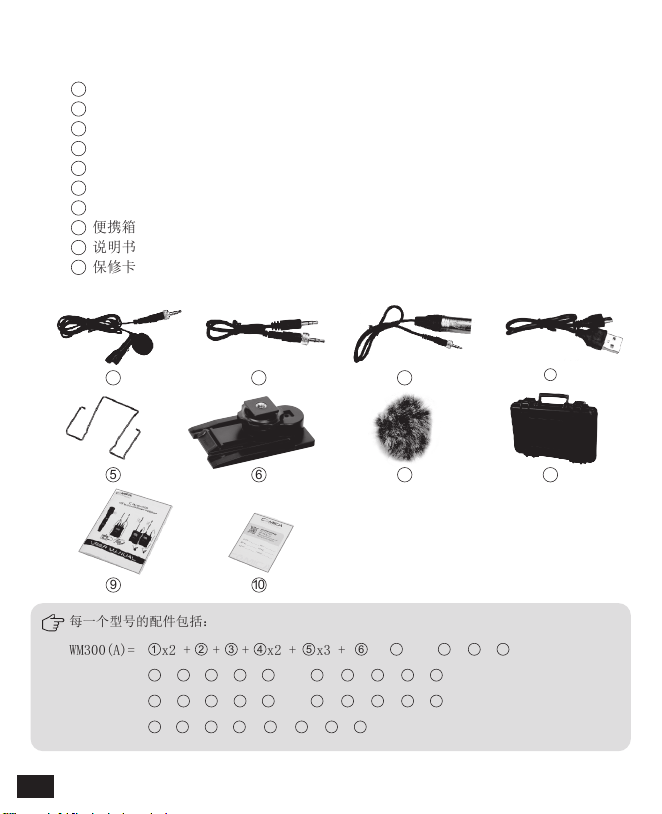
WM300(A)= x2 + + + x2 + x3 + + x2 + + +
WM300(B)= + + + + x2 + + + + +
WM300(D)= + + + + + + +
WM300(C)= + + + + x2 + + + + +
3.5mm Mic 音频输入线
3.5mm-3.5mm 音频输出线
3.5mm-XLR 卡侬头音频输出线
Micro USB充电线
腰带夹
热靴快装板
防风毛
便携箱
说明书
保修卡
配件:
1
1
2
2
3
3
4
4
5
5
6
6
7
7
8
8
9
9
10
10
1
2
3
4 5 6
7
8 9
10
1
2
3
4 5 6
7
8 9
10
1
2
3
4 5 6
7
8 9
10
2
3
4 5 6 8 9
10
每一个型号的配件包括:
4
部件介绍及说明
部件说明
领夹发射器
1
2
4
5
6
7
8
9
10
天线
对码状态指示灯
声音状态指示灯
液晶显示屏
开关/静音按键
SET功能菜单选项
红外窗口
MIC / LINE IN 外音输入接口
功能调节按键 +
功能调节按键 -
腰带夹
1/4 固定孔
充电指示灯
Micro USB 充电接口
复位孔
1
2
3
4
5
6
7
8
9
10
11
12
13
14
15
复位孔作用:当产品功能程序出现
紊乱无法进行正常调节甚至无法关
机时,可使用适当大小的锥形工具
插入复位孔下按进行功能复位。
3
11
12
13
14
15
5
2
1
3
4
65
麦克风拾音筒
液晶显示屏
开关/静音按键
红外窗口
“低切/普通”音频切换开关
信号强度 “高/低”切换开关
手持发射器
1
2
3
4
5
6
LCF
RF
LCF
-
RF
High
Low
6
接收器
1
3
7
4
5
6
8
9
10
11
12
13
14
15
A通道天线
B通道工作状态指示灯
A通道工作状态指示灯
液晶显示屏
开/关按键
SET功能菜单选项
3.5mm 音频输出接口
红外窗口
3.5mm 监听接口
B通道天线
功能调节按键 +
功能调节按键 -
腰带夹
充电指示灯
Micro USB 充电接口
复位孔
1
2
3
4
5
6
7
8
9
10
11
12
13
14
15
16
16
2
7
领夹发射器
/接收器
手持发射器
开关/静音 按键
长按
短按
开机 / 关机
开关/静音 按键
“低切/普通”声音切换开关
信号强度“高/低”切换开关
长按 开机 / 关机
静音
(此功能仅针对发射器,
静音功能开启并且屏幕
点亮后生效)
短按
静音
(屏幕点亮后生效)
SET 功能菜单选规项
功能调节按键+
功能调节按键-
长按 进入功能调节菜单
短按
短按
短按
1.确定所选功能
2.退出功能调节菜单
功能调节 (+)
功能调节 (-)
上推 信号强度高
下推 信号强度低
上推 低切
下推 普通
按键说明
LCF
-
RF
High
Low
8
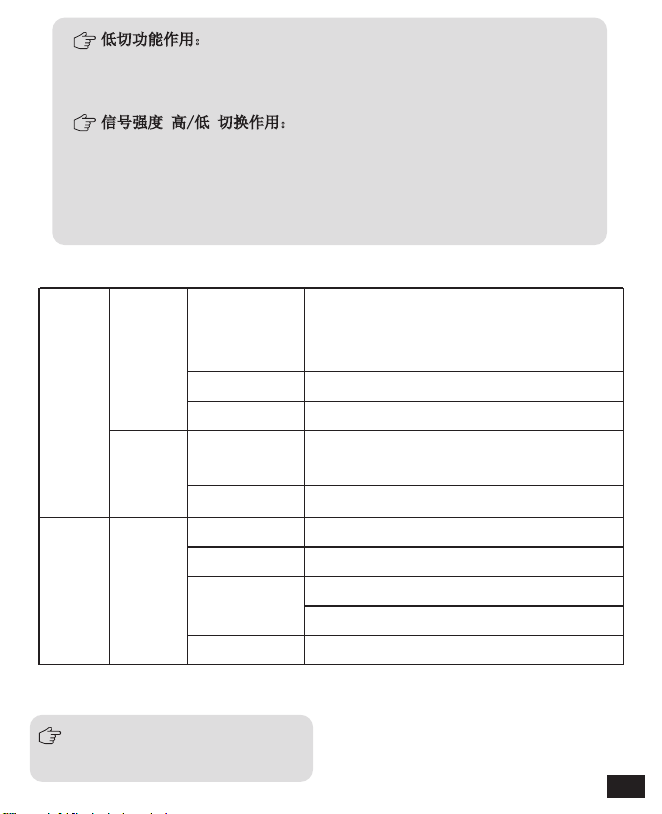
指示灯定义
领夹
发射器
接收器
AUDIO
A IR/RF
B IR/RF
A IR/RF: A通道工作状态指示灯
B IR/RF: B通道工作状态指示灯
IR
绿灯长亮
绿灯长亮 频道匹配成功后的正常工作状态
绿灯长亮
红灯长亮
红灯闪烁
红灯闪烁
红灯闪烁
正常录音状态
(此状态仅针对发射器,频道匹配成功
后,接收器方可拾音)
静音状态
低电量提醒
频道配对后
(无论是否匹配成功)
低切功能作用:
针对声音低频部分进行适当切除,降低低频部分环境噪音,使声音
更加干净清晰;
信号强度 高/低 切换作用:
信号强度高时,无线工作距离可达80-120M,功耗较高,
电池使用时间短;
信号强度低时,无线工作距离可达30-60M, 功耗较低,
电池使用时间长;
红灯长亮 通道关闭
绿灯闪烁 频道匹配不成功
频道配对中... (仅限红外对码时)
低电量提醒
频道配对中... (仅限红外对码时)
9
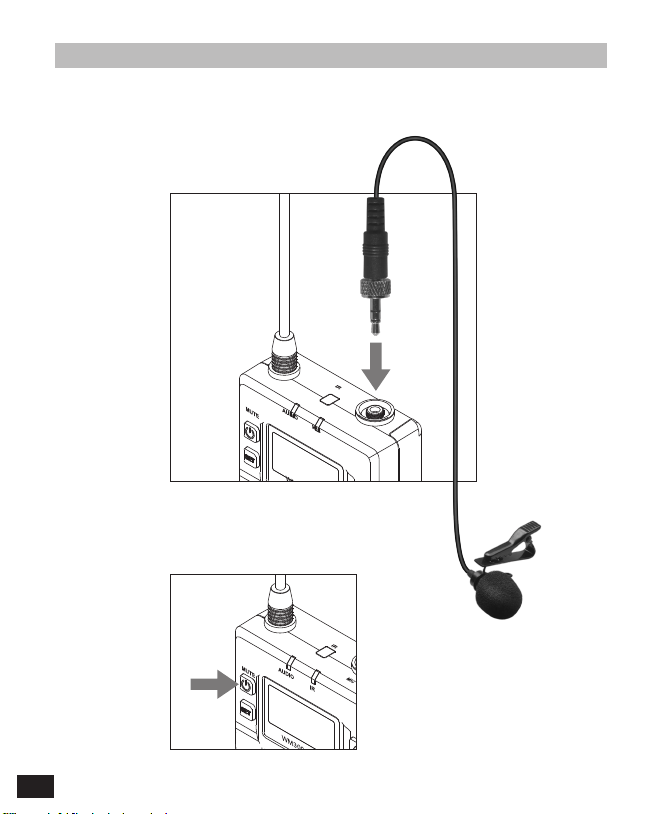
安装与使用
1.把3.5mm 音频输入线插入MIC插口
2.长按电源开关打开发射器
领夹发射器
10

H
A
A
通道 A
C H11
523.300MHz
3.将MIC 对准音源,根据屏幕上的音量指示条检测发射器是否正常工作
4.把腰带夹接到连接孔
5.与接收器进行频道匹配成功后,即可使用
频道匹配请见屏幕操作部分
音频动态显示条
11
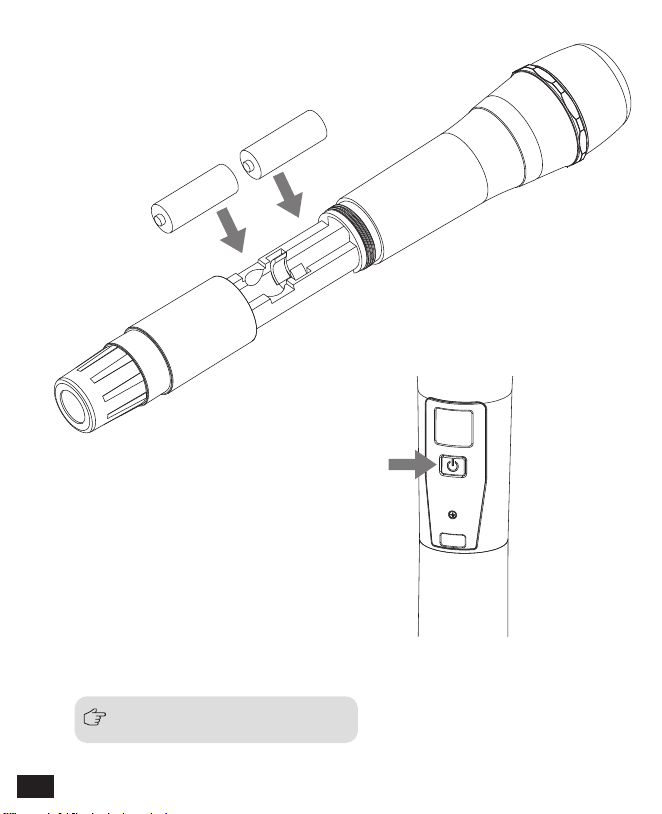
2.长按电源开关打开手持发射器
3. 与接收器进行频道匹配成功后,即可使用
手持发射器
1. 将电池按照正负极指示装入发射器电池仓
频道匹配请见屏幕操作部分
AA
AA
12
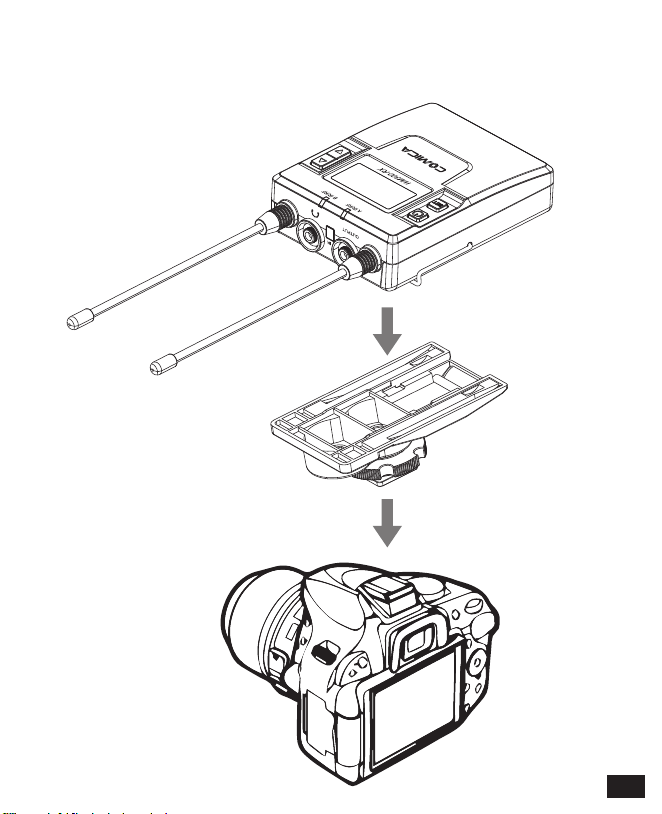
接收器
1. 通过热靴把接收器与录影设备连接
13

2. 通过3.5mm-3.5mm 音频输出线插入OUTPUT接口把接收器与录影设
备连接,把耳机插入3.5mm 监听接口进行实时监听,长按电源开
关打开接收器
3. 与发射器进行频道匹配成功后,即可使用
频道匹配请见屏幕操作部分
14

H
A
A
通道 A
C H11
523.300MHz
H
A
A
通道 A
C H11
523.300MHz
H
A
A
通道 A
C H 30
529.000MHz
屏显说明与操作说明
屏显说明
领夹发射器
信号强度强
信号强度弱
通道A
通道B
正常录音
静音
静音功能解锁
静音功能锁定
发射端电量
A/B通道
频道
A/B通道
音频动态显示条 频段
H
L
1.1 长按按键 进入“通道”设置界面
1.2 使用 按键选择本机频道
操作说明
1.手动调节发射器 CH 频道
15
H
A
A
通道 A
C H 30
529.000MHz
H
A
A
通道设置
通道 A
H
A
A
通道设置
通道 A
H
A
A
通道设置
通道 B
2.A/B 通道选择
2.1 使用 按键调到“通道设置”界面
2.2 长按按键 进入“通道设置”界面
2.3 使用 按键选择本机通道
1.3 短按 按键确定
16
H
B
B
通道设置
通道 B
H
A
A
输入设置
MIC输入
H
A
A
输入设置
MIC输入
H
A
A
输入设置
LINE IN输入
3.2 长按按键 进入“输入设置”界面
3.3 使用 按键选择 MIC/LINE IN 输入方式
2.4 短按 按键确定
3.1 使用 按键调到“输入设置”界面
3.麦克风输入/外部音源输入方式切换
17
H
A
A
输入设置
LINE IN输入
H
A
A
低切
高
H
A
A
低切
高
4.2 长按按键 进入“低切”界面
4.1 使用 按键调到“低切”界面
4.低切“高/低/关闭”调节
MIC模式是针对麦克风音源输入;
LINE IN模式是针对外部音源输入,比如手机音乐播放等。
选择对应的输入模式会有更好的音频效果。
3.4 短按 按键确定
18
H
A
A
低切
低
H
A
A
低切
低
4.4 短按 按键确定
4.3 使用 按键选择“高/低/关闭”音源低切功能
低切功能开启会把音源低频部分过滤掉,比如野外昆虫的鸣叫声和
人群的噪音,主音源也会更清脆;低切分低范围低切与高范围低切,
低范围则是过滤掉一部分噪音,而高范围低切则过滤掉全部噪音。
关闭则真实还原环境的声音,主音源会更浑厚,可根据实际需要调整。
19
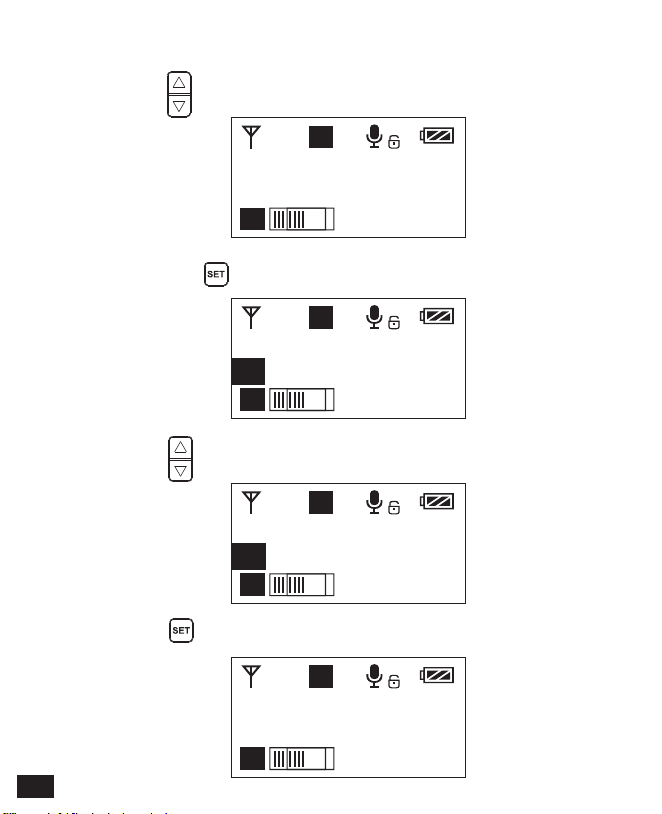
H
A
A
发射功率
高
H
A
A
发射功率
高
H
A
A
发射功率
低
L
A
A
发射功率
低
5.4 短按 按键确定
5.2 长按按键 进入“发射功率”界面
5.3 使用 按键调节发射信号强度
5.1 使用 按键调到“发射功率”界面
5.发射信号强度调节
20
H
A
A
静音锁定
解锁
H
A
A
静音锁定
解锁
H
A
A
静音锁定
锁定
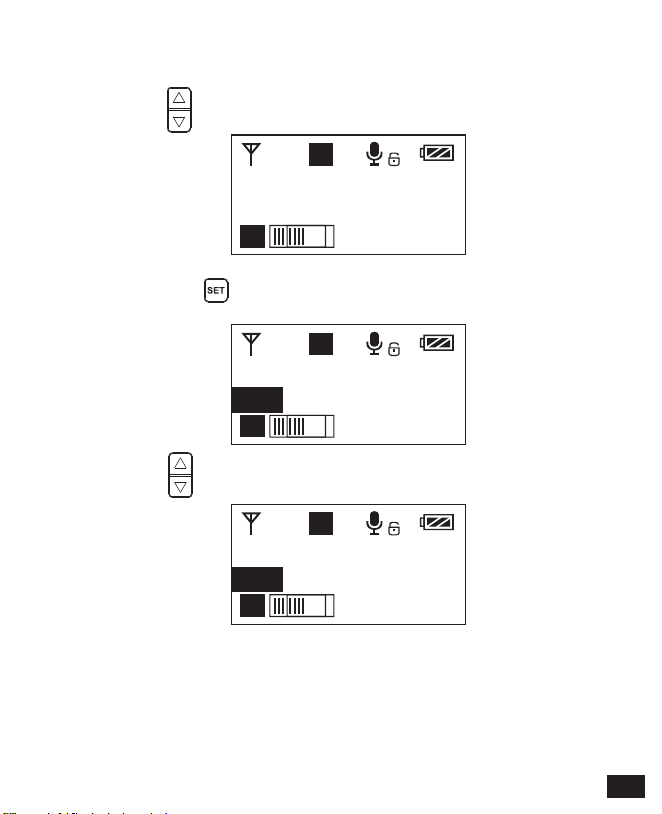
6.2 长按按键 进入“静音锁定”界面
6.3 使用 按键选择开启/关闭静音功能
6.1 使用 按键调到“静音锁定”界面
6.静音模式开启/关闭
21

H
A
A
静音锁定
锁定
6.4 短按 按键确定
设置为锁定后静音功能不能使用,图标显示:
设置为解锁后静音功能开启,图标显示:
静音必须在屏幕点亮的时候才能操控,按下任何按键使屏幕点亮,
再短按 按键切换静音模式。
22

H
A
A
背景灯
15s
H
A
A
背景灯
15s
H
A
A
背景灯
60s
H
A
A
背景灯
00s
7.4 短按 按键确定
7.2 长按按键 进入“背景灯”界面
7.3 使用 按键调节背景点亮的延迟时间,也可以关闭以省电
7.1 使用 按键调到“背景灯”界面
7.背景灯光“点亮时间/关闭” 调节
23

H
A
A
语言(Language)
简体中文
H
A
A
语言(Language)
简体中文
H
A
A
语言(Language)
English
H
A
A
Language(语言)
English
8.4 短按 按键确定
8.2 长按按键 进入Language(语言)界面
8.3 使用 按键选择需要的语言
8.1 使用 按键调到Language(语言)界面
8.系统语言选择
24
H
A
A
恢复出厂设置
否
H
A
A
恢复出厂设置
否
H
A
A
恢复出厂设置
是
H
A
A
恢复出厂设置
恢复中......
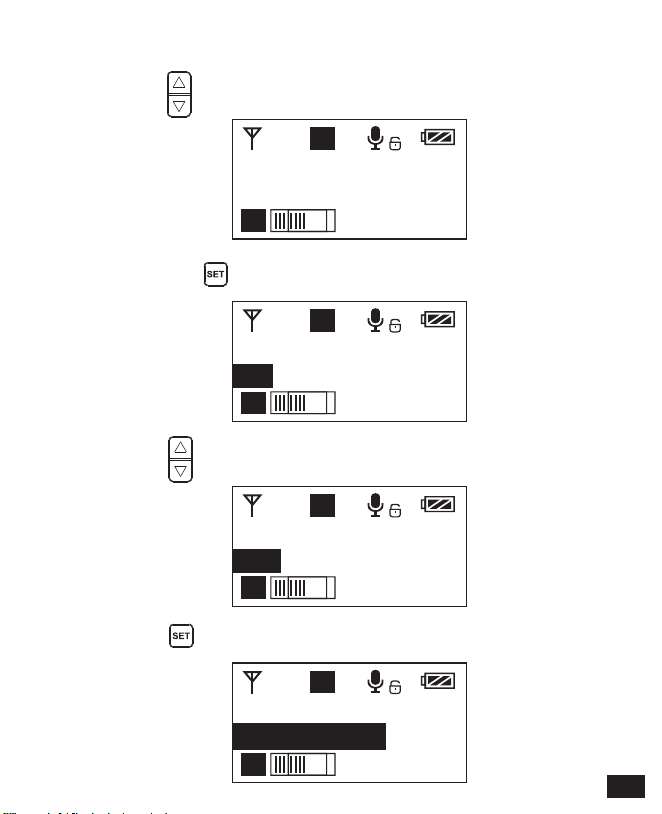
9.2 长按按键 进入“恢复出厂设置”界面
9.1 使用 按键调到“恢复出厂设置”界面
9. 恢复出厂设置
9.4 短按 按键确定,即可恢复出厂设置
9.3 使用 按键选择是否恢复出厂设置
25

H
A
A
版本号
3.0.2
10.1 使用 按键调到“版本号”界面查看本机固件的版本
10. 固件版本号
26

A
B
8 8
A
B
8 8
A
B
8 8
屏显说明
1.开机与静音切换
操作说明
手持发射器
正常录音 静音 发射端电量
A/B通道
频道
正常录音 静音
静音必须在屏幕亮显的时候才能操控,按下任何按键使屏幕亮显,
再短按 按键切换静音模式。
1.1 长按电源开关 2秒开机或关机
1.2 在开机状态,短按电源开关 进行静音切换
27
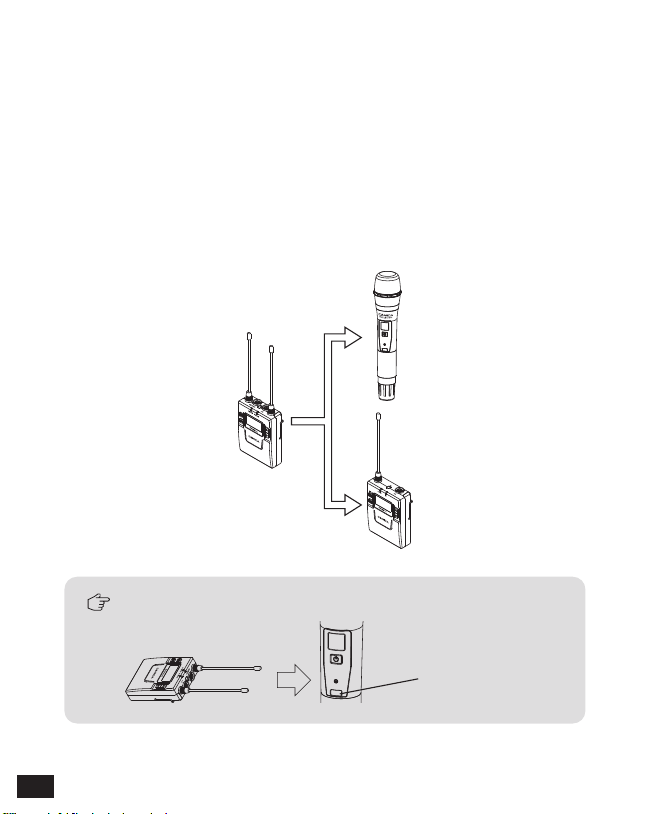
2.红外对码
对码的时候接收器要对着手持发射器的红外接受窗,不能被遮挡住。
2.1 手持发射器默认开机通道是B通道,可根据接收器进行通道及频道
设置(如使用接收器A通道进行对码,对码成功后,
即为:A通道 CHXX; 如使用接收器B通道进行对码,对码成功后,
即为:B通道 CHXX)
2.2 手持发射器与领夹发射器混用时,两种发射器要设置到不同的
通道下
红外窗口
B通道
A通道
28
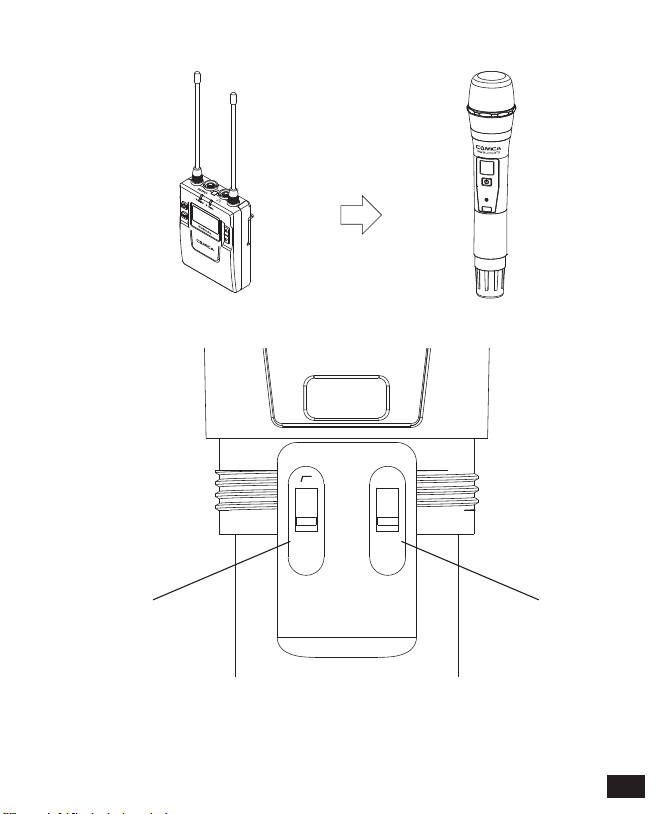
2.3 频道设置通过红外同步完成
2.4 拨动开关定义
低切开关 发射功率高/低切换
LCF
-
RF
High
Low
29

通道 A
CH 41 CH 11
通道 B
A
A B
B
屏显说明
接收器
当A/B通道打开时,图标背景颜色为黑色;当A/B通道关闭时,图标背景颜色是
透明的或无背景色。
A通道信号强度
A通道 B通道
A通道频道 B通道频道
A通道发射端电量 B通道发射端电量A通道接收端音频动态 B通道接收端音频动态
B通道信号强度 接收器电量
30
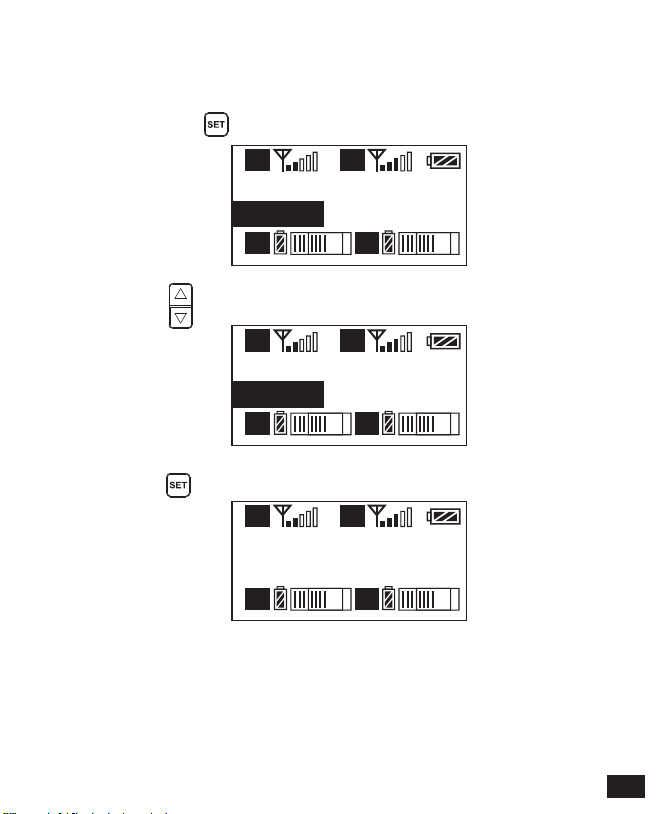
通道 A
CH 41 CH 11
通道 B
A
A B
B
通道 A
CH 45 CH 11
通道 B
A
A B
B
通道 A
CH 45 CH 11
通道 B
A
A B
B
操作说明
1.1 长按按键 进入CH设置界面,再次长按切换“通道A/通道B”
1.2 使用 按键选择本机频道
1.手动调节接收器A/B 通道 的频道
1.3 短按 按键确定
31
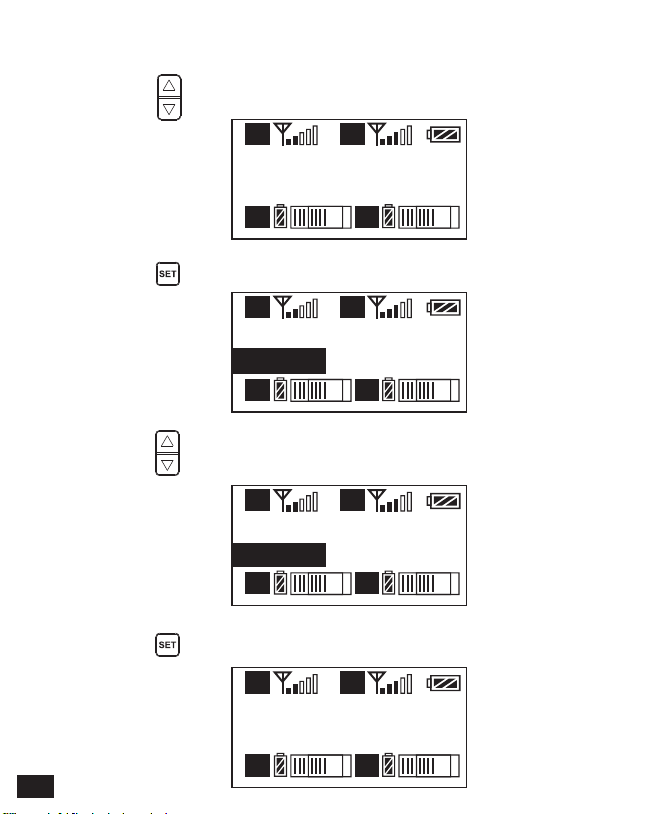
输出模式
立体声
A
A B
B
输出模式
立体声
A
A B
B
输出模式
单声道
A
A B
B
输出模式
单声道
A
A B
B
2.4 短按 按键确定
2.2 长按 按键进入“输出模式”界面
2.3 使用 按键选择立体声/单声道输出
2.输出音频模式 “输出模式”调节
2.1 使用 按键调到“输出模式”界面
32
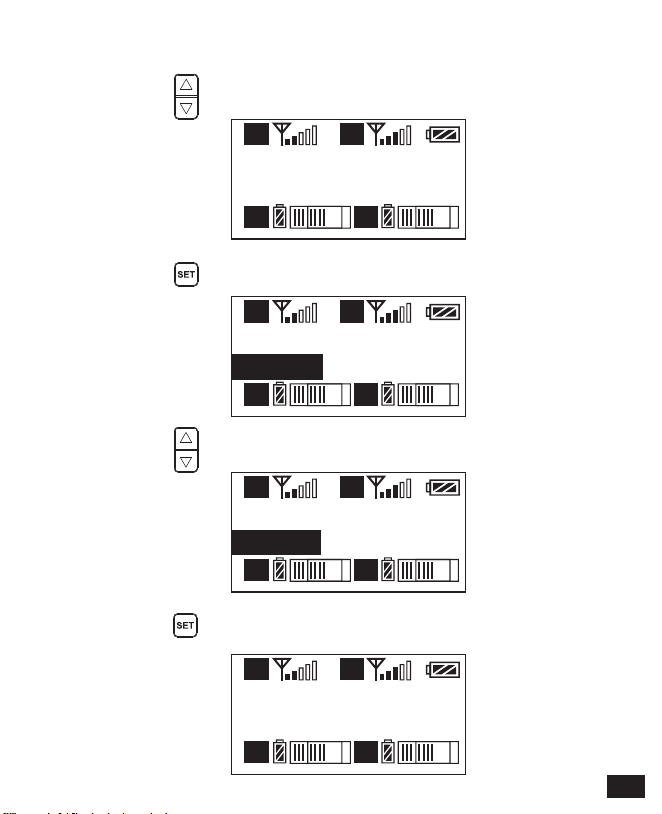
设置
通道 A
A
A B
B
设置
通道 A
A
A B
B
设置
通道 B
A
A B
B
设置
通道 B
A
A B
B
3.4 短按 按键确定
3.A/B通道功能设置
3.1 使用 按键调到“设置”界面
3.2 长按 按键进入“设置”界面
3.3 使用 按键选择要编辑的通道
33
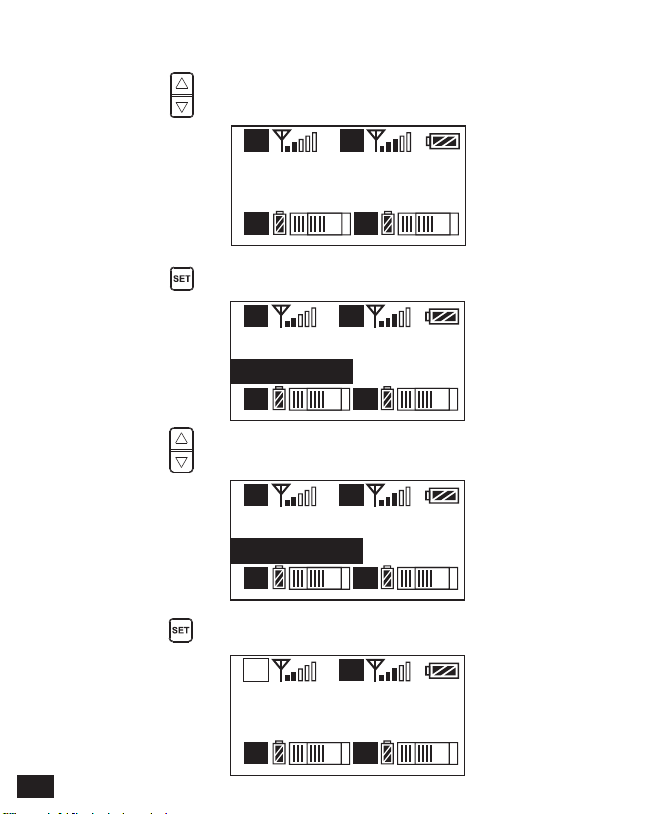
通道A设置
电源 ON
A
A B
B
通道A设置
电源 ON
A
A B
B
通道A设置
电源 OFF
A
A B
B
通道A设置
电源 OFF
A
A B
B
4.4 短按 按键确定
4.A/B通道 “开/关”调节
4.1 使用 按键调到“通道设置-电源”界面
4.2 长按 按键进入“通道设置-电源”界面
4.3 使用 按键选择是否关闭通道
34
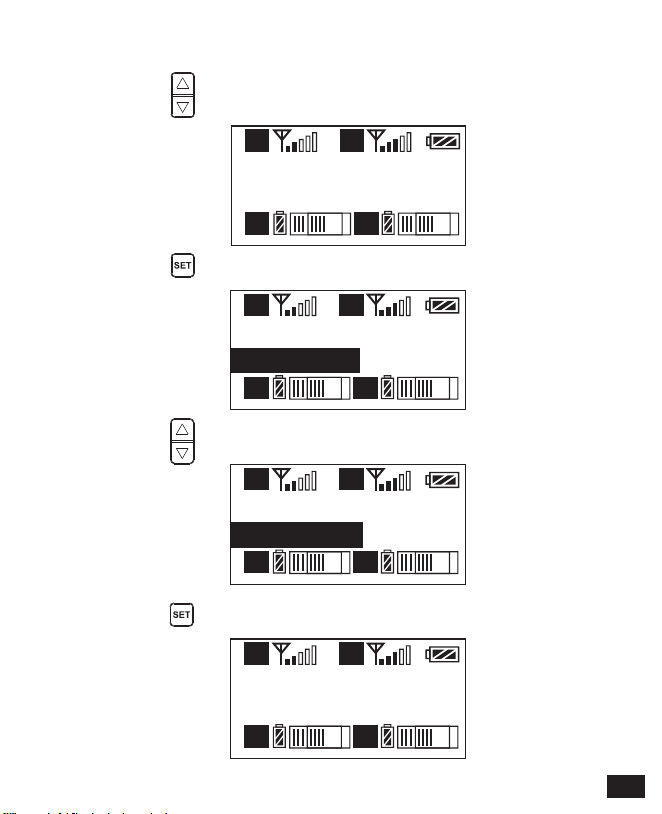
通道A设置
音量 12
A
A B
B
通道A设置
音量 12
A
A B
B
通道A设置
音量 8
A
A B
B
通道A设置
音量 8
A
A B
B
5.4 短按 按键确定
5.A/B通道音量调节
5.1 使用 按键调到“通道设置-音量”界面
5.2 长按 按键进入“通道设置-音量”界面
5.3 使用 按键调整音量大小
35
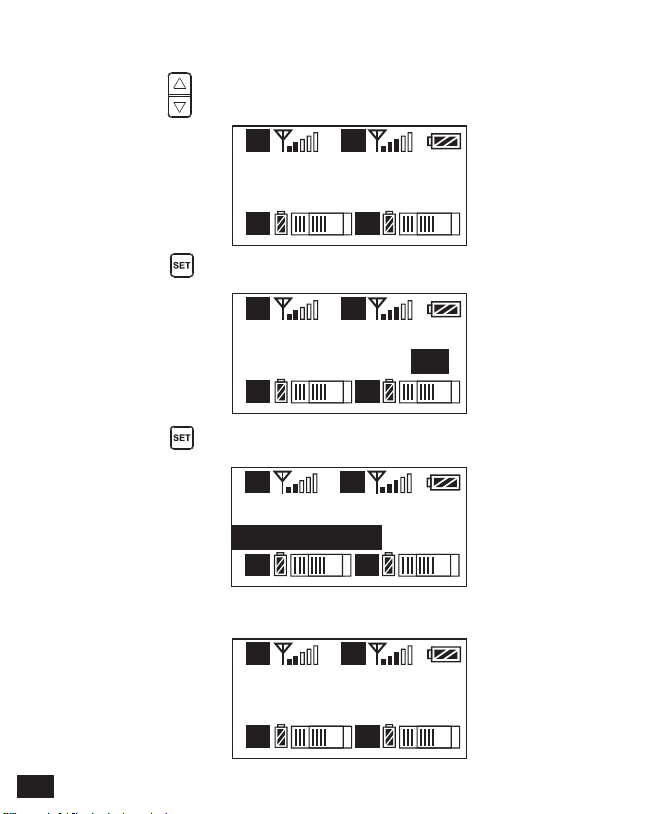
通道A设置
自动扫描 CH 12
A
A B
B
通道A设置
自动扫描 CH 35
A
A B
B
通道A设置
自动扫描?
是
A
A B
B
通道A设置
扫频中.....
A
A B
B
6.4 扫描完毕会使用扫描到的最佳通道
6.A/B通道自动通道扫描
6.1 使用 按键调到“通道设置-自动扫描”界面
6.2 长按 按键进入自动通道扫描
6.3 短按 按键进行自动通道扫描
36

通道A设置
同步发射器
A
A B
B
通道A设置
同步发射器?
是
A
A B
B
通道A设置
同步中......
A
A B
B
通道A设置
同步成功!
A
A B
B
7.A/B通道红外对码
7.3 使用 按键选择是否对码,短按 按键确定
7.1 使用 按键调到“通道设置-同步发射器”界面
7.2 长按 按键进入通道红外对码界面
7.4 对码成功后提示
37

背景灯
60s
A
A B
B
背景灯
60s
A
A B
B
背景灯
30s
A
A B
B
背景灯
00s
A
A B
B
8.4 短按 按键确定
8.2 长按按键 进入“背景灯”界面
8.3 使用 按键调节背景点亮的延迟时间,也可以关闭以省电
8.1 使用 按键调到“背景灯”界面
8.背景灯光“点亮时间/关闭” 调节
38
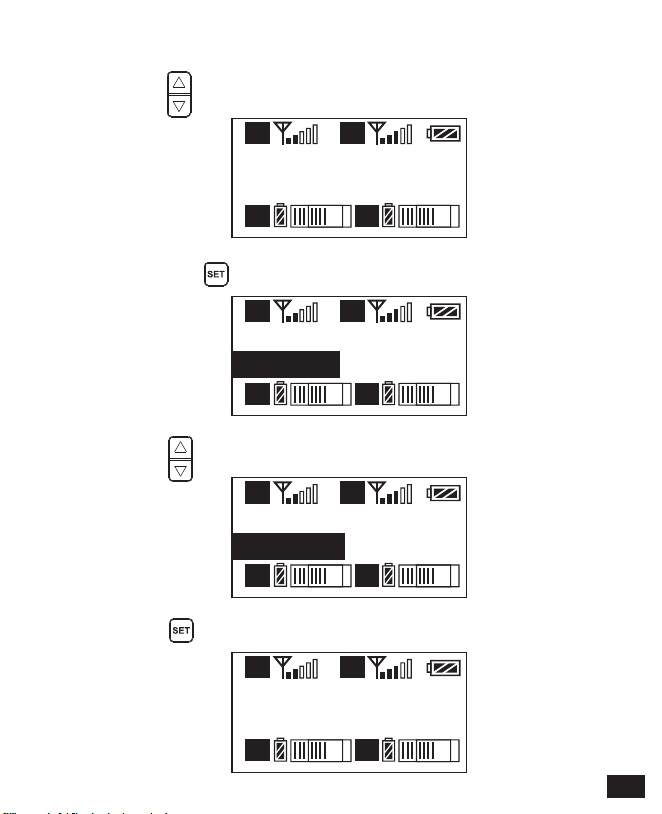
语言 (Language)
简体中文
A
A B
B
语言 (Language)
简体中文
A
A B
B
语言 (Language)
English
A
A B
B
Language(语言)
English
A
A B
B
9.4 短按 按键确定
9.2 长按按键 进入Language(语言)界面
9.3 使用 按键选择需要的语言
9.1 使用 按键调到Language(语言)界面
9.系统语言选择
39
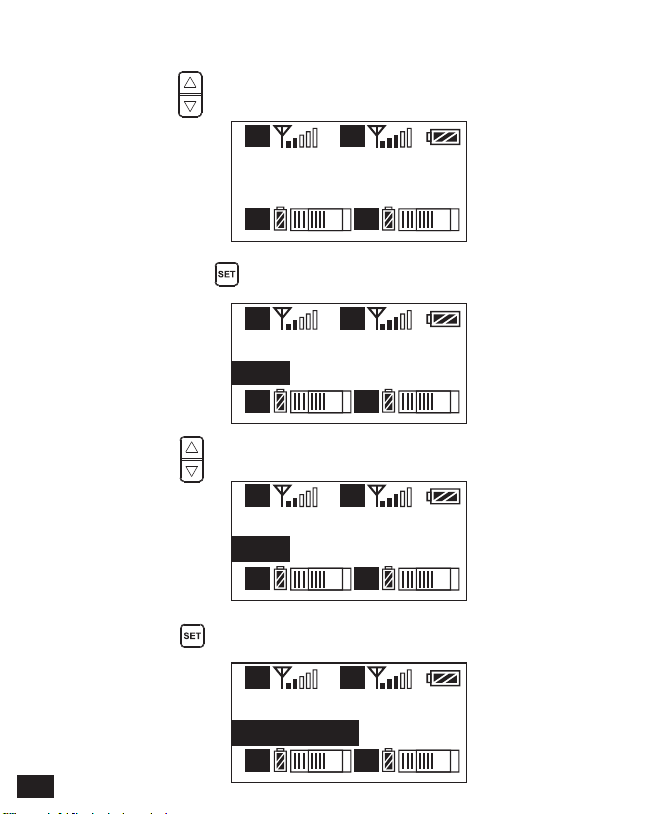
恢复出厂设置
否
A
A B
B
恢复出厂设置
否
A
A B
B
恢复出厂设置
是
A
A B
B
恢复出厂设置
恢复中......
A
A B
B
10.2 长按按键 进入Reset界面
10.1 使用 按键调到“恢复出厂设置”界面
10. 恢复出厂设置
10.4 短按 按键确定,即可恢复出厂设置
10.3 使用 按键选择是否恢复出厂设置
40
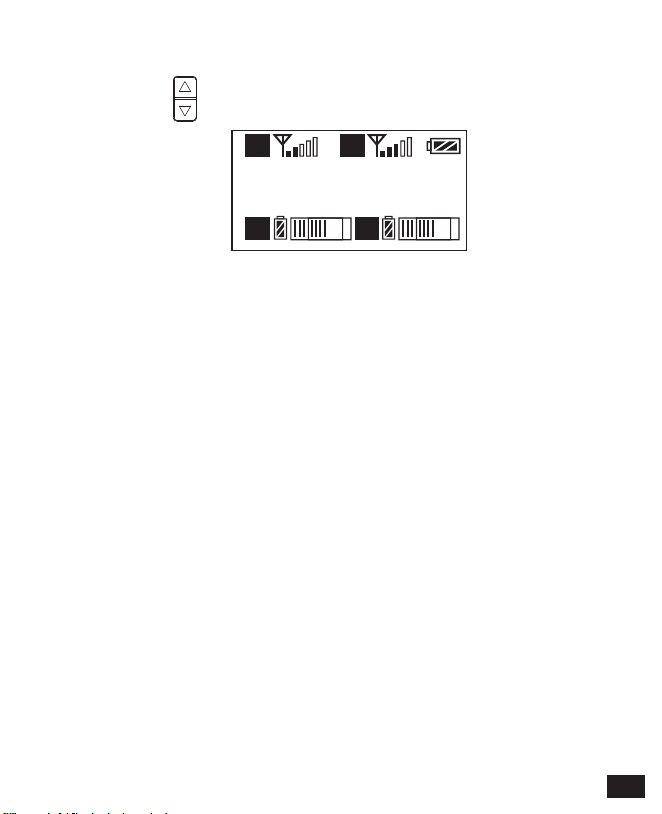
版本号
3.0.2
A
A B
B
11.1 使用 按键调到“版本号”界面查看本机固件的版本
11. 固件版本号
41
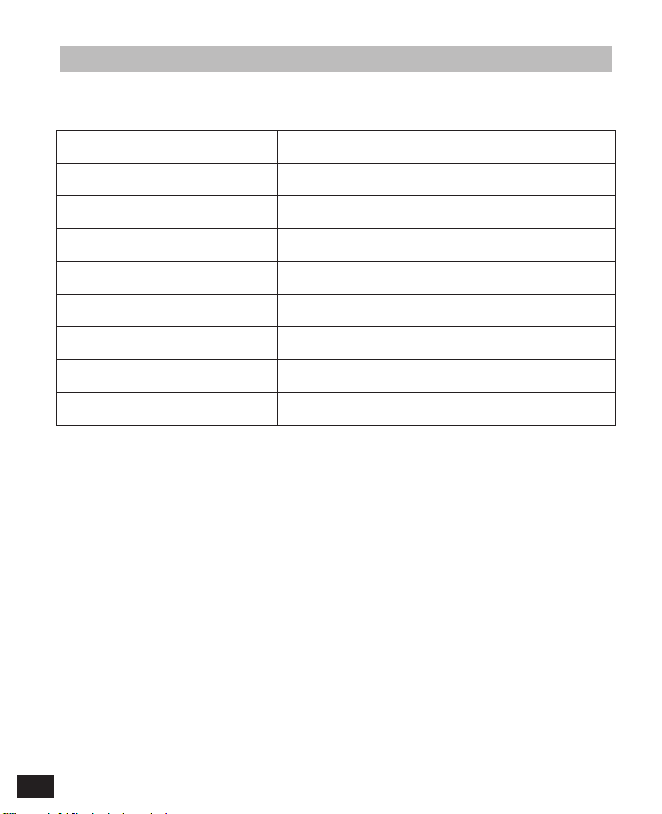
领夹发射器 TX
信噪比 >65dB
天线 1/4 波长导线天线
杂散辐射 <-60dBc
声音延迟 <20ms
音频失真 <0.5%
电池 聚合物锂电池 3.7V 1800mAh
尺寸 84 x 63.5 x 23mm
工作温度 0 ℃
~
50
℃
存储温度 -20 ℃
~
60
℃
技术规格
42

手持发射器 TX
信噪比 >65dB
天线 PCB 天线
杂散辐射 < -60dBc
声音延迟 <20ms
音频失真 <0.5%
电池 两节 AA 电池
尺寸 Φ 53.5(MAX) x 253mm
工作温度 0 ℃
~
50
℃
存储温度 -20 ℃
~
60
℃
43
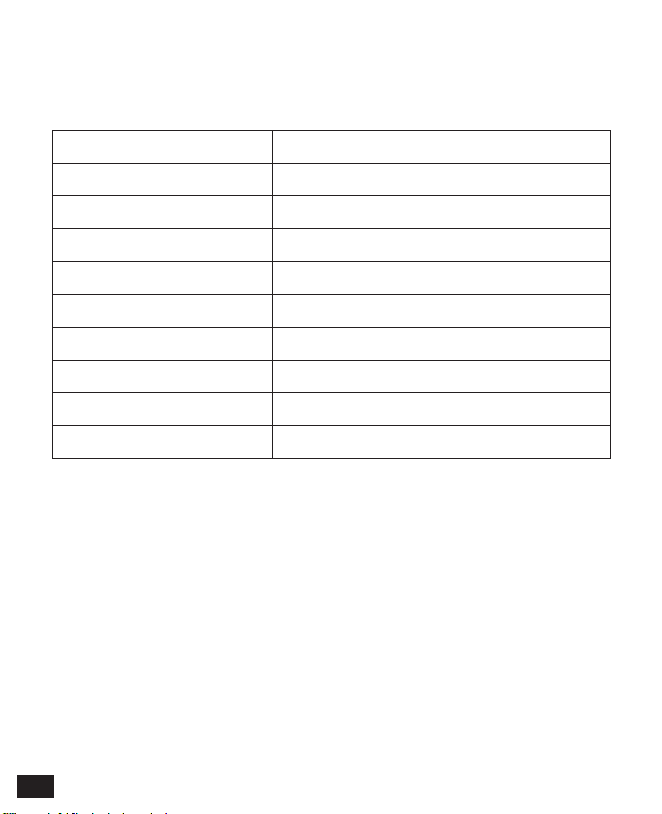
接收器 RX
信噪比 >65dB
天线 1/4 波长导线天线
接收灵敏度 -95dBm
杂散辐射 < -60dBc
声音延迟 <20ms
音频失真 <0.5%
电池 聚合物锂电池 3.7V 1800mAh
尺寸 84 x 63.5 x 23mm
工作温度 0 ℃
~
50
℃
存储温度 -20 ℃
~
60
℃
44



Email: [email protected]