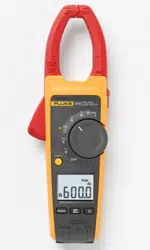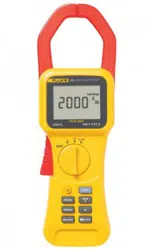

®
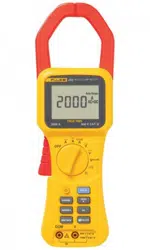
353/355
Clamp Meter
Users Manual
PN 2842223
October 2007
© 2007 Fluke Corporation, All rights reserved. Printed in China.
All product names are trademarks of their respective companies.
1.888.610.7664 sales@GlobalTestSupply.com
Fluke-Direct.com

LIMITED WARRANTY AND LIMITATION OF LIABILITY
This Fluke product will be free from defects in material and workmanship for three years from the date of purchase. This war-
ranty does not cover fuses, disposable batteries, or damage from accident, neglect, misuse, alteration, contamination, or
abnormal conditions of operation or handling. Resellers are not authorized to extend any other warranty on Fluke’s behalf.
To obtain service during the warranty period, contact your nearest Fluke authorized service center to obtain return authoriza-
tion information, then send the product to that Service Center with a description of the problem.
THIS WARRANTY IS YOUR ONLY REMEDY. NO OTHER WARRANTIES, SUCH AS FITNESS FOR A PARTICULAR
PURPOSE, ARE EXPRESSED OR IMPLIED. FLUKE IS NOT LIABLE FOR ANY SPECIAL, INDIRECT, INCIDENTAL OR
CONSEQUENTIAL DAMAGES OR LOSSES, ARISING FROM ANY CAUSE OR THEORY. Since some states or countries
do not allow the exclusion or limitation of an implied warranty or of incidental or consequential damages, this limitation of
liability may not apply to you.
11/99
1.888.610.7664 sales@GlobalTestSupply.com
Fluke-Direct.com

i
Table of Contents
Title Page
Introduction .................................................................................................................... 1
Contacting Fluke ............................................................................................................ 1
Safety Information .......................................................................................................... 2
Features ......................................................................................................................... 5
Display ........................................................................................................................... 7
Using the Meter.............................................................................................................. 8
Measuring AC or DC Current..................................................................................... 8
Measuring Inrush Current.......................................................................................... 9
Measuring AC and DC Voltage (355 only)................................................................. 10
Testing Continuity (355 only)..................................................................................... 12
Measuring Resistance (355 only) .............................................................................. 13
Maintenance................................................................................................................... 14
Cleaning the Meter .................................................................................................... 14
Changing the Batteries .............................................................................................. 14
User Replaceable Parts ................................................................................................. 14
Specifications ................................................................................................................. 15
Electrical Specifications............................................................................................. 15
Standards and Agency Approval Specifications ........................................................ 18
Environmental Specifications .................................................................................... 18
1.888.610.7664 sales@GlobalTestSupply.com
Fluke-Direct.com

iii
List of Tables
Table Title Page
1. Explanation of Symbols......................................................................................................... 4
2. Features and Buttons ............................................................................................................ 5
3. Rotary Switch Positions......................................................................................................... 6
4. Display................................................................................................................................... 7
1.888.610.7664 sales@GlobalTestSupply.com
Fluke-Direct.com

v
List of Figures
Figure Title Page
1. Feature Locations.................................................................................................................. 5
2. The Display ........................................................................................................................... 7
3. Connecting the Meter ............................................................................................................ 8
4. Measuring Inrush Current...................................................................................................... 9
5. AC Voltage Measurement ..................................................................................................... 10
6. DC Voltage Measurement ..................................................................................................... 11
7. Measuring Continuity............................................................................................................. 12
8. Measuring Resistance........................................................................................................... 13
1.888.610.7664 sales@GlobalTestSupply.com
Fluke-Direct.com

1
Clamp Meter
Introduction
The Fluke 353 and 355 are hand-held battery-operated
Clamp Meters (the Meter). Both Meters measure ac, dc
true rms, inrush current and frequency; The 355 also
measures ac, dc, true rms voltage, and resistance.
The Meter ships with:
• TL224 Test leads (355 only)
• AC285 Clips (355 only)
• TP74 Test Probes (355 only)
• Soft carrying case
• 6 AA/LR6 Batteries, installed
• 353/355 Users Manual (7 languages)
1.888.610.7664 sales@GlobalTestSupply.com
Fluke-Direct.com

353/355
Users Manual
2
Safety Information
XWWarnings: Read First
To avoid possible electric shock or personal
injury:
• Use the Meter only as specified in this
manual or the protection provided by the
Meter might be impaired.
• Avoid working alone so assistance can
be rendered.
• Never measure ac current while the test
leads are inserted into the input jacks.
• Do not use the Meter in wet or dirty
environments.
• Do not use the Meter if it appears
damaged. Inspect the Meter before use.
Look for cracks or missing plastic. Pay
particular attention to the insulation
around the connectors.
• Inspect the test leads before use. Do not
use them if insulation is damaged or
metal is exposed.
• Check the test leads for continuity.
Replace damaged test leads before using
the Meter.
• Have the Meter serviced only by qualified
service personnel.
• Use extreme caution when working
around bare conductors or bus bars.
Contact with the conductor could result
in electric shock.
• Do not hold the Meter anywhere beyond
the tactile barrier. See Figure 1.
• When measuring current, center the
conductor in the clamp. See Figure 1.
• Do not apply more than the rated voltage,
as marked on the Meter, between the
terminals or between any terminal and
earth ground.
• Remove test leads from the Meter before
opening the Meter case.
• Never operate the Meter with the back
cover removed or the case open.
• Never remove the back cover or open the
case of an instrument without first
removing the test leads or the jaws from
a live conductor.
• Use caution when working with voltages
above 30 V ac rms, 42 V ac peak, or 60 V
dc. These voltages pose a shock hazard.
• Do not attempt to measure any voltage
that might exceed the maximum range of
the Meter- 600 V rms and 1 kHz or 1000 V
dc.
• Use the proper terminals, function, and
range for your measurements.
1.888.610.7664 sales@GlobalTestSupply.com
Fluke-Direct.com

Clamp Meter
Safety Information
3
• Do not operate the Meter around
explosive gas, vapor, or dust.
• When using probes, keep fingers behind
the finger guards.
• When making electrical connections,
connect the common test lead before
connecting the live test lead; when
disconnecting, disconnect the live test
lead before disconnecting the common
test lead.
• Disconnect circuit power and discharge
all high-voltage capacitors before testing
resistance, continuity, or diodes.
• Use only 6 AA/LR6 batteries, properly
installed in the Meter case, to power the
Meter.
• To avoid false readings that can lead to
electrical shock and injury, replace the
battery as soon as the low battery
indicator (B) appears. Check Meter
operation on a known source before and
after use.
• When servicing, use only specified
replacement parts.
• Adhere to local and national safety
codes. Individual protective equipment
must be used to prevent shock and arc
blast injury where hazardous live
conductors are exposed.
• Do not use the Meter if the wear indicator
in the jaw opening is not visible. See
Figure 1.
1.888.610.7664 sales@GlobalTestSupply.com
Fluke-Direct.com

353/355
Users Manual
4
Table 1. Explanation of Symbols
Symbol Explanation
W
Risk of danger. Important information. Refer to operation instructions.
X
Hazardous voltage
,
Application and removal from hazardous live conductors permitted
T
Double insulated
B
Battery
J
Earth Ground
B
Alternating Current
F
Direct Current
~
Do not dispose of this product as unsorted municipal waste. Go to Fluke’s web site for recycling information.
P
Conforms to requirements of European Union and European Free Trade
;
N10140
Conforms to relevant Australian standards
CAT III
Equipment is designed to protect against transients in equipment in fixed-equipment installations, such as
distribution panels, feeders and short branch circuits, and lighting systems in large buildings.
CAT IV
Equipment is designed to protect against transients from the primary supply level, such as an electricity
meter or an overhead or underground utility service.
)
Canadian Standards Association
1.888.610.7664 sales@GlobalTestSupply.com
Fluke-Direct.com
Clamp Meter
Features
5
Features
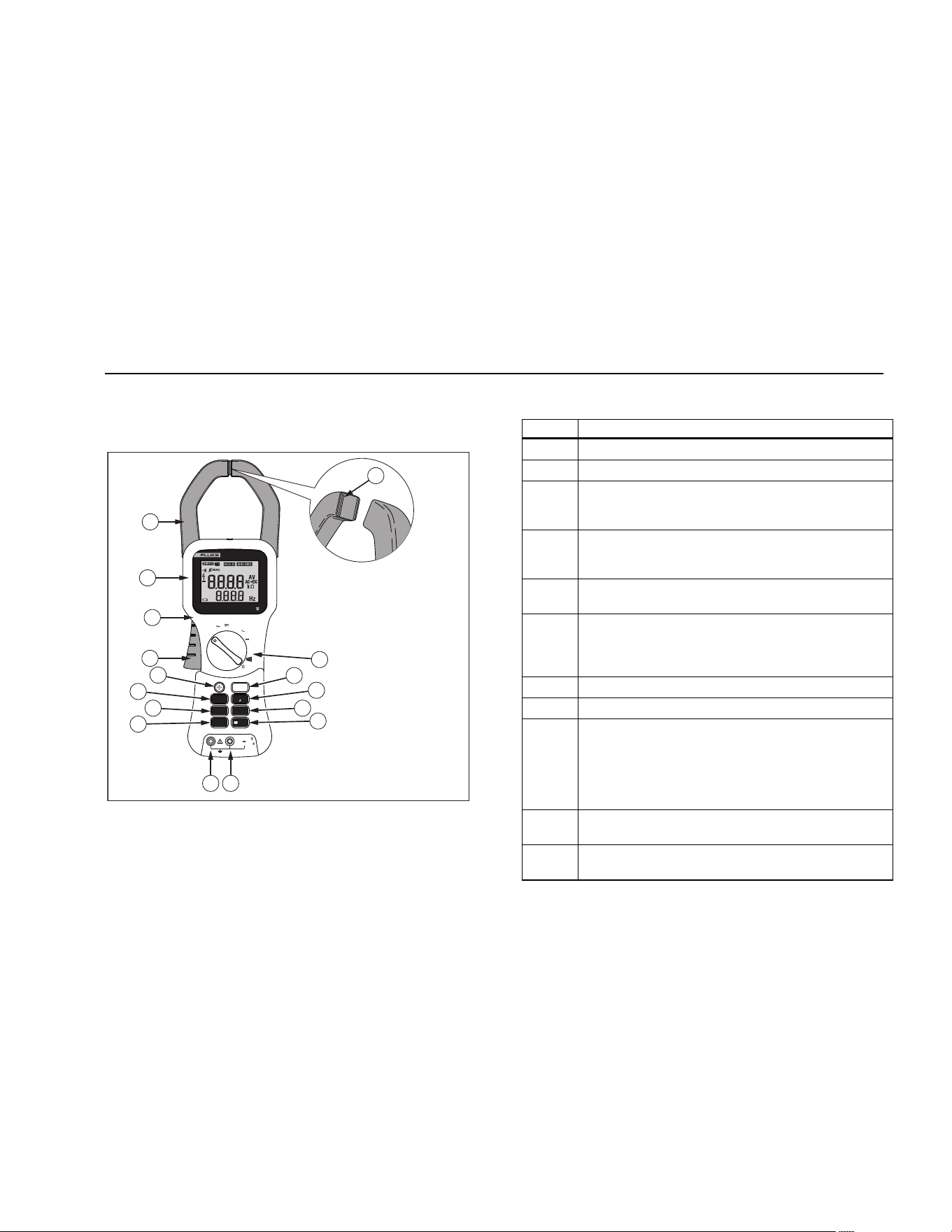
See Figure 1 and Tables 2 and 3 for a list of features.
A
A
OFF
A
AC+DC
V
A
A
OFF
A
V
AC+DC
V
AC+DC
COM
V
600 V CAT
1000 V CAT
HOLD
RANGE
ZERO
INRUSH
MIN MAX
Hz
FILTER
MAXMIN AVGLIVE
Manual
Auto
Range Range
k
355
AC/DC CLAMP METER
2000 A 600 V CAT
TRUE RMS
1
2
3
4
5
6
7
8
9
10
1
1
1
2
1
3
1
4
1
5
16
fbq03.eps
Figure 1. Feature Locations (355 shown)
Table 2. Features and Buttons
Number Description
A Current sensing clamp
B Rotary function switch
C
Hold button- freezes the display reading and
releases the reading when pressed a second
time
D
Zero button- Clears last reading from the display
and establishes a baseline for ac + dc and dc
current readings.
E
Hz button- press to see frequency in the
secondary display.
F
Low Pass Filter button- Press to turn on the low
pass filter. The filter eliminates high frequency
noise such as from a ASD or VFD motor speed
controller.
G Volts/Ohm input terminal. (355 only)
H Common input terminal. (355 only)
I
Min Max button -When first pressed, the Meter
shows maximum input. With subsequent
presses, the minimum and the average inputs
are shown. Hold for 2 seconds to exit min max
mode. This function works in current, voltage
and Frequency modes when activated.
J
Inrush button- Press this button to enter inrush
mode. Press it a second time to exit.
K
Range button- press to change range or to turn
off auto range.
1.888.610.7664 sales@GlobalTestSupply.com
Fluke-Direct.com
353/355
Users Manual
6
Table 2. Features and Buttons (cont.)
Number Description
L
Backlight button - Turns the backlight on and off.
The backlight goes off after 5 minutes.
M Jaw release
N
Tactile barrier
XW Warning: To avoid injury, do not hold
the Meter anywhere above the tactile barrier.
O Display
P
Jaw wear indicator.
XW Warning: To avoid injury, do not use
the Meter if the wear indicator in the jaw
opening is not visible.
N/A
Auto Power Off- The Meter turns off if there is
no button pushed or rotary function switch
operation for 20 minutes. Turn the Meter off and
on to restart the Meter. This feature is disabled
when the Meter is in Min Max mode.
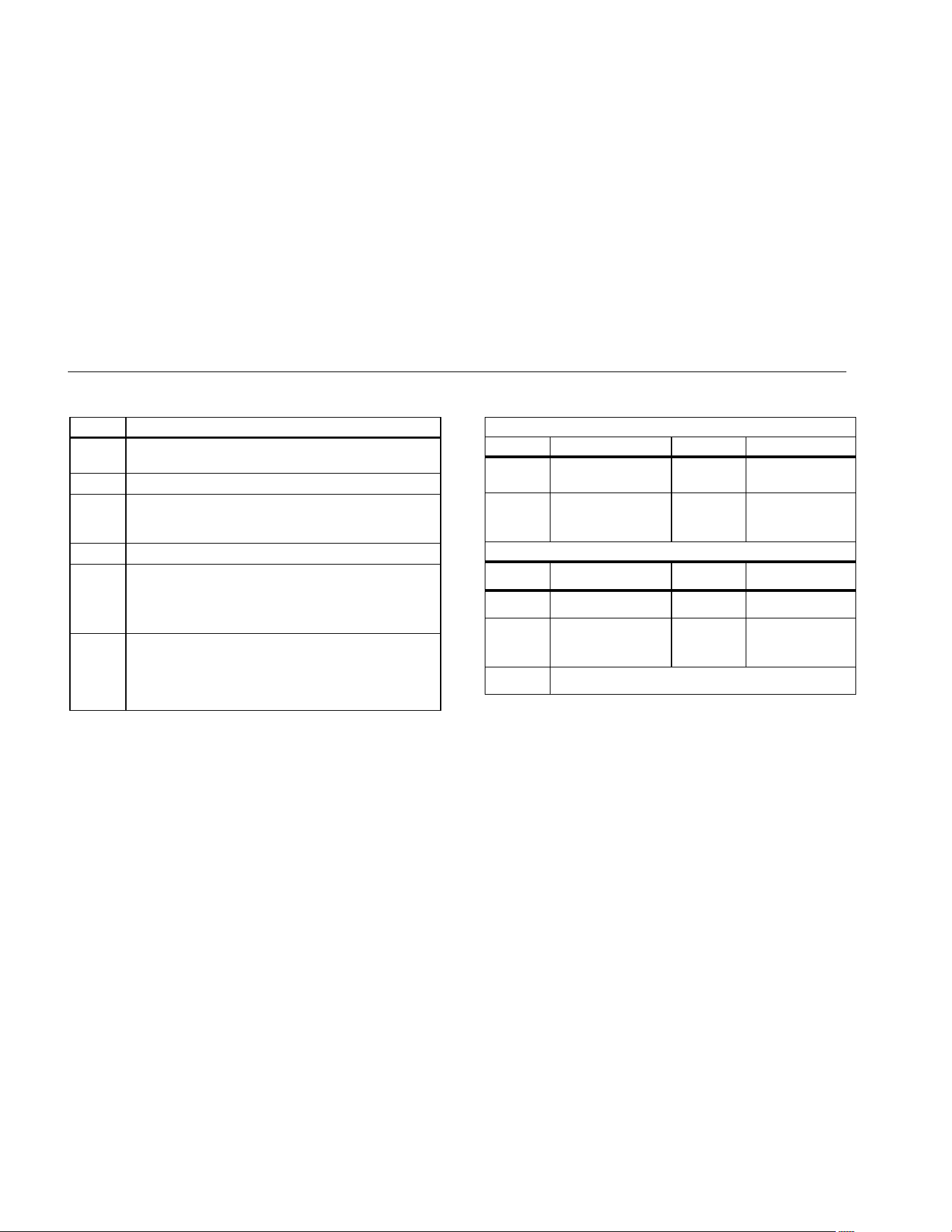
Table 3. Rotary Switch Positions
Rotary Switch Position 353/355
Position Function Position Function
OFF
Meter is powered
down
? AC current
A DC current
AC + DC
A
Combined ac +
dc (true rms)
current reading.
Additional Positions (355 Only)
Position Function Position Function
K AC voltage L DC voltage
V
AC + DC
Combined ac + dc
(true rms) voltage
reading.
R Continuity
Ω Resistance
1.888.610.7664 sales@GlobalTestSupply.com
Fluke-Direct.com
Clamp Meter
Features
7
Display
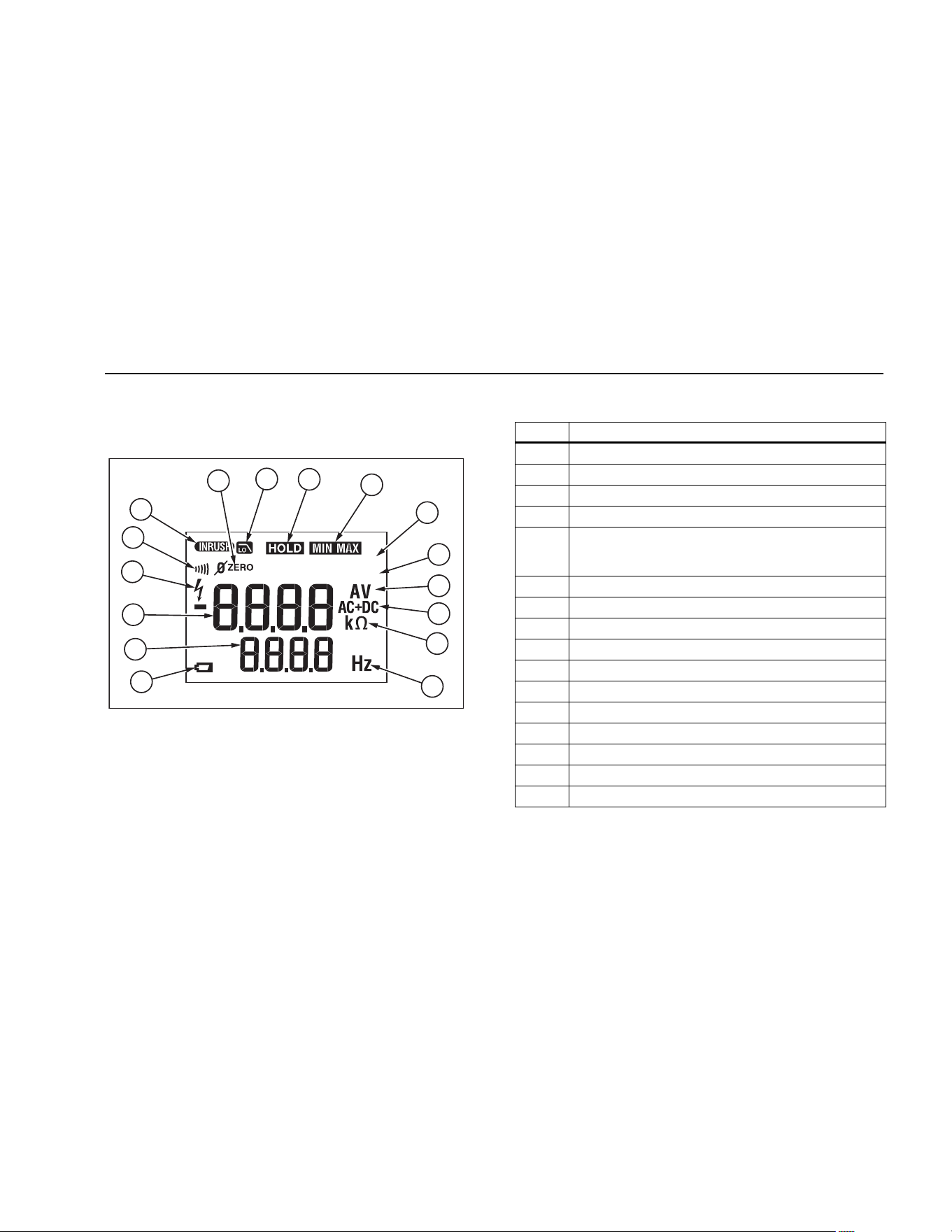
Figure 2 and Table 4 explain the display.
MAXMINAVGL IVE
Manual
Auto
Range Range
k
14
15
16
11
2
3
4
5
7
8
10
9
13
1
12
6
fbq01.eps
Figure 2. The Display
Table 4. Display
Item Explanation
A Zero mode is active
B Low pass filter is active
C Hold mode is active
D Min Max mode is active
E
Min, Max, Avg, or Live modes. Live mode is
active with Min Max and designates the real-
time reading.
F Manual or Auto Range is active
G Amps or Volts is active
H AC and DC mode is active
I Resistance mode is active
J Frequency mode is active
K Low Battery Symbol
L Frequency display
M Main display
N Hazardous voltage present
O Continuity symbol
P Inrush mode is active
1.888.610.7664 sales@GlobalTestSupply.com
Fluke-Direct.com
353/355
Users Manual
8
Using the Meter
XW Warning
To avoid electric shock or personal injury:
• When measuring current, center the
conductor in the clamp.
• When making current measurements,
disconnect the test leads from the Meter.
• Keep fingers behind Tactile Barrier. See
Meter Features.
Measuring AC or DC Current
To measure ac or dc current:
1. Turn the rotary function switch to the proper current
setting A, C, or D.
2. Open the clamp by pressing the jaw release and
insert the conductor to be measured into the clamp.
3. Close the clamp and center the conductor using the
jaw alignment marks.
4. View the current reading on the main display.
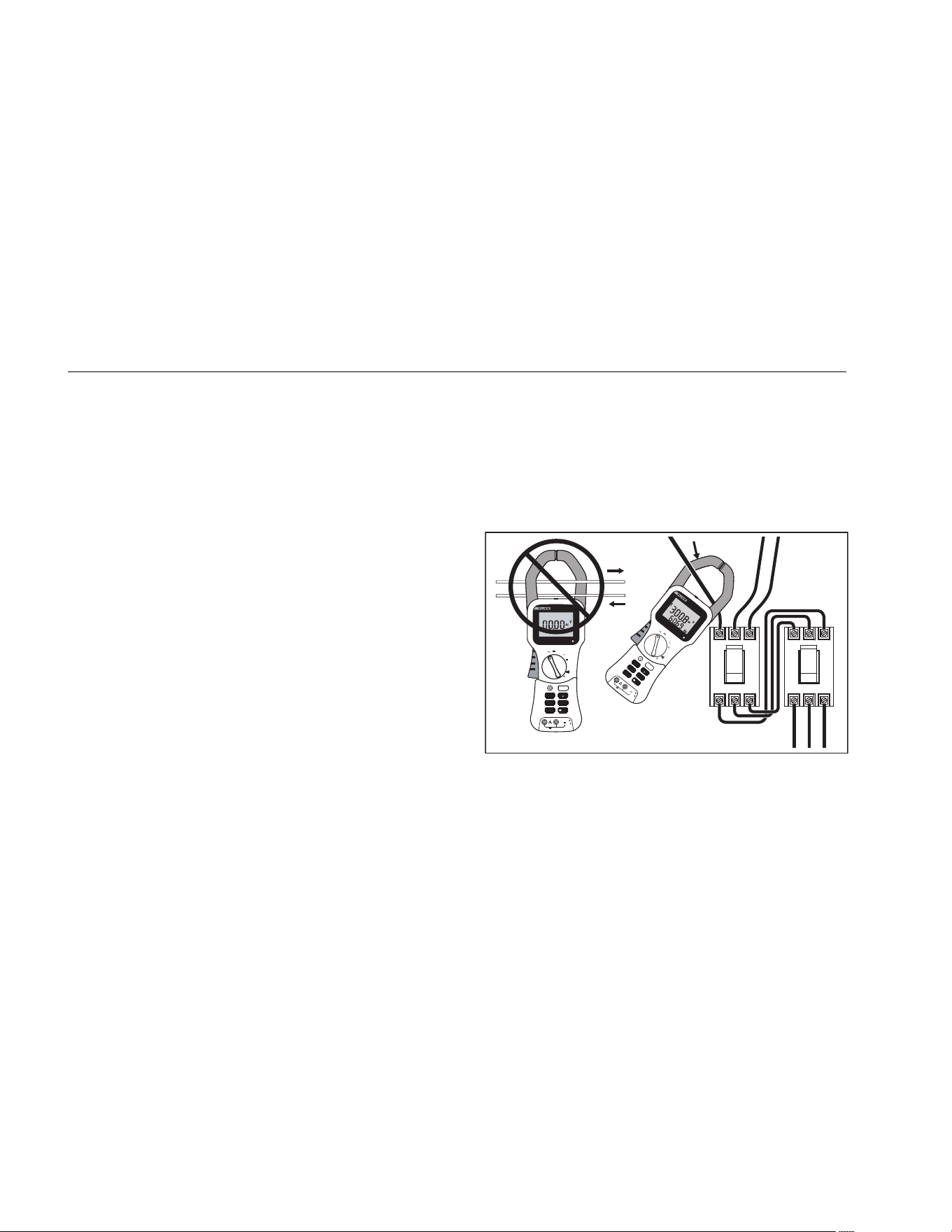
5. When measuring ac or ac + dc current, press Gto
view the frequency reading on the frequency display.
XWWarning
To avoid possible electric shock or personal
injury, if current is moving in opposite
directions, place only ONE conductor into
the clamp at a time. If current is moving in
the same direction, more than one conductor
may be placed into the clamp. See Figure 3.
600 V
A
A
OFF
A
AC+DC
V
A
A
OFF
A
V
AC+DC
V
AC+DC
V C
A
T
1000
V CAT
Auto
Range
355
A
C/DC CLAMP METER
2000 A 600 V C
AT
TRUE RMS
COM
V
HOLD
RANGE
ZER
O
INRUSH
MIN MAX
Hz
FI
LTER
A
A
OFF
A
AC+DC
V
A
A
OFF
A
V
AC+DC
V
AC+DC
600 V CAT
1000 V CAT
Auto
Range
355
AC/DC CLAMP METER
2000 A 600 V CAT
TRUE RMS
COM
V
HOLD
RANGE
ZERO
INRUSH
MIN MAX
Hz
FILTER
fbq04.eps
Figure 3. Connecting the Meter
1.888.610.7664 sales@GlobalTestSupply.com
Fluke-Direct.com
Clamp Meter
Using the Meter
9
Measuring Inrush Current
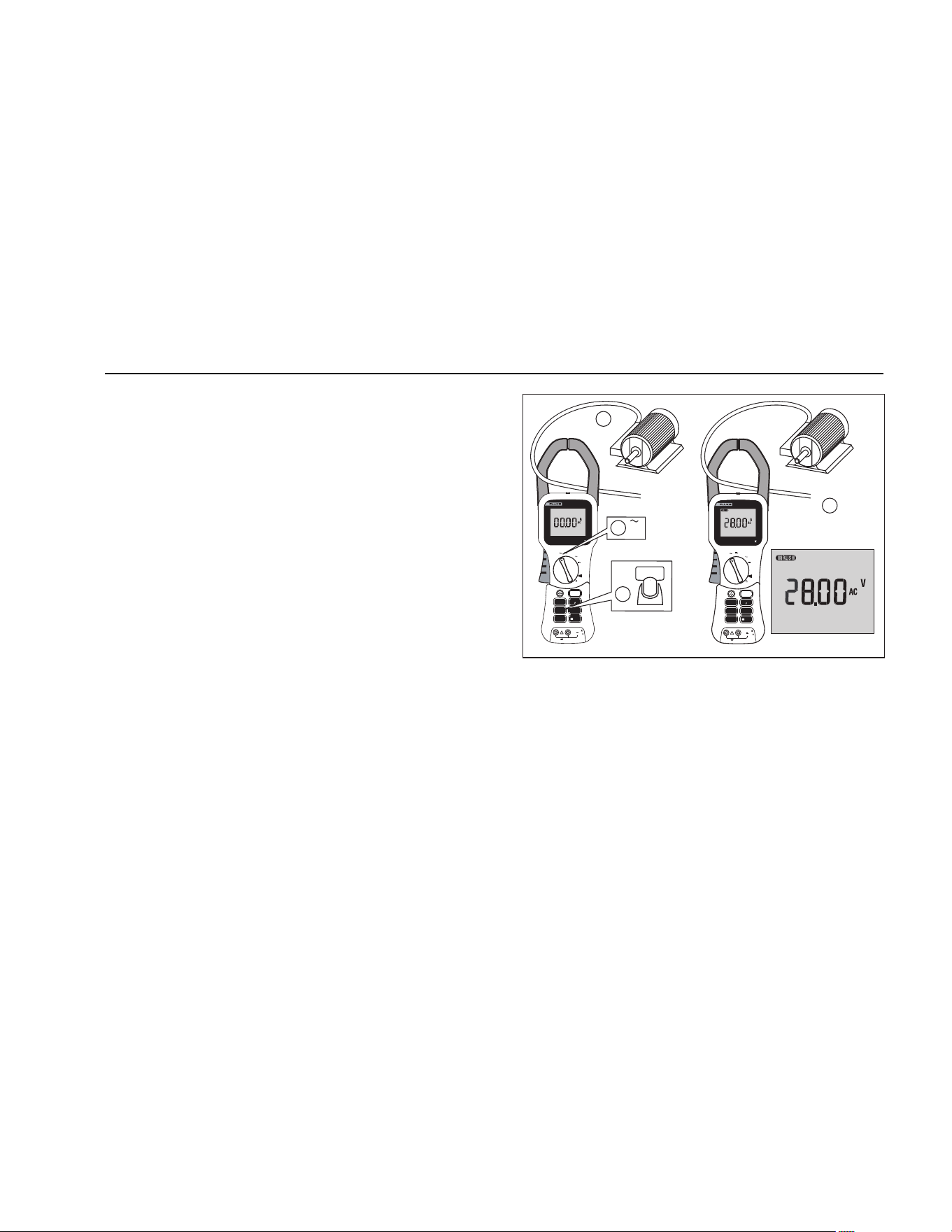
Inrush current is surge current that occur when an
electrical device is first powered on. Once the device has
reached its normal working condition, the current
stabilizes. See Figure 4.
To capture the inrush current reading:
1. With the system under test powered down, place the
source wire into the Meter jaws.
2. Turn the knob to A.
3. Press E on the Meter.
4. Power up the system under test. The inrush current
is shown on the Meter display.
A
A
OFF
A
AC+DC
V
A
A
OFF
A
V
AC+DC
V
AC+DC
600 V CAT
1000 V CAT
Auto
Range
355
AC/DC CLAMP METER
2000 A 600 V CAT
TRUE RMS
COM
V
HOLD
RANGE
ZERO
INRUSH
MIN MAX
Hz
FILTER
A
A
OFF
A
AC+DC
V
A
A
OFF
A
V
AC+DC
V
AC+DC
600 V CAT
1000 V CAT
Auto
Range
355
AC/DC CLAMP METER
2000 A
600 V CAT
TRUE RMS
COM
V
HOLD
RANGE
ZERO
INRUSH
MIN MAX
Hz
FILTER
Auto
Range
INRUSH
A
1
2
Off
On
4
3
100 ms
fbq07.eps
Figure 4. Measuring Inrush Current
1.888.610.7664 sales@GlobalTestSupply.com
Fluke-Direct.com

353/355
Users Manual
10
Measuring AC and DC Voltage (355 only)
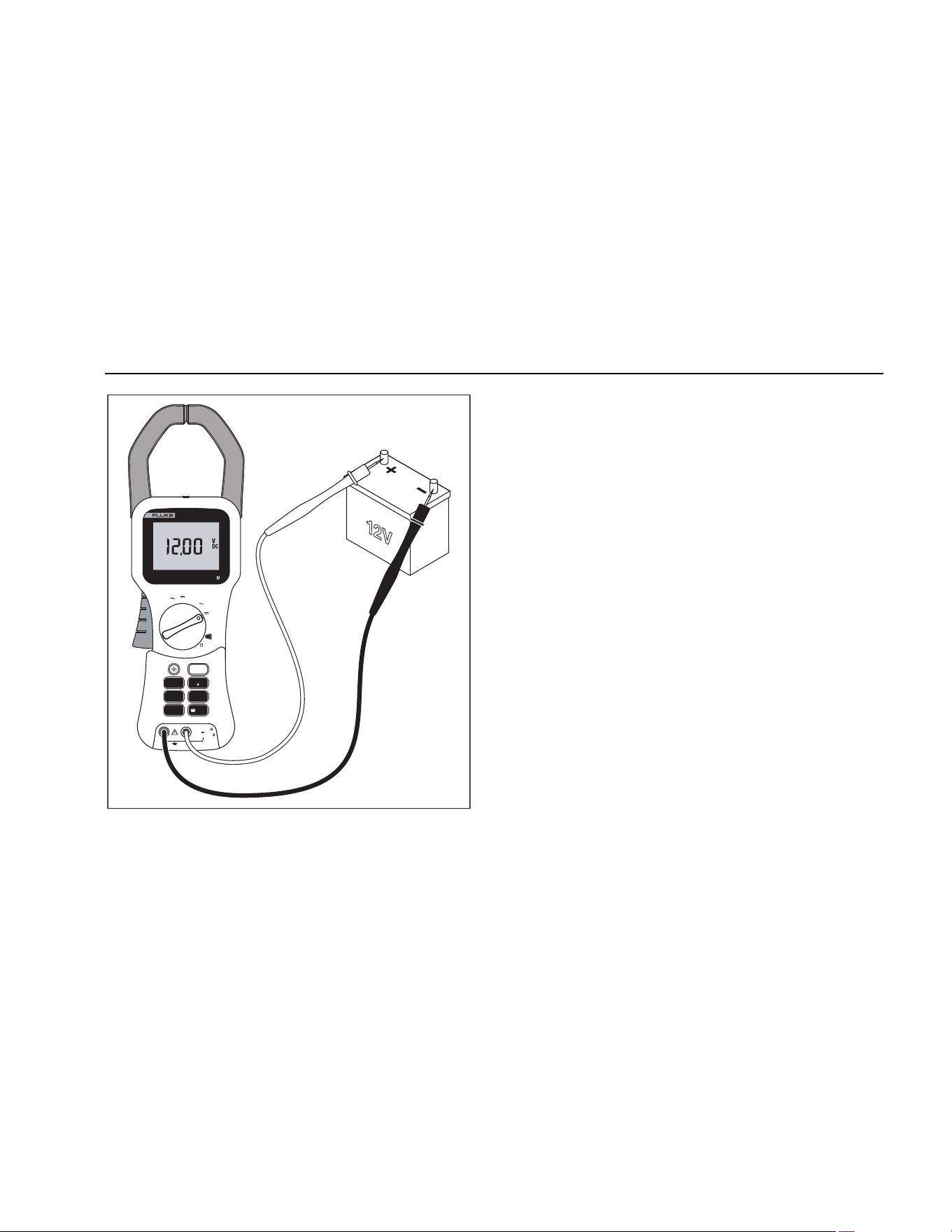
To measure ac or dc voltage:
1. Turn the rotary function switch to W, V, or X.
2. Connect the black test lead to the COM terminal and
the red test lead to the V terminal. Before connecting
the probes to the measurement points, add any clips
to the probes that are necessary.
3. Measure the voltage by touching the probes to the
desired test points of the circuit.
4. View the reading on the display.
5. When measuring ac voltage, press Gto view the
frequency reading on the frequency display. See
Figures 5 and 6.
A
A
OFF
A
AC+DC
V
A
A
OFF
A
V
AC+DC
V
AC+DC
COM
V
600 V CAT
1000 V CAT
HOLD
RANGE
ZERO
INRUSH
MIN MAX
Hz
FILTER
Auto
Range
353
AC/DC CLAMP METER
2000 A 600 V CAT
TRUE RMS
fbq05.eps
Figure 5. AC Voltage Measurement
1.888.610.7664 sales@GlobalTestSupply.com
Fluke-Direct.com
Clamp Meter
Using the Meter
11
A
A
OFF
A
AC+DC
V
A
A
OFF
A
V
AC+DC
V
AC+DC
COM
V
600 V CAT
1000 V CAT
HOLD
RANGE
ZERO
INRUSH
MIN MAX
Hz
FILTER
Auto
Range
355
AC/DC CLAMP METER
2000 A 600 V CAT
TRUE RMS
fbq06.eps
Figure 6. DC Voltage Measurement
1.888.610.7664 sales@GlobalTestSupply.com
Fluke-Direct.com
353/355
Users Manual
12
Testing Continuity (355 only)
XW Warning
To avoid electrical shock when testing
continuity in a circuit, make sure the power
to the circuit is turned off and all capacitors
are discharged.
To test continuity:
1. Connect the black test lead to the COM terminal and
the red test lead to the V terminal.
2. Remove power from the circuit being tested. Turn the
rotary function switch to R.
3. Connect the probes across the circuit or component
to be tested.
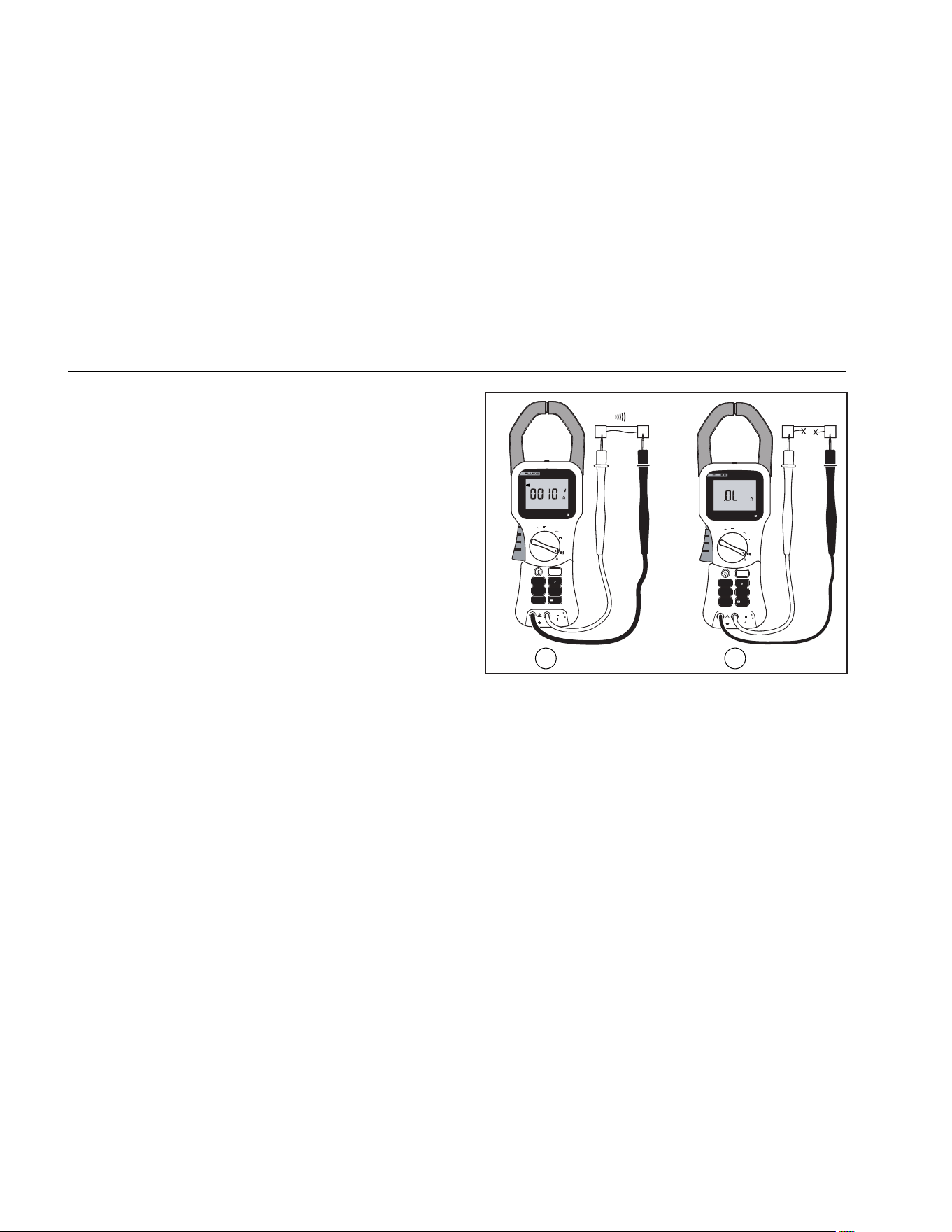
4. If the resistance is < 30 Ω, the beeper sounds
continuously, designating a short circuit (A). If the
display reads OL, the circuit is open (B) or above
399.9 Ω. See Figure 7.
A
A
OFF
A
AC+DC
V
A
A
OFF
A
V
AC+DC
V
AC+DC
600 V CAT
1000 V CAT
Auto
Range
355
AC/DC CLAMP METER
2000 A
600 V CAT
TRUE RMS
A
A
OFF
A
AC+DC
V
A
A
OFF
A
V
AC+DC
V
AC+DC
Auto
Range
355
AC/DC CLAMP METER
2000 A
600 V CAT
TRUE RMS
COM
V
HOLD
RANGE
ZERO
INRUSH
MIN MAX
Hz
FILTER
COM
V
HOLD
RANGE
ZERO
INRUSH
MIN MAX
Hz
FILTER
600 V CAT
1000 V CAT
2
1
fbq09.eps
Figure 7. Measuring Continuity
1.888.610.7664 sales@GlobalTestSupply.com
Fluke-Direct.com

Clamp Meter
Using the Meter
13
Measuring Resistance (355 only)
XW Warning
To avoid possible electric shock or personal
injury, when measuring resistance in a
circuit, make sure the power to the circuit is
turned off and all capacitors are discharged.
To measure resistance:
1. Turn the rotary function switch to e.
2. Remove power from the circuit being tested.
3. Connect the black test lead to the COM terminal and
the red test lead to the V terminal.
4. Measure the resistance by touching the probes to the
desired test points of the circuit.
5. View the reading on the display. See Figure 8.
XW Warning
To avoid electrical shock or personal injury,
be aware that dangerous voltages may be
present at the input terminals and may not be
displayed
A
A
A
AC+DC
V
A
A
OFF
A
V
AC+DC
V
AC+DC
COM
V
600 V CAT
1000 V CAT
HOLD
RANGE
ZERO
INRUSH
MIN MAX
Hz
FILTER
Auto
Range
355
AC/DC CLAMP METER
2000 A 600 V CAT
TRUE RMS
fbq08.eps
Figure 8. Measuring Resistance
1.888.610.7664 sales@GlobalTestSupply.com
Fluke-Direct.com

353/355
Users Manual
14
Maintenance
XW Warning
To avoid electrical shock, or personal injury:
• Repairs or servicing not covered in this
manual should be performed only by
qualified personnel.
• Disconnect test leads from the Meter
before removing its back cover.
• Never use the Meter with the back cover
removed.
WCaution
• To avoid contamination or static damage
of the Meter, do not touch the circuit
board without proper static protection.
• If the Meter is not going to be used for an
extended time, remove the battery. Do
not store the Meter in high temperature
or high-humidity environments.
Cleaning the Meter
WCaution
To avoid damaging the meter, do not use
abrasives or solvents on this instrument.
Periodically clean the Meter by wiping it with a damp
cloth.
Changing the Batteries
When battery voltage drops below the value required for
proper operation, the battery symbol (B) appears and
the Meter beeps.
To change the batteries:
1. Turn the Meter off and disconnect the test leads.
2. Using a screwdriver, open the battery cover on the
back of the Meter.
3. Replace the batteries with six new AA/LR6 batteries.
Observe correct polarity when installing the batteries.
4. Close the back cover and tighten the screw.
User Replaceable Parts
Refer to Contacting Fluke for more information.
• C43 Soft carrying case
• TL224 1.5 m silicone rubber test leads
• TP2 Test Probes
• AC285 Alligator Clips
1.888.610.7664 sales@GlobalTestSupply.com
Fluke-Direct.com

Clamp Meter
Specifications
15
Specifications
Electrical Specifications
Current Measurement 10 Hz to 100Hz
Range Resolution Accuracy, A
Trigger Level for
Inrush
Trigger Level
for Hz
Filter OFF
Trigger Level
for Hz
Filter ON
40 A 10 mA 1.5 % rdg + 15 digits 0.50 A 2.50 A 0.50 A
400 A 100 mA 1.5 % rdg + 5 digits 5.0 A 2.5 A 2.5 A
2000 A; 1400
ac rms
1 A 1.5 % rdg + 5 digits 5 A 8 A 8 A
Current Measurement 100.1 Hz to 1 kHz
Range Resolution
Accuracy
> 10 A
40 A 10 mA 3.5 % rdg + 15 digits
400 A 100 mA 3.5 % rdg + 5 digits
2000 A;
1400 ac rms
1 A 3.5 % rdg + 5 digits
1.888.610.7664 sales@GlobalTestSupply.com
Fluke-Direct.com
353/355
Users Manual
16
Voltage Measurement (355 only) 10 Hz to 100 Hz
600 and 1000 V ranges have 10 % over range to 660 and 1100 V respectively.
Range Resolution Accuracy
Trigger Level for Hz
Filter OFF
Trigger Level for Hz
Filter ON
4 V 1 mV 1 % rdg + 10 digits 0.050 V 0.050 V
40 V 10 mV 1 % rdg + 5 digits 0.25 V 0.25 V
400 V 100 mV 1 % rdg + 5 digits 6 V 6 V
600 V AC RMS 1 V 1 % rdg + 5 digits 6 V 6 V
1000 V DC 1 V 1 % rdg + 5 digits N/A N/A
Voltage Measurement (355 only) 100.1 Hz to 1 kHz
600 and 1000 V ranges have 10 % over range to 660 and 1100 V
Range Resolution Accuracy
4 V 1 mV 3 % rdg + 10 digits
40 V 10 mV 3 % rdg + 5 digits
400 V 100 mV 3 % rdg + 5 digits
600 V AC RMS 1 V 3 % rdg + 5 digits
Ohms Measurement (355 only)
Range Resolution Accuracy
400 Ω 0.1 Ω 1.5 % + 5 digits
4 k Ω 1 Ω 1.5 % + 5 digits
40 k Ω 10 Ω 1.5 % + 5 digits
400 k Ω 100 Ω 1.5 % + 5 digits
1.888.610.7664 sales@GlobalTestSupply.com
Fluke-Direct.com

Clamp Meter
Specifications
17
Continuity Beeper (355)
On at ≤ 30 Ω
Off at ≥ 100 Ω
Frequency Measurement
Measurement Range 5.0 Hz to 1 kHz
Resolution
0.1 Hz (15 Hz to 399.9 Hz)
1 Hz ( 400 Hz to 1 kHz)
Accuracy
5.0 to 100 Hz
0.2 % + 2 counts
Accuracy
100.1 Hz to 1 kHz 0.5 % + 5 counts
Trigger Level Refer to current and
voltage tables
General Specifications
Batteries: 6- 1.5 V AA NEDA 15 A or IEC LR6
Test Leads: Rated to 1000 V
Weight: 1.8 lb (.814 kg)
Jaw Size: 2.28 inches (58 mm)
Dimensions (L x W x D): 12 inches x 3.75 inches x
2 inches (300 mm x 98 mm x 52 mm)
Safety Rating: IEC 61010-2-032, 600 V CAT IV,
1000 V CAT III
1.888.610.7664 sales@GlobalTestSupply.com
Fluke-Direct.com

353/355
Users Manual
18
Standards and Agency Approval Specifications
Design
Standards and
Compliance
EN61010-032 CAT IV 600 V,
IEC/EN 61326-1:1997
Agency
Approvals
P, ), ;, ~
N10140
Over-voltage
Category
IEC61010-1 CAT III 1000 V,
CAT IV 600 V
Environmental Specifications
Operating
Temperature
32 °F to + 122 °F
(0 °C to +50 °C)
Storage
Temperature
-4 °F to 140 °F
(-20 °C to +60 °C)
Operating
Humidity
0 to 95 % (non-condensing)
Operating
Altitude
2000 m
Storage
Altitude
10,000 m
IP Rating
42 (indoor use only)
Drop Test
Requirements
1 m
EMI, RFI, EMC
FCC part 15, IEC/EN 61326-1:1997
class B, IEC/EN 61326:1997 3V/m,
performance criteria B, EN61325
Temperature
Coefficients
Current: 0.1 % of reading per °C
outside 22-24 °C
Voltage: 0.1 % of reading per °C
outside 22-24 °C
1.888.610.7664 sales@GlobalTestSupply.com
Fluke-Direct.com