Page 1
-
www.jyetech.com -JYE Tech Ltd.
User Manual
Rev. 05
DSO DIY Kit
S he ll
Applicable models: 15001K, 15002K
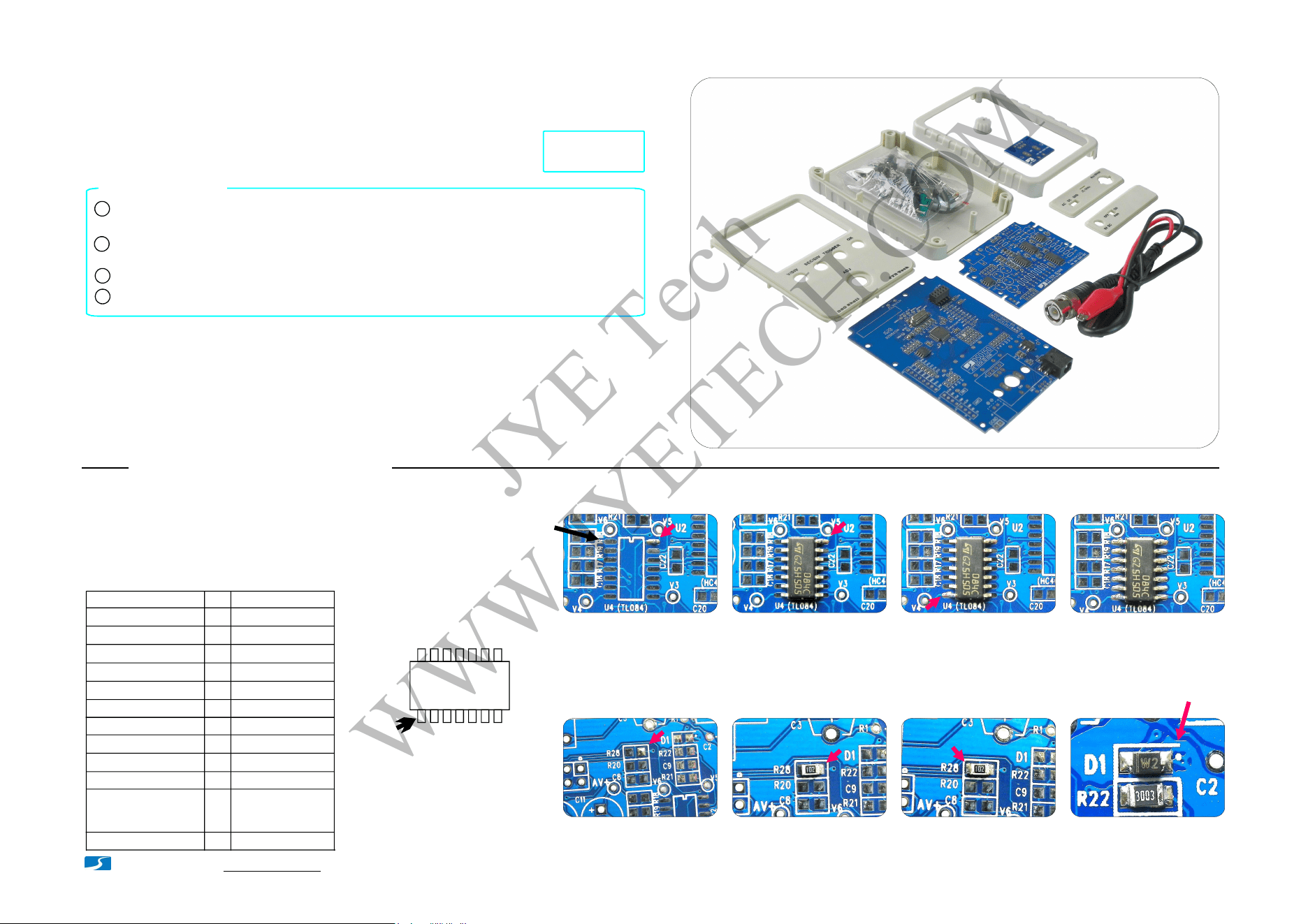
How to Solder SMD Parts
Apply solder to one pad
Solder part to the pad
Solder the other pad
Apply solder to a corner
pad
Solder IC to the pad. Make
sure pins are aligned to pads
Solder the pin at the opposite
corner so as chip is fixed
Solder all the rest pins one
by one
Loc/Ref
Qty
Descriptions
R18, R23, R28
C8, C9, C15, C16,
C17, C18, C19, C20,
C21, C22
R19, R20, R21
R22
R24, R25
U1
U2
U3
TL084, SO14
1
1
1
1
1
3
3
1
SMD Part List
U4
U5
D1
3
10
1
ICL7660, SO8
TL082, SO8
74HC4053, SO16
74HC4051, SO16
1K,1%, 0805
100K,1%, 0805
10K,1%, 0805
300K,1%, 0805
0.1uF, 50V, 0805
Zener, 3.0V, 0805
Solder ICs
Solder two-terminal parts
Positive
pole
Diode D1 polarity
TL084C
PIN 1
Identify IC orientation
Place IC in front of
you so that its marking
read from left to right.
The first pin at lower-
left corner is pin 1.
Pin1
3. Do not put iron on one pad for too long time. Otherwise,
traces may peel off and get damaged.
2. Identify IC orientation and diode polarity (see photos).
1. Before soldering check components against the
part list to make sure you have correct parts.
Check kit contents and part quantities/values by the photo at right and part list in page2
and page 3. Report missing or wrong parts to your vendor.
1
Resistor values are easy to mis-read. It is strongly suggested to check their values
before soldering them to board.
Make sure you understand the polarities and orientations of all parts.
2
3
Before you start
If your have purchased 15002K kit (SMD not pre-soldered) you must install all
SMD parts before mounting the through-hole parts. Please refer to the instructions
below for SMD part installation. Otherwise, proceed to page2 to start through-hole
part assembly.
Important !!!
SMD parts are only installed to the analog board (PCB PN# 109-15001-xxx).
15003K does not include enclosure. Some instructions are not applicable.
4
R17 1
100,1%, 0805
See page 2 for
tools needed
JYE Tech
WWW.JYETECH.COM
20 - 25W iron for most of parts. For the
BNC connector higher power iron (50 -
100W) is recommended if available.
1
Rosin solder wire (0.8 - 1mm dia.)
Digital multimeter
Screw driver (phillips, size# 0)
2
3
4
Flush cutter
5
Tools you need
Tweezers
6
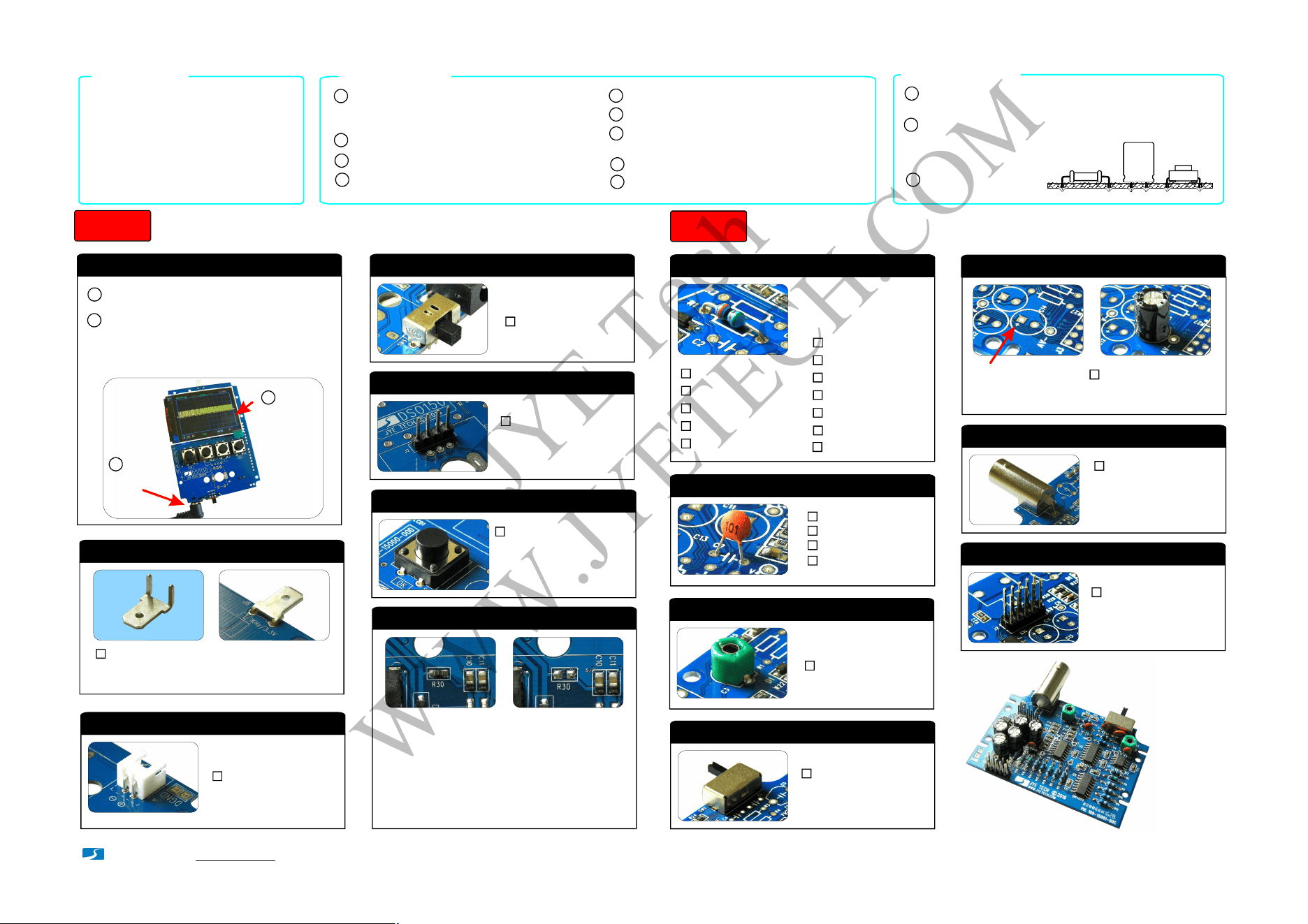
Assembly the Main Board (follow the order as numbered)
Step 1
- www.jyetech.com -
JYE Tech Ltd.
1. Check the main board
2. Test Signal Terminal
J6
0.1" pitch, rightangle
3. Power Connector (optional)
:
SW5
DPDT
4. Slide Switch
:
6. Tact Switches
12x12x7mm
7. Remove Resistor R30
:
SW1, SW2,
SW3, SW4
C3, C5
5 - 30pF
3. Capacitor Trimmers
:
7. Pin-header (male)
2 X 5 pin
:
J2, J3
SW1
2P3T
4. Slide switch
:
J1
BNC
6. BNC connector
:
Page 2
The thicker pins need
to heat up longer to get
good soldering result.
Note:
DC 9V power supply with 200mA (or higher)
current capacity and 5.5 x 2.1mm plug.
7
1. Resistors
Always meter resistor
values before soldering
Note:
R1
510KΩ
R2
5.1MΩ
:
:
R3
1. Ω2M
:
R4
11KΩ:
R5, R6, R14
1KΩ
:
R7
300Ω
:
R8, R13, R16
150Ω
R9
91Ω
:
:
R10
30 Ω:
R11, R12
15Ω:
R26, R27
120Ω:
R15
680Ω:
Assembly the Analog Board (follow the order as numbered)
Step 2
2. Ceramic Capacitors
0.1F
μ
:
330pF
:
1pF
:
C1
C6, C7
120pF
:
C2
C4
5. Electrolytic capacitors
:
100μ /16VF
Solder positive pole
(the longer lead) to
the square pad
C10, C11,
C12, C13,
C14
J8
4.8 x 0.8mm terminal
:
Before soldering bend the terminal to the
shape as shown in the left photo above.
Note:
Connect 9V power supply (center positive) to J7
on the mainboard.
1
2
You should see the scope boots up to a screen
similar to the photo below. D1 (LED) blinks twice.
Now apply power again. Test power switch
and tact buttons for their correct functions.
Apply power
Check
display
1
2
5. Pin-header (male)
1X4 pin, 0.1" pitch
:
J2
Let iron stay on one pad of the resistor until solder on
the other pad melt and then remove the part.
Note:
R30 is used to bypass SW5 so as the mainboard can be
tested without the power switch. It must be removed
for correct functioning of the power switch.
Put leads through mounting holes from the side with
part outline. Ensue component evenly touch PCB.
1
Solder leads at the other side. Solder should fully
fill and cover soldering pads.
Avoid bridges between
neighbering pads.
Cut unused leads
flush with cutter.
2
3
Soldering Hints
Important
If your kit does not have SMD
device pre-soldered you are
strongly suggested to install
all SMD parts before mounting
through-hole parts. Please see
instructions at Page 1.
Needle-nose pliers
8
Small slotted screwdriver (2mm width,
for cap trimmer adjustment)
9
Finished
If you find problems do not install the rest
components. Report to your vender or
manufacturer.
JYE Tech
WWW.JYETECH.COM
- www.jyetech.com -
JYE Tech Ltd.
Page 3
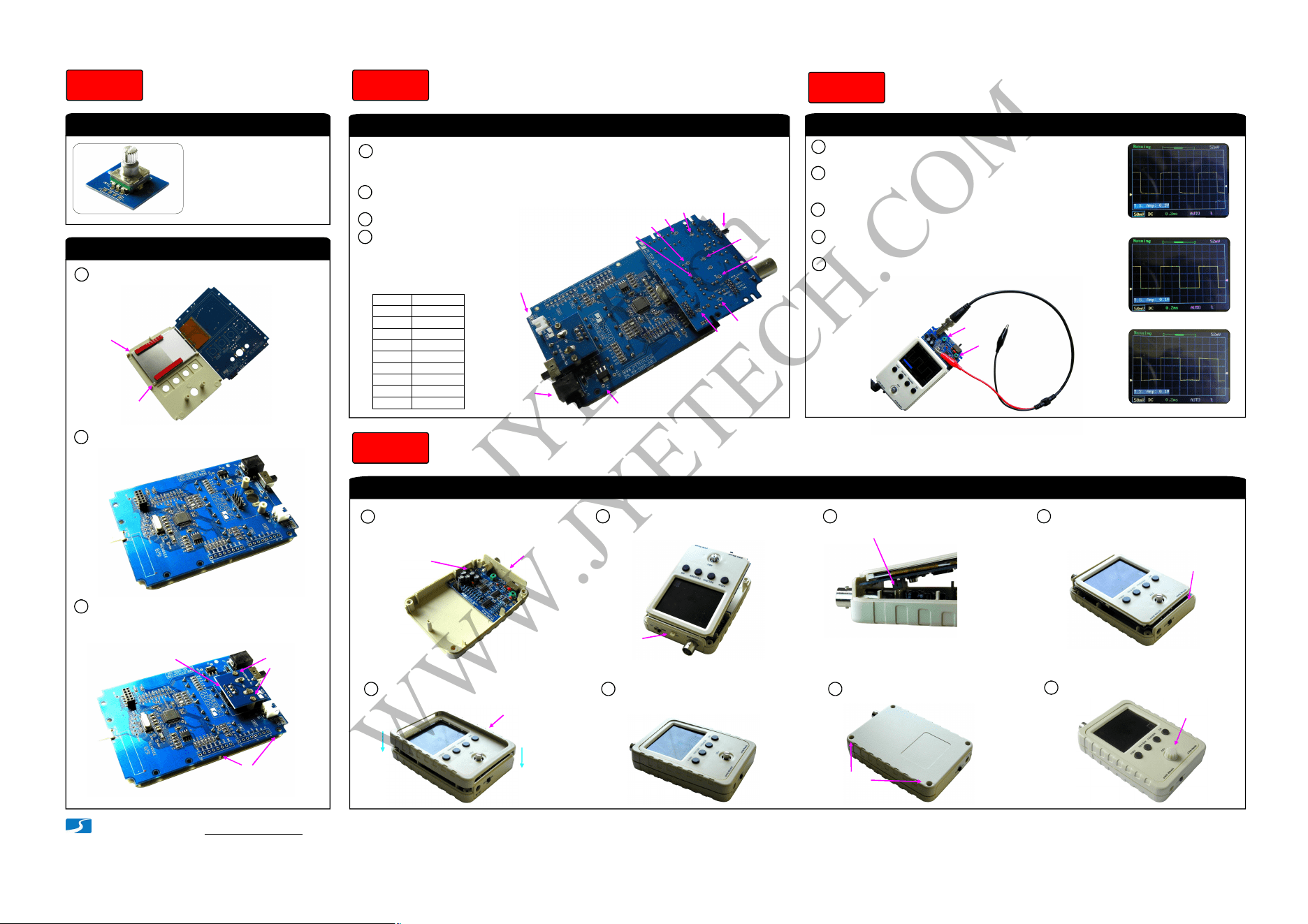
2. Assemble Front Module
1. Solder Rotary Encoder
Note:
Please pay attention to the
orientation of PCB. Use the
side with outline marking.
Assembly Front Module
Step 3
Verify voltages on the analog board
Check Voltages
Step 4
Fit LCD to front panel as shown below.1
2
Fold the main board over while keeping
LCD in place.
Final assembly
Put all parts together
Step 6
3
Mount rotary encoder board to the
front plate with screws and solder the
board to J2 of the main board.
Mount with
screws
(KA2x4)
Make sure PCB evenly
touch the front plate
while doing C.
A.
B.
C. Solder here
Calibration
Step 5
Screw the analog board to
back cover with the top
bracket attached
1
Combine the front module and
the back cover
2
Screws
KA2x4
Top bracket
Put test signal
terminal through
the small slot
Make sure receptacle (J4)
mate with pin-header (J2)
3
Attach bottom bracket before
holding the two modules
together
4
Bottom bracket
Attach the front frame
5
Firmly press the frame in
6
Front frame
Screw up at the back
7
Screws
(4 positions)
PA2.3x8
Attach knob cap and done!
8
Knob cap
Attach the analog board to the main board
by mating J3 on the analog board to J4 on
the main board (see photo).
1
2
Apply 9V DC power supply to J7 (or J6) on
the main board.
3
Set couple switch to GND position.
Check voltages at the points
as shown in the photo.
4
V1
V2
V3
V4
V5
AV+
V-
AV-
V+
Input
V+
AV+
V-
AV-
V1
V2
V3
V4
V5
+9.20V
+8.25V
+6.87V
-7.14V
-5.55V
0V
0V
0V
+1.44V
-0.98V
References
(*)
(*)
(*)
(*)
(*) Input dependent
Place negative
pen at DGND
Couple
switch
Apply power
here
C3
C5
Connect the red clip to the test signal terminal and leave the
black clip un-connected (see photo at bottom).
1
2
Apply power and boot. Hold down ADJ dial for 3 seconds to
bring up Test Signal amplitude display at lower-left corner.
Push ADJ to set the amplitude to 0.1V.
3
Set sensitivity to 50mV and adjust trigger level so that
waveform stable (see “How to Use” at page 4).
Not enoughA.
GoodB.
Too muchC.
4
Tuning C3 so that sharp rectangle (photo B at left) is obtained.
The adjustment for C3 is done.
5
Push ADJ to set the amplitude to 3.3V. Change sensitivity to
1V. Tuning C5 so that sharp rectangle waveform is obtained.
The adjustment is done.
Adjust trimmers C3 and C5
Mount to the small PCB
(PN: 109-15002-00A)
AV- = -4.5V ~ -8V and
AV+ = +5V ~ +8V
are acceptable
Note:
(4 positions)
Important !
Always remove power before
connecting or disconnecting
the analog board.
Important !
Tips:
Perform VPos alignment
before calibrating C3 and C5.
JYE Tech
WWW.JYETECH.COM
How to Use
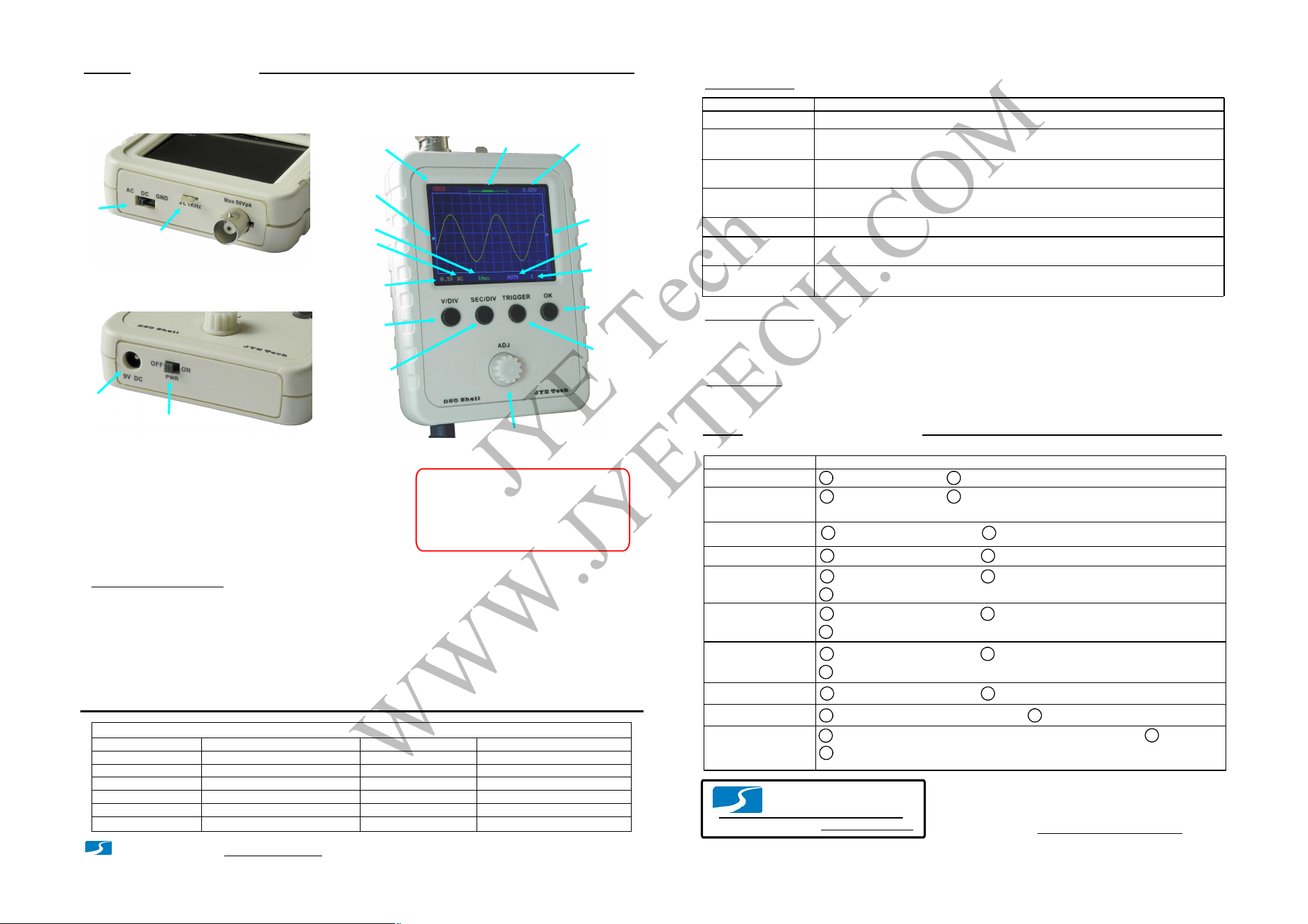
Display and Controls
Connections
Power Supply:
Connect 9V DC power supply to the 5.5x2.1mm
jack at bottom (center positive). Power supply
voltage must be in the range of 8 - 10V.
Probe:
Connect probe to the BNC connector at top.
Power supply voltage must not exceed
10V. Otherwise it may damage the ICs
inside.
Attention
1.
Allowed maximum signal input voltage
is 50Vpk (100Vpp) with the clip probe.
2.
Operations
[V/DIV]:
Select sensitivity or vertical position. The selected parameter indicator will be highlighted.
[SEC/DIV]:
Adjust the parameter seleted (highlighted).
[TRIGGER]:
Enter HOLD state (freeze waveform). Press it again will de-freeze.
Couple switch:
Set couple to DC, AC, or GND. When GND is selected the scope input is isolated from input
signal and connected to ground (0V input).
Analog bandwidth
Sensitivity range
Resolution
Record length
Max realtime sample rate Timebase range
Max input voltage
Input impedance
Power supply
Current consumption
Dimension
Weight
1MSa/s
0 -- 200KHz
5mV/div - 20V/div
50Vpk (1X probe)
1M ohm/20pF
12 bits
1024 points
500s/Div -- 10us/Div
9V DC (8 – 10V)
~120mA @ 9V
105 x 75 x 22mm
100 gram (without probe and PS)
Trigger modes
Trigger position
Auto, Normal, and Single
Center of buffer
Specifications
Save Waveform
Press [OK] & [Trigger] buttons simultaneously. The currently displayed waveform is
saved to EEPROM. The existing data in EEPROM will be over-written.
www.jyetech.com
JYE Tech Ltd.
Tel. +86-0773-2113856
Tech Forum:
www.jyetech.com/forum
Page 4
Basic Button Functions
[OK]:
[ADJ]:
Select timebase or horizontal position. The selected parameter will be highlighted. indicator
Select trigger mode, trigger level, and trigger edge. The selected parameter will be highlighted. indicator
More Functions
VPos Alignment
Measurements
ON/OFF
Functions
Operations
Set Couple Switch to GND position. Hold down [V/DIV] button for about 3 seconds.
Couple
Switch
Test Signal
output
BNC
Connector
Connectors
for Power Supply
(5.5 x 2.1mm)
Power
Switch
HOLDRUN
Button
/
Oscilloscope
State
Vertical
Position
Indicator
Sensitivity
(V/div)
Couple
Timebase
(s/div)
Trigger
Mode
Trigger
Slope
Trigger
Level
Indicator
Trigger Level
Readout
Horizontal
Position
Indicator
Sensitivity
Button
Timebase
Button
Trigger
Button
SensitivityButton
Adjustment
Dial
(Signal Input)
Default Restore
Recall Waveform
Center HPos
Center Trigger
Level
Hold down [OK] button for about 3 seconds. This will turn ON or OFF on-screen display of
measurements including Vmax, Vmin, Vavr, Vpp, Vrms, Freq., Cycle, Pulse width, and Duty cycle.
Press [OK] & [SEC/DIV] buttons simultaneously. Recalled waveform is always displayed
in Hold state.
Hold down [SEC/DIV] and [TRIGGER] buttons simultaneously for about 3 seconds.
Hold down [SEC/DIV] button for about 3 seconds. This will make the data at the center
of capture buffer displayed.
Hold down [TRIGGER] button for about 3 seconds. This will set the trigger level t0 the
medium value of signal amplitude.
Bad V+
Bad V-
Problems Possible Causes
Connector J7 defective.
V1 does not close
to 0V
Bad AV+
Troubleshooting
1 2 Diode D2 open or damaged.
1
Bad C12 and/or C13.
2
U5 (7660) bad soldering or defective.
Bad AV-
1
R27 bad soldering or wrong value.
Hint: Check with R27 disconnected would let you know the issue is caused by load or source.
2
Shorts between AV- and ground.
1
R26 bad soldering or wrong value.
2
Shorts between AV+ and ground.
1
SW1 not set to GND position.
2
Bad soldering on R1 and/or R2.
3
Bad soldering on U1.
V2 does not close
to 0V
1
SW1 not set to GND position.
2
Bad soldering on R3 and/or R4.
3
Bad soldering on U1.
V3 does not close
to 0V
1
Bad soldering on U2.
2
Bad soldering on R5 and/or R6.
3
Bad soldering on U4.
Bad V4
1
Incorrect V5.
2
Bad soldering on R13, R14, and R15.
Bad V5
1
Bad soldering on R21, R22, R28, C9, and D1.
2
Bad soldering on U4.
No Trace
1
Incorrect V4. If V4 is correct perform factory default restore as described in
2
Make sure trigger mode is AUTO and timebase is 1ms. Hold down [SEC/DIV] and [TRIGGER]
buttons simultaneously for 3 seconds.
2
- www.jyetech.com -
JYE Tech Ltd.
(This becomes
trigger state for
firmware version
-055 or later)
About Trigger State
The trigger can have three states including Holdoff, Waiting, and Trigged. They are explained below.
Holdoff:
Waiting:
Trigged:
Trigger is disabled until a portion of sample buffer prior to a trigger point is filled with raw data.
Trigger is waiting for a valid signal slope.
A valid signal slope has been detected and registered.
Rolling Mode
When timebase is set to 50ms or slower and trigger mode is set to AUTO the scope will automatically switch to
where waveform shifts from right to left constantly. The trigger is disabled under this mode.
Rolling Mode
JYE Tech
WWW.JYETECH.COM