User Manual


Customer Support .......................................................................................................................1
Safety Information & Warnings......................................................................................... 2-5
Information de Sécurité ...................................................................................................... 7-11
What’s Included ......................................................................................................................... 12
Components ................................................................................................................................13
Technical Specifications .................................................................................................. 14-15
Operation Instructions .................................................................................................... 16-22
Removing the End Cap ................................................................................................16
Checking the Battery Level ........................................................................................16
Charging the JumpSmart .......................................................................................... 17
Using the Jump Starter ......................................................................................... 18-19
Using the Flashlight & Red Flashing Light ..........................................................20
Using the Power Bank .................................................................................................. 21
Using the S.O.S. Alarm ................................................................................................. 21
Using the Compass ......................................................................................................22
Using the Thermometer .............................................................................................22
Certification ................................................................................................................................23
Limited Warranty ..............................................................................................................25-30
Copyright .....................................................................................................................................31
Table of Contents


1
© Limitless Innovations, Inc.
Your use of the product shall at all times require you to comply with the Terms,
Conditions of Use, Instructions and recommendations set forth within the User
Manual and the Terms and Conditions found at:
Manual: LimitlessInnovations.com/Manual/JumpSmart-10in1.pdf
Are you having issues with your product? Contact Customer Support at:
LimitlessInnovations.com/Support or call us at (855) 843-4828
Customer Support

2
© Limitless Innovations, Inc.
SAFETY FIRST: To prevent potential product damage, property damage,
personal injury, or even loss of life, READ ALL Safety Warnings and this User
Manual in its entirety before using the JumpSmart. By using the JumpSmart,
you hereby agree that Limitless Innovations, Inc., an Illinois corporation and
its aliates (“Limitless”) shall have no liability for any losses associated with
property damage, personal injury or loss of life that are incurred by you or
by any third party in connection with or relating in any manner whatsoever
to your use of the JumpSmart. By using the JumpSmart, you hereby agree at
all times to comply fully with all Safety Warnings, Operation Instructions and
General Safety Information in this User Manual. By using the JumpSmart, you
further agree to hold harmless Limitless, (and Limitless’ ocers, directors,
shareholders and employees) in connection with any losses sustained by you
(including, without limitation, losses arising in whole or in part from property
damage, personal injury or loss of life) relating in any manner whatsoever to
your use of the JumpSmart.
Safety Information & Warnings

3
© Limitless Innovations, Inc.
IMPORTANT SAFETY INSTRUCTIONS
WARNING - When using the JumpSmart, basic precautions should always be
followed, including, but not limited to, the following:
• Read all the instructions before using the JumpSmart.
• To reduce the risk of injury, close supervision is necessary when the
JumpSmart is used near children.
• Do NOT insert fingers or hands into any of the ports or openings of the
JumpSmart.
• Do NOT use any accessories that are not recommended or sold by
Limitless Innovations. May result in damage to the JumpSmart and risk of
fire, electric shock, or injury to person(s).
• To reduce the risk of product damage, always disconnect any cable from
the plug, NOT the cord.
• Do NOT use a JumpSmart that is damaged or modified. Damaged or
modified batteries may exhibit unpredictable behavior resulting in fire,
explosion, shock, or risk of injury.
• Do NOT operate the JumpSmart with damaged accessories, plugs, ports,
or cables.
• Do NOT attempt to disassemble or repair the JumpSmart or its accessories.
• Do NOT attempt to replace the battery as it is a non-serviceable part.
• Do NOT twist the head of the JumpSmart. Doing so may damage the
internal components.
Safety Information & Warnings cont’d

4
© Limitless Innovations, Inc.
WARNING – RISK OF EXPLOSIVE GASES.
• To reduce risk of battery explosion, follow these instructions and those
published by Limitless Innovations and manufacturer of any equipment
you intend to use in the vicinity of the battery. Review cautionary markings
on all JumpSmart products and the engine.
• Misusing or incorrectly connecting your JumpSmart may cause electric
shock to users, damage to the product, and/or damaged equipment..
• Do NOT use any non-JumpSmart-branded accessories. Doing so may
result in risk of fire, electric shock, and/or injury to person(s).
• The JumpSmart may become warm during extended use. During
operation, keep your JumpSmart away from materials that may be
aected by these temperatures.
SAFETY PRECAUTIONS
• Always charge the JumpSmart in a well-ventilated area.
• Do NOT insert foreign objects into any ports or openings of the JumpSmart.
• The JumpSmart should be recycled or disposed of, as per state and local
guidelines.
• Have plenty of fresh water and soap nearby in case battery acid comes in
contact with skin, clothing, or eyes.
• Wear complete eye protection and clothing protection. Avoid touching
eyes while working near battery.
Safety Information & Warnings cont’d

5
© Limitless Innovations, Inc.
Safety Information & Warnings cont’d
• If battery acid contacts skin or clothing, wash immediately with soap and
water. If acid enters eye, immediately flood eye with running cold water for
at least 10 minutes and get medical attention immediately.
• NEVER smoke or allow a spark or flame in the vicinity of a battery or engine.
• Be extra cautious to reduce the risk of dropping a metal tool onto a
battery. It might spark or short-circuit the battery or other electrical part
that may cause explosion.
• Under abusive conditions, liquid may be ejected from the battery; avoid
contact. If contact accidentally occurs, flush with water. If liquid contacts
eyes, additionally seek medical help. Liquid ejected from the battery may
cause irritation or burns.
• Do NOT expose the JumpSmart to fire or excessive temperatures.
Exposure to fire or temperatures above 266°F may cause an explosion.
PLEASE SAVE THESE INSTRUCTIONS


7
© Limitless Innovations, Inc.
TOUT D’ABORD, LA SÉCURITÉ: Afin de prévenir des dommages potentiels à
la propriété ou au produit, des blessures corporelles ou la mort, LISEZ TOUS
les avertissements de sécurité inscrites dans ce manuel de l’utilisateur avant
d’utiliser le JumpSmart. Par l’utilisation du JumpSmart, vous acceptez que
Limitless Innovations, inc., une entreprise de l’Illinois, et ses aliés (« Limitless»)
déclinent toute responsabilité quant aux pertes associées à des dégâts
matériels, à des dommages corporels et à la mort causés par vous ou un
tiers à la suite de l’utilisation du JumpSmart ou en rapport, de quelque façon
que ce soit, avec votre utilisation du JumpSmart. En utilisant le JumpSmart,
vous acceptez de vous conformer en tout temps à toutes les instructions de
sécurité et d’utilisation, et aux consignes générales de sécurité inscrits dans ce
manuel de l’utilisateur. En utilisant le JumpSmart, vous acceptez de dégager
Limitless, ainsi que ses dirigeants, ses directeurs, ses actionnaires et ses
employés, de toute responsabilité quant aux pertes subies (y compris, mais
sans s’y limiter, les pertes engendrées en tout ou en partie, par des dommages
à la propriété, des blessures ou la mort), relatives, de quelque manière que ce
soit, à l’utilisation du JumpSmart.
Information de Sécurité

8
© Limitless Innovations, Inc.
Information de Sécurité a continué
INSTRUCTIONS IMPORTANTES SUR LA SÉCURITÉ
AVERTISSEMENT: Lorsque vous utilisez ce produit, vous devriez prendre
des précautions de base, y compris les suivantes:
• Lisez toutes les instructions avant d’utiliser le produit.
• Afin de réduire les risques de blessures, une surveillance étroite est de
mise lorsque le produit est utilisé près d’enfants.
• Ne placez PAS vos doigts ou vos mains à l’intérieur du produit.
• L’utilisation d’un accessoire qui n’est pas recommandé ou vendu par le
fabricant Limitless Innovations pourrait entraîner des risques d’incendie, de
décharge électrique ou de blessures corporelles.
• Afin de réduire les risques de dommage à la fiche électrique et au cordon
d’alimentation, débranchez le cordon du JumpSmart en maintenant la
fiche plutôt que le cordon.
• N’utilisez PAS un bloc-piles ou un appareil endommagé ou modifié.
Les batteries endommagées ou modifiées pourraient exhiber un
comportement imprévisible occasionnant des incendies et des explosions
ou des risques de blessures.
• Ne faites PAS fonctionner le JumpSmart ou un câble de sortie si sa fiche
ou son cordon sont endommagés.

9
© Limitless Innovations, Inc.
Information de Sécurité a continué
AVERTISSEMENT - RISQUES DE GAZ EXPLOSIFS.
• Afin de réduire les risques d’explosion de la batterie, suivez ces
instructions et celles publiées par Limitless Innovation et le fabricant de
l’équipement que vous tentez d’utiliser à proximité de la batterie.
Consultez les avertissements indiqués sur ces produits et sur le moteur.
AVERTISSEMENTS DE SÉCURITÉ
• Le mésusage ou la mauvaise connexion de votre JumpSmart pourraient
entraîner des décharges électriques aux utilisateurs, des dommages au
produit ou des dommages à l’équipement.
• Le JumpSmart et ses accessoires NE sont PAS des jouets et devraient être
rangés hors de la portée des enfants.
• N’utilisez PAS d’accessoires autres que ceux du JumpSmart. L’utilisation
d’accessoires autres pourrait causer des incendies, des décharges
électriques ou des blessures.
• Ne tentez PAS de désassembler ou de réparer le JumpSmart ou ses accessoires.
• Ne tentez PAS de remplacer sa batterie, puisqu’il s’agit d’une pièce non réparable.
• Ne tournez PAS la tête du JumpSmart. Vous pourriez endommager des
composants internes.
• Afin de réduire les risques d’endommager le produit, débranchez le cordon
à partir de la fiche; PAS en tirant sur le cordon.

10
© Limitless Innovations, Inc.
Information de Sécurité a continué
• N’échappez PAS le JumpSmart. Vous pourriez endommager des
composants internes que vous ne pouvez pas voir. Si toutefois cela devait
arriver, N’utilisez PAS l’appareil.
• Le JumpSmart pourrait chauer lors d’une utilisation prolongée. Veuillez
donc le garder à distance de tout matériau pouvant être aecté par la chaleur.
• Chargez toujours le JumpSmart dans un endroit bien aéré.
• N’insérez PAS d’objets étrangers dans les ouvertures ou les ports du JumpSmart.
• Les batteries devraient être recyclées ou jetées conformément aux
directives locales ou de l’état.
PRÉCAUTIONS DE SÉCURITÉ
• Ayez susamment d’eau fraîche et de savon à proximité au cas où de
l’acide sulfurique entrerait en contact avec votre peau, vos vêtements ou
vos yeux.
• Portez une protection oculaire complète et des vêtements de protection.
Évitez de vous toucher les yeux lorsque vous travaillez à proximité de la
batterie.
• Si de l’acide sulfurique entre en contact avec vos vêtements, nettoyez-les
immédiatement avec de l’eau savonneuse. Si de l’acide entre en contact
avec vos yeux, nettoyez-les immédiatement avec de l’eau froide pendant
au moins 10 minutes et consultez un médecin sans tarder.
• Ne fumez JAMAIS, n’approchez ou ne créez JAMAIS de flamme ou
d’étincelles près de la batterie ou du moteur.

11
© Limitless Innovations, Inc.
• Soyez extrêmement prudent afin d’éviter tout risque de chute d’outil
métallique sur la batterie. Cela pourrait étinceler ou court-circuiter la
batterie ainsi que d’autres composants électriques et entraîner une explosion.
• Lorsque vous rechargez la batterie interne, travaillez dans un endroit bien
aéré et ne bloquez pas la ventilation.
• En cas d’usage abusif, du liquide peut s’échapper des batteries; évitez
donc d’y toucher. Si par mégarde vous y touchez, nettoyez la région avec
de l’eau. Si le liquide entre en contact avec les yeux, consultez un médecin.
Le liquide qui s’écoule de la batterie pourrait causer des irritations ou des
brûlures.
• N’exposez PAS un bloc d’alimentation à une flamme ou à des températures
extrêmes. L’exposition à une flamme ou à des températures au-dessus de
130°C pourraient causer une explosion.
• Fixez les câbles de sortie à la batterie et au châssis. NE laissez JAMAIS les
pinces de sortie se toucher.
VEUILLEZ CONSERVER CES INSTRUCTIONS
Information de Sécurité a continué
12
© Limitless Innovations, Inc.
What’s Included
WHAT’S INCLUDED
1x JumpSmart
1x Smart Jumper Cables
1x USB Wall Charger
1x USB Car Charger
1x Micro USB Cable
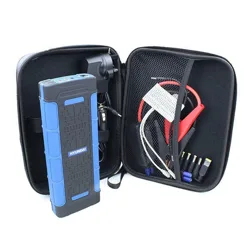
1x Carrying Pouch
1x User Manual
1
6
7
8
9
2
4
5
3
13
© Limitless Innovations, Inc.
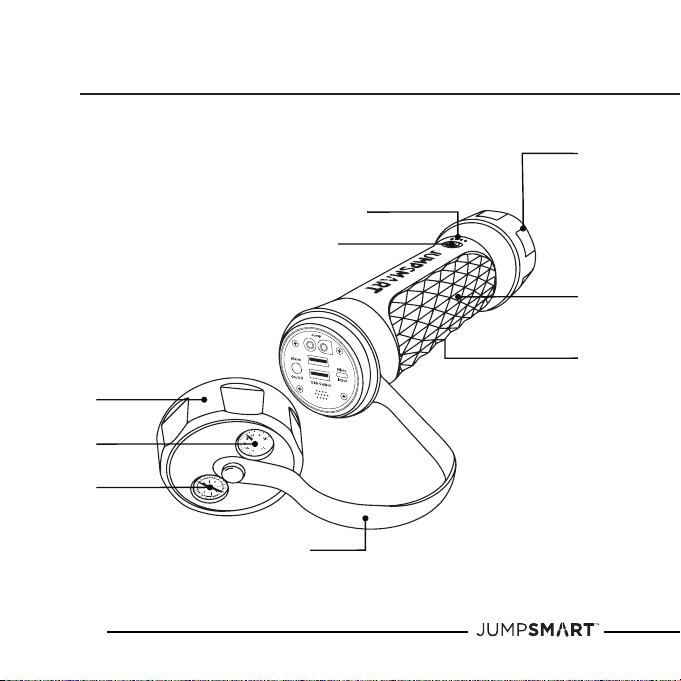
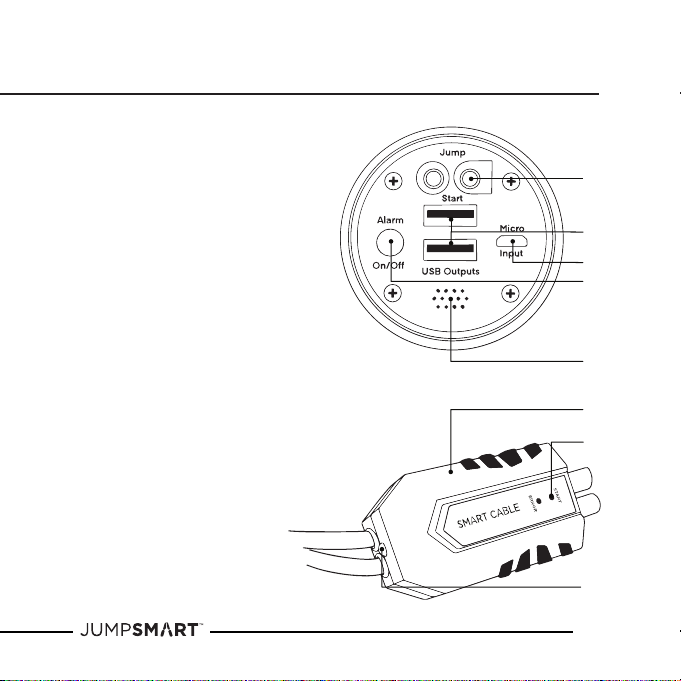
Components
1. Flashlight / Red Flashing Light
2. Battery Capacity Indicator Lights
3. Flashlight Power Button
4. Non-Slip Grip
5. Reflector
6. Cap
7. Thermometer
8. Compass
9. Wrist Strap
10. Jump Starter Port
11. 2x USB Ports (Output)
12. Micro Charging Port (Input)
13. S.O.S. Alarm Power Button
14. S.O.S Alarm Speaker
15. Smart Cable Jumper Box
16. Safety Check Lights
17. Smart Cable Mini Flashlight
10
11
12
13
14
15
16
17

14
© Limitless Innovations, Inc.
Technical Specifications
Dimensions 10in x 2.5in x 2.5in
Battery Capacity 8000mAh 4-Cell
Battery Type Lithium Polymer
Weight 2.5lbs
Micro Input 5V / 2A
USB Output 5V / 2.4A
Starter Port DC 12V / 200A (Start) - 9V / 800A (Peak)
Jump Starter Capacity 7.0L Gas / 4.0L Diesel Engines & Below
Self-Consumption Current <200 uA
LED Flashlight Brightness 8W | 330lm
Beam Distance 495ft
Material PC + ABS | TPU
Product Working Temperature 32° - 104°F
Battery Working Temperature -4° - 140°F
Storage Temperature 32° - 104°F
Life Cycle Approx. 1000 Times (Then Decay 70%)

15
© Limitless Innovations, Inc.
Technical Specifications cont’d
The Smart Jumper Cables have 10 Safety Checks & Levels of Protection:
1. Reverse Polarity
2. Short Circuit
3. Over-Charge
4. Over-Discharge
5. Over-Temperature
6. Timeout
7. Vehicle Battery False Voltage
8. Vehicle Engine Voltage
9. Non-Sparking
10. Low Input Voltage
STORAGE INSTRUCTIONS
• The ideal storage location for the JumpSmart is inside in a cool, dry place.
• Batteries are aected by temperature. The ideal storage temperature
is 70°F (21°C).
NOTE: If the JumpSmart is exposed to extreme temperatures
(-4°F - 140°F / -20°C - 60°C), it is recommended to allow the JumpSmart
to re-acclimate to the ideal temperature of 70°F before using.
16
© Limitless Innovations, Inc.
Operation Instructions
REMOVING THE CAP
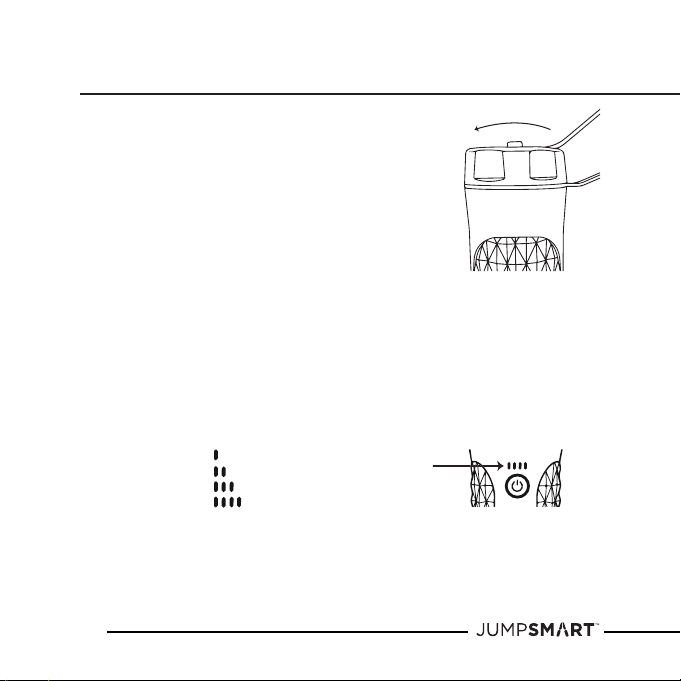
1. Twist the Cap counterclockwise
1.5 times to remove and access the
Back Panel of the JumpSmart.
CHECKING THE BATTERY POWER LEVEL
1. Activate the Battery Capacity Indicator Lights by utilizing one of the
following features: Flashlight, Red Flashing Light, Power Bank,
S.O.S. Audible Alarm, or Charging the JumpSmart.
2. See chart below to determine the approximate Battery Capacity:
• 25%
• 50%
• 75%
• 100%
NOTE: It is recommended to recharge the JumpSmart every three months
or when there are two or less Battery Capacity Indicator Lights illuminated.
17
© Limitless Innovations, Inc.
Operation Instructions cont’d
CHARGING THE JUMPSMART
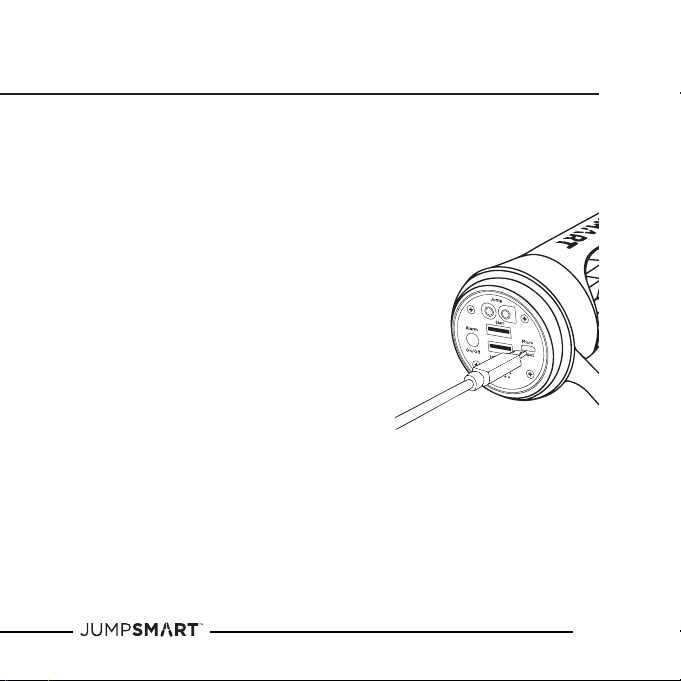
1. Remove the Cap from the Back of the JumpSmart.
2. Plug the Micro USB Cable into the Micro Charging Port (Input)
on the Back Panel.
a. If using the USB Wall Charger:
3a. Plug the USB Wall Charger into a
standard 110V AC wall outlet.
4a. Plug the opposite end of the Micro
USB Cable into the USB Port of
the Wall Charger.
b. If using the USB Car Charger:
3b. Plug the USB Car Charger
into a standard 12V Vehicle
Power Socket.
4b. Plug the opposite end of the
Micro USB Cable into the USB Port
of the Car Charger.
NOTE: While charging, the Battery Capacity Indicator Lights will blink
to indicate the percentage of charge. When all 4 Indicator Lights have
stopped blinking, the JumpSmart is completely charged. It will take
approximately 3-4 hours to fully charge the JumpSmart from a
completely drained battery. Additionally, while charging the JumpSmart,
the USB Ports (Output) will not function.
18
© Limitless Innovations, Inc.
Operation Instructions cont’d
USING THE JUMP STARTER
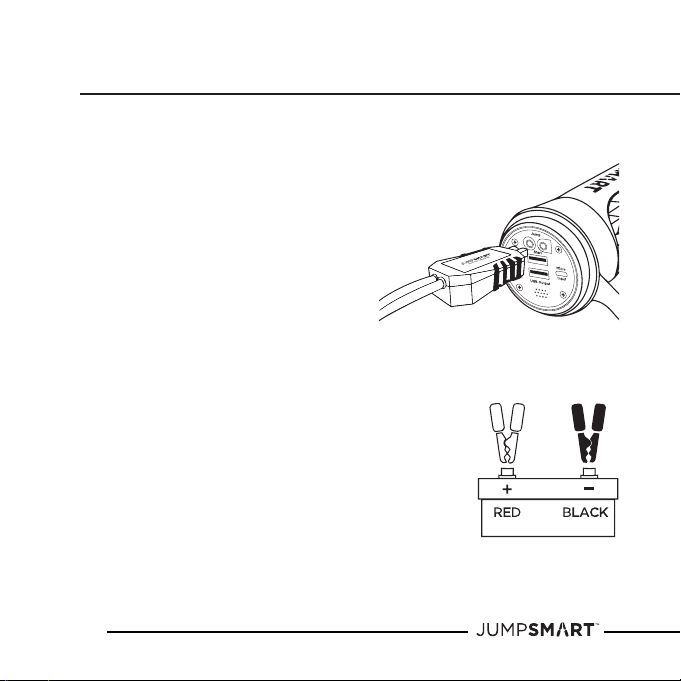
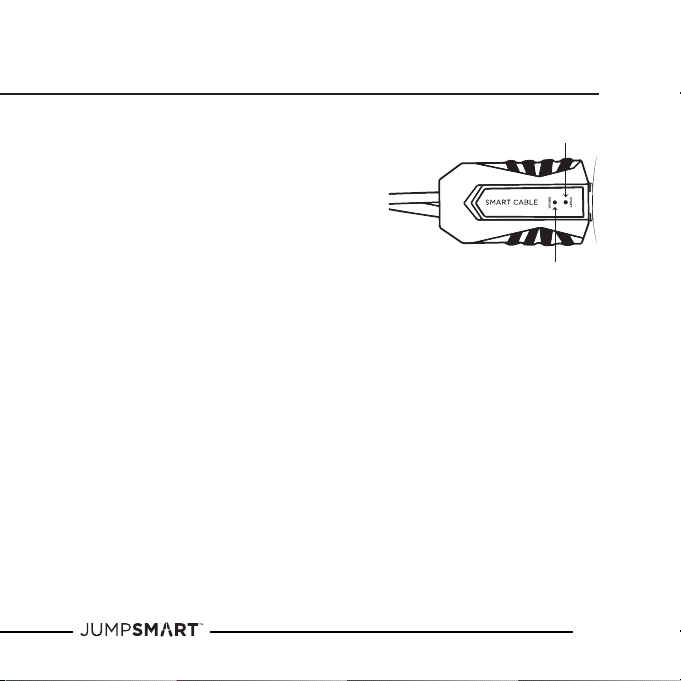
1. Plug the Smart Cable Jumper Box into the
Jump Starter Port located on the Back
Panel of the JumpSmart.
2. Once plugged in, the green and red Safety
Indicator Lights will flash in an alternating
pattern on the Smart Cable Jumper Box.
The Smart Cables can now be
connected to the battery terminals.
TIP: Use the Smart Cable Mini Flashlight
located on the end of the Smart Cable Jumper Box
to shine light on the battery terminals.
3. Connect the RED clamp of the Smart Cables
to the POSITIVE (+) terminal of the vehicle battery.
4. Connect the BLACK clamp of the Smart Cables to
the NEGATIVE (-) terminal of the vehicle’s battery.
5. Once both the positive and negative clamps are
properly connected, the “Start” (green) Safety
Indicator Light on the Smart Cable Jumper Box will
remain illuminated. The vehicle is now ready to be started.
19
© Limitless Innovations, Inc.
Operation Instructions cont’d
NOTE: If the red “Error” Safety Indicator
Light illuminates after connecting the
Smart Jumper Cables to the battery
terminals, check the connection.
If the battery terminal is heavily corroded
it may cause a bad connection. Refer to the
vehicle’s owner manual on how to clean.
If the “Error” message continues, one of the
10 Safety Checks listed on page 15 were found.
See a certified mechanic.
6. Once the vehicle has been successfully started, proceed to remove the
Jumper Cables in the reverse order that they were attached, beginning
with the Black Jumper Cable.
NOTE: If the vehicle does not start after the first attempt, disconnect
the Smart Cables from the JumpSmart and wait at least 60 seconds before
repeating steps 1-4.
Do not attempt to jump start a vehicle more than three times. If the vehicle
battery does not start after the third try, consult a certified mechanic.
20
© Limitless Innovations, Inc.
Operation Instructions cont’d
USING THE FLASHLIGHT
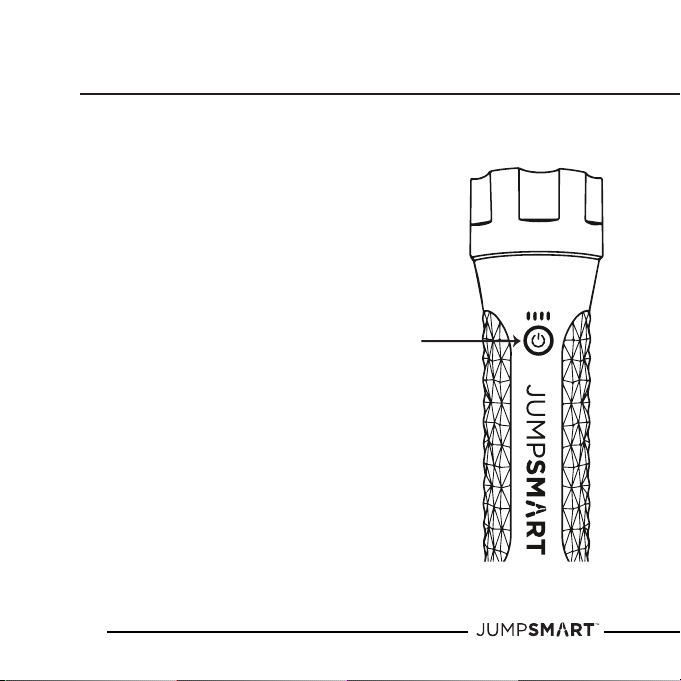
1. Single click the Flashlight Power Button to turn
the Flashlight on. The Flashlight is now in High Mode.
2. Single click the Flashlight Power Button to scan
through the Flashlight modes;
• High (default)
• Low
• S.O.S.
• Strobe
• O
3. To turn o the Flashlight without scanning
through the modes, press and hold the
Flashlight Power Button for
approximately 2 seconds.
NOTE: If the Flashlight and the Power Bank are being
used simultaneously, the light may appear dimmer.
USING THE RED FLASHING LIGHT
4. Press and hold the Flashlight Power Button
for approximately 2 seconds to turn
the Red Flashing Light on.
5. Single click the Flashlight Power
Button again to turn the Red Flashing Light o.
21
© Limitless Innovations, Inc.
Operation Instructions cont’d
USING THE POWER BANK
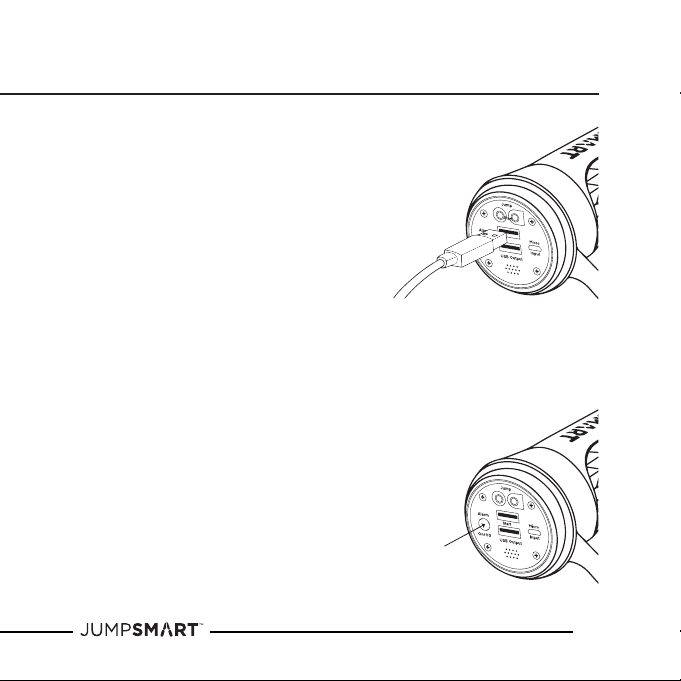
1. Remove the Cap from the Back Panel of the JumpSmart
2. Plug a USB cable into one of the
USB Charging Ports (Output).
3. The Battery Capacity Indicator
Lights will illuminate if properly
connected and ready to use.
4. Plug the opposite end of the USB cable
into a mobile device. The device will begin to charge.
5. Repeat steps 2 and 4 to charge a second mobile device.
NOTE: If the Flashlight and the Power Bank are being
used simultaneously, the device may charge at a slower rate.
NOTE: When using both USB Ports (Output), the power will be
shared between both ports.
USING THE S.O.S. AUDIBLE ALARM
1. Remove the Cap from the Back
Panel of the JumpSmart
2. Press the S.O.S. Power Button located
on the Back Panel of the JumpSmart to
activate the Alarm.
3. Press the S.O.S. Power Button again to
deactivate the Alarm.
22
© Limitless Innovations, Inc.
USING THE COMPASS
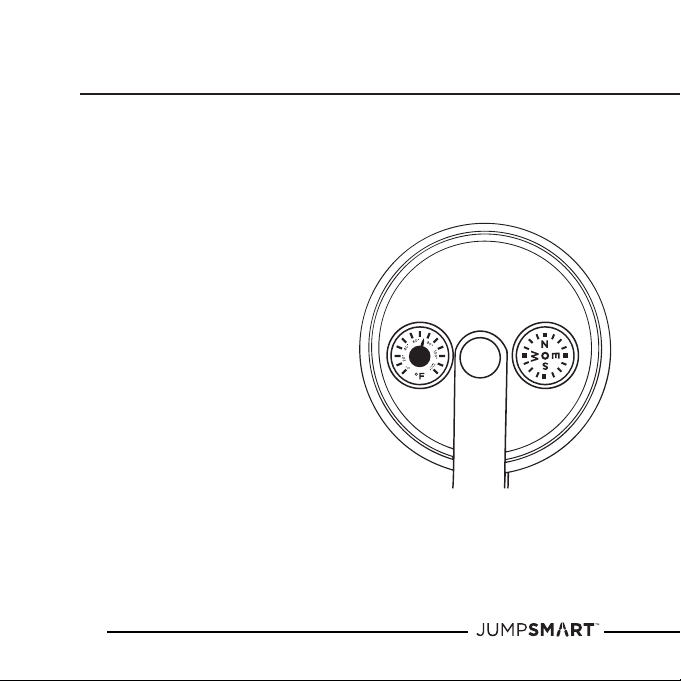
1. With the Cap attached, hold the
JumpSmart in a vertical position
directly in the front and center of your
body, or stand the JumpSmart on a
flat surface for a more accurate reading.
2. The Compass will adjust and point to
magnetic north.
USING THE THERMOMETER
1. The Thermometer will automatically
indicate the current temperature.
2. For an accurate reading, place the
JumpSmart out of direct sunlight
and wait approximately 5 minutes
for the thermometer to acclimate.
Operation Instructions cont’d

23
© Limitless Innovations, Inc.
Certification
ETL
JumpSmart is ETL certified to conform to ANSI/CAN/UL STD. 2743 and tested
to comply with FCC Standard Part 15 for safety and reliability under the United
States and Canadian standards.
FCC
This equipment has been tested and found to comply with the limits for a
Class B digital device, pursuant to Part 15 of the FCC Rules. These limits are
designed to provide reasonable protection against harmful interference in
a residential installation. This equipment generates, uses and can radiate
radio frequency energy and, if not installed and used in accordance with the
instructions, may cause harmful interference to radio communications.
However, there is no guarantee that interference will not occur in a particular
installation. If this equipment does cause harmful interference to radio or
television reception, which can be determined by turning the equipment o
and on, the user is encouraged to try to correct the interference by one or
more of the following measures:
a. Reorient or relocate the receiving antenna.
b. Increase the separation between the equipment and receiver.
c. Connect the equipment into an outlet on a circuit dierent from that
to which the receiver is connected.
d. Consult the dealer or an experienced radio/TV technician for help.
FCC NOTICE TO USERS: Unauthorized changes or modifications to this unit
not expressly approved by the party responsible for compliance could impair
the user’s ability to operate this device and will void the Warranty.


25
© Limitless Innovations, Inc.
We stand behind each product with a (1) Year Limited Warranty by Limitless
Innovations.
Your use of the product shall at all times require you to comply with all Terms,
Conditions of Use, Instructions and Recommendations set forth within the
JumpSmart and Terms and Conditions found at:
Manual:
LimitlessInnovations.com/Manual/JumpSmart.pdf
Warranty Terms & Conditions:
LimitlessInnovations.com/Warranty
Are you having issues with your JumpSmart product? Contact our support
team today at: LimitlessInnovations.com/Support or call us at (855) 843-4828
Subject to the exclusions contained below, Limitless Innovations, Inc.
(“Limitless”) warrants the JumpSmart product to be free from defects in
materials and workmanship under normal consumer usage for a period of
one (1) year from the date of original purchase, (the “JumpSmart Limited
Warranty”). As utilized herein, the term “JumpSmart” (or the singular,
JumpSmart product) shall include all products set forth above in the What’s
Included section of this User Manual that may be sold by Limitless now or in
the future.
This JumpSmart Limited Warranty is a consumer’s sole and exclusive remedy
regarding any express warranty claim by a consumer and is subject to the
exclusions on the following pages:
Limited Warranty

26
© Limitless Innovations, Inc.
Limited Warranty cont’d
Exclusions: The JumpSmart Limited Warranty shall not apply in the event of
the occurrence of any of the following:
1. Normal Wear and Tear. The JumpSmart Limited Warranty shall not
apply to cover the maintenance, repair and/or replacement of parts or the
JumpSmart products due to normal wear and tear by the consumer.
2. Abuse and Misuse. The JumpSmart Limited Warranty shall not cover
defects or damage that result in whole or in part from: (a) improper
operation, storage, misuse or abuse, accident or neglect by the consumer
(including, without limitation, physical damage, cracks and scratches to the
surface of the JumpSmart product; (b) contact with liquid, water, rain,
extreme humidity or heavy perspiration, sand, dirt or the like, extreme
heat, or food; (c) use of the JumpSmart product for commercial purposes; (d)
subjecting the JumpSmart product to abnormal usage or conditions; and/
or (e) other acts which are not the sole and absolute fault of the JumpSmart.
3. Unauthorized Service or Modification. The JumpSmart Limited Warranty
shall not cover defects or damages resulting in whole or in part from
service, testing, adjustment, installation, maintenance, alteration, or
modification in any way by someone other JumpSmart or its authorized
service centers.
4. Altered Products. The JumpSmart Limited Warranty shall not cover
defects or damages to a JumpSmart product with (a) serial numbers or
date tags that have, at any time, been removed, altered, or obliterated;

27
© Limitless Innovations, Inc.
Limited Warranty cont’d
(b) broken seals or that show evidence or tampering; (c) mismatched
board serial numbers; or (d) non-conforming or non-JumpSmart housings,
or components.
5. Communication Services. Defects, damage, or the failure of the JumpSmart
products due to any communication service or signal you may subscribe to
or use with the JumpSmart product or software.
WHO IS COVERED?
This Warranty extends only to the first consumer purchaser and is not
transferable to any third party nor applicable to any subsequent owner other
than the first consumer purchaser.
WHAT WILL LIMITLESS DO?
If Limitless determines, in its sole and absolute discretion, that a claim is
subject to the JumpSmart Limited Warranty, it will, at its sole option, repair or
replace the JumpSmart product or alternatively, it will, in its discretion, refund
the purchase price of any JumpSmart products or software. The JumpSmart
product replacement will be with a functionally equivalent reconditioned /
refurbished / pre-owned or new JumpSmart product or part.
For additional information, visit us at:
LimitlessInnovations.com/Support or call us at (855) 843-4828

28
© Limitless Innovations, Inc.
Limited Warranty cont’d
WHO DO I CONTACT TO MAKE A CLAIM?
In the event of any warranty claim under the JumpSmart Limited Warranty,
you can contact the telephone number below or provide a written
correspondence to the address below at which time and in response thereto,
you will receive instructions on how to ship any JumpSmart product at your
expense, to a Limitless authorized repair center. To obtain service, you must
include: (a) a copy of your receipt, bill of sale or other comparable proof
of purchase; (b) a written description of the problem; (c) the name if your
service provider, if applicable; and (d) your mailing address, email address and
telephone number.
Mailing Address
(Please call (855) 843-4828 first to obtain RMA #)
Limitless Innovations, Inc.
4800 Metalmaster Way
McHenry, IL 60050
WHAT OTHER LIMITATIONS ARE THERE?
ANY WARRANTY CLAIM SHALL BE LIMITED TO LIMITLESS COST OF
MATERIAL ON THE JUMPSMART PRODUCT DETERMINED TO HAVE A
MANUFACTURER’S DEFECT. IN NO EVENT SHALL LIMITLESS BE LIABLE TO
ANY PARTY FOR ANY LABOR COSTS OR ANY OTHER DIRECT, INDIRECT,

29
© Limitless Innovations, Inc.
CONSEQUENTIAL, INCIDENTAL OR SPECIAL DAMAGES, WHETHER IN
CONTRACT OR TORT AND LIMITLESS EXPRESSLY DISCLAIMS LIABILITY
FOR ANY DAMAGES OF ANY KIND ARISING UNDER ANY THEORY OF LAW
WHATSOEVER.
THE PERFORMANCE OF THE JUMPSMART PRODUCT DEPENDS ON THE
PURCHASER’S ADHERENCE TO MANUFACTURER PRODUCT INSTRUCTIONS
AND LIMITLESS WILL NOT BE RESPONSIBLE TO PURCHASER FOR ANY
DEVIATIONS THEREFROM. SOME STATES DO NOT ALLOW THE EXCLUSION
OR LIMITATION OF INCIDENTAL OR CONSEQUENTIAL DAMAGES, SO
THE ABOVE LIMITATION OR EXCLUSION REGARDING INCIDENTAL OR
CONSEQUENTIAL DAMAGES MAY NOT APPLY TO YOU. ALL IMPLIED
WARRANTIES, INCLUDING, WITHOUT LIMITATION, THE IMPLIED WARRANTY
OF MERCHANTABILITY AND THE IMPLIED WARRANTY OF FITNESS FOR
A PARTICULAR PURPOSE SHALL EXPIRE ON THE DATE WHICH IS 1 YEAR
FROM THE DATE OF FIRST PURCHASE OF THE JUMPSMART PRODUCT
BY THE CONSUMER. SOME STATES DO NOT ALLOW LIMITATIONS ON
HOW LONG AN IMPLIED WARRANTY LASTS, SO THE ABOVE LIMITATION
MAY NOT APPLY TO YOU. WITH RESPECT TO THAT PERIOD OF TIME
BEYOND THE JUMPSMART 1 YEAR LIMITED WARRANTY PERIOD, LIMITLESS
DISCLAIMS AND FURTHER MAKES NO WARRANTY OF ANY KIND, EXPRESS
OR IMPLIED, INCLUDING BUT NOT LIMITED TO, ANY WARRANTY OF
MERCHANTABILITY OR WARRANTY OF FITNESS FOR A PARTICULAR
PURPOSE.
Limited Warranty cont’d

30
© Limitless Innovations, Inc.
Limited Warranty cont’d
PLEASE NOTE THIS JUMPSMART LIMITED WARRANTY GIVES YOU SPECIFIC
LEGAL RIGHT, AND YOU MAY ALSO HAVE OTHER RIGHTS WHICH VARY
FROM STATE TO STATE.
NATIONAL STATUTORY RIGHTS
CONSUMERS IN SOME JURISDICTIONS MAY HAVE LEGAL RIGHTS UNDER
APPLICABLE NATIONAL LEGISLATION GOVERNING THE SALE OF
CONSUMER GOODS, INCLUDING, WITHOUT LIMITATION, NATIONAL LAWS
IMPLEMENTING EC DIRECTIVE 99/44. THESE RIGHTS ARE NOT AFFECTED
BY THE WARRANTIES IN THIS LIMITED WARRANTY.
For the full Warranty, Terms, and Conditions, please visit:
www.LimitlessInnovations.com/Warranty

31
© Limitless Innovations, Inc.
Copyright
All rights reserved. JumpSmart is a registered trademark of Limitless
Innovations, Inc. Design and specifications subject to change without notice.
Products may vary from images shown. All other trademarks included herein
are property of their respective owners.

Made in China
Phone: (855) 843-4828
Email: Support@LimitlessInnovations.com
Website: LimitlessInnovations.com
© Limitless Innovations, Inc.

JumpSmart 10-In-1 FAQ’s
FLASHLIGHT
Q. What features does the flashlight have?
A. The flashlight features four different light modes, plus a red flashing light. The modes
included: High-Beam, Low-Beam, S.O.S, Strobe, and Red Flashing.
Q. How do you turn the flashlight on?
A. To use the flashlight, single click the power button. To click through the flashlight
modes, continue to single click the power button. If you do not want to click through the
modes, press and hold the power button for 1-2 seconds until the flashlight turns off.
Q. How do you turn the red flashing light on?
A. To use the red flashing light, press and hold the power button for 1-2 seconds until the
red flashing light powers on. To turn the red flashing light off, single click the power
button.
JUMP STARTING
Q. Can you use the JumpSmart outdoors?
A. Yes, the JumpSmart is designed for use outside.
Please note: The JumpSmart should always be charged indoors or inside your vehicle.
Q. What kind of vehicles can I jump start with the JumpSmart?
A. The JumpSmart can jump start cars, trucks, boats, lawn mowers, motorcycles, ATVs, and
more that have engines that size from 4, 6, and 8-cylinder engines below 7.0L Gas and
4.0L Diesel.
Q. Will the JumpSmart be able to jump start my very dead battery?
A. The Jump Smart will be able to jump most batteries up to 8-cylinder, 7.0L Gas and 4.0L
Diesel. The JumpSmart does not recharge a dead battery, but instead provides the
power to start the vehicle.
Q. Can this jump start a diesel car?
A. The JumpSmart can jump up to a 4.0L diesel engine with ease.
Q. Can I use the JumpSmart to jump start my Hybrid?
A. The JumpSmart can jump start most vehicles with engines below V8, 7.0 liters. Please
refer to your vehicles owner’s manual or consult a mechanic if you have additional
questions about what size engine you have.

Q. What is the peak and cold cranking amps of the JumpSmart?
A. The JumpSmart can provide a peak current of 800 amps.
Q. Is the JumpSmart safe to use?
A. The JumpSmart has been 3
rd
party tested to ensure quality and safety.
Q. Can I use the JumpSmart to jump start a vehicle by myself?
A. Yes, the JumpSmart is designed to be operated with just one person. Please refer to the
instructions in the User Manual or on the Carrying Case to jump start a vehicle.
Q. What is the voltage?
A. The JumpSmart has a 12V output.
CHARGING THE JUMPSMART
Q. How do you charge the JumpSmart?
A. The JumpSmart can be charged at home or in the car using the included wall and vehicle
charging adapters and Micro USB Cable.
Q. Can I over-charge the JumpSmart?
A. No. There are safety features built into the JumpSmart that prevent the battery from
over-charging.
Q. Is the JumpSmart reusable?
A. Yes, the JumpSmart has a rechargeable battery and can be charged using the included
vehicle or wall chargers.
Q. How often do you have to charge it?
A. We recommend recharging the JumpSmart every 3 months whether it has been used or
not. This will ensure that the JumpSmart is always fully charged in case of an emergency.
Q. How long does it take to charge?
A. The JumpSmart takes approximately 4 hours to charge from a fully drained battery. The
JumpSmart will ship about 75% charged for your convenience.
Q. How many times can the JumpSmart be recharged?
A. The JumpSmart can be recharged approximately 1000 times. From there, the battery
will decay approximately 30%.
Q. Can you charge the JumpSmart in the car while you are driving?
A. Yes, you can charge the JumpSmart while driving. It will virtually take the same amount
of time to charge at home vs. in the car – about 4 hours from a completely drained
battery.

Q. How long will the JumpSmart hold its charge if not in use?
A. The environment the JumpSmart is stored it may affect the life of the charge. We
recommend recharging the JumpSmart every three months so that it is charged when
you need it.
Q. How do I know how much battery is left?
A. There are four lights above the power button that are representative of the percentage
of charge remaining on the JumpSmart. 4 lights = 100% charged. 1 light = 25% or below
battery remaining.
POWER BANK
Q. Does the JumpSmart have Android Type-C charging capability?
A. The JumpSmart does not have a Type-C USB port, but a USB-A to USB-C cable can be
plugged in to charge at a standard rate of up to 2.4 amps.
Q. Does the JumpSmart have Apple-Device charging capability?
A. Yes, the JumpSmart is able to charge an Apple device using one of the USB Charging
Ports.
Q. Can I charge my laptop with the JumpSmart?
A. The JumpSmart includes a USB charging port for USB-chargeable devices, but the
JumpSmart cannot charge a laptop.
Q. What is the amp charge?
A. The JumpSmart has 2 USB ports with a 2.4A total output. When using both USB Ports
(Output), the power will be shared between both ports.
Q. How long does the JumpSmart take to charge my phone?
A. Charging times vary depending upon the device, the age of the device and the level of
current power.
GENERAL
Q. How do I use the S.O.S. Alarm?
A. It takes only one press to activate and de-activate the S.O.S. Alarm.
Q. Can the JumpSmart be used outdoor?
A. Yes, the JumpSmart is designed for use outside and is rated IP65 certifying that it is dust
tight and water resistant.

Q. Can I take the JumpSmart on an airplane?
A. You should always refer to the airline carrier prior to flyer, but if you bring the
JumpSmart with you while traveling it MUST be carried on with you, not checked with
your baggage.
Q. What is the safe storage temperature range?
A. The ideal storage temperature for the JumpSmart is between 32°F to 104°F.
Q. What is the safe operating temperature range?
A. The JumpSmart can be stored and operated in temperatures ranging from 32°F to 104°F.
If the JumpSmart is exposed to extreme temperatures (-4°F - 140°F / -20°C - 60°C), it is
recommended to allow the JumpSmart to re-acclimate to the ideal temperatures before
using.
Q. Is there a warranty?
A. Every JumpSmart comes with a 1-Year Limited Warranty.
Q. What does mWh mean?
A. Milli Watt Hours.
Q. Who do I contact if I have a question or issue with the JumpSmart?
A. For any inquiries regarding the JumpSmart, please contact our support team at
Limitlesslnnovations.com/Support, email us at [email protected], or
call us at (855) 843-4828.
Q. Does the JumpSmart have serviceable parts?
A. No, the JumpSmart does not have serviceable parts and the Lithium Polymer battery
cannot be replaced.