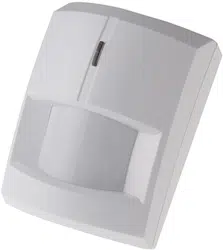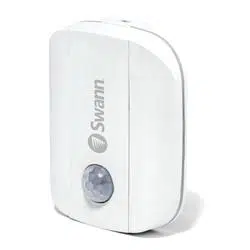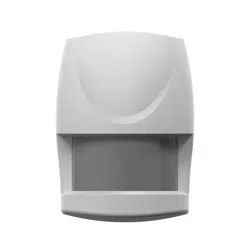


AXIST8341PIRMotionSensor
TableofContents
Solutionoverview...........................................3
Productoverview...........................................4
HowtoaddadevicetoaZ-WaveNetwork......................5
HowtotesttheZ-Wavedevice................................6
HowtoprogramtheZ-Wavedevice............................7
Z-Waveconguration.......................................10
Troubleshooting............................................12
Specications..............................................13
2
AXIST8341PIRMotionSensor
Solutionoverview
Solutionoverview
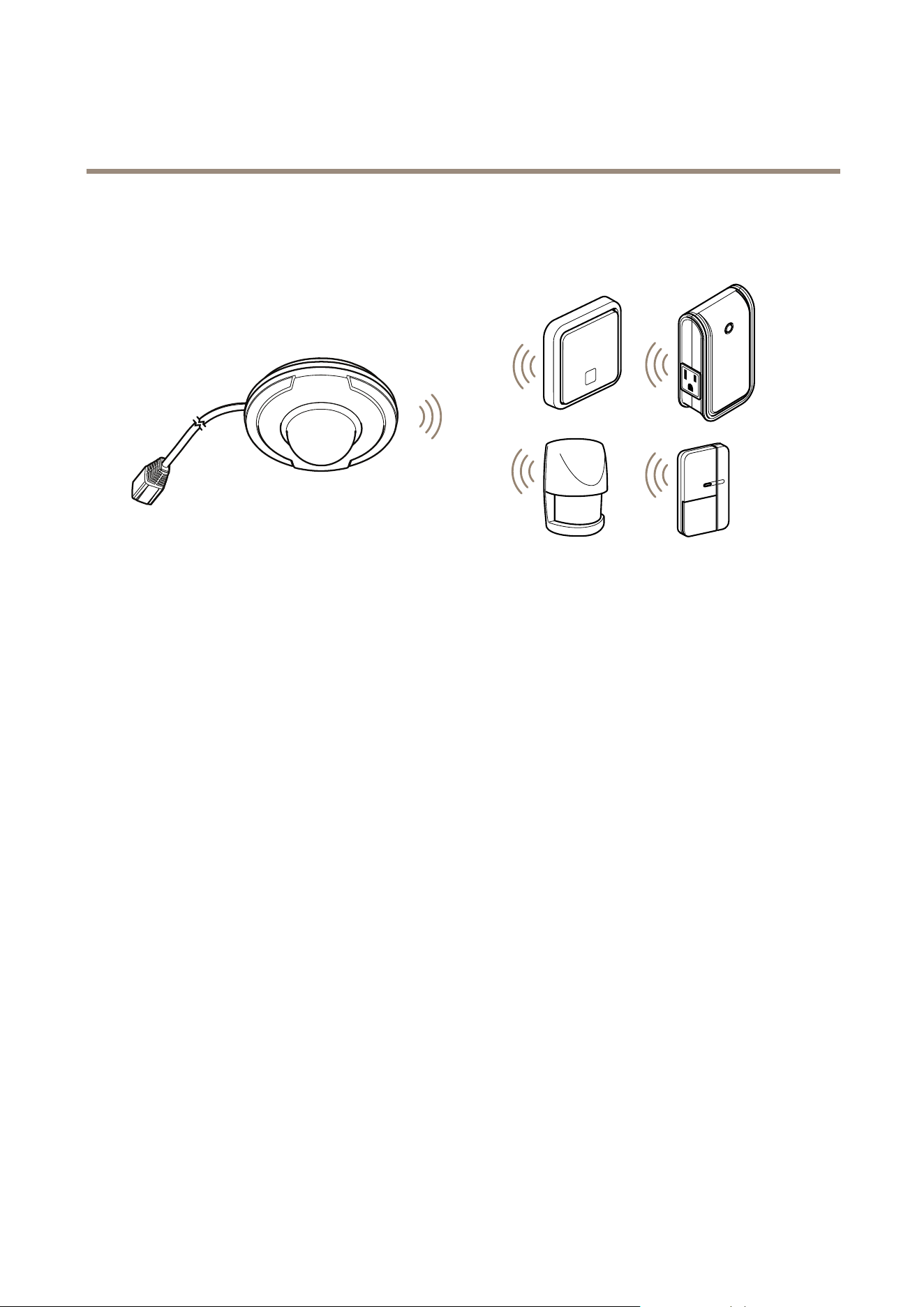
ThedeviceisZ-Wave®enabledandfullycompatiblewithanyZ-Waveenablednetwork.ThedevicecanbesetupinaZ-Wave
networktocommunicatedirectlywithotherend-devicessuchaslightingcontrollers,ortoreportdirectlytoaZ-Wavecontroller,
suchasAXISM5065PTZNetworkCamera.
3
AXIST8341PIRMotionSensor
Productoverview
Productoverview
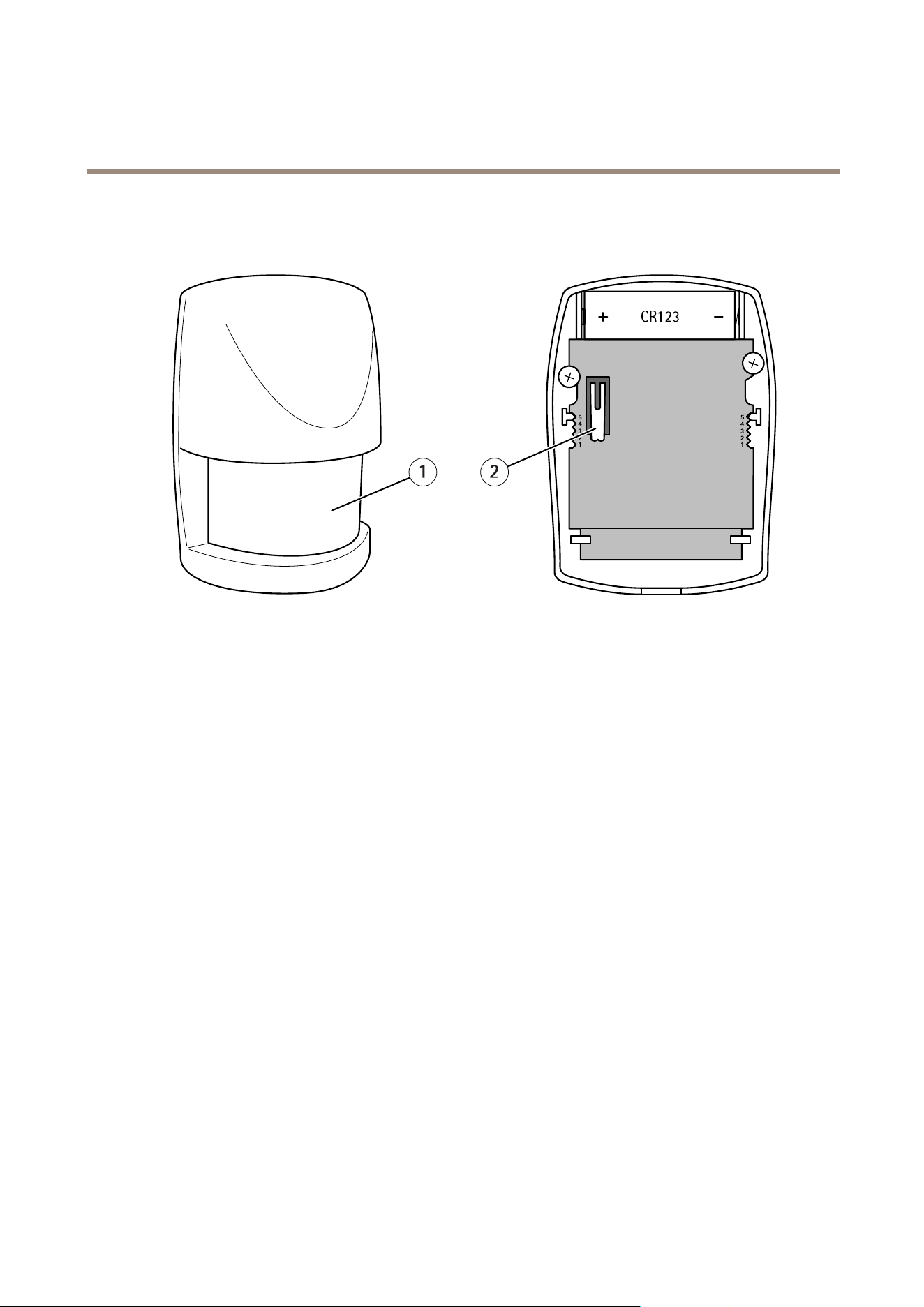
•PIRsensorwindow(LEDindicatorinside)
•Tamperswitch
4

AXIST8341PIRMotionSensor
HowtoaddadevicetoaZ-WaveNetwork
HowtoaddadevicetoaZ-WaveNetwork
Auto-inclusion
Themotionsensorsupportstheauto-inclusionfeature,whereitwillautomaticallyenterInclusionmodewhenrstpoweredup.
Thiswillalsoapplywhenpoweredupafterafactoryreset.
1.Useascrewdrivertodetachthebatterycover.
2.PuttheAXISM5065camera(orotherZ-Wavecontroller)intoinclusionmode.
3.Insert1CR1233Vbatteriesintothebatterycompartment,observingthecorrectpolarity.TheLEDonthedeviceshould
turnON.
4.EnterthePINnumberintotheZ-Wavecontroller.SeetheinstallationguideforwheretondthePINnumberonthedevice.
5.TheinclusionprocessshouldbecompletewhentheLEDstopsblinking.
6.Performatestbeforeyouretthebatterycover.SeeHowtotesttheZ-WaveDevice.
Manualinclusion
YoucanalsochoosetomanuallyaddtheZ-Wavedevicetoacontroldevice.Followthestepsbelow.
Note
Forbestresults,excludethedevicebeforestartingtheinclusionprocess.Formoredetailsseetheinstallationguide.
1.Useascrewdrivertodetachthebatterycover.
2.PuttheAXISM5065camera(orotherZ-Wavecontroller)intoinclusionmode.
3.Insert1CR1233Vbatteriesintothebatterycompartment,observingthecorrectpolarity.TheLEDonthedeviceshould
turnON.
4.Pressthetamperswitch3timeswithin1.5secondstoputtheunitintolearning(inclusion/exclusion)mode.
5.EnterthePINnumberintotheZ-Wavecontroller.SeetheinstallationguideforwheretondthePINnumberonthedevice.
6.TheinclusionprocessshouldbecompletewhentheLEDstopsblinking.
7.Performatestbeforeyouretthebatterycover.SeeHowtotesttheZ-WaveDevice.
Manualexclusion
1.Useascrewdrivertodetachthebatterycover.
2.Pressthetamperswitch3timeswithin1.5secondstoputtheunitintolearning(inclusion/exclusion)mode.
3.TheexclusionprocessshouldbecompletewhentheLEDstopsblinking.
4.Retthebatterycover.
5

AXIST8341PIRMotionSensor
HowtotesttheZ-Wavedevice
HowtotesttheZ-Wavedevice
Warm-up
Itwilltakethemotionsensorapproximately2minutestowarmupafterthebatteryisinserted.DuringthisperiodtheLEDbehindthe
lenswillturnon.WhentheredLEDturnsoff,thewarm-upprocedureiscompleteandthedeviceisreadytodetect.
•ThiswillnotaffecttheInclusion/Exclusionprocess.
•Afteryouremovethebattery,wait5secondsbeforeyouretit.
Quicktest
1.Ifthetamperswitchisnotpressedafterinclusion,thedevicewillenter“Testmode”,toallowyoutotestthedevice
beforeitismountedonthewall.
2.Ifmovementisdetectedduring“Testmode”,theLEDonthemotionsensorwilllightuponce,indicatingthattheunitis
workingproperly.There-triggertimeisabout5seconds.
3.Toexit“Testmode”andenternormalmode,pressthetamperswitchformorethan10seconds.
4.WhenthePIRistriggeredduringnormalmode,theredLEDwillnotlightup,andre-triggertimeisbasedonasetvalue.
Note
Important!MakesureyoucreateaZ-Wavecontrollereventthatislinkedtothebatterystatussignal.Inthiswayyouwill
getanoticationoraLEDindicationwhenadevicestartstoexperiencelowbatterypower.
6
AXIST8341PIRMotionSensor
HowtoprogramtheZ-Wavedevice
HowtoprogramtheZ-Wavedevice
Note
ProgrammingZ-WavedevicesusingaZ-Wavecontrollerisrecommendedforexperiencedusersonly.
Z-WaveGroup
ThedevicesupportstwodifferentZ-WaveAssociationGroups:
•Group1:Associationwith1Controllernode.
•Group2:Associationwith4nodes(i.e.end-devicessuchassmartplugsandotherlightingcontrollers).Thisallowsthe
devicetosendcommandsdirectlytootherdeviceswithouttheparticipationofthecontroller.Thishastheeffectthat
whenthedevicetriggers,allotherassociateddeviceswillalsobeoperated.
Note
AssociationgroupsupportcanvaryamongZ-WaveControllers.TheAXISM5065supportsZ-WaveAssociationGroup1.
Group1commands:
•WhenthedeviceispoweredupandisalreadyapartofaZ-Wavenetwork,itwillsendaNoticationReporttothenode
inGroup1.
•Whenthedetectorsensesmovement,theunitwillsendaNoticationReporttothenodesinGroup1.Whenmovement
stops,aNoticationReportwillbesentagaintoGroup1.
•Whenthedetector’sstatuschanges,thedevicewillsimultaneouslycheckitsbatterystatus.Ifthebatteryleveldropstoan
unacceptablelevel,thedevicewillsendabatteryreporttothenodesinGroup1.
•Whenyouperformafactoryreset,theunitwillsendDeviceResetLocallyNoticationtothenodeinGroup1.
Group2commands:
•Whenthedetectoristriggered,theunitwillsendBASIC_SETcommand,containingavalue,tothenodesinGroup2.
Z-WavePlus® ®
®
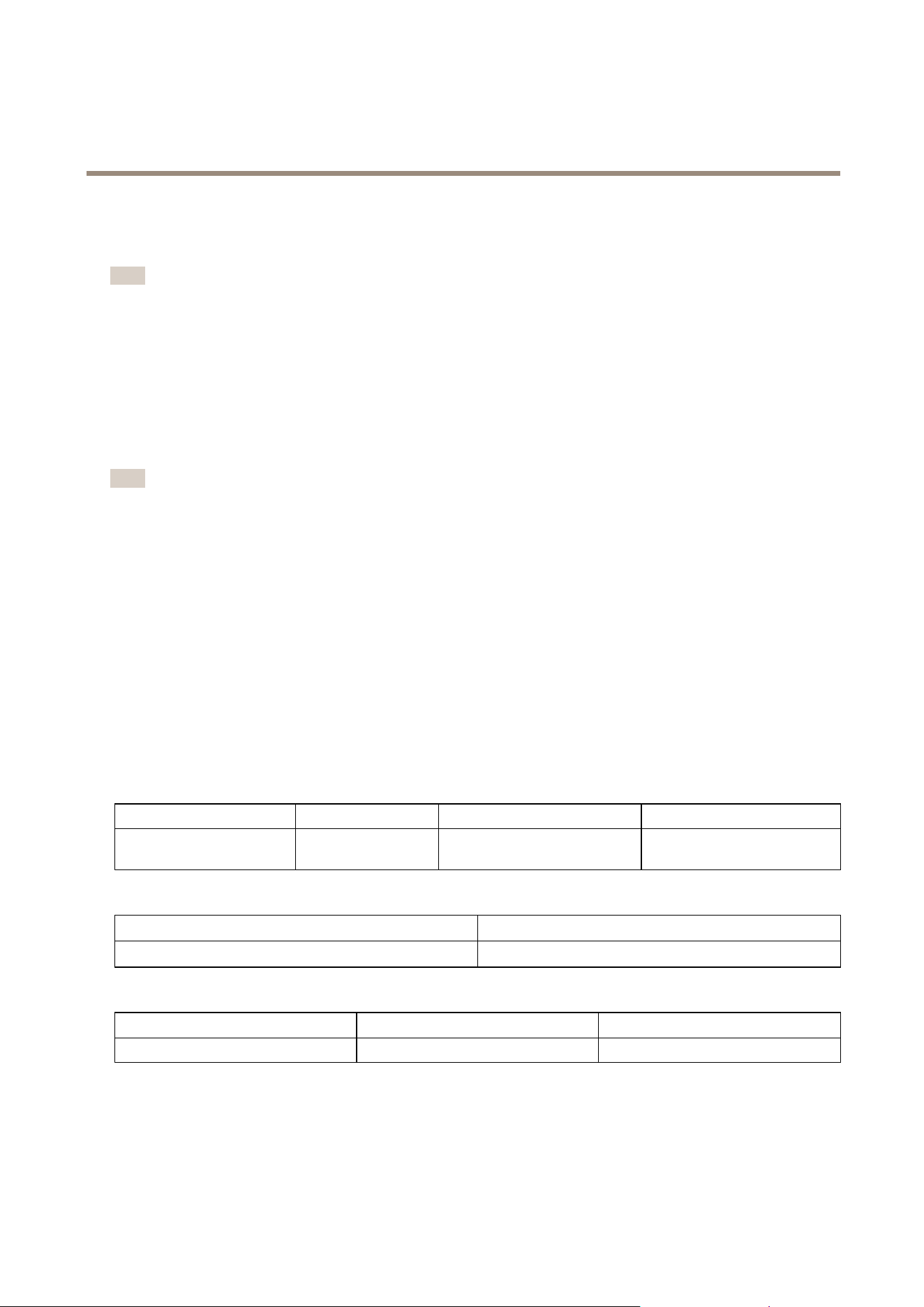
info
RoletypeNodetypeInstallerIconUserIcon
SlaveSleepingreport
Z-WavePlusnode
SensorNoticationDeviceType
(HomeSecurity)
SensorNoticationDeviceType
(HomeSecurity)
Version
Protocollibrary
3(Slave_Enhance_232_Library)
Protocolversion
4.3D(6.71.01)
Manufacturer
ManufacturerID
ProductTypeProductID
0x03640x00020x0001
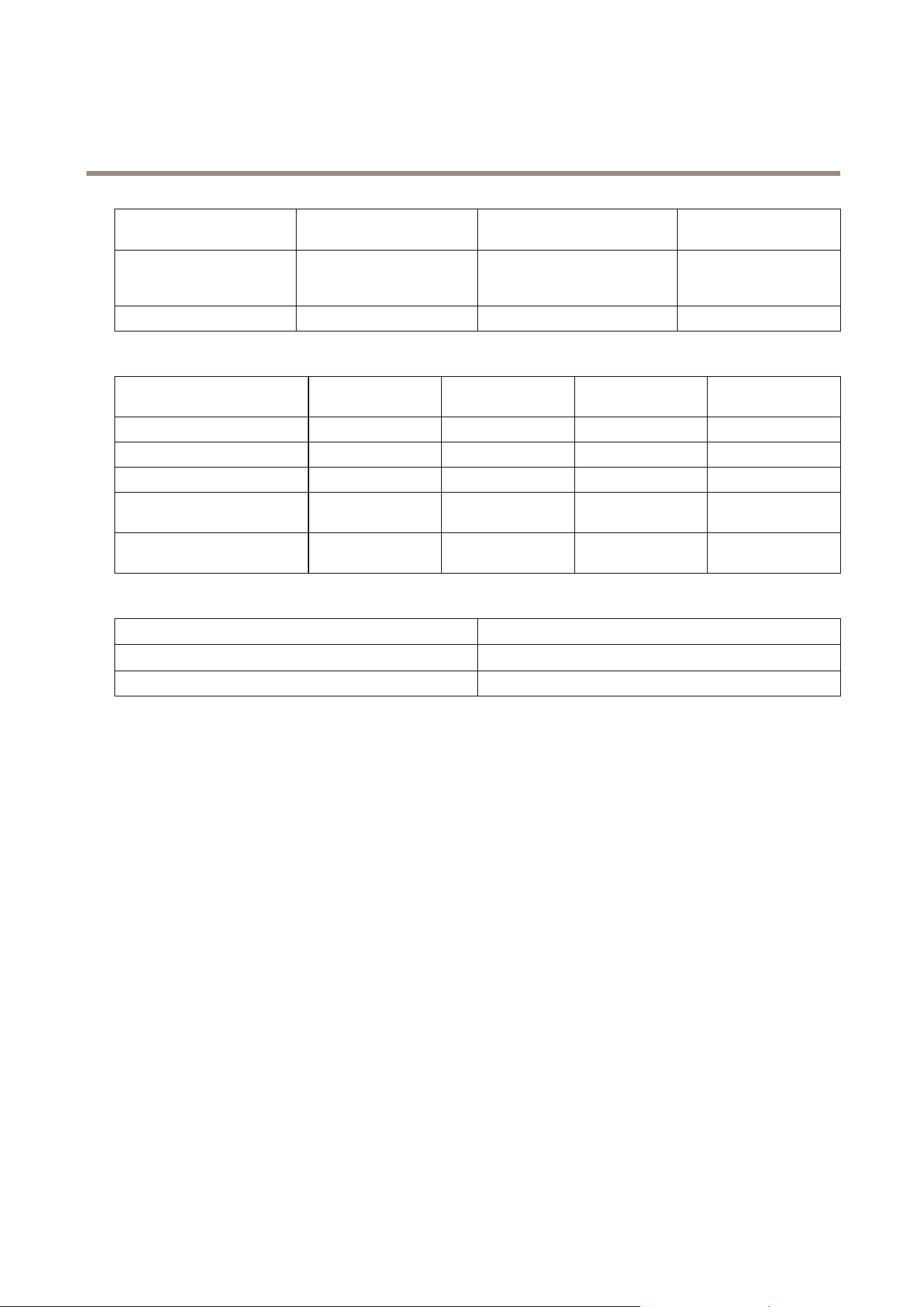
AGI(AssociationGroupInformation)table
7
AXIST8341PIRMotionSensor
HowtoprogramtheZ-Wavedevice
GroupProleCommandClass&Command
(List)Nbytes
GroupName(UTF-8)
1
General
BatteryReport
NoticationReport
DeviceResetLocallyNotication
Lifeline
2
ControlBasicSetPIRControl
Notication
EventTypeEventEventParameters
Length
EventParameters
Powerisappliedforthersttime
0x080x01
Null
PIRTriggerON
0x070x08
Null
PIRTriggerOFF
0x070x000x010x08
Tamperswitchpressedmore
than10seconds
0x070x000x010x03
Tamperswitchpressedmore
than10secondsandreleased
0x070x03
Null
Battery
BatteryReport(value)
Description
20~100
BatteryLevel(%)
0xFFLowBattery
Commandclasses
Thisproductsupportsthefollowingcommandclasses:
•COMMAND_CLASS_ZWAVEPLUS_INFO_V2
•COMMAND_CLASS_ASSOCIATION_V2
•COMMAND_CLASS_ASSOCIATION_GRP_INFO
•COMMAND_CLASS_TRANSPORT_SERVICE_V2
•COMMAND_CLASS_VERSION_V2
•COMMAND_CLASS_MANUFACTURER_SPECIFIC_V2
•COMMAND_CLASS_DEVICE_RESET_LOCALLY
•COMMAND_CLASS_POWERLEVEL
•COMMAND_CLASS_SECURITY
•COMMAND_CLASS_SECURITY_2
•COMMAND_CLASS_SUPERVISION
•COMMAND_CLASS_FIRMWARE_UPDATE_MD_V4
•COMMAND_CLASS_BATTERY
•COMMAND_CLASS_WAKE_UP_V2
8
AXIST8341PIRMotionSensor
HowtoprogramtheZ-Wavedevice
•COMMAND_CLASS_NOTIFICATION_V4
•COMMAND_CLASS_CONFIGURATION
Wake-upcommandclass
AfterthedetectorhasbeenincludedinaZ-Wavenetworkitwillgotosleep,butwillperiodicallysendawake-upnotication
commandtothecontrolleratapresetperiod.Thedevicewillstayawakeforatleast10secondsandthengobacktosleep,to
conservebatterylife.
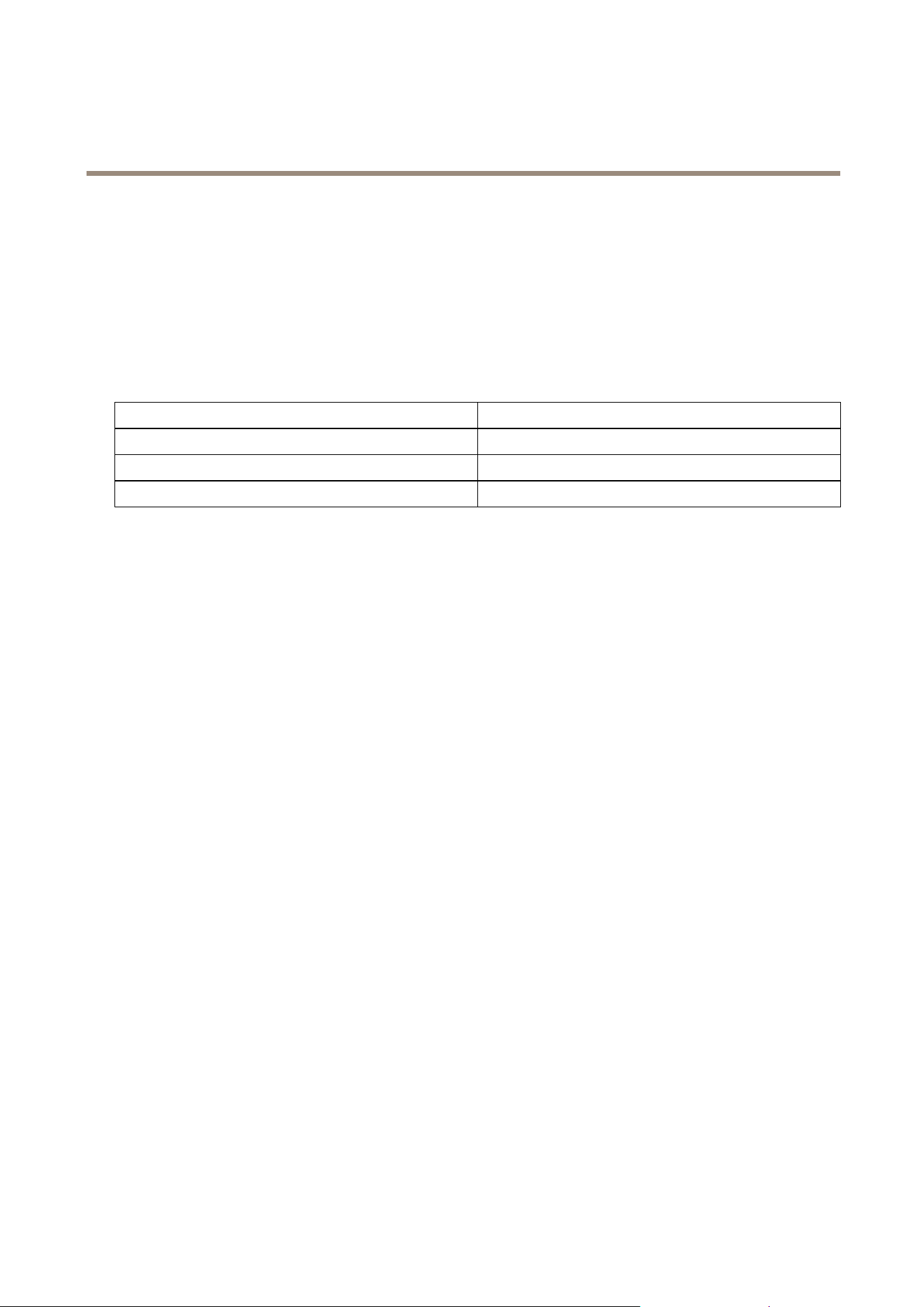
Thetimeintervalbetweenwake-upnoticationcommandscanbesetinthewake-upcommandclass,basedontherangevalues
below:
Minimumwake-upinterval
600s(10minutes)
Maximumwake-upinterval
86400s(1day)
Defaultwake-upinterval
14400s(4hours)
Wake-upintervalstepseconds
600s(10minutes)
9

AXIST8341PIRMotionSensor
Z-Waveconfiguration
Z-Waveconfiguration
ThefollowinginformationisforpersonswithexperienceofsettingupaZ-Wavesystem,orforsomeonethathascomputersoftware
runningaZ-Wavecontroller.PleasefamiliarizeyourselfwiththeZ-Wavecontroller’ssoftwarebeforegettingstarted.
Tominimizebatterypowerconsumption,RFonthedeviceisswitchedoffbydefault.Inordertostartthesetupprocess,pressthe
tamperswitchoncetoturnontheRFpowerfor30seconds.YouwillthenseetheLEDstarttoblinkonceasecond.Ifsetupisnot
completedwithin30seconds,pressthetamperswitchoncemoretocontinue.
•Basicsetlevel
WhenaBasicSetCommandissentandcontainsavalue,thereceiverwillprocessit.Forexample,alampmodulewould
receiveaBasicSetcommandthatdeterminesthedimlevel.
Example:
1-99:ON(BinarySwitchDevice)
DimLevel(MultilevelSwitchDevice)
FunctionParameternumber
Size
Range
Default
BasicSetlevel
11
1~9999
•Sensitivitylevel(PIRsensoronly)
Foroptimalefciency,itisrecommendedtotestthedetector’sresponsetomovementsatthefarthestreachofthe
coverageareawhenyouuseitforthersttime.Ifmovementscannotbedetectedaccurately,simplyadjustthesensitivity
levelwiththeCongurationParameter#3.Thisparametercanbeconguredfrom1to10,where1islowsensitivity
and10isthehighestsensitivity.
FunctionParameternumber
Size
Range
Default
Sensitivitylevel
3
1
1~106
•Re-triggerintervalsetting(PIRsensoronly)
Thecongurationparameterusedtoadjustthere-triggerintervalafterthedetectorhasbeentriggeredasconguration
parameter#4.Noresponsewillbemadeduringthisintervalifmovementisdetected.Thetimeintervalcanbeset
from5to3600seconds.
FunctionParameternumber
Size
Range
Default
Re-triggerinterval
4
2
5~3600(sec)
180
•Luxlevel
Youcansetapercentagefortheluxlevel,whichdetermineswhenthelightsensorwillbeactivated.Iftheambient
illuminationdropsbelowthesetpercentage,andapersonmovesacrossorwithintheprotectedarea,thedetectorwill
sendaZ-WaveONcommand(i.e.BasicSetcommand(Value=BasicSetLevel))tothecontrollerandactivateconnected
modulesandlighting.Thepercentagecanbesetfrom1%to100%.
FunctionParameternumber
Size
Range
Default
Luxlevel
51
1~100%20
On-offduration
Theon-offdurationsettingcanbeusefulifthedetectorisconnectedtoamoduleorlighting.Thedurationdetermineshowlongthe
module/lightingshouldstayON.Forexample,alampmoduleturnsoff100secondsafterithasbeenturnedon.Thedurationcanbe
conguredtolast5to3600seconds.
10

AXIST8341PIRMotionSensor
Z-Waveconfiguration
FunctionParameternumber
Size
Range
Default
On-OffDuration
62
5~3600(sec)
15
1 1
AXIST8341PIRMotionSensor
Troubleshooting
Troubleshooting
Ifyoucan’tndwhatyou’relookingforhere,trythetroubleshootingsectionataxis.com/support
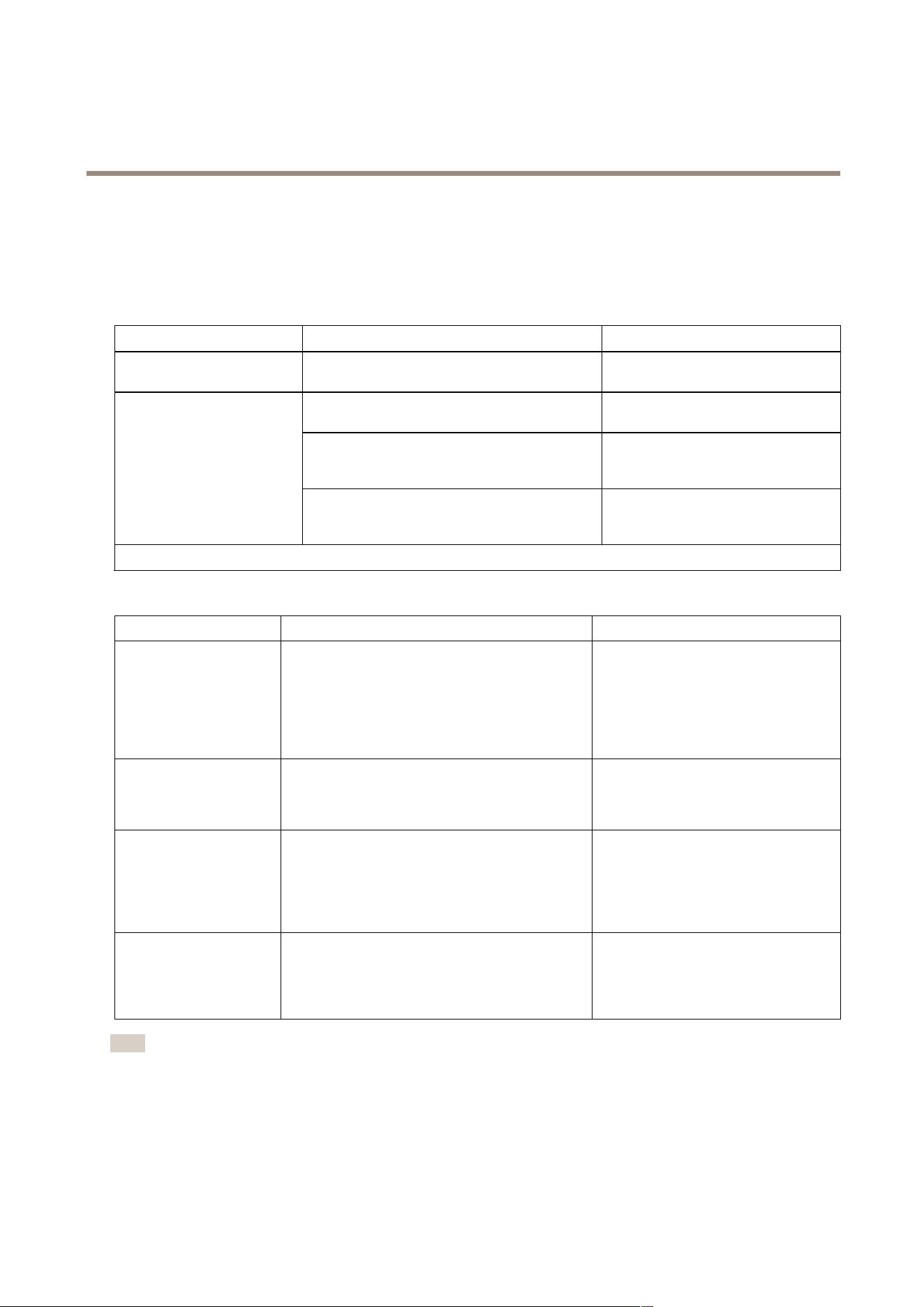
ThetablebelowexplainsthestatusintheZ-WavecontrolleraswellastheLEDindicationonthedevice.
Action/Status
DescriptionLEDindication
NonodeIDTheZ-Wavecontrollercouldnotndthedeviceand
didnotprovideanodeID.
2secondson,2secondsoff,for2
minutes.
1.Pressthetamperswitch3timeswithin1.5
secondstoputthedeviceintoexclusionmode.
2.Within1secondofstep1,pressthetamper
switchagainandholduntiltheLEDisoff(about
5seconds).
FactoryReset
(Thisshouldonlybeused
whenthecontrollerisnot
responding.)
3.NodeIDisexcluded.Thedevicerevertstofactory
defaultstateandwillbeinauto-inclusionmodefor
4minutes.
2secondson,2secondsoff,for2
minutes.
Failureorsuccessinincluding/excludingtheIDcanbeviewedonaZ-Wavecontroller.
Thetablebelowlistssometypicalproblemsencountered:
Symptom
PossiblecauseRecommendation
Cannotperforminclusion
andassociation.
1.Thedeviceisstillconnected,orhas
accidentallybeenincludedinaprevious
network.
2.TheenteredPINcodeisincorrect.
3.Thebatteryhasrunoutofpower.
4.Batterypolarityisreversed.
1.Excludethedevicebefore
includingitagain.
2.Makesureyouhaveentered
thecorrectPINcode
3.Replacethebattery.
4.Retthebatterywiththe
correctpolarity.
Cannotcontrolthe
connectedmodules.
1.Thedeviceisstillconnected,orhas
accidentallybeenincludedinaprevious
network.
2.Thebatteryhasrunoutofpower.
1.Excludethedevicebefore
includingitagain.
2.Replacethebattery.
Thedetectorisnot
functioningproperly.
1.Thedeviceisstillconnected,orhas
accidentallybeenincludedinaprevious
network.
2.Thebatteryhasrunoutofpower.
3.Thedetectorismountedabovearadiator
orheater.
1.Excludethedevicebefore
includingitagain.
2.Replacethebattery.
3.Removethesourceof
interferenceorreposition
thedetector.
Theeventlistisnotworking
properly.
1.Thedeviceisstillconnected,orhas
accidentallybeenincludedinaprevious
network.
2.Thecontroller’srmwareisoutdated.
3.Thebatteryhasrunoutofpower.
1.Excludethedevicebefore
includingitagain.
2.Makesurethecontrollerhas
thelatestrmware.
3.Replacethebattery.
Note
Forbestresults,excludethedevicebeforestartingtheinclusionprocess.Formoredetailsseetheinstallationguide.
12

AXIST8341PIRMotionSensor
Specifications
Specifications
Tondthelatestversionoftheproduct’sdatasheet,gototheproductpageataxis.comandlocateSupport&Documentation.
Specications
Battery
CR1233.0VLithiumBattery
Batterylife
1year*
Range
Upto100m(328ft)lineofsight
Warm-uptimeAbout2minutes
PIRdetectioncoverage
Upto10m(33ft)x110°(at1.8m(5.9ft)mountingheight&25°C(77°F)
Operatingfrequency
908.42MHz(US,922.5MHz(JP),868.42MHz(EU)
FCCIDFU5SP817
Specicationsaresubjecttochangewithoutnotice.
*measuredat10triggersperday.
13

UserManualVer.M2.5
AXIST8341PIRMotionSensor
Date:February2019
©AxisCommunicationsAB,2017-2019
PartNo.T10117079