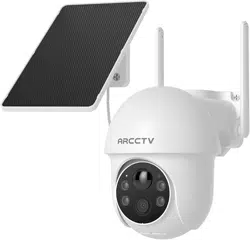
ARCCTV Q01 Solar Security Cameras Wireless Outdoor, 4MP 360° View Battery Powered Outdoor Camera, Night Vision with Spotlight, 2-Way Audio, PIR Motion Sensor, 2.4G/5G Dual Band WiFi, SD/Cloud Storage

Product's Documents

Below are documents related to this product, you can read online or download:
Q01 photo

1. Overview

The ARCCTV Q01 is a wireless outdoor security camera powered by a rechargeable battery and a built-in solar panel. It features 4MP resolution, 360-degree pan-tilt viewing, color night vision, two-way audio, and PIR motion detection. The camera connects via dual-band Wi-Fi (2.4GHz/5GHz) and supports both local microSD card and optional cloud storage.

ARCCTV Q01 Solar Security Camera product image showing camera and solar panel Close-up view of the ARCCTV Q01 camera unit

2. Package Contents

  • Camera Body
  • Solar Panel
  • Mounting Screw
  • User Manual

3. Key Features & Specifications

3.1 Video & Image

  • Resolution: 4MP Ultra HD (2560×1440 pixels)
  • Video Format: MP4, H.265 encoding
  • Viewing Angle: 360 degrees (355° horizontal pan, 90° vertical tilt)
  • Night Vision: Color night vision with spotlight, effective range up to 33 feet
  • Photo Sensor: CMOS
  • Focus Type: Fixed Focus

3.2 Power & Connectivity

  • Power Source: Rechargeable battery with integrated high-efficiency solar panel
  • Connectivity: Dual-band Wi-Fi (2.4GHz & 5GHz), Bluetooth for initial setup
  • Controller Compatibility: Amazon Alexa

3.3 Audio & Detection

  • Audio: Two-way audio with built-in microphone and speaker
  • Motion Sensor: PIR (Passive Infrared) motion detection

3.4 Storage

  • Local Storage: MicroSD card slot (supports up to 128GB, card not included)
  • Cloud Storage: Optional subscription service for remote backup and advanced features

3.5 Physical Specifications

  • Dimensions: 8.39 x 5.16 x 6.1 inches
  • Weight: 1.83 pounds (0.83 kg)
  • Material: Plastic
  • Weather Resistance: Waterproof for outdoor use
  • Mounting: Wall mount (screw-in installation)

4. Installation & Setup Guide

4.1 Pre-Installation Checklist

  • Ensure your smartphone is connected to a 2.4GHz or 5GHz Wi-Fi network.
  • Download the "ARCCTV" app from the Apple App Store or Google Play Store.
  • Fully charge the camera's battery using the solar panel or an alternative method before first use if possible.
  • Choose a mounting location with clear sunlight exposure for the solar panel.

4.2 Mounting the Camera

  1. Use the included mounting screw to attach the camera bracket to your desired wall or surface.
  2. Attach the camera body securely to the mounted bracket.
  3. Position the solar panel in a location where it will receive direct sunlight for several hours each day. Connect its cable to the port on the camera.
  4. Ensure the camera is within range of your Wi-Fi router. For initial setup, it is recommended to be as close to the router as possible.
Illustration showing camera installation and solar panel placement

4.3 App Setup & Camera Connection

  1. Open the ARCCTV app on your smartphone and create an account or log in.
  2. Tap the "+" or "Add Device" button within the app.
  3. Select the camera model "Q01" from the list.
  4. Follow the in-app instructions, which will guide you to:
    • Power on the camera.
    • Connect your phone to the camera's temporary Wi-Fi signal (via Bluetooth).
    • Select your home Wi-Fi network (2.4GHz or 5GHz) and enter the password.
  5. Wait for the camera to connect to your network. A confirmation message will appear in the app.
Note: Avoid moving the camera out of your Wi-Fi coverage area after setup. The camera will automatically select the best band (2.4GHz or 5GHz) for operation.

5. Using Your Camera

5.1 Live View & PTZ Control

Open the ARCCTV app and select your camera to view the live feed. Use the on-screen directional pad or swipe gestures to pan (355°) and tilt (90°) the camera lens remotely.

5.2 Motion Alerts & Recording

  • The PIR sensor will detect motion and send a push notification to your phone.
  • You can adjust the motion sensitivity and detection zone within the app settings.
  • When motion is detected, the camera can:
    • Record a video clip to the inserted microSD card.
    • If subscribed, back up the clip to cloud storage.
    • Activate the spotlight and send an alert.
Diagram showing PIR motion detection zone and alert notification on a phone

5.3 Night Vision & Spotlight

The camera automatically switches to night vision mode in low light. The built-in spotlight can be set to activate upon motion detection, providing color night vision. Manual control of the spotlight is also available within the app.

Comparison image showing camera's color night vision with spotlight versus standard infrared night vision

5.4 Two-Way Audio

In the live view screen, tap the microphone icon to speak through the camera's built-in speaker. Tap the speaker icon to listen to audio from the camera's surroundings.

5.5 Storage Playback

  • Local Playback: Access recordings stored on the microSD card via the "Playback" section in the app. Videos are organized by date and time.
  • Cloud Playback: If you have a cloud subscription, recordings can be accessed remotely from the "Cloud" section, often featuring AI event tagging.
Illustration showing local storage with microSD card and optional cloud storage backup Screenshot of the ARCCTV app interface showing video playback and event list

6. Maintenance & Troubleshooting

6.1 Solar Panel & Battery

  • Periodically wipe the solar panel with a soft, dry cloth to ensure optimal charging efficiency.
  • In prolonged cloudy weather, the battery may deplete. Monitor the battery level within the ARCCTV app.

6.2 Common Issues

  • Camera won't connect: Ensure you are within range of your router during setup. Restart the camera and your router. Confirm your Wi-Fi password is correct.
  • No motion alerts: Check that motion detection is enabled in the app settings. Adjust the sensitivity or detection zone.
  • Poor video quality: Check your Wi-Fi signal strength at the camera's location. The camera performs best on a strong, stable connection.
  • Camera offline: Check the solar panel connection and ensure the battery is charged. Verify your home internet is working.

7. Warranty & Support

For warranty information about this product, please click here.

Manufacturer: Shenzhen Anran Security Technology Co.,Ltd

Model: Q01

Reference file: ARCCTV Q01 Solar Security Cameras Wireless Outdoor, 4MP 360° View Battery Powered Outdoor Camera, Night Vision with Spotlight, 2-Way Audio, PIR Motion Sensor, 2.4G/5G Dual Band WiFi, SD/Cloud Storage

Specifications

Indexed Terms: Dual View, 2.4G, PIR Sensor, Security

ARCCTV Q01 Questions and Answers