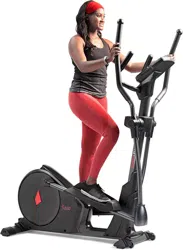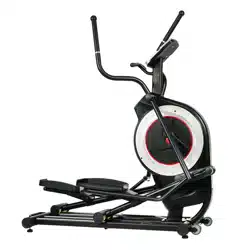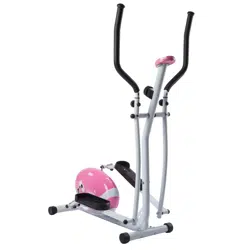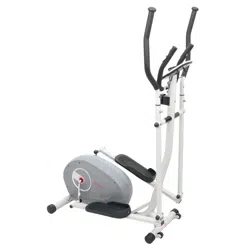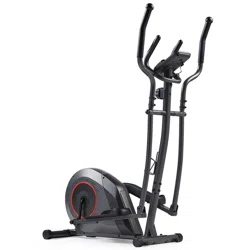
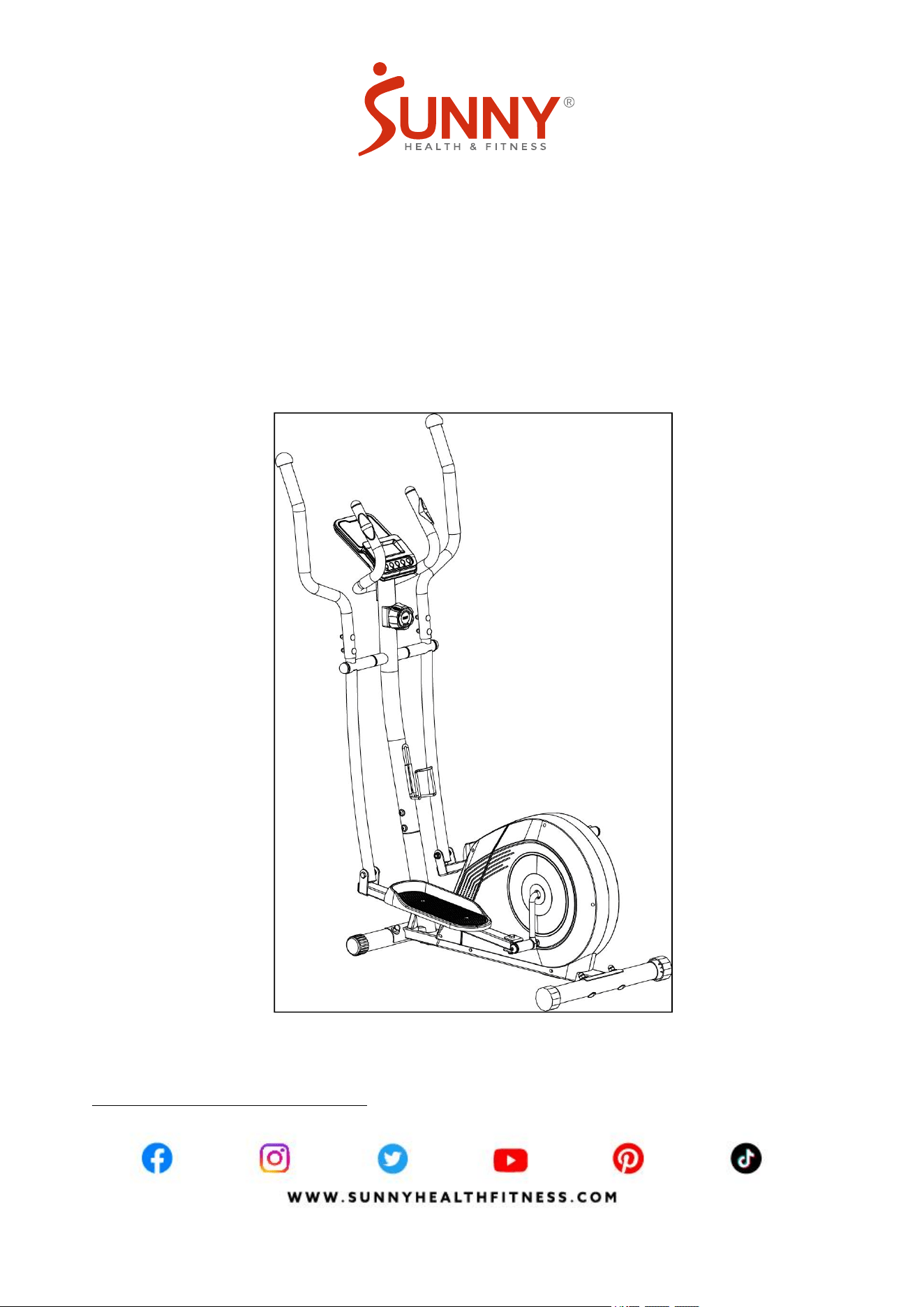
COREZY 16-LEVEL SMART MAGNETIC
RESISTANCE ELLIPTICAL
SF-E324005
USER MANUAL
IMPORTANT! Please retain owner’s manual for maintenance and adjustment instructions. Your
satisfaction is very important to us, PLEASE DO NOT RETURN UNTIL YOU HAVE CONTACTED
US: [email protected] or 1-877-90SUNNY (877-907-8669).
IMPORTANT SAFETY INFORMATION

1
We thank you for choosing our product. To ensure your safety and health, please use this
equipment correctly. It is important to read this entire manual before assembling and using the
equipment. Safe and effective use can only be achieved if the equipment is assembled, maintained,
and used properly. It is your responsibility to ensure that all users of the equipment are informed of
all warnings and precautions.
1. Before starting any exercise program, you should consult your physician to determine if you
have any medical or physical conditions that could put your health and safety at risk or prevent
you from using the equipment properly. Your physician’s advice is essential if you are taking
medication that affects your heart rate, blood pressure, or cholesterol level.
2. Be aware of your body’s signals. Incorrect or excessive exercise can damage your health. Stop
exercising if you experience any of the following symptoms: pain, tightness in your chest,
irregular heartbeat, shortness of breath, lightheadedness, dizziness, or feelings of nausea. If
you do experience any of these conditions, you should consult your physician before continuing
with your exercise program.
3. Keep children and pets away from the equipment. The equipment is designed for adult use only.
4. Use the equipment on a solid, flat level surface with a protective cover for your floor or carpet.
To ensure safety, the equipment should have at least 2 feet (60 CM) of free space all around it.
5. Ensure that all nuts and bolts are securely tightened before using the equipment. The safety of
the equipment can only be maintained if it is regularly examined for damage and/or wear and
tear.
6. Always use the equipment as indicated. If you find any defective components while assembling
or checking the equipment, or if you hear any unusual noises coming from the equipment during
exercise, discontinue use of the equipment immediately and do not use until the problem has
been rectified.
7. Wear suitable clothing while using the equipment. Avoid wearing loose clothing that may
become entangled in the equipment.
8. Do not place fingers or objects into the moving parts of the equipment.
9. The maximum weight capacity of this unit is 300 lbs (135 kgs).
10. The equipment is not suitable for therapeutic use.
11. To avoid bodily injury and/or damage to the product or property, proper lifting and moving are
required.
12. Your product is intended for use in cool, dry conditions. You should avoid storage in extreme
cold, hot, or damp areas as this may lead to corrosion and other related problems.
13. This equipment is designed for indoor and home use only; it is not intended for commercial use.
1
2
PRE-ASSEMBLY CHECK LIST
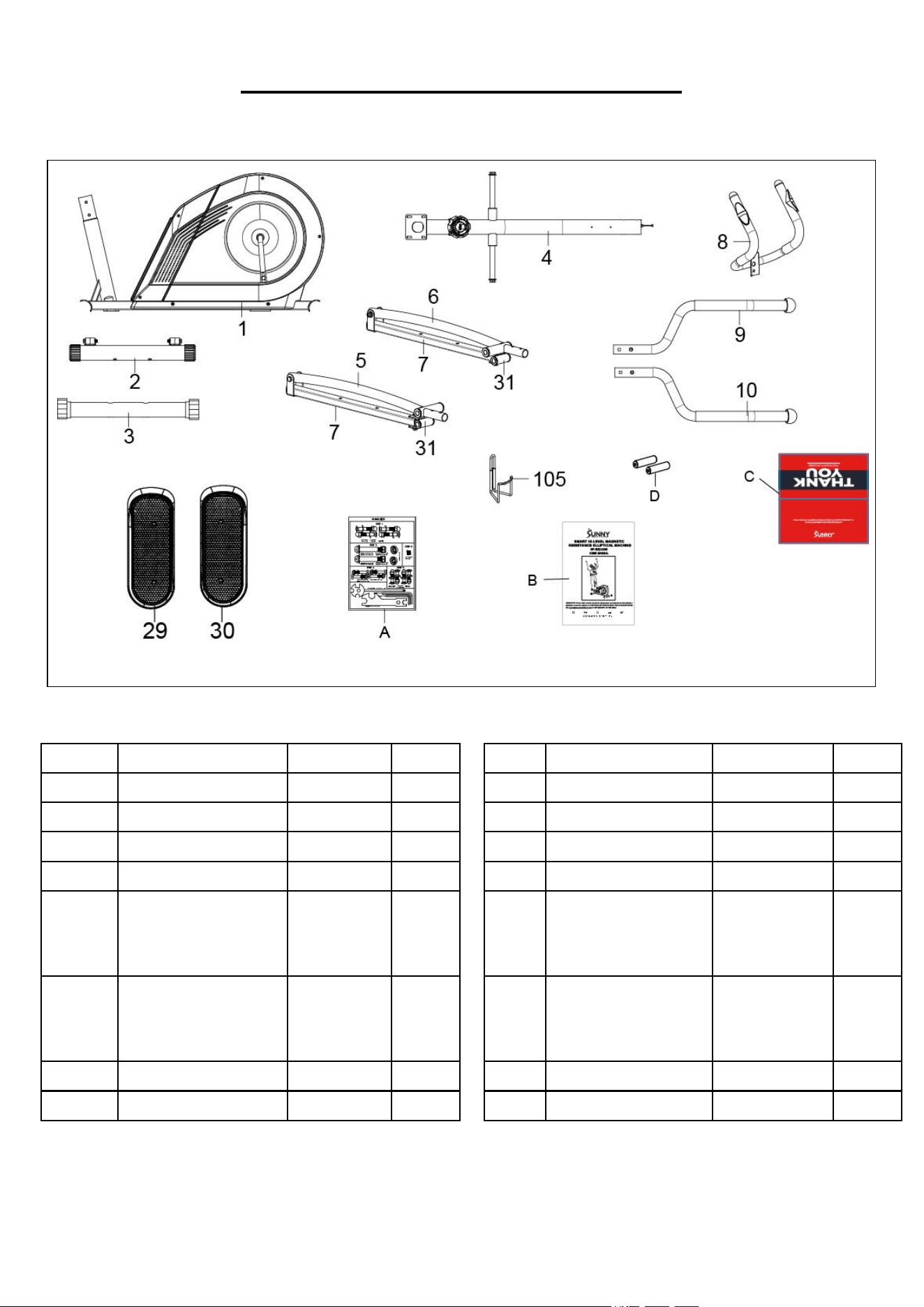
Before you start to assemble, please make sure all parts are included
No.
Description
Spec.
Qty
No.
Description
Spec.
Qty
1
Main Frame
1
10
Right Handrail
Ф32*2.0
1
2
Front Stabilizer
1
29
Left Foot Pedal
1
3
Rear Stabilizer
1
30
Right Foot Pedal
1
4
Front Post
1
105
Bottle Holder
1
5/7/31
Left Handrail Arm/
Foot Bar Tube/
U Bracket
1 SET
A
Hardware Package
1
6/7/31
Right Handrail Arm/
Foot Bar Tube/
U Bracket
1 SET
B
Manual
1
8
Handlebar
1
C
Thank You Card
1
9
Left Handrail
Ф32*2.0
1
D
Battery
AA
1
2
3
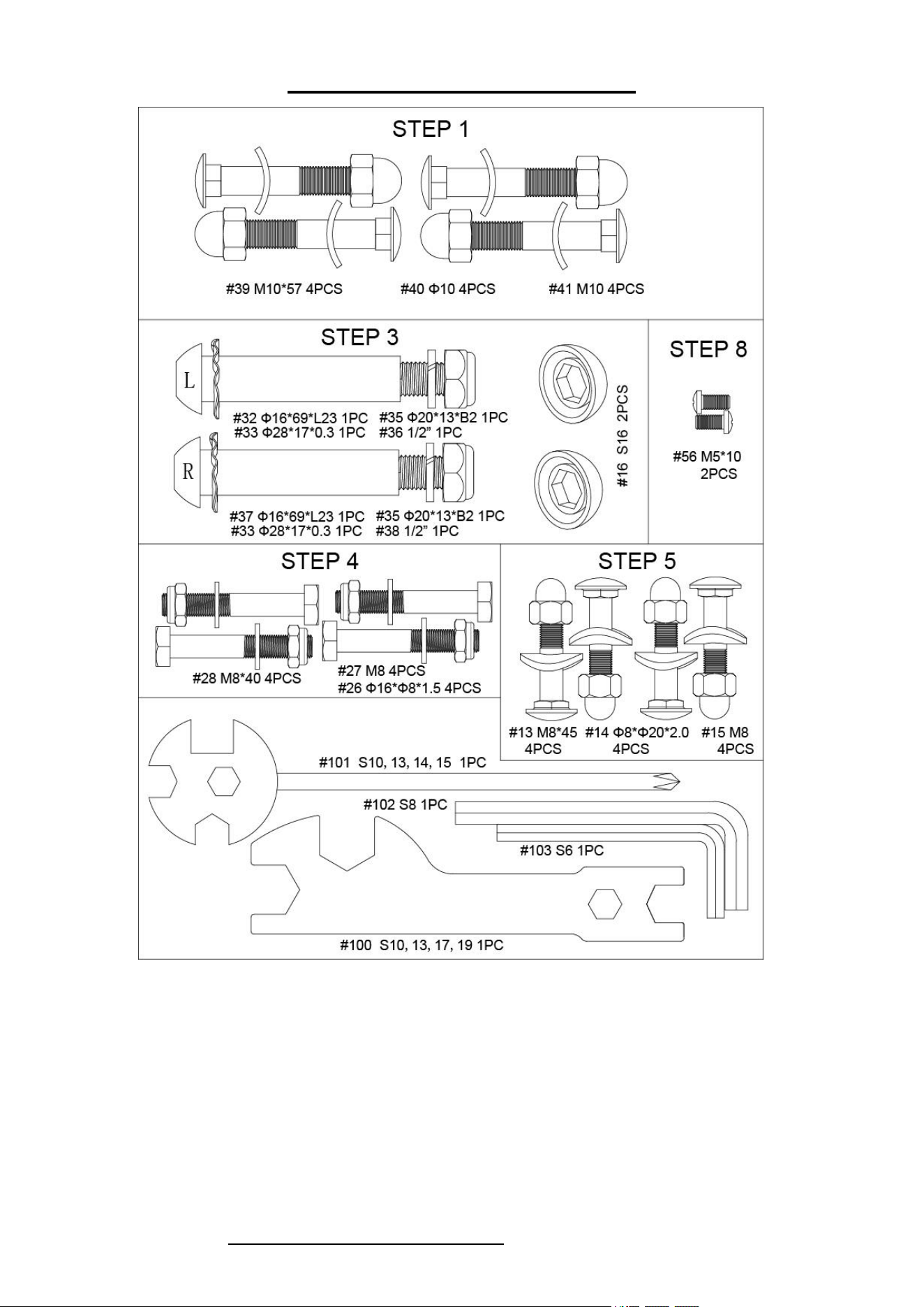
HARDWARE PACKAGE
Ordering Replacement Parts (U.S. and Canadian Customers only)
Please provide the following information in order for us to accurately identify the part(s) needed:
The model number (found on cover of manual)
The product name (found on cover of manual)
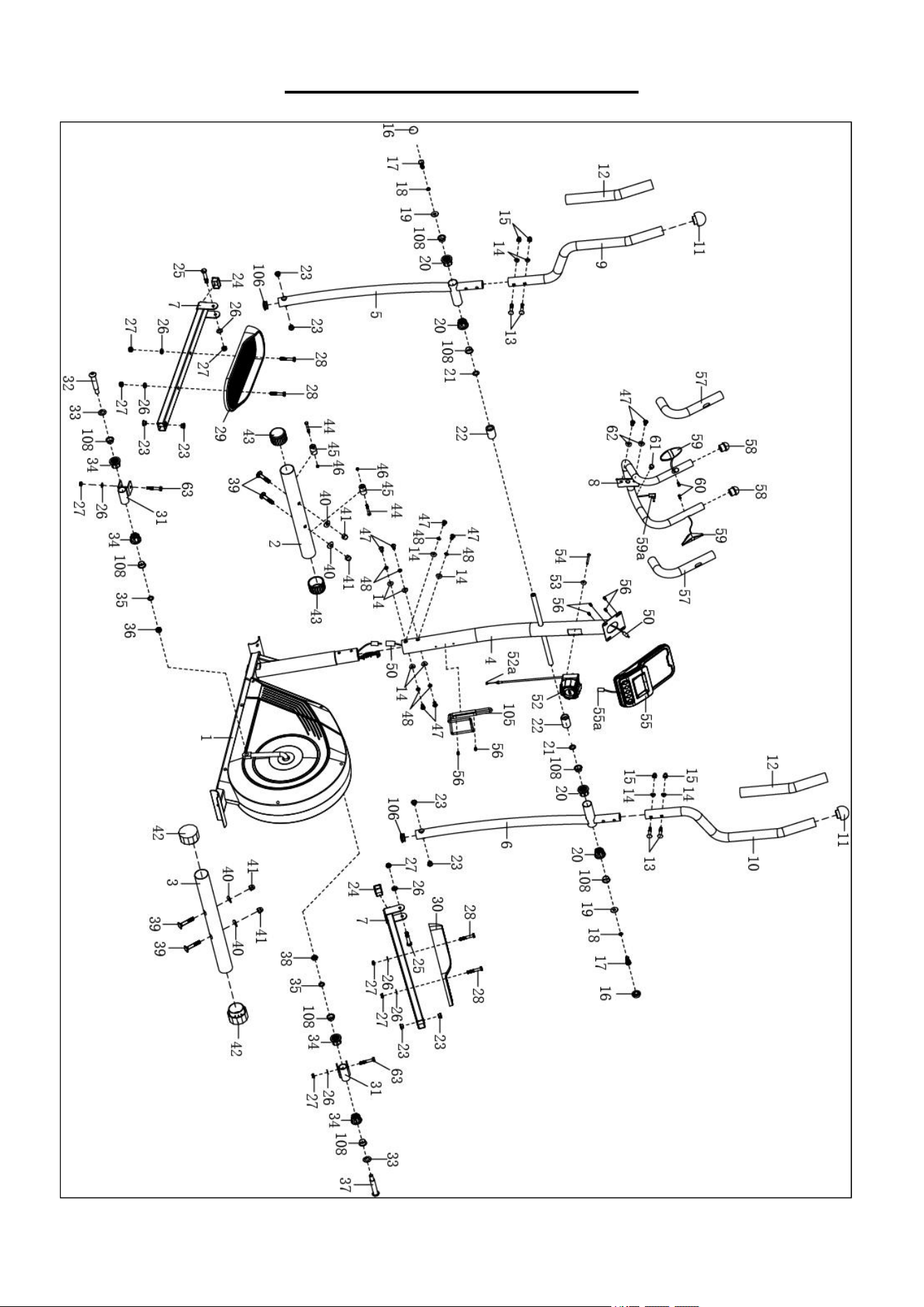
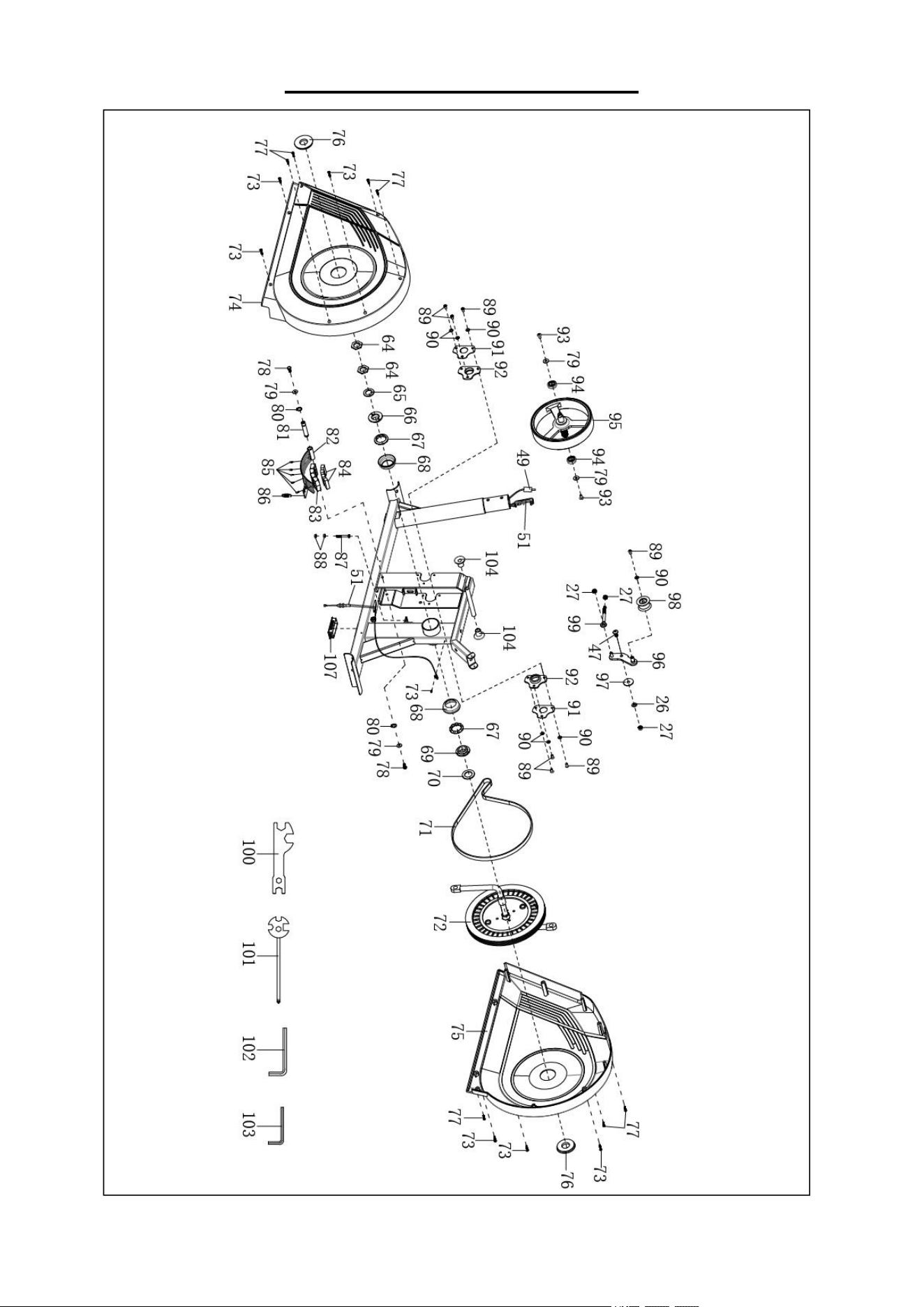
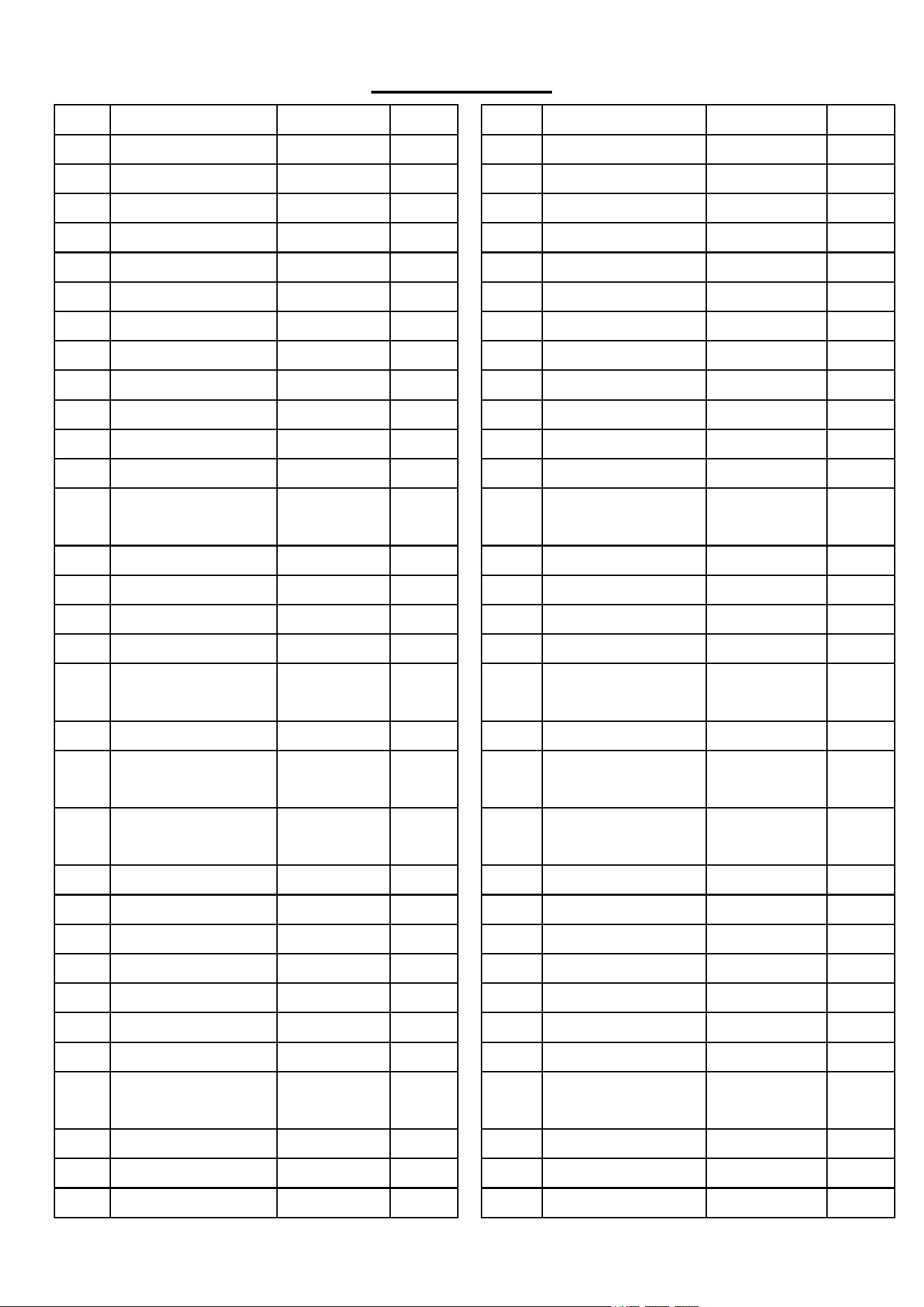
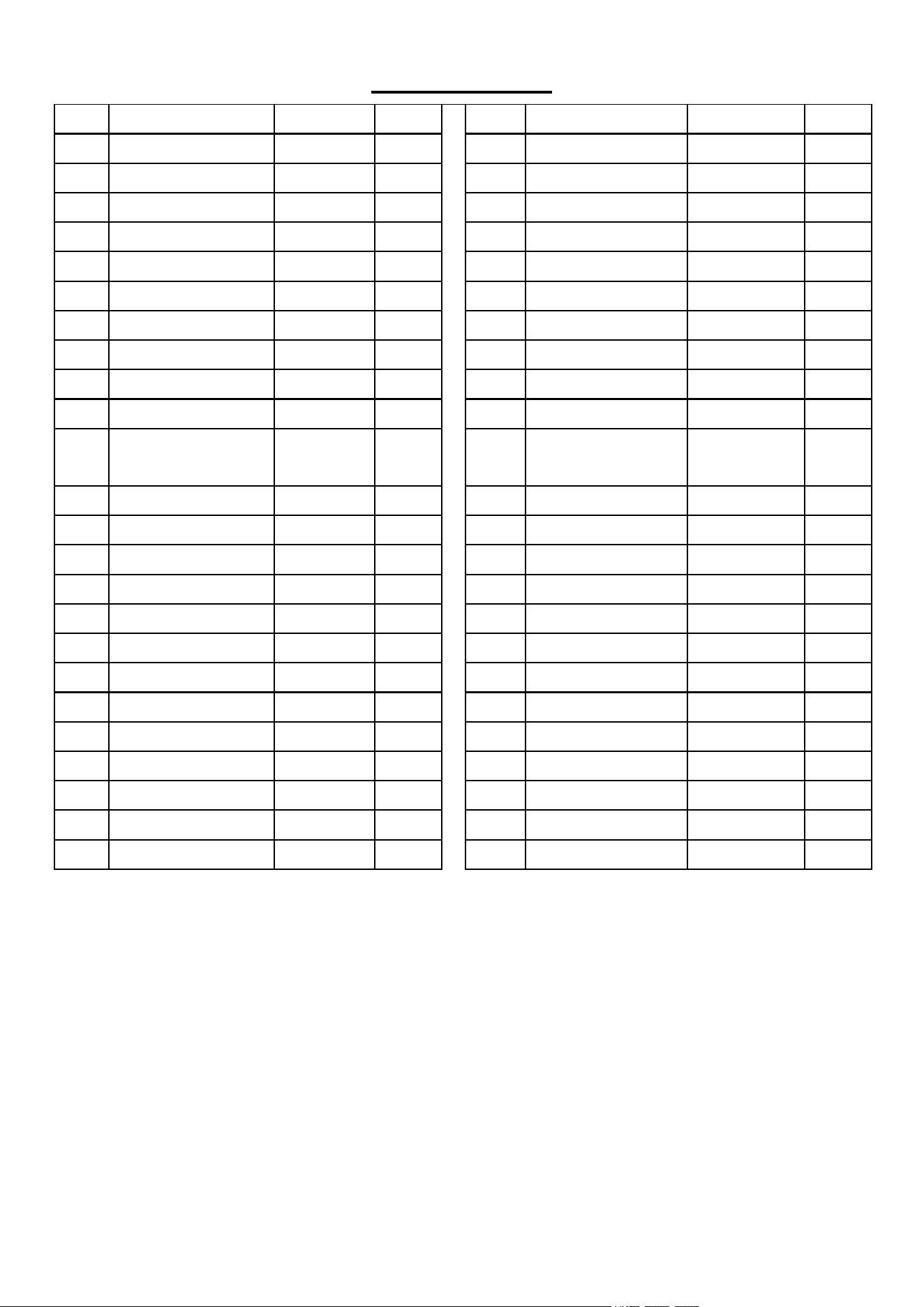
The part number found on the “EXPLODED DIAGRAM” (page 15 and page 16) and “PARTS
LIST” (page 17 and page 18)
3
4
ASSEMBLY INSTRUCTIONS
We value your experience using Sunny Health and Fitness products. For assistance with parts or
(877-907-8669).
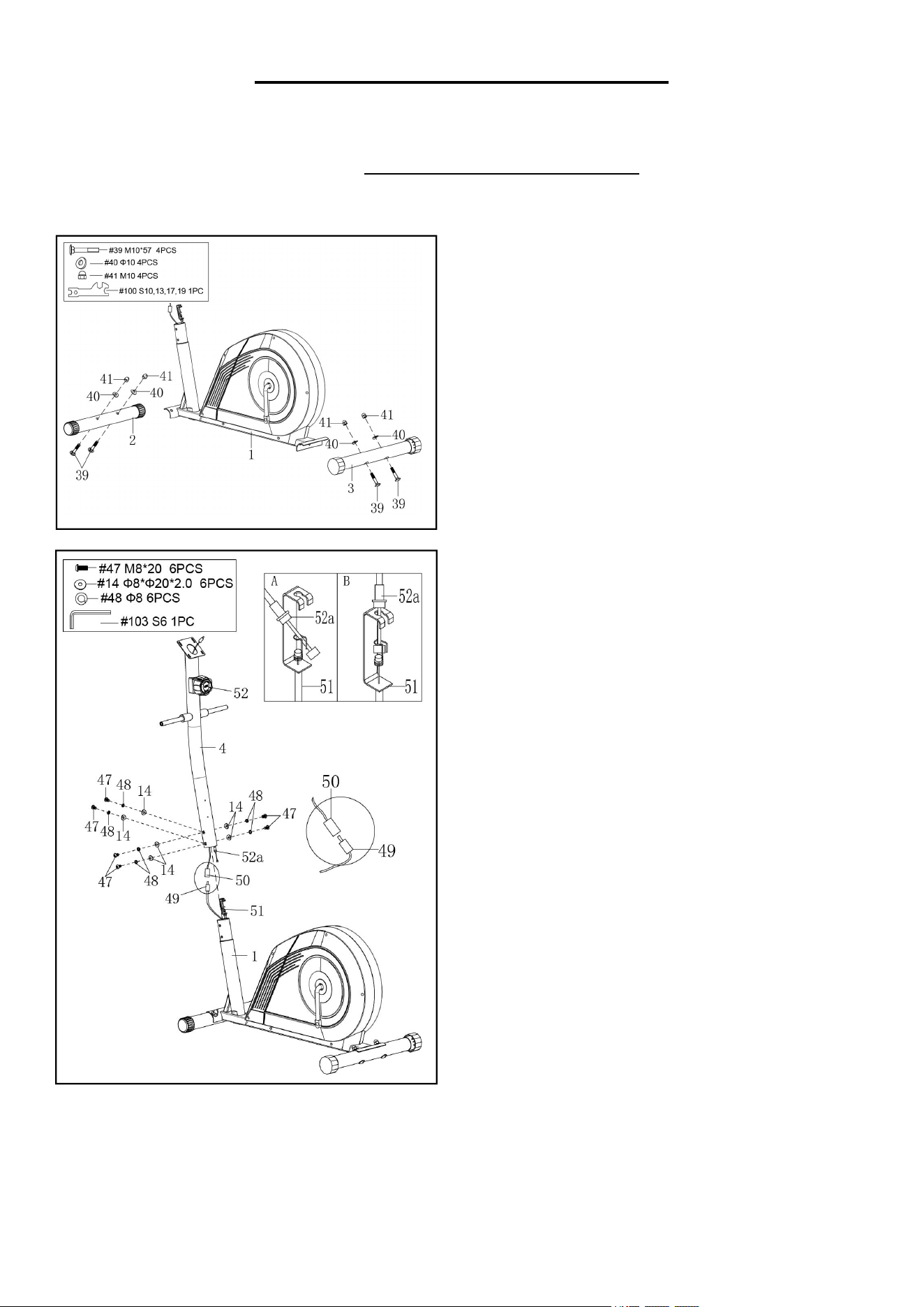
STEP 1:
Attach the Front Stabilizer (No. 2) and Rear
Stabilizer (No. 3) to the Main Frame (No. 1) with 4
Bolts (No. 39), 4 Big Arc Washers (No. 40) and 4
Cap Nuts (No. 41). Tighten and secure with Spanner
(No. 100).
STEP 2:
Remove 6 Bolts (No. 47), 6 Big Arc Washers (No. 14)
and 6 Spring Washers (No. 48) from the Main Frame
(No. 1) with Allen Wrench (No. 103).
CAUTION: Please make sure the Tension Control
Knob (No. 52) is at the lowest resistance level (level 1,
all the way to the left) before you connect any wires
together.
Attach the Tension Control Knob Wire (No. 52a) into
the metal bracket of Tension Wire (No. 51) as shown in
drawing A. Then pull Tension Control Knob Wire (No.
52a) upward and insert it into the slot of metal bracket of
Tension Wire (No. 51) as shown in drawing B. Make
sure the metal fitting on Tension Control Knob Wire
(No. 52a) is secured in the metal bracket.
Connect the Extension Sensor Wire (No. 50) with
Sensor Wire (No. 49). Insert the connecting wires into
Front Post (No. 4).
Attach the Front Post (No. 4) to the Main Frame (No. 1)
with 6 Bolts (No. 47), 6 Big Arc Washers (No. 14) and
6 Spring Washers (No. 48) that were removed. Tighten
and secure with Allen Wrench (No. 103).
NOTE: Be careful not to pinch any wires when attaching
Front Post (No. 4) to Main Frame (No. 1).
4
5
We value your experience using Sunny Health and Fitness products. For assistance with parts or
(877-907-8669).
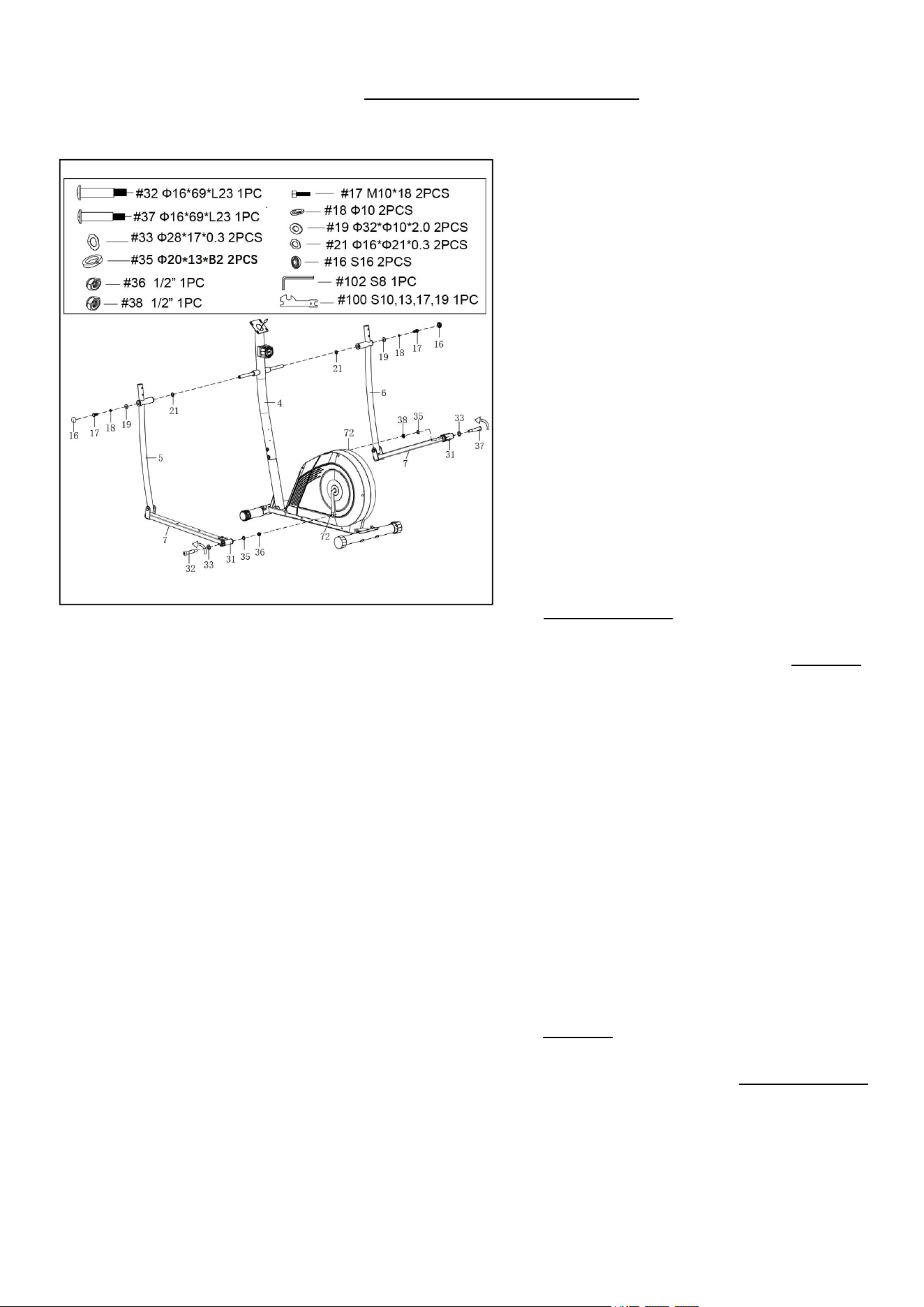
STEP 3:
Remove 2 Bolts (No. 17), 2 Spring Washers
(No. 18), 2 Big Washers (No. 19) and 2 Wave
Washers (No. 21) from the Front Post (No. 4)
with Spanner (No. 100).
Attach the Left Handrail Arm (No. 5) onto the left
horizontal axis of the Front Post (No. 4) with 1
Bolt (No. 17), 1 Spring Washer (No. 18), 1 Big
Washer (No. 19) and 1 Wave Washer (No. 21)
that were removed. Tighten and secure with
Spanner (No. 100). Then cover with 1 End Cap
(No. 16).
Attach the U Bracket (No. 31) on the Foot Bar
Tube (No. 7) to the Belt Pulley With Crank (No.
72) with Left Pedal Bolt (No. 32) and 1 Wave
Washer (No. 33). Turn the Left Pedal Bolt (No.
32) counter-clockwise as tightly as you can with
your hand. Secure by tightening 1 Spring Washer
(No. 35) and Left Nylon Nut (No. 36) clockwise.
Then use Allen Wrench (No. 102) and Spanner
(No. 100) to tighten securely.
Attach the Right Handrail Arm (No. 6) onto the
right horizontal axis of the Front Post (No. 4) with
1 Bolt (No. 17), 1 Spring Washer (No. 18), 1 Big
Washer (No. 19) and 1 Wave Washer (No. 21)
that were removed. Tighten and secure with
Spanner (No. 100). Then cover with 1 End Cap
(No. 16).
Attach the U Bracket (No. 31) on the Foot Bar
Tube (No. 7) to the Belt Pulley With Crank (No.
72) with Right Pedal Bolt (No. 37) and 1 Wave
Washer (No. 33). Turn the Right Pedal Bolt (No.
37) clockwise as tightly as you can with your hand.
Secure by tightening 1 Spring Washer (No. 35)
and Right Nylon Nut (No. 38) counter-clockwise.
Then use Allen Wrench (No. 102) and Spanner
(No. 100) to tighten securely.
NOTE: Left Pedal Bolt (No. 32) and Right Pedal
Bolt (No. 37) are marked “L” for Left and “R” for
Right.
5
6
We value your experience using Sunny Health and Fitness products. For assistance with parts or
(877-907-8669).
STEP 4:
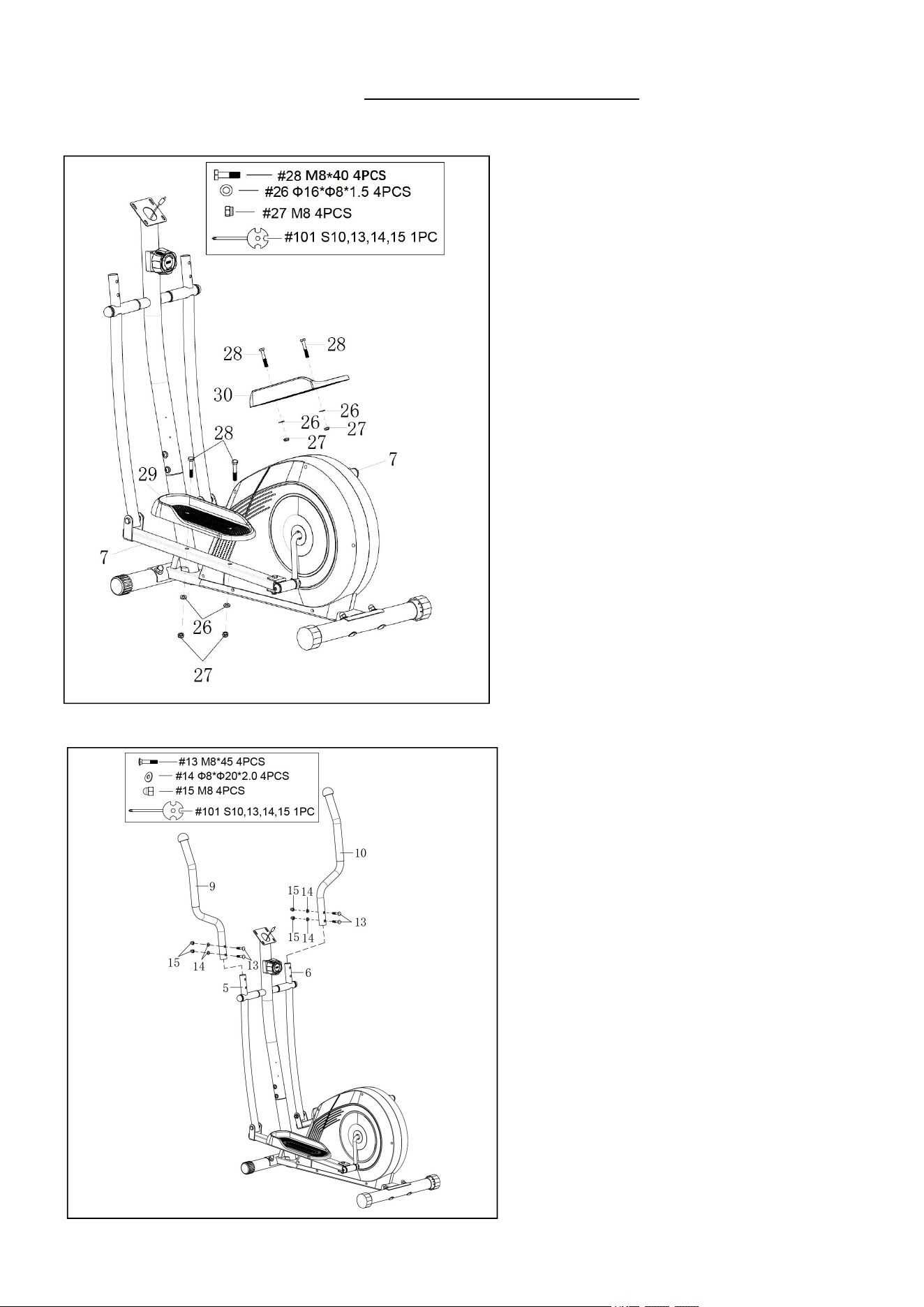
Attach the Left Foot Pedal (No. 29) to the Foot
Bar Tube (No. 7) with 2 Bolts (No. 28), 2
Washers (No. 26) and 2 Nuts (No. 27). Tighten
and secure with Spanner (No. 101).
Attach the Right Foot Pedal (No. 30) to the Foot
Bar Tube (No. 7) with 2 Bolts (No. 28), 2
Washers (No. 26) and 2 Nuts (No. 27). Tighten
and secure with Spanner (No. 101).
STEP 5:
Attach the Left Handrail (No. 9) to the Left
Handrail Arm (No. 5) with 2 Bolts (No. 13), 2 Big
Arc Washers (No. 14) and 2 Nuts (No. 15).
Tighten and secure with Spanner (No. 101).
Attach the Right Handrail (No. 10) to the Right
Handrail Arm (No. 6) with 2 Bolts (No. 13), 2 Big
Arc Washers (No. 14) and 2 Nuts (No. 15).
Tighten and secure with Spanner (No. 101).
6
7
We value your experience using Sunny Health and Fitness products. For assistance with parts or
(877-907-8669).
STEP 7:
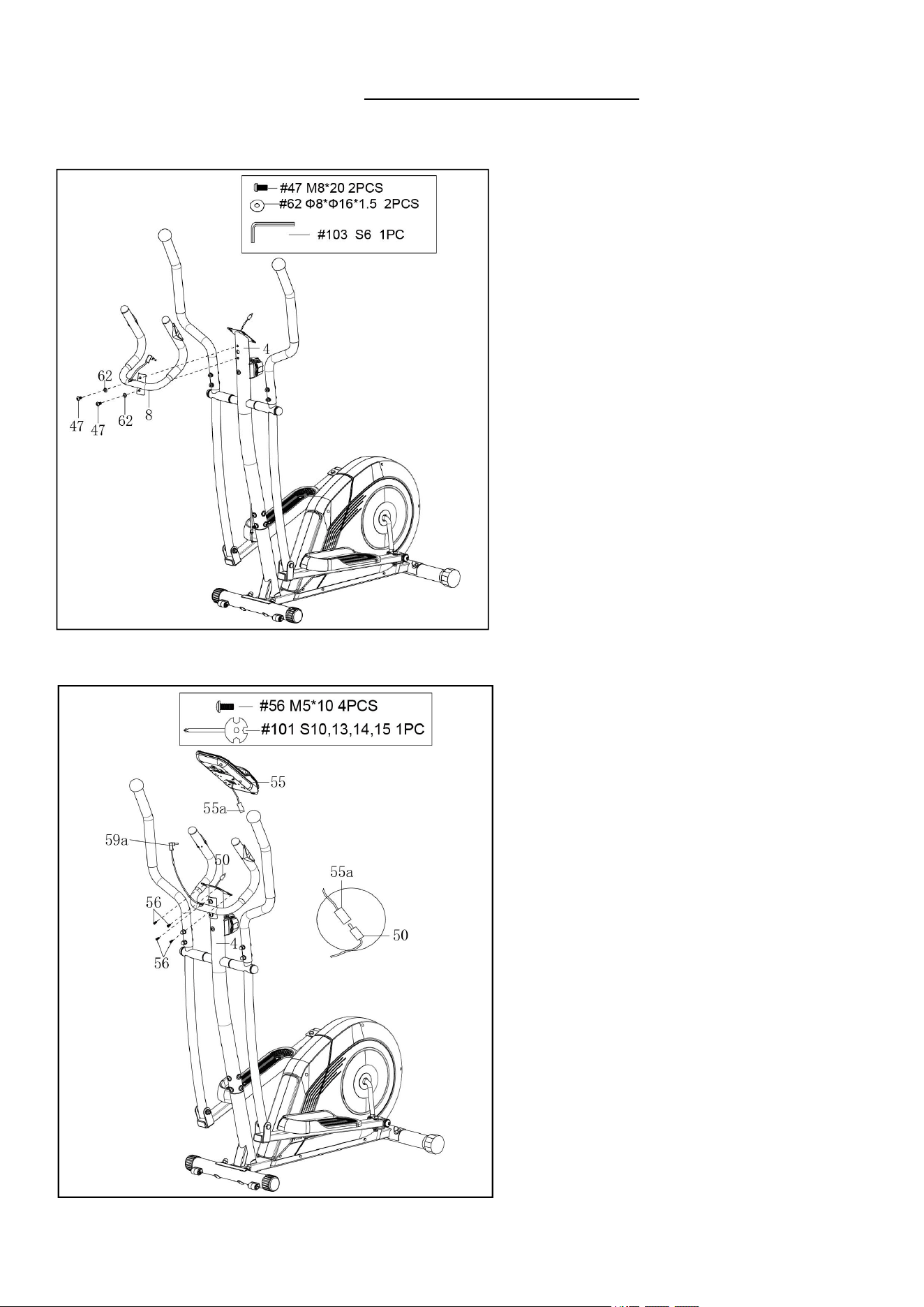
Remove 4 Bolts (No. 56) from the back of the
Computer (No. 55) with the Spanner (No. 101).
Connect the Extension Sensor Wire (No. 50)
with Computer Wire (No. 55a). Then insert them
into the Front Post (No. 4).
Insert the Handle Pulse Wire A (No. 59a) into
the pulse input jack on the back of Computer
(No. 55).
Attach Computer (No. 55) to the top end of the
Front Post (No. 4) with 4 Bolts (No. 56) that
were removed. Tighten and secure with Spanner
(No. 101).
STEP 6:
Remove 2 Bolts (No. 47) and 2 Arc Washers
(No. 62) from the Front Post (No. 4) with Allen
Wrench (No. 103).
Attach the Handlebar (No. 8) to the Front Post
(No. 4) with 2 Bolts (No. 47) and 2 Arc Washers
(No. 62) that were removed. Tighten and secure
with Allen Wrench (No. 103).
7
9
BATTERY INSTALLATION & REPLACEMENT
BATTERY INSTALLATION
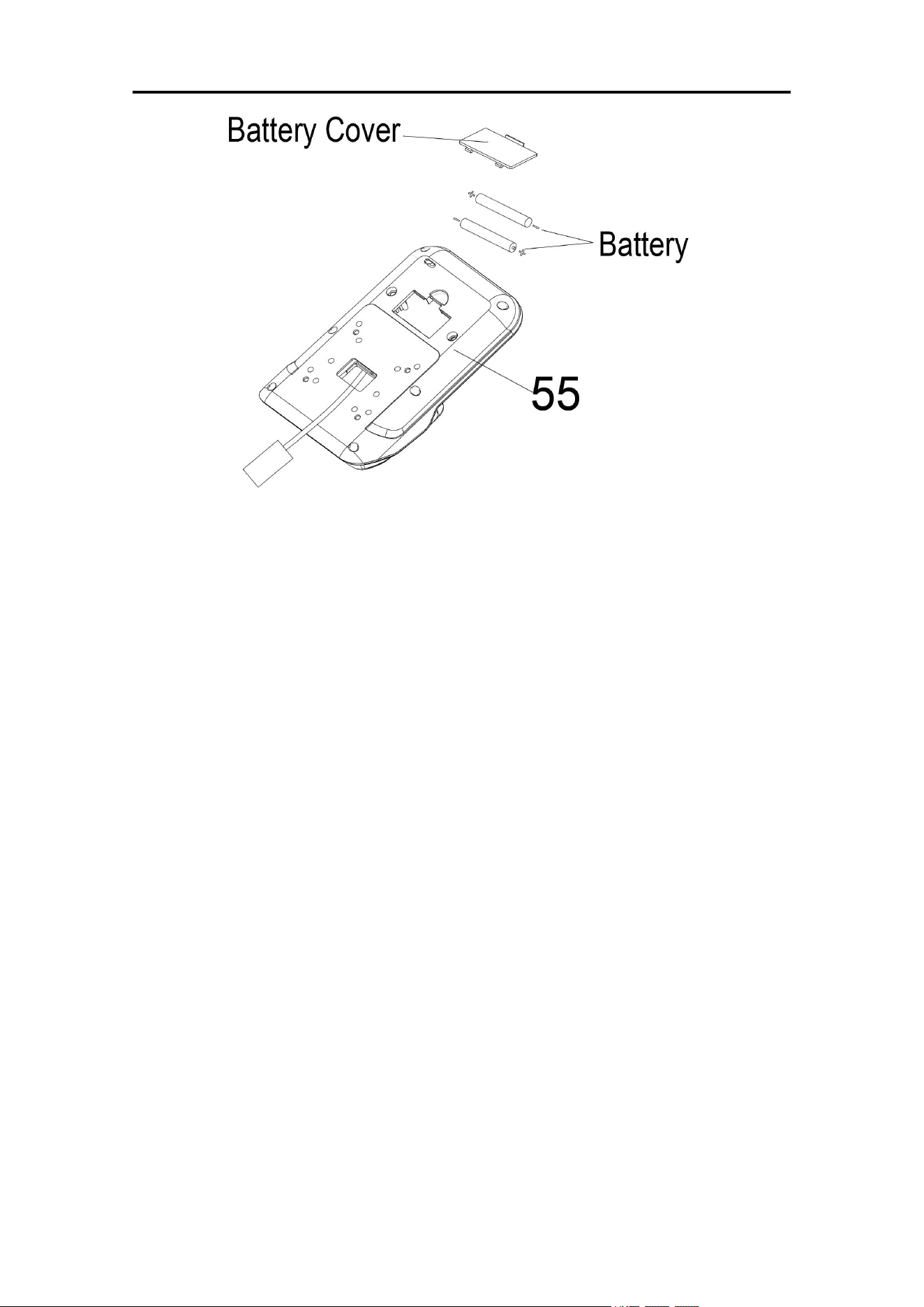
1. Take out 2 AA batteries from computer box.
2. Press the buckle of battery cover on the Computer (No. 55), then remove battery cover.
3. Install 2 AA batteries into the battery case on the back of the Computer (No. 55). Pay attention
to the battery + and – poles before installing.
4. Press the buckle of battery cover, then put the battery cover back to the back of the Computer
(No. 55).
The installation is complete!
BATTERY REPLACEMENT
1. Press the buckle of battery cover on the back of the Computer (No. 55), then remove battery
cover.
2. Remove the 2 old AA batteries in the battery case and install 2 new AA batteries into the battery
case on the back of the Computer (No. 55). Pay attention to the battery + and – poles before
installing.
3. Press the buckle of battery cover, then put the battery cover back to the back of the Computer
(No. 55).
The replacement is complete!
BATTERY DISPOSAL
Dispose the batteries according to the laws and regulations of your local region. Some batteries
may be recycled. When disposing or recycling, do not mix battery types.
9
10
ADJUSTMENTS GUIDE
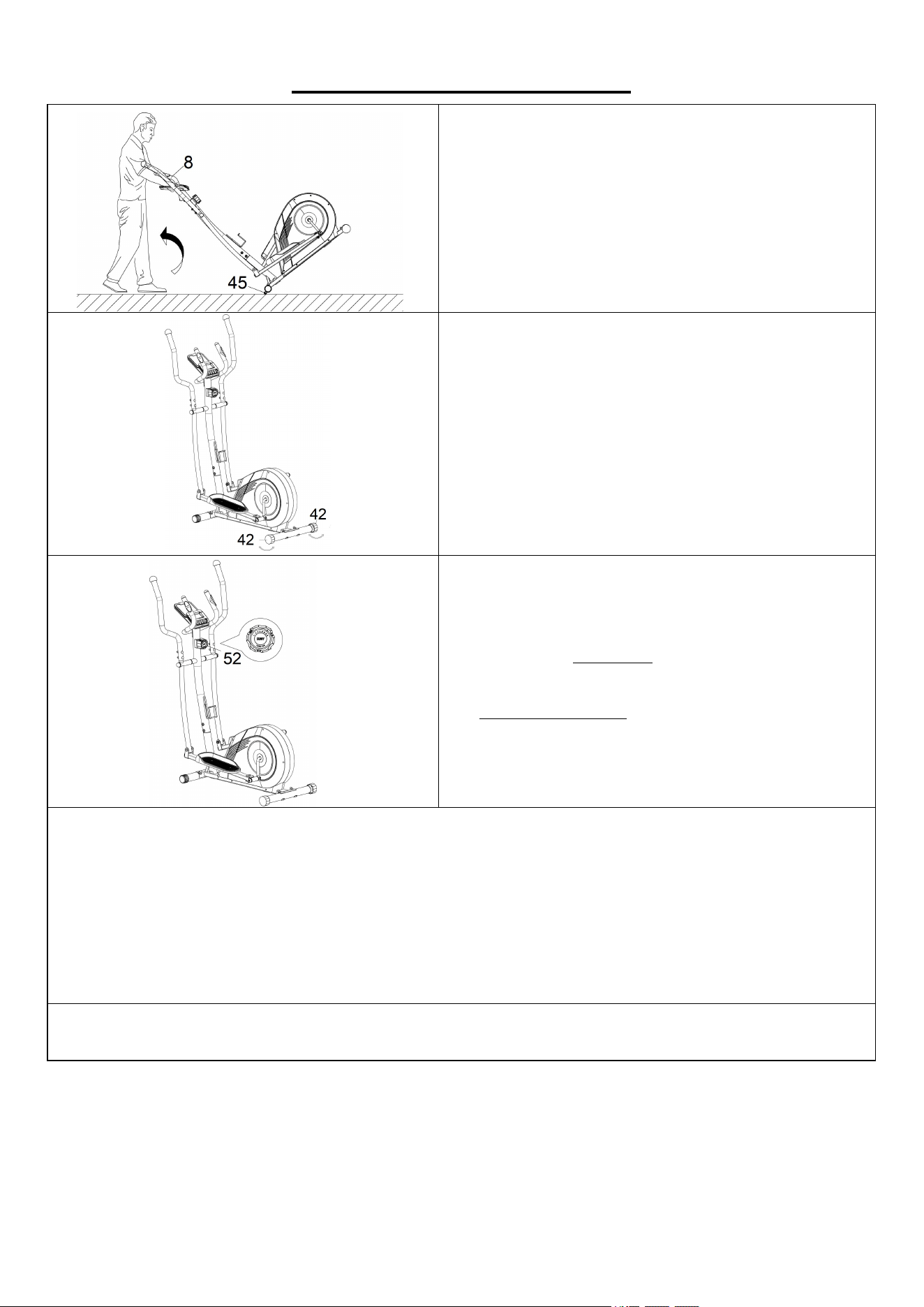
MOVING THE ELLIPTICAL BIKE
Press the Handlebar (No. 8) and tilt the elliptical
bike until the Transportation Wheels (No. 45)
touch the ground. Now you can transport the
elliptical bike to the desired location with ease.
ADJUSTING THE BALANCE
In order to achieve a smooth and comfortable ride,
you must ensure that the elliptical bike is stabled
and secured. If you notice that the elliptical bike is
unbalanced during use, you should adjust the
Adjustable End Caps (No. 42) located on the rear
stabilizers until the elliptical bike becomes levelled
with the floor surface.
ADJUSTING THE TENSION
Adjust the tension by rotating the Tension Control
Knob (No. 52) clockwise to increase the level of
resistance. Rotate the Tension Control Knob (No.
52) counter-clockwise to decrease the level of
resistance.
Tension levels are set at Level 1 being the lowest
and Level 16 being the highest.
CLEANING
The elliptical bike can be cleaned with a soft, clean, damp cloth. Do not use abrasives or solvents
on plastic parts. Please wipe your perspiration off the elliptical bike after each use. Be careful not to
get excessive moisture on the computer display panel as this might cause electrical hazard or
electronics to fail. Please keep the elliptical bike, especially the computer, out of direct sunlight to
prevent screen damage. Please inspect all assembly bolts and pedals on the elliptical bike for
proper tightness every week.
STORAGE
Store the elliptical bike in a clean and dry environment, away from children.
10
11
EXERCISE COMPUTER
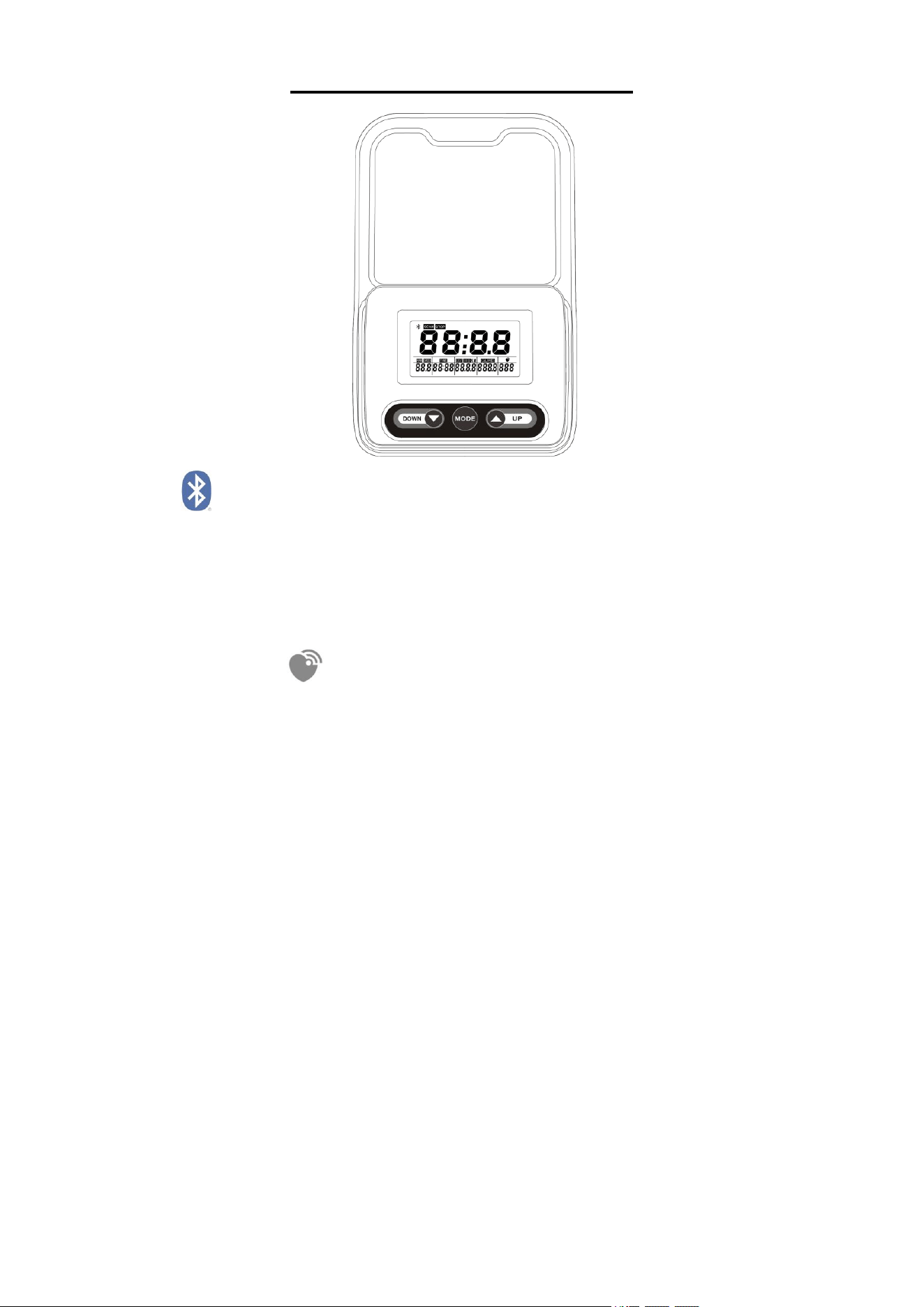
BLUETOOTH :
1. The Bluetooth icon will flash when the computer is on or wakes from sleep mode. If no Bluetooth
connection is established within 3 minutes, the Bluetooth icon will turn off.
2. The Bluetooth icon will stay on when it is connected.
WIRELESS HEART RATE :
1. The wireless heart rate icon will flash when the computer is on. If the heart rate monitor is not
connected within 1 minute, the wireless heart rate icon will turn off.
2. After exercise resumes, the wireless heart rate icon will flash. If the heart rate monitor is not
connected within 1 minute, the wireless heart rate icon will turn off.
3. When the computer wakes from sleep mode, the wireless heart rate icon will flash. If the heart
rate monitor is not connected within 1 minute, the wireless heart rate icon will turn off.
4. The wireless heart rate icon will flash when the MODE button is pressed during exercise. If the
heart rate monitor is not connected within 1 minute, the wireless heart rate icon will turn off.
5. The wireless heart rate icon will stay on when the heart rate monitor is connected.
NOTE: The heart rate monitor is not included. Wireless heart rate function works with SunnyFit
Heart Rate Monitor HR200. HR200 can only connect to the computer when the wireless heart rate
icon is flashing.
11

12
FUNCTION BUTTONS
MODE: 1. Press the button to select TIME, DIST(DISTANCE), CALORIES and PULSE to preset.
2. Press the button for selection function display on main LCD, or enter after setting.
3. Hold the MODE button for 2 seconds to reset all values except ODO(TOTAL DISTANCE)
when the Bluetooth is not connected.
4. Press and hold the MODE button for 6 seconds to disconnect from both the SunnyFit
APP and the heart rate monitor. Then the computer will enter sleep mode.
(When the user replaces batteries, all the values will reset to ZERO automatically.)
UP: To set up the target value of TIME, DIST(DISTANCE), CALORIES and PULSE. You can hold
the button to increase the value fast. (The computer has to be in stop condition.)
DOWN: To set down the target value of TIME, DIST(DISTANCE), CALORIES and PULSE. You
can hold the button to increase the value fast. (The computer has to be in stop condition.)
FUNCTIONS
SCAN: Automatically scan through each mode in sequence every 6 seconds. The display
loop is RPM - SPEED –TIME – DIST(DISTANCE) -ODO(TOTAL DISTANCE)– CALORIES -
PULSE on the main screen.
TIME: Accumulates total time from 00:00 up to 99:59. The user may preset target time by
pressing UP or DOWN button. Each increase is 1 minute.
RPM: Displays the Rotation per Minute (RPM). The RPM and SPEED will switch to another
display in every 6 seconds after exercise starts.
SPEED: Displays current training speed. Maximum speed is 99.9 mile/h.
DIST(DISTANCE): Accumulates total disance from 0.00 up to 99.99 mile. The user may preset
target distance data by pressing UP or DOWN button. Each increase setting is 0.1mile.
CALORIES: Accumulates calories consumption during training from 0 to max. 999.9 calories. The
user may also preset the target calorie before training by pressing UP or DOWN button. Each
increase setting is 1 cal.
PULSE: The computer will display the user's heart rate in beats per minute during training. You
may set the target heart rate by pressing the UP or DOWN button.
ODO(TOTAL DISTANCE): Accumulates total disance from 0.00 up to 999.9 mile.
NOTE: This data is a rough guide for comparison of different exercise sessions which cannot be
used in medical treatment.
12

13
OPERATION ORDER:
1. Power on – Installs 2 pieces of 1.5V UM-3 or AA batteries. The computer start to segment test
with a long beep sound. (Whenever batteries are removed, all the functions values will be reset
to zero or default value.)
2. Select and preset target value – Get access to the setting function of TIME, DIST(DISTANCE),
CALORIES and PULSE. When you are in each setting mode. For the TIME setting, when the
time value is glitter, you can press the UP or DOWN button to adjust the value. Press the MODE
button for confirmation and skip to next setting. The setting of DIST(DISTANCE) and
CALORIES is the same as TIME setting.
3. After entering the speed signal, each function of
RPM-SPEED-TIME-DIST(DISTANCE)-ODO(TOTAL DISTANCE)-CALORIES- PULSE will skip
to display in every 6 seconds.
4. You can also press the MODE button to select a single function display on the main screen.
5. If you have preset any function target before, the function starts to count down from the target
when the training starts except PULSE. Once the target is achieved, the computer will beep,
and the function will count up from zero automatically if the training is still going.
6. Pulse measurement – After you hold on to two handgrip sensors in a few seconds, the
computer will show up your current heart rate in beats per minute. To ensure the heart rate
readout precisely, please do not hold one hand only. You may preset your target pulse before
training starts. Once your current heart rate is achieved to the target, the value of pulse will beep
to remind you.
NOTE:
1. The computer will shut off automatically and disconnect the heart rate monitor if there is no
activity for 4 minutes when the Bluetooth is not connected. Pedaling the machine or key
selection will wake up the computer.
2. If the computer displays abnormally, please re-install the battery, and try again.
3. Battery Spec: 1.5V UM-3 or AA (2PCS).
4. The batteries must be removed from the appliance before it is scrapped, and they are disposed
of safely.
13
14
APP CONNECTION:
Connect Smart Equipment to SunnyFit App:
1. Scan to download SunnyFit from the app store:
2. Ensure that the Bluetooth function is turned on from your mobile device.
3. If this is your first time using the SunnyFit app, follow the in-app instructions to register for
your free SunnyFit account and log in.
4. Begin any workout activity that matches your smart equipment, then follow the onscreen
prompts to search for and connect to your smart equipment.
5. When connected, your stats and records will be displayed at the end of your course/session
and recorded in your account profile!
Troubleshooting:
If you are having trouble connecting your smart equipment, visit www.sunnyfit.com/guide or
scan the QR code below:
14
EXPLODED DIAGRAM 1
15
16
EXPLODED DIAGRAM 2
16
17
PARTS LIST
No.
Description
Spec.
Qty
No.
Description
Spec.
Qty
1
Main Frame
1
33
Wave Washer
Ф28*Ф17*0.3
2
2
Front Stabilizer
1
34
Plastic Sleeve
Ф28.6*Ф21
4
3
Rear Stabilizer
1
35
Spring Washer
Ф20*13*B2
2
4
Front Post
1
36
Left Nylon Nut
1/2”
1
5
Left Handrail Arm
1
37
Right Pedal Bolt
Ф16*69 *L23
1
6
Right Handrail Arm
1
38
Right Nylon Nut
1/2”
1
7
Foot Bar Tube
2
39
Bolt
M10*57
4
8
Handlebar
1
40
Big Arc Washer
Ф10
4
9
Left Handrail
Ф32*2.0
1
41
Cap Nut
M10
4
10
Right Handrail
Ф32*2.0
1
42
Adjustable End Cap
2
11
Handrail End Cap
2
43
End Cap
2
12
Foam Grip
Ф31*Ф37*310
2
44
Bolt
M6*48
2
13
Bolt
M8*45
4
45
Transportation
Wheel
Ф6*30
2
14
Big Arc Washer
Ф8*Ф20*2.0
10
46
Nut
M6
2
15
Nut
M8
4
47
Bolt
M8*20
9
16
End Cap
S16
2
48
Spring Washer
Ф8
6
17
Bolt
M10*18
2
49
Sensor Wire
L=1300mm
1
18
Spring Washer
Ф10
2
50
Extension Sensor
Wire
L=900mm
1
19
Big Washer
Ф32*Ф10*2.0
2
51
Tension Wire
L=1600mm
1
20
Plastic Sleeve
Ф32*Ф21
4
52
Tension Control
Knob
1
21
Wave Washer
Ф16*Ф21*0.3
2
52a
Tension Control
Knob Wire
L=320mm
1
22
Bushing
2
53
Big Arc Washer
Ф15*Ф5.2*1.5
1
23
Shaft Sleeve
Ф18*Ф8*5
8
54
Bolt
M5*45
1
24
Square Cap
2
55
Computer
TZ-2190
1
25
Bolt
M8*55
2
55a
Computer Wire
1
26
Washer
Ф16*Ф8*1.5
9
56
Bolt
M5*10
6
27
Nut
M8
11
57
Foam Grip
Ф24*Ф30*220
2
28
Bolt
M8*40
4
58
Cap
2
29
Left Foot Pedal
1
59
Handle Pulse Sensor
With Wire
2
30
Right Foot Pedal
1
59a
Handle Pulse Wire A
L=750mm
1
31
U Bracket
2
60
Screw
ST4.2*20
2
32
Left Pedal Bolt
Ф16*69*L23
1
61
Plug
Φ12.1
1
17
18
PARTS LIST
No.
Description
Spec.
Qty
No.
Description
Spec.
Qty
62
Arc Washer
Ф8*Ф16*1.5
2
86
Spring
Ф15*50*Ф1.5
1
63
Bolt
M8*50
2
87
Bolt
M6*45
1
64
Nut
7/8”
2
88
Nut
M6
2
65
Locking Washer
Ф23*Ф34.5
1
89
Bolt
M6*12
7
66
Locking Nut-Left
7/8”
1
90
Washer
Ф6*Ф12*1.0
7
67
Open Face Bearing
2
91
Bearing End Cover
56*72*1.5
2
68
Bearing Housing
2
92
Plastic Bearing Seat
56*72*11
2
69
Locking Nut–Right
15/16”
1
93
Bolt
M6*12
2
70
Locking Washer
Ф24*Ф40
1
94
Bearing
6001
2
71
Belt
PJ390
1
95
Flywheel
Ф240
1
72
Belt Pulley With
Crank
Φ260
1
96
Idler Wheel Shaft
1
73
Screw
ST4.2*20
7
97
PC Pad
1
74
Left Belt Cove
1
98
Idler Wheel
1
75
Right Belt Cove
1
99
Bolt
M8*75
1
76
Cover
2
100
Spanner
S10,13,17,19
1
77
Screw
ST4.2*25
7
101
Spanner
S10,13,14,15
1
78
Bolt
M6*15
2
102
Allen Wrench
S8
1
79
Washer
Ф6*Ф16*1.2
4
103
Allen Wrench
S6
1
80
Shaft Snap Ring
Ф12*1.0
2
104
Limit stop
2
81
Magnetic Plate Axle
1
105
Bottle Holder
1
82
Magnetic Bracket
1
106
End Cap
2
83
Magnet Seat
136*45*10
1
107
End Cap
1
84
Magnet
40*25*10
4
108
Shaft Sleeve
Ф23.5*Ф20
8
85
Screw
ST2.9*9
5
Version 1.0
18
19
19