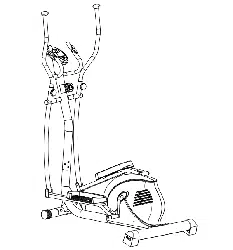
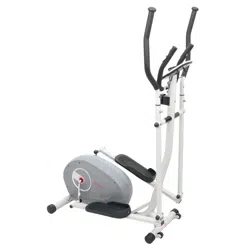
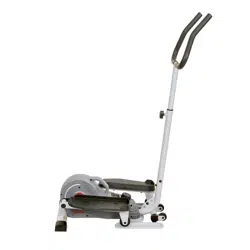
MAGNETIC ELLIPTICAL BIKE
G8300
USER MANUAL
IMPORTANT! Please retain owner’s manual for maintenance and adjustment instructions. Your satisfaction is very important to us. PLEASE DO NOT RETURN UNTIL YOU HAVE CONTACTED US: [email protected] or 1- 877 - 90SUNNY (877-907-8669).
We thank you for choosing our product. To ensure your safety and health. please use this equipment correctly. It is important to read this entire manual before assembling and using the equipment. Safe and effective use can only be achieved if the equipment is assembled. maintained and used properly. It is your responsibility to ensure that all users of the equipment are informed of all warnings and precautions.
1. Before starting any exercise program. you should consult your physician to determine if you
2. Be aware of your body’s signals. Incorrect or excessive exercise can damage your health. Stop
3. Keep children and pets away from the equipment. The equipment is designed for adult use only.
4. Use the equipment on a solid. flat level surface with a protective cover for your floor or carpet.
To ensure safety. the equipment should have at least 2 feet (60 CM) of free space all around it.
5. Ensure that all nuts and bolts are securely tightened before using the equipment. The safety of
6. Always use the equipment as indicated. If you find any defective components while assembling
7. Wear suitable clothing while using the equipment. Avoid wearing loose clothing that may
8. Do not place fingers or objects into the moving parts of the equipment.
9. The maximum weight capacity of this unit is 220 pounds (100 KG).
10. The equipment is not suitable for therapeutic use.
11. To avoid bodily injury and/ or damage to the product or property. proper lifting and moving are
12. Your product is intended for use in cool and dry conditions. You should avoid storage in extreme
13. This equipment is designed for indoor and home use only; it is not intended for commercial use.
No.
Description Spec.
Qty
No.
Description Spec.
Qty
Bolt M6*9
Magnetic Board Shaft
Screw ST4.2*20
Magnetic Borad
Belt PJ6
Needle Sensor
Pulley
Bolt
Round Magnet
Tension Spring 2
Three Slot Nut
Induction Line 1
Washer
Screw ST4.2*16
Collar Ball
Inert Wheel
Collar Housing
Idler Connecting Rod
Lock Washer
Plastic Nut M8
Hex Nut
Tap Bolt
Two Slot Nut
Flat Washer Φ10.5*Φ16*0.5
Black Magnet
Tension Spring 1
Magnet Positioning Grid
Left Cover
Screw ST3*10
Right Cover
Spring Washer D6
Crank Plug
Lock Washers for Shaft D12
Ordering Replacement Parts (U.S. and Canadian Customers only) Please provide the following information in order for us to accurately identify the part(s) needed: The model number (found on cover of manual) The product name (found on cover of manual) The part number found on the “EXPLODED DIAGRAM” and “PARTS LIST” (found near the front
Please contact us at [email protected] or 1- 877 - 90SUNNY (877-907-8669).
ADJUSTMENTS & USAGE GUIDE
LOW HIGH
HOW TO MOVE THE ELLIPTICAL
The end caps on the Front Stabilizer (No. 7) are wheels. Hold the Handlebars (No. L/R) and pull forward to lift the rear of the elliptical off the floor. Now you can move the elliptical.
ADJUSTING THE RESISTANCE
Adjust the resistance of the elliptical using the Tension Control (No. 35). Increase the level of resistance by turning the tension knob to the RIGHT (clockwise). decrease the level of resistance by turning the tension knob to the LEFT (counter-clockwise).
ADJUSTING THE HEIGHT AND BALANCE
In order to achieve smooth and
EXERCISE METER
FUNCTION BUTTONS: MODE: Press to select functions.
Press and hold the MODE button for 3 seconds to reset time. distance and calories.
SET: Press to set values of time. distance and calories when not in scan mode.
RESET: Press to reset time. pulse. distance and calories to zero when not in scan
Caloriesto select desired function.
B. Use the SET button to set a value for time. distance or calories. The value
C. Press the MODE button once more. to save the function value you’ve created.
FUNCTIONS: SCAN: Press MODE button until “▼” appears at SCAN position (or until “SCAN” appears). the computer will rotate through all 5 functions: Time. Speed. Distance. Calories and Total Distance.
Each function will be display for 6 seconds.
TIME: Counts the total time of the exercise from start to finish.
SPEED: Displays the current speed.
DISTANCE (DIST): Counts the distance of an exercise from start to finish.
CALORIES (CAL): Counts the amount of total calories burned during an exercise from start to finish.
TOTAL DISTANCE (ODO): Counts the total distance after installing the batteries.
AUTO ON/OFF & AUTO START/STOP: If the elliptical is put into motion. or any button is pressed. the computer will turn on.
After about 8 minutes without any signal. the power (computer) will turn off automatically.
ALARM: The functions of time. distance and calorie can be set to countdown. When the value goes to zero. the computer will beep.
Press MODE to select the function. then press SET to adjust the value.
SPECIFICATIONS
FUNCTION
Auto Scan Every 6 seconds
Running Time 00:00 ~ 99:59 (Minute: Second)
Current Speed The max pick-up signal is 999.9 MILE/H (or 9999 RPM)
Trip Distance 0.0 ~ 999.9 MILE
Calories 0 ~ 9999 Kcal
Total Distance 0 ~ 9999 MILE
Battery Type 2 pcs of SIZE- AAA
Operating Temperature 0℃ ~ +40℃ (32℉~ 104℉)
Storage Temperature 10℃ ~ +60℃ (14℉~ 140℉)
BATTERY REPLACEMENT
To replace the batteries. open the battery cover on the back of the computer. Remove the batteries.
Replace with new batteries. Make sure the (-) end of the battery goes to the spring end in the battery compartment. Put the cover back.
When changing batteries. always replace both of them with new batteries. Do not mix old and new batteries.
BATTERY DISPOSAL
Dispose the batteries according to the laws and regulations of your local region. Some batteries may be recycled. When disposing or recycling. do not mix battery types.
Version 1.2