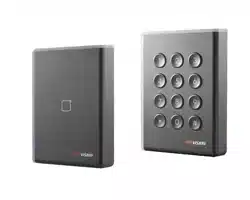
DS-K1108 Series Card Reader
User Manual
UD05868B

i
User Manual
COPYRIGHT © 2017 Hangzhou Hikvision Digital Technology Co., Ltd.
ALL RIGHTS RESERVED.
Any and all information, including, among others, wordings, pictures, graphs
are the properties of Hangzhou Hikvision Digital Technology Co., Ltd. or its
subsidiaries (hereinafter referred to be “Hikvision”). This user manual
(hereinafter referred to be “the Manual”) cannot be reproduced, changed,
translated, or distributed, partially or wholly, by any means, without the
prior written permission of Hikvision. Unless otherwise stipulated, Hikvision
does not make any warranties, guarantees or representations, express or
implied, regarding to the Manual.
About this Manual
This Manual is applicable to DS-K1108 series card reader
The Manual includes instructions for using and managing the product.
Pictures, charts, images and all other information hereinafter are for
description and explanation only. The information contained in the Manual
is subject to change, without notice, due to firmware updates or other
reasons. Please find the latest version in the company website
(http://overseas.hikvision.com/en/).
Please use this user manual under the guidance of professionals.
Trademarks Acknowledgement
and other Hikvision’s trademarks and logos are the properties of Hikvision in
various jurisdictions. Other trademarks and logos mentioned below are the
properties of their respective owners.
Legal Disclaimer
TO THE MAXIMUM EXTENT PERMITTED BY APPLICABLE LAW, THE PRODUCT
DESCRIBED, WITH ITS HARDWARE, SOFTWARE AND FIRMWARE, IS
PROVIDED “AS IS”, WITH ALL FAULTS AND ERRORS, AND HIKVISION MAKES
NO WARRANTIES, EXPRESS OR IMPLIED, INCLUDING WITHOUT LIMITATION,
MERCHANTABILITY, SATISFACTORY QUALITY, FITNESS FOR A PARTICULAR

ii
PURPOSE, AND NON-INFRINGEMENT OF THIRD PARTY. IN NO EVENT WILL
HIKVISION, ITS DIRECTORS, OFFICERS, EMPLOYEES, OR AGENTS BE LIABLE
TO YOU FOR ANY SPECIAL, CONSEQUENTIAL, INCIDENTAL, OR INDIRECT
DAMAGES, INCLUDING, AMONG OTHERS, DAMAGES FOR LOSS OF BUSINESS
PROFITS, BUSINESS INTERRUPTION, OR LOSS OF DATA OR DOCUMENTATION,
IN CONNECTION WITH THE USE OF THIS PRODUCT, EVEN IF HIKVISION HAS
BEEN ADVISED OF THE POSSIBILITY OF SUCH DAMAGES.
REGARDING TO THE PRODUCT WITH INTERNET ACCESS, THE USE OF
PRODUCT SHALL BE WHOLLY AT YOUR OWN RISKS. HIKVISION SHALL NOT
TAKE ANY RESPONSIBILITES FOR ABNORMAL OPERATION, PRIVACY LEAKAGE
OR OTHER DAMAGES RESULTING FROM CYBER ATTACK, HACKER ATTACK,
VIRUS INSPECTION, OR OTHER INTERNET SECURITY RISKS; HOWEVER,
HIKVISION WILL PROVIDE TIMELY TECHNICAL SUPPORT IF REQUIRED.
SURVEILLANCE LAWS VARY BY JURISDICTION. PLEASE CHECK ALL RELEVANT
LAWS IN YOUR JURISDICTION BEFORE USING THIS PRODUCT IN ORDER TO
ENSURE THAT YOUR USE CONFORMS THE APPLICABLE LAW. HIKVISION
SHALL NOT BE LIABLE IN THE EVENT THAT THIS PRODUCT IS USED WITH
ILLEGITIMATE PURPOSES.
IN THE EVENT OF ANY CONFLICTS BETWEEN THIS MANUAL AND THE
APPLICABLE LAW, THE LATER PREVAILS.
0101011080229

2
Chapter 1 Preventive and Cautionary
Tips
To guarantee the card reader works properly, please read and
obey the notes below.
If the card reader is powered by the controller, the power
supply distance is recommended to be no longer than 100m.
If the distance is longer than 100m, you are advised to power
the card reader by external 12V (range: -%10 ~ +%10) DC
power supply, which is nonswitched and linear.
To guarantee the communication between the controller and
the card reader, you must use RVVP cable above 0.5 to
connect them.
If the card reader is installed outside or in environment easy
to permeable, it is advisable to install a waterproof shield.
If you need to install several card readers, the distance
among them must over 30cm.
To reduce the noise in long distance transmission, the shield
of cable should connect to the GND of both controller and
card reader terminal.
3
Chapter 2 Introduction
DS-K1108 series card reader is a kind of high-performance
product, with a 32 bit high-speed processor. It communicates with
access controller via either RS-485 protocol (AES encrypted) or
Wiegand protocol. And a build-in tamper-proof module helps to
protect card reader from malicious damage. As to the physical
appearance, the PC+ABS material makes water proof and dust
proof possible in poor environment.
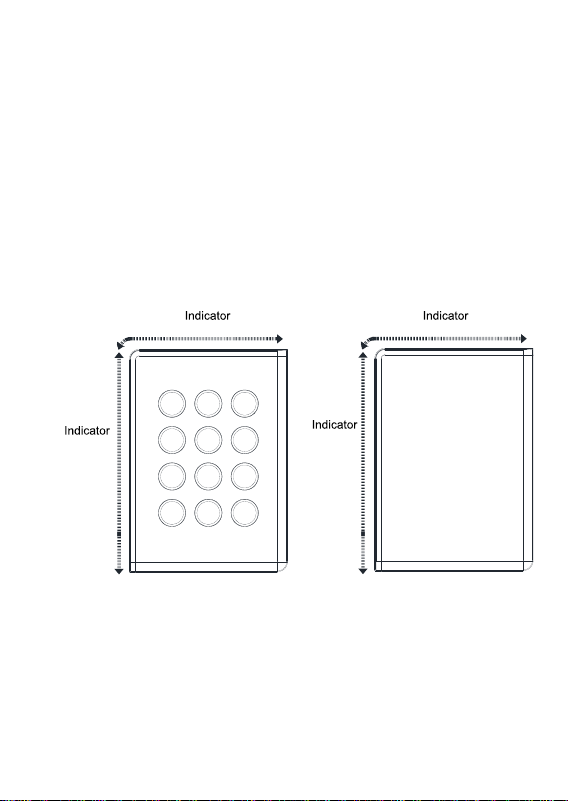
2.1 Front View
DS-K1108EK/MK/SK DS-K1108E/M/S
Figure 2-1 Front View of DS-K1108 Series
4
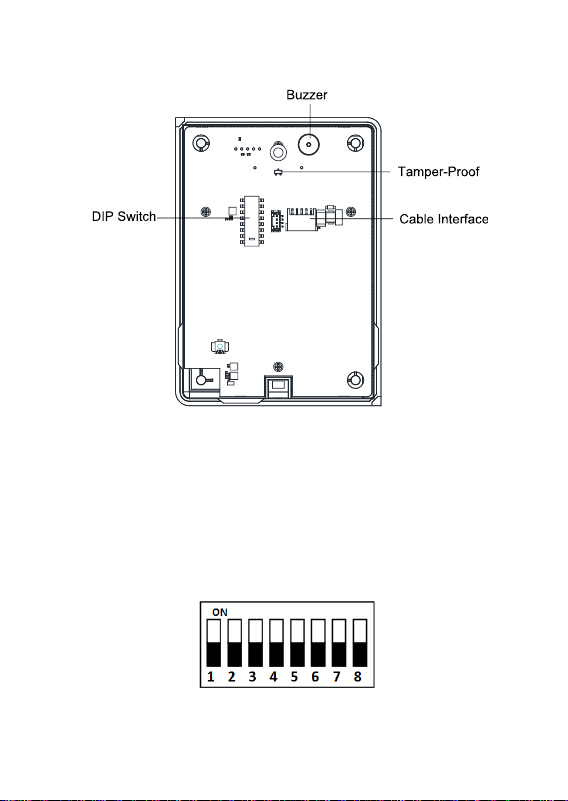
2.2 Rear View
Figure 2-2 Rear View of DS-K1108 Series
Chapter 3 Installation
3.1 Introduction for DIP Switch
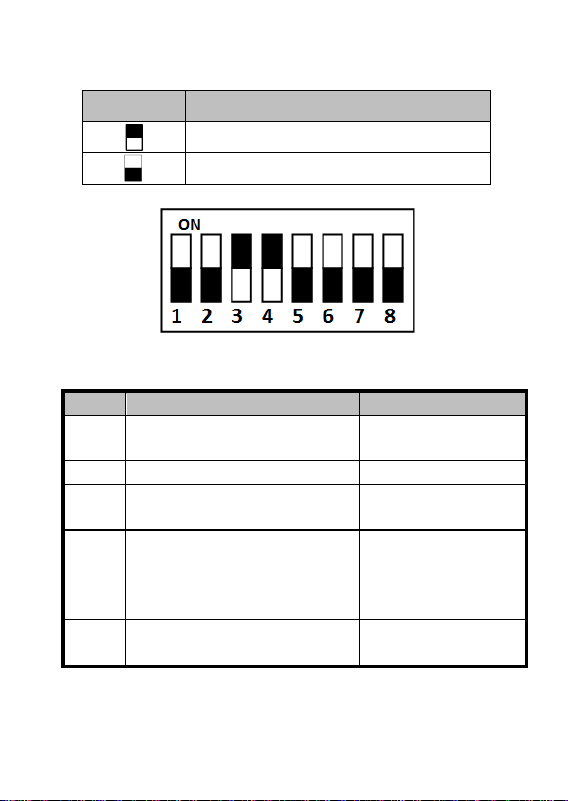
The DIP switch module is shown below. The No. of DIP switch
from left to right is 1 ~ 8.
Figure 3-1 DIP Switch Module
5
Table 3-1 Description of DIP Switch
Icon
Description
Represent 1 in binary mode
Represent 0 in binary mode
For example, binary value of the following status is: 0000 1100.
Figure 3-2 DIP Switch Module
Table 3-2 Description of DIP Switch
No.
Description
DIP Switch Status
1 ~ 4
Address of RS-485
1: 1
0: 0
5
Reserved
Reserved
6
Wiegand protocol or RS-485
protocol.
1: Wiegand protocol;
0: RS-485 protocol.
7
Wiegand Protocol
(available when No. 6 is 1)
1: Wiegand protocol
of 26-bit;
0: Wiegand protocol
of 34-bit.
8
Matched Resistance
(available for RS-485 protocol)
1: Enable;
0: Disable.
3.2 Definition of Cable
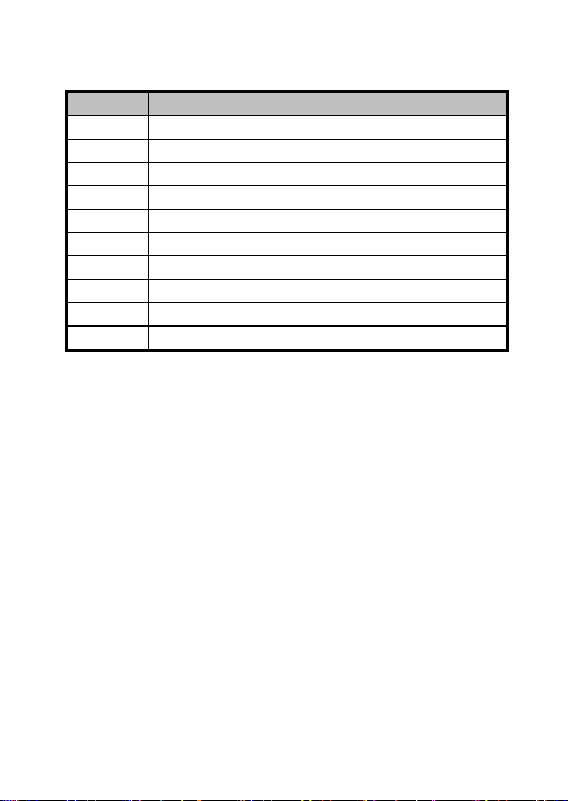
The description of 10 cables is shown below.
6
Table 3-3 Description of Cable
Color
Description
Orange
Wiegand ERR (available for Wiegand Protocol)
Brown
Wiegand OK (available for Wiegand Protocol)
White
Wiegand W1 (available for Wiegand Protocol)
Green
Wiegand W0 (available for Wiegand Protocol)
Blue
RS-485 -
Yellow
RS-485 +
Red
PWR (DC +12V)
Black
GND
Gray
TAMPER Control
Purple
Beep Control (available for Wiegand Protocol)
3.3 Wiring Cables
Purpose:
Wire the cables between controller and card reader, thus to
establish the communication between them.
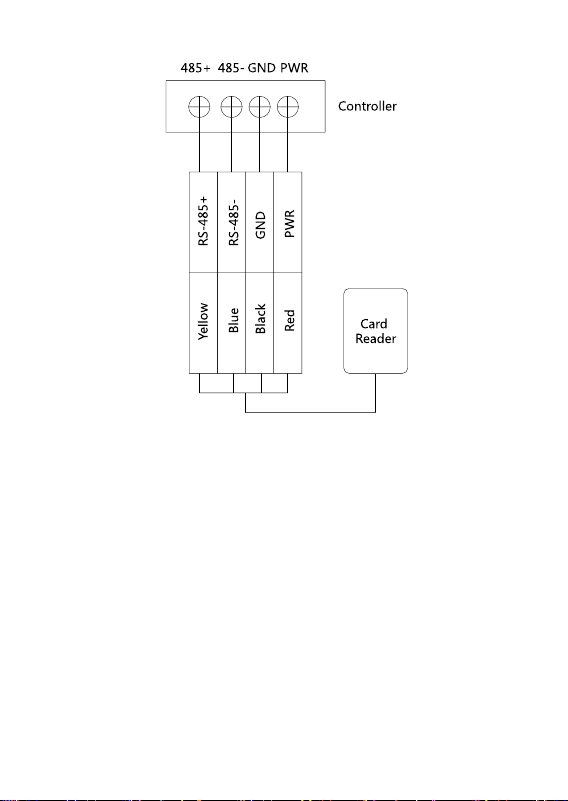
Steps for RS-485 communication mode:
1. Set the DIP switch of No. 6 as 0.
2. Set the DIP switch of No. 1 ~ 5 for RS-485 address and
reading card mode. For details, please refer to 3.1
Introduction for DIP Switch.
3. Wire the cable between controller and card reader as
shown below.
7
Figure 3-3 Wiring for RS-485 Communication Mode
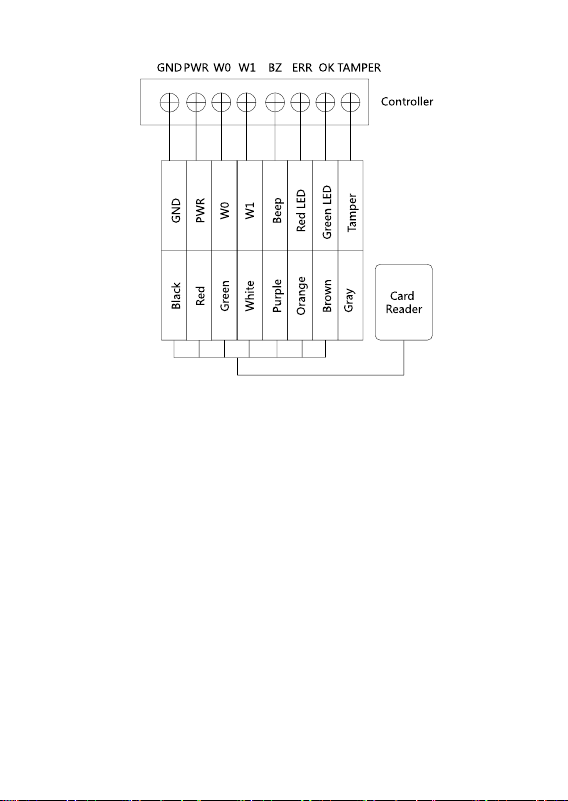
Steps for Wiegand communication mode:
1. Set the DIP switch of No. 6 as 1.
2. Set the DIP switch of No. 5 and 7 for reading card mode and
Wiegand protocol. For details, please refer to 3.1
Introduction for DIP Switch.
3. Wiring the cable between controller and card reader as
shown below.
8
Figure 3-4 Wiring for Wiegand Communication Mode
9
Chapter 4 Sound Prompt and Indicator
After the card reader is powered on, LED status indicator will turn
green and blink for 1 time. Then it will turn red and blink for 3
times. At last the buzzer will send out a beep sound indicating the
starting up process is completed.
During using the card reader, it will send out different sounds
prompt and the LED indicator on it have different statuses. You
can refer to tables below for detailed information.
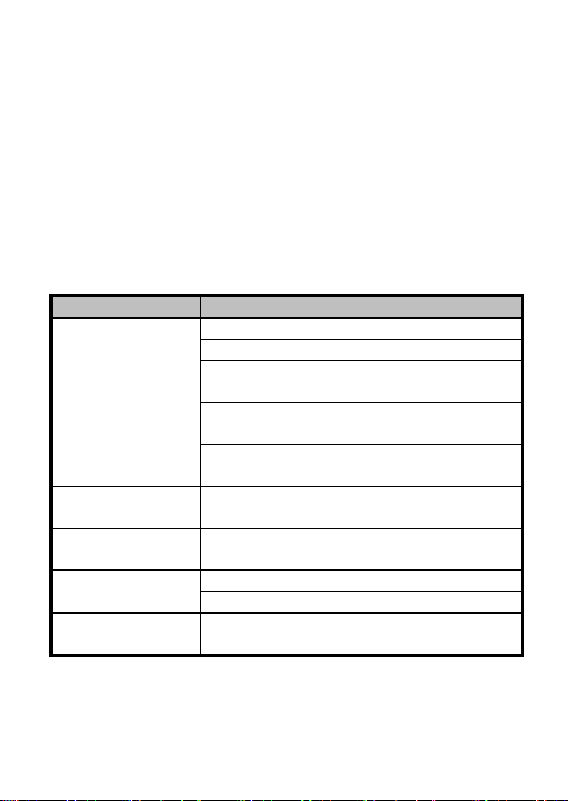
Table 4-1 Description of Prompt Sound
Sound Prompt
Description
One beep
Swiping card prompt
Pressing keys prompt
Prompt for too long card No. input by
pressing keys.
Time out prompt for pressing keys or
swiping card.
For authentication: prompt for entering the
password after swiping the card.
Two rapid beeps
The operation of pressing keys or swiping
card is valid.
Three slow beeps
The operation of pressing keys or swiping
card is invalid.
Rapidly
continuous beeps
Prompt for tamper-proof alarm.
Prompt for buzzer alarm.
Slowly continuous
beeps
The card reader is unencrypted.
10
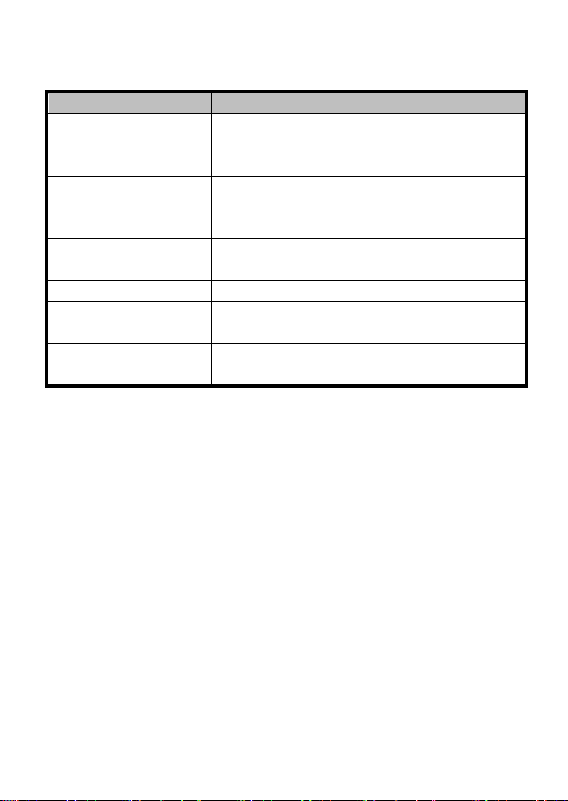
Table 4-2 Description of LED Indicator
LED Indicator Status
Description
Green (blink for 1
time), and red (blink
for 3 times)
The card reader is power on.
Green and blinking
For Card + Password authentication:
prompt for entering the password after
swiping the card.
Solid green for 2s
The operation of pressing keys or swiping
card is valid.
Solid red
Card reader is working normally.
Red and blink for 3
times
The operation of pressing keys or swiping
card is invalid.
Red and blinking
For RS-485 protocol: Registering failed or
card reader is offline.
