
0
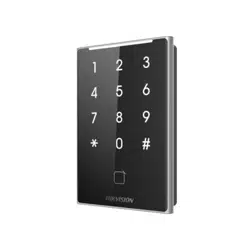
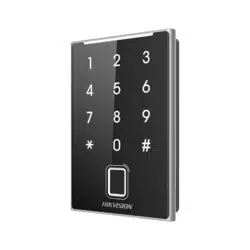
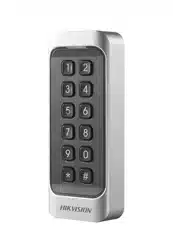
DS-K1107A Series Card Reader
User Manual

DS-K1107A Series Card Reader • User Manual
I
Legal Information
© 2021 Hangzhou Hikvision Digital Technology Co., Ltd. All rights reserved.
About this Manual
The Manual includes instructions for using and managing the Product. Pictures, charts, images and all other information
hereinafter are for description and explanation only. The information contained in the Manual is subject to change,
without notice, due to firmware updates or other reasons. Please find the latest version of this Manual at the Hikvision
website (https://www.hikvision.com/).
Please use this Manual with the guidance and assistance of professionals trained in supporting the Product.
Trademarks
and other Hikvision’s trademarks and logos are the properties of Hikvision in various jurisdictions.
Other trademarks and logos mentioned are the properties of their respective owners.
Disclaimer
TO THE MAXIMUM EXTENT PERMITTED BY APPLICABLE LAW, THIS MANUAL AND THE PRODUCT DESCRIBED, WITH ITS
HARDWARE, SOFTWARE AND FIRMWARE, ARE PROVIDED “AS IS” AND “WITH ALL FAULTS AND ERRORS”. HIKVISION
MAKES NO WARRANTIES, EXPRESS OR IMPLIED, INCLUDING WITHOUT LIMITATION, MERCHANTABILITY, SATISFACTORY
QUALITY, OR FITNESS FOR A PARTICULAR PURPOSE. THE USE OF THE PRODUCT BY YOU IS AT YOUR OWN RISK. IN NO
EVENT WILL HIKVISION BE LIABLE TO YOU FOR ANY SPECIAL, CONSEQUENTIAL, INCIDENTAL, OR INDIRECT DAMAGES,
INCLUDING, AMONG OTHERS, DAMAGES FOR LOSS OF BUSINESS PROFITS, BUSINESS INTERRUPTION, OR LOSS OF DATA,
CORRUPTION OF SYSTEMS, OR LOSS OF DOCUMENTATION, WHETHER BASED ON BREACH OF CONTRACT, TORT
(INCLUDING NEGLIGENCE), PRODUCT LIABILITY, OR OTHERWISE, IN CONNECTION WITH THE USE OF THE PRODUCT,
EVEN IF HIKVISION HAS BEEN ADVISED OF THE POSSIBILITY OF SUCH DAMAGES OR LOSS.
YOU ACKNOWLEDGE THAT THE NATURE OF THE INTERNET PROVIDES FOR INHERENT SECURITY RISKS, AND HIKVISION
SHALL NOT TAKE ANY RESPONSIBILITIES FOR ABNORMAL OPERATION, PRIVACY LEAKAGE OR OTHER DAMAGES
RESULTING FROM CYBER-ATTACK, HACKER ATTACK, VIRUS INFECTION, OR OTHER INTERNET SECURITY RISKS; HOWEVER,
HIKVISION WILL PROVIDE TIMELY TECHNICAL SUPPORT IF REQUIRED.
YOU AGREE TO USE THIS PRODUCT IN COMPLIANCE WITH ALL APPLICABLE LAWS, AND YOU ARE SOLELY RESPONSIBLE
FOR ENSURING THAT YOUR USE CONFORMS TO THE APPLICABLE LAW. ESPECIALLY, YOU ARE RESPONSIBLE, FOR USING
THIS PRODUCT IN A MANNER THAT DOES NOT INFRINGE ON THE RIGHTS OF THIRD PARTIES, INCLUDING WITHOUT
LIMITATION, RIGHTS OF PUBLICITY, INTELLECTUAL PROPERTY RIGHTS, OR DATA PROTECTION AND OTHER PRIVACY
RIGHTS. YOU SHALL NOT USE THIS PRODUCT FOR ANY PROHIBITED END-USES, INCLUDING THE DEVELOPMENT OR
PRODUCTION OF WEAPONS OF MASS DESTRUCTION, THE DEVELOPMENT OR PRODUCTION OF CHEMICAL OR
BIOLOGICAL WEAPONS, ANY ACTIVITIES IN THE CONTEXT RELATED TO ANY NUCLEAR EXPLOSIVE OR UNSAFE NUCLEAR
FUEL-CYCLE, OR IN SUPPORT OF HUMAN RIGHTS ABUSES.
IN THE EVENT OF ANY CONFLICTS BETWEEN THIS MANUAL AND THE APPLICABLE LAW, THE LATTER PREVAILS.
Data Protection
During the use of device, personal data will be collected, stored and processed. To protect data, the development of
Hikvision devices incorporates privacy by design principles. For example, for device with facial recognition features,
biometrics data is stored in your device with encryption method; for fingerprint device, only fingerprint template will
be saved, which is impossible to reconstruct a fingerprint image.
As data controller, you are advised to collect, store, process and transfer data in accordance with the applicable data
protection laws and regulations, including without limitation, conducting security controls to safeguard personal data,

DS-K1107A Series Card Reader • User Manual
II
such as, implementing reasonable administrative and physical security controls, conduct periodic reviews and
assessments of the effectiveness of your security controls.
DS-K1107A Series Card Reader • User Manual
I
Regulatory Information
FCC Information
Please take attention that changes or modification not expressly approved by the party
responsible for compliance could void the user’s authority to operate the equipment.
FCC compliance: This equipment has been tested and found to comply with the limits for a Class B
digital device, pursuant to part 15 of the FCC Rules. These limits are designed to provide
reasonable protection against harmful interference in a residential installation. This equipment
generates, uses and can radiate radio frequency energy and, if not installed and used in
accordance with the instructions, may cause harmful interference to radio communications.
However, there is no guarantee that interference will not occur in a particular installation. If this
equipment does cause harmful interference to radio or television reception, which can be
determined by turning the equipment off and on, the user is encouraged to try to correct the
interference by one or more of the following measures:
—Reorient or relocate the receiving antenna.
—Increase the separation between the equipment and receiver.
—Connect the equipment into an outlet on a circuit different from that to which the receiver is
connected.
—Consult the dealer or an experienced radio/TV technician for help.
The device must not be co-located or operating in conjunction with any other antenna or
transmitter.
This equipment should be installed and operated with a minimum distance 20cm between the
radiator and your body.
FCC Conditions
This device complies with part 15 of the FCC Rules. Operation is subject to the following two
conditions:
1. This device may not cause harmful interference.
2. This device must accept any interference received, including interference that may cause
undesired operation.
Le présent appareil est conforme aux CNR d'Industrie Canada applicables aux appareils radio
exempts de licence. L'exploitation est autorisée aux deux conditions suivantes:
(1) l'appareil ne doit pas produire de brouillage, et
(2) l'utilisateur de l'appareil doit accepter tout brouillage radioélectrique subi, même si le
brouillage est susceptible d'en compromettre le fonctionnement.
EU Conformity Statement
This product and - if applicable - the supplied accessories too are marked with "CE"
and comply therefore with the applicable harmonized European standards listed
under the RE Directive 2014/53/EU, the EMC Directive 2014/30/EU, the LVD
Directive 2014/35/EU, the RoHS Directive 2011/65/EU.
2012/19/EU (WEEE directive): Products marked with this symbol cannot be disposed
of as unsorted municipal waste in the European Union. For proper recycling, return
this product to your local supplier upon the purchase of equivalent new equipment,
or dispose of it at designated collection points. For more information see:
www.recyclethis.info.
DS-K1107A Series Card Reader • User Manual
II
2006/66/EC (battery directive): This product contains a battery that cannot be
disposed of as unsorted municipal waste in the European Union. See the product
documentation for specific battery information. The battery is marked with this
symbol, which may include lettering to indicate cadmium (Cd), lead (Pb), or mercury
(Hg). For proper recycling, return the battery to your supplier or to a designated
collection point. For more information see: www.recyclethis.info.
Industry Canada ICES-003 Compliance
This device meets the CAN ICES-3 (A)/NMB-3(A) standards requirements.
Use only power supplies listed in the user instructions:
Model
Manufacturer
Standard
TS-A018-
120015Ec
Shenzhen
Transin
Technologies
Co., Ltd
CEE
DS-K1107A Series Card Reader • User Manual
III
Applicable Models
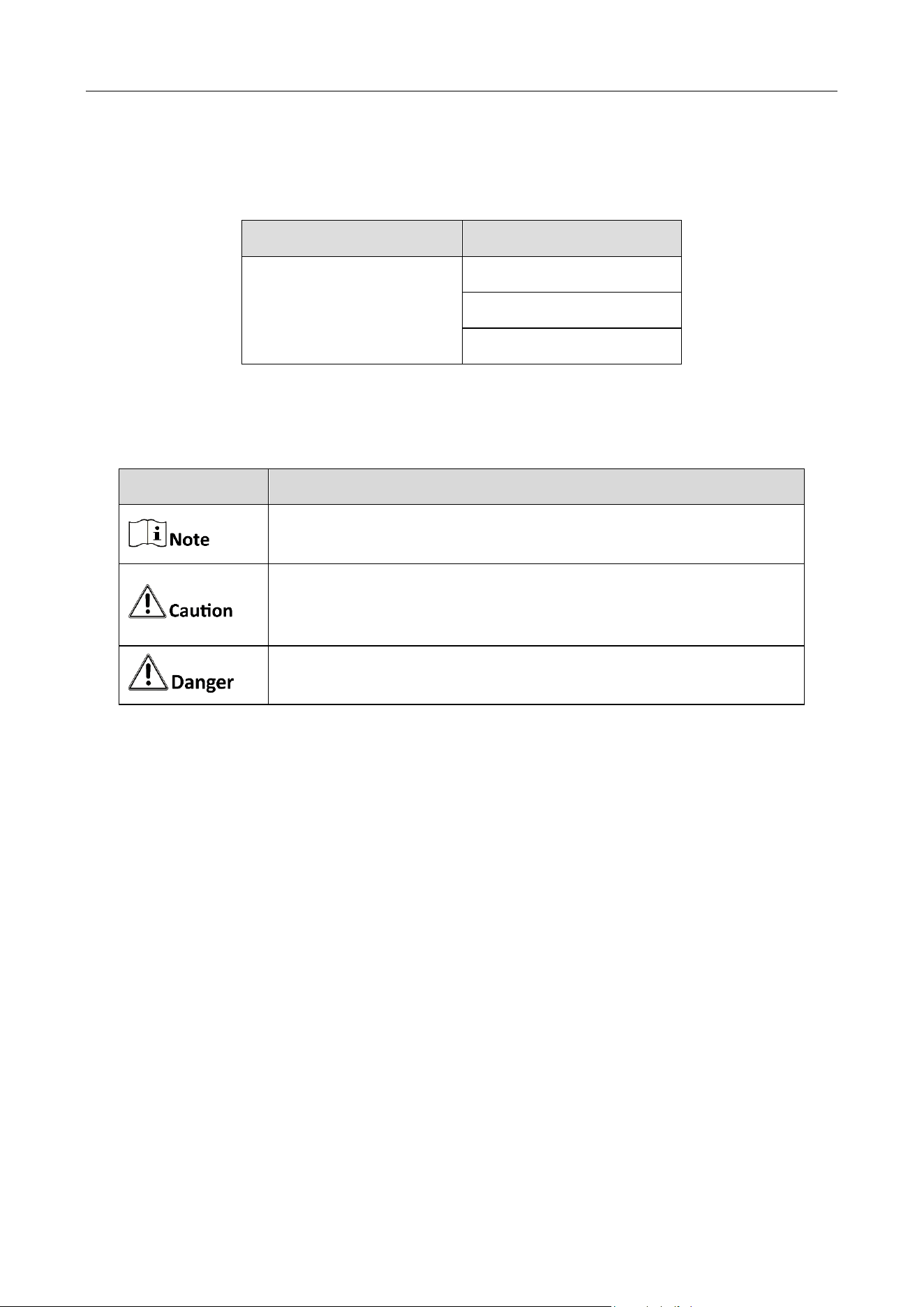
This manual is applicable to the models listed in the following table.
Series
Model
Card Reader
DS-K1107AM
DS-K1107AS
DS-K1107AE
Symbol Conventions
The symbols that may be found in this document are defined as follows.
Safety Instructions
All the electronic operation should be strictly compliance with the electrical safety regulations,
fire prevention regulations and other related regulations in your local region.
Please use the power adapter, which is provided by normal company. The power consumption
cannot be less than the required value.
Do not connect several devices to one power adapter as adapter overload may cause over-
heat or fire hazard.
Please make sure that the power has been disconnected before you wire, install or dismantle
the device.
When the product is installed on wall or ceiling, the device shall be firmly fixed.
If smoke, odors or noise rise from the device, turn off the power at once and unplug the
power cable, and then please contact the service center.
If the product does not work properly, please contact your dealer or the nearest service
center. Never attempt to disassemble the device yourself. (We shall not assume any responsibility
for problems caused by unauthorized repair or maintenance.
Symbol
Description
Provides additional information to emphasize or supplement
important points of the main text.
Indicates a potentially hazardous situation, which if not avoided,
could result in equipment damage, data loss, performance
degradation, or unexpected results.
Indicates a hazard with a high level of risk, which if not avoided, will
result in death or serious injury.

DS-K1107A Series Card Reader • User Manual
IV
Do not drop the device or subject it to physical shock, and do not expose it to high
electromagnetism radiation. Avoid the equipment installation on vibrations surface or places
subject to shock (ignorance can cause equipment damage).
Do not place the device in extremely hot (refer to the specification of the device for the
detailed operating temperature), cold, dusty or damp locations, and do not expose it to high
electromagnetic radiation. The appropriate temperature is -20℃ to 65℃.
The device cover for indoor use shall be kept from rain and moisture.
Exposing the equipment to direct sun light, low ventilation or heat source such as heater or
radiator is forbidden (ignorance can cause fire danger).
Do not aim the device at the sun or extra bright places. A blooming or smear may occur
otherwise (which is not a malfunction however), and affecting the endurance of sensor at the
same time.
Please use the provided glove when open up the device cover, avoid direct contact with the
device cover, because the acidic sweat of the fingers may erode the surface coating of the device
cover.
Please use a soft and dry cloth when clean inside and outside surfaces of the device cover, do
not use alkaline detergents.
Please keep all wrappers after unpack them for future use. In case of any failure occurred, you
need to return the device to the factory with the original wrapper. Transportation without the
original wrapper may result in damage on the device and lead to additional costs.
Improper use or replacement of the battery may result in hazard of explosion. Replace with
the same or equivalent type only. Dispose of used batteries according to the instructions provided
by the battery manufacturer.
If the card reader is powered by the controller, the power supply distance is recommended to
be no longer than 100m. If the distance is longer than 100m, you are advised to power the card
reader by external 12V (range: -%10 ~ +%10) DC power supply, which is nonswitched and linear.
To guarantee the communication between the controller and the card reader, you must use
RVVP cable above 0.5 to connect them.
If the card reader is installed outside or in environment easy to permeable, it is advisable to
install a waterproof shield.
If you need to install several card readers, the distance among them must over 30cm.
To reduce the noise in long distance transmission, the shield of cable should connect to the
GND of both controller and card reader terminal.
Please take care of your card and report card loss in time when card is lost.
If you require a higher security level, use multiple authentication modes.
Multiple card types are supported. Please select an appropriate card type according to the
card performance and the usage scenarios.

DS-K1107A Series Card Reader • User Manual
V
TABLE OF CONTENTS
Chapter 1 Introduction ................................................................................................................... 1
Overview ....................................................................................................................................................... 1
Indicator and Component .............................................................................................................................. 2
Chapter 2 Installation ..................................................................................................................... 3
Introduction for DIP Switch ............................................................................................................................ 3
Definition of Cable ......................................................................................................................................... 4
Wiring Cables ................................................................................................................................................. 5
Installing Card Reader .................................................................................................................................... 6
Chapter 3 Sound Prompt and Indicator .......................................................................................... 7
DS-K1107A Series Card Reader • User Manual
1
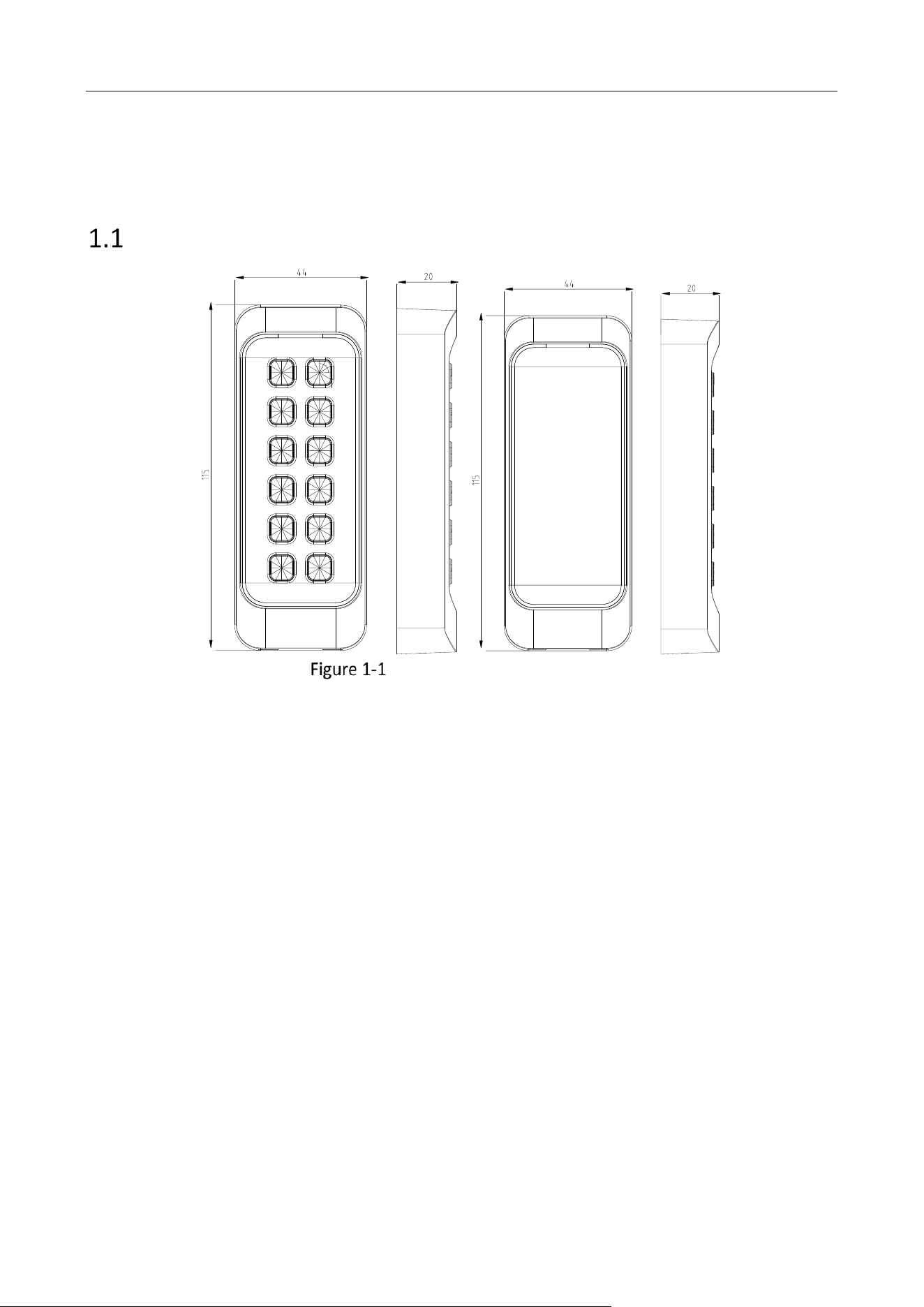
Chapter 1 Introduction
Overview
DS-K1107A Series Card Reader
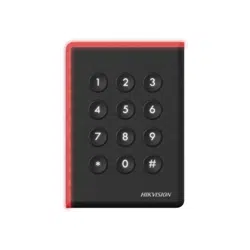
DS-K1107A series card reader is a kind of high-performance product, with a 32 bit high-speed
processor. It communicates with access controller via either RS-485 protocol (AES encrypted) or
Wiegand protocol. And a build-in tamper-proof module helps to protect card reader from
malicious damage. As to the physical appearance, the PC+ABS material makes water proof and
dust proof possible in poor environment.
DS-K1107A Series Card Reader • User Manual
2
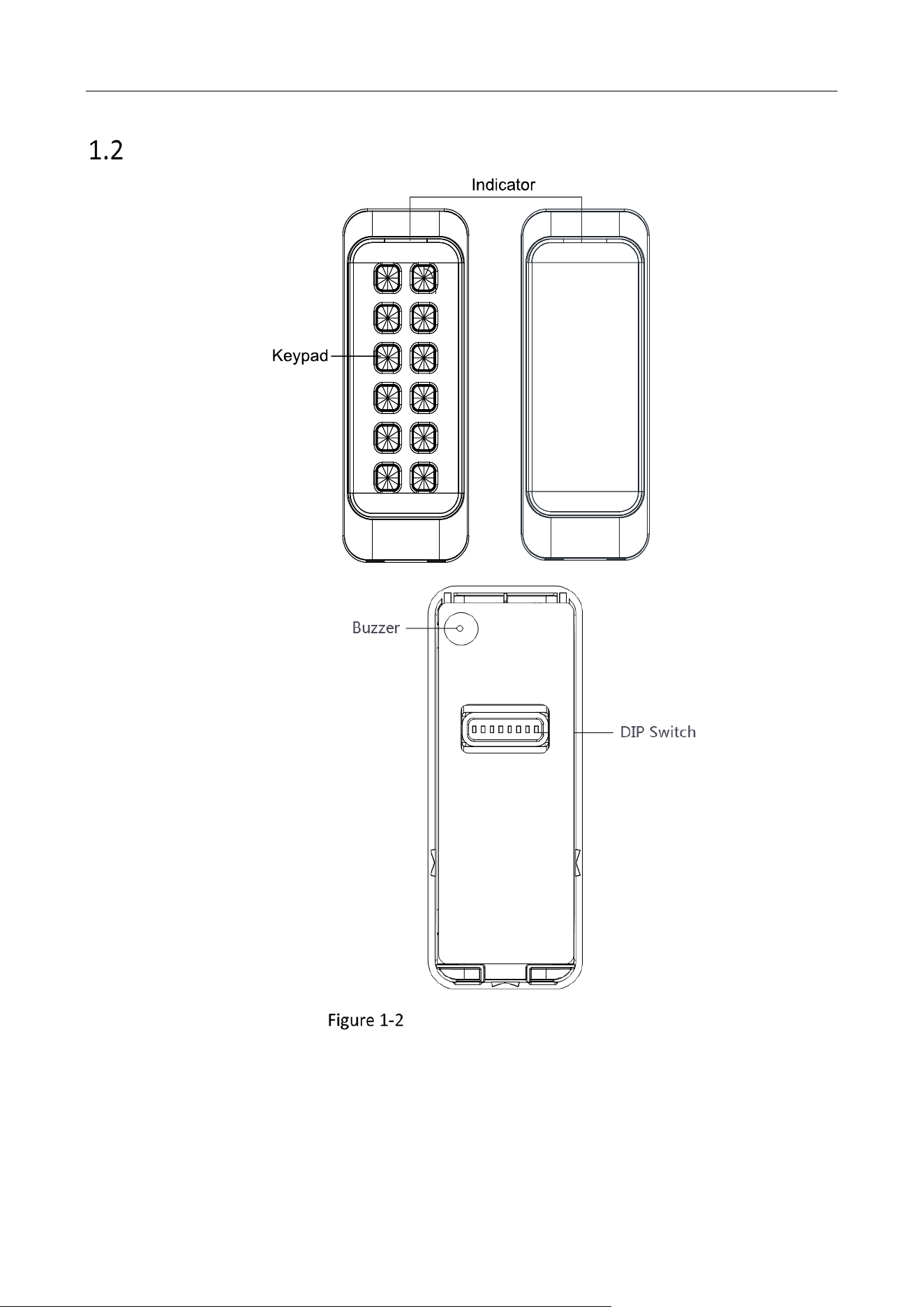
Indicator and Component
Indicator and Component
DS-K1107A Series Card Reader • User Manual
3
Chapter 2 Installation
Introduction for DIP Switch
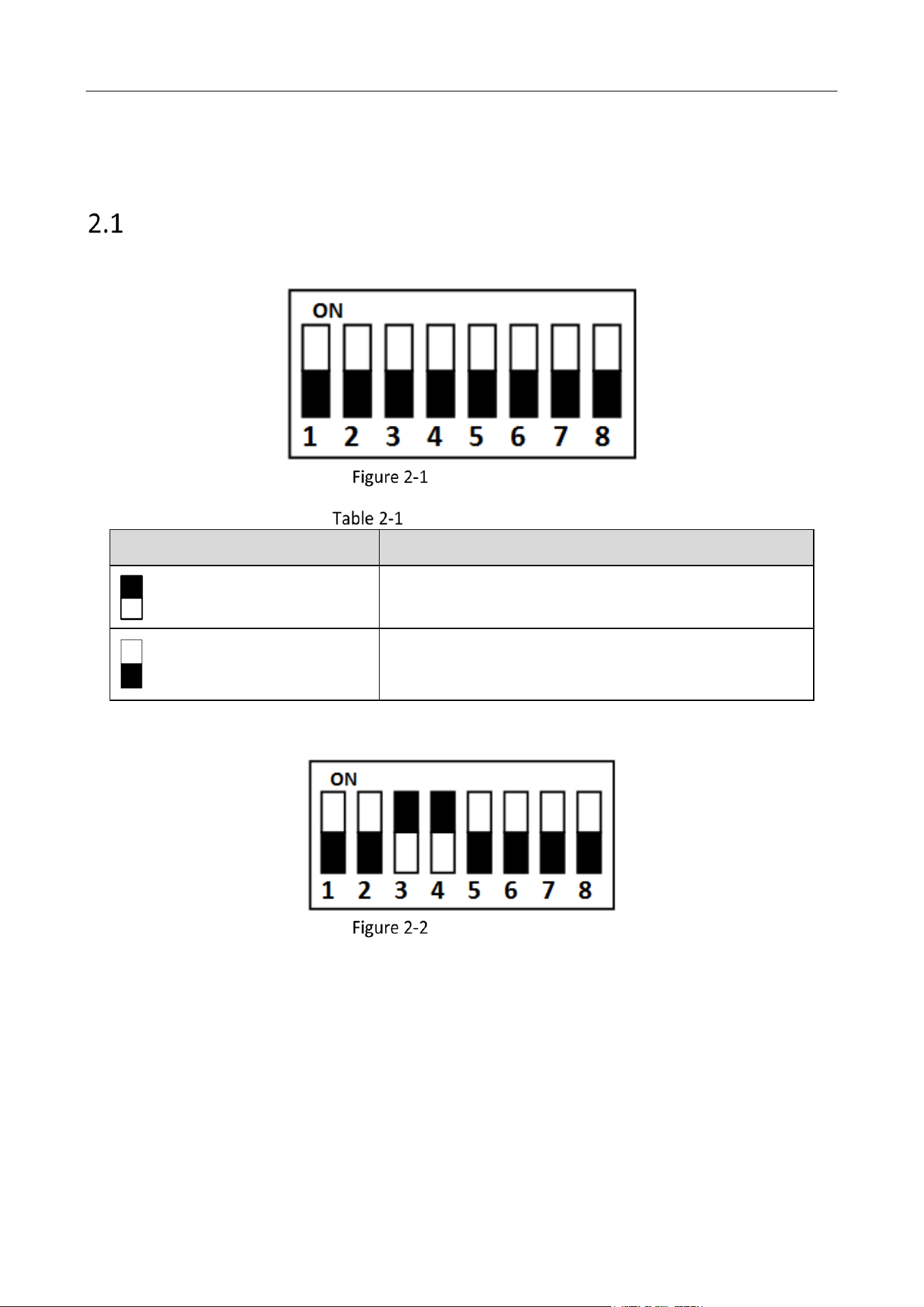
The DIP switch module is shown below. The No. of DIP switch from left to right is 1 ~ 8.
DIP Switch Module
Description of DIP Switch
Icon
Description
Represent 1 in binary mode
Represent 0 in binary mode
For example, binary value of the following status is: 0000 1100.
DIP Switch Module
DS-K1107A Series Card Reader • User Manual
4
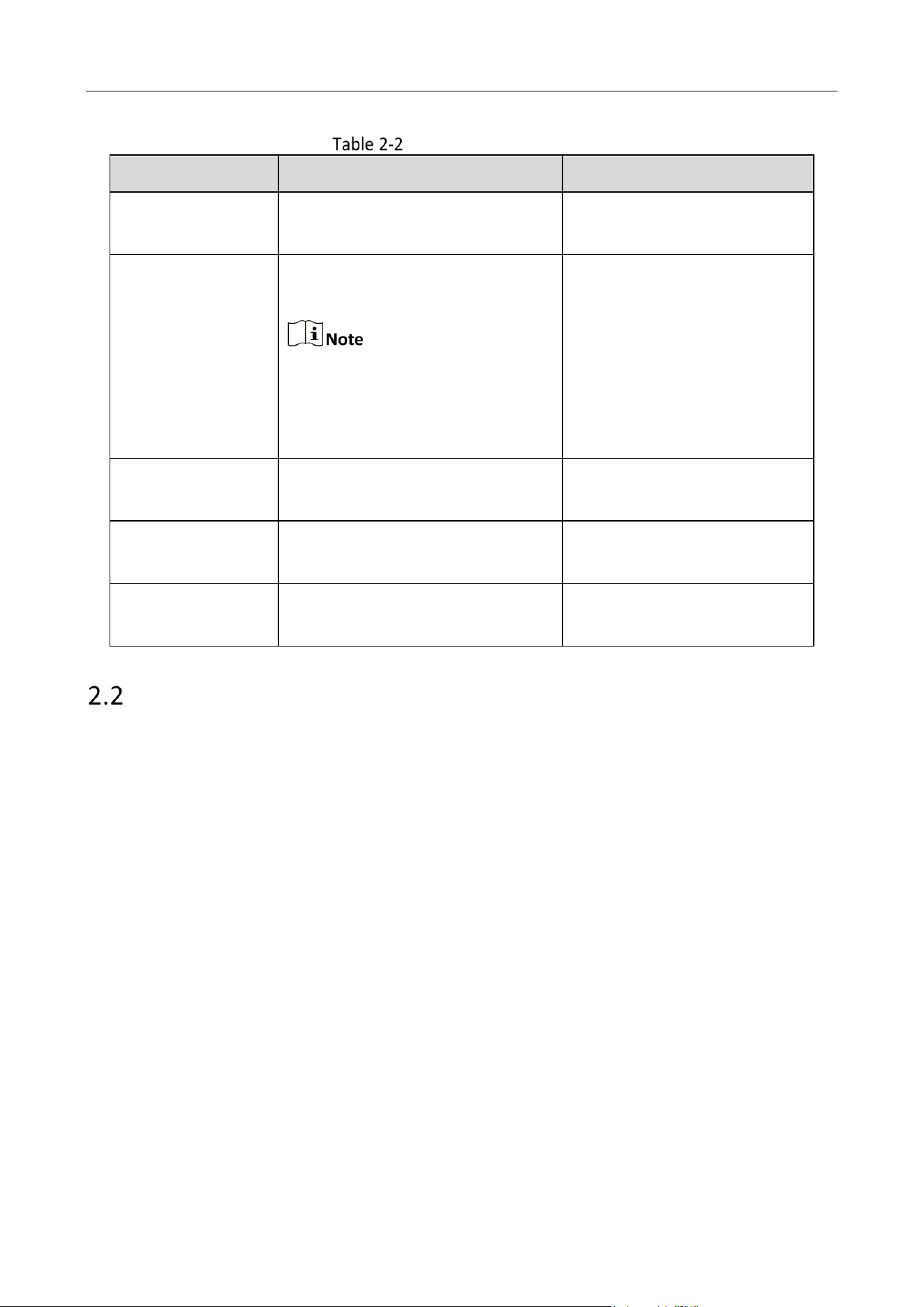
Description of DIP Switch
No.
Description
DIP Switch Status
1 ~ 4
Address of RS-485
1: 1
0: 0
5
Card Security
Only available when Wiegand is
enabled.
1 Enable M1 card encryption
function, enable non-M1 card
Recognition function, disable
door open via NFC card.
0: Disable M1 card encryption
function, disable non-M1 card
Recognition function, enable
door open via NFC card.
6
Wiegand protocol or RS-485
protocol.
1: Wiegand protocol;
0: RS-485 protocol.
7
Wiegand Protocol
(available when No. 6 is 1)
1: Wiegand protocol of 26-bit;
0: Wiegand protocol of 34-bit.
8
Matched Resistance
(available for RS-485 protocol)
1: Enable;
0: Disable.
Definition of Cable
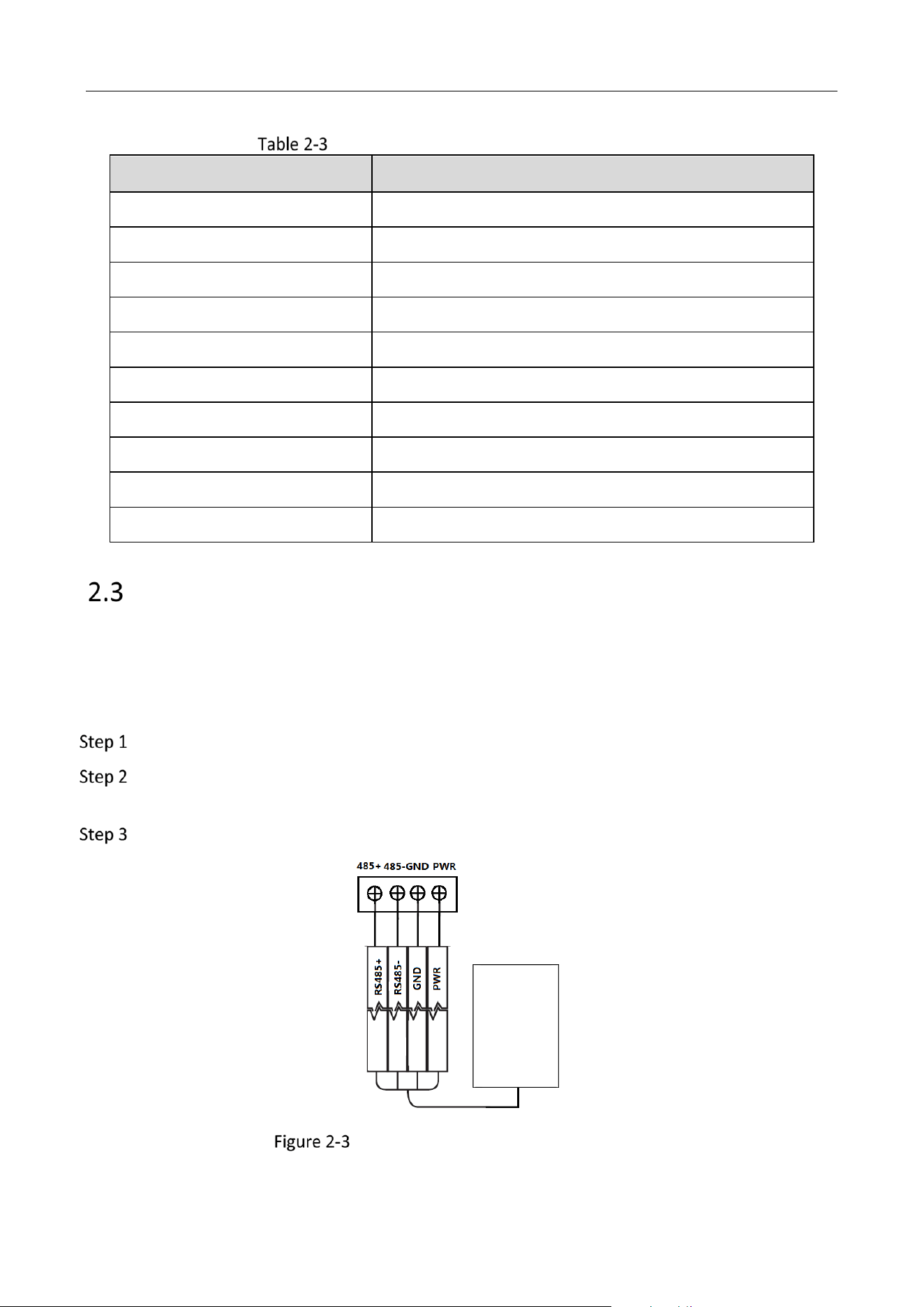
The description of 10 cables is shown below.
DS-K1107A Series Card Reader • User Manual
5
Description of DIP Switch Description of Cable
Color
Description
Orange
Red LED Control (available for Wiegand Protocol)
White
Wiegand W1 (available for Wiegand Protocol)
Green
Wiegand W0 (available for Wiegand Protocol)
Blue
RS-485-
Yellow
RS-485+
Red
PWR (+12 VDC)
Black
GND
Gray
TAMPER (available for Wiegand Protocol)
Purple
Beep Control (available for Wiegand Protocol)
Brown
Green LED Control (available for Wiegand Protocol)
Wiring Cables
Purpose:
Wire the cables between controller and card reader, thus to establish the communication between
them.
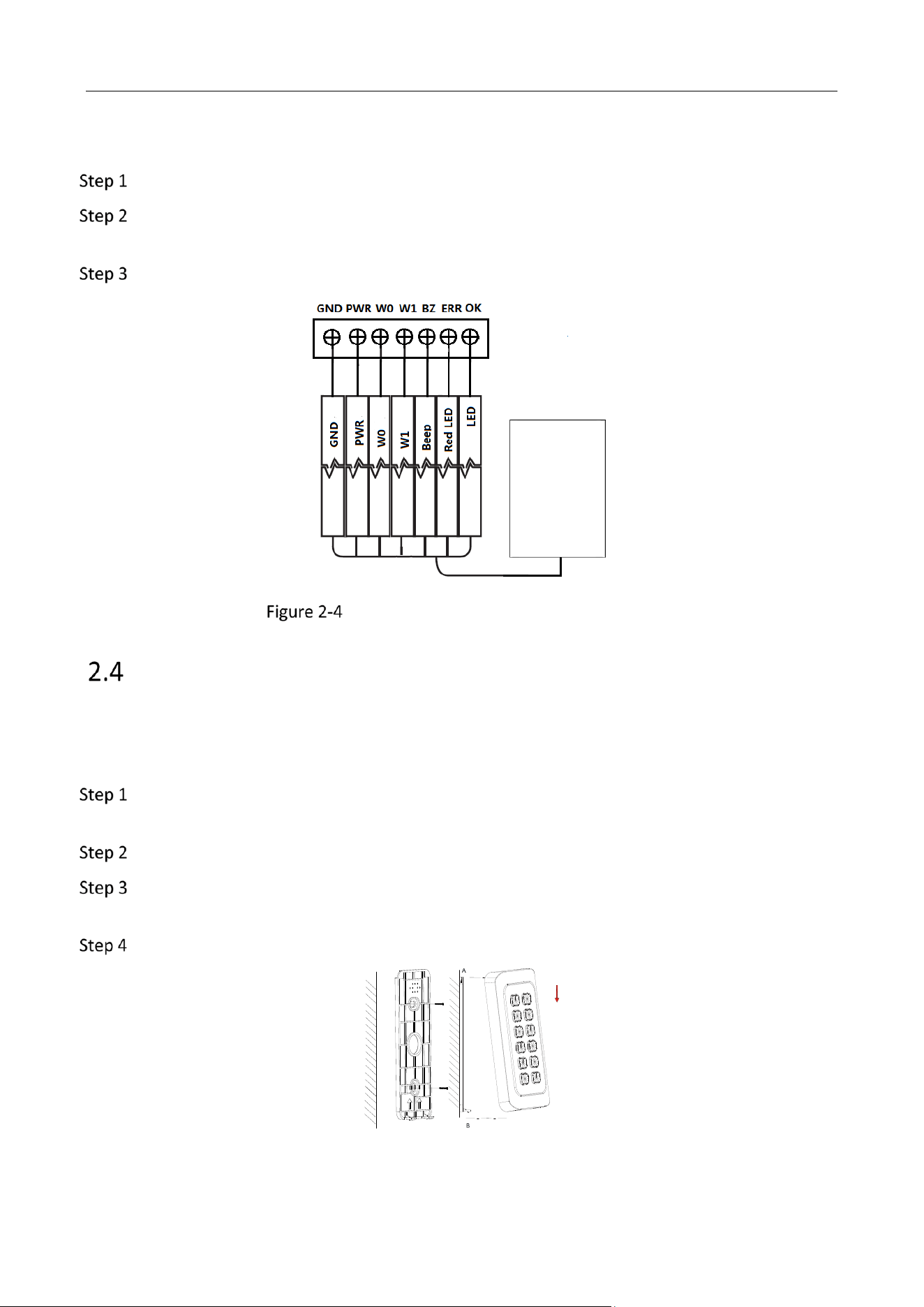
Steps for RS-485 communication mode:
Set the DIP switch of No. 6 as 0.
Set the DIP switch of No. 1 ~ 4 for RS-485 address. For details, please refer to 2.1
Introduction for DIP Switch.
Wire the cable between controller and card reader as shown below.
Yellow
Blue
Black
Red
Black
Red
Green
White
Purple
Orange
Brown
Controller
Card Reader
Card Reader
Card Reader
Green
Wiring for RS-485 Communication Mode
DS-K1107A Series Card Reader • User Manual
6
Steps for Wiegand communication mode:
Set the DIP switch of No. 6 as 1.
Set the DIP switch of No. 5 and 7 for reading card mode and Wiegand protocol. For details,
please refer to 2.1 Introduction for DIP Switch.
Wiring the cable between controller and card reader as shown below.
Yellow
Blue
Black
Red
Black
Red
Green
White
Purple
Orange
Brown
Controller
Card Reader
Yellow
Blue
Black
Red
Black
Red
Green
White
Purple
Orange
Brown
Controller
Card Reader
Card Reader
Card Reader
Green
Wiring for Wiegand Communication Mode
Installing Card Reader
Before you start:
Set the DIP switch. For details, refer to 2.1 Introduction for DIP Switch.
Installation for DS-K1101/ 02/ 03/ 04 series card reader:
Fix the plate on the wall or other places by using two screws (PA4×25-SUS). Make sure the
arrows on the plate are upwards.
Check whether the plate is fixed and in the right direction.
Slide the card reader from the direction A to B along the plate side until the bottom matches
the joint. Make sure the card reader is tightly on the wall or other places.
Drag and move the card reader to make sure it is fixed
DS-K1107A Series Card Reader • User Manual
7
Chapter 3 Sound Prompt and Indicator
After the card reader is powered on, LED status indicator will turn green and flashing for 1 time.
Then it will turn red and flashing for 3 times. At last the buzzer will send out a beep sound
indicating the starting up process is completed.
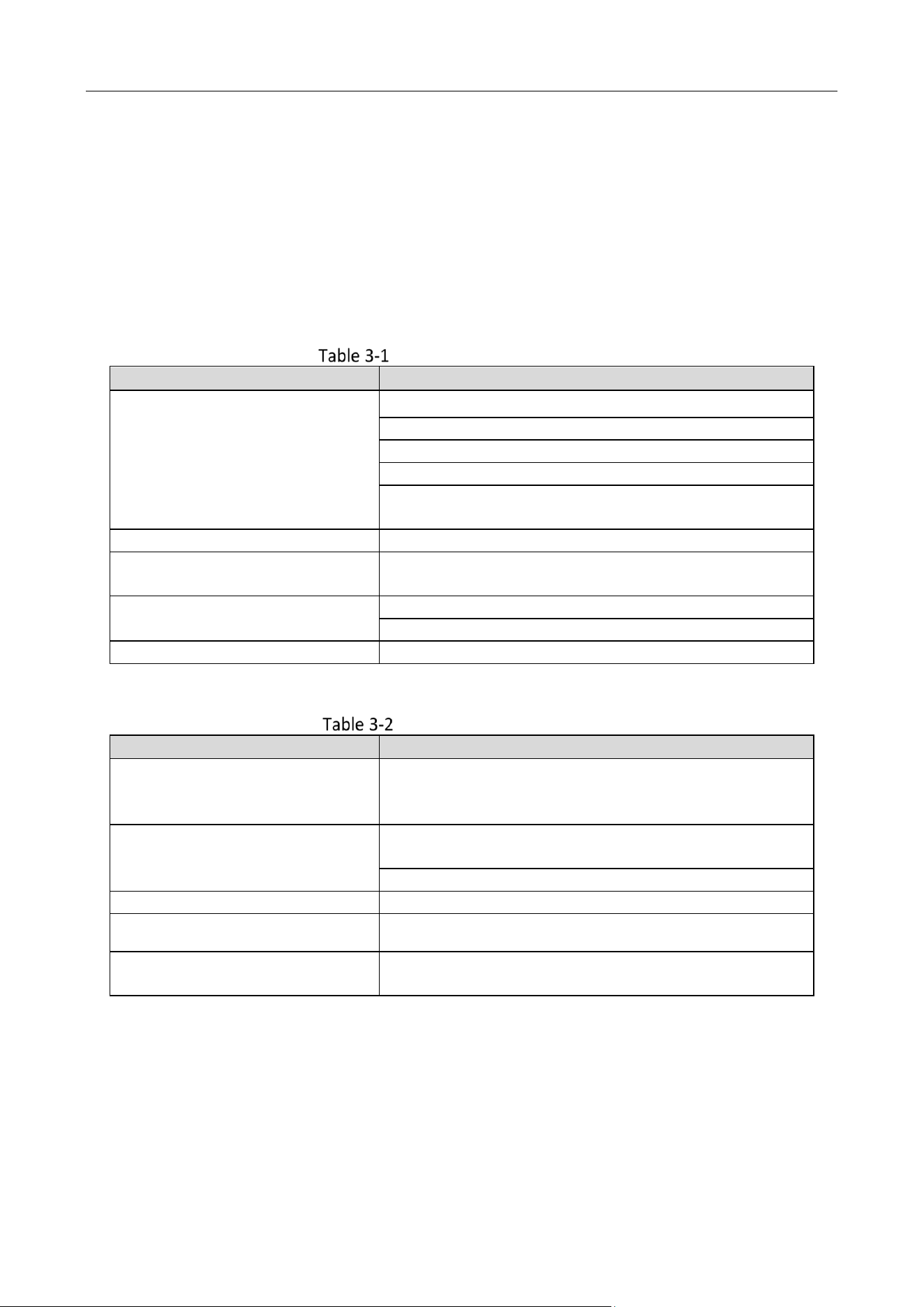
When using the card reader, it will send out different sounds prompt and the LED indicator to
indicate different statuses. You can refer to tables below for detailed information.
Description of Prompt Sound
Sound Prompt
Description
One beep
Swiping card prompt
Pressing keys prompt
Prompt for too long card No. input by pressing keys.
Time out prompt for pressing keys or swiping card.
For Card + Fingerprint authentication: prompt for
pressing the fingerprint after swiping the card.
Two rapid beeps
The operation of pressing keys or swiping card is valid.
Three slow beeps
The operation of pressing keys or swiping card is
invalid.
Rapidly continuous beeps
Prompt for tamper-proof alarm.
Prompt for buzzer alarm.
Slowly continuous beeps
The card reader is unencrypted.
Description of LED Indicator
LED Indicator Status
Description
Green (flashing for 1 time), and
red (flashing for 3 times)
The card reader is power on.
Flashing green
For Card + Password authentication: prompt for entering
the password after swiping the card.
The operation of configuring the fingerprint.
Solid green for 2s
The operation of pressing keys or swiping card is valid.
Solid red
Card reader is working normally.
Flashing red for 3 times
For RS-485 protocol: Registering failed or card reader is
offline.

0
UD25698B