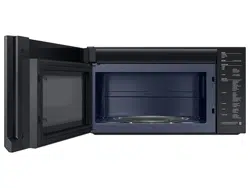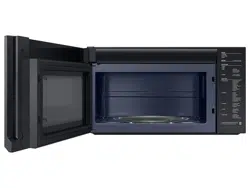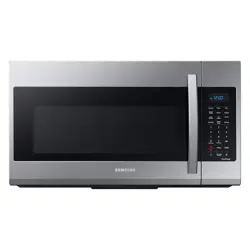

Microwave Oven
User manual
ME21D*6500****
Loading page 2...
Loading page 3...
4 English
Important safety instructions
Important safety instructions
SAVE THESE INSTRUCTIONS
1. FCC Notice
FCC STATEMENT:
This equipment generates and uses ISM frequency energy and if not installed and
used properly, that is in strict accordance with the manufacturer's instructions, may
cause interference to radio and television reception. It has been type tested and found
to comply with limits for ISM Equipment pursuant to part 18 of FCC Rules, which are
designed to part 18 of FCC Rules, which are designed to provide residential installation.
However, there is no guarantee that interference will not occur in a particular
installation. If this equipment does cause interference to radio or television reception,
which can be determined by turning the equipment off and on, the user is encouraged
to try to correct the interference by one or more of the following:
• Reorient the receiving antenna of the radio or
television.
• Relocate the Microwave Oven with respect to the
receiver.
• Move the microwave oven away from the receiver.
• Plug the microwave oven into a different outlet so
that the microwave oven and the receiver are on
different branch codes.
The manufacturer is not responsible for any radio of
TV interference caused by unauthorized modication
to this microwave oven. It is the responsibility of the
user to correct such interference.
This equipment has been tested and found to comply
with the limits for a Class B digital device, pursuant
to part 15 of the FCC Rules. These limits are designed
to provide reasonable protection against harmful
interference in a residential installation.
This equipment generates, uses and can radiate radio
frequency energy and, if not installed and used in
accordance with the instructions, may cause harmful
interference to radio communications. However, there
is no guarantee that interference will not occur in a
particular installation. If this equipment does cause
harmful interference to radio or television reception,
which can be determined by turning the equipment
off and on, the user is encouraged to try to correct
the interference by one or more of the following
measures:
English 5
Important safety instructions
SAVE THESE INSTRUCTIONS
• Reorient or relocate the receiving antenna.
• Increase the separation between the equipment
and receiver.
• Connect the equipment into an outlet on a circuit
different from that to which the receiver is
connected.
• Consult the dealer or an experienced radio/TV
technician for help.
To satisfy FCC RF exposure requirements, a separation distance of 20 cm or more
should be maintained between the antenna of this device and persons during device
operation. To ensure compliance, operations at closer than this distance is not
recommended.
WARNING : Any changes or modications to this unit not expressly approved by the
party responsible for compliance could void the user's authority to operate the
equipment.
2. IC Notice
The term “IC” before the radio certication number only signies that Industry Canada
technical specications were met. Operation is subject to the following two conditions:
(1) this device may not cause interference, and (2) this device must accept any
interference, including interference that may cause undesired operation of the device.
This Class B digital apparatus complies with Canadian ICES-003. For products available
in the US/Canadian markets, only channels 1~11 are available. You cannot select any
other channels.
IC RADIATION EXPOSURE STATEMENT:
This equipment complies with IC RSS-102 radiation
exposure limits set forth for an uncontrolled
environment. This equipment should be installed
and operated so there is at least 8 inches (20 cm)
between the radiator and your body. This device and
its antenna(s) must not be co-located or operated in
conjunction with any other antenna or transmitter.
Loading page 6...
English 7
Important safety instructions
SAVE THESE INSTRUCTIONS
WARNING
Improper use of the grounding plug can result in a risk of electric shock.
• Plug into a grounded, 3 pronged outlet. Do not remove the third (grounding)
prong. Do not use an adaptor or otherwise thwart the safety function of the
grounding plug.
• Consult a qualied electrician or service person if you do not understand
the grounding instructions or if you are not sure if the appliance is properly
grounded.
• We do not recommend using an extension cord with this appliance. If the
power-supply cord is too short, have a qualied electrician or serviceman install
an outlet near the appliance. However, if it is necessary to use an extension
cord, read and follow the 'Use of Extension Cords' section below.
USE OF EXTENSION CORDS
A short power-supply cord is provided to reduce the risk of your becoming
entangled in or tripping over a longer cord. Longer cord sets or extension cords
are available and you can use them if you exercise care. If you use a long cord or
an extension cord:
1. The marked electrical rating of the cord set or extension cord should be at least
as great as the electrical rating of the appliance.
2. The extension cord must be a grounding-type 3-wire cord and it must be
plugged into a 3-slot outlet.
3. The longer cord should be arranged so that it will not drape over the
counter top or tabletop where it can be pulled on by children or tripped over
accidentally. If you use an extension cord, the interior light may icker and the
speed of the blower may vary when the microwave oven is on. Cooking times
may be longer too.
19. Oversized foods or oversized metal utensils should not inserted into the
microwave oven as they may cause a re or risk of electric shock.
20. Do not clean the microwave with a metal scouring pad. A piece of metal could
come off the pad, contact electrical parts, and cause an electric shock.
21. Do not put paper products into the oven when you are operating it in the
toaster mode.
22. Do not store any materials, other than manufacturer's recommended
accessories, in this oven when not in use.
23. Do not cover the racks or any other part of the oven with metal foil.
This will cause the oven to overheat.
CAUTION
1. Clean Ventilating Hoods Frequently - Grease should not be allowed to
accumulate on the hood of the lter.
2. When aming foods under the hood, turn the fan on.
3. Use care when cleaning the vent-hood lter. Corrosive cleaning agents, such as
lye-based oven cleaner, may damage the lter.
GROUNDING INSTRUCTIONS
This appliance must be grounded. In the event of an electrical short circuit,
grounding reduces the risk of electric shock by providing an escape wire for the
electrical current. This appliance is equipped with a cord that includes a grounding
wire and a grounding plug. The plug must be plugged into an outlet that is
properly installed and grounded.
Loading page 8...
English 9
Important safety instructions
SAVE THESE INSTRUCTIONS
In the event of a grease re on the surface units below the microwave oven,
smother the aming pan on the surface unit by covering the pan completely
with a lid, a cookie sheet, or a at tray.
Never leave surface units beneath your microwave oven unattended at high
heat settings. Boil overs cause smoking and greasy spillovers that may ignite
and spread if the vent fan is operating. To minimize automatic fan operation,
use adequate sized cookware and use high heat on surface units only when
necessary.
If materials inside the microwave oven should ignite, keep the oven door
closed, turn the oven off and disconnect the power cord, or shut off power at
the fuse or circuit breaker panel. If the door is opened, the re may spread.
Use of inadequately sized cookware on top of the stove may result in
melting of microwave door or other damage.
• Always observe safety precautions when using your microwave oven.
Never try to repair the oven on your own. There is dangerous voltage
inside. If the oven needs to be repaired, contact an authorized service
center near you.
Do not attempt to repair, disassemble, or modify the appliance yourself.
• Because a high voltage current enters the product chassis during
operation, opening the chassis can result in electric shock or re.
• You may be exposed to electromagnetic waves.
• If your microwave oven requires repair, contact your nearest Samsung
service center.
If any foreign substance such as water enters the microwave, unplug it, and
then contact your nearest service center.
• Failing to do so may result in electric shock or re.
INSTALLATION CAUTIONS
Position the oven so that the plug is easily accessible.
• Failing to do so may result in electric shock or re due to electric leakage.
Unplug the oven when it is not being used for long periods of time or during
a thunder/lightning storm.
• Failing to do so may result in electric shock or re.
CRITICAL USAGE WARNINGS
If the microwave appliance is ooded, please contact your nearest Samsung
service center. Failing to do so may result in electric shock or re.
Read and follow the specic 'Precautions to Avoid Possible Exposure
to Excessive Microwave Energy', found in the beginning of this Safety
Information Section.
If the microwave generates a strange noise, a burning smell or smoke,
unplug it immediately and contact your nearest Samsung service center.
• Failing to do so may result in electric shock or re.
In the event of a gas leak (propane gas, LP gas, etc.), ventilate the room
immediately. Do not touch the microwave, power cord, or plug.
• Do not use a ventilating fan.
• A spark may result in an explosion or re.
Take care that the door or any of the other parts do not come into contact
with your body while the microwave is cooking or just after cooking.
• Failing to do so may result in burns.
Loading page 10...
English 11
Important safety instructions
SAVE THESE INSTRUCTIONS
CRITICAL CLEANING
INSTRUCTIONS
Do not clean the appliance by spraying water directly onto it.
Do not use benzene, thinner, or alcohol to clean the appliance.
• This may result in discoloration, deformation, damage, electric shock, or re.
Before cleaning or performing maintenance, unplug the appliance from the wall
socket. Then, remove food waste from the door and cooking compartment.
• Failing to do so may result in electric shock or re.
Take care not to hurt yourself when cleaning the appliance.
(external/internal)
• You may hurt yourself on the sharp edges of the appliance.
Do not clean the appliance with a steam cleaner.
• This may result in corrosion.
Keep the inside of your microwave oven clean. Food particles or spattered oils
stuck to the oven walls or oor can cause paint damage and reduce the efciency
of the oven.
Do not put your face or body close to the appliance while it is cooking or
when opening the door just after cooking.
• Take care that children do not come too close to the appliance.
• Failing to do so may result in children burning themselves.
Do not place food or heavy objects over the door.
• When you open the door, the food or object may fall and this may result
in burns or injury.
Do not abruptly cool the door, the inside of the appliance, or the dish by
pouring water over it during or just after cooking.
• This may result in damage to the appliance. The steam or water spray
may result in burns or injury.
Do not cook without the glass tray in place on the oven oor. Food will not
cook properly without the tray.
Do not defrost frozen beverages in narrow-necked bottles. The containers
can break.
Do not scratch the glass of your microwave oven door with a sharp object.
• This may result in the glass being damaged or broken.
Do not store anything directly on top of the appliance when it is in
operation.
Do not use sealed containers. Remove seals and lids before use. Sealed
containers can explode due to buildup of pressure even after the oven has
been turned off.
Loading page 12...
Loading page 13...
Loading page 14...
Loading page 15...
Loading page 16...
Loading page 17...
Loading page 18...
Loading page 19...
Loading page 20...
Loading page 21...
Loading page 22...
Loading page 23...
Loading page 24...
Loading page 25...
Loading page 26...
Loading page 27...
28 English
Using your microwave oven
Using your microwave oven
Category
Food
Amount
Instructions
5
Soften/
Melt
1
Melt Butter
1 1 stick
Remove the wrapping and cut the butter in half
vertically.
Place the butter in a dish and cover with wax
paper.
Stir well after nishing and let stand for
1 - 2 minutes.
2 2 sticks
2
Melt
Chocolate
1
1 cup chips or
1 square
Place the chocolate chips or squares in a
microwave-safe container.
When the oven beeps, stir the chocolate and
restart the oven.
Stir and let stand for 1 minute.
3
Soften Butter
1
1 stick
(¼ lbs.)
Remove wrapping and cut butter in half
vertically.
Place butter in dish, cover with wax paper.
4
Soften Cream
Cheese
1
1 package
(8 oz.)
Unwrap the cream cheese and place on a
microwave-safe container.
Cut in half vertically. Let stand for 2 minutes.
Keep Warm
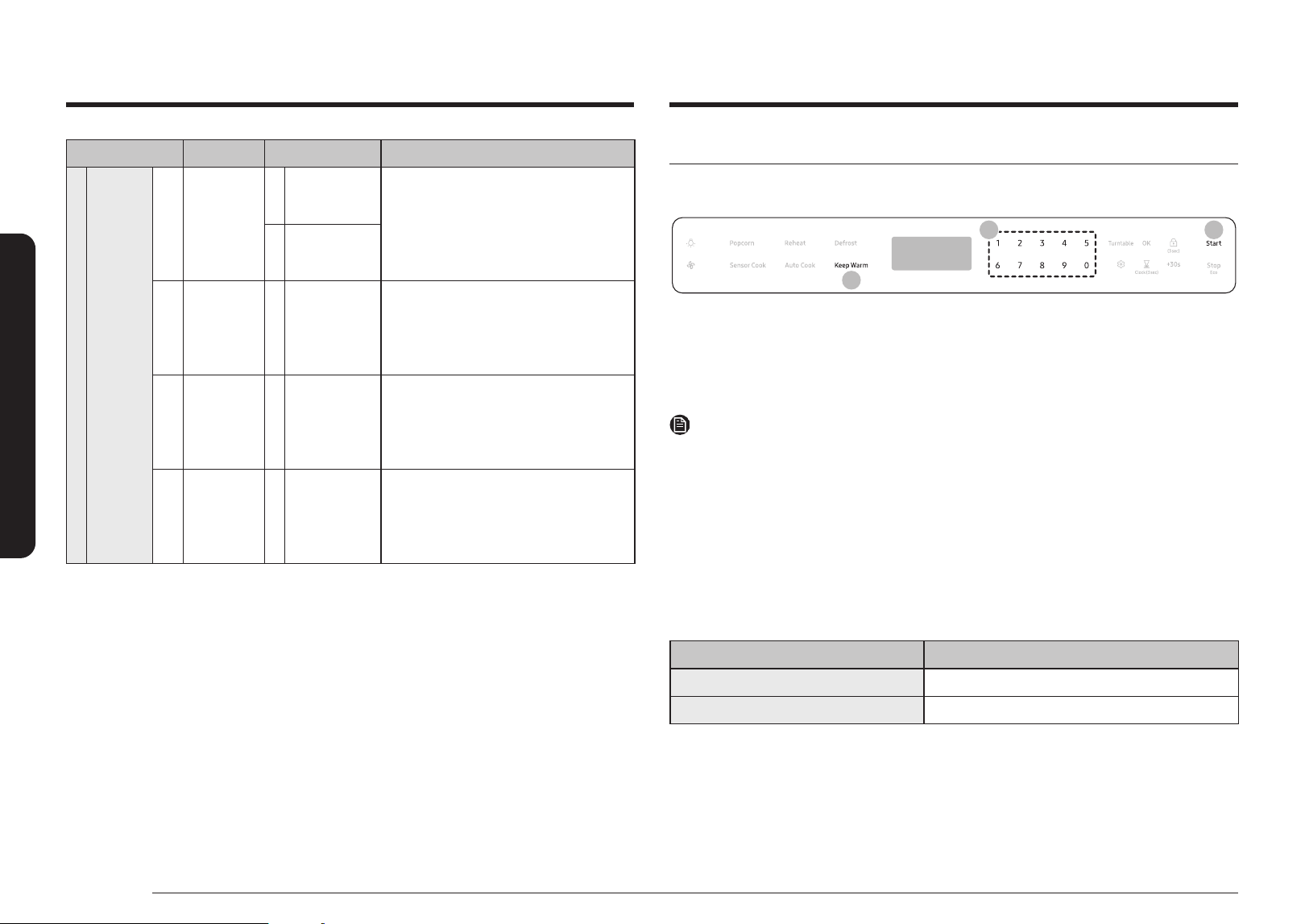
You can keep cooked food warm in your microwave oven for up to 99 minutes and 99 seconds.
32
1
1. Touch the Keep Warm button.
2. Enter the warm hold time by touching the numeric buttons. If you don`t set the time, your
oven will maintain the Warm Hold function for 99 minutes and 99 seconds.
3. Touch the Start button.
NOTE
• Keep Warm operates for up to 99 minutes and 99 seconds.
• The Vent Fan protects the microwave from excess heat.
It automatically turns on if it senses the overheating. If you have turned the
fan on, you may nd that you cannot turn it off. The fan will automatically
turn off when the internal parts are cool.
• Food that is cooked covered should also be covered during Keep Warm.
• Pastry items (pies, turnovers, etc.) should be uncovered during Keep Warm.
• Complete meals kept warm on a dinner plate can be covered during Keep Warm.
Below are the amounts of food we recommend you apply the Keep Warm function to by Food Type.
Food Type Recommended Quantity
Liquid 1 - 2 cups
Dry 5 - 10 oz.
Loading page 29...
Loading page 30...
Loading page 31...
Loading page 32...
Loading page 33...
34 English
Cleaning and maintaining your microwave oven
Cleaning and maintaining your microwave oven
Replacing the charcoal lter
If your oven is vented to the inside, the charcoal lter should be replaced every
6 to 12 months and more often if necessary. The charcoal lter cannot be cleaned. To order a new
charcoal lter, contact the Samsung Parts at 1-800-627-4368 or your Samsung dealer. You can also
order online at www.samsungparts.com
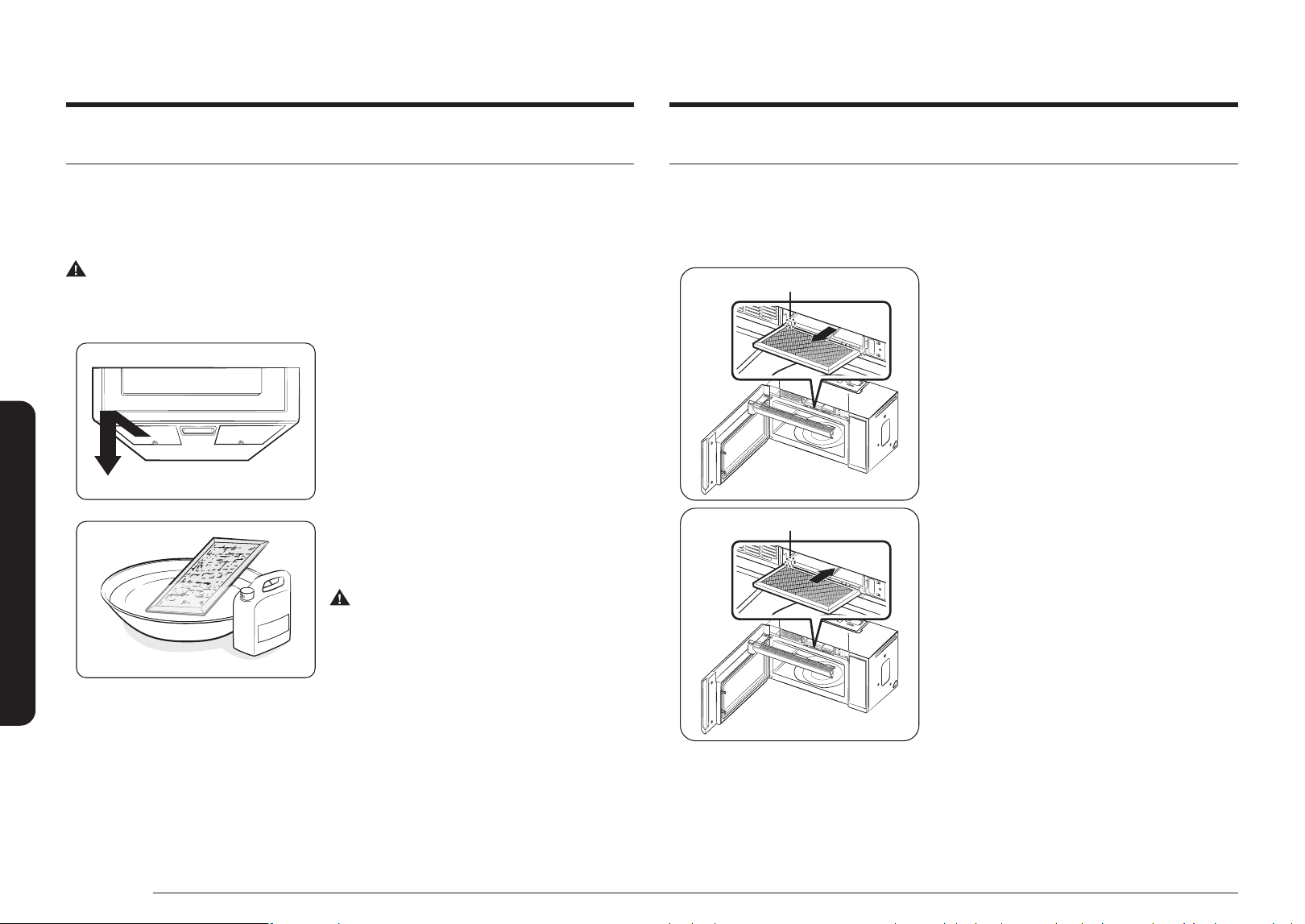
The lter angleThe lter angle
The lter angleThe lter angle
1. Unplug the oven or turn off the power at the main
power supply.
2. Open the door.
3. Remove the vent grille mounting screws.
4. Slide the vent grille to the left, then pull it straight
out.
5. Push the hook and remove the old lter.
6. Slide a new charcoal lter into place. The lter
should rest at the angle shown.
7. Reinstall the vent grille and 2 screws, and then
close the door. Plug the oven in or turn on the
power at the main power supply. Reset the clock.
Cleaning the grease lter
Your microwave oven has reusable grease lter. The grease lter should be removed and cleaned at
least once a month or as required.
To order a new grease lter, contact Samsung Parts at 1-800-627-4368 or your Samsung dealer. You
can also order online at www.samsungparts.com.
WARNING
To avoid the risk of personal injury or property damage, do not operate the oven hood without the
lter in place.
1. To remove the lter, slide it to the left (or right)
using the tab.
2. Soak the grease lter in hot water and a mild soap.
Rinse well and shake to dry. Brushing the lter
lightly can remove embedded dirt.
WARNING
Do not use ammonia or put the grease lter in the
microwave oven. The aluminum will darken.
3. To re-install the lter, slide it into the frame slot on
the left (or right), and then push it upwards and to
the right (or left) to lock it.
Loading page 35...
36 English
Troubleshooting
Troubleshooting
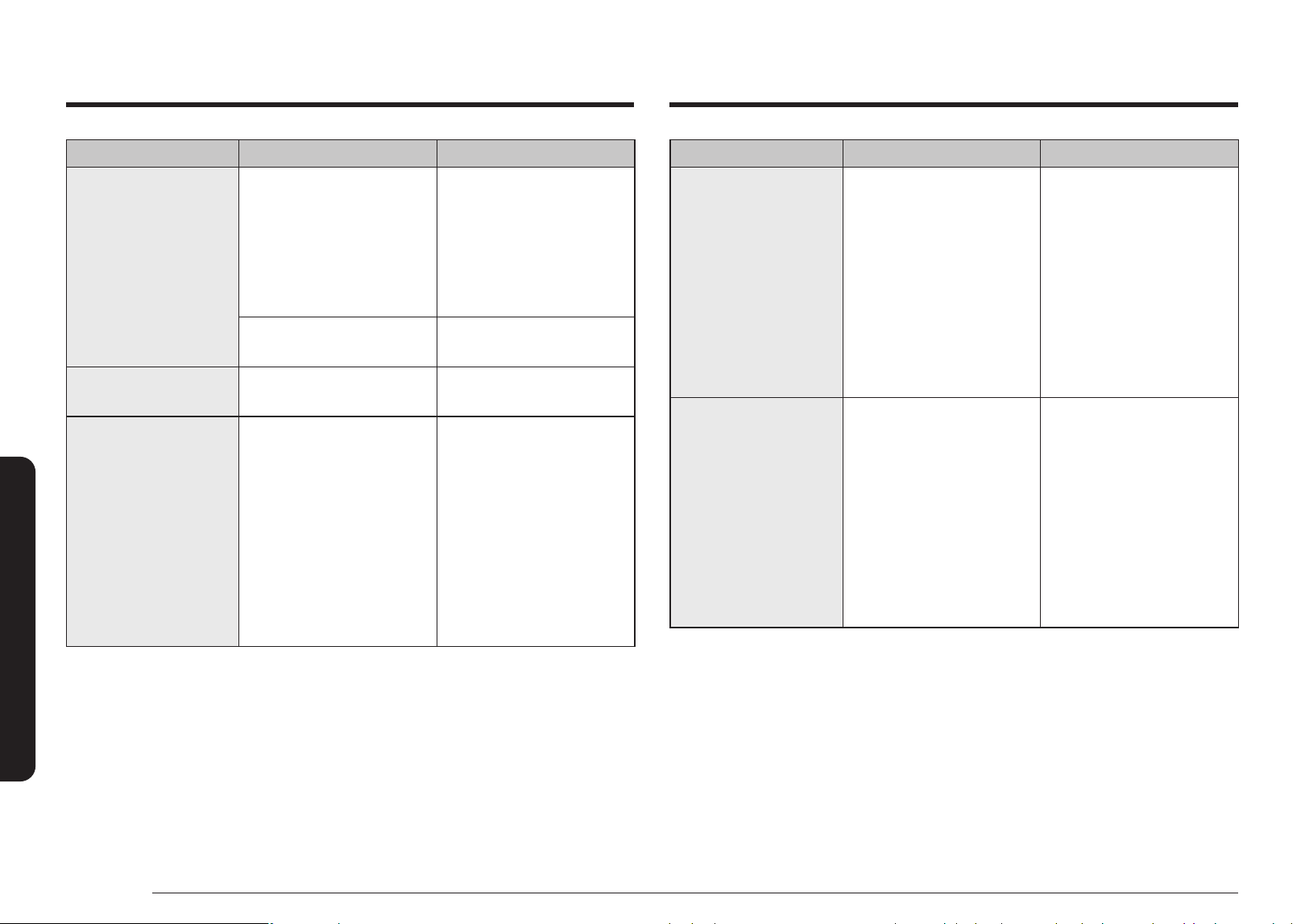
Problem Cause Action
Heating is weak or slow. The oven may not work if too
much food is being cooked or
improper cookware is being
used.
To test the oven, put one cup
of water in a microwave-safe
container, put the container
in the oven, and then run the
microwave for 1-2minutes
to check whether the water is
heated. If the water is heated,
reduce the amount of food and
start the function again. Use a
cooking container with a at
bottom.
The warm function does not
work.
The oven may not work if too
much food is being warmed
or improper cookware is being
used.
To test the oven, put one cup
of water in a microwave-safe
container, put the container
in the oven, and then run the
microwave for 1-2minutes
to check whether the water is
heated. If the water is heated,
reduce the amount of food and
start the function again. Use a
cooking container with a at
bottom.
Problem Cause Action
The oven exterior gets too
hot during operation.
There is not enough ventilation
space around the oven.
There are intake/exhaust outlets
on the front and rear of the
oven for ventilation. Check the
installation guide and make
sure that the microwave is far
enough away from walls and
cabinets for proper ventilation.
Objects are on top of the oven. Remove all objects on the top of
the oven.
The door cannot be opened
properly.
Food residue is stuck between
the door and oven interior.
Clean the oven the door.
The oven does not heat. The oven may not work if too
much food is being cooked or
improper cookware is being
used.
To test the oven, put one cup
of water in a microwave-safe
container, put the container
in the oven, and then run the
microwave for 1-2minutes
to check whether the water is
heated. If the water is heated,
reduce the amount of food and
start the function again. Use a
cooking container with a at
bottom.
Loading page 37...
Loading page 38...
Loading page 39...
Loading page 40...
Loading page 41...
42 English
Warranty (CANADA)
THERE ARE NO EXPRESS WARRANTIES OTHER THAN THOSE LISTED AND DESCRIBED ABOVE, AND
NO WARRANTIES WHETHER EXPRESS OR IMPLIED, INCLUDING, BUT NOT LIMITED TO, ANY IMPLIED
WARRANTIES OF MERCHANTABILITY OR FITNESS FOR A PARTICULAR PURPOSE, SHALL APPLY
AFTER THE EXPRESS WARRANTY PERIODS STATED ABOVE, AND NO OTHER EXPRESS WARRANTY
OR GUARANTY GIVEN BY ANY PERSON, FIRM OR CORPORATION WITH RESPECT TO THIS PRODUCT
SHALL BE BINDING ON SAMSUNG. SAMSUNG SHALL NOT BE LIABLE FOR LOSS OF REVENUE OR
PROFITS, FAILURE TO REALIZE SAVINGS OR OTHER BENEFITS, OR ANY OTHER SPECIAL, INCIDENTAL
OR CONSEQUENTIAL DAMAGES CAUSED BY THE USE, MISUSE OR INABILITY TO USE THIS PRODUCT,
REGARDLESS OF THE LEGAL THEORY ON WHICH THE CLAIM IS BASED, AND EVEN IF SAMSUNG
HAS BEEN ADVISED OF THE POSSIBILITY OF SUCH DAMAGES. NOR SHALL RECOVERY OF ANY
KIND AGAINST SAMSUNG BE GREATER IN AMOUNT THAN THE PURCHASE PRICE OF THE PRODUCT
SOLD BY SAMSUNG AND CAUSING THE ALLEGED DAMAGE. WITHOUT LIMITING THE FOREGOING,
PURCHASER ASSUMES ALL RISK AND LIABILITY FOR LOSS, DAMAGE OR INJURY TO PURCHASER
AND PURCHASER'S PROPERTY AND TO OTHERS AND THEIR PROPERTY ARISING OUT OF THE USE,
MISUSE OR INABILITY TO USE THIS PRODUCT SOLD BY SAMSUNG NOT CAUSED DIRECTLY BY THE
NEGLIGENCE OF SAMSUNG. THIS LIMITED WARRANTY SHALL NOT EXTEND TO ANYONE OTHER
THAN THE ORIGINAL PURCHASER OF THIS PRODUCT, IS NONTRANSFERABLE AND STATES YOUR
EXCLUSIVE REMEDY.
Some states do not allow limitations on how long an implied warranty lasts, or the exclusion or
limitation of incidental or consequential damages, so the above limitations or exclusions may not
apply to you. This warranty gives you specic legal rights, and you may also have other rights which
vary from state to state.
To obtain warranty service, please contact SAMSUNG at:
1-800-SAMSUNG (726-7864) or www.samsung.com/ca/support (English)
www.samsung.com/ca_fr/support (French)
Warranty (CANADA)
Loading page 43...
Loading page 44...