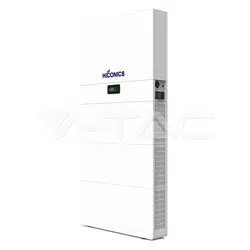
HEC2 SINGLE PHASE RESS
USER MANUAL

EXCLUSION OF LIABILITY
GENERAL NOTE ON GENDER EQUALITY
All names, trademarks, product names or other designations used in this manual may be
legally protected even if not indicated as such (e.g., as a trademark). HICONICS ECO-EN-
ERGY DRIVE TECHNOLOGY CO., LTD. assumes no liability or warranty for their free
usage. The illustrations and texts have been compiled with great care. However, the
possibility of errors cannot be ruled out. The compilation is made without any guarantee.
HICONICS ECO-ENERGY DRIVE TECHNOLOGY CO., LTD. is aware of the importance of
language with regard to the equality of women and men and always makes an effort to
reflect this in the documentation. Nevertheless, for the sake of readability we are unable
to use non-gender-specific terms throughout and use the masculine form instead.
© 2023 HICONICS ECO-ENERGY DRIVE TECHNOLOGY CO., LTD.
All rights reserved by HICONICS ECO-ENERGY DRIVE TECHNOLOGY, including those of
reproduction by photocopy and storage in electronic media. Commercial use or distribu-
tion of the texts, displayed models, diagrams and photographs appearing in this product
is not permitted. This manual may not be reproduced, stored, transmitted or translated
in any form or by means of any medium, in whole or in part, without prior written permis-
sion.
User Manual

User Manual
I
CONTENTS
1 Notes on this Manual
1.1 Scope of Validity
1.2 Target Group
1.3 Symbols Used
1.4 Eu Declarations of Conformity
............................................................................................
..................................................................................................
........................................................................................................
......................................................................................................
..........................................................................
01
01
02
02
02
12
12
13
14
15
15
16
18
20
21
22
22
25
26
26
26
27
28
29
29
32
33
33
34
36
40
40
42
43
43
43
2 Safety
03
03
05
11
2.1 Notes on This Manual Explanation of Symbol
2.2 Important Safety Instructions
2.3 Handle Heavy Loads Safely
........................................................................................................................
..............................................
...........................................................................
...............................................................................
3 Introduction
3.1 Basic Features
3.2 Work Modes
3.3 Packing List
3.4 System Appearance
3.5 Wiring Port Part
3.5.1 Inverter
3.5.2 BMS Control Box
3.5.3 Battery Pack
3.5.4 Base
3.6 LED Lights Display Define
3.6.1 Battery System LED Display Define
3.6.2 Inverter LED Indications
.............................................................................................................
......................................................................................................
..........................................................................................................
...........................................................................................................
............................................................................................
....................................................................................................
................................................................................................................
..............................................................................................
......................................................................................................
....................................................................................................................
..................................................................................
..............................................................
..................................................................................
5.1 Battery System Cable Connection
5.2 PV Connection
5.3 AC Input/Output Connection
5.4 Communication Interface Connection
5.4.1 PM (METER/CT) Interfaces
5.4.2 DRM Port Connections (Optional)
5.4.3 COM/LCD Interface
5.4.4 PARALLEL (INV) Interface
5.5 External Smart Meter (optional) Connection
.............................................................................................
....................................................................
......................................................................................................
.............................................................................
............................................................
............................................................................
.................................................................
..........................................................................................
...............................................................................
..................................................
4 Installation
4.1 Check for Physical Damage
4.2 Equipment Installation
4.2.1 Requirements
4.2.2 Required for Installation
4.3 Installation Process
4.3.1 Battery Pack Installation
4.3.2 Inverter Installation
...............................................................................................................
...............................................................................
........................................................................................
....................................................................................................
..................................................................................
.............................................................................................
.................................................................................
..........................................................................................
5 Electrical Connection

II
User Manual
7.1 Download SOLARMAN APP
.....................................................................................................
................................................................................
8.1 Maintenance Before Operation
8.2 Maintenance During Operation
...................................................................
.........................................................................
..........................................................................
9.1 System Fault Information
9.2 Inverter Fault Information
..................................................................................................
...................................................................................
...................................................................................
7 Plant Monitoring
48
48
49
49
50
51
51
52
8 Maintenance and Troubleshooting
9 Fault Information
10 Packaging, Transportation, Storage
56
57
60
Annex 1: Inverter Parameter Table
Annex 2: Battery Parameters
................................................................
..........................................................................
....................................................................................
5.6 Earth Fault Alarm Connection
5.7 Wiring Diagram
5.8 Battery Pack Capacity Expansion
............................................................................
.....................................................................................................
.....................................................................
6.1 Switch On
6.2 Switch Off
..................................................................................................
...............................................................................................................
...............................................................................................................
6 System Operation
47
47
48
44
45
46
1.1 Scope of Validity
This manual is an integral part of HEC2 series single phase residential energy storage
system with hybrid inverter, it describes the assembly, installation, commissioning,
maintenance and failure of the product. Please read it carefully before operating.
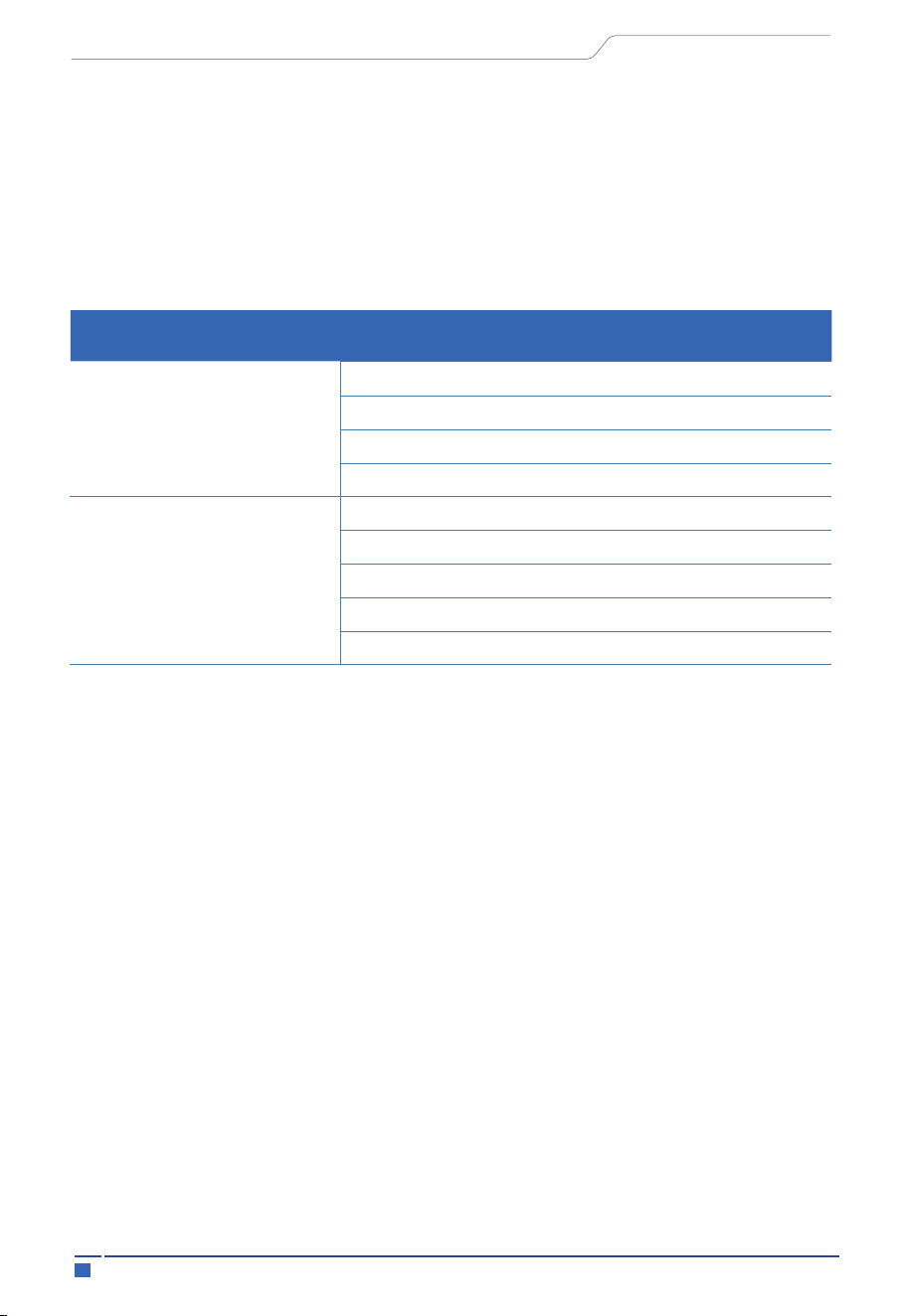
Inverter naming rules, for example: HEC2-S5.0Hr2
“HEC2” uses for “HICONICS 2 generation series”.
“S” uses for “Single Phase Output”.
"5.0" uses for "rated output power "5kW".
“H” uses for “High voltage”.
“r2” uses for “All-in-one”.
ESS naming rules, for example: HEC2-BHP50r2
“HEC2” uses for “HICONICS 2 generation series”.
“B” uses for “Battery system”
“H” uses for “High voltage system”
“P50” uses for “5kWh”
“r2” uses for “all in one system”
1 Notes on this Manual
01
Notes on this Manual
User Manual
Configuration
Inverter
ESS
HEC2-S3.68Hr2
HEC2-S3.8Hr2
HEC2-S5.0Hr2
HEC2-S6.0Hr2
HEC2-BHP50r2
HEC2-BHP100r2
HEC2-BHP150r2
HEC2-BHP200r2-A
HEC2-BHP300r2
nd
nd
1.3 Symbols Used
1.2 Target Group
This manual is for qualified electricians. The tasks described in this manual only can
be performed by qualified electricians.
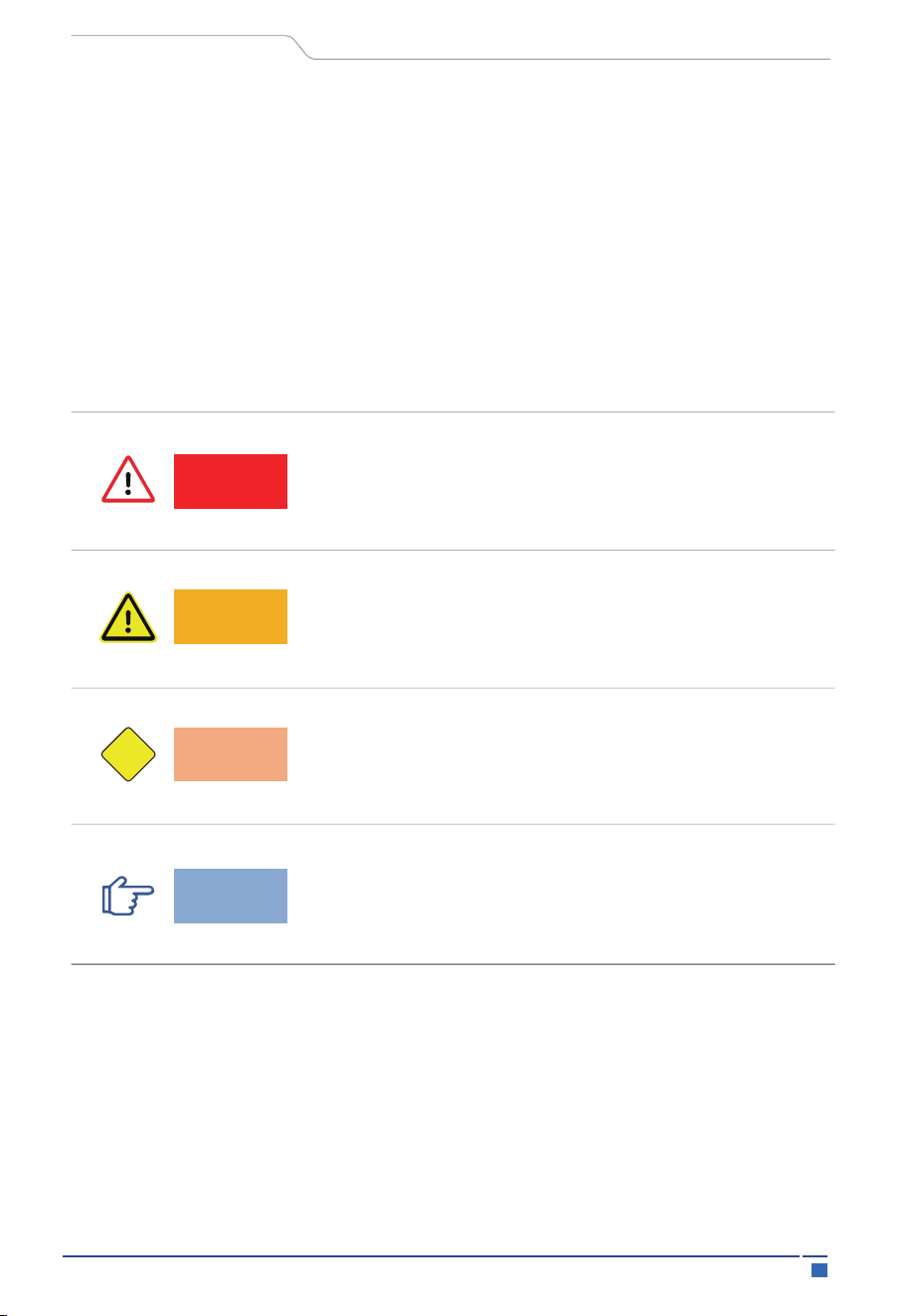
Indicates a hazard with a high level of risk which, if not
avoided, will result in death or serious injury.
Indicates a hazard with a medium level of risk which,if
not avoided, could result in death or serious injury.
Indicates a hazard with a low level of risk which,if not
avoided,could result in minor or moderate injury.
Indicates actions of which,if not avoided, could result
in material damage.
The following types of safety instructions and general information appear in this
document as described below:
1.4 EU Declarations of Conformity
HICONICS ECO-ENERGY DRIVE TECHNOLOGY CO., LTD. hereby declares that the invert-
er described in this document complies with the basic requirements and other relevant
conditions of the directives listed below.
Directive 2014/30/EU
02
Notes on this Manual
Danger!
Warning!
Caution
Notice
CAUTION
User Manual
2.1 Notes on This Manual Explanation of Symbol
This section gives an explanation of all the symbols shown on the inverter and on the
type label.
2 Safety
On the approximation of the laws of the Member States relating to electromagnetic
compatibility (EMC))
Directive 2014/35/EU
(On the harmonization of the laws of the Member States relating to the making available
on the market of electrical equipment designed for use within certain voltage limits – in
short: Low Voltage Directive)
equipment You will find a detailed EU Declaration of Conformity in the download area at:
www.hiconics-global.com)
Directive 2011/65/EU (RoHS)
(on the restriction of the use of certain hazardous substances in electrical and electronic
03
Safety
User Manual
Symbol Explanation
CEmark.
The inverter complies with the requirements of the applicable CE
TUV mark
04
Safety
User Manual
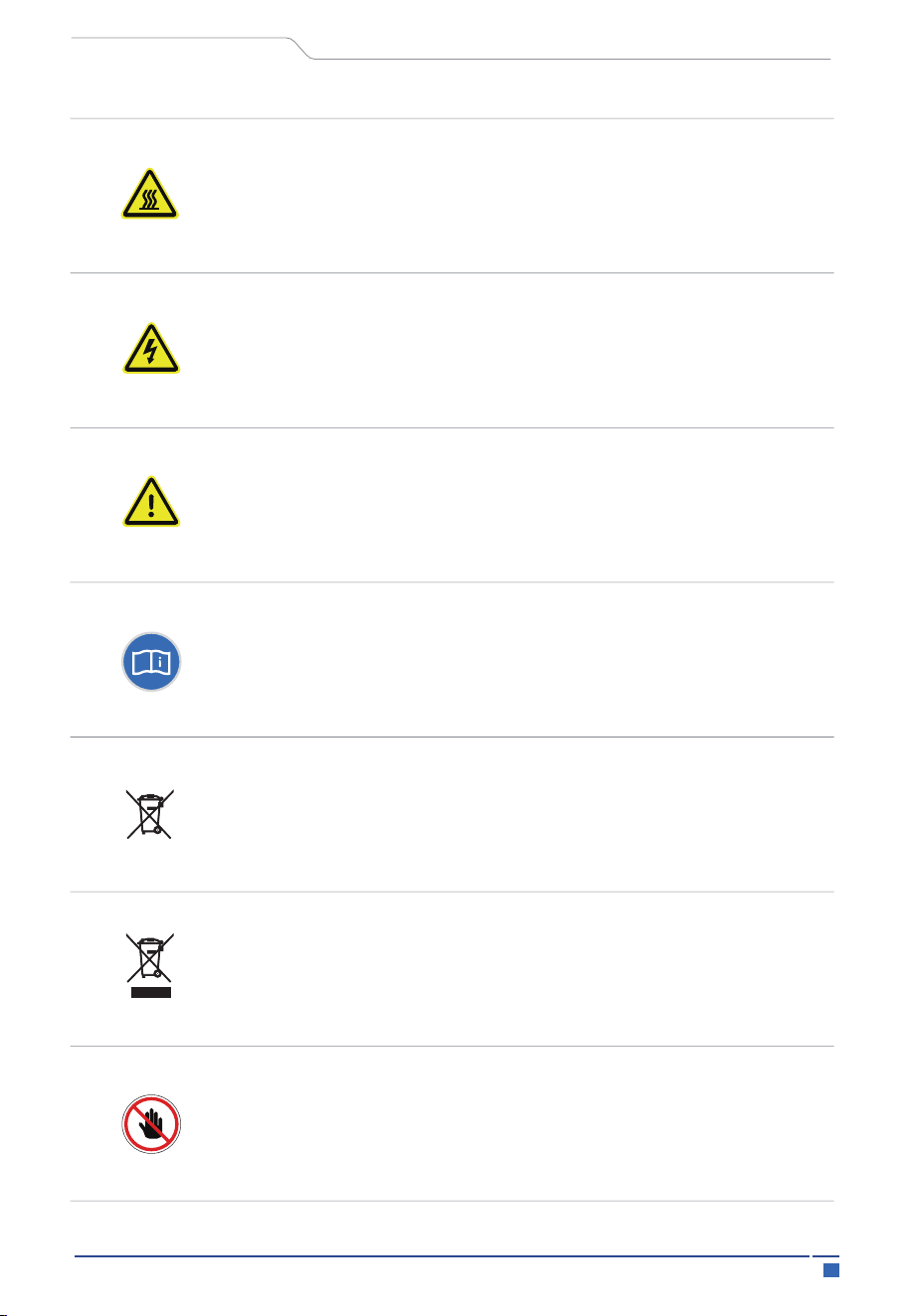
Danger to life due to high voltages in the inverter!
Beware of hot surface.
The inverter can become hot during operation. Avoid contact during
operation. Danger of high temperature.
Observe enclosed documentation
Do not dispose of the battery system together with the household
waste but in accordance with the disposal regulations for electronic
waste applicable at the installation site.
The system can't be disposed together with the household waste.
Disposal information can be found in the enclosed documentation.
Do not operate this equipment until it is isolated from battery, grid
and on-site PV generator.
Danger
Risk of electric shock!
2.2 Important Safety Instructions
05
Safety
User Manual
Danger!
Danger to life due to high voltage in the inverter! All work must
be carried out by qualified electrician
The appliance should not be used by children or individuals
with limited physical sensory or mental abilities,
or lack of experience and knowledge,
unless they have received supervision or instruction.
Caution!
Possible damage to health as result of the radiation!
Do not stay closer than 20cm to inverter for any length of time.
Notice!
Grounding the PV generator.
Should comply with local requirements for grounding the PV
modules and PV generator. It is recommended that the PV
frame and other electrically conductive surfaces be connected
in a manner that provides continuous conduction and ground-
ing for optimum system and personnel protection.
Danger!
Caution
CAUTION
Notice
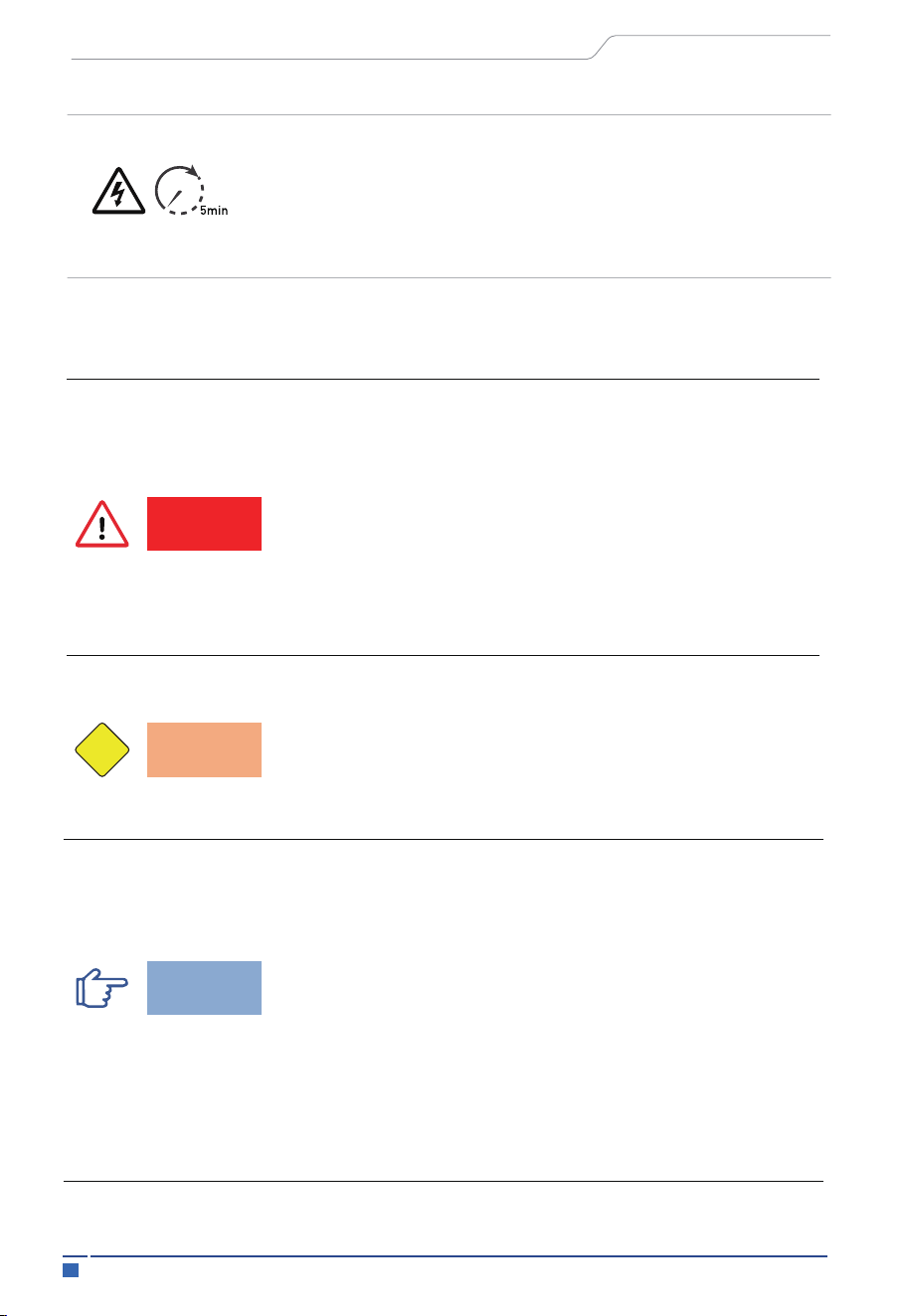
Danger to life due to high voltage.
There is residual voltage existing in the inverter after powering off,
which needs 5 min to discharge.
Wait 5 minutes before opening the top cover or DC cover.
06
Safety
•
•
User Manual
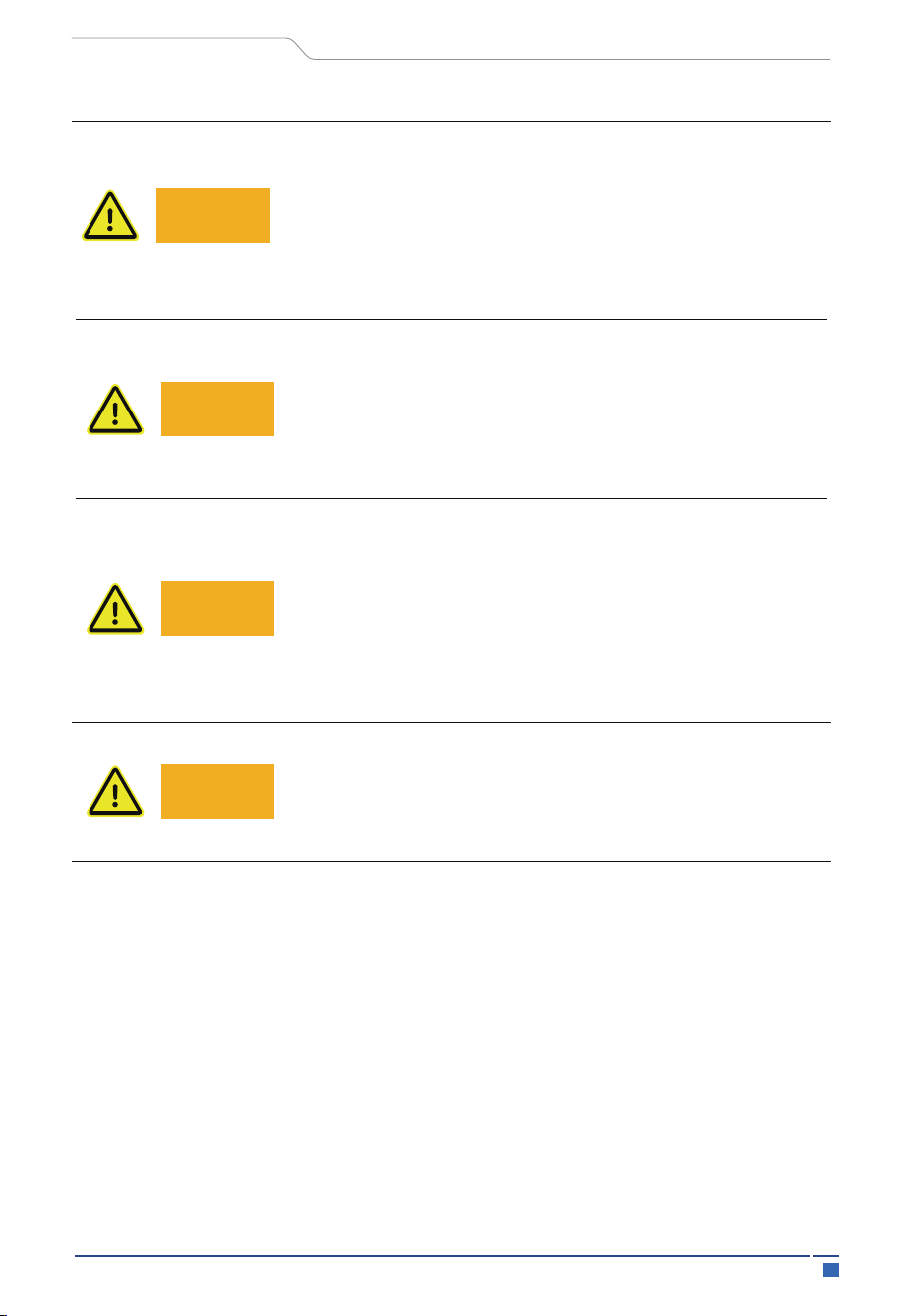
Warning!
Warning!
Warning!
Risk of electric shock!
Warning!
Authorized service personnel must disconnect both AC and
DC power from inverter before attempting any maintenance
or cleaning or working on any circuits connected to inverter.
Prior to the application, please read this section carefully to ensure
correct and safe application. Please keep the user manual properly.
Accessories only together with the inverter shipment are recommend
here, otherwise may result in a risk of fire, electric shock, or injury to
person.
•
Ensure that the wiring is in good condition and is not smaller than the
required size.
Warning!
Warning!
Do not operate the inverter when the device is running.
Warning!
Warning!
Ensure that input DC voltage ≤Max. DC voltage. Over voltage
may cause permanent damage to inverter or other losses,
which will not be included in warranty!

•
•
•
•
•
07 Safety
•
•
•
User Manual
Keep away from flammable, explosive materials to avoid fire.
The installation place should be away from humid or corrosive
substance.
Authorized service personnel must use insulated tools when install-
ing or working with this equipment.
PV modules shall have an IEC 61730 class A rating.
Never touch either the positive or negative pole of PV connecting
device. Touching both of them at the same time is strictly prohibited.
Even after the grid, battery, and PV supply are disconnected, the
capacitors in the equipment may still hold a high voltage charge.
Hazardous voltage will present for up to 5 minutes after disconnec-
tion from power supply
CAUTION-RISK of electric shock from energy stored in capacitor,
never operate on the inverter couplers, the grid cables, battery cables,
PV cables or the PV generator when power is applied. After switching
off the PV, battery and grid supply, always wait for 5minutes to let the
intermediate circuit capacitors discharge before unplug DC, battery
plug and grid coulpler.
•
Do not disassemble any parts of inverter which are not mentioned in
installation guide. It contains no user-serviceable parts. See warranty
for instructions on obtaining service. Attempting to service the invert-
er yourself may result in a risk of electric shock or fire and will void
your warranty.

08Safety
User Manual
•
When accessing the internal circuit of inverter, it is very important to
wait 5 minutes before operating the power circuit. Do not open the
device barehanded.
•
Measure the voltage between terminals DC+ and DC- with a
multi-meter (impedance at least 1Mohm) to ensure that the device is
discharged before beginning work (35VDC) inside the device.
•
Testing to AS/NZS 4777.2:2020 to multiple inverter combinations
has not been conducted So multiple phase inverter combinations
should not be used or external devices should be used in accordance
with the requirements of AS/NZS 4777.1.
09 Safety
•
•
•
User Manual
Incorrect grounding can cause physical injury, death or equipment
malfunction and electromagnetic radiation increase.
Make sure that grounding conductor is adequately sized as
required by safety regulations.
Do not connect the ground terminals of the unit in series in case of
a multiple installation. This product can cause current with a DC
component, where a residual current device (RCD) or monitoring
(RCM) is used for protection.
In case of direct or indirect contact, only an RCD or RCM of type B
is allowed on the supply side of this product.
Anti-Islanding Effect
•
PE Connection and Leakage Current
•
Islanding effect is a special phenomenon that grid-connected PV
system still supply power to the nearby grid when the voltage loss
is happened in the grid system. It is dangerous for maintenance
personnel and the public. HiEnergy series inverter provide Active
Frequency Drift (AFD) to prevent islanding effect.
The end-use application shall monitor the protective conductor by
residual current operated protective device (RCD) with rated fault
current Ifn≤240mA which automatically disconnects the device in
case of a fault.
The device is intended to connect to a PV string with a capacitance
limit of about 700nf.
Warning!
Warning!
High leakage current!
Ground the system before power on.

10
Safety
User Manual
•
For United Kingdom
The installation that connects the equipment to the supply
terminals shall comply with the requirements of BS 7671.
•
No protection settings can be altered.
•
User shall ensure that equipment is so installed, designed and
operated to maintain at all times compliance with the requirements
of ESQCR22(1)(a).
•
For Australia and New Zealand
Electrical installation and maintenance shall be conducted by
licensed electrician and shall comply with Australia National Wiring
Rules.
•
Battery Safety Instructions
HiEnergy Series inverter can be operated with high voltage battery
system, for the specific parameters such as battery type, nominal
voltage and nominal capacity etc., please refer to the parameters
list.
•
To prevent potential electric shock and short-circuit current
hazards that may arise from accumulator batteries, it is advised to
follow the following precautions while the battery replacement:
1. Do not wear watches, rings or similar metallic items.
2. Use insulated tools.
3. Put on rubber shoes and gloves.
4. Do not place metallic tools and similar metallic parts on the batteries.
5. Switch off load connected to the batteries before dismantling battery
connection terminals.
6. Only personal with proper expertise can carry out the maintenance of
accumulator batteries.
11 Safety
User Manual
2.3 Handle Heavy Loads Safely
•
When carrying heavy objects, you should be prepared to bear the
weight to avoid being crushed or sprained by heavy objects.
•
When multiple people carry heavy objects at the same time, it is
necessary to consider the height and other conditions, and do a
reasonable job of personnel matching and division of labor to
ensure a balanced weight distribution.
•
When two or more people are carrying heavy loads together, one
person should direct the equipment and lift or lower the equipment
at the same time to ensure a uniform pace.
•
When handling equipment by hand, you should wear protective
gloves, labor protection shoes and other safety protective equip-
ment to avoid injury.
•
When carrying the equipment by hand, first approach the object,
squat down, use the force of straightening your legs, do not use the
strength of your back, slowly and steadily lift the object, and it is
strictly forbidden to suddenly jerk or twist the torso.
•
Do not quickly lift heavy objects to waist height, but place them on
a half-waist high workbench or an appropriate place, adjust the
position of your palms, and then lift them.
•
Carrying heavy objects must be balanced and stable; The speed of
movement should be uniform and low; Positioning is required to be
smooth and slow, so as to avoid any impact or drop that scratches
the surface of the equipment or damages the components and
cables of the equipment.
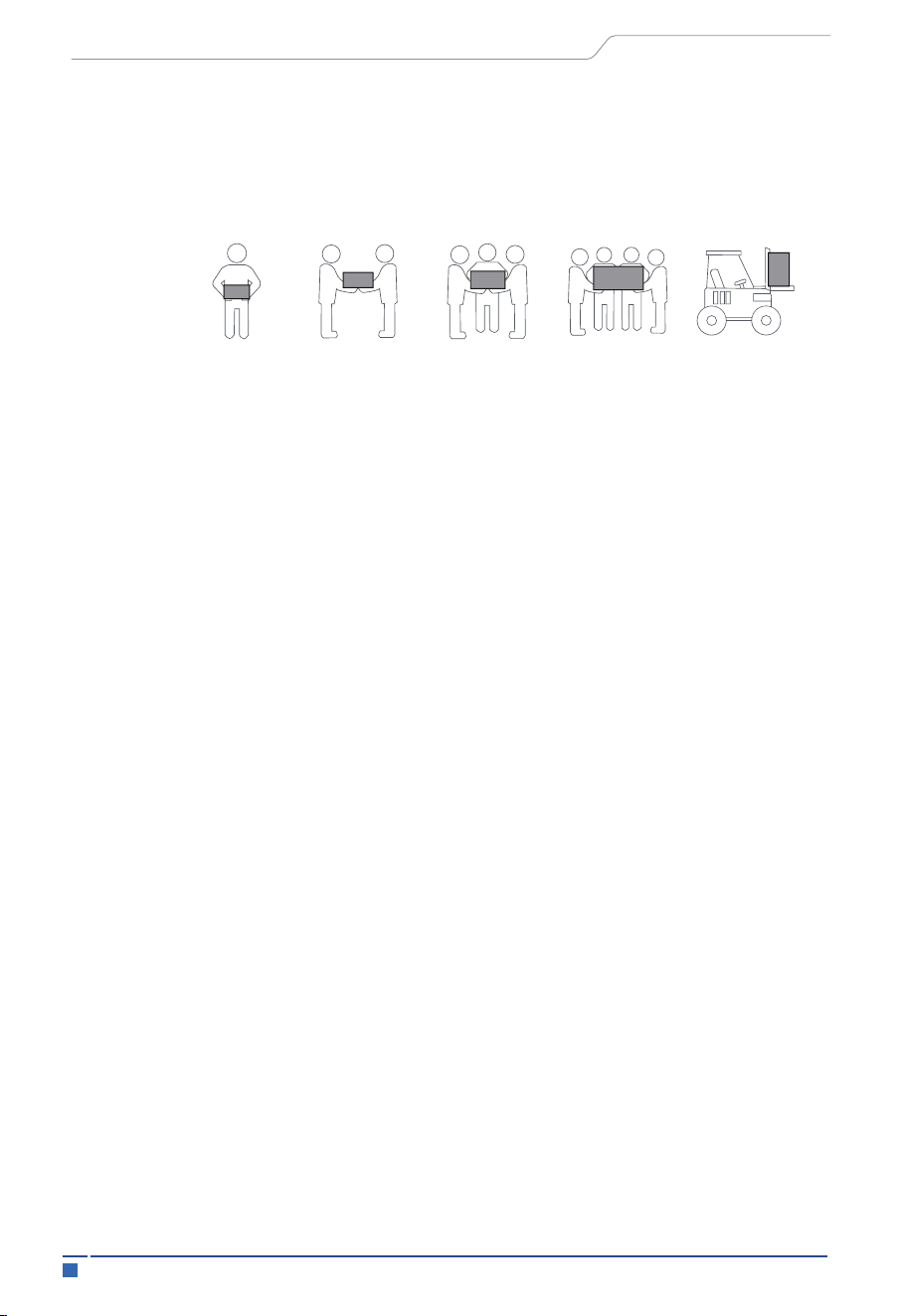
< 18 kg
(< 40 Ibs)
18-32 kg
(40-70 Ibs)
32-55 kg
(70-12 lbs)
55-68 kg
(121-150 lbs)
> 68 kg
(> 150 lbs)
12
Introduction
HiEnergy Series is a high-quality system which can convert solar energy to AC energy
equipped with storage battery. It's an all-in-one system. HiEnergy inverter is only
compatible with HiEnergy batteries (HEC2-BHP) and currently is not compatible with
other batteries (include other LFP battery and Lead acid battery)
The HiEnergy Series system can be used to optimize self-consumption, store electricity
in the battery for future use or feed electricity into public grid. Work mode depends on PV
energy and user’s preference. It can provide electricity for emergency use during the grid
lost by using the energy from battery and inverter generated from PV.
3.1 Basic Features
3 Introduction
User Manual
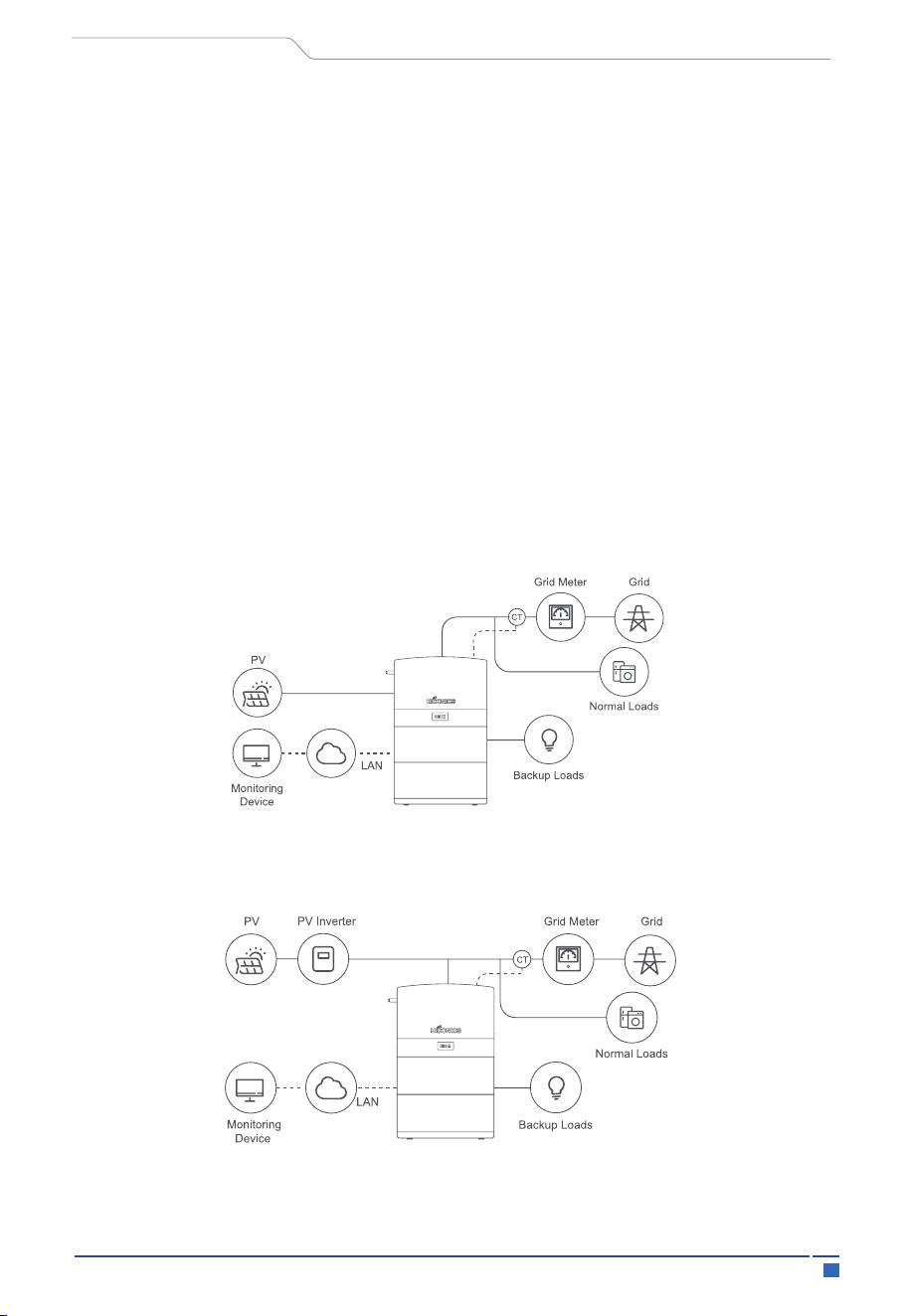
System Diagram
Figure1 DC-coupled Storage System – Scheme
Figure 2 AC-coupled Storage System – Scheme
13 Introduction
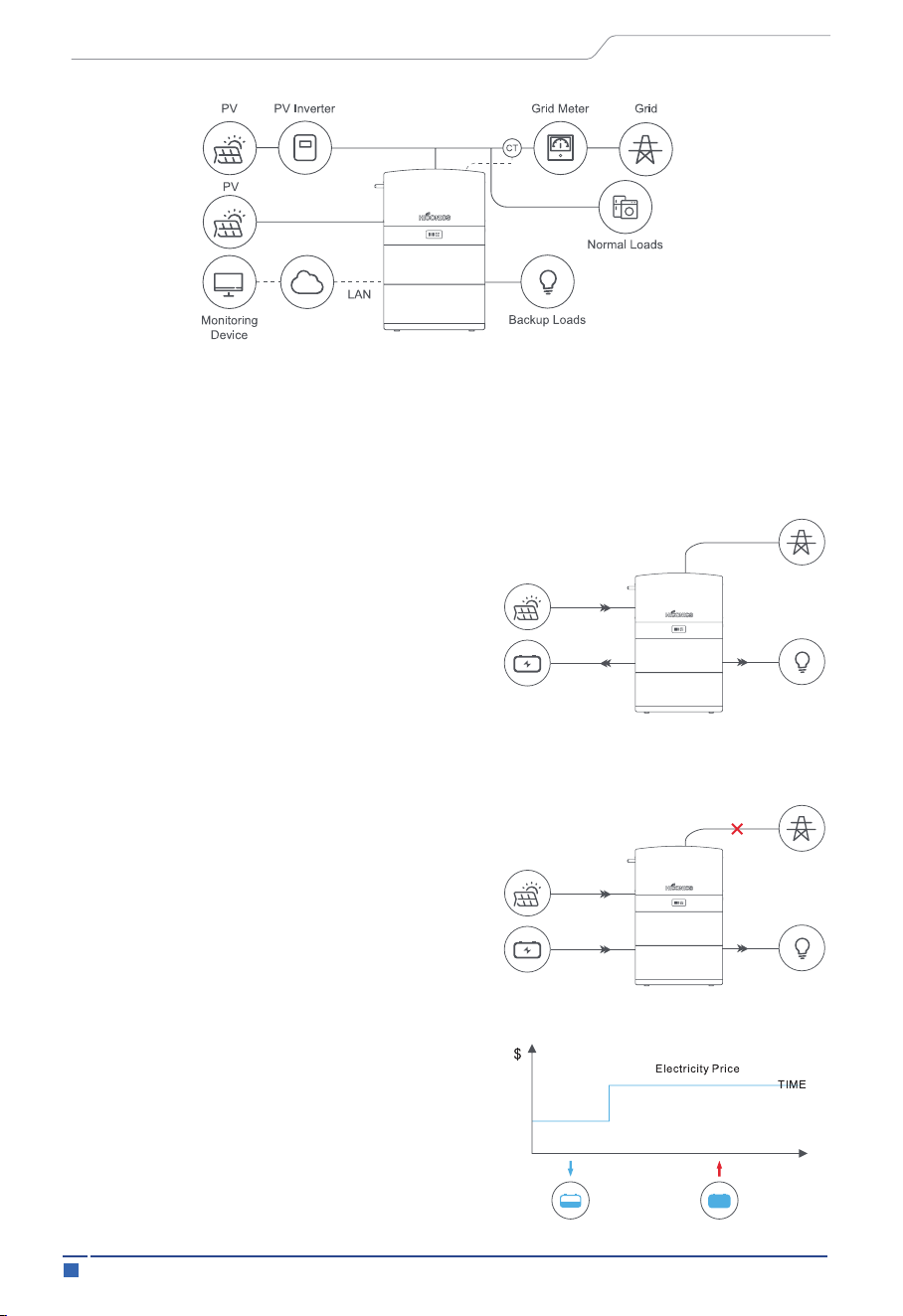
There are three basic work modes that end users can choose via inverter APP.
• Self Use:
The energy generated by the solar panels will
be used in the following order: supply to the
home loads; charge the battery and then, feed
into the grid. When the PV power is not
available, the load will be supported by battery
to enhance self-consumption. If the power
supply from the batteries is not sufficient, the
grid will support the load demand.
• Back up:
Under this mode, the battery is only used as a
backup power supply when the grid fails, as
long as the grid works, the batteries won’t be
used to power the loads. The battery will get
charged with the power generated by the PV
system or from the grid.
• Peak Saving:
This mode is designed for time-use mode
customer. The customer is able to set up the
charging/discharging time & power via APP.
3.2 Work Modes
User Manual
Figure 3 Hybrid-coupled Storage System – Scheme
14 Introduction
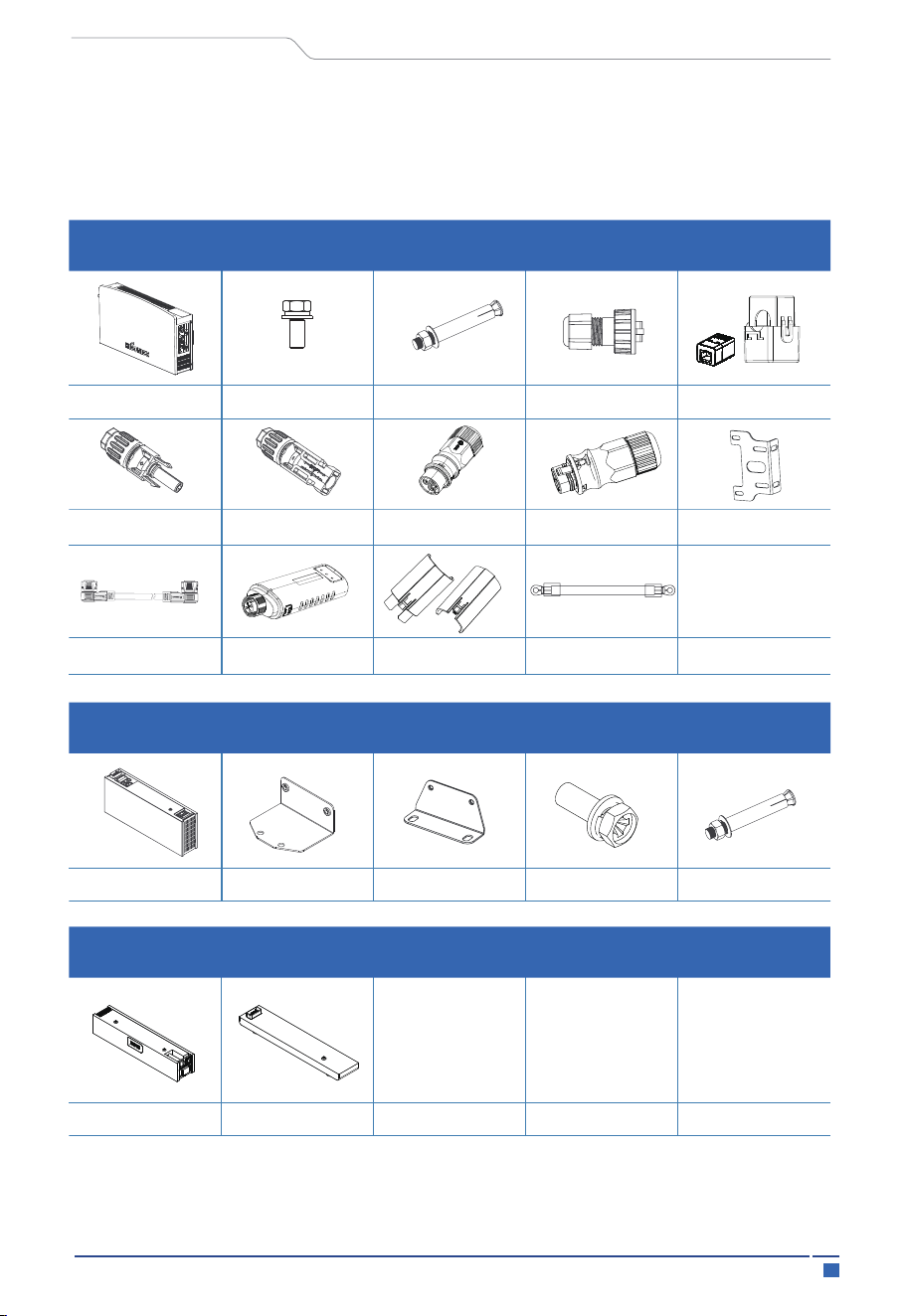
3.3 Packing List
Check the following parts list to ensure it is complete.
Delivers a total system separately on site to client, this consists of:
Inverter packing list
4xM6*12
4xM8*60
1xCT(With RJ45 Adapter)
2x️Battery packing list
2 PCSbattery pack
2 PCS
M 5 *14(8 PCS)
M 8 *60(4 PCS)
2x Inverter bracket
Connecting wiring
harness
User Manual
2x PV negative
terminal
2x PV positive
terminal
4x RJ45 cable end
Control box & base
1x Load female
connector
1x Grid male
connector
1x Hybrid inverter
1x base
1xBMS control box
WI-FI dongle
Unlocking Tools
1x Grounding Wire
15 Introduction
3.5 Wiring Port Part
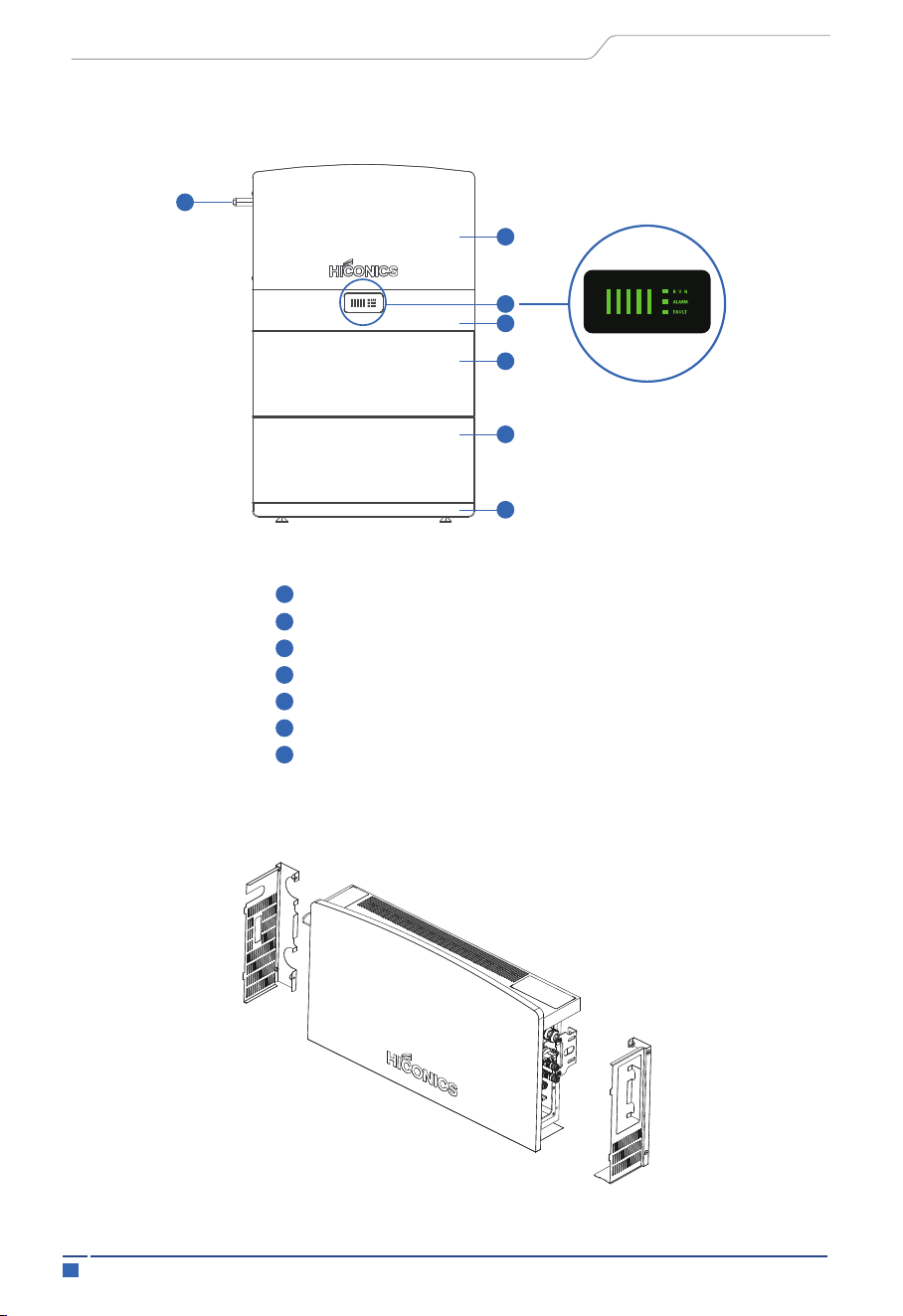
3.4 System Appearance
HEC2-S Series
Hybrid Inverter
BMS indicator
BMS Control Box
Battery Pack
Battery Pack (Battery 2, Max. 3 packs)
Base
WIFI Interface
User Manual
Over view
7
1
2
3
4
5
6
1
2
3
4
5
6
7
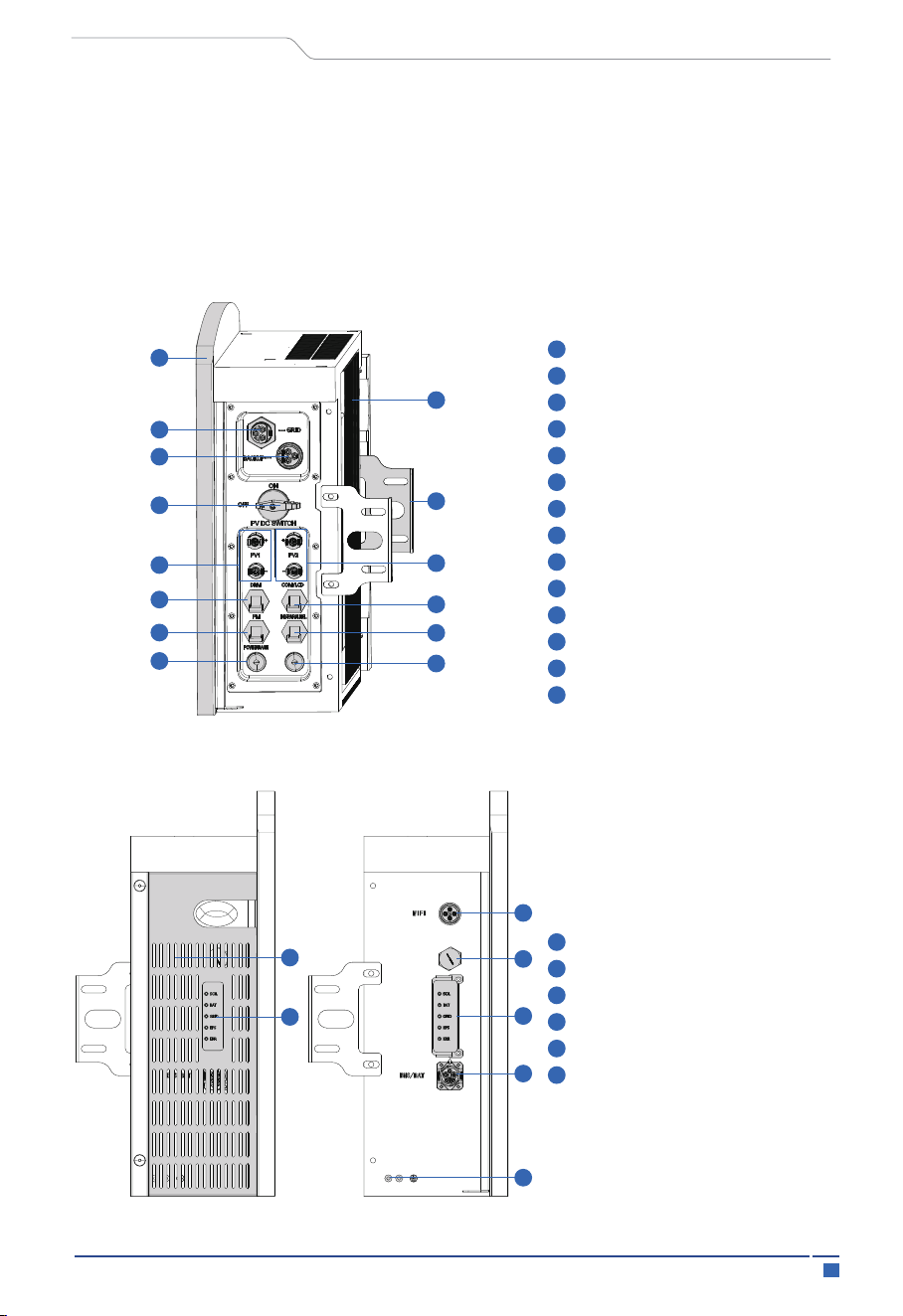
3.5.1 Inverter
The inverter is a high-voltage component and has been sealed by the manufacturer. The
inverter may only be replaced as a complete item and may not be opened. The inverter
is located just underneath the cover plate. It comprises the inverter tray, which is fitted
with a fan, and the following components:
16Introduction
User Manual
PCS right view
1
1
2
3
4
5
6
7
8
9
10
11
12
13
14
1
2
3
4
5
6
2
3
4
5
7
9
11
14
13
6
8
10
12
1
2
3
4
2
5
6
PCS Front Panel
GRID
BACK UP
PV DC SWITCH
PV1
PV2
DRM
COM/LCD
PM (Meter/CT)
INV-PARALLEL
Spare Hole
Spare Hole
Installation Bracket
Heat Sink
Hoods Covers
PSC Indications
WIFI Interface
Pressure Relief Valve
BMS/BAT Interface
Grounding Ports
This high-quality inverter is capable of AC/DC conversion according to the usage or
requirementof different users, and intelligently realizes on-demand scheduling of
energy between PV, battery, grid and load. Meanwhile, it has self-protection functions
such as over-voltage, over-heat, over-current, over-power, etc., which improve the
reliability of system operation; GFCI detects PV insulation impedance, and RCD device
detects leakage faults of the system in real time, which improves the safety of system
operation; and it meets the user's all-round demand for the home storage system in
terms of safety, reliability, and intelligence to the maximum extent.
PCS WIFI Interface: The WIFI interface of the PCS is a port to operate and monitor the
PCS or system through the Internet
17 Introduction
User Manual
PCS back view
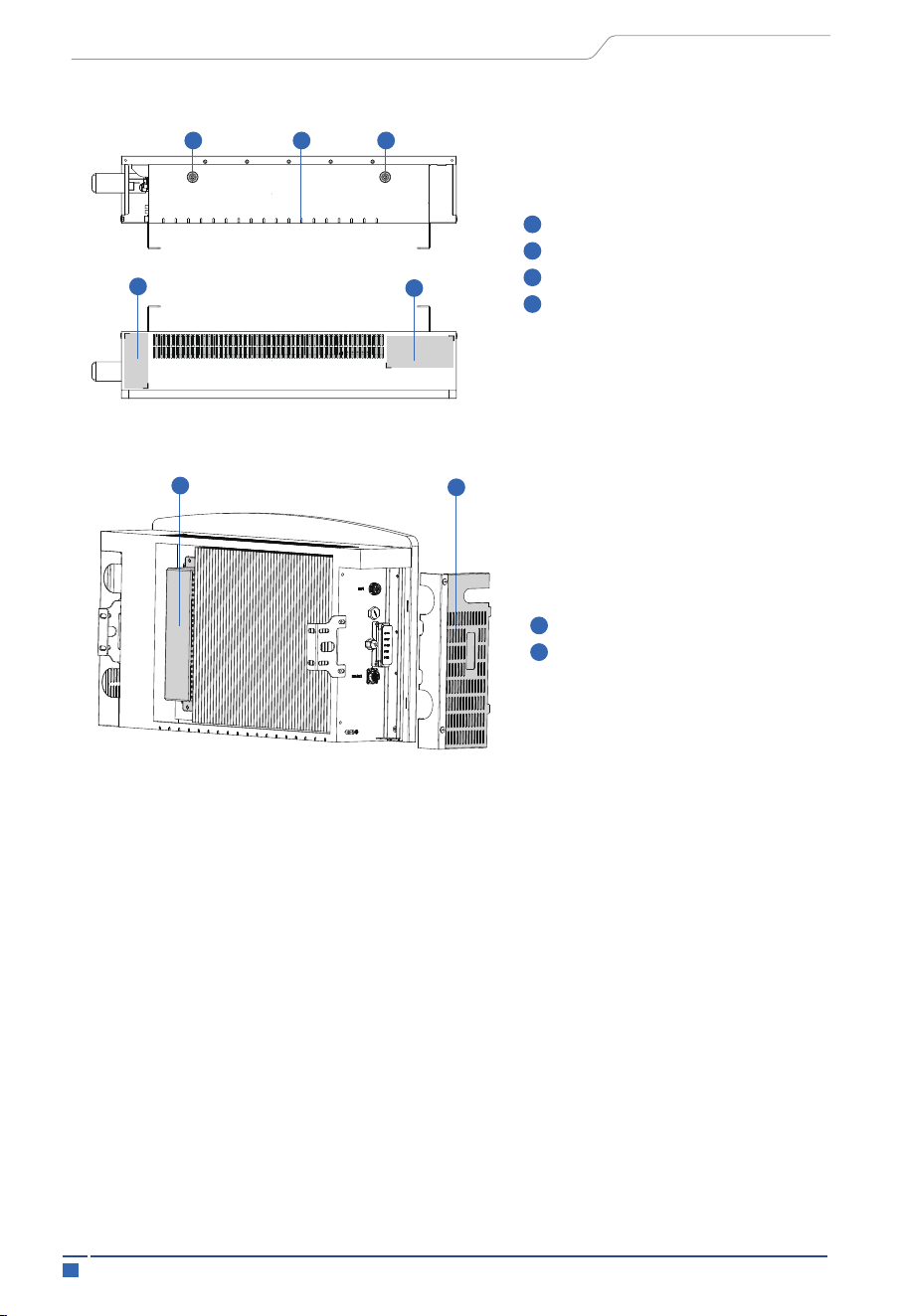
PCS bottom
PCS top view
Water Leakage Holes
Warning Label Sticking Position
Nameplate Sticking Position
Position Detector (female)
Inductor Box
Hood Cover
1
2
3
4
1
2
4
2
3
1
2
1 4
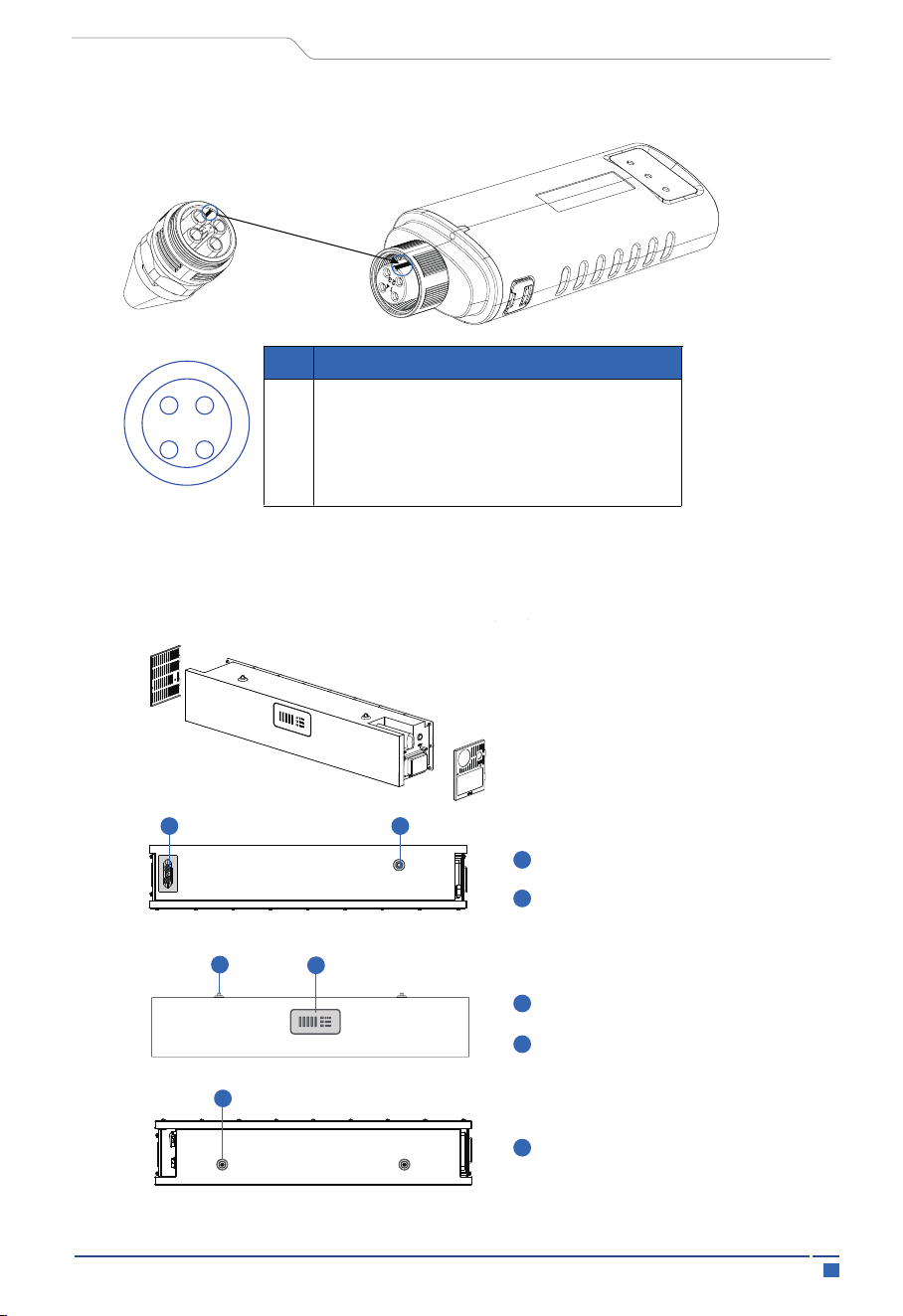
Note:
The WIFI stick card slot has to be aligned to work properly
18Introduction
User Manual
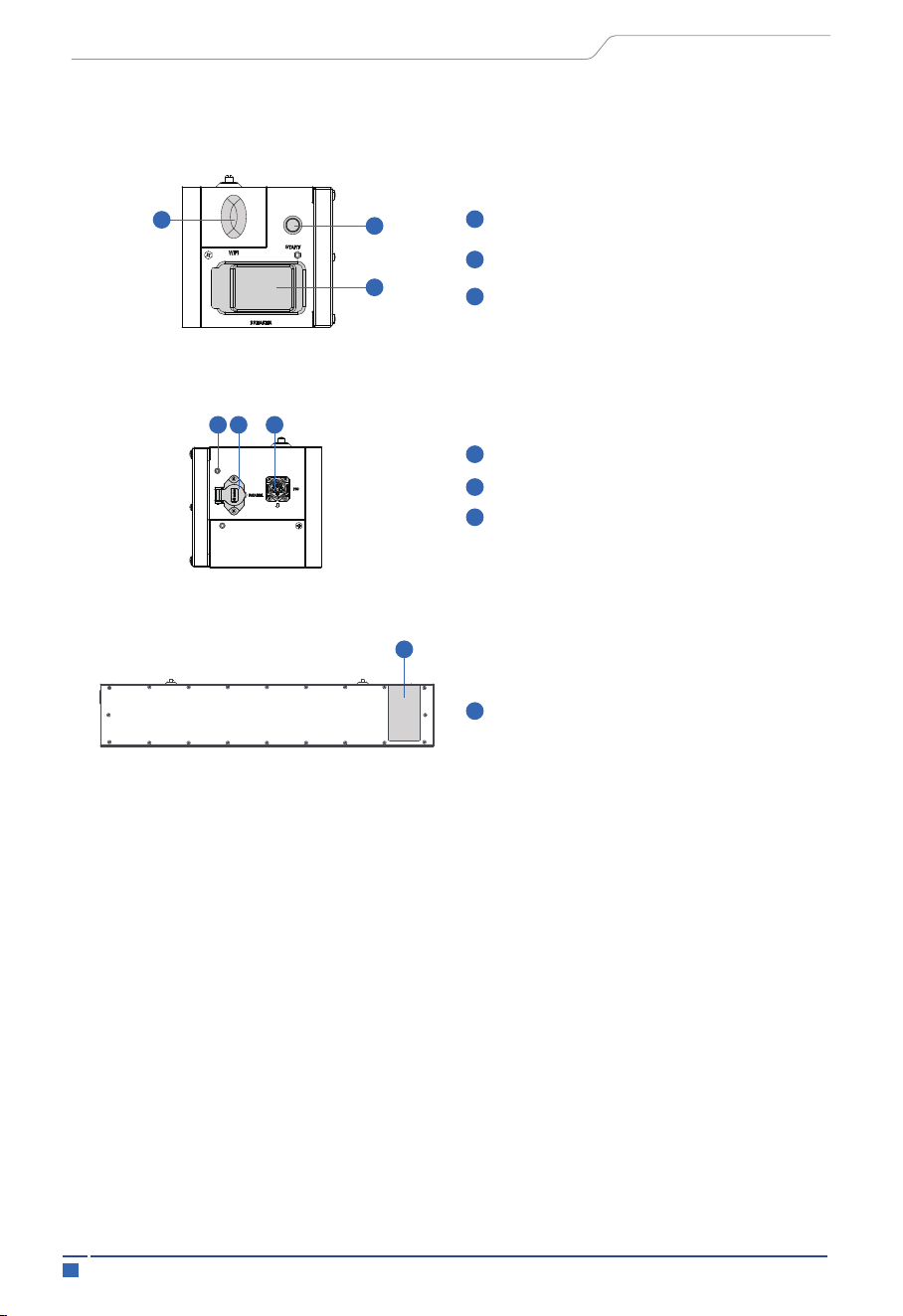
3.5.2 BMS Control Box
1
1
2
1
2
Bottom view
Front view
Top view
Bottom Plug Connector
Position Detector (female)
Position Detector (male)
BMS Indicator
Position Detector (male)
1 2
1
2
1
WIFI stick card slot
Pin
Description
1
2
3
4
VCC
GND
RS485-A
RS485-B
1 4
2 3
19 Introduction
Battery status monitoring: monitor the parameters of the battery pack such as voltage,
current, temperature, and the status of the battery pack, such as charging status,
discharging status, and capacity.
Charge control: control the charging process of the battery pack, including charging
current, charging voltage, charging time and other parameters to ensure the safety and
charging efficiency of the battery pack.
The BMS module of residential energy storage system, also called battery management
system, is used to control and monitor the charging and discharging process of the
battery pack, to ensure the safety and lifetime of the battery pack. Its main functions
include:
User Manual
1
2
Right view
WIFI (optional)
Start Button
3
BMS Circuit Breaker
1
1
2
3
Left view (Opened cover)
Back view
Label
pastes
PARALLEL
PCS
Grounding Bolt (go to PCS)
Identification Plate Paste Bit
1
1
2
3
2
1
3
20Introduction
User Manual
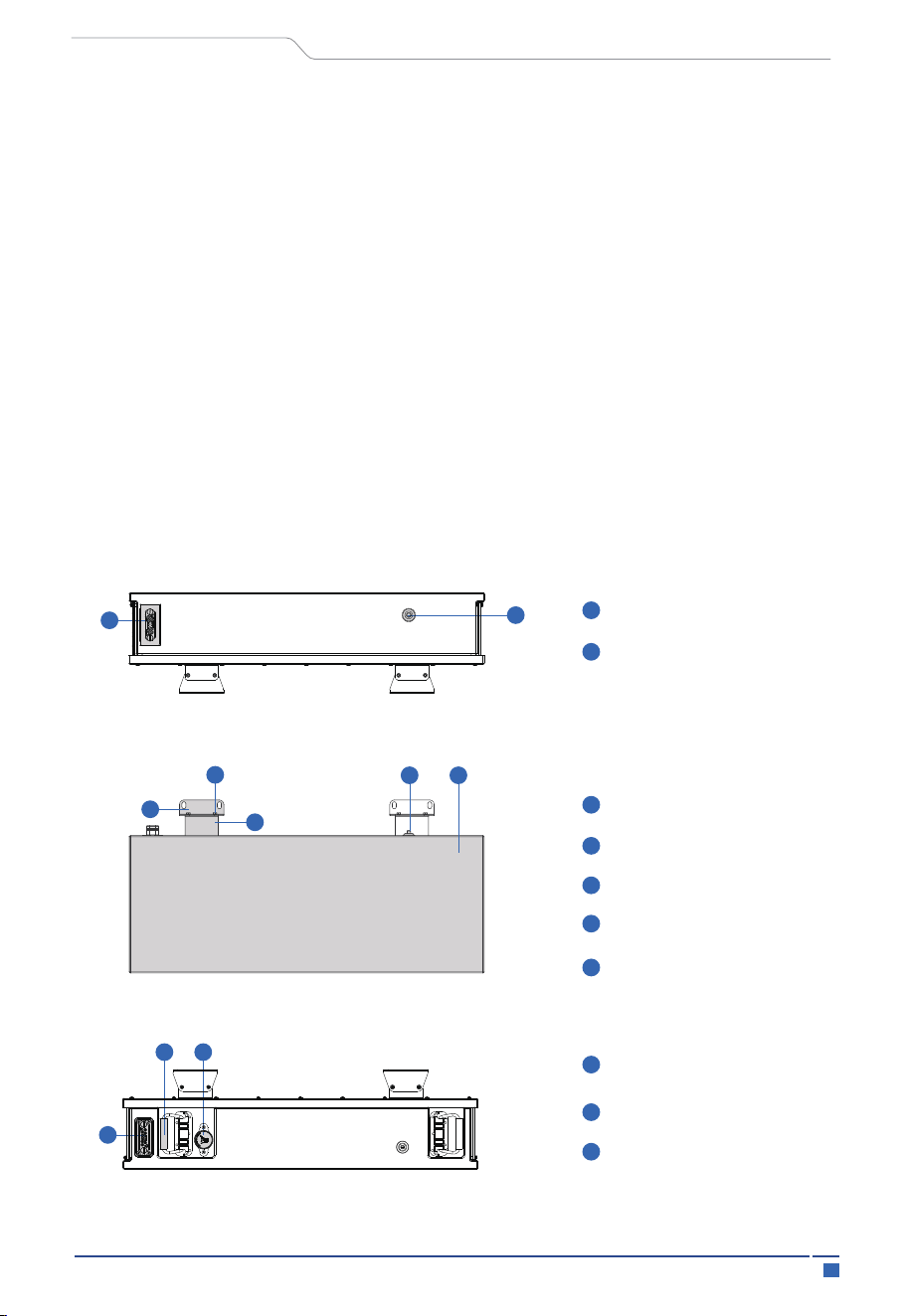
3.5.3 Battery Pack
Battery top view
Battery front view
Battery bottom view
Bottom Connector
Position Detector(female)
Mounting Piece 1
Connecting Screw
Mounting Piece 2
Position Detector(male)
Front Panel
Carrying Handle
Explosion Proof
Pressure Relief Valve
Top Connector
2
1
2
1
1
1
3
2
2 3
1
2
3
1
2
3
4
5
4 5
Discharge control: control the discharge process of the battery pack, including
discharge current, discharge voltage, discharge time and other parameters to ensure
the safety and discharge efficiency of the battery pack.
BMS-PARALLEL: This interface is used to connect another BMS in parallel, which can
connects the other BMS parallel to communicate and charge/discharge at the same
time. The function is still developing and the interface is reserved.
Battery connectors: The PARALLEL port of the BMS control box is used to connect two
battery systems in parallel and to transmit power and communication signals.
Power button: Power button is used to wake up the battery whenever the battery is over
discharged to power-down protection point.
21 Introduction
User Manual
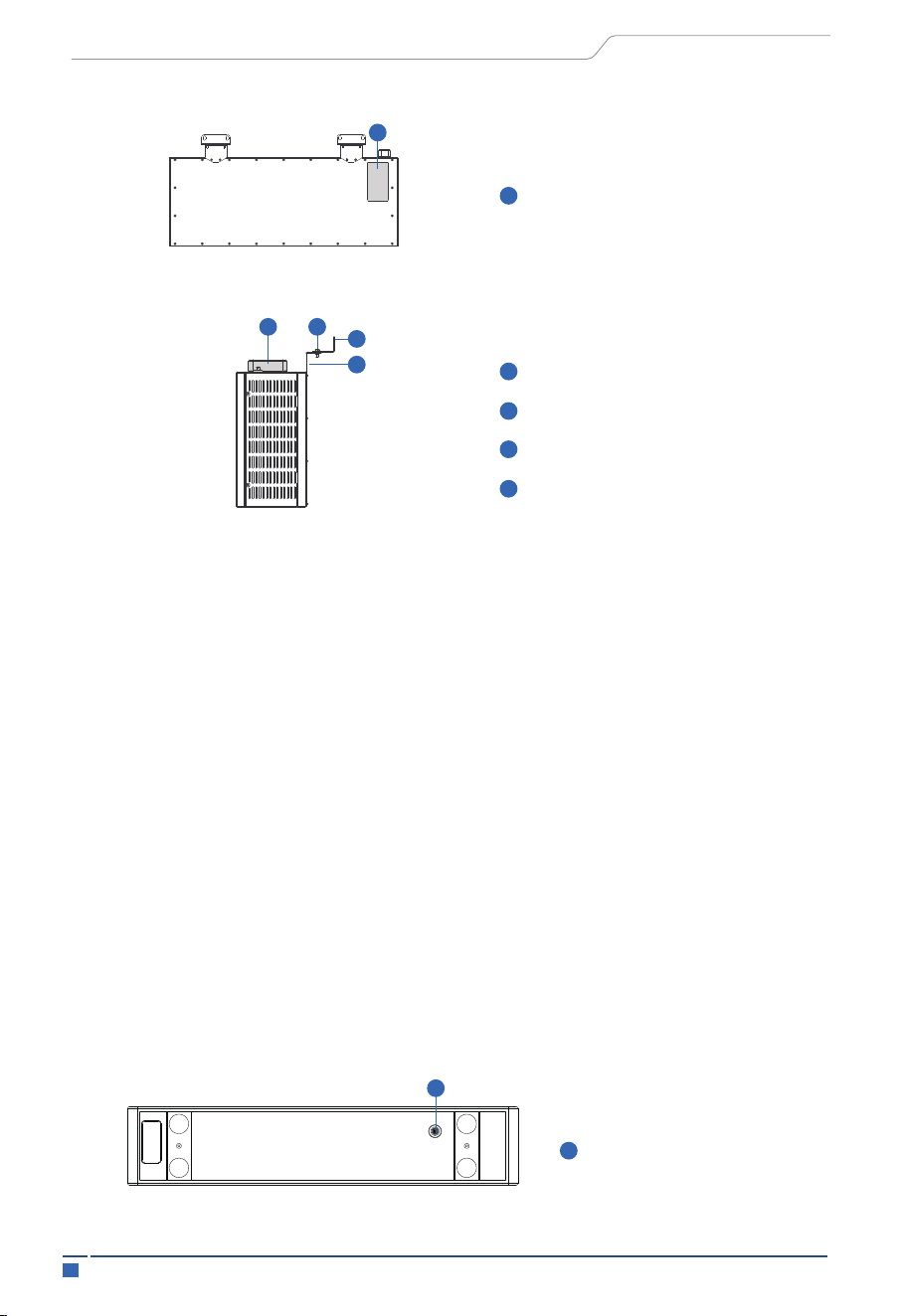
3.5.4 Base
Base bottom view
Position Detector (male)
1
1
Battery right view
Back view
Bottom Connector
Mounting Piece 1
Mounting Piece 2
Connecting Screw
Label Paste Position
1 2
3
4
1
1
2
3
4
1
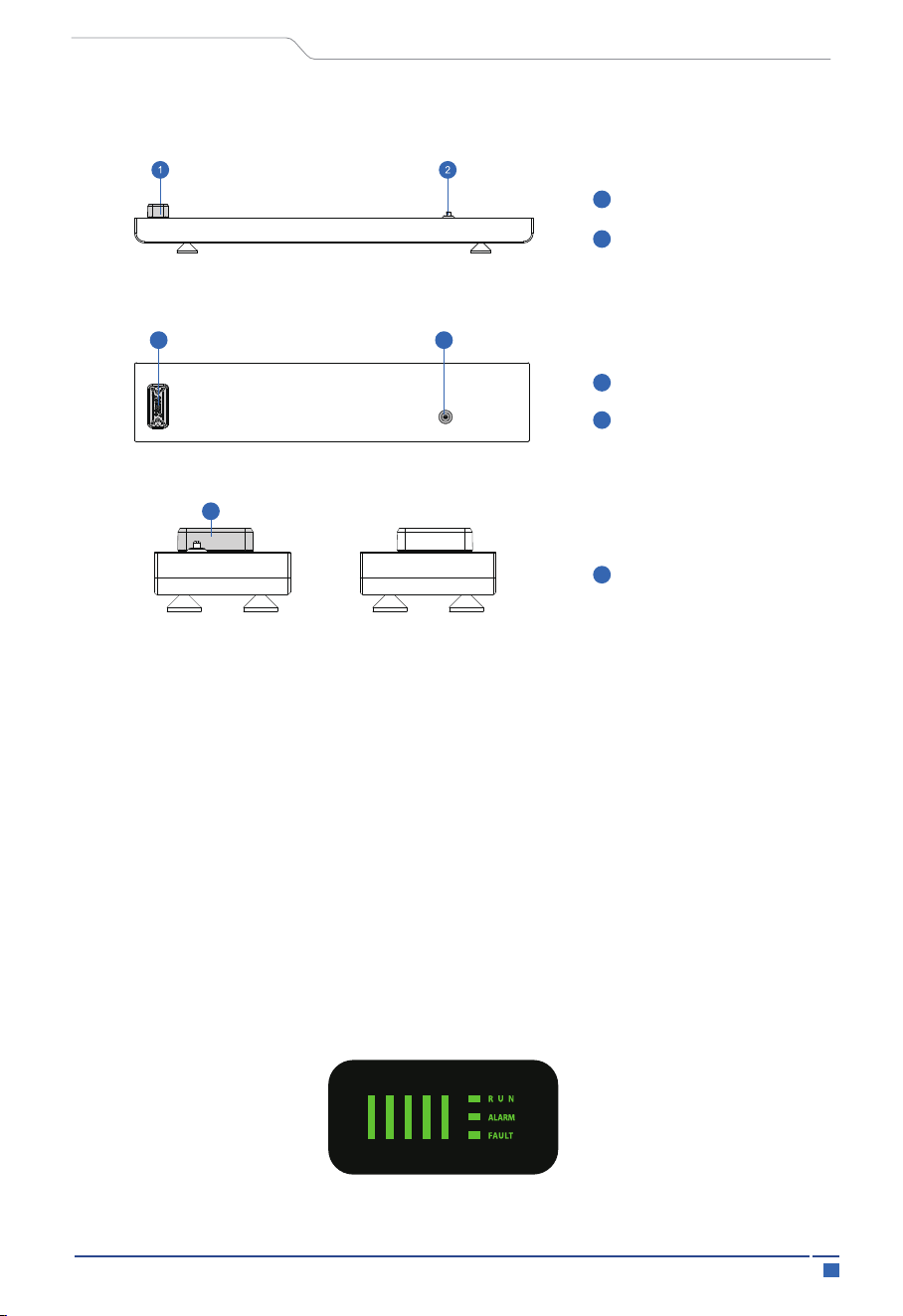
Monitoring: The battery pack can monitor the status of the battery cells, such as voltage
of charge and discharge, temperature, etc., to ensure their safety and reliability.
The battery pack usually need to be used in conjunction with other equipment, such as
inverter and BMS control box, to achieve its full function.
The battery pack of residential energy storage system is a device used to store electrical
energy, usually consisting of multiple battery cells. Its main functions include:
Storing electrical energy: the battery pack can store electrical energy from the grid or the
PV.Power supply:
The battery pack can be to supply electrical power whenever there's a need to support
the backup load (managed by PCS)
22Introduction
User Manual
3.6 LED Lights Display Define
3.6.1 Battery System LED Display Define
The base module of residential energy storage system is used to support the whole
system, its main functions include:
Structural support: for battery module support.
Electrical circuit closure: there are connectors on the base to connect with the battery
module to achieve high voltage circuit and heating circuit closure.
Base right view
Base front view
Base top view
Base left view
Top Connector
Position Detector (male)
Top Connector
Top Connector
Position Detector (male)
1
2
1
2
1
21
1

23 Introduction
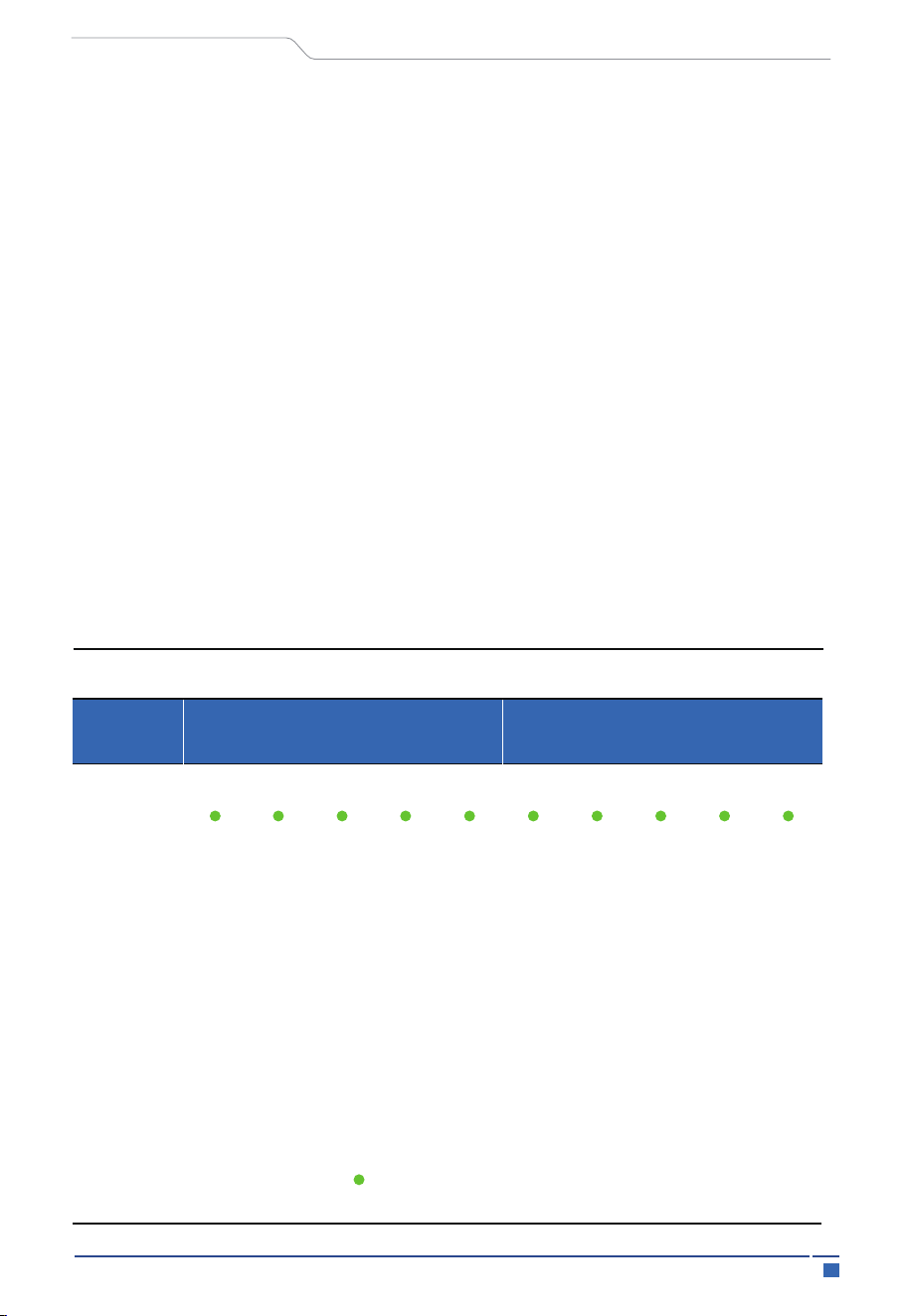
Table1 LED function display
State
Description
RUN
ALARM
FAULT
Battery SOC indicator
Description
System
power
off
Power off
Warning
Fault
Normal
Warning
Overcharge
protection
On
On
On
Normal
Blinking1
off off
off
off
off
Blinking2
off
off
off
off
Blinking1 Blinking2
Blinking1 Blinking3
Based on real SOC
power indication
Based on real SOC
power indication
All the LED blinking 2
Battery pack low
voltage/low SOC/
low temperature
When the battery fully
charged, all the SOC
LED blinking 2;When
overcharge warning,
Alarm LED blinking 2.
After activating the
overcharge protection
for a period of time, if
there is no charging
current input, then it
transitions to standby
mode.
Communication/
equipment damage
Standby mode
off off off off off off off off off
System
standby
Charging
mode
On On On On On
Over
current
protection
Voltage
difference
protection
Communica
tion fault
Tempera-
ture fault
Normal
On
Blinking1
Off Off
Blinking1Blinking1
Blinking3
Blinking2 Blinking2
If the NTC temperature
difference/rise exceeds
the allowable value,
start protection and
stop charging
Based on real SOC
power indication
Discharging normally
BMS internal and PCS
communication failure,
start protection, stop
charging
If the voltage difference
of the battery cell
exceeds the allowable
value, start the protection
and stop charging
Off
Off
Off
Off
Blinking1 Blinking1
Off Off Off Off Off
Stop charging
User Manual
24Introduction
Table 2 Instructions for the Operation of the Power LED
Off
Off
Off
Off
Blinking2
On
On
On
On
On
Blinking2
On
On
On
On
Off
Blinking2
On
On
On
Off
Off
Blinking2
On
On
Off
Off
Off
Blinking2
Off
Off
Off
Off
Off
Blinking2
One by one light up
One by one light up
One by one light up
One by one light up
Low SOC
warning
On
Blinking2
Off
If the battery level is
lower than the set SOC
value, an alarm will be
triggered, and the
minimum battery level
LED will flash to stop
discharging
If the voltage difference
of the battery cell
exceeds the allowable
value, start the
protection and stop
discharging
BMS internal and PCS
communication failure,
start protection, stop
discharging
If the NTC temperature
difference/rise exceeds
the allowable value,
start protection and
stop discharging
Stop charging and
discharging
Dischar-
ging
mode
Fault
Over
current
protection
Voltage
difference
protection
Commun-
ication
fault
Tempera-
ture fault
Equipt-
ment fault
Off
Off
Off
Off
Off Off
On
Blinking1 Blinking1
Blinking1 Blinking2
Blinking1
Blinking2 Blinking2
Blinking3
Stop discharging
Blin-
king
2
Off
Off Off Off Off Off
Off Off Off Off Off
Off Off Off
User Manual
State
Charge mode
Discharge mode
SOC LED
lights
L1
Over
charge
protection
Battery running
indicator light
Normal
Blinking(Blinking2)
On On On On On On On On On On
0~20%
20%~40%
40%~60%
60%~80%
80%~100%
L2
L3 L4
L5
L1 L2
L3 L4
L5
SOC
25 Introduction
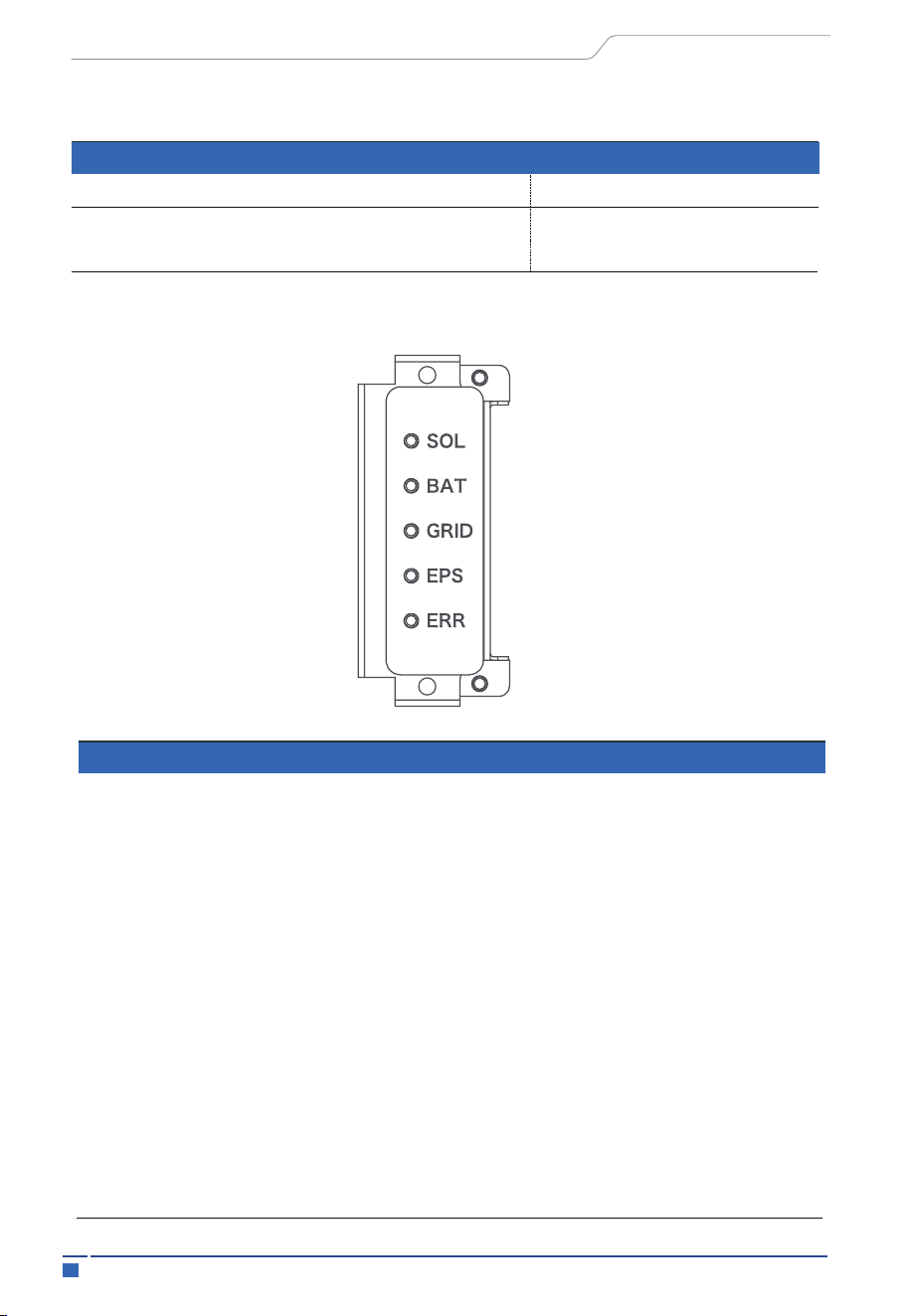
3.6.2 Inverter LED Indications
Table 3 Explanation of LED working indicator flashing
Type
On
Off
Blinking1
Blinking2
Blinking3
0.25s
0.5s
0.75s
3s
2s
1s
User Manual
Name of LED
State of LED
Description
SOL
BAT
GRID
EPS
ERR
ON
BLINKING
OFF
ON
BLINKING
OFF
ON
BLINKING
OFF
ON
BLINKING
OFF
ON
BLINKING
OFF
PV is active
PV is standby
PV loss
Battery is active
Battery is standby
Battery loss
Grid is active
Grid is standby
Grid loss
EPS is active
EPS is overload
EPS loss
Fault state
Warning
No fault

26 Installation
Make sure the inverter is intact during transportation. If there is any visible damage,
such as cracks, please contact your supplier immediately.
Installation Precaution
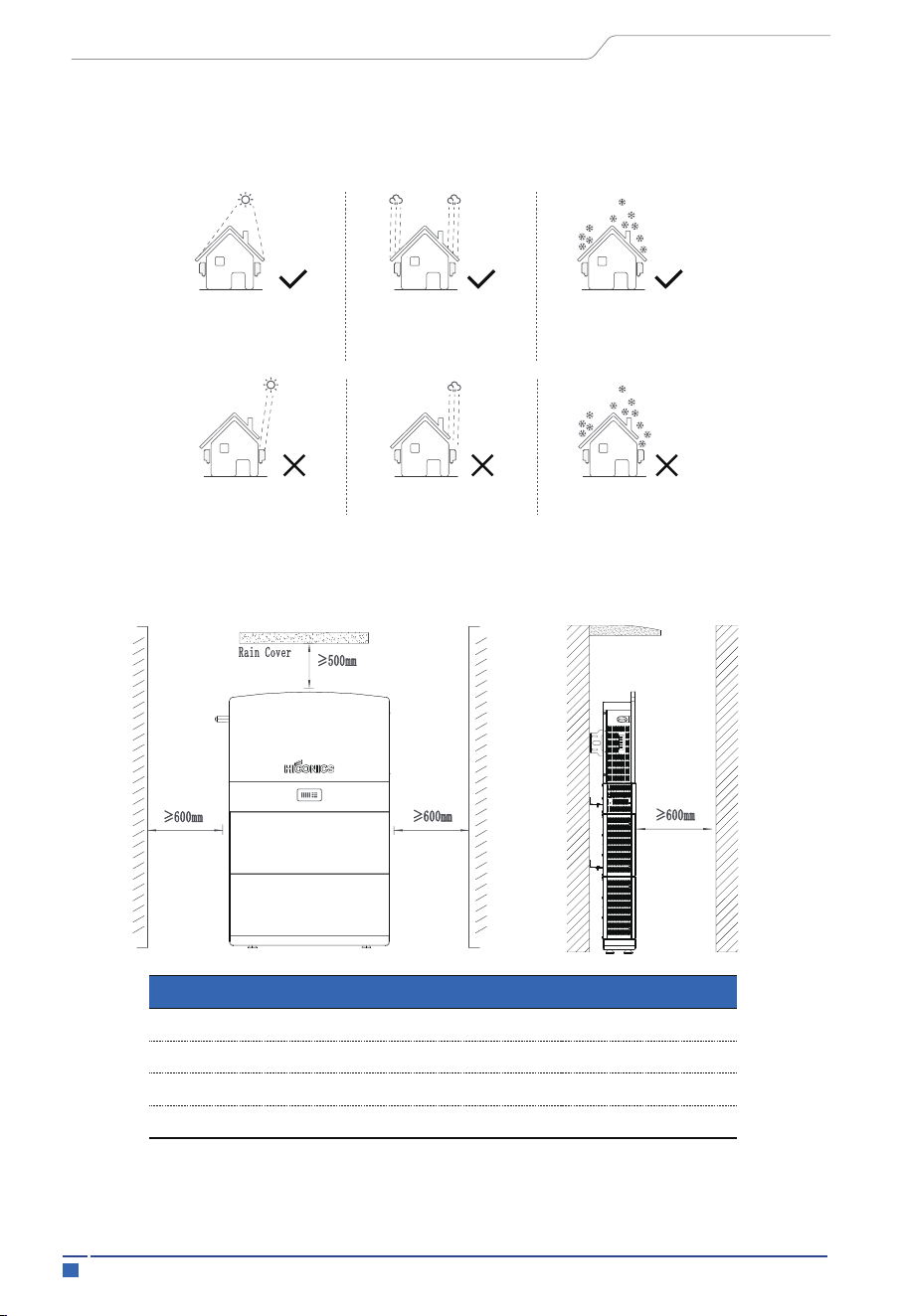
HiEnergy series is designed for outdoor installation (IP65). Make sure the installation
site meets the following conditions:
• Not in direct sunlight.
• Not in areas where highly flammable materials are stored.
• Not in potential explosive areas.
• Not in the cool air directly.
• Not near the television antenna or antenna cable.
• Not higher than altitude of about 2000m above sea level.
• Not in environment of precipitation or humidity (>95%).
• Under good ventilation condition.
• The ambient temperature in the range of -20℃ to +55℃.
• The slope of the wall should be within ± 5°.
• The wall hanging the inverter should meet conditions below
• The surface should be strong and flat.
1. Solid brick/concrete, or strength equivalent mounting surface;
2. Inverter must be supported or strengthened if the wall's strength isn't enough
(Such as wooden wall, the wall covered by thick layer of decoration)
4.1 Check for Physical Damage
4.2 Equipment Installation
4. Installation
User Manual
Indicates actions that may cause material damage.
Notice
27 Installation
4.2.1 Requirements
Position
Left
Right
Top
Front
600mm
600mm
500mm
600mm
No rain exposure
No direct sunlight
No snow accumulation
Rain exposure
Direct sunlight Snow accumulation
No rain exposureNo direct sunlight No snow accumulation
Rain exposure
Direct sunlight
Snow accumulation
Please AVOIDE direct sunlight, rain exposure, snow laying up during installation and
operation.
Mounting Steps
Note: The inverter mount can be stacked on its battery.
Min size
User Manual
28 Installation
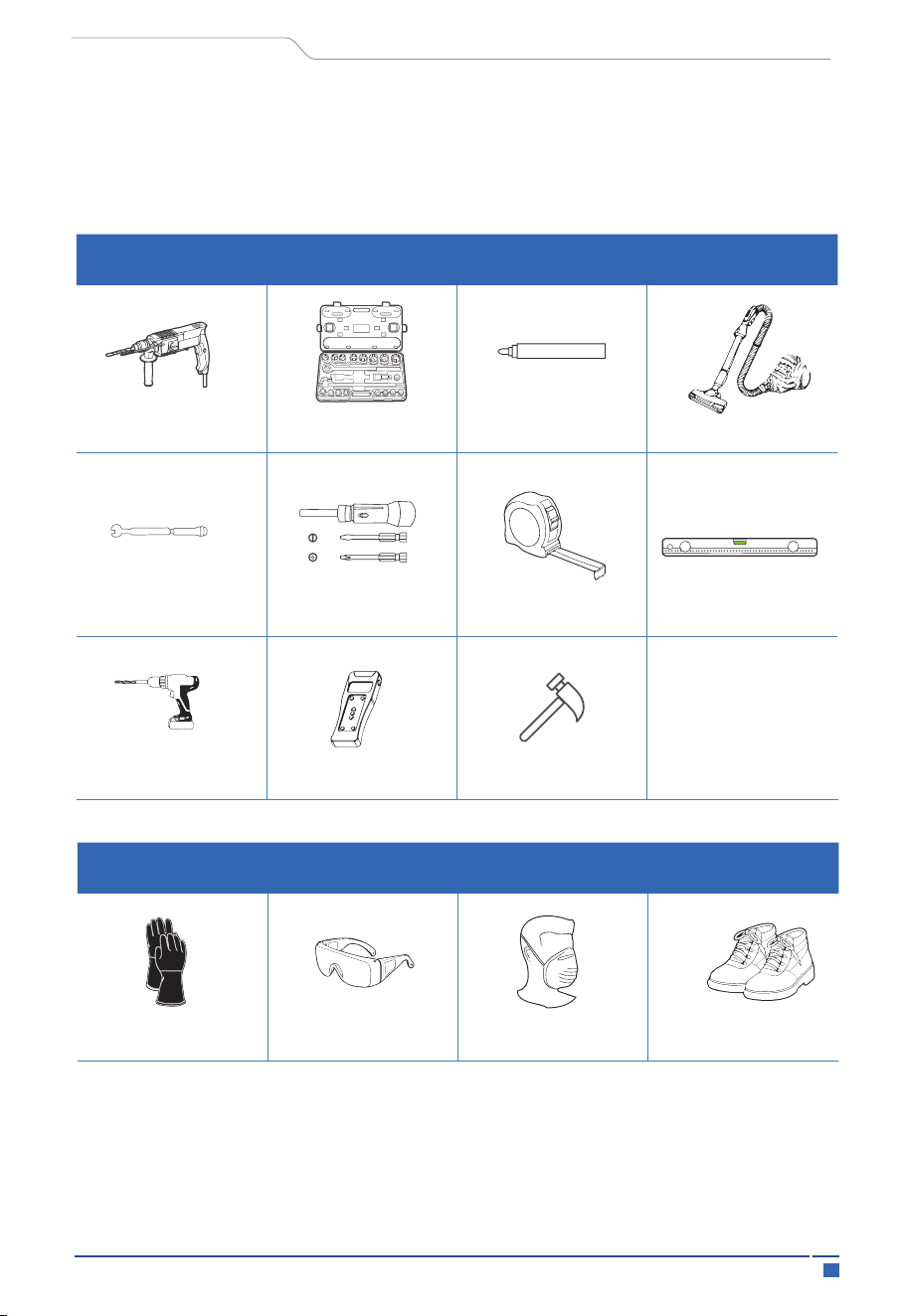
4.2.2 Required for Installation
impact drill
(Φ10mm drill)
Torque socket
wrench
marker pen
Vacuum cleaner
torque wrench Torque screwdriver Steel tape
Level ruler
Electric batch
(with M6 socket)
Detector Hammer
Installation tools
Installation tools: crimping pliers for binding post and RJ45, screwdriver, manual
wrench etc.
User Manual
safety gloves safety goggles
dust mask
Safety shoes
Personal Protective Equipment
29 Installation
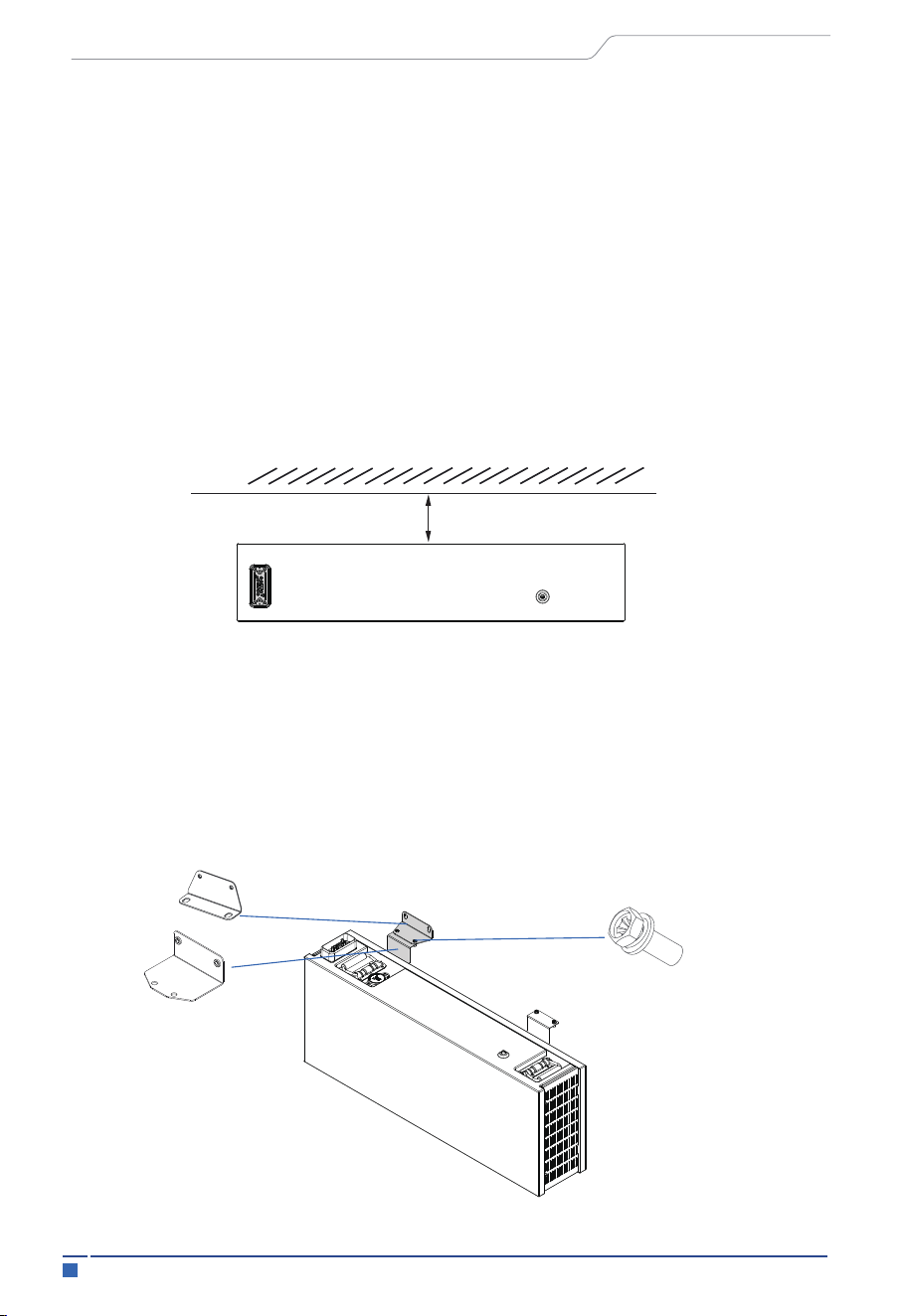
4.3.1 Battery Pack Installation
The battery pack height must comply with local regulations. If the positioning plate
conflicts with the regulations, the regulations must be met first.
Step 1: Determine the position of the base: mainly determine the distance from the wall;
The distance from the wall is 65mm, and keep horizontal;
4.3 Installation Process
User Manual
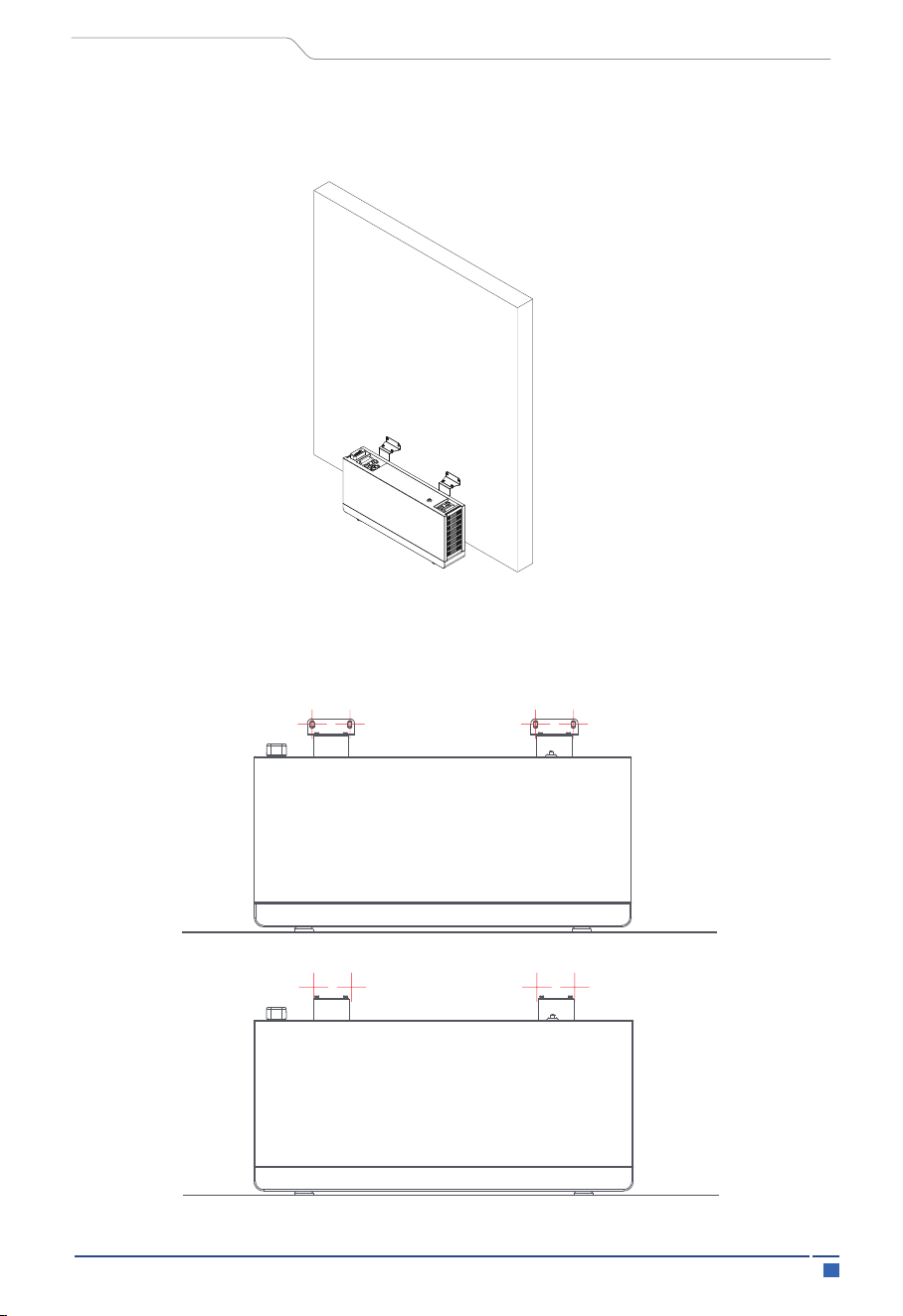
Step 2: Use four phillips head screws and a three M5x14 unit to install the battery pack,
and wall battery mounts. As shown in the following figure.
Wall
30 Installation
User Manual
Step 3: Use four phillips head screws and a three M5x14 unit to install the battery pack,
and wall battery mounts. As shown in the following figure.
Step 4: Use a marker to draw dots at the red intersection in the following image. After
drawing the dots, remove the wall battery pendant and use a drill bit to drill holes.
31
Installation
User Manual
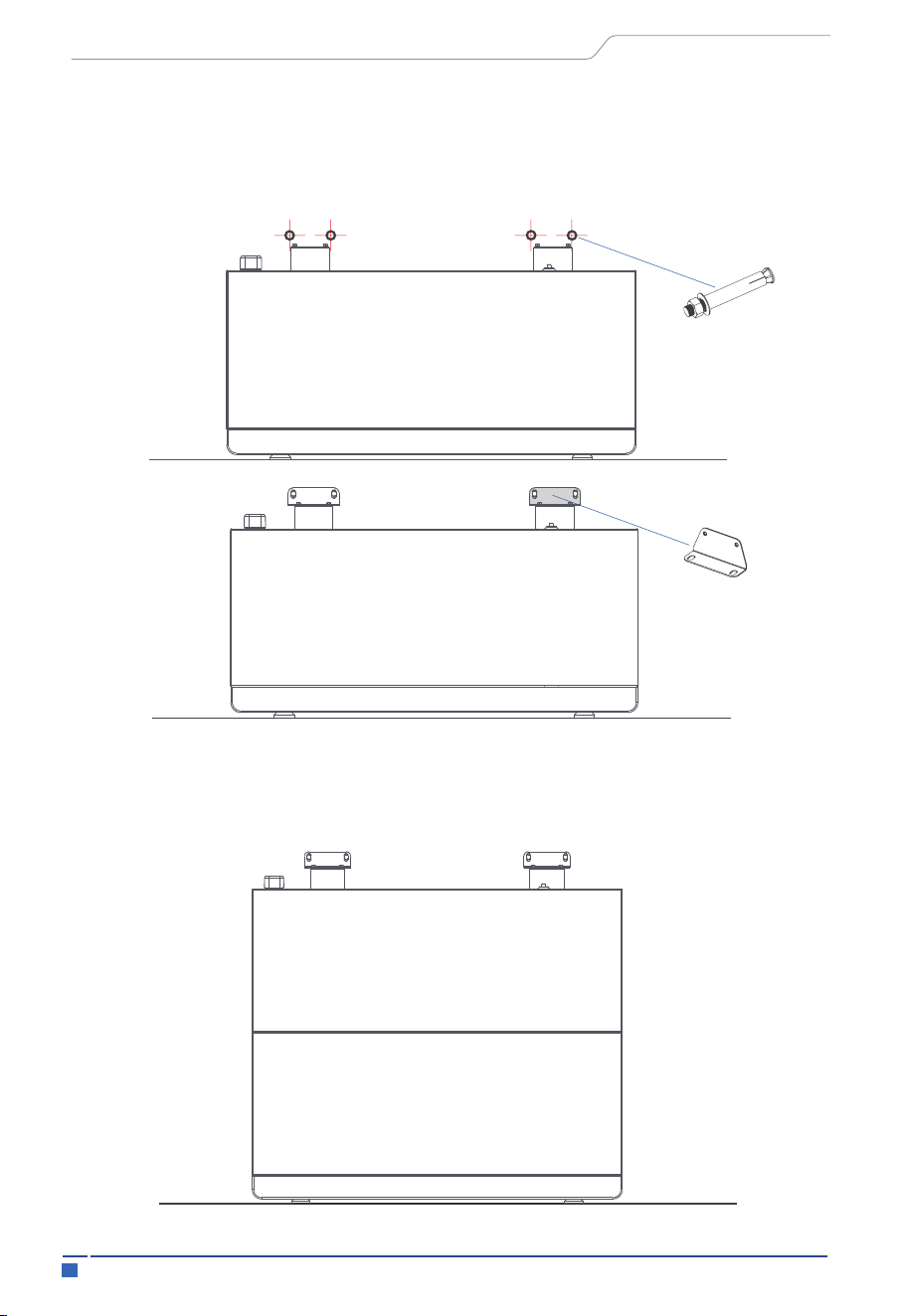
Step 5: Install expansion bolts in the drilled holes. Use the expansion bolt with its own
M8 nut to fix the wall battery pendant with the expansion bolt. Afterwards, use phillips
head screws head screws with M5x14 to fix the wall battery mount and pack mount.
Step 6: Repeat steps 2 to 5 to install the other battery modules required. Please align the
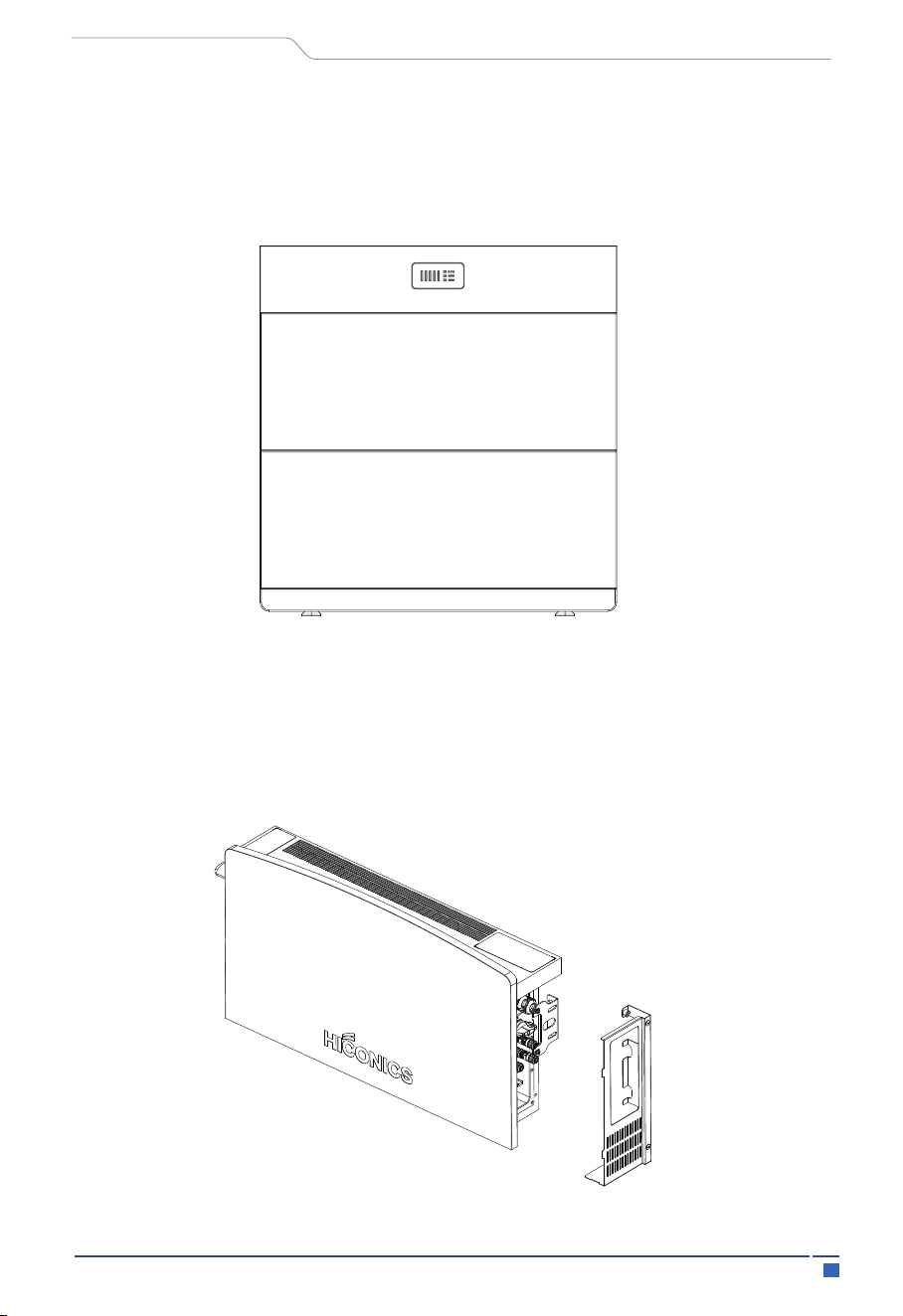
lower battery with the front of the upper battery during installation.
32
Installation
4.3.2 Inverter Installation
User Manual
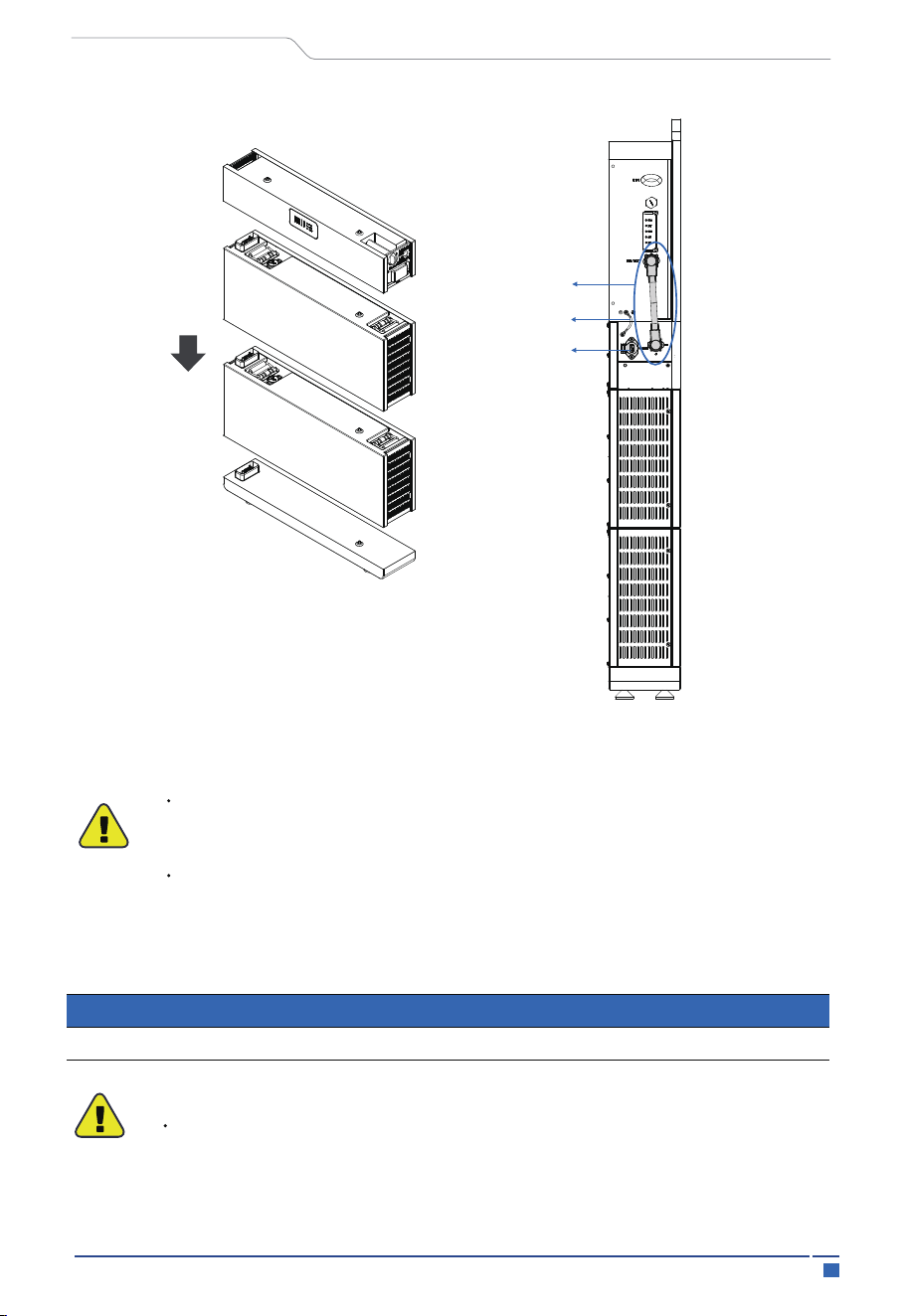
Step 1: Open the inverter hood covers on both sides and place the inverter vertically on
the BMS control box. It will build the connection between the inverter and BMS of the
control box via PACK and inverter connection cable.
Step 7: After installing the battery module, place the BMS control box on top of the
battery box. Please align the BMS control box with the front of the lower battery during
installation.
---------------
----------
33 Electrical Connection
5 Electrical Connection
The HEC2-BHP system (without inverter) is cableless installation design which includes
pre-installed internal connections. The modular stack installation directly plug-in and
completes the series connection between battery modules. The connection between
the confirm from R&D about the BMS box model number system (from BMS main box)
and the inverter requires a cable connection using PCS-BAT connector which includes
power connection, communication and grounding. Also, there’s a separate grounding
connection between BMS main box and inverter.
5.1 Battery System Cable Connection
User Manual
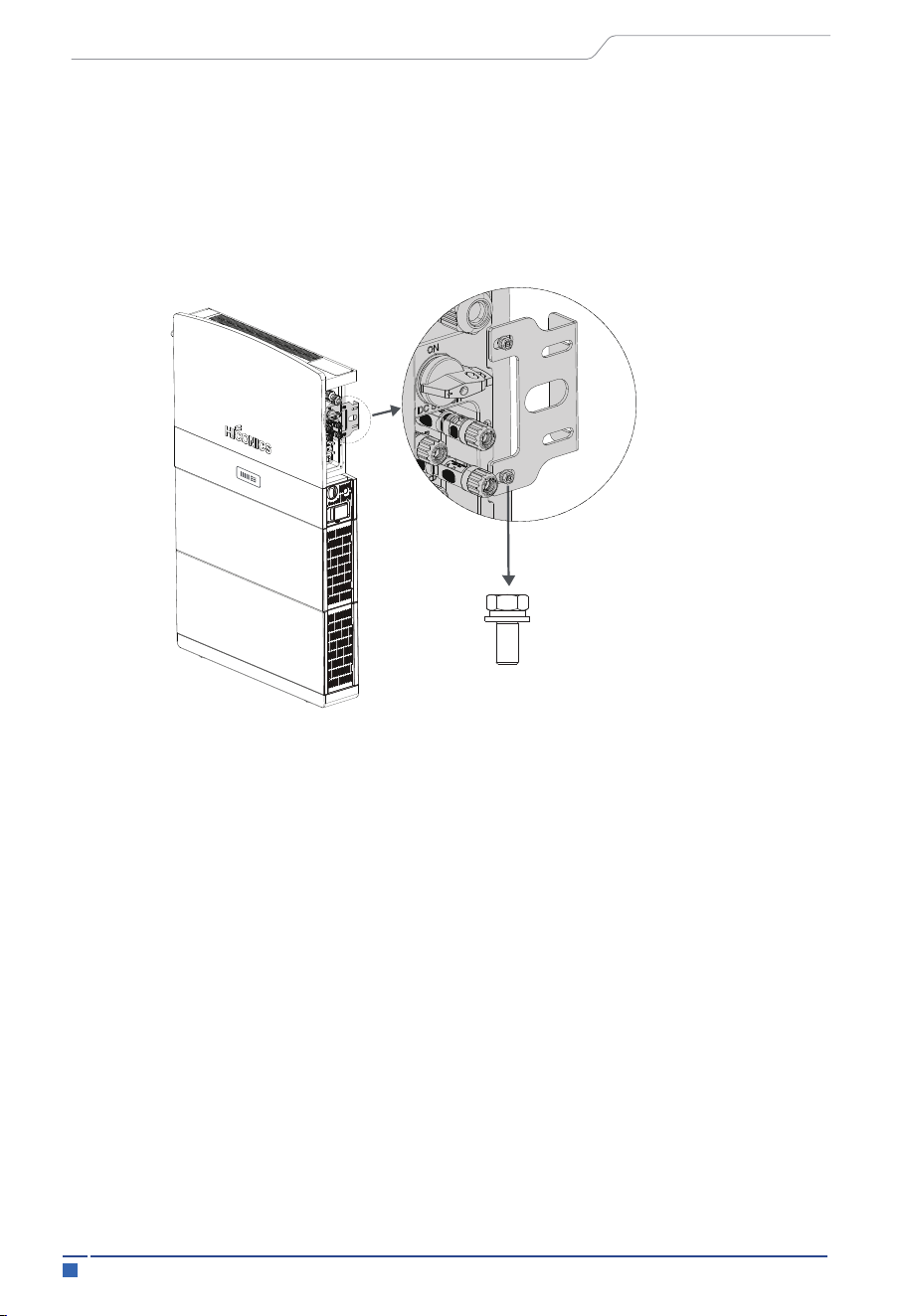
Step 2: Place the inverter on the BMS main box, fix the inverter on the mounting bracket,
adjust the whole system, and ensure that the battery and inverter are firmly hung on the
panel and bracket.
4-M6*12 Combination screws
34Electrical Connection
Wire Size
Cable( m㎡ )
12AWG 4
5.2 PV Connection
WARNING
User Manual
Before connecting to PV modules, please install a separately DC circuit
breaker between inverter and PV modules.
It is very important for system safety and efficient operation to use appro-
priate cable for PV module connection. To reduce risk of injury, please use
the proper recommended cable size as below.
WARNING
To avoid any malfunction, do not connect any PV modules with possible
current leakage to the inverter. For example, grounded PV modules will
2 battery modules in series
PCS-BAT
connection cable
Parallel (BAT)
Grounding wire
35 Electrical Connection
Connection Steps:
User Manual
Step 1: Checking PV module.
Step 2: Separating the DC connector.
Step 3: Wiring
When selecting proper PV modules, please be sure to consider below
parameters:
1)Open circuit Voltage (V ) of PV modules not exceeds max. PV array
open circuit voltage of inverter.
2)Open circuit Voltage (V ) of PV modules should be higher than min.
start voltage.
Max. DC Voltage Limitation
1.1 Use voltmeter to measure module array voltage.
1.2 Check the PV+ and PV- from the PV string combiner box correctly.
1.3 Please make sure the impedance between the positive pole and negative
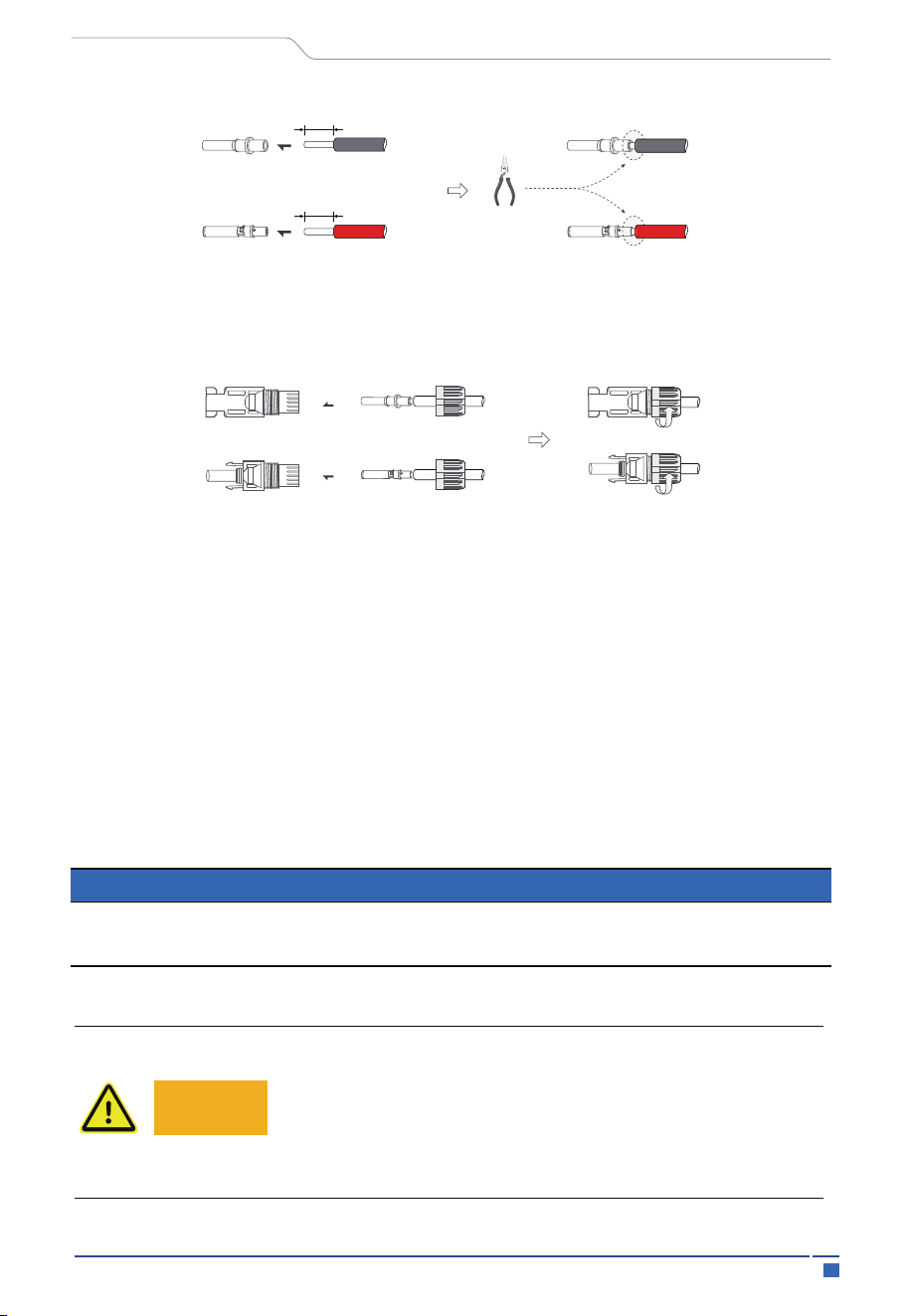
3.1 Choose the 4 mm² wire to connect with the cold-pressed terminal.
3.2 Remove 10mm of insulation from the end of wire.
3.3 Insert the insulation into pin contact and use crimping plier to clamp it.
pole of PV to earth should be MΩ level.
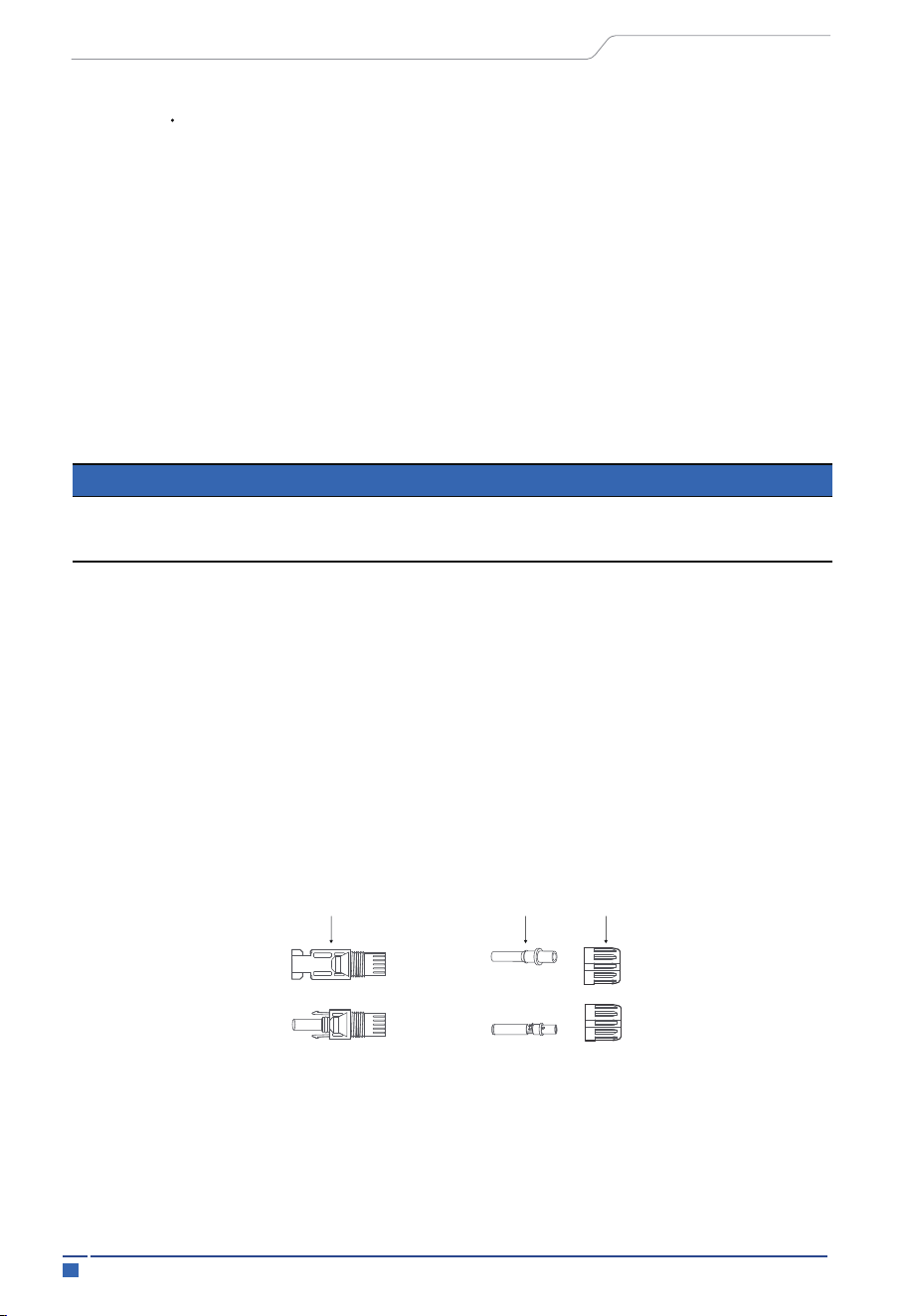
D-
D+
plug
pin contact
cable nut
Model HEC2-S3.68Hr2 HEC2-S3.8Hr2 HEC2-S5.0Hr2 HEC2-S6.0Hr2
Max. DC Voltage (V)
MPPT Voltage Range (V)
600
100-540
600
100-540
600
100-540
600
100-540
oc
oc
36Electrical Connection
5.3 AC Input/Output Connection
Table Cable and Micro-breaker recommended
User Manual
Warning!
There is "L" "N'' '’PE'’ Symbols marked inside the connector;
the Line wire of grid must be connected to "L" terminal; the
Neutral wire of grid must be connected to "N" terminal; the
Earth of grid must be connected to ''PE
Step 4: Insert pin contact through the cable nut to assemble into back of the male or
female plug. When you feel or heard a “click” sound the pin contact assembly is seated
correctly.
Step 5: Plug the PV connector into the corresponding PV connector on inverter.
Before connecting the grid connection, please install a separate AC circuit breaker
between inverter and AC input power source. This will ensure the inverter can be securely
disconnected during maintenance and fully protected from over current of AC input. The
recommended rating of AC circuit breaker is 32A.
Insert
Crimp!
12AWG
12AWG
10mm
10mm
Model HEC2-S3.68Hr2 HEC2-S3.8Hr2 HEC2-S5.0Hr2 HEC2-S6.0Hr2
Cable
AC breaker
6mm²
32A
6mm²
32A
6mm²
32A
6mm²
32A
37
Electrical Connection
User Manual
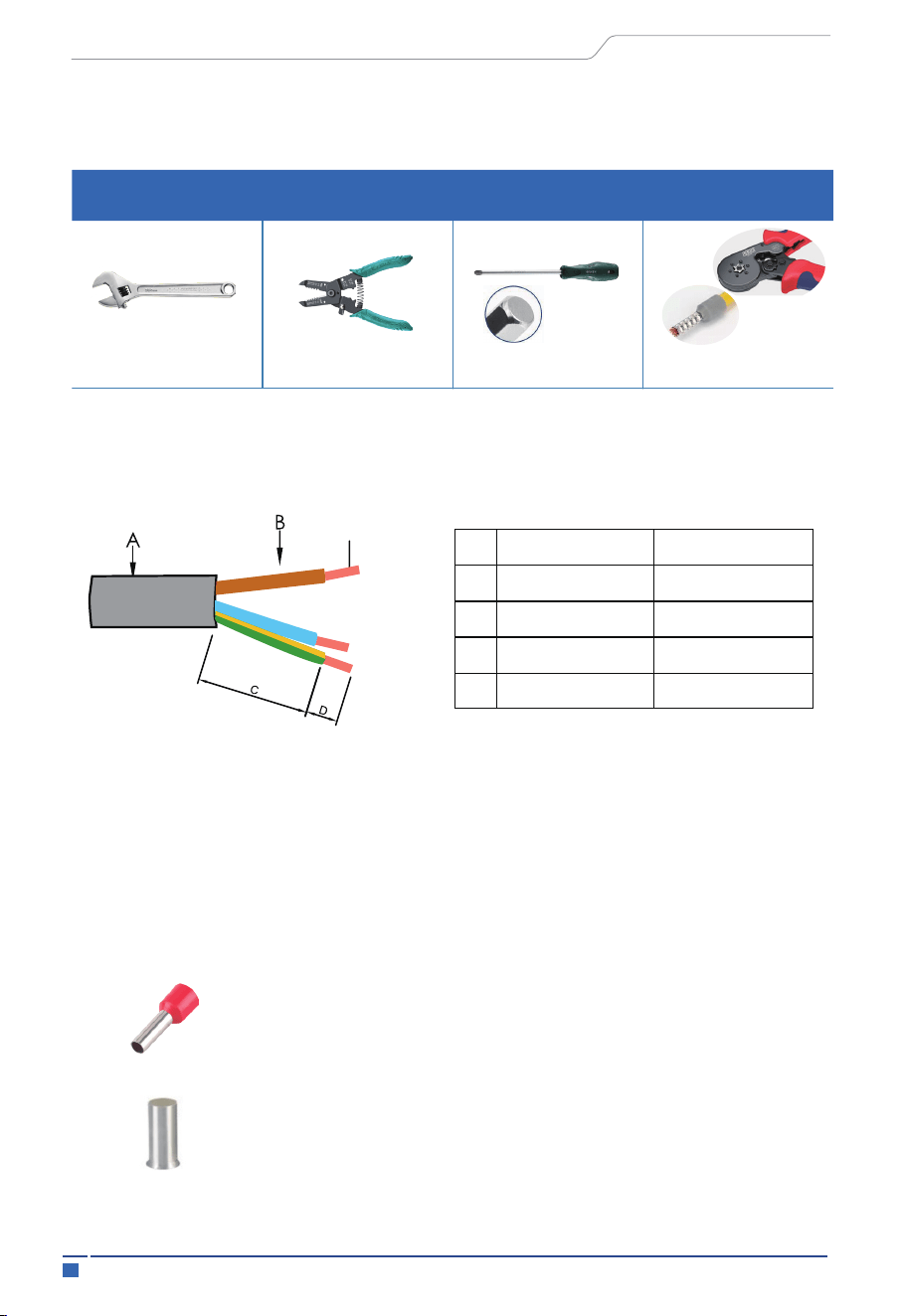
a: Use professional tools to peel off the cables according to the requirements in the table
below.
b: Insert the conductor into the suitable ferrule acc. to DIN 46228-4 and crimp the
contact.
4mm² insulated cord end Terminal Recommended model: E4012
6mm² non-insulated cord end Terminal Recommended model:
EN6012
Required for installation.
open-end wrench wire stripper
2.0 Allen driver
6-side Rivet pliers
Installation tools
Installation tools: open-end wrench, wire stripper, 2.0 Allen driver, 6-side Rivet pliers, etc.
12mm-⌀
⌀
18mm
2.5~10m²/12~8AWG
31±5mm
9±0.5mm
No.
clarification
Size data
A
B
C
D
Outer diameter of wire
Bare wire length
Wire length
Cross-sectional area of
copper conductor
—: CAUTION: NOT FOR INTERRUPTING CURRENT” and “ATTENTION: NE PAS
UTILISER POUR COUPER LE COURANT”
—. ”Not for Current Interrupting”
Multi-stranded
soft copper wire
38Electrical Connection
User Manual
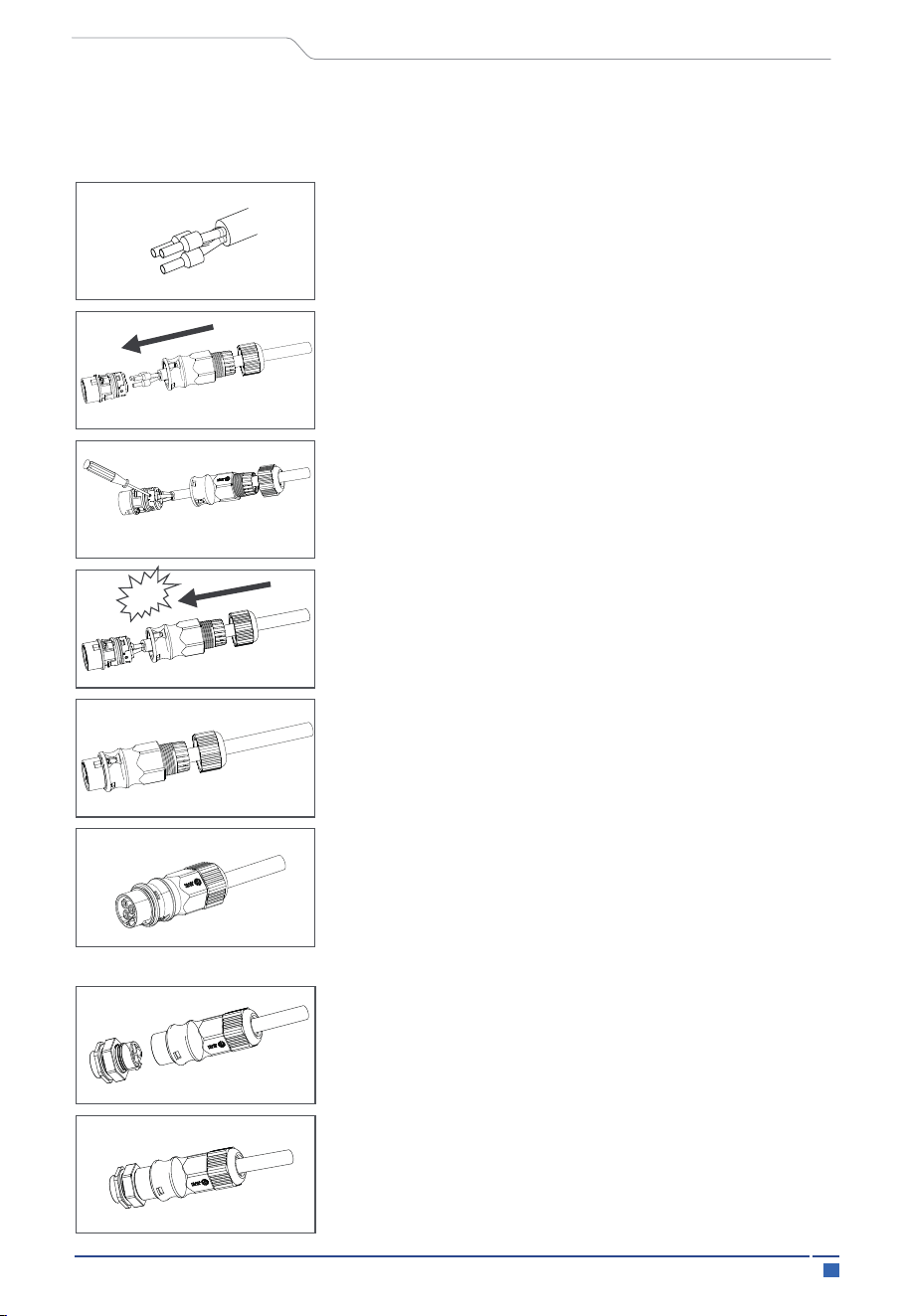
Crimp the terminals with crimping pliers
Set the parts on the cable, Insert the terminal holes in
sequence
Insert the main body into the rubber core and hear the
"click" sound
Tighten the nut with an open-ended wrench
(torque 2.5±0.5N·m)
The installation arrow indicates insertion the
male connector
complete the installation
complete the installation
c: Unscrew the swivel nut from the threaded sleeve and thread the swivel nut and
threaded sleeve over the AC cable.
Male and female butt (plate end)
Click
Crimp the wire with a hexagonal screwdriver and
turn the screw. torque 1.2+/-0.1N·m(2.5~6mm²)
1.0+/-0.1N·m(≤ 2.0mm²)
39 Electrical Connection
User Manual
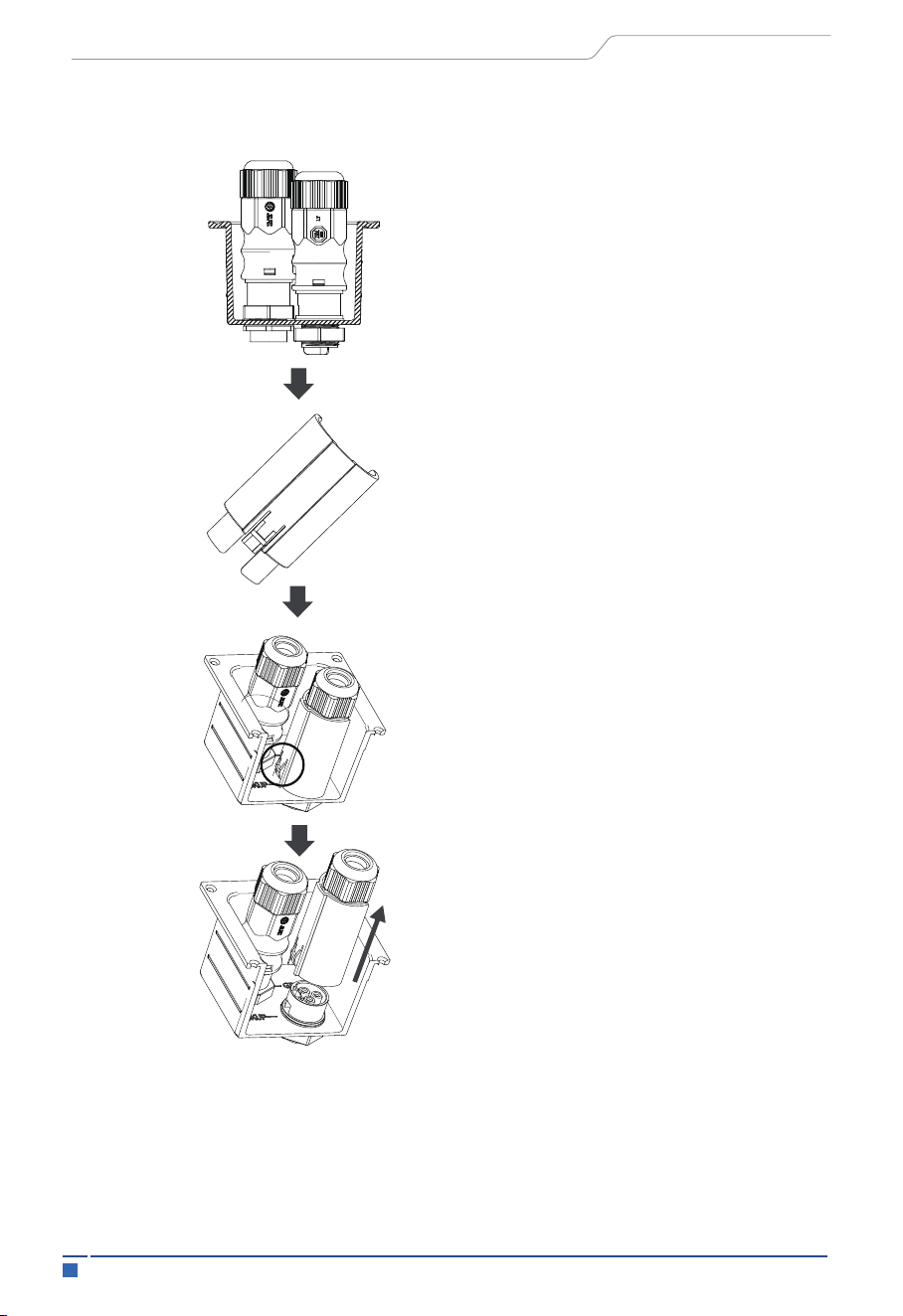
Place the unlocking tool onto the
corresponding product.
Press the button on the unlocking tool with
your finger or a flathead screwdriver
Pull the product outwards to
complete the split
Note: The disassembling and assembling methods and procedure operation for
the male plug-in is the same as that for the female plug-in.
Plate end to unlock instructions
40Electrical Connection
User Manual
5.4 Communication Interface Connection
This interface is connection to electricity meter or CT. The electricity meter should be
mounted and connected at the grid transition point (feed-in point) so that it can measure
the grid reference and feed-in power. The communication about PCS and meter/CT is
RS485.This port is used for 485 communication between 2 external CT channels and an
electric meter. Currently CT1 is enabled and CT2 is reserved. The meter communication
uses RS485 interface to read the voltage, current, active power, reactive power, apparent
power and other information collected by the meter. Before communicating with the
meter, the baud rate and address information of the meter need to be set through the
“Solarman Business APP”.
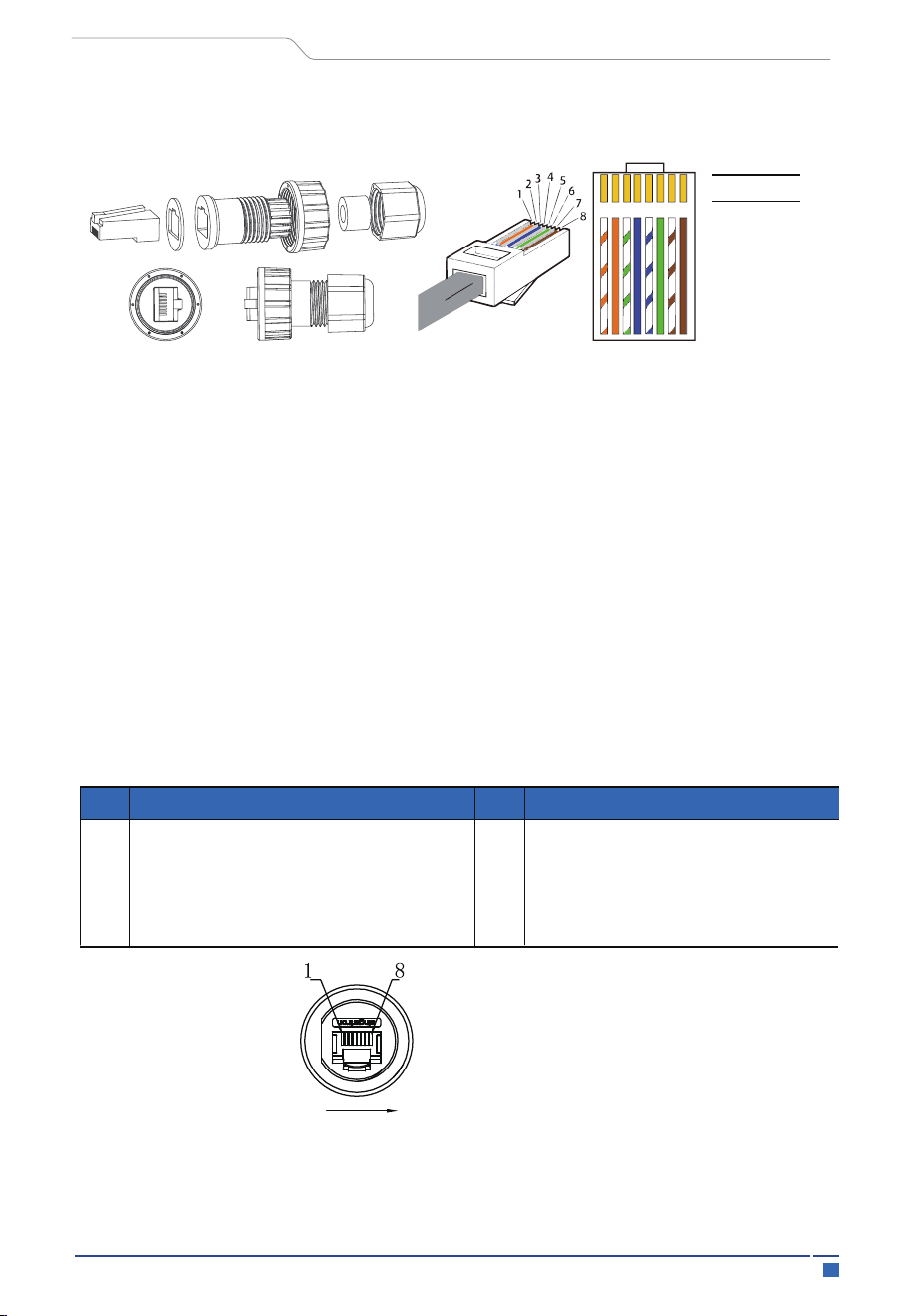
Color
Interface Description
1 White-orange
2 orange
3 white-green
4 blue
5 white-blue
6 green
7 white-brown
8 brown
1 2
3
4
5
6 7 8
5.4.1 PM(METER/CT) Interfaces
Pin
Description
Description
1
2
3
4
Pin
5
6
7
8
485A
485B
CT2A
VCC
GND
CT2B
CT1A
CT1B
1. The installer will prepare the network cable and the length of the cable will be deter-
mined according to the site environment.
*Refer to 5.4 for wiring sequence
41
Electrical Connection
User Manual
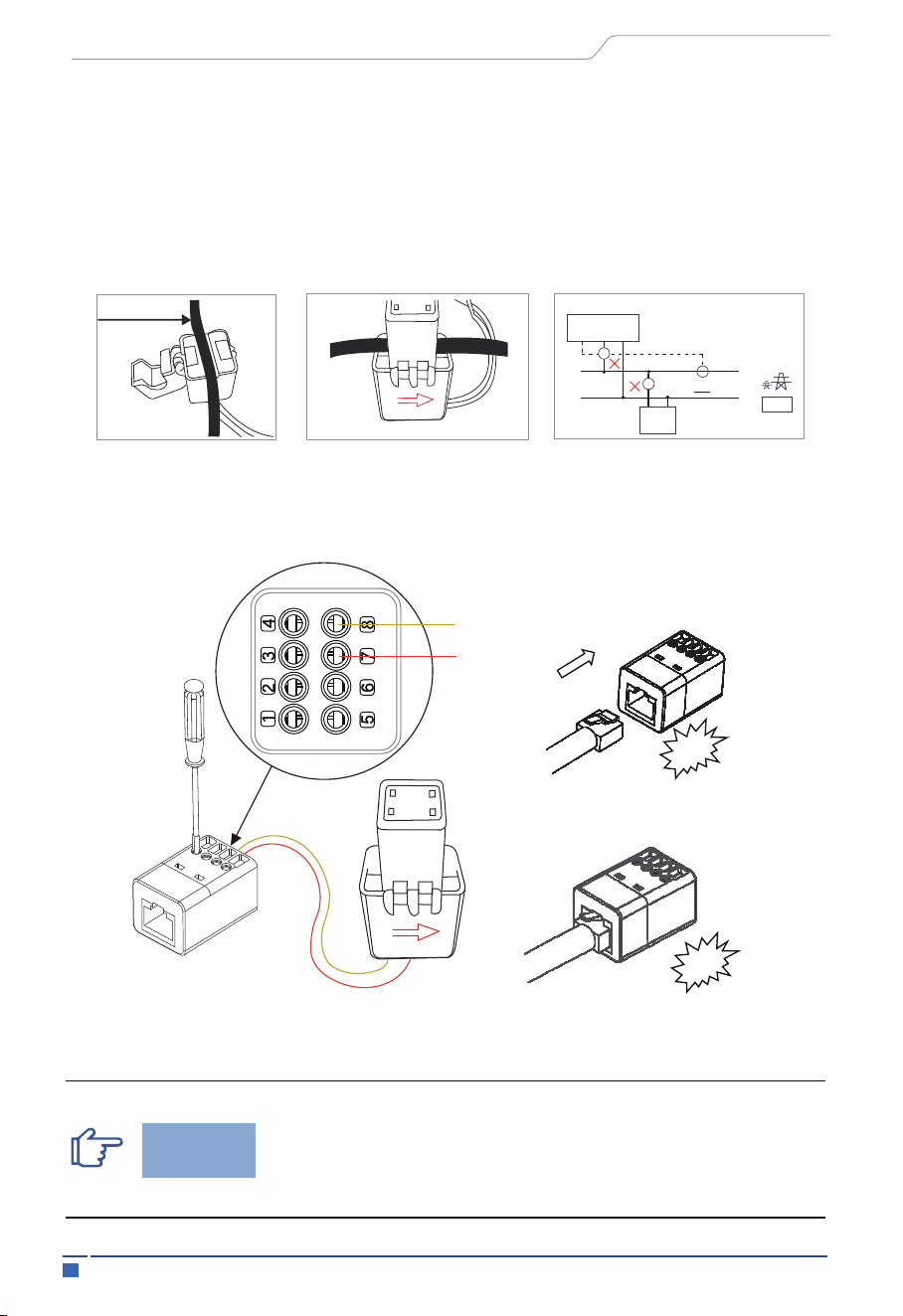
2. Remove the cable insulation and make the RJ45 connector according to the cable
line order
3. Open the CT cap, place it on the grid main line "L" cable so that the arrow of the
CT points towards the direction of the power grid, and then close the cap.
4. Connect the S1 and S2 cables of the CT to the RJ45 adapter, and connect the wires as
shown in the diagram.
5. Plug both ends of the RJ45 cable into the RJ45 adapters and the PCS interface.
Grid
Home
Inverter
CT Input L N
√
CT
CT
L N
Load
Grid
CT
L
N
Note:
Make sure the grid main power and PV switch are closed
during the installation.
Notice
S1
S1
S2
S2
Step1
C
l
i
ck
C
l
i
ck
Step2
Step3
42Electrical Connection
User Manual
Interface Description
External ammeter should be placed near the power grid.
If ammeter test pass but inverter still can't achieve export
power (power is not controllable or always 0 power output).
Please check installation location of the ammeter.
Notice
DEMAND RESPONSE MODES (DRMs)
Mode
Description
DRM 0
DRM 1
DRM 2
DRM 3
DRM 4
DRM 5
DRM 6
DRM 7
DRM 8
Pin
Operate the disconnection device
Do not consume power
Do not consume at more than 50% of rated power
Do not consume at more than 75% of rated power AND Source reactive power if capable
Increase power consumption (subject to constraints from other active DRMs)
Do not generate power
Do not generate at more than 50% of rated power
Do not generate at more than 75% of rated power AND sink reactive power if capable
Increase power generation (subject to constraints from other active DRMs)
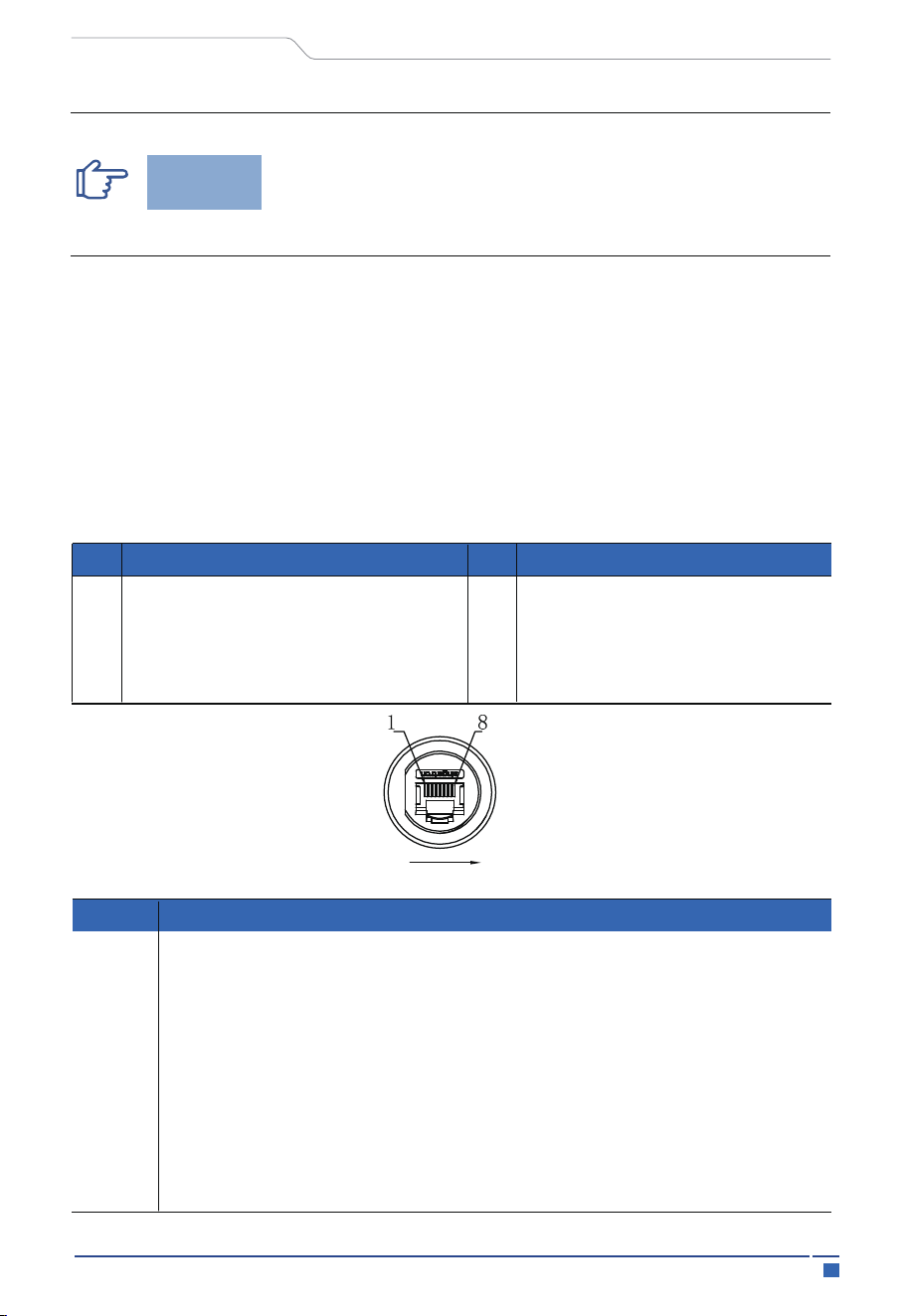
5.4.2 DRM Port Connections(Optional)
This interface is a dry contact (only for Australia). DRED means demand response enable
device. The AS/NZS 4777.2:2020 required inverter needs to support demand response
mode (DRM). This function is for inverter that comply with AS/NZS 4777.2:2020
standard. Inverter is fully complied with all DRM. The corresponding functions are
enabled by DRED equipment and host computer. For details, refer to AS4777. A RJ45
terminal is used for DRM connection
Pin
Description
Description
1
2
3
4
Pin
5
6
7
8
DRM1/5
DRM2/6
DRM3/7
DRM4/8
REF
COM
VCC
GND
*Refer to 5.4 for wiring sequence.
43
Electrical Connection
User Manual
Interface Description
Interface Description
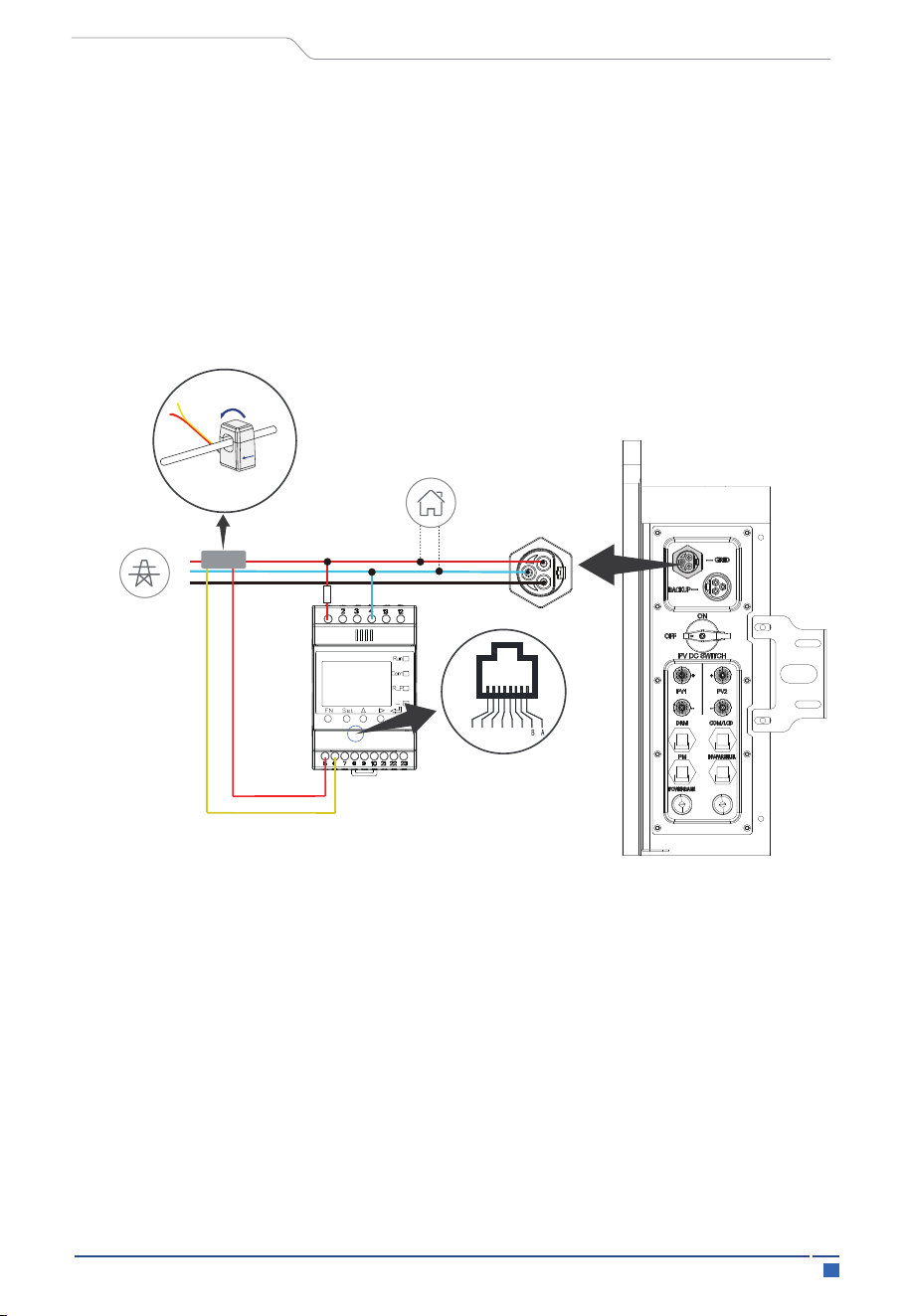
5.5 External Smart Meter (optional) Connection
You must connect external CTs or a smart grid meter between the inverter and the
power grid. If you want to connect a smart meter, note that only one meter is necessary
for each inverter. The meter must be mounted and connected at the grid transition point
(feed-in point) so that it can measure the grid reference and feed-in power.
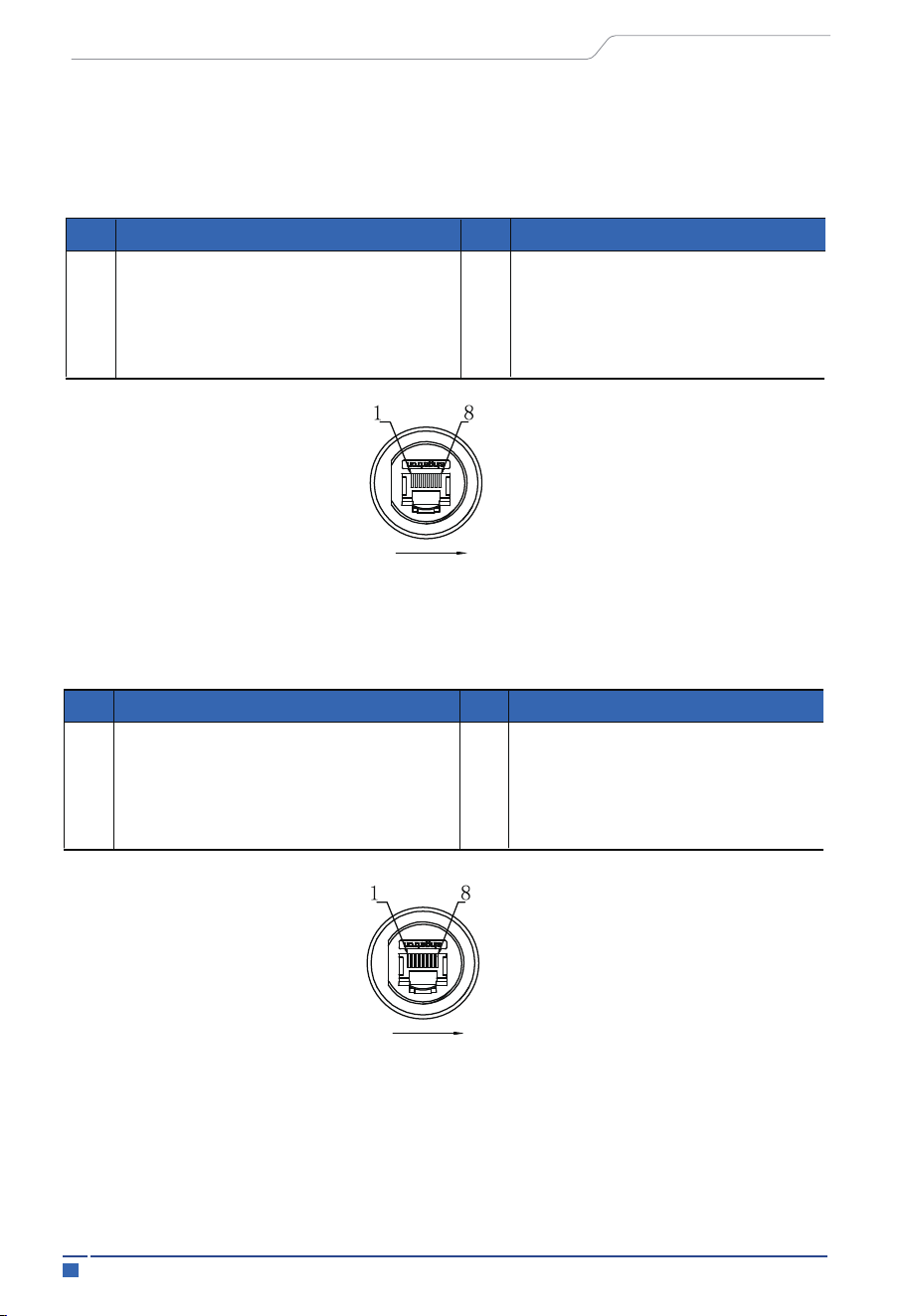
5.4.3 COM/LCD Interface
This interface is a dry contact. COM port uses RS485 communication, the communica-
tion protocol is the same as WIFI port 485 protocol, used for client power grid scheduling
monitoring.
Pin
Description
Description
1
2
3
4
Pin
5
6
7
8
DO2A
DO2B
485A
VCC
GND
485B
DO1A
DO1B
*Refer to 5.4 for wiring sequence.
5.4.4 PARALLEL(INV) Interface
This interface is used to implement the inverter parallel function. The communication
between parallel inverters is CAN.
Pin
Description
Description
1
2
3
4
Pin
5
6
7
8
CANH
NC
NC
MCANH
MCANL
CANL
NC
NC
*Refer to 5.4 for wiring sequence.
44Electrical Connection
User Manual
5.6 Earth Fault Alarm Connection
The inverter complies with IEC 62109-2 13.9. The fault indicator LED on the inverter
cover will light up and the app will push a message of an error code of F40 indicating
the earthing fault,
The inverter should be installed at eye level for convenient maintenance (Adjust the
height by placing the foundation)
PROCEDURE
STEP1: Prepare the communication wires, power cable, and tools for the meter connec-
tion .
STEP2: Selection of a suitable position location for fixing the DIN track, Mount the Meter
on the DIN track.
STEP3: Installation of CT. Refer to the introduction of CT installation for specific steps.
STEP4: Install the cables correctly as shown.
LOAD
GRID
RJ45 Interface
S1S2
RS485 Communication
L
N
PE
18
-------------------------------------------------
-------
CT
Grid
Home
Wiring of Smart Meter Connection (Example, ACRIORH-D10TE)
45 Electrical Connection
User Manual
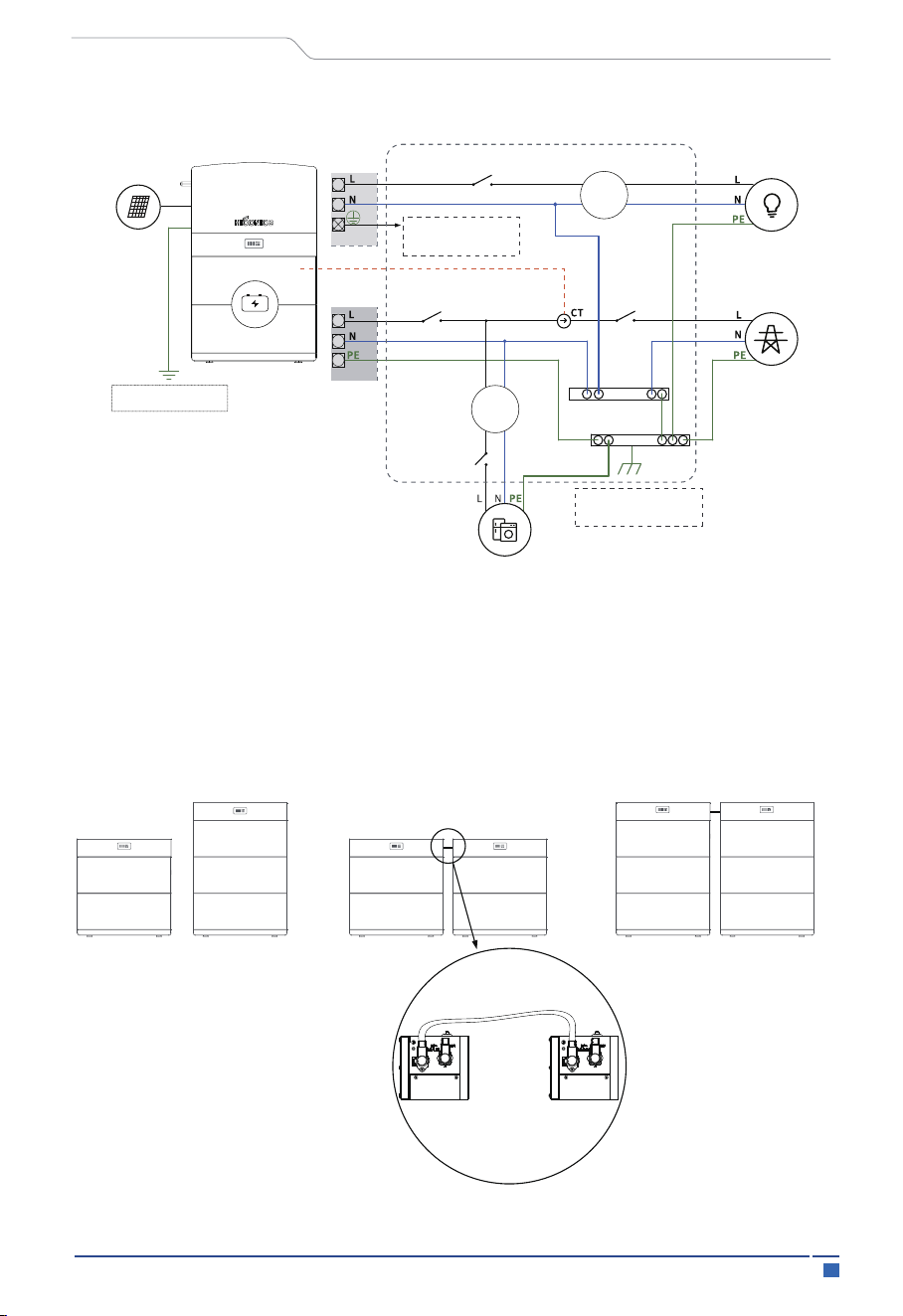
For Australia, New Zealand. The neutral points on the GRID side and the LOAD side must
be connected together, otherwise the LOAD function does not work.
PE grounding:
1. The PE terminal of LOAD is vacant and cannot be connected to the grid system of
Australia, New Zealand and South Africa.
2. There are two PE earthing posts on the PCS shell, one is connected to the shell earth-
ing post of the BMS control box to maintain earthing continuity between different struc-
tural parts, and the other PE earthing post needs to be reliably connected to the building
earthing ring network nearby.
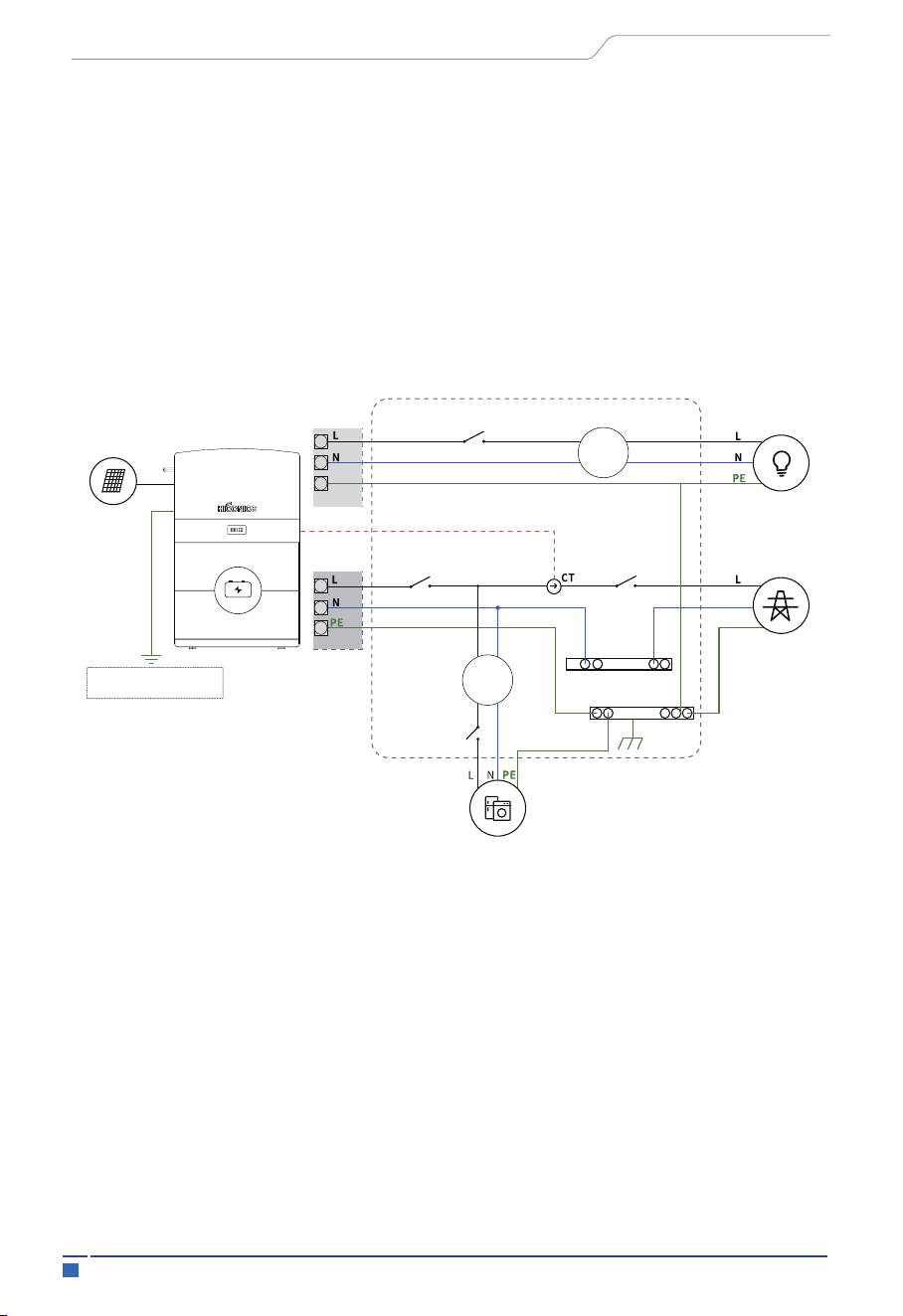
HEC Hybrid Series is designed with two EPS versions for customer to choose based on
the local rules.
E Version applies to the wiring rules that requires the Live line and N (Neutral) line of
EPS must be disconnected with the Live line and N (Neutral) line of grid (applies tomost
countries).
5.7 Wiring Diagram
E Version
Solar Array
Hybrid Inverter
Ground stud in the lower
left corner
BACK-UP
PE
N
PE
Grid
Distribution Box
Normal Loads
Back-up
Loads
Grid
E-BAR
N-BAR
RCD
RCD
Battery
BMS
46Electrical Connection
User Manual
• Capacity 10.2 kWh: 2× battery module+1× BMS control box+ 1×base
• Capacity 15.3 kWh: 3× battery module+1× BMS control box+1×base
• Capacity 20.4 kWh: 4× battery module+2× BMS control box+2×base
• Capacity 30.6 kWh: 6× battery module+2× BMS control box+2×base
5.8 Battery Pack Capacity Expansion
Parallel cable for BMS control box (2×BMS control box need)
I Version
Battery
BMS
Hybrid Inverter
The Grounding screw hole
at the lower right corner
LOAD
Grid
Distribution Box
DON’t connect this terminal
for Australian and New
Zealand Grid system!!!
Normal Loads
Back-up
Loads
Grid
E-BAR
N-BAR
E-N
Link
RCD
RCD
The N-BAR and E-BAR
must be well connected!!!
Solar Array
47 System Operation
6 System Operation
6.1 Switch On
Power-on process:
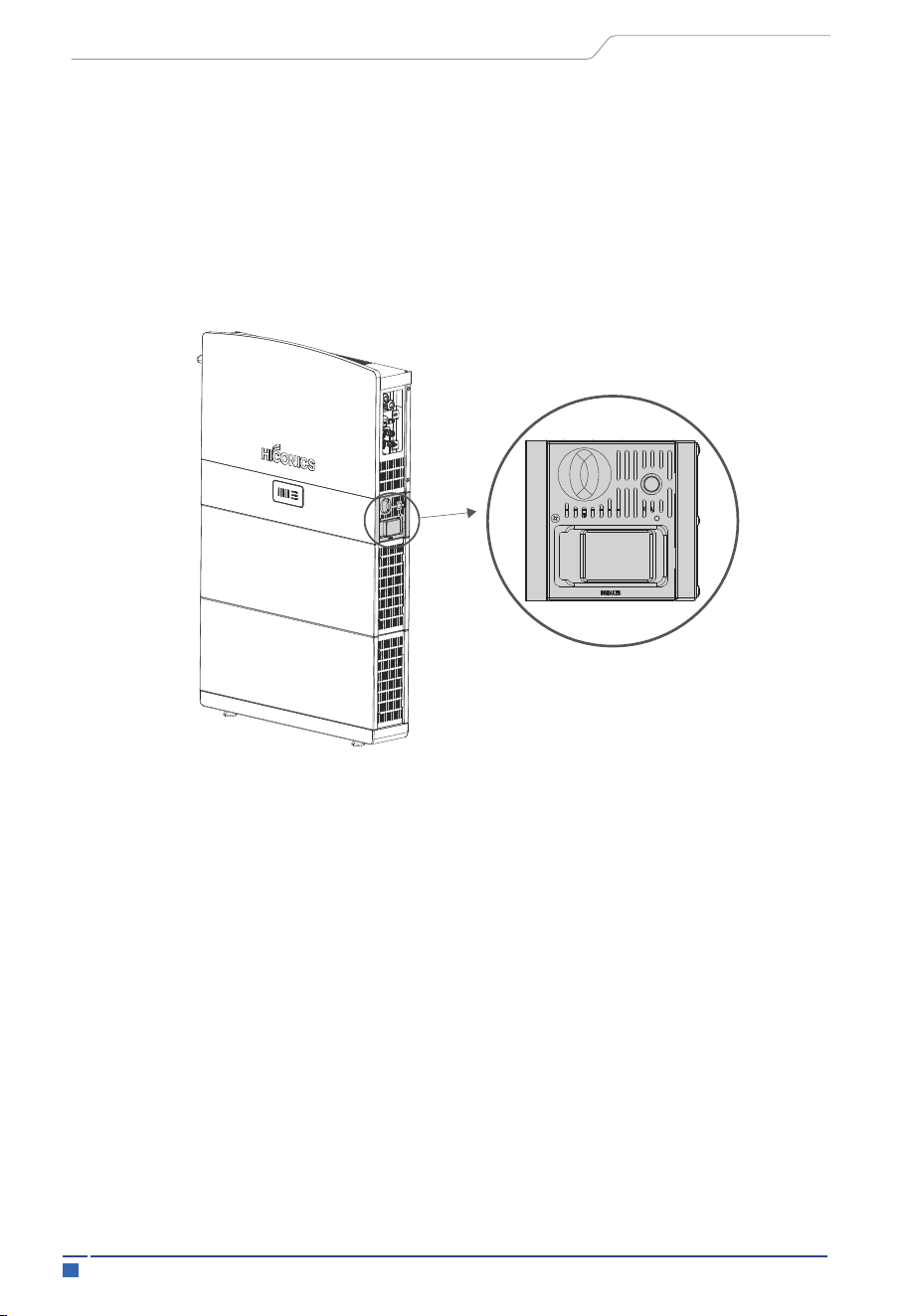
Step 1: Open the protective cover and close the BMS control box circuit breaker
Step 2: Press the BMS control box button and check the status of the light strip
Step 3: Turn on the photovoltaic isolation switch
Step 4: Turn on the grid-side circuit breaker
User Manual
When turning on the system, it is very important to follow the steps below to prevent
damage to the system.
WARNING: Please check the installation again before turning on the system.
48Plant Monitoring
7 Plant Monitoring
7.1 Download SOLARMAN APP
6.2 Switch Off
Step 1: Turn off the grid-side circuit breaker
Step 2: Turn off the PV disconnect switch
Step 3: Open the protective cover and turn off the BMS control box circuit breaker
SOLARMAN Business APP:
User Manual
Owners can create their own plant at SOLARMAN Platform to run a real-time monitoring.
System will collect the data from associated devices, which enables a full understanding
of PV plant running status.
Distributors and installers can create plant while installing the system and can authorize
the end user so they can check and monitor their own plants. Meanwhile, the distributors
can do the O&M remotely for an effective and pro-active service delivery towards the end
users ensuring customer satisfaction.
SOLARMAN Web is remote monitoring and controlling platform for all the users. There
are all the identities available.
https://www.solarmanpv.com/
SOLARMAN Business APP: SOLAR-
MAN Business is remote monitoring
and controlling platform for the distrib-
uters, dealers and Installers.
(Before the installation, please contact
with HICONICS to get an authorized
account).
SOLARMAN Business APP
49
Maintenance and Troubleshooting
User Manual
Note:
Note: For detailed configuration procedures, please log in
“https://www.hiconics.com/en/product/product-detail/prod-detail?productId=100448”
for the latest "HICONICS Generation 2 (Hienergy) SOLARMAN Configuration Guide".
SOLARMAN Smart APP:
SOLARMAN Smart is remote monitor-
ing and controlling platform for the end
users. The installer can help the end
users to create the Smart accounts in
SOLARMAN Business.
8 Maintenance and Troubleshooting
8.1 Maintenance Before Operation
1. Before the inverter is put into operation, read the instruction manual carefully, and
strictly execute the connection and installation of the equipment according to the
instructions on the manual.
2. Carefully check whether the various parts of the inverter as well as the terminals are
loose and fall off in the process of transporting.
3. Carefully check whether the diameter of each wire of the inverter is in accordance with
the requirements; whether the proper insulation is good or not; and whether the ground-
ing of the system is in accordance with the insulation regulations or not.
Note: When using the inverter, it should be operated in strict accordance with the
instructions for using and maintaining the inverter, and the warning signs on the inverter
should be intact. Maintenance of inverter during operation.
SOLARMAN Smart APP

50Maintenance and Troubleshooting
User Manual
8.2 Maintenance During Operation
1. In the process of inverter commissioning, regularly check whether the inverter wirings
are firm, and check whether the dust net, fan, power module, terminals and other parts are
working normally.
2. The inverter cabinet has high pressure, usually should pay attention to check whether
the cabinet door is locked or not.
3. When the room temperature exceeds 30℃, effective cooling measures should be taken
to prevent the inverter from overheating and burning.
4. The structure and electrical connection of the inverter should be kept intact, and there
should be no corrosion, accumulation of dust, etc. The inverter should not have large
vibration and abnormal noise during operation.
5. Regularly disconnect the circuit breaker of AC output side of the inverter once.
6. When the DC bus capacitor temperature in the inverter is too high or exceeds the
service life, it should be found and replaced in time.
7. the inverter belongs to high reliable operation equipment, can achieve long-term
trouble-free operation, weekdays should carry out inspections, listen to the inverter sound
is normal, the external debris, whether the vent is dusty, the panel display is normal, found
that the problem is dealt with in a timely manner, report.
Note: Non-professionals should not disassemble and overhaul the inverter without
permission. Inverter generally have short circuit, over current, over voltage, overheating
and other items of automatic protection, when the problem occurs, do not need to manu-
ally shut down.
51
Fault Information
9 Fault Information
User Manual
9.1 System Fault Information
NO.
Fault name
Solution
1
NVM checksum failure
Disconnect the AC output switch, DC input switch and Battery
switch, then connect them 5 minutes later. Contact the dealer
or the after-sales service if the problem persists.
2
DSP communication failure
Disconnect the AC output switch, DC input switch and Battery
switch, then connect them 5 minutes later. Contact the dealer
or the after-sales service if the problem persists.
3
BMS communication failure
Disconnect the AC output switch, DC input switch and Battery
switch, then connect them 5 minutes later. Contact the dealer
or the after-sales service if the problem persists.
4
Battery overvoltage alarm
Disconnect the AC output switch, DC input switch and Battery
switch, then connect them 5 minutes later. Contact the dealer
or the after-sales service if the problem persists.
5
Battery undervoltage alarm
Disconnect the AC output switch, DC input switch and Battery
switch, then connect them 5 minutes later. Contact the dealer
or the after-sales service if the problem persists.
6
Battery overtemperature
alarm
Disconnect the AC output switch, DC input switch and Battery
switch, then connect them 5 minutes later. Contact the dealer
or the after-sales service if the problem persists.
7
Battery under temperature
alarm
Disconnect the AC output switch, DC input switch and Battery
switch, then connect them 5 minutes later. Contact the dealer
or the after-sales service if the problem persists.
8
Battery overcurrent alarm
Disconnect the AC output switch, DC input switch and Battery
switch, then connect them 5 minutes later. Contact the dealer
or the after-sales service if the problem persists.
9
Battery voltage difference
too large
Disconnect the AC output switch, DC input switch and Battery
switch, then connect them 5 minutes later. Contact the dealer
or the after-sales service if the problem persists.
10
Temperature difference
too large
Disconnect the AC output switch, DC input switch and Battery
switch, then connect them 5 minutes later. Contact the dealer
or the after-sales service if the problem persists.
11
Battery SOC too high
Disconnect the AC output switch, DC input switch and Battery
switch, then connect them 5 minutes later. Contact the dealer
or the after-sales service if the problem persists.
12
Battery SOC too low
Disconnect the AC output switch, DC input switch and Battery
switch, then connect them 5 minutes later. Contact the dealer
or the after-sales service if the problem persists.

52Fault Information
User Manual
9.2 Inverter Fault Information
13
Other battery alarms
Disconnect the AC output switch, DC input switch and Battery
switch, then connect them 5 minutes later. Contact the dealer
or the after-sales service if the problem persists.
NO.
Fault name
Solution
1
Grid over voltage
1. If the problem occurs occasionally, the utility grid may be
temporarily abnormal. The inverter will recover automatically
after detecting that the utility grid is normal.
2. If the problem occurs frequently, check whether the grid
voltage is within the permissible range.
• Contact the local power company if the grid voltage exceeds
the permissible range.
• Modify the overvoltage protection threshold, HVRT or disable
the overvoltage protection function after obtaining the
consent of the local power company if the grid frequency is
within the permissible range.
3. Check whether the AC breaker and the output cables are
connected securely and correctly if the problem persists.
2
Grid under voltage
1. If the problem occurs occasionally, the utility grid may be
abnormal temporarily. The inverter will recover automatically
after detecting that the utility grid is normal.
2. If the problem occurs frequently, check whether the grid
voltage is within the
permissible range.
• Contact the local power company if the grid voltage exceeds
the permissible range.
• Modify the undervoltage protection threshold, LVRT or
disable the undervoltage protection function after obtaining
the consent of the local power company if the grid frequency
is within the permissible range.
3. Check whether the AC breaker and the output cables are
connected securely and correctly if the problem persists.
3
Grid over current
1. If the problem occurs occasionally, the utility grid may be
abnormal temporarily. The inverter will recover automatically
after detecting that the utility grid is normal.
2.Contact the dealer or the after-sales service if the problem
occurs frequently.
4
Grid frequency abnormal
1. If the problem occurs occasionally, the utility grid may be
abnormal temporarily. The inverter will recover automatically
after detecting that the utility grid is normal.
2. If the problem occurs frequently, check whether the grid
frequency is within the
permissible range.
• Contact the local power company if the grid frequency
exceeds the permissible range.
• Modify the frequency protection threshold or disable the over
frequency protection function after obtaining the consent of
the local power company if the grid frequency is within the
permissible range.

53
Fault Information
User Manual
5
DC bus over voltage
Disconnect the AC output switch, DC input switch and Battery
switch, then connect them 5 minutes later. Contact the dealer
or the after-sales service if the problem persists.
6
DC bus under voltage
Disconnect the AC output switch, DC input switch and Battery
switch, then connect them 5 minutes later Contact the dealer
or the after-sales service if the problem persists.
7
PCS over temperature
1. Check the ventilation and the ambient temperature at the
installation point.
2. If the ventilation is poor or the ambient temperature is too
high, improve the ventilation and heat dissipation.
3. Contact the dealer or after-sales service if both the
ventilation and the ambient temperature are normal.
8
PV over temperature
1. Check the ventilation and the ambient temperature at the
installation point.
2. If the ventilation is poor or the ambient temperature is too
high, improve the ventilation and heat dissipation.
3. Contact the dealer or after-sales service if both the
ventilation and the ambient temperature are normal.
9
PVA over current
Disconnect the AC output switch, DC input switch and Battery
switch, then connect them 5 minutes later. Contact the dealer
or the after-sales service if the problem persists.
10
PVB over current
Disconnect the AC output switch, DC input switch and Battery
switch, then connect them 5 minutes later. Contact the dealer
or the after-sales service if the problem persists.
11
Buck-Boost A over current
Disconnect the AC output switch, DC input switch and Battery
switch, then connect them 5 minutes later. Contact the dealer
or the after-sales service if the problem persists.
12
Buck-Boost B over current
Disconnect the AC output switch, DC input switch and Battery
switch, then connect them 5 minutes later. Contact the dealer
or the after-sales service if the problem persists.
13
Battery side DC over
voltage
1.If the problem occurs occasionally, check battery input
voltage, if it's within normal range, the inverter will recover
automatically.
2.Contact the dealer or the after-sales service if the problem
occurs frequently.
14
Battery side DC under
voltage
1.If the problem occurs occasionally, check battery input
voltage, if it's within normal range, the inverter will recover
automatically.
2.Contact the dealer or the after-sales service if the problem
occurs frequently.

54Fault Information
User Manual
16
PVB over voltage
Check the serial connection of the PV array. Make sure that
the open circuit voltage of the PV string is not higher than the
maximum operating voltage of the inverter.
15
PVA over voltage
Check the serial connection of the PV array. Make sure that
the open circuit voltage of the PV string is not higher than the
maximum operating voltage of the inverter.
17
Ambient abnormal
1. Check the ventilation and the ambient temperature at the
installation point.
2. If the ventilation is poor or the ambient temperature is too
high, improve the ventilation and heat dissipation.
3. Contact the dealer or after-sales service if both the
ventilation and the ambient temperature are normal.
18
Residual Current Fault
1. If the problem occurs occasionally, it may be caused by a
cable exception. The inverter will recover automatically after
the problem is solved.
2. Check whether the impedance between the PV string and
PE is too low if the problem occurs frequently or persists.
19
Hardware abnormal
Disconnect the AC output switch, DC input switch and Battery
switch, then connect them 5 minutes later. Contact the dealer
or the after-sales service if the problem persists.
20
Recharge precharge
Disconnect the AC output switch, DC input switch and Battery
switch, then connect them 5 minutes later. Contact the dealer
or the after-sales service if the problem persists.
21
Insulation fault
1. Check whether the resistance of the PV string to PE exceeds
50kΩ. If no, check the short circuit point.
2. Check whether the PE cable is connected correctly.
3. If the resistance is lower on rainy days, please reset the ISO.
22
AC side relay abnormal
Disconnect the AC output switch, DC input switch and Battery
switch, then connect them 5 minutes later. Contact the dealer
or the after-sales service if the problem persists.
23
PVA Reverse Connection
Fault
Check whether the PV strings are connected reversely.
24
PVB Reverse Connection
Fault
Check whether the PV strings are connected reversely.

55 Fault Information
User Manual
25
Hardware DC Bus Over
Voltage
Disconnect the AC output switch, DC input switch and Battery
switch, then connect them 5 minutes later. Contact the dealer
or the after-sales service if the problem persists.
26
Hardware Battery Over
Voltage
Disconnect the AC output switch, DC input switch and Battery
switch, then connect them 5 minutes later. Contact the dealer
or the after-sales service if the problem persists.
27
Grid 10 minutes Over
Voltage
1. If the problem occurs occasionally, the utility grid may be
abnormal temporarily. The inverter will recover automatically
after detecting that the utility grid is normal.
2. If the problem occurs frequently, check whether the grid
voltage is within the permissible range.
• Contact the local power company if the grid voltage exceeds
the permissible range.
• Modify the grid overvoltage rapid protection threshold after
obtaining the consent of the local power company if the grid
voltage is within the permissible range.
28
EPS(Off-grid) Overload
Fault
1. If the problem occurs occasionally, the EPS load may be
abnormal temporarily. The inverter will recover automatically
after few minutes.
2. If the problem occurs frequently, check whether the EPS
load is within the permissible range.
3.Contact the dealer or the after-sales service if the problem
persists.
29
Fan Fault
Disconnect the AC output switch, DC input switch and Battery
switch, then connect them 5 minutes later.
Contact the dealer or the after-sales service if the problem
persists.
30
DC Relay Fault
Disconnect the AC output switch, DC input switch and Battery
switch, then connect them 5 minutes later.
Contact the dealer or the after-sales service if the problem
persists.
31
Power Meter
Communication Fault
1.Check the Meter is working properly and the cable connec-
tion from Power meter to inverter is normal.
2.Disconnect the AC output switch, DC input switch and
Battery switch, then connect them 5 minutes later.
3.Contact the dealer or the after-sales service if the problem
persists.
32
Reserved
1. If the problem occurs occasionally, the EPS load may be
abnormal temporarily. The inverter will recover automatically
after few minutes.
2. If the problem occurs frequently, check whether the EPS
load is within the permissible range.
3.Contact the dealer or the after-sales service if the problem
persists.

10 Packaging, Transportation, Storage
The system cabinet is packed in cardboard packaging and the internal PE packag-
ing bag is moisture-proof and waterproof.
Use EPE pearl cotton foam pad in the middle to prevent damage to the system
during handling and transportation.
Transportation must comply with UN3480's dangerous goods transportation and
local laws and regulations.
The system is heavy and must use the mechanical handling.
Transportation temperature: -10℃~ 40℃.
The equipment and packaging cannot be sprayed, so it cannot be transported in
the open air.
Storage temperature:
The storage room should be kept ventilated, the room should be clean and dry, and
it should be protected from dust and moisture.
The storage time can be up to 3 months. It is recommended to charge and
discharge the system for more than the time.
Storage room sunlight cannot be directly exposed to the system.
-20 ° C ~ 35 ° C, 12month;
-20 ° C ~ 45 ° C, 3month;
-20 ° C ~ 55 ° C, 1month;
(The SOC before storage is kept in the range of 30% to 60%)
Storage humidity: 0%~95%RH(No condensation)
56
Packaging, Transportation, Storage
User Manual

57 Packaging, Transportation, Storage
User Manual
Annex 1: Inverter Parameter Table
Technical Data
HEC2-S6.0Hr2 HEC2-S5.0Hr2 HEC2-S3.8Hr2 HEC2-S3.68Hr2
PV Input
Max.PV array power
Max.DC voltage
Nominal DC operating voltage
MPPT voltage range
MPP voltage range for nominal power
Start up voltage
Max.input current(A/B)
Max.short circuit current(A/B)
No.of MPP tracks/String per MPP tracker
[5]
[4]
[3]
[7]
[2]
[1]
[1]
[1]
[1]
[1]
[1]
[1]
[1]
[6]
[6] [6] [6]
[6]
[6]
3750 W/3750 W
600 V
360 V
100 V-540 V
BAT Side
Battery voltage range
Battery voltage range for nominal power
Recommended battery voltage
Max.charge/discharge current
Communication interfaces
Reverse connect protection
AC Grid Side(On-grid)
Nominal AC output power
Max.Output Power
Nominal Apparent Power Output to Utility Grid
Max. Apparent Power Output to Utility Grid
Nominal Apparent Power from Utility Grid
Max. Apparent Power from Utility Grid
Nominal grid voltage
Grid Voltage Range
Nominal grid frequency
AC Grid Frequency Range
Max. output AC current to Utility Grid
Rate output AC current to Utility Grid
Rated AC Current From Utility Grid
Max. AC Current From Utility Grid
Power factor
I.THD
120 V
15 A/15 A
18 A/18 A
2/1
6000 W
6000 W
6000 VA
6000 VA
6000 VA
6000 VA
26.1 A
26.1 A
26.1 A
26.1 A
5000 W
5000 W
5000 VA
5000 VA
5000 VA
6000 VA
21.7 A
21.7 A
21.7 A
26.1 A
3800 W
3800 W
3800 VA
3800 VA
3800 VA
6000 VA
16.5 A
16.5 A
16.5 A
26.1 A
3680 W
3680 W
3680 VA
3680 VA
3680 VA
6000 VA
16 A
16 A
16 A
26.1 A
300 V
25 A/25 A
RS485/CAN
Yes
~1 (Adjustable from 0.8 leading to 0.8 lagging)
<3%@Rated power <5%@Rated power
85V
- 400V
225 V-480 V 185 V-480 V 141 V-480 V 137 V-480 V
250 V-400 V 225 V-400 V 170 V-400 V 160 V-400 V
230 V
180 V-280 V
50 Hz
50 Hz±5 Hz

58Packaging, Transportation, Storage
User Manual
EPS Side
Back-up Nominal Apparent Power
Nominal power
Max. Output Apparent Power without Grid
Max. Output Apparent Power with Grid
Nominal output voltage
Nominal output frequency
Nominal Output Current
Max.output current
Max.output overcurrent protection
EFFICIENCY
MPPT efficiency
Euro efficiency
Max.efficiency
Battery charge/discharge efficiency
ENVIRONMENT LIMIT
Ingress protection
Protection class
Pollution degree
Over voltage category
Operating temperature range
Max.operation altitude
Humidity
Cooling
User Interface
Communication with BMS
Communication with Meter
Communication with Portal
Typical noise emission
Dimension(W*H*D)
Weight
Topology
Self-consumption at Night
DC Connector
Switching from Grid Connected
Mode to backup Mode
Output THD
6000 VA
6000 W
26.1 A
26.1 A
7500 VA(<10 s)
7500 VA(<10 s)
230 V
50 Hz
99.9%
97.0%
97.6%
97.6%(PV-BAT)
96.0%(BAT-AC)
97.6%(PV-BAT)
96.3%(BAT-AC)
97.6%(PV-BAT)
96.1%(BAT-AC)
97.6%(PV-BAT)
96.0%(BAT-AC)
99.9%
96.9%
97.6%
99.9%
96.8%
97.5%
99.9%
96.8%
97.5%
5000 VA
5000 W
21.7 A
21.7 A
3680 VA
3680 W
16.5 A
16.5 A
3680 VA
3680 W
16 A
16 A
<20 ms
32.6 A(<10 s)
<5%@Linear Load
IP65
Class Ⅰ
PD3
Ⅲ(MAINS),Ⅱ(DC)
-20℃~+60℃(derating at +45)
<2000m
0-95%
Natural Convection
LED,APP
CAN/485
RS485
WIFI
<40dB
800 mm*435 mm*160 mm
34 KG
Non-isolated
<25 W
MC4 (4~6 mm²)

59 Packaging, Transportation, Storage
User Manual
AC Connector
Storage Temperature
Standard warranty
STANDARD
Safety
EMC
Environment
Efficiency
Certification
Remark:
[1] The grid feed in power for VDE4105 is limited 4600VA.
[2] Battery charging current is limited 25A and power is limited 6000W.
[3] The machine may be damaged if PV port exceeds this voltage, full power operation voltage should be less
than 480V, 480V-540V for limited power operation.
[4] Battery port boot voltage must be greater than 95V.
[5] The power is 6000W according to the grid port.
[6] The value will appear when the grid is charging battery and support EPS load.
[7] 3.68kW is UK only.
Quick Plug
-40℃ to +85℃
5 years
IEC/EN 62109-1&2, IEC 62477
IEC 61000-6-1, IEC 61000-6-3
IEC 60529,IEC 60068
IEC 61683
EN 50549-1,G99,G98,CEI 021,VDE 4105,AS/NZS 4777.2

60
Packaging, Transportation, Storage
User Manual
Annex 2: Battery Parameters
Nominal Voltage
Maximum protection voltage
Maximum protection voltage
Number of Battery Modules
Rated Capacity
Total Energy
Usable Energy
Nominal Power
Maximum Charge/Discharge Current
Cycle Life
Expected Life Time
Operating temperature
Humidity
Altitude
Ingress Protection
Communication
Status Indicator
SOC Indicator
Certificate
Weight
Dimension(W*H*D)
Remark
Storage Temperature
Switch on/off
Component
102.4 V
116.8 V
89.6 V
1
50 Ah
5.1 kWh
4.6 kWh
2.56 kW
25 A
Base+BMS
+ 1*Module
Button*1
+Breaker*1
69±4 kg
800±20*530
±30*160±20 mm
800±20*840
±30*160±20 mm
800±20*1150
±30*160±20 mm
1600±20*840
±30*160±20 mm
1600±20*1150
±20*160±20 mm
1 Series 2 Series Parallel
124±6 kg 179±8 kg 248±12 kg 358±16 kg
Button*1
+Breaker*1
Button*1
+Breaker*1
2*(Button*1
+Breaker*1)
2*(Button*1
+Breaker*1)
Base+BMS
+ 2*Module
Base+BMS
+3*Module
2*(Base+BMS
+2*Module)
2*(Base+BMS
+3*Module)
204. 8 V
233.6 V
179.2 V
2
50 Ah
10.2 kWh
9.2 kWh
5.12 kW
25 A
307.2 V
350.4 V
268.8 V
3
50 Ah
15.3 kWh
13.77kWh
7.68 kW
25 A
204. 8 V
233.6 V
179.2 V
4
100 Ah
20.4 kWh
18.36 kWh
10.24 kW
50 A
307.2 V
350.4 V
268.8 V
6
100 Ah
30.6 kWh
27.54 kWh
15.36 kW
50 A
Mode
HEC2-
BHP50r2
HEC2-
BHP100r2
HEC2-
BHP150r2
HEC2-
BHP200r2-A
HEC2-
BHP300r2
6000 Cycles (@25°C, 0 .5 C/0.5 C, 60% EOL )
10 Years
-20°C to 45°C (3 months)
-20°C to 35°C(1 year)
0~95%
Below 2000 m
IP65
RS485/CAN2.0
LED Lights
5 LED (20%, 40%, 60%,80%,100%)
CE ,IEC 62619,IEC 62040,IEC 60529,IEC 61000,UN 38.3
Discharge temperature range -20°C to 55°C
Charge temperature range -20℃ to 55℃(Build-in heating function)

HICONICS ECO-ENERGY DRIVE TECHNOLOGY CO., LTD.
No.3 Boxing 2nd Road, Economic and Technological Development Zone
100176 Beijing P.R. China
Tel: +86 10 5918 0033 Email: [email protected]
