Perfect Aire, LLC
5401 Dansher Rd.
Countryside, IL 60525
Distributed by:
844-4PA-AIRE | 844-472-2473
www.perfectaire.us
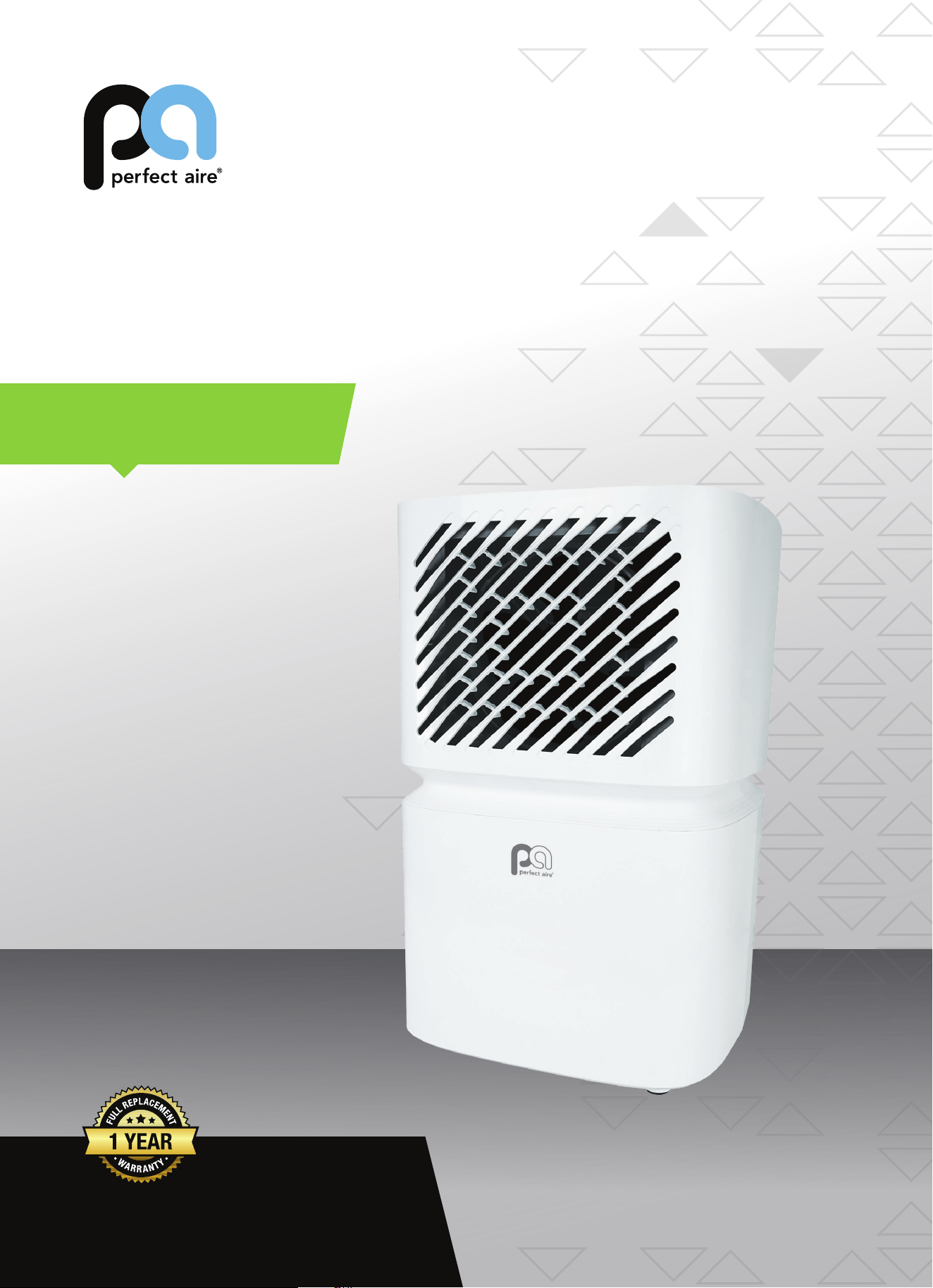
DEHUMIDIFIER
FOR MODEL:
1PAD8
Before using your dehumidifier, please
read this manual carefully and keep it for
future reference, along with your receipt.
Specification and performance data is subject to change without notice.
Printed in China
PA/User_1PAD8/0321
USER MANUAL
1
IMPORTANT SAFEGUARDS
The appliance is not intended for use by persons(including children) with reduced physical,
sensory or mental capabilities, or lack of experience and knowledge, unless they have been
given supervision or instruction concerning use of the appliance by a person responsible for
their safety.
Children should be supervised to ensure that they do not play with the appliance.
FOR EUROPEAN MARKET ONLY: This appliance can be used by children aged from 8 years
and above and persons with reduced physical, sensory or mental capabilities or lack of
experience and knowledge if they have been given supervision or instruction concerning
use of the appliance in a safe way and understand the hazards involved.
Children shall not play with the appliance.
Cleaning and user maintenance shall not be made by children without supervision.
Keep the appliance and its cord out of reach of children aged less than 8 years.
Disconnect the appliance from its power source during service and when replacing parts.
Warning: before obtaining access to terminalsall supply circuits must be disconnected.
If the supply cord is damaged, it must be replaced by the manufacturer, its service agent or
a similarly qualified person in order to avoid a hazard.
Disconnect the power supply before cleaning and maintenance.
The appliance shall not be installed in the laundry.
Do not use this unit for functions other than those described in this instruction manual.
If the power cord becomes worn or damaged,the cord should only be replaced by a qualified
service technician using genuine replacement parts.
Make sure the plug is plugged firmly and completely into the outlet. It can result in the risk of
electric shock or fire.
Do not plug other appliances into the same outlet, it can result in the risk of electric shock.
Do not disassemble or modify the appliance or the power cord, it can result in the risk of
electric shock or fire. All other services should be referred to a qualified technician.
Do not place the power cord or appliance near a heater, radiator, or other heat source.
It can result in the risk of electric shock or fire.
This unit is equipped with a cord that has a earthed wire connected to an earthed pin or
grounding tab. The plug must be plugged into a socket that is properly installed and earthed.
Do not under any circumstances cut or remove the earthed pin or grounding tab from this plug.
The unit should be used or store in such a way that it is protected from moisture e.g.
condensation, splashed water, etc. Unplug unit immediately if this occurs.
Always transport your appliance in a vertical position and place on a stable, level surface
during use. If the unit is transported laying on its side it should be stood up and left unplugged
for 6 hours.
Always use the switch on the control panel to turn the unit o r remote control off, and do not
start or stop operation by plugging in or unplugging the power cord. It can result in the risk
of electric shock.
Do not press the buttons on the control panel with anything other than your wet or damp fingers.
Do not use hazardous chemicals to clean or come into contact with the unit. To prevent damage
to the surface finish, use only a soft cloth to clean the appliance. Do not use wax, thinner, or a
strong detergent. Do not use the unit in the presence of inflammable substance or vapour such
as alcohol, insecticides, gasoline, etc.
Young children should be supervised to ensure that they do not play with, operate or climb on
the appliance.
If the appliance is making unusual sounds or is emitting smoke or an unusual odor, unplug it
immediately.
Do not clean the unit with water. Water can enter the unit and damage the insulation, creating
a shock hazard. If water enters the unit, unplug it immediately and contact Customer Service.

2
IMPORTANT SAFEGUARDS
Utilize two or more people to lift and install the unit.
Be sure all accessories are removed from the packing before use.
To avoid possible injury, avoid contact with the metal parts of the appliance when removing or re-
installing the filter. It can result in the risk of personal injury.
Do not block the air inlet or outlet of the appliance. Reduced air flow will result in poor
performance and could damage the unit.
Always grasp the plug when plugging in or unplugging the appliance. Never unplug by pulling
on the cord. It can result in the risk of electrical shock and damage.
Install the appliance on a sturdy level floor capable of supporting up to 110lbs(50kg).
Installation on a weak or unlevel floor can result in the risk of property damage and personal
injury.
Close all doors and windows to the room for most efficient operation.
GWP: R410A: 2088, R134a: 1430, R290: 3
IMPORTANT - GROUNDING METHOD
This product is factory equipped with a power supply cord that has a three-pronged
grounded plug. It must be plugged into a mating grounding type receptacle in accordance
with the National Electrical Code and applicable local codes and ordinances. If the circuit
does not have a grounding type receptacle, it is the responsibility and obligation of the
customer to exchange the existing receptacle in accordance with the National Electrical
Code and applicable local codes and ordinances. The third ground prong should not,
under any circumstances, be cut or removed. Never use the cord, the plug or the appliance
when they show any sign of damage. Do not use your appliance with an extension cord
unless it has been checked and tested by a qualified electrical supplier. Improper
connection of the grounding plug can result in risk of fire, electric shock and/or injury to
persons associated with the appliance. Check with a qualified service representative if in
doubt that the appliance is properly grounded.
ELECTRICAL CONNECTIONS
The mains power supply corresponds to the value indicated on the rating plate on
the back of the appliance.
The power socket and electrical circuit are adequate for the appliance.
The mains socket matches the plug. If this is not the case, have the plug replaced.
The mains socket is adequately earthed. Failure to follow these important safety
instructions absolves the manufacturer of all liability.
Before plugging the appliance into the mains socket, check that:
3
IMPORTANT SAFEGUARDS
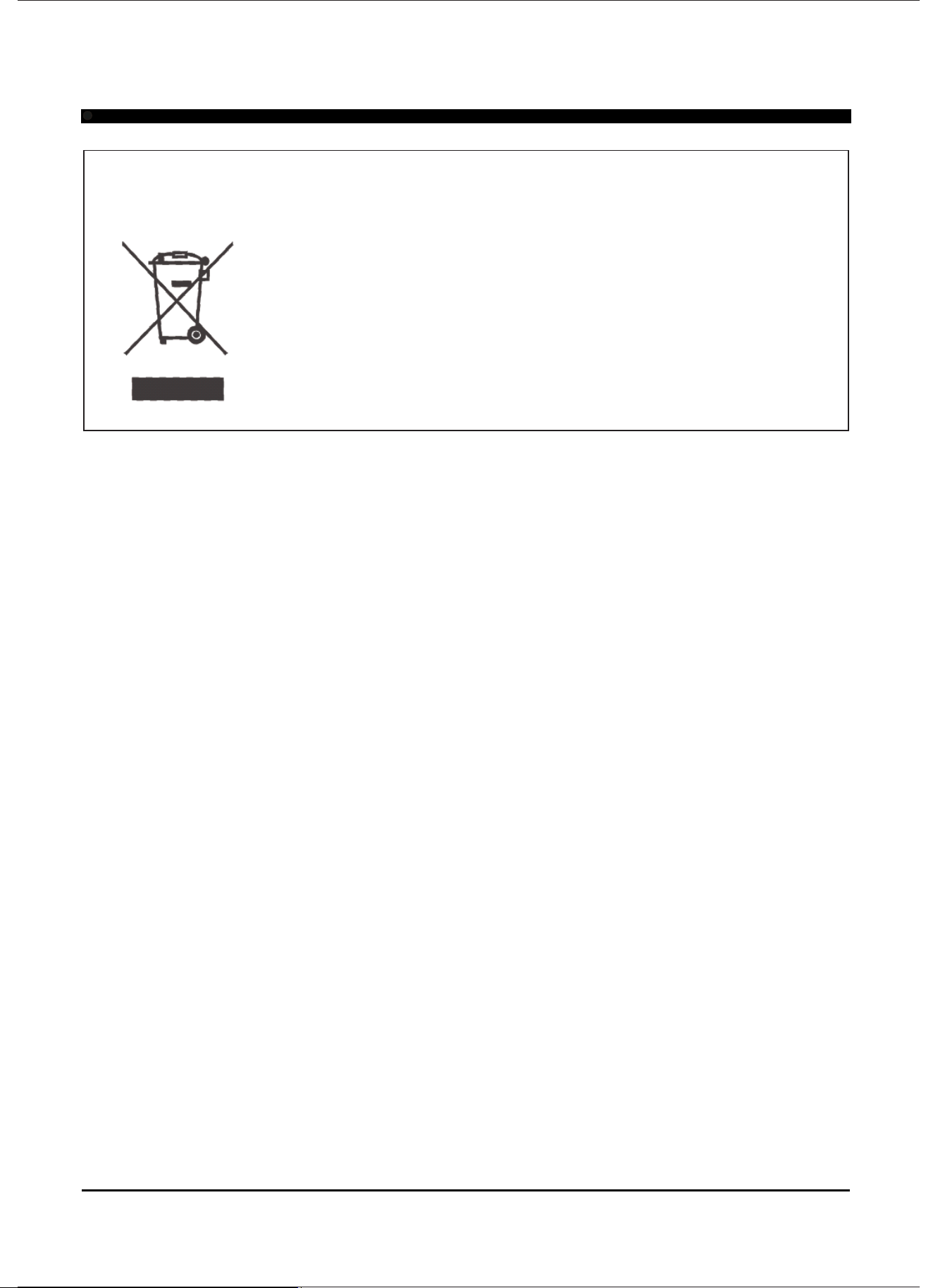
Important information for correct disposal of the product in accordance with EC Directive
2002/96/EC.
At the end of its working life, the product must not be disposed of as
urban waste. It must be taken to a special local authority
differentiated waste collection centre or to a dealer providing this
service. Disposing of a household appliance separately avoids
possible negative consequences for the environment and health
deriving from inappropriate disposal and enables the constituent
materials to be recovered to obtain significant savings in energy
and resources. As a reminder of the need to dispose of household
appliances separately, the product is marked with a crossed-out
wheeled dustbin.
SOME NOTIONS ON HUMIDITY
Air always contains a certain amount of water in the form of vapor. This determines the level of
humidity in an atmosphere. The capacity of the air to hold water vapor increases with temperature.
This is why in homes, as soon as the temperature decreases, the vapor contained in the air
condenses, as is evident on the colder surfaces in the room, such as windows, walls etc. The purpose
of a dehumidifier is to remove the excess moisture from the air to avoid the damage caused by
condensation.
Experts have established that the optimum environmental conditions for our well being and for the
home are obtained between 40% and 60% relative humidity. With very low temperatures, you are
recommended to heat the room even minimally. This considerably increases the dehumidifying
power of the appliance. With heating, the condensation formed by the water vapor on windows and
other cold surfaces evaporates into the air to be collected by the dehumidifier. Air leaving the
dehumidifier is usually about 33°F-35°F warmer than room temperature.
4
DESCRIPTION
DESCRIPTION
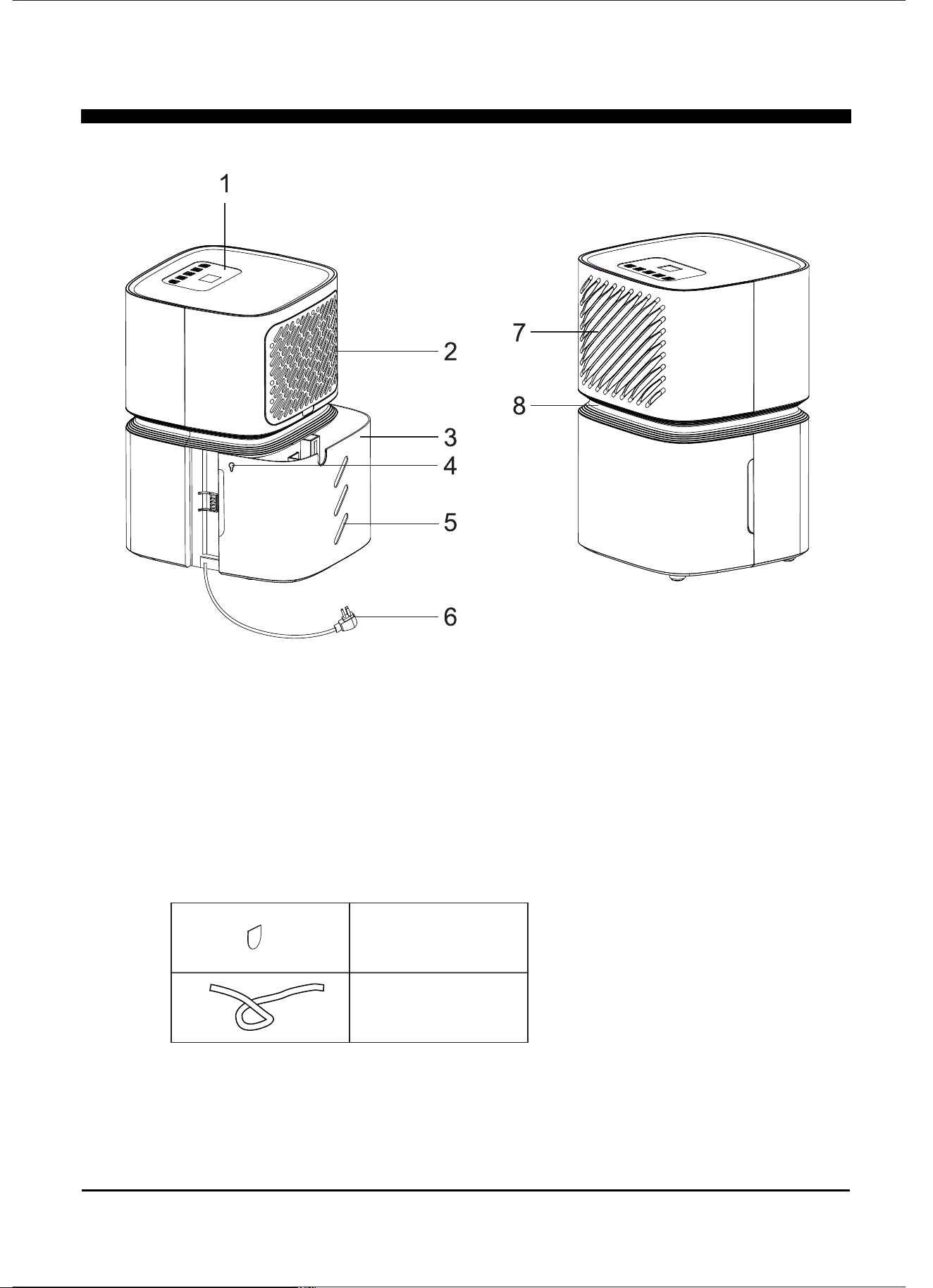
1. Control Panel
2. Intake grille
3. Bucket
4. Winding hole
Note: All diagrams in this manual are schematic and may differ slightly from actual use.
5. Water level view window
6. Power cord
7. Air outlet grille
8. Handle
Accessories
Chip of bucket
Drain pipe
5
INSTALLATION
INSTALLATION
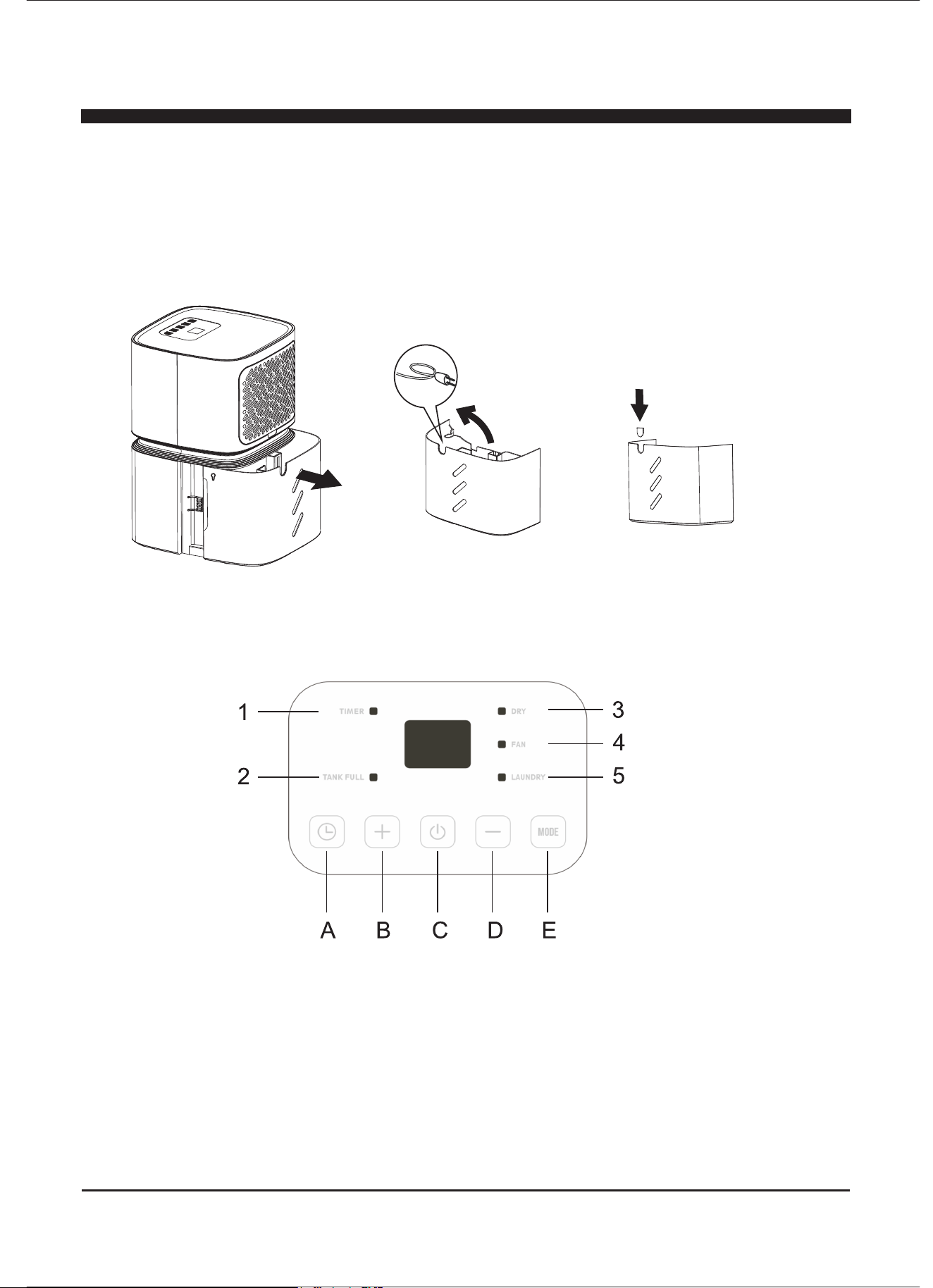
1. Take out the bucket, remove the power cord and accessories from it.
2. Install the drain cover/cap on the bucket.
Note: Be sure unit sits in proper position for 24 hours before use.
Control Panel
1. Timer symbol
2. Bucket full symbol
A. Timer button
B. Increase button
C. On / Off button
D. Decrease button
E. Mode button
3. Dry symbol
4. Fan symbol
5. Turbo symbol
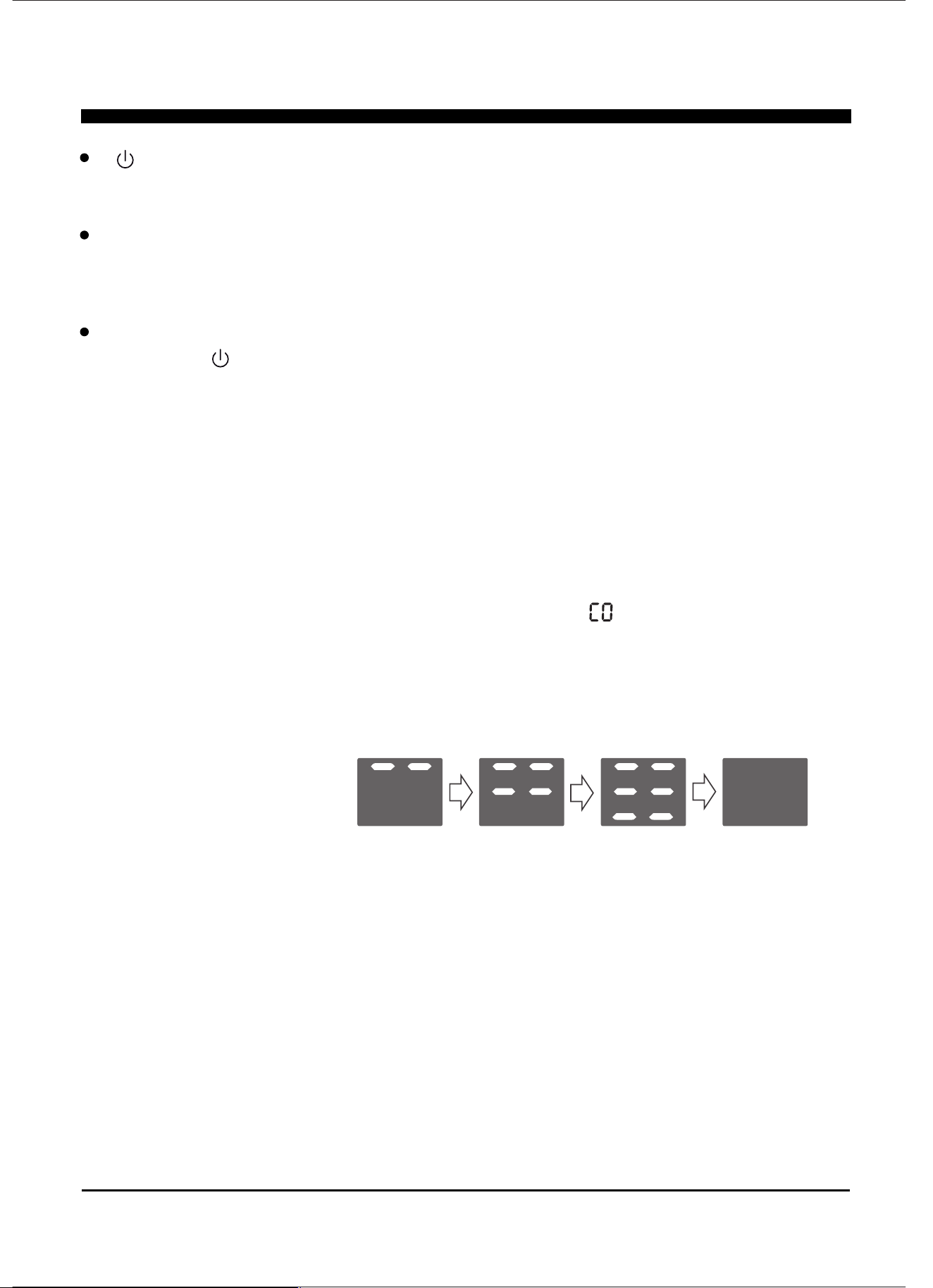
Press the button until the “ DRY ” and “ FAN ”symbols are both lit .“ MODE ”
In this mode the humidity can be set like dehumidifying mode, and when the
ambient humidity is lower than the setting, the fan will running continuous.
* Fan mode
When the appliance is running, press the “ MODE ” button until the “ FAN ”
symbol is lit, you can startup or shutdown the fan function.
The screen display below:
In this function, the compressor will not run, and the appliance is not dehumidifying.
6
INSTRUCTIONS
“ ” on / off button
On / off power supply used to control the startup or shutdown of the appliance.
Decrease / Increase button
Press “ + ” / “ - ” to select the indoor humidity level you expect to achieve, or set
the time when using "timer" setting.
Mode selection:
Press the “ ” button to turn on the appliance, and press the “ MODE ” button
to browse different modes.
Press the “ MODE ” button until the “ DRY ” symbol is illuminated.
Press the “ + ” or “ - ” to choose the humidity desired, adjustable range is 35%
RH-80%RH. The screen will display the setting humidity, and after 5 seconds, turn
the display to ambient humidity.
* Dehumidify mode
* Continuous mode
” indicator is
Under dehumidify mode, Press the “ - ” button until the “
illuminated, then the unit will continuously run.
* Turbo mode
Press the “MODE ” button until the “ TURBO ” symbol is lit.
In this mode humidity can not be adjusted, and screen will display ambient humidity.
After running 24 hours, the appliance will quit turbo mode, turn to dehumidifying mode
and set humidity 60%RH.
* Dehumidifying + FAN mode
7
INSTRUCTIONS
Timer button
This timer can be used to delay the appliance startup or shutdown, this avoids
wasting electricity by optimising operating periods.
Programming start up
Turn on the appliance, choose the mode you want, for example Dehumidify
mode. Turn off the appliance.
Press the “ ” button , the “ ” symbol starts to flash, press the “ + ” / “ - ” to
adjust the set time from 0.5-24 hours.
In 5 seconds without an operation, set the timer start function, it will display
“ ”.
Press the “ ” button again to cancel the Timer, and the “ ” symbol disappear.
Programming shut down
When the appliance is running, press the “ ” button. When the “ ” symbol starts
to flash, press the “ + ” / “ - ” to adjust the set time between 0.5-24 hours.
Within 5 seconds without operation, press the "timer" start function, it will display the
“ ” symbol.
Press the “ ” button again to cancel the Timer, and the “ ” symbol will disappear.
* Bucket full indicator
When bucket is full, the compressor and fan will shut off, “TANK FULL” symbol will
flash. In 3 minutes it will make a beeping noise, and after another 6 minutes make a
beeping noise again.
The appliance will not run until the bucket is emptied and properly placed back inside
the unit.
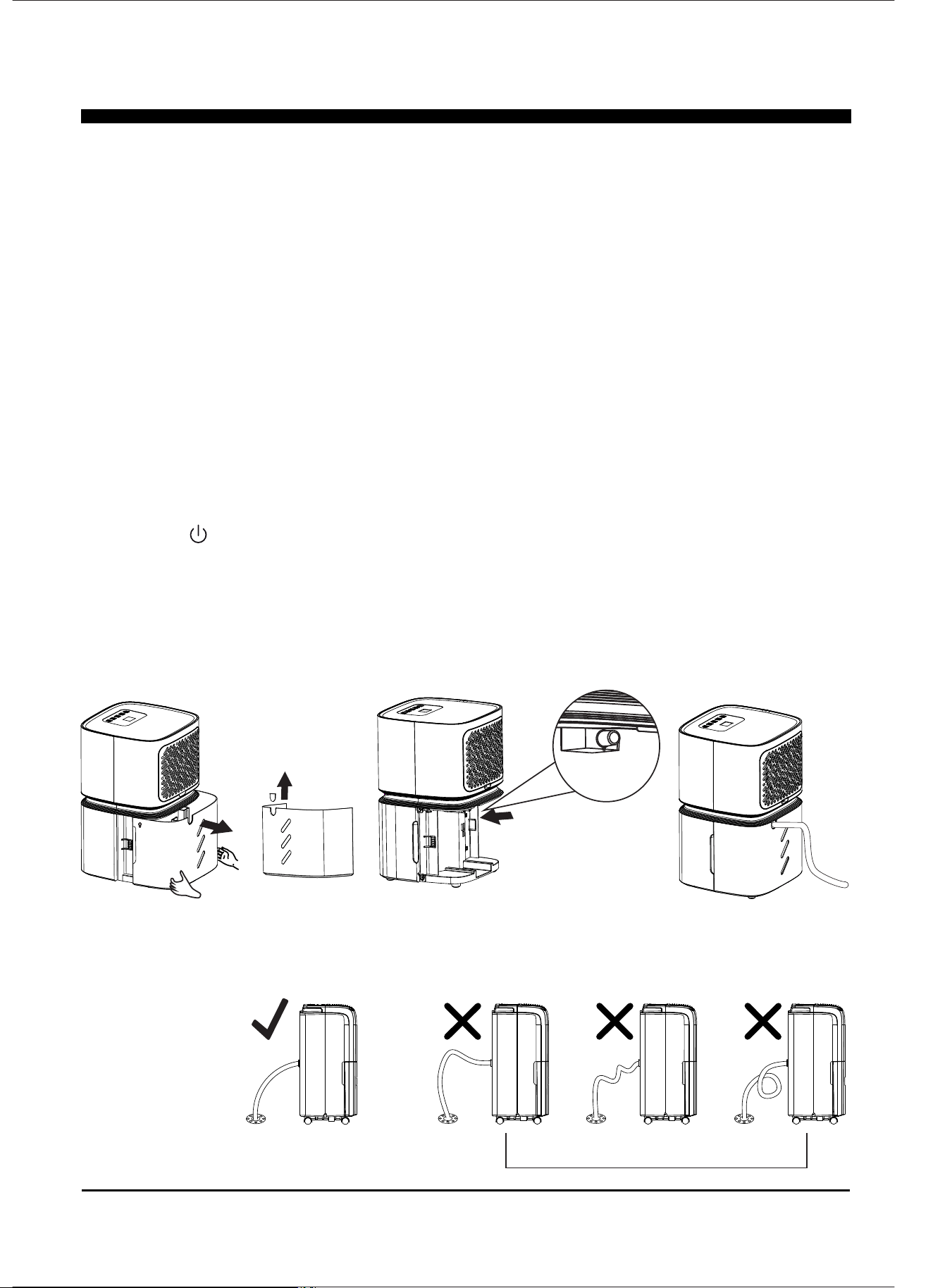
The bucket should be cleaned every week to prevent the growth of mold, mildew and
bacteria. Use mild detergent. Once cleaned, completely dry the bucket and place it
back inside unit.
8
Note: Hold the bucket with both hands when emptying, then put it back in appliance. Note:
When the bucket is full or removed from the unit, the compressor will shut off, the unit will
not be removing moisture from the air at this time.
Note: During operation, it is normal for the unit to exhaust warm air from the front
of the unit.
Caution: Do not place the bucket on the floor when it is full as it may spill.
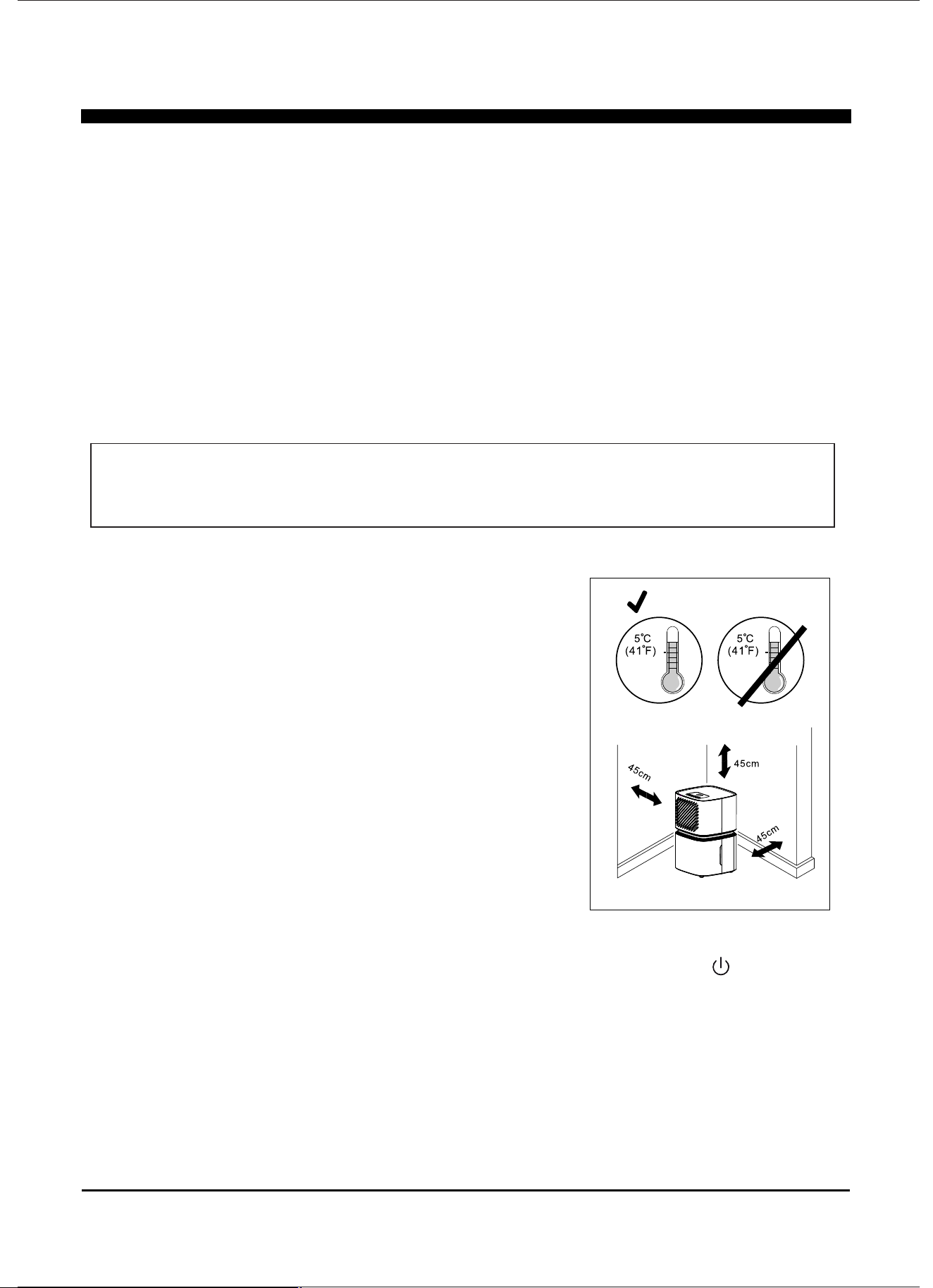
* Continuous drain
Connect the drain pipe on the hole of unit, then the unit can continuous run
without clean the bucket.
1) Put the unit on level floor, take out the bucket, remove the chip of bucket;
2) Install the pipe on drain nozzle which can be found inside of the unit ;
3) Place bucket correctly and assure the drain tube is not pinched or blocked.
4) Press “ ” button to operate the unit.
Note: If no need the function of continuous drain, please remove the drain pipe and
put back the bucket in unit correctly, then the water will flow into bucket.
* If the continuous mode will be used, it is best to use the drain tube, otherwise water
will flow into the bucket.
Note: Please install the drain pipe as shown in the below picture.
Please install the drain pipe correctly, or the water cannot drain from
the pipe.
Correct Incorrect
MAINTENANCE
9
FREQUENTLY ASKED QUESTIONS
Location requirements:
WrongRight
above Below
● Never wash the appliance with water.
● Never use petrol, alcohol or solvents to clean the appliance.
● Never spray insecticide liquids or similar.
The unit operating in a basement will have little no effect in drying out an adjacent
enclosed storage area, such as a closet, unless there is adequate circulation of air in
and out of the area.
1. Do not use outdoors.
2.This appliance is intended for indoor use only. Place the
appliance on a smooth, flat floor surface that is strong
enough to support the unit with a full bucket of water.
3. Allow at least 18 inches of air flow on all sides.
4. Place the appliance in an area where the temperature will not
drop below 41°F.
5. Use the dehumidifier in cooking, laundry, bathing and
dishwashing areas that have excessive moisture. NOTE:
Place the dehumidifier away from a clothes dryer.
6. Use the dehumidifier in a basement to help prevent moisture
damage.
7. The dehumidifier must be operated in an enclosed area to be
most effective.
8. Close all doors, windows and other outside openings to the
room.
CLEAN AND MAINTENANCE
Before cleaning or maintenance, turn the appliance off by pressing the button on
the control panel, wait a few minutes then unplug from the wall.
CLEANING THE CABINET
You should clean the appliance with a slightly damp cloth and dry with a clean, dry towel.
Notice: If the unit placed on an unlevel ground or the drain tube is not correctly installed,
the water will fill the bucket and stop the unit. If that happens, please check if the
ground is flat, and the drain tube is correctly installed. NOTE: Bucket should also be
placed correctly.
AUTOMATIC DEFROST
When frost builds up on the evaporator coils, the compressor will cycle off and the fan will
continue to run until the frost disappears. When the coils are completely defrosted, the compressor
or fan (depending on the model) will automatically restart and dehumidification will resume.
NOTE: The following may cause risk of electric shock, personal injury, and damage to the unit
10
FREQUENTLY ASKED QUESTIONS
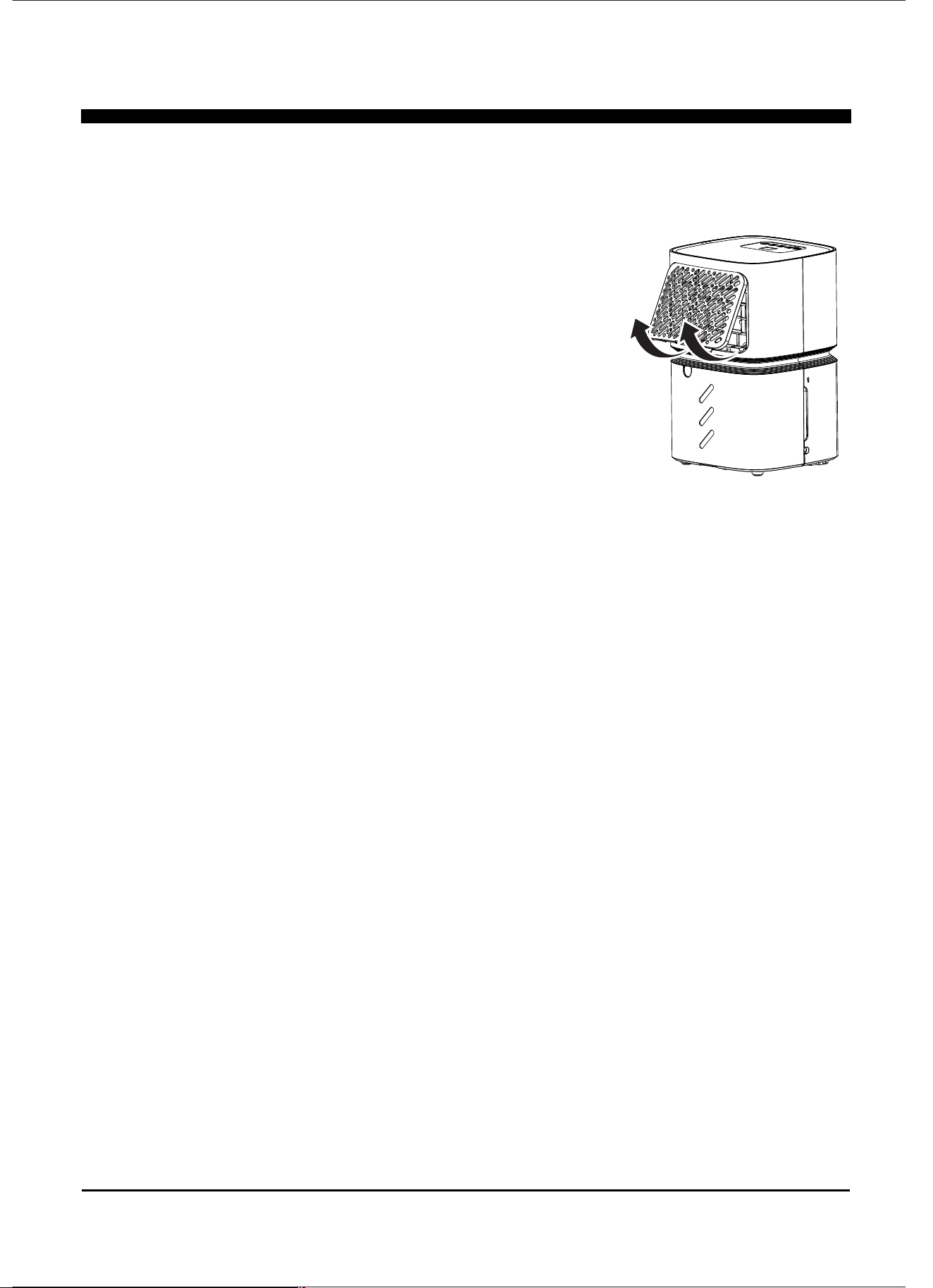
To keep your appliance working efficiently. You should clean the filter every week of
operation.
The filter can be taken out as shown in fig. A.
Use a vacuum cleaner to remove dust accumulations
on the filter. If it is very dirty, immerse filter in warm water
and rinse. The water should never be hotter than 104℉.
After washing, leave the filter to dry and attach the intake
grille to the appliance.
END OF SEASON OPERATIONS
To unplug from the mains socket, empty the bucket. Clean the filter and
dry thoroughly before putting back.
Cover the appliance to prevent from dust. Store the appliance upright in a dry
location.
START OF SEASON CHECKS
Make sure the power cable and plug are undamaged.
Follow the installation instructions precisely.
Assure filter is intact and clean.
Assure unit is free of debris.
11
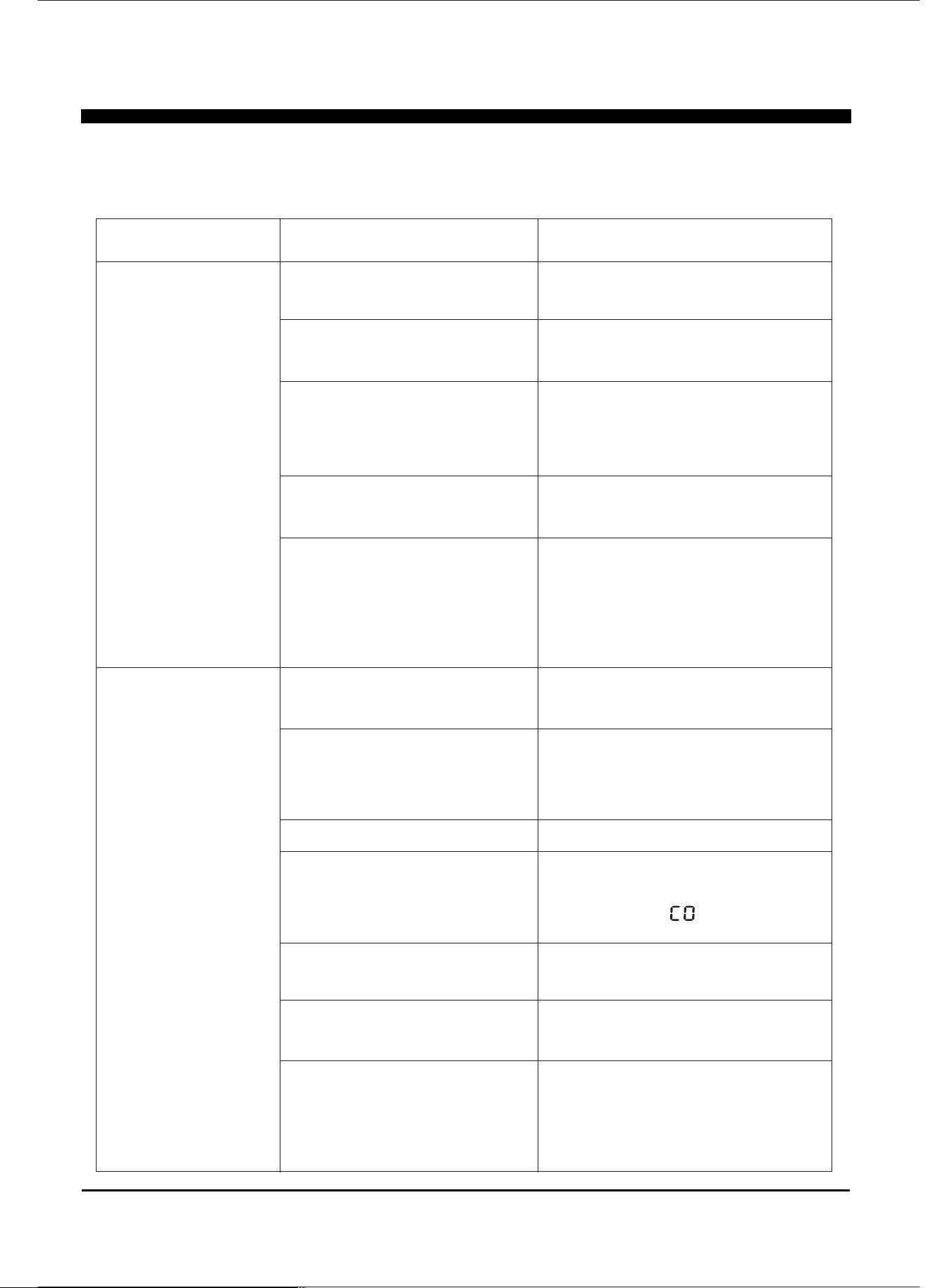
PROBLEM
Dehumidifier
Does Not
Start
Dehumidifier
does not dry
the air as it
should
POSSIBLE CAUSES SOLUTIONS
The dehumidifier is
unplugged.
The fuse is blown/circuit
breaker is tripped.
Dehumidifier has reached its
present level or the bucket
is full.
Bucket is not in the
proper position.
Power Failure.
Make sure the dehumidifier's
plug is pushed completely into
the outlet.
Check the house fuse/circuit
breaker box and replace fuse
or reset breaker.
The dehumidifier automatically
turns off when either condition
occurs. Change to a lower
setting or empty the water
bucket and replace properly.
The bucket must be in place and
securely seated for the
dehumidifier to operate.
There is a protective time delay
(up to 3 min.) to prevent trip-
ping of the compressor
overload.For this reason, the
unit may not start normal
dehumidification for 3 min.after
it is powered back on.
Not enough time allowed
for unit to remove moisture.
Airflow is restricted.
Dirty filter.
The Humidity Control may
not be set low enough.
Doors and windows may not
be closed tightly.
Clothes dryer may be
blowing moist air into the
room.
Room temperature is too low.
Occasionally, you may encounter some problems that are of a minor nature
and a service call may not be necessary. Use this troubleshooting guide to
identify possible problems you may be experiencing
TROUBLESHOOTING
When first installed, allow at
least 24 hours to maintain the
desired dryness.
Make sure there are no curtains,
blinds, or furniture blocking the
front or back of the dehumidifier.
See the CHOOSING A
LOCATION section.
See the CLEAN FILTER section.
For drier air, press the “ - ” button
to lower the percent humidity
desired in the room, or set the
dehumidifier to for maximum
dehumidification.
Check that all doors, windows,
and other openings are
securely closed.
Install the dehumidifier away
from the dryer.
The dryer should be vented outside.
Moisture removal is best at
higher room temperatures. Lower
room temperatures will reduce
the moisture removal rate. This
model is designed to operate at
temperatures above 41℉.
12
TECHNICAL PARAMETERS
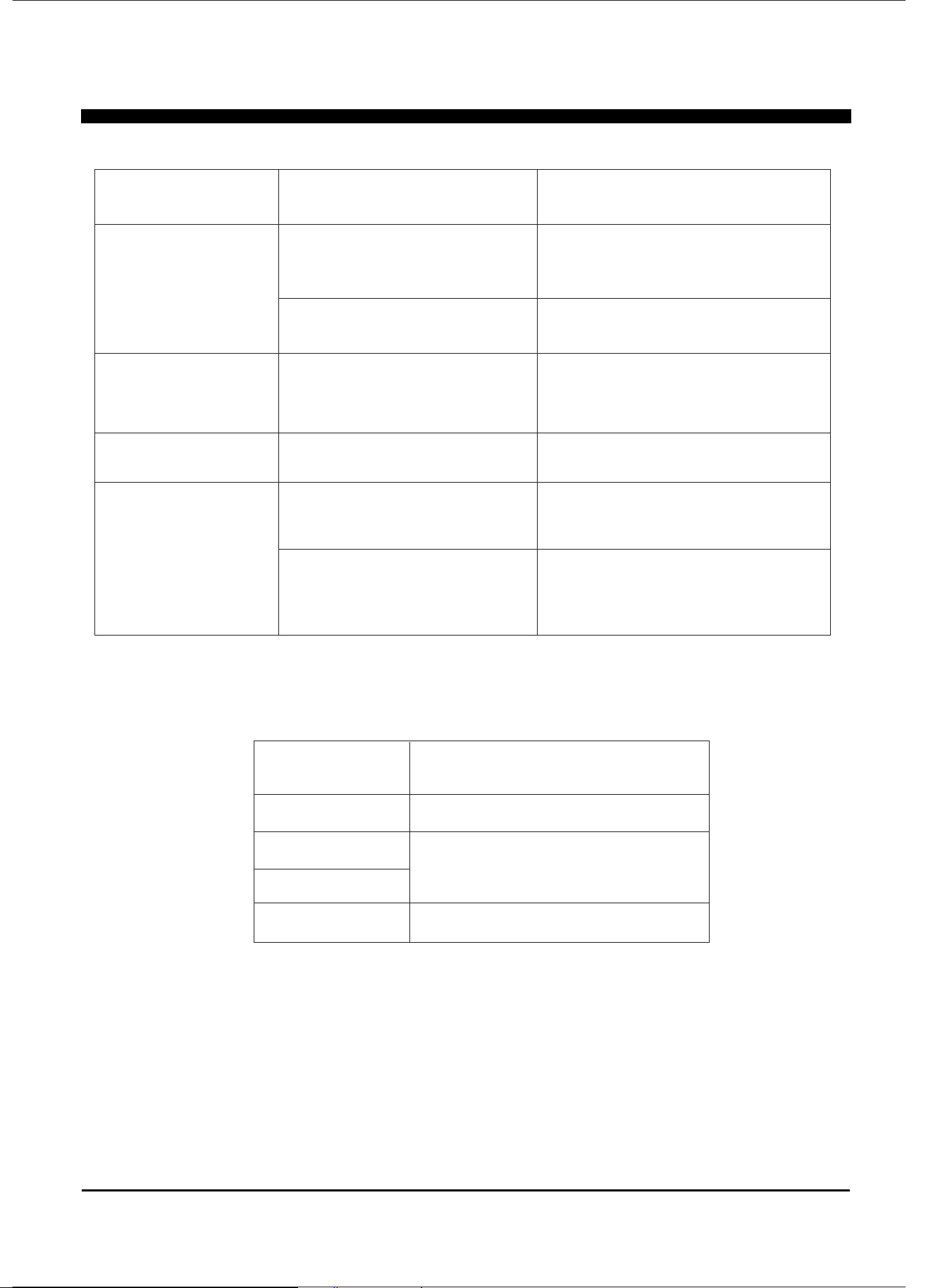
PROBLEM
Appliance runs too
long
Frost apears on
heat-exchanger
Fan noise
Water on the floor
The area is too large
Doors and windows are
open
Appliance run recently or
the room temperature is
too low
The air is passing through
the appliance
The capacity of the appliance
can not meet the area of the
room
Close the door and window
It is normal, frost usually
disappear in 60 min
This is normal
Check the drain connection if
the appliance is at level
If using the water tank, remove the
drain pipe and put back the drain
cover; or install the drain pipe
correctly
The drain connection may
be aging
The drain pipe is connected,
but the water is not draining
POSSIBLE CAUSES SOLUTION
EH
E1
E2
CODE DESCRIPTION
Humidity sensor failure
Temperature sensor failure
Operation temperature range: 41℉~90℉(5℃~32℃)
Operation humidity range: 30%RH~90%RH
If the following error code appears, contact the after-sales service department for
inspection and repair.
Lt
Room temperature is below 25°F(-5°C)

Perfect Aire, LLC
5401 Dansher Rd.
Countryside, IL 60525
Distributed by:
844-4PA-AIRE | 844-472-2473
www.perfectaire.us
DEHUMIDIFIER
FOR MODEL:
1PAD8
Before using your dehumidifier, please
read this manual carefully and keep it for
future reference, along with your receipt.
Specification and performance data is subject to change without notice.
Printed in China
PA/User_1PAD8/0321
USER MANUAL