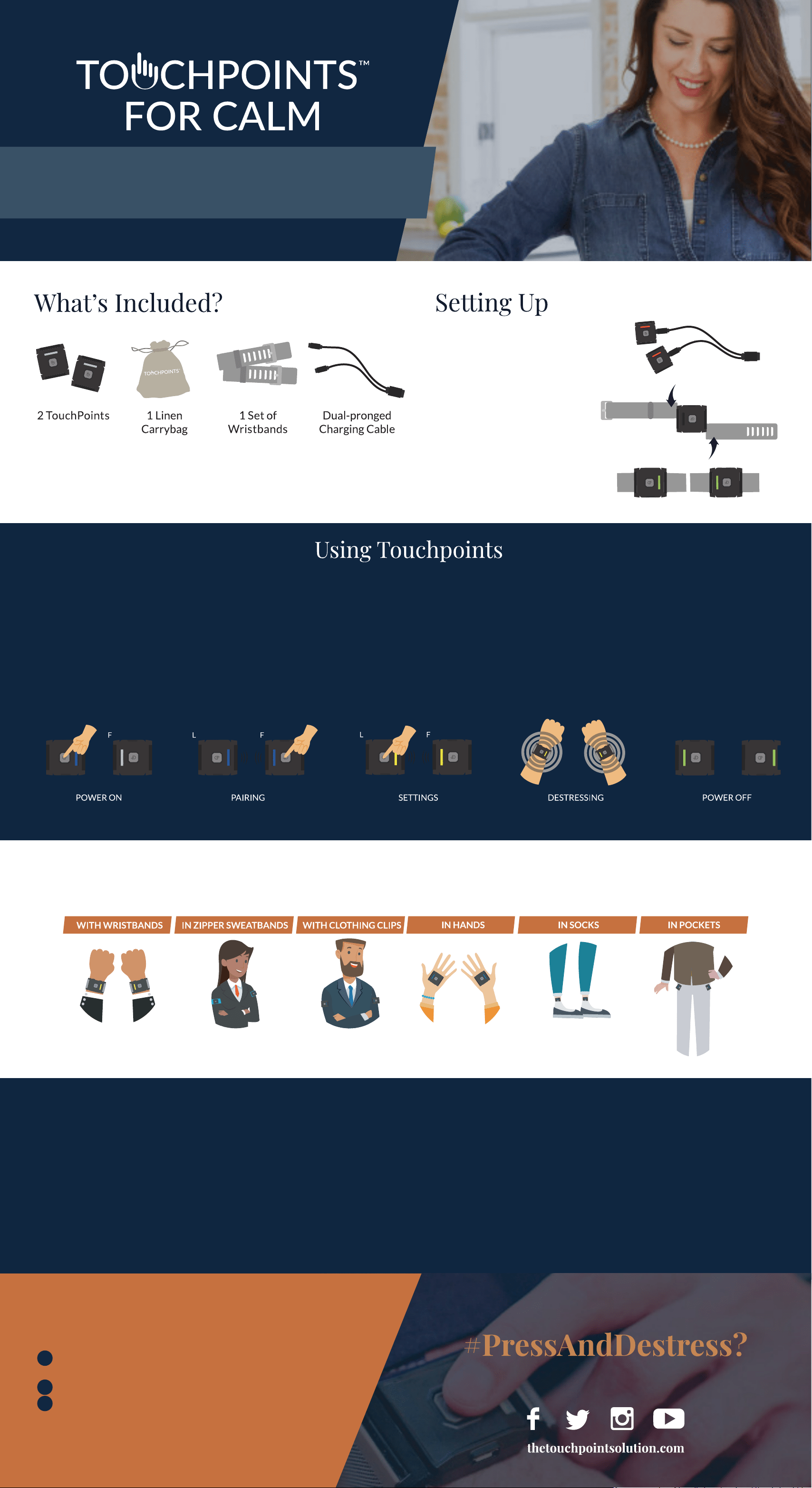
QuickStart Guide
2. Slide wristbands onto
Touchpoints
3. Your TouchPoints are
ready to use!
1. Charge TouchPoints unl red
light turns off (Approx. 2-3
hours)
1. Press the buon on
the lead device twice
to turn on and acvate
blue seng.
2. Face the lights of both
TouchPoints together and
press the buon on follower
device once. The light on the
follower will match the color
of the lead, and the devices
will vibrate in an alternang
paern.
3. If desired, change sengs by
pressing the buon on the
lead device again while both
TouchPoints’ lights are facing
each other.
Blue: Slow
Yellow: Medium
Purple: Fast
4. Place one TouchPoint on either
wrist and feel the calming
vibraons. (Note: The average
user wears TouchPoints for 20
minutes in the morning or
evening, or as needed through-
out the day.)
5. To turn off, hold the
TouchPoints away
from each other and
press the buon on
each unl you see the
green light.
Under unusual condions of high electrostac discharge, your TouchPoints may power off due to a built-in safety feature. In the event this occurs, simply re-start the devices.
L (x2)
Lead (L): First device powered on - used to select seng | Follower (F): Second device powered on - mimics the seng from the leader
Either device can be lead or follower based on which one is powered on first
TouchPoints are worn as a synchronized pair with one on the right side and one on the
le side of the body. Skin contact is not necessary as long as the vibraons are felt.
How to Wear TouchPoints
Visit our website to learn about the TouchPoints Challenge and our Encyclopedia of Uses
TouchPoint Challenge
The TouchPoint Challenge simulates a stressful event so that you can quickly
experience stress reducon and understand how TouchPoints are affecng your
body’s stress response.
1. Think of something stressful. How stressful/unpleasant does this feel
now on a scale of 0-10?
2. When you think of something stressful, where do you feel it in your
body (stomach, chest, etc.) and how intense is the feeling 0-10?
3. Acvate your TouchPoints on the blue seng and hold them in either
hand for about 30 seconds. Then, turn them off and rate how stressed
you feel and how intense your body sensaons are 0-10.
If both went down, great! The average is 7 down to 3 in 30 seconds. Don’t
worry if you do not feel a reducon, there’s a beer seng for you. Try the
challenge on the yellow or purple seng.
How do you like to
Share your story for a chance to be featured
Want additional coverage?
Visit our website to purchase TouchPoints Insurance to
cover breakage and water damage
In order for your 1 year limited manufacturer’s warranty
to be valid, please follow the simple steps below:
1. Download the TouchPoints app in the Google Play or Apple App Store and
create account.
2. Go to ‘Product Registraon’ in the app menu.
3. Enter the serial numbers found on the back of both of your TouchPoints
separated by a comma (Do not remove serial sckers)
IMPORTANT: WARRANTY REGISTRATION
