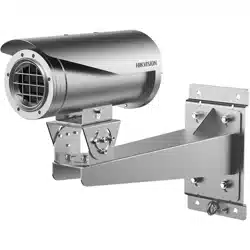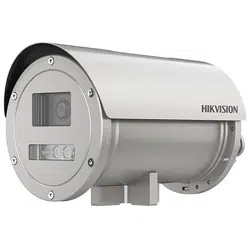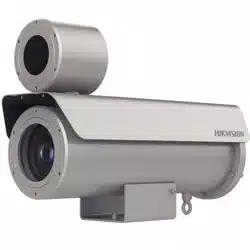

0
Explosion-Proof IR Zoom Bullet Camera
Quick Start Guide
Installation Video

Explosion-proof IR Zoom Bullet Camera·Quick Start Guide
i
Quick Start Guide
© 2021 Hangzhou Hikvision Digital Technology Co., Ltd. All rights
reserved.
This Manual is the property of Hangzhou Hikvision Digital Technology
Co., Ltd. or its affiliates (hereinafter referred to as “Hikvision”), and it
cannot be reproduced, changed, translated, or distributed, partially
or wholly, by any means, without the prior written permission of
Hikvision. Unless otherwise expressly stated herein, Hikvision does
not make any warranties, guarantees or representations, express or
implied, regarding to the Manual, any information contained herein.
About this Manual
The Manual includes instructions for using and managing the
Product. Pictures, charts, images and all other information
hereinafter are for description and explanation only. The information
contained in the Manual is subject to change, without notice, due to
firmware updates or other reasons. Please find the latest version of
this Manual at the Hikvision website (http://www.hikvision.com).
Please use this Manual with the guidance and assistance of
professionals trained in supporting the Product.
Trademarks Acknowledgement
and other Hikvision’s trademarks and logos are
the properties of Hikvision in various jurisdictions.
Other trademarks and logos mentioned are the properties of
their respective owners.
LEGAL DISCLAIMER
TO THE MAXIMUM EXTENT PERMITTED BY APPLICABLE LAW, THIS
MANUAL AND THE PRODUCT DESCRIBED, WITH ITS HARDWARE,

Explosion-proof IR Zoom Bullet Camera·Quick Start Guide
ii
SOFTWARE AND FIRMWARE, ARE PROVIDED “AS IS” AND “WITH ALL
FAULTS AND ERRORS”. HIKVISION MAKES NO WARRANTIES, EXPRESS
OR IMPLIED, INCLUDING WITHOUT LIMITATION, MERCHANTABILITY,
SATISFACTORY QUALITY, OR FITNESS FOR A PARTICULAR PURPOSE.
THE USE OF THE PRODUCT BY YOU IS AT YOUR OWN RISK. IN NO
EVENT WILL HIKVISION BE LIABLE TO YOU FOR ANY SPECIAL,
CONSEQUENTIAL, INCIDENTAL, OR INDIRECT DAMAGES, INCLUDING,
AMONG OTHERS, DAMAGES FOR LOSS OF BUSINESS PROFITS,
BUSINESS INTERRUPTION, OR LOSS OF DATA, CORRUPTION OF
SYSTEMS, OR LOSS OF DOCUMENTATION, WHETHER BASED ON
BREACH OF CONTRACT, TORT (INCLUDING NEGLIGENCE), PRODUCT
LIABILITY, OR OTHERWISE, IN CONNECTION WITH THE USE OF THE
PRODUCT, EVEN IF HIKVISION HAS BEEN ADVISED OF THE
POSSIBILITY OF SUCH DAMAGES OR LOSS.
YOU ACKNOWLEDGE THAT THE NATURE OF INTERNET PROVIDES FOR
INHERENT SECURITY RISKS, AND HIKVISION SHALL NOT TAKE ANY
RESPONSIBILITIES FOR ABNORMAL OPERATION, PRIVACY LEAKAGE
OR OTHER DAMAGES RESULTING FROM CYBER-ATTACK, HACKER
ATTACK, VIRUS INSPECTION, OR OTHER INTERNET SECURITY RISKS;
HOWEVER, HIKVISION WILL PROVIDE TIMELY TECHNICAL SUPPORT IF
REQUIRED.
YOU AGREE TO USE THIS PRODUCT IN COMPLIANCE WITH ALL
APPLICABLE LAWS, AND YOU ARE SOLELY RESPONSIBLE FOR
ENSURING THAT YOUR USE CONFORMS TO THE APPLICABLE LAW.
ESPECIALLY, YOU ARE RESPONSIBLE, FOR USING THIS PRODUCT IN A
MANNER THAT DOES NOT INFRINGE ON THE RIGHTS OF THIRD
PARTIES, INCLUDING WITHOUT LIMITATION, RIGHTS OF PUBLICITY,
INTELLECTUAL PROPERTY RIGHTS, OR DATA PROTECTION AND

Explosion-proof IR Zoom Bullet Camera·Quick Start Guide
iii
OTHER PRIVACY RIGHTS. YOU SHALL NOT USE THIS PRODUCT FOR
ANY PROHIBITED END-USES, INCLUDING THE DEVELOPMENT OR
PRODUCTION OF WEAPONS OF MASS DESTRUCTION, THE
DEVELOPMENT OR PRODUCTION OF CHEMICAL OR BIOLOGICAL
WEAPONS, ANY ACTIVITIES IN THE CONTEXT RELATED TO ANY
NUCLEAR EXPLOSIVE OR UNSAFE NUCLEAR FUEL-CYCLE, OR IN
SUPPORT OF HUMAN RIGHTS ABUSES.
IN THE EVENT OF ANY CONFLICTS BETWEEN THIS MANUAL AND THE
APPLICABLE LAW, THE LATER PREVAILS.
05070120211231

Explosion-proof IR Zoom Bullet Camera·Quick Start Guide
iv
Regulatory Information
FCC Information
Please take attention that changes or modification not expressly
approved by the party responsible for compliance could void the
user’s authority to operate the equipment.
FCC compliance: This equipment has been tested and found to
comply with the limits for a Class A digital device, pursuant to part
15 of the FCC Rules. These limits are designed to provide reasonable
protection against harmful interference when the equipment is
operated in a commercial environment. This equipment generates,
uses, and can radiate radio frequency energy and, if not installed
and used in accordance with the instruction manual, may cause
harmful interference to radio communications. Operation of this
equipment in a residential area is likely to cause harmful
interference in which case the user will be required to correct the
interference at his own expense.
FCC Conditions
This device complies with part 15 of the FCC Rules. Operation is
subject to the following two conditions:
1. This device may not cause harmful interference.
2. This device must accept any interference received, including
interference that may cause undesired operation.
EU Conformity Statement
This product and - if applicable - the supplied
accessories too are marked with "CE" and comply
therefore with the applicable harmonized
European standards listed under the EMC Directive 2014/30/EU, the

Explosion-proof IR Zoom Bullet Camera·Quick Start Guide
v
LVD Directive 2014/35/EU, the RoHS Directive 2011/65/EU, the ATEX
Directive 2014/34/EU.
2012/19/EU (WEEE directive): Products marked
with this symbol cannot be disposed of as unsorted
municipal waste in the European Union. For proper
recycling, return this product to your local supplier
upon the purchase of equivalent new equipment, or dispose of it at
designated collection points. For more information see:
www.recyclethis.info
2006/66/EC (battery directive): This product
contains a battery that cannot be disposed of as
unsorted municipal waste in the European Union.
See the product documentation for specific battery
information. The battery is marked with this symbol,
which may include lettering to indicate cadmium (Cd), lead (Pb), or
mercury (Hg). For proper recycling, return the battery to your
supplier or to a designated collection point. For more information
see:www.recyclethis.info
Industry Canada ICES-003 Compliance
This device meets the CAN ICES-3 (A)/NMB-3(A) standards
requirements.
Intended Use of the Camera
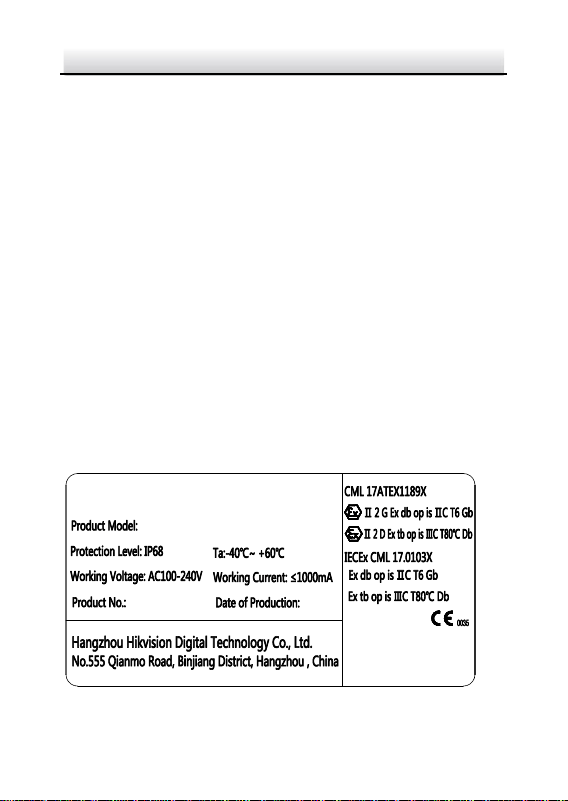
ATEX: II 2 G Ex db op is IIC T6 Gb/ II 2 D EX tb op is IIIC
T80 °C Db
IECEx: Ex db op is IIC T6 Gb/Ex tb op is IIIC T80°C Db
Hazardous Area Classification: Zone 1, Zone 2, Zone 21, Zone 22.
Explosion-proof IR Zoom Bullet Camera·Quick Start Guide
vi
IP Degree: IP68 (1m, 1h)
Ex Standards:
IEC 60079-0: 2011
EN 60079-0: 2012
IEC 60079-1: 2014
EN 60079-1: 2014
IEC 60079-31: 2013
EN 60079-31: 2014
IEC 60079-28: 2015
Special Conditions for Safe Use (Conditions of Certification)
The following conditions relate to safe installation and/or use of the
equipment.
i. The flameproof joints of the Explosion-Proof Bullet Camera are
not intended to be repaired.
ii. Replacement fasteners securing flameproof joints must have a
yield strength ≥ A2-70 or A4-70.
Explosion-Proof IR Zoom Bullet Camera Nameplate
Explosion-Proof Bullet Camera
WARNING:
DO NOT OPEN WHEN EXPLOSIVE
ATMOSPHERE IS PRESENT
Explosion-proof IR Zoom Bullet Camera·Quick Start Guide
vii
Safety Instruction
These instructions are intended to ensure that user can use the
product correctly to avoid danger or property loss.
The precaution measure is divided into “Warnings” and “Cautions”
Warnings: Serious injury or death may occur if any of the warnings
are neglected.
Cautions: Injury or equipment damage may occur if any of the
cautions are neglected.
Warnings
Laws and Regulations
The device should be used in compliance with local laws, electrical
safety regulations, and fire prevention regulations.
Electrical Safety
CAUTION: To reduce the risk of fire, replace only with the same type
and rating of fuse.
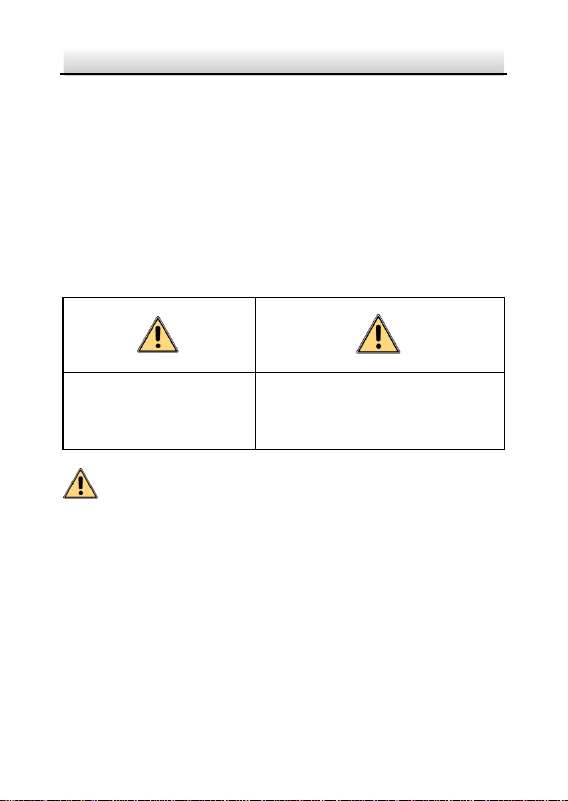
Warnings Follow these
safeguards to prevent
serious injury or death.
Cautions Follow these precautions
to prevent potential injury or
material damage.

Explosion-proof IR Zoom Bullet Camera·Quick Start Guide
viii
The equipment must be connected to an earthed mains
socket-outlet.
A readily accessible disconnect device with the appropriate rating
shall be incorporated external to the equipment.
An overcurrent protective device with the appropriate rating shall be
incorporated external to the equipment not exceeding the
specification of the building.
An all-pole mains switch shall be incorporated in the electrical
installation of the building.
Grounding: The both internal and external earthing shall be
connected reliably.
Battery
This equipment is not suitable for use in locations where children are
likely to be present.
CAUTION: Risk of explosion if the battery is replaced by an incorrect
type.
Improper replacement of the battery with an incorrect type may
defeat a safeguard (for example, in the case of some lithium battery
types).
Do not dispose of the battery into fire or a hot oven, or mechanically
crush or cut the battery, which may result in an explosion.
Do not leave the battery in an extremely high temperature
surrounding environment, which may result in an explosion or the
leakage of flammable liquid or gas.
Do not subject the battery to extremely low air pressure, which may
result in an explosion or the leakage of flammable liquid or gas.

Explosion-proof IR Zoom Bullet Camera·Quick Start Guide
ix
Dispose of used batteries according to the instructions.
L’utilisation ou le remplacement inadéquats de la pile peuvent
entraîner un risque d’explosion. Remplacez-la par le même type ou
l’équivalent du même type seulement. Jetez les piles usagées
conformément aux directives fournies par le fabricant de la pile.
Maintenance
To avoid fire danger caused by electrostatic charge, never touch or
wipe the device in explosive environment. Perform the wiping and
replacing accessories only under non-explosive environment with
the glove.
To prevent accumulation of electrostatic charge, use a soft and damp
cloth when clean inside and outside surfaces of the bubble. DO NOT
use alkaline detergents.
Installation
Never place the equipment in an unstable location. The equipment
may fall, causing serious personal injury or death.
Cautions
Electrical Safety
Ensure correct wiring of the terminals for connection to an AC mains
supply.
The equipment has been designed, when required, modified for
connection to an IT power distribution system.
Fire Prevention

Explosion-proof IR Zoom Bullet Camera·Quick Start Guide
x
No naked flame sources, such as lighted candles, should be placed
on the equipment.
The serial port of the equipment is used for debugging only.
Installation
Install the equipment according to the instructions in this manual.
To prevent injury, this equipment must be securely attached to the
wall in accordance with the installation instructions.
Be sure that there is enough space to install the device and
accessories.
Make sure that the wall is strong enough to withstand at least 8
times the weight of the device and the mount.
Make sure that the power has been disconnected before you wire,
install, or disassemble the device.
Installation could be only conducted by qualified personnel
according to relevant national regulations.
Transportation
Do not drop the product or subject it to physical shock.
Keep all wrappers after unpack them for future use. In case of any
failure occurred, you need to return the device to the factory with
the original wrapper. Transportation without the original wrapper
may result in damage on the device and lead to additional costs.
Power Supply
The power source should meet limited power source or PS2
requirements according to IEC 60950-1 or IEC 62368-1 standard.
Refer to the device label for the standard power supply. Please make
sure your power supply matches with your device.

Explosion-proof IR Zoom Bullet Camera·Quick Start Guide
xi
Use a power adapter provided by qualified manufacturers. It is
recommended to provide an independent power adapter for each
device as adapter overload may cause over-heating or a fire hazard.
System Security
Please understand that you have the responsibility to configure all
the passwords and other security settings about the device, and
keep your user name and password.
Maintenance
If the product does not work properly, please contact your dealer or
the nearest service center. We shall not assume any responsibility for
problems caused by unauthorized repair or maintenance.
A few device components (e.g., electrolytic capacitor) require regular
replacement. The average lifespan varies, so periodic checking is
recommended. Contact your dealer for details.
To ensure explosion-proof performance, do not damage
explosion-proof surface.
Ambient temperature: -40°C to 60°C
DO NOT OPEN WHEN ENERGIZED.
POTENTIAL ELECTROSTATIC CHARGING HAZARD – SEE
INSTRUCTIONS.
When assembly and operation, the operator must follow the
requirements of the IEC 60079-14: latest version Explosive
atmospheres- Part 14: Electrical installations design, selection and
erection, beside of the manufacturer’s operating instructions or its
National equivalent.

Explosion-proof IR Zoom Bullet Camera·Quick Start Guide
xii
Repair and overhaul shall comply with IEC 60079-19: latest version
or its National equivalent.
Cleaning
Please use a soft and dry cloth to clean the inner and outer surfaces.
Do not use alkaline detergents.
Keep the surface clean and prevent dust accumulation. DO NOT
clean the surface by compressed air duster.
Do not touch sensor modules with fingers. If cleaning is necessary,
use clean cloth with a bit of ethanol and wipe it gently. If the camera
will not be used for an extended period, please replace the lens cap
to protect the sensor from dirt.
Using Environment
When any laser equipment is in use, make sure that the device lens
is not exposed to the laser beam, or it may burn out.
DO NOT aim the lens at the sun or extra bright places. A blooming or
smear may occur otherwise (which is not a malfunction however),
and affecting the endurance of sensor at the same time.
To avoid heat accumulation, good ventilation is required for a proper
operating environment.
DO NOT expose the device to extremely hot, cold, dusty, corrosive,
saline-alkali, or damp environments. For temperature and humidity
requirements, see device specification.
DO NOT expose the device to high electromagnetic radiation.
Emergency
If smoke, odor, or noise arises from the device, immediately turn off
the power, unplug the power cable, and contact the service center.

Explosion-proof IR Zoom Bullet Camera·Quick Start Guide
xiii
Time Synchronization
Set up device time manually for the first time access if the local time
is not synchronized with that of the network. Visit the device via web
browser/client software and go to time settings interface.

Explosion-proof IR Zoom Bullet Camera·Quick Start Guide
xiv
Table of Contents
1 Overview......................................................................................... 1
1.1 Introduction .................................................................... 1
1.1.1 Power Supply........................................................ 1
1.1.2 Explosion-proof Parameters ................................. 1
1.1.3 Mechanical Specification ...................................... 1
1.1.4 Working Environment ........................................... 1
1.2 Model Description........................................................... 2
1.3 Appearance Description .................................................. 3
1.3.1 Type I Overview .................................................... 3
1.3.2 Type II Overview ................................................... 4
1.3.3 Type III Overview .................................................. 5
1.3.4 Type IV Overview .................................................. 6
1.4 Cable Description ............................................................ 7
2 Installation ...................................................................................... 8
2.1 Run the Device in Safe Area .......................................... 10
2.2 Wall Mounting with Bracket Type I ................................ 11
2.3 Wall Mounting with Bracket Type II ............................... 15
2.4 Protective Measures for Outdoor Installation ............... 18
3 Setting the Network Camera over the LAN .................................. 19
3.1 Wiring ........................................................................... 19
3.2 Activating the Camera ................................................... 20
3.2.1 Activation via Web Browser ................................ 20
3.2.2 Activation via SADP Software ............................. 22
3.3 Modifying the IP Address .............................................. 23
4 Accessing via Web Browser .......................................................... 26

Explosion-proof IR Zoom Bullet Camera·Quick Start Guide
1
1 Overview
1.1 Introduction
Explosion-Proof IR Zoom Bullet Camera is capable of video/audio
collecting, smart encoding and network transmitting. It adopts an
embedded system and a high-performed hardware process platform
to achieve good stability and reliability. You can visit and configure
your camera via web browser and client software.
Explosion-proof network camera adopts a stainless steel enclosure,
receiving an IP68 rating for ingress protection.
1.1.1 Power Supply
For detailed information about the power supply, refer to
Explosion-proof IR Zoom Bullet Camera Nameplate.
1.1.2 Explosion-proof Parameters
For detailed information about explosion-proof parameters, refer to
Explosion-proof IR Zoom Bullet Camera Nameplate.
1.1.3 Mechanical Specification
Material: 304/316L Stainless Steel.
1.1.4 Working Environment
Altitude (Above sea level): Within 2000 m.
Humidity: Within 95%.

Explosion-proof IR Zoom Bullet Camera·Quick Start Guide
2
Temperature: Refer to Explosion-proof IR Zoom Bullet Camera
Nameplate.
Note:
To ensure safety of the users and explosion-proof performance of
the camera, your installation environment must meet the installation
requirements of the camera you purchased.
1.2 Model Description
The product can be named by rules as shown in Figure 1-1.
Supplement Light:
I: Infrared
DS-2
x x x x x x
x
Hikvision Front-end Product
Product Type:
D: Network
A: Analog
4: Project Product
Max. Resolution (MP)
Zoom Ration
-
x x x
Product Shape:
B: Bullet camera
Power
A: 24 VAC
C: 100 VAC to 240 VAC
D: 12 VDC/30 VDC
Wiper
Explosion-proof Product
Figure 1-1 Model Explanation
Explosion-proof IR Zoom Bullet Camera·Quick Start Guide
3
1.3 Appearance Description
This camera series has four appearance types:
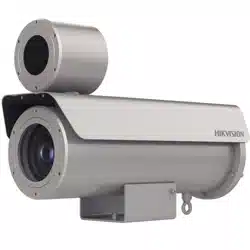
Type I: camera
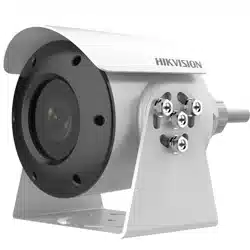
Type II: camera with wiper
Type III: camera with IR and wiper
Type IV: camera with IR
1.3.1 Type I Overview
4
5
1
2
3
Figure 1-2 Overview of Type I Camera
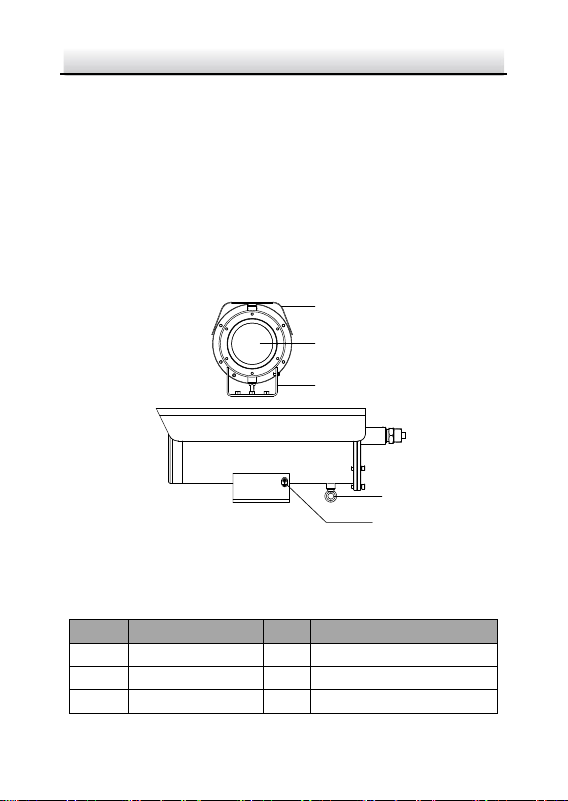
Table 1-1 Description of Type I Camera
No.
Description
No.
Description
1
Sun shield
4
Ring for safety rope
2
Transparent glass
5
Grounding screw
3
Mounting base
Explosion-proof IR Zoom Bullet Camera·Quick Start Guide
4
Note:
Grounding should be applied properly via the grounding screw to
avoid static electricity accumulation on the device case.
1.3.2 Type II Overview
1
2
3
4
5
6
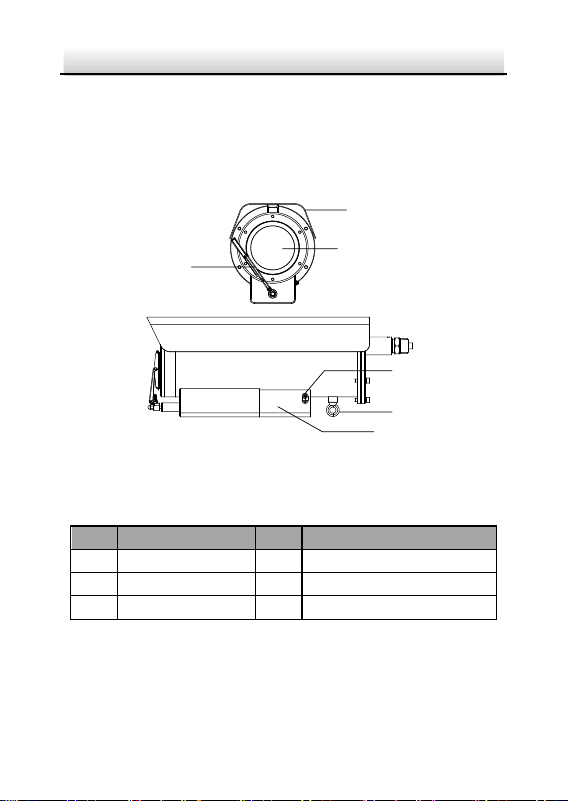
Figure 1-3 Overview of Type II Camera
Table 1-2 Description of Type II Camera
No.
Description
No.
Description
1
Sun shield
4
Grounding screw
2
Transparent glass
5
Ring for safety rope
3
Wiper
6
Mounting base
Note:
Grounding should be applied properly via the grounding screw to
avoid static electricity accumulation on the device case.
Explosion-proof IR Zoom Bullet Camera·Quick Start Guide
5
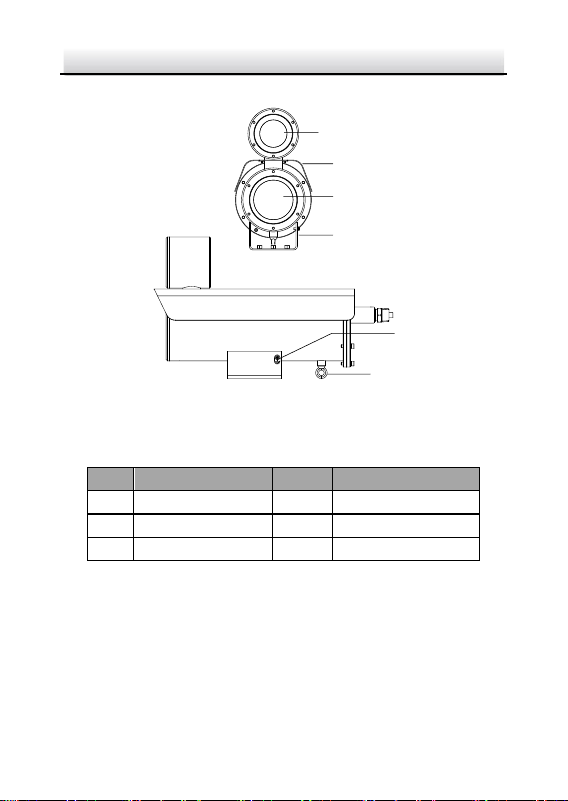
1.3.3 Type III Overview
1
2
3
4
6
5
7
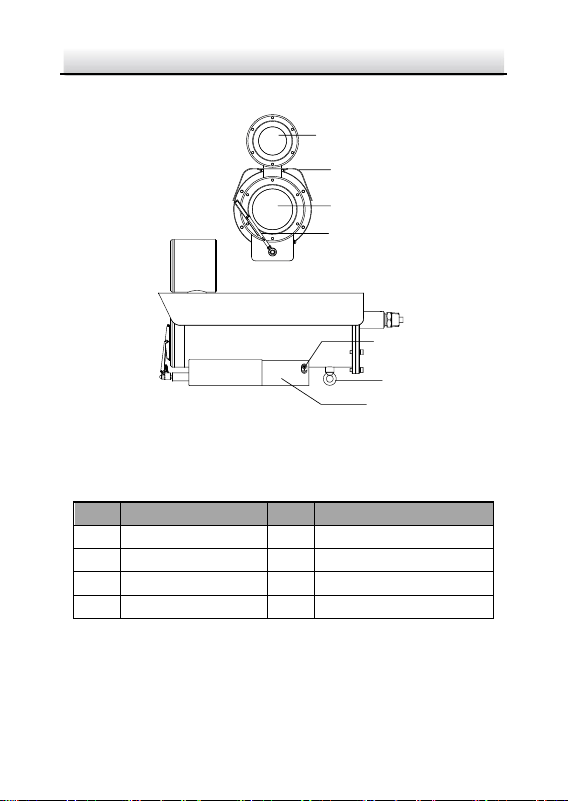
Figure 1-4 Overview of Type III Camera
Table 1-3 Description of Type III Camera
No.
Description
No.
Description
1
IR
5
Grounding screw
2
Sun shield
6
Ring for safety rope
3
Transparent glass
7
Mounting base
4
Wiper
Note:
Grounding should be applied properly via the grounding screw to
avoid static electricity accumulation on the device case.
Explosion-proof IR Zoom Bullet Camera·Quick Start Guide
6
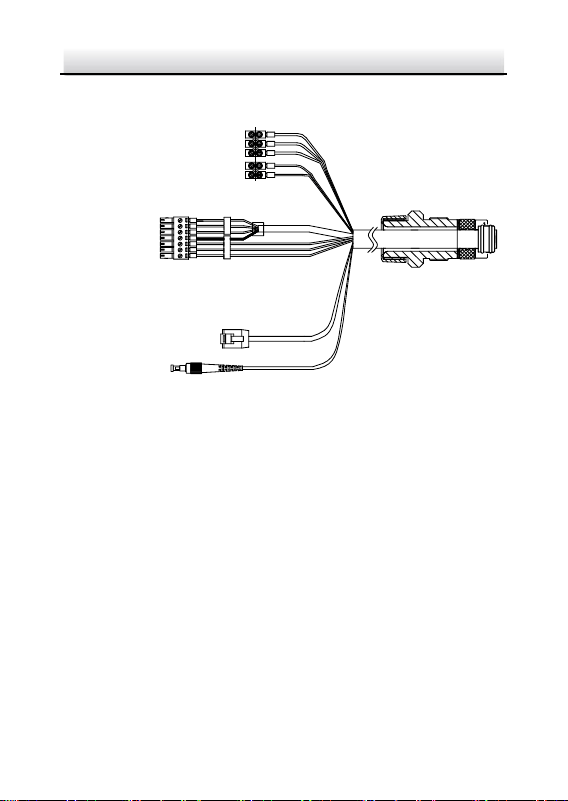
1.3.4 Type IV Overview
5
6
1
2
3
4
Figure 1-5 Overview of Type IV Camera
Table 1-4 Description of Type IV Camera
No.
Description
No.
Description
1
Sun shield
4
IR
2
Transparent glass
5
Ring for safety rope
3
Mounting base
6
Grounding screw
Note:
Grounding should be applied properly via the grounding screw to
avoid static electricity accumulation on the device case.
Explosion-proof IR Zoom Bullet Camera·Quick Start Guide
7
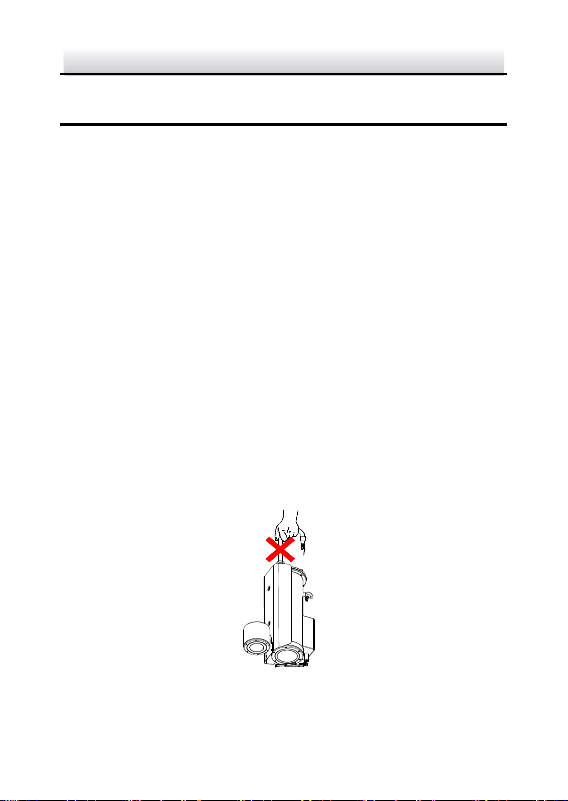
1.4 Cable Description
7
1
Power Cord
RS-485 Cable
Audio Cable
Alarm Cable
Network Cable
Optical Fiber
Figure 1-6 Cable Description
Notes:
Cables vary depending on different camera models.
The three cables of the power cord should be connected to
corresponding wires. The red cable should be connected to live
wire. The black cable should be connected to neutral wire. The
yellow/green cable must be connected to the ground.
To avoid transmitting interference, route power cables
separately.
DO NOT overly bend the optical fiber cable. Protect the cable
connectors from water and dust to avoid luminous decay,
transmission speed slowdown, and network error.
Explosion-proof IR Zoom Bullet Camera·Quick Start Guide
8
2 Installation
Before you start:
Make sure the device in the package is in good condition and all
the assembly parts are included.
Make sure your power supply matches with your camera. Refer
to specification for standard power supply of different camera
models.
Make sure all the related equipment is power-off during the
installation.
Check the specification of the products for the installation
environment.
Make sure that the wall is strong enough to withstand eight
times the weight of the camera and the bracket.
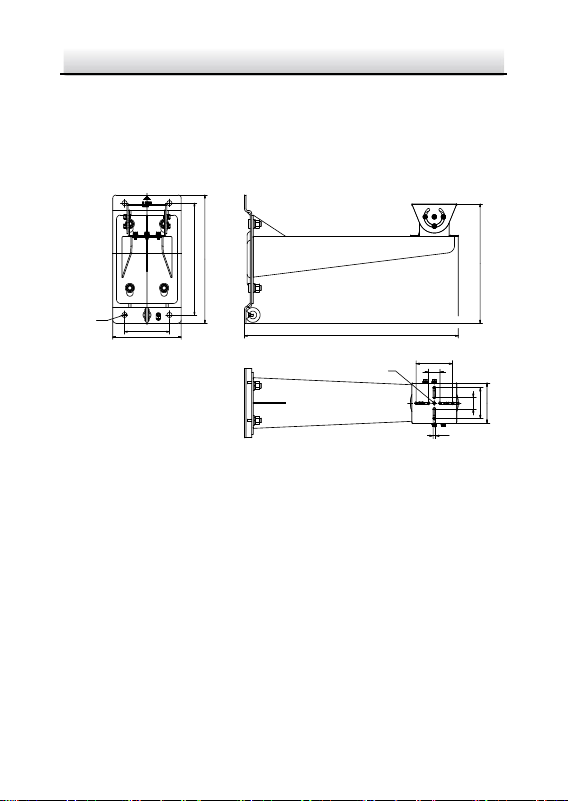
Note:
Do not drag the camera with its waterproof cables as the figure
below. Otherwise the waterproof performance is affected.
Figure 2-1 Do Not Drag the Cables
Explosion-proof IR Zoom Bullet Camera·Quick Start Guide
9
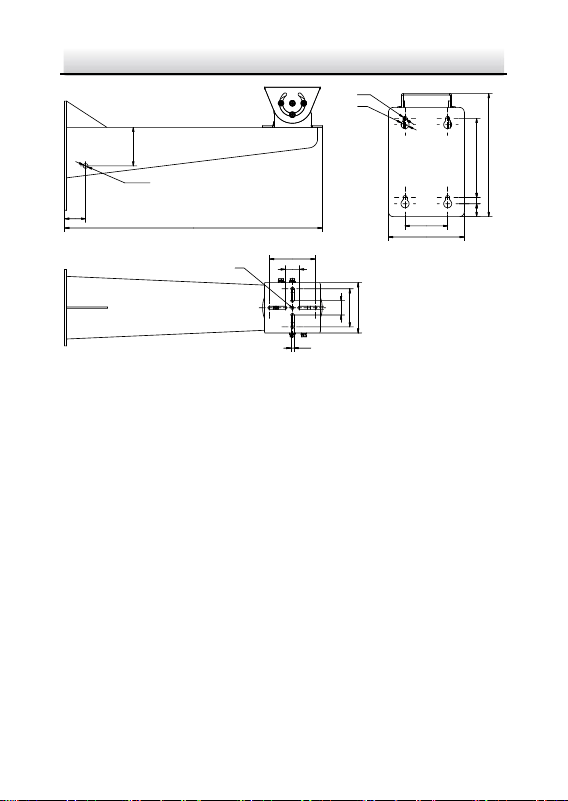
Note
There is no wall mounting bracket included in the package. You
have to prepare a wall mounting bracket if you choose this
mounting type. The shown bracket below is only for demonstration.
105.5
30
96
6.5
30
80
4-Ø 13
180
*290±0.1
332
*118± 0.1
309
562.5
Ø 13
Figure 2-2 Dimension of a Wall Mounting Bracket Type I (mm)
Explosion-proof IR Zoom Bullet Camera·Quick Start Guide
10
44
Ø 10
80.9
543.5
Ø 13
105.5
30
96
6.5
30
80
160
*166±0.1
13
27
*90±0.1
Ø 8.5
Ø 17
258
Figure 2-3 Dimension of a Wall Mounting Bracket Type II (mm)
2.1 Run the Device in Safe Area
It is recommended to trial run the device in the safe area before
installation.
Steps:
1. Make sure the power cable and network cable are connected
properly. Then power on the device to trial run the device.
2. Check if the image can be displayed normally. If not, contact the
technical support.
3. Start the installation after making sure the device works properly.
Note:
If the device cannot be powered up, check the cable connection
carefully.

Explosion-proof IR Zoom Bullet Camera·Quick Start Guide
11
2.2 Wall Mounting with Bracket Type I
Note:
The camera series shares similar installation steps. We take type III
camera as example.
Steps:
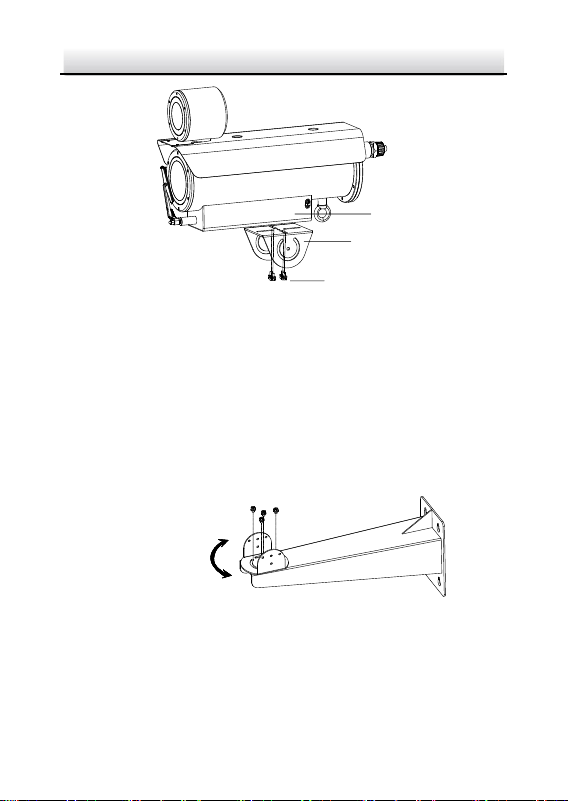
1. Disassemble the PT joint.
2. Install the pedestal of the PT joint to the mounting base of the
camera with four M6 × 16 screws.
Pedestal
Figure 2-4 PT Joint
Explosion-proof IR Zoom Bullet Camera·Quick Start Guide
12
Pedestal
Screws
Mounting
Base
Figure 2-5 Install the Pedestal to Camera
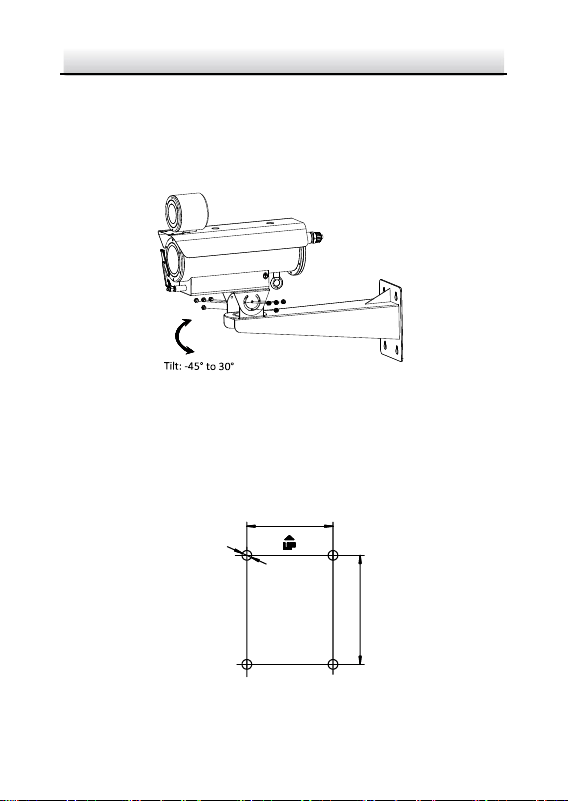
3. Install the PT joint to the wall mounting bracket with four supplied
screws.
Note:
Adjust the panning position of the PT joint to desired angle when
installing.
Pan
:
-
45
° to 45
°
Figure 2-6 Screw the PT Joint to Wall Mounting Bracket
4. Align the screw holes on pedestal with those on PT joint. Fix the
camera to the bracket.
Explosion-proof IR Zoom Bullet Camera·Quick Start Guide
13
Note:
Adjust the tilting position of the camera to desired angle when
installing. Use at least three screws on each side of the PT joint to
secure the camera.
Figure 2-7 Fix the Camera
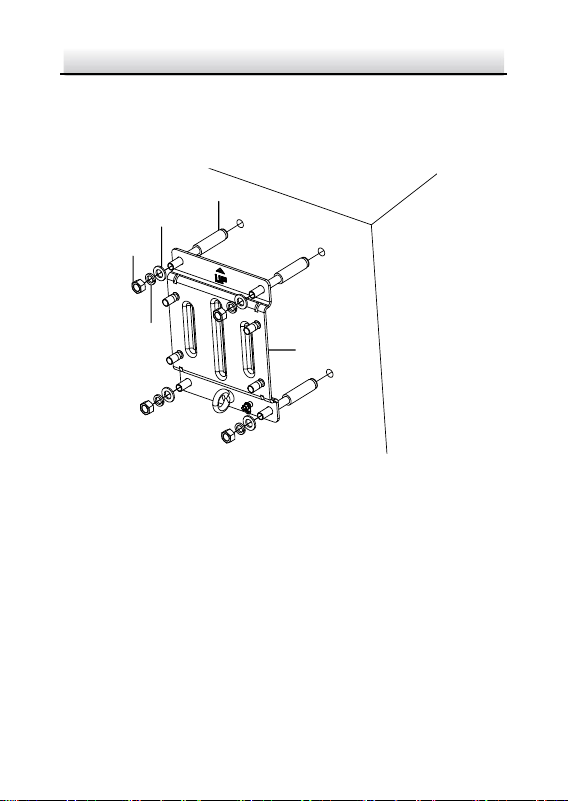
5. Install the mounting base of the wall mounting bracket.
1). Mark the screw holes on desired mounting place on wall
according to the dimension of the mounting base.
118
4- Ø16
290
Figure 2-8 Mounting Base Dimension of the Bracket Type I (mm)
Explosion-proof IR Zoom Bullet Camera·Quick Start Guide
14
2). Drill four screw holes for expansion bolts with a Φ16 mm drill.
3). Insert the expansion bolts (M12 × 120) and fix the mounting
base at the direction indicated by the "UP" mark.
Expansion Bolt
Mounting
Base
Nut
Flat
Washer
Spring
Washer
Figure 2-9 Install the Mounting Base of the Bracket
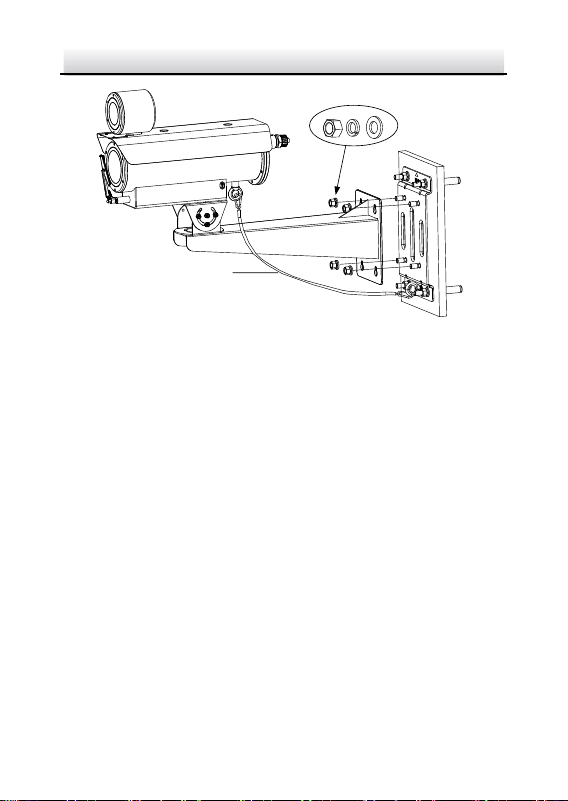
6. Fix the wall mounting bracket, together with the camera, to the
mounting base of the bracket.
1). Use safety rope to hook the camera and the mounting base of
the bracket.
2). Hang the bracket to the bolts on the mounting base. Secure
the bracket with nuts, spring washers and flat washers.
Explosion-proof IR Zoom Bullet Camera·Quick Start Guide
15
Safety Rope
Figure 2-10 Fix the Wall Mounting Bracket to Mounting Base
2.3 Wall Mounting with Bracket Type II
Note:
The camera series shares similar mounting steps. We take type I
camera as example.
Steps:
1. Disassemble the PT joint.
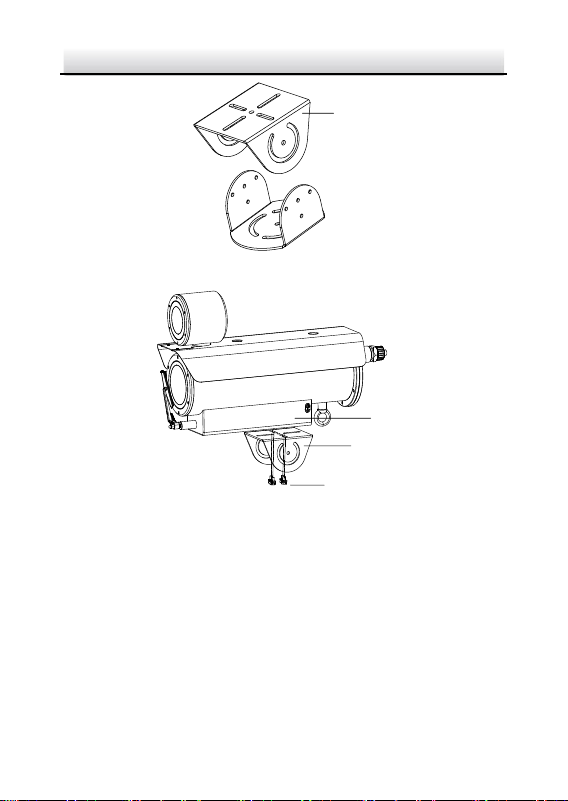
2. Install the pedestal of the PT joint to the mounting base of the
camera with four M6 × 16 screws.
Explosion-proof IR Zoom Bullet Camera·Quick Start Guide
16
Pedestal
Figure 2-11 PT Joint
Pedestal
Screws
Mounting
Base
Figure 2-12 Install the Pedestal to Camera
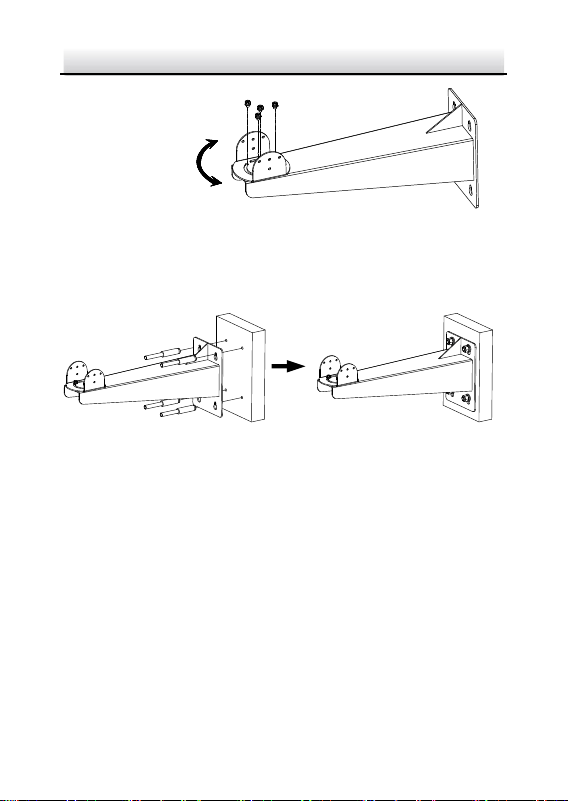
3. Install the PT joint to the wall mounting bracket with four M6 × 16
screws.
Note:
Adjust the panning position of the PT joint to desired angle when
installing.
Explosion-proof IR Zoom Bullet Camera·Quick Start Guide
17
Pan
:
-
45
° to 45
°
Figure 2-13 Screw the PT Joint to Wall Mounting Bracket
4. Fix the wall mounting bracket to wall with expansion bolts (M8 ×
100).
Figure 2-14 Install Bracket to Wall
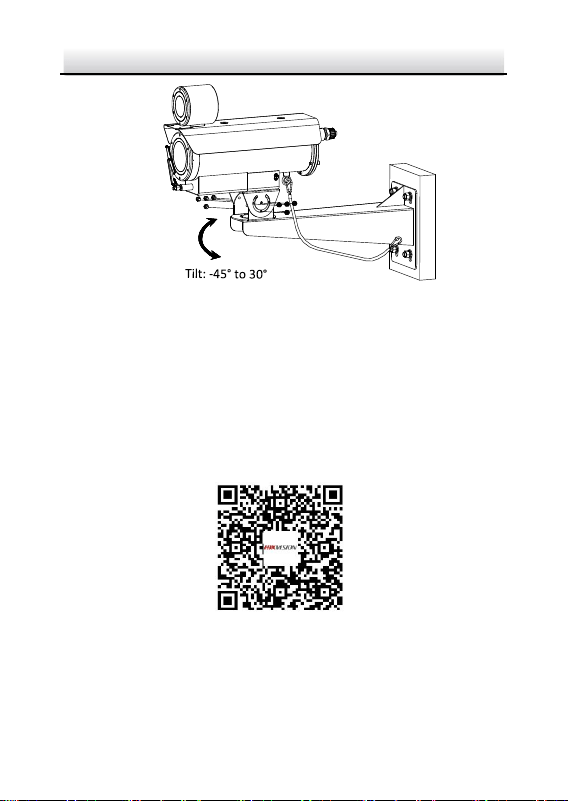
5. Fix the camera to the bracket.
1). Use safety rope to hook the camera and the bracket.
2). Align the screw holes on pedestal with those on PT joint. Fix
the camera to the bracket.
Note:
Adjust the tilting position of the camera to desired angle when
installing. Use at least three M6 × 16 screws. on each side of
the PT joint to secure the camera.
Explosion-proof IR Zoom Bullet Camera·Quick Start Guide
18
Figure 2-15 Install Camera to Bracket
2.4 Protective Measures for Outdoor
Installation
If the device is installed outdoors, necessary protective measures
should be taken to ensure safety. Scan the following QR code to get
protective measures for outdoor installation.

Explosion-proof IR Zoom Bullet Camera·Quick Start Guide
19
3 Setting the Network Camera over the
LAN
Note:
You shall acknowledge that the use of the product with Internet
access might be under network security risks. For avoidance of
any network attacks and information leakage, strengthen your
own protection. If the product does not work properly, contact
with your dealer or the nearest service center.
To ensure the network security of the network camera, we
recommend you to have the camera assessed and maintained
termly. You can contact us if you need such service.
3.1 Wiring
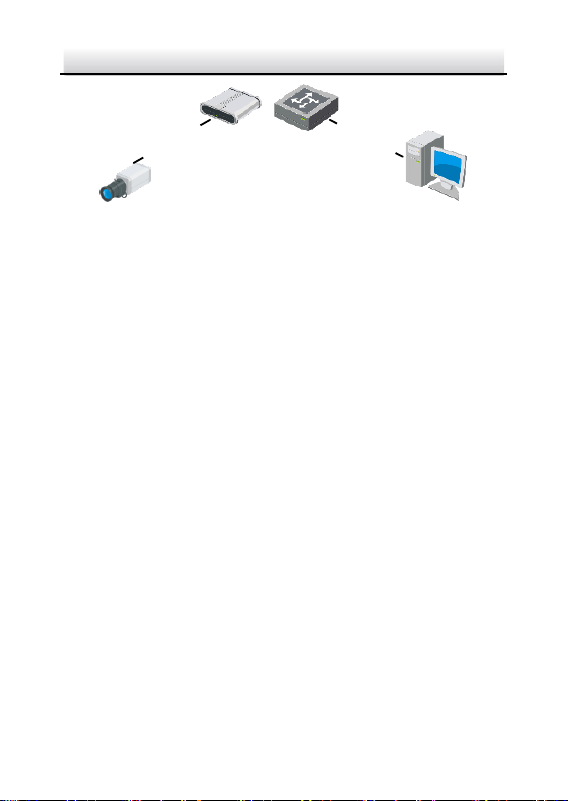
To view and configure the network camera via LAN (Local Area
Network), you need to connect the network camera in the same
subnet with your PC. Then, install the SADP or client software to
search and change the IP address of network camera.
Connect the camera to the network according to the following
figures
Network Cable
Network Camera
Computer
Figure 3-1 Connecting Directly
Explosion-proof IR Zoom Bullet Camera·Quick Start Guide
20
网络交换机
Network Cable
Network Cable
or
Network Camera Computer
Figure 3-2 Connecting via a Switch or a Router
3.2 Activating the Camera
Purpose:
You are required to activate the camera first by setting a strong
password for it before you can use the camera.
Activation via web browser, activation via SADP, and activation via
client software are supported. We will take activation via SADP
software and activation via web browser as examples to introduce
the camera activation.
Note:
For the details of activation via client software, refer to the user
manual of the network camera.
3.2.1 Activation via Web Browser
Steps:
1. Power on the camera. Connect the camera to your computer or
the switch/router which your computer connects to.
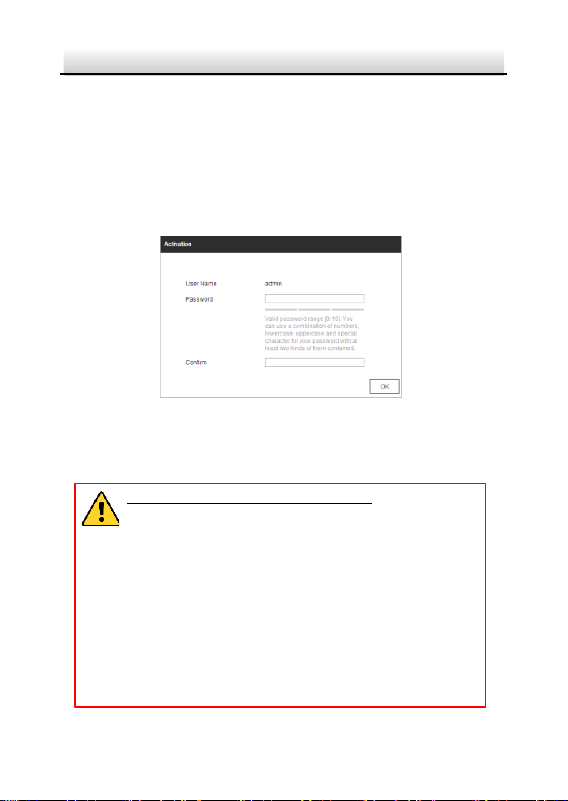
2. Input the IP address into the address bar of the web browser, and
enter the activation interface.
Explosion-proof IR Zoom Bullet Camera·Quick Start Guide
21
Notes:
The default IP address of the camera is 192.168.1.64.
The computer and the camera should belong to the same
subnet.
For the camera enables the DHCP by default, you need to use
the SADP software to search the IP address.
Figure 3-3 Activation Interface (Web)
3. Create a password and input the password into the password
field.
STRONG PASSWORD RECOMMENDED– We highly
recommend you create a strong password of your own
choosing (using a minimum of 8 characters, including at
least three of the following categories: upper case
letters, lower case letters, numbers, and special
characters) in order to increase the security of your
product. And we recommend you reset your password
regularly, especially in the high security system,
resetting the password monthly or weekly can better
protect your product.
Explosion-proof IR Zoom Bullet Camera·Quick Start Guide
22
4. Confirm the password.
5. Click OK to activate the camera and enter the live view interface.
3.2.2 Activation via SADP Software
SADP software is used for detecting the online device, activating the
camera, and resetting the password.
Get the SADP software from the supplied disk or the official website,
and install the SADP according to the prompts.
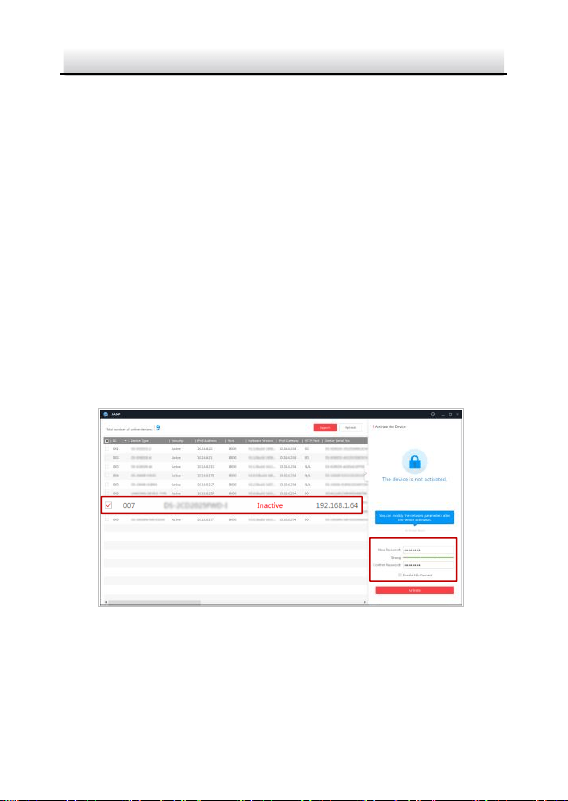
Follow the steps to activate the camera.
Steps:
1. Run the SADP software to search the online devices.
2. Check the device status from the device list, and select the
inactive device.
Figure 3-4 SADP Interface
Note:
The SADP software supports activating the camera in batch. Refer to
user manual of SADP software for details.
Select inactive device.
Input and confirm
password.

Explosion-proof IR Zoom Bullet Camera·Quick Start Guide
23
3. Create a password and input the password in the password field,
and confirm the password.
STRONG PASSWORD RECOMMENDED–We highly
recommend you create a strong password of your own
choosing (using a minimum of 8 characters, including
upper case letters, lower case letters, numbers, and
special characters) in order to increase the security of
your product. And we recommend you reset your
password regularly, especially in the high security
system, resetting the password monthly or weekly can
better protect your product.
4. Click Activate to save the password.
Note:
You can check whether the activation is completed on the popup
window. If activation failed, make sure that the password meets
the requirement and try again.
3.3 Modifying the IP Address
Purpose:
To view and configure the camera via LAN (Local Area Network), you
need to connect the network camera in the same subnet with your
PC.
Use the SADP software or client software to search and change the
IP address of the device. We take modifying the IP Address via SADP
software as an example to introduce the IP address modification.
Note:
Explosion-proof IR Zoom Bullet Camera·Quick Start Guide
24
For IP address modification via client software, refer to the user
manual of client software.
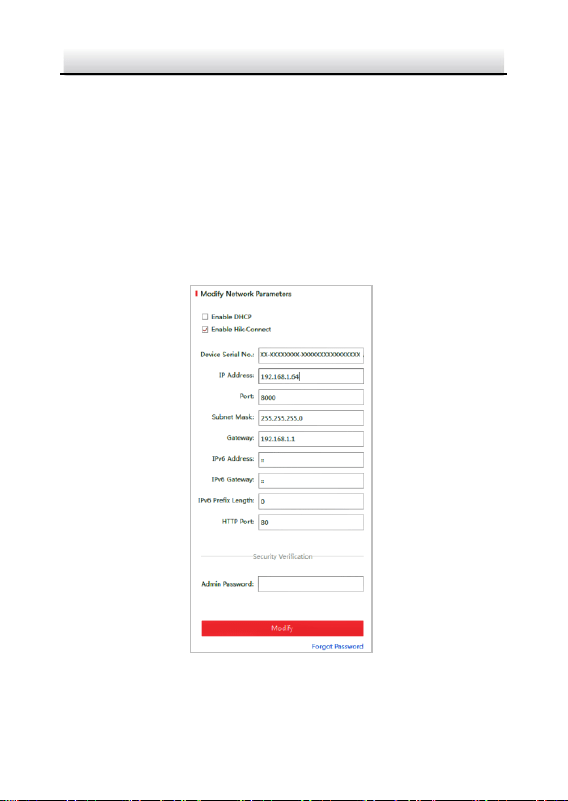
Steps:
1. Run the SADP software.
2. Select an active device.
3. Change the device IP address to the same subnet with your
computer by either modifying the IP address manually or checking
the Enable DHCP checkbox.
Figure 3-5 Modify the IP Address

Explosion-proof IR Zoom Bullet Camera·Quick Start Guide
25
4. Input the admin password and click Modify to activate your IP
address modification. The batch IP address modification is
supported by SADP. Refer to the user manual of SADP for details.

Explosion-proof IR Zoom Bullet Camera·Quick Start Guide
26
4 Accessing via Web Browser
System Requirement:
Operating System: Microsoft Windows XP SP1 and above version
CPU: 2.0 GHz or higher
RAM: 1G or higher
Display: 1024×768 resolution or higher
Web Browser: Internet Explorer 8.0 and above version, Apple Safari
5.0.2 and above version, Mozilla Firefox 5.0 and above version and
Google Chrome 18 and above version
Steps:
1. Open the web browser.
2. In the browser address bar, input the IP address of the network
camera, and enter the login interface.
Note:
The default IP address is 192.168.1.64. You are recommended to
change the IP address to the same subnet with your computer.
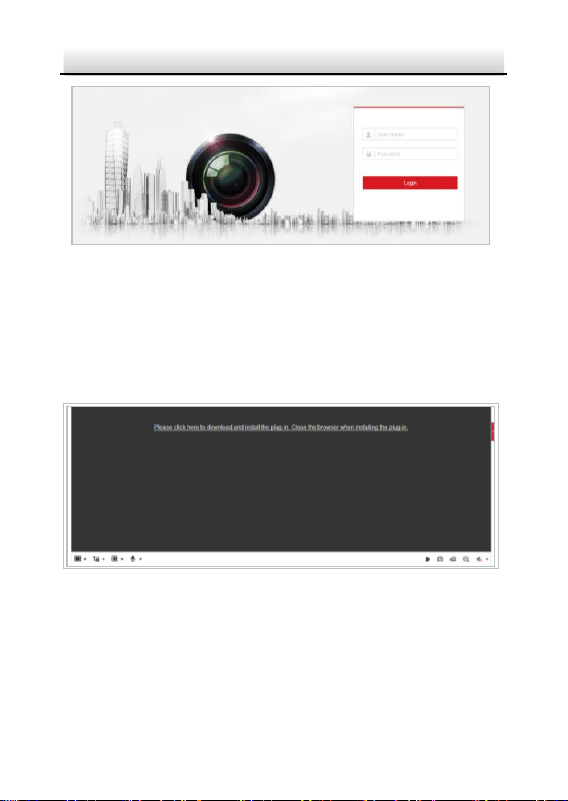
3. Input the user name and password.
The admin user should configure the device accounts and
user/operator permissions properly. Delete the unnecessary
accounts and user/operator permissions.
Note:
The device IP address gets locked if the admin user performs 7
failed password attempts (5 attempts for the user/operator).
4. Click Login.
Explosion-proof IR Zoom Bullet Camera·Quick Start Guide
27
Figure 4-1 Login Interface
5. Install the plug-in before viewing the live video and managing
the camera. Follow the installation prompts to install the plug-in.
Note:
You may have to close the web browser to finish the installation
of the plug-in.
Figure 4-2 Download Plug-in
6. Reopen the web browser after the installation of the plug-in and
repeat steps 2 to 4 to login.
Note:
For detailed instructions of further configuration, refer to user
manual of network camera.

0
UD24174B-A