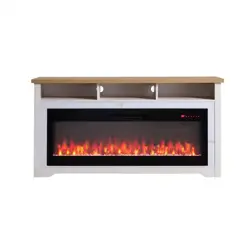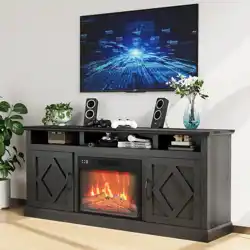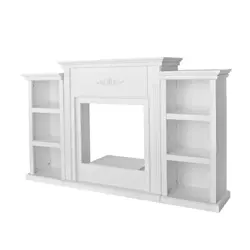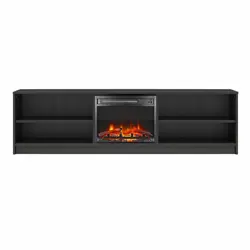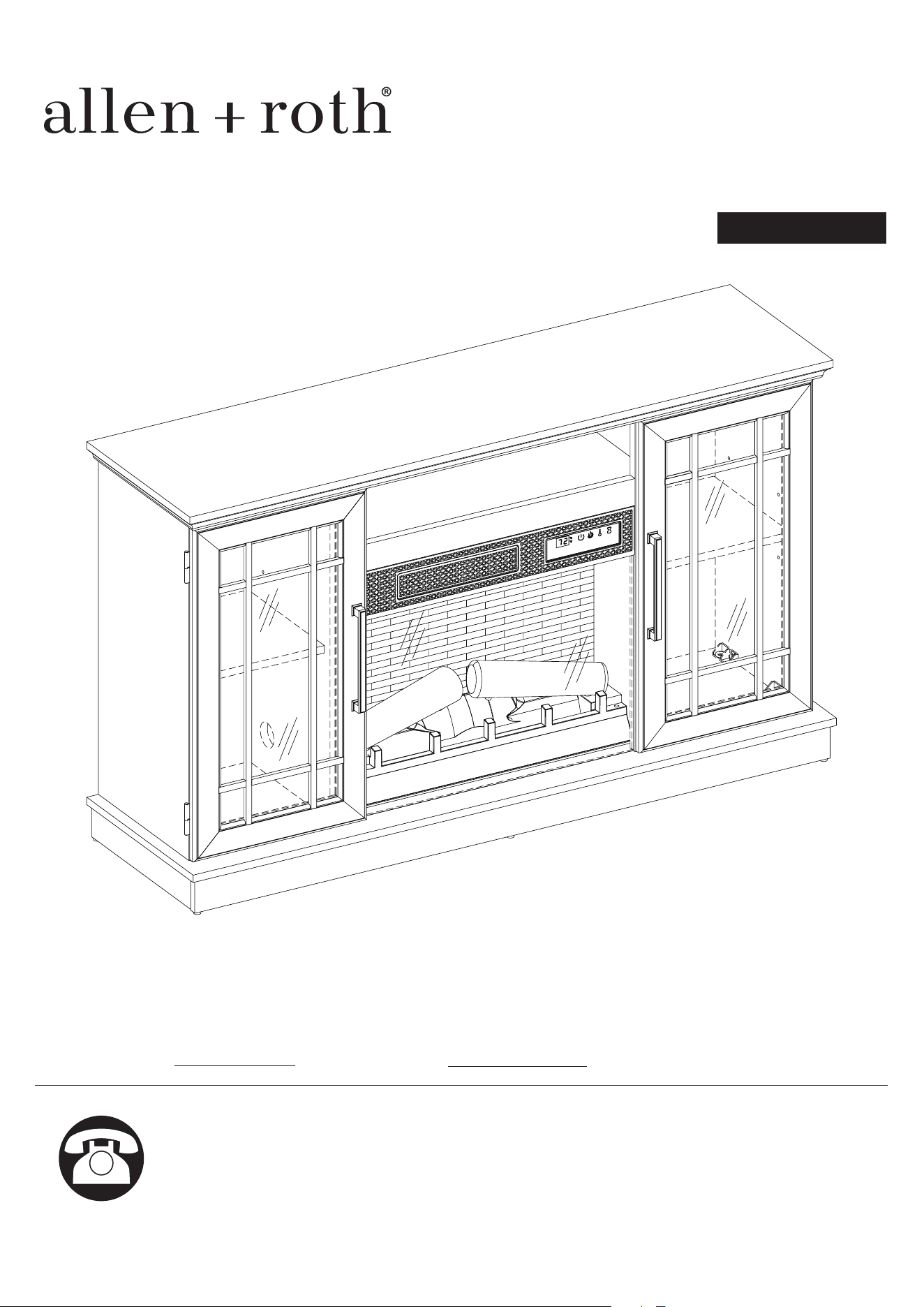
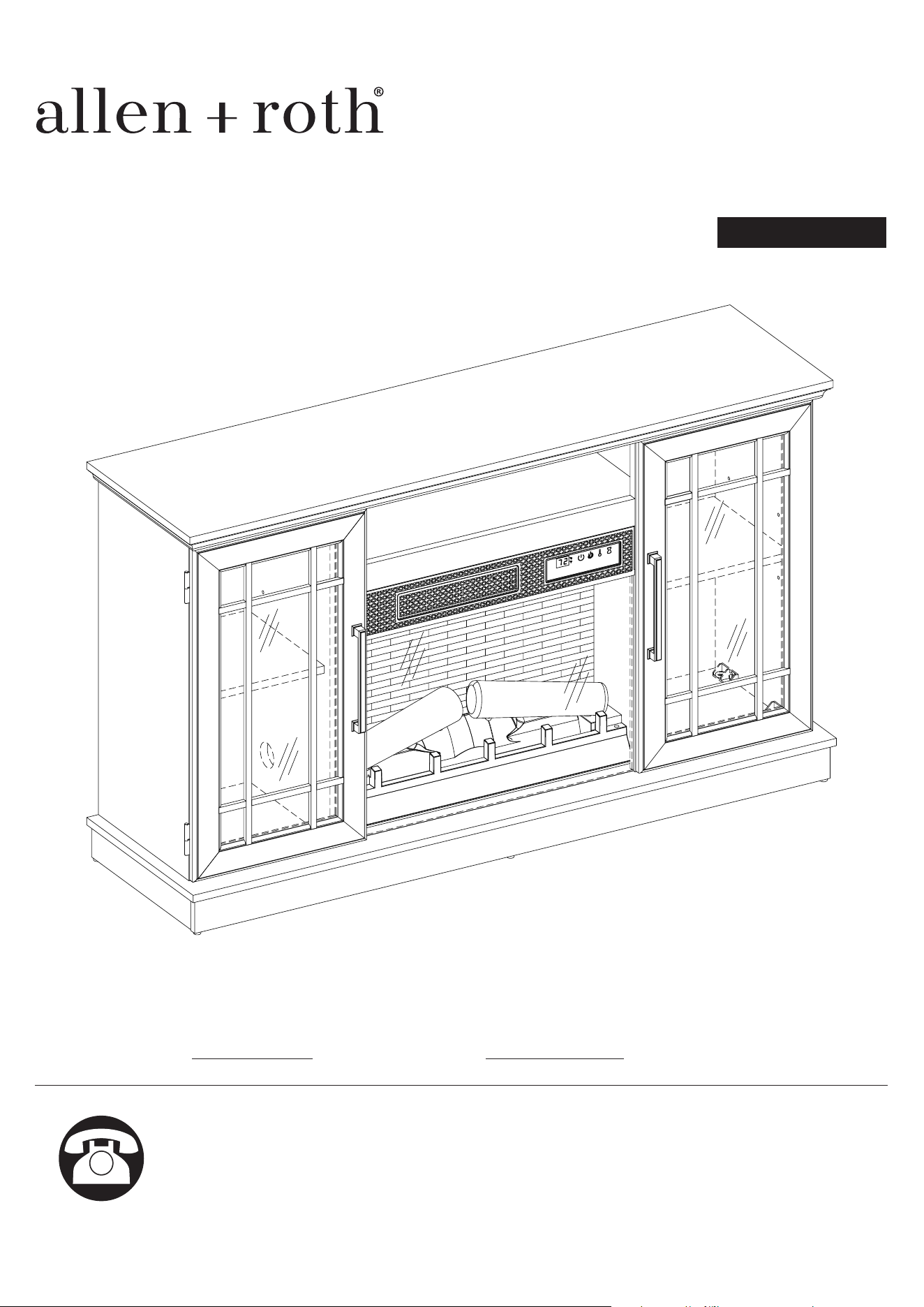
ITEM #5698810, 5698811
MODEL #8002146/23MMP7101-PO132,
8002139/23MMP7101-TPO147
Español p. 30
Serial Number:
SG24107
Purchase Date:
Questions, problems, missing parts? Before returning to your retailer,
call our customer service department at 866-439-9800, 8 a.m. - 8 p.m.,
EST, Monday - Sunday. You can also contact us at [email protected].
ALLEN + ROTH and logo design are trademarks or
registered trademarks of LF, LLC.
All rights reserved.
54 IN ELECTRIC FIREPLACE
1
2
23MMP7101 REV1.0
PRODUCT SPECIFICATIONS
TABLE OF CONTENTS
VOLTAGE 120VAC, 60 Hz
AMPS 12.5 Amps
WATTS 1500 Watts
Product Specications .............................................................................................................................2
Safety Information.....................................................................................................................................3
Maximum Load........................................................................................................................................
..5
Package Contents....................................................................................................................................6
Hardware Contents...................................................................................................................................8
Preparation..............................................................................................................................................
..9
Assembly Instructions...............................................................................................................................9
Operating Instructions.............................................................................................................................22
Troubleshooting.....................................................................................................................................
..24
FCC/IC Information.................................................................................................................................25
Care and Maintenance............................................................................................................................25
Warranty................................................................................................................................................
..26
Battery Replacement..............................................................................................................................27
Replacement Parts List.........................................................................................................................
..28
3
23MMP7101 REV1.0
SAFETY INFORMATION
When using electrical appliances, basic precautions should always be followed to reduce the risk
of re, electrical shock, and injury to persons including the following:
1. Read all instructions before using this appliance.
2. DANGER – High temperatures may be generated under certain abnormal conditions. Do not
partially or fully cover or obstruct the front of this heater.
3. CAUTION: Never leave the heater operating unattended. Extreme caution is necessary if
unsupervised children or
people of reduced physical or mental capabilities
are nearby.
4.
The appliance is not to be used by children or persons with reduced physical, sensory or mental
capabilities, or lack of experience and knowledge, unless they have been given supervision or
instructions.
5.
Always unplug this appliance when not in use.
6. Do not operate any heater with a damaged cord or plug or after the heater malfunctions, has
been dropped or damaged in any manner. Discard heater, or return to authorized service facility
for examination and/or repair.
7. Do not use outdoors.
8. This heater is not intended for use in bathrooms, laundry areas and similar indoor locations.
Never locate this appliance where it may fall into a bathtub or other water container.
9. Do not run cord under carpeting. Do not cover cord with throw rugs, runners or the like. Arrange
cord away from trac areas and where it will not be tripped over.
10. To disconnect heater, turn controls to o, and turn o power to heater circuit at main disconnect
panel (or operate internal disconnect switch if provided).
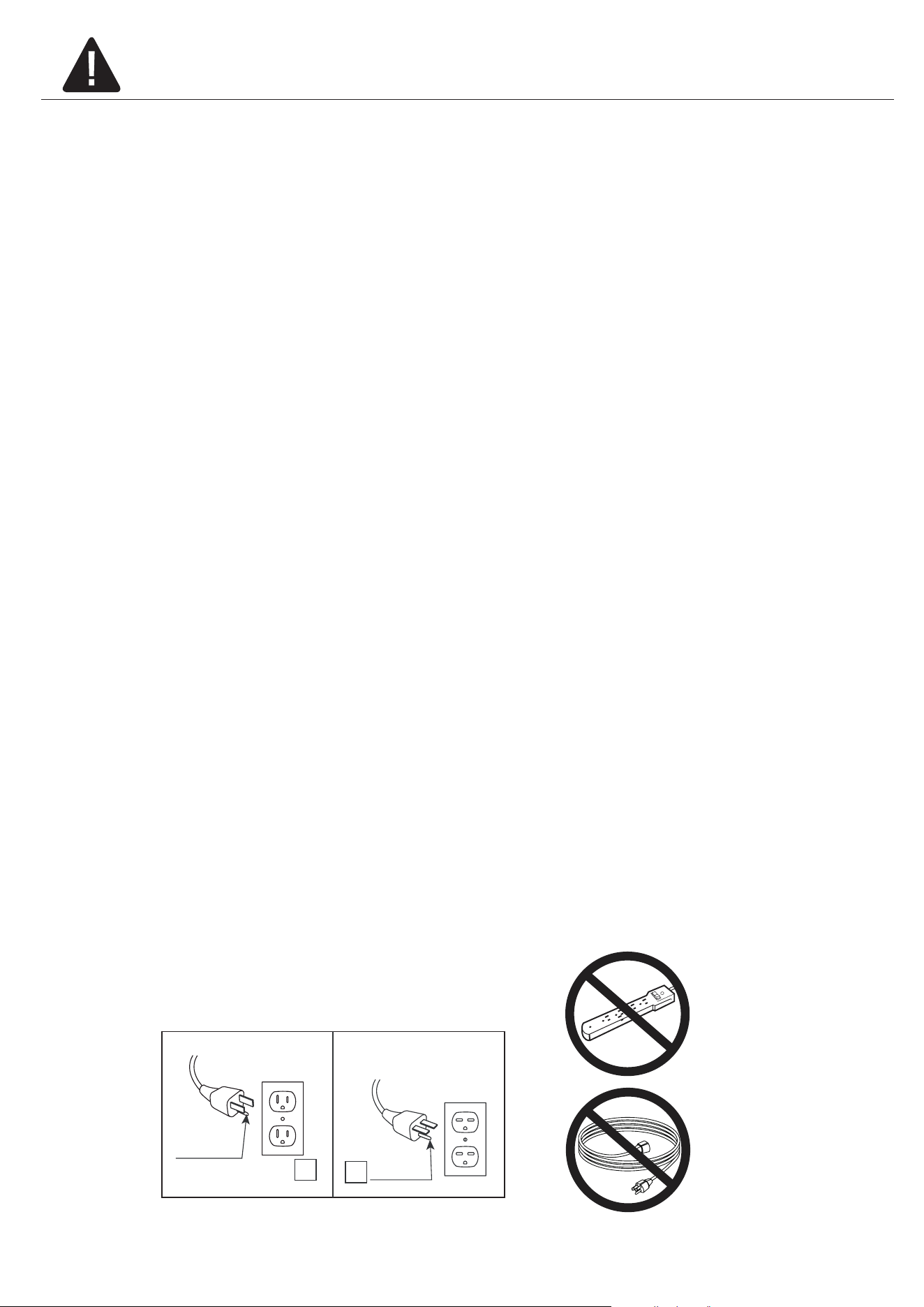
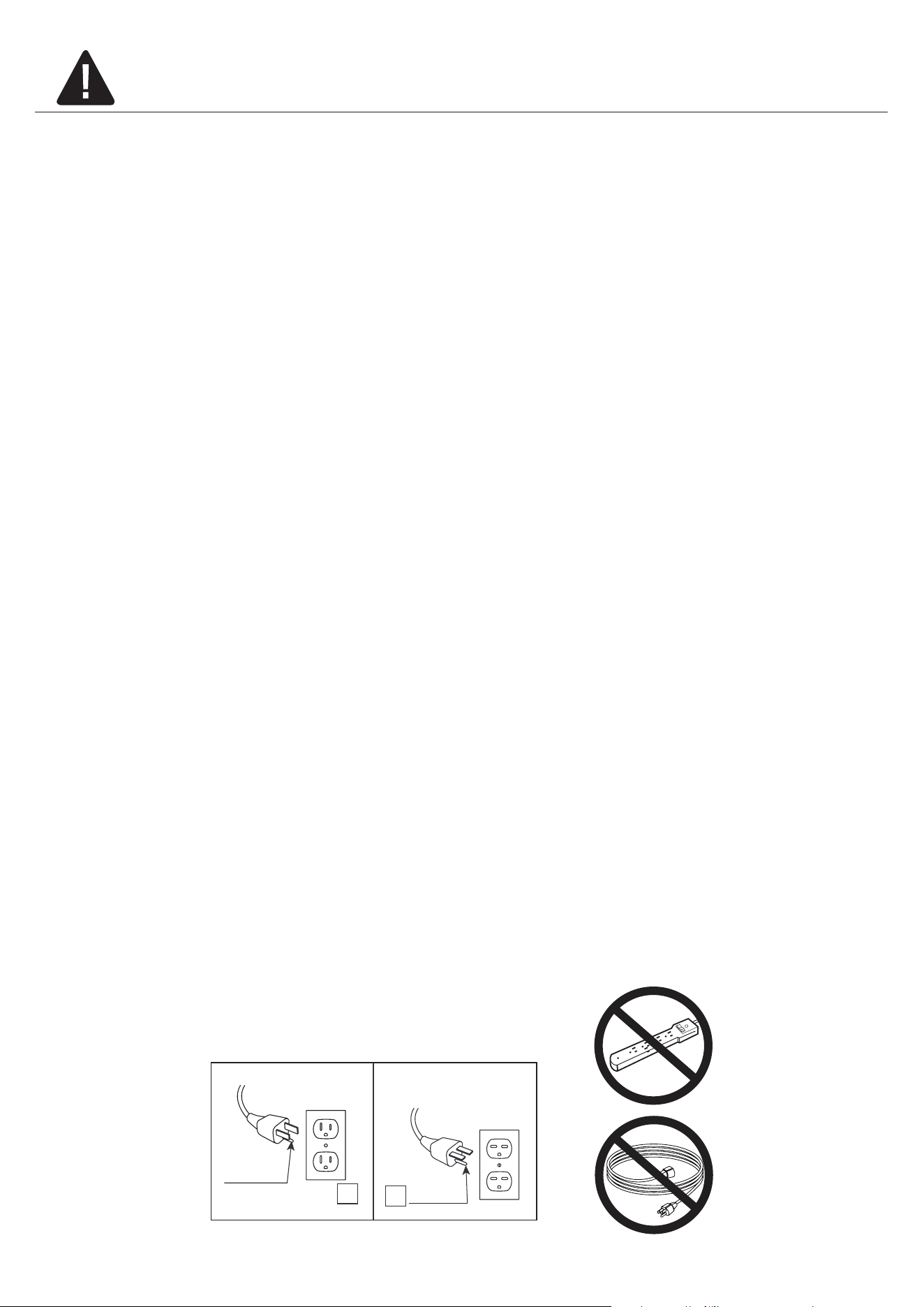
11. Connect to properly grounded outlets only. This heater is for use on 120 volts. The cord has a
plug as shown at A in Fig.1 Do not use a 2 prong adapter. Never use with an extension cord or
relocatable power tap (outlet/power strip).
A
B
Fig.1

4
23MMP7101 REV1.0
12. Do not insert or allow foreign objects to enter any ventilation or exhaust opening as this may
cause an electric shock or re, or damage the appliance.
13. To prevent a possible re, do not block air intakes or exhaust in any manner. Do not use on soft
surfaces, like a bed, where opening may become blocked.
14. This appliance has hot and arcing or sparking parts inside. Do not use it in areas where gasoline,
paint or ammable liquids are used or stored. This replace should not be used as a drying rack
for clothing. Christmas stockings or decorations should not be hung in the area of it.
15. Use this appliance only as described in the manual. Any other use not recommended by the
manufacturer may cause re, electric shock or injury to persons.
16. This heater may include a visual alarm to warn that parts of the heater are getting excessively
hot. If the alarm ashes immediately turn the heater o and inspect for any objects on or adjacent
to the heater that may cause high temperatures.
DO NOT OPERATE THE HEATER WITH THE ALARM FLASHING!
SAVE THESE INSTRUCTIONS
5
23MMP7101 REV1.0
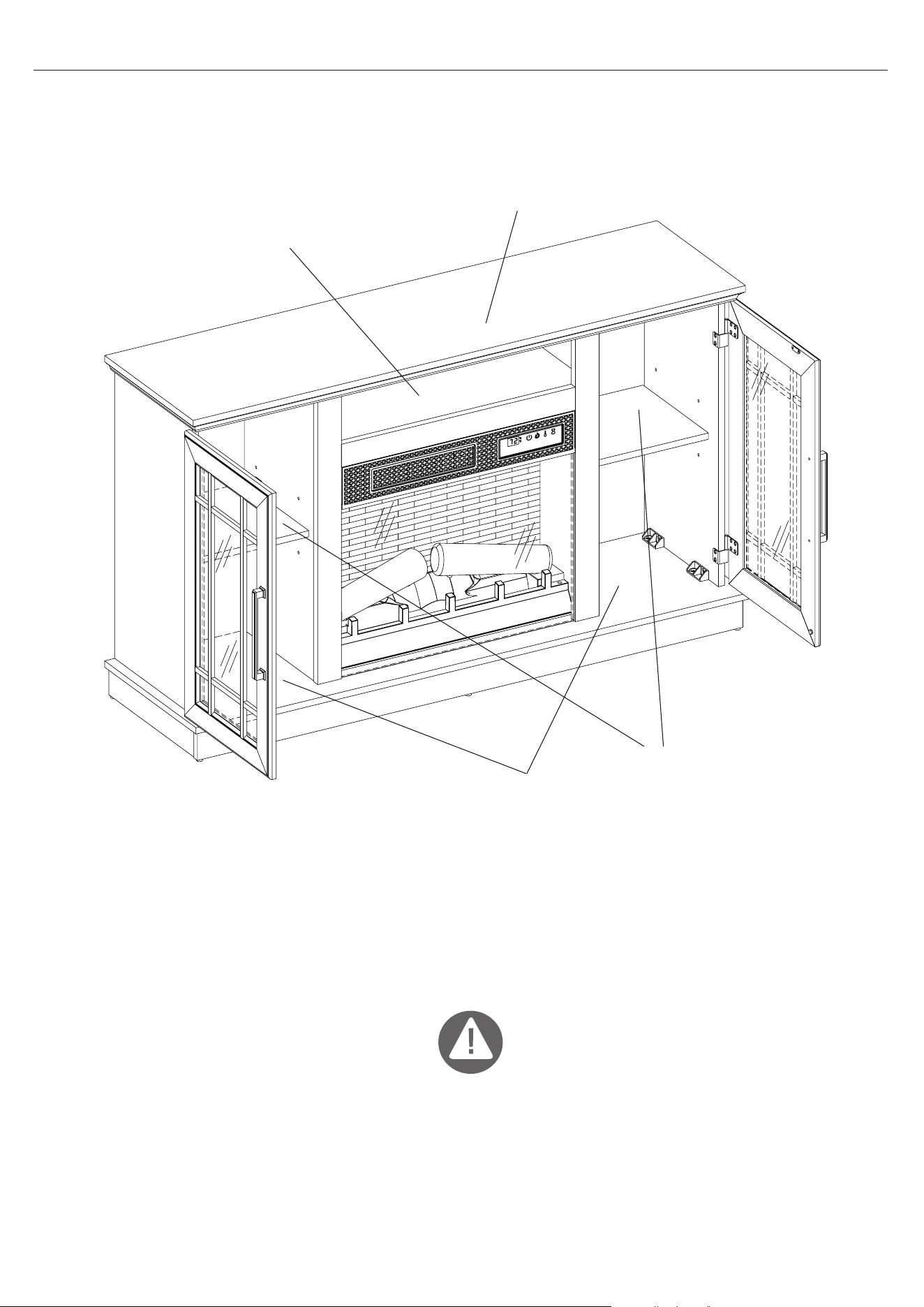
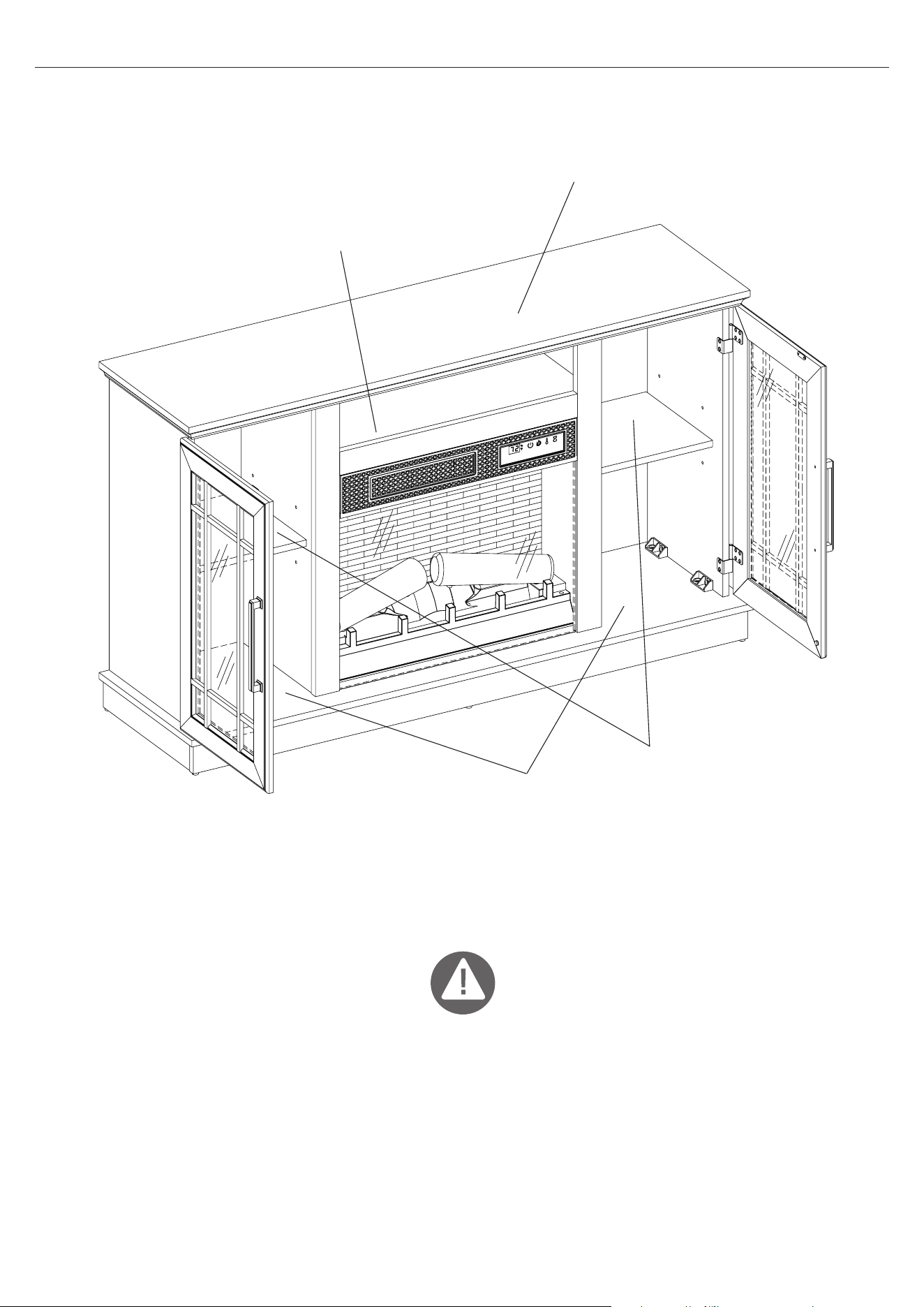
MAXIMUM LOAD
13.6 kg / 30 lb
MAXIMUM LOAD
22.7 kg / 50 lb
Max TV Size up to 60”.
MAXIMUM LOAD
6.8 kg / 15 lb
MAXIMUM LOAD
9.1 kg / 20 lb
WARNING
For use with most at panel televisions weighing 22.7 kg / 50 lbs or less. Usage with televisions or
loads heavier than the maximum weights specied may result in instability causing tip over resulting
in death or serious injury.
MAXIMUM LOAD
6
23MMP7101 REV1.0
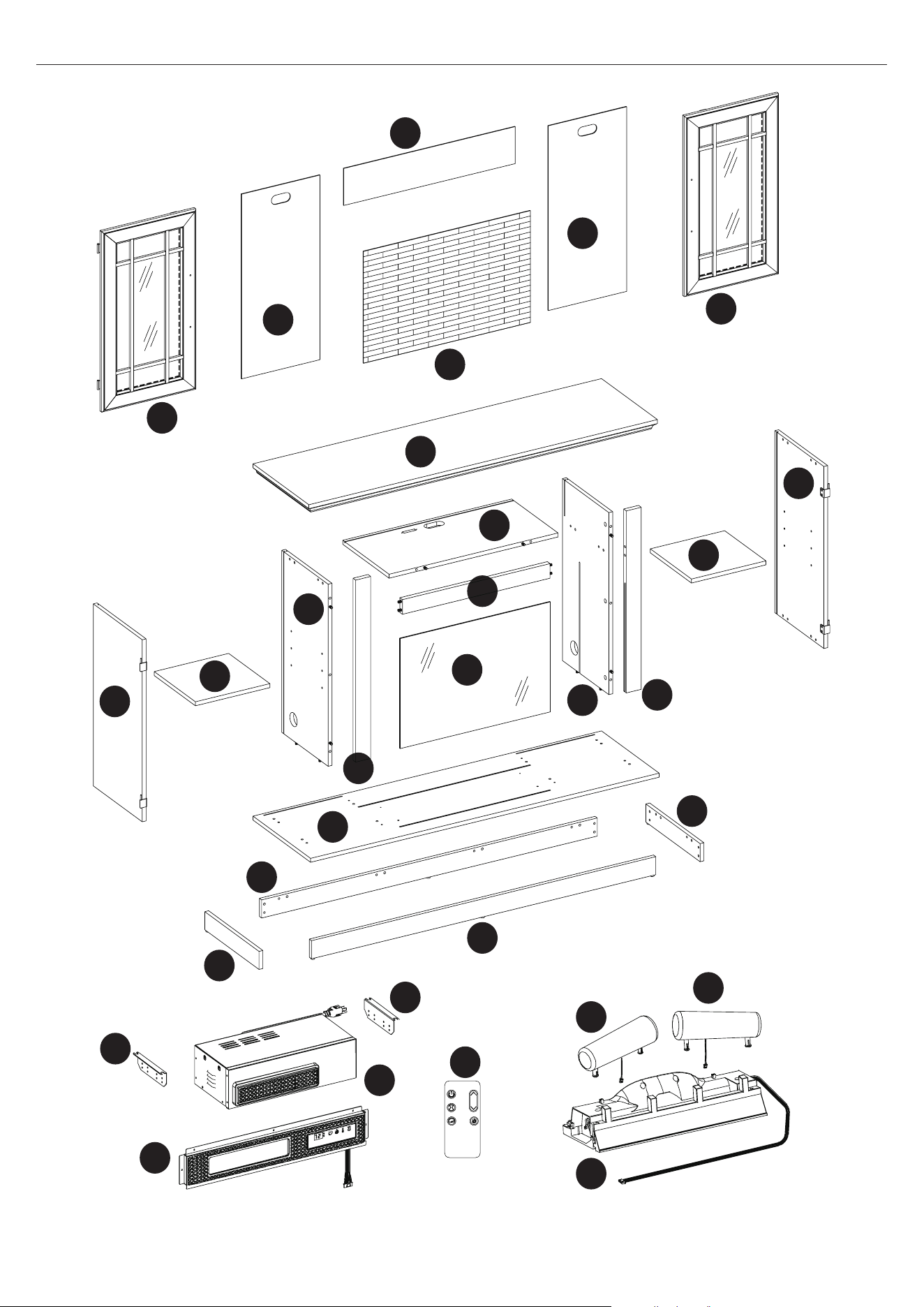
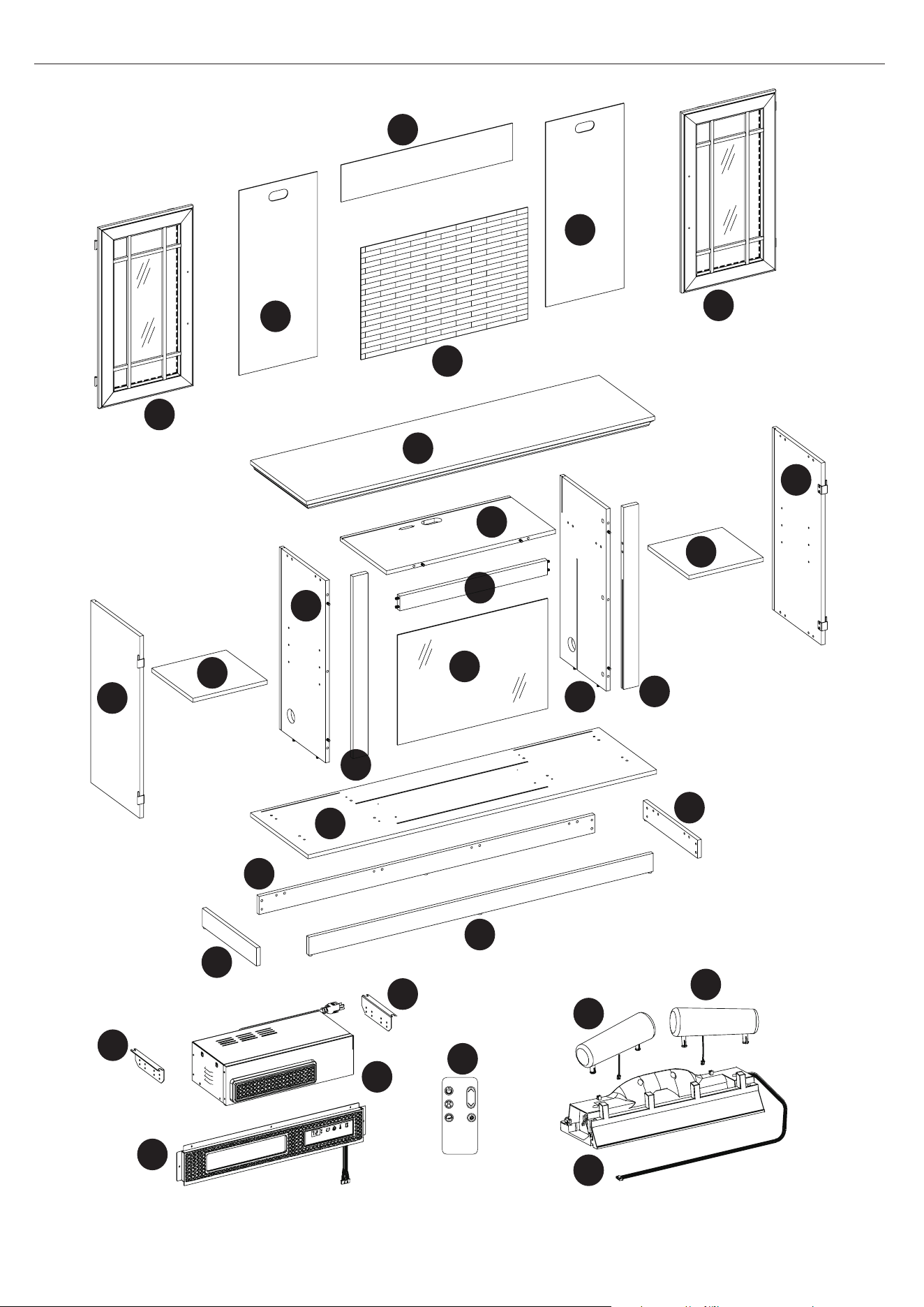
PACKAGE CONTENTS
I
M
J
T
T
G
U
N
R
R
S
F
O
P
Q
B
C
E
D
H
A
K
L
EB
EF
EF
EH
EA
EC
ED
EG
7
23MMP7101 REV1.0
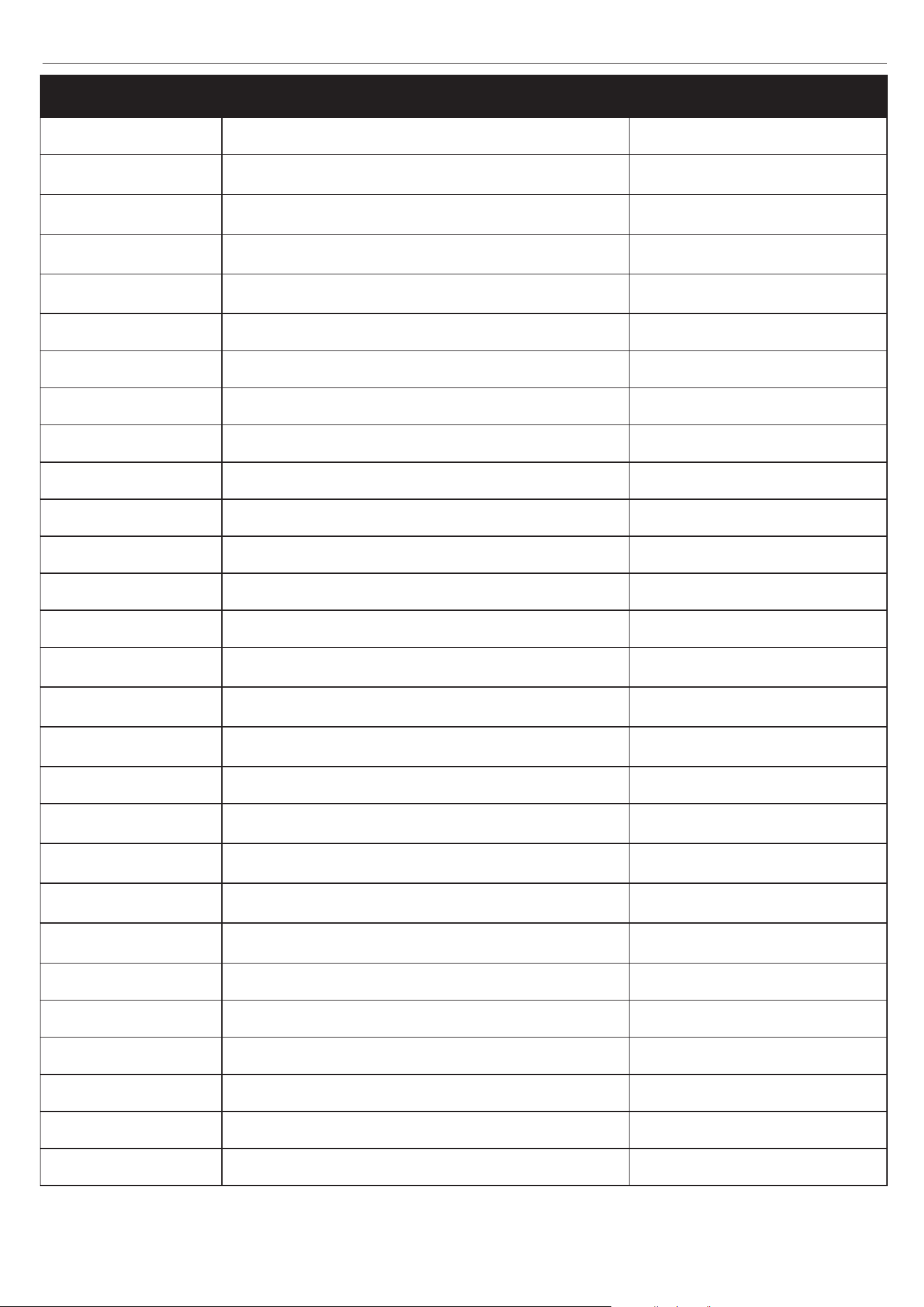
PACKAGE CONTENTS
PART DESCRIPTION QUANTITY
A Base 1
B
Base Left Rail
1
C
Base Back Panel
1
D
Base Right Rail
1
E
Base Front Rail
1
F Left Partition 1
G Top Panel 1
H Left Surround Rail 1
I Right Partition 1
J Right Surround Rail 1
K Fixed Shelf 1
L Top Partition Rail 1
M Glass Panel 1
N Left Side Panel 1
O
Right Side Panel
1
P
Left Door
1
Q
Right Door
1
R Side Back Panels 2
S
Upper Back Panel
1
T
Adjustable shelf
2
U
Electric Fireplace Back Panel
1
EA Front Panel with Control Button 1
EB Heater Box 1
EC Log Set Left 1
ED Log Set Right 1
EF Bracket 2
EG Ember Bed 1
EH Remote 1
8
23MMP7101 REV1.0
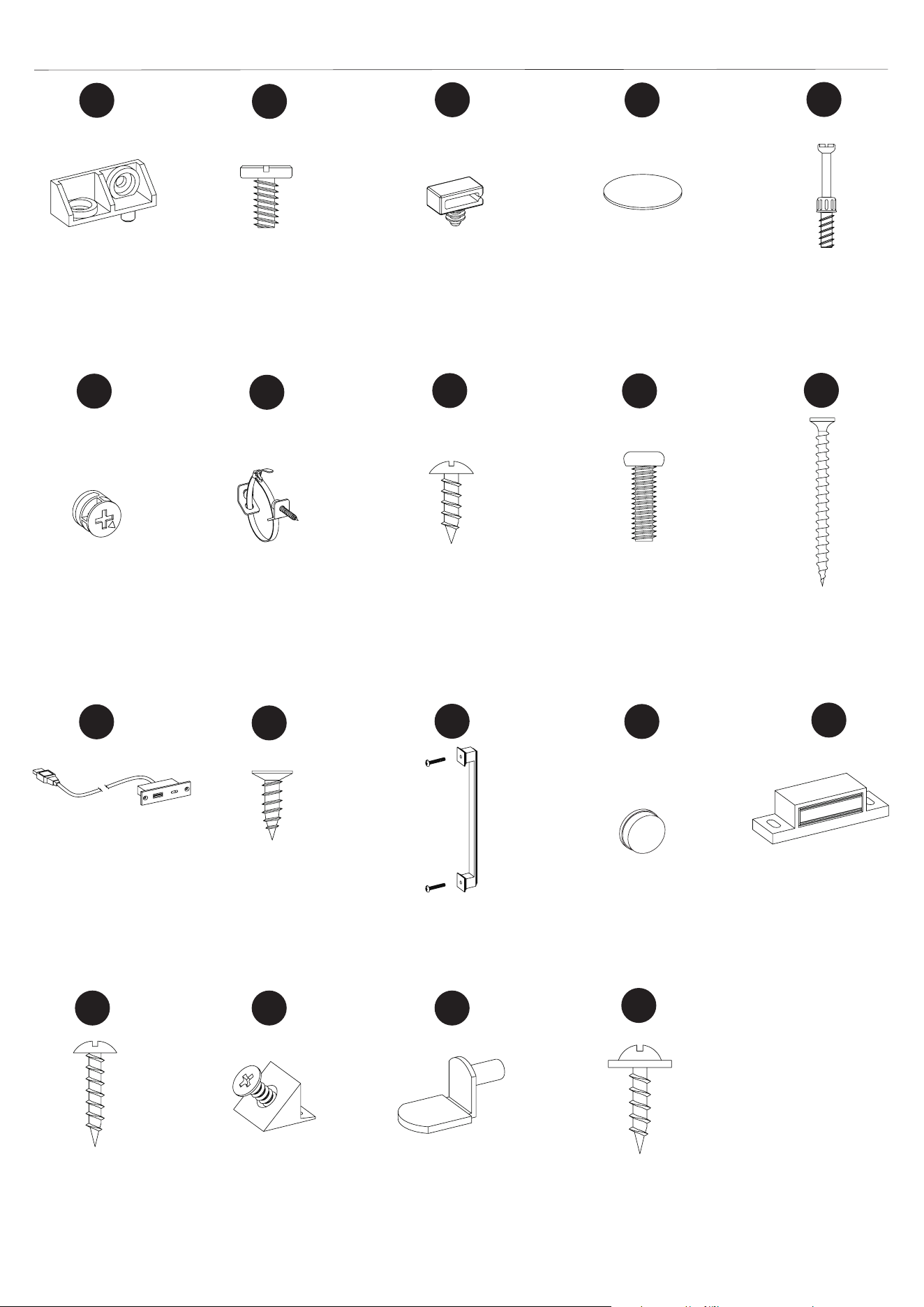
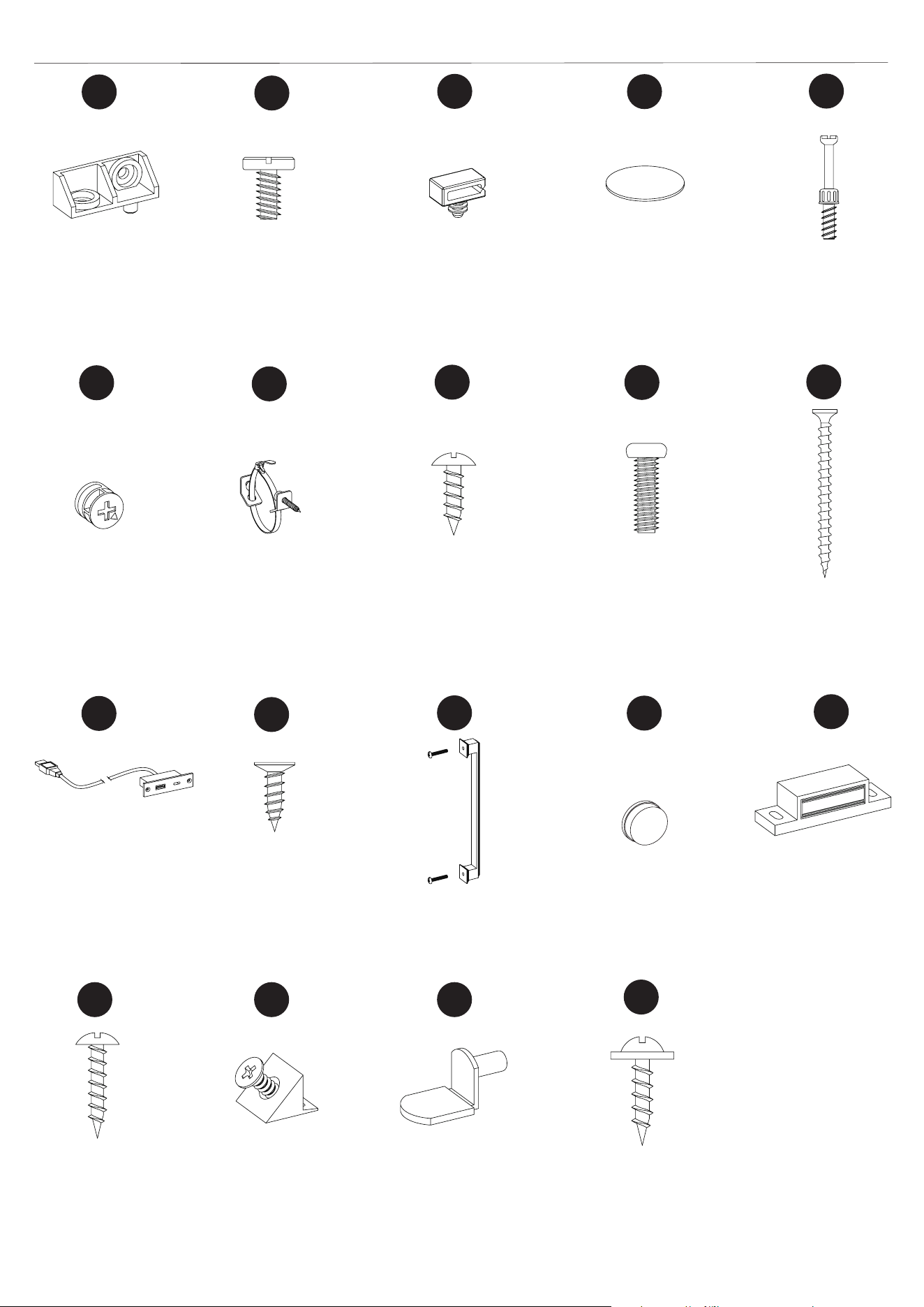
HARDWARE CONTENTS
Ø3.5x12mm
Screw
Qty: 7
Qty: 2
Qty: 8
Qty: 1
Qty: 3
Qty: 4
Qty: 2
Qty: 2
Qty: 4
Qty: 8
Qty: 4
Qty: 32
Qty: 8
Qty: 68
Qty: 2
Qty: 20
BB
GG
LL
QQ
AA
FF
KK
CC
HH
MM
RR
SS
DD
II
NN
OO
PP
EE
JJ
Ø4x12mm
Bolt
Wire Clip
USB output
980TC
Ø3x12mm
Screw
Ø3x15mm
Screw
Magnetic
Catch
Tipping Restraint
Hardware
Plastic Connector
Block
Back Panel
Bracket
Shelf Pin
Handle with
Screw
Ø6.3x12mm
Bolt
Cam Bolt
Cam Lock
Ø4x50mm
Screw
Door Bumper
Qty: 1
Note: USB to AC
adapter is not
included.
Qty: 6
Cam Lock Cover
Ø3x12mm
Screw
Qty: 2
9
23MMP7101 REV1.0
ASSEMBLY INSTRUCTIONS
PREPARATION
Before beginning assembly of product, make sure all parts are present. Compare parts with package
contents list and hardware contents list. If any part is missing or damaged, do not attempt to assem-
ble, install or operate the product. To protect the product from possible scratches, please assemble
the parts on a scratch-free surface.
Estimated Assembly Time: 45-60 minutes
Tools Required for Assembly (not included): Phillips screwdriver, Scissors and Utility knife.
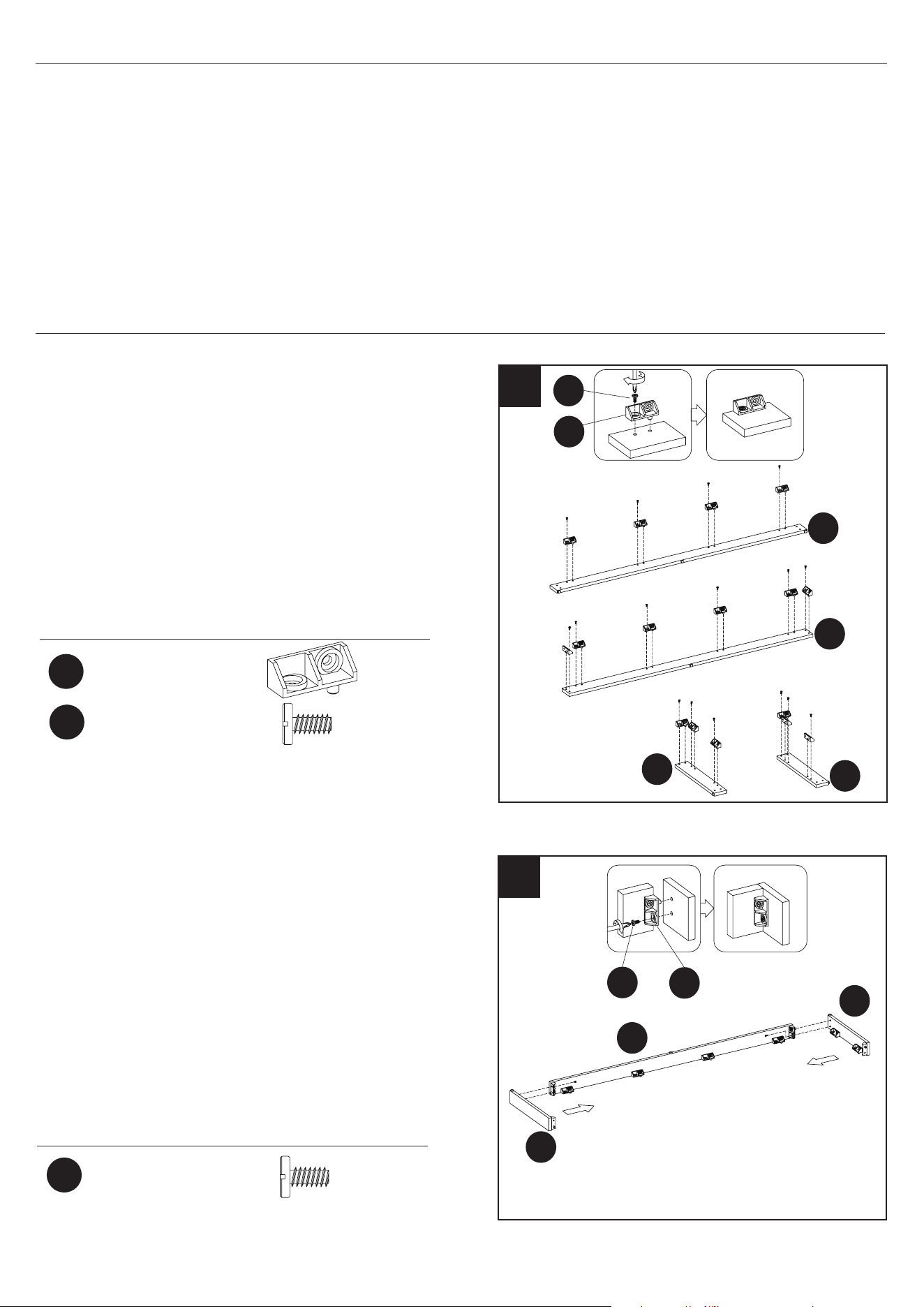
Plastic Connector
Block
Ø6.3x12mm
Bolt
Ø6.3x12mm
Bolt
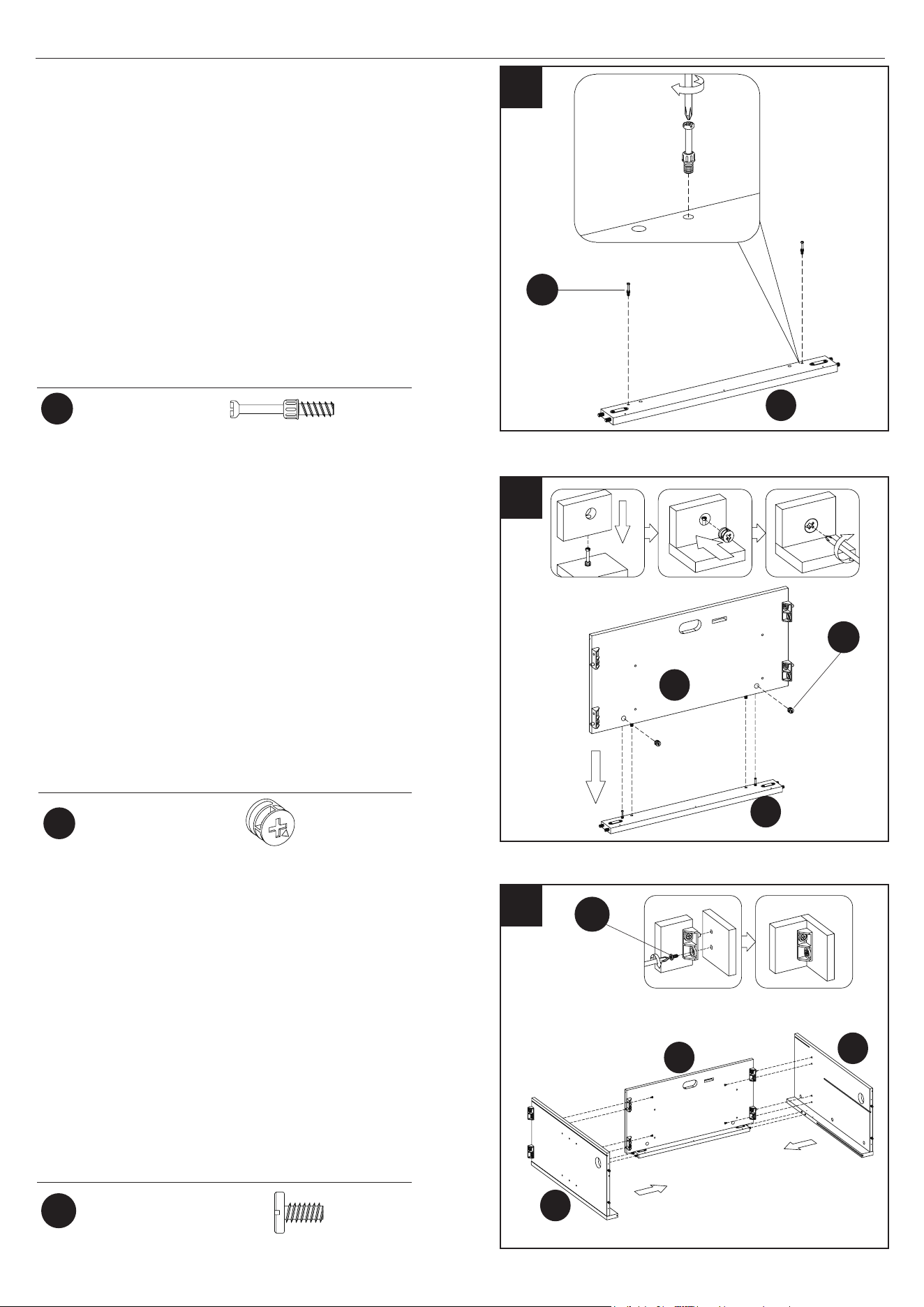
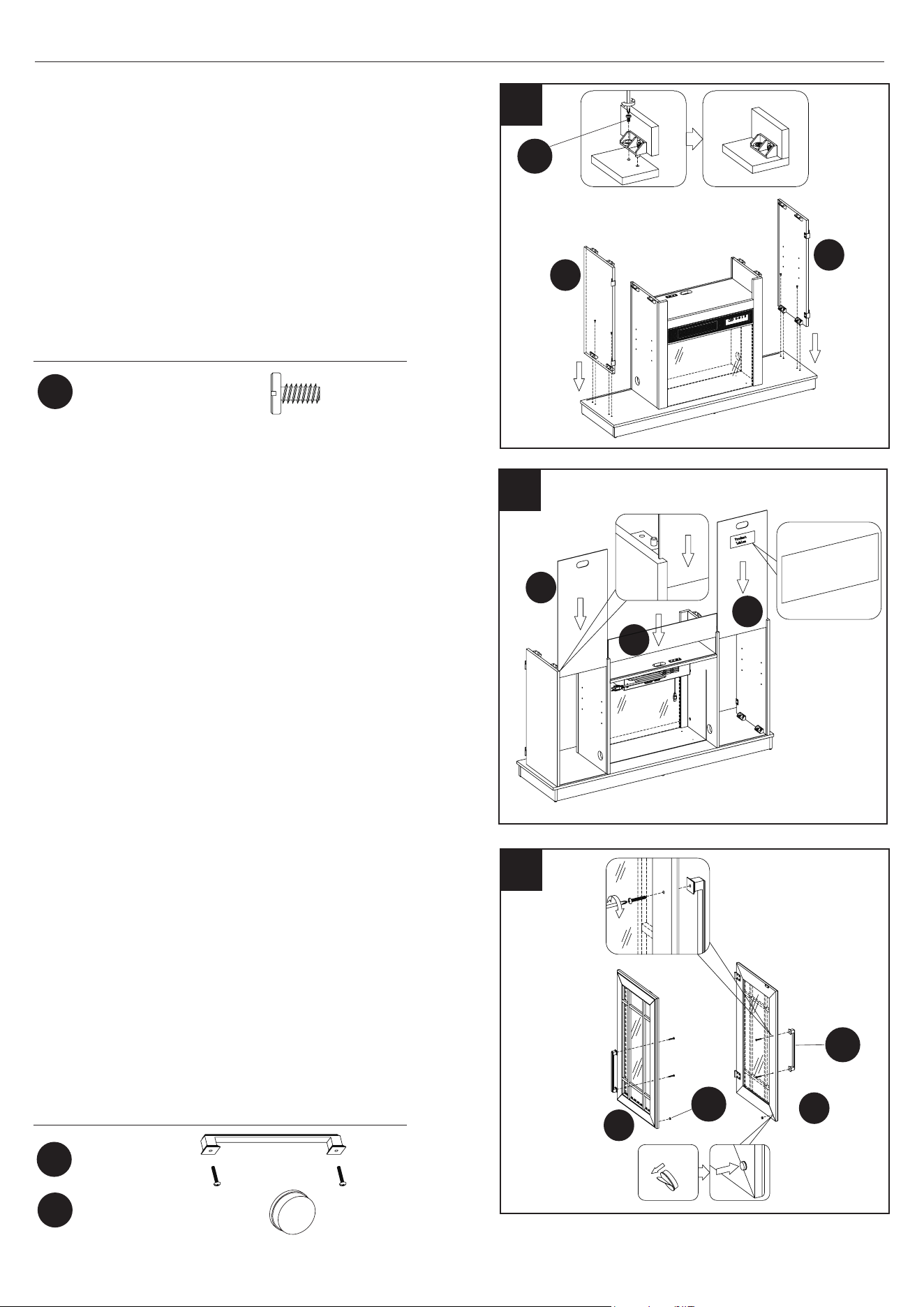
1
E
AA
BB
C
B
B
D
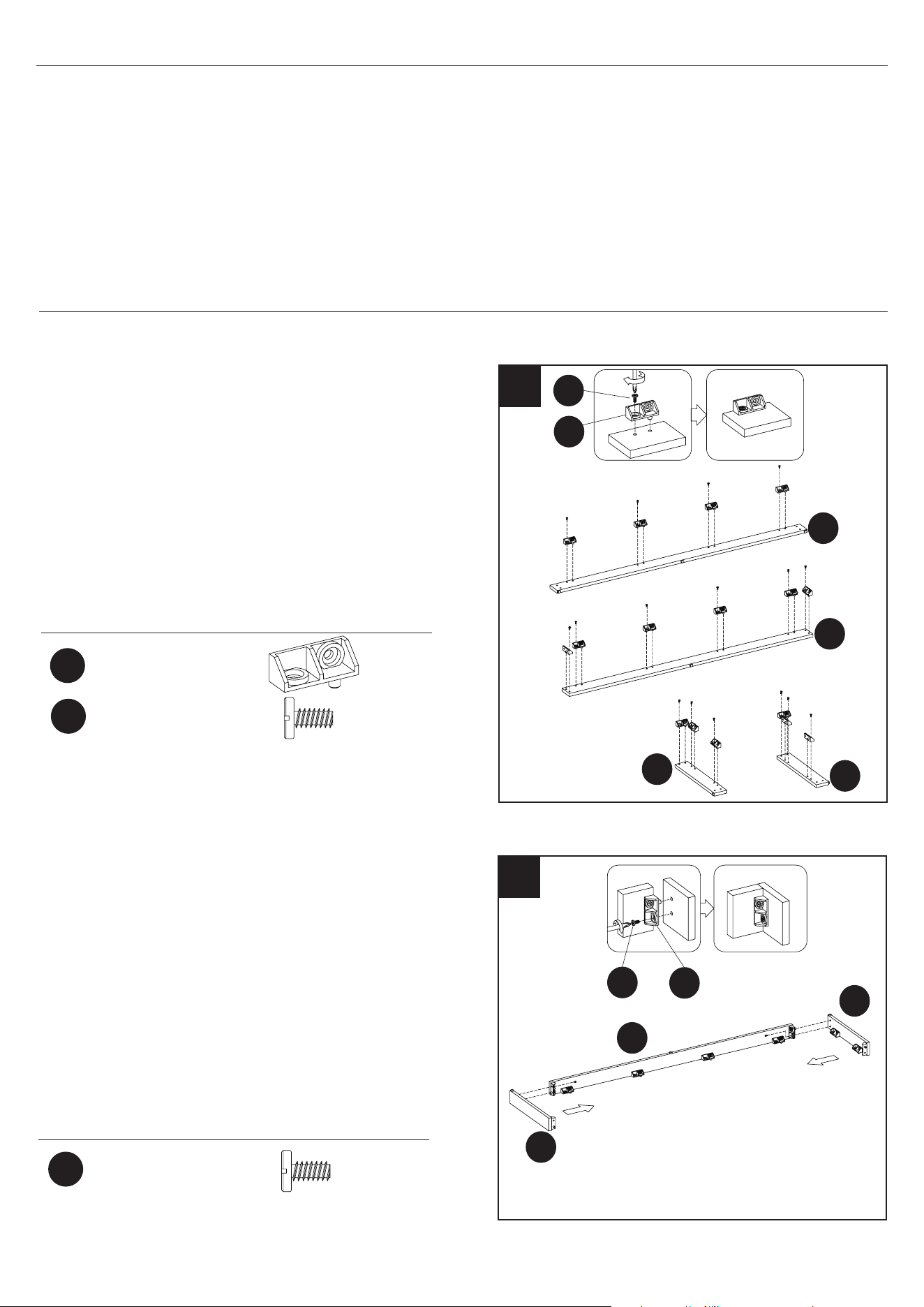
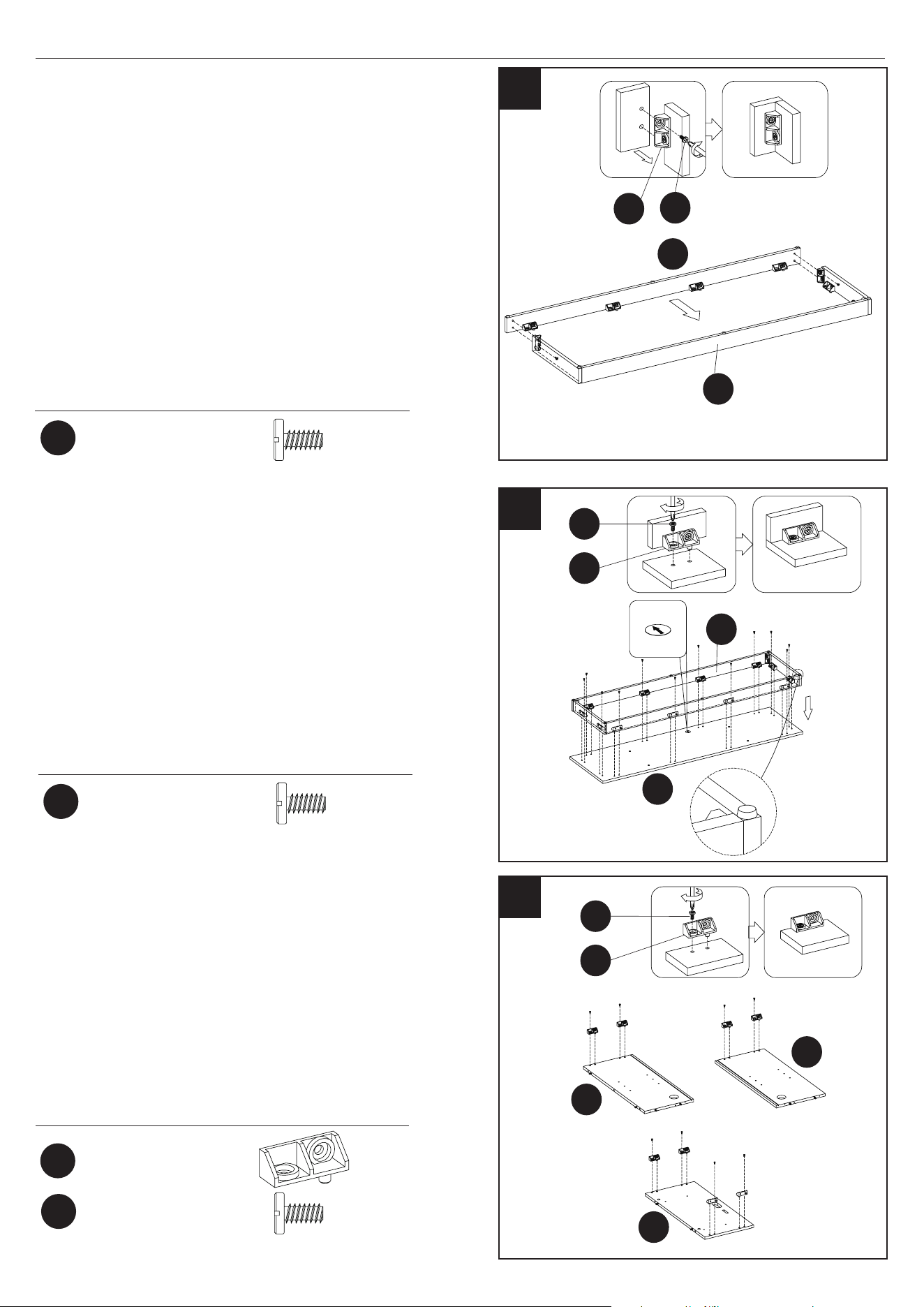
• Place the Plastic Connector Block (AA) as
shown.
• Fasten each Plastic Connector Block (AA) using
Bolts (BB). Repeat until all brackets are in place
as indicated by the diagram.
1. Preparing the Base
x 16
x 16
x 2
Hardware Used
Hardware Used
AA
BB
BB
2
2. Assembling the Base
• Locate the Base Back Panel (C) and the Left
and Right Base Rails (B and D).
• Align the Base Back Panel (C) between the
Left and Right Base Rails (B and D). Push
together as shown.
• Fasten each Plastic Connector Block (AA)
using Bolts (BB) on the Left and Right Base
Rails (B and D) using a Phillips Screwdriver.
C
D
AA
BB
10
23MMP7101 REV1.0
4
ASSEMBLY INSTRUCTIONS
5
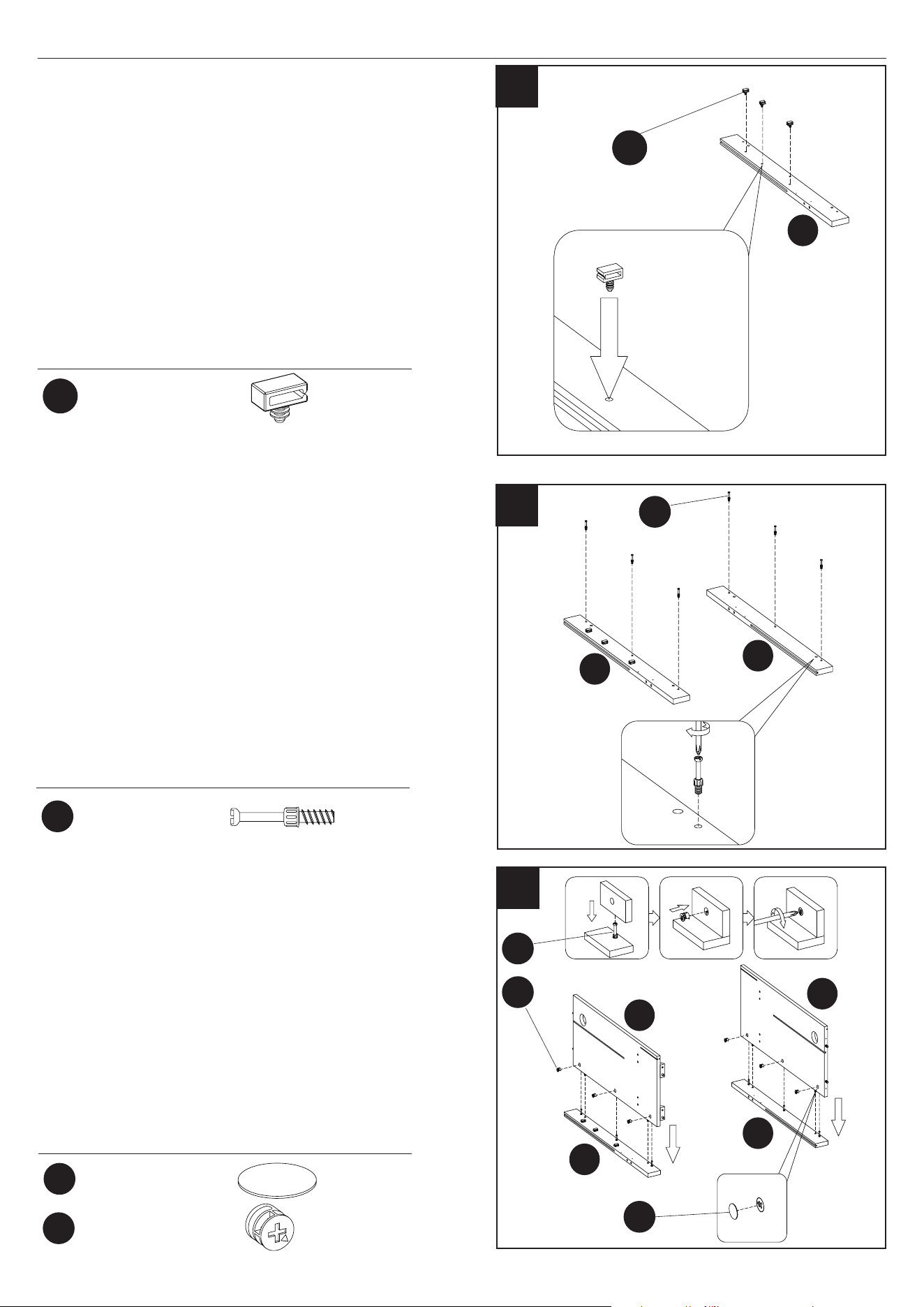
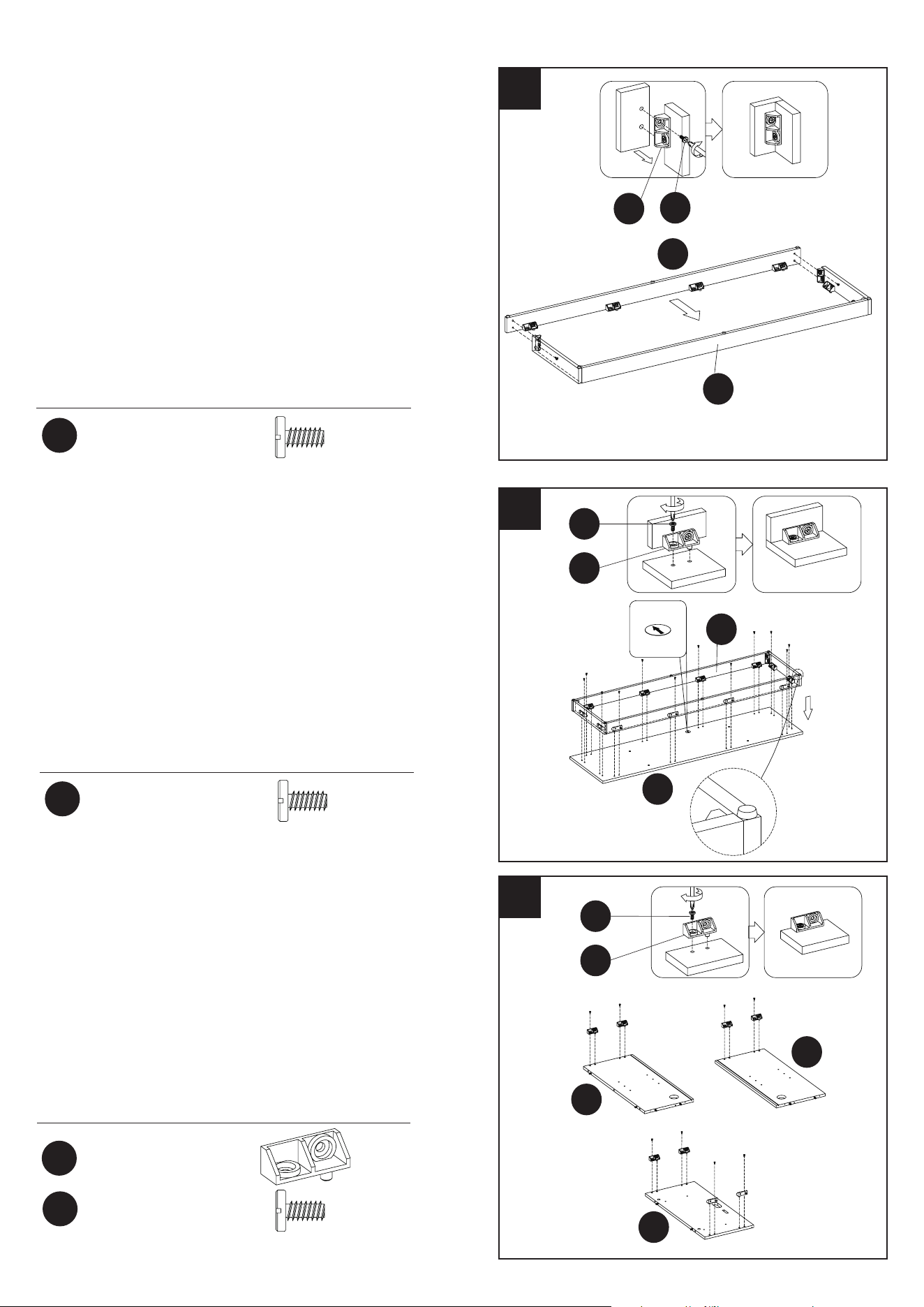
5. Preparing the Partitions
• Place the Plastic Connector Block (AA) as
shown.
• Fasten each Plastic Connector Block (AA) using
Bolts (BB). Repeat until all brackets are in place
as indicated in the diagram.
Hardware Used
4. Assembling the Base
• Locate the Base (A) and place upside down on
a at surface. Attach the assembled base rails
from step 3 to the bottom of the Base (A) by
fastening each Plastic Connector Block (AA)
using Bolts (BB).
I
F
K
Hardware Used
3
3. Assembling the Base
• Locate the Base Front Rail (E) and the Base Back
Panel Assembly (C).
• Align the Base Front Rail (E) with the Base Back
Panel Assembly (C).
• Fasten each Plastic Connector Block (AA) using
Bolts (BB) on the Base Back Panel (C), using a
Phillips Screwdriver.
C
E
E
A
Hardware Used
Ø6.3x12mm
Bolt
Ø6.3x12mm
Bolt
x 2
x 12
BB
BB
Plastic Connector
Block
Ø6.3x12mm
Bolt
x 8
x 8
AA
BB
AA
BB
AA
AA
BB
BB
11
23MMP7101 REV1.0
ASSEMBLY INSTRUCTIONS
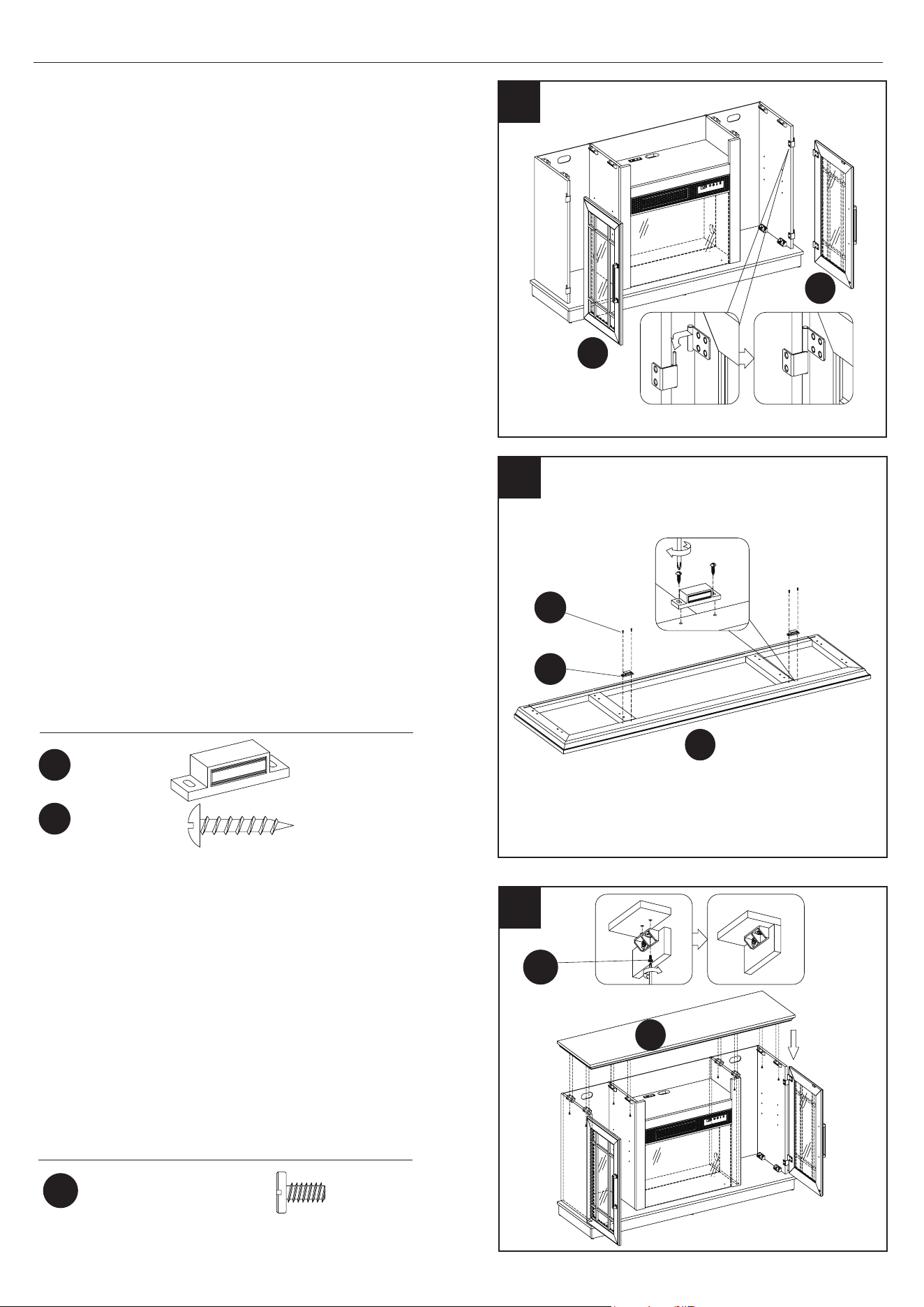
6
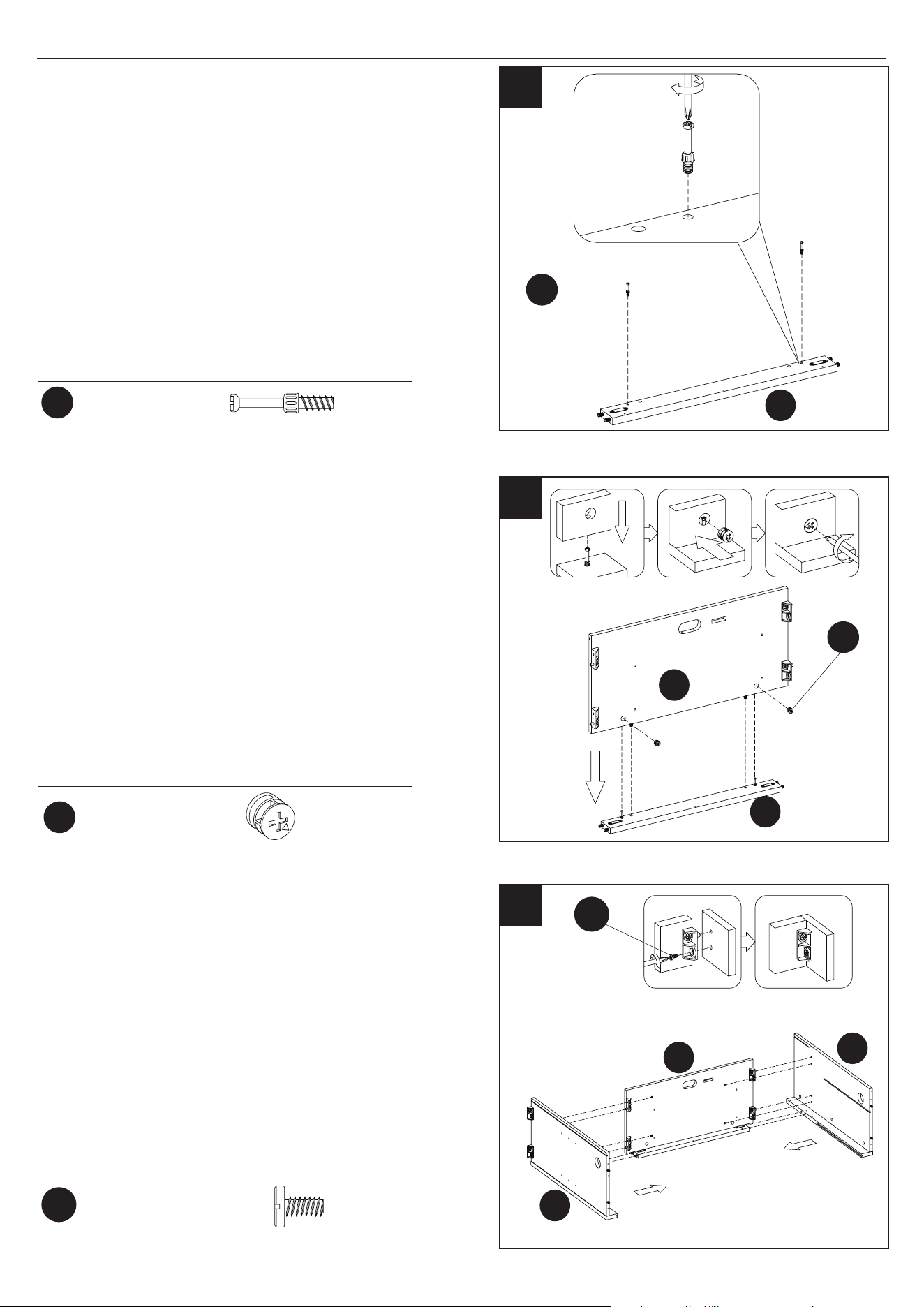
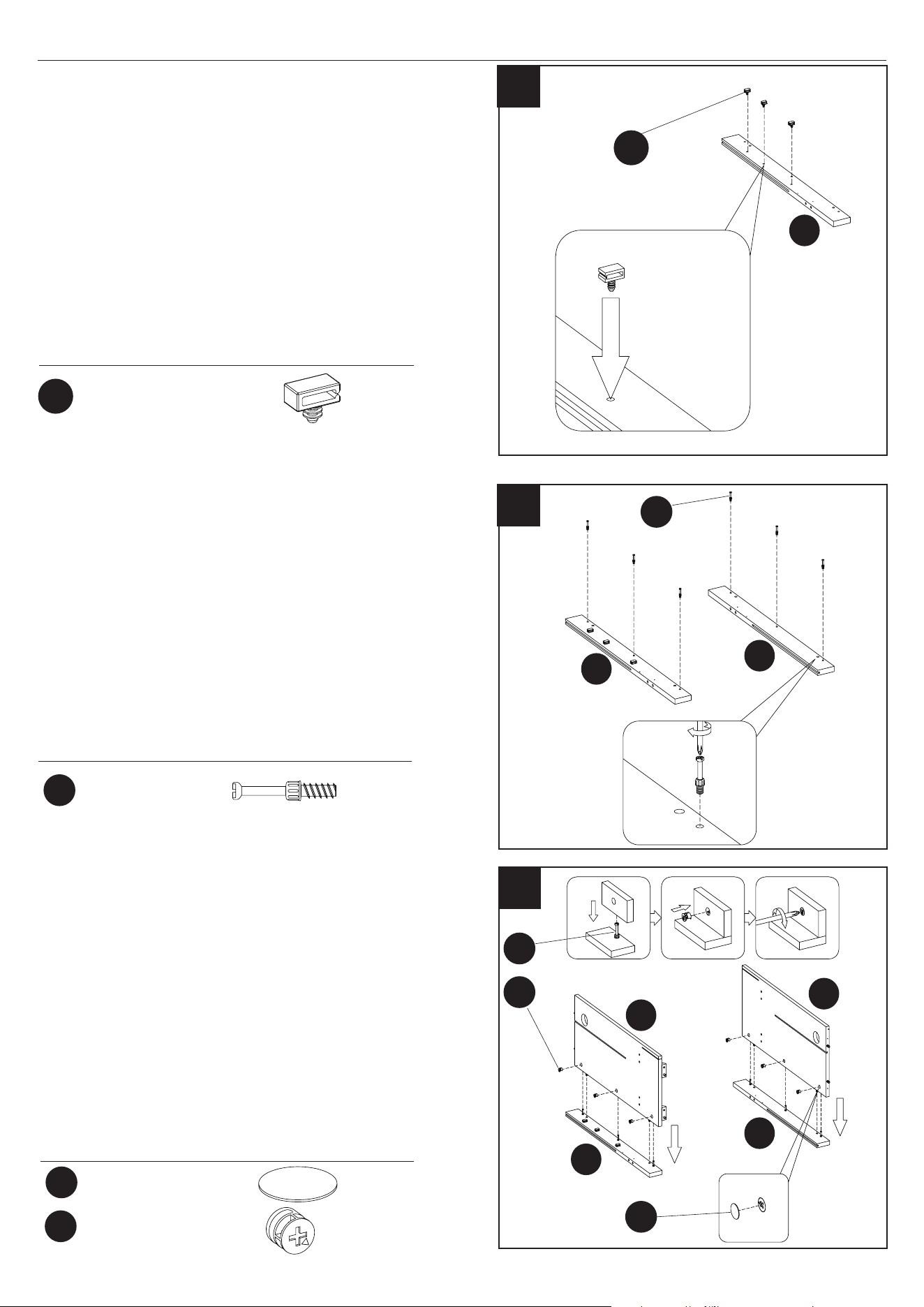
6. Attaching the Wire Clips
• Insert Wire Clips (CC) into pre-drilled holes in
the rail of the Right Surround Rail (J), pushing
them by hand.
J
Hardware Used
8
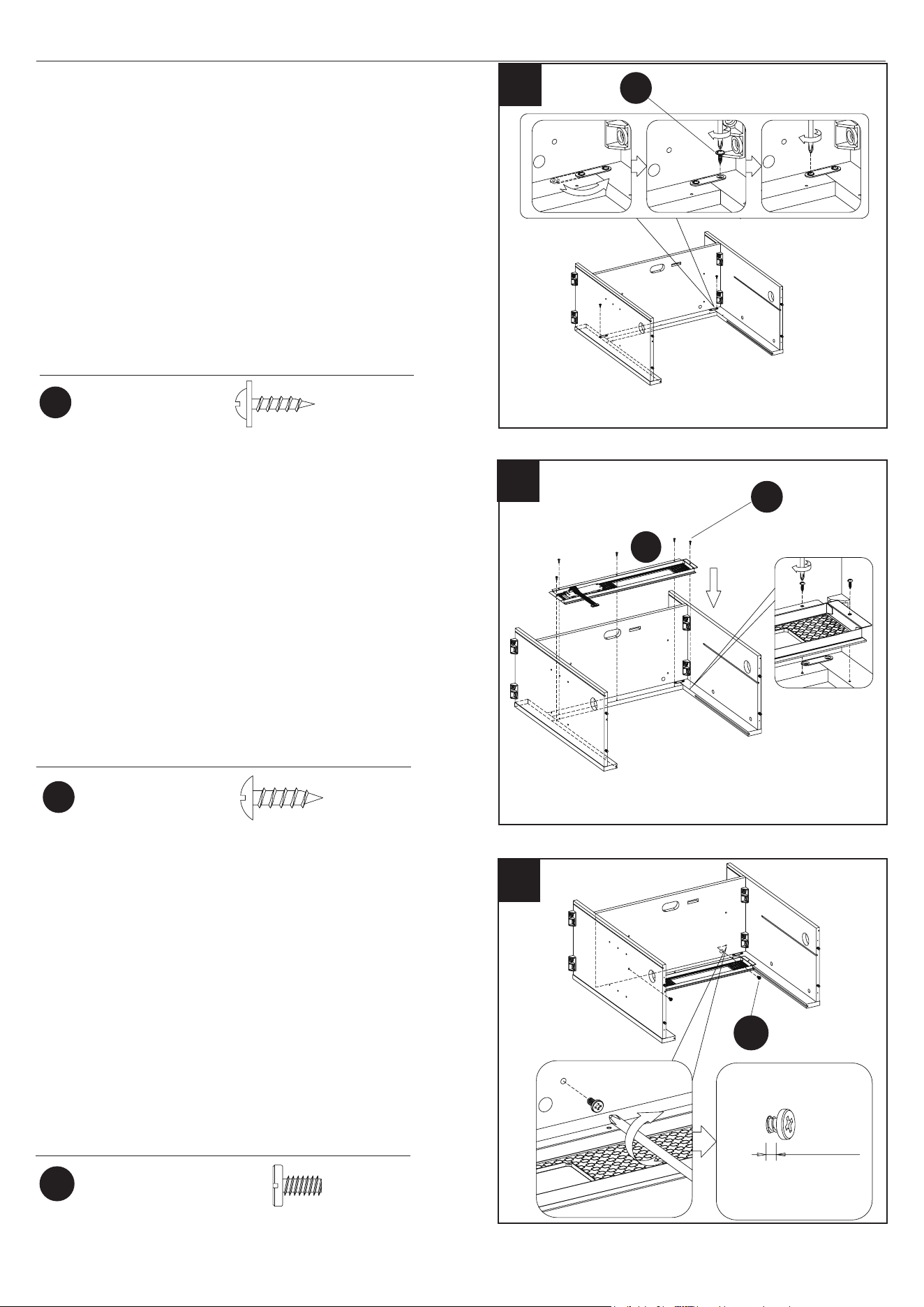
8. Attaching the Surround Rails
• Attach the Right Surround Rail (J) to the Right
Partition (I), inserting the Cam Bolts (EE) on the
Right Surround Rail (J) into the pre-drilled holes
on the Right Partition (I).
• Repeat these steps for the Left Surround Rail
(H) and Left Partition (F).
• Secure the Right and Left Surround Rails (I and
F) in place by tightening the Cam Locks (FF)
into place (with a Phillips Screwdriver as shown).
• Place and secure Cam Lock Covers (DD) over
the cam lock heads by hand.
Hardware Used
Hardware Used
7
7. Preparing the Surround Rails
• Place and tighten the Cam Bolts (EE) as
indicated in the diagram.
J
I
F
H
H
J
DD
DD
FF
FF
EE
EE
EE
x 6
x 6
x 6
x 3
CC
CC
Wire Clip
Cam Bolt
Cam Lock
Cam Lock Cover
12
23MMP7101 REV1.0
ASSEMBLY INSTRUCTIONS
10
9
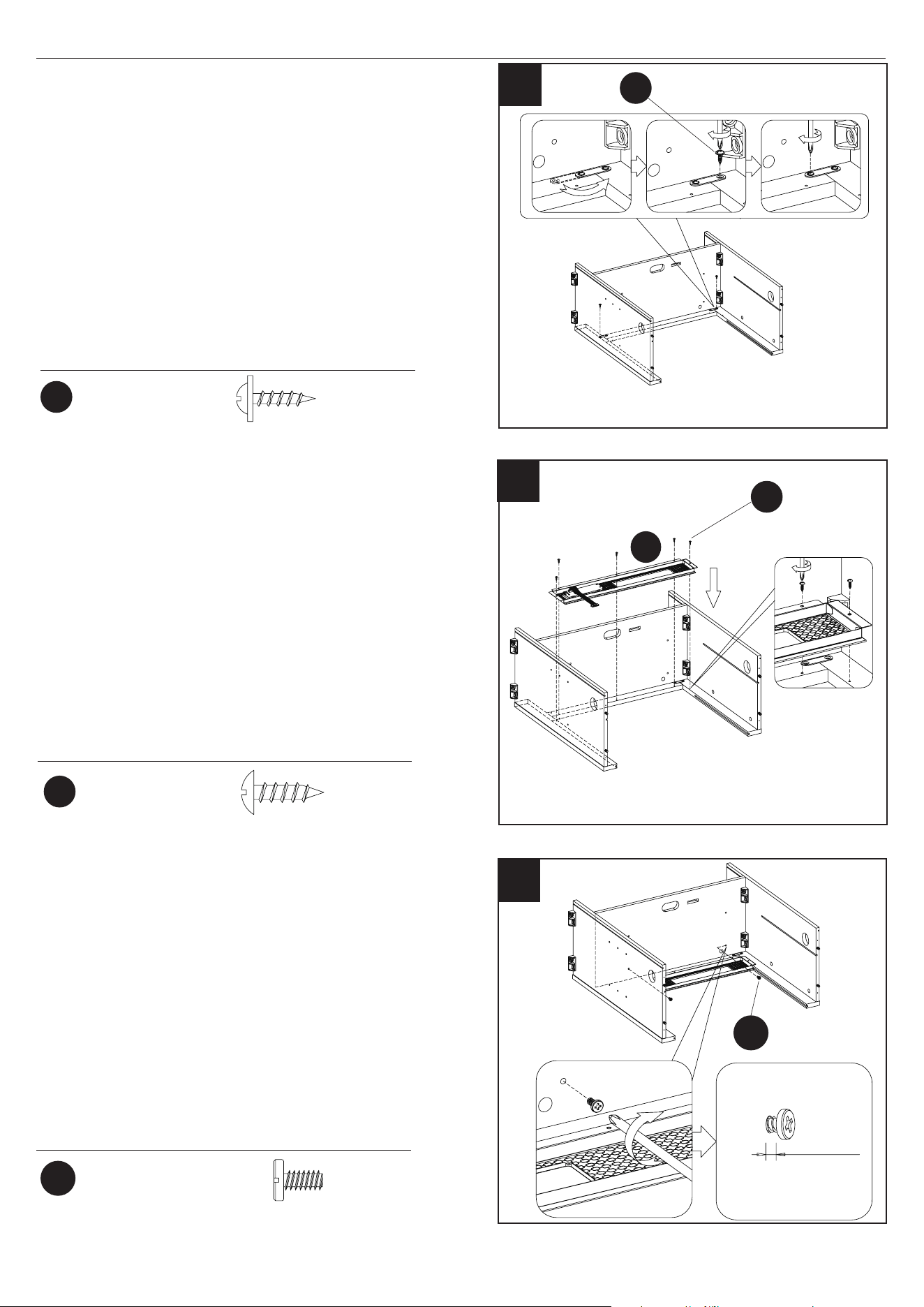
10. Preparing the Fixed Shelf
• Attach the Fixed Shelf (K) to the Top Partition Rail
(L), inserting the Cam Bolts (EE) on the Top Parti-
tion Rail (L) into the pre-drilled holes on the Fixed
Shelf (K).
• Secure in place by tightening the Cam Locks (FF)
with a Phillips Screwdriver.
9. Preparing the Top Partition Rail
• Place and tighten the Cam Bolts (EE) into the Top
Partition Rail (L) as indicated in the diagram.
K
L
L
11
Hardware Used
Hardware Used
11. Assembling the Fireplace Surround
• Locate the Fixed Shelf (K) and the Left and Right
Inside Panels (I and F).
• Align the Fixed Shelf (K) between the Left and
Right Partitions (I and F). Push together, inserting
the pre-installed screws on the Fixed Shelf (K) into
the holes on the Left and Right Partitions (I and F)
as shown.
• Tighten the Bolts (BB) on the Left and Right
Partitions (I and F) using a Phillips Screwdriver.
K
I
F
EE
EE
x 2
Cam Bolt
Hardware Used
FF
FF
x 2
Cam Lock
Ø6.3x12mm
Bolt
x 4
BB
BB
13
23MMP7101 REV1.0
ASSEMBLY INSTRUCTIONS
12
Hardware Used
Hardware Used
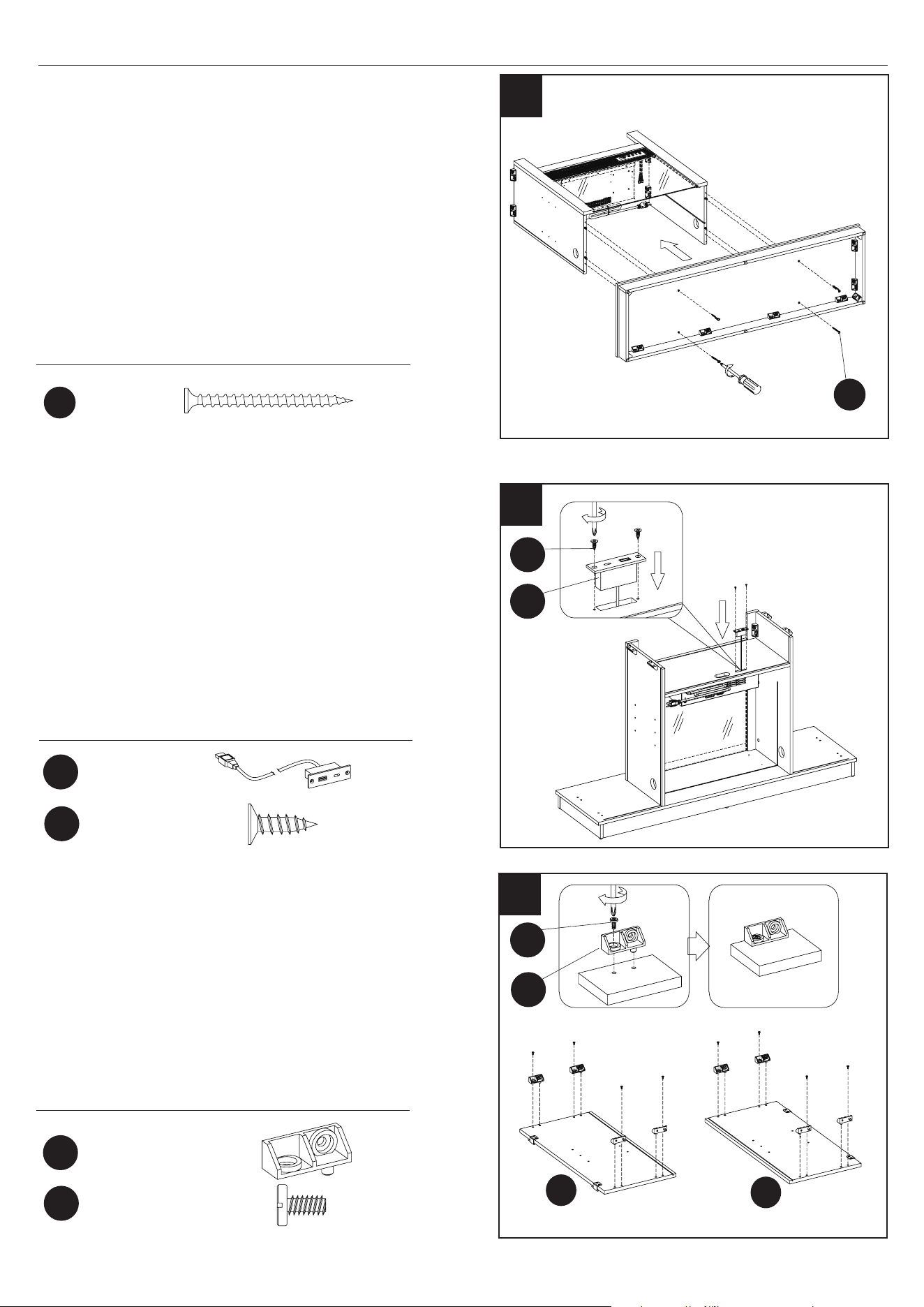
13. Assembling the Fireplace
• Locate the Front Panel with Control Button
(EA).
• Using Screws (HH), secure the Front Panel
with Control Button (EA) between the Left and
Right Inside Panels and just below the Center
Shelf as shown.
12. Securing the Surround Brackets
• Find the pre-attached metal plate bracket behind
the top surround rail. Rotate the bracket to span
the joint of the top surround rail and side
surround rail.
• Secure the surround bracket with Screws (SS).
• Repeat to secure both sides.
HH
HH
SS
SS
x 5
13
x 2
EA
Ø3.5x12mm
Screw
Ø3x12mm
Screw
14
14. Installing Mounting Bolts for the Fireplace
• Partially screw mounting Bolts (BB) into the
Center Shelf. Leave approximately a 1/8” gap to
place the heater as shown in step 13.
Hardware Used
Ø6.3x12mm
Bolt
x 2
BB
BB
1/8"
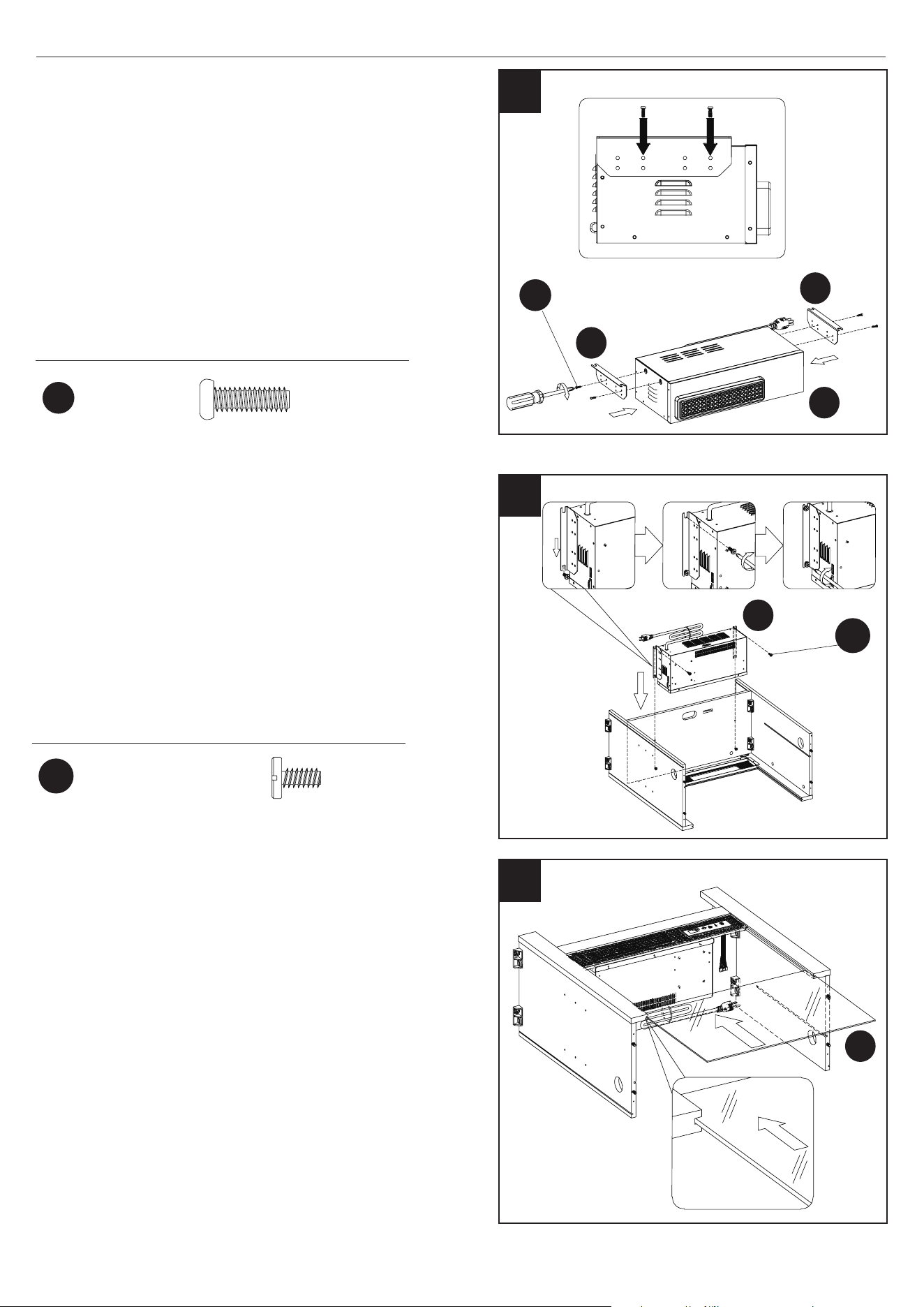
14
23MMP7101 REV1.0
ASSEMBLY INSTRUCTIONS
16
Hardware Used
Hardware Used
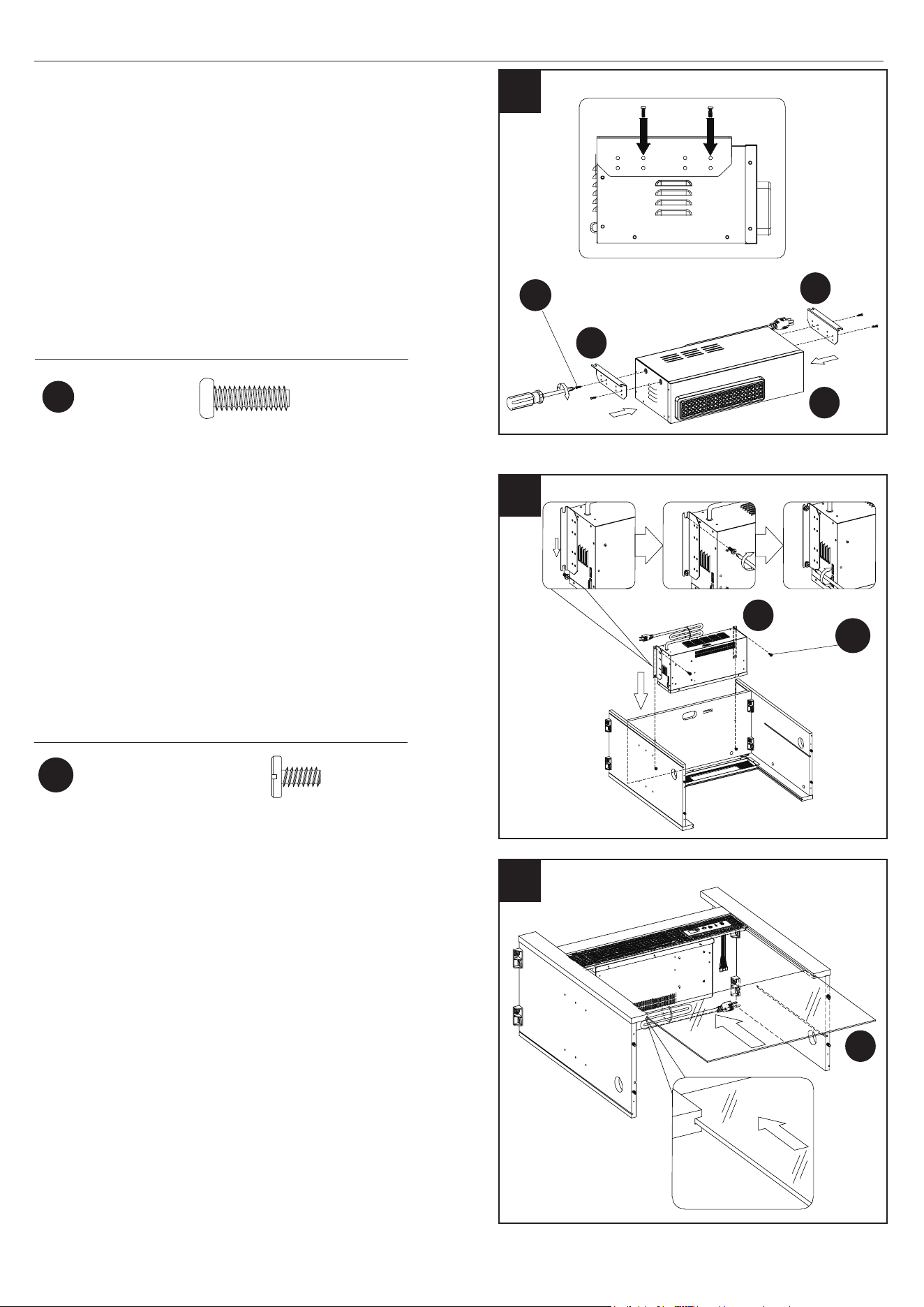
16. Attaching the Heater Box Assembly
• Locate the Heater Box (EB) and align it behind
the Control Panel Support.
• Secure the heater box to the center shelf using
Bolts (BB). Tighten on both sides using a
Phillips screwdriver.
17
15
17. Placing the Glass Front
• Turn the unit over so that Control Panel is now
facing upward.
• Locate the Electric Fireplace Glass Panel (M).
• Carefully insert the Electric Fireplace Glass Panel
(M) into the grooves of the surround rails as
shown. Slide all the way in until the glass meets
the bottom of the Control Panel.
15. Attaching the Insert Brackets
• Locate the Brackets (EF) and secure to each side
of the Heater Box (EB) using Bolts (II).
M
EF
EF
EB
EB
II
II
x 4
Ø6.3x12mm
Bolt
x 2
BB
BB
Ø4x12mm
Bolt
15
23MMP7101 REV1.0
19
Hardware Used
Hardware Used
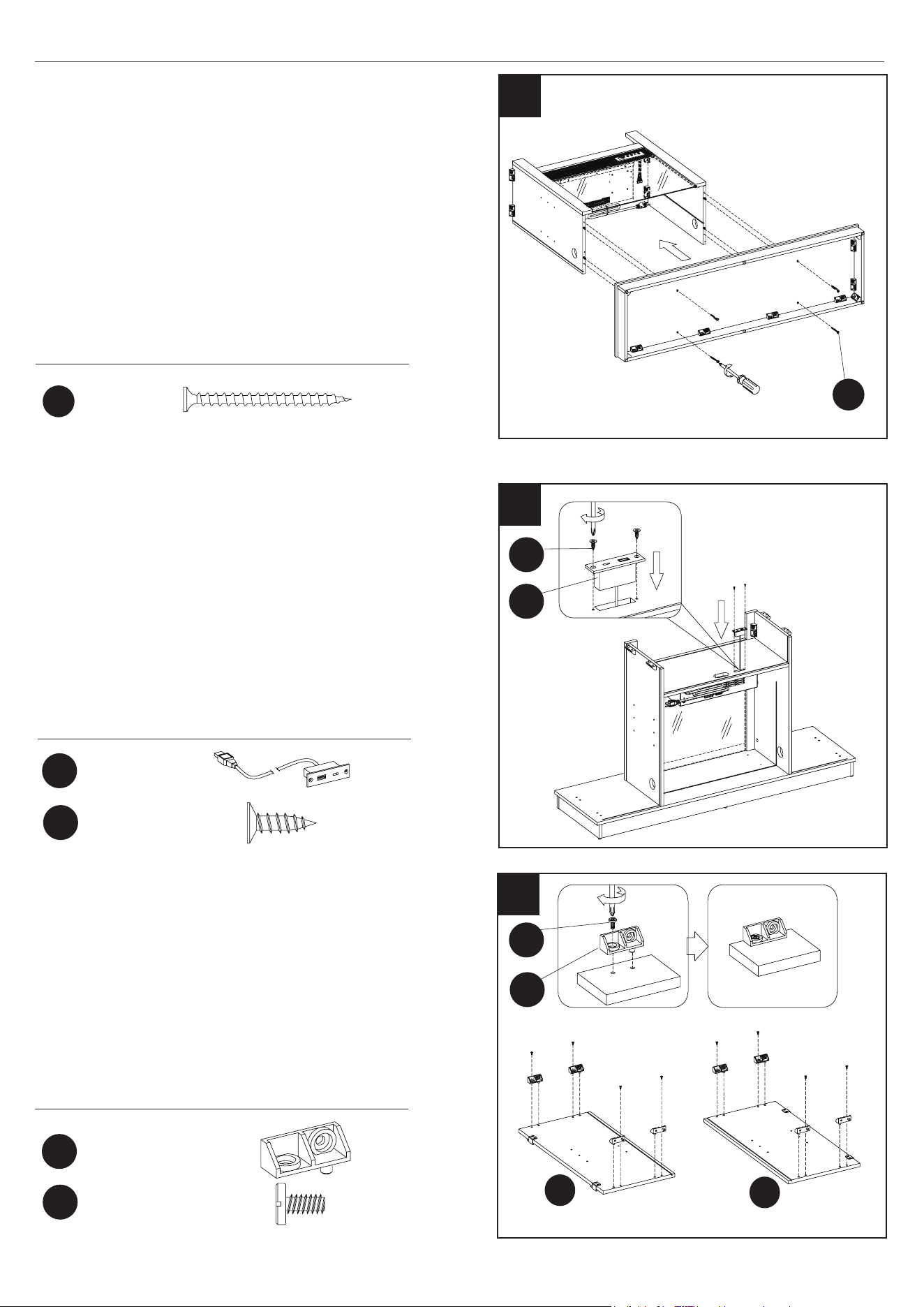
19. Installing the USB Port
• Carefully turn the unit so that it is sitting upright
on a at surface.
• Slide the USB output (KK) through the opening
in the center shelf.
• Carefully secure the USB output (KK) in place
using Screws (LL) and a Phillips screwdriver.
18
18. Attaching the Base
• Locate the base assembly and align the pre-
drilled holes on the base panel with the edges of
the center assembly.
• Insert Screws (JJ) through the base assembly and
into the pre-drilled holes on the edges of the
center assembly as shown.
• Securely tighten all screws using a Phillips
screwdriver.
ASSEMBLY INSTRUCTIONS
JJ
JJ
x 4
x 1
x 2
KK
KK
LL
LL
Ø4x50mm
Screw
USB output
980TC
Ø3x12mm
Screw
Note: USB to AC adapter is not included.
20
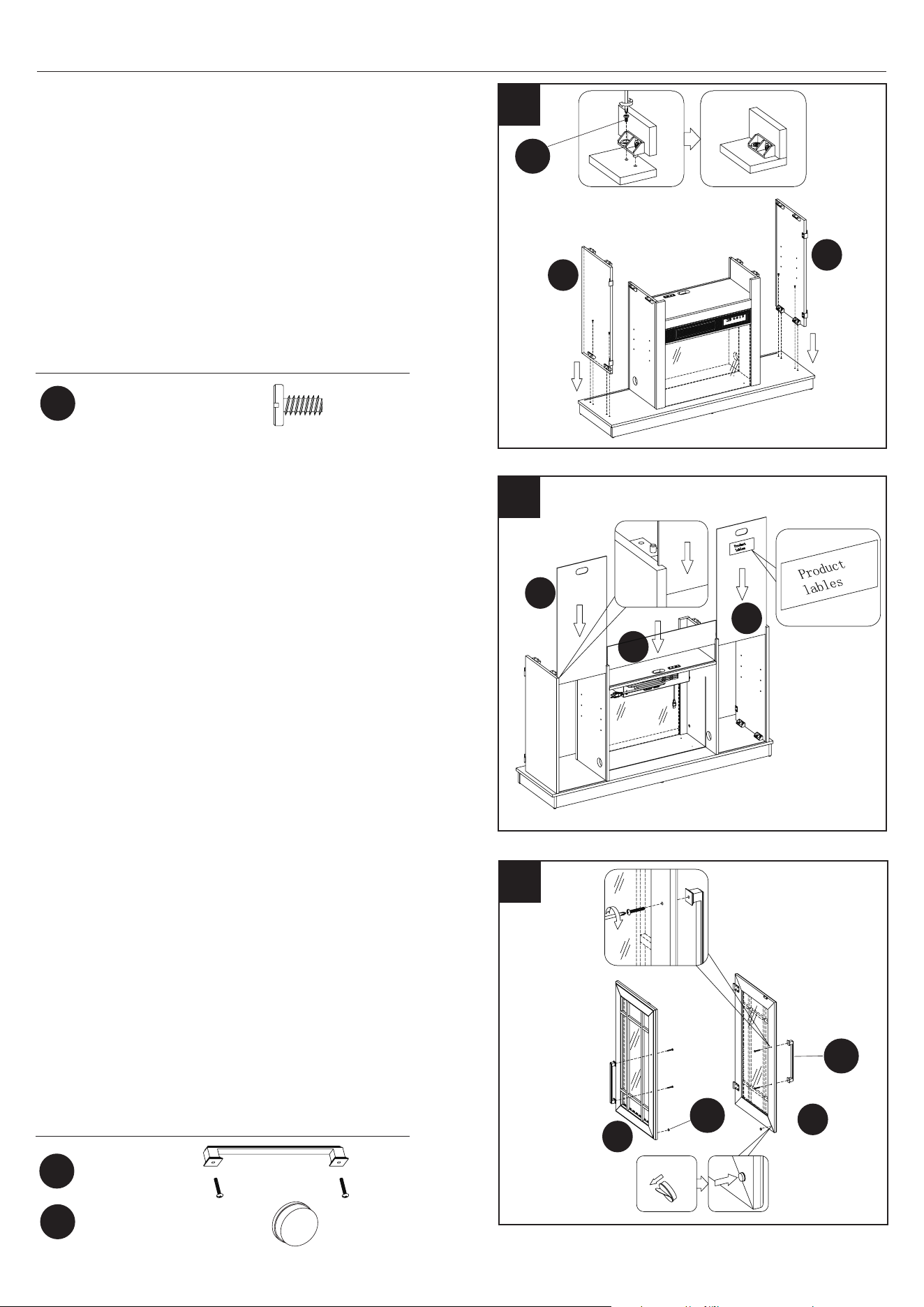
20. Preparing the Side Panels
• Place the Plastic Connector Block (AA) as shown.
• Fasten each Plastic Connector Block (AA) using
Bolts (BB). Repeat until all connector blocks are
in place as indicated by the diagram.
O
Hardware Used
N
Plastic Connector
Block
Ø6.3x12mm
Bolt
x 8
x 8
AA
AA
BB
BB
16
23MMP7101 REV1.0
ASSEMBLY INSTRUCTIONS
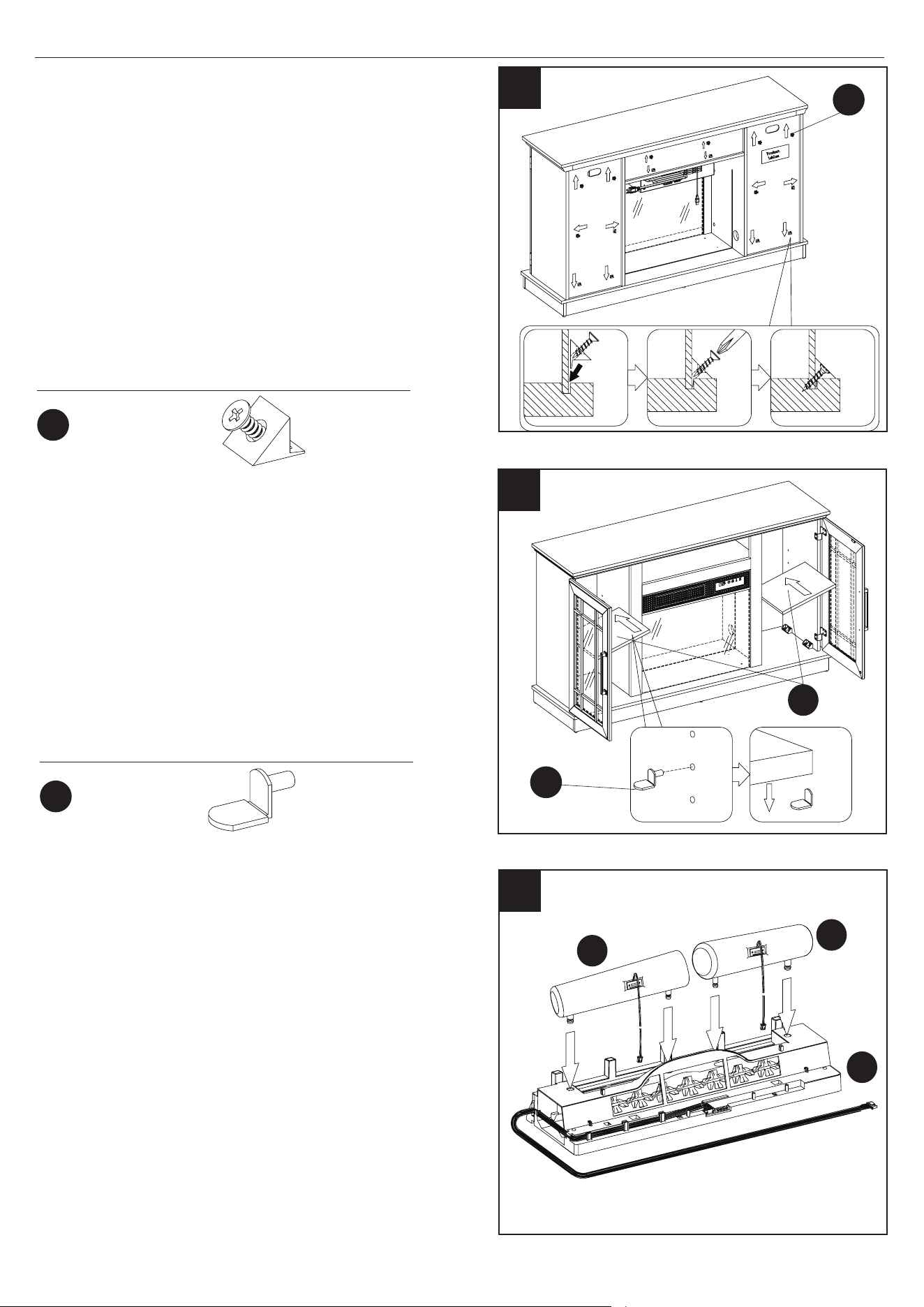
23. Attaching the Door Handles
• Locate Left and Right Doors (P and Q).
• Each Door Handle (MM) has pre-attached screws.
Remove these screws and place handles over the
pre-drilled holes in the Left and Right Doors
(P and Q).
• Place the pre-attached screws on the other side
of the Left and Right Doors (P and Q) and tighten
with a Phillips Screwdriver through the door and
into the handle.
• Place the Door Bumpers (NN) on the inner edge
of each Door (P and Q) as indicated. Simply pull
o the adhesive and stick.
23
21
21. Attaching the Side Panels
• Locate the Left and Right Side Panels (N and O).
• Align the Left and Right Side Panels (N and O)
with the Base.
• Insert Bolts (BB) through the base assembly and
into the pre-drilled holes on the edges of the Left
and Right Side Panels (N and O) as shown.
Q
P
O
Hardware Used
Hardware Used
R
R
S
22. Attaching the Back Panels
• Locate the Side Back Panels (R) and the Upper
Back Panel (S).
• Slide the Side Back Panels (R) into the grooves
between the inner and outer side panels as
shown. Slide all the way down until the Side
Back Panels (R) meet the bottom shelf.
• Slide the Upper Back Panel (S) into the
grooves between the inside panels. Slide all
the way down until the Upper Back Panel (S)
meets the bottom of the center shelf.
22
N
Ø6.3x12mm
Bolt
x 2
x 2
x 4
MM
MM
NN
NN
BB
BB
Handle with
Screw
Door Bumper
17
23MMP7101 REV1.0
G
ASSEMBLY INSTRUCTIONS
25
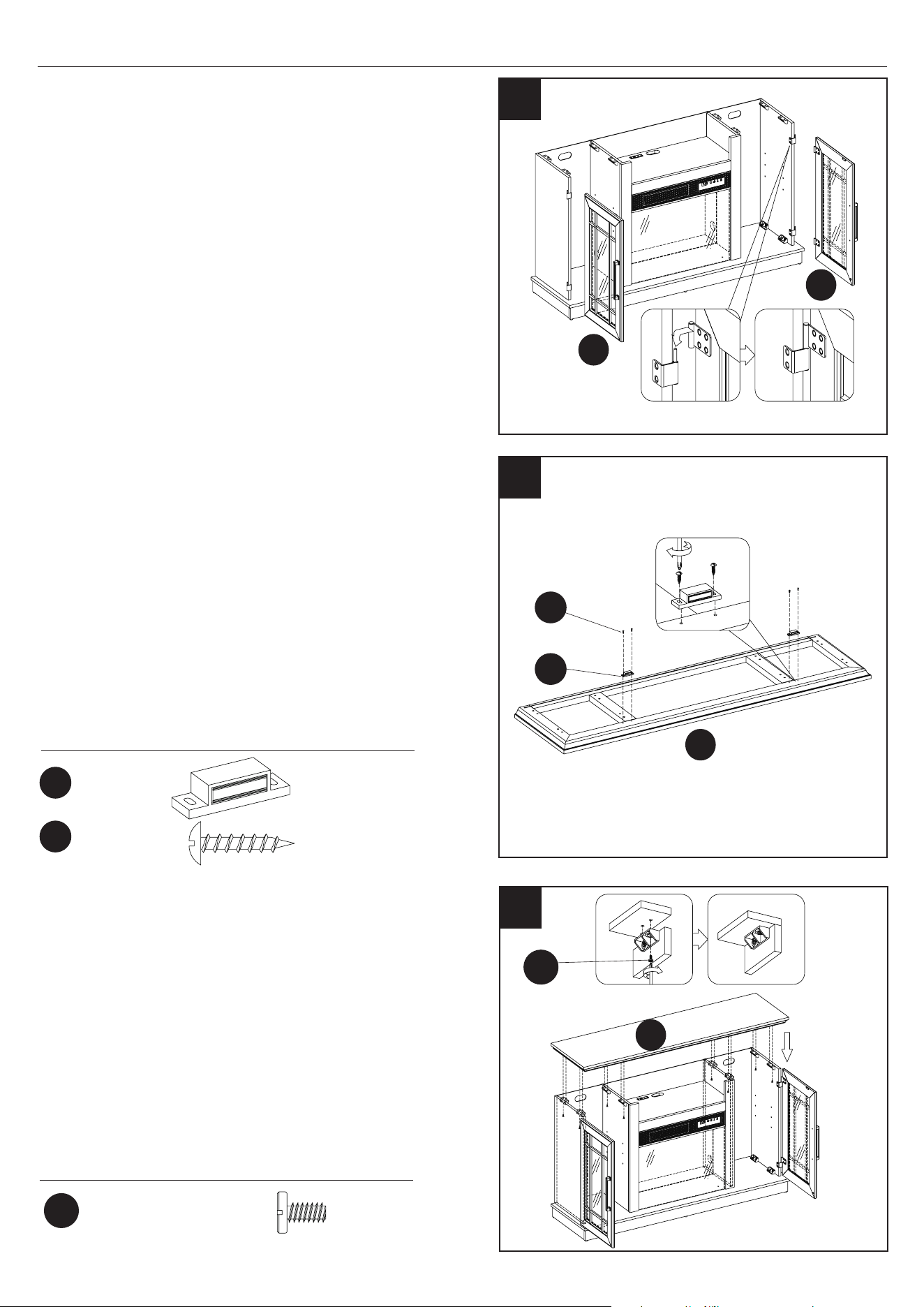
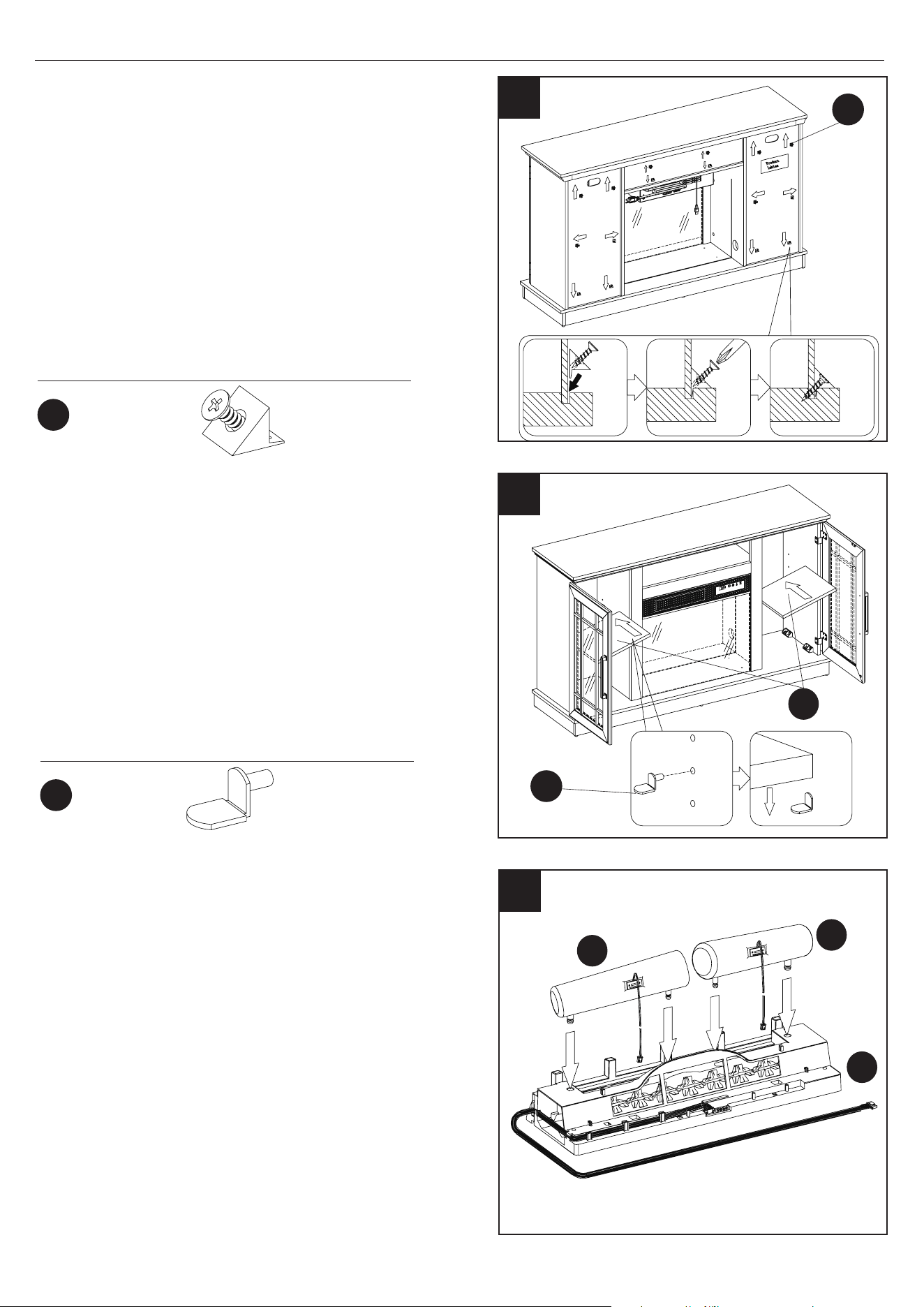
24. Attaching the Cabinet Doors
• Lift the Left Door (P) and align the hinges with the
pre-attached hardware on the main assembly as
shown.
• Slide the barrel of the hinge on the door downward
onto the pin of the hardware on the main assembly.
• Repeat steps with the Right Door (Q).
25. Attaching the Door Catch
• Locate the Top Panel (G) and place on a at surface.
• Attach the Magnetic Door Catches (OO) to the Top
Panel (G) using Screws (PP) where indicated by the
diagram.
Note: Do not tighten the screws in this step.
After assembling the door in step 26, adjust the
magnet’s position forward or backward to better
match the door to the unit, and then tighten
the screws.
Hardware Used
OO
OO
PP
PP
x 2
x 4
Ø3x15mm
Screw
Magnetic
Catch
26. Attaching the Top Panel
• Locate the Top Panel (G) and align screws (BB)
with the screw holes on the top edges of the main
assembly.
• After inserting the Bolts (BB) into the holes, tight-
en the fasteners from underneath the Top Panel
(G) using a Phillips Screwdriver as shown.
G
26
Hardware Used
Ø6.3x12mm
Bolt
x 8
BB
BB
Q
P
24
18
23MMP7101 REV1.0
ASSEMBLY INSTRUCTIONS
Hardware Used
Hardware Used
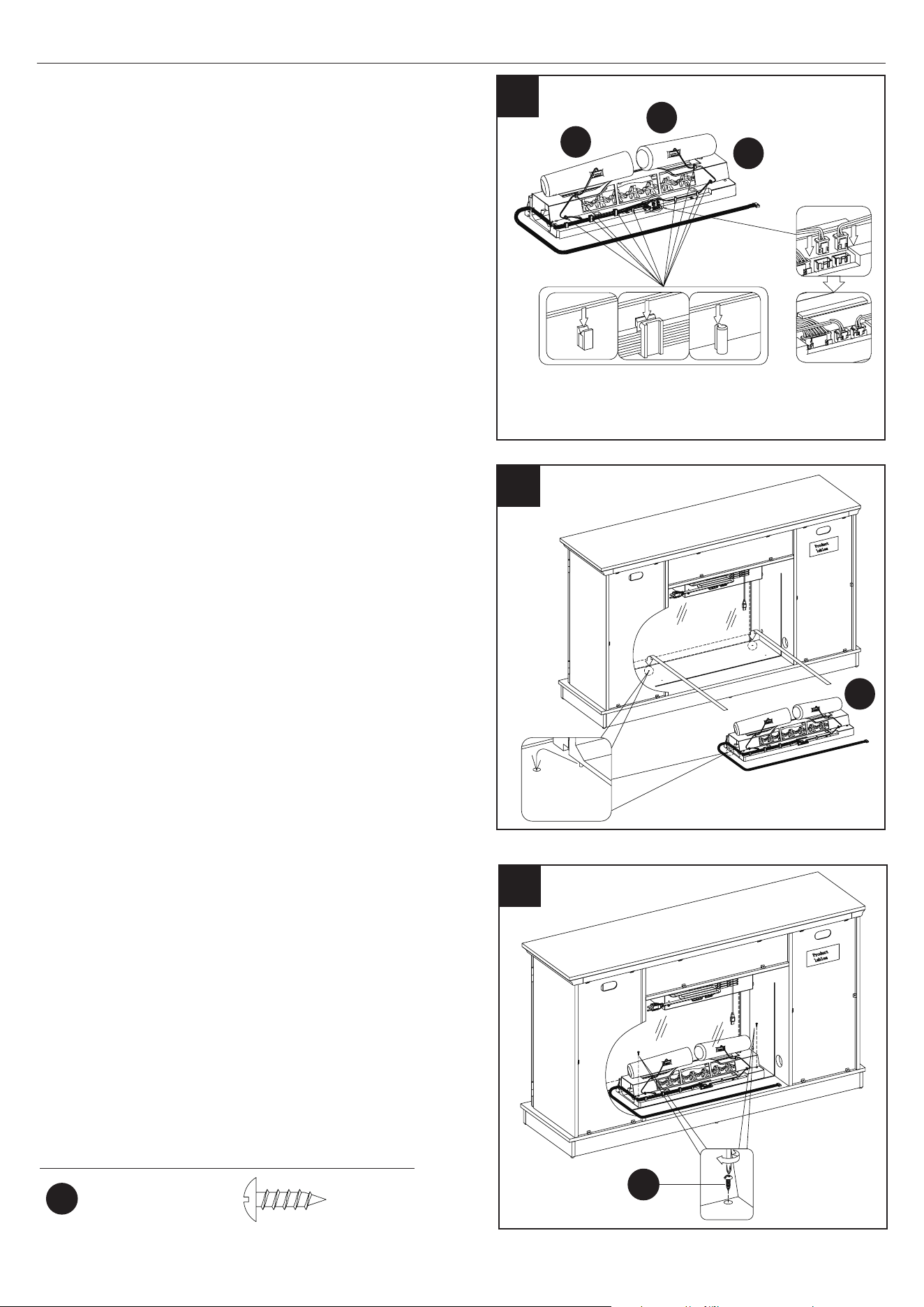
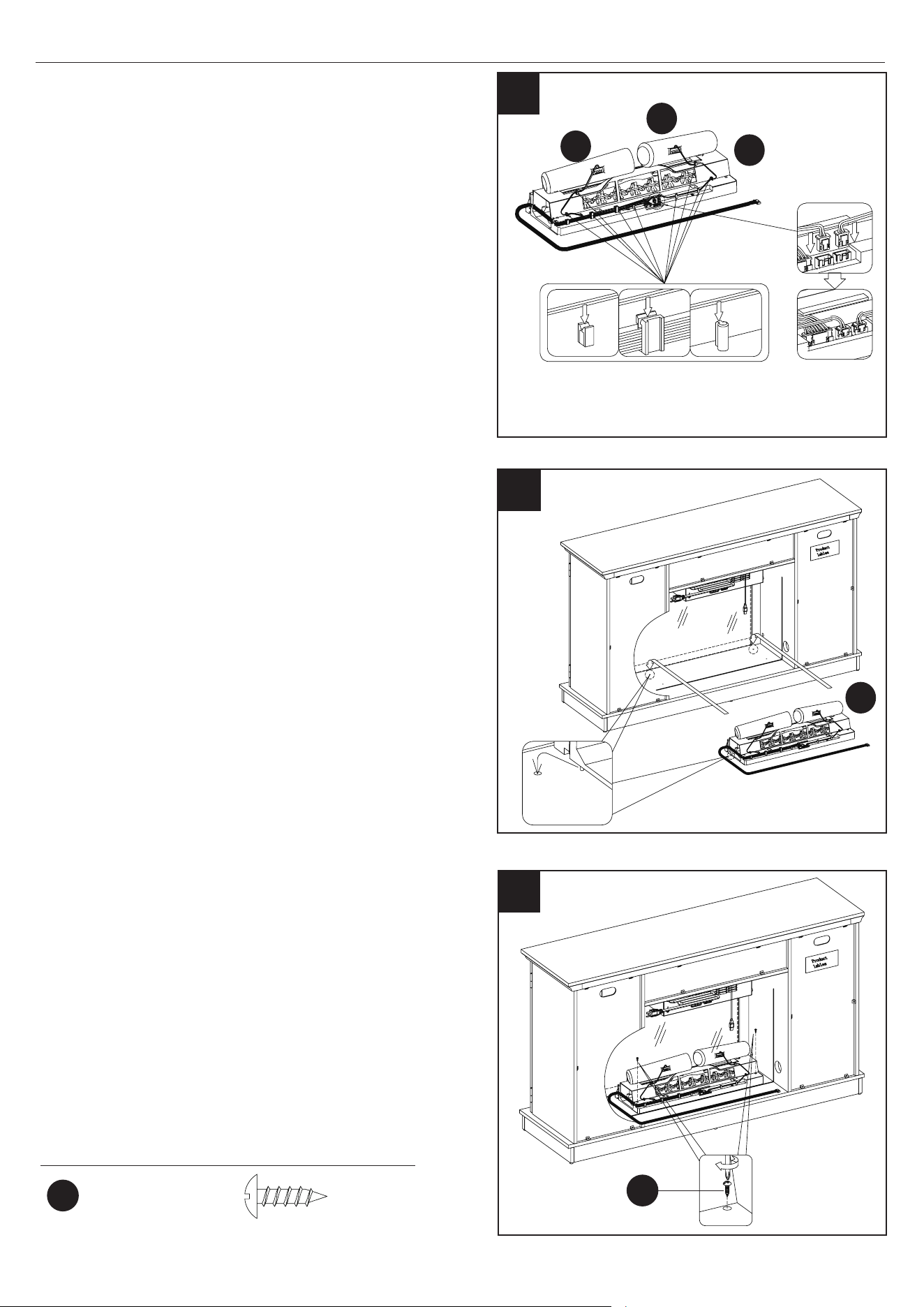
27. Securing the Back Panels
• Place the Back Panel Brackets (QQ) between the
back panels and the grooves of the assembly
as shown.
• Fasten each Back Panel Bracket (QQ) using
pre-attached screws.
• Note that these screws are self-drilling and do
not require pilot holes in the wood. Repeat until
all brackets are in place as indicated by the diagram.
QQ
QQ
RR
x16
x8
28. Inserting the Adjustable Shelves
• Locate the two Adjustable Shelves (T).
• Insert the Shelf Pins (RR) into the pre-drilled holes
on the inside of each cabinet side panel at your
desired height. Align all pins to the same height to
ensure your shelf is level.
• Rest each Adjustable Shelf (T) on the Shelf Pins
(RR) as shown.
27
29
29. Assembling the Log Set
• Place the Log set Left (EC) into the Ember Bed
(EG) as shown.
• Repeat with the Logs Right (ED).
ED
EG
EC
Back Panel
Bracket
Shelf Pin
Warning: Back Panels must be secured as
shown to provide rigid construction. DO
NOT bypass this installation step!
RR
28
T
19
23MMP7101 REV1.0
ASSEMBLY INSTRUCTIONS
30
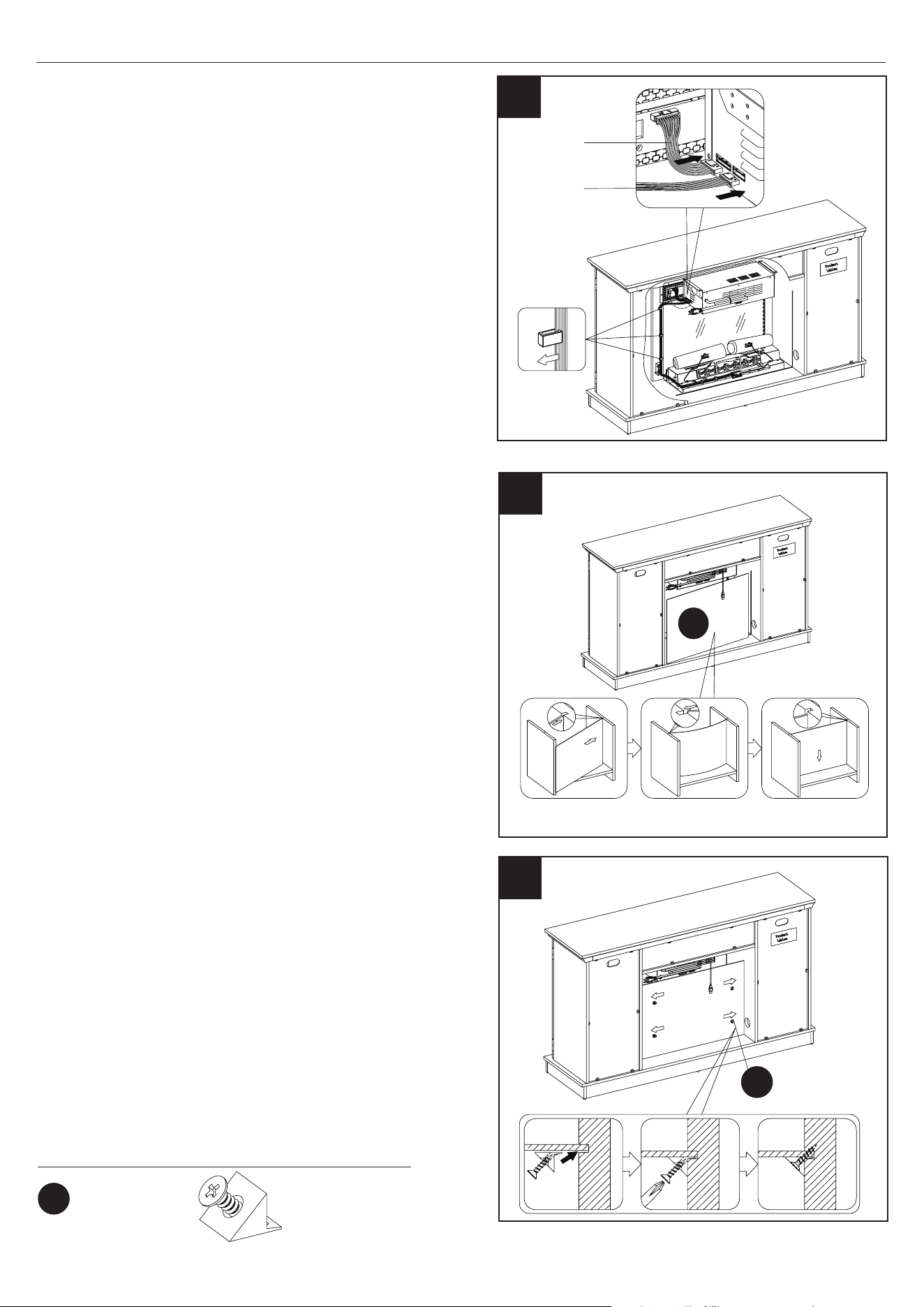
30. Assembling the Log Set
• Route the wires of the Log Set Left (EC) and the
Log Set Right (ED) down the back of the Ember
Bed (EG) and into the receiving tabs to secure in
place. Refer to the diagram.
• Gently plug the cords from both the Log Set Left
(EC) and the Log Set Right (ED) into the ports as
shown. Ensure the cords are plugged in straight.
ED
EG
EC
31. Assembling the Fireplace
• Place the assembled log set into the back of the
unit behind the glass panel.
• Push the tabs beneath the log set into the holes
on the bottom panel.
32
32. Securing the Log Set
• Once the log set is in place, secure with Screws
(HH) through the bottom of the log set and into the
base.
Hardware Used
HH
HH
x 2
Ø3.5x12mm
Screw
EG
31
20
23MMP7101 REV1.0
ASSEMBLY INSTRUCTIONS
33
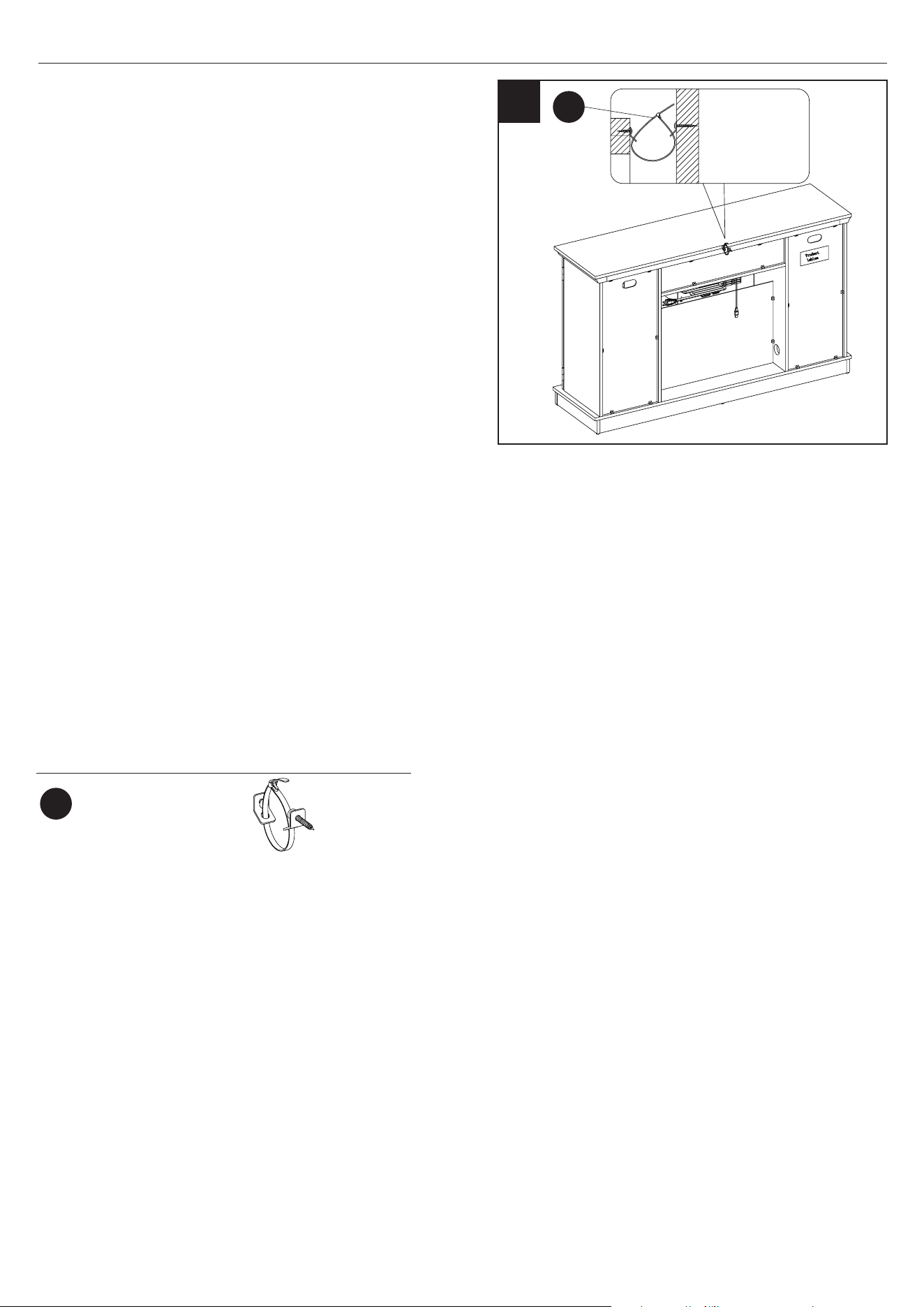
33. Connecting the Fireplace Wiring
• Connect control panel cable to heater.
• Insert the Ember Bed Connection Wire into the
heater.
• Route the Ember Bed Connection Wire down the
side of surround rail and along the back of the log
set, securing it in place with the clips as shown.
34. Placing the Fireplace Background
• Locate the Electric Fireplace Back Panel (U).
• Only slightly bend the wallpaper and t it into the
back of the replace.
• Note: This back panel is reversible and can be
placed with either side facing the replace
insert for a customizable look.
Control Panel
Cable
Ember Bed
Connection Wire
35. Securing the Fireplace Background
• Place the Back Panel Brackets (QQ) between the
back panels and the grooves of the assembly as
shown.
• Fasten each Back Panel Bracket (QQ) using
pre-attached screws. Repeat until all brackets are
in place as indicated by the diagram.
• Note that these screws are self-drilling and do
not require pilot holes in the wood. Repeat until
all brackets are in place as indicated by the
diagram.
Hardware Used
QQ
x4
Back Panel
Bracket
Warning: Back Panels must be secured as
shown to provide rigid construction. DO
NOT bypass this installation step!
34
35
U
QQ
21
23MMP7101 REV1.0
ASSEMBLY INSTRUCTIONS
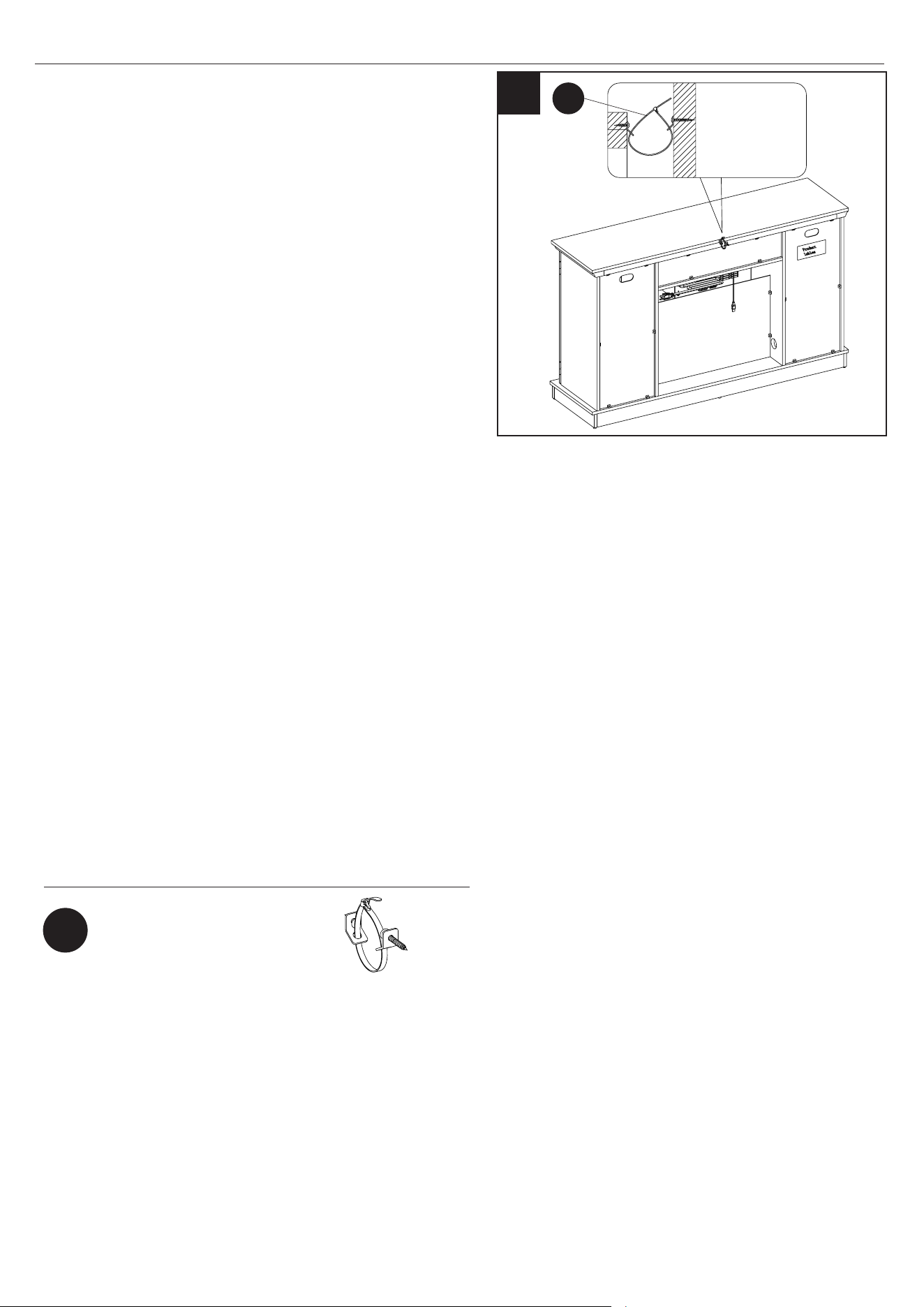
36. Installing the Tip Restraint Hardware
• When the Tipping Restraint Hardware (GG) is
properly installed, it can provide protection
against unexpected tipping of the Unit due to small
tremors, bumps or climbing.
• Each Tipping Restraint Hardware (GG) includes one
Unit Anchor, one Wall Anchor, one Anchor Tether,
and two Anchor Screws. Use these to complete the
following steps for a proper installation.
• Locate a secure wall stud behind the unit closest to
left side.
• Align the Unit Anchor with a wall stud and attach
to the Unit with one Anchor Screw using a Philips
Screwdriver. The Anchor Screws must pass through
the Top Assembly for proper installation.
• Align the Wall Anchor in the center of the wall stud,
at level with the Unit Anchor, and with one Anchor
Screw using a Philips Screwdriver.
• On the Anchor Tether, detach the cable from the
connector and loop the loose cable through the eyelets on the Wall Anchor and Unit Anchor. Reattach
the loose cable to the connector, but do not tighten.
• Tighten both Anchor Tethers by pulling the cable the through connector.
NOTE: Installation of the Tipping Restraint Hardware (GG) will provide a small space between the wall
and the unit. This will allow you to run power cords and connector cables to your television or other
devices placed on top of the unit.
WARNING: Installing the Tipping Restraint Hardware will help prevent accidents or damage to the unit.
Hardware Used
x1
GG
GG
Tipping Restraint
Hardware
36
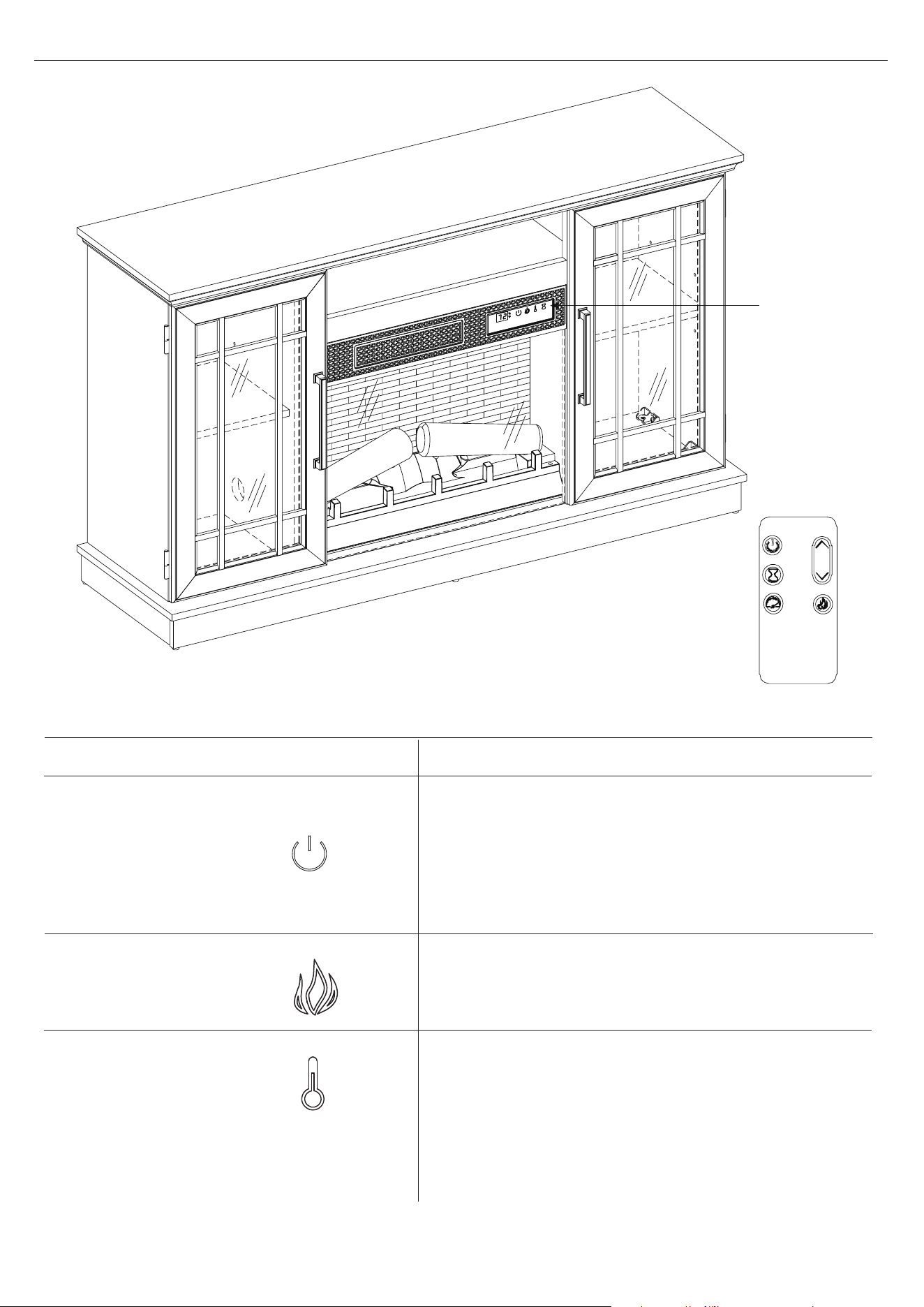
22
23MMP7101 REV1.0
OPERATING INSTRUCTIONS
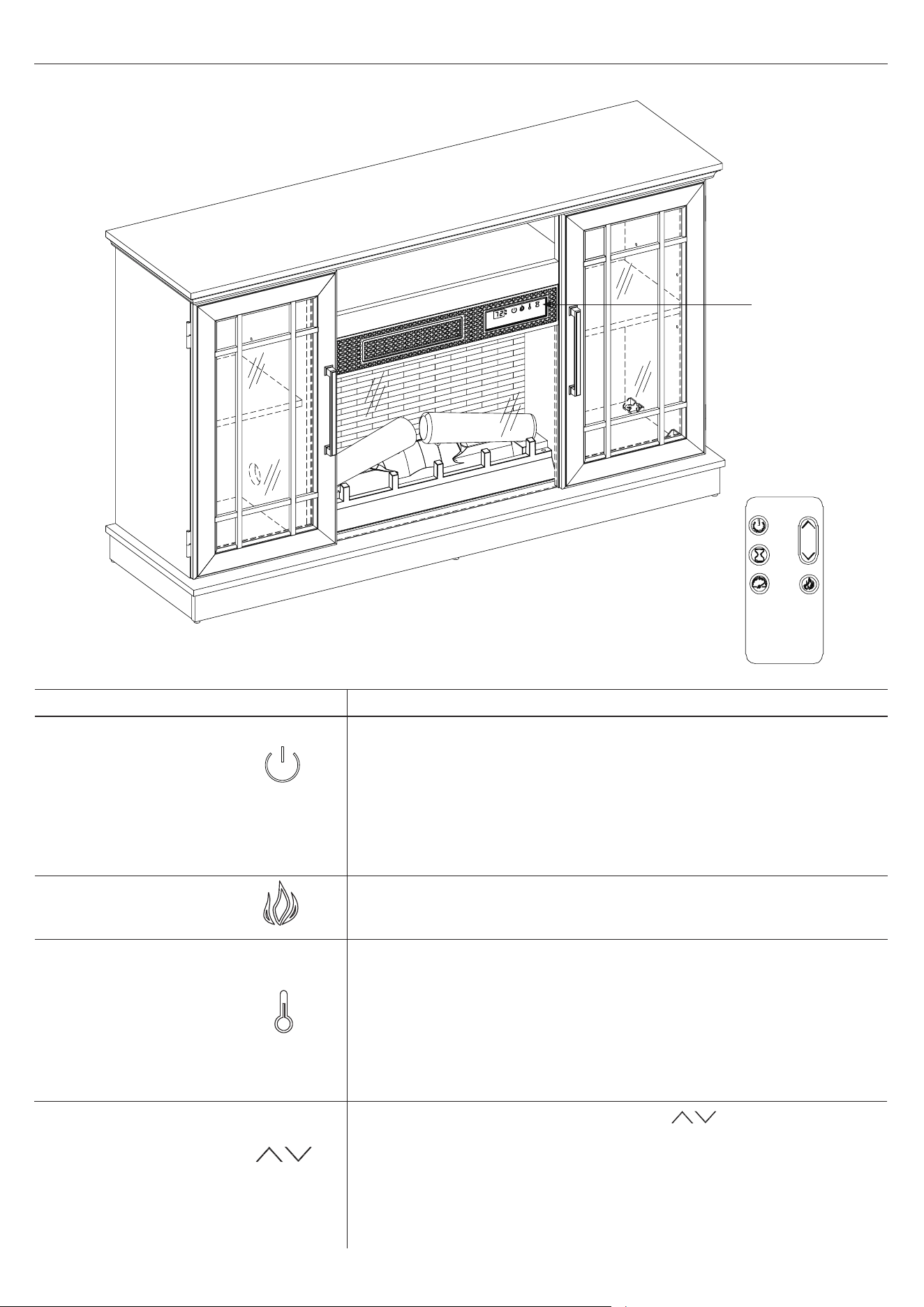
CONTROL
PANEL
LOCATION
FUNCTION
FLAME
POWER
There are 5 brightness levels that can be selected
and OFF (00) setting. Settings F5 - F1 decrease in
brightness.
The POWER button supplies power to all the
functions of the heater. Pressing the POWER button
again will put the heater in standby mode.
Holding the Power button on the control panel for 10
seconds will disable the heater function.
HEATER
ICON
DESCRIPTION
Press the heater button on the control panel to turn
on/o (00) and adjust the heater setting.
To change between °F and °C, press and hold the
HEATER button on the control panel for 3 seconds.
The thermostat setting range is 62°F - 82°F
( 17°C - 27°C) or continuously ON.
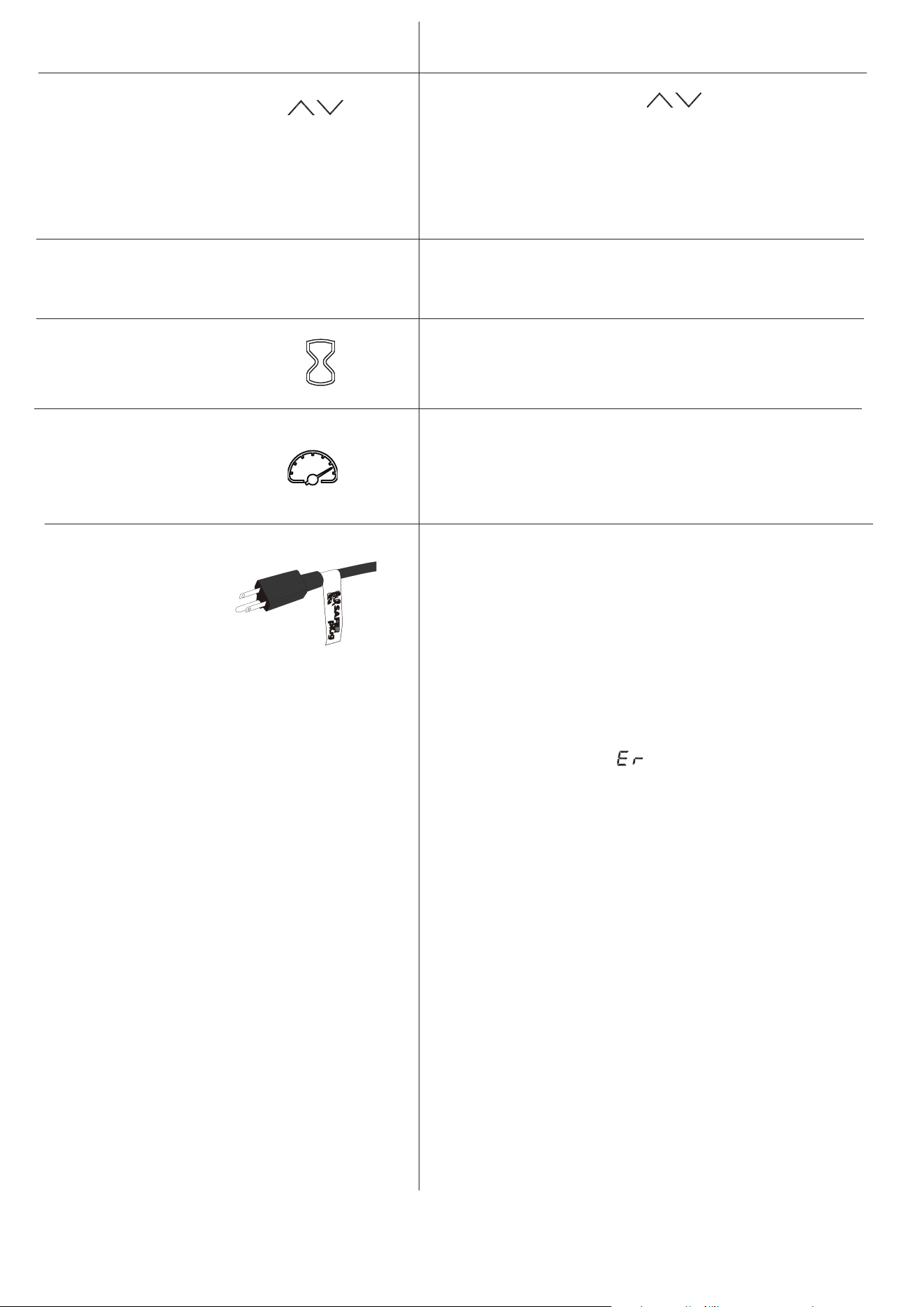
23
23MMP7101 REV1.0
FUNCTION
Pressing the timer button will cycle through the
timer settings: 30 minutes, 1 Hour, 2H, 3H, 4H,
5H, 6H, 7H, 8H, 9H and OFF (00).
The ame speed is only adjustable from the remote
control. Each ame setting has 5 speed options
available. Setting S1 is slowest ranging up to
setting S5 which is the fastest.
TIMER
ICON DESCRIPTION
FLAME SPEED
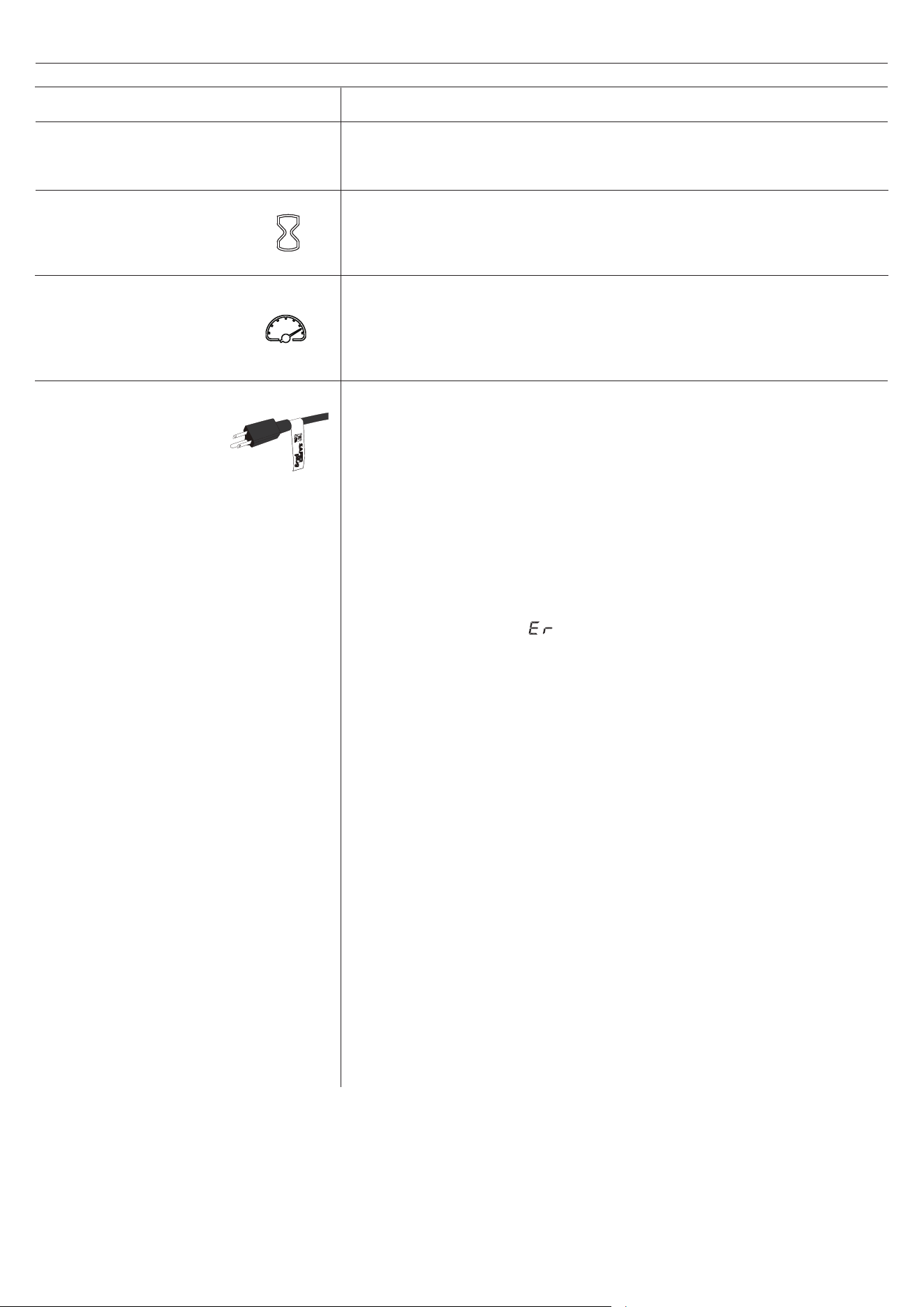
This product is equipped with a Safer Plug
®
; an
advanced safety device that helps prevent electrical
res caused from faulty outlets.
Overloading of outlets, adapters and surge protectors
may cause overheating, damage, and increase risk of
res. Safer Plug
®
continuously monitors the tempera-
ture in the plug and outlet and will turn o the heater
to prevent unsafe outlet overheating.
If the Safer Plug
®
cuts the power due to unsafe con-
ditions it will show an “ ”message on the screen. If
this occurs the Safer Plug
®
has prevented a poten-
tially unsafe condition.
To reset the device if this occurs, rst allow the plug
to cool down. Once the plug has cooled down, unplug
the device and wait 5 seconds, then plug back in and
continue to use normally.
If the Safer Plug
®
continues to activate your out-
let may be faulty. Check your heater cord and plug
connections. Faulty wall outlet connections or loose
plugs can cause the outlet or plug to overheat. Be
sure the plug ts tight in the outlet. Heaters draw
more current than small appliances, so overheating
of the outlet may occur even if it has not occurred
with the use of other appliances. During use check
frequently to determine if your plug, outlet or face-
plate is HOT! If so, discontinue use of the heater and
have a qualied electrician check and/or replace the
faulty outlet(s).
SAFER
PLUG
®
The up and down buttons “ ” on the remote
will increase / decrease temperature setting.
The thermostat setting range is 62°F - 82°F
( 17°C - 27°C) or continuously ON.
The thermostat is adjustable by 2°F or 1°C
increments.
TEMPERATURE IN-
CREASE / DECREASE
COOL DOWN CYCLE
Before the heater powers o, the fan will continue to
run for a period of time to cool down the internal
parts.
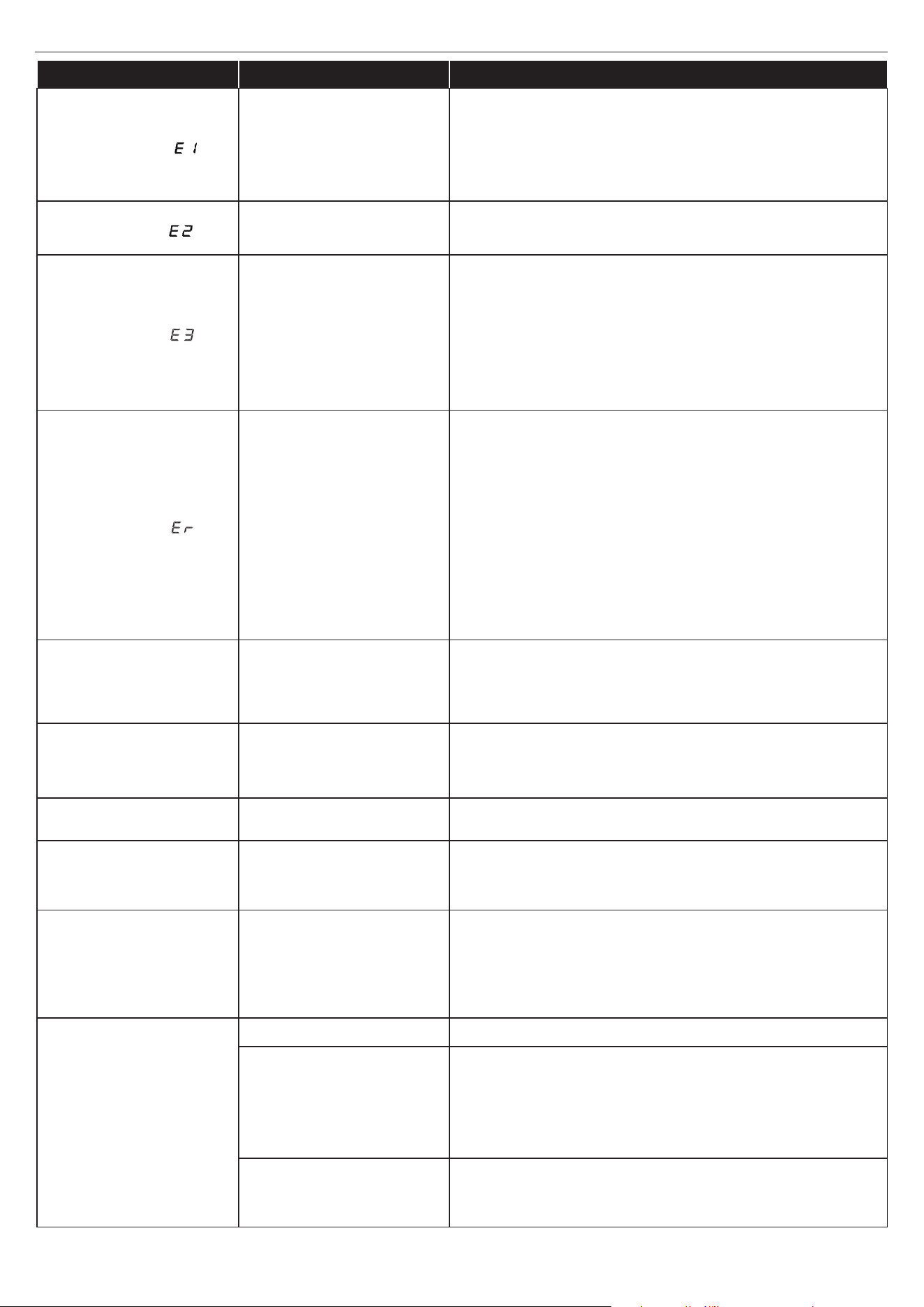
24
23MMP7101 REV1.0
TROUBLESHOOTING
PROBLEM POSSIBLE CAUSE CORRECTIVE ACTION
Display shows “ ”
The thermostat sensor is
broken or disconnected.
Unplug the replace, remove the back panel of the
heater box and check that the thermostat is plugged
into the main circuit board. If this does not solve the
problem contact customer service for a replacement
thermostat sensor.
Display shows “ ”
The thermostat sensor
short circuited.
Contact customer service for a replacement
thermostat sensor.
Display shows “ ”
Manual Reset overheat
protection has triggered.
Inspect the heater and check that the air inlets
and outlets are not blocked as this may cause
overheating. Unplug the heater for 30 minutes and
allow it to cool down. Replug and operate. Monitor
the heater for signs of overheating. If the problem
persists, discontinue use of the heater and contact
customer service.
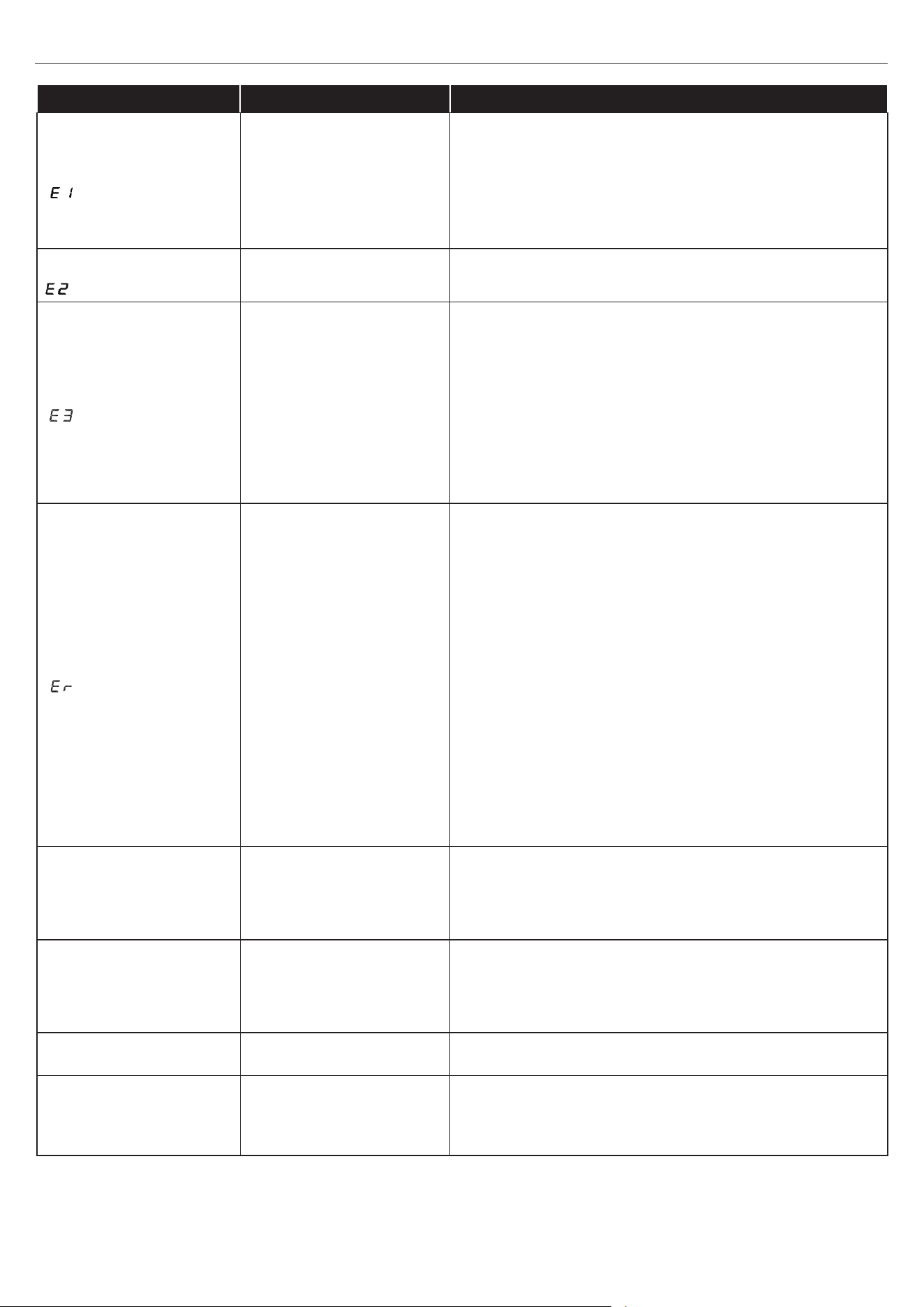
Display shows “ ” Normal operation.
Check your heater cord and plug connections.
Faulty wall outlet connections or loose plugs can
cause the outlet or plug to overheat. Be sure the
plug ts tight in the outlet. Heaters draw more
current than small appliances, overheating of the
outlet may occur even if it has not occurred with the
use of other appliances.
During use check frequently to determine if your
plug outlet or faceplate is HOT! If so, discontinue
use of the heater and have a qualied electrician
check and/or replace the faulty outlet(s).
Heater does not blow
warm air.
Cool down cycle.
Normal operation, will continue to
run for less than
one minute
before shutting down. Times will vary
based on temperatures. During this time cool air will
blow.
No power, logs do not
glow.
No power to the unit
Check that unit is plugged into a standard 120V
outlet. Press power button several times, make sure
power is set at “ON” position.
Logs glow, but no
ame eect.
Flame eect turned o Press ame button several times.
Heater does not blow
warm air.
Thermostat setting is
preventing heater from
turning on.
Adjust the temperature settings to ensure that
the thermostat is set higher than the current room
temperature.
Flame eect works but
heater function does
not and the ember bed
ashes when the heater
button is pressed.
The heater is disabled.
With the power on press and hold the POWER
button on the control panel for 10 seconds. Once
re-enabled the ember bed lights will ash multiple
times.
Remote Control is not
working.
No batteries Change the remote batteries.
Poor Signal
Operate remote transmitter at a slow measured
pace. Measured the remote control buttons with an
even motion and gentle pressure. Repeatedly press-
ing buttons in rapid succession may cause the
transmitter to malfunction.
Distance
Operate the remote at a distance less than 20 feet
from the front of the appliance; point the remote at
the control panel.

25
23MMP7101 REV1.0
Warning: Changes or modications to this unit not expressly approved by the party responsible for
compliance could void user’s authority to operate the equipment.
NOTE: This equipment has been tested and found to comply with the limits for Class B digital device,
pursuant to part 15 of the FCC Rules. These limits are designed to provide reasonable protection against
harmful interference in a residential installation. This equipment generates,
uses, and can radiate radio frequency energy and, if not installed and used in accordance with
the instructions, may cause harmful interference to radio communications.
However, there is no guarantee that interference will not occur in a particular installation. If this equipment
does cause harmful interference to radio or television reception, which can be determined by turning the
equipment o and on, the user is encouraged to try to correct the interference by one or more of the following
measures:
• Reorient or relocate the receiving antenna.
• Increase the separation between the equipment and the receiver.
• Connect the equipment into an outlet on a circuit dierent from that to which the receiver
is connected.
• Consult the dealer or an experienced radio/TV technician for help.
This device complies with Part 15 of the FCC Rules. Operation is subject to the following two conditions:
(1) This device may not cause harmful interference, and
(2) This device must accept any interference received, including interference that may cause undesired
operation.
Twin-Star International Inc.
750 Park of Commerce Blvd., Suite 400
Boca Raton, FL 33487
1-866-661-1218
This Class B digital apparatus complies with Canadian ICES-003.
• Clean the trim using a soft cloth, slightly dampened with citrus oil based product and
bu with a clean soft cloth.
• Citrus oil based products are recommended for cleaning and can be found at supermarkets or
hardware stores.
• WARNING: Electrical outlet wiring must comply with local building codes and other applicable
regulations to reduce the risk of re, electrical shock and injury to persons.
• WARNING: Disconnect power before attempting any maintenance or cleaning to reduce the risk of
re, electrical shock or personal injury.
FCC/IC INFORMATION
CARE AND MAINTENANCE

26
23MMP7101 REV1.0
The manufacturer warrants that your new Electric Fireplace is free from manufacturing
and material defects for a period of one year from date of purchase, subject to the following conditions
and limitations.
1. Install and operate this appliance in accordance with the installation and operating instructions
furnished with the product at all times. Any unauthorized repair, alteration, willful abuse, accident,
or misuse of the product shall nullify this warranty.
2. This warranty is non-transferable, and is made to the original owner, provided that the purchase
was made through an authorized supplier of the product.
3. The warranty is limited to the repair or replacement of part(s) found to be defective in material or
workmanship, provided that such part(s) have been subjected to normal conditions of use and
service, after said defect is conrmed by the manufacturer’s inspection.
4. The manufacturer may, at its discretion, fully discharge all obligations with respect to this
warranty by refunding the wholesale price of the defective part(s).
5. Any installation, labor, construction, transportation, or other related costs/expenses arising from
defective part(s), repair, replacement, or otherwise of same, will not be covered by this warranty,
nor shall the manufacturer assume responsibility for same.
6. The owner/user assumes all other risks, if any, including the risk of any direct, indirect or
consequential loss or damage arising out of the use, or inability to use the product, except as
provided by law.
7. All other warranties – expressed or implied –with respect to the product, its components and
accessories, or any obligations/liabilities on the part of the manufacturer are hereby expressly
excluded.
8. The manufacturer neither assumes, nor authorizes any third party to assume on its behalf, any
other liabilities with respect to the sale of the product.
9. The warranties as outlined within this document do not apply to non accessories used in
conjunction with the installation of this product.
10. This warranty gives you specic legal rights, and you may also have other rights which vary from
state to state.
This warranty is void if:
a. The replace is subjected to prolonged periods of dampness or condensation.
b. Any unauthorized alteration, willful abuse, accident, or misuse of the product.
c. You do not have the original receipt of purchase.
1-YEAR LIMITED WARRANTY
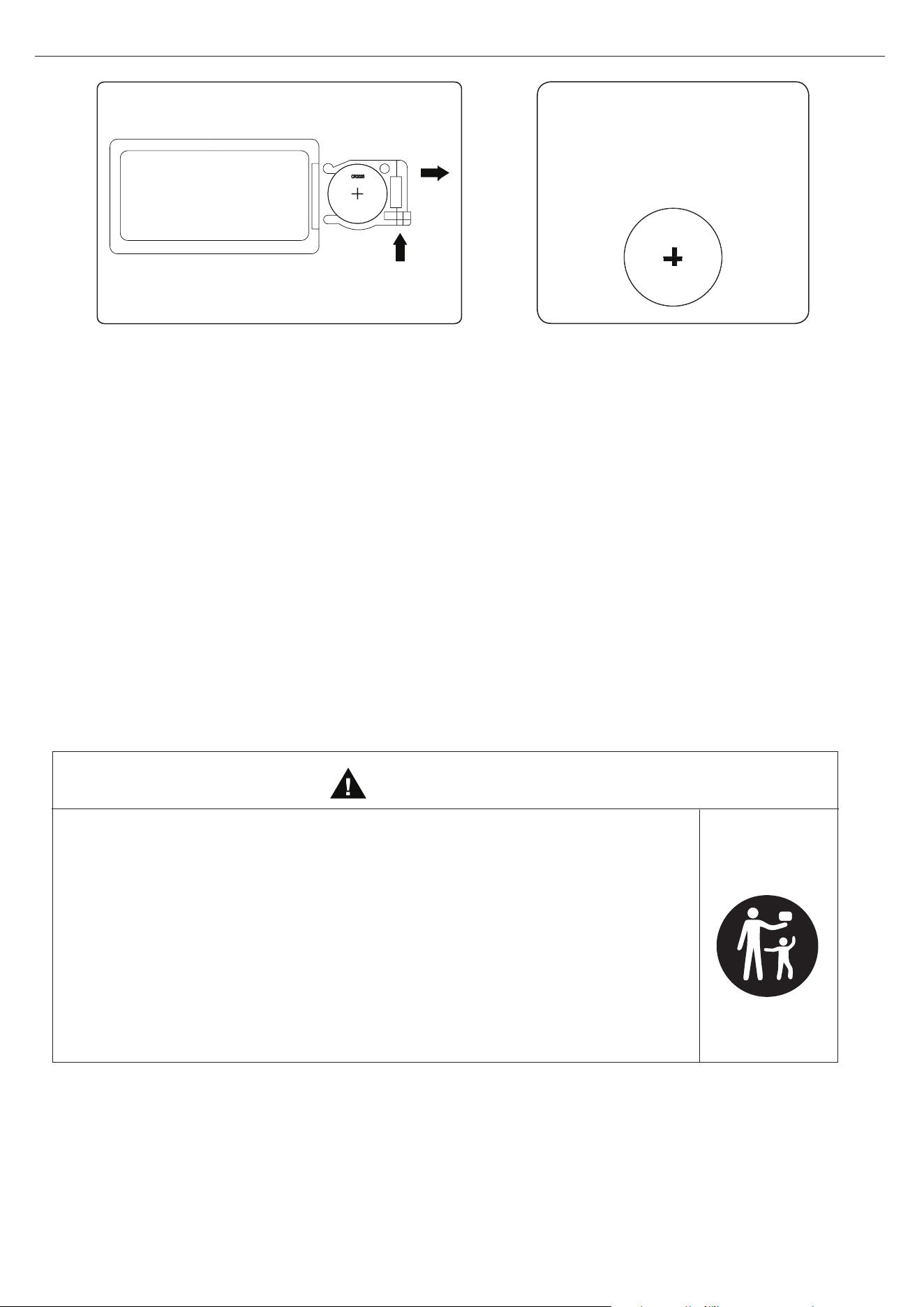
27
23MMP7101 REV1.0
CR2025
REPLACING THE REMOTE CONTROL BATTERY:
1pcs CR2025 included
• Remove and immediately recycle or dispose used batteries according to local regulations
and keep away from children. Do NOT dispose batteries in household trash or incinerate.
• Even used batteries may cause severe injury or death.
• Call a local poison control center for treatment information.
• Compatible battery type: CR2025.
• Nominal voltage: 3V.
• Non-rechargeable batteries are not to be recharged.
• Do not force discharge, recharge, disassemble, heat above 80°C or incinerate. Doing so
may result in injury due to venting, leakage or explosion resulting in chemical burns.
• Ensure the batteries are installed correctly according to polarity (+ and -).
• Do not mix old and new batteries, dierent brands or types of batteries, such as alkaline,
carbon-zinc, or rechargeable batteries.
• Remove and immediately recycle or dispose batteries from equipment not used for an
extended period of time according to local regulations.
• Always completely secure the battery compartment. If the battery compartment does not
close securely, stop using the product, remove the batteries, and keep them away from
children.
•
INGESTION HAZARD: This product contains a button cell or coin
battery.
• DEATH or serious injury can occur if ingested.
• A swallowed button cell or coin battery can cause Internal
Chemical Burns in as little as 2 hours.
• KEEP new and used batteries OUT OF REACH OF CHILDREN
• Seek immediate medical attention if a battery is suspected to be
swallowed or inserted inside any part of the body.
WARNING
NOTE: Battery disposal
Please always dispose batteries
at a suitable recycling point.
28
23MMP7101 REV1.0
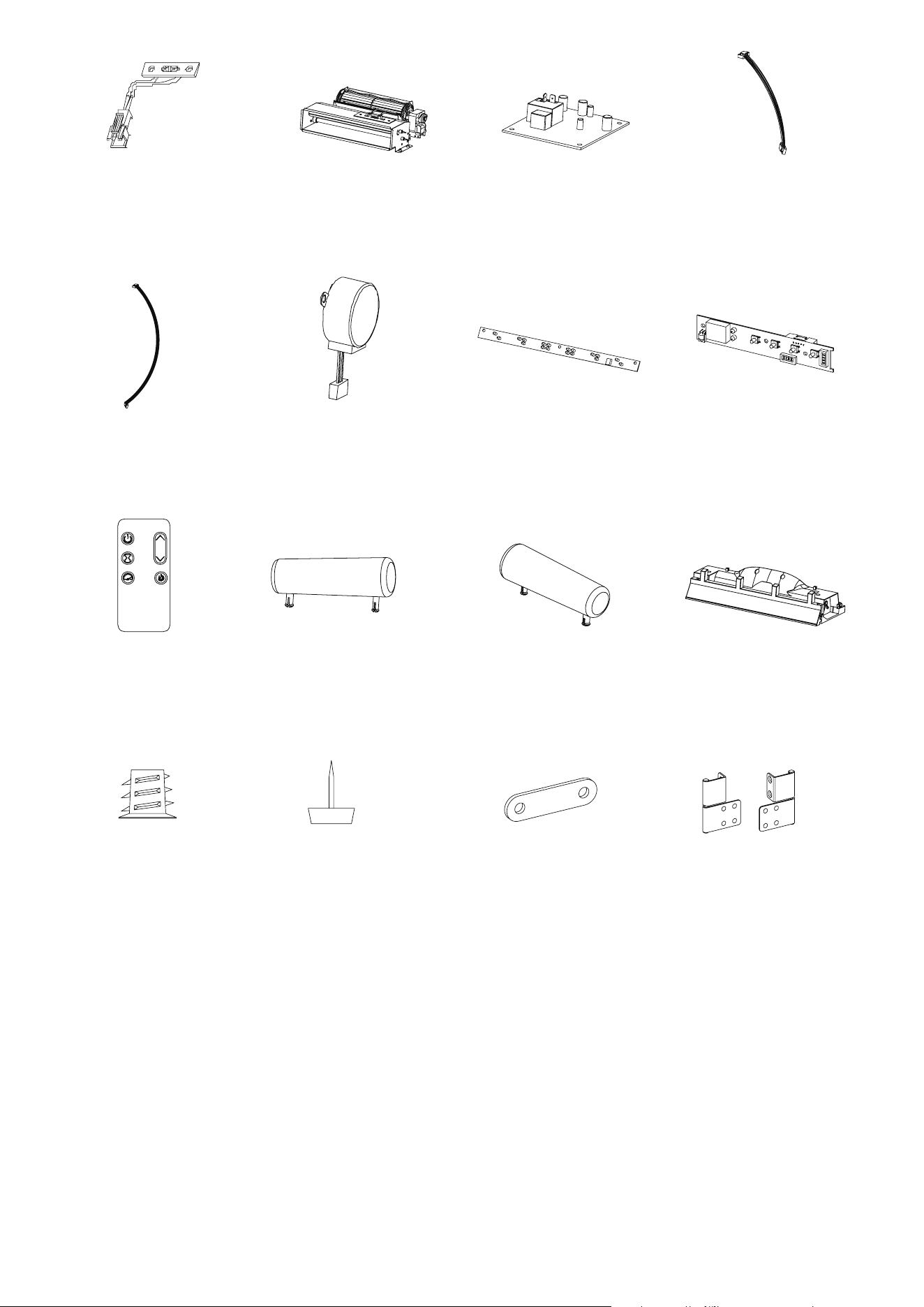
REPLACEMENT PARTS LIST
For replacement parts, call our customer service department at 866-439-9800,
8 a.m. - 8 p.m., EST, Monday - Sunday. You could also contact us at [email protected].
PART PART NAME NO PART NUMBER
1
Thermostat Sensor 1
Y21-S307-P186
2
Blower/ Heater Assembly 1
Y21-S307-P01
3
Main Circuit Board 1
Y21-S307-P15
4
Control Panel Cable
1 Y21-S307-P187
5
Ember Bed Connection Wire
1
Y21-S307-P188
6
Flame Generator Drive Motor 1
Y21-S307-P189
7
Flame Circuit Board 1 Y21-S307-P40
8
Control Panel Circuit Board 1
Y21-S307-P32
9
Remote Control
1 P185
10 Log Set Left 1 Y21-S307-P20L
11 Log Set Right 1 Y21-S307-P20R
12 Ember Bed 1 Y21-S307-P21
13
Threaded Insert
68 PH-THRZNC001
14
Floor Glide
6 PH-GLDBRW001
15
Metal Plate
2 PH-PLTBLK001
16
Barrel Hinge
2 PH-HNGBLK016
29
23MMP7101 REV1.0
Printed in Vietnam
1
6
3
5
7
10
14
8
9
13
42
11
15
12
16
ARTÍCULO #5698810, 5698811
Inglés p. 1
¿Preguntas, problemas, piezas faltantes? Antes de volver a la tienda, llame a nues-
tro Departamento de Servicio al Cliente al 866-439-9800, de lunes a domingo de
8 a.m. a 8 p.m., hora estándar del Este. También puede ponerse en contacto con
nosotros en [email protected].
ALLEN+ROTH y el diseño del logotipo son
marcas comerciales o marcas
registradas de LF, LLC.
Todos los derechos reservados.
Número de serie:
Fecha de compra:
CHIMENEA ELÉCTRICA DE
137.16 CM
MODELO #8002146/23MMP7101-PO132,
8002139/23MMP7101-TPO147
31
23MMP7101 REV1.0
ESPECIFICACIONES DEL PRODUCTO
ÍNDICE
VOLTAJE 120 VCA, 60 Hz
AMPERIOS 12.5 amperios
VATIOS 1500 vatios
Especicaciones del producto.................................................................................................................31
Información sobre seguridad...................................................................................................................32
Carga máxima...........................................................................................................................
..............34
Contenido del paquete............................................................................................................................35
Aditamentos............................................................................................................................................37
Preparación..............................................................................................................
...............................38
Instrucciones de ensamblaje...................................................................................................................38
Instrucciones de funcionamiento.............................................................................................................51
Solución de problemas..............................................................................
...............................................53
Información sobre la FCC/IC..........................................
........................................................................55
Cuidado y mantenimiento.....................................................................................
..................................55
Garantía..........................................................................................................
........................................56
Reemplazo de la batería.........................................................................................................................57
Lista de piezas de repuesto..............................................................................
......................................58
32
23MMP7101 REV1.0
INFORMACIÓN DE SEGURIDAD
Cuando utilice electrodomésticos, siempre tome medidas de precaución básicas para evitar
incendios, descargas eléctricas y lesiones personales. Entre las medidas:
1. Lea todas las instrucciones antes de usar este electrodoméstico.
2. PELIGRO: se pueden generar altas temperaturas debido a ciertas condiciones que no son
normales. No cubra ni obstruya de forma parcial o completa la parte frontal de este calentador.
3. PRECAUCIÓN: nunca deje el calentador en funcionamiento sin supervisión. Se debe tener
extrema precaución si hay niños o personas con capacidades físicas o mentales reducidas
cerca sin supervisión.
4.
El electrodoméstico no lo deben usar niños o personas con capacidades físicas, sensoriales o
mentales reducidas o sin experiencia ni conocimientos, a menos que una persona responsable de su
seguridad les brinde supervisión o capacitación.
5.
Siempre desenchufe este electrodoméstico cuando no lo use.
6. No opere ningún calentador con un cable o enchufe dañado, después de que presente fallas, de
que se haya dejado caer o que se encuentre dañado de cualquier forma. Deseche el calentador
o llévelo a un establecimiento de servicio autorizado para una revisión o reparación.
7. No lo use en exteriores.
8. Este calentador no se debe usar en baños, cuartos de lavado o en espacios húmedos similares
interiores. Nunca coloque este electrodoméstico donde se pueda caer dentro de una bañera u
otro contenedor de agua.
9. No coloque el cable debajo de una alfombra. No cubra el cable con alfombras, tapetes u objetos
similares. Coloque el cable lejos de zonas de tránsito donde nadie se pueda tropezar y caer.
10. Para desconectar el calentador, apague los controles y desconecte la alimentación al circuito del
calentador en el panel de desconexión principal (u opere el interruptor de desconexión interno, si
se proporciona).
11. Conecte solo a tomacorrientes con la debida puesta a tierra. Este calentador se diseñó para
su uso en 120 voltios. El cable tiene un enchufe como se muestra en A de la Fig. 1. No use
adaptador de 2 clavijas. Nunca use el producto con extensiones eléctricas ni tomacorrientes de
alimentación reubicables (tomacorrientes múltiples o regletas).
A
B
Fig.1

33
23MMP7101 REV1.0
12. No introduzca objetos extraños ni permita que estos entren en las aberturas de ventilación o
escape, ya que podrían provocar descargas eléctricas, incendios o daños en el electrodoméstico.
13. Para evitar incendios, no bloquee las entradas ni salidas de aire de ninguna manera. No use el
producto sobre supercies blandas, como una cama, donde las aberturas se puedan bloquear.
14. Este electrodoméstico tiene en su interior piezas calientes y piezas que forman arcos eléctricos o
que echan chispas. No lo utilice en áreas donde se utilice o almacene gasolina, pintura o líquidos
inamables. Esta chimenea no debe utilizarse como un estante de secado para la ropa. Las
botas navideñas o las decoraciones no deben colgarse en esta área.
15. Utilice este electrodoméstico solo como se describe en el manual. Cualquier otro uso no
recomendado por el fabricante puede causar incendios, descargas eléctricas o lesiones
personales.
16. Este calentador puede incluir una alarma visual que emite una advertencia si sus piezas están
excesivamente calientes. Si la alarma parpadea, apague el calentador inmediatamente e
inspeccione si hay objetos sobre o junto a este que puedan causar altas temperaturas.
NO PONGA EN FUNCIONAMIENTO EL CALENTADOR CON LA ALARMA ACTIVADA.
GUARDE ESTAS INSTRUCCIONES
34
23MMP7101 REV1.0
CARGA MÁXIMA
13.6 kg / 30 lb
CARGA MÁXIMA
22.67 kg / 50 lb
Tamaño máximo de TV de hasta 60”
CARGA MÁXIMA
6.8 kg / 15 lb
CARGA MÁXIMA
9.07 kg / 20 lb
CARGA MÁXIMA
ADVERTENCIA
Para usar con la mayoría de televisores de pantalla plana que pesen 22.67 kg / 50 lb o menos. El
uso con televisores o cargas más pesadas que la capacidad máxima especicada puede causar
inestabilidad, lo que provocaría vuelcos que pueden causar la muerte o lesiones graves.
35
23MMP7101 REV1.0
CONTENIDO DEL PAQUETE
I
M
J
T
T
G
U
N
R
R
S
F
O
P
Q
B
C
E
D
H
A
K
L
EB
EF
EF
EH
EA
EC
ED
EG
36
23MMP7101 REV1.0
CONTENIDO DEL PAQUETE
PIEZA DESCRIPCIÓN CANTIDAD
A
Base
1
B
Riel izquierdo de la base
1
C
Panel posterior de la base
1
D
Riel derecho de la base
1
E
Riel frontal de la base
1
F Partición izquierda 1
G
Panel superior
1
H
Riel envolvente izquierdo
1
I
Partición derecha
1
J
Riel envolvente derecho
1
K
Estante jo
1
L
Riel de partición superior
1
M
Panel de vidrio
1
N
Panel lateral izquierdo
1
O
Panel lateral derecho
1
P
Puerta izquierda
1
Q
Puerta derecha
1
R
Paneles posteriores laterales
2
S
Panel posterior superior
1
T
Estante ajustable
2
U
Panel posterior de la chimenea eléctrica
1
EA
Panel delantero con botón de control
1
EB
Caja de calentador
1
EC
Juego de leños izquierdo
1
ED
Juego de leños derecho
1
EF Soporte 2
EG
Lecho de brasas
1
EH
Control remoto
1
37
23MMP7101 REV1.0
ADITAMENTOS
Tornillo de
Ø3.5x12mm
Cant.: 7
Cant.: 2
Cant.: 8
Cant.:1
Cant.: 3
Cant.: 4
Cant.: 2
Cant.: 2
Cant.: 4
Cant.: 8
Cant.: 4
Cant.: 32
Cant.: 8
Cant.: 68
Cant.: 2
Cant.: 20
BB
GG
LL
QQ
AA
FF
KK
CC
HH
MM
RR
SS
DD
II
NN
OO
PP
EE
JJ
Perno de
Ø4x12mm
Sujetador de
cables
Tornillo de
Ø3x12mm
Tornillo de
Ø3x15mm
Pestillo magnético
Aditamentos
de Contención
Antivuelcos
Bloque conector
de plástico
Soporte del
panel posterior
Soportes para
estante
Manija
con tornillo
Perno de
Ø6.3x12mm
Perno de leva
Cerrojo de leva
Tornillo de
Ø4x50mm
Tope de puerta
Cant.: 1
Nota: no se Incluye
el Adaptador
USB a CA
Salida USB 980TC
Cant.: 6
Cubierta de cerrojo de
leva
Tornillo de
Ø3x12mm
Cant.: 2
38
23MMP7101 REV1.0
INSTRUCCIONES DE ENSAMBLAJE
PREPARACIÓN
Antes de comenzar a ensamblar el producto, asegúrese de tener todas las piezas. Compare las piezas
con la lista del contenido del paquete y la lista de aditamentos. No intente ensamblar, instalar ni utilizar
el producto si alguna pieza falta o está dañada. Para proteger el producto de posibles rayones, ensam-
ble las piezas sobre una supercie que no produzca rayones.
Tiempo estimado de ensamblaje: 45 a 60 minutos
Herramientas necesarias para el ensamblaje (no se incluyen): destornillador Phillips, tijeras y cuchillo
para uso general.
• Coloque el bloque conector de plástico (AA)
como se muestra.
• Fije cada bloque conector de plástico (AA)
con pernos (BB). Repita hasta que todos los
soportes estén en su lugar, como se indica en el
diagrama.
1. Preparación de la base
x 16
x 16
x 2
Aditamentos utilizados
Aditamentos utilizados
AA
BB
BB
2. Ensamblaje de la base
• Ubique el panel posterior de la base (C) y los
rieles de la base izquierdo y derecho (B y D).
• Alinee el panel posterior de la base (C) entre
los rieles de la base izquierdo y derecho (B y
D). Apriételos para unirlos como se muestra.
• Fije cada bloque conector de plástico (AA) con
pernos (BB) en los rieles de la base izquierdo
y derecho (B y D) mediante el uso de un
destornillador Phillips.
Bloque conector
de plástico
Perno de
Ø6.3x12mm
Perno de
Ø6.3x12mm
1
E
AA
BB
C
B
B
D
2
C
D
AA
BB
39
23MMP7101 REV1.0
INSTRUCCIONES DE ENSAMBLAJE
Aditamentos utilizados
Aditamentos utilizados
Aditamentos utilizados
Bloque conector
de plástico
Perno de
Ø6.3x12mm
Perno de
Ø6.3x12mm
Perno de
Ø6.3x12mm
5. Preparación de las particiones
• Coloque el bloque conector de plástico (AA)
como se muestra.
• Fije cada bloque conector de plástico (AA) con
pernos (BB). Repita hasta que todos los soportes
estén en su lugar, como se indica en el
diagrama.
4. Ensamblaje de la base
• Ubique la base (A) y colóquela boca abajo
sobre una supercie plana. Conecte los rieles
de la base ensamblados en el paso 3 a la
parte inferior de la base (A) al jar cada bloque
conector de plástico (AA) con pernos (BB).
3. Ensamblaje de la base
• Ubique el riel frontal de la base (E) y el ensamble del
panel posterior de la base (C).
• Alinee el riel frontal de la base (E) con el ensamble
del panel posterior de la base (C).
• Fije cada bloque conector de plástico (AA) con
pernos (BB) en el riel posterior de la base (C)
mediante el uso de un destornillador Phillips.
x 2
x 12
BB
BB
x 8
x 8
AA
BB
4
5
I
F
K
3
C
E
E
A
AA
BB
AA
AA
BB
BB
40
23MMP7101 REV1.0
INSTRUCCIONES DE ENSAMBLAJE
6. Conexión de los sujetadores de cables
• Inserte los sujetadores de cables (CC) en los
oricios pretaladrados en el panel derecho del
riel envolvente (J) y empújelos con la mano.
8. Fijación de los rieles envolventes
• Conecte el riel envolvente derecho (J) a la
partición derecha (I) al insertar los pernos de
leva (EE) en el riel envolvente derecho (J) en los
oricios pretaladrados de la partición derecha (I).
• Repita estos pasos para el riel envolvente
izquierdo (H) y la partición izquierda (F).
• Asegure los rieles envolventes derechos e
izquierdos (I y F) en su lugar al apretar los
cerrojos de leva (FF) en su sitio (con un
destornillador Phillips, como se muestra).
•Coloque y asegure las cubiertas de cerrojo de
leva (DD) sobre los cabezales de los cerrojos de
leva con la mano.
7. Preparación de los rieles envolventes
• Coloque y apriete los pernos de leva (EE)
como se indica en el diagrama.
DD
FF
EE
x 6
x 6
x 6
x 3
CC
Sujetador de cables
Aditamentos utilizados
Aditamentos utilizados
Aditamentos utilizados
Perno de leva
Cerrojo de leva
6
J
8
7
J
I
F
H
H
J
DD
FF
EE
EE
CC
Cubierta de cerrojo
de leva
41
23MMP7101 REV1.0
INSTRUCCIONES DE ENSAMBLAJE
Aditamentos utilizados
Aditamentos utilizados
Aditamentos utilizados
10.Preparación del estante jo
• Fije el estante jo (K) al riel de la partición superior
(L) al insertar los pernos de leva (EE) en el riel de la
partición superior (L) en los oricios pretaladrados
del estante jo (K).
• Asegúrelo en su lugar al apretar los cerrojos de leva
(FF) con un destornillador Phillips.
9. Preparación del riel de partición superior
• Coloque y apriete los pernos de leva (EE) en el
riel de partición superior (L) como se indica en el
diagrama.
11. Ensamblaje del contorno de la chimenea
• Ubique el estante jo (K) y los paneles interiores
izquierdo y derecho (I y F).
• Alinee el estante jo (K) entre las particiones
izquierda y derecha (I y F). Presione para unir al
insertar los tornillos preinstalados en el estante jo
(K) en los oricios de las particiones izquierda y
derecha (I y F) como se muestra.
• Apriete los pernos (BB) en las particiones
izquierda y derecha (I y F) mediante el uso de un
destornillador Phillips.
EE
x 2
Perno de leva
FF
x 2
Cerrojo de leva
x 4
BB
Perno de
Ø6.3x12mm
10
9
K
L
L
11
K
I
F
EE
FF
BB
42
23MMP7101 REV1.0
INSTRUCCIONES DE ENSAMBLAJE
13. Ensamblaje de la chimenea
• Ubique el panel delantero con el botón de control
(EA).
• Con tornillos (HH), je el panel delantero con el
botón de control (EA) entre los paneles interiores
izquierdo y derecho, y justo debajo del estante
central, como se muestra.
12. Fijación de los soportes envolventes
• Ubique el soporte de la placa metálica preinstalada
detrás del riel envolvente superior. Gire el soporte
para que abarque la unión del riel envolvente
superior y el riel envolvente lateral.
• Asegure el soporte envolvente con un tornillo (SS).
•Repita para asegurar ambos lados.
HH
SS
x 5
x 2
Tornillo de
Ø3.5x12mm
Tornillo de
Ø3x12mm
14. Instalación de los pernos de montaje para
chimenea
• Atornille parcialmente los pernos de montaje
(BB) en el estante central. Deje un espacio
de aproximadamente 3.17 mm para colocar el
calentador como se muestra en el paso 13.
x 2
BB
Aditamentos utilizados
Aditamentos utilizados
Aditamentos utilizados
Perno de
Ø6.3x12mm
12
HH
SS
13
EA
14
BB
1/8"
43
23MMP7101 REV1.0
INSTRUCCIONES DE ENSAMBLAJE
Aditamentos utilizados
Aditamentos utilizados
16. Conexión del ensamble de la caja del
calentador
• Ubique la caja del calentador (EB) y alinéela
detrás del soporte del panel de control.
• Asegure la caja del calentador al estante cen-
tral con pernos (BB). Apriete en ambos lados
con un destornillador Phillips.
17. Colocación del vidrio frontal
• Dé vuelta la unidad de modo que el panel de
control quede ahora hacia arriba.
• Ubique el panel de vidrio de la chimenea
eléctrica (M).
• Inserte con cuidado el panel de vidrio de la
chimenea eléctrica (M) en las ranuras de los
rieles envolventes, como se muestra. Deslice
completamente hasta que el vidrio se una con la
parte inferior del panel de control.
15. Colocación de los soportes para accesorios
• Ubique los soportes en L (EF) y asegúrelos a
cada lado de la caja de calentador (EB) con
pernos (II).
II
x 4
Perno de
Ø6.3x12mm
x 2
BB
Perno de
Ø4x12mm
16
17
15
M
EF
EF
EB
EB
II
BB
44
23MMP7101 REV1.0
INSTRUCCIONES DE ENSAMBLAJE
19. Instalación del puerto USB
• Dé vuelta la unidad con cuidado para que quede
en posición vertical sobre una supercie plana.
• Deslice la salida USB (KK) a través de la abertura
del estante central.
• Asegure con cuidado la salida USB (KK) en su
lugar con tornillos (LL) y un destornillador Phillips.
18. Conexión de la base
• Ubique el ensamble de la base y alinee los ori-
cios pretaladrados en el panel de la base con los
bordes del ensamble central.
• Inserte tornillos (JJ) a través del ensamble de la
base y en los oricios pretaladrados en los bordes
del ensamble central, como se muestra.
• Apriete rmemente todos los tornillos con un
destornillador Phillips.
JJ
x 4
x 1
x 2
KK
LL
Tornillo de
Ø4x50mm
Salida USB
Tornillo de
Ø3x12mm
Nota: no se incluye el adaptador USB a CA.
20. Preparación de los paneles laterales
• Coloque el bloque conector de plástico (AA)
como se muestra.
• Fije cada bloque conector de plástico (AA) con
pernos (BB). Repita hasta que todos los bloques
conectores estén en su lugar, como se indica en
el diagrama.
x 8
x 8
AA
BB
Aditamentos utilizados
Aditamentos utilizados
Aditamentos utilizados
Bloque conector
de plástico
Perno de
Ø6.3x12mm
19
18
JJ
KK
LL
20
O
N
AA
BB
45
23MMP7101 REV1.0
INSTRUCCIONES DE ENSAMBLAJE
Aditamentos utilizados
Aditamentos utilizados
23. Colocación de las manijas de puerta
• Ubique las puertas izquierda y derecha (P y Q).
• Cada manija de puerta (MM) tiene tornillos
preinstalados. Retire estos tornillos y coloque las
manijas sobre los oricios pretaladrados en cada
puerta izquierda y derecha (P y Q).
• Coloque los tornillos preinstalados en el otro
lado de las puertas izquierda y derecha (P y Q)
y apriete con un destornillador Phillips de modo
que pasen a través de la puerta y se inserten en
la manija.
• Coloque los topes de la puerta (NN) en el borde
interior de cada puerta (P y Q), como se indica.
Simplemente extraiga el adhesivo y péguelo.
21. Colocación de los paneles laterales
• Ubique los paneles laterales izquierdo y derecho
(N y O).
• Alinee los paneles laterales izquierdo y derecho
(N y O) con la base.
• Inserte pernos (BB) a través del ensamble de
la base y en los oricios pretaladrados en
los bordes de los paneles laterales izquierdo y
derecho (N y O), como se muestra.
22. Colocación de los paneles posteriores
• Ubique el panel posterior lateral (R) y el panel
posterior central (S).
• Deslice el panel posterior lateral (R) en las ranuras
entre los paneles laterales interior y exterior, como
se muestra. Deslice completamente hacia abajo
hasta que el panel posterior lateral (R) se una con
el estante inferior.
• Deslice el panel posterior central (S) en las ranuras
entre los paneles interiores. Deslice completamente
hacia abajo hasta que el panel posterior central (S)
se encuentre con el estante central.
x 2
x 2
x 4
MM
NN
BB
Manija
con Tornillo
Perno de
Ø6.3x12mm
21
O
N
BB
23
Q
P
MM
NN
Tope de puerta
R
R
S
22
Estiquetas del
producto
46
23MMP7101 REV1.0
INSTRUCCIONES DE ENSAMBLAJE
24. Colocación de las puertas del gabinete
• Levante la puerta izquierda (P) y alinee las
bisagras con los aditamentos preinstalados en el
ensamble principal, como se muestra.
• Deslice el barril de la bisagra de la puerta hacia
abajo sobre el pasador de los aditamentos en el
ensamble principal.
• Repita los pasos con la puerta derecha (Q).
25. Colocación del pestillo para puerta
• Ubique el panel superior (G) y colóquelo sobre
una supercie plana.
• Fije los pestillos magnéticos de la puerta (OO)
al panel superior (G) con tornillos (PP) donde se
indica en el diagrama.
Nota: no apriete los tornillos en este paso. Después
de ensamblar la puerta en el paso 26, ajuste la
posición del imán hacia adelante o hacia atrás para
que la puerta coincida mejor con la unidad y luego
apriete los tornillos.
OO
PP
x 2
x 4
Tornillo de
Ø3x15mm
Pestillo
magnético
26. Conexión del panel superior
• Ubique el panel superior (G) y alinee los pernos
(BB) con los oricios de los pernos en los bordes
superiores del ensamble principal.
• Después de insertar los pernos (BB) en los
oricios, apriete los sujetadores desde debajo del
panel superior (G) con un destornillador Phillips,
como se muestra.
x 8
BB
Aditamentos utilizados
Aditamentos utilizados
Perno de
Ø6.3x12mm
Q
P
G
25
24
OO
PP
G
26
BB
47
23MMP7101 REV1.0
INSTRUCCIONES DE ENSAMBLAJE
27. Fijación de los paneles posteriores
• Coloque los soportes del panel posterior (QQ) entre
los paneles posteriores y las ranuras del ensamble,
como se muestra.
• Fije cada soporte del panel posterior (QQ) con los
tornillos preinstalados.
• Tenga en cuenta que estos tornillos son autoper-
forantes y no requieren oricios guía en la made-
ra. Repita hasta que todos los soportes estén en
su lugar, como se indica en el diagrama.
QQ
RR
x16
x8
28. Inserción de los estantes ajustables
• Ubique los dos estantes ajustables (T).
• Inserte los soportes para estantes (RR) en los
oricios pretaladrados en el interior de cada panel
lateral del gabinete a la altura deseada. Alinee to-
dos los soportes a la misma altura para garantizar
que el estante está nivelado.
• Apoye cada estante ajustable (T) sobre los
soportes para estante (RR), como se muestra.
29. Ensamblaje del juego de leños
• Coloque el juego de leños izquierdo (EC) en el
lecho de brasas (EG), como se muestra.
• Repita con los leños derechos (ED).
Soporte del
Panel Posterior
Soporte para
estante
Advertencia: los paneles posteriores deben
jarse como se muestra para proporcionar
una construcción rígida. ¡NO omita este
paso de instalación!
Aditamentos utilizados
Aditamentos utilizados
RR
28
T
29
ED
EG
EC
QQ
27
48
23MMP7101 REV1.0
INSTRUCCIONES DE ENSAMBLAJE
30
30. Ensamblaje del juego de leños
• Enrute los cables del juego de leños izquierdo
(EC) y el juego de leños derecho (ED) por la
parte posterior del lecho de brasas (EG) y hacia
las pestañas receptoras para asegurarlos en su
lugar. Consulte el diagrama.
• Enchufe con cuidado los cables del juego de
leños izquierdo (EC) y el juego de leños
derecho (ED) en los puertos, como se muestra.
Asegúrese de que los cables estén conectados
de forma recta.
EG
EG
31
31. Ensamblaje de la chimenea
• Coloque el juego de leños ensamblado en la
parte posterior de la unidad detrás del panel de
vidrio.
• Inserte las lengüetas debajo del juego de leños
en los oricios del panel inferior.
32. Fijación del juego de leños
• Una vez que el juego de leños esté en su lugar,
asegúrelo con tornillos (HH) en la base
insertándolos a través de la parte inferior del juego
de leños.
HH
x 2
Tornillo de
Ø3.5x12mm
ED
EC
Aditamentos utilizados
32
HH
49
23MMP7101 REV1.0
INSTRUCCIONES DE ENSAMBLAJE
33. Conexión del cableado de la chimenea
• Conecte el cable del panel de control al calentador.
• Inserte el cable de conexión del lecho de brasas
en el calentador.
• Pase el cable de conexión del lecho de brasas
por el riel envolvente lateral y a lo largo de la
parte posterior del juego de leños, asegurándolo
en su lugar con los sujetadores, como se muestra.
34. Colocación del fondo de la chimenea
• Ubique el panel posterior de la chimenea
eléctrica (U).
• Doble ligeramente el papel tapiz y colóquelo en
la parte posterior de la chimenea.
Nota: este panel posterior es reversible y se
puede colocar con cualquiera de los lados hacia
la unidad empotrable de la chimenea para
conseguir una apariencia personalizable.
35. Fijación del fondo de la chimenea
• Coloque los soportes del panel posterior (QQ)
entre los paneles posteriores y las ranuras del
ensamble, como se muestra.
• Fije cada soporte del panel posterior (QQ) con los
tornillos preinstalados. Repita hasta que todos los
soportes estén en su lugar, como se indica en el
diagrama.
• Tenga en cuenta que estos tornillos son au-
toperforantes y no requieren oricios guía en
la madera. Repita hasta que todos los soportes
estén en su lugar, como se indica en el diagrama.
x4
Advertencia: los paneles posteriores deben
jarse como se muestra para proporcionar
una construcción rígida. ¡NO omita este
paso de instalación!
QQ
Soporte del
panel posterior
Aditamentos utilizados
33
34
Cable del
panel de
control
Cable de conexión
del lecho de
brasas
35
U
QQ
50
23MMP7101 REV1.0
INSTRUCCIONES DE ENSAMBLAJE
36. Instalación de los aditamentos de
contención antivuelcos
• Cuando los aditamentos de contención antivuel-
cos (GG) se instalan correctamente, pueden
proporcionar protección contra vuelcos inespe-
rados de la unidad debido a pequeños temblores,
golpes o subidas.
• Cada aditamento de contención antivuelcos (GG)
incluye un ancla de expansión de la unidad, un
ancla de expansión de pared, una atadura de anc-
la de expansión y dos tornillos de anclaje. Úse-
los para completar los siguientes pasos para una
instalación adecuada.
• Ubique un montante de pared seguro detrás de la
unidad más cercano al lado izquierdo.
• Alinee el ancla de expansión de la unidad con un
montante de pared y fíjelo a la unidad con un tor-
nillo de anclaje con un destornillador Philips. Los
tornillos de anclaje deben pasar a través del ensamble superior para una instalación adecuada.
• Alinee el ancla de expansión de pared en el centro del montante de pared, al nivel del ancla de
expansión de la unidad y fíjelo con un tornillo de anclaje con un destornillador Philips.
• En la atadura de ancla de expansión, desconecte el cable del conector y pase el cable suelto a
través de los ojales del ancla de expansión de pared y el ancla de expansión de la unidad. Vuelva a
conectar el cable suelto al conector, pero no lo apriete.
• Apriete ambas ataduras de ancla de expansión tirando del cable a través del conector.
NOTA: la instalación de los aditamentos de contención antivuelcos (GG) proporcionará un pequeño
espacio entre la pared y la unidad. Esto le permitirá tender cables de alimentación y cables de Co-
nexión a su televisor u otros dispositivos colocados en la parte superior de la unidad.
ADVERTENCIA: la instalación de los aditamentos de contención antivuelcos ayudará a evitar acci-
dentes o daño a la unidad.
Aditamentos utilizados
x1
GG
Aditamentos de contención
antivuelcos
GG
36
51
23MMP7101 REV1.0
INSTRUCCIONES DE FUNCIONAMIENTO
UBICACIÓN
DEL PANEL
DE CONTROL
Los botones hacia arriba y hacia abajo “ ” en el control
remoto incrementarán o disminuirán la conguración de
temperatura. El rango de conguración del termostato es de 17 °C
a 27 °C (de 62 °F a 82 °F) o continuamente encendido.
El termostato se puede ajustar en incrementos de 1 °C o 2 °F.
FUNCIÓN
LLAMA
Hay 5 niveles de brillo que se pueden seleccionar, además del
ajuste APAGADO (00). Los ajustes F5 a F1 disminuyen en brillo.
Presione el botón del calentador en el panel de control para
encender o apagar (00) y ajustar la conguración del calentador.
Para cambiar entre °F y °C, mantenga presionado el botón
CALENTADOR en el panel de control durante 3 segundos.
El rango de conguración del termostato es de 17 °C a 27 °C (de
62 °F a 82 °F) o continuamente encendido.
CALENTADOR
ÍCONO
DESCRIPCIÓN
INCREMENTO O
DISMINUCIÓN DE
TEMPERATURA
POTENCIA
El botón de ENCENDIDO suministra alimentación a todas las
funciones del calentador. Si presiona el botón de ENCENDIDO
nuevamente, el calentador entrará en el modo de espera.
Si mantiene presionado el botón de alimentación del panel
de control durante 10 segundos, desactivará la función de
calentador.
52
23MMP7101 REV1.0
FUNCIÓN ÍCONO DESCRIPCIÓN
SAFER PLUG
®
Este producto está equipado con un Safer Plug®, un dispositivo
de seguridad avanzado que ayuda a prevenir incendios eléctricos
causados por tomacorrientes defectuosos.
La sobrecarga de los tomacorrientes, adaptadores y protectores
contra sobrecargas puede causar sobrecalentamiento, daños
y aumentar el riesgo de incendios. Safer Plug® supervisa
continuamente la temperatura del enchufe y del tomacorriente y
apaga el calentador para evitar el sobrecalentamiento peligroso del
tomacorriente.
Si Safer Plug® corta la energía debido a condiciones inseguras,
mostrará el mensaje “
” en la pantalla. Si esto ocurre, Safer
Plug® ha evitado una condición potencialmente peligrosa.
Para reiniciar el dispositivo si esto ocurre, primero deje que el
enchufe se enfríe. Una vez que el enchufe se haya enfriado,
desenchufe el dispositivo y espere 5 segundos, luego vuelva a
enchufarlo y siga utilizándolo normalmente.
Si Safer Plug® sigue activándose, es posible que el tomacorriente
esté defectuoso. Verique el cable del calentador y las conexiones
del enchufe. Las conexiones defectuosas del tomacorriente o
los enchufes sueltos pueden provocar que el tomacorriente o el
enchufe se sobrecalienten. Asegúrese de que el enchufe se ajuste
correctamente en el tomacorriente. Los calentadores necesitan
más corriente que los electrodomésticos pequeños, por lo que se
puede producir un sobrecalentamiento del tomacorriente aunque
no haya sucedido con el uso de otros electrodomésticos. Durante
el uso, lleve a cabo revisiones frecuentes para determinar si su
enchufe, tomacorriente o la placa frontal están CALIENTES. Si es
así, deje de usar el calentador y pídale a un electricista calicado
que revise o reemplace los tomacorrientes defectuosos.
La velocidad de la llama solo se puede ajustar con el control
remoto. Cada ajuste de la llama tiene 5 opciones de velocidad
disponibles. El ajuste S1 es el más lento que sube hasta el nivel
S5, que es el más rápido.
VELOCIDAD DE LA
LLAMA
Al presionar el botón del temporizador se alternará entre los
ajustes del temporizador: 30 minutos, 1 hora, 2 h, 3 h, 4 h, 5 h, 6 h,
7 h, 8 h, 9 h y APAGADO (00).
TEMPORIZADOR
CICLO DE
ENFRIAMIENTO
Antes de que el calentador se apague, el ventilador seguirá
funcionando durante un tiempo para enfriar las piezas internas.
INSTRUCCIONES DE FUNCIONAMIENTO
53
23MMP7101 REV1.0
SOLUCIÓN DE PROBLEMAS
PROBLEMA CAUSA POSIBLE ACCIÓN CORRECTIVA
La pantalla muestra
“ ”
El sensor del termostato
está roto o desconecta-
do.
Desenchufe la chimenea, retire el panel posterior
de la caja del calentador y revise que el termostato
esté enchufado en la placa del circuito principal. Si
esto no soluciona el problema, póngase en contacto
con el Servicio al cliente para reemplazar el sensor
del termostato.
La pantalla muestra
“ ”
El sensor del termostato
está en cortocircuito.
Póngase en contacto con el Servicio al Cliente para
solicitar un sensor del termostato de repuesto.
La pantalla muestra
“ ”
Se activó la protección
contra el sobrecalenta-
miento de restableci-
miento manual.
Inspeccione el calentador y verique que las entra-
das y salidas de aire no estén bloqueadas, ya que
esto puede causar un sobrecalentamiento. De-
senchufe el calentador durante 30 minutos y déjelo
que se enfríe. Vuelva a enchufar y hágalo funcion-
ar. Controle el calentador para detectar señales de
sobrecalentamiento. Si el problema persiste, deje
de usar el calentador y comuníquese con Servicio al
Cliente.
La pantalla muestra
“ ”
Funcionamiento normal.
Verique el cable del calentador y las conexiones
del enchufe. Las conexiones defectuosas del toma-
corriente o los enchufes sueltos pueden provocar
que el tomacorriente o el enchufe se sobrecalienten.
Asegúrese de que el enchufe se ajuste correcta-
mente en el tomacorriente. Los calentadores necesi-
tan más corriente que los electrodomésticos pe-
queños, se puede producir un sobrecalentamiento
aunque esto no haya sucedido con el uso de otros
electrodomésticos.
Durante el uso, lleve a cabo revisiones frecuentes
para determinar si su enchufe, tomacorriente o la
placa frontal están CALIENTES. Si es así, deje de
usar el calentador y pídale a un electricista calica-
do que revise o reemplace los tomacorrientes defec-
tuosos.
El calentador no emite
aire caliente.
Ciclo de enfriamiento.
El funcionamiento normal continuará en ejecución
durante menos de un minuto antes de apagarse.
Los tiempos variarán dependiendo de las tempe-
raturas. Durante este tiempo, soplará aire frío.
No hay alimentación,
los leños no arden.
La unidad no recibe
alimentación.
Verique que la unidad esté enchufada en un toma-
corriente estándar de 120 V. Presione el botón de
alimentación varias veces y asegúrese de que la
alimentación esté en la posición “ON” (Encendido).
Los leños arden pero
no hay efecto de llama.
El efecto de la llama se
apagó.
Presione el botón de llama varias veces.
El calentador no emite
aire caliente.
El ajuste del termostato
evita que el calentador
se encienda.
Regule el ajuste de temperatura para asegurarse de
que la temperatura congurada en el termostato sea
mayor que la temperatura actual de la habitación.
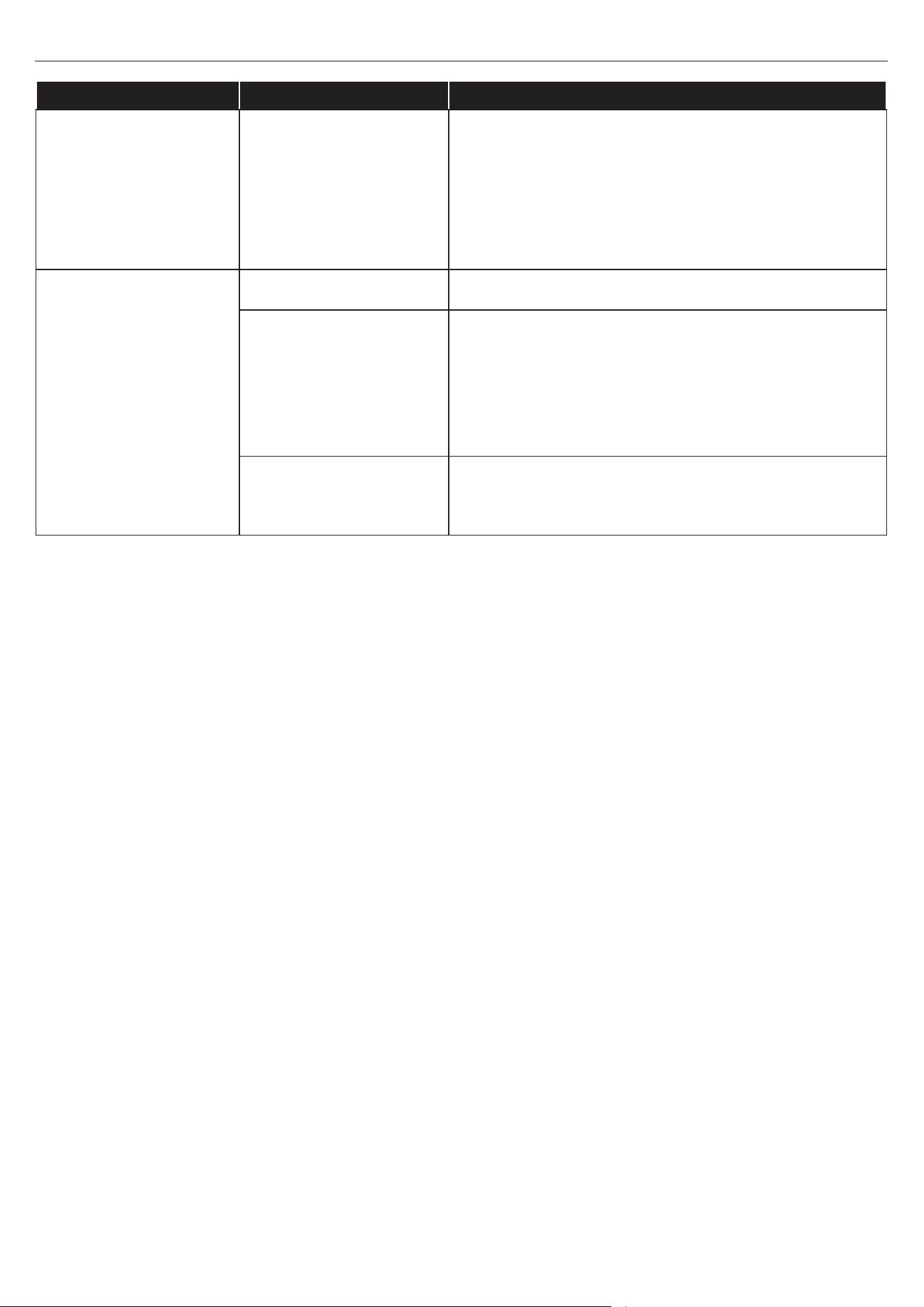
54
23MMP7101 REV1.0
PROBLEMA CAUSA POSIBLE ACCIÓN CORRECTIVA
El efecto de llama fun-
ciona, pero el calenta-
dor no, y el lecho de
brasas titila cuando se
presiona el botón de
calentador.
El calentador está
desactivado.
Con la unidad encendida, mantenga presionado el
botón de encendido en el panel de control durante
10 segundos. Una vez que se vuelvan a activar
las luces del lecho de brasas, parpadearán varias
veces.
El control remoto no
funciona.
No hay baterías Cambie las baterías del control remoto.
Señal débil
Ponga en funcionamiento el transmisor remoto a un
ritmo lento y medido. Mida los botones del control
remoto con un movimiento uniforme y un poco de
presión. Si continúa presionando los botones en una
sucesión rápida, se podrían generar problemas en
el funcionamiento del transmisor.
Distancia
Opere el control remoto a una distancia de menos
de 6.09 m de la parte frontal del electrodoméstico;
apunte el control remoto al panel de control.
SOLUCIÓN DE PROBLEMAS

55
23MMP7101 REV1.0
Advertencia: los cambios o las modicaciones a esta unidad que no estén expresamente aprobados por la
parte responsable del cumplimiento podrían anular la autorización del usuario para utilizar el equipo.
NOTA: este equipo ha sido probado y se ha vericado que cumple con los límites para un dispositivo
digital clase B, conforme a la Parte 15 de las regulaciones de la FCC. Estos límites están diseñados para
proporcionar protección razonable contra interferencias perjudiciales en una instalación residencial. Este
equipo genera, utiliza y puede irradiar energía de radiofrecuencia y, si no se instala y usa de acuerdo con las
instrucciones, puede causar interferencia perjudicial a las comunicaciones de radio.
Sin embargo, no se garantiza que no se producirán interferencias en una instalación en especial. Si este
equipo genera una interferencia perjudicial para la recepción de radio o televisión, que se puede determinar
apagando y encendiendo el equipo, se recomienda al usuario que intente corregir la interferencia con una o
más de las siguientes medidas:
• Reorientar o reubicar la antena de recepción.
• Aumentar la separación entre el equipo y el receptor.
• Conectar el equipo a un tomacorriente de un circuito distinto al que usa el receptor.
• Solicitar ayuda al distribuidor o a un técnico con experiencia en radio/TV.
Este dispositivo cumple con la sección 15 de las reglas de la FCC. El funcionamiento está sujeto a las
siguientes dos condiciones:
(1) Este dispositivo no debe causar una interferencia perjudicial y
(2) Este dispositivo deberá aceptar cualquier interferencia recibida, incluyendo la interferencia que pudiese
causar la operación no deseada.
Twin-Star International Inc.
750 Park of Commerce Blvd., Suite 400
Boca Raton, FL 33487
1-866-661-1218
Este instrumento digital clase B cumple con la norma ICES-003 de Canadá.
• Limpie el borde con un paño suave levemente humedecido con un producto a base de aceite de
cítricos y dé brillo con un paño suave limpio.
• Los productos a base de aceite de cítricos se recomiendan para la limpieza y se pueden encontrar
en supermercados o ferreterías.
• ADVERTENCIA: el cableado del tomacorriente debe cumplir con los códigos de construcción locales
y con otras normas que correspondan para reducir el riesgo de incendio, descarga eléctrica y
lesiones a personas.
• ADVERTENCIA: desconecte la electricidad antes de realizar cualquier mantenimiento o limpieza
para reducir el riesgo de incendio, descarga eléctrica o lesiones personales.
INFORMACIÓN SOBRE LA FCC/IC
CUIDADO Y MANTENIMIENTO

56
23MMP7101 REV1.0
El fabricante garantiza que su nueva chimenea eléctrica no presentará defectos de fabricación ni en
los materiales durante un período de un año a partir de la fecha de compra, siempre y cuando se
cumplan las siguientes condiciones y limitaciones.
1. Este electrodoméstico se debe instalar y operar en todo momento de acuerdo con las
instrucciones de instalación y operación proporcionadas con el producto. Cualquier reparación no
autorizada, alteración, abuso deliberado, accidente o uso inadecuado del producto anulará esta
garantía.
2. Esta garantía no es transferible y solo está disponible para el propietario original, siempre y
cuando la compra se haya realizado a través de un proveedor autorizado del producto.
3. Esta garantía se limita a la reparación o al reemplazo de piezas que se consideren defectuosas
en material o mano de obra, siempre y cuando dichas piezas se hayan sometido a condiciones
normales de uso y servicio, después de que una inspección por parte del fabricante conrme
dicho defecto.
4. El fabricante podrá, según su criterio, eximirse de toda obligación respecto de esta garantía
reembolsando el precio al por mayor de la pieza defectuosa.
5. Esta garantía no cubre ningún costo de instalación, mano de obra, fabricación, transporte o de
otro tipo que surja de la pieza defectuosa, su reparación, reemplazo u otra situación y el fabricante
no asume ninguna responsabilidad por ellas.
6. El propietario o usuario asume todos los riegos, si los hay, incluidos los riesgos de daños o
pérdidas directos, indirectos o resultantes que surjan del uso del producto o de la incapacidad
para utilizarlo, salvo que la ley estipule lo contrario.
7. Mediante el presente, se excluye expresamente cualquier otra garantía, expresa o implícita,
respecto del producto, sus componentes y accesorios, o cualquier otra obligación o
responsabilidad de parte del fabricante.
8. El fabricante no asume, ni autoriza a ningún tercero a asumir en su nombre, ninguna otra
responsabilidad respecto de la venta del producto.
9. Las garantías descritas en este documento no se aplican a accesorios que no sean del fabricante
y que se usen junto con la instalación de este producto.
10. Esta garantía le otorga derechos legales especícos, pero podría tener también otros derechos
que varían según el estado.
Esta garantía es nula si:
a. La chimenea está sometida a períodos prolongados de humedad o condensación.
b. Se produce cualquier alteración no autorizada, abuso deliberado, accidente o uso indebido del
producto.
c. Usted no tiene el recibo original de compra.
1 AÑO DE GARANTÍA LIMITADA
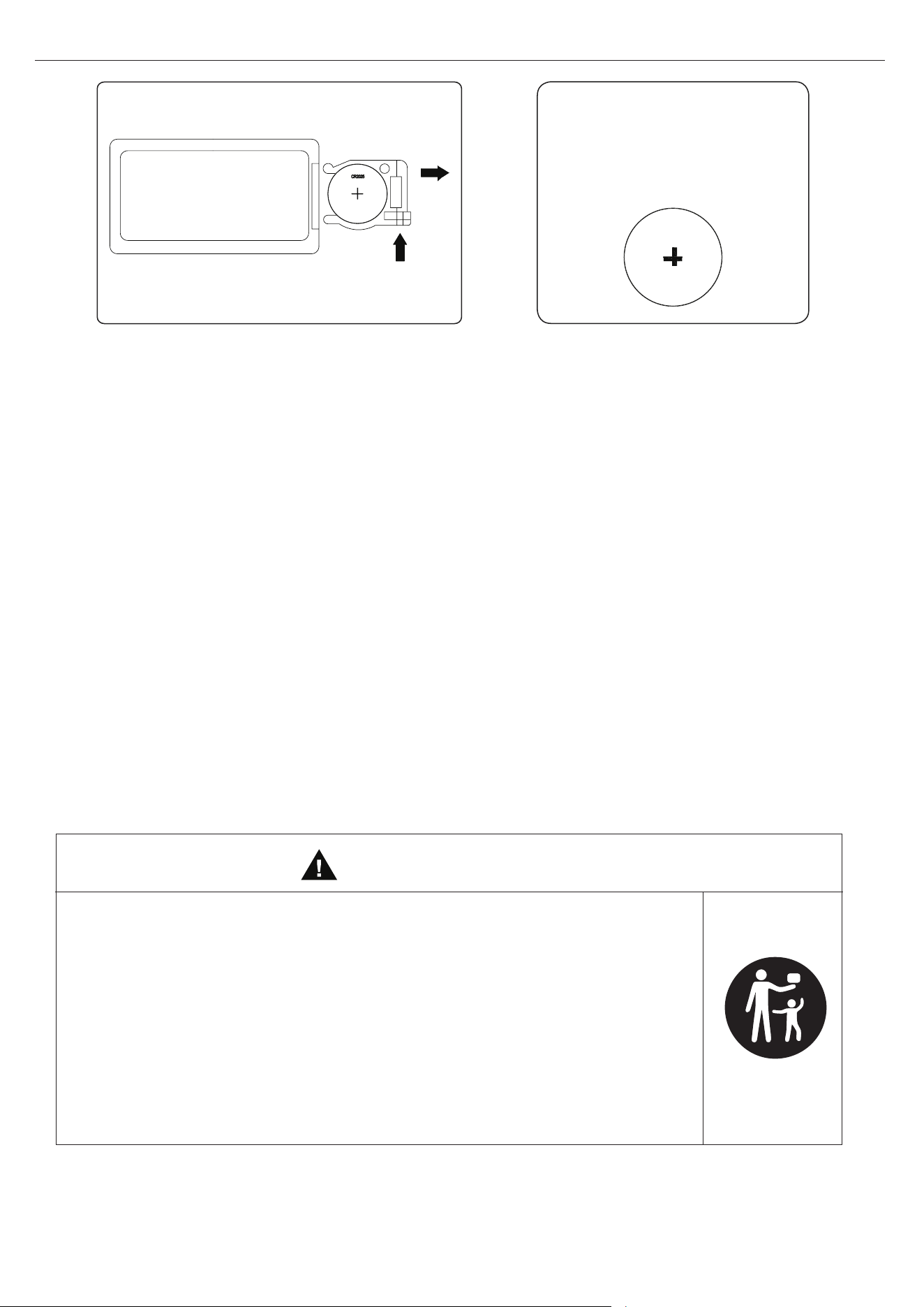
57
23MMP7101 REV1.0
CR2025
CÓMO REEMPLAZAR LAS BATERÍAS DEL CONTROL REMOTO:
Se incluye 1 batería CR2025
NOTA: eliminación de las baterías
Siempre elimine las baterías en un
punto de reciclaje adecuado.
• Retire y recicle o deseche de inmediato las baterías usadas de acuerdo con las regulaciones
locales y manténgalas fuera del alcance de los niños. NO deseche las baterías en la basura
doméstica ni las incinere.
• Incluso las baterías usadas pueden causar lesiones graves o la muerte.
• Llame a un centro de control de envenenamientos local para recibir información de
tratamiento.
• Tipo de batería compatible: CR2025.
• Voltaje nominal: 3 V.
• Las baterías que no son recargables no deben recargarse.
• No fuerce la descarga, recargue, desmonte, incinere ni caliente las baterías por encima de
los 80 °C. Hacerlo puede provocar lesiones debido a la ventilación, ltraciones o explosiones
que provoquen quemaduras químicas.
• Asegúrese de que las baterías estén instaladas de manera correcta según la polaridad (+ y -).
• No mezcle baterías antiguas con nuevas ni de diferentes marcas o tipos, como alcalinas,
carbono o zinc o baterías recargables.
• Retire y recicle o deseche de inmediato las baterías de los equipos que no se utilicen
durante un período prolongado de acuerdo con las regulaciones locales.
• Siempre vuelva a asegurar el compartimiento de las baterías. Si el compartimiento de la
batería no cierra con rmeza, deje de usar el producto, retire las baterías y manténgalas
lejos del alcance de los niños.
•
PELIGRO DE INGESTIÓN: este producto contiene una batería de
celda o de botón.
• Si se ingiere puede producirse la MUERTE o lesiones graves.
• Una batería de celda o de botón ingerida puede provocar
quemaduras químicas internas en tan solo 2 horas.
• MANTENGA las baterías nuevas y usadas FUERA DEL ALCANCE
DE LOS NIÑOS.
• Busque atención médica inmediata si sospecha que se ha tragado
o introducido una batería en cualquier parte del cuerpo.
ADVERTENCIA
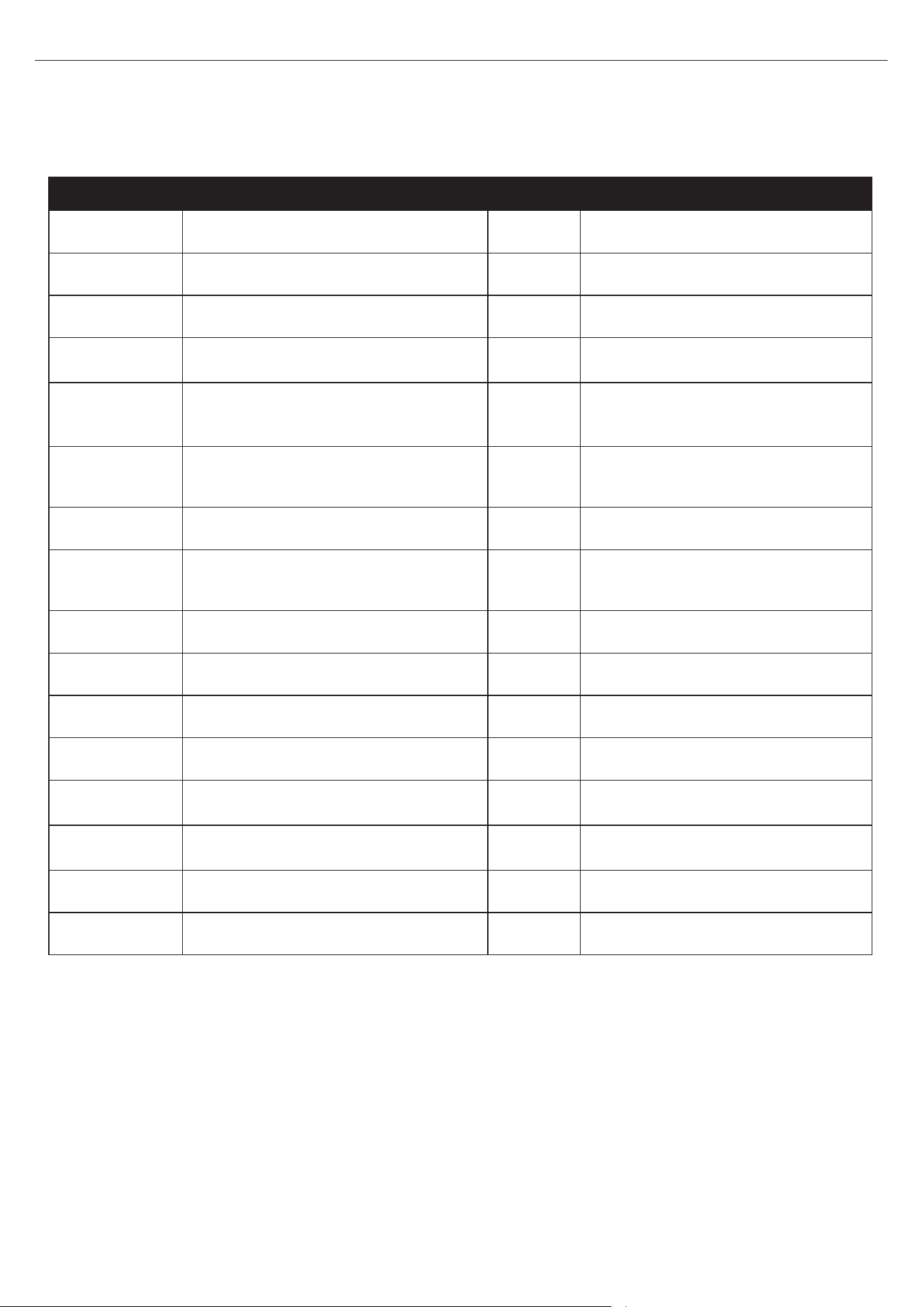
58
23MMP7101 REV1.0
LISTA DE PIEZAS DE REPUESTO
PIEZA NOMBRE DE LA PIEZA NO NÚMERO DE PIEZA
1
Sensor del termostato 1
Y21-S307-P186
2
Ensamble del soplador/calentador 1
Y21-S307-P01
3
Placa de circuitos principal 1
Y21-S307-P15
4
Cable del panel de control
1 Y21-S307-P187
5
Cable de conexión del lecho de
brasas
1
Y21-S307-P188
6
Motor de accionamiento del
generador de llamas
1
Y21-S307-P189
7
Placa de circuitos de la llama 1 Y21-S307-P40
8
Placa de circuitos del panel de
control
1
Y21-S307-P32
9
Control remoto
1 P185
10 Juego de leños izquierdo 1 Y21-S307-P20L
11 Juego de leños derecho 1 Y21-S307-P20R
12 Lecho de brasas 1 Y21-S307-P21
13
Accesorio roscado
68 PH-THRZNC001
14
Deslizador del piso
6 PH-GLDBRW001
15 Placa de metal 2 PH-PLTBLK001
16 Bisagra de barril 2 PH-HNGBLK016
Para obtener piezas de repuesto, llame a nuestro Departamento de Servicio al Cliente al
866-439-9800, de lunes a domingo de 8 a.m. a 8 p.m., hora estándar del Este. También puede
ponerse en contacto con nosotros en [email protected].
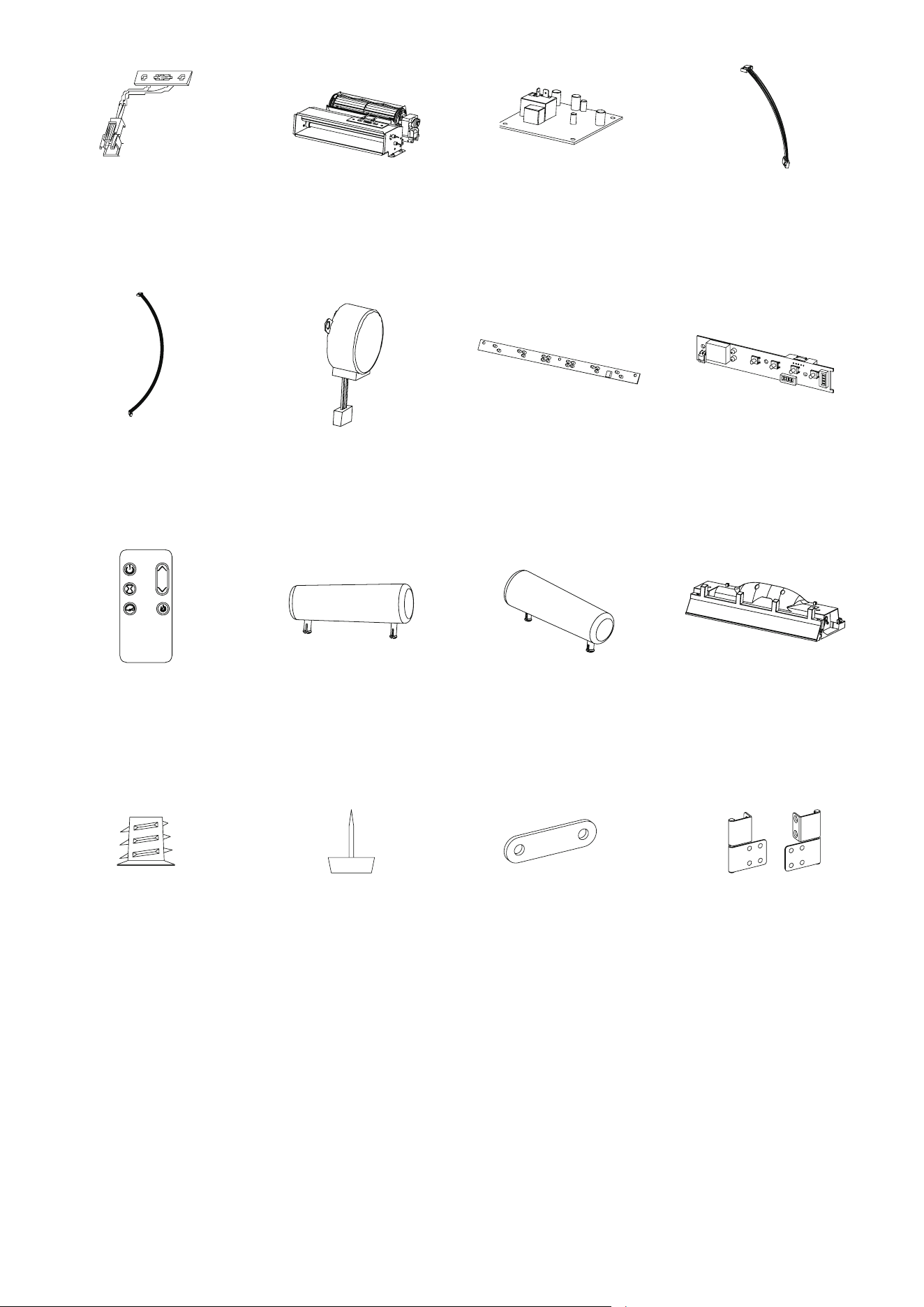
59
23MMP7101 REV1.0
Impreso en Vietnam
1
6
3
5
7
10
8
9
4
2
11 12
14
13
15 16