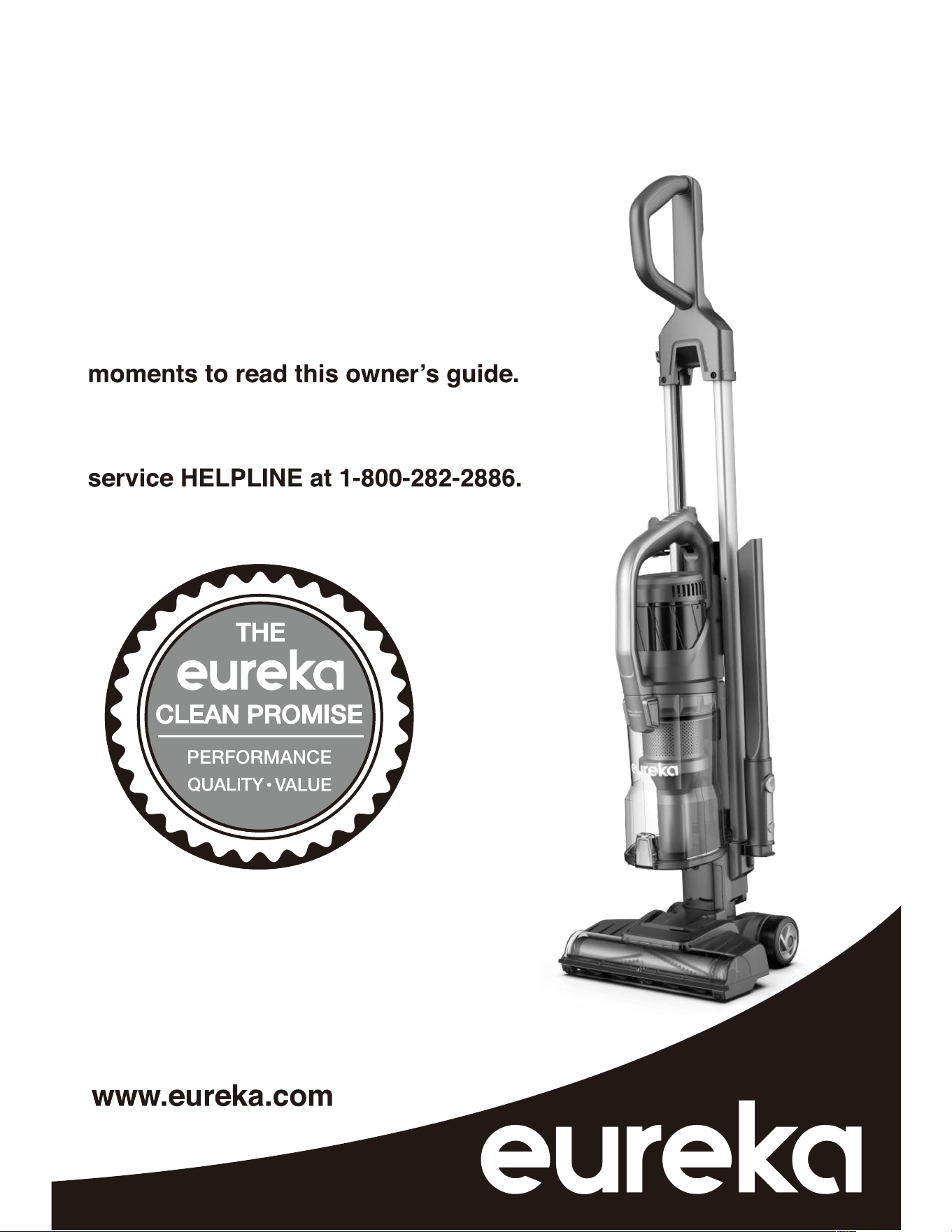
Thank you for purchasing your new
Eureka vacuum!
Important instructions
For easy assembly, please take a few
If you have questions about your new
vacuum, please contact our customer
We’re here to help!
Owner’s Guide
NEU800 series
Upright vacuum cleaner; household type
2
Eureka Customer Service HELPLINE 1-800-282-2886
Contents
Important safeguards . . . . . . . . . . . . . . . . . . . . . . . . . . . . . . . . . . . . . . . . .
. . . . . . . . . . . . . . . . . . . . . . . . . . .
. . . . . . . . . . . . . . . . . . . . . . . . . . . . . . . . . . . . . .
. . . . . . . . . . . . . . . . . . . . . . . . . . . . . . . . . . . . . . . . . . . . . .
. 3
What comes in the carton . . . . . . . . . . . . . . . . . . . . . . . . . . . . . . . . . . . . . . . 4
How to identify parts of your vacuum cleaner . . . . . . . . . . . . . . . . . . . . . . . . 5
How to assemble your vacuum cleaner . . . . . . . . . . . . . . . . . . . . . . . . . . . . 6
How to use your vacuum cleaner . . . . . . . . . . . . . . . . . . . . . . . . . . . . . . . . . 7
How to use accessories . . . . . . . . . . . . . . . . . . . . . . . . . . . . . . . . . . . . . . .8-9
10-11
How to maintain the brushroll
How to maintain dust cup and filters
12
How to clean a blockage 13
Problem solving . . . . . . . . . . . . . . . . . . . . . . . . . . . . . . . . . . . . . . . . . . . . . . 14
Trouble shooting . . . . . . . . . . . . . . . . . . . . . . . . . . . . . . . . . . . . . . . . . . . . . 14
The Eureka limited warranty . . . . . . . . . . . . . . . . . . . . . . . . . . . . . . . . . . . .. 15
How to order replacement parts . . . . . . . . . . . . . . . . . . . . . . . . . . . . . . . . . 16
!
Follow caution information wherever you see this symbol.
Keep this information
Write the model, type and serial number here:
Date of purchase (keep your receipt) ______________
Model number and type ________________________
Serial number ________________________________
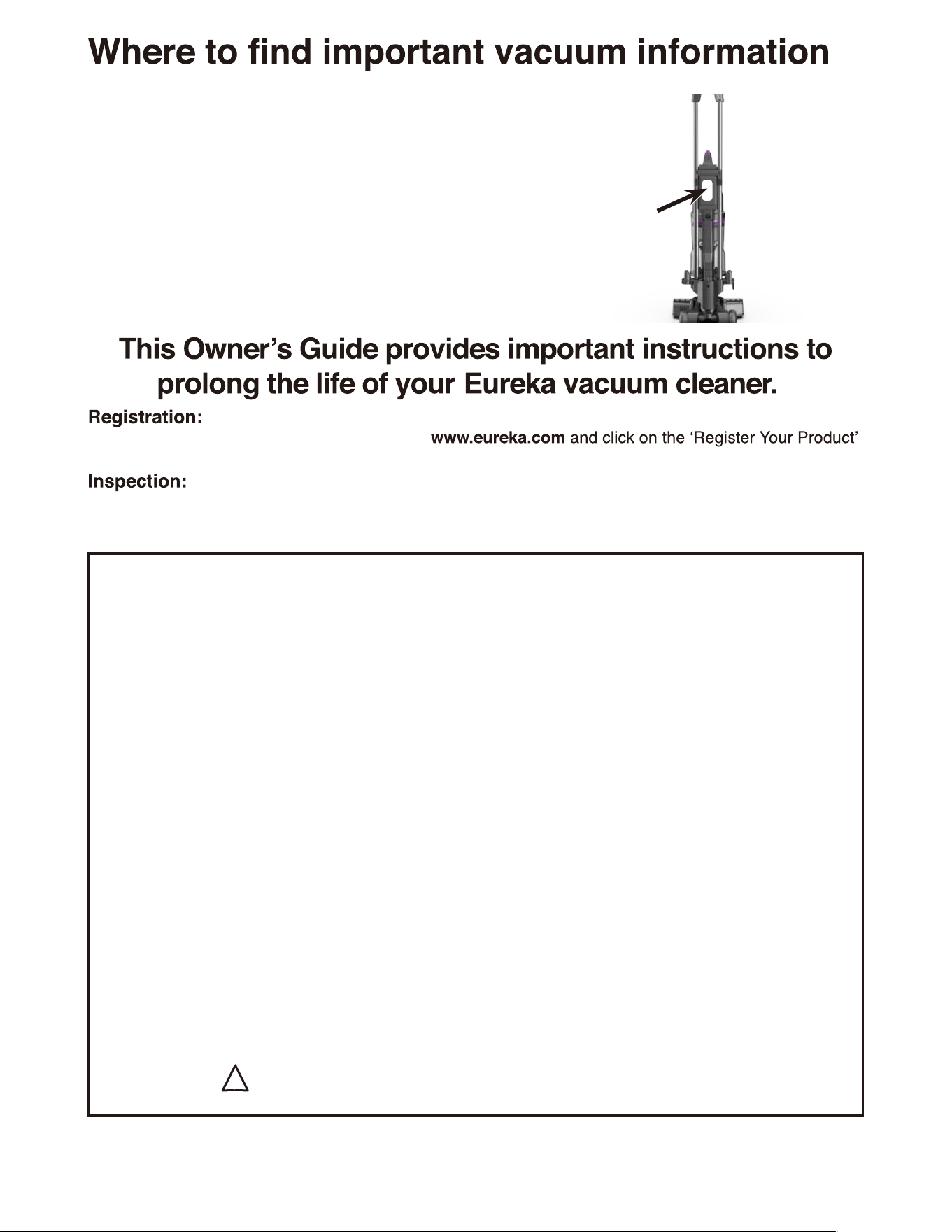
Find these numbers on a label on the bottom of the
vacuum cleaner. Refer to these numbers when ordering
parts and accessories, or if service is needed.
To register your product use your smartphone to scan the QR code that will take you
directly to the product registration page or visit
link in the top right corner.
Carefully unpack and inspect your new Eureka vacuum cleaner for shipping damage.
Each unit is tested and thoroughly inspected before shipping. For instructions regarding any
shipping damage, call Eureka Customer Service HELPLINE at 1-800-282-2886 immediately.
3
When using an electrical appliance, basic precautions should always be followed, including the following:
• For the first operation, it is advisable
to read the manual carefully before
hand and keep it properly for future use.
•
•
•
•
•
•
•
•
•
•
•
•
•
•
To reduce the risk of electric shock, this appliance has a polarized plug (one blade is wider than the other).
Motor
the motor or the brush roll at any time. The bearings are permanently lubricated
and sealed.
Before the first operation, make sure the dust
cup or the dust bag is properly installed.
Only use the vacuum cleaner indoors on dry
surfaces and keep the area your cleaning well.
Do not use without dust bag and/or filters in
place.
Do not leave appliance when plugged in.
Unplug from outlet when not in use and before
servicing.
Use only as described in this manual. Use only
manufacturer's recommended attachments.
Don’t use this vacuum cleaner if it has been
dropped, damaged or left outdoors.
Don’t run over the power cord or use vacuum
cleaner if the power cord or plug is damaged.
Please contact the Eureka Customer Service
HELPLINE at 1-800-282-2886.
Don’t handle the plug or use the vacuum
cleaner with wet hands.
Don’t pull or carry this vacuum cleaner by the
power cord. Don’t use the Power cord as a
handle, pull the power cord around corners,
sharp edges or close a door over the Power
cord. Don’t unplug vacuum cleaner by pulling
on the power cord.
Do not unplug by pulling on cord. To unplug,
grasp the plug, not the cord.
Don’t vacuum up any flammable or combustible
materials (lighter fluid, petrol, kerosene etc.) or
use the vacuum cleaner in an area with
explosive vapours or liquid.
Don’t vacuum up hot coals, cigarette butts,
matches or smoking hot burning items or use in
an area where there may be harmful fluids
(chlorine, bleach, and ammonia drain cleaner).
Don’t attempt to remove blockages with sharp
objects as this may cause damage to your
vacuum cleaner.
Keep hair, loose clothing, fingers, and all parts
of body away from openings and moving parts.
•
•
•
•
•
•
•
•
•
•
•
•
•
Turn off all controls before unplugging.
Use extra care when cleaning on stairs.
Don’t use the vacuum cleaner with incorrect
voltage as this may result in damage or injury to
the user. The correct voltage is listed on the
ratings label.
If abnormal noise, smell, smoke or any other
failure or breakage is found during the operation,
you should turn off the switch and unplug it. Then
contact with your service center for repair. Do not
repair by yourself.
If the supply cord is damaged, it must be replaced
by the manufacturer or its service agent or a
similarly qualified person in order to avoid a
hazard.
This appliance is not intended for use by persons
(including children) with reduced physical,
sensory or mental capabilities, or lack of
experience and knowledge, unless they have
been given supervision or instruction concerning
use of the appliance by a person responsible for
their safety.
Children should be supervised to ensure that they
do not play with the appliance.
The plug must be removed from the power socket
before any maintenance or
replacement.
Do not put any object into openings. Do not use
with any opening blocked; keep free of dust, lint,
hair, and anything that may reduce airflow.
Always turn off this appliance before connecting
or disconnecting motorized nozzle.
The hose contains electrical wires. Do not use
when damaged, cut, or punctured. Avoid picking
up sharp objects.
Always turn off this appliance before connecting
or disconnecting either hose or motorized nozzle.
To reduce the risk of electric shock, this appliance
has a polarized plug (one blade is wider than the
other). This plug will fit in a polarized outlet only
one way. If the plug does not fit fully in the outlet,
reverse the plug. If it still does not fit, contact a
qualified electrician to install the proper outlet. Do
not change the plug in any way.
4
Eureka Customer Service HELPLINE 1-800-282-2886
Important
GUIDE
safeguards
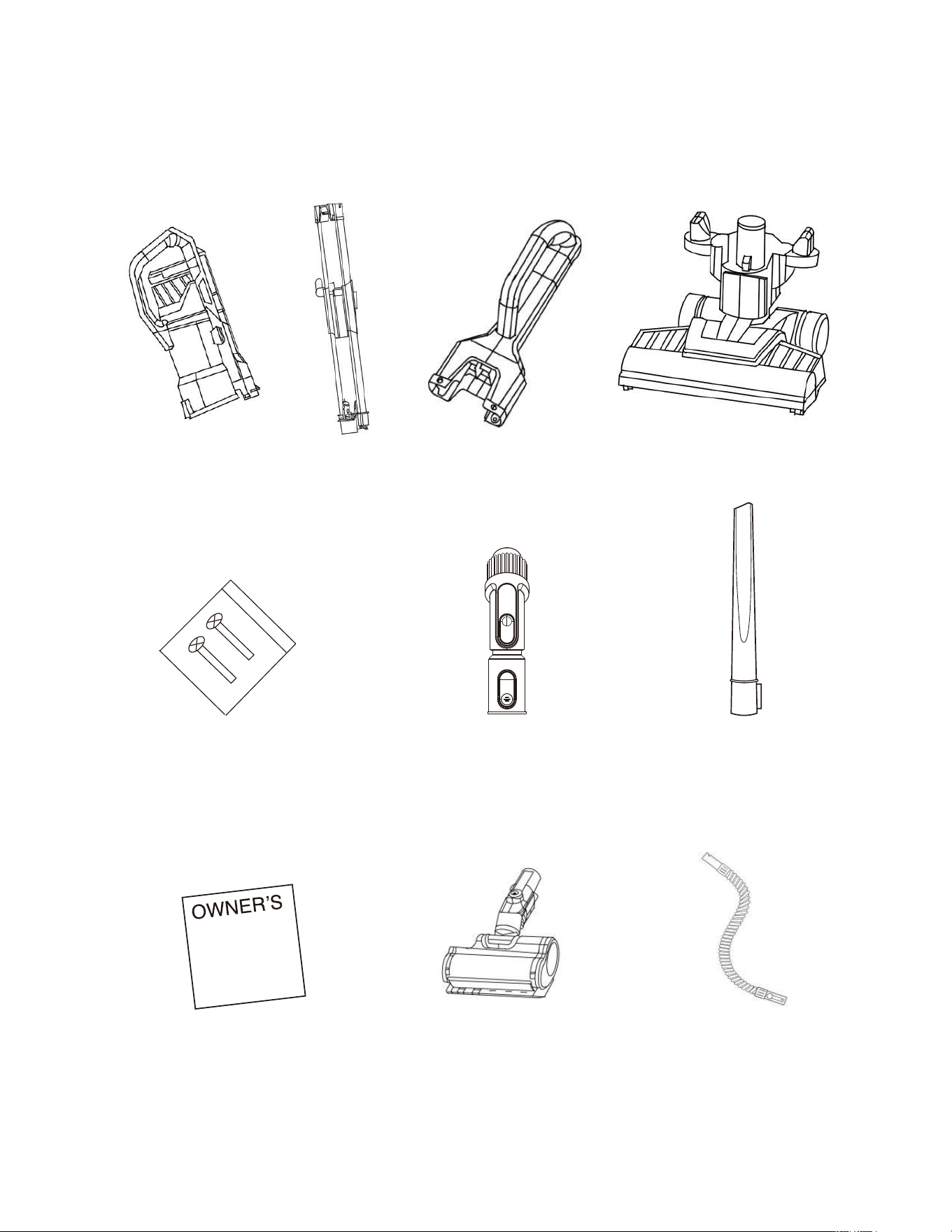
Crevice tool
What comes in the carton
Vacuum canister
assembly
Motorized pet & stair tool
(Included with some models,
can be purchased separately)
Hose
Pole assembly Handle assembly Floor nozzle assembly
2-in-1 Dusting
brush + upholstery tool
2* Screws
(for attaching
handle to pole)
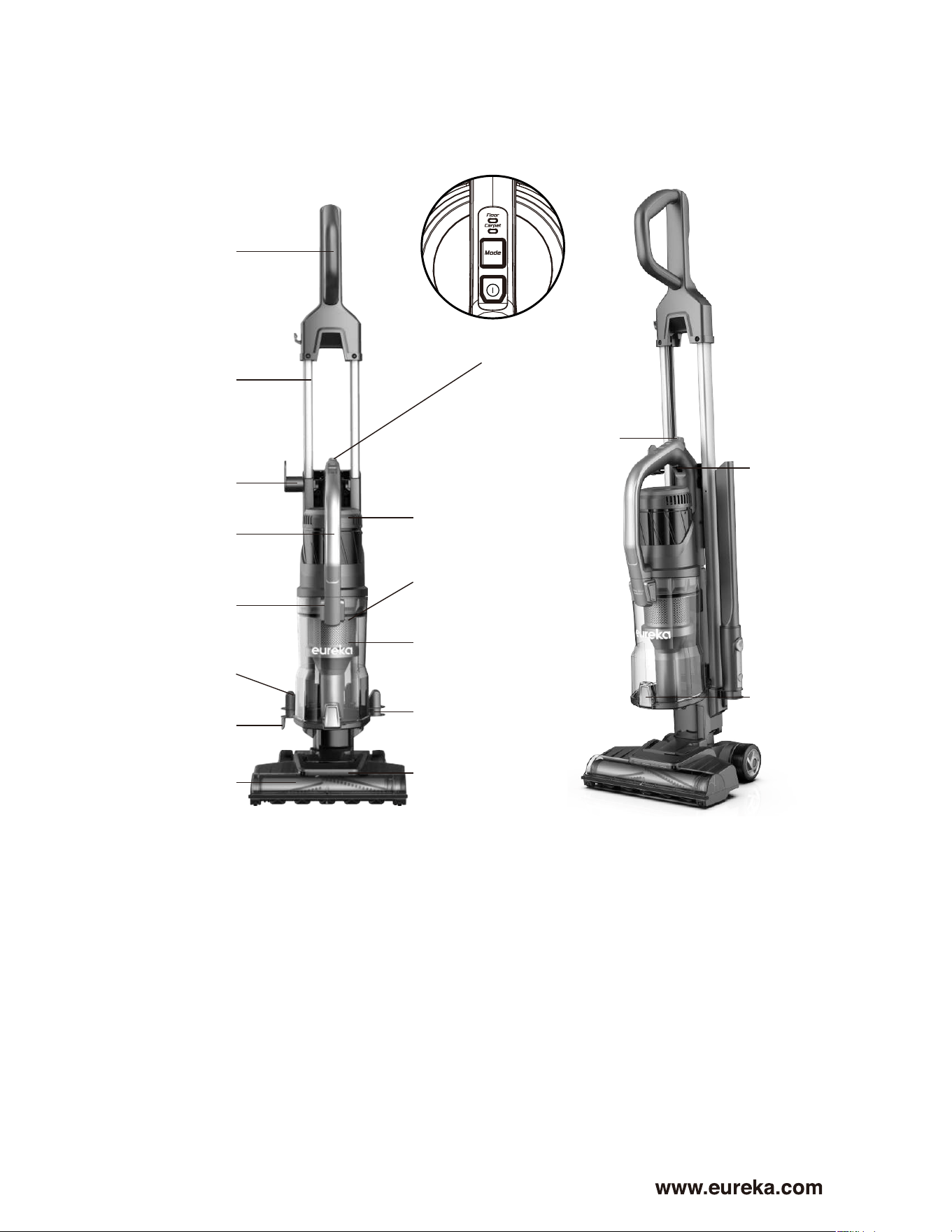
Handle assembly
Power and flooring
type buttons
Pole assembly
Purple canister
release button
Upper cord
wrap hook
Filter cover (post
motor filter inside)
Yellow slide
up/down
trigger
Dust cup
open lever
Filter screen
Dust cup
Crevice tool
holder
LED headlights
Carry handle
Brushroll
2 in 1 dusting
brush holder
Lower cord
wrap hook
5
How to identify parts of your vacuum cleaner
Dust cup
release buttons
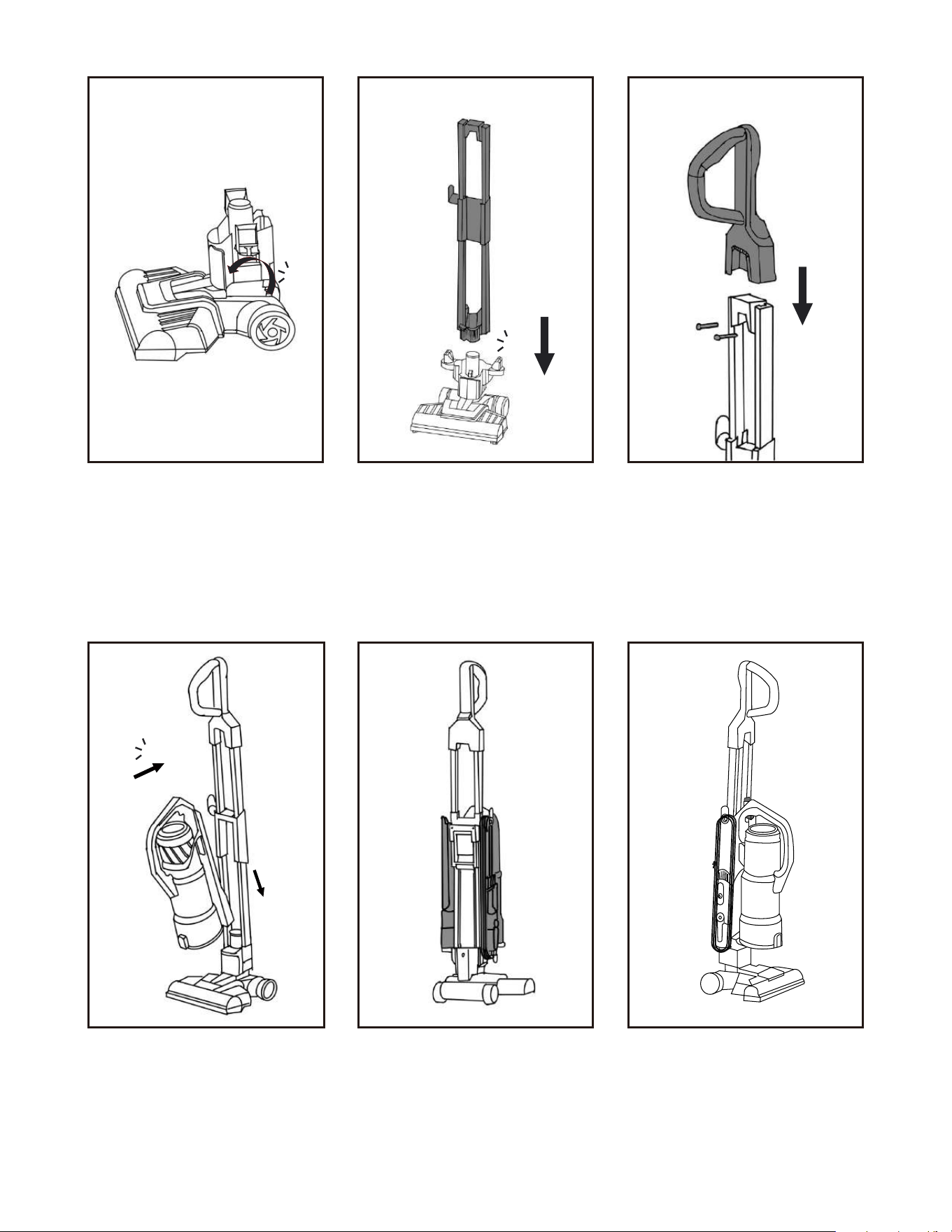
How to assemble your vacuum cleaner
Set floor nozzle assembly
on the ground and pull
connector joint into upright
position until you hear a
click.
Angle the canister forward
and insert bottom of
canister onto the yellow
floor nozzle connector and
then push canister back
onto the pole until it clicks
in place.
Store crevice tool and
2-in-1 dusting brush on
the posts.
Wrap the cord around
the upper and lower cord
hooks.
Insert the pole assembly
into the opening at the top
of the floor nozzle and
push down until it clicks
into place.
Slide the handle onto the
top of the pole assembly
and using a screw driver
(not included) secure the
two screws into place.
Note: Screws are in small
plastic bag attached to
the pole.
6
Eureka Customer Service HELPLINE 1-800-282-2886
Click!
Click!
Click!
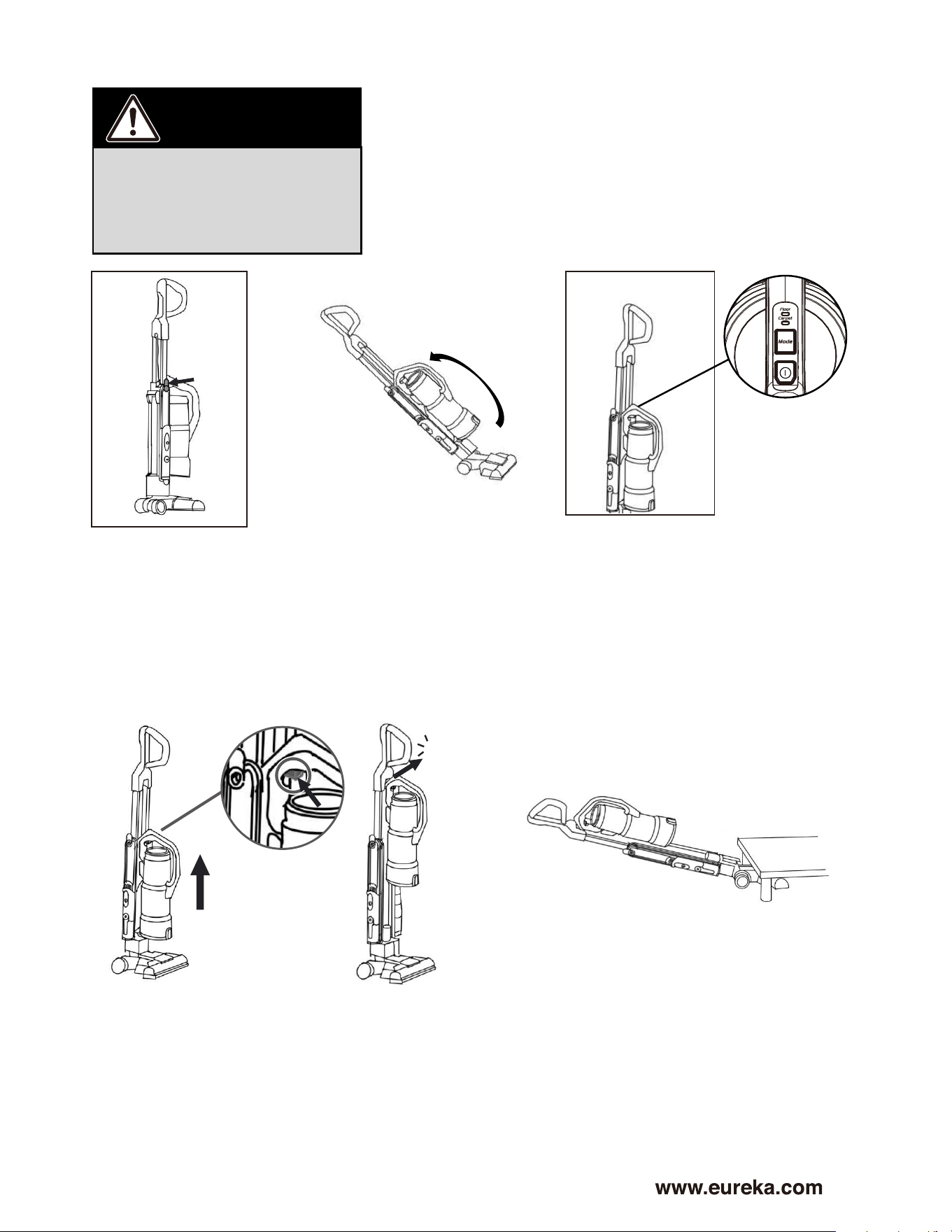
Turn upper cord wrap
hook downward to
quickly release the
cord. Plug power
cord into outlet.
Step on floor nozzle and
recline vacuum for
vacuuming floors.
Note: Brushroll will only
spin when vacuum is
reclined.
Press Power button to turn
vacuum on. Press Mode button
to choose between Carpet or
for hard floors choose Floor.
Light above the flooring type
will illuminate when that mode
is selected.
7
How to use your vacuum cleaner
CAUTION
Never operate vacuum
cleaner without all filters,
filter screen, hose and dust
cup in proper position.
Click!
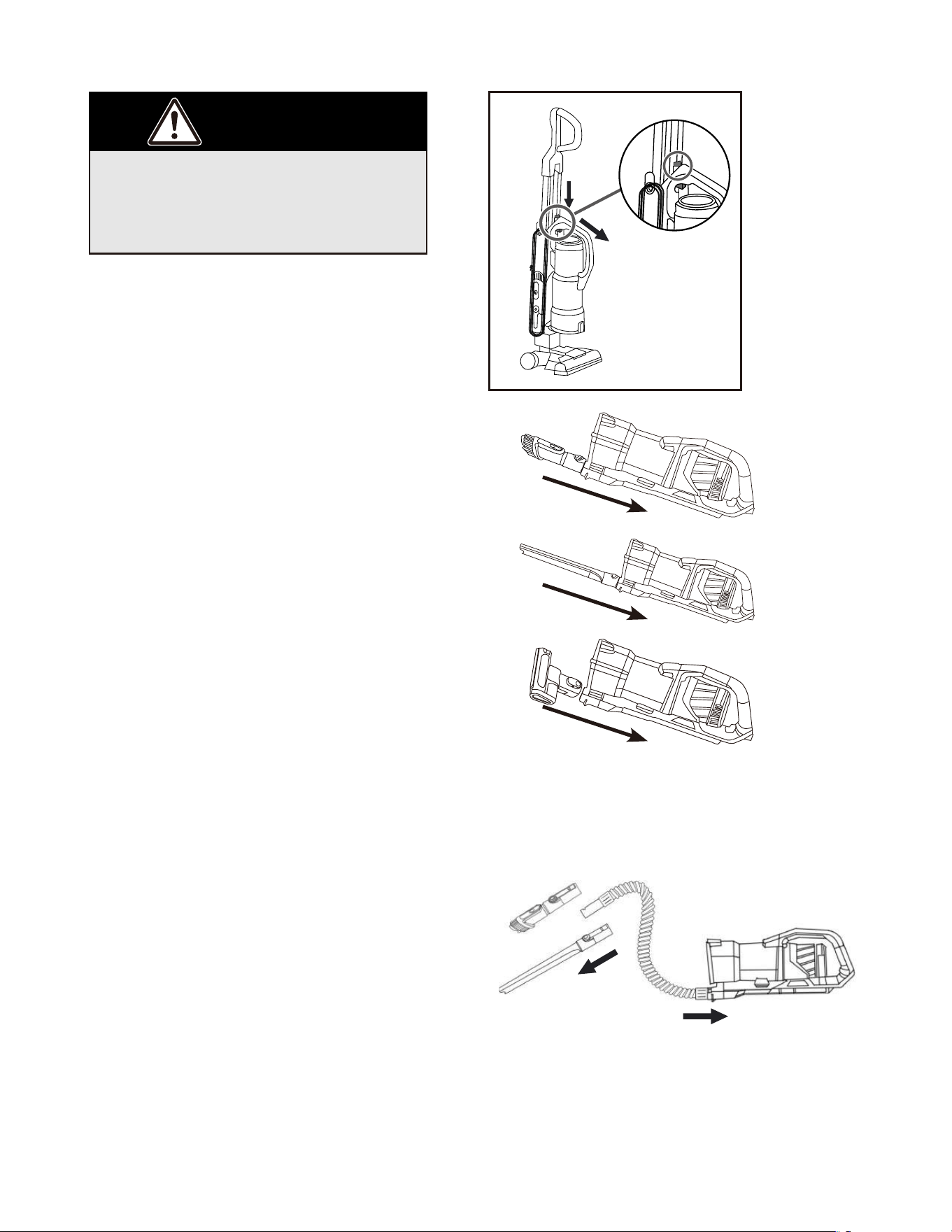
The canister can slide up the pole to clean
under furniture. To slide the canister up
the pole press the yellow slide up/down
trigger button located under the handle and
then slide the canister all the way to top of
pole until it clicks into place. To lower canister,
press the yellow slide up/down trigger button
and slide down pole until it clicks into place.
Using as stick mode to clean under
furniture places.
8
Eureka Customer Service HELPLINE 1-800-282-2886
How to use accessories
When using tools, always place
vacuum in upright position. Make
sure vacuum cleaner is turned off
while attaching tools.
1
2
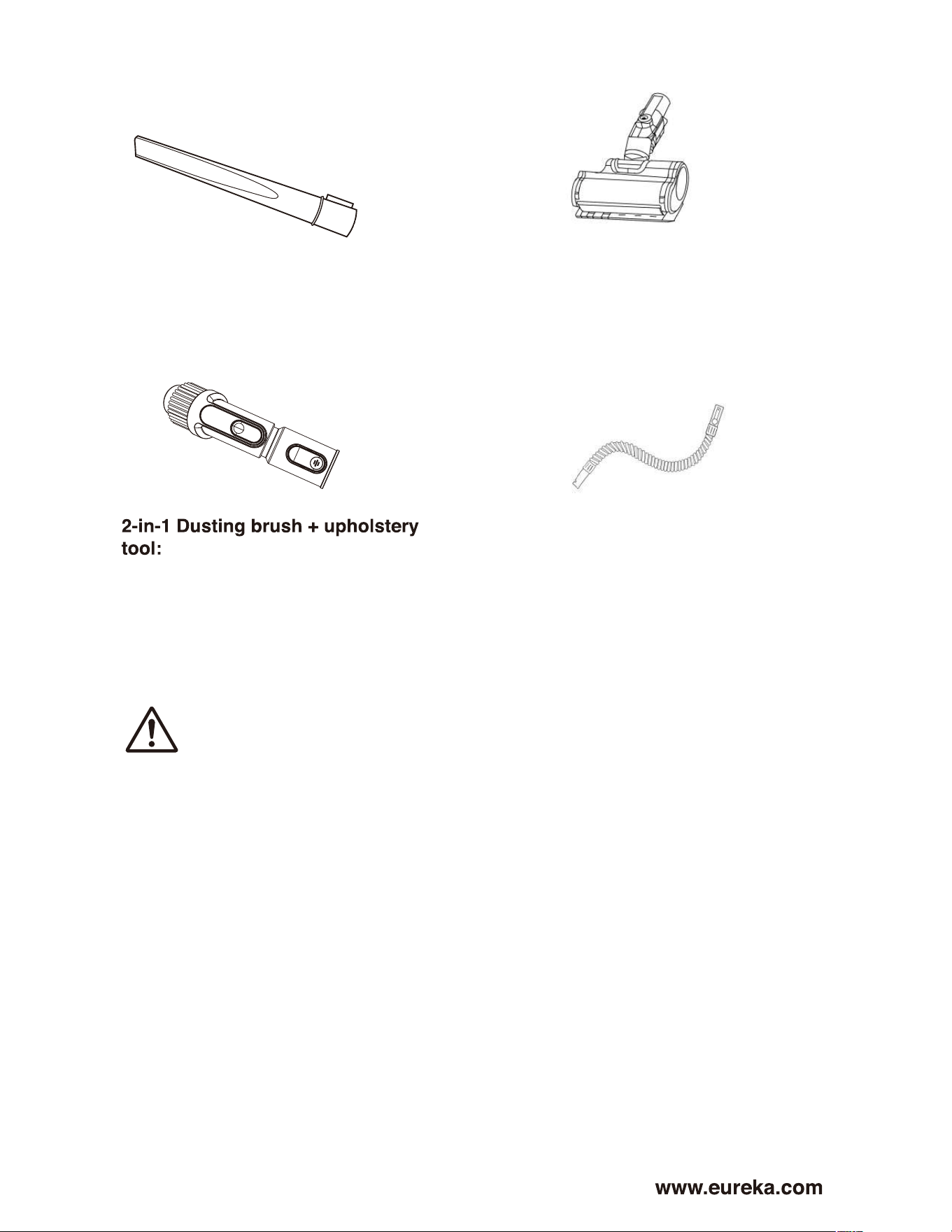
Using accessories with canister only
• Press and hold the purple canister
release button and pull canister away
from the pole. (Fig.1)
• Insert tools directly into the bottom of
the canister assembly until you hear
them click into place. (Fig. 2)
Note: The motorized pet & stair tool only
works when connected directly to the
bottom of the canister assembly.
CAUTION
Click!
Click!
Click!
Using accessories with hose as extension
• Insert one end of hose into the bottom of
the canister assembly until you hear it click
into place.
• Insert tools directly into the opposite
end of the hose until you hear them click
into place.
• When finished using accessories, remove
by pressing the silver button on the accessory
and pulling it away from the hose or the canister
assembly.
3
9
How to use accessories
Use brush to vacuum blinds,
vents or upholstered surfaces.
Use felt portion to clean delicate
surfaces. To switch between felt and
brush portions, press thumb release
and slide brush up or down.
Crevice tool – Use for
baseboard edges, sofas,
Motorized Pet & Stair Tool:
Connect directly with canister to easily
remove pet hair and debris from stairs
and upholstery. Adjust angle of front
nozzle to suit different surfaces.
(Included with some models, can be
purchased separately)
Hose: Connect accessories (crevice tool
and 2-in-1 dusting brush + upholstery tool)
for extended reach.
detailing chairs, dryer vents
and tight spaces.
CAUTION: Make sure vacuum cleaner is turned off when
attaching the Motorized pet & stair tool.
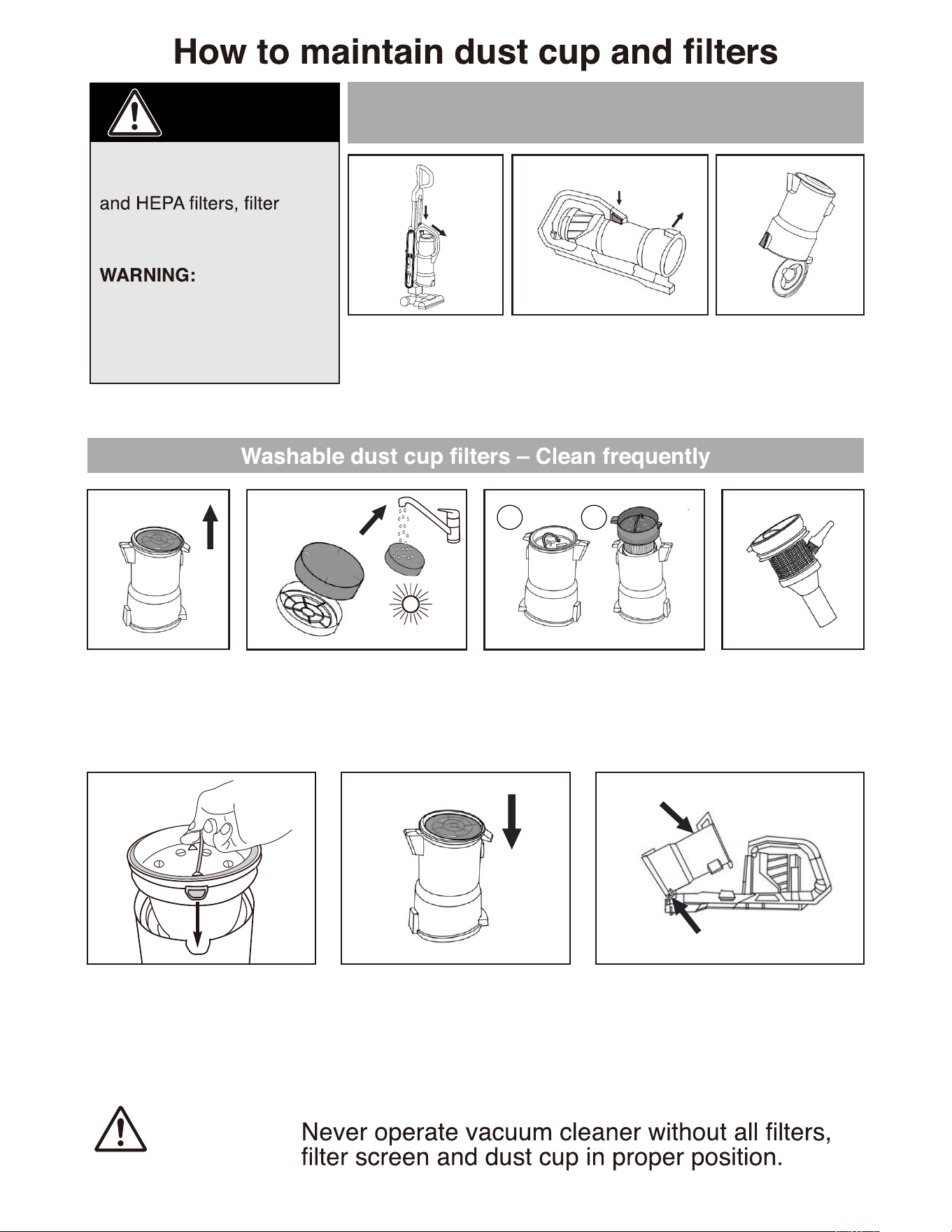
Empty dust cup when it reaches the
Max Fill line and after every use
10
Eureka Customer Service HELPLINE 1-800-282-2886
Never operate vacuum
cleaner without pre-motor
screen and dust cup in
proper position.
Moving parts!
Make sure vacuum cleaner
is turned off and power
cord is unplugged when
performing any maintenance.
WARNING:
CAUTION
Press canister release
button to remove the
whole pod from the
unit.
Remove the filter
assembly upwards.
To put the separator back in
place, align the front and back
tabs on the separator with the
corresponding slots on the dust
cup and then carefully slide the
separator back into the dust cup.
Reinstall pre-motor filter. To place the dust cup back, angle it
forward so the lower hook catches in
the slot and then gently push it back
towards the wand until you hear click
indicating it is locked in place.
Clean the dust on
the surface of the
separation cone to
keep the mesh
open.
Lift out the pre-motor filter and
shake of dust frequently.
Every 3 months, rinse filter
and dry THOROUGHLY.
Pull up the metal ring, then
remove the separator from the
dust cup.
Squeeze the the purple
dust cup release buttons
and pull dust cup back
and out.
Hold dust cup over
wastebasket and
press lever to release
bottom lid.
24h
1
2
1. Align
2. Push
Click!
1.Squeeze
2.Pull out
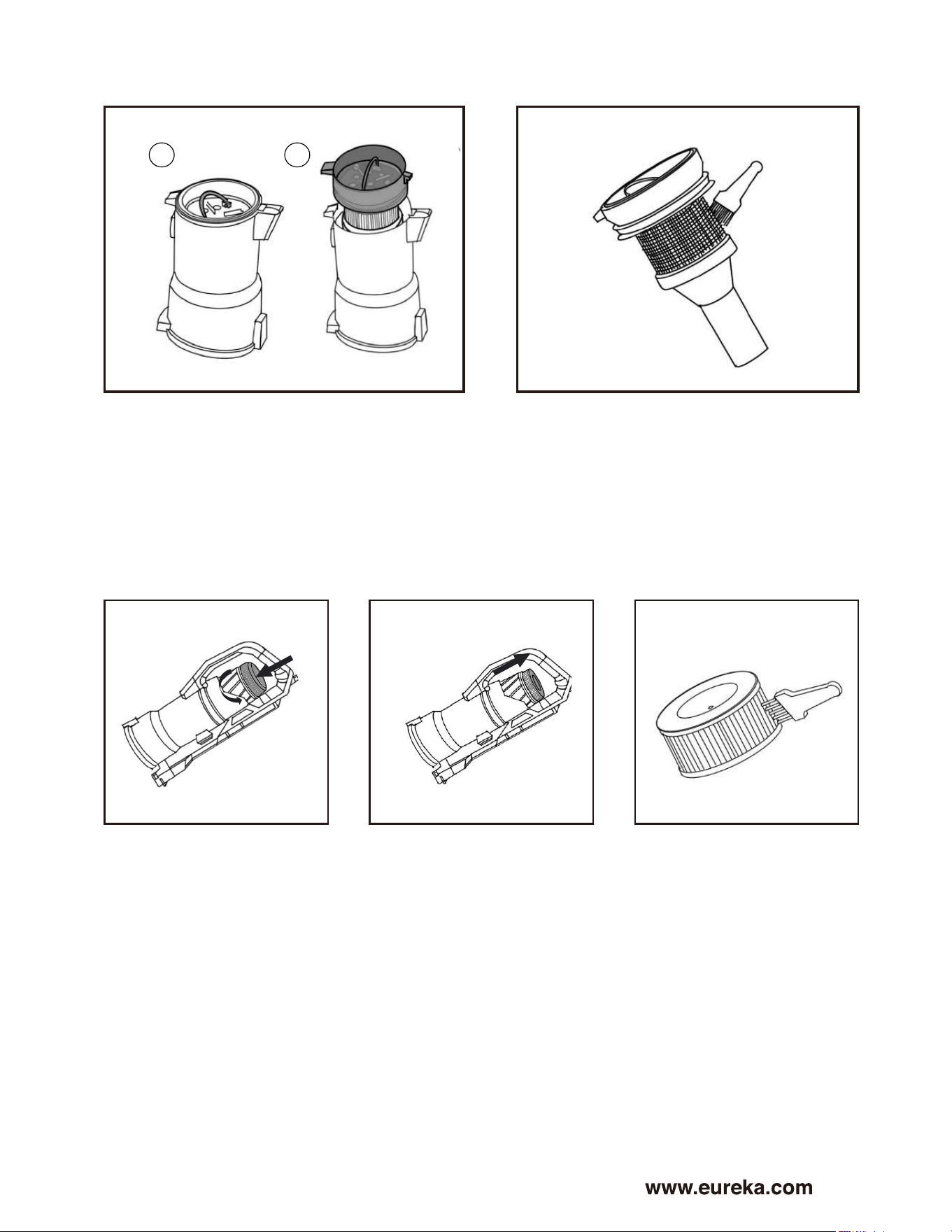
Pull up the metal ring, then remove the
separator from the dust cup.
Turn the air outlet plate
counterclockwise, and
then remove the air
outlet plate.
Remove the HEPA filter
by pulling it up off the
unit.
Gently tap the HEPA
filter or use a brush to
clean the dust on the
HEPA surface.
Clean the dust on the surface of the
separator to prevent build-up from
forming.
11
How to clean the dust separator
How to clean HEPA Filter
1
2
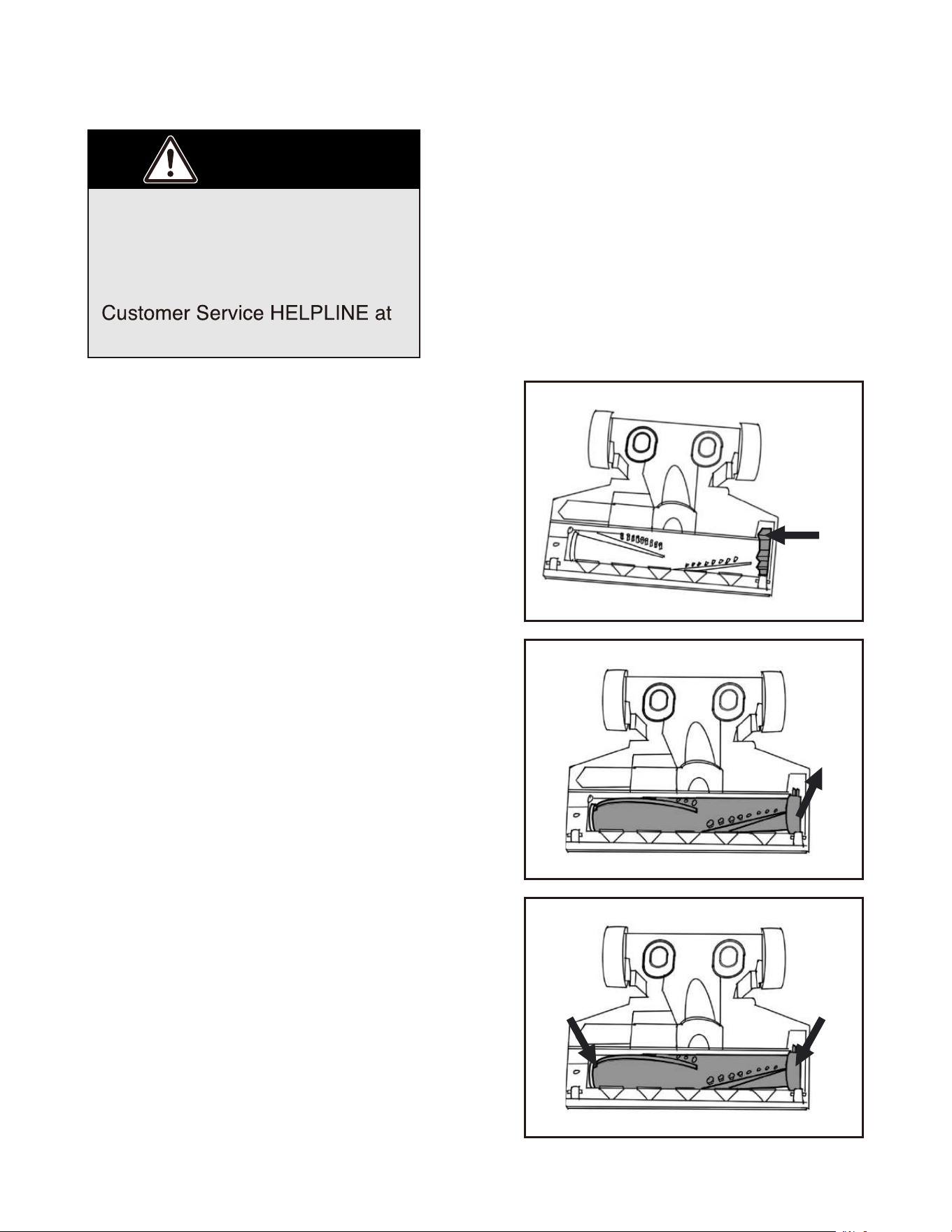
Turn off vacuum and unplug from electrical
outlet.
Turn vacuum upside down with brushroll
facing upwards. Remove the brushroll lock
by squeezing access tab and pulling it up
off the vacuum (Fig. 1).
Remove brushroll by pulling tab end of roller
up and then angle brushroll so it can be
pulled out (Fig. 2).
Clean off any debris from the brushroll.
To reinsert the brushroll, angle it and align
grooved end of brushroll with corresponding
grooves on vacuum and push it back into
place ensuring it is fully inserted in
place (Fig. 3).
Then reinstall the brushroll lock tab until it
clicks into place.
To ensure proper maintenance and effective
cleaning performance, periodically clean the
brushroll and brushroll ends by removing any
remaining string, hair, carpet fibers, and other
debris. Regularly check the brushroll and
ends of brushroll for wear or damage.
12
Eureka Customer Service HELPLINE 1-800-282-2886
To avoid unnecessary service calls, periodically check brushroll for debris..
Make sure vacuum is turned off
and power cord is unplugged.
Warning: Do not attempt to
remove belt. Call the Eureka
1-800-282-2886.
CAUTION
How to maintain the brushroll
1
2
3
Release Tab
13
If the vacuum is not cleaning
floors or if there is no suction at
the end of the hose, check the air
path for any blockage.
The cup release buttons are located on both sides at the bottom of the handle.
Press and squeeze the purple buttons and pull dust cup out away from the
machine (Fig. 1). See dust cup maintenance instructions on page 10.
Empty the debris in the dust cup by holding the dust cup over the waste basket
and press lever to release the bottom lid (Fig. 2).
Check filters and filter screen. Remove any debris and shake off dust. See filter
maintenance instructions on page 11.
If there is still no suction, check for blockages in the floor nozzle
How to clean a blockage
.
Make sure vacuum is turned off
and power cord is unplugged.
WARNING: Never operate
vacuum cleaner without all filters,
filter screen and dust cup in
proper position.
CAUTION
•
•
•
•
•
•
1 2
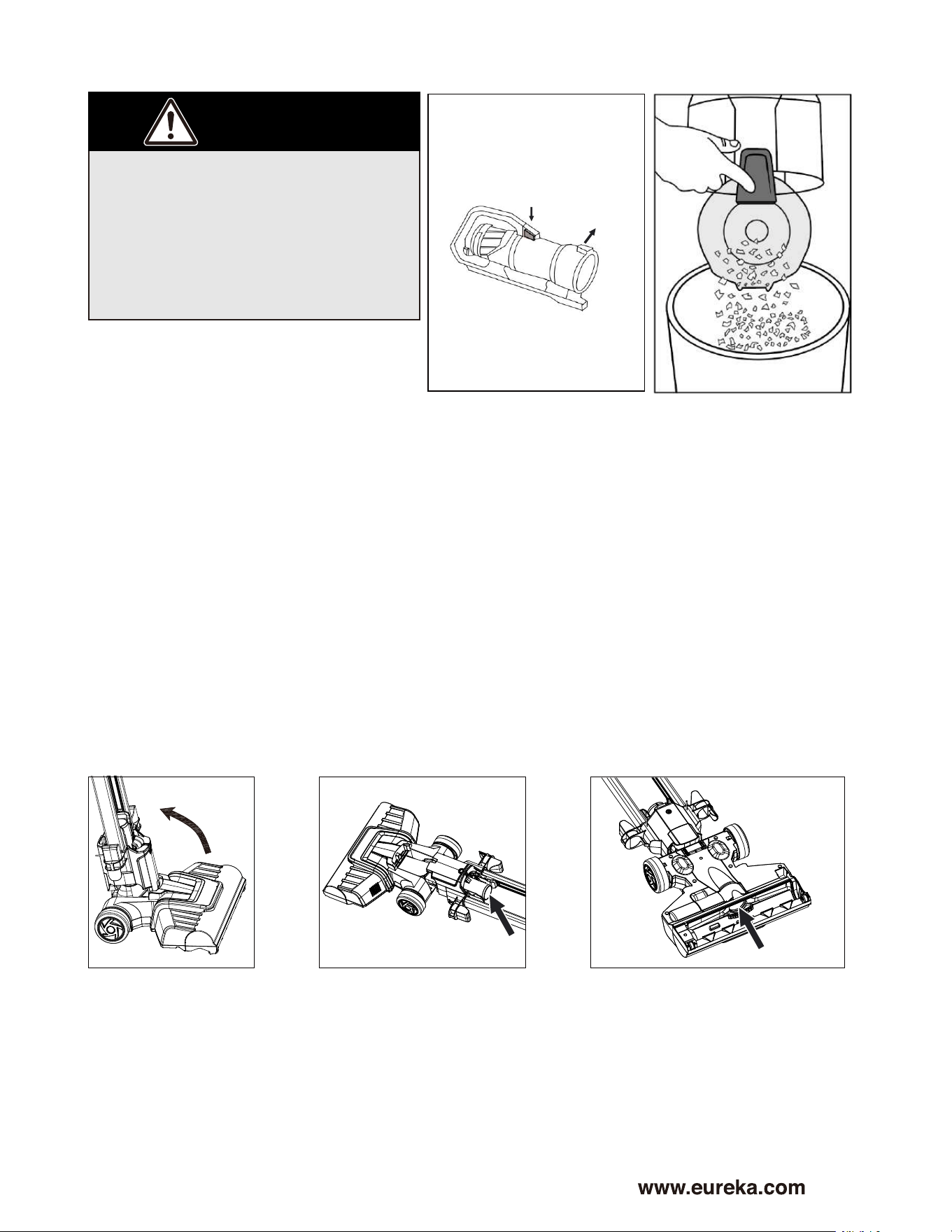
Remove the canister from the vacuum and step on the nozzle to lower handle
and lay down the vacuum (Fig. 3).
Check the hose for clogs (Fig. 4).
Turn vacuum over on the floor, remove the brushroll and check air
passageway and remove any obstructions (Fig. 5).
3 4 5
1.Squeeze
2.Pull out
14
Eureka Customer Service HELPLINE 1-800-282-2886
Problem solving
Make sure vacuum is turned off and power cord is unplugged.
NOTICE: Thermal cut-off
This vacuum cleaner has a special thermostat that protects the vacuum in case of
motor overheating. If the vacuum suddenly shuts off, proceed as follows:
1) Turn the vacuum off and unplug the unit.
2) Check the vacuum for a possible source of overheating such as a full dust cup,
blocked hose from the outlet or clogged filter. If any of these conditions are found,
fix them and wait at least 30 minutes before attempting to use the vacuum.
3) After the 30 minute period, plug the vacuum back into the outlet and turn on the
switch. If the vacuum still does not work, call the Eureka customer service
helpline 1-800-282-2886.
Trouble shooting
Below are some issues you may run into. If you don’t see the issue below, please
call Eureka customer service helpline 1-800-282-2886.
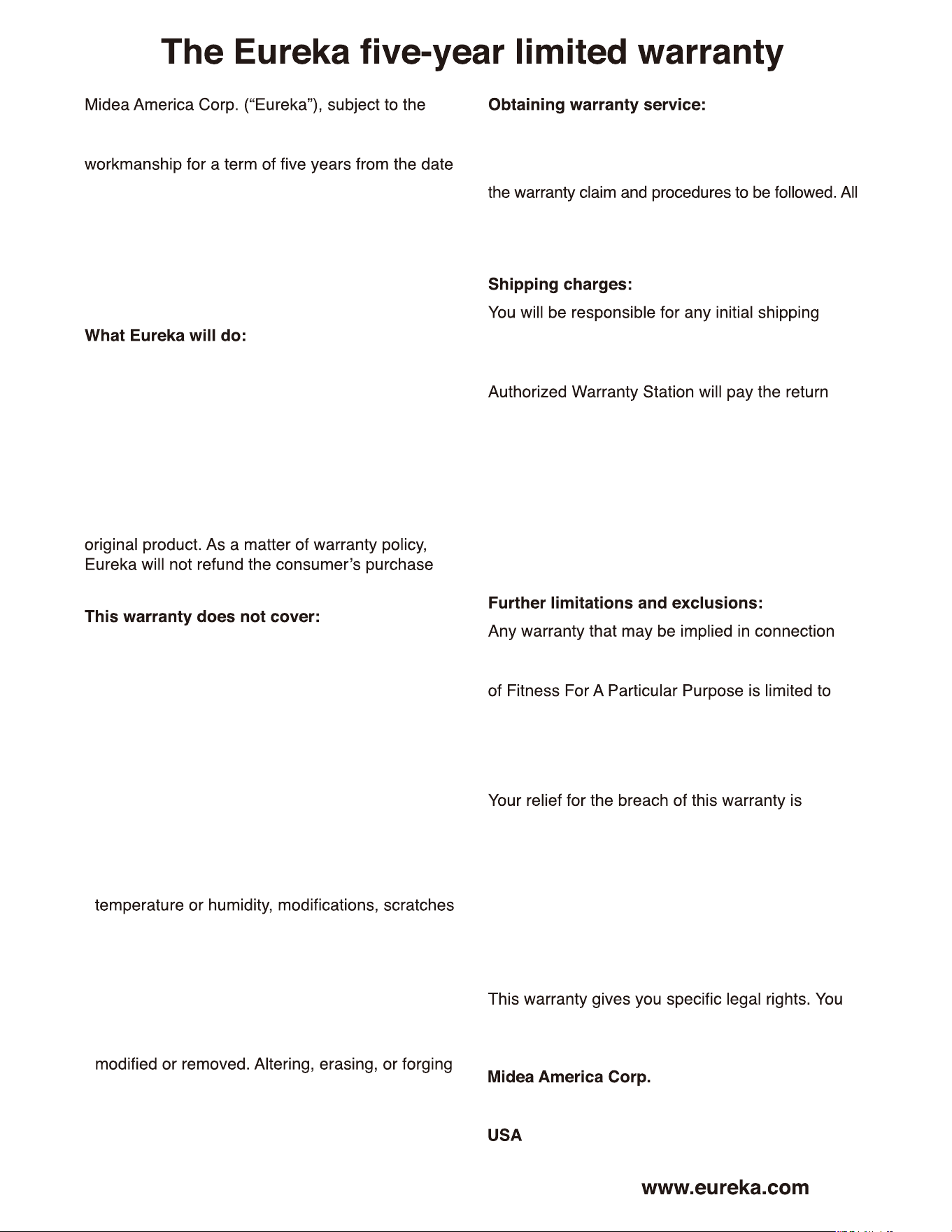
Problem Solution
Vacuum cleaner is not
working
Vacuum cleaner does not
pick up any dirt or the
suction is weak
Brushroll doesn’t rotate or
the mode light blinking
Canister cannot slide
up/down
Check if the power plug is securely inserted into the outlet
Check circuit breaker
If vacuum still does not run, see Thermal cut off on P14
Check if air inlet on floor nozzle or the hose is clogged and remove
any blockages. See page 13.
Check that brushroll and brushroll lock tab are correctly installed.
See page 12.
Vacuum must be reclined for brushroll to spin. Step on floor nozzle
and recline vacuum for vacuuming floors. See page 7.
Remove brushroll, clear any debris and reinstall brushroll.
See page 12.
When preparing to slide the canister upwards/downwards, press the
"Slide up/down yellow trigger button FIRST and then slide the unit
upwards/downwards, respectively.
Clean and/or change filters regularly. See pages 10 and 11.
15
terms and conditions herein, warrants this vacuum
cleaner to be free from defects in material and
of original purchase when used in accordance
with the Eureka operating and maintenance
instructions and under normal household usage.
This warranty is granted only to the original
purchaser and members of immediate household,
and is applicable only to original purchases from
Eureka authorized resellers.
Eureka will, at its option, repair or replace a
defective vacuum or vacuum part that is covered
by this warranty. Repairs may be performed using
new or refurbished parts that meet or exceed
elects to replace the vacuum, the replacement
may be a reconditioned unit. Depending on
availability of products, Eureka reserves the right
to provide you with a replacement product that is
the same or similar, or substitute equivalent of the
price.
• Normal wear and tear of the vacuum and vacuum
parts that require replacement under normal
use light bulbs, brush-roll, bristles, impellers and
cleaning.
• Damages or malfunctions resulting from:
improper or unreasonable use or maintenance,
abuse, negligence, failure to follow instructions
contained in any written materials that
accompany the product, deterioration by reason
of excess moisture, corrosive atmosphere,
lightning, power surges, connections to improper
voltage supply, unauthorized alteration, or
other external causes such as extremes in
or discoloration, accidents, misuse, or acts of
God. This warranty also does not cover damage
resulting from repair or attempted repair by
anyone other than Eureka or an authorized
Eureka Warranty Station. This warranty is not
applicable to any product that has been altered
or on which the serial number has been defacted,
any proof-of-purchase documents voids any
applicable product warranty.
To obtain warranty service you must contact the
Eureka Service Team, toll free, at 1-800-282-2886 or
email customerserviceusa@midea.com, to discuss
warranty claims must include submission of proof-of-
purchase documentation. For additional information,
you may also visit www.eureka.com.
and insurance charges if the defective product(s)
must be shipped for warranty service or warranty
evaluation; however, Eureka or a Eureka
shipping charges if repairs are covered by the
warranty. When returning parts for repair, you must
include the model, type and serial number located
on the rating plate. If any product submitted for
warranty service is found to be ineligible, an
estimate of repair cost will be furnished and the
repair performed only if requested by the owner
and upon receipt of payment or acceptable
arrangements for payment.
with your purchase or use of the vacuum, including
any warranty of Merchantability or any warranty
the duration of this limited warranty. Some states
do not allow limitations on how long an implied
warranty lasts, so the above limitations may not
apply to you.
limited to the relief expressly provided above.
In no event shall the manufacturer be liable for
any consequential or incidental damages you
may incur in connection with your purchase
or use of the vacuum. Some states do not
allow the exclusion or limitation of incidental or
consequential damages, so the above limitation or
exclusion may not apply to you.
may also have other rights, which may vary by
state.
300 Kimball Drive
Parsippany, NJ 07054
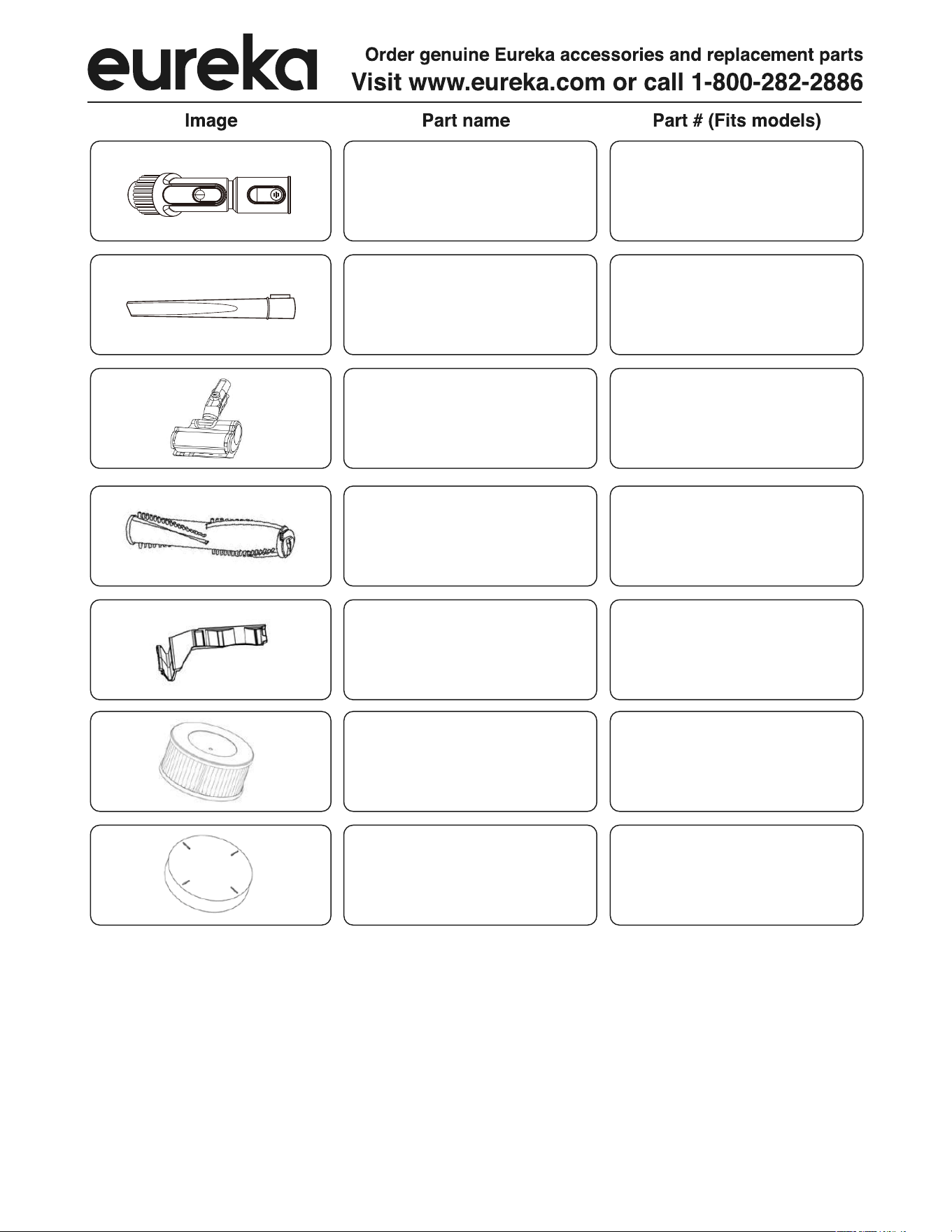
Brushroll
12175000096180Crevice tool
12175000096187
2-in-1 Dusting Brush +
Upholstery Tool
12175000A42392
12175000A42393
12175000096088
Motorized Pet &
Stair Tool
Brushroll Lock Tab
12175000096089
Post-Motor HEPA filter
12475000008289
Pre-Motor foam filter
16
Eureka Customer Service HELPLINE 1-800-282-2886
Thank you for purchasing your new
Eureka vacuum!
Important instructions
For easy assembly, please take a few
If you have questions about your new
vacuum, please contact our customer
We’re here to help!
Owner’s Guide
NEU800 series
Upright vacuum cleaner; household type